
#🆘│community-support
1 messages · Page 226 of 1
 humble sequoiaBOT
 noble meadow
Does anyone else have the problem of two active subscriptions on one server? I just noticed that PayPal is charging me twice.
 harsh epoch
noble meadow
Does anyone else have the problem of two active subscriptions on one server? I j...
harsh epoch
noble meadow
Does anyone else have the problem of two active subscriptions on one server? I j...
If you're having a billing issue you're probably better off making a ticket than asking here
 barren bloom
 simple garden
i'm trying to set up the bot inside another server but the server isnt popping up on the website even tho the bot is already in there
harsh epoch
simple garden
i'm trying to set up the bot inside another server but the server isnt popping u...
in your server list try using the  button
 simple garden
ive tried that but its still not there
barren bloom
can you show me how to create a ticket
harsh epoch
simple garden
ive tried that but its still not there
Do you have permission to use/view the dashboard for this server? You'll need to have either an allowed role, or administrator
https://docs.tickettool.xyz/debugging/faqs#i-cant-see-my-server-on-the-dashboard

Common questions and troubleshooting.
harsh epoch
barren bloom
can you show me how to create a ticket
To open a ticket you should see a channel named something like "support" or "tickets" etc.
In there there'll be a panel sent by Ticket Tool with a dropdown list or a button if the server has it set up
simple garden
harsh epoch
Do you have permission to use/view the dashboard for this server? You'll need to...
oh i might not lemme see
 minor cosmos
Hi, I am currently getting a DiscordAPIError[10062]: Unknown interaction when i run /setup for a server i'm community manager for. (the reason why I know the error code is because I gotten them a lot from a bot that I code for my friend) is anyone else having issues with Ticket Tool white having issues responding at this time or is it just the server i'm setting up the bot in?
 harsh epoch
If Ticket Tool isn't responding, check that the bot has all the permissions it needs. You can run /debug to check this. If you need help, screenshot the output from the command and send it here.
If you get the same error, then it's missing 3 key permissions. You'll need to assign View Channel, Send Messages, and Embed Links to the Ticket Tool role
minor cosmos
Okay i'll check that because I just added the bot and it should have every single perm
barren bloom
harsh epoch
To open a ticket you should see a channel named something like "support" or "tic...
can you show me
 harsh epoch
barren bloom
can you show me
harsh epoch
barren bloom
can you show me
If you're talking about making a ticket here then you can in #🎫│make-a-ticket
 modest cliff
Need help! 🚨
Banned from Dandy’s World (Error 267 - Anti Exploit) but I did NOT exploit.
Roblox: Teo_lila13 – please review 🙏
minor cosmos
harsh epoch
If Ticket Tool isn't responding, check that the bot has all the permissions it n...
this is the perms ticket tool has (I had to run it through a different bot) and it is giving discord api errors still after running /debug
 humble sequoiaBOT
@modest cliff
⚠️ You're in the wrong place
We provide support for Ticket Tool Discord bot and cannot help you with whatever issue you have.
- We don't know which Support Team you should contact to get this issue resolved, and unfortunately we won't be able to accurately tell you.
If you don't have any further questions regarding our bot Ticket Tool, please close this ticket
harsh epoch
minor cosmos
this is the perms ticket tool has (I had to run it through a different bot) and ...
Can you show me the permissions that Ticket Tool has for that channel?
 ashen musk
why the bot is offline
 worldly helm
harsh epoch
Can you show me the permissions that Ticket Tool has for that channel?
worldly helm
harsh epoch
Can you show me the permissions that Ticket Tool has for that channel?
Here is the debug-log from Phills latest /debug usage.
 worldly helm
ashen musk
why the bot is offline
worldly helm
ashen musk
why the bot is offline
Heya! 👋
The bot is not down. What makes you think that?
ashen musk
@worldly helm
 minor cosmos
worldly helm
Here is the debug-log from Phills latest `/debug` usage.
minor cosmos
worldly helm
Here is the debug-log from Phills latest `/debug` usage.
oh great
ashen musk
it has been a while like 1 or 2 days
worldly helm
ashen musk
<@972202754212782080>
Please kick the bot and re-invite it. That could work.
harsh epoch
@minor cosmos Based on the image from Lias, Ticket Tool is missing the "Send messages" permission. You'll need to enable that and try again
 queen lily
Does anyone know how to get attendance-ping
worldly helm
queen lily
Does anyone know how to get attendance-ping
Hello! 👋
How is this relevant to our Discord bot?
ashen musk
thanks @worldly helm
 iron nightBOT
Gave +1 Rep to @worldly helm (current: #6 - 956)
worldly helm

queen lily
...
minor cosmos
harsh epoch
<@1163939796767473698> Based on the image from Lias, Ticket Tool is missing the ...
yea the way that I gotten the channel setup uhh
modest cliff
Got it, thank you for the help!
harsh epoch
minor cosmos
yea the way that I gotten the channel setup uhh
it'll need that permission for it to be able to send any messages.
 verbal sparrow
Hello, I have a problem generating a ticket. It appears that I already have a ticket in process, but on the server where I am, I did not create any tickets nor do I have any active tickets on that server.
minor cosmos
harsh epoch
it'll need that permission for it to be able to send any messages.
I just gotten it fixed but then the /setup command is not ephemeral, I remember on previous ticket tool versions it used to be ephemeral (I think)
 harsh epoch
verbal sparrow
Hello, I have a problem generating a ticket. It appears that I already have a ti...
harsh epoch
verbal sparrow
Hello, I have a problem generating a ticket. It appears that I already have a ti...
Does it say that you have tickets open, or does it just say that the limit has been reached? There is a way so a server can set a maximum amount of tickets open for all users.
Do you have a screenshot of the message it's giving you?
verbal sparrow
harsh epoch
Does it say that *you* have tickets open, or does it just say that the limit has...
yes, wait
harsh epoch
minor cosmos
I just gotten it fixed but then the /setup command is not ephemeral, I remember ...
I'm not entirely sure on that, i've never actually used the setup command myself until a couple days ago 😭 Sorry
 vestal geode
humble sequoiaBOT
vestal geode
humble sequoiaBOT
⚠️ You're in the wrong place
We provide support for Ticket Tool Discord bot and cannot help you with whatever issue you have.
- We don't know which Support Team you should contact to get this issue resolved, and unfortunately we won't be able to accurately tell you.
If you don't have any further questions regarding our bot Ticket Tool, please close this ticket
verbal sparrow
But this is the first time I've tried to send a ticket on that server.
 harsh epoch
verbal sparrow
But this is the first time I've tried to send a ticket on that server.
harsh epoch
verbal sparrow
But this is the first time I've tried to send a ticket on that server.
im not entirely sure then. You're probably better off waiting for someone that might have had this same issue, or #🎫│make-a-ticket and someone would be able to offer better help
minor cosmos
harsh epoch
I'm not entirely sure on that, i've never actually used the setup command myself...
okay, I'll make a bug report and see if it is indeed true
 pseudo ravine
It's not a bug
minor cosmos
pseudo ravine
It's not a bug
oh that was just made to no longer be ephemeral in a previous update?
 pulsar lodge
why when i press / i dont get no commands on the roles i have for support team and it was working before but not now
pseudo ravine
minor cosmos
oh that was just made to no longer be ephemeral in a previous update?
Yes, but regardless, it's not a bug. Having it be ephemeral or not doesn't change the functionality
 pulsar lodge
 tight igloo
what do i do
tight igloo
what do i do
did u give permission to the bot in that channel?
pulsar lodge
pulsar lodge
why when i press / i dont get no commands on the roles i have for support team ...
@pseudo ravine sorry to ping but yk why this happened?
oops
pseudo ravine
Please ensure the member has the Use Application Commands permission
pulsar lodge
tbh i didnt know i couldn’t ping
pulsar lodge
pseudo ravine
Please ensure the member has the `Use Application Commands` permission
i do have it on but still nothing?
pseudo ravine
Please ensure they have the permission in the channel
pulsar lodge
u mean in the ticket channel?
pseudo ravine
In the channel they're running the commands in
pulsar lodge
it’s also on
pseudo ravine
Are you using the View as Role feature?
pseudo ravine
Please use an alt account to test it
humble sequoiaBOT
View As Role feature
Discord's integrated View As Role feature will allow you to see how different groups of roles will have access to your server's channels. Even though, this feature isn't reliable for thoroughly testing Ticket Tool considering that the tickets are created based on User roles, and that Roles permissions are only used for Support Team Roles, and Additional Roles.
For testing Ticket Tool as a user we suggest you ask a friend to open a ticket for you as a regular member would do, or use an alternative account to simulate the same process to make sure everything is set properly.
pulsar lodge
okok g
 trim rune
What is the meaning of transcript and what is the use also
 hallow fiber
trim rune
What is the meaning of transcript and what is the use also
hallow fiber
trim rune
What is the meaning of transcript and what is the use also
saving messages in a ticket
Ur like saving the ticket basically
and whatever is said in it
trim rune
hallow fiber
and whatever is said in it
But what is the use and does it save image also
hallow fiber
trim rune
But what is the use and does it save image also
the use is some ppl use it for proof as in if they have done a trade or something for proof or like other stuff they save messaegs but idk abt images
trim rune
hallow fiber
the use is some ppl use it for proof as in if they have done a trade or somethin...
Ok thanks
iron nightBOT
Gave +1 Rep to @hallow fiber (current: #414 - 1)
hallow fiber
trim rune
Ok thanks
np
harsh epoch
@trim rune

 teal yew
where to i open ticket for support
 crimson oak
teal yew
where to i open ticket for support
crimson oak
teal yew
where to i open ticket for support
If you want fast support you can ask here @teal yew
teal yew
idk why i dont see that channel
crimson oak
teal yew
idk why i dont see that channel
Then ask here
 crimson oak
teal yew
how to i add permission to just me can close ticket
crimson oak
teal yew
how to i add permission to just me can close ticket
You mean server support team or ticket owner?
teal yew
support team
crimson oak
teal yew
support team
Menu -> Buttons -> Button Close Ticket
Support Team Only  <- Making that Support Team role only can close ticket
(facultative if your doing the below tech)
'Put the role you want that can close the ticket'
teal yew
not close delete
teal yew
to delete ticket
crimson oak
But member cannot delete the ticket
teal yew
support team only
harsh epoch
$help
humble sequoiaBOT
harsh epoch
$help
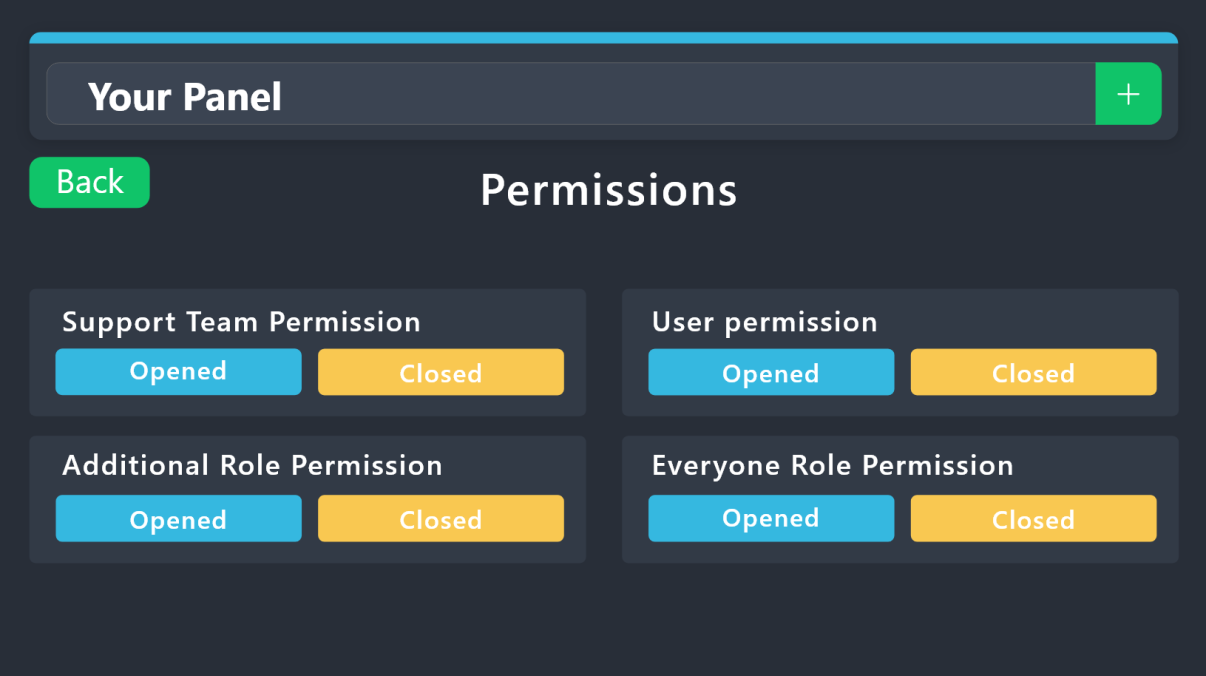
1. Open your Panel Configs tab in your server's dashboard
2. Select the panel you want to grant access to
3. Open the Permissions options menu
4. Find what role you'd like to edit permissions for
5. Choose if you'd like to edit opened or closed permissions for that role
6. Edit the permissions by tickingeach permission
7. Save changes
 teal yew
admin and owner
crimson oak
harsh epoch
$help
Stepping in
 fallen mirage
trying to get my ticket system to auto delete after logging/closing
crimson oak
teal yew
admin and owner
Menu -> Buttons -> Button Delete Ticket
Support Team Only 
Allowed Role
OwnerRole AdminRole
crimson oak
fallen mirage
trying to get my ticket system to auto delete after logging/closing
Wdym by "Logging"
You mean you want to auto delete after ticket close?
fallen mirage
i have the auto transcripts setup. i want to just have it so it closes and deletes the channel
teal yew
@crimson oak how can i move pannels?
crimson oak
fallen mirage
i have the auto transcripts setup. i want to just have it so it closes and delet...
Okay so if i understand
User close the ticket -> Transcript getting send/Ticket AutoClose
fallen mirage
yeah
crimson oak
teal yew
<@1007751886503419964> how can i move pannels?
Move pannel?
 crimson oak
fallen mirage
yeah
crimson oak
fallen mirage
yeah
Menu -> General
Two Step Ticket
teal yew
how to i do that/
crimson oak
teal yew
to set 13th pannel between 10th and 11th
You cant
harsh epoch
They ordered by the order that you created them in. You can't change that order, but if you wanted to edit the order that buttons/dropdown items appear in a panel in discord, then you can do that if that's what you mean
crimson oak
harsh epoch
They ordered by the order that you created them in. You can't change that order,...
Please, 1 user per user
Respect this rule
teal yew
why pannel isnt showing on ticket
 uncut elm
My name is Wondie, and I am the owner of The Tipsy Cow and Sunset Collaboration of Bars (available on both VRC and Discord).
I am currently experiencing an issue with the bot where only staff members are able to open tickets, while regular users without admin permissions are unable to do so.
It’s possible that this may be related to how I configured the bot, but I wanted to reach out for clarification. I’ve attached an image of what users are seeing on their end for reference.
Thank you in advance for your assistance.


 crimson oak
uncut elm
My name is Wondie, and I am the owner of The Tipsy Cow and Sunset Collaboration ...
crimson oak
uncut elm
My name is Wondie, and I am the owner of The Tipsy Cow and Sunset Collaboration ...
Panel -> Buttons -> Create Ticket Button
Support Team Only
Allowed Role
None (or your role)
fallen mirage
still giving me this pannel
 crimson oak
fallen mirage
still giving me this pannel
crimson oak
fallen mirage
still giving me this pannel
Show me general screen (in the dashboard)
fallen mirage


 teal yew
i have 5 drop downs and it just show 4
crimson oak
teal yew
i have 5 drop downs and it just show 4
Which panel you use for dropdown?
fallen mirage
crimson oak
ty much 🙂
iron nightBOT
Gave +1 Rep to @crimson oak (current: #87 - 14)
tight igloo
how do i give people permission to open tickets
uncut elm
crimson oak
Panel -> Buttons -> Create Ticket Button
Support Team Only <:Switch_disabled_ne...
Life saver ty!
iron nightBOT
Gave +1 Rep to @crimson oak (current: #83 - 15)
crimson oak
tight igloo
how do i give people permission to open tickets
Panel -> Buttons -> Create Ticket
Support Team Only
Allowed Role
Member <- Facultative if you disabled Support Team Only
tight igloo
crimson oak
Panel -> Buttons -> Create Ticket
Support Team Only <:Switch_disabled_neutral:1...
 crimson oak
tight igloo
crimson oak
tight igloo
Go on ticket tool DashBoard and follow my help -> https://tt.bot/dashboard

Ticket Tool - Ticketing without clutter - The #1 Discord support bot
 wet raptor
still
 crimson oak
wet raptor
still
crimson oak
wet raptor
still
What is your issue?
crimson oak
wet raptor
my issue is that it wont let NON mods make tickets
General -> Buttons -> Create Ticket Button
Support Team only
Allowed Role
Member <- If you Support Team Only this is Facultative
tight igloo
can you come into the server and see if it works?
crimson oak
tight igloo
can you come into the server and see if it works?
No sorry, but it should work you can be sure.
 thick mesa

Keeps showing this whenever I try to send the create ticket button in a channel
It has the admin perms to my server
worldly helm
 ebon loom
is it possible to get free premium for voting
ebon loom
is it possible to get free premium for voting
Heya! 
This was possible but we don't do that anymore.
worldly helm
thick mesa
Howdy! 👋
Is there any error message being sent into the channel that you are trying to send the panel to?
ebon loom
worldly helm
Heya! <:kinspikalove:1166562062558838894>
This was possible but we don't do th...
ah okay, is there any other way to get free premium
worldly helm
No but you can use the 7 day trail.
worldly helm
worldly helm
I don't 😅
ebon loom
worldly helm
I don't 😅
thanks @worldly helm
iron nightBOT
Gave +1 Rep to @worldly helm (current: #6 - 957)
worldly helm
Glad I was able to help you! 
ebon loom
thank you
thick mesa
worldly helm
Howdy! 👋
Is there any error message being sent into the channel that you are t...
Yess! There was
But now its not even being sent
worldly helm
thick mesa
Yess! There was
What was it?
harsh epoch
 gritty knot
How can I put emojis?
gritty knot
How can I put emojis?
where are you trying to add them?
gritty knot
harsh epoch
where are you trying to add them?
Setup message
thick mesa
worldly helm
What was it?
I think it was because my laptop's date and time weren't synced?
harsh epoch
gritty knot
Setup message
Like a panel name? Or something else
gritty knot
Yes
gritty knot
harsh epoch
Like a panel name? Or something else
Yes the panel name
harsh epoch
If you're using the discord setup command, you can probably just copy and paste an emoji that you want from google
gritty knot
harsh epoch
If you're using the discord setup command, you can probably just copy and paste ...
U mean desktop ?
harsh epoch
gritty knot
U mean desktop ?
It should work on either, you can just copy paste the emoji into the panel name
ebon loom
how do multi panels work
humble sequoiaBOT
For more convenient use of multipanels, you can now combine panels on the dashboard. This will allow you to directly send the multipanel from the dashboard or via the $panel ID command.
Where can I find this?
You can find this setting on the Dashboard -> Panel Configs -> Panel -> Attached Panels
Note: if you're attaching all the panels to a panel called English, don't include English in the attached panel's box (If you do this, it will create a duplicate)
This will put all buttons from all of your panels on one message. The message is the panel message from the panel you're combining these panels in.

 gritty knot
harsh epoch
It should work on either, you can just copy paste the emoji into the panel name
gritty knot
harsh epoch
It should work on either, you can just copy paste the emoji into the panel name
Didn’t work
 plain ginkgo
Hello, I have a problem when we close and delete a ticket it moves to the group and the channel remains but there are no messages there (need to delete manually) help fix please
 harsh epoch
ebon loom
does that also work with something like this?
harsh epoch
ebon loom
does that also work with something like this?
It should work like that with the multipanels. For dropdown you have to enable another setting
harsh epoch
gritty knot
Didn’t work
I managed to get it working in my testing server just by pasting an emoji in, but i've only tried with default emojis. Not custom ones, if that's what you're trying to add
 gritty knot
harsh epoch
I managed to get it working in my testing server just by pasting an emoji in, bu...
gritty knot
harsh epoch
I managed to get it working in my testing server just by pasting an emoji in, bu...
Can u Join My server ? And help me ?
harsh epoch
gritty knot
Can u Join My server ? And help me ?
I can't, things have to remain here
If you send a screenshot of where you want an emoji and what emoji you want i can try help here though?
 stoic vector
how do i set it up
humble sequoiaBOT
First you will want to invite the bot to your server. Once the bot is in your server, you can manage your server in the dashboard.

To create a panel we are going to need to head over to the Panel Configs Tab on the Dashboard.
Once at the dashboard we will need to click Create Panel.
Enter a panel name (Fill in any optional settings you want).
Click Create Panel and you are ready to get started with configuring your panel.
An example of a creating a panel is shown below.

Once the panel has been created, use the blue Send button and select the channel you want the panel to be sent to.
The Panel wasn't send
Use the </debug:1029783024264564765> command to diagnose possible permission issues with the bot.

 raven lagoon
This happens whenever I try to make a ticket
 scenic forum
raven lagoon
This happens whenever I try to make a ticket
scenic forum
raven lagoon
This happens whenever I try to make a ticket
Are you staff on that server?
raven lagoon
scenic forum
Are you staff on that server?
Nope, It's forsakens support server
gritty knot
scenic forum
Are you staff on that server?
Can u help me how to put emojis in the panel of setup name
 proud kindle
bonjour je viens d'acheter un code pour mafia et quand je me connecte a steam il me demande identification code reçu sur la boite outlook
comment faire svp ?
harsh epoch
gritty knot
Can u help me how to put emojis in the panel of setup name
Can you send me a screenshot of where you're trying to add it and I can give you some instructions on how to add one?
gritty knot
harsh epoch
Can you send me a screenshot of where you're trying to add it and I can give you...
K
 harsh epoch
gritty knot
harsh epoch
gritty knot
If it won't let you type an emoji directly into the panel name, you can create the rest of the panel how you want, and once it's created go to https://tickettool.xyz/dashboard/ and just rename the panel
Ticket Tool - Ticketing without clutter - The #1 Discord support bot
scenic forum
raven lagoon
Nope, It's forsakens support server
Then we cannot assist you, you'd need to reach out to their servers staff to fix it
 halcyon topaz
How to switch language to english in ticket tool.xyz?
 fresh viper
Hii im struggling with the Settings of the Ticket System. I made a Ticket and when someone create a Ticket everyone is able to See it. How Can i fix it?
humble sequoiaBOT
1. Open your Panel Configs tab in your server's dashboard
2. Select the panel you want to grant access to
3. Open the Permissions options menu
4. Find what role you'd like to edit permissions for
5. Choose if you'd like to edit opened or closed permissions for that role
6. Edit the permissions by ticking
7. Save changes
harsh epoch
@fresh viper Remove the permission "View Channel" from the "Everyone Role Permissions" and it should fix it. Use the embed above if you don't know how to access the permissions
 glad sinew

 fallow heron
My tickettool bot doesnt delete the ticket channel after click delete button, just delete the channel content.. how fix?

 subtle dawn
Preciso de ajuda de uma compra que fiz de rio coins
harsh epoch
subtle dawn
Preciso de ajuda de uma compra que fiz de rio coins
Como isso não está relacionado ao Ticket Tool, não podemos ajudar
subtle dawn
Não consegui abrir ticket sabe oq tenho que fazer ?
harsh epoch
subtle dawn
Não consegui abrir ticket sabe oq tenho que fazer ?
Não conheço o layout desse servidor, portanto, não sei qual é a melhor maneira de entrar em contato com eles.
humble sequoiaBOT
━━ Johny sins's inquiry has been moved to a ticket ━━
gritty knot
gritty knot
@harsh epoch
harsh epoch
gritty knot
<@1124651666650693774>
I believe a ticket was created about this issue, so you might be better continuing in there now. The support team will be better at giving more accurate help
 remote granite
Help me how can I do it I added a bot to the server
 humble sequoiaBOT
First you will want to invite the bot to your server. Once the bot is in your server, you can manage your server in the dashboard.
To create a panel we are going to need to head over to the Panel Configs Tab on the Dashboard.
Once at the dashboard we will need to click Create Panel.
Enter a panel name (Fill in any optional settings you want).
Click Create Panel and you are ready to get started with configuring your panel.
An example of a creating a panel is shown below.
Once the panel has been created, use the blue Send button and select the channel you want the panel to be sent to.
The Panel wasn't send
Use the </debug:1029783024264564765> command to diagnose possible permission issues with the bot.
harsh epoch
@remote granite 
remote granite
harsh epoch
<@715889142952624168> <:this:894279341108772914>
I can't get a bot to appear on the server!
harsh epoch
Does it not add at all?
 harsh epoch
If it isn't showing on the dashboard, try refreshing and using the Sync Servers button
remote granite
harsh epoch
If it isn't showing on the dashboard, try refreshing and using the <:sync:126573...
Already done it, but it doesn't help!
harsh epoch
In that case, you might not have permission to access the panel. You need the "administrator" permission or an allowed dashboard role to have access to it
remote granite
No, he has everything but he doesn't want to show up....
harsh epoch
remote granite
No, he has everything but he doesn't want to show up....
I meant you, you have to one of the roles in order to view the dashboard for that server
 harsh epoch
That's the bot. Your account needs them.
Can you tell/show me the permissions of your role in that server?
 remote granite
 harsh epoch
You're only a user of the server, so you won't have permissions to view or edit Ticket Tool. You'll need to talk to a member of staff from that server and wait for them to set it up, or if you should have access, give you the correct permission.
remote granite
I am the administrator of this server!
harsh epoch
Are you able to show me the administrator permission for that role on your account in particular?
gritty knot
harsh epoch
Are you able to show me the administrator permission for that role on your accou...
Bro
scenic forum
gritty knot
Bro
Can you run /permissionlevel and tell me the result?
 orchid nexus
what does this mean?
 scenic forum
orchid nexus
what does this mean?
scenic forum
orchid nexus
what does this mean?
Can you use /debug?
orchid nexus
scenic forum
Can you use ``/debug``?
it still says the same message
scenic forum
orchid nexus
it still says the same message
If the bot isn't responding when doing /debug
Its lacking these 3 permissions inside the channel it has been used in view channel, send message and embed links
orchid nexus
scenic forum
If the bot isn't responding when doing ``/debug``
Its lacking these 3 permission...
Okay Thank You!
iron nightBOT
Gave +1 Rep to @scenic forum (current: #26 - 250)
 drifting axle
I ran 2 projects. One a couple days ago and one today. The one for today did not create any transactions on my coin.
humble sequoiaBOT
@drifting axle
⚠️ You're in the wrong place
We provide support for Ticket Tool Discord bot and cannot help you with whatever issue you have.
- We don't know which Support Team you should contact to get this issue resolved, and unfortunately we won't be able to accurately tell you.
If you don't have any further questions regarding our bot Ticket Tool, please close this ticket
 worthy dawn
humble sequoiaBOT
worthy dawn
humble sequoiaBOT
@worthy dawn
⚠️ You're in the wrong place
We provide support for Ticket Tool Discord bot and cannot help you with whatever issue you have.
- We don't know which Support Team you should contact to get this issue resolved, and unfortunately we won't be able to accurately tell you.
If you don't have any further questions regarding our bot Ticket Tool, please close this ticket
 dense violet
Is it possible that we get the chance to add a user to the ticket while we're creating a ticket? instead of using $add after creating a ticket?
 sick socket
I added the bot into my server but ime struggling to actually make it work? Each time I write a command it says the app isn't responding
 buoyant kindle
sick socket
I added the bot into my server but ime struggling to actually make it work? Eac...
buoyant kindle
sick socket
I added the bot into my server but ime struggling to actually make it work? Eac...
can you use $debug and give all the permission it needs.
If the bot isn't responding when doing /debug
Its lacking these 3 permissions inside the channel it has been used in view channel, send message and embed links
 thin shoal
I set my bot and now I am trying to delete the ticket panel I created, it doesnt delete it. Its been like this for 2 days, what should I do( It has all permissions)
buoyant kindle
thin shoal
I set my bot and now I am trying to delete the ticket panel I created, it doesnt...
can you check your permission using /permissionlevel
sick socket
Okay the debug comman works now
thin shoal
buoyant kindle
can you check your permission using /permissionlevel
I am server owner
buoyant kindle
sick socket
Okay the debug comman works now
Glad to hear!
buoyant kindle
thin shoal
I am server owner
oh.
thin shoal
it just says Interaction failed
No matter what I choose
yes or no, doesnt matter
Both gets failed
The panel I am talking about doesnt shows at panel editor but shows at delete
And it doesnt delete it
sick socket
It doesn't let me change the title text for the panel
thin shoal
sick socket
It doesn't let me change the title text for the panel
start the /setup command, choose manage & panel editor or something like that, choose the panel you want and you can change the name from there
Dont forget to save
if you did use /setup before, the panel I am saying should be there already
sick socket
It's there, thank you! Turns out setting it up on a computer is easier
Is there a way to block the tickets? Like for exemple set a max amount of tickets opened at a time?
thin shoal
sick socket
Is there a way to block the tickets? Like for exemple set a max amount of ticket...
yes there is
But I am currently busy with setting my own ticket tool
So I will be back to explain, or someone else can explain
It might be hard to understand at first, but I am sure you can do it
sick socket
Yes I found it
thin shoal
Good.
 crimson sage
@humble sequoia
 dull ravine
Hey smb there to help me?
humble sequoiaBOT
⚠️ You're in the wrong place
We provide support for Ticket Tool Discord bot and cannot help you with whatever issue you have.
- We don't know which Support Team you should contact to get this issue resolved, and unfortunately we won't be able to accurately tell you.
If you don't have any further questions regarding our bot Ticket Tool, please close this ticket
 severe laurel
Hello, how can I make it so that a user can create a ticket but cannot close it themselves? Only a moderator should be able to do this.
harsh epoch
severe laurel
Hello, how can I make it so that a user can create a ticket but cannot close it ...
You can edit the permissions for the ticket owner through the dashboard
humble sequoiaBOT
1. Open your Panel Configs tab in your server's dashboard
2. Select the panel you want to grant access to
3. Open the Permissions options menu
4. Find what role you'd like to edit permissions for
5. Choose if you'd like to edit opened or closed permissions for that role
6. Edit the permissions by ticking
7. Save changes
severe laurel
harsh epoch
You can edit the permissions for the ticket owner through the dashboard
Which ones exactly? I turned everything off and nothing changed.
 ionic kettle
Hi
I need help
I can’t see the claim button when the ticket is created
@harsh epoch
harsh epoch
severe laurel
Which ones exactly? I turned everything off and nothing changed.
wrong tab sorry, under buttons -> button close ticket enable "
Support team only"
harsh epoch
ionic kettle
I can’t see the claim button when the ticket is created
Do you have Ticket Tool premium?
 wind nacelle
Buona sera avrei bisogno di aiuto
severe laurel
harsh epoch
wrong tab sorry, under buttons -> button close ticket enable "<:onswitch:8362684...
Ah, thank you! I saw this setting but for some reason didn't immediately understand what it was for... Haha, thank you!!
iron nightBOT
Gave +1 Rep to @harsh epoch (current: #244 - 2)
harsh epoch
ionic kettle
No
Claiming tickets is a premium feature, so it won't show up on the free bot.
(As a side note: Please don't ping me for support, i'll see your reply pretty qwuick most of the time)
ionic kettle
harsh epoch
Claiming tickets is a premium feature, so it won't show up on the free bot.
(As...
Sure
 lunar solar
@ionic kettle please refrain from pinging community members for support, they will assist with your enquiry at their convenience.
ionic kettle
Ok
fallow heron
Why my ticket tool can't delete the ticket channels? 🙁
scenic forum
fallow heron
Why my ticket tool can't delete the ticket channels? 🙁
Can you run /debug inside the ticket?
 scenic forum
fallow heron
Now he is also creating a ticket inside another one that is already open
scenic forum
fallow heron
Now he is also creating a ticket inside another one that is already open
Could you check at Server Config -> Storage mode if this feature is enabled?
 halcyon pier
Hi! I have problem to pay the premium! Someone help to pay the premium?
scenic forum
halcyon pier
Hi! I have problem to pay the premium! Someone help to pay the premium?
Hey!
Please open a Billing ticket at #🎫│make-a-ticket to get a staff member help
 noble jay
Is there is a way I can get in contact with a dev because I bought the 100k cash during the data wipe so it got wiped and wasn’t restored so if a dev can restore the cash I payed for I would appreciate it thank you
humble sequoiaBOT
⚠️ You're in the wrong place
We provide support for Ticket Tool Discord bot and cannot help you with whatever issue you have.
- We don't know which Support Team you should contact to get this issue resolved, and unfortunately we won't be able to accurately tell you.
If you don't have any further questions regarding our bot Ticket Tool, please close this ticket
 old estuary
How do I get my free la grande that I claimed for 6 inv?
humble sequoiaBOT
@old estuary
⚠️ You're in the wrong place
We provide support for Ticket Tool Discord bot and cannot help you with whatever issue you have.
- We don't know which Support Team you should contact to get this issue resolved, and unfortunately we won't be able to accurately tell you.
If you don't have any further questions regarding our bot Ticket Tool, please close this ticket
remote granite
Guys, I have a question. Can someone help me set up verification with approval?
scenic forum
remote granite
Guys, I have a question. Can someone help me set up verification with approval?
Once they made a ticket and passed they get access to the server?
remote granite
scenic forum
Once they made a ticket and passed they get access to the server?
After entering the server they create a ticket and send a profile after approval by the administration they are completely a member
humble sequoiaBOT
Creating a verification system with Ticket Tool <:TicketToolWhite:1073948900056105060>
Using Discord's permission system you can create a setup that allows your team to manually verify new server members while keeping the rest of the server hidden!
Please configure the permissions of your server's channel as depicted below:
Category Permissions
- Go to your category permissions, or channel permissions in case they are not synced with the category.
- Set the View Channels permission to
 for the @everyone role.
 - Set the View Channels permission to
 for your
 @Memberor@Verifiedrole. - Repeat this process for all of your server's categories.
Ticket Panel Channel
- Set the View Channel permission to for the @everyone role.
- (Optional) If you'd like for verified members to not be able to see that ticket channel anymore, set the View Channel permission to for your
@Memberor@Verifiedrole.
-# Note: Your staff team will still need to grant a verification role. If you have premium, you can check our Ticket Closed Roles feature
$manualverification
remote granite
I tried to set it up, but it didn't work....
scenic forum
@remote granite refer to the embed above on how to set it up
 twilit lynx
 harsh epoch
twilit lynx
harsh epoch
twilit lynx
Discord is rate limiting you, you'll have to wait a little before trying to create another ticket.
 harsh epoch
If Ticket Tool isn't responding, check that the bot has all the permissions it needs. You can run /debug to check this. If you need help, screenshot the output from the command and send it here.
harsh epoch
Can you show me the bots roles having those permissions in that channel?
 wispy shell
Is this all of them?

Fixed it
It wasn’t added somehow to the channel but was in it if ya know what I mean
harsh epoch
Think so, but glad it's fixed!
 daring tundra
Is ticket bot down?
harsh epoch
daring tundra
Is ticket bot down?
Shouldn't be
daring tundra
harsh epoch
Shouldn't be
Cause i tryed to use setup command and it says application couldnt respond

harsh epoch
Have you made it sure it has all the permissions it needs?
worldly helm
 fading mountain
YO
fading mountain
YO
Hey 
Please click the button on your dashboard.
fading mountain
oh 😭 ty
worldly helm
daring tundra
harsh epoch
Have you made it sure it has all the permissions it needs?
Yea and i use / debug it didnt work to
I kicked it and readded it to
worldly helm
Sorry to interrupt. Those are the results of the debug-logs 😄
 wispy shell
worldly helm
Sorry to interrupt. Those are the results of the debug-logs 😄
wispy shell
worldly helm
Sorry to interrupt. Those are the results of the debug-logs 😄
Why you happy?
harsh epoch
daring tundra
Yea and i use / debug it didnt work to
Make sure that ticket tool has the "Send messages" permissions :)
wispy shell
wispy shell
Why you happy?
It probably won’t work
daring tundra
harsh epoch
Make sure that ticket tool has the "Send messages" permissions :)
Oooooooh ok
wispy shell
harsh epoch
Make sure that ticket tool has the "Send messages" permissions :)
See @worldly helm
worldly helm
What??
wispy shell
worldly helm
What??
Look at what I replied to
harsh epoch
wispy shell
See <@972202754212782080>
It was missing send messages. That was their result from the debug command.
wispy shell
Can I promote my server?
worldly helm
No
wispy shell
Aww man
daring tundra
harsh epoch
Make sure that ticket tool has the "Send messages" permissions :)
Ty i fixed it 🙏
iron nightBOT
Gave +1 Rep to @harsh epoch (current: #191 - 3)
harsh epoch
daring tundra
Ty i fixed it 🙏
Glad it's fixed!
humble sequoiaBOT
How do be I become a Support Member?
You can become a support member in 2 ways:
1. You can be really active in #🆘│community-support gain <@&799500225579712543> role and get chosen by a Manager
2. You can apply VIA our applications that would be sent in #📣│server-news
We currently have Support Teams for the following languages:
:flag_us: English
:flag_jo: Arabic
:flag_fr: French
:flag_de: German
:flag_es: Spanish
:flag_br: Portuguese
 echo yacht
@tough hare ⬆️
 tough hare
Sim?
tough hare
echo yacht
<@1412125526826553497> ⬆️
Sim pode falar?
wispy shell
Not here..
echo yacht
tough hare
Sim pode falar?
Sim
wispy shell
 covert swallow
Non English languages are allowed within this channel.
 true mirage
Is there a command to close all tickets
buoyant kindle
true mirage
Is there a command to close all tickets
/purge
covert swallow
Do note that it is server owner only
buoyant kindle
I got confused, does it actually close all or just deletes all.
wispy shell
Imagine English being banned in an English only place
worldly helm
wispy shell
Imagine English being banned in an English only place
Please only use this channel if you require or give support.
buoyant kindle
imagine go to #💬│general-chat
wispy shell
worldly helm
Please only use this channel if you require or give support.
Whyyy 🙁
worldly helm
Because that are the server rules.
wispy shell
Ok fine
worldly helm
buoyant kindle
I got confused, does it actually close all or just deletes all.
It deletes all 😄
buoyant kindle
worldly helm
It deletes all 😄
oo, thanku thanku :>
wispy shell
我该怎么开票?
wispy shell
wispy shell
我该怎么开票?
It’s Chinese
buoyant kindle
wispy shell
wispy shell
It’s Chinese
lol
worldly helm
It will just delete them. Please note that no transcripts are saved.
buoyant kindle
@quartz monolith ->
humble sequoiaBOT

You can check our documentation here;
You can also check #📂│information for the basic setup, or run the </setup:1025379472167403530> command within #🤖│bot-spam to find information on how to setup Ticket Tool.
Alternatively, you can use the /setup command with Ticket Tool in your own server to setup the basics of Ticket Tool!
Our documentation contains all the info you need about the bot to be able to setup and configure the bot however you like.
 left cedar
where to edit the design and text of the embed the ticket bot sends in channel?
harsh epoch
left cedar
where to edit the design and text of the embed the ticket bot sends in channel?
For the panel message?
 harsh epoch
Menu -> Panel -> Edit Panel Message
left cedar
harsh epoch
Menu -> Panel -> Edit Panel Message
ah ty
iron nightBOT
Gave +1 Rep to @harsh epoch (current: #162 - 4)
 flint ermine
Preciso e ajuda @iron night @humble sequoia @
harsh epoch
flint ermine
Preciso e ajuda <@204255221017214977> <@722196398635745312> @
Em que você precisa de ajuda?
 slate path
Hey so im admin and its not letting me close tickets.
 humble sequoiaBOT
━━ User's inquiry has been moved to a ticket ━━
 dim fiber
How can I invite people to join to my discord server?
 warped elk
Hi community, i want that my team on my server close ticket with reason, but i don't want that my team use commands.
 silk torrent
The f... I made a ticket about lost progress and after a month - no response and just deleted? Another greedy developer with zero support! Wasted hours and real money on this painfully slow 🐌 crap
warped elk
warped elk
Hi community, i want that my team on my server close ticket with reason, but i d...
Is there a way to configure that in the dashboard?
 umbral oriole
how do i fix this because i cant ssee a deleted category
 crimson oak
umbral oriole
how do i fix this because i cant ssee a deleted category
crimson oak
umbral oriole
how do i fix this because i cant ssee a deleted category
You should put it in
Category Closed
crimson oak
silk torrent
The f... I made a ticket about lost progress and after a month - no response and...
Hello! Which ticket language support are you using?
 ancient garden
Hi, the bot ticket tool tells me it's not responding to my commands. How can I fix this?
harsh epoch
ancient garden
Hi, the bot ticket tool tells me it's not responding to my commands. How can I f...
Are you able to run /debug in the channel ykure running the commands in, or is that failing too?
harsh epoch
ancient garden
can i open a ticket?
If you wanted to, yea
But might be worth making sure it has the permissions view channels, send messages and embed links first as the bot needs those to send any messages
ancient garden
the bot has all the permissions it requires
harsh epoch
ancient garden
the bot has all the permissions it requires
Then youre probably better off making a ticket if its got everything it needs:)
ancient garden
ok, ty : )
tough hare
Good evening, so I saw to make a complaint
My friend was Level 600 and some guy took his rank without him having done anything
If anyone can help me
Go to the game ok
My friend's Nickname is Gabrielferrer198
humble sequoiaBOT
⚠️ You're in the wrong place
We provide support for Ticket Tool Discord bot and cannot help you with whatever issue you have.
- We don't know which Support Team you should contact to get this issue resolved, and unfortunately we won't be able to accurately tell you.
If you don't have any further questions regarding our bot Ticket Tool, please close this ticket
 verbal monolith
@humble sequoia
 frozen flower
How do Make a ticket
 stark runeBOT
1. Invite Ticket Tool to your server
First you will want to invite the bot to your server. Once the bot is in your server, you can manage your server in the dashboard.
2. Create a Panel
To create a panel we are going to need to head over to the panel configs on the dashboard.
Once at the dashboard we will need to click Create Panel.
Enter a panel name (Fill in any optional settings you want).
Click Create Panel and your ready to get started with configuring your panel.
An example of a creating a panel is shown below.
3. Send the Panel to a Channel
Once you've created a panel on the dashboard you will need to send it to a channel using send on the dashboard.
Select the channel you want your panel to be created in and click send.
For other questions checkout $help faq.
An example of a sending a panel is shown below.
Having a Problem Sending the Panel?
Do $debug in a channel with Ticket Tool and make sure it has all the necessary Discord permissions.
 stuck sigil
frozen flower
How do Make a ticket
stuck sigil
frozen flower
How do Make a ticket
^^
stuck sigil
frozen flower
Ticket
follow the tutorial and it should help you make a ticket
stuck sigil
 lean cape
Bro ticket agana vakona
lean cape
Bro ticket agana vakona
i do not understand what you're tryna say
humble sequoiaBOT
⚠️ You're in the wrong place
We provide support for Ticket Tool Discord bot and cannot help you with whatever issue you have.
- We don't know which Support Team you should contact to get this issue resolved, and unfortunately we won't be able to accurately tell you.
If you don't have any further questions regarding our bot Ticket Tool, please close this ticket
pseudo ravine
@buoyant kindle Please do not interrupt while a staff member is assisting
buoyant kindle
ooki ;/
stuck sigil
buoyant kindle
?
stuck sigil
Yes?
 rare raft
stuck sigil
Yes?
rare raft
stuck sigil
Yes?
sorry I was just testing 🤦
 lapis dagger
Hey do anyone know how I can make a ticket pannel but before it’s actually open they are given a prompt to fill out?
humble sequoiaBOT
━━ User's inquiry has been moved to a ticket ━━
humble sequoiaBOT
@restive stirrup
Você está no lugar errado
Fornecemos suporte para Ticket Tool Discord bot e não podemos ajudá-lo com qualquer problema que você tenha.
- Não sabemos qual equipe de suporte você deve entrar em contato para resolver esse problema e, infelizmente, não poderemos informar com precisão.
Se você não tiver mais dúvidas sobre nossa ferramenta de ticket de bot, feche este ticket
 restive stirrup
humble sequoia
<@1380027063544840293>
restive stirrup
humble sequoia
<@1380027063544840293>
Quero meu ticket com minhas caixas mística 8
humble sequoiaBOT
@restive stirrup
Você está no lugar errado
Fornecemos suporte para Ticket Tool Discord bot e não podemos ajudá-lo com qualquer problema que você tenha.
- Não sabemos qual equipe de suporte você deve entrar em contato para resolver esse problema e, infelizmente, não poderemos informar com precisão.
Se você não tiver mais dúvidas sobre nossa ferramenta de ticket de bot, feche este ticket
 uneven fox
How do you close a ticket as a admin or mod and not allow anyone else to close it - only the admin or mod can?
 keen flint
@humble sequoia#500
dense violet
How can ticket be closed by just typing $close? without double verification
scenic forum
uneven fox
How do you close a ticket as a admin or mod and not allow anyone else to close i...
Panel config -> Buttons -> close
Disabled roles
@ everyone
Allowed roles
Mod and admin role
Alternatively spending on your support roles just toggle and skip disabled/allowed
scenic forum
dense violet
How can ticket be closed by just typing $close? without double verification
Panel config -> general -> two step close 
dense violet
scenic forum
Panel config -> general -> two step close <:offswitch:836268364238290954>
This still appears
 scenic forum
dense violet
This still appears
scenic forum
dense violet
This still appears
That's two step ticket inside the same panel settings, please disable that aswell
dense violet
scenic forum
That's two step ticket inside the same panel settings, please disable that aswel...
Got link or screenshot?
scenic forum
scenic forum
Panel config -> general -> two step close <:offswitch:836268364238290954>
@dense violet
Two step ticket
 real hazel
Bonjour à tous, J’aimerais savoir comment faire pour que le bot supprime entièrement le salon créé, et pas seulement son contenu ?
Hello everyone, I would like to know how to make the bot delete the created room and not just its content ?
 trail wing
Guys
How to create a option like people can choose whatever option they wanna, and then type the reason why they opened ticket. And ticket gets created
And every diffrent option ticket opens on diffrent category
@oak fern
tough hare
We provide support for Ticket Tool Discord bot and cannot help you with whatever issue you have.
- We don't know which Support Team you should contact to get this issue resolved, and unfortunately we won't be able to accura oak fern
trail wing
How to create a option like people can choose whatever option they wanna, and th...
oak fern
trail wing
How to create a option like people can choose whatever option they wanna, and th...
Hey, the closest to what you want is to use a dropdown menu or buttons, then enable the forms option to set the questions for each panel and specify the category where the ticket should open for every panel
humble sequoiaBOT
The Drop-down menu or Select Menu replaces the buttons on your panel message and uses a drop-down menu with all of your panels. To set this up, go to your Panel Configs and select your main Panel.
<:Numbericons1:1018864164032225340> Enable Select Style
First you enable Select Style. Then you add an item in the Dropdown Editor. Now you can start editing your dropdown!
<:Numbericons2:1018864168041971712> Dropdown Editor
Each line in the dropdown editor represents a line in the drop down menu on discord. You can add more "Items", by clicking on 

First you select a panel. That's the panel this option will open a ticket for.  DONT select the same panel twice. Each option should have a different Panel
After that, you can put a Display. This is the title of this option and will appear in the drop down menu. The *Description can be set right after that, which will be below the title in grey.
Additionally you can select an emoji, that will be shown in front of each option. You can either manually input the ID of an emoji or select it in the selector.
Common Issues ⚠️
- Panel doesn't send? Make sure you have a valid emoji selected
- Option doesn't show up? Check if two options have the same panel in the DropDown Editor

$dropdown
A Discord Form lets the user answer individual questions in a pop-up Form, which then displays the answers in the ticket message. This can save time if you already know what you want to ask the user.
Setup Forms
Forms can be enabled under Panel Settings > Form Options > Edit Forms Options. In the new pop-up window, you can now enable and edit your own Form.
Form Options
You can add up to 5 questions in the Discord form. This is a Discord limitation. Each question can have a placeholder in the input field, a minimum and maximum input, multi-line, and also the option to have the answer required.
Options
Question Title ➞ Your Question goes here
Question Placeholder ➞ The placeholder text in the input field
Required ➞ If enabled, the user has to answer this question, to submit the form
Multi-Line Input ➞ Allows the user to input multiple lines
Minimum and Maximum Input ➞ Set a minimum and maximum input value for the user
Displaying the Answer
To display the answers from the user, you need to enable Auto display form results on the ticket message as an additional embed
If you don't want a second embed, go into your Panel Configs > Ticket Options > Edit Ticket Message. You use the variable {create.form.x} and replace x with the number of your question. For example, the response to Question 5 can be displayed with {create.form.5}.
 tough hare
Can anyone help me with a trip?
 true gull
The appeal tickets won’t work
humble sequoiaBOT
@tough hare
⚠️ You're in the wrong place
We provide support for Ticket Tool Discord bot and cannot help you with whatever issue you have.
- We don't know which Support Team you should contact to get this issue resolved, and unfortunately we won't be able to accurately tell you.
If you don't have any further questions regarding our bot Ticket Tool, please close this ticket
 novel drift
what do i do i try to authenticate my discord and it puts me straight back to the screen again
 hoary kraken
Wah
buoyant kindle
@jade ridge
humble sequoiaBOT
You can check our documentation here;
You can also check #📂│information for the basic setup, or run the </setup:1025379472167403530> command within #🤖│bot-spam to find information on how to setup Ticket Tool.
Alternatively, you can use the /setup command with Ticket Tool in your own server to setup the basics of Ticket Tool!
Our documentation contains all the info you need about the bot to be able to setup and configure the bot however you like.
buoyant kindle
hoary kraken
Wah
?
buoyant kindle
 jade ridge
thanks, you think u can do it tho?
jade ridge
thanks, you think u can do it tho?
no, all supports must be kept in this server
jade ridge
oh okay
buoyant kindle
it's not recommended to inv someone and give them dangerous permissions, then say "I invited him to setup ticket tool and my server got nuked, help"
jade ridge
Oh i mean its not a big server i made it a week ago😄
buoyant kindle
still, it's a point :>
jade ridge
yes that's true, oh well ill try to do it on my own ty
 drowsy hamlet
Can someone help
 humble sequoiaBOT
Missing Permissions
If Ticket Tool is missing one of the needed permissions it won't be able to properly manage the tickets, leading to the mentioned error. Run $debug within the channel you are facing the issue, any permission marked by the bot as :x: is missing for proper functioning.
What if everything is <:check_green:836268328640184380>?
Note that Ticket Tool, or any other bot, isn't able to grant or deny any permission to anyone if it doesn't have it within its permissions, such as a regular user. If within your Permission Options you marked Send TTS Messages and/or Use External Emojis as or and Ticket Tool doesn't have those permissions within its role (since they aren't needed to the basic functioning) the bot won't be able to assign the overrides you have specified.
To fix this, grant the mentioned permissions to the bot or mark them as  inside the Permission Options menu.
drowsy hamlet
Thanks i figured it out
buoyant kindle
no problem!
 viscid gulch
عايز اشغل البوت @tough hare
 scenic plinth
Don't ping random people for support.
humble sequoiaBOT

فريق الدعم الفني العربي
عميلنا العزيز ان كنت تبحث عن مساعدة يرجى فتح تكت خاص بفريق الدعم الفني العربي
اذهب الى#🎫│make-a-ticket
ثم قم بلضغط على الايموجي الاتي (🇯🇴)
 fervent tusk
السلام عليكم
uneven fox
TicketTool isn’t responding at all in my server…
harsh epoch
uneven fox
TicketTool isn’t responding at all in my server…
Can you check that it has all the required permissions? Run /debug in the channel you're trying to run the commands in and check it's not missing anything
uneven fox
harsh epoch
Can you check that it has all the required permissions? Run `/debug` in the chan...
I tried and it just said “The application did not respond”
harsh epoch
uneven fox
I tried and it just said “The application did not respond”
In that case Ticket Tool is probably missing some permissions. Make sure that it has the following permissions: View Channel, Send Messages, and Embed Links
uneven fox
harsh epoch
In that case Ticket Tool is probably missing some permissions. Make sure that it...
Still not working
pseudo ravine
Ticket Tool is missing the View Channel permission inside the channel
uneven fox
Your profile is so cute
Anyways, okie dokie
Ohh, I get it now. I appreciate your guys’s help!
1 more thing… deleting panels. It’s not working for this
 pseudo ravine
It's recommended to use the dashboard
 balmy shoal
Hello everyone, how are you?
I have a question. Is it possible to adjust the bot to mention certain predefined roles when opening a ticket?
Thank you in advance.
 rose inlet
Hi, How do you make a "claim" button?
humble sequoiaBOT
Claiming allows you to change the ticket name, category and permissions. To use it you have to enable it first on your Dashboard > Panel Configs > Claiming

 Note: This is a premium feature
scenic forum
Note: This is a premium feature
scenic forum
@rose inlet refer to the embed above
rose inlet
scenic forum
<@1276948518707400774> refer to the embed above
why is it premium 😭
harsh epoch
balmy shoal
Hello everyone, how are you?
I have a question. Is it possible to adjust the bot...
There might be a more efficient way to do it, but most of the time i just use the {Role ID} , replace "Role ID" with the actual ID of the role.
So for example if my role ID was 123456789, the variable should be {123456789}
scenic forum
rose inlet
why is it premium 😭
Because that's what the devs decided to put as such
balmy shoal
harsh epoch
There might be a more efficient way to do it, but most of the time i just use th...
I even thought about it but I didn't know the variable, thank you very much, I'll try it here! ❤️
iron nightBOT
Gave +1 Rep to @harsh epoch (current: #149 - 5)
rose inlet
how do i get ticket premium
rose inlet
scenic forum
Because that's what the devs decided to put as such
thanks
iron nightBOT
Gave +1 Rep to @scenic forum (current: #26 - 252)
humble sequoiaBOT
 Faster Premium Bot
Automatic Transcripts
Full Customization
Direct Messages
Ticket Automation
Thread Style Ticketing
Premium Support
Scheduled Panel Availability
Integrations
Claiming
Advanced Ticket Statistics
You can purchase premium here:
Price
$7.99 - Monthly
$66 - Yearly
scenic forum
@rose inlet refer to the embed above. I listed all the perks premium would grant aswell
It has a cooldown to prevent spammy usage
 untold carbon
can i ask questions here or is there a channel i want to show my creation i want to show?
rose inlet
scenic forum
<@1276948518707400774> refer to the embed above. I listed all the perks premium ...
thanks
iron nightBOT
Gave +1 Rep to @scenic forum (current: #26 - 253)
scenic forum
untold carbon
can i ask questions here or is there a channel i want to show my creation i want...
You can ask for support in here but there is no showcase channel
untold carbon
Ah, ok.
tough hare
Oo
 spiral pagoda
Socorro
 barren minnow
Can anyone help me on how to do this ?
 humble sequoiaBOT
First you will want to invite the bot to your server. Once the bot is in your server, you can manage your server in the dashboard.
To create a panel we are going to need to head over to the Panel Configs Tab on the Dashboard.
Once at the dashboard we will need to click Create Panel.
Enter a panel name (Fill in any optional settings you want).
Click Create Panel and you are ready to get started with configuring your panel.
An example of a creating a panel is shown below.
Once the panel has been created, use the blue Send button and select the channel you want the panel to be sent to.
The Panel wasn't send
Use the </debug:1029783024264564765> command to diagnose possible permission issues with the bot.
 deft canyon
how to make multipanel?
harsh epoch
deft canyon
how to make multipanel?
With buttons, or as a dropdown list?
deft canyon
drop down list
how do I setup like the panels and stuff
and like the forms for it too
harsh epoch
deft canyon
how do I setup like the panels and stuff
On your main panel, go to "DropDown Style" and enable Enable select style
Then, add the different panels using the "Add Item" button. Make sure to add a display name, otherwise it won't send properly. Once done, you can send that panel
humble sequoiaBOT
A Discord Form lets the user answer individual questions in a pop-up Form, which then displays the answers in the ticket message. This can save time if you already know what you want to ask the user.
Setup Forms
Forms can be enabled under Panel Settings > Form Options > Edit Forms Options. In the new pop-up window, you can now enable and edit your own Form.
Form Options
You can add up to 5 questions in the Discord form. This is a Discord limitation. Each question can have a placeholder in the input field, a minimum and maximum input, multi-line, and also the option to have the answer required.
Options
Question Title ➞ Your Question goes here
Question Placeholder ➞ The placeholder text in the input field
Required ➞ If enabled, the user has to answer this question, to submit the form
Multi-Line Input ➞ Allows the user to input multiple lines
Minimum and Maximum Input ➞ Set a minimum and maximum input value for the user
Displaying the Answer
To display the answers from the user, you need to enable Auto display form results on the ticket message as an additional embed
If you don't want a second embed, go into your Panel Configs > Ticket Options > Edit Ticket Message. You use the variable {create.form.x} and replace x with the number of your question. For example, the response to Question 5 can be displayed with {create.form.5}.
deft canyon
how do I setup the multipanel?
harsh epoch
harsh epoch
On your main panel, go to "DropDown Style" and enable <:onswitch:836268404309753...
deft canyon
harsh epoch
<:this:894279341108772914>
how do I add like an embed inside the ticket after it's created?
harsh epoch
deft canyon
how do I add like an embed inside the ticket after it's created?
Embeds should appear by themselves, but you can edit them by going to Menu -> Panel -> Edit Panel Message
 floral coral
Quick question when a discord member creates a ticket they cannot type in it would anyone know how i would resolve this please?
 pine umbra
Is there a way to add a role that blacklist a player from making a ticket?
harsh epoch
floral coral
Quick question when a discord member creates a ticket they cannot type in it wou...
Probably a permission issue. Check the permissions for "Ticket Owner" for that panel on the dashboard
harsh epoch
pine umbra
Is there a way to add a role that blacklist a player from making a ticket?
Server configs -> Blacklist roles
floral coral
harsh epoch
Probably a permission issue. Check the permissions for "Ticket Owner" for that p...
i have view channel and send messages both turned on for open and close this is why im a bit lost
harsh epoch
floral coral
i have view channel and send messages both turned on for open and close this is ...
Can you create a ticket with an alt and then check that the permissions are syncing correctly?
 sterile lion
Why my user A closed the ticket already but did not select delete then another new user B create a ticket, the B ticket connected and continue the A ticket?
 pine umbra
harsh epoch
Server configs -> Blacklist roles
pine umbra
harsh epoch
Server configs -> Blacklist roles
Thanks!
iron nightBOT
Gave +1 Rep to @harsh epoch (current: #133 - 6)
floral coral
harsh epoch
Can you create a ticket with an alt and then check that the permissions are sync...
still not working lol
 tulip imp
This bot has been messaging me privately about closed tickets, how can I delete its messages?
worldly helm
sterile lion
Why my user A closed the ticket already but did not select delete then another n...
Hello! 👋
It seems like you have Storage Mode enabled. Please head to your dashboard  Server Configs Storage Mode
worldly helm
tulip imp
This bot has been messaging me privately about closed tickets, how can I delete ...
Heyy! 
You can use $deletedm MESSAGE_LINK to delete a message sent by ticket in your DMs.
tulip imp
I love u!!!
worldly helm
Glad I was able to help 😅
sterile lion
worldly helm
Hello! 👋
It seems like you have `Storage Mode` enabled. Please head to your da...
Thanks , its been days for me to solve this problem
iron nightBOT
Gave +1 Rep to @worldly helm (current: #6 - 962)
worldly helm
You're welcome!
tulip imp
how to give a rep
worldly helm
tulip imp
how to give a rep
You can give a rep point by saying thanks @user or saying thanks while reply pinging a user 😄
tulip imp
worldly helm
You can give a rep point by saying `thanks @user` or saying `thanks` while reply...
thanks !
iron nightBOT
Gave +1 Rep to @worldly helm (current: #6 - 963)
floral coral
harsh epoch
Can you create a ticket with an alt and then check that the permissions are sync...
it did work thank you it helps if you hit save when you update the perms 😉 😛
iron nightBOT
Gave +1 Rep to @harsh epoch (current: #122 - 7)
tulip imp
I have a problem, I opened a ticket on the server, but there was a bug and I don't have access. Is there any way I can close this ticket?

 worldly helm
tulip imp
I have a problem, I opened a ticket on the server, but there was a bug and I don...
worldly helm
tulip imp
I have a problem, I opened a ticket on the server, but there was a bug and I don...
Hello!
No, you have to ask a staff member of that server who has access to the ticket to close it.
tulip imp
worldly helm
Hello! <a:pikawave:1043708117915013191>
No, you have to ask a staff member of ...
Thanks
iron nightBOT
Gave +1 Rep to @worldly helm (current: #6 - 964)
 ember depot
so the bot in a server im staff in keeps on showing this we do have tickettool premium but it was like half an hour before it showed this message would we use the regular or premium botswitcher command (this happened several times past few days (this is an ss from a member in the server they mentioned to us)

 raven knoll
i am having an issue with this bot, whenever i start or make a new support ticket, it doesnt create it in the channel that i want
like this as an example

ive tried many times but it just wont do that and i dont know why
 primal mauve
Mines is saying the application did not respond.
 raven jewel
How am I able to make it so the bot sends a custom message / reason once the ticket is closed in the dms of the user
harsh epoch
raven knoll
like this as an example
Make sure the bot has the permissions to create and manage channels in that category, if the bot doesn't, it'll create them outside that category.
harsh epoch
primal mauve
Mines is saying the application did not respond.
Ticket Tool is probably missing some permissions. Make sure that it has the following permissions: View Channel, Send Messages, and Embed Links
 stray quest
i try logging into the dashboard of Ticket Tool White, it keeps taking me back to authorize my account with discord or somewhat over and over again and can t get into it, what can i do?
harsh epoch
raven jewel
How am I able to make it so the bot sends a custom message / reason once the tic...
I can't see it but i'd assume using the "Edit Closed DM" button in messages. I know the buttons there, but I can't actually click it but might be worth a try
raven jewel
harsh epoch
I can't see it but i'd assume using the "Edit Closed DM" button in messages. I k...
I think I have an example of it
lemme see
harsh epoch
stray quest
i try logging into the dashboard of Ticket Tool White, it keeps taking me back t...
Try logging in on another browser, or in a private/incognito tab
raven jewel
hmm, nvm, not exactly that. But something like this where it states the ticket number, and reason / message after closing that can be editted by the mods to whatever message they want
 stray quest
harsh epoch
Try logging in on another browser, or in a private/incognito tab
stray quest
harsh epoch
Try logging in on another browser, or in a private/incognito tab
i was trying to log in into another site, idk how i did that, thx anyway 😄
iron nightBOT
Gave +1 Rep to @harsh epoch (current: #119 - 8)
 ocean elbow
Does anyone know how to fix this issue? I recently faced a problem when after I got a new phone like the iPhone 16e and when someone opened a ticket it came like this anyone know how to fix?
 harsh epoch
raven jewel
hmm, nvm, not exactly that. But something like this where it states the ticket n...
harsh epoch
raven jewel
hmm, nvm, not exactly that. But something like this where it states the ticket n...
That's a transcript message :Yesyes:
raven jewel
hmm, so what can be a way to do that
harsh epoch
harsh epoch
That's a transcript message :Yesyes:
You can set a channel for them to be sent into after a ticket is closed :)
You can send transcripts directly to users by using the Premium bot
$help
humble sequoiaBOT
harsh epoch
$help
1. Open your Panel Configs tab in your server's dashboard
2. Select the panel you want to grant access to
3. Open the Transcript options menu
4. Using the Transcript Channel selector, pick the channel you want your transcripts to be sent to
5. Save changes
 raven jewel
yeah, we will be upgrading to the premium bot tommorow that is
harsh epoch
The embed above will tell you how to set a channel :)
ocean elbow
humble sequoia
This for me??
harsh epoch
ocean elbow
This for me??
No, sorry, that was for Solar
harsh epoch
raven jewel
hmm, so we can set a custom message in the transcript
With the premium bot, yes
with ticket tool white you're stuck with the default one i'm afraid
raven jewel
Alright, It's okay since we will upgrade to the premium one soon, just needed to find a way to do this when I set it up
thanks mate
are we also able to set a time for a ticket to be automatically closed if a person doesn't reply in it
harsh epoch
raven jewel
Alright, It's okay since we will upgrade to the premium one soon, just needed to...
Once you have premium you'll just have to enable the setting in the yellow box to DM the transcript
 harsh epoch
raven jewel
are we also able to set a time for a ticket to be automatically closed if a pers...
harsh epoch
raven jewel
are we also able to set a time for a ticket to be automatically closed if a pers...
As far as i know, I don't think soo, but then again i haven't used the premium bot much so it mightt exist, but as far as i know it doesn't
harsh epoch
ocean elbow
Okay, but I need help with my problem after solars.
Make sure the bots got the Create Private Threads and Send Messages in Threads permission.
raven jewel
alright, I may ask questions later. But this should be it for now
thanks @harsh epoch
iron nightBOT
Gave +1 Rep to @harsh epoch (current: #112 - 9)
 craggy hearth
hey, why won't the claim button show on my ticket message?
raven knoll
harsh epoch
Make sure the bot has the permissions to create and manage channels in that cate...
that didnt work at all
i even gave the bot all permissions and administration permissions and made sure it was created in the right Category but it still didnt work
harsh epoch
raven knoll
i even gave the bot all permissions and administration permissions and made sure...
This might sound like a really stupid question, but are you using the right panel and the categories set correctly on the dashboard?
 south merlin
raven knoll
i even gave the bot all permissions and administration permissions and made sure...
south merlin
raven knoll
i even gave the bot all permissions and administration permissions and made sure...
Yeah i have the Same Problem
south merlin
harsh epoch
This might sound like a really stupid question, but are you using the right pane...
Do you know hot this works ?
harsh epoch
south merlin
Do you know hot this works ?
I mean i have a rough idea around ticket tool, but i can only take guesses at what the issue is and go off what i'm getting told here
craggy hearth
Claim button ? :((
harsh epoch
Do you have the premium bot?
ocean elbow
harsh epoch
Make sure the bots got the `Create Private Threads` and `Send Messages in Thread...
In which channel? I have contact support for example.
south merlin
harsh epoch
I mean i have a rough idea around ticket tool, but i can only take guesses at wh...
Nice i got IT THANKS SO MUSH BRO MUSH LOVE THX YOU
iron nightBOT
Gave +1 Rep to @harsh epoch (current: #103 - 10)
harsh epoch
craggy hearth
I took the 7 days trial 😭
Have you switched the bot to use the premium one yet or is it still using the ticket tool white bot? Even if you've got the trial you need to change the bot its using
raven knoll
harsh epoch
This might sound like a really stupid question, but are you using the right pane...
That is indeed a really stupid question because yes i am using the right panel and categories are set correctly
The bot should work very fine and have no problem with all permissions given to it
south merlin
ITS so easy To make one
craggy hearth
harsh epoch
Have you switched the bot to use the premium one yet or is it still using the ti...
Does that mean I need to copy all the panels ?
harsh epoch
ocean elbow
In which channel? I have contact support for example.
In whichever category tickets are being created in. The threads are created as a part of the ticket text channel
south merlin
raven knoll
That is indeed a really stupid question because yes i am using the right panel a...
You Need Help To create one ?
craggy hearth
raven knoll
That is indeed a really stupid question because yes i am using the right panel a...
You’re kinda mean
south merlin
craggy hearth
You’re kinda mean
Yeah true Hes only want To help
harsh epoch
raven knoll
The bot should work very fine and have no problem with all permissions given to ...
im not entirely sure then, you might be better off waiting for someone else, or #🎫│make-a-ticket and wait for a member of the support team to help
south merlin
raven knoll
That is indeed a really stupid question because yes i am using the right panel a...
I create you one ok
raven knoll
@craggy hearth no om not, its what lewist mentioned and i said it back, no disrespect was intended, sorry if i sounded like that
I was just trying to be straightforward because the website wasn't working very well
raven knoll
harsh epoch
im not entirely sure then, you might be better off waiting for someone else, or ...
Thanks, that would be much helpful! ❤️
iron nightBOT
Gave +1 Rep to @harsh epoch (current: #97 - 11)
harsh epoch
craggy hearth
Does that mean I need to copy all the panels ?
On the dashboard for your server, go to Server Configs -> Invite Premium bot, then change the bot to "Ticket Tool Gold"
raven knoll
south merlin
You Need Help To create one ?
I would appreciate it but no thank you, i only have a simple problem with the bot
It looks like the bot doesn't create the support ticket that i set for it
craggy hearth
harsh epoch
On the dashboard for your server, go to Server Configs -> Invite Premium bot, th...
Yea I’m too lazy thanks Lewis luv u
iron nightBOT
Gave +1 Rep to @harsh epoch (current: #92 - 12)
harsh epoch
You just have to say thanks @user or say thanks whilst replying to a message of mine :)
south merlin
raven knoll
I would appreciate it but no thank you, i only have a simple problem with the bo...
Ok No Problem
south merlin
harsh epoch
You just have to say `thanks @user` or say `thanks` whilst replying to a message...
thanks
iron nightBOT
Gave +1 Rep to @harsh epoch (current: #90 - 13)
raven knoll
No problem, i already have fixed the problem by myself after checking couple things
south merlin
raven knoll
No problem, i already have fixed the problem by myself after checking couple thi...
Nice Bro 🫶🏻
raven knoll
It wasn't a permission or a bot issue, just was messing things in the menu
south merlin
raven knoll
It wasn't a permission or a bot issue, just was messing things in the menu
Ah ok
raven knoll
Thank you again
 inland geyser
how do i make tickets private from other support teams after claimed?
south merlin
raven knoll
Thank you again
No Problem Brother If you need Help DM me If you mean me with thank you
iron nightBOT
Gave +1 Rep to @raven knoll (current: #416 - 1)
harsh epoch
inland geyser
how do i make tickets private from other support teams after claimed?
Menu -> Claiming -> Toggle "Change other support team permissions when claimed"
Afterwards, you can use the "Edit Support Team Permissions" button to set permissions for the entire staff team separate from the ticket claimer
inland geyser
harsh epoch
Menu -> Claiming -> Toggle "<:onswitch:836268404309753876>`Change other support ...
Thank you
iron nightBOT
Gave +1 Rep to @harsh epoch (current: #89 - 14)
harsh epoch
 severe basalt
<@1124651666650693774>
severe basalt
<@1124651666650693774>
Please don't ping me for support.
severe basalt
harsh epoch
Please don't ping me for support.
👍
Who can I open ticket because the premium
pseudo ravine
 silent mirage
Hello
 feral ember
Opa
barren minnow
how do u put a question if theyre gonna create a ticket like (how many pets do u wanna buy)
humble sequoiaBOT
A Discord Form lets the user answer individual questions in a pop-up Form, which then displays the answers in the ticket message. This can save time if you already know what you want to ask the user.
Setup Forms
Forms can be enabled under Panel Settings > Form Options > Edit Forms Options. In the new pop-up window, you can now enable and edit your own Form.
Form Options
You can add up to 5 questions in the Discord form. This is a Discord limitation. Each question can have a placeholder in the input field, a minimum and maximum input, multi-line, and also the option to have the answer required.
Options
Question Title ➞ Your Question goes here
Question Placeholder ➞ The placeholder text in the input field
Required ➞ If enabled, the user has to answer this question, to submit the form
Multi-Line Input ➞ Allows the user to input multiple lines
Minimum and Maximum Input ➞ Set a minimum and maximum input value for the user
Displaying the Answer
To display the answers from the user, you need to enable Auto display form results on the ticket message as an additional embed
If you don't want a second embed, go into your Panel Configs > Ticket Options > Edit Ticket Message. You use the variable {create.form.x} and replace x with the number of your question. For example, the response to Question 5 can be displayed with {create.form.5}.
scenic forum
@barren minnow refer to the embed above
 small maple
Dear Xenea Support Team,
I have been unable to log into my Xenea Wallet for over a month.
Details:
- App version: [write your version, e.g., 2.0.4]
- Device: [Android/iOS + model]
- Login method: [Google / email / seed phrase]
- Error message: [copy or describe if possible]
Steps I already tried:
- Updating the app
- Reinstalling the app
- Clearing cache and data
- Using a different browser/device
Unfortunately, I could not find a support form on Discord, and I’m also missing many of the daily Xenea quizzes because of this.
Could you please assist me in restoring access to my wallet?
Thank you for your support.
Best regards,
[Your Full Name / Email connected to Xenea]
humble sequoiaBOT
@small maple
⚠️ You're in the wrong place
We provide support for Ticket Tool Discord bot and cannot help you with whatever issue you have.
- We don't know which Support Team you should contact to get this issue resolved, and unfortunately we won't be able to accurately tell you.
If you don't have any further questions regarding our bot Ticket Tool, please close this ticket
small maple
Xenea Wallet support
barren minnow
scenic forum
<@1392769224446840842> refer to the embed above
thanks
iron nightBOT
Gave +1 Rep to @scenic forum (current: #26 - 256)
 exotic lantern
Hi, I'm having trouble with my ticket bot. It won't load the tickets I've created. For example, it sends me ticket 2, then ticket 9, and so on...
Can anyone help me?
?¿?¿
scenic forum
exotic lantern
Hi, I'm having trouble with my ticket bot. It won't load the tickets I've create...
Are you staff on the server with that issue?
exotic lantern
scenic forum
Are you staff on the server with that issue?
People on my server open tickets, but I don't see them.
scenic forum
exotic lantern
People on my server open tickets, but I don't see them.
If its your server you should by default see every channel on the server, channels cannot be hidden from the owner
exotic lantern
Not the channels, the tickets.
scenic forum
exotic lantern
Not the channels, the tickets.
A ticket is a channel
Can you run /permissionlevelon that server?
exotic lantern
People open tickets to ask questions about Minecraft, the Minecraft server, and I don't see those tickets. It's like they weren't created, but people do create them in #tickets.
exotic lantern
scenic forum
A ticket is a channel
1moment


There are many tickets created, but only those appear...
scenic forum
exotic lantern
Does "Sugeriencia" mean "Suggested"?
exotic lantern
suggestion
scenic forum
exotic lantern
suggestion

You need to follow your tickets category
Then you should be able to see all the tickets inside it
 blazing junco
after closing the ticket
members can still see the ticket untill they move to different channels
 harsh epoch
blazing junco
after closing the ticket
members can still see the ticket untill they move to di...
harsh epoch
blazing junco
after closing the ticket
members can still see the ticket untill they move to di...
After seleting a different channel does the ticket still show in the channel list itself?
blazing junco
harsh epoch
After seleting a different channel does the ticket still show in the channel lis...
no
 rancid crystal
how to edit text in tool
harsh epoch
blazing junco
no
that's just discord being a bit of a mess then, if they try to send any messages into that channel, they'll recieve an error. So it shouldn't impact stuff too much.
They won't see any new messages such as the admin controls or anything.
 harsh epoch
rancid crystal
how to edit text in tool
harsh epoch
rancid crystal
how to edit text in tool
What part are you trying to edit?
blazing junco
harsh epoch
that's just discord being a bit of a mess then, if they try to send any messages...
ok, thank you
iron nightBOT
Gave +1 Rep to @harsh epoch (current: #84 - 15)
rancid crystal
harsh epoch
What part are you trying to edit?
If you create an ticket auto mention the ticket support
harsh epoch
rancid crystal
If you create an ticket auto mention the ticket support
You can do that by going to Menu -> Messages -> Edit Ticket Message
Inside the message context box and use the {Role ID} variable. So if my role ID was 123456789, I would use {123456789}
 tall trout
My server's closed tickets are not going to the specific category that I have chosen. How to fix this issue?
 silent sundial
morgen
barren minnow
how do you fix ts my friend tried to claim on my server but it says he has no permission

 median blaze
I manage a ticket bit in a server that I am both owner of and admin in
However I want to hand that server away, and step down as an admin
Will the bot remain? Or can I transfer it's pre-configured settings to another user?
crimson oak
median blaze
I manage a ticket bit in a server that I am both owner of and admin in
However I...
You can't
median blaze
Sad but that's okay, thanks
harsh epoch
tall trout
My server's closed tickets are not going to the specific category that I have ch...
Are you getting any kind of error message?
harsh epoch
barren minnow
how do you fix ts my friend tried to claim on my server but it says he has no pe...
On the dashboard navigate to Menu -> Buttons -> Claim Ticket
Make sure that your friends role is listed under "Allowed Roles"
barren minnow
harsh epoch
On the dashboard navigate to Menu -> Buttons -> Claim Ticket
Make sure that you...
okay thanks W
iron nightBOT
Gave +1 Rep to @harsh epoch (current: #84 - 16)
barren minnow
harsh epoch
On the dashboard navigate to Menu -> Buttons -> Claim Ticket
Make sure that you...
on the tickettool site?
harsh epoch
barren minnow
on the tickettool site?
Ticket Tool - Ticketing without clutter - The #1 Discord support bot
barren minnow
harsh epoch
Yes -> https://tickettool.xyz/manage-servers
ty
 mossy bramble
hello, i don't understand how to creat ticket on my serv
does someone can help me ?
harsh epoch
Do you have a ticket panel set up already?
mossy bramble
i have just creat a new panel
harsh epoch
mossy bramble
i have just creat a new panel
If you've got the panel set up, then set the category you want the tickets to appear in under Menu -> Category
Then, you can go back to the main menu and press the "Send" button and select the channel you want to send it to
harsh epoch
Can you show me what your dashboard looks like?
Also, please avoid pinging me for support.
mossy bramble
harsh epoch
Can you show me what your dashboard looks like?
Also, please avoid pinging me f...
in dm ?
harsh epoch
mossy bramble
in dm ?
No, you should be able to attach images here though
mossy bramble
harsh epoch
Can you show me what your dashboard looks like?
Also, please avoid pinging me f...
ok no probleme i will don't ping you

 harsh epoch
don't worry, it's fineee
 harsh epoch
Inside your server, make sure that Ticket Tool has the permissions to View Channels, Send Messages, and Embed Linksin the channel you're trying to send the panel to.
 full flame
hello
so i have this problem
tt has joined my server but when i go on the website to sync the server it doesnt work
can anyone help?
it says that the ticket tool is not active or its not in the server
 wise merlin
Hello guys, I have an issue by closing a ticket, the ticket is deleted automaticaly on closure
 harsh epoch
wise merlin
Hello guys, I have an issue by closing a ticket, the ticket is deleted automatic...
harsh epoch
wise merlin
Hello guys, I have an issue by closing a ticket, the ticket is deleted automatic...
Go to Menu -> General and enable "Two step Close" Doing so will give you a panel containing options to delete, reopen, and save a transcript of the ticket rather than deleting it instantly
wise merlin
harsh epoch
Go to Menu -> General and enable "<:onswitch:836268404309753876>`Two step Close`...
It works thanks, but is this the correct behavior that the ticket is being deleted ?
iron nightBOT
Gave +1 Rep to @harsh epoch (current: #80 - 17)
harsh epoch
wise merlin
It works thanks, but is this the correct behavior that the ticket is being delet...
With two step close off the ticket deletes automaticaly. At some point that option was disabled on your panel
So it was behaving properly for the settings you had
 nimble oracle
Smb help me with ticket appltion
 topaz cedar
I'm not able to open a ticket
harsh epoch
topaz cedar
I'm not able to open a ticket
Are you staff on that server?
topaz cedar
harsh epoch
Are you staff on that server?
No I'm asking for help 😭
harsh epoch
As you're not staff on the server with the issue, then I can't help find a solution, you'd be better off trying to contact that servers team by another team to let them know there's an issue
raven jewel
Alright, I'm back here
exotic lantern
A question, I created a group for tickets and when you tapped it, you could talk in the ticket chat, and I've already removed it but now it won't let you open a ticket, I hope someone can help me.
harsh epoch
exotic lantern
A question, I created a group for tickets and when you tapped it, you could talk...
Are you getting any error message when you're creating a ticket?
 warped sparrow
Advantages and perks of premium version?
humble sequoiaBOT
Faster Premium Bot
Automatic Transcripts
Full Customization
Direct Messages
Ticket Automation
Thread Style Ticketing
Premium Support
Scheduled Panel Availability
Integrations
Claiming
Advanced Ticket Statistics
You can purchase premium here:
Price
$7.99 - Monthly
$66 - Yearly
scenic forum
@warped sparrow refer to the embed above
raven jewel
Anyways, first thing, We got da premium 🔥
second thing that I will need help in:
The transcripts are working fine and they send it like this, but is there anyway to add a custom message when we do $close

or add a custom message that is sent with this like "Check the transcript to see the last message / reason"
scenic forum
raven jewel
Anyways, first thing, We got da premium 🔥
second thing that I will need help in...
Hey there!
Your staff can include a closing reason when using the /close command, this reason can then be displayed in your transcript with the {close.reason} variable
raven jewel
scenic forum
Hey there!
Your staff can include a closing reason when using the ``/close`` co...
how again...
so like /close (reason)
scenic forum
raven jewel
so like /close (reason)
correct
raven jewel
lemme test it out
scenic forum
raven jewel
lemme test it out
 raven jewel
aight
raven jewel
scenic forum
where would it mention this reason?, with the transcript?
scenic forum
raven jewel
where would it mention this reason?, with the transcript?
this reason can then be displayed in your transcript with the {close.reason} variable
You need to add the variable inside your transcript message somewhere
raven jewel
scenic forum
this reason can then be displayed in your transcript with the ``{close.reason}``...
It doesn't appear rn, ohh right right. Where are we supposed to add this
scenic forum
raven jewel
It doesn't appear rn, ohh right right. Where are we supposed to add this
Panel config -> Transcript -> Edit Transcript message -> Anywhere you want in there
raven jewel
scenic forum
Panel config -> Transcript -> Edit Transcript message -> Anywhere you want in th...
There I'll have to put {close.reason} anywhere
alright
 winter ore
How do I do this?
 humble sequoiaBOT
The Drop-down menu or Select Menu replaces the buttons on your panel message and uses a drop-down menu with all of your panels. To set this up, go to your Panel Configs and select your main Panel.
<:Numbericons1:1018864164032225340> Enable Select Style
First you enable Select Style. Then you add an item in the Dropdown Editor. Now you can start editing your dropdown!
<:Numbericons2:1018864168041971712> Dropdown Editor
Each line in the dropdown editor represents a line in the drop down menu on discord. You can add more "Items", by clicking on
First you select a panel. That's the panel this option will open a ticket for. DONT select the same panel twice. Each option should have a different Panel
After that, you can put a Display. This is the title of this option and will appear in the drop down menu. The *Description can be set right after that, which will be below the title in grey.
Additionally you can select an emoji, that will be shown in front of each option. You can either manually input the ID of an emoji or select it in the selector.
Common Issues ⚠️
- Panel doesn't send? Make sure you have a valid emoji selected
- Option doesn't show up? Check if two options have the same panel in the DropDown Editor
$dropdown
echo yacht
@winter ore ⬆️
winter ore
echo yacht
<@303056829586341888> ⬆️
It's a premium feature?
harsh epoch
winter ore
It's a premium feature?
Dropdowns can be used with both free and premium
winter ore
harsh epoch
Dropdowns can be used with both free and premium
Thanks
iron nightBOT
Gave +1 Rep to @harsh epoch (current: #79 - 19)
harsh epoch
Menu -> DropDown style
 winter ore
harsh epoch
Menu -> DropDown style
winter ore
harsh epoch
Menu -> DropDown style
Yeah, I found it. Thanks 🙂
iron nightBOT
Gave +1 Rep to @harsh epoch (current: #77 - 20)
 twin elm
Hello, how can I get stuff like on my screenshots? I need a premium subscription to the

 humble sequoiaBOT
The Drop-down menu or Select Menu replaces the buttons on your panel message and uses a drop-down menu with all of your panels. To set this up, go to your Panel Configs and select your main Panel.
<:Numbericons1:1018864164032225340> Enable Select Style
First you enable Select Style. Then you add an item in the Dropdown Editor. Now you can start editing your dropdown!
<:Numbericons2:1018864168041971712> Dropdown Editor
Each line in the dropdown editor represents a line in the drop down menu on discord. You can add more "Items", by clicking on
First you select a panel. That's the panel this option will open a ticket for. DONT select the same panel twice. Each option should have a different Panel
After that, you can put a Display. This is the title of this option and will appear in the drop down menu. The *Description can be set right after that, which will be below the title in grey.
Additionally you can select an emoji, that will be shown in front of each option. You can either manually input the ID of an emoji or select it in the selector.
Common Issues ⚠️
- Panel doesn't send? Make sure you have a valid emoji selected
- Option doesn't show up? Check if two options have the same panel in the DropDown Editor
$dropdown
A Discord Form lets the user answer individual questions in a pop-up Form, which then displays the answers in the ticket message. This can save time if you already know what you want to ask the user.
Setup Forms
Forms can be enabled under Panel Settings > Form Options > Edit Forms Options. In the new pop-up window, you can now enable and edit your own Form.
Form Options
You can add up to 5 questions in the Discord form. This is a Discord limitation. Each question can have a placeholder in the input field, a minimum and maximum input, multi-line, and also the option to have the answer required.
Options
Question Title ➞ Your Question goes here
Question Placeholder ➞ The placeholder text in the input field
Required ➞ If enabled, the user has to answer this question, to submit the form
Multi-Line Input ➞ Allows the user to input multiple lines
Minimum and Maximum Input ➞ Set a minimum and maximum input value for the user
Displaying the Answer
To display the answers from the user, you need to enable Auto display form results on the ticket message as an additional embed
If you don't want a second embed, go into your Panel Configs > Ticket Options > Edit Ticket Message. You use the variable {create.form.x} and replace x with the number of your question. For example, the response to Question 5 can be displayed with {create.form.5}.
scenic forum
@twin elm refer to both embeds above. They are both for free available
twin elm
scenic forum
<@1051477534442782720> refer to both embeds above. They are both for free availa...
Oh, that's awesome, thank you
iron nightBOT
Gave +1 Rep to @scenic forum (current: #26 - 257)
twin elm
scenic forum
<@1051477534442782720> refer to both embeds above. They are both for free availa...
btw, i can choose only 1 dropdown thing for 1 panel,but at screenshots there are 3 dropdown things, how is that possible?
scenic forum
twin elm
btw, i can choose only 1 dropdown thing for 1 panel,but at screenshots there are...
Each dropdown option needs it's own panel
twin elm
scenic forum
Each dropdown option needs it's own panel
thats weird, cause there are only 1 panel
 humble sequoiaBOT
The Drop-down menu or Select Menu replaces the buttons on your panel message and uses a drop-down menu with all of your panels. To set this up, go to your Panel Configs and select your main Panel.
<:Numbericons1:1018864164032225340> Enable Select Style
First you enable Select Style. Then you add an item in the Dropdown Editor. Now you can start editing your dropdown!
<:Numbericons2:1018864168041971712> Dropdown Editor
Each line in the dropdown editor represents a line in the drop down menu on discord. You can add more "Items", by clicking on
First you select a panel. That's the panel this option will open a ticket for. DONT select the same panel twice. Each option should have a different Panel
After that, you can put a Display. This is the title of this option and will appear in the drop down menu. The *Description can be set right after that, which will be below the title in grey.
Additionally you can select an emoji, that will be shown in front of each option. You can either manually input the ID of an emoji or select it in the selector.
Common Issues ⚠️
- Panel doesn't send? Make sure you have a valid emoji selected
- Option doesn't show up? Check if two options have the same panel in the DropDown Editor
$dropdown
scenic forum
@twin elm
Refer to the embed above, each dropdown selection needs it's own panel
scenic forum
twin elm
thats weird, cause there are only 1 panel
That is 3 panels merged into 1 using dropdown
Ultimately that are 3 panels in the screenshot.
twin elm
scenic forum
That is 3 panels merged into 1 using dropdown
Ultimately that are 3 panels in th...
so, i can mergre 3 panel in 1?
scenic forum
twin elm
so, i can mergre 3 panel in 1?
Yes using dropdown or multipanel
twin elm
scenic forum
Yes using dropdown or multipanel
ok, thank you again
iron nightBOT
Gave +1 Rep to @scenic forum (current: #25 - 258)
 maiden elbow
How do i make it so that when someone creates a ticket, it autopings a role?
ive been stuck on this for like 30minutes
 vital ether
hey. i want to create multiple language options on one panel, that then triggers another support panel to open up with that selected language ticket categories. has anyone been able to acheive something like this yet?
vital ether
maiden elbow
How do i make it so that when someone creates a ticket, it autopings a role?
developer mode > copy role ID you want to autoping > edit ticket message > put <@&[roleID]> in the ticket message
maiden elbow
vital ether
developer mode > copy role ID you want to autoping > edit ticket message > put <...
so like this for example? @stoic iris
maiden elbow
vital ether
developer mode > copy role ID you want to autoping > edit ticket message > put <...
it says unknown user in the ticket as well
 wary junco
How might I allow 1 person to have more then one ticket open.
 high mortar
Where can I request a refund?
vital ether
maiden elbow
so like this for example? <@1412577131627810878>
make sure the role you want to autoping has mentions on in permissions
mine looks like this
 harsh epoch
wary junco
How might I allow 1 person to have more then one ticket open.
harsh epoch
wary junco
How might I allow 1 person to have more then one ticket open.
Menu -> Limits
Increase Open tickets each user to an amount you want
harsh epoch
high mortar
Where can I request a refund?
#🎫│make-a-ticket under "billing"
 topaz haven
How do I edit this information when a ticket is made? I can't find where on the Dashboard
 humble sequoiaBOT
The Ticket Message is the first message sent by the bot on a new ticket. To customize it head over to your Dashboard ➞ Panel Configs ➞ Ticket ➞ Edit Ticket Message
 echo yacht
@topaz haven ⬆️
 nova tendon
Why do many numbers appear?
 topaz haven
echo yacht
<@155386574647984128> ⬆️
topaz haven
echo yacht
<@155386574647984128> ⬆️
thank you!
iron nightBOT
Gave +1 Rep to @echo yacht (current: #30 - 158)
nova tendon
echo yacht
<@155386574647984128> ⬆️
my brother
Why do many numbers appear when creating a ticket? @echo yacht
topaz haven
humble sequoia
Sorry- In regards to this, what about if a Panel has multiple dropdown tickets to edit? For example I have Commissions & Support, and this "Edit Ticket Message" only lets me edit the one for Commissions
humble sequoiaBOT
━━ Bashir's inquiry has been moved to a ticket ━━
 steel basalt
topaz haven
Sorry- In regards to this, what about if a Panel has multiple dropdown tickets t...
steel basalt
topaz haven
Sorry- In regards to this, what about if a Panel has multiple dropdown tickets t...
You would need to use a multipanel to add multiple dropdown options.
humble sequoiaBOT
For more convenient use of multipanels, you can now combine panels on the dashboard. This will allow you to directly send the multipanel from the dashboard or via the $panel ID command.
Where can I find this?
You can find this setting on the Dashboard -> Panel Configs -> Panel -> Attached Panels
Note: if you're attaching all the panels to a panel called English, don't include English in the attached panel's box (If you do this, it will create a duplicate)
This will put all buttons from all of your panels on one message. The message is the panel message from the panel you're combining these panels in.
topaz haven
Thank you! ill look into that
 valid pilot
why isnt it logging me in on the site
 ocean fossil
i have a problem
i have all permission in a server and i can’t create a ticket in it
how i do?
 half pilot
Can Bots use the /new command?
wispy shell
How do I use the bot?
Bro’s been typing forever 💀
How do I use the bot?
How do I use the bot?
Stop advertising 😭💀
How do I use the bot?
Anyone pls help me
I guess I could look it up
humble sequoiaBOT
@brave mural
⚠️ You're in the wrong place
We provide support for Ticket Tool Discord bot and cannot help you with whatever issue you have.
- We don't know which Support Team you should contact to get this issue resolved, and unfortunately we won't be able to accurately tell you.
If you don't have any further questions regarding our bot Ticket Tool, please close this ticket
 brave mural
@humble sequoia
wispy shell
brave mural
<@722196398635745312>
Bro someone ban him or something 💀
scenic forum
half pilot
Can Bots use the /new command?
Bots can only use prefix commands not slash commands
half pilot
scenic forum
Bots can only use prefix commands not slash commands
Tysm!
scenic forum
half pilot
Tysm!
you need to whitelist a bot before they can interact with another
Forgot to mention that
half pilot
scenic forum
*you need to whitelist a bot before they can interact with another*
Forgot to me...
kk
scenic forum
Can you type /debug in your threads selected channel
stark runeBOT
1. Invite Ticket Tool to your server
First you will want to invite the bot to your server. Once the bot is in your server, you can manage your server in the dashboard.
2. Create a Panel
To create a panel we are going to need to head over to the panel configs on the dashboard.
Once at the dashboard we will need to click Create Panel.
Enter a panel name (Fill in any optional settings you want).
Click Create Panel and your ready to get started with configuring your panel.
An example of a creating a panel is shown below.
3. Send the Panel to a Channel
Once you've created a panel on the dashboard you will need to send it to a channel using send on the dashboard.
Select the channel you want your panel to be created in and click send.
For other questions checkout $help faq.
An example of a sending a panel is shown below.
Having a Problem Sending the Panel?
Do $debug in a channel with Ticket Tool and make sure it has all the necessary Discord permissions.
scenic forum
@wispy shell refer to the embed above for a basic ticket setup
wispy shell
I got it but Ty @scenic forum
scenic forum
wispy shell
I got it but Ty <@186523978729259009>
But?
wispy shell
Can’t type
wispy shell
scenic forum
But?
?
scenic forum
Ah didn't see your edited your message
My bad
scenic forum
valid pilot
why isnt it logging me in on the site
Can you elaborate?
echo yacht
wispy shell
I’m 14 🤣
Please keep this channel for support only inquiries. Move to #💬│general-chat
wispy shell
Sorry
scenic forum
The channel you marked as thread creation channel
Can you check if the bot has Create Public Threads and Create Private Threads?
Yep! for the channel you marked as thread creation channel at panel config -> Threads
 iron nightBOT
Gave +1 Rep to @scenic forum (current: #25 - 261)
scenic forum
You can add the premiumbot to all servers you have premium on
While you have the trial i would advise you to still use white as gold will FULLY stop functioning once the trial ends and you happen to not get premium
humble sequoiaBOT
The first thing you will need to do is invite the premium bot, an invite can be found here
Once the bot is in your server we will head to the dashboard and manage your server. When you are managing your server, you want to head into "Server Configs" then click the drop down menu under "Select the bot you would like to use on this server" then click "Ticket Tool#6207" and then save.
 scenic forum
@ocean elbow click the blue here above to invite the premium bot
 steady olive
I have been continuously having issues with the scheduling. It turns the tickets off when it’s supposed to, but seems to not want to turn them back on when it’s supposed to. Any suggestions?
scenic forum
steady olive
I have been continuously having issues with the scheduling. It turns the tickets...
Could you show an example?
steady olive
scenic forum
Could you show an example?
This ticket is currently off and cannot be opened.
Though it is supposed to be

 scenic forum
steady olive
This ticket is currently off and cannot be opened.
Though it is supposed to be
scenic forum
steady olive
This ticket is currently off and cannot be opened.
Though it is supposed to be
Which timezone have you selected above?
steady olive
EST,
Though that really shouldn’t be this big of a factor considering it’s supposed to be off for the weekends, and it is currently Wednesday
scenic forum
steady olive
EST,
Though that really shouldn’t be this big of a factor considering it’s suppo...
Its also off Monday - Friday 7 - 11 PM
so it does have a factor.
 steady olive
OH SHITTTTT. I see what I did now. I’m a bit of an idiot lmfaoooo.
scenic forum
Its currently 20:49 in the EST timezone
 steady olive
Thanks for pointing that out. It’s only supposed to be off on the weekends, not weekday evenings as well.
scenic forum
steady olive
Thanks for pointing that out. It’s only supposed to be off on the weekends, not ...
First 5 rows full green and the other 2 full grey in that case
steady olive
Yeah I got it. I didn’t even realize. I’m a bit slow 😂
All good now. Thanks again
 tropic cape
Hi! Is there a way to remove the embed completely from dropdown panels? I only want plain text with the dropdown menu, no embed box showing at all. I tried editing the panel message in the dashboard but it still forces an embed. Can you tell me how to disable it or if it’s not possible?
 scenic forum
tropic cape
Hi! Is there a way to remove the embed completely from dropdown panels? I only w...
scenic forum
tropic cape
Hi! Is there a way to remove the embed completely from dropdown panels? I only w...
Hi!
Youd need ticket tool premium to edit certain fields
tropic cape
scenic forum
Hi!
Youd need ticket tool premium to edit certain fields
In which setting I can edit that.
scenic forum
tropic cape
In which setting I can edit that.
In the embed editor
humble sequoiaBOT
The panel message is where people react to make a ticket. To customize it head over to your Dashboard --> Panel Configs -> Panel -> Edit Panel Message
 tropic cape
scenic forum
In the embed editor
tropic cape
scenic forum
In the embed editor
Yeah, but I have removed the embed already so I don’t know why is it still there..
 scenic forum
tropic cape
Yeah, but I have removed the embed already so I don’t know why is it still there...
scenic forum
tropic cape
Yeah, but I have removed the embed already so I don’t know why is it still there...
Did you resend the panel after doing the changes?
tropic cape
scenic forum
Did you resend the panel after doing the changes?
Yes.
scenic forum
tropic cape
Yes.
Which panel ID did you edit?
 spring ferry
Uber not pay me full hours what should I do create ticket
humble sequoiaBOT
@spring ferry
⚠️ You're in the wrong place
We provide support for Ticket Tool Discord bot and cannot help you with whatever issue you have.
- We don't know which Support Team you should contact to get this issue resolved, and unfortunately we won't be able to accurately tell you.
If you don't have any further questions regarding our bot Ticket Tool, please close this ticket
tropic cape
scenic forum
Which panel ID did you edit?
The first one as that’s the drop down one.
scenic forum
tropic cape
Yeah, but I have removed the embed already so I don’t know why is it still there...
Can you show this being panel ID 1?
tropic cape
scenic forum
Can you show this being panel ID 1?
 scenic forum
tropic cape
scenic forum
tropic cape
Can you type $panel 1 on your server inside the channel you want to have the panel in and check if it posts correctly
tropic cape
scenic forum
Can you type ``$panel 1`` on your server inside the channel you want to have the...
Yes, one moment
tropic cape
scenic forum
Can you type ``$panel 1`` on your server inside the channel you want to have the...
 scenic forum
tropic cape
scenic forum
tropic cape
Are you sure your server has Ticket Tool Premium?
tropic cape
scenic forum
Are you sure your server has Ticket Tool Premium?
We don’t have it, but I have removed the embed so it should work.
scenic forum
tropic cape
We don’t have it, but I have removed the embed so it should work.
You need ticket tool premium to edit that field the removal of the embed shouldnt be possible without ticket tool premium. Ive forwarded that bug to the Ticket Tool Team
tropic cape
scenic forum
You need ticket tool premium to edit that field the removal of the embed shouldn...
Alright! Thank you.
iron nightBOT
Gave +1 Rep to @scenic forum (current: #25 - 264)
 arctic orchid
How i add premium bot in my server
twin elm
Hello, how can I make the ticket name include the ping of the person who created the ticket and the person who should service the ticket? like in this screenshot

 languid plank
Hai, can I make ticket tool mention a role? When I tried to do that it wouldn't show the options for the @
winter ore
Good question
winter ore
languid plank
Hai, can I make ticket tool mention a role? When I tried to do that it wouldn't ...
Yes. Use the {@role name} or {@role id} variable, replacing @role name or @role id with the name or ID of the role
winter ore
 blazing plume
?
blazing plume
?
Go to https://tickettool.xyz and click/tap 'Invite ticket tool'
Ticket Tool - Ticketing without clutter - The #1 Discord support bot
languid plank
winter ore
Yes. Use the {@role name} or {@role id} variable, replacing `@role name` or `@ro...
Oohh, do I have to copy the role Id first to put it in the {@role Id}?
winter ore
languid plank
Oohh, do I have to copy the role Id first to put it in the {@role Id}?
Yes.
languid plank
winter ore
Yes.
Kk thx!
iron nightBOT
Gave +1 Rep to @winter ore (current: #245 - 2)
tall trout
harsh epoch
Are you getting any kind of error message?
Nope I'm not getting any error message either.
harsh epoch
tall trout
Nope I'm not getting any error message either.
Does the bot have permissidosnd for that category, and is it set correctly in the dashboard?
tall trout
harsh epoch
Does the bot have permissidosnd for that category, and is it set correctly in th...
Yes it is
And also I gave administrator perms to the bot along with every other perms required.
 obtuse shore
How to fix this
harsh epoch
tall trout
And also I gave administrator perms to the bot along with every other perms requ...
the only reason I can think of at the moment is that it's missing the permission related to moving channels but i wouldn't know what else it could be from this

 keen heath
I’ve done the golden goose & raccoon. Joined both bots servers and still got nothing. Help?
 broken walrus
i cant enable, even thought i have premium for 7 days
 worldly helm
broken walrus
i cant enable, even thought i have premium for 7 days
worldly helm
broken walrus
i cant enable, even thought i have premium for 7 days
Heya!
Please click the button on the top-left side of your dashboard.
 queen ibex
obtuse shore
queen ibex
obtuse shore
Do /debug
obtuse shore
queen ibex
Do /debug
Okay thanks
iron nightBOT
Gave +1 Rep to @queen ibex (current: #245 - 2)
queen ibex
If it can't type in the channel, make it have perms to
obtuse shore
queen ibex
If it can't type in the channel, make it have perms to
It still not working
queen ibex
Hm.
obtuse shore

 gritty idol
How do I do so they can choose options?
 winter ore
humble sequoia
winter ore
humble sequoia
@gritty idol
gritty idol
hey
winter ore
gritty idol
hey
I asked that same question yesterday. That's the reply I got
gritty idol
ty
winter ore
How do I set up the claim feature?
Wait never mind. I was picturing a different feature
gritty idol
How do I add custom emojis to the dropdown menu?
gritty idol
winter ore
I asked that same question yesterday. That's the reply I got
how do i add custom emojis to it?
winter ore
gritty idol
how do i add custom emojis to it?
That one I don't know
gritty idol
got it dw
twin elm
How can I create a ticket that will ping the person who created it?
 stark agate
Me
winter ore
twin elm
How can I create a ticket that will ping the person who created it?
Go to ticket options>Edit Ticket Message, and in the text box at the top type your welcome message with the {user} variable (screenshots included)


 twin elm
winter ore
Go to ticket options>Edit Ticket Message, and in the text box at the top type yo...
twin elm
winter ore
Go to ticket options>Edit Ticket Message, and in the text box at the top type yo...
k, thank you
iron nightBOT
Gave +1 Rep to @winter ore (current: #192 - 3)
 lofty marsh
Hi, does anyone know if it is possible to restore deleted tickets or the messages that were in them?
crimson oak
lofty marsh
Hi, does anyone know if it is possible to restore deleted tickets or the message...
Does you use or was using transcript in your server
lofty marsh
No, I didn't have it turned on.
crimson oak
lofty marsh
No, I didn't have it turned on.
Then, #🎫│make-a-ticket in your language, only support can help you for this.
lofty marsh
Okey thx
 maiden phoenix
Failed: Invalid Form Body components[0].components[0].options[0].emoji.id[BUTTON_COMPONENT_INVALID_EMOJI]: Invalid emoji
whats this
humble sequoiaBOT
This error indicates you have selected an invalid emoji, i.e. an emoji the bot isn't capable of using, in a button field
Which Emoji?
This depends upon which action the error is appearing, the most common cases are the Create Ticket button or one of your Dropdown emojis. You can visit your Button's List to find all available buttons and find the conflicting one by yourself.
Why doesn't the bot accept it as valid?
- You selected an emoji that doesn't exist anymore, i.e. that has been deleted
- You wrote text there, instead of an emoji (or in addition to an emoji)
- You entered a code for a custom emoji from a server that the bot is not a member of
- You entered a custom emoji code incorrectly
- You're on iPhone and entered an emoji using the phone's emoji pad (use the emoji selector in the website instead)
 crimson oak
Lol.
scenic forum
@maiden phoenix refer to the embed above
maiden phoenix
alr ty
@scenic forum is it possible when a user opens a ticket that the ticket bot sends a message in the channel that i want?
like an extra message under embed
scenic forum
maiden phoenix
<@186523978729259009> is it possible when a user opens a ticket that the ticket ...
You can add multiple messages/embeds as the ticket message if that's what you mean
maiden phoenix
scenic forum
You can add multiple messages/embeds as the ticket message if that's what you me...
i mean like when a user opens aticket the embed comes from ticket bot where you can close and i want that it sends another message that i selected
scenic forum
maiden phoenix
i mean like when a user opens aticket the embed comes from ticket bot where you ...
Panel config -> Ticket -> Edit Ticket message
Simply add any additional message youd like there
maiden phoenix
scenic forum
Panel config -> Ticket -> Edit Ticket message
Simply add any additional message ...
ah alr ty ty
iron nightBOT
Gave +1 Rep to @scenic forum (current: #25 - 265)
 solar swan
hello guys, i am trying to add ticket tool to my server but i keep getting this message on the site:
It looks like Ticket Tool isn't online or in any servers you have permission to access, Invite Ticket Tool or check it's status
Servers without Ticket Tool
how do i sort this?
launching something tonight so i need to set this up asap
 clear ore
How to set up ticket on mobile
humble sequoiaBOT
━━ 4EXTRA's inquiry has been moved to a ticket ━━
 barren goblet
How i set up 3 tickets in 1msg
scenic forum
barren goblet
How i set up 3 tickets in 1msg
You meak like #🎫│make-a-ticket ?
barren goblet
scenic forum
You meak like <#571706435449257997> ?
Yeah i need like that
humble sequoiaBOT
For more convenient use of multipanels, you can now combine panels on the dashboard. This will allow you to directly send the multipanel from the dashboard or via the $panel ID command.
Where can I find this?
You can find this setting on the Dashboard -> Panel Configs -> Panel -> Attached Panels
Note: if you're attaching all the panels to a panel called English, don't include English in the attached panel's box (If you do this, it will create a duplicate)
This will put all buttons from all of your panels on one message. The message is the panel message from the panel you're combining these panels in.
scenic forum
@barren goblet refer to the embed above
barren goblet
scenic forum
<@1176505903227347014> refer to the embed above
Where did i find it