#🆘│community-support
1 messages · Page 223 of 1
 restive condor
 sacred cliff
restive condor
Could you create a brand new channel in that category and use the ``/debug`` co...
sacred cliff
restive condor
Could you create a brand new channel in that category and use the ``/debug`` co...
it shows this error
 restive condor
sacred cliff
it shows this error
restive condor
sacred cliff
it shows this error
Ticket Tool seems to be missing the VIEW CHANNELS permission for that entire category

 paper quail
how do i ping a role in the ticket message?
 lunar solar
 hushed compass
I need help
hushed compass
I need help
What exactly do you need help with?
hushed compass
So people can make tickets
 humble sequoiaBOT
Within all the messages the bot sends (both embeds and text) you can mention either channels, roles, or even users, these mentions will only send a notification to the user if they are used within a text field, e.g: a role mentioned in an embed won't ping at all the users who have that role.
For mentioning a role you can use one out of three options:
{@Role Name} ➞ Which is Case Sensitive.
{RoleID} ➞ Replace RoleId with the Id of the role you are trying to ping.
<@&RoleID> ➞ Discord's native syntax to ping roles.
<#ChannelID> ➞ Mention a channel by its ID.
<@UserID> ➞ Mention a user by its ID.
lunar solar
@paper quail see above
hushed compass
And to add the option to make a ticket
lunar solar
lunar solar
<@976628213927268392> see above
You will need to put it in the message content section for it to actually ping the role.
 bitter escarp
How to delite ticket I try everything I just cant
 stark runeBOT
1. Invite Ticket Tool to your server
First you will want to invite the bot to your server. Once the bot is in your server, you can manage your server in the dashboard.

2. Create a Panel
To create a panel we are going to need to head over to the panel configs on the dashboard.
Once at the dashboard we will need to click Create Panel.
Enter a panel name (Fill in any optional settings you want).
Click Create Panel and your ready to get started with configuring your panel.
An example of a creating a panel is shown below.

3. Send the Panel to a Channel
Once you've created a panel on the dashboard you will need to send it to a channel using send on the dashboard.
Select the channel you want your panel to be created in and click send.
For other questions checkout $help faq.
An example of a sending a panel is shown below.
Having a Problem Sending the Panel?
Do $debug in a channel with Ticket Tool and make sure it has all the necessary Discord permissions.
 lunar solar
@hushed compass see above the setup guide
bitter escarp
@lunar solar
bitter escarp
bitter escarp
How to delite ticket I try everything I just cant
.
lunar solar
bitter escarp
How to delite ticket I try everything I just cant
Hi,
Are you staff at the server?
lunar solar
bitter escarp
I am owner
Have you tried the $delete command?
sacred cliff
restive condor
Ticket Tool seems to be missing the ``VIEW CHANNELS`` permission for that entire...
okay, done for that part
lunar solar
hushed compass
Yo can I call u and share my screen I need help bad
No we don’t do that, the guide above is very detailed please try to follow it first
hushed compass
I did try
lunar solar
What part are you stuck on?
hushed compass
To add the option
restive condor
sacred cliff
okay, done for that part
Perfect, now give it a try with a brand new ticket and it should work 👌
hushed compass

 misty marten
Hey, I need help to make the tickets a private channel
restive condor
misty marten
Hey, I need help to make the tickets a private channel
Hey there! They should be private by default. Is that not the case?
lunar solar
hushed compass
Try /panel 1 in the same channel
bitter escarp
bitter escarp
Lapis how to delite ticket bot?
.
misty marten
restive condor
Hey there! They should be private by default. Is that not the case?
The channel to create the ticket is, so is the category, but when we create a new ticket, everybody can see it
 crimson oak
hushed compass
I need help lupus did u see the photo
crimson oak
hushed compass
I need help lupus did u see the photo
Yeah?
bitter escarp
Dan I can't delite bot can u help ticket bot
restive condor
misty marten
The channel to create the ticket is, so is the category, but when we create a ne...
Dashboard > Panel Configs > Permissions > Everyone Role Permissions- Edit Opened > Please check that VIEW CHANNEL is set to 
lunar solar
bitter escarp
Lapis how to delite ticket bot?
What do you mean when you say delete ticket bot?
lunar solar
If you are the owner just right click on its name in your server and kick it
hushed compass
How I do this
 bitter escarp
Can't kick him even I am owner
restive condor
hushed compass
How I do this
Did you put 1 as the ID when using the /panel command?
lunar solar
bitter escarp
Can't kick him even I am owner
If you can’t kick the bot you are not the actual Guild owner of the Discord server, you will need someone with adequate permissions to kick the bot
misty marten
restive condor
Dashboard > Panel Configs > Permissions > Everyone Role Permissions- Edit Opened...
It works, so it means only the non-mod person who created it can see it. And th mods can, right?
 scarlet seal
Guys I have ticket bot on my server. I have tried everything to remove it from the server but I am not able to do anything on it. Can u help me remove or kick him.
restive condor
misty marten
It works, so it means only the non-mod person who created it can see it. And th ...
That's right
restive condor
scarlet seal
Guys I have ticket bot on my server. I have tried everything to remove it from t...
Hi there! Simply right click on the bot's profile from the member list, and use the Kick button
scarlet seal
restive condor
Hi there! Simply right click on the bot's profile from the member list, and use ...
I am not able to
it says idh the perm to do the intergration
I am the owner of the server
restive condor
scarlet seal
it says idh the perm to do the intergration
Could you provide a screenshot of that please
misty marten
restive condor
That's right
Perfect, thank you very much 👍
 iron nightBOT
Gave +1 Rep to @restive condor (current: #1 - 2701)
restive condor
No problem! 
 restive condor
scarlet seal
restive condor
scarlet seal
It seems like your role is not high enough to kick the bot. Please ask someone else to kick it
scarlet seal
restive condor
It seems like your role is not high enough to kick the bot. Please ask someone e...
I am the owner
restive condor
scarlet seal
I am the owner
Did you create the server?
scarlet seal
no
bitter escarp
restive condor
Did you create the server?
The creator is not online for long time and he won't me
Be
restive condor
scarlet seal
no
Then how are you the owner? A role named "Owner" is not enough I'm afraid
scarlet seal
restive condor
Then how are you the owner? A role named "Owner" is not enough I'm afraid
the owner wont be coming for a long time and I am renovating the server. @bitter escarp is my partner
restive condor
bitter escarp
The creator is not online for long time and he won't me
If there's no one else with a role higher than the bot's, you won't be able to kick it until he's back
scarlet seal
restive condor
If there's no one else with a role higher than the bot's, you won't be able to k...
ohhh
alr alr bet. I get what ur saying
bitter escarp
restive condor
If there's no one else with a role higher than the bot's, you won't be able to k...
He is not getting back never
Daymm
scarlet seal
bitter escarp
He is not getting back never
come dms
bitter escarp
Ok
scarlet seal
@restive condor thanks for ur help. I got what u want to say
iron nightBOT
Gave +1 Rep to @restive condor (current: #1 - 2702)
restive condor
Then you'll need to reach out to Discord to transfer the server ownership
scarlet seal
restive condor
Then you'll need to reach out to Discord to transfer the server ownership
bet
bitter escarp
Ok
 urban eagle
Hello! It seems since yesterday we cant create tickets on my server. Went on the website and saw that I dont have the premium features, not sure why as I paid for a full year 3 months ago
 young schooner
Can someone help?

 scenic forum
urban eagle
Hello! It seems since yesterday we cant create tickets on my server. Went on the...
scenic forum
urban eagle
Hello! It seems since yesterday we cant create tickets on my server. Went on the...
Hey!
Could you please make a billing ticket at #🎫│make-a-ticket
humble sequoiaBOT
The Ticket Message is the first message sent by the bot on a new ticket. To customize it head over to your Dashboard ➞ Panel Configs ➞ Ticket ➞ Edit Ticket Message

 austere forge
young schooner
Can someone help?
austere forge
young schooner
Can someone help?
Refer to the embed above please
 finite willow
when i use a command such as help it says The application did not respond
 zealous yoke
guys how do i make a role access tickets? like i have staff role and i want it to be able to access tickets and control them
austere forge
finite willow
when i use a command such as help it says The application did not respond
Please run the /debug command in your server on the channel where you try the commands
humble sequoiaBOT
1. Open your Panel Configs tab in your server's dashboard
2. Select the panel you want to grant access to
3. Open the General options menu
4. Select your Support Team Roles
5. Save changes
 austere forge
zealous yoke
guys how do i make a role access tickets? like i have staff role and i want it t...
austere forge
zealous yoke
guys how do i make a role access tickets? like i have staff role and i want it t...
Refer to the embed above please
finite willow
it didnt work, it still says the smae
 austere forge
Ticket Tool is missing the VIEW CHANNEL permission for that channel
 zealous yoke
austere forge
Refer to the embed above please
zealous yoke
austere forge
Refer to the embed above please
thank you
iron nightBOT
Gave +1 Rep to @austere forge (current: #4 - 1142)
 hearty geode
hi!! i'm having trouble making a ticket thingy, i already have but idk how to make the ticket tool ping a specific role when a ticket is made 😭
I would greatly appreciate if someone helped :D!
humble sequoiaBOT
Within all the messages the bot sends (both embeds and text) you can mention either channels, roles, or even users, these mentions will only send a notification to the user if they are used within a text field, e.g: a role mentioned in an embed won't ping at all the users who have that role.
For mentioning a role you can use one out of three options:
{@Role Name} ➞ Which is Case Sensitive.
{RoleID} ➞ Replace RoleId with the Id of the role you are trying to ping.
<@&RoleID> ➞ Discord's native syntax to ping roles.
<#ChannelID> ➞ Mention a channel by its ID.
<@UserID> ➞ Mention a user by its ID.
lunar solar
hearty geode
hi!! i'm having trouble making a ticket thingy, i already have but idk how to ma...
See above regarding mentions, make sure to put the mention in the message content section of the ticket message or it won’t actually ping the role / user.
Panel Configs —> Ticket —> Edit Ticket Message —> Add your mention to the message content section at the top
hearty geode
thank u!! 😭🫶🏻
lunar solar
No worries, if you have any problems just come back and we can assist 🙂
 gilded abyss
lunar solar
No worries, if you have any problems just come back and we can assist 🙂
gilded abyss
lunar solar
No worries, if you have any problems just come back and we can assist 🙂
Hi! How can i add button options like this one:>

 lyric pollen
young schooner
Can someone help?
lyric pollen
young schooner
Can someone help?
You have to go on your dashboard on ticket tool and then press support and it should say edit welcome message and change it
Sorry if late
I just saw it
austere forge
lyric pollen
I just saw it
The user has already been helped, but thank you anyway
iron nightBOT
Gave +1 Rep to @lyric pollen (current: #413 - 1)
austere forge
gilded abyss
Hi! How can i add button options like this one:>
You would like multiple buttons like the channel #🎫│make-a-ticket ?
gilded abyss
austere forge
You would like multiple buttons like the channel <#571706435449257997> ?
Yess
 haughty aurora
Hey all our tickets can’t be closed and new ones can’t open, it keeps giving “This interaction failed”
Been like this for like 12h
austere forge
gilded abyss
Yess
Refer to the embed below please ⬇️
humble sequoiaBOT
For more convenient use of multipanels, you can now combine panels on the dashboard. This will allow you to directly send the multipanel from the dashboard or via the $panel ID command.
Where can I find this?
You can find this setting on the Dashboard -> Panel Configs -> Panel -> Attached Panels
Note: if you're attaching all the panels to a panel called English, don't include English in the attached panel's box (If you do this, it will create a duplicate)
This will put all buttons from all of your panels on one message. The message is the panel message from the panel you're combining these panels in.
 gilded abyss
haughty aurora
Hey all our tickets can’t be closed and new ones can’t open, it keeps giving “Th...
gilded abyss
haughty aurora
Hey all our tickets can’t be closed and new ones can’t open, it keeps giving “Th...
Check the bot permissions
austere forge
haughty aurora
Hey all our tickets can’t be closed and new ones can’t open, it keeps giving “Th...
Please provide your server ID /name
gilded abyss
Might be quarantined by wick bot or smt
haughty aurora
Yielding Arts 871820516825116723
gilded abyss
austere forge
Refer to the embed below please ⬇️
Okii tysm 🥹
haughty aurora
gilded abyss
Check the bot permissions
Alr I don’t think any permissions have changed though
 last tree
How do I solve this problem
Failed to send: Access Denied (Ticket Tool doesn't have permission to view or send into this channel)
gilded abyss
last tree
How do I solve this problem
Failed to send: Access Denied (Ticket Tool doesn't ...
I give the manager perms to the ticket tool:)
austere forge
haughty aurora
Yielding Arts 871820516825116723
It seems like your premium subscription has expired.
You can renew it from the "Premium" tab of your server Dashboard
or https://tickettool.xyz/premium-purchase directly
 haughty aurora
Oh ok thx
austere forge
Otherwise you will need to switch back to the white bot and re-send all your panels
last tree
gilded abyss
I give the manager perms to the ticket tool:)
I gave it all permissions but it doesn't work
austere forge
last tree
How do I solve this problem
Failed to send: Access Denied (Ticket Tool doesn't ...
Please run the /debug command in the channel where you try to send the panel
last tree
austere forge
Please run the /debug command in the channel where you try to send the panel
 austere forge
last tree
austere forge
last tree
do you get any error message in the channel where you are trying to send the panel?
last tree
yes
austere forge
Please screenshot this
last tree
austere forge
Please screenshot this

 coarse spindle
how do i invite the premium ticket tool?
humble sequoiaBOT
The first thing you will need to do is invite the premium bot, an invite can be found here
Once the bot is in your server we will head to the dashboard and manage your server. When you are managing your server, you want to head into "Server Configs" then click the drop down menu under "Select the bot you would like to use on this server" then click "Ticket Tool#6207" and then save.
 coarse spindle
ok ty
 tribal turret
gilded abyss
austere forge
Refer to the embed below please ⬇️
tribal turret
gilded abyss
austere forge
Refer to the embed below please ⬇️
I dont see the atteched panels anywhere;((
 austere forge
first option "Attached Panels (Multi Panels)"
gilded abyss
austere forge
first option "Attached Panels (Multi Panels)"
I cannot type 2 in that
austere forge
Each button corresponds to a panel, so if you want another button, you will need to create another panel and so on
gilded abyss
😮
gilded abyss
austere forge
Each button corresponds to a panel, so if you want another button, you will need...
Tysm for your supports:)
austere forge
No problem 
crimson oak
haughty aurora
Yielding Arts 871820516825116723
Wth a Yielding Arts Admin
 livid stream
Is there outages with the bot currently? Having issues with tickets not opening or responding to slash commands
austere forge
livid stream
Is there outages with the bot currently? Having issues with tickets not opening ...
Please provide your server ID /name
livid stream
austere forge
Please provide your server ID /name
967771791504310302
austere forge
your premium subscription has expired. - You can renew it from the "Premium" tab of your server Dashboard or https://tickettool.xyz/premium-purchase directly

Otherwise you will need to switch back to the white bot and re-send all your panels
livid stream
Hmmm... that's odd cause the Free bot wasn't responding either. I tried Debug with both bots
I'll have a look though and check it. If it works I'll let you know
 vapid relic
Hi- our premium subscription disappeared today, even though the last payment on the 1st was accepted, and not due another for over a week

 limber portal
vapid relic
Hi- our premium subscription disappeared today, even though the last payment on ...
limber portal
vapid relic
Hi- our premium subscription disappeared today, even though the last payment on ...
Hiya, #🎫│make-a-ticket —> billing
vapid relic
Appreciated
limber portal
haughty aurora
Yielding Arts 871820516825116723
Hiya, did this get resolved?
 civic salmon
restive condor
civic salmon
restive condor
 Bot Slow / Not Working?
Discord events are currently experiencing delays resulting in the bot being slow or unresponsive in some servers.
There's nothing we can do but wait. Apologies for the inconvenience
last tree
restive condor
## <:TTWarning:1034178155872784494> Bot Slow / Not Working?
Discord events are c...
ok
 ruby echo
No command working
restive condor
Bot Slow / Not Working?
Discord events are currently experiencing delays resulting in the bot being slow or unresponsive in some servers.
There's nothing we can do but wait. Apologies for the inconvenience
restive condor
restive condor
## <:TTWarning:1034178155872784494> Bot Slow / Not Working?
Discord events are c...
ruby echo
How do i fix this?
 humble sequoiaBOT
⚠️ Please read the messages previously sent by our team ⚠️
 ruby stone
hola el bot no me anda
restive condor
El bot está teniendo unos problemas técnicos al momento
 languid dune
 restive condor
Bot Slow / Not Working?
Discord events are currently experiencing delays resulting in the bot being slow or unresponsive in some servers.
There's nothing we can do but wait. Apologies for the inconvenience
ruby stone
restive condor
El bot está teniendo unos problemas técnicos al momento
es normal?
o sea tipo en la pagina de tickettool sale “BOT ERROR”
restive condor
ruby stone
o sea tipo en la pagina de tickettool sale “BOT ERROR”
Correcto, el bot está teniendo problemas técnicos ahora mismo. Por favor inténtalo de nuevo más tarde 🙏
ruby stone
restive condor
Correcto, el bot está teniendo problemas técnicos ahora mismo. Por favor inténta...
donde avisan que ha vuelto a funcionar?
restive condor
ruby stone
donde avisan que ha vuelto a funcionar?
 storm spruce
Think its having a temp outage
restive condor
Bot Slow / Not Working?
Discord events are currently experiencing delays resulting in the bot being slow or unresponsive in some servers.
There's nothing we can do but wait. Apologies for the inconvenience
 limber jetty
My ticket tool isn't working it says interaction failed everytime I try to do anything
restive condor
Bot Slow / Not Working?
Discord events are currently experiencing delays resulting in the bot being slow or unresponsive in some servers.
There's nothing we can do but wait. Apologies for the inconvenience

 prime bridgeBOT
<:notallowed:660789872600285184> #🆘│community-support has been locked!
You will gain access again once the lockdown is lifted.
 scenic plinth
Status Update
-# You can view the incident status page here
Ticket Tool is experiencing a delay in some servers due to an issue with our connection to Discord. It appears OVH (our VPS) experienced a hardware fault after a scheduled network upgrade on their part.
There is nothing we can do at the moment as this is not our cause, nor do we have any way of fixing it. We have NO ETA because of this.
This is also unrelated to the outage yesterday,
You can view OVH's Cloud Status here.
prime bridgeBOT
<:allowed:660789592647008258> #🆘│community-support has been unlocked!
Everyone now has access to this channel.
 pliant shore
How do I give an option/button to my discord for people to open a ticket?
restive condor
pliant shore
How do I give an option/button to my discord for people to open a ticket?
Hey there! See below please
stark runeBOT
1. Invite Ticket Tool to your server
First you will want to invite the bot to your server. Once the bot is in your server, you can manage your server in the dashboard.
2. Create a Panel
To create a panel we are going to need to head over to the panel configs on the dashboard.
Once at the dashboard we will need to click Create Panel.
Enter a panel name (Fill in any optional settings you want).
Click Create Panel and your ready to get started with configuring your panel.
An example of a creating a panel is shown below.
3. Send the Panel to a Channel
Once you've created a panel on the dashboard you will need to send it to a channel using send on the dashboard.
Select the channel you want your panel to be created in and click send.
For other questions checkout $help faq.
An example of a sending a panel is shown below.
Having a Problem Sending the Panel?
Do $debug in a channel with Ticket Tool and make sure it has all the necessary Discord permissions.
 halcyon folio
Need help

I am a server owner and my members cant make a ticket, but my staffteam can.
scenic forum
halcyon folio
I am a server owner and my members cant make a ticket, but my staffteam can.
Hey there!
«You don't have permissions to use this»
👉 Server Configs -> Blacklist Roles
Any roles there will be unable to interact with the bot in any way, including creating tickets.👉 Panel Configs -> Buttons -> Create Ticket -> Support team only
If this is enabled, only your staff will be able to use the button.
👉 Panel Configs -> Buttons -> Create Ticket -> Disabled Roles
Any roles there will be unable to use the button.
halcyon folio
Oké
 hushed lake
halcyon folio
Oké
hushed lake
halcyon folio
Oké
Did you solve the issue?
 still thorn
How can you tell if a server has Ticket Tool Premium? They have the regular ticket tool bot in their server.
Also, how much developers are there?
hushed lake
still thorn
How can you tell if a server has Ticket Tool Premium? They have the regular tick...
Try to find premium features in that server, premium users usally edit their panels, embeds and everything possible.
hushed lake
still thorn
Also, how much developers are there?
2, both in "Team Lead" role
still thorn
hushed lake
Try to find premium features in that server, premium users usally edit their pan...
They have 2 embeds, they have authors, custom close, custom claim, and custom closrequest, etc.
halcyon folio
hushed lake
Did you solve the issue?
Not yet
hushed lake
still thorn
They have 2 embeds, they have authors, custom close, custom claim, and custom cl...
If they have custom "everything" that's pretty much Ticket Tool Premium 😅
still thorn
hushed lake
If they have custom "everything" that's pretty much Ticket Tool Premium 😅
Where can I see the perks non-premium members get?
hushed lake
halcyon folio
Not yet
What was your issue?
halcyon folio
My members cant make tickets

I have been Going to all the settings in the server
hushed lake
halcyon folio
Is that for all panels? or a specific one?
halcyon folio
All
hushed lake
Okay, let's try to figure this out, give me a sec
Please share a screenshot of your Dashboard > Server Configs
halcyon folio
K
hushed lake
I wanna see something
halcyon folio
 hushed lake
halcyon folio
hushed lake
halcyon folio
Everything looks good here
Let's see: Dashboard > Panel Configs > Buttons > Create Ticket
 hushed lake
still thorn
Where can I see the perks non-premium members get?
hushed lake
still thorn
Where can I see the perks non-premium members get?
Ah uhm. https://docs.tickettool.xyz

Ticketing without Clutter
 flint plover
I forgot, is there a way to make it so the person who made the ticket can't close it?
scenic forum
flint plover
I forgot, is there a way to make it so the person who made the ticket can't clos...
Panel configs -> Buttons -> close ticket -> Support team only
So only your staff would be able to close ticket
flint plover
scenic forum
Panel configs -> Buttons -> close ticket -> Support team only <:onswitch:8362684...
tysm
ruby stone
@restive condor todavía no me deja
scenic forum
ruby stone
<@795710289425334303> todavía no me deja
Por favor, no contacte al personal. Si necesita ayuda con la herramienta de tickets, abra un ticket en #🎫│make-a-ticket
 molten harness
Sorry is only allowing moderators to close tickets premium?
scenic forum
molten harness
Sorry is only allowing moderators to close tickets premium?
Hey!
No that's possible with the non premium version too
Panel configs -> Buttons -> close ticket -> Support team only
So only your staff would be able to close ticket
molten harness
scenic forum
Hey!
No that's possible with the non premium version too
Panel configs -> Button...
Okay thanks!
iron nightBOT
Gave +1 Rep to @scenic forum (current: #27 - 202)
flint plover
What does it mean when theres a major config mismatch

I am trying to delete a panel
scenic forum
flint plover
What does it mean when theres a major config mismatch
Hey
Is it by any chance your only panel you have?
flint plover
scenic forum
Hey
Is it by any chance your only panel you have?
Yes
scenic forum
flint plover
Yes
You cannot have 0 panels
You'd need atleast 2 panels to delete 1
flint plover
scenic forum
You cannot have 0 panels
You'd need atleast 2 panels to delete 1
Oh, I see, thank you
iron nightBOT
Gave +1 Rep to @scenic forum (current: #27 - 203)
 tropic obsidian
just bought premium for my server looks like i have to remake all of the ticket dashboards and stuff ive created is this the case
restive condor
tropic obsidian
just bought premium for my server looks like i have to remake all of the ticket ...
Hey there! No, everything is saved on the Dashboard. If you'd like to use the premium bot, you'd simply just need to re-send your panels
 serene creek
It sends us this message if we try to post our old panels

Our bot has the same permissions as the previous one
restive condor
serene creek
It sends us this message if we try to post our old panels
Hey there! Please try the /debug in the same channel where you're looking to send your panel in
serene creek
Ok

 restive condor
serene creek
restive condor
serene creek
Dashboard > Panel Configs > Buttons > Create Ticket Button
It seems like the emoji selected for Panels 1 & 4 is invalid
tropic obsidian
the emojis work on our end
restive condor
Are the emojis still in the server?
tropic obsidian
Yes
restive condor
Please double check they're in the correct format then, as they are invalid right now. You can use the $id command on your server followed by the emoji to get the correct ID
$id 
humble sequoiaBOT
restive condor
$id <:smil:936485535403356221>
!smil
<:smil:936485535403356221>
restive condor
Like so ^
serene creek
We're trying it rn
thanks for the help dan
we're not sure if its gonna completely work
tropic obsidian
ok so panel sends now which is 👍 but the emojis dont show up
like theyre just the name with the colon
ruby stone
no me sirve el boooot
restive condor
tropic obsidian
like theyre just the name with the colon
Can provide a screenshot of that please
restive condor
ruby stone
no me sirve el boooot
¡Hola! Cuál es el problema exactamente? Te aparece algún error?
ruby stone
restive condor
¡Hola! Cuál es el problema exactamente? Te aparece algún error?
no me sirve literalmente
no deja crear ticket ni usar ninguna comando ni nada
restive condor
ruby stone
no me sirve literalmente
Asegúrate de que aún tengas al bot en el servidor
ruby stone
restive condor
Asegúrate de que aún tengas al bot en el servidor
claro yo le doy a crear ticket y sale el error de la interacción
restive condor
ruby stone
claro yo le doy a crear ticket y sale el error de la interacción
Puedes usar el comando /debug en ese mismo canal por favor
restive condor
ruby stone
me sale que la aplicación no respondió
Me podrías dar el ID de tu servidor por favor
ruby stone
restive condor
Me podrías dar el ID de tu servidor por favor
1242215292114047126
serene creek
restive condor
Like so ^
Ty so much Dan it worked !!!!
iron nightBOT
Gave +1 Rep to @restive condor (current: #1 - 2705)
restive condor
Glad to hear!
tropic obsidian
thanks dan big W 👍
 tropic obsidian
thanks @restive condor +100 rep points
iron nightBOT
Gave +1 Rep to @restive condor (current: #1 - 2706)
restive condor
ruby stone
1242215292114047126
Tu suscripción premium ha caducado. Puedes renovarla desde el apartado "Premium" de tu servidor o directamente desde https://tickettool.xyz/premium-purchase. De no ser el caso, tendrás que volver a activar el bot blanco y re-enviar todos tus paneles
 mossy cliff
server admin
restive condor
 vast gyro
como criar ticket
vast gyro
como criar ticket
Olá! Você está tentando configurar o bot no seu servidor?
restive condor
mossy cliff
server admin
Hi! How can I help?
mossy cliff
i go in and it takes me out.
restive condor
Is that related to Ticket Tool?
mossy cliff
no
mossy cliff
i go into fortnite and it logs me out.
humble sequoiaBOT

⚠️ You're in the wrong place
We provide support for Ticket Tool Discord bot and cannot help you with whatever issue you have.
- We don't know which Support Team you should contact to get this issue resolved, and unfortunately we won't be able to accurately tell you.
If you don't have any further questions regarding our bot Ticket Tool, please close this ticket
mossy cliff
server admin
humble sequoiaBOT
⚠️ Please read the messages previously sent by our team ⚠️
restive condor
This server has got nothing to do with fortnite
We can't help you here
You're in the wrong place
 misty crescent
restive condor
This server has got nothing to do with fortnite
misty crescent
restive condor
This server has got nothing to do with fortnite
You yall really that that many random ass questions lol?
scenic forum
misty crescent
You yall really that that many random ass questions lol?
All support requests have to be answered as we cannot just ignore people
 spark kraken
I left and rejoined a discord server with the ticket bot and it says my ticket is still active but I can't get to it
scenic forum
spark kraken
I left and rejoined a discord server with the ticket bot and it says my ticket i...
You'd need to reach out to their staff to assist you as your ticket is seemingly still open
spark kraken
Thanks
 hasty herald
Gostaria de entender minha punição fui banido por 10 dias meu Nick é Yuri Moraes servidor 29
 mighty thistle
 jade topaz
How can I block channels for a new user?
jade topaz
How can I block channels for a new user?
What do you mean?
jade topaz
like when a person comes in and doesn't see any other channels besides registration
humble sequoiaBOT
Você está no lugar errado
Fornecemos suporte para Ticket Tool Discord bot e não podemos ajudá-lo com qualquer problema que você tenha.
- Não sabemos qual equipe de suporte você deve entrar em contato para resolver esse problema e, infelizmente, não poderemos informar com precisão.
Se você não tiver mais dúvidas sobre nossa ferramenta de ticket de bot, feche este ticket
mighty thistle
@hasty herald ^^
mighty thistle
jade topaz
like when a person comes in and doesn't see any other channels besides registrat...
I mean that's just Discord channel permissions, not Ticket Tool. Just make the channel(s) limited (remove view_channel for the everyone role).
 late coyote
mighty thistle
I mean that's just Discord channel permissions, not Ticket Tool. Just make the c...
late coyote
mighty thistle
I mean that's just Discord channel permissions, not Ticket Tool. Just make the c...
Hey
I need one help
When someone makes ticket how do I make it notify to staff
humble sequoiaBOT
Within all the messages the bot sends (both embeds and text) you can mention either channels, roles, or even users, these mentions will only send a notification to the user if they are used within a text field, e.g: a role mentioned in an embed won't ping at all the users who have that role.
For mentioning a role you can use one out of three options:
{@Role Name} ➞ Which is Case Sensitive.
{RoleID} ➞ Replace RoleId with the Id of the role you are trying to ping.
<@&RoleID> ➞ Discord's native syntax to ping roles.
<#ChannelID> ➞ Mention a channel by its ID.
<@UserID> ➞ Mention a user by its ID.
scenic forum
late coyote
When someone makes ticket how do I make it notify to staff
You can put the staff role inside the Ticketmessage so they get pinged once a ticket gets opened
late coyote
scenic forum
You can put the staff role inside the ``Ticketmessage`` so they get pinged once ...
Ty
iron nightBOT
Gave +1 Rep to @scenic forum (current: #27 - 205)
late coyote
scenic forum
You can put the staff role inside the ``Ticketmessage`` so they get pinged once ...
But where do I find ticket message
humble sequoiaBOT
The Ticket Message is the first message sent by the bot on a new ticket. To customize it head over to your Dashboard ➞ Panel Configs ➞ Ticket ➞ Edit Ticket Message
scenic forum
late coyote
But where do I find ticket message
Refer to the embed above
 drifting sierra
how the ticked help me when i has error 122 (in retrac)
restive condor
drifting sierra
how the ticked help me when i has error 122 (in retrac)
Hey there! Can you provide a screenshot of that please
jade topaz
Haaiii! I needed some help figuring out how to get Ticket Tool to ping certain Roles when a ticket is opened how do I do that? If anyone can help tysm
humble sequoiaBOT
1. Open your Panel Configs tab in your server's dashboard
2. Select the panel you want to ping your support team on
3. Open the Ticket options menu
4. Click on Edit Ticket Message
5. In the Message Content use one of the role mention syntax ({@Role Name}/{Role ID})
6. Save changes
Note: For this to work properly, Ticket Tool requires the Mention Everyone permission. Or the role must have the Allow anyone to @mention this role setting enabled
restive condor
jade topaz
Haaiii! I needed some help figuring out how to get Ticket Tool to ping certain R...
Hey there! See above please ^
 ancient prairie
message content is ineditable, how can i fix this
restive condor
ancient prairie
message content is ineditable, how can i fix this
Hey there! That's a premium field for the panel message
ancient prairie
restive condor
Hey there! That's a premium field for the panel message
see, I can't add my message
 restive condor
That is a premium field for the panel message 
jade topaz
restive condor
Hey there! See above please ^
Am I available to do this on mobile bc I dont see it?
😭
jade topaz
restive condor
Hey there! See above please ^
I dont understand what I am doing wrong its still not pinging 😭
 restive condor
Please make sure to out the {} brackets around the mention
jade topaz
OH and so like this {@Service Providers}
I used the brackets and its still not wanting to work? I made sure that everyone could @ the role i dont understand this im so sorry I even tried with the Sp's ID role
 rigid crypt
Hi I am having trouble doing the transcript


I’m kind of new so maybe I’m doing something wrong for sure
restive condor
jade topaz
I used the brackets and its still not wanting to work? I made sure that everyone...
If you're using the ID use the <@&ID> format
restive condor
rigid crypt
Hi I am having trouble doing the transcript
Hey there! Could you please try the /debug in your transcript channel
jade topaz
restive condor
If you're using the ID use the ``<@&ID>`` format
Hm okay let me try the ID again
rigid crypt
restive condor
Hey there! Could you please try the ``/debug`` in your transcript channel
 restive condor
rigid crypt
restive condor
rigid crypt
Ticket Tool seems to be missing the VIEW CHANNEL permission for that channel
jade topaz
restive condor
If you're using the ID use the ``<@&ID>`` format
I tried it like that and it still didnt work it shows this still and I used the brackets for the role


 rustic bear
When create a ticket, do i to close it?
 sand depot
jade topaz
Haaiii! I needed some help figuring out how to get Ticket Tool to ping certain R...
sand depot
jade topaz
Haaiii! I needed some help figuring out how to get Ticket Tool to ping certain R...
in case you still need: do {@rolename}
the old one i did

 twilit elm
hey is there any staff that could help me with a small problem please
jade topaz
sand depot
in case you still need: do {@rolename}
Yess I did that and it still wouldnt workkk
 granite salmon
twilit elm
hey is there any staff that could help me with a small problem please
granite salmon
twilit elm
hey is there any staff that could help me with a small problem please
what seems to be the problem?
sand depot
jade topaz
Yess I did that and it still wouldnt workkk
probably because you have a space inbetween
jade topaz
jade topaz
I tried it like that and it still didnt work it shows this still and I used the ...
Sob
So unspace it?
sand depot
maybe try pinging the role in the chat dont send it and copy it then
jade topaz
Okaaay
sand depot
like this
 twilit elm
granite salmon
what seems to be the problem?
twilit elm
granite salmon
what seems to be the problem?
i want to change the name of the ticket channel
sand depot
and then do {paste}
twilit elm
but it wont let me
sand depot
your role got rights to rename channels?
twilit elm
every right
granite salmon
twilit elm
every right
hold down the channel then go to edit channel and change name

 twilit elm
im new to the ticket bot idk much abt it
sand depot
rename it in discord thats better
twilit elm
how?
sand depot
idk how to fix it in dashboard never done that
right click the channel or run /rename name
jade topaz
sand depot
like this
Okay so I went to copy and it just gives me the ID
twilit elm
will that rename every new ticket channel the same then?
granite salmon
twilit elm
will that rename every new ticket channel the same then?
ohhh for that you need premium.
twilit elm
ah alr
sand depot
jade topaz
Okay so I went to copy and it just gives me the ID
i mean you just copy paste the message for example : @members i copy it and then do
{@members}
twilit elm
ty for the help
granite salmon
twilit elm
ty for the help
no problem
jade topaz
twilit elm
ah alr
You can change the name of it in ur server manually by going to the settings and clicking change name

 jade topaz
sand depot
i mean you just copy paste the message for example : @members i copy it and then...
jade topaz
sand depot
i mean you just copy paste the message for example : @members i copy it and then...
OOOOH
granite salmon
jade topaz
You can change the name of it in ur server manually by going to the settings and...
look at gen chat.
granite salmon
jade topaz
OOOOH
ok what happen.
jade topaz
Nothing no change
granite salmon
what do you need help with?
jade topaz
So I am trying to get my Tickets to ping my Service Providers so I dont manually have to do it
But I have tried these and it won't work still


 granite salmon
what i did was i went to the dashboard panel and for the message to send i put my staffs roles
jade topaz
Okay so for my staff role it has ♡s let me ss would I add it like that I tried with and without and neither worked for my SP role
granite salmon
jade topaz
Okay so for my staff role it has ♡s let me ss would I add it like that I tried w...
so do the @ of them
 granite salmon
jade topaz
Would I add the ♡s in the ping like {@Staff♡♡}
granite salmon
jade topaz
Would I add the ♡s in the ping like {@Staff♡♡}
yes
crimson oak
Apologies ill step in, with Ticket Tool bot do /id [the role of staff] then copy the id and put in the ticket open message this :
<@[the role of staff id]>
jade topaz
I even tried without hearts
 granite salmon
crimson oak
Apologies ill step in, with Ticket Tool bot do ``/id [the role of staff]`` then ...
granite salmon
crimson oak
Apologies ill step in, with Ticket Tool bot do ``/id [the role of staff]`` then ...
yeah ty im in a game thanks so i dont have my full attention
iron nightBOT
Gave +1 Rep to @crimson oak (current: #89 - 12)
granite salmon
iron night
Gave +1 Rep to **<@1007751886503419964>** (current: `#89` - `12`)
bruh
crimson oak
jade topaz
I even tried without hearts
Follow the above guide
jade topaz
Okaay trying this rn im so sorry yall
crimson oak
jade topaz
Okaay trying this rn im so sorry yall
This is why we are here no problem
jade topaz
Like thiss?
 crimson oak
jade topaz
Like thiss?
crimson oak
jade topaz
Like thiss?
Do not put the "{}"
jade topaz
OH OKAY
crimson oak
This should work
crimson oak
jade topaz
OH OKAY
Does it worked?
jade topaz
No

Im so confused 😩
Is there a role I am need to add like does the Role need something in specific?
crimson oak
jade topaz
Is there a role I am need to add like does the Role need something in specific?
You opened your 4 | Services Panel?
jade topaz
Yes
crimson oak
Show me the Ticket Tool Dashboard
jade topaz
Okaay
crimson oak
Oh i know the problem lol
 crimson oak
jade topaz
crimson oak
jade topaz
You are in the wrong place in the dashboard loll
crimson oak
jade topaz
😭😭😅
4 | Services -> Ticket -> Ticket Message
Then do what i say
<@your role id>
jade topaz

I see thiss wheres ticket message
OHHHHHHH OMG
Is it where I wrote the thingy when they open a ticket
crimson oak
jade topaz
I see thiss wheres ticket message
Youre in, put the role where is "{user} Welcome..."
crimson oak
jade topaz
Is it where I wrote the thingy when they open a ticket
Yes
jade topaz
OMFG TYSM IM SLOW SOMETIMES PLS
crimson oak
jade topaz
OMFG TYSM IM SLOW SOMETIMES PLS
No problem
 jade topaz
crimson oak
No problem <:PabloTiphat:983791053842837624>
jade topaz
crimson oak
No problem <:PabloTiphat:983791053842837624>
Ugh but now its saying unknown???

 humble sequoiaBOT
1. Open your Panel Configs tab in your server's dashboard
2. Select the panel you want to ping your support team on
3. Open the Ticket options menu
4. Click on Edit Ticket Message
5. In the Message Content use one of the role mention syntax ({@Role Name}/{Role ID})
6. Save changes
Note: For this to work properly, Ticket Tool requires the Mention Everyone permission. Or the role must have the Allow anyone to @mention this role setting enabled
crimson oak
jade topaz
I make a error the pattern is this :
<@&your role id>
Or just do {Role Id}
jade topaz
{1337150326456975411} like this no @
 jade topaz
I LOVE YOU SO MUCH BRUH
crimson oak
jade topaz
I LOVE YOU SO MUCH BRUH
❤️
jade topaz
I STRUGGLED FOR 4 HRS
crimson oak
jade topaz
I STRUGGLED FOR 4 HRS
Aw
jade topaz
crimson oak
Aw
TYSM FRRRRRRR 
 misty marten
Hello I need help

 hexed willow
i need help
crimson oak
 lethal flower
Wrong server
hexed willow
how can i add this type of message # teszt to tickettool
 scenic forum
hexed willow
how can i add this type of message # teszt to tickettool
scenic forum
hexed willow
how can i add this type of message # teszt to tickettool
Where do you want to add the message to?
hexed willow
to title
scenic forum
hexed willow
to title
Of the panel (where people create the ticket on) or the ticket message
hexed willow
scenic forum
Of the panel (where people create the ticket on) or the ticket message
ticket message
humble sequoiaBOT
The Ticket Message is the first message sent by the bot on a new ticket. To customize it head over to your Dashboard ➞ Panel Configs ➞ Ticket ➞ Edit Ticket Message
hexed willow
but i can still not add this huge text
scenic forum
hexed willow
ticket message
Refer to the embed above
Note that editing the title requires premium
hexed willow
i have premium
scenic forum
hexed willow
but i can still not add this huge text
Can you elaborate?
hexed willow
i can show you in pm
scenic forum
That's discord Auto moderation the bot shouldn't be affected
scenic forum
hexed willow
i can show you in pm
Please keep everything within the server
humble sequoiaBOT
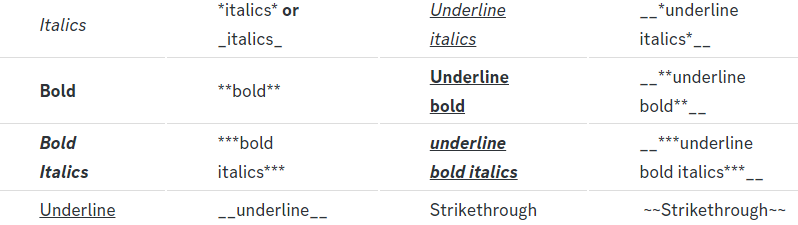
Discord Markdown Text
Below cites basic Discord Text Markdown/Formatting. Replace the text below with your own!
See this Discord Help Article for other markdown questions and combining markdowns.
<:Numbericons1:1018864164032225340> Italics (Cntrl + I)
 *Copy me for italicized text!* -> Italicized text!
 _Copy me for italicized text!_ -> Italicized text!
<:Numbericons2:1018864168041971712> Bold (Cntrl + B)
**Copy me for bold text!** -> Bolded text!
<:Numbericons3:1018864171783303208> Underline (Cntrl + U)
You must add 2 underscores on both sides of your text to get the underline text
__Copy me for underlined text!__ -> Underlined Text!
<:Numbericons4:1018864175155519538> Strikethrough (Cntrl + S)
~~Copy me for strikethrough text!~~ -> Strikethrough text!
<:Numbericons5:1018864178632605786> Spoilers & Hidden Text
||Copy me for hidden text!|| -> ||Hidden text|| (Click to reveal)
<:Numbericons6:1018864182558466058> One Lined Codeblock
You can add 3 backticks instead to get multi lined codeblock.
`Copy me for codeblock text!` -> Codeblock Text!
<:Numbericons7:1018864186727604354> Hyperlinking and Hidden Links
[Copy me with your link](yourlinkforhidelinks.com) -> Ticket Tool!
<:Numbericons8:1018864190296961159> <:NewIcon1:1018858809541804124><:NewIcon2:1018858813266333706> <:beta1:1022173658610946182><:beta2:1022173656492810340> Headers!
Header markdowns may not work with ticket tool features.
# Largest header!
## Small header!
### Even smaller header!
 scenic forum
hexed willow
header text
scenic forum
hexed willow
header text
Or are you referring to how to use these?
hexed willow
no
I was just looking for the subtext, but I didn't know what it was called until now.
hexed willow
humble sequoia
but i see that is wont work
but there is a server who has header text in ticket tool
 scenic forum
hexed willow
scenic forum
hexed willow
The headers work aslong as they are inside the embed description or content field
humble sequoiaBOT
 scenic forum
hexed willow
what do you mean
scenic forum
hexed willow
what do you mean
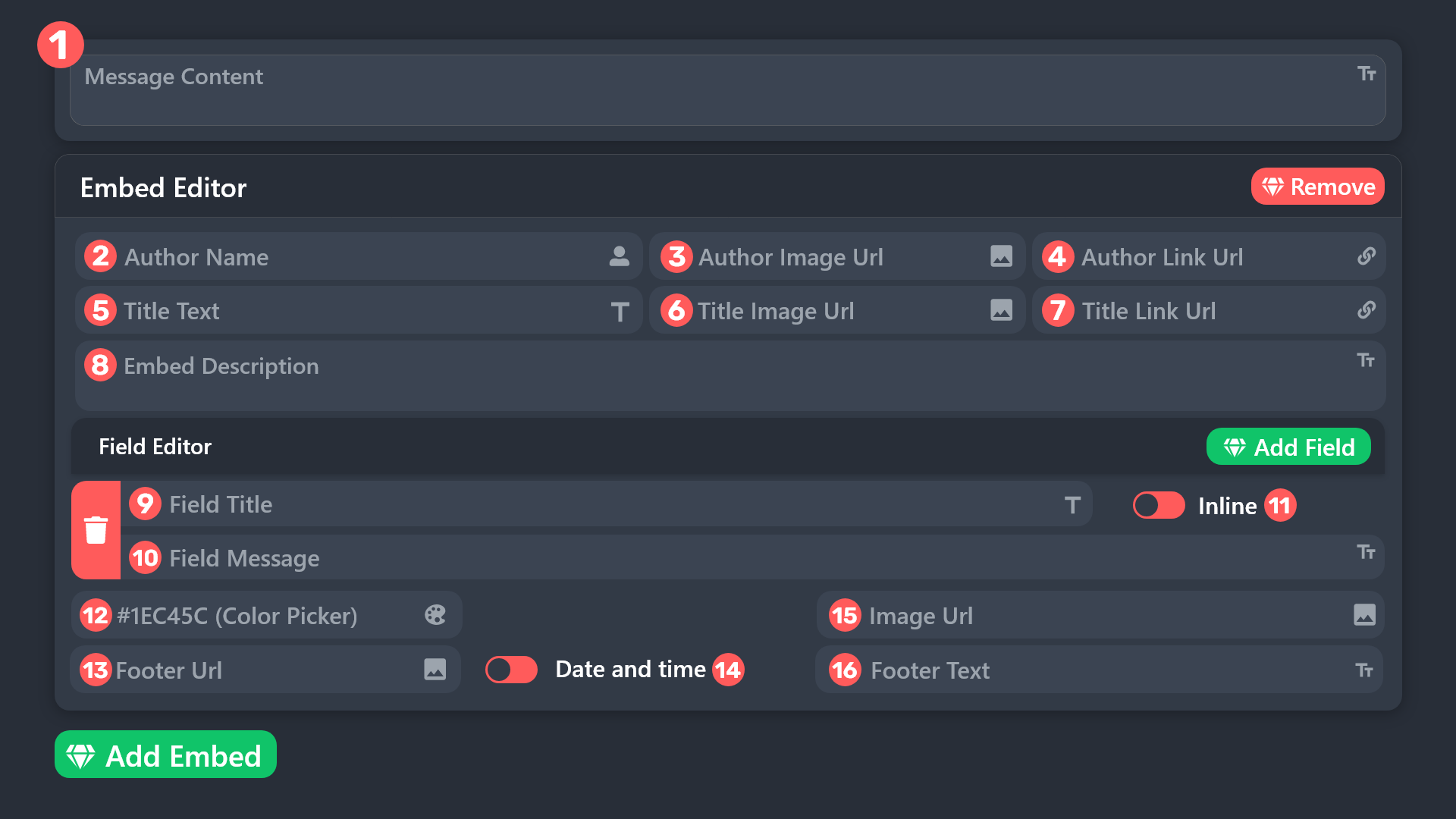
Refer to the embed above
You can use the header subtext if they are inside field 1 or 8
hexed willow
hexed willow
but here they has used in 5
scenic forum
hexed willow
but here they has used in 5
No
A title is by default bigger, you cannot use any markdown inside a title
hexed willow
yeah okay i get it
but i think they used any markdowns

because i did the same thing and i got small letters
scenic forum
hexed willow
because i did the same thing and i got small letters
Can you show how you tried to use it?
hexed willow
this?
 scenic forum
hexed willow
this?
scenic forum
hexed willow
this?
Yes
You're not using a header format inside the embed description so the bot is still treating it as normal text
hexed willow
and now?
 humble sequoiaBOT
scenic forum
humble sequoiaBOT
scenic forum
You can only use any markdown within field 1 or 8
You're currently trying to use it in field 2 and 5 which isn't supported by discord
iron nightBOT
Gave +1 Rep to @scenic forum (current: #27 - 206)
 half cedar
friend gave me administrator in his server, but i can't access the dashboard.

am i missing an administrator setting or?
crimson oak
half cedar
friend gave me administrator in his server, but i can't access the dashboard.
You need Adminstrator perms
 half cedar
i do, just refreshes the page. same 403 error
crimson oak
half cedar
i do, just refreshes the page. same 403 error
I let someone else step in, i doesnt know 403 error.
half cedar
403 means i'm missing permissions, but i have administrator through my admin role, i can do everything else, access every other bot dashboard, except tickettools
 static juniper
I'm trying out Ticket Tool and activated the 7 day free trial, but all the premium settings are still locked out.
Allso, question, if I opt to get premium, do I have to subcribe to this server to get premium support?
crimson oak
static juniper
I'm trying out Ticket Tool and activated the 7 day free trial, but all the premi...
Wait some minutes the time ticket tool refresh
crimson oak
static juniper
Allso, question, if I opt to get premium, do I have to subcribe to this server t...
Yes
 weak surge
Can anyone help every time I use a command on the ticket tool it says the application did not respond I did all the perms correct but it keeps saying the same thing over and over plz help
static juniper
crimson oak
Yes
Well, that makes my decision easy. Thank you for the help.
iron nightBOT
Gave +1 Rep to @crimson oak (current: #88 - 13)
 crimson oak
weak surge
Can anyone help every time I use a command on the ticket tool it says the applic...
crimson oak
weak surge
Can anyone help every time I use a command on the ticket tool it says the applic...
Run /debug command please
weak surge
crimson oak
Run ``/debug`` command please
Ok ill try it
It says the application did not respond
crimson oak
weak surge
It says the application did not respond
Add to ticket tool role embedded link view channels and send messages
weak surge
crimson oak
Add to ticket tool role embedded link view channels and send messages
K
IT WORKS
TY TY
half cedar
Anyone know what's going on with me not being able to access the dashboard even tho I'm an administrator?
I can access it from my phone dude. Wtf lol
I am so confused xD. I'll try signing out of discord on my browser on my desktop and signing back in. Its probably a caching issue
Yep... that fixed it.
 next condor
I think your pga Bug shows me that the mines can be farmed but once it's already farmed it prevents me from being able to farm
 exotic dock
it’s showing it failed even though it has administrator permissions
jade topaz
I can’t find a server
next condor
where is the place to report bugs or create a ticket for a problem?
 drifting fjord
Hello !
Is there any way to transfer a ticket configuration to another server ?
 hardy saffron
Why when I press the delete button for a ticket, does it only delete the chat in the ticket, not the ticket
itself?
humble sequoiaBOT
@next condor
⚠️ You're in the wrong place
We provide support for Ticket Tool Discord bot and cannot help you with whatever issue you have.
- We don't know which Support Team you should contact to get this issue resolved, and unfortunately we won't be able to accurately tell you.
If you don't have any further questions regarding our bot Ticket Tool, please close this ticket
jade topaz
Is ticket tool down

 summer marlin


 opal surge
happening to me too
 valid ledge

 spare harness
Im currently having an issue where i cant close a ticket. But i see someone else in general chat is having similar issue
Just wanted to make sure it wasnt just me lol
limber portal
It seems the bot is experiencing issues on certain clusters. The developer has been notified 🙂
spare harness
limber portal
It seems the bot is experiencing issues on certain clusters. The developer has b...
Lovely. Thanks so much! ❤️
iron nightBOT
Gave +1 Rep to @limber portal (current: #10 - 744)
 stiff mica
Hi I can't open a ticket in my server
limber portal
limber portal
It seems the bot is experiencing issues on certain clusters. The developer has b...
@stiff mica
stiff mica
limber portal
<@799703545712214041>
Ah okay - any ETA of a fix?
limber portal
stiff mica
Ah okay - any ETA of a fix?
The developer is actively working on it. Hopefully it should be back online fully very soon 🙂
stiff mica
Thank you
 flat prawn
@limber portal how do i make the tickets show at the top of my servers
 forest cipher
im getting "interaction failed" in my 2 servers when im trying to open a ticket
limber portal
limber portal
It seems the bot is experiencing issues on certain clusters. The developer has b...
@forest cipher
 pliant gyro
Is the bot having technical problems? I can't open a ticket with it
pliant gyro
forest cipher
im getting "interaction failed" in my 2 servers when im trying to open a ticket
too
 solid stream
Our hosting provider is preforming network updates like they did yesterday.. unfortunately while they do guarantee no network downtime, the method they use causes a massive backlog in the bot of expired events..
 fickle roost

 past cliff
ticket bot DOWN
 odd pilot
fickle roost
odd pilot
fickle roost
same
fickle roost
weak surge
Does anyone know when it will be back to working
fickle roost
Sacrifice is typing...
limber portal
The bot is experiencing issues due to our hosting provider experiencing issues on their end while they do network updates. Apologies for the inconvience 🙂
fickle roost
i need compensation, one free month of premium
past cliff
fickle roost
i need compensation, one free month of premium
me too
odd pilot
then i want too
 eternal mirage
is the bot down guys?
 dull jolt
eternal mirage
is the bot down guys?
dull jolt
eternal mirage
is the bot down guys?
yup
 ionic heath
help

 ivory saffron
bot down guys
ionic heath
ionic heath
help
error
 loud charm
eternal mirage
dull jolt
yup
loud charm
eternal mirage
dull jolt
yup

limber portal
fickle roost
i need compensation, one free month of premium
This is something that cannot be confirmed in this channel at this time. If compensation is given, it will be sent in #📣│bot-news. However, we will likely not provide compensation at this time as these issues have been out of our hands, as the issue rests fully with our hosting provider. If you wish to dispute this, I'd suggest making a ticket once the outage is resolved. Thanks for understanding 
iron nightBOT
Gave +1 Rep to @fickle roost (current: #413 - 1)
ionic heath
limber portal
This is something that cannot be confirmed in this channel at this time. If comp...
please help

what this problem?
limber portal
For all new people just visiting this channel:
The bot is experiencing issues due to our hosting provider experiencing issues on their end while they do network updates. Apologies for the inconvience 🙂
dull jolt
ionic heath
help
Please read the messages from above
weak surge
ionic heath
please help
The bots down
ionic heath
weak surge
The bots down
?
weak surge
ionic heath
?
The bot is down
fickle roost
 slender minnow
Please be patient until the services are restored.
 rich turret
Are we doooomed guys ?
 undone ruin
Will it take 1 or more hours
 limber portal
rich turret
Are we doooomed guys ?
limber portal
rich turret
Are we doooomed guys ?
Not at all 🙂 It depends on how quickly our hosting provider can fix their issue, but they have a good track record so it shouldn't be too long.
fickle roost
limber portal
Not at all 🙂 It depends on how quickly our hosting provider can fix their issue...
ETA?
rich turret
fickle roost
ETA?
Tomorrow
fickle roost
rich turret
Tomorrow
I’m cooked if that’s the case…
 limber wolf
Bot down?
fickle roost
I got 50+ people opening tickets daily
rich turret
I got 100+ daily
limber wolf
Nvm I scrolled up
rich turret
If you cooked I'm fried
limber portal
fickle roost
ETA?
I can't provide anything exact at this time due to the outage not resting in our hands, please refer to my previous message. Perhaps roughly 1-2 hours, if not less? That would be my personal estimate based on previous outages of this type
fickle roost
rich turret
If you cooked I'm fried
We both cooked twin 😭
fickle roost
limber portal
I can't provide anything exact at this time due to the outage not resting in our...
Ty sacrifice
iron nightBOT
Gave +1 Rep to @limber portal (current: #10 - 745)
fickle roost
limber wolf
I'm always baked af tho
I feel you
Them customers support shi ain’t easy
limber portal
No problem, and apologies again to everyone for the inconvenience. I know this is frustrating 🙂
ionic heath
bots disabled?
limber portal
For all new people just visiting this channel:
The bot is experiencing issues due to our hosting provider experiencing issues on their end while they do network updates. Apologies for the inconvience 🙂
limber wolf
limber portal
For all new people just visiting this channel:
The bot is experiencing issues d...
This is why you need a dedicated server... backups will run in place of maintenance.
 spice flint
I thought I had broken it 
mighty thistle
Sometimes these things are out of our control!!
 south juniper
Premium bot is also off?
mighty thistle
It's affecting certain shard clusters.
ionic heath
limber portal
For all new people just visiting this channel:
The bot is experiencing issues d...
when will the problem be solved?
mighty thistle
Always ASAP!!
limber portal
south juniper
Premium bot is also off?
No, our premium bot still seems to be running at 100% as far as I can see
south juniper
Okay
weak surge
limber portal
No, our premium bot still seems to be running at 100% as far as I can see
That's crazyyyy
 gilded garden
This is about the ticket tool bot right?
ionic heath
who love russia?
limber portal
For all new people just visiting this channel:
The bot is experiencing issues due to our hosting provider experiencing issues on their end while they do network updates. Apologies for the inconvience 🙂
ionic heath
🇷🇺 ❤️
weak surge
ionic heath
who love russia?
Meee
 inner vale
limber portal
No, our premium bot still seems to be running at 100% as far as I can see
inner vale
limber portal
No, our premium bot still seems to be running at 100% as far as I can see
When will the bot will be fix?
ionic heath
weak surge
Meee
For all new people just visiting this channel:
The bot is experiencing issues due to our hosting provider experiencing issues on their end while they do network updates. Apologies for the inconvience 🙂
limber portal
inner vale
When will the bot will be fix?
I can't provide an exact eta as the issue is out of our hands
Hopefully a matter of hours
weak surge
ionic heath
For all new people just visiting this channel:
The bot is experiencing issues d...
Bro copied and pasted the message
jade topaz
limber portal
For all new people just visiting this channel:
The bot is experiencing issues d...
Ok Thank you
iron nightBOT
Gave +1 Rep to @limber portal (current: #10 - 746)
weak surge
For all new people just visiting this channel:
The bot is experiencing issues due to our hosting provider experiencing issues on their end while they do network updates. Apologies for the inconvience 🙂
 slender dew
limber portal
For all new people just visiting this channel:
The bot is experiencing issues d...
slender dew
limber portal
For all new people just visiting this channel:
The bot is experiencing issues d...
thank you! will information be posted once the bot is up and running again?
iron nightBOT
Gave +1 Rep to @limber portal (current: #10 - 747)
limber portal
slender dew
thank you! will information be posted once the bot is up and running again?
Yes 🙂
 grand mortar
Guys whenever i try to create ticket it shows
This interaction failed
stiff mica
limber portal
No, our premium bot still seems to be running at 100% as far as I can see
I’m premium. Mine is down?
weak surge
grand mortar
Guys whenever i try to create ticket it shows
This interaction failed
The bots down
Not working rn
limber portal
stiff mica
I’m premium. Mine is down?
please #🎫│make-a-ticket and mention that
grand mortar
Oh oj
 minor root
I'm having the same problem.
limber portal
For all new people just visiting this channel:
The bot is experiencing issues due to our hosting provider experiencing issues on their end while they do network updates. Apologies for the inconvience 🙂
weak surge
For all new people just visiting this channel:
The bot is experiencing issues due to our hosting provider experiencing issues on their end while they do network updates. Apologies for the inconvience 🙂
rich turret
For all new people just visiting this channel:
The bot is experiencing issues due to our hosting provider experiencing issues on their end while they do network updates. Apologies for the inconvience 🙂
limber portal
Please try not to flood this channel
weak surge
For all new people just visiting this channel:
The bot is experiencing issues due to our hosting provider experiencing issues on their end while they do network updates. Apologies for the inconvience 🙂
weak surge
limber portal
Please try not to flood this channel
Were just trying to help 😊
minor root
weak surge
For all new people just visiting this channel:
The bot is experiencing issues d...
inconvenience, not inconvience 🙂
grand mortar
limber portal
Please try not to flood this channel
How to add a selection menu in ticket tool
weak surge
For all new people just visiting this channel:
The bot is experiencing issues due to our hosting provider experiencing issues on their end while they do network updates. Apologies for the inconvience 🙂
grand mortar
grand mortar
How to add a selection menu in ticket tool
Like this
 weak surge
grand mortar
Like this
weak surge
grand mortar
Like this
All I had to do was type one in or look for it
grand mortar
?
weak surge
Just click the one you want
limber portal
weak surge
All I had to do was type one in or look for it
Please make sure the information you are providing is accurate 🙂
grand mortar
weak surge
Just click the one you want
This is picture from anoyher
humble sequoiaBOT
The Drop-down menu or Select Menu replaces the buttons on your panel message and uses a drop-down menu with all of your panels. To set this up, go to your Panel Configs and select your main Panel.
<:Numbericons1:1018864164032225340> Enable Select Style
First you enable Select Style. Then you add an item in the Dropdown Editor. Now you can start editing your dropdown!
<:Numbericons2:1018864168041971712> Dropdown Editor
Each line in the dropdown editor represents a line in the drop down menu on discord. You can add more "Items", by clicking on 

First you select a panel. That's the panel this option will open a ticket for.  DONT select the same panel twice. Each option should have a different Panel
After that, you can put a Display. This is the title of this option and will appear in the drop down menu. The *Description can be set right after that, which will be below the title in grey.
Additionally you can select an emoji, that will be shown in front of each option. You can either manually input the ID of an emoji or select it in the selector.
Common Issues ⚠️
- Panel doesn't send? Make sure you have a valid emoji selected
- Option doesn't show up? Check if two options have the same panel in the DropDown Editor

$dropdown
limber portal
@grand mortar see above
weak surge
Is the bot up yet
minor root
weak surge
Is the bot up yet
inconvenience
 limber portal
For all new people just visiting this channel:
The bot is experiencing issues due to our hosting provider experiencing issues on their end while they do network updates. Apologies for the inconvenience 🙂
weak surge
limber portal
For all new people just visiting this channel:
The bot is experiencing issues d...
I think they already know that
Or most of the people
 pulsar lodge
i’m guessing there’s no estimate time for this bot of being fixed ?
minor root
weak surge
I think they already know that
He still spelled inconvenience wrong.
mighty thistle
limber portal
For all new people just visiting this channel:
The bot is experiencing issues d...
minor root
If you're going to copy/paste, just spell check it first. 🙂
grand mortar
limber portal
<@756173472274710543> see above
What is placeholder text in dropdown
limber portal
pulsar lodge
i’m guessing there’s no estimate time for this bot of being fixed ?
Hopefully a matter of hours
weak surge
minor root
If you're going to copy/paste, just spell check it first. 🙂
He fixed it
mighty thistle
minor root
If you're going to copy/paste, just spell check it first. 🙂
Chat I'm gonna have you calm down on that front. 😭
It is not that serious.
 pulsar lodge
limber portal
Hopefully a matter of hours
pulsar lodge
limber portal
Hopefully a matter of hours
okay great thats all i needed to know 🙂
limber portal
weak surge
He fixed it
Please don't talk here if you aren't giving support, any further occurrences may lead to mod action
limber portal
minor root
https://tenor.com/view/grammar-police-drift-police-car-gif-17312786
thanks for telling me
mighty thistle
weak surge
limber portal
Please don't talk here if you aren't giving support, any further occurrences may...
aww man
 crisp wren
is the bot down?
grand mortar
limber portal
~~thanks for telling me~~
Why is it showing no results found
 grand mortar
limber portal
~~thanks for telling me~~
grand mortar
limber portal
~~thanks for telling me~~
I can only select the panel on the first selection
On the rest it shows no result found
@limber portal
limber portal
Please direct your query to a ticket #🎫│make-a-ticket
grand mortar
limber portal
Please direct your query to a ticket <#571706435449257997>
Oh ok
weak surge
Yayyyy the ticket bot is working again I think
 zealous lance
bot is still down?
weak surge
Bot is working
zealous lance
weak surge
Bot is working
u sure?
 warm mango

 ocean spear
I just tried it, didn't
limber portal
The bot is only now having issues on a select few clusters from what I can see. It should be fine for most people
 turbid vessel
The bot is offline
weak surge
limber portal
The bot is only now having issues on a select few clusters from what I can see. ...
Yea it's working for me
 jade dawn
Is bot coming anytime soon?
weak surge
In my server the bot is working fine but when I try to make a ticket in other servers most of them say that the interaction failed
 tribal zodiac
guys its normal ?
 pulsar lodge
tribal zodiac
guys its normal ?
pulsar lodge
tribal zodiac
guys its normal ?
The bot is experiencing issues due to our hosting provider experiencing issues on their end while they do network updates. Apologies for the inconvenience 🙂 (i copied it from a mod)
tribal zodiac
so its normal yeah ?
 random falcon
why is my botnot responding to my commands
 heavy niche
because it hates you
random falcon
heavy niche
because it hates you
stfu
heavy niche
i have been on this server for 5 minutes and its been asked 10 times in this channel since, just read
 random echo
random falcon
stfu
random echo
random falcon
stfu
Because it’s down atm just wait a bit
 narrow scarab
pulsar lodge
The bot is experiencing issues due to our hosting provider experiencing issues o...
narrow scarab
pulsar lodge
The bot is experiencing issues due to our hosting provider experiencing issues o...
OK thanks
iron nightBOT
Gave +1 Rep to @pulsar lodge (current: #413 - 1)
 minor lichen
I did not receive the key
scenic forum
minor lichen
I did not receive the key
Is this ticket tool related?
 graceful onyx
wait is the bot down?
scenic forum
graceful onyx
wait is the bot down?
The bot is experiencing issues due to our hosting provider experiencing issues on their end while they do network updates. Apologies for the inconvenience 🙂
narrow scarab
scenic forum
The bot is experiencing issues due to our hosting provider experiencing issues o...
Do you know when it ends?
scenic forum
narrow scarab
Do you know when it ends?
As its fully outside of the hands of TT we don't have en ETA unfortunately
narrow scarab
scenic forum
As its fully outside of the hands of TT we don't have en ETA unfortunately
ok thanks for the information
iron nightBOT
Gave +1 Rep to @scenic forum (current: #27 - 207)
 livid snow
What is ticket tool prefix?
narrow scarab
livid snow
What is ticket tool prefix?
Why
livid snow
So I can use it
scenic forum
livid snow
What is ticket tool prefix?
the default prefix is $
 frigid nova
Is it down or something?
 vital turret
Is it down?
zealous lance
two hours is a bit too much
zealous lance
vital turret
Is it down?
yep
scenic forum
zealous lance
two hours is a bit too much
It is entirely outside of TT's control unfortunately
zealous lance
oh ok
scenic forum
zealous lance
oh ok
The bot is experiencing issues due to our hosting provider experiencing issues on their end while they do network updates. Apologies for the inconvenience 🙂
jade topaz
How do you get servers
scenic plinth
Delayed Responses / Outage Notice
Some servers are experiencing either full outages or delayed response times. Our hosting provider, like yesterday's outage, is performing maintenance, causing issues with our connection to Discord.
There is nothing in our immediate ability that we can do, however, our developer is currently looking into another VPS (hosting provider) to hopefully eliminate downtime.
We have NO ETA on a full fix, though it appears this issue is mostly resolved at this point. Pinging or direct messaging staff, or being a nusiance in any chat will result in disciplinary actions. Thank you for your understanding and we apologize for any inconvenience caused.
View the incident page here
scenic plinth
scenic plinth
## Delayed Responses / Outage Notice
Some servers are experiencing either full ...
 tidal elbow
Might I also suggest locking the channel?
scenic plinth
It appears the issue is mostly solved at this point, otherwise I would.
tidal elbow
Ahh. Well I am having the bot not respond at all on one of my servers, tested less than 5 mins ago.
 near harness
scenic plinth
It appears the issue is mostly solved at this point, otherwise I would.
near harness
scenic plinth
It appears the issue is mostly solved at this point, otherwise I would.
heyo! I've created a panel which has 3 options in dropdown style. Each is prompted to open another panel, however when I select an option in my first panel it just creates a support ticket
Could you help me solve this?
I've read through the docs, but couldn't find the answer
humble sequoiaBOT
@leaden bane, we would love to help you, but if you don't tell us what you need help with we can't help you :(
jade topaz
Uhhh the ticket or bot it self not working
scenic forum
near harness
heyo! I've created a panel which has 3 options in dropdown style. Each is prompt...
Do I understand it correctly that you're using an external bot in combination with command style tickets?
scenic forum
scenic plinth
## Delayed Responses / Outage Notice
Some servers are experiencing either full ...
Some bots are currently still experiencing issues @jade topaz
If the bot worked perfectly some hours ago then you'd need to wait until it'd resolved
jade topaz
scenic forum
Some bots are currently still experiencing issues <@456226577798135808>
If the b...
Hmm okay
Thanks @scenic forum
iron nightBOT
Gave +1 Rep to @scenic forum (current: #27 - 208)
jade topaz
scenic forum
Some bots are currently still experiencing issues <@456226577798135808>
If the b...
It's not because anything because the bot working in a server I'm in and not working in my server
scenic forum
jade topaz
It's not because anything because the bot working in a server I'm in and not wor...
It does gladly not affect all servers sadly there is no eta on when it's fully back up
jade topaz
scenic forum
It does gladly not affect all servers sadly there is no eta on when it's fully b...
So it gonna work after some time but won't be like this forever right ?
near harness
scenic forum
Do I understand it correctly that you're using an external bot in combination wi...
No sir, it's only ticket tool
The first panel has 3 dropdown options
Each option points to new panels with dropdowns
So logically it would be like navigating through the menu, once you click something on the first, 3 new options pop up
But for me once I click anything a ticket is automatically opened (which should be the last step)
 split trellis
.
 golden lynx
Oi
 rugged salmon
Is there a way to make it work or can we just wait
scenic forum
near harness
No sir, it's only ticket tool
The first panel has 3 dropdown options
Each optio...
So the panel with the menu is also done fully with ticket tool? As it's not some normal dropdown im aware of by the sound of it
scenic forum
jade topaz
So it gonna work after some time but won't be like this forever right ?
It's gonna work again automatically once it's fixed, correct
scenic forum
rugged salmon
Is there a way to make it work or can we just wait
If your server is affected waiting is your only option unfortunately
rugged salmon
Ok ty
near harness
scenic forum
So the panel with the menu is also done fully with ticket tool? As it's not some...
Yes, everything inside ticket tool. Images in order below


SOLYD MAIN to SOLYD SBT SUPPORT (which has 2 dropdown options) doesn't work
Instead it insta creates a ticket
scenic forum
near harness
SOLYD MAIN to SOLYD SBT SUPPORT (which has 2 dropdown options) doesn't work
You have a dropdown menu with 2 slots
If slot 1 is selected , ticket associated with slot 1 gets instantly created
If slot 2 is selected, ticket associate with slot 2 gets instantly created
 fading salmon
Are the tickets not working rn? Any of them
 frosty hearth
fading salmon
Are the tickets not working rn? Any of them
frosty hearth
fading salmon
Are the tickets not working rn? Any of them
its borken rn
scenic forum
scenic plinth
## Delayed Responses / Outage Notice
Some servers are experiencing either full ...
Some servers are currently affected by this @fading salmon
near harness
scenic forum
You have a dropdown menu with 2 slots
If slot 1 is selected , ticket associated ...
Thanks! How could I achieve the menu style I'm talking about?
If Choice A in the first panel, then I'm presented with 2 new choices
iron nightBOT
Gave +1 Rep to @scenic forum (current: #27 - 209)
jade topaz
When i click the button to open the tiket it loads amd says ticket is invalid
fading salmon
scenic forum
Some servers are currently affected by this <@1239288776782516245>
oh, and how long or there's no eta
 coarse bone
Are tickets broken?
scenic forum
near harness
Thanks! How could I achieve the menu style I'm talking about?
If Choice A in th...
That's not possible within ticket tool as ticket tool can only do a normal dropdown style
What you want is something very advanced, you may want to use sapphire with advanced dropdown in combination with ticket tool in command style tickets
scenic forum
fading salmon
oh, and how long or there's no eta
No eta unfortunately
frosty hearth
coarse bone
Are tickets broken?
Its down
coarse bone
frosty hearth
Its down
okay ty for telling me
iron nightBOT
Gave +1 Rep to @frosty hearth (current: #413 - 1)
jade topaz
Can someone help me
frosty hearth
jade topaz
Can someone help me
Yeah ?
jade topaz
When i click on the tickets it loads then says this interaction failed
Ive looked at so many diffrent things it could be but its just not working idk what to do
frosty hearth
jade topaz
When i click on the tickets it loads then says this interaction failed
Bot is having issues rn
jade topaz
Oh thats why
frosty hearth
Yeah
jade topaz
Ive been on this god damn thing for about more than an hour aswell tryna figure it out
 tired garnet
Is there any updates half my dcs work and half dont
scenic forum
tired garnet
Is there any updates half my dcs work and half dont
I'm afraid no as it's fully within the hands of the hosting provider and not within ticket tools control
 small silo
Is it a public problem or?

 arctic dune
Getting similar think it’s related to messages further above
 humble sequoiaBOT
As of now, Ticket Tool is experiencing technical difficulties, please be patient as our Development Team investigates this issue and pushes a fix.
The issue we are facing currently is related with:
Host Maintenance — See pins for further information
scenic plinth
 pallid marten
Is it possible to make it so u can open more than one ticket per section
fading salmon
still down
pallid marten
Didn’t even see that😭
But how do you change this lol
 scenic forum
pallid marten
Didn’t even see that😭
But how do you change this lol
scenic forum
pallid marten
Didn’t even see that😭
But how do you change this lol
Panel config -> limits -> open Tickets each user >1
pallid marten
Ty!
frosty hearth
fading salmon
still down
Not for everyone
 paper rover
are tickets bugged rn?
scenic forum
humble sequoia
@paper rover
 viral berry
paper rover
are tickets bugged rn?
viral berry
paper rover
are tickets bugged rn?
i think they are
they arent working in my server, it just says interaction failed
paper rover
same here
viral berry
alr cool good to know i was tweaking out sum happend to my server lol
scenic forum
humble sequoia
paper rover
ill just wait it out ig
 foggy bear
How do i add sapphire bot id to the v2 ticket tool?
humble sequoiaBOT
User's issue has been solved in another channel.
 eager olive
The bot doesn’t respond / makes tickets?
 restive condor
eager olive
The bot doesn’t respond / makes tickets?
restive condor
eager olive
The bot doesn’t respond / makes tickets?
Hey there! The bot is currently experiencing some difficulties on some servers due to an outage on our host provider
We apologise for any inconvenience caused 🙏
eager olive
restive condor
Hey there! The bot is currently experiencing some difficulties on some servers d...
Ah, thanks for the quick support! Don’t worry about it. 😄
iron nightBOT
Gave +1 Rep to @restive condor (current: #1 - 2709)
restive condor
 sullen temple
restive condor
<:PabloTiphat:983791053842837624>
sullen temple
restive condor
<:PabloTiphat:983791053842837624>
is discord acting up again>
restive condor
restive condor
Hey there! The bot is currently experiencing some difficulties on some servers d...
^
 brave bison
hey!
Where can I open a support ticket?
restive condor

 scenic plinth
humble sequoia
vital turret
scenic plinth
scenic plinth
humble sequoia
vital turret
scenic plinth
Is there a time?
scenic plinth
Read the pinned message please. It tells you.
vital turret
scenic plinth
Read the pinned message please. It tells you.
Oh alr
jade topaz
scenic plinth
Ty for this was just about to ask!
iron nightBOT
Gave +1 Rep to @scenic plinth (current: #13 - 485)
scenic plinth
Yag doesn't like to do it the first time sometimes...
vital turret
!rep kinzylla
vital turret
scenic plinth
*Yag doesn't like to do it the first time sometimes...*
I have to ping?
vital turret
scenic plinth
*Yag doesn't like to do it the first time sometimes...*
!rep @scenic plinth
scenic forum
Thanks @vital turret
iron nightBOT
Gave +1 Rep to @vital turret (current: #413 - 1)
vital turret
scenic forum
Thanks <@1314756250453545066>
Oh.
scenic forum
Saying thanks within the message of the ping is the easiest
scenic plinth
Oh... its also because youre doing !rep instead of +rep
vital turret
scenic plinth
Oh... its also because youre doing !rep instead of +rep
Thanks @scenic plinth
iron nightBOT
Gave +1 Rep to @scenic plinth (current: #13 - 486)
 regal current
how do I appeal
vital turret
SHUT UP
regal current
how do I appeal
vital turret
regal current
how do I appeal
Im guessing make a ticket
 unkempt cedar
Help Me
 regal current
how
humble sequoiaBOT
@regal current
⚠️ You're in the wrong place
We provide support for Ticket Tool Discord bot and cannot help you with whatever issue you have.
- We don't know which Support Team you should contact to get this issue resolved, and unfortunately we won't be able to accurately tell you.
If you don't have any further questions regarding our bot Ticket Tool, please close this ticket
regal current
oh..
unkempt cedar
What I do?
 graceful estuary
Hi just wanted to check if this issue is related to the whole outage situation. If so then that’s fine if not can someone help.

 mortal magnet
graceful estuary
Hi just wanted to check if this issue is related to the whole outage situation. ...
mortal magnet
graceful estuary
Hi just wanted to check if this issue is related to the whole outage situation. ...
its the outage
graceful estuary
mortal magnet
its the outage
Ahh ok
mortal magnet
i have over 40 tickets open 😂
graceful estuary
It was so confusing bc it was working just fine we had it set up a day before and i even used it for other tasks but then just stopped
unkempt cedar
scenic plinth
what I do
scenic forum
unkempt cedar
what I do
You wait until it has been resolved
unkempt cedar
Okey
 lament fulcrum
meeeeeeeeeeeeee
 forest trout
؟

 ionic dock
So still down?
scenic forum
ionic dock
So still down?
Some servers are still affected sadly, yes
scenic forum
humble sequoia
ionic dock
scenic forum
Some servers are still affected sadly, yes
any idea when this will be resolved for all servers?
scenic forum
scenic forum
@forest trout ^
scenic forum
ionic dock
any idea when this will be resolved for all servers?
Sadly no eta
scenic plinth
*Working on getting an update
ionic dock
scenic forum
Sadly no eta
Alright then Tysm
prime bridgeBOT
 Successful bans:
 1
 Unsuccessful bans:
 0
 Reason: Calling people slurs does not get the bot onine faster for you
 Moderator: @scenic plinth
 teal gull
So is the category option not working because the bot is down?
scenic plinth
We should be fully online and stable again (unless our VPS does something funky again). We are working to get a new VPS in the coming days. If you are still experiencing issues, please explain your issue here, use the /debug command and provide the link (if applicable) in this channel. Someone will assist you as soon as they become available.
scenic plinth
scenic plinth
## We should be fully online and stable again (unless our VPS does something fun...
 brazen ether
Anyone know how to set the bot up
stark runeBOT
1. Invite Ticket Tool to your server
First you will want to invite the bot to your server. Once the bot is in your server, you can manage your server in the dashboard.
2. Create a Panel
To create a panel we are going to need to head over to the panel configs on the dashboard.
Once at the dashboard we will need to click Create Panel.
Enter a panel name (Fill in any optional settings you want).
Click Create Panel and your ready to get started with configuring your panel.
An example of a creating a panel is shown below.
3. Send the Panel to a Channel
Once you've created a panel on the dashboard you will need to send it to a channel using send on the dashboard.
Select the channel you want your panel to be created in and click send.
For other questions checkout $help faq.
An example of a sending a panel is shown below.
Having a Problem Sending the Panel?
Do $debug in a channel with Ticket Tool and make sure it has all the necessary Discord permissions.
scenic forum
@brazen ether refer to the embed above for a basic setup
brazen ether
scenic forum
<@1408206254249349261> refer to the embed above for a basic setup
Thank you
iron nightBOT
Gave +1 Rep to @scenic forum (current: #27 - 210)
 solar escarp
como que eu renomeio o botao de criar ticket e renomeio a descrição?
How do I rename the boot of creating ticket and rename the description?
 strong halo
Hi how will I set up a ticket in my server
 snow tundra
Como coloca o bot na língua portuguesa?
solar escarp
snow tundra
Como coloca o bot na língua portuguesa?
se fala a descrição?
so renomear so que eu nao sei
 maiden cedar
i get this error while opening/creating a ticket :
components[0].components[0].emoji.name[BUTTON_COMPONENT_INVALID_EMOJI]: Invalid emoji
humble sequoiaBOT
This error indicates you have selected an invalid emoji, i.e. an emoji the bot isn't capable of using, in a button field
Which Emoji?
This depends upon which action the error is appearing, the most common cases are the Create Ticket button or one of your Dropdown emojis. You can visit your Button's List to find all available buttons and find the conflicting one by yourself.
Why doesn't the bot accept it as valid?
- You selected an emoji that doesn't exist anymore, i.e. that has been deleted
- You wrote text there, instead of an emoji (or in addition to an emoji)
- You entered a code for a custom emoji from a server that the bot is not a member of
- You entered a custom emoji code incorrectly
- You're on iPhone and entered an emoji using the phone's emoji pad (use the emoji selector in the website instead)
 scenic forum
@maiden cedar refer to the embed above
strong halo
strong halo
Hi how will I set up a ticket in my server
?
stark runeBOT
1. Invite Ticket Tool to your server
First you will want to invite the bot to your server. Once the bot is in your server, you can manage your server in the dashboard.
2. Create a Panel
To create a panel we are going to need to head over to the panel configs on the dashboard.
Once at the dashboard we will need to click Create Panel.
Enter a panel name (Fill in any optional settings you want).
Click Create Panel and your ready to get started with configuring your panel.
An example of a creating a panel is shown below.
3. Send the Panel to a Channel
Once you've created a panel on the dashboard you will need to send it to a channel using send on the dashboard.
Select the channel you want your panel to be created in and click send.
For other questions checkout $help faq.
An example of a sending a panel is shown below.
Having a Problem Sending the Panel?
Do $debug in a channel with Ticket Tool and make sure it has all the necessary Discord permissions.
scenic forum
@strong halo refer to the embed above for a basic ticket setup
 soft summit
Any command, no matter if its in existing tickets or just simple / ones sends this error message. I have removed and readded the bot and this is still happening
I'm not super familiar with discords layout, and i'm worried that a past moderator of the effected server might have messed with some settings that I don't know about (none of my others are having this issue)
Not to mention now, any tickets made are made outside of the pre setup area
 scenic forum
soft summit
Any command, no matter if its in existing tickets or just simple / ones sends th...
scenic forum
soft summit
Any command, no matter if its in existing tickets or just simple / ones sends th...
Hey
What does /debug say?
soft summit
scenic forum
Hey
What does ``/debug`` say?

The exact same thing, mind you this role has admin perms
scenic forum
soft summit
The exact same thing, mind you this role has admin perms
Could you show the bot role having admin please?
Just to fully rule out the permission aspect
soft summit
 scenic forum
soft summit
scenic forum
soft summit
Can you try using the /botswitcher command and tell me if it reacts to that
soft summit
Yes it did
scenic forum
soft summit
Yes it did
I assume the menu is displaying ticket tool gold?
soft summit
 scenic forum
soft summit
scenic forum
soft summit
Hmm looks okay
Can you visit the dashboard -> server configs and confirm ticket tool white is selected on there too?
soft summit
scenic forum
Hmm looks okay
Can you visit the dashboard -> server configs and confirm ticket ...
Its letting me run commands now so im wondering if it was just a bug
Sorry if i wasted time
scenic forum
soft summit
Its letting me run commands now so im wondering if it was just a bug
Sorry if i ...
We had some issues earlier it could have been the after effect of that and all good, this server is here to help!
soft summit
scenic forum
We had some issues earlier it could have been the after effect of that and all g...
Thank you so much! Have an amazing rest of your day!
iron nightBOT
Gave +1 Rep to @scenic forum (current: #27 - 211)
 uncut kelp
i have a server with two communities. each having restricted categories and channels. I want tickets raised in community A to remain visible by the person who raised the ticket and the moderator alone.... same should apply to community B. tickets raised in community B should only be visible to the person who raised the ticket and community B.... no other person
is this possible?
scenic forum
uncut kelp
i have a server with two communities. each having restricted categories and chan...
If Community A and Community B also differenciate by staff roles, then yes
For Panel A mark community A's staff roles as Support Team role
For Panel B mark community B's staff roles as Support Team role
 frosty verge
ticket tool bot is already on my server, but when i go to the website it says "It looks like Ticket Tool isn't online or in any servers you have permission to access, Invite Ticket Tool or check it's status"
frosty verge
frosty verge
ticket tool bot is already on my server, but when i go to the website it says "I...
what perms does it need to work?
scenic forum
frosty verge
what perms does it need to work?
You need either Administrator or a dashboard role set by an Administrator to have access to the dashboard
frosty verge
scenic forum
You need either ``Administrator`` or a dashboard role set by an ``Administrator`...
that explains it, thanks!
iron nightBOT
Gave +1 Rep to @scenic forum (current: #27 - 212)
 latent ledge
I have added a new role into the support aystem, both of those roles have identical permissions...
However there are over 50 existing tickets, and they are only able to see newly generated tickets, i have spend a good chunk of my evening to look at the problem but i'm at a loss, is there a way that new supports can see existing tickets without adding them manualy, because let's be honest, that is a pain in the back side
scenic forum
latent ledge
I have added a new role into the support aystem, both of those roles have identi...
I'm afraid not as it will only work for new tickets and can't change ticket permissions retroactively
latent ledge
scenic forum
I'm afraid not as it will only work for new tickets and can't change ticket perm...
Might be a solid point to look at for the bot's progress
scenic forum
latent ledge
Might be a solid point to look at for the bot's progress
I think it's not done purposely to avoid getting rate limited
latent ledge
scenic forum
I think it's not done purposely to avoid getting rate limited
Fair enough. On to the pain in the back side x_x
 dim tendon
can give link to support in orange sign


 dark kraken
 rain stump
Hey there 👋,
That’s because you only have 1 panel, and you already used it.
In fact, you have to create a panel for each one: snap chat, tiktok, instagram and youtube. Then link them there.
jade topaz
Is the bot working agaon yet?
dark kraken
jade topaz
Is the bot working agaon yet?
Hey there, you can view our status page at anytime: https://status.tickettool.xyz/
The problem is mostly fixed.
Welcome to Ticket Tool's home for real-time and historical data on system performance.
rain stump
dark kraken
Hey there 👋,
That’s because you only have 1 panel, and you already used it.
In...
i’ve made multiple panels

It doesn’t sync when i send it this is so confusing
 cinder thistle
I have problem with this
 limber portal
cinder thistle
I have problem with this
limber portal
cinder thistle
I have problem with this
Hey, are you staff in this server? Or just a user?
cinder thistle
Just user and that error fixed themselves
limber portal
cinder thistle
Just user and that error fixed themselves
It’s fixed?
cinder thistle
Ye
 hybrid trail
Hello guys how do i make so that when a ticket is opened it pings the support staff role
humble sequoiaBOT
1. Open your Panel Configs tab in your server's dashboard
2. Select the panel you want to ping your support team on
3. Open the Ticket options menu
4. Click on Edit Ticket Message
5. In the Message Content use one of the role mention syntax ({@Role Name}/{Role ID})
6. Save changes
Note: For this to work properly, Ticket Tool requires the Mention Everyone permission. Or the role must have the Allow anyone to @mention this role setting enabled
restive condor
hybrid trail
Hello guys how do i make so that when a ticket is opened it pings the support st...
Hi there, see above please ^
hybrid trail
Okay thanks
 bronze sonnet
 humble sequoiaBOT
The Drop-down menu or Select Menu replaces the buttons on your panel message and uses a drop-down menu with all of your panels. To set this up, go to your Panel Configs and select your main Panel.
<:Numbericons1:1018864164032225340> Enable Select Style
First you enable Select Style. Then you add an item in the Dropdown Editor. Now you can start editing your dropdown!
<:Numbericons2:1018864168041971712> Dropdown Editor
Each line in the dropdown editor represents a line in the drop down menu on discord. You can add more "Items", by clicking on
First you select a panel. That's the panel this option will open a ticket for. DONT select the same panel twice. Each option should have a different Panel
After that, you can put a Display. This is the title of this option and will appear in the drop down menu. The *Description can be set right after that, which will be below the title in grey.
Additionally you can select an emoji, that will be shown in front of each option. You can either manually input the ID of an emoji or select it in the selector.
Common Issues ⚠️
- Panel doesn't send? Make sure you have a valid emoji selected
- Option doesn't show up? Check if two options have the same panel in the DropDown Editor
$dropdown
scenic forum
@bronze sonnet refer to the embed above
scenic forum
fading salmon
hi, another time the problem?
Can you elaborate?
fading salmon
scenic forum
Can you elaborate?
the issue from yesterday
scenic forum
fading salmon
the issue from yesterday
It's fixed since a long time
fading salmon
scenic forum
It's fixed since a long time
 scenic forum
fading salmon
scenic forum
fading salmon
Can you try using /debug
 civic musk
Nothing is working D:
Is it the outage thing?
 frosty verge
scenic forum
You need either ``Administrator`` or a dashboard role set by an ``Administrator`...
frosty verge
scenic forum
You need either ``Administrator`` or a dashboard role set by an ``Administrator`...
it still wont register as a bot with perms on my server, even if i turned on the administration perms
austere forge
civic musk
Nothing is working D:
Is it the outage thing?
Ticket Tool is missing the SEND MESSSAGE permission for that channel
civic musk
Thank you

 scenic forum
frosty verge
it still wont register as a bot with perms on my server, even if i turned on the...
scenic forum
frosty verge
it still wont register as a bot with perms on my server, even if i turned on the...
Can you show having admin perms on the server?
humble sequoiaBOT
The Drop-down menu or Select Menu replaces the buttons on your panel message and uses a drop-down menu with all of your panels. To set this up, go to your Panel Configs and select your main Panel.
<:Numbericons1:1018864164032225340> Enable Select Style
First you enable Select Style. Then you add an item in the Dropdown Editor. Now you can start editing your dropdown!
<:Numbericons2:1018864168041971712> Dropdown Editor
Each line in the dropdown editor represents a line in the drop down menu on discord. You can add more "Items", by clicking on
First you select a panel. That's the panel this option will open a ticket for. DONT select the same panel twice. Each option should have a different Panel
After that, you can put a Display. This is the title of this option and will appear in the drop down menu. The *Description can be set right after that, which will be below the title in grey.
Additionally you can select an emoji, that will be shown in front of each option. You can either manually input the ID of an emoji or select it in the selector.
Common Issues ⚠️
- Panel doesn't send? Make sure you have a valid emoji selected
- Option doesn't show up? Check if two options have the same panel in the DropDown Editor
$dropdown
scenic forum
@jagged magnet refer to the embed above
 jagged magnet
scenic forum
<@1199965953820217376> refer to the embed above
jagged magnet
scenic forum
<@1199965953820217376> refer to the embed above
Thank u
iron nightBOT
Gave +1 Rep to @scenic forum (current: #27 - 213)
frosty verge
scenic forum
Can you show having admin perms on the server?


font may be a bit big im very myopic lmfao
scenic forum
frosty verge
Do you have the botz role on your user?
frosty verge
i do not have the botz role, am i supposed to?
scenic forum
frosty verge
**i** do not have the botz role, am i supposed to?
You need to have Administrator on yourself to be able to see and/or access its dashboard
frosty verge
yeah, i have a seperate role with administrator perms. like an admin role called adept
scenic forum
frosty verge
yeah, i have a seperate role with administrator perms. like an admin role called...
Can you run /permissionlevel and tell me the result?
frosty verge
scenic forum
Can you run ``/permissionlevel`` and tell me the result?
it showed zero, i checked the role i must've been mistaken for my perms, ive notified the server owner, sorry for the inconvenience, thank you!
iron nightBOT
Gave +1 Rep to @scenic forum (current: #27 - 214)
scenic forum
frosty verge
it showed zero, i checked the role i must've been mistaken for my perms, ive not...
All good, this server is here to help