#🆘│community-support
1 messages · Page 221 of 1
 orchid cloud
 tropic jewel
i have a middleman system with the ticket tool
but i wanna make it where the role can add people to tickets

does this allow them to do that?
 restive condor
tropic jewel
restive condor
tropic jewel
Hey there! Yes, by default support team roles can add others to tickets via the /add command
tropic jewel
restive condor
Hey there! Yes, by default support team roles can add others to tickets via the ...
alright appreciate it
 shrewd magnet
How do i add modals to my ticket?
Da mew mew is waiting
Never mind I got it! Thanks to the support team tho! Thanks @restive condor
 soft wraith
One of the admins in my server is having an issue where whenever a ticket is made, it pops up as a suggested channel in my server and they don't get pinged about it, they have to physically check the browse channels list to find it. Ticket making channel is in an unrestricted category of my server
 slim elbow
i got banned and got mistaken for a cheater i didn't do anything wrong how can i get unbanned ? nick Adamecki56
i spend 1000 robux on ink games
 buoyant kindle
soft wraith
One of the admins in my server is having an issue where whenever a ticket is mad...
buoyant kindle
soft wraith
One of the admins in my server is having an issue where whenever a ticket is mad...
hey, please check server settings -> show all channels
this is not their role or admin. just a discord thing, when turned off, channels show as suggested
turn it on in server settings, not actual server settings like roles invites, their server setting
buoyant kindle
slim elbow
i got banned and got mistaken for a cheater i didn't do anything wrong how can i...
this is only for ticket tool support, we don't have anything to do with ink games
 humble sequoiaBOT

⚠️ You're in the wrong place
We provide support for Ticket Tool Discord bot and cannot help you with whatever issue you have.
- We don't know which Support Team you should contact to get this issue resolved, and unfortunately we won't be able to accurately tell you.
If you don't have any further questions regarding our bot Ticket Tool, please close this ticket
 tiny kelp
Hello, where can I find what premium perks are?
 foggy sparrow
.
 weary garnet
Hi
 ripe raptor
Hey guys. Can i change the pings when i add support roles the bots gonna ping all the support roles i dont want that
humble sequoiaBOT
The Ticket Message is the first message sent by the bot on a new ticket. To customize it head over to your Dashboard ➞ Panel Configs ➞ Ticket ➞ Edit Ticket Message

 scenic forum
@ripe raptor look above
You can freely edit which roles the bot pings
humble sequoiaBOT
You can purchase Ticket Tool Premium here! Buying it on our website allows you to have full control over your subscription:
 Cancel your subscription at any time
Change your billing interval (yearly/monthly)
Change your payment method
Add or remove server slots to your subscription
 Transfer the subscription between servers
Note: This level of control is only available when purchasing the subscription from our website.
You can manage your current subscriptions here, any billing questions or concerns, feel free to create a Billing Ticket via #🎫│make-a-ticket
 scenic forum
@plush crow ^
 plush crow
scenic forum
<@270567574700294144> ^
plush crow
scenic forum
<@270567574700294144> ^
got it ty
 iron nightBOT
Gave +1 Rep to @scenic forum (current: #29 - 161)
 halcyon vine
guys how can I get my panel's id?!
plush crow
imma best out prem for month if its good ill buy year
scenic forum
halcyon vine
guys how can I get my panel's id?!
These are your Panel ID's
 iron nightBOT
Gave +1 Rep to @scenic forum (current: #29 - 162)
 prime hemlock
Just signed up today. Under the rules it said. You should not be getting any DM from anyone. Only through ticket.
Can someone provide some help and clarification.
I am getting DM from Austin Hilton. Who asked me to accept as friend. First and block other friends and sever. Is this legit.
shrewd magnet
Can someone tell me what premium does?
humble sequoiaBOT
 Faster Premium Bot
Automatic Transcripts
Full Customization
Direct Messages
Ticket Automation
Thread Style Ticketing
Premium Support
Scheduled Panel Availability
Integrations
Claiming
Advanced Ticket Statistics
You can purchase premium here:
Price
$7.99 - Monthly
$66 - Yearly
scenic forum
@shrewd magnet ^
iron nightBOT
Gave +1 Rep to @scenic forum (current: #29 - 163)
shrewd magnet
Wait how do I enable dm
plush crow
how do u make it so that when they make a ticket right and they answered the questions it renames the ticket its a prem feature
scenic forum
shrewd magnet
Wait how do I enable dm
Select panel -> Messages ->
 scenic forum
plush crow
how do u make it so that when they make a ticket right and they answered the que...
scenic forum
plush crow
how do u make it so that when they make a ticket right and they answered the que...
You want the form answers set as ticketname?
shrewd magnet
scenic forum
Select panel -> Messages ->
Ty
iron nightBOT
Gave +1 Rep to @scenic forum (current: #29 - 164)
humble sequoiaBOT
The ticket name is the default channel name of all tickets. To edit it, go to your Dashboard > Panel Configs > Ticket. There you can edit the channel name of opened and closed tickets. You can also use variables in there.

 Note: This is a premium feature
scenic forum
Note: This is a premium feature
scenic forum
@plush crow aswell as above
If you don't want a second embed, go into your Panel Configs > Ticket Options > Edit Ticket Message. You use the variable {create.form.x} and replace x with the number of your question. For example, the response to Question 5 can be displayed with {create.form.5}.
These variables work in the ticket name
scenic forum
plush crow
also what does dm do
It sends a DM on ticket open or close
shrewd magnet
What are the list of variables I could use in a closed dm message?
plush crow
scenic forum
<@270567574700294144> aswell as above
If you don't want a second embed, go into ...
what if i want mutiple of the question answers in the ticket name
scenic forum
shrewd magnet
What are the list of variables I could use in a closed dm message?

Description of the variables you can use across your ticket system
plush crow
do i put lik 132
scenic forum
plush crow
what if i want mutiple of the question answers in the ticket name
Discord channel names have a limit
it cannot be endlessly long
shrewd magnet
scenic forum
https://docs.tickettool.xyz/dashboard/panel-configs/variables#ticket-variables
Ty
iron nightBOT
Gave +1 Rep to @scenic forum (current: #29 - 165)
 tired wolf
help
plush crow
so for example if one question ask for they're username and next one ask for something else i cant have both answers in the name?
tired wolf
i cant see my ticket transciprt it says invalid help
scenic forum
🎫open·{count}✦{ticket.user.name}{create.form.1}{create.form.2}
If you want form answer 1 and 2 to be shown in the ticketname for example
tired wolf
@staff
tired wolf
scenic forum
``🎫open·{count}✦{ticket.user.name}{create.form.1}{create.form.2}``
If you want ...
help
plush crow
scenic forum
``🎫open·{count}✦{ticket.user.name}{create.form.1}{create.form.2}``
If you want ...
ok bet
plush crow
scenic forum
``🎫open·{count}✦{ticket.user.name}{create.form.1}{create.form.2}``
If you want ...
ty
iron nightBOT
Gave +1 Rep to @scenic forum (current: #29 - 166)
scenic forum
plush crow
so for example if one question ask for they're username and next one ask for som...
If the answers are short it will work, just keep in mind sentences or anything long will simply break eventually due to discord limitations
humble sequoiaBOT
@tired wolf, we would love to help you, but if you don't tell us what you need help with we can't help you :(
tired wolf
i told
I can't see my ticket transcript it says invalid when i click on the link
@humble sequoia
scenic forum
tired wolf
I can't see my ticket transcript it says invalid when i click on the link
Press "Direct Link" again and then youll be able to use the link it provides
The transcript link expires eventually but a new link can always be created with that button
shrewd magnet
So can someone please give me a clearer explanation on how to use server emojis? Please don’t judge
 scenic forum
shrewd magnet
So can someone please give me a clearer explanation on how to use server emojis?...
scenic forum
shrewd magnet
So can someone please give me a clearer explanation on how to use server emojis?...
If you type \ infront of your emoji on discord you receive a copy pasteable version you can use example
 turns into !PabloTiphat
thats simply the way i personally prefer
tired wolf
@scenic forum its not opening
scenic forum
tired wolf
<@186523978729259009> its not opening
What does it say when you click it?
shrewd magnet
scenic forum
If you type ``\`` infront of your emoji on discord you receive a copy pasteable ...
Will this work in dm messages?
scenic forum
shrewd magnet
Will this work in dm messages?
The method i gave you is JUST so you get the emote "text" which makes the emote usable via dashboard and/or buttons
shrewd magnet
scenic forum
The method i gave you is **JUST** so you get the emote "text" which makes the em...
Soooo yes or no?
(Srry for making ts so long)
buoyant kindle
prime hemlock
I am getting DM from Austin Hilton. Who asked me to accept as friend. First and ...
no, we do not recommend friending anyone or dming anyone, please move to #💬│general-chat as this is not tt related
scenic forum
shrewd magnet
Soooo yes or no?
You can use this for dm messages text, yes
 shrewd magnet
Ok
shrewd magnet
scenic forum
You can use this for dm messages text, yes
Does the bot have to be in the server?
For it to work
scenic forum
shrewd magnet
Does the bot have to be in the server?
The bot needs to be in the server the emote is from, yes
They follow the same rules as us
shrewd magnet
scenic forum
The bot needs to be in the server the emote is from, yes
Thank you
iron nightBOT
Gave +1 Rep to @scenic forum (current: #29 - 167)
shrewd magnet
Also how do I get reps?
scenic forum
shrewd magnet
Also how do I get reps?
Please visit @iron night (YAGPDB) support server on assistance how to enable/use the rep function as its not ticket tool
shrewd magnet
scenic forum
Please visit <@204255221017214977> (YAGPDB) support server on assistance how to ...
Thank you (more reps)
Thank you @scenic forum
scenic forum
they do have a cooldown to prevent spammy usage
humble sequoiaBOT
With Ticket Tool's automation, you'll be able to customize your ticket system workflow! Using the Automation Editor you can:
- Chose out of 6 different triggers
- Set a Message Watcher to wait for a message for a given time, or to wait for the absence of them
- Add delays on the execution of actions after the trigger or watcher finds a message!
Automation Command
Automations can be stopped, by running the /automation stop command inside the ticket you want it to stop in. Restart it with /automation start You'll also be able to view the current status of the automations with /automation.
__Important Notes__
- Automation is on ALPHA TESTING PHASE, things might work unexpectedly or not at all.
- Any automation will run for a maximum of 7 days or until the ticket is closed, afterward, it will stop checking
+ You can have 5 automations per panel

$auto
scenic forum
@plush crow ^a little rundown
 safe hawk
Hello everyone. Does anyone know how to make the bot ping the administration and main administration roles in a ticket?
humble sequoiaBOT
Within all the messages the bot sends (both embeds and text) you can mention either channels, roles, or even users, these mentions will only send a notification to the user if they are used within a text field, e.g: a role mentioned in an embed won't ping at all the users who have that role.
For mentioning a role you can use one out of three options:
{@Role Name} ➞ Which is Case Sensitive.
{RoleID} ➞ Replace RoleId with the Id of the role you are trying to ping.
<@&RoleID> ➞ Discord's native syntax to ping roles.
<#ChannelID> ➞ Mention a channel by its ID.
<@UserID> ➞ Mention a user by its ID.
scenic forum
@safe hawk ^above to see a guide on using pings
safe hawk
Thank you
 late obsidian
I added ticket tool to my discord server but when i go back to the webpage is says that ticket tool isnt in any of my discord servers
scenic forum
late obsidian
I added ticket tool to my discord server but when i go back to the webpage is sa...
Hey
Can you run /permissionlevel on your server and tell me the outcome?
 scenic forum
late obsidian
scenic forum
late obsidian
You need either Administrator or a dashboard role set by an Administrator to have access to the dashboard
iron nightBOT
Gave +1 Rep to @scenic forum (current: #29 - 169)
late obsidian
i will fix that tomarrow ima hit the hay
 upper furnace
can somone tell me how to change the couler on the left strip on the ticket thing
humble sequoiaBOT
━━ User's inquiry has been moved to a ticket ━━
 karmic bridge
I didnt understand the setup process please help
restive condor
karmic bridge
I didnt understand the setup process please help
Hey there! Here's a setup guide for you
 stark runeBOT
1. Invite Ticket Tool to your server
First you will want to invite the bot to your server. Once the bot is in your server, you can manage your server in the dashboard.

2. Create a Panel
To create a panel we are going to need to head over to the panel configs on the dashboard.
Once at the dashboard we will need to click Create Panel.
Enter a panel name (Fill in any optional settings you want).
Click Create Panel and your ready to get started with configuring your panel.
An example of a creating a panel is shown below.

3. Send the Panel to a Channel
Once you've created a panel on the dashboard you will need to send it to a channel using send on the dashboard.
Select the channel you want your panel to be created in and click send.
For other questions checkout $help faq.
An example of a sending a panel is shown below.
Having a Problem Sending the Panel?
Do $debug in a channel with Ticket Tool and make sure it has all the necessary Discord permissions.
 iron nightBOT
Gave +1 Rep to @restive condor (current: #1 - 2661)
karmic bridge
stark rune
But I cant find that place Its Dıiffrent
 thin crystal
Hey guys,
I had an accident and I should fill up some ticket. I’ve never done it before, so It’s quite challenging for me.
Can you give me any advice, please?🙏 thnx
 crimson oak
thin crystal
Hey guys,
I had an accident and I should fill up some ticket. I’ve never done i...
crimson oak
thin crystal
Hey guys,
I had an accident and I should fill up some ticket. I’ve never done i...
This server is only related to Ticket Tool bot support, sorry
restive condor
karmic bridge
But I cant find that place Its Dıiffrent
Which place can't you find?
karmic bridge
Got it thank you np
 weary kite
humble sequoiaBOT
weary kite
humble sequoiaBOT
Hello, we would love to help you, but if you don't tell us what you need help with we can't help you :(
 remote oak
Hi! Help me. My problem is that every time a server member tries to create a ticket, this message appears. I don’t know what to do because I’ve literally tried so many things, but still only those who can manage tickets have permission to create one

 worldly helm
remote oak
Hi! Help me. My problem is that every time a server member tries to create a tic...
worldly helm
remote oak
Hi! Help me. My problem is that every time a server member tries to create a tic...
Hello there 👋
You may have accidentally denied them permission to use the Create Ticket button.
Look in the following places in your server's dashboard
Server Configs > Blacklist Roles
Any roles there will be unable to interact with the bot in any way, including creating tickets.
If this is enabled, only your staff will be able to use the button.
Any roles there will be unable to use the button.
If you have any further questions or issues please #🎫│make-a-ticket.
 fast sage
Hello, I sent a ticket to the server, but the ticket is not sent and a strange message like the image below appears. No matter how many permissions I give it, it keeps happening. Please tell me how to solve it.

 gritty nacelle
how to buy premium with ltc?
 keen prism
my tickets are like that,

and my friends is like this

how to make it like a selection
?
 dense canopy
Hello @keen prism
keen prism
hi!
humble sequoiaBOT
The Drop-down menu or Select Menu replaces the buttons on your panel message and uses a drop-down menu with all of your panels. To set this up, go to your Panel Configs and select your main Panel.
<:Numbericons1:1018864164032225340> Enable Select Style
First you enable Select Style. Then you add an item in the Dropdown Editor. Now you can start editing your dropdown!
<:Numbericons2:1018864168041971712> Dropdown Editor
Each line in the dropdown editor represents a line in the drop down menu on discord. You can add more "Items", by clicking on 

First you select a panel. That's the panel this option will open a ticket for.  DONT select the same panel twice. Each option should have a different Panel
After that, you can put a Display. This is the title of this option and will appear in the drop down menu. The *Description can be set right after that, which will be below the title in grey.
Additionally you can select an emoji, that will be shown in front of each option. You can either manually input the ID of an emoji or select it in the selector.
Common Issues ⚠️
- Panel doesn't send? Make sure you have a valid emoji selected
- Option doesn't show up? Check if two options have the same panel in the DropDown Editor

$dropdown
keen prism
humble sequoia
oh so this is it?
dense canopy
keen prism
oh so this is it?
Yh
keen prism
thx!
dense canopy
Np
keen prism
thanks @dense canopy
iron nightBOT
Gave +1 Rep to @dense canopy (current: #411 - 1)
dense canopy
keen prism
thanks <@1404630357143322654>
Ur welcome
 civic salmon
humble sequoiaBOT
civic salmon
humble sequoiaBOT
━━ User's inquiry has been moved to a ticket ━━
 winged plover
how do i allow certain people or roles to see the tickets?
humble sequoiaBOT
1. Open your Panel Configs tab in your server's dashboard
2. Select the panel you want to grant access to
3. Open the General options menu
4. Select your Support Team Roles
5. Save changes
 scenic forum
@winged plover refer to embed above^
winged plover
ty
remote oak
worldly helm
Hello there 👋
*You may have accidentally denied them permission to use the Cre...
Thanks for helping me! When I follow the second piece of advice (turning off "Support team only"), everyone can see the tickets, so it still doesn’t work properly. Do you know what I can do so that everyone can create a ticket, but only the Owner, Admins, and the person who created the ticket can read it?
iron nightBOT
Gave +1 Rep to @worldly helm (current: #7 - 935)
scenic forum
remote oak
Thanks for helping me! When I follow the second piece of advice (turning off "Su...
Select panel -> Permissions -> Everyone Role Permissions -> Open AND Closed should both have View channel ❌
 lusty eagle
Hello, I need help with my server not showing up in the Ticket Tool dashboard.
Details:
- Bot is already on the server
- I have the “Manage Server” permission
- Ticket Tool is authorized in my Discord account settings (OAuth)
- I have refreshed/re-logged into the dashboard several times
- Server still does not appear in the list
Someone any idea?
scenic forum
lusty eagle
Hello, I need help with my server not showing up in the Ticket Tool dashboard.
...
Hey!
you need the Administrator permission or a dashboard role to access the dashboard refer to embed below
humble sequoiaBOT
Any role you put there will have full access to the ticket tool dashboard. The server owner and users with admin permissions already have access to the dashboard.
Be careful of which roles to put here
 remote oak
scenic forum
Select panel -> Permissions -> Everyone Role Permissions -> Open AND Closed shou...
remote oak
scenic forum
Select panel -> Permissions -> Everyone Role Permissions -> Open AND Closed shou...
OMG Thank you so much for helping me!! I finally can give my server the opportunity to create tickets. Thanks one more time!
iron nightBOT
Gave +1 Rep to @scenic forum (current: #29 - 170)
lusty eagle
scenic forum
Hey!
you need the ``Administrator`` permission or a dashboard role to access the...
hey, thank you! But i think the problem is, that i am not the server owner, i just got admin rights 🙁
iron nightBOT
Gave +1 Rep to @scenic forum (current: #29 - 171)
scenic forum
lusty eagle
hey, thank you! But i think the problem is, that i am not the server owner, i ju...
Can you show your role having Administrator rights`?
You dont need to be the server owner to access the Dashboard
lusty eagle
scenic forum
Can you show your role having ``Administrator`` rights`?
... he forgot to give me the admin rights, omg. Thank you very much for help, now it worked! ❤️
iron nightBOT
Gave +1 Rep to @scenic forum (current: #29 - 172)
foggy sparrow
?
humble sequoiaBOT
Hello, we would love to help you, but if you don't tell us what you need help with we can't help you :(
foggy sparrow
Just read it
humble sequoiaBOT
⚠️ You're in the wrong place
We provide support for Ticket Tool Discord bot and cannot help you with whatever issue you have.
- We don't know which Support Team you should contact to get this issue resolved, and unfortunately we won't be able to accurately tell you.
If you don't have any further questions regarding our bot Ticket Tool, please close this ticket
 mental nimbus
humble sequoia
mental nimbus
humble sequoia
I tell you in a ticket
I am not eligible
And need your support to check it
 austere forge
You're in the wrong place
 clever grove
my ticket system isnt letting anyone make tickets apart from me. does anyone else have this issue?
its like its locked or something
worldly helm
clever grove
my ticket system isnt letting anyone make tickets apart from me. does anyone els...
Hey 👋
What error are you getting?
clever grove
ill try forwards a screenshot
i personally dont have issues making the tickets but as im a staff member thats kinda pointless 💀
worldly helm
You may have accidentally denied them permission to use the Create Ticket button.
Look in the following places in your server's dashboard
Any roles there will be unable to interact with the bot in any way, including creating tickets.
If this is enabled
Any roles there will be unable to use the button.
clever grove
oh thanks, it was the support team only thing
 west moon
Hello, when I open a ticket and then close it, it doesn’t go to the “closed ticket” category; it stays in the category for opened tickets. What’s the problem?
 astral rose
How can I make that only me can close the ticket, nobody else.
scenic forum
west moon
Hello, when I open a ticket and then close it, it doesn’t go to the “closed tick...
Hey!
Have you selected a different category for closed tickets?
Panel Configs -> Category -> Category closed
west moon
scenic forum
Hey!
Have you selected a different category for closed tickets?
Panel Configs ->...
Yup
I found the problem which is that the bot does not take enough permissions so I gave it administrator permission
scenic forum
astral rose
How can I make that only me can close the ticket, nobody else.
Panel Configs -> Buttons -> Close Ticket
Allowed roles
A role only you have
Disabled roles
@ everyone
astral rose
scenic forum
Panel Configs -> Buttons -> Close Ticket
Allowed roles
A role only you have
D...
Appreciate you, do you also know how can I change the ticket to be the names of the people opening them and not numbers? Or even both?
 stray bobcat
astral rose
Appreciate you, do you also know how can I change the ticket to be the names of...
stray bobcat
astral rose
Appreciate you, do you also know how can I change the ticket to be the names of...
You will need a Premium Subscription for that, unless you rename them manually with $rename.
It's in Panel Configs > Ticket.
 astral rose
stray bobcat
You will need a Premium Subscription for that, unless you rename them manually w...
astral rose
stray bobcat
You will need a Premium Subscription for that, unless you rename them manually w...
How can I do it with $rename?
stray bobcat
You would need to do $rename NewTicketName inside the ticket in question. Please be aware that there can be no spaces in channel names (discord limitation).
 hexed scroll
Hello, how are you? Does anyone here think they know why this has been happening to me since yesterday?
I close with a profit of %, but the platform gives me less.
In this case, I had a profit of approximately 18 to 19%, and it only gave me 15%.
I've been trading with this platform for months, and this hasn't happened.
 humble sequoiaBOT
@hexed scroll
⚠️ You're in the wrong place
We provide support for Ticket Tool Discord bot and cannot help you with whatever issue you have.
- We don't know which Support Team you should contact to get this issue resolved, and unfortunately we won't be able to accurately tell you.
If you don't have any further questions regarding our bot Ticket Tool, please close this ticket
 old grotto
Hey
هلا
في حد هنا يساعدني البوت مش راضي يعمل اي حاجة
The bot doesnt want to do anything
 tribal cedar
old grotto
في حد هنا يساعدني البوت مش راضي يعمل اي حاجة
The bot doesnt want to do anything
tribal cedar
old grotto
في حد هنا يساعدني البوت مش راضي يعمل اي حاجة
The bot doesnt want to do anything
Like what? What does it say to you?
old grotto
tribal cedar
Like what? What does it say to you?
Wait i will forward it
The application did not respond
tribal cedar
Are you using premium?
old grotto
- isnt the id of the tickets the one next to thier name?
tribal cedar
Possible you are trying to execute cmds for a bot thats not there or not used?
old grotto
tribal cedar
Are you using premium?
Nope am not rich to buy that
old grotto
tribal cedar
Possible you are trying to execute cmds for a bot thats not there or not used?
I used /panel
old grotto
tribal cedar
Just delete the cmd
How do i do that?
Like i was just trying to send the panel to the ticket place
tribal cedar
Just delete the $panel # line after its used
old grotto
tribal cedar
Just delete the $panel # line after its used
Uhh didnt under stand but will try to do that thanks
iron nightBOT
Gave +1 Rep to @tribal cedar (current: #33 - 131)
tribal cedar
Nps just do this $panel # and replace the # with the panel # you are trying to display
 stiff cradle
Hi, I set up ticket tool in my server a while ago and forgot how I set it up
When I open a ticket, I can close it without it asking anything, how do I get it to ask if I wish to close the ticket etc.... first?
tribal cedar
stiff cradle
Hi, I set up ticket tool in my server a while ago and forgot how I set it up
Wh...
Able 2 step close in panel configs -> general
stiff cradle
tribal cedar
Able 2 step close in panel configs -> general
panel configs?

oh the tab on the left ok
ok i got that, now i want to enable the option for me to either delete or save a transcript, how do i do that?
tribal cedar
The transcript options are at panel configs -> Transcript
stiff cradle
tribal cedar
The transcript options are at panel configs -> Transcript
it worked! thank u so much!
iron nightBOT
Gave +1 Rep to @tribal cedar (current: #33 - 132)
tribal cedar
Nps
old grotto
What permissions do i have to give the bot so it can work normally?
crimson oak
old grotto
What permissions do i have to give the bot so it can work normally?
Run /debug pls
old grotto
crimson oak
Run /debug pls
U sure?
crimson oak
yes in your server
old grotto
crimson oak
yes in your server
Thanks
iron nightBOT
Gave +1 Rep to @crimson oak (current: #94 - 11)
old grotto
The bot keeps saying
The application did not respond
And how do i make the bot mention the support team(roles i made not the ones the bot made)
crimson oak
old grotto
The bot keeps saying
The application did not respond
If it i'snt work add to the bot role View channels Embed links and manage messages
tribal cedar
old grotto
And how do i make the bot mention the support team(roles i made not the ones the...
You need to add the pings with the role ID using this format <#&ROLEid>
crimson oak
tribal cedar
You need to add the pings with the role ID using this format `<#&ROLEid>`
Stepping in 
old grotto
tribal cedar
You need to add the pings with the role ID using this format `<#&ROLEid>`
And how so i get the id of a role?
tribal cedar
old grotto
And how so i get the id of a role?
Go to server settings and role settings then right click a role
crimson oak
old grotto
And how so i get the id of a role?
do /id role
with ticket tool
Please Enigma can you stop stepping in
tribal cedar
Or that
old grotto
crimson oak
with ticket tool
Ticket tool kept saying the application did not respond so i will try repairing its permisions
crimson oak
old grotto
Ticket tool kept saying the application did not respond so i will try repairing ...
Oh yeah so add the permissions i said
next run again /debug pls
old grotto
uh i didnt understand how to metion the support roles
everything is working but it doesnt mention the support roles
tribal cedar
Ill let Petite answer
old grotto
tribal cedar
Ill let Petite answer
do i mention him?
tribal cedar
Just wait. The only thing Ill say is you cant ping roles inside of an embedded msg
old grotto
tribal cedar
Just wait. The only thing Ill say is you cant ping roles inside of an embedded m...
so i cant get the bot to mention the support roles inside of it?
tribal cedar
No. You need to create it outside the embedded msg
old grotto
tribal cedar
No. You need to create it outside the embedded msg
o
didnt understand wdym create it outside
so the people who open a ticket have to wait until any of us the staff see the opened ticket
tribal cedar
No you can ping outside the embedded

Where I put the line is where you should type <@&roleID>
At least thats how I do it
old grotto
so do i just add @ and the role id?
old grotto
<@&id role here?>
tribal cedar
 old grotto
tribal cedar
old grotto
tribal cedar
nice thing thanks
iron nightBOT
Gave +1 Rep to @tribal cedar (current: #33 - 133)
tribal cedar
Nps
 placid falcon
Hi all I'm trying to set up this bit and I keep getting error . Anyone know how can I fix?
 tribal cedar
Yea Im getting application didnt respond too on the primary bot
Why use bot commands when theres a full cpanel ???
old grotto
placid falcon
Hi all I'm trying to set up this bit and I keep getting error . Anyone know how ...
give it adminstration
tribal cedar
That worked for me but a shit thing to tell ppl 😛 Im sure theres some perm missing and admin is the easiest way to fix that but you can always use $debug and make sure its all fine there.
 sleek lodge
 humble sequoiaBOT
⚠️ Está en el lugar equivocado
Brindamos soporte para el bot de Discord Ticket Tool y no le podemos ayudar con el problema que presenta.
- No sabemos a que equipo de soporte debería contactar para solucionar este problema, y desafortunadamente no podremos ayudarle acertadamente.
Si no tiene alguna duda relacionada a nuestro bot, Ticket Tool, por favor cierre este ticket.
 restive crypt
what is the problem ?
 restive crypt
it has
shrewd magnet
Make sure to check ticket tools perms
Hmmm
Well the issues are already held out
It’s discord rate limited
Say, do you have a lot of channels?
Or things that are in large content?
@restive crypt
restive crypt
shrewd magnet
Say, do you have a lot of channels?
yes
shrewd magnet
Hmm
That may be the issue try deleting a channel
Thats your choice
@restive crypt you done?
If you are, try making another ticket in your server
If it’s still saying the same, lmk
humble sequoiaBOT
Hello, we would love to help you, but if you don't tell us what you need help with we can't help you :(
 steel basalt
restive crypt
i dont know what the problem is
steel basalt
restive crypt
i dont know what the problem is
Oh the problem is that the bot has been rate limited by discord
Give it some time and re-attempt the action, discord is just telling ticket tool to take a break to avoid spamming
restive crypt
ok sir
steel basalt
If you still encounter issues in 10-ish mins, feel free to #🎫│make-a-ticket and report it to support staff.
iron nightBOT
Gave +1 Rep to @steel basalt (current: #41 - 94)
steel basalt
Ur welcome
 hardy crane
Hi
 shadow axle
My server doesnt appear in the dashboard for some reason, it worked perfectly before 😞


And i have a high status on the server, idk why it says this, i let it there 2 days and still nothing has fixed
steel basalt
shadow axle
My server doesnt appear in the dashboard for some reason, it worked perfectly be...
Did you press the sync button?
shadow axle
steel basalt
Did you press the sync button?
Did many times..
steel basalt
Does Ticket tool have the required permissions?
steel basalt
Ticket tool might be missing a critical permission. What permissions does the role have?
shadow axle
Wait let me check
shadow axle
steel basalt
Ticket tool might be missing a critical permission. What permissions does the ro...
Do i need to activate "administrator" so it works?
I gave the bot all the permissions it needs except for that one
steel basalt
shadow axle
Do i need to activate "administrator" so it works?
You don’t need to, no.
shadow axle
steel basalt
You don’t need to, no.
It might be a bug perhaps, because it worked fine before, but i had to kick the bot like 2 times because i wasnt sure if i needed the bot

(Oh forgot to say that i gave the administrators to the bot and no response still)
steel basalt
shadow axle
It might be a bug perhaps, because it worked fine before, but i had to kick the ...
Feel free to contact staff through the #🎫│make-a-ticket channel
shadow axle
steel basalt
Feel free to contact staff through the <#571706435449257997> channel
Alr, thanks!
iron nightBOT
Gave +1 Rep to @steel basalt (current: #41 - 95)
 echo yacht
 brave seal
This is the support of standx
brave seal
This is the support of standx
No ⬇️
humble sequoiaBOT
⚠️ You're in the wrong place
We provide support for Ticket Tool Discord bot and cannot help you with whatever issue you have.
- We don't know which Support Team you should contact to get this issue resolved, and unfortunately we won't be able to accurately tell you.
If you don't have any further questions regarding our bot Ticket Tool, please close this ticket
brave seal
But why do they have the same invoice as you? After I opened the invoice, it jumped here.
 foggy sparrow
Are you staff?
brave seal
I encountered a problem and jumped here to seek support in the standx community
humble sequoiaBOT
⚠️ You're in the wrong place
We provide support for Ticket Tool Discord bot and cannot help you with whatever issue you have.
- We don't know which Support Team you should contact to get this issue resolved, and unfortunately we won't be able to accurately tell you.
If you don't have any further questions regarding our bot Ticket Tool, please close this ticket
 placid mirage
The owner of a server I am in can't really setup the ticket due to being busy and I am the head moderator but it wont let me. I have the second highest role other then theirs and have all the nessacary permissions I beleive but I can't go into the dashboard for the server, only ones I own
 stone iron
how do I setup the tickets
placid mirage
stone iron
how do I setup the tickets
/setup
buoyant kindle
placid mirage
The owner of a server I am in can't really setup the ticket due to being busy an...
hey you can use dashboard if you have administrator permission or dashboard roles
use /permissionlevel please
placid mirage
I did and it just shows up as user
buoyant kindle
that means you don't have either of those
placid mirage
Alright!
shrewd magnet
How do I make a ticket message that doesn’t use buttons but select_option
Something like this

The make a selection button
scenic forum
shrewd magnet
How do I make a ticket message that doesn’t use buttons but select_option
You're talking about the message to create a ticket or the actual message inside a ticket?
shrewd magnet
scenic forum
You're talking about the message to create a ticket or the actual message inside...
What I mean is you know the button to create tickets right? Well, I want to change it to be select an option. Basically you tap the Make a selection thing and there will be a list of options you could choose
humble sequoiaBOT
The Drop-down menu or Select Menu replaces the buttons on your panel message and uses a drop-down menu with all of your panels. To set this up, go to your Panel Configs and select your main Panel.
<:Numbericons1:1018864164032225340> Enable Select Style
First you enable Select Style. Then you add an item in the Dropdown Editor. Now you can start editing your dropdown!
<:Numbericons2:1018864168041971712> Dropdown Editor
Each line in the dropdown editor represents a line in the drop down menu on discord. You can add more "Items", by clicking on
First you select a panel. That's the panel this option will open a ticket for. DONT select the same panel twice. Each option should have a different Panel
After that, you can put a Display. This is the title of this option and will appear in the drop down menu. The *Description can be set right after that, which will be below the title in grey.
Additionally you can select an emoji, that will be shown in front of each option. You can either manually input the ID of an emoji or select it in the selector.
Common Issues ⚠️
- Panel doesn't send? Make sure you have a valid emoji selected
- Option doesn't show up? Check if two options have the same panel in the DropDown Editor
$dropdown
scenic forum
@shrewd magnet refer to embed above
I got confused as the "ticket message" is the message that goes into the channel once the ticket is created, hence I asked
shrewd magnet
scenic forum
<@1221325686359326750> refer to embed above
I got confused as the "ticket messag...
Thanks
Thank you @scenic forum
iron nightBOT
Gave +1 Rep to @scenic forum (current: #29 - 174)
shrewd magnet

 plain granite
HOW CAN I ADD DISCORD GIF ON Message Ticket
humble sequoiaBOT
What are the direct URLs?
A direct access URL is an easy to read URL that users can enter to get to a specific item, document, page, category, or perspective, in which our bot TicketTool can read and get it displayed in your 'Panel Message' or your 'Ticket Message'.
Where can I get them?
The recommended way is to use 'Imgur', you can signup within a few minutes and then upload the image you want, and copy the URL of the uploaded image and paste it into one of the four boxes. There are alternatives to this, such as other image or video storing websites or using 'Open Original' of an image and paste it in (please be aware that if your image is deleted, Discord will automatically delete the link to it in a few days). Please note this requires 'Premium'. Imgur
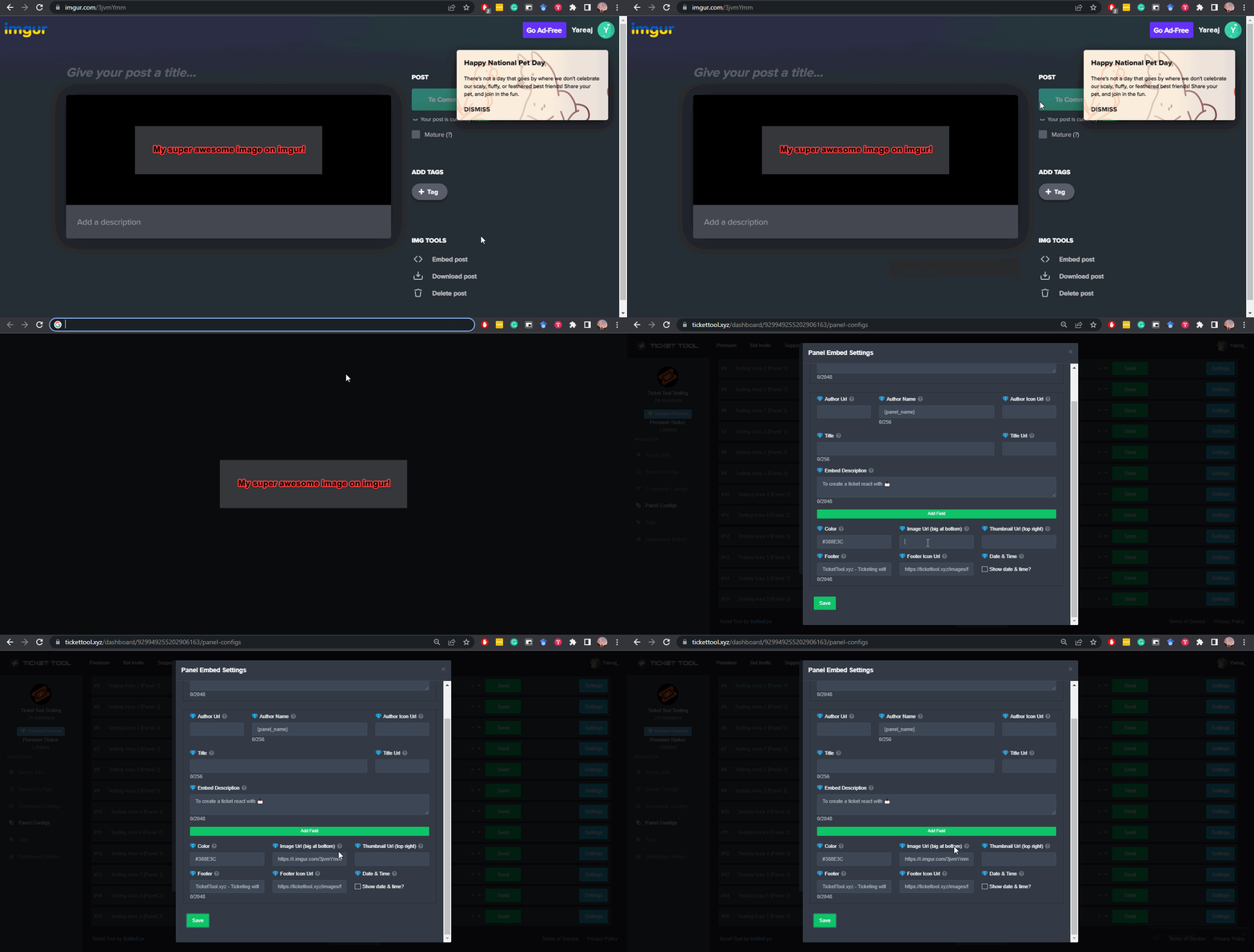 scenic forum
@plain granite ^
scenic forum
plain granite
EMOJI
Hey there! Simply use the <:emojiname:emojiID> format
Use the $id command on your server followed by the emoji to obtain it quickly
Sample below

 deft solstice
scenic forum
Hey there! Simply use the ``<:emojiname:emojiID>`` format
Use the $id command on...
deft solstice
scenic forum
Hey there! Simply use the ``<:emojiname:emojiID>`` format
Use the $id command on...
 humble sequoiaBOT
This error indicates you have selected an invalid emoji, i.e. an emoji the bot isn't capable of using, in a button field
Which Emoji?
This depends upon which action the error is appearing, the most common cases are the Create Ticket button or one of your Dropdown emojis. You can visit your Button's List to find all available buttons and find the conflicting one by yourself.
Why doesn't the bot accept it as valid?
- You selected an emoji that doesn't exist anymore, i.e. that has been deleted
- You wrote text there, instead of an emoji (or in addition to an emoji)
- You entered a code for a custom emoji from a server that the bot is not a member of
- You entered a custom emoji code incorrectly
- You're on iPhone and entered an emoji using the phone's emoji pad (use the emoji selector in the website instead)
 scenic forum
@deft solstice ^
deft solstice
scenic forum
<@1117405710767116298> ^
Okay thank you
iron nightBOT
Gave +1 Rep to @scenic forum (current: #29 - 175)
 patent beacon
Hello 👋
..I have a question, please.
Is it possible to create a prompt chain before the actual ticket gets opened, so that the user first receives some notices?
For example:
Have you read our FAQ? (this should be confirmed)
Have you used the community support? (this should also be confirmed)
Only after confirming these steps, the real button for opening the ticket would appear.
thnx or help
humble sequoiaBOT
A Discord Form lets the user answer individual questions in a pop-up Form, which then displays the answers in the ticket message. This can save time if you already know what you want to ask the user.
Setup Forms
Forms can be enabled under Panel Settings > Form Options > Edit Forms Options. In the new pop-up window, you can now enable and edit your own Form.
Form Options
You can add up to 5 questions in the Discord form. This is a Discord limitation. Each question can have a placeholder in the input field, a minimum and maximum input, multi-line, and also the option to have the answer required.
Options
Question Title ➞ Your Question goes here
Question Placeholder ➞ The placeholder text in the input field
Required ➞ If enabled, the user has to answer this question, to submit the form
Multi-Line Input ➞ Allows the user to input multiple lines
Minimum and Maximum Input ➞ Set a minimum and maximum input value for the user
Displaying the Answer
To display the answers from the user, you need to enable Auto display form results on the ticket message as an additional embed
If you don't want a second embed, go into your Panel Configs > Ticket Options > Edit Ticket Message. You use the variable {create.form.x} and replace x with the number of your question. For example, the response to Question 5 can be displayed with {create.form.5}.
 scenic forum
@patent beacon you can have up to 5 questions they have to answer before the ticket gets created
Refer to embed above
patent beacon
scenic forum
<@602385180254142465> you can have up to 5 questions they have to answer before ...
Thanks for the quick reply, that’s great…
Is there also a custom version of the Ticket tool?
iron nightBOT
Gave +1 Rep to @scenic forum (current: #29 - 176)
scenic forum
patent beacon
Thanks for the quick reply, that’s great…
Is there also a custom version of the ...
Ticket Tool currently does not support having it as a custom instance
patent beacon
scenic forum
Ticket Tool currently does not support having it as a custom instance
ok Thanks ✅
patent beacon
scenic forum
Ticket Tool currently does not support having it as a custom instance
is this feature only in the premium version?
scenic forum
patent beacon
is this feature only in the premium version?
Nope, Ticket tool doesnt have that feature at all currently
patent beacon
scenic forum
Nope, Ticket tool doesnt have that feature at all currently
sorry - i mean the 5 questions before the ticket starts
scenic forum
patent beacon
sorry - i mean the 5 questions before the ticket starts
They are free just make sure to toggle the option in the image blow on as otherwise you possibly reach the free versions character limits and the answers wont be shown in full
 patent beacon
scenic forum
They are free just make sure to toggle the option in the image blow on as otherw...
patent beacon
scenic forum
They are free just make sure to toggle the option in the image blow on as otherw...
Thanks
iron nightBOT
Gave +1 Rep to @scenic forum (current: #29 - 177)
 brave glade
i play work at a dentist roblox game , i get verify for 2 time and tell me success, but i still can not send messeges at command and community, also i still can not see management section, how can i solve it
humble sequoiaBOT
@brave glade
⚠️ You're in the wrong place
We provide support for Ticket Tool Discord bot and cannot help you with whatever issue you have.
- We don't know which Support Team you should contact to get this issue resolved, and unfortunately we won't be able to accurately tell you.
If you don't have any further questions regarding our bot Ticket Tool, please close this ticket
patent beacon
patent beacon
Thanks
Is it possible to set up maybe3 buttons, where each button opens its own form?
 humble sequoiaBOT
For more convenient use of multipanels, you can now combine panels on the dashboard. This will allow you to directly send the multipanel from the dashboard or via the $panel ID command.
Where can I find this?
You can find this setting on the Dashboard -> Panel Configs -> Panel -> Attached Panels
Note: if you're attaching all the panels to a panel called English, don't include English in the attached panel's box (If you do this, it will create a duplicate)
This will put all buttons from all of your panels on one message. The message is the panel message from the panel you're combining these panels in.
 shrewd magnet
patent beacon
Is it possible to set up maybe3 buttons, where each button opens its own form?
shrewd magnet
patent beacon
Is it possible to set up maybe3 buttons, where each button opens its own form?
Just telling you, there’s another way for that
Step 1, go over here

- Add your stuff here

Anyways
$id 
Vro
 💰
💰
patent beacon
shrewd magnet
<:this:894279341108772914> 💰
Thanks 🍻
iron nightBOT
Gave +1 Rep to @shrewd magnet (current: #411 - 1)
 pulsar lodge
why ppl cant open a ticket in my server?
shrewd magnet
pulsar lodge
why ppl cant open a ticket in my server?
Yo
Imma help tell your members to send a ss of their ticket failing to be created
@pulsar lodge
pulsar lodge
shrewd magnet
Imma help tell your members to send a ss of their ticket failing to be created
huh? (its 6am and im tired lol)
 feral saffron
مين عربييييي
 warm cave
How do I add a “claiming system” when a user creates a ticket? Like for a staff member to claim the ticket?
restive condor
warm cave
How do I add a “claiming system” when a user creates a ticket? Like for a staff ...
Hey there! Claiming is a premium feature
humble sequoiaBOT
Claiming allows you to change the ticket name, category and permissions. To use it you have to enable it first on your Dashboard > Panel Configs > Claiming

 Note: This is a premium feature
warm cave
restive condor
Hey there! Claiming is a premium feature<:Premium:1192403074157912144>
Note: This is a premium feature
warm cave
restive condor
Hey there! Claiming is a premium feature<:Premium:1192403074157912144>
Thanks!
iron nightBOT
Gave +1 Rep to @restive condor (current: #1 - 2662)
 red hollow
Hi everyone, can someone Brazilian explain to me how to create a ticket? I just started using this and I don't have much experience.
shrewd magnet
red hollow
Hi everyone, can someone Brazilian explain to me how to create a ticket? I just ...
Olá amigo! Primeiro, você encontra a mensagem do tíquete e depois toca em criar tíquete
red hollow
shrewd magnet
Olá amigo! Primeiro, você encontra a mensagem do tíquete e depois toca em criar ...
Thanks my Friend
iron nightBOT
Gave +1 Rep to @shrewd magnet (current: #239 - 2)
 dark kraken
feral saffron
مين عربييييي
dark kraken
feral saffron
مين عربييييي
اهلا محمود، كيف بقدر اساعدك ؟
old grotto
هو انا شفت ناس بتساعد هنا ومعهمش رتب هل انا بقدر اساعد برضوا ولا؟
i saw some people help without having roles so i was asking can anyone help if he knows what to do?
scenic forum
old grotto
هو انا شفت ناس بتساعد هنا ومعهمش رتب هل انا بقدر اساعد برضوا ولا؟
i saw some peo...
We cant help if we dont know what you need help with
old grotto
scenic forum
We cant help if we dont know what you need help with
what do u mean?
i was saying i saw some normal people help who asks here so could i or anyone answer and help here if they know how to help?
scenic forum
old grotto
what do u mean?
i was saying i saw some normal people help who asks here so coul...
For people to help you, they would need to know what you need help with
old grotto
scenic forum
For people to help you, they would need to know what you need help with
u didnt understand my qustion
i am saying if i can help someone who qustioned here
am i allowed to or only support?
scenic forum
old grotto
u didnt understand my qustion
i am saying if i can help someone who qustioned he...
My apologies
Yes anyone can help if they know what they need
Read this channels pins for the rules on that matter
old grotto
scenic forum
My apologies
Yes anyone can help if they know what they need
Read this channels ...
thanks
iron nightBOT
Gave +1 Rep to @scenic forum (current: #29 - 178)
 lucid dagger
How do I add multiple buttons for different types of tickets?
humble sequoiaBOT
For more convenient use of multipanels, you can now combine panels on the dashboard. This will allow you to directly send the multipanel from the dashboard or via the $panel ID command.
Where can I find this?
You can find this setting on the Dashboard -> Panel Configs -> Panel -> Attached Panels
Note: if you're attaching all the panels to a panel called English, don't include English in the attached panel's box (If you do this, it will create a duplicate)
This will put all buttons from all of your panels on one message. The message is the panel message from the panel you're combining these panels in.
scenic forum
@lucid dagger please refer to the embed above
iron nightBOT
Gave +1 Rep to @scenic forum (current: #29 - 179)
lucid dagger
What about changing this message?
 humble sequoiaBOT
The panel message is where people react to make a ticket. To customize it head over to your Dashboard --> Panel Configs -> Panel -> Edit Panel Message
 scenic forum
@lucid dagger Please refer to the embed above
lucid dagger
thank you @scenic forum
iron nightBOT
Gave +1 Rep to @scenic forum (current: #29 - 180)
lucid dagger
@scenic forum some more questions, how do I make it so I can fill out a format when I click for example Create Ticket? And how do I restrict people to 1 or 2 tickets open at once to prevent spam and auto name tickets to like general-0001 instead of ticket-0001?
 humble sequoiaBOT
A Discord Form lets the user answer individual questions in a pop-up Form, which then displays the answers in the ticket message. This can save time if you already know what you want to ask the user.
Setup Forms
Forms can be enabled under Panel Settings > Form Options > Edit Forms Options. In the new pop-up window, you can now enable and edit your own Form.
Form Options
You can add up to 5 questions in the Discord form. This is a Discord limitation. Each question can have a placeholder in the input field, a minimum and maximum input, multi-line, and also the option to have the answer required.
Options
Question Title ➞ Your Question goes here
Question Placeholder ➞ The placeholder text in the input field
Required ➞ If enabled, the user has to answer this question, to submit the form
Multi-Line Input ➞ Allows the user to input multiple lines
Minimum and Maximum Input ➞ Set a minimum and maximum input value for the user
Displaying the Answer
To display the answers from the user, you need to enable Auto display form results on the ticket message as an additional embed
If you don't want a second embed, go into your Panel Configs > Ticket Options > Edit Ticket Message. You use the variable {create.form.x} and replace x with the number of your question. For example, the response to Question 5 can be displayed with {create.form.5}.
scenic forum
@lucid dagger refer to embed above for the forms
humble sequoiaBOT
The ticket name is the default channel name of all tickets. To edit it, go to your Dashboard > Panel Configs > Ticket. There you can edit the channel name of opened and closed tickets. You can also use variables in there.
Note: This is a premium feature
scenic forum
lucid dagger
<@186523978729259009> some more questions, how do I make it so I can fill out a ...
Above for the ticket names automatically, it requires premium
And for your spam, by default people can only open 1 ticket per server (which can be changed if wanted)
lucid dagger
thank you @scenic forum
iron nightBOT
Gave +1 Rep to @scenic forum (current: #29 - 181)
 feral cove
i need help creating a ticket
 trail pilot
Why it’s not working, I already added some mod team to the ticket in your ticket website and send it but it’s not working. Only ticket bot can access it and me
 livid snow
I need help


I have this ticket I want to remove paid joiner claim I forgot how to do that
humble sequoiaBOT
The Drop-down menu or Select Menu replaces the buttons on your panel message and uses a drop-down menu with all of your panels. To set this up, go to your Panel Configs and select your main Panel.
<:Numbericons1:1018864164032225340> Enable Select Style
First you enable Select Style. Then you add an item in the Dropdown Editor. Now you can start editing your dropdown!
<:Numbericons2:1018864168041971712> Dropdown Editor
Each line in the dropdown editor represents a line in the drop down menu on discord. You can add more "Items", by clicking on
First you select a panel. That's the panel this option will open a ticket for. DONT select the same panel twice. Each option should have a different Panel
After that, you can put a Display. This is the title of this option and will appear in the drop down menu. The *Description can be set right after that, which will be below the title in grey.
Additionally you can select an emoji, that will be shown in front of each option. You can either manually input the ID of an emoji or select it in the selector.
Common Issues ⚠️
- Panel doesn't send? Make sure you have a valid emoji selected
- Option doesn't show up? Check if two options have the same panel in the DropDown Editor
$dropdown
scenic forum
@livid snow refer to embed above
Simply remove the pain joiner part and resend the panel
 grave thicket
I need help pls😭
 scenic forum
grave thicket
I need help pls😭
scenic forum
grave thicket
I need help pls😭
We cannot help you, Youd need to contact their servers staff as they need to delete some channels
 blazing arch
Ok basically i lit gave the bot all premissions but it still dosent work


 granite salmon
grave thicket
I need help pls😭
granite salmon
grave thicket
I need help pls😭
they either have to many channels or have way to many tickets open
blazing arch
blazing arch
Ok basically i lit gave the bot all premissions but it still dosent work
also it worked few days ago and all i did was just make the channel not being able to talk in
scenic forum
blazing arch
Ok basically i lit gave the bot all premissions but it still dosent work
They are possibly missing permissions in the Category you want the tickets to be created in
granite salmon
blazing arch
Ok basically i lit gave the bot all premissions but it still dosent work
try making a category of it
blazing arch
granite salmon
try making a category of it
i already choosed a category
granite salmon
blazing arch
i already choosed a category
then check the category perms and see if its in there, which that would be where the problem is as it seems that the bot has max perms.
grave thicket
How do i delete channels
scenic forum
grave thicket
How do i delete channels
You dont, only a staff member of their server is able to
blazing arch
granite salmon
then check the category perms and see if its in there, which that would be where...
OKAY IT WORKED THANK U SO MUCH
iron nightBOT
Gave +1 Rep to @granite salmon (current: #188 - 3)
granite salmon
blazing arch
OKAY IT WORKED THANK U SO MUCH
of course 😁
grave thicket
Ok
blazing arch
also 1 question is it able to make only 1 role be able to take over tickets?
granite salmon
grave thicket
How do i delete channels
if your staff in there. and hold down the channel and go to edit channel then delete(if your on mobile) if you are on pc hover over a channel press the settings thingy and it should say delete channel
granite salmon
blazing arch
also 1 question is it able to make only 1 role be able to take over tickets?
yes
blazing arch
granite salmon
yes
how
granite salmon
blazing arch
how
it should give you a option of what roles you want to handle tickets.
grave thicket
granite salmon
if your staff in there. and hold down the channel and go to edit channel then de...
Where do i watch that
granite salmon
blazing arch
i never got it
ok do /panel and it should all show up in there you can click what role can see it and stuff like that!
or you can go to channel perms and add the role you want to see it
granite salmon
grave thicket
Where do i watch that
it will only show up if you are staff and you have permission to create and delete channels.
 warped parcel
humble sequoiaBOT
warped parcel
humble sequoiaBOT
@warped parcel
⚠️ You're in the wrong place
We provide support for Ticket Tool Discord bot and cannot help you with whatever issue you have.
- We don't know which Support Team you should contact to get this issue resolved, and unfortunately we won't be able to accurately tell you.
If you don't have any further questions regarding our bot Ticket Tool, please close this ticket
 hidden magnet
Good afternoon!
apologies if this is the wrong place to put it, but is there a way to have as part of a ticket form, the first question be which Staff role should assist with a user's ticket?
hidden magnet
and a secondary question, is there a way to set the created ticket channel to delete after a couple days?
restive condor
hidden magnet
Good afternoon!
apologies if this is the wrong place to put it, but is there a w...
Hey there! Yes, it's possible but there's no way for the bot to then just add that specific role to the ticket
restive condor
hidden magnet
and a secondary question, is there a way to set the created ticket channel to de...
Yes, but that'd be a premium feature
hidden magnet
restive condor
Hey there! Yes, it's possible but there's no way for the bot to then just add th...
ahh, okay, so only way would be to create a separate panel, and split it by role, correct?
restive condor
That's right 😄
hidden magnet
magic, thank you!
 jovial lance
restive condor
That's right 😄
jovial lance
restive condor
That's right 😄
Do you know why the ping isn’t working in a ticket?

@support team wouldn’t ping the role
restive condor
jovial lance
Do you know why the ping isn’t working in a ticket?
Hey there! Please put {} around the role
Should be {@Support Team}
jovial lance
restive condor
Hey there! Please put {} around the role
Ah, thank you!
iron nightBOT
Gave +1 Rep to @restive condor (current: #1 - 2665)
 spice elk
Do threads get rate limited by discord?
pulsar lodge
this is from my alt but i did everything correctly? anyone got an idea?
 jovial lance
restive condor
Hey there! Please put {} around the role
jovial lance
restive condor
Hey there! Please put {} around the role
Still didn’t work. 
 scenic forum
pulsar lodge
this is from my alt but i did everything correctly? anyone got an idea?
scenic forum
pulsar lodge
this is from my alt but i did everything correctly? anyone got an idea?
Hey there!
«You don't have permissions to use this»
👉 Server Configs -> Blacklist Roles
Any roles there will be unable to interact with the bot in any way, including creating tickets.👉 Panel Configs -> Buttons -> Create Ticket -> Support team only
If this is enabled👉 Panel Configs -> Buttons -> Create Ticket -> Disabled Roles
Any roles there will be unable to use the button.
scenic forum
spice elk
Do threads get rate limited by discord?
Everything inside discord has a latelimit
pulsar lodge
ohhhh i had an issue with the 2nd thank you
pulsar lodge
scenic forum
Hey there!
**__«You don't have permissions to use this»__**
> 👉 **Server Conf...
thank you so much
iron nightBOT
Gave +1 Rep to @scenic forum (current: #29 - 182)
restive condor
jovial lance
Still didn’t work. <:AaronThink:993233991081668648>
Is 'Support Team' the exact role name?
 sullen thistle
Hello! I need help i have been trying to figure out why its not working but i literally gave the bot all permissions that it needs + the top role in the server

 restive condor
sullen thistle
Hello! I need help i have been trying to figure out why its not working but i li...
restive condor
sullen thistle
Hello! I need help i have been trying to figure out why its not working but i li...
Hey there! Please check your Dashboard > Panel Configs > Buttons > Create Ticket Button
You possibly have an invalid emoji there
Or you accidentally put text in the emoji field
sullen thistle
restive condor
You possibly have an invalid emoji there
Thank you so much! I figured the emoji was the problem, i cannot get the id on the phone so i used the wrong thingy (i dont know how its called). Again, Thank you!
iron nightBOT
Gave +1 Rep to @restive condor (current: #1 - 2666)
restive condor
sullen thistle
Thank you so much! I figured the emoji was the problem, i cannot get the id on t...
No worries, you can use the $id command on your server to get the correct format
$id 
humble sequoiaBOT
restive condor
$id <:smil:936485535403356221>
!smil
<:smil:936485535403356221>
restive condor
Like so ^
sullen thistle
restive condor
No worries, you can use the $id command on your server to get the correct format
OHH TYSMM
 gilded dagger
 pseudo ravine
You don’t
 fallow delta
how to give theses 3 permissions to bot?
 humble sequoiaBOT
Within all the messages the bot sends (both embeds and text) you can mention either channels, roles, or even users, these mentions will only send a notification to the user if they are used within a text field, e.g: a role mentioned in an embed won't ping at all the users who have that role.
For mentioning a role you can use one out of three options:
{@Role Name} ➞ Which is Case Sensitive.
{RoleID} ➞ Replace RoleId with the Id of the role you are trying to ping.
<@&RoleID> ➞ Discord's native syntax to ping roles.
<#ChannelID> ➞ Mention a channel by its ID.
<@UserID> ➞ Mention a user by its ID.
scenic forum
@manic bear Refer to the embed above in how to ping inside a ticket message
For your opened panel request
Panel Configs -> Limits -> For panel specific limits on how many tickets a user can open or can be open in total
scenic forum
fallow delta
how to give theses 3 permissions to bot?
Bot permissions -> edit the bot role permissions -> Add Manage channel to its role permissions
Channel permissions -> Edit channel -> Grant the 2 missing permissions
If your role is called "moderator" you can add {@moderator} to the ticket message
Please be aware this is Case Sensitive
 fallow delta
uhhhhh... I am lost
scenic forum
fallow delta
uhhhhh... I am lost
Okay then lets go step by step
Go to your server settings -> Click the Ticket Tool role -> Manage Channels ✅
 tiny spoke
Que cargada no cargan los servidores
restive condor
tiny spoke
Que cargada no cargan los servidores
Que servidores?
fallow delta
I dont know how to go to a setting's servers, sorry if me is taking your patience
humble sequoiaBOT
The Ticket Message is the first message sent by the bot on a new ticket. To customize it head over to your Dashboard ➞ Panel Configs ➞ Ticket ➞ Edit Ticket Message
scenic forum
@manic bear above is where the ticket message is located, you change the text there to mention the role youd like
Also dont use the embed parts as pings inside an embed cannot ping
fallow delta
scenic forum
Okay then lets go step by step
Go to your server settings -> Click the ``Ticket ...
I dont know how to go to a setting's servers, sorry if me is taking your patience
scenic forum
Were you in the panel message section?
scenic forum
fallow delta
I dont know how to go to a setting's servers, sorry if me is taking your patienc...
-
Open your server → tap the three dots (…) in the top-right → Settings.
-
Go to Roles → tap the role you want to edit.
-
Tap Permissions → toggle the switches on/off for what that role can do.
-
Tap Save (top-right) when finished.
or if youre on pc this
 fallow delta
I did the steps on pc, but, didnt appear the button "server settings" when click with right buttom.
pulsar lodge
scenic forum
Hey there!
**__«You don't have permissions to use this»__**
> 👉 **Server Conf...
normal ppl can see the ticket??? how to fix that?
scenic forum
fallow delta
I did the steps on pc, but, didnt appear the button "server settings" when click...
This setting doesnt exist for you?
 scenic forum
pulsar lodge
normal ppl can see the ticket??? how to fix that?
scenic forum
pulsar lodge
normal ppl can see the ticket??? how to fix that?
Panel Config -> Permissions -> Everyone Role Permissions -> Edit opened AND edit closed -> View channel ❌
pulsar lodge
im stupid 😭 don’t mind that message i deleted
fallow delta
bro, the server I wanted to solve the problem isnt mine
scenic forum
fallow delta
bro, the server I wanted to solve the problem isnt mine
Youre not a staff member on the server?
fallow delta
no
scenic forum
fallow delta
no
Then you cannot fix it, only a staff member can fix it
fallow delta
a
fallow delta
scenic forum
Then you cannot fix it, only a staff member can fix it
how a can be a staff member or I cannot?
scenic forum
fallow delta
how a can be a staff member or I cannot?
On here, you cannot currently as applications are closed but i was refering to the server the screenshot you sent was from
fallow delta
ye, I am not staff on the other server
to solve this... I need to be a staff to solve another problem of permission's bot?
 fallow delta
scenic forum
On here, you cannot currently as applications are closed but i was refering to t...
fallow delta
scenic forum
On here, you cannot currently as applications are closed but i was refering to t...
uh?
jovial lance
restive condor
Is 'Support Team' the exact role name?
Yea, it is.
scenic forum
fallow delta
to solve this... I need to be a staff to solve another problem of permission's b...
You cannot access a dashboard unless youre either Administrator or have a Dashboard role set my an Administrator refer to embed below
humble sequoiaBOT
Any role you put there will have full access to the ticket tool dashboard. The server owner and users with admin permissions already have access to the dashboard.
Be careful of which roles to put here
 hallow wraith
Do you guys offer whitelabel?
scenic forum
hallow wraith
Do you guys offer whitelabel?
We currently dont offer custom instances of Ticket Tool
hallow wraith
That’s unfortunate
fallow delta
scenic forum
You cannot access a dashboard unless youre either ``Administrator`` or have a Da...
but didnt appear any server to do this
scenic forum
fallow delta
but didnt appear any server to do this
You already mentioned youre not staff in the server, therefor you cannot access the dashboard
jovial lance
restive condor
Is 'Support Team' the exact role name?
Yeah it is.
 gleaming osprey
Please unban my account type soul😭
humble sequoiaBOT
@gleaming osprey
⚠️ You're in the wrong place
We provide support for Ticket Tool Discord bot and cannot help you with whatever issue you have.
- We don't know which Support Team you should contact to get this issue resolved, and unfortunately we won't be able to accurately tell you.
If you don't have any further questions regarding our bot Ticket Tool, please close this ticket
 molten harness
Can ticket tool change messages in a ticket during different times of the day?
scenic forum
molten harness
Can ticket tool change messages in a ticket during different times of the day?
Panel Configs -> Limits -> Time Schedule
its possible to have a different message like "not within business hours" type of thing but that requires premium
molten harness
scenic forum
Panel Configs -> Limits -> Time Schedule
its possible to have a different messag...
Thanks
So does not being able to open tickets require premium if that’s what you’re saying?
iron nightBOT
Gave +1 Rep to @scenic forum (current: #29 - 183)
scenic forum
molten harness
Thanks
So does not being able to open tickets require premium if that’s what yo...
The entire Time Schedule function does require premium
 molten harness
Wait so if I’m getting this right I can do the different time messages but not “business hours?”
@scenic forum
scenic forum
molten harness
Wait so if I’m getting this right I can do the different time messages but not “...
Any sort of adjustment to time specific changes aka Time Schedule is premium
molten harness
scenic forum
Any sort of adjustment to time specific changes aka Time Schedule is premium
Oh okay
restive condor
jovial lance
Yeah it is.
Sorry for the wait. It's wrong in some way, either not capitilised exactly the same or something else.
You will need to use its ID
Please use the $id command on your server followed by the role mention
And then copy and paste the bots response (should be in the <@&ID> format), onto your ticket message, on the Dashboard
humble sequoiaBOT
The Ticket Message is the first message sent by the bot on a new ticket. To customize it head over to your Dashboard ➞ Panel Configs ➞ Ticket ➞ Edit Ticket Message
astral rose
How can I have $new support and warning ticket limit reached. Blue. Like it wont be message and only the person that opens it and me can see it.
 hardy vale
Hello
restive condor
astral rose
How can I have $new support and warning ticket limit reached. Blue. Like it wont...
Hey there! Could you clarify what exactly you're looking to do, please?
restive condor
hardy vale
Hello
Hey there! How can I help?
 silent compass
i used this bot well over a year ago.. how do i create a panel with my text in the chat like this? 😭 im so lost ngl
 hardy vale
I want a virus spreading software
humble sequoiaBOT
⚠️ You're in the wrong place
We provide support for Ticket Tool Discord bot and cannot help you with whatever issue you have.
- We don't know which Support Team you should contact to get this issue resolved, and unfortunately we won't be able to accurately tell you.
If you don't have any further questions regarding our bot Ticket Tool, please close this ticket
restive condor
silent compass
i used this bot well over a year ago.. how do i create a panel with my text in t...
Hey there! Removing the embed message altogether is a premium feature
You can do the multiple buttons with an embed instead, for free
silent compass
restive condor
Hey there! Removing the embed message altogether is a premium feature <:Premium:...
So i probably had the premium feature back then?
restive condor
Possibly
silent compass
Okay thank youuu
astral rose
restive condor
Hey there! Could you clarify what exactly you're looking to do, please?
This
 restive condor
astral rose
This
restive condor
astral rose
This
Are you a staff member at that server?
astral rose
astral rose
This
This is not my server. I mean in generally how can I make the messages that come up be like this
restive condor
You can't. That's an error message saying the server has reached the channel limit. It shows automatically when the limit is reached
 restive condor
You're looking to make that with Ticket Tool?
 woven nova
Does anyone know how to set it up when like someone opens a ticket 1 of the ticket staff is assigned to it?
restive condor
woven nova
Does anyone know how to set it up when like someone opens a ticket 1 of the tick...
Hey there! It's not possible to automatically assign a ticket to a staff member unfortunately.
Staff members can claim their own tickets though with the claiming feature - Premium
woven nova
Alright!
astral rose
restive condor
You're looking to make that with Ticket Tool?
With $new support and warning ticket limit reached.
 flat nest
How to get Polish langue on bot?
restive condor
astral rose
With $new support and warning ticket limit reached.
So you want for the bot to reply with that similar style message, when it says "Warning: Ticket Limit Reached" when someone uses the $new command?
restive condor
flat nest
How to get Polish langue on bot?
Hey there! It's currently not possible to change the entire bot's language.
You can edit most messages and buttons though
astral rose
restive condor
So you want for the bot to reply with that similar style message, when it says "...
Bro are you trolling?
flat nest
restive condor
Hey there! It's currently not possible to change the entire bot's language.
You...
Shh ok thanks😁
restive condor
astral rose
Bro are you trolling?
No, I'm asking for clarification since you're not being clear
Is that what you want?
If so, it's not possible unfortunately
flat nest
restive condor
Hey there! It's currently not possible to change the entire bot's language.
You...
Also how to make the button green or a different color and write your own text on it instead of "create ticket"
Because I'm new to such commands and I don't really know how to find my way around😅
restive condor
flat nest
Also how to make the button green or a different color and write your own text o...
Dashboard > Panel Configs > Buttons > Create Ticket Button
You can edit the button's text, emoji & colour from there 😄
humble sequoiaBOT

Ticket Tool - Ticketing without clutter - The #1 Discord support bot
flat nest
"The link is bot found"
What is this
The important thing is that I know more now
Thank you for this support
restive condor
No problem!
molten harness
How can I fix this?
 restive condor
molten harness
How can I fix this?
restive condor
molten harness
How can I fix this?
Hey there! Try using the  button above your server name
 trail quiver
Hello!! My server members said that they don't have permission to make a ticket but I checked the role permissions and it's fine and I also checked the app and idk what to rlly do on it 😓 do you know how to fix this?
This is what it says for my members
 restive condor
trail quiver
This is what it says for my members
restive condor
trail quiver
This is what it says for my members
Hi there! Please check:
Dashboard > Panel Configs > Buttons > Create Ticket Button
- Check that support Team Only is disabled
 and that you didn't accidentally disable any roles
Dashboard > Server Configs > Blacklist Roles
- Make sure you didn't accidentally blacklist any roles
trail quiver
restive condor
Hi there! Please check:
Dashboard > Panel Configs > Buttons > Create Ticket Butt...
Okay thank you so much!! Let me check on it right now!
iron nightBOT
Gave +1 Rep to @restive condor (current: #1 - 2667)
trail quiver
Thank you so much!! It works now!!
 polar bluff
Add-on link?
restive condor
polar bluff
Add-on link?
Hi, what exactly do you mean?
polar bluff
restive condor
Hi, what exactly do you mean?
Dashboard link
humble sequoiaBOT
Ticket Tool - Ticketing without clutter - The #1 Discord support bot
restive condor
polar bluff
Dashboard link
Here you go ^
polar bluff
thx
 jaunty stone
right so im trying to set up the tickets in my friends server and the bot is in the server but when i go on the website, the server isnt there. i am so confused.
restive condor
jaunty stone
right so im trying to set up the tickets in my friends server and the bot is in ...
Hey there! Please try the steps below
humble sequoiaBOT
Don't see your server in the dashboard?
Try using the Sync Servers button on your top center of the Dashboard page
If this doesn't work
You should relog from the dashboard, you can do this by clicking here to log out immediately, and then log back in
Note:
You need one of these 3 things to access the dashboard.
1. Server Owner (Level: 6)
2. Server Administrator (Level: 4)
3. Dashboard Role (Level: 2)
:warning: You can check your level using the </permissionlevel:1029797400174399542> command on your Discord Server
If the bot's response is:
- @User is permission level: 0 (User)
You don't have any of the 3 levels required to access the server's dashboard
 jaunty stone
the bot didnt respond
restive condor
jaunty stone
the bot didnt respond
Make sure it has the VIEW CHANNEL & SEND MESSAGES permissions for that channel
 jaunty hare
Y'all I am genuinely not trying to be dense but how do I ping support roles when a ticket opens? I tried {@role} but it doesn't work.
and the role ID.
restive condor
jaunty hare
Y'all I am genuinely not trying to be dense but how do I ping support roles when...
Hey there! Are you not able to get it to mention the role properly or is the bot just not actually pinging those with the role?
jaunty hare
Hii! It mentions, but doesn't ping!
restive condor
Did you put the role mention outside the embed message? Mentions within embeds won't actually ping
jaunty hare
Yep. It's outside the embed!
restive condor
Perfect, then just double check that Ticket Tool has the MENTION EVERYONE & ALL ROLES permission in its role settings
jaunty hare
I just did and it was turned off. Bless. Thank you! I knew it was something super obvious that I was overlooking. It was on for bot perms, but not the actual role.
Oop. No wait. No pings still.
restive condor
Could you screenshot the ticket message please
jaunty hare
Sure!
 fluid seal
Hello
humble sequoiaBOT
Hello, we would love to help you, but if you don't tell us what you need help with we can't help you :(
jaunty hare
I apologize for my chaos. It turns out my admin reset a category permissions lol. 🤦🏻♀️ thank you for your patience
 wary latch
How do get money back from token when it says no route ??
 livid stirrup
what permissions do i need to gain access to the dashboard. Because i added the bot to a server I'm helping make but the dashboard keeps saying "It looks like Ticket Tool isn't online or in any servers you have permission to access, Invite Ticket Tool or check it's status"
whats the reason for this please
wary latch
Telegram bonk sol using dex how would you swap I guess
trail pilot
How can I actually add mod team to ticket? It’s not working even i add it through dashboard

Pls help
Please asap
I did add them and sent it but it’s not working. What did I missed?
trail pilot
Yes
trail pilot
shrewd magnet
Hmm
How can you help me
shrewd magnet
This is where it should be

- So go to your server
- Scroll down
- Open frequently used configs
- Add your support team on the support team roles box
@trail pilot
trail pilot
Okay I’ll do it
shrewd magnet
When you’re done, send the panel again and make a ticket
Tips - if you want your bot to ping the roles, in the message content, say <@&(roleid)>
Anyways how did you do?
@trail pilot
You there?
@trail pilot
trail pilot
I’m here I’m doing it
shrewd magnet
Ok, when you’re done, tell me if it works, if it doesn’t, I’ll dive in more
trail pilot
shrewd magnet
Ok, when you’re done, tell me if it works, if it doesn’t, I’ll dive in more
Up
shrewd magnet
Now see if it works
trail pilot
It didn’t work
trail pilot
shrewd magnet
Now see if it works
Did I miss something
trail pilot
Yes I save
trail pilot
Okay
 waxen lodge
Hello everyone! I'm Brazilian and need assistance with the ticket questions. Can anyone help me in Portuguese?
shrewd magnet
waxen lodge
Hello everyone! I'm Brazilian and need assistance with the ticket questions. Can...
Claro, amigo! Me diga sua pergunta em português.
waxen lodge
shrewd magnet
Claro, amigo! Me diga sua pergunta em português.
Então, queria saber como colocar perguntas em determinado tipo de ticket
Por exemplo, ticket de compras, aí eu queria fazer as perguntas: "Qual produto quer comprar?" "Endereço de entrega?"
shrewd magnet
waxen lodge
Então, queria saber como colocar perguntas em determinado tipo de ticket
Acho que você quis dizer formulários, não se preocupe. Primeiro, acesse o painel do seu bot de tickets, role a tela para baixo até encontrar formulários e você poderá adicionar perguntas. Você também tem a opção de criar uma incorporação separada para respostas de formulários.
waxen lodge
shrewd magnet
Acho que você quis dizer formulários, não se preocupe. Primeiro, acesse o painel...
Então, pode me enviar uma print de como fazer-?
shrewd magnet
waxen lodge
Então, pode me enviar uma print de como fazer-?
Claro! Por favor, aguarde
waxen lodge
shrewd magnet
Claro! Por favor, aguarde
Ok. Te espero
shrewd magnet
waxen lodge
Ok. Te espero

 waxen lodge
Oww, ok! Obrgd! Bm trblh.
shrewd magnet
waxen lodge
Oww, ok! Obrgd! Bm trblh.
Você pode me avisar e agradecer? Eu agradeceria.
waxen lodge
Avisar oq-? As abreviaçoes?
shrewd magnet
waxen lodge
Avisar oq-? As abreviaçoes?
como responder à minha mensagem com @ e dizer obrigado. Por favor
shrewd magnet
waxen lodge
Mas eu já disse obrigado
então eu ganho uma reputação, é necessário que eu seja pingado
waxen lodge
Senhor, não estou entendo. Estou usando abreviaçoes brasileiras, onde gringos não entende
shrewd magnet
waxen lodge
Senhor, não estou entendo. Estou usando abreviaçoes brasileiras, onde gringos nã...
Ah, desculpe senhor! Obrigado por pelo menos tentar
tenha um bom dia
waxen lodge
shrewd magnet
Ah, desculpe senhor! Obrigado por pelo menos tentar
Sem problemas, eu que oço desculpas. Mas obrigado pela ajuda
Bom trabalho
Até a proxima
pulsar lodge
is there any way to go past the limit of the embed description
 shrewd magnet
pulsar lodge
is there any way to go past the limit of the embed description
shrewd magnet
pulsar lodge
is there any way to go past the limit of the embed description
Can you provide more details?
trail pilot
Thank you @shrewd magnet
iron nightBOT
Gave +1 Rep to @shrewd magnet (current: #188 - 3)
pulsar lodge
shrewd magnet
Can you provide more details?
how can I bypass the limit like this one? mine is also similar long to this one?

 mint marsh
Please how can I access it?
 sullen thistle
mint marsh
Please how can I access it?
sullen thistle
mint marsh
Please how can I access it?
I'm not staff but i had the same problem, try to see if the bot has all perms enabled that it needs
sullen thistle
restive condor
Hey there! Please check your Dashboard > Panel Configs > Buttons > Create Ticket...
you can also check here what Dan responded to the same problem
 slim walrus
sullen thistle
I'm not staff but i had the same problem, try to see if the bot has all perms en...
slim walrus
sullen thistle
I'm not staff but i had the same problem, try to see if the bot has all perms en...
Im having same issue, but the bot has all perms enabled
sullen thistle
slim walrus
Im having same issue, but the bot has all perms enabled
you probably have a invalid emoji in there
slim walrus
sullen thistle
you probably have a invalid emoji in there
how? Where?
I used the normal emojis
🌸❗️🎫🤝
are any of these invalid?
sullen thistle
slim walrus
are any of these invalid?
nope! they should work since they are default emojis
Try to look at dans respond
slim walrus
sullen thistle
nope! they should work since they are default emojis
well...
sullen thistle
Maybe it could help you out
slim walrus
sullen thistle
Try to look at dans respond
where?
sullen thistle
sullen thistle
you can also check here what Dan responded to the same problem
click on the message i responded to
slim walrus
sullen thistle
click on the message i responded to
its the panel option that' not working
sullen thistle
slim walrus
its the panel option that' not working
are you on your "main" panel?
slim walrus
sullen thistle
are you on your "main" panel?
yeah
even the forms option isnt working
sullen thistle
slim walrus
even the forms option isnt working
I myself didnt use the forms option so i sadly cant help you out, in this case I would just wait till a staff gets here to assist you
slim walrus
mm
mint marsh
sullen thistle
I'm not staff but i had the same problem, try to see if the bot has all perms en...
How to activate?
sullen thistle
mint marsh
How to activate?
go to server settings, ticket tool role then permissions and check off the ones that are needed such as manage channels, read channels and send messages
 clear sentinel
Oka
shrewd magnet
pulsar lodge
how can I bypass the limit like this one? mine is also similar long to this one?
You cannot bypass ticket limits
 magic cipher
Hey guys, I need help
how can I transfer my premium subscription from one account to another
pulsar lodge
shrewd magnet
You cannot bypass ticket limits
so how they did it?
magic cipher
I had our server's ticket tool premium subscription linked to an account I no longer have access to
and I want to switch it to this account
what would the procedure be?
 vale moat
Invalid account number fund transfer please refund money
 severe sparrow
Can’t see gems
shrewd magnet
magic cipher
how can I transfer my premium subscription from one account to another
I think you have to contact staff about it
#premium-support here
 balmy ledge
If something is deleted in a ticket before it closes, will ticket bot log the ticket?
scenic forum
balmy ledge
If something is deleted in a ticket before it closes, will ticket bot log the ti...
Ticket tool will log everything that was present on the ticket the moment the transcript was made, deletions before and after won't be shown
wary latch
Hi im not getting access and i pay for membership. I try putting in my phone number but it doesnt take please help
in Potion
I put my phone number is to verify but it doesnt go through
 verbal hearth
Hi
astral rose
How can I get these 2 (1st pic) To show like the 2nd pic not as messages and as like that

 scenic forum
astral rose
How can I get these 2 (1st pic) To show like the 2nd pic not as messages and as ...
scenic forum
astral rose
How can I get these 2 (1st pic) To show like the 2nd pic not as messages and as ...
You can't
The errors and the way they appear are hard coded and cannot be adjusted
astral rose
I dont want them as errors bruv
Not what I want
I just want the messages to pop up in that style
I want the text to be as the text nothing changed
Just the message it self will be blue
If you understand
 fervent pewter
Can I use Ipad in PMNC?
scenic forum
astral rose
I want the text to be as the text nothing changed
If you talk about the message being ephemeral (having that blue dismiss that only you see) that's not possible to do
scenic forum
fervent pewter
Can I use Ipad in PMNC?
PMNC?
astral rose
scenic forum
If you talk about the message being ephemeral (having that blue dismiss that onl...
I’ve seen people have that tho
scenic forum
astral rose
I’ve seen people have that tho
It's not possible with ticket tool
astral rose
scenic forum
If you talk about the message being ephemeral (having that blue dismiss that onl...
I just want when people press a ticket the message being ephermal
Or at least show a new message
While it is ehphermal
scenic forum
astral rose
I just want when people press a ticket the message being ephermal
That will always be the case when a button or a slash command is used
astral rose
Not for me
scenic forum
astral rose
Not for me
Where?
 jolly timber
Please i need your help , coming from the group I have about 260k pepe coin 🪙 in the raydium platform trying to swap back to solana but it's saying error please help , am using phantom wallet to connect
humble sequoiaBOT
@jolly timber
⚠️ You're in the wrong place
We provide support for Ticket Tool Discord bot and cannot help you with whatever issue you have.
- We don't know which Support Team you should contact to get this issue resolved, and unfortunately we won't be able to accurately tell you.
If you don't have any further questions regarding our bot Ticket Tool, please close this ticket
astral rose
scenic forum
Where?
I’ve made a webhook with sapphire and tickettool
And it doesnt show me that
Any way I can make it to show?
scenic forum
astral rose
And it doesnt show me that
Because bots cannot use slash commands on another.
astral rose
astral rose
How can I get these 2 (1st pic) To show like the 2nd pic not as messages and as ...
Well ticket tool also messages when the ticket is opened to many times
Can I code it in or something is there an option?
jolly timber
So please want should I do because I can swap back the cion
scenic forum
astral rose
Well ticket tool also messages when the ticket is opened to many times
The messages can ONLY be hidden if you use a button/slash command
Another bot is unable to make these messages appear as they cannot use the 2 functions
humble sequoiaBOT
@jolly timber
⚠️ You're in the wrong place
We provide support for Ticket Tool Discord bot and cannot help you with whatever issue you have.
- We don't know which Support Team you should contact to get this issue resolved, and unfortunately we won't be able to accurately tell you.
If you don't have any further questions regarding our bot Ticket Tool, please close this ticket
scenic forum
astral rose
?
It is impossible to have ephemeral messages when you use prefix commands
That's a discord limitation
astral rose
scenic forum
It is impossible to have ephemeral messages when you use prefix commands
I cant add a new message? To popup when someone opens a ticket? And it shows where its open?
scenic forum
astral rose
I cant add a new message? To popup when someone opens a ticket? And it shows whe...
That pop up only exist when using slash or buttons
You'd need to add a ping for the user in the ticket message so they receive a ping when the ticket gets opened
astral rose
scenic forum
That pop up only exist when using slash or buttons
You'd need to add a ping for ...
Im using a button
scenic forum
astral rose
Im using a button
You're not using ticket tools buttons
 cloud sky
does the paid version of the ticket tool allow for images to be embedded into transcripts? it's pretty annoying having images be deleted and inaccessible when a ticket is closed
astral rose
scenic forum
You're not using ticket tools buttons
So its not possible you positive?

 lofty willow
i am trying to get ticket tool to log the ticket that was closed and i did it in the website and it isn't logging them
 tulip ravine
so how do i setup this to start recive tickets?
im in the panel editor & manager. i made a catergory but how to actually start it ?
scenic forum
astral rose
So its not possible you positive?
It is not when using sapphire. No.
lofty willow
lofty willow
i am trying to get ticket tool to log the ticket that was closed and i did it in...
@scenic forum do you know how to fix this
scenic forum
lofty willow
<@186523978729259009> do you know how to fix this
give me 5 minutes please, im waking up
lofty willow
ok
scenic forum
cloud sky
does the paid version of the ticket tool allow for images to be embedded into tr...
Premium will put images into the transcripts messages.
I think its up to 10 images if im correct
humble sequoiaBOT
With Ticket Tool, you can customize the behavior the bot takes when logging your tickets! For editing these options follow these steps:
Dashboard ➞ Panel Configs ➞ Logging Options
Logging Channel
Here you will define which channel @humble sequoia will save the Logs in (ticket created/deleted/closed, etc.)
Logs you can save:
➞ Ticket Created ➞ Logs when a ticket is created
➞ Ticket Closed ➞ Logs when a ticket is closed
➞ Ticket Opened ➞ Logs when a ticket is opened
➞ Ticket Renamed ➞ Logs when a ticket is renamed
➞ Ticket Deleted ➞ Logs when a ticket is deleted
➞ Transcript Saved ➞ Logs when a ticket is saved
Select with  (disable) or (enabled) which logs you would like
Below you can see an example of what the Logging Options will look like:
 scenic forum
@lofty willow youve selected the right panel and logging is enabled, correct?
Refer to embed above
lofty willow
scenic forum
<@1122724757574529065> youve selected the right panel and logging is enabled, co...
yes but the tickets are not logging there
scenic forum
lofty willow
yes but the tickets are not logging there
Can you run /debug inside your logging channel
lofty willow
scenic forum
Can you run ``/debug`` inside your logging channel
wait do i have to have gold to have them logged
scenic forum
tulip ravine
im in the panel editor & manager. i made a catergory but how to actually start i...
this is how you send the ticket creation menu if thats what you were asking
 scenic forum
lofty willow
wait do i have to have gold to have them logged
scenic forum
lofty willow
wait do i have to have gold to have them logged
no, logging is a free feature
lofty willow
idk i did /debug but it still isn't logging
scenic forum
lofty willow
idk i did /debug but it still isn't logging
What is debug saying. Everything with ✅ ?
 vast moon
i have the ticket toll and the sapphire bot. i want to close the ticket + save it in transcript + delete it --> all of that using just one command: $close
anyone got an idea how to do that?
lofty willow
scenic forum
What is debug saying. Everything with ✅ ?
 scenic forum
vast moon
i have the ticket toll and the sapphire bot. i want to close the ticket + save i...
scenic forum
vast moon
i have the ticket toll and the sapphire bot. i want to close the ticket + save i...
Each actions needs its own command, so unless sapphire is capable of chaining $close $transcript $delete with a single command it wont be possible
vast moon
scenic forum
Each actions needs its own command, so unless sapphire is capable of chaining $c...
it is
i just dont know how
scenic forum
lofty willow
Can you show me a screenshot of you having logging enabled
scenic forum
vast moon
it is
You'd need to visit sapphires support team to ask them on how to chain it
and please do not dm me
 scenic forum
lofty willow
scenic forum
lofty willow
if you create a new ticket it also doesnt do the logging, correct?
astral rose
scenic forum
It is not when using sapphire. No.
I aint able to do it from here?
 scenic forum
vast moon
it is
scenic forum
vast moon
it is
as said sapphire would need say all 3 commands with probably a delay which
vast moon
scenic forum
as said sapphire would need say all 3 commands with probably a delay which
ok, i'll check up the sapphire guys
scenic forum
astral rose
I aint able to do it from here?
It is NOT possibe to have ephemeral messages since you are using command style tickets
That IS a discord limitation
scenic forum
lofty willow
yes
Do you have more than 1 panel?
lofty willow
scenic forum
Do you have more than 1 panel?
wym
 lofty willow
scenic forum
lofty willow
scenic forum
This?

 lofty willow
scenic forum
You can remain in the logging screen
lofty willow
scenic forum
You can remain in the logging screen
 scenic forum
lofty willow
scenic forum
lofty willow
Did you select logging for the correct one?
As the settings are all panel specific
lofty willow
scenic forum
Did you select logging for the correct one?
let me check
lofty willow
scenic forum
Did you select logging for the correct one?
it is working thank you so much
iron nightBOT
Gave +1 Rep to @scenic forum (current: #29 - 184)
vast moon
ok, i went to the sapphire guys and they showed me how it is done.
now: since i wish to automate this process, i dont want this menu with "transcript" "open" "delete" on it. is there any way for me to remove this message?
 vast moon
i have the ticket toll and the sapphire bot. i want to close the ticket + save i...
vast moon
vast moon
i have the ticket toll and the sapphire bot. i want to close the ticket + save i...
the context
scenic forum
vast moon
ok, i went to the sapphire guys and they showed me how it is done.
now: since ...
It is not possible to remove the bots response on the commands
vast moon
scenic forum
It is not possible to remove the bots response on the commands
hmmm
but where can i find this code?
scenic forum
code?
scenic forum
vast moon
this is a custom message
ONLY this can be adjusted, but not removed entirely
The rest cannot be removed neither changed or adjusted
 vast moon
scenic forum
ONLY this can be adjusted, but not removed entirely
The rest cannot be removed n...
vast moon
scenic forum
ONLY this can be adjusted, but not removed entirely
The rest cannot be removed n...
with adjust you mean edit the message on it?
support team ticket controls
scenic forum
vast moon
with adjust you mean edit the message on it?
correct
Panel Config -> Messages -> Edit moderator message
scenic forum
vast moon
with adjust you mean edit the message on it?
after some testing, Its possible to make it semi invisible
A blank one liner would still pop up
 vast moon
scenic forum
after some testing, Its possible to make it semi invisible
A blank one liner wou...
vast moon
scenic forum
after some testing, Its possible to make it semi invisible
A blank one liner wou...
ok
this ticket closed by
this doesnt bother me
i dont want those buttons
vast moon
scenic forum
ONLY this can be adjusted, but not removed entirely
The rest cannot be removed n...
this message
no
the others, idc
you get what i mean?
scenic forum
scenic forum
Panel Config -> Messages -> Edit moderator message
Go here, remove the entire box and disable all 3 buttons (only in the mentioned setting)
scenic forum
vast moon
this message
visual example

 scenic forum
vast moon
it fcking works!!!!!
scenic forum
vast moon
it fcking works!!!!!
Also to avoid problems
Id use Delete as last command being sent
vast moon
scenic forum
Also to avoid problems
Id use ``Delete`` as last command being sent
oh, u know by chance how to do that?
or should i confer again with the sapphire guyz
scenic forum
vast moon
oh, u know by chance how to do that?
Im not familiar with sapphire, no
 austere forge
 icy girder
what is this
icy girder
what is this
Can you use a VPN and re-try, it could cause because you are in a place blocked by your ISP or something like that
 gusty lark
austere forge
Can you use a VPN and re-try, it could cause because you are in a place blocked ...
gusty lark
austere forge
Can you use a VPN and re-try, it could cause because you are in a place blocked ...
thanks
iron nightBOT
Gave +1 Rep to @austere forge (current: #4 - 1134)
icy girder
okay
icy girder
austere forge
Can you use a VPN and re-try, it could cause because you are in a place blocked ...
thx it work
iron nightBOT
Gave +1 Rep to @austere forge (current: #4 - 1135)
austere forge
Glad to hear, no problem! 
astral rose
Is it possible to make a webhook and use more than one? Just ticket tool
 onyx nebula
Please help me figure out what to do after purchasing a key and where to download the loder.
humble sequoiaBOT
⚠️ You're in the wrong place
We provide support for Ticket Tool Discord bot and cannot help you with whatever issue you have.
- We don't know which Support Team you should contact to get this issue resolved, and unfortunately we won't be able to accurately tell you.
If you don't have any further questions regarding our bot Ticket Tool, please close this ticket
restive condor
astral rose
Is it possible to make a webhook and use more than one? Just ticket tool
Hey there! More than one what exactly?
astral rose
More than one webhook
restive condor
I know what a webhook is but you're going to need to be more specific
What exactly are you looking to do with the webhook
astral rose
Change name, image, write add a button
restive condor
No, that's not possible unfortunately
 midnight frost
Is ticket tool down?
My server is having problems with it, such as it’s not allowing us to create tickets nor use $transcript and $delete
austere forge
midnight frost
My server is having problems with it, such as it’s not allowing us to create tic...
Can I get your server ID please
 lament atlas
I've activated the free 7-day experience of ticket tool premium, and I'd like to know more about how to apply it.
molten harness
restive condor
Hey there! Try using the <:sync:1265738463534387301> button above your server na...
Hi sorry for the super late response but I’ve tried that and it hasn’t worked
restive condor
molten harness
Hi sorry for the super late response but I’ve tried that and it hasn’t worked
Alrighty, could I just get your server ID please
molten harness
restive condor
Alrighty, could I just get your server ID please
Yes!
restive condor
And we'll fix it for you
restive condor
lament atlas
I've activated the free 7-day experience of ticket tool premium, and I'd like to...
Hey there! Please use the button above your server name to refresh the Dashboard
molten harness
Server ID: 1370929525990625300
restive condor
molten harness
Server ID: `1370929525990625300`
It doesn't seem like a manger is available, so I will switch it for you. I'll just move you to a ticket
molten harness
restive condor
It doesn't seem like a manger is available, so I will switch it for you. I'll ju...
Okay!
molten harness
Hey so I know that ticket tool sometimes uses sapphire is there a way for ticket tool or sapphire to dm (the user who opened the ticket) user depending on the ticket?
austere forge
molten harness
Hey so I know that ticket tool sometimes uses sapphire is there a way for ticket...
You need a premium subscription for this
molten harness
austere forge
You need a premium subscription for this
Oh okay then.
lament atlas
restive condor
Hey there! Please use the <:sync:1265738463534387301> button above your server n...
What exactly is the function of Ticket Tool Premium
restive condor
lament atlas
What exactly is the function of Ticket Tool Premium
See below for a full list of features
humble sequoiaBOT
Faster Premium Bot
Automatic Transcripts
Full Customization
Direct Messages
Ticket Automation
Thread Style Ticketing
Premium Support
Scheduled Panel Availability
Integrations
Claiming
Advanced Ticket Statistics
You can purchase premium here:
Price
$7.99 - Monthly
$66 - Yearly
astral rose
How can I get just the tickettool message in a different channel
 scenic forum
astral rose
How can I get just the tickettool message in a different channel
scenic forum
astral rose
How can I get just the tickettool message in a different channel
It will show in the channel the command has been used in
astral rose
scenic forum
It will show in the channel the command has been used in
It doesnt
scenic forum
astral rose
It doesnt
Your screenshot confirms it
You'd need to write the command in a different channel for that to be posted in a different channel
astral rose
scenic forum
Your screenshot confirms it
I've put sapphire to send logs to a different channel
Am I able to just show the tickettool where the ticket is open
scenic forum
astral rose
Am I able to just show the tickettool where the ticket is open
Elaborate
Selecting the category the tickets will go in?
scenic forum
I'm sadly not understanding what you're trying to say
 hot willow
Hi how do I make ticket tool ping a specific role when someone opens a ticket?
humble sequoiaBOT
Within all the messages the bot sends (both embeds and text) you can mention either channels, roles, or even users, these mentions will only send a notification to the user if they are used within a text field, e.g: a role mentioned in an embed won't ping at all the users who have that role.
For mentioning a role you can use one out of three options:
{@Role Name} ➞ Which is Case Sensitive.
{RoleID} ➞ Replace RoleId with the Id of the role you are trying to ping.
<@&RoleID> ➞ Discord's native syntax to ping roles.
<#ChannelID> ➞ Mention a channel by its ID.
<@UserID> ➞ Mention a user by its ID.
scenic forum
@hot willow refer to the embed above
astral rose
astral rose
The ticket is at
now @scenic forum
hot willow
ok thank you so much!
scenic forum
astral rose
now <@186523978729259009>
Im still not able to understand it, could you please rephrase it or try to explain
astral rose
astral rose
How can I get just the tickettool message in a different channel
Bruv you see these 2 messages. I've put sapphire send in a different channel, same happened with ticket tool how can I change it. I want The ticket tool message to be sent. Where the tickets channel is.
scenic forum
astral rose
Bruv you see these 2 messages. I've put sapphire send in a different channel, sa...
I've seen that and I've told you ticket tool will respond to the commands in the channel the commands have been used in
scenic forum
Your screenshot is showing it aswell
scenic forum
astral rose
That I've made it to send to a different channel
Can you show a screenshot of ticket tool responding to your command in an entirely different channel?
As it shouldn't do that
astral rose
astral rose
How can I get just the tickettool message in a different channel
.
I've made a webhook sapphire/tickettool
All of them get sent there
scenic forum
Your screenshot is showing ticket tool responding to the command in the same channel the command gets sent into
astral rose
I've put sapphire command to send in a different channel, same happened with the ticket tool
Can I change the ticket too;l
I've said this sh@t like 5 times now
If you dont know I can wait for support
 scenic plinth
You're making little to no sense.
pseudo ravine
astral rose
I've said this sh@t like 5 times now
You’ve been told numerous times that it’s not possible. Explaining it multiple times won’t get you a different answer
astral rose
pseudo ravine
You’ve been told numerous times that it’s not possible. Explaining it multiple t...
Litereally said it one time now
I've asked diffrent things before
pseudo ravine
The answers given by leonhenn were all correct
astral rose
This is sapphire the command is being sent to that channel ( that is not the channel where the ticket is)
 astral rose
How can I get just the tickettool message in a different channel
astral rose
astral rose
How can I get just the tickettool message in a different channel
I get these messages when someone makes a ticket and when someone does it more than 2 times ticket tool responds
How can I make ticket tool respond to the channel the ticket actually is
ffs
pseudo ravine
Once again, it’s not possible. Ticket Tool will always respond in the same channel the command/button was sent in
scenic plinth
You were actually told the same thing by Sapphire's moderators.
 undone summit
how do i make an appeal ticket? i've been trying for a solid month now to get a ticket, with the bot always saying "already 50 tickets" and "you're making tickets to fast". but now i cant even try to make tickets anymore since the chanel to make one is gone
scenic forum
undone summit
how do i make an appeal ticket? i've been trying for a solid month now to get a ...
We cannot assist you with ticket matters in other servers, youd need to contact their staff for it
undone summit
oh ok, mb
 lone kayak
Uh just need a little bit of help
I got the pannels set up
But I need it to send the drop down menu
In a chat
How do I do that?
@frozen crypt would you be able to help me real quick 💔
dam
 jade topaz
Hi,how I can enable ticket transfer command? Or there isn’t one?
humble sequoiaBOT
━━ User's inquiry has been moved to a ticket ━━

 midnight frost
austere forge
Can I get your server ID please
midnight frost
austere forge
Can I get your server ID please
1365497720118186025
scenic forum
astral rose
Can you run /debug in the channel you want to send the panel into
austere forge
midnight frost
1365497720118186025
Ticket tool is not even on your server, please re-invite it
 scenic forum
astral rose
scenic forum
astral rose
The bot is missing specified permission in the channel
astral rose
scenic forum
The bot is missing specified permission in the channel
Appreciate you
midnight frost
austere forge
Ticket tool is not even on your server, please re-invite it

is it tho
austere forge
midnight frost
is it tho
Still not. Please check your audit log to see if one of your security bots is kicking the Ticket Tool bot - If so, you will need to whitelist it
midnight frost
