#🆘│community-support
1 messages · Page 214 of 1
 harsh acorn
Please refer to what lias said 😄
 golden comet
it wont work
harsh acorn
Have you clicked the sync server in the dashboard page?
golden comet
ive synced the sever
harsh acorn
Log out and log in
golden comet
still wont work
 worldly helm
harsh acorn
Have you clicked the sync server in the dashboard page?
worldly helm
harsh acorn
Have you clicked the sync server in the dashboard page?
I am already helping them. No need for double help.
golden comet
when i added it
worldly helm
golden comet
when i added it
Kindly try to log out the dashboard and log in again.
golden comet
worldly helm
Kindly try to log out the dashboard and log in again.
still wont work
worldly helm
Please run the /permissionlevel command in your server.
golden comet
ok
golden comet
worldly helm
Please run the `/permissionlevel` command in your server.
my perms level is 0
golden comet
worldly helm
Please run the `/permissionlevel` command in your server.
but i added the bot to the sever and put it in a channe;l
golden comet
worldly helm
Please run the `/permissionlevel` command in your server.
its all set up i just need to make it so pepole can open it
worldly helm
golden comet
my perms level is 0
That means you do not have access to that servers dashboard. You either need a dashboard role or the administrator permission in the server.
golden comet
 worldly helm
Also please do not reply ping to me every time you're saying something
golden comet
lk
golden comet
worldly helm
Also please do not reply ping to me every time you're saying something
how to pepole give admin cmds on a server
worldly helm
golden comet
how to pepole give admin cmds on a server
Search up a tutorial.
golden comet
worldly helm
Search up a tutorial.
k
harsh acorn
You are kind of pushing the limits, please don't do that 🙂
worldly helm
golden comet
sorry
All good. Just watch out please!
golden comet
k
worldly helm
harsh acorn
You are kind of pushing the limits, please don't do that 🙂
I got it. As I mentioned before, no need for double support or anything in that direction.
 gritty vine
how do i make the dropdown menu have more than 1 option
 humble sequoiaBOT
The Drop-down menu or Select Menu replaces the buttons on your panel message and uses a drop-down menu with all of your panels. To set this up, go to your Panel Configs and select your main Panel.
<:Numbericons1:1018864164032225340> Enable Select Style
First you enable Select Style. Then you add an item in the Dropdown Editor. Now you can start editing your dropdown!
<:Numbericons2:1018864168041971712> Dropdown Editor
Each line in the dropdown editor represents a line in the drop down menu on discord. You can add more "Items", by clicking on 

First you select a panel. That's the panel this option will open a ticket for.  DONT select the same panel twice. Each option should have a different Panel
After that, you can put a Display. This is the title of this option and will appear in the drop down menu. The *Description can be set right after that, which will be below the title in grey.
Additionally you can select an emoji, that will be shown in front of each option. You can either manually input the ID of an emoji or select it in the selector.
Common Issues ⚠️
- Panel doesn't send? Make sure you have a valid emoji selected
- Option doesn't show up? Check if two options have the same panel in the DropDown Editor

$dropdown
worldly helm
gritty vine
how do i make the dropdown menu have more than 1 option
Hey 👋
Per DropDown option you need its own panel. Then click on add item to add it.
worldly helm
Correct. As I said you need its own panel for each dropdown option.
humble sequoiaBOT
A panel is the core of Ticket Tool, so its important to do the adequate process:
1. Open your Panel Configs tab in your server's dashboard
2. Click on the+or in theCreatebutton
3. Fill in the blanks
4. Create the panel
 worldly helm
 :D
:D
 still kettle
how do i restrict certain roles from being able to close a ticket?
worldly helm
still kettle
how do i restrict certain roles from being able to close a ticket?
Hey 👋
Dashboard -> Panel Configs -> Buttons -> You can customize it from there.
 iron nightBOT
Gave +1 Rep to @worldly helm (current: #7 - 898)
worldly helm


 uncut cradle
Hi guys, my Instagram account was disabled. Can I find help here?
humble sequoiaBOT

⚠️ You're in the wrong place
We provide support for Ticket Tool Discord bot and cannot help you with whatever issue you have.
- We don't know which Support Team you should contact to get this issue resolved, and unfortunately we won't be able to accurately tell you.
If you don't have any further questions regarding our bot Ticket Tool, please close this ticket
 worldly helm
gritty vine
worldly helm
gritty vine
As you can see in the error message, the bot is missing permissions for the #Staff Channels category. (In this case View Channels)
worldly helm
gritty vine
so i need to let it view channels
In the category settings, yeah.

 worldly helm
Resend the panel
gritty vine
how do i do that
it took me 6 hours to figure out how to make this ticket tool ping roles btw so im def stupid in some way
where do i resend the panel
dont give up on me @worldly helm
oops
 calm arch
worldly helm
Resend the panel
calm arch
worldly helm
Resend the panel
can you look dms
worldly helm
gritty vine
dont give up on me <@972202754212782080>
Sorry about the slight delay. Click on Update
 gritty vine
ok
calm arch
oh mn
gritty vine
 worldly helm
Yes - You can use $deletedm MESSAGE_LINK in your DMS with the bot
worldly helm
gritty vine
You need to use the message link of your already sent panel.
 worldly helm
gritty vine
worldly helm
gritty vine
You could use the SEND button and send it to the channel and then delete the old embed in the channel.
gritty vine
is there a way to make them write something like hypothetically they click the option "tell my name" on the dropdown menu and instead of making a ticket it sends them to type like what their name is
gritty vine
worldly helm
You could use the `SEND` button and send it to the channel and then delete the o...
is that possible
worldly helm
Unfortunately not
gritty vine
is there a way to make them type something in the dropdown menu
worldly helm
Discord Limitation says no 🤣
iron nightBOT
Gave +1 Rep to @worldly helm (current: #7 - 899)
worldly helm
harsh acorn
gritty vine
I GOT WARNED FOR THANKING YOU
Is not a warn LOL, you're ok
 grizzled summit
gritty vine
I GOT WARNED FOR THANKING YOU
grizzled summit
gritty vine
I GOT WARNED FOR THANKING YOU
#🆘│community-support message
Thanking our staff with a ping is fine (as long as you dont spam them)
Pings for other reasons are against our rules.
 exotic copper
I can't access my task list for my games in the my current offers tab. Is there some kind of system wide problem or is it me?
humble sequoiaBOT
⚠️ You're in the wrong place
We provide support for Ticket Tool Discord bot and cannot help you with whatever issue you have.
- We don't know which Support Team you should contact to get this issue resolved, and unfortunately we won't be able to accurately tell you.
If you don't have any further questions regarding our bot Ticket Tool, please close this ticket
gritty vine
worldly helm
<:liassmile:1394789334300753980> <:PabloTiphat:983791053842837624>
tysm i wouldve been stuck for hours doing this i've been so dumb using chat gpt for this stuff and it hasnt helped
BUT YOU HAVE
harsh acorn
Lias to the rescue /positively
 worldly helm
gritty vine
https://tenor.com/view/makin-smth-with-this-trust-w-gif-gif-5790956484979011289
worldly helm
gritty vine
https://tenor.com/view/makin-smth-with-this-trust-w-gif-gif-5790956484979011289
Please be respectfull towards other members.
 rapid canyon
Fixed it nvm
worldly helm
Great to hear!
 safe rock
Can yall help me i got scammed by this guy
 gritty vine
worldly helm
Please be respectfull towards other members.
gritty vine
worldly helm
Please be respectfull towards other members.
🫡
humble sequoiaBOT
@safe rock
⚠️ You're in the wrong place
We provide support for Ticket Tool Discord bot and cannot help you with whatever issue you have.
- We don't know which Support Team you should contact to get this issue resolved, and unfortunately we won't be able to accurately tell you.
If you don't have any further questions regarding our bot Ticket Tool, please close this ticket
 hardy dove
I bought the premium version a while ago and i dont have it anymore (I bought the year one)
 limber portal
#🎫│make-a-ticket —> billing for billing issues 😉
harsh acorn
gritty vine
https://tenor.com/view/makin-smth-with-this-trust-w-gif-gif-5790956484979011289
Hey, don't be rude, thank you 🙂
iron nightBOT
Gave +1 Rep to @gritty vine (current: #403 - 1)
worldly helm
harsh acorn
Hey, don't be rude, thank you 🙂
I already mentioned this.
 silver escarp
Hi! I'm in a server that doesn't have premium bought/trial on but is able to use the "claim" command, meanwhile mine doesn't even though it's in the same conditions as the other one. Would this be a bug or...?
worldly helm
silver escarp
Hi! I'm in a server that doesn't have premium bought/trial on but is able to use...
Hey 👋
How can you be so sure that they don't have a subscription?
 drifting fjord
Hi, the bot seems off ?
Or it is simply not working, but it seems there is a problem.
 ionic path
drifting fjord
Hi, the bot seems off ?
ionic path
drifting fjord
Hi, the bot seems off ?
hi there! is there an error message you are receiving?
drifting fjord
ionic path
hi there! is there an error message you are receiving?
The bot litteraly is offline
It seems its starting back up
There may be an issue with one of the clusters/shards of the bot
ionic path
at that occassion please #🎫│make-a-ticket and a support member will assist you there as i can't help any further.
 mossy pilot
is it possible to create your own webhook that is not connected to the Ticket Tool, that is, it will have the avatar and nickname that I put, and which will have a button for creating a ticket that will create a new ticket from the user?
 austere forge
Not possible currently
 spiral plank
im not sure if its the dashboard problem but i wanna make sure
after a ticket is made then closed and deleted all members can see a channel number

they can type and see
i have double checked the dashboard
harsh acorn
I believe this might be due to role permissions?
spiral plank
harsh acorn
I believe this might be due to role permissions?
ive seen all role perms
and it wasnt always like this after the ticket is deleted it doesnt make a new channel
silver escarp
worldly helm
Hey 👋
How can you be so sure that they don't have a subscription?
My friend (also staff in my server) is co-owner of the other server and checked it up.
worldly helm
That‘s wierd - Please #🎫│make-a-ticket !
 sonic ocean
hi
so um
my co-founder and roles blow cant use /add command
and i already gave perms so they can manage permissions for the channel
 scenic forum
sonic ocean
my co-founder and roles blow cant use /add command
scenic forum
sonic ocean
my co-founder and roles blow cant use /add command
Are they marked as support roles?
sonic ocean
yes
scenic forum
sonic ocean
yes
What does
Command configs -> add say?
Did anything there got changed?
sonic ocean
enabled and support onlu
scenic forum
And the staffs role is 100% added as support team role?
sonic ocean
yes
scenic forum
sonic ocean
yes
Hmm unsure then
Please open a ticket at #🎫│make-a-ticket
sonic ocean
fixed it with a bit of magic
scenic forum
sonic ocean
fixed it with a bit of magic
What was the issue?
sonic ocean
i added the role as support, not support can use the command
scenic forum
You added the role as support team role?
 flint kestrel
Hey, how do I change it so that when a ticket is created, people have the ability to add pictures without me manually changing their permissions. I’ve changed a few things but can’t seem to find it.
scenic forum
flint kestrel
Hey, how do I change it so that when a ticket is created, people have the abilit...
Select panel -> permissions -> Ticket owner edit opened -> attach files + embed links -> ✅
 north sluice
Is there a way to get the answer of a specific form that the ticket owner responded?
 cloud valve
hello i need help, Ticket tools is connected to my old roblox id but my old id got hacked so i have to play with a new id but the problem is i can't fix it or change to a new id can anyone help me?
humble sequoiaBOT
━━ Igor Costa's inquiry has been moved to a ticket ━━
 ocean shoal
what is this, why is there a 0, why is there a -

 high crag
when I try to open a ticket it sends this message, how can I fix this?


 graceful bridge
Hey! does anyone know if Ticket Tool retains discord transcripts for over 30 days? I know Discord changed it's policy and I wanted to make sure it doesn't exceed that 30 day limit. I want to switch to Ticket Tool from my current solution.
 drifting mango
im wondering if I can let the user who created the bot still see the channel after a little while
humble sequoiaBOT
@stray kindle, we would love to help you, but if you don't tell us what you need help with we can't help you :(
 stray kindle
i want it to ping me when someone makes a ticket
humble sequoiaBOT
Within all the messages the bot sends (both embeds and text) you can mention either channels, roles, or even users, these mentions will only send a notification to the user if they are used within a text field, e.g: a role mentioned in an embed won't ping at all the users who have that role.
For mentioning a role you can use one out of three options:
{@Role Name} ➞ Which is Case Sensitive.
{RoleID} ➞ Replace RoleId with the Id of the role you are trying to ping.
<@&RoleID> ➞ Discord's native syntax to ping roles.
<#ChannelID> ➞ Mention a channel by its ID.
<@UserID> ➞ Mention a user by its ID.
scenic forum
@stray kindle ^
stray kindle
yea
scenic forum
graceful bridge
Hey! does anyone know if Ticket Tool retains discord transcripts for over 30 day...
AFAIK you can always generate a new link for the transcript but I'm not fully certain what the limit of it us
stray kindle
scenic forum
<@829858462653612053> ^
??
scenic forum
stray kindle
??
The info you seek is inside the test block
stray kindle
alr ty
scenic forum
drifting mango
im wondering if I can let the user who created the bot still see the channel aft...
"created the bot?*
What do you mean
scenic forum
 random relic
Add additional categories since you reached the limit of channels ticket tool supports
scenic forum
drifting mango
sorry my english bad
What's your language?
scenic forum
drifting mango
who created the ticket
Aslong as the ticket is open the user that opened the ticket can see it
 still lavaBOT
scenic forum
Aslong as the ticket is open the user that opened the ticket can see it
still lavaBOT
scenic forum
Aslong as the ticket is open the user that opened the ticket can see it
From English (EN) To French (FR)
Tant que le ticket est ouvert, l'utilisateur qui a ouvert le ticket peut le voir
 Translation requested by leonhenn from Flag-Reaction Feature.
scenic forum
high crag
when I try to open a ticket it sends this message, how can I fix this?
Translation requested by leonhenn from Flag-Reaction Feature.
scenic forum
high crag
when I try to open a ticket it sends this message, how can I fix this?
Please open a ticket at #🎫│make-a-ticket
drifting mango
scenic forum
Aslong as the ticket is open the user that opened the ticket can see it
Lorsqu'un administrateur ferme un ticket, l'utilisateur ne peut pas voir les anciens messages. Le ticket semble alors supprimé pour l'utilisateur.
scenic forum
cloud valve
hello i need help, Ticket tools is connected to my old roblox id but my old id g...
Please open a ticket at #🎫│make-a-ticket
still lavaBOT
drifting mango
Lorsqu'un administrateur ferme un ticket, l'utilisateur ne peut pas voir les anc...
From French (FR) To German (DE)
Wenn ein Administrator ein Ticket schließt, kann der Benutzer alte Nachrichten nicht sehen. Das Ticket erscheint dann für den Benutzer gelöscht.
Translation requested by leonhenn from Flag-Reaction Feature.
scenic forum
drifting mango
Lorsqu'un administrateur ferme un ticket, l'utilisateur ne peut pas voir les anc...
Do you want people to still see their own ticket after it closed?
still lavaBOT
scenic forum
Do you want people to still see their own ticket after it closed?
From English (EN) To French (FR)
Voulez-vous que les gens voient toujours leur propre billet après sa fermeture ?
Translation requested by leonhenn from Flag-Reaction Feature.
drifting mango
oui
still lavaBOT
drifting mango
oui
From French (FR) To English (EN)
yes
 Translation requested by blaise from Flag-Reaction Feature.
scenic forum
Translation requested by blaise from Flag-Reaction Feature.
scenic forum
Select panel -> permissions -> ticket owner closed ticket -> view channel -> ✅
still lavaBOT
scenic forum
Select panel -> permissions -> ticket owner ``closed ticket`` -> ``view channel`...
From English (EN) To French (FR)
Sélectionnez le panneau -> autorisations -> propriétaire du ticket
closed ticket->view channel-> ✅
Translation requested by leonhenn from Flag-Reaction Feature.
scenic forum
@drifting mango ^ will work once completed
still lavaBOT
scenic forum
<@613839567526821889> ^ will work once completed
From English (EN) To French (FR)
@drifting mango ^ fonctionnera une fois terminé
Translation requested by leonhenn from Flag-Reaction Feature.
drifting mango
Voyez, j'ai déjà essayé, mais cela leur a permis d'utiliser le panneau d'administration qui s'affiche après la fermeture du ticket. Je vous montrerai comment faire sur mon autre compte.
still lavaBOT
drifting mango
Voyez, j'ai déjà essayé, mais cela leur a permis d'utiliser le panneau d'adminis...
From French (FR) To German (DE)
Sehen Sie, ich habe es schon einmal versucht, aber es ermöglichte ihnen, das Admin-Panel zu verwenden, das nach dem Schließen des Tickets angezeigt wird. Wie das geht, zeige ich euch auf meinem anderen Account.
Translation requested by leonhenn from Flag-Reaction Feature.
drifting mango
 still lavaBOT
drifting mango
Voyez, j'ai déjà essayé, mais cela leur a permis d'utiliser le panneau d'adminis...
still lavaBOT
drifting mango
Voyez, j'ai déjà essayé, mais cela leur a permis d'utiliser le panneau d'adminis...
From French (FR) To English (EN)
See, I tried before, but it allowed them to use the admin panel that appears after closing the ticket. I'll show you how to do it on my other account.
Translation requested by blaise from Flag-Reaction Feature.
scenic forum
I'm starting my pc right now give me 2 minutes
still lavaBOT
scenic forum
I'm starting my pc right now give me 2 minutes
From English (EN) To French (FR)
Je démarre mon PC en ce moment, donnez-moi 2 minutes
Translation requested by leonhenn from Flag-Reaction Feature.
drifting mango
drifting mango
ce que je vois sur mon autre compte
still lavaBOT
drifting mango
ce que je vois sur mon autre compte
From French (FR) To German (DE)
Was ich auf meinem anderen Konto sehe
Translation requested by leonhenn from Flag-Reaction Feature.
drifting mango
still lava
d'accord, prends ton temps
 iron drum
Is there I way I can get unbanned for exploiting?
still lavaBOT
drifting mango
d'accord, prends ton temps
From French (FR) To English (EN)
okay, take your time
Translation requested by blaise from Flag-Reaction Feature.
humble sequoiaBOT
@iron drum
⚠️ You're in the wrong place
We provide support for Ticket Tool Discord bot and cannot help you with whatever issue you have.
- We don't know which Support Team you should contact to get this issue resolved, and unfortunately we won't be able to accurately tell you.
If you don't have any further questions regarding our bot Ticket Tool, please close this ticket
scenic forum
drifting mango
Select Panel -> Buttons -> "Re-Open Ticket" + "Delete Ticket" + "Transcript" -> Support Team only -> 
still lavaBOT
scenic forum
Select Panel -> Buttons -> "Re-Open Ticket" + "Delete Ticket" + "Transcript" -> ...
From English (EN) To French (FR)
Sélectionnez Panneau -> Boutons -> « Rouvrir le ticket » + « Rouvrir le ticket » + « Transcription » -> Équipe d'assistance uniquement ->
Translation requested by leonhenn from Flag-Reaction Feature.
scenic forum
If the ticket owner tries to use that panel then they will get the error "You dont have permission to use this"
still lavaBOT
scenic forum
If the ticket owner tries to use that panel then they will get the error "You do...
From English (EN) To French (FR)
Si le propriétaire du ticket essaie d'utiliser ce panneau, il obtiendra l'erreur « Vous n'avez pas l'autorisation d'utiliser ceci »
Translation requested by leonhenn from Flag-Reaction Feature.
drifting mango
Oh oui, je comprends. Merci beaucoup. Ça m'a sauvé la vie.
still lavaBOT
drifting mango
Oh oui, je comprends. Merci beaucoup. Ça m'a sauvé la vie.
From French (FR) To English (EN)
Oh yes, I understand. Thank you so much. It saved my life.
Translation requested by blaise from Flag-Reaction Feature.
 drowsy hawk
how do i invite the premium bot?
humble sequoiaBOT
You can purchase Ticket Tool Premium here! Buying it on our website allows you to have full control over your subscription:
 Cancel your subscription at any time
Change your billing interval (yearly/monthly)
Change your payment method
Add or remove server slots to your subscription
 Transfer the subscription between servers
Note: This level of control is only available when purchasing the subscription from our website.
You can manage your current subscriptions here, any billing questions or concerns, feel free to create a Billing Ticket via #🎫│make-a-ticket
 scenic forum
@drowsy hawk ^press the here in the block above
Make sure the server DOES have premium tho, otherwise it wont work
drowsy hawk
scenic forum
Make sure the server DOES have premium tho, otherwise it wont work
ive already pruchased it
scenic forum
drowsy hawk
ive already pruchased it
then simply invite it via the message above
drowsy hawk
scenic forum
then simply invite it via the message above
does it mean its activated even if the premium bot wasnt invited separately?
 scenic forum
drowsy hawk
does it mean its activated even if the premium bot wasnt invited separately?
scenic forum
drowsy hawk
does it mean its activated even if the premium bot wasnt invited separately?
You DONT need to use the premium bot to have full access to the premium features, they all work on the normal version aswell but the premium bot is simply a prettier, faster version basically
Everything works on the white version too
@drowsy hawk also i apologize ive given you the wrong link
humble sequoiaBOT
The first thing you will need to do is invite the premium bot, an invite can be found here
Once the bot is in your server we will head to the dashboard and manage your server. When you are managing your server, you want to head into "Server Configs" then click the drop down menu under "Select the bot you would like to use on this server" then click "Ticket Tool#6207" and then save.
 scenic forum
the blue here on THAT message is the invite for the bot
iron nightBOT
Gave +1 Rep to @scenic forum (current: #50 - 52)
graceful bridge
scenic forum
AFAIK you can always generate a new link for the transcript but I'm not fully ce...
well, Discord doesn't allow you to hold user's messages for longer than 30 days without making them aware for external tools and bots. To my knowledge.
scenic forum
graceful bridge
well, Discord doesn't allow you to hold user's messages for longer than 30 days ...
The bot itself doesnt store any transcripts
Its all stored directly in discords CDN
 idle gazelle
Hello,
I would like to ask how I can change the language of the system messages (for example: "Ticket limit reached, Server already has 20 tickets open of the 20 allowed for this panel") because some users on our server don’t understand English.
Is there a way to customize or translate these messages?
Thanks in advance for your help.
 scenic forum
idle gazelle
Hello,
I would like to ask how I can change the language of the system messages...
scenic forum
idle gazelle
Hello,
I would like to ask how I can change the language of the system messages...
Hello
Panel -> limits -> open Tickets all users
Can you tell me if that number is 20 by any chance?
For the translations of the error output I don't think that's possible but you can get clearance on that when you make a ticket at #🎫│make-a-ticket
idle gazelle
scenic forum
Hello
Panel -> limits -> open Tickets all users
Can you tell me if that number i...
Yes, I set it to 20 to avoid too much pressure on the support team.
But I want to change the message that shows to users when the limit is reached, because some of them don’t understand English.
Is there a way to customize or translate that message?
scenic forum
scenic forum
For the translations of the error output I don't think that's possible but you c...
Please refer to this part @idle gazelle
Your best chance would be a ticket with an official support member
idle gazelle
scenic forum
Please refer to this part <@913053841874907176>
ok thx
iron nightBOT
Gave +1 Rep to @scenic forum (current: #50 - 53)
 weary ingot
does anyone know how to make it so the transcript DM:s to the user?
Does anyone know how to do it?
Does any1 know how to make so the transcript DM:s to the user
scenic forum
User has opened a ticket
 teal orchid
hi, we have a question here.. why our "closed ticket" no longer moved automatically to [closed ticket] channel?
It worked before.
 nova iris
hi
it keeps saying ticket transcript cannot be saved in the channel
because no perms
when it has every perm ticked on
does anyone know how to resolve this
ionic path
teal orchid
hi, we have a question here.. why our "closed ticket" no longer moved automatica...
hi there! did that happen only for one ticket or for multiple tickets?
ionic path
nova iris
does anyone know how to resolve this
hello! can you please check if the Ticket Tool role also has the required permissions in the transcript channel? not just in the server settings.
 exotic kayak
is it possible to customize the logged tickets? (like : ticket closed by --- for reason ---)
ionic path
exotic kayak
is it possible to customize the logged tickets? (like : ticket closed by --- for...
hi there! as far as i am aware, no unfortunately. however you can #🎫│make-a-ticket for a support member to assist you there if you want to make sure.
ionic path
currently there is no way because the suggestion bot that's used is down. by making a ticket though it will let the team know about your concern.
nova iris
ionic path
hello! can you please check if the Ticket Tool role also has the required permis...
yes it does
ionic path
please use the command /debug inside the transcript channel and wait for a support member to assist you here.
exotic kayak
s!.suggest isnt working in #🤖│bot-spam ?
ionic path
as i said the suggestion bot that the server uses is currently down, and for now there isn't a way to suggest something.
you can however #🎫│make-a-ticket to let the team know about your suggestion :D
 dreamy rapids
How do i know if ticket tool is running
ionic path
dreamy rapids
How do i know if ticket tool is running
hi there! you can simply use the /ping command and see if the bot answers.
ionic path
glad to hear that, if you have any other questions in the future feel free to ask here!
 deep chasm
hey i posted in bug reports but it is saying this is not a bug

i think it is a bug
basically i had a ticket open in the past that was closed. now ticket tool is not letting me open a new ticket, because i already have one "closed" ticket
what can the people who have control over ticket tool in the server do? they have told me i have no open tickets
 floral crown
how to pick what channel the ticket panel goes in
 restive condor
deep chasm
what can the people who have control over ticket tool in the server do? they hav...
restive condor
deep chasm
what can the people who have control over ticket tool in the server do? they hav...
Hi there, they will need to either open a ticket for you, increase the limit, or contact us
restive condor
floral crown
how to pick what channel the ticket panel goes in
Hey there! You mean which category?
floral crown
restive condor
Hey there! You mean which category?
yeah
humble sequoiaBOT
1. Open your Panel Configs tab in the server's dashboard
2. Select the panel you want to grant access to
3. Open the Category options menu
4. Select the categories of your preference
5. Save changes
 restive condor
See above please ^
deep chasm
restive condor
Hi there, they will need to either open a ticket for you, increase the limit, or...
ah thank you i will ask them to open a ticket for me
iron nightBOT
Gave +1 Rep to @restive condor (current: #1 - 2572)
floral crown
restive condor
See above please ^
wait what about what channel people can see the buttons in
how do you set that
humble sequoiaBOT
1. Open your Panel Configs tab in your server's dashboard
2. Select the panel you want to send
3. Click the blueSendbutton
4. Indicate to which channel it should be sent to
5. Send the panel
 restive condor
floral crown
wait what about what channel people can see the buttons in
restive condor
floral crown
wait what about what channel people can see the buttons in
See above for that ^
safe rock
I got banned from the server for giving someone a different link to another trading server plz help me
humble sequoiaBOT
⚠️ You're in the wrong place
We provide support for Ticket Tool Discord bot and cannot help you with whatever issue you have.
- We don't know which Support Team you should contact to get this issue resolved, and unfortunately we won't be able to accurately tell you.
If you don't have any further questions regarding our bot Ticket Tool, please close this ticket

 ionic path
 opal prairie
and dis shows up
opal prairie
and dis shows up
hi there! you need to have the "Administrator" permission to be able to access the bot's dashboard and use these commands, or you need to have been added to the "Dashboard Access" by an Administrator inside the dashboard settings.
 restive condor
 barren bane
Hey there! The emoji for your first dropdown option seems to be invalid
restive condor
Can I get your server name or ID please
floral crown
i created 2 ticket panels and made a ticket in each but they are both labelled as ticket 1. is there a way to sync them all? so that thers not multiple of each number
restive condor
floral crown
i created 2 ticket panels and made a ticket in each but they are both labelled a...
Hey there! Unfortunately not, each panel has its own count
barren bane
restive condor
Can I get your server name or ID please
8Qjfhfp9
 brave lance
Hey all - Why all of a sudden would tickets stop moving to the closed category when closed? Probably something dead basic I am missing or is it a limitation of the free plan?
 brisk jackal
ticket tool kicks me the bot from the ds how discord I do it ??
brave lance
brave lance
Hey all - Why all of a sudden would tickets stop moving to the closed category w...
Answered my own question, thank you
Overflow Categories
Discord only allows to stack up to 50 channels per category. Meaning, if you already have 50 tickets in one category, Ticket Tool will not be able to place a new ticket in that category. To prevent that, Ticket Tool counts with overflow categories, which are additional categories. Once your main category is full, the bot will go ahead and place the new ticket in the next one available. Simply select multiple categories in the category picker.
restive condor
barren bane
8Qjfhfp9
Check your Dashboard > Panel Configs > Buttons > Create Ticket Button
You have text in the 'Button Emoji' field - please remove it. Text goes in the field 'Button Text'
restive condor
brisk jackal
ticket tool kicks me the bot from the ds how discord I do it ??
Hey there! Please check your Server Settings > Audit Log - A security bot is most likely kicking it
humble sequoiaBOT
Hello, we would love to help you, but if you don't tell us what you need help with we can't help you :(
harsh acorn
How can we try to help?
 pearl forum
i tryed setting up ticket tool but when i set it up it works but i the owener cant see the tickets other people have made
do u know how to fix it
@harsh acorn
u there
harsh acorn
Sadly I am not able to help with that, but someone might help you soon.
humble sequoiaBOT
━━ User's inquiry has been moved to a ticket ━━
 reef sparrow
Hello , simple question the thread style doesnt allow the $add command , is there anything that may do the same ?
restive condor
reef sparrow
Hello , simple question the thread style doesnt allow the $add command , is ther...
Hey there! Pinging the user would add them to the thread
reef sparrow
restive condor
Hey there! Pinging the user would add them to the thread
OH tysm !
harsh acorn
They should add tysm as a thanks to +1 rep someone
 modern wind
Yo
I need help
I js tried buying a dragonfly on grow a garden and just wanna return it
I made a ticket and nothing is happening
How do I refund it
humble sequoiaBOT
⚠️ You're in the wrong place
We provide support for Ticket Tool Discord bot and cannot help you with whatever issue you have.
- We don't know which Support Team you should contact to get this issue resolved, and unfortunately we won't be able to accurately tell you.
If you don't have any further questions regarding our bot Ticket Tool, please close this ticket
reef sparrow
Last question, im a moderator but when pinging someone it doesnt add them into the ticket, do we have to add the support Team Roles (with this exact name)?
Im really really sorry to ask that many question, im a moderator so im quite limited without ticket perms but i want to help the owners to fix the limitation issue…. Also when opening a ticket (we have a channel nammed help with 3 différent services (support - middleman + something else) when someone open a support and a middleman ticket everthing goes under the same channel is that normal ?
Everthing goes under tickets
 modern wind
Where would I request a refund?
teal orchid
ionic path
hi there! did that happen only for one ticket or for multiple tickets?
I think for most of our recent tickets
Can i open ticket? Need support to fix this
ionic path
unfortunately i am unable to help with that. if you make a ticket, a support member will help you there.
humble sequoiaBOT
⚠️ You're in the wrong place
We provide support for Ticket Tool Discord bot and cannot help you with whatever issue you have.
- We don't know which Support Team you should contact to get this issue resolved, and unfortunately we won't be able to accurately tell you.
If you don't have any further questions regarding our bot Ticket Tool, please close this ticket
reef sparrow
modern wind
How do I get a refund someone please help
Read…. ticket tool has nothing to do with the person who sold you ingame items. This server is only about managing the bot
harsh acorn
modern wind
How do I get a refund someone please help
Wrong place to ask
 craggy horizon
How can i setup a multipanel?
humble sequoiaBOT
For more convenient use of multipanels, you can now combine panels on the dashboard. This will allow you to directly send the multipanel from the dashboard or via the $panel ID command.
Where can I find this?
You can find this setting on the Dashboard -> Panel Configs -> Panel -> Attached Panels
Note: if you're attaching all the panels to a panel called English, don't include English in the attached panel's box (If you do this, it will create a duplicate)
This will put all buttons from all of your panels on one message. The message is the panel message from the panel you're combining these panels in.
 scenic forum
@craggy horizon ^
 timber mauve
How do I autoassign staff to tickets?
craggy horizon
scenic forum
<@998631383532589146> ^
Must i have premium for that?
scenic forum
craggy horizon
Must i have premium for that?
Nope
scenic forum
timber mauve
How do I autoassign staff to tickets?
"Auto assign?"
timber mauve
Yeah so when a ticket is opened staff can also see that ticket
scenic forum
timber mauve
Yeah so when a ticket is opened staff can also see that ticket
Panel -> support team roles -> enter staff role
timber mauve
Thx
reef sparrow
Also when using thread style is it mandatory that when opening a ticket ALL kind of ticket goes to the same place ?
 scenic forum
reef sparrow
Also when using thread style is it mandatory that when opening a ticket ALL kind...
scenic forum
reef sparrow
Also when using thread style is it mandatory that when opening a ticket ALL kind...
Where else would they supposed to go?
Threads aren't own independent channels, they can only be opened within a channel which results in the view you get
reef sparrow
scenic forum
Threads aren't own independent channels, they can only be opened within a channe...
I see so we should create 2 different channels one for middleman and another for support ?
scenic forum
reef sparrow
I see so we should create 2 different channels one for middleman and another for...
If its 2 different thread Tickets with 2 different channels marked as main channel then each would use it's marked channel to create the threads in
 reef sparrow
Tysm !
 olive herald
What do I do after I made a ticket
scenic forum
olive herald
What do I do after I made a ticket
Are we talking about a ticket on this server?
olive herald
No on rblxcart
humble sequoiaBOT
@olive herald
⚠️ You're in the wrong place
We provide support for Ticket Tool Discord bot and cannot help you with whatever issue you have.
- We don't know which Support Team you should contact to get this issue resolved, and unfortunately we won't be able to accurately tell you.
If you don't have any further questions regarding our bot Ticket Tool, please close this ticket
reef sparrow
Hello sorry again, actually the thread system is a bit confusing for the serv where im admin. The server is lowkey big and easly hit 2k tickets a day. So to avoid being rate limited i suggested them to use the thread style but it looks they they are having big struggle to configure them. The second solution is to add a Google account in the bot ? How to avoid being rate limited or is the tread one the only solution
worldly helm
reef sparrow
Hello sorry again, actually the thread system is a bit confusing for the serv wh...
Hey 👋
To Avoid being rate-limited you can either use threads or you can turn on Storage Mode (Dashboard -> Server Configs -> Storage Mode). Enabling that will not delete the channel after you click the delete button, instead it will clear the channel. When another ticket is created the exact same channel is going to be used but a new Ticket Message will be sent.
 round lake
Hi - I want to enable the feature that closed tickets are stored on a google drive. Does someone has a how-to for it? The descritpion on the website is not easy to understand
restive condor
round lake
Hi - I want to enable the feature that closed tickets are stored on a google dri...
Hey there! Of course, see below please
humble sequoiaBOT
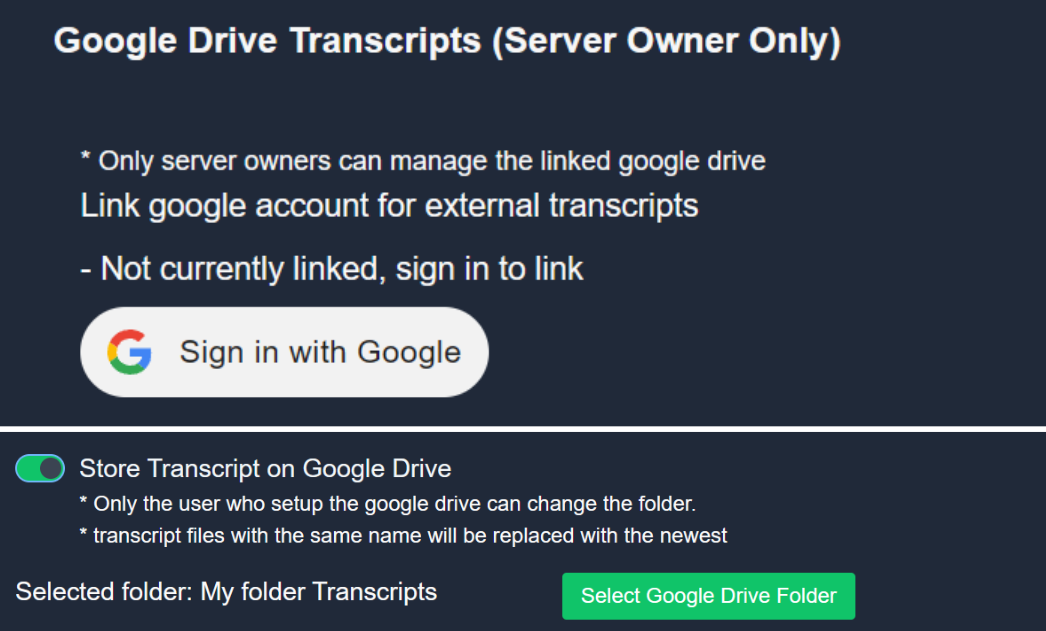
Ticket Tool allows you to save your server's transcripts to your Google Drive!
<:Troubleshooting:1034175234397438032> How do I link my Google Acount?
Go to your Server Configs within your Dashboard, scroll down to the Google Drive Transcripts section, and link the Google Drive account of your preference.
<:SystemList:1018980666551042048> Which folder are transcripts saved to?
Go to your Transcript Options, there you can choose the folder under which the transcripts of this panel will be saved.
<:TTWarning:1034178155872784494> Notes
- Deleting a transcript from your Drive will effectively delete the transcript! This will make it inaccessible from Discord, so be careful when deleting files.
- This feature is only usable by the server's owner.
- Enabling this feature will stop sending the HTML raw transcript file to your transcript channel and will save it exclusively to Drive
 inland arch
How do i only give 1 specifc role the option to open a ticket?
restive condor
inland arch
How do i only give 1 specifc role the option to open a ticket?
Hey there! Dashboard > Panel Configs > Buttons > Create Ticket Button
Disable the everyone role & set allowed roles
inland arch
restive condor
Hey there! Dashboard > Panel Configs > Buttons > Create Ticket Button
Disable th...
love you
 tired rover
Salut @austere forge j'ai une petite question :)
humble sequoiaBOT

L'équipe du support Français
Cher client,
Si vous avez besoin d'aide, ouvriez un ticket pour le support Français s'il vous plaît.
Allez au #🎫│make-a-ticket et tapez sur le bouton contenant l'emoji 🇫🇷
tired rover
humble sequoia
Ah ok
 midnight walrus
can someone help me
humble sequoiaBOT
━━ User's inquiry has been moved to a ticket ━━
 zinc sage
Hey ! Is it possible to assign a role to a member when they open a ticket automatically?
 near narwhal
im trying to figure out how to have it were they can click create a ticket
restive condor
near narwhal
im trying to figure out how to have it were they can click create a ticket
Hey there! Here's a setup guide for you
 stark runeBOT
1. Invite Ticket Tool to your server
First you will want to invite the bot to your server. Once the bot is in your server, you can manage your server in the dashboard.

2. Create a Panel
To create a panel we are going to need to head over to the panel configs on the dashboard.
Once at the dashboard we will need to click Create Panel.
Enter a panel name (Fill in any optional settings you want).
Click Create Panel and your ready to get started with configuring your panel.
An example of a creating a panel is shown below.
3. Send the Panel to a Channel
Once you've created a panel on the dashboard you will need to send it to a channel using send on the dashboard.
Select the channel you want your panel to be created in and click send.
For other questions checkout $help faq.
An example of a sending a panel is shown below.
Having a Problem Sending the Panel?
Do $debug in a channel with Ticket Tool and make sure it has all the necessary Discord permissions.
restive condor
zinc sage
Hey ! Is it possible to assign a role to a member when they open a ticket automa...
Hey there! Yes, but automatic roles are a premium feature 
restive condor
 devout fog
Whenever a ticket is opened ^
devout fog
Whenever a ticket is opened ^
Hey there! Yes, that's correct
devout fog
restive condor
Hey there! Yes, that's correct
Thanks 👍
iron nightBOT
Gave +1 Rep to @restive condor (current: #1 - 2573)
harsh acorn
Dan, how are you still not banned?/j (ignore it meant in general)
restive condor
Please keep this channel to Ticket Tool support only 😅
scenic forum
scenic forum
For the translations of the error output I don't think that's possible but you c...
Dan could you confirm or deny that by any chance? Just so I get info on it
restive condor
scenic forum
Dan could you confirm or deny that by any chance? Just so I get info on it
It's not possible 😄
scenic forum
Okay thought so
Thank you @restive condor
iron nightBOT
Gave +1 Rep to @restive condor (current: #1 - 2574)
 rugged geyser
@pseudo glen
harsh acorn
How can we help?
graceful bridge
Does anyone know how many days amazon's CDN caches user transcripts?
restive condor
Nope
graceful bridge
restive condor
Nope
I know Discord has a "do not retain" policy on a user's data, but my understanding is the HTML in the transcripts that are saved is merely dynamically linking to the content in the CDN, and TT does not cache this content outside of Discord itself, correct?
Basically I cannot retain it for longer than 30 days without notifying the user, but if Discord is doing the retaining that I"m not actually retaining it?
restive condor
graceful bridge
I know Discord has a "do not retain" policy on a user's data, but my understandi...
That's correct
restive condor
graceful bridge
Basically I cannot retain it for longer than 30 days without notifying the user,...
You wouldn't be retaining it, no
graceful bridge
restive condor
You wouldn't be retaining it, no
Got it. That's what I assumed here. As long as it doesn't leave their platform (IE, I don't enable gdrivesync) then it shouldn't be an issue.
Small question unrelated: how do I enable prem server access here to go with my sub of my community server?
restive condor
graceful bridge
Small question unrelated: how do I enable prem server access here to go with my ...
There you go
graceful bridge
restive condor
There you go
Awesome. Now I am fancy. Ty.
iron nightBOT
Gave +1 Rep to @restive condor (current: #1 - 2575)
restive condor
No problem!
 fathom yarrow
Hello, so i did the setup and all and im in the right channel and the panel is not showing. please help.
ionic path
fathom yarrow
Hello, so i did the setup and all and im in the right channel and the panel is n...
hi there! have you sent the panel message using the Send button on top of the dashboard?
 ionic path
 lunar vigil
hello! please make sure Ticket Tool has the permissions "View Channel" and "Send Messages" inside Server Settings > Roles > Ticket Tool > Permissions.
fathom yarrow
ionic path
hi there! have you sent the panel message using the Send button on top of the da...
it worked , thank you SO MUCH!
iron nightBOT
Gave +1 Rep to @ionic path (current: #36 - 110)
ionic path
you're welcome, glad i could help :D have a nice day!
fathom yarrow
and how can i rep someone?
ionic path
you already gave me a rep, they are given by saying thanks while mentioning someone.
lunar vigil
Ok thanks
lunar vigil
ionic path
hello! please make sure Ticket Tool has the permissions "View Channel" and "Send...
Ok thank you so much
iron nightBOT
Gave +1 Rep to @ionic path (current: #36 - 111)
ionic path
no worries, thank for using ticket tool! have a great day :D
lunar vigil
ionic path
hello! please make sure Ticket Tool has the permissions "View Channel" and "Send...
It was alr done
What can i do more?

Even gave it owner role
ionic path
can you also check if those same permissions are applied in the channel's settings of which you used the command on? you can check that by right-clicking the channel name > Edit Channel > Permissions > Roles > Ticket Tool.
lunar vigil
Ok thanks, so i want to add a role that also can help with tickets how do i do it?
ionic path
lunar vigil
Ok thanks, so i want to add a role that also can help with tickets how do i do i...
of course, you can do that by heading to the dashboard, choosing your server and selecting the "General" category in the home page. There, you will find the option of "Support Team roles", that is what you are looking for.
lunar vigil
Where is thisdashbord?
humble sequoiaBOT

Ticket Tool - Ticketing without clutter - The #1 Discord support bot
ionic path
this is the website ^
 ionic path
inside Panel Configs there is an option called "General"
After that, you can add the roles you wish in the "Support Team roles" option.
lunar vigil
Thank you so much @ionic path
iron nightBOT
Gave +1 Rep to @ionic path (current: #36 - 112)
ionic path
You're welcome! Is there anything else I can help you with?
lunar vigil
No thanks
ionic path
glad i could help, have a nice day!
lunar vigil
You to🙏
 calm tapir
i have admin perms in that server. i was working on the dashboard like 10 minutes ago and now no staff of that server will let them use the panel
 zinc sage
Is there a command to see who created the ticket?
scenic forum
calm tapir
i have admin perms in that server. i was working on the dashboard like 10 minute...
Can you run /permissionlevel?
calm tapir
scenic forum
Can you run /permissionlevel?
it says 0, how do i tell the owner to change it
harsh acorn
I mean, just tell him as long as you are staff it wouldn't be a problem
calm tapir
harsh acorn
I mean, just tell him as long as you are staff it wouldn't be a problem
He doesn’t know how a former staff did it 🤥
restive condor
zinc sage
Is there a command to see who created the ticket?
Hey there! The ticket owner should already be pinged in the ticket message by default
 final tree
Hello guys I'm looking for support on how to create a ticket to request to enter a server
 desert flame
Hey guys, I have this tool working in one server but I set it up a LONG time ago and its all proper but I cant figure out how to set it up again for another server. Id like to have that "Create ticket" button but its just not showing up. it shows as enabled and I Set everything to the same channel so IDK
 fiery swallow
anyone know how to make it not send the form responses at the top of the ticket
 desert flame
Hey guys, I have this tool working in one server but I set it up a LONG time ago...
desert flame
desert flame
Hey guys, I have this tool working in one server but I set it up a LONG time ago...
NVM figured it out. needed to go to dashboard > Panel configs > Send at the top then send to the approptiate channel
restive condor
fiery swallow
anyone know how to make it not send the form responses at the top of the ticket
Hey there! Simply remove your form variables from the ticket message
humble sequoiaBOT
The Ticket Message is the first message sent by the bot on a new ticket. To customize it head over to your Dashboard ➞ Panel Configs ➞ Ticket ➞ Edit Ticket Message

 queen notch

 humble sequoiaBOT
━━ User's inquiry has been moved to a ticket ━━
 royal vessel
???
 humble sequoiaBOT
⚠️ You're in the wrong place
We provide support for Ticket Tool Discord bot and cannot help you with whatever issue you have.
- We don't know which Support Team you should contact to get this issue resolved, and unfortunately we won't be able to accurately tell you.
If you don't have any further questions regarding our bot Ticket Tool, please close this ticket
fiery swallow
restive condor
Hey there! Simply remove your form variables from the ticket message
tyy
 violet pebble
How do I make a ticket tool called selection
 misty shard
how to make it 2 seliection
 violet pebble
misty shard
how to make it 2 seliection
violet pebble
misty shard
how to make it 2 seliection
it looks so precious 💞
scenic forum
violet pebble
How do I make a ticket tool called selection
Do you talk about the image sent by the other user?
humble sequoiaBOT
The Drop-down menu or Select Menu replaces the buttons on your panel message and uses a drop-down menu with all of your panels. To set this up, go to your Panel Configs and select your main Panel.
<:Numbericons1:1018864164032225340> Enable Select Style
First you enable Select Style. Then you add an item in the Dropdown Editor. Now you can start editing your dropdown!
<:Numbericons2:1018864168041971712> Dropdown Editor
Each line in the dropdown editor represents a line in the drop down menu on discord. You can add more "Items", by clicking on
First you select a panel. That's the panel this option will open a ticket for. DONT select the same panel twice. Each option should have a different Panel
After that, you can put a Display. This is the title of this option and will appear in the drop down menu. The *Description can be set right after that, which will be below the title in grey.
Additionally you can select an emoji, that will be shown in front of each option. You can either manually input the ID of an emoji or select it in the selector.
Common Issues ⚠️
- Panel doesn't send? Make sure you have a valid emoji selected
- Option doesn't show up? Check if two options have the same panel in the DropDown Editor
$dropdown
scenic forum
@misty shard ^
 dense delta
Hello. I have the premium subscription, but can only seem to get the free bot in the discord. (white)
violet pebble
I do it but every time I send it doesn't show the selection
misty shard
humble sequoia
i do not know how its works can any body di it foe me
violet pebble
Yo @misty shard does it show you the category selection thing
misty shard
violet pebble
Yo <@973385268331696159> does it show you the category selection thing
yea
misty shard
violet pebble
I'm trying to do it I send nothing pops up
@vestal tinsel
humble sequoiaBOT
The first thing you will need to do is invite the premium bot, an invite can be found here
Once the bot is in your server we will head to the dashboard and manage your server. When you are managing your server, you want to head into "Server Configs" then click the drop down menu under "Select the bot you would like to use on this server" then click "Ticket Tool#6207" and then save.
scenic forum
@dense delta ^
Click the blue here
@violet pebble @misty shard
Which part are you having trouble with?
violet pebble
It's okay now I figure it out thank you
misty shard
scenic forum
<@1349938379755749419> <@973385268331696159>
Which part are you having trouble w...
all of it
its not creating a tickt and i want it like pic i send above
humble sequoiaBOT
The Drop-down menu or Select Menu replaces the buttons on your panel message and uses a drop-down menu with all of your panels. To set this up, go to your Panel Configs and select your main Panel.
<:Numbericons1:1018864164032225340> Enable Select Style
First you enable Select Style. Then you add an item in the Dropdown Editor. Now you can start editing your dropdown!
<:Numbericons2:1018864168041971712> Dropdown Editor
Each line in the dropdown editor represents a line in the drop down menu on discord. You can add more "Items", by clicking on
First you select a panel. That's the panel this option will open a ticket for. DONT select the same panel twice. Each option should have a different Panel
After that, you can put a Display. This is the title of this option and will appear in the drop down menu. The *Description can be set right after that, which will be below the title in grey.
Additionally you can select an emoji, that will be shown in front of each option. You can either manually input the ID of an emoji or select it in the selector.
Common Issues ⚠️
- Panel doesn't send? Make sure you have a valid emoji selected
- Option doesn't show up? Check if two options have the same panel in the DropDown Editor
$dropdown
scenic forum
@misty shard did you follow these steps?
misty shard
scenic forum
<@973385268331696159> did you follow these steps?
yea and now its not even crediting a tickt
scenic forum
misty shard
yea and now its not even crediting a tickt
Did you send the panel again after the changes?
misty shard
scenic forum
Did you send the panel again after the changes?
if i give you role in my server could you do it like the pic but just diffrent name
scenic forum
By rule 5 of the community support rules all support must happen within this server/channel
So im sorry, i cannot join
misty shard
damnn ok thanks
scenic forum
I can only guide you if you provide me with the info and/or part youre stuck on
misty shard
scenic forum
I can only guide you if you provide me with the info and/or part youre stuck on
ok let try agin
scenic forum
Did you create a dropdown?
Show a screenshot of it so i can make sure its done correctly
 brittle ore
Haii so, I have a problem with the ticket bot
I follow the steps on the cité, I changed the category for the tickets but still not working
scenic forum
brittle ore
I follow the steps on the cité, I changed the category for the tickets but still...
Can you run /debug and confirm that all slots have no cross?
violet pebble
scenic forum
violet pebble
What seems to be the issue?
violet pebble
Nun I'm just showing that it work
scenic forum
ah
violet pebble
But one more thing though
scenic forum
ask away
violet pebble
How do I add an image
brittle ore
violet pebble
Same is happening to me it's just I can't close tickets
 scenic forum
@violet pebble ^
violet pebble
I see I don't fully understand yet
scenic forum
what part exactly?
scenic forum
brittle ore
Same is happening to me it's just I can't close tickets
is any error happening?
brittle ore
Nvm I found the issue and fixed it, tysm
 scenic forum
Depends
Do you want an image to the panel or the opened ticket?
 scenic forum
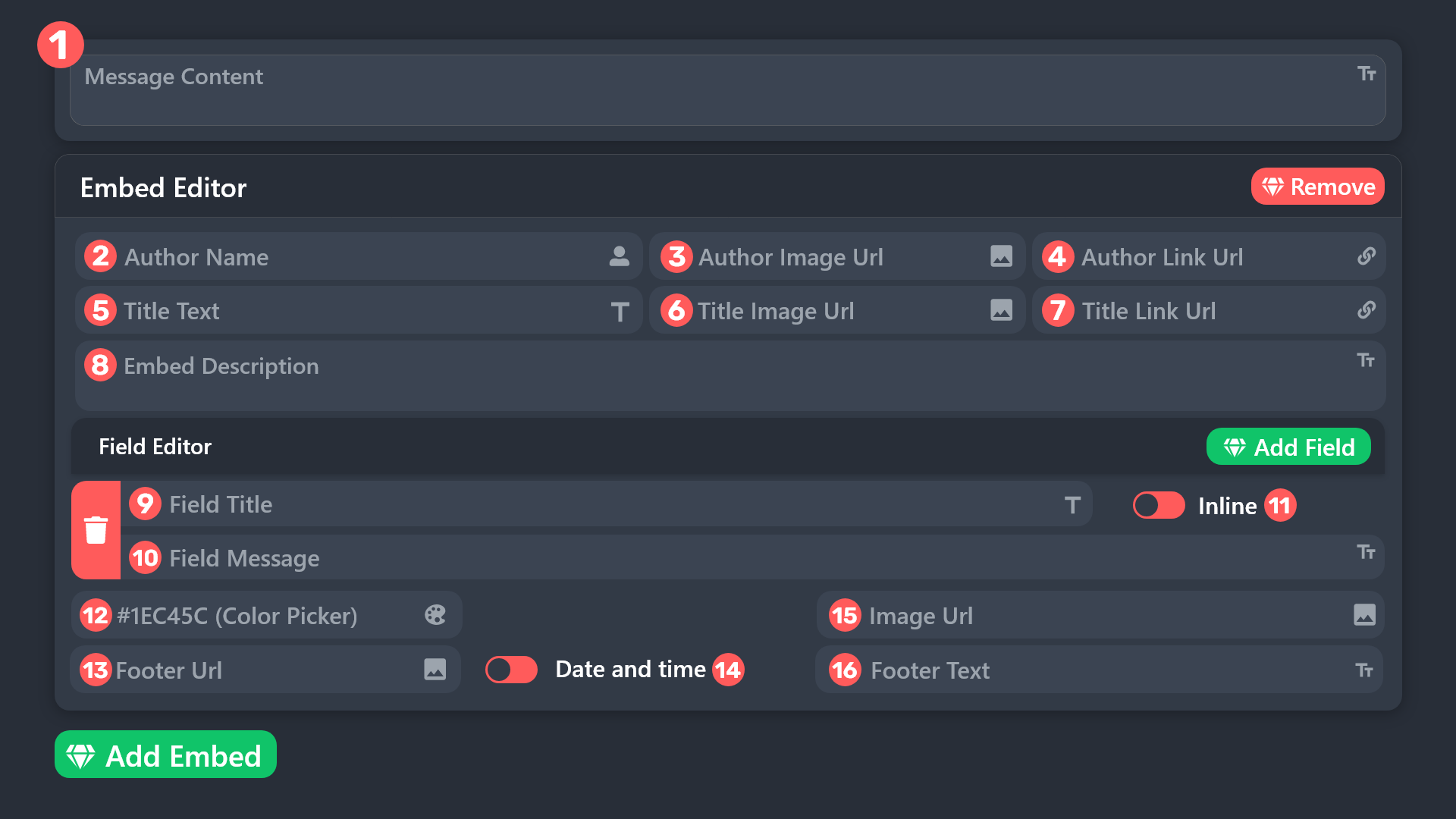
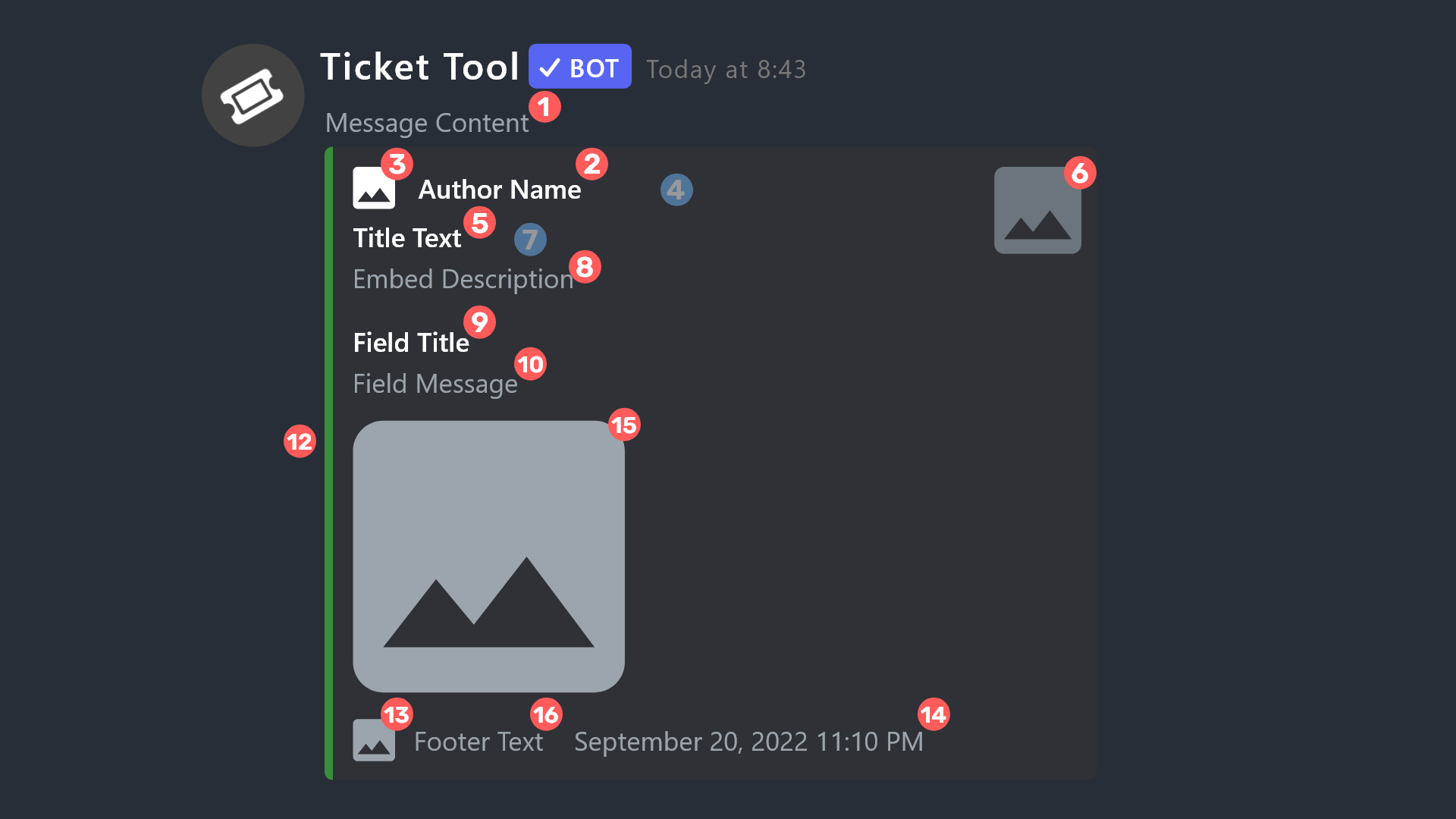
Select panel -> Panel -> Edit Panel message -> Open Embed Editor -> Insert image link at image field. Requires premium 
scenic forum
Follow the steps ive given you.
brittle ore
Uhh hi another problem 😭, I set the ticket to go to my "tickets" category but somehow the tickets aren't going into that category eventhough I set it up on the cite already
scenic forum
scenic forum
Can you run ``/debug`` and confirm that all slots have no cross?
@brittle ore
brittle ore
scenic forum
<@847744747858690058>
ty it's working fine now 😇
iron nightBOT
Gave +1 Rep to @scenic forum (current: #50 - 54)
scenic forum
brittle ore
ty it's working fine now 😇
what was the issue?
scenic forum
Perfect
 faint sparrow
I need help. I want to configure the ticket bot for my server and I don't know how to do it. Can someone help me?
stark runeBOT
1. Invite Ticket Tool to your server
First you will want to invite the bot to your server. Once the bot is in your server, you can manage your server in the dashboard.
2. Create a Panel
To create a panel we are going to need to head over to the panel configs on the dashboard.
Once at the dashboard we will need to click Create Panel.
Enter a panel name (Fill in any optional settings you want).
Click Create Panel and your ready to get started with configuring your panel.
An example of a creating a panel is shown below.
3. Send the Panel to a Channel
Once you've created a panel on the dashboard you will need to send it to a channel using send on the dashboard.
Select the channel you want your panel to be created in and click send.
For other questions checkout $help faq.
An example of a sending a panel is shown below.
Having a Problem Sending the Panel?
Do $debug in a channel with Ticket Tool and make sure it has all the necessary Discord permissions.
scenic forum
@faint sparrow ^
 maiden hearth
Hi Pharos team,
I was using Zenith/FaroSwap on the testnet and noticed I’m not receiving any points for swaps or liquidity.
I used multiple tabs for testing and didn’t realize it could get me flagged. I only used one wallet.
Could you please review my account?
Wallet address: 0x6930b1AB688712c4bB8743F165942184Bd2F8913
I’ll follow the rules properly from now on. Thanks a lot.
humble sequoiaBOT
@maiden hearth
⚠️ You're in the wrong place
We provide support for Ticket Tool Discord bot and cannot help you with whatever issue you have.
- We don't know which Support Team you should contact to get this issue resolved, and unfortunately we won't be able to accurately tell you.
If you don't have any further questions regarding our bot Ticket Tool, please close this ticket
maiden hearth
@humble sequoia
 inner swift
need help w this
 scenic forum
inner swift
need help w this
scenic forum
inner swift
need help w this
Give ticket tool the 2 permissions it asks for in the channel you tried to send it into
weary ingot
inner swift
need help w this
i think u have to make ticket tool admin but idk
ionic path
hi @weary ingot, this member is already being helped, no need for double-help
weary ingot
oh ok ty for the info
ionic path
no worries :D
 storm verge
Y
calm tapir
how do i enable back permissions for my staff members? idk how


 polar ore
scenic forum
Perfect
polar ore
scenic forum
Perfect
halp
humble sequoiaBOT
━━ User's inquiry has been moved to a ticket ━━
restive condor
calm tapir
how do i enable back permissions for my staff members? idk how
Hey there! You will either need to give them administrator permissions in its role setting or a Dashboard role
humble sequoiaBOT
Any role you put there will have full access to the ticket tool dashboard. The server owner and users with admin permissions already have access to the dashboard.
Be careful of which roles to put here

 coarse pecan
Looks like someone wanted to open a ticket, but got an error. It said "something went wrong" and the person is unable to send the form. What can we do about this?
restive condor
coarse pecan
Looks like someone wanted to open a ticket, but got an error. It said "something...
Hey there! Forms time out after 5 minutes, so if they've had it opened for more than 5 minutes, they will need to dismiss it and start a new one
coarse pecan
restive condor
Hey there! Forms time out after 5 minutes, so if they've had it opened for more ...
They replied they only had it max 2 minutes
This was what they saw
 restive condor
coarse pecan
They replied they only had it max 2 minutes
This was what they saw
restive condor
coarse pecan
They replied they only had it max 2 minutes
This was what they saw
The only reason why a form might fail (other than the bot being down) is the 5min limit
Please ask them to start a new one
coarse pecan
restive condor
Please ask them to start a new one
I got a reply that he had tried it 3 times, and it kept showing up.
restive condor
coarse pecan
I got a reply that he had tried it 3 times, and it kept showing up.
Is this happening with them only?
coarse pecan
restive condor
Is this happening with them only?
Yes
restive condor
coarse pecan
Yes
It could be a connection problem on their side. Make sure they have a strong wifi connection
humble sequoiaBOT
@stray karma, we would love to help you, but if you don't tell us what you need help with we can't help you :(
harsh acorn
 stray karma
Yo
stray karma
Yo
Please don't tag staff, it's against the rules
 woeful halo
Hello, I would like to inquire about the partnership.
 nocturne hazel
Hello, I need help with making a ticket bot in my discord server
scenic forum
woeful halo
Hello, I would like to inquire about the partnership.
As far as I know partnership requests aren't open currently
stark runeBOT
1. Invite Ticket Tool to your server
First you will want to invite the bot to your server. Once the bot is in your server, you can manage your server in the dashboard.
2. Create a Panel
To create a panel we are going to need to head over to the panel configs on the dashboard.
Once at the dashboard we will need to click Create Panel.
Enter a panel name (Fill in any optional settings you want).
Click Create Panel and your ready to get started with configuring your panel.
An example of a creating a panel is shown below.
3. Send the Panel to a Channel
Once you've created a panel on the dashboard you will need to send it to a channel using send on the dashboard.
Select the channel you want your panel to be created in and click send.
For other questions checkout $help faq.
An example of a sending a panel is shown below.
Having a Problem Sending the Panel?
Do $debug in a channel with Ticket Tool and make sure it has all the necessary Discord permissions.
scenic forum
@nocturne hazel ^
@nocturne hazel
Please stay inside the server if you require help as I'm not allowed to assist you outside of it
scenic forum
 red wagon
Hey! I wanted to ask how long do the transcripts last for?
red wagon
Hey! I wanted to ask how long do the transcripts last for?
You can generate a new link aslong as discords CDN doesn't break which shouldn't happen for quite a long time.
 scenic forum
red wagon
are you talking about "direct link" button?
scenic forum
red wagon
are you talking about "direct link" button?
Yes. Clicking direct link will generate a new link as the link to open it will expire
stark runeBOT
1. Invite Ticket Tool to your server
First you will want to invite the bot to your server. Once the bot is in your server, you can manage your server in the dashboard.
2. Create a Panel
To create a panel we are going to need to head over to the panel configs on the dashboard.
Once at the dashboard we will need to click Create Panel.
Enter a panel name (Fill in any optional settings you want).
Click Create Panel and your ready to get started with configuring your panel.
An example of a creating a panel is shown below.
3. Send the Panel to a Channel
Once you've created a panel on the dashboard you will need to send it to a channel using send on the dashboard.
Select the channel you want your panel to be created in and click send.
For other questions checkout $help faq.
An example of a sending a panel is shown below.
Having a Problem Sending the Panel?
Do $debug in a channel with Ticket Tool and make sure it has all the necessary Discord permissions.
scenic forum
@true oracle ^
iron nightBOT
Gave +1 Rep to @scenic forum (current: #50 - 56)
 mystic sorrel
My new members get this message when trying to open a ticket. Can anyone help me fix this?
 scenic forum
mystic sorrel
My new members get this message when trying to open a ticket. Can anyone help me...
scenic forum
mystic sorrel
My new members get this message when trying to open a ticket. Can anyone help me...
Hey there!
«You don't have permissions to use this»
Are your members seeing this message when they try to open a ticket?
You may have accidentally denied them permission to use the Create Ticket button.
Look in the following places in your server's dashboard:
👉 Server Configs -> Blacklist Roles
Any roles there will be unable to interact with the bot in any way, including creating tickets.👉 Panel Configs -> Buttons -> Create Ticket -> Support team only
If this is enabled, only your staff will be able to use the button.
👉 Panel Configs -> Buttons -> Create Ticket -> Disabled Roles
Any roles there will be unable to use the button.
mystic sorrel
scenic forum
Hey there!
**__«You don't have permissions to use this»__**
> Are your members...
Thank YOU SOOOOO MUCH OH MY GOD, IT WORKED! THANK YOU, THANK YOU! ❤️🤗
iron nightBOT
Gave +1 Rep to @scenic forum (current: #50 - 57)
mystic sorrel
Also, I do have another question what do I enable so that verification is between only that specific newbie and mods? I don't want the rest of the newbies to see the ticket channels when someone's getting verified.
scenic forum
mystic sorrel
Also, I do have another question what do I enable so that verification is betwee...
Panel -> General -> Only select mods as support staff
 glossy oasis
What must i do
 scenic forum
@glossy oasis possibly this
 jagged latch
Hi, I have given permission to the server, but it does not shows up in the dashboard
scenic forum
jagged latch
Hi, I have given permission to the server, but it does not shows up in the dashb...
Can you run /permissionlevel and tell me the outcome?
 cursive anchor
Qual o link do site ?
still lavaBOT
cursive anchor
Qual o link do site ?
From Portuguese (PT) To German (DE)
Wie lautet der Link zur Site?
Translation requested by leonhenn from Flag-Reaction Feature.
scenic forum
cursive anchor
Qual o link do site ?
Ticket Tool - Ticketing without clutter - The #1 Discord support bot
cursive anchor
Obrigado
jagged latch
scenic forum
Can you run ``/permissionlevel`` and tell me the outcome?
nothing comes up
scenic forum
jagged latch
nothing comes up
Any error?
jagged latch
Nope, can I send a SS ?
scenic forum
Yes
jagged latch
may be I am sending it the wrong way, do I add anything to it
jagged latch
scenic forum
Yes
 scenic forum
jagged latch
scenic forum
jagged latch
Can you run the command in this channel?
jagged latch
/permissionlevel
scenic forum
jagged latch
/permissionlevel
Discord settings -> chat -> toggle setting in screenshot on

Once turned on, Re open your discord entirely and try the command again
 jagged latch
Owner said I have the access, anything specic that I might not have?
 coarse rune
Whenever I try to view a transcript, it appears with this
 scenic forum
jagged latch
Owner said I have the access, anything specic that I might not have?
scenic forum
jagged latch
Owner said I have the access, anything specic that I might not have?
You need either administrator or get a role marked as dashboard role on the dashboard via the server configs tab
scenic forum
coarse rune
Whenever I try to view a transcript, it appears with this
Generate a new link and try again. Seems to be an old and expired link
coarse rune
scenic forum
Generate a new link and try again. Seems to be an old and expired link
I see
glossy oasis
scenic forum
<@428305582639022091> possibly this
No i have test it
scenic forum
glossy oasis
No i have test it
Then please open a ticket at #🎫│make-a-ticket as I don't know how to fix it
 static tartan
Hii can someone help me ? The bot tell to my members that, how can i fix that ?

 spring canyon
scenic forum
Then please open a ticket at <#571706435449257997> as I don't know how to fix it
spring canyon
scenic forum
Then please open a ticket at <#571706435449257997> as I don't know how to fix it
do u know how to make this?

Like make what reason yk
humble sequoiaBOT
A Discord Form lets the user answer individual questions in a pop-up Form, which then displays the answers in the ticket message. This can save time if you already know what you want to ask the user.
Setup Forms
Forms can be enabled under Panel Settings > Form Options > Edit Forms Options. In the new pop-up window, you can now enable and edit your own Form.
Form Options
You can add up to 5 questions in the Discord form. This is a Discord limitation. Each question can have a placeholder in the input field, a minimum and maximum input, multi-line, and also the option to have the answer required.
Options
Question Title ➞ Your Question goes here
Question Placeholder ➞ The placeholder text in the input field
Required ➞ If enabled, the user has to answer this question, to submit the form
Multi-Line Input ➞ Allows the user to input multiple lines
Minimum and Maximum Input ➞ Set a minimum and maximum input value for the user
Displaying the Answer
To display the answers from the user, you need to enable Auto display form results on the ticket message as an additional embed
If you don't want a second embed, go into your Panel Configs > Ticket Options > Edit Ticket Message. You use the variable {create.form.x} and replace x with the number of your question. For example, the response to Question 5 can be displayed with {create.form.5}.

 high glade
how do i make a ticket
restive condor
high glade
how do i make a ticket
Hey there! Are you trying to set up Ticket Tool in your server?
high glade
i did
restive condor
Do you still need help?
spring canyon
restive condor
Hey there! Are you trying to set up Ticket Tool in your server?
Quick question. How do I change this text?
 restive condor
What exactly is the issue you need help with?
restive condor
spring canyon
Quick question. How do I change this text?
Hi there, see below please
humble sequoiaBOT
The panel message is where people react to make a ticket. To customize it head over to your Dashboard --> Panel Configs -> Panel -> Edit Panel Message
 spring canyon
restive condor
Hi there, see below please
spring canyon
restive condor
Hi there, see below please
How do I make claim thingy in ticket so when staff wants to talk in ticket he has to claim it.
 gusty geyser
hello, how do i accept people in my server
restive condor
high glade
idk how to make a ticket for a guy
So you're trying to create a ticket for someone else?
high glade
i mean
restive condor
gusty geyser
hello, how do i accept people in my server
Hey there! What exactly do you mean?
restive condor
spring canyon
How do I make claim thingy in ticket so when staff wants to talk in ticket he ha...
Claiming is a premium feature
humble sequoiaBOT
Claiming allows you to change the ticket name, category and permissions. To use it you have to enable it first on your Dashboard > Panel Configs > Claiming

 Note: This is a premium feature
high glade
Note: This is a premium feature
high glade
all people say they made a ticket
gusty geyser
someone created a ticket, how do i get them inside the server
high glade
so i want that guy to talk with staff and i got a clip
spring canyon
restive condor
Claiming is a premium feature <:Premium:1192403074157912144>
How do I make that people can't close the ticket by them selfs and only staff can.
 past edge
hii I activated my 7-day free trial, but I still don’t have access to premium features. I refreshed the site multiple times as well
spring canyon
?
restive condor
gusty geyser
someone created a ticket, how do i get them inside the server
Are they not already inside the server if they created a ticket in it?
restive condor
spring canyon
How do I make that people can't close the ticket by them selfs and only staff ca...
Dashboard > Panel Configs > Buttons > Close Ticket Button > Support Team Only
gusty geyser
they are inside the server but they cant access the chats
restive condor
past edge
hii I activated my 7-day free trial, but I still don’t have access to premium fe...
Hey there! Please use the  button above your server name
restive condor
gusty geyser
they are inside the server but they cant access the chats
So you're using tickets as a verification method in your server?
gusty geyser
yes
restive condor
high glade
so i want that guy to talk with staff and i got a clip
So you're saying everyone can see their ticket?
restive condor
gusty geyser
yes
See below please
humble sequoiaBOT
Creating a verification system with Ticket Tool <:TicketToolWhite:1073948900056105060>
Using Discord's permission system you can create a setup that allows your team to manually verify new server members while keeping the rest of the server hidden!
Please configure the permissions of your server's channel as depicted below:
Category Permissions
- Go to your category permissions, or channel permissions in case they are not synced with the category.
- Set the View Channels permission to
 for the @everyone role.
 - Set the View Channels permission to
 for your
 @Memberor@Verifiedrole. - Repeat this process for all of your server's categories.
Ticket Panel Channel
- Set the View Channel permission to for the @everyone role.
- (Optional) If you'd like for verified members to not be able to see that ticket channel anymore, set the View Channel permission to for your
@Memberor@Verifiedrole.
-# Note: Your staff team will still need to grant a verification role. If you have premium, you can check our Ticket Closed Roles feature
$manualverification
high glade
i mean i want to make the guy talk to staff about the rk
 wild pumice
Does anyone know how to get the bot to tell you what selction of the drop down they selected?
Ex.
Say the drop down is
- Staff Complaint
- Verification Help
Whatever the select the ticket says nothing about the one they selected
restive condor
high glade
i mean i want to make the guy talk to staff about the rk
And what's stopping him from talking to staff about that?
spring canyon
restive condor
Dashboard > Panel Configs > Buttons > Close Ticket Button > <:Switch_enabled:104...
By the way does logging work. I gave all perimissions on the channel I want to get logged by ticket when it's created and more, but it doesn't.
 restive condor
spring canyon
By the way does logging work. I gave all perimissions on the channel I want to g...
restive condor
spring canyon
By the way does logging work. I gave all perimissions on the channel I want to g...
Please make sure you have enabled logging for the correct panel
If so, use the /debug command in your logging channel
gusty geyser
hey sir dan thankyou
devout fog
I'm going to try to explain this the best I can. In my server, I have a Support Team role and a Lead Support Team role. LST goes to HRs and regular ST goes to normal staff members. Whenever I assign someone the LST role, they can see IA and MGMT tickets, but not General tickets. I need LST to be able to see all 3 types of tickets, including General, IA, and MGMT.
restive condor
devout fog
I'm going to try to explain this the best I can. In my server, I have a Support ...
Hey there! Have you selected the LST role as a support team role for all 3 panels?
harsh acorn
high glade
i mean i want to make the guy talk to staff about the rk
Are you talking about a game or something?
devout fog
restive condor
Hey there! Have you selected the LST role as a support team role for all 3 panel...
I have not. Let me try it again.
devout fog
restive condor
Hey there! Have you selected the LST role as a support team role for all 3 panel...
Works perfectly now, thank you!
iron nightBOT
Gave +1 Rep to @restive condor (current: #1 - 2576)
devout fog
Sorry for the double ping, but wanted to get you a rep
wild pumice
When someone opens a ticket.. how do i get it to say in the opening ticket prompt which one they selected?

 golden mauve
Can we make ticket by discohook?
 fringe linden

 fiery basin
Cómo me ago un soporte?
harsh acorn
Depende de lo que necesite, es con respecto a Ticket Tool?
 copper blaze
Anyway someone can help me get my character back I’m frozen and it’s not letting me do anything
humble sequoiaBOT
@copper blaze
⚠️ You're in the wrong place
We provide support for Ticket Tool Discord bot and cannot help you with whatever issue you have.
- We don't know which Support Team you should contact to get this issue resolved, and unfortunately we won't be able to accurately tell you.
If you don't have any further questions regarding our bot Ticket Tool, please close this ticket
muffin's issue has been solved in another channel.
restive condor
golden mauve
Can we make ticket by discohook?
Hey there! Yes, see below please
humble sequoiaBOT
Integrating an External Bot x Ticket Tool <:TicketToolGold:1073948897673748490>
Integrating Ticket Tool with an external bot allows you to customize your server's Ticket System further!
- The external bot must output the
$newor$ticketcommands with the user's ID to start a ticket. Preferably in a private channel.
Eg.
$new 12345678901234567890
-
Your ticket panel must be Command Style enabled
-
You must whitelist that bot's ID in your Dashboard ➞ Server Configs ➞ Bot section.
Otherwise Ticket Tool will not react to the command and a ticket will not be created.
- If you'd like to include a reason in the command usage, feel free to do so after the user ID.
Eg.
$new 12345678901234567890 Your reason goes here
This reason can then be shown anywhere in the Ticket Message with the{create.reason}variable
**  Note:** If you have changed Ticket Tool's default prefix (
$) please ensure to amend the prefix for the $new or $ticket commands.
Eg. If your prefix is
-, then what you're looking for the bot to use is-newor-ticket

$botintegration
restive condor
wild pumice
When someone opens a ticket.. how do i get it to say in the opening ticket promp...
Hey there! 👋
You could include which ticket option they used in the ticket message
Dashboard > Panel Configs > Messages > Edit Ticket Message
You could also make one category for each ticket option and have each ticket type go to a different category. (Dashboard > Panel Configs > Category)
With premium you can have even have custom ticket names, so each ticket option has something indentifiable in the ticket name (eg. report-ticket-###)
wild pumice
restive condor
Hey there! 👋
You could include which ticket option they used in the ticket mess...
We have premium, Just got it today!
I’ll give that a shot, thank you
iron nightBOT
Gave +1 Rep to @restive condor (current: #1 - 2577)
restive condor
Glad to hear that! Let me know you if you have any more questions
wild pumice
restive condor
Glad to hear that! Let me know you if you have any more questions <:PabloTiphat:...
Sorry for a million questions and this may be on google😭
But is there anyway to change the PFP and name of it? Or can you only change nick name in server
But i got it to work, thank you @restive condor
 iron nightBOT
Gave +1 Rep to @restive condor (current: #1 - 2578)
restive condor
wild pumice
Sorry for a million questions and this may be on google😭
But is there anyway t...
Just the nickname at this time
humble sequoiaBOT
Ticket Tool Custom Avatar
As of now, you are not able to change Ticket Tool's profile picture, nonetheless, our Development Team is working on the release of white labels, this is your own custom bot!
For the time being, you can change the bot's nickname by right-clicking the bot in the user list on your server and clicking Change Nickname

$avatar
wild pumice
restive condor
Just the nickname at this time
Sweet thank you, this bot is very well done just takes my old ass awhile to learn it lol much better than the old one we used
restive condor
Glad to hear you like it! 😸
 radiant kelp
I need someone to help me create a ticket where people can make a ticket and become staff

@restive condor
 tight edge
Can i do like this ?
 restive condor
radiant kelp
I need someone to help me create a ticket where people can make a ticket and bec...
restive condor
radiant kelp
I need someone to help me create a ticket where people can make a ticket and bec...
Hi there, please try folloing these steps below to set up the bot
stark runeBOT
1. Invite Ticket Tool to your server
First you will want to invite the bot to your server. Once the bot is in your server, you can manage your server in the dashboard.
2. Create a Panel
To create a panel we are going to need to head over to the panel configs on the dashboard.
Once at the dashboard we will need to click Create Panel.
Enter a panel name (Fill in any optional settings you want).
Click Create Panel and your ready to get started with configuring your panel.
An example of a creating a panel is shown below.
3. Send the Panel to a Channel
Once you've created a panel on the dashboard you will need to send it to a channel using send on the dashboard.
Select the channel you want your panel to be created in and click send.
For other questions checkout $help faq.
An example of a sending a panel is shown below.
Having a Problem Sending the Panel?
Do $debug in a channel with Ticket Tool and make sure it has all the necessary Discord permissions.
restive condor
tight edge
Can i do like this ?
Hi there! Yes, see below please
humble sequoiaBOT
The Drop-down menu or Select Menu replaces the buttons on your panel message and uses a drop-down menu with all of your panels. To set this up, go to your Panel Configs and select your main Panel.
<:Numbericons1:1018864164032225340> Enable Select Style
First you enable Select Style. Then you add an item in the Dropdown Editor. Now you can start editing your dropdown!
<:Numbericons2:1018864168041971712> Dropdown Editor
Each line in the dropdown editor represents a line in the drop down menu on discord. You can add more "Items", by clicking on
First you select a panel. That's the panel this option will open a ticket for. DONT select the same panel twice. Each option should have a different Panel
After that, you can put a Display. This is the title of this option and will appear in the drop down menu. The *Description can be set right after that, which will be below the title in grey.
Additionally you can select an emoji, that will be shown in front of each option. You can either manually input the ID of an emoji or select it in the selector.
Common Issues ⚠️
- Panel doesn't send? Make sure you have a valid emoji selected
- Option doesn't show up? Check if two options have the same panel in the DropDown Editor
$dropdown

 coarse jasper
does anyone have any idea how i edit the ticket button ? and i need multiple of them

kinda like this
but i need two of them
restive condor
radiant kelp
I need help how do I get the role's with the crown and Shield
Your server needs Level 2 boosting
 quartz sky
does anyone makes free servers
restive condor
No
radiant kelp
quartz sky
does anyone makes free servers
What type you saying
quartz sky
any type
restive condor
coarse jasper
does anyone have any idea how i edit the ticket button ? and i need multiple of ...
Hi there! You can edit the button from your Dashboard > Panel Configs > Buttons > Create Ticket Button
To make a multipanel (multiple buttons), you will need to create one panel per button option, so if you'd like 5 buttons, you will 5 different panels.
You can then combine all your panels by following the instructions below
humble sequoiaBOT
For more convenient use of multipanels, you can now combine panels on the dashboard. This will allow you to directly send the multipanel from the dashboard or via the $panel ID command.
Where can I find this?
You can find this setting on the Dashboard -> Panel Configs -> Panel -> Attached Panels
Note: if you're attaching all the panels to a panel called English, don't include English in the attached panel's box (If you do this, it will create a duplicate)
This will put all buttons from all of your panels on one message. The message is the panel message from the panel you're combining these panels in.
coarse jasper
restive condor
Hi there! You can edit the button from your ``Dashboard`` > ``Panel Configs`` > ...
thx
iron nightBOT
Gave +1 Rep to @restive condor (current: #1 - 2579)
radiant kelp
quartz sky
any type
Just a normal server with general
tight edge
restive condor
Hi there! Yes, see below please
can please simple way i was lost
restive condor
tight edge
can please simple way i was lost
How far did you get?
 slow cloak
I want a help
humble sequoiaBOT
Hello, we would love to help you, but if you don't tell us what you need help with we can't help you :(
slow cloak
I have a problem in the website I'm now using the ticket tool normal not the gold and all my settings was in the gold one and when I send the multipanel it show this
 restive condor
slow cloak
I have a problem in the website I'm now using the ticket tool normal not the gol...
restive condor
slow cloak
I have a problem in the website I'm now using the ticket tool normal not the gol...
Hey there! It seems like the create ticket button for all panels in the multipanel is invalid
Please check your Dashboard > Panel Configs > Buttons > Create Ticket Button
There you can be no text - only an emoji, in the 'Button Emoji' field
And there can be no emojis - only text, in the 'Button Text' field
 restive condor
Is that emoji still in the server?
slow cloak
No someone removed it it that the problem m?
restive condor
Yes
iron nightBOT
Gave +1 Rep to @restive condor (current: #1 - 2580)
restive condor
No problem!
 fierce drift
Hello, anyone can help me?

 restive condor
fierce drift
Hello, anyone can help me?
restive condor
fierce drift
Hello, anyone can help me?
Hi there, please try the steps below please
humble sequoiaBOT
Don't see your server in the dashboard?
Try using the Sync Servers button on your top center of the Dashboard page
If this doesn't work
You should relog from the dashboard, you can do this by clicking here to log out immediately, and then log back in
Note:
You need one of these 3 things to access the dashboard.
1. Server Owner (Level: 6)
2. Server Administrator (Level: 4)
3. Dashboard Role (Level: 2)
:warning: You can check your level using the </permissionlevel:1029797400174399542> command on your Discord Server
If the bot's response is:
- @User is permission level: 0 (User)
You don't have any of the 3 levels required to access the server's dashboard
 tight edge
restive condor
How far did you get?
tight edge
restive condor
How far did you get?
Bad 🥲
humble sequoiaBOT
━━ User's inquiry has been moved to a ticket ━━
 dull compass
Why is my server ticket keep trying to close itself
 harsh acorn
Are you sure is not another person clicking the closing button?
 reef flax
I need help it won’t let me set up my ticket
harsh acorn
$setup
dull compass
harsh acorn
Are you sure is not another person clicking the closing button?
It not
tight edge
Guys this message to creat ticket use ... can be edited or deleted?
 scenic forum
tight edge
Guys this message to creat ticket use ... can be edited or deleted?
scenic forum
tight edge
Guys this message to creat ticket use ... can be edited or deleted?
Both, yes
tight edge
scenic forum
Both, yes
Show me how please
scenic forum
tight edge
Show me how please
Delete it
Panel -> edit panel message
Send again after editing
 coarse gyro
Hey, I’m trying to buy the thing on retrac on the donation tab but after I click check out and I switch it to dollars it’s switched back to pounds and it won’t let me buy it because I’m trying to buy it with USD and it’s trying to use pounds
scenic forum
coarse gyro
Hey, I’m trying to buy the thing on retrac on the donation tab but after I click...
Is this ticket tool related?
coarse gyro
What’s that mean bc I have a ticket for it
scenic forum
Do you need help with the bot @pseudo glen itself
Not the tickets on any other server
The bot itself.
coarse gyro
Idk I just wanna know how to switch it from pounds to dollars where you put your card info in
scenic forum
Where is that donation page youre speaking about
coarse gyro
On retrac launcher
Where you buy skins and stuff like I’m trying to buy the crystal package
humble sequoiaBOT
@coarse gyro
⚠️ You're in the wrong place
We provide support for Ticket Tool Discord bot and cannot help you with whatever issue you have.
- We don't know which Support Team you should contact to get this issue resolved, and unfortunately we won't be able to accurately tell you.
If you don't have any further questions regarding our bot Ticket Tool, please close this ticket
scenic forum
dull compass
It not
I'm 99,99% sure one of the staff is trolling you.
scenic forum
tight edge
You click on the part that says "embed editor"
tight edge
scenic forum
You click on the part that says "embed editor"
Thank you so much my guy ❤️🙏🏻
iron nightBOT
Gave +1 Rep to @scenic forum (current: #49 - 58)
tight edge
scenic forum
You click on the part that says "embed editor"
Please one more question there is option to duplicate a panel ?
scenic forum
tight edge
Please one more question there is option to duplicate a panel ?
You just send it again or do you mean on the dashboard?
tight edge
scenic forum
You just send it again or do you mean on the dashboard?
The panel setting cause all panels i need are with same settings
 gritty vine
im confused..

 tribal cedar
Well its telling you its an invalid emoji somewhere...
Just use normal emojis to make it work then change them

 pseudo ravine
 solemn oar
He deducted from me twice
solemn oar
He deducted from me twice
Hey there! Please make a Billing ticket in #🎫│make-a-ticket
slow cloak
Is that In the premium one or that in the free ?
 harsh acorn
If you see the golden ticket that means it has to be premium
slow cloak
But its normal I can a premium one and this can be in the free one
scenic forum
slow cloak
But its normal I can a premium one and this can be in the free one
The panel length is premium
slow cloak
scenic forum
The panel length is premium
I mean the big message
scenic forum
slow cloak
I mean the big message
That big message is the panel
slow cloak
And it's free ?
scenic forum
slow cloak
And it's free ?
Making it a big message, no
A small message, yes
slow cloak
OK another question how I can be a partner?
scenic forum
slow cloak
OK another question how I can be a partner?
You can't
Partner applications are closed
iron nightBOT
Gave +1 Rep to @scenic forum (current: #49 - 59)
 fierce current
how do i do this?
 stark runeBOT
1. Invite Ticket Tool to your server
First you will want to invite the bot to your server. Once the bot is in your server, you can manage your server in the dashboard.
2. Create a Panel
To create a panel we are going to need to head over to the panel configs on the dashboard.
Once at the dashboard we will need to click Create Panel.
Enter a panel name (Fill in any optional settings you want).
Click Create Panel and your ready to get started with configuring your panel.
An example of a creating a panel is shown below.
3. Send the Panel to a Channel
Once you've created a panel on the dashboard you will need to send it to a channel using send on the dashboard.
Select the channel you want your panel to be created in and click send.
For other questions checkout $help faq.
An example of a sending a panel is shown below.
Having a Problem Sending the Panel?
Do $debug in a channel with Ticket Tool and make sure it has all the necessary Discord permissions.
scenic forum
@fierce current ^
fierce current
alright tysm
 scenic forum
Don't ping me
 humble sequoiaBOT
For more convenient use of multipanels, you can now combine panels on the dashboard. This will allow you to directly send the multipanel from the dashboard or via the $panel ID command.
Where can I find this?
You can find this setting on the Dashboard -> Panel Configs -> Panel -> Attached Panels
Note: if you're attaching all the panels to a panel called English, don't include English in the attached panel's box (If you do this, it will create a duplicate)
This will put all buttons from all of your panels on one message. The message is the panel message from the panel you're combining these panels in.
scenic forum
@kindred basin they are multi panels. ^
iron nightBOT
Gave +1 Rep to @scenic forum (current: #49 - 60)
 kindred basin
How do I add more buttons like this? Is it still Multi panels?
 humble sequoiaBOT
For more convenient use of multipanels, you can now combine panels on the dashboard. This will allow you to directly send the multipanel from the dashboard or via the $panel ID command.
Where can I find this?
You can find this setting on the Dashboard -> Panel Configs -> Panel -> Attached Panels
Note: if you're attaching all the panels to a panel called English, don't include English in the attached panel's box (If you do this, it will create a duplicate)
This will put all buttons from all of your panels on one message. The message is the panel message from the panel you're combining these panels in.
scenic forum
kindred basin
How do I add more buttons like this? Is it still Multi panels?
It's indeed multipanel
If youre talking about multiple tickets that is
Like in #🎫│make-a-ticket
kindred basin
I wanna make a panel where they can make a ticket for different occasions
Lile this
 scenic forum
kindred basin
Lile this
scenic forum
kindred basin
Lile this
That's multipanel
kindred basin
Ohh
kindred basin
How do I edit the “create ticket” to something else
 scenic forum
kindred basin
How do I edit the “create ticket” to something else
scenic forum
kindred basin
How do I edit the “create ticket” to something else
Panel -> buttons -> Create Ticket -> Rename
 vast echo
how do i get this to popup when s1 wants to make a ticket? i want it so they can change the name of it before opening
 humble sequoiaBOT
A Discord Form lets the user answer individual questions in a pop-up Form, which then displays the answers in the ticket message. This can save time if you already know what you want to ask the user.
Setup Forms
Forms can be enabled under Panel Settings > Form Options > Edit Forms Options. In the new pop-up window, you can now enable and edit your own Form.
Form Options
You can add up to 5 questions in the Discord form. This is a Discord limitation. Each question can have a placeholder in the input field, a minimum and maximum input, multi-line, and also the option to have the answer required.
Options
Question Title ➞ Your Question goes here
Question Placeholder ➞ The placeholder text in the input field
Required ➞ If enabled, the user has to answer this question, to submit the form
Multi-Line Input ➞ Allows the user to input multiple lines
Minimum and Maximum Input ➞ Set a minimum and maximum input value for the user
Displaying the Answer
To display the answers from the user, you need to enable Auto display form results on the ticket message as an additional embed
If you don't want a second embed, go into your Panel Configs > Ticket Options > Edit Ticket Message. You use the variable {create.form.x} and replace x with the number of your question. For example, the response to Question 5 can be displayed with {create.form.5}.
vast echo
You the man ❤️
scenic forum
@vast echo ^
vast echo
Or woman lol
so a form only working for only one, can i get it to work for others?

drop downs
scenic forum
vast echo
so a form only working for only one, can i get it to work for others?
What do you mean
vast echo
like if i click purchse it only pops up with the form, if i click support or replace it just opens ticket
 scenic forum
vast echo
like if i click purchse it only pops up with the form, if i click support or rep...
scenic forum
vast echo
like if i click purchse it only pops up with the form, if i click support or rep...
Then you didn't setup forms in the support or replace ticket
Each ticket keeps it's own setup no matter if you combined them
vast echo
Think I’ve set up drop downs wrong then
scenic forum
vast echo
Think I’ve set up drop downs wrong then
Why?
You just have to add forms to the support and replace panel
vast echo
i fixed
 empty current
How do I fix this issue?
 ionic path
«You don't have permissions to use this»
Are your members seeing this message when they try to open a ticket?
You may have accidentally denied them permission to use the Create Ticket button.
Look in the following places in your server's dashboard:
👉 Server Configs -> Blacklist Roles
Any roles there will be unable to interact with the bot in any way, including creating tickets.
👉 Panel Configs -> Buttons -> Create Ticket -> Support team only
If this is enabled
👉 Panel Configs -> Buttons -> Create Ticket -> Disabled Roles
Any roles there will be unable to use the button.
ionic path
empty current
How do I fix this issue?
hi there, please check the message above ^
empty current
ionic path
hi there, please check the message above ^
Thanks a lot!! It helped me a lot in fixing the issue 💛
iron nightBOT
Gave +1 Rep to @ionic path (current: #35 - 113)
ionic path
you're welcome, glad i could help! have a great day :D
 unkempt cape
Is the bot offline for everyone or just me
ionic path
hello @unkempt cape! is the bot offline or does it just not answer in commands?
unkempt cape
its offline
I am just asking if bot is offline for everyone or just me
nevermind its back online just as I said this
it has been offline for days now
ionic path
for me it is not offline, no. if it ever happens again, please don't hasitate to ask.
 steel oyster
I cant edit my ticket panel embed
restive condor
steel oyster
I cant edit my ticket panel embed
Hey there! You can only edit the embed's main field up to 250 characters with the free version
 cerulean zenith
how do i change what the bot says once i create a ticket? cus the default is welcome {user} but I want to change it to something else.. is that possible??
ionic path
hi there! of course, go to the dashhboard > panel configs > ticket options > ticket message and change the text.
cerulean zenith
is there any way for me to do it on discord chat or do I need to go to the website?
ionic path
give me a moment please.
no, unfortunately it isn't possible. you will need to go on the website posted below
humble sequoiaBOT
Ticket Tool - Ticketing without clutter - The #1 Discord support bot
cerulean zenith
okay thank u
ionic path
you're welcome, thanks for using ticket tool!
kindred basin
How do I change the names of buttons? It dosent work for me
 unique ledge
Hi, I want to add to the transcript that is sent in a private message to the person who created the ticket, a line showing the reason written before the ticket was opened.
I used {create.reason}, but it doesn't work. I’ll provide an example in a screenshot.

 royal swift
Can someone help me setup ticket bot for my server
 restive condor
kindred basin
How do I change the names of buttons? It dosent work for me
restive condor
kindred basin
How do I change the names of buttons? It dosent work for me
Hey there! Dashboard > Panel Configs > Buttons
restive condor
unique ledge
Hi, I want to add to the transcript that is sent in a private message to the per...
Hey there! That variable is for command style tickets only.
Please use form variables for that:
- Use the variable
{create.form.x}replacing 'x' with your question number. So for eexample, to display the answer to question 1, use{create.form.1}
restive condor
royal swift
Can someone help me setup ticket bot for my server
Hey there! Here's a setup guide for you
stark runeBOT
1. Invite Ticket Tool to your server
First you will want to invite the bot to your server. Once the bot is in your server, you can manage your server in the dashboard.
2. Create a Panel
To create a panel we are going to need to head over to the panel configs on the dashboard.
Once at the dashboard we will need to click Create Panel.
Enter a panel name (Fill in any optional settings you want).
Click Create Panel and your ready to get started with configuring your panel.
An example of a creating a panel is shown below.
3. Send the Panel to a Channel
Once you've created a panel on the dashboard you will need to send it to a channel using send on the dashboard.
Select the channel you want your panel to be created in and click send.
For other questions checkout $help faq.
An example of a sending a panel is shown below.
Having a Problem Sending the Panel?
Do $debug in a channel with Ticket Tool and make sure it has all the necessary Discord permissions.
restive condor
 spiral hill
how do i fix this error?
spiral hill
how do i fix this error?
Hey there! Discord has a limit of 500 channels per server.
That server has reached the limit.
Please contact server staff or re-try later
unique ledge
restive condor
Hey there! That variable is for command style tickets only.
Please use form vari...
Thanks
iron nightBOT
Gave +1 Rep to @restive condor (current: #1 - 2581)
 viral dust
give linke in the server please .
humble sequoiaBOT
Hello, we would love to help you, but if you don't tell us what you need help with we can't help you :(
 wheat wharf
@humble sequoia
kindred basin
I was only able to name one, how do I name the others? They dont show on button settings
 scenic forum
kindred basin
I was only able to name one, how do I name the others? They dont show on button ...
scenic forum
kindred basin
I was only able to name one, how do I name the others? They dont show on button ...
You rename the other panels too
You're having 3 panels inside that panel via multipanel
So you have to edit all 3 to have all 3 buttons changed
iron nightBOT
Gave +1 Rep to @scenic forum (current: #49 - 62)
 kind shuttle
people on my serwer can't create tickets, any ideas ?
scenic forum
kind shuttle
people on my serwer can't create tickets, any ideas ?
Which error do they receive?
"no permission to use this"?
kind shuttle
yea
scenic forum
kind shuttle
yea
Hey there!
«You don't have permissions to use this»
Are your members seeing this message when they try to open a ticket?
You may have accidentally denied them permission to use the Create Ticket button.
Look in the following places in your server's dashboard:
👉 Server Configs -> Blacklist Roles
Any roles there will be unable to interact with the bot in any way, including creating tickets.👉 Panel Configs -> Buttons -> Create Ticket -> Support team only
If this is enabled👉 Panel Configs -> Buttons -> Create Ticket -> Disabled Roles
Any roles there will be unable to use the button.
kind shuttle
not working
scenic forum
kind shuttle
not working
Show me a screenshot of the settings above
 novel cosmos
preciso de ajuda com um ban que tomei
humble sequoiaBOT
Você está no lugar errado
Fornecemos suporte para Ticket Tool Discord bot e não podemos ajudá-lo com qualquer problema que você tenha.
- Não sabemos qual equipe de suporte você deve entrar em contato para resolver esse problema e, infelizmente, não poderemos informar com precisão.
Se você não tiver mais dúvidas sobre nossa ferramenta de ticket de bot, feche este ticket
 scenic forum
 zealous mirage
اريد حل للمشكلة
zealous mirage
اريد حل للمشكلة
Ticket tool doesn't have permission to view or send into this channel
zealous mirage
scenic forum
Ticket tool doesn't have permission to view or send into this channel
ماذا الحل
humble sequoiaBOT

فريق الدعم الفني العربي
عميلنا العزيز ان كنت تبحث عن مساعدة يرجى فتح تكت خاص بفريق الدعم الفني العربي
اذهب الى#🎫│make-a-ticket
ثم قم بلضغط على الايموجي الاتي (🇯🇴)
scenic forum
humble sequoia
What's the cc for that message in English?
pseudo ravine
There is none
iron nightBOT
Gave +1 Rep to @pseudo ravine (current: #3 - 1485)
slow cloak
How to remove this embed from the buttons
 scenic forum
slow cloak
How to remove this embed from the buttons
scenic forum
slow cloak
How to remove this embed from the buttons
You need premium to remove the embed entirely
 minor scarab
I need anyone Arabic to help me
scenic forum
minor scarab
I need anyone Arabic to help me
You can open an arabic ticket in #🎫│make-a-ticket
slow cloak
scenic forum
You need premium to remove the embed entirely
But I saw a server don't have premium and they removed it
scenic forum
slow cloak
But I saw a server don't have premium and they removed it
How do you know they dont have premium?
 scenic forum
You can use all premium functions with the regular ticket tool aswell.
if you have premium activated
scenic forum
slow cloak
they have premium
scenic forum
slow cloak
OK and how I can make the ticket button on a select menu ?
select menu?
slow cloak
Yea
humble sequoiaBOT
The Drop-down menu or Select Menu replaces the buttons on your panel message and uses a drop-down menu with all of your panels. To set this up, go to your Panel Configs and select your main Panel.
<:Numbericons1:1018864164032225340> Enable Select Style
First you enable Select Style. Then you add an item in the Dropdown Editor. Now you can start editing your dropdown!
<:Numbericons2:1018864168041971712> Dropdown Editor
Each line in the dropdown editor represents a line in the drop down menu on discord. You can add more "Items", by clicking on
First you select a panel. That's the panel this option will open a ticket for. DONT select the same panel twice. Each option should have a different Panel
After that, you can put a Display. This is the title of this option and will appear in the drop down menu. The *Description can be set right after that, which will be below the title in grey.
Additionally you can select an emoji, that will be shown in front of each option. You can either manually input the ID of an emoji or select it in the selector.
Common Issues ⚠️
- Panel doesn't send? Make sure you have a valid emoji selected
- Option doesn't show up? Check if two options have the same panel in the DropDown Editor
$dropdown
scenic forum
You talking about a dropdown?
 scenic forum
slow cloak
scenic forum
slow cloak
Thats dropdown
scenic forum
humble sequoia
here is how to set it up
iron nightBOT
Gave +1 Rep to @scenic forum (current: #48 - 63)
 north umbra
how to make just certain roles sees the tickets
scenic forum
north umbra
how to make just certain roles sees the tickets
Ticket itself or the panel to create the ticket
north umbra
scenic forum
Ticket itself or the panel to create the ticket
wut
like now some1 creates a ticket at my server
but the whole server can see it so how i can just make it my staff or the certain role
did u gett itt
@scenic forum
scenic forum
north umbra
like now some1 creates a ticket at my server
Panel -> permissions -> Make sure both of them in the screenshot have view Channel crossed off

and please refrain from pinging me, ill reply when i can
north umbra
scenic forum
Panel -> permissions -> Make sure both of them in the screenshot have ``view Cha...
its like that and still they can see
scenic forum
north umbra
its like that and still they can see
run /debug in the server
Are all permissions ✅ ?
north umbra
scenic forum
run ``/debug`` in the server
Are all permissions ✅ ?
yhh i assume
scenic forum
north umbra
yhh i assume
Yes or no?
north umbra
scenic forum
Yes or no?
do u need what i saw after runnin the command
scenic forum
north umbra
do u need what i saw after runnin the command
are all the permission it lists marked with ✅ ?
north umbra
scenic forum
are all the permission it lists marked with ✅ ?
yes yes
scenic forum
Panel -> General
are ONLY staff roles listed in either support roles or additional roles?
north umbra
scenic forum
Panel -> General
are ONLY staff roles listed in either support roles or addition...
oh
in the additional no there is the members role lol
scenic forum
north umbra
in the additional no there is the members role lol
once removed they wont be able to see the tickets anymore on new created tickets
north umbra
scenic forum
once removed they wont be able to see the tickets anymore on new created tickets
leme try
they still can
scenic forum
Are you sure you saved the changes?
north umbra
yes
scenic forum
Show me the roles in Support team/Additional roles selection aswell as the
Permission -> Everyone Role Permissions -> Edit Opened window


 scenic forum
Do you have 1 panel or more?
scenic forum
Are you sure you opened a ticket on the one you edited?
north umbra
scenic forum
Are you sure you opened a ticket on the one you edited?
prob
scenic forum
north umbra
prob
yes or no
north umbra
scenic forum
yes or no
yehh
scenic forum
Then i dont know any further
Please open a ticket at #🎫│make-a-ticket and get a support member to help you
Once resolved id appreciate if you tell me what was the error for learning purposes
north umbra
i knew what was it
scenic forum
north umbra
i knew what was it
?
north umbra
i deleted the other panels to make sure and yh it does work now
scenic forum
perfect
scenic forum
Select panel -> Category -> Select category of opened and closed ticket state
north umbra
scenic forum
Select panel -> Category -> Select category of opened and closed ticket state
uhm the tickets still shows at the top of the serverr
scenic forum
north umbra
uhm the tickets still shows at the top of the serverr
Did you test with a new created ticket?
north umbra
scenic forum
Did you test with a new created ticket?
yhh yhh
scenic forum
north umbra
yhh yhh
Does the bot have permissions to view that category?
north umbra
before i delete the 2 panels it was sent at the certain category but after i did the perms it comes at top
scenic forum
Can you show me that you selected categories in the dashboard?
north umbra
 scenic forum
and the new created AND open tickets of the "Blossoms Ticket" dont go inside the T category?
north umbra
scenic forum
and the new created AND open tickets of the "Blossoms Ticket" dont go inside the...
wu
scenic forum
If you open new Blossoms Ticket tickets, do they go into the T category
north umbra
scenic forum
If you open new ``Blossoms Ticket`` tickets, do they go into the ``T`` category
no
scenic forum
north umbra
no
Then i dont know any further
Please open a ticket at #🎫│make-a-ticket and get a support member to help you
Once resolved id appreciate if you tell me what was the error for learning purposes
 civic ridge
north umbra
civic ridge
north umbra
we resolved it ourselves now how to add a here mention to the ticket
to let us get notified abt some1 created 1
humble sequoiaBOT
The first thing you will need to do is invite the premium bot, an invite can be found here
Once the bot is in your server we will head to the dashboard and manage your server. When you are managing your server, you want to head into "Server Configs" then click the drop down menu under "Select the bot you would like to use on this server" then click "Ticket Tool#6207" and then save.
scenic forum
@civic ridge ^
humble sequoiaBOT
Within all the messages the bot sends (both embeds and text) you can mention either channels, roles, or even users, these mentions will only send a notification to the user if they are used within a text field, e.g: a role mentioned in an embed won't ping at all the users who have that role.
For mentioning a role you can use one out of three options:
{@Role Name} ➞ Which is Case Sensitive.
{RoleID} ➞ Replace RoleId with the Id of the role you are trying to ping.
<@&RoleID> ➞ Discord's native syntax to ping roles.
<#ChannelID> ➞ Mention a channel by its ID.
<@UserID> ➞ Mention a user by its ID.
scenic forum
@north umbra ^
{user} to ping the user that OPENED the ticket
north umbra
scenic forum
<@1192557057627406448> ^
``{user}`` to ping the user that OPENED the ticket
i want a here mention let us know that someone has opened
 north umbra
scenic forum
north umbra
scenic forum
all rightt
 glacial zephyr
How do i work on my support category
scenic forum
glacial zephyr
How do i work on my support category
Can you elaborate
glacial zephyr
 glacial zephyr
glacial zephyr
glacial zephyr
This is what it shows
scenic forum
glacial zephyr
Ticket tool is missing Manage Channels on #Support
Do all selected categories still exist?
glacial zephyr
Yes
scenic forum
Then grant the bot its permission and try again
glacial zephyr
What should i do ?
scenic forum
Give the bot Manage Channels in the Support category
 soft monolith
How can I get around this? The bot have admin perms.
 scenic forum
soft monolith
How can I get around this? The bot have admin perms.
scenic forum
soft monolith
How can I get around this? The bot have admin perms.
Can you show that the bot role has Administrator permissions?

 scenic forum
soft monolith
scenic forum
soft monolith
Can you run /debug?
 scenic forum
soft monolith
And then just clear cache?
scenic forum
soft monolith
And then just clear cache?
hmm thats odd
I personally have no clue what clearing the cache does (im just a member like you) but try it and attempt to send the panel afterwards again
soft monolith
scenic forum
hmm thats odd
I personally have no clue what clearing the cache does (im just a ...
Thank you. 🙂
iron nightBOT
Gave +1 Rep to @scenic forum (current: #48 - 64)
scenic forum
soft monolith
Thank you. 🙂
If it doesnt work afterwards please open a ticket at #🎫│make-a-ticket and inform me of what the issue was for learning purposes
Thank you in advance!
iron nightBOT
Gave +1 Rep to @soft monolith (current: #405 - 1)
soft monolith
I was thinking it was because of a security bot, even when I remove that one, it still does not change anything.