#🆘│community-support
1 messages · Page 212 of 1
 verbal moon
 fiery bison
Failed:
Invalid Form Body components[0].components[0].emoji.name[BUTTON_COMPONENT_INVALID_EMOJI]: Invalid emoji components[0].components[1].emoji.name[BUTTON_COMPONENT_INVALID_EMOJI]: Invalid emoji components[0].components[2].emoji.name[BUTTON_COMPONENT_INVALID_EMOJI]: Invalid emoji components[0].components[3].emoji.name[BUTTON_COMPONENT_INVALID_EMOJI]: Invalid emoji
verbal moon
For example:
I have:
- Server support
- Discord support
- Report an user
- Other
When you click Discord support, it creates a new channel for server support. (It has that panel message)
I want it when you click discord support. it creates a new channel with the panel message assigned to discord support and not server support
 worldly helm
verbal moon
For example:
I have:
- Server support
- Discord support
- Report an user
- Othe...
worldly helm
verbal moon
For example:
I have:
- Server support
- Discord support
- Report an user
- Othe...
I understand that. You have to make shapire send a command in the channel for THAT panel (the channel that ticket tool monitors for that panel)
 humble sequoiaBOT
This error indicates you have selected an invalid emoji, i.e. an emoji the bot isn't capable of using, in a button field
Which Emoji?
This depends upon which action the error is appearing, the most common cases are the Create Ticket button or one of your Dropdown emojis. You can visit your Button's List to find all available buttons and find the conflicting one by yourself.
Why doesn't the bot accept it as valid?
- You selected an emoji that doesn't exist anymore, i.e. that has been deleted
- You wrote text there, instead of an emoji (or in addition to an emoji)
- You entered a code for a custom emoji from a server that the bot is not a member of
- You entered a custom emoji code incorrectly
- You're on iPhone and entered an emoji using the phone's emoji pad (use the emoji selector in the website instead)
 worldly helm
fiery bison
> Failed: `Invalid Form Body
components[0].components[0].emoji.name[BUTTON_COMPO...
worldly helm
fiery bison
> Failed: `Invalid Form Body
components[0].components[0].emoji.name[BUTTON_COMPO...
Please refer to this 
worldly helm
worldly helm
I understand that. You have to make shapire send a command in the channel for TH...
Just copy these settings for all of your panels (Make sure to select different channels!!)
 fiery bison
worldly helm
Please refer to this <:this:894279341108772914>
fiery bison
worldly helm
Please refer to this <:this:894279341108772914>
does this mean I can't have text next to the emohji?
worldly helm
fiery bison
does this mean I can't have text next to the emohji?
Could you please show me a screenshot of your current settings?
fiery bison
worldly helm
Could you please show me a screenshot of your current settings?
Imean I've got 5 "buttons" but I can show them
 worldly helm
fiery bison
worldly helm
fiery bison
You hae to remove Buy / sell spawners and put it in the Button Text field - where it says Create ticket
fiery bison
worldly helm
You hae to remove `Buy / sell spawners` and put it in the `Button Text` field - ...
Ahhh, tysm
worldly helm
You're very welcome 
fiery bison
worldly helm
You're very welcome <:liassmile:1394789334300753980>
and also how do you make it so all the different buttons gets a forms?
since I've made the forms on all the things, but they don't work for all of them
verbal moon
Thank you so much Lias, you were right. It works perfectly now!
 worldly pulsar
How do I remove someone from the server's administration so that he can receive the ticket himself with the click of a button?
worldly pulsar
worldly pulsar
How do I remove someone from the server's administration so that he can receive ...
?
worldly helm
fiery bison
and also how do you make it so all the different buttons gets a forms?
Make sure you have the form enabled on every panel!
worldly helm
verbal moon
Thank you so much Lias, you were right. It works perfectly now!
You're very welcome! I appreciate the feedback.
worldly pulsar
How do I remove someone from the server's administration so that he can receive the ticket himself with the click of a button?
worldly helm
worldly pulsar
How do I remove someone from the server's administration so that he can receive ...
Hello.
Please be patient. Could you elaborate please?
fiery bison
worldly helm
Make sure you have the form enabled on every panel!
what does this mean

 iron nightBOT
Gave +1 Rep to @worldly helm (current: #7 - 877)
worldly pulsar
worldly helm
Hello.
Please be patient. Could you elaborate please?
For example, I want one person from the administrative team to be responsible for the ticket through the claim button.
worldly helm
Claming is a premium only feature.
humble sequoiaBOT
Claiming allows you to change the ticket name, category and permissions. To use it you have to enable it first on your Dashboard > Panel Configs > Claiming

 Note: This is a premium feature
worldly pulsar
worldly helm
Claming is a premium only feature.
Note: This is a premium feature
worldly pulsar
worldly helm
Claming is a premium only feature.
There is no other way for regular members?, because I found a server that has premium and has a claim
worldly helm
What do you mean?
worldly pulsar
Other way
worldly helm
Oh - Servers can use the white bot even though they have a premium subscription and use all of its features on the default bot.
worldly pulsar
There is a server that does not have and they have the claim feature
worldly helm
That's not possible. Atleast with @pseudo glen
 thorn sleet
I want the bot to make tickets
 harsh acorn
Have you set it up?
Or what do you mean to make tickets? Like the bot itself answer those tickets, I wish it would happen but nope
thorn sleet
I am not a bot
harsh acorn
In what moment have I said you are a bot? Nah, I have a feeling you are a troll
 queen bridge
Hello. New here, needing a little help.
I have "Coaching" in the drop down on TT dashboard, but I can't get it to show up in selection when creating a ticket. What am I doing wrong?

 worldly helm
queen bridge
Hello. New here, needing a little help.
I have "Coaching" in the drop down on T...
worldly helm
queen bridge
Hello. New here, needing a little help.
I have "Coaching" in the drop down on T...
Hey Jazz!
Make sure you added to panel to the already existing panel (Dashboard -> Panel Configs -> DropDown Menu -> Attach it where every other panel is attached)
Then make sure to save the settings and update OR resend the panel
queen bridge
worldly helm
Hey Jazz!
Make sure you added to panel to the already existing panel (Dashboard ...
Thank you so much!
iron nightBOT
Gave +1 Rep to @worldly helm (current: #7 - 878)
worldly helm
queen bridge
Thank you so much!
You're very welcome! Glad you're satisfied with our support
 woeful wedge
when i claim free trial and can't eneble the diamond things, i really want to have direct messages transcripts
worldly helm
woeful wedge
when i claim free trial and can't eneble the diamond things, i really want to ha...
Hey 👋
Could you please try again after you reloaded the page?
woeful wedge
worldly helm
Hey 👋
Could you please try again after you reloaded the page?
yoo sorry mb i did it its working now 🙂
worldly helm
woeful wedge
yoo sorry mb i did it its working now 🙂
No worries at all. We're here to help. Have a nice day!
woeful wedge
worldly helm
No worries at all. We're here to help. Have a nice day!
u too!
 warm veldt
Alguien me podria ayudar
Ingrese un tiket de una compra y me aparece esto Category Issues
Failed to find a valid category.
"The category "# No tienes acceso" has 47/45
channels
• Discord has a limit of 50 channels per category. (We limit to 45)
• Fix the issues or remove the categories
• You can add additional categories
Docs page for this error
51699b5e-f50c-11ed-а05b-0242ac120003
humble sequoiaBOT

Equipo de Soporte Español
Querido usuario, si está buscando ayuda, por favor abra un ticket para contactar al Equipo de Soporte Español. Diríjase a #🎫│make-a-ticket y presione el botón :flag_es:.
worldly helm
warm veldt
Alguien me podria ayudar
 restive condor
 pure belfry
How do I get my bot to ping the user when the ticket is open?
pure belfry
How do I get my bot to ping the user when the ticket is open?
Hey there! You can use the {user} variable in the Message Content field of your ticket message
humble sequoiaBOT
The Ticket Message is the first message sent by the bot on a new ticket. To customize it head over to your Dashboard ➞ Panel Configs ➞ Ticket ➞ Edit Ticket Message
 pure belfry
restive condor
Hey there! You can use the ``{user}`` variable in the **Message Content** field ...
pure belfry
restive condor
Hey there! You can use the ``{user}`` variable in the **Message Content** field ...
Thank you
iron nightBOT
Gave +1 Rep to @restive condor (current: #1 - 2550)
restive condor
No problem! 
 abstract spade
Anyone got ideas why a server doesn't show up on my dashboard while the bot is in the server? ❤️ I did log out and in again
 scenic forum
Can you run /permissionlevel and tell the answer?
 lament oak
I can't get the ticket system to work. How can I do this?
worldly helm
 graceful flax
https://discord.com/channels/509192800865353738/776680605517742090/1394895716530...
graceful flax
https://discord.com/channels/509192800865353738/776680605517742090/1394895716530...
Hello 👋
Sorry about the delay! No that is not possible to do with Ticket Tool.
graceful flax
Still haven’t figured it out
graceful flax
worldly helm
Hello 👋
Sorry about the delay! No that is not possible to do with Ticket Tool.
I gotcha, thank you!
iron nightBOT
Gave +1 Rep to @worldly helm (current: #7 - 879)
 brittle sparrow
Hello everyone, I've granted this person all permissions for tickets and in the panel too, but they still can't view or write anything."
 dense flame
Everytime I try to start the bot it says the application didn't respond or something.
 scenic plinth
Community Support Channel Guidelines
Welcome to our #🆘│community-support chat! This is your space to help each other out to the best of your abilities. Keep in mind that our support team isn't obligated to intervene here, so please avoid pinging anyone, even though you might still see some of them helping out!
Here are a few guidelines to keep the chat flowing smoothly:
-
Respect ongoing help: If someone is already assisting a user, please don't jump in. It can confuse both parties. Feel free to step in if the original helper hasn't responded in 5 minutes.
-
Language barriers? No worries! If you see someone chatting in a language you're not familiar with, react with your country’s flag, and @still lava will step in to help. Alternatively, use
/translate {target language} {text}to translate your text! -
Stuck on how to help? That's totally okay! Just redirect them to #🎫│make-a-ticket, and our team will take it from there. A full list of our support commands can be found [here](#🤖│bot-spam message).
-
No need to ping for updates: If you’re checking in with someone, one ping is enough! If they don’t respond afterward, it’s likely their issue has been resolved.
-
Keep support to this server/channel: Please do not join servers for assistance or ask someone to make changes for you. In the end, someone making changes for you does not help them learn how to fix the issue in the future!
Thank you all for your efforts in helping one another! Your kindness makes a huge difference in our community.
My bot is offline! What can I do?
If you are having issues with Ticket Tool, such as "interaction failed" errors, being completely offline, or other unexpected issues, don't panic! Here's what you need to know:
-
Check your bot permissions: An interaction failed error can be the result of Ticket Tool missing permissions. Use the
/debugcommand and provide it here for our support team to look over. If it replies with an interaction failed error, provide your server ID! -
Check the bot status: Check over #📣│bot-news for any restart or outage notices. You can also check the Ticket Tool Status Page for updates.
-
Be patient! If the bot is offline, chances are our development team is already aware of the issue. Please do not spam channels, direct message or ping staff/community helpers, or open numerous tickets. We cannot provide an ETA most of the time.
While we understand a disruption of our services can be frustrating, we ask for your patience.
scenic plinth
scenic plinth
## Community Support Channel Guidelines
Welcome to our <#776680605517742090> c...
 gilded estuary
hey everone i have an question if anyone know pls help me...
i have the ticket tool with saphire so it can be customizable but when it sends a messege like you doing that too quickly it sent it with messege and i have every time to delete this messege but when ticket tool works alone send this messege ass a reply so i dont need to delete it if anyone know how to also send as a reply when its work with saphire?
 gilded estuary
gilded estuary
gilded estuary
how i can make this message to send it as a reply and not as a messege
 sacred sequoia
 molten tendon
hello how do i add a role to take care of tickets so not just me as the owner but other mods
 broken widget
Hallo , I havent even used my new user free alphub ticket and it is telling channel limits . What does it mean ?
attention : @gilded estuary
gilded estuary
broken widget
attention : <@588074824174141451>
?
broken widget
gilded estuary
?
I am a new user who has been offered a 3 day trial .
gilded estuary
So what I have to do with that? I'm just a user
broken widget
sorry , how do i identify admins ?
gilded estuary
By their roles
broken widget
dont they have a special marking , like bother discord servers ?
gilded estuary
Idk
gilded estuary
gilded estuary
hey everone i have an question if anyone know pls help me...
i have the ticket ...
Pls help me
 rocky socket
regarding servers that do age verification, this is a bit of a legal question and i don't know if this is the best place to put it: obviously tickettool can/does do transcripts of tickets once they have closed. is there any tos/legal issue with storing IDs with people who have age verified in your server?
 pseudo ravine
Hey there! We don’t store any transcripts. They’re all stored on Discords servers
rocky socket
would it be any issue for the discord server to have the IDs saved in the transcripts that are sent to their server?
these being IDs that are willingly sent by the user to verify their age w/ the server
pseudo ravine
gilded estuary
hey everone i have an question if anyone know pls help me...
i have the ticket ...
Hey there! This is because Sapphire is sending the command, instead of the user clicking on the button from Ticket Tool
pseudo ravine
rocky socket
would it be any issue for the discord server to have the IDs saved in the transc...
It’s not against our ToS if that’s what you’re asking. I don’t believe it’s against Discords either, but you can delete the images before saving the transcript if you want to make sure
rocky socket
gotcha thank you!
scenic forum
Is still against the European GDPR law
Sending something doesn't equal giving consent to store especially talking about ID's
rocky socket
discord isn't european
pseudo ravine
You’re welcome, glad I could help! Thanks for supporting Ticket Tool!
gilded estuary
pseudo ravine
Hey there! This is because Sapphire is sending the command, instead of the user ...
It's clearly says that ticket tool send it
scenic forum
rocky socket
discord isn't european
The law applies to all European citizen and the law has to be enforced if the app is available in Europe
pseudo ravine
gilded estuary
It's clearly says that ticket tool send it
I’m aware of that. But the reason why is because Sapphire is sending the “$new” command, which causes Ticket Tool to respond in a message. If the user clicked on the “Create ticket” button sent by Ticket Tool, then the reply could be ephemeral, which means only the user could see the message
gilded estuary
So it's any way to make it deleted itself aftes some seconds or send it as a reply
pseudo ravine
Unfortunately not
Unless you have the “Panel Message” and “Create Ticket” button sent by Ticket Tool
gilded estuary
I wanted to be like custom bot and not say "ticket tool"
That sucks because It's something small but ruining the whole auto system because must be someone stand by to delete the errors messages tha send as a message
pseudo ravine
You could have a private separate channel for the commands to be sent in
gilded estuary
Yea I think about that but the users can't see the message that alert them that the ticket opened successfuly
pseudo ravine
Does your “Ticket Message” not include a ping of the ticket owner?
scenic plinth
rocky socket
would it be any issue for the discord server to have the IDs saved in the transc...
It's not against our ToS to do such a thing; we don't store or process that information; it's stored via Discord's CDN. You'd be responsible for the safety and security of that information and providing the ability to delete it if necessary.
If the user is under GDPR, you'd be subject to their privacy laws, etc., even if you're not European or Discord is not European, so I'd suggest touching up on that if necessary. As long as they consent and you aren't exporting them (saving them to google drive or your personal device), you should be fine.
gilded estuary
pseudo ravine
Does your “Ticket Message” not include a ping of the ticket owner?
So the only way is to do that just to add a pink of the owner so they will know
pseudo ravine
It’s something you could do, but it’s not required
gilded estuary
Yea thanks for your time!
pseudo ravine
You’re welcome, glad I could help! Thanks for choosing Ticket Tool!
 tall sun
The when I click on the dashboard link in Ticket Tools bio it directs me to a website where I can manage the bot in my servers etc.
But when I click on things like “config panel” I’m just doesn’t work and nothing shows up in my screen. Idk if it’s just super slow or not working but I’ve been waiting for pretty long already…
How do I fix this?
 shrewd siren
Can i help
humble sequoiaBOT
Hello, we would love to help you, but if you don't tell us what you need help with we can't help you :(
restive condor
tall sun
The when I click on the dashboard link in Ticket Tools bio it directs me to a we...
Hey there! Could you screenshot what exactly it shows?
tall sun
restive condor
Hey there! Could you screenshot what exactly it shows?
Yea gimme a sec
shrewd siren
Are you dutch?
 alpine anvil
hi
restive condor
shrewd siren
Are you dutch?
Did you need help?
tall sun
shrewd siren
Are you dutch?
Noooooo😂
shrewd siren
Hi, @alpine anvil can i help?
tall sun
“Proud Dutchman”😂😂😂
alpine anvil
is there any way to add a role to bypass claimed tickets, which doesnt have admin perms? ive set it so only the user who claims the ticket can send messages (along with the ticket owner ofc)
shrewd siren
shrewd siren
Hi, <@434355379862765580> can i help?
Haha 😅😭💱
tall sun
 shrewd siren
Wait til its loaded
tall sun
restive condor
Hey there! Could you screenshot what exactly it shows?
Here it is
shrewd siren
Or visit again
restive condor
Please keep support one on one. You can check the support guidelines pinned.
tall sun
Its been loading for so long now lol
restive condor
tall sun
Please try using another browser, preferably Google Chrome. Safari has tons of ad blockers and such
alpine anvil
alpine anvil
is there any way to add a role to bypass claimed tickets, which doesnt have admi...
anyone could help out?
shrewd siren
Me
tall sun
restive condor
Please try using another browser, preferably Google Chrome. Safari has tons of a...
Isn’t that good😂
And how do I even change it lol
alpine anvil
tall sun
Isn’t that good😂
adblockers can sometimes disrupt normal site behavior
tall sun
alpine anvil
adblockers can sometimes disrupt normal site behavior
But it’s still a good thing right?
alpine anvil
so the quality of the adblocker is also at question
tall sun
Oh…
restive condor
tall sun
And how do I even change it lol
Well, you'd need another browser app
alpine anvil
i use brave browser, set to aggressive blocking ads and i have no issues
alpine anvil
alpine anvil
i use brave browser, set to aggressive blocking ads and i have no issues
both pc and phone
shrewd siren
You need to go to general 》Support Team Roles.
tall sun
restive condor
Well, you'd need another browser app
Man in stupid help me😂
shrewd siren
And then choose the roles you want to support.
shrewd siren
tall sun
Man in stupid help me😂
Rock 😭😭💱😭😭
tall sun
Can somebody else just set it up for me lol
shrewd siren
What are u on
alpine anvil
shrewd siren
And then choose the roles you want to support.
ye but i made it so everyone else's "Send Messages" permission is disabled when someone claims the ticket
so i wanna add a bypass role to it (without having to give admin permissions)
alpine anvil
what
restive condor
tall sun
Can somebody else just set it up for me lol
You will need to download another browser up is what I meant.
Unfortunately, we can't set this up for you. But if you're just looking to set up the bot, you can use the /setup command in your server and follow the instructions
shrewd siren
The ticket tool
tall sun
shrewd siren
What are u on
Uhm…
alpine anvil
im not talking about the bot itself here 😭
alpine anvil
ye
tall sun
restive condor
You will need to download another browser up is what I meant.
Unfortunately, we...
I just need a few channels where people can create tickets alright, and when other people did it for me I did saw panels and things like that😂
humble sequoiaBOT
AnthonyW0lf's issue has been solved in another channel.
shrewd siren
tall sun
I just need a few channels where people can create tickets alright, and when oth...
I can help
Let me in your server.
restive condor
shrewd siren
I can help
Mate. Read the support guidelines #🆘│community-support message
You may not interrupt nor join their server
restive condor
tall sun
I just need a few channels where people can create tickets alright, and when oth...
Yep, the /setup command just does that, you can create panels with it and select the different main settings
shrewd siren
I just want to get a role 😦
tall sun
restive condor
Yep, the ``/setup`` command just does that, you can create panels with it and se...
For what is the whole /help thing then😂😂😂
Not the first for the commands but I think it’s the second?
restive condor
shrewd siren
I just want to get a role 😦
Following the guidelines is a great start
restive condor
tall sun
Not the first for the commands but I think it’s the second?
That provides a command list, link to our docs, and frequently asked questions
While the dashboard offers more customisation, the bot can be perfectly set up with /setup
tall sun
restive condor
That provides a command list, link to our docs, and frequently asked questions
No I mean the second one I think which is a little tutorial or explanation
tall sun
restive condor
While the dashboard offers more customisation, the bot can be perfectly set up w...
What kinda customization?
Also why can’t you guys just help me with in it my server itself?
shrewd siren
WOW @restive condor YOU HAVE SO MUCH ROLES!!,
tall sun
shrewd siren
WOW <@795710289425334303> YOU HAVE SO MUCH ROLES!!,
Yea I saw that too lol that mf has more roles then I have pixels😂😂😂
restive condor
tall sun
What kinda customization?
You can edit the bot's prefix, restrict commands, set up forms, dropdowns, roblox integration, claiming...etc
tall sun
tall sun
Yea I saw that too lol that mf has more roles then I have pixels😂😂😂
Btw thats not a disrespect to u Dan
shrewd siren
tall sun
Also why can’t you guys just help me with in it my server itself?
Thats what i mean
tall sun
shrewd siren
Thats what i mean
How old is u?
shrewd siren
I can but its against the rules.
tall sun
restive condor
You can edit the bot's prefix, restrict commands, set up forms, dropdowns, roblo...
Why Roblox😂
restive condor
tall sun
Also why can’t you guys just help me with in it my server itself?
We don't set up the bot in other servers unfortunately (given the fact the bot is in over 4 million servers), we just provide you with the information and guide you through it
restive condor
tall sun
Why Roblox😂
Highly suggested
tall sun
restive condor
We don't set up the bot in other servers unfortunately (given the fact the bot i...
That is actually pretty logic
tall sun
restive condor
Highly suggested
Thats wild💀
Well @ Dan ill come back here if it doesn’t work🫡
restive condor
Perfect 😄
tall sun
Thx for the help, appreciate it man!
restive condor
 clever ice
Yo i jst got scammed what can i do
humble sequoiaBOT
@clever ice

⚠️ You're in the wrong place
We provide support for Ticket Tool Discord bot and cannot help you with whatever issue you have.
- We don't know which Support Team you should contact to get this issue resolved, and unfortunately we won't be able to accurately tell you.
If you don't have any further questions regarding our bot Ticket Tool, please close this ticket
 neon nova
how can i check closed ticket
worldly pulsar
restive condor
<:PabloTiphat:983791053842837624>
There is no other way for regular members?, because I found a server that has premium and has a claim
restive condor
worldly pulsar
There is no other way for regular members?, because I found a server that has pr...
Hi there! Claiming is a premium feature 
restive condor
neon nova
how can i check closed ticket
Hi there, you will need to reach out to that server's staff
 crisp valley
I keep on getting “The application did not respond” what do i do to fix it?
Whenever i try to create a panel or setup
 brisk pawn
how i do ticket like this

 median axle
whenever u try to use a ticket on an alt account to test it it says interaction failed but it works fine on my main account
 devout topaz
Entrar
 toxic shoal
hi
how to i make the bot ping someone
a role to be specific
@pale pilot
someone???????
ping me if yallknow
 lunar monolith
hi, I'm having issues with populating a server after doing a bot invite...it's still not showing up on my servers w/ tt or w/o tt, is there a partiular reason for that?
 quartz ruin
display isn’t going into the channel
lunar monolith
it is not
scenic forum
lunar monolith
hi, I'm having issues with populating a server after doing a bot invite...it's s...
If youre talking about the dashboard
Are you admin on the server?
lunar monolith
scenic forum
If youre talking about the dashboard
Are you admin on the server?
I am
scenic forum
quartz ruin
display isn’t going into the channel
can you type /debug in the channel?
scenic forum
lunar monolith
I am
can you type /permissionlevel in your server and tell me the result
lunar monolith
I did, but the bot is not up and running properly so it gives me "The application did not respond"
scenic forum
median axle
whenever u try to use a ticket on an alt account to test it it says interaction ...
Please consider opening a ticket at #premium-tickets
quartz ruin
scenic forum
can you type ``/debug`` in the channel?
i was doing it in the wrong channel
scenic forum
lunar monolith
I did, but the bot is not up and running properly so it gives me "The applicatio...
can you run /debug and tell me if it responds
the bot is actually up and running properly
otherwise youd see hundreds of people here asking why the bot is down
scenic forum
toxic shoal
how to i make the bot ping someone
<@UserID> put that into the ticket message
Iserts the users ID in that field
lunar monolith
scenic forum
can you run ``/debug`` and tell me if it responds
still "The application did not respond"
scenic forum
lunar monolith
still "The application did not respond"
Ticket tool is missing Send Message and/or embed links permission in that channel
humble sequoiaBOT
For more convenient use of multipanels, you can now combine panels on the dashboard. This will allow you to directly send the multipanel from the dashboard or via the $panel ID command.
Where can I find this?
You can find this setting on the Dashboard -> Panel Configs -> Panel -> Attached Panels
Note: if you're attaching all the panels to a panel called English, don't include English in the attached panel's box (If you do this, it will create a duplicate)
This will put all buttons from all of your panels on one message. The message is the panel message from the panel you're combining these panels in.
 scenic forum
@brisk pawnthey use a multipanel ticket ^
lunar monolith
scenic forum
Ticket tool is missing ``Send Message`` and/or ``embed links`` permission in tha...
okay...I'll have to look at that
scenic forum
crisp valley
I keep on getting “The application did not respond” what do i do to fix it?
Ticket tool is missing Send Message and/or Embed links permissions
Once you grant it, it should work
lunar monolith
scenic forum
Ticket tool is missing ``Send Message`` and/or ``Embed links permissions``
Once...
thanks!
iron nightBOT
Gave +1 Rep to @scenic forum (current: #73 - 21)
scenic forum
lunar monolith
okay...I'll have to look at that
Channel permissions -> Select Ticket Tool -> Tick both these permissions ✅
crisp valley
scenic forum
Ticket tool is missing ``Send Message`` and/or ``Embed links permissions``
Once...
No need already got assisted but thanks
iron nightBOT
Gave +1 Rep to @scenic forum (current: #71 - 22)
scenic forum
 sage cove
From Luna
sage cove
From Luna
unless luna is a payment method youre in the wrong server
sage cove
I launched my coin on Luna but don’t see it. With sol
humble sequoiaBOT
@sage cove
⚠️ You're in the wrong place
We provide support for Ticket Tool Discord bot and cannot help you with whatever issue you have.
- We don't know which Support Team you should contact to get this issue resolved, and unfortunately we won't be able to accurately tell you.
If you don't have any further questions regarding our bot Ticket Tool, please close this ticket
pure belfry
Hi which bot provides the greet function that mentions the users in some channels and Instantly deletes the msg after 5secs?
 austere forge
We provide support for the @pseudo glen only, nothing else
pure belfry
austere forge
We provide support for the <@557628352828014614> only, nothing else
Okay thanks
iron nightBOT
Gave +1 Rep to @austere forge (current: #4 - 1114)
 tough sequoia
how do i use custome bots in ticket tool?
humble sequoiaBOT
Ticket Tool Custom Avatar
As of now, you are not able to change Ticket Tool's profile picture, nonetheless, our Development Team is working on the release of white labels, this is your own custom bot!
For the time being, you can change the bot's nickname by right-clicking the bot in the user list on your server and clicking Change Nickname

$avatar
tough sequoia
humble sequoia
okay ty
iron nightBOT
Gave +1 Rep to @humble sequoia (current: #18 - 387)
 narrow ermine
how can I have it so that when a ticket is opened, support team roles are tagged in a specific channel
humble sequoiaBOT
1. Open your Panel Configs tab in your server's dashboard
2. Select the panel you want to ping your support team on
3. Open the Ticket options menu
4. Click on Edit Ticket Message
5. In the Message Content use one of the role mention syntax ({@Role Name}/{Role ID})
6. Save changes
Note: For this to work properly, Ticket Tool requires the Mention Everyone permission. Or the role must have the Allow anyone to @mention this role setting enabled 
austere forge
narrow ermine
how can I have it so that when a ticket is opened, support team roles are tagged...
Refer to the embed above please
narrow ermine
cheers
 quartz thunder
 humble sequoiaBOT
Don't see your server in the dashboard?
Try using the Sync Servers button on your top center of the Dashboard page
If this doesn't work
You should relog from the dashboard, you can do this by clicking here to log out immediately, and then log back in
Note:
You need one of these 3 things to access the dashboard.
1. Server Owner (Level: 6)
2. Server Administrator (Level: 4)
3. Dashboard Role (Level: 2)
:warning: You can check your level using the </permissionlevel:1029797400174399542> command on your Discord Server
If the bot's response is:
- @User is permission level: 0 (User)
You don't have any of the 3 levels required to access the server's dashboard

 vale sundial
hey, so when someone opens a ticket the bot @s the roles I put but the member with that role don't actually get a notification
 worldly helm
vale sundial
hey, so when someone opens a ticket the bot @s the roles I put but the member wi...
worldly helm
vale sundial
hey, so when someone opens a ticket the bot @s the roles I put but the member wi...
 vale sundial
worldly helm
vale sundial
worldly helm
ah it worked thank you so much!
iron nightBOT
Gave +1 Rep to @worldly helm (current: #7 - 880)
worldly helm
 indigo mulch
Hi, how can you make it so all categories are on the same message.
Example:
When going to make a ticket, there is a button for all categoeries displayed in the one bot message
 fiery yoke
indigo mulch
Hi, how can you make it so all categories are on the same message.
Example:
W...
fiery yoke
indigo mulch
Hi, how can you make it so all categories are on the same message.
Example:
W...
set up panels for every different ticket type you want. Lets call these discord, game 1 and game 2 for example
Set up a panel for the message you want everything to be on. lets call this support
when looking at support go into panel settings > panel
You should see an option here called "Attached panels (multi panels)". You can add discord, game 1 and game 2 here and when you send or update support, all of the buttons will appear on the one message
 humble sequoiaBOT
⚠️ You're in the wrong place
We provide support for Ticket Tool Discord bot and cannot help you with whatever issue you have.
- We don't know which Support Team you should contact to get this issue resolved, and unfortunately we won't be able to accurately tell you.
If you don't have any further questions regarding our bot Ticket Tool, please close this ticket
 sharp jackal
How do I activate it
scenic forum
sharp jackal
How do I activate it
Activate what?
 lime dust
Can someone help me rq? Idk why i cant open the Dashboard. I klick on the dashboard link in the bio of the bot and there is just a greyish screen.
 cold flax
Can someone help me? Basically when I try to do a report/appeal, it gives me this error : Channel Limit - 4f11290a-f4d3-11ed-a05b-0242ac12000
And it says that the server has reached the limit of 500 channels in the server to make a report/appeal,
the problem is that the server IS NOT MINE so I can't delete channels.
The server is called: forsaken support server
 vague ember
Hey is there a way to get an invite button for a ticket support like staff opens it and invites the member into the ticket?
 mighty thistle
cold flax
Can someone help me? Basically when I try to do a report/appeal, it gives me thi...
mighty thistle
cold flax
Can someone help me? Basically when I try to do a report/appeal, it gives me thi...
I suppose that means there is nothing you can do. If they have Discord's maximum number of channels, you have to wait for someone to manage that.
mighty thistle
vague ember
Hey is there a way to get an invite button for a ticket support like staff opens...
There is the /add command, if that is what you're looking for! 
vague ember
mighty thistle
There is the ``/add`` command, if that is what you're looking for! <:blobjuice:7...
Great
 velvet rain
This how I make a ticket?
 white bear
Hey
i need help
I started my 7-day free trial and the bots not working for the premium stuff
i lied its fixed ty
 kindred orchid
white bear
i lied its fixed ty
kindred orchid
white bear
i lied its fixed ty
😳
 worthy lily
hey
Who can help with the setup?
scenic forum
worthy lily
hey
Who can help with the setup?
Hi
You can type /setup for a step by step basic ticket setup
worthy lily
scenic forum
Hi
You can type ``/setup`` for a step by step basic ticket setup
I want to create one message with three different buttons, and I want these buttons to open a separate form for each button.
Button 1 - three questions
Button 2 - four questions
Button 3 - two questions
I read the instructions, but I can't get it to work. I don't understand how to implement this. It keeps giving me errors.
humble sequoiaBOT
For more convenient use of multipanels, you can now combine panels on the dashboard. This will allow you to directly send the multipanel from the dashboard or via the $panel ID command.
Where can I find this?
You can find this setting on the Dashboard -> Panel Configs -> Panel -> Attached Panels
Note: if you're attaching all the panels to a panel called English, don't include English in the attached panel's box (If you do this, it will create a duplicate)
This will put all buttons from all of your panels on one message. The message is the panel message from the panel you're combining these panels in.
scenic forum
worthy lily
I want to create one message with three different buttons, and I want these butt...
We would need to know the error and what specifically gives you problems
 graceful kelp
Why does it fail when I type /setup
worthy lily
scenic forum
We would need to know the error and what specifically gives you problems
Failed: Invalid Form Body components[0].components[0].emoji.name[BUTTON_COMPONENT_INVALID_EMOJI]: Invalid emoji
scenic forum
graceful kelp
Why does it fail when I type /setup
Depends on the error you're getting
If the application didn't respond
The bot is missing send message and embed links permission
worthy lily
 humble sequoiaBOT
This error indicates you have selected an invalid emoji, i.e. an emoji the bot isn't capable of using, in a button field
Which Emoji?
This depends upon which action the error is appearing, the most common cases are the Create Ticket button or one of your Dropdown emojis. You can visit your Button's List to find all available buttons and find the conflicting one by yourself.
Why doesn't the bot accept it as valid?
- You selected an emoji that doesn't exist anymore, i.e. that has been deleted
- You wrote text there, instead of an emoji (or in addition to an emoji)
- You entered a code for a custom emoji from a server that the bot is not a member of
- You entered a custom emoji code incorrectly
- You're on iPhone and entered an emoji using the phone's emoji pad (use the emoji selector in the website instead)
graceful kelp
scenic forum
Depends on the error you're getting
If the application didn't respond
The bot is...
How can I enable it
scenic forum
graceful kelp
How can I enable it
Channel permissions.
 scenic forum
graceful kelp
<@186523978729259009>
scenic forum
graceful kelp
<@186523978729259009>
Bot has no permission to send the transcript into it's channel
It needs
View channel
Send message
Attach file
graceful kelp
scenic forum
Bot has no permission to send the transcript into it's channel
Ok ty bro for help
iron nightBOT
Gave +1 Rep to @scenic forum (current: #68 - 23)
scenic forum
graceful kelp
Ok ty bro for help
You're welcome!
graceful kelp
scenic forum
You're welcome!
Is there a way to set two options in tickets section like 2 different options to open ticket
 scenic forum
graceful kelp
Is there a way to set two options in tickets section like 2 different options to...
scenic forum
graceful kelp
Is there a way to set two options in tickets section like 2 different options to...
2 different Tickets?
scenic forum
 golden mirage
🤔
golden mirage
🤔
Can you type /debug?
graceful kelp
scenic forum
2 different Tickets?
Ye
golden mirage
scenic forum
Can you type ``/debug``?
nevermind, i gave it admin and it fixed.
 somber trail
So first when I tested it out to close it, it didn't show up in the ticket category, and then it keeps reappearing when I delete it
 cunning flower
Yo people, tryna set this ticket tool up, got a ticket creater or whatever going, but my test account doesnt have permissions to make a ticket and also I cant figure out how to add to buttons to the Create Ticket widget
 dark spoke
how do i fix this, i went into the docs but it didnt fix my problems, now im here

 merry depot
Yo i dont know hoe to make a proper ban appeal, but im asking for one. 🙏 im sorry
humble sequoiaBOT
⚠️ You're in the wrong place
We provide support for Ticket Tool Discord bot and cannot help you with whatever issue you have.
- We don't know which Support Team you should contact to get this issue resolved, and unfortunately we won't be able to accurately tell you.
If you don't have any further questions regarding our bot Ticket Tool, please close this ticket
 marsh minnow
How can I fix this, can't use any commands whatsoever
 scenic forum
marsh minnow
How can I fix this, can't use any commands whatsoever
scenic forum
marsh minnow
How can I fix this, can't use any commands whatsoever
By giving the bot
Send message and embed links permission
marsh minnow
scenic forum
By giving the bot
Send message and embed links permission
I gave it admin, it's fixed now
scenic forum
That works too
 silk sail
Hi
graceful kelp
How can I create 2 seperate sections to make tickets for like hosting and claiming like this??

 candid fern
Hlo anyone help me in gameing setup
 buoyant karma
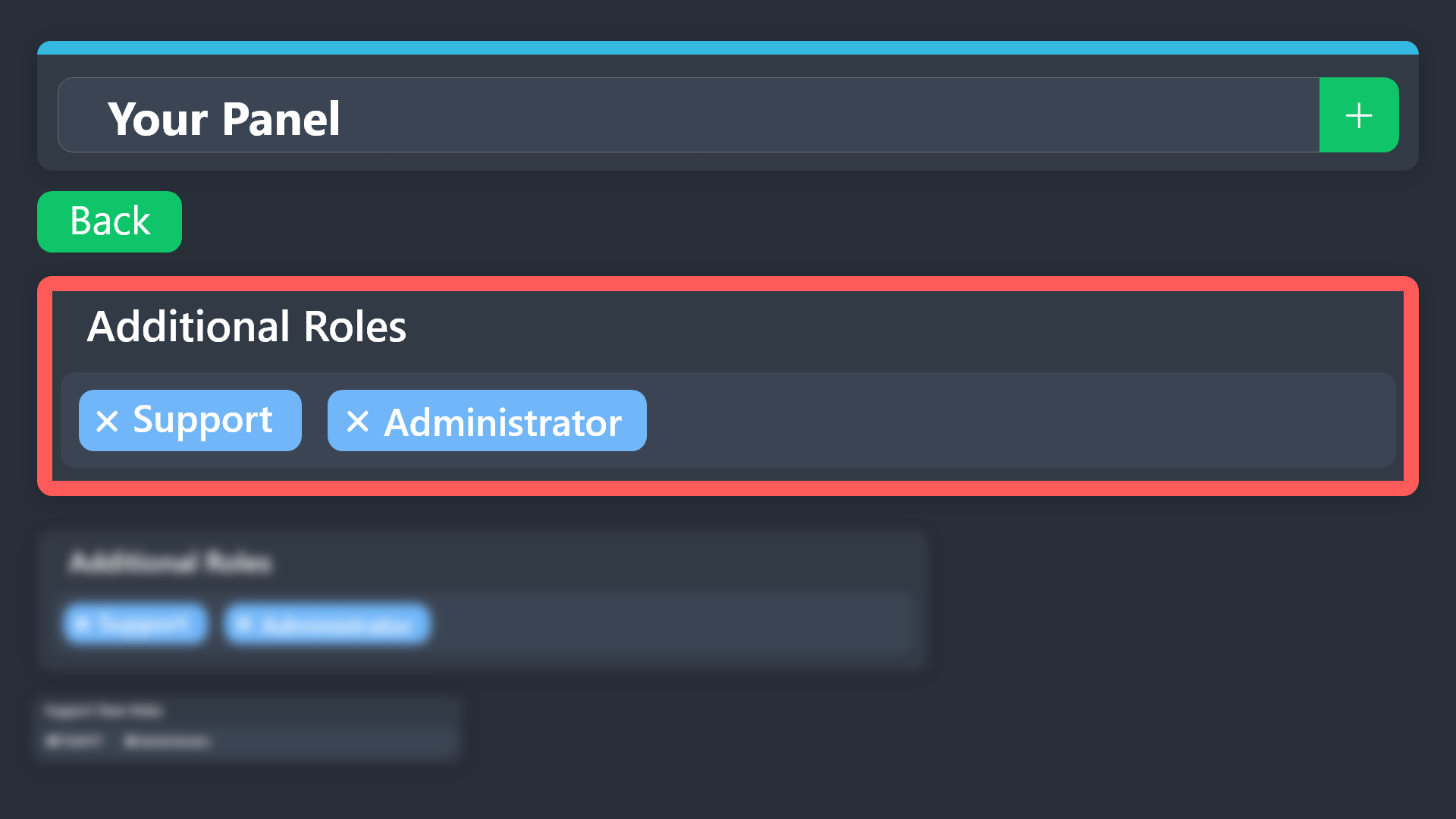
what does additional roles do, dont we have support team
 rotund solstice
scenic forum
rotund solstice
rotund solstice
scenic forum
rotund solstice
?
humble sequoiaBOT
Additional Roles are roles that are independent of Support Roles. You can assign unique permissions for roles defined as additional roles in tickets.
To choose your additional roles head to your Panel Configs ➞ General Settings ➞ Additional Roles
To assign permissions for additional roles, go to Dashboard ➞ Panel Configs ➞ Permission Options ➞ Additional Opened/Closed Permissions.
Note: Additional Roles do NOT get affected by the Change other support team permissions when claimed feature under Claiming Options, meaning they don't gain/lose any permissions set in that feature once a ticket is claimed.
$addroles
scenic forum
@buoyant karma ^
humble sequoiaBOT
For more convenient use of multipanels, you can now combine panels on the dashboard. This will allow you to directly send the multipanel from the dashboard or via the $panel ID command.
Where can I find this?
You can find this setting on the Dashboard -> Panel Configs -> Panel -> Attached Panels
Note: if you're attaching all the panels to a panel called English, don't include English in the attached panel's box (If you do this, it will create a duplicate)
This will put all buttons from all of your panels on one message. The message is the panel message from the panel you're combining these panels in.
scenic forum
@graceful kelp ^
buoyant karma
scenic forum
<@1003795506620792852> ^
so i can use it for owner and admin that needs more permission as manage message, manage threads?
will they able to control tickets the same as support team?
rotund solstice
scenic forum
?
yesterday i took a video of the armor and put it in the chest end the next day i went back in it was gone
humble sequoiaBOT
@rotund solstice
⚠️ You're in the wrong place
We provide support for Ticket Tool Discord bot and cannot help you with whatever issue you have.
- We don't know which Support Team you should contact to get this issue resolved, and unfortunately we won't be able to accurately tell you.
If you don't have any further questions regarding our bot Ticket Tool, please close this ticket
buoyant karma
buoyant karma
so i can use it for owner and admin that needs more permission as manage message...
none of these roles has admin perms and they’ll never be getting it, only founders
scenic forum
buoyant karma
so i can use it for owner and admin that needs more permission as manage message...
If these 2 roles have admin which their name indicate then they always have all discord permissions active
buoyant karma
scenic forum
If these 2 roles have admin which their name indicate then they always have all ...
yeah but it’s a little… dangerous permission 😭😭
it’ll make them immune to my automod
scenic forum
buoyant karma
yeah but it’s a little… dangerous permission 😭😭
People that achieved such roles should have enough trust
But yes you can set specific permissions for additional roles
So the additional roles can have independent permission settings than the team roles
graceful kelp
scenic forum
<@866678498181382194> ^
K ty bro
iron nightBOT
Gave +1 Rep to @scenic forum (current: #68 - 24)
scenic forum
graceful kelp
K ty bro
Np bud
buoyant karma
scenic forum
People that achieved such roles should have enough trust
But yes you can set spe...
okay, but will they able to close ticket and transcript and stuff? bc i want that to happen
scenic forum
buoyant karma
okay, but will they able to close ticket and transcript and stuff? bc i want tha...
You could possibly simply add the role to both categories theoretically speaking that should work
buoyant karma
scenic forum
You could possibly simply add the role to both categories *theoretically speakin...
thank you!
iron nightBOT
Gave +1 Rep to @scenic forum (current: #68 - 25)
 zenith coyote
humble sequoiaBOT
zenith coyote
humble sequoiaBOT
@zenith coyote
⚠️ You're in the wrong place
We provide support for Ticket Tool Discord bot and cannot help you with whatever issue you have.
- We don't know which Support Team you should contact to get this issue resolved, and unfortunately we won't be able to accurately tell you.
If you don't have any further questions regarding our bot Ticket Tool, please close this ticket


 rough thunder

I’m not sure what to do, my ticket tool keeps repeating this on tickets, I’ve tried what was asked on the doc to /debug but everything was fine
scenic forum
 thorny ermine
Ticket tool is missing Send message and embed links permission in that channel
rough thunder
I fixed it!
thorny ermine
scenic forum
Ticket tool is missing ``Send message`` and ``embed links`` permission in that c...
Do you speak Arabic
 still lavaBOT
scenic forum
Ticket tool is missing ``Send message`` and ``embed links`` permission in that c...
still lavaBOT
scenic forum
Ticket tool is missing ``Send message`` and ``embed links`` permission in that c...
From English (EN) To Arabic (AR)
أداة التذكرة تفتقر إلى الأذونات
Send messageوembed linksفي تلك القناة
 Translation requested by leonhenn from Flag-Reaction Feature.
scenic forum
Translation requested by leonhenn from Flag-Reaction Feature.
scenic forum
@thorny ermine ^
thorny ermine
scenic forum
<@859077526047162458> ^
So what should I do now?
scenic forum
still lava
@thorny ermine do that and run the command again
thorny ermine
scenic forum
<@859077526047162458> do that and run the command again
Ok
thorny ermine
scenic forum
<@859077526047162458> do that and run the command again
Can you join to my server and help me
scenic forum
thorny ermine
Can you join to my server and help me
Im sorry but im not allowed to do so
All support must occur within the server, especially since im also just am member
Which part is giving you troubles?
thorny ermine
still lava
How i do that
scenic forum
thorny ermine
How i do that
you on pc or phone
thorny ermine
Phone
scenic forum
Hold down on the channel -> Edit channel -> Channel permission -> Add role -> Ticket tool -> Enable send messages and embed links
||Alternatively if thats too much
You can just give the bot Administrator||
thorny ermine
scenic forum
Hold down on the channel -> Edit channel -> Channel permission -> Add role -> Ti...
Ok thanks
iron nightBOT
Gave +1 Rep to @scenic forum (current: #66 - 26)
 old sedge
how can i fix this?
 scenic forum
old sedge
how can i fix this?
scenic forum
old sedge
how can i fix this?
By giving the bot Manage Roles?
old sedge
how
scenic forum
Via Role Permissions
old sedge
thanks
 outer iris
why does my address show 0, I have 1500000 points on my balance, please check my address 0x97533c639212dd8462efe70c3092ba410e53f441
Moder help me please
humble sequoiaBOT
@outer iris
⚠️ You're in the wrong place
We provide support for Ticket Tool Discord bot and cannot help you with whatever issue you have.
- We don't know which Support Team you should contact to get this issue resolved, and unfortunately we won't be able to accurately tell you.
If you don't have any further questions regarding our bot Ticket Tool, please close this ticket
 fleet forum
How to buy tt premium
humble sequoiaBOT
You can purchase Ticket Tool Premium here! Buying it on our website allows you to have full control over your subscription:
 Cancel your subscription at any time
Change your billing interval (yearly/monthly)
Change your payment method
Add or remove server slots to your subscription
 Transfer the subscription between servers
Note: This level of control is only available when purchasing the subscription from our website.
You can manage your current subscriptions here, any billing questions or concerns, feel free to create a Billing Ticket via #🎫│make-a-ticket
 scenic forum
@fleet forum ^
fleet forum
Via crypto @scenic forum
humble sequoiaBOT
━━ User's inquiry has been moved to a ticket ━━
scenic forum
fleet forum
Via crypto <@186523978729259009>
open a billing ticket at #🎫│make-a-ticket
Stitch too fast
 gusty flare
hello hello 
I'll say it in advance that I'm using a translator so I hope you'll be able to understand me ! 
I'm struggling with the dashboard, I'd like to know if there's a possibility that basically the button of a panel is only accessible to a single role in particular ? 
austere forge
gusty flare
hello hello <a:hello:986679710891262002>
I'll say it in advance that I'm using a...
sure, Dashboard > Panel Configs > Buttons > Create Ticket Button > Disable the everyone role and set allowed roles
gusty flare
austere forge
sure, Dashboard > Panel Configs > Buttons > Create Ticket Button > Disable the `...
omg 
war is over, thank you!!
iron nightBOT
Gave +1 Rep to @austere forge (current: #4 - 1119)
austere forge
gusty flare
omg <a:wowfix:570258580004143114>
war is over, thank you!!
No problem! Thank you for choosing Ticket tool 
iron nightBOT
Gave +1 Rep to @gusty flare (current: #400 - 1)
 jade topaz
how do i make it so that it pings someone when opening a ticket (not the user that opened the ticket someone else)
humble sequoiaBOT
Within all the messages the bot sends (both embeds and text) you can mention either channels, roles, or even users, these mentions will only send a notification to the user if they are used within a text field, e.g: a role mentioned in an embed won't ping at all the users who have that role.
For mentioning a role you can use one out of three options:
{@Role Name} ➞ Which is Case Sensitive.
{RoleID} ➞ Replace RoleId with the Id of the role you are trying to ping.
<@&RoleID> ➞ Discord's native syntax to ping roles.
<#ChannelID> ➞ Mention a channel by its ID.
<@UserID> ➞ Mention a user by its ID.
scenic forum
@jade topaz ^
jade topaz
humble sequoia
thanks
iron nightBOT
Gave +1 Rep to @humble sequoia (current: #18 - 388)
scenic forum
jade topaz
scenic forum
<@456226577798135808> ^
thanks
iron nightBOT
Gave +1 Rep to @scenic forum (current: #64 - 27)
jade topaz
there you go
scenic forum
jade topaz
thanks
Appreciated <3
 frank kiln
does anyone know why does it keeps saying this interaction failed when I try to open a ticket?
scenic forum
frank kiln
does anyone know why does it keeps saying this interaction failed when I try to ...
Is it your server or a server youre staff in?
frank kiln
no it’s a support server, im just in it not staff or anything
scenic forum
frank kiln
no it’s a support server, im just in it not staff or anything
Then there is nothing we can do
You'd have to reach out to that servers staff team and they would have to fix it
frank kiln
ohh okay, thanks anyway!
 carmine dirge
Hi i created the ticket and i delete It and i cant create another one
dark spoke
i still have this issue, i checked docs and it didnt work, now im here
 scenic forum
dark spoke
i still have this issue, i checked docs and it didnt work, now im here
scenic forum
dark spoke
i still have this issue, i checked docs and it didnt work, now im here
Bot cant see the category and misses the listed permissions in general
scenic forum
carmine dirge
Hi i created the ticket and i delete It and i cant create another one
Are you staff in that server?
dark spoke
scenic forum
Bot cant see the category and misses the listed permissions in general
so how should i fix it
scenic forum
dark spoke
so how should i fix it
run /debug and give the bot all permissions that that are marked with X and then edit the category permissions to be able to view it
 cursive ether
so i have no idea how to start, i never did stuff with a ticket bot before so uhhh
is it possible to make it so that certain roles can see the ticked, but only some of these roles can talk in there too?
worldly helm
Hey there 👋
Yes that's possible. Please follow the guides below
cursive ether
like, that some specific roles only can view the tickets
humble sequoiaBOT
Additional Roles are roles that are independent of Support Roles. You can assign unique permissions for roles defined as additional roles in tickets.
To choose your additional roles head to your Panel Configs ➞ General Settings ➞ Additional Roles
To assign permissions for additional roles, go to Dashboard ➞ Panel Configs ➞ Permission Options ➞ Additional Opened/Closed Permissions.
Note: Additional Roles do NOT get affected by the Change other support team permissions when claimed feature under Claiming Options, meaning they don't gain/lose any permissions set in that feature once a ticket is claimed.
$addroles
cursive ether
worldly helm
Hey there 👋
Yes that's possible. Please follow the guides below
oke thankies
humble sequoiaBOT
1. Open your Panel Configs tab in your server's dashboard
2. Select the panel you want to grant access to
3. Open the General options menu
4. Select your Support Team Roles
5. Save changes
 worldly helm
cursive ether
oke thankies
worldly helm
cursive ether
oke thankies
You'll set the additional roles to that they can't send messages but the support team can.
dark spoke
scenic forum
run ``/debug`` and give the bot all permissions that that are marked with ``X`` ...
ok im a bit lost rn
these are the permissions it has rn
 scenic forum
dark spoke
these are the permissions it has rn
scenic forum
dark spoke
these are the permissions it has rn
Give it the last needed one via channel permissions
dark spoke
scenic forum
Give it the last needed one via channel permissions
ok now it works well. but it ends up on the same category, what if i want the created to open a different category
what should i do in the bots dashboard
scenic forum
dark spoke
ok now it works well. but it ends up on the same category, what if i want the cr...
Select the panel -> Click Category -> Select where you want the opened and/or closed ticket to go
 honest karma
upstream connect error or disconnect/reset before headers. reset reason: overflow
i tried to log in with this in the dashboard but it didnt work
scenic forum
honest karma
upstream connect error or disconnect/reset before headers. reset reason: overflo...
Id advise making a ticket at #🎫│make-a-ticket and get the staff to take a look at it since connection issues in any way can be a bit icky
 eternal frost
yo i need help
humble sequoiaBOT
Hello, we would love to help you, but if you don't tell us what you need help with we can't help you :(
harsh acorn
eternal frost
yo i need help
We need to have context on what you need help with
eternal frost
Its ok its works
 bright salmon
+rep @limber portal thank you
edit for the well deserved rep
iron nightBOT
Gave +1 Rep to @limber portal (current: #10 - 723)
bright salmon
There we go🤗
 modern cloud
is ticket transcripting seeming to fail pretty often for yall atm?
scenic forum
modern cloud
is ticket transcripting seeming to fail pretty often for yall atm?
No known reports or downtime
Any error youre receiving?
 cosmic pagoda
i have premium, claim button doesn't activate somehow

claim button does not appear at all when creating tickets
only close button
scenic forum
cosmic pagoda
i have premium, claim button doesn't activate somehow
Did you enable the claiming?
 cosmic pagoda
oh
cosmic pagoda
cosmic pagoda
i have premium, claim button doesn't activate somehow
no, as there is an "show this button" option i thought that handles all
thanks
thanks @scenic forum
iron nightBOT
Gave +1 Rep to @scenic forum (current: #64 - 28)
scenic forum
cosmic pagoda
thanks <@186523978729259009>
youre welcome!
 scenic forum
cosmic pagoda
scenic forum
cosmic pagoda
Can you run /debug?
cosmic pagoda
nvm, fixed it now
 golden spindle
Dear [Beamable] Support Team,
I hope this message finds you well.
I am writing to respectfully appeal the permanent ban placed on my account under Ban ID: 8, which states the reason as VPN usage, multiple accounts, or sharing a network with other accounts.
I would like to clarify that I have always participated fairly in your platform. I have only one account, and I have never intentionally used a VPN or attempted to gain unfair advantages. If there was any IP or network overlap, it may have been due to shared Wi-Fi or an accidental VPN connection — but never with bad intent.
Your project is one I genuinely support, and I’ve spent real time and effort engaging with the tasks and campaigns honestly. I kindly request that my case be reviewed again, and I am fully willing to comply with any additional verification or guidelines you require.
Thank you for your time, and I hope to be part of your amazing community again.
Warm regards,
Moin Khan
[pixelartfiverr786@gmail.com]
Dear [Beamable] Support Team,
I hope this message finds you well.
I am writing to respectfully appeal the permanent ban placed on my account under Ban ID: 8, which states the reason as VPN usage, multiple accounts, or sharing a network with other accounts.
I would like to clarify that I have always participated fairly in your platform. I have only one account, and I have never intentionally used a VPN or attempted to gain unfair advantages. If there was any IP or network overlap, it may have been due to shared Wi-Fi or an accidental VPN connection — but never with bad intent.
Your project is one I genuinely support, and I’ve spent real time and effort engaging with the tasks and campaigns honestly. I kindly request that my case be reviewed again, and I am fully willing to comply with any additional verification or guidelines you require.
Thank you for your time, and I hope to be part of your amazing community again.
Warm regards,
Moin Khan
[pixelartfiverr786@gmail.com]
humble sequoiaBOT
@golden spindle
⚠️ You're in the wrong place
We provide support for Ticket Tool Discord bot and cannot help you with whatever issue you have.
- We don't know which Support Team you should contact to get this issue resolved, and unfortunately we won't be able to accurately tell you.
If you don't have any further questions regarding our bot Ticket Tool, please close this ticket
golden spindle
how can i submit an apeal to get my account back
still lavaBOT
golden spindle
how can i submit an apeal to get my account back
From English (EN) To Sindhi (SD)
مان پنهنجو اڪائونٽ واپس وٺڻ لاءِ ايپيل ڪيئن جمع ڪرائي سگهان ٿو
From English (EN) To Urdu (UR)
میں اپنا اکاؤنٹ واپس حاصل کرنے کے لئے ایک اپیل کیسے جمع کر سکتا ہوں
 Translation requested by Moinkha from Flag-Reaction Feature.
scenic forum
golden spindle
how can i submit an apeal to get my account back
Translation requested by Moinkha from Flag-Reaction Feature.
scenic forum
golden spindle
how can i submit an apeal to get my account back
- We don't know which Support Team you should contact to get this issue resolved, and unfortunately we won't be able to accurately tell you.
golden spindle
beamable support team
scenic forum
golden spindle
beamable support team
Youre in the WRONG server for it.
Please stop writing about it
golden spindle
wich platform this
scenic forum
golden spindle
wich platform this
This is the support server for @pseudo glen itself.
The bot
 calm quartz
Hi, I was wondering to be told how to make it so that only the ticket creator and managers can view a ticket channel
harsh acorn
golden spindle
how can i submit an apeal to get my account back
We don't know what server do you mean to redirect it, also that answer was very chatgptish, use YOUR words
restive condor
calm quartz
Hi, I was wondering to be told how to make it so that only the ticket creator an...
Hey there! Tickets should be created as private channels by default already - let me know if that's not the case though. See below how to give your staff access to tickets
humble sequoiaBOT
1. Open your Panel Configs tab in your server's dashboard
2. Select the panel you want to grant access to
3. Open the General options menu
4. Select your Support Team Roles
5. Save changes
calm quartz
restive condor
Hey there! Tickets should be created as private channels by default already - le...
right now I have it in a category where all roles and the everyone role has the view channel perms turned off, except for the moderator role, yet whne a ticket is made and I use the 'view as role' option in roles all the roles in my server are able to view the newly made ticket

 fervent ore
@humble sequoia
 heavy shadow
 oblique bolt
@mystic hound can i get my transcripts for a ticket that got closed it never sent them to me
 mystic hound
oblique bolt
<@413723907619684352> can i get my transcripts for a ticket that got closed it ...
mystic hound
oblique bolt
<@413723907619684352> can i get my transcripts for a ticket that got closed it ...
You've made no tickets in this server from this account, if you're talking about a different server, you'll need to ask their staff
oblique bolt
okay thank you
heavy shadow
I can't, can you report it to me? I don't know where it is.
humble sequoiaBOT
@heavy shadow
⚠️ You're in the wrong place
We provide support for Ticket Tool Discord bot and cannot help you with whatever issue you have.
- We don't know which Support Team you should contact to get this issue resolved, and unfortunately we won't be able to accurately tell you.
If you don't have any further questions regarding our bot Ticket Tool, please close this ticket
 hushed patio
can i self host the bot?
pseudo ravine
Hey there! Unfortunately not
 midnight steeple
Is there anyway I can add an option upon clicking the button to request a ticket where it will say “Are you sure you want to open a ticket” with yes and no as options?
 bitter escarp
Can I please get help? Trying to figure out why my cheats aren't working today
harsh acorn
bitter escarp
Can I please get help? Trying to figure out why my cheats aren't working today
$te.
humble sequoiaBOT

-
Run
$debugon the channel you are trying to run Ticket Tool commands, if the bot has minimum perms it will either send an embed marking with❌the permissions it's missing to work properly. If it can't send it to the channel due to permissions, but it received the command it will DM you the debug embed. -
Go to your Server Configs and look at your Blacklisted Roles, Ticket Tool will ignore anyone who has any of those roles.
Note: Blacklisting @everyone will result in Ticket Tool being unresponsive to commands to any user.
- Within the Server Configs tab check that the bot you have enabled is the one you have on your server. If you selected the premium bot you must count with an active Premium subscription.
Visit our Troubleshooting documentation in order to go through more issues you may face and their respective solution.
harsh acorn
bitter escarp
Can I please get help? Trying to figure out why my cheats aren't working today
Wrong server I meant
 kind osprey
I need help with closing tickets in a server
scenic forum
harsh acorn
$te.
It's $tts for wrong server
scenic forum
kind osprey
I need help with closing tickets in a server
More info than that please
Any errors?
kind osprey
scenic forum
More info than that please
Any errors?
 scenic forum
kind osprey
scenic forum
kind osprey
Close your already opened ticket before opening a new one
 solid dome
hi so I gave the bot all perms needed and it still won't work
keeps saying this 💔
 kind osprey
I don’t have any ticket open that i can find
scenic forum
solid dome
hi so I gave the bot all perms needed and it still won't work
keeps saying this ...
Can you run /debug in the channel you're trying to send it to?
harsh acorn
scenic forum
It's $tts for wrong server
Thanks
iron nightBOT
Gave +1 Rep to @scenic forum (current: #62 - 29)
scenic forum
kind osprey
I don’t have any ticket open that i can find
Are you staff on that server?
solid dome
scenic forum
Can you run ``/debug`` in the channel you're trying to send it to?
i did that
it still won't work
kind osprey
scenic forum
Are you staff on that server?
No
scenic forum
solid dome
i did that
it still won't work
Then your bot intact doesn't have the mentioned permissions
scenic forum
kind osprey
No
Then there is nothing we can assist you with
You'd need to reach out to a staff member of THAT server and make them fix it
kind osprey
scenic forum
Then there is nothing we can assist you with
You'd need to reach out to a staff ...
Ok
solid dome
scenic forum
Then your bot intact doesn't have the mentioned permissions
I gave all perms + administration to the bot role and even in the specific channel. doesn't work...
scenic forum
solid dome
I gave all perms + administration to the bot role and even in the specific chann...
Check the permissions again
If debug isn't working then the bot doesn't have specified permissions and especially not administrator
humble sequoiaBOT
The Drop-down menu or Select Menu replaces the buttons on your panel message and uses a drop-down menu with all of your panels. To set this up, go to your Panel Configs and select your main Panel.
<:Numbericons1:1018864164032225340> Enable Select Style
First you enable Select Style. Then you add an item in the Dropdown Editor. Now you can start editing your dropdown!
<:Numbericons2:1018864168041971712> Dropdown Editor
Each line in the dropdown editor represents a line in the drop down menu on discord. You can add more "Items", by clicking on 

First you select a panel. That's the panel this option will open a ticket for.  DONT select the same panel twice. Each option should have a different Panel
After that, you can put a Display. This is the title of this option and will appear in the drop down menu. The *Description can be set right after that, which will be below the title in grey.
Additionally you can select an emoji, that will be shown in front of each option. You can either manually input the ID of an emoji or select it in the selector.
Common Issues ⚠️
- Panel doesn't send? Make sure you have a valid emoji selected
- Option doesn't show up? Check if two options have the same panel in the DropDown Editor

$dropdown
scenic forum
@coral creek ^
iron nightBOT
Gave +1 Rep to @scenic forum (current: #61 - 30)
 coral creek
@scenic forum how do i get the custom emojis?
humble sequoiaBOT
This error indicates you have selected an invalid emoji, i.e. an emoji the bot isn't capable of using, in a button field
Which Emoji?
This depends upon which action the error is appearing, the most common cases are the Create Ticket button or one of your Dropdown emojis. You can visit your Button's List to find all available buttons and find the conflicting one by yourself.
Why doesn't the bot accept it as valid?
- You selected an emoji that doesn't exist anymore, i.e. that has been deleted
- You wrote text there, instead of an emoji (or in addition to an emoji)
- You entered a code for a custom emoji from a server that the bot is not a member of
- You entered a custom emoji code incorrectly
- You're on iPhone and entered an emoji using the phone's emoji pad (use the emoji selector in the website instead)
scenic forum
@coral creek ^
scenic forum
What does not work exactly?
coral creek
where it says vile on the select a panel part needs to be buy-in
but it gives me no option to select buy-in
scenic forum
Do you have panels?
coral creek
yes
scenic forum
coral creek
yes
Can you show that you have more panels than the ones showing up?
 scenic forum
coral creek
wdym?
scenic forum
coral creek
wdym?
Your video shows that you have 3 panels
Buy-in
Vile
Recruitment
If only 3 panels exist you can only select one of these 3
You can also select the panel only once per dropdown option
coral creek
so how do i make them all go on the same one
 junior quail
I bought a raban for the second server can you help
scenic forum
coral creek
so how do i make them all go on the same one
you cant as it will break by discord due to having the same value i think
humble sequoiaBOT
⚠️ You're in the wrong place
We provide support for Ticket Tool Discord bot and cannot help you with whatever issue you have.
- We don't know which Support Team you should contact to get this issue resolved, and unfortunately we won't be able to accurately tell you.
If you don't have any further questions regarding our bot Ticket Tool, please close this ticket
scenic forum
unless Jstitch may correct me
pseudo ravine
Each dropdown option requires a separate panel
junior quail
I bought a raban for the second server can you help
harsh acorn
junior quail
I bought a raban for the second server can you help
What is a raban?
pseudo ravine
You're in the wrong place
harsh acorn
junior quail
I bought a raban for the second server can you help
Wrong place
scenic forum
pseudo ravine
Each dropdown option requires a separate panel
Thanks for clarifying
iron nightBOT
Gave +1 Rep to @pseudo ravine (current: #3 - 1472)
coral creek
pseudo ravine
Each dropdown option requires a separate panel
so how do i do this ?
junior quail
harsh acorn
Wrong place
broken
scenic forum
coral creek
so how do i do this ?
EACH option is an own panel
coral creek
sorry for the confusion im not used to this stuff!
pseudo ravine
coral creek
so how do i do this ?
You've been given a guide on how to setup dropdown. Please refer back to it
scenic forum
coral creek
sorry for the confusion im not used to this stuff!
all good. Thats what this server is here for!
 neon wren
i need to get unbanned because i got banned for cheating and i wasnt cheating on the server eu moded 2x hesteg 1
 humble sequoiaBOT
⚠️ You're in the wrong place
We provide support for Ticket Tool Discord bot and cannot help you with whatever issue you have.
- We don't know which Support Team you should contact to get this issue resolved, and unfortunately we won't be able to accurately tell you.
If you don't have any further questions regarding our bot Ticket Tool, please close this ticket
pseudo ravine
You were just told in your ticket you're in the wrong place
 amber storm
i dont understand this
 scenic forum
amber storm
i dont understand this
scenic forum
amber storm
i dont understand this
you can type inside there to search for your channel
amber storm
scenic forum
you can type inside there to search for your channel
Does it mean like which channel to put the panel in?
scenic forum
amber storm
Does it mean like which channel to put the panel in?
Transcript = the save of what happened inside the ticket
amber storm
scenic forum
Transcript = the save of what happened inside the ticket
Ohhh thank you
iron nightBOT
Gave +1 Rep to @scenic forum (current: #61 - 31)
coral creek
sorry to ask again but i seriously see no option to put a custom emoji on the dropdown
i even followed the link yous sent me
scenic forum
type \ infront of the custom emote you want to use
Example

turns into
!3v_smile
which you can copy paste and insert in the emote tab
@coral creek ^ forgot to reply to your message
coral creek
 scenic forum
coral creek
scenic forum
coral creek
The bot is precicely telling you what it wants
It lacks mentioned permissions inside the channel you want to send the panel to
coral creek
thanks @scenic forum
iron nightBOT
Gave +1 Rep to @scenic forum (current: #56 - 32)
 chrome abyss
humble sequoiaBOT
chrome abyss
humble sequoiaBOT
⚠️ You're in the wrong place
We provide support for Ticket Tool Discord bot and cannot help you with whatever issue you have.
- We don't know which Support Team you should contact to get this issue resolved, and unfortunately we won't be able to accurately tell you.
If you don't have any further questions regarding our bot Ticket Tool, please close this ticket
 grave prism
Hello, i wanna make it so u can select the reason u wanna open the ticket for.
I made 4 reasons on the website but i cannot get them so u can select one of them can someone help?
humble sequoiaBOT
For more convenient use of multipanels, you can now combine panels on the dashboard. This will allow you to directly send the multipanel from the dashboard or via the $panel ID command.
Where can I find this?
You can find this setting on the Dashboard -> Panel Configs -> Panel -> Attached Panels
Note: if you're attaching all the panels to a panel called English, don't include English in the attached panel's box (If you do this, it will create a duplicate)
This will put all buttons from all of your panels on one message. The message is the panel message from the panel you're combining these panels in.
scenic forum
@grave prism ^thats how its done in #🎫│make-a-ticket
grave prism
scenic forum
<@870306357977444402> ^thats how its done in <#571706435449257997>
tysmm

It kinda works but the names i gave the tickets did not save or smt?
grave prism
scenic forum
<@870306357977444402> ^thats how its done in <#571706435449257997>
you have any idea?
scenic forum
grave prism
you have any idea?
If you changed the names AFTER you send the panel, simply resend the panel
grave prism
scenic forum
If you changed the names AFTER you send the panel, simply resend the panel
i named them before but the message it should give in the ticket is the name for some reason
scenic forum
grave prism
i named them before but the message it should give in the ticket is the name for...
Gotta change the "create button" ticket name for each panel
Its simply combining the panels, using each panels own config
iron nightBOT
Gave +1 Rep to @scenic forum (current: #56 - 33)
 rotund prism
how do i make ticket tool make a ticket for a different panel? (using $new )
austere forge
Set a channel monitoring for each panels you have created
 pseudo rivet
Olá boa noite eu fiz uma comprar e até agora não obtive o código de resgate
humble sequoiaBOT
Você está no lugar errado
Fornecemos suporte para Ticket Tool Discord bot e não podemos ajudá-lo com qualquer problema que você tenha.
- Não sabemos qual equipe de suporte você deve entrar em contato para resolver esse problema e, infelizmente, não poderemos informar com precisão.
Se você não tiver mais dúvidas sobre nossa ferramenta de ticket de bot, feche este ticket
rotund prism
how do i get rid of the middle msg?
 pseudo ravine
Hey there! Unfortunately it's not possible, unless you wish for the the ticket to be deleted as soon as you close the ticket
rotund prism
pseudo ravine
Hey there! Unfortunately it's not possible, unless you wish for the the ticket t...
yeah i would love that !! i used to use ticket tool but i forgot everything
pseudo ravine
Please head to the Dashboard > General > Two Step Ticket > 
 normal sundial
Hello, anyone know why in the middle of setting up my bot it kicked me out of the dashboard saying I don't have access to this server?
Even tried kicking it and reinviting it.
 graceful glen
I’m tryna get a forsaken appeal ticket
humble sequoiaBOT
⚠️ You're in the wrong place
We provide support for Ticket Tool Discord bot and cannot help you with whatever issue you have.
- We don't know which Support Team you should contact to get this issue resolved, and unfortunately we won't be able to accurately tell you.
If you don't have any further questions regarding our bot Ticket Tool, please close this ticket
jade topaz
Preciso de ajuda
 wet otter
Hey I can't get ticket tool to ping my roles, is there something besides permissions that would prevent that?
harsh acorn
jade topaz
Preciso de ajuda
How can we help?
harsh acorn
wet otter
Hey I can't get ticket tool to ping my roles, is there something besides permiss...
Can I see the ticket message?
 dapper yoke
hello im just curious how to add another button for 2 separate kinda of tickets
harsh acorn
humble sequoia
.
wet otter
harsh acorn
Can I see the ticket message?
Nvm, I think we figured it out! Thank you thoo ✌🏻
iron nightBOT
Gave +1 Rep to @harsh acorn (current: #400 - 1)
dapper yoke
harsh acorn
.
i still dont see the multiple button part
 gilded verge
dapper yoke
i still dont see the multiple button part
gilded verge
dapper yoke
i still dont see the multiple button part
you mean you added it as in the instruction but the change is not visible on your discord channel?
dapper yoke
no i dont see the option to add multile button on the dashboard
gilded verge
🤔
 dapper yoke
yes ive been there
gilded verge
can you show your panels list? just click on it to expand and send screenshot
dapper yoke
 gilded verge
this part i'd like to see, please expand and send another screenshot
 dapper yoke
 gilded verge
then it won't work because as in the instruction, you must have more panels, only then you can use the multipanles
->
 gilded verge
one more thing, once you do it and then add the panels, remember to also update the message on discord because it's not done automatically
 harsh acorn
gilded verge
then it won't work because as in the instruction, you must have more panels, onl...
harsh acorn
gilded verge
then it won't work because as in the instruction, you must have more panels, onl...
Thank you for explaining him
iron nightBOT
Gave +1 Rep to @gilded verge (current: #12 - 559)
dapper yoke
gilded verge
one more thing, once you do it and then add the panels, remember to also update ...
thanks so much
iron nightBOT
Gave +1 Rep to @gilded verge (current: #12 - 560)
dapper yoke
one last thing is there a way to sort it by user insted of ticket number?
gilded verge
unfortunately i don't remember and for now im unable to find such answer, let's wait for someone else please
dapper yoke
no problem
 exotic root
how do i get support ticket to my server
 dense obsidian
why my ticket tool require permission?
like when i got low role it says: you need permission to use that
scenic forum
dense obsidian
like when i got low role it says: you need permission to use that
Which button are we talking about?
dense obsidian
the "open a ticket" reaction
scenic forum
dense obsidian
the "open a ticket" reaction
Select Panel -> Buttons -> Create ticket -> Support team only off
 dense obsidian
i can open it but when i got on my alt with a low role it dont wanna open
dense obsidian
scenic forum
Select Panel -> Buttons -> Create ticket -> Support team only off
ohh lemme try
 stark runeBOT
1. Invite Ticket Tool to your server
First you will want to invite the bot to your server. Once the bot is in your server, you can manage your server in the dashboard.

2. Create a Panel
To create a panel we are going to need to head over to the panel configs on the dashboard.
Once at the dashboard we will need to click Create Panel.
Enter a panel name (Fill in any optional settings you want).
Click Create Panel and your ready to get started with configuring your panel.
An example of a creating a panel is shown below.

3. Send the Panel to a Channel
Once you've created a panel on the dashboard you will need to send it to a channel using send on the dashboard.
Select the channel you want your panel to be created in and click send.
For other questions checkout $help faq.
An example of a sending a panel is shown below.
Having a Problem Sending the Panel?
Do $debug in a channel with Ticket Tool and make sure it has all the necessary Discord permissions.
 scenic forum
@exotic root ^
scenic forum
Youre welcome
 eager cobalt
Hi there - started using ticket tool and was all good... One of the other admins accidentally deleted the channel and removed the button. Ive since readded it and now it's giving an error when the button is pressed...
 scenic forum
eager cobalt
Hi there - started using ticket tool and was all good... One of the other admins...
scenic forum
eager cobalt
Hi there - started using ticket tool and was all good... One of the other admins...
The bot is missing permissions to see the category
eager cobalt
I looked at the permissions on there it's all ticked?? Or is that on the general server permissions?
scenic forum
eager cobalt
I looked at the permissions on there it's all ticked?? Or is that on the genera...
general server aka category permission
scenic forum
eager cobalt
I couldn't see it so gave it administrator 😂
thats also a way
eager cobalt
Another question. Where do I choose where the ticket displays once it's opened?
scenic forum
eager cobalt
Another question. Where do I choose where the ticket displays once it's opened?
you mean the category?
eager cobalt
Yeah, so once someone clicks the radio button and it initiates the ticket i want the ticket to go to a different spot on the server
scenic forum
Select panel -> Category -> simply select
 eager cobalt
Ah cool. Thank you. Cheers for your help. That's all for now... I think 🫣
 lethal plover
I accidentally tried to log in with the wrong account. Once I realised I went to refresh, then it keeps saying this.
eager cobalt
Another question - when someone opens a ticket, are you able to add another person to the ticket that's not a moderator?
 versed veldt
hi
so the premium version of our ticket tool expired and i have a question
if we buy the premium version of the ticket tool again
would the messages of the previous tickets load?
scenic forum
versed veldt
hi
so the premium version of our ticket tool expired and i have a question
if we...
Yes
versed veldt
scenic forum
Yes
for real?
scenic forum
versed veldt
for real?
the configs are saved nontheless, the premium features are just "blocked" or "prevented" but they are still there
versed veldt
the ticket is empty and only had "Messages failed to load"
versed veldt
scenic forum
the configs are saved nontheless, the premium features are just "blocked" or "pr...
ohhhh thnk you
scenic forum
versed veldt
the ticket is empty and only had "Messages failed to load"
Thats a discord issue
versed veldt
wait can i buy premium version for just a month or do i have to cancel the payment after 1 month passed
scenic forum
Unless message history is disabled, that can cause such visual bugs
versed veldt
cus i only want to buy 1 month
scenic forum
versed veldt
wait can i buy premium version for just a month or do i have to cancel the payme...
Then the premium features will only work for 1 month
 dim quest
Idk what to do I try laptop and phone but still won't 😭
 scenic forum
and cease to work once its over
scenic forum
dim quest
Idk what to do I try laptop and phone but still won't 😭
Ticket tool is missing send message and embed links permissions
scenic forum
lethal plover
I accidentally tried to log in with the wrong account. Once I realised I went to...
Visit discords site -> log out of the false account -> log into the right account -> repeat process
dim quest
scenic forum
Ticket tool is missing ``send message`` and ``embed links`` permissions
Thanks
iron nightBOT
Gave +1 Rep to @scenic forum (current: #56 - 34)
versed veldt
scenic forum
Thats a discord issue
yeah we had alot of tickets and after premium expired, the bot wouldn't respond and the ticket's messsages failed to load
scenic forum
versed veldt
yeah we had alot of tickets and after premium expired, the bot wouldn't respond ...
If you used the premium bot, yes it will cease to function entirely
scenic forum
eager cobalt
Another question - when someone opens a ticket, are you able to add another pers...
optionally via inside that ticket
/add
eager cobalt
I don't need to issue any extra permissions to said roles?
scenic forum
eager cobalt
I don't need to issue any extra permissions to said roles?
it will add said member to the channel AS a member
eager cobalt
It doesn't bring any users up only bots
scenic forum
eager cobalt
It doesn't bring any users up only bots
type inside the field.
eager cobalt
Ok I'll try it
dim quest
scenic forum
Ticket tool is missing ``send message`` and ``embed links`` permissions
Like in dashboard?
Or in server
scenic forum
dim quest
Like in dashboard?
server channel permissions
dim quest
scenic forum
server channel permissions
Oh I see
dim quest
scenic forum
server channel permissions
Thank you dear
iron nightBOT
Gave +1 Rep to @scenic forum (current: #56 - 35)
lethal plover
scenic forum
Visit discords site -> log out of the false account -> log into the right accoun...
The account I placed in was a fake one. ( it was saved by accident ).
scenic forum
lethal plover
The account I placed in was a fake one. ( it was saved by accident ).
i told you the steps
lethal plover
scenic forum
Visit discords site -> log out of the false account -> log into the right accoun...
I can’t if it says the thing.
scenic forum
lethal plover
I can’t if it says the thing.
 scenic forum
lethal plover
Still dosent work.
scenic forum
lethal plover
Still dosent work.
Then open a ticket please at #🎫│make-a-ticket and get a support members help since i dont know any other ideas besides that, sorry
 delicate radish
why cant i see the server like in the manage thing

i cant manage the one i want even tho its added to the server
scenic forum
delicate radish
why cant i see the server like in the manage thing
Are you an admin on the server?
delicate radish
yes
scenic forum
delicate radish
yes
can you run /permissionlevel
 scenic forum
delicate radish
scenic forum
delicate radish
can you show the role on you having admin?
 scenic forum
delicate radish
wanna see perms on it?
scenic forum
delicate radish
wanna see perms on it?
the admin part, yes
delicate radish
do i need a specific perm?
scenic forum
delicate radish
do i need a specific perm?
Administrator
iron nightBOT
Gave +1 Rep to @scenic forum (current: #55 - 36)
delicate radish
thank @scenic forum
 tame frigate
hi, i made a ticket in a different server because i had an issue with something. i accidentally clicked out of it and now when i click create ticket it says ‘Ticket limit reached. You already have 1 tickets out of the 1 allowed for this game!’… how do i view the unfinished ticket that i clicked out of?
scenic forum
tame frigate
hi, i made a ticket in a different server because i had an issue with something....
Are you staff in said server?
tame frigate
nope i just made a ticket for support with something
scenic forum
tame frigate
nope i just made a ticket for support with something
Then you have to reach out to their staff to fix the tickets or redirect you
 ember python
how to get my server out of blacklist
scenic forum
ember python
how to get my server out of blacklist
Are we talking about ticket tool?
ember python
scenic forum
Are we talking about ticket tool?
yes
scenic forum
ember python
yes
What makes you think you are blacklisted?
ember python
scenic forum
What makes you think you are blacklisted?

my friend transfered the server to me
scenic forum
ember python
Open a ticket at #🎫│make-a-ticket
ember python
i didnt know that it was blacklisted
 warm bough
Hloo i need help regarding the bot
restive condor
warm bough
Hloo i need help regarding the bot
Hi there, how can I help?
warm bough
restive condor
Hi there, how can I help?
How to create a multi panel ticket
restive condor
warm bough
How to create a multi panel ticket
You will need to create one panel per button option, so if you'd like 5 buttons, you will 5 different panels.
You can then combine all your panels by following the instructions below
humble sequoiaBOT
For more convenient use of multipanels, you can now combine panels on the dashboard. This will allow you to directly send the multipanel from the dashboard or via the $panel ID command.
Where can I find this?
You can find this setting on the Dashboard -> Panel Configs -> Panel -> Attached Panels
Note: if you're attaching all the panels to a panel called English, don't include English in the attached panel's box (If you do this, it will create a duplicate)
This will put all buttons from all of your panels on one message. The message is the panel message from the panel you're combining these panels in.
warm bough
restive condor
You will need to create one panel per button option, so if you'd like 5 buttons,...
Yeah what is this dashboard
restive condor
That would be our website
warm bough
restive condor
That would be our website
Ooh
warm bough
restive condor
That would be our website
Where can i get the link
humble sequoiaBOT

Ticket Tool - Ticketing without clutter - The #1 Discord support bot
 undone dawn
How do I get the autoclose option?
restive condor
undone dawn
How do I get the autoclose option?
Hey there! Autoclose how exactly? After inactivity?
undone dawn
After the ticket has been "closed" I would like it to be auto deleted after an x amount of time.
restive condor
warm bough
While logging in
Please screenshot the error message
warm bough
restive condor
Please screenshot the error message
I am it's loading
restive condor
undone dawn
After the ticket has been "closed" I would like it to be auto deleted after an *...
You can use our Automations feature for that
humble sequoiaBOT
With Ticket Tool's automation, you'll be able to customize your ticket system workflow! Using the Automation Editor you can:
- Chose out of 6 different triggers
- Set a Message Watcher to wait for a message for a given time, or to wait for the absence of them
- Add delays on the execution of actions after the trigger or watcher finds a message!
Automation Command
Automations can be stopped, by running the /automation stop command inside the ticket you want it to stop in. Restart it with /automation start You'll also be able to view the current status of the automations with /automation.
__Important Notes__
- Automation is on ALPHA TESTING PHASE, things might work unexpectedly or not at all.
- Any automation will run for a maximum of 7 days or until the ticket is closed, afterward, it will stop checking
+ You can have 5 automations per panel

$auto
 restive condor
humble sequoia
restive condor
humble sequoia
Use the 'Ticket Closed' trigger, 'Delete Ticket' as the action, and set a delay
warm bough
restive condor
Use the 'Ticket Closed' trigger, 'Delete Ticket' as the action, and set a delay
Huh?
restive condor
warm bough
Go back to the Dashboard page
warm bough
restive condor
Go back to the Dashboard page
Umm i was logging in
restive condor
Seems like it logged in, the redirect just failed
warm bough
restive condor
Seems like it logged in, the redirect just failed
Umm ok
warm bough
restive condor
Seems like it logged in, the redirect just failed
No i dont think that's the issue
My nework is stable
And it says something went wrong
When i reload
restive condor
You don't need to reload, just go back to the Dashboard page
warm bough
restive condor
You don't need to reload, just go back to the Dashboard page
I did
And now
restive condor
Are you logged in?
warm bough
restive condor
Are you logged in?
No thats what i am trying to do bruh
restive condor
warm bough
No thats what i am trying to do bruh
Try to log in once more then
If you get the same error, do not reload the page
warm bough
restive condor
If you get the same error, do not reload the page
Umm i did try it
restive condor
And you got the same error?
warm bough
restive condor
And you got the same error?
Yes
restive condor
Hm. Is there another device or browser you could try?
warm bough
restive condor
Hm. Is there another device or browser you could try?
Nope
Only one single phone
With a single crime browzer
2 bachlors
restive condor
Alright, so try it once more, once you get the error, go onto a new tab and try accessing https://tickettool.xyz/dashboard directly
warm bough
restive condor
Alright, so try it once more, once you get the error, go onto a new tab and try ...
It worked i logged in
Now what to do
restive condor
restive condor
You will need to create one panel per button option, so if you'd like 5 buttons,...
Now you can follow this guide ^
humble sequoiaBOT
A panel is the core of Ticket Tool, so its important to do the adequate process:
1. Open your Panel Configs tab in your server's dashboard
2. Click on the+or in theCreatebutton
3. Fill in the blanks
4. Create the panel
warm bough
humble sequoia
Yeah i created them
restive condor
humble sequoia
Great, now see here how to attach them ^
warm bough
restive condor
Great, now see here how to attach them ^
Yeah thanks i did it
iron nightBOT
Gave +1 Rep to @restive condor (current: #1 - 2555)
warm bough
restive condor
Great, now see here how to attach them ^
Seems i got another error
I can't see both of them in one ticket
I did what you said
@restive condor hlo
Ok sry
restive condor
Please screenshot the error
warm bough
restive condor
Please screenshot the error
Umm this is difficult
restive condor
What do you mean you can't see both of them in one ticket?
warm bough
restive condor
What do you mean you can't see both of them in one ticket?
Like i can't make ticket of both panels from a single channel
restive condor
Did you attach your panels onto one panel and then send that panel only?
warm bough
restive condor
Did you attach your panels onto one panel and then send that panel only?
Yes
restive condor
Can you screnshot what the message currently looks like on Discord
warm bough
restive condor
Can you screnshot what the message currently looks like on Discord
I did it's loading

See
restive condor
You didn't attach your panels onto that panel then
warm bough
restive condor
You didn't attach your panels onto that panel then
I did
restive condor
Can I get your server name or ID please
warm bough
restive condor
Can I get your server name or ID please
Umm w8
Spirit mc, 1395442736550903918
Here

And see this
warm bough
restive condor
Please re-send the panel
Ok
warm bough
restive condor
Please re-send the panel
Now
How would i know to click which button to create for which kind of ticket
 restive condor
Dashboard > Panel Configs > Buttons > Create Ticket Button - You can edit the create ticket button for each panel
jade topaz
he didn't thank so here
jade topaz
restive condor
Dashboard > Panel Configs > Buttons > Create Ticket Button - You can edit the cr...
thanks
iron nightBOT
Gave +1 Rep to @restive condor (current: #1 - 2556)
 teal elk
hi how to appeal the game on crosstrading
humble sequoiaBOT
⚠️ You're in the wrong place
We provide support for Ticket Tool Discord bot and cannot help you with whatever issue you have.
- We don't know which Support Team you should contact to get this issue resolved, and unfortunately we won't be able to accurately tell you.
If you don't have any further questions regarding our bot Ticket Tool, please close this ticket
 obsidian apex
51699b5e-f50c-11ed-a05b-0242ac120003
 rose glen
Hello. I want to add a ticket, I type the command /add, and it gives me an error!
 austere forge
rose glen
Hello. I want to add a ticket, I type the command /add, and it gives me an error...
austere forge
rose glen
Hello. I want to add a ticket, I type the command /add, and it gives me an error...
Refer to the embed below for setup Ticket tool on your server please
stark runeBOT
1. Invite Ticket Tool to your server
First you will want to invite the bot to your server. Once the bot is in your server, you can manage your server in the dashboard.
2. Create a Panel
To create a panel we are going to need to head over to the panel configs on the dashboard.
Once at the dashboard we will need to click Create Panel.
Enter a panel name (Fill in any optional settings you want).
Click Create Panel and your ready to get started with configuring your panel.
An example of a creating a panel is shown below.
3. Send the Panel to a Channel
Once you've created a panel on the dashboard you will need to send it to a channel using send on the dashboard.
Select the channel you want your panel to be created in and click send.
For other questions checkout $help faq.
An example of a sending a panel is shown below.
Having a Problem Sending the Panel?
Do $debug in a channel with Ticket Tool and make sure it has all the necessary Discord permissions.
 limber estuary
after i delete all panels, i cant safe... even with the commands, to get a multipanel it gives me another panel that doesnt exist...
example:
ive done one panel yesterday named test! i deleted it, but it appears everytime with the id:1.
austere forge
You must have at least 1 panel, you can't delete everything
limber estuary
everytime i wanna save i get this notification
 limber estuary
austere forge
You must have at least 1 panel, you can't delete everything
limber estuary
austere forge
You must have at least 1 panel, you can't delete everything
i tried it also with one, even if i use the commands in my dc to get a multipanel, it shows another id 1 panel, that didnt even exist and i cant config this
example, the create ticket button panel didnt exist anymore but i cant config this and if i put /panel id 1 it should get the red button at first
 austere forge
limber estuary
example, the create ticket button panel didnt exist anymore but i cant config th...
austere forge
limber estuary
example, the create ticket button panel didnt exist anymore but i cant config th...
Could you provide your server ID /name please
limber estuary
austere forge
Could you provide your server ID /name please
1395949938898108416 / Streambot
austere forge
I don't see any panels, which is the multipanel option with attached panels
Go to your Dashboard, and do it manually please
Dashboard > Panel configs > Panel - "Attached Panels (Multi Panels)"
@limber estuary Please enter your Dashboard server, select the second panel "Beschwerde" and attach your panels from Panel - "Attached Panels (Multi Panels)"

 limber estuary
it worked, thx
austere forge
Glad to hear! Thank you for choosing Ticket tool
 sweet parcel
How do I get it to ask questions?
limber estuary
sweet parcel
How do I get it to ask questions?

 inland dove
Hi is there a setting that was clicked for this to happen? It allows me to create a ticket but no one else can
 restive condor
inland dove
Hi is there a setting that was clicked for this to happen? It allows me to creat...
restive condor
inland dove
Hi is there a setting that was clicked for this to happen? It allows me to creat...
Hey there!
«You don't have permissions to use this»
Are your members seeing this message when they try to open a ticket?
You may have accidentally denied them permission to use the Create Ticket button.
Look in the following places in your server's dashboard:
👉 Server Configs -> Blacklist Roles
Any roles there will be unable to interact with the bot in any way, including creating tickets.👉 Panel Configs -> Buttons -> Create Ticket -> Support team only
If this is enabled👉 Panel Configs -> Buttons -> Create Ticket -> Disabled Roles
Any roles there will be unable to use the button.
inland dove
restive condor
Hey there!
**__«You don't have permissions to use this»__**
> Are your members...
Hey the second was was the issue idk why the button was set to support only but thank you!!
iron nightBOT
Gave +1 Rep to @restive condor (current: #1 - 2557)
humble sequoiaBOT
━━ User's inquiry has been moved to a ticket ━━
 celest orchid
i open ticket tool's website but all i see is this

in the top right you can see that im loaded in
 covert swallow
Try to refresh the page, and if that doesnt do anything try clearing your cache and making sure no extensions could be blocking content from loading'
 sweet patio
How can i fix this?
 covert swallow
Well it looks like you kicked ticket tool right before using the command, but it would most likely be a permission issue if the bot was still in the server
 wispy raven
who knows what the problem is, in the settings of the bot, we made sure that the closed tickets go to another category, but when you close the ticket, it does not go to the category where the closed tickets are stored and remains with the open ones
 scenic forum
wispy raven
who knows what the problem is, in the settings of the bot, we made sure that the...
scenic forum
wispy raven
who knows what the problem is, in the settings of the bot, we made sure that the...
Panel -> Category
Can you send a screenshot of that part in the dashboard?
wispy raven
scenic forum
Panel -> Category
Can you send a screenshot of that part in the dashboard?

moreover, everything was fine before and the tickets were transferred.
scenic forum
wispy raven
moreover, everything was fine before and the tickets were transferred.
Did any permissions change?
Can the bot still view the category?
wispy raven
scenic forum
Did any permissions change?
Can the bot still view the category?
yes i fix
scenic forum
wispy raven
yes i fix
Bot lacked permission inside the closed category?
wispy raven
scenic forum
Bot lacked permission inside the closed category?
yes
 charred chasm
Hi
worldly helm
charred chasm
Hi
Hey 👋
How can I help you today?
charred chasm
I want to speed up the order options.
 worldly helm
Could you elaborate a bit?
charred chasm
Here it is written create a ticket I want to increase what is between or options
humble sequoiaBOT
The panel message is where people react to make a ticket. To customize it head over to your Dashboard --> Panel Configs -> Panel -> Edit Panel Message
 worldly helm
You can follow guide to edit the panel message
charred chasm
Thank y
worldly helm
sweet parcel
How do I get the results of a form
humble sequoiaBOT
A Discord Form lets the user answer individual questions in a pop-up Form, which then displays the answers in the ticket message. This can save time if you already know what you want to ask the user.
Setup Forms
Forms can be enabled under Panel Settings > Form Options > Edit Forms Options. In the new pop-up window, you can now enable and edit your own Form.
Form Options
You can add up to 5 questions in the Discord form. This is a Discord limitation. Each question can have a placeholder in the input field, a minimum and maximum input, multi-line, and also the option to have the answer required.
Options
Question Title ➞ Your Question goes here
Question Placeholder ➞ The placeholder text in the input field
Required ➞ If enabled, the user has to answer this question, to submit the form
Multi-Line Input ➞ Allows the user to input multiple lines
Minimum and Maximum Input ➞ Set a minimum and maximum input value for the user
Displaying the Answer
To display the answers from the user, you need to enable Auto display form results on the ticket message as an additional embed
If you don't want a second embed, go into your Panel Configs > Ticket Options > Edit Ticket Message. You use the variable {create.form.x} and replace x with the number of your question. For example, the response to Question 5 can be displayed with {create.form.5}.
 scenic forum
@sweet parcel ^
 zenith sierra
 scenic forum
zenith sierra
scenic forum
zenith sierra
can you run /debug in the same channel?
zenith sierra
scenic forum
can you run ``/debug`` in the same channel?
nope
scenic forum
zenith sierra
nope
same error?
zenith sierra
yep
scenic forum
zenith sierra
yep
The bot is missing Send Message and Embed links permissions
 rose matrix
 humble sequoiaBOT
@rose matrix
⚠️ You're in the wrong place
We provide support for Ticket Tool Discord bot and cannot help you with whatever issue you have.
- We don't know which Support Team you should contact to get this issue resolved, and unfortunately we won't be able to accurately tell you.
If you don't have any further questions regarding our bot Ticket Tool, please close this ticket
 scenic forum
charred chasm
Help I use the Arabic language
scenic forum
charred chasm
Help I use the Arabic language
Hey you can open a ticket in your language at #🎫│make-a-ticket
charred chasm
I want to add more boxes or buttons
 humble sequoiaBOT
For more convenient use of multipanels, you can now combine panels on the dashboard. This will allow you to directly send the multipanel from the dashboard or via the $panel ID command.
Where can I find this?
You can find this setting on the Dashboard -> Panel Configs -> Panel -> Attached Panels
Note: if you're attaching all the panels to a panel called English, don't include English in the attached panel's box (If you do this, it will create a duplicate)
This will put all buttons from all of your panels on one message. The message is the panel message from the panel you're combining these panels in.
scenic forum
@charred chasm ^
humble sequoiaBOT
━━ Lord's inquiry has been moved to a ticket ━━
 jolly imp
How do i grant roles the permission to open a ticket?
worldly helm
jolly imp
How do i grant roles the permission to open a ticket?
__ «You don't have permissions to use this»__
Are your members seeing this message when they try to create a ticket?
You may have accidentally denied them permission to use the Create Ticket button.
Look in the following places in your server's dashboard
👉 Server Configs > Blacklist Roles
Any roles there will be unable to interact with the bot in any way, including creating tickets.👉 Panel Configs > Buttons > Create Ticket > Support team only
If this is enabled👉 Panel Configs > Buttons > Create Ticket > Disabled Roles
Any roles there will be unable to use the button.
 warm briar
Hi everyone,
I am new to using discord and try to setup ticket tool on my server now.
If I inivte the bot over to my server, do I have to give it all permissions?
I get asked that before the bot can be integrated to the server and I am unsure whether all permissions as pre-selected are neccessary.
Thank you - and sorry if that question has been answered a 1000 times before.
I really don't get along too well with discords structure yet.
worldly helm
warm briar
Hi everyone,
I am new to using discord and try to setup ticket tool on my serv...
Hey there 👋
No worries at all. Everyone started once. You do not have to give it all permissions. If you decide to give it all permissions it insures no permissions lacks which ends in no issues. I'll attach a screenshot of all the needing permissions you need for the bot to work flawless.
Have a nice day!
 warm briar
Thank you! Is there a particular reason why the bot need to be able to manage roles?
I aim for it to give users a support system to answer server-related questions and would not need to have the bot alter or assign roles, if it still works for the intended use as described above.
worldly helm
warm briar
Thank you! Is there a particular reason why the bot need to be able to manage ro...
Yes - The bot would need that role if you would want to assing to remove roles upon creating or closing tickets. That is also a premium feature so if you plan on not to use it that's totally fine!
worldly helm
Hey 👋
Could you elaborate please?
 river wolf
I accidentally put the wrong order code in and now nothing responding
warm briar
Got it, thank you @worldly helm . Just one follow up question, if thats ok:
I assume managing channels, reading the history and attaching files is a premium feature, too.
is there an overview that lets me see what the basic bot includes, so that I can decide what roles must be granted?
iron nightBOT
Gave +1 Rep to @worldly helm (current: #7 - 881)
worldly helm
warm briar
Got it, thank you <@972202754212782080> . Just one follow up question, if thats ...
I don't think we've got a list of that but I can for sure tell you why the bot needs the permissions above.
Managing channels - Ticket Tool has to delete channel upon request
Reading History - It needs to read the previous history to determain what action it should do.
Attaching files - That is indeed a premium feature for embed, etc.
warm briar
Great, thanks again @worldly helm
I'll see how it goes 🙂 Have a nice day, too!
iron nightBOT
Gave +1 Rep to @worldly helm (current: #7 - 882)
worldly helm
You're very welcome!
Glad I was able to help you out!
 errant shore
hai, i opened a ticket to ask how to find panel IDs but wasnt online anymore and couldnt see the ticket,can someone help me find ticket panel IDs for multipanels?
 cunning gazelle
hello! so my admin team (myself as head) is using this bot, and after discussing, they are in favor of keeping ticket channels around after they are closed (but moved to an archive category) so users can read their own tickets and reopen them (which moves them into the active ticket category) as needed. eg, a user opens a ticket - we resolve the topic; ticket is closed. user later hits open ticket to discuss a new matter; ticket is closed when resolved; etc.
our trouble is saving transcripts of each open ticket session; the transcription open saves the transcript from the very beginning of the ticket each time. so my question is - is there a way for specify ticket transcriptions only extend as far back as when the ticket was last opened, instead of transcribing the entire ticket each time? or is there a more sensible way to go about this that we're missing?
grave prism
Hello, how do i get my tickets to go in to one cattegory instead of it going allover the place?
 cunning charm
Anyone know how I add this into my discord
grave prism
cunning charm
Anyone know how I add this into my discord
Click on the ticket tool bot and press ''add app''
cunning charm
Where that too?
 reef pendant
Hey so I’m trying to set up a ticket system for my friend, and everytime I go to send the message this comes up. I have given it every perm possible and if still says this, idk what to do about it there are no solutions online

 cunning charm
Thankyou appreciate it all👑
reef pendant
reef pendant
Hey so I’m trying to set up a ticket system for my friend, and everytime I go to...
Like idk have i forgotten to do something, or if ive missed something, but ive been at this for HOURS and no matter what its still the same
 dire gorge
For some reason the ticket thing doesn’t pop up Im my dc server
pseudo ravine
errant shore
hai, i opened a ticket to ask how to find panel IDs but wasnt online anymore and...
Hey there! The panel ID is the number to the left of the panel name on the dashboard
pseudo ravine
cunning gazelle
hello! so my admin team (myself as head) is using this bot, and after discussing...
Hey there! Unfortunately not
pseudo ravine
grave prism
Hello, how do i get my tickets to go in to one cattegory instead of it going all...
Hey there! Please refer to the embed below!
humble sequoiaBOT
1. Open your Panel Configs tab in the server's dashboard
2. Select the panel you want to grant access to
3. Open the Category options menu
4. Select the categories of your preference
5. Save changes
 pseudo ravine
reef pendant
Hey so I’m trying to set up a ticket system for my friend, and everytime I go to...
pseudo ravine
reef pendant
Hey so I’m trying to set up a ticket system for my friend, and everytime I go to...
Hey there! Please refer to the embed below!
humble sequoiaBOT
This error indicates you have selected an invalid emoji, i.e. an emoji the bot isn't capable of using, in a button field
Which Emoji?
This depends upon which action the error is appearing, the most common cases are the Create Ticket button or one of your Dropdown emojis. You can visit your Button's List to find all available buttons and find the conflicting one by yourself.
Why doesn't the bot accept it as valid?
- You selected an emoji that doesn't exist anymore, i.e. that has been deleted
- You wrote text there, instead of an emoji (or in addition to an emoji)
- You entered a code for a custom emoji from a server that the bot is not a member of
- You entered a custom emoji code incorrectly
- You're on iPhone and entered an emoji using the phone's emoji pad (use the emoji selector in the website instead)
pseudo ravine
dire gorge
For some reason the ticket thing doesn’t pop up Im my dc server
Hey there! Please refer to the embeds below!
reef pendant
I’ll try that now, thank you
humble sequoiaBOT
First you will want to invite the bot to your server. Once the bot is in your server, you can manage your server in the dashboard.
To create a panel we are going to need to head over to the Panel Configs Tab on the Dashboard.
Once at the dashboard we will need to click Create Panel.
Enter a panel name (Fill in any optional settings you want).
Click Create Panel and you are ready to get started with configuring your panel.
An example of a creating a panel is shown below.
Once the panel has been created, use the blue Send button and select the channel you want the panel to be sent to.
The Panel wasn't send
Use the </debug:1029783024264564765> command to diagnose possible permission issues with the bot.
pseudo ravine
reef pendant
I’ll try that now, thank you
You're welcome, glad I could help! Thanks for choosing Ticket Tool!
iron nightBOT
Gave +1 Rep to @reef pendant (current: #400 - 1)
cunning charm
How do I add the ticket into my discord like a channel?
pseudo ravine
humble sequoia
Hey there! Please refer to this guide
cunning charm
Can you @ the guide for me?
grave prism
I need help im tryna make a staff aplication ticket, but the application form is to longfor the ticket how can i make bigger textor can i combine dyno or what
pseudo ravine
cunning charm
Can you @ the guide for me?
I replied to the message
pseudo ravine
grave prism
I need help im tryna make a staff aplication ticket, but the application form is...
Are you referring to the text inside the Ticket Message?
grave prism
pseudo ravine
Are you referring to the text inside the `Ticket Message`?
yeah
like when u open a tiket u can edit the message
but it has a limit on the amount of letters ur can use
pseudo ravine
Please refer to the embed below!
humble sequoiaBOT
A Discord Form lets the user answer individual questions in a pop-up Form, which then displays the answers in the ticket message. This can save time if you already know what you want to ask the user.
Setup Forms
Forms can be enabled under Panel Settings > Form Options > Edit Forms Options. In the new pop-up window, you can now enable and edit your own Form.
Form Options
You can add up to 5 questions in the Discord form. This is a Discord limitation. Each question can have a placeholder in the input field, a minimum and maximum input, multi-line, and also the option to have the answer required.
Options
Question Title ➞ Your Question goes here
Question Placeholder ➞ The placeholder text in the input field
Required ➞ If enabled, the user has to answer this question, to submit the form
Multi-Line Input ➞ Allows the user to input multiple lines
Minimum and Maximum Input ➞ Set a minimum and maximum input value for the user
Displaying the Answer
To display the answers from the user, you need to enable Auto display form results on the ticket message as an additional embed
If you don't want a second embed, go into your Panel Configs > Ticket Options > Edit Ticket Message. You use the variable {create.form.x} and replace x with the number of your question. For example, the response to Question 5 can be displayed with {create.form.5}.
 royal fiber
It has been more than 2 days of zenith transaction in pending
humble sequoiaBOT
⚠️ You're in the wrong place
We provide support for Ticket Tool Discord bot and cannot help you with whatever issue you have.
- We don't know which Support Team you should contact to get this issue resolved, and unfortunately we won't be able to accurately tell you.
If you don't have any further questions regarding our bot Ticket Tool, please close this ticket
royal fiber
 grave prism
thanks @pseudo ravine
iron nightBOT
Gave +1 Rep to @pseudo ravine (current: #3 - 1475)
pseudo ravine
You're welcome, glad I could help! Thanks for choosing Ticket Tool!
reef pendant
Hey so last issues been fixed but now it’s saying this, how do I get rid of the limit
 pseudo ravine
Please head to the Dashboard > Limits > Tickets Open > Open tickets each user
reef pendant
Thank you again
pseudo ravine

harsh acorn
royal fiber
Wrong server!!
humble sequoiaBOT
⚠️ You're in the wrong place
We provide support for Ticket Tool Discord bot and cannot help you with whatever issue you have.
- We don't know which Support Team you should contact to get this issue resolved, and unfortunately we won't be able to accurately tell you.
If you don't have any further questions regarding our bot Ticket Tool, please close this ticket
pseudo ravine
harsh acorn
Wrong server!!
They've already been told
reef pendant
Okay i genuinely have no clue what is wrong with this today, ive done this multiple times with 0 issues. But I do it today and suddenly it’s just turning on random perms…
Now when I open a ticket, every single person in the server has access to it, and idk how to remove them all from it
pseudo ravine
Please head to the Dashboard > Permissions > Everyone Role Permissions > Edit opened > View Channel > 
grave prism
one more questions then im finally done, how can i make it insta tag the player and a role? in my case: @staff
pseudo ravine
Please refer to the embed below!
humble sequoiaBOT
1. Open your Panel Configs tab in your server's dashboard
2. Select the panel you want to ping your support team on
3. Open the Ticket options menu
4. Click on Edit Ticket Message
5. In the Message Content use one of the role mention syntax ({@Role Name}/{Role ID})
6. Save changes
Note: For this to work properly, Ticket Tool requires the Mention Everyone permission. Or the role must have the Allow anyone to @mention this role setting enabled
pseudo ravine
grave prism
thanks @pseudo ravine
iron nightBOT
Gave +1 Rep to @pseudo ravine (current: #3 - 1476)
reef pendant
pseudo ravine
Please head to the Dashboard > Permissions > Everyone Role Permissions > Edit op...
Ty again, finally got it fully working 😭
thanks @pseudo ravine
iron nightBOT
Gave +1 Rep to @pseudo ravine (current: #3 - 1477)
 gleaming relic
Hi guys, I made a purchase but the cover didn't come through. I even have a photo.
 humble sequoiaBOT
⚠️ You're in the wrong place
We provide support for Ticket Tool Discord bot and cannot help you with whatever issue you have.
- We don't know which Support Team you should contact to get this issue resolved, and unfortunately we won't be able to accurately tell you.
If you don't have any further questions regarding our bot Ticket Tool, please close this ticket
 gloomy pond
AlohaTicket Tool Support, if I close a ticket, is it gone forever? Or is there somewhere else it lives that I can retroactively pull from?
humble sequoiaBOT
━━ User's inquiry has been moved to a ticket ━━
 nimble sandal
 gleaming sierra
i cant figure out how to edit the color, description, or create a ticket button someone help pls
 zealous vale
||commmands||
 viral turtle
I NEED HELP CAN SOMEONE TELL ME HOW TO CONNECT WITH CUSTOMER SERVICE?
 tepid geyser
gleaming sierra
i cant figure out how to edit the color, description, or create a ticket button ...
tepid geyser
gleaming sierra
i cant figure out how to edit the color, description, or create a ticket button ...
Are you meaning close / claim ? Or a drop-down. You cannot change any color at a drop-down selection
 daring falcon
I deleted my channels but the problem is still not fixed. Do you know what I should do?
help me please
 daring falcon
I deleted my channels but the problem is still not fixed. Do you know what I sho...
daring falcon
daring falcon
I deleted my channels but the problem is still not fixed. Do you know what I sho...
It's in another server
harsh acorn
daring falcon
I deleted my channels but the problem is still not fixed. Do you know what I sho...
Did you clicked update when you deleted the channels?
daring falcon
harsh acorn
Did you clicked update when you deleted the channels?
yes
cunning gazelle
pseudo ravine
Hey there! Unfortunately not
thank you for the response!
i have a follow up question - once a ticket is closed & automatically moved to an archived category, is there a way for the bot to automatically add permissions for a user to retain access to their own ticket?
iron nightBOT
Gave +1 Rep to @pseudo ravine (current: #3 - 1479)
 knotty bramble
whenever i open a server and try to create a ticket i cannot i have a good role and i check everydau so no glitch please anyone help
@cunning gazelle
scenic forum
knotty bramble
whenever i open a server and try to create a ticket i cannot i have a good role ...
Are you staff in the server?
humble sequoiaBOT
Hello, we would love to help you, but if you don't tell us what you need help with we can't help you :(
knotty bramble
No
scenic forum
@knotty bramble ^
knotty bramble
i am a member while every member can create ticket me not
scenic forum
knotty bramble
i am a member while every member can create ticket me not
Then we cannot assist you
You need to reach out to their servers staff and get them to fix it
knotty bramble
?
scenic forum
 true solar
Hi , i have a problem in the application Bot
true solar
Hi , i have a problem in the application Bot
More information please