#🆘│community-support
1 messages · Page 205 of 1
 atomic solstice
 sage iris
1382189080867110982
 fallow heron
I'm doing that, but ticket call only the first panel and not call the any others
All panels have same config, each panel set a support team different
When i click the open ticket button, it call the first panel only 😦
 atomic solstice
fallow heron
I'm doing that, but ticket call only the first panel and not call the any others...
atomic solstice
fallow heron
I'm doing that, but ticket call only the first panel and not call the any others...
does each panel have a different channel in that menu you screenshotted?
fallow heron
Same channel
atomic solstice
if they all have logs_ticket then it will always open only one
every panel needs to have a different channel
fallow heron
Hum... let me try
atomic solstice
sage iris
1382189080867110982
are you getting any errors?
sage iris
atomic solstice
are you getting any errors?
When clicking the close button, it does a little loading thing on the button for half a second then goes back to close. (Obviously doesn’t close the ticket)
If I rename or something it says application can’t respond, the bot was accidentally kicked earlier - might this be why?
atomic solstice
sage iris
When clicking the close button, it does a little loading thing on the button for...
Can you check the permissions inside those ticket channels if tickettool has access to them and has View Channel, Manage Channel & Manage Permissions as  there?
sage iris
It does
fallow heron
atomic solstice
does each panel have a different channel in that menu you screenshotted?
Omg thank you so much, it works!!
 iron nightBOT
Gave +1 Rep to @atomic solstice (current: #21 - 340)
atomic solstice
fallow heron
Omg thank you so much, it works!!
no problem
atomic solstice
sage iris
It does
hmm, please try to run /debug in any of those tickets
@sage iris I can see you tried the debug in one of those tickets. Ticket Tool is missing the View Channel permission in the ticket. Please make sure to change that permission for the bot to
sage iris
Yeah, I noticed that and I've fixed the issue. Thanks
atomic solstice
without that permission the bot cannot see your message hence doesn't respond
atomic solstice
sage iris
Yeah, I noticed that and I've fixed the issue. Thanks
no problem
sage iris
Thanks @atomic solstice
iron nightBOT
Gave +1 Rep to @atomic solstice (current: #21 - 341)
atomic solstice

 mighty crag
Hello can help me?
 stiff lintel
I cant make a support ticked in GAG server
mighty crag
okay
 humble sequoiaBOT
━━ No pedo's inquiry has been moved to a ticket ━━
 haughty drift
I need help making a ticket
 storm dagger
How get ticket???
 charred echo
How do I specify what category that tickets are sent to?
 turbid trout
someone can help me with this? so when i choose the other menu, it keep opening the general request, even tho im choosing the partnership option

 lime vector
Hello!
Is anyone able to point me in the right direction as to where I control whether players / community members can close their own tickets? I've scoured the dashboard and I'm sure I'm being blind somewhere!
Thank you!
storm dagger
@humble sequoia et Tool#6207 how to unban a game from tickat, maybe give a snare?
pls
humble sequoiaBOT
1. Open your Panel Configs tab in the server's dashboard
2. Select the panel you want to grant access to
3. Open the Category options menu
4. Select the categories of your preference
5. Save changes
 atomic solstice
charred echo
How do I specify what category that tickets are sent to?
atomic solstice
charred echo
How do I specify what category that tickets are sent to?
Hi, please follow the embed above on how to specify the category
humble sequoiaBOT
The Drop-down menu or Select Menu replaces the buttons on your panel message and uses a drop-down menu with all of your panels. To set this up, go to your Panel Configs and select your main Panel.
<:Numbericons1:1018864164032225340> Enable Select Style
First you enable Select Style. Then you add an item in the Dropdown Editor. Now you can start editing your dropdown!
<:Numbericons2:1018864168041971712> Dropdown Editor
Each line in the dropdown editor represents a line in the drop down menu on discord. You can add more "Items", by clicking on 

First you select a panel. That's the panel this option will open a ticket for.  DONT select the same panel twice. Each option should have a different Panel
After that, you can put a Display. This is the title of this option and will appear in the drop down menu. The *Description can be set right after that, which will be below the title in grey.
Additionally you can select an emoji, that will be shown in front of each option. You can either manually input the ID of an emoji or select it in the selector.
Common Issues ⚠️
- Panel doesn't send? Make sure you have a valid emoji selected
- Option doesn't show up? Check if two options have the same panel in the DropDown Editor

$dropdown
atomic solstice
turbid trout
someone can help me with this? so when i choose the other menu, it keep opening ...
Hi, you can doublecheck using the embed above on how to correctly set this up.
Every option is a different panel so make sure you actualy select a different panel in the dashboard as I assume some of if not all the options have the same panel selected
humble sequoiaBOT
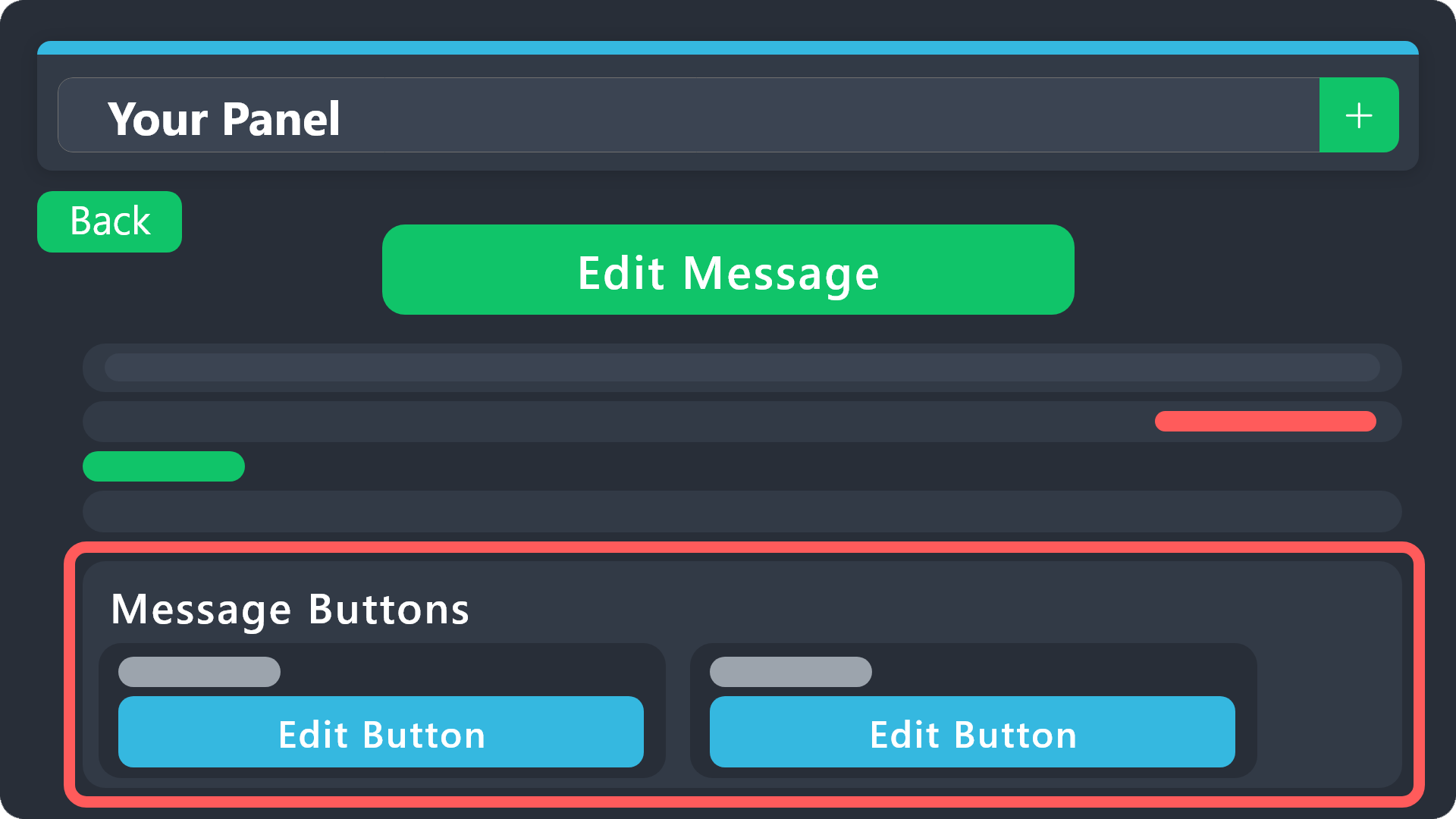
Buttons within Discord can have multiple functions and are used to control your tickets. With Ticket Tool, you can edit all the buttons however you like! Buttons can show emojis, text and can have 4 different colors.
Where can I edit them?
With the Panel Configs Editor, all button configurations can be found in the Button Options menu! You can also find their settings under the editor of each message that has a button!
Example: The Close and Claim Buttons are on the Ticket Message. Therefore, you can edit the buttons under Ticket > Edit Ticket Message. The buttons are below the message editor.
 atomic solstice
lime vector
Hello!
Is anyone able to point me in the right direction as to where I control...
atomic solstice
lime vector
Hello!
Is anyone able to point me in the right direction as to where I control...
hi you can follow the embed above, you can find the close button option there and change which roles can and cannot use it, simply having Support Team Only as  and no other rles in allowed or disallowed will make it so everyone in the ticket can close it
atomic solstice
storm dagger
<@722196398635745312> et Tool#6207 how to unban a game from tickat, maybe give a...
Hi, you are in the wrong place, we are a support server for the Ticket Tool bot. We aren't affiliated with any games
 atomic solstice
 tall mesa
hi can someone help me with this issue neeed to fix it pls
tall mesa
hi can someone help me with this issue neeed to fix it pls
Go to the dashboard -> your server -> Panel Configs (on the left) -> Click on Buttons -> Click on Create Ticket and make sure Support Team Only is 
tall mesa
atomic solstice
Go to the dashboard -> your server -> Panel Configs (on the left) -> Click on Bu...
then how will my support team view
turbid trout
atomic solstice
Hi, you can doublecheck using the embed above on how to correctly set this up.
...
im using dropdown from sapphire and ticket tool, it is the same to setting it?
humble sequoiaBOT
1. Open your Panel Configs tab in your server's dashboard
2. Select the panel you want to grant access to
3. Open the General options menu
4. Select your Support Team Roles
5. Save changes
 atomic solstice
tall mesa
then how will my support team view
atomic solstice
tall mesa
then how will my support team view
here is how you give your team access ^^
iron nightBOT
Gave +1 Rep to @atomic solstice (current: #21 - 343)
atomic solstice
turbid trout
im using dropdown from sapphire and ticket tool, it is the same to setting it?
no, sapphire has their component system where you pick an action for each dropdown, with ticket tool in the dropdown you can select which panel it creates a ticket for
humble sequoiaBOT
The Drop-down menu or Select Menu replaces the buttons on your panel message and uses a drop-down menu with all of your panels. To set this up, go to your Panel Configs and select your main Panel.
<:Numbericons1:1018864164032225340> Enable Select Style
First you enable Select Style. Then you add an item in the Dropdown Editor. Now you can start editing your dropdown!
<:Numbericons2:1018864168041971712> Dropdown Editor
Each line in the dropdown editor represents a line in the drop down menu on discord. You can add more "Items", by clicking on
First you select a panel. That's the panel this option will open a ticket for. DONT select the same panel twice. Each option should have a different Panel
After that, you can put a Display. This is the title of this option and will appear in the drop down menu. The *Description can be set right after that, which will be below the title in grey.
Additionally you can select an emoji, that will be shown in front of each option. You can either manually input the ID of an emoji or select it in the selector.
Common Issues ⚠️
- Panel doesn't send? Make sure you have a valid emoji selected
- Option doesn't show up? Check if two options have the same panel in the DropDown Editor
$dropdown
atomic solstice
more info in this embed ^^
atomic solstice
tall mesa
thanks <@601783394334015498>
no problem
turbid trout
thanks man
atomic solstice
no problem
 vernal oyster
Is the bot down 😭😭
atomic solstice
vernal oyster
Is the bot down 😭😭
Do you get any errors when trying to use commands or does the bot show up as offline in your server?
vernal oyster
atomic solstice
Do you get any errors when trying to use commands or does the bot show up as off...
It said interaction failed or something i tries doing it many times both the button and the command didn't work
But I don't need it now thanks for your support 💗
atomic solstice
vernal oyster
It said interaction failed or something i tries doing it many times both the but...
try using the /debug command in the same channel where you got the error in
atomic solstice
vernal oyster
But I don't need it now thanks for your support 💗
oh ok then, the bot was probably just missing view channel or send messages permission
vernal oyster
atomic solstice
oh ok then, the bot was probably just missing view channel or send messages perm...
Oh no i revamped the server 😜
 atomic solstice
 wooden gulch
Like it says, the Ticket Tool role doesn't have the View Channel or Send Messages permission in the channel you are traying to send the panel to
make sure it has both of those permissions
atomic solstice
 nova iris
or just 1 server
nova iris
or just 1 server
1 server only
nova iris
oh
nova iris
atomic solstice
1 server only
how do I transfer premium to another server?
 sinful ether
atomic solstice
nova iris
how do I transfer premium to another server?
sinful ether
atomic solstice
nova iris
how do I transfer premium to another server?
It's based on how you bought it, if you bought it from within discord by clicking on the bot and clicking the Store button then the only way is to cancel your subscription and resubscribe on the other server.
If you bought it from our website you can freely move it between servers without the need to cancel and re-subscribe
if you bought it from the dashboard you should be able to see your subscriptions by clicking on your profile -> subscriptions
 humble sequoiaBOT
At this time Discord App Subscriptions do not support transferring subscriptions between servers. If you would like to transfer your current premium subscription to a new server you should cancel and resubscribe within the new server. For more information on canceling your subscription, run $cancel.
Note: If your subscription is less than 5 days old you can request a refund through Discord Billing Support, for more information on this process, run $refund.
$premtransfer
atomic solstice
here is more detail for if you bought it via discord ^^
nova iris
Ok thanks I bought it via the website
 high glade
Its not letting me make a panel saying the application did not respond
atomic solstice
high glade
Its not letting me make a panel saying the application did not respond
Try to run /debug in the channel you are trying to send the panel in
high glade
Nvm it like just now started working
 keen peak
 twin umbra
How do i set it up like that so whenever someone creates a ticket it will be moved to a different catergorie
 foggy pike
Is there a way if a server uses ticket tool and I create a ticket in that server (and its closed now) is there a way for me to view the messages sent in the ticket?
humble sequoiaBOT
1. Open your Panel Configs tab in the server's dashboard
2. Select the panel you want to grant access to
3. Open the Category options menu
4. Select the categories of your preference
5. Save changes
atomic solstice
twin umbra
How do i set it up like that so whenever someone creates a ticket it will be mov...
You can follow the guide in the embedded above
atomic solstice
foggy pike
Is there a way if a server uses ticket tool and I create a ticket in that server...
If that ticket is closed and two step ticket is enabled the support team can still read the messages, if it has been deleted then the only way to see the messages is if the server had transcripts enabled and someone from the staff tram saved a transcript manually or the server had auto transcripts setup.
If you are only a user in a server then the only way is for you to contact the server support team there and ask if they had a transcript snd if yes if they could provide it
foggy pike
So for me as a random discord user there is no actual way to get the transcript myself?
Im also on a different server using a different ticket bot, there I could just go to their website login and see the transcript where I was part of as a user, so I thought maybe you have something similiar, some way of doing it
atomic solstice
foggy pike
So for me as a random discord user there is no actual way to get the transcript ...
only way to get it is if they have a feature Dm transcript to user on close enabled. or if they send it to you manually
foggy pike
I understand
atomic solstice
foggy pike
Im also on a different server using a different ticket bot, there I could just g...
nope, no way of doing it through the site since we don't store the transcripts ourselves. All transcripts are stored in the server you made a ticket in if they have it enabled or if they saved it manually
foggy pike
yeah I see
probably that other ticket tool/website stores the transcripts on their website or smth like that
anyway its not that important
thx for responding
atomic solstice
no problem
 stuck mesa
hello, i need help real quick. i’m trying to make a specific role able to see the tickets of a specific panel, however i’m unable to. for context
the tickets of two different panels are under the same category, but this specific role can only see the tickets of only one of the panels
wooden gulch
طبعًا! ها هي الترجمة الاحترافية للرسالة ديالك بالإنجليزية:
Hello,
I tried to open a ticket in the support channel, but I keep getting a "Rate Limit" error and no ticket is being created.
I waited and tried again several times, but the issue is still there.
Could you please help me or open a ticket manually for me?
Thank you very much!
Hello,
I tried to open a ticket in the support channel, but I keep getting a "Rate Limit" error and no ticket is being created.
I waited and tried again several times, but the issue is still there.
Could you please help me or open a ticket manually for me?
Thank you very much!
??
humble sequoiaBOT
1. Open your Panel Configs tab in your server's dashboard
2. Select the panel you want to grant access to
3. Open the General options menu
4. Select your Support Team Roles
5. Save changes
atomic solstice
stuck mesa
hello, i need help real quick. i’m trying to make a specific role able to see th...
you can follow the embed above on how to give specific roles access to tickets
once you set this up they will be able to see any new tickets created after this change was made
if you want to test it out test it with an alt account or with one of your staff members, don't use the view as role feature as it's not accurate
 brave mural
 paper night
Can a panel have multiple buttons?

 fast isle
nova iris
yes I'm having the same issue rn
fast isle
nova iris
yes I'm having the same issue rn
@atomic solstice help us please
nova iris
fast isle
<@601783394334015498> help us please
Nvm I solved it you have to invite the normal ticket tool into the server if you don't have it
fast isle
nova iris
Nvm I solved it you have to invite the normal ticket tool into the server if you...
I have it, but the same issue
i have pre. and normal one, but it still the same issue.
idk why but no problem i will wait for admin
 ruby finch
Hi, I'd like to know if it's possible to ensure that discord members can write their tickets before a ticket is created.
We have quite a few members who open a ticket but don't ask any questions, so we'd like them to be able to ask questions before the ticket is opened.
Is this possible?


 humble sequoiaBOT
@frozen trout

⚠️ You're in the wrong place
We provide support for Ticket Tool Discord bot and cannot help you with whatever issue you have.
- We don't know which Support Team you should contact to get this issue resolved, and unfortunately we won't be able to accurately tell you.
If you don't have any further questions regarding our bot Ticket Tool, please close this ticket
 frozen trout
humble sequoia
<@1383813139442700289>
frozen trout
humble sequoia
<@1383813139442700289>
Sorry
 grizzled summit
$articket
humble sequoiaBOT

فريق الدعم الفني العربي
عميلنا العزيز ان كنت تبحث عن مساعدة يرجى فتح تكت خاص بفريق الدعم الفني العربي
اذهب الى#🎫│make-a-ticket
ثم قم بلضغط على الايموجي الاتي (🇯🇴)
grizzled summit
@wooden gulch ☝️
 mental copper
When I create a ticket why does it say interaction failed?
 wise crag
Im approved member but have no access to member features
 woeful dust
Hey so I'm tyring to delete ticket, and it just deletes the messages but not the tickets
 mighty hound
Como compra vip
woeful dust
damn bro, wait ur turn. ppl are probably busy
grizzled summit
If you need direct support from our team please utilize #🎫│make-a-ticket .
This channel is for community support.
 normal remnant
Hey is there any variable for the support team roles?
 hollow thistle
is there a limit to how much characters we can include in the embed message?
 obsidian salmon
Hey guys! How do I make the tickets using the ticket tool app?
 shy lodge
Howdy! We happen to have both the free and paid bots (grey icon and gold icon) in our server. Is this necessary for the bots to work correctly?
 jade topaz
how do i remove the text that shows roles

 high verge
How do i add 3 create panel buttons?
 high verge
How do i add 3 create panel buttons?
high verge
high verge
How do i add 3 create panel buttons?
Windy-Times how do i add 3 create ticket panel buttons?
 night oriole
What I need to do if I can't check my dashboard?

 austere forge
hollow thistle
is there a limit to how much characters we can include in the embed message?
austere forge
hollow thistle
is there a limit to how much characters we can include in the embed message?
Yep, limited to 250 characters with free version
austere forge
obsidian salmon
Hey guys! How do I make the tickets using the ticket tool app?
Refer to the embed below, this is a quick guide to setup Ticket tool on your server ⬇️
 stark runeBOT
1. Invite Ticket Tool to your server
First you will want to invite the bot to your server. Once the bot is in your server, you can manage your server in the dashboard.

2. Create a Panel
To create a panel we are going to need to head over to the panel configs on the dashboard.
Once at the dashboard we will need to click Create Panel.
Enter a panel name (Fill in any optional settings you want).
Click Create Panel and your ready to get started with configuring your panel.
An example of a creating a panel is shown below.

3. Send the Panel to a Channel
Once you've created a panel on the dashboard you will need to send it to a channel using send on the dashboard.
Select the channel you want your panel to be created in and click send.
For other questions checkout $help faq.
An example of a sending a panel is shown below.
Having a Problem Sending the Panel?
Do $debug in a channel with Ticket Tool and make sure it has all the necessary Discord permissions.
 austere forge
shy lodge
Howdy! We happen to have both the free and paid bots (grey icon and gold icon) i...
austere forge
shy lodge
Howdy! We happen to have both the free and paid bots (grey icon and gold icon) i...
How did you subscribe to premium?
austere forge
high verge
How do i add 3 create panel buttons?
Refer to the embed below please
humble sequoiaBOT
For more convenient use of multipanels, you can now combine panels on the dashboard. This will allow you to directly send the multipanel from the dashboard or via the $panel ID command.
Where can I find this?
You can find this setting on the Dashboard -> Panel Configs -> Panel -> Attached Panels
Note: if you're attaching all the panels to a panel called English, don't include English in the attached panel's box (If you do this, it will create a duplicate)
This will put all buttons from all of your panels on one message. The message is the panel message from the panel you're combining these panels in.
 austere forge
night oriole
What I need to do if I can't check my dashboard?
austere forge
night oriole
What I need to do if I can't check my dashboard?
Could you provide your server ID /name please
 formal juniper
Hey! I am trying to delete a panel made with ticket tool with the /setup command, however when I select "Yes" in the dropdown, its giving an interaction failed. It also gives this when I select "No". Am I doing something wrong?
austere forge
Please use our website to do this, it's easier than the slash command
humble sequoiaBOT

Ticket Tool - Ticketing without clutter - The #1 Discord support bot
formal juniper
Alright!
 spare birch
Hi
I don't know English very well.
That's why I'll talk with translation
I want to set up a ticket system with your site, which I have set up before. Although I have the owner role on the server, I received a warning saying that you do not have access to this server. However, all my permissions were open.
Can anyone help me?
austere forge
Could you provide your server ID /name please
spare birch
I don't know how to give the server ID but its name is Best League #YENİDEN
austere forge
Alright no problem
Could you run the command /permissionlevel on your server where you try to acces it and tell me what the bot replies to you?
 austere forge
Thanks for the screenshot, as you have Level 0 you can’t access the Dashboard. You either need the Administrator permission or a Dashboard role
You must ask the server owner to do this
humble sequoiaBOT
Any role you put there will have full access to the ticket tool dashboard. The server owner and users with admin permissions already have access to the dashboard.
Be careful of which roles to put here
 spare birch
austere forge
You must ask the server owner to do this
spare birch
austere forge
You must ask the server owner to do this

As you can see, the administrator permission is already open.
austere forge
Please make a screenshot of your roles?
 austere forge
Try to refresh our website, and re-try to access it please
 runic peak
I'm trying to access dashboard but I can't, it keeps telling me "whoops, too fast, please try again in a few seconds" when I try to sync it, I'm so confused????
 austere forge
runic peak
I'm trying to access dashboard but I can't, it keeps telling me "whoops, too fas...
austere forge
runic peak
I'm trying to access dashboard but I can't, it keeps telling me "whoops, too fas...
Refer to the embed below please ⬇️
humble sequoiaBOT
Don't see your server in the dashboard?
Try using the Sync Servers button on your top center of the Dashboard page
If this doesn't work
You should relog from the dashboard, you can do this by clicking here to log out immediately, and then log back in
Note:
You need one of these 3 things to access the dashboard.
1. Server Owner (Level: 6)
2. Server Administrator (Level: 4)
3. Dashboard Role (Level: 2)
:warning: You can check your level using the </permissionlevel:1029797400174399542> command on your Discord Server
If the bot's response is:
- @User is permission level: 0 (User)
You don't have any of the 3 levels required to access the server's dashboard

 austere forge
I'm going to move you to a ticket to see what's wrong, one moment
 lyric trench
how to make ticket mention the person who opened it automatic ?
austere forge
By default, the user who opens the ticket is already mentioned
lyric trench
austere forge
By default, the user who opens the ticket is already mentioned
alright thank you
iron nightBOT
Gave +1 Rep to @austere forge (current: #4 - 1104)
 formal fiber
I’m super confused on 1. How to find the url for
“Update sent panel (discord format)
Update your panel message without having to resend it using the message link to select the panel of your choice
And 2. Why when I try to send the update does it tell me this
Failed:
Invalid Form Body components[0].components[0].emoji.name[BUTTON_COMPONENT_INVALID_EMOJI]: Invalid emoji
Not sure what it means by invalid emoji since I only used to emoji that automatically come with the open and close buttons.
Is there like a how to somewhere to see what I’m doing wrong?
austere forge
-
This is the link from the message to the Ticket tool panel.
-
Refer to the embed below please, if you don't figure out, let me know!
humble sequoiaBOT
This error indicates you have selected an invalid emoji, i.e. an emoji the bot isn't capable of using, in a button field
Which Emoji?
This depends upon which action the error is appearing, the most common cases are the Create Ticket button or one of your Dropdown emojis. You can visit your Button's List to find all available buttons and find the conflicting one by yourself.
Why doesn't the bot accept it as valid?
- You selected an emoji that doesn't exist anymore, i.e. that has been deleted
- You wrote text there, instead of an emoji (or in addition to an emoji)
- You entered a code for a custom emoji from a server that the bot is not a member of
- You entered a custom emoji code incorrectly
- You're on iPhone and entered an emoji using the phone's emoji pad (use the emoji selector in the website instead)
 formal fiber
Okay I’ll try this! Second question, when I hit send it says “ticket tool doesn’t have permission to view or send into this channel”
But I made sure ticket tool has access to see the channel and category, as well as send messages
lyric trench
how to mention someone in ticket when its open
formal fiber
 lyric trench
formal fiber
lyric trench
formal fiber
give tickettool permission in your server
austere forge
formal fiber
Okay I’ll try this! Second question, when I hit send it says “ticket tool doesn’...
In the channel you try to send it, does Ticket tool send a message?
lyric trench
how to mention someone in ticket when its open
austere forge
lyric trench
how to mention someone in ticket when its open
With the {user} variable in your Ticket message
humble sequoiaBOT
The Ticket Message is the first message sent by the bot on a new ticket. To customize it head over to your Dashboard ➞ Panel Configs ➞ Ticket ➞ Edit Ticket Message
 formal fiber
lyric trench
give tickettool permission in your server
formal fiber
lyric trench
give tickettool permission in your server
I have 5 other ticket panels, so ticket tool has all the permissions that are neccesssry
And yes it does! It sends me this even though I used to drop down menu to choose an emoji
 lyric trench
austere forge
With the `{user}` variable in your Ticket message
lyric trench
austere forge
With the `{user}` variable in your Ticket message
this will mention the person who opened it i want mention someone like owner
austere forge
formal fiber
Please see the embed I sent previously ⬇️
humble sequoiaBOT
This error indicates you have selected an invalid emoji, i.e. an emoji the bot isn't capable of using, in a button field
Which Emoji?
This depends upon which action the error is appearing, the most common cases are the Create Ticket button or one of your Dropdown emojis. You can visit your Button's List to find all available buttons and find the conflicting one by yourself.
Why doesn't the bot accept it as valid?
- You selected an emoji that doesn't exist anymore, i.e. that has been deleted
- You wrote text there, instead of an emoji (or in addition to an emoji)
- You entered a code for a custom emoji from a server that the bot is not a member of
- You entered a custom emoji code incorrectly
- You're on iPhone and entered an emoji using the phone's emoji pad (use the emoji selector in the website instead)
austere forge
lyric trench
this will mention the person who opened it i want mention someone like owner
Refer to the embed below please ⬇️
humble sequoiaBOT
1. Open your Panel Configs tab in your server's dashboard
2. Select the panel you want to ping your support team on
3. Open the Ticket options menu
4. Click on Edit Ticket Message
5. In the Message Content use one of the role mention syntax ({@Role Name}/{Role ID})
6. Save changes
Note: For this to work properly, Ticket Tool requires the Mention Everyone permission. Or the role must have the Allow anyone to @mention this role setting enabled 
lyric trench
austere forge
Refer to the embed below please ⬇️
done , thank you
iron nightBOT
Gave +1 Rep to @austere forge (current: #4 - 1105)
austere forge
The ETA image or the emoji in the buttons?
lyric trench
austere forge
The ETA image or the emoji in the buttons?
i think its called emped image
lyric trench
humble sequoia
like this
austere forge
You need a premium subscription for this
lyric trench
austere forge
You need a premium subscription for this
alright
lyric trench
austere forge
You need a premium subscription for this
how to do it then ?
austere forge
For both the Ticket and the Panel message, you must insert the link to your image in the field IMAGE URL
 trim quartz
I tried to delete my panel and this happened? 

And I can't delete the panel because of this, it shows up when I click on save.
lyric trench
austere forge
For both the Ticket and the Panel message, you must insert the link to your imag...
why the claim button not appear
when someone open ticket
austere forge
trim quartz
I tried to delete my panel and this happened? <:kermitthink:1270850186121576519>
It's just a security measure to prevent you from accidentally deleting all your panels.
If you'd like to delete your last/only panel, please create another panel first before deleting the previous one
austere forge
lyric trench
why the claim button not appear
Refer to the embed below please
humble sequoiaBOT
Claiming allows you to change the ticket name, category and permissions. To use it you have to enable it first on your Dashboard > Panel Configs > Claiming

 Note: This is a premium feature
lyric trench
austere forge
Refer to the embed below please
Note: This is a premium feature
lyric trench
austere forge
Refer to the embed below please
done , thanks
iron nightBOT
Gave +1 Rep to @austere forge (current: #4 - 1106)
trim quartz
austere forge
It's just a security measure to prevent you from accidentally deleting all your ...
Any way to bypass this?
austere forge
No
austere forge
No problem! Thank you for choosing Ticket tool 
trim quartz
thanks @austere forge
iron nightBOT
Gave +1 Rep to @austere forge (current: #4 - 1107)
 bold drift
Failed to send: Access Denied (Ticket Tool doesn't have permission to view or send into this channel)
how to fix this issue
i have given all the permissions
shy lodge
austere forge
How did you subscribe to premium?
I'm not sure, I don't own the server or run the bot, just doing research on why we have both bots in our server. One of the owners brought up that we keep the grey bot in the server because it has old transcripts on the old bot, can these be migrated to the new one?
 long fractal
bold drift
Failed to send: Access Denied (Ticket Tool doesn't have permission to view or se...
long fractal
bold drift
Failed to send: Access Denied (Ticket Tool doesn't have permission to view or se...
Hey there, Please go to Ticket Channel Permission -> add member -> Add Ticket Tool -> Give him view and send message permission.
 raven imp
@long fractal لازم انجليزي ؟
long fractal
raven imp
<@964232352744239124> لازم انجليزي ؟
لا بساعدك انا تفضل وش المشكله
raven imp
والله ودي اسوي تكت ما عرفت 😕
long fractal
raven imp
والله ودي اسوي تكت ما عرفت 😕
تقصد تدخل البوت وتزبطه في سيرفرك صحيح؟
raven imp
يب
long fractal
$help
humble sequoiaBOT
long fractal
$help
First you will want to invite the bot to your server. Once the bot is in your server, you can manage your server in the dashboard.
To create a panel we are going to need to head over to the Panel Configs Tab on the Dashboard.
Once at the dashboard we will need to click Create Panel.
Enter a panel name (Fill in any optional settings you want).
Click Create Panel and you are ready to get started with configuring your panel.
An example of a creating a panel is shown below.
Once the panel has been created, use the blue Send button and select the channel you want the panel to be sent to.
The Panel wasn't send
Use the </debug:1029783024264564765> command to diagnose possible permission issues with the bot.
long fractal
raven imp
يب
تفضل اخوي فوق فيه جميع التفاصيل
 restive condor
shy lodge
I'm not sure, I don't own the server or run the bot, just doing research on why ...
restive condor
shy lodge
I'm not sure, I don't own the server or run the bot, just doing research on why ...
Hi there, could you make a ticket about this please #🎫│make-a-ticket
And we'll take a look for you
 serene trellis
Does someone know why tickettool doesnt show my server on the Dashboard ?
raven imp
لو ابي اسوي تكت وداخله امر مثل القسم انه ما يخرب او اساله
فا أنا ما عرفت تقدر تفيدني بفيد
؟
long fractal
raven imp
لو ابي اسوي تكت وداخله امر مثل القسم انه ما يخرب او اساله
فهمتك يعني القسم لازم بالتمام ما يخرب ولا حرف صحيح
restive condor
serene trellis
Does someone know why tickettool doesnt show my server on the Dashboard ?
Hi there, please try the steps below
humble sequoiaBOT
Don't see your server in the dashboard?
Try using the Sync Servers button on your top center of the Dashboard page
If this doesn't work
You should relog from the dashboard, you can do this by clicking here to log out immediately, and then log back in
Note:
You need one of these 3 things to access the dashboard.
1. Server Owner (Level: 6)
2. Server Administrator (Level: 4)
3. Dashboard Role (Level: 2)
:warning: You can check your level using the </permissionlevel:1029797400174399542> command on your Discord Server
If the bot's response is:
- @User is permission level: 0 (User)
You don't have any of the 3 levels required to access the server's dashboard
serene trellis
Thank you!
iron nightBOT
Gave +1 Rep to @restive condor (current: #1 - 2406)
restive condor
No problem!
raven imp
long fractal
فهمتك يعني القسم لازم بالتمام ما يخرب ولا حرف صحيح
لوالله الحين مثال سويت تكت وأبيه يطلع للاونريه فقط الادارة العلياء يمدي ؟
long fractal
raven imp
لوالله الحين مثال سويت تكت وأبيه يطلع للاونريه فقط الادارة العلياء يمدي ؟
ايه نعم يمدي
raven imp
وأقدر اخلي داخله امر مثال +نداء @raven imp مثل كذا ؟
raven imp
long fractal
ايه نعم يمدي
والله ياعيوني ودي انك تشرح لي
humble sequoiaBOT
long fractal
$help
1. Open your Panel Configs tab in your server's dashboard
2. Select the panel you want to grant access to
3. Open the General options menu
4. Select your Support Team Roles
5. Save changes
raven imp
لاوالله عشان كذا اقولك تعال خاص 🥲
long fractal
humble sequoia
@restive condor Can you send this format but in Arabic language if there?
long fractal
raven imp
لاوالله عشان كذا اقولك تعال خاص 🥲
تمام وانا اخوك روح للموقع المخصص للبوت واختار السيرفر والتكت بعدها روح الى قسم General بعدها اختار رتب الادمنيه او الرتب الي تبغاهم يشوفون التكت في خانة Support team roles
long fractal
اللهم امين بس اذا ما عليك امر اذا خلصت اكتب thanks وسوا لي منشن يفيدني
iron nightBOT
Gave +1 Rep to @long fractal (current: #87 - 12)
long fractal
raven imp
THANKS <@964232352744239124> 🤍🫀🫀🫀
يحبيبي تسلم
raven imp
الله يسلمك
restive condor
long fractal
<@795710289425334303> Can you send this format but in Arabic language if there?
Not with /help tags unfortunately
restive condor
 cloud bloom
Trying to integrate discohook with ticket tool since the bot allows people bots to execute the $new command with the userid, But when I use to send the message using a webhook, Doesn't create anything or send a message in reply, Trying to use sapphire, Same result.
restive condor
cloud bloom
Trying to integrate discohook with ticket tool since the bot allows people bots ...
Hey there! Please ensure you whitelist the bot's ID
humble sequoiaBOT
Integrating an External Bot x Ticket Tool <:TicketToolGold:1073948897673748490>
Integrating Ticket Tool with an external bot allows you to customize your server's Ticket System further!
- The external bot must output the
$newor$ticketcommands with the user's ID to start a ticket. Preferably in a private channel.
Eg.
$new 12345678901234567890
-
Your ticket panel must be Command Style enabled
-
You must whitelist that bot's ID in your Dashboard ➞ Server Configs ➞ Bot section.
Otherwise Ticket Tool will not react to the command and a ticket will not be created.
- If you'd like to include a reason in the command usage, feel free to do so after the user ID.
Eg.
$new 12345678901234567890 Your reason goes here
This reason can then be shown anywhere in the Ticket Message with the{create.reason}variable
**  Note:** If you have changed Ticket Tool's default prefix (
$) please ensure to amend the prefix for the $new or $ticket commands.
Eg. If your prefix is
-, then what you're looking for the bot to use is-newor-ticket

$botintegration


 restive condor
cloud bloom
restive condor
cloud bloom
Have you also enabled command style tickets and selected a channel?
cloud bloom
restive condor
Have you also enabled command style tickets and selected a channel?
Yep
 restive condor
cloud bloom
Yep
restive condor
cloud bloom
Yep
Alrighty, and could you use the /debug command in that same channel please
cloud bloom
Alrighty
cloud bloom
restive condor
Alrighty, and could you use the ``/debug`` command in that same channel please
Hmm, Weird

Just uhh ignore my past attempts 🥀
restive condor
Ticket Tool seems to be missing the VIEW CHANNEL permission for that channel
cloud bloom
restive condor
Ticket Tool seems to be missing the ``VIEW CHANNEL`` permission for that channel
Tried it again and still doesn't work.


I even moved the bots role to the top
restive condor
cloud bloom
Tried it again and still doesn't work.
Use the command once again please
cloud bloom
restive condor
Use the command once again please
Here's the link || it asked me to give it to you ||: https://discordapp.com/channels/509192800865353738/662692902245498910/1384219247411986522
Nvm no access
cloud bloom
restive condor
Wonderful, it should work now
The commands work but when I try making discohook execute the message using a webhook, It doesn't create a ticket. Does this ONLY works with a bot or does it work with everything?
restive condor
cloud bloom
The commands work but when I try making discohook execute the message using a we...
No, it should work with a webhook as well. Please screenshot what the webhook is sending
cloud bloom
restive condor
No, it should work with a webhook as well. Please screenshot what the webhook is...
 restive condor
cloud bloom
restive condor
cloud bloom
Please make sure you're using the correct ID for that webhook
If you go into the 'ticket manager' profile, as if it was a normal user, you should be able to copy it
cloud bloom
restive condor
Please make sure you're using the correct ID for that webhook
I need to enter the webhook ID instead of the bot ID?
cloud bloom
restive condor
Webhooks don't have bot IDs
Just rhe ID right? Not the link?
Excuse my horrible grammar
restive condor
Just the ID
cloud bloom
restive condor
Just the ID
I dont think it works with webhooks. I tried with the webhook ( sent by discohook which uses the webhook ) and it did not create a ticket but it worked when I did the $new command.
restive condor
It does work with webhooks
restive condor
restive condor
If you go into the 'ticket manager' profile, as if it was a normal user, you sho...
Please see my message here on how to get the ID
cloud bloom
restive condor
Please see my message here on how to get the ID
I did enter its id. I got the id using discohook utils using the /webhook info command. Here's a video
restive condor
cloud bloom
I did enter its id. I got the id using discohook utils using the /webhook info c...
By doing that you copied the Discohooks Util's ID. Please try the way I outlined please
Go into the webhook's discord profile
cloud bloom
restive condor
By doing that you copied the Discohooks Util's ID. Please try the way I outlined...
The id is the same code-

 coarse iron
how do I close a ticket please?
restive condor
cloud bloom
The id is the same code-
Interesting. It defintely does work as I've just tested it. Could you please #🎫│make-a-ticket
You can provide a server invite there
cloud bloom
restive condor
Interesting. It defintely does work as I've just tested it. Could you please <#5...
Ofcourse
What type?
long fractal
coarse iron
how do I close a ticket please?
Hey, Click on close ticket in the ticket channel.
restive condor
cloud bloom
What type?
English would be great
coarse iron
I dont have ticket channel
cloud bloom
restive condor
English would be great
Created!
long fractal
coarse iron
I dont have ticket channel
Then you don’t need to close a ticket if you don’t have one
coarse iron
long fractal
Then you don’t need to close a ticket if you don’t have one
So what is the ticket for?
long fractal
coarse iron
So what is the ticket for?
If you have any problem you can create a ticket in #🎫│make-a-ticket , But if you don’t have any ticket you don’t need to close a ticket.
coarse iron
Okay
 cold prawn
How do you add a picture on the side?
 restive condor
cold prawn
How do you add a picture on the side?
restive condor
cold prawn
How do you add a picture on the side?
Hey there! You can use the ''THUMBNAIL IMAGE URL'' field for that
humble sequoiaBOT
The panel message is where people react to make a ticket. To customize it head over to your Dashboard --> Panel Configs -> Panel -> Edit Panel Message
 cold prawn
restive condor
Hey there! You can use the ''THUMBNAIL IMAGE URL'' field for that
cold prawn
restive condor
Hey there! You can use the ''THUMBNAIL IMAGE URL'' field for that
Tyy! I also need help relocating tickets so that they open in a specific category
humble sequoiaBOT
1. Open your Panel Configs tab in the server's dashboard
2. Select the panel you want to grant access to
3. Open the Category options menu
4. Select the categories of your preference
5. Save changes
restive condor
cold prawn
Tyy! I also need help relocating tickets so that they open in a specific categor...
See above please ^
cold prawn
restive condor
See above please ^
Ty!
iron nightBOT
Gave +1 Rep to @restive condor (current: #1 - 2409)
restive condor
No problem!
cold prawn
@restive condor sorry to bother you, but I did the steps for where ticket will be opened. I updated the panel but still won’t open the tickets to where I choose them to be opened from.
Oh sorryyy for pinging ya btw
restive condor
Make sure you've selected a category for the correct panel(s)
cold prawn
restive condor
Make sure you've selected a category for the correct panel(s)
Ok and do you know how to get an image url? I’ve been trying and pasting it onto the panel so it shows on the panel when it’s sent to the channel, all it shows is like a question mark.
restive condor
cold prawn
Ok and do you know how to get an image url? I’ve been trying and pasting it onto...
You can upload the image someplace like https://imgur.com and use that image link
cold prawn
restive condor
You can upload the image someplace like <https://imgur.com> and use that image l...
Tyyyy! I really appreciate it!
restive condor
No problem!
cloud bloom
Is the suggestion bot offline or not usable anymore?
humble sequoiaBOT
Noirvaze ツ's issue has been solved in another channel.
ruby finch
Hi, I'd like to know if it's possible to ensure that discord members can write their tickets before a ticket is created.
We have quite a few members who open a ticket but don't ask any questions, so we'd like them to be able to ask questions before the ticket is opened.
Is this possible?
restive condor
ruby finch
Hi, I'd like to know if it's possible to ensure that discord members can write t...
Hey there! Of course, see below please
humble sequoiaBOT
A Discord Form lets the user answer individual questions in a pop-up Form, which then displays the answers in the ticket message. This can save time if you already know what you want to ask the user.
Setup Forms
Forms can be enabled under Panel Settings > Form Options > Edit Forms Options. In the new pop-up window, you can now enable and edit your own Form.
Form Options
You can add up to 5 questions in the Discord form. This is a Discord limitation. Each question can have a placeholder in the input field, a minimum and maximum input, multi-line, and also the option to have the answer required.
Options
Question Title ➞ Your Question goes here
Question Placeholder ➞ The placeholder text in the input field
Required ➞ If enabled, the user has to answer this question, to submit the form
Multi-Line Input ➞ Allows the user to input multiple lines
Minimum and Maximum Input ➞ Set a minimum and maximum input value for the user
Displaying the Answer
To display the answers from the user, you need to enable Auto display form results on the ticket message as an additional embed
If you don't want a second embed, go into your Panel Configs > Ticket Options > Edit Ticket Message. You use the variable {create.form.x} and replace x with the number of your question. For example, the response to Question 5 can be displayed with {create.form.5}.
 restive condor
Please let me know if you have any questions 🙏
 hard star
my bot is telling me it’s missing perms so it can’t open tickets but it has all perms 😭
restive condor
hard star
my bot is telling me it’s missing perms so it can’t open tickets but it has all ...
Hey there! Make a #🎫│make-a-ticket please
ruby finch
restive condor
Please let me know if you have any questions 🙏
It works ! Thanks 
iron nightBOT
Gave +1 Rep to @restive condor (current: #1 - 2410)
restive condor
Glad to hear that!
cold prawn
Can someone help me? Literally tried every url I could and the picture still won’t show
 restive condor
cold prawn
Can someone help me? Literally tried every url I could and the picture still won...
restive condor
cold prawn
Can someone help me? Literally tried every url I could and the picture still won...
Hey there! You must use the Direct URL to the image. That seems to be the wrong URL
Open the image on imgur > Right click on it > Open in new tab > Copy that link
cold prawn
restive condor
Open the image on imgur > Right click on it > Open in new tab > Copy that link
Ok tysmmmm
restive condor
No problem!
cold prawn
restive condor
No problem! <:PabloTiphat:983791053842837624>
Dan hey sorry but do you think you could do it for me? I’m on mobile and don’t have any computer on me rn.
restive condor
cold prawn
Dan hey sorry but do you think you could do it for me? I’m on mobile and don’t h...
Sure, please post the image here
cold prawn
 cold prawn
restive condor
Sure, please post the image here
cold prawn
restive condor
Sure, please post the image here
Ty here ya go
iron nightBOT
Gave +1 Rep to @restive condor (current: #1 - 2411)
restive condor
cold prawn
Ty here ya go
Sorry, I mean post the previous imgur link
 restive condor
cold prawn
https://imgur.com/a/CbsrIMj
restive condor
cold prawn
https://imgur.com/a/CbsrIMj
https://i.imgur.com/hXUwSL7.png
There you go
cold prawn
restive condor
There you go
Tyyy!
restive condor
No problem!
 lusty tiger
 humble sequoiaBOT
Você está no lugar errado
Fornecemos suporte para Ticket Tool Discord bot e não podemos ajudá-lo com qualquer problema que você tenha.
- Não sabemos qual equipe de suporte você deve entrar em contato para resolver esse problema e, infelizmente, não poderemos informar com precisão.
Se você não tiver mais dúvidas sobre nossa ferramenta de ticket de bot, feche este ticket
cloud bloom
Is there a text limit when editing the panel message? Im trying to copy and paste a message but it just gets cut not even half way.
restive condor
Hey there! Yes, there is a character limit of 250 with the free version
cloud bloom
restive condor
Hey there! Yes, there is a character limit of 250 with the free version
Ah ok
 shell rose
Hilfe ich werde one Grund gefangen genommen
humble sequoiaBOT
⚠️ Du bist hier falsch
Wir bieten hier ausschließlich Support für den Ticket Tool Discord Bot an und können dir leider nicht mit irgendetwas anderem weiterhelfen.
- Bitte melde dich bei einem, für dein Problem geeigneten, Support Team.
Wenn du keine weiteren Fragen hast, die das Ticket Tool betreffen, schließe bitte dieses Ticket.
 tawny peak
When I use Sapphire bot for my tickets with Ticket Tool, it made it so it @s the sapphire bot and not the person who opened the ticket, so the person who needs help wont see their ticket please help me fix this
restive condor
tawny peak
When I use Sapphire bot for my tickets with Ticket Tool, it made it so it @s the...
Hey there! Sapphire must include the user ID of the person that's trying to open a ticket, in the command usage
tawny peak
restive condor
Hey there! Sapphire must include the user ID of the person that's trying to open...
Do you know where I can find the command usage?
restive condor
tawny peak
Do you know where I can find the command usage?
The command usage is the message Sapphire sends
So you must edit it on the Sapphire Dashboard
So it includes the user ID instead of mentioning Sapphire
 nova jetty
Hey I am wondering were I find this link to update my ticket panel on my sever I just created

Ignore the link is the box already @restive condor @covert swallow
tawny peak
restive condor
So you must edit it on the Sapphire Dashboard
Where can I find this in the dashboard so I can change it
restive condor
nova jetty
Hey I am wondering were I find this link to update my ticket panel on my sever I...
Hey there! You must use the message link to the current message there, not a server invite
restive condor
tawny peak
Where can I find this in the dashboard so I can change it
You will need to ask that in Sapphire's support server
nova jetty
restive condor
Hey there! You must use the message link to the current message there, not a ser...
How do I get the ID of the message and were is the message BTW I am on mobile
Sorry I am new to trying this
restive condor
nova jetty
How do I get the ID of the message and were is the message BTW I am on mobile
Hold down on the message you're trying to update on Discord > Copy Message Link
You can simply just re-send your panel rather than updating it though
humble sequoiaBOT
1. Open your Panel Configs tab in your server's dashboard
2. Select the panel you want to send
3. Click the blueSendbutton
4. Indicate to which channel it should be sent to
5. Send the panel
nova jetty
But I changed somethings because I can't make a ticket and it says this

Does that change anything
nova jetty
restive condor
Send your panel instead please
Ok I sended it again but it still says the same thing and I did what is told me to do I think maybe I did it wrong
 stray sail
How am I allowed to see all the tickets I opened and the transcript?
restive condor
nova jetty
But I changed somethings because I can't make a ticket and it says this
Go to your Dashboard > Panel Configs > Category and select one category only
restive condor
stray sail
How am I allowed to see all the tickets I opened and the transcript?
Hey there! No, you will need to request transcripts from server staff
stray sail
restive condor
Hey there! No, you will need to request transcripts from server staff
Kk ty
iron nightBOT
Gave +1 Rep to @restive condor (current: #1 - 2412)
restive condor
No problem!
nova jetty
restive condor
Go to your ``Dashboard`` > ``Panel Configs`` > ``Category`` and select one categ...
Look I did that and now it is saying this It didn't say this before so help pls

Bottom conner
restive condor
You don't need to re-send your panel
Just do as I say. Did you update the categories?
nova jetty
Oh so ok I did delete the channel that the ticket was going into because I re sent it after the first one didn't work but them the second ome didn't work so I deletes it and make a new one
And ya I think
 restive condor
Great. Now try to open a ticket, and screenshot the new error message
 restive condor
nova jetty
Says this
restive condor
nova jetty
Says this
Can I get your server name please
nova jetty
Check dms
restive condor
Please don't DM staff members. I just need the name of your server or its ID
cold prawn
restive condor
Can I get your server name please
Dan do you know how to give a specific role to view ticket upon them being opened?
humble sequoiaBOT
1. Open your Panel Configs tab in your server's dashboard
2. Select the panel you want to grant access to
3. Open the General options menu
4. Select your Support Team Roles
5. Save changes
restive condor
cold prawn
Dan do you know how to give a specific role to view ticket upon them being opene...
Hi! Of course, see above please ^
cold prawn
restive condor
Hi! Of course, see above please ^
Ok ty!
iron nightBOT
Gave +1 Rep to @restive condor (current: #1 - 2413)
nova jetty
restive condor
Please don't DM staff members. I just need the name of your server or its ID
Ok it is EXTREMELY FUN GAMING CLUB
Or 1384232577887375533
Is the id
restive condor
nova jetty
Or 1384232577887375533
Please give Ticket Tool all the following permissions for your 'Tickets' category:
✅ - View Channels
✅ - Send Messages
✅ - Embed Links
✅ - Attach Files
✅ - Manage Permissions
✅ - Manage Channels
✅ - Manage Messages
✅ - Read Message History
nova jetty
We're do I do that
restive condor
Hold down on the category's name > Edit Category > Permissions > Add Ticket Tool >  All those permissions
nova jetty
Which one is it if it is this
 restive condor
It is not there. Please go to your Discord server, to the channel list
restive condor
restive condor
Hold down on the category's name > Edit Category > Permissions > Add Ticket Tool...
and then ^
nova jetty
restive condor
Please give Ticket Tool all the following permissions for your 'Tickets' categor...
Ok I did all that
nova jetty
restive condor
It is not there. Please go to your Discord server, to the channel list
Ok I opened one and I am trying to close and says this

What do I do
nova jetty
restive condor
and then ^
Hello
@restive condor
Oh ok
I got it
Tysm like you helped me so much
restive condor
 feral talon
Anone know how to do this?
 restive condor
feral talon
Anone know how to do this?
restive condor
feral talon
Anone know how to do this?
Hey there! You will need to create one panel per button option, so if you'd like 4 buttons you will need 4 different panels.
You can then combine all your panels following the instructions below
humble sequoiaBOT
For more convenient use of multipanels, you can now combine panels on the dashboard. This will allow you to directly send the multipanel from the dashboard or via the $panel ID command.
Where can I find this?
You can find this setting on the Dashboard -> Panel Configs -> Panel -> Attached Panels
Note: if you're attaching all the panels to a panel called English, don't include English in the attached panel's box (If you do this, it will create a duplicate)
This will put all buttons from all of your panels on one message. The message is the panel message from the panel you're combining these panels in.
coarse iron
long fractal
If you have any problem you can create a ticket in <#571706435449257997> , But i...
.
restive condor
 royal portal
I need help i will one ticel tool register to my chanel
royal portal
I need help i will one ticel tool register to my chanel
Hi there, see below please
stark runeBOT
1. Invite Ticket Tool to your server
First you will want to invite the bot to your server. Once the bot is in your server, you can manage your server in the dashboard.
2. Create a Panel
To create a panel we are going to need to head over to the panel configs on the dashboard.
Once at the dashboard we will need to click Create Panel.
Enter a panel name (Fill in any optional settings you want).
Click Create Panel and your ready to get started with configuring your panel.
An example of a creating a panel is shown below.
3. Send the Panel to a Channel
Once you've created a panel on the dashboard you will need to send it to a channel using send on the dashboard.
Select the channel you want your panel to be created in and click send.
For other questions checkout $help faq.
An example of a sending a panel is shown below.
Having a Problem Sending the Panel?
Do $debug in a channel with Ticket Tool and make sure it has all the necessary Discord permissions.
restive condor
No, I can't set this up for you unfortunately
Let me know if you have any questions though
royal portal
why bro
restive condor
I just can't
 jade topaz
how do i make a dropdown menu with all of my tickets
 grizzled needle
What's the permissions I need for normal users to open a ticket normally?
grizzled needle
grizzled needle
What's the permissions I need for normal users to open a ticket normally?
Bro do u know what is the problem @jade topaz
Pls any one
jade topaz
grizzled needle
What's the permissions I need for normal users to open a ticket normally?
To let regular members open tickets with Ticket Tool, make sure the ticket panel channel is visible and usable for them. They should be able to see the channel, send messages, and use buttons or commands to start a ticket. The category where tickets appear should be hidden from general view, so only staff and the person who opened the ticket can access it. The bot should have full control over channels and roles to create and manage tickets properly. When a user opens a ticket, the bot automatically sets it so only they and the assigned staff can see and use it.
grizzled needle
jade topaz
To let regular members open tickets with Ticket Tool, make sure the ticket panel...
Yeah everything in permissions is in its place
And still I don't have permissions
Like I don't even have the permission to open a ticket yk?
jade topaz
grizzled needle
And still I don't have permissions
Like I don't even have the permission to open...
If all permissions are correctly set and you still can't open a ticket using Ticket Tool, the issue is likely related to the panel configuration. Sometimes, panels are restricted to specific roles, meaning you won’t be able to open a ticket unless you have that role assigned. Additionally, if the bot is offline, lacks permission to send messages in the channel, or if the panel is misconfigured or linked to an invalid category, the ticket won't open properly. It's also possible that a cooldown or ticket limit is preventing you from opening one. To resolve this, double-check that the panel allows your role, ensure the bot is online and has full access in the channel, and consider recreating the panel to refresh its settings.
grizzled needle
jade topaz
If all permissions are correctly set and you still can't open a ticket using Tic...
Alright so what do I have to do? Give members roles administration
jade topaz
grizzled needle
Alright so what do I have to do? Give members roles administration
No, you do not need to give members the Administrator permission to open tickets. Instead, make sure the panel channel allows members to view the channel, send messages, and interact with buttons or slash commands. In the panel settings, ensure that there are no role restrictions preventing them from opening tickets. The Ticket Tool bot must have full permissions in both the panel channel and the ticket category to function correctly. Giving Administrator to regular members is not recommended, as it grants full control over the entire server and can lead to security risks. Only the bot needs elevated permissions, not the users.
grizzled needle
jade topaz
No, you do not need to give members the Administrator permission to open tickets...
This is additional roles permissions and I still don't know why

They can see channel and send messages but they can't open a ticket
jade topaz
grizzled needle
This is additional roles permissions and I still don't know why
If you're seeing an "additional roles permissions" message and still can't open a ticket, it's likely that the panel has been set to require a specific role in its settings, and your role isn’t included. Even if you have all the correct channel permissions, Ticket Tool panels can have internal restrictions that override those, blocking users without the assigned role from opening tickets. To fix this, the server admin or someone with access to the Ticket Tool settings should check the panel configuration and either remove the role restriction or add your role to the allowed list. This is done through the /panel command.
grizzled needle
So how do I know in the dashboard what permissions I set
I mean not the permissions place
Does that have anything to do ?

Like I just don't know
jade topaz
grizzled needle
So how do I know in the dashboard what permissions I set
In the Ticket Tool dashboard, you can check what roles are allowed to open tickets by going to the Panels section and selecting the panel you want to review. Inside the panel settings, look for the “Allowed Roles” or “Additional Permissions” section—this is where you’ll see which roles are required to use that specific panel. If no roles are listed, it means everyone with access to the panel channel should be able to open a ticket. If roles are listed, only those users can interact with the panel, even if others have normal Discord permissions in the channel.

 jade topaz
did it open?
grizzled needle
No
Is that a bug
I don't understand because that never happens I don't wanna give members so many permissions
jade topaz
grizzled needle
Alright so everything in its place
If everything appears to be in place—your role is listed under the allowed roles in the panel, the bot has full permissions, and the channel permissions are correct—yet you still can't open a ticket, the issue might be with a hidden conflict such as a cooldown, ticket limit per user, or a global permission override set by the bot or another bot in the server. It’s also possible that the panel is broken or outdated and needs to be recreated. In rare cases, Discord’s own permission caching may cause a delay, so refreshing your client or rejoining the server might help. Reviewing the panel’s full settings or testing it with an alternate account can also help confirm whether the issue is user-specific or panel-related.
grizzled needle
Wait how do u type all of that
jade topaz
grizzled needle
Wait how do u type all of that
voice typing
grizzled needle
Sk everything is correct.
So the member its self can't open a ticket
So opening ticket need permissions
when did I even set that
jade topaz
grizzled needle
Sk everything is correct.
So the member its self can't open a ticket
If everything is set up correctly but the member still can’t open a ticket, it usually means the issue is on the user’s end. This could be because the user has reached the maximum number of tickets allowed, is affected by a cooldown preventing new tickets, or is blocked by the bot due to previous actions or restrictions. It’s also possible the user’s Discord client is not updating properly, so asking them to restart Discord or try on another device can help. In most cases, when all settings are correct, these user-specific limits or glitches are why they cannot open a ticket.
grizzled needle
😭
Why me
@jade topaz
So the issue is in the server and not in dashboard or member permission?
jade topaz
grizzled needle
<@456226577798135808>
So the issue is in the server and not in dashboard or mem...
Yes, if all dashboard settings and member permissions appear correct, the issue is likely on the server side rather than with individual permissions or the dashboard. This could be due to server-level restrictions, conflicting bots, category permission overrides, or limits set within the server that block ticket creation. It’s important to review server-wide settings, check for any other bots or moderation tools that might interfere, and verify that the ticket category and channels are properly configured without hidden permission conflicts.
iron nightBOT
Gave +1 Rep to @cunning ferry (current: #394 - 1)
jade topaz
how do i make a dropdown menu with all of my tickets
grizzled needle
Sorry but i don't know
restive condor
jade topaz
how do i make a dropdown menu with all of my tickets
Hey there! See below please
humble sequoiaBOT
The Drop-down menu or Select Menu replaces the buttons on your panel message and uses a drop-down menu with all of your panels. To set this up, go to your Panel Configs and select your main Panel.
<:Numbericons1:1018864164032225340> Enable Select Style
First you enable Select Style. Then you add an item in the Dropdown Editor. Now you can start editing your dropdown!
<:Numbericons2:1018864168041971712> Dropdown Editor
Each line in the dropdown editor represents a line in the drop down menu on discord. You can add more "Items", by clicking on
First you select a panel. That's the panel this option will open a ticket for. DONT select the same panel twice. Each option should have a different Panel
After that, you can put a Display. This is the title of this option and will appear in the drop down menu. The *Description can be set right after that, which will be below the title in grey.
Additionally you can select an emoji, that will be shown in front of each option. You can either manually input the ID of an emoji or select it in the selector.
Common Issues ⚠️
- Panel doesn't send? Make sure you have a valid emoji selected
- Option doesn't show up? Check if two options have the same panel in the DropDown Editor
$dropdown
restive condor
Let me know if you have any questions 🙏
restive condor
grizzled needle
What's the permissions I need for normal users to open a ticket normally?
Hey there! Could I get your server name or ID please
grizzled needle
restive condor
Hey there! Could I get your server name or ID please
Sure !
1376175133072298006
I'm currently not in my admin acc
restive condor
grizzled needle
1376175133072298006
Dashboard > Panel Configs > Buttons > Create Ticket Button
Please disable  Support Team Only
 restive condor
Scroll up, go into 'Buttons'
grizzled needle
Thank you so much @restive condor
iron nightBOT
Gave +1 Rep to @restive condor (current: #1 - 2414)
grizzled needle
🙏 I wish you good luck
restive condor
No problem!
grizzled needle
restive condor
No problem! <:PabloTiphat:983791053842837624>
Sir can you close my ticket
restive condor
Yep
grizzled needle
And thank you again
restive condor
Anytime!
jade topaz
i did everything, and it still doesn't work

 flint kestrel
is transcripts sending automatically when you close a premium perk? or am I missing a button?
restive condor
jade topaz
i did everything, and it still doesn't work
Perfect, now simply send your panel
restive condor
flint kestrel
is transcripts sending automatically when you close a premium perk? or am I miss...
Hey there! Yes, automatic ticket transcripts are a premium feature 
jade topaz
restive condor
Perfect, now simply send your panel
how do i do that
humble sequoiaBOT
1. Open your Panel Configs tab in your server's dashboard
2. Select the panel you want to send
3. Click the blueSendbutton
4. Indicate to which channel it should be sent to
5. Send the panel
restive condor
jade topaz
how do i do that
See above please ^
flint kestrel
what set of permissions am I missing? I have checked in the channel, it has the correct permissions and the bot also has the correct permissions. so this is frustrating
 restive condor
flint kestrel
what set of permissions am I missing? I have checked in the channel, it has the ...
restive condor
flint kestrel
what set of permissions am I missing? I have checked in the channel, it has the ...
Hey there! Ticket Tool seems to be missing the VIEW CHANNEL & SEND MESSSAGES permissions
For your tickets category
flint kestrel
haha literally figured it out right after sending this lol
restive condor
No worries!
 rustic compass
Is there any way to get the transcript knowing a ticket id? I wanna make the bot send the user a transcript auto of the ticket when its closed, and somehow, save the id to make able to get transcript in the future again just with that or something like that

 high thicket
how do i delete tickets
restive condor
high thicket
how do i delete tickets
Hey there! What exactly do you mean?
high thicket
i need to delete tickets from my server because i have max
restive condor
royal portal
Hey there! It seems like your account is not verified. Double check you have a phone number & email verified.
If you're still having issues, contact Discord Support https://dis.gd/request
high thicket
tickets
 noble tangle
is there a way to send a panel with just the button? no embed or message above it?
restive condor
high thicket
i need to delete tickets from my server because i have max
No worries, are you looking at bulk deleting all tickets without saving transcripts?
high thicket
yes
restive condor
noble tangle
is there a way to send a panel with just the button? no embed or message above i...
Hey there! Removing the embed message completely is a premium feature
restive condor
high thicket
yes
Alrighty, and are you the server owner?
high thicket
yes
restive condor
rustic compass
Is there any way to get the transcript knowing a ticket id? I wanna make the bot...
Hey there! By ticket ID you mean the channel ID?
high thicket
yes
restive condor
high thicket
yes
Perfect, then you can simply use the /purge command on your server
rustic compass
restive condor
Hey there! By ticket ID you mean the channel ID?
Yes
high thicket
ty
restive condor
rustic compass
Yes
Yes, you should be able to look transcripts up by channel ID already (by default)
rustic compass
restive condor
Yes, you should be able to look transcripts up by channel ID already (by default...
How do I ask ticket tool to make me the transcript of a ticket channel ID? Just the id, not name
restive condor
rustic compass
How do I ask ticket tool to make me the transcript of a ticket channel ID? Just ...
I'm unsure what exactly do you mean. Could you screenshot perhaps?
noble tangle
restive condor
Hey there! Removing the embed message completely is a premium feature <:Premium:...
well is there a way to add a panel to an already existing message via id?
noble tangle
rustic compass
How do I ask ticket tool to make me the transcript of a ticket channel ID? Just ...
/transcript channel:id
restive condor
noble tangle
well is there a way to add a panel to an already existing message via id?
Unfortunately not
noble tangle
restive condor
Unfortunately not
🥹
 elfin tangle
🇺🇸Hiii i tyy to make a ticket on server ofc forsaken(roblox game) because i banned, and error 600 is occurring where i am not able to make a ticket, could someone help me? 😛
🇧🇷)olá! Eu estou tentando fazer um ticket no server ofc de forsaken(jogo do roblox) pois fui banido , mas está ocorrendo o erro 600 toda vez que eu aperto em criar tickets , alguém poderia me ajudar?:P
humble sequoiaBOT
⚠️ You're in the wrong place
We provide support for Ticket Tool Discord bot and cannot help you with whatever issue you have.
- We don't know which Support Team you should contact to get this issue resolved, and unfortunately we won't be able to accurately tell you.
If you don't have any further questions regarding our bot Ticket Tool, please close this ticket
 worn matrix
how do i make a welcome msg in the ticket thing
@restive condor help me chuzz
oops
 remote token
 frozen kiln
Please help me whenever I submit a ticket in a forsaken named game server it shows only two
Failed to make an apeal
Discord limit something please help
 tough plover
Can someone help me i need to make a ticket for blue lock rivals slot bug
 thorn compass
Hello, Is it normal that I don't have the manage server option in the site?
 slender ravine
when will my fortnite support ticket be reponded
humble sequoiaBOT
⚠️ You're in the wrong place
We provide support for Ticket Tool Discord bot and cannot help you with whatever issue you have.
- We don't know which Support Team you should contact to get this issue resolved, and unfortunately we won't be able to accurately tell you.
If you don't have any further questions regarding our bot Ticket Tool, please close this ticket
long fractal
thorn compass
Hello, Is it normal that I don't have the manage server option in the site?
Hey there, You can’t access a server site in ticket tool without having permission in that server.
worn matrix
day 25 on asking for help
long fractal
worn matrix
day 25 on asking for help
Hey, How may I help?
worn matrix
worn matrix
how do i make a welcome msg in the ticket thing
this
long fractal
worn matrix
how do i make a welcome msg in the ticket thing
You can do this by going to the Panel Config > Messages > Edit Ticket Message
worn matrix
long fractal
You can do this by going to the Panel Config > Messages > Edit Ticket Message
thanks babe
iron nightBOT
Gave +1 Rep to @long fractal (current: #84 - 13)
 lone cloud
Is this how I get my slot my payed for?
worn matrix
long fractal
You can do this by going to the Panel Config > Messages > Edit Ticket Message
can u do a tutorial im newgen
long fractal
worn matrix
can u do a tutorial im newgen
Now I can’t sorry, You can do this by the website
worn matrix
WHAT
worn matrix
HOW DO I MAKE IT AUTOMATICALLY SAVE TRANSCRIPS

i dont wna manually click that bs
someoknene helppppp
 modern spruce
hey support, i receive ticket from client, but they unable toupload file from the "ticket", how can i enable this function?
 velvet meteor
I clicked on create a ticket and this happened what i should do
Pls help me or dm me
 whole kite
wat this mean
 humble sequoiaBOT
1. Open your Panel Configs tab in your server's dashboard
2. Select the panel you want to grant access to
3. Open the General options menu
4. Select your Support Team Roles
5. Save changes
long fractal
 proven owl
Does anyone know how I can give ticket permissions to my mod
proven owl
Does anyone know how I can give ticket permissions to my mod
Hey, check this out 
humble sequoiaBOT
1. Open your Panel Configs tab in your server's dashboard
2. Select the panel you want to grant access to
3. Open the Transcript options menu
4. Using the Transcript Channel selector, pick the channel you want your transcripts to be sent to
5. Save changes
 long fractal
worn matrix
long fractal
worn matrix
Hey check this out
long fractal
whole kite
wat this mean
Hey, Can you send the full picture of the error
long fractal
velvet meteor
I clicked on create a ticket and this happened what i should do
Explain more.
 long fractal
whole kite
long fractal
whole kite
You need to wait until the rate limit gone.
whole kite
how
long fractal
whole kite
how
This happens when you open a lot of tickets at the same time or the bot having some issue at the moment ( You need to wait until the rate limit gone )
whole kite
its been like that for months
long fractal
whole kite
its been like that for months
I can’t do anything for it you need to wait until the rate limit gone.
whole kite
grrrrr
velvet meteor
long fractal
Explain more.
I bought loki cosmetic and didnt recive it and charge me for 800 robux
humble sequoiaBOT
⚠️ You're in the wrong place
We provide support for Ticket Tool Discord bot and cannot help you with whatever issue you have.
- We don't know which Support Team you should contact to get this issue resolved, and unfortunately we won't be able to accurately tell you.
If you don't have any further questions regarding our bot Ticket Tool, please close this ticket
long fractal
velvet meteor
I bought loki cosmetic and didnt recive it and charge me for 800 robux
^
velvet meteor
Then created a ticket and it send me tho this server
coarse iron
If I close my ticket, could I get another one?
 keen peak
How I can recover my account back
 humble sequoiaBOT
⚠️ You're in the wrong place
We provide support for Ticket Tool Discord bot and cannot help you with whatever issue you have.
- We don't know which Support Team you should contact to get this issue resolved, and unfortunately we won't be able to accurately tell you.
If you don't have any further questions regarding our bot Ticket Tool, please close this ticket
 coarse canyon
How to get my panel id?
 long edge
How did I use ticket bot for support in my server
 twin sparrow
hy guys..do you know how to set to mention support automatic in ticket ?
humble sequoiaBOT
1. Open your Panel Configs tab in your server's dashboard
2. Select the panel you want to ping your support team on
3. Open the Ticket options menu
4. Click on Edit Ticket Message
5. In the Message Content use one of the role mention syntax ({@Role Name}/{Role ID})
6. Save changes
Note: For this to work properly, Ticket Tool requires the Mention Everyone permission. Or the role must have the Allow anyone to @mention this role setting enabled
 worldly helm
twin sparrow
hy guys..do you know how to set to mention support automatic in ticket ?
worldly helm
twin sparrow
hy guys..do you know how to set to mention support automatic in ticket ?
Hey there. Please refer to the guide above ^^
stark runeBOT
1. Invite Ticket Tool to your server
First you will want to invite the bot to your server. Once the bot is in your server, you can manage your server in the dashboard.
2. Create a Panel
To create a panel we are going to need to head over to the panel configs on the dashboard.
Once at the dashboard we will need to click Create Panel.
Enter a panel name (Fill in any optional settings you want).
Click Create Panel and your ready to get started with configuring your panel.
An example of a creating a panel is shown below.
3. Send the Panel to a Channel
Once you've created a panel on the dashboard you will need to send it to a channel using send on the dashboard.
Select the channel you want your panel to be created in and click send.
For other questions checkout $help faq.
An example of a sending a panel is shown below.
Having a Problem Sending the Panel?
Do $debug in a channel with Ticket Tool and make sure it has all the necessary Discord permissions.
 versed meadow
so how do i fix the ticket tool when it says this application did not respond?
worldly helm
long edge
How did I use ticket bot for support in my server
Hey there. Please refer to the guide above ^^
worldly helm
versed meadow
so how do i fix the ticket tool when it says this application did not respond?
Hey there 👋 Please try doing the /debug command in that channel.
worldly helm
coarse canyon
How to get my panel id?
Dashboard --> Panel Configs --> On the top you'll see a dropdown menu with your panel name. It for example says 1 | xzy. If you want the panel ID for the panel called xzy its 1, because it says 1 | ...
versed meadow
when i did the debug cmnd it still says this application did not respond
worldly helm
versed meadow
when i did the debug cmnd it still says this application did not respond
Okay. Give me a second please!
The bot is missing the Send Messages permission for the channel called │jxvi’s-ᴏғғɪᴄᴇ
twin sparrow
@worldly helm i mean...i want to make role example "ADMIN" . i want every time tiket open, role ADMIN will automaticly mention so i can get notification
worldly helm
humble sequoia
versed meadow
@worldly helm ok i fixed it but now i kinda just got a question so when i do the cmnd /new wich creates a ticket it literally just creates one what cmnd do i use to get it to where members can just click it and it creates one for them?
worldly helm
versed meadow
<@972202754212782080> ok i fixed it but now i kinda just got a question so when ...
As a button?
versed meadow
yes
humble sequoiaBOT
A panel is the core of Ticket Tool, so its important to do the adequate process:
1. Open your Panel Configs tab in your server's dashboard
2. Click on the+or in theCreatebutton
3. Fill in the blanks
4. Create the panel
1. Open your Panel Configs tab in your server's dashboard
2. Select the panel you want to send
3. Click the blueSendbutton
4. Indicate to which channel it should be sent to
5. Send the panel
worldly helm
Follow these two guides^
twin sparrow
@worldly helm how about to mention username? i tried mention role, but notification still not appear? pls help
 quasi mortar
 lethal spoke
Hi
humble sequoiaBOT
━━ RORA's inquiry has been moved to a ticket ━━
lethal spoke
@worldly helm I am a exchanger and in my server i did increased my security for exchanging but due to some reasons my discord account got suspended and my ticket and transcript got wiped with the account i please you to give me a backup if you guys have of that transcript its so valueable for me.. Any sort of idea how can i get the transcript 🥲
 sage flower
Why is there no reason?
 restive condor
lethal spoke
<@972202754212782080> I am a exchanger and in my server i did increased my secur...
restive condor
lethal spoke
<@972202754212782080> I am a exchanger and in my server i did increased my secur...
You've already been told it's not possible
restive condor
sage flower
Why is there no reason?
Hey there! Please try the /debug command in that same channel
 jaunty depot
عندي مشكله
 tall haven
jaunty depot
عندي مشكله
tall haven
jaunty depot
عندي مشكله
رح
السلام عليكم عندي مشكله فالمنشن مع انه بالداشبورد شغال وذي الصوي

 humble sequoiaBOT
فريق الدعم الفني العربي
عميلنا العزيز ان كنت تبحث عن مساعدة يرجى فتح تكت خاص بفريق الدعم الفني العربي
اذهب الى#🎫│make-a-ticket
ثم قم بلضغط على الايموجي الاتي (🇯🇴)
 wheat basin
Hello, my ticket got rejected while applying to lift organizer restrictions "due to security reasons that do not meet with our internal requirement that we cannot disclose at the moment". Anyone has any idea what to do?
humble sequoiaBOT
⚠️ You're in the wrong place
We provide support for Ticket Tool Discord bot and cannot help you with whatever issue you have.
- We don't know which Support Team you should contact to get this issue resolved, and unfortunately we won't be able to accurately tell you.
If you don't have any further questions regarding our bot Ticket Tool, please close this ticket
 rich kettle
Why doesn't it shows another server in dashboard
humble sequoiaBOT
━━ User's inquiry has been moved to a ticket ━━
 daring oak

 wet panther
Hello i need help.
 inland dock
Hello
My KYC verification is failed please provide any solution to withdrawal my money
humble sequoiaBOT
@inland dock
⚠️ You're in the wrong place
We provide support for Ticket Tool Discord bot and cannot help you with whatever issue you have.
- We don't know which Support Team you should contact to get this issue resolved, and unfortunately we won't be able to accurately tell you.
If you don't have any further questions regarding our bot Ticket Tool, please close this ticket
 wise citrus
How do I make a ticket?
worldly helm
wise citrus
How do I make a ticket?
Hello 👋 How can I assist you today?
velvet meteor
How do i get my robux back I bought loki cosmetic and on the first two tries i didnt get it but on third time i got it how do i get it back
How to make ticket and use iy
İt
humble sequoiaBOT
⚠️ You're in the wrong place
We provide support for Ticket Tool Discord bot and cannot help you with whatever issue you have.
- We don't know which Support Team you should contact to get this issue resolved, and unfortunately we won't be able to accurately tell you.
If you don't have any further questions regarding our bot Ticket Tool, please close this ticket
 torn cipher
Some people can’t make a ticket something to do with permission
 vale sentinel
Does anyone know WoozyNate the creator of Roblox Fisch
humble sequoiaBOT
⚠️ You're in the wrong place
We provide support for Ticket Tool Discord bot and cannot help you with whatever issue you have.
- We don't know which Support Team you should contact to get this issue resolved, and unfortunately we won't be able to accurately tell you.
If you don't have any further questions regarding our bot Ticket Tool, please close this ticket
restive condor
torn cipher
Some people can’t make a ticket something to do with permission
Hey there! Could I get your server name or ID please
torn cipher
restive condor
Hey there! Could I get your server name or ID please
1373913838352859186
restive condor
torn cipher
1373913838352859186
Dashboard > Server Configs > Blacklist Roles
You have the everyone & member role blacklisted - please remove them
torn cipher
restive condor
``Dashboard`` > ``Server Configs`` > ``Blacklist Roles``
You have the everyone &...
Thanks
iron nightBOT
Gave +1 Rep to @restive condor (current: #1 - 2416)
restive condor
No problem!
torn cipher
One more thing when someone fill this out doesn’t show up in the ticket

 restive condor
torn cipher
One more thing when someone fill this out doesn’t show up in the ticket
restive condor
torn cipher
One more thing when someone fill this out doesn’t show up in the ticket
Dashboard > Panel Configs > Forms > Please enable  the second switch at the top

 royal dew
Any particular reason why I can’t find the server I’m trying to do on the dashboard?
atomic solstice
royal dew
Any particular reason why I can’t find the server I’m trying to do on the dashbo...
type /permissionlevel inside the server you want to see on the dashboard
humble sequoiaBOT
Don't see your server in the dashboard?
Try using the Sync Servers button on your top center of the Dashboard page
If this doesn't work
You should relog from the dashboard, you can do this by clicking here to log out immediately, and then log back in
Note:
You need one of these 3 things to access the dashboard.
1. Server Owner (Level: 6)
2. Server Administrator (Level: 4)
3. Dashboard Role (Level: 2)
:warning: You can check your level using the </permissionlevel:1029797400174399542> command on your Discord Server
If the bot's response is:
- @User is permission level: 0 (User)
You don't have any of the 3 levels required to access the server's dashboard
atomic solstice
this embed shows why, as you need to have permission level 2,4 or 6 to see the server in the dashboard
royal dew
This is all I got
 atomic solstice
royal dew
This is all I got
atomic solstice
royal dew
This is all I got
the bot probably doesn't have permission to view channel or send messages in that channel
royal dew
Saying I have permission level 0, would owner of server have to fix that?
atomic solstice
royal dew
Saying I have permission level 0, would owner of server have to fix that?
yes, the server owner or anyone with the administrator permission will have to add your role as a dashboard role for you to see the dashboard
humble sequoiaBOT
Any role you put there will have full access to the ticket tool dashboard. The server owner and users with admin permissions already have access to the dashboard.
Be careful of which roles to put here
atomic solstice
here is how they can do that
royal dew
Okay thank you!
atomic solstice
no problem
 hybrid hare
Dear Support Team,
I completed the required steps and made the payment more than 24 hours ago, but I have not received my account yet.
Please check the status of my order and provide me with the account details as soon as possible.
Thank you for your assistance.
humble sequoiaBOT
⚠️ You're in the wrong place
We provide support for Ticket Tool Discord bot and cannot help you with whatever issue you have.
- We don't know which Support Team you should contact to get this issue resolved, and unfortunately we won't be able to accurately tell you.
If you don't have any further questions regarding our bot Ticket Tool, please close this ticket
 earnest basin
How do I add text when someone opens a ticket
restive condor
earnest basin
How do I add text when someone opens a ticket
Hey there! As in, edit your ticket message? Or what exactly do you mean?
earnest basin
restive condor
Hey there! As in, edit your ticket message? Or what exactly do you mean?
Like this
 restive condor
earnest basin
restive condor
earnest basin
Ah, simply use the Message Content field of the ticket message editor
humble sequoiaBOT
The Ticket Message is the first message sent by the bot on a new ticket. To customize it head over to your Dashboard ➞ Panel Configs ➞ Ticket ➞ Edit Ticket Message
restive condor
You'd need to go into the website
earnest basin
What do i press from here?
 restive condor
Messages
restive condor
Edit Ticket Message
earnest basin
Tyyy
restive condor
earnest basin
restive condor
<:PabloTiphat:983791053842837624>
Also is it possible to add a gif onto the message if I put a media link?
restive condor
Yep
earnest basin
Okay
restive condor
As long as it's saved/uploaded as a GIF
 restive condor
Please try uploading it someplace like https://imgur.com first
earnest basin
restive condor
Please try uploading it someplace like <https://imgur.com> first
When I put the code in it does this?

Link not code mb
restive condor
earnest basin
When I put the code in it does this?
You must use the image in an image field not just randomly there
Please use it in the 'Image URL' field of the embed message for example
earnest basin
restive condor
Please use it in the 'Image URL' field of the embed message for example
Ohh ty is that In messages also?
iron nightBOT
Gave +1 Rep to @restive condor (current: #1 - 2417)
 restive condor
 bitter sphinx
someone help me? please
bitter sphinx
someone help me? please
Hi there, #🎫│make-a-ticket please
 placid pike
Does anybody know how to make Ticket Tool bot DM the person who opened a ticket, instantly?
 karmic shuttle
guys i cna get a premiem only for 1 day i need to costum my tickets
@restive condor
 lusty garden
how do i make multiple forums
i did the dropdown thingy
i need different forums for them
 sinful coral
Hey there
 patent otter
Can anyone help it doesnt let me get to another server
 sinful coral
patent otter
Can anyone help it doesnt let me get to another server
sinful coral
patent otter
Can anyone help it doesnt let me get to another server
Im also have same promblem @patent otter

 spiral summit
Hi uh how can I customise the message when you create a ticket? Like the "ticket has been created" one
Its just the basic message and I kind of don't like it
 verbal light
Hi guys, do you know how to customize the name of the bot ?
humble sequoiaBOT
Ticket Tool Custom Avatar
As of now, you are not able to change Ticket Tool's profile picture, nonetheless, our Development Team is working on the release of white labels, this is your own custom bot!
For the time being, you can change the bot's nickname by right-clicking the bot in the user list on your server and clicking Change Nickname

$avatar
verbal light
worldly helm
^
Thanks for this fast answer, i love your services !
iron nightBOT
Gave +1 Rep to @worldly helm (current: #7 - 860)
worldly helm
verbal light
Thanks for this fast answer, i love your services !
You‘re very welcome! Have an amazing day.
worldly helm
spiral summit
Hi uh how can I customise the message when you create a ticket? Like the "ticket...
Hiii
That‘s not possible
spiral summit
worldly helm
Hiii
That‘s not possible
Aww mann.. thank you though !
iron nightBOT
Gave +1 Rep to @worldly helm (current: #7 - 861)
worldly helm
You‘re welcome!
 hearty flare
what do i do if im trying to claim a ticket and it says "claiming isnt enabled"
noble tangle
hearty flare
what do i do if im trying to claim a ticket and it says "claiming isnt enabled"
enable it in the dashboard
 formal dawn
Anyone knows if there are currently issues with the Ticket Schedule? Currently have the schedule like this, which should contain the timezone of Brussel. However, instead of the marker 1 - 7 Closing hours, its 3 - 9. Changing the timezone to UTC -1 to fix this, causes the ticket to close at the current time. Am I missing something?

 bright tusk
formal dawn
Anyone knows if there are currently issues with the Ticket Schedule? Currently h...
bright tusk
formal dawn
Anyone knows if there are currently issues with the Ticket Schedule? Currently h...
And also; we have a problem where some people don’t get their transcript and it looks like the image below. This is random.
 sage flower
How do I make the buttons a menu?
 granite marsh
Hi when closing a Ticket and deleting it and Transcript it to another channel it shows the messages but not the Images how can I fix this ?
granite marsh
 restive condor
granite marsh
Hi when closing a Ticket and deleting it and Transcript it to another channel it...
restive condor
granite marsh
Hi when closing a Ticket and deleting it and Transcript it to another channel it...
Hey there! Unfortunately, images are only saved in transcripts for premium users.
Once a channel is deleted, so is everything in it, so Discord doesn't store any images.
We store images ourselves for premium users only, up to 8MB per transcript
restive condor
sage flower
How do I make the buttons a menu?
Hey there! See below please
humble sequoiaBOT
The Drop-down menu or Select Menu replaces the buttons on your panel message and uses a drop-down menu with all of your panels. To set this up, go to your Panel Configs and select your main Panel.
<:Numbericons1:1018864164032225340> Enable Select Style
First you enable Select Style. Then you add an item in the Dropdown Editor. Now you can start editing your dropdown!
<:Numbericons2:1018864168041971712> Dropdown Editor
Each line in the dropdown editor represents a line in the drop down menu on discord. You can add more "Items", by clicking on
First you select a panel. That's the panel this option will open a ticket for. DONT select the same panel twice. Each option should have a different Panel
After that, you can put a Display. This is the title of this option and will appear in the drop down menu. The *Description can be set right after that, which will be below the title in grey.
Additionally you can select an emoji, that will be shown in front of each option. You can either manually input the ID of an emoji or select it in the selector.
Common Issues ⚠️
- Panel doesn't send? Make sure you have a valid emoji selected
- Option doesn't show up? Check if two options have the same panel in the DropDown Editor
$dropdown
restive condor
formal dawn
Anyone knows if there are currently issues with the Ticket Schedule? Currently h...
Hey there! Brussels (along with most of Europe) is in the timezone UTC+2 during day light savings (summer)
restive condor
bright tusk
And also; we have a problem where some people don’t get their transcript and it ...
That's the ticket opened DM. To disable that, Dashboard > Panel Configs > Automations
Then, make sure auto-transcripts are enabled for that panel from your Dashboard > Panel Configs > Transcript
formal dawn
restive condor
Hey there! Brussels (along with most of Europe) is in the timezone UTC+2 during ...
Ye, which would mean changing the zone to UTC -1 should do the trick, but that still has the tickets opened/ closed at the wrong times haha
formal dawn
restive condor
That's the ticket opened DM. To disable that, ``Dashboard`` > ``Panel Configs`` ...
Since we both are from the same server, i'd answer for her. That text is currently setup for the "DM not open" text. We double checked with a user that had that issue. That message (And no transcript) only happens when a staff member closes his ticket (Barely any other person has this issue), however when he closes his own ticket, the Transcript works fine.
restive condor
formal dawn
Ye, which would mean changing the zone to UTC -1 should do the trick, but that s...
No, all timezones shift by +1 in the summer. So UTC-1 now would be UTC-2 during standard (winter) time, i.e. Greenland and Islands in the Atlantic.
Try change it to UTC+2
restive condor
formal dawn
Since we both are from the same server, i'd answer for her. That text is current...
No worries, could I get your server name or ID please
formal dawn
Ye, but since I am normally using UTC +1 & the "closed" times are 2 hours to "late" (Should close at 1 at night, does close at 3) shouldn't that mean I should set it to UTC -1 ? I might just be calculating incorrectly haha
formal dawn
restive condor
No worries, could I get your server name or ID please
1031924291438137365
restive condor
formal dawn
Ye, but since I am normally using UTC +1 & the "closed" times are 2 hours to "la...
Adding to UTC would make it happen sooner. As when it's 4am in UTC+2 it's only 1am in UTC-1 for example. Changing to UTC+2 should do it - give a try, if that doesn't work either we can try another timezone 😄
formal dawn
restive condor
Adding to UTC would make it happen sooner. As when it's 4am in UTC+2 it's only 1...
👍 Will do
restive condor
formal dawn
1031924291438137365
Perfect, and which panel are you having this issue with?
formal dawn
restive condor
Perfect, and which panel are you having this issue with?
Well mostly our "Refund" panel (2), since people cannot close that category themselves.
restive condor
restive condor
That's the ticket opened DM. To disable that, ``Dashboard`` > ``Panel Configs`` ...
Oops, my bad. I meant to say Close DM here. Which is currently enabled 😅
The transcript bit is correct, does your staff close the ticket first or just delete it altogether?
formal dawn
restive condor
The transcript bit is correct, does your staff close the ticket first or just de...
I believe they cannot delete it before they close it. But the test we did with that user were close & only delete after that
restive condor
formal dawn
I believe they cannot delete it before they close it. But the test we did with t...
Could you test this once more please as it looks correct
Maybe with that user again & then a different user
Don't delete the ticket channel after it's closed
formal dawn
Ye I currently don't have a user that experiences the issue besides that guy. Give me a sec
restive condor
formal dawn
Ye I currently don't have a user that experiences the issue besides that guy. Gi...
Ah, it's only them. Does the bot give any error message in the ticket when the transcript is supposed to be send?
Or does it say "Transcript sent to @user"
 sacred kite
how do i make role be able to send attachments in each created ticket
formal dawn
restive condor
Ah, it's only them. Does the bot give any error message in the ticket when the t...
Well normally when a DM is closed, you do get an error message. But the Picture that was attached to the original message, is the only thing that the guy sees normally. However, he is currently AFK I believe, but according to the "test" he should have recieved the transcript now. Waiting for him to confirm. I just have no clue why it now works all of a sudden haha
Its always when you reach out for support, it works 
restive condor
sacred kite
how do i make role be able to send attachments in each created ticket
Hey there! Dashboard > Panel Configs > Permissions > Ticket Owner Permissions - Edit Opened > Attach Files
restive condor
formal dawn
Its always when you reach out for support, it works <:3v_smile:11872821916302049...
Glad to hear it works now, let me knoe if there's anything else we can help you with!
 lethal river
bot doesnt respond to any command???
sacred kite
restive condor
Hey there! ``Dashboard`` > ``Panel Configs`` > ``Permissions`` > ``Ticket Owner ...
goated thx
iron nightBOT
Gave +1 Rep to @restive condor (current: #1 - 2418)
restive condor
lethal river
bot doesnt respond to any command???
Hey there! The bot seems to be missing the SEND MESSAGES permission for that channel
lethal river
restive condor
Hey there! The bot seems to be missing the ``SEND MESSAGES`` permission for that...
thanks for the help it started working
iron nightBOT
Gave +1 Rep to @restive condor (current: #1 - 2419)
restive condor
No problem!
jade topaz
hay guys
can i ask something about panel massage, because i cant write on it
i cant edit panel massage

is it a bug?
@lament prairie
 jaunty nacelle
I am one of the Giveaway winners of the 5k challenge accounts, I will claim it.
humble sequoiaBOT
⚠️ You're in the wrong place
We provide support for Ticket Tool Discord bot and cannot help you with whatever issue you have.
- We don't know which Support Team you should contact to get this issue resolved, and unfortunately we won't be able to accurately tell you.
If you don't have any further questions regarding our bot Ticket Tool, please close this ticket
━━ Jidan's inquiry has been moved to a ticket ━━
 pseudo steeple
It looks the same as it does on my friend but it looks like this on me can someone help me

 restive condor
pseudo steeple
It looks the same as it does on my friend but it looks like this on me can someo...
restive condor
pseudo steeple
It looks the same as it does on my friend but it looks like this on me can someo...
Hey there! Go to your user settings > Chat > Enable Show embeds and preview links pasted in chat
pseudo steeple
restive condor
Hey there! Go to your user settings > Chat > Enable <:Switch_enabled:10417346273...
thanks bro
iron nightBOT
Gave +1 Rep to @restive condor (current: #1 - 2422)
restive condor
No problem!
placid pike
Hi how can i add ticket tool the ability to DM members when they open up a ticket instantly ?
restive condor
placid pike
Hi how can i add ticket tool the ability to DM members when they open up a ticke...
Hey there! Dashboard > Panel Configs > Automations > Send DM when ticket is opened
placid pike
restive condor
Hey there! ``Dashboard`` > ``Panel Configs`` > ``Automations`` > Send DM when ti...
Got it, thank you so much!
iron nightBOT
Gave +1 Rep to @restive condor (current: #1 - 2423)
restive condor
No problem!
 ripe chasm
How can i change logo and name of the premium bot?
humble sequoiaBOT
Ticket Tool Custom Avatar
As of now, you are not able to change Ticket Tool's profile picture, nonetheless, our Development Team is working on the release of white labels, this is your own custom bot!
For the time being, you can change the bot's nickname by right-clicking the bot in the user list on your server and clicking Change Nickname
$avatar
worldly helm
ripe chasm
How can i change logo and name of the premium bot?
Hey 👋
Only the name. Please refer to guide
worldly helm
 boreal nova
I have been asked to get ticket for 1 of 1 support but I can’t seem to see it , can some give me a hand please
humble sequoiaBOT
⚠️ You're in the wrong place
We provide support for Ticket Tool Discord bot and cannot help you with whatever issue you have.
- We don't know which Support Team you should contact to get this issue resolved, and unfortunately we won't be able to accurately tell you.
If you don't have any further questions regarding our bot Ticket Tool, please close this ticket
 last meteor
Can someone help my ticket bot is offline and it says it isn't invited on my dashboard
restive condor
last meteor
Can someone help my ticket bot is offline and it says it isn't invited on my das...
Hey there! Could I get your server ID please
last meteor
restive condor
Hey there! Could I get your server ID please
yeah one sec trying to figure how to find that
1206376951355547699
restive condor
last meteor
1206376951355547699
Seems like your shard is experiencing some difficulties. Our developer will restart it as soon as he can
Apologies for the inconvenience 🙏

 alpine topaz
bot isnt working?
 storm tundra
bot is down
 hollow willow
but why?
 devout depot
 coarse pumice
how do i fix this guys
coarse pumice
how do i fix this guys
Bot down🙏🙏
storm tundra
:/
coarse pumice
dyk when itll be back
storm tundra
no.
hollow willow
😔
 magic ermine
bot stop working in my serverrrrr
 little arch
magic ermine
bot stop working in my serverrrrr
little arch
magic ermine
bot stop working in my serverrrrr
Yeah its down
 gaunt crest
😔
magic ermine
little arch
Yeah its down
but what should we do
restive condor
On-going Maintenance
The bot is currently under maintenance in order to re-shard.
Apologies for any inconvenience caused 🙏
restive condor
restive condor
## On-going Maintenance
The bot is currently under maintenance in order to re-sh...
 foggy heart
restive condor
## On-going Maintenance
The bot is currently under maintenance in order to re-sh...
foggy heart
restive condor
## On-going Maintenance
The bot is currently under maintenance in order to re-sh...
yk how long will it take?
 forest stump
ticket tool down?
restive condor
foggy heart
yk how long will it take?
Unfortunately no. The bot will start coming back for some servers before others
 sinful viper
forest stump
ticket tool down?
sinful viper
forest stump
ticket tool down?
yup
foggy heart
restive condor
Unfortunately no. The bot will start coming back for some servers before others
ohk
restive condor
On-going Maintenance
The bot is currently under maintenance in order to re-shard.
Apologies for any inconvenience caused 🙏
restive condor
restive condor
## On-going Maintenance
The bot is currently under maintenance in order to re-sh...
 runic sedge
restive condor
## On-going Maintenance
The bot is currently under maintenance in order to re-sh...
runic sedge
restive condor
## On-going Maintenance
The bot is currently under maintenance in order to re-sh...
is there an ETA on how long it will take? my bot isnt responding at all 😢
 signal nexus
the bot is offline
restive condor
runic sedge
is there an ETA on how long it will take? my bot isnt responding at all 😢
Shards are already started to recover. Please wait until yours is back up
runic sedge
how do i obtain the outage ping role?
restive condor
humble sequoiaBOT
Hello, we would love to help you, but if you don't tell us what you need help with we can't help you :(
 stray hatch
well when i create a ticket it dosent go into the catogery the original where the original text chanel is but it goes up at the very top
 harsh acorn
Question so basically this affects the ticket bot on different servers? What does it mean with the outtage?
stray hatch
*where the original is sorry for bad grammer
 proven blade
ticket tool down?
humble sequoiaBOT
1. Open your Panel Configs tab in the server's dashboard
2. Select the panel you want to grant access to
3. Open the Category options menu
4. Select the categories of your preference
5. Save changes
restive condor
stray hatch
well when i create a ticket it dosent go into the catogery the original where th...
Hey there! See above please ^
stray hatch
thanks❤️
restive condor
harsh acorn
Question so basically this affects the ticket bot on different servers? What doe...
Yes, all servers. It has already started recovering though
On-going Maintenance
Ticket Tool is currently undergoing maintenance to re-shard.
Please see #📣│bot-news
Shards have already started to recover. Apologies for the inconvenience 🙏
stray hatch
bro
 daring trench
?
worldly helm
 still oxide
Hello, I’m on the website trying to go on dashboard but it’s saying I need to invite the bot even though the bot is already in the server
worldly helm
still oxide
Hello, I’m on the website trying to go on dashboard but it’s saying I need to in...
 unreal gazelle
My ticket tool won't close a ticket and says it isn't responding. I also clearly have it setup on the server and it was working previously. Please help.

 restive condor
On-going Maintenance
Ticket Tool is currently undergoing maintenance to re-shard.
Please see #📣│bot-news
Shards have already started to recover. Apologies for the inconvenience 🙏
-# 26.9% of total shards recovered
 torpid copper
I was just going to ask the same question, but I saw the #📣│bot-news
 quartz kindle
torpid copper
I was just going to ask the same question, but I saw the <#571104498483986466>
quartz kindle
torpid copper
I was just going to ask the same question, but I saw the <#571104498483986466>
Same
daring trench
I am Turkish and I did not understand how to open the Ticket System. Can someone please translate it into Turkish for me?
 humble iris
What time is the bot back up
restive condor
It has already started to recover. Please wait until your shard is back up
sinful viper
whats a shard
restive condor
Where your server is hosted
sinful viper
cool
restive condor
daring trench
I am Turkish and I did not understand how to open the Ticket System. Can someone...
Hey there! Are you trying to set up Ticket Tool in your server?
 exotic pasture
is the bot offline ?
daring trench
1 minute
exotic pasture
 restive condor
On-going Maintenance
Ticket Tool is currently undergoing maintenance to re-shard.
Please see #📣│bot-news
Shards have already started to recover. Apologies for the inconvenience 🙏
-# 29.3% of total shards recovered
stark runeBOT
1. Invite Ticket Tool to your server
First you will want to invite the bot to your server. Once the bot is in your server, you can manage your server in the dashboard.
2. Create a Panel
To create a panel we are going to need to head over to the panel configs on the dashboard.
Once at the dashboard we will need to click Create Panel.
Enter a panel name (Fill in any optional settings you want).
Click Create Panel and your ready to get started with configuring your panel.
An example of a creating a panel is shown below.
3. Send the Panel to a Channel
Once you've created a panel on the dashboard you will need to send it to a channel using send on the dashboard.
Select the channel you want your panel to be created in and click send.
For other questions checkout $help faq.
An example of a sending a panel is shown below.
Having a Problem Sending the Panel?
Do $debug in a channel with Ticket Tool and make sure it has all the necessary Discord permissions.
restive condor
daring trench
Yes
Here's a setup guide for you ^
 rugged hawk
restive condor
Here's a setup guide for you ^
rugged hawk
restive condor
Here's a setup guide for you ^
Okay cool, thank you Dan.
Hope you guys can get some rest and stay hydrated on your end.
iron nightBOT
Gave +1 Rep to @restive condor (current: #1 - 2424)
 exotic pasture
bot offline bro
restive condor
Please wait until the bot is back up to configure it
daring trench
I keep waiting but it doesn't happen. It's been 1-2 days
 drowsy ingot
daring trench
I keep waiting but it doesn't happen. It's been 1-2 days
drowsy ingot
daring trench
I keep waiting but it doesn't happen. It's been 1-2 days
1-2 days?
daring trench
I waited a day or two
drowsy ingot
daring trench
I waited a day or two
Ping me when it works again
restive condor
daring trench
I keep waiting but it doesn't happen. It's been 1-2 days
The bot is most likely missing permissions for that channel. Please double check it has all these:
✅ - View Channels
✅ - Send Messages
✅ - Embed Links
✅ - Attach Files
✅ - Manage Messages
✅ - Read Message History
And then wait for it to be back up
daring trench
I'm looking right now
 tardy wyvern
Why is the bot offline in my Server List
 calm cedar
The bot is not working for me, or any of my server members when we were using it just yesterday. What’s up with that? Permissions are all on
restive condor
On-going Maintenance
Ticket Tool is currently undergoing maintenance to re-shard.
Please see #📣│bot-news
Shards have already started to recover. Apologies for the inconvenience 🙏
-# 41.9% of total shards recovered
 sturdy dragon

 mystic ether
Ticket tool not responding? Tried kicking it and inviting it back still no fix

 tribal cedar
Yea its restarting
 whole ravine
mystic ether
Ticket tool not responding? Tried kicking it and inviting it back still no fix
tribal cedar
whole ravine
mystic ether
Ticket tool not responding? Tried kicking it and inviting it back still no fix
tribal cedar
Nothing you can do but wait
mystic ether
whole ravine
<#571104498483986466>
Thank you
iron nightBOT
Gave +1 Rep to @whole ravine (current: #394 - 1)
 forest ember
سلام عليكم لمذا بوت مو شغال؟
jade topaz
hey i have a issue
tribal cedar
forest ember
سلام عليكم لمذا بوت مو شغال؟
سوف يعمل البوت قريبا
tribal cedar
jade topaz
hey i have a issue
Ask away
jade topaz
the bot is not working
 mint egret
Hi
tribal cedar
mint egret
What happen ?
forest ember
tribal cedar
سوف يعمل البوت قريبا
هل إذا استخدم تكت تول للبريم يوم مجاني سيكون شغال؟
 bright sky
its offline
jade topaz
okay cool thanks
forest ember
tribal cedar
the bot is restarting
حسنا لان انتذر
jade topaz
thanks @tribal cedar
iron nightBOT
Gave +1 Rep to @tribal cedar (current: #33 - 123)
tribal cedar
jade topaz
thanks <@297419611350106133>
Np
restive condor
On-going Maintenance
Ticket Tool is currently undergoing maintenance to re-shard.
Please see #📣│bot-news
Shards have already started to recover. Apologies for the inconvenience 🙏
-# 66.9% of total shards recovered
tribal cedar
forest ember
حسنا لان انتذر
for more help please use #🎫│make-a-ticket and choose arabic as your language
forest ember
tribal cedar
for more help please use <#571706435449257997> and choose arabic as your languag...
ok
sinful viper
@humble sequoia
exotic pasture
Will there be an announcement when the bot is back up?
 west hatch
hey yo
restive condor
Yes
west hatch
dan bro
restive condor
How can I help
tribal cedar
Hi. Is it something you can just ask here?
 fierce sun
alguien sabe porque en mi servidor pone que mi bot ticket tool no esta en linea
 compact ruin
restive condor
## On-going Maintenance
Ticket Tool is currently undergoing maintenance to re-sh...
compact ruin
restive condor
## On-going Maintenance
Ticket Tool is currently undergoing maintenance to re-sh...
@fierce sun
 river palm
What is going on with tickets😭😭
 fierce sun
compact ruin
<@985261790294331503>
fierce sun
compact ruin
<@985261790294331503>
ok
grizzled summit
Ongoing Maintenance
Please check #📣│bot-news for updates.
 Shards are coming back online at the moment.
-Restarts required by Discord
You can monitor https://status.tickettool.xyz/ as well.
Welcome to Ticket Tool's home for real-time and historical data on system performance.
restive condor
80% of shards are back up
 grizzled gulch
is the bot coming online soon??
 fresh geyser
I understand restart but would there be an eta time that you guys think it would be back up fully?
 naive nebula
Why the interaction failed
tribal cedar
I think its one of those things where you dont know.
Please wait till ticket tool comes fully back online
grizzled gulch
okay thanks
 steady ether
So that's WHY the bot said interaction failed?
tribal cedar
Oh np @steady ether
grizzled summit
Ongoing Maintenance
Please check #📣│bot-news for updates.
Shards are coming back online at the moment. (85% back online)
-Restarts required by Discord
You can monitor https://status.tickettool.xyz/ as well.
Play #guess-the-number in the meantime 
Welcome to Ticket Tool's home for real-time and historical data on system performance.
restive condor
85% of shards are back up
 vast widget
It's working again on my server
 golden zealot
Should be back up now
grizzled gulch
ok
 finite oriole
Why is the ticket tool off on my server?
grizzled gulch
finite oriole
Why is the ticket tool off on my server?
it's not working for me either lol
grizzled summit
Completed Maintenance
Please check #📣│bot-news for updates.
All shards operational
-Restarts required by Discord
You can monitor https://status.tickettool.xyz/ as well.
Play #guess-the-number in the meantime
Welcome to Ticket Tool's home for real-time and historical data on system performance.
restive condor
Everything is back up now 😄
 hard moon
restive condor
Everything is back up now 😄
hard moon
restive condor
Everything is back up now 😄
yo how do i make a que system man
restive condor
hard moon
yo how do i make a que system man
Hi there, what exactly do you mean?
hard moon
restive condor
Hi there, what exactly do you mean?
so i have a fivem server and there is lets say 2 gangs
ima show you
 devout swift
hii! is there a way for a certain role to view tickets but not send messages?
