#🆘│community-support
1 messages · Page 166 of 1
 smoky sentinel
 worldly helm
smoky sentinel
could i get some help for this?
worldly helm
smoky sentinel
could i get some help for this?
Hey there!
Didn't you already open a ticket on this server?
 restive crypt
can you help me please
smoky sentinel
worldly helm
Hey there!
Didn't you already open a ticket on this server?
i tried but it didnt do anything
wait
worldly helm
restive crypt
can you help me please
No, a staff member is already trying to help you and asked a question. You have to answer them and wait for them to reply to your issue.
smoky sentinel
worldly helm
Hey there!
Didn't you already open a ticket on this server?

what the hell is a category issue
 pseudo ravine
If you aren't a staff member of that server, then there's nothing you can do but wait
restive crypt
its a role i want to add it to make it can type in ticket even if its claimed
worldly helm
smoky sentinel
If I'm not wrong you already opened a ticket on this server for support regarding this, please be patient and wait for an answer there.
pseudo ravine
restive crypt
its a role i want to add it to make it can type in ticket even if its claimed
What's the server ID? I would like to double check your dashboard
smoky sentinel
worldly helm
If I'm not wrong you already opened a ticket on this server for support regardin...
but i didnt do it fully
restive crypt
pseudo ravine
What's the server ID? I would like to double check your dashboard
1237069373764665437
smoky sentinel
like i understand nothing of it
pseudo ravine
restive crypt
1237069373764665437
Which panel were you editing?
restive crypt
pseudo ravine
Which panel were you editing?
its arabic language
pseudo ravine
Yes, I can see that, I would just like to know which panel you've been editing
worldly helm
smoky sentinel
but i didnt do it fully
Okay, so. A category is a list where channels can get created into. ( A channel is for example #🆘│community-support). Attached to this message is a screenshot of a category.
The Category used for the tickets in the server you are trying to open a ticket in already has 45 tickets in it. (There can't be more than 45 tickets in one category)
 restive crypt
i want when someone open this tickets and a support team claimed it i want that i can type in the chat even if its claimed as a Admin role
 smoky sentinel
there aint no 45tickets here
 pseudo ravine
If you aren't a staff member of that server, then there's nothing you can do but...
pseudo ravine
pseudo ravine
If you aren't a staff member of that server, then there's nothing you can do but...
Please read my message, it may have gotten lost earlier
worldly helm
smoky sentinel
there aint no 45tickets here
There is, you just do not have access to view them, so it seems like there are non if there actually are.
smoky sentinel
so what do i do about that?
restive crypt
pseudo ravine
If you aren't a staff member of that server, then there's nothing you can do but...
i am a staff member but i cant login to dashboard i want you to tell me how to do it so that i can contact with my owner to tell him what to do
pseudo ravine
restive crypt
i want when someone open this tickets and a support team claimed it i want that ...
You should disable this then
Dashboard > Claiming
 pseudo ravine
restive crypt
i am a staff member but i cant login to dashboard i want you to tell me how to d...
pseudo ravine
restive crypt
i am a staff member but i cant login to dashboard i want you to tell me how to d...
That wasn't for you
restive crypt
for our server
worldly helm
smoky sentinel
so what do i do about that?
You can't do anything about it.
smoky sentinel
so i just spent 30$ for nothing?
 iron nightBOT
Gave +1 Rep to @pseudo ravine (current: #3 - 1016)
worldly helm
smoky sentinel
so i just spent 30$ for nothing?
You can tell their staff about that issue.
iron nightBOT
Gave +1 Rep to @worldly helm (current: #12 - 476)
pseudo ravine
restive crypt
thanks <@865714582613524491>\
You're welcome, glad I could help! Thanks for supporting Ticket Tool!
iron nightBOT
Gave +1 Rep to @restive crypt (current: #358 - 1)
 heady cedar
how do i make it so when someone says a keyword it will automatically respond to them saying something
pseudo ravine
Hey there. Please refer to the embed below!
 humble sequoiaBOT
Custom Commands
Custom Commands are used to send a predefined response to your channels. Commands will only respond if the command itself is used, it will not function if you put the tag into a sentence.
To create commands, go to: Dashboard > Custom Commands > New. After creating and naming one, you can edit the command trigger and behaviors. Tap on the edit message button to edit the response of the command.
 heady cedar
is there a way to make it so i can use the command and it will say
If you need help make sure to make a #premium-support ticket. One of our staff members will be with you shortly!
That is just an example but i want it to quicklink a channel
 vivid frigate
hey, i started a free trial for premium and it isnt unlocking full customization. is this intended or is it a bug?
worldly helm
vivid frigate
hey, i started a free trial for premium and it isnt unlocking full customization...
Click the  button, then it will work.
vivid frigate
ill try that
 odd spade
I have a query, not sure where is best to ask about this please do let me know!
My closed tickets are no longer moving into the category where I'd like. Does anyone know if this is a premium feature, if discord has a maximum channel limit or there is another reason the closed tickets are no longer being moved?
any help appreciated!

 daring bluff
accidentally removed the user ping on the ticket to ping me when a certain type was made depending on panel. can somebody write the code to add back the creator of the ticket to also be pinged
pseudo ravine
odd spade
I have a query, not sure where is best to ask about this please do let me know!
...
Hey there. Discord has a limit of 50 channels in a category, while Ticket Tool limits it to 45 tickets
pseudo ravine
daring bluff
accidentally removed the user ping on the ticket to ping me when a certain type ...
Hey there. You can use the {user} variable
odd spade
pseudo ravine
Hey there. Discord has a limit of 50 channels in a category, while Ticket Tool l...
ah perfect thank you!
iron nightBOT
Gave +1 Rep to @pseudo ravine (current: #3 - 1017)
pseudo ravine
You're welcome, glad I could help! Thanks for choosing Ticket Tool!
odd spade
is a sneaky workaround making another category?
pseudo ravine
You can add the 2nd category to the Category Closed list
Dashboard > Category > Category Closed
humble sequoiaBOT
Discord only allows to stack up to 50 channels per category, meaning that if you have already 50 tickets in one category, the bot won't be able to place a ticket in that category, for such reason Ticket Tool counts with overflow categories, meaning that if your main category is filled, the bot will go ahead and place the ticket on the next one available, simply choose a second category in the category pickers:
 odd spade
okay thank you will try this again, didn't seem to work earlier will give it 12hrs+
pseudo ravine

vivid frigate
worldly helm
Click the <:sync:1265738463534387301> button, then it will work.
W fella right here
daring bluff
pseudo ravine
Hey there. You can use the `{user}` variable
if its going to include this and the comand to ping me, do i need anything in between
or can i just have both with a space between
pseudo ravine
You can have a space in between both
{user} {@English Support Team} (Example for something for this server)
 urban meadow
Hello everyone
I'm having hard times trying to set up tickets with forms
The form embed appears, but the user is unable to fill out the form
pseudo ravine
Hey there. Please refer to the embed below!
humble sequoiaBOT
A Discord Form lets the user answer individual questions in a pop-up Form, which then displays the answers in the ticket message. This can save time if you already know what you want to ask the user.
Setup Forms
Forms can be enabled under Panel Settings > Form Options > Edit Forms Options. In the new pop-up window, you can now enable and edit your own Form.
Form Options
You can add up to 5 questions in the Discord form. This is a Discord limitation. Each question can have a placeholder in the input field, a minimum and maximum input, multi-line, and also the option to have the answer required.
Options
Question Title ➞ Your Question goes here
Question Placeholder ➞ The placeholder text in the input field
Required ➞ If enabled, the user has to answer this question, to submit the form
Multi-Line Input ➞ Allows the user to input multiple lines
Minimum and Maximum Input ➞ Set a minimum and maximum input value for the user
Displaying the Answer
To display the answers from the user, you need to enable Auto display form results on the ticket message as an additional embed
If you don't want a second embed, go into your Panel Configs > Ticket Options > Edit Ticket Message. You use the variable {create.form.x} and replace x with the number of your question. For example, the response to Question 5 can be displayed with {create.form.5}.
 urban meadow
This is how it appears to me and my users
 pseudo ravine
Could I get the server ID? I would like to double check your dashboard
urban meadow
Of course, just a second
urban meadow
pseudo ravine
Could I get the server ID? I would like to double check your dashboard
729108306626609222
pseudo ravine
Was that the only ticket that this happened in?
urban meadow
Well, this is the only ticket I have finished, it should be already working fine
I was planning to have another 3 tickets like this
pseudo ravine
Could you try making another ticket and see if the same thing happens?
urban meadow
Sure, I'm almost done with the second ticket
Well, I don't know if it's really an issue of the bot, or if it's related with the fact that I'm using the integration with Sapphire
But I got the same output as before, with the other ticket
...
pseudo ravine
Ah, that would be why
You can only use the forms if the user clicks on the Create Ticket button from Ticket Tool
urban meadow
Oh, I see...

Well, that does not make me happy, but I appreciate your help anyway
pseudo ravine
It's only because the form has to given by Ticket Tool, and not an external 3rd party bot
You're welcome, glad I could help! Thanks for choosing Ticket Tool!
 jade topaz
Hello guys
I have a problem
I have multi Panel active
And when i embed the panel message in one it change also in the other one
how can i fix it ?
pseudo ravine
Hey there. If you edit a panels Panel Message, it will only edit that one panel
 nova quarry
How do I change the panel color + add an image?
 pseudo ravine
Hey there. You can go to the Dashboard > Messages > Edit Panel Message
jade topaz
pseudo ravine
Hey there. If you edit a panels `Panel Message`, it will only edit that one pane...
yeah that is right, but i mean the ticket message. when i edit the message then it changes at another panel also

Both channels show the same message
 pseudo ravine
jade topaz
yeah that is right, but i mean the ticket message. when i edit the message then ...
pseudo ravine
jade topaz
yeah that is right, but i mean the ticket message. when i edit the message then ...
The same thing applies for the Ticket Message as well
pseudo ravine
nova quarry
Are you using a host like Imgur?
pseudo ravine
Using a discord image link won't work because it expires after a certain amount of time
So yes, I recommend using something like imgur
 pseudo ravine
Could you send that link in here?
nova quarry

 nova quarry
would you also mind helping with this one: https://imgur.com/fli9hiD

oh never, got it haha. thanks for the support lad

thanks @pseudo ravine
iron nightBOT
Gave +1 Rep to @pseudo ravine (current: #3 - 1018)
pseudo ravine
You're welcome, glad I could help! Thanks for supporting Ticket Tool!
jade topaz
Sorry for another question @pseudo ravine
I ounly can use one open ticket for each panel in multi panel. is it possible to make it higher ?
 pseudo ravine
You can go to the Dashboard > Limits > Tickets Open > Open tickets each user
iron nightBOT
Gave +1 Rep to @pseudo ravine (current: #3 - 1019)
jade topaz
Is it possible to automatically ping a role when a ticket makes open ?
pseudo ravine
Please refer to the embed below!
humble sequoiaBOT
1. Go into your Dashboard
2. Open your Panel Configs tab
3. Select the panel you want to ping your support on
4. Open the Ticket options menu
5. Click on Edit Ticket Message
6. In the Message Content use one of the role mention syntax (**{@Role Name}**/**{Role ID}**)
7. Save changes
Note: For this to work properly, Ticket Tool requires the Mention Everyone permission. Or the role must have the Allow anyone to @mention this role setting enabled 

 vale veldt
Hello please help me with my wallet 😭🙏😭
humble sequoiaBOT

⚠️ You're in the wrong place
We provide support for Ticket Tool Discord bot and cannot help you with whatever issue you have.
- We don't know which Support Team you should contact to get this issue resolved, and unfortunately we won't be able to accurately tell you.
If you don't have any further questions regarding our bot Ticket Tool, please close this ticket
vale veldt
How to get ticket
pseudo ravine
You're in the wrong place
humble sequoiaBOT
⚠️ You're in the wrong place
We provide support for Ticket Tool Discord bot and cannot help you with whatever issue you have.
- We don't know which Support Team you should contact to get this issue resolved, and unfortunately we won't be able to accurately tell you.
If you don't have any further questions regarding our bot Ticket Tool, please close this ticket
 bold bloom
is there anything to do to fix interaction failed? or just wait for the bot to feel better?
 idle flint
bold bloom
is there anything to do to fix interaction failed? or just wait for the bot to f...
idle flint
bold bloom
is there anything to do to fix interaction failed? or just wait for the bot to f...
Usually caused by a permissions issue, you can try a /debug command
 ebon violet
Can I add and customize what my buttons do?
Accept/Deny buttons that adds a role and closes the ticket?
pseudo ravine
Hey there. Unfortunately not
idle flint
Not specifically, but you can utilise the "Claim" button (a premium feature) to do things like that. It isn't a "pretty" solution, but it could work depending on what types of things you want to do
ebon violet
idle flint
Not specifically, but you can utilise the "Claim" button (a premium feature) to ...
Basically I'm using a form style ticket to fill out a simple application, the idea is I'm looking to replace close/claim with accept/deny, each should close the ticket, only one would apply a discord role.
idle flint
ebon violet
Basically I'm using a form style ticket to fill out a simple application, the id...
So, the buttons can be renamed easily to "Accept" "Deny"
Again this would require premium, but a way to make it work would be:
- Rename "Close" to Deny (assuming you don't want to give the role to denied people?)
- Enable Claiming > Rename Claim button to "Accept" > Utilise the "Ticket Claimed Roles" to add a role to the ticket owner > Set an automation that when the ticket is claimed, the ticket gets closed (this could be immediate or after a slight delay)
ebon violet
idle flint
So, the buttons can be renamed easily to "Accept" "Deny"
Again this would requi...
This sounds promising, I already have premium for normal tickets 🫰
idle flint
idle flint
So, the buttons can be renamed easily to "Accept" "Deny"
Again this would requi...
This would definitley work for what you are describing, I utilise similar things on my own Discords using Ticket Tool
humble sequoiaBOT
Claiming allows you to change the ticket name, category and permissions. To use it you have to enable it first on your Dashboard > Panel Configs > Claiming

 Note: This is a premium feature
 woven flax
anyone know how to fix this?
 idle flint
woven flax
anyone know how to fix this?
idle flint
woven flax
anyone know how to fix this?
Most likely permission issues, you can run a /debug command which will help (maybe not for you, but will help us to help you)
ebon violet
oof, i take it we aren't getting that custom avatar lol
 humble sequoiaBOT
Ticket Tool Custom Avatar
As of now, you are not able to change Ticket Tool's profile picture, nonetheless, our Development Team is working on the release of white labels, this is your own custom bot!
For the time being, you can change the bot's nickname by right-clicking the bot in the user list on your server and clicking Change Nickname

$avatar
idle flint
ebon violet
oof, i take it we aren't getting that custom avatar lol
Some info about that ^
ebon violet
yeah I searched it up, first post of that was in May 2023
idle flint
Yeah, unfortunately there isn't a roadmap or timeframe for any specific updates, but the Dev is actively working on making Ticket Tool as best as it can be 🙂
ebon violet
idle flint
So, the buttons can be renamed easily to "Accept" "Deny"
Again this would requi...
So far it's looking amazing, I'll look forward to updates, your guide worked perfectly! Thank you 🫰
iron nightBOT
Gave +1 Rep to @idle flint (current: #20 - 339)
idle flint
Glad you are finding things good, obviously let us know if there is ever anything you need help with 🙂
 undone hazel
I have lost to the access which I have connected to nodepay account that I connected before the claiming of tokens how can I access that anyone
 grizzled valley
Hi I want change my wallet
undone hazel
grizzled valley
Hi I want change my wallet
@undone hazel same here
grizzled valley
How can change
humble sequoiaBOT
@grizzled valley@undone hazel
⚠️ You're in the wrong place
We provide support for Ticket Tool Discord bot and cannot help you with whatever issue you have.
- We don't know which Support Team you should contact to get this issue resolved, and unfortunately we won't be able to accurately tell you.
If you don't have any further questions regarding our bot Ticket Tool, please close this ticket
worldly helm
undone hazel
How to generate ticket
You don't if its not regarding ticket tool.
undone hazel
undone hazel
worldly helm
You don't if its not regarding ticket tool.
It is regarding
worldly helm
undone hazel
It is regarding
Then what do you need help with
undone hazel
I have connected my wallet to nodepay account I'm unable to access it
worldly helm
undone hazel
I have connected my wallet to nodepay account I'm unable to access it
This is NOT regarding ticket tool…
undone hazel
Then where should I raise this issue
worldly helm
humble sequoia
<@872035828191334490><@324527444155695105>
As you can see here, we don't know
undone hazel
I'm asking where can I raise this issue then
worldly helm
And I said, we don't know!
undone hazel
Then why the hell you create the project
 trim kraken
hey, with the Ticket Tool premium feature do I have unlimited server space?
worldly helm
undone hazel
Then why the hell you create the project
I didn't create anything. This is a support server for the ticket tool bot. We can’t help u!!!
worldly helm
trim kraken
hey, with the Ticket Tool premium feature do I have unlimited server space?
Heyy! What do you mean?
trim kraken
worldly helm
Heyy! What do you mean?
If I buy the premium version, can I then also use multiple servers with the premium bot?
undone hazel
worldly helm
trim kraken
If I buy the premium version, can I then also use multiple servers with the prem...
Nope, only one server per sub
worldly helm
undone hazel
<#571706435449257997>
Please stop talking in this channel if you don't need support regarding the Ticket Tool bot.
trim kraken
worldly helm
Nope, only one server per sub
Oke thanks
iron nightBOT
Gave +1 Rep to @worldly helm (current: #12 - 477)
 gentle belfry
help ? > Failed: Invalid Form Body components[0].components[0].options[0].emoji.id[BUTTON_COMPONENT_INVALID_EMOJI]: Invalid emoji
 restive condor
gentle belfry
help ? > Failed: `Invalid Form Body
components[0].components[0].options[0].emoji...
restive condor
gentle belfry
help ? > Failed: `Invalid Form Body
components[0].components[0].options[0].emoji...
Hey there! 👋
You seem to have an invalid emoji.
Please check your Dashboard > Panel Configs > Buttons > Create Ticket Button
gentle belfry
restive condor
Hey there! 👋
You seem to have an invalid emoji.
Please check your ``Dashboard`...
a dropstyle one?
restive condor
gentle belfry
a dropstyle one?
If you're using a dropdown style, please check the emoji for the first option
odd spade
I've given over 12hrs for the ticket bot to move my closed tickets into the new category but still having trouble with it, is it a known issue or is there a workaround?
 candid geyser
how do i do this, ive done every solution
 restive condor
odd spade
I've given over 12hrs for the ticket bot to move my closed tickets into the new ...
restive condor
odd spade
I've given over 12hrs for the ticket bot to move my closed tickets into the new ...
Hey there! Tickets have already been closed won't automatically move to your closed category.
You will either need to re-open them and close them or manually drag them 🙏
restive condor
candid geyser
how do i do this, ive done every solution
Hey there! 👋
Discord has a limit of 500 channels per server.
That server seems to have reached such limit.
You will need to contact server staff or try again later
odd spade
restive condor
Hey there! Tickets have already been closed won't automatically move to your clo...
this still isn't working 😦 have tried opening new test tickets too and its still not moving them
restive condor
odd spade
this still isn't working 😦 have tried opening new test tickets too and its stil...
How many channels are currently in the category for closed tickets?
odd spade
first category has 50 max, I added a second category as an overflow from advice yesterday, and new tickets haven't been moved over
restive condor
Can you try creating a brand new channel under the new category and use the /debug command there please
odd spade
okay thank you, trying this now!
this has come up if it helps: https://discordapp.com/channels/509192800865353738/662692902245498910/1330150457494081598
I'm probably doing something silly which is either overriding or blocking the move, just not sure what it is
restive condor
You have only selected the 2nd category for one of your panels
The other 5 panels are still trying to move tickets to the full one
odd spade
OH I SEE! okay I shall try that ty!
beautiful tyy! appreciate the help with such a stupid mistake my end!
thanks @restive condor !
iron nightBOT
Gave +1 Rep to @restive condor (current: #1 - 1864)
restive condor
No problem, glad I could help! 
 pearl helm
Where can I write to support?
I took a drop from Nodepay via Trust Wallet, but it is not in the wallet, and I can’t find it at the address, what should I do?
restive condor
You're in the wrong server unfortunately
gentle belfry
restive condor
If you're using a dropdown style, please check the emoji for the first option
O ALR
 cedar thistle
#🆘│community-support 4f11290a-f4d3-11ed-a05b-0242ac120003
#🆘│community-support #🎫│make-a-ticket 4f11290a-f4d3-11ed-a05b-0242ac120003
Me need help
restive condor
cedar thistle
<#776680605517742090> 4f11290a-f4d3-11ed-a05b-0242ac120003
Hey there! 👋
Discord has a limit of 500 channels per server.
That server seems to have reached such limit.
You will need to contact server staff or try again later
 half apex
How do i make the button show like this instead of the buttons?
 humble sequoiaBOT
The Drop-down menu or Select Menu replaces the buttons on your panel message and uses a drop-down menu with all of your panels. To set this up, go to your Panel Configs and select your main Panel.
<:Numbericons1:1018864164032225340> Enable Select Style
First you enable Select Style. Then you add an item in the Dropdown Editor. Now you can start editing your dropdown!
<:Numbericons2:1018864168041971712> Dropdown Editor
Each line in the dropdown editor represents a line in the drop down menu on discord. You can add more "Items", by clicking on 

First you select a panel. That's the panel this option will open a ticket for.  DONT select the same panel twice. Each option should have a different Panel
After that, you can put a Display. This is the title of this option and will appear in the drop down menu. The *Description can be set right after that, which will be below the title in grey.
Additionally you can select an emoji, that will be shown in front of each option. You can either manually input the ID of an emoji or select it in the selector.
Common Issues ⚠️
- Panel doesn't send? Make sure you have a valid emoji selected
- Option doesn't show up? Check if two options have the same panel in the DropDown Editor

$dropdown
restive condor
half apex
How do i make the button show like this instead of the buttons?
Hey there! See above please ^
Let me know if you have any questions 🙏
 mortal shadow
 restive condor
mortal shadow
restive condor
mortal shadow
Hey there! Is this on a server you're staff in?
 turbid fulcrum
I have ticket code but how to get what i bought?
humble sequoiaBOT
⚠️ You're in the wrong place
We provide support for Ticket Tool Discord bot and cannot help you with whatever issue you have.
- We don't know which Support Team you should contact to get this issue resolved, and unfortunately we won't be able to accurately tell you.
If you don't have any further questions regarding our bot Ticket Tool, please close this ticket
 versed nymph
Is there a way ,that doesn't involve paying, to change the panel color. That green is Hella ugly w the theme I have in my server. Brown and green looks just ew
restive condor
versed nymph
Is there a way ,that doesn't involve paying, to change the panel color. That gre...
Hey there! 👋
Unfortunately, changing the embed colour is a premium feature 
 rocky silo
I need help I didn't receive my NC token in phantom. I'm eligible
humble sequoiaBOT
⚠️ You're in the wrong place
We provide support for Ticket Tool Discord bot and cannot help you with whatever issue you have.
- We don't know which Support Team you should contact to get this issue resolved, and unfortunately we won't be able to accurately tell you.
If you don't have any further questions regarding our bot Ticket Tool, please close this ticket
versed nymph
restive condor
Hey there! 👋
Unfortunately, changing the embed colour is a premium feature <:Pr...
Why.... It's just a color of an existing embed
The green is just ugly
restive condor
Further customisation of the embed message is a premium feature sadly
versed nymph
Ugh atleast the color yall could give us especially now since ticket bot is dying
restive condor
There's not much I can do unfortunately🙏
versed nymph
If you do the 7 days free trail will changes u did while having the trail stay after it ended ?
restive condor
Not for the panel message (unless you resend it), but it will for the ticket message
 grand wigeon
Just added a new role to the support roles. It only gives them permission to view new tickets and not the old ones. Is there a way to bulk update the old ticket channels so they can see them?
restive condor
grand wigeon
Just added a new role to the support roles. It only gives them permission to vie...
Hey there! 👋
Unfortunately, no. The only way would be by closing and re-opening all tickets or using the /add command on all tickets
grand wigeon
restive condor
Hey there! 👋
Unfortunately, no. The only way would be by closing and re-opening...
Ok all good! I'll use the add command
restive condor
Alrighty 👌
 sullen maple
anyone can help!?
 restive condor
sullen maple
anyone can help!?
restive condor
sullen maple
anyone can help!?
Hey there! 👋
May I ask which payment method you used?
sullen maple
ye
restive condor
Well, which one did you use?
sullen maple
Redotpay
This isn't the first time I've worked on it, I'm surprised it's rejecting the method
restive condor
That's not a supported payment method. What exactly are you purchasing?
 trim turtle
Hi there. How do I modify a role's visibility into the ticket system? Trying to remove a set role's ability to see the entire ticket system category and channels that the ticket tool creates
Set it up a few months ago and forgot where to look for that
restive condor
trim turtle
Hi there. How do I modify a role's visibility into the ticket system? Trying to ...
Hey there! 👋
You can remove their role from the support team (or additional roles) fields.
Dashboard > Panel Configs > General
Please note they will still have access to tickets that have already been opened
 prime bridgeBOT
 Successful Removals:
 1
 Unsuccessful Removals:
 0
 Reason: Support
 Moderator: @restive condor
sullen maple
restive condor
That's not a supported payment method. What exactly are you purchasing?
VISA?
restive condor
@drifting cradle Sorry about that. You can open a german support ticket below
humble sequoiaBOT

Deutsches Support-Team
Wenn du Hilfe vom Deutschen Support-Team erhalten möchtest gehe in #🎫│make-a-ticket und öffne durch einen Klick auf den :flag_de: Button ein Ticket.
restive condor
sullen maple
VISA?
Which product are you trying to buy?
trim turtle
restive condor
Hey there! 👋
You can remove their role from the support team (or additional rol...
Do I need to remake the channel/category to remove their current access? They still have access to the "create ticket" channel which I reserved for a specific new comers role; previously was set to only owner, admins, mods and all new comers get a unique role that only gives them access to that ticket in the discord server until we give them another role. Trying to change it so that mods can't see the tickets temporarily. I did remove their role from "Support Team Roles" but they can still see the create ticket channel
 balmy sky
Do u know how to add messages like when Somone clicks on create ticket and they have options to choose why they Wna join
??
restive condor
trim turtle
Do I need to remake the channel/category to remove their current access? They st...
You would need to edit their access to the channel.
Right click on the ticket channel's name > Edit Channel > Permissions > Add the role in question >  View Channel
restive condor
balmy sky
Do u know how to add messages like when Somone clicks on create ticket and they ...
Hey there! Options how exactly? Like a dropdown menu?
trim turtle
trim turtle
Do I need to remake the channel/category to remove their current access? They st...
Guardian is the role I removed.

 trim turtle
restive condor
You would need to edit their access to the channel.
Right click on the ticket c...
trim turtle
restive condor
You would need to edit their access to the channel.
Right click on the ticket c...
I'll give that a whirl
 trim turtle
restive condor
You would need to edit their access to the channel.
Right click on the ticket c...
trim turtle
restive condor
You would need to edit their access to the channel.
Right click on the ticket c...
Damn it was as simple as that lol apologies for the inconvenience, have a wonderful day!
humble sequoiaBOT
The Drop-down menu or Select Menu replaces the buttons on your panel message and uses a drop-down menu with all of your panels. To set this up, go to your Panel Configs and select your main Panel.
<:Numbericons1:1018864164032225340> Enable Select Style
First you enable Select Style. Then you add an item in the Dropdown Editor. Now you can start editing your dropdown!
<:Numbericons2:1018864168041971712> Dropdown Editor
Each line in the dropdown editor represents a line in the drop down menu on discord. You can add more "Items", by clicking on
First you select a panel. That's the panel this option will open a ticket for. DONT select the same panel twice. Each option should have a different Panel
After that, you can put a Display. This is the title of this option and will appear in the drop down menu. The *Description can be set right after that, which will be below the title in grey.
Additionally you can select an emoji, that will be shown in front of each option. You can either manually input the ID of an emoji or select it in the selector.
Common Issues ⚠️
- Panel doesn't send? Make sure you have a valid emoji selected
- Option doesn't show up? Check if two options have the same panel in the DropDown Editor
$dropdown
restive condor
Let me know if you have any questions please 🙏
restive condor
trim turtle
Damn it was as simple as that lol apologies for the inconvenience, have a wonder...
No worries, you too!
balmy sky
restive condor
Let me know if you have any questions please 🙏
Do I download that Premium bot
restive condor
Nope, it's free
balmy sky
Ok am I supposed to use that premium bot?
restive condor
It can be done on the white bot
But if you do have premium, feel free to invite the premium bot
balmy sky
Idk what it means like it confuses me
restive condor
What exactly is confusing?
balmy sky
“Go to ur panel configs and select ur main panel😭”
sullen maple
restive condor
Which product are you trying to buy?
There is an issue with the bot regarding payment methods
 restive condor
balmy sky
“Go to ur panel configs and select ur main panel😭”
restive condor
balmy sky
“Go to ur panel configs and select ur main panel😭”
Alright, give me two seconds and I'll help you set it up 👌
restive condor
sullen maple
There is an issue with the bot regarding payment methods
Which country are you currently located in?
sullen maple
egypt
restive condor
Is there another payment method you could try?
sullen maple
restive condor
Is there another payment method you could try?
I tried Visa as well, but I am facing the same issue
restive condor
Your bank is most likely blocking the transaction
sullen maple
 restive condor
Your bank is most likely blocking the transaction
restive condor
restive condor
Your bank is most likely blocking the transaction
^
sullen maple
idk
restive condor
I'll bring you into a ticket so we can take a look
sullen maple
ty
humble sequoiaBOT
━━ Gemy's inquiry has been moved to a ticket ━━
 drifting cradle
As is the case, it can take a while until a German supporter comes along
restive condor
balmy sky
“Go to ur panel configs and select ur main panel😭”
Sorry for the wait.
Panel Configs is on the left sidebar, it's the page you're sent to when you open your server's Dashboard.
Have you created any panels yet?
restive condor
drifting cradle
As is the case, it can take a while until a German supporter comes along
Yes, that's correct
drifting cradle
ouh man.. xD
balmy sky
restive condor
Sorry for the wait.
Panel Configs is on the left sidebar, it's the page you're ...
Do u mind doing it for me
restive condor
We're not allowed to do that.
I can walk you through the steps though
Feel free to move to a ticket #🎫│make-a-ticket
balmy sky
restive condor
We're not allowed to do that.
I can walk you through the steps though
Yes
restive condor
restive condor
Feel free to move to a ticket <#571706435449257997>
^
daring bluff
pseudo ravine
You can have a space in between both
`{user} {@English Support Team}` (Example ...
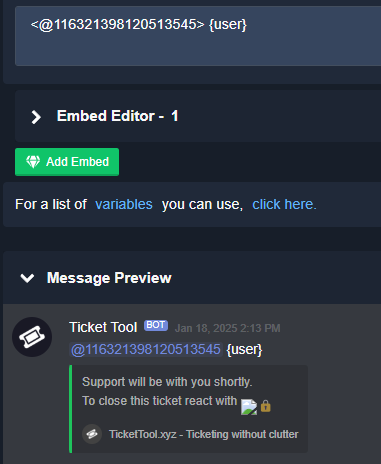
Hey when i added {user} after >@discordid< it doesnt also @ the creator. ive been using >@discordid< to tag specific people based on panel button ticket was created in but i tried your suggestion by adding {user} after and before but it just says {user} in the ticket not actually pinging the creator to where the ticket is
 boreal skiff
Yo why dont u guys let hyper links work in tickets, why dont u guys have a close with reason button
These are simple things that another tool has why not put the small extra effort in?
Like I just dont get the reasoning for building an entire app and not doing the simple things well
restive condor
boreal skiff
Yo why dont u guys let hyper links work in tickets, why dont u guys have a close...
Hey there!
Hyperlinks do work in tickets.
We don't have a close with reason button but we do have a /close command for which you can include a reason.
This reason can then by displayed anywhere you'd like eith the {close.reason} variable
pseudo ravine
daring bluff
Hey when i added {user} after >@discordid< it doesnt also @ the creator. ive be...
Did you make a ticket after saving the changes on the dashboard?
boreal skiff
Hyperlinks do work?
restive condor
Yes
daring bluff
pseudo ravine
Did you make a ticket after saving the changes on the dashboard?
yea i even resent it just in case
restive condor
That's not a Ticket Tool feature, it's a Discord feature
daring bluff
is that how it should look
boreal skiff
Why arent these clickable
pseudo ravine
daring bluff
is that how it should look
And how did the “Ticket Message” look inside the ticket?
daring bluff
pseudo ravine
And how did the “Ticket Message” look inside the ticket?

it shows nothing after the >@discordid< tag
pseudo ravine
Did you edit the correct panel?
restive condor
Because they are in a codeblock.
What you are looking to do is disable the automatic embed with the form answers, from your Dashboard > Panel Configs > Forms
And then go to your Dashboard > Panel Configs > Messages > Ticket Message > Add an additional embed
And put in the variables {create.form.1}, {create.form.2}, and {create.form.3} to display the answers to the corresponding questions.
You can personalise the embed however you'd like but the thing should look something like:
Question
{Variable}
Question
{Variable}
Question
{Variable}
pseudo ravine
What’s the server ID? I’ll take a quick look at your dashboard
daring bluff
sec i think i got it, i just resent it again like the main panel that all others are attached under i think i got it
yea its good, alright cool. sorry about that just had 2 tinker i guess
pseudo ravine
No worries, glad I could help! Thanks for choosing Ticket Tool!
daring bluff
thanks @pseudo ravine 🐐
iron nightBOT
Gave +1 Rep to @pseudo ravine (current: #3 - 1020)
drifting cradle
The whole thing is taking too long for me with German support. Could we use a translator for this? I think it would help a bit
pseudo ravine
Please be patient until someone from our German Support Team claims your ticket
drifting cradle
OK, do you have certain times when they have to be there so I can then invest the time differently
pseudo ravine
No, we’re all volunteers and we’ll help when we’re available
drifting cradle
okay i anderstand
boreal skiff
restive condor
Because they are in a codeblock.
What you are looking to do is disable the auto...
So this will make their answers clickable if they leave a link? I just want links to be clickable
restive condor
boreal skiff
So this will make their answers clickable if they leave a link? I just want link...
Correct, as the automatic embed with the form answers uses code blocks
Making links unclickable -> https://tickettool.xyz
 woeful loom
hey! I have been setting up my transcripts for tickets, I am looking to see if there is a variable that will list who clicks the close button so its really easy when scrolling through the channel of transcripts to see who clicked close. I know you can use close.reason but I dont use reason in my tickets currently. Is there a variable that currently can like out who closes a ticket? I tested out author but it didn't work. Any help is appreciated thanks!
restive condor
woeful loom
hey! I have been setting up my transcripts for tickets, I am looking to see if t...
Hey there! 👋
Unfortunately, there's no variable to display the user who closed the ticket, in the transcript message, at this time.
The only way to display it, would be using the {author} variable in the close message which would be then saved in the transcript itself
woeful loom
appreciate the quick response, thanks!
restive condor
No problem!
boreal skiff
restive condor
```Making links unclickable -> https://tickettool.xyz```
This example wasnt
Clickable
restive condor
Correct
boreal skiff
I see what ya mean
 untold moat
Is there a feature that when a ticket its responded by an staff the channel gets moved to an unresponded category?
 serene minnow
Hey all! I have a quick query. We currently have an 'open' ticket channel and a 'closed' ticket channel however in the past 3 days, the closed tickets are no longer automatically moving into the closed channel like before. I've stared at everything far too long and can't figure it out anymore haha.
Does anyone have any ideas? Many thanks 🙂
restive condor
untold moat
Is there a feature that when a ticket its responded by an staff the channel gets...
Hey there!
No, that's not possible unfortunately.
Tickets can only be moved automatically when they're opened/closed/claimed/unclaimed.
You would need to manually move the ticket between categories for that
pseudo ravine
serene minnow
Hey all! I have a quick query. We currently have an 'open' ticket channel and a ...
Hey there. How many tickets are in your Closed ticket category?
serene minnow
pseudo ravine
Hey there. How many tickets are in your `Closed` ticket category?
49 😅
pseudo ravine
Discord has a limit of 50 channels in a category
serene minnow
ahhhhhh, that would be it. You are a genius! I'll start transcripting and see if that solves it
thankyou 🙂
pseudo ravine
You're welcome, glad I could help! Thanks for choosing Ticket Tool!
 silk stratus
how can i make it show the name/id of the person that opened the ticket? i cant find it

 serene minnow
pseudo ravine
You're welcome, glad I could help! Thanks for choosing Ticket Tool!
serene minnow
pseudo ravine
You're welcome, glad I could help! Thanks for choosing Ticket Tool!
Just wanted to update you, this worked. You are a lifesaver
pseudo ravine
silk stratus
how can i make it show the name/id of the person that opened the ticket? i cant ...
Hey there. Please refer to the embed below!
humble sequoiaBOT
The ticket name is the default channel name of all tickets. To edit it, go to your Dashboard > Panel Configs > Ticket. There you can edit the channel name of opened and closed tickets. You can also use variables in there.

 Note: This is a premium feature
 covert iris
i help need
humble sequoiaBOT
Hello, we would love to help you, but if you don't tell us what you need help with we can't help you :(
covert iris
i have this come up when i am trying to do a ticket 4f11290a-f4d3-11ed-a05b-0242ac120003
restive condor
covert iris
i have this come up when i am trying to do a ticket 4f11290a-f4d3-11ed-a05b-0242...
Hey there! 👋
Discord has a limit of 500 channels per server.
That server seems to have reached such limit.
You will need to contact server staff or try again later
 tired quail
The dashboard website not working for me, tried different web browsing and same issue
restive condor
tired quail
The dashboard website not working for me, tried different web browsing and same ...
Hey there! Any error message?
tired quail
restive condor
Hey there! Any error message?
 restive condor
Have you tried clearing cookies and cache?
tired quail
Explain how? please
restive condor
Is there another device you could try?
restive condor
I've just check and the website is working.
Have you tried restarting your router, disabling VPNs, ad blockers...etc?
tired quail
No vpn working in my devices plus tried different browsers and there is no ad blockers, let me try restarting my router
Internet restarted, and still, same issue
 tame mango
Anyway to automate the bot to auto close if a member receives a role?
restive condor
tired quail
Internet restarted, and still, same issue
There's not much we can do unfortunately 🙏
It seems to be a connection problem on your side. I recommend you re-try after a few minutes or check other solutions online
restive condor
tame mango
Anyway to automate the bot to auto close if a member receives a role?
Hey there! 👋
That's not possible unfortunately.
If it helps, you are able to give a role when the ticket is closed
 silent glen
Hello dears. I just want to cancel my subcription to ticket premium tool and get money back. Do you know how?
restive condor
silent glen
Hello dears. I just want to cancel my subcription to ticket premium tool and get...
Hey there! See below how to cancel your subscription.
Unfortunately, you are not eligible for a refund as it's been over 14 days since you subscribed
humble sequoiaBOT
<:TicketToolOffline:1018980643092312155> Cancel your subscription
We're sorry to see you go!
To cancel your Ticket Tool Premium Subscription, head over to your Billing Page. Once there click Manage for the subscription you wish to cancel, and press the Cancel Subscription button. You will no longer be charged at the end of your billing cycle, however, your premium features will remain active until then.
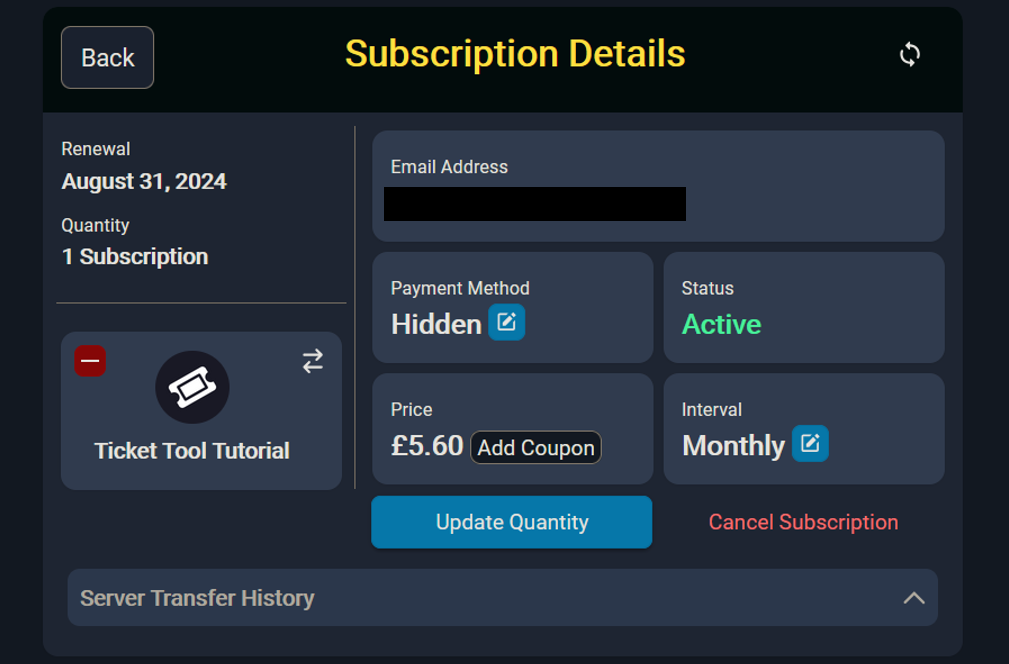
Dashboard > Subscriptions > Manage > Cancel
iron nightBOT
Gave +1 Rep to @restive condor (current: #1 - 1865)
restive condor
No problem!
silent glen
But do you know how can i get a refound?
restive condor
Unfortunately, you are not eligible for a refund as it's been over 14 days since you subscribed but you would #🎫│make-a-ticket for it
silent glen
Thanks @restive condor
iron nightBOT
Gave +1 Rep to @restive condor (current: #1 - 1866)
tame mango
restive condor
Hey there! 👋
That's not possible unfortunately.
If it helps, you are able to g...
Would this be a feature to possible add? I have a few bots paired with the ticket bot such as the appy bot and would love it if after I decline an application and a certain role is given upon being denied the ticket bot auto closes
restive condor
tame mango
Would this be a feature to possible add? I have a few bots paired with the tick...
You can suggest this feature in #1019685143046279208
heady cedar
Hello is there whitelabel yet?
pseudo ravine
Hey there. Unfortunately not
 obtuse vault
Hi, what can I do if I've invited the bot to the server but it's not showing up on the Dashboard on the website? I can't manage anything. I've tried running commands in the server to see if I can set up from there instead, but it just says it's not responding. Any ideas?
pseudo ravine
Hey there. Please refer to the embed below!
humble sequoiaBOT
Don't see your server in the dashboard?
Try using the Sync Servers button on your top center of the Dashboard page
If this doesn't work
You should relog from the dashboard, you can do this by clicking here to log out immediately, and then log back in
Note:
You need one of these 3 things to access the dashboard.
1. Server Owner (Level: 6)
2. Server Administrator (Level: 4)
3. Dashboard Role (Level: 2)
:warning: You can check your level using the </permissionlevel:1029797400174399542> command on your Discord Server
If the bot's response is:
- @User is permission level: 0 (User)
You don't have any of the 3 levels required to access the server's dashboard
 obtuse vault
Tried all of that, just tried the permissionlevel command and it says the same as when I try to setup, that 'the application did not respond'
It's showing nothing under 'Servers with Ticket Tool', and one server under 'Servers without Ticket Tool' which is a server that also has it.
pseudo ravine
Please make sure Ticket Tool has the “View Channel” and “Send Messages” permissions in the channel you’re running the command in
obtuse vault
Yup it has both. I haven't changed anything from when I invited it, but just double checked and it has both of those.
pseudo ravine
Could you run the “/debug” command in that channel
obtuse vault
Same message, 'The application did not respond'
pseudo ravine
Ticket Tool is missing the “Send Messages” permission inside the channel
You’re also considered a level 0 (User) which is why you can’t access the dashboard
Please refer to the embed below!
humble sequoiaBOT
Any role you put there will have full access to the ticket tool dashboard. The server owner and users with admin permissions already have access to the dashboard.
Be careful of which roles to put here
 pseudo ravine
The server owner or an admin will have to do this
obtuse vault
Ah sorry! I'll get the Owner to add me as Admin and set up tomorrow. Thank you so much! 🙂
pseudo ravine
You’re welcome, glad I could help! Thanks for choosing Ticket Tool!
 frozen merlin
this keeps happening to not only i, but the other 2 owners of a server
 restive condor
frozen merlin
this keeps happening to not only i, but the other 2 owners of a server
restive condor
frozen merlin
this keeps happening to not only i, but the other 2 owners of a server
Hey there! Could you use the /debug command in that same channel please
frozen merlin
restive condor
Hey there! Could you use the ``/debug`` command in that same channel please
 restive condor
frozen merlin
restive condor
frozen merlin
Ticket Tool is missing the SEND MESSAGES permission for that channel
frozen merlin
omg duh thanks
restive condor
No problem!
 clever ferry
Hi, before i was able to ping a role by doing that, i just changed the role ID and then not working anymore, how can i do that again ?
 pseudo ravine
Hey there. You'll need to add a & after the @ symbol
frozen merlin
one more question bc i feel like im blind - how do i change these to their respective names then?

 pseudo ravine
Hey there. You can go to the Dashboard > Buttons > Create Ticket > Button Text
clever ferry
pseudo ravine
Hey there. You'll need to add a `&` after the `@` symbol
thanks for the help, since 1h i was searching on google, and found it was &@ .... have a good day/evening
iron nightBOT
Gave +1 Rep to @pseudo ravine (current: #3 - 1021)
pseudo ravine
You're welcome, glad I could help! Thanks for choosing Ticket Tool!
frozen merlin
so am i needing to do it like the custom one or?

 pseudo ravine
Only the emoji can be in that field
You can put the Report a Player inside the Button Text field
iron nightBOT
Gave +1 Rep to @pseudo ravine (current: #3 - 1022)
pseudo ravine
You're welcome, glad I could help! Thanks for choosing Ticket Tool!
 spiral berry
how do i do dropdown style without an emoji popping up
pseudo ravine
Hey there. You don't have to add an emoji into the Emoji field
pseudo ravine
You need to add a display
 iron nightBOT
Gave +1 Rep to @pseudo ravine (current: #3 - 1023)
pseudo ravine
You're welcome, glad I could help! Thanks for choosing Ticket Tool!
spiral berry
pseudo ravine
You're welcome, glad I could help! Thanks for choosing Ticket Tool!
wait I feel special ed but how do I do that 😭
pseudo ravine
You just input text into the field
spiral berry
ty
 marsh kayak
Friends, does anyone know how we do this?
 pseudo ravine
Hey there. Please refer to the embed below!
humble sequoiaBOT
For more convenient use of multipanels, you can now combine panels on the dashboard. This will allow you to directly send the multipanel from the dashboard or via the $panel ID command.
Where can I find this?
You can find this setting on the Dashboard -> Panel Configs -> Panel -> Attached Panels
Note: if you're attaching all the panels to a panel called English, don't include English in the attached panel's box (If you do this, it will create a duplicate)
This will put all buttons from all of your panels on one message. The message is the panel message from the panel you're combining these panels in.

 crisp widget
meus membros então reclamando que não estão conseguindo criar ticket, alguém pode me ajudar?

 glad bramble
Hi how can I do this for my server


@pseudo ravine
Sorry I didn’t know not to @ u
I’m just desperate
 cursive sleet
pseudo ravine
glad bramble
Hi how can I do this for my server
cursive sleet
pseudo ravine
glad bramble
Hi how can I do this for my server
Hey there. Please refer to the embeds below!
humble sequoiaBOT
First you will want to invite the bot to your server. Once the bot is in your server, you can manage your server in the dashboard.

To create a panel we are going to need to head over to the Panel Configs Tab on the Dashboard.
Once at the dashboard we will need to click Create Panel.
Enter a panel name (Fill in any optional settings you want).
Click Create Panel and you are ready to get started with configuring your panel.
An example of a creating a panel is shown below.

Once the panel has been created, use the blue Send button and select the channel you want the panel to be sent to.
The Panel wasn't send
Use the </debug:1029783024264564765> command to diagnose possible permission issues with the bot.
 pseudo ravine
 teal pine
How do I mention my support team roles
teal pine
How do I mention my support team roles
Hey there. Please refer to the embed below!
humble sequoiaBOT
1. Go into your Dashboard
2. Open your Panel Configs tab
3. Select the panel you want to ping your support on
4. Open the Ticket options menu
5. Click on Edit Ticket Message
6. In the Message Content use one of the role mention syntax (**{@Role Name}**/**{Role ID}**)
7. Save changes
Note: For this to work properly, Ticket Tool requires the Mention Everyone permission. Or the role must have the Allow anyone to @mention this role setting enabled
pseudo ravine
teal pine
And how do I change who can close the ticket
You can go to the Dashboard > Buttons > Close Ticket > Allowed Roles
You should also go to the Dashboard > Command Configs > Close > Allowed Roles
teal pine
pseudo ravine
Hey there. Please refer to the embed below!
Did that, unfortunatley doesn't work

 pseudo ravine
You don’t need to add the ** in the message
teal pine
pseudo ravine
You don’t need to add the ** in the message
Even after I deleted it still didn't work
But it used to work before
pseudo ravine
Could you send a screenshot of what it looked like after?
 regal bay
I have 0.024 sol in my wallet but i cant claim the token help meee anyone🥹
 humble sequoiaBOT
⚠️ You're in the wrong place
We provide support for Ticket Tool Discord bot and cannot help you with whatever issue you have.
- We don't know which Support Team you should contact to get this issue resolved, and unfortunately we won't be able to accurately tell you.
If you don't have any further questions regarding our bot Ticket Tool, please close this ticket
frozen merlin
is the text limit restricted to prem?

 regal bay
How to conatct customer support
pseudo ravine
frozen merlin
is the text limit restricted to prem?
Hey there. Yes, there’s a limit of 250 characters with the free version
pseudo ravine
jade topaz
Hey there. Please refer to the embed below!
humble sequoiaBOT
This error indicates you have selected an invalid emoji, i.e. an emoji the bot isn't capable of using, in a button field
Which Emoji?
This depends upon which action the error is appearing, the most common cases are the Create Ticket button or one of your Dropdown emojis. You can visit your Button's List to find all available buttons and find the conflicting one by yourself.
Why doesn't the bot accept it as valid?
- You selected an emoji that doesn't exist anymore, i.e. that has been deleted
- You wrote text there, instead of an emoji (or in addition to an emoji)
- You entered a code for a custom emoji from a server that the bot is not a member of
- You entered a custom emoji code incorrectly
- You're on iPhone and entered an emoji using the phone's emoji pad (use the emoji selector in the website instead)
 pseudo ravine
regal bay
How to conatct customer support
pseudo ravine
regal bay
How to conatct customer support
Hey there. If it relates to the Ticket Tool Discord bot, then you can use #🎫│make-a-ticket
frozen merlin
pseudo ravine
Hey there. Yes, there’s a limit of 250 characters with the free version
word, thanks. is there a way i can limit it to where only staff can close it?
iron nightBOT
Gave +1 Rep to @pseudo ravine (current: #3 - 1025)
pseudo ravine
You can go to the Dashboard > Buttons > Close Ticket > Support Team Only > 
You should also go to the Dashboard > Command Configs > Close > Support Team Only >
regal bay
Close my ticket
pseudo ravine
Hey there. Could you send a screenshot of the error?
 keen citrus
Ticket tool has all permissions needed
$close don't work
pseudo ravine
pseudo ravine
Hey there. Could you send a screenshot of the error?
^
 pseudo ravine
Hey there. Please refer to the embed below!
humble sequoiaBOT
Don't see your server in the dashboard?
Try using the Sync Servers button on your top center of the Dashboard page
If this doesn't work
You should relog from the dashboard, you can do this by clicking here to log out immediately, and then log back in
Note:
You need one of these 3 things to access the dashboard.
1. Server Owner (Level: 6)
2. Server Administrator (Level: 4)
3. Dashboard Role (Level: 2)
:warning: You can check your level using the </permissionlevel:1029797400174399542> command on your Discord Server
If the bot's response is:
- @User is permission level: 0 (User)
You don't have any of the 3 levels required to access the server's dashboard
 shrewd cape
How can I increase levels in any of these things
pseudo ravine
Please refer to the embed below!
humble sequoiaBOT
Any role you put there will have full access to the ticket tool dashboard. The server owner and users with admin permissions already have access to the dashboard.
Be careful of which roles to put here
pseudo ravine
The server owner will have to do this
shrewd cape
How do I increase the levels in them if it won’t register the bot being in my server
 pseudo ravine
The server owner will have to do this
pseudo ravine
pseudo ravine
The server owner will have to do this
^
shrewd cape
Where do I access this page
 pseudo ravine
The server owner has to do it, like I said
shrewd cape
I am the server owner I just can’t find how to do this
pseudo ravine
You have a level of 0 (User) which is why the server on the dashboard isn’t appearing for you
shrewd cape
How do I increase the level though
pseudo ravine
humble sequoia
I’ve already told you, the physical server owner needs to do this
shrewd cape
They don’t know how to though so where do they do it
pseudo ravine
The image shows where you need to go
shrewd cape
Is the image on the ticket tool site
pseudo ravine
Yep
shrewd cape
How do you get to it from the home page
pseudo ravine
Home page of the servers dashboard?
shrewd cape
Yes
 hot oriole
Hello, can you help me here with my banned FNAF TD account?
humble sequoiaBOT
⚠️ You're in the wrong place
We provide support for Ticket Tool Discord bot and cannot help you with whatever issue you have.
- We don't know which Support Team you should contact to get this issue resolved, and unfortunately we won't be able to accurately tell you.
If you don't have any further questions regarding our bot Ticket Tool, please close this ticket
shrewd cape
When I click on dash board all I see is this

 pseudo ravine
Yes, you will need to wait until your role becomes a “Dashboard Role”
shrewd cape
How long will this take or can I speed it up anyway
pseudo ravine
The physical server owner has to do it, so it depends on them
shrewd cape
Ok
Is there a way to do it without the original server owner because it’s unlikely they come back
 atomic solstice
shrewd cape
Is there a way to do it without the original server owner because it’s unlikely ...
atomic solstice
shrewd cape
Is there a way to do it without the original server owner because it’s unlikely ...
Only the physical server owner or a user who has the Administrator permission in that server can set dashboard roles
 raw hollow
Hi
shrewd cape
atomic solstice
Only the physical server owner or a user who has the Administrator permission in...
Do i have to set it in my actual server
pseudo ravine
raw hollow
Hi
Hey there. Do you need support for the Ticket Tool Discord bot?
raw hollow
I am unable to send msg and unable to add new server why?
pseudo ravine
shrewd cape
Do i have to set it in my actual server
Once again, only the physical server owner or someone with the “Administrator” permission can give you a “Dashboard Role”
pseudo ravine
raw hollow
I am unable to send msg and unable to add new server why?
Send what message exactly?
shrewd cape
I have administrator I just don’t know how to set the role
raw hollow
pseudo ravine
Send what message exactly?
Personal chat
pseudo ravine
shrewd cape
I have administrator I just don’t know how to set the role
If you have the “Administrator” permission, then you would have had access earlier
humble sequoiaBOT
@raw hollow
⚠️ You're in the wrong place
We provide support for Ticket Tool Discord bot and cannot help you with whatever issue you have.
- We don't know which Support Team you should contact to get this issue resolved, and unfortunately we won't be able to accurately tell you.
If you don't have any further questions regarding our bot Ticket Tool, please close this ticket
shrewd cape
All I know is this bot is nothing but a waste of time thanks for nothing @pseudo ravine I guess
iron nightBOT
Gave +1 Rep to @pseudo ravine (current: #3 - 1028)
pseudo ravine
I’ve tried to tell you multiple times how you can access your servers dashboard
You just need to be patient until someone can give you a “Dashboard Role”
shrewd cape
There is no one because the guy who created the server hasn’t been on in months and clearly said he doesn’t plan on being on any time soon
pseudo ravine
And there’s no one else who actually has the “Administrator” permission?
shrewd cape
No that’s the problem
pseudo ravine
Then unfortunately there’s nothing you or we can do
Most bots require at least “Administrator” to be setup
shrewd cape
…great 🙄
pseudo ravine
Sorry about that
 static halo
How do I fix the ticket "exceeds 500 characters" as a person trying to create a ticket not the owner of the server? I have been trying to figure it out without reaching out 😞
worldly helm
static halo
How do I fix the ticket "exceeds 500 characters" as a person trying to create a ...
Hey, please seed a Screenshot of that error Message
 worldly helm
Discord has a limit of 500 channels at once. Please tell their staff to delete some tickets, so people can create some again
static halo
worldly helm
Discord has a limit of 500 channels at once. Please tell their staff to delete s...
Thank you, I was thinking it was me who had to delete my invisible 500 tickets, thanks😁
iron nightBOT
Gave +1 Rep to @worldly helm (current: #12 - 478)
 steady axle
guys, where can i send a report of scripter?
worldly helm
steady axle
guys, where can i send a report of scripter?
Hey. We only provide support for Ticket Tool, The discord bot.
 tawny fulcrum
Hey how to setup ticket tool @worldly helm
 stark runeBOT
1. Invite Ticket Tool to your server
First you will want to invite the bot to your server. Once the bot is in your server, you can manage your server in the dashboard.
2. Create a Panel
To create a panel we are going to need to head over to the panel configs on the dashboard.
Once at the dashboard we will need to click Create Panel.
Enter a panel name (Fill in any optional settings you want).
Click Create Panel and your ready to get started with configuring your panel.
An example of a creating a panel is shown below.
3. Send the Panel to a Channel
Once you've created a panel on the dashboard you will need to send it to a channel using send on the dashboard.
Select the channel you want your panel to be created in and click send.
For other questions checkout $help faq.
An example of a sending a panel is shown below.
Having a Problem Sending the Panel?
Do $debug in a channel with Ticket Tool and make sure it has all the necessary Discord permissions.
 drifting cradle
You can put the ticket bots in German in the dashbort
 pseudo beacon
1 Ticket Tool Premium subscription is valid on how many servers?
restive condor
pseudo beacon
1 Ticket Tool Premium subscription is valid on how many servers?
Hey there! 1 server
pseudo beacon
restive condor
Hey there! 1 server
Thanks
iron nightBOT
Gave +1 Rep to @restive condor (current: #1 - 1868)
restive condor
drifting cradle
You can put the ticket bots in German in the dashbort
Hey there! You can't translate the entire Dashboard, if that's what you mean, but you can edit most messages and buttons into German
pseudo beacon
drifting cradle
You can put the ticket bots in German in the dashbort
Personally I use my browser's page translator.
It translates roughly but for some things it helps me.
drifting cradle
sry i mean Can I make the settings in German in the dashboard?
worldly helm
drifting cradle
sry i mean Can I make the settings in German in the dashboard?
Moin! Das geht leider nicht. Jedoch gibt es auf diesem server ein Par Anleitungen auf deutsch. Wenn du eine haben willst, kannst du mich gerne pingen und ich zeige dir sie.
 molten lintel
Hi,help me pls
humble sequoiaBOT
Hello, we would love to help you, but if you don't tell us what you need help with we can't help you :(
drifting cradle
worldly helm
Moin! Das geht leider nicht. Jedoch gibt es auf diesem server ein Par Anleitunge...
habe an sich schein ein ticket gemacht da ich einen bestimmten bot erstellen möchte.. kann ich dir ausnahmsweise eine dm senden =?
worldly helm
drifting cradle
habe an sich schein ein ticket gemacht da ich einen bestimmten bot erstellen möc...
Ne, tut mir leid. Ich helfe nur über diesen server. Was genau brauchst du denn??
drifting cradle
kann ich hier nicht beschreiben.. werde immer in TimeOut gesetzt
worldly helm
drifting cradle
kann ich hier nicht beschreiben.. werde immer in TimeOut gesetzt
Hm.. Kannst du bitte, bevor du die Nachicht abschickst, ein screenshot davon machen und in diesen channel reinschicken? (Vorrausgesetzt es sind keine Beleidigungen)
 night cradle
How to increase ticket limit for each Users
worldly helm
night cradle
How to increase ticket limit for each Users
Hey there!
Dashboard --> Panel Configs --> Limits
night cradle
Thanks!
 clever tendon
How do i fix Category Permission Issues
restive condor
clever tendon
How do i fix **Category Permission Issues**
Hey there!
Could you screenshot the full error message?
 restive condor
clever tendon
restive condor
clever tendon
Ticket Tool seems to be missing the SEND MESSAGES permission for the "Montpelier Police" category
Hold down on the category's name (from the channel list) > Edit Category > Permissions > Add Ticket Tool >
Send Messages
 restive condor
 humble mountain
Hi there, can you use the /debug command in that same channel
 restive condor
humble mountain
restive condor
humble mountain
Ticket Tool is missing the SEND MESSAGES permission for that channel

 dreamy grail
Hello
humble sequoiaBOT
Hello, we would love to help you, but if you don't tell us what you need help with we can't help you :(
dreamy grail
My withdrawal showing success but not receive money
humble sequoiaBOT
⚠️ You're in the wrong place
We provide support for Ticket Tool Discord bot and cannot help you with whatever issue you have.
- We don't know which Support Team you should contact to get this issue resolved, and unfortunately we won't be able to accurately tell you.
If you don't have any further questions regarding our bot Ticket Tool, please close this ticket
dreamy grail
Order Details:
Withdraw Amount: 2369 INR
Order ID: F-1821136910633080559
Status: Success
Fee: 131 INR
Created Time: 13/01/2025, 18:01:38
No receive money
restive condor
You're in the wrong server
dreamy grail
Why
restive condor
Because you joined the wrong server
We only provide support for the Discord bot - Ticket Tool
 restive condor
 sleek blaze
I get this error
sleek blaze
I get this error
Hi there, Discord has a limit of 500 channels per server.
That server has reached the limit.
Please contact server staff or try again later
clever tendon
restive condor
Ticket Tool seems to be missing the ``SEND MESSAGES`` permission for the "Montpe...
thx
iron nightBOT
Gave +1 Rep to @restive condor (current: #1 - 1869)
sleek blaze
restive condor
Hi there, Discord has a limit of 500 channels per server.
That server has reach...
Oh so problem from server not me?
restive condor
Nope
sleek blaze
Ok
clever tendon
How can i move the ticket up to the other ones
 restive condor
clever tendon
How can i move the ticket up to the other ones
restive condor
clever tendon
How can i move the ticket up to the other ones
You would need to remove the category you have selected for tickets to be opened in, from your Dashboard > Panel Configs > Category
clever tendon
restive condor
You would need to remove the category you have selected for tickets to be opened...
Thank you
iron nightBOT
Gave +1 Rep to @restive condor (current: #1 - 1870)
restive condor
No problem!
drifting cradle
wie funktioniert der custom commands ?
humble sequoiaBOT
Custom Commands
Custom Commands are used to send a predefined response to your channels. Commands will only respond if the command itself is used, it will not function if you put the tag into a sentence.
To create commands, go to: Dashboard > Custom Commands > New. After creating and naming one, you can edit the command trigger and behaviors. Tap on the edit message button to edit the response of the command.
worldly helm
drifting cradle
wie funktioniert der custom commands ?
Moin! Darüber gibt es leider nur eine Englische anleitung. Wenn du genauere fragen hast, frag einfach :)
drifting cradle
an sich bräuchte ich es nicht, wenn man es einstellen könnte das bestimmte leute nur buttons sehen, dann würde ja alles klappen, wie ich es haben möchte. aber geht leider nicht+
 elder hawk
Guys can i do something the same as this in ticket tool?
humble sequoiaBOT
The Drop-down menu or Select Menu replaces the buttons on your panel message and uses a drop-down menu with all of your panels. To set this up, go to your Panel Configs and select your main Panel.
<:Numbericons1:1018864164032225340> Enable Select Style
First you enable Select Style. Then you add an item in the Dropdown Editor. Now you can start editing your dropdown!
<:Numbericons2:1018864168041971712> Dropdown Editor
Each line in the dropdown editor represents a line in the drop down menu on discord. You can add more "Items", by clicking on
First you select a panel. That's the panel this option will open a ticket for. DONT select the same panel twice. Each option should have a different Panel
After that, you can put a Display. This is the title of this option and will appear in the drop down menu. The *Description can be set right after that, which will be below the title in grey.
Additionally you can select an emoji, that will be shown in front of each option. You can either manually input the ID of an emoji or select it in the selector.
Common Issues ⚠️
- Panel doesn't send? Make sure you have a valid emoji selected
- Option doesn't show up? Check if two options have the same panel in the DropDown Editor
$dropdown
restive condor
Hey there! Yes, see above please ^
Let me know if you have any questions 🙏
elder hawk
restive condor
Hey there! Yes, see above please ^
Let me know if you have any questions 🙏
Thanks a lot may we meet in room so i can share my screen to you?
iron nightBOT
Gave +1 Rep to @restive condor (current: #1 - 1871)
restive condor
Unfortunately I'm not available for that at the moment
But please do let me know if you have any questions
elder hawk
restive condor
But please do let me know if you have any questions
ok will do
 restive condor
elder hawk
What are these 2?
restive condor
elder hawk
What are these 2?
Each dropdown option is connected to a panel.
So if you'd like 4 dropdown options, you will need 4 panels
The description is what will be shown below the options "Display", in smaller text
restive condor
 hollow hazel
how to see my ticket transcrip?
hollow hazel
how to see my ticket transcrip?
Hey there! If a ticket was deleted without saving a transcript, then it's gone unfortunately
elder hawk
restive condor
Each dropdown option is connected to a panel.
So if you'd like 4 dropdown optio...
ok thanks
iron nightBOT
Gave +1 Rep to @restive condor (current: #1 - 1872)
 burnt kestrel
how do I make the channel name of the ticket one of the answers submitted in the forms, for example if they answer with "1b" in the forms, the "1b" will be in the ticket channel name aswell?
restive condor
burnt kestrel
how do I make the channel name of the ticket one of the answers submitted in the...
Hey there! 👋
That's possible using form variables, but unfortunately custom ticket names are a premium feature
burnt kestrel
Yes I have premium 😄 but how do I do that
like this for example, there was a question how many coins I want to sell, and the amount went to tiel

which form variable is that
restive condor
burnt kestrel
Yes I have premium 😄 but how do I do that
You would need to use the {create.form.x} variable, replacing x with your question number.
For example, if you'd like to display the answer to question 3, use {create.form.3}
You can put this variable in the channel name
humble sequoiaBOT
The ticket name is the default channel name of all tickets. To edit it, go to your Dashboard > Panel Configs > Ticket. There you can edit the channel name of opened and closed tickets. You can also use variables in there.
Note: This is a premium feature
burnt kestrel
And what variable is for the name?
restive condor
The user's name?
burnt kestrel
yes
restive condor
{ticket.user.name}
burnt kestrel
nice tysm!
restive condor
No problem!
burnt kestrel
thanks @restive condor
iron nightBOT
Gave +1 Rep to @restive condor (current: #1 - 1873)
elder hawk
restive condor
You would need to use the ``{create.form.x}`` variable, replacing x with your qu...
What is this?
 restive condor
Please double check that Ticket Tool has all the requirement permissions for the channel you're trying to send your panel in
elder hawk
restive condor
Please double check that Ticket Tool has all the requirement permissions for the...
From where can i check this?
restive condor
Can you try using the /debug command in the channel in question please
elder hawk
restive condor
Can you try using the ``/debug`` command in the channel in question please
ok
elder hawk
restive condor
Can you try using the ``/debug`` command in the channel in question please
 restive condor
elder hawk
restive condor
elder hawk
Permissions are good.
The issue seems to be that there's an extra space before the emoji for the 4th dropdown option, and there's no panel selected for the 5th dropdown option
elder hawk
restive condor
Permissions are good.
The issue seems to be that there's an extra space before t...
Perfect let me check now
elder hawk
restive condor
Permissions are good.
The issue seems to be that there's an extra space before t...
Why when i click on one panel it opens a ticket? Is it possible to not make it open a ticket
restive condor
What exactly do you mean?
Oh, that's not possible unfortunately. Our dropdown menus trigger tickets
elder hawk
restive condor
Oh, that's not possible unfortunately. Our dropdown menus trigger tickets
Isnt there any other solution but to not open tickets?
restive condor
Yes, but then it wouldn't trigger that message. It would just say "you can't use this"
elder hawk
restive condor
Yes, but then it wouldn't trigger that message. It would just say "you can't use...
ok then no problem
restive condor
humble sequoiaBOT
Hello, we would love to help you, but if you don't tell us what you need help with we can't help you :(
 fiery sable
I didn't buy premium but it doesn't let me into the server, how can I support it?
 round furnace
 upbeat sonnet
how to send the dropdown ticket panel
 grave spruce
I can't scan my face because it shows Request too Frequent. How do I fix it?
I can't do anything
humble sequoiaBOT
@grave spruce @round furnace @fiery sable
⚠️ You're in the wrong place
We provide support for Ticket Tool Discord bot and cannot help you with whatever issue you have.
- We don't know which Support Team you should contact to get this issue resolved, and unfortunately we won't be able to accurately tell you.
If you don't have any further questions regarding our bot Ticket Tool, please close this ticket
restive condor
upbeat sonnet
how to send the dropdown ticket panel
Hey there! 👋
Simply send the panel you have attached the dropdown menu to
humble sequoiaBOT
1. Go into your Dashboard
2. Open your Panel Configs tab
3. Select the panel you want to send
4. Indicate to which channel it should be sent to
5. Send the panel
grave spruce
@restive condor You can do something ?
upbeat sonnet
it just sends one panel
restive condor
grave spruce
<@795710289425334303> You can do something ?
No, you're in the wrong server
restive condor
upbeat sonnet
it just sends one panel
Are you sending the panel with the dropdown menu attached?
upbeat sonnet
yeha
restive condor
Could you screenshot your dropdown options please

 restive condor
upbeat sonnet
restive condor
upbeat sonnet
Enable select style at the top and you should be good to go. Simply re-send once again
glad bramble
Why is this happening
 restive condor
glad bramble
Why is this happening
restive condor
glad bramble
Why is this happening
Hi there, can you try using the /debug command please
glad bramble
This is what happened
 restive condor
glad bramble
This is what happened
restive condor
glad bramble
This is what happened
Ticket Tool is missing the SEND MESSAGES permission for that channel
glad bramble
How do I fix it
restive condor
glad bramble
How do I fix it
Hold down on the category's name (from the channel list) > Edit Category > Permissions > Add Ticket Tool >
 restive condor
 rustic robin
Hey there! Are you a staff member at this server?
rustic robin
yeah
restive condor
Could I get that server's name or ID please
rustic robin
1274128885516337183
restive condor
rustic robin
1274128885516337183
It seems like your premium subscription has expired. You can simply re-subscribe from the "Premium" tab of your server Dashboard or https://tickettool.xyz/premium-purchase directly
Otherwise you will need to switch back to the white bot and re-send all your panels.
humble sequoiaBOT
You can purchase Ticket Tool Premium here! Buying it on our website allows you to have full control over your subscription:
 Cancel your subscription at any time
Change your billing interval (yearly/monthly)
Change your payment method
Add or remove server slots to your subscription
 Transfer the subscription between servers
Note: This level of control is only available when purchasing the subscription from our website.
You can manage your current subscriptions here, any billing questions or concerns, feel free to create a Billing Ticket via #🎫│make-a-ticket
 iron nightBOT
Gave +1 Rep to @restive condor (current: #1 - 1874)
rustic robin
damn #1
restive condor
No problem!
restive condor
 tiny turret
I set up a ticket but I didn’t see
tiny turret
I set up a ticket but I didn’t see
Hey there! Did you send your panel?
 restive condor
Did you select a channel to send the panel to at the last step?
restive condor
Alright, can you go into the 'Edit & Manage panels' button and try it again
Please screenshot before you dismiss the step
tiny turret
Yeeeeee go
keen citrus
Support ticket
 thorn token
Hello I need help
humble sequoiaBOT
━━ 8-bit's inquiry has been moved to a ticket ━━
restive condor
thorn token
Hello I need help
Hello, how can I help?

 surreal dock
alguem pode me ajudar
 clear python
jade topaz
clear python
jade topaz
wt can tell me how to do like this

 arctic holly
ایرانی هایی که با اضافه شدن یک فارسی زبان به تیم مدیریتی اینجا موافقت میکنند اعلام کنند
 static bridge
I cant make any new tickets in the server
im trying to report a hacker but It wont let me
I have all the proof I need to get the hacker banned
What do I do?
I need help, my issue is above this message
 grizzled summit
static bridge
I cant make any new tickets in the server
grizzled summit
static bridge
I cant make any new tickets in the server
If you have a ticket open already you can mention it to staff in that ticket.
 frail rain
how od i open a ticket
 teal river
is there an option to toggle on a confirmation message before creating the ticket channel?
so that when the user hits "create a ticket", it asks for confirmation before doing that (to avoid missclicks)
 gaunt agate
In fallen survival I got banned for association but I wasn't teamed with a hacker how do I appeal
 broken kiln
hi i recently made a ticket tool panel but this is my first time using the bot and my members keep saying they dont have permissions to open the ticket but i don't know where to look to fix that
 rare bison
how do i make it so the tickets go to a specific category
 abstract berry
i added ticket bot to a server and when i tried to manage the server and click sync server it says i can't any fix for that now i just have a bot i can't use
 shut osprey
Oi
Eu queria minha patente de cabo de volta foi muito injusto tirar de mim, eu fiz tudo certo.
 low raven
i can see the ticket in my server in a chat i created
humble sequoiaBOT
━━ User's inquiry has been moved to a ticket ━━
static bridge
grizzled summit
If you have a ticket open already you can mention it to staff in that ticket.
I cant make a ticket already it wont let me
omg
I swear
 fallow sandal
Hey Guys, I have a question.. Maybe I'm wrong, but I remember in the past when somebody delete the ticket, we can have a deleteds category, and the ticket goes there
Now if someone deletes the ticket, does it just evaporate?
Any solution for this?
static bridge
Can someone help me this ticket system does not work I’ve tried to create new tickets but it never. Works it always says there’s a problem with the limit.
abstract berry
i don't think we finna get help
 haughty raven
how to get panel id
humble sequoiaBOT
Discord only allows to stack up to 50 channels per category, meaning that if you have already 50 tickets in one category, the bot won't be able to place a ticket in that category, for such reason Ticket Tool counts with overflow categories, meaning that if your main category is filled, the bot will go ahead and place the ticket on the next one available, simply choose a second category in the category pickers:
 normal hinge
static bridge
Can someone help me this ticket system does not work I’ve tried to create new ti...
normal hinge
static bridge
Can someone help me this ticket system does not work I’ve tried to create new ti...
The above might help
 magic fern
can the ticket bot be in one category while tickets go to another category?
 graceful temple
what permission do i need to give to someone to setup this?
humble sequoiaBOT
━━ lumpyspacepug's inquiry has been moved to a ticket ━━
 austere forge
graceful temple
what permission do i need to give to someone to setup this?
austere forge
graceful temple
what permission do i need to give to someone to setup this?
A role with admin permission, or a role giving access to the server Dashboard ⬇️
humble sequoiaBOT
Any role you put there will have full access to the ticket tool dashboard. The server owner and users with admin permissions already have access to the dashboard.
Be careful of which roles to put here
 slim cloak
hey, how can i limit everyone to making only one type of ticket?
ping me once you have replied
austere forge
slim cloak
hey, how can i limit everyone to making only one type of ticket?
Dashboard > Server configs > Global ticket limit - set 1
slim cloak
austere forge
Dashboard > Server configs > Global ticket limit - set `1`
that will mean that only one ticket is able to be made. i want it so that every person can only make one type of ticket as i have 4 different types.
i dont want the same person to make two types of tickets
do you understand me?
austere forge
On each of your different panels, do you want users to be able to create only one?
arctic holly
ایرانی هایی که با اضافه شدن یک فارسی زبان به تیم مدیریتی اینجا موافقت میکنند اعلام کنند.
slim cloak
austere forge
On each of your different panels, do you want users to be able to create only on...
i want EACH user to be able to create only one
austere forge
slim cloak
i want EACH user to be able to create only one
On each of your different panels?
humble sequoiaBOT

فريق الدعم الفني العربي
عميلنا العزيز ان كنت تبحث عن مساعدة يرجى فتح تكت خاص بفريق الدعم الفني العربي
اذهب الى#🎫│make-a-ticket
ثم قم بلضغط على الايموجي الاتي (🇯🇴)
austere forge
arctic holly
ایرانی هایی که با اضافه شدن یک فارسی زبان به تیم مدیریتی اینجا موافقت میکنند اع...
⬆️
drifting cradle
weiss wer wie oder ob man bei discord eine sogenannte einverständniss erklärung machen kann? Also mein Plan ist es dass wenn ich in meinen Discord in meinen channel bin der für livestreams ist und andere mitspielen möchten man akzeptiert dass deren stimmen zu hören sind.. ?
humble sequoiaBOT
Deutsches Support-Team
Wenn du Hilfe vom Deutschen Support-Team erhalten möchtest gehe in #🎫│make-a-ticket und öffne durch einen Klick auf den :flag_de: Button ein Ticket.
austere forge
drifting cradle
weiss wer wie oder ob man bei discord eine sogenannte einverständniss erklärung ...
⬆️
slim cloak
austere forge
On each of your different panels?
no no. I mean i want each user to be able to create one ticket for example:
I have - Support ticket, partner ticket, reward ticket, shop ticket.
i want EACH user to be able to create only one of these and no more! So, if they create a support ticket, they cannot make another ticket until that one is closed
arctic holly
austere forge
⬆️
I am not an Arab, I am Iranian and speak Persian, and I am researching to join the Persian-speaking support team.
austere forge
slim cloak
no no. I mean i want each user to be able to create one ticket for example:
I ha...
Okay, well refer here ⬇️
austere forge
arctic holly
I am not an Arab, I am Iranian and speak Persian, and I am researching to join t...
Do you need help with Discord Ticket tool bot ?
arctic holly
austere forge
Do you need help with Discord Ticket tool bot ?
No
austere forge
arctic holly
No
You're are the wrong place then
slim cloak
austere forge
Okay, well refer here ⬇️
doesnt that mean that EVERYONE can only make a ticket and if one person makes it no more can make it?
drifting cradle
wo mache ich das ticket, wenn mir hier nd geholfen wird =?
arctic holly
The Persian Gulf is always
austere forge
slim cloak
doesnt that mean that EVERYONE can only make a ticket and if one person makes it...
No, this only concerns users who create tickets, not everyone, i.e. if they already have a ticket they won't be able to open a second one.
arctic holly
austere forge
You're are the wrong place then
Why?
slim cloak
austere forge
No, this only concerns users who create tickets, not everyone, i.e. if they alre...
ahh okay perfect thank you
iron nightBOT
Gave +1 Rep to @austere forge (current: #7 - 747)
austere forge
arctic holly
Why?
We only provide support if you have a problem with the Discord Ticket tool bot, nothing else.
slim cloak
okay one more thing. i just added ticket tool GOLD to my server. How do i use it on the panel as it is not giving me the option?
its not letting me select

i can only use the ticket tool white
austere forge
You need premium subscription for this
arctic holly
austere forge
We only provide support if you have a problem with the Discord Ticket tool bot, ...
I want to join the support team, but for Persian speakers.
The Persian Gulf is always
austere forge
arctic holly
I want to join the support team, but for Persian speakers.
The Persian Gulf is a...
You’re in the wrong place.
slim cloak
i cant switch
 arctic holly
austere forge
You’re in the wrong place.
arctic holly
austere forge
You’re in the wrong place.
I don't understand what you mean.
 slim cloak
austere forge
Could you use the <:sync:1265738463534387301> on your Dashboard on top?
slim cloak
austere forge
Could you use the <:sync:1265738463534387301> on your Dashboard on top?
done and im still not getting the option
austere forge
slim cloak
done and im still not getting the option
Can i get the server ID /name please ?
slim cloak
austere forge
Can i get the server ID /name please ?
1077367748759400565
austere forge
slim cloak
1077367748759400565
Your server has already benefited from free trial, which is why you cannot
 slim cloak
i have never used premium
that must be a glitch
as i am 100% sure that i have never used it
worldly helm
drifting cradle
wo mache ich das ticket, wenn mir hier nd geholfen wird =?
Hallo! —> #🎫│make-a-ticket !
austere forge
slim cloak
as i am 100% sure that i have never used it
It was used on 28 February 2023, probably by a friend of yours.
Unfortunately there's nothing we can do
slim cloak
no friend of mine has access to that panel
austere forge
Whatever the free trial was redeemed, we can't change anything
 north crag
Can I add a button?
 austere forge
It's not possible, for the moment
drifting cradle
worldly helm
Hallo! —> <#571706435449257997> !
wird sich nd drum gekümmert
worldly helm
drifting cradle
wird sich nd drum gekümmert
Das deutsche support team ist nicht so groß. Bitte hab Geduld.
drifting cradle
kann man das nicht hier klären ?
 verbal scroll
Realice una compra, ya levante el ticket, pero no recibo respuesta alguna
Quien me puede appyar
Ya subí evidencia del comprobante de compras ,fue por paypal
humble sequoiaBOT

Equipo de Soporte Español
Querido usuario, si está buscando ayuda, por favor abra un ticket para contactar al Equipo de Soporte Español. Diríjase a #🎫│make-a-ticket y presione el botón :flag_es:.
 sudden furnace
I seem to be unscribed
??
What have I done ,as I cannot access for a sos ticket!!!
I cannot get Invictus XC
Switch on Onto Invictus XC
Goes to start screen
Then to waiting area to bring up the programmes
Then immediately back to the start screen.
Everything seems OK with the Internet speed at 61
humble sequoiaBOT
⚠️ You're in the wrong place
We provide support for Ticket Tool Discord bot and cannot help you with whatever issue you have.
- We don't know which Support Team you should contact to get this issue resolved, and unfortunately we won't be able to accurately tell you.
If you don't have any further questions regarding our bot Ticket Tool, please close this ticket
sudden furnace
Please close my ticket
worldly helm
drifting cradle
kann man das nicht hier klären ?
Hast du denn schon nen ticket geöffnet oder nicht?
 violet shard
como abro ticket?
static halo
Do staff have to manually close tickets or do they auto delete?
fallow sandal
Is there any possibility that when an admin deletes a ticket, it will be sent to a deleted category? Before I could do that, today it just disappears..
austere forge
fallow sandal
Is there any possibility that when an admin deletes a ticket, it will be sent to...
If the delete button is pressed, the ticket will be deleted, but you can make sure that if the ticket is closed, then the ticket goes into a different category ⬇️
humble sequoiaBOT
1. Go into your Dashboard
2. Open your Panel Configs tab
3. Select the panel you want to grant access to
4. Open the Category options menu
5. Select the categories of your preference
6. Save changes
austere forge
static halo
Do staff have to manually close tickets or do they auto delete?
can you elaborate ?
jade topaz
my licence is invalid. what do i have to do
austere forge
Is this related to the Discord Ticket tool bot?
broken kiln
how do i fix my ticket panel if it says my members dont have permissions to open one?
austere forge
broken kiln
how do i fix my ticket panel if it says my members dont have permissions to open...
Can i get the server ID /name please
broken kiln
austere forge
Can i get the server ID /name please
1299368780534644777 is my server ID
austere forge
broken kiln
1299368780534644777 is my server ID
Dashboard > Panel configs > Buttons - CREATE TICKET you have enabled SUPPORT TEAM ONLY which means that only staff who have access to tickets can interact with the button, you must disable it 
 broken kiln
austere forge
Dashboard > Panel configs > Buttons - `CREATE TICKET` you have enabled `SUPPORT ...
broken kiln
austere forge
Dashboard > Panel configs > Buttons - `CREATE TICKET` you have enabled `SUPPORT ...
and if i click the update thing that'll update the ticket panel already created ? :>
austere forge
broken kiln
and if i click the update thing that'll update the ticket panel already created ...
You didn't need to update it, unless you made changes to the panel
broken kiln
austere forge
You didn't need to update it, unless you made changes to the panel
so i don't need to resend it or anything for the permissions to be cleared up?
austere forge
broken kiln
so i don't need to resend it or anything for the permissions to be cleared up?
Correct 👍
static halo
austere forge
can you elaborate ?
Like on a server who uses the ticket bot, do the staff have to manually delete tickets or do the tickets automatically delete by themselves after some time?
austere forge
It depends on how they manage tickets, I wouldn't be able to tell you, everyone has their own way of managing tickets
broken kiln
austere forge
Correct 👍
thank you!
iron nightBOT
Gave +1 Rep to @austere forge (current: #7 - 749)
 spark storm
How can I raise ticket here
humble sequoiaBOT
━━ User's inquiry has been moved to a ticket ━━
 gaunt lagoon
Ola
 hearty kayak
Can someone help me redeem my airdrop? is stating this: "Sorry, you are not eligible.
Don't worry, keep engaging with us to be eligible for next season's airdrop." I used the solana wallet via gate.io
humble sequoiaBOT
⚠️ You're in the wrong place
We provide support for Ticket Tool Discord bot and cannot help you with whatever issue you have.
- We don't know which Support Team you should contact to get this issue resolved, and unfortunately we won't be able to accurately tell you.
If you don't have any further questions regarding our bot Ticket Tool, please close this ticket
 cyan forge
I want to be team manager in the server
humble sequoiaBOT
How do be I become a Support Member?
You can become a support member in 2 ways:
1. You can be really active in #🆘│community-support gain <@&799500225579712543> role and get chosen by a Manager
2. You can apply VIA our applications that would be sent in #📣│server-news
We currently have Support Teams for the following languages:
:flag_us: English
:flag_jo: Arabic
:flag_fr: French
:flag_de: German
:flag_es: Spanish
:flag_br: Portuguese
hearty kayak
portuguese
humble sequoiaBOT
Hello, we would love to help you, but if you don't tell us what you need help with we can't help you :(
1. Go into your Dashboard
2. Open your Panel Configs tab
3. Select the panel you want to ping your support on
4. Open the Ticket options menu
5. Click on Edit Ticket Message
6. In the Message Content use one of the role mention syntax (**{@Role Name}**/**{Role ID}**)
7. Save changes
Note: For this to work properly, Ticket Tool requires the Mention Everyone permission. Or the role must have the Allow anyone to @mention this role setting enabled
restive condor
Hey there! See above please ^
iron nightBOT
Gave +1 Rep to @restive condor (current: #1 - 1875)
restive condor
No problem!
 storm cairn
What permission do I need to give Ticket Tool for transcripts? I got the message saying "Transcript failed to save to #transcripts (my channel) Transcript channel #transcripts missing permission"
pseudo ravine
Hey there. Please make sure Ticket Tool has the View Channel and Send Messages permissions in the transcript channel
storm cairn
pseudo ravine
Hey there. Please make sure Ticket Tool has the `View Channel` and `Send Message...
yes ty, it works now
pseudo ravine
You’re welcome, glad I could help! Thanks for choosing Ticket Tool!

 dark kraken
 lusty bronze
Hey there,
Head over to Panel configs -> DropDown Style -> Enable select style
lusty bronze
dark kraken
Hey there,
Head over to **Panel configs -> DropDown Style -><:Switch_disabled:1...
Thx you 
iron nightBOT
Gave +1 Rep to @dark kraken (current: #62 - 27)
dark kraken
lusty bronze
Thx you <a:ElmoFireLord:983791056413921301>
Welcome, Glad I could help 
lusty bronze
dark kraken
Welcome, Glad I could help <:kinspikalove:1166562062558838894>
I love you❤️
 digital snow
Hi, how do I make people cant talk on a ticket?
 sacred jacinth
Good evening, I activated the claim on the panels, but when I launch the ticket, the button does not appear, and the order is refused. Do you have a solution?
restive condor
sacred jacinth
Good evening, I activated the claim on the panels, but when I launch the ticket,...
Hey there! 👋
Claiming is a premium feature
humble sequoiaBOT
Claiming allows you to change the ticket name, category and permissions. To use it you have to enable it first on your Dashboard > Panel Configs > Claiming
Note: This is a premium feature
sacred jacinth
restive condor
Hey there! 👋
Claiming is a premium feature<:Premium:1192403074157912144>
But why is this not specified in the claim button settings?
restive condor
Because that's just the settings for the button. (Which isn't the only way to claim a ticket)
To enable the feature altogether, you need to do so from the claiming section, marked with 
sacred jacinth
restive condor
Because that's just the settings for the button. (Which isn't the only way to cl...
Unfortunately I don't have the money to pay for this... so I won't be able to get the claim?
restive condor
I'm afraid not
sacred jacinth
restive condor
I'm afraid not
I think I'll try an alternative, like, first written = claim. Or a role doing this manipulation.
Anyway, thanks for the help!
iron nightBOT
Gave +1 Rep to @restive condor (current: #1 - 1876)
restive condor
No problem!
 hallow gazelle
Hello Guys.
Have setup the bot but when someone create a ticket is open a new ticket i top of the server not in the category i mean i have setup up to 😉
digital snow
Hi, it is possible to make certain roles cant write on tickets?
hallow gazelle
@digital snow Do you mean the support team only ?
digital snow
hallow gazelle
<@1161322615915425932> Do you mean the support team only ?
Yeah, so just the support team can write on tickets. That so members can't
storm cairn
Hi. Am wondering how to set it up so that when members create a ticket, there is an option to select why they are opening that ticket. For example: Button options to select like, opening a ticket to report a bug or opening a ticket to report a player or opening ticket for general help.
hallow gazelle
digital snow
Yeah, so just the support team can write on tickets. That so members can't
ohhh okay if you go to permissions there you can setup everything for the support team so on 🙂 i hope that help you 🙂
hallow gazelle
storm cairn
Hi. Am wondering how to set it up so that when members create a ticket, there is...
You can do that in Forms 😉
 sly spade
Hello, how do I claim NC? I just realised that I connected phantom wallet address instead of solana deposit address.. Anyone else experienced the same? How did you solve? Thanks
worldly helm
hallow gazelle
Hello Guys.
Have setup the bot but when someone create a ticket is open a new t...
Hello. Please refer to the embe below.
humble sequoiaBOT
For more convenient use of multipanels, you can now combine panels on the dashboard. This will allow you to directly send the multipanel from the dashboard or via the $panel ID command.
Where can I find this?
You can find this setting on the Dashboard -> Panel Configs -> Panel -> Attached Panels
Note: if you're attaching all the panels to a panel called English, don't include English in the attached panel's box (If you do this, it will create a duplicate)
This will put all buttons from all of your panels on one message. The message is the panel message from the panel you're combining these panels in.
 timid cairn
How can i change panel description?
worldly helm
keen citrus
How do I enable ticket transcripts
Hey! Please elaborate. Is there an error message if you try to save the transcript or are you just asking in general?
humble sequoiaBOT
The panel message is where people react to make a ticket. To customize it head over to your Dashboard --> Panel Configs -> Panel -> Edit Panel Message
 worldly helm
timid cairn
How can i change panel description?
worldly helm
timid cairn
How can i change panel description?
Hey there!
Please refer to the guide above ^^
worldly helm
sly spade
Hello, how do I claim NC? I just realised that I connected phantom wallet addres...
You are in the wrong server.
timid cairn
worldly helm
Hey there!
Please refer to the guide above ^^
Thanks, I will check it
iron nightBOT
Gave +1 Rep to @worldly helm (current: #12 - 480)
worldly helm
timid cairn
How do I refresh the panel?
Here, or Click on SEND and delete the old panel message in the discord channel.
 hallow gazelle
worldly helm
Hello. Please refer to the embe below.
hallow gazelle
worldly helm
Hello. Please refer to the embe below.
Thanks very much 🙂
iron nightBOT
Gave +1 Rep to @worldly helm (current: #12 - 481)
worldly helm
hallow gazelle
Thanks very much 🙂
Wait! I replied to the wrong message, I am so sorry 😭
worldly helm
humble sequoia
@storm cairn This message is for you ^^ 😭
storm cairn
worldly helm
<@919290628729368646> This message is for you ^^ 😭
Oh yeah, I spent like an hour messing around but I figured it out 😭
worldly helm
Okay. Sorry about that 
timid cairn
Sorry if I ask a lot, but how do I change the message that the bot send after opening a ticket?
worldly helm
timid cairn
Sorry if I ask a lot, but how do I change the message that the bot send after op...
No worries, you can ask as many questions as you like as long as it is regarding ticket tool. Are you refering to this message?

 spice spire
How do i make it so whenever a ticket is closed the transcript saves automatically?
timid cairn
This one
worldly helm
timid cairn
This one
That message is unable to be changed. Sorry!
worldly helm
spice spire
How do i make it so whenever a ticket is closed the transcript saves automatical...
Hello there.
That is a premium feature!
timid cairn
And is it possible to make the ticket time-limited?
timid cairn
worldly helm
That message is unable to be changed. Sorry!
I just want it to ping mods in the code box
worldly helm
timid cairn
And is it possible to make the ticket time-limited?
Im afraid I didn't understand. Could you please elaborate?
humble sequoiaBOT
1. Go into your Dashboard
2. Open your Panel Configs tab
3. Select the panel you want to ping your support on
4. Open the Ticket options menu
5. Click on Edit Ticket Message
6. In the Message Content use one of the role mention syntax (**{@Role Name}**/**{Role ID}**)
7. Save changes
Note: For this to work properly, Ticket Tool requires the Mention Everyone permission. Or the role must have the Allow anyone to @mention this role setting enabled
worldly helm
timid cairn
I just want it to ping mods in the code box
^^
timid cairn
worldly helm
Im afraid I didn't understand. Could you please elaborate?
Like a ticket that closes automatically after a day
spice spire
timid cairn
I just want it to ping mods in the code box
i have mine just ping @ everyone when a new ticket is created
timid cairn
worldly helm
No worries, you can ask as many questions as you like as long as it is regarding...
 spice spire
i just made mine do this

it works good enough for me, it pings both mods and the person who created the ticket
worldly helm
spice spire
i have mine just ping @ everyone when a new ticket is created
#🆘│community-support message Please refer to the first rule.
worldly helm
humble sequoia
Here is a guide ^^
timid cairn
With verification and help ticket channels
timid cairn
worldly helm
Here is a guide ^^
Thanks, again
iron nightBOT
Gave +1 Rep to @worldly helm (current: #12 - 482)
keen citrus
worldly helm
Hey! Please elaborate. Is there an error message if you try to save the transcri...
The transcript channel is missing from my discord channel list. I readded thr bot two days ago. Is there a dashboard setting to add it
worldly helm
keen citrus
The transcript channel is missing from my discord channel list. I readded thr bo...
Dashboard —> Panel Configs —> Transcripts
timid cairn
When I open a ticket it doesn't add staff members, and pinging doesn't work
restive condor
timid cairn
When I open a ticket it doesn't add staff members, and pinging doesn't work
Hey there! 👋
Please add their roles as support team roles, from your Dashboard > Panel Configs > General
humble sequoiaBOT
1. Go into your Dashboard
2. Open your Panel Configs tab
3. Select the panel you want to grant access to
4. Open the General options menu
5. Select your Support Team Roles
6. Save changes
 timid cairn
restive condor
Hey there! 👋
Please add their roles as support team roles, from your ``Dashboar...
timid cairn
restive condor
Hey there! 👋
Please add their roles as support team roles, from your ``Dashboar...
I already added them through the chat
But I will try your way
Didn't work
restive condor
Are you testing this with a brand new ticket?
timid cairn
Yeah, every time
When I tried to edit the embed box and the welcome message to add "@Moderator" it didn't work
restive condor
Pinging them in the ticket won't add them to it, that's only for threads
Have you added them a a support team role?
For the correct panel
timid cairn
Photo is being uploaded, note that it doesn't add role holders even though they are added as a support team
 restive condor
And how exactly are you testing to see if they have access?
timid cairn
I am the owner, so I can see who exactly have access to the channel/ticket once it is created
Is it because my role is higher than others?
Or does it ignore the ticket owner's role?
 languid mirage
Hi Team, I keep having this problem recurring. Closed tickets aren't moving to the closed category
I'll appreciate a permanent solution
humble sequoiaBOT
6VZ PEEKY's issue has been solved in another channel.
worldly helm
languid mirage
I'll appreciate a permanent solution
Hello. How many tickets are in the closed category?
restive condor
timid cairn
I am the owner, so I can see who exactly have access to the channel/ticket once ...
Yes, but how are you checking that?
Is it possible they're just not online?
timid cairn
restive condor
Yes, but how are you checking that?
Is it possible they're just not online?

2 members, 5 roles
restive condor
timid cairn
Are none of those 5 roles the correct ones?
timid cairn
All are correct
timid cairn
I don't know, none is online
restive condor
If they're added to the channel, then they should be able to see it 👍
Let me know if that's not the case after one of them can test it
timid cairn
I think I know what should I do from here, thanks for the assistance, @restive condor
iron nightBOT
Gave +1 Rep to @restive condor (current: #1 - 1877)
restive condor
No problem!
languid mirage
worldly helm
Hello. How many tickets are in the closed category?
I made a new category just in case the other has reached its limit

 wide axle
hi there, i have {user} on the ticket but it pings sapphire when i open it. how do I fix this?

and also the ticket doesnt appear to people
for some reason
 finite patio
how do i get a panel id
 latent oracle
guys how do i make only the support able to close the ticket and not the members
i enabled all the support only for closing tickets but its not working
@restive condor i saw you helped smne b4 for the same situation so i was wondering if u can help me to
 outer knot
what`s the problem?

 tiny acorn
hello, i have set the tickets to show in the "mod chat" category but new tickets still keep showing up uncategorized 😔 am i missing anything
Edit: i somehow fixed it by using "/debug" and cleared cache
 verbal scroll
A few days ago I picked up a receipt for a purchase and I didn't receive anything. Could someone help me?
 strange creek


 stray monolith
I have transcripts set to go to this specific channel, however, its not going to that channel or any other channel. Any other way to fix this than to reinvite the bot?

 sinful nimbus
Onde pego o bot?
humble sequoiaBOT
1. Convidando o Ticket Tool
A primeira coisa que você precisa fazer é convidar o bot, o convite pode ser encontrado aqui.
Quando o bot estiver no seu servidor, iremos para o painel e criaremos o painel
Um painel é usado para definir as configurações de cada ticket e as pessoas reagem para criar um ticket.
2. Criando um painel
Para criar um painel, precisaremos ir até as configurações do painel no painel
- Uma vez no painel, precisaremos clicar em Criar painel
- Digite o nome do painel (preencha as configurações opcionais que você deseja)
- Clique em Criar painel e você estará pronto para começar a configurar seu painel.
3. Enviando um painel
Depois de criar um painel no painel, você precisará enviá-lo para um canal usando enviar no painel
Selecione o canal em que você deseja criar seu painel e clique em enviar.
Para outras perguntas, consulte $help faq
Você está tendo problemas para enviar seu painel?
Use o comando $debug em um canal com o bot e certifique-se de que Ticket Tool tenha todas as permissões necessárias do Discord
restive condor
sinful nimbus
Onde pego o bot?
Olá, aqui está um guia de configuração ^