#🆘│community-support

1 messages · Page 165 of 1

humble sequoiaBOT
#

Within all the messages the bot sends (both embeds and text) you can mention either channels, roles, or even users, these mentions will only send a notification to the user if they are used within a text field, e.g: a role mentioned in an embed won't ping at all the users who have that role.

For mentioning a role you can use one out of three options:
{@Role Name} ➞ Which is Case Sensitive.
{RoleID} ➞ Replace RoleId with the Id of the role you are trying to ping.
<@&RoleID> ➞ Discord's native syntax to ping roles.

<#ChannelID> ➞ Mention a channel by its ID.
<@UserID> ➞ Mention a user by its ID.

eager thicket
#

Ok thank you I’ve had another ticket bot and there you got an embedded message with a button to join and you got notificated if a ticket was opened

iron nightBOT
#

Gave +1 Rep to @austere forge (current: #7 - 729)

austere forge
#

That's not what Ticket tool can do at the moment, unfortunately.

sacred wind
#

how can i achive meadls of discord

humble sequoiaBOT
#
⚠ You're in the wrong place

We provide support for Ticket Tool Discord bot and cannot help you with whatever issue you have.

- We don't know which Support Team you should contact to get this issue resolved, and unfortunately we won't be able to accurately tell you.

If you don't have any further questions regarding our bot Ticket Tool, please close this ticket

cold horizon
#

Hello, everyone. How can I disconnect my wallet from Nodepay? My wallet address suddenly changed. It seems like something has been altered in my address. Please help me fix this.

humble sequoiaBOT
#
⚠ You're in the wrong place

We provide support for Ticket Tool Discord bot and cannot help you with whatever issue you have.

- We don't know which Support Team you should contact to get this issue resolved, and unfortunately we won't be able to accurately tell you.

If you don't have any further questions regarding our bot Ticket Tool, please close this ticket

cold horizon
#

pls help me ticket

#

How can I disconnect my wallet from Nodepay? My wallet address suddenly changed. It seems like something has been altered in my address. Please help me fix this.

humble sequoiaBOT
#

⚠ Please read the messages previously sent by our team ⚠

cold horizon
#

pls help me

pseudo ravine
#

You’ve been told multiple times you’re in the wrong place

cold horizon
#

"Where can I ask for help? I'm sorry."

pseudo ravine
#

We don’t know

cold horizon
#

this is support but you need to solve my problem 😭

worldly helm
urban heron
#

how to change "to create a ticket react with"

austere forge
humble sequoiaBOT
#

The panel message is where people react to make a ticket. To customize it head over to your Dashboard --> Panel Configs -> Panel -> Edit Panel Message

urban heron
#

oh found it

#

and how to add photo ?

austere forge
#

you need premium subscription

urban heron
austere forge
#

correct

urban heron
#

f0rm t1ttle is not changingg

#

i have writted something in f0rm t1ttle and it sending with another t1ttle

austere forge
urban heron
#

why i cant change "Ticket"

austere forge
#

This is not how you change the Title of the embed, you do it via another option which doesn't change anything at all.
Unfortunately you can't change it, because you need a premium subscription, otherwise you'll have to create a new panel with the name you want, and the embed will have that name.

urban heron
#

i have premium now how to add photo and change line color?

austere forge
#

On your Dashboard > Panel configs > Panel - EDIT PANEL MESSAGE open embed editor and put your image link on IMAGE URL field

#

and to change the color it is in the field editor below

little cloud
#

how do ticket logs work

urban heron
#

how to reset ticket counting?

pseudo ravine
humble sequoiaBOT
#

With Ticket Tool, you can customize the behavior the bot takes when logging your tickets! For editing these options follow these steps:

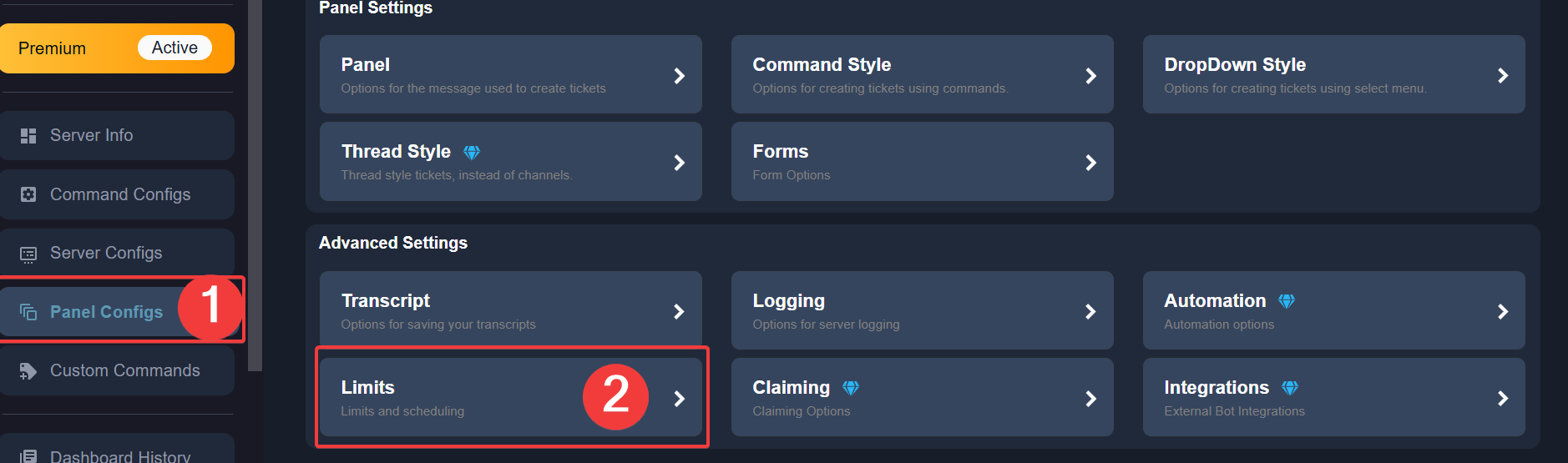
Dashboard ➞ Panel Configs ➞ Logging Options

Logging Channel
Here you will define which channel @humble sequoia will save the Logs in (ticket created/deleted/closed, etc.)

Logs you can save:

➞ Ticket Created ➞ Logs when a ticket is created
➞ Ticket Closed ➞ Logs when a ticket is closed
➞ Ticket Opened ➞ Logs when a ticket is opened
➞ Ticket Renamed ➞ Logs when a ticket is renamed
➞ Ticket Deleted ➞ Logs when a ticket is deleted
➞ Transcript Saved ➞ Logs when a ticket is saved

Select with offswitch (disable) or onswitch (enabled) which logs you would like

Below you can see an example of what the Logging Options will look like:

pseudo ravine
urban heron
#

where is set count

#

found it

zealous garnet
#

Hi Bruno. I went to buy the Crypto annual and it said its not available?

pseudo ravine
#

Hey there. Could you send a screenshot of this?

#

I believe you may be in the wrong place though

little cloud
#

do I have to re-send the ticket, when i make changes to my ticket in the dashboard?

pseudo ravine
#

Hey there. It depends on what was changed

little cloud
#

text

#

also how do i re-send the message

#

i dont want to make a new one

pseudo ravine
#

If you edited the Panel Message then yes, you will need to either update the old message, or send a new one

tall halo
#

Uh why i cant make a ticket its said i have a 500 channel

pseudo ravine
#

Hey there. You will have to wait until the staff of that server delete some tickets

tall halo
pseudo ravine
#

You can click on the Update button on the dashboard

dreamy ibex
#

discord reply to yesterday's conversation

#

what should I do now?

austere forge
#

We're not Support Discord so we can't help you.

dreamy ibex
#

I wrote to discord and they said that even if it was their API error, it had to be reported to the application developers.

austere forge
#

We haven't had any problems with our bot since the start of the year

dreamy ibex
austere forge
#

As my colleague said yesterday, this is a Discord thing, Ticket tool is not responsible

dreamy ibex
#

yes, I know it's a discord issue but they told me that the report must be sent by the bot developer

#

I wrote my error, they told them that they understood my error and there was a possibility of an API error or something I didn't understand, but only the bot developer could report it so that Discord could fix it

stuck coyote
#

The bot does not respond. This isnt something that happened today, this started more that 2 days ago. I have been trying everyday and it just wont respond, idk if it is a server problem or something like that but i need a solution for this if it is posible

#

Someone knows why this happens?

pseudo ravine
#

Hey there. Please make sure Ticket Tool has the View Channel and Send Messages permissions in the channel

iron nightBOT
#

Gave +1 Rep to @pseudo ravine (current: #3 - 1003)

pseudo ravine
#

You're welcome, glad I could help! Thanks for choosing Ticket Tool!

pulsar tundra
#

anyonone know how to chose where tckets apeears onc created

molten urchin
#

Salut, va rog un cod de invitatie pentru Anime Nexus?

pseudo ravine
humble sequoiaBOT
pulsar tundra
#

thanks

#

thanks @pseudo ravine

iron nightBOT
#

Gave +1 Rep to @pseudo ravine (current: #3 - 1004)

pseudo ravine
#

You're welcome, glad I could help! Thanks for choosing Ticket Tool!

pulsar tundra
#

how do i remove the
"support team ticket controls"

pseudo ravine
#

You can go to the Dashboard > General > Two Step Ticket > Switch_disabled

iron nightBOT
#

Gave +1 Rep to @pseudo ravine (current: #3 - 1005)

jade topaz
#

Hi
is it possible to change the color of the forms embed in the ticket?

humble sequoiaBOT
#

User's issue has been solved in another channel.

errant coral
#

how to setup a ticket

eternal wing
#

how can i make other admins in mt server not be able to close the ticket or delete it

lost tree
#

Is there a way to update the message which gets sent when using this command?

austere forge
# eternal wing ;-; hello

Please do not reply to a support members latest message for support
If the same admin has the same role as the other admins, unfortunately this won't be possible.

If not, you can set disabled roles and allowed roles for each button
Dashboard > Panel configs > Buttons - Close Ticket/Delete Ticket

austere forge
lost tree
#

Thank you

tight socket
#

How do i change from ticket number to ticket name of person?

austere forge
humble sequoiaBOT
#

The ticket name is the default channel name of all tickets. To edit it, go to your Dashboard > Panel Configs > Ticket. There you can edit the channel name of opened and closed tickets. You can also use variables in there.

tight socket
#

thanks

#

cus i have premium can i change the logo of the ticket tool bot?

humble sequoiaBOT
#
Ticket Tool Custom Avatar

As of now, you are not able to change Ticket Tool's profile picture, nonetheless, our Development Team is working on the release of white labels, this is your own custom bot!

For the time being, you can change the bot's nickname by right-clicking the bot in the user list on your server and clicking Change Nickname

tight socket
#

I cant send out the ticket for some reason

#

ticket have all commands + admin but still wont work

rough star
#

Hi , i have a question , how do i make ticket tool ping me when a ticket is created?

#

any helper?

humble sequoiaBOT
#

1. Go into your Dashboard
2. Open your Panel Configs tab
3. Select the panel you want to ping your support on
4. Open the Ticket options menu
5. Click on Edit Ticket Message
6. In the Message Content use one of the role mention syntax (**{@Role Name}** / **{Role ID}**)
7. Save changes

Note: For this to work properly, Ticket Tool requires the Mention Everyone permission. Or the role must have the Allow anyone to @mention this role setting enabled onswitch

restive condor
restive condor
tight socket
#

Thanks for the help anyways!

restive condor
#

No worries and sorry for the wait 🙏

atomic beacon
#

How do I ask questions in the ticket ?

inland knoll
#

Fui banido sem fazer nada rever aĂ­ ADM, nome luca_luquinhas serve 4

humble sequoiaBOT
#
VocĂȘ estĂĄ no lugar errado

Fornecemos suporte para Ticket Tool Discord bot e nĂŁo podemos ajudĂĄ-lo com qualquer problema que vocĂȘ tenha.

- NĂŁo sabemos qual equipe de suporte vocĂȘ deve entrar em contato para resolver esse problema e, infelizmente, nĂŁo poderemos informar com precisĂŁo.

Se vocĂȘ nĂŁo tiver mais dĂșvidas sobre nossa ferramenta de ticket de bot, feche este ticket

restive condor
atomic beacon
humble sequoiaBOT
#

A Discord Form lets the user answer individual questions in a pop-up Form, which then displays the answers in the ticket message. This can save time if you already know what you want to ask the user.

Setup Forms

Forms can be enabled under Panel Settings > Form Options > Edit Forms Options. In the new pop-up window, you can now enable and edit your own Form.

Form Options

You can add up to 5 questions in the Discord form. This is a Discord limitation. Each question can have a placeholder in the input field, a minimum and maximum input, multi-line, and also the option to have the answer required.

Options

Question Title ➞ Your Question goes here
Question Placeholder ➞ The placeholder text in the input field
Required ➞ If enabled, the user has to answer this question, to submit the form
Multi-Line Input ➞ Allows the user to input multiple lines
Minimum and Maximum Input ➞ Set a minimum and maximum input value for the user

Displaying the Answer

To display the answers from the user, you need to enable Auto display form results on the ticket message as an additional embed

If you don't want a second embed, go into your Panel Configs > Ticket Options > Edit Ticket Message. You use the variable {create.form.x} and replace x with the number of your question. For example, the response to Question 5 can be displayed with {create.form.5}.

restive condor
atomic beacon
#

Thank you!

restive condor
#

No problem! PabloTiphat

stuck garnet
#

If i do / purge on my discord with autosave transcripts on when closed, will it automatically generate transcripts of all the channels?

humble sequoiaBOT
#

User's issue has been solved in another channel.

clever jacinth
#

i join from season 1 but iam not eligible can i know why ?

humble sequoiaBOT
#
⚠ You're in the wrong place

We provide support for Ticket Tool Discord bot and cannot help you with whatever issue you have.

- We don't know which Support Team you should contact to get this issue resolved, and unfortunately we won't be able to accurately tell you.

If you don't have any further questions regarding our bot Ticket Tool, please close this ticket

clever jacinth
#

medals colection founder and i was early didnt accept yet

pseudo ravine
#

You've been told multiple times that you're in the wrong place

ionic nymph
#

how do u add the ticket tool to a channel

pseudo ravine
#

Hey there. Please refer to the embeds below!

humble sequoiaBOT
#

First you will want to invite the bot to your server. Once the bot is in your server, you can manage your server in the dashboard.

To create a panel we are going to need to head over to the Panel Configs Tab on the Dashboard.

Once at the dashboard we will need to click Create Panel.
Enter a panel name (Fill in any optional settings you want).
Click Create Panel and you are ready to get started with configuring your panel.
An example of a creating a panel is shown below.

Once the panel has been created, use the blue Send button and select the channel you want the panel to be sent to.

The Panel wasn't send

Use the </debug:1029783024264564765> command to diagnose possible permission issues with the bot.

river tangle
#

Some one help me 1 thing I creat the tool but need 1 help if you can dm me sir/ma”am

gilded verge
river tangle
#

I mean like this how can I write this on up there on complaint

humble sequoiaBOT
#

The Ticket Message is the first message sent by the bot on a new ticket. To customize it head over to your Dashboard ➞ Panel Configs ➞ Ticket ➞ Edit Ticket Message

gilded verge
arctic hearth
#

Ticket

daring bluff
#

how do i get another bot perms to be used ni tickets

dire anvil
#

hi

#

bye

mortal relic
#

anyone here know if you can use your own bots token on ticket tool and have ticket tool be named the same as your bot?

jade topaz
#

when i try to open ticket it say You don't have permissions to use this.

compact arrow
#

How do I add a support role in the ticket?

#

When I added the role, the players in the role still couldn't see the tickets coming through.

quiet dawn
#

I tried to invite Ticket tool to my friend server and it kicked me out of the server Can you help me?

deft wing
quiet dawn
deft wing
quiet dawn
deft wing
deft wing
austere forge
austere forge
#

On the other hand, they will see the new tickets created

austere forge
winged hedge
#

Hi I lost my acoount his name Carlos_Mason plz help plz

austere forge
#

you're in the wrong place

winged hedge
#

Where to go

austere forge
#

We don't know unfortunately

winged hedge
#

Bro plz

austere forge
#

We will only help you if you have a problem with the Discord Ticket tool bot, nothing else.

cedar tide
#

Hey I had 195 tokens allocation for season 1 with 35000 points and 3.55 for season 2 with 250000 points can you please help I think I should get more

humble sequoiaBOT
#
⚠ You're in the wrong place

We provide support for Ticket Tool Discord bot and cannot help you with whatever issue you have.

- We don't know which Support Team you should contact to get this issue resolved, and unfortunately we won't be able to accurately tell you.

If you don't have any further questions regarding our bot Ticket Tool, please close this ticket

sinful forum
#

Hi

#

I have a question

#

How I make if anyone open a ticket it mention staff ones and like that

humble sequoiaBOT
#

1. Go into your Dashboard
2. Open your Panel Configs tab
3. Select the panel you want to ping your support on
4. Open the Ticket options menu
5. Click on Edit Ticket Message
6. In the Message Content use one of the role mention syntax (**{@Role Name}** / **{Role ID}**)
7. Save changes

Note: For this to work properly, Ticket Tool requires the Mention Everyone permission. Or the role must have the Allow anyone to @mention this role setting enabled onswitch

austere forge
sinful forum
iron nightBOT
#

Gave +1 Rep to @austere forge (current: #7 - 732)

pine lake
#

Hey guys. 🙂
Yesterday I configured the ticket bot to my test server and wanted to configure it on the live server now (note: I have admin rights on the test server, on the live server everything except admin). I successfully invited the bot to the live server, but can't manage it. Only my test server is visible at the dashboard (see screenshot). Any ideas?

humble sequoiaBOT
#
Don't see your server in the dashboard?

Try using the Sync Servers button on your top center of the Dashboard page

If this doesn't work

You should relog from the dashboard, you can do this by clicking here to log out immediately, and then log back in

Note:

You need one of these 3 things to access the dashboard.
1. Server Owner (Level: 6)
2. Server Administrator (Level: 4)
3. Dashboard Role (Level: 2)

:warning: You can check your level using the </permissionlevel:1029797400174399542> command on your Discord Server

If the bot's response is:

- @User is permission level: 0 (User)

You don't have any of the 3 levels required to access the server's dashboard

austere forge
raw stratus
#

PHISHING SERVER

pine lake
#

Sync Servers didn't helped. Log out and log in to the dashboard didn't worked as well. 😩
The /permissionlevel command says "The application did not respond".

austere forge
austere forge
pine lake
iron nightBOT
#

Gave +1 Rep to @austere forge (current: #7 - 733)

austere forge
pine lake
austere forge
pine lake
austere forge
#

Alright, and if you try the /permissionlevel command again right now?

pine lake
#

That seems to be the issue. I have the permission level 0.

austere forge
humble sequoiaBOT
#

Any role you put there will have full access to the ticket tool dashboard. The server owner and users with admin permissions already have access to the dashboard.
Be careful of which roles to put here

pine lake
#

Thank you very much. I'll do that. Awesome support! ❀

#

thanks @austere forge

iron nightBOT
#

Gave +1 Rep to @austere forge (current: #7 - 734)

austere forge
#

you're welcome, thanks you choosing Ticket tool!

night ridge
#

I lost my wallet, can I replace it before TGE?
plss help

humble sequoiaBOT
#
⚠ You're in the wrong place

We provide support for Ticket Tool Discord bot and cannot help you with whatever issue you have.

- We don't know which Support Team you should contact to get this issue resolved, and unfortunately we won't be able to accurately tell you.

If you don't have any further questions regarding our bot Ticket Tool, please close this ticket

iron nightBOT
#

Gave +1 Rep to @austere forge (current: #7 - 735)

quiet dawn
#

@austere forge thank you checked the audit log and I saw the bot that was kicking

iron nightBOT
#

Gave +1 Rep to @austere forge (current: #7 - 736)

austere forge
#

you're welcome, thanks you choosing Ticket tool!

long mango
#

I Couldn't airdrop nodepay. Why i complete the hole task but not eligible to me. Plz help

humble sequoiaBOT
#
⚠ You're in the wrong place

We provide support for Ticket Tool Discord bot and cannot help you with whatever issue you have.

- We don't know which Support Team you should contact to get this issue resolved, and unfortunately we won't be able to accurately tell you.

If you don't have any further questions regarding our bot Ticket Tool, please close this ticket

cosmic bison
#

How do i give someone perms to edit/make a ticket?

rapid kestrel
#

I have an error code about permission categories and i dont know/dont understand how to fix it

rustic mist
#

Oi pode me ajudar

worldly helm
# rapid kestrel I have an error code about permission categories and i dont know/dont understand...

**How to Ask for Help When an Error Occurs **

When you encounter an error, follow these steps to ask for help effectively:

  1. Describe the Issue Clearly
    Explain what you’re trying to do and what’s happening instead. Avoid vague phrases like "It’s broken." Instead, say something like, "I’m trying to log in, but I keep getting a ‘Page Not Found’ error after entering my credentials."

  2. Share Relevant Details
    Provide context, such as what you were doing before the error occurred and any error messages you received. Include information like:
    - What you were trying to accomplish
    - The exact steps you followed
    - Any troubleshooting steps you’ve already taken

  3. Include Screenshots or Examples
    If possible, share a screenshot or copy the error message so others can see exactly what you’re experiencing. For instance: "I’ve attached a screenshot of the error message that appeared after clicking ‘Submit.’"

worldly helm
rapid kestrel
#

I created a ticket on a server thats not mine and now i have an error code about permission categories. I clicked on the link to get to the help page but cand find information thats getting me any further. I've attached a screenshot of the error message.

cosmic bison
gritty parrot
#

Can i change my wallet address

worldly helm
humble sequoiaBOT
#

@gritty parrot

⚠ You're in the wrong place

We provide support for Ticket Tool Discord bot and cannot help you with whatever issue you have.

- We don't know which Support Team you should contact to get this issue resolved, and unfortunately we won't be able to accurately tell you.

If you don't have any further questions regarding our bot Ticket Tool, please close this ticket

worldly helm
humble sequoiaBOT
#

Any role you put there will have full access to the ticket tool dashboard. The server owner and users with admin permissions already have access to the dashboard.
Be careful of which roles to put here

rapid kestrel
#

Danke

worldly helm
#

Kein problem!

jade topaz
#

Wont let me log in.

little coyote
#

How do I change the gif in the middle 🙏

humble sequoiaBOT
#

━━ User's inquiry has been moved to a ticket ━━

strong sedge
#

Anyone know how to set up the bot to notify your staff team that the ticket was made?

pseudo ravine
#

Hey there. Please refer to the embed below!

humble sequoiaBOT
#

1. Go into your Dashboard
2. Open your Panel Configs tab
3. Select the panel you want to ping your support on
4. Open the Ticket options menu
5. Click on Edit Ticket Message
6. In the Message Content use one of the role mention syntax (**{@Role Name}** / **{Role ID}**)
7. Save changes

Note: For this to work properly, Ticket Tool requires the Mention Everyone permission. Or the role must have the Allow anyone to @mention this role setting enabled onswitch

spice ridge
#

ola

#

meu time ganhou por W.O

#

e fomos desclassificados

#

reajusta por favor

humble sequoiaBOT
#
VocĂȘ estĂĄ no lugar errado

Fornecemos suporte para Ticket Tool Discord bot e nĂŁo podemos ajudĂĄ-lo com qualquer problema que vocĂȘ tenha.

- NĂŁo sabemos qual equipe de suporte vocĂȘ deve entrar em contato para resolver esse problema e, infelizmente, nĂŁo poderemos informar com precisĂŁo.

Se vocĂȘ nĂŁo tiver mais dĂșvidas sobre nossa ferramenta de ticket de bot, feche este ticket

exotic widget
#

@humble sequoia @humble sequoia @humble sequoia

gilded radish
#

Help!

deft wing
#

What's up?

marsh trout
#

guys need help

deft wing
marsh trout
deft wing
marsh trout
deft wing
marsh trout
deft wing
marsh trout
deft wing
#

$setup

marsh trout
gaunt umbra
#

I have question

deft wing
gaunt umbra
#

How do I make the ticket description say something like when ur viewing it

#

Like this

deft wing
gaunt umbra
#

ty

marsh trout
#

i cant press create ticket when i use account with no role

deft wing
gaunt umbra
marsh trout
gaunt umbra
dusk fog
#

Am I able to set it to where staff can claim a ticket so that no one else can type in the ticket?

arctic wyvern
#

I am lost 2fa please help me

arctic wyvern
#

Please help me

blazing relic
#

what am i doing wrong

graceful fiber
#

A ticket bot one of my communities use is premium however whenever the ticket is claimed and closed, the claimer loses access to the ticket, what setting would I have them change to fix it?

gaunt umbra
# blazing relic

U gotta pick the mail emoji not whatever u put before and also u gotta allow smth I think

forest mountain
#

AlguĂ©m pode me ajudar a configurar o ticket vem pv por favor đŸ„ș

small girder
#

Why i cant get airdrop ? Help me

normal hinge
# small girder

This isn’t ticket tool related so nobody can help here. You can find support for this on whatever app/website you’re using.

normal hinge
fleet bay
#

How can i change add wallet

graceful fiber
#

additionally, they can see other closed tickets just not the ones they claimed and closed themselves

fleet bay
#

Help me

normal hinge
graceful fiber
#

They were set to that already

buoyant turtle
#

Hello, looking for some help with storage mode and handling tickets once the catagory over flows. How do I get the tool to auto delete the oldest ticket in storage and reuse the channel? I keep running into closed ticket piling up in the creation channel.

I have storage mode enabled. The way we operate the tool is we use the two step tickets to push all closed tickets to the tickets category for storage. Whenever we exceed the 50 channel limit in there the closed tickets will remain in the open ticket area I have setup.

Essentially I think the problem is our ticket are being left in the closed state but tickettool is not deleting them as needed to make space for the newest one.

normal hinge
#

Link the support to your initial message link so they know what I suggested

#

And what you already tried

normal hinge
buoyant turtle
humble sequoiaBOT
#

@fleet bay

⚠ You're in the wrong place

We provide support for Ticket Tool Discord bot and cannot help you with whatever issue you have.

- We don't know which Support Team you should contact to get this issue resolved, and unfortunately we won't be able to accurately tell you.

If you don't have any further questions regarding our bot Ticket Tool, please close this ticket

normal hinge
fleet bay
normal hinge
#

So if it’s not on the panel, my guess is certain users have it while it’s in alpha beta

#

@buoyant turtle ^

buoyant turtle
normal hinge
pseudo ravine
#

Hey there. Please go to the Dashboard > Server Configs > General Options > Blacklisted Roles > Make sure there’s no roles here

pseudo ravine
humble sequoiaBOT
#

Claiming allows you to change the ticket name, category and permissions. To use it you have to enable it first on your Dashboard > Panel Configs > Claiming

pseudo ravine
# blazing relic

Hey there. Please double check the “Create Ticket” button emoji for the 4th panel attached

pseudo ravine
normal hinge
humble sequoiaBOT
#

@small girder

⚠ You're in the wrong place

We provide support for Ticket Tool Discord bot and cannot help you with whatever issue you have.

- We don't know which Support Team you should contact to get this issue resolved, and unfortunately we won't be able to accurately tell you.

If you don't have any further questions regarding our bot Ticket Tool, please close this ticket

pseudo ravine
humble sequoiaBOT
#

With Ticket Tool's automation, you'll be able to customize your ticket system workflow! Using the Automation Editor you can:

  • Chose out of 6 different triggers
  • Set a Message Watcher to wait for a message for a given time, or to wait for the absence of them
  • Add delays on the execution of actions after the trigger or watcher finds a message!
Automation Command

Automations can be stopped, by running the /automation stop command inside the ticket you want it to stop in. Restart it with /automation start You'll also be able to view the current status of the automations with /automation.

__Important Notes__
- Automation is on ALPHA TESTING PHASE, things might work unexpectedly or not at all. 
- Any automation will run for a maximum of 7 days or until the ticket is closed, afterward, it will stop checking
+ You can have 5 automations per panel
pseudo ravine
pseudo ravine
#

Was it only that one staff member?

graceful fiber
#

Yes it was, all other support staff can still see the ticket

normal hinge
#

For example $auto

#

Thats the one I was trying to find for that user above 😅

normal hinge
pseudo ravine
pseudo ravine
pseudo ravine
graceful fiber
#

567122927859007514

pseudo ravine
#

Which panel did this happen on?

graceful fiber
#

the game panel I assume but all of the panels are setup identically or at least they should be.

normal hinge
iron nightBOT
#

Gave +1 Rep to @pseudo ravine (current: #3 - 1008)

pseudo ravine
graceful fiber
#

No

pseudo ravine
pseudo ravine
graceful fiber
#

No, it happens consistently across opened tickets

#

We have been dealing with it all day across at least 100 tickets

pseudo ravine
#

So it happens with all claimed tickets?

graceful fiber
pseudo ravine
#

Unfortunately that’s not possible

#

It’s been suggested multiple times

buoyant turtle
iron nightBOT
#

Gave +1 Rep to @pseudo ravine (current: #3 - 1009)

#

Gave +1 Rep to @pseudo ravine (current: #3 - 1010)

pseudo ravine
#

You’re welcome, glad I could help! Thanks for supporting Ticket Tool!

normal hinge
pseudo ravine
#

That’s not the issue

#

They’re already being helped, please don’t interrupt

normal hinge
#

PabloTiphat of course

pseudo ravine
# graceful fiber Yes

Gonna be a longshot. Could you go to the Dashboard > Permissions > Ticket Owner Permissions > Edit closed > Send Messages > deny_red

#

After that, create another ticket and have a staff member claim it and then close it

#

I would like to see what Ticket Tool does

graceful fiber
#

I will let you know when the admin of the panel changes it, he is available but things are kind of hectic right now.

pseudo ravine
#

No worries

#

You can go to the Dashboard > Buttons > Create Ticket > Disabled Roles

#

Yep

graceful fiber
#

I was the ticket owner

#

They were the ticket claimer

pseudo ravine
#

So it seems like Ticket Tool is giving the “Ticket Owner” permissions to the ticket claimer

graceful fiber
#

Thats what I assume as well

#

But is that something that can be fixed via commands or possibly the panel?

pseudo ravine
#

There’s nothing that should be making that happen

iron nightBOT
#

Gave +1 Rep to @pseudo ravine (current: #3 - 1011)

graceful fiber
pseudo ravine
#

No, those are just the button objects

#

I’m going to ask internally to my colleagues to see what the issue may be

rain hedge
#

Hello, I didn't get a drop for season 2. I didn't participate in 0 and 1. I scored 70k+ points for the second. I got the medals I needed. Why is there no drop?

humble sequoiaBOT
#
⚠ You're in the wrong place

We provide support for Ticket Tool Discord bot and cannot help you with whatever issue you have.

- We don't know which Support Team you should contact to get this issue resolved, and unfortunately we won't be able to accurately tell you.

If you don't have any further questions regarding our bot Ticket Tool, please close this ticket

pseudo ravine
#

@graceful fiber Alright so it seems like this is standard behavior. What needs to happen is the “Ticket Owner” edit closed permissions needs to have “View Channel” set to neutral

opal sage
#

I cant create a ticket after this error
 it says that I already entered a ticket so cannot enter anymore. But i cannot see the ticket due to this error. How do i fix it?

pseudo ravine
#

Hey there. You will have to wait until the staff of that server delete some tickets

opal sage
#

But some ppl made tickets afterwards

#

Can i at least check the number of the ticket that i entered?

#

So that i can tell the operator

pseudo ravine
#

Check what number?

opal sage
#

Ticket number

#

Its been this like for hours

#

I already made a ticket but cannot see it

#

I dont know how to close it so that i can open a new one

pseudo ravine
#

It will be somewhere in your channel list

opal sage
#

I know

#

Its suppose to be here but isnt


pseudo ravine
#

Do you have “Show All Channels” enabled?

opal sage
#

Yes is there any other way to cancel the ticket??

pseudo ravine
#

If you truly do have access to the ticket, then yes

opal sage
#

So are there any suggentions/solutions regarding my situation?

#

Im not sure if I have the access rn
 what i can see are those error messages in the previous images i sent

pseudo ravine
#

Double check that you have “Show All Channels” enabled in the server and look for the ticket

#

If you still can’t find it, you’ll need to find a different way to get in contact with the staff of that server

opal sage
#

Okay thanks for the support

late skiff
#

Are you still looking for team members?

fast reef
#

I forget my wallet...how can I connect with another wallet ?

humble sequoiaBOT
#
⚠ You're in the wrong place

We provide support for Ticket Tool Discord bot and cannot help you with whatever issue you have.

- We don't know which Support Team you should contact to get this issue resolved, and unfortunately we won't be able to accurately tell you.

If you don't have any further questions regarding our bot Ticket Tool, please close this ticket

worldly helm
worldly helm
humble sequoiaBOT
#
How do be I become a Support Member?

You can become a support member in 2 ways:

1. You can be really active in #🆘│community-support gain <@&799500225579712543> role and get chosen by a Manager
2. You can apply VIA our applications that would be sent in #📣│server-news

We currently have Support Teams for the following languages:

:flag_us: English
:flag_jo: Arabic
:flag_fr: French
:flag_de: German
:flag_es: Spanish
:flag_br: Portuguese

late skiff
#

Ah

jade topaz
#

I have a question why, when I want to verify the bot, it takes me to the panel page and when I want to verify the account, I can't

#

I have a question why, when I want to verify the bot, it takes me to the panel page and when I want to verify the account, I can't

#

!help

worldly helm
# jade topaz I have a question why, when I want to verify the bot, it takes me to the panel p...

How to Ask for Help Effectively

If something isn't working or you have a question, here's how to ask for help:

  1. Be Specific: Clearly describe what you're trying to do. Instead of saying "It doesn’t work," explain what’s happening—e.g., "When I click the button, nothing happens."
  2. Provide Context: Share any steps you’ve already tried and what the result was. For example, "I resent the panel, but it still doesn’t work."
  3. Add Proof: Adding Screenshots or videos can help us, help you.
dreamy zodiac
#

How add tickets in privete server

stark runeBOT
#
1. Invite Ticket Tool to your server

First you will want to invite the bot to your server. Once the bot is in your server, you can manage your server in the dashboard.

2. Create a Panel

To create a panel we are going to need to head over to the panel configs on the dashboard.
Once at the dashboard we will need to click Create Panel.
Enter a panel name (Fill in any optional settings you want).
Click Create Panel and your ready to get started with configuring your panel.
An example of a creating a panel is shown below.

3. Send the Panel to a Channel

Once you've created a panel on the dashboard you will need to send it to a channel using send on the dashboard.
Select the channel you want your panel to be created in and click send.
For other questions checkout $help faq.
An example of a sending a panel is shown below.

Having a Problem Sending the Panel?
Do $debug in a channel with Ticket Tool and make sure it has all the necessary Discord permissions.

worldly helm
robust ether
#

[I use a translator, please do not scold me for mistakes] Hello, can I create 2 tickets in one server? If yes, can you please explain how.

stark runeBOT
#
1. Invite Ticket Tool to your server

First you will want to invite the bot to your server. Once the bot is in your server, you can manage your server in the dashboard.

2. Create a Panel

To create a panel we are going to need to head over to the panel configs on the dashboard.
Once at the dashboard we will need to click Create Panel.
Enter a panel name (Fill in any optional settings you want).
Click Create Panel and your ready to get started with configuring your panel.
An example of a creating a panel is shown below.

3. Send the Panel to a Channel

Once you've created a panel on the dashboard you will need to send it to a channel using send on the dashboard.
Select the channel you want your panel to be created in and click send.
For other questions checkout $help faq.
An example of a sending a panel is shown below.

Having a Problem Sending the Panel?
Do $debug in a channel with Ticket Tool and make sure it has all the necessary Discord permissions.

austere forge
spark kettle
#

guys please where canI see online transcript of my old message pls

austere forge
#

If you have not get a DM from our bot for the transcript of your ticket, unfortunately this will not be possible

#

Or ask the staff to send it

spark kettle
#

where can I read online transcript pls ?

austere forge
#

You can't if you haven't received it.

obtuse marten
#

can anyone help me please

#

to change my wallet adress

austere forge
#

I told you in your ticket that you're in the wrong place and we can't help you.

#

We only provide support if you have a problem with the Discord Ticket tool bot, nothing else.

obtuse marten
#

where should i get help for this issue ?

austere forge
#

Well, we don't know, not here in any case

urban heron
#

how to add photo like this?

#

how to set ticket to send photos

austere forge
urban heron
#

where is imageee

#

its not sending imagess

austere forge
#

You need to update / re-send the panel

#

Use the button SEND on your Dashboard > Panel configs on top

urban heron
#

i know that

#

but this bot is not sending image

austere forge
#

Did you resend the panel?

urban heron
#

yes ://

austere forge
#

Alright, can i get the link image please

austere forge
#

I see,
it seems you use Discord links, the link expire after a while, so I suggest you use a hosting website like https://imgur.com/

#

Use this link https://i.imgur.com/94MMUMJ.png

urban heron
#

thankss

austere forge
#

no problem 👍

wheat rapids
#

Help me please, I can’t create a ticket in a server

austere forge
#

You already have a ticket open on this server, ask the staff to close/delete it, as we won't be able to help you here

gray ravine
#

i am trying to open a ticket but it just wont work

#

when i press the button it just freezes for a sec and says "error on this interaction"

austere forge
#

Are you the owner of the server or just a regular member trying to create a ticket?

long mango
#

Support team nodepay

austere forge
#

you're in the wrong place

urban heron
#

how to add nitro emojis in ticket tool ?

austere forge
#

You can use the command $id emoji to get the id of the emoji you want

#

$id 3v_smile

humble sequoiaBOT
austere forge
#

and paste this full text in your panel / ticket message

urban heron
#

thanks

hollow swallow
#

I need a help

#

@austere forge

#

idk its a bug or what

#

but its kinda weird

worldly helm
sonic crater
#

/support

worldly helm
# sonic crater /support

How to Ask for Help Effectively

If something isn't working or you have a question, here's how to ask for help:

  1. Be Specific: Clearly describe what you're trying to do. Instead of saying "It doesn’t work," explain what’s happening—e.g., "When I click the button, nothing happens."
  2. Provide Context: Share any steps you’ve already tried and what the result was. For example, "I resent the panel, but it still doesn’t work."
  3. Ask Directly: Be polite and clear about what you need, such as, "Could you help me figure out why this isn’t working?"
hollow swallow
worldly helm
#

Could you please screenshot the error message?

hollow swallow
#

thats weird its happening fist time

worldly helm
#

..read the error message

#

it says ticket tool does not have access to send messages into that channel or it can't look into the channel. Which means you have to give it permission to do so

hollow swallow
sonic crater
#

what happen?

hollow swallow
#

💀

worldly helm
hollow swallow
worldly helm
# sonic crater what happen?

That server has been rate limited by Discord for an excessive amount of tickets created within 24h.

Please reach out to server staff so they switch to threads instead of channels, or try again tomorrow.

sonic crater
#

i try so many time

worldly helm
#

There is nothing we can do.

hollow swallow
worldly helm
#

Please refer to the guide below on how to fix that error.

humble sequoiaBOT
#

This error indicates you have selected an invalid emoji, i.e. an emoji the bot isn't capable of using, in a button field

Which Emoji?

This depends upon which action the error is appearing, the most common cases are the Create Ticket button or one of your Dropdown emojis. You can visit your Button's List to find all available buttons and find the conflicting one by yourself.

Why doesn't the bot accept it as valid?
  • You selected an emoji that doesn't exist anymore, i.e. that has been deleted
  • You wrote text there, instead of an emoji (or in addition to an emoji)
  • You entered a code for a custom emoji from a server that the bot is not a member of
  • You entered a custom emoji code incorrectly
  • You're on iPhone and entered an emoji using the phone's emoji pad (use the emoji selector in the website instead)
graceful fiber
iron nightBOT
#

Gave +1 Rep to @pseudo ravine (current: #3 - 1012)

urban heron
worldly helm
urban heron
#

no bro im using imgur

worldly helm
#

Hmm, what link are you using rn?

urban heron
worldly helm
#

I see, use https://imgur.com/a/MWQa1zF.png instead

urban heron
#

oh png

#

bro still not working

worldly helm
#

What about https://i.imgur.com/lkxre5L.png ?

urban heron
#

worked thanks

#

thanks @worldly helm

iron nightBOT
#

Gave +1 Rep to @worldly helm (current: #12 - 471)

worldly helm
#

No worries PabloTiphat

idle crow
#

how do i get unmuted

#

in the scp game

humble sequoiaBOT
#
⚠ You're in the wrong place

We provide support for Ticket Tool Discord bot and cannot help you with whatever issue you have.

- We don't know which Support Team you should contact to get this issue resolved, and unfortunately we won't be able to accurately tell you.

If you don't have any further questions regarding our bot Ticket Tool, please close this ticket

little cloud
#

Is having 2 tickets in one message a premium feature?

wheat rapids
austere forge
humble sequoiaBOT
#

For more convenient use of multipanels, you can now combine panels on the dashboard. This will allow you to directly send the multipanel from the dashboard or via the $panel ID command.

Where can I find this?

You can find this setting on the Dashboard -> Panel Configs -> Panel -> Attached Panels

Note: if you're attaching all the panels to a panel called English, don't include English in the attached panel's box (If you do this, it will create a duplicate)

This will put all buttons from all of your panels on one message. The message is the panel message from the panel you're combining these panels in.

austere forge
little cloud
jade topaz
#

I have tickettool premium, is there a reason it is using the free version of the bot?

austere forge
austere forge
humble sequoiaBOT
#

The first thing you will need to do is invite the premium bot, an invite can be found here

Once the bot is in your server we will head to the dashboard and manage your server. When you are managing your server, you want to head into "Server Configs" then click the drop down menu under "Select the bot you would like to use on this server" then click "Ticket Tool#6207" and then save.

jade topaz
iron nightBOT
#

Gave +1 Rep to @austere forge (current: #7 - 737)

austere forge
#

No problem, thanks you supporting Ticket tool catlove

little cloud
iron nightBOT
#

Gave +1 Rep to @austere forge (current: #7 - 738)

austere forge
#

You're welcome, let me know if you have any questions

fresh ether
#

im getting this error since a few days, is anyone having the sam issue?

keen lotus
#

apply/

pseudo ravine
iron nightBOT
#

Gave +1 Rep to @graceful fiber (current: #357 - 1)

humble sequoiaBOT
#

━━ cryon's inquiry has been moved to a ticket ━━

worldly helm
compact atlas
#

will onchain claim start before listing or after

whole pilot
#

ً

humble sequoiaBOT
#

@compact atlas

⚠ You're in the wrong place

We provide support for Ticket Tool Discord bot and cannot help you with whatever issue you have.

- We don't know which Support Team you should contact to get this issue resolved, and unfortunately we won't be able to accurately tell you.

If you don't have any further questions regarding our bot Ticket Tool, please close this ticket

dire anvil
#

Skibidi

pseudo ravine
# dire anvil Skibidi

If you don't need support for Ticket Tool then please don't talk in this channel. This channel is strictly only for support with Ticket Tool

last cargo
#

How do I block specific people from opening tickets

pseudo ravine
#

Hey there. Unfortunately not that's not possible

last cargo
#

Okay thank you

pseudo ravine
#

You're welcome, glad I could help! Thanks for choosing Ticket Tool!

sudden vapor
#

is there a kind of tutorial for the bot?

pseudo ravine
#

Hey there. Please refer to the embeds below!

humble sequoiaBOT
#

First you will want to invite the bot to your server. Once the bot is in your server, you can manage your server in the dashboard.

To create a panel we are going to need to head over to the Panel Configs Tab on the Dashboard.

Once at the dashboard we will need to click Create Panel.
Enter a panel name (Fill in any optional settings you want).
Click Create Panel and you are ready to get started with configuring your panel.
An example of a creating a panel is shown below.

Once the panel has been created, use the blue Send button and select the channel you want the panel to be sent to.

The Panel wasn't send

Use the </debug:1029783024264564765> command to diagnose possible permission issues with the bot.

graceful fiber
rustic plank
#

please help me solve this problem
The_connected_wallet_is not eligible for this $NC claim
I connected the same web3 wallet to different addresses

humble sequoiaBOT
#
⚠ You're in the wrong place

We provide support for Ticket Tool Discord bot and cannot help you with whatever issue you have.

- We don't know which Support Team you should contact to get this issue resolved, and unfortunately we won't be able to accurately tell you.

If you don't have any further questions regarding our bot Ticket Tool, please close this ticket

old wagon
#

This is community support

silk owl
#

ik this sounds dumb but why cant i find where to make tickets like i want to create 1 like so people can do tickets

#

@pseudo ravine

pseudo ravine
silk owl
raw saddle
#

Everytime I try to send it to reports it keeps saying this error and I gave it permissions

pseudo ravine
humble sequoiaBOT
#

For more convenient use of multipanels, you can now combine panels on the dashboard. This will allow you to directly send the multipanel from the dashboard or via the $panel ID command.

Where can I find this?

You can find this setting on the Dashboard -> Panel Configs -> Panel -> Attached Panels

Note: if you're attaching all the panels to a panel called English, don't include English in the attached panel's box (If you do this, it will create a duplicate)

This will put all buttons from all of your panels on one message. The message is the panel message from the panel you're combining these panels in.

pseudo ravine
raw saddle
#

I debug it and it told me to give you a link.

pseudo ravine
#

You can only have the emoji inside the Button Emoji field

#

I also recommend turning off Support Team Only Switch_disabled and removing the roles under Allowed Roles

rocky scarab
#

i plan on getting premium, but i want to make sure i understand somethign correctly first:

i want to be able to auto-save transcripts and have the ticket channel close when clicking close, is this possible? aka ticket is opened, handled and when close is clicked, transcript is saved and the channel is deleted

#

to avoid piling up closed tickets, while also saving transcripts

regal vector
#

instead of confirming the solana wallet address, i confirmed the solana address of the exchange

humble sequoiaBOT
#
⚠ You're in the wrong place

We provide support for Ticket Tool Discord bot and cannot help you with whatever issue you have.

- We don't know which Support Team you should contact to get this issue resolved, and unfortunately we won't be able to accurately tell you.

If you don't have any further questions regarding our bot Ticket Tool, please close this ticket

pseudo ravine
rocky scarab
#

and this autosaves transcripts, when "close" is clicked?

lapis plaza
#

CĂłmo cambio la bitget exchange que vincule por error por la bitget wallet my godđŸ˜©

#

@humble sequoia

pseudo ravine
finite ember
#

can I make it somehow so when I close the ticket it automatically gets deleted?

pseudo ravine
#

Hey there. You can go to the Dashboard > General > Two Step Ticket > Switch_disabled

rocky scarab
#

oh also, after inviting the premium bot, im correct in thinking the "setup" gets transferred to that bot? aka dont need to re-do all settings and messages/buttons etc

pseudo ravine
#

You’ll have to re-send the panels with the gold bot, otherwise yes

rocky scarab
#

great, thanks again ^^

finite ember
pseudo ravine
#

Did you disable Two Step Close instead? That seems to be what happened

finite ember
#

G, I want the ticket to have like a close button, and that button to just delete that whole channel in one click, no confirmation

pseudo ravine
#

Yes, you need to disable the Two Step Ticket

dull dock
#

How do i change the text
"Select One" Under DropDown Style

void relic
#

How can I make a ticket

void relic
#

@humble sequoia

ocean hearth
#

Change my wallet address

humble sequoiaBOT
#

@ocean hearth

⚠ You're in the wrong place

We provide support for Ticket Tool Discord bot and cannot help you with whatever issue you have.

- We don't know which Support Team you should contact to get this issue resolved, and unfortunately we won't be able to accurately tell you.

If you don't have any further questions regarding our bot Ticket Tool, please close this ticket

signal moss
#

how do u make like

#

multiple buttons for the tickets

pseudo ravine
#

Hey there. Please refer to the embed below!

humble sequoiaBOT
#

For more convenient use of multipanels, you can now combine panels on the dashboard. This will allow you to directly send the multipanel from the dashboard or via the $panel ID command.

Where can I find this?

You can find this setting on the Dashboard -> Panel Configs -> Panel -> Attached Panels

Note: if you're attaching all the panels to a panel called English, don't include English in the attached panel's box (If you do this, it will create a duplicate)

This will put all buttons from all of your panels on one message. The message is the panel message from the panel you're combining these panels in.

signal moss
#

lowkey confused

indigo slate
#

@humble sequoia

#

i added the tool to the server, but when i check dashboard it says "it looks like ticket bot isnt in any servers you own"
how do i fix this?

humble sequoiaBOT
#
Don't see your server in the dashboard?

Try using the Sync Servers button on your top center of the Dashboard page

If this doesn't work

You should relog from the dashboard, you can do this by clicking here to log out immediately, and then log back in

Note:

You need one of these 3 things to access the dashboard.
1. Server Owner (Level: 6)
2. Server Administrator (Level: 4)
3. Dashboard Role (Level: 2)

:warning: You can check your level using the </permissionlevel:1029797400174399542> command on your Discord Server

If the bot's response is:

- @User is permission level: 0 (User)

You don't have any of the 3 levels required to access the server's dashboard

worldly helm
indigo slate
#

none of these work

#

i literally have every single permission in a server and it still says permission level 0

worldly helm
indigo slate
#

yeah

#

i even got the owner role, didnt help

worldly helm
#

Please check again if you have the permission

rustic plank
#

How do I contact the developers to solve the issue?

jade topaz
#

Weird question but what happens if you have tickettool premium and your discord account gets terminated, can you still log into ticket tool?

wild hill
#

Hi there. I added this tool to replace Ticketsbot (which gets shut down) and want to import my data (tickets, transcripts etc) into this bot. Is something like that posible? I couldn't find an option for it on the dashboard.

worldly helm
wild hill
#

Ah alright

jade topaz
#

i wanna buy ticket tool premium with ltc how?

sinful otter
#

Am I able to do this with ticket tool?

#

I’ve tried doing it but looks like I can only attach one category to one panel.

cursive meadow
sinful otter
#

First time using this bot, any ideas on how?

#

Ah, I found it actually.

humble sequoiaBOT
#

The Drop-down menu or Select Menu replaces the buttons on your panel message and uses a drop-down menu with all of your panels. To set this up, go to your Panel Configs and select your main Panel.

<:Numbericons1:1018864164032225340> Enable Select Style

First you enable Select Style. Then you add an item in the Dropdown Editor. Now you can start editing your dropdown!

<:Numbericons2:1018864168041971712> Dropdown Editor

Each line in the dropdown editor represents a line in the drop down menu on discord. You can add more "Items", by clicking on AddItemButton1AddItemButton2

First you select a panel. That's the panel this option will open a ticket for. BotOffline DONT select the same panel twice. Each option should have a different Panel BotOffline

After that, you can put a Display. This is the title of this option and will appear in the drop down menu. The *Description can be set right after that, which will be below the title in grey.

Additionally you can select an emoji, that will be shown in front of each option. You can either manually input the ID of an emoji or select it in the selector.

Common Issues ⚠
  • Panel doesn't send? Make sure you have a valid emoji selected
  • Option doesn't show up? Check if two options have the same panel in the DropDown Editor
worldly helm
sinful otter
worldly helm
woven fable
#

Hello, dear admin team. I've been in jail for 20 minutes, but I only got in 20 minutes ago, please get me out or I'll have to sit in there for another 53 minutes

humble sequoiaBOT
#
⚠ You're in the wrong place

We provide support for Ticket Tool Discord bot and cannot help you with whatever issue you have.

- We don't know which Support Team you should contact to get this issue resolved, and unfortunately we won't be able to accurately tell you.

If you don't have any further questions regarding our bot Ticket Tool, please close this ticket

woven fable
#

Vibe City Europe 01 ID78
Gerrit_Kessler

#

Hello, dear admin team. I've been in jail for 20 minutes, but I only got in 20 minutes ago, please get me out or I'll have to sit in there for another 58 minutes

austere forge
#

You're in the wrong place

#

We only provide support if you have a problem with the Discord Ticket tool bot, nothing else.

jade topaz
#

how to change name ticket in dashboard for example [user]-ticket instead count-ticket

austere forge
humble sequoiaBOT
#

The ticket name is the default channel name of all tickets. To edit it, go to your Dashboard > Panel Configs > Ticket. There you can edit the channel name of opened and closed tickets. You can also use variables in there.

jade topaz
#

why its wont show dropdown when i send ticket to a channel

#

its send only panel no dropdown or create ticket

austere forge
#

Can i get the server ID /name please

jade topaz
austere forge
#

The name of your server / ID, so that I can access your Dashboard, to check

#

you can use the command $id on your server

last cargo
#

¥Hola! ¿Hay alguien que me pueda ayudar en español?

humble sequoiaBOT
#
Equipo de Soporte Español

Querido usuario, si estĂĄ buscando ayuda, por favor abra un ticket para contactar al Equipo de Soporte Español. DirĂ­jase a #đŸŽ«â”‚make-a-ticket y presione el botĂłn :flag_es:.

austere forge
#

On your Dashboard > Panel configs > Dropdown - You haven't completed the Display field, which is mandatory for displaying options

jade topaz
#

ok 😭

lofty obsidian
#

Hi

#

Is anybody here from ecom hustlers???

austere forge
#

You're in the wrong place

#

We only provide support if you have a problem with the Discord Ticket tool bot, nothing else.

jade topaz
#

why its show id channel instead user

#

ping me or reply if sm1 help

austere forge
#

what variable did you use?

lofty obsidian
#

Ok sorry

jade topaz
#

i need like channel with user not id

austere forge
#

use the variable {ticket.user.name} instead

#

You're in the wrong place

#

We only provide support if you have a problem with the Discord Ticket tool bot, nothing else.

gaunt tusk
#

Okay

jade topaz
austere forge
jade topaz
#

1245962896702439498

#

.

austere forge
#

on which panel do you have this error?

jade topaz
#

i was using dropdown on Vintage Community - Ticket Creation using all other pannels

austere forge
#

I see, one moment

calm sandal
#

I have an NFT project and your bot is on the server, but unfortunately every person on the server has access to the bot panel, what is the reason for this?

austere forge
austere forge
jade topaz
#

still not solved

jade topaz
#

solved

#

thanks

austere forge
# calm sandal Unity Hub

On your Dashboard > Server configs > Dashboard roles, you have selected the role verified things that I assume the your members has

iron nightBOT
#

Gave +1 Rep to @austere forge (current: #7 - 740)

austere forge
#

No problem 👍

alpine lily
#

matrix panel can't connect to server problem

humble sequoiaBOT
#
⚠ You're in the wrong place

We provide support for Ticket Tool Discord bot and cannot help you with whatever issue you have.

- We don't know which Support Team you should contact to get this issue resolved, and unfortunately we won't be able to accurately tell you.

If you don't have any further questions regarding our bot Ticket Tool, please close this ticket

alpine lily
#

matrix panel can't connect to server problem

#

solve this problem

pseudo ravine
#

You're in the wrong place

alpine lily
#

ohh

amber gale
#

hey, im struggling with the ticket tool bot, the subsections work for me, but not for our members, they seem to be hit with a 'permission issue' can anyone adivse me?

humble sequoiaBOT
#

━━ User's inquiry has been moved to a ticket ━━

last cargo
#

Hello. I have formed a group that is organized into different courses, where each role has access to certain content. In addition, I have created a custom ticket for each category or course. The drawback I find is this: how can I make sure that only the person who opens a ticket and the admin can see it? I've noticed that all users with the same role to access a course can see the tickets of others in that same role.

pseudo ravine
#

Hey there. Anyone with a Support Team role for that panel will get access to the ticket

last cargo
pseudo ravine
#

Who exactly are you wanting to have access to the ticket?

last cargo
# pseudo ravine Who exactly are you wanting to have access to the ticket?

I'll give you an example: I have a role called "Trading" for users who can only access that course. I've created a ticket that should only be visible to that role, but when it is opened, everyone with the same role can see it. I want the ticket not to be associated with any role when it is opened, so that only the user who created it can see it.

pseudo ravine
#

What's the server ID? I'll take a quick look at your dashboard

last cargo
pseudo ravine
#

You can run the /id command in your server

last cargo
pseudo ravine
#

I'm assuming you were referring to the SOPORTE TRADING panel?

last cargo
pseudo ravine
#

So in this case, the only people will can access the ticket will be the server owner, anyone with the Administrator permission, anyone with the Formacion Trading role, and of course the ticket owner

last cargo
pseudo ravine
#

Then you should remove that role from the list

Dashboard > General > Support Team Roles

pseudo ravine
#

If you would only the members with that role to open a ticket, then you can go to the Dashboard > Buttons > Create Ticket > Allowed Roles > Add the role

#

You should also add the @everyone role to Disabled Roles

iron nightBOT
#

Gave +1 Rep to @pseudo ravine (current: #3 - 1013)

pseudo ravine
#

You're welcome, glad I could help! Thanks for supporting Ticket Tool!

stable moat
#

Hey guys. I was wondering. It is possible to make different reasons for the ticket to be opened for. Like dropdown menu in which he can selects why he needs to raise a ticket?

pseudo ravine
#

Hey there. Please refer to the embed below!

humble sequoiaBOT
#

The Drop-down menu or Select Menu replaces the buttons on your panel message and uses a drop-down menu with all of your panels. To set this up, go to your Panel Configs and select your main Panel.

<:Numbericons1:1018864164032225340> Enable Select Style

First you enable Select Style. Then you add an item in the Dropdown Editor. Now you can start editing your dropdown!

<:Numbericons2:1018864168041971712> Dropdown Editor

Each line in the dropdown editor represents a line in the drop down menu on discord. You can add more "Items", by clicking on AddItemButton1AddItemButton2

First you select a panel. That's the panel this option will open a ticket for. BotOffline DONT select the same panel twice. Each option should have a different Panel BotOffline

After that, you can put a Display. This is the title of this option and will appear in the drop down menu. The *Description can be set right after that, which will be below the title in grey.

Additionally you can select an emoji, that will be shown in front of each option. You can either manually input the ID of an emoji or select it in the selector.

Common Issues ⚠
  • Panel doesn't send? Make sure you have a valid emoji selected
  • Option doesn't show up? Check if two options have the same panel in the DropDown Editor
dusk kayak
#

How to verify on the Website?

honest blade
#

Is adding images, icons and thumbnails premium only?

pseudo ravine
pseudo ravine
solemn latch
#

How can I make a role for someone who can't open tickets?

#

I mean so he can't open the ticket

austere forge
humble sequoiaBOT
#

Any role you assign as a blacklisted role won't be able to use commands or buttons.

Selecting a blacklisted role

Go to your Dashboard ➞ Server Configs. There you will find the option to select blacklisted roles.
Note: Don't forget to save.

solemn latch
iron nightBOT
#

Gave +1 Rep to @austere forge (current: #7 - 741)

austere forge
#

You're welcome, I'm glad I could help! catlove

olive marlin
#

OlĂĄ

#

@iron night hello

digital dagger
#

May I ask how to fix this? I don't really understand it...

pseudo ravine
#

Hey there. You need to have some characters in the description of the embed

woven talon
#

hey guys i need some help

#

like i cant type texts further in the ticket tool panel

azure wolf
#

I've been locked out of my server, even after buying premium. I'm the owner, have the ticket tool added, and it still says I cannot manage it. It was working previously, now it is not after buying premium, but the premium ticket icon doesn't even show up to be clicked to enable it.

I can't click to enable the regular ticket tool either at the dashboard. Every time I click 'manage' it is just home, retry, or select another server.

jade topaz
#

Hey, does anyone know how I can prevent members from closing the ticket and only allow staff?

austere forge
austere forge
austere forge
iron nightBOT
#

Gave +1 Rep to @austere forge (current: #7 - 742)

azure wolf
wintry tinsel
#

Como Ă© que se ativa o ticket?

austere forge
humble sequoiaBOT
#
Equipa de Apoio Portuguesa

Se vocĂȘ estĂĄ procurando ajuda, abra um ticket para entrar em contato com a equipe de suporte em portuguĂȘs. VĂĄ para #đŸŽ«â”‚make-a-ticket e pressione o botĂŁo :flag_br:.

azure wolf
iron nightBOT
#

Gave +1 Rep to @austere forge (current: #7 - 743)

austere forge
#

You're welcome, thanks you supporting Ticket tool catlove

marble oyster
#

Yo

#

@austere forge

mild edge
#

Hello, who can I contact for GDPR-related requests?

#

Thanks

pseudo ravine
#

Hey there. Does this relate to the Ticket Tool Discord bot?

mild edge
#

Yes exactly

#

I want to ask questions about data processing done by the bot

pseudo ravine
#

What questions do you have?

mild edge
#

I wanted to know where collected data is stored

#

whether in the EU or outside the EU, and where if outside

pseudo ravine
#

The US

jade topaz
#

Can I have role

pseudo ravine
jade topaz
#

Yh

mild edge
pseudo ravine
#

I'm assuming you're asking if our company is listed there?

mild edge
#

Either your company or the hoster you're using for your servers

pseudo ravine
#

Yes, our host is listed there

mild edge
#

nice, thanks a lot

river tangle
mild edge
#

thanks @pseudo ravine

iron nightBOT
#

Gave +1 Rep to @pseudo ravine (current: #3 - 1014)

worldly helm
stark runeBOT
#
1. Invite Ticket Tool to your server

First you will want to invite the bot to your server. Once the bot is in your server, you can manage your server in the dashboard.

2. Create a Panel

To create a panel we are going to need to head over to the panel configs on the dashboard.
Once at the dashboard we will need to click Create Panel.
Enter a panel name (Fill in any optional settings you want).
Click Create Panel and your ready to get started with configuring your panel.
An example of a creating a panel is shown below.

3. Send the Panel to a Channel

Once you've created a panel on the dashboard you will need to send it to a channel using send on the dashboard.
Select the channel you want your panel to be created in and click send.
For other questions checkout $help faq.
An example of a sending a panel is shown below.

Having a Problem Sending the Panel?
Do $debug in a channel with Ticket Tool and make sure it has all the necessary Discord permissions.

pseudo ravine
iron nightBOT
#

Gave +1 Rep to @mild edge (current: #357 - 1)

mild edge
river tangle
#

How may I creat my own server ticket support tool ?

pseudo ravine
#

There’s no need to keep replying to a support members latest message

river tangle
worldly helm
pallid forge
#

I mistakenly put a Solana address from the exchange instead of a wallet in Nodepay. Can you change that and put a wallet address? Kindly help me 🙏

humble sequoiaBOT
#
⚠ You're in the wrong place

We provide support for Ticket Tool Discord bot and cannot help you with whatever issue you have.

- We don't know which Support Team you should contact to get this issue resolved, and unfortunately we won't be able to accurately tell you.

If you don't have any further questions regarding our bot Ticket Tool, please close this ticket

sacred nest
pseudo ravine
#

Hey there. Please don’t reply to a support members latest message for support. Just state your question/issue and someone will assist you

#

Could you please run the “/debug” command in the channel you’re trying to send the panel to

outer dust
#

Hello

#

Community-support

deft wing
chilly robin
#

I had purchased a premium but accidentally left servers. I don’t have access to the premium anymore. I keep getting error when i create ticket

obsidian monolith
#

I am change my wallet address please help

wintry tinsel
#

Good morning

#

Guys

#

How to activate the ticket on 1 server?

worldly helm
# chilly robin I had purchased a premium but accidentally left servers. I don’t have access to ...

**How to Ask for Help When an Error Occurs **

When you encounter an error, follow these steps to ask for help effectively:

  1. Describe the Issue Clearly
    Explain what you’re trying to do and what’s happening instead. Avoid vague phrases like "It’s broken." Instead, say something like, "I’m trying to log in, but I keep getting a ‘Page Not Found’ error after entering my credentials."

  2. Share Relevant Details
    Provide context, such as what you were doing before the error occurred and any error messages you received. Include information like:
    - What you were trying to accomplish
    - The exact steps you followed
    - Any troubleshooting steps you’ve already taken

  3. Include Screenshots or Examples
    If possible, share a screenshot or copy the error message so others can see exactly what you’re experiencing. For instance: "I’ve attached a screenshot of the error message that appeared after clicking ‘Submit.’"

worldly helm
stark runeBOT
#
1. Invite Ticket Tool to your server

First you will want to invite the bot to your server. Once the bot is in your server, you can manage your server in the dashboard.

2. Create a Panel

To create a panel we are going to need to head over to the panel configs on the dashboard.
Once at the dashboard we will need to click Create Panel.
Enter a panel name (Fill in any optional settings you want).
Click Create Panel and your ready to get started with configuring your panel.
An example of a creating a panel is shown below.

3. Send the Panel to a Channel

Once you've created a panel on the dashboard you will need to send it to a channel using send on the dashboard.
Select the channel you want your panel to be created in and click send.
For other questions checkout $help faq.
An example of a sending a panel is shown below.

Having a Problem Sending the Panel?
Do $debug in a channel with Ticket Tool and make sure it has all the necessary Discord permissions.

outer dust
#

I need support

worldly helm
humble sequoiaBOT
wintry tinsel
iron nightBOT
#

Gave +1 Rep to @worldly helm (current: #12 - 473)

livid fog
#

Hey , quick question > is the /rename function a premium feature?

worldly helm
livid fog
worldly helm
#

Then no, it isn't.

solid sky
#

/remove

livid fog
iron nightBOT
#

Gave +1 Rep to @worldly helm (current: #12 - 474)

worldly helm
#

What's the error message?

cloud fiber
#

Need ticket

livid fog
worldly helm
# cloud fiber Need ticket

How to Ask for Help Effectively

If something isn't working or you have a question, here's how to ask for help:

  1. Be Specific: Clearly describe what you're trying to do. Instead of saying "It doesn’t work," explain what’s happening—e.g., "When I click the button, nothing happens."
  2. Provide Context: Share any steps you’ve already tried and what the result was. For example, "I resent the panel, but it still doesn’t work."
  3. Ask Directly: Be polite and clear about what you need, such as, "Could you help me figure out why this isn’t working?"
worldly helm
livid fog
worldly helm
#

Give me a second

worldly helm
livid fog
iron nightBOT
#

Gave +1 Rep to @worldly helm (current: #12 - 475)

worldly helm
#

yw PabloTiphat

gray matrix
#

Can anyone help me

#

The bot is saying application didn't respond

worldly helm
gray matrix
#

I tried

#

It's just saying application didn't respond

#

Is the bot sleeping?

worldly helm
#

Wierd, could you try doing the command again?

gray matrix
#

alright

#

Still the same issue

worldly helm
#

There we go. The bot is missing some permissions for that channel.

gray matrix
#

How to do it

worldly helm
worldly helm
gray matrix
#

Okay let me try and see

#

Which channel

worldly helm
#

The "đŸŽŸïž-ᮄᮜsᮛᮏᮍ-ᮀᮄᮄᮏᮜɮᮛ-ʀᎇǫ᎜ᎇsᮛ" channel

gray matrix
#

Ok

#

Also I wanna put an embed and a big picture

#

How do I do it

#

Could you send me a video

worldly helm
gray matrix
#

Like let me send u a ss

#

I'll dm you the picture

worldly helm
gray matrix
#

Ok

#

Like d

#

I want to make the ticket tool example:

Ticket Tool

Ticket support


Big picture over here.


Text:owihshsjzjiaoakka
Jsisiowwijsj

worldly helm
#

That's premium only.

gray matrix
#

Also it says if I vote I get free premium

worldly helm
#

That's not a thing anymore.

gray matrix
#

Ok

#

How do I change the ticket tool apperance

worldly helm
#

You can only change the name of ticket tool

humble sequoiaBOT
#
Ticket Tool Custom Avatar

As of now, you are not able to change Ticket Tool's profile picture, nonetheless, our Development Team is working on the release of white labels, this is your own custom bot!

For the time being, you can change the bot's nickname by right-clicking the bot in the user list on your server and clicking Change Nickname

gray matrix
#

Ok

#

Ima try it out

normal hinge
worldly helm
normal hinge
worldly helm
#

What do you mean? They are pinned at #đŸ€–â”‚bot-spam..?

normal hinge
#

I mean like months ago it was just a list of embeds now it’s categories so it confused me ty tho

worldly helm
#

Ohh, yeah. No worries, glad i could help PabloTiphat

outer dust
#

Can i change my linked wallet?

obsidian monolith
humble sequoiaBOT
#

@outer dust @obsidian monolith

⚠ You're in the wrong place

We provide support for Ticket Tool Discord bot and cannot help you with whatever issue you have.

- We don't know which Support Team you should contact to get this issue resolved, and unfortunately we won't be able to accurately tell you.

If you don't have any further questions regarding our bot Ticket Tool, please close this ticket

river tangle
#

Hello

wise current
#

hello

#

i have issue with nodepay claim it show that i You have decided to receive your tokens via CEX.

austere forge
#

You’re in the wrong place
We only provide support if you have a problem with the Discord Ticket tool bot, nothing else.

humble sequoiaBOT
worldly helm
sweet heart
#

Hey guys i need ur help i have installed ticket tool step by step but my member always get the message You dont have the permission to do this anyone knows this problem?

worldly helm
# sweet heart Hey guys i need ur help i have installed ticket tool step by step but my member ...

__ «You don't have permissions to use this»__

Are your members seeing this message when they try to create a ticket?

You may have accidentally denied them permission to use the Create Ticket button.

Look in the following places in your server's dashboard

👉 Server Configs > Blacklist Roles
Any roles there will be unable to interact with the bot in any way, including creating tickets.

👉 Panel Configs > Buttons > Create Ticket > Support team only
If this is enabled onswitch, only your staff will be able to use the button.

👉 Panel Configs > Buttons > Create Ticket > Disabled Roles
Any roles there will be unable to use the button.

digital dagger
austere forge
devout flume
#

where is my msg?

digital dagger
#

I have the same thing with an other panel and it works.

devout flume
#

i have issue with nodepay claim

austere forge
austere forge
devout flume
#

Where should I go?

digital dagger
austere forge
austere forge
austere forge
digital dagger
#

It makes a channel, but no message.

austere forge
#

Ah when you opened a ticket, alright one moment please

#

Dashboard > Panel configs > Ticket - EDIT TICKET MESSAGE Open embed editor and you should have a few characters in the embed description field on the first embed

digital dagger
#

Noo

#

I see

austere forge
#

On your two panels SUPPORT and ORDER there are the same things, so you must at least put characters in the field embed description

digital dagger
#

No

#

In support I had the image here

#

In order it's here.

#

Now it should work.

#

Thank you!

austere forge
digital dagger
#

Yep, works perfectly!

cedar warren
#

why i cant create more ticket in tsb bro

#

me sad

#

😭

austere forge
austere forge
wise shadow
#

Look, I'm sending a message in the bot, it's coming but! This message is not visible to the participants of the discord channel. The message appears at the bottom only after sending it again. What do you recommend to do? I was setting up the bot.

plush sun
#

how do I make ticket tool send transciption of the ticket to who ever opened the ticket

restive condor
iron nightBOT
#

Gave +1 Rep to @restive condor (current: #1 - 1857)

restive condor
#

No problem! PabloTiphat

crude frigate
#

Hello. I have a problem with the ticket bot. When I delete the ticket, it only deletes the message and does not delete the chat

restive condor
iron nightBOT
#

Gave +1 Rep to @restive condor (current: #1 - 1858)

restive condor
#

No problem, thanks for using Ticket Tool! PabloTiphat

lost tree
#

After closing a ticket, is there a way to automatically remove the user from the channel permissions?

restive condor
lost tree
#

I don’t think it did. I will do another test

restive condor
#

Alrighty, let me know how it goes 👌

lost tree
#

Ohhh, it keeps them on there but the default perm is that they can’t see the channel so it automatically ‘removes their access’.

#

So it’s all good 👍

restive condor
#

Perfect, glad to hear! PabloTiphat

worthy drum
#

Do you need the standard bot for the premium bot to work ?

jade topaz
#

how to see past transcripts?

#

like from the dashboard

worldly helm
narrow ibex
#

my server list doesnt update

left mulch
#

yo quick question how can i make my ticket ask questions so i get them sent when the person creates a ticket

humble sequoiaBOT
#

A Discord Form lets the user answer individual questions in a pop-up Form, which then displays the answers in the ticket message. This can save time if you already know what you want to ask the user.

Setup Forms

Forms can be enabled under Panel Settings > Form Options > Edit Forms Options. In the new pop-up window, you can now enable and edit your own Form.

Form Options

You can add up to 5 questions in the Discord form. This is a Discord limitation. Each question can have a placeholder in the input field, a minimum and maximum input, multi-line, and also the option to have the answer required.

Options

Question Title ➞ Your Question goes here
Question Placeholder ➞ The placeholder text in the input field
Required ➞ If enabled, the user has to answer this question, to submit the form
Multi-Line Input ➞ Allows the user to input multiple lines
Minimum and Maximum Input ➞ Set a minimum and maximum input value for the user

Displaying the Answer

To display the answers from the user, you need to enable Auto display form results on the ticket message as an additional embed

If you don't want a second embed, go into your Panel Configs > Ticket Options > Edit Ticket Message. You use the variable {create.form.x} and replace x with the number of your question. For example, the response to Question 5 can be displayed with {create.form.5}.

restive condor
left mulch
#

fire thanks

restive condor
#

No problem! PabloTiphat

left mulch
#

yo @restive condor lowkey need help lol

#

yo i need help

worldly helm
left mulch
#

the thing up top

worldly helm
#

Please elaborate

left mulch
worldly helm
#

Yeah, with what exactly do you need help with

#

like which part

left mulch
#

can i dm you

worldly helm
#

No.

left mulch
#

đŸ€Šâ€â™‚ïž

restive condor
left mulch
#

does this matter

restive condor
#

Are you using all of those panels (i.e. have you sent all of them)?

#

You only have to create the form for the panel you're using

left mulch
#

exactly idk which one it is tbh idk why i have 3

#

is it there? where i do the {create form thing

restive condor
#

You don't need to include the form variables as you have already enabled the automatic embed with the form variables

left mulch
#

ok i kinda did it but why do the questions not pop up in the ticket

#

oh nvm

#

fire thank you boys i got it

#

thanks @restive condor

iron nightBOT
#

Gave +1 Rep to @restive condor (current: #1 - 1859)

restive condor
#

No problem! PabloTiphat

wintry jewel
#

Is this a technical support ROM?

restive condor
#

Yes

wintry jewel
restive condor
left mulch
#

bruh i needa thant too😂

empty raven
#

can someone help me im trying to make the ticket x sapphire work in my server but the ticket tool doesnt send make a channel

restive condor
restive condor
empty raven
#

and i can screen share as i think that will be easier if u would like to do that

restive condor
#

Did you enable Command Style Ticketing on Ticket Tool?

empty raven
#

yes

restive condor
empty raven
#

yes

#

like it makes the msg in the ticket code channel

#

but then it doesnt make a channel for the actual ticket

restive condor
#

Can you use the /debug command via Ticket Tool in that channel please

empty raven
#

this right

restive condor
#

That isn't for you

empty raven
#

mb

restive condor
#

The channel Sapphire is sending the command in

empty raven
#

"The application did not respond"

restive condor
#

Ticket Tool is missing the VIEW CHANNEL permission for that channel

empty raven
#

ok

#

thanks so much

#

thanks @restive condor

iron nightBOT
#

Gave +1 Rep to @restive condor (current: #1 - 1860)

empty raven
#

bro fr climbing the leaderboard

#

and now ontop

restive condor
#

No problem, glad I could help! PabloTiphat

wintry jewel
weak surge
#

Hello ! I would like to make 2 different places for the tickets. One for public support (support>ticket) and one for private support (coaching legion > aide noa). The problem is that when I open a ticket in “aide noa” it appears in the “support>ticket” section.

How can I separate the 2 tickets, please?

Thanks a lot!

iron nightBOT
#

Gave +1 Rep to @restive condor (current: #1 - 1861)

tropic coral
#

I want to do ticket I can’t do

#

@iron night

smoky sentinel
#

bro what do i do

#

since this morning im trying everything

ionic path
#

hey there! it seems like the category you chose for new tickets to go in has reached the limit of 45 channels. you can create an overflow category from the dashboard (second category) or remove some channels/tickets from the chosen category.

smoky sentinel
#

explain it to me like as if i was a clueless 60year old grandma

ionic path
#

discord has a limit of 45 channels per category. it seems like you have reached that limit. you'll have to either delete some channels from that category, or set up a second category for new tickets to go in from the dashboard. (tickettool.xyz)

#

do you want me to elaborate further?

smoky sentinel
#

yes please, explain as if i was a clueless 5 year old

#

or even a video (if you can, if its not possible its alr)

ionic path
#

in the channel list, on the left, do you see the channel you're currently in? it's called community-support.

smoky sentinel
#

yes

#

ive never used discord so thats why im so confused

ionic path
#

alright. above the automated-support channel (which is above our channel) there's a text that says "help is here".

smoky sentinel
#

yes

midnight flame
#

is there a way to create a "ticket blacklist" role so people cant open tickets if they have it?

pseudo ravine
#

Hey there. Please refer to the embed below!

humble sequoiaBOT
#

Any role you assign as a blacklisted role won't be able to use commands or buttons.

Selecting a blacklisted role

Go to your Dashboard ➞ Server Configs. There you will find the option to select blacklisted roles.
Note: Don't forget to save.

smoky sentinel
#

im supposed to be therre?

ionic path
#

that is a category. you can add specific channels to a category like the one we're currently talking in. tickets are also channels. it seems like you've created a lot of tickets and you've reached the limit.

midnight flame
restive crypt
#

i have a problem please help

midnight flame
#

nvm let me test again

ionic path
smoky sentinel
#

ill try the make a ticket thing

#

thanks Jim

midnight flame
iron nightBOT
#

Gave +1 Rep to @pseudo ravine (current: #3 - 1015)

midnight flame
#

worked

pseudo ravine
#

You're welcome, glad I could help! Thanks for supporting Ticket Tool!

restive crypt
#

i am trying to make a role that can type when someone claim ticket

pseudo ravine
#

Hey there. Is this role is a Support Team role?

restive crypt
#

@scenic plinth@atomic solstice

#

@lament prairie@limber portal@dark kraken

smoky sentinel
#

what do i do with this

worldly helm
restive crypt
glossy barn
#

Hello guys so i check for permissionlevel about my members and they are -1 (Blacklisted) why, and i am 6

#

Just me can open tickets

restive crypt
#

i want to know that i want to make someone claim ticket and i want a spacific role that can type in ticket even if its claimed

worldly helm