
#🆘│community-support
1 messages · Page 155 of 1
 vivid pelican
 restive condor
vivid pelican
how do i disable 2-step closing confirmation
restive condor
vivid pelican
how do i disable 2-step closing confirmation
Hey there! Dashboard > Panel Configs > General > 
TWO STEP CLOSE
 karmic marlin

vivid pelican
restive condor
Hey there! ``Dashboard`` > ``Panel Configs`` > ``General`` > <:disabled:93256580...
how about auto-saving transcript
restive condor
vivid pelican
how about auto-saving transcript
Dashboard > Panel Configs > Transcript > Auto Save Transcript
 humble sequoiaBOT

⚠️ You're in the wrong place
We provide support for Ticket Tool Discord bot and cannot help you with whatever issue you have.
- We don't know which Support Team you should contact to get this issue resolved, and unfortunately we won't be able to accurately tell you.
If you don't have any further questions regarding our bot Ticket Tool, please close this ticket
 pseudo ravine
Like you were told last time, you're in the wrong place
We aren't associated with the support team you're trying to reach
vivid pelican
how do i add multiple buttons on one panel
restive condor
vivid pelican
how do i add multiple buttons on one panel
You will need to create one panel per button option. So if you'd like 5 buttons, you will need 5 panels.
You can then combine all your panels using the instructions below
humble sequoiaBOT
For more convenient use of multipanels, you can now combine panels on the dashboard. This will allow you to directly send the multipanel from the dashboard or via the $panel ID command.
Where can I find this?
You can find this setting on the Dashboard -> Panel Configs -> Panel -> Attached Panels
Note: if you're attaching all the panels to a panel called English, don't include English in the attached panel's box (If you do this, it will create a duplicate)
This will put all buttons from all of your panels on one message. The message is the panel message from the panel you're combining these panels in.
 vivid pelican
restive condor
You will need to create one panel per button option. So if you'd like 5 buttons,...
vivid pelican
restive condor
You will need to create one panel per button option. So if you'd like 5 buttons,...
it doesnt let me attach all the panels i want on it
pic1: all my panels
pic2: only ones that shows up


 short turret
How much is premium
 jade fern
I accidentally bought 42 eclipse totems
humble sequoiaBOT
⚠️ You're in the wrong place
We provide support for Ticket Tool Discord bot and cannot help you with whatever issue you have.
- We don't know which Support Team you should contact to get this issue resolved, and unfortunately we won't be able to accurately tell you.
If you don't have any further questions regarding our bot Ticket Tool, please close this ticket
 jade topaz
como coloco em portugues o site???
restive condor
short turret
How much is premium
Hi there, it's $7.99/monthly or $66/yearly (which can be reduced to $60.00/yearly with our black friday sale)
restive condor
vivid pelican
it doesnt let me attach all the panels i want on it
pic1: all my panels
pic2: on...
Sorry for the wait. Please try using the  button above your server name
restive condor
jade topaz
como coloco em portugues o site???
Olá, nao é possível mudar o idioma do site. Mas voce pode mudar das mensagens e botoes para portugues
jade topaz
valeu
short turret
restive condor
Hi there, it's $7.99/monthly or $66/yearly (which can be reduced to $60.00/yearl...
UK?
restive condor
short turret
UK?
~6.28 GBP/monthly or ~51.83 GBP/yearly (which can be reduced to ~47.12GBP with our black friday sale)
short turret
restive condor
~6.28 GBP/monthly or ~51.83 GBP/yearly (which can be reduced to ~47.12GBP with o...
👍
 winter current
كيف اسوي تكت منيو ؟
karmic marlin
@humble sequoia
humble sequoiaBOT
تحل قائمة الخيارات محل الأزرار الموجودة في رسالة لوحة التذاكر الخاصة بك وتستخدم القائمة مع جميع اللوحات الخاصة بك. لإعداد هذا، توجّه الى إعدادات اللوحة، وحدد لوحة التذاكر الرئيسية.
<:Numbericons1:1018864164032225340> تمكين نمط الخيارات
أولًا، عليك تفعيل نمط الخيارات. وبعدها يجب عليك إضافة عناصر في محرّر الخيارات. الآن يمكنك البدء بتعديل الخيارات الخاصة بك!
<:Numbericons2:1018864168041971712> محرر الخيارات
كل سطر في محرر الخيارات يمثّل سطر من قائمة الخيارات على الدسكورد. يمكنك إضافة المزيد من الخيارات، بواسطة الضغط على 

أولًا، عليك إختيار لوحة تذاكر. هذه هي اللوحة التي سيفتح لها هذا الخيار تذكرة.
 لا تقم بتحديد نفس اللوحة مرتين. يجب أن يكون لكل خيار لوحة مختلفة
وبعد ذلك يمكنك وضع عرض. هذا هو عنوان هذا الخيار وسيظهر في قائمة الخيارات. يمكن تعيين الوصف مباشرة بعد ذلك، والذي سيكون أسفل العنوان باللون الرمادي.
بالإضافة إلى ذلك، يمكنك تحديد رمز تعبيري (إيموجي) سيتم عرضه أمام كل خيار. يمكنك إما إدخال معرف الرمز التعبيري يدويًا أو تحديده في أداة التحديد.
المشاكل الشائعة ⚠️
- اللوحة لا تعمل؟ تأكد أنك قمت بإدخال رمز تعبيري صحيح.
- الخيار لا يظهر؟ تحقق مما إذا كان هناك خياران لهما نفس اللوحة في محرر الخيارات.

$ardropdown
 dark kraken
winter current
كيف اسوي تكت منيو ؟
dark kraken
winter current
كيف اسوي تكت منيو ؟
انظر للرساله ^^
 autumn thunder
Hi I want to create a ticket system channel just like this with options (above pic) and also enable to edit the matter inside one when someone open a ticket saying something like this "please state your problem and wait for our @mod to help you with it" tagging the mods. can someone help?


 worldly helm
autumn thunder
Hi I want to create a ticket system channel just like this with options (above p...
worldly helm
autumn thunder
Hi I want to create a ticket system channel just like this with options (above p...
Hey there! Please refer to the 2 embeds below.
humble sequoiaBOT
The Drop-down menu or Select Menu replaces the buttons on your panel message and uses a drop-down menu with all of your panels. To set this up, go to your Panel Configs and select your main Panel.
<:Numbericons1:1018864164032225340> Enable Select Style
First you enable Select Style. Then you add an item in the Dropdown Editor. Now you can start editing your dropdown!
<:Numbericons2:1018864168041971712> Dropdown Editor
Each line in the dropdown editor represents a line in the drop down menu on discord. You can add more "Items", by clicking on
First you select a panel. That's the panel this option will open a ticket for. DONT select the same panel twice. Each option should have a different Panel
After that, you can put a Display. This is the title of this option and will appear in the drop down menu. The *Description can be set right after that, which will be below the title in grey.
Additionally you can select an emoji, that will be shown in front of each option. You can either manually input the ID of an emoji or select it in the selector.
Common Issues ⚠️
- Panel doesn't send? Make sure you have a valid emoji selected
- Option doesn't show up? Check if two options have the same panel in the DropDown Editor
$dropdown
1. Go into your Dashboard
2. Open your Panel Configs tab
3. Select the panel you want to ping your support on
4. Open the Ticket options menu
5. Click on Edit Ticket Message
6. In the Message Content use one of the role mention syntax (**{@Role Name}**/**{Role ID}**)
7. Save changes
Note: For this to work properly, Ticket Tool requires the Mention Everyone permission. Or the role must have the Allow anyone to @mention this role setting enabled 

 autumn thunder
worldly helm
Hey there! Please refer to the 2 embeds below.
autumn thunder
worldly helm
Hey there! Please refer to the 2 embeds below.
Thank you for the help. I will follow the instructions given below. Thank you.
 iron nightBOT
Gave +1 Rep to @worldly helm (current: #17 - 378)
humble sequoiaBOT

فريق الدعم الفني العربي
عميلنا العزيز ان كنت تبحث عن مساعدة يرجى فتح تكت خاص بفريق الدعم الفني العربي
اذهب الى#🎫│make-a-ticket
ثم قم بلضغط على الايموجي الاتي (🇯🇴)
worldly helm
winter current
^^^^
winter current
حليتها خلاص
 mossy breach
is there a way to automatically update perms for current tickets?
 gentle vale
hi, how do i make a custom prefix for all ticket tool commands like close?
 austere forge
mossy breach
is there a way to automatically update perms for current tickets?
austere forge
mossy breach
is there a way to automatically update perms for current tickets?
Unfortunately this is not possible
austere forge
gentle vale
hi, how do i make a custom prefix for all ticket tool commands like close?
Dashboard > Server configs > Prefix
gentle vale
austere forge
Dashboard > Server configs > Prefix
ok ty
iron nightBOT
Gave +1 Rep to @austere forge (current: #8 - 696)
mossy breach
austere forge
Unfortunately this is not possible
this should really become a feature...
at least for premium
austere forge
mossy breach
at least for premium
Feel free to suggest it in #1019685143046279208 👍
 dawn zephyr
hiii so in a server a member told me the bot wasnt working out … below is the error message they received, and i asked them to send me the doc it linked, however, it seems to have all the permissions turned on already so i’m not sure where to go from here :-(

 dawn zephyr
hiii so in a server a member told me the bot wasnt working out … below is the er...
dawn zephyr
dawn zephyr
hiii so in a server a member told me the bot wasnt working out … below is the er...
i also just went to confirm it wasnt just them and i cant create a ticket either
austere forge
Could you run the /debug command on the channel with the ticket panel where you have the error message and not in another channel like staff chat
austere forge
I'm going to move you to a ticket so we can fix this
dawn zephyr
sure:)
 mossy frigate
Bot offline
worldly helm
mossy frigate
Bot offline
Hey. Please elaborate!
 indigo locust
The bot does not mention the moderator
worldly helm
indigo locust
The bot does not mention the moderator
Hey, could you please show me the ticket channel?
A screenshot of it is enough.
 agile ferry
I deleted a ticket panel but the button for creating that ticket is still in the channel - how do I get rid of the button?
worldly helm
agile ferry
I deleted a ticket panel but the button for creating that ticket is still in the...
Heyy, do you have multipanels?
agile ferry
yes, there were 3 but now it's down to 2
worldly helm
agile ferry
yes, there were 3 but now it's down to 2
soo it's fixed?
 radiant lava
como meciono algum channel na embed?
humble sequoiaBOT
Equipa de Apoio Portuguesa
Se você está procurando ajuda, abra um ticket para entrar em contato com a equipe de suporte em português. Vá para #🎫│make-a-ticket e pressione o botão :flag_br:.
worldly helm
radiant lava
como meciono algum channel na embed?

 worldly helm
radiant lava
worldly helm
radiant lava
You can use <#CHANNEL_ID>
agile ferry
worldly helm
soo it's fixed?
I just figured it out. I had to click the update on an existing panel in dashboard. My bad, after the deleting a panel, the create ticket button was still present in the channel and I got the error https://docs.tickettool.xyz/debugging/errors/51699a14-f50c-11ed-a05b-0242ac120003
radiant lava
ty
worldly helm
agile ferry
I _just_ figured it out. I had to click the update on an existing panel in dashb...
aight no worries, glad you could fix it 
 dusky fossil
Hey, is there a way to make it so only members with a specific role can open tickets?
restive condor
dusky fossil
Hey, is there a way to make it so only members with a specific role can open tic...
Hey there! 👋
Yes, Dashboard > Panel Configs > Buttons > Create Ticket Button
Disable the everyone role and allow the specific role
dusky fossil
restive condor
Hey there! 👋
Yes, ``Dashboard`` > ``Panel Configs`` > ``Buttons`` > ``Create Ti...
Thanks
iron nightBOT
Gave +1 Rep to @restive condor (current: #1 - 1739)
restive condor
No problem! 
 regal isle
restive condor
No problem! <:PabloTiphat:983791053842837624>
regal isle
restive condor
No problem! <:PabloTiphat:983791053842837624>
I just purchased ticket tool premium how do I invite the premium bot to my server?
It’s not working
humble sequoiaBOT
━━ User's inquiry has been moved to a ticket ━━
 dusk wasp
how do i add a specific role to see any ticket that is made right now its only roles with administrater permissions i want my moderator role to see it, my moderator role doesnt have administrator
 desert hornet
dusk wasp
how do i add a specific role to see any ticket that is made right now its only r...
desert hornet
dusk wasp
how do i add a specific role to see any ticket that is made right now its only r...
Talk to me bbg

 tulip tiger
Hello, I was wondering... With new tickets that get created, there is a thread that gets populated with a message and the bot can ping users who manage the back end of it (internal communications).
Is there a way to delay the thread creation and ping to say..1.5 hrs after the tickets creation?
So 5400 second delay
desert hornet
tulip tiger
Hello, I was wondering... With new tickets that get created, there is a thread t...
To delay ticket pings with ticket tool support, you can set up a ticket reply delay:
Go to Settings
Select Bot Settings
Find Reply Delay (minutes)
Set a delay amount higher than 0 to enable delayed responses
desert hornet
tulip tiger
Hello, I was wondering... With new tickets that get created, there is a thread t...
I got u bbg
tulip tiger
desert hornet
To delay ticket pings with ticket tool support, you can set up a ticket reply de...
Ok, thanks. I'll look for that
iron nightBOT
Gave +1 Rep to @desert hornet (current: #351 - 1)
desert hornet
iron night
Gave +1 Rep to **<@827361915788722257>** (current: `#351` - `1`)
Thanks bbg
iron nightBOT
Gave +1 Rep to @iron night (current: #47 - 61)
worldly helm
desert hornet
Talk to me bbg
Please keep this channel for support only.
desert hornet
worldly helm
Please keep this channel for support only.
I did
desert hornet
desert hornet
To delay ticket pings with ticket tool support, you can set up a ticket reply de...
.
worldly helm
desert hornet
https://tenor.com/view/peepogiggle-gif-4018305763991603335
This has nothing to do with support.
desert hornet
worldly helm
This has nothing to do with support.
Ight lol
desert hornet
dusk wasp
how do i add a specific role to see any ticket that is made right now its only r...
Dm me i got timeout for tryna help to much text
@worldly helm got timed out for to long of text?
Tryna help dis guy
worldly helm
That can happen sometimes, the user you are trying to help already left this server so he cannot see your message, also please keep all the support in this server.
desert hornet
worldly helm
That can happen sometimes, the user you are trying to help already left this ser...
Oh ight mb i aint know he left
worldly helm
desert hornet
To delay ticket pings with ticket tool support, you can set up a ticket reply de...
by the way, are you sure this is for the right bot, because there is no thing called "Bot settings" on the dashboard.
worldly helm
tulip tiger
Yeah actually... I couldn't find it
Hey. It is not possible with ticket tool, not even with the automation feature.
tulip tiger
worldly helm
Hey. It is not possible with ticket tool, not even with the automation feature.
Ohh darn. Thanks for the heads up.
I guess I could have it ping another bot... That sends a delayed reply with a desired ping... Id have to make the bot myself though
iron nightBOT
Gave +1 Rep to @worldly helm (current: #17 - 379)
tulip tiger
Might just be a fools errand if I run into problems there.
worldly helm
tulip tiger
Ohh darn. Thanks for the heads up.
I guess I could have it ping another bot......
Actually no, i am sorry. You can use this form of automation. That sends a custom command you can make after 5400 seconds.
 humble sequoiaBOT
Custom Commands
Custom Commands are used to send a predefined response to your channels. Commands will only respond if the command itself is used, it will not function if you put the tag into a sentence.
To create commands, go to: Dashboard > Custom Commands > New. After creating and naming one, you can edit the command trigger and behaviors. Tap on the edit message button to edit the response of the command.
 tulip tiger
worldly helm
Actually no, i am sorry. You can use this form of automation. That sends a custo...
tulip tiger
worldly helm
Actually no, i am sorry. You can use this form of automation. That sends a custo...
Ohh that's nice. I'll play with that today
Thank you @worldly helm
iron nightBOT
Gave +1 Rep to @worldly helm (current: #17 - 380)
worldly helm
Sure, no worries. If you have any further questions regarding the automation feature or custom commands, lmk
 wintry juniper
How do you know your ID
 hollow helm
guys how do i put a massage here?
 worldly helm
wintry juniper
How do you know your ID
worldly helm
wintry juniper
How do you know your ID
Hey, do you mean the user ID?
wintry juniper
worldly helm
Hey, do you mean the user ID?
I'm pretty sure
worldly helm
hollow helm
guys how do i put a massage here?
Hello. Please refer to the embed below.
wintry juniper
Tbh idk
humble sequoiaBOT
The Ticket Message is the first message sent by the bot on a new ticket. To customize it head over to your Dashboard ➞ Panel Configs ➞ Ticket ➞ Edit Ticket Message
worldly helm
wintry juniper
I'm pretty sure
May i ask, for what do you need an ID?
worldly helm
Are there any type of error messages?
 worldly helm
These are my panels for example, the first panel has the id 1, the 2nd one has got the ID 2
You can use /panel <id> to send a panel.

The panel ID is the number next to it.
worldly helm
from the dashboard.
Dashboard --> Panel Configs --> At the dropdown at the top.
humble sequoiaBOT

Ticket Tool - Ticketing without clutter - The #1 Discord support bot
worldly helm
Are you on this page right now?
 worldly helm
As you can see at the top of the screen, it says 1 | Tickets atleast for me.
wintry juniper
Yes
worldly helm
If you click on there you should see a dropdown of all your panels.
wintry juniper
Ok
worldly helm
the Tickets panel for me has the id 1 etc.
 worldly helm
If you want to send that panel into a channel, do /panel 1
As the panel id for that panel is 1
1 | Support tickets
 worldly helm
wintry juniper
worldly helm
wintry juniper
That is the wrong command. You have to do /panel 1
wintry juniper
Oh ok
How do you get the ticket to go from one category to the other
@worldly helm
humble sequoiaBOT
1. Go into your Dashboard
2. Open your Panel Configs tab
3. Select the panel you want to grant access to
4. Open the Category options menu
5. Select the categories of your preference
6. Save changes
 worldly helm
wintry juniper
How do you get the ticket to go from one category to the other
worldly helm
wintry juniper
How do you get the ticket to go from one category to the other
Please refer to the embed above.
pseudo ravine
wintry juniper
<@972202754212782080>
Please do not ping for support
wintry juniper
pseudo ravine
Please do not ping for support
Soz
 echo yacht
 flat roost
It says access denied when im trying to send panel
flat roost
It says access denied when im trying to send panel
Make sure Ticket Tool has enough permissions to send the panel in the channel you tried to
flat roost
echo yacht
Make sure Ticket Tool has enough permissions to send the panel in the channel yo...
Pls send me a video
I have him the highest role
Show me a video o
 hearty sentinel
Hi, what's the problem? Even though it is my server and I have all the permissions
 humble sequoiaBOT
━━ User's inquiry has been moved to a ticket ━━
flat roost
Can someone answer me?
 verbal bough
Hey what's up? I have a problem, the ticket is sent to the channel where I want it. However, no one can open a ticket, only those with rights can open it, can someone help me?
humble sequoiaBOT
━━ Jonteahhhh's inquiry has been moved to a ticket ━━
restive condor
verbal bough
Hey what's up? I have a problem, the ticket is sent to the channel where I want ...
Hey there! 👋
Dashboard > Panel Configs > Buttons > Create Ticket Button
Please ensure  Support Team Only is disabled and that you haven't accidentally disabled any role
flat roost
restive condor
Hey there! 👋
``Dashboard`` > ``Panel Configs`` > ``Buttons`` > ``Create Ticket ...
Answer me to pls
pseudo ravine
flat roost
Answer me to pls
Please be patient
humble sequoiaBOT
Message from Grandpa Devツ
__Reminder: Our Ticket Tool Support Team is volunteer-based. __
The Ticket Tool Management Team is offered a monthly stipend as independent contractors for their management areas of Ticket Tool but the Ticket Tool Support Team is offered a gift each year as a token of our appreciation for volunteering their time.
Our dedicated staff team works hard to address your queries and concerns, but please remember that they respond as and when they are available.
We understand that you might need prompt assistance, and we strive to provide timely support. However, given the volunteer nature of our team, there may be times when responses are not immediate.
Your patience and understanding in this matter are greatly appreciated. We are here to help, and we will get to your queries as quickly as we can. Thank you for your continued support and for being a part of our community.
Best regards,
@upper flower
Ticket Tool Support
·
flat roost
pseudo ravine
Please be patient
Sorry.
 buoyant forum
How do I put this message in another channel?

 white forge
hey guys. is there anyway i can hide the tickets name from someone with betterdiscord?
restive condor
buoyant forum
How do I put this message in another channel?
Hey there! Go to your Dashboard and simply send the panel again
 restive condor
white forge
hey guys. is there anyway i can hide the tickets name from someone with betterdi...
restive condor
white forge
hey guys. is there anyway i can hide the tickets name from someone with betterdi...
Hi there, they can't see the contents of the tickets if that's what you're worried about.
It's not possible to "hide" the channels from users using ToS-breakimg clients but you could switch to threads tickets - which are premium
white forge
also, is there any command to delete all tickets at once?
white forge
restive condor
Hi there, they can't see the contents of the tickets if that's what you're worri...
because someone uses that to send malicious links to ppl and pretend its me 😦
restive condor
white forge
also, is there any command to delete all tickets at once?
The server owner can use the /purge command
⚠️ No transcripts will be saved
white forge
legend ❤️
jade topaz
hey iam trying to make a role see the tickets but its not working
humble sequoiaBOT
1. Go into your Dashboard
2. Open your Panel Configs tab
3. Select the panel you want to grant access to
4. Open the General options menu
5. Select your Support Team Roles
6. Save changes
 worldly helm
jade topaz
hey iam trying to make a role see the tickets but its not working
worldly helm
jade topaz
hey iam trying to make a role see the tickets but its not working
Hello. Please refer to the embed above.
 white forge
restive condor
The server owner can use the ``/purge`` command
⚠️ No transcripts will be saved
white forge
restive condor
The server owner can use the ``/purge`` command
⚠️ No transcripts will be saved
OMG TY SO MUCH U SAVED ME HOURS AND HOURS ❤️
iron nightBOT
Gave +1 Rep to @restive condor (current: #1 - 1741)
restive condor
No problem!
worldly helm
jade topaz
but no tickets are shwoing up
Dashboard --> Panel Configs --> Permissions --> Support Team/Opened ticket --> View channel 

 indigo locust
indigo locust
indigo locust
i need to mention the Moderator
worldly helm
You used the wrong syntax. Please refer to the embed below.
humble sequoiaBOT
1. Go into your Dashboard
2. Open your Panel Configs tab
3. Select the panel you want to ping your support on
4. Open the Ticket options menu
5. Click on Edit Ticket Message
6. In the Message Content use one of the role mention syntax (**{@Role Name}**/**{Role ID}**)
7. Save changes
Note: For this to work properly, Ticket Tool requires the Mention Everyone permission. Or the role must have the Allow anyone to @mention this role setting enabled
indigo locust
humble sequoia
i will do this steps okey
indigo locust
worldly helm
You used the wrong syntax. Please refer to the embed below.
thank's for suppourt ❤️❤️
 honest aurora
Can you set that tickets can only be closed by the support team and not by the ticket owner?
worldly helm
honest aurora
Can you set that tickets can only be closed by the support team and not by the t...
Hey.
Dashboard --> Panel Configs --> Buttons --> Close ticket --> Support team only
Dashboard --> Command Configs --> Close ticket --> Support team only
honest aurora
worldly helm
Hey.
Dashboard --> Panel Configs --> Buttons --> Close ticket --> <:Switch_enabl...
Thank You
iron nightBOT
Gave +1 Rep to @worldly helm (current: #16 - 381)
 humble iris
quick thing, how do i add more tickets for ppl to open ? limit rn is 5 but i want ppl to open up to 10
@ me when answered pls!
 edgy gazelle
Hey how can I do KYC in casino app
humble sequoiaBOT
@edgy gazelle
⚠️ You're in the wrong place
We provide support for Ticket Tool Discord bot and cannot help you with whatever issue you have.
- We don't know which Support Team you should contact to get this issue resolved, and unfortunately we won't be able to accurately tell you.
If you don't have any further questions regarding our bot Ticket Tool, please close this ticket
worldly helm
humble iris
quick thing, how do i add more tickets for ppl to open ? limit rn is 5 but i wan...
Hey, Dashboard—> Panel configs —> Limits —> You can adjust the panel limits there.
humble iris
worldly helm
Hey, Dashboard—> Panel configs —> Limits —> You can adjust the panel limits ther...
got it thanks!
iron nightBOT
Gave +1 Rep to @worldly helm (current: #16 - 382)
 whole bison
How do I remove the ticket tool brand and that there is only the button left to open the ticket?
 ornate flower
Please help, how can I make questions appear in the tick box?
 tired owl
Why does it say ticket tool cant respond when i try to set it up
 fervent crown
tired owl
Why does it say ticket tool cant respond when i try to set it up
fervent crown
tired owl
Why does it say ticket tool cant respond when i try to set it up
@tired owl kindly check on dashboard to view support ticket
tired owl
fervent crown
<@1206239141881192540> kindly check on dashboard to view support ticket
Can I tomorrow its hard to do on phone whereas tomorrow i do it on my pc
 mortal rivet
I'm starting to realize more and more each day (it's becoming quite clear), that everything we are and know, kinda/essentially all reverts back to nature - aka, the natural world that exists (for million/billions of years before us) if humans never evolved into what we are now.
All the answers are there, we just have to look for them outside of ourselves 👍 , the patterns, cycles, and similarities. It just takes a perspective that we aren't accustomed to seeing. Nature is the ultimate progenitor of everything we (humans) are now, the things we do, etc etc... Even our modern technologies can be tied back to processes in Nature. It's all just a manipulation of long-time processes, with a modern twist.
Very interesting stuff indeed 🍻
humble sequoiaBOT
⚠️ You're in the wrong place
We provide support for Ticket Tool Discord bot and cannot help you with whatever issue you have.
- We don't know which Support Team you should contact to get this issue resolved, and unfortunately we won't be able to accurately tell you.
If you don't have any further questions regarding our bot Ticket Tool, please close this ticket
 waxen sigil
Has anybody a solution?
 humble sequoiaBOT
━━ YT_ZaMuRaI's inquiry has been moved to a ticket ━━
waxen sigil
I wanna have that when somebody is creating a ticket that username is the channel name.
EXAMPLE
YT_ZaMuraI-ticket001
How can i do that
 graceful mulch
hey gang, i also have a query in regard to tickets - is there a way to reset the ticket count? have been doing a bit of testing etc and want all tickets to go back to 0000
humble sequoiaBOT
The ticket name is the default channel name of all tickets. To edit it, go to your Dashboard > Panel Configs > Ticket. There you can edit the channel name of opened and closed tickets. You can also use variables in there.

 Note: This is a premium feature
 shut bolt
waxen sigil
I wanna have that when somebody is creating a ticket that username is the channe...
shut bolt
waxen sigil
I wanna have that when somebody is creating a ticket that username is the channe...
@waxen sigil  and use the
 {ticket.owner.name}
shut bolt
graceful mulch
hey gang, i also have a query in regard to tickets - is there a way to reset the...
In the dashboard, in the Panel Configs tab you can use the grey Set Count button to reset it to 0
 graceful mulch
shut bolt
In the dashboard, in the Panel Configs tab you can use the grey Set Count button...
graceful mulch
shut bolt
In the dashboard, in the Panel Configs tab you can use the grey Set Count button...
legend! thank you
iron nightBOT
Gave +1 Rep to @shut bolt (current: #2 - 1456)
 tawny cove
is there anyway to make it so support people cant close tickets
or atleast make it so they cant delete them
 thin blade
 golden mauve

 gaunt tinsel
Is ticket tool down? everytime i try to do something to edit/create a panel it says "This interaction failed"
worldly helm
jade topaz
PLEASe
Hey. You can‘t.
jade topaz
worldly helm
Hey. You can‘t.
What why not
 open saddle
Why i cant use tickets?

 verbal cave
Hello
open saddle
Hello
humble sequoiaBOT
Hello, we would love to help you, but if you don't tell us what you need help with we can't help you :(
worldly helm
jade topaz
What why not
Because it‘s a trail i guess, you don‘t have to pay for it either
verbal cave
How to add {create.form.x} This Variable
jade topaz
worldly helm
Because it‘s a trail i guess, you don‘t have to pay for it either
ik phew my heart was beating
verbal cave
verbal cave
How to add {create.form.x} This Variable
Plz tell me
worldly helm
verbal cave
How to add {create.form.x} This Variable
Hey, i‘d suggest u use it in your ticket Message, for example the First question of the form; {create.form.1} etc
verbal cave
worldly helm
Hey, i‘d suggest u use it in your ticket Message, for example the First question...
But where I add the variable
verbal cave
worldly helm
Hey, i‘d suggest u use it in your ticket Message, for example the First question...
Where I need to add the variable ?
I need to display the form question
karmic marlin

worldly helm
There is no need to ping me, at the ticket message as i already told u.
humble sequoiaBOT
The Ticket Message is the first message sent by the bot on a new ticket. To customize it head over to your Dashboard ➞ Panel Configs ➞ Ticket ➞ Edit Ticket Message
@karmic marlin, we would love to help you, but if you don't tell us what you need help with we can't help you :(
jade topaz
golden mauve
 restive condor
golden mauve
restive condor
golden mauve
Hey there! 👋
Dashboard > Panel Configs > Forms``
You can't have an empty form. Either add questions or disable the form
 bold wyvern
wann bekomme ich Zugriff um das endlich zu klären? Support?
golden mauve
restive condor
Hey there! 👋
``Dashboard`` > ``Panel Configs > ``Forms``
You can't have an emp...
How to disable form?
worldly helm
bold wyvern
wann bekomme ich Zugriff um das endlich zu klären? Support?
Moin, tut mir sehr leid für diese lange Wartezeit, hast du SHOW ALL CHANNELS angemacht für diesen server?
 worldly helm
golden mauve
How to disable form?
worldly helm
golden mauve
How to disable form?
Enable Form
 jade topaz
This happens when I enable dropdown editor


 worldly helm
jade topaz
This happens when I enable dropdown editor
worldly helm
jade topaz
This happens when I enable dropdown editor
Please try using the /debug command in the channel you're trying to send the panel to.
humble sequoiaBOT
━━ ~ 𝐑𝐢𝐭𝐢𝐤 ..♱'s inquiry has been moved to a ticket ━━
 outer carbon
is there a way i can attatch a ticket to a previous embed text?
worldly helm
outer carbon
is there a way i can attatch a ticket to a previous embed text?
Hey, no there isn't
outer carbon
worldly helm
Hey, no there isn't
damn ok
 barren river
Hello
why my premium ticket tool open ticket channel permissions show in the permissions section!
everyone can see the channel
@solid stream
humble sequoiaBOT
How to edit `@everyone`'s permissions
Head over to your Dashboard ➞ Panel Configs ➞ Permission Options ➞ Everyone Role Opened/Closed and customize the base permissions for everyone in your tickets.
Note: This set of permissions may be affected by the overrides of Support Team, Additional Roles, and User permissions.
 worldly helm
barren river
why my premium ticket tool open ticket channel permissions show in the permissio...
worldly helm
barren river
why my premium ticket tool open ticket channel permissions show in the permissio...
Hey. Please refer to the embed above
 bold mauve
اريد شخص في الغرفه الصوتيه
 limpid lagoon
humble sequoiaBOT
limpid lagoon
humble sequoiaBOT
فريق الدعم الفني العربي
عميلنا العزيز ان كنت تبحث عن مساعدة يرجى فتح تكت خاص بفريق الدعم الفني العربي
اذهب الى#🎫│make-a-ticket
ثم قم بلضغط على الايموجي الاتي (🇯🇴)
worldly helm
bold mauve
اريد شخص في الغرفه الصوتيه
worldly helm
limpid lagoon
Hey, do you need help regarding ticket tool?
limpid lagoon
🏳️
tawny cove
is there anyway to make it so support people cant close tickets
or atleast make it so they cant delete them
worldly helm
tawny cove
is there anyway to make it so support people cant close tickets
or atleast make ...
Hey!
Dashboard --> Panel Configs --> Buttons --> Buttons --> Delete/Close --> Disabled roles
Dashboard --> Command Configs --> Delete/Close --> Disabled roles
worldly helm
limpid lagoon
I will do my best my friend
Hello. Do you need support regarding ticket tool?
jade topaz
worldly helm
Hello. Do you need support regarding ticket tool?
How to get your deco
worldly helm
Hey, this is not something regarding ticket tool, please keep this channel for support of ticket tool only.
jade topaz
worldly helm
Hey, this is not something regarding ticket tool, please keep this channel for s...
Can we discuss in dm? If possible.
worldly helm
Sure, as this is not something regarding ticket tool, ty for asking before just dming.
bold mauve
worldly helm
Sure, as this is not something regarding ticket tool, ty for asking before just ...
Hello, I am Abdullah. I wanted you to tell your colleagues that I opened a help ticket. I want someone to come and help me. These words are translated by the website. Sorry for the inconvenience.
jade topaz
worldly helm
Sure, as this is not something regarding ticket tool, ty for asking before just ...
check your dms.
worldly helm
bold mauve
Hello, I am Abdullah. I wanted you to tell your colleagues that I opened a help ...
Please be patient untill a staff member reviews your ticket.
 normal flax
how open a ticket her
worldly helm
normal flax
how open a ticket her
Hey. #🎫│make-a-ticket
iron nightBOT
Gave +1 Rep to @worldly helm (current: #16 - 383)
 peak hinge
Dear Support Team,
I am reaching out to report a recurring issue I’ve been facing every time I attempt to contact your support team to ask a question or report a problem. Specifically, whenever I submit a ticket through your system, I consistently receive a response stating that there is no operator available to handle my request. This has been happening repeatedly, leaving me without any resolution or guidance on how to proceed.
humble sequoiaBOT
@peak hinge
⚠️ You're in the wrong place
We provide support for Ticket Tool Discord bot and cannot help you with whatever issue you have.
- We don't know which Support Team you should contact to get this issue resolved, and unfortunately we won't be able to accurately tell you.
If you don't have any further questions regarding our bot Ticket Tool, please close this ticket
autumn thunder
Which perm I need to setup ticket support?
 ivory cosmos
hey guys, how do i add perms access to see and view a ticket just like a mod on a new role?
nvm found it
worldly helm
autumn thunder
Which perm I need to setup ticket support?
Hey, you either need administrator or a Dashboard role.
humble sequoiaBOT
Any role you put there will have full access to the ticket tool dashboard. The server owner and users with admin permissions already have access to the dashboard.
Be careful of which roles to put here
 autumn thunder
worldly helm
Hey, you either need administrator or a Dashboard role.
autumn thunder
worldly helm
Hey, you either need administrator or a Dashboard role.
the thing is I can't see the server even though the ticket tool is in the server.
worldly helm
Are you the server owner?
autumn thunder
No a mod.
worldly helm
worldly helm
Are you the server owner?
please use the /permissionlevel command in the server
autumn thunder
worldly helm
please use the /permissionlevel command in the server

how can I increase it 😅 ?
worldly helm
That means you don‘t have access to the Dashboard.
There are 3 levels!
1: Normal user (no access)
2: Administrators (have access)
3: Guild Owner (have access)
to get access to the Dashboard you either need the Administrator permission or a Dashboard role
 soft burrow
#2872
autumn thunder
worldly helm
to get access to the Dashboard you either need the Administrator permission or a...
so that means the owner have to go to the ticket tool website (dashboard) and add the mod role in dashboard role configure so I can have access to it am I right?
 eternal thorn
Hello, is possible to transfer every channel ticket from other discord server ?
We want keep every messages
pseudo ravine
Hey there. Unfortunately this isn't possible
pseudo ravine
Unfortunately not, you would have to download each transcript manually to your device
pseudo ravine
This is the only way
worldly helm
autumn thunder
so that means the owner have to go to the ticket tool website (dashboard) and ad...
Hey, sorry for the late reply, correct
autumn thunder
worldly helm
Hey, sorry for the late reply, correct
oh okay thank you for the help.
iron nightBOT
Gave +1 Rep to @worldly helm (current: #16 - 384)
autumn thunder
worldly helm
Hey, sorry for the late reply, correct
Hey can you help with another thing. Can you tell what are the benefits of dropdown editor?
pseudo ravine
Hey there. Do you need any support regarding Ticket Tool?
ivory cosmos
no sorry sir master sire
please dont ban tyty wont happen again promise sir master lord
pseudo ravine
autumn thunder
Hey can you help with another thing. Can you tell what are the benefits of dropd...
It's just another option to have multiple panels in one message
pseudo ravine
ivory cosmos
no sorry sir master sire
Then please keep the off-topic comments out of here. This channel is strictly for Ticket Tool related support
autumn thunder
pseudo ravine
It's just another option to have multiple panels in one message
so it means they will have different customization of panels that I will add in dropdown like option to tag different role for different panels ?
pseudo ravine
Each option in the dropdown is a separate panel, so yes
ivory cosmos
pseudo ravine
Then please keep the off-topic comments out of here. This channel is strictly fo...
is ticket tool gold for prem and needs payment?
pseudo ravine
Yes
autumn thunder
pseudo ravine
Each option in the dropdown is a separate panel, so yes
can you tell me how I can customize for different panel like different role get pings and different panel message shows depending on which panel they choose (I have created the different panels).
 ivory cosmos
also wahts a dropdown item(s)?
pseudo ravine
autumn thunder
can you tell me how I can customize for different panel like different role get ...
They're all customized within their own panel, you can go to each section and customize each panel
 pseudo ravine
ivory cosmos
also wahts a dropdown item(s)?
pseudo ravine
ivory cosmos
also wahts a dropdown item(s)?
The items inside a dropdown
ivory cosmos
how do i turn off the way whenever u close ticket it says team control? transcript, delete or edit?
worldly helm
ivory cosmos
how do i turn off the way whenever u close ticket it says team control? transcri...
Hey!
Dashboard --> Panel Configs --> Buttons --> Buttons --> CHOOSE YOUR BUTTONS --> Disabled roles
Dashboard --> Command Configs --> CHOOSE YOUR COMMANDS --> Disabled roles
iron nightBOT
Gave +1 Rep to @worldly helm (current: #16 - 385)
worldly helm
ivory cosmos
thanks <@972202754212782080> for being such an inspiring and such a helpful mod
No worries, fyk im not a mod, im a "Regular", you can obtain it by being very active on this server
worldly helm
ivory cosmos
btw what happens if i sync it with my server?
Sync what with your server?
ivory cosmos
nvm nvm tytyt
worldly helm
ivory cosmos
thanks <@972202754212782080>
There is a cooldown to not abuse reps
ivory cosmos
okay thank you @worldly helm
iron nightBOT
Gave +1 Rep to @worldly helm (current: #16 - 386)
ivory cosmos
@worldly helm ty
iron nightBOT
Gave +1 Rep to @worldly helm (current: #16 - 387)
ivory cosmos
how do i refresh the bot after i saved some changes? do i send that new message again?
worldly helm
ivory cosmos
how do i refresh the bot after i saved some changes? do i send that new message ...
Hey, you only have to resend the panel if you changed something on the embed message.
ivory cosmos
ty again my savior @worldly helm
iron nightBOT
Gave +1 Rep to @worldly helm (current: #16 - 388)
autumn thunder
pseudo ravine
They're all customized within their own panel, you can go to each section and cu...
do I have to create different panels to able to customize each?
(There is a option too)
 pseudo ravine
No, you only need the one dropdown
autumn thunder
so no need to create?
pseudo ravine
If you're editing the other panels, you don't need to add to those dropdowns
autumn thunder
wait now I understand dropdown adds different panels in one ticket system.
pseudo ravine
Yes
 sly thicket
can i reset ticket tool entirely for my server?
humble sequoiaBOT
━━ youngstee's inquiry has been moved to a ticket ━━
autumn thunder
can I choose the place where the ticket opens?
restive condor
autumn thunder
can I choose the place where the ticket opens?
Hey there! 👋
Yes, Dashboard > Panel Configs > Category
autumn thunder
Thank you for the help.
 languid charm
I'm trying to find a solution with closing my ticket efficiently.
I'm providing a service but once it's done, I was hoping for a way to auto close (not based off inactivity), but perhaps based off message.
 sacred phoenix
Hello, I have a question: how can I set the ticket to show the person who created the ticket and the ticket moderators?
humble sequoiaBOT
1. Go into your Dashboard
2. Open your Panel Configs tab
3. Select the panel you want to grant access to
4. Open the General options menu
5. Select your Support Team Roles
6. Save changes
restive condor
sacred phoenix
Hello, I have a question: how can I set the ticket to show the person who create...
Hey there! See above please ^
restive condor
languid charm
I'm providing a service but once it's done, I was hoping for a way to auto close...
Hey there! How exactly would that work? Have the ticket close after a specific keyword?
 restive condor
 real furnace
Hi there, only server staff can fix that error. Please reach out to them
real furnace
okay thanks
restive condor
No problem!
sacred phoenix
How to set the ticket owner with a rank to be visible and not everyone with that rank?
restive condor
sacred phoenix
How to set the ticket owner with a rank to be visible and not everyone with that...
Hey there! So you're saying everybody with a role can see all your tickets?
sacred phoenix
restive condor
Hey there! So you're saying everybody with a role can see all your tickets?
Yes
restive condor
sacred phoenix
Yes
Could I get your server name or ID please
sacred phoenix
restive condor
Could I get your server name or ID please
1265098891397697687
karmic marlin
@humble sequoia @humble sequoia @humble sequoia
humble sequoiaBOT
Hello, we would love to help you, but if you don't tell us what you need help with we can't help you :(
restive condor
sacred phoenix
1265098891397697687
Which panel is this for?
sacred phoenix
restive condor
Which panel is this for?
all
languid charm
restive condor
Hey there! How exactly would that work? Have the ticket close after a specific k...
Yes, say my bot sends an embed or something.
And that embed contains some word and then it knows to close.
restive condor
sacred phoenix
all
You have the role 'Obywatel' as a support team role for all your panels. Is that correct?
languid charm
I might be asking too much, tbh.
restive condor
languid charm
And that embed contains some word and then it knows to close.
If the bot can include the $close command outside the embed message, then yes. It would be possible
sacred phoenix
restive condor
You have the role 'Obywatel' as a support team role for all your panels. Is that...
This way, citizens should be able to open a ticket and write "ticket owner" - other people should not be able to see the contents of the ticket. Only the "EMS" and "Server Management" roles should see the content of the ticket
restive condor
sacred phoenix
This way, citizens should be able to open a ticket and write "ticket owner" - ot...
The 'ticket owner status' is already given to the user who created the ticket. They don't need to type it out
Please remove them from the support team roles and additional roles fields for all panelss
They can't open tickets if you haven't included it as support team at the moment, because you have your create ticket button restricted.
Please disable Support Team Only from your Dashboard > Panel Configs > Buttons > Create Ticket Button
 shell spear
Where can I see all the tickets sent on the website?
restive condor
shell spear
Where can I see all the tickets sent on the website?
Hey there! What exactly do you mean?
sacred phoenix
@restive condor Thank you ❤️
iron nightBOT
Gave +1 Rep to @restive condor (current: #1 - 1742)
 fading cypress
How do I receive a phone that I don't know looks like a broken boot?
@restive condor
humble sequoiaBOT
⚠️ You're in the wrong place
We provide support for Ticket Tool Discord bot and cannot help you with whatever issue you have.
- We don't know which Support Team you should contact to get this issue resolved, and unfortunately we won't be able to accurately tell you.
If you don't have any further questions regarding our bot Ticket Tool, please close this ticket
 unborn stone
autumn thunder
unborn stone
autumn thunder
Is there a word limit in panel messsage?
humble sequoiaBOT
Você está no lugar errado
Fornecemos suporte para Ticket Tool Discord bot e não podemos ajudá-lo com qualquer problema que você tenha.
- Não sabemos qual equipe de suporte você deve entrar em contato para resolver esse problema e, infelizmente, não poderemos informar com precisão.
Se você não tiver mais dúvidas sobre nossa ferramenta de ticket de bot, feche este ticket
restive condor
autumn thunder
Is there a word limit in panel messsage?
Hey there! There's a character limit of 250 with the free version
 kind widget
Is there a way to make it so people with vencord and such cant view my tickets?
autumn thunder
restive condor
Hey there! There's a character limit of 250 with the free version
oh okay, I also want to ask that if someone does not talk when a ticket opens there wont be transcript right?
restive condor
autumn thunder
oh okay, I also want to ask that if someone does not talk when a ticket opens th...
There will be a transcript. Not much will be in it though, just the ticket message and moderator message
restive condor
kind widget
Is there a way to make it so people with vencord and such cant view my tickets?
Hi there, they can't see the contents of the tickets if that's what you're worried about.
It's not possible to "hide" the channels from users using ToS-breaking clients but you could switch to thread tickets, which aren't visible at all to users using such clients - which are premium
kind widget
restive condor
Hi there, they can't see the contents of the tickets if that's what you're worri...
So no matter what I do people will be able to see my clients in tickets?
restive condor
kind widget
So no matter what I do people will be able to see my clients in tickets?
Thread Tickets would be the solution
autumn thunder
restive condor
There will be a transcript. Not much will be in it though, just the ticket messa...
for some reason the role is not getting ping and I am not the getting transcript button and no transcript is saving.

 restive condor
autumn thunder
for some reason the role is not getting ping and I am not the getting transcript...
restive condor
autumn thunder
for some reason the role is not getting ping and I am not the getting transcript...
The {@Role} syntax must be exact and is case sensitive. Please ensure you're using the correct role name
Does the ticket get automatically deleted once you close it?
autumn thunder
restive condor
Does the ticket get automatically deleted once you close it?
yes.
restive condor
autumn thunder
yes.
Dashboard > Panel Configs > General > Enable Two Step Ticket
autumn thunder
restive condor
``Dashboard`` > ``Panel Configs`` > ``General`` > Enable <:Switch_enabled:104173...
its already enabled.
restive condor
autumn thunder
its already enabled.
Please double check. Two Step close and two step ticket are different things
If it is indeed enabled, check you're doing this for the correct panel
 restive condor
What's the server name
autumn thunder
restive condor
If it is indeed enabled, check you're doing this for the correct panel
wait is there a level limit I mean on level 3 or above can see?
restive condor
If you're not an admin and you're opening the ticket yourself, you're removing yourself from it once closed
autumn thunder
I am on level 2 (I have dashboard role) and yes I am only opening and closing it.
autumn thunder
restive condor
If you're not an admin and you're opening the ticket yourself, you're removing y...
they are the reason I can't see the transcript?
restive condor
autumn thunder
they are the reason I can't see the transcript?
That's the reason why you can't save a transcript once closed. You no longer have access to the ticket
 restive condor
It's optional. If you wish to give me a reputation point, feel free to
autumn thunder
restive condor
The {@Role} syntax must be exact and is case sensitive. Please ensure you're usi...
even the role contains emoji?
autumn thunder
I might have to use it cause I still didn't get ping (mod role I mean).
 limpid stone
how do i switch the bot to the gold i have purchased it but how do i do it ?
humble sequoiaBOT
The first thing you will need to do is invite the premium bot, an invite can be found here
Once the bot is in your server we will head to the dashboard and manage your server. When you are managing your server, you want to head into "Server Configs" then click the drop down menu under "Select the bot you would like to use on this server" then click "Ticket Tool#6207" and then save.
 restive condor
limpid stone
how do i switch the bot to the gold i have purchased it but how do i do it ?
restive condor
limpid stone
how do i switch the bot to the gold i have purchased it but how do i do it ?
Hey there! See above please ^
 zenith cypress
hello. one of my moderators is having issues accesing the tickets. he sees the tickets but when he clicks on a specific ticket it shows empty even if there is not.
restive condor
zenith cypress
hello. one of my moderators is having issues accesing the tickets. he sees the t...
Hey there! 👋
Dashboard > Panel Configs > Permissions > Support Team Permissions - Edit Opened >  Read Message History
zenith cypress
restive condor
Hey there! 👋
``Dashboard`` > ``Panel Configs`` > ``Permissions`` > ``Support T...
it is already set up like that
restive condor
zenith cypress
it is already set up like that
Is it only a specific moderator this is happening with? Or all of them?
zenith cypress
restive condor
Is it only a specific moderator this is happening with? Or all of them?
we just have 1
restive condor
Could you provide a screenshot of what it looks like for them please
zenith cypress
can it be he just joined our server and he can not read prior messages?
or the tickets or oppened prior he fot the role
restive condor
If other people with the role can see it, he should be able to as well

 restive condor
Can you provide a screenshot of what he sees though
zenith cypress
zenith cypress
he can see those channels but as mentioned when he clisck on them it shows channels are empty
ill ask for a video
restive condor
zenith cypress
Interesting, and I'm assuming there are messages in those tickets, right?
zenith cypress
That’s correct
restive condor
Is he able to type in those channels?
shell spear
restive condor
Hey there! What exactly do you mean?
All the earlier tickets
restive condor
shell spear
All the earlier tickets
Like the transcripts?
shell spear
restive condor
Like the transcripts?
Yes
restive condor
shell spear
Yes
Those aren't saved on the website. Please check your transcripts channel
shell spear
restive condor
Those aren't saved on the website. Please check your transcripts channel
Some of them werent saved there
Theres a few missing
restive condor
If you deleted a ticket without saving a transcript, then it's gone unfortunately
shell spear
damn
thanks
zenith cypress
restive condor
Is he able to type in those channels?
Yes he can 😂😂😂
restive condor
zenith cypress
Yes he can 😂😂😂
This seems to be more of a bug with Discord rather than Ticket Tool, fyi. Discord mobile isn't great sometimes
Has he tried restarting his Discord app
zenith cypress
Thx for the info. All the best 🙏
restive condor
No problem!
 wet torrent
is it possible to make tickets automatically transcript if you close or delete them
restive condor
wet torrent
is it possible to make tickets automatically transcript if you close or delete t...
Hey there! 👋
Yes, but automatic transcripts are a premium feature
wet torrent
damn
restive condor
 marsh flint
Hi everyone, tickets not opening
marsh flint
Hi everyone, tickets not opening
Hey there! Any error messages?
 scenic saddle
Hey, how can i change users permissions? for allow sending images in the ticket created
restive condor
scenic saddle
Hey, how can i change users permissions? for allow sending images in the ticket ...
Hey there! 👋
Dashboard > Panel Configs > Permissions > Ticket Owner Permissions - Edit Opened > Attach Files
scenic saddle
restive condor
Hey there! 👋
``Dashboard`` > ``Panel Configs`` > ``Permissions`` > ``Ticket Own...
thanks man
iron nightBOT
Gave +1 Rep to @restive condor (current: #1 - 1745)
restive condor
No problem!
 thorn harbor
hey i just placed a ticket for bot lobbies how longs the wait rn?
jade topaz
hi hi! how do u set up the ticket for id verification? thx!
 brisk notch
Hi, I'm having problems with he website, it says It looks like Ticket Tool isn't online or in any servers you have permission to access, Invite Ticket Tool or check it's status..
 silent elm
Is it possible to make the close button delete the ticket?
 jade topaz
I ned he;[
 soft pecan
Hey!
I am loving the ticketing tool. Members of my community are getting so much value from it.
The only thing I haven't figured out is the following.
So when a ticket is closed, the person who created the ticket can no longer access it - only members with the Support Team Roles can access it.
I want to change the configs so that both members with the the Support Team Roles and the person who created the ticket can access the conversation once the ticket is closed.
How can I configure this?
worldly helm
soft pecan
Hey!
I am loving the ticketing tool. Members of my community are getting so muc...
Hey!
Dashboard —> Panel Configs—> Permissions —> Ticket Owner/Closed ticket —> view channel
worldly helm
silent elm
Is it possible to make the close button delete the ticket?
Hey!
Dashboard—> Panel Configs —> General —> Two step ticket
 onyx whale
how can i configure create ticket on my server ?
worldly helm
onyx whale
how can i configure create ticket on my server ?
Hey, please elaborate.
 barren crystal
hi
is there something like "Two step Close" but for open?
 icy mantle
How can i generate ticket?
worldly helm
barren crystal
hi
is there something like "Two step Close" but for open?
Hey, kinda. You could use the form feature and ask if they really want to open a ticket.
humble sequoiaBOT
A Discord Form lets the user answer individual questions in a pop-up Form, which then displays the answers in the ticket message. This can save time if you already know what you want to ask the user.
Setup Forms
Forms can be enabled under Panel Settings > Form Options > Edit Forms Options. In the new pop-up window, you can now enable and edit your own Form.
Form Options
You can add up to 5 questions in the Discord form. This is a Discord limitation. Each question can have a placeholder in the input field, a minimum and maximum input, multi-line, and also the option to have the answer required.
Options
Question Title ➞ Your Question goes here
Question Placeholder ➞ The placeholder text in the input field
Required ➞ If enabled, the user has to answer this question, to submit the form
Multi-Line Input ➞ Allows the user to input multiple lines
Minimum and Maximum Input ➞ Set a minimum and maximum input value for the user
Displaying the Answer
To display the answers from the user, you need to enable Auto display form results on the ticket message as an additional embed
If you don't want a second embed, go into your Panel Configs > Ticket Options > Edit Ticket Message. You use the variable {create.form.x} and replace x with the number of your question. For example, the response to Question 5 can be displayed with {create.form.5}.
 worldly helm
icy mantle
How can i generate ticket?
worldly helm
icy mantle
How can i generate ticket?
Hey, #🎫│make-a-ticket
barren crystal
worldly helm
Hey, kinda. You could use the form feature and ask if they really want to open a...
thx
iron nightBOT
Gave +1 Rep to @worldly helm (current: #16 - 390)
 modest nacelle
Does anyone know how to login bot account using gmail login in Lucifer?
humble sequoiaBOT
⚠️ You're in the wrong place
We provide support for Ticket Tool Discord bot and cannot help you with whatever issue you have.
- We don't know which Support Team you should contact to get this issue resolved, and unfortunately we won't be able to accurately tell you.
If you don't have any further questions regarding our bot Ticket Tool, please close this ticket
 small cobalt
Hello sir, there
 dull iris
@humble sequoia
 blissful spade
How can i check my previous closed tickets that i had on servers?
worldly helm
blissful spade
How can i check my previous closed tickets that i had on servers?
Hey, do the channels still exist?
autumn thunder
Hi can I setup a channel where all close ticket can be store or like a record of these ticket were close?
restive condor
autumn thunder
Hi can I setup a channel where all close ticket can be store or like a record o...
Hey there! You can set up both
humble sequoiaBOT
1. Go into your Dashboard
2. Open your Panel Configs tab
3. Select the panel you want to grant access to
4. Open the Transcript options menu
5. Using the Transcript Channel selector, pick the channel you want your transcripts to be sent to
6. Save changes
 restive condor
That's how you'd select the channel where transcripts are sent to (a file which has all the messages sent in the ticket)
And you can also setup logging, so ticket actions are logged - see below
humble sequoiaBOT
With Ticket Tool, you can customize the behavior the bot takes when logging your tickets! For editing these options follow these steps:
Dashboard ➞ Panel Configs ➞ Logging Options
Logging Channel
Here you will define which channel @humble sequoia will save the Logs in (ticket created/deleted/closed, etc.)
Logs you can save:
➞ Ticket Created ➞ Logs when a ticket is created
➞ Ticket Closed ➞ Logs when a ticket is closed
➞ Ticket Opened ➞ Logs when a ticket is opened
➞ Ticket Renamed ➞ Logs when a ticket is renamed
➞ Ticket Deleted ➞ Logs when a ticket is deleted
➞ Transcript Saved ➞ Logs when a ticket is saved
Select with  (disable) or (enabled) which logs you would like
Below you can see an example of what the Logging Options will look like:
 blissful spade
worldly helm
Hey, do the channels still exist?
blissful spade
worldly helm
Hey, do the channels still exist?
its not my server. it was someone elses server
autumn thunder
restive condor
That's how you'd select the channel where transcripts are sent to (a file which ...
One more how can I like reset a panel's ticket so they start making ticket from start?
worldly helm
blissful spade
its not my server. it was someone elses server
Please ask their staff for the ticket or transcript, if they didn't save any of that you cannot view it.
blissful spade
worldly helm
Please ask their staff for the ticket or transcript, if they didn't save any of ...
oh okay thanks
iron nightBOT
Gave +1 Rep to @worldly helm (current: #16 - 391)
restive condor
autumn thunder
One more how can I like reset a panel's ticket so they start making ticket from ...
As in the ticket count?
autumn thunder
Yes.
restive condor
Yes, you can use the ''SET COUNT'' button
 iron nightBOT
Gave +1 Rep to @restive condor (current: #1 - 1747)
 stark runeBOT
1. Invite Ticket Tool to your server
First you will want to invite the bot to your server. Once the bot is in your server, you can manage your server in the dashboard.

2. Create a Panel
To create a panel we are going to need to head over to the panel configs on the dashboard.
Once at the dashboard we will need to click Create Panel.
Enter a panel name (Fill in any optional settings you want).
Click Create Panel and your ready to get started with configuring your panel.
An example of a creating a panel is shown below.

3. Send the Panel to a Channel
Once you've created a panel on the dashboard you will need to send it to a channel using send on the dashboard.
Select the channel you want your panel to be created in and click send.
For other questions checkout $help faq.
An example of a sending a panel is shown below.
Having a Problem Sending the Panel?
Do $debug in a channel with Ticket Tool and make sure it has all the necessary Discord permissions.
 restive condor
 patent agate
How do I activate the bot on a server?
patent agate
How do I activate the bot on a server?
Hi there, here's a setup guide ^
patent agate
restive condor
Hi there, here's a setup guide ^
Can you join my server and activate it?
restive condor
Unfortunately, no
restive condor
Hey there! You will firstly need one panel per dropdown.
You can them combine them into a dropdown using the instructions below
humble sequoiaBOT
The Drop-down menu or Select Menu replaces the buttons on your panel message and uses a drop-down menu with all of your panels. To set this up, go to your Panel Configs and select your main Panel.
<:Numbericons1:1018864164032225340> Enable Select Style
First you enable Select Style. Then you add an item in the Dropdown Editor. Now you can start editing your dropdown!
<:Numbericons2:1018864168041971712> Dropdown Editor
Each line in the dropdown editor represents a line in the drop down menu on discord. You can add more "Items", by clicking on
First you select a panel. That's the panel this option will open a ticket for. DONT select the same panel twice. Each option should have a different Panel
After that, you can put a Display. This is the title of this option and will appear in the drop down menu. The *Description can be set right after that, which will be below the title in grey.
Additionally you can select an emoji, that will be shown in front of each option. You can either manually input the ID of an emoji or select it in the selector.
Common Issues ⚠️
- Panel doesn't send? Make sure you have a valid emoji selected
- Option doesn't show up? Check if two options have the same panel in the DropDown Editor
$dropdown
 twilit tapir
Hello, does anyone know how I can solve this?
 restive condor
twilit tapir
Hello, does anyone know how I can solve this?
restive condor
twilit tapir
Hello, does anyone know how I can solve this?
Hey there! Please give Ticket Tool's role permission to MANAGE ROLES
twilit tapir
restive condor
Hey there! Please give Ticket Tool's role permission to ``MANAGE ROLES``
He is in the admin position and nothing has changed.
restive condor
twilit tapir
He is in the admin position and nothing has changed.
Please ensure Ticket Tool's role has the MANAGE ROLES permission.
A role named 'admin' doesn't mean much if the role doesn't have administrator permissions enabled in it
austere forge
This is a premium feature
 manic plover
Hi all... after I open a ticket, how do I monitor it for response?
restive condor
manic plover
Hi all... after I open a ticket, how do I monitor it for response?
Hey there! Is this on a server you're staff in?
manic plover
No. I an an investor who needs support
restive condor
You will just need to wait on support then. You can ask them to ping you when they reply
Or turn on all messages notification for that channel (if the server size allows it)
manic plover
👌🏾👍🏾👍🏾
 desert burrow
can someone help i added my server and im trying to go onto the dashboard and it isnt showing
 digital forum
Hey. recently no ticket message is sent when a new ticket is created. does anyone know why this is? it was working perfectly fine last week
restive condor
@west geyser What's wrong?
restive condor
digital forum
Hey. recently no ticket message is sent when a new ticket is created. does anyon...
Hey there! So the ticket is just created empty?
restive condor
desert burrow
can someone help i added my server and im trying to go onto the dashboard and it...
Hey there! See below please
humble sequoiaBOT
Don't see your server in the dashboard?
Try using the Sync Servers button on your top center of the Dashboard page
If this doesn't work
You should relog from the dashboard, you can do this by clicking here to log out immediately, and then log back in
Note:
You need one of these 3 things to access the dashboard.
1. Server Owner (Level: 6)
2. Server Administrator (Level: 4)
3. Dashboard Role (Level: 2)
:warning: You can check your level using the </permissionlevel:1029797400174399542> command on your Discord Server
If the bot's response is:
- @User is permission level: 0 (User)
You don't have any of the 3 levels required to access the server's dashboard
 desert burrow
@restive condor ty
iron nightBOT
Gave +1 Rep to @restive condor (current: #1 - 1748)
digital forum
restive condor
Hey there! So the ticket is just created empty?
yeah.
restive condor
digital forum
yeah.
Is there any error message sent in the channel where you're opening a ticket from?
 hushed yew
Hello can I get the logo of the ticket tool bot ?
 digital oyster

How do i remove the embed part? I only want the make a selection place to be there.
Just found out, i need premium. If i buy premium, i do it. Then i dont pay for my premium again so it cancels will the panel (without the embed) still work?
I am also able to use the Remove Embed feature discord has and that works, is that allowed?
@restive condor ^
hushed yew
hushed yew
Hello can I get the logo of the ticket tool bot ?
@lament prairie عدكم؟
 pine hare
 humble sequoiaBOT
⚠️ You're in the wrong place
We provide support for Ticket Tool Discord bot and cannot help you with whatever issue you have.
- We don't know which Support Team you should contact to get this issue resolved, and unfortunately we won't be able to accurately tell you.
If you don't have any further questions regarding our bot Ticket Tool, please close this ticket
digital forum
restive condor
Is there any error message sent in the channel where you're opening a ticket fro...
nothing at all
restive condor
digital forum
nothing at all
Could you try creating a brand new ticket and then checking your audit log please
Another bot could be interfering
restive condor
digital oyster
Just found out, i need premium. If i buy premium, i do it. Then i dont pay for m...
Yes
restive condor
digital oyster
I am also able to use the Remove Embed feature discord has and that works, is th...
I suppose that could work
digital oyster
restive condor
I suppose that could work
Its not against the rules?
restive condor
Nope
 still needle
ticket tool bot getting update rn or no
restive condor
@still needle Do not join
restive condor
still needle
ticket tool bot getting update rn or no
Yes, it is actively being developed
still needle
restive condor
<@1040955219544125490> Do not join
do not join what ?
still needle
restive condor
Yes, it is actively being developed
ok
still needle
restive condor
There was a scammer here
aight thanks
iron nightBOT
Gave +1 Rep to @restive condor (current: #1 - 1749)
hushed yew
worldly helm
Hey! https://discord.com/channels/509192800865353738/509238831547940885/13131584...
are you sure that's high quality? because I want one high quality
worldly helm
Yes, i am.
 bright socket
I’m new to all this. It says I’ve opened a ticket but I can’t find where to send a message for help
digital forum
restive condor
Could you try creating a brand new ticket and then checking your audit log pleas...
i checked and there was no other bot involved
restive condor
Could I get your server name or ID please
restive condor
bright socket
I’m new to all this. It says I’ve opened a ticket but I can’t find where to send...
Hi there, in the ticket you just opened, I'm assuming?
Please reach out to that specific server's staff team
digital forum
restive condor
Could I get your server name or ID please
1225517215210668154
restive condor
digital forum
1225517215210668154
Perfect, and which panel is this for?
digital forum
restive condor
Perfect, and which panel is this for?
any
restive condor
digital forum
any
Dashboard > Panel Configs > Buttons > Close Ticket Button
The emoji for that button seems to be invalid. Please ensure it still exists in the server
 devout ingot
Yall im having an issue with the ticket bot. Its saying this in my server
 restive condor
devout ingot
Yall im having an issue with the ticket bot. Its saying this in my server
restive condor
devout ingot
Yall im having an issue with the ticket bot. Its saying this in my server
Hi there, could you use the /debug command please
restive condor
devout ingot
I already did
Ticket Tool is missing the VIEW CHANNEL permission for that channel
restive condor
No worries
restive condor
 cunning light
My ticket tool say:Ticket tool not have permission to chatting
cunning light
My ticket tool say:Ticket tool not have permission to chatting
Hey there! Is that when trying to send your panel?
cunning light
YES
cunning light
restive condor
Hey there! Is that when trying to send your panel?
pv?
Im polish my english is BAD
 atomic latch
i am wondering if i can use ticket tool for application in my own server?
restive condor
cunning light
YES
Could you use the /debug command in the channel where you're trying to post
cunning light
 digital forum
restive condor
``Dashboard`` > ``Panel Configs`` > ``Buttons`` > ``Close Ticket Button``
The em...
digital forum
restive condor
``Dashboard`` > ``Panel Configs`` > ``Buttons`` > ``Close Ticket Button``
The em...
tysm! it sends the message now. i didnt realise the emojis stopped it from sending
restive condor
atomic latch
i am wondering if i can use ticket tool for application in my own server?
Hi there, yes
cunning light
please help
 restive condor
digital forum
tysm! it sends the message now. i didnt realise the emojis stopped it from sendi...
restive condor
digital forum
tysm! it sends the message now. i didnt realise the emojis stopped it from sendi...
No worries, glad I could help!
restive condor
restive condor
Could you use the ``/debug`` command in the channel where you're trying to post
@cunning light
cunning light
@restive condor please help
 humble sequoiaBOT
⚠️ Please read the messages previously sent by our team ⚠️
restive condor
cunning light
<@795710289425334303> please help
Ticket Tool is missing all the permissions marked with ❌ below for that channel
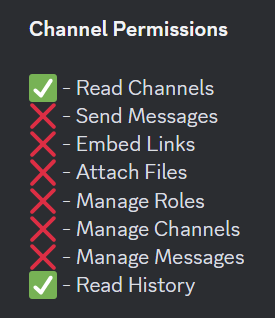 restive condor
We do not have polish support unfortunately
restive condor
cunning light
how do fix that?
Right click on the channel's name > Edit Channel > Permissions > Add Ticket Tool > Check  All missing permissions
(Hold down instead of right clicking, if on mobile)
cunning light
ok thank
atomic latch
restive condor
Hi there, yes
thanks
iron nightBOT
Gave +1 Rep to @restive condor (current: #1 - 1750)
cunning light
@restive condor not fixed😭
atomic latch
so if i want premuiam i will have to get it sperately for both server?
restive condor
atomic latch
so if i want premuiam i will have to get it sperately for both server?
Hi there, yes. Premium subscriptions are per server
restive condor
cunning light
<@795710289425334303> not fixed😭
Could you use the /debug command again
cunning light
ok try
restive condor
It's still missing the same permissions
cunning light
NOO
restive condor
restive condor
Right click on the channel's name > Edit Channel > Permissions > Add Ticket Tool...
^
cunning light

 still lavaBOT
restive condor
Right click on the channel's name > Edit Channel > Permissions > Add Ticket Tool...
still lavaBOT
restive condor
Right click on the channel's name > Edit Channel > Permissions > Add Ticket Tool...
 danielvf_
From English (EN) To Polish (PL)
Kliknij prawym przyciskiem myszy nazwę kanału > Edytuj kanał > Uprawnienia > Dodaj narzędzie biletowe > Sprawdź :green_tick: Wszystkie brakujące uprawnienia
Translation requested by dambulance from Flag-Reaction Feature.
still lavaBOT
restive condor
(Hold down instead of right clicking, if on mobile)
danielvf_
From English (EN) To Polish (PL)
(Trzymaj się zamiast klikać prawym przyciskiem myszy, jeśli na urządzeniu mobilnym)
Translation requested by dambulance from Flag-Reaction Feature.
still lavaBOT
restive condor
Ticket Tool is missing all the permissions marked with ❌ below for that channel
danielvf_
From English (EN) To Polish (PL)
Ticket Tool brakuje wszystkich uprawnień oznaczonych ❌ poniżej dla tego kanału
Translation requested by dambulance from Flag-Reaction Feature.
restive condor
 cunning light
YEEY THANK. IT FIXED
restive condor
Perfect, glad to hear!
 glad tulip
can someone help me, I created a verify command with dyno, that I want to make work on inside the tickets with this bot, does anyone know how to set this up?
atomic latch
Is premium worth it?
worldly helm
glad tulip
can someone help me, I created a verify command with dyno, that I want to make w...
Hey! We only provide support fot ticket tool, not dyno!
atomic latch
for ticket tool
worldly helm
atomic latch
Is premium worth it?
Hey there! Yes it is, see below for all the amazing perks!
humble sequoiaBOT
 Faster Premium Bot
Automatic Transcripts
Full Customization
Direct Messages
Ticket Automation
Thread Style Ticketing
Premium Support
Scheduled Panel Availability
Integrations
Claiming
Advanced Ticket Statistics
You can purchase premium here:
Price
$6 - Monthly
$66 - Yearly (Open a billing ticket in #🎫│make-a-ticket to receive additional information on this matter)
glad tulip
worldly helm
Hey! We only provide support fot ticket tool, not dyno!
Meant using the ticket tool, so it’s a gray spot
Like everything is done in the ticket generated by the panel
worldly helm
glad tulip
Meant using the ticket tool, so it’s a gray spot
What do you mean?
glad tulip
worldly helm
What do you mean?
Ok, so say I open a ticket, I want to type a custom command I have from another bot inside the ticket, and have it activate.
I use to be able to, in the past but got rusty with discord
worldly helm
Ohh sorry, Dashboard—> Panel Configs —> Permissiond —> Select your wanted User/Team —> Use application commands .
If i‘m understanding right you can‘t execute the command
 coral vapor
Hello @nodepay_ai
I took my time farming this airdrop morning, afternoon, evening, midnight, using my phone and laptops. Refreshing, burning data and how come I have Zero points kindly look into this please. Thank you.
humble sequoiaBOT
⚠️ You're in the wrong place
We provide support for Ticket Tool Discord bot and cannot help you with whatever issue you have.
- We don't know which Support Team you should contact to get this issue resolved, and unfortunately we won't be able to accurately tell you.
If you don't have any further questions regarding our bot Ticket Tool, please close this ticket
 vagrant stone
Does anyone know how to set up the bot so people can make a ticket in your server?
 quasi path
can you customize buttons?
 thorn ridge
Inorder to use variables such as {reason} I need to buy premium ?
humble sequoiaBOT
━━ User's inquiry has been moved to a ticket ━━
 storm nest
 neon fulcrum
I have a premium subscription Don't be a jackal

 pulsar gorge
Tickets when closed are still staying in this category. Even tho, these options are still kept like this


Please ping me when you reply to this
mossy breach
how do I ping the person that opened the ticket on ticket creation with a custom command?
mossy breach
{user} seems to be pinging the person that used the command and when it's used on ticket creation it pings itself
austere forge
mossy breach
{user} seems to be pinging the person that used the command and when it's used o...
used instead {ticket.user}
austere forge
pulsar gorge
Tickets when closed are still staying in this category. Even tho, these options ...
Discord has a limit of 50 channels per category, we limit it to 45.
If a category has reached such limits, it is full, and tickets cannot be moved ⬇️
humble sequoiaBOT
Discord only allows to stack up to 50 channels per category, meaning that if you have already 50 tickets in one category, the bot won't be able to place a ticket in that category, for such reason Ticket Tool counts with overflow categories, meaning that if your main category is filled, the bot will go ahead and place the ticket on the next one available, simply choose a second category in the category pickers:
 mortal summit
 mortal summit
mortal summit
mortal summit
help
humble sequoiaBOT
This error indicates you have selected an invalid emoji, i.e. an emoji the bot isn't capable of using, in a button field
Which Emoji?
This depends upon which action the error is appearing, the most common cases are the Create Ticket button or one of your Dropdown emojis. You can visit your Button's List to find all available buttons and find the conflicting one by yourself.
Why doesn't the bot accept it as valid?
- You selected an emoji that doesn't exist anymore, i.e. that has been deleted
- You wrote text there, instead of an emoji (or in addition to an emoji)
- You entered a code for a custom emoji from a server that the bot is not a member of
- You entered a custom emoji code incorrectly
- You're on iPhone and entered an emoji using the phone's emoji pad (use the emoji selector in the website instead)
 worldly helm
mortal summit
worldly helm
mortal summit
Hey, please refer to the embed above^^!
mortal summit
worldly helm
Hey, please refer to the embed above^^!
sorry, I didn't understand, what do you mean
?
worldly helm
humble sequoia
Please look at the guide in order to fix the issue you are having
mortal summit
worldly helm
Please look at the guide in order to fix the issue you are having
In this case, what would be the form body, where can I find and correct it, what exactly should I correct?
worldly helm
The issue you are having is called Invalid form body, do you use the dropdown style?
mortal summit
worldly helm
The issue you are having is called `Invalid form body`, do you use the dropdown ...
I have no idea what is suspended, I just configured the bot and this error appears
worldly helm
Please show me;
Dashboarad --> Panel Configs --> Buttons --> Create ticket
and Dashboard --> Panel Configs --> DropDown
mortal summit
worldly helm
Please show me;
Dashboarad --> Panel Configs --> Buttons --> `Create ticket`
*a...
 worldly helm
and now Dashboard --> Panel Configs --> DropDown please
 maiden verge
Whenever I try to create a ticket it fails
 maiden verge
Whenever I try to create a ticket it fails
maiden verge
maiden verge
Whenever I try to create a ticket it fails
Please someone help me
austere forge
you've just created a ticket, please focus on it for help
 thorny niche
help
 jade topaz
Hellooo everyone! I'm not able to save the transcripts of the ticket although I'm the server owner. I've been saving transcrips in earlier days but right now it is not allowing me to do so.
 austere forge
thorny niche
help
austere forge
thorny niche
help
Are you the sever owner or a regular member trying to create a ticket?
austere forge
jade topaz
Hellooo everyone! I'm not able to save the transcripts of the ticket although I'...
could you use /debug command on your transcript channel pls
jade topaz
austere forge
could you use /debug command on your transcript channel pls
yes surely!
https://discordapp.com/channels/509192800865353738/662692902245498910/1313874622076424214
 austere forge
not in the ticket, rather in the transcript channel where transcripts are usually sent
i.e in "create here"
jade topaz
austere forge
i.e in "create here"
 austere forge
make sure that the bot has : VIEW CHANNEL SEND MESSAGE and READ MESSAGE HISTORY perms in the channel
jade topaz
austere forge
make sure that the bot has : `VIEW CHANNEL` `SEND MESSAGE` and `READ MESSAGE HIS...
got u .. I'll check it out!
Thanks a bunch for ur time ✨
iron nightBOT
Gave +1 Rep to @austere forge (current: #8 - 697)
jade topaz
austere forge
make sure that the bot has : `VIEW CHANNEL` `SEND MESSAGE` and `READ MESSAGE HIS...
I just checked it out in roles and channel permissions
the perms are granted already.
austere forge
jade topaz
I just checked it out in roles and channel permissions
the perms are granted alr...
If the /debug command doesn't respond, the bot is missing permissions
Please make sure you have given the bot access, all the permissions marked with ❌ below for that channel
 jade topaz
austere forge
If the /debug command doesn't respond, the bot is missing permissions
Please ma...
jade topaz
austere forge
If the /debug command doesn't respond, the bot is missing permissions
Please ma...
yes finallyyy its doneee
thanksssss a lottttttttt ✨
 inner hare
 humble sequoiaBOT
User's issue has been solved in another channel.
 tepid geyser
 next wedge
<#776680605517742090> i need help related nodpay
next wedge
<#776680605517742090> i need help related nodpay
With what ?
next wedge
my friend using my referral now problem wallat connecting issues use id ( nandini156 ) that time email not verified not conting problem
humble sequoiaBOT
⚠️ You're in the wrong place
We provide support for Ticket Tool Discord bot and cannot help you with whatever issue you have.
- We don't know which Support Team you should contact to get this issue resolved, and unfortunately we won't be able to accurately tell you.
If you don't have any further questions regarding our bot Ticket Tool, please close this ticket
next wedge
tepid geyser
With what ?
my friend using my referral now problem wallat connecting issues use id ( nandini156 ) that time email not verified not conting problem
humble sequoiaBOT
⚠️ Please read the messages previously sent by our team ⚠️
 dusky phoenix
في عرب؟
humble sequoiaBOT
فريق الدعم الفني العربي
عميلنا العزيز ان كنت تبحث عن مساعدة يرجى فتح تكت خاص بفريق الدعم الفني العربي
اذهب الى#🎫│make-a-ticket
ثم قم بلضغط على الايموجي الاتي (🇯🇴)
 buoyant bay
i need support
worldly helm
buoyant bay
i need support
Hey, with what?
 hot brook
I'm in a server an I have a role with administrator perms.
The bot is in the server yet it doesnt appear on the ticket tool dashboard.
worldly helm
hot brook
I'm in a server an I have a role with administrator perms.
The bot is in the ser...
Hello. Please refer to the embed below!
humble sequoiaBOT
Don't see your server in the dashboard?
Try using the Sync Servers button on your top center of the Dashboard page
If this doesn't work
You should relog from the dashboard, you can do this by clicking here to log out immediately, and then log back in
Note:
You need one of these 3 things to access the dashboard.
1. Server Owner (Level: 6)
2. Server Administrator (Level: 4)
3. Dashboard Role (Level: 2)
:warning: You can check your level using the </permissionlevel:1029797400174399542> command on your Discord Server
If the bot's response is:
- @User is permission level: 0 (User)
You don't have any of the 3 levels required to access the server's dashboard
hot brook
Okay. I am level 0...
But how does it work because I have administrator perms.
buoyant bay
worldly helm
Hey, with what?
how can do mention helpers or moderetors when someone open tiket
worldly helm
hot brook
Okay. I am level 0...
But how does it work because I have administrator perms.
Are you 100% sure?
hot brook
Yep.
worldly helm
buoyant bay
how can do mention helpers or moderetors when someone open tiket
Please refer to the embed below!
humble sequoiaBOT
1. Go into your Dashboard
2. Open your Panel Configs tab
3. Select the panel you want to ping your support on
4. Open the Ticket options menu
5. Click on Edit Ticket Message
6. In the Message Content use one of the role mention syntax (**{@Role Name}**/**{Role ID}**)
7. Save changes
Note: For this to work properly, Ticket Tool requires the Mention Everyone permission. Or the role must have the Allow anyone to @mention this role setting enabled
worldly helm
hot brook
Yep.
Could u please check again?
hot brook
Check what. My role or the permission level?
buoyant bay
worldly helm
Please refer to the embed below!
I mean, can I edit and add? When someone opens a ticket, he mentions the assistants
worldly helm
buoyant bay
I mean, can I edit and add? When someone opens a ticket, he mentions the assista...
That what the guide is for.
worldly helm
hot brook
Check what. My role or the permission level?
The role please, if it has the permission
buoyant bay
worldly helm
That what the guide is for.
for what
hot brook
worldly helm
The role please, if it has the permission
Yep one minute.
worldly helm
buoyant bay
for what
to ping a role on the creation of a ticket
hot brook
Okay. It doesnt have administrator but it has most the stuff enabled. I dont see why it wont work though seeing as I can add and use other bot dashboards.
worldly helm
well you either Need Administrator or a Dashboard role ;)
buoyant bay
worldly helm
to ping a role on the creation of a ticket
What I mean is, how can you mention not the person who opened a ticket, but the onor and the administration?
humble sequoiaBOT
Any role you put there will have full access to the ticket tool dashboard. The server owner and users with admin permissions already have access to the dashboard.
Be careful of which roles to put here
The Ticket Message is the first message sent by the bot on a new ticket. To customize it head over to your Dashboard ➞ Panel Configs ➞ Ticket ➞ Edit Ticket Message
worldly helm
buoyant bay
What I mean is, how can you mention not the person who opened a ticket, but the ...
Please follow the guide abobe (the 2nd one) and remove and {ROLEID} or {rolename}
hot brook
worldly helm
well you either Need Administrator or a Dashboard role ;)
Alright. thanks
buoyant bay
worldly helm
Please follow the guide abobe (the 2nd one) and remove and {ROLEID} or {rolename...
d you know some nots can motion
worldly helm
buoyant bay
d you know some nots can motion
Hey again, sorry for the late reply. What is your Main Language?
 shadow lynx
no way to pay w crypto?
restive condor
shadow lynx
no way to pay w crypto?
Hi there! Yes, #🎫│make-a-ticket / #premium-tickets please
glad tulip
Can I make a verify command using this section?
 restive condor
glad tulip
Can I make a verify command using this section?
restive condor
glad tulip
Can I make a verify command using this section?
Hi there! Unfortunately, no.
Custom commands are predefined messages that can be sent when using a command/trigger
 limber harbor
how many ticket bot can dashboard
restive condor
limber harbor
how many ticket bot can dashboard
Hi there, what exactly do you mean?
limber harbor
if bot have 5 server in dash board, where is 6
restive condor
Please try the steps below
humble sequoiaBOT
Don't see your server in the dashboard?
Try using the Sync Servers button on your top center of the Dashboard page
If this doesn't work
You should relog from the dashboard, you can do this by clicking here to log out immediately, and then log back in
Note:
You need one of these 3 things to access the dashboard.
1. Server Owner (Level: 6)
2. Server Administrator (Level: 4)
3. Dashboard Role (Level: 2)
:warning: You can check your level using the </permissionlevel:1029797400174399542> command on your Discord Server
If the bot's response is:
- @User is permission level: 0 (User)
You don't have any of the 3 levels required to access the server's dashboard
limber harbor
i can't see my friend server about
restive condor
Have you run the /permissionlevel on the server yet?
limber harbor
no
restive condor
Please use the command and let me know which level you are
restive condor
You do not have the neccessary permissions to access that server's Dashboard; You will either need administrator permissions or a dashboard role
limber harbor
what doe that mean
restive condor
You either need the permission called 'administrator' enabled in your role

Or a dashboard role. Which can only be added by somebody who already has access to the Dashboard
humble sequoiaBOT
Any role you put there will have full access to the ticket tool dashboard. The server owner and users with admin permissions already have access to the dashboard.
Be careful of which roles to put here
limber harbor
do my friend to give me a role about that?
restive condor
Yes
 trail spear
My Ticket Tool has suddenly started creating empty channels in my transcript category again. Does anyone know how to fix this??
 marble apex
restive condor
Yes
marble apex
restive condor
Yes
How do I change those blue boxes name in the dashboard
 quasi path
is it premium to disable this or free?
 restive condor
trail spear
My Ticket Tool has suddenly started creating empty channels in my transcript cat...
restive condor
trail spear
My Ticket Tool has suddenly started creating empty channels in my transcript cat...
Hi there, could you #🎫│make-a-ticket please
restive condor
marble apex
How do I change those blue boxes name in the dashboard
Hi there, Dashboard > Panel Configs > Buttons > Create Ticket Button
restive condor
quasi path
is it premium to disable this or free?
Hi there, it's free 😄
 muted yacht
hi how much does premium for the bot cost
jade topaz
muted yacht
hi how much does premium for the bot cost
and where can we buy
restive condor
muted yacht
hi how much does premium for the bot cost
Hi there, it's $7.99/monthly or $66/yearly
You can purchase premium from https://tickettool.xyz/premium or by going into the 'Premium' tab of your server's Dashboard
muted yacht
restive condor
Hi there, it's $7.99/monthly or $66/yearly <:Premium:1192403074157912144>
You c...
So im guessing I cannot buy it permanently?
restive condor
Unfortunately, no. We only offer monthly and yearly subscriptions at the moment
 limber wing
restive condor
Unfortunately, no. We only offer monthly and yearly subscriptions at the moment
limber wing
restive condor
Unfortunately, no. We only offer monthly and yearly subscriptions at the moment
 restive condor
limber wing
restive condor
limber wing
Hi there, what exactly were you trying to do?
 limber wing
Indeed
quasi path
restive condor
Hi there, it's free 😄
thanks. do you know when you close a ticket, can you set it to auto delete after a certain time or it does that by default?
iron nightBOT
Gave +1 Rep to @restive condor (current: #1 - 1754)
restive condor
quasi path
thanks. do you know when you close a ticket, can you set it to auto delete afte...
Automated actions are a premium feature unfortunately
quasi path
oh, by default does it delete after certian time? or it will just stay there
restive condor
For free, you can either delete it manually whenever you'd like, or have it automatically deleted once closed
restive condor
quasi path
oh, by default does it delete after certian time? or it will just stay there
Nope, just stays there
quasi path
ok thx
restive condor
limber wing
Indeed
Could you try https://tickettool.xyz/dashboard please
 restive condor
Hmm. That timeout is most likely caused due to slow internet connection. Could you try in a few minutes?
 restive condor
You're right. Hold on
limber wing
Take your time.
restive condor
limber wing
Take your time.
Could you try again please
restive condor
Glad to hear!
limber wing
Thank you bro I appreciate it, may I ask what the problem was?
restive condor
I'm not sure, actually. Our developer simply reloaded the API
 keen flame
how do i let other roles see all the tickets in the discord?
humble sequoiaBOT
1. Go into your Dashboard
2. Open your Panel Configs tab
3. Select the panel you want to grant access to
4. Open the General options menu
5. Select your Support Team Roles
6. Save changes
restive condor
keen flame
how do i let other roles see all the tickets in the discord?
Hi there, see above please ^
keen flame
ty!
limber wing
restive condor
Hi there, see above please ^
I have been faced with the same issue once again lol
 keen flame
restive condor
Hi there, see above please ^
keen flame
restive condor
Hi there, see above please ^
is ther anything else i have to do? its not working when i try to view as role
restive condor
limber wing
It's working perfectly for me now. It could also be a cloudfare ratelimit.
If it's still happening, please re-try later
restive condor
keen flame
is ther anything else i have to do? its not working when i try to view as role
That feature isn't great for Ticket Tool testing.
Please ask somebody else to test it or use an alt
restive condor
Are you testing this with brand new tickets?
They won't get access to tickets opened prior to you making this change. You will need to manually /add them to thos
keen flame
workks! thank you
quasi path
when a ticket is opened, is it possible to prompt the user with like buttons/options to click that do something?
 delicate saddle
How do I set up claiming?
 analog quiver
How do I create a ticket against someone for breaking the rules
 shut jetty
 humble sequoiaBOT
⚠️ You're in the wrong place
We provide support for Ticket Tool Discord bot and cannot help you with whatever issue you have.
- We don't know which Support Team you should contact to get this issue resolved, and unfortunately we won't be able to accurately tell you.
If you don't have any further questions regarding our bot Ticket Tool, please close this ticket
 astral badger
Hi!
I've set my Transcript channel to a literal channel titled "Transcript", but the bot will still show this:

Nevermind
 queen hill
Hi can someone help
 bright wraith
Me an expulsado por un bug 😭😭
Buenas

Por motivos de bug 😭😭
Ay alguien q me pueda ayudar
 tender sinew
how do i allow people to send a file in a ticket
with just them having a members role in my server
 obsidian tide
 feral radish
limber wing
feral radish
limber wing
Am geting sane issue
 vague ridge
Hey guys quick question, is the bot offline? I invited it and set it up but it's showing offline atm.
 willow imp
I’m also experiencing the bot not functioning right now.
worldly helm
willow imp
I’m also experiencing the bot not functioning right now.
Hey, please try using the /debug command.
worldly helm
vague ridge
Hey guys quick question, is the bot offline? I invited it and set it up but it's...
Hello, please kick and reinvite the bot.
vague ridge
Okay
willow imp
It's in Korean, meaning that the bot did not respond.
 vague ridge
worldly helm
Hello, please kick and reinvite the bot.
vague ridge
worldly helm
Hello, please kick and reinvite the bot.
It's still showing its offline
I kicked and invited it again but it's still the same.
willow imp
worldly helm
Hello, please kick and reinvite the bot.
I have already done this several times as well.
vague ridge
willow imp
I have already done this several times as well.
I did the same too, still noting is working for me
 next moon
وين السبورت العرب؟
 obsidian iron
السلام عليكم
next moon
وعليكم السلام
obsidian iron
وين السبورت
next moon
مدري حتى انا ادوره
obsidian iron
ياليييل
worldly helm
vague ridge
It's still showing its offline
Could u please send a screenshot of the bots profile?
obsidian iron
worldly helm
Could u please send a screenshot of the bots profile?
where is the arab support?
vague ridge
worldly helm
Could u please send a screenshot of the bots profile?
Mines just got online now all of a sudden
Let me test it rq
worldly helm
obsidian iron
where is the arab support?
$articket
humble sequoiaBOT
فريق الدعم الفني العربي
عميلنا العزيز ان كنت تبحث عن مساعدة يرجى فتح تكت خاص بفريق الدعم الفني العربي
اذهب الى#🎫│make-a-ticket
ثم قم بلضغط على الايموجي الاتي (🇯🇴)
obsidian iron
tysm
willow imp
It's online now, but still not responding.
 worldly helm
willow imp
I have already done this several times as well.
worldly helm
willow imp
I have already done this several times as well.
Please give the bot the perms marked with ❌ ( Send Messages)
 willow imp
worldly helm
Please give the bot the perms marked with ❌ ( Send Messages)
willow imp
worldly helm
Please give the bot the perms marked with ❌ ( Send Messages)
It’s working now! I didn’t realize that Ticket Tool needed to be configured separately.
worldly helm
No worries, glad i could help
worldly helm
Hello, as the error says, your server is blacklisted due to it impersonsting this server!
Not only that, you can't have a support server for a bot that isn't yours.
You'll have to #🎫│make-a-ticket and ask to get unbanned (I don't know it is possible to get unbanned). Do u have any more questions?
What do you mean?
No, that wouldn't make any sense, a bot that isn't yours doesn't need a support server for that bot. This is the support server and THIS is the only one
The fact that you have the ticket tool pfp and your name is support and the server name is Ticket Tool Support.... it is impersonating ticket tool.
vague ridge
vague ridge
Mines just got online now all of a sudden
It's working
worldly helm
vague ridge
It's working
Glad to hear!
vague ridge
worldly helm
Glad to hear!
Thank you!
iron nightBOT
Gave +1 Rep to @worldly helm (current: #16 - 392)
worldly helm
I don't have the power to unban your server, please #🎫│make-a-ticket --> Report (I think). And appeal ur Server.
Please show me a screenshot of that error message.
 next moon
وين السبورت العربي؟؟
austere forge
 alpine sparrow
It seems that your panel where you tried to create tickets no longer exists, or has been deleted
You need to re-send a panel via your Dashboard > Panel configs
humble sequoiaBOT
فريق الدعم الفني العربي
عميلنا العزيز ان كنت تبحث عن مساعدة يرجى فتح تكت خاص بفريق الدعم الفني العربي
اذهب الى#🎫│make-a-ticket
ثم قم بلضغط على الايموجي الاتي (🇯🇴)
 sonic kindle
I connected wrong wallet plz change
humble sequoiaBOT
⚠️ You're in the wrong place
We provide support for Ticket Tool Discord bot and cannot help you with whatever issue you have.
- We don't know which Support Team you should contact to get this issue resolved, and unfortunately we won't be able to accurately tell you.
If you don't have any further questions regarding our bot Ticket Tool, please close this ticket
 fossil quail
Does anyone know why this error occurs? It happens to random people. Other people find it works fine.
 alpine sparrow
austere forge
It seems that your panel where you tried to create tickets no longer exists, or ...
alpine sparrow
austere forge
It seems that your panel where you tried to create tickets no longer exists, or ...
Hm I didn’t delete it, any way to restore it?
austere forge
fossil quail
Does anyone know why this error occurs? It happens to random people. Other peopl...
This can happen when you don't have a very stable wifi connection, so you'll have to re-open the form with create a new ticket
austere forge
alpine sparrow
Hm I didn’t delete it, any way to restore it?
Unfortunately not, but always check if it exists on your Dashboard
 dire cave
I WOULD URGENTLY NEED HELP TO RECOVER MY DIMEREDIAN PASSWORD
humble sequoiaBOT
⚠️ You're in the wrong place
We provide support for Ticket Tool Discord bot and cannot help you with whatever issue you have.
- We don't know which Support Team you should contact to get this issue resolved, and unfortunately we won't be able to accurately tell you.
If you don't have any further questions regarding our bot Ticket Tool, please close this ticket
 vale holly
Is There Any Turkish Official? I Have a Question?
worldly helm
vale holly
Is There Any Turkish Official? I Have a Question?
Hey, there is no turkish support team, maybe try using a translator to ask something?
vale holly
Maybe, but do you have any information?
 slim harbor
Does anyone know how to fix this
 austere forge
slim harbor
Does anyone know how to fix this
austere forge
slim harbor
Does anyone know how to fix this
Make sure that the bot has : SEND MESSAGE perms in the channel
 austere forge
Nop,
Right click on the channel name (hold down instead, if on mobile) > Edit Channel > Permissions > Ticket Tool > SEND MESSAGE
slim harbor
Oh got It, tysm I feel dumb ty 😭
austere forge
all good 👍
 near viper
its not working
 formal bluff
How do I allow member to create a ticket even when timed out?

 humble sequoiaBOT
━━ User's inquiry has been moved to a ticket ━━
 wary wagon
how do i change several button names?
restive condor
formal bluff
How do I allow member to create a ticket even when timed out?
Hey there! No, that's not possible as per Discord limitations
restive condor
near viper
its not working
Please ensure you update or re-send your panel, using the corresponding buttons
 humble sequoiaBOT
━━ Cxrbin's inquiry has been moved to a ticket ━━
 near viper
restive condor
Please ensure you update or re-send your panel, using the corresponding buttons
near viper
restive condor
Please ensure you update or re-send your panel, using the corresponding buttons
its not letting me create
slim harbor
slim harbor
Does anyone know how to do this 😭
worldly helm
slim harbor
Does anyone know how to do this 😭
Hello. Please refer to the embed below.
humble sequoiaBOT
For more convenient use of multipanels, you can now combine panels on the dashboard. This will allow you to directly send the multipanel from the dashboard or via the $panel ID command.
Where can I find this?
You can find this setting on the Dashboard -> Panel Configs -> Panel -> Attached Panels
Note: if you're attaching all the panels to a panel called English, don't include English in the attached panel's box (If you do this, it will create a duplicate)
This will put all buttons from all of your panels on one message. The message is the panel message from the panel you're combining these panels in.
restive condor
near viper
its not letting me create
Create what exactly?

 worldly helm
Nothing, you can simply just re-name the buttons.
Dashboard --> Panel Configs --> Buttons --> Create Ticket
slim harbor
I’m getting the hang of It but now I have to put the buttons together…
 worldly helm
slim harbor
worldly helm
slim harbor
Does it still look like this on the dashboard?
'Fyk you should remove the appeal panel from it due to you attaching all panels to it already, which means you would attach your appeal panel to your appeal panel, that sends the same button twice'
 twilit cobalt
I want to know that how can i copy one server ticket tool template to another server
Same to same without setup
humble sequoiaBOT
The Backup and Restore feature allows you to transfer your panels, tags, and all settings to a new server, even if the server the settings were created has been deleted! You will want to copy the whole key.
First, go to your server's Dashboard ➞ then Server Configs ➞ under Config Backup & Restore (Server Owner Only) click on Old version can be found here and generate a new backup key by pressing the green button. Now, a key should be generated in the box above. You may need to refresh the page to see this.
Once you have your backup key, navigate to the same page on the new server. Copy the key on the Restore from backup key field.
Now you can choose what you want to copy. Finally, press the green Restore Configs button.
IMPORTANT NOTE
- We suggest you keep this backup key somewhere safe, in case your server is deleted so you are able to recover your panel's settings.
- This feature is only usable by the server's owner
$backup
restive condor
twilit cobalt
I want to know that how can i copy one server ticket tool template to another se...
Hi there, see above please ^
 restive condor
This feature can only be used by the server owner
restive condor
Please #🎫│make-a-ticket and we'll see what we can do for you
wary wagon

how do i rebname those bro
they all say create ticket i want them to say different things
worldly helm
wary wagon
Please resend the panel
worldly helm
Not right now, sorry.
you can simply just re-name the buttons.
Dashboard --> Panel Configs --> Buttons --> Create Ticket
wary wagon
worldly helm
you can simply just re-name the buttons.
Dashboard --> Panel Configs --> Buttons...
thank u that worked. how do i seperate the catagory when they make the tickety?
iron nightBOT
Gave +1 Rep to @worldly helm (current: #16 - 393)
humble sequoiaBOT
1. Go into your Dashboard
2. Open your Panel Configs tab
3. Select the panel you want to grant access to
4. Open the Category options menu
5. Select the categories of your preference
6. Save changes
worldly helm
wary wagon
thank u that worked. how do i seperate the catagory when they make the tickety?
Please follow the guide above, you have to do it for every panel you attached.
dire cave
I have to recover password from my account because i changed pc... how to recover it? Thanks
worldly helm
dire cave
I have to recover password from my account because i changed pc... how to recove...
Hey, are you sure this is regarding ticket tool?
dire cave
yes
worldly helm
if so, please elaborate.
dire cave
ok
 scarlet seal
Hi I need help, Ive goten suggestions from 2 different people via making a ticket and still cant figure out what to do... here is the transcript from the latest one. Any help is appreciated! https://tickettool.xyz/transcript/v1/1313580918861987961/1313888357423775804/transcript-en_jstitch-68557.html/675316e3/6751c563/d422a6a10db4c6acc1a206a9c765727ea85a80de987584e69a5f8b5a34b732d7
Ticket Tool - Ticketing without clutter - The #1 Discord support bot
restive condor
scarlet seal
Hi I need help, Ive goten suggestions from 2 different people via making a ticke...
Hi there, have you run the /permissionlevel in the server in question yet?
scarlet seal
restive condor
Hi there, have you run the ``/permissionlevel`` in the server in question yet?
No, the person said to do that but idk how to do that... 😭
restive condor
Just use the command in the server, like any normal command
scarlet seal
restive condor
Just use the command in the server, like any normal command
But I am close to the server's owner, so what permission should I ask him to give me?
restive condor
scarlet seal
But I am close to the server's owner, so what permission should I ask him to giv...
You will either need administrator permissions enabled in your role settings or a Dashboard role
 humble sequoiaBOT
Any role you put there will have full access to the ticket tool dashboard. The server owner and users with admin permissions already have access to the dashboard.
Be careful of which roles to put here
 earnest nebula
how to fix it
 restive condor
earnest nebula
how to fix it
restive condor
earnest nebula
how to fix it
Hi there, you seem to have an invalid emoji.
Dashboard > Panel Configs > Buttons > Create Ticket Button
Please make sure you only have one emoji and no text in the button emoji field and also ensure the emoji still exist
scarlet seal
restive condor
You will either need administrator permissions enabled in your role settings or ...
Thank you!
iron nightBOT
Gave +1 Rep to @restive condor (current: #1 - 1757)
 unique shore
 humble sequoiaBOT
⚠️ You're in the wrong place
We provide support for Ticket Tool Discord bot and cannot help you with whatever issue you have.
- We don't know which Support Team you should contact to get this issue resolved, and unfortunately we won't be able to accurately tell you.
If you don't have any further questions regarding our bot Ticket Tool, please close this ticket
 ionic path
 raw hollow
Hi I am unable to raise a ticket in node pay
raw hollow
Hi I am unable to raise a ticket in node pay
Hey there, please check above ^^
raw hollow
I face this issue
 ionic path
raw hollow
I face this issue
ionic path
raw hollow
I face this issue
Are you a staff member there or just a member of the server?
 chrome sorrel
 humble sequoiaBOT
⚠️ You're in the wrong place
We provide support for Ticket Tool Discord bot and cannot help you with whatever issue you have.
- We don't know which Support Team you should contact to get this issue resolved, and unfortunately we won't be able to accurately tell you.
If you don't have any further questions regarding our bot Ticket Tool, please close this ticket
 pliant heron


 obtuse herald
Hello. I have a simple request if you please.
I would like that these messages which are created when a person has opened a ticket, are automatiquely removed after like 30 secondes 🙂

I tried with GPT, but did not found the right answer
worldly helm
obtuse herald
Hello. I have a simple request if you please.
I would like that these messages w...
Hey there, that is not possible with ticket tool.
obtuse herald
worldly helm
Hey there, that is not possible with ticket tool.
Ah? Oh ok. Sad
Thank you