
#🆘│community-support
1 messages · Page 147 of 1
 worldly helm
Question placeholder.
The question placeholder is the question you will be shown on the form. Here it is "What is your question/issue?"
Min required - max required
These are the counts of letters the ticket opener has to put in there. For example if the min required is 6, you need to put atleast 6 characteres
 normal glade
Hi, I was wondering why whenever I try to use any command it says "application did not respond"? It has all the perms so I'm a bit confused.
worldly helm
normal glade
Hi, I was wondering why whenever I try to use any command it says "application d...
Hello. Please try to use the /debug command in that channel
normal glade
worldly helm
Hello. Please try to use the /debug command in that channel
I have, it said the same thing
worldly helm
Ticket tool is lacking the permissions marked with ❌
 normal glade
How do I change that?
 sweet mantle
oh no, I did it, thank you very much@worldly helm

 iron nightBOT
Gave +1 Rep to @worldly helm (current: #23 - 272)


 worldly helm
sweet mantle
oh no, I did it, thank you very much<@972202754212782080>
worldly helm
sweet mantle
oh no, I did it, thank you very much<@972202754212782080>
You're welcome 
If you have any more questions feel free to reach out again 🙏
normal glade
worldly helm
thank you it worked!
iron nightBOT
Gave +1 Rep to @worldly helm (current: #23 - 273)
sweet mantle
worldly helm
You're welcome <:PabloTiphat:983791053842837624>
If you have any more questions...

worldly helm
normal glade
thank you it worked!
You're welcome
If you have any more questions feel free to reach out again 🙏
 lost fractal
Does anyone know if there's a way to automatically delete Closed Tickets after x days?
worldly helm
 restive kelp
I have an issue I need to recover a transcript but idk where I can find it
restive kelp
I have an issue I need to recover a transcript but idk where I can find it
Hello. Are you the staff/owner of the server
worldly helm
the Owner?
worldly helm
lost fractal
Does anyone know if there's a way to automatically delete Closed Tickets after x...
Hello. Probably only with the automation feature, which is a premium only setting 
 normal meteor
Wie erstelle ich die Tickets auf handy
worldly helm
normal meteor
Wie erstelle ich die Tickets auf handy
Guten Tag. Unter dieser nachicht ist ein embed, gucke dir diesen bitte an
 stark runeBOT
1. Lade Ticket Tool auf deinen Server ein
Im ersten Schritt laden wir den Bot auf deinen Server ein. Sobald du dies gemacht hast und der Bot auf deinem Server ist, kannst du über das Dashboard deinen Server verwalten.

2. Erstelle ein Panel
Um ein Panel zu erstellen gehen wir im Dashboard zu den Panel Configs.
Dort angekommen, klicken wir auf Create Panel.
Tippe nun einen Namen für das neue Panel ein (du kannst gerne noch weitere optionale Einstellungen vornehmen).
Nachdem du auf Create Panel geklickt hast, kann es mit der Konfiguration des Panels im nächsten Schritt weitergehen.
Ein Beispiel, um ein Panel zu erstellen, ist in der Abbildung unterhalb dieses Textes zu sehen.

3. Sende das Panel in einen Kanal
Nachdem du nun ein Panel über das Dashboard erstellt hast, müssen wir dieses noch über den send Knopf im Dashboard in einen Kanal schicken.
Wähle den Kanal aus, welchen du für dieses Panel verwenden möchtest und klicke anschließend auf send.
Um weitere Hilfe zu erhalten, verwende den Befehl $help faq.
Ein Beispiel um ein Panel in einen Kanal zu senden, findest du in der Abbildung unter diesem Text.
Hast du Probleme das Panel in einen Kanal zu schicken?
Um zu überprüfen ob alle notwendigen Berechtigungen vergeben sind, verwende den Befehl $debug.
Dies musst du in einem Kanal machen, in welchem der Ticket Tool Bot ist.
 restive kelp
worldly helm
the Owner?
restive kelp
worldly helm
the Owner?
Im the owner yes
worldly helm
You can check your Dashboard to see what Channel you set up for the transcript channel.
normal meteor
Danke
worldly helm
normal meteor
Danke
Kein Problem
restive kelp
worldly helm
You can check your Dashboard to see what Channel you set up for the transcript c...
But I didn’t set up any Chanel there is no where i can find previous transcript that I deleted ?
worldly helm
If you deleted a transcript you cannot view the ticket anymore, as you deleted both the transcript and the ticket
What exacly are you asking for
worldly helm
What exacly cant you fix
worldly helm
To change that, you need to change your panel name. The name of it is:
1 | Staff/Player report
You have to change that and resend your panel
 maiden frost
where can i change the how much tickets can be opened by one person?
 austere forge
maiden frost
where can i change the how much tickets can be opened by one person?
austere forge
maiden frost
where can i change the how much tickets can be opened by one person?
Hi there 🙂
Dashboard > Panel configs > Limits - Open tickets each user
Panel configs > Select your panel and use rename button
 hearty pivot
njhhbbhh
 pseudo ravine
hearty pivot
njhhbbhh
pseudo ravine
hearty pivot
njhhbbhh
Hey there. Do you need any support regarding Ticket Tool?
 cursive gust
there's problem
 austere forge
cursive gust
there's problem
austere forge
cursive gust
there's problem
seems mostly to be a issue with the connection on your side 🙂
cursive gust
austere forge
seems mostly to be a issue with the connection on your side 🙂
then How do I talk to you now?
 pseudo ravine
We haven't received any other reports of the dashboard having issues. It may be an issue on your side
You can try refreshing the website
pseudo ravine
You can try using another browser
cursive gust
look
 cursive gust
pseudo ravine
You can try using another browser
cursive gust
pseudo ravine
You can try using another browser
hmm
 normal kernel
cursive gust
hmm
normal kernel
cursive gust
hmm

pseudo ravine
cursive gust
hmm
May I ask which country you're from?
normal kernel
Why is the name of the ticket not changed?
pseudo ravine
Hey there. Could you elaborate a bit?
normal kernel
pseudo ravine
Hey there. Could you elaborate a bit?
If you use the command to change the name of the ticket, it will not change
What is the reason?
pseudo ravine
You're using the $rename command and the ticket name isn't changing?
normal kernel
pseudo ravine
You're using the `$rename` command and the ticket name isn't changing?
yes
pseudo ravine
Did Ticket Tool send an error?
normal kernel
Can you explain?
cursive gust
pseudo ravine
May I ask which country you're from?
Qatar
pseudo ravine
normal kernel
Can you explain?
Did Ticket Tool send a message saying an issue happened when you tried to rename?
pseudo ravine
cursive gust
Qatar
Alright. It seems like our payment processor supports your country. Could you try using another browser and see if that works?
normal kernel
pseudo ravine
Did Ticket Tool send a message saying an issue happened when you tried to rename...
No
 pseudo ravine
Could you double check that Ticket Tool has the Manage Channels permission in that ticket
cursive gust
pseudo ravine
Alright. It seems like our payment processor supports your country. Could you tr...
It's already opened on my phone
pseudo ravine
So it's working on your phone?
normal kernel
pseudo ravine
Could you double check that Ticket Tool has the `Manage Channels` permission in ...
The TicketTool has administrator
pseudo ravine
Could you click on the blue rename from the command and send a screenshot
normal kernel
pseudo ravine
Could you click on the blue `rename` from the command and send a screenshot
From Dashboard?
pseudo ravine
This part

 pseudo ravine
Could you send the server ID in here? Not an invite, just the server ID
pseudo ravine
Did you only run the command once?
normal kernel
pseudo ravine
Did you only run the command once?
yes
pseudo ravine
Could you try running it again
normal kernel
ok
normal kernel
pseudo ravine
Could you try running it again
Nothing happened
pseudo ravine
Is it only happening on that ticket?
normal kernel
pseudo ravine
Is it only happening on that ticket?
no all ticket
pseudo ravine
Could you try refreshing your Discord?
normal kernel
one minute
 mortal seal
I'm currently having this issue with my support discord.
When I attempt to view my dashboard, there's just a generic pfp and it tells me I have no linked accounts. When I try using the ticket tool in my discord, I get this error. Mind you, I've paid for this months membership and still can't use it.

 worldly helm
mortal seal
I'm currently having this issue with my support discord.
When I attempt to view...
worldly helm
mortal seal
I'm currently having this issue with my support discord.
When I attempt to view...
Hello. Do you mind me asking when you bought the premium membership?
mortal seal
worldly helm
Hello. Do you mind me asking when you bought the premium membership?
Let me do some digging
mortal seal
worldly helm
Hello. Do you mind me asking when you bought the premium membership?
Ah that's right. It told me it wasn't going to charge me until like.. the 7th of November
worldly helm
Okay, could you try doing the /debug command in that channel?
 pseudo ravine
How did you purchase your subscription?
mortal seal
pseudo ravine
How did you purchase your subscription?
Patreon
pseudo ravine
We've never offered a subscription via Patreon. Did you purchase it through Discord or Paddle?
mortal seal
pseudo ravine
We've never offered a subscription via Patreon. Did you purchase it through Disc...
Ok please hold 🤦♀️ super confused. Let me check
Alright so I got that confused with another app. My apologies!
However, even if my membership wasn't active, would I still be able to view my dashboard? It doesn't even show that I have a profile of any kind, and I've attempted to relog in and everything
pseudo ravine
You may not have the correct permission level. Run the /botswitcher command to switch to the white bot. After that, run the /permissionlevel command and send a screenshot
mortal seal
 pseudo ravine
Are you the server owner?
mortal seal
pseudo ravine
Are you the server owner?
Yes I am
And nothing has been touched in some time
pseudo ravine
Make sure that the white bot has the View Channel and Send Messages permission in that channel
 pseudo ravine
You don't need to run commands on the gold bot anymore, as the white bot is the active bot
Can you try accessing the dashboard again
 pseudo ravine
It seems like you're logged into a different account on the dashboard, as the profile in the top right is a default avatar
mortal seal
pseudo ravine
It seems like you're logged into a different account on the dashboard, as the pr...
That's what I thought also, but this is the only profile I have active
I even tried relogging
pseudo ravine
Did you make sure that the account was correct?
Hey there. You need to edit the Ticket Message to remove the mention in the embed. Please refer to the embed below!
 humble sequoiaBOT
The Ticket Message is the first message sent by the bot on a new ticket. To customize it head over to your Dashboard ➞ Panel Configs ➞ Ticket ➞ Edit Ticket Message

 jade topaz
pseudo ravine
Hey there. You need to edit the Ticket Message to remove the mention in the embe...
jade topaz
pseudo ravine
Hey there. You need to edit the Ticket Message to remove the mention in the embe...
oh i found it
thanks 👍
iron nightBOT
Gave +1 Rep to @pseudo ravine (current: #5 - 802)
pseudo ravine
You're welcome, glad I could help! Thanks for choosing Ticket Tool!
 old gazelle
Ticket bot wont work + /debug also dosent work
humble sequoiaBOT
━━ Deadly Gamer's inquiry has been moved to a ticket ━━
 elfin seal
hello how do I fixx this?
 worldly helm
elfin seal
hello how do I fixx this?
worldly helm
elfin seal
hello how do I fixx this?
Hello. Your ticket category has 45 tickets in them. Please delete some or add a overflow category on your dashboard
humble sequoiaBOT
Discord only allows to stack up to 50 channels per category, meaning that if you have already 50 tickets in one category, the bot won't be able to place a ticket in that category, for such reason Ticket Tool counts with overflow categories, meaning that if your main category is filled, the bot will go ahead and place the ticket on the next one available, simply choose a second category in the category pickers:

 short turret
can i make it Close with reason in ticket?
worldly helm
short turret
can i make it Close with reason in ticket?
Hello. You can use the command /close and select the option to close with a reason
 short turret
Can I make it as a button to press?
worldly helm
Sadly not
short turret
ok and how do I enable open with reason?
worldly helm
You can use the form feature and make the bot auto display it on the ticket message
humble sequoiaBOT
A Discord Form lets the user answer individual questions in a pop-up Form, which then displays the answers in the ticket message. This can save time if you already know what you want to ask the user.
Setup Forms
Forms can be enabled under Panel Settings > Form Options > Edit Forms Options. In the new pop-up window, you can now enable and edit your own Form.
Form Options
You can add up to 5 questions in the Discord form. This is a Discord limitation. Each question can have a placeholder in the input field, a minimum and maximum input, multi-line, and also the option to have the answer required.
Options
Question Title ➞ Your Question goes here
Question Placeholder ➞ The placeholder text in the input field
Required ➞ If enabled, the user has to answer this question, to submit the form
Multi-Line Input ➞ Allows the user to input multiple lines
Minimum and Maximum Input ➞ Set a minimum and maximum input value for the user
Displaying the Answer
To display the answers from the user, you need to enable Auto display form results on the ticket message as an additional embed
If you don't want a second embed, go into your Panel Configs > Ticket Options > Edit Ticket Message. You use the variable {create.form.x} and replace x with the number of your question. For example, the response to Question 5 can be displayed with {create.form.5}.
 short turret
ok
 brazen heart
how do i remove the ticket tool?
how do i delete the ticket tool and remove my server from it?
jade topaz
brazen heart
how do i delete the ticket tool and remove my server from it?
You can simply kick ticket tool from your server and it will be removed
Also you can remove it from your authorised apps if you go to your Discord settings —> Authorised apps —> ticket tool and remove
 marble jetty
how can i give certain users access to tickets
or roles
i want to give a couple of roles access to all tickets
 lament prairie
marble jetty
i want to give a couple of roles access to all tickets
lament prairie
marble jetty
i want to give a couple of roles access to all tickets
Dashboard -> Panel Configs -> General -> Support Team Roles

Ticket Tool - Ticketing without clutter - The #1 Discord support bot
marble jetty
lament prairie
> [Dashboard](https://tickettool.xyz/dashboard) -> Panel Configs -> General -> S...
thanks
iron nightBOT
Gave +1 Rep to @lament prairie (current: #47 - 51)
lament prairie
marble jetty
thanks
You're welcome, glad to help
 fast jetty
How do you go to manage severs
lament prairie
fast jetty
How do you go to manage severs
from the dashboard
humble sequoiaBOT
Ticket Tool - Ticketing without clutter - The #1 Discord support bot
fast jetty
ty
 arctic stream
Hey! How do I fix this?

 restive condor
arctic stream
Hey! How do I fix this?
restive condor
arctic stream
Hey! How do I fix this?
Hey there! It seems like that panel has been deleted on the Dashboard
Simply make a new panel 😄
arctic stream
restive condor
Hey there! It seems like that panel has been deleted on the Dashboard
I just realize me messing with stuff last night and I deleted it by accident lol thank you!
iron nightBOT
Gave +1 Rep to @restive condor (current: #1 - 1602)
 teal pine
how would i go about adding multiple buttons to a message
humble sequoiaBOT
For more convenient use of multipanels, you can now combine panels on the dashboard. This will allow you to directly send the multipanel from the dashboard or via the $panel ID command.
Where can I find this?
You can find this setting on the Dashboard -> Panel Configs -> Panel -> Attached Panels
Note: if you're attaching all the panels to a panel called English, don't include English in the attached panel's box (If you do this, it will create a duplicate)
This will put all buttons from all of your panels on one message. The message is the panel message from the panel you're combining these panels in.
 lament prairie
teal pine
how would i go about adding multiple buttons to a message
lament prairie
teal pine
how would i go about adding multiple buttons to a message
Hey there! see above ^
teal pine
lament prairie
Hey there! see above ^
thank you!
iron nightBOT
Gave +1 Rep to @lament prairie (current: #47 - 52)
lament prairie
teal pine
thank you!
You're welcome 
 uncut nest
how do I check closed tickets?
pseudo ravine
Hey there. Are you referring to checking the transcript of a deleted ticket?
 inner tangle
Needing assistance on removing a subscription. The server was deleted, and I cannot cancel the sub. Anyone know how I can do so? It will not let me cancel under my subscriptions area on Discord.

 pseudo ravine
Hey there. You will need to contact Discords Billing Team, as they're the only ones who can help in this situation. Please refer to the embed below to get into contact with them!
humble sequoiaBOT
If you have purchased a Premium Subscription of Ticket Tool through Discord and want to request a refund, you will have to contact Discord Support.
We unfortunately can't handle any of these cases.
Am I eligible for a refund?
Discords Refund Policy states that you can request a refund within 5 days of your initial purchase date.
A prorated refund (partial) can be requested if the bot has been removed by either Discord or the bot developer.
 Ticket Tool Premium Refund Request
inner tangle
Ticket Tool Premium Refund Request
inner tangle
Thank you!
pseudo ravine
You're welcome, glad I could help! Thanks for supporting Ticket Tool!
 misty sonnet
Hi everyone, I have discovered a "bug" (maybe I'm just stupid, idk) with the ticket tool and I don't know how to fix it.
When someone wants to fill out a Form on my server it says “something went wrong please try again” - no matter how many times you try or if you change your answers, no ticket opens. (There is also no error message regarding the characters for the individual answers)
Does anyone know why this might be the case? :)
jade topaz
Anyone know why this is happening when my server member tries to open a ticket https://media.discordapp.net/attachments/846586538963238925/1299194221613551626/IMG_9569.png?ex=671c5068&is=671afee8&hm=cedc96495c8ee1abf165c61dcc7e560d4711624a6e532daa1271a9934ba9bfe6&
 misty sonnet
jade topaz
Anyone know why this is happening when my server member tries to open a ticket h...
misty sonnet
jade topaz
Anyone know why this is happening when my server member tries to open a ticket h...
My suggestion is to look into the permissions :)
Buttons ➡️ Create Ticket
- is the "Support Team Only" Button on?
- did you allowed only specific roles to use this Button?
austere forge
misty sonnet
Hi everyone, I have discovered a "bug" (maybe I'm just stupid, idk) with the tic...
Hi Ally!
Can you let me know if the error still occurs?
misty sonnet
austere forge
Hi Ally!
Can you let me know if the error still occurs?
Yea it does :/
austere forge
misty sonnet
Yea it does :/
Okay!
I'll move you to a ticket to fix this problem
 strange cloud
How do I do the thing where if you create a ticket there will be a format you have to write to make the ticket
 halcyon stag
He saying that sentinel will get a evo soon
 austere forge
strange cloud
How do I do the thing where if you create a ticket there will be a format you ha...
austere forge
strange cloud
How do I do the thing where if you create a ticket there will be a format you ha...
Hi there 🙂
follow instructions below :
humble sequoiaBOT
A Discord Form lets the user answer individual questions in a pop-up Form, which then displays the answers in the ticket message. This can save time if you already know what you want to ask the user.
Setup Forms
Forms can be enabled under Panel Settings > Form Options > Edit Forms Options. In the new pop-up window, you can now enable and edit your own Form.
Form Options
You can add up to 5 questions in the Discord form. This is a Discord limitation. Each question can have a placeholder in the input field, a minimum and maximum input, multi-line, and also the option to have the answer required.
Options
Question Title ➞ Your Question goes here
Question Placeholder ➞ The placeholder text in the input field
Required ➞ If enabled, the user has to answer this question, to submit the form
Multi-Line Input ➞ Allows the user to input multiple lines
Minimum and Maximum Input ➞ Set a minimum and maximum input value for the user
Displaying the Answer
To display the answers from the user, you need to enable Auto display form results on the ticket message as an additional embed
If you don't want a second embed, go into your Panel Configs > Ticket Options > Edit Ticket Message. You use the variable {create.form.x} and replace x with the number of your question. For example, the response to Question 5 can be displayed with {create.form.5}.
@halcyon stag

⚠️ You're in the wrong place
We provide support for Ticket Tool Discord bot and cannot help you with whatever issue you have.
- We don't know which Support Team you should contact to get this issue resolved, and unfortunately we won't be able to accurately tell you.
If you don't have any further questions regarding our bot Ticket Tool, please close this ticket
austere forge
halcyon stag
He saying that sentinel will get a evo soon
 ^^
^^
strange cloud
austere forge
Hi there 🙂
follow instructions below :
Ty sir
iron nightBOT
Gave +1 Rep to @austere forge (current: #8 - 636)
 shadow lynx
how do i make i so that
when i close a ticket, it daves transcript then deletes
**saves
@austere forge
rip
austere forge
shadow lynx
how do i make i so that
Hi there 🙂
To save the transcript automatic, this is a premium feature
However, when a ticket is closed, you can delete it automatic
Dashboard > Panel configs > Two step Ticket 
shadow lynx
austere forge
Hi there 🙂
To save the transcript automatic, this is a premium feature <:Premiu...
i have premium
how to do
austere forge
shadow lynx
how to do
Perfect, you can go to Dashboard > Panel configs > Transcript - Auto Save Transcript 
shadow lynx
austere forge
Perfect, you can go to Dashboard > Panel configs > Transcript - `Auto Save Trans...
thx
iron nightBOT
Gave +1 Rep to @austere forge (current: #8 - 637)
shadow lynx
austere forge
Perfect, you can go to Dashboard > Panel configs > Transcript - `Auto Save Trans...
also, under automation, to send dm when done, how can I have the bot to say “… closes by (staff that closed)”
austere forge
shadow lynx
also, under automation, to send dm when done, how can I have the bot to say “… c...
Dashboard > Panel configs > Message - EDIT CLOSED MESSAGE and put variable {user}
humble sequoiaBOT
@thin blaze
⚠️ You're in the wrong place
We provide support for Ticket Tool Discord bot and cannot help you with whatever issue you have.
- We don't know which Support Team you should contact to get this issue resolved, and unfortunately we won't be able to accurately tell you.
If you don't have any further questions regarding our bot Ticket Tool, please close this ticket
shadow lynx
austere forge
Dashboard > Panel configs > Message - `EDIT CLOSED MESSAGE` and put variable `{u...
perfect, last thing, how can i disable the buttons completely?
austere forge
shadow lynx
perfect, last thing, how can i disable the buttons completely?
for that it's not displayed or interact by certain roles?
jade topaz
misty sonnet
My suggestion is to look into the permissions :)
Buttons ➡️ Create Ticket
- is...
Ahh ok. Thanks, I fixed it
iron nightBOT
Gave +1 Rep to @misty sonnet (current: #344 - 1)
shadow lynx
austere forge
for that it's not displayed or interact by certain roles?
like no one see it
austere forge
shadow lynx
like no one see it
Dashboard > Panel configs > Buttons - Show this button
shadow lynx
austere forge
Dashboard > Panel configs > Buttons - `Show this button` <:Switch_disabled:10417...
thx
iron nightBOT
Gave +1 Rep to @austere forge (current: #8 - 638)
 modern sage
how do I get this
 worldly helm
modern sage
how do I get this
worldly helm
modern sage
how do I get this
Hey! Please refer to the embed below
humble sequoiaBOT
The Drop-down menu or Select Menu replaces the buttons on your panel message and uses a drop-down menu with all of your panels. To set this up, go to your Panel Configs and select your main Panel.
<:Numbericons1:1018864164032225340> Enable Select Style
First you enable Select Style. Then you add an item in the Dropdown Editor. Now you can start editing your dropdown!
<:Numbericons2:1018864168041971712> Dropdown Editor
Each line in the dropdown editor represents a line in the drop down menu on discord. You can add more "Items", by clicking on 

First you select a panel. That's the panel this option will open a ticket for.  DONT select the same panel twice. Each option should have a different Panel
After that, you can put a Display. This is the title of this option and will appear in the drop down menu. The *Description can be set right after that, which will be below the title in grey.
Additionally you can select an emoji, that will be shown in front of each option. You can either manually input the ID of an emoji or select it in the selector.
Common Issues ⚠️
- Panel doesn't send? Make sure you have a valid emoji selected
- Option doesn't show up? Check if two options have the same panel in the DropDown Editor

$dropdown
 worldly helm
modern sage
how do I get the category to show in the ticket message
worldly helm
modern sage
how do I get the category to show in the ticket message
Hello. Please elaborate
modern sage

like it shows you what category you have opened
in the pic above it is "General Support"
 plush sand
When will premium users be able to add a picture to their custom bot???
This is one of the most basic premium features ?
worldly helm
plush sand
When will premium users be able to add a picture to their custom bot???
Hello. Not yet
the devs are working on something though
humble sequoiaBOT
The Ticket Message is the first message sent by the bot on a new ticket. To customize it head over to your Dashboard ➞ Panel Configs ➞ Ticket ➞ Edit Ticket Message
worldly helm
modern sage
See above ^^^
plush sand
worldly helm
the devs are working on something though
I hope so, I've been premium for a good few months now and it seems ticket tool just wants us to advertise their ticket emblem rather than allow us basic custom features
Is there any sort of upgrade date in mind, do you know?
humble sequoiaBOT

About ETA
We don't provide any kind of ETA for the release of updates to the bot due to the changing nature of the development process. Thanks for being patient and choosing Ticket Tool!
modern sage
worldly helm
See above ^^^
ah is a premium thing
plush sand
I mean not much can change for a general update idea but okay thanks
worldly helm
modern sage
ah is a premium thing
nope its not
 worldly helm
you can just use the variable "{panel.name}"
modern sage
thanks @worldly helm
iron nightBOT
Gave +1 Rep to @worldly helm (current: #23 - 275)
 vestal haven
Why when I want to add someone to ticket he tells me that??!!
 humble sequoiaBOT
━━ ᴷᴬᴿ The Lady's inquiry has been moved to a ticket ━━
 tribal tusk
Hey, why does it not let me change this?

I want to edit the text, and add a image to it
but its grayed out
austere forge
tribal tusk
but its grayed out
Hi there 🙂
This is a premium feature
tribal tusk
austere forge
Hi there 🙂
This is a premium feature <:Premium:1192403074157912144>
I have the trial
should it still work?
austere forge
tribal tusk
should it still work?
Can i get the server ID / name pls
tribal tusk
austere forge
Can i get the server ID / name pls
1295909805982093405
I just want the title of the text to be # like this
oh well ig its disabled here but yeah
austere forge
tribal tusk
oh well ig its disabled here but yeah
Alr, refresh your page, your trial should now be active 👍
tribal tusk
austere forge
Alr, refresh your page, your trial should now be active 👍
Yeah, it works now. But can you help me with the text thing
I want the title of the text to be like that


doesn't work in title
austere forge
tribal tusk
doesn't work in title
This is not possible in the Title field, you can put it in the embed description
tribal tusk
austere forge
This is not possible in the `Title` field, you can put it in the embed descripti...
I see. Thank you
iron nightBOT
Gave +1 Rep to @austere forge (current: #8 - 639)
humble sequoiaBOT
⚠️ You're in the wrong place
We provide support for Ticket Tool Discord bot and cannot help you with whatever issue you have.
- We don't know which Support Team you should contact to get this issue resolved, and unfortunately we won't be able to accurately tell you.
If you don't have any further questions regarding our bot Ticket Tool, please close this ticket
austere forge
 dim yacht
send me premium bot invite
dim yacht
send me premium bot invite
Hi there 🙂
You need a premium subscription to use it
dim yacht
austere forge
Hi there 🙂
You need a premium subscription to use it
i have
send inv link
austere forge
perfect 👍
see below
humble sequoiaBOT
The first thing you will need to do is invite the premium bot, an invite can be found here
Once the bot is in your server we will head to the dashboard and manage your server. When you are managing your server, you want to head into "Server Configs" then click the drop down menu under "Select the bot you would like to use on this server" then click "Ticket Tool#6207" and then save.
 tribal tusk
Hey! Any way to make it so only a person with a spesific rank can open a spesific ticket
?
austere forge
tribal tusk
Hey! Any way to make it so only a person with a spesific rank can open a spesifi...
Hi again Kibax!
You can go to the Dashboard > Buttons > Create Ticket > Allowed Roles
tribal tusk
austere forge
Hi again Kibax!
You can go to the Dashboard > Buttons > Create Ticket > Allowed ...
Yep! that allowed thanks again
iron nightBOT
Gave +1 Rep to @austere forge (current: #8 - 640)
tribal tusk
Hey, more questions sorry lol. How do I make it so when they click on a button they trigger another command rather than a ticket
cuz its like a ticket dm kinda hard to explain
is that possible?
austere forge
tribal tusk
Hey, more questions sorry lol. How do I make it so when they click on a button t...
can you elaborate ?
tribal tusk
austere forge
can you elaborate ?
nvm figured it out sorry
austere forge
all good 👍
 austere oxide
can you still use the variables in the moderator message
austere forge
austere oxide
can you still use the variables in the moderator message
Hi pear!
yes
 untold wedge
How to create a ticket
austere forge
untold wedge
How to create a ticket
Hi there 🙂
Do you want to setup ticket tool on your server?
 radiant violet
hi, can premium paid subscription implement this?
 lament prairie
radiant violet
hi, can premium paid subscription implement this?
lament prairie
radiant violet
hi, can premium paid subscription implement this?
Hey there! do you mean the buttons one above one?
radiant violet
lament prairie
Hey there! do you mean the buttons one above one?
yes
lament prairie
radiant violet
yes
you can make it even with primary bot
Dashboard -> Panel Configs -> Panel -> Buttons Per Row (Multi Panels) change the count to 1
Ticket Tool - Ticketing without clutter - The #1 Discord support bot
 pastel verge
Hi
 idle idol
The bot doesn’t appear in the dashboard
humble sequoiaBOT
Don't see your server in the dashboard?
Try using the Sync Servers button on your top center of the Dashboard page
If this doesn't work
You should relog from the dashboard, you can do this by clicking here to log out immediately, and then log back in
Note:
You need one of these 3 things to access the dashboard.
1. Server Owner (Level: 6)
2. Server Administrator (Level: 4)
3. Dashboard Role (Level: 2)
:warning: You can check your level using the </permissionlevel:1029797400174399542> command on your Discord Server
If the bot's response is:
- @User is permission level: 0 (User)
You don't have any of the 3 levels required to access the server's dashboard

 pseudo flicker
Hello, i get his error and I don't knwo which button.
I didn't even changed emoji
 restive condor
pseudo flicker
Hello, i get his error and I don't knwo which button.
I didn't even changed emoj...
restive condor
pseudo flicker
Hello, i get his error and I don't knwo which button.
I didn't even changed emoj...
Hey there! Could I get your server name or ID please
restive condor
Which panel are you having issues with?
pseudo flicker
 restive condor
Dashboard > Panel Configs > Buttons > Close Ticket Button
You can only have an emoji in the 'Button Emoji' field.
Text goes in the 'Button Text' field
 iron nightBOT
Gave +1 Rep to @restive condor (current: #1 - 1603)
restive condor
No problem!
jade topaz
How do I set up tickets in my server so ppl can make them
austere forge
jade topaz
How do I set up tickets in my server so ppl can make them
Hi there 🙂
follow instructions below
stark runeBOT
1. Invite Ticket Tool to your server
First you will want to invite the bot to your server. Once the bot is in your server, you can manage your server in the dashboard.
2. Create a Panel
To create a panel we are going to need to head over to the panel configs on the dashboard.
Once at the dashboard we will need to click Create Panel.
Enter a panel name (Fill in any optional settings you want).
Click Create Panel and your ready to get started with configuring your panel.
An example of a creating a panel is shown below.
3. Send the Panel to a Channel
Once you've created a panel on the dashboard you will need to send it to a channel using send on the dashboard.
Select the channel you want your panel to be created in and click send.
For other questions checkout $help faq.
An example of a sending a panel is shown below.
Having a Problem Sending the Panel?
Do $debug in a channel with Ticket Tool and make sure it has all the necessary Discord permissions.
 acoustic lodge
Why he tell this for me
 austere forge
acoustic lodge
Why he tell this for me
austere forge
acoustic lodge
Why he tell this for me
Hi there 🙂
can i get your server ID / name pls, not a invite
acoustic lodge
austere forge
Hi there 🙂
can i get your server ID / name pls, not a invite
Send it privately
austere forge
acoustic lodge
Send it privately
Dashboard > Panel Configs > Buttons > Create ticket
You can only have an emoji in the 'Button Emoji' field
Text goes in the Button Text field
 acoustic lodge
austere forge
Dashboard > Panel Configs > Buttons > `Create ticket`
You can only have an emoji...
acoustic lodge
austere forge
Dashboard > Panel Configs > Buttons > `Create ticket`
You can only have an emoji...
How I can make select Manu in ticket
worldly helm
acoustic lodge
How I can make select Manu in ticket
Hello. Please refer to the embed below
humble sequoiaBOT
The Drop-down menu or Select Menu replaces the buttons on your panel message and uses a drop-down menu with all of your panels. To set this up, go to your Panel Configs and select your main Panel.
<:Numbericons1:1018864164032225340> Enable Select Style
First you enable Select Style. Then you add an item in the Dropdown Editor. Now you can start editing your dropdown!
<:Numbericons2:1018864168041971712> Dropdown Editor
Each line in the dropdown editor represents a line in the drop down menu on discord. You can add more "Items", by clicking on
First you select a panel. That's the panel this option will open a ticket for. DONT select the same panel twice. Each option should have a different Panel
After that, you can put a Display. This is the title of this option and will appear in the drop down menu. The *Description can be set right after that, which will be below the title in grey.
Additionally you can select an emoji, that will be shown in front of each option. You can either manually input the ID of an emoji or select it in the selector.
Common Issues ⚠️
- Panel doesn't send? Make sure you have a valid emoji selected
- Option doesn't show up? Check if two options have the same panel in the DropDown Editor
$dropdown
acoustic lodge
worldly helm
Hello. Please refer to the embed below
Sorry, I know my questions are many, but how do I put a picture in the ticket, and only for premium?
austere forge
acoustic lodge
Sorry, I know my questions are many, but how do I put a picture in the ticket, a...
correct 👍
acoustic lodge
austere forge
correct 👍
؟
austere forge
acoustic lodge
؟
it's a premium feature, putting an image URL in the embed editor
acoustic lodge
OK thanks
 hollow crag
can someone help me on why the create ticket button won't show up?


 shadow lynx
hollow crag
can someone help me on why the create ticket button won't show up?
shadow lynx
hollow crag
can someone help me on why the create ticket button won't show up?
send panel again / update it
hollow crag
shadow lynx
send panel again / update it
I tried both and the create button still won't show up
ahhh someone said about attached panel, previously I did testing out the dropdown, I just fix it
thank you so much!
worldly helm
hollow crag
ahhh someone said about attached panel, previously I did testing out the dropdow...
ohh yeah sorry, i didn‘t mean to delete my msg, sorry!
hollow crag
worldly helm
ohh yeah sorry, i didn‘t mean to delete my msg, sorry!
no, no problem! that turns out to be it, I happened to forgot to delete one of the drop down, tysm once again!
worldly helm
hollow crag
no, no problem! that turns out to be it, I happened to forgot to delete one of t...
You‘re Welcome
 gusty solstice
Hey is anyone able to tell me how I can buy products from Tech-o Incorporated because I've joint the server on here and it says run the following "/link" to buy our products BUT when I tried there are no "/links" to use and it won't let me type in chats
humble sequoiaBOT
⚠️ You're in the wrong place
We provide support for Ticket Tool Discord bot and cannot help you with whatever issue you have.
- We don't know which Support Team you should contact to get this issue resolved, and unfortunately we won't be able to accurately tell you.
If you don't have any further questions regarding our bot Ticket Tool, please close this ticket
shadow lynx
its suprising how many ppl come here asking abt other services
n why tf i j got warned
😭
pseudo ravine
If you don't need any support regarding Ticket Tool, then please don't talk in this channel
You were warned for pinging staff, which is against our rules
shadow lynx
pseudo ravine
You were warned for pinging staff, which is against our rules
when tf i do that? 😭
shadow lynx
pseudo ravine
If you don't need any support regarding Ticket Tool, then please don't talk in t...
i didnt do this either
😭 🙏
austere forge
shadow lynx
😭 🙏
let’s keep this channel focused on support
pseudo ravine
shadow lynx
when tf i do that? 😭
shadow lynx
pseudo ravine
https://ptb.discord.com/channels/509192800865353738/776680605517742090/129931443...
i alr got warned for pinging staff
😭 🙏
pseudo ravine
This channel is strictly for providing support for Ticket Tool. If you don't need any support regarding it, please stop talking in this channel
shadow lynx
this is the service im payin for 🤦♂️
pseudo ravine
We have rules, and we expect everyone to follow them. Including premium subscribers

 pseudo ravine
shadow lynx
🙈🙉
pseudo ravine
shadow lynx
🙈🙉
You've already been told multiple times to stop talking in this channel if you don't need any support regarding Ticket Tool. Please stop talking in this channel if you don't need any support
 scenic plinth
Knock it off.
 tender mango
 pseudo ravine
Hey there. Please make sure Ticket Tool has the “View Channel” and “Send Messages” permission in that channel
 vale abyss
Hello
I have a problem with my account, do not let me buy and bought a token and never showed up
humble sequoiaBOT
⚠️ You're in the wrong place
We provide support for Ticket Tool Discord bot and cannot help you with whatever issue you have.
- We don't know which Support Team you should contact to get this issue resolved, and unfortunately we won't be able to accurately tell you.
If you don't have any further questions regarding our bot Ticket Tool, please close this ticket
 weary gorge
Gostaria de saber se o bot tem como botar imagens de tipo game passe quado a passou for abrir só escolher aí já abri o ticket?
 silver mango
Now my friend get his ticket support like that I want mine to be custom to but idk how

 warm salmon
Where can I make a ticket?
 tepid sky
Hey guys
Im having issues related to knowing how to make so my people can claim tickets
And also with the variables
worldly helm
tepid sky
And also with the variables
Hey. Claiming is a premium only feature. What do you need help with the variables?
 coarse tartan
how to edit panel name
worldly helm
coarse tartan
how to edit panel name
Hello.
Dashboard --> Panel Configs --> Select your panel at the dropdown at the top of your screen and click on the green Rename button
 coarse tartan
ok
worldly helm
warm salmon
Where can I make a ticket?
Hey there! #🎫│make-a-ticket
humble sequoiaBOT
Equipa de Apoio Portuguesa
Se você está procurando ajuda, abra um ticket para entrar em contato com a equipe de suporte em português. Vá para #🎫│make-a-ticket e pressione o botão :flag_br:.
worldly helm
weary gorge
Gostaria de saber se o bot tem como botar imagens de tipo game passe quado a pas...
Siga as instruções acima para abrir um ticket
 still wasp
hii !! i have a question on how to change the texts on here? 😓
 humble sequoiaBOT
The panel message is where people react to make a ticket. To customize it head over to your Dashboard --> Panel Configs -> Panel -> Edit Panel Message

Button Options
 Enable Button
 Hide or show the button
 Emoji
Emoji
 Select an emoji to show on the button
You can either select one or use a valid Emoji ID
 Button Text
Edit the text that's shown on the button
 Button Color
Select one of four colors for the button. Grey, Green, Red, Blue.
 Support Team Only
Enable this to only let your support team click that button
 Allowed and disabled roles
Edit what roles can use or not use this button
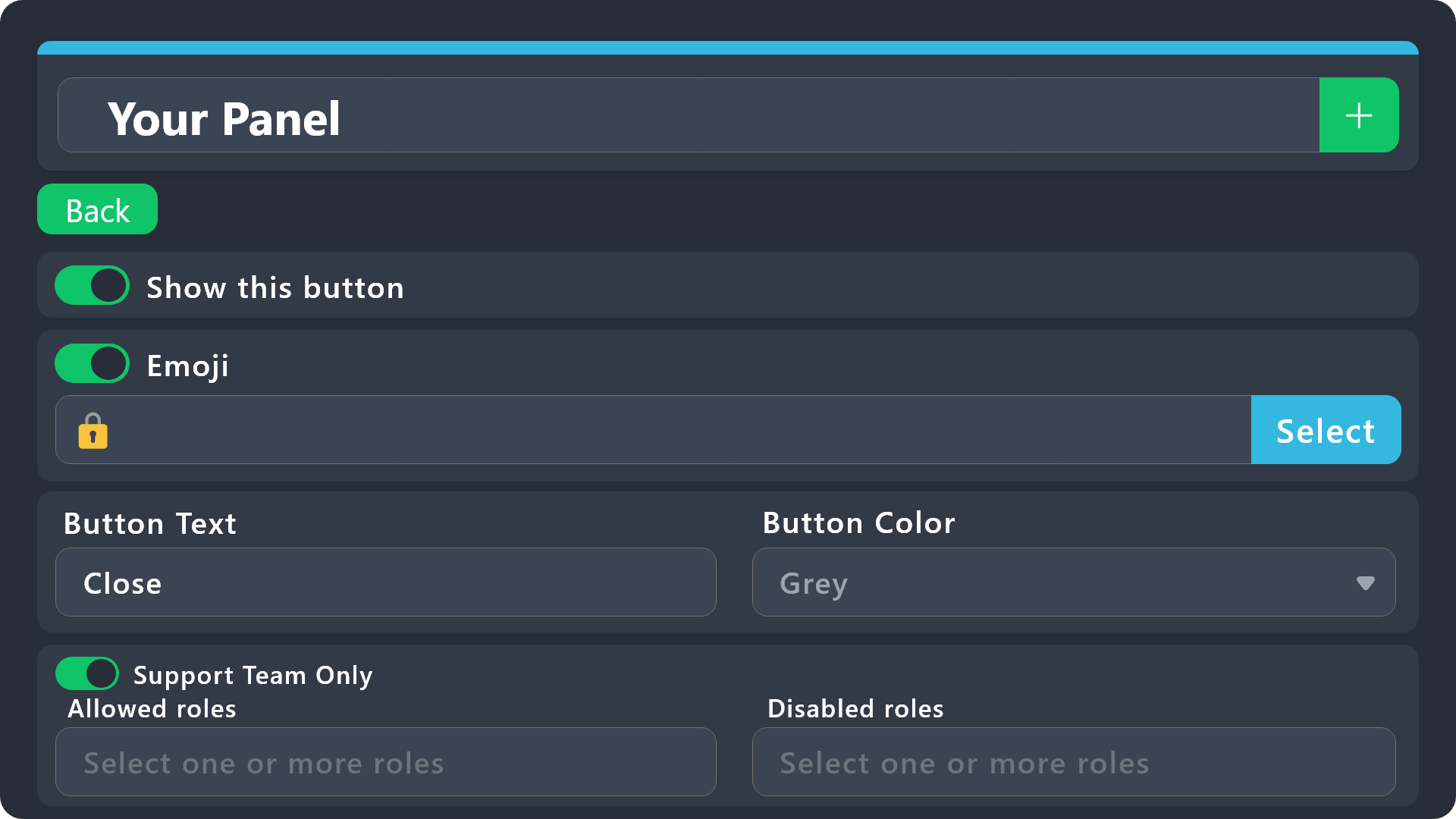
$buttonoptions
 idle flint
^^ both of these should help 🙂
still wasp
idle flint
^^ both of these should help 🙂
tysmm !!
shadow lynx
For the drop down options, is there really no way to easily rearrange them? I mean deleting all of the drop down options to change the order is mildly infuriating
austere forge
shadow lynx
For the drop down options, is there really no way to easily rearrange them? I me...
Hi dark 🙂
The only way to rearrange the dropdown options is indeed to delete them and recreate them in the desired order.
I understand this can be frustrating, but unfortunately, there’s currently no other method available to directly change the order of options
you can suggest this in #1019685143046279208
shadow lynx
yeahh
think i will, also
is it possible to have the form response thats sent in tickets to be included in the main embed?
austere forge
sure, you can use the {create.form.x} variable, replacing x with question number to your ticket message
shadow lynx
austere forge
sure, you can use the `{create.form.x}` variable, replacing x with question numb...
I put this in the ticket embed?
austere forge
shadow lynx
I put this in the ticket embed?
yep 👍
shadow lynx
I already have a form setup, is there another variable just to put the responses?
shadow lynx
austere forge
replacing x with question number
is there a way to purge all tickets from a specific memeber?
austere forge
shadow lynx
is there a way to purge all tickets from a specific memeber?
Unfortunately not, but just so you know there is a /purge command for deleting closed/open tickets
shadow lynx
austere forge
Unfortunately not, but just so you know there is a /purge command for deleting c...
yeahh /purge [user]
would be very useful
austere forge
yep, but it doesn't exist currently
you can suggest this in #1019685143046279208
shadow lynx
austere forge
yep, but it doesn't exist currently
you can suggest this in <#101968514304627920...
r they even regularly looked at? 😭
austere forge
shadow lynx
r they even regularly looked at? 😭
Our team lead takes a look at any peaceful suggestions to be added in the future
shadow lynx
peaceful?
austere forge
i mean relevant / constructive
humble sequoiaBOT
Hello, we would love to help you, but if you don't tell us what you need help with we can't help you :(
 viral musk
although I added the bot to my server, it does not appear on the dashboard
restive condor
viral musk
although I added the bot to my server, it does not appear on the dashboard
Hi there, please follow the instructions below
humble sequoiaBOT
Don't see your server in the dashboard?
Try using the Sync Servers button on your top center of the Dashboard page
If this doesn't work
You should relog from the dashboard, you can do this by clicking here to log out immediately, and then log back in
Note:
You need one of these 3 things to access the dashboard.
1. Server Owner (Level: 6)
2. Server Administrator (Level: 4)
3. Dashboard Role (Level: 2)
:warning: You can check your level using the </permissionlevel:1029797400174399542> command on your Discord Server
If the bot's response is:
- @User is permission level: 0 (User)
You don't have any of the 3 levels required to access the server's dashboard
 native oriole
this message comes up when i try to send the ticket message in a channel and i do not know how to fix the issue
 restive condor
native oriole
this message comes up when i try to send the ticket message in a channel and i d...
restive condor
native oriole
this message comes up when i try to send the ticket message in a channel and i d...
Hey there! Please check your Dashboard > Panel Configs > Buttons > Create Ticket Button
You must have either an emoji or text
idle idol
I can’t see the server in the dashboard
lament prairie
idle idol
I can’t see the server in the dashboard
مرحبًا صديقي، إضغط على Sync Servers  الي بالداشبورد
لو ما ضبطت اعمل تسجيل خروج وارجع ادخل
 livid sandal
Boa tarde
 dreamy vigil
Tickets
humble sequoiaBOT
Hello, we would love to help you, but if you don't tell us what you need help with we can't help you :(
 manic oar
dreamy vigil
Tickets
manic oar
dreamy vigil
Tickets
Bro
humble sequoiaBOT
Hello, we would love to help you, but if you don't tell us what you need help with we can't help you :(
worldly helm
manic oar
Bro
Hello. What do you need support with?
manic oar
worldly helm
Hello. What do you need support with?
Sir how to setup ticket
 vast rivet
Setup command
stark runeBOT
1. Invite Ticket Tool to your server
First you will want to invite the bot to your server. Once the bot is in your server, you can manage your server in the dashboard.
2. Create a Panel
To create a panel we are going to need to head over to the panel configs on the dashboard.
Once at the dashboard we will need to click Create Panel.
Enter a panel name (Fill in any optional settings you want).
Click Create Panel and your ready to get started with configuring your panel.
An example of a creating a panel is shown below.
3. Send the Panel to a Channel
Once you've created a panel on the dashboard you will need to send it to a channel using send on the dashboard.
Select the channel you want your panel to be created in and click send.
For other questions checkout $help faq.
An example of a sending a panel is shown below.
Having a Problem Sending the Panel?
Do $debug in a channel with Ticket Tool and make sure it has all the necessary Discord permissions.
worldly helm
manic oar
Sir how to setup ticket
See above.
manic oar
worldly helm
See above.
Will you teach me how to set up ticket bot
worldly helm
You can check out the embed above and set up the bot step by step :)
jade topaz
Heyy, How can i make the bot mention a support role after opening a ticket?
worldly helm
jade topaz
Heyy, How can i make the bot mention a support role after opening a ticket?
Hey there!
Please look below.
humble sequoiaBOT
1. Go into your Dashboard
2. Open your Panel Configs tab
3. Select the panel you want to ping your support on
4. Open the Ticket options menu
5. Click on Edit Ticket Message
6. In the Message Content use one of the role mention syntax (**{@Role Name}**/**{Role ID}**)
7. Save changes
Note: For this to work properly, Ticket Tool requires the Mention Everyone permission. Or the role must have the Allow anyone to @mention this role setting enabled 
dreamy vigil
manic oar
Bro
What?
manic oar
dreamy vigil
What?
Please dm
worldly helm
manic oar
Please dm
Please keep all of the support in this server/channel
manic oar
worldly helm
Please keep all of the support in **this** server/channel
I am unable to setup ticket bot
worldly helm
Why exacly, any error messages?
 modest heron
Hello, am having an issue setting up ticket tool bot to my server it would be great if anyone could help!
restive condor
modest heron
Hello, am having an issue setting up ticket tool bot to my server it would be gr...
Hey there! What exactly seems to be the issue?
modest heron
restive condor
Hey there! What exactly seems to be the issue?
I want to add thee bot to a server and it’s added but when I click dashboard I get a whole other server that I do own but I don’t need ticket tool in.
restive condor
modest heron
I want to add thee bot to a server and it’s added but when I click dashboard I g...
Do you own the server where you're trying to conigure the bot in?
modest heron
restive condor
Do you own the server where you're trying to conigure the bot in?
No ,but I have the role of managing
I have all permissions
 modest heron
It is enabled but let me go make sure again.
Thanks ! Issue solved (removed permission and put it again)
manic oar
stark rune
@dreamy vigil i create from there
 sacred rapids
When I look at ticket transcripts, any the media that was sent isn't available anymore. Is there a way for ticket transcripts to keep any media (images/videos) sent in a ticket?
restive condor
sacred rapids
When I look at ticket transcripts, any the media that was sent isn't available a...
Hey there! Unfortunately, images are only saved in transcripts for premium users.
Once a channel is deleted, so is everything in it, so Discord doesn't store any images.
We store images ourselves for premium users only, up to 8MB per transcript
sacred rapids
restive condor
Hey there! Unfortunately, images are only saved in transcripts for premium users...
Thanks for the info! How does your premium service work? Is it charged monthly, yearly, or is a one-time fee?
iron nightBOT
Gave +1 Rep to @restive condor (current: #1 - 1605)
restive condor
sacred rapids
Thanks for the info! How does your premium service work? Is it charged monthly, ...
You can subscribe either monthly or yearly (best option).
If you wish to purchase a subscription, you can do so from the 'Premium' tab of your server Dashboard or, https://tickettool.xyz/premium directly
warm salmon
I have proof of a shift leader speaking in some quite poor language


Their user is madkar13
humble sequoiaBOT
⚠️ You're in the wrong place
We provide support for Ticket Tool Discord bot and cannot help you with whatever issue you have.
- We don't know which Support Team you should contact to get this issue resolved, and unfortunately we won't be able to accurately tell you.
If you don't have any further questions regarding our bot Ticket Tool, please close this ticket
 flint osprey
i have my panels and ticket tool set up and everything, an image is below. but whenever my members try to open a ticket it won’t let them?
 restive condor
flint osprey
i have my panels and ticket tool set up and everything, an image is below. but w...
restive condor
flint osprey
i have my panels and ticket tool set up and everything, an image is below. but w...
Hey there! Any error message when they try to open a ticket?
flint osprey
restive condor
Hey there! Any error message when they try to open a ticket?
this is what she sent
 restive condor
flint osprey
this is what she sent
restive condor
flint osprey
this is what she sent
Dashboard > Panel Configs > Buttons > Create Ticket Button
Please make sure  Support Team only is disabled, and you haven't accidentally added a role to the 'Disabled Roles' field
flint osprey
restive condor
``Dashboard`` > ``Panel Configs`` > ``Buttons`` > ``Create Ticket Button``
Pleas...
tysm
flint osprey
restive condor
``Dashboard`` > ``Panel Configs`` > ``Buttons`` > ``Create Ticket Button``
Pleas...
wait where are panel configs ?
is it in the panel category
restive condor
Panel Configs is the section you're sent to when opening the Dashboard
It's on the left sidebar
flint osprey
ohhhh
 tawdry geyser
hello pls help whats this
 humble sequoiaBOT
This error indicates you have selected an invalid emoji, i.e. an emoji the bot isn't capable of using, in a button field
Which Emoji?
This depends upon which action the error is appearing, the most common cases are the Create Ticket button or one of your Dropdown emojis. You can visit your Button's List to find all available buttons and find the conflicting one by yourself.
Why doesn't the bot accept it as valid?
- You selected an emoji that doesn't exist anymore, i.e. that has been deleted
- You wrote text there, instead of an emoji (or in addition to an emoji)
- You entered a code for a custom emoji from a server that the bot is not a member of
- You entered a custom emoji code incorrectly
- You're on iPhone and entered an emoji using the phone's emoji pad (use the emoji selector in the website instead)
 worldly helm
tawdry geyser
hello pls help whats this
worldly helm
tawdry geyser
hello pls help whats this
Look above!
tawdry geyser
worldly helm
Look above!
can i type a text instead of emoji?
worldly helm
Sadly not.
 turbid kettle
So I’m trying to setup this bot in my server with it being able to @ a role of my choice in the ticket message but it won’t actually ping and it just shows up. Can anyone help?
pseudo ravine
Hey there. Do you have the role that Ticket Tool is pinging?
pseudo ravine
turbid kettle
I asked other people with the role too but it won’t ping
Make sure Ticket Tool has the Mention Everyone and All Roles permission
turbid kettle
pseudo ravine
Make sure Ticket Tool has the `Mention Everyone and All Roles` permission
I’ll try it, ty
iron nightBOT
Gave +1 Rep to @pseudo ravine (current: #5 - 804)
misty sonnet
Hii, someone created a Ticket on my Server and for some reason everyone on my Server was able to see it - why did that happend? :)
pseudo ravine
Hey there. You can make sure and go to the Dashboard > Permissions > Everyone Role Permissions > Edit opened > View Channel > 
 random nexus
Hey there. When I try to manage my server, I get the message that I dont have access to this server. But I am the server owner. I would be glad if anyone could help me here.
 earnest pilot
Does ticket tool have a feature to auto close tickets after a certain amount of time that no one responds in it?
humble sequoiaBOT
━━ User's inquiry has been moved to a ticket ━━
━━ TheSolarMCYT's inquiry has been moved to a ticket ━━
Fynn Pandora's issue has been solved in another channel.
 upper cedar
hi
 shut moon
Please help to ticket
 graceful crane
@shut moon you can talk to the support team directly they’ll surely help you out
shut moon
I know, but I'm from the Czech Republic and I don't speak English very well
humble sequoiaBOT
━━ User's inquiry has been moved to a ticket ━━
 upbeat path
How do I make the transcripts for a ticket that's in my own server?
 vast horizon
does anyone know how to make ticket tool send a auto message, like when you say something like "Fish" it sends an automatic message
 zinc kayak
why are forms not working with command style tickets? like it doesn't pop up

@covert swallow @idle flint
 zinc yarrow
Hello
worldly helm
zinc kayak
Hello. Please just read the error message….
 hushed belfry
Hey Guys, I have problem with the ticket tool bot. This error massage shows up. What is the reason behind the error message. I am missing some permission, is there like a subscription? Btw I didn’t set up the bot, so I don’t know if we had a subscription or not.

 eternal flare
hi, im having a problem with the claim button, it doesn't apear. I have a panel with 4 buttons, and when i click on any, it creates the ticket, but the claim buttom for my support team doesn't apear.
 gilded verge
hushed belfry
Hey Guys, I have problem with the ticket tool bot. This error massage shows up. ...
gilded verge
hushed belfry
Hey Guys, I have problem with the ticket tool bot. This error massage shows up. ...
Hi, system failure means that the bot does not have permission to manage channels or to manage permissions, you can run /debug in your server to see what's missing
humble sequoiaBOT
Our claiming feature allows your support team to assign tickets to a support member. With this feature you will be able to change the ticket's name, it's category and permissions! We highly encourage you to explore this feature by checking our Claiming Options Documentation
Note: This is a 💎 Premium exclusive feature.
 gilded verge
humble sequoia
gilded verge
humble sequoia
Hi @eternal flare, please read
 slate halo
I'm trying to make it so that only the person who opened the ticket can see it, and not others.
+help
!help
 honest notch
What does multi-line do?
restive condor
honest notch
What does multi-line do?
Hey there! That's just for longer answers.
For example, the first question below is multi-line, and the other one isn't
 restive condor
slate halo
I'm trying to make it so that only the person who opened the ticket can see it, ...
restive condor
slate halo
I'm trying to make it so that only the person who opened the ticket can see it, ...
Hey there! Dashboard > Panel Configs > Permissions > Everyone Role Permissions - Edit Opened > View Channel
 worldly osprey
How do I find the id on panel v2?
 true ferry

 outer heart
Someone help pls

 worldly helm
outer heart
Someone help pls
worldly helm
outer heart
Someone help pls
Hello there! Please look at the embed below
humble sequoiaBOT
This error indicates you have selected an invalid emoji, i.e. an emoji the bot isn't capable of using, in a button field
Which Emoji?
This depends upon which action the error is appearing, the most common cases are the Create Ticket button or one of your Dropdown emojis. You can visit your Button's List to find all available buttons and find the conflicting one by yourself.
Why doesn't the bot accept it as valid?
- You selected an emoji that doesn't exist anymore, i.e. that has been deleted
- You wrote text there, instead of an emoji (or in addition to an emoji)
- You entered a code for a custom emoji from a server that the bot is not a member of
- You entered a custom emoji code incorrectly
- You're on iPhone and entered an emoji using the phone's emoji pad (use the emoji selector in the website instead)
worldly helm
AND please use the /debug command in the channel you‘re tyna send the panel to
restive condor
worldly osprey
How do I find the id on panel v2?
Hi there, that's just the number beside the panel name on the Dashboard. This would be panel 1
 worldly osprey
restive condor
Hi there, that's just the number beside the panel name on the Dashboard. This wo...
worldly osprey
restive condor
Hi there, that's just the number beside the panel name on the Dashboard. This wo...
Thank you so much I appreciate it
iron nightBOT
Gave +1 Rep to @restive condor (current: #1 - 1608)
hushed belfry
gilded verge
Hi, system failure means that the bot does not have permission to manage channel...
I did the debug but its not showing me any problem. Is there something else i can do?
 lament prairie
hushed belfry
I did the debug but its not showing me any problem. Is there something else i ca...
lament prairie
hushed belfry
I did the debug but its not showing me any problem. Is there something else i ca...
make sure the bot has the same permissions from category settings


 lament prairie
honest notch
How to ping a role and a user?
lament prairie
honest notch
How to ping a role and a user?
to mentions the ticket owner use {ticket.user}
to mention a specific role use {Role ID} or {@role name}
 vestal venture
how would make it so the ticket doesnt get renamed when i close them?
worldly helm
vestal venture
how would make it so the ticket doesnt get renamed when i close them?
Hello.
Dashboard --> Panel Configs --> Ticket --> Ticket closed channel name --> Select your wanted name.
vestal venture
how do i select that, it was fine before, now its randomly changing to "closed-XXXX"
humble sequoiaBOT
━━ User's inquiry has been moved to a ticket ━━
 restive condor
honest notch
Can someone help?
restive condor
honest notch
Can someone help?
Hi there, can you create a brand new channel under the closed tickets category and use the /debug command there please
honest notch
restive condor
Hi there, can you create a brand new channel under the closed tickets category a...
 restive condor
honest notch
restive condor
honest notch
Ticket Tool is missing the VIEW CHANNELS permission for that category
honest notch
restive condor
Ticket Tool is missing the ``VIEW CHANNELS`` permission for that category
Do you need any link?
Or do i press 'Clear Cache'
restive condor
Oh no, that's it
honest notch
okay
restive condor
Try closing a brand new ticket
honest notch
Yup it works, thanks Dan
 glossy swallow
التيكت خلصانه كيف اجدد؟
worldly helm
glossy swallow
التيكت خلصانه كيف اجدد؟
مرحبًا، ماذا تقصد بالضبط؟ هل يمكنك تقديم لقطة شاشة؟
 worldly helm
glossy swallow
worldly helm
glossy swallow
يوجد حد أقصى لعدد القنوات في Discord وهو 500 قناة. يُرجى حذف بعضها حتى تتمكن من إنشاء تذاكر جديدة
worldly helm
هل أنت مالك الخادم / الموظف؟
glossy swallow
مافهمت
worldly helm
هل أنت مالك الخادم؟
lament prairie
glossy swallow
اني اصلا ماداخله هواي قنوات هنه ثلاثه فقط
صورلي فيديو وانت تروح للرومات لاهنت
glossy swallow
باللعبه؟
lament prairie
glossy swallow
باللعبه؟
اي لعبة؟
lament prairie
glossy swallow
مواجهه الابطال ؟
يحب بتكلم عن المشكلة الي فوق
glossy swallow
اها اي اصور فيديو المن
lament prairie
glossy swallow
اها اي اصور فيديو المن
للرومات
lament prairie
glossy swallow
يااخي شنو رومات 🙂
الشاتات يقلبي مثلًا زي الي بالصورة


 shut robin
When opening a ticket the only option is "create ticket" is there a way to customize this and add more?
worldly helm
shut robin
When opening a ticket the only option is "create ticket" is there a way to custo...
Hey! do you mean the button?
lament prairie
glossy swallow
مو هذا يقلبي، السيرفر الي فيه المشكلة
shut robin
worldly helm
Hey! do you mean the button?
The button you press to open a ticket
 worldly helm
shut robin
The button you press to open a ticket
worldly helm
shut robin
The button you press to open a ticket
Dashboard --> Panel Configs --> Buttons --> Create Ticket
shut robin
Thanks
lament prairie
glossy swallow
اي هو هذا البي مشكله
المشكلة مو بهذا السيرفر يقلبي، كلم مسؤولين السيرفر الخاص باللعبة وارسل لهم الصورة، السيرفر فيه 500 روم عشان كذا ما تقدر تسوي تكت
glossy swallow
لعد هو اني ودوني لهنا
lament prairie
glossy swallow
لعد هو اني ودوني لهنا
ارجع قول لهم المشكلة من عندكم لازم تحذفون رومات عشان الحد الأقصى للرومات بالسيرفر هو 500 والبوت ما يقدر يسوي اكثر
lament prairie
الشكر لله حياك
shut robin
worldly helm
Dashboard --> Panel Configs --> Buttons --> Create Ticket
Could you elaborate on how to add multiple?
worldly helm
Sure, look below
humble sequoiaBOT
For more convenient use of multipanels, you can now combine panels on the dashboard. This will allow you to directly send the multipanel from the dashboard or via the $panel ID command.
Where can I find this?
You can find this setting on the Dashboard -> Panel Configs -> Panel -> Attached Panels
Note: if you're attaching all the panels to a panel called English, don't include English in the attached panel's box (If you do this, it will create a duplicate)
This will put all buttons from all of your panels on one message. The message is the panel message from the panel you're combining these panels in.
 umbral heart
I need help
worldly helm
umbral heart
I need help
What exactly is your issue
jade topaz
How do I make it so people can open tickets in my server
worldly helm
jade topaz
How do I make it so people can open tickets in my server
Hello. Please elaborate
jade topaz
How do I add tickets to my server so people can open them
umbral heart
worldly helm
What exactly is your issue
My other discord account had got suspended yesterday because I had put a false age mistakenly and i submitted forms and provided proof but I don’t know how to fill out a ticket or get my account back
stark runeBOT
1. Invite Ticket Tool to your server
First you will want to invite the bot to your server. Once the bot is in your server, you can manage your server in the dashboard.
2. Create a Panel
To create a panel we are going to need to head over to the panel configs on the dashboard.
Once at the dashboard we will need to click Create Panel.
Enter a panel name (Fill in any optional settings you want).
Click Create Panel and your ready to get started with configuring your panel.
An example of a creating a panel is shown below.
3. Send the Panel to a Channel
Once you've created a panel on the dashboard you will need to send it to a channel using send on the dashboard.
Select the channel you want your panel to be created in and click send.
For other questions checkout $help faq.
An example of a sending a panel is shown below.
Having a Problem Sending the Panel?
Do $debug in a channel with Ticket Tool and make sure it has all the necessary Discord permissions.
worldly helm
jade topaz
How do I add tickets to my server so people can open them
Please check out the embed above.
iron nightBOT
Gave +1 Rep to @worldly helm (current: #23 - 277)
umbral heart
umbral heart
My other discord account had got suspended yesterday because I had put a false a...
?
Can I get some help on that??
worldly helm
Hey, sorry. As you are breaking Discord’s Terms of Service (https://discord.com/terms) with that, i had to report you to the servers moderator. I'm sorry but im afraid i can't help you anymore. Im not sure if you will receive support right now. Please wait till discord unbans you.
umbral heart
worldly helm
Hey, sorry. As you are breaking Discord’s Terms of Service (https://discord.com/...
Is it possible they even will unban me
restive condor
If you're over the age 13 (or the minimum age required for your country), and fill out the ticket with all the information, yes
umbral heart
restive condor
If you're over the age 13 (or the minimum age required for your country), and fi...
I don’t know how to fill one out
restive condor
umbral heart
I don’t know how to fill one out
This would've been emailed to you. Please open a ticket at https://dis.gd/request with the ''Appeals & Age Update Requests''
And fill out all the required information
umbral heart
restive condor
This would've been emailed to you. Please open a ticket at https://dis.gd/reques...
I filled so much of those out tho
umbral heart
restive condor
And fill out all the required information
U did do that I gave them everything they wanted from me
umbral heart
Ok
 wooden stratus
Why is there so much error?
 restive condor
wooden stratus
Why is there so much error?
restive condor
wooden stratus
Why is there so much error?
Hey there! You seem to have an invalid emoji
Could I get your server name or ID please
wooden stratus
restive condor
Could I get your server name or ID please
1146213617738461206
wooden stratus
restive condor
Could I get your server name or ID please
Id
restive condor
wooden stratus
1146213617738461206
Dashboard > Panel Configs > Buttons > Transcript Button
Please select the emoji using the emoji picker on the Dashboard
wooden stratus
restive condor
Please select the emoji using the emoji picker on the Dashboard
OK thanks
iron nightBOT
Gave +1 Rep to @restive condor (current: #1 - 1609)
umbral heart
Why everytime u try filling a ticket out it doesn’t show me servers???
 pseudo ravine
Hey there. That is for inviting Ticket Tool into a server. That's not for creating a ticket in a server
umbral heart
pseudo ravine
Hey there. That is for inviting Ticket Tool into a server. That's not for creati...
How do u create a ticket
pseudo ravine
Are you wanting to create a ticket in this server, or a different server?
umbral heart
pseudo ravine
Are you wanting to create a ticket in this server, or a different server?
Doesn’t matter I’m just trying to get my account back
pseudo ravine
Account for what? As we only provide support for the Ticket Tool Discord bot itself
umbral heart
pseudo ravine
Account for what? As we only provide support for the Ticket Tool Discord bot its...
My old account got banned yesterday
And I heard I have to make a ticket for it?
pseudo ravine
You should figure out where you need to make a ticket in, as this is the wrong server for that
umbral heart
I filled out forms on it they told me to fill out a ticket
humble sequoiaBOT
⚠️ You're in the wrong place
We provide support for Ticket Tool Discord bot and cannot help you with whatever issue you have.
- We don't know which Support Team you should contact to get this issue resolved, and unfortunately we won't be able to accurately tell you.
If you don't have any further questions regarding our bot Ticket Tool, please close this ticket
 dire mauve
how do i do this
 pseudo ravine
Hey there. Please refer to the embed below!
humble sequoiaBOT
The Drop-down menu or Select Menu replaces the buttons on your panel message and uses a drop-down menu with all of your panels. To set this up, go to your Panel Configs and select your main Panel.
<:Numbericons1:1018864164032225340> Enable Select Style
First you enable Select Style. Then you add an item in the Dropdown Editor. Now you can start editing your dropdown!
<:Numbericons2:1018864168041971712> Dropdown Editor
Each line in the dropdown editor represents a line in the drop down menu on discord. You can add more "Items", by clicking on
First you select a panel. That's the panel this option will open a ticket for. DONT select the same panel twice. Each option should have a different Panel
After that, you can put a Display. This is the title of this option and will appear in the drop down menu. The *Description can be set right after that, which will be below the title in grey.
Additionally you can select an emoji, that will be shown in front of each option. You can either manually input the ID of an emoji or select it in the selector.
Common Issues ⚠️
- Panel doesn't send? Make sure you have a valid emoji selected
- Option doesn't show up? Check if two options have the same panel in the DropDown Editor
$dropdown
honest notch
How to make a multi panel
pseudo ravine
Hey there. Please refer to the embed below!
humble sequoiaBOT
For more convenient use of multipanels, you can now combine panels on the dashboard. This will allow you to directly send the multipanel from the dashboard or via the $panel ID command.
Where can I find this?
You can find this setting on the Dashboard -> Panel Configs -> Panel -> Attached Panels
Note: if you're attaching all the panels to a panel called English, don't include English in the attached panel's box (If you do this, it will create a duplicate)
This will put all buttons from all of your panels on one message. The message is the panel message from the panel you're combining these panels in.
honest notch
?
 pseudo ravine
You'll need to go to here
 honest notch
How do i get rid of a green button
 pseudo ravine
Remove the first panel you attached, as it's already sent when you send the panel
 sour hound
Здравствуйте у меня ребята из команды сломали флагшток потому что не могли строить сейчас я как владелец базы не могу установить флагшток
humble sequoiaBOT
⚠️ You're in the wrong place
We provide support for Ticket Tool Discord bot and cannot help you with whatever issue you have.
- We don't know which Support Team you should contact to get this issue resolved, and unfortunately we won't be able to accurately tell you.
If you don't have any further questions regarding our bot Ticket Tool, please close this ticket
gilded verge
hushed belfry
I did the debug but its not showing me any problem. Is there something else i ca...
i'm sorry for the delay, could you show screenshot of Panel Configs->Permissions->Edit opened Ticket Owner Permissions and Edit closed Ticket Owner Permissions ?
hushed belfry
gilded verge
i'm sorry for the delay, could you show screenshot of `Panel Configs`->`Permissi...
Hey it’s working again. Thanks
iron nightBOT
Gave +1 Rep to @gilded verge (current: #11 - 551)
 plain urchin
hi guys, i have one ticket that i can't close
worldly helm
plain urchin
hi guys, i have one ticket that i can't close
Hello. Any error messages?
plain urchin
worldly helm
Hello. Any error messages?
they just don't respond
i try use the bottom and try use the command after
worldly helm
Could you please show me a screenshot of you using the command?
plain urchin
"The app doesn't respond"
 worldly helm
For your knowledge that is an error message. Could you try using the /debug command in that channel?
plain urchin
worldly helm
For your knowledge that is an error message. Could you try using the /debug comm...
same
worldly helm
The bot needs permission to read the channel.
plain urchin
is a ticket channel
worldly helm
I know, but the bot still doesnt have access to read the channel / ticket
 soft monolith
Hello everyone.
So my question is: When a ticket gets opened, how do I make sure a certain role get pinged every time?
worldly helm
soft monolith
Hello everyone.
So my question is: When a ticket gets opened, how do I make su...
Hey! Please look below.
humble sequoiaBOT
1. Go into your Dashboard
2. Open your Panel Configs tab
3. Select the panel you want to ping your support on
4. Open the Ticket options menu
5. Click on Edit Ticket Message
6. In the Message Content use one of the role mention syntax (**{@Role Name}**/**{Role ID}**)
7. Save changes
Note: For this to work properly, Ticket Tool requires the Mention Everyone permission. Or the role must have the Allow anyone to @mention this role setting enabled
soft monolith
The role name is @Dreamer staff, but it still won't get pinged. I've tried it a few different ways, but yeah, to no avail.
 worldly helm
Could you please try with the role id?
soft monolith
Yes. Give me a second.
soft monolith
worldly helm
Could you please try with the role id?
Thank you! I think I did it like that once before, where it didn't work, which is why I came here.. Either way. Thank you for the help. 
iron nightBOT
Gave +1 Rep to @worldly helm (current: #23 - 278)
worldly helm
You're welcome
soft monolith
worldly helm
You're welcome <:PabloTiphat:983791053842837624>
How do I get the count back to zero?
worldly helm
Dashboard --> Panel Configs --> Select your panel --> Click on Set Count and adjust your count.
Dashboard = https://tickettool.xyz/manage-servers
soft monolith
worldly helm
Dashboard --> Panel Configs --> Select your panel --> Click on `Set Count` and a...
Once again, thank you. 🍱
iron nightBOT
Gave +1 Rep to @worldly helm (current: #23 - 279)
 plush birch
Who
 worldly helm
plush birch
Who
worldly helm
plush birch
Who
Hello. Please try using the /debug command in that channel.
plush birch
worldly helm
Hello. Please try using the /debug command in that channel.
Speek Arabic when translated by Google
Pls google translate
 scarlet delta
how come when i try to open a transcript from almost a year and it goes to load it then says page is empty
worldly helm
plush birch
Pls google translate
يحتاج الروبوت إلى هذا الإذن
 plush birch
worldly helm
يحتاج الروبوت إلى هذا الإذن
plush birch
worldly helm
يحتاج الروبوت إلى هذا الإذن
Ok
worldly helm
scarlet delta
how come when i try to open a transcript from almost a year and it goes to load ...
Hello. Look below
humble sequoiaBOT
Due to an update Discord enforced on their API on December 15, the attachment URLs are valid only for a certain time. In order to ensure you can visualize your transcripts on our website Ticket Tool provides you a Direct Link button that will provide you with the last valid URL for you to see your tickets!
$transcripts
humble sequoiaBOT

فريق الدعم الفني العربي
عميلنا العزيز ان كنت تبحث عن مساعدة يرجى فتح تكت خاص بفريق الدعم الفني العربي
اذهب الى#🎫│make-a-ticket
ثم قم بلضغط على الايموجي الاتي (🇯🇴)
 wild spire
plush birch
Where do I put the ear?
wild spire
plush birch
Where do I put the ear?
shou hayda “ear”
tatkallam bel arabi
scarlet delta
worldly helm
Hello. Look below
is there any way to ge that link to show the transcript its causing issues with me trying to get some items back and they wont accept unless i have the direct link
plush birch
wild spire
shou hayda “ear”
tatkallam bel arabi
Google translate please
worldly helm
scarlet delta
is there any way to ge that link to show the transcript its causing issues with ...
What do you mean?
scarlet delta
can we go to vc
worldly helm
wild spire
plush birch
Google translate please
يكتب بالعربي “ear”
plush birch
wild spire
يكتب بالعربي “ear”
Where do I write? Please send me a private message to send me pictures of the explanation.
wild spire
plush birch
Where do I write? Please send me a private message to send me pictures of the ex...
ادهب الى #🎫│make-a-ticket
humble sequoiaBOT
━━ BossBeast7677's inquiry has been moved to a ticket ━━
 honest shale
I deleted a pannel is there anyway i can get it back?
gilded verge
deleting something means that it's gone, you can't take it back, just create another one
honest shale
alr
 magic harbor
When someone closes the ticket with the (Reason) the reason is only shown for them and not for the other admins
 flint cipher
jade topaz
flint cipher
jade topaz
hi
I have a problem with Ticket Tool. If a member opens a ticket, it gives him an automatic roll. How can I cancel it?
humble sequoiaBOT
━━ User's inquiry has been moved to a ticket ━━
umbral heart
How do I get my last 4 digits from an old discord account?
pseudo ravine
You don't, and once again, you're in the wrong server
umbral heart
Ok
 mild nest
Hi. I added a variable in the ticket header ex: "{user} Welcome to ... Support {@MYSUPPORTROLE}" but this doesn't seem to trigger a Discord notification on my phone even if mobile notifications are set to "Only @mentions" for that Discord server and I am a member of the MYSUPPORTROLE Role in Discord.
pseudo ravine
Hey there. Do you receive a notification when you're in the app?
mild nest
Nope, no notifications received. If I add @MYSUPPORTROLE in chat room people that are members of this role are notified. So seems like when a new ticket is created by Ticket Tool, the role specified in the ticket message is not notified.
pseudo ravine
What's the server ID? I'll take a quick look at your dashboard
mild nest
Is it safe to give my server id here ?
pseudo ravine
Yep, as long as it's not an invite, and just the ID itself
mild nest
pseudo ravine
Yep, as long as it's not an invite, and just the ID itself
937574193007059007
pseudo ravine
I'm not seeing any mentions on your ticket messages
pseudo ravine
Could you try it now?
mild nest
The reason of the issue is that Discord does not send push notifications (All messages) if more than 2500 members. We just passed this limit.
pseudo ravine
Ah, that would make sense
jade topaz
Would I need access to dashboard, or would I do it all from / commands ect
pseudo ravine
Hey there. Yes, you'll need access to the dashboard for majority of the configuration
jade topaz
Ah cool, can I make it so I am only one with Dash access?
mild nest
pseudo ravine
Could you try it now?
Created a new ticket but the Discord role didn't get notified.
pseudo ravine
jade topaz
Ah cool, can I make it so I am only one with Dash access?
By default, only the server owner and users with the Administrator permission can access the dashboard
pseudo ravine
mild nest
Created a new ticket but the Discord role didn't get notified.
Could you send a screenshot of the message in your server?
jade topaz
pseudo ravine
By default, only the server owner and users with the `Administrator` permission ...
so If I were to give for example every permission to an user but NOT Administrator they wont be able to correct?
pseudo ravine
Yep
jade topaz
thank you for the help : )
 pseudo ravine
jade topaz
thank you for the help : )
pseudo ravine
jade topaz
thank you for the help : )
You're welcome, glad I could help! Thanks for choosing Ticket Tool!
iron nightBOT
Gave +1 Rep to @sage swift (current: #344 - 1)
pseudo ravine
It's a private bot for the features that are in alpha and not for public use
jade topaz
oh right was gonna say I preferd the colour of the logo so wanted to see if I can have it.
mild nest
pseudo ravine
Make sure Ticket Tool has the `Mention Everyone and All Roles` permission
Adding that permission fixed the issue ! Thanks a lot for your great and fast support !
iron nightBOT
Gave +1 Rep to @pseudo ravine (current: #5 - 810)
pseudo ravine
You're welcome, glad I could help! Thanks for choosing Ticket Tool!
pseudo ravine
jade topaz
oh right was gonna say I preferd the colour of the logo so wanted to see if I ca...
Nope, sorry about that
mild nest
Thanks @pseudo ravine
jade topaz
pseudo ravine
Nope, sorry about that
no need to appologize
jade topaz
pseudo ravine
You're welcome, glad I could help! Thanks for choosing Ticket Tool!
Now invited bot to my server and I am beginning setup tomorrow. Thank You
iron nightBOT
Gave +1 Rep to @pseudo ravine (current: #5 - 811)
jade topaz
sup bro, every time I create a ticket the create ticket message doesn't appear again, and an annoying message also appears saying that this person opened a ticket or closed it
pseudo ravine
Hey there. Do you have any screenshots of this?
pseudo ravine
Could you send it in here?
jade topaz
here
 pseudo ravine
You can go to the Dashboard > Logging > Logging Channel > Select a different channel
pseudo ravine
You're welcome, glad I could help! Thanks for choosing Ticket Tool!
 carmine tinsel
How do I get this
 pseudo ravine
Hey there. You can go to the Dashboard > Transcripts > Edit Transcript Message
carmine tinsel
pseudo ravine
Hey there. You can go to the Dashboard > Transcripts > Edit Transcript Message
How do I work this
Cuz Idk how to
How do i add ticket stats
pseudo ravine
You can refer to our variables: https://docs.tickettool.xyz/dashboard/panel-configs/variables
 brittle jungle
How i change the command /rename for $rename. ???
pseudo ravine
Hey there. Could you elaborate just a bit?
carmine tinsel
pseudo ravine
You can refer to our variables: https://docs.tickettool.xyz/dashboard/panel-conf...
The current count of the panel in which this message was triggered
?
{panel.count}
Do I add that in the embed?
pseudo ravine
You can if you want, but that's not apart of the Ticket Stats area
brittle jungle
Hello, how i change the command "/rename (the name) for $rename (the name)??
pseudo ravine
How are you wanting to "change" the command?
brittle jungle
Yes
pseudo ravine
I'm asking how
carmine tinsel
How do you add it so when someone makes a ticket it changes the name to wtv they need
pseudo ravine
Please refer to the embed below!
humble sequoiaBOT
The ticket name is the default channel name of all tickets. To edit it, go to your Dashboard > Panel Configs > Ticket. There you can edit the channel name of opened and closed tickets. You can also use variables in there.

 Note: This is a premium feature
brittle jungle
pseudo ravine
I'm asking *how*
Note: This is a premium feature
brittle jungle
pseudo ravine
I'm asking *how*
on a server that I am with putting $ instead of / can do the same command
pseudo ravine
Yes, you can use either the $rename prefix command, or the /rename slash command. Both of them do the same thing
carmine tinsel
humble sequoia
is there a way for this to do it auto?
like when they type in
what they want from this:

and that changes the name
pseudo ravine
The closest thing would be using an answer from the form as the ticket name, otherwise it's not possible
carmine tinsel
I see
carmine tinsel
pseudo ravine
The closest thing would be using an answer from the form as the ticket name, oth...
is Attach a private thread to each ticket for staff to talk about stuff without the ticket creator seeing this
brittle jungle
pseudo ravine
Yes, you can use either the `$rename` prefix command, or the `/rename` slash com...
But how i use the command with $? I can't
pseudo ravine
carmine tinsel
is Attach a private thread to each ticket for staff to talk about stuff without...
Yep
pseudo ravine
brittle jungle
But how i use the command with $? I can't
You do it the same way
brittle jungle
Thanks for the help
pseudo ravine
You're welcome, glad I could help! Thanks for choosing Ticket Tool!
pseudo ravine
Hey there. Only if you saved the transcript before it got deleted
 tawdry shuttle
Hey there could someone help me with this issue, payment made but still unable to open ticket says interaction failed.
@pseudo ravine
 pseudo ravine
Hey there. Please make sure Ticket Tool has the “View Channel” and “Send Messages” permission in that channel
 fiery kraken
Hi gandang tahali po may problem po ang ako g merchant Hindi sya Maka proceed
humble sequoiaBOT
⚠️ You're in the wrong place
We provide support for Ticket Tool Discord bot and cannot help you with whatever issue you have.
- We don't know which Support Team you should contact to get this issue resolved, and unfortunately we won't be able to accurately tell you.
If you don't have any further questions regarding our bot Ticket Tool, please close this ticket
 pseudo ravine
You are in the wrong place
fiery kraken
Ay sory
pseudo ravine
No worries
 coarse lynx
humble sequoiaBOT
coarse lynx
humble sequoiaBOT
Equipa de Apoio Portuguesa
Se você está procurando ajuda, abra um ticket para entrar em contato com a equipe de suporte em português. Vá para #🎫│make-a-ticket e pressione o botão :flag_br:.
shadow lynx
is it possible to blacklist certain ppl from making tickets
 soft sable
oop
 solid belfry
Can someone help me I want to cancel my order but no one answers
 humble sequoiaBOT
⚠️ You're in the wrong place
We provide support for Ticket Tool Discord bot and cannot help you with whatever issue you have.
- We don't know which Support Team you should contact to get this issue resolved, and unfortunately we won't be able to accurately tell you.
If you don't have any further questions regarding our bot Ticket Tool, please close this ticket
restive condor
shadow lynx
is it possible to blacklist certain ppl from making tickets
Hey there! Blacklist them from making tickets completely? Or for a specific panel?
shadow lynx
both
humble sequoiaBOT
Any role you assign as a blacklisted role won't be able to use commands or buttons.
Selecting a blacklisted role
Go to your Dashboard ➞ Server Configs. There you will find the option to select blacklisted roles.
Note: Don't forget to save.
 restive condor
shadow lynx
both
restive condor
shadow lynx
both
That's how you'd blacklist someone server-wise ^
If it's only for one panel specifically, Dashboard > Panel Configs > Buttons > Create Ticket Button > Disabled Roles
iron nightBOT
Gave +1 Rep to @restive condor (current: #1 - 1610)
 grim oriole
humble sequoia
grim oriole
humble sequoia
j
jade topaz
hey where can i open a ticket?
 dark kraken
jade topaz
dark kraken
jade topaz
thanks!
 naive parcel
how do i setup like bullet points on the dash board of the ticket tool panel
i can write only 2 lines there
see

like this how do i do it
restive condor
naive parcel
how do i setup like bullet points on the dash board of the ticket tool panel
Hey there! Use a hyphen on a new line for a bullet point
Please note you are limited to 250 characters with the free version
 rare hare
Hey guys and gals, you ever had the tickets once closed not move from the tickets channel to the closed channel?
Allmy closed tickets are no longer moving to the chlosed channel
If you have and know the fix, I would really appreciate some guidance to fix it.
Thank you
naive parcel
restive condor
Please note you are limited to 250 characters with the free version
bruh
naive parcel
restive condor
Please note you are limited to 250 characters with the free version
and how do i disable the option of people closing the ticket
worldly helm
rare hare
Hey guys and gals, you ever had the tickets once closed not move from the ticket...
Hey! Does that category have 45 closed tickets in it already?
worldly helm
naive parcel
and how do i disable the option of people closing the ticket
1: Dashboard --> Command Configs --> Close
2: Dashboard --> Panel Configs --> Buttons --> Close Ticket
worldly helm
 open mantle
Who on ? I need help
open mantle
Who on ? I need help
Hey! what do you need help with???
humble sequoiaBOT
━━ zen's inquiry has been moved to a ticket ━━
 fair basalt
How do I setup this so that only people with a specific role can close tickets??
(I am not good in english.)
worldly helm
fair basalt
How do I setup this so that only people with a specific role can close tickets??...
Hey!
1: Dashboard --> Command Configs --> Close
2: Dashboard --> Panel Configs --> Buttons --> Close Ticket
 split chasm
hi, so I'm having trouble allowing my support role to use the /rename command
i have it set as one of the allowed roles for the rename option yet they still cant rename, is there something else i need to do?
restive condor
split chasm
i have it set as one of the allowed roles for the rename option yet they still c...
Hey there! Does the command show up for them at all?
split chasm
no it doesnt
restive condor
split chasm
no it doesnt
Dashboard > Panel Configs > Permissions > Support Team Permissions - Edit Opened >  Use Application Commands
 humble sequoiaBOT
The Drop-down menu or Select Menu replaces the buttons on your panel message and uses a drop-down menu with all of your panels. To set this up, go to your Panel Configs and select your main Panel.
<:Numbericons1:1018864164032225340> Enable Select Style
First you enable Select Style. Then you add an item in the Dropdown Editor. Now you can start editing your dropdown!
<:Numbericons2:1018864168041971712> Dropdown Editor
Each line in the dropdown editor represents a line in the drop down menu on discord. You can add more "Items", by clicking on
First you select a panel. That's the panel this option will open a ticket for. DONT select the same panel twice. Each option should have a different Panel
After that, you can put a Display. This is the title of this option and will appear in the drop down menu. The *Description can be set right after that, which will be below the title in grey.
Additionally you can select an emoji, that will be shown in front of each option. You can either manually input the ID of an emoji or select it in the selector.
Common Issues ⚠️
- Panel doesn't send? Make sure you have a valid emoji selected
- Option doesn't show up? Check if two options have the same panel in the DropDown Editor
$dropdown
coarse tartan
how to add a defination like a small text under the button
jade topaz
Am I able to import embeds & hover over my premium membership to a new discord account? As my previous account got banned earlier today
austere forge
coarse tartan
how to add a defination like a small text under the button
Hi there 🙂
use Description field
austere forge
jade topaz
Am I able to import embeds & hover over my premium membership to a new discord a...
Hi Beng!
can you move to #🎫│make-a-ticket pls
coarse tartan
austere forge
Hi there 🙂
use `Description` field
ok
 languid charm
How do I make it that when a ticket is created, the channel name is not ticket-0001, but something customized to my liking?
austere forge
languid charm
How do I make it that when a ticket is created, the channel name is not ticket-0...
Hi there 🙂
follow instructions below
languid charm
@austere forge has to be my favorite support member, lowkey.
humble sequoiaBOT
The ticket name is the default channel name of all tickets. To edit it, go to your Dashboard > Panel Configs > Ticket. There you can edit the channel name of opened and closed tickets. You can also use variables in there.
Note: This is a premium feature
languid charm
Thanks!
austere forge
You're welcome, I'm glad I could help! 
 gray rapids
Hey there sorry for the bother, this is probably a question with a super simple solution, but I'm just not figuring it out unfortunately.
In the past a former admin of my server used to add custom emojis to the message ticket, the form of a signature (ex "The staff, [emoji here").
I am trying to replicate this effect and I cannot figure out for the life of me how he did this.
Many thanks in advance for any help.
 dark quarry
is there a way to contact staff?
restive condor
dark quarry
is there a way to contact staff?
Hi there, yes #🎫│make-a-ticket
humble sequoiaBOT

Deutsches Support-Team
Wenn du Hilfe vom Deutschen Support-Team erhalten möchtest gehe in #🎫│make-a-ticket und öffne durch einen Klick auf den :flag_de: Button ein Ticket.
restive condor
 terse plover
Ich kann den channel nicht auswählen
terse plover
Ich kann den channel nicht auswählen
^
restive condor
gray rapids
Hey there sorry for the bother, this is probably a question with a super simple ...
Hey there!
Please use the <:emojiname:emojiID> format for custom emojis.
The easiest way to get this is using the $id command on your server.
$id
humble sequoiaBOT
restive condor
$id <:smil:936485535403356221>
<:smil:936485535403356221>
iron nightBOT
Gave +1 Rep to @humble sequoia (current: #17 - 347)
gray rapids
Oooohh thank you so much @restive condor
iron nightBOT
Gave +1 Rep to @restive condor (current: #1 - 1613)
 mellow mango
I don't see a "Create panel" button on my dashboard
worldly helm
mellow mango
I don't see a "Create panel" button on my dashboard
Hello. Its the green + at the top of your screen.
 iron nightBOT
Gave +1 Rep to @worldly helm (current: #23 - 280)
 still needle
how to make it so u can ping role
worldly helm
still needle
how to make it so u can ping role
Hello. Please refer to the embed below!
humble sequoiaBOT
1. Go into your Dashboard
2. Open your Panel Configs tab
3. Select the panel you want to ping your support on
4. Open the Ticket options menu
5. Click on Edit Ticket Message
6. In the Message Content use one of the role mention syntax (**{@Role Name}**/**{Role ID}**)
7. Save changes
Note: For this to work properly, Ticket Tool requires the Mention Everyone permission. Or the role must have the Allow anyone to @mention this role setting enabled
iron nightBOT
Gave +1 Rep to @worldly helm (current: #23 - 281)
 bitter junco
i need some help
humble sequoiaBOT
Hello, we would love to help you, but if you don't tell us what you need help with we can't help you :(
bitter junco
so im attempting to edit the ticket message but when i click the option its legit does nothing
worldly helm
bitter junco
so im attempting to edit the ticket message but when i click the option its legi...
hey! not all things in the embed editor are free to edit, some require premium ;)
bitter junco
ahh ok, so for me to change the ticket name i have to pay like a monthly sub?
worldly helm
You can change the ticket name with the /rename command, but for the bot to change the name automatically it requires premium. Look below for all the permium perks!
humble sequoiaBOT
 Faster Premium Bot
Automatic Transcripts
Full Customization
Direct Messages
Ticket Automation
Thread Style Ticketing
Premium Support
Scheduled Panel Availability
Integrations
Claiming
Advanced Ticket Statistics
You can purchase premium here:
Price
$6 - Monthly
$66 - Yearly (Open a billing ticket in #🎫│make-a-ticket to receive additional information on this matter)
mellow mango
how do i ping a role in Edit ticket message?
humble sequoiaBOT
1. Go into your Dashboard
2. Open your Panel Configs tab
3. Select the panel you want to ping your support on
4. Open the Ticket options menu
5. Click on Edit Ticket Message
6. In the Message Content use one of the role mention syntax (**{@Role Name}**/**{Role ID}**)
7. Save changes
Note: For this to work properly, Ticket Tool requires the Mention Everyone permission. Or the role must have the Allow anyone to @mention this role setting enabled
austere forge
mellow mango
how do i ping a role in Edit ticket message?
Hi there 🙂
see above
mellow mango
tysm @austere forge:D
 polar kiln
Hello i Need Help
worldly helm
polar kiln
Hello i Need Help
Hey! What's up?
 worldly helm
Kein problem, willst du die anleitung auf deutsch oder englisch?
polar kiln
Deutsch bitte
humble sequoiaBOT
Das Dropdown-Menü oder Auswahlmenü ersetzt die Schaltflächen in deiner Panel-Nachricht und verwendet ein Dropdown-Menü für alle deine Panels. Um dies einzurichten, geht man zu den Panel Configs und wählt sein Hauptpanel aus.
<:Numbericons1:1018864164032225340> Enable Select Style
Zuerst aktivierst du Select Style. Dann fügst du ein item in den Dropdown-Editor zu. Jetzt kannst du mit der Bearbeitung deines Dropdowns beginnen!
<:Numbericons2:1018864168041971712> Dropdown Editor
Jede Zeile im Dropdown-Editor entspricht einer Zeile im Dropdown-Menü von Discord. Du kannst weitere "items" hinzufügen, durch Klicken auf
Zuerst wählst du ein Panel aus. Das ist das Panel, für das diese Option ein Ticket öffnen wird. Wählt nicht zweimal das gleiche Panel aus. Jede Option sollte ein anderes Panel haben
Danach kannst du ein Display einfügen. Dies ist der Titel dieser Option und wird im Dropdown-Menü angezeigt. Die Description kann gleich danach eingestellt werden, welche unterhalb des Titels
Zusätzlich kannst du ein Emoji auswählen, das vor jeder Option angezeigt wird. Du kannst entweder die ID eines Emojis manuell eingeben oder es im "Select menu" auswählen.
Häufige Probleme ⚠️
- Das Panel lässt sich nicht senden? Stell sicher, dass du ein gültiges Emoji ausgewählt hast.
- Die Option wird nicht angezeigt? Kontrolliere ob zwei Optionen das gleiche Feld im DropDown-Editor haben.
$dedropdown
polar kiln
Aber ich bin auf Handy
worldly helm
polar kiln
Deutsch bitte
Guck einfach hier, wenn du fragen hast frag einfach 😉
kannst du trotzdem machen
worldly helm
Was genau verstehst du denn dran nicht 👀
 worldly helm
wenn der bot schon auf dem server ist, auf Dashboard
 worldly helm
Genau!
 worldly helm
 polar kiln
Was meinen die mit Panel Name?
 worldly helm
 ebon sable
hey why can't i add a ticket setup
ebon sable
hey why can't i add a ticket setup
Please use the /debug command in that channel
worldly helm
polar kiln
Hier ist der panel name "Valed Support Panel"
 worldly helm
The bot is lacking the permissions marked with ❌
 polar kiln
Und jetzt?
 worldly helm
Runter auf "Dropdown"
worldly helm
humble sequoia
und dann die anleitung folgen. Bist gerade bei nummer 1️⃣ .
ebon sable
worldly helm
The bot is lacking the permissions marked with ❌
ty it works now
iron nightBOT
Gave +1 Rep to @worldly helm (current: #23 - 282)
ebon sable
can i ask how do i add the create ticket system?
stark runeBOT
1. Invite Ticket Tool to your server
First you will want to invite the bot to your server. Once the bot is in your server, you can manage your server in the dashboard.
2. Create a Panel
To create a panel we are going to need to head over to the panel configs on the dashboard.
Once at the dashboard we will need to click Create Panel.
Enter a panel name (Fill in any optional settings you want).
Click Create Panel and your ready to get started with configuring your panel.
An example of a creating a panel is shown below.
3. Send the Panel to a Channel
Once you've created a panel on the dashboard you will need to send it to a channel using send on the dashboard.
Select the channel you want your panel to be created in and click send.
For other questions checkout $help faq.
An example of a sending a panel is shown below.
Having a Problem Sending the Panel?
Do $debug in a channel with Ticket Tool and make sure it has all the necessary Discord permissions.
worldly helm
ebon sable
can i ask how do i add the create ticket system?
Look above please.
ebon sable
worldly helm
Look above please.
ty
iron nightBOT
Gave +1 Rep to @worldly helm (current: #23 - 283)
polar kiln
Ist placeholder Text das hier?
 worldly helm
polar kiln
Ist placeholder Text das hier?
worldly helm
polar kiln
Ist placeholder Text das hier?
Nope "Triff eine Auswahl"
polar kiln
Also das hier?
 worldly helm
der text "Triff eine Auswahl" ist der placeholder
polar kiln
Was soll ich den da schreiben
worldly helm
Kannst du dir aussuchen, zum beispiel "Triff eine Auswahl" wie die person von dem screenshot
 worldly helm
polar kiln
Und was ist Display und Description
worldly helm
polar kiln
Und was ist Display und Description
Zum beispiel bei "Buy". Buy ist der display name und der mini text darunter ist die description
polar kiln
Kann uch mehrere machen
worldly helm
natürlich, klicke einfach auf
Guys, @polar kiln dm'ed me with a screenshot of him getting auto timeouted for the german word big, he was just asking a question about the panel configs. I just wanted to ask real quick if he could be unmuted due to him not meaning the english word. Ill attach the screenshot he has sent me, aswell as a screenshot of the translator. Thanks

 iron nightBOT
Gave +1 Rep to @polar kiln (current: #344 - 1)
polar kiln
Danke
worldly helm
polar kiln
Danke
zurück zu deiner frage, das ist ganz normal so wie es ist
worldly helm
scenic plinth
?untimeout 1026805370766762084
Thanks!
polar kiln
Aber wenn ich schreibe bei Description buy
worldly helm
worldly helm
Thanks!
yag 
worldly helm
Das ist die discribtion
polar kiln
polar kiln
Also das hier?
Also ich will das buy so breit steht und Open a Ticket to purchase a product
Was muss ich machen damit buy so breit steht
worldly helm
open a ticket to purchase a product ist dann klein
polar kiln
Ja
worldly helm
polar kiln
Was muss ich machen damit buy so breit steht
Nichts, ist breit von anfang an
polar kiln
Also das erste Wort ist schon breit
worldly helm
Yep


 polar kiln
Also kommt das schon automatisch?
worldly helm
Was kommt automatisch
polar kiln
polar kiln
Das hier
worldly helm
Nein
humble sequoiaBOT
The panel message is where people react to make a ticket. To customize it head over to your Dashboard --> Panel Configs -> Panel -> Edit Panel Message
worldly helm
Das ist es
 naive socket
Hello i have a problem, can someone help me ?
humble sequoiaBOT
RYANN_TRD, we would love to help you, but if you don't tell us what you need help with we can't help you :(
naive socket
I try to change the general message of my ticket tool bot but everytime i save the changes and i sent the bot, it doesn't change
worldly helm
naive socket
I try to change the general message of my ticket tool bot but everytime i save t...
Please resend the panel
Or update it
naive socket
is it the button next to rename ?
worldly helm
Yes
naive socket
I already did that several times :/
polar kiln
worldly helm
natürlich, klicke einfach auf <:AddItemButton1:1023671148950597813> <:AddItemBut...
Da ist nicht mehr mein Panel
worldly helm
@naive socket @polar kiln Both of you please open a ticket / bitte erstelle ein ticket —> #🎫│make-a-ticket
polar kiln
worldly helm
<@1300411680974573588> <@1026805370766762084> Both of you please open a ticket /...
Hab
polar kiln
worldly helm
<@1300411680974573588> <@1026805370766762084> Both of you please open a ticket /...
Hast du kein Zugriff auf Tickets?
worldly helm
ne
humble sequoiaBOT
━━ RYANN_TRD's inquiry has been moved to a ticket ━━
worldly helm
Dankeschön
worldly helm
Warte einfach
 rose zealot
What can i do😭
 restive condor
rose zealot
What can i do😭
restive condor
rose zealot
What can i do😭
Hey there! You can only add people to tickets
Are you trying to setup the bot?
worldly helm
wrong server to ask for smth like this.
 edgy basin
Link bot
edgy basin
¿How do I do this in my server?
 stark runeBOT
1. Invite Ticket Tool to your server
First you will want to invite the bot to your server. Once the bot is in your server, you can manage your server in the dashboard.
2. Create a Panel
To create a panel we are going to need to head over to the panel configs on the dashboard.
Once at the dashboard we will need to click Create Panel.
Enter a panel name (Fill in any optional settings you want).
Click Create Panel and your ready to get started with configuring your panel.
An example of a creating a panel is shown below.
3. Send the Panel to a Channel
Once you've created a panel on the dashboard you will need to send it to a channel using send on the dashboard.
Select the channel you want your panel to be created in and click send.
For other questions checkout $help faq.
An example of a sending a panel is shown below.
Having a Problem Sending the Panel?
Do $debug in a channel with Ticket Tool and make sure it has all the necessary Discord permissions.
restive condor
edgy basin
¿How do I do this in my server?
Hey there! Here's a setup guide ^