#🆘│community-support
1 messages · Page 134 of 1
 worldly helm
 urban hull
worldly helm
Great! If you need any more help feel free to reach out again!
urban hull
worldly helm
Great! If you need any more help feel free to reach out again!
argh, one sec.
 worldly helm
Enable select style please
urban hull
my bad it was @&
 tribal plover
It enable
worldly helm
urban hull
my bad it was **@&**
Ohh yeah. I am so sorry
worldly helm
tribal plover
It enable
Please update The Panel
urban hull
Yeah this is a pain.
 tribal plover
worldly helm
Please update The Panel
tribal plover
worldly helm
Please update The Panel
 urban hull
nvm, tit's done I forgot the <>
worldly helm
Hmm, try adding <>
worldly helm
urban hull
nvm, tit's done I forgot the <>
yeah!
tribal plover
worldly helm
Hmm, try adding <>
?
worldly helm
oh my god. Stop pinging me! I do this because i want to help people. If you ping reply to me one more time, you can wait for another person to help you!
tribal plover
🥲srry I just asking what u have tell to do
worldly helm
Are you sure, you sent this one into your Channel?
worldly helm
Great! 
Glad i could help!
tribal plover
I add questions later
 muted crest
Yo I have a question
I just done making a form things but it's showing me nothing. like I can't fill a answer on it


@worldly helm
 ionic path
muted crest
<@972202754212782080>
ionic path
muted crest
<@972202754212782080>
Please don’t ping members. Someone will help you as soon as possible.
muted crest
ionic path
Please don’t ping members. Someone will help you as soon as possible.
Alright mb
worldly helm
muted crest
Alright mb
Try setting the "max req" lower, to like 500
muted crest
Ok
worldly helm
But, are you able to type in them? Or what‘s the issue
muted crest
It's still didn't work
muted crest
worldly helm
But, are you able to type in them? Or what‘s the issue
I can't type in there
I mean
The form things is not showing after I opened a ticket
 worldly helm
"Enable Form" 
muted crest
tribal plover
I have done this but when I creating ticket it not asking questions
Do enable form
worldly helm
muted crest
I can't type in there
Really wierd!
Please #🎫│make-a-ticket
muted crest
Ok
worldly helm
muted crest
Do enable form
No need to tell him, i already did :)

 humble sequoiaBOT
━━ 𝑵𝑨𝒁𝒁𝑿𝑽𝑰𝑰's inquiry has been moved to a ticket ━━
worldly helm
tribal plover
After filling ques it didn't showing that form in result
Enable the option below "Enable Form"
tribal plover
Hm
tribal plover
tribal plover
After closing ticket it showing again this
 tepid geyser
tribal plover
After closing ticket it showing again this
tepid geyser
tribal plover
After closing ticket it showing again this
Do “ dismiss message “
tribal plover
Where?
tepid geyser
 worldly helm
tribal plover
I try again and now it not showing
worldly helm
tribal plover
I try again and now it not showing
Show me your settings again
tribal plover
I think it fixed
Becoz I try again and it working properly
I have to make another for apply in different channel
worldly helm
Ohh, okay!
ionic path
tribal plover
How I do for that i have to remove this?
Hey there! What do you mean?
tribal plover
I have two make 2 different tickets in different channels
One for support which is done and second for application where people can apply
ionic path
Do they both have to be as drop downs or do you want the second one to be like an original with a button?
tribal plover
Drop down
ionic path
Alright then. You’ll want to go to the panel with the applications (if you haven’t created one, you have to). When you select that panel, do the same thing as you did for the first dropdown. Go to the Dropdown menu, add the necessary options and don’t forget to enable it.
ionic path
If you need any help, we’re here.

 slender minnow
tribal plover
I created once but it created twice , how to delete one?
slender minnow
tribal plover
I created once but it created twice , how to delete one?
you'll find a button to delete the panel near that dropdown itself
tribal plover
Ok
 oblique trench
How do you make the tickets to where it makes it but in a dropdown panel?
humble sequoiaBOT
The Drop-down menu or Select Menu replaces the buttons on your panel message and uses a drop-down menu with all of your panels. To set this up, go to your Panel Configs and select your main Panel.
<:Numbericons1:1018864164032225340> Enable Select Style
First you enable Select Style. Then you add an item in the Dropdown Editor. Now you can start editing your dropdown!
<:Numbericons2:1018864168041971712> Dropdown Editor
Each line in the dropdown editor represents a line in the drop down menu on discord. You can add more "Items", by clicking on 

First you select a panel. That's the panel this option will open a ticket for.  DONT select the same panel twice. Each option should have a different Panel
After that, you can put a Display. This is the title of this option and will appear in the drop down menu. The *Description can be set right after that, which will be below the title in grey.
Additionally you can select an emoji, that will be shown in front of each option. You can either manually input the ID of an emoji or select it in the selector.
Common Issues ⚠️
- Panel doesn't send? Make sure you have a valid emoji selected
- Option doesn't show up? Check if two options have the same panel in the DropDown Editor

$dropdown
 restive condor
oblique trench
How do you make the tickets to where it makes it but in a dropdown panel?
restive condor
oblique trench
How do you make the tickets to where it makes it but in a dropdown panel?
Hey there! See above please ^
oblique trench
restive condor
Hey there! See above please ^
And how would I send all 4 of them?
 trail cairn
how do i get where it pings a certain role in a ticket
humble sequoiaBOT
1. Go into your Dashboard
2. Open your Panel Configs tab
3. Select the panel you want to ping your support on
4. Open the Ticket options menu
5. Click on Edit Ticket Message
6. In the Message Content use one of the role mention syntax (**{@Role Name}**/**{Role ID}**)
7. Save changes
Note: For this to work properly, Ticket Tool requires the Mention Everyone permission. Or the role must have the Allow anyone to @mention this role setting enabled 
 worldly helm
trail cairn
how do i get where it pings a certain role in a ticket
worldly helm
trail cairn
how do i get where it pings a certain role in a ticket
Hey there!
Look above ^^^
trail cairn
thx
trail cairn
worldly helm
Hey there!
Look above ^^^
is there a way to have a pinned text in a ticket like once someone opens a ticket it brings a text already ready to fill out?
 white sentinel
How to ping a user using variables?
I want to say {@username} has marked this ticket as resolved. If {@ticket.owner} agrees then please click the close button below. If you still need to talk more please say so now or this ticket will automatically close.
worldly helm
white sentinel
I want to say {@username} has marked this ticket as resolved. If {@ticket.owner}...
u can use {user} to ping the ticket owner
white sentinel
So {user} pings owner but {username} does not(
worldly helm
trail cairn
is there a way to have a pinned text in a ticket like once someone opens a ticke...
Do you mean a form?
white sentinel
Cuz when I did {username} it don’t ping
worldly helm
yes, you can see in the docs.
https://docs.tickettool.xyz/dashboard/panel-configs/variables
^^^
restive condor
oblique trench
And how would I send all 4 of them?
You'd just send the panel that has the dropdown with all the options
white sentinel
How do I do something like this?
 worldly helm
white sentinel
How do I do something like this?
worldly helm
white sentinel
How do I do something like this?
Hey there! What exacly do u mean?
worldly helm
 minor wedge
Umm hello i need help my server
minor wedge
Umm hello i need help my server
Hey!
Can u provide a screenshot please?
minor wedge
Yeah
white sentinel
worldly helm
Hey there! What exacly do u mean?
Like I want the bot to send a message just like that. That they will close the ticket in 6 hours if there’s no response.
 worldly helm
Okay, follow the guide below
minor wedge
Ok
humble sequoiaBOT
The Ticket Message is the first message sent by the bot on a new ticket. To customize it head over to your Dashboard ➞ Panel Configs ➞ Ticket ➞ Edit Ticket Message
worldly helm
minor wedge
Ok
Not u, tho other person
minor wedge
Ok lol
white sentinel
Oh me?
worldly helm
Yes
white sentinel
I don’t want the first message. I want a command that makes it so the ticket will automatically close after a certain period of time. And the ticket bot says how long until that
minor wedge
worldly helm
I still don‘t understand ur issue…
Well, it doesn't matter, I'm going to watch YouTube how to do it.
white sentinel
minor wedge
Well, it doesn't matter, I'm going to watch YouTube how to do it.
I think he wants help setting it up
worldly helm
white sentinel
I don’t want the first message. I want a command that makes it so the ticket wil...
Auto-close is a premium only feature. You can edit the ticket message, to the same message as you shown me
white sentinel
An ok
worldly helm
white sentinel
I think he wants help setting it up
Is that true @minor wedge ?
white sentinel
Nvm them
minor wedge
Ye
humble sequoiaBOT
First you will want to invite the bot to your server. Once the bot is in your server, you can manage your server in the dashboard.

To create a panel we are going to need to head over to the Panel Configs Tab on the Dashboard.
Once at the dashboard we will need to click Create Panel.
Enter a panel name (Fill in any optional settings you want).
Click Create Panel and you are ready to get started with configuring your panel.
An example of a creating a panel is shown below.

Once the panel has been created, use the blue Send button and select the channel you want the panel to be sent to.
The Panel wasn't send
Use the </debug:1029783024264564765> command to diagnose possible permission issues with the bot.
 worldly helm
See above ^^^ :)
worldly helm
white sentinel
Nvm them
Okay! Feel free to reach out again if u have any more issues/questions :)
 iron nightBOT
Gave +1 Rep to @clear raft (current: #332 - 1)
white sentinel
Wrong person 💀
worldly helm
white sentinel
Wrong person 💀
LOL!
 languid trail
i dooing thn it just says to crate a ticket
worldly helm
languid trail
i dooing thn it just says to crate a ticket
Hey there!
What exacly do you mean?
languid trail
i have doon it
worldly helm
what do you mean "doon" it?
 fair hill
guys how can l delete all massages that ticket tool bot had send to me ?
 viral steeple
does check for message is not found within x time also apply to closed tickets, as in are they also checked for inactivity or do i still have to delete them manually
restive condor
fair hill
guys how can l delete all massages that ticket tool bot had send to me ?
Hey there! You can use the $deletedm command in your DMs with Ticket Tool followed by the message URL you're trying to delete
restive condor
viral steeple
does check for message is not found within x time also apply to closed tickets, ...
Hey there! It should still checked unless you have specifically set it for it to stop
 gleaming swan
i have a question. when someone opens up a ticket is it possible before they open it something like this pops up where they fill out and when they’re done it says it in the ticket?
 humble sequoiaBOT
A Discord Form lets the user answer individual questions in a pop-up Form, which then displays the answers in the ticket message. This can save time if you already know what you want to ask the user.
Setup Forms
Forms can be enabled under Panel Settings > Form Options > Edit Forms Options. In the new pop-up window, you can now enable and edit your own Form.
Form Options
You can add up to 5 questions in the Discord form. This is a Discord limitation. Each question can have a placeholder in the input field, a minimum and maximum input, multi-line, and also the option to have the answer required.
Options
Question Title ➞ Your Question goes here
Question Placeholder ➞ The placeholder text in the input field
Required ➞ If enabled, the user has to answer this question, to submit the form
Multi-Line Input ➞ Allows the user to input multiple lines
Minimum and Maximum Input ➞ Set a minimum and maximum input value for the user
Displaying the Answer
To display the answers from the user, you need to enable Auto display form results on the ticket message as an additional embed
If you don't want a second embed, go into your Panel Configs > Ticket Options > Edit Ticket Message. You use the variable {create.form.x} and replace x with the number of your question. For example, the response to Question 5 can be displayed with {create.form.5}.
 restive condor
gleaming swan
i have a question. when someone opens up a ticket is it possible **before** they...
restive condor
gleaming swan
i have a question. when someone opens up a ticket is it possible **before** they...
Hey there! Yes, see above please ^^
gleaming swan
is this a paid feature
restive condor
Nope
gleaming swan
MUCH LOVEEEEE
 worldly lotus
السلام عليكم ، حاب اقدم ادارة
 lament prairie
worldly lotus
السلام عليكم ، حاب اقدم ادارة
lament prairie
worldly lotus
السلام عليكم ، حاب اقدم ادارة
وعليكم السلام ، التقديم حاليًا مغلق تقدر تنتظره لين يفتح وبيعلنون في #📣│server-news او تساعد بالدعم وممكن يكلموك
humble sequoiaBOT
1. Go into your Dashboard
2. Open your Panel Configs tab
3. Select the panel you want to ping your support on
4. Open the Ticket options menu
5. Click on Edit Ticket Message
6. In the Message Content use one of the role mention syntax (**{@Role Name}**/**{Role ID}**)
7. Save changes
Note: For this to work properly, Ticket Tool requires the Mention Everyone permission. Or the role must have the Allow anyone to @mention this role setting enabled
restive condor
gleaming swan
how do i make it so it pings a role
Hey there! See above please ^
gleaming swan
restive condor
Hey there! See above please ^
one more question
if someone sends a link in the form it seems not to work/i can’t click on it. is that fixable or?
restive condor
gleaming swan
if someone sends a link in the form it seems not to work/i can’t click on it. is...
If you're using the automatic embed no, you would need to copy it and paste somewhere
You can use orm variables to display form answers which wouldn't cause a codeblock
Though it's not recommending for servers on the free plan due to character limitations
 true lava
Hello, wanted to ask a small question.
How can I add claiming to the bot? (If it's not premium)
Additionally, is there a way to make the ticket automatically save as a transcript, DM the transcript to the ticket owner, and delete it after?
worldly helm
true lava
Hello, wanted to ask a small question.
How can I add claiming to the bot? (If it...
Hey there!
Claiming and transcript-dms are both, sadly premium only features. Same as auto transcript 
 wheat orchid
.
worldly helm
wheat orchid
.
Hey there!
So you need any help @humble sequoia or @pseudo glen
wheat orchid
worldly helm
Hey there!
So you need any help <@722196398635745312> **or** <@55762835282801461...
Me know you speak English
lament prairie
wheat orchid
Me know you speak English
يقول لك تحتاج مساعدة؟
worldly helm
^^^ :)
 olive lantern
any video on yt can team me to use?
 fresh parrot
hi, can i rename my Premium Bot?
tepid geyser
olive lantern
any video on yt can team me to use?
Hey there, Make /setup in your ticket channel
tepid geyser
fresh parrot
hi, can i rename my Premium Bot?
Yes you can also change the normal ticket bot name
olive lantern
i alreadly done
fresh parrot
tepid geyser
Yes you can also change the normal ticket bot name
Where exactly do I do that?
tepid geyser
olive lantern
i alreadly done
What you need to in your ticket
olive lantern
tepid geyser
What you need to in your ticket
im use it for a esports events rgister
tepid geyser
olive lantern
im use it for a esports events rgister
Okay, but what you need more in your ticket
olive lantern
i actually cant really understand how to use the panel configs
on the website
a i find the video here #📣│social-media-posts message
tepid geyser
olive lantern
i actually cant really understand how to use the panel configs
Do you need the dropwdown style or what you need in your panel
olive lantern
let me learn more first
tepid geyser
olive lantern
let me learn more first
Glad to here, 
 still spire
messages get deleted after some time in tickets, how do i fix
worldly helm
fresh parrot
Where exactly do I do that?
Hey there! Look below
humble sequoiaBOT
Ticket Tool Custom Avatar
As of now, you are not able to change Ticket Tool's profile picture, nonetheless, our Development Team is working on the release of white labels, this is your own custom bot!
For the time being, you can change the bot's nickname by right-clicking the bot in the user list on your server and clicking Change Nickname

$avatar
worldly helm
still spire
messages get deleted after some time in tickets, how do i fix
Heyyy! Are you sure its not a user deleting their or other messages?
still spire
worldly helm
Heyyy! Are you sure its not a user deleting their or other messages?
100% sure
worldly helm
Okay. Can you please show me a screenshot of an open ticket?
As an example
fresh parrot
worldly helm
Hey there! Look below
Thanks, and how do I edit the description and the image?
iron nightBOT
Gave +1 Rep to @worldly helm (current: #30 - 121)
worldly helm
fresh parrot
Thanks, and how do I edit the description and the image?
Sadly that is not possible.
You‘re welcome
Feel free to reach out again if you need any more help 🙏
still spire
worldly helm
Okay. Can you please show me a screenshot of an open ticket?
As an example
here you go, messages get deleted in like a couple hours
 worldly helm
Hmm. Can you please take a look at your Audit Logs and show them to me?
still spire
worldly helm
Hmm. Can you please take a look at your Audit Logs and show them to me?
do not have access to them, aint the owner of the server, ima tell em, thanks for your time
iron nightBOT
Gave +1 Rep to @worldly helm (current: #30 - 122)
worldly helm
still spire
do not have access to them, aint the owner of the server, ima tell em, thanks fo...
Okay. Please tell the owner to talk in this channel and ping me with this issue :)
 odd hamlet
how do i assign my ticket tool to my ticket channel? please thanks
worldly helm
odd hamlet
how do i assign my ticket tool to my ticket channel? please thanks
Hey there!
Dashboard—>Category—> ** Select ur wanted category**
 oak scarab
I'm not sure what I did wrong but my members can make a ticket
restive condor
oak scarab
I'm not sure what I did wrong but my members can make a ticket
Hey there! Any error message?
restive condor
No, that's not possible unfortunately. What exactly seems to be the problem though?
Oh, alright. Let me know if there's anything else we can assist you with
oak scarab
Cant**
restive condor
Sorry, what do you mean?
 vast thorn
Hello, I have a problem with the game The Rake Noob Edition. I had 300 Suvivar and after the update I appeared with 0. I want someone to explain to me why I have tried to get to 300 Suvivar again but I can't. Now I only have 87 Suvivar. Can you help me?
humble sequoiaBOT

⚠️ You're in the wrong place
We provide support for Ticket Tool Discord bot and cannot help you with whatever issue you have.
- We don't know which Support Team you should contact to get this issue resolved, and unfortunately we won't be able to accurately tell you.
If you don't have any further questions regarding our bot Ticket Tool, please close this ticket
 vagrant linden
 trim pivot
So I need help woth figuring out how to let pther see the tickets in thr server so they can help when im busy on my staff team
humble sequoiaBOT
1. Go into your Dashboard
2. Open your Panel Configs tab
3. Select the panel you want to grant access to
4. Open the General options menu
5. Select your Support Team Roles
6. Save changes

 wind estuary
is there a way to get custom branding on my panel if I have premium?
humble sequoiaBOT
━━ User's inquiry has been moved to a ticket ━━
 valid wave
السلام عليكم
lament prairie
valid wave
السلام عليكم
وعليكم السلام ، تفضل
 shut bolt
 jade topaz
Hello can i purchase premium package with usdt ?
jade topaz
Hello can i purchase premium package with usdt ?
No, and please read #📂│information > Rules
 scenic cipher
So, for some servers, when you click, create ticket, it will show up some questions and you need to answer it. How do you do that?
 honest ridge
Where do i buy premium
humble sequoiaBOT
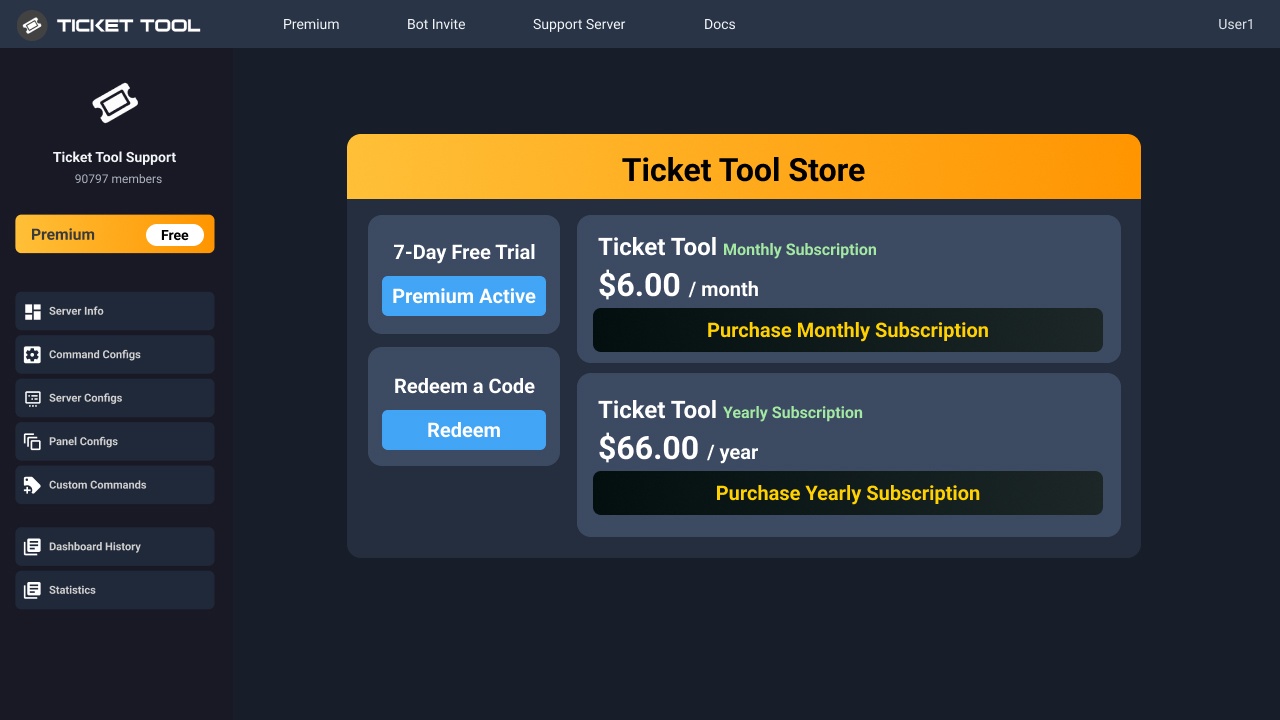
You can purchase Ticket Tool Premium here! Buying it on our website allows you to have full control over your subscription:
 Cancel your subscription at any time
Change your billing interval (yearly/monthly)
Change your payment method
Add or remove server slots to your subscription
 Transfer the subscription between servers
Note: This level of control is only available when purchasing the subscription from our website.
You can manage your current subscriptions here, any billing questions or concerns, feel free to create a Billing Ticket via #🎫│make-a-ticket
<:TTWarning:1034178155872784494> Important Notice <:TTWarning:1034178155872784494>
Starting 
 (October 7th, 2024) Ticket Tool Premium pricing will increase to comply with Discord's new Monetization Policy. You can learn more about the upcoming changes [here](#📣│bot-news message)
 timber kernel
honest ridge
Where do i buy premium
timber kernel
honest ridge
Where do i buy premium
^
humble sequoiaBOT
A Discord Form lets the user answer individual questions in a pop-up Form, which then displays the answers in the ticket message. This can save time if you already know what you want to ask the user.
Setup Forms
Forms can be enabled under Panel Settings > Form Options > Edit Forms Options. In the new pop-up window, you can now enable and edit your own Form.
Form Options
You can add up to 5 questions in the Discord form. This is a Discord limitation. Each question can have a placeholder in the input field, a minimum and maximum input, multi-line, and also the option to have the answer required.
Options
Question Title ➞ Your Question goes here
Question Placeholder ➞ The placeholder text in the input field
Required ➞ If enabled, the user has to answer this question, to submit the form
Multi-Line Input ➞ Allows the user to input multiple lines
Minimum and Maximum Input ➞ Set a minimum and maximum input value for the user
Displaying the Answer
To display the answers from the user, you need to enable Auto display form results on the ticket message as an additional embed
If you don't want a second embed, go into your Panel Configs > Ticket Options > Edit Ticket Message. You use the variable {create.form.x} and replace x with the number of your question. For example, the response to Question 5 can be displayed with {create.form.5}.
timber kernel
scenic cipher
So, for some servers, when you click, create ticket, it will show up some questi...
^
scenic cipher
timber kernel
^
thx 🙂
timber kernel
scenic cipher
timber kernel
<:PabloTiphat:983791053842837624>
how do you creat a pannel? 💀
 stark runeBOT
1. Invite Ticket Tool to your server
First you will want to invite the bot to your server. Once the bot is in your server, you can manage your server in the dashboard.
2. Create a Panel
To create a panel we are going to need to head over to the panel configs on the dashboard.
Once at the dashboard we will need to click Create Panel.
Enter a panel name (Fill in any optional settings you want).
Click Create Panel and your ready to get started with configuring your panel.
An example of a creating a panel is shown below.
3. Send the Panel to a Channel
Once you've created a panel on the dashboard you will need to send it to a channel using send on the dashboard.
Select the channel you want your panel to be created in and click send.
For other questions checkout $help faq.
An example of a sending a panel is shown below.
Having a Problem Sending the Panel?
Do $debug in a channel with Ticket Tool and make sure it has all the necessary Discord permissions.
timber kernel
scenic cipher
how do you creat a pannel? 💀
Here is an inital Setup Step by step guide for you. 
scenic cipher
timber kernel
Here is an inital Setup Step by step guide for you. <:RedPandaLove_FF:1036218854...
Thx... but where is creat pannel button 💀
I CANT FIND IT 😭
 scenic cipher
timber kernel
The green plus in the dashboard:
scenic cipher
timber kernel
The green plus in the dashboard:
thx
iron nightBOT
Gave +1 Rep to @timber kernel (current: #25 - 206)
timber kernel
you are welcome
 north crag
Can I return it to zero?
 timber kernel
north crag
Can I return it to zero?
timber kernel
north crag
Can I return it to zero?
Yes!
Set count button

 timber kernel
north crag
<:kermitthink:1270850186121576519>
timber kernel
north crag
<:kermitthink:1270850186121576519>
It is in the dasboard, on the top.
You can edit it for each panel individually.
north crag
timber kernel
It is in the dasboard, on the top.
You can edit it for each panel individually.
ok thx
iron nightBOT
Gave +1 Rep to @timber kernel (current: #25 - 207)
timber kernel
jade topaz
how do i add a dropdown option to chose from on my ticket (like how its shown in the pic) (i need multiple ones)
 humble sequoiaBOT
The Drop-down menu or Select Menu replaces the buttons on your panel message and uses a drop-down menu with all of your panels. To set this up, go to your Panel Configs and select your main Panel.
<:Numbericons1:1018864164032225340> Enable Select Style
First you enable Select Style. Then you add an item in the Dropdown Editor. Now you can start editing your dropdown!
<:Numbericons2:1018864168041971712> Dropdown Editor
Each line in the dropdown editor represents a line in the drop down menu on discord. You can add more "Items", by clicking on
First you select a panel. That's the panel this option will open a ticket for. DONT select the same panel twice. Each option should have a different Panel
After that, you can put a Display. This is the title of this option and will appear in the drop down menu. The *Description can be set right after that, which will be below the title in grey.
Additionally you can select an emoji, that will be shown in front of each option. You can either manually input the ID of an emoji or select it in the selector.
Common Issues ⚠️
- Panel doesn't send? Make sure you have a valid emoji selected
- Option doesn't show up? Check if two options have the same panel in the DropDown Editor
$dropdown
lament prairie
jade topaz
how do i add a dropdown option to chose from on my ticket (like how its shown in...
Hey there! see above ^
jade topaz
lament prairie
Hey there! see above ^
but it doesnt show me the option like i wanna add another button to the same dropdown but it doesnt show that

like i wanna add "ethereum" dropdown to "middleman passes
along with the bitcoin so users can chose which method they want
 wet warren
اريد حل هذه المشكلة و الانترنت شغال - I want to solve this problem and the internet is working
 lament prairie
jade topaz
but it doesnt show me the option like i wanna add another button to the same dro...
lament prairie
jade topaz
but it doesnt show me the option like i wanna add another button to the same dro...
you will need to create a new pannel then add it
 wet warren
**اريد حل هذه المشكلة و الانترنت شغال - I want to solve this problem and the int...
wet warren
wet warren
**اريد حل هذه المشكلة و الانترنت شغال - I want to solve this problem and the int...
@lament prairie
lament prairie
wet warren
**اريد حل هذه المشكلة و الانترنت شغال - I want to solve this problem and the int...
ايش جالس تحاول تسوي بالضبط وتطلع لك المشكلة؟
wet warren
lament prairie
ايش جالس تحاول تسوي بالضبط وتطلع لك المشكلة؟
بفتح ال Dashboard و اعمل تكت و حاجات في سيرفري بدخل اعدادات تكت السيرفر لقيت كذا
lament prairie
wet warren
بفتح ال Dashboard و اعمل تكت و حاجات في سيرفري بدخل اعدادات تكت السيرفر لقيت كذا
جرب اعمل تسجيل خروج وارجع ادخل
jade topaz
lament prairie
you will need to create a new pannel then add it
I want to also add a custom emoji from my server beside the dropdown options, how do i do that?
wet warren
lament prairie
جرب اعمل تسجيل خروج وارجع ادخل
اك
jade topaz
jade topaz
I want to also add a custom emoji from my server beside the dropdown options, ho...
Like how its shown here

the little bitcoin logo beside the bitcoin, how do i do that
lament prairie
jade topaz
I want to also add a custom emoji from my server beside the dropdown options, ho...
put the emoji ID there

 next hare
how can i add a role tohave access to tickets and see them
humble sequoiaBOT
━━ krix's inquiry has been moved to a ticket ━━

 frozen hearth
worldly helm
Hey there!
Give to bot access to view and send messages into the Channel
frozen hearth
worldly helm
Hey there!
Give to bot access to view and send messages into the Channel
where to make that everyone can create a ticket?
 worldly helm
frozen hearth
where to make that everyone can create a ticket?
worldly helm
frozen hearth
where to make that everyone can create a ticket?
Dashboard —> Buttons —> Create Tickets —> Allowed roles —>@everyone
frozen hearth
ty
 kind axle
worldly helm
Hey there!
Give to bot access to view and send messages into the Channel
kind axle
worldly helm
Hey there!
Give to bot access to view and send messages into the Channel
Arb
worldly helm
$articket
humble sequoiaBOT

فريق الدعم الفني العربي
عميلنا العزيز ان كنت تبحث عن مساعدة يرجى فتح تكت خاص بفريق الدعم الفني العربي
اذهب الى#🎫│make-a-ticket
ثم قم بلضغط على الايموجي الاتي (🇯🇴)
worldly helm
kind axle
Arb
^^^^
kind axle
worldly helm
^^^^
I want the explanation in Arabic
worldly helm
Yeah well i don‘t speak arabic, so #🎫│make-a-ticket
jade topaz
im trying to make it like if the user clicks on any of the above options it opens a ticket in the same category but the name of the ticket should be different, how do i do that (as in ticket name should be bitcoin if they chose the bitcoin option)

 austere forge
jade topaz
im trying to make it like if the user clicks on any of the above options it open...
austere forge
jade topaz
im trying to make it like if the user clicks on any of the above options it open...
Hi there 🙂
see below ⬇️
humble sequoiaBOT
The ticket name is the default channel name of all tickets. To edit it, go to your Dashboard > Panel Configs > Ticket. There you can edit the channel name of opened and closed tickets. You can also use variables in there.

 Note: This is a premium feature
jade topaz
austere forge
Hi there 🙂
see below ⬇️
Note: This is a premium feature
jade topaz
austere forge
Hi there 🙂
see below ⬇️
hi thanks so much i got it
iron nightBOT
Gave +1 Rep to @austere forge (current: #11 - 517)
jade topaz
austere forge
Hi there 🙂
see below ⬇️
can u help me with this
after they make a ticket what do i so it pings them like this and say welcome
 humble sequoiaBOT
The Ticket Message is the first message sent by the bot on a new ticket. To customize it head over to your Dashboard ➞ Panel Configs ➞ Ticket ➞ Edit Ticket Message
austere forge
jade topaz
can u help me with this
after they make a ticket what do i so it pings them lik...
follow instructions above, and use variable {user} to ping
if you don't want the embed, use remove button
jade topaz
austere forge
follow instructions above, and use variable `{user}` to ping
how do i do this, where i want to add an option but i dont want users to be able to use it
 austere forge
jade topaz
how do i do this, where i want to add an option but i dont want users to be able...
austere forge
jade topaz
how do i do this, where i want to add an option but i dont want users to be able...
Go into Dashboard > Buttons > Create ticket - Disabled Roles and put role
jade topaz
austere forge
Go into Dashboard > Buttons > Create ticket - Disabled Roles and put role
no like basically i want them to see all 4 options but when they click on the last one it shouldnt let them create a ticket only for that one (users will be able to create a ticket with the other 3)
 austere forge
jade topaz
no like basically i want them to see all 4 options but when they click on the la...
austere forge
jade topaz
no like basically i want them to see all 4 options but when they click on the la...
yes that’s how they won’t be able to create the ticket :)
austere forge
austere forge
Go into Dashboard > Buttons > Create ticket - Disabled Roles and put role
⬆️
just make sure to select right panel
jade topaz
austere forge
⬆️
okay thanks so much
iron nightBOT
Gave +1 Rep to @austere forge (current: #11 - 518)
 tawny jacinth
Is is possible to update an existing ticket by triggering a form?
austere forge
tawny jacinth
Is is possible to update an existing ticket by triggering a form?
Hi there 🙂
Unfortunately not, if the ticket is already open
 pulsar sparrow
How do I fix this issue?
 restive condor
pulsar sparrow
How do I fix this issue?
restive condor
pulsar sparrow
How do I fix this issue?
Hey there! Are you trying to ping a role there?
pulsar sparrow
I'm typing it like so
<@RoleID>
pulsar sparrow
restive condor
Hey there! Are you trying to ping a role there?
Yes
restive condor
pulsar sparrow
I'm typing it like so
<@RoleID>
Do <@&RoleID> instead please
iron nightBOT
Gave +1 Rep to @restive condor (current: #2 - 1292)
restive condor
No problem!
 lost jewel
Is the bot working right now?
worldly helm
lost jewel
Is the bot working right now?
Hey there!
Yes it is, do you have any issues? If yes please provide detail/ a screenshot, so we can help you better :)
lost jewel
worldly helm
Hey there!
Yes it is, do you have any issues? If yes please provide detail/ a sc...
So when I try to do ./setup ,it says that the application is not working
 worldly helm
okay, can you please try the /debug command in that channel?
 timber kernel
lost jewel
uhhhh
timber kernel
lost jewel
uhhhh
There are a lot of permissions missing (channel permissions):
 worldly helm
okay, that is a common issue and easy to fix! Make sure the bot has all of these following permissions
jade topaz
hi
worldly helm
 humble sequoiaBOT
Hello, we would love to help you, but if you don't tell us what you need help with we can't help you :(
worldly helm
timber kernel
There are a lot of permissions missing (channel permissions):
dont steal my stuff!
jade topaz
may i know how can other view ticketss
timber kernel
worldly helm
dont steal my stuff!
just some help from me 😉
You can continue.
jade topaz
like now only i can seee.. but i want co-owner to see too
lost jewel
timber kernel
There are a lot of permissions missing (channel permissions):
wait let me check
jade topaz
@timber kernel
humble sequoiaBOT
1. Go into your Dashboard
2. Open your Panel Configs tab
3. Select the panel you want to grant access to
4. Open the General options menu
5. Select your Support Team Roles
6. Save changes
jade topaz
ok
worldly helm
jade topaz
<@153489496317493248>
Hey there! See above ^^^
lost jewel
alright! It's fixed,thanks @worldly helm
worldly helm
You're welcome
if you have any question, let us know 🙏
lost jewel
jade topaz
<@153489496317493248>
don't ping staff,it's against the rules
worldly helm
Great! If yall have any other issues, questions feel free to let us know :)
 worldly helm
General-->Select the co-owner role
jade topaz
oki tysm
jade topaz
worldly helm
`General`-->`Select the co-owner role`
tysm
jade topaz
Can anyone tell me how to change this message ?
 lament prairie
jade topaz
Can anyone tell me how to change this message ?
lament prairie
jade topaz
Can anyone tell me how to change this message ?
Dashboard -> DropDown Style -> Placeholder Text
jade topaz
lament prairie
> Dashboard -> DropDown Style -> Placeholder Text
Tysm bro 👍👍👍
lament prairie
jade topaz
Tysm bro 👍👍👍
You're welcome, glad to help
lament prairie
valid wave
وش هو أمر تغيير اسم التكت
وعليكم السلام
$rename الأسم ، /rename الأسم
 sage nest
i keep getting an error about this code 4f11290a-f4d3-11ed-a05b-0242ac120003 what should i do? pleas help me
shut bolt
sage nest
i keep getting an error about this code 4f11290a-f4d3-11ed-a05b-0242ac120003 wha...

4f11290a-f4d3-11ed-a05b-0242ac120003 hash errors, causes and solutions
If you are not server staff, then there isn't much you can do besides inform them about it
jade topaz
How do I set up so you can select why you opening a ticket
humble sequoiaBOT
A Discord Form lets the user answer individual questions in a pop-up Form, which then displays the answers in the ticket message. This can save time if you already know what you want to ask the user.
Setup Forms
Forms can be enabled under Panel Settings > Form Options > Edit Forms Options. In the new pop-up window, you can now enable and edit your own Form.
Form Options
You can add up to 5 questions in the Discord form. This is a Discord limitation. Each question can have a placeholder in the input field, a minimum and maximum input, multi-line, and also the option to have the answer required.
Options
Question Title ➞ Your Question goes here
Question Placeholder ➞ The placeholder text in the input field
Required ➞ If enabled, the user has to answer this question, to submit the form
Multi-Line Input ➞ Allows the user to input multiple lines
Minimum and Maximum Input ➞ Set a minimum and maximum input value for the user
Displaying the Answer
To display the answers from the user, you need to enable Auto display form results on the ticket message as an additional embed
If you don't want a second embed, go into your Panel Configs > Ticket Options > Edit Ticket Message. You use the variable {create.form.x} and replace x with the number of your question. For example, the response to Question 5 can be displayed with {create.form.5}.
lament prairie
jade topaz
How do I set up so you can select why you opening a ticket
Hey there! see above ^
humble sequoiaBOT
Hello, we would love to help you, but if you don't tell us what you need help with we can't help you :(
 pseudo ravine
Please be patient. There's no need to ping multiple members for support
Are you referring to the ticket name? Or just a message in the ticket when someone claims the ticket?
pseudo ravine
Hey there. What exactly are you trying to report?
 olive cloak
i need report 1 guy he use cheat he got ban on old account but he buy new account his old account @exit2025 in roblox new @exit2026
you can check in logs idk @exit2025 in ban for cheats
how i can report him?
humble sequoiaBOT
⚠️ You're in the wrong place
We provide support for Ticket Tool Discord bot and cannot help you with whatever issue you have.
- We don't know which Support Team you should contact to get this issue resolved, and unfortunately we won't be able to accurately tell you.
If you don't have any further questions regarding our bot Ticket Tool, please close this ticket
Claiming allows you to change the ticket name, category and permissions. To use it you have to enable it first on your Dashboard > Panel Configs > Claiming

 Note: This is a premium feature
pseudo ravine
Note: This is a premium feature
pseudo ravine
So then create those categories and assign them there for your panels
 silver crown
hi
 dreamy rover
how can I enable auto transcripts
so that when i close a ticket, it auto saves a transcript instead of manually
 balmy river
solo se puede cambiar el nombre del ticket con premium? ejemplo: reporte-0001
Can only the ticket name be changed with Premium? Example: report-0001
worldly helm
dreamy rover
so that when i close a ticket, it auto saves a transcript instead of manually
Hey there!
That is a premium only Feature
worldly helm
Dashboard—>Permissions—>Ticket Owner—> Open ticket—>send images
 pure zinc
thanks bro i love you
@worldly helm i love you
but please tell me there is no enable images optionn
Attach Files
this works with also images?
worldly helm
You‘re welcome
Glad i could help 🙏
pure zinc
wlcm
pure zinc
pure zinc
Attach Files
this works with also images?
¯_(ツ)_/¯
THERE is no send images option but there is the option called allow attach files does it do the same thing? @worldly helm
worldly helm
pure zinc
Attach Files
this works with also images?
Yes, that works. Sorry!
 jolly kelp
.
pure zinc
pure zinc
can u boost my sevrer we need 1 more to reach level 1
@worldly helm
worldly helm
pure zinc
can u boost my sevrer we need 1 more to reach level 1
I‘m sorry, no.
Please don‘t advertise please
pure zinc
ok thanks
 white marsh
How do I add a press button to tickettool?
 hazy relic
humble sequoiaBOT
hazy relic
humble sequoiaBOT

Partnership Program
Our partnership program is currently closed.
We appreciate you being interested in partnering with Ticket Tool! Unfortunately, the program for partnering is closed as of now. Nonetheless, make sure to keep an eye at #📣│server-news where we announce partner applications opening!
 TicketTool.xyz - Ticketing without clutter
 wise iris
Is there a way to have a timer if the ticket is inactive? It closes
restive condor
wise iris
Is there a way to have a timer if the ticket is inactive? It closes
Hey there! Yes, you can use our automations feature for that.
Which is a premium feature
humble sequoiaBOT
With Ticket Tool's automation, you'll be able to customize your ticket system workflow! Using the Automation Editor you can:
- Chose out of 6 different triggers
- Set a Message Watcher to wait for a message for a given time, or to wait for the absence of them
- Add delays on the execution of actions after the trigger or watcher finds a message!
Automation Command
Automations can be stopped, by running the /automation stop command inside the ticket you want it to stop in. Restart it with /automation start You'll also be able to view the current status of the automations with /automation.
__Important Notes__
- Automation is on ALPHA TESTING PHASE, things might work unexpectedly or not at all.
- Any automation will run for a maximum of 7 days or until the ticket is closed, afterward, it will stop checking
+ You can have 5 automations per panel

$auto
wise iris
Ty
 brazen token
Hello
Staff members can't see tickets history

they cannot see the history for new tickets that were created
For the staff team perms , I selected the ✅ for reading the history
but still not working
worldly helm
brazen token
they cannot see the history for new tickets that were created
For the staff team...
Hey there!
1: Make sure you set it up for the right panel.
2: Open a new ticket after enabling it.
brazen token
worldly helm
Hey there!
1: Make sure you set it up for the right panel.
2: Open a new ticket ...
What do you mean right panel
worldly helm
brazen token
What do you mean right panel
in your dashboard you can have mutliple panels. If u want everyone in the ticket to see the msg history…. Enable it for: Ticket Owner | Support Team
brazen token
worldly helm
in your dashboard you can have mutliple panels. If u want everyone in the ticket...
What's the difference between Edit opened and edit closed?
worldly helm
Ticket Open:
When the person created a ticket and have access to it, u can customize the permission for a ticket when its opened.
Ticket closed:
these permissions are after the ticket is being closed.
brazen token
worldly helm
Ticket Open:
When the person created a ticket and have access to it, u can custo...
Will these changes apply on older tickets where history wasn't shown? or is it only gonna work for newly opened tickets after saving the changes?
worldly helm
Sadly it only works for new created tickets.
 faint quarry
hey so i am trying to create a ticket on a server and this message pops up
error and a bunch of letters
restive condor
faint quarry
hey so i am trying to create a ticket on a server and this message pops up
Hey there! Could you screenshot the error message?
 vital dew
Yo guys from where i can create "ticket categories" Like when someone wanna open ticket to choose between "support" "premium services" "other question" ? Is it even possible in free version
faint quarry
 restive condor
vital dew
Yo guys from where i can create "ticket categories" Like when someone wanna open...
restive condor
vital dew
Yo guys from where i can create "ticket categories" Like when someone wanna open...
Hey there! Ticket Categorys how exactly? Multiple buttons as in #🎫│make-a-ticket?
restive condor
faint quarry
Discord has a limit of 500 channels per server.
It appears that server has reached such limit.
Please contact server staff for them to clear tickets, in order for new tickets be created
faint quarry
restive condor
Hey there! Ticket Categorys how exactly? Multiple buttons as in <#57170643544925...
yep
faint quarry
restive condor
Discord has a limit of 500 channels per server.
It appears that server has reach...
ok but there is none who is responding
vital dew
restive condor
Hey there! Ticket Categorys how exactly? Multiple buttons as in <#57170643544925...
I guess yes something like that you know if a guy want to ask question , or report someone or buy something to be in dif categories so we can know why the customer opened the ticket , not asking him again and waisting time
restive condor
faint quarry
ok but there is none who is responding
There's nothing we can do about that unfortunately. We're not associated with that server or its staff
We're just the support team for the bot they use
faint quarry
ok thx man
restive condor
vital dew
I guess yes something like that you know if a guy want to ask question , or repo...
You will need to create one panel per button option. You can then combine all your panels into one embed with multiple buttons using the instructions below
Since each ticket option has its own panel, you can have each option have different ticket messages or go into different categories for you to identify the ticket type
humble sequoiaBOT
For more convenient use of multipanels, you can now combine panels on the dashboard. This will allow you to directly send the multipanel from the dashboard or via the $panel ID command.
Where can I find this?
You can find this setting on the Dashboard -> Panel Configs -> Panel -> Attached Panels
Note: if you're attaching all the panels to a panel called English, don't include English in the attached panel's box (If you do this, it will create a duplicate)
This will put all buttons from all of your panels on one message. The message is the panel message from the panel you're combining these panels in.
 iron nightBOT
Gave +1 Rep to @restive condor (current: #2 - 1297)
 round abyss
Is there a way to fully customize the bot with premium? (icon, name,...)
 clear veldt
hello ,
The premium subscription has expired, and I cannot continue paying temporarily, so I need to go back to using the free version, but when I return the version, I cannot update the previous form, and in fact I do not want to create all the orders again.
worldly helm
round abyss
Is there a way to fully customize the bot with premium? (icon, name,...)
Hey there!
Sadly you can only change the name..!
Look below :)
humble sequoiaBOT
Ticket Tool Custom Avatar
As of now, you are not able to change Ticket Tool's profile picture, nonetheless, our Development Team is working on the release of white labels, this is your own custom bot!
For the time being, you can change the bot's nickname by right-clicking the bot in the user list on your server and clicking Change Nickname
$avatar
 median wigeon
clear veldt
hello ,
The premium subscription has expired, and I cannot continue paying temp...
median wigeon
clear veldt
hello ,
The premium subscription has expired, and I cannot continue paying temp...
Hello,
In #🎫│make-a-ticket you can make a ticket with the billing department, they can help you the best with your subscriptio
iron nightBOT
Gave +1 Rep to @median wigeon (current: #48 - 44)
round abyss
Oh bet thanks @worldly helm
iron nightBOT
Gave +1 Rep to @worldly helm (current: #30 - 123)
worldly helm
You're welcome
Feel free to reach out again if you have any more questions 🙏
round abyss
Do you know if the option to link it to a custom bot might be out soon?
worldly helm
Nope, and i don't think it will be added.
round abyss
no worries thank you !
humble sequoiaBOT
Hello, we would love to help you, but if you don't tell us what you need help with we can't help you :(
 slow swallow
how to change the text here
 worldly helm
What text exacly?
slow swallow
like i wanna change the line, a indivual person can take upto...............
worldly helm
Look below :)
humble sequoiaBOT
The panel message is where people react to make a ticket. To customize it head over to your Dashboard --> Panel Configs -> Panel -> Edit Panel Message
 worldly helm
Yep!
slow swallow
ic , thanks
worldly helm
You‘re welcome
If you have any more questions, feel free to reach out again 🙏
slow swallow
slow swallow
how to change the text here
the text after Y is not coming when i send this in a channel
it was showing when the old admin set up the ticket but now.........
slow swallow
worldly helm
Yep!

worldly helm
You have to update or resend the panel.
slow swallow
worldly helm
You have to update or resend the panel.
yeah we try to resent the panel
: (
worldly helm
Can you show me your panel message please?
slow swallow
yeah sure
LOAN REQUESTS
We Can Process Loans For:
:arrow_samatva: Wists Loan
:arrow_samatva:Tickets Loan
:arrow_samatva:INR Loan
An individual person can take upto 100:wist_spin: loan or 50🎟️ loan in one request. If you want to take a loan of more than 100:wist_spin: or 50🎟️ you can do that in 2 request or more as per the amount you need to take.
we are trying to set this up
worldly helm
Okay, if you resend the embed, does it show any errors?
 ocean nest
Hello community! I am a newbie to the Tiket tool. I have a task to create a system that would allow me to receive tikets from different categories of my server. and somehow sort tikets by category. On my Discord server there are several categories (these are physical locations of game shops) How do I get tickets and know from which shop or location it was made? Thanks in advance for your help.
slow swallow
worldly helm
Okay, if you resend the embed, does it show any errors?
no

it become more worse now
lol , sed
worldly helm
Seems it worked lol
worldly helm
ocean nest
Hello community! I am a newbie to the Tiket tool. I have a task to create a sys...
Hey there!
Dashboard—>Panel configs—>Category.
Note: *Make sure to set it up for every channel.
worldly helm
slow swallow
the emoji's and the highlighted textt
I am not sure, but i don‘t think you can add custom emojis to the embed message. (If yes, please correct me)
To highlite a text do **text** looks like this text
ocean nest
is the Category = chanel in discord?
ocean nest
worldly helm
Hey there!
Dashboard—>Panel configs—>Category.
**Note:** *Make sure to set it u...
is the Category = channel in discord?
slow swallow
worldly helm
I am not sure, but i don‘t think you can add custom emojis to the embed message....
oo , well u know more than me so ........
lemme try
worldly helm
ocean nest
is the Category = channel in discord?
Kinda…
Lets take my ticket tool server as an example. a channel is copy-paste.
A Category is for example Tickets-open or Tickets closed
 worldly helm
slow swallow
lemme try
worldly helm
slow swallow
lemme try
Great!
 dense girder
How can I do the same?
 humble sequoiaBOT
The Drop-down menu or Select Menu replaces the buttons on your panel message and uses a drop-down menu with all of your panels. To set this up, go to your Panel Configs and select your main Panel.
<:Numbericons1:1018864164032225340> Enable Select Style
First you enable Select Style. Then you add an item in the Dropdown Editor. Now you can start editing your dropdown!
<:Numbericons2:1018864168041971712> Dropdown Editor
Each line in the dropdown editor represents a line in the drop down menu on discord. You can add more "Items", by clicking on
First you select a panel. That's the panel this option will open a ticket for. DONT select the same panel twice. Each option should have a different Panel
After that, you can put a Display. This is the title of this option and will appear in the drop down menu. The *Description can be set right after that, which will be below the title in grey.
Additionally you can select an emoji, that will be shown in front of each option. You can either manually input the ID of an emoji or select it in the selector.
Common Issues ⚠️
- Panel doesn't send? Make sure you have a valid emoji selected
- Option doesn't show up? Check if two options have the same panel in the DropDown Editor
$dropdown
restive condor
dense girder
How can I do the same?
Hey there! See above please ^^
dense girder
restive condor
Hey there! See above please ^^
thanks you
restive condor
Let me know if you have any questions 🙏
iron nightBOT
Gave +1 Rep to @restive condor (current: #2 - 1299)
 winged cedar
when registering, it gives an error and offers to contact the support service
 restive condor
winged cedar
when registering, it gives an error and offers to contact the support service
restive condor
winged cedar
when registering, it gives an error and offers to contact the support service
Hey there! Are you currently located in Russia?
winged cedar
restive condor
Hey there! Are you currently located in Russia?
yes
restive condor
winged cedar
yes
Unfortunately, our payment provider (paddle.net) does not accept transactions from Russia due to economic sanctions
winged cedar
restive condor
Unfortunately, our payment provider (paddle.net) does not accept transactions fr...
Will VPN help?
restive condor
It might, give it a try please
winged cedar
restive condor
It might, give it a try please
Okay, thanks. I'll try it now
iron nightBOT
Gave +1 Rep to @restive condor (current: #2 - 1300)
restive condor
Let me know if you're still having issues with it after that
winged cedar
restive condor
Let me know if you're still having issues with it after that <:PabloTiphat:98379...
Yes, thank you, is it working, can I pay with a Turkish card?
restive condor
Yes, you should be able to
winged cedar
restive condor
Yes, you should be able to
Thanks)))
iron nightBOT
Gave +1 Rep to @restive condor (current: #2 - 1301)
ocean nest
worldly helm
Kinda…
Lets take my ticket tool server as an example. a channel is copy-paste....
thank you so much. i got it all worked out and i'm completely satisfied!
iron nightBOT
Gave +1 Rep to @worldly helm (current: #30 - 124)
worldly helm
ocean nest
thank you so much. i got it all worked out and i'm completely satisfied!
Great! You're welcome
If you have any more questions, feel free to reach out again if you need anymore help 🙏
ocean nest
worldly helm
Great! You're welcome <:3v_smile:1187282191630204958>
If you have any more ques...
I'll try to feed the FAQ to the gpt chat. Maybe I won't ask any more newbie questions )) But I don't promise that 😉
worldly helm
no worries, you can ask all kind of questions about the bots. We are here to help you with any kind of issue related to the bots :)
You can look in the docs aswell
https://docs.tickettool.xyz
 solemn wedge
Those in the support team role cannot see the message history of members' closed tickets
Can you help?
worldly helm
solemn wedge
Those in the support team role cannot see the message history of members' closed...
Hey there!
Dashboard-->Permissions-->Support Team-->Edit closed--> View Message history
 worldly helm
Sorry, did you mean the ticket owner cant see the messages anymore, or your staff team?
solemn wedge
Support team can't see
worldly helm
okay, if you set it up. It should work perfectly fine.
 fickle sand
I keep getting this message every time I try to set up the bot
 worldly helm
fickle sand
I keep getting this message every time I try to set up the bot
worldly helm
fickle sand
I keep getting this message every time I try to set up the bot
Hey there!
Make sure the bot has these following permissions

 strong flame
Is anyone able to assit me in setting up auto reminders for people in my discord server please 🙂
worldly helm
strong flame
Is anyone able to assit me in setting up auto reminders for people in my discord...
Hey there!
We only help with questions about @humble sequoia or @pseudo glen .
strong flame
worldly helm
Hey there!
We only help with questions about <@722196398635745312> or <@5576283...
Hey 🙂
It is exactly that. I'm trying to use the Premium Bot to ask people if they would like to close the ticket 🙂
worldly helm
Ohh, okay. So sorry for the missunderstanding!
strong flame
worldly helm
Ohh, okay. So sorry for the missunderstanding!
Thank you 🙂
iron nightBOT
Gave +1 Rep to @worldly helm (current: #30 - 125)
worldly helm
I am not sure if that is possible. If it is, its probably with the new automation update
humble sequoiaBOT
With Ticket Tool's automation, you'll be able to customize your ticket system workflow! Using the Automation Editor you can:
- Chose out of 6 different triggers
- Set a Message Watcher to wait for a message for a given time, or to wait for the absence of them
- Add delays on the execution of actions after the trigger or watcher finds a message!
Automation Command
Automations can be stopped, by running the /automation stop command inside the ticket you want it to stop in. Restart it with /automation start You'll also be able to view the current status of the automations with /automation.
__Important Notes__
- Automation is on ALPHA TESTING PHASE, things might work unexpectedly or not at all.
- Any automation will run for a maximum of 7 days or until the ticket is closed, afterward, it will stop checking
+ You can have 5 automations per panel
$auto
 trim zodiac
Hello, when someone creates a ticket, for purchase for example, could the bot change the name of the ticket to purchase or this is a premium feature?
humble sequoiaBOT
━━ Axeel's inquiry has been moved to a ticket ━━
jade topaz
Can anyone help me out with this ?
Somehow when I want a ticket to go to a certain category it tells me that the bot doesn’t have the right permission to send the ticket in there even though I have all permissions turned on for the bot

 worldly helm
Hey there!
Can you try giving the permission "Send messages" for the category ---Partnering--- aswell?
jade topaz
yea sure let me try
jade topaz
worldly helm
Hey there!
Can you try giving the permission "Send messages" for the category --...
Yess I got it to work , tysm bro 👍👍👍👍
worldly helm
jade topaz
Yess I got it to work , tysm bro 👍👍👍👍
You're welcome
Feel free to reach out again if you have any more questions 🙏
 rigid kiln
it keeps getting me this error, it worked before

 tulip oxide
You are not the only one
 cloud pendant
Nope
rigid kiln
rip
cloud pendant
I have the same issue
restive condor
Hi there, we are aware of these issues.
Unfortunately, this is beyond us as the issue is caused by Discord.
You can follow https://discordstatus.com/incidents/wlf7gks7nb1m for updates
 worldly helm
Hey there!
I had the same Clyde message aswell. I am pretty sure, discord has some sort of downtime.
rigid kiln
alr thanks for letting me know i hope it gets better fast thanks for the support
austere forge
restive condor
Hi there, we are aware of these issues.
Unfortunately, this is beyond us as the...
 pseudo helm
@restive condor Tu que eres el unico staff q me entiende,es normal q falle el bot?
tulip oxide
Welcome to Discord's home for real-time and historical data on system performance.
restive condor
pseudo helm
<@795710289425334303> Tu que eres el unico staff q me entiende,es normal q falle...
Es debido a un problema que Discord está teniendo en estos momentos
pseudo helm
en plan,o me tarda en responder o no me hace caso
worldly helm
Dan, its ur fault....!
pseudo helm
restive condor
Es debido a un problema que Discord está teniendo en estos momentos
vale vale,gracias
ionic path
^^
 pseudo helm
siempre tan atento
 unkempt plank
 austere forge
unkempt plank
austere forge
unkempt plank
Hi there 🙂
#🆘│community-support message
 lyric quartz
rigid kiln
lyric quartz
rigid kiln
you can live without the bot for atleast 3 hours right?
pseudo ravine
depends on the server
pseudo ravine
Let’s keep this channel to strictly regarding support for the bot
jade topaz
Sorry to bug again , but so basically this message means that the biz is currently not working but will again soon right ?
 austere forge
jade topaz
Sorry to bug again , but so basically this message means that the biz is current...
austere forge
jade topaz
Sorry to bug again , but so basically this message means that the biz is current...
Hi there 🙂
#🆘│community-support message
jade topaz
Thanks 👍
rigid kiln
noo my bots are not working too
should i pause invites to my server? cuz now people can send weird shit cuz my anti link and anti nude bot is down
jade topaz
rigid kiln
should i pause invites to my server? cuz now people can send weird shit cuz my a...
I would tbh
austere forge
jade topaz
No one can create tickets rn
rigid kiln
jade topaz
I would tbh
i paused it 
 hazy light
so whens bot comming back up
ill pay $5 if you can give me exlcusive access untill its back on
yk what, make it 10
pseudo ravine
Hey there. Discord is currently having issues, which is affecting all bots
 empty dune
 covert swallow
We are aware the bot is not working, it is a Discord issue, we can't do anything about it
 stray skiff
restive condor
Hi there, we are aware of these issues.
Unfortunately, this is beyond us as the...
stray skiff
restive condor
Hi there, we are aware of these issues.
Unfortunately, this is beyond us as the...
Yo, what's the ETA for the bot being fixed
covert swallow
Please read my above message
 twilit summit
Thanks for letting us know in #📣│bot-news !
stray skiff
covert swallow
Please read my above message
Ah alr
 prime bridgeBOT
<:notallowed:660789872600285184> #🆘│community-support has been locked!
You will gain access again once the lockdown is lifted.
 scenic plinth
While there still remains no ETA, we're working to push services back online assuming Discords API issue cooperates. We disabled the bots to prevent rate limits (which would have caused much bigger issues).
Premium services should be restored, but until Discord's Status is fully stable, you can expect small amounts of potential lag should issues arise.
prime bridgeBOT
<:allowed:660789592647008258> #🆘│community-support has been unlocked!
Everyone now has access to this channel.
 jaunty juniper
Can I still join the Portuguese support team? I have a lot of experience in support.
humble sequoiaBOT
How do be I become a Support Member?
You can become a support member in 2 ways:
1. You can be really active in #🆘│community-support gain <@&799500225579712543> role and get chosen by a Manager
2. You can apply VIA our applications that would be sent in #📣│server-news
We currently have Support Teams for the following languages:
:flag_us: English
:flag_jo: Arabic
:flag_fr: French
:flag_de: German
:flag_es: Spanish
:flag_br: Portuguese
jaunty juniper
I had been a member for a few years, but my account had been hacked and only now did I see that you had closed the vacancies for Portugal
jaunty juniper
humble sequoia
How sad that the vacancies have closed. Is there no way to talk to someone to try to get one? I have a lot of experience in this.
pseudo ravine
Unfortunately not
jaunty juniper
Ok
jaunty juniper
pseudo ravine
Unfortunately not
My account had been hacked and I think I even reached out to support but I don't remember doing it. Is there any way I can try to talk to someone responsible?
just to at least see if I have a chance
pseudo ravine
No, the only ways are from the embed I sent above
jade topaz
How do I get to the bot to inform me of a ticket being opened
humble sequoiaBOT
1. Go into your Dashboard
2. Open your Panel Configs tab
3. Select the panel you want to ping your support on
4. Open the Ticket options menu
5. Click on Edit Ticket Message
6. In the Message Content use one of the role mention syntax (**{@Role Name}**/**{Role ID}**)
7. Save changes
Note: For this to work properly, Ticket Tool requires the Mention Everyone permission. Or the role must have the Allow anyone to @mention this role setting enabled
jade topaz
thanls @pseudo ravine
 clever falcon
thanks @pseudo ravine
iron nightBOT
Gave +1 Rep to @pseudo ravine (current: #6 - 679)
pseudo ravine
You're welcome, glad I could help!
 potent verge
Hello, so for some reason on one our 400k+ servers we cant seem to access tickettool dashboard but it works on the servers and the bot is within said server. Nor me or the ownership account can access it. I was after a bit of help.
pseudo ravine
Hey there. What's the server ID? Not an invite, just the server ID
potent verge
pseudo ravine
Hey there. What's the server ID? Not an invite, just the server ID
828746399255887904
pseudo ravine
One moment
potent verge
ty
pseudo ravine
It seems like your premium subscription expired
You'll need to invite the white bot into your server, run the /botswitcher command and switch to the white bot, and then purchase a subscription
potent verge
we have the normal bot within the server?
pseudo ravine
That server has the premium bot as the active bot
potent verge
you see we cant access dashboard to do anything not even to change the bot
it says "You don't have access to this server.
"
pseudo ravine
You can run the /botswitcher command
potent verge
alri
Secondly, any due date when the partnership system will be open? I got 430k, 360k and 213k server that some use to be partned with you all.
pseudo ravine
There's no ETA unfortunately
iron nightBOT
Gave +1 Rep to @pseudo ravine (current: #6 - 680)
pseudo ravine
You're welcome, glad I could help!
 lost island
pseudo ravine
You're welcome, glad I could help!
lost island
pseudo ravine
You're welcome, glad I could help!
when I do /open command it keeps on saying Channel is not a ticket
humble sequoiaBOT
━━ User's inquiry has been moved to a ticket ━━
wise iris
Automation isn't working
pseudo ravine
Hey there. How exactly is it not working?
wise iris
I'm trying to make if the ticket is inactive or something it closes
pseudo ravine
What’s the server ID? Not an invite, just the server ID
wise iris
893512452304687114
pseudo ravine
One moment
So you’re telling Ticket Tool to check if the ticket owner sends a message within 5 minutes of creating the ticket once, and then stopping the automation

You should change “once and stop” to “until stopped”
wise iris
It should work now right?
pseudo ravine
Yep, but you’ll need to test it on a new ticket
wise iris
Nothing happened
 terse lance
Haiya, I invited the bot to my server but the server wont show up on my list so I can't add any tickets or anything. I've tried syncing the servers, closing and reopening the page, kicking and reinviting the bot and nothing fixed it. It isnt Rainbow.shork's server either. Do I need to be the owner of the server to manage it? Thats the only difference between this server and the other two. I am an admin so I should be able to add and edit everything but it just won't show up.

 jagged pine
Does anyone know how to see past tickets because I have some info I need to get some info
scenic plinth
No, as we have told you previously, we cannot obtain this for you. You yourself need access to the server's transcript channel where the transcript of the ticket was presumably saved.
jagged pine
How I do that?
worldly helm
jagged pine
How I do that?
You can tell staff and ask for the transcript.
worldly helm
You‘re welcome
Feel feee to reach out again if you need anymore help 🙏
terse lance
terse lance
Haiya, I invited the bot to my server but the server wont show up on my list so ...
Sorry, I don't mean to be pushy, but is this issue because I am not the owner or what is the issue?
 granite atlas
You welcome

 crimson inlet
deleting an option in a panel would mean i have to delete the whole category in the panel right
jade topaz
crimson inlet
deleting an option in a panel would mean i have to delete the whole category in ...
What?
crimson inlet
i wanna take out this specifically, so i deleted the panel for
it

as seen here
but it’s still showing unfortunately
like i wanna completely remove that option ykwim
because around 150 people applied for that ticket and i wanna completely stop it without having to show the error
worldly helm
terse lance
Haiya, I invited the bot to my server but the server wont show up on my list so ...
Hey there! You need to be administrator or the owner has to set up a Dashboard role.
If you have one of these two, try logging out and log in again.
 worldly helm
Do not ping for support. Please wait for staff to assist you or #🎫│make-a-ticket
 misty kraken
quick question, is there a way to have option of reason of creating a ticket text box?
timber kernel
misty kraken
quick question, is there a way to have option of reason of creating a ticket tex...
You could use forms to ask the user up to 5 questions while creating a ticket.
humble sequoiaBOT
A Discord Form lets the user answer individual questions in a pop-up Form, which then displays the answers in the ticket message. This can save time if you already know what you want to ask the user.
Setup Forms
Forms can be enabled under Panel Settings > Form Options > Edit Forms Options. In the new pop-up window, you can now enable and edit your own Form.
Form Options
You can add up to 5 questions in the Discord form. This is a Discord limitation. Each question can have a placeholder in the input field, a minimum and maximum input, multi-line, and also the option to have the answer required.
Options
Question Title ➞ Your Question goes here
Question Placeholder ➞ The placeholder text in the input field
Required ➞ If enabled, the user has to answer this question, to submit the form
Multi-Line Input ➞ Allows the user to input multiple lines
Minimum and Maximum Input ➞ Set a minimum and maximum input value for the user
Displaying the Answer
To display the answers from the user, you need to enable Auto display form results on the ticket message as an additional embed
If you don't want a second embed, go into your Panel Configs > Ticket Options > Edit Ticket Message. You use the variable {create.form.x} and replace x with the number of your question. For example, the response to Question 5 can be displayed with {create.form.5}.
misty kraken
aight thanks goat
timber kernel
 wide oyster
Hi, how can I make sure the ticket opens within one category only
on the settings I always put the category where I want it open but it doesn't open there
timber kernel
wide oyster
on the settings I always put the category where I want it open but it doesn't op...
Where does it open instead? Outside of any category?
 buoyant star
what permissions do i need to add the bot to a server that i moderate in? ive got the manage server permission but it still doesnt let me add the bot
humble sequoiaBOT
When first invited to your server, Ticket Tool should have the permissions shown below in order to ensure an appropriate functioning:
When customizing permissions for the different ticket participants, you must make sure Ticket Tool has the permissions you want it to grant to others, you can learn more about this here.
Missing Permissions
This error is a direct outcome of the bot missing permissions as depicted above. When troubleshooting this error we suggest you go through these steps:
- Use the </debug:1029783024264564765> command to check if the bot is lacking core role or channel permissions.
- Compare the category/channel's overrides and contrast them with the bot's roles to identify any permission denial that is breaking the functioning
- If you can't still figure it out, let our <@&540295656720302081> know so they can guide you through
Additional Resources
- If you are a server administrator and would like to understand more how to set up your server's permissions, we suggest checking the Discord Support Knowledge Base
- If you are a bot developer and are interested in the internal permission hierarchy we suggest you this part of the Discord Developer Docs
Important Note
- Giving Administrator permissions is NOT required and we do NOT encourage you to do unless you are trying to troubleshoot your permissions setup.
 timber kernel
buoyant star
what permissions do i need to add the bot to a server that i moderate in? ive go...
timber kernel
buoyant star
what permissions do i need to add the bot to a server that i moderate in? ive go...
Here you go ^
buoyant star
timber kernel
Here you go ^
what permissions do i need though 😭
i should be able to add it but i cant

 pseudo jungle
How do I put a background on the ticket
timber kernel
pseudo jungle
How do I put a background on the ticket
wdym by background? can you please elaborate?
 timber kernel
pseudo jungle
background like
timber kernel
pseudo jungle
background like
Via the field editor from Panel Configs -> Messages -> Edit Panel / Ticket message etc.
-> Image URL

Note:
It is for Premium only
pseudo jungle
I have the bot of Premium
buoyant star
timber kernel
Here you go ^
what command would an admin need to run to be able to give me dashboard access to the ticket bot
timber kernel
pseudo jungle
I have the bot of Premium
Then go for it
timber kernel
buoyant star
what command would an admin need to run to be able to give me dashboard access t...
They need to go to the dashboard and add your role to the dashboard roles:
Panel Configs -> Server Configs



 flint spear
Helloo all of our old transcripts don’t open anymore (from around early-mid last year and earlier), is there any reason this is or any way to fix it? We’re a pretty busy server so would help to have those records!
austere forge
flint spear
Helloo all of our old transcripts don’t open anymore (from around early-mid last...
Hi there 🙂
Transcript links expire after a certain period of time.
Please use the Direct Link button again to generate a new link
flint spear
austere forge
Hi there 🙂
Transcript links expire after a certain period of time.
Please use...
That doesn't seem to be working, the Direct Link takes us to this page
 austere forge
flint spear
That doesn't seem to be working, the Direct Link takes us to this page
austere forge
flint spear
That doesn't seem to be working, the Direct Link takes us to this page
Alr, those are the old transcripts
Unfortunately, once the link expires on those they are no longer accessible via a direct link.
Please download the HTML file to view it
 flint spear
austere forge
Alr, those are the old transcripts
Unfortunately, once the link expires on thos...
flint spear
austere forge
Alr, those are the old transcripts
Unfortunately, once the link expires on thos...
Ah, gotcha
Thank you muchly
 hallow quartz
Is there a way to close with a reason?
 ocean sleet
I cant edit these two
 timber kernel
ocean sleet
I cant edit these two
timber kernel
ocean sleet
I cant edit these two
This is for Premium only.
timber kernel
hallow quartz
Is there a way to close with a reason?
yes, you can use /close reason
 hallow quartz
How about with the button with in a ticket?
timber kernel
that is not possible, feel free to add a suggestion for it
ocean sleet
timber kernel
This is for Premium only.
k
ocean sleet
timber kernel
This is for Premium only.
how about the panel name
timber kernel
ocean sleet
how about the panel name
This you can change with the green Rename button
 ocean sleet
thanks @timber kernel
iron nightBOT
Gave +1 Rep to @timber kernel (current: #25 - 212)
timber kernel
ocean sleet
I didnt find it though
timber kernel
ocean sleet
I didnt find it though
If you go to the dashboard an click Panel Configs
it will show at the top
ocean sleet
K
 alpine pike
Hey guys, I want to put all of my tickets in a category
How do I do that without messing up the permissions?
worldly helm
Hey there!
Dashboard-->Panel Configs-->Category-->Select your wanted one
 hollow lodge
Why did ticket tool nuke my server?

 pseudo ravine
Hey there. That's not the real Ticket Tool
@pseudo glen The 4 digits are different from that bot and the official bot
hollow lodge
Alright I need to find out at least who did it.
pseudo ravine
It should show who invited the bot in the Audit Log
 pseudo ravine
Glad you managed to find out!
hollow lodge
Do you think I can report him from the game this server is based on?
pseudo ravine
Most likely, but I can't give you an accurate answer
hollow lodge
Alright thanks I will try!
pseudo ravine
You're welcome, glad I could help!
 stiff quail
pseudo ravine
You're welcome, glad I could help!
stiff quail
pseudo ravine
You're welcome, glad I could help!
hey ,how I become a support?
humble sequoiaBOT
How do be I become a Support Member?
You can become a support member in 2 ways:
1. You can be really active in #🆘│community-support gain <@&799500225579712543> role and get chosen by a Manager
2. You can apply VIA our applications that would be sent in #📣│server-news
We currently have Support Teams for the following languages:
:flag_us: English
:flag_jo: Arabic
:flag_fr: French
:flag_de: German
:flag_es: Spanish
:flag_br: Portuguese
worldly helm
stiff quail
hey ,how I become a support?
Hey there!
Look above ^^
pseudo ravine
stiff quail
hey ,how I become a support?
Please don't reply to a support members latest message for support. Just state your question/issue and someone will assist you
pseudo helm
Como hacia un sugerencia?
humble sequoiaBOT

Equipo de Soporte Español
Querido usuario, si está buscando ayuda, por favor abra un ticket para contactar al Equipo de Soporte Español. Diríjase a #🎫│make-a-ticket y presione el botón :flag_es:.
pseudo helm
@restive condor yo que te quiero mucho y creo q eres el unico que habla espanol como se hacia una suggest
vale
restive condor
pseudo helm
<@795710289425334303> yo que te quiero mucho y creo q eres el unico que habla es...
Hola, puedes usar el comando s!suggest seguido de tu sugerencia en #🤖│bot-spam
pseudo helm
restive condor
Hola, puedes usar el comando ``s!suggest`` seguido de tu sugerencia en <#9109784...
Gracias,siempre tan atento!
restive condor
pseudo helm
 tight goblet
hey guys whats up question i see some server have an automatic ticket get opened as soon as a member opens a ticket how can i replicate this?
restive condor
tight goblet
hey guys whats up question i see some server have an automatic ticket get opened...
Hey there! As soon as a member joins the server you mean?
pseudo helm
restive condor
Hey there! As soon as a member joins the server you mean?
Joder,que bien q escribes en ingles ya hablarlo yo creo q te confundo con un ingles 100%100
restive condor
tight goblet
yes
Any bot that has some sort of Welcome plugin will work here (MEE6, Dyno, Sapphire...etc)
That bot will need to send the $new or $ticket commands with the user ID in a private channel to start a ticket.
See below how to integrate that bot with Ticket Tool
humble sequoiaBOT
Integrating an External Bot x Ticket Tool <:TicketToolGold:1073948897673748490>
Integrating Ticket Tool with an external bot allows you to customize your server's Ticket System further!
- The external bot must output the
$newor$ticketcommands with the user's ID to start a ticket. Preferably in a private channel.
Eg.
$new 12345678901234567890
-
Your ticket panel must be Command Style enabled
-
You must whitelist that bot's ID in your Dashboard ➞ Server Configs ➞ Bot section.
Otherwise Ticket Tool will not react to the command and a ticket will not be created.
- If you'd like to include a reason in the command usage, feel free to do so after the user ID.
Eg.
$new 12345678901234567890 Your reason goes here
This reason can then be shown anywhere in the Ticket Message with the{create.reason}variable
**  Note:** If you have changed Ticket Tool's default prefix (
$) please ensure to amend the prefix for the $new or $ticket commands.
Eg. If your prefix is
-, then what you're looking for the bot to use is-newor-ticket

$botintegration
restive condor
Let me know if you have any questions 🙏
restive condor
pseudo helm
Joder,que bien q escribes en ingles ya hablarlo yo creo q te confundo con un ing...
JAJJAJAJA, gracias 🫶
tight goblet
@restive condor any way you can help me get this plugged into my server?
restive condor
tight goblet
<@795710289425334303> any way you can help me get this plugged into my server?
I can't do it for you but yes I can help 😄
Have you found a bot that has some sort of welcome plugin?
pseudo helm
** +🇷 🇪 🇵 @🇩 🇦 🇳 👑 **
 deft sleet
guys when i join discord server from another alt it says invalid invite
 hardy crown
how can i make new account on udev
humble sequoiaBOT
⚠️ You're in the wrong place
We provide support for Ticket Tool Discord bot and cannot help you with whatever issue you have.
- We don't know which Support Team you should contact to get this issue resolved, and unfortunately we won't be able to accurately tell you.
If you don't have any further questions regarding our bot Ticket Tool, please close this ticket
 vestal tinsel
Is there a way to check “ticket stats” and see a ticket handler’s stats on handling tickets?
pseudo ravine
Hey there. You can go to the Dashboard > Statistics
 ripe carbon
i want to recover an transcript from my old termed account
Its urgent please help
i have old account userid and proofs
restive condor
ripe carbon
i want to recover an transcript from my old termed account
Hi there, unfortunately we do not store transcripts for privacy reasons.
You will need to request it from server staff
ripe carbon
restive condor
Hi there, unfortunately we do not store transcripts for privacy reasons.
You wi...
he is not providing
restive condor
There's not much we can do sadly. Transcripts are stored directly in their server, which is not available for us to access
humble sequoiaBOT
How do be I become a Support Member?
You can become a support member in 2 ways:
1. You can be really active in #🆘│community-support gain <@&799500225579712543> role and get chosen by a Manager
2. You can apply VIA our applications that would be sent in #📣│server-news
We currently have Support Teams for the following languages:
:flag_us: English
:flag_jo: Arabic
:flag_fr: French
:flag_de: German
:flag_es: Spanish
:flag_br: Portuguese
worldly helm
Sí
 lost fractal
is ticket tool supposed to be able to save image attachments in transcripts? i noticed that it saves a few basic images like server icons and profile icons, but no other image attachments which is really frustrating. there aren't many images either, but it doesn't even save one image. unless the file limit is way lower than i expected.
restive condor
lost fractal
is ticket tool supposed to be able to save image attachments in transcripts? i n...
Hey there! Unfortunately, images are only saved in transcripts for premium users.
Once a channel is deleted, so is everything in it, so Discord doesn't store any images.
We store images ourselves for premium users only up to 8MB
lost fractal
ah. i feel like that should be noted somewhere easy to see on the site... because i'm checking now and the comparison page for premium vs free doesn't say anything about that. that would've been nice to know before realising all our images for social media verifications would not be saved... :')
 halcyon panther
Hay I need Redeem A Code pls I need free
restive condor
lost fractal
ah. i feel like that should be noted somewhere easy to see on the site... becaus...
Well, the norm is images not being saved as to how Discord handle attachments, if the image exist somewhere it would be saved though.
If you send the image in a permanent channel prior to deleting the ticket channel, it would appear in the transcript.
Premium servers ensures we save the image ourselves, but yes a note on the Dashboard would be beneficial 👍
restive condor
halcyon panther
Hay I need Redeem A Code pls I need free
Hi there, what exactly do you mean?
halcyon panther
I need premium free my premium is end time
restive condor
It's not possible to get premium for free unfortunately
halcyon panther
restive condor
It's not possible to get premium for free unfortunately
Okay 😦
lost fractal
restive condor
Well, the norm is images not being saved as to how Discord handle attachments, i...
what do you mean by a permanent channel? like, are you saying i can have a channel just for archiving images from tickets? how would they show up in the transcript if they're in another channel and the original attachment no longer exists?
if i can't do that i guess i could start saving images and uploading them in a thread made from the transcript message so they're in one place that way
restive condor
lost fractal
what do you mean by a permanent channel? like, are you saying i can have a chann...
My apologies, I meant send in a permanent channel prior to being sent in the ticket. If the original attachment is deleted then nothing wouldn't be saved in the transcript for free
Either that or upload the images somewhere. It's not convenient sadly
lost fractal
ahhh okay. i'll make a permanent channel just for archiving images then. but yeah, i really think having a note on the dashboard that says saving images in transcripts is only available for premium users would be a good idea. :')
jade topaz
Does anyone know how I can see a ticket that opened a month ago?
restive condor
jade topaz
Does anyone know how I can see a ticket that opened a month ago?
Hey there! Did you delete that ticket?
Or was that ticket opened in another server
 languid dome
I have the claim button enabled on the website but when i open a ticket its not showing up
restive condor
languid dome
I have the claim button enabled on the website but when i open a ticket its not ...
Hey there! Claiming is a premium feature
humble sequoiaBOT
Claiming allows you to change the ticket name, category and permissions. To use it you have to enable it first on your Dashboard > Panel Configs > Claiming
Note: This is a premium feature
languid dome
bru-
jade topaz
restive condor
Hey there! Did you delete that ticket?
Yes i already deleted it
restive condor
If you didn't save a transcript before deleting the ticket then it's gone forever unfortunately
 errant tree
hey guys how can i make the bot ping the support team when a ticket opens up ?
humble sequoiaBOT
1. Go into your Dashboard
2. Open your Panel Configs tab
3. Select the panel you want to ping your support on
4. Open the Ticket options menu
5. Click on Edit Ticket Message
6. In the Message Content use one of the role mention syntax (**{@Role Name}**/**{Role ID}**)
7. Save changes
Note: For this to work properly, Ticket Tool requires the Mention Everyone permission. Or the role must have the Allow anyone to @mention this role setting enabled
iron nightBOT
Gave +1 Rep to @pseudo ravine (current: #6 - 682)
pseudo ravine
You're welcome, glad I could help!
tight goblet
@restive condor okay i have mee6
restive condor
tight goblet
<@795710289425334303> okay i have mee6
Alright, you can configure MEE6's Welcome plugin so the welcome message is sent in a private channel in the $new [userID] (reason) format
Replacing [userID] with the correct MEE6 variable for the user's ID and (reason) with the reason for the ticket (optional)
tight goblet
will the ticket be openend automatically?
restive condor
Yes, as MEE6 will trigger a ticket with the command once a user joins the server
You will need to enable command style tickets and mee6's ID as a bot ticket tool will react to next
tight goblet
On here ?
 restive condor
tight goblet
On here ?
restive condor
tight goblet
On here ?
Send message when a user joins the server, yes
 wanton belfry
tight goblet
On here ?
wanton belfry
tight goblet
On here ?
Sigma moment
tight goblet
restive condor
Send message when a user joins the server, yes
Okay so how do I get it to open a ticket
restive condor
tight goblet
Okay so how do I get it to open a ticket
Once you have your welcome message created, you can follow steps 2 and 3 below
humble sequoiaBOT
Integrating an External Bot x Ticket Tool <:TicketToolGold:1073948897673748490>
Integrating Ticket Tool with an external bot allows you to customize your server's Ticket System further!
- The external bot must output the
$newor$ticketcommands with the user's ID to start a ticket. Preferably in a private channel.
Eg.
$new 12345678901234567890
-
Your ticket panel must be Command Style enabled
-
You must whitelist that bot's ID in your Dashboard ➞ Server Configs ➞ Bot section.
Otherwise Ticket Tool will not react to the command and a ticket will not be created.
- If you'd like to include a reason in the command usage, feel free to do so after the user ID.
Eg.
$new 12345678901234567890 Your reason goes here
This reason can then be shown anywhere in the Ticket Message with the{create.reason}variable
** Note:** If you have changed Ticket Tool's default prefix ($) please ensure to amend the prefix for the $new or $ticket commands.
Eg. If your prefix is
-, then what you're looking for the bot to use is-newor-ticket
$botintegration
tight goblet
restive condor
Once you have your welcome message created, you can follow steps 2 and 3 below
But what channel do I sent it too since ticket tool has to create a channel
restive condor
You don't have to send the panel message as tickets are being created via commands
You just need to enable command style tickets
tight goblet
 restive condor
Alright, you can configure MEE6's Welcome plugin so the welcome message is sent ...
restive condor
restive condor
Alright, you can configure MEE6's Welcome plugin so the welcome message is sent ...
^
The welcome message should be in that format. It's not an actual welcome message for the user to see
tight goblet
restive condor
Alright, you can configure MEE6's Welcome plugin so the welcome message is sent ...
I replace this right on the message ?
 restive condor
correct
tight goblet
restive condor
correct
The code you provided me is the one I should put or I still have to use mee6 appropriate code
restive condor
You need to find the correct variable to display the user ID, yes
So it should look something like
$new {variable} Reason-if any
tight goblet
I’m lost in this part ngl Dan
restive condor
Please ask MEE6's support team the variable to display the user's ID
So it looks like the example above
Once that's done, MEE6 will send that command with the correct user ID every time someone joins the server
Creating a ticket with Ticket Tool
pseudo ravine
Do you need any support regarding Ticket Tool?
humble sequoiaBOT
Equipo de Soporte Español
Querido usuario, si está buscando ayuda, por favor abra un ticket para contactar al Equipo de Soporte Español. Diríjase a #🎫│make-a-ticket y presione el botón :flag_es:.
pseudo ravine
You can make a spanish ticket to get spanish support regarding Ticket Tool
 restive thistle
how do i automatically put tickets into a category
humble sequoiaBOT
━━ User's inquiry has been moved to a ticket ━━
1. Go into your Dashboard
2. Open your Panel Configs tab
3. Select the panel you want to grant access to
4. Open the Category options menu
5. Select the categories of your preference
6. Save changes
 pseudo ravine
@restive thistle Hey there. Read this embed above ^
pseudo ravine
 carmine whale
Anyone know whats wrong with the ticket ping?
carmine whale
Anyone know whats wrong with the ticket ping?
Hey there. Can you elaborate a bit?
carmine whale
pseudo ravine
Hey there. Can you elaborate a bit?
I worked a day ago and now doesn't ping DM
pseudo ravine
Do you have a screenshot? I'm not still 100% understanding what you're referring to
carmine whale
pseudo ravine
Do you have a screenshot? I'm not still 100% understanding what you're referring...
Yeah one moment
 halcyon wadi
Hello. I was in a ticket on discord in someones server and I sent them a login information that they needed. After they were done and closed the ticket I forgot the login information myself. How can I find it? They don't remember it either.
pseudo ravine
Hey there. If they saved the transcript of the ticket, they can view that
halcyon wadi
I'm not sure if they did. What if they didn't?
pseudo ravine
Then there's no way to get it back
carmine whale
pseudo ravine
Hey there. If they saved the transcript of the ticket, they can view that
Here
 pseudo ravine
We don't store any transcripts for privacy reasons
humble sequoiaBOT
1. Go into your Dashboard
2. Open your Panel Configs tab
3. Select the panel you want to ping your support on
4. Open the Ticket options menu
5. Click on Edit Ticket Message
6. In the Message Content use one of the role mention syntax (**{@Role Name}**/**{Role ID}**)
7. Save changes
Note: For this to work properly, Ticket Tool requires the Mention Everyone permission. Or the role must have the Allow anyone to @mention this role setting enabled
pseudo ravine
Make sure it's spelled exactly how the role is spelled
halcyon wadi
pseudo ravine
Then there's no way to get it back
Damnit. Do yk if I can login to xbox with just a username and password??
pseudo ravine
I don't know
halcyon wadi
Okay
carmine whale
pseudo ravine
Make sure it's spelled **exactly** how the role is spelled
Oh... right.....
got it Thanks @pseudo ravine
iron nightBOT
Gave +1 Rep to @pseudo ravine (current: #6 - 683)
pseudo ravine
You're welcome, glad I could help!
 autumn rune
what roles in a discord server do i need to manage and edit ticket tool
humble sequoiaBOT
Don't see your server in the dashboard?
Try using the Sync Servers button on your top center of the Dashboard page
You will possibly need to relog. Look below to see the steps on how to relog.
If this doesn't work
You should relog from the dashboard, you can do this by clicking here to log out immediately, and then log back in
Note:
You need one of these 3 things to access the dashboard.
1. Server Owner (Level: 6)
2. Server Administrator (Level: 4)
3. Dashboard Role (Level: 2)
:warning: You can check your level using the </permissionlevel:1029797400174399542> command on your Discord Server
If the bot's response is:
- @User is permission level: 0 (User)
You don't have any of the 3 levels required to access the server's dashboard
 pseudo ravine
Are you referring to it saying The application didnt respond?
autumn rune
no it wont let me run anything
pseudo ravine
As in no commands are showing up?
 pseudo ravine
Then you don't have the correct level to manage Ticket Tool
humble sequoiaBOT
Any role you put there will have full access to the ticket tool dashboard. The server owner and users with admin permissions already have access to the dashboard.
Be careful of which roles to put here
 pseudo ravine
Tell the server owner to do this ^
autumn rune
he does not know how XD ill have to get ahold of him to give me administrator temporarly
thank you @pseudo ravine 🙂
iron nightBOT
Gave +1 Rep to @pseudo ravine (current: #6 - 685)
pseudo ravine
You're welcome, glad I could help!
 zenith bane
pseudo ravine
Are you referring to it saying `The application didnt respond`?
zenith bane
pseudo ravine
Are you referring to it saying `The application didnt respond`?
hi ive been getting this for the past 2 days trying to set up ticket tool, is there a reason why?
worldly helm
Hey there!
Please do not reply to a staff members last message. They will help you as soon as they can
make sure the bot has every of these permissions
 zenith bane
worldly helm
Hey there!
Please do not reply to a staff members last message. They will help y...
zenith bane
worldly helm
Hey there!
Please do not reply to a staff members last message. They will help y...
hey! sorry, i replied to that and 4got to disable the ping on it lolol
worldly helm
Nws, just watch out more :)
 vital steppe
humble sequoiaBOT
vital steppe
humble sequoiaBOT
Hello, we would love to help you, but if you don't tell us what you need help with we can't help you :(
 weak geyser
Hello !
Im trying to create ticket for my server
And this keeps popping up can some1 help please thank you!
 austere forge
weak geyser
And this keeps popping up can some1 help please thank you!
austere forge
weak geyser
And this keeps popping up can some1 help please thank you!
Hi there 🙂
If you click on authorize will the bot be on your server?
austere forge
There's no need to create one, just add ticket tool on your server.
follow guide below for easy guide ⬇️
humble sequoiaBOT
First you will want to invite the bot to your server. Once the bot is in your server, you can manage your server in the dashboard.
To create a panel we are going to need to head over to the Panel Configs Tab on the Dashboard.
Once at the dashboard we will need to click Create Panel.
Enter a panel name (Fill in any optional settings you want).
Click Create Panel and you are ready to get started with configuring your panel.
An example of a creating a panel is shown below.
Once the panel has been created, use the blue Send button and select the channel you want the panel to be sent to.
The Panel wasn't send
Use the </debug:1029783024264564765> command to diagnose possible permission issues with the bot.
 humble sequoiaBOT
Don't see your server in the dashboard?
Try using the Sync Servers button on your top center of the Dashboard page
You will possibly need to relog. Look below to see the steps on how to relog.
If this doesn't work
You should relog from the dashboard, you can do this by clicking here to log out immediately, and then log back in
Note:
You need one of these 3 things to access the dashboard.
1. Server Owner (Level: 6)
2. Server Administrator (Level: 4)
3. Dashboard Role (Level: 2)
:warning: You can check your level using the </permissionlevel:1029797400174399542> command on your Discord Server
If the bot's response is:
- @User is permission level: 0 (User)
You don't have any of the 3 levels required to access the server's dashboard
alpine pike
Hey guys, when trying to add a ticket to a category I get this message

What should I choose to not break everything? lol
worldly helm
alpine pike
Hey guys, when trying to add a ticket to a category I get this message
Hey there!
If u set up the permissons via the Dashboard, i'd suggest u click on KEEP CURRENT PERMISSIONS
 mental spindle
Hola just wanted to ask can this automatically be renamed based on who support person is handling the ticket?
 worldly helm
mental spindle
Hola just wanted to ask can this automatically be renamed based on who support p...
worldly helm
mental spindle
Hola just wanted to ask can this automatically be renamed based on who support p...
Hey there! Yes that is an option.
humble sequoiaBOT
The ticket name is the default channel name of all tickets. To edit it, go to your Dashboard > Panel Configs > Ticket. There you can edit the channel name of opened and closed tickets. You can also use variables in there.
Note: This is a premium feature
worldly helm
its premium only
mental spindle
Oof still using the free bot 😭. So the only way to do it on the free version is rename the channel right?
worldly helm
mental spindle
Oof still using the free bot 😭. So the only way to do it on the free version is...
Yep, you can manually rename it :)
mental spindle
Got it! Thank you Lias for all the help! 🫶
worldly helm
You're welcome‼️Feel free to reach out again if you have any more questions 🙏
If you think i did good, feel free to do +rep @lias1948 in #📈│reviews
mental spindle
Thanks @worldly helm for all the help! 🫶
iron nightBOT
Gave +1 Rep to @worldly helm (current: #29 - 126)
 lament prairie
alpine pike
How can I change that?
lament prairie
alpine pike
How can I change that?
Dashboard -> Panel Configs -> Limits -> Open tickets each user
 vagrant quarry
Been trying to give a role in my server access to close tickets/support team access but everything i try still tells them they have no access to closing tickets
 plush sand
Hi, is it possible that supporter roles are notified via dm when a new ticket is created?
 low tree
Hey, when my members try click "create ticket" they get this:
Which obvious setting am I missing 🤣
Nvm, all fixed. Didn't realised I blacklisted my regular member role 😿
 worldly helm
plush sand
Hi, is it possible that supporter roles are notified via dm when a new ticket is...
worldly helm
plush sand
Hi, is it possible that supporter roles are notified via dm when a new ticket is...
Hey there!
Sadly that isn‘t. You can ping auto ping them in the ticket tho. For the guide, look below 🙏
humble sequoiaBOT
1. Go into your Dashboard
2. Open your Panel Configs tab
3. Select the panel you want to ping your support on
4. Open the Ticket options menu
5. Click on Edit Ticket Message
6. In the Message Content use one of the role mention syntax (**{@Role Name}**/**{Role ID}**)
7. Save changes
Note: For this to work properly, Ticket Tool requires the Mention Everyone permission. Or the role must have the Allow anyone to @mention this role setting enabled
worldly helm
vagrant quarry
Been trying to give a role in my server access to close tickets/support team acc...
Why‘d bro leave ;-;
plush sand
worldly helm
Hey there!
Sadly that isn‘t. You can ping auto ping them in the ticket tho. For ...
Thanks!
iron nightBOT
Gave +1 Rep to @worldly helm (current: #29 - 127)
worldly helm
plush sand
Thanks!
Yw :)
slow swallow
hii
slow swallow
worldly helm
Yw :)
am here for help again
humble sequoiaBOT
Hello, we would love to help you, but if you don't tell us what you need help with we can't help you :(
how to restrict people from closing the ticket , so that only mods can close it, we would love to help you, but if you don't tell us what you need help with we can't help you :(
slow swallow
how to restrict people from closing the ticket , so that only mods can close it
worldly helm
humble sequoia
What the f?
worldly helm
slow swallow
how to restrict people from closing the ticket , so that only mods can close it
Hey there!
Dashboard—>Panel configs—>Buttons—>Close ticket—> Support Team only
slow swallow
worldly helm
Hey there!
Dashboard—>Panel configs—>Buttons—>Close ticket—> Support Team only <...
thanku so much
humble sequoiaBOT
⚠️ You're in the wrong place
We provide support for Ticket Tool Discord bot and cannot help you with whatever issue you have.
- We don't know which Support Team you should contact to get this issue resolved, and unfortunately we won't be able to accurately tell you.
If you don't have any further questions regarding our bot Ticket Tool, please close this ticket
 arctic shuttle
pls help me
humble sequoiaBOT
⚠️ Please read the messages previously sent by our team ⚠️
 sharp mortar
Help me to sleep ticket for you want give source
You zeta big pensil
Chlen popa siska
humble sequoiaBOT
⚠️ You're in the wrong place
We provide support for Ticket Tool Discord bot and cannot help you with whatever issue you have.
- We don't know which Support Team you should contact to get this issue resolved, and unfortunately we won't be able to accurately tell you.
If you don't have any further questions regarding our bot Ticket Tool, please close this ticket
sharp mortar
humble sequoia
Ez
 fiery tulip
how to make it so that the bot pings staff members when a ticket is created?
nvm i found it
 dense light
Keep getting this error everytime I try to update the name of the buttons on my ticket panel? > Failed: Invalid Form Body components[0].components[0].emoji.name[BUTTON_COMPONENT_INVALID_EMOJI]: Invalid emoji
 austere forge
dense light
Keep getting this error everytime I try to update the name of the buttons on my ...
austere forge
dense light
Keep getting this error everytime I try to update the name of the buttons on my ...
Hi there 🙂
Can i get your server ID / name pls, not a invite
dense light
austere forge
Hi there 🙂
Can i get your server ID / name pls, not a invite
Hellbininfo's Community
austere forge
dense light
Hellbininfo's Community
On your Dashboard, go to Panel configs > Button > Create ticket
On your main panel, you put text in the emoji field.
If you want to add/change the button text, use the button text field instead.
 dense light
austere forge
On your Dashboard, go to Panel configs > Button > Create ticket
On your main pa...
dense light
austere forge
On your Dashboard, go to Panel configs > Button > Create ticket
On your main pa...
Thank you but I'm still receiving this error when I try to update the message, will I try sending a new one?
 iron nightBOT
Gave +1 Rep to @austere forge (current: #11 - 521)
austere forge
dense light
Thank you but I'm still receiving this error when I try to update the message, w...
pls remove the text in the emoji field 🙂
 dense light
austere forge
pls remove the text in the emoji field 🙂
dense light
austere forge
pls remove the text in the emoji field 🙂
Oops that's my bad haha, thank you for the help!
austere forge
You're welcome, glad I could help ! 
dense light
✅
Actually @austere forge , could I also ask how you make a ticket ping staff members when said ticket has been opened?
Apologies for the ping if that's an issue :)
humble sequoiaBOT
1. Go into your Dashboard
2. Open your Panel Configs tab
3. Select the panel you want to ping your support on
4. Open the Ticket options menu
5. Click on Edit Ticket Message
6. In the Message Content use one of the role mention syntax (**{@Role Name}**/**{Role ID}**)
7. Save changes
Note: For this to work properly, Ticket Tool requires the Mention Everyone permission. Or the role must have the Allow anyone to @mention this role setting enabled
austere forge
dense light
Actually <@225349654974431232> , could I also ask how you make a ticket ping sta...
follow instructions above ⬆️
dense light
🫡
 junior salmon
How do we rename the ticket bot ?
humble sequoiaBOT
Ticket Tool Custom Avatar
As of now, you are not able to change Ticket Tool's profile picture, nonetheless, our Development Team is working on the release of white labels, this is your own custom bot!
For the time being, you can change the bot's nickname by right-clicking the bot in the user list on your server and clicking Change Nickname
$avatar
tight goblet
hello guys can anyone help me set up ticket tool so as soon as a member joins a ticket get opened automatically
leet me know if anyone can help
humble sequoiaBOT
Integrating an External Bot x Ticket Tool <:TicketToolGold:1073948897673748490>
Integrating Ticket Tool with an external bot allows you to customize your server's Ticket System further!
- The external bot must output the
$newor$ticketcommands with the user's ID to start a ticket. Preferably in a private channel.
Eg.
$new 12345678901234567890
-
Your ticket panel must be Command Style enabled
-
You must whitelist that bot's ID in your Dashboard ➞ Server Configs ➞ Bot section.
Otherwise Ticket Tool will not react to the command and a ticket will not be created.
- If you'd like to include a reason in the command usage, feel free to do so after the user ID.
Eg.
$new 12345678901234567890 Your reason goes here
This reason can then be shown anywhere in the Ticket Message with the{create.reason}variable
** Note:** If you have changed Ticket Tool's default prefix ($) please ensure to amend the prefix for the $new or $ticket commands.
Eg. If your prefix is
-, then what you're looking for the bot to use is-newor-ticket
$botintegration
tight goblet
anyone that can help me do it not just give me instructions
humble sequoiaBOT
Ticket Tool Custom Avatar
As of now, you are not able to change Ticket Tool's profile picture, nonetheless, our Development Team is working on the release of white labels, this is your own custom bot!
For the time being, you can change the bot's nickname by right-clicking the bot in the user list on your server and clicking Change Nickname
$avatar
 echo yacht
@junior salmon ⬆️
echo yacht
humble sequoia
@tight goblet Here's the guide for what you want ⬆️
tight goblet
echo yacht
<@1084685786391249047> Here's the guide for what you want ⬆️
yeah i dont understand any of this i want someone to do it for me
 gilded verge
tight goblet
yeah i dont understand any of this i want someone to do it for me
gilded verge
tight goblet
yeah i dont understand any of this i want someone to do it for me
the Staff sent instruction because it's NOT possible to auto-create ticket when user joins to the server and you have to use another bot that will trigger creating ticket for the user who joined
tight goblet
gilded verge
the Staff sent instruction because it's NOT possible to auto-create ticket when ...
can you help me ? i have mee6 but mee6 support is horrible they literally havent answered me at all
gilded verge
umm... im not sure how exactly you want me to help you 😕
you can create your own bot (or use one that has such feature), there implement event that when new user joins the server then your bot sends command $new userid on a given channel and it will create the ticket for the panel you activated $new or $ticket command
junior salmon
echo yacht
<@837017929039609868> ⬆️
thank you
iron nightBOT
Gave +1 Rep to @echo yacht (current: #40 - 82)
 heavy holly
I wanted to know how to put 2 prefix command
austere forge
heavy holly
I wanted to know how to put 2 prefix command <:PabloTiphat:983791053842837624>
Hi there 🙂
This is not possible
mental spindle
oof what made me got a time out? I assume for of the words is in a blacklist?
austere forge
mental spindle
oof what made me got a time out? I assume for of the words is in a blacklist?
Hi there 🙂
Sending a large number of images can be taken as spam by the bot
For your issue, make a sure on your Dashboard > Panel configs > Permissions > Support team EDIT OPENED - Manage Channel
 mental spindle
Got it will report back once I get feedback with the staff member!
I was going crazy figuring out did Discord have a bug or I set up the permission wrong in the server
austere forge
all good 👍
let me know if it works
 wild elm
Hello
worldly helm
wild elm
Hello
Hello, do u have any questions about the bot?
 humble sequoiaBOT
⚠️ You're in the wrong place
We provide support for Ticket Tool Discord bot and cannot help you with whatever issue you have.
- We don't know which Support Team you should contact to get this issue resolved, and unfortunately we won't be able to accurately tell you.
If you don't have any further questions regarding our bot Ticket Tool, please close this ticket
sharp mortar
guys, please help me, I’m making my own shooting range, I need you to make me a ticket so that players can create a ticket, I’m Russian and I support you, please, I’ll tell you what to write
humble sequoiaBOT
━━ User's inquiry has been moved to a ticket ━━
errant tree
guys is this right to make the bot ping a role ?
 austere forge
errant tree
guys is this right to make the bot ping a role ?
austere forge
errant tree
guys is this right to make the bot ping a role ?
Hi there 🙂
that's correct 👍
make a sure ticket tool have perms to mention roles
errant tree
austere forge
Hi there 🙂
that's correct 👍
make a sure ticket tool have perms to mention rol...
so if the role is higher then the bot it doesnt work ?
errant tree
austere forge
Hi there 🙂
that's correct 👍
make a sure ticket tool have perms to mention rol...
anyways tysm for ur help
austere forge
errant tree
so if the role is higher then the bot it doesnt work ?
this should work, even if the role is higher than the bot role
errant tree
i see

 tulip sparrow
tulip sparrow
tulip sparrow
How to fix this?
timber kernel
tulip sparrow
How to fix this?
Please read my message from above.
timber kernel
tulip sparrow
Where?
in your server in the same channel you used the panel command
 peak hinge
excuse me, can someone tell me how to open a support ticket
austere forge
peak hinge
excuse me, can someone tell me how to open a support ticket
hi there 🙂
#🎫│make-a-ticket
austere forge
tulip sparrow
Didn't work
Hi there 🙂
Make sure that the bot has: VIEW CHANNEL SEND MESSAGE and READ MESSAGE HISTORY perms in the channel
humble sequoiaBOT
Hello, we would love to help you, but if you don't tell us what you need help with we can't help you :(
 storm slate
i'm actually trying to use the Ticket Tool bot for a discord server but i don't understand how to make it
i need to put it for support the members if they have problems
lament prairie
storm slate
i'm actually trying to use the Ticket Tool bot for a discord server but i don't ...
run /setup command
storm slate
lament prairie
run `/setup` command
still not working. i selected the category and the channel, but in the channel there's nothing
 halcyon grotto
humble sequoiaBOT
halcyon grotto
humble sequoiaBOT
First you will want to invite the bot to your server. Once the bot is in your server, you can manage your server in the dashboard.
To create a panel we are going to need to head over to the Panel Configs Tab on the Dashboard.
Once at the dashboard we will need to click Create Panel.
Enter a panel name (Fill in any optional settings you want).
Click Create Panel and you are ready to get started with configuring your panel.
An example of a creating a panel is shown below.
Once the panel has been created, use the blue Send button and select the channel you want the panel to be sent to.
The Panel wasn't send
Use the </debug:1029783024264564765> command to diagnose possible permission issues with the bot.
austere forge
storm slate
i'm actually trying to use the Ticket Tool bot for a discord server but i don't ...
Hi there 🙂
follow instructions above ⬆️
humble sequoiaBOT
@halcyon grotto, we would love to help you, but if you don't tell us what you need help with we can't help you :(
 crisp scroll
in premium is thier and custom bot perks? like we can change bot pfp and name + bio/status
storm slate
austere forge
Hi there 🙂
follow instructions above ⬆️
i'm also getting mad with my head phones, is here someone that could resolve my stupid problem? my headphones working really really bad, it seems that when my character make sounds and another player or just other sounds come near me, the sounds that i make disappear and i can only hear other sounds
humble sequoiaBOT
Ticket Tool Custom Avatar
As of now, you are not able to change Ticket Tool's profile picture, nonetheless, our Development Team is working on the release of white labels, this is your own custom bot!
For the time being, you can change the bot's nickname by right-clicking the bot in the user list on your server and clicking Change Nickname
$avatar
austere forge
crisp scroll
in premium is thier and custom bot perks? like we can change bot pfp and name + ...
Hi there
see above ⬆️
humble sequoiaBOT
⚠️ You're in the wrong place
We provide support for Ticket Tool Discord bot and cannot help you with whatever issue you have.
- We don't know which Support Team you should contact to get this issue resolved, and unfortunately we won't be able to accurately tell you.
If you don't have any further questions regarding our bot Ticket Tool, please close this ticket
austere forge
storm slate
i'm also getting mad with my head phones, is here someone that could resolve my ...
⬆️
storm slate
so is impossible to resolve