#🆘│community-support
1 messages · Page 117 of 1
 terse gate
how do i make it where a ticket has to be opened to get access to the rest of the dc?
?
help?
 dusky linden
How to be whitelisted?
I can't mint NFT
 jade topaz
dusky linden
How to be whitelisted?
I can't mint NFT
jade topaz
dusky linden
How to be whitelisted?
I can't mint NFT
Wrong server
 keen patio
ticket tool doesn’t ping the owner of the ticket? help
jade topaz
How do we fix this
I am changing a lot with ticket tool etc. But the issuse is now, IF you claim ( don't do it now) You can not use your max or paypal cmd. It's not working.
So we cant use commands when we claim ticket
jade topaz
@restive condor
 grim urchin
Assalam Alaikum sir I have applied for the ambassador program sir how much time will it take and what is the procedure next and when is the NFT claim being made and what is the date of NFT claim? To be
jade topaz
grim urchin
Assalam Alaikum sir I have applied for the ambassador program sir how much time ...
Wrong server
grim urchin
Who server my help
jade topaz
grim urchin
Who server my help
We don't know
 restive condor
jade topaz
How do we fix this
I am changing a lot with ticket tool etc. But the issuse is n...
restive condor
jade topaz
How do we fix this
I am changing a lot with ticket tool etc. But the issuse is n...
Hey there! So custom commands cannot be used by anyone once a ticket is claimed?
restive condor
keen patio
ticket tool doesn’t ping the owner of the ticket? help
Hey there! Use the {user} variable in your ticket message
 humble sequoiaBOT
The Ticket Message is the first message sent by the bot on a new ticket. To customize it head over to your Dashboard ➞ Panel Configs ➞ Ticket ➞ Edit Ticket Message


 austere forge
 hexed chasm
Hey there : )
We are aware of this issue.
The pertinent teams have been notified. Thank you :D
 iron nightBOT
Gave +1 Rep to @hexed chasm (current: #321 - 1)
hexed chasm
austere forge
Hey there : )
We are aware of this issue.
The pertinent teams have been notifi...
👌
hexed chasm
austere forge
Hey there : )
We are aware of this issue.
The pertinent teams have been notifi...
Can we get a status info for this issue?
austere forge
We'll let you know when the problem is fixed
austere forge
hexed chasm
Can we get a status info for this issue?
fixed 😃
hexed chasm
austere forge
fixed 😃
👌 ty
jade topaz
restive condor
Hey there! So custom commands cannot be used by anyone once a ticket is claimed?
Yes
restive condor
jade topaz
Yes
Can I get your server name or ID?
jade topaz
restive condor
Can I get your server name or ID?
Why do u need that sir?
restive condor
jade topaz
Why do u need that sir?
So I can check your Dashboard setup
jade topaz
restive condor
Can I get your server name or ID?
1249960929815167016
The exchnagers
restive condor
jade topaz
1249960929815167016
The exchnagers
And which panel are you having issues with?
jade topaz
restive condor
And which panel are you having issues with?
I dont know my friend have it didnt tell
restive condor
jade topaz
I dont know my friend have it didnt tell
Please confirm with your friend as right now you don't have any custom commands made
jade topaz
But All i know is when some one claims ticket he cant use custom commands
restive condor
You don't have any custom commands

Other than that one, which is empty (no response or trigger)
jade topaz
We Got custom bot that sends command but we cant use it in the claimd tickets
restive condor
jade topaz
We Got custom bot that sends command but we cant use it in the claimd tickets
That's more of an issue with your custom bot, your Ticket Tool setup is correct
 grave granite
Hey guys is there any way to transfer the ownership of the server config from my Discord account to another? Both of us are server admins for the server in discussion
humble sequoiaBOT
The Backup and Restore feature allows you to transfer your panels, tags, and all settings to a new server, even if the server the settings were created has been deleted! You will want to copy the whole key.
First, go to your server's Dashboard ➞ then Server Configs ➞ under Config Backup & Restore (Server Owner Only) click on Old version can be found here and generate a new backup key by pressing the green button. Now, a key should be generated in the box above. You may need to refresh the page to see this.
Once you have your backup key, navigate to the same page on the new server. Copy the key on the Restore from backup key field.
Now you can choose what you want to copy. Finally, press the green Restore Configs button.
IMPORTANT NOTE
- We suggest you keep this backup key somewhere safe, in case your server is deleted so you are able to recover your panel's settings.
- This feature is only usable by the server's owner
$backup
grave granite
I do not want to transfer it to a new server. I just want a new admin to take ownership of the ticket tool dashboard for that server
restive condor
grave granite
I do not want to transfer it to a new server. I just want a new admin to take ow...
Hey there! It's not possible to transfer ownership of the Dashboard, as it's linked to the server's ownership
grave granite
restive condor
Hey there! It's not possible to transfer ownership of the Dashboard, as it's lin...
I am not the server owner but I had setup the dashboard. Is there anyway the server owner can access it too?
restive condor
grave granite
I am not the server owner but I had setup the dashboard. Is there anyway the ser...
The server owner already has access to it by default
grave granite
restive condor
The server owner already has access to it by default
So if they went to tickettool and accessed the dashboard they should see the server there already?
restive condor
grave granite
So if they went to tickettool and accessed the dashboard they should see the ser...
Correct
 regal goblet
Hey all, cant access to website right now and need some quick info, is it possible to automatically unclaim a ticket after certain amount of time with the automation tools?
 neat sphinx
Please help I cant use emoljs
restive condor
regal goblet
Hey all, cant access to website right now and need some quick info, is it possib...
Hey there! That's currently not possible sadly
Feel free to suggest this in #1019685143046279208 though
restive condor
neat sphinx
Please help I cant use emoljs
Hey there! What seems to be the problem?

 restive condor
neat sphinx
restive condor
neat sphinx
Use the <:emojiname:emojiID> format for custom emojis
The easiest way to get this is using the $id command in your server
$id 
humble sequoiaBOT
restive condor
$id <:smil:936485535403356221>
<:smil:936485535403356221>
iron nightBOT
Gave +1 Rep to @restive condor (current: #4 - 876)
jade topaz
Hello , Just curious to know that What if someone create 10k th ticket on my server ?
Is there any limit to 9999 without premium?
Any solution?
austere forge
jade topaz
Hello , Just curious to know that What if someone create 10k th ticket on my ser...
Hey there : )
The counter will continue to run
jade topaz
austere forge
Hey there : )
The counter will continue to run
Hello
Any way to reset count ? 😄
austere forge
jade topaz
Hello
Any way to reset count ? 😄
sure, go to Dashboard > Panel configs > set count on top
iron nightBOT
Gave +1 Rep to @austere forge (current: #16 - 322)
austere forge
jade topaz
Thanks <@225349654974431232>
You're welcome, glad I could help ! 
austere forge
 dire carbon
Hey there : )
Do you need help with Ticket tool ?
 tawdry crystal
while trying to delete a custom command ( everything is set to the origanl settings) this pops up, any idea on why?
 austere forge
tawdry crystal
while trying to delete a custom command ( everything is set to the origanl setti...
austere forge
tawdry crystal
while trying to delete a custom command ( everything is set to the origanl setti...
Hey there : )
It's just a security measure to prevent you from accidentally deleting all your custom commands
If you'd like to delete your last/only command, please create another customs commands first before deleting the previous one
tawdry crystal
alr!
what if i no longer need/want a custom command, since it seems to require i have one now
jade topaz
how do i give roles permision to see tickets
humble sequoiaBOT
1. Go into your Dashboard
2. Open your Panel Configs tab
3. Select the panel you want to grant access to
4. Open the General options menu
5. Select your Support Team Roles
6. Save changes
 jade topaz
danke
 pseudo ravine

austere forge
tawdry crystal
what if i no longer need/want a custom command, since it seems to require i have...
Unfortunately, you need to have at least one custom command to avoid this error.
The only way is to create a custom command, but without adding anything to it
tawdry crystal
ahh, alrighty, ty!
austere forge
You're welcome, glad I could help !
humble sequoiaBOT
Hello, we would love to help you, but if you don't tell us what you need help with we can't help you :(
 rigid osprey
I can't create a ticket also
humble sequoiaBOT

⚠️ You're in the wrong place
We provide support for Ticket Tool Discord bot and cannot help you with whatever issue you have.
- We don't know which Support Team you should contact to get this issue resolved, and unfortunately we won't be able to accurately tell you.
If you don't have any further questions regarding our bot Ticket Tool, please close this ticket
 viscid geode
Good afternoon, I want to translate those messages that I mark in red, both the buttons and the embed message, how can I translate it or edit the message 
 restive condor
viscid geode
Good afternoon, I want to translate those messages that I mark in red, both the ...
restive condor
viscid geode
Good afternoon, I want to translate those messages that I mark in red, both the ...
Hey there! To edit the buttons, Dashboard > Panel Configs > Buttons
To edit that embed message, you need a premium subscription 
 austere oxide
Hello 👋
I am trying to get some information from some bots that I use in my server and I have some questions
- Does this bot has a payd version?
- What does the payd do?
- Does it send a notification when the bot is set to the payd version?
- Where can you see that message, dashboard or discord
- Is there any way to customize that message?
- How much is the payd version?
Please reply to the message if you answer
restive condor
austere oxide
Hello 👋
I am trying to get some information from some bots that I use in my se...
Hey there!
Yes, Ticket Tool has a premium version which costs $6 per month or $66 per year
Depends on how you purchase premium, it will only send a message if you subscribe via Discord and have system messages enabled - which is not customisable.
See below for info on the premium features
humble sequoiaBOT
 Faster Premium Bot
Automatic Transcripts
Full Customization
Direct Messages
Ticket Automation
Thread Style Ticketing
Premium Support
Scheduled Panel Availability
Integrations
Claiming
Advanced Ticket Statistics
You can purchase premium here:
Price
$6 - Monthly
$66 - Yearly (Open a billing ticket in #🎫│make-a-ticket to receive additional information on this matter)
 iron burrow
is there any way to get ticket transcripts of one that was closed before being able to click the button in the ticket?
 signal lagoon
I deleted my server with Ticket Tool. Will my subscrtion end once the current month is up?
 rain grotto
Dear Team
I'm currently investigating the possibilities of automating the creation of private ticket channels for new members joining our Discord server. I've heard that some bots have a function that allows them to automatically create private channels when a member joins the server.
Can you confirm whether our current bot supports this feature? If not, could you recommend any bots or methods that would allow us to implement this feature effectively?
restive condor
rain grotto
Dear Team
I'm currently investigating the possibilities of automating the crea...
Hey there! This is not possible with just Ticket Tool, but you could use an external bot to trigger a ticket with Ticket Tool upon server join
Creating automatic tickets upon joining a server for verification 

Any bot that has some sort of Welcome plugin will work here (MEE6, Dyno, Sapphire...etc)
1.That bot will need to send the$newor$ticketcommands with the user's ID in order to start a ticket as the welcome message (preferably in a private Chanel). Eg.$new 1234567890123456789
2.Command Style Tickets must be enabled
3.You must add that bot's ID as a bot Ticket Tool will react to under yourDashboard>Server Configs>Botsection.
Otherwise Ticket Tool will not react to the command and a ticket will not be created
4.[Optional] If you'd like to include a reason in the command usage, feel free to do so after the user ID. Eg.$new 1234567890123456789 Test reason
{create.reason}variable⚠️ Please make sure to ammend the $new or $ticket commmands' prefix if you have changed your prefix from default. So if your prefix is
-, then what you're looking for Sapphire to use is-newor-ticket
restive condor
signal lagoon
I deleted my server with Ticket Tool. Will my subscrtion end once the current mo...
Hey there! It should, but sadly, from personal experience, it hasn't.
Check your User Settings > Subscriptions > Premium Apps and see if you can cancel it from there
humble sequoiaBOT
<:TicketToolOffline:1018980643092312155> Cancel your subscription
We're sorry to see you go!
To cancel your Ticket Tool Premium Subscription, just head over to your User Settings in Discord, then Subscriptions. Look for Premium Apps and click on Manage Subscriptions. There you can cancel your subscription at the end of your billing cycle.

User Settings > Subscriptions > Premium Apps > Manage Subscriptions > Cancel
restive condor
iron burrow
is there any way to get ticket transcripts of one that was closed before being a...
Hey there! You mean after it was deleted?
iron burrow
if closing a ticket deletes it, then yes
restive condor
iron burrow
if closing a ticket deletes it, then yes
Closing a ticket does not delete them. Are you server staff or just a normal user?
iron burrow
normal user
restive condor
iron burrow
normal user
Then you would need to request a transcript from server staff, as once a ticket is closed you are removed from it
signal lagoon
restive condor
Hey there! It should, but sadly, from personal experience, it hasn't.
Check you...
I don't see an option to cancel it. Does that mean it will automatically cancel?
 tranquil mortar
how do i make a ticket?
restive condor
signal lagoon
I don't see an option to cancel it. Does that mean it will automatically cancel?
Probably not, if you're willing to find out then you can see if it renews, but the quickest option would be to open a Discord Biling ticket as it's them who handle these payments https://dis.gd/billing
restive condor
tranquil mortar
how do i make a ticket?
Hey there! Are you referring to setting up Ticket Tool?
signal lagoon
restive condor
Probably not, if you're willing to find out then you can see if it renews, but t...
Okay thank you!
iron nightBOT
Gave +1 Rep to @restive condor (current: #4 - 877)
tranquil mortar
restive condor
Hey there! Are you referring to setting up Ticket Tool?
yes !
 stark runeBOT
1. Invite Ticket Tool to your server
First you will want to invite the bot to your server. Once the bot is in your server, you can manage your server in the dashboard.

2. Create a Panel
To create a panel we are going to need to head over to the panel configs on the dashboard.
Once at the dashboard we will need to click Create Panel.
Enter a panel name (Fill in any optional settings you want).
Click Create Panel and your ready to get started with configuring your panel.
An example of a creating a panel is shown below.

3. Send the Panel to a Channel
Once you've created a panel on the dashboard you will need to send it to a channel using send on the dashboard.
Select the channel you want your panel to be created in and click send.
For other questions checkout $help faq.
An example of a sending a panel is shown below.
Having a Problem Sending the Panel?
Do $debug in a channel with Ticket Tool and make sure it has all the necessary Discord permissions.
 tranquil mortar
okay, thank u !
 regal wedge
I want a solution to this problem for me
 humble sequoiaBOT
Reaper's issue has been solved in another channel.
3zm's issue has been solved in another channel.
 limpid kayak
Is there a way to set the max amount of tickets per day a user can make?
jade topaz
How do I invite the premium bot
humble sequoiaBOT
The first thing you will need to do is invite the premium bot, an invite can be found here
Once the bot is in your server we will head to the dashboard and manage your server. When you are managing your server, you want to head into "Server Configs" then click the drop down menu under "Select the bot you would like to use on this server" then click "Ticket Tool#6207" and then save.
 restive condor
jade topaz
How do I invite the premium bot
restive condor
jade topaz
How do I invite the premium bot
^^
restive condor
limpid kayak
Is there a way to set the max amount of tickets per day a user can make?
Hey there! It's currently not possible to limit timewise.
You can restrict to one opened ticket at a time but not limit it to one every 24h
iron nightBOT
Gave +1 Rep to @restive condor (current: #4 - 880)
jade topaz
lol
limpid kayak
restive condor
Hey there! It's currently not possible to limit timewise.
You can restrict to o...
okay
limpid kayak
restive condor
Hey there! It's currently not possible to limit timewise.
You can restrict to o...
another "stupid" question:
what exactly is a panel
are these each a panel?
 restive condor
Correct, each of those are a panel
limpid kayak
what if i want to create multiple of these with different options?
restive condor
limpid kayak
what if i want to create multiple of these with different options?
You would need to create one panel per option, and then make a dropdown. See the instructions below on how to do so
humble sequoiaBOT
The Drop-down menu or Select Menu replaces the buttons on your panel message and uses a drop-down menu with all of your panels. To set this up, go to your Panel Configs and select your main Panel.
<:Numbericons1:1018864164032225340> Enable Select Style
First you enable Select Style. Then you add an item in the Dropdown Editor. Now you can start editing your dropdown!
<:Numbericons2:1018864168041971712> Dropdown Editor
Each line in the dropdown editor represents a line in the drop down menu on discord. You can add more "Items", by clicking on 

First you select a panel. That's the panel this option will open a ticket for.  DONT select the same panel twice. Each option should have a different Panel
After that, you can put a Display. This is the title of this option and will appear in the drop down menu. The *Description can be set right after that, which will be below the title in grey.
Additionally you can select an emoji, that will be shown in front of each option. You can either manually input the ID of an emoji or select it in the selector.
Common Issues ⚠️
- Panel doesn't send? Make sure you have a valid emoji selected
- Option doesn't show up? Check if two options have the same panel in the DropDown Editor

$dropdown
restive condor
Let me know if you have any questions 🙏
limpid kayak
restive condor
Let me know if you have any questions 🙏
yes but what if i want to create 2 bot messages but with different dropdowns,
lets say 3 options each, should i then create 6 panels
restive condor
limpid kayak
yes but what if i want to create 2 bot messages but with different dropdowns,
l...
That's right
And add three options in each dropdown
limpid kayak
restive condor
And add three options in each dropdown
where do i select the dropdowns,
its confusing because I have to choose one panel but then create a dropdown but not with another panel & when do you send it
very confusing to me tbh
restive condor
limpid kayak
where do i select the dropdowns,
its confusing because I have to choose one pan...
If you'd like three options in your dropdown, you will need 3 different panels.
Then go into any of the panels and into the Dropdown Style section.
You must have one ''item'' per panel in your dropdown.
Use the button to add items (aka, dropdown options)
For three panels, it should look something like this:
 limpid kayak
restive condor
If you'd like three options in your dropdown, you will need 3 different panels.
...
limpid kayak
restive condor
If you'd like three options in your dropdown, you will need 3 different panels.
...
thanks but i do it with any of those 3 or all of them
iron nightBOT
Gave +1 Rep to @restive condor (current: #4 - 881)
restive condor
limpid kayak
thanks but i do it with any of those 3 or all of them
If you want two separate dropdowns, then do the first 3 and then go into any of the other 3 panels and repeat the same process with those three panels
limpid kayak
alright
you know why im saying confusing right
cause you have to go into any of the option and later you don't know where you set it up etc
restive condor
It can be a bit confusing yes, but you can re-name your panels on the Dashboard so you know which has the dropdown
limpid kayak
okay thank you dan
 cobalt rose
yo i wanna make the tickets appear down, how do i make that
humble sequoiaBOT
The Drop-down menu or Select Menu replaces the buttons on your panel message and uses a drop-down menu with all of your panels. To set this up, go to your Panel Configs and select your main Panel.
<:Numbericons1:1018864164032225340> Enable Select Style
First you enable Select Style. Then you add an item in the Dropdown Editor. Now you can start editing your dropdown!
<:Numbericons2:1018864168041971712> Dropdown Editor
Each line in the dropdown editor represents a line in the drop down menu on discord. You can add more "Items", by clicking on
First you select a panel. That's the panel this option will open a ticket for. DONT select the same panel twice. Each option should have a different Panel
After that, you can put a Display. This is the title of this option and will appear in the drop down menu. The *Description can be set right after that, which will be below the title in grey.
Additionally you can select an emoji, that will be shown in front of each option. You can either manually input the ID of an emoji or select it in the selector.
Common Issues ⚠️
- Panel doesn't send? Make sure you have a valid emoji selected
- Option doesn't show up? Check if two options have the same panel in the DropDown Editor
$dropdown
 steel basalt
cobalt rose
yo i wanna make the tickets appear down, how do i make that
steel basalt
cobalt rose
yo i wanna make the tickets appear down, how do i make that
Check  out
out
 steel basalt
Oh, it should do that automatically, what’s the problem with yours?
I see. Could you show me what yours does exactly, please?
cobalt rose
do we need to hop onv c or
Basiclly when someone makes a ticket the channel is created on top of all channels , i want it to be below
steel basalt
I’d rather not hop onto a VC
steel basalt
cobalt rose
Basiclly when someone makes a ticket the channel is created on top of all channe...
I see. Do you have any sort of screenshot to share with me?
cobalt rose
i fixed it by making a new category and setting the channel making into that category
nevermind its just only one option
 cobalt rose
found out how to fix it
 silver kite
i need help
humble sequoiaBOT
Hello, we would love to help you, but if you don't tell us what you need help with we can't help you :(
 robust hearth
السلام عليكم
jade topaz
Kakabalik ko lang after ilang months na di nakalaros tas biglang na FiniAC ban ako.
pano po ito
 thick halo
@humble sequoia I can’t do my hand cam because I have only 1device
 glass ruin
.
jade topaz
thick halo
<@722196398635745312> I can’t do my hand cam because I have only 1device
Wrong server
 limber grail
Hi
Support?.
im Arabic
I want to know the commands for a ticket e.g. change ticket name, delete ticket, etc
@steel basalt
@limpid kayak
 ionic path
limber grail
<@801839875305111563>
ionic path
limber grail
<@801839875305111563>
Hi there! Please don’t mention random people for help, someone would help you eventually. Follow the message below.
humble sequoiaBOT

فريق الدعم الفني العربي
عميلنا العزيز ان كنت تبحث عن مساعدة يرجى فتح تكت خاص بفريق الدعم الفني العربي
اذهب الى#🎫│make-a-ticket
ثم قم بلضغط على الايموجي الاتي (🇯🇴)
 night scarab
I don't know what happened, I'm new to working with these bots and I don't know what to do with this problem...
 jade topaz
night scarab
I don't know what happened, I'm new to working with these bots and I don't know ...
jade topaz
night scarab
I don't know what happened, I'm new to working with these bots and I don't know ...
You are on the wrong Discord
This is the Tickets bot you are using, not TicketTool.
limber grail
ionic path
Hi there! Please don’t mention random people for help, someone would help you ev...
Okay, thanks for your help 🤍.
iron nightBOT
Gave +1 Rep to @ionic path (current: #46 - 44)
 restive tulip
One message removed from a suspended account.
One message removed from a suspended account.
 dim flume
limber grail
restive tulip
One message removed from a suspended account.
dim flume
limber grail
restive tulip
One message removed from a suspended account.
ارحب
رح التكت واستفسر
limpid kayak
limber grail
<@968804067138748427>

 sweet pivot
How to setup the ticket bot? Like make it so when i make a ticket they get sent into a private channel to make a complaint etc
 wind quarry
i want to know too
jade topaz
@sweet pivot @wind quarry https://docs.tickettool.xyz/general/setup

Instructions on setting up Ticket Tool in your server.
 sweet python
i have a problem
because when i try to connect to the ase server it says id not gültig or not correct
jade topaz
sweet python
because when i try to connect to the ase server it says id not gültig or not cor...
Wrong server
No one here can help you with your problem
 haughty path
How to get transcript
 dense saffron
How do I change the color of this?

 shut depot
where is this now
 rain grotto
Dear Support Team,
I am currently utilizing your bot for managing tickets on our Discord server and I have a question regarding the system's capacity.
Could you please let me know the maximum number of tickets that our server can support simultaneously? Understanding this limitation is crucial for planning and managing our server activities effectively.
steel basalt
rain grotto
Dear Support Team,
I am currently utilizing your bot for managing tickets on ou...
Here
So Discord’s limit of channels per server is set to 500.
Any channels that you have impact that capacity, meaning your total capacity would be (500 - all of your pre-existing channels = your capacity for tickets)
jade topaz
Where can this be changed?

 native badge
jade topaz
https://i.imgur.com/a7IIKhK.png
native badge
jade topaz
https://i.imgur.com/a7IIKhK.png
I did this
but its still the old one
How can i refresh it or something
 native badge
jade topaz
https://i.imgur.com/IwGYBWY.png
native badge
jade topaz
https://i.imgur.com/IwGYBWY.png
That worked
Thank you for the quick support
thanks @jade topaz
iron nightBOT
Gave +1 Rep to @sullen scaffold (current: #157 - 3)
jade topaz
native badge
That worked
Sure no problem
austere forge
 pine cypress
?
pine cypress
?
Hey there : )
This is a premium feature
pine cypress
austere forge
Hey there : )
This is a premium feature
i have to pay?
austere forge
pine cypress
i have to pay?
yep
pine cypress
austere forge
yep
thanks
iron nightBOT
Gave +1 Rep to @austere forge (current: #16 - 325)
austere forge
You're welcome, glad I could help !
grim urchin
I'm applying for ambassador program after 1 month pending please confirm request
humble sequoiaBOT
⚠️ You're in the wrong place
We provide support for Ticket Tool Discord bot and cannot help you with whatever issue you have.
- We don't know which Support Team you should contact to get this issue resolved, and unfortunately we won't be able to accurately tell you.
If you don't have any further questions regarding our bot Ticket Tool, please close this ticket
grim urchin
humble sequoia
Please send me drict ticket help support
austere forge
grim urchin
Please send me drict ticket help support
- We don't know which Support Team you should contact to get this issue resolved, and unfortunately we won't be able to accurately tell you.
grim urchin
Send set-up support ticket
jade topaz
grim urchin
Send set-up support ticket
are you trolling?
humble sequoiaBOT
First you will want to invite the bot to your server. Once the bot is in your server, you can manage your server in the dashboard.
To create a panel we are going to need to head over to the Panel Configs Tab on the Dashboard.
Once at the dashboard we will need to click Create Panel.
Enter a panel name (Fill in any optional settings you want).
Click Create Panel and you are ready to get started with configuring your panel.
An example of a creating a panel is shown below.
Once the panel has been created, use the blue Send button and select the channel you want the panel to be sent to.
The Panel wasn't send
Use the </debug:ID> command to diagnose possible permission issues with the bot.
steel basalt
grim urchin
Send set-up support ticket
Check out
 crude thicket
is there a way to mass delete closed tickets?
austere forge
crude thicket
is there a way to mass delete closed tickets?
Hey there : )
you can use/purge
Only server owner to use
crude thicket
austere forge
Hey there : )
you can use`/purge`
Only server owner to use
its to delete all tickets?
austere forge
crude thicket
its to delete all tickets?
yes
crude thicket
austere forge
yes
is there a way to delete specific amount of ticket?
austere forge
crude thicket
is there a way to delete specific amount of ticket?
Sadly no
this command deletes all open / closed tickets (you can choose)
crude thicket
alrr thankss
austere forge
You're welcome, glad I could help !
restive condor
 true hedge
Is there a reason I can’t check older tickets?
true hedge
Is there a reason I can’t check older tickets?
Hey there! You mean the transcripts?
true hedge
restive condor
Hey there! You mean the transcripts?
Hello! And yes
restive condor
true hedge
Hello! And yes
Does that transcript have the "Direct Link" button like new transcripts do?
Or is it one of the older ones
true hedge
restive condor
Does that transcript have the "Direct Link" button like new transcripts do?
Or ...
Older ones
When I click the direct link on the older ones it says it’s an empty page
restive condor
true hedge
When I click the direct link on the older ones it says it’s an empty page
Then sadly, the only way to access those is by downloading the HTML file.
As transcripts links now expire after a few days, and old transcripts without the button, can't generate a new one
true hedge
restive condor
Then sadly, the only way to access those is by downloading the HTML file.
As tr...
We tried. It only displays this
 restive condor
true hedge
We tried. It only displays this
restive condor
true hedge
We tried. It only displays this
Might not display properly on Iphone.
Try using another device or downloading a HTML file viewer
true hedge
restive condor
Might not display properly on Iphone.
Try using another device or downloading a...
now or not
I’ll try on computer later
restive condor
Not*
true hedge
I’ll get back a bit later with the results
restive condor
Auto correct; sorry 😅
true hedge
Thank you for your help
restive condor
true hedge
I’ll get back a bit later with the results
Alrighty
 grizzled summit

 tough geyser
Is it possible to setup a custom command to run a specific command? aka if I setup a custom command (/support) is it possible to have it run the /panel command?
austere forge
tough geyser
Is it possible to setup a custom command to run a specific command? aka if I set...
Hey there : )
unfortunately no
 deft geode
How to switch between Servers?
deft geode
i want to switch between Servers so i can manage different panels in each Server
humble sequoiaBOT

Ticket Tool - Ticketing without clutter - The #1 Discord support bot
austere forge
deft geode
i want to switch between Servers so i can manage different panels in each Server
You can switch between servers here
deft geode
oh thanks
 quiet sundial
@austere forge please can u check my billing ticket #1258509459966132276
Sry for the mention
austere forge
quiet sundial
<@225349654974431232> please can u check my billing ticket <#125850945996613227...
Hey there : )
Your ticket will be checked by Billing Team.
 serene snow
Hi! I don't know if I can type here, so sorry if I'm not supposed to- I was just wondering if it was possible to not have admin in a server, but maybe mod or some other role and still be able to see the tickets that are created by others. If so, how can I give permission to those people so they can see it?
humble sequoiaBOT
1. Go into your Dashboard
2. Open your Panel Configs tab
3. Select the panel you want to grant access to
4. Open the General options menu
5. Select your Support Team Roles
6. Save changes
austere forge
serene snow
Hi! I don't know if I can type here, so sorry if I'm not supposed to- I was just...
Hey there : )
see above
serene snow
Thank you SO much!
Omg wait im so sorry again 😭 but how can you change the amount of times that someone can open a ticket per panel?
austere forge
serene snow
Omg wait im so sorry again 😭 but how can you change the amount of times that so...
don't worries ^^
Go to Dashboard > Panel configs > Limits - Open tickets each user
jade topaz
I gave ticket tool permission and in the dashboard it says it doesn't have permissions
Tho it have but when it get sent it says
Failed:
Invalid Form Body components[0].components[2].emoji.name[BUTTON_COMPONENT_INVALID_EMOJI]: Invalid emoji
Any help?
restive condor
jade topaz
Tho it have but when it get sent it says
> Failed: `Invalid Form Body
componen...
Hey there! You seem to have an invalid emoji. Could I get your server name or ID, so I can take a look?
restive condor
jade topaz
1249838135492345898
And which panel is this for?
jade topaz
restive condor
And which panel is this for?
I have multiply ones
The "general appeals" is the one I attached the other panels in
 restive canopy
how can i start the bot
jade topaz
What shall I do
restive condor
jade topaz
The "general appeals" is the one I attached the other panels in
Dashboard > Panel Configs > Buttons > Create Ticket Button - Make sure to select the emoji using the emoji picker on the Dashboard
For Panel 3 | Issues
restive condor
restive canopy
how can i start the bot
Hey there! See below
stark runeBOT
1. Invite Ticket Tool to your server
First you will want to invite the bot to your server. Once the bot is in your server, you can manage your server in the dashboard.
2. Create a Panel
To create a panel we are going to need to head over to the panel configs on the dashboard.
Once at the dashboard we will need to click Create Panel.
Enter a panel name (Fill in any optional settings you want).
Click Create Panel and your ready to get started with configuring your panel.
An example of a creating a panel is shown below.
3. Send the Panel to a Channel
Once you've created a panel on the dashboard you will need to send it to a channel using send on the dashboard.
Select the channel you want your panel to be created in and click send.
For other questions checkout $help faq.
An example of a sending a panel is shown below.
Having a Problem Sending the Panel?
Do $debug in a channel with Ticket Tool and make sure it has all the necessary Discord permissions.
restive condor
Let me know if you have any questions 🙏
 crisp sierra
I accidentally deleted the embed link of the ticket bot, updating it does not resend the embed link so is there any way for me to put it back without having to send another panel?
steel basalt
crisp sierra
I accidentally deleted the embed link of the ticket bot, updating it does not re...
No, unfortunately if you deleted it you will need to re-send the panel.
 wanton glen
If I buy premium, does the dashboard show all the credit card information or does it hide it?
 velvet field
Bro why ticket tool say this
Failed to send: Access Denied (Ticket Tool doesn't have permission to view or send into this channel
I Give all permission and no work
Somebody can help me pls?
 jade topaz
velvet field
Bro why ticket tool say this
Failed to send: Access Denied (Ticket Tool doesn't...
jade topaz
velvet field
Bro why ticket tool say this
Failed to send: Access Denied (Ticket Tool doesn't...
Because, like the error says, it doesnt have write or view permissions on that channel
Check if the bot can access said channel
velvet field
jade topaz
Because, like the error says, it doesnt have write or view permissions on that c...
I already gave him all the permits but he gives me the same thing.
velvet field
jade topaz
Check if the bot can access said channel
Ok let See
 wise brook
in the new ui i cant find panel channel i want to set him to do it in one channel
 hasty flicker
Anyone else having issues getting premium? I had it, but seems to of expired, and the dashboard won't let me renew.
wise brook
wise brook
in the new ui i cant find panel channel i want to set him to do it in one channe...
anddd ive looked in every like setting
wait nvm im dumb its in the send thing
 slender minnow
hasty flicker
Anyone else having issues getting premium? I had it, but seems to of expired, an...
slender minnow
hasty flicker
Anyone else having issues getting premium? I had it, but seems to of expired, an...
Hello 👋
Can you please open a ticket so that I can take a look.
slender minnow
wise brook
wait nvm im dumb its in the send thing
just so you know, you can also run $panel to send the panel in the channel.
humble sequoiaBOT
━━ Aurah's inquiry has been moved to a ticket ━━
velvet field
Him here
 still sundial
@vast plank
Go to the server you want to manage, then go to 'panel configs' > transcripts

 vast plank
But the server is not mine. I opened a ticket on another person's server and unintentionally closed it.
still sundial
vast plank
But the server is not mine. I opened a ticket on another person's server and uni...
Oh then, you will have to create a new ticket or just ask the ticket checker's to check transcripts.
vast plank
I can't see it myself.
still sundial
vast plank
I can't see it myself.
we cant do anything about that, you will have to go to support to the server you are in
vast plank
OK thank you
wise brook
slender minnow
just so you know, you can also run `$panel` to send the panel in the channel.
thank you
iron nightBOT
Gave +1 Rep to @slender minnow (current: #11 - 404)
wise brook
how do i make it so only my staff team when iget it can delete tickets?
slender minnow
wise brook
how do i make it so only my staff team when iget it can delete tickets?
if their roles are added as support team roles then make the button and the command support team only
wise brook
slender minnow
if their roles are added as support team roles then make the button and the comm...
ohhhh okay thanks once more
velvet field
still sundial
Oh then, you will have to create a new ticket or just ask the ticket checker's t...
Look i Give all access Is no work

Can you help me
still sundial
velvet field
Look i Give all access Is no work
i said go on discord > roles > tickettool > permissions > scroll down till u see admin
velvet field
still sundial
i said go on discord > roles > tickettool > permissions > scroll down till u see...
Look


Idk what happened i have 2 ticket one premium and one normal
still sundial
 gilded verge
still sundial
<#571706435449257997>
gilded verge
still sundial
<#571706435449257997>
no need ^^
velvet field
And carl bot too
gilded verge
on this channel where you want to send the panel, run /debug command, after that, let me know if done
still sundial
velvet field
Idk what happened i have 2 ticket one premium and one normal
im not on pc rn so i cant access the dashboard
velvet field
still sundial
im not on pc rn so i cant access the dashboard
Okey can u go?
U Nd the admin?
still sundial
velvet field
Okey can u go?
do what @gilded verge said
velvet field
still sundial
do what <@334671104704774154> said
I send u the group in you msj
I Give the admin for help me
Pls
gilded verge
gilded verge
on this channel where you want to send the panel, run `/debug` command, after th...
I tried to help you here.
velvet field
gilded verge
I tried to help you here.
Oh sorry How do I do it?
gilded verge
it's okay, just let me know when you run this /debug command on your ticket channel ^^
gilded verge
i don't accept any permissions for helping, so please go to your server -> ticket channel -> use /debug
velvet field
Am I going to a ticket tool?
gilded verge
you need to use this command in your own server
velvet field
/debug this?
gilded verge
yup
gilded verge
you used this command already?
 robust elbow
hasty flicker
Anyone else having issues getting premium? I had it, but seems to of expired, an...
robust elbow
hasty flicker
Anyone else having issues getting premium? I had it, but seems to of expired, an...
having same issue rn
gilded verge
robust elbow
having same issue rn
any errors? you can renew premium via discord Store button in TT bot
jade topaz
hasty flicker
Anyone else having issues getting premium? I had it, but seems to of expired, an...
same issue
restive condor
jade topaz
same issue
Hey there!
If your premium expired you most likely have a bot error
Please invite the white bot first
jade topaz
restive condor
Please invite the white bot first
will do
 grim hill
How do I add custom tickets like this?
restive condor
grim hill
How do I add custom tickets like this?
Hey there! That's a dropdown menu. See below how to make one
humble sequoiaBOT
The Drop-down menu or Select Menu replaces the buttons on your panel message and uses a drop-down menu with all of your panels. To set this up, go to your Panel Configs and select your main Panel.
<:Numbericons1:1018864164032225340> Enable Select Style
First you enable Select Style. Then you add an item in the Dropdown Editor. Now you can start editing your dropdown!
<:Numbericons2:1018864168041971712> Dropdown Editor
Each line in the dropdown editor represents a line in the drop down menu on discord. You can add more "Items", by clicking on
First you select a panel. That's the panel this option will open a ticket for. DONT select the same panel twice. Each option should have a different Panel
After that, you can put a Display. This is the title of this option and will appear in the drop down menu. The *Description can be set right after that, which will be below the title in grey.
Additionally you can select an emoji, that will be shown in front of each option. You can either manually input the ID of an emoji or select it in the selector.
Common Issues ⚠️
- Panel doesn't send? Make sure you have a valid emoji selected
- Option doesn't show up? Check if two options have the same panel in the DropDown Editor
$dropdown
restive condor
Let me know if you have any questions 🙏
grim hill
restive condor
Let me know if you have any questions 🙏
If this page on the website?
restive condor
Correct
 hollow shuttle
Every time I try to repurchase premium bot it just takes me back to my server
austere forge
hollow shuttle
Every time I try to repurchase premium bot it just takes me back to my server
Hey there : )
You need to click on Manage server on the server you want to premium
hollow shuttle

It just keeps taking me back to this
I have had premium for months
Not sure why it stopped
 idle flint
hollow shuttle
idle flint
hollow shuttle
looks like your subscription ended. use /botswitcher and set the white bot to active. Once you go back to the dashboard, use the sync server button in your screenshot and it should get rid of the error. Then you should be able to re-purchase premium 🙂
hollow shuttle
Bot switching gives me application error
I’ll try it when I land from my computer
idle flint
All good, the gold bot is the current active bot in your server, so ensure it is the one responding to the botswitcher command. If all else fails (last resort) you can kick the gold bot to resolve the issue and then re-add it once you have purchased premium again 🙂
austere forge
Hey there : )
What seems to be the problem?
 dusty flame
yo, im having an issue where when i open a ticket. its visible to normal members of the server too. havent been able to troubleshoot this
no help here. what would it be?
 austere forge
dusty flame
yo, im having an issue where when i open a ticket. its visible to normal members...
austere forge
dusty flame
yo, im having an issue where when i open a ticket. its visible to normal members...
Hey there : )
Go to Dashboard > Panel configs > Permissions - Everyone Role Permissions Edit opened > View Channel 
dusty flame
hei hei 🙂 trying this now, thank youuu
austere forge
You must verify it with your email address, check your email
dusty flame
heii,,, i have this...for both everyone open / everyone closed .
so the way im checking that the ticket is open to all is that i view as /role ( lowest in server ( and still see the ticket

@austere forge what else can i check? + what info can i provide to understand my situation better?
austere forge
dusty flame
heii,,, i have this...for both everyone open / everyone closed .
so the way im...
Be sure to check this on all your existing panels.
Changes are only made for new tickets
Does this role allow you to view tickets?
dusty flame
if i understood correct, then no this role is not in the support team roles to view tickets. maybe i just need to start from the beginning haha
austere forge
you must verify your email, associated with your Discord account
dusty flame
ok removed bot from server. will add again and make new panel
giving these perms

ok done. moving on
adding the bot to server in first place, any actions needed here?
austere forge
dusty flame
adding the bot to server in first place, any actions needed here?
I'll create a ticket with you so we can fix the problem : )
dusty flame
okii thank youuu
humble sequoiaBOT
━━ User's inquiry has been moved to a ticket ━━
 hoary mica
why does the channel from the ticket remain after deleting it?
austere forge
hoary mica
why does the channel from the ticket remain after deleting it?
Hey there : )
Go to Dashboard > Server configs - Server Storage Options, disable this
 lunar cipher


When I press anyone, it doesn't say which person they pressed
Please someone help me
Help
Help
lunar cipher
austere forge
what do you mean
That I can't know which person chose to help
 jagged zodiac
humble sequoiaBOT
jagged zodiac
humble sequoiaBOT
━━ User's inquiry has been moved to a ticket ━━
austere forge
lunar cipher
That I can't know which person chose to help
I don't really understand what you mean..
lunar cipher
austere forge
I don't really understand what you mean..
If you spoke Portuguese
humble sequoiaBOT
Equipa de Apoio Portuguesa
Se você está procurando ajuda, abra um ticket para entrar em contato com a equipe de suporte em português. Vá para #🎫│make-a-ticket e pressione o botão :flag_br:.
 placid merlin
What do I have to do to fix this? My members are also getting this message but tickets open up for them
 austere forge
placid merlin
What do I have to do to fix this? My members are also getting this message but t...
austere forge
placid merlin
What do I have to do to fix this? My members are also getting this message but t...
Ticket tool missing permissions on Ticket category
You need to add View channel 
 austere forge
velvet field
Why say this
austere forge
velvet field
Why say this
Hey there : )
Can i get your server id pls
velvet field
Okey
placid merlin
austere forge
Ticket tool missing permissions on `Ticket` category
You need to add View chan...
Where?
austere forge
placid merlin
Where?
Right click on category > edit category > permissions - Ticket tool - View channel
velvet field
Okey thx lets see
austere forge
velvet field
Okey thx lets see
not for u
do you know how to find your server id ?
you can use $id
like this :
$id
humble sequoiaBOT
austere forge
$id
Server id - 509192800865353738
Server id - 509192800865353738
velvet field
austere forge
not for u
do you know how to find your server id ?
Idk Where Is
placid merlin
austere forge
Right click on category > edit category > permissions - Ticket tool - View chan...
It wont let me
placid merlin
you gotta do $ id but with no space they said
velvet field
Where can I do it?
placid merlin
in here
austere forge
velvet field
Where can I do it?
i find,
You have defined text in area button emoji instead of a single emoji - you need to change this
Go to Dashboard > Panel configs > Button - close ticket

it should look like this:
 placid merlin
austere forge
Right click on category > edit category > permissions - Ticket tool - View chan...
placid merlin
austere forge
Right click on category > edit category > permissions - Ticket tool - View chan...
It wont let me right click and idk why
austere forge
placid merlin
It wont let me right click and idk why
are you on dekstop or phone?
placid merlin
austere forge
are you on dekstop or phone?
desktop
velvet field
Is here but say the same
austere forge
velvet field
Is here but say the same
you don't have to change what I told you :)
austere forge
austere forge
i find,
You have defined text in area button emoji instead of a single emoji - ...
this
austere forge
placid merlin
desktop
Are you the owner of the server?
placid merlin
austere forge
Are you the owner of the server?
No I am co owner
velvet field
Look say the same

 austere forge
placid merlin
No I am co owner
austere forge
placid merlin
No I am co owner
you must ask your owner to add permissions to do so OR for him to do so
austere forge
velvet field
Look say the same
remove text on button emoji : )
 austere forge
yep
velvet field
Is work rn thx
austere forge
velvet field
Is work rn thx
You're welcome, glad I could help !
 silent apex
So I was previously able to submit a ticket using the Ticket Tool on a server I was on. Now when choosing options, I get this error. Why would I be required to buy premium to submit a ticket on someone's server?

 quiet pagoda
silent apex
So I was previously able to submit a ticket using the Ticket Tool on a server I ...
quiet pagoda
silent apex
So I was previously able to submit a ticket using the Ticket Tool on a server I ...
The owner needs to renew premium
silent apex
quiet pagoda
The owner needs to renew premium
:| We'll that sucks lol. They're a huge server hosting platform!
Appreciate the help though, thank you for letting me know (:
quiet pagoda
silent apex
:| We'll that sucks lol. They're a huge server hosting platform!
It didn’t auto renew for me, I had to use /botswitcher and change to default bot in order to access the dashboard and then I could renew my subscription
silent apex
quiet pagoda
It didn’t auto renew for me, I had to use /botswitcher and change to default bot...
Ahhh, so I guess its just a waiting game or I'll try to send an email since we need to adjust a server slot limit and we can't get in touch with anyone using it until they renew
 frozen steppe
the changes I'm making in the dashboard is not affecting the server
 timid summit
Is there an automatic whitelisting I can do, for Patreon members to be able to have automatic/immediate access to a certain requesting button(s) in Discord? Also does premium status automatically renew or do you have to do it manually?
restive condor
frozen steppe
the changes I'm making in the dashboard is not affecting the server
Hey there! If you're editing your panel message or its buttons, you will need to re-send it or update the message
 restive condor
timid summit
Is there an automatic whitelisting I can do, for Patreon members to be able to h...
restive condor
timid summit
Is there an automatic whitelisting I can do, for Patreon members to be able to h...
Hey there! It's not possible via Ticket Tool only.
You are able to limit buttons to certain roles though, so if you find a bot that can assign a role when somebody pays via Patreon, then you would be ablr to setup something similar.
Yes, premium subscriptions renew automatically until cancelled (except for direct premium key purchases via PayPal or Crypto)
frozen steppe
I did re send it
restive condor
frozen steppe
I did re send it
Make sure you saved the changes on the Dashboard and sent the correct panel
frozen steppe
restive condor
Make sure you saved the changes on the Dashboard and sent the correct panel
also is there a way to change the name of the ticket channels
restive condor
frozen steppe
also is there a way to change the name of the ticket channels
Yes, but that's a premium feature
frozen steppe
ok
humble sequoiaBOT
The ticket name is the default channel name of all tickets. To edit it, go to your Dashboard > Panel Configs > Ticket. There you can edit the channel name of opened and closed tickets. You can also use variables in there.

 Note: This is a premium feature
 ebon flame
وش مميزات البريميوم
jade topaz
Why is ticket tool not responding?
 restive condor
ebon flame
وش مميزات البريميوم
restive condor
ebon flame
وش مميزات البريميوم
$articket
humble sequoiaBOT
فريق الدعم الفني العربي
عميلنا العزيز ان كنت تبحث عن مساعدة يرجى فتح تكت خاص بفريق الدعم الفني العربي
اذهب الى#🎫│make-a-ticket
ثم قم بلضغط على الايموجي الاتي (🇯🇴)
 whole roost
How to make a multi panel ticket?
austere forge
whole roost
How to make a multi panel ticket?
Hey there : )
like #🎫│make-a-ticket ?
humble sequoiaBOT
━━ User's inquiry has been moved to a ticket ━━
humble sequoiaBOT
━━ User's inquiry has been moved to a ticket ━━
humble sequoiaBOT
━━ User's inquiry has been moved to a ticket ━━
 slate tendon
why is nothing displayed here
 austere forge
slate tendon
why is nothing displayed here
austere forge
slate tendon
why is nothing displayed here
Hey there : )
Make sure you have created other panels so that you can select them from the drop-down list
 fallen tendon
hi! how can i allow my additional support team to be able to pin messages in tickets? i dont want them to have "manage messages" permission in the rest of the server, only in tickets to pin messages. but turning the perm on in the dashboard doesnt seem to work. maybe i'm doing sth wrong? thanks!
restive condor
fallen tendon
hi! how can i allow my additional support team to be able to pin messages in tic...
Hey there! Can you double check you have given them that permission in the Dashboard > Panel Configs > Permissions > Additional Roles Permissions - Edit Opened > 
MANAGE MESSAGES
fallen tendon
restive condor
Hey there! Can you double check you have given them that permission in the ``Das...
oh yes, thats what i did! they also have developer mode on. so idk whats up
restive condor
fallen tendon
oh yes, thats what i did! they also have developer mode on. so idk whats up
Make sure to test this with a brand new ticket
Existing tickets won't have their permissions automatically updated
fallen tendon
ah oke!!
fallen tendon
restive condor
Existing tickets won't have their permissions automatically updated
wooohooooo!! it worked!!! thanks a lot!!
iron nightBOT
Gave +1 Rep to @restive condor (current: #4 - 886)
restive condor
No problem 
 astral wolf
Tickets are visible to everyone in the opened category, I only want the support team and the person who opened the ticket to see them.
restive condor
astral wolf
Tickets are visible to everyone in the opened category, I only want the support ...
Hey there! Dashboard > Panel Configs > Permissions > Everyone Role Permissions - Edit Opened > 
VIEW CHANNEL
astral wolf
astral wolf
Tickets are visible to everyone in the opened category, I only want the support ...
How can i do that
astral wolf
restive condor
Hey there! ``Dashboard`` > ``Panel Configs`` > ``Permissions`` > ``Everyone Role...
Ok thx
iron nightBOT
Gave +1 Rep to @restive condor (current: #4 - 887)
astral wolf
restive condor
Hey there! ``Dashboard`` > ``Panel Configs`` > ``Permissions`` > ``Everyone Role...
I checked, it is already like this, but everyone with the member role can see it.
restive condor
astral wolf
I checked, it is already like this, but everyone with the member role can see it...
Can I get your server name or ID?
astral wolf
1191424337304092803
restive condor
astral wolf
1191424337304092803
And which panel is this for?
astral wolf
No 1 Panel
astral wolf
restive condor
And which panel is this for?
Do I need to remove permissions from the category in which the ticket was opened?
restive condor
astral wolf
Do I need to remove permissions from the category in which the ticket was opened...
No, that's not necessary. Are these roles correct (both having access to tickets)?
 restive condor
astral wolf
And additional role is user
restive condor
astral wolf
And additional role is user
Additional roles also have access to all tickets like a support role (unless configured otherwise)
Please remove that role
astral wolf
restive condor
Additional roles also have access to all tickets like a support role (unless con...
Ofc thx
iron nightBOT
Gave +1 Rep to @restive condor (current: #4 - 888)
 wind estuary
My staff can’t send media in the tickets. How can I fix this? They can’t send pictures or videos
steel basalt
wind estuary
My staff can’t send media in the tickets. How can I fix this? They can’t send pi...
panel configs > permissions > support team (when opened) attach files >
 viscid lance
I was trying to setup an automatic message that tags the user after 24 hours of no response similar to the one in this server. So far I have this, how do I add the "Close" button so if the user wants to close the ticket then they can close it?


 steel basalt
viscid lance
I was trying to setup an automatic message that tags the user after 24 hours of ...
steel basalt
viscid lance
I was trying to setup an automatic message that tags the user after 24 hours of ...
the only way to add the close button is using the $ca command.
so you could have staff do it, or you could set up the automation to automatically set off the $ca command after no activity in the ticket in x amount of time
wind estuary
steel basalt
panel configs > permissions > support team (when opened) attach files > <:check_...
Where is panel configs?
steel basalt
wind estuary
Where is panel configs?
on the side of your dashboard
wind estuary
steel basalt
on the side of your dashboard
 steel basalt
so those are your panel configs, now head to permissions
viscid lance
steel basalt
so you could have staff do it, or you could set up the automation to automatical...
How can I have the automation set off the -ca command?
 late rampart
Hi I have the premium bot and today it stopped working. I tried to do not switch from the premium to regular and now my premium is gone.
 dense river
Hello to me the dashboard is a bit confusing. i want to make my ticket options look like this.
 restive condor
viscid lance
How can I have the automation set off the -ca command?
restive condor
viscid lance
How can I have the automation set off the -ca command?
Hey there! That wouldn't be possible sadly
Hey there! Can I get your server name or ID so I can take a look?
grizzled summit

restive condor
late rampart
Hi I have the premium bot and today it stopped working. I tried to do not switch...
Hey there! Your premium subscription most likely expired.
You can re-subscribe from https://tickettool.xyz/premium-purchase
Ticket Tool - Ticketing without clutter - The #1 Discord support bot
restive condor
dense river
Hello to me the dashboard is a bit confusing. i want to make my ticket options l...
Hey there! Are you referring to the message?
dense river
the gui
restive condor
Dashboard > Panel Configs > Buttons > Create Ticket Button > -> SUPPORT TEAM ONLY
restive condor
dense river
the gui
What exactly do you mean, sorry?
dense river
I dont know how to make the gui look like that or how to get the tickets to go onto the gui.
its to confusing for me
and frustrating
late rampart
restive condor
Hey there! Your premium subscription most likely expired.
You can re-subscribe ...
In how do I check if I still have a subscription
I’m not trying to pay twice if I’m already subscribed
restive condor
late rampart
In how do I check if I still have a subscription
You can check under your User settings > Subscriptions > Premium Apps
 restive condor
dense river
I dont know how to make the gui look like that or how to get the tickets to go o...
restive condor
dense river
I dont know how to make the gui look like that or how to get the tickets to go o...
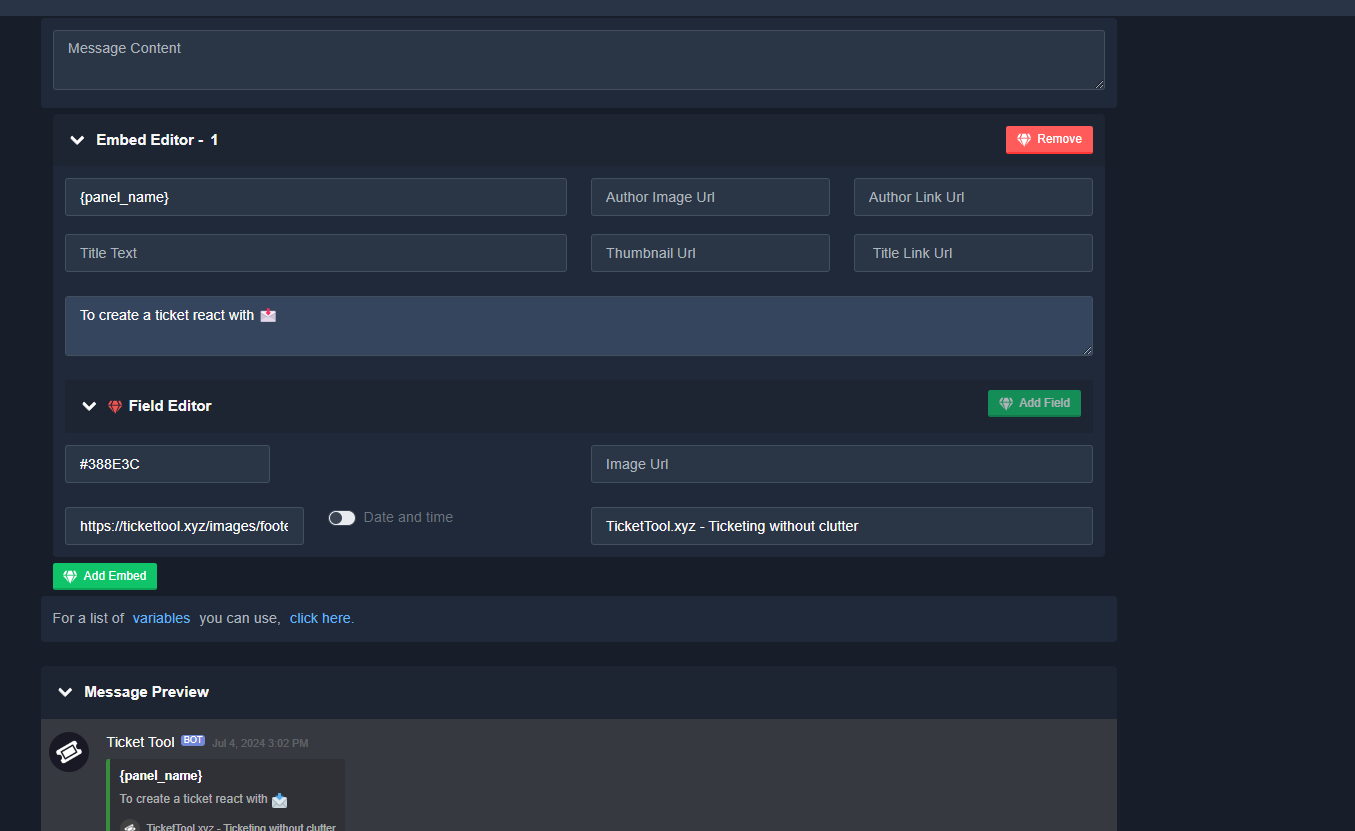
You can edit the panel message from your Dashboard > Panel Configs > Messages > Edit Panel Message
humble sequoiaBOT
The panel message is where people react to make a ticket. To customize it head over to your Dashboard --> Panel Configs -> Panel -> Edit Panel Message
 restive condor
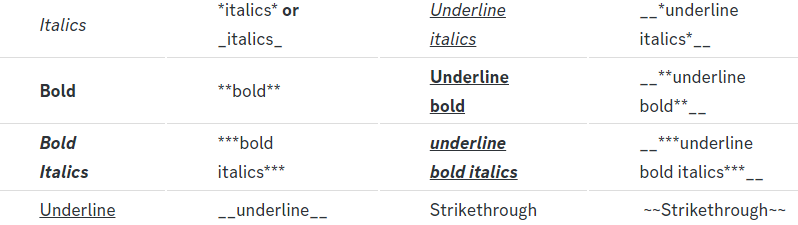
They use Discord markdown features to make their embed look nicer. Here are most of them:
humble sequoiaBOT
Discord Markdown Text
Below cites basic Discord Text Markdown/Formatting. Replace the text below with your own!
See this Discord Help Article for other markdown questions and combining markdowns.
<:Numbericons1:1018864164032225340> Italics (Cntrl + I)
 *Copy me for italicized text!* -> Italicized text!
 _Copy me for italicized text!_ -> Italicized text!
<:Numbericons2:1018864168041971712> Bold (Cntrl + B)
**Copy me for bold text!** -> Bolded text!
<:Numbericons3:1018864171783303208> Underline (Cntrl + U)
You must add 2 underscores on both sides of your text to get the underline text
__Copy me for underlined text!__ -> Underlined Text!
<:Numbericons4:1018864175155519538> Strikethrough (Cntrl + S)
~~Copy me for strikethrough text!~~ -> Strikethrough text!
<:Numbericons5:1018864178632605786> Spoilers & Hidden Text
||Copy me for hidden text!|| -> ||Hidden text|| (Click to reveal)
<:Numbericons6:1018864182558466058> One Lined Codeblock
You can add 3 backticks instead to get multi lined codeblock.
`Copy me for codeblock text!` -> Codeblock Text!
<:Numbericons7:1018864186727604354> Hyperlinking and Hidden Links
[Copy me with your link](yourlinkforhidelinks.com) -> Ticket Tool!
<:Numbericons8:1018864190296961159> <:NewIcon1:1018858809541804124><:NewIcon2:1018858813266333706> <:beta1:1022173658610946182><:beta2:1022173656492810340> Headers!
Header markdowns may not work with ticket tool features.
# Largest header!
## Small header!
### Even smaller header!
 restive condor
Please note you can only edit your panel message up to 250 characters with the free version 😄
dense river
uh
restive condor
Which panel is this for specifically?
Make sure you saved the changes and/or applied them to the correct panel. Support team only is still enabled
Then disable it please 😄
Otherwise only your support team will be able to open tickets
My bad if this wasn't clear < -> SUPPORT TEAM ONLY>, but I meant disable it 🙏
 reef narwhal
anyone know whats is going on?
 humble sequoiaBOT
Don't see your server in the dashboard?
Try using the Sync Servers button on your top center of the Dashboard page
You will possibly need to relog. Look below to see the steps on how to relog.
If this doesn't work
You should relog from the dashboard, you can do this by clicking here to log out immediately, and then log back in
Note:
You need one of these 3 things to access the dashboard.
1. Server Owner (Level: 6)
2. Server Administrator (Level: 4)
3. Dashboard Role (Level: 2)
:warning: You can check your level using the </permissionlevel:1029797400174399542> command on your Discord Server
If the bot's response is:
- @User is permission level: 0 (User)
You don't have any of the 3 levels required to access the server's dashboard
 restive condor
reef narwhal
anyone know whats is going on?
restive condor
reef narwhal
anyone know whats is going on?
Hey there! See above ^
iron nightBOT
Gave +1 Rep to @restive condor (current: #4 - 889)
reef narwhal
restive condor
Hey there! See above ^
the server shows, when click to manage, it shows this
with owner acc or admin acc
restive condor
reef narwhal
the server shows, when click to manage, it shows this
Can you try logging out and back in please
reef narwhal
restive condor
Can you try logging out and back in please
same thing
restive condor
reef narwhal
same thing
Can I get your server name or ID?
reef narwhal
restive condor
Can I get your server name or ID?
1228741458253578241
restive condor
reef narwhal
1228741458253578241
Please make sure Ticket Tool is still in the server
reef narwhal
restive condor
Please make sure Ticket Tool is still in the server
premium got kicked by bot, but i cannot add him back for some reason
 restive condor
reef narwhal
premium got kicked by bot, but i cannot add him back for some reason
restive condor
reef narwhal
premium got kicked by bot, but i cannot add him back for some reason
You will need to re-add @pseudo glen first
reef narwhal
restive condor
You will need to re-add <@557628352828014614> first
already was in the server, kicked and invited again
But still same issue in the panel
restive condor
reef narwhal
already was in the server, kicked and invited again
Now use /botswitcher and select the white bot please
Let me know if it doesn't let you 😄
reef narwhal
restive condor
Let me know if it doesn't let you 😄
nice,worked, u're very good
 restive condor
reef narwhal
nice,worked, u're very good
restive condor
reef narwhal
nice,worked, u're very good
No problem
Just a quick note, your subscription won't automatically renew since the bot was kicked. Feel free to take a look at #📣│bot-news before resubscribing next month
restive condor
 calm mesa
Hey there! If you subscribed via Discord, on the white bot, you cannot kick the white bot
 restive condor
calm mesa
i paid for premium
restive condor
calm mesa
i paid for premium
Did you subscribe via Discord though?
calm mesa
how i do that?
restive condor
It would be through the bot's profile or the app directory. Did you do either?
calm mesa
bot's profile
reef narwhal
restive condor
It would be through the bot's profile or the app directory. Did you do either?
how I invite gold ticket tool, as it did not invite gold
restive condor
calm mesa
bot's profile
That'd be via Discord then.
If you did so from the white/standard's bot's profile, you must keep it in the server even if you're using the premium bot as premium is linked to that
You can re-invite it from https://tickettool.xyz/invite
Ticket Tool - Ticketing without clutter - The #1 Discord support bot
restive condor
reef narwhal
how I invite gold ticket tool, as it did not invite gold
See below
humble sequoiaBOT
The first thing you will need to do is invite the premium bot, an invite can be found here
Once the bot is in your server we will head to the dashboard and manage your server. When you are managing your server, you want to head into "Server Configs" then click the drop down menu under "Select the bot you would like to use on this server" then click "Ticket Tool#6207" and then save.
iron nightBOT
Gave +1 Rep to @restive condor (current: #4 - 890)
dense river
@restive condor i made the gui but how do i add tickets to it?
restive condor
dense river
<@795710289425334303> i made the gui but how do i add tickets to it?
As in ticket buttons?
restive condor
dense river
and buttons
You will need one panel per ticket option, which you can then combine using the instructions below
humble sequoiaBOT
For more convenient use of multipanels, you can now combine panels on the dashboard. This will allow you to directly send the multipanel from the dashboard or via the $panel ID command.
Where can I find this?
You can find this setting on the Dashboard -> Panel Configs -> Panel -> Attached Panels
Note: if you're attaching all the panels to a panel called English, don't include English in the attached panel's box (If you do this, it will create a duplicate)
This will put all buttons from all of your panels on one message. The message is the panel message from the panel you're combining these panels in.

 modern pecan
أ
viscid lance
restive condor
Hey there! That wouldn't be possible sadly
I decided to just send a simple message taggin the user. I created another automation which closes the ticket after 2 days if no response. Would the messages sent by tickettool be counted as messages from "Anyone/Everyone" triggering the timer to restart?

 restive condor
viscid lance
I decided to just send a simple message taggin the user. I created another autom...
restive condor
viscid lance
I decided to just send a simple message taggin the user. I created another autom...
It would not. Ticket Tool doesn't react to its own messages
iron nightBOT
Gave +1 Rep to @restive condor (current: #4 - 891)
 pallid trout
Hello guys, why the bot is didn't chenging text?

 restive condor
pallid trout
Hello guys, why the bot is didn't chenging text?
restive condor
pallid trout
Hello guys, why the bot is didn't chenging text?
Hey there! If you're editing your panel message or its buttons, you will need to re-send it or update the message
 pallid trout
Oh, thank you.
dense river
How do i edit this?

 fleet sandal
Ive tried to intergrate the ticket tool into my freinds server. I added the bot through the discord app and not the website. However when i went onto the website to go onto the dashboar it doesnt say that its in any servers. I tried inviting the app through the website yet it still doesnt show up.
My only thought of how to solve this is to kick the bot and add it again but i do not have roles to do so
 dense river
fleet sandal
Ive tried to intergrate the ticket tool into my freinds server. I added the bot ...
dense river
fleet sandal
Ive tried to intergrate the ticket tool into my freinds server. I added the bot ...
Did you try logging
out and back in on the website?
fleet sandal
i tried that just now
still doesnt show up
dense river
do you have perms to be able to go on the dashboard its self in that server?
fleet sandal
like go through the link in its bio?
dense river
like in the discord server do you have a role that will Allow you to get access to the Dashboard for that server.
humble sequoiaBOT
Don't see your server in the dashboard?
Try using the Sync Servers button on your top center of the Dashboard page
You will possibly need to relog. Look below to see the steps on how to relog.
If this doesn't work
You should relog from the dashboard, you can do this by clicking here to log out immediately, and then log back in
Note:
You need one of these 3 things to access the dashboard.
1. Server Owner (Level: 6)
2. Server Administrator (Level: 4)
3. Dashboard Role (Level: 2)
:warning: You can check your level using the </permissionlevel:1029797400174399542> command on your Discord Server
If the bot's response is:
- @User is permission level: 0 (User)
You don't have any of the 3 levels required to access the server's dashboard
austere forge
fleet sandal
Ive tried to intergrate the ticket tool into my freinds server. I added the bot ...
Hey there : )
see above
fleet sandal
i tried
austere forge
dense river
How do i edit this?
Hey there : )
Go to Dashboard > Panel configs > Dropdown Style - and edit description
 fleet sandal
dense river
like in the discord server do you have a role that will Allow you to get access ...
fleet sandal
dense river
like in the discord server do you have a role that will Allow you to get access ...
it still says the same thing as before

idk if i have to get my friend to kick the bot so i can add it again from the website
austere forge
fleet sandal
idk if i have to get my friend to kick the bot so i can add it again from the we...
Can you run the </permissionlevel:1029797400174399542> on your server and tell me what permissions you have?
fleet sandal
austere forge
Can you run the </permissionlevel:1029797400174399542> on your server and tell m...
0
austere forge
You don't have any of the 3 levels required to access the server's dashboard
The server owner must add you as a Dashboard Role or give you Admin perms
humble sequoiaBOT
Any role you put there will have full access to the ticket tool dashboard. The server owner and users with admin permissions already have access to the dashboard.
Be careful of which roles to put here

 fleet sandal
austere forge
You don't have any of the 3 levels required to access the server's dashboard
Th...
fleet sandal
austere forge
You don't have any of the 3 levels required to access the server's dashboard
Th...
weird
i have mod permissions in his server
austere forge
dense river
I'll move you to a ticket to fix the problem : )
dense river
ok
austere forge
fleet sandal
weird
i have mod permissions in his server
If your role is "mod" and does not have the necessary perms to access the Dashboard, it doesn't work.
humble sequoiaBOT
━━ Billy's inquiry has been moved to a ticket ━━
fleet sandal
austere forge
If your role is "mod" and does not have the necessary perms to access the Dashbo...
ahh i see
 violet zinc
Hi all. I have a super dumb question (Sorry in advance). I had a couple friends open tickets as I'm testing this out. It opens the channel with myself and them, it gave the ticket number as the channel name, but I don't know where to go to actually view the ticket that was opened
austere forge
violet zinc
Hi all. I have a super dumb question (Sorry in advance). I had a couple friend...
Hey there : )
In your server, you can see a channel named #Ticket-0000, this is the channel that appears when someone creates a ticket
violet zinc
austere forge
Hey there : )
In your server, you can see a channel named `#Ticket-0000`, this ...
Hiya 3v! I do see the channels there and can access them. I had them enter some information about why they were opening a ticket. That was the data I was looking for. Forms is where I asked them questions, and I did enable the option
austere forge
violet zinc
Hiya 3v! I do see the channels there and can access them. I had them enter som...
nice !
sounds good 👍
violet zinc
Not good yet 🙂 So, I have the channels (it's for a Plex server). I ask questions like "Is the issue with a movie/tv show" and a couple of other questions. When the channel opens, it just shows the message that support will be with them shortly
and I can't seem to figure out how to see their responses to the form questions
austere forge
violet zinc
and I can't seem to figure out how to see their responses to the form questions
Oh okay, make sure you have enable Auto display form results in your Forms option
 violet zinc
OOOOOMG Forget it
Yup, just saw that. Literally the next line down. Ugh. Thank you 🙂
austere forge
haha, don't worries
 waxen wyvern
Can anyone tell me how to solve this? I really need help.
 steel basalt
waxen wyvern
Can anyone tell me how to solve this? I really need help.
steel basalt
waxen wyvern
Can anyone tell me how to solve this? I really need help.
So the discord server has reached its channel limit of 500 channels
To fix it, server administrators need to delete channels from the server (or tickets, whichever way you decide to delete channels) in order to continue creating tickets, as ticket tool cannot bypass this limit instated by discord itself.
 floral ridge
is there any way for it to send only me info and not support like if its private info only i can see?
steel basalt
floral ridge
is there any way for it to send only me info and not support like if its private...
Could you explain a bit more?
floral ridge
steel basalt
Could you explain a bit more?
like if someone requires them to send me their login is there a way that they can put it in a form or wtv and only me see it and not my support team
steel basalt
floral ridge
like if someone requires them to send me their login is there a way that they ca...
Nope
floral ridge
dam
steel basalt
You could create a private thread under each ticket I suppose
crisp sierra
^ create a private channel/thread and configure the channel perms only to yourself
floral ridge
crisp sierra
^ create a private channel/thread and configure the channel perms only to yourse...
but i need it likea ticket still for support and i need support to be able to help them still just not see login info
crisp sierra
floral ridge
but i need it likea ticket still for support and i need support to be able to he...
what is “login info” ?
floral ridge
crisp sierra
what is “login info” ?
or just any info
just something that i might not want support to see for privacy reasons
jade topaz
What may be the reason when someone answers the form, IT doesn't show in the ticket?
slender minnow
jade topaz
What may be the reason when someone answers the form, IT doesn't show in the tic...
you might not have added the variable for answer/toggled the embed for answers on
jade topaz
slender minnow
you might not have added the variable for answer/toggled the embed for answers o...
Can you show me a SS?
On how to toggle it on
 amber dirge
how to make a ticket?
 pale raptor
helpe-me
 queen plank
pale raptor
queen plank
pale raptor
Is it possible to do this with this bot?

 supple raft
anyone know how to have tickets closed after a day?
 limpid spoke
Hey fellas, does anyone know how to assign different roles per Ticket Panel?
Like, Role1 for Panel1, Role2 for Panel2, etc?
slender minnow
jade topaz
On how to toggle it on
Dashboard > Panel Configs > Forms > Toggle on the option saying to let the bot auto create an embed with response for you
slender minnow
limpid spoke
Hey fellas, does anyone know how to assign different roles per Ticket Panel?
Lik...
go to the panel option of the respective panel config and then change the support team perms from the permissions option to let them view message, send messages and read message history.
slender minnow
supple raft
anyone know how to have tickets closed after a day?
It is possible with automations (premium feature). Create an automation and add some conditions to it (say check for message from the ticket owner for the past X hours) and if its true add an action to close the ticket.
i just realised you had a ticket open
humble sequoiaBOT
━━ Mramogus's inquiry has been moved to a ticket ━━
limpid spoke
humble sequoia
━━ *Mramogus's inquiry has been moved to a ticket* ━━
Whoa, this is possible?
Do you have context menus for these?
slender minnow
limpid spoke
Do you have context menus for these?
that was a custom command
limpid spoke
slender minnow
that was a custom command
OK, good to know... would have been awesome though. Thank you for replying 
iron nightBOT
Gave +1 Rep to @slender minnow (current: #11 - 405)
supple raft
slender minnow
It is possible with automations (premium feature). Create an automation and add ...
this looks good right?

wait wrong pic
this look right?

 vapid gyro
will Enable thread style ticket creation forever be a premium feature?
 heady canyon
Hey! Is is possible to setup some automation to use forms results elsewhere?
With API / Webhook or smthing else.
Example: user open a ticket, fill form and I want to trigger an automation here.
restive condor
supple raft
this look right?
That's right
restive condor
vapid gyro
will `Enable thread style ticket creation` forever be a premium feature?
Hey there! It is for now, we don't know what might be added/removed as a premium feature
restive condor
heady canyon
Hey! Is is possible to setup some automation to use forms results elsewhere?
W...
Hey there! What would that automation do next?
heady canyon
restive condor
Hey there! What would that automation do next?
I'll use N8N to take form answers and add them to airtable
restive condor
heady canyon
I'll use N8N to take form answers and add them to airtable
I dont think that would be possible.
We do have a webhook feature for premium users which logs POST requests, if you can find a way to pull form answers from the ticket message into whichever platform you're using, that could work. But we don't provide any support for this feature as it's in Alpha testing, we just enable it upon request
heady canyon
restive condor
I dont think that would be possible.
We do have a webhook feature for premium u...
I'm interested in this
can I try it?
restive condor
heady canyon
can I try it?
The feature requires premium for it to work.
You can enable the 7 day trial if you wish, so we can enable it for you 😄
heady canyon
Alright, where's the trial? @restive condor
restive condor
heady canyon
Alright, where's the trial? <@795710289425334303>
If you go into the premium tab in your server Dashboard, just below Ticket Tool Store
You can find it there
heady canyon
restive condor
If you go into the premium tab in your server Dashboard, just below Ticket Tool ...

 restive condor
Go into your server Dashboard
Ticket Tool - Ticketing without clutter - The #1 Discord support bot
heady canyon
Done
restive condor
Now into the premium tab
heady canyon
it's activated
restive condor
heady canyon
it's activated
Perfect, #🎫│make-a-ticket and provide us with the server ID where you'd like it enabled
heady canyon
restive condor
Perfect, <#571706435449257997> and provide us with the server ID where you'd lik...
done
humble sequoiaBOT
━━ User's inquiry has been moved to a ticket ━━
vapid gyro
restive condor
Hey there! It is for now, we don't know what might be added/removed as a premium...
i'm hoping it for it to go public 🙇
and thank you for the response sir 🙏
thanks @restive condor
iron nightBOT
Gave +1 Rep to @restive condor (current: #4 - 892)
 slate vessel
Hey. please tell me, how can I view the history of chats of a closed ticket on the server?
humble sequoiaBOT
━━ User's inquiry has been moved to a ticket ━━
crude thicket
how do i add specific role to all my ticket
 wide merlin
guys pls how can i change this, when someone have the basic role when u come up in the server, he don't have the access of the ticket he created
 restive condor
wide merlin
guys pls how can i change this, when someone have the basic role when u come up ...
restive condor
wide merlin
guys pls how can i change this, when someone have the basic role when u come up ...
Hey there! Dashboard > Panel Configs > Permissions > Ticket Owner Permissions - Edit Opened > VIEW CHANNEL
restive condor
crude thicket
how do i add specific role to all my ticket
Hey there! Dashboard > Panel Configs > General > Support Team Roles
wide merlin
thanks dan
 vernal spear
I neeed help
 hoary mica
Hello, tell me where you can set ticket rights (create ticket)
 austere forge
hoary mica
Hello, tell me where you can set ticket rights (create ticket)
austere forge
hoary mica
Hello, tell me where you can set ticket rights (create ticket)
__ «You don't have permissions to use this»__
Are your members seeing this message when they try to create a ticket?
You may have accidentally denied them permission to use the Create Ticket button.
Look in the following places in your server's dashboard:
👉 Server Configs -> Blacklist Roles
Any roles there will be unable to interact with the bot in any way, including creating tickets.👉 Panel Configs -> Buttons -> Create Ticket -> Support team only
If this is enabled, only your staff will be able to use the button.
👉 Panel Configs -> Buttons -> Create Ticket -> Disabled Roles
Any roles there will be unable to use the button.
austere forge
vernal spear
I neeed help
Hey there : )
Go to Dashboard > Command configs - transcript and set allowed role
jade topaz
I don't want this thing: ... I want the answer with the question and can i make the embed answer on top of the "welcome"

 dusk maple
Hello
I have a big problem
Why are the ticket channels goes at the very top of the discord server? not in the provided category.
steel basalt
dusk maple
Why are the ticket channels goes at the very top of the discord server? not in t...
Panel configs > category > set opened
dusk maple
steel basalt
Panel configs > category > set opened
I did all of that. It still wont work
jade topaz
dusk maple
I did all of that. It still wont work
Go to the category > Right click on it > Permissions > Add role, Add ticket tool role > Send messeges, View channel, Manage channel
jade topaz
jade topaz
I don't want this thing: `...` I want the answer with the question and can i mak...
Now my problem
jade topaz
jade topaz
I don't want this thing: `...` I want the answer with the question and can i mak...
Can I make the questions answered normal text?
Instead of the embed thing?
And can I make the questions & Answers on top of the "Welcome"
austere forge
jade topaz
Instead of the `embed` thing?
Hey there ; )
Not possible, the embed is compulsory so that users can answer the questions you have set up.
jade topaz
austere forge
Hey there ; )
Not possible, the embed is compulsory so that users can answer the...
OK
jade topaz
jade topaz
And can I make the questions & Answers on top of the "Welcome"
What about this one
jade topaz
jade topaz
Go to the category > Right click on it > Permissions > Add role, Add ticket tool...
@dusk maple If that worked U better thank me
iron nightBOT
Gave +1 Rep to @dusk maple (current: #323 - 1)
dusk maple
jade topaz
<@1180378531826499699> If that worked U better thank me
no, didn't work. Even if the bot has admin
jade topaz
dusk maple
no, didn't work. Even if the bot has admin
Did you add the ticket tool role to the category allow it to send messeges and view channels?
Doing that Is the most necessary part. The bot having administrator isn't required nor is it useful
dusk maple
jade topaz
Did you add the ticket tool role to the category allow it to send messeges and v...
Yep, won't work.
jade topaz
dusk maple
Yep, won't work.
Can you send me your server via DM?
austere forge
No, DM support is not allowed
dusk maple
Alright, would anyone help me then.
jade topaz
austere forge
No, DM support is not allowed
He's server ID isn't gonna make me join
I'm going to support him inside the server then leave
That's not advertising use common sense
austere forge
is against the server rules : )
He can continue to ask for help here or #🎫│make-a-ticket
jade topaz
austere forge
is against the server rules : )
He can continue to ask for help here or <#57170...
Keep yapping
humble sequoiaBOT
━━ angel's inquiry has been moved to a ticket ━━
jade topaz
jade topaz
Keep yapping
He aint yapping ?? There’s no dm support for a reason, if you want to help the user on your own accordance you don’t need to announce here that you will break that rule lol. Besides I doubt you need to help him as that’s what this channels for, he will eventually get the help he needs
jade topaz
dusk maple
Why are the ticket channels goes at the very top of the discord server? not in t...
Click your server name —> click view all channels to turned on
Next click ‘Channels & Roles’ the first channel looking thing in your server and make sure all categories are ticked
Also this is what i meant by the channels and roles ‘channel looking thing’ it will be at the top of your server channel list

 balmy crescent
Getting this error when trying to create a new ticket
This command requires Ticket Tool Premium Premium! Upgrade now to get access to these features!
 jade topaz
Kakabalik ko lang after ilang months na di nakalaro tas biglang na FiniAC ban ako.Na False Ban Po Ng yare
 pseudo ravine
Ticket Tool is currently experiencing some issues #📣│bot-news
 abstract grotto
Alr
 fading hearth
Is TicketTool premium not workin?
abstract grotto
This
 fading hearth
Is the primary bot the premium one too?
 vocal ember
 restive condor
abstract grotto
restive condor
abstract grotto
I just came in now, sorry bruh
fading hearth
Oh, IcIc. Thank you.
 scenic plinth
Yes, the bot is offline for some. Please give #📣│bot-news a good read. The developers are well aware and trying to fix it.
 muted perch
restive condor
https://ptb.discord.com/channels/509192800865353738/571104498483986466/125917673...
muted perch
restive condor
https://ptb.discord.com/channels/509192800865353738/571104498483986466/125917673...
yes
 wraith siren
hello the bot is off
muted perch
wraith siren
hello the bot is off
 frozen crypt
Yes, the bot is offline for some. Please give #📣│bot-news a good read. The developers are well aware and trying to fix it.
scenic plinth
Ok you know what we'll just do this
wraith siren
muted perch
https://ptb.discord.com/channels/509192800865353738/571104498483986466/125917673...
yes
 prime bridgeBOT
<:notallowed:660789872600285184> #🆘│community-support has been locked!
You will gain access again once the lockdown is lifted.
scenic plinth
Give #📣│bot-news a read. We're well aware the bot is offline or isn't working and are working to fix it. Quit spamming channels with the same question over and over please.
scenic plinth
Ok children... behave now
prime bridgeBOT
<:allowed:660789592647008258> #🆘│community-support has been unlocked!
Everyone now has access to this channel.
 timid cradle
im having 2 issues currently, for one my transcript channel doesnt work (hasnt been working the past 3 days, aswell as can i somehow make it so that when someone makes a ticket, they get a three day lock from making any others?
 tame ingot
Im having issues Setting up ticket
 analog summit
Je n’arrive pas à inviter votre bot
jade topaz
@prime bridge
stark runeBOT
1) **Inviter Ticket Tool sur votre serveur**.
Premièrement, vous devez inviter le bot dans votre serveur. Si le bot est déjà dans votre serveur, vous pouvez le personnaliser dans votre Dashboard.
**2) Créer un panneau**
Pour créer un panneau, merci de vous rendre dans Dashboard > Panel Configs > Create Panel.
Entrez un nom pour votre panneau (Personnalisez tous les paramètres optionnels comme vous les souhaitez).
Un exemple pour créer un panneau est illustré ci-dessous
3) **Envoyer le panneau dans un salon**
Si vous avez créé un panneau dans le Dashboard, vous pouvez l'envoyer par le bouton Send.
Sélectionnez le salon où vous voulez que votre panneau apparaisse.
Si vous avez d'autres questions, utilisez la commande /help > faq > option 1.
Un exemple pour envoyer un panneau est illustré ci-dessous.
Avez-vous un problème pour envoyer le panneau ?
Faite la commande /debug dans un canal avec Ticket Tool et assurez-vous qu'il a toutes les autorisations de Discord nécessaires.
steel basalt
analog summit
Je n’arrive pas à inviter votre bot
Regarde ici ^
steel basalt
tame ingot
Im having issues Setting up ticket
Could you explain what you need help with?
humble sequoiaBOT
Hello, we would love to help you, but if you don't tell us what you need help with we can't help you :(
 warped spear
How do I get premium role? I got premium just now
 harsh spoke
Hey, how can I activate so other Bots can interact with TicketTool?
So when another Bot writes like $delete it will be deleted?
warped spear
harsh spoke
Hey, how can I activate so other Bots can interact with TicketTool?
do you know how to get premium role lol
I have premium
harsh spoke
warped spear
do you know how to get premium role lol
No, I automatically got it when I subscribed
 hardy anvil
Hey, need some help trying to figure out this ticket tool. I've invited it to a server I have permissions in and roled it bot, yet it won't pop up on the website dashboard as a server I have it synced with
 primal ore
Hii how do I set this up with ticket tool premium please
 harsh spoke
primal ore
Hii how do I set this up with ticket tool premium please
harsh spoke
primal ore
Hii how do I set this up with ticket tool premium please
Form
primal ore
harsh spoke
Form
How do I do a form
harsh spoke
primal ore
How do I do a form
In the Panel, somewhere at the Button should be „Forms“
And then you simply add the questions
 broken dove
Is ticket tool down? Giving my customers error when interacting with the bot
 outer helm
Hello, I need to talk to an admin of the SURVIARG server, I don't know how to talk, can you help me?
 unique current
humble sequoiaBOT
unique current
humble sequoiaBOT
Hello, we would love to help you, but if you don't tell us what you need help with we can't help you :(
 analog aurora
So I'm tryna setup a ticket option for 2 channels, one was already set by my alt account and I'm trying to do it on my main for the other channel and it won't let me 😭 idk if it's cause this account doesn't own the server orr
 tepid sky
How do i make a certian role to be able to see opened tickets?
jade topaz
how do i make somting like this
 restive condor
analog aurora
So I'm tryna setup a ticket option for 2 channels, one was already set by my alt...
restive condor
analog aurora
So I'm tryna setup a ticket option for 2 channels, one was already set by my alt...
Hey there! Any error message?
restive condor
tepid sky
How do i make a certian role to be able to see opened tickets?
Hey there! Dashboard > Panel Configs > General > Support Team Roles
humble sequoiaBOT
1. Go into your Dashboard
2. Open your Panel Configs tab
3. Select the panel you want to grant access to
4. Open the General options menu
5. Select your Support Team Roles
6. Save changes
restive condor
jade topaz
how do i make somting like this
Hey there! See below
humble sequoiaBOT
The Drop-down menu or Select Menu replaces the buttons on your panel message and uses a drop-down menu with all of your panels. To set this up, go to your Panel Configs and select your main Panel.
<:Numbericons1:1018864164032225340> Enable Select Style
First you enable Select Style. Then you add an item in the Dropdown Editor. Now you can start editing your dropdown!
<:Numbericons2:1018864168041971712> Dropdown Editor
Each line in the dropdown editor represents a line in the drop down menu on discord. You can add more "Items", by clicking on
First you select a panel. That's the panel this option will open a ticket for. DONT select the same panel twice. Each option should have a different Panel
After that, you can put a Display. This is the title of this option and will appear in the drop down menu. The *Description can be set right after that, which will be below the title in grey.
Additionally you can select an emoji, that will be shown in front of each option. You can either manually input the ID of an emoji or select it in the selector.
Common Issues ⚠️
- Panel doesn't send? Make sure you have a valid emoji selected
- Option doesn't show up? Check if two options have the same panel in the DropDown Editor
$dropdown
restive condor
Let me know if you have any questions 🙏
 humble sequoiaBOT
A Discord Form lets the user answer individual questions in a pop-up Form, which then displays the answers in the ticket message. This can save time if you already know what you want to ask the user.
Setup Forms
Forms can be enabled under Panel Settings > Form Options > Edit Forms Options. In the new pop-up window, you can now enable and edit your own Form.
Form Options
You can add up to 5 questions in the Discord form. This is a Discord limitation. Each question can have a placeholder in the input field, a minimum and maximum input, multi-line, and also the option to have the answer required.
Options
Question Title ➞ Your Question goes here
Question Placeholder ➞ The placeholder text in the input field
Required ➞ If enabled, the user has to answer this question, to submit the form
Multi-Line Input ➞ Allows the user to input multiple lines
Minimum and Maximum Input ➞ Set a minimum and maximum input value for the user
Displaying the Answer
To display the answers from the user, you need to enable Auto display form results on the ticket message as an additional embed
If you don't want a second embed, go into your Panel Configs > Ticket Options > Edit Ticket Message. You use the variable {create.form.x} and replace x with the number of your question. For example, the response to Question 5 can be displayed with {create.form.5}.
 restive condor
jade topaz
forms right ?
restive condor
jade topaz
forms right ?
Correct
jade topaz
oh kk i thing i am getting it now XD
analog aurora
restive condor
Hey there! Any error message?
Yeah, it says "action couldnt complete" or summin
restive condor
analog aurora
Yeah, it says "action couldnt complete" or summin
Could you screenshot please
 misty olive
hey i need some help please, i set up the bot and the transcripts wont save attachments/images
jade topaz
jade topaz
how do i add image to the tool
i got premium
analog aurora
restive condor
Could you screenshot please

I've tried debug, setup, etc it all says the same thing
restive condor
analog aurora
Ticket Tool is missing the VIEW CHANNEL & SEND MESSAGES permission for that channel
restive condor
misty olive
hey i need some help please, i set up the bot and the transcripts wont save atta...
Hey there! Unfortunately, images are only saved in transcripts for premium users.
Once a channel is deleted, so is everything in it, so Discord doesn't store any images.
We store images ourselves for premium users only up to 8MB
restive condor
jade topaz
how do i add image to the tool
You can add images into any message with an Image URL
restive condor
Sadly, no. Discord doesn't store them so we must store them ourselves, which costs money
jade topaz
got it
misty olive
restive condor
Sadly, no. Discord doesn't store them so we must store them ourselves, which cos...
how much is prem?
restive condor
It's $6 per month or $66 per year, but right now, with the introduction of our new payment provider, there's an active promotion.
See #📣│bot-news message for more info
restive condor
Alright, no worries. Have a nice day!
 rigid kite
so umm i set up the bot but made a mistak now everytime i use a command it says the application didnt respond
restive condor
rigid kite
so umm i set up the bot but made a mistak now everytime i use a command it says ...
Hey there! Could you run the /debug command?
rigid kite
it wont allow me to
restive condor
rigid kite
it wont allow me to
Ticket Tool is missing the SEND MESSAGES permission for that channel
iron nightBOT
Gave +1 Rep to @restive condor (current: #4 - 894)
restive condor
No problem!
 tribal whale
how do i add 2 button like one for purcahse and one for support for one panel
humble sequoiaBOT
User's issue has been solved in another channel.
 plush silo

 vivid topaz
Hello
 jade harbor

 hollow pewter
Do you need to own the server? to add tivket tool? even if you are highest rank?
jade topaz
It's always showing ticket limit reached even tho the creating limit has been set to 500 for each user
hollow pewter
@restive condor do you need to own the sserver to add ticket tool
floral ridge
hollow pewter
<@795710289425334303> do you need to own the sserver to add ticket tool
u just need admin perms i think
hollow pewter
oki
 burnt totem
How to set up a bot? My discord server does not see Ticket tool commands
 fierce bramble
Why can't I enter a bot that came out on its own?
slender minnow
fierce bramble
Why can't I enter a bot that came out on its own?
what do you mean?
fierce bramble
slender minnow
what do you mean?
هل تتكلم عربي
slender minnow
$articket
humble sequoiaBOT
فريق الدعم الفني العربي
عميلنا العزيز ان كنت تبحث عن مساعدة يرجى فتح تكت خاص بفريق الدعم الفني العربي
اذهب الى#🎫│make-a-ticket
ثم قم بلضغط على الايموجي الاتي (🇯🇴)
slender minnow
fierce bramble
I cannot enter the bot
slender minnow
you mean access the dashboard?
 slender minnow
so you can't click the Continue button?
 cinder osprey
Is partner submission open?
slender minnow
fierce bramble
** id server | 1228310292686180404 **
do you get any error while trying to invite it? maybe when you tried to click the button
make sure you have the manage server perm to at least invite the bot
slender minnow
cinder osprey
Is partner submission open?
no they are closed
 quasi agate
4f112fae-f4d3-11ed-a05b-0242ac120003
 wild sierra
Heyy, so I was trying to use the /panel command a 2nd time and so I cloned one of my thingies and when I use /panel ans set the ID as 2 or 1 it says application didn't respond, it worked fine before cloning and when I ran the command the first time but now it's not. Should I just remove the cloned thing and see if that fixes anything?
agh darn, it was channel permissions. sorry
 gaunt trout
hi, I'm building a bot that will close a ticket on my server using the !close command. The command is also sent correctly to the correct channel, but the command is not executed. When I send the command manual, the ticket closes properly. The bot currently has admin rights and is above the TicketTool bot in the hierarchy. what else can I try to make this work?
 stray osprey
Hi, how do we get the bot to make buttons to create a ticket ?
fierce bramble
slender minnow
make sure you have the manage server perm to at least invite the bot
I am Owner server
i cant
slender minnow
fierce bramble
I am Owner server
have you tried inviting through the website? (assuming whats in screenshot is not from the website)
fierce bramble
slender minnow
have you tried inviting through the website? (assuming whats in screenshot is no...
How do I change the name of my Ticket
When Takt opens, I want another name
#1259415208846168064 Like this
jade topaz
I'm still getting this kind of problem even tho i have changed the values


 fierce bramble
 ionic ginkgo
تعرف ليش يصير كذا؟
ionic ginkgo
تعرف ليش يصير كذا؟
I didn't understand you
 slender minnow
fierce bramble
<#1259415208846168064> Like this
slender minnow
fierce bramble
<#1259415208846168064> Like this
Panel configs > Tickets option > Ticket opened name
replace it with one of the variables from TT's docs
if you need help with Ticket Tool you can ask here otherwise feel free to open a german ticket from #🎫│make-a-ticket 🙂
fierce bramble
slender minnow
Panel configs > Tickets option > Ticket opened name
A picture is possible
slender minnow
fierce bramble
A picture is possible

Ticket opened channel name
use the variables in there to rename opened tickets (you need premium for that)
fierce bramble
Can you give me a direct link?
slender minnow
If you don't need help then please move to #💬│general-chat :)
Ticket Tool - Ticketing without clutter - The #1 Discord support bot
@fierce bramble ^^^
jade topaz
@slender minnow need help
analog summit
Besoin d’aide svp quel est le problème ? Whats problem

Le bot n’apparaît pas sur mon serveur mais je peux manager 🤔
frozen crypt
jade topaz
<@776084862728667156> need help
Please don't tag staff it's against the rules
frozen crypt
analog summit
Besoin d’aide svp quel est le problème ? Whats problem
Pourrait faire /debug
jade topaz
Oh didn't know
Sorry
jade topaz
jade topaz
I'm still getting this kind of problem even tho i have changed the values
??????
frozen crypt
Do you have permission to add it
analog summit
 frozen crypt
analog summit
frozen crypt
analog summit
Le bot a-t-il les autorisations sur la chaîne pour parler et voir la chaîne ?
jade topaz
Nvm, im outta here
frozen crypt
Uh
analog summit
Je ne vois pas le bot donc je peux pas lui attribuer de rôles
Je peux t’inviter sur le serveur ?
Je te met les permissions
frozen crypt
Je ne peux pas rejoindre votre serveur, mais pouvez-vous me donner le Id de votre serveur
frozen crypt
Je verrai et je vous donnerai des mises à jour dans une minute
analog summit
Ok Thx 👍🏼
frozen crypt
@analog summit give this a reading
humble sequoiaBOT
This error indicates you have selected an invalid emoji, i.e. an emoji the bot isn't capable of using, in a button field
Which Emoji?
This depends upon which action the error is appearing, the most common cases are the Create Ticket button or one of your Dropdown emojis. You can visit your Button's List to find all available buttons and find the conflicting one by yourself.
Why doesn't the bot accept it as valid?
- You selected an emoji that doesn't exist anymore, i.e. that has been deleted
- You wrote text there, instead of an emoji (or in addition to an emoji)
- You entered a code for a custom emoji from a server that the bot is not a member of
- You entered a custom emoji code incorrectly
- You're on iPhone and entered an emoji using the phone's emoji pad (use the emoji selector in the website instead)

 small wolf
Can someone help me make the same design as in the photo?
 small wolf
@frozen crypt
frozen crypt
Don't ping staff please, it's against the rules
analog summit
humble sequoia
Wow je ne comprend rien désolé
Pourquoi est ce autant compliquer ?
Avant c’était simple…
Je veux seulement faire 1 ticket 😅
 potent river
How can you invite the prem bot
grizzled summit
potent river
How can you invite the prem bot
Theres an invite button on the dashboard. You use /botswitcher to swap the active bot on your server.
potent river
grizzled summit
Theres an invite button on the dashboard. You use `/botswitcher` to swap the act...
It doesn’t add the bot
And i cant see the invite button-
grizzled summit
Under the "Server Configs" tab
 potent river
grizzled summit
Under the "Server Configs" tab
potent river
grizzled summit
Under the "Server Configs" tab
Are you able to join vc?
So i can screen share?
grizzled summit
Sorry, I am unable to.
potent river
frozen crypt
do you still need help?
Yes
frozen crypt
potent river
Yes
what is your server id
potent river
frozen crypt
what is your server id
How do you get it
potent river
Does work
Doesnt
I js needed know how to add the bot will you be able to vc to help?
frozen crypt
u wanna add which bot?
potent river
Im in vc
humble sequoiaBOT
The first thing you will need to do is invite the premium bot, an invite can be found here
Once the bot is in your server we will head to the dashboard and manage your server. When you are managing your server, you want to head into "Server Configs" then click the drop down menu under "Select the bot you would like to use on this server" then click "Ticket Tool#6207" and then save.
 dull grotto
Que?
frozen crypt
dull grotto
Que?
esqueça
dull grotto
Falo inglês não
frozen crypt
voce percisa de ajuda?
frozen crypt
potent river
Its on for other server
Do you still need help?
potent river
Thats all thank u
 eager vapor
How can I @ roles in the message when users open a ticket?
frozen crypt
Hello
eager vapor
frozen crypt
Hello
Hi


 dry hollow
frozen crypt
you have to edit the message saying
dry hollow
frozen crypt
you have to edit the message saying
hello I am premium I can no longer create a ticket