#🆘│community-support
1 messages · Page 110 of 1
 austere forge
 floral tartan
austere forge
Hi there, https://discord.com/channels/509192800865353738/571104498483986466
floral tartan
austere forge
Hi there, https://discord.com/channels/509192800865353738/571104498483986466
oh, ok
austere forge
As displayed, your subscription appears to have been cancelled
In this case, you must wait until the end of the date before the end of cancel to re-subscribe.
If you encounter any problems please contact Discord support
floral tartan
i need some help about premium ticket tool bot
 humble sequoiaBOT
Hello, we would love to help you, but if you don't tell us what you need help with we can't help you :(
floral tartan
if i use free premium period to configure the bot and trial period expires, will premium options work?
 dusky stratus
bot not responding to commands ?
floral tartan
dusky stratus
bot not responding to commands ?
floral tartan
floral tartan
if i use free premium period to configure the bot and trial period expires, will...
?
 median wigeon
floral tartan
?
median wigeon
floral tartan
?
nope after that time you need to buy premium if you want to let is work
floral tartan
median wigeon
nope after that time you need to buy premium if you want to let is work
i think i will need to make my own ticket bot😭
 restive condor
 sweet niche

 upbeat bronze
anny expectation to the bot come back?
restive condor
As soon as possible, no ETA sadly
 austere forge
 jade topaz
What your problem
jade topaz
jade topaz
What your problem
jade topaz
Okey
 hazy plover
 The bots online!
 visual trench
People, please tell me. I left a purchase ticket from the spoofer at approximately 12:50 and still no response. Please tell me where it could be because I'm looking in the wrong place
humble sequoiaBOT

⚠️ You're in the wrong place
We provide support for Ticket Tool Discord bot and cannot help you with whatever issue you have.
- We don't know which Support Team you should contact to get this issue resolved, and unfortunately we won't be able to accurately tell you.
If you don't have any further questions regarding our bot Ticket Tool, please close this ticket
 pseudo ravine
We do not know where you need to go
visual trench
It's a pity
 glass ermine
Hello; i was wondering if there's any way we can blacklist a role from seeing tickets even though the role has "administrator" perms in discord role settings?
austere forge
glass ermine
Hello; i was wondering if there's any way we can blacklist a role from seeing ti...
Hey there ;)
This isn't really possible, as the role has admin perms.
Therefore you can put a role in the BL to allow not to use the buttons of Ticket tool (create tickets ect)
glass ermine
austere forge
This isn't really possible, as the role has admin perms.
Therefore you can put ...
Alright, I can try this. THis might be out of your expertise, but this user also needs perms to work on bots, (she's a developer). anything I can do about this?
austere forge
glass ermine
Alright, I can try this. THis might be out of your expertise, but this user also...
in this case, set the necessary permissions so that she can see certain channels
glass ermine
austere forge
in this case, set the necessary permissions so that she can see certain channels
Alright, I'll try this, thanks!
 iron nightBOT
Gave +1 Rep to @austere forge (current: #24 - 225)
 strong canopy
I need help making the server
humble sequoiaBOT
Hello, we would love to help you, but if you don't tell us what you need help with we can't help you :(
strong canopy
i cannot make the ticket's properly.
It keep's sending me to the website
thats why i need help.
austere forge
strong canopy
thats why i need help.
Hey there ; )
If I understand correctly, you want to set up Ticket tool on your server?
strong canopy
yep.
strong canopy
austere forge
If I understand correctly, you want to set up Ticket tool on your server?
Yep
humble sequoiaBOT
First you will want to invite the bot to your server. Once the bot is in your server, you can manage your server in the dashboard.

To create a panel we are going to need to head over to the Panel Configs Tab on the Dashboard.
Once at the dashboard we will need to click Create Panel.
Enter a panel name (Fill in any optional settings you want).
Click Create Panel and you are ready to get started with configuring your panel.
An example of a creating a panel is shown below.

Once the panel has been created, use the blue Send button and select the channel you want the panel to be sent to.
The Panel wasn't send
Use the </debug:ID> command to diagnose possible permission issues with the bot.
 austere forge
see embed above
strong canopy
austere forge
see embed above
it send's me this

And i am logged in.
and it's not showing me any server's
That i own.
austere forge
strong canopy
That i own.
You need the Manage servers perms to invite the bot.
strong canopy
how do i do that.
austere forge
ask your owner
austere forge
You're welcome, glad I could help ! 
strong canopy
austere forge
You're welcome, glad I could help ! <:3v_smile:1187282191630204958>
it's asking for manage permission how do i fix that?
 lusty shale
austere forge
strong canopy
it's asking for manage permission how do i fix that?
lusty shale
austere forge
strong canopy
it's asking for manage permission how do i fix that?
Go to settings server > Roles > Ticket tool > Permissions - set perms here
strong canopy
Ok
humble sequoiaBOT
━━ Ali🐅🐆's inquiry has been moved to a ticket ━━
lusty shale
Does anyone know how to set it up where it is a. drop down menu instead of. a like single button if I have multiple tickets so I can just have one panel\
humble sequoiaBOT
The Drop-down menu or Select Menu replaces the buttons on your panel message and uses a drop-down menu with all of your panels. To set this up, go to your Panel Configs and select your main Panel.
<:Numbericons1:1018864164032225340> Enable Select Style
First you enable Select Style. Then you add an item in the Dropdown Editor. Now you can start editing your dropdown!
<:Numbericons2:1018864168041971712> Dropdown Editor
Each line in the dropdown editor represents a line in the drop down menu on discord. You can add more "Items", by clicking on 

First you select a panel. That's the panel this option will open a ticket for.  DONT select the same panel twice. Each option should have a different Panel
After that, you can put a Display. This is the title of this option and will appear in the drop down menu. The *Description can be set right after that, which will be below the title in grey.
Additionally you can select an emoji, that will be shown in front of each option. You can either manually input the ID of an emoji or select it in the selector.
Common Issues ⚠️
- Panel doesn't send? Make sure you have a valid emoji selected
- Option doesn't show up? Check if two options have the same panel in the DropDown Editor

$dropdown
strong canopy
Thank you.
austere forge
lusty shale
Does anyone know how to set it up where it is a. drop down menu instead of. a li...
hey there : ) see above
austere forge
strong canopy
Thank you.
yw, check your ticket pls https://discord.com/channels/509192800865353738/1248367655669207072
lusty shale
austere forge
hey there : ) see above
ty
iron nightBOT
Gave +1 Rep to @austere forge (current: #24 - 226)
 rich flame
Failed to send: Access Denied (Ticket Tool doesn't have permission to view or send into this channel)
Failed: Invalid Form Body components[0].components[0].emoji.name[BUTTON_COMPONENT_INVALID_EMOJI]: Invalid emoji
help
humble sequoiaBOT
This error indicates you have selected an invalid emoji, i.e. an emoji the bot isn't capable of using, in a button field
Which Emoji?
This depends upon which action the error is appearing, the most common cases are the Create Ticket button or one of your Dropdown emojis. You can visit your Button's List to find all available buttons and find the conflicting one by yourself.
Why doesn't the bot accept it as valid?
- You selected an emoji that doesn't exist anymore, i.e. that has been deleted
- You wrote text there, instead of an emoji (or in addition to an emoji)
- You entered a code for a custom emoji from a server that the bot is not a member of
- You entered a custom emoji code incorrectly
- You're on iPhone and entered an emoji using the phone's emoji pad (use the emoji selector in the website instead)
 humble sequoiaBOT
Hello, we would love to help you, but if you don't tell us what you need help with we can't help you :(
 last shale
Does the bot support Gaza or Israel?
austere forge
last shale
Does the bot support Gaza or Israel?
Can you eleborate ?
last shale
austere forge
Can you eleborate ?
Does your bot support the policies of Israel or Palestine and Gaza?
austere forge
personally, i'm neutral on this subject
If you don't need help related to Ticket tool use https://discord.com/channels/509192800865353738/509238831547940885
last shale
austere forge
personally, i'm neutral on this subject
If you don't need help related to Ticke...
My talk about the principle of the ticket tool
 limber portal
Ticket Tool the bot is not alligned with any political ideologies
 solar matrix
Hey guys, we are trying to buy the premium tool and it keeps saying there’s a payment in process but there isn’t. Does anyone know if there are still server issues like there was earlier?
 boreal hare
i bought an account from a server in a ticket and i forgot to save it and the ticket deleted is there any way can i reopen the ticket?
boreal hare
someone can answer?
 heady mica
my old discord got hacked and tokend and it had ticket tool premium how do i transfer??
 delicate badger
Evening. I have set up a support ticket system. How would I go about adding categories to the tickets (Like report a member , question , etc). I have seen it done on other servers before, but I am quite unsure on how to do it
 narrow gale
Hi everyone i'm trying to set up the ticket tool bot to my server and i would like to make it create a new post in a form channel other than the classical text channel, is it possible? And if yes, how? Thank you in advance
austere forge
solar matrix
Hey guys, we are trying to buy the premium tool and it keeps saying there’s a pa...
Hey there ; )
probably still the same outcome, try later today tomorrow
humble sequoiaBOT
━━ BaAsOm's inquiry has been moved to a ticket ━━
austere forge
heady mica
my old discord got hacked and tokend and it had ticket tool premium how do i tra...
Hey there : )
how did you buy premium, via Discord?
austere forge
delicate badger
Evening. I have set up a support ticket system. How would I go about adding cate...
Hey there ; )
do you want several tickets buttons on the same panel?
austere forge
narrow gale
Hi everyone i'm trying to set up the ticket tool bot to my server and i would li...
Hey there
can you elaborate your request ?
narrow gale
austere forge
can you elaborate your request ?
I want instead of the usual text channel like "ticket-00001" I would like a post created within a form channel of my community
austere forge
narrow gale
I want instead of the usual text channel like "ticket-00001" I would like a post...
This is not really possible
narrow gale
austere forge
This is not really possible
oh ok then thank you for the support
iron nightBOT
Gave +1 Rep to @austere forge (current: #24 - 227)
narrow gale
One more question is there a way to select under which category the ticket should appear?
humble sequoiaBOT
1. Go into your Dashboard
2. Open your Panel Configs tab
3. Select the panel you want to grant access to
4. Open the Category options menu
5. Select the categories of your preference
6. Save changes
 austere forge
narrow gale
One more question is there a way to select under which category the ticket shoul...
austere forge
narrow gale
One more question is there a way to select under which category the ticket shoul...
sure, see embed above
narrow gale
Ty
austere forge
You're welcome
narrow gale
It is me again i'm trying to make the ticket request as a form but the form won't show up, i saw that i need to active the "Auto display results" but i can't understand how
austere forge
narrow gale
It is me again i'm trying to make the ticket request as a form but the form won'...
sure, go to Dashboard > Panel configs > Forms - enable Auto display form results 
 narrow gale
i've done it but it just shows it in the ticket, i still can't answer the questions
austere forge
narrow gale
i've done it but it just shows it in the ticket, i still can't answer the questi...
You must make your own questions below
 narrow gale
i've done it but it won't ask me the questions
austere forge
can i get your server id pls?
narrow gale
i can't find it i'm dumb
austere forge
don't worries
austere forge
use $id command on your server
austere forge
ty, one moment
humble sequoiaBOT
━━ TheMarch88's inquiry has been moved to a ticket ━━
 cyan vector
hi i buy a vip in wrong server (rustoria us long) and i want in another server, is something anyone can do for me?
humble sequoiaBOT
⚠️ You're in the wrong place
We provide support for Ticket Tool Discord bot and cannot help you with whatever issue you have.
- We don't know which Support Team you should contact to get this issue resolved, and unfortunately we won't be able to accurately tell you.
If you don't have any further questions regarding our bot Ticket Tool, please close this ticket
 devout drum
i need some help i have a role name senior leadership that should have actions to all / commands to open close a ticket but when one of these users are in the ticket and type the command it doesnt show possible options like open close etc how can I fix that
also everytime a ticket is opened it alerts everyone with that role and allows them to see the ticket Id like to keep them private and only allow that role to see the ticket if they are added to it the same role "senior leadership" should have the same abilities as listed above
can someone take a look for me
 vapid shore
Can someone help me setup, I don't know how. I tried /support but it wouldn't have the setup where if you click a button you get a private channel with a staff??? I've only got 'ticket tool white'... id like some help if possible
 twin whale
hello is there anyway I can mention the people that have opened the ticket at once ? like some command that would mention everyone on their respective ticket
 vale hamlet
Hello, I have a problem verifying myself in grass, when I send the email it never arrives and the email is correct, can someone help me? or how to contact support.
median wigeon
devout drum
i need some help i have a role name senior leadership that should have actions t...
Hello,
You need to put the senior leadership in the "support role" and than when you go to open close permissions and delete permission you can select support team only, than only support team can only close and delete tickets.
median wigeon
devout drum
also everytime a ticket is opened it alerts everyone with that role and allows ...
I dont know what you want here, than you need to delete that role out of your ticketname
devout drum
median wigeon
Hello,
You need to put the senior leadership in the "support role" and than wh...
Thank you I appreciate that I did that and got it fixed
iron nightBOT
Gave +1 Rep to @median wigeon (current: #47 - 42)
humble sequoiaBOT
━━ Major's inquiry has been moved to a ticket ━━
median wigeon
twin whale
hello is there anyway I can mention the people that have opened the ticket at on...
You need to change the ticket channel and add the next command
humble sequoiaBOT
Within all the messages the bot sends (both embeds and text) you can mention either channels, roles, or even users, these mentions will only send a notification to the user if they are used within a text field, e.g: a role mentioned in an embed won't ping at all the users who have that role.
For mentioning a role you can use one out of three options:
{@Role Name} ➞ Which is Case Sensitive.
{RoleID} ➞ Replace RoleId with the Id of the role you are trying to ping.
<@&RoleID> ➞ Discord's native syntax to ping roles.
<#ChannelID> ➞ Mention a channel by its ID.
<@UserID> ➞ Mention a user by its ID.
⚠️ You're in the wrong place
We provide support for Ticket Tool Discord bot and cannot help you with whatever issue you have.
- We don't know which Support Team you should contact to get this issue resolved, and unfortunately we won't be able to accurately tell you.
If you don't have any further questions regarding our bot Ticket Tool, please close this ticket
jade topaz
Is it possible to make the bot ping the staff when a ticket is made? If there is, how do I do it?
humble sequoiaBOT
1. Go into your Dashboard
2. Open your Panel Configs tab
3. Select the panel you want to ping your support on
4. Open the Ticket options menu
5. Click on Edit Ticket Message
6. In the Message Content use one of the role mention syntax (**{@Role Name}**/**{Role ID}**)
7. Save changes
Note: For this to work properly, Ticket Tool requires the Mention Everyone permission. Or the role must have the Allow anyone to @mention this role setting enabled 
 austere forge
jade topaz
Is it possible to make the bot ping the staff when a ticket is made? If there is...
austere forge
jade topaz
Is it possible to make the bot ping the staff when a ticket is made? If there is...
hey there, see embed above ^^
jade topaz
Thanks
 thin vale
I need help
humble sequoiaBOT
⚠️ You're in the wrong place
We provide support for Ticket Tool Discord bot and cannot help you with whatever issue you have.
- We don't know which Support Team you should contact to get this issue resolved, and unfortunately we won't be able to accurately tell you.
If you don't have any further questions regarding our bot Ticket Tool, please close this ticket
austere forge
As explained earlier in your ticket, we are unable to help you with your problem with your Asseto corsa game.
We support Ticket tool 
 hearty girder
I need to create a ticket
austere forge
hearty girder
I need to create a ticket
not here :)
hearty girder
oh ok
 broken marsh
austere forge
not here :)
broken marsh
austere forge
not here :)
yo do u know how i can make the ticket started thingy have text on it like this
 austere forge
broken marsh
yo do u know how i can make the ticket started thingy have text on it like this
austere forge
broken marsh
yo do u know how i can make the ticket started thingy have text on it like this
hey there ; )
broken marsh
austere forge
hey there ; )
👋
austere forge
go to dashboard > panel configs > panel - edit panel message and put your text on embed editor
broken marsh
austere forge
go to dashboard > panel configs > panel - `edit panel message` and put your text...
this right?

i dont see a edit panel message
ohhh
i see it so sorry tysm
jade topaz
How is the command to rename delete ticket
humble sequoiaBOT
━━ finatic.'s inquiry has been moved to a ticket ━━

 drifting owl
I added the ticket tool bot on my discord server but it wont show that ticket tool is in the server on the website, how do i fix this problem?
humble sequoiaBOT
━━ ! Ds NAFA33 ™'s inquiry has been moved to a ticket ━━
Don't see your server in the dashboard?
Try using the Sync Servers button on your top center of the Dashboard page
You will possibly need to relog. Look below to see the steps on how to relog.
If this doesn't work
You should relog from the dashboard, you can do this by clicking here to log out immediately, and then log back in
Note:
You need one of these 3 things to access the dashboard.
1. Server Owner (Level: 6)
2. Server Administrator (Level: 4)
3. Dashboard Role (Level: 2)
:warning: You can check your level using the </permissionlevel:1029797400174399542> command on your Discord Server
If the bot's response is:
- @User is permission level: 0 (User)
You don't have any of the 3 levels required to access the server's dashboard
 drifting owl
And how do i get a bigger level?
 brittle sparrow
austere forge
drifting owl
And how do i get a bigger level?
brittle sparrow
austere forge
drifting owl
And how do i get a bigger level?
Hey there, you should ask your owner
humble sequoiaBOT

Equipo de Soporte Español
Querido usuario, si está buscando ayuda, por favor abra un ticket para contactar al Equipo de Soporte Español. Diríjase a #🎫│make-a-ticket y presione el botón :flag_es:.
 fading plank
uhh does anyone know what this means. pls ping resp

(it happens when i try to delete a custom command i don’t want)
nvm i somehow fixed it
jade topaz
hello , what did happened to the bot ?
when is it gonna get back online ?
 warm plinth
Hi, we're looking at Ticket Tool for our server. Most of our tickets use image attachments (uploaded by the user) that we need to save in transcripts. We've done some testing and the transcript button gives a message like:
    Messages: 13
    Attachments Saved: 0
    Attachments Skipped: 5 (due maximum file size limits.)
Some questions:
- What is the size limit it refers to? I can't find it in a Discord search here, or in the documentation
- The transcript appears to just link to the Discord CDN - once that ticket is deleted, will those links eventually expire?
- If so, how do we create a transcript that keeps these images around without making the users jump through more hoops?
limber portal
warm plinth
Hi, we're looking at Ticket Tool for our server. Most of our tickets use image a...
Hey,
-
Free users cannot save images in transcripts, this requires premium where you can have 8mb of images directly embedded
-
Yes, they will expire. You can press the generate link attached to the transcript message to get a new link.
warm plinth
Ok, thank you. So images totaling < ~8mb will be saved in the transcript and wont expire, but for images exceeding that (even with premium) are those subject to Discord CDN expiration (when the ticket is deleted)?
limber portal
warm plinth
Ok, thank you. So images totaling < ~8mb will be saved in the transcript and won...
Yes, but 8mb should be plenty due to discord compression
warm plinth
Humm, ok. Appreciate the info!
 calm forge
How i grow my fucking server
calm forge
Alr
 tame pasture
Hello I need to know hot
to give permission to my
@support to see tickets soon
How please?
hearty girder
austere forge
not here :)
i have a question
 devout parcel
how you do this

 dim shard
Good day, I have a problem. I created a new section titled Receiving the Prize, but when I sent it on Discord, I did not see the name I wanted. I only found creating a ticket and nothing else. I hope someone can help me with a solution that works for me
 knotty birch
Can you also make somthing like this with the bot or not?

 atomic solstice
yes
humble sequoiaBOT
The Drop-down menu or Select Menu replaces the buttons on your panel message and uses a drop-down menu with all of your panels. To set this up, go to your Panel Configs and select your main Panel.
<:Numbericons1:1018864164032225340> Enable Select Style
First you enable Select Style. Then you add an item in the Dropdown Editor. Now you can start editing your dropdown!
<:Numbericons2:1018864168041971712> Dropdown Editor
Each line in the dropdown editor represents a line in the drop down menu on discord. You can add more "Items", by clicking on
First you select a panel. That's the panel this option will open a ticket for. DONT select the same panel twice. Each option should have a different Panel
After that, you can put a Display. This is the title of this option and will appear in the drop down menu. The *Description can be set right after that, which will be below the title in grey.
Additionally you can select an emoji, that will be shown in front of each option. You can either manually input the ID of an emoji or select it in the selector.
Common Issues ⚠️
- Panel doesn't send? Make sure you have a valid emoji selected
- Option doesn't show up? Check if two options have the same panel in the DropDown Editor
$dropdown
narrow gale
Is there a way to make that this message goes away automatically?

 exotic tusk
 pseudo ravine
Hey there. Unfortunately you cannot change anything about that button
narrow gale
narrow gale
Is there a way to make that this message goes away automatically?
Can someone help me?
pseudo ravine
Hey there. Unfortunately that's not possible, the user has to click on the Dismiss message
narrow gale
ok ty, one last question is there a way to make the ticket start from the number one again when created (restart the history)
pseudo ravine
Dashboard > Set Count
narrow gale
pseudo ravine
Dashboard > Set Count
i can't find it
pseudo ravine
 pseudo ravine
1
iron nightBOT
Gave +1 Rep to @pseudo ravine (current: #9 - 495)
pseudo ravine
You're welcome, glad I could help!
 dire sun
ticket tool tripping once again and doing random shit I never made it send 2 of these it was 1 originally and now its 2 but it doesnt even say edited this doesnt make sense to me

why is ticket tool continously changing shit on its own im not doing this
it also did this ONCE AGAIN but it wasnt me that changed it, it did it itself
something wrong with your bot and u need to fix it
 dark kraken
dire sun
ticket tool tripping once again and doing random shit I never made it send 2 of ...
dark kraken
dire sun
ticket tool tripping once again and doing random shit I never made it send 2 of ...
Can you take a picture of your settings please ?
 tawdry slate
Failed: Invalid Form Body components[0].components[0].emoji.id[BUTTON_COMPONENT_INVALID_EMOJI]: Invalid emoji
how do i fix?
humble sequoiaBOT
This error indicates you have selected an invalid emoji, i.e. an emoji the bot isn't capable of using, in a button field
Which Emoji?
This depends upon which action the error is appearing, the most common cases are the Create Ticket button or one of your Dropdown emojis. You can visit your Button's List to find all available buttons and find the conflicting one by yourself.
Why doesn't the bot accept it as valid?
- You selected an emoji that doesn't exist anymore, i.e. that has been deleted
- You wrote text there, instead of an emoji (or in addition to an emoji)
- You entered a code for a custom emoji from a server that the bot is not a member of
- You entered a custom emoji code incorrectly
- You're on iPhone and entered an emoji using the phone's emoji pad (use the emoji selector in the website instead)
limber portal
tawdry slate
Failed: `Invalid Form Body
components[0].components[0].emoji.id[BUTTON_COMPONENT...
^
tawdry slate
limber portal
^
is there any way to reset the buttons
jade topaz
How do I get tickets to transcripts automatically?
dark kraken
jade topaz
How do I get tickets to transcripts automatically?
Hey there ! , To automatically save transcripts , follow the steps:
Dashboard --> Panel Configs --> Transcript --> Auto Save Transcript =
** That is a premium feature  **
**
restive condor
tawdry slate
is there any way to reset the buttons
Hey there! No, other than re-creating the panel
You will need to manually edit them otherwise
tawdry slate
restive condor
Hey there! No, other than re-creating the panel
You will need to manually edit ...
alr thanks i figured it out
iron nightBOT
Gave +1 Rep to @restive condor (current: #5 - 696)
restive condor
Glad to hear 
jade topaz
dark kraken
Hey there ! , To automatically save transcripts , follow the steps:
Dashboard --...
After I modified some settings, I tried to open the ticket, the bot does not respond
 dark kraken
jade topaz
After I modified some settings, I tried to open the ticket, the bot does not res...
dark kraken
jade topaz
After I modified some settings, I tried to open the ticket, the bot does not res...
That's not a problem from the bot
jade topaz
Problem with permissions?
dark kraken
jade topaz
Problem with permissions?
Try to open the ticket again after a while
jade topaz
dark kraken
Try to open the ticket again after a while
Okay
dark kraken
jade topaz
Okay
Also , I checked out your server, the members don't have permissions to open tickets
Do you need help to solve this problem ?
pseudo ravine
dark kraken
Also , I checked out your server, the members don't have permissions to open tic...
Please don't join members servers for support
dark kraken
pseudo ravine
Please don't join members servers for support
It was just out of curiosity. I did not ask him for permissions or anything like that
jade topaz
dark kraken
Also , I checked out your server, the members don't have permissions to open tic...
I know I haven't finished the system yet, I added a bot about an hour ago, and currently I was preparing the ticketing system and testing it before showing it to the rest of the members.
pseudo ravine
dark kraken
It was just out of curiosity. I did not ask him for permissions or anything like...
It doesn't matter
dark kraken
jade topaz
I know I haven't finished the system yet, I added a bot about an hour ago, and c...
Alright
dim shard
dim shard
Good day, I have a problem. I created a new section titled Receiving the Prize, ...
As a reminder, please, I need help
dark kraken
مرحبا أيوب ، ممكن ترسل صورة للي ارسلك اياه بالبوت بالدسكورد ؟ @dim shard
strong canopy
I need help i dont know how to enable /claim.
dark kraken
strong canopy
I need help i dont know how to enable /claim.
Hey there ! , To enable the claiming in your server, follow this steps:
Dashboard --> Select your server --> Panel Configs --> Claiming --> Enable ticket claiming =
** Premium Feature Only **
strong canopy
what does premuim feature only mean?
dark kraken
strong canopy
what does premuim feature only mean?
You have to upgrade your bot subscription to Ticket Tool Premium.
Do you need help with buying it ?
 dark kraken
strong canopy
it says this.
dark kraken
strong canopy
it says this.
Check if you are logged in with the same account
Please, Send a vaild picture
strong canopy
dark kraken
Check if you are logged in with the same account
i am.
dim shard

 eager vapor
How can I make a multi button panel?could somebody please explain to me in a easy way😅
dark kraken
strong canopy
i am.
Try to Log out and login again
 austere forge
eager vapor
How can I make a multi button panel?could somebody please explain to me in a eas...
austere forge
eager vapor
How can I make a multi button panel?could somebody please explain to me in a eas...
hey there, see embed below
humble sequoiaBOT
For more convenient use of multipanels, you can now combine panels on the dashboard. This will allow you to directly send the multipanel from the dashboard or via the $panel ID command.
Where can I find this?
You can find this setting on the Dashboard -> Panel Configs -> Panel -> Attached Panels
Note: if you're attaching all the panels to a panel called English, don't include English in the attached panel's box (If you do this, it will create a duplicate)
This will put all buttons from all of your panels on one message. The message is the panel message from the panel you're combining these panels in.
 jade topaz
dark kraken
Try to Log out and login again
jade topaz
dark kraken
Try to Log out and login again
Hey how do you have that \
 dark kraken
dim shard
dark kraken
dim shard
لو سمحت ، روح للوحة التحكم بالموقع
Panel configs --> Panel --> Edit Panel Message
وارسل صورة
strong canopy
dark kraken
لو سمحت ، روح للوحة التحكم بالموقع
Panel configs --> Panel --> Edit Panel Messa...
Done.
humble sequoiaBOT
⚠️ You're in the wrong place
We provide support for Ticket Tool Discord bot and cannot help you with whatever issue you have.
- We don't know which Support Team you should contact to get this issue resolved, and unfortunately we won't be able to accurately tell you.
If you don't have any further questions regarding our bot Ticket Tool, please close this ticket
dark kraken
jade topaz
Hey how do you have that \
^^
dark kraken
strong canopy
Done.
Worked ?
strong canopy
dark kraken
Worked ?
Nope
And i carn't invite it again for it to work.
Even tho i logged in.
dark kraken
strong canopy
I see here that the account name and picture are different that your currently avatar.

You should see something like this
Same avatar and Displayname
strong canopy
Okay
dark kraken
make sure that you are logged in with this account : @strong canopy
dim shard
dark kraken
لو سمحت ، روح للوحة التحكم بالموقع
Panel configs --> Panel --> Edit Panel Messa...


@dark kraken
dark kraken
dim shard
اللي انت بدك اياه انك تخليه يكتب مكان Create a ticket
تصير تذاكر المطعم ، تلقي جائزة
صحيح ؟
dim shard
dark kraken
صحيح ؟
صحيح
dark kraken
dim shard
صحيح
تمام ، اتبع الخطوات التالية:
Panel Configs --> Buttons --> Create ticket
واكتب الاسم بالمكان اللي مكتوب فيه Button Text
 idle sinew
it comes up with this when i try to add the ticket bot
 dark kraken
idle sinew
it comes up with this when i try to add the ticket bot
dark kraken
idle sinew
it comes up with this when i try to add the ticket bot
Can I know what is the purpose of the bot called "Everette" ?
idle sinew
oh thats the server name
but i want to make the server bot
but it doesnt come up with manage servers
eager vapor
humble sequoia
@austere forge what do I do when I get to the attached panels bit?I don’t understand
dark kraken
You can't see your server here?
@idle sinew
 idle sinew
it did
i clicked the server and clicked continue
it comes with this

not the manage servers
dark kraken
Click the dashboard button
 dark kraken
Press Sync Servers
 dark kraken
Are you sure that you are logged in with the same account ?

 dark kraken
Is the bot in your server ?
 idle sinew
okay
strong canopy
dark kraken
Log out and log in again
Its not working.
idle sinew
didnt work
strong canopy
@austere forgeI need help
idle sinew
oka

 north crag
dim shard
north crag
dim shard
بتحدد وحدة من ازرار التكتات الي مسويها بعدها روح على خيار اسمه Panel وضيف الازرار التكتات الي تبيها
 astral crater
How do i make a dropdown?
humble sequoiaBOT
The Drop-down menu or Select Menu replaces the buttons on your panel message and uses a drop-down menu with all of your panels. To set this up, go to your Panel Configs and select your main Panel.
<:Numbericons1:1018864164032225340> Enable Select Style
First you enable Select Style. Then you add an item in the Dropdown Editor. Now you can start editing your dropdown!
<:Numbericons2:1018864168041971712> Dropdown Editor
Each line in the dropdown editor represents a line in the drop down menu on discord. You can add more "Items", by clicking on
First you select a panel. That's the panel this option will open a ticket for. DONT select the same panel twice. Each option should have a different Panel
After that, you can put a Display. This is the title of this option and will appear in the drop down menu. The *Description can be set right after that, which will be below the title in grey.
Additionally you can select an emoji, that will be shown in front of each option. You can either manually input the ID of an emoji or select it in the selector.
Common Issues ⚠️
- Panel doesn't send? Make sure you have a valid emoji selected
- Option doesn't show up? Check if two options have the same panel in the DropDown Editor
$dropdown
 echo yacht
@astral crater You have the information above ⬆️
If you any questions, feel free to ask or #🎫│make-a-ticket
 north crag
 rapid current
كل الصلاحيات عطيته ولا زبط
rapid current
كل الصلاحيات عطيته ولا زبط
سوي تحديث للرسالة الي راسلها
rapid current
م فهمت
north crag
هات رابط الرسالة حق التكت واضغط على زر الي اسمه تحديث والصق الرسالة
- ضيف البوت على الروم الي تبي ترسل فيه وعطه صلاحيات

 jade topaz
Where can I choose the role of members who can open tickets?
 crystal gale
هذي رسالة كل يوم تجيني الحل وارجع اكلم الدعم ويقبلوني مره ثانية وترجع تجيني ويطلعوني
شلون الغي طلبي الثاني
 jade topaz
north crag
jade topaz
north crag
Thank you ❤️
iron nightBOT
Gave +1 Rep to @north crag (current: #316 - 1)
austere forge
strong canopy
It's saying it isnt anabled when it is.
Hey there ; )
this is a premium feature.
north crag
rapid current
كل شي عطيته
تأكد انك ضايف البوت بالروم الصح وحدث صفحة لوحة التحكم
strong canopy
austere forge
Hey there ; )
this is a premium feature.
I have the feature
austere forge
strong canopy
I have the feature
alr, see embed below
strong canopy
ok
humble sequoiaBOT
Claiming allows you to change the ticket name, category and permissions. To use it you have to enable it first on your Dashboard > Panel Configs > Claiming

 Note: This is a premium feature
strong canopy
Note: This is a premium feature
strong canopy
i've clicked enable
jade topaz
hey i didnt mean to mention the staff member
 austere forge
Unfortunately you did
jade topaz
austere forge
Unfortunately you did
but i only mention him once , and he told me to
 austere forge
strong canopy
It says this
austere forge
strong canopy
It says this
Go to Dashboard > Panel configs > Buttons - claim and enable Show this button
strong canopy
 humble sequoiaBOT
⚠️ Please read the messages previously sent by our team ⚠️
strong canopy
still says it

 fast vector
Hello, we are trying to restrict a certain role to be able to delete a ticket, we have changed it so only certian roles can click the button but they can overide that by using the command $delete , is there anyway to restrict the role aswell?
 north crag
strong canopy
still says it
north crag
strong canopy
still says it
جرب انك تحدث الرسالة الي فيها تفتح تكتات
 earnest solstice
fast vector
https://kianlow.co.uk/photos/chrome_X4pcY5AmfL.png
earnest solstice
fast vector
https://kianlow.co.uk/photos/chrome_X4pcY5AmfL.png
That's crazy chat
fast vector
Fr
 strong canopy
for it to enter my server
 slender minnow
Please open a ticket so that my team can take a closer look and assist you accordingly.
fast vector
north crag
Thanks g
iron nightBOT
Gave +1 Rep to @north crag (current: #193 - 2)
strong canopy
white wolf
earnest solstice
north crag
Thanks g
iron nightBOT
Gave +1 Rep to @north crag (current: #155 - 3)
strong canopy
May i tell you somthing
north crag
slender minnow
strong canopy
May i tell you somthing
sorry but i'm about to sleep and will be unavailable that's why i asked you to open a ticket so that someone available will help you out 🙂
north crag
strong canopy
still says it
Try updating the message that opens the ticks. Also, I don't see that you are using premium
humble sequoiaBOT
Ali🐅🐆's issue has been solved in another channel.
 restive condor
 wet elm
Hey there! Discord has a limit of 500 channels per server.
It appears that server has reached such limit.
Please contact server staff for them to clear tickets, in order for new tickets be created
wet elm
Thanks
 full oasis
how to settle this
 north crag
full oasis
how to settle this
north crag
full oasis
how to settle this
Give the bot permissions -> ManageRoles
full oasis
north crag
Give the bot permissions -> ManageRoles
in server?
north crag
full oasis
in server?
yes
 crude hedge
Hi. I was wondering if something has changed. Our tickets are now greyed out.
 austere forge
crude hedge
Hi. I was wondering if something has changed. Our tickets are now greyed out.
austere forge
crude hedge
Hi. I was wondering if something has changed. Our tickets are now greyed out.
Hey there ; )
It's not our will, it's a discord update.
crude hedge
austere forge
Hey there ; )
It's not our will, it's a discord update.
Wow. Ok thanks.
iron nightBOT
Gave +1 Rep to @austere forge (current: #24 - 232)
 mellow mango
Could anyone help me when I try send a ticket this is what it says
 restive condor
mellow mango
Could anyone help me when I try send a ticket this is what it says
restive condor
mellow mango
Could anyone help me when I try send a ticket this is what it says
Hey there! Could you use the /debug command in the channel where you're trying to post your panel?
 restive condor
mellow mango
It seems like it doesn’t work
restive condor
mellow mango
It seems like it doesn’t work
Ticket Tool is missing the SEND MESSAGES permission for that channel
 restive condor
mellow mango
It’s there though
restive condor
mellow mango
It’s there though
Make sure you're checking in the channel permissions, not the role permissions
mellow mango
Thank you so much it worked!!! @restive condor
restive condor
Glad to hear
 rotund vessel
Anyone know how to stop members from seeing threads inside of tickets
(private threads)
 ornate seal
Hello! I'm wondering if someone can help please. I've just set up ticket tool and everyone can see it until someone makes a ticket. Once that ticket is closed then after that only mods and admin can see the create a ticket. I removed the tool and readded it and the same issue happened. I presume it's something to do with permissions but not sure what I've done wrong. Thanks so much in advance
 rapid quiver
ornate seal
Hello! I'm wondering if someone can help please. I've just set up ticket tool an...
rapid quiver
ornate seal
Hello! I'm wondering if someone can help please. I've just set up ticket tool an...
Can you show me via ss? Maybe I can help
pseudo ravine
Please do not ask for server invites, as it's against our rules
rapid quiver
Ok
north crag
ornate seal
Hello! I'm wondering if someone can help please. I've just set up ticket tool an...
Do you have pictures of the problem
ornate seal
rapid quiver
Can you show me via ss? Maybe I can help
Sure, thank you! This is the channel permissions, what I can see and then what a member can see


 iron nightBOT
Gave +1 Rep to @rapid quiver (current: #317 - 1)
rapid quiver
They can't see the ticket? @ornate seal
ornate seal
rapid quiver
They can't see the ticket? <@542226705788567554>
They can, until someone opens and then closes a ticket. Then they can no longer see it
This is the audit log

 ornate seal
rapid quiver
Okay, so they no longer see "Create Ticket" after closing the previous ticket?
ornate seal
rapid quiver
Okay, so they no longer see "Create Ticket" after closing the previous ticket?
Correct, not just the person who created the ticket, but everyone
rapid quiver
Make sure the @-everyone role has this permission checked off
Update the panel after you check that off using the message-link, then have that try the ticket tool out
 north crag
rapid quiver
You could also go into the channel itself and edit the @-everyone role and turn that on from there aswell
ornate seal
rapid quiver
Yes!! This was it! Thank you so so much, I've been going round in circles and it was that simple. Very much appreciated.
iron nightBOT
Gave +1 Rep to @rapid quiver (current: #194 - 2)
rapid quiver
ornate seal
Yes!! This was it! Thank you so so much, I've been going round in circles and it...
Awesome, glad I could help :D
eager vapor
humble sequoia
Could somebody help me regarding what do I do when I get to the attached panels bit?I don’t understand
rapid quiver
eager vapor
Could somebody help me regarding what do I do when I get to the attached panels ...
What are you stuck on?
north crag
eager vapor
Could somebody help me regarding what do I do when I get to the attached panels ...
Look you must create a main ticket that you will send, write and edit what you want and then go to panel Then put the buttons you want
_
How can I send a DMs in the bot? 💀
eager vapor
north crag
Look you must create a main ticket that you will send, write and edit what you w...
Ahhh ok,thx,much more easier to understand know lol
limber portal
north crag
How can I send a DMs in the bot? 💀
You want to dm ticket tool?
north crag
limber portal
You want to dm ticket tool?
No
limber portal
north crag
No
What was your question then?
north crag
limber portal
What was your question then?
The bot sends in the DM
limber portal
sends what, the transcript? Just a regular dm?
north crag
I remember there is something like this I forgot where
north crag
limber portal
sends what, the transcript? Just a regular dm?
Yes, something like that.
limber portal
north crag
I remember there is something like this I forgot where

panel configs > automations
north crag
Yes that's what I'm talking about
north crag
limber portal
Thank you
iron nightBOT
Gave +1 Rep to @limber portal (current: #10 - 456)
limber portal
yw ^^

 tidal coyote
ok I feel really stupid bc I don't know discord well but I'm using this mod for my server. and I don't know how the heck to make my form show up??? like I've read everything over 40 times but don't understand what I'm doing wrong. it's not showing the form, it's just the default "reason" thing
tidal coyote
 heady mica
How to add a channel on the message?
north crag
 halcyon grail
You have reached the limit for tickets, delete the tickets you do not need
halcyon grail
north crag
You have reached the limit for tickets, delete the tickets you do not need
Yes
halcyon grail
north crag
You have reached the limit for tickets, delete the tickets you do not need
But how do I delete can you show me an example
 clear hollow
halcyon grail
But how do I delete can you show me an example
clear hollow
halcyon grail
But how do I delete can you show me an example
Go into ticket and type /delete
halcyon grail
clear hollow
Go into ticket and type /delete
Can you show me a picture of how to do it?
because i don't know
 gleaming swan
how can i change the color of the strip from green to blue?
 pseudo ravine
@finite juniper Please don’t ghost ping anyone
pseudo ravine
gleaming swan
how can i change the color of the strip from green to blue?
Hey there. Do you have premium?
pseudo ravine
You need premium in order to change the embed color, yep
halcyon grail
😡
jade topaz
who can help me wit this
 humble sequoiaBOT
━━ User's inquiry has been moved to a ticket ━━
jade topaz
how do you get your staff to see the tickit?
humble sequoiaBOT
1. Go into your Dashboard
2. Open your Panel Configs tab
3. Select the panel you want to grant access to
4. Open the General options menu
5. Select your Support Team Roles
6. Save changes
 jade topaz
ty
lusty shale
How to ping? a role inside of the ticket message
humble sequoiaBOT
1. Go into your Dashboard
2. Open your Panel Configs tab
3. Select the panel you want to ping your support on
4. Open the Ticket options menu
5. Click on Edit Ticket Message
6. In the Message Content use one of the role mention syntax (**{@Role Name}**/**{Role ID}**)
7. Save changes
Note: For this to work properly, Ticket Tool requires the Mention Everyone permission. Or the role must have the Allow anyone to @mention this role setting enabled
 median creek
Bot is not responding to commands
 austere forge
median creek
Bot is not responding to commands
austere forge
median creek
Bot is not responding to commands
Hey there ; )
Make sure that the bot has: VIEW CHANNEL SEND MESSAGE and READ MESSAGE HISTORY perms in the channel

 fringe thicket
.
 north crag
 balmy dome
am I able to reorganise these without having to delete and redo?
balmy dome
am I able to reorganise these without having to delete and redo?
You mean to change names?
 solid ivy
north crag
تقصد انه يكون بدل الزر يكون كذا
solid ivy
north crag
تقصد انه يكون بدل الزر يكون كذا
ايوة كذا
balmy dome
north crag
You mean to change names?
no to swap their position (for the ticket panel itself)
solid ivy
و كل واحد يشوفو رتبة معينة مثلا واحد بدو يشتري تصاميم فقط الي عندهم ىتبة مصممين يشوفو التكت
north crag
balmy dome
no to swap their position (for the ticket panel itself)
No but there is no need to delete it
solid ivy
solid ivy
و كل واحد يشوفو رتبة معينة مثلا واحد بدو يشتري تصاميم فقط الي عندهم ىتبة مصممين ...
مين يعرف
north crag
balmy dome
wdym?
Just go to the panel and rearrange the buttons
 north crag
balmy dome
north crag
balmy dome
yes
balmy dome
but how can i put api support first for example
north crag
balmy dome
Just delete them all and arrange them as you need
north crag
and update the message
north crag
solid ivy
و كل واحد يشوفو رتبة معينة مثلا واحد بدو يشتري تصاميم فقط الي عندهم ىتبة مصممين ...
بتروح على كل زر وتنزل تحت في خيار اسمه تيم ستاف بس خلي الرتية الي تبيها
north crag
balmy dome
Appreciate it!
yes
balmy dome
❤️
 austere oxide
when I click on the first link after searching "Ticket Tool bot" it says the bot isn't in any of my server even if they are, how can I fix this because I can't access dashboard because of this?
 humble canyon
Are you able to create multiple forms?
clear hollow
halcyon grail
Can you show me a picture of how to do it?

You gotta type /delete in the ticket you want to get rid of
if u want a transcript u gotta do /close, then delete
restive condor
austere oxide
when I click on the first link after searching "Ticket Tool bot" it says the bot...
Hey there! See below
humble sequoiaBOT
Don't see your server in the dashboard?
Try using the Sync Servers button on your top center of the Dashboard page
You will possibly need to relog. Look below to see the steps on how to relog.
If this doesn't work
You should relog from the dashboard, you can do this by clicking here to log out immediately, and then log back in
Note:
You need one of these 3 things to access the dashboard.
1. Server Owner (Level: 6)
2. Server Administrator (Level: 4)
3. Dashboard Role (Level: 2)
:warning: You can check your level using the </permissionlevel:1029797400174399542> command on your Discord Server
If the bot's response is:
- @User is permission level: 0 (User)
You don't have any of the 3 levels required to access the server's dashboard
restive condor
humble canyon
Are you able to create multiple forms?
Hey there! Each panel can have it's own form yes.
You cannot have multiple forms for the same ticket sadly
austere oxide
restive condor
Hey there! Each panel can have it's own form yes.
You cannot have multiple form...
How can I get closed ticket in my "closed ticket" category?
restive condor
austere oxide
How can I get closed ticket in my "closed ticket" category?
Dashboard > Panel Configs > Category
 brave flicker
why bot is offline
clear hollow
i'd recommend making one category for all closed tickets-transcripts-ticket statuses
austere oxide
If my server gets big and a lot of tickets are created and all the opened tickets are above the chat, it's going to be really messy right.
restive condor
brave flicker
why bot is offline
Hi there, try again please
brave flicker
thx
brave flicker
restive condor
Hi there, try again please
interaction failed
restive condor
brave flicker
interaction failed
When exactly do you get that error message?
brave flicker
when I press the create ticket button
restive condor
brave flicker
when I press the create ticket button
Is this on a server you're staff in?
brave flicker
no
restive condor
Please try again in a few minutes.
If it still doesn't work, please reach out to server staff as the bot is most likely missing permissions or there's an error in the setup
brave flicker
okey thanks dude
 lethal bay
How can I set limit the ticket per users?
 white kindle
restive condor
Please try again in a few minutes.
If it still doesn't work, please reach out to...
white kindle
restive condor
Please try again in a few minutes.
If it still doesn't work, please reach out to...
@restive condor
restive condor
white kindle
<@795710289425334303>
Yes?
white kindle
Howcome I cant add your bot to my server?
restive condor
lethal bay
How can I set limit the ticket per users?
Hey there! A total limit accross all your panels or just for a specific panel?
restive condor
white kindle
Howcome I cant add your bot to my server?
Does it not show up on your Dashboard?
white kindle
restive condor
Does it not show up on your Dashboard?
correct
restive condor
Are you the server owner?
white kindle
I am a co owner
restive condor
white kindle
I am a co owner
Make sure you have Discord's administrator permissions enabled on your role settings.
A role called ''co-owner'' or ''admin'' is not enough
 white kindle
restive condor
Make sure you have Discord's **administrator permissions** enabled on your role ...
white kindle
restive condor
Make sure you have Discord's **administrator permissions** enabled on your role ...
it is
lethal bay
Either both across or just specific panel Dan.
restive condor
white kindle
it is
Alrighty, could you use /debug anywhere on the server?
white kindle
Idk
restive condor
lethal bay
Either both across or just specific panel Dan.
You can change the limit for a specific panel under the Dashboard > Panel Configs > Limits
For a global limit, see below
white kindle
restive condor
Alrighty, could you use ``/debug`` anywhere on the server?
while im thinking about it.
humble sequoiaBOT
Unlike the regular Ticket Limit, the global limit will limit the amount of tickets a user can create at the same time for ALL Panels. When a ticket is closed again, the limit resets for that user.
To customize it head over to your Dashboard ➞ Server Configs ➞ Global Ticket Limit
Note: This is not a limit for how many tickets a user can open at all times or how many tickets you can have open on the server in total. This is just a limit per user for open tickets.
 white kindle
how do I incite someone else to join my serrver
lethal bay
Thanks Dan I'll check this out later
white kindle
@restive condor
oone more quick question dan
how do i invite my devs to join my server
restive condor
white kindle
how do i invite my devs to join my server
Your devs? I guess you can simply send them an invite
white kindle
alright
white kindle
restive condor
Your devs? I guess you can simply send them an invite
I mean like my serve for your bot
like so the can help me devlo the bot
restive condor
We don't join servers for support if that's what you mean
You can always #🎫│make-a-ticket for staff to assist
white kindle
restive condor
We don't join servers for support if that's what you mean
No that is not what I mean
I mean how do I make oit so that someone else can help config my bot
like how do I add it to their dashboard
restive condor
Oh, I see. You can add their role as a Dashboard role
humble sequoiaBOT
Any role you put there will have full access to the ticket tool dashboard. The server owner and users with admin permissions already have access to the dashboard.
Be careful of which roles to put here

 north niche
How do I add options?
eager vapor
Could somebody help me with this?what do I do ?
 restive condor
eager vapor
Could somebody help me with this?what do I do ?
restive condor
eager vapor
Could somebody help me with this?what do I do ?
Hey there! Could you use the /debug command in the channel where you're trying to post this in
restive condor
north niche
How do I add options?
Hey there! What do you mean by options? More ticket options? Example: #🎫│make-a-ticket
north niche
north niche
How do I add options?
 humble sequoiaBOT
The Drop-down menu or Select Menu replaces the buttons on your panel message and uses a drop-down menu with all of your panels. To set this up, go to your Panel Configs and select your main Panel.
<:Numbericons1:1018864164032225340> Enable Select Style
First you enable Select Style. Then you add an item in the Dropdown Editor. Now you can start editing your dropdown!
<:Numbericons2:1018864168041971712> Dropdown Editor
Each line in the dropdown editor represents a line in the drop down menu on discord. You can add more "Items", by clicking on
First you select a panel. That's the panel this option will open a ticket for. DONT select the same panel twice. Each option should have a different Panel
After that, you can put a Display. This is the title of this option and will appear in the drop down menu. The *Description can be set right after that, which will be below the title in grey.
Additionally you can select an emoji, that will be shown in front of each option. You can either manually input the ID of an emoji or select it in the selector.
Common Issues ⚠️
- Panel doesn't send? Make sure you have a valid emoji selected
- Option doesn't show up? Check if two options have the same panel in the DropDown Editor
$dropdown
restive condor
north niche
See above ^^
eager vapor
restive condor
Hey there! Could you use the ``/debug`` command in the channel where you're tryi...
restive condor
eager vapor
Can you give Ticket Tool permission to send Text-To-Speech (TTS) messages?
eager vapor
restive condor
Can you give Ticket Tool permission to send ``Text-To-Speech`` (TTS) messages?
Wdym?how can I do that
restive condor
eager vapor
Wdym?how can I do that
Enable that permission for Ticket Tool in its role settings (channel permissions too if you have overrides)
 prime bridgeBOT
 Successful Removals:
 1
 Unsuccessful Removals:
 0
 Reason: No reason.
 Moderator: @restive condor
restive condor
@vernal dune Unfortunately, our partnership applications closed last week
We are sadly not taking in any more applications until they re-open
humble sequoiaBOT

Partnership Program
Our partnership program is currently closed.
We appreciate you being interested in partnering with Ticket Tool! Unfortunately, the program for partnering is closed as of now. Nonetheless, make sure to keep an eye at #📣│server-news where we announce partner applications opening!
 TicketTool.xyz - Ticketing without clutter
 vernal dune
restive condor
<@1146460305518497964> Unfortunately, our partnership applications closed last w...
vernal dune
restive condor
<@1146460305518497964> Unfortunately, our partnership applications closed last w...
Alright No worries
eager vapor
restive condor
<:Switch_enabled:1041734627330625586> Enable that permission for Ticket Tool in ...
Do you have a list of what permissions the bot should have?
restive condor
eager vapor
Do you have a list of what permissions the bot should have?
Just the ones shown on the debug message but sometimes that permission is required depending on your setup
So we always recommend enabling it if such issues are encountered, it could be caused by something else though but that's the most likely scenario
eager vapor
restive condor
Just the ones shown on the debug message but sometimes that permission is requir...
Same thing came up
 restive condor
eager vapor
Same thing came up
restive condor
eager vapor
Same thing came up
Alrighty, you most likely have an invalid emoji then
Can you go to a private channel and use the commands (separetely) $panel 1, $panel 2 and $panel 3 and let me know which reply with an error
eager vapor
restive condor
Alrighty, you most likely have an invalid emoji then
Can you go to a private ch...
Any private channel?
eager vapor
restive condor
Alrighty, you most likely have an invalid emoji then
Can you go to a private ch...
Separately how?
restive condor
eager vapor
Separately how?
As in each on its own message, not the three at once
restive condor
eager vapor
Any private channel?
Yeah, it really doesn't matter it's just so your public channels don't get spammed with potential errors
pseudo ravine
Hey there. Is Ticket Tool fully offline in your server? Or is the application not responding?
jade topaz
everytime i buy the premium it doesnt give me it 😿
pseudo ravine
Hey there. Can you send the server ID here
brave flicker
pseudo ravine
Hey there. Is Ticket Tool fully offline in your server? Or is the application no...
fully offline
status offline
pseudo ravine
Can you send the server ID here
brave flicker
1177984772170076320
restive condor
jade topaz
everytime i buy the premium it doesnt give me it 😿
Hey there! What exactly seems to be the problem?
Are you buying premium via Discord?
brave flicker
(Note: im not a owner. im guest in this server)
pseudo ravine
So you're just a regular user?
brave flicker
yes
pseudo ravine
I think the real issue here is that Ticket Tool isn't in the server anymore
pseudo ravine
No worries
 surreal notch
How to do button options with tickets tool?
 shrewd terrace
surreal notch
shrewd terrace
surreal notch
And set a limit on how Many tickets can be opened with 1 panel?
humble sequoiaBOT
For more convenient use of multipanels, you can now combine panels on the dashboard. This will allow you to directly send the multipanel from the dashboard or via the $panel ID command.
Where can I find this?
You can find this setting on the Dashboard -> Panel Configs -> Panel -> Attached Panels
Note: if you're attaching all the panels to a panel called English, don't include English in the attached panel's box (If you do this, it will create a duplicate)
This will put all buttons from all of your panels on one message. The message is the panel message from the panel you're combining these panels in.
pseudo ravine
Dashboard > Limits > Open Tickets > Open tickets each user
 silk mist
who want help me please , when I claim a ticket he not show the user but he show the ID
pseudo ravine
Hey there. How are you using the variable?
Can you send a screenshot of your dashboard
 pseudo ravine
{user.name}
iron nightBOT
Gave +1 Rep to @pseudo ravine (current: #9 - 498)
pseudo ravine
You're welcome, glad I could help!
silk mist
pseudo ravine
You're welcome, glad I could help!
Why he still don’t work
silk mist
pseudo ravine
Not an invite, just the ID
1219260270011224116
pseudo ravine
One moment
pseudo ravine
silk mist
1219260270011224116
And how is it not working?
silk mist
pseudo ravine
And how is it not working?
He write username
pseudo ravine
What exactly were you wanting then?
 pseudo ravine
What if you use {author.name}
iron nightBOT
Gave +1 Rep to @pseudo ravine (current: #9 - 499)
pseudo ravine
You're welcome, glad I could help!
 mystic prawn
after 49 tickets closed
the tickets doesnt move to the Closed Category tickets anymore
And i even tried to move it i still cant
 pseudo ravine
Hey there. Discord has a limit of 50 channels in a category
north crag
 cinder oxide
how do i redeem 100 robux
humble sequoiaBOT
⚠️ You're in the wrong place
We provide support for Ticket Tool Discord bot and cannot help you with whatever issue you have.
- We don't know which Support Team you should contact to get this issue resolved, and unfortunately we won't be able to accurately tell you.
If you don't have any further questions regarding our bot Ticket Tool, please close this ticket
 gaunt ledge
Hello, I need some help! Because I can't even see any information on the ticket!
restive condor
gaunt ledge
Hello, I need some help! Because I can't even see any information on the ticket!
Hey there! What exactly seems to be the problem? Could you maybe screenshot?
gaunt ledge
Can I send it privately?
restive condor
gaunt ledge
Can I send it privately?
I'll bring you into a ticket so you can share it there
humble sequoiaBOT
━━ Lua's inquiry has been moved to a ticket ━━
eager vapor
restive condor
Yeah, it really doesn't matter it's just so your public channels don't get spamm...
So,I send each panel in 3 different private channels?and do I keep the private channels private?
restive condor
eager vapor
So,I send each panel in 3 different private channels?and do I keep the private c...
No, it can be anywhere. Public channels if you'd like
I just recommend using private channels for testing, so it doesn't disrupt your server's activity
 carmine whale
Anyone know how to fix this?

 frozen crypt
carmine whale
Anyone know how to fix this?
frozen crypt
carmine whale
Anyone know how to fix this?
click on the link that says docs page for this error, or if u want I can open a ticket for you
carmine whale
Please do
north crag
carmine whale
Anyone know how to fix this?
Give the bot permissions in the category
carmine whale
got it fixed thanks Franki
 ocean frost
My withdrawal completed but not receive
humble sequoiaBOT
⚠️ You're in the wrong place
We provide support for Ticket Tool Discord bot and cannot help you with whatever issue you have.
- We don't know which Support Team you should contact to get this issue resolved, and unfortunately we won't be able to accurately tell you.
If you don't have any further questions regarding our bot Ticket Tool, please close this ticket
ocean frost
@humble sequoia @humble sequoia
frozen crypt
@carmine whalei saw ur msg u still need help?
carmine whale
No I figured it out ty
frozen crypt
carmine whale
No I figured it out ty
np
humble sequoiaBOT
Hello, we would love to help you, but if you don't tell us what you need help with we can't help you :(
jade topaz
I want to create more buttons for the ticket
humble sequoiaBOT
For more convenient use of multipanels, you can now combine panels on the dashboard. This will allow you to directly send the multipanel from the dashboard or via the $panel ID command.
Where can I find this?
You can find this setting on the Dashboard -> Panel Configs -> Panel -> Attached Panels
Note: if you're attaching all the panels to a panel called English, don't include English in the attached panel's box (If you do this, it will create a duplicate)
This will put all buttons from all of your panels on one message. The message is the panel message from the panel you're combining these panels in.
frozen crypt
you want us to open a ticket for you?
pseudo ravine
jade topaz
still i dont understand
For each of the buttons, you will need to make a panel
jade topaz
frozen crypt
you want us to open a ticket for you?
i did
north crag
jade topaz
i did
Update the message after you add other buttons
carmine whale
Hey Franki I have another problem check the past ticket you opened
pseudo ravine
carmine whale
Hey Franki I have another problem check the past ticket you opened
Please be patient in your ticket, there’s no need to cross-post into this channel
 hard osprey
Hi has this what to do with problemd of hosting?
 pseudo ravine
Hey there. Have you tried doing it again?
hard osprey
Yea but nvm solved. I needed to go much more futher then i thought in browser to get on dashboard
pseudo ravine
No worries
 kind egret
when my eulen key doesnt come thru did i get scammed
humble sequoiaBOT
⚠️ You're in the wrong place
We provide support for Ticket Tool Discord bot and cannot help you with whatever issue you have.
- We don't know which Support Team you should contact to get this issue resolved, and unfortunately we won't be able to accurately tell you.
If you don't have any further questions regarding our bot Ticket Tool, please close this ticket
 strong oxide
Hi, I recently took over a discord server. I’m the only person on the staff who can view tickets that holders submit. How can I give other staff members the ability to view tickets?
humble sequoiaBOT
1. Go into your Dashboard
2. Open your Panel Configs tab
3. Select the panel you want to grant access to
4. Open the General options menu
5. Select your Support Team Roles
6. Save changes
austere forge
strong oxide
Hi, I recently took over a discord server. I’m the only person on the staff who ...
hey there ; )
see embed above
 leaden agate
where can I open a ticket for support
austere forge
leaden agate
where can I open a ticket for support
#🎫│make-a-ticket : )
leaden agate
I don't pay the premium but I have the premium bot
I would like premium support since its on my server but someone else is paying it
humble sequoiaBOT
━━ User's inquiry has been moved to a ticket ━━
leaden agate
austere forge
<#571706435449257997> : )
Done good sir
strong oxide
austere forge
hey there ; )
Thank you so much!!
iron nightBOT
Gave +1 Rep to @austere forge (current: #24 - 235)
austere forge
You're welcome, glad I could help !
jade topaz
restive condor
Are you buying premium via Discord?
yes
everytime i buy it, it says i have it now but then when i go to ticket panel it does not show i have it nor does it take my money
 edgy pollen
Hello
Hello, when using your ticket bot, it gives an error and does not respond. How can I fix it? Do you have Turkish support?
austere forge
edgy pollen
Hello, when using your ticket bot, it gives an error and does not respond. How c...
Hello, unfortunately we don't have Turkish support.
Can you give me a screenshot of the issue?
edgy pollen
austere forge
Hello, unfortunately we don't have Turkish support.
Can you give me a screensh...
Ok dm or here
austere forge
here :)
edgy pollen
 restive condor
jade topaz
everytime i buy it, it says i have it now but then when i go to ticket panel it ...
restive condor
jade topaz
everytime i buy it, it says i have it now but then when i go to ticket panel it ...
Can you please #🎫│make-a-ticket for a staff member to assist as I'm currently unavailable🙏
austere forge
edgy pollen
Make sure that the bot has: VIEW CHANNEL SEND MESSAGE and READ MESSAGE HISTORY perms in the channel
edgy pollen
there is a trace
edgy pollen
austere forge
Make sure that the bot has: `VIEW CHANNEL` `SEND MESSAGE` and `READ MESSAGE HIST...
I did what you said and it worked but I have another problem.
austere forge
edgy pollen
I did what you said and it worked but I have another problem.
sure, tell me
 real roost
Hi everyone again
I am trying to set ticket tool up in such a way, that once a ticket is claimed - only the person who claimed it can see it and write messages there, but it doesn't work
I have this setting turned on

What am i doing wrong?
And i have everything turned off there
 hearty girder
Need help
austere forge
edgy pollen
It might be better if I show you a screenshot.
yep
austere forge
real roost
And i have everything turned off there
Can you please #🎫│make-a-ticket for a staff member to assist
humble sequoiaBOT
@hearty girder, we would love to help you, but if you don't tell us what you need help with we can't help you :(
hearty girder
austere forge
Can you please <#571706435449257997> for a staff member to assist
sure
glass ermine
How do i turn off 2 step ticket closing?
austere forge
glass ermine
How do i turn off 2 step ticket closing?
Hey there : )
go to Dashboard > Panel configs > General - Two step Close 
glass ermine
austere forge
go to Dashboard > Panel configs > General - Two step Close <:Switch_disabled:104...
AH there it is, thank you so much 👍
iron nightBOT
Gave +1 Rep to @austere forge (current: #24 - 236)
 novel kraken

 warm atlas
Is the dashboard down right now? I can't sign in. It just times out
 blissful cradle
novel kraken
blissful cradle
novel kraken
Yep I think it’s down atm
blissful cradle
warm atlas
Is the dashboard down right now? I can't sign in. It just times out
Yes
 void oyster
Yes it is, commands arent working either
novel kraken
blissful cradle
Yep I think it’s down atm
Really i was working on something
blissful cradle
void oyster
Yes it is, commands arent working either
Same
blissful cradle
novel kraken
Really i was working on something
Yeah because I was trying to edit a command for a member and it crashed
And now it’s timed out
austere forge
Hi there! There is currently an outage that the team are working on fixing. We thank you for your patience. 🙏
novel kraken
blissful cradle
Yeah because I was trying to edit a command for a member and it crashed
I was literally right in the middle of a project and then all the sudden it just kept loading and loading. I said you’ve got to be kidding me.
blissful cradle
austere forge
Hi there! There is currently an outage that the team are working on fixing. We t...
No problem, thanks for the update,
iron nightBOT
Gave +1 Rep to @austere forge (current: #24 - 237)
novel kraken
austere forge
Hi there! There is currently an outage that the team are working on fixing. We t...
I’m not upset or anything it’s just a fact I was working on something
blissful cradle
novel kraken
I’m not upset or anything it’s just a fact I was working on something
It happens, just unfortunate timing.
novel kraken
blissful cradle
It happens, just unfortunate timing.
Well, I guess I’ll watch some TV and keep checking
warm atlas
I think we were all working on something. All we can do is patiently wait
blissful cradle
novel kraken
Well, I guess I’ll watch some TV and keep checking
Yeah sounds like a plan
 summer patio
sorry i Want consult
austere forge
Hi there! There is currently an outage that the team are working on fixing. We thank you for your patience. 🙏
blissful cradle
It’s down atm
 harsh brook
austere forge
Hi there! There is currently an outage that the team are working on fixing. We t...
harsh brook
austere forge
Hi there! There is currently an outage that the team are working on fixing. We t...
oh thank you/
iron nightBOT
Gave +1 Rep to @austere forge (current: #24 - 238)
summer patio
austere forge
Hi there! There is currently an outage that the team are working on fixing. We t...
thank you
iron nightBOT
Gave +1 Rep to @austere forge (current: #24 - 239)
 delicate arrow
austere forge
Hi there! There is currently an outage that the team are working on fixing. We t...
delicate arrow
austere forge
Hi there! There is currently an outage that the team are working on fixing. We t...
Thx you
iron nightBOT
Gave +1 Rep to @austere forge (current: #24 - 240)
 quiet whale
My tickets were working originally, but now it says 'this interaction failed' i didnt do anything to the bot, it just stopped working. help! Idk how to fix it, nothing in the page is showing wrong
austere forge
quiet whale
My tickets were working originally, but now it says 'this interaction failed' i ...
Hey there ; )
#🆘│community-support message
We'll keep you posted as soon as he back
 arctic falcon
quiet whale
My tickets were working originally, but now it says 'this interaction failed' i ...
arctic falcon
quiet whale
My tickets were working originally, but now it says 'this interaction failed' i ...
Same issue with me.
Ah.
austere forge
 night willow
Does ticket tool sell life time subscription <@225349654974431232>
night willow
Does ticket tool sell life time subscription <@225349654974431232>
hey there, not for the moment : )
night willow
austere forge
hey there, not for the moment : )
Ok thank you
iron nightBOT
Gave +1 Rep to @austere forge (current: #24 - 241)
austere forge
but you can buy for several months
night willow
austere forge
but you can buy for several months
Like you can buy bulk months?
novel kraken
Getting this now
 austere forge
night willow
Like you can buy bulk months?
austere forge
night willow
Like you can buy bulk months?
yes
austere forge
novel kraken
Getting this now
hey there, check pin message.
 shy trail
night willow
I think the bot Is down
shy trail
night willow
I think the bot Is down
Yeah
 past fox
Yeah we can't close tickets atm
shy trail
Or open
novel kraken
austere forge
hey there, check pin message.
Yes, I know about it. I was just letting y’all know that that’s what I’m getting now. Looks like it might be coming back online.
austere forge
night willow
Where can I find the prices

 stark runeBOT
**Ticket Tool - Technical Difficulties Notice**
Official Ticket Tool bot(s) are currently experiencing some technical difficulties in some shards.
Please stand by as the TT Development Team looks into and fixes the issues.
Please do not spam tickets within the support server & do not keep asking in public channels.
You can view our status page here and keep an eye on #📣│bot-news!

 hasty osprey
ticket tool is down im guessing
novel kraken
hasty osprey
ticket tool is down im guessing
Yep
night willow
austere forge
https://images-ext-1.discordapp.net/external/7nJmr8Hv7oqXInb2xvMlw8Ydgw1BV7ecBJb...
Thanks
iron nightBOT
Gave +1 Rep to @austere forge (current: #24 - 242)
hasty osprey
novel kraken
Yep
greatt
shy trail
That’s bad
novel kraken
austere forge
https://images-ext-1.discordapp.net/external/7nJmr8Hv7oqXInb2xvMlw8Ydgw1BV7ecBJb...
Never saw that before. Where is this at?
arctic falcon
shy trail
That’s bad
Dayum
 upper flower
$direct
upper flower
novel kraken
Never saw that before. Where is this at?
When the bot is working again 😝
shy trail
arctic falcon
Dayum
Hey
austere forge
lol
novel kraken
upper flower
When the bot is working again 😝
Ah I see thanks
iron nightBOT
Gave +1 Rep to @upper flower (current: #3 - 918)
arctic falcon
shy trail
Hey
We gonna die ig
shy trail
upper flower
When the bot is working again 😝
You are the owner of the server?
upper flower
Afirm
shy trail
arctic falcon
We gonna die ig
Yup
 opaque plaza
when is the bot gonna start again
shy trail
upper flower
Afirm
Cool
upper flower
When we fix errors
shy trail
upper flower
When we fix errors
When will that happen?
novel kraken
Everybody calm down. I’m sure they will fix it as soon as they’re able to.
opaque plaza
upper flower
When we fix errors
how much time 🙏🏻
shy trail
😭
arctic falcon
shy trail
Yup
Just lemme speak with chairman and find an alternative
opaque plaza
novel kraken
Everybody calm down. I’m sure they will fix it as soon as they’re able to.
i get that, but any eta would be good
novel kraken
opaque plaza
i get that, but any eta would be good
Sometimes you can’t get an ETA there’s no way they’re gonna know exactly when they’re going to fix it but I’m sure they are working on it since I’ve already seen
jade topaz
why the bot is offline
opaque plaza
novel kraken
Sometimes you can’t get an ETA there’s no way they’re gonna know exactly when th...
hmm alright then
arctic falcon
shy trail
…
OR THEY WILL START USING OUR DMS AS TICKETS
upper flower
Welp.. say goodbye
arctic falcon
upper flower
Welp.. say goodbye
Goodbye!
novel kraken
jade topaz
why the bot is offline
The bot crashed. They are currently working on it as soon as they’re able to. It will come back online.
shy trail
upper flower
Welp.. say goodbye
Goodbye
austere forge
jade topaz
why the bot is offline
Hi there! There is currently an outage that the team are working on fixing. We thank you for your patience.
Please watch the #📣│bot-news channel, once it will be fixed there will be an update there
prime bridgeBOT
<:notallowed:660789872600285184> #🆘│community-support has been locked!
You will gain access again once the lockdown is lifted.
upper flower
Hi. You are probably coming in here because the bot isnt working. Look at #📣│bot-news. If you open a ticket about the outage, it will automatically be closed.
stark runeBOT
**Ticket Tool - All Systems are now __Online!__**
All Ticket Tool systems are fully online again! We apologize for any inconvenience this may have caused on your server.
If you are still experiencing any problem with Ticket Tool, please reach out to the <@&540295656720302081> within a ticket here, #🎫│make-a-ticket
 prime bridgeBOT
<:allowed:660789592647008258> #🆘│community-support has been unlocked!
Everyone now has access to this channel.
 mortal cedar
Is it possible to let users close their own tickets?
austere forge
mortal cedar
Is it possible to let users close their own tickets?
Hey there : )
sure, go to Dashboard > Panel configs > Buttons - create a ticket and disable Support team only
mortal cedar
Ok thanks
 timber totem
hi, the ticket tool bot isn't opening a ticket when I configured sapphire to do it..
I'll move to a ticket
jade topaz
hi my name is pete and my anime defender ticket for the server is not working since the administrator over their are maybe fixing it since it’s been outdated and my account from that game got hacked and trying to get its data back so i need help
and also it says “this interaction failed” something like that to not have a ticket if i out a select on it
 heavy owl
hi im zen and i cant close the ticket and this is what said ( This interaction failed ) thats why i cant close the other who open a ticket on our server
jade topaz
jade topaz
and also it says “this interaction failed” something like that to not have a tic...
 jade topaz
heavy owl
hi im zen and i cant close the ticket and this is what said ( This interaction f...
jade topaz
heavy owl
hi im zen and i cant close the ticket and this is what said ( This interaction f...
oh nice your having the same problem
austere forge
jade topaz
hi my name is pete and my anime defender ticket for the server is not working si...
Hey there : )
you must inform server staff of this error
austere forge
heavy owl
hi im zen and i cant close the ticket and this is what said ( This interaction f...
Hey there 👋
can you use /debug command on your ticket
jade topaz
austere forge
you must inform server staff of this error
i’m sorry but i can’t, i’m just the member of the server and they won’t have anyone talk in their DMS without permission
heavy owl
austere forge
can you use `/debug` command on your ticket
then after i put the debug what should i do next?
austere forge
jade topaz
i’m sorry but i can’t, i’m just the member of the server and they won’t have any...
you need to find a way of making the person managing the bot config aware that there is this error : )
austere forge
heavy owl
then after i put the debug what should i do next?
Did you do it so that I check the bot permissions?
jade topaz
austere forge
you need to find a way of making the person managing the bot config aware that t...

that’s the person who’s in charge of the server
but i won’t be enough to convince him since i’m just a member
a higher rank need to be able to talk with this person and if i file a error on their bot, idk if they’ll do it or not
and plus they said their trying to fix it but lately it has been a error for me by not getting ticket
austere forge
You'll have to find a way to talk to him, unfortunately I can't help you any further.
jade topaz
i understand
austere forge
 lucid gale
I need permission to open more than one ticket. How can I do that?
lucid gale
I need permission to open more than one ticket. How can I do that?
can you elebarote ?
can i have a screenshot
lucid gale
 austere forge
lucid gale
austere forge
lucid gale
unfortunately this is the ticket opening limit imposed by the server you are trying to create a ticket on
There's nothing we can do about it
lucid gale
So, how many tickets can I open at most?
austere forge
lucid gale
So, how many tickets can I open at most?
you have already opened a ticket, so the limit is 1
austere forge
lucid gale
So how many tickets can be opened by different people on a server?
it depends on whether the server is set to a limit
lucid gale
Where can I set it?
austere forge
lucid gale
Where can I set it?
Dashboard > Panel configs > Limits - Open tickets each user
lucid gale
Thanks
 quaint sinew
how do i get unjialed if i have the ticket tool
austere forge
quaint sinew
how do i get unjialed if i have the ticket tool
hey there : )
can you eleborate in "unjialed"
quaint sinew
im sitll jailed in the game
humble sequoiaBOT
⚠️ You're in the wrong place
We provide support for Ticket Tool Discord bot and cannot help you with whatever issue you have.
- We don't know which Support Team you should contact to get this issue resolved, and unfortunately we won't be able to accurately tell you.
If you don't have any further questions regarding our bot Ticket Tool, please close this ticket
 obsidian tide
||P||
 dapper escarp
Hey, how can I make so the user who claimed the ticket also get the Ticket Transcript
quaint sinew
i appealed for jail time and it got confirmed so how do i get unjailed
dapper escarp
Is there a way to delete/close a ticket after like a day without any message in it
austere forge
dapper escarp
Hey, how can I make so the user who claimed the ticket also get the Ticket Trans...
Hey there, not possible
austere forge
quaint sinew
i appealed for jail time and it got confirmed so how do i get unjailed
We can't help you with your game, we're not related to it.
We only help you if you have an issue / question with the Ticket tool bot.
austere forge
dapper escarp
Is there a way to delete/close a ticket after like a day without any message in ...
sure, use a automation
humble sequoiaBOT
With Ticket Tool's automation, you'll be able to customize your ticket system workflow! Using the Automation Editor you can:
- Chose out of 6 different triggers
- Set a Message Watcher to wait for a message for a given time, or to wait for the absence of them
- Add delays on the execution of actions after the trigger or watcher finds a message!
Automation Command
Automations can be stopped, by running the /automation stop command inside the ticket you want it to stop in. Restart it with /automation start You'll also be able to view the current status of the automations with /automation.
__Important Notes__
- Automation is on ALPHA TESTING PHASE, things might work unexpectedly or not at all.
- Any automation will run for a maximum of 7 days or until the ticket is closed, afterward, it will stop checking
+ You can have 5 automations per panel

$auto
dapper escarp
austere forge
Hey there, not possible
Okay, I figured out how to do it with a different bot
dapper escarp
austere forge
sure, use a automation
like this?
 austere forge
dapper escarp
like this?
austere forge
dapper escarp
like this?
all good 👍
heavy owl
still cant close the ticket :<
 austere oxide
What are reason why I would make a transcript of a ticket?
restive condor
austere oxide
What are reason why I would make a transcript of a ticket?
Hey there! A transcript is a file containing all the messages sent in a ticket.
- It allows you to share it with others
- Keep a record that can't be accesed at any time
- Allows you to delete closed tickets to free up space. As if needed in the future, you can just check the transcript
restive condor
heavy owl
still cant close the ticket :<
Hey there! Have you tried using the /close command?
heavy owl
restive condor
Hey there! Have you tried using the ``/close`` command?
it cant other command is a displayed
 restive condor
heavy owl
it cant other command is a displayed
restive condor
heavy owl
it cant other command is a displayed
Use $close please
heavy owl
it cant also
austere oxide
restive condor
Hey there! A transcript is a file containing all the messages sent in a ticket.
...
If I search for a certain transcript, how can I find it?
restive condor
austere oxide
If I search for a certain transcript, how can I find it?
You can use Discord's search feature, just put in the user ID and it will pop up https://i.imgur.com/zHkDsMf.gif
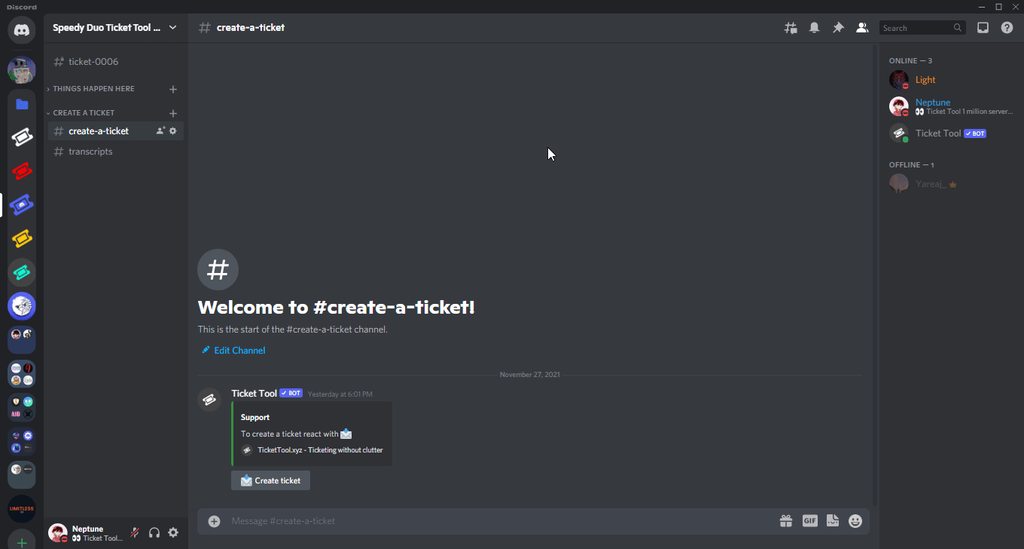 restive condor
heavy owl
it cant also
restive condor
heavy owl
it cant also
What does the bot reply with?
heavy owl
restive condor
What does the bot reply with?
nothing
restive condor
heavy owl
nothing
Is this on a server you're staff in?
heavy owl
restive condor
Is this on a server you're staff in?
yea
restive condor
Could I get that server's name or ID?
austere oxide
restive condor
You can use Discord's search feature, just put in the user ID and it will pop up...
👍
 austere oxide
Can I auto-transcript tickets just before they get deleted?
restive condor
austere oxide
Can I auto-transcript tickets just before they get deleted?
Yes, but that's a premium feature 
austere oxide
restive condor
Yes, but that's a premium feature <:Premium:1192403074157912144>
Not cool >:[
heavy owl
okay ill check
ohh wait how do i know if the ticketTool is still in the server? cause im just a new admin tho in our server
austere oxide
My closed ticket won't show up in my closed tickets category even to I setted it up like that.
restive condor
heavy owl
ohh wait how do i know if the ticketTool is still in the server? cause im just a...
Go into Ticket Tools profile, if it has the "Ticket Tool" role it's still in the server
restive condor
austere oxide
My closed ticket won't show up in my closed tickets category even to I setted it...
How many tickets are currently in the closed category?
Discord has a limit of 50 channels, TicketTool limits it to 45. If you have reached such limits, tickets won't be moved
austere oxide
restive condor
How many tickets are currently in the closed category?
Discord has a limit of 5...
There are exectly zero closed tickets in it.
heavy owl
restive condor
Go into Ticket Tools profile, if it has the "Ticket Tool" role it's still in the...
ohhh the ticket tool is alr left in the server
 restive condor
austere oxide
There are exectly zero closed tickets in it.
restive condor
austere oxide
There are exectly zero closed tickets in it.
Alright, can you make a brand new channel under the closed tickets category and run /debug there?
restive condor
heavy owl
ohhh the ticket tool is alr left in the server
That's why you can't close tickets. Please re-invite it
humble sequoiaBOT
Ticket Tool Invite & Support
heavy owl
restive condor
That's why you can't close tickets. Please re-invite it
alr imma gonna tell to my higher admin in the server thanks for the help!!
iron nightBOT
Gave +1 Rep to @restive condor (current: #5 - 702)
restive condor
No problem
austere oxide
restive condor
Alright, can you make a brand new channel under the closed tickets category and ...
@restive condor you need this?||https://discordapp.com/channels/509192800865353738/662692902245498910/1249310150800576633||
austere oxide
restive condor
Alright, can you make a brand new channel under the closed tickets category and ...
btw I have it set like this, this is good right?
 restive condor
austere oxide
btw I have it set like this, this is good right?
restive condor
austere oxide
btw I have it set like this, this is good right?
Yes, that's good
Permissions are also good. Are you sure you're making a ticket via the correct panel?
austere oxide
restive condor
Permissions are also good. Are you sure you're making a ticket via the correct p...
lemme check
austere oxide
restive condor
Permissions are also good. Are you sure you're making a ticket via the correct p...
yes
btw what did the debug link do?
 broken jacinth
I need support. The bot has all the perms, but when I try to send it, does not work. And shows this

Help Guys 🥹
restive condor
austere oxide
btw what did the debug link do?
It just shows me Ticket Tool's permissions
restive condor
austere oxide
yes
I'll bring you into a ticket as I'll need a server invite
broken jacinth
I need support as well
restive condor
broken jacinth
I need support. The bot has all the perms, but when I try to send it, does not w...
Hey there! Could you please run /debug in the #support channel?
 restive condor
Alright, permissions are good.
I'll take a look at your Dashboard as you seem to have an invalid emoji
restive condor
broken jacinth
I need support. The bot has all the perms, but when I try to send it, does not w...
Dashboard > Panel Configs > Buttons > Create Ticket Button
You have text in the button emoji field, and an emoji in the button text field.
Please only have 1 emoji in the button emoji field and text only in the button text field
 broken jacinth
restive condor
``Dashboard`` > ``Panel Configs`` > ``Buttons`` > ``Create Ticket Button``
You ...
broken jacinth
restive condor
``Dashboard`` > ``Panel Configs`` > ``Buttons`` > ``Create Ticket Button``
You ...
Thank you for your support!
iron nightBOT
Gave +1 Rep to @restive condor (current: #5 - 703)
restive condor
No problem
jade topaz
bro WHATS THE CIA DOING HERE
restive condor
jade topaz
bro WHATS THE CIA DOING HERE
Please keep this channel to support only 🙏
 urban helm
 marble apex
jade topaz
bro WHATS THE CIA DOING HERE
marble apex
jade topaz
bro WHATS THE CIA DOING HERE
Where?
restive condor
Please keep this channel to support only
You can use #💬│general-chat for general chats 🫶
 narrow mason
Alguém me dá um help?
restive condor
 vivid coral
Ticket tool is down
vivid coral
Ticket tool is down
Hey there! Can you re-try in 5-10 minutes? 🙏
 manic ledge
bot down ?
restive condor
manic ledge
bot down ?
Hey there! Can you re-try in 5-10 minutes? 🙏
restive condor
narrow mason
Alguém me dá um help?
Olá, como posso ajudar?
narrow mason
restive condor
Olá, como posso ajudar?
Nunca usei o bot então queria saber oque ele pode fazer e como usar
 violet lion
i need help with something
stark runeBOT
1. Invita a Ticket Tool a tu servidor
Primero querrás invitar al bot a tu servidor. Una vez el bot esté en tu servidor, puedes configurarlo en el dashboard.
2. Crear un panel
Para crear un panel deberás ir a la pestaña Panel Configs en el Dashboard.
Una vez en el dashboard, deberás dar click en Crear Panel
Ingresa el nombre del panel (Completa los demás ajustes de tu preferencia)
Haz click en Create Panel y ya estás listo para configurar el panel
Un ejemplo de como crear un panel es mostrado abajo
3. Envía el panel a un Canal
Una vez que hayas creado el panel, utiliza el botón azul Send y selecciona el canal al que quieres enviar dicho panel.
El panel no fue enviado
Utiliza el comando /debug para diagnosticar posibles problema de permisos con el bot.
restive condor
narrow mason
Nunca usei o bot então queria saber oque ele pode fazer e como usar
Aquí está um guia ^^
Só tenhamos en espanhol 🙏
narrow mason
restive condor
Aquí está um guia ^^
Só tenhamos en espanhol 🙏
Ok obrigado
restive condor
De nada
vivid coral
Is the bot restarting or why dan?
restive condor
violet lion
i need help with something
I can help you from here, if you'd like 😄
 sweet horizon
Anyone else’s bot not working?
vivid coral
sweet horizon
Anyone else’s bot not working?
ye
jade topaz
is the bot down
vivid coral
interaction failed
violet lion
nvm it ot fixed
restive condor
vivid coral
Is the bot restarting or why dan?
Most likely. Our developer is aware, please give it a few minutes
vivid coral
sure
 unkempt jacinth
interaction failed, same
 hardy bluff
restive condor
Most likely. Our developer is aware, please give it a few minutes
hardy bluff
restive condor
Most likely. Our developer is aware, please give it a few minutes
Was about to ask about this!
violet lion
it took very long time to go into the website
jade topaz
the bot is just stuck on like waiting for ticket tool to respojnd acnt open a ticket and says this on wesite
 violet lion
yeah that happend to mee also
restive condor
Thanks for the reports. Our developer is aware and taking a look
Please re-try in 5-10 minutes 🙏
violet lion
this is loading in 5m now
 jade topaz
restive condor
Thanks for the reports. Our developer is aware and taking a look
Please re-try i...
jade topaz
restive condor
Thanks for the reports. Our developer is aware and taking a look
Please re-try i...
Okay
violet lion

 cosmic fern
Anyone else getting the error 'This interaction failed'?
violet lion
me
pseudo ravine
We are aware of some difficulties, and the developer is aware of these. Please be patient while he tries to resolve the issue 
vivid coral
cosmic fern
Anyone else getting the error 'This interaction failed'?
bot down
cosmic fern
vivid coral
bot down
Gotcha, thanks for clarifying!
iron nightBOT
Gave +1 Rep to @vivid coral (current: #319 - 1)
jade topaz
Who is the developer
vivid coral
not me
 unique wren
I was about to ask, but then I read the chat, well hopefully it gets fixed when it gets fixed
violet lion
cmon faster i need to fix my server
restive condor
Apologies for the inconvience. Will be resolved as soon as possible
violet lion
what even is the problem?

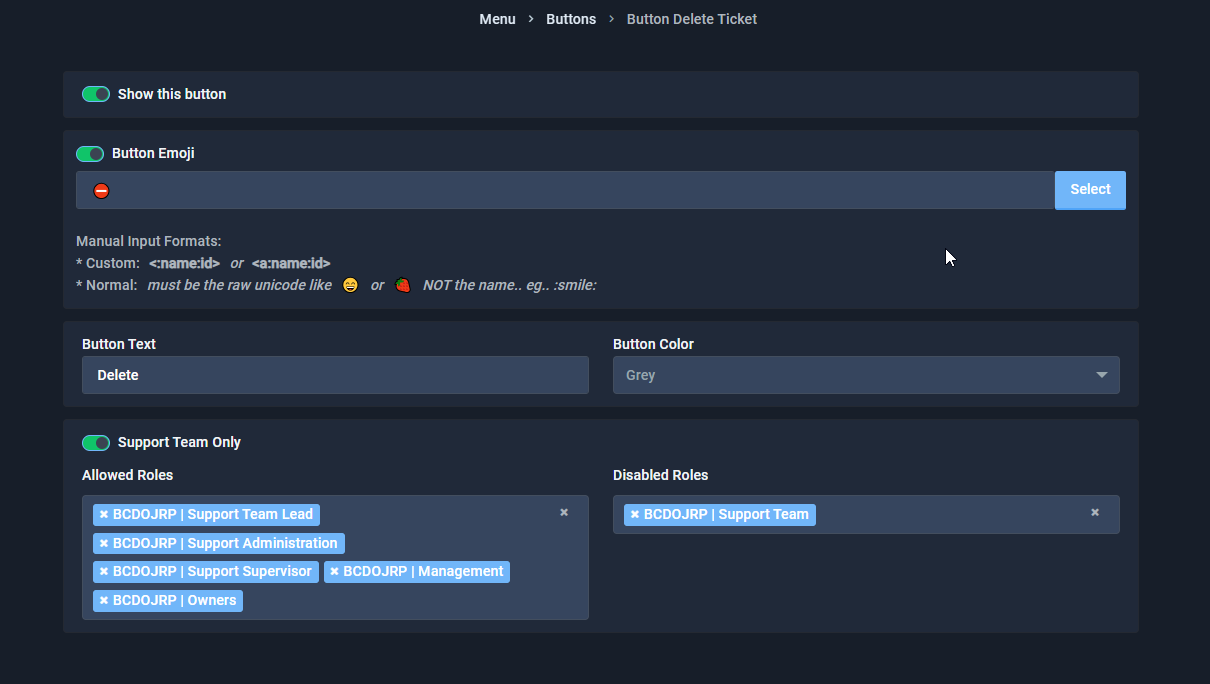


 grizzled summit
vivid coral
status say everything is good
grizzled summit
vivid coral
status say everything is good
It isn't.


Was happening last night as well.
pseudo ravine
We are aware of some difficulties, and the developer is aware of these. Please be patient while he tries to resolve the issue
 balmy shoal
Ticket tool is offline in my server :=
 hollow thistle
I guess the ''This interaction failed'' error is already known?
vivid coral
grizzled summit
It isn't.
Well the status page says everything good
https://status.tickettool.xyz
Welcome to Ticket Tool's home for real-time and historical data on system performance.
grizzled summit
pseudo ravine
We are aware of some difficulties, and the developer is aware of these. Please b...
👍 
restive condor
pseudo ravine
We are aware of some difficulties, and the developer is aware of these. Please b...
 woven patrol
@pseudo glen off
limber portal
As Jdog said the developer is actively fixing the root cause of this issue ^^
Please be patient, it should all be back up again soon.
 elder hull
@humble sequoia too