#🆘│community-support
1 messages · Page 101 of 1
 restive bone
 strong isle
How do I ping a role and the person who opens a ticket?
 humble sequoiaBOT
1. Go into your Dashboard
2. Open your Panel Configs tab
3. Select the panel you want to ping your support on
4. Open the Ticket options menu
5. Click on Edit Ticket Message
6. In the Message Content use one of the role mention syntax (**{@Role Name}**/**{Role ID}**)
7. Save changes
Note: For this to work properly, Ticket Tool requires the Mention Everyone permission. Or the role must have the Allow anyone to @mention this role setting enabled 

 austere forge
strong isle
How do I ping a role and the person who opens a ticket?
austere forge
strong isle
How do I ping a role and the person who opens a ticket?
hi there, see above ^^
strong isle
austere forge
hi there, see above ^^
And for the person?
austere forge
strong isle
How do I ping a role and the person who opens a ticket?
and use {user} to ping user opens a ticket
 iron nightBOT
Gave +1 Rep to @austere forge (current: #28 - 133)
austere forge
you're welcome 🙂
strong isle
What the fuck😭
 jade topaz
How much and how to buy ticket tool premium?
humble sequoiaBOT

Premium can now be purchased directly through discord! Either in the app directory (server settings) or directly from the bots profile.
<:TTWarning:1034178155872784494> Important Information <:TTWarning:1034178155872784494>
ONLY purchase premium through ONE of the two Ticket Tool Bots. If you purchased premium on the primary bot (White logo) and plan to use the premium bot, don't kick the primary bot!
What's different?
 The Monthly price changed from
 $6.00 to $5.99

 Yearly subscriptions are not yet available
Don't kick the bot, otherwise, the subscription will be canceled automatically
You'll need to buy the subscription from a computer or on the Application Directory
You might need to run the /premium command on your server to sync the premium status with your dashboard
 A subscription can not be transferred between Servers

 crisp pawn
Is there a tut?
austere forge
crisp pawn
Is there a tut?
sure see below
humble sequoiaBOT
1. Go into your Dashboard
2. Open your Panel Configs tab
3. Select the panel you want to grant access to
4. Open the Transcript options menu
5. Using the Transcript Channel selector, pick the channel you want your transcripts to be sent to
6. Save changes
 crisp pawn
austere forge
sure see below
crisp pawn
austere forge
sure see below
it still doesnt work
already saved


i already gave permission for the ticket tool bot in the channel
 gilded verge
crisp pawn
i already gave permission for the ticket tool bot in the channel
gilded verge
crisp pawn
i already gave permission for the ticket tool bot in the channel
i hope i won't interrupt much but could you run /debug in your transcript channel? i'd like to confirm one thing
crisp pawn
gilded verge
i hope i won't interrupt much but could you run `/debug` in your transcript chan...
 gilded verge
could you clear cache? there should be a button
crisp pawn
gilded verge
could you clear cache? there should be a button
done
gilded verge
i also hope that won't be too much problem but please log out and then log in again into the dashboard -> try again to set the transcript channel
crisp pawn
gilded verge
i also hope that won't be too much problem but please log out and then log in ag...
alright
crisp pawn
gilded verge
i also hope that won't be too much problem but please log out and then log in ag...
still doesnt work
gilded verge
could you try to set the transcript channel but somewhere else? i mean other than this we tried now
crisp pawn
gilded verge
could you try to set the transcript channel but somewhere else? i mean other tha...
it still doesnt work

still says that the transcript channel isnt set
gilded verge
how many panels you have now?
 gilded verge
yap, that's right ^^
hm, maybe another thing... please create completely new panel (so it will be 5th panel) -> set the transcript channel -> in any of your private channels use /panel 5 -> create a ticket -> send any mesage there -> try to save transcript
crisp pawn
gilded verge
yap, that's right ^^
hm, maybe another thing... please create completely new pa...
oh it works now
do i recreate the panels?
gilded verge
as i thought 😳
generally you can Duplicate the panel which had problem with transcript channel but please test it if in this duplicated version the transcript works correctly ^-^
// if that won't work, then they have to be created as new
crisp pawn
gilded verge
as i thought 😳
generally you can `Duplicate` the panel which had problem with...
Thank you very much for your help, I truly appreciate it.
iron nightBOT
Gave +1 Rep to @gilded verge (current: #8 - 517)
gilded verge
im glad i could assist you ^-^
 fossil pollen
Hi
 raven crystal
When i use ticket tool and try to close the ticket
It says unable to and something about manage roles
 shut bolt
raven crystal
It says unable to and something about manage roles
shut bolt
raven crystal
It says unable to and something about manage roles
If it says "Missing Permissions" that means the bot is missing the permissions it says in order to execute an action
 foggy bear
When i open a ticket it says welcome Sapphire expect of saying welcome user
 nimble parcel
how i get the message for everyone createticket
 limber portal
foggy bear
When i open a ticket it says welcome Sapphire expect of saying welcome user
limber portal
foggy bear
When i open a ticket it says welcome Sapphire expect of saying welcome user
That's as Sapphire is technically the one making the ticket, if you are using commandstyle.
foggy bear
Yeah i am
 summer plume
Is the bot currently down? On the server I'm on it constantly repeats "Interaction failed". Yesterday it showed up once then if you repeated making the ticket it was able to make it no problem, but right not it doesn't work at all
limber portal
summer plume
Is the bot currently down? On the server I'm on it constantly repeats "Interacti...
Hi, no. it may be missing some required permissions.
summer plume
limber portal
Hi, no. it may be missing some required permissions.
Is it possible though? It's been in the server for a long time
limber portal
No, the bot isn't down.
summer plume
I meant that is it possible for it to lose permissions
The bot has all of the possible permissions
limber portal
Yes, it's possible that someone has changed permissions
run /debug in that channel
@summer plume Can I get the server id?
summer plume
The server is currently low on staff and I'm not on it yet, so I don't think I can get it without the dev mode
Idk if the name of the server "Islander" will help
796101050133512193
Got it!
It works now. Don't know if you did something or someone from the staff ran the debug command, but it's alright now ^^
foggy bear
limber portal
That's as Sapphire is technically the one making the ticket, if you are using co...
Also is it possible to add a claiming button?
limber portal
summer plume
It works now. Don't know if you did something or someone from the staff ran the ...
Amazing 
humble sequoiaBOT
Claiming allows you to change the ticket name, category and permissions. To use it you have to enable it first on your Dashboard > Panel Configs > Claiming

 Note: This is a premium feature
limber portal
foggy bear
Also is it possible to add a claiming button?
Note: This is a premium feature
limber portal
foggy bear
Also is it possible to add a claiming button?
^^
foggy bear
limber portal
^^
 jade topaz
who speack french for help me
humble sequoiaBOT

L'équipe du support Français
Cher client,
Si vous avez besoin d'aide, ouvriez un ticket pour le support Français s'il vous plaît.
Allez au #🎫│make-a-ticket et tapez sur le bouton contenant l'emoji 🇫🇷
limber portal
foggy bear
Have you enabled thread style by accident?
foggy bear
limber portal
Have you enabled thread style by accident?
I managed to figure it out thanks. Whenever someone makes the ticket it says nothing for them like there is nothing like no bot or anything in the channel.
iron nightBOT
Gave +1 Rep to @limber portal (current: #10 - 421)
 dire mirage
hi is there smth in the settings that will allow ppl to view their closed tickets/transcripts?
smth that isn't a paid feature
i don't need a dm transcript
 celest rose
If I buy ticket tool premium, can I change my avatar and bot name?
humble sequoiaBOT
Ticket Tool Custom Avatar
As of now, you are not able to change Ticket Tool's profile picture, nonetheless, our Development Team is working on the release of white labels, this is your own custom bot!
For the time being, you can change the bot's nickname by right-clicking the bot in the user list on your server and clicking Change Nickname

$avatar
 blissful gyro
how do i edit the ticket channel names?
humble sequoiaBOT
The ticket name is the default channel name of all tickets. To edit it, go to your Dashboard > Panel Configs > Ticket. There you can edit the channel name of opened and closed tickets. You can also use variables in there.

 Note: This is a premium feature
limber portal
blissful gyro
how do i edit the ticket channel names?
Note: This is a premium feature
limber portal
blissful gyro
how do i edit the ticket channel names?
^
iron nightBOT
Gave +1 Rep to @limber portal (current: #10 - 423)
 slim wing
Hello
I want authorized people on my server to look at the tickets, what permissions should I give or what commands should I use?
@limber portal
humble sequoiaBOT
1. Go into your Dashboard
2. Open your Panel Configs tab
3. Select the panel you want to grant access to
4. Open the General options menu
5. Select your Support Team Roles
6. Save changes

 woven trench
How to fix this. It is showing Hello @sapphire

 kind mason
guys i need help

lets say someone open ticket for Other can i make 3 categories and when they open ticket for Other to go to that category
slim wing
How ı add my friends to support team my English is bad
humble sequoiaBOT
1. Go into your Dashboard
2. Open your Panel Configs tab
3. Select the panel you want to grant access to
4. Open the General options menu
5. Select your Support Team Roles
6. Save changes
 slender minnow
@slim wing see above ^^^
slender minnow
kind mason
lets say someone open ticket for Other can i make 3 categories and when they ope...
yes, using dropdown
see below please
humble sequoiaBOT
The Drop-down menu or Select Menu replaces the buttons on your panel message and uses a drop-down menu with all of your panels. To set this up, go to your Panel Configs and select your main Panel.
<:Numbericons1:1018864164032225340> Enable Select Style
First you enable Select Style. Then you add an item in the Dropdown Editor. Now you can start editing your dropdown!
<:Numbericons2:1018864168041971712> Dropdown Editor
Each line in the dropdown editor represents a line in the drop down menu on discord. You can add more "Items", by clicking on 

First you select a panel. That's the panel this option will open a ticket for.  DONT select the same panel twice. Each option should have a different Panel
After that, you can put a Display. This is the title of this option and will appear in the drop down menu. The *Description can be set right after that, which will be below the title in grey.
Additionally you can select an emoji, that will be shown in front of each option. You can either manually input the ID of an emoji or select it in the selector.
Common Issues ⚠️
- Panel doesn't send? Make sure you have a valid emoji selected
- Option doesn't show up? Check if two options have the same panel in the DropDown Editor

$dropdown
slender minnow
woven trench
How to fix this. It is showing Hello @sapphire
what exactly are you trying to do?
kind mason
slender minnow
yes, using dropdown
i use sapphire for the dropdown
slender minnow
kind mason
i use sapphire for the dropdown
ticket tool also has dropdown 🙂
slim wing
My English bad
slender minnow
slim wing
I dont understand
what part are you not understanding?
slim wing
Pls say me command
kind mason
slender minnow
ticket tool also has dropdown 🙂
i didnt know this
slim wing
All because ı cant read
Translate is wrong
Pls say me how ı add my mods in all tickets
How they see
 lunar solar
What’s your first language @slim wing?
slim wing
Turkish
lunar solar
Ahh I see
slender minnow
kind mason
i didnt know this
see the embed sent earlier
slim wing
Pls help me
kind mason
slender minnow
see the embed sent earlier
yes but how i can do this i want to make 3 categories
premium
report issue
other
slim wing
Lupus and white wolf
kind mason
and when someone opens a ticket for premium this ticket to go to the premium category
you understand me now
slender minnow
slim wing
Pls help me
Bu anlaşılabilir mi?
slim wing
Yes
slender minnow
kind mason
yes but how i can do this i want to make 3 categories
premium
report issue
other
You'll need to create three options in dropdown and three panels as said in the response, you can follow the steps given in the response. Let me know if you are stuck somewhere
slim wing
slender minnow
Bu anlaşılabilir mi?
Yes
slender minnow
Yanıtta ne gönderildiğini anlayabiliyor musunuz #🆘│community-support message
kind mason
slender minnow
You'll need to create three options in dropdown and three panels as said in the ...
but i can use the sapphire bot right
slender minnow
slim wing
Hayır
Tamam, panel yapılandırmanıza gidin ve genel seçeneğe tıklayın
kind mason
i watched tutorial and in this tutorial i saw this bot and sapphire so i have the 2 bots
slim wing
slender minnow
Tamam, panel yapılandırmanıza gidin ve genel seçeneğe tıklayın
Ve sonra
slender minnow
kind mason
but i can use the sapphire bot right
yes but to setup sapphire, you will have to ask in their support server
you can make tt listen to command usage from a specific bot
slender minnow
slim wing
Ve sonra
rolü destek rolü olarak ekleyin
kind mason
slender minnow
yes but to setup sapphire, you will have to ask in their support server
yhe sapphire bot is done
 runic basalt
How do I get the form feature to work?
slim wing
slender minnow
rolü destek rolü olarak ekleyin
Bir saniye bekleyin ekran görüntüsü atacağım
 slender minnow
daha sonra izne gidin > açık bilet için destek ekibi iznini düzenleyin ve bileti görüntüle seçeneğini işaretleyin, mesaj geçmişini okuyun ve mesajı şu şekilde gönderin 
woven trench
slender minnow
what exactly are you trying to do?
I am using ticket with sapphire but it is showing Hello sapphire instead of that i want tick opener name
slim wing
Buradan sonra ne yapmalıyım
kind mason
slender minnow
rolü destek rolü olarak ekleyin
how i can make this bot to sent the tickets in the following categories
slender minnow
woven trench
I am using ticket with sapphire but it is showing Hello sapphire instead of that...
so are you trying to change the embed content?
slender minnow
slim wing
Buradan sonra ne yapmalıyım
humble sequoiaBOT
1. Go into your Dashboard
2. Open your Panel Configs tab
3. Select the panel you want to grant access to
4. Open the Category options menu
5. Select the categories of your preference
6. Save changes
 slim wing
 slender minnow
humble sequoia
slender minnow
humble sequoia
@kind mason
slim wing
Now what I need to do?
slender minnow
neden dokümanlardasın?
humble sequoiaBOT

Ticket Tool - Ticketing without clutter - The #1 discord Ticketing bot
slender minnow
sunucu kontrol panelinize buradan erişin
slim wing
Oh thank you very much @slender minnow
iron nightBOT
Gave +1 Rep to @slender minnow (current: #12 - 381)
kind mason
@slender minnow its working thanks
iron nightBOT
Gave +1 Rep to @slender minnow (current: #12 - 382)
slim wing
I try this 1millon times thank you @slender minnow
iron nightBOT
Gave +1 Rep to @slender minnow (current: #12 - 383)
runic basalt
How do I increase the number of tickets that can be open at a time? I'm not seeing the option to
kind mason
runic basalt
How do I increase the number of tickets that can be open at a time? I'm not seei...
ye true i need that to
runic basalt
Okay so I found it, on the dashboard it's under limits
You gotta scroll all the way down, it's in the bottom row of options
 kind mason
@runic basalt thanks
iron nightBOT
Gave +1 Rep to @runic basalt (current: #306 - 1)
runic basalt
kind mason
<@1078507767784022137> thanks
You're welcome!
woven trench
slender minnow
so are you trying to change the embed content?
Yeah I want it to change
slender minnow
Panel Config > Ticket > Edit ticket message > Dropdown near embed editor
use that
kind mason
@slender minnow hey so when i open ticket for "Report issue" the ticket goes to the buy premium category can you help?
slender minnow
cross check which category you have specified for that panel
there's no need to ping me while asking for support
kind mason
slender minnow
there's no need to ping me while asking for support
sorry
kind mason
slender minnow
cross check which category you have specified for that panel
how i can do that?
slender minnow
humble sequoia
see above ^^^
kind mason
slender minnow
see above ^^^
its still not working
slender minnow
can I have the server ID?
kind mason
here or in dms
slender minnow
here is fine
kind mason
1226498654848946277
slender minnow
can you open a ticket from #🎫│make-a-ticket for me to take a closer look
kind mason
slender minnow
can you open a ticket from <#571706435449257997> for me to take a closer look
humble sequoiaBOT
━━ SYLYXA's inquiry has been moved to a ticket ━━
kind mason
you saw the ticket white wolf?
 granite terrace
Good evening! tell me in the settings, the server that the bot was added to is not visible . You can see other servers besides the one you need.
humble sequoiaBOT
Don't see your server in the dashboard?
Try using the Sync Servers button on your top center of the Dashboard page
You will possibly need to relog. Look below to see the steps on how to relog.
If this doesn't work
You should relog from the dashboard, you can do this by clicking here to log out immediately, and then log back in
Note:
You need one of these 3 things to access the dashboard.
1. Server Owner (Level: 6)
2. Server Administrator (Level: 4)
3. Dashboard Role (Level: 2)
:warning: You can check your level using the </permissionlevel:1029797400174399542> command on your Discord Server
If the bot's response is:
- @User is permission level: 0 (User)
You don't have any of the 3 levels required to access the server's dashboard

 weak fiber
humble sequoiaBOT
weak fiber
humble sequoiaBOT

⚠️ You're in the wrong place
We provide support for Ticket Tool Discord bot and cannot help you with whatever issue you have.
- We don't know which Support Team you should contact to get this issue resolved, and unfortunately we won't be able to accurately tell you.
If you don't have any further questions regarding our bot Ticket Tool, please close this ticket
 restive condor
 cobalt crow
i can't setup a ticket
cobalt crow
i can't setup a ticket
Hey there! What seems to be the problem?
cobalt crow
restive condor
Hey there! What seems to be the problem?
i want to setup but its said aplictien is not reacting
restive condor
cobalt crow
i want to setup but its said aplictien is not reacting
Could you use the /debug command please?
 restive condor
cobalt crow
the same thing
restive condor
cobalt crow
the same thing
Ticket Tool is missing the SEND MESSAGES & EMBED LINKS permissions for that channel
cobalt crow
restive condor
Ticket Tool is missing the ``SEND MESSAGES`` & ``EMBED LINKS`` permissions for t...
how do you do it?
 brazen ice
I do not know how to set up Ticket bot. Can anyone help me?
restive condor
cobalt crow
how do you do it?
Right click on the channel name > Edit channel > Permissions > Find/Add Ticket Tool > those two permissions
restive condor
brazen ice
I do not know how to set up Ticket bot. Can anyone help me?
Hey there! Here's a guide.
Let me know if you have any questions
 stark runeBOT
1. Invite Ticket Tool to your server
First you will want to invite the bot to your server. Once the bot is in your server, you can manage your server in the dashboard.

2. Create a Panel
To create a panel we are going to need to head over to the panel configs on the dashboard.
Once at the dashboard we will need to click Create Panel.
Enter a panel name (Fill in any optional settings you want).
Click Create Panel and your ready to get started with configuring your panel.
An example of a creating a panel is shown below.

3. Send the Panel to a Channel
Once you've created a panel on the dashboard you will need to send it to a channel using send on the dashboard.
Select the channel you want your panel to be created in and click send.
For other questions checkout $help faq.
An example of a sending a panel is shown below.
Having a Problem Sending the Panel?
Do $debug in a channel with Ticket Tool and make sure it has all the necessary Discord permissions.
 cobalt crow
 brazen ice
restive condor
Hey there! Here's a guide.
Let me know if you have any questions
brazen ice
restive condor
Hey there! Here's a guide.
Let me know if you have any questions
I can't find that option
brazen ice
brazen ice
I can't find that option
Is there any way that you could join the server and help me out with the bot? I am beginning to hate it
cobalt crow
brazen ice
Is there any way that you could join the server and help me out with the bot? I ...
me to
brazen ice
cobalt crow
me to
too*
LOL
cobalt crow
you need to anble send mesagge
brazen ice
who?
cobalt crow
brazen ice
who?
in youre settings where you put it bye
brazen ice
cobalt crow
in youre settings where you put it bye
???
restive condor
Sorry, had to step out for a second.
Can you please #🎫│make-a-ticket so we can help you better 🙏
@brazen ice @cobalt crow
 restive condor
 stray elm
Hey there! That's your premium status, if you don't have an active subscription it will show as ''Free''.
That premium key redeeming feature is for staff only
stray elm
restive condor
Hey there! That's your premium status, if you don't have an active subscription ...
Was there a free 7-day subscription for Water Disappeared?
restive condor
stray elm
Was there a free 7-day subscription for Water Disappeared?
There is, but it looks like you started your trial on the 12th of April
jade topaz
why everyone have administrator perm?
People who are not administrators have access to the ticket tool dashboard
restive condor
jade topaz
why everyone have administrator perm?
Hey there! Make sure you have selected the correct roles under your Dashboard > Server Configs > Dashboard Roles
iron nightBOT
Gave +1 Rep to @restive condor (current: #7 - 527)
jade topaz
i was confused bc my english is bad
restive condor
No problem
jade topaz
+1 rep fy
stray elm
restive condor
There is, but it looks like you started your trial on the 12th of April
Hmmmm, I don't know, but okay, thanks for your help
iron nightBOT
Gave +1 Rep to @restive condor (current: #7 - 528)
 keen ether
How do I make more buttons like in this screenshot?
 humble sequoiaBOT
For more convenient use of multipanels, you can now combine panels on the dashboard. This will allow you to directly send the multipanel from the dashboard or via the $panel ID command.
Where can I find this?
You can find this setting on the Dashboard -> Panel Configs -> Panel -> Attached Panels
Note: if you're attaching all the panels to a panel called English, don't include English in the attached panel's box (If you do this, it will create a duplicate)
This will put all buttons from all of your panels on one message. The message is the panel message from the panel you're combining these panels in.
 restive condor
keen ether
How do I make more buttons like in this screenshot?
restive condor
keen ether
How do I make more buttons like in this screenshot?
Hey there! See above ^^
Let me know if you have any questions 🙏
keen ether
Thank you
 errant island
ل
keen ether
@restive condor
 restive condor
keen ether
<@795710289425334303>
restive condor
keen ether
<@795710289425334303>
Please use the ''SYNC'' button to refresh your dashboard
keen ether
restive condor
Please use the ''SYNC'' button to refresh your dashboard
remains the same
restive condor
keen ether
remains the same
Did you create the different panels prior to trying to attach them?
keen ether
no, I'll try now, I have to click on the + right?
restive condor
Correct
keen ether
restive condor
Correct
and do I choose the name based on what I want written in it?
restive condor
keen ether
and do I choose the name based on what I want written in it?
Nope, it can be any name. The buttons must be edited separately
 restive condor
keen ether
Now how do I customize them?
restive condor
keen ether
Now how do I customize them?
Dashboard > Panel Configs > Buttons > Create Ticket Button
Make sure you edit the buttons for all three panels
keen ether
Ok thx
keen ether
restive condor
``Dashboard`` > ``Panel Configs`` > ``Buttons`` > ``Create Ticket Button``
restive condor
keen ether
Yep, right there.
You can include the button text there, change the colour, add an emoji...etc
humble sequoiaBOT
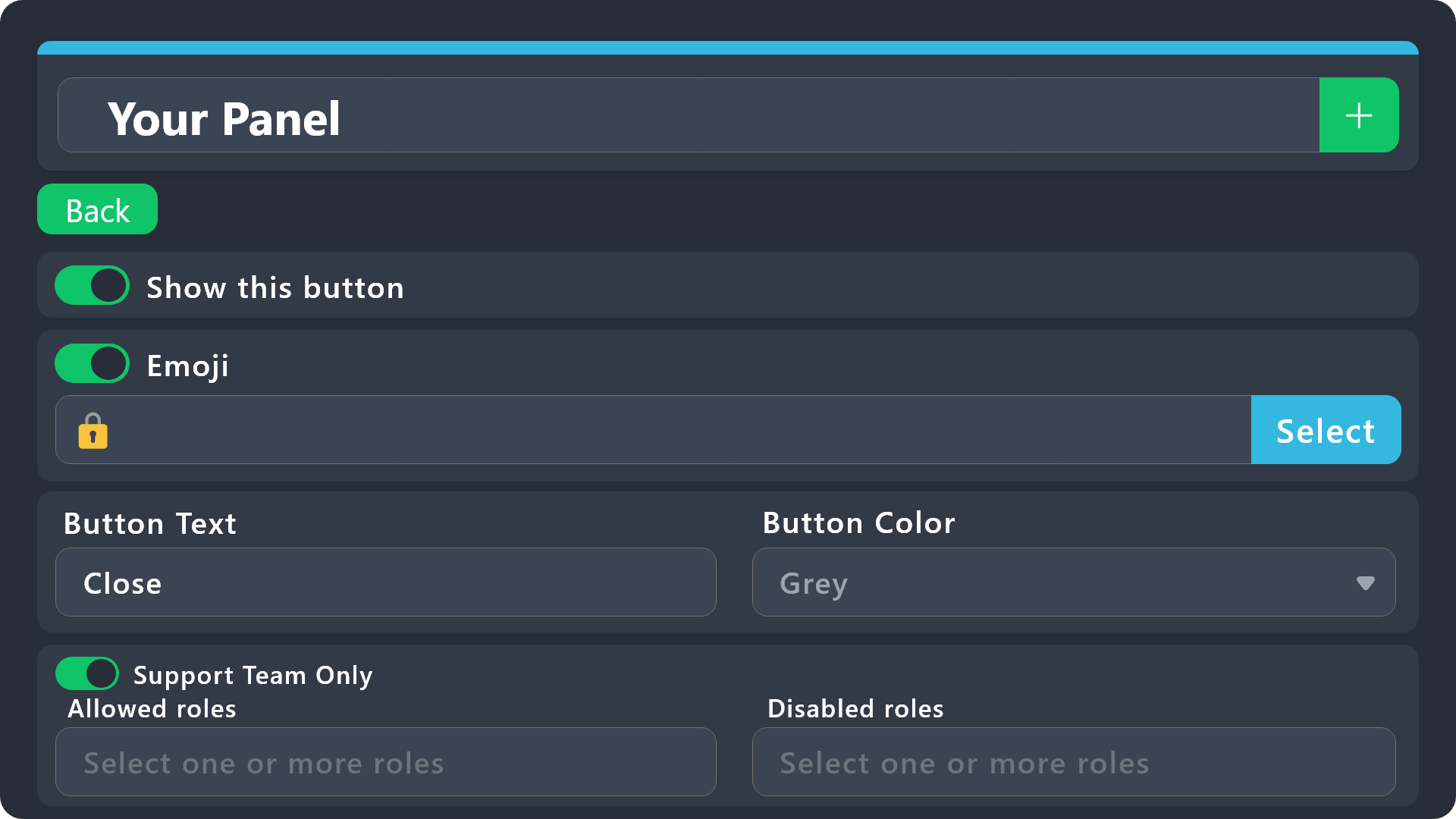
Button Options
 Enable Button
Hide or show the button
 Emoji
Emoji
Select an emoji to show on the button
You can either select one or use a valid Emoji ID
 Button Text
Edit the text that's shown on the button
 Button Color
Select one of four colors for the button. Grey, Green, Red, Blue.
 Support Team Only
Enable this to only let your support team click that button
 Allowed and disabled roles
Edit what roles can use or not use this button
$buttonoptions
 simple marsh
Is it possible to make it so that the bot sends us the new created ticket channel like this? (I know this is a different bot but it's an example of what I mean)
 restive condor
simple marsh
Is it possible to make it so that the bot sends us the new created ticket channe...
restive condor
simple marsh
Is it possible to make it so that the bot sends us the new created ticket channe...
Hey there! Yes, Ticket Tool does that automatically
 simple marsh
Yea but I meant when I'm doing the command $new
restive condor
simple marsh
Yea but I meant when I'm doing the command $new
Ah, no. That's not possible, but you can ping the user(s) in the ticket with confirmation
simple marsh
restive condor
Ah, no. That's not possible, but you can ping the user(s) in the ticket with con...
Ah oki
keen ether
restive condor
Yep, right there.
You can include the button text there, change the colour, add ...
How i can add more bottos?
 restive condor
keen ether
How i can add more bottos?
restive condor
keen ether
How i can add more bottos?
Change panels to edit each button
keen ether
restive condor
Change panels to edit each button
thanks a lot I succeeded!
iron nightBOT
Gave +1 Rep to @restive condor (current: #7 - 529)
restive condor
Glad to hear!
 frosty flint
Hi, i need a team support member to assist me with my issue if possible privately, just shoot me a dm
restive condor
frosty flint
Hi, i need a team support member to assist me with my issue if possible privatel...
Hey there! You can open a ticket. #🎫│make-a-ticket
We do not offer support via DMs
frosty flint
restive condor
Hey there! You can open a ticket. <#571706435449257997>
We do not offer suppor...
idk why u warned me when u got dm's open on your status but whatever ig
restive condor
Server rules apply, regardless of what's on my about me (which isn't visible from the server)
 sweet stump
Hi Transcripts are not working
restive condor
sweet stump
Hi Transcripts are not working
Hey there! What seems to be the problem?
sweet stump
It keeps telling me to Add a channel so it can save transcripts but i have
the bot is being annoying
restive condor
sweet stump
It keeps telling me to Add a channel so it can save transcripts but i have
Make sure you have selected a channel for the relevant panel(s) under your Dashboard > Panel Configs > Transcript > Transcript channel
sweet stump
I have but it keeps saying that there is no channel added which there is
restive condor
sweet stump
I have but it keeps saying that there is no channel added which there is
Could I get your server name or ID, please?
sweet stump
restive condor
Could I get your server name or ID, please?
1234948422327336961
sweet stump
restive condor
Could I get your server name or ID, please?
Now its working
ugh bot is annoying
restive condor
No problem 
 soft vale
Is TT premium paid per server that it is in? Answer is yes.
raven crystal
shut bolt
If it says "Missing Permissions" that means the bot is missing the permissions i...
OHH
that makes sense ty
jade topaz
How do we do it so that when I do a multi panel, someone clicks on "question", the ticket that will be created will be in a category (created beforehand) "question"
humble sequoiaBOT
━━ Capybara's inquiry has been moved to a ticket ━━
 bright ibex
hi
i have a question i am trying to make an discord server for makeing a group
and i want that somone opents a ticket
that there are some questtions how do i make that
like i open a ticket and in the chanel were my ticket opens is a question like how old are u
humble sequoiaBOT
A Discord Form lets the user answer individual questions in a pop-up Form, which then displays the answers in the ticket message. This can save time if you already know what you want to ask the user.
Setup Forms
Forms can be enabled under Panel Settings > Form Options > Edit Forms Options. In the new pop-up window, you can now enable and edit your own Form.
Form Options
You can add up to 5 questions in the Discord form. This is a Discord limitation. Each question can have a placeholder in the input field, a minimum and maximum input, multi-line, and also the option to have the answer required.
Options
Question Title ➞ Your Question goes here
Question Placeholder ➞ The placeholder text in the input field
Required ➞ If enabled, the user has to answer this question, to submit the form
Multi-Line Input ➞Allows the user to input multiple lines
Minimum and Maximum Input ➞ Set a minimum and maximum input value for the user
Displaying the Answer
To display the answers from the user, you need to enable Auto display form results on the ticket message as an additional embed
If you don't want a second embed, go into your Panel Configs > Ticket Options > Edit Ticket Message. You use the variable {create.form.x} and replace x with the number of your question. For example, the response to Question 5 can be displayed with {create.form.5}.
 austere forge
bright ibex
like i open a ticket and in the chanel were my ticket opens is a question like h...
austere forge
bright ibex
like i open a ticket and in the chanel were my ticket opens is a question like h...
Hi there, see above ^^
 odd flame
Were do i find this to setup on ticket tool ? im wanting to change my tickets from drop down to these
 humble sequoiaBOT
For more convenient use of multipanels, you can now combine panels on the dashboard. This will allow you to directly send the multipanel from the dashboard or via the $panel ID command.
Where can I find this?
You can find this setting on the Dashboard -> Panel Configs -> Panel -> Attached Panels
Note: if you're attaching all the panels to a panel called English, don't include English in the attached panel's box (If you do this, it will create a duplicate)
This will put all buttons from all of your panels on one message. The message is the panel message from the panel you're combining these panels in.
restive condor
odd flame
Were do i find this to setup on ticket tool ? im wanting to change my tickets fr...
Hey there! You will need two different panels, then you combine them into one using the instructions above ^^
 restive condor
 solemn thorn
Hey there! Could you run the command /debug?
solemn thorn
restive condor
Hey there! Could you run the command ``/debug``?
Sure thing stand by
 restive condor
solemn thorn
Sure thing stand by
restive condor
solemn thorn
Sure thing stand by
Ticket Tool is missing the SEND MESSAGES permission for that channel
restive condor
Glad to hear it works now
 late marten
can someone help me with this bug
System Failure: Invalid Form Body
components[0].components[0].emoji.name[BUTTON_COMPONENT_INVALID_EMOJI]: Invalid emoji
i dont know how to fix it
gilded verge
late marten
System Failure: Invalid Form Body
components[0].components[0].emoji.name[BUTTON_...
in some button you used wrong name of emoji as your error shows
 jade topaz
restive condor
Ticket Tool is missing the ``SEND MESSAGES`` permission for that channel
jade topaz
restive condor
Ticket Tool is missing the ``SEND MESSAGES`` permission for that channel
i did what you said and it still didnt work
gilded verge
jade topaz
i did what you said and it still didnt work
missing permissions
 jade topaz
im going to try hold on
late marten
gilded verge
in some button you used wrong name of emoji as your error shows
oh how do i fix it
gilded verge
Panel Configs->Buttons->check there
jade topaz
gilded verge
missing permissions
it didnt work
gilded verge
hm... please use /debug again, i'd like to confirm that the permissions are updated 🤔
jade topaz
okay.
gilded verge
the same problem, bot doesn't have permission to read the channel where you used the command
jade topaz
i dont read channel i see read message history not channel
gilded verge
sorry, the name of permission is View Channel - that's the one
jade topaz
so turn it on?
gilded verge
yep, after you turn it on, it will work
 tranquil bison
do i need to make new panel if i get premium
late marten
gilded verge
Panel Configs->Buttons->check there
it didnt work it brought up the same message
gilded verge
tranquil bison
do i need to make new panel if i get premium
you don't have to but i would recommend to create a new panel because most likely you want to use these features there but once your premium will end, you can't use the panel which had activates premium features.
my point is simply that if it will end, then you can easily resend the non-premium panel ^^
gilded verge
late marten
it didnt work it brought up the same message
could you send screenshot of permission in the settings in that channel where you used command? 🤔
jade topaz
gilded verge
yep, after you turn it on, it will work
Im not going to lie it still didnt work and im confused right now
late marten
gilded verge
could you send screenshot of permission in the settings in that channel where y...
its inside of the ticket it opens up when we try to close it
jade topaz
i did everything you said to do
gilded verge
tranquil bison
uh can i not just edit the panel texts
oh, you can also duplicate current panel and add the premium features in the duplicated panel 😮
but do what is more convenient for you ^^
gilded verge
jade topaz
Im not going to lie it still didnt work and im confused right now
ofc course i understand but please send the screenshot of permissions, i need to confirm that ^^
tranquil bison
gilded verge
oh, you can also duplicate current panel and add the premium features in the dup...
no i don't want to create another panel i just want to edit the old panel but it can not happen with out premium since i'm adding a lots of words in it so is it possible that i can edit that same old panel without having to create a new one after purchasing premium
jade topaz
 gilded verge
tranquil bison
no i don't want to create another panel i just want to edit the old panel but it...
gilded verge
tranquil bison
no i don't want to create another panel i just want to edit the old panel but it...
wait, so you meant that your premium expired but you want to edit the panel which had premium features? because if so.. then you can't change it and you need to create a new one 😦
gilded verge
jade topaz
nono, i need you to open channel settings -> permissions -> send screenshot of what permissions the ticket tool has ^^
tranquil bison
gilded verge
wait, so you meant that your premium expired but you want to edit the panel whic...
well it was free 7 days premium 🐥
late marten
gilded verge
could you send screenshot of permission in the settings in that channel where y...
im trying to close the ticket after someone opens one but it gives me that error and idk how to exactly fix it i checked the buttons thing nothing was wrong
gilded verge
tranquil bison
well it was free 7 days premium 🐥
indeed the free trial is the best for testing 😊
but still, if your panel had premium features, then we can't do too much and you need to create a new one
tranquil bison
gilded verge
indeed the free trial is the best for testing 😊
but still, if your panel had p...
🥹 fine


 gilded verge
you sent permissions for role but we need View Channel in your channel settings, let me show you.. as we can see on the screenshot, the bot has permissions in it's role but not in the channel where you used command

you need to click on this little thingy to set permissions in channel ^^
 late marten
what do i need to do to fix my problem?
gilded verge
late marten
what do i need to do to fix my problem?
wait a moment... oopsies, seems like before i replied to you but i meant someone else XD
but i sent you the solution because you need to go into Panel Configs->Buttons->check there
i don't have access to your dashboard so i can't check what you've added into buttons, in other words, you need to send screenshots of what's inside so we can locate the problem
late marten
gilded verge
wait a moment... oopsies, seems like before i replied to you but i meant someone...
o
so what do u want me to screenshot
gilded verge
i need screenshots of what do you have in field for emoji name
late marten
oh
gilded verge
"button emoji" - the exact name of the field
gilded verge
please show what is there ^^
 gilded verge
yep, that's correct, let's start with "Create Ticket" button
 gilded verge
no errors, please show next button
 gilded verge
nope, we can check next one
late marten
 gilded verge
next
late marten
 gilded verge
nope, next
late marten
 gilded verge
next
late marten
 gilded verge
next
late marten
 gilded verge
most likely... but next
late marten
 gilded verge
aaaa there you go... aaand stop
late marten
thats the transcript 1
gilded verge
in "Button Emoji" field you can have only emoji, so no text, please move "Copy the" into "Button Text" field and save changes ^^
gilded verge
that's how it should looks like ^^
 gilded verge
seems like now it works as you wanted ^-^
gilded verge
im glad i could assist you 😊
late marten
:D
 frigid mason
hola! disculpa la molestia pero me sale asi cuando intento cerrar el ticket

 gray belfry
whats the name of the reputation bot?
frigid mason
gray belfry
whats the name of the reputation bot?
ticket tool,,, I realized that I had accidentally disabled an option, sorry!
ty @gray belfry
iron nightBOT
Gave +1 Rep to @frigid mason (current: #306 - 1)
gilded verge
frigid mason
hola! disculpa la molestia pero me sale asi cuando intento cerrar el ticket
Oye, esta información significa que uno de los dos campos está vacío y debe haber un nombre o un emoji
 humble sequoiaBOT
For more convenient use of multipanels, you can now combine panels on the dashboard. This will allow you to directly send the multipanel from the dashboard or via the $panel ID command.
Where can I find this?
You can find this setting on the Dashboard -> Panel Configs -> Panel -> Attached Panels
Note: if you're attaching all the panels to a panel called English, don't include English in the attached panel's box (If you do this, it will create a duplicate)
This will put all buttons from all of your panels on one message. The message is the panel message from the panel you're combining these panels in.
 echo yacht
humble sequoia
echo yacht
humble sequoia
Check this out! @limber tendon ⬆️
 simple escarp
 humble sequoiaBOT
⚠️ You're in the wrong place
We provide support for Ticket Tool Discord bot and cannot help you with whatever issue you have.
- We don't know which Support Team you should contact to get this issue resolved, and unfortunately we won't be able to accurately tell you.
If you don't have any further questions regarding our bot Ticket Tool, please close this ticket
 limber portal
 cyan fable
i need help to revert to a change i made april 13
cyan fable
i need help to revert to a change i made april 13
Hi there, you can change it in the same place you made the change (dashboard > panel configs > permissions)
cyan fable
it wasnt me
so idk what he changed
im trying to fix it because every member in server has permission to see tickets
cyan fable
limber portal
Hi there, you can change it in the same place you made the change (dashboard > p...
c50ss changed permission for Rank Tickets and now its visible to everyone
im trying to revert that so not everyone can see it but only selected roles
cyan fable
cyan fable
i need help to revert to a change i made april 13
it says that Everyone has permission to view tickets
humble sequoiaBOT
How to edit `@everyone`'s permissions
Head over to your Dashboard ➞ Panel Configs ➞ Permission Options ➞ Everyone Role Opened/Closed and customize the base permissions for everyone in your tickets.
Note: This set of permissions may be affected by the overrides of Support Team, Additional Roles, and User permissions.
 limber portal
See above
cyan fable
humble sequoia
thanks
iron nightBOT
Gave +1 Rep to @humble sequoia (current: #16 - 312)
cyan fable
ill let you know if it worked
cyan fable
limber portal
See above
okay it fixed but now only admin and above can see the rank tickets
how can i give a certain role (Rank Managers) permission to see and edit tickets
humble sequoiaBOT
1. Go into your Dashboard
2. Open your Panel Configs tab
3. Select the panel you want to grant access to
4. Open the General options menu
5. Select your Support Team Roles
6. Save changes
iron nightBOT
Gave +1 Rep to @limber portal (current: #10 - 427)
 stone flame
Hi
 olive marlin
How can I do, that transcriptions automatically created?
limber portal
olive marlin
How can I do, that transcriptions automatically created?
Dashboard > transcripts > auto save transcript.
This is a premium  feature
 olive oracle
Hey! I just made a system with ticket tool and sapphire, but when I open a ticket, it sends the message to the channel, but the ticket doesn't open. Can someone help me with this? Thanks.


 charred flax
how do i delete all ticket at ones
humble sequoiaBOT
━━ User's inquiry has been moved to a ticket ━━
 barren lance
السلام عليكم
 foggy lodge
How can I get the transsripts to be sent to the users dms
 atomic solstice
olive oracle
Hey! I just made a system with ticket tool and sapphire, but when I open a ticke...
atomic solstice
olive oracle
Hey! I just made a system with ticket tool and sapphire, but when I open a ticke...
Make sure you go to the server configs and there scroll down until you see the Bot field, there you have to make sure you add the userId of sapphire there and save. Also make sure you have the correct channel set by ticket tool to watch for the new command and make sure it's enabled
restive condor
foggy lodge
How can I get the transsripts to be sent to the users dms
Hey there! Dashboard > Panel Configs > Transcripts > Direct Message Transcripts
 willow sandal
في دعم فني عربي
restive condor
barren lance
السلام عليكم
$articket
humble sequoiaBOT

فريق الدعم الفني العربي
عميلنا العزيز ان كنت تبحث عن مساعدة يرجى فتح تكت خاص بفريق الدعم الفني العربي
اذهب الى#🎫│make-a-ticket
ثم قم بلضغط على الايموجي الاتي (🇯🇴)
foggy lodge
restive condor
Hey there! ``Dashboard`` > ``Panel Configs`` > ``Transcripts`` > ``Direct Messag...
Thxs
restive condor
willow sandal
في دعم فني عربي

restive condor
 patent root
How I fixed this problem?
patent root
How I fixed this problem?
Hey there! Are you still having this issue?
patent root
restive condor
Hey there! Are you still having this issue?
No things
 vestal inlet
how to get this
 humble sequoiaBOT
First you will want to invite the bot to your server. Once the bot is in your server, you can manage your server in the dashboard.
To create a panel we are going to need to head over to the Panel Configs Tab on the Dashboard.
Once at the dashboard we will need to click Create Panel.
Enter a panel name (Fill in any optional settings you want).
Click Create Panel and you are ready to get started with configuring your panel.
An example of a creating a panel is shown below.
Once the panel has been created, use the blue Send button and select the channel you want the panel to be sent to.
The Panel wasn't send
Use the </debug:ID> command to diagnose possible permission issues with the bot.
austere forge
vestal inlet
how to get this
Hi there, see above ^^
vestal inlet
austere forge
Hi there, see above ^^
where
austere forge
vestal inlet
where
?
 dapper spade
is this here the support for the game in roblox oder the help for the ticket system ? 
humble sequoiaBOT
@dapper spade
⚠️ You're in the wrong place
We provide support for Ticket Tool Discord bot and cannot help you with whatever issue you have.
- We don't know which Support Team you should contact to get this issue resolved, and unfortunately we won't be able to accurately tell you.
If you don't have any further questions regarding our bot Ticket Tool, please close this ticket
 noble mango
I'm trying to get a panel in my server but when I try to send the panel to the channel, the bot doesnt respond

 restive condor
noble mango
I'm trying to get a panel in my server but when I try to send the panel to the c...
restive condor
noble mango
I'm trying to get a panel in my server but when I try to send the panel to the c...
Hey there! Ticket Tool is missing the SEND MESSAGES permission for that channel
noble mango
restive condor
Hey there! Ticket Tool is missing the ``SEND MESSAGES`` permission for that chan...
oh
lemme see
 fickle burrow
Hey, I've given the ticket tool every permission, including admin but this still appears

 restive condor
fickle burrow
Hey, I've given the ticket tool every permission, including admin but this still...
restive condor
fickle burrow
Hey, I've given the ticket tool every permission, including admin but this still...
Hey there! You seem to have an invalid emoji. Could I get your server name or ID?
fickle burrow
Server name Emerald Dragons, should I send you a invite link?
I'm not sure where to find the server ID, can't see it when I right click
1232477857117372483
restive condor
fickle burrow
Server name Emerald Dragons, should I send you a invite link?
You have text in the ''Button emoji'' field. You can only have an emoji there.
Text goes on the field below.
Dashboard > Panel Configs > Buttons > Create Ticket Button
 fickle burrow
That did the trick !, Thank you so much. Really appreciate it !
 alpine heath
Is there a way i can blacklist a role to open tickets, but allow other role to do it?
I tried "member" as blacklist role, it works fine
And when i want "verified" to be able to open the ticket, i put it in Dashboard roles, but they have acces to the ticket tool panel. If i remove the verified role, they do not have acces to create tickets anymore.
restive condor
alpine heath
Is there a way i can blacklist a role to open tickets, but allow other role to d...
Hey there! Dashboard > Panel Configs > Buttons > Create Ticket Button > Allowed/Disabled roles
alpine heath
restive condor
Hey there! ``Dashboard`` > ``Panel Configs`` > ``Buttons`` > ``Create Ticket But...
Hi, i tried that too
it says "You don't have permissions to use this."
 restive condor
alpine heath
Hi, i tried that too
it says "You don't have permissions to use this."
restive condor
alpine heath
Hi, i tried that too
it says "You don't have permissions to use this."
Did you remove the blacklisted roles?
restive condor
alpine heath
Hi, i tried that too
it says "You don't have permissions to use this."
Set the "members" role as a disabled role just beside that one, not a blacklisted role
*Not necessary to add it as a disabled role since support team only is enabled
alpine heath
restive condor
Set the "members" role as a disabled role just beside that one, not a blackliste...
its good now, thanks
iron nightBOT
Gave +1 Rep to @restive condor (current: #7 - 532)
 south edge
How do you cancal ticket tool
humble sequoiaBOT
━━ User's inquiry has been moved to a ticket ━━
south edge
If I cancel my debit card will it still make charges
echo yacht
south edge
If I cancel my debit card will it still make charges
No, it will not
south edge
echo yacht
No, it will not
Can I talk to you in a VC or something
gilded verge
south edge
Can I talk to you in a VC or something
We do not provide voice chat support, if you need more help, please describe the problem, or you can just go to #🎫│make-a-ticket and ask Staff there
south edge
ok
humble sequoiaBOT
━━ State 154's inquiry has been moved to a ticket ━━
runic basalt
How do I get form results to display?
The form comes up but I don't see the info anywhere
gilded verge
runic basalt
How do I get form results to display?
 runic basalt
gilded verge
runic basalt
gilded verge
Thank you
iron nightBOT
Gave +1 Rep to @gilded verge (current: #8 - 518)
 proper talon
 humble sequoiaBOT
@proper talon
⚠️ You're in the wrong place
We provide support for Ticket Tool Discord bot and cannot help you with whatever issue you have.
- We don't know which Support Team you should contact to get this issue resolved, and unfortunately we won't be able to accurately tell you.
If you don't have any further questions regarding our bot Ticket Tool, please close this ticket
jade topaz
I've a problem.
Enabling form, when I generate using {create.form.#} in ticket message editor, what happens when someone actually fills out and opens the ticket, the embed does not display all responses esp. if one answer goes over 500 characters even when the questions have option for max. 4000 characters and so offsets it!
Can you please fix?
shut bolt
jade topaz
I've a problem.
Enabling form, when I generate using {create.form.#} in ticket ...
What's your server's ID?
jade topaz
shut bolt
What's your server's ID?
I'll DM you the ID?
shut bolt
jade topaz
I'll DM you the ID?
Send it here
jade topaz
shut bolt
Send it here
1232247530121854976
shut bolt
jade topaz
1232247530121854976
Which panel?
jade topaz
shut bolt
Which panel?
All panels, I'd suppose. So far, my feedback is evident in tickets opened under panel Initiative.
shut bolt
jade topaz
All panels, I'd suppose. So far, my feedback is evident in tickets opened under ...
The issue here is that you are using the variable itself within the ticket message, without premium the ticket message has a restricted character limit. Use the Auto display form results on the Ticket Message as an additional embed feature to have access to the complete responses
shut bolt
jade topaz
And remove {create.form.#} and embed editor?
Yes
jade topaz
Resolved - case closed, thx!
 dense bramble
..
jade topaz
hello
limber portal
Hey, do you need help with ticket tool?
jade topaz
limber portal
Hey, do you need help with ticket tool?
can i reset tickets number ?
limber portal
jade topaz
can i reset tickets number ?
Yes, dashboard > panel configs > set count button at the top of the screen
jade topaz
thank you bro
 slow crane
hello i have 1 problem. I have setup on my server the panel and what category it will be in but i can't add it to its specific channel it says there's no permission to send the panel there. Can anyone help me pls
 restive leaf
Anyone tell me a how to make ticket bot for discord like ticket toll and other ticket bot
 regal marten
Hi guys trying to @ a role upon making a ticket and am getting @undefined?
 restive leaf
regal marten
Hi guys trying to @ a role upon making a ticket and am getting @undefined?
restive leaf
regal marten
Hi guys trying to @ a role upon making a ticket and am getting @undefined?
Use my bot
But 2 bot is not working
Anyone tell me a how to make ticket bot for discord like ticket toll and other ticket bot
limber portal
regal marten
Hi guys trying to @ a role upon making a ticket and am getting @undefined?
Try testing it inside the server. If it doesn't work within discord, it may be an incorrect id.
limber portal
restive leaf
Use my bot
Please don't advertise here.
restive leaf
Ok
Anyone tell me a how to make ticket bot for discord like ticket toll and other ticket bot
restive leaf
limber portal
Please don't advertise here.
But this
limber portal
We can't provide coding advice here
regal marten
limber portal
Try testing it inside the server. If it doesn't work within discord, it may be a...
I don’t think I’ve given perms for that role to the ticket 💀 how do I add that ?
limber portal
regal marten
I don’t think I’ve given perms for that role to the ticket 💀 how do I add that ...
Depends, is that the role for your team that will answer tickets?
regal marten
Yes
humble sequoiaBOT
1. Go into your Dashboard
2. Open your Panel Configs tab
3. Select the panel you want to grant access to
4. Open the General options menu
5. Select your Support Team Roles
6. Save changes
limber portal
see above
Ahhh I see the issue
Role mentions are formatted <@&roleid>
You missed out the &
limber portal
Glad I could help
 surreal cedar

 pseudo ravine
Hey there. I don't believe emojis would work in the panel name, because of how Discord made the title of embeds
 opal terrace
how do I set which staff roles can/cant delete tickets? Thanks
pseudo ravine
Hey there. You can go to the Dashboard > Buttons > Delete Ticket > Allowed Roles & Disabled Roles
opal terrace
pseudo ravine
Hey there. You can go to the Dashboard > Buttons > Delete Ticket > Allowed Roles...
thank you very much 😎
iron nightBOT
Gave +1 Rep to @pseudo ravine (current: #9 - 435)
opal terrace
LOL, nice
pseudo ravine
opal terrace
thank you very much 😎
You're welcome, glad I could help!
jade topaz
Hey I have a question can you make the ticket tool on 2 servers?
restive condor
jade topaz
Hey I have a question can you make the ticket tool on 2 servers?
Hey there! Yes, you can have the bot in as many servers as you'd like
humble sequoiaBOT
Ticket Tool Invite & Support
jade topaz
Also with Premium? @restive condor
restive condor
jade topaz
Also with Premium? <@795710289425334303>
Yes also with premium, but you'd need premium on both servers, if you'd like to use premium features in both
jade topaz
so it doesn't work^^
restive condor
jade topaz
so it doesn't work^^
What doesn't work
jade topaz
kannst du doch deutsch oder?
jade topaz
bro wenn ich auf ein test server es da kaufe um zu test und dann auf mein main discord mus ich noch mal kaufen?
restive condor
jade topaz
bro wenn ich auf ein test server es da kaufe um zu test und dann auf mein main d...
Ja
jade topaz
ist dann kacke
restive condor
Unless you buy premium directly from us via PayPal or Crypto, then we can transfer it
So you'd only need to buy it once
jade topaz
also per ticket?
restive condor
Correct
restive condor
jade topaz
wer kann mir das verkaufen
Ich kann, aber möchtest du für ein deutscher support warten?
humble sequoiaBOT
PayPal - paypal@tickettool.xyz
BitCoin - 3HhKKAdb9eEvCe2tvzB8bAa8nebHY6qcPA
LiteCoin - MEQX3knLAuotrKnvk3HDNBK5gdRn6PZhHy

Prepay/Direct Payment
To prepay send the payment using your desired method - Available options listed bellow.
⚠️ $18 per 3 months. ⚠️
$66 per year.
(If using the direct payment option, you need to be paying for at-least 3+ months.)
Regular Prices when paying within Discord:
$5.99/per month
Once your payment is sent let us know so we can confirm and get you your key.
- Purchases done with this method are non-refundable.
<:paypal:924596360840372234> Paypal ("Goods and Services" or "Family and Friends")
paypal@tickettool.xyz
<:bitcoin:924638849135689749> BTC - Bitcoin
3HhKKAdb9eEvCe2tvzB8bAa8nebHY6qcPA
<:Litecoin:972176945972383815> LTC - LiteCoin
MEQX3knLAuotrKnvk3HDNBK5gdRn6PZhHy
I sent the payment now what?
After you send the payment, please send a screenshot with proof of payment, our <@&615146349700186112> will verify your payment and will get you setup. For crypto payments, we are waiting for at least ONE verification.

All prices in USD - 3 months min for direct payment
After a successful payment
Provide us with your server ID, where you want your premium key to be redeemed. This has to do be done by us
 restive condor
jade topaz
restive condor
jade topaz
Ein moment bitte
jade topaz
okay
humble sequoiaBOT
━━ User's inquiry has been moved to a ticket ━━
jade topaz
how to make the channel the name of the person opening the ticket
restive condor
jade topaz
how to make the channel the name of the person opening the ticket
Hey there! Use the {ticket.owner.name} variable in your ticket opened name
humble sequoiaBOT
The ticket name is the default channel name of all tickets. To edit it, go to your Dashboard > Panel Configs > Ticket. There you can edit the channel name of opened and closed tickets. You can also use variables in there.
Note: This is a premium feature
iron nightBOT
Gave +1 Rep to @restive condor (current: #7 - 533)
 limber tendon
How do I actually see and chose the channel for my Multi pannle?
restive condor
limber tendon
How do I actually see and chose the channel for my Multi pannle?
Hey there! Use the ''Send'' button to send your main panel where it should be sent
(Main panel = The panel with the rest of the panels attached to it)
limber tendon
Look this is what im on and i have set that up
 restive condor
limber tendon
Look this is what im on and i have set that up
restive condor
limber tendon
Look this is what im on and i have set that up
Perfect, now use the ''Back'' button to go back to the main panel configs page.
From there, use the ''Send'' button to send it
 limber tendon
Will that send the 3 tickets i whant?
restive condor
The one for that panel + the three others, yes
limber tendon
Im trying to make something like this
 restive condor
limber tendon
Im trying to make something like this
restive condor
limber tendon
Im trying to make something like this
Yep, just use the send button
limber tendon
Some how its Turned out like this
 restive condor
limber tendon
Some how its Turned out like this
restive condor
limber tendon
Some how its Turned out like this
You must edit each button individually.
Dashboard > Panel Configs > Buttons > Create Ticket Button
Change in between panels to edit them all
Then, just update the message or re-send it
limber tendon
So for my text im going to have to do
General Support
Reson for make
FQA ECT..
For everyone
restive condor
You can edit the panel message from the Dashboard > Panel Configs > Messages > Edit Panel Message
limber tendon
Thanks this ticket bot is a little confusing form the other Ticket bot
 fair aurora
can someone help me set up my tickets with the bot?
just ping me if you can help
restive condor
fair aurora
can someone help me set up my tickets with the bot?
just ping me if you can help
Hey there! How can I help?
Here's a basic setup guide
stark runeBOT
1. Invite Ticket Tool to your server
First you will want to invite the bot to your server. Once the bot is in your server, you can manage your server in the dashboard.
2. Create a Panel
To create a panel we are going to need to head over to the panel configs on the dashboard.
Once at the dashboard we will need to click Create Panel.
Enter a panel name (Fill in any optional settings you want).
Click Create Panel and your ready to get started with configuring your panel.
An example of a creating a panel is shown below.
3. Send the Panel to a Channel
Once you've created a panel on the dashboard you will need to send it to a channel using send on the dashboard.
Select the channel you want your panel to be created in and click send.
For other questions checkout $help faq.
An example of a sending a panel is shown below.
Having a Problem Sending the Panel?
Do $debug in a channel with Ticket Tool and make sure it has all the necessary Discord permissions.
restive condor
Is there anything in particular you're looking for?
fair aurora
im just trying to setup tickets for my skygen server for mc [ Minecraft ] and its my first time using this bot or really any bots
restive condor
fair aurora
im just trying to setup tickets for my skygen server for mc [ Minecraft ] and it...
No worries, I'll walk you through it
Is the bot currently in the server?
restive condor
Perfect, go to the Dashboard and select your server
humble sequoiaBOT
Ticket Tool - Ticketing without clutter - The #1 discord Ticketing bot
restive condor
fair aurora
alr now what
Use the green + button to create a new panel
fair aurora
done
restive condor
fair aurora
done
Perfect, now go to the General tab and select the roles that will have access to the tickets
fair aurora
this?
 restive condor
Correct
restive condor
fair aurora
what is the Additional Roles for?
Those are other support team roles, they can have separate permissions to the roles listed under support roles
fair aurora
ahhh okay
restive condor
if you back to the main panel configs page, you can into ''Category'' and select the category where tickets will be created
 still needle
How to do this ?
 humble sequoiaBOT
A Discord Form lets the user answer individual questions in a pop-up Form, which then displays the answers in the ticket message. This can save time if you already know what you want to ask the user.
Setup Forms
Forms can be enabled under Panel Settings > Form Options > Edit Forms Options. In the new pop-up window, you can now enable and edit your own Form.
Form Options
You can add up to 5 questions in the Discord form. This is a Discord limitation. Each question can have a placeholder in the input field, a minimum and maximum input, multi-line, and also the option to have the answer required.
Options
Question Title ➞ Your Question goes here
Question Placeholder ➞ The placeholder text in the input field
Required ➞ If enabled, the user has to answer this question, to submit the form
Multi-Line Input ➞Allows the user to input multiple lines
Minimum and Maximum Input ➞ Set a minimum and maximum input value for the user
Displaying the Answer
To display the answers from the user, you need to enable Auto display form results on the ticket message as an additional embed
If you don't want a second embed, go into your Panel Configs > Ticket Options > Edit Ticket Message. You use the variable {create.form.x} and replace x with the number of your question. For example, the response to Question 5 can be displayed with {create.form.5}.
restive condor
still needle
How to do this ?
There you go ^^
 still needle
Where your ticket will be closed
still needle
So when u close the ticket it will close in a specific channel
fair aurora
wut
still needle
Wait for Dan to reply to u
restive condor
fair aurora
what do i do for the second one?
That's the category where tickets should be moved to once they're closed
If you'd like for them to remain in the same one, you can leave it blank
fair aurora
ohh
still needle
restive condor
That's the category where tickets should be moved to once they're closed
Are u an ai or not because I’m getting confused
fair aurora
lmao
restive condor
still needle
Are u an ai or not because I’m getting confused
No, I'm not AI 😅
still needle
Oh ok
fair aurora
alr done with dat
restive condor
fair aurora
alr done with dat
Great, you should be good to go
still needle
Send me rep channel so I can rep for u
restive condor
Unless you'd like to edit your ticket message or something like that?
restive condor
still needle
Send me rep channel so I can rep for u
 crisp glacier
Dan how do i lock down the channels so u need do get verifyed to see them
fair aurora
maybe , lemme jus check it out rq
crisp glacier
Dan?
crisp glacier
crisp glacier
Dan how do i lock down the channels so u need do get verifyed to see them
.
restive condor
crisp glacier
Dan how do i lock down the channels so u need do get verifyed to see them
Hey there, how would this verification work?
Do they open a ticket to verify?
fair aurora
sooo uhh what do i do with /setup when i do it? when your able to reply
crisp glacier
But i tried to make a ticket on my alt but i could see the channels
still needle
fair aurora
sooo uhh what do i do with /setup when i do it? when your able to reply
Wdym by /setup
fair aurora
dis
 still needle
humble sequoia
still needle
humble sequoia
Is this it ?
 crisp glacier
@still needle
still needle
crisp glacier
<@1040955219544125490>
Yeah
crisp glacier
Can u tell me how to lock the channels down so u need tk get verifyed to see them
Cuz idk how to do that
still needle
DMs
crisp glacier
K
still needle
U need a security or verification bot
restive condor
That's not necessary, please do not take support into DMs 👍
still needle
restive condor
That's not necessary, please do not take support into DMs 👍
I’m just telling him the bit
restive condor
You can find community support guidelines in the pinned messages
still needle
Bot
still needle
still needle
Is this it ?
.
fair aurora
nvmmm im gooodd , i found out how to do it

 compact forge
hi, why when user create a new ticket he can't write??
 restive condor
crisp glacier
.
restive condor
crisp glacier
.
All channels
1. Go to all the category permissions (channels, if they are not synced with the category)
2. Set the permissions for the @everyone role to 
READ/VIEW CHANNEL
3. Set the permissions for your @members role to READ/VIEW CHANNEL
Ticket Channel
4. Set the permissions for the @everyone role to READ VIEW CHANNEL
Once someone opens a ticket, you can manually assign the @Members
 agile stream
Uh
 empty whale
wtf
 pure star
restive condor
## All channels
``1.`` Go to all the category permissions (channels, if they are...
pure star
restive condor
## All channels
``1.`` Go to all the category permissions (channels, if they are...
Uh
 cunning spire

 violet laurel
restive condor
## All channels
``1.`` Go to all the category permissions (channels, if they are...
violet laurel
restive condor
## All channels
``1.`` Go to all the category permissions (channels, if they are...
bro
 west cosmos
why?
 cedar river
restive condor
## All channels
``1.`` Go to all the category permissions (channels, if they are...
cedar river
restive condor
## All channels
``1.`` Go to all the category permissions (channels, if they are...
ok
 willow quiver
lol
 olive zephyr
Hmm
 still sundial
.
jade topaz
why did i get pinged
 granite dirge
oh?
gray belfry
a
 humble path
summoned
 obsidian void
lmao
jade topaz
restive condor
## All channels
``1.`` Go to all the category permissions (channels, if they are...
gj
 hollow pine
Good job Dan
agile stream
lol
 edgy oasis
What
summer plume
lol
 smoky shoal
restive condor
## All channels
``1.`` Go to all the category permissions (channels, if they are...
smoky shoal
restive condor
## All channels
``1.`` Go to all the category permissions (channels, if they are...
 mortal quarry
WHY
 mental zephyr
Bro pinged everyone
 eager forge
 sterile gull
why bro
jade topaz
What the sigma
 magic bridge
nu uh
willow quiver
lmao
 granite tide
tf
 vital rivet
why
 peak vale
wtf
 proud valley
🐀
 flint plank
a
gray belfry
bro pinged everyone >:{
 reef lion
💀
 jagged bobcat

 worthy idol
restive condor
## All channels
``1.`` Go to all the category permissions (channels, if they are...
worthy idol
restive condor
## All channels
``1.`` Go to all the category permissions (channels, if they are...
 lusty nimbus
why
still sundial
.
 wraith coyote
rip
 obsidian canopy
RAHHHHH
 sweet horizon
Hola
 patent light
olive zephyr
Hmm
patent light
olive zephyr
Hmm
Pxy’
cedar river
we all summoned
 torpid oxide
LMAOOOOOO
 waxen locust
d
willow quiver
lol
lmao even
violet laurel
yeah no this chat is EXPLODING
celest rose
.
 spiral cipher
Holy ping
 ripe elm
ahhhhhhhhhhhh
 runic halo
I was here
 dim haven
XD
summer plume
oopsie
 dusty aspen
?
vital rivet
:0
 tulip thicket
big fish
 scenic leaf
Dejen el spam pe
still sundial
LOL
obsidian canopy
RAHHHHH
ripe elm
whhhyyyyyyyyyyyy
agile stream
😭
torpid oxide
AHHHHHHH
brazen ice
why was I pinged
 sharp wasp
Oh no
jade topaz
brazilian ezzzzzzzzzzzzz
 reef vigil
why did I get a ping?
 inland plover
restive condor
## All channels
``1.`` Go to all the category permissions (channels, if they are...
inland plover
restive condor
## All channels
``1.`` Go to all the category permissions (channels, if they are...
AHHAHAHAHA
 stark ore
restive condor
## All channels
``1.`` Go to all the category permissions (channels, if they are...
stark ore
restive condor
## All channels
``1.`` Go to all the category permissions (channels, if they are...
:vibe:
 civic wagon
Nice one dan
 inland fossil
Lol calm
proud valley

 humble iris
I’m just trying to buy shit lmao
 twin rivet
restive condor
## All channels
``1.`` Go to all the category permissions (channels, if they are...
twin rivet
restive condor
## All channels
``1.`` Go to all the category permissions (channels, if they are...
Bro pinged everyone
gray belfry
AAAAAAA
 void cypress
restive condor
## All channels
``1.`` Go to all the category permissions (channels, if they are...
void cypress
restive condor
## All channels
``1.`` Go to all the category permissions (channels, if they are...
 obsidian canopy
RAAHHHHHH
 fickle saddle
чобля\
 minor warren
what in tarnation has dan started
restive condor
Sorry about that 😅
 untold vine
DAN!
 zenith dune
😆
 upper oar
Why
flint plank
a
cedar river
erm calm down everyone
 lethal vigil
uh
 cobalt panther
ripe elm
stopppppppppppp
jade topaz
What the flip
 devout reef
lol
sharp wasp
Oh nononono
 whole narwhal
Ping ping
 knotty tangle
whats going on!?!?!?!?!?!?!?!!?!??!?!!?!?
brazen ice
why was I pinged
olive zephyr
patent light
Pxy’
Fooliooo
 wild vapor
@wraith coyote hllo
vital rivet
i like dyno
spiral cipher
@restive condor fucked up :kek
 subtle parrot
wtf
flint plank
aaaaaaaaaaaaaaaa
 teal kestrel
🤡
ripe elm
pleaaaaaaaaassssssssee noo
 full oracle
😴
obsidian canopy
RAHHHHHHHHHHHH
untold vine
oh my god
jade topaz
aaaqsw
dim haven
Ez
gray belfry
LOOOOOL WHAT IS GOING ONN
 heavy quarry
i have been pinged
brazen ice
why was I pingd
 loud cargo
REEEEEEEEEEEEEEEEEEEEEEEEEEEEEEE
 vast pier
restive condor
## All channels
``1.`` Go to all the category permissions (channels, if they are...
vast pier
restive condor
## All channels
``1.`` Go to all the category permissions (channels, if they are...
someones getting demoted
jade topaz
 tawny vigil
omfg
torpid oxide
Djeicififckq
jade topaz
qs
ripe elm
ahhhhhhhHHHH
still sundial
help
 winter mirage
ashjdgashjdgashjù
tulip thicket
*implements slow mode
sterile gull
obsidian canopy
LETS GOOOOO
subtle parrot
who pinged everyone
jade topaz
brazilian ezzzzzzzzzzzzzzzzzzzzzzzzzzzzzzzzzzzzzzzzzzzzzzzzzzzzz,
scenic leaf

 tight grail
@restive condor
jade topaz
Who pinged me
 solid quartz
sigh
 soft kettle
!!!
 fiery tangle
🍆
obsidian canopy
RAHHHHHHH
patent light
olive zephyr
Fooliooo
How are you?
willow quiver
@restive condor
jade topaz

 brazen veldt
restive condor
## All channels
``1.`` Go to all the category permissions (channels, if they are...
brazen veldt
restive condor
## All channels
``1.`` Go to all the category permissions (channels, if they are...
it happens lol
 round crow
Its time
jade topaz

 scarlet scaffold
restive condor
## All channels
``1.`` Go to all the category permissions (channels, if they are...
scarlet scaffold
restive condor
## All channels
``1.`` Go to all the category permissions (channels, if they are...
don't mention pleas
violet laurel
DEMOTION INCOMING
brazen ice
BLOCK THE CHANNEL
gray belfry
🇧🇷 HELLO
tawny vigil
someone cooked here
 somber epoch
Hahahahahhaa
scenic leaf
 brazen ice
BLOCK THE CHANNEL
cedar river
@restive condor erm
knotty tangle
WHY ARE YOU GAY
obsidian canopy

 civic moss
@restive condor

 upbeat gate
please stop.
gray belfry
brazilliannnnnnnnnnnnnnn
stark ore
rip dan
west cosmos
@restive condor booo
 dark tartan
YABBA DABBA DOOOOOOOOOOO
tawny vigil
 proud valley

jade topaz
Ermm what the sigma
spiral cipher
😂 prob gnna want to lock the channel for a bit
subtle parrot
lmao what is happening
torpid oxide
Cjajfnfkrkw
 jade topaz
gray belfry
🇧🇷 HELLO
jade topaz
gray belfry
🇧🇷 HELLO
BRAZIL RAPA
round crow
I need some tickets
 split dove
lmao
olive zephyr
patent light
How are you?
I am wonderful bro, especially the nice channel we chose to talk in. Hbu?
 cedar topaz
?
 fringe drum
 brazen veldt
cmon yall it's just an everyone ping
still sundial
help
 timid quartz
wtf is this
untold vine
LMAO
willow quiver
what the fuck dan
magic bridge

 solid stream
restive condor
## All channels
``1.`` Go to all the category permissions (channels, if they are...
solid stream
restive condor
## All channels
``1.`` Go to all the category permissions (channels, if they are...
The real question is why do you have permissions to do that..
fiery tangle
incoming spam
 floral saffron
i'm here for the pot roast
patent light
olive zephyr
I am wonderful bro, especially the nice channel we chose to talk in. Hbu?
Same I love how active it is
sweet horizon
L
vital rivet
- guy
somber epoch

 cedar plaza
Who did an everyone ping?
 civic relic
classic dan
jade topaz
great
 clear jetty
huh
 limpid vault

 stray sparrow
P I N G
 haughty jetty
The full support of the community. Nice
 strange dune
LMAO
 plush plover
 kindred latch
 waxen locust
dd
 wind rune

 lament brook

 hard copper
fickle saddle
hard copper
fickle saddle
дайте блич посмотреть суки\
humble path
you play as a street thug named Roland
inland plover

 woven raptor
 reef vigil

 round falcon
Nice one Dan, ahah
 torpid vector
what did yall do 🙏
 misty torrent
?
shut bolt
solid stream
The real question is why do you have permissions to do that..
Not anymore
scenic leaf
 severe path
 merry palm
Happens
 nimble geode
 rancid patio
Womp wonp
gray belfry
demote dan >:]
 grand aspen
Bro just summoned the whole of discord
obsidian canopy

 civic moss
never using ticket tool ever again smg my head
 stray quest
Where am I?
tawny vigil

 plucky zodiac
 timid quartz
why do i have a long cooldown
 main vault

 fluid estuary

 daring otter
Who pinged
 stark brook
Uwu
patent light
Poor Dan it’s just an everyone ping it’s not that deep guys 😭 Dan feels bad enough, mistakes happen.
 broken cairn
restive condor
## All channels
``1.`` Go to all the category permissions (channels, if they are...
broken cairn
restive condor
## All channels
``1.`` Go to all the category permissions (channels, if they are...
here's the ping for everyone asking
clear jetty
whagt who pinged what the fck wshy is there a damn spam ong a whole damn 1 minute coold down? jfc jesussssssssssss this is taking to long very womp womp 0-0 4,3,2,1,0
magic bridge
ty for all the gifs straight into my favs
jade topaz

fiery tangle

 ripe elm
does someone still needs help
twin rivet
patent light
Poor Dan it’s just an everyone ping it’s not that deep guys 😭 Dan feels bad eno...
It was @member ping
stray sparrow
 kindred latch
dan is cancelled
 next patrol
who tf pinged
 brave crane

 mighty swan
 humble path
 misty torrent

 nocturne sun
hey @restive condor thanks for the ping lmao <3
iron nightBOT
Gave +1 Rep to @restive condor (current: #7 - 535)
 kind ginkgo
😮😮😮
untold vine
thanks Dan
floral saffron
he dropped a pen infront of rowan
 vale parcel
if they have perms to do the ping, I hope they have perms to like close the channel for a while 😭
spiral cipher
Thanks @restive condor
iron nightBOT
Gave +1 Rep to @restive condor (current: #7 - 536)
 wanton sigil
who pinged
still sundial
thanks @restive condor
civic moss
 jade topaz
hey @restive condor thanks for the ping
iron nightBOT
Gave +1 Rep to @restive condor (current: #7 - 537)
 ebon solar
 merry halo
@restive condor
compact forge
hi, why when user create a new ticket he can't write??
 main vault
thx @restive condor
gray belfry
https://media.discordapp.net/attachments/652533455099396107/979491231417634887/adolf_hitler_is_typing.gif who sent thisssss
iron nightBOT
Gave +1 Rep to @restive condor (current: #7 - 538)
 eager gyro
Daaaamn
 hidden tundra
Bro dont send smth like that in here @shut bolt
clear jetty
thanks @restive condor
iron nightBOT
Gave +1 Rep to @restive condor (current: #7 - 539)
magic bridge
hey @restive condor, thanks for pinging :) have some posreps
iron nightBOT
Gave +1 Rep to @restive condor (current: #7 - 540)
ripe elm
thanks @restive condor
iron nightBOT
Gave +1 Rep to @restive condor (current: #7 - 541)
 dreamy geyser
lol
kindred latch
@restive condor legend
stray sparrow
thanks @restive condor
iron nightBOT
Gave +1 Rep to @restive condor (current: #7 - 542)
humble path
thanks @restive condor
iron nightBOT
Gave +1 Rep to @restive condor (current: #7 - 543)
jade topaz
thanks @restive condor
iron nightBOT
Gave +1 Rep to @restive condor (current: #7 - 544)
reef vigil
to be fair, if you are going to ping a LARGE number of people, it usually gives you a warning too xD ahah
grand aspen
thanks @restive condor
iron nightBOT
Gave +1 Rep to @restive condor (current: #7 - 545)
patent light
Rep farm though, Dan don’t beat yourself up too much accidents happen
 compact zinc
thanks @restive condor i guess
iron nightBOT
Gave +1 Rep to @restive condor (current: #7 - 546)
kind ginkgo
@restive condor thanks
iron nightBOT
Gave +1 Rep to @restive condor (current: #7 - 547)
untold vine
thanks @restive condor
iron nightBOT
Gave +1 Rep to @restive condor (current: #7 - 548)
 mossy tundra
nocturne sun
lmao
 edgy oak
restive condor
## All channels
``1.`` Go to all the category permissions (channels, if they are...
edgy oak
restive condor
## All channels
``1.`` Go to all the category permissions (channels, if they are...
?
spiral cipher
This is hilarious lmao
jade topaz
thanks @restive condor
iron nightBOT
Gave +1 Rep to @restive condor (current: #6 - 549)
jade topaz
thanks @restive condor
iron nightBOT
Gave +1 Rep to @restive condor (current: #6 - 550)
restive condor
Sorry everyone 😅
still sundial
thanks @restive condor
twin rivet
restive condor
Sorry everyone 😅
Np 🙂
 wicked spire
We all get pinged and then spammed with toxic crap? The hell is wrong with you lot? Grow up.



 jade topaz
restive condor
Sorry everyone 😅
jade topaz
restive condor
Sorry everyone 😅
:lmao:
 blissful ridge
who pinged
main vault
yay #6
eager gyro
Chaos ensues
vale parcel
restive condor
Sorry everyone 😅
accidents happen, you're good ♥️
shut bolt
You are getting a hella lot of rep just for that lmfao
clear jetty
jesus 0-0
 stray skiff
Who pinged me
gray belfry
restive condor
Sorry everyone 😅
thanks @restive condor
iron nightBOT
Gave +1 Rep to @restive condor (current: #6 - 551)
wanton sigil
restive condor
## All channels
``1.`` Go to all the category permissions (channels, if they are...
@restive condor thanks for chaos
iron nightBOT
Gave +1 Rep to @restive condor (current: #6 - 552)
 sweet wedge
restive condor
Sorry everyone 😅
sweet wedge
restive condor
Sorry everyone 😅
No worries lol. People are feral.
 merry tide
thanks @restive condor appreciate the info
iron nightBOT
Gave +1 Rep to @restive condor (current: #6 - 553)
shut bolt
hidden tundra
Bro dont send smth like that in here <@518666147441278998>
thanks for the heads up
iron nightBOT
Gave +1 Rep to @hidden tundra (current: #133 - 4)
magic bridge
PROMOTE DAN! He CLEARLY earned it
dreamy geyser
thanks @restive condor
iron nightBOT
Gave +1 Rep to @restive condor (current: #6 - 554)
kindred latch
Make @restive condor president
 sharp hare
Thanks @restive condor
iron nightBOT
Gave +1 Rep to @restive condor (current: #6 - 555)
 deep osprey
thanks @restive condor
iron nightBOT
Gave +1 Rep to @restive condor (current: #6 - 556)
reef vigil
Just for the record, I am not mad at all, Just saw a ping, and thought it might be something important and didnt wanna miss it xD aha lmao