
#🆘│community-support
1 messages · Page 98 of 1
 humble sequoiaBOT
 ember crow
hey, is there a way to get access to a closed/deleted ticket
 slender minnow
ember crow
hey, is there a way to get access to a closed/deleted ticket
slender minnow
ember crow
hey, is there a way to get access to a closed/deleted ticket
You should be able to view closed tickets if you are the server owner/admin (considering it is not deleted). For deleted tickets, you'll need the transcript of that ticket, otherwise, there is no way to see it.
ember crow
okay, how do i potentially get the transcript if the ticket is closed/deleted
slender minnow
Its saved in the specified channel in panel configs.
ember crow
okay, thank you
 shrewd viper
does Ticket Tool have the option for multiple forms for different tickets or is it just one per ticket?
shrewd viper
?
 uncut ivy
Hi
 glass violet
My server does not show up on the website and I don't know why.
 eager elm
I am not getting anything I am a VIP member in good standing my email is tonylchildress@gmail.com
 analog path
Hello, there are still three days left for me to release my pledge on the Jup voting website, but I don't understand English. After the release of my pledge on the Google Translate website, the timer has restarted. What should I do
 ivory slate
Where do I get into the log?
 tacit field
Where can I contact to solve the problem?
 sudden dirge
#🆘│community-support I send wrong wallet address please how can I resend it 😭
humble sequoiaBOT
Don't see your server in the dashboard?
Try using the Sync Servers button on your top center of the Dashboard page
You will possibly need to relog. Look below to see the steps on how to relog.
If this doesn't work
You should relog from the dashboard, you can do this by clicking here to log out immediately, and then log back in
Note:
You need one of these 3 things to access the dashboard.
1. Server Owner (Level: 6)
2. Server Administrator (Level: 4)
3. Dashboard Role (Level: 2)
:warning: You can check your level using the </permissionlevel:1029797400174399542> command on your Discord Server
If the bot's response is:
- @User is permission level: 0 (User)
You don't have any of the 3 levels required to access the server's dashboard

 austere forge
glass violet
My server does not show up on the website and I don't know why.
austere forge
glass violet
My server does not show up on the website and I don't know why.
hi there, see above ^
humble sequoiaBOT
⚠️ You're in the wrong place
We provide support for Ticket Tool Discord bot and cannot help you with whatever issue you have.
- We don't know which Support Team you should contact to get this issue resolved, and unfortunately we won't be able to accurately tell you.
If you don't have any further questions regarding our bot Ticket Tool, please close this ticket
austere forge
eager elm
I am not getting anything I am a VIP member in good standing my email is tonylch...
hi there, see above 🙂
austere forge
ivory slate
Where do I get into the log?
hi, can you elaborate on your request?
austere forge
tacit field
Where can I contact to solve the problem?
Hi there, here or #🎫│make-a-ticket 🙂
 limpid skiff
hi how to get support by someone
 flat pagoda
limpid skiff
hi how to get support by someone
flat pagoda
limpid skiff
hi how to get support by someone
Create a ticket #🎫│make-a-ticket cket
limpid skiff
and how many time will the ticket get seen
flat pagoda
limpid skiff
and how many time will the ticket get seen
They Gina tell you that the ticket had be claimed by the supporters username
limpid skiff
ok i will
 winged mulch
i want to sell stuff but i dont know how to get a good advertisment
flat pagoda
You can Dm on a creator that knows to make adds
If you need anything just Dm me all my DM’s is on 24/7
 humble sequoiaBOT
━━ User's inquiry has been moved to a ticket ━━
shrewd viper
does Ticket Tool have the option for multiple forms for different tickets or is it just one per ticket?
 pseudo ravine
Hey there. There's only 1 form for each panel
shrewd viper
Alright, how do I make it for each panel? the forms page makes it seme like it’s one for everything
pseudo ravine
Have you switched between your panels?
shrewd viper
It changes when I switch?
pseudo ravine
Each panel has its own settings
shrewd viper
Alright, thank you :]
pseudo ravine
You're welcome, gald I could help!
shrewd viper
:]
 sacred island
help me


 sly dew
hey! i wanna make a ticket that gives you a certain role but i’m actually so confused on this whole ticket thing and how to make one
(please @ me if you are going to respond)
 modern fiber
How do I find my details


 steel basalt
 fossil ice
Is my ticket created or not
fossil ice
Is my ticket created or not
It is, however, the ticket will not be found under the category you set because the category has already hit its limit for channels.
You have to remove some of the channels from the category you set, or add an overflow category from Panel Configs > Category
fossil ice
steel basalt
It is, however, the ticket will not be found under the category you set because ...
Dat's means PPL can't see my ticket
fossil ice
steel basalt
You have to remove some of the channels from the category you set, or add an ove...
Okay
steel basalt
fossil ice
Dat's means PPL can't see my ticket
No, it just means the ticket is at the top of your server’s channel list.
fossil ice
steel basalt
No, it just means the ticket is at the top of your server’s channel list.
Owner of the server can see my ticket
steel basalt
fossil ice
Owner of the server can see my ticket
Yes, they should be able to.
fossil ice
steel basalt
Yes, they should be able to.
Okayy thankeww
steel basalt
Mhm!
 restive condor
modern fiber
How do I find my details
restive condor
modern fiber
How do I find my details
Hey there! What exactly do you mean?
modern fiber
Can’t remember my login details
restive condor
sly dew
(please @ me if you are going to respond)
Hey there! Automatic roles on creation, claiming or closing are a premium feature 
restive condor
modern fiber
Can’t remember my login details
For what exactly?
modern fiber
For my stream nation
restive condor
sacred island
help me
Hey there! Please add the gold bot below, that should allow you to botswitch
humble sequoiaBOT
The first thing you will need to do is invite the premium bot, an invite can be found here
Once the bot is in your server we will head to the dashboard and manage your server. When you are managing your server, you want to head into "Server Configs" then click the drop down menu under "Select the bot you would like to use on this server" then click "Ticket Tool#6207" and then save.
 restive condor
modern fiber
For my stream nation
restive condor
modern fiber
For my stream nation
You're in the wrong server unfortunately
humble sequoiaBOT
⚠️ You're in the wrong place
We provide support for Ticket Tool Discord bot and cannot help you with whatever issue you have.
- We don't know which Support Team you should contact to get this issue resolved, and unfortunately we won't be able to accurately tell you.
If you don't have any further questions regarding our bot Ticket Tool, please close this ticket
sly dew
restive condor
Hey there! Automatic roles on creation, claiming or closing are a premium featur...
oh ok
glass violet
austere forge
hi there, see above ^
The commands don’t work even but when I tried it on my own server it worked and I was mod on this other server I was trying to put ticket on
 vagrant shell
help please
 shrewd viper
Is ticket tool premium only for one server, and if not how do I make it for multiple? I have it for one
restive condor
shrewd viper
Is ticket tool premium only for one server, and if not how do I make it for mult...
Hey there! Premium subscriptions are per server
humble sequoiaBOT

Thank you
Thank you for purchasing Ticket Tool Premium @shrewd viper. You have now been given the <@&535595160189403136> role!
Found 20 servers in total and 1 with premium and permission
shrewd viper
restive condor
Hey there! Premium subscriptions are per server
Oooh I see
restive condor
vagrant shell
help please
Hey there! Is this on a server your staff in?
 visual shell
Question regarding the bots capablities.
I am looking for a ticket system that will do the followingg as per image:

this was custom coded, but we dont have the dev anymore so need a new system
restive condor
glass violet
The commands don’t work even but when I tried it on my own server it worked and ...
Hey there! So if I'm understanding this correctly...
Commands don't work and you're unable to access the Dashboard?
glass violet
restive condor
Hey there! So if I'm understanding this correctly...
Commands don't work and you...
Yea
restive condor
visual shell
Question regarding the bots capablities.
I am looking for a ticket system that ...
Hey there! Yes, that's possible with TicketTool
To setup multiple buttons (ticket options)
humble sequoiaBOT
For more convenient use of multipanels, you can now combine panels on the dashboard. This will allow you to directly send the multipanel from the dashboard or via the $panel ID command.
Where can I find this?
You can find this setting on the Dashboard -> Panel Configs -> Panel -> Attached Panels
Note: if you're attaching all the panels to a panel called English, don't include English in the attached panel's box (If you do this, it will create a duplicate)
This will put all buttons from all of your panels on one message. The message is the panel message from the panel you're combining these panels in.
 restive condor
For the forms:
humble sequoiaBOT
A Discord Form lets the user answer individual questions in a pop-up Form, which then displays the answers in the ticket message. This can save time if you already know what you want to ask the user.
Setup Forms
Forms can be enabled under Panel Settings > Form Options > Edit Forms Options. In the new pop-up window, you can now enable and edit your own Form.
Form Options
You can add up to 5 questions in the Discord form. This is a Discord limitation. Each question can have a placeholder in the input field, a minimum and maximum input, multi-line, and also the option to have the answer required.
Options
Question Title ➞ Your Question goes here
Question Placeholder ➞ The placeholder text in the input field
Required ➞ If enabled, the user has to answer this question, to submit the form
Multi-Line Input ➞Allows the user to input multiple lines
Minimum and Maximum Input ➞ Set a minimum and maximum input value for the user
Displaying the Answer
To display the answers from the user, you need to enable Auto display form results on the ticket message as an additional embed
If you don't want a second embed, go into your Panel Configs > Ticket Options > Edit Ticket Message. You use the variable {create.form.x} and replace x with the number of your question. For example, the response to Question 5 can be displayed with {create.form.5}.
 restive condor
Let me know if you have any questions 🙏
restive condor
glass violet
Yea
Perfect, could you run the /permissionlevel command on the server please?
glass violet
restive condor
Perfect, could you run the ``/permissionlevel`` command on the server please?
 visual shell
okay thankyou gonna check it out,
restive condor
glass violet
Most likely the bot is missing several permissions.
May you run /debug so we know which?
glass violet
restive condor
Most likely the bot is missing several permissions.
May you run ``/debug`` so we...
 restive condor
glass violet
restive condor
glass violet
TicketTool is missing VIEW CHANNEL permission for that channel
glass violet
restive condor
TicketTool is missing ``VIEW CHANNEL`` permission for that channel
Okay I’ll fix that

I have all this permission
I fixed it
I still need help though cause the dashboard does not show up but the commands work
restive condor
Perfect, now run /permissionlevel
glass violet
it says permission level: 0
restive condor
glass violet
it says permission level: 0
That's the same permission normal users have.
To access the Dashboard you will either need Administrator permissions (Level 4) or a Dashboard role (Level 2)
glass violet
Okay my owner is offline for the next week though
restive condor
Anyone who has dashboard acess can give you a Dashboard role
If only the owner does, then unfortunately there's nothing you can do but wait
glass violet
restive condor
If only the owner does, then unfortunately there's nothing you can do but wait
Yeah I just can't but I'll work on my own server ngl
vagrant shell
restive condor
Hey there! Is this on a server your staff in?
My server
restive condor
vagrant shell
My server
You can increase the limit from your Dashboard > Panel Configs > Limits
vagrant shell
restive condor
You can increase the limit from your ``Dashboard`` > ``Panel Configs`` > ``Limit...
No, I don't need to increase the number of ticket creations. Someone who created a ticket left the server without closing the ticket. After he left, we cleared all the tickets, then the child who created the ticket re-entered the server and now cannot create a new ticket.
restive condor
vagrant shell
No, I don't need to increase the number of ticket creations. Someone who created...
Ah, I understand.
Well if you deleted the channel instead of using ticket tool to closse/delete the ticket then it'll still show as an active ticket.
You will either need to increase the limit for that person or duplicate your panel and re-send it
vagrant shell
restive condor
Ah, I understand.
Well if you deleted the channel instead of using ticket tool ...
Is it possible to copy a panel?
restive condor
vagrant shell
Is it possible to copy a panel?
That's right. Just use the ''Clone'' button
 vagrant shell
restive condor
That's right. Just use the ''Clone'' button
vagrant shell
restive condor
That's right. Just use the ''Clone'' button
yes I saw it, thank you for your help
 iron nightBOT
Gave +1 Rep to @restive condor (current: #8 - 444)
restive condor
vagrant shell
How do I answer the survey?
Which survey?
vagrant shell
iron night
Gave +1 Rep to **<@795710289425334303>** (current: `#8` - `444`)
.
This message does not want me to evaluate you.
restive condor
Ah, you can leave a review here: #📈│reviews
vagrant shell
Doesn't this message ask me to evaluate you?
restive condor
Nope, that's an automatic reputation system. Gives +1 point every time someone says thank you or +rep @user (most ping both)
vagrant shell
🥹
 restive condor
😅, I guess you'll have to wait (just make sure to ping if you do so)
vagrant shell
Well let me wait then 😄
 oblique grove
Hey hey! Does anyone know how to expand the amount of tickets a single user can create? The online FAQ seems to be out dated. Thanks!
 thin rose
Hello, is the ticket bot down for others aswell?
oblique grove
thin rose
Hello, is the ticket bot down for others aswell?
Working fine for me
thin rose
Ive been trying to run a command and get “this application did not respond”.
 jade topaz
thin rose
Ive been trying to run a command and get “this application did not respond”.
jade topaz
thin rose
Ive been trying to run a command and get “this application did not respond”.
me too man
thin rose
its down it definitely is.
jade topaz
i just wanna have a good server, but if i start with the ticket will be good
oblique grove
 oblique grove
 jade topaz
it dosent apear e that
oblique grove
jade topaz
How man?
I pressed the button 👀
jade topaz
in my server it dosent apear the button
thin rose
 oblique grove
Not sure. Could be a server specific thing. Best of luck
thin rose
This is what happened
jade topaz
i press /open
jade topaz
oblique grove
cuz it dosent apear tjis
oblique grove
I use the website panel to create the tickets.
jade topaz
i did it to
thin rose
The commands aren’t working for me at all.
jade topaz
i configureted inmy way and it still dosent appear this button
oblique grove
Not sure about the commands. I only use the given button presses and online setup panel
thin rose
where
jade topaz
where
thin rose
is the setup panel
oblique grove

Ticket Tool - Ticketing without clutter - The #1 Discord support bot
oblique grove
oblique grove
Hey hey! Does anyone know how to expand the amount of tickets a single user can ...
I do need help with this tho 👀
oblique grove
That's not the issue
thin rose
So i think its a premium feature.
humble sequoiaBOT
━━ skrttjakester's inquiry has been moved to a ticket ━━
 cyan coral
When I close ticket, it's going to category for closed tickets, but they are deleting after some seconds. Maybe I should change something on site
 fallow ingot
Turn on  two step ticket in Dashboard > Panel Configs > General
restive condor
oblique grove
Hey hey! Does anyone know how to expand the amount of tickets a single user can ...
Hey there! Yes, Dashboard > Panel Configs > Limits
oblique grove
restive condor
Hey there! Yes, ``Dashboard`` > ``Panel Configs`` > ``Limits``
You da best. Thank you!
iron nightBOT
Gave +1 Rep to @restive condor (current: #8 - 445)
 ocean spruce
how do i change embed color
 still dirge
when i go on https://tickettool.xyz/ it dont show the server
Ticket Tool - Ticketing without clutter - The #1 Discord support bot
 buoyant karma
how do u opem ticket for someone
like they didnt opem ticket but i did, and it says” @randomuser welcome!”
 sick rapids
how can i get the ID of an created panel??
 covert swallow
still dirge
when i go on https://tickettool.xyz/ it dont show the server
covert swallow
still dirge
when i go on https://tickettool.xyz/ it dont show the server
Hit the sync servers button at the top
covert swallow
buoyant karma
how do u opem ticket for someone
That would be through command style tickets, it sounds like the staff team of the server didnt set the ticket to ping the opening user correctly
covert swallow
sick rapids
how can i get the ID of an created panel??
Its the number to the lefthand side of the panel name
buoyant karma
covert swallow
That would be through command style tickets, it sounds like the staff team of th...
like staff open tickets for a member to chat.
If you know what I mean.
buoyant karma
Command style ticket?
buoyant karma
covert swallow
`$new [UUID] {reason}`
Okay what does UUID mean?
humble sequoiaBOT
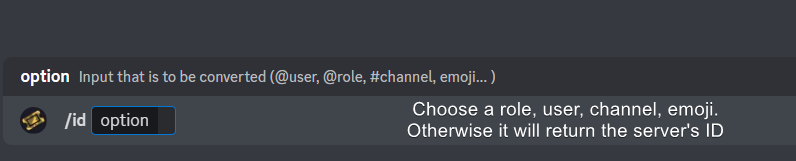
How do I get the ID of Roles/Channels/Emojis?
Ticket Tool has a useful command that helps you get the ID of various things like channels, roles, emojis, and your server.
Just use the command </id:1029797400174399546> <#channel/@role/:emoji:>. Now copy everything, including the brackets <...>, to your dashboard (or wherever you want it)
If you want the server ID, just use the command without any option.
Examples:
Server ID: $id ➝
509192800865353738
Roles: $id @Role ➝<@&722196398635745312>
Channel: $id #channel ➝#🤖│bot-spam
User: $id @user ➝@copper owl
Emoji: $id➝

 covert swallow
Its a persons User ID
covert swallow
buoyant karma
Command style ticket?

Tickets created via commands!
You can also achieve this throufg the /new command
buoyant karma
covert swallow
Its a persons User ID
Thank you!
iron nightBOT
Gave +1 Rep to @covert swallow (current: #18 - 288)
covert swallow
covert swallow
https://docs.tickettool.xyz/dashboard/panel-configs/command-style-tickets
You will need to make sure that a channel is being "watched" for the new command, which is explained here
covert swallow
ocean spruce
how do i change embed color
Panel configs | edit panel message

 balmy badge
How do I allow someone who opened a ticket to view the messages inside the channel? It shows you can view it but there's actually messages there they can't see, even though it doesn't say can't see message history. Can someone help?

 idle flint
balmy badge
How do I allow someone who opened a ticket to view the messages inside the chann...
idle flint
balmy badge
How do I allow someone who opened a ticket to view the messages inside the chann...
Ensure that their role on Discord has the "View Message History" permission. Also on the Dashboard > Panel Configs > Permissions > Ticket Owner - ensure "View Message History" is ✅
 loud hemlock
How do i make it where only a certin role can view that ticket?
humble sequoiaBOT
1. Go into your Dashboard
2. Open your Panel Configs tab
3. Select the panel you want to grant access to
4. Open the General options menu
5. Select your Support Team Roles
6. Save changes
 idle flint
loud hemlock
How do i make it where only a certin role can view that ticket?
idle flint
loud hemlock
How do i make it where only a certin role can view that ticket?
see above ^^
idle flint
buoyant karma
What does bypass all channel and watch them
quick little tip - the little blue ? that are on the dashboard are clickable - this will take you to the docs page for that specific setting.
 loud hemlock
idle flint
see above ^^
loud hemlock
idle flint
see above ^^
Hello! I have it on the role i want it to be on but when I am on discord viewing the server as a diffrent role i can still see the ticket!
buoyant karma
idle flint
quick little tip - the little blue ? that are on the dashboard are clickable - t...
ok ty
iron nightBOT
Gave +1 Rep to @idle flint (current: #22 - 251)
 open wasp
When I do " :insertemojitexthere: " it doesn't show up when I submit it.

 brisk wyvern
why tickets open on top of channel ?
 humble sequoiaBOT
1. Go into your Dashboard
2. Open your Panel Configs tab
3. Select the panel you want to grant access to
4. Open the Category options menu
5. Select the categories of your preference
6. Save changes
 idle flint
brisk wyvern
why tickets open on top of channel ?
idle flint
brisk wyvern
why tickets open on top of channel ?
Have you set a category ^^

 brisk wyvern
why tickets open on top of channel ?
brisk wyvern
brisk wyvern
why tickets open on top of channel ?
but some on top
open wasp
open wasp
When I do " :insertemojitexthere: " it doesn't show up when I submit it.
@timber kernel
Sorry!
idle flint
brisk wyvern
but some on top
2 things:
- If you have multiple panels, have you set a category for each of them?
- your category can only have 50 channels in it (including tickets)
humble sequoiaBOT
Discord only allows to stack up to 50 channels per category, meaning that if you have already 50 tickets in one category, the bot won't be able to place a ticket in that category, for such reason Ticket Tool counts with overflow categories, meaning that if your main category is filled, the bot will go ahead and place the ticket on the next one available, simply choose a second category in the category pickers:
idle flint
for the second point, this will help ^^
open wasp
Windy
idle flint
open wasp
When I do " :insertemojitexthere: " it doesn't show up when I submit it.
is this for Ticket Tool?
open wasp
Can you help me with mine?
idle flint
The dashboard doesnt look like ours
open wasp
Yes.
idle flint
open wasp
Yes.
what is the server ID?
idle flint
I know my dashboards 😛
 brisk wyvern
idle flint
2 things:
- If you have multiple panels, have you set a category for each of th...
brisk wyvern
idle flint
2 things:
- If you have multiple panels, have you set a category for each of th...
only 1 pannel
brisk wyvern
idle flint
2 things:
- If you have multiple panels, have you set a category for each of th...
50 channels
hmm
well if in category will more then 50 channel then 51st ticket will opened on top ?
idle flint
brisk wyvern
well if in category will more then 50 channel then 51st ticket will opened on to...
correct, unless you have set overflow categories (ie. multiple categories set in the dashboard for the panel) - then your tickets will open under the first category set. If that category has 50 channels, the ticket will open under the next category (etc.)
idle flint
humble sequoia
overflow categories information here
brisk wyvern
idle flint
correct, unless you have set overflow categories (ie. multiple categories set in...
gotcha
thanks 🙏
 limber portal
Hi, you cannot in the app, but you still can from a mobile device by logging onto discord browser
 shadow sparrow
can use play store pay?
 barren thicket
Hi! Who knows how to create ticket now? Something changed into menu
 languid siren
barren thicket
Hi! Who knows how to create ticket now? Something changed into menu
languid siren
barren thicket
Hi! Who knows how to create ticket now? Something changed into menu
I need that too
 pulsar tiger
i cant close tickets
because of this: Warning: Unable to close ticket, missing permissions ManageRoles
 silver nacelle
I claim my firsts tokens on Faucet, but dont works to sent to my wallet NODE, someone could help me
 scenic elbow
Hi how do i open a ticket ?
humble sequoiaBOT
⚠️ You're in the wrong place
We provide support for Ticket Tool Discord bot and cannot help you with whatever issue you have.
- We don't know which Support Team you should contact to get this issue resolved, and unfortunately we won't be able to accurately tell you.
If you don't have any further questions regarding our bot Ticket Tool, please close this ticket
restive condor
silver nacelle
I claim my firsts tokens on Faucet, but dont works to sent to my wallet NODE, so...
^^
restive condor
scenic elbow
Hi how do i open a ticket ?
humble sequoiaBOT
━━ Handler's inquiry has been moved to a ticket ━━
restive condor
barren thicket
Hi! Who knows how to create ticket now? Something changed into menu
Hey there! See this guide on how to setup tickets
cc: @languid siren
 stark runeBOT
1. Invite Ticket Tool to your server
First you will want to invite the bot to your server. Once the bot is in your server, you can manage your server in the dashboard.

2. Create a Panel
To create a panel we are going to need to head over to the panel configs on the dashboard.
Once at the dashboard we will need to click Create Panel.
Enter a panel name (Fill in any optional settings you want).
Click Create Panel and your ready to get started with configuring your panel.
An example of a creating a panel is shown below.

3. Send the Panel to a Channel
Once you've created a panel on the dashboard you will need to send it to a channel using send on the dashboard.
Select the channel you want your panel to be created in and click send.
For other questions checkout $help faq.
An example of a sending a panel is shown below.
Having a Problem Sending the Panel?
Do $debug in a channel with Ticket Tool and make sure it has all the necessary Discord permissions.

 glossy cape
how i change the site linguage? ( i want to change for portuguese )
 austere forge
glossy cape
how i change the site linguage? ( i want to change for portuguese )
austere forge
glossy cape
how i change the site linguage? ( i want to change for portuguese )
Hi there,
I use Chrome, and there is an option to translate the pages of the site into the language you want, you should try, with OPERA I don't know how to do it 🙂
glossy cape
austere forge
Hi there,
I use Chrome, and there is an option to translate the pages of the si...
alr, thanks
iron nightBOT
Gave +1 Rep to @austere forge (current: #35 - 92)
austere forge
You're welcome dude 
jade topaz
when i set the bot it dont show in channel
humble sequoiaBOT
━━ User's inquiry has been moved to a ticket ━━
 graceful scroll
is there a possibility to do a dropdown thing?
humble sequoiaBOT
The Drop-down menu or Select Menu replaces the buttons on your panel message and uses a drop-down menu with all of your panels. To set this up, go to your Panel Configs and select your main Panel.
<:Numbericons1:1018864164032225340> Enable Select Style
First you enable Select Style. Then you add an item in the Dropdown Editor. Now you can start editing your dropdown!
<:Numbericons2:1018864168041971712> Dropdown Editor
Each line in the dropdown editor represents a line in the drop down menu on discord. You can add more "Items", by clicking on 

First you select a panel. That's the panel this option will open a ticket for.  DONT select the same panel twice. Each option should have a different Panel
After that, you can put a Display. This is the title of this option and will appear in the drop down menu. The *Description can be set right after that, which will be below the title in grey.
Additionally you can select an emoji, that will be shown in front of each option. You can either manually input the ID of an emoji or select it in the selector.
Common Issues ⚠️
- Panel doesn't send? Make sure you have a valid emoji selected
- Option doesn't show up? Check if two options have the same panel in the DropDown Editor

$dropdown
 timber kernel
graceful scroll
is there a possibility to do a dropdown thing?
timber kernel
graceful scroll
is there a possibility to do a dropdown thing?
Here your go ^
graceful scroll
ty!
timber kernel

 dawn lake
Hey like someone not send message in ticket the bot automatically delete ticket how?
 pastel atlas
Hi is it possible for me to view my old personal ticket transcript history, the thing files that the bot sends you after every ticket? I’ve tried downloading the html files that are linked but it just shows me this


 ivory anvil
is there any way to change the text in this message from the bot?
 restive condor
ivory anvil
is there any way to change the text in this message from the bot?
restive condor
ivory anvil
is there any way to change the text in this message from the bot?
Hey there! Yes, Dashboard > Panel Configs > Messages > Edit Ticket Message
restive condor
pastel atlas
Hi is it possible for me to view my old personal ticket transcript history, the ...
Hey there! This seems to be an issue with your device.
Please use another device or try downloading a HTML viewer app
restive condor
dawn lake
Hey like someone not send message in ticket the bot automatically delete ticket ...
Hey there! You can use the Automations feature for that. Dashboard > Panel Configs > Automations
Let me know if you have any questions🙏
jade topaz
how can i invite premium bot ?
humble sequoiaBOT
The first thing you will need to do is invite the premium bot, an invite can be found here
Once the bot is in your server we will head to the dashboard and manage your server. When you are managing your server, you want to head into "Server Configs" then click the drop down menu under "Select the bot you would like to use on this server" then click "Ticket Tool#6207" and then save.
restive condor
jade topaz
how can i invite premium bot ?
There you go ^^
ivory anvil
can a bot send an additional message with a hint of what needs to be done after creating a ticket?
ivory anvil
restive condor
Hey there! Yes, ``Dashboard`` > ``Panel Configs`` > ``Messages`` > ``Edit Ticket...
Unfortunately, there is a character limit and I don't have enough
jade topaz
thanks @restive condor
iron nightBOT
Gave +1 Rep to @restive condor (current: #8 - 446)
 wintry zodiac
Where does one create a support ticket?
ivory anvil
Thanks @restive condor
iron nightBOT
Gave +1 Rep to @restive condor (current: #8 - 447)
restive condor
ivory anvil
can a bot send an additional message with a hint of what needs to be done after ...
Hey there! You can edit the ticket message to include that.
Alternatively you could create a custom command and have a user or an external bot trigger it
restive condor
wintry zodiac
Where does one create a support ticket?
jade topaz
all my Panels are Deleted
restive condor
jade topaz
all my Panels are Deleted
From inviting the premium bot?
jade topaz
:/
jade topaz
restive condor
From inviting the premium bot?
yes
restive condor
That's not possible. Could I get your server ID please?
jade topaz
ofc sec
1216195930508890153
I accidentally set the rights for the panel to "Everyone" and someone deleted everything
restive condor
jade topaz
I accidentally set the rights for the panel to "Everyone" and someone deleted ev...
This user seems to be the one who made those changes
?i 411460659050446848
 prime bridgeBOT

Who is dreirad?
General Informations:

 Username: dreirad
ID: 411460659050446848
 Creation: <t:1518170266:R>
 Discord Badges:
ModSystemᵇᵒᵗ Informations:
 Suspicious?
 Persistence:
 Muted:
 Quarantined:
 Banned?
dreirad is not in this server!
restive condor
jade topaz
right
First thing you need to do is go to your Dashboard > Server Configs and remove the everyone role as a Dashboard role

 restive condor
 jovial timber
Why can't he send the panel even though he has the permissions?
jovial timber
Why can't he send the panel even though he has the permissions?
Hey there! Could I get your server name or ID?
restive condor
jade topaz
Setting up this ticket panel was so much work :/
I'll ask if there's anything we can do.
Please wait a few minutes
jade topaz
of course thanks
jovial timber
restive condor
Hey there! Could I get your server name or ID?
1196922041778061342
restive condor
jovial timber
1196922041778061342
You have text for all your buttons in the button emoji field. You can only have an emoji there.
Text goes on the field below
 jade topaz
Don Please ping me if you answer
jovial timber
restive condor
You have text for all your buttons in the button emoji field. You can only have ...
حبيبي حتى انا احبك
jovial timber
restive condor
You have text for all your buttons in the button emoji field. You can only have ...
I don't understand if you can log in to my server and do it
restive condor
jovial timber
I don't understand if you can log in to my server and do it
I can't.
Just head to your Dashboard > Panel Configs > Buttons
And go into each button one by one, moving the text to the field below as you can only have an emoji there

 robust sandalBOT
restive condor
I can't.
Just head to your ``Dashboard`` > ``Panel Configs`` > ``Buttons``
An...
robust sandalBOT
restive condor
I can't.
Just head to your ``Dashboard`` > ``Panel Configs`` > ``Buttons``
An...
لا أستطيع.
ما عليك سوى التوجه إلى "لوحة التحكم" > "تكوينات اللوحة" > "الأزرار"
وانتقل إلى كل زر واحدا تلو الآخر ، وانقل النص إلى الحقل أدناه حيث يمكنك فقط الحصول على رمز تعبيري هناك
 English (en) → Arabic (ar)
 warm stone
My sky glass is disappear from my Firestick apps. Please can you solve this for me?
humble sequoiaBOT
⚠️ You're in the wrong place
We provide support for Ticket Tool Discord bot and cannot help you with whatever issue you have.
- We don't know which Support Team you should contact to get this issue resolved, and unfortunately we won't be able to accurately tell you.
If you don't have any further questions regarding our bot Ticket Tool, please close this ticket
warm stone
Are u the fire stik team or not ????
restive condor
We are not
warm stone
Ok Dan thanks i am trying to get tickets but very complicated ☹️☹️
restive condor
@jade topaz We can revert your setup to one you had, before that user got access to your Dashboard
Do you still want it?
jade topaz
restive condor
<@456226577798135808> We can revert your setup to one you had, before that user ...
yeah do it please
I've already started redoing everything, but then thank you
restive condor
jade topaz
yeah do it please
Perfect, just don't make any changes at this moment
Just to confirm, you may lose what you have done right now. Is that ok?
jade topaz
restive condor
Perfect, just don't make any changes at this moment
Okay
jade topaz
restive condor
Just to confirm, you may lose what you have done right now. Is that ok?
ofc
 solid stream
I restored the deleted panels
The other changes you've made will still be untouched
restive condor
jade topaz
ofc
^
jade topaz
restive condor
^
done ?
restive condor
solid stream
I restored the deleted panels
These are the changes made
jade topaz
but I can't see them yet
restive condor
Use the ''Sync'' button on your Dashboard
jade topaz
restive condor
Use the ''Sync'' button on your Dashboard
Can you delete the things I've recently added, I no longer have an overview
restive condor
jade topaz
Can you delete the things I've recently added, I no longer have an overview
Go into the desired panel and you can then use the ''delete'' button
 jade topaz
thanks dan and joshiah
solid stream
Half are missing?
jade topaz
solid stream
Half are missing?
no
How do I add custom roles?
If I do it like this:
<:name:id>
Do I get an error code?
solid stream
$id <@&642118166243311646>
humble sequoiaBOT
solid stream
$id <@&642118166243311646>
<@&642118166243311646>
<@&642118166243311646>
solid stream
This is the role format

 humble sequoiaBOT
solid stream
$id <a:ablobsunglasses:635255773483630592>
humble sequoiaBOT
solid stream
$id <a:ablobsunglasses:635255773483630592>
<a:ablobsunglasses:635255773483630592>
:ablobsunglasses:
 mystic topaz
Hi guys
I have a problem
System Failure: Invalid Form Body
components[0].components[0].emoji.name[BUTTON_COMPONENT_INVALID_EMOJI]: Invalid emoji
what is it?
humble sequoiaBOT
This error indicates you have selected an invalid emoji, i.e. an emoji the bot isn't capable of using, in a button field
Which Emoji?
This depends upon which action the error is appearing, the most common cases are the Create Ticket button or one of your Dropdown emojis. You can visit your Button's List to find all available buttons and find the conflicting one by yourself.
Why doesn't the bot accept it as valid?
- You selected an emoji that doesn't exist anymore, i.e. that has been deleted
- You wrote text there, instead of an emoji (or in addition to an emoji)
- You entered a code for a custom emoji from a server that the bot is not a member of
- You entered a custom emoji code incorrectly
- You're on iPhone and entered an emoji using the phone's emoji pad (use the emoji selector in the website instead)

 shut bolt
Review the information above please
mystic topaz
and how will I know which emoji this is slipping on?
shut bolt
mystic topaz
and how will I know which emoji this is slipping on?
Where are you seeing the error?
mystic topaz
I open the ticket and amblock does not even display the information
shut bolt
If you saw the error when pressing the create ticket button, and have enabled claiming, it is the claim button
 elder stag
Hey there! One of my support team role cannot use the /add commands and such, is there a fix to this?
shut bolt
shut bolt
If you saw the error when pressing the create ticket button, and have enabled cl...
If you see the error when pressing the create ticket button but have claiming disabled, it is the close button
mystic topaz
 shut bolt
elder stag
Hey there! One of my support team role cannot use the /add commands and such, is...
shut bolt
elder stag
Hey there! One of my support team role cannot use the /add commands and such, is...
Head to your Server's Settings > Integrations > Ticket Tool and adjust the perms accordingly
shut bolt
mystic topaz
Yeap, that is caused by the error you referenced
mystic topaz
 shut bolt
If you saw the error when pressing the create ticket button, and have enabled cl...
shut bolt
shut bolt
If you saw the error when pressing the create ticket button, and have enabled cl...
Please read my messages.
elder stag
shut bolt
Head to your Server's Settings > Integrations > Ticket Tool and adjust the perms...
Works, thank you
iron nightBOT
Gave +1 Rep to @shut bolt (current: #1 - 1292)
shut bolt
elder stag
Works, thank you
 ivory crown
Hello, I can't get any further
With the module add roles at open btw close.
Everything is set, unfortunately the bot doesn't do this or add/remove the roles.
what did I set wrong?
 shut bolt
ivory crown
Hello, I can't get any further
With the module add roles at open btw close.
Ever...
shut bolt
ivory crown
Hello, I can't get any further
With the module add roles at open btw close.
Ever...
Are you sure that:
- The bot's highest role is above the roles you selected there
- The bot has the manage roles permission
mystic topaz
i still don't know what's wrong with that button
austere forge
mystic topaz
i still don't know what's wrong with that button
Hi there, read information
austere forge
humble sequoia
here
mystic topaz
it's fine and I selected the icon from there and still the same problem
🍊 this is us
austere forge
mystic topaz
🍊 this is us
could I get your server ID please?
shut bolt
:emoji_350:
shut bolt
mystic topaz
762306385870323712
Ticket Tool - Ticketing without clutter - The #1 discord Ticketing bot
:emoji_350:
ah true discord renders out
You need to make sure that the custom emoji you selected for the Close button is either a custom emoji in your server, or ticket tool is in the server the emoji belongs too
If the emoji was deleted, that can also cause the error
mystic topaz
I check it, okay thank you
shut bolt
Sure let me know how it goes
mystic topaz
Thank you very much
I was a bit annoyed that it didn't work, even though it's not the first time I've used the stick.
shut bolt
mystic topaz
I was a bit annoyed that it didn't work, even though it's not the first time I'v...
Did it work now?
mystic topaz
shut bolt
Did it work now?
yes-yes 😁
shut bolt

mystic topaz
mystic topaz
I have 1 more question, is it possible to claim with the premium stick the existing tickets managed by the regular ticket tool?
shut bolt
mystic topaz
I have 1 more question, is it possible to claim with the premium stick the exist...
Sorry didn't understand completely, do you want to use the premium bot to handle tickets created by the regular bot?
mystic topaz
shut bolt
Sorry didn't understand completely, do you want to use the premium bot to handle...
igen
shut bolt
Sorry?
mystic topaz
shut bolt
Sorry didn't understand completely, do you want to use the premium bot to handle...
yes
sorry
shut bolt
mystic topaz
yes
As long as you have enabled the premium bot, you can use it to manage the white bot tickets, the only thing is that you will need to close the tickets using commands instead of the buttons
mystic topaz
oooo thank you very much then it will be
shut bolt
mystic topaz

 fierce lantern
is it possible to make custom command get triggered by a bot message?
steel basalt
fierce lantern
is it possible to make custom command get triggered by a bot message?
Yes! Server configs > scroll down > bot
Be sure to put the bot’s ID into the box!
 deep sinew
Kann mir einer helfen mein Server einzurichten
 light flicker
Can you tell me how to turn the auto delete off for my panels. That way if I need to edit a reason for close I can
 crystal crown
@deep sinew@deep sinew
light flicker
crystal crown
<@1214271259345424456><@1214271259345424456>
Stop sending me friend requests. Idk u.
restive condor
light flicker
Can you tell me how to turn the auto delete off for my panels. That way if I nee...
Hey there! Please enable TWO STEP TICKET -> Dashboard > Panel Configs > General
humble sequoiaBOT
━━ Vin-shane's inquiry has been moved to a ticket ━━
 shadow walrus
Support will be with you shortly.
To close this ticket react with 🔒
TicketTool.xyz - Ticketing without clutter it says this but i want to chagne
how do i fix that to what i want it to say
restive condor
shadow walrus
Support will be with you shortly.
To close this ticket react with 🔒
TicketTool...
Hey there! Dashboard > Panel Configs > Messages > Edit Panel Message
shadow walrus
how do i get to dashboard?
humble sequoiaBOT
Ticket Tool - Ticketing without clutter - The #1 discord Ticketing bot
light flicker
restive condor
Hey there! Please enable ``TWO STEP TICKET`` -> ``Dashboard`` > ``Panel Configs`...
I did that but it doesn't show the reason that the ticket was closed at the bottom of the transcripts.
Oops
restive condor
light flicker
I did that but it doesn't show the reason that the ticket was closed at the bott...
Please edit your transcript message (Dashboard > Panel Configs > Messages > Edit Transcript Message) and include the {close.reason} variable
light flicker
restive condor
Please edit your transcript message (``Dashboard`` > ``Panel Configs`` > ``Messa...
Do I put it in the message content box. Because I don't have a transcript message typed there
And Im doing on mobile which I'm not familiar with
restive condor
light flicker
Do I put it in the message content box. Because I don't have a transcript messa...
There's already a default message, just add a new field to that and put "Close reason" as the title and the variable below
 brave iris
restive condor
Hey there! ``Dashboard`` > ``Panel Configs`` > ``Messages`` > ``Edit Panel Messa...
brave iris
restive condor
Hey there! ``Dashboard`` > ``Panel Configs`` > ``Messages`` > ``Edit Panel Messa...
Hey when I try to edit the panel message it doesn't let me click on the 'Message Content' to type?
 restive condor
brave iris
Hey when I try to edit the panel message it doesn't let me click on the 'Message...
restive condor
brave iris
Hey when I try to edit the panel message it doesn't let me click on the 'Message...
You can only edit the embed message up to 250 characters.
Everything else requires a premium subscription
brave iris
restive condor
You can only edit the embed message up to 250 characters.
Everything else requi...
Yeah how do I edit the embed message?
restive condor
brave iris
Yeah how do I edit the embed message?
Just below that open the embed editor
brave iris
Oh yeah thanks sorry
light flicker
restive condor
There's already a default message, just add a new field to that and put "Close r...
Ok got it ty also is there a way I can set it to where you can't close ticket unless you have a reason
iron nightBOT
Gave +1 Rep to @restive condor (current: #8 - 452)
restive condor
light flicker
Ok got it ty also is there a way I can set it to where you can't close ticket un...
That's not possible at the moment unfortunately
light flicker
restive condor
That's not possible at the moment unfortunately
So I guess I need to turn the auto delete off then because I have it set to auto delete when closed
Just gotta remember how ty again
Thanks @restive condor
iron nightBOT
Gave +1 Rep to @restive condor (current: #8 - 453)
 brittle atlas
Can somone help me
 wise river
brittle atlas
Can somone help me
wise river
brittle atlas
Can somone help me
Sure, what is your problem?
brittle atlas
wise river
Sure, what is your problem?
How do I make where they can pick what support they need
wise river
brittle atlas
How do I make where they can pick what support they need
Do you mean the dropdown menu? and if not, can you show me an example of what exactly you need?
brittle atlas
Yea drop down menu
wise river
brittle atlas
Yea drop down menu
Open the dashboard tickettool.xyz and click on "manage" on the server you want to edit, and then click, and from the left panel click on "Panel Configs" select your panel you want to edit and click on "DropDown Style" you can enable it and customize it from there

Make sure to enable it from the button above, and add some items

After you edit it you must resend ticket embed using the button

 agile nova
How to add custom emojis
humble sequoiaBOT
How do I get the ID of Roles/Channels/Emojis?
Ticket Tool has a useful command that helps you get the ID of various things like channels, roles, emojis, and your server.
Just use the command </id:1029797400174399546> <#channel/@role/:emoji:>. Now copy everything, including the brackets <...>, to your dashboard (or wherever you want it)
If you want the server ID, just use the command without any option.
Examples:
Server ID: $id ➝
509192800865353738
Roles: $id @Role ➝<@&722196398635745312>
Channel: $id #channel ➝#🤖│bot-spam
User: $id @user ➝@copper owl
Emoji: $id
wise river
@agile nova ^
agile nova
Ty @wise river
iron nightBOT
Gave +1 Rep to @wise river (current: #305 - 1)
agile nova
How do I set up its category
humble sequoiaBOT
1. Go into your Dashboard
2. Open your Panel Configs tab
3. Select the panel you want to grant access to
4. Open the Category options menu
5. Select the categories of your preference
6. Save changes
limber portal
agile nova
How do I set up its category
^^
agile nova
limber portal
^^
I want it to go into different thing
 crystal crown
brave iris
Hey when I try to edit the panel message it doesn't let me click on the 'Message...
crystal crown
brave iris
Hey when I try to edit the panel message it doesn't let me click on the 'Message...
 crystal crown
agile nova
I want it to go into different thing
crystal crown
agile nova
I want it to go into different thing
 limber portal
agile nova
I want it to go into different thing
limber portal
agile nova
I want it to go into different thing
please follow the guide above
 north bloom
There is only 1 panel selection in Downdrop. If you select a panel called Tickets in one, there is no panel called Tickets in the second one.

 austere forge
north bloom
There is only 1 panel selection in Downdrop. If you select a panel called Ticket...
austere forge
north bloom
There is only 1 panel selection in Downdrop. If you select a panel called Ticket...
Hi there, Completely normal, the panel "ticket" is used for your first category of ticket opening
it is preferable to create several panels to select them from the drop-down menu
humble sequoiaBOT
The Drop-down menu or Select Menu replaces the buttons on your panel message and uses a drop-down menu with all of your panels. To set this up, go to your Panel Configs and select your main Panel.
<:Numbericons1:1018864164032225340> Enable Select Style
First you enable Select Style. Then you add an item in the Dropdown Editor. Now you can start editing your dropdown!
<:Numbericons2:1018864168041971712> Dropdown Editor
Each line in the dropdown editor represents a line in the drop down menu on discord. You can add more "Items", by clicking on
First you select a panel. That's the panel this option will open a ticket for. DONT select the same panel twice. Each option should have a different Panel
After that, you can put a Display. This is the title of this option and will appear in the drop down menu. The *Description can be set right after that, which will be below the title in grey.
Additionally you can select an emoji, that will be shown in front of each option. You can either manually input the ID of an emoji or select it in the selector.
Common Issues ⚠️
- Panel doesn't send? Make sure you have a valid emoji selected
- Option doesn't show up? Check if two options have the same panel in the DropDown Editor
$dropdown
austere forge
jade topaz
how do i make my tickettool
Hi sir, see above
 young valley
keeps giving me this error. how do i fix it
 covert swallow
Check the permissions the bot has in that channel
young valley
has all perms
covert swallow
It probably cant send messages or files
covert swallow
young valley
has all perms
Go in that channel and send $debug
young valley
Works now, appreciate it 💪
jade topaz
How can I set who can open a ticket (Ping me)
 winged gust
I cant able to access ticket tool dashboard although I have administrator
@austere forge
 grim socket
 winged gust
I cant able to access ticket tool dashboard although I have administrator
winged gust
winged gust
I cant able to access ticket tool dashboard although I have administrator
Help ↑↑
 atomic solstice
winged gust
I cant able to access ticket tool dashboard although I have administrator
atomic solstice
winged gust
I cant able to access ticket tool dashboard although I have administrator
Did you try to log out and log back in to the dashboard?
light flicker
Can you please remind me how to turn auto delete off and get the buttons back. I turned them back on but it's not showing in my panel in server. I have automation for all panels set to close the ticket and not delete.
light flicker
update, i found it thanks though
 mental willow
Why are all the messages cutting off when I try to put in more than a certain amount either in panel messages or custom commands? (Free one)
restive condor
mental willow
Why are all the messages cutting off when I try to put in more than a certain am...
Hey there! There's a character limit of 250 for the free version
mental willow
Ah alright
atomic solstice
winged gust
Nope
then try that, if you do that and it doesn't work then press on sync servers again and even if that doesn't work the type $level in the server that you are trying to manage on the dashboard and send the screenshot of the bot response here
winged gust
atomic solstice
then try that, if you do that and it doesn't work then press on sync servers aga...
Ok lemme try one time
shut bolt
 fast oasis
is there a way to ping a role when someone opens a ticket
fast oasis
is there a way to ping a role when someone opens a ticket
Hey there yes it is please check the message below
humble sequoiaBOT
1. Go into your Dashboard
2. Open your Panel Configs tab
3. Select the panel you want to ping your support on
4. Open the Ticket options menu
5. Click on Edit Ticket Message
6. In the Message Content use one of the role mention syntax (**{@Role Name}**/**{Role ID}**)
7. Save changes
Note: For this to work properly, Ticket Tool requires the Mention Everyone permission. Or the role must have the Allow anyone to @mention this role setting enabled
 fast oasis
ty
shut bolt
fast oasis
ty
fast oasis
SHOULD IT look like this @shut bolt
{user} Welcome {@Role Trial Mod} {@Role Discord Mod}
shut bolt
fast oasis
{user} Welcome {@Role Trial Mod} {@Role Discord Mod}
It that's the exact name the roles have yeap
fast oasis
sick ty
shut bolt
No problem
fast oasis
some reason its not showing a ping
i tried role id also
Welcome {Role 1002993529519353951} {Role 1142991329400463442}
but nothing
do i need the astrericks also
restive condor
fast oasis
Welcome {Role 1002993529519353951} {Role 1142991329400463442}
Hi there, if you're using the role ID, you don't need anything else. Just {ID} -> {000000000}
fast oasis
thank you 🙂
 rare elk
Hello, How do I go about requesting webhook alpha enabled for a discord server I manage?
restive condor
rare elk
Hello, How do I go about requesting webhook alpha enabled for a discord server I...
Hey there! Go ahead and #🎫│make-a-ticket
Please note this feature requires premium
ivory anvil
is it possible to automatically send tickets that are closed to a separate category?
restive condor
ivory anvil
is it possible to automatically send tickets that are closed to a separate categ...
Hey there! Yes, Dashboard > Panel Configs > Category > Closed Tickets Category
 slow light
is there some sort of Lifetime membership?
restive condor
slow light
is there some sort of Lifetime membership?
Hey there! We currently do not offer lifetime subscriptions.
We offer discounts on yearly purchases for PayPal and Crypto.
Larger discounts may apply if you're buying premium in bulk
You can always subscribe monthly via Discord for $5,99
humble sequoiaBOT
Faster Premium Bot
Automatic Transcripts
Full Customization
Direct Messages
Ticket Automation
Thread Style Ticketing
Premium Support
Scheduled Panel Availability
Integrations
Claiming
Advanced Ticket Statistics
You can purchase premium here:
Price
$6 - Monthly
$66 - Yearly (Open a billing ticket in #🎫│make-a-ticket to receive additional information on this matter)
slow light
restive condor
Hey there! We currently do not offer lifetime subscriptions.
We offer discounts...
thank you so much!
iron nightBOT
Gave +1 Rep to @restive condor (current: #8 - 454)
slow light
so i just got the premium today and was wondering if i'm able to retroactively move our closed tickets to a category? or is that not possible?
humble sequoiaBOT
Thank you
Thank you for purchasing Ticket Tool Premium @slow light. You have now been given the <@&535595160189403136> role!
Found 6 servers in total and 1 with premium and permission
restive condor
slow light
so i just got the premium today and was wondering if i'm able to retroactively m...
Hey there! Yes, Dashboard > Panel Configs > Category > Closed Tickets Category
slow light
restive condor
Hey there! Yes, ``Dashboard`` > ``Panel Configs`` > ``Category`` > ``Closed Tick...
does this apply to any tickets i just closed before buying the premium?
cause it hasn't moved
restive condor
slow light
does this apply to any tickets i just closed before buying the premium?
If they are already closed, you will need to manually move them or re-open them and close them
slow light
restive condor
If they are already closed, you will need to manually move them or re-open them ...
oh! thank you!
iron nightBOT
Gave +1 Rep to @restive condor (current: #8 - 455)
jade topaz
can someone explain how i can remove one of these buttons?
 jade topaz
I think i might be blind but where does it say select menu?
 toxic flame

pseudo ravine
Dropdown Style
jade topaz
pseudo ravine
Dropdown Style
Oh yes I see it now thank you
iron nightBOT
Gave +1 Rep to @pseudo ravine (current: #9 - 422)
pseudo ravine

jade topaz
Alright thank you for the help
pseudo ravine
You’re welcome, glad I could help!
toxic flame
pseudo ravine
Dropdown Style

jade topaz
should i thank kingly as well
pseudo ravine
+rep @toxic flame
iron nightBOT
Gave +1 Rep to @toxic flame (current: #305 - 1)
toxic flame
jade topaz
should i thank kingly as well
Thanks for being nice :)
iron nightBOT
Gave +1 Rep to @harsh quartz (current: #305 - 1)
 stray trail
are you allowed to use this bot for a cheating server?
pseudo ravine
I wouldn’t recommend it
jade topaz
I am back again with another question on the bot dropdown style, basically im trying to have multiple mesages like in the screenshot before that I sent but make it so they go to seperate categories and have different messages in them. Is this possible in the bot or not?
restive condor
jade topaz
I am back again with another question on the bot dropdown style, basically im tr...
Hey there! Yes. A dropdown is just a combination of panels, actual setup must be done in each panel individually.
To edit the categories, go into the desired panel > CATEGORY
To edit the ticket mesaage for each, go into the desired panel > MESSAGES > EDIT TICKET MESSAGE
slow light
how does one add the name in the ticketing info? i.e ticket0000-ricehuntress?
humble sequoiaBOT
The ticket name is the default channel name of all tickets. To edit it, go to your Dashboard > Panel Configs > Ticket. There you can edit the channel name of opened and closed tickets. You can also use variables in there.

 Note: This is a premium feature
winged gust
atomic solstice
then try that, if you do that and it doesn't work then press on sync servers aga...
Note: This is a premium feature
winged gust
atomic solstice
then try that, if you do that and it doesn't work then press on sync servers aga...

This is coming although I have the top Role of the server with administrator perms
austere forge
winged gust
This is coming although I have the top Role of the server with administrator per...
Hi there, the owner of your server, must add your role in the roles with access to the dashboard
humble sequoiaBOT
Any role you put there will have full access to the ticket tool dashboard. The server owner and users with admin permissions already have access to the dashboard.
Be careful of which roles to put here
 austere forge
see above
winged gust
Ok letme check one time
 rich terrace
Does anyone know how to do this or do I need premium for this?
 humble sequoiaBOT
⚠️ You're in the wrong place
We provide support for Ticket Tool Discord bot and cannot help you with whatever issue you have.
- We don't know which Support Team you should contact to get this issue resolved, and unfortunately we won't be able to accurately tell you.
If you don't have any further questions regarding our bot Ticket Tool, please close this ticket
 austere forge
rich terrace
Am I allowed to edit in that textbox?
austere forge
rich terrace
Am I allowed to edit in that textbox?
Hi there, sure, but you will get a character limit of 250
rich terrace
Thank You
Is there a certain way to edit it through since I'm clicking on the textbox and it won't let me
austere forge
rich terrace
Is there a certain way to edit it through since I'm clicking on the textbox and ...
open embed editor and type here
 rich terrace
Oh okay then thank you!
rich terrace
Is there a way to make multiple Create Ticket buttons?
humble sequoiaBOT
For more convenient use of multipanels, you can now combine panels on the dashboard. This will allow you to directly send the multipanel from the dashboard or via the $panel ID command.
Where can I find this?
You can find this setting on the Dashboard -> Panel Configs -> Panel -> Attached Panels
Note: if you're attaching all the panels to a panel called English, don't include English in the attached panel's box (If you do this, it will create a duplicate)
This will put all buttons from all of your panels on one message. The message is the panel message from the panel you're combining these panels in.
austere forge
rich terrace
Is there a way to make multiple Create Ticket buttons?
see above ^^
 severe moss
Currently my ^ ticket system looks like this but I want it to resemble this - can someone walk me thru how to do that?

Want it too look like this one
 humble sequoiaBOT
For more convenient use of multipanels, you can now combine panels on the dashboard. This will allow you to directly send the multipanel from the dashboard or via the $panel ID command.
Where can I find this?
You can find this setting on the Dashboard -> Panel Configs -> Panel -> Attached Panels
Note: if you're attaching all the panels to a panel called English, don't include English in the attached panel's box (If you do this, it will create a duplicate)
This will put all buttons from all of your panels on one message. The message is the panel message from the panel you're combining these panels in.
austere forge
severe moss
Want it too look like this one
Hi there, see above ^
 lucid plaza
Hello
I have a concern regarding my payment.
I top up but suddenly lag comes out . Then, when I check my e-wallet it's already processed but the card is not yet activated. 😦
lucid plaza


 barren haven
humble sequoiaBOT
barren haven
humble sequoiaBOT
⚠️ You're in the wrong place
We provide support for Ticket Tool Discord bot and cannot help you with whatever issue you have.
- We don't know which Support Team you should contact to get this issue resolved, and unfortunately we won't be able to accurately tell you.
If you don't have any further questions regarding our bot Ticket Tool, please close this ticket
austere forge
Hi there, see above : )
@jade topaz @lucid plaza
lucid plaza
Oh 😦
Hello
I have a ticket but how to connect with my specific concern
Is this right?
How to chat them? 😦
 pseudo ravine
That's your DMs with the bot, and it cannot respond back to you
lucid plaza
 pseudo ravine
You already have an open ticket in that server
lucid plaza
Yup. Then what's next? Is she/he message me? Or how I will contact them?
pseudo ravine
The staff of that server will respond to your ticket
iron nightBOT
Gave +1 Rep to @pseudo ravine (current: #9 - 423)
pseudo ravine
You're welcome, glad I could help!
 hardy glen
Hey for what is this option
 restive condor
hardy glen
Hey for what is this option
restive condor
hardy glen
Hey for what is this option
Hey there! Ticket tool ignores other bots but if you add that bot's ID there, TicketTool will react to commands send by such bot(s)
agile nova
restive condor
Hey there! Ticket tool ignores other bots but if you add that bot's ID there, Ti...
How do I make the bot ping a role when someone opens? Explain I open a ticket and it mentions me and also mentions a role called “Uh let say Staff Team” everyone who has the staff team role will also be pinged in there
humble sequoiaBOT
1. Go into your Dashboard
2. Open your Panel Configs tab
3. Select the panel you want to ping your support on
4. Open the Ticket options menu
5. Click on Edit Ticket Message
6. In the Message Content use one of the role mention syntax (**{@Role Name}**/**{Role ID}**)
7. Save changes
Note: For this to work properly, Ticket Tool requires the Mention Everyone permission. Or the role must have the Allow anyone to @mention this role setting enabled
atomic solstice
agile nova
How do I make the bot ping a role when someone opens? Explain I open a ticket an...
here is where you can set up mentions inside tickets ^^
humble sequoiaBOT
Within all the messages the bot sends (both embeds and text) you can mention either channels, roles, or even users, these mentions will only send a notification to the user if they are used within a text field, e.g: a role mentioned in an embed won't ping at all the users who have that role.
For mentioning a role you can use one out of three options:
{@Role Name} ➞ Which is Case Sensitive.
{RoleID} ➞ Replace RoleId with the Id of the role you are trying to ping.
<@&RoleID> ➞ Discord's native syntax to ping roles.
<#ChannelID> ➞ Mention a channel by its ID.
<@UserID> ➞ Mention a user by its ID.
atomic solstice
and here is what you can use ^^
if you want to mention a user use the bottom most one
if you want to mention a role I recommend using either {RoleID} or <@&RoleID> as with the role name if you at any time make changes to the name of the role in your discord server then the mentions will stop working until you fix it in the dashboard
 misty sonnet
Hi, I was wondering how many Panels I can create with the non-pay-version 🤓
limber portal
misty sonnet
Hi, I was wondering how many Panels I can create with the non-pay-version 🤓
Hi, there are no limits on panels
misty sonnet
limber portal
Hi, there are no limits on panels
Good to know, thanks!!
iron nightBOT
Gave +1 Rep to @limber portal (current: #11 - 401)
 placid yew
Hello, a question
Can you change the create ticket button?
I would like to link a channel
This means that if I press the button I go to the Tickets channel. There I can use the menu to select which type of ticket I want to create
Thanks
limber portal
placid yew
Hello, a question
Can you change the create ticket button?
I would like to link ...
You can't change the function of the create a ticket button
placid yew
But Why you can creat a menu?
limber portal
placid yew
But Why you can creat a menu?
Can you clarify what you mean?
placid yew
 limber portal
placid yew
limber portal
placid yew
That's a dropdown menu, do you want to know how to set that up?
placid yew
I have several channels for VIP and support etc
Now I want to go from the support channel to the ticket channel
There you can choose which ticket I want to open
That for support or vip 😄
At the moment you have to change the channel manually
limber portal
placid yew
At the moment you have to change the channel manually
You can link a channel like this --> #🤖│bot-spam
placid yew
Yes i know but no other option ?
god was a function to link a chanel in the creat button
limber portal
placid yew
god was a function to link a chanel in the creat button
You can't change the function of a create a ticket button. It can only make tickets.
placid yew
limber portal
You can't change the function of a create a ticket button. It can only make tick...
Thanks for help
iron nightBOT
Gave +1 Rep to @limber portal (current: #10 - 402)
humble sequoiaBOT
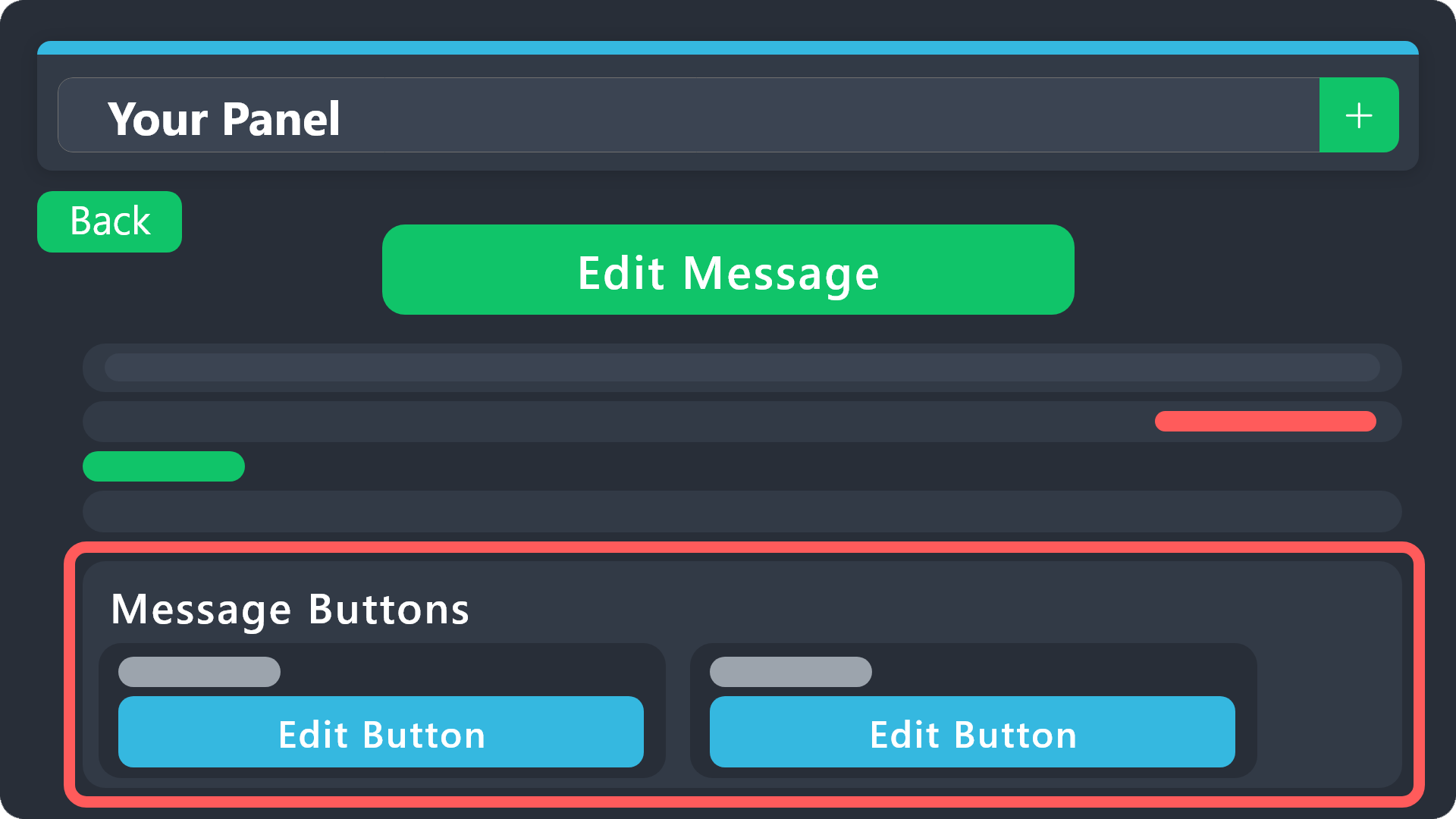
Buttons within Discord can have multiple functions and are used to control your tickets. With Ticket Tool, you can edit all the buttons however you like! Buttons can show emojis, text and can have 4 different colors.
Where can I edit them?
With the 
 Panel Config V2 Editor, all button configurations can be found in the Button Options menu! You can also find their settings under the editor of each message that has a button!
Example: The Close and Claim Buttons are on the Ticket Message. Therefore, you can edit the buttons under Ticket > Edit Ticket Message. The buttons are below the message editor.
 limber portal
placid yew
can i edit the raw edit frome the button?
limber portal
placid yew
can i edit the raw edit frome the button?
see above
thats how you can customise buttons
placid yew
Thanke you
 opal yarrow
members using ticket are getting this when creating ticket. (the ticket is still created) but still receiving an error message
 limber portal
opal yarrow
members using ticket are getting this when creating ticket. (the ticket is still...
limber portal
opal yarrow
members using ticket are getting this when creating ticket. (the ticket is still...
Please give ticket tool the manage channels permission in that category
opal yarrow
in the category where the ticket is created?
eg wherew the ticket button is?
all sorted TY
 winter brook
Hello
Does this bot have dropdown multi panel cuz I’m trying to look for a bot with that
humble sequoiaBOT
The Drop-down menu or Select Menu replaces the buttons on your panel message and uses a drop-down menu with all of your panels. To set this up, go to your Panel Configs and select your main Panel.
<:Numbericons1:1018864164032225340> Enable Select Style
First you enable Select Style. Then you add an item in the Dropdown Editor. Now you can start editing your dropdown!
<:Numbericons2:1018864168041971712> Dropdown Editor
Each line in the dropdown editor represents a line in the drop down menu on discord. You can add more "Items", by clicking on
First you select a panel. That's the panel this option will open a ticket for. DONT select the same panel twice. Each option should have a different Panel
After that, you can put a Display. This is the title of this option and will appear in the drop down menu. The *Description can be set right after that, which will be below the title in grey.
Additionally you can select an emoji, that will be shown in front of each option. You can either manually input the ID of an emoji or select it in the selector.
Common Issues ⚠️
- Panel doesn't send? Make sure you have a valid emoji selected
- Option doesn't show up? Check if two options have the same panel in the DropDown Editor
$dropdown
winter brook
humble sequoia
How much panels can I have with the non premium option?
Like non paid
pseudo ravine
Infinite
winter brook
pseudo ravine
Infinite
Oh ok
jade topaz
 near knoll
How do I link crazytv to discord
humble sequoiaBOT
⚠️ You're in the wrong place
We provide support for Ticket Tool Discord bot and cannot help you with whatever issue you have.
- We don't know which Support Team you should contact to get this issue resolved, and unfortunately we won't be able to accurately tell you.
If you don't have any further questions regarding our bot Ticket Tool, please close this ticket
austere forge
near knoll
How do I link crazytv to discord
hi there, see above.
near knoll
Thanks
restive condor
Hey there! Dashboard > Panel Configs > General > Support Team Roles
 candid oyster
Is There is support for arabic ?
pseudo ravine
candid oyster
pseudo ravine
<#571706435449257997>
Thx 🤍
iron nightBOT
Gave +1 Rep to @pseudo ravine (current: #9 - 424)
pseudo ravine
shut bolt
 oak hearth
im trying to make a channel to create tickets but it wont work
oak hearth
im trying to make a channel to create tickets but it wont work
What wont work?
oak hearth
shut bolt
What wont work?
like the reaction thing
in order to create a ticket
the bot wont make a message
let me get an example
shut bolt
Care to send a screenshot? What have you tried so far?
 shut bolt
oak hearth
when i try it doesnt work
shut bolt
oak hearth
when i try it doesnt work
What does the bot say when you click the button?
oak hearth
shut bolt
What does the bot say when you click the button?
there is no button
it dosent make a messag
shut bolt
shut bolt
Care to send a screenshot? What have you tried so far?
What have you tried so far? @oak hearth
oak hearth
shut bolt
What have you tried so far? <@355518272092897282>
just setup
and the panel configs in dashboard
shut bolt
oak hearth
just setup
Care to develop on what you mean by that exactly? Did you run the $panel command? Did you try sending the panel using the Send button in the panel configs? What has the bot answered with so far?
oak hearth
shut bolt
Care to develop on what you mean by that exactly? Did you run the $panel command...
oh i didnt try that yet
let me try
how do i get a panel id?
atomic solstice
It's the number next to the panel name in the dashboard, the one before the |

when you go to Panel Configs in your server on the dashboard
if you only made one panel then you just have to use 1 in the command
if you have more panels then you need to use the number of the panel you want to send
oak hearth
ok
 outer forum
hey, just a quick question but is there an option to remove this text for whoever opens the ticket so the channel looks the same without them getting msg?
 restive condor
outer forum
hey, just a quick question but is there an option to remove this text for whoeve...
restive condor
outer forum
hey, just a quick question but is there an option to remove this text for whoeve...
Hey there! No, but that's an ephemeral message, even if they don't dismiss it, it will disappear after a few minutes
outer forum
ah ok, thanks was just wondering if they have to dismiss it every time but that's fine if it's disappearing by itself 👍
 ember goblet
i have a question
humble sequoiaBOT
Hello, we would love to help you, but if you don't tell us what you need help with we can't help you :(
ember goblet
$help me whenever i try to use the website it doesnt show my server im trying to add ticket tool in
humble sequoiaBOT
Don't see your server in the dashboard?
Try using the Sync Servers button on your top center of the Dashboard page
You will possibly need to relog. Look below to see the steps on how to relog.
If this doesn't work
You should relog from the dashboard, you can do this by clicking here to log out immediately, and then log back in
Note:
You need one of these 3 things to access the dashboard.
1. Server Owner (Level: 6)
2. Server Administrator (Level: 4)
3. Dashboard Role (Level: 2)
:warning: You can check your level using the </permissionlevel:1029797400174399542> command on your Discord Server
If the bot's response is:
- @User is permission level: 0 (User)
You don't have any of the 3 levels required to access the server's dashboard
restive condor
ember goblet
$help me whenever i try to use the website it doesnt show my server im trying to...
Hey there! See above ^^
ember goblet
im literally the owner
restive condor
ember goblet
im literally the owner
May you use the /permissionlevel command on your server?
ember goblet
restive condor
May you use the ``/permissionlevel`` command on your server?
no?
how do i do that
restive condor
ember goblet
no?
Just use that command on your server
$permissionlevel
But as a slash command
Alternatively, you can just go with $level
Let me know which level you are
ember goblet
okay
pseudo ravine
humble sequoia
 hybrid jasper
Ticket tool isn’t responding to any of my commands someone help please
austere forge
hybrid jasper
Ticket tool isn’t responding to any of my commands someone help please
hi there, pls run $debug command in same channel
austere forge
hybrid jasper
Still doesn’t work
Make sure that the bot has: SEND MESSAGE perms in the channel
 austere forge
You're welcome
 shut bolt
Because that's a premium feature
 west hare
ok
 empty veldt
how do i get my key?
 modern scarab
hey yall, im trying to create custom commands but its either not updating or not wokring, please help ?
empty veldt
for free
 acoustic mortar
hey can i know how to edit the message in here?
hey can i know how to edit the message in here?
 humble sequoiaBOT
The panel message is where people react to make a ticket. To customize it head over to your Dashboard --> Panel Configs -> Panel -> Edit Panel Message
 jade topaz
Claim option no longer in tickets?tried changing in the dashboard to reset it and still not there
humble sequoiaBOT
Claiming allows you to change the ticket name, category and permissions. To use it you have to enable it first on your Dashboard > Panel Configs > Claiming

 Note: This is a premium feature
jade topaz
Note: This is a premium feature
jade topaz
So its premium only now or?as I've saved those and it still isn't there since yesterday
austere forge
jade topaz
So its premium only now or?as I've saved those and it still isn't there since ye...
Hi there, yeah this is a premium feature : )
jade topaz
Ok thank you just got lost in why it just poofed lol
jade topaz
can i add the panel button to a message for creating a ticket
humble sequoiaBOT
The panel message is where people react to make a ticket. To customize it head over to your Dashboard --> Panel Configs -> Panel -> Edit Panel Message
atomic solstice
jade topaz
can i add the panel button to a message for creating a ticket
you can customize your panel message with this guide ^^
then you just send it to a channel where the users can open tickets from
jade topaz
thanks
 frail thicket
hi, is it possible to send a dm to a user that opened a ticket once the ticket has been closed? or notify them in any way?
limber portal
frail thicket
hi, is it possible to send a dm to a user that opened a ticket once the ticket h...
Hi there, this is possible with premium - you can send a dm on ticket close.
 rose shard
i have enabled forms on my ticket, and im using teh command style tickets option
but the form doesnt pop up
 humble sequoiaBOT
━━ three7six6's inquiry has been moved to a ticket ━━
⚠️ You're in the wrong place
We provide support for Ticket Tool Discord bot and cannot help you with whatever issue you have.
- We don't know which Support Team you should contact to get this issue resolved, and unfortunately we won't be able to accurately tell you.
If you don't have any further questions regarding our bot Ticket Tool, please close this ticket
austere forge
 solemn zodiac
Hi there, see above.
 hallow holly
Hi all. How do I set up different ticket types like this?
 humble sequoiaBOT
The Drop-down menu or Select Menu replaces the buttons on your panel message and uses a drop-down menu with all of your panels. To set this up, go to your Panel Configs and select your main Panel.
<:Numbericons1:1018864164032225340> Enable Select Style
First you enable Select Style. Then you add an item in the Dropdown Editor. Now you can start editing your dropdown!
<:Numbericons2:1018864168041971712> Dropdown Editor
Each line in the dropdown editor represents a line in the drop down menu on discord. You can add more "Items", by clicking on
First you select a panel. That's the panel this option will open a ticket for. DONT select the same panel twice. Each option should have a different Panel
After that, you can put a Display. This is the title of this option and will appear in the drop down menu. The *Description can be set right after that, which will be below the title in grey.
Additionally you can select an emoji, that will be shown in front of each option. You can either manually input the ID of an emoji or select it in the selector.
Common Issues ⚠️
- Panel doesn't send? Make sure you have a valid emoji selected
- Option doesn't show up? Check if two options have the same panel in the DropDown Editor
$dropdown
atomic solstice
hallow holly
Hi all. How do I set up different ticket types like this?
the message above explains how you can set this up ^^
 teal oasis
my closed tickets aren't going to the closed ticket gategory all of a sudden even tho i haven't changed anything in the setup
covert swallow
Is the category full (50 channels)?
 trail depot
I can't choose server to invite ticket. Any help?
hallow holly
atomic solstice
the message above explains how you can set this up ^^
Thank you. Is that premium feature?
iron nightBOT
Gave +1 Rep to @atomic solstice (current: #20 - 261)
atomic solstice
hallow holly
Thank you. Is that premium feature?
it's free
humble sequoiaBOT
Don't see your server in the dashboard?
Try using the Sync Servers button on your top center of the Dashboard page
You will possibly need to relog. Look below to see the steps on how to relog.
If this doesn't work
You should relog from the dashboard, you can do this by clicking here to log out immediately, and then log back in
Note:
You need one of these 3 things to access the dashboard.
1. Server Owner (Level: 6)
2. Server Administrator (Level: 4)
3. Dashboard Role (Level: 2)
:warning: You can check your level using the </permissionlevel:1029797400174399542> command on your Discord Server
If the bot's response is:
- @User is permission level: 0 (User)
You don't have any of the 3 levels required to access the server's dashboard
 round viper
I need help
humble sequoiaBOT
Hello, we would love to help you, but if you don't tell us what you need help with we can't help you :(
round viper
Hey so I just subscribed to premium for ticket tool do you know how I can invite the gold ticket tool bot to my server?
humble sequoiaBOT
The first thing you will need to do is invite the premium bot, an invite can be found here
Once the bot is in your server we will head to the dashboard and manage your server. When you are managing your server, you want to head into "Server Configs" then click the drop down menu under "Select the bot you would like to use on this server" then click "Ticket Tool#6207" and then save.
round viper
I subscribed to ticket tool premium through Discord a few minutes ago and It's not showing up that I have premium if that makes sense
austere forge
round viper
Hey so I just subscribed to premium for ticket tool do you know how I can invite...
hi there, see above : )
 austere forge
round viper
And I already subscribed to premium
austere forge
round viper
And I already subscribed to premium
how did you buy premium?
round viper
Through Discord see
It says that I paid for ticket tool for someone else's server
But I didn't how can I fix that
 calm patrol
is there a way to ban a specific user or role from opening a ticket?
 austere forge
round viper
But I selected premium for my server
austere forge
round viper
But I selected premium for my server
the server to which you paid the premium does not appear on your dashboard, is it really your server?
it's a server other than this one
humble sequoiaBOT
Any role you assign as a blacklisted role won't be able to use commands or buttons.
Selecting a blacklisted role
Go to your Dashboard ➞ Server Configs. There you will find the option to select blacklisted roles.
Note: Don't forget to save.
 austere forge
calm patrol
is there a way to ban a specific user or role from opening a ticket?
austere forge
calm patrol
is there a way to ban a specific user or role from opening a ticket?
Hi there, see above : )
round viper
austere forge
the server to which you paid the premium does not appear on your dashboard, is i...
It looks like I accidentally paid for premium for another server instead of mine
calm patrol
austere forge
Hi there, see above : )
no specific user ban option?
round viper
But I swear I picked my server
calm patrol
I'll take the role blacklist tho
round viper
Is there anyway that I can get a refund and then pick premium for my server please
austere forge
round viper
But I swear I picked my server
In this case, you must cancel the subscription and get a refund via this Discord support
humble sequoiaBOT
<:TicketToolOffline:1018980643092312155> Cancel your subscription
We're sorry to see you go!
To cancel your Ticket Tool Premium Subscription, just head over to your User Settings in Discord, then Subscriptions. Look for Premium Apps and click on Manage Subscriptions. There you can cancel your subscription at the end of your billing cycle.

User Settings > Subscriptions > Premium Apps > Manage Subscriptions > Cancel
If you have purchased a Premium Subscription of Ticket Tool through Discord and want to request a refund, you will have to contact Discord Support.
We unfortunately can't handle any of these cases.
Am I eligible for a refund?
Discords Refund Policy states that you can request a refund within 5 days of your initial purchase date.
A prorated refund (partial) can be requested if the bot has been removed by either Discord or the bot developer.
 Ticket Tool Premium Refund Request
austere forge
round viper
Is there anyway that I can get a refund and then pick premium for my server plea...
Ticket Tool Premium Refund Request
austere forge
round viper
Is there anyway that I can get a refund and then pick premium for my server plea...
See above : )
austere forge
calm patrol
no specific user ban option?
unfortunately no, only roles :)
round viper
Ok thank you and how can I pay to get premium for my server so I don't pick the wrong one again
austere forge
round viper
Ok thank you and how can I pay to get premium for my server so I don't pick the ...
sure, make sure you select the server you want to get premium on
you can click on the bot profile and go to "upgrade" from your server
 round viper
austere forge
sure, make sure you select the server you want to get premium on
you can click o...
round viper
austere forge
sure, make sure you select the server you want to get premium on
you can click o...
Ok thank you so much I swear I did that but I guess not😅
iron nightBOT
Gave +1 Rep to @austere forge (current: #35 - 94)
austere forge
round viper
Ok thank you so much I swear I did that but I guess not😅
yw, if you have any other questions, don't hesitate to let me know 🙏
round viper
Does this mean that i have ticket tool premium for my server?

That is my server it says Ticket Tool Premium on the Golden Ticket Tool bot
austere forge
round viper
That is my server it says Ticket Tool Premium on the Golden Ticket Tool bot
not necessary, you can do it with the white bot : )
round viper
austere forge
not necessary, you can do it with the white bot : )
Ok the white ticket tool bot doesn't show the ticket tool premium role only the gold one does
austere forge
round viper
Ok the white ticket tool bot doesn't show the ticket tool premium role only the ...
it's no big deal, roles don't matter
you buy premium with the white bot, and you activate the gold bot on your Dashboard
Ticket Tool - Ticketing without clutter - The #1 Discord support bot
 minor ice
how do i switch my premium to another server
round viper
Ok thank you hopefully Discord support gets back to me soon I made a ticket
austere forge
minor ice
how do i switch my premium to another server
Hey there, not possible : )
minor ice
how do i cancel the one i have
austere forge
round viper
Ok thank you hopefully Discord support gets back to me soon I made a ticket
all good, glad I could help !
humble sequoiaBOT
<:TicketToolOffline:1018980643092312155> Cancel your subscription
We're sorry to see you go!
To cancel your Ticket Tool Premium Subscription, just head over to your User Settings in Discord, then Subscriptions. Look for Premium Apps and click on Manage Subscriptions. There you can cancel your subscription at the end of your billing cycle.
User Settings > Subscriptions > Premium Apps > Manage Subscriptions > Cancel
austere forge
minor ice
how do i cancel the one i have
see above : )
minor ice
nothing pops up when i open it
round viper
austere forge
all good, glad I could help ! <:3v_smile:1187282191630204958>
Should I go ahead and cancel the subscription since I sent Discord support a email
austere forge
minor ice
nothing pops up when i open it
is the server to which you subscribed premium subscription deleted or no longer available?
austere forge
round viper
Should I go ahead and cancel the subscription since I sent Discord support a ema...
sure
round viper
austere forge
sure
Ok
minor ice
austere forge
is the server to which you subscribed premium subscription deleted or no longer ...
its cancelled now
round viper
I just called the subscription so hopefully Discord support gets back to me soon
How can I see what subsections I have on my iPhone using Discord
covert swallow
You will need to open discord through safari if I remember core
round viper
Ok
 steady dove
Is there a limit to how many questions you can put in a form for a ticket?
restive condor
steady dove
Is there a limit to how many questions you can put in a form for a ticket?
Hey there! The limit is 5 as per Discord limitations
restive condor
 sly tinsel
How to clear channels
sly tinsel
How to clear channels
Hey there! What exactly do you mean?
steady dove
Okay. Thank you!
balmy badge
Is the ticket tool broken or has a bug? For some reason a role that doesn’t have access to see a channel was able to see one ticket but the rest of the ticket channels were not visible, only the one channel. Can anyone help?
restive condor
balmy badge
Is the ticket tool broken or has a bug? For some reason a role that doesn’t have...
Hey there! It's possible they were added to the ticket with the /add command
balmy badge
restive condor
Hey there! It's possible they were added to the ticket with the ``/add`` command
I don’t think, there were wayyy to many people in the ticket
So is there a setting I can fix that still allows users creating the ticket to see the channel?
restive condor
balmy badge
So is there a setting I can fix that still allows users creating the ticket to s...
So you'd like for only the user who created the ticket and your staff to view tickets.
No one else, correct?
balmy badge
Yes
restive condor
balmy badge
Yes
Did that happen on one ticket only? (Same ticket panel)
balmy badge
Let me see
It’s a different panel
Just that one ticket
The other tickets were from separate panels
restive condor
balmy badge
The other tickets were from separate panels
May you try creating another ticket for the panel everyone was added to, and see if it works as intended?
balmy badge
Yes
Here you can see it’s more than just staff which I do not want

So that’s the issue
restive condor
balmy badge
Here you can see it’s more than just staff which I do not want
I see. Could I get your server name or ID please?
balmy badge
restive condor
I see. Could I get your server name or ID please?
Greenville Roleplay Co.
restive condor
balmy badge
Greenville Roleplay Co.
Perfect, and which panel is the one everyone is added to?
balmy badge
restive condor
Perfect, and which panel is the one everyone is added to?
Reports
restive condor
balmy badge
Reports
Do you know which?
 balmy badge
It should be the fifth one
restive condor
balmy badge
It should be the fifth one
Dashboard > Panel Configs > Permissions > Everyone Role Permission - Edit Opened >  -> VIEW CHANNEL
balmy badge
Okay thank you
restive condor
Hey there! Have you tried using the ''SYNC'' button on your server Dashboard?
humble sequoiaBOT
Thank you
Thank you for purchasing Ticket Tool Premium @severe granite. You have now been given the <@&535595160189403136> role!
Found 2 servers in total and 1 with premium and permission
 delicate yacht
Question: When I have someone open a ticket, one role which has the majority of players have access to can see the opened ticket and closed ticket. How do I set it up so only the person in the ticket can see theirs and not have everyone else snooping in?
humble sequoiaBOT
How to edit `@everyone`'s permissions
Head over to your Dashboard ➞ Panel Configs ➞ Permission Options ➞ Everyone Role Opened/Closed and customize the base permissions for everyone in your tickets.
Note: This set of permissions may be affected by the overrides of Support Team, Additional Roles, and User permissions.
 shut bolt
First of all review that you have set to  the everyone role permission as described above
If it is denied, let me know and I'll guide you through other possible causes
delicate yacht
Its working, thank you very much!
 foggy basin
I had ticket tool premium and I deleted my server, I am still getting charged for premium so I unlinked ticket tool from my account. I’m still getting charged and I don’t know how to fix it
shut bolt
foggy basin
I had ticket tool premium and I deleted my server, I am still getting charged fo...
Is this for a server named OCE Pro *******?
foggy basin
shut bolt
Is this for a server named `OCE Pro *******`?
Yep
jovial timber
baaaaaaaaaaaaaaaaaaad bot
foggy basin
shut bolt
Is this for a server named `OCE Pro *******`?
I deleted it a few months ago but the charge kept coming out
shut bolt
foggy basin
I deleted it a few months ago but the charge kept coming out
I see, in this case you will need to contact Discord for the full cancellation and a potential refund as sadly do not have any type of control over those subscriptions
humble sequoiaBOT
<:TicketToolOffline:1018980643092312155> Cancel your subscription
We're sorry to see you go!
To cancel your Ticket Tool Premium Subscription, just head over to your User Settings in Discord, then Subscriptions. Look for Premium Apps and click on Manage Subscriptions. There you can cancel your subscription at the end of your billing cycle.
User Settings > Subscriptions > Premium Apps > Manage Subscriptions > Cancel
foggy basin
shut bolt
I see, in this case you will need to contact Discord for the full cancellation a...
Sweet Thankyou
shut bolt
foggy basin
Sweet Thankyou
No problem
balmy badge
How do I allow a certain role to see a certain ticket? I gave the role the Support Team permission but that role still cannot see the ticket channel when it opens
shut bolt
balmy badge
How do I allow a certain role to see a certain ticket? I gave the role the Suppo...
Can I have your server's ID?
balmy badge
shut bolt
Can I have your server's ID?
823659870413652019
shut bolt
balmy badge
823659870413652019
Which panel is having this trouble?
balmy badge
shut bolt
Which panel is having this trouble?
The 14 | WSP Application panel
shut bolt
balmy badge
The 14 | WSP Application panel
I don't see anything wrong at first sight. What is the name of the role that is not being able to see the tickets?
balmy badge
shut bolt
I don't see anything wrong at first sight. What is the name of the role that is ...
Supervisor, I'll change it to WSP Supervisor so you don't get it confused, hold on
Cause there's 2 of those roles for 2 separate departments
shut bolt
Sure thing let me know
balmy badge
shut bolt
Sure thing let me know
Okay so I want WSP Supervisor and WSP Command Staff to view the ticket channels in the WSP Application panel and be able to type in the channel, view message history, things like that
shut bolt
balmy badge
Okay so I want WSP Supervisor and WSP Command Staff to view the ticket channels ...
From what I can tell, your dashboard is set up accordingly, note that the changes you make only apply to new panels. Would you please #🎫│make-a-ticket so we can check this in detail?
Ticket Tool - Ticketing without clutter - The #1 discord Ticketing bot
 chilly leaf
Now that I've bought premium, how do I invite the gold bot?
humble sequoiaBOT
The first thing you will need to do is invite the premium bot, an invite can be found here
Once the bot is in your server we will head to the dashboard and manage your server. When you are managing your server, you want to head into "Server Configs" then click the drop down menu under "Select the bot you would like to use on this server" then click "Ticket Tool#6207" and then save.
shut bolt
@chilly leaf
chilly leaf
shut bolt
<@1041427528545468507> <:this:894279341108772914>
thanks
chilly leaf
How do I make a multi-panel?
humble sequoiaBOT
For more convenient use of multipanels, you can now combine panels on the dashboard. This will allow you to directly send the multipanel from the dashboard or via the $panel ID command.
Where can I find this?
You can find this setting on the Dashboard -> Panel Configs -> Panel -> Attached Panels
Note: if you're attaching all the panels to a panel called English, don't include English in the attached panel's box (If you do this, it will create a duplicate)
This will put all buttons from all of your panels on one message. The message is the panel message from the panel you're combining these panels in.
austere forge
chilly leaf
How do I make a multi-panel?
hi there, see above
chilly leaf
ty
sorry me again - is there a way to customize the /closerequest response so that it says that the staff team wants to close the ticket and the person can click a button to accept (and would close the ticket) or deny (and keep the ticket open)?
 sour pivot
how do you make the make a ticket thing
sour pivot
sorry how to you make muktiple tickets?
covert swallow
chilly leaf
sorry me again - is there a way to customize the /closerequest response so that ...
Yes, go to your panel configs | ticket | edit close message
covert swallow
sour pivot
how do you make the make a ticket thing
Below is a setup guide
stark runeBOT
1. Invite Ticket Tool to your server
First you will want to invite the bot to your server. Once the bot is in your server, you can manage your server in the dashboard.
2. Create a Panel
To create a panel we are going to need to head over to the panel configs on the dashboard.
Once at the dashboard we will need to click Create Panel.
Enter a panel name (Fill in any optional settings you want).
Click Create Panel and your ready to get started with configuring your panel.
An example of a creating a panel is shown below.
3. Send the Panel to a Channel
Once you've created a panel on the dashboard you will need to send it to a channel using send on the dashboard.
Select the channel you want your panel to be created in and click send.
For other questions checkout $help faq.
An example of a sending a panel is shown below.
Having a Problem Sending the Panel?
Do $debug in a channel with Ticket Tool and make sure it has all the necessary Discord permissions.
covert swallow
Repeat steps 2 and 3 to make multiple ticket types
sour pivot
and how do you fuze them together in a dropdown menu? and also thank you
 cobalt tapir
does anyone know how to do this in the dropdown menu?
 humble sequoiaBOT
The Drop-down menu or Select Menu replaces the buttons on your panel message and uses a drop-down menu with all of your panels. To set this up, go to your Panel Configs and select your main Panel.
<:Numbericons1:1018864164032225340> Enable Select Style
First you enable Select Style. Then you add an item in the Dropdown Editor. Now you can start editing your dropdown!
<:Numbericons2:1018864168041971712> Dropdown Editor
Each line in the dropdown editor represents a line in the drop down menu on discord. You can add more "Items", by clicking on
First you select a panel. That's the panel this option will open a ticket for. DONT select the same panel twice. Each option should have a different Panel
After that, you can put a Display. This is the title of this option and will appear in the drop down menu. The *Description can be set right after that, which will be below the title in grey.
Additionally you can select an emoji, that will be shown in front of each option. You can either manually input the ID of an emoji or select it in the selector.
Common Issues ⚠️
- Panel doesn't send? Make sure you have a valid emoji selected
- Option doesn't show up? Check if two options have the same panel in the DropDown Editor
$dropdown
covert swallow
@cobalt tapir @sour pivot see above
sour pivot
Thank you
cobalt tapir
thanks
cobalt tapir
covert swallow
<@1018749384382500895> <@553346665344401442> see above
it doesen't show how to put the "Please select a sub category!"
covert swallow
Thats the "Display" text
 bleak hearth
idk if my problem is a bug report so idk where to put it
covert swallow
What is the issue, if it is a bug I can direct you to the right place, otherwise I can help you solve the issue
bleak hearth
any command I do this pops up, like every command I do that pops up
 bleak hearth
yes
covert swallow
How about embeds?
cobalt tapir
covert swallow
Thats the "Display" text
yeah im confused, where do we put the display text
bleak hearth
I got it I forgot to give it the bot role that has administration so yeah it couldn't text there, I swear I gave it to it earlier but apparently not
covert swallow
cobalt tapir
yeah im confused, where do we put the display text
In the box that says "display"
 covert swallow
bleak hearth
I got it I forgot to give it the bot role that has administration so yeah it cou...
covert swallow
bleak hearth
I got it I forgot to give it the bot role that has administration so yeah it cou...
Glad you were able to figure it out
cobalt tapir
covert swallow
In the box that says "display"
isin't that the name for the panel
cobalt tapir
cobalt tapir
does anyone know how to do this in the dropdown menu?
this isin't a panel
covert swallow
The display isnt the same as the panel name
The panel is selected in a different box
 cobalt tapir
but woulden't it be considered as a panel
oh

this is what im trying to do
the "Please select a sub category!"
covert swallow
That should be the placeholder text at the bottom of your screen
cobalt tapir
oh alright
covert swallow
 covert swallow
Do what?
 covert swallow
Edit the panel message for the panel you are attaching the dropdown to
humble sequoiaBOT
The panel message is where people react to make a ticket. To customize it head over to your Dashboard --> Panel Configs -> Panel -> Edit Panel Message
cobalt tapir
ah alright
what about this

when you click a dropdown option, and the ticket description that pops up
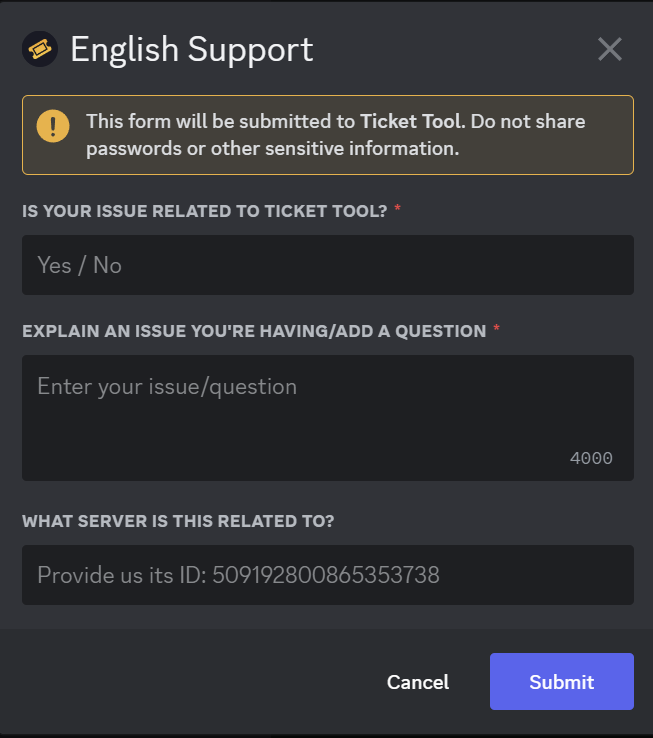 humble sequoiaBOT
The Ticket Message is the first message sent by the bot on a new ticket. To customize it head over to your Dashboard ➞ Panel Configs ➞ Ticket ➞ Edit Ticket Message
cobalt tapir
cobalt tapir
this?
covert swallow
Yep
cobalt tapir
covert swallow
https://i.imgur.com/NNMdeFP.png
sorry quic question how u do this placeholder text
humble sequoiaBOT
A Discord Form lets the user answer individual questions in a pop-up Form, which then displays the answers in the ticket message. This can save time if you already know what you want to ask the user.
Setup Forms
Forms can be enabled under Panel Settings > Form Options > Edit Forms Options. In the new pop-up window, you can now enable and edit your own Form.
Form Options
You can add up to 5 questions in the Discord form. This is a Discord limitation. Each question can have a placeholder in the input field, a minimum and maximum input, multi-line, and also the option to have the answer required.
Options
Question Title ➞ Your Question goes here
Question Placeholder ➞ The placeholder text in the input field
Required ➞ If enabled, the user has to answer this question, to submit the form
Multi-Line Input ➞Allows the user to input multiple lines
Minimum and Maximum Input ➞ Set a minimum and maximum input value for the user
Displaying the Answer
To display the answers from the user, you need to enable Auto display form results on the ticket message as an additional embed
If you don't want a second embed, go into your Panel Configs > Ticket Options > Edit Ticket Message. You use the variable {create.form.x} and replace x with the number of your question. For example, the response to Question 5 can be displayed with {create.form.5}.
 wicked moss
Hello, i need help with tickets
i need it to automatically ping the certain staff role when a person creates a ticket
is that possible
humble sequoiaBOT
1. Go into your Dashboard
2. Open your Panel Configs tab
3. Select the panel you want to ping your support on
4. Open the Ticket options menu
5. Click on Edit Ticket Message
6. In the Message Content use one of the role mention syntax (**{@Role Name}**/**{Role ID}**)
7. Save changes
Note: For this to work properly, Ticket Tool requires the Mention Everyone permission. Or the role must have the Allow anyone to @mention this role setting enabled
atomic solstice
wicked moss
i need it to automatically ping the certain staff role when a person creates a t...
here is where you can do it ^^
humble sequoiaBOT
Within all the messages the bot sends (both embeds and text) you can mention either channels, roles, or even users, these mentions will only send a notification to the user if they are used within a text field, e.g: a role mentioned in an embed won't ping at all the users who have that role.
For mentioning a role you can use one out of three options:
{@Role Name} ➞ Which is Case Sensitive.
{RoleID} ➞ Replace RoleId with the Id of the role you are trying to ping.
<@&RoleID> ➞ Discord's native syntax to ping roles.
<#ChannelID> ➞ Mention a channel by its ID.
<@UserID> ➞ Mention a user by its ID.
atomic solstice
and here is what you can use ^^
we recommend using {RoleID} or <@&RoleID> when pinging roles as that won't break if you ever change the name of your roles in the server
use <@UserID> when you want to mention a certain user or an app
 hard thicket
hello I need help because I can't create a ticket for an unfair penalty what should I do please
 real cobalt
How do I get the drop down menu? Like one panel with more than 10 tickets
humble sequoiaBOT
The Drop-down menu or Select Menu replaces the buttons on your panel message and uses a drop-down menu with all of your panels. To set this up, go to your Panel Configs and select your main Panel.
<:Numbericons1:1018864164032225340> Enable Select Style
First you enable Select Style. Then you add an item in the Dropdown Editor. Now you can start editing your dropdown!
<:Numbericons2:1018864168041971712> Dropdown Editor
Each line in the dropdown editor represents a line in the drop down menu on discord. You can add more "Items", by clicking on
First you select a panel. That's the panel this option will open a ticket for. DONT select the same panel twice. Each option should have a different Panel
After that, you can put a Display. This is the title of this option and will appear in the drop down menu. The *Description can be set right after that, which will be below the title in grey.
Additionally you can select an emoji, that will be shown in front of each option. You can either manually input the ID of an emoji or select it in the selector.
Common Issues ⚠️
- Panel doesn't send? Make sure you have a valid emoji selected
- Option doesn't show up? Check if two options have the same panel in the DropDown Editor
$dropdown
atomic solstice
real cobalt
How do I get the drop down menu? Like one panel with more than 10 tickets
follow the embed above ^^
atomic solstice
hard thicket
hello I need help because I can't create a ticket for an unfair penalty what sho...
hi, could you please elaborate more on the issue you are experiencing? are you getting some sort of an error?
 timber vigil
anyone know how i can make a ticket tool like this
 humble sequoiaBOT
The Drop-down menu or Select Menu replaces the buttons on your panel message and uses a drop-down menu with all of your panels. To set this up, go to your Panel Configs and select your main Panel.
<:Numbericons1:1018864164032225340> Enable Select Style
First you enable Select Style. Then you add an item in the Dropdown Editor. Now you can start editing your dropdown!
<:Numbericons2:1018864168041971712> Dropdown Editor
Each line in the dropdown editor represents a line in the drop down menu on discord. You can add more "Items", by clicking on
First you select a panel. That's the panel this option will open a ticket for. DONT select the same panel twice. Each option should have a different Panel
After that, you can put a Display. This is the title of this option and will appear in the drop down menu. The *Description can be set right after that, which will be below the title in grey.
Additionally you can select an emoji, that will be shown in front of each option. You can either manually input the ID of an emoji or select it in the selector.
Common Issues ⚠️
- Panel doesn't send? Make sure you have a valid emoji selected
- Option doesn't show up? Check if two options have the same panel in the DropDown Editor
$dropdown
idle flint
timber vigil
anyone know how i can make a ticket tool like this
See the info above 👆
timber vigil
 idle flint
timber vigil
idle flint
timber vigil
Your going to have to accompany this with a question mate, we can’t read your mind 🤷♂️🙂
timber vigil
idle flint
Your going to have to accompany this with a question mate, we can’t read your mi...
how do i change the name of the ticket it creates
humble sequoiaBOT
The ticket name is the default channel name of all tickets. To edit it, go to your Dashboard > Panel Configs > Ticket. There you can edit the channel name of opened and closed tickets. You can also use variables in there.
Note: This is a premium feature
 ember spindle
have to get premium
timber vigil
how much is it
ember spindle
I haven't checked. go to your dashboard
humble sequoiaBOT

Premium can now be purchased directly through discord! Either in the app directory (server settings) or directly from the bots profile.
<:TTWarning:1034178155872784494> Important Information <:TTWarning:1034178155872784494>
ONLY purchase premium through ONE of the two Ticket Tool Bots. If you purchased premium on the primary bot (White logo) and plan to use the premium bot, don't kick the primary bot!
What's different?
 The Monthly price changed from
 $6.00 to $5.99

 Yearly subscriptions are not yet available
Don't kick the bot, otherwise, the subscription will be canceled automatically
You'll need to buy the subscription from a computer or on the Application Directory
You might need to run the /premium command on your server to sync the premium status with your dashboard
 A subscription can not be transferred between Servers
 idle flint
Here is the premium info 👆 it’s $5.99 per month
timber vigil
u guys be taxing
ember spindle
Any idea why they decided to remove a penny?
ember spindle
timber vigil
u guys be taxing
I have no taxes at checkout in the app directory
timber vigil
no like charging fot a bot
ember spindle
oooh the developers have a hard job at times. some of them make this a full time job. if you don't like it, you can always try to make your own bot
humble sequoiaBOT
Within all the messages the bot sends (both embeds and text) you can mention either channels, roles, or even users, these mentions will only send a notification to the user if they are used within a text field, e.g: a role mentioned in an embed won't ping at all the users who have that role.
For mentioning a role you can use one out of three options:
{@Role Name} ➞ Which is Case Sensitive.
{RoleID} ➞ Replace RoleId with the Id of the role you are trying to ping.
<@&RoleID> ➞ Discord's native syntax to ping roles.
<#ChannelID> ➞ Mention a channel by its ID.
<@UserID> ➞ Mention a user by its ID.
1. Go into your Dashboard
2. Open your Panel Configs tab
3. Select the panel you want to ping your support on
4. Open the Ticket options menu
5. Click on Edit Ticket Message
6. In the Message Content use one of the role mention syntax (**{@Role Name}**/**{Role ID}**)
7. Save changes
Note: For this to work properly, Ticket Tool requires the Mention Everyone permission. Or the role must have the Allow anyone to @mention this role setting enabled
 granite niche
Olá poderiam me ajudar a recuperar minha conta perdida, eu troquei de celular e perdi minha conta 🙁
 plush snow
is it possible to have 2 ticket channels 1 for EU and 1 for US for my support team
 burnt canopy
Yeah
 covert snow
Why can’t I open the photo in the transcript? gives an error message
limber portal
covert snow
Why can’t I open the photo in the transcript? gives an error message
Hi, what error are you receiving?
covert snow
limber portal
Hi, what error are you receiving?
the second photo is the translation I posted


 limber portal
covert snow
the second photo is the translation I posted
limber portal
covert snow
the second photo is the translation I posted
It's possible the link expired.
shadow sparrow
how to buy ticket tool premium in discord?
humble sequoiaBOT
Premium can now be purchased directly through discord! Either in the app directory (server settings) or directly from the bots profile.
<:TTWarning:1034178155872784494> Important Information <:TTWarning:1034178155872784494>
ONLY purchase premium through ONE of the two Ticket Tool Bots. If you purchased premium on the primary bot (White logo) and plan to use the premium bot, don't kick the primary bot!
What's different?
The Monthly price changed from $6.00 to $5.99
Yearly subscriptions are not yet available
Don't kick the bot, otherwise, the subscription will be canceled automatically
You'll need to buy the subscription from a computer or on the Application Directory
You might need to run the /premium command on your server to sync the premium status with your dashboard
A subscription can not be transferred between Servers
shadow sparrow
i dont have upgrade button
pseudo ravine
Are you on mobile?
shadow sparrow
no pc
pseudo ravine
Could you send a screenshot of Ticket Tools profile in your server
 maiden mauve
Kann mir einer mit dem Ticket bot weiterhelfen bekomme ich es nicht eingestellt das nur bestimme Rollen das Ticket sehen und der ersteller kann auch nicht in das ticket rein schreiben
 scenic plinth
granite niche
Olá poderiam me ajudar a recuperar minha conta perdida, eu troquei de celular e ...
scenic plinth
granite niche
Olá poderiam me ajudar a recuperar minha conta perdida, eu troquei de celular e ...
Infelizmente, isso não é algo em que possamos ajudá-lo. Você está no servidor errado.
scenic plinth
maiden mauve
Kann mir einer mit dem Ticket bot weiterhelfen bekomme ich es nicht eingestellt ...
Sie können in den allgemeinen Optionen Ihres Panels unter „Supportteamrollen“ eine Rolle festlegen, um Tickets anzuzeigen.
 wild spire
scenic plinth
Sie können in den allgemeinen Optionen Ihres Panels unter „Supportteamrollen“ ei...
wild spire
scenic plinth
Sie können in den allgemeinen Optionen Ihres Panels unter „Supportteamrollen“ ei...
Since when do you german 
atomic solstice

 maiden mauve
scenic plinth
Sie können in den allgemeinen Optionen Ihres Panels unter „Supportteamrollen“ ei...
maiden mauve
scenic plinth
Sie können in den allgemeinen Optionen Ihres Panels unter „Supportteamrollen“ ei...
ja ich versuche es nochmal danke 🙂
scenic plinth
Gern geschehen 🙂
 minor abyss
i have a old transcript
and when i click on the link of it
it says invalid request
 gilded verge
minor abyss
it says invalid request
minor abyss
gilded verge
read https://discord.com/channels/509192800865353738/776680605517742090/12208273...
gilded verge
minor abyss
it says invalid request
minor abyss
gilded verge
read https://discord.com/channels/509192800865353738/776680605517742090/12208273...
i downloaded it
is there a way to have it hosted on the ticket tool servers
or no
gilded verge
I don't think the developer would agree to this so my answer would be no
minor abyss
gilded verge
I don't think the developer would agree to this so my answer would be no
isnt the direct link serversided thjo
gilded verge
im not web dev so i have 0 knowledge of how this works but i believe the answer is in the message i mentioned
minor abyss
gilded verge
im not web dev so i have 0 knowledge of how this works but i believe the answer ...
well it says "Hey there. Since the transcript is older than December 2023 you’ll need to download it first. This is due to a Discord update"
nvm
thx anyways
gilded verge
i only said what i thought could help you but please remember to turn off reply-pings next time (you used it in 3 messages, max should be 2) ^^
 eternal vault
I requested the return on April 8, but still haven't been refunded
 glad shuttle
My brain hurts and I can't find the info I wanted without my brain hurting more. I'm dumb atm. I've been working on a Discord setup for a few days and fine-tuning things for a gaming community that runs several servers.
- Is there a way to have the tickets created named after their panel?
maiden mauve
scenic plinth
Sie können in den allgemeinen Optionen Ihres Panels unter „Supportteamrollen“ ei...
Hat geklappt jetzt funktioniert es 🙂
 hollow tulip
why can't I get a role in the channel. gives an error message This command requires manageRoles permission.
restive condor
hollow tulip
why can't I get a role in the channel. gives an error message This command requi...
Hey there! Ticket Tool is missing MANAGE ROLES permission in the role settings; therefore can't update permissions for that channel