#🆘│community-support
1 messages · Page 90 of 1
 iron nightBOT
 desert bough
Thanks @restive condor super quick and proffesional !
iron nightBOT
Gave +1 Rep to @restive condor (current: #17 - 278)
 karmic sorrel
 civic moss
Is there a place where you can see all benefits of premium? Is it in the documentation?
 half crystal
Hi, it won't let me access the ticket tool dashboard page of my friend's server. I have administrator poets. It tells me this when I try to access that server's page: Please select a server you have access to manage to be redirected
 humble sequoiaBOT
 Faster Premium Bot
Automatic Transcripts
Full Customization
Direct Messages
Ticket Automation
Thread Style Ticketing
Premium Support
Scheduled Panel Availability
Integrations
You can purchase premium here:
Price
$6 - Monthly
$66 - Yearly
 Premium
 restive condor
- Claiming
- Advanced Ticket Statistics
restive condor
civic moss
Is there a place where you can see all benefits of premium? Is it in the documen...
Hey @civic moss! See above
civic moss
Tyty
restive condor
half crystal
Hi, it won't let me access the ticket tool dashboard page of my friend's server....
Hi there, see below
humble sequoiaBOT
Don't see your server in the dashboard?
Try using the Sync Servers button on your top center of the Dashboard page
You will possibly need to relog. Look below to see the steps on how to relog.
If this doesn't work
You should relog from the dashboard, you can do this by clicking here to log out immediately, and then log back in
Note:
You need one of these 3 things to access the dashboard.
1. Server Owner (Level: 6)
2. Server Administrator (Level: 4)
3. Dashboard Role (Level: 2)
:warning: You can check your level using the </permissionlevel:1029797400174399542> command on your Discord Server
If the bot's response is:
- @User is permission level: 0 (User)
You don't have any of the 3 levels required to access the server's dashboard
 humble sequoiaBOT
Any role you put there will have full access to the ticket tool dashboard. The server owner and users with admin permissions already have access to the dashboard.
Be careful of which roles to put here

 upbeat mortar
is there a system that doesn't use threads
 abstract folio
 vernal pollen
nothings happened
vernal pollen
nothings happened
redeem the code of the premium in your server and add the premium bot
from server config in the dashboard you can add the premium bot
vernal pollen
thanksss
abstract folio
vernal pollen
thanksss
no problem anytime
 pseudo ravine
upbeat mortar
is there a system that doesn't use threads
pseudo ravine
upbeat mortar
is there a system that doesn't use threads
Hey there. By default Ticket Tool creates channels instead of threads
pseudo ravine
abstract folio
redeem the code of the premium in your server and add the premium bot
Just as an FYI, keys are no longer redeemable by members
 fleet pumice
How do I set the ticket starting count?
It starts at 00001, but I would need it to start at let's say 00005
 limber portal
fleet pumice
It starts at 00001, but I would need it to start at let's say 00005
limber portal
fleet pumice
It starts at 00001, but I would need it to start at let's say 00005
hi, in dashboard > panel configs use the set count button under the panel selection dropdown
 lavish mango
i keep getting the
application didnt respond thing
even if i try to use the help command
what should i do
limber portal
lavish mango
what should i do
Hi, can you run /debug?
lavish mango
limber portal
lavish mango
https://discordapp.com/channels/509192800865353738/662692902245498910/1211778958...
Is ticket tool now responding?
lavish mango
its not
limber portal
lavish mango
its not
Can you give it the read message history permission and try again?
 shrewd bear
i cant figure out why my admins cant trasncript tickets. can i please get some help
restive condor
shrewd bear
i cant figure out why my admins cant trasncript tickets. can i please get some h...
Hi, of course. Any error message when they attempt to transcript?
shrewd bear
yes
restive condor
What does the error message say
restive condor
Could you run /debug in the transcript channel please
shrewd bear
it says the application did not respond
restive condor
It's missing
- View channel
- Manage permissions
- Manage channels
iron nightBOT
Gave +1 Rep to @restive condor (current: #17 - 280)
restive condor
Any time 
 atomic herald
Good evening, Can anyone tell me if Ticket Tool is bugged? Some members of my Community team are not allowed to delete tickets, and no changes have been made to the bot panel.
pseudo ravine
Hey there. Could I get the server ID
atomic herald
pseudo ravine
Hey there. Could I get the server ID
618548240601710592
atomic herald
The error is the following:
 pseudo ravine
Which panel is it?
atomic herald
pseudo ravine
Which panel is it?
This is our Discord, this is the error that appears in the message, my team members can't even delete tickets, two days ago everything was normal.
pseudo ravine
I get that. But I just need to know which ticket panel it is so I can take a look
atomic herald
Could you show me where that panel you're talking about is? I'm a little lost
pseudo ravine
Which one of these
 atomic herald
No. 1, 12, 13, 16, 17 and 18, these are the ones that my team uses most, but I suspect they all have bugs.
pseudo ravine
I’m assuming they have at least one of these roles?

 candid spire
Hello! Do someone know why is not showing correctly?


i changed opened to created and it worked
but closed/deleted is now working
atomic herald
pseudo ravine
I’m assuming they have at least one of these roles?
Yes, they have at least one of these positions, and even so they are not allowed, not only to delete tickets, but some permissions such as viewing some tickets are also not being allowed.
pseudo ravine
Does it show as No Access if you mention the channel?
atomic herald
I'm doing a test here about permission to view the channel.
Could this influence anything? They are unable to delete using the delete button.

 atomic flame
I did this now I have another problem. It shows that there are 2 buttons that say Create Ticket as well with the other buttons that say what I want them to. I'll send a screenshot.
I want to get rid of the two Create Ticket buttons.
 pseudo ravine
atomic herald
Could this influence anything? They are unable to delete using the delete button...
pseudo ravine
atomic herald
Could this influence anything? They are unable to delete using the delete button...
No, it has nothing to do with it
 timber bloom
im having a problem where members can see and type in the tickets even though the member role has 0 perms and i dont know what to do ive tried messing with some setting but couldnt figure it out
atomic herald
pseudo ravine
No, it has nothing to do with it
Apparently I managed to resolve it after I enabled these roles, they have been able to delete some tickets using the delete button so far.
pseudo ravine
It’s all good now?
 ionic path
timber bloom
im having a problem where members can see and type in the tickets even though th...
ionic path
timber bloom
im having a problem where members can see and type in the tickets even though th...
Hey there!
Dashboard (https://www.tickettool.xyz/) → Panel Configs → Permissions → Everyone
From there you can change the permission for every new ticket that is made

Ticket Tool - Ticketing without clutter - The #1 Discord support bot
atomic herald
pseudo ravine
It’s all good now?
After I enabled the positions in this option, yes, at least until now, but I thank you for your support.
iron nightBOT
Gave +1 Rep to @pseudo ravine (current: #14 - 355)
pseudo ravine
You’re welcome, glad I could help!
timber bloom
ionic path
Hey there!
Dashboard (https://www.tickettool.xyz/) → Panel Configs → Permissions...
what now
 ionic path
timber bloom
what now
ionic path
timber bloom
what now
In the "everyone" section (opened) you can change the permissions, at this point change the "View Channel" permission to X.
timber bloom
alright
 lethal wave
 pseudo ravine
Hey there. The only way to view them is if you saved the transcripts in the transcripts channel set
timber bloom
ionic path
In the "everyone" section (opened) you can change the permissions, at this point...
i do

i dont understand whats wrong w it
lethal wave
pseudo ravine
Hey there. The only way to view them is if you saved the transcripts in the tran...
and I can't find it anywhere on the site
ionic path
timber bloom
i do
And everyone still sees the tickets?
timber bloom
yea
ionic path
timber bloom
yea
Just for confirmation, do you have a members role? If so, does it have administrator perms?
pseudo ravine
lethal wave
and I can't find it anywhere on the site
It’s in your server, you set a transcript channel
Go to the Dashboard > Panel Configs > Transcript > Transcript Channel > Make sure you have one set
timber bloom
ionic path
Just for confirmation, do you have a members role? If so, does it have administr...
it has 0 perms
ionic path
Okay, can you try making a new ticket now and see if the issue persists or if members can't see that ticket now?
timber bloom
okay 1 sec
timber bloom
ionic path
Okay, can you try making a new ticket now and see if the issue persists or if me...
i checked and i have it on the dropdown style menu and one of them is fine but the other two are broken
lethal wave
pseudo ravine
It’s in your server, you set a transcript channel
Go to the Dashboard > Panel C...
yes, but the tickets that I closed with /close come to me, the ones that were closed with the "close" button do not come
timber bloom
broken as in anyone can type in them
restive condor
atomic flame
I did this now I have another problem. It shows that there are 2 buttons that sa...
Go into your Dashboard > Panel Configs > Panel > Attached Panels and make sure you didn't attach the create ticket panel to the create ticket panel
pseudo ravine
lethal wave
yes, but the tickets that I closed with /close come to me, the ones that were cl...
You need to click on the Transcript button before closing/deleting the ticket
Or running the transcript command
ionic path
timber bloom
i checked and i have it on the dropdown style menu and one of them is fine but t...
Alright, then you have to do the same thing (permissions, everyone, opened, viewed channel  ) for all of the panels.
lethal wave
lethal wave
yes, but the tickets that I closed with /close come to me, the ones that were cl...
oh
gg i lose very importart info
timber bloom
ionic path
Alright, then you have to do the same thing (permissions, everyone, opened, view...
alr
lethal wave
okey thanks @pseudo ravine
iron nightBOT
Gave +1 Rep to @pseudo ravine (current: #14 - 356)
pseudo ravine
You’re welcome, glad I could help!
 eager ferry
How do I change the bot's avatar and name? I have already bought a premium
humble sequoiaBOT
Ticket Tool Custom Avatar
As of now, you are not able to change Ticket Tool's profile picture, nonetheless, our Development Team is working on the release of white labels, this is your own custom bot!
For the time being, you can change the bot's nickname by right-clicking the bot in the user list on your server and clicking Change Nickname

$avatar
eager ferry
humble sequoia
Sadly. I hope custom bots will be introduced before the subscription ends. Otherwise, I don't see the point in paying(((
 austere forge
eager ferry
Sadly. I hope custom bots will be introduced before the subscription ends. Other...
austere forge
eager ferry
Sadly. I hope custom bots will be introduced before the subscription ends. Other...
It's Discord itself that doesn't allow this at the moment, Premium allows you to obtain additional features
 graceful frigate
Hey is there any way to find out how many tickets we/another user have closed in our server? Thx
eager ferry
austere forge
It's Discord itself that doesn't allow this at the moment, Premium allows you to...
I saw how some discord bot could create custom bots. But I just found out that it was removed. I don't even know what was in their heads
atomic flame
restive condor
Go into your ``Dashboard`` > ``Panel Configs`` > ``Panel`` > ``Attached Panels``...
Thank you! I finally figured it out!
iron nightBOT
Gave +1 Rep to @restive condor (current: #17 - 281)
 oak garnet
 deft estuary
What permission do you need to access dashboard
humble sequoiaBOT
Don't see your server in the dashboard?
Try using the Sync Servers button on your top center of the Dashboard page
You will possibly need to relog. Look below to see the steps on how to relog.
If this doesn't work
You should relog from the dashboard, you can do this by clicking here to log out immediately, and then log back in
Note:
You need one of these 3 things to access the dashboard.
1. Server Owner (Level: 6)
2. Server Administrator (Level: 4)
3. Dashboard Role (Level: 2)
:warning: You can check your level using the </permissionlevel:1029797400174399542> command on your Discord Server
If the bot's response is:
- @User is permission level: 0 (User)
You don't have any of the 3 levels required to access the server's dashboard
deft estuary
🫶
pseudo ravine

deft estuary
Stich is the best Disney character
 tacit birch
Hiya, is there a way to save pictures/images in a transcript
I also noticed some of my old tickets can not be opened anymore.. can I do anything about that 😭
 void cypress
thanks @restive condor
iron nightBOT
Gave +1 Rep to @restive condor (current: #17 - 282)
void cypress
^rep for this, help me with what i needed to do even tho it’s an old message
 ancient schooner
how to make 2 different ticketing options
austere forge
ancient schooner
how to make 2 different ticketing options
Hello, it will be necessary to create a second panel to have several ticket creation options
 jade topaz
Is there a way to make a custom command within the bot and role someone a role?
austere forge
jade topaz
Is there a way to make a custom command within the bot and role someone a role?
hey there, there is the "Custom command" category which allows you to create personalized commands of your choice, but the latter does not allow you to give a role
To do this you must go to the Dashboard -> Custom Commands
ancient schooner
austere forge
Hello, it will be necessary to create a second panel to have several ticket crea...
I dont know how to do it
austere forge
ancient schooner
I dont know how to do it
You must go to the Dashboard -> Panel configs

 iron nightBOT
Gave +1 Rep to @austere forge (current: #74 - 14)
 dense sequoia
can i ask how do we include reason to close ticket?
 gilded verge
dense sequoia
can i ask how do we include reason to close ticket?
gilded verge
dense sequoia
can i ask how do we include reason to close ticket?
Panel Configs->Moderator->Moderator Message->there you can put variable from https://docs.tickettool.xyz/dashboard/panel-configs/variables#special-variables
restive condor
tacit birch
Hiya, is there a way to save pictures/images in a transcript
I also noticed some...
Hi there. Use the "DIRECT LINK" button to update the transcript link.
Unfortunately, as per Discord limitations images in deleting channels are deleted. Unless you have premium (we store them for premoum users), images will not be saved in transcript
tacit birch
restive condor
Hi there. Use the "DIRECT LINK" button to update the transcript link.
Unfortuna...
Hii yes the direct link does not work anymore, I don't have premium unfortunately, if I'd buy that would it go for previous tickets as well or only for the ones transcripted while having premium?
restive condor
tacit birch
Hii yes the direct link does not work anymore, I don't have premium unfortunatel...
My apologies, is this for a very old transcript?
Older then December 15?
dense sequoia
gilded verge
Panel Configs->Moderator->Moderator Message->there you can put variable from <ht...
Where do I add it in
tacit birch
restive condor
My apologies, is this for a very old transcript?
Yes it's from 11/11/23
 glad steppe
How can I change permission levels of the moderators in our community?
 restive condor
tacit birch
Yes it's from 11/11/23
restive condor
tacit birch
Yes it's from 11/11/23
Unfortunately, as per an update enforced by Discord, old transcript links may eventually stop working.
You will always be able to access the transcript by dowloading the HTML file though
(Premium wouldn't make a difference here)
humble sequoiaBOT
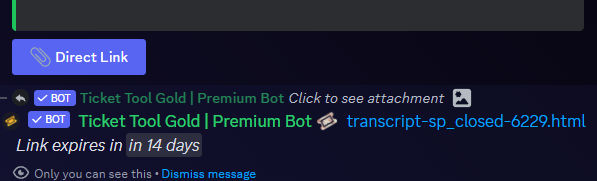
Due to an update Discord enforced on their API on December 15, the attachment URLs are valid only for a certain time. In order to ensure you can visualize your transcripts on our website Ticket Tool provides you a Direct Link button that will provide you with the last valid URL for you to see your tickets!
$transcripts
restive condor
glad steppe
How can I change permission levels of the moderators in our community?
Hey there! Level 4 is a server administrator (they have admin perms)
You can also set up Dashboard roles (Level 2) (Info below)
But, if you don't like to have access to the Dashboard and just be able to manage tickets, add their role as support team role, under Dashboard > Panel Configs > General - They would still have level 0
humble sequoiaBOT
Any role you put there will have full access to the ticket tool dashboard. The server owner and users with admin permissions already have access to the dashboard.
Be careful of which roles to put here
glad steppe
restive condor
Hey there! Level 4 is a server administrator (they have admin perms)
You can al...
Thanks!
iron nightBOT
Gave +1 Rep to @restive condor (current: #17 - 283)
dense sequoia
I have been reading up support docs but i don;t see where i can add in reason upon closing for it to appear in transcript
limber portal
dense sequoia
I have been reading up support docs but i don;t see where i can add in reason up...
Hi there,
When closing the $close (reason) or slash command equivalent has to be used - the button won’t add a reason.
You can then add the {close.reason} variable in the transcript message.
dense sequoia
limber portal
Hi there,
When closing the `$close (reason)` or slash command equivalent has t...
under message content or embed editor
limber portal
It can be wherever you want
dense sequoia
and how do i ensure that the reason does go in after putting the command
dense sequoia
limber portal
It can be wherever you want
oki
then how do i activate such that the reason will go in transcript
i added the variable
limber portal
Whenever a reason is set, it will be placed in the variable.
dense sequoia
limber portal
Hi there,
When closing the `$close (reason)` or slash command equivalent has t...
so have to use this command for it to go into transcript?
with the variable
limber portal
dense sequoia
so have to use this command for it to go into transcript?
Yes
dense sequoia
limber portal
Yes
thank you i got it
iron nightBOT
Gave +1 Rep to @limber portal (current: #11 - 362)
 tiny acorn
yo my dc invite wont work and i cant invite anyone it says invaild invite
humble sequoiaBOT

⚠️ You're in the wrong place
We provide support for Ticket Tool Discord bot and cannot help you with whatever issue you have.
- We don't know which Support Team you should contact to get this issue resolved, and unfortunately we won't be able to accurately tell you.
If you don't have any further questions regarding our bot Ticket Tool, please close this ticket
 wild oxide
i cant withdraw items from the website
humble sequoiaBOT
⚠️ You're in the wrong place
We provide support for Ticket Tool Discord bot and cannot help you with whatever issue you have.
- We don't know which Support Team you should contact to get this issue resolved, and unfortunately we won't be able to accurately tell you.
If you don't have any further questions regarding our bot Ticket Tool, please close this ticket
wild oxide
can somebody help ?
limber portal
We can’t help here
jade topaz
Hello, I'm new here. Is there a way to export all support tickets in a server I'm admin of in json or html format?
limber portal
jade topaz
Hello, I'm new here. Is there a way to export all support tickets in a server I'...
Hi there!
Unfortunately that kind of exporting isn’t currently available
iron nightBOT
Gave +1 Rep to @limber portal (current: #11 - 365)
 kind forum
hi, i want to make it so that when a players opens a ticket my co-owners and moderators will get access to the ticket directly aswell. right now i have to add them to the ticket everytime
austere forge
kind forum
hi, i want to make it so that when a players opens a ticket my co-owners and mod...
hi there !
You can add your staff role as a support team role under Dashboard > Panel Configs > General > Support Team Roles
kind forum
austere forge
hi there !
You can add your staff role as a support team role under ``Dashboard...
ah nice! thank you
iron nightBOT
Gave +1 Rep to @austere forge (current: #72 - 15)
 torpid cloud
Hey! Is there a way to see tickets that have been closed/removed from the discord (like an archive)?
jade topaz
Can someone please help me
i have made the ticket system with saphhire and i asked in their support server, they tried to help me but they couldnt, so they told me to come here and ask.
 civic wagon
jade topaz
i have made the ticket system with saphhire and i asked in their support server,...
civic wagon
jade topaz
i have made the ticket system with saphhire and i asked in their support server,...
Please state what exactly is the issue
jade topaz
When i open a ticket it does not show here

 lofty lion
Hi is there a way to lock all of the tickets ( unable to click them )
limber portal
lofty lion
Hi is there a way to lock all of the tickets ( unable to click them )
Hi there, you can add @ everyone as a server blacklisted role so everyone is unable to make tickets
jade topaz
limber portal
Hi there, you can add @ everyone as a server blacklisted role so everyone is una...
can u help me
humble sequoiaBOT
Hello, we would love to help you, but if you don't tell us what you need help with we can't help you :(
limber portal
civic wagon
Please state what exactly is the issue
^^
jade topaz
I already said
jade topaz
jade topaz
When i open a ticket it does not show here
.
limber portal
Have you set the categories for each panel correct in dashboard > panel configs > category?


 rough spoke
Hello, i need to now how to make a ticket such like this
humble sequoiaBOT
The Drop-down menu or Select Menu replaces the buttons on your panel message and uses a drop-down menu with all of your panels. To set this up, go to your Panel Configs and select your main Panel.
<:Numbericons1:1018864164032225340> Enable Select Style
First you enable Select Style. Then you add an item in the Dropdown Editor. Now you can start editing your dropdown!
<:Numbericons2:1018864168041971712> Dropdown Editor
Each line in the dropdown editor represents a line in the drop down menu on discord. You can add more "Items", by clicking on 

First you select a panel. That's the panel this option will open a ticket for.  DONT select the same panel twice. Each option should have a different Panel
After that, you can put a Display. This is the title of this option and will appear in the drop down menu. The *Description can be set right after that, which will be below the title in grey.
Additionally you can select an emoji, that will be shown in front of each option. You can either manually input the ID of an emoji or select it in the selector.
Common Issues ⚠️
- Panel doesn't send? Make sure you have a valid emoji selected
- Option doesn't show up? Check if two options have the same panel in the DropDown Editor

$dropdown
limber portal
@jade topaz & @rough spoke ^^
limber portal
No, dropdowns are free
lofty lion
limber portal
Hi there, you can add @ everyone as a server blacklisted role so everyone is una...
Ahh I see, so if I wanna change it back to allow, I unblacklist the @ everyone role?
limber portal
Yup
lofty lion
Tyysm🤍


 noble path
hi team, can I get some help opening a support ticket please? don't seem to get the channel even though I passed the verification
 sly stag
Hi @here, so I've made a ticket system where the user can fill in some info regarding the ticket
But when it's made it won't come with these details. What am I looking at? Been trying for a while now... Appreciate it
 austere forge
noble path
hi team, can I get some help opening a support ticket please? don't seem to get ...
austere forge
noble path
hi team, can I get some help opening a support ticket please? don't seem to get ...
hi there,
use #🎫│make-a-ticket 🙂
noble path
austere forge
hi there,
use <#571706435449257997> 🙂
thank you 🙏
iron nightBOT
Gave +1 Rep to @austere forge (current: #72 - 16)
 rapid blaze
Hello, for some reason the bot during the night closed 2-4 tickets that had yet to be solved. I can't seem to find an option for ticket deletion over time tho.
austere forge
rapid blaze
Hello, for some reason the bot during the night closed 2-4 tickets that had yet ...
hi there, check if automation is active
Dashboard > Panel Configs > Automation
rapid blaze
This is all that's active.

I just checked on that, the ticket owners are still in the server
which is odd
 dense violet
I want to make a $hide command, where it removes all the staff and only allows management members and ticket owner in it. I made a custom command, but how can I make it so it updates the permissions?
restive condor
dense violet
I want to make a $hide command, where it removes all the staff and only allows m...
Hey there, that's not possible.
You can use Ticket Tool's /remove command though
(And remove the roles)
dense violet
oh i saw it somewhere being used
restive condor
They may have been using an external bot. With TicketTool custom commands you can only have a message as a response
humble sequoiaBOT
The Drop-down menu or Select Menu replaces the buttons on your panel message and uses a drop-down menu with all of your panels. To set this up, go to your Panel Configs and select your main Panel.
<:Numbericons1:1018864164032225340> Enable Select Style
First you enable Select Style. Then you add an item in the Dropdown Editor. Now you can start editing your dropdown!
<:Numbericons2:1018864168041971712> Dropdown Editor
Each line in the dropdown editor represents a line in the drop down menu on discord. You can add more "Items", by clicking on
First you select a panel. That's the panel this option will open a ticket for. DONT select the same panel twice. Each option should have a different Panel
After that, you can put a Display. This is the title of this option and will appear in the drop down menu. The *Description can be set right after that, which will be below the title in grey.
Additionally you can select an emoji, that will be shown in front of each option. You can either manually input the ID of an emoji or select it in the selector.
Common Issues ⚠️
- Panel doesn't send? Make sure you have a valid emoji selected
- Option doesn't show up? Check if two options have the same panel in the DropDown Editor
$dropdown
PayPal - paypal@tickettool.xyz
BitCoin - 3HhKKAdb9eEvCe2tvzB8bAa8nebHY6qcPA
LiteCoin - MEQX3knLAuotrKnvk3HDNBK5gdRn6PZhHy

Prepay/Direct Payment
To prepay send the payment using your desired method - Available options listed bellow.
⚠️ $18 per 3 months. ⚠️
$66 per year.
(If using the direct payment option, you need to be paying for at-least 3+ months.)
Regular Prices when paying within Discord:
$5.99/per month
Once your payment is sent let us know so we can confirm and get you your key.
- Purchases done with this method are non-refundable.
<:paypal:924596360840372234> Paypal ("Goods and Services" or "Family and Friends")
paypal@tickettool.xyz
<:bitcoin:924638849135689749> BTC - Bitcoin
3HhKKAdb9eEvCe2tvzB8bAa8nebHY6qcPA
<:Litecoin:972176945972383815> LTC - LiteCoin
MEQX3knLAuotrKnvk3HDNBK5gdRn6PZhHy
I sent the payment now what?
After you send the payment, please send a screenshot with proof of payment, our <@&615146349700186112> will verify your payment and will get you setup. For crypto payments, we are waiting for at least ONE verification.

All prices in USD - 3 months min for direct payment
After a successful payment
Provide us with your server ID, where you want your premium key to be redeemed. This has to do be done by us
restive condor
Hi, yes see above
jade topaz
restive condor
Hi, yes see above
oh lowest is 3 months
restive condor
That's right
restive condor
But you are able to save the 2 months for later or redeem in on different servers
restive condor
jade topaz
was js gnna buy a month to test
There's a 7 day trial that you can enable from the Dashboard
(Only redeemable once)
 mellow dock
!verify
 terse osprey
i need code premium 1 hour 🥲 🙂
humble sequoiaBOT
━━ ! Ln . ϻ's inquiry has been moved to a ticket ━━
 restive condor
 green frigate
undefined any help?
green frigate
undefined any help?
Hi, how can I help?
Also, please don't ping staff members as it's against the server rules (#📂│information)
restive condor
 rocky jackal
Hey, remove it so the ticket is automatically deleted upon closure or just change the text?
green frigate
restive condor
Also, please don't ping staff members as it's against the server rules (<#509239...
cope
restive condor
No need for that
green frigate
im js joking
 charred kite
can I grant rights to the tickettool access panel to my friend, but without giving him the administrator on the server?
restive condor
charred kite
can I grant rights to the tickettool access panel to my friend, but without givi...
Hi there, yes. See below
humble sequoiaBOT
Any role you put there will have full access to the ticket tool dashboard. The server owner and users with admin permissions already have access to the dashboard.
Be careful of which roles to put here
charred kite
restive condor
Hi there, yes. See below
I put the role that I have on the server, but my server does not appear in his panel on the site
restive condor
charred kite
I put the role that I have on the server, but my server does not appear in his p...
Make sure he uses the SYNC SERVERS button to update the dashboard
charred kite
restive condor
Make sure he uses the ``SYNC SERVERS`` button to update the dashboard
Yes, he has already pressed this button many times
restive condor
charred kite
Yes, he has already pressed this button many times
May he run /permissionlevel in the server?
Or you can run it for him too
 restive condor
charred kite
restive condor
charred kite
Make you sure you saved the changes to the Dashboard
charred kite
yes, im save
restive condor
Also make sure you don't have two roles named the same
charred kite
restive condor
Also make sure you don't have two roles named the same
No, there is only one such role.
 restive condor
charred kite
No, there is only one such role.
restive condor
charred kite
No, there is only one such role.
Could I get your server name or ID?
charred kite
restive condor
Could I get your server name or ID?
1154774831481487410
restive condor
charred kite
1154774831481487410
Looks right. Could you kick Ticket Tool and re-invite it please
restive condor
Check the user's level now
 restive condor
charred kite
restive condor
charred kite
Interesting. I'll bring you into a ticket as I'll need a server invite
charred kite
restive condor
Interesting. I'll bring you into a ticket as I'll need a server invite
What is required of me?
restive condor
charred kite
What is required of me?
 young prawn
i have a bunch of tickets i want to move to a closed ticket channel but they wont budge
 steel basalt
young prawn
i have a bunch of tickets i want to move to a closed ticket channel but they won...
steel basalt
young prawn
i have a bunch of tickets i want to move to a closed ticket channel but they won...
Hi! Are you talking about a closed ticket Category? This can be changed by heading to Panel Configs > Category and then configuring the Close Category.
young prawn
steel basalt
Hi! Are you talking about a closed ticket Category? This can be changed by headi...
we have one but the category we have for non closed tickets are piling up with closed tickets we cant get rid of
tacit birch
restive condor
Unfortunately, as per an update enforced by Discord, old transcript links may ev...
How would I do that ?
steel basalt
young prawn
we have one but the category we have for non closed tickets are piling up with c...
I see. Have you tried running the $delete command? This should delete your closed tickets.
steel basalt
I see. Would you like me to make you a ticket so we're able to support you further from there?
young prawn
sure
humble sequoiaBOT
━━ Night's inquiry has been moved to a ticket ━━
 tacit birch
restive condor
tacit birch
restive condor
OH HAHAH omg yes I'm so dumb 😭 Thank youuuu
restive condor
No problem
 tulip rain
could someone help please? everytime I try to do anything with the ticket bot it just says it didn't respond? ive had on other servers but on my newest server it doesnt work
 restive condor
tulip rain
could someone help please? everytime I try to do anything with the ticket bot it...
restive condor
tulip rain
could someone help please? everytime I try to do anything with the ticket bot it...
Hi there, the bot is missing SEND MESSAGES permission for that channel
tulip rain
ooh
 distant umbra
When will ticket tool premium voting come back?
 lunar solar
distant umbra
When will ticket tool premium voting come back?
lunar solar
distant umbra
When will ticket tool premium voting come back?
It is unknown when/if keys will return
 quiet pike
Hi, is there any way to see closed tickets?
humble sequoiaBOT
1. Go into your Dashboard
2. Open your Panel Configs tab
3. Select the panel you want to grant access to
4. Open the Transcript options menu
5. Using the Transcript Channel selector, pick the channel you want your transcripts to be sent to
6. Save changes
 austere forge
quiet pike
Hi, is there any way to see closed tickets?
austere forge
quiet pike
Hi, is there any way to see closed tickets?
hi, see above ^^
quiet pike
austere forge
hi, see above ^^
I don´t have any panel.
I wanted to mean how do you see the closed tickets i opened on other servers.
steel basalt
quiet pike
I wanted to mean how do you see the closed tickets i opened on other servers.
Unfortunately you are unable to view tickets that have been closed in other servers.
To see them, you will need to ask the server staff to send you the ticket transcript, if they have the function enabled.
quiet pike
steel basalt
Unfortunately you are unable to view tickets that have been closed in other serv...
Oh
quiet pike
steel basalt
Unfortunately you are unable to view tickets that have been closed in other serv...
Ok thank you
iron nightBOT
Gave +1 Rep to @steel basalt (current: #40 - 62)
steel basalt
quiet pike
Ok thank you
No worries. Enjoy your day!
quiet pike
steel basalt
No worries. Enjoy your day!
Thanks, you too!
 opal ether
How do I add ticket Support in my server
 final umbra
How can I get all of my categories to show in "Category Created/Opened"?
steel basalt
opal ether
How do I add ticket Support in my server
Hi! See the embed below for the Ticket Tool setup guide:
humble sequoiaBOT
First you will want to invite the bot to your server. Once the bot is in your server, you can manage your server in the dashboard.

To create a panel we are going to need to head over to the Panel Configs Tab on the Dashboard.
Once at the dashboard we will need to click Create Panel.
Enter a panel name (Fill in any optional settings you want).
Click Create Panel and you are ready to get started with configuring your panel.
An example of a creating a panel is shown below.

Once the panel has been created, use the blue Send button and select the channel you want the panel to be sent to.
The Panel wasn't send
Use the </debug:ID> command to diagnose possible permission issues with the bot.
 steel basalt
final umbra
How can I get all of my categories to show in "Category Created/Opened"?
steel basalt
final umbra
How can I get all of my categories to show in "Category Created/Opened"?
Simply refresh the page, and the website should update. :)
final umbra
steel basalt
Simply refresh the page, and the website should update. :)
Tried that multiple times. And still won’t show up. The bot has every permission
steel basalt
final umbra
Tried that multiple times. And still won’t show up. The bot has every permission
Have you tried logging out and back into the website?
final umbra
steel basalt
Have you tried logging out and back into the website?
Yes
steel basalt
Okie dokie, would you like me to create a ticket so we're able to privately chat there?
final umbra
steel basalt
Okie dokie, would you like me to create a ticket so we're able to privately chat...
Yes. That’s fine
steel basalt
Sounds good.
humble sequoiaBOT
━━ xRage's inquiry has been moved to a ticket ━━
 winter hollow
I need to know why the ticket tool bot keeps saying this button isn't enabled
help please
pseudo ravine
Hey there. Could I get the server ID
winter hollow
aw apps submission
aw apps submissions*
I am trying to create a ticket so that I can submit my item but the ticket tool bot just says this button isnt enabled
pseudo ravine
The button is disabled
 winter hollow
How do I get to that page?
pseudo ravine
Dashboard > Buttons > Create Ticket
pseudo ravine
AW Apps Submissions
winter hollow
It does not show for me
pseudo ravine
Could you send a screenshot of what you're seeing
winter hollow
how can i do that? and sorry for being so difficult im just kinda new to this whole thing
pseudo ravine
It's just a picture of your screen. You can use something like Snipping Tool
winter hollow
sorry i am not able to do it
i have the picture but i dont know how to put it in here
pseudo ravine
There's a plus icon to the left of the message bar
 pseudo ravine
 winter hollow
i am already in that talking to you
in the other server there is no community support
pseudo ravine
You asked how to send the picture, and I told you how
winter hollow
yeah and i did it
pseudo ravine
Could you send the screenshot of your Dashboard?
winter hollow
so im confused where the plus icon is in the other server
pseudo ravine
Are you a staff member of that server?
 pseudo ravine
We can only help if you're a staff member of that server
 pseudo ravine
They have a misconfiguration in their setup
winter hollow
i am trying to create a ticket to submit an item
pseudo ravine
We cannot help for external servers
winter hollow
whenever I press create ticket i get "this button isnt enabled"
 humble sequoiaBOT
⚠️ Please read the messages previously sent by our team ⚠️
winter hollow
where can i get help for this if you cannot help
pseudo ravine
One of their staff members will have to reach out to here to fix it
 gaunt dove
spanish pls?
pseudo ravine
winter hollow
oh okay :/
 hearty pebble
eles proibiram injusto
Me expulsaram, mandei denúncia para o fantasma, já que o fantasma era amigo do tenente, pegaram minhas provas, me baniram.
 fossil steppe
oi,boa noite,gostaria de permissao para entrar no jogo meridian
humble sequoiaBOT
⚠️ You're in the wrong place
We provide support for Ticket Tool Discord bot and cannot help you with whatever issue you have.
- We don't know which Support Team you should contact to get this issue resolved, and unfortunately we won't be able to accurately tell you.
If you don't have any further questions regarding our bot Ticket Tool, please close this ticket
austere forge
@hearty pebble@fossil steppe 
fossil steppe
obrigada
hearty pebble
o fantasma está abusando do poder


E o pior é que ela mesma me baniu, alguém que pode ver isso mandou um ticket, eu não posso
humble sequoiaBOT
⚠️ Please read the messages previously sent by our team ⚠️
hearty pebble

 humble sequoiaBOT
⚠️ Please read the messages previously sent by our team ⚠️
 scenic plinth
hearty pebble
scenic plinth
hearty pebble
Infelizmente, não podemos ajudá-lo com Roblox. Eu recomendaria procurar o servidor discord dos jogos, se houver um na descrição do jogo.
 twilit cedar
Can this message be edited?
 limber portal
twilit cedar
Can this message be edited?
limber portal
twilit cedar
Can this message be edited?
Hi, unfortunately not
twilit cedar
limber portal
Hi, unfortunately not
ohh ok thanks
iron nightBOT
Gave +1 Rep to @limber portal (current: #11 - 367)
 icy night
Where do I rename tickets so that it shows what the ticket is for instead of ticket 0001, ticket 0002, etc.. for all my tickets
 fallow ingot
If you want tickets to be renamed automatically it is a premium feature which can be found in the ticket config.
You can rename tickets manually by running $rename command
icy night
@fallow ingot I pay the premium 5 a month. Maybe I need to use the website and not my phone 🤔
Thanks
 high isle
Hallo. Ich habe mal eine Frage. Ich habe auf meinem Server ein transcript Channel erstellt wo die geschlossenen Tickets rein sollen um im Notfall später nochmal nach lesen zu können. Ich habe den Channel auch im Dashboard angegeben allerdings kommt immer noch die Meldung das keiner angegeben ist. Wie kann ich das beheben?
austere forge
high isle
Hallo. Ich habe mal eine Frage. Ich habe auf meinem Server ein transcript Channe...
Could you run /debug in the transcript channel please
high isle
Yes i have
austere forge
high isle
Yes i have
Is there an error message
high isle
No everything ist green
austere forge
high isle
No everything ist green
Do you have multiple panels for ticket creation?
If so, make sure you have set up a transcription channel on the other panels as well
high isle
i have just one panel
austere forge
high isle
i have just one panel
Please open a ticket in the channel #🎫│make-a-ticket > language English I will help you
high isle
alright thanks
jade topaz
can i change the name of the ticket, if so how
 twilit cedar
Is it possible to remove this message from Transcript tickets?
 jade topaz
why is bro sending and deliting
humble sequoiaBOT
The ticket name is the default channel name of all tickets. To edit it, go to your Dashboard > Panel Configs > Ticket. There you can edit the channel name of opened and closed tickets. You can also use variables in there.

 Note: This is a premium feature
jade topaz
Note: This is a premium feature
jade topaz
thanks
austere forge
jade topaz
can i change the name of the ticket, if so how
hi there, see above ^^
jade topaz
+rep thanks @austere forge
iron nightBOT
Gave +1 Rep to @austere forge (current: #68 - 18)
jade topaz
u deserve more
austere forge
twilit cedar
Is it possible to remove this message from Transcript tickets?
Impossible, this is the direct link to the transcript
twilit cedar
austere forge
Impossible, this is the direct link to the transcript
Isn't this just a file that is generated and attached to the message?
twilit cedar
jade topaz
why is bro sending and deliting
it doesn't matter
austere forge
twilit cedar
Isn't this just a file that is generated and attached to the message?
this is an integrated message following the direct link to the transcript
twilit cedar
austere forge
this is an integrated message following the direct link to the transcript
OK, thanks for answer
iron nightBOT
Gave +1 Rep to @austere forge (current: #68 - 19)
pseudo ravine
jade topaz
WAIT ITS PREMIUM????
You can run the /rename command yourself manually, which does not require Premium
jade topaz
k
jade topaz
pseudo ravine
You can run the `/rename` command yourself manually, which does **not** require ...
thanks
iron nightBOT
Gave +1 Rep to @pseudo ravine (current: #14 - 360)
jade topaz
i wanna do 「💸」 -name -ticket number
how i do thbat
it says the application did not respond
 stuck skiff
Is it possible to create a timestamp using the variables that’s like 30 days out from the time it’s created?
jade topaz
i wanna do 「💸」 -name -ticket number
how i do thbat
it says the application did not respond
pseudo ravine
Sending the same message over again won't get you support faster. If the application didnt respond, please run the /debug command
pseudo ravine
stuck skiff
Is it possible to create a timestamp using the variables that’s like 30 days out...
Hey there. You can do something like <t:{time+seconds}:R> - Replace seconds with the amount of seconds in the future
jade topaz
pseudo ravine
Sending the same message over again won't get you support faster. If the applica...
help me pls?
pseudo ravine
I asked you to run the /debug command
pseudo ravine
Ticket Tool needs the View Channel permission in that channel
pseudo ravine
You have to do it for each ticket individually, and you can't use variables
stuck skiff
pseudo ravine
Hey there. You can do something like `<t:{time+seconds}:R>` - Replace `seconds` ...
So how would I do days instead of seconds?
pseudo ravine
It can only be seconds
stuck skiff
Or do I have to put how many seconds are in 30 days
pseudo ravine
How many seconds are in 30 days
stuck skiff
Ok so to confirm <t:{time+2592000}:R>
 median radish
brez.website
 pseudo ravine
stuck skiff
Ok so to confirm <t:{time+2592000}:R>
pseudo ravine
stuck skiff
Ok so to confirm <t:{time+2592000}:R>
Yes
pseudo ravine
median radish
brez.website
Hey there. What exactly is this for?
 sonic grove
I have a question. Is there a one-time payment for the bot or not ?
 broken willow
Hi
pseudo ravine
sonic grove
I have a question. Is there a one-time payment for the bot or not ?
Hey there. We don't offer lifetime subscriptions at this time
 spring cargo
yo when i invited the bot to my server i obviously gave it administrator but when i head over to the dashboard the server doesnt seem to be there, is there any solution to this?
humble sequoiaBOT
Don't see your server in the dashboard?
Try using the Sync Servers button on your top center of the Dashboard page
You will possibly need to relog. Look below to see the steps on how to relog.
If this doesn't work
You should relog from the dashboard, you can do this by clicking here to log out immediately, and then log back in
Note:
You need one of these 3 things to access the dashboard.
1. Server Owner (Level: 6)
2. Server Administrator (Level: 4)
3. Dashboard Role (Level: 2)
:warning: You can check your level using the </permissionlevel:1029797400174399542> command on your Discord Server
If the bot's response is:
- @User is permission level: 0 (User)
You don't have any of the 3 levels required to access the server's dashboard
iron nightBOT
Gave +1 Rep to @humble sequoia (current: #16 - 306)
pseudo ravine
You’re welcome, glad I could help!
iron nightBOT
Gave +1 Rep to @pseudo ravine (current: #12 - 362)
humble sequoiaBOT
⚠️ You're in the wrong place
We provide support for Ticket Tool Discord bot and cannot help you with whatever issue you have.
- We don't know which Support Team you should contact to get this issue resolved, and unfortunately we won't be able to accurately tell you.
If you don't have any further questions regarding our bot Ticket Tool, please close this ticket
 tame trench
How can I change the bot language?
humble sequoiaBOT
━━ User's inquiry has been moved to a ticket ━━
spring cargo
plz someone help me i spent like 3 hrs just trying to figure out how to do this
 humble sequoiaBOT
The Drop-down menu or Select Menu replaces the buttons on your panel message and uses a drop-down menu with all of your panels. To set this up, go to your Panel Configs and select your main Panel.
<:Numbericons1:1018864164032225340> Enable Select Style
First you enable Select Style. Then you add an item in the Dropdown Editor. Now you can start editing your dropdown!
<:Numbericons2:1018864168041971712> Dropdown Editor
Each line in the dropdown editor represents a line in the drop down menu on discord. You can add more "Items", by clicking on
First you select a panel. That's the panel this option will open a ticket for. DONT select the same panel twice. Each option should have a different Panel
After that, you can put a Display. This is the title of this option and will appear in the drop down menu. The *Description can be set right after that, which will be below the title in grey.
Additionally you can select an emoji, that will be shown in front of each option. You can either manually input the ID of an emoji or select it in the selector.
Common Issues ⚠️
- Panel doesn't send? Make sure you have a valid emoji selected
- Option doesn't show up? Check if two options have the same panel in the DropDown Editor
$dropdown
restive condor
spring cargo
plz someone help me i spent like 3 hrs just trying to figure out how to do this
Hey there! See above
Please let us know if you have any questions 🙏
spring cargo
if it doesnt work can i screenshare?
tame trench
restive condor
Hey there! See above <:this:894279341108772914>
Pla sheck my ticket Arabic #1212467894567309434
restive condor
You can provide me with your server name or ID and I'll check it on my end, it's quicker
restive condor
tame trench
Pla sheck my ticket Arabic <#1212467894567309434>
Hi, unfortunately I don't speak Arabic so you will have to wait on a response from the Arabic Support Team
tame trench
Ok, send me a picture of how to change the language of the regular bot
Languge Arabic
spring cargo
restive condor
Hi, unfortunately I don't speak Arabic so you will have to wait on a response fr...
im stuck on the part where it says select a panel
no more steps
restive condor
tame trench
Ok, send me a picture of how to change the language of the regular bot
Unfortunately, you can't currently change the language of the entire bot.
You can customise the message (the ones that are customisable for free) and the custom commands into Arabic
restive condor
spring cargo
im stuck on the part where it says select a panel
You must have one different panel per dropdown option.
So if you'd like 5 different options in the dropdown, you would need 5 different panels
tame trench
restive condor
Unfortunately, you can't currently change the language of the entire bot.
You c...
Ok ty
iron nightBOT
Gave +1 Rep to @restive condor (current: #17 - 286)
spring cargo
I made one different panel what do i do next
restive condor
spring cargo
I made one different panel what do i do next
Go into the Dropdown Style section
Use the ''Add Item'' button to add dropdown options
restive condor
spring cargo
Alright i added the item i wanted in the menu
Did you  Enable Select Style?
At the top of the dropdown style section
spring cargo
ah yes just did
restive condor
spring cargo
ah yes just did
Once you've added all the items, go back to the main Panel Configs screen and use the ''Send'' Button to send the panel
spring cargo
restive condor
Once you've added all the items, go back to the main Panel Configs screen and us...
jsut came with this
 restive condor
Server name or ID please
spring cargo
restive condor
Server name or ID please
1208158833516613633
restive condor
spring cargo
1208158833516613633
You didn't select a panel
 spring cargo
wa
ill just put model again
thats what i want on the menu
alright it worked
but i got a question
since it told us to make a different panel for each slot what do we do with the first panel if this panel was for the slot
restive condor
spring cargo
since it told us to make a different panel for each slot what do we do with the ...
How exactly do you mean?
spring cargo
restive condor
How exactly do you mean?
ty
iron nightBOT
Gave +1 Rep to @restive condor (current: #17 - 287)
spring cargo
u helped
restive condor
No problem, let me know if you need anything else
 forest lantern
Bonjour je voudrais savoir si il y a des français
restive condor
Oui, veuillez attendre qu'il y en ait un disponible #1212472706155552780 message
humble sequoiaBOT
━━ User's inquiry has been moved to a ticket ━━
forest lantern
D'accord merci beaucoup
pseudo ravine
Hey there. Yes
 dawn basin
What is the cure for this error

I have two tickets with the same error that fail to load and cannot be interacted with.
 heavy crag
dawn basin
heavy crag
dawn basin
Usually because they have been closed and/or deleted, so permission to view it has been disabled. Reload your client perhaps too.
heavy crag
heavy crag
Usually because they have been closed and/or deleted, so permission to view it h...
That's just Discord being funky also
dawn basin
When the tickets are closed for our server, they disappear unless we keep transcripts. This one just closed but no longer can viewed or touched.
heavy crag
Have you reloaded the client?
dawn basin
Even the server owner can't delete this ticket.
heavy crag
heavy crag
Have you reloaded the client?
_ _
dawn basin
Yes
heavy crag
Then it's most likely a Discord issue and not related to TicketTool
File a bug report to Discord, worth a try.
 delicate sky
Is there anyways to add a confirmation to opening a ticket? For example, our server has a verification channel where you open a ticket and then send a selfie to verify. The issue is, users don't read anything in the channel about how to verify and instead just click to open a ticket and then are confused on why they aren't verified. Is there anyway to add the ability for the user to click the open ticket button, and then have a confirmation appear, maybe like an ephemerial message saying something like "Have you read the information above about how to verify and understand that you must send a selfie with your discord name and the current date to verify"
heavy crag
You could achieve this via forms. Have them fill out the questions then send the selfie one they have acknowledged the information
 gusty maple
Hi Guys , Please can someone help me , how do i get the Drivers and Reserve driver to see the Ticket option in the Race control Channel? I can see it but none of the Drivers or Reserves can see it
 humble sequoiaBOT
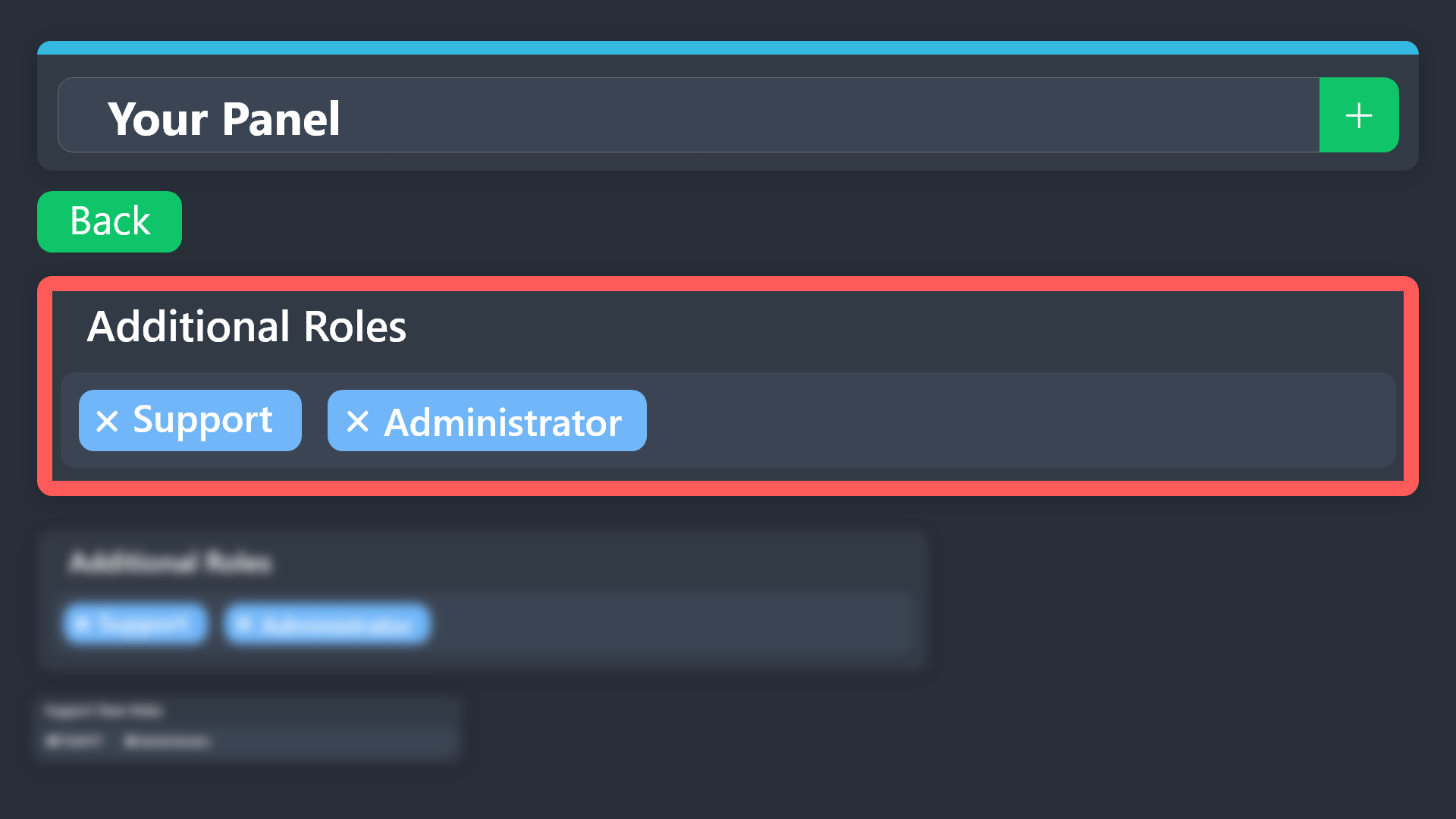
Additional Roles are roles that are independent of Support Roles. You can assign unique permissions for roles defined as additional roles in tickets.
To choose your additional roles head to your Panel Configs ➞ General Settings ➞ Additional Roles
To assign permissions for additional roles, go to Dashboard ➞ Panel Configs ➞ Permission Options ➞ Additional Opened/Closed Permissions.
Note: Additional Roles do NOT get affected by the Change other support team permissions when claimed feature under Claiming Options, meaning they don't gain/lose any permissions set in that feature once a ticket is claimed.
$addroles
heavy crag
gusty maple
Hi Guys , Please can someone help me , how do i get the Drivers and Reserve driv...
The above should help
gusty maple
heavy crag
The above should help
Like this
 heavy crag
Like that exactly! Add the roles you want to access said panel. Should work fine :)
gusty maple
okay , i set it like that , ill get the drivers to check
heavy crag
No worries
abstract folio
heavy crag
The above should help
i think he just want some roles only to see the panel not to access the tickets
heavy crag
Then its just discord channel perms.
abstract folio
heavy crag
Then its just discord channel perms.
yes i was about to say that
gusty maple
abstract folio
i think he just want some roles only to see the panel not to access the tickets
Yeahh , Soo i made the Ticket Bot in the Race Control channel , and i can see it , but the drivers adn reserve drivers can see the Ticket bot at all
 terse forge
can i make it so everyone can see threads with premium?
abstract folio
gusty maple
Yeahh , Soo i made the Ticket Bot in the Race Control channel , and i can see it...
its just a discord channel perms
gusty maple
This is the channel permissions
 abstract folio
give the roles you want access to see that channel
gusty maple
they can see the channel but just not the create ticket bot , as per the screenshot above.
pseudo ravine
Just to make sure that no one is confused, please just let one person help someone at a time
terse forge
i just want everyone to be able to see the threads but the bot creates all the threads as private right?
gusty maple
i can create a ticket but im server owner so dont know if that has something too do with it . Is there like something i missed when i setup the panel? i also did not create spesific roles , so admin will be the support role ,
pseudo ravine
terse forge
i just want everyone to be able to see the threads but the bot creates all the t...
Hey there. The only way to do that would be to ping your member role for each new ticket
pseudo ravine
gusty maple
i can create a ticket but im server owner so dont know if that has something too...
Hey there. Can you elaborate?
gusty maple
pseudo ravine
Hey there. Can you elaborate?
so here is the ticket bot , in the Race Control Channel , So i can see this , to create a ticket , but none of the drivers or reserves can see this , to even create a ticket
 pseudo ravine
They can't see the channel?
gusty maple
they can see they channel , but not the bot inside the channel to basically open a new ticket , they dont see the Ticket bot inside the channel
pseudo ravine
Make sure they have the Read Message History permission
gusty maple
okay , i see the driver and reserve role didnt have this enabled , i do see the channel premisions had this enabled ?
pseudo ravine
Is it fixed now?
gusty maple
i am waiting for feedback on it , quite late in SA , so might only get feedback tomorrow
pseudo ravine
Alright
heavy crag
There is always view as role
terse forge
can i make the threads the ticket bot creates be public?
or id literally have to add everyone role to the groups
restive condor
pseudo ravine
Hey there. The only way to do that would be to ping your member role for each ne...
@terse forge
terse forge
very strange its not possible. how hard would that feature be to add?
 elder yew
hi can i have different categories for different buttons thats given in 1 panel
different category for partnership and different category for support
 restive condor
terse forge
very strange its not possible. how hard would that feature be to add?
restive condor
terse forge
very strange its not possible. how hard would that feature be to add?
Threads don't have separate permissions (That's how Discord has it setup)
So you would either need to mention them to add them
terse forge
whats the create public threads permssion for then?
elder yew
elder yew
hi can i have different categories for different buttons thats given in 1 panel
is this possible bros?
restive condor
terse forge
whats the create public threads permssion for then?
To create public threads. Ticket Tool creates a private threads and the user is added as it pings them
restive condor
elder yew
hi can i have different categories for different buttons thats given in 1 panel
Hi there, yes. Dashboard > Panel Configs > Permissions
Use the panel dropdown to change between panels
 runic bay
So my tickets currently close when you press the button and then they auto delete. How do i prevent auto deleting and have it ask if i want to delete/re-open
restive condor
runic bay
So my tickets currently close when you press the button and then they auto delet...
Hey there! Enable TWO STEP TICKET - Dashboard > Panel Configs > General
elder yew
restive condor
Hi there, yes. ``Dashboard`` > ``Panel Configs`` > ``Permissions``
Use the pane...
tysm i have another question
since i cant have more than 5 questions in ticket forms , if ill buy premium will i have more?
restive condor
elder yew
tysm i have another question
since i cant have more than 5 questions in ticket ...
Unfortunately 5 is the Discord limit
runic bay
restive condor
Hey there! Enable ``TWO STEP TICKET`` - Dashboard > Panel Configs > General
thanks, this new panel is confusing af
iron nightBOT
Gave +1 Rep to @restive condor (current: #17 - 288)
restive condor
Should be pretty easy to navigate once you've look at it for a little while
 jagged basalt
How do i find my panel ID?
restive condor
Most settings are under panel configs
restive condor
jagged basalt
How do i find my panel ID?
Hi, that's the number attached to the panel name
 jagged basalt
restive condor
Hi, that's the number attached to the panel name
jagged basalt
restive condor
Hi, that's the number attached to the panel name
OHHHHH TYSM
delicate sky
heavy crag
You could achieve this via forms. Have them fill out the questions then send the...
Ooh ok. I'll look at it.
 ionic path
 sturdy brook
Hey there! Please run /debug in that channel.
ionic path
sturdy brook
This still isnt working
My apologies, the bot is missing View Channel and/or Send Messages permission in either server settings or channel settings.
iron nightBOT
Gave +1 Rep to @ionic path (current: #46 - 33)
ionic path
No problem!
 ionic path
sturdy brook
ionic path
sturdy brook
It only shows roles with permissions to view tickets opened by members, roles with little to no permissions won't appear there and won't be able to be labelled as support team roles.
sturdy brook
oh
 wide schooner
guys is there a way to make it so the user who opened the ticket can not message in it, until the ticket has been claimed by a mod or owner??
humble sequoiaBOT
Hello, we would love to help you, but if you don't tell us what you need help with we can't help you :(
heavy crag
Read the above
 harsh lion
guys is there a way to make it so the user who opened the ticket can not message in it, until the ticket has been claimed by a mod or owner??
wide schooner
harsh lion
guys is there a way to make it so the user who opened the ticket can not message...
did you copy my message😭
harsh lion
no I wrote my own
wide schooner
harsh lion
I copied it
but yk we got the same problem 😒
bro I need someone to answer my ticket
restive condor
Hi there, in this server? Or where?
humble sequoiaBOT
━━ selling 15 harvs's inquiry has been moved to a ticket ━━
restive condor
wide schooner
guys is there a way to make it so the user who opened the ticket can not message...
Hey there, that's currently not possible unfortunately
 dull pewter
Heya! I'm using ticket tool for an event server
And whenever I create a new ticket it starts at ticket 40something since it was also used last year
Is there any way to reset this?
restive condor
dull pewter
Is there any way to reset this?
Hey there! Dashboard > Panel Configs > You can use the SET COUNT button
iron nightBOT
Gave +1 Rep to @restive condor (current: #17 - 291)
dull pewter
Oh support team español, no lo vi XD
 red forge
how do you set up so when some one makes a ticket it pings a certain role (I remember it did that in the old version cant find out how to do it now)
humble sequoiaBOT
1. Go into your Dashboard
2. Open your Panel Configs tab
3. Select the panel you want to ping your support on
4. Open the Ticket options menu
5. Click on Edit Ticket Message
6. In the Message Content use one of the role mention syntax (**{@Role Name}**/**{Role ID}**)
7. Save changes
Note: For this to work properly, Ticket Tool requires the Mention Everyone permission. Or the role must have the Allow anyone to @mention this role setting enabled 
 austere forge
red forge
how do you set up so when some one makes a ticket it pings a certain role (I rem...
austere forge
red forge
how do you set up so when some one makes a ticket it pings a certain role (I rem...
hi there, see above ^^
harsh lion
when people create a ticket
in my server the helpers I have can’t speak?
it hasn’t even been claimed yet btw
red forge
austere forge
hi there, see above ^^
tysm
 unborn swan

 humble sequoiaBOT
Don't see your server in the dashboard?
Try using the Sync Servers button on your top center of the Dashboard page
You will possibly need to relog. Look below to see the steps on how to relog.
If this doesn't work
You should relog from the dashboard, you can do this by clicking here to log out immediately, and then log back in
Note:
You need one of these 3 things to access the dashboard.
1. Server Owner (Level: 6)
2. Server Administrator (Level: 4)
3. Dashboard Role (Level: 2)
:warning: You can check your level using the </permissionlevel:1029797400174399542> command on your Discord Server
If the bot's response is:
- @User is permission level: 0 (User)
You don't have any of the 3 levels required to access the server's dashboard
jade topaz
why wont the application respond
im trying to use the /setup command and it’s saying “This application won’t respond” something like that
pseudo ravine
Hey there. Could you run the /debug command
 fresh granite
annyone alive
pseudo ravine
Do you need support for Ticket Tool?
deft estuary
How do i give someone access to dashboard using a dashboard role
humble sequoiaBOT
Any role you put there will have full access to the ticket tool dashboard. The server owner and users with admin permissions already have access to the dashboard.
Be careful of which roles to put here
deft estuary
As u sent it i found it 😭 tysm
pseudo ravine
You’re welcome, glad I could help!
deft estuary
You need a promotion istg you always active and responding quick
pseudo ravine
I don’t need a promotion, I’m just fine being a regular support member
deft estuary
Well you are doing an amazing job.
pseudo ravine
Thank you 
 clever grove
Just a doubt I have, can i configurate ticket tool in my friends serve?
clever grove
clever grove
Just a doubt I have, can i configurate ticket tool in my friends serve?
If I can, how?
pseudo ravine
Hey there. If you have either a Dashboard Role or Administrator permission, then yes
clever grove
Thanks
pseudo ravine
You're welcome, glad I could help!
 ionic mulch
question: I am managing a server and have ticket tool in it. how can I authorize another discord user to be admin and manage the bot on my behalf?
dense sequoia
HI may i know if there is any way to track previous tickets transcript?
humble sequoiaBOT
Any role you put there will have full access to the ticket tool dashboard. The server owner and users with admin permissions already have access to the dashboard.
Be careful of which roles to put here
 idle flint
ionic mulch
question: I am managing a server and have ticket tool in it. how can I authorize...
idle flint
ionic mulch
question: I am managing a server and have ticket tool in it. how can I authorize...
See above ⬆️
idle flint
dense sequoia
HI may i know if there is any way to track previous tickets transcript?
What do you mean “track previous transcripts” ? Can you elaborate please
dense sequoia
idle flint
What do you mean “track previous transcripts” ? Can you elaborate please
meaning previous tickets open but i did not save the transcript are we able to access them
idle flint
dense sequoia
meaning previous tickets open but i did not save the transcript are we able to a...
Ah, unfortunatley not, if you deleted the ticket channel without saving the transcript, there is no way to recover the contents of that ticket
dense sequoia
idle flint
Ah, unfortunatley not, if you deleted the ticket channel without saving the tran...
OK

 timber timber
 sinful sundial
Where claim button
sinful sundial
Where claim button
Subscribers only. If you are subscribed, there should be a claiming options in the configuration page
Any way to move a ticket from one category to another?
As an example: Sometimes people open tickets under support which should've been opened under payment instead
for now I just edit the transcription location when needed
 sinful sundial
timber timber
Subscribers only. If you are subscribed, there should be a claiming options in t...
sinful sundial
timber timber
Subscribers only. If you are subscribed, there should be a claiming options in t...
Where
timber timber
sinful sundial
Where
Go to the ticket tool site and top right, login. It will lead you to a page to manage your servers
You can also subscribe on their site too, its called premium
sinful sundial
timber timber
Go to the ticket tool site and top right, login. It will lead you to a page to m...
I need transfer from the White Bot to the Golden.
timber timber
sinful sundial
I need transfer from the White Bot to the Golden.
I believe you run /botswitcher in your guild/server
sinful sundial
timber timber
I believe you run /botswitcher in your guild/server
Photos plz
timber timber
sinful sundial
Photos plz
I'm not really sure how it works, I would wait for someone else more knowledgable to help you
sinful sundial
Ok thanks @timber timber
iron nightBOT
Gave +1 Rep to @timber timber (current: #300 - 1)
 muted cipher
Hi, just invited bot on my server and says this when trying create ticket manually
 idle flint
muted cipher
Hi, just invited bot on my server and says this when trying create ticket manual...
idle flint
muted cipher
Hi, just invited bot on my server and says this when trying create ticket manual...
Can you run a $debug command
muted cipher
 idle flint
The bot is missing the "Read Channels" permission for that channel

 worthy violet
hi, i pay for premium bot , but the bot not working


 humble sequoiaBOT
The first thing you will need to do is invite the premium bot, an invite can be found here
Once the bot is in your server we will head to the dashboard and manage your server. When you are managing your server, you want to head into "Server Configs" then click the drop down menu under "Select the bot you would like to use on this server" then click "Ticket Tool#6207" and then save.
 austere forge
worthy violet
hi, i pay for premium bot , but the bot not working
austere forge
worthy violet
hi, i pay for premium bot , but the bot not working
Hi there, see above
muted cipher
idle flint
The bot is missing the "Read Channels" permission for that channel
Yes thanks much
iron nightBOT
Gave +1 Rep to @idle flint (current: #23 - 206)
worthy violet
austere forge
Hi there, see above
i cant chose (Select the bot you would like to use on this server.)
 austere forge
worthy violet
i cant chose (Select the bot you would like to use on this server.)
austere forge
worthy violet
i cant chose (Select the bot you would like to use on this server.)
I hadn't seen, but you took out your premium subscription from the white bot, in this case the premium has been updated on that one
worthy violet
austere forge
I hadn't seen, but you took out your premium subscription from the white bot, in...
What is the solution ?, you can don't return the money back and i will pay for it again
austere forge
worthy violet
What is the solution ?, you can don't return the money back and i will pay for i...
no refunds can be made from us, if you wish to be refunded you will need to contact Discord support
The solution that can go from the white bot to the golden is to “cancel” your subscription on the white bot and next month take it directly from the golden
 tired swallow
austere forge
no refunds can be made from us, if you wish to be refunded you will need to [con...
tired swallow
austere forge
no refunds can be made from us, if you wish to be refunded you will need to [con...
How to make custom ticket channel name with variables
humble sequoiaBOT
The ticket name is the default channel name of all tickets. To edit it, go to your Dashboard > Panel Configs > Ticket. There you can edit the channel name of opened and closed tickets. You can also use variables in there.
Note: This is a premium feature
limber portal
tired swallow
How to make custom ticket channel name with variables
^
 bright shadow
How can I fix this problem I tried to follow the steps in the Docs page but it didn't fix anything

 echo bramble
Why the bot sends the create ticket button twice?
 austere forge
echo bramble
Why the bot sends the create ticket button twice?
austere forge
echo bramble
Why the bot sends the create ticket button twice?
Hi there,
You have probably used the multi panel functionality, checked if no panel is attached, to do this:
Dashboard > Panel Configs > Panels Attached to Panel (Multiple Panels)
austere forge
bright shadow
How can I fix this problem I tried to follow the steps in the Docs page but it d...
hi there, pls run /debug command same channel
bright shadow
do I send you the debug link or a screenshot
austere forge
bright shadow
do I send you the debug link or a screenshot
yup, send me the screenshot
bright shadow
 austere forge
bright shadow
austere forge
bright shadow
Have you verified that the channel you specified still exists?
bright shadow
I don't think so, how do I check ?
austere forge
bright shadow
I don't think so, how do I check ?
Dashboard > Panel configs > Thread Style
Make sure you have correctly specified a channel that exists
bright shadow
oh yeah there wasn't any channels in there
so after that it should work fine
Ok thanks buddy it works now
but I want the tickets to be made in a specific category not in the same channel
austere forge
bright shadow
but I want the tickets to be made in a specific category not in the same channel
Dashboard > Panel configs > Category
It is with this option that the tickets will be moved to the desired category 🙂
bright shadow
austere forge
Dashboard > Panel configs > `Category`
It is with this option that the tickets w...
yeah the category I want is in there but there's no tickets under it ,It goes under the Tickets Channel
austere forge
can I get more information on what you would like to have, I don't understand
Send me screenshots
 merry hinge
Hi, I wanted to know how to change the maximum number of tickets a person can create on my server
austere forge
merry hinge
Hi, I wanted to know how to change the maximum number of tickets a person can cr...
Hi there,
Go to the Dashboard > Panel configs > Limits and first option 🙂
merry hinge
Ok thanks @austere forge
 leaden idol
help me
humble sequoiaBOT
Hello, we would love to help you, but if you don't tell us what you need help with we can't help you :(
 zealous moon
Hi, is there a way to make it so specific roles can only open tickets?
limber portal
zealous moon
Hi, is there a way to make it so specific roles can only open tickets?
Hi, you can set allowed / disabled roles in dashboard > panel configs > buttons > create ticket
 topaz atlas
Hello! I've updated the panel message for ticket creation, but the new text is not showing in the server. Is there a way to force a refresh or something?
topaz atlas
I should add that I've tried using the Sync button on the web interface, telling the bot to flush it's cache via discord command, and quitting and restarting my discord client in case it was some sort of caching issue on my end
austere forge
topaz atlas
I should add that I've tried using the Sync button on the web interface, telling...
Hi there,
Have you tried pressing the Update button on the dashboard?
 topaz atlas
austere forge
Hi there,
Have you tried pressing the `Update` button on the dashboard?
topaz atlas
austere forge
Hi there,
Have you tried pressing the `Update` button on the dashboard?
Oh! I had not seen that. It did the trick! Thanks.
iron nightBOT
Gave +1 Rep to @austere forge (current: #68 - 20)
 crisp frigate
 shrewd depot
I have created a Hello Ticket and I want to write this for the ticketa application

Help Me pls
steel basalt
 full mural
Hello, I can't sync my discord servers
full mural
Hello, I can't sync my discord servers
Have you tried pressing the Sync Servers button located at the top of your manage servers page?
full mural
Yes, I've tried
 lunar parrot
stupid question-- how do I add the premium bot back? I had an issue with billing that couldn't resolve with the bot in the server, but now I need to reinvite it back
humble sequoiaBOT
The first thing you will need to do is invite the premium bot, an invite can be found here
Once the bot is in your server we will head to the dashboard and manage your server. When you are managing your server, you want to head into "Server Configs" then click the drop down menu under "Select the bot you would like to use on this server" then click "Ticket Tool#6207" and then save.
lunar solar
See above
lunar solar
full mural
Yes, I've tried
Hi please do /permissionlevel in the server
jade topaz
I just subed to premium ticket bot and it says i can't use it?

 lunar solar
jade topaz
I just subed to premium ticket bot and it says i can't use it?
lunar solar
jade topaz
I just subed to premium ticket bot and it says i can't use it?
Ticket Tool - Ticketing without clutter - The #1 discord Ticketing bot
humble sequoiaBOT
The first thing you will need to do is invite the premium bot, an invite can be found here
Once the bot is in your server we will head to the dashboard and manage your server. When you are managing your server, you want to head into "Server Configs" then click the drop down menu under "Select the bot you would like to use on this server" then click "Ticket Tool#6207" and then save.
lunar solar
And active the premium bot as seen here
 strong anvil
any way to set it so if someone types in a certain channel it will delete the message and create a ticket for them?
 young ferry
Just noticed that older tickets transcripts are saying Invalid Request, was data deleted?
lunar solar
strong anvil
any way to set it so if someone types in a certain channel it will delete the me...
Hi,
Yes take advantage of our command style ticket creation:
Panel Configs --> Command Style --> Enable Command Style ticket creation --> Set a channel
Note: Make sure TT can view the channel
lunar solar
young ferry
Just noticed that older tickets transcripts are saying `Invalid Request`, was da...
Hi,
Click direct link button to generate a new link and use that or download the file and view the file from your device
young ferry
Yes the direct link button is not on the older ticket transcripts, it's just a link.
 jade topaz
lunar solar
Head here —> https://tickettool.xyz/dashboard/1113939422711390368/configs#sc-ser...
jade topaz
lunar solar
Head here —> https://tickettool.xyz/dashboard/1113939422711390368/configs#sc-ser...
 young ferry
I do however see the download available.
Download works fine to show old transcripts. Thanks for the response I'm all set.
lunar solar
jade topaz
#🎫│make-a-ticket please
strong anvil
lunar solar
Hi,
Yes take advantage of our command style ticket creation:
Panel Configs -->...
Is that a premium feature only, I just did it and it doesn't seem to make tickets when i send a message in the specifed channel.
Nvm
It was just taking a bit
lunar solar
strong anvil
It was just taking a bit
All good
 topaz furnace
where is tickets
humble sequoiaBOT
━━ User's inquiry has been moved to a ticket ━━
restive condor
 terse plinth
Is it possible to view my closed tickets ?
 vale pecan
my gaming not start
humble sequoiaBOT
⚠️ You're in the wrong place
We provide support for Ticket Tool Discord bot and cannot help you with whatever issue you have.
- We don't know which Support Team you should contact to get this issue resolved, and unfortunately we won't be able to accurately tell you.
If you don't have any further questions regarding our bot Ticket Tool, please close this ticket
pseudo ravine
terse plinth
Is it possible to view my closed tickets ?
Hey there. Only if you saved the transcript before deleting it
vale pecan

 humble sequoiaBOT
⚠️ You're in the wrong place
We provide support for Ticket Tool Discord bot and cannot help you with whatever issue you have.
- We don't know which Support Team you should contact to get this issue resolved, and unfortunately we won't be able to accurately tell you.
If you don't have any further questions regarding our bot Ticket Tool, please close this ticket
pseudo ravine
As you've been told multiple times, you're in the wrong place
 rigid mason
need help with deleting categories to help get access to a discord server
pseudo ravine
Hey there. If you’re just a regular user, there’s nothing you or we can do about it
rigid mason
why not?
pseudo ravine
Because you’re just a regular user, and we can’t delete channels/categories in other peoples servers
rigid mason
how do i do it?
pseudo ravine
You can’t
pseudo ravine
The staff of that server
merry hinge
Hi, what #demo-threads 's tickets does?
leaden idol
hi pleas hel me
limber portal
merry hinge
Hi, what <#1031264402969735198> 's tickets does?
It’s an example of thread style
iron nightBOT
Gave +1 Rep to @limber portal (current: #11 - 368)
humble sequoiaBOT
⚠️ You're in the wrong place
We provide support for Ticket Tool Discord bot and cannot help you with whatever issue you have.
- We don't know which Support Team you should contact to get this issue resolved, and unfortunately we won't be able to accurately tell you.
If you don't have any further questions regarding our bot Ticket Tool, please close this ticket
shrewd depot
please help, I can't change the name of this, does anyone have any information
 humble sequoiaBOT
━━ yeezus's inquiry has been moved to a ticket ━━
 leaden socket
how do i make the message where you click a button to create a channel
humble sequoiaBOT
First you will want to invite the bot to your server. Once the bot is in your server, you can manage your server in the dashboard.
To create a panel we are going to need to head over to the Panel Configs Tab on the Dashboard.
Once at the dashboard we will need to click Create Panel.
Enter a panel name (Fill in any optional settings you want).
Click Create Panel and you are ready to get started with configuring your panel.
An example of a creating a panel is shown below.
Once the panel has been created, use the blue Send button and select the channel you want the panel to be sent to.
The Panel wasn't send
Use the </debug:ID> command to diagnose possible permission issues with the bot.
austere forge
leaden socket
how do i make the message where you click a button to create a channel
hi ,see above
leaden socket
austere forge
hi ,see above
ty
iron nightBOT
Gave +1 Rep to @austere forge (current: #63 - 22)
 odd pine
Hi fam, how can I change de ticket title when it it's created? Default is "ticket-0001" and I want to change to "username-0001"
austere forge
Hi there,
use variable {user.name}-{count} on the dashboard > panel configs > ticket Ticket Opened channel name
odd pine
thanks, I'll try it ❤️
austere forge
Hi there,
Go to dashboard > panel configs > permissions > Everyone Role Permissions Attach Files
iron nightBOT
Gave +1 Rep to @austere forge (current: #61 - 23)
 vivid walrus
Why i don't see my server on the manage server can anyone help ?
humble sequoiaBOT
━━ S04's inquiry has been moved to a ticket ━━
 hollow thistle
I just deleted a ticket vertsion, but I still get the option on my discord server. How would i go about fixxing this?
 austere forge
hollow thistle
I just deleted a ticket vertsion, but I still get the option on my discord serve...
austere forge
hollow thistle
I just deleted a ticket vertsion, but I still get the option on my discord serve...
Hi there,
It will be necessary to create a new panel for ticket creation to work
hollow thistle
@austere forge i delted a panel, but the panel still shows up on my discord server, when i press the drop down menu. How would I remove that option. I had three ticket panels, now I have two. But on discord it still shows three.
austere forge
hollow thistle
<@225349654974431232> i delted a panel, but the panel still shows up on my disco...
press Update boutton on the Dashboard
hollow thistle
@austere forge it tells me the message was not found, nothing to update.
tried several times, but the palia application still shows up on discord, but is no longer in the dashboard.
austere forge
hollow thistle
tried several times, but the palia application still shows up on discord, but is...
Please verify that you have deleted the panel in the dropdown category on Dashboard
Dashboard > panel configs > Dropdown Style
hollow thistle
@austere forge that was it , thank you !!!
iron nightBOT
Gave +1 Rep to @austere forge (current: #59 - 25)
 mortal meteor
Hello, I was wondering if even if we didnt click the button there was a way to get a ticket's transcript after it was closed?
ionic path
mortal meteor
Hello, I was wondering if even if we didnt click the button there was a way to g...
Hello! With premium, you can enable automatic transcripts when a ticket is closed, and also send a transcript in the user's direct messages.
I can guide you through the steps if you'd like.
jade topaz
i cant send the bot to the channel cus it says it dont have permission
how do i fix this
humble sequoiaBOT
⚠️ You're in the wrong place
We provide support for Ticket Tool Discord bot and cannot help you with whatever issue you have.
- We don't know which Support Team you should contact to get this issue resolved, and unfortunately we won't be able to accurately tell you.
If you don't have any further questions regarding our bot Ticket Tool, please close this ticket
restive condor
jade topaz
i cant send the bot to the channel cus it says it dont have permission
Hi, could you run /debug in the channel where you're trying to send this in?
This is the wrong server unfortunately
iron nightBOT
Gave +1 Rep to @restive condor (current: #17 - 297)
rapid blaze
Is there a way to have a role that does not have "Adminstrator" permission be able to see claimed tickets? Or does the role have to have that permission?
 echo trellis
rapid blaze
Is there a way to have a role that does not have "Adminstrator" permission be ab...
echo trellis
rapid blaze
Is there a way to have a role that does not have "Adminstrator" permission be ab...
Administrator perms can see everything and access everything no matter what
rapid blaze
echo trellis
Administrator perms can see everything and access everything no matter what
so if the role does not have that perm, it can not see other tickets?
For example I have "Lead support" role but it does not have admin perms I would like for that role to see most tickets aswell so they can help support
echo trellis
rapid blaze
For example I have "Lead support" role but it does not have admin perms I would ...
Correct only the roles you have set to view tickets can see them
rapid blaze
Hmm, weird I wanted to have that role see every ticket so they can assist support members.
echo trellis
If you would like to have a role see every ticket but not have admin perms ensure you set that role on every ticket support team roles
rapid blaze
or is there any way I can have a command run to where it adds them on claimed ticket
they are on the support team role
echo trellis
They should be able to view the tickets
 placid mesa
Hola
rapid blaze
echo trellis
They should be able to view the tickets
Oddly, they can't
restive condor
placid mesa
Hola
Hola, ¿cómo puedo ayudarte?
humble sequoiaBOT
⚠️ Está en el lugar equivocado
Brindamos soporte para el bot de Discord Ticket Tool y no le podemos ayudar con el problema que presenta.
- No sabemos a que equipo de soporte debería contactar para solucionar este problema, y desafortunadamente no podremos ayudarle acertadamente.
Si no tiene alguna duda relacionada a nuestro bot, Ticket Tool, por favor cierre este ticket.
rapid blaze
restive condor
Hola, ¿cómo puedo ayudarte?
Me podrias ayudar con el problema que tengo porfavor?
restive condor
Claro, no hay problema
Estaba escribiendo cuando el otro usario te contesto JAJAJA
restive condor
rapid blaze
Me podrias ayudar con el problema que tengo porfavor?
Si añades el rol the "lead support" como un additional role en vez de un support role, tendrá permisos diferentes y no será expulsado del ticket una vez sea reclamado
Panel de control > Panel Configs > General
rapid blaze
Igual lo intente, sigue el problema igual
rapid blaze
restive condor
Claro, no hay problema
Estaba escribiendo cuando el otro usario te contesto JAJA...
jaja no te preocupes
restive condor
Cuál es el nombre o ID de tu servidor? @rapid blaze
restive condor
rapid blaze
si quieres abro un ticket y lo hablamos ahi?
Tengo un ticket con otro staff del servidor ahora mismo. Te añado?
rapid blaze
restive condor
Tengo un ticket con otro staff del servidor ahora mismo. Te añado?
si me comentó justo jaja
vale pecan
echo trellis
Administrator perms can see everything and access everything no matter what
Hi
 terse junco
hola
humble sequoiaBOT
━━ Hector's inquiry has been moved to a ticket ━━
terse junco
como puedo hacer que cuendo creo un ticket no suba y se quede en su categoría?
restive condor
terse junco
como puedo hacer que cuendo creo un ticket no suba y se quede en su categoría?
Hola, puedes seleccionar la categoría desde tu Panel de Control > Panel Configs > Category
terse junco
gracias rey
 jade solar
How do I make the bot @ roles when a ticket is created so it notifies my admins
humble sequoiaBOT
Ɽ₳ł₴ł₦₵₳₦Ɇ☠'s issue has been solved in another channel.
 frail canopy
@humble sequoia @humble sequoia @humble sequoia @humble sequoia
@humble sequoia
@humble sequoia
restive condor
Do you need something? @frail canopy
 minor acorn
Is there any way to allow another admin in my server to purge tickets
pseudo ravine
Hey there. Only the server owner can use the /purge command
 dark swallow
Hi everyone I'm new. How can access the training? Please help
humble sequoiaBOT
⚠️ You're in the wrong place
We provide support for Ticket Tool Discord bot and cannot help you with whatever issue you have.
- We don't know which Support Team you should contact to get this issue resolved, and unfortunately we won't be able to accurately tell you.
If you don't have any further questions regarding our bot Ticket Tool, please close this ticket
jade topaz
hello is there someone who could possibly help,
ive made the ticket pannel and everything but when the ticket is opened it only pings the user whose created the ticket, im not sure how to get other pings in there for mods to be notified.
humble sequoiaBOT
1. Go into your Dashboard
2. Open your Panel Configs tab
3. Select the panel you want to ping your support on
4. Open the Ticket options menu
5. Click on Edit Ticket Message
6. In the Message Content use one of the role mention syntax (**{@Role Name}**/**{Role ID}**)
7. Save changes
Note: For this to work properly, Ticket Tool requires the Mention Everyone permission. Or the role must have the Allow anyone to @mention this role setting enabled
idle flint
jade topaz
hello is there someone who could possibly help,
ive made the ticket pannel and e...
Some info on how to include more pings when the ticket opens is above
jade topaz
i tried the variables with the ID's and it didnt work and its stressing me out a bit
idle flint
What is the server ID and panel you are currently working on?
jade topaz
uu leme get it, ive never worked with ticket bots before so im not sure how to get the panel ID
idle flint
Just the server name and also the panel name will help 🙂
jade topaz
1108106929781358692
server ID
and the panel names is the bar on the top with the green + right?
idle flint
jade topaz
and the panel names is the bar on the top with the green + right?
So, first off, you have 5 panels, three of them are named the same (which will probably cause confision when you are setting up the bot). You should rename or delete some of those duplicates
 idle flint
Once you select a panel from the top menu, you should see the buttons directly below
 jade topaz
i dont know how to get rid of verify and support, the old owner made them
ah okay!
okay the ones i dont need are deleted
idle flint
Okay, great.
When you open a new ticket in your server, can you screenshot what it looks like (the ticket message)
 idle flint
Okay, I think you are using the Sushi Sellers Support panel, but you are editing a different one on the dashboard to the one that is in your server (again, confusion because you had three panels named the same).
jade topaz
ouu i see, 🥲
idle flint
You have the role ID's in the ticket message on your panel: 5 | Sushi Sellers Support
Go to that panel, send it to your discord and then open a new ticket using that
jade topaz
i deleted that panel though? should i redo it with the current panel?
idle flint
humble sequoia
Okay, yes, whatever your current panel is, make sure those role ID's are in the ticket message like it shows here 🙂
 idle flint
Yep, looks about right
jade topaz
okay! i set up the message and the pings, do i send it to my ticket channel and try opening one?
idle flint
jade topaz
okay! i set up the message and the pings, do i send it to my ticket channel and ...
Correct 🙂
jade topaz
IT WORKS
okay it says i have a limit of 1 ticket in this panel, does that mean only for the user who opened it or is it only allowing one ticket at a time?
idle flint
Correct, that can be adjusted under the Limits settings. You will see "Open Tickets Each User"
jade topaz
so its only 1 ticket per person
idle flint
That is what you currently have it set to
jade topaz
perfect and once its deleted itll reset?
idle flint
Correct
jade topaz
you are an absolute angel thank you so much
 shut abyss
I m the only one that can see the ticket? What can I do?
gilded verge
shut abyss
I m the only one that can see the ticket? What can I do?
~~but you mean the ticket you created on another server? I would like to understand the problem ~~
i misunderstood something, so please describe what you trying to do ^-^
shut abyss
So I added ticket system on a channel and it will show me to open ticket, but if anyone else will try it will not show open ticket message
gilded verge
is it possible for you to send the screenshot what they can see after opening the ticket?
 gilded verge
oh, so you're saying that other users can't see this message to create the ticket...
it's permissions problem, please open your channel settings->permissions->and for users role set permission Read Message History to ✅
civic wagon
 tacit sail
how to login
tacit sail
how to login
Login what?
 paper horizon
Anyone know how to add a picture url in the panel?
I had it in there but it wont show it anymore on my actual pannel

Had a picture in the corner and where you see the discord logos but for some reason the disappeared
noble path
hi everyone. Can I have a link for a support ticket please? need some help with premium account
limber portal
noble path
hi everyone. Can I have a link for a support ticket please? need some help with ...
Hi, you can make a ticket in #🎫│make-a-ticket
ionic path
paper horizon
If your premium subscription expired, that would be the issue. This is a premium only feature, and you can add these in Dashboard → Panel Configs → Messages → Edit Panel Message → Embed Editor
 rough ore

 inland scaffold
Hi
restive condor
inland scaffold
Hi
Hi, how can I help?
rough ore
restive condor
Hi, apologies for the wait.
Could I get your server name or ID?
Black Reed
834352560504700928
restive condor
rough ore
Black Reed
834352560504700928
And which panel is this for?
 restive condor
rough ore
I am sorry.
restive condor
rough ore
I am sorry.
I can't really read that. Which of these 7 panels is it?
 restive condor
rough ore
1
restive condor
rough ore
1
Could you please verify that all the custom emojis are still valid?
rough ore
OK
inland scaffold
restive condor
Could you please verify that all the custom emojis are still valid?
I do not speak English very well. I do not know how to add tags and lists. Can you explain to me the method?
rough ore
restive condor
Could you please verify that all the custom emojis are still valid?
It's good, thank you
iron nightBOT
Gave +1 Rep to @restive condor (current: #17 - 299)
restive condor
inland scaffold
I do not speak English very well. I do not know how to add tags and lists. Can y...
Hi, by tags you mean role/user/channel mentions?
Or custom commands?
inland scaffold
restive condor
Hi, by tags you mean role/user/channel mentions?
mean the signs, such as when I come to open a ticket, the type of ticket appears, and so on
restive condor
inland scaffold
mean the signs, such as when I come to open a ticket, the type of ticket appears...
As in, the ones here #🎫│make-a-ticket ?
Different options?
inland scaffold
restive condor
As in, the ones here <#571706435449257997> ?
Yes
humble sequoiaBOT
For more convenient use of multipanels, you can now combine panels on the dashboard. This will allow you to directly send the multipanel from the dashboard or via the $panel ID command.
Where can I find this?
You can find this setting on the Dashboard -> Panel Configs -> Panel -> Attached Panels
Note: if you're attaching all the panels to a panel called English, don't include English in the attached panel's box (If you do this, it will create a duplicate)
This will put all buttons from all of your panels on one message. The message is the panel message from the panel you're combining these panels in.
 inland scaffold
restive condor
See above ^^
inland scaffold
restive condor
See above ^^
Thank you
iron nightBOT
Gave +1 Rep to @restive condor (current: #17 - 300)
 lament galleon
sorry for this question cause im pretty sure i did it right the first time but... My Mom, my little brother and myself are trying to play horizonXI but we all play at the same house. So my question is how do i figure out how to get use all to play? lol
humble sequoiaBOT
⚠️ You're in the wrong place
We provide support for Ticket Tool Discord bot and cannot help you with whatever issue you have.
- We don't know which Support Team you should contact to get this issue resolved, and unfortunately we won't be able to accurately tell you.
If you don't have any further questions regarding our bot Ticket Tool, please close this ticket
 limber portal
 buoyant karma
Click the ‘rename’ button under the dropdown in the main panel configs section.
buoyant karma
limber portal
Click the ‘rename’ button under the dropdown in the main panel configs section.
Thank you!
iron nightBOT
Gave +1 Rep to @limber portal (current: #10 - 369)
 unreal juniper
Hi do I just reset the count to 1 in my set count button to reset the ticket numbers? Or do I enter 0? Sorry just a bit confused!
it says 44 currently but we are on ticket like 2000+ so i was curious lol
ionic path
unreal juniper
Hi do I just reset the count to 1 in my set count button to reset the ticket num...
Hey there! If you set it to 0, the count with start from 0 (e.g. #ticket-0000), so at your occasion I suggest you enter 1.
Also, about your problem, it shows 44 tickets are made in that panel, not in total. If you open a ticket in another panel, it will show a completely different number, and that will be the number of tickets opened in that panel.
iron nightBOT
Gave +1 Rep to @ionic path (current: #46 - 34)
ionic path
No worries, and no need to be sorry. If you have any other questions or issues, feel free to ask!
 restive thistle
How do you prevent a role from making tickets
humble sequoiaBOT
Any role you assign as a blacklisted role won't be able to use commands or buttons.
Selecting a blacklisted role
Go to your Dashboard ➞ Server Configs. There you will find the option to select blacklisted roles.
Note: Don't forget to save.
 abstract folio
in the dashboard
iron nightBOT
Gave +1 Rep to @abstract folio (current: #90 - 9)
abstract folio
no problem
 rapid jasper
Hi, where is the ticket for support?
humble sequoiaBOT
━━ User's inquiry has been moved to a ticket ━━
restive condor
 inland grove


 willow pasture
How can I do something like this?
 austere forge
willow pasture
How can I do something like this?
austere forge
willow pasture
How can I do something like this?
Hi there,
What do you wish modify more precisely?
humble sequoiaBOT
Robloxgamming1089's issue has been solved in another channel.
 compact torrent
How can i make a ticket ?
austere forge
compact torrent
How can i make a ticket ?
hi there, #🎫│make-a-ticket 🙂
 mild prism
Howdy 👋
According to our account admin, we've requested to have webhooks enabled through a ticket as suggested. Where I can find out more information? Are there docs somewhere?
humble sequoiaBOT

Thank you
Thank you for purchasing Ticket Tool Premium @mild prism. You have now been given the <@&535595160189403136> role!
Found 2 servers in total and 1 with premium and permission
restive condor
mild prism
Howdy 👋
According to our account admin, we've requested to have webhooks enab...
Hi, docs on the webhook feature you mean?
mild prism
restive condor
Hi, docs on the webhook feature you mean?
Correct. So we can attempt to integrate Ticket Tool with our existing bot(s).
restive condor
Unfortunately, no.
This would've been clear upon enabling, the webhooks are an alpha feature for which we don't provide any support.
We just enable it and allow users to use them as they wish
mild prism
I didn't want to ping our server admin here but can privately share his username for confirmation.
restive condor
No worrries, but unfortunately we don't have any documentation on it
mild prism
We just enable it and allow users to use them as they wish
Yep, I got the message that it was an alpha feature. The "them" part is what's missing. How are the webhooks discoverable?
restive condor
mild prism
> We just enable it and allow users to use them as they wish
Yep, I got the mess...
How exactly do you mean?
As in where to find them on the Dashboard?
mild prism
Yes. Sorry for my naivete, typically there's some kind of webhook address and payload documented somewhere even if you provide no support beyond. I can't integrate with webhooks I don't know anything about 😁
restive condor
mild prism
Yes. Sorry for my naivete, typically there's some kind of webhook address and pa...
Whenever X action of a ticket is taken, it sends a POST request to the webhook you specify in the Webhook URL field. It's mainly used for action logging.
See an image below (Dashboard > Server Configs > Webhooks)
 mild prism
restive condor
Whenever X action of a ticket is taken, it sends a POST request to the webhook y...
mild prism
restive condor
Whenever X action of a ticket is taken, it sends a POST request to the webhook y...
Oh perfect, that's what I'm looking for. Thanks 🙏
jade topaz
Hi
lunar solar
@silver tide TTs dashboard stores all the data seperate to Discord, it means if you ever accidentally kick the bot or your server gets deleted we can still access the information to transfer it to a new server etc
 silver tide
lunar solar
<@429395970648702976> TTs dashboard stores all the data seperate to Discord, it ...
silver tide
lunar solar
<@429395970648702976> TTs dashboard stores all the data seperate to Discord, it ...
For server transfer, that is nice
Who would "accidentally" kick a bot, most people have a reason for doing it
if your server gets deleted, there has to be a reason for that
either not following discords rules or not being smart and getting hacked
I see there is a massive difference in server count, but at least everything is free to use with sapphire ||(although it doesn't have tickets maybe one day it might)||

And yes I use sapphire a lot
so much in fact I got used to the limits there
that I was not expecting such a small limit for an embed with @pseudo glen
lunar solar
silver tide
For server transfer, that is nice
Who would "accidentally" kick a bot, most peop...
You’d be surprised how many people accidentally kick the bot
Security bot does it a lot
Deleted servers sometimes occur from owner getting hacked
lunar solar
silver tide
I see there is a massive difference in server count, but at least everything is ...
Yes but even Sapphire has limits until paywall, I use sapphire as well and I made so many embeds I had to pay for more
If you are a wizz you can use Sapphire & Ticket Tool together
Use sapphire for buttons and embeds and it makes the ticket for you
Cause TT can listen to other bots
silver tide
That's exactly what I was working on when I discovered the embed character limit
in fact I can show you how I discovered it, attempting to add form questions to the embed
 lunar solar
Yeah so use sapphire to send channel message and send the users ID that did the interaction with your buttons and use TT command style ticket creation
silver tide
lunar solar
Yes but even Sapphire has limits until paywall, I use sapphire as well and I mad...
You dont have to pay for them
you could join the support server and request a
