#🆘│community-support
1 messages · Page 86 of 1
 upper flower
Of course, anytime!
 silver olive
I don't have the option to upgrade to premium in my discord server
 shut bolt
silver olive
I don't have the option to upgrade to premium in my discord server
shut bolt
silver olive
I don't have the option to upgrade to premium in my discord server
You can't purchase the upgrade in mobile
And you can only upgrade if there's not an active subscription already
 jade topaz
hi, i don't know to put that everyone role can reacts to the ticket bot, i look fix it but i cannot find nothing. the channel is public and when a "no roles account" reacts it, it put this . Ty

 limber portal
jade topaz
hi, i don't know to put that everyone role can reacts to the ticket bot, i look ...
limber portal
jade topaz
hi, i don't know to put that everyone role can reacts to the ticket bot, i look ...
__ «You don't have permissions to use this»__
Are your members seeing this message when they try to create a ticket?
You may have accidentally denied them permission to use the Create Ticket button.
Look in the following places in your server's dashboard:
👉 Server Configs -> Blacklist Roles
Any roles there will be unable to interact with the bot in any way, including creating tickets.👉 Panel Configs -> Buttons -> Create Ticket -> Support team only
If this is enabled, only your staff will be able to use the button.
👉 Panel Configs -> Buttons -> Create Ticket -> Disabled Roles
Any roles there will be unable to use the button.
limber portal
jade topaz
really thanks brother
No worries, glad I could help ^^
 snow sky
Hi there! what variable do i type for the footer or image url to work for a gif?
 humble sequoiaBOT

L'équipe du support Français
Cher client,
Si vous avez besoin d'aide, ouvriez un ticket pour le support Français s'il vous plaît.
Allez au #🎫│make-a-ticket et tapez sur le bouton contenant l'emoji 🇫🇷
limber portal
snow sky
Hi there! what variable do i type for the footer or image url to work for a gif?
Hey, just putting the gif link in the image url section should work
snow sky
Every time I do, it doesnt pop up and I had to make my own gif but I downloaded it as a file but i was unable to get the url because it only provided the website url not my project url @limber portal
limber portal
Please don’t ping staff, it’s against the rules.
Can you maybe screenshot your issue? I’m not 100% understanding
snow sky
limber portal
Please don’t ping staff, it’s against the rules.
Can you maybe screenshot your...
Oh I am sorry I just forgot to reply to your text and that what happen again
snow sky
limber portal
Please don’t ping staff, it’s against the rules.
Can you maybe screenshot your...
Here is my issue it shows up like this and when I go back to see if it worked nothing is there
 limber portal
snow sky
Here is my issue it shows up like this and when I go back to see if it worked no...
limber portal
snow sky
Here is my issue it shows up like this and when I go back to see if it worked no...
Can you send the gif link here?
snow sky
limber portal
Can you send the gif link here?
The thing is I am using the link from give access option in file explorer
limber portal
snow sky
The thing is I am using the link from give access option in file explorer
You will need an actual url. You can post the link into discord, then hover over it and click copy media link.
snow sky
Oh okay thanks I will try to see if it will work
snow sky
limber portal
You will need an actual url. You can post the link into discord, then hover over...
when I post the link into discord and hover over it there isnt a copy media link
limber portal
If you are on pc you have to right click
snow sky
limber portal
If you are on pc you have to right click
I did right click on it and no copy media link appeared
snow sky
limber portal
If you are on pc you have to right click
Never mind I got it
snow sky
limber portal
If you are on pc you have to right click
Its working now thank you
 iron nightBOT
Gave +1 Rep to @limber portal (current: #16 - 289)
limber portal
No worries
humble sequoiaBOT
Hello, we would love to help you, but if you don't tell us what you need help with we can't help you :(
 fiery brook
How do I close the ticket or change its name using a probot, please?
snow sky
How can I automatically delete created ticket message when message closes?
fiery brook

How do I close the ticket or change its name using a probot, please?
Help me dan
Please
snow sky
fiery brook
Yo its against the rules to ping support
 restive condor
fiery brook
restive condor
fiery brook
Hey there! Please refrain from pinging staff as it's against the server rules.
For that to work, you will need to add Probot's ID to your Dashboard > Server Configs > Bot tab
restive condor
snow sky
How can I automatically delete created ticket message when message closes?
Hey there, so you'd like to delete the ticket's original message when the ticket is closed?
snow sky
restive condor
Hey there, so you'd like to delete the ticket's original message when the ticket...
I want to delete this message when the ticket closes
 fiery brook
restive condor
Hey there! Please refrain from pinging staff as it's against the server rules.
...
fiery brook
restive condor
Hey there! Please refrain from pinging staff as it's against the server rules.
...
How please I need screen shot
restive condor
snow sky
I want to delete this message when the ticket closes
That can't currently be omitted, since it's an ephemeral message, it will automatically delete after a few minutes or if the user uses ''Dismiss Message''
snow sky
restive condor
That can't currently be omitted, since it's an ephemeral message, it will automa...
Oh okay thanks
iron nightBOT
Gave +1 Rep to @restive condor (current: #26 - 163)
restive condor
fiery brook
How please I need screen shot
Get Probot's ID and paste it onto this section
 fiery brook
restive condor
Get Probot's ID and paste it onto this section
fiery brook
restive condor
Get Probot's ID and paste it onto this section
Nice thanks you so so so much
iron nightBOT
Gave +1 Rep to @restive condor (current: #26 - 164)
restive condor
No problem
 keen owl
its saying select at a server hown do i do that
how
its saying select a server how do i do that
jade topaz
Bonjour . J'ai 6 catégorie dans mon discord et je voudrais mettre un ticket dédier a chaque catégorie . Est ce que c'est possible de le faire ? Merci
 quasi mantle
hello, I'm trying to add a discord role to the ticket tool as someone that can provide support and i am getting an error when i try the /add it says the bot did not respond
The application did not respond
 pseudo ravine
Hey there. Most likely Ticket Tool is missing either the View Channel or Send Messages permission
Or perhaps both
quasi mantle
for the command channel?
im trying to figure out how to add a role to all tickets as a support person, however when i type /add and select role then pick the role it says channel is not a ticket
pseudo ravine
So you’re trying to add a Support Team role?
quasi mantle
yes
when a new ticket is opened it is currently viewable/actionable by like 3 discord roles. I need to add 2 more
humble sequoiaBOT
1. Go into your Dashboard
2. Open your Panel Configs tab
3. Select the panel you want to grant access to
4. Open the General options menu
5. Select your Support Team Roles
6. Save changes
 humble sequoiaBOT

Ticket Tool - Ticketing without clutter - The #1 discord Ticketing bot
quasi mantle
nevermind
 graceful wave
So, I have been trying to create a ticket for something, but it doesn't work whenever I go to create one. It leaves this message and I am not sure if it is on my side, or the server owner's. I have asked other people in the server if it works for them and they all said yes.

 buoyant patrol
i need help to configure the normal ticketsystem in my server
 zealous valley
For some reason claiming isn't working. The claim button doesn't show up, and when I do "$claim" the bot just says "this command isnt enabled", so I'm pretty confused
 zealous valley
For some reason claiming isn't working. The claim button doesn't show up, and wh...
zealous valley
zealous valley
For some reason claiming isn't working. The claim button doesn't show up, and wh...
 buoyant patrol
anyone here that want me to help to mske the ticktsystem with me
in my server together
humble sequoiaBOT
Claiming allows you to change the ticket name, category and permissions. To use it you have to enable it first on your Dashboard > Panel Configs > Claiming

 Note: This is a premium feature
 idle flint
zealous valley
idle flint
zealous valley
See above ^
humble sequoiaBOT
First you will want to invite the bot to your server. Once the bot is in your server, you can manage your server in the dashboard.

To create a panel we are going to need to head over to the Panel Configs Tab on the Dashboard.
Once at the dashboard we will need to click Create Panel.
Enter a panel name (Fill in any optional settings you want).
Click Create Panel and you are ready to get started with configuring your panel.
An example of a creating a panel is shown below.

Once the panel has been created, use the blue Send button and select the channel you want the panel to be sent to.
The Panel wasn't send
Use the </debug:ID> command to diagnose possible permission issues with the bot.
 idle flint
buoyant patrol
anyone here that want me to help to mske the ticktsystem with me
idle flint
buoyant patrol
anyone here that want me to help to mske the ticktsystem with me
The basic setup guide is above
buoyant patrol
i know that but i dont understand that really
idle flint
graceful wave
So, I have been trying to create a ticket for something, but it doesn't work whe...
You will need to contact the owner of that discord (or the admins)
idle flint
buoyant patrol
Iam the admin
The previous message was not for you, hence why it was a reply to another question in this channel
What part of the setup are you struggling with ?
zealous valley
idle flint
See above ^
lol ty, no idea how i missed that
one more thing, is there a way to make a custom command to make the ticket private from other people?
buoyant patrol
can anyone join my server termporary for help ??
idle flint
buoyant patrol
can anyone join my server termporary for help ??
We don’t do that here, sorry. If you can explain what your issue is, we can explain how to fix it, but we won’t fix it for you.
idle flint
zealous valley
one more thing, is there a way to make a custom command to make the ticket priva...
Hmm, depends what you mean - through a custom command, no, but you can adjust who can see the ticket a few ways
 static geyser
is there any way to make it so that the ticket creator cannot talk in the ticket until it is claimed?
zealous valley
idle flint
Hmm, depends what you mean - through a custom command, no, but you can adjust wh...
alr. ty
iron nightBOT
Gave +1 Rep to @idle flint (current: #23 - 193)
buoyant patrol
i need a discrebtion how can i do that the ticket is coming to the right person
or channel
idle flint
static geyser
is there any way to make it so that the ticket creator cannot talk in the ticket...
Not for the ticket owner
buoyant patrol
just the fullish filled ticket
idle flint
buoyant patrol
just the fullish filled ticket
Hmm, I am having a bit of difficulty understanding what you mean, and I think it may be that English isn’t your first language.
I see you have selected the “German” role. You can open a German ticket in #🎫│make-a-ticket and speak German to the team there
static geyser
idle flint
Not for the ticket owner
aww dang
static geyser
is there any way to make this not appear after clicking the button?
 humble sequoiaBOT
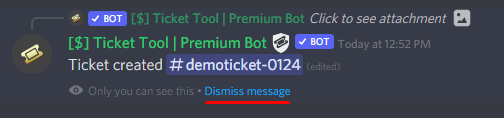
How can I edit/disable the ephemeral message?
These pop-ups can only be seen by the user who triggered a certain action, like creating a ticket. They cannot be edited or disabled, as they are a discord requirement that is set by the developer of any bot. The ephemeral messages can be removed by pressing the little blue Dismiss message text, or by restarting your discord client.
 idle flint
static geyser
is there any way to make this not appear after clicking the button?
idle flint
static geyser
is there any way to make this not appear after clicking the button?
See above 👆
 frosty crystal
Welcome
Is there a way to add a button to receive the ticket?
@idle flint
Is there a way to add a button to receive the ticket?
Can you reply?
 ionic path
@frosty crystal Please don't ping staff or repeat your question, someone will soon assist you
frosty crystal
Do you know the way?
ionic path
frosty crystal
Do you know the way?
Read what I said above, someone will soon assist you. The staff member you mentioned is currently on do not disturb.
frosty crystal
You know how to add a ticket receipt button?
jade topaz
frosty crystal
Welcome
Please try to avoid pinging staff. They will answer you when they can.
ionic path
frosty crystal
You know how to add a ticket receipt button?
If you elaborate on both your questions, I may do.
frosty crystal
OK
When someone opens a ticket, I add a button to receive the ticket from management
ionic path
You mean the claiming option, in order for your staff to assist the ticket member?
ionic path
frosty crystal
When someone opens a ticket, I add a button to receive the ticket from managemen...
I see that you are trying to translate from Arabic to English, for a better support and a more easier experience, I suggest that you create an Arabic Support Ticket in #🎫│make-a-ticket → 🇦🇪
restive condor
$articket
humble sequoiaBOT

فريق الدعم الفني العربي
عميلنا العزيز ان كنت تبحث عن مساعدة يرجى فتح تكت خاص بفريق الدعم الفني العربي
اذهب الى#🎫│make-a-ticket
ثم قم بلضغط على الايموجي الاتي (🇯🇴)
restive condor
frosty crystal
Why can't I open an Arabic ticket?
You should be able to 
Let me know if you can't and I'll create it for you
#🎫│make-a-ticket - To create Tickets
restive condor
Hey there! Once you're done customising your panel, use the SEND button to send the panel to your desired panel
restive condor
frosty crystal
Hello, how do I create a button Claim?
Hey there! Dashboard >Panel Configs > Claiming
Please note this is a premium feature 
iron nightBOT
Gave +1 Rep to @restive condor (current: #26 - 165)
restive condor
As in multiple panels attached like we have in #🎫│make-a-ticket ?
Or would you prefer a dropdown
It was a question 😄
If you tell me which you prefer I can provide the right information
frosty crystal
Can you make a video on how to add a button Claim?
humble sequoiaBOT
━━ jahk0's inquiry has been moved to a ticket ━━
frosty crystal
Please can you post a video on how to add a button Claim
humble sequoiaBOT
Claiming allows you to change the ticket name, category and permissions. To use it you have to enable it first on your Dashboard > Panel Configs > Claiming
Note: This is a premium feature
 slender minnow
@frosty crystal
 frank minnow
hi guys, exist any method to change my mail of my discord account if I have my mail banned? discord requires me to join to my banned mail, can I do any other thing?
humble sequoiaBOT

⚠️ You're in the wrong place
We provide support for Ticket Tool Discord bot and cannot help you with whatever issue you have.
- We don't know which Support Team you should contact to get this issue resolved, and unfortunately we won't be able to accurately tell you.
If you don't have any further questions regarding our bot Ticket Tool, please close this ticket
limber portal
frank minnow
hi guys, exist any method to change my mail of my discord account if I have my m...
^^
frosty crystal
Hello, how do I make a button Claim
limber portal
Hey, you have already been answered above
Hey, you already have a ticket open
Asking in multiple places will not get you more assistance
You’ve closed your ticket, if you need further help you can ask here or make another one
jade topaz
@wide gale I'd recommend taking some time away from your computer to calm down. Sacrifice tried to help you to the best of his abilities; becoming hostile will change nothing.
Please look at the resources you were provided.
Then I recommend you wait until you are back at your PC so you can manage it more easy
Even if you are frustrated, letting it out on those who are trying to help you will achieve nothing
Yes, then please do so.
restive condor
@wide gale Go ahead and make a ticket again
So we can help you
Without you having to read
jade topaz
Are you German?
Do you speak better German or English?
Right... then I suggest you make another ticket and let Dan help you out
humble sequoiaBOT
━━ User's inquiry has been moved to a ticket ━━
humble sequoiaBOT
⚠️ You're in the wrong place
We provide support for Ticket Tool Discord bot and cannot help you with whatever issue you have.
- We don't know which Support Team you should contact to get this issue resolved, and unfortunately we won't be able to accurately tell you.
If you don't have any further questions regarding our bot Ticket Tool, please close this ticket
limber portal
@vivid shell ^^
Please don’t use this channel if you don’t need help or already have a ticket
restive condor
 vivid shell
Onde encontro ajuda ?
vivid shell
Onde encontro ajuda ?
Olá! Como posso ajudar?
limber portal
As I said before, you already have a ticket. Please remain there.
limber portal
Please use #💬│general-chat for regular talking.
restive condor
vivid shell
Vc fala português?
Sim, qual é o problema?
@vivid shell Voce está no servidor errado.
 placid bloom
can ticket tool do auto pin message?
slender minnow
placid bloom
can ticket tool do auto pin message?
Yes but it can only pin its ticket message.
Ticket message is the first message with the close button sent in ticket.
 covert pivot
Guy‘s how can I write an suggestion in the suggestion channel ?
restive condor
covert pivot
Guy‘s how can I write an suggestion in the suggestion channel ?
Hey there! See pins there
covert pivot
restive condor
Hey there! See pins there
Oh, alright thx 
iron nightBOT
Gave +1 Rep to @restive condor (current: #26 - 166)
 limber crest
how to end a ticket when ur banned from a server
i want to get the things back the ticket owner said to me
limber portal
limber crest
i want to get the things back the ticket owner said to me
Hey there, you could only get the transcript from that server, unless they have ticket tool setup to dm you the transcript when its closed
jade topaz
Hi does anyone have any information about when the developers are planning to add support rating? And is there a place where we can see planned things being carried out and estimated time to finish or planned date to do? Thanks for your reply 🙏
humble sequoiaBOT

About ETA
We don't provide any kind of ETA for the release of updates to the bot due to the changing nature of the development process. Thanks for being patient and choosing Ticket Tool!
restive condor
jade topaz
Hi does anyone have any information about when the developers are planning to ad...
Hey there! We unfortunately do not provide any ETAs
jade topaz
restive condor
Hey there! We unfortunately do not provide any ETAs
Okay thanks 🙏 🧡
iron nightBOT
Gave +1 Rep to @restive condor (current: #26 - 167)

 restive condor
 wild zealot
Hey there! Please refresh your Dashboard
wild zealot
restive condor
Hey there! Please refresh your Dashboard
did
restive condor
wild zealot
did
May I get your server name?
wild zealot
restive condor
May I get your server name?
diavolo kingdom
restive condor
wild zealot
diavolo kingdom
You only have one panel created.
You must create an individual panel per dropdown option
wild zealot
restive condor
You only have one panel created.
You must create an individual panel per dropdow...
huh? then it means i have to add the custom emjois in the new panel aswell?
restive condor
wild zealot
huh? then it means i have to add the custom emjois in the new panel aswell?
That's right.
Except for the create ticket one
wild zealot
restive condor
That's right.
Except for the create ticket one
why can't i just do another dropdown below the war request
instead of creating a whole new panel?
restive condor
wild zealot
why can't i just do another dropdown below the war request
Well, how are tickets going to be created under war request if there's no panel for it
wild zealot
restive condor
Well, how are tickets going to be created under war request if there's no panel ...
i mean like drop down
i see alot of peoples tickets got more than 3 drops downs
restive condor
I understand, but a dropdown is just a combination of panels
restive condor
wild zealot
i see alot of peoples tickets got more than 3 drops downs
You can have up to 25, but you would need 25 panels as wells
wild zealot
restive condor
You can have up to 25, but you would need 25 panels as wells
like this
 restive condor
wild zealot
like this
restive condor
wild zealot
like this
Yes, they have one different panel for each
Otherwise it defeats the purpose
wild zealot
restive condor
Yes, they have one different panel for each
can i do the pvp request in same section as ths in the same panel as i have already created panel for pvp

like questions
restive condor
wild zealot
can i do the pvp request in same section as ths in the same panel as i have alre...
You can have forms for both but you will need to set it up for each panel individually
wild zealot
+rep @restive condor
iron nightBOT
Gave +1 Rep to @restive condor (current: #26 - 168)
 winged patio
How to make it so that there is 1 interaction
 limber portal
winged patio
How to make it so that there is 1 interaction
limber portal
winged patio
How to make it so that there is 1 interaction
Hey, you want to remove the second button?
winged patio
yes
limber portal
winged patio
yes
Head to dashboard > panel configs > panel > remove the attached panel > resend your panel
winged patio
+rep @limber portal
iron nightBOT
Gave +1 Rep to @limber portal (current: #16 - 294)
limber portal
Hey there, please add the 2 permissions marked with an x in your debug screenshot to ticket tool
jade topaz
I don't know what permissions you're asking for, I've already looked and marked several but none of them are available, could you help me find them?
limber portal
jade topaz
I don't know what permissions you're asking for, I've already looked and marked ...
These 2
 jade topaz
But where do I activate these two options?
on discord itself or on the ticket tool website?
limber portal
In ticket tools permission in discord
 serene badge
help me pls
jade topaz
limber portal
In ticket tools permission in discord
Thank you
iron nightBOT
Gave +1 Rep to @limber portal (current: #16 - 295)
serene badge
help me pls
humble sequoiaBOT
Hello, we would love to help you, but if you don't tell us what you need help with we can't help you :(
serene badge
when i do /setup its say that command did not arrive
 hoary ravine
humble sequoia
hoary ravine
humble sequoia

limber portal
serene badge
when i do /setup its say that command did not arrive
Can you send a screenshot of the error please?
 limber portal
Can you run /debug please
limber portal
serene badge
i cant it says Ticket bot did not answer
The bot is missing the send messages channel permission.
 iron nightBOT
Gave +1 Rep to @limber portal (current: #16 - 296)
limber portal
Please don’t spam
serene badge
ok but can i get help
limber portal
You will need to ask your question before you can get help
serene badge
ehh i crated an panel but it will not come up
limber portal
You need to send the panel with the send button at the top of the panel configs section of the dashboard.
serene badge
thanks @limber portal
iron nightBOT
Gave +1 Rep to @limber portal (current: #16 - 297)
ionic path
 ripe knoll
How do I add the premium bot?
ripe knoll
How do I add the premium bot?
Please don't ping staff members for assistance, follow the instructions below.
humble sequoiaBOT
The first thing you will need to do is invite the premium bot, an invite can be found here
Once the bot is in your server we will head to the dashboard and manage your server. When you are managing your server, you want to head into "Server Configs" then click the drop down menu under "Select the bot you would like to use on this server" then click "Ticket Tool#6207" and then save.

 clever summit
how do i make categorys like this
 humble sequoiaBOT
The Drop-down menu or Select Menu replaces the buttons on your panel message and uses a drop-down menu with all of your panels. To set this up, go to your Panel Configs and select your main Panel.
<:Numbericons1:1018864164032225340> Enable Select Style
First you enable Select Style. Then you add an item in the Dropdown Editor. Now you can start editing your dropdown!
<:Numbericons2:1018864168041971712> Dropdown Editor
Each line in the dropdown editor represents a line in the drop down menu on discord. You can add more "Items", by clicking on 

First you select a panel. That's the panel this option will open a ticket for.  DONT select the same panel twice. Each option should have a different Panel
After that, you can put a Display. This is the title of this option and will appear in the drop down menu. The *Description can be set right after that, which will be below the title in grey.
Additionally you can select an emoji, that will be shown in front of each option. You can either manually input the ID of an emoji or select it in the selector.
Common Issues ⚠️
- Panel doesn't send? Make sure you have a valid emoji selected
- Option doesn't show up? Check if two options have the same panel in the DropDown Editor

$dropdown
 fallow ingot
clever summit
Thank you
fallow ingot
No worries, happy to help
jade topaz
How do I manage it so I don't have this limit? I joined another discord to test opening a ticket but I couldn't close it, then it appears that I have one open
 fallow ingot
jade topaz
How do I manage it so I don't have this limit? I joined another discord to test ...
fallow ingot
jade topaz
How do I manage it so I don't have this limit? I joined another discord to test ...
Panel Configs > Limits
It’s under Open tickets each user
jade topaz
I will look for this option
 rose depot
hello can i make a ticket to get support?
limber portal
rose depot
hello can i make a ticket to get support?
Hey there, yes you can - in #🎫│make-a-ticket
 vocal salmon
Can someone help me
fallow ingot
Sure - what do you need help with? 
 charred bronze
Hello all. What permission allows someone to delete a ticket? Is it anyone with a "support team role"
limber portal
charred bronze
Hello all. What permission allows someone to delete a ticket? Is it anyone with ...
Hey there! Unless you have specified otherwise, anyone with permissions to see the ticket after it’s closed can use that button.
charred bronze
limber portal
Hey there! Unless you have specified otherwise, anyone with permissions to see t...
how about the !delete command?
which can be used at any point
limber portal
charred bronze
how about the `!delete` command?
That is restricted to support team roles by default.
charred bronze
limber portal
That is restricted to support team roles by default.
is there any way to remove that ability from a support team role?
limber portal
charred bronze
is there any way to remove that ability from a support team role?
Yes - would you like to know how to change the permissions for the button, command or both?
charred bronze
limber portal
Yes - would you like to know how to change the permissions for the button, comma...
I have already edited permissions for the button (they are removed before the button appears). Just the command please
limber portal
charred bronze
I have already edited permissions for the button (they are removed before the bu...
Alright:
Dashboard > command configs > delete command > add support team role as a denied role.
charred bronze
limber portal
Alright:
Dashboard > command configs > delete command > add support team role a...
thank you so much. I feel stupid not having looked here
iron nightBOT
Gave +1 Rep to @limber portal (current: #15 - 299)
charred bronze
😁
limber portal
charred bronze
thank you so much. I feel stupid not having looked here
No worries, very glad i could help 
charred bronze
limber portal
No worries, very glad i could help <:sacrifice_yee:1181945743733444648>
out of curiosity, how would you suggest changing the permissions for the button? Just to know I did the optimal thing. I edited the "support team permissions" and then added roles I want to keep in after closed to "additional roles" and changed the permissions accordingly.
limber portal
charred bronze
out of curiosity, how would you suggest changing the permissions for the button?...
You can do roughly the same thing as you do with the command:
Dashboard > panel configs > buttons > delete ticket button > add as denied role.
charred bronze
limber portal
You can do roughly the same thing as you do with the command:
Dashboard > panel...
that is perfect. To conclude:
Those with a "support team" role have permission to delete, either through the button or command, unless disabled as outlined above?
limber portal
charred bronze
that is perfect. To conclude:
Those with a "support team" role have permission ...
Correct. As by default, for the button there are no overrides enabled meaning anyone who can see the button can interact with it, and the only overrides for the command are support team only ^^
charred bronze
limber portal
Correct. As by default, for the button there are no overrides enabled meaning an...
Thank you very much!
iron nightBOT
Gave +1 Rep to @limber portal (current: #15 - 300)
 limber portal
 quartz mortar
Dashboard > panel configs > messages > edit panel message
jade topaz
how do i add multiple options
like so the user chooses what the topic of their ticket will be
limber portal
jade topaz
like so the user chooses what the topic of their ticket will be
Hey, do you mean multiple buttons like in #🎫│make-a-ticket ?
jade topaz
yes, but in a drop down, and not just buttons
humble sequoiaBOT
The Drop-down menu or Select Menu replaces the buttons on your panel message and uses a drop-down menu with all of your panels. To set this up, go to your Panel Configs and select your main Panel.
<:Numbericons1:1018864164032225340> Enable Select Style
First you enable Select Style. Then you add an item in the Dropdown Editor. Now you can start editing your dropdown!
<:Numbericons2:1018864168041971712> Dropdown Editor
Each line in the dropdown editor represents a line in the drop down menu on discord. You can add more "Items", by clicking on
First you select a panel. That's the panel this option will open a ticket for. DONT select the same panel twice. Each option should have a different Panel
After that, you can put a Display. This is the title of this option and will appear in the drop down menu. The *Description can be set right after that, which will be below the title in grey.
Additionally you can select an emoji, that will be shown in front of each option. You can either manually input the ID of an emoji or select it in the selector.
Common Issues ⚠️
- Panel doesn't send? Make sure you have a valid emoji selected
- Option doesn't show up? Check if two options have the same panel in the DropDown Editor
$dropdown
limber portal
jade topaz
yes, but in a drop down, and not just buttons
^
charred bronze
I have disabled a role from being able to delete tickets. Someone who I want to have permission to delete tickets has that role and one above it. Is there any way around this without giving administrator?
limber portal
jade topaz
do i need to pay?
No, dropdowns are free
jade topaz
perfect
 zealous root
Is there a way to have slow mode enabled by default on new tickets?
 steel basalt
zealous root
Is there a way to have slow mode enabled by default on new tickets?
steel basalt
zealous root
Is there a way to have slow mode enabled by default on new tickets?
this is not a programmable feature by the Ticket Tool bots, but this would be possible using a third party bot.
zealous root
steel basalt
this is not a programmable feature by the Ticket Tool bots, but this would be po...
Any recommendations?
steel basalt
zealous root
Any recommendations?
Sapphire might be worth looking into.
Not sure if it has the option to do something like that, as I am more qualified in @pseudo glen support.
zealous root
steel basalt
Sapphire might be worth looking into.
We use sapphire quite a bit, though haven't come across enabling slow mode with it
steel basalt
Mk. Do you want me to create a ticket and explain for you?
zealous root
steel basalt
Mk. Do you want me to create a ticket and explain for you?
That'd be great if you don't mind!
humble sequoiaBOT
━━ GG's inquiry has been moved to a ticket ━━
charred bronze
charred bronze
I have disabled a role from being able to delete tickets. Someone who I want to ...
@limber portal 👀
oops, sorry
charred bronze
charred bronze
I have disabled a role from being able to delete tickets. Someone who I want to ...
✋
 gilded verge
charred bronze
✋
gilded verge
charred bronze
✋
if I understand correctly... to Allowed Roles add the roles that should have the permission to delete tickets and then to Disabled Roles add everyone
charred bronze
gilded verge
if I understand correctly... to `Allowed Roles` add the roles that should have t...
I don't follow
jade topaz
hi
how can u change that everyone role only can write in her channel, everyone role ppl writes see and close the another ppl ticket and idk to change, thanks
jade topaz
charred bronze
I have disabled a role from being able to delete tickets. Someone who I want to ...
“Disabled a role from being able to delete tickets”
Meaning you set this on the TicketTool Dashboard?
charred bronze
jade topaz
“Disabled a role from being able to delete tickets”
Meaning you set this on the...
correct
restive condor
jade topaz
how can u change that everyone role only can write in her channel, everyone role...
Hola, cuál es el problema exactamente?
Todos los miembros de tu servidor pueden ver los tickets?
jade topaz
charred bronze
correct
So sadly it won’t be possible, you set a role on the dashboard therefore TicketTool will work off that role… the only workaround would be admin as that would override all permissions
charred bronze
jade topaz
So sadly it won’t be possible, you set a role on the dashboard therefore TicketT...
all good. It may sound a bit silly but the senior in this example needs the role I disabled deleting tickets for
jade topaz
Couldn’t you set up a separate role?
charred bronze
jade topaz
Couldn’t you set up a separate role?
can u elaborate
jade topaz
Just to get it correct..
So there’s a role you set on the dashboard to disable creating tickets and you gave that role to one of your staff/members.
But you want that specific staff/member to open tickets?
Is that correct?
charred bronze
jade topaz
Just to get it correct..
So there’s a role you set on the dashboard to disable ...
no. I disabled the ability for the role to delete tickets, and I want one person with the role to be able to
jade topaz
Yeah my theory wouldn’t work, the only way would be if the person didn’t have that specific role or had something like admin to bypass it, sorry 😢
restive condor
Hey @charred bronze
It is my understanding that you'd like for your ''support'' people to not be able to delete tickets but for the senior ones to be able to?
charred bronze
restive condor
Hey <@876259407376293949>
It is my understanding that you'd like for your ''su...
exactly
restive condor
charred bronze
exactly
If you go to your Dashboard > Panel Configs > General
Select your regular support role as an additional role and your senior role as a support role
It should work smoothly with the default setup for additional roles but let me know if you encounter any issues
charred bronze
would this account for the !delete command and button?
restive condor
charred bronze
would this account for the `!delete` command and button?
That's right, only roles listed under support team roles will be able to use those options
(Unless you manually allow your additional roles to do so)
 compact compass
guys can anyone help me why i cant add discord bot id

when i click save its says again save, cant save iut
humble sequoiaBOT
User's issue has been solved in another channel.
 zinc igloo
السلام عليكم
charred bronze
restive condor
If you go to your ``Dashboard`` > ``Panel Configs`` > ``General``
Select your r...
regular support roles can delete tickets with these changes (not what I want)
steel basalt
charred bronze
regular support roles can delete tickets with these changes (not what I want)
Just change the permissions of the delete button/command to not allow your support roles to delete tickets
charred bronze
steel basalt
Just change the permissions of the delete button/command to not allow your suppo...
but my senior support member (who I want to be able to delete tickets) cant
 vale gust
Is anyone else having this issue? Is it ticket tool or discord?

 pseudo ravine
Hey there. Make sure they have the Read Message History permission
vale gust
It’s me on both. The blank one is mobile and the one with an embed is on pc.
pseudo ravine
Same account?
pseudo ravine
Try refreshing your mobile app
If that doesn't work, then it's most likely something with discord
vale gust
I have many times. It’s also not just me that doesn’t see it on mobile. I was just double checking cause the owner of the server thinks I can physically fix it. He doesn’t know how to discord lol.
pseudo ravine
Well, unfortunately there's nothing we can do about it
steel basalt
charred bronze
but my senior support member (who I want to be able to delete tickets) cant
So then allow the role.
Allow the ones you want, disable the ones you don’t
charred bronze
steel basalt
Allow the ones you want, disable the ones you don’t
Legend. Can’t believe I missed that
steel basalt
charred bronze
Legend. Can’t believe I missed that
All good, lol.
 woeful viper
I need help with a lot of things, if anyone can help me with the following:
-How to make a interaction button that makes a channel when clicked
-How to set up a verification button so when its clicked people can see all the other channels
-How to give roles
static geyser
is there a way to make tickets automatically close after a certain amount of time of inactivity?
static geyser
woeful viper
I need help with a lot of things, if anyone can help me with the following:
-Ho...
i think some of these would be better to just get another bot for, as ticket tool is made for well-- tickets
woeful viper
huh
 echo yacht
woeful viper
I need help with a lot of things, if anyone can help me with the following:
-Ho...
echo yacht
woeful viper
I need help with a lot of things, if anyone can help me with the following:
-Ho...
Some of these things can’t do it with Ticket Tool. If you mean with “makes a channel with a button” as a way to support your users. Read the info below ⬇️ of how to setup Ticket Tool
humble sequoiaBOT
First you will want to invite the bot to your server. Once the bot is in your server, you can manage your server in the dashboard.
To create a panel we are going to need to head over to the Panel Configs Tab on the Dashboard.
Once at the dashboard we will need to click Create Panel.
Enter a panel name (Fill in any optional settings you want).
Click Create Panel and you are ready to get started with configuring your panel.
An example of a creating a panel is shown below.
Once the panel has been created, use the blue Send button and select the channel you want the panel to be sent to.
The Panel wasn't send
Use the </debug:ID> command to diagnose possible permission issues with the bot.
woeful viper
uhh
static geyser
static geyser
is there a way to make tickets automatically close after a certain amount of tim...
^^
jade topaz
I want the ticket channel name to be “user-modmail”. What would I make the name be? “{@user}-modmail”
 past sedge
Hello, can you help me set up your bot? How can I make voice channels appear when I open a ticket?
static geyser
jade topaz
I want the ticket channel name to be “user-modmail”. What would I make the name ...
{ticket.user.name}-modmail
 stark runeBOT
1. Invite Ticket Tool to your server
First you will want to invite the bot to your server. Once the bot is in your server, you can manage your server in the dashboard.
2. Create a Panel
To create a panel we are going to need to head over to the panel configs on the dashboard.
Once at the dashboard we will need to click Create Panel.
Enter a panel name (Fill in any optional settings you want).
Click Create Panel and your ready to get started with configuring your panel.
An example of a creating a panel is shown below.
3. Send the Panel to a Channel
Once you've created a panel on the dashboard you will need to send it to a channel using send on the dashboard.
Select the channel you want your panel to be created in and click send.
For other questions checkout $help faq.
An example of a sending a panel is shown below.
Having a Problem Sending the Panel?
Do $debug in a channel with Ticket Tool and make sure it has all the necessary Discord permissions.
limber portal
past sedge
Hello, can you help me set up your bot? How can I make voice channels appear whe...
^^
 grizzled musk
could not connect to ther server
limber portal
grizzled musk
could not connect to ther server
Hey, as we said in your ticket we can’t help here
grizzled musk
hi Which part should I go to?
limber portal
grizzled musk
hi Which part should I go to?
Unfortunately we don’t know
wild zealot
how can i blacklist someone from creating tickets?
limber portal
wild zealot
how can i blacklist someone from creating tickets?
You can set a blacklisted role in dashboard > server configs and give them that
 plush prawn
What do this button?

 low island
How to make the bot tag support?
humble sequoiaBOT
1. Go into your Dashboard
2. Open your Panel Configs tab
3. Select the panel you want to ping your support on
4. Open the Ticket options menu
5. Click on Edit Ticket Message
6. In the Message Content use one of the role mention syntax (**{@Role Name}**/**{Role ID}**)
7. Save changes
Note: For this to work properly, Ticket Tool requires the Mention Everyone permission. Or the role must have the Allow anyone to @mention this role setting enabled
 limber portal
low island
How to make the bot tag support?
limber portal
low island
How to make the bot tag support?
^^
limber portal
plush prawn
What do this button?
Claiming designates that ticket to the staff member who claimed it
plush prawn
limber portal
Claiming designates that ticket to the staff member who claimed it
How is it working?
humble sequoiaBOT
Claiming allows you to change the ticket name, category and permissions. To use it you have to enable it first on your Dashboard > Panel Configs > Claiming
Note: This is a premium feature
limber portal
plush prawn
How is it working?
^
jade topaz
restive condor
Todos los miembros de tu servidor pueden ver los tickets?
si
todos los tickets
quiero que solo vean su ticket y que solo puedan cerrar su ticket
restive condor
jade topaz
si
Ves a tu panel de control > PANEL CONFIGS > Permissions > Everyole Role Permissions - Edit Opened > Y selecciona  para
para VIEW CHANNELS
 kindred light
does the free version support more than one button or is it required to pay/subscribe for more options
steel basalt
kindred light
does the free version support more than one button or is it required to pay/subs...
Nope! See below for the details:
humble sequoiaBOT
For more convenient use of multipanels, you can now combine panels on the dashboard. This will allow you to directly send the multipanel from the dashboard or via the $panel ID command.
Where can I find this?
You can find this setting on the Dashboard -> Panel Configs -> Panel -> Attached Panels
Note: if you're attaching all the panels to a panel called English, don't include English in the attached panel's box (If you do this, it will create a duplicate)
This will put all buttons from all of your panels on one message. The message is the panel message from the panel you're combining these panels in.
 steel basalt
This is entirely free for you to utilize. :)
kindred light
steel basalt
This is entirely free for you to utilize. :)
thanks : D
iron nightBOT
Gave +1 Rep to @steel basalt (current: #43 - 44)
steel basalt
kindred light
thanks : D
No worries. Have a great day! :)
 vast jay
Hello, how can i remove my server to from ticket tool? i went to manage servers but i just cant figure it out
steel basalt
vast jay
Hello, how can i remove my server to from ticket tool? i went to manage servers ...
Do you mean that your server isn't showing up when you try to manage it?
You may have to press the Sync Servers button so that Ticket Tool can refresh the list of servers you have access to.
 vast jay
steel basalt
Do you mean that your server isn't showing up when you try to manage it?
vast jay
steel basalt
Do you mean that your server isn't showing up when you try to manage it?
No im going to be deleting the server in a few days because i had to make a new one. my new server isnt showing up in manage servers either but im trying to delete previous server
steel basalt
vast jay
No im going to be deleting the server in a few days because i had to make a new ...
I see. Try pressing "Sync Servers" above.
The button is located on the Manage Servers tab.
vast jay
steel basalt
I see. Try pressing "Sync Servers" above.
okay now theyre both showing now im trying to figure out how to delete my old server off ticket tool dashboard
fallow ingot
Removing ticket tool from the server you’re deleting would remove it from the dashboard. Or when the server is deleted the data will also be deleted.
 atomic solstice
 cloud scaffold
can i get help here please?
cloud scaffold
can i get help here please?
if you want help, I'd recommend asking what you need question with first. It's not like anyone can help you if you just say Can I get help.
In this channel just simply ask the question and anyone from the community will try to help when they can or if they can. If you want an answer straight from the support team then I recommend opening a ticket from #🎫│make-a-ticket
vast jay
fallow ingot
Removing ticket tool from the server you’re deleting would remove it from the da...
Okay. Thanks
iron nightBOT
Gave +1 Rep to @fallow ingot (current: #8 - 391)
 snow quartz
I need support, I am enabling /add to my server and it wont let everyone add it to ticket
restive condor
snow quartz
I need support, I am enabling /add to my server and it wont let everyone add it ...
Hey there! What exactly is the problem?
Your members can't use the /add command in tickets?
snow quartz
restive condor
Hey there! What exactly is the problem?
yes
no, I can but other people cant
I want everyone to be able to
restive condor
snow quartz
yes
Dashboard > Command Configs > ADD command > Add the @everyone role as an allowed role
snow quartz
still dosent work
restive condor
snow quartz
still dosent work
Any error message when they use the command?
snow quartz
no it just dosent show up
restive condor
snow quartz
no it just dosent show up
Do they have permission to use APPLICATION COMMANDS?
snow quartz
where do I enable that?
restive condor
snow quartz
where do I enable that?
Dashboard > Panel Configs > Permissions > Ticket Owner Permissions - Edit Opened > 
USE APPLICATION COMMANDS
snow quartz
where is permissions?
restive condor
snow quartz
where is permissions?
In the middle of the GENERAL TICKET OPTIONS section
 snow quartz
then what
restive condor
Ticket Owner permissions - edit opened
snow quartz
 restive condor
snow quartz
restive condor
snow quartz
Nope, go back to the main page
snow quartz
 restive condor
snow quartz
restive condor
snow quartz
Second row, second column -> Go into Permissions
restive condor
Glad to hear
snow quartz
but now my admins cannot do it
restive condor
snow quartz
but now my admins cannot do it
Make sure you allow them to use APPLICATIONS COMMANDS in their role settings
snow quartz
where
restive condor
snow quartz
where
Server Settings > Roles > Find your admin role > Permissions >  Use Application Commands
iron nightBOT
Gave +1 Rep to @restive condor (current: #26 - 169)
restive condor
No problem
snow quartz
how do I make it so only I can close the ticket
restive condor
snow quartz
how do I make it so only I can close the ticket
Dashboard > Panel Configs > Buttons > Delete Ticket button > Add the @everyone as a Disabled role
Please note people with admin perms will bypass this
 rigid carbon
someone teach me how to change the message "You dont have permissions to use this"
fallow ingot
Are you the an administrator or the server owner?
rigid carbon
yes
fallow ingot
Check you haven’t accidentally added a black listed role
humble sequoiaBOT
Any role you assign as a blacklisted role won't be able to use commands or reactions.
Selecting a blacklisted role
Go to your Dashboard ➞ Server Configs. There you will find the option to select blacklisted roles.
Note: Don't forget to save.
 rigid carbon
i already checked!
i wanna know if the message is for someone whose role does not allow ticket creation
fallow ingot
Is it happening for everyone or just people with a specific role?
rigid carbon
its happening for just people with a specific role
fallow ingot
If you go to your dashboard > panel configs > buttons > create ticket button
Ticket Tool - Ticketing without clutter - The #1 discord Ticketing bot
Scroll down and check there are no disabled roles
 limber portal
rigid carbon
sorry sir, i wanna know how to change this message
limber portal
rigid carbon
sorry sir, i wanna know how to change this message
«You don't have permissions to use this»
Are your members seeing this message when they try to create a ticket?You may have accidentally denied them permission to use the Create Ticket button.
Look in the following places in your server's dashboard:
👉 Server Configs -> Blacklist Roles
Any roles there will be unable to interact with the bot in any way, including creating tickets.👉 Panel Configs -> Buttons -> Create Ticket -> Support team only
If this is enabled👉 Panel Configs -> Buttons -> Create Ticket -> Disabled Roles
Any roles there will be unable to use the button.
You can’t individually customise the text for now.
rigid carbon
nah im just watching from my sub acc
so it shows me You don't have permissions to use this
limber portal
limber portal
You can’t individually customise the text for now.
This is the answer then ^^
limber portal
rigid carbon
i expect sir😭 🥺 from🇯🇵 😭 😭
Did you get it resolved?
rigid carbon
yes!
limber portal
Amazing, glad I could help
rigid carbon
Thank you for your help, I will continue to use it🫶🏻
 valid elbow
Hello, I wanted to know where in the ticket configuration I can change so that this does not appear:

It bothered me that it appears in the message to create a ticket, honestly
limber portal
Where is that appearing?
valid elbow
limber portal
Where is that appearing?
Look, up there (it's from my server)

How do I change it so it doesn't say panel 1 and says something I want?
limber portal
valid elbow
Look, up there (it's from my server)
Dashboard > panel configs > messages > edit panel message
valid elbow
limber portal
Dashboard > panel configs > messages > edit panel message
thank you so much
iron nightBOT
Gave +1 Rep to @limber portal (current: #15 - 301)
valid elbow
limber portal
Dashboard > panel configs > messages > edit panel message
Help, it won't let me access my servers, why?
 humble sequoiaBOT
Don't see your server in the dashboard?
Try using the Sync Servers button on your top center of the Dashboard page
You will possibly need to relog. Look below to see the steps on how to relog.
If this doesn't work
You should relog from the dashboard, you can do this by clicking here to log out immediately, and then log back in
Note:
You need one of these 3 things to access the dashboard.
1. Server Owner (Level: 6)
2. Server Administrator (Level: 4)
3. Dashboard Role (Level: 2)
:warning: You can check your level using the </permissionlevel:1029797400174399542> command on your Discord Server
If the bot's response is:
- @User is permission level: 0 (User)
You don't have any of the 3 levels required to access the server's dashboard
 limber portal
valid elbow
Help, it won't let me access my servers, why?
limber portal
valid elbow
Help, it won't let me access my servers, why?
^^
 autumn glacier
how make a ticket button?
humble sequoiaBOT
First you will want to invite the bot to your server. Once the bot is in your server, you can manage your server in the dashboard.
To create a panel we are going to need to head over to the Panel Configs Tab on the Dashboard.
Once at the dashboard we will need to click Create Panel.
Enter a panel name (Fill in any optional settings you want).
Click Create Panel and you are ready to get started with configuring your panel.
An example of a creating a panel is shown below.
Once the panel has been created, use the blue Send button and select the channel you want the panel to be sent to.
The Panel wasn't send
Use the </debug:ID> command to diagnose possible permission issues with the bot.
restive condor
autumn glacier
how make a ticket button?
Hey there! See above
valid elbow
limber portal
^^
It still doesn't work, but I'll wait a while, sorry for bothering you.
limber portal
valid elbow
It still doesn't work, but I'll wait a while, sorry for bothering you.
Can you please run /debug in your server?
valid elbow
limber portal
Can you please run /debug in your server?
yees
limber portal
Did you try pressing the sync button?
valid elbow
limber portal
Did you try pressing the sync button?
Yes, and it's still the same, before it let me access normally :c
limber portal
Are you logged into the correct account?
valid elbow
limber portal
Are you logged into the correct account?
Ahhh, that was it, forgive me a lot :c
valid elbow
limber portal
Are you logged into the correct account?
It already works for me, sorry for bothering you so much and thank you very much
iron nightBOT
Gave +1 Rep to @limber portal (current: #15 - 302)
limber portal
valid elbow
Ahhh, that was it, forgive me a lot :c
No worries, we are here to help
valid elbow
Can't change the panel name? It doesn't allow it, it only lets me change the message
If it can't be done, I make another ticket and delete the current one, no problem.
steel basalt
valid elbow
Can't change the panel name? It doesn't allow it, it only lets me change the mes...
You should be able to with the Rename button located at the top of the Panel Configs menu.
valid elbow
steel basalt
You should be able to with the `Rename` button located at the top of the `Panel ...
Thank you, and one thing you love, can the color of the embedded message be changed?
iron nightBOT
Gave +1 Rep to @steel basalt (current: #42 - 47)
steel basalt
valid elbow
Thank you, and one thing you love, can the color of the embedded message be chan...
With premium, yes.
valid elbow
steel basalt
With premium, yes. <:premium_red:662032717906444329>
Thank you!
steel basalt
no worries.
restive condor
 swift iron
How do I see how many people I added to a group
swift iron
How do I see how many people I added to a group
Hello, what exactly do you mean?
swift iron
I'm sorry for the inconvenience, leave it alone
 austere thorn
Keep getting application did not respond to any commands i put in
limber portal
austere thorn
Keep getting application did not respond to any commands i put in
Hey, can you run /debug?
austere thorn
No same thing happens with that to mate
steel basalt
austere thorn
No same thing happens with that to mate
It's because Ticket Tool does not have permission to read the channel you ran the command in.
Be sure the permissions are set up properly for Ticket Tool so it is able to read channels and send messages.
austere thorn
Awh ok had it in a private channel i thought permissions were granted, just teying to add admins to ticket so they can read, now it comes up as channel not a ticket
steel basalt
So you solved your issue?
austere thorn
Yeah just fixed it then, thanks heaps appreciate it
steel basalt
No worries.
 teal pier
i got a discord server but trying to make a ticket section and having problems
restive condor
teal pier
i got a discord server but trying to make a ticket section and having problems
Hey there! What seems to be the problem?
 granite scarab
Hi, I want to know if it's possible to make a custom command on the bot so that the only messages that can be seen in a ticket from admin/support staff to the one who submitted a ticket is after a /reply type command.
jade topaz
granite scarab
Hi, I want to know if it's possible to make a custom command on the bot so that ...
Its not possible for Slash Custom Commands sadly
iron nightBOT
Gave +1 Rep to @astral yarrow (current: #83 - 10)
valid elbow
Question, when someone creates a ticket, is there no way to make the tickets appear with the name of the user who created it?, instead of the number
 robust marten
Can anyone help me with something on the ticket?
humble sequoiaBOT
Hello, we would love to help you, but if you don't tell us what you need help with we can't help you :(
pseudo ravine
valid elbow
Question, when someone creates a ticket, is there no way to make the tickets app...
Hey there. Read the embed below
humble sequoiaBOT
The ticket name is the default channel name of all tickets. To edit it, go to your Dashboard > Panel Configs > Ticket. There you can edit the channel name of opened and closed tickets. You can also use variables in there.

 Note: This is a premium feature
valid elbow
pseudo ravine
Hey there. Read the embed below
Note: This is a premium feature
valid elbow
pseudo ravine
Hey there. Read the embed below
Thank you so much. And another thing, there is an option to assign a role or person to a ticket, such as someone superior for example.
iron nightBOT
Gave +1 Rep to @pseudo ravine (current: #13 - 326)
humble sequoiaBOT
Claiming allows you to change the ticket name, category and permissions. To use it you have to enable it first on your Dashboard > Panel Configs > Claiming
Note: This is a premium feature
 scarlet prawn
When someone opens a ticket it says interaction failed and I don't know how to fix that.
steel basalt
scarlet prawn
When someone opens a ticket it says interaction failed and I don't know how to f...
Try running /debug in the channel.
It may be a permission error.
 steel basalt
One second.
steel basalt
scarlet prawn
Which permissions
Ticket Tool does not have permission to send messages.
 scarlet prawn
Mkay now what
steel basalt
On my end, the bot appears to have all permissions. Is the bot responding to commands?
steel basalt
scarlet prawn
Mkay now what
Are you looking for any further support?
If so, I'm happy to escalate this support interaction to a ticket and provide you with further support there.
 steel basalt
Okie dokie.
humble sequoiaBOT
━━ User's inquiry has been moved to a ticket ━━
jade topaz
Is there any support that speaks Portuguese?
steel basalt
jade topaz
Is there any support that speaks Portuguese?
Yes! Do you want me to create a Portugese ticket for you?
jade topaz
yes
steel basalt
jade topaz
yes
You can create a Spanish Ticket in #🎫│make-a-ticket. :)
jade topaz
Do I select Billing?
steel basalt
jade topaz
Do I select Billing?
No, you select Spanish.
jade topaz
ok
scarlet prawn
Why won't it ping the role I have added in a ticket. 👺
 low stratus
How to invite other person in ticket and make them can send message too?
pseudo ravine
Pinging members won’t help, please stop
humble sequoiaBOT
A Discord Form lets the user answer individual questions in a pop-up Form, which then displays the answers in the ticket message. This can save time if you already know what you want to ask the user.
Setup Forms
Forms can be enabled under Panel Settings > Form Options > Edit Forms Options. In the new pop-up window, you can now enable and edit your own Form.
Form Options
You can add up to 5 questions in the Discord form. This is a Discord limitation. Each question can have a placeholder in the input field, a minimum and maximum input, multi-line, and also the option to have the answer required.
Options
Question Title ➞ Your Question goes here
Question Placeholder ➞ The placeholder text in the input field
Required ➞ If enabled, the user has to answer this question, to submit the form
Multi-Line Input ➞Allows the user to input multiple lines
Minimum and Maximum Input ➞ Set a minimum and maximum input value for the user
Displaying the Answer
To display the answers from the user, you need to enable Auto display form results on the ticket message as an additional embed
If you don't want a second embed, go into your Panel Configs > Ticket Options > Edit Ticket Message. You use the variable {create.form.x} and replace x with the number of your question. For example, the response to Question 5 can be displayed with {create.form.5}.
 pseudo ravine
Read above ^
humble sequoiaBOT
1. Go into your Dashboard
2. Open your Panel Configs tab
3. Select the panel you want to ping your support on
4. Open the Ticket options menu
5. Click on Edit Ticket Message
6. In the Message Content use one of the role mention syntax (**{@Role Name}**/**{Role ID}**)
7. Save changes
Note: For this to work properly, Ticket Tool requires the Mention Everyone permission. Or the role must have the Allow anyone to @mention this role setting enabled
pseudo ravine
@scarlet prawn Read above ^
low stratus
Can help me with my question?
pseudo ravine
low stratus
How to invite other person in ticket and make them can send message too?
Hey there. So you’re just trying to add a user to a ticket?
pseudo ravine
low stratus
Can help me with my question?
I was typing it
low stratus
pseudo ravine
Hey there. So you’re just trying to add a user to a ticket?
Yes, i wanna add other person to someone is ticket
And make them can send message in that ticket too
pseudo ravine
You can use the /add command
low stratus
For prefix?
pseudo ravine
You can use $add if you want prefix
low stratus
Ohh okay thanks for the help
pseudo ravine
You’re welcome, glad I could help!
low stratus
thanks @pseudo ravine
iron nightBOT
Gave +1 Rep to @pseudo ravine (current: #13 - 327)
 wheat cobalt

 turbid cave
humble sequoiaBOT
turbid cave
humble sequoiaBOT
Hello, we would love to help you, but if you don't tell us what you need help with we can't help you :(
 viscid frost
Hi,
I want to move all tickets to one specific category. How I can set it up?
 jade harbor
I've purchased Ticket Tool Premium from the bot & then hitting "upgrade" went through the payment & everything, now what??
am I missing a step here or premium should automatically be synced?
slender minnow
jade harbor
am I missing a step here or premium should automatically be synced?
Run /premium in the server to confirm premium status
Or you can click the refresh button in the dashboard.
 jade topaz
@humble sequoia
jade harbor
I don't got that...

just noticed this came up though..
how do I get that premium bot??
ionic path
$pc 118061255876542470
humble sequoiaBOT
ionic path
$pc 118061255876542470

Thank you
Thank you for purchasing Ticket Tool Premium @jade harbor. You have now been given the <@&535595160189403136> role!
Found 12 servers in total and 1 with premium and permission
ionic path
@jade harbor thank you for purchasing premium, you now have the role in the server.
iron nightBOT
Gave +1 Rep to @jade harbor (current: #292 - 1)
jade harbor
ionic path
<@118061255876542470> thank you for purchasing premium, you now have the role in...
Thanks, you're the best
iron nightBOT
Gave +1 Rep to @ionic path (current: #58 - 25)
ionic path
jade harbor
Thanks, you're the best
No worries, appreciate it 
 jovial abyss
Hi, I have a question about the ticket panel!
Where can I set up multiple buttons (categorized) for issuing tickets as shown in the image??
 humble sequoiaBOT
For more convenient use of multipanels, you can now combine panels on the dashboard. This will allow you to directly send the multipanel from the dashboard or via the $panel ID command.
Where can I find this?
You can find this setting on the Dashboard -> Panel Configs -> Panel -> Attached Panels
Note: if you're attaching all the panels to a panel called English, don't include English in the attached panel's box (If you do this, it will create a duplicate)
This will put all buttons from all of your panels on one message. The message is the panel message from the panel you're combining these panels in.
ionic path
@jovial abyss check above ↑
jovial abyss
ionic path
<@464635093990899717> check above ↑
Wow! Thanks for the smart answer!
It was very helpful! ✨
iron nightBOT
Gave +1 Rep to @ionic path (current: #55 - 26)
ionic path
jovial abyss
Wow! Thanks for the smart answer!
It was very helpful! ✨
No problem!
humble sequoiaBOT
PayPal - paypal@tickettool.xyz
BitCoin - 3HhKKAdb9eEvCe2tvzB8bAa8nebHY6qcPA
LiteCoin - MEQX3knLAuotrKnvk3HDNBK5gdRn6PZhHy

Prepay/Direct Payment
To prepay send the payment using your desired method - Available options listed bellow.
⚠️ $18 per 3 months. ⚠️
$66 per year.
(If using the direct payment option, you need to be paying for at-least 3+ months.)
Regular Prices when paying within Discord:
$5.99/per month
Once your payment is sent let us know so we can confirm and get you your key.
- Purchases done with this method are non-refundable.
<:paypal:924596360840372234> Paypal ("Goods and Services" or "Family and Friends")
paypal@tickettool.xyz
<:bitcoin:924638849135689749> BTC - Bitcoin
3HhKKAdb9eEvCe2tvzB8bAa8nebHY6qcPA
<:Litecoin:972176945972383815> LTC - LiteCoin
MEQX3knLAuotrKnvk3HDNBK5gdRn6PZhHy
I sent the payment now what?
After you send the payment, please send a screenshot with proof of payment, our <@&615146349700186112> will verify your payment and will get you setup. For crypto payments, we are waiting for at least ONE verification.

All prices in USD - 3 months min for direct payment
After a successful payment
Provide us with your server ID, where you want your premium key to be redeemed. This has to do be done by us
 civic wagon
jade topaz
i want to pay by crypto
civic wagon
jade topaz
i want to pay by crypto
Please refer to the embed above ^
jade topaz
thank you
 mighty tulip
Hey guys, If I have two categories but only one panel, is there an easy way that I or another mod could move that ticket from the initial category to the second category?
limber portal
mighty tulip
Hey guys, If I have two categories but only one panel, is there an easy way that...
Hey there, you can drag the category using discord but there’s no way through ticket tool outside of using the ticket claimed category which is a premium feature.
mighty tulip
limber portal
Hey there, you can drag the category using discord but there’s no way through ti...
Ah cool, will see if the ticket claimed category is the way to go...
Thanks
iron nightBOT
Gave +1 Rep to @limber portal (current: #15 - 303)
 limber portal
 upper compass
Hi, someone know how to disable this message please ?
upper compass
Hi, someone know how to disable this message please ?
Hey, that's currently not possible
upper compass
Really ? It's really difficult like that
 limber portal
upper compass
Really ? It's really difficult like that
limber portal
upper compass
Really ? It's really difficult like that
All those messages are only visible to the user who pressed the button.
fallow ingot
$invite
humble sequoiaBOT
fallow ingot
$invite
Ticket Tool Invite & Support
fallow ingot
@pliant heron
 pliant heron
fallow ingot
<@708330412304236654> <:this:894279341108772914>
pliant heron
fallow ingot
<@708330412304236654> <:this:894279341108772914>
oh oke
 weak fern
how can i change this message
 restive condor
weak fern
how can i change this message
restive condor
weak fern
how can i change this message
Hey there! That one can't currently be edited
weak fern
restive condor
Hey there! That one can't currently be edited
alright thank you
iron nightBOT
Gave +1 Rep to @restive condor (current: #25 - 174)
 gray knot
Hello.
I am having trouble issuing tickets but the bot has all permissions. What else should I check?
 limber portal
gray knot
Hello.
I am having trouble issuing tickets but the bot has all permissions. Wha...
limber portal
gray knot
Hello.
I am having trouble issuing tickets but the bot has all permissions. Wha...
Hi, can I get your server id please?
gray knot
limber portal
Hi, can I get your server id please?
940085233951309854
I am trying to open a ticket in the forum channel, thread style.
limber portal
gray knot
940085233951309854
I am trying to open a ticket in the forum channel, thread st...
That would be why. You can’t create threads in forums.
 fringe flare
How do I link ROM? Once the tag is closed, it is saved in the selected read-only memory (ROM).
humble sequoiaBOT
⚠️ You're in the wrong place
We provide support for Ticket Tool Discord bot and cannot help you with whatever issue you have.
- We don't know which Support Team you should contact to get this issue resolved, and unfortunately we won't be able to accurately tell you.
If you don't have any further questions regarding our bot Ticket Tool, please close this ticket
limber portal
fringe flare
How do I link ROM? Once the tag is closed, it is saved in the selected read-only...
^
gray knot
limber portal
That would be why. You can’t create threads in forums.
I thought it could be done because it showed up as a pull-down option. Thanks!
iron nightBOT
Gave +1 Rep to @limber portal (current: #15 - 304)
jade topaz
Hi all, all users get an error message this interaction is failed. What can I do?
 fringe flare
limber portal
^
fringe flare
limber portal
^
How do I link a ticket to a record that saves the assigned ticket?
restive condor
jade topaz
Hi all, all users get an error message this interaction is failed. What can I do...
Hey there! That doesn't look like TicketTool
restive condor
fringe flare
How do I link a ticket to a record that saves the assigned ticket?
Hey there! What exactly do you mean?
humble sequoiaBOT
First you will want to invite the bot to your server. Once the bot is in your server, you can manage your server in the dashboard.
To create a panel we are going to need to head over to the Panel Configs Tab on the Dashboard.
Once at the dashboard we will need to click Create Panel.
Enter a panel name (Fill in any optional settings you want).
Click Create Panel and you are ready to get started with configuring your panel.
An example of a creating a panel is shown below.
Once the panel has been created, use the blue Send button and select the channel you want the panel to be sent to.
The Panel wasn't send
Use the </debug:ID> command to diagnose possible permission issues with the bot.
pseudo ravine
@autumn glacier Read above ^
 void cypress
Heya! 👋
I was wondering if it was possible too change the emoji in the message and on the button to be something else, to be more specific i want it too be the Emoji what is an envelope with a heart (💌)
 pseudo ravine
Hey there. You can go to the Dashboard > Buttons > Create Ticket > Button Emoji
void cypress
pseudo ravine
Hey there. You can go to the Dashboard > Buttons > Create Ticket > Button Emoji
ok thank you ❤️ i will try that
pseudo ravine
You're welcome, glad I could help!
void cypress
pseudo ravine
You're welcome, glad I could help!
it worked❤️ thank you very much, looks a lot more better

 abstract pendant
how i can delete the "Server Info"
 restive condor
abstract pendant
how i can delete the "Server Info"
restive condor
abstract pendant
how i can delete the "Server Info"
Hey there! That can't currently be deleted. It's the actual transcript HTML file.
If the link were to stop working, you will always be able to access the transcript via the file
abstract pendant
restive condor
Hey there! That can't currently be deleted. It's the actual transcript HTML file...
i can hide it?
restive condor
abstract pendant
i can hide it?
Nope
abstract pendant
Isn't there any way?
restive condor
Nope
iron nightBOT
Gave +1 Rep to @restive condor (current: #25 - 177)
humble sequoiaBOT
Hello, we would love to help you, but if you don't tell us what you need help with we can't help you :(
restive condor
How can we help
humble sequoiaBOT
First you will want to invite the bot to your server. Once the bot is in your server, you can manage your server in the dashboard.
To create a panel we are going to need to head over to the Panel Configs Tab on the Dashboard.
Once at the dashboard we will need to click Create Panel.
Enter a panel name (Fill in any optional settings you want).
Click Create Panel and you are ready to get started with configuring your panel.
An example of a creating a panel is shown below.
Once the panel has been created, use the blue Send button and select the channel you want the panel to be sent to.
The Panel wasn't send
Use the </debug:ID> command to diagnose possible permission issues with the bot.
 violet gorge
restive condor
Those are just the instructions, read the actual message 😅
violet gorge
restive condor
Those are just the instructions, read the actual message 😅
hey dan
i was wondering if it is possible to view who you have messaged in previous tickets that have since been closed
restive condor
violet gorge
i was wondering if it is possible to view who you have messaged in previous tick...
The only way would be by checking the transcript
violet gorge
restive condor
The only way would be by checking the transcript
how would you do that
restive condor
violet gorge
how would you do that
Is this in a server you staff?
violet gorge
no not in a server i staff
restive condor
You can either use the instructions above or use /setup in youe server
violet gorge
but i am trying to ask the bods
restive condor
violet gorge
no not in a server i staff
If a transcript wasn't DMed to (maybe they don't have it enabled) you will need to ask server staff for it
violet gorge
okay thank you
 polar nova
is there a setting to have the user fill out a survey when the ticket is closed?
restive condor
polar nova
is there a setting to have the user fill out a survey when the ticket is closed?
Hey there! We currently do not offer any closing surveys/reviews/feedback options.
You can suggest it in #💡│suggestions
What your users could do is provide their feedback as the close reason /close (reason) or $close (reason) and have that displayed in the transcript and/or moderator message, using the {close.reason} variable
polar nova
restive condor
Hey there! We currently do not offer any closing surveys/reviews/feedback option...
thank you
iron nightBOT
Gave +1 Rep to @restive condor (current: #25 - 178)
jade topaz
how do i fix my ticket not showing up even tho no one closed it
steel basalt
jade topaz
how do i fix my ticket not showing up even tho no one closed it
are you the server owner?
jade topaz
no
jade topaz
steel basalt
are you the server owner?
no
steel basalt
are you a server member who opened the ticket?
steel basalt
then it may have been closed.
jade topaz
owner checked logs he said no it wasnt
steel basalt
jade topaz
i didnt get the transcript either
you aren't automatically dmed the transcript, the setting must be enabled for DM transcripts.
steel basalt
jade topaz
owner checked logs he said no it wasnt
Can I open a ticket for you so we can continue this?
jade topaz
yes
humble sequoiaBOT
━━ User's inquiry has been moved to a ticket ━━
jade topaz
How do I get a transcript of a ticket I supported on a specific server here?
 slender quest
hey
is there any way to automatically close the ticket after x day if the user did not answered or reply?
zealous root
Is there a way to customize the prefix commands to open specific panels? Something like $new-admin and $new-mod is what I'm thinking to open specific tickets for those teams
steel basalt
jade topaz
How do I get a transcript of a ticket I supported on a specific server here?
Could you elaborate?
steel basalt
slender quest
is there any way to automatically close the ticket after x day if the user did n...
Yep! You can set an automation to check for a message from the Ticket Owner on a continuous basis. If Ticket Tool does not detect a message in one day (as this is set) the ticket will be closed.
Note: This is a Premium feature.
 slender quest
thank you guys
steel basalt
zealous root
Is there a way to customize the prefix commands to open specific panels? Somethi...
Unfortunately not, but you can set unique channels (or forum posts!) for each ticket, under the Command Style menu (Panel Configs > Command Style
zealous root
steel basalt
Unfortunately not, but you can set unique channels (or forum posts!) for each ti...
That just lets me do something like
Panel: general
Channel to monitor: #💬│general-chat
Open new tickets in: general-category
So when someone uses $new in #💬│general-chat , it'll open a new ticket in general-category?
steel basalt
zealous root
That just lets me do something like
Panel: general
Channel to monitor: <#5092388...
Correct.
You can also have users run $ticket.
jade topaz
Please help! How do I get to the dashboard?
jade topaz
steel basalt
Could you elaborate?
I needed support on a probeproblem here, and on this server they use this bot to create a ticket, so I wanted to know where I can find the transcription of this message
steel basalt
jade topaz
I needed support on a probeproblem here, and on this server they use this bot to...
You will have to contact staff to obtain the transcript; we do not save transcript files on our server for privacy reasons.
steel basalt
jade topaz
Please help! How do I get to the dashboard?
Ticket Tool - Ticketing without clutter - The #1 discord Ticketing bot
jade topaz
steel basalt
Head to https://tickettool.xyz/manage-servers
Thanks.
iron nightBOT
Gave +1 Rep to @steel basalt (current: #41 - 51)
steel basalt
No worries, happy to help.
zealous root
steel basalt
You can also have users run `$ticket`.
What's the difference between $new and $ticket exactly?
steel basalt
zealous root
What's the difference between $new and $ticket exactly?
Nothing!
jade topaz
There's some problem with sapphire and ticket bot logging
I was sending my problem but got timedout instead for 2 mins...
And it seems like the faulty one is the ticket bot. The issue is that it consistently sends the same panel for all menu selections. We have six options available, including the User Report option. The problem is that all of them only send the User Report panel guideline through the ticket bot upon opening a ticket, even though they're logged correctly by Sapphire.
For more clearer explanation, this is how it looks like.


It should be sending the Bug Reports panel, instead it sends User Report one. And it does in all.
limber portal
Hi there @jade topaz,
Can I get your server id?
jade topaz
limber portal
Hi there <@456226577798135808>,
Can I get your server id?
Thank you so much, here. 1151266968163336273
iron nightBOT
Gave +1 Rep to @limber portal (current: #14 - 308)
limber portal
Please bare with me while I check your dashboard
jade topaz
limber portal
Please bare with me while I check your dashboard
Alright thank you so much no problem at all!
limber portal
jade topaz
Alright thank you so much no problem at all!
For all of your panels, you have the channel set to moniter as ticket-logs. This means that ticket tool is trying to watch that channel with the $new command for every panel, but as there is more than 1 it deafult to the first panel with that channel selected, which is your user report channel.
You should make and configure a different channel to be monitored for each panel, and then have sapphire send the $new command in each panel’s respective channel. One option is to use forum posts, with each post being monitored for a different panel by ticket tool.
Hopefully this clears things up ^^
 jade topaz
So, if I understand correctly, I need to create individual channel logs for each category, correct?
limber portal
jade topaz
So, if I understand correctly, I need to create individual channel logs for each...
Yes. Each panel should have a separate channel.
jade topaz
limber portal
For all of your panels, you have the channel set to moniter as `ticket-logs`. Th...
I tried doing it with forum as you suggested, as creating each one individually seemed like it could clutter the logging section. However, it seems that it's still sending the same thing...
It should send in the Bug Report Logs, however instead of Bug Report Logs, it sends on the User Report Logs thread...
 limber portal
jade topaz
It should send in the Bug Report Logs, however instead of Bug Report Logs, it se...
limber portal
jade topaz
It should send in the Bug Report Logs, however instead of Bug Report Logs, it se...
Have you set the forum channel correctly in the dashboard?
jade topaz
limber portal
Have you set the forum channel correctly in the dashboard?
Yes I did
limber portal
Apologies if I’ve misunderstood, but is that sapphire sending the message in the wrong channel?
jade topaz
limber portal
Apologies if I’ve misunderstood, but is that sapphire sending the message in the...
Thank you so much for your assitance Sacrifice! Unfortunately the Sapphire bot cant send on forums so I'll prolly resort on the first option which is individual channels
iron nightBOT
Gave +1 Rep to @limber portal (current: #14 - 309)
jade topaz
how do i allow people to have more than 1 ticket?
steel basalt
jade topaz
how do i allow people to have more than 1 ticket?
Panel Configs > Limits and then increase the open tickets each user value to whatever you want it to be.
 jade topaz
steel basalt
`Panel Configs > Limits` and then increase the open tickets each user value to w...
jade topaz
steel basalt
`Panel Configs > Limits` and then increase the open tickets each user value to w...
okay thank you
iron nightBOT
Gave +1 Rep to @steel basalt (current: #41 - 52)
 hot ice
have anyone know how to fix this error?
 echo yacht
hot ice
have anyone know how to fix this error?
echo yacht
hot ice
have anyone know how to fix this error?
Hey! Is that your server or you’re an admin of it?
For I can see, the server has reached the channels limit that is 500 channels that Discord put. So, to fix that, the staff of the server must delete some channels to make able the bot to create new ones.
 dire current
Hey, I wanted to ask, Purchase if ticket tool subscription is per server or account ? so if i have 3 servers will i need to buy it for all 3 ?
restive condor
dire current
Hey, I wanted to ask, Purchase if ticket tool subscription is per server or acco...
Hey there! That's right; premium subscriptions are per server
dire current
restive condor
Hey there! That's right; premium subscriptions are per server
Thanks Dan, is there no option for unlimited servers ? as i am a server admin for multiple servers and i want to add premium ticket tool as part of my one-time fee. If i have to keep paying monthly for every sever, it will be problematic
iron nightBOT
Gave +1 Rep to @restive condor (current: #25 - 180)
restive condor
dire current
Thanks Dan, is there no option for unlimited servers ? as i am a server admin fo...
Unfortunately, no.
You can purchase premium directly from us via PayPal or Crypto, we can apply yearly subscriptions (or longer) per server. If that's easier for you
dire current
is there a discounted price if a purchase directly from you for more than a year ?
restive condor
dire current
Thanks Dan, is there no option for unlimited servers ? as i am a server admin fo...
Also, just letting you know..
If you decide to subscribe on Discord, it will automatically renew every month
restive condor
dire current
is there a discounted price if a purchase directly from you for more than a year...
We could work something out. I'll bring you into a ticket, if that's ok?
dire current
yeah ok go ahead
 unreal heart
Hey @restive condor ! I would like to know if with Ticket tool we can add the drop-down list feature.
restive condor
unreal heart
Hey <@795710289425334303> ! I would like to know if with Ticket tool we can add ...
Hey there! See below
humble sequoiaBOT
The Drop-down menu or Select Menu replaces the buttons on your panel message and uses a drop-down menu with all of your panels. To set this up, go to your Panel Configs and select your main Panel.
<:Numbericons1:1018864164032225340> Enable Select Style
First you enable Select Style. Then you add an item in the Dropdown Editor. Now you can start editing your dropdown!
<:Numbericons2:1018864168041971712> Dropdown Editor
Each line in the dropdown editor represents a line in the drop down menu on discord. You can add more "Items", by clicking on
First you select a panel. That's the panel this option will open a ticket for. DONT select the same panel twice. Each option should have a different Panel
After that, you can put a Display. This is the title of this option and will appear in the drop down menu. The *Description can be set right after that, which will be below the title in grey.
Additionally you can select an emoji, that will be shown in front of each option. You can either manually input the ID of an emoji or select it in the selector.
Common Issues ⚠️
- Panel doesn't send? Make sure you have a valid emoji selected
- Option doesn't show up? Check if two options have the same panel in the DropDown Editor
$dropdown
 balmy pendant
Hii, just wanted to see why my ticket bot now won't auto delete channels closed using the button? it works with slash command (/close) but won't otherwise.
Haven't changed anything in the settings on any of my panels but this issue showed up (after some time of it actually working like it should)
please ping me when replying so i can get notified as i have the server on mute due to not having much issues otherwise ♥
 digital maple
Hello, someone know how can I change my payment method for the bot ?
restive condor
balmy pendant
Hii, just wanted to see why my ticket bot now **won't auto delete channels close...
Hey there! May I get your server ID or name?
restive condor
digital maple
Hello, someone know how can I change my payment method for the bot ?
Hey there! User Settings > Subscriptions > You can change your payment method there
 digital maple
restive condor
Hey there! ``User Settings`` > ``Subscriptions`` > You can change your payment m...
digital maple
restive condor
Hey there! ``User Settings`` > ``Subscriptions`` > You can change your payment m...
Thanks 🙏
iron nightBOT
Gave +1 Rep to @restive condor (current: #25 - 182)
 hexed wedge
how can i put ticket tool make a mention to staff?
restive condor
hexed wedge
how can i put ticket tool make a mention to staff?
Hey there! See below
humble sequoiaBOT
1. Go into your Dashboard
2. Open your Panel Configs tab
3. Select the panel you want to ping your support on
4. Open the Ticket options menu
5. Click on Edit Ticket Message
6. In the Message Content use one of the role mention syntax (**{@Role Name}**/**{Role ID}**)
7. Save changes
Note: For this to work properly, Ticket Tool requires the Mention Everyone permission. Or the role must have the Allow anyone to @mention this role setting enabled
 sudden void
سلام عليكم وش حل المشكله ذي؟
 limber portal
sudden void
سلام عليكم وش حل المشكله ذي؟
limber portal
sudden void
سلام عليكم وش حل المشكله ذي؟
$articket
humble sequoiaBOT
فريق الدعم الفني العربي
عميلنا العزيز ان كنت تبحث عن مساعدة يرجى فتح تكت خاص بفريق الدعم الفني العربي
اذهب الى#🎫│make-a-ticket
ثم قم بلضغط على الايموجي الاتي (🇯🇴)
jade topaz
One message removed from a suspended account.
One message removed from a suspended account.
One message removed from a suspended account.
One message removed from a suspended account.
limber portal
jade topaz
One message removed from a suspended account.
are you using our bot? Tickets is a different bot. We are ticket tool.
jade topaz
One message removed from a suspended account.
One message removed from a suspended account.
One message removed from a suspended account.
 paper pawn
hello
limber portal
jade topaz
One message removed from a suspended account.
Do you want tier tester to be able to see all newly created tickets?
limber portal
paper pawn
hello
Hey, how can we help
jade topaz
limber portal
Do you want tier tester to be able to see all newly created tickets?
One message removed from a suspended account.
One message removed from a suspended account.
humble sequoiaBOT
1. Go into your Dashboard
2. Open your Panel Configs tab
3. Select the panel you want to grant access to
4. Open the General options menu
5. Select your Support Team Roles
6. Save changes
limber portal
jade topaz
One message removed from a suspended account.
^
paper pawn
my pokemon mmo 3d account is banned since july 20, 2023 can you help me
humble sequoiaBOT
⚠️ You're in the wrong place
We provide support for Ticket Tool Discord bot and cannot help you with whatever issue you have.
- We don't know which Support Team you should contact to get this issue resolved, and unfortunately we won't be able to accurately tell you.
If you don't have any further questions regarding our bot Ticket Tool, please close this ticket
limber portal
paper pawn
my pokemon mmo 3d account is banned since july 20, 2023 can you help me
^
paper pawn
and they told me here to solve this problem
limber portal
We can’t help here
paper pawn
more thanks
 tawny stump
How do I get ID for that panel thing
limber portal
tawny stump
How do I get ID for that panel thing
Dashboard > panel configs > selection dropdown

It’s the number on the left
jade topaz
humble sequoia
One message removed from a suspended account.
One message removed from a suspended account.
limber portal
jade topaz
One message removed from a suspended account.
That isn’t our bot.
jade topaz
One message removed from a suspended account.
limber portal
Yes, that’s tickets. This is ticket tool.
jade topaz
One message removed from a suspended account.
One message removed from a suspended account.
limber portal
Yes, you’ll need to go to their support server.
jade topaz
One message removed from a suspended account.
stark runeBOT
1. Invite Ticket Tool to your server
First you will want to invite the bot to your server. Once the bot is in your server, you can manage your server in the dashboard.
2. Create a Panel
To create a panel we are going to need to head over to the panel configs on the dashboard.
Once at the dashboard we will need to click Create Panel.
Enter a panel name (Fill in any optional settings you want).
Click Create Panel and your ready to get started with configuring your panel.
An example of a creating a panel is shown below.
3. Send the Panel to a Channel
Once you've created a panel on the dashboard you will need to send it to a channel using send on the dashboard.
Select the channel you want your panel to be created in and click send.
For other questions checkout $help faq.
An example of a sending a panel is shown below.
Having a Problem Sending the Panel?
Do $debug in a channel with Ticket Tool and make sure it has all the necessary Discord permissions.
jade topaz
One message removed from a suspended account.
limber portal
Here’s a setup guide.
jade topaz
One message removed from a suspended account.
One message removed from a suspended account.
limber portal
No worries
jade topaz
limber portal
No worries
One message removed from a suspended account.
One message removed from a suspended account.
humble sequoiaBOT
1. Go into your Dashboard
2. Open your Panel Configs tab
3. Select the panel you want to grant access to
4. Open the Category options menu
5. Select the categories of your preference
6. Save changes
 limber portal
jade topaz
One message removed from a suspended account.
limber portal
jade topaz
One message removed from a suspended account.
^
jade topaz
One message removed from a suspended account.
One message removed from a suspended account.
limber portal
Np
 rotund veldt
how to i make it so only staff can close tickets, not normal members
limber portal
rotund veldt
how to i make it so only staff can close tickets, not normal members
Dashboard > panel configs > buttons > close ticket > enable support team only
rotund veldt
limber portal
Dashboard > panel configs > buttons > close ticket > enable support team only
goat'd ty
iron nightBOT
Gave +1 Rep to @limber portal (current: #14 - 311)
balmy pendant
restive condor
Hey there! May I get your server ID or name?
Hi sorry for the late reply, here it is: 1074454352749678743
humble sequoiaBOT
━━ Vil's inquiry has been moved to a ticket ━━
 cloud sigil
my account has been blocked why?
restive condor
cloud sigil
my account has been blocked why?
Hey there, may you specify?
jade topaz
hello i bought premium like 10mins ago but it is still not activated is that normal?
cloud sigil
restive condor
Hey there, may you specify?
he kicked me out, this writing appeared and it won't let me log back in again
restive condor
jade topaz
hello i bought premium like 10mins ago but it is still not activated is that nor...
Hey there! You've purchased via Discord, I'm assuming?
restive condor
cloud sigil
he kicked me out, this writing appeared and it won't let me log back in again
Kicked you out from what exactly?
jade topaz
restive condor
Hey there! You've purchased via Discord, I'm assuming?
yes via discord
restive condor
jade topaz
yes via discord
Go ahead and use the SYNC button on your server Dashboard to refresh it
jade topaz
already did
restive condor
jade topaz
already did
May I get your server name or ID?
restive condor
jade topaz
.gg/vbuck
Hm, which payment method did you use?
cloud sigil
restive condor
Kicked you out from what exactly?
from the 3dx platform, RECONNECTION came out in red, I accepted and it happened
restive condor
cloud sigil
from the 3dx platform, RECONNECTION came out in red, I accepted and it happened
Wrong server I'm afraid
humble sequoiaBOT
⚠️ You're in the wrong place
We provide support for Ticket Tool Discord bot and cannot help you with whatever issue you have.
- We don't know which Support Team you should contact to get this issue resolved, and unfortunately we won't be able to accurately tell you.
If you don't have any further questions regarding our bot Ticket Tool, please close this ticket
restive condor
restive condor
Hm, which payment method did you use?
Don't share any personal info, simply asking if you used credit/debit card/paypal..etc
jade topaz
restive condor
Hm, which payment method did you use?
paysafe
restive condor
jade topaz
paysafe
I see. I'll bring you into a ticket if that's ok?
jade topaz
restive condor
I see. I'll bring you into a ticket if that's ok?
yes please
cloud sigil
humble sequoia
so what do I do?
restive condor
cloud sigil
so what do I do?
Unfortunately, since we only provide support for TicketTool we don't know where/who to contact
 jovial mulch
Does anyone know how i can have certain roles access certain dropdown options?
fallow ingot
Unfortunately, this isn't possible at the moment. However, you're welcome to make this idea a suggestion.
humble sequoiaBOT

Suggestions for Ticket Tool
To make a suggestion use the s!suggest suggestion command in #🤖│bot-spam. Note that you'll suggestion will be first reviewed by our Support Team before it's posted into #💡│suggestions, channel in which you'll be able to vote for other suggestions!
fallow ingot
fallow ingot
Unfortunately, this isn't possible at the moment. However, you're welcome to mak...
Apologies - I have told you this isn’t possible, but it actually is and i just never thought about it, sorry 🫤
You need to customize the permissions for the "Create Ticket" button in the Dashboard. Follow this path Dashboard > Buttons and adjust the permissions to match the roles you want to allow access to for specific panels. @jovial mulch
Ticket Tool - Ticketing without clutter - The #1 discord Ticketing bot
 stuck valley
I edited a message in the panel but is not updated in the actual channel?
Do I need to send a new panel or there is a button to update that embed?
fallow ingot
You can choose to update the message using the blue "Update" button and inserting the message link, or resend the panel altogether.
fallow ingot
stuck valley
I edited a message in the panel but is not updated in the actual channel?
Give it another try and check if it updates. You might not have saved it correctly, i do it all the time lol 🤦♂️
jovial mulch
fallow ingot
Apologies - I have told you this isn’t possible, but it actually is and i just n...
Thanks but I tried doing that, and I think this work for buttons but not dropdowns? I am not sure if i did it properly.
iron nightBOT
Gave +1 Rep to @fallow ingot (current: #8 - 393)
stuck valley
fallow ingot
You can choose to update the message using the blue "Update" button and insertin...
Sorry but I don't see it 😅.
steel basalt
stuck valley
Sorry but I don't see it 😅.
At the top of the Panel Configs tab.
jovial mulch
Ive been trying to find the option where it stacks the ticket number can someone tell me where it is?
steel basalt
jovial mulch
Ive been trying to find the option where it stacks the ticket number can someone...
Could you elaborate? If you want to reset the ticket number, you can press the Set Count button at the top of the Panel Configs tab.
 fierce monolith
Hello! I'm unable to use the statistics tool in the Ticket Tool dashboard. When I go to it, I'm unable to see any data past the last 24 hours. Is it a premium feature?
jovial mulch
steel basalt
Could you elaborate? If you want to reset the ticket number, you can press the `...
Hi sorry I meant like them not going like this duplicating same numbers. I want it to stack up

 tawdry rampart
Someone help me, because when I'm about to close the ticket the following message appears, Warning: Unable to close ticket, missing permissions ManageRoles
slender minnow
tawdry rampart
Someone help me, because when I'm about to close the ticket the following messag...
The bot is missing the MANAGE ROLES perm, make sure that it has it both server side and in the channel you are trying.
 trim oasis
،💎
 short temple
How do I get my tickets to send under a specific category when they click the payment method,

 jovial mulch
short temple
How do I get my tickets to send under a specific category when they click the pa...
jovial mulch
short temple
How do I get my tickets to send under a specific category when they click the pa...
I think go to panel and go to category, find category closed
short temple
I know, I've tried. Didn't work. Unsure as to why
echo yacht
short temple
I know, I've tried. Didn't work. Unsure as to why
Cause it works to new tickets
Not previous
tawdry rampart
slender minnow
The bot is missing the `MANAGE ROLES` perm, make sure that it has it both server...
He's here but i can't close
slender minnow
tawdry rampart
He's here but i can't close
did you cross check the missing perm?

 slender minnow
Make sure that the bot has: VIEW CHANNEL SEND MESSAGE and READ MESSAGE HISTORY perms in the channel.
 noble sigil
thx
 merry carbon
@slender minnow
limber portal
merry carbon
<@776084862728667156>
Can we help you?
 safe oak
tawdry rampart
slender minnow
did you cross check the missing perm?
safe oak
tawdry rampart
slender minnow
did you cross check the missing perm?
yes and also the owner is not able to close it
slender minnow
can you screenshot the error?
 iron cypress
How do you make it so only certain roles can open a specific ticket? This currently is letting anyone
 limber portal
iron cypress
How do you make it so only certain roles can open a specific ticket? This curren...
limber portal
iron cypress
How do you make it so only certain roles can open a specific ticket? This curren...
Add @everyone into your disabled roles as well.
iron cypress
limber portal
Add `@everyone` into your disabled roles as well.
Aha! Thankyou!
 worldly pike
ayuda porfavor ayuda plis hulk´s -(You do not have an active server setup)
me aparece este cartel
 limber portal
worldly pike
ayuda porfavor ayuda plis hulk´s -(You do not have an active server setup)
limber portal
worldly pike
ayuda porfavor ayuda plis hulk´s -(You do not have an active server setup)
$esticket
humble sequoiaBOT

Equipo de Soporte Español
Querido usuario, si está buscando ayuda, por favor abra un ticket para contactar al Equipo de Soporte Español. Diríjase a #🎫│make-a-ticket y presione el botón :flag_es:.
 jovial pecan
heyyyy, is there any possible way i can get a transcript of a deleted ticket? I'm ready to pay just want a transcript i deleted 4hrs ago
 dreamy moat
pseudo ravine
jovial pecan
heyyyy, is there any possible way i can get a transcript of a deleted ticket? I'...
dreamy moat
pseudo ravine
jovial pecan
heyyyy, is there any possible way i can get a transcript of a deleted ticket? I'...
Hey there. The only way to get a transcript is if you saved it before deleting the ticket
 robust sandalBOT
Aloo, there's someone here who speaks Russian
 Russian (ru) → English (en)
 hoary crystal
السلام عليكم انا عندي مشكلة شريت بريميوم بالغلط عطيته كيك
robust sandalBOT
hoary crystal
السلام عليكم انا عندي مشكلة شريت بريميوم بالغلط عطيته كيك
Peace be upon you, I have a problem, I bought Premium by mistake, I gave him cake
Arabic (ar) → English (en)
 elder inlet
someone can know how i do it?
 humble sequoiaBOT
━━ User's inquiry has been moved to a ticket ━━
 vernal coral
Why is the character amount so limited?
 pseudo ravine
Hey there. The primary bot has a character limit of 250 inside the embed description
vernal coral
pseudo ravine
Hey there. The primary bot has a character limit of 250 inside the embed descrip...
Is there nothing i can do to extend it without adding an additional embed or paying for premium?
pseudo ravine
Unfortunately not
vernal coral
That is a bit silly is it not?
pseudo ravine
We need to keep some features premium so that it's worth purchasing premium, there would be no point if most premium features were in the primary bot
vernal coral
Its fine, found an alternative 👍
pseudo ravine

trim oasis
welcome
pseudo ravine
trim oasis
welcome
Do you need any support for Ticket Tool?
trim oasis
pseudo ravine
Do you need any support for Ticket Tool?
Yes, it contributes to support
pseudo ravine
I don't think it relates to getting or giving support. You can move to #💬│general-chat if you wish to have a conversation with someone
humble sequoiaBOT
Hello, we would love to help you, but if you don't tell us what you need help with we can't help you :(
 lime geyser
Okay so, i have a role with all permissions including admin. and tthe owner opened the dashboard to add support team roles yet i cannot manage the server via the ticket tool website and i have no idea why

regardless of what role i receive with my level stays at 0
humble sequoiaBOT
Don't see your server in the dashboard?
Try using the Sync Servers button on your top center of the Dashboard page
You will possibly need to relog. Look below to see the steps on how to relog.
If this doesn't work
You should relog from the dashboard, you can do this by clicking here to log out immediately, and then log back in
Note:
You need one of these 3 things to access the dashboard.
1. Server Owner (Level: 6)
2. Server Administrator (Level: 4)
3. Dashboard Role (Level: 2)
:warning: You can check your level using the </permissionlevel:1029797400174399542> command on your Discord Server
If the bot's response is:
- @User is permission level: 0 (User)
You don't have any of the 3 levels required to access the server's dashboard
lime geyser
humble sequoia
the server is visible, but i cannot manage it

and the role i have has all perms


including server management
and administrator, yet i still cannot open it
fallow ingot
Can you try logging out and back in?
lime geyser
fallow ingot
Can you try logging out and back in?
have done it, i can try again hold on.
 fallow ingot
What browser are you using?
lime geyser
fallow ingot
What browser are you using?
Opera GX
fallow ingot
Can you try a different one and check if that works?
 lime geyser
fallow ingot
Can you try a different one and check if that works?
lime geyser
fallow ingot
Can you try a different one and check if that works?
doesn't work either
fallow ingot
Are you sure you have administrator?
lime geyser
fallow ingot
Are you sure you have administrator?
100% positive
lime geyser
lime geyser
and the role i have has all perms
here it shows the roles i have of which the highest one has all the perms
fallow ingot
Ok
Type this into the search https://tickettool.xyz/dashboard/SERVER_ID
Replace the bit I have put SERVER_ID at with the server ID
lime geyser
got kicked out
 fallow ingot
I’m going to go do something, but if that doesn’t work - open a support ticket
lime geyser
the owner was able to enter it perfectly fine
fallow ingot
Strange.
Can you open a support ticket in #🎫│make-a-ticket and someone will assist you.
lime geyser
fallow ingot
Can you open a support ticket in <#571706435449257997> and someone will assist y...
will do
humble sequoiaBOT
- Note: Remove the ! from all of the variables for proper work
{!server.name} ➞ Name of the server
{!server.id} ➞ ID of the Server
{!server.icon} ➞ Direct URL to the Server's Icon
{!server.banner} ➞ Direct URL to the Server's banner, if available

{!channel} = <#channel> ➞ Channel link of the current channel
{!channel.name} ➞ Name of the current channel
{!channel.id} ➞ ID of the current channel

{!author} = <@user> ➞ Mention of the user triggering this message
{!author.name} ➞ Name of the user triggering this message
{!author.id} ➞ ID of the user triggering this message
{!author.nickname} ➞ Nickname of the user triggering this message
{!author.icon} ➞ Direct Url of the profile picture of the user triggering this message
{!author.tag} ➞ 4 digit tag (discriminator) of the user triggering this message
{!author.full} ➞ username + 4 digit discriminator of the user triggering this message```
```diff
- Note: The variables below are meant to be used within ticket messages, or tags triggered within tickets
{!panel.count} ➞ The current count number of the panel
{!panel.name} ➞ The name of the panel
{!panel.ticketLimit} ➞ The current limit of the panel

{!ticket} = <#channel> ➞ Channel mention of the ticket
{!ticket.id} ➞ Channel ID of the ticket

{!ticket.user} = <@user> ➞ User mention of the ticket user
{!ticket.user.name} ➞ Name of the ticket user
{!ticket.user.id} ➞ User ID of the ticket user
{!ticket.user.nickname} ➞ Nickname of the ticket user
{!ticket.user.icon} ➞ Direct Url of the profile picture of the ticket user
{!ticket.user.tag} ➞ Tag / Discriminator of the ticket user
{!ticket.user.full} ➞ Username + Discirimator of the ticket user```
_ _
_ _
Additional variables
Roles can be either
{@role name} or {role ID}
{create.reason}
{claim.reason}
{close.reason}
{delete.reason}
» Reasons for a given action
Transcript Variables
{!ticket_name}➞ Name of the ticket
{!panel_name}➞ Name of the panel
{!transcript_url}➞ File link of the transcript
Hide Link under blue text:
[Click me](https://tickettool.xyz)➞ Click me
Time Variable
Sends the current unix time in seconds. Optionally add or remove seconds
<t:{!time?m=+43200}:R>➞ <t:1707373381:R>
<t:{!time?m=-43200}:R>➞ <t:1707286981:R>
<t:{!time}:R>➞ <t:1707330181:R>
_ _
<t:1641006000>➞ <t:1641006000>
<t:1641006000:f>➞ <t:1641006000:f>
<t:1641006000:F>➞ <t:1641006000:F>
<t:1641006000:D>➞ <t:1641006000:D>
<t:1641006000:d>➞ <t:1641006000:d>
<t:1641006000:t>➞ <t:1641006000:t>
<t:1641006000:T>➞ <t:1641006000:T>
<t:1641006000:R>➞ <t:1641006000:R>
» You can use https://hammertime.djdavid98.art/ to create custom dates/times
 severe plaza
Hi, is it possible that I can set team roles to get pinged when a new ticket is opened?
humble sequoiaBOT
1. Go into your Dashboard
2. Open your Panel Configs tab
3. Select the panel you want to ping your support on
4. Open the Ticket options menu
5. Click on Edit Ticket Message
6. In the Message Content use one of the role mention syntax (**{@Role Name}**/**{Role ID}**)
7. Save changes
Note: For this to work properly, Ticket Tool requires the Mention Everyone permission. Or the role must have the Allow anyone to @mention this role setting enabled
limber portal
severe plaza
Hi, is it possible that I can set team roles to get pinged when a new ticket is ...
^^
 quick pilot
Привет всем
jade topaz
What do I do with the ticket when i get the right amount of invites for it
humble sequoiaBOT
⚠️ You're in the wrong place
We provide support for Ticket Tool Discord bot and cannot help you with whatever issue you have.
- We don't know which Support Team you should contact to get this issue resolved, and unfortunately we won't be able to accurately tell you.
If you don't have any further questions regarding our bot Ticket Tool, please close this ticket
limber portal
jade topaz
What do I do with the ticket when i get the right amount of invites for it
^
 fresh leaf
need a little help, i've used this bot in the pasted, now it been updated and haven't used it until now, i need help turning off the permissions for members to close their own tickets, i've looked almost everywhere to fined it and cant fined it, if you know how to turn this off please let me know.
 primal tide
i wanna know how to set up ticket tool
humble sequoiaBOT
Hello, we would love to help you, but if you don't tell us what you need help with we can't help you :(
fallow ingot
primal tide
i wanna know how to set up ticket tool
Is there something specific you need help setting up or just the basis of setting up ticket tool?
 arctic igloo
How is it possible to keep within the TRANSCRIPT all image/attachement uploaded in a ticket deleted? When I keep the ticket closed (not deleted), I can access to the image. But when I delete the ticket, the images are no longer available. What would be the solution to keep the image if I have to delete the tickets for organization management in my discord?
fallow ingot
Hi Liam, currently Discord has an 8mb attachment limit, it should try and save images until it reaches this limit and then it will skip them.
We are exploring options for a workaround etc which you can view more in the thread here #📣│premium-news message
 wide geode
how do i make a ticket tool setup and make like the thing in a channel
humble sequoiaBOT

You can check our documentation here;
You can also check #📂│information for the basic setup, or run the </setup:1025379472167403530> command within #🤖│bot-spam to find information on how to setup Ticket Tool.
Alternatively, you can use the /setup command with Ticket Tool in your own server to setup the basics of Ticket Tool!
Our documentation contains all the info you need about the bot to be able to setup and configure the bot however you like.
wide geode
whats the website
humble sequoiaBOT
Ticket Tool - Ticketing without clutter - The #1 discord Ticketing bot
jade topaz
yo how do i restrict specific moderators from being able to see created tickets on my server?
humble sequoiaBOT
━━ User's inquiry has been moved to a ticket ━━
 errant prairie
Why I am not received my reward
humble sequoiaBOT
⚠️ You're in the wrong place
We provide support for Ticket Tool Discord bot and cannot help you with whatever issue you have.
- We don't know which Support Team you should contact to get this issue resolved, and unfortunately we won't be able to accurately tell you.
If you don't have any further questions regarding our bot Ticket Tool, please close this ticket
elder inlet
i can do this?
 humble sequoiaBOT
This error indicates you have selected an invalid emoji, i.e. an emoji the bot isn't capable of using, in a button field
Which Emoji?
This depends upon which action the error is appearing, the most common cases are the Create Ticket button or one of your Dropdown emojis. You can visit your Button's List to find all available buttons and find the conflicting one by yourself.
Why doesn't the bot accept it as valid?
- You selected an emoji that doesn't exist anymore, i.e. that has been deleted
- You wrote text there, instead of an emoji (or in addition to an emoji)
- You entered a code for a custom emoji from a server that the bot is not a member of
- You entered a custom emoji code incorrectly
- You're on iPhone and entered an emoji using the phone's emoji pad (use the emoji selector in the website instead)

 unkempt helm
Hello and greetings to everyone! I would like to know if with the premium feature of Ticket Tool, it is possible to generate reports or export ticket files to CSV, organized by the user who opened them. For example:
Diana opened 20 tickets in the month of January.
Juan opened 7 tickets in the month of January.
I would also like to know if it can separate them by channels, for example:
Channel #1 in January had 300 tickets.
Channel #2 in January had 240 tickets.
etc.
P.S.: Excuse me if my English is not good; I am from Argentina and speak Spanish, hehe
limber portal
unkempt helm
Hello and greetings to everyone! I would like to know if with the premium featur...
Hi there, you can export statistics of the claimed ticket leaderboard to a csv - nothing else currently
if you want spanish help see below
$esticket
humble sequoiaBOT
Equipo de Soporte Español
Querido usuario, si está buscando ayuda, por favor abra un ticket para contactar al Equipo de Soporte Español. Diríjase a #🎫│make-a-ticket y presione el botón :flag_es:.
unkempt helm
limber portal
Hi there, you can export statistics of the claimed ticket leaderboard to a csv -...
Thank you !
iron nightBOT
Gave +1 Rep to @limber portal (current: #14 - 313)
 steady summit
hello I deposited yesterday 11 ordi to m2 wallet but nothing shows up. can you pls check if my tokens are lost? tx is e8b3f3976ed3dfcc28b155d68ef7f762c6e784a77733a2fbeb99c573242ac98b
humble sequoiaBOT
⚠️ You're in the wrong place
We provide support for Ticket Tool Discord bot and cannot help you with whatever issue you have.
- We don't know which Support Team you should contact to get this issue resolved, and unfortunately we won't be able to accurately tell you.
If you don't have any further questions regarding our bot Ticket Tool, please close this ticket
jade topaz
limber portal
Hi there, you can export statistics of the claimed ticket leaderboard to a csv -...
yo is there a way to restrict certain admins from being able to access and view opened tickets?
humble sequoiaBOT
━━ User's inquiry has been moved to a ticket ━━
 slate chasm
hey, i need assistance with using eth as a payment method for the wz2bundle service
humble sequoiaBOT
⚠️ You're in the wrong place
We provide support for Ticket Tool Discord bot and cannot help you with whatever issue you have.
- We don't know which Support Team you should contact to get this issue resolved, and unfortunately we won't be able to accurately tell you.
If you don't have any further questions regarding our bot Ticket Tool, please close this ticket
humble sequoiaBOT
Hello, we would love to help you, but if you don't tell us what you need help with we can't help you :(
jade topaz
I lost my patent for no reason
humble sequoiaBOT
⚠️ You're in the wrong place
We provide support for Ticket Tool Discord bot and cannot help you with whatever issue you have.
- We don't know which Support Team you should contact to get this issue resolved, and unfortunately we won't be able to accurately tell you.
If you don't have any further questions regarding our bot Ticket Tool, please close this ticket
limber portal
@jade topaz ^