#🆘│community-support
1 messages · Page 76 of 1

 idle flint
Can you just screenshot your server name or send it as a message - I just need a way to identify which server you are having issues with
 past gyro
Can I send my server link to your dm
idle flint
We don’t accept DM’s #📂│information
You can #🎫│make-a-ticket to move to a private channel for support
 humble sequoiaBOT
━━ 20._ddeok's inquiry has been moved to a ticket ━━

 limber portal
past gyro
I have one problem again
limber portal
past gyro
I have one problem again
Whats the issue? Do you want to add more panels to the dropdowns?
past gyro
No I add the panel and make dropdowns but it doesnt come up
limber portal
Can you send a screenshot of dashboard > panel configs > panel please
 limber portal
You need to attach the other panels in the attach panels section
Then resend your main panel
past gyro
I cant understand sorry
limber portal
No sorry im completely wrong lol
You can add things in the dropdown menu in dashboard > panel configs > dropdowns
past gyro
Where is dashboard?
humble sequoiaBOT

Ticket Tool - Ticketing without clutter - The #1 discord Ticketing bot
 humble sequoiaBOT
This error indicates you have selected an invalid emoji, i.e. an emoji the bot isn't capable of using, in a button field
Which Emoji?
This depends upon which action the error is appearing, the most common cases are the Create Ticket button or one of your Dropdown emojis. You can visit your Button's List to find all available buttons and find the conflicting one by yourself.
Why doesn't the bot accept it as valid?
- You selected an emoji that doesn't exist anymore, i.e. that has been deleted
- You wrote text there, instead of an emoji (or in addition to an emoji)
- You entered a code for a custom emoji from a server that the bot is not a member of
- You entered a custom emoji code incorrectly
- You're on iPhone and entered an emoji using the phone's emoji pad (use the emoji selector in the website instead)
 limber portal
^^
 iron nightBOT
Gave +1 Rep to @limber portal
limber portal
Np
past gyro
Supporters, I set up that panel, but only the sentences that are set as the default is coming up
 limber portal
«The application did not respond»
Are you seeing this message when you use a Ticket Tool command in a channel? It may be because the bot is missing permissions in that channel.
Try the following:
- Right-click the channel, select Edit Channel, then Permissions
- Scroll down to Advanced Permissions and add Ticket Tool there
- Make sure that View Channel and Send Messages are
for Ticket Tool
- Save the changes
- In the channel, use the /debug command to check for any other missing permissions
- If needed, go back to the Permissions menu and grant Ticket Tool any missing permissions
- Retry using the command you wanted to use and confirm that it works properly now.
iron nightBOT
Gave +1 Rep to @limber portal
limber portal
Np
 marsh quest
Can anyone help me to setup Automation, please?
[Trigger] Ticket Closed
- when ticket is closed, wait 12 hours, then delete the ticket.
is this right?
 limber portal
marsh quest
is this right?
limber portal
marsh quest
is this right?
Change the action to delete ticket not close ticket
marsh quest
thank you @limber portal
limber portal
marsh quest
thank you <@1065295463089180763>
no problem
humble sequoiaBOT
1. Go into your Dashboard
2. Open your Panel Configs tab
3. Select the panel you want to grant access to
4. Open the General options menu
5. Select your Support Team Roles
6. Save changes
 limber portal
 toxic aurora
How do i give specific role the perms to view tickets
toxic aurora
How do i give specific role the perms to view tickets
^^
toxic aurora
limber portal
^^
alr ty
iron nightBOT
Gave +1 Rep to @limber portal
limber portal
np
toxic aurora
How to make a bot ping a role when a ticket is openedd
humble sequoiaBOT
1. Go into your Dashboard
2. Open your Panel Configs tab
3. Select the panel you want to ping your support on
4. Open the Ticket options menu
5. Click on Edit Ticket Message
6. In the Message Content use one of the role mention syntax (**{@Role Name}**/**{Role ID}**)
7. Save changes
Note: For this to work properly, Ticket Tool requires the Mention Everyone permission. Or the role must have the Allow anyone to @mention this role setting enabled 
 limber portal
toxic aurora
How to make a bot ping a role when a ticket is openedd
limber portal
toxic aurora
How to make a bot ping a role when a ticket is openedd
^^
toxic aurora
limber portal
^^
ty again
iron nightBOT
Gave +1 Rep to @limber portal
limber portal
Np again
toxic aurora
limber portal
Np again
how to get role ID
limber portal
toxic aurora
how to get role ID
/id command
 robust sandalBOT
perintah
 English (en) → Indonesian (id)
toxic aurora
limber portal
/id command
English (en) → Indonesian (id)
toxic aurora
limber portal
/id command
alr
limber portal
Yeah that command lol
toxic aurora
ty
limber portal
Np
toxic aurora
ty @limber portal
iron nightBOT
Gave +1 Rep to @limber portal
toxic aurora
BTW do i need to put these?
 limber portal
Shouldn’t do
toxic aurora
only {
limber portal
Just the variable shouldbwork
toxic aurora
alr ty again
limber portal
No problem
toxic aurora
ty @limber portal
toxic aurora
limber portal
No problem
bro got tired of typing np, now he wrote the full thing lol
 worn anvil
how to add options for selecting several ticket topics like this

 humble sequoiaBOT
The Drop-down menu or Select Menu replaces the buttons on your panel message and uses a drop-down menu with all of your panels. To set this up, go to your Panel Configs and select your main Panel.
<:Numbericons1:1018864164032225340> Enable Select Style
First you enable Select Style. Then you add an item in the Dropdown Editor. Now you can start editing your dropdown!
<:Numbericons2:1018864168041971712> Dropdown Editor
Each line in the dropdown editor represents a line in the drop down menu on discord. You can add more "Items", by clicking on 

First you select a panel. That's the panel this option will open a ticket for.  DONT select the same panel twice. Each option should have a different Panel
After that, you can put a Display. This is the title of this option and will appear in the drop down menu. The *Description can be set right after that, which will be below the title in grey.
Additionally you can select an emoji, that will be shown in front of each option. You can either manually input the ID of an emoji or select it in the selector.
Common Issues ⚠️
- Panel doesn't send? Make sure you have a valid emoji selected
- Option doesn't show up? Check if two options have the same panel in the DropDown Editor

$dropdown
worn anvil
thx
limber portal
Np
 neat wadi
anyone here to help me redeem a premium key?
 jade topaz
neat wadi
anyone here to help me redeem a premium key?
jade topaz
neat wadi
anyone here to help me redeem a premium key?
If you get an error you will probably need to #🎫│make-a-ticket, i had the same issue 🙂
 pallid wharf
Why does it keep saying this?

 pseudo ravine
Hey there. Have you ran the /debug command yet?
 crisp kestrel
Anyone know wherer to find the Premium Key after you have paid the subscription to upgrade? I paid on the 10th but IDK where to find my key to Activate Premium?
limber portal
crisp kestrel
Anyone know wherer to find the Premium Key after you have paid the subscription ...
If you paid through discord (the upgrade button on the bots pfp) the subscription should have already applied
crisp kestrel
limber portal
If you paid through discord (the upgrade button on the bots pfp) the subscriptio...
That's how I paid. So next question? Is the subscription Per Server? Because I have 2 servers both using tickettool. But Only one shows premium.
 stray bobcat
Yes it's per server
limber portal
crisp kestrel
That's how I paid. So next question? Is the subscription Per Server? Because I h...
Yes
crisp kestrel
stray bobcat
Yes it's per server
Thank you! That's all it was then.. We all good! Appreciate yall
iron nightBOT
Gave +1 Rep to @stray bobcat
iron nightBOT
Gave +1 Rep to @limber portal
 pseudo ravine
Ticket Tool is missing the View Channel permission in that channel
humble sequoiaBOT
When first invited to your server, Ticket Tool should have the permissions shown below in order to ensure an appropriate functioning:
When customizing permissions for the different ticket participants, you must make sure Ticket Tool has the permissions you want it to grant to others, you can learn more about this here.
Missing Permissions
This error is a direct outcome of the bot missing permissions as depicted above. When troubleshooting this error we suggest you go through these steps:
- Use the </debug:1029783024264564765> command to check if the bot is lacking core role or channel permissions.
- Compare the category/channel's overrides and contrast them with the bot's roles to identify any permission denial that is breaking the functioning
- If you can't still figure it out, let our <@&540295656720302081> know so they can guide you through
Additional Resources
- If you are a server administrator and would like to understand more how to set up your server's permissions, we suggest checking the Discord Support Knowledge Base
- If you are a bot developer and are interested in the internal permission hierarchy we suggest you this part of the Discord Developer Docs
Important Note
- Giving Administrator permissions is NOT required and we do NOT encourage you to do unless you are trying to troubleshoot your permissions setup.
 pallid wharf
pseudo ravine
Ticket Tool is missing the `View Channel` permission in that channel
pallid wharf
pseudo ravine
Ticket Tool is missing the `View Channel` permission in that channel
Tysm!
pseudo ravine
You're welcome, glad I could help!
pallid wharf
+rep @pseudo ravine
iron nightBOT
Gave +1 Rep to @pseudo ravine
crisp kestrel
So now this is the problem I'm having. I used the /botswitcher command and selected the Premium bot as you can see, but after Refreshing my browser to access the premium dashboard, this is what I'm seeing. It's acting like I haven't switched bots but as you can see, I did.

 limber portal
crisp kestrel
So now this is the problem I'm having. I used the `/botswitcher` command and sel...
limber portal
crisp kestrel
So now this is the problem I'm having. I used the `/botswitcher` command and sel...
Have you invited the premium bot?
crisp kestrel
limber portal
Have you invited the premium bot?
I did, and those screenshots is what I'm getting.
crisp kestrel
limber portal
Have you invited the premium bot?
Disregard! Dummy me mistake again. Got it fixed. Thank you!
iron nightBOT
Gave +1 Rep to @limber portal
limber portal
👍
 lyric quartz
how would i activate logs to see who deletesd tickets /
would that effect any of my other settings ?
 prisma socket
hello
 haughty bronze
What do I need to set in order for the bot to delete the created channel? The problem is that the bot, after pressing the "Delete" button, clears the channel of messages and leaves the channel itself.
 smoky void
My ticket tool isn’t working in my server it’s not coming up so I can set it up and some other bots aren’t either need help asap
humble sequoiaBOT
With Ticket Tool, you can customize the behavior the bot takes when logging your tickets! For editing these options follow these steps:
Dashboard ➞ Panel Configs ➞ Logging Options
Logging Channel
Here you will define which channel @humble sequoia will save the Logs in (ticket created/deleted/closed, etc.)
Logs you can save:
➞ Ticket Created ➞ Logs when a ticket is created
➞ Ticket Closed ➞ Logs when a ticket is closed
➞ Ticket Opened ➞ Logs when a ticket is opened
➞ Ticket Renamed ➞ Logs when a ticket is renamed
➞ Ticket Deleted ➞ Logs when a ticket is deleted
➞ Transcript Saved ➞ Logs when a ticket is saved
Select with  (disable) or (enabled) which logs you would like
Below you can see an example of what the Logging Options will look like:
 limber portal
lyric quartz
how would i activate logs to see who deletesd tickets /
limber portal
lyric quartz
how would i activate logs to see who deletesd tickets /
^^ - no it wont affect other settings
limber portal
haughty bronze
What do I need to set in order for the bot to delete the created channel? The pr...
Hey, restart discord and see if the channel still appears for you
humble sequoiaBOT
Don't see your server in the dashboard?
Try using the Sync Servers button on your top center of the Dashboard page
You will possibly need to relog. Look below to see the steps on how to relog.
If this doesn't work
You should relog from the dashboard, you can do this by clicking here to log out immediately, and then log back in
Note:
You need one of these 3 things to access the dashboard.
1. Server Owner (Level: 6)
2. Server Administrator (Level: 4)
3. Dashboard Role (Level: 2)
:warning: You can check your level using the </permissionlevel:1029797400174399542> command on your Discord Server
If the bot's response is:
- @User is permission level: 0 (User)
You don't have any of the 3 levels required to access the server's dashboard
 limber portal
smoky void
My ticket tool isn’t working in my server it’s not coming up so I can set it up ...
limber portal
smoky void
My ticket tool isn’t working in my server it’s not coming up so I can set it up ...
^^
haughty bronze
limber portal
Hey, restart discord and see if the channel still appears for you
i do that
lyric quartz
limber portal
^^ - no it wont affect other settings
Thanks @limber portal
iron nightBOT
Gave +1 Rep to @limber portal
smoky void
limber portal
^^
?
limber portal
smoky void
?
Read the embed above my reply
haughty bronze
my friends have the same problem soo
jade topaz
smoky void
?
read embed
limber portal
Pls don’t interrupt while someone else is helping
limber portal
haughty bronze
my friends have the same problem soo
Can you send a screenshot of the channel?
haughty bronze
limber portal
Can you send a screenshot of the channel?
 limber portal
haughty bronze
limber portal
haughty bronze
Can you manually delete the channel?
haughty bronze
limber portal
Can you manually delete the channel?
sure, but i need auto delete
smoky void
limber portal
Can you manually delete the channel?
It’s not working I’m lost
jade topaz
 slate vector
سلام عليكم ورحمة الله وبركاته
slate vector
سلام عليكم ورحمة الله وبركاته
If u require support in Arabic I suggest #🎫│make-a-ticket
limber portal
smoky void
It’s not working I’m lost
Pls run /permissionlevel in your server and send a screenshot
jade topaz
limber portal
Pls don’t interrupt while someone else is helping
told you about me 👀 ?
pseudo ravine
Please keep it to 1 person helping someone at a time
limber portal
haughty bronze
sure, but i need auto delete
Yeah, just checking the channel is actually still around and not just discord playing up.
Can you please send a screenshot of dashboard > panel configs > general?
smoky void
limber portal
Pls run /permissionlevel in your server and send a screenshot
That doesn’t even come up
limber portal
Is ticket tool in your server?
haughty bronze
limber portal
Yeah, just checking the channel is actually still around and not just discord pl...
 limber portal
smoky void
I added it I gave admin and verified
limber portal
smoky void
I added it I gave admin and verified
Are you the server owner?
limber portal
Do any slash commands from ticket tool show up?
limber portal
haughty bronze
If you have a ticket open, does running $delete delete the ticket?
smoky void
limber portal
If you have a ticket open, does running $delete delete the ticket?
It’s not even showing up in the server but it’s in there
haughty bronze
limber portal
If you have a ticket open, does running $delete delete the ticket?
no, it only deletes messages on the channel
limber portal
smoky void
It’s not even showing up in the server but it’s in there
Do prefix commands work?
E.g $help
smoky void
Nothing shows up can invite u and give admin and can u see y…?
limber portal
haughty bronze
no, it only deletes messages on the channel
Alright,
Personally I would like to join and see for myself but I’m not 100% sure on the rules of non support joining other peoples server so I won’t request an invite
For now I’d recommend making a ticket in #🎫│make-a-ticket so staff can help
limber portal
limber portal
Alright,
Personally I would like to join and see for myself but I’m not 100% su...
@smoky void probably applies to you as well^^
smoky void
U can join and leave y does it matter if u join a server to help someone?
limber portal
Just don’t want to break any rules here
smoky void
limber portal
Just don’t want to break any rules here
I get u but is it a rule?
limber portal
Not sure, I’m getting it clarified but for now id rather be safe than sorry
smoky void
Ye I would do the same so it’s fine take ur time but idk y it isn’t working
limber portal
Staff will be able to respond shortly in your ticket
smoky void
Where r the tickets
limber portal
smoky void
limber portal
<#571706435449257997>
R u allowed to or no?
limber portal
Hasn’t been clarified, I would just be patient and wait for a response
smoky void
Alr I wanted to finish my server by tonight probably not gnna happen
 hazy osprey
Hey, my ticket tool is creating threads in my announcements channel for some reason?
jade topaz
pls be patient, until a member of support team takes over your ticket
humble sequoiaBOT
━━ Swayy's inquiry has been moved to a ticket ━━
pseudo ravine
hazy osprey
Hey, my ticket tool is creating threads in my announcements channel for some rea...
Hey there. Could I get the server ID please
Oh wait, you made a ticket
 maiden flax
anyone knows how to enable the claim button?

 half girder
Hola quiero comprar una cuenta
humble sequoiaBOT
Claiming allows you to change the ticket name, category and permissions. To use it you have to enable it first on your Dashboard > Panel Configs > Claiming

 Note: This is a premium feature
 dusky citrus
is ticket closing on its own after 2 hours a paid thing?
pseudo ravine
Hey there. Yes, that's automation, which is premium only
 lost yew
I am using threads, I have my mod role listed, its being mentioned, but not pinging, so mods aren't being pulled into the threads?
 gilded verge
lost yew
I am using threads, I have my mod role listed, its being mentioned, but not ping...
gilded verge
lost yew
I am using threads, I have my mod role listed, its being mentioned, but not ping...
make sure that Ticket Tool bot has this permission:

 ancient trench
Hello, is there any way to give the member who open a ticket a temp role ?? And got removed if he closed the ticket ?
lost yew
gilded verge
make sure that Ticket Tool bot has this permission:
thanks! I'll see if that fixes it
iron nightBOT
Gave +1 Rep to @gilded verge
limber portal
ancient trench
Hello, is there any way to give the member who open a ticket a temp role ?? And ...
Yes, you can assign roles and remove them on close in dashboard > panel configs > ticket (premium only)
iron nightBOT
Gave +1 Rep to @limber portal
gilded verge
lost yew
thanks! I'll see if that fixes it
//another solution would be.: or your mods role has enabled "Allow anyone to mention this role"
limber portal
np
 astral ferry
br support?
pseudo ravine
Hey there. Unfortunately we don’t have a portuguese team anymore
 lunar wraith
hi there is anyone show me how to get accsess to direct contact game i am a patron pls cheers
humble sequoiaBOT

⚠️ You're in the wrong place
We provide support for Ticket Tool Discord bot and cannot help you with whatever issue you have.
- We don't know which Support Team you should contact to get this issue resolved, and unfortunately we won't be able to accurately tell you.
If you don't have any further questions regarding our bot Ticket Tool, please close this ticket
 old pilot
humble sequoiaBOT
old pilot
humble sequoiaBOT
━━ User's inquiry has been moved to a ticket ━━
 delicate depot
How to change the language of ticket?
humble sequoiaBOT
━━ User's inquiry has been moved to a ticket ━━
 brave pike

 humble sequoiaBOT
━━ void's inquiry has been moved to a ticket ━━
 silk valley
Does any1 know how to make those questions before u open the actual ticket? like where it says "Whats your issue" Then some sections like - steam id- server and so on
humble sequoiaBOT
A Discord Form lets the user answer individual questions in a pop-up Form, which then displays the answers in the ticket message. This can save time if you already know what you want to ask the user.
Setup Forms
Forms can be enabled under Panel Settings > Form Options > Edit Forms Options. In the new pop-up window, you can now enable and edit your own Form.
Form Options
You can add up to 5 questions in the Discord form. This is a Discord limitation. Each question can have a placeholder in the input field, a minimum and maximum input, multi-line, and also the option to have the answer required.
Options
Question Title ➞ Your Question goes here
Question Placeholder ➞ The placeholder text in the input field
Required ➞ If enabled, the user has to answer this question, to submit the form
Multi-Line Input ➞Allows the user to input multiple lines
Minimum and Maximum Input ➞ Set a minimum and maximum input value for the user
Displaying the Answer
To display the answers from the user, you need to enable Auto display form results on the ticket message as an additional embed
If you don't want a second embed, go into your Panel Configs > Ticket Options > Edit Ticket Message. You use the variable {create.form.x} and replace x with the number of your question. For example, the response to Question 5 can be displayed with {create.form.5}.
 limber portal
silk valley
Does any1 know how to make those questions before u open the actual ticket? like...
limber portal
silk valley
Does any1 know how to make those questions before u open the actual ticket? like...
^^
humble sequoiaBOT
━━ Vapsen's inquiry has been moved to a ticket ━━
 steel flame
dashboard
humble sequoiaBOT
Ticket Tool - Ticketing without clutter - The #1 discord Ticketing bot
limber portal
steel flame
dashboard
^^
silk valley
Any1 knows why i can't see all my panels under panels - Attached Panels (Multi Panels)
limber portal
silk valley
Any1 knows why i can't see all my panels under panels - Attached Panels (Multi P...
Try reloading the dashboard with the sync button in the top left
limber portal
Glad to hear
silk valley
Is there a way to make specific panels like - Player reports go into a different category?
 fathom quiver
So I have a panel that's setup for our server that doesn't seem to want to move tickets once they're closed. I have 2 step ticket and 2 step close enabled, and there are channels in the closed category, however the tickets never seem to move.
 shut oar
Hi
 wide osprey
is there a way to hide closed tickets so they don't clutter my server?
limber portal
silk valley
Is there a way to make specific panels like - Player reports go into a different...
Hey, yeah, you can edit this in dashboard > panel configs > category
limber portal
wide osprey
is there a way to hide closed tickets so they don't clutter my server?
Hey, you can delete them or assign them to a seperate category
wide osprey
limber portal
Hey, you can delete them or assign them to a seperate category
Thanks. appreciate the help 🙏
iron nightBOT
Gave +1 Rep to @limber portal
 keen magnet
Hi, this is not related to this server, but does anyone know a ownership recovery service for accounts that are unable to be accessed?
humble sequoiaBOT
⚠️ You're in the wrong place
We provide support for Ticket Tool Discord bot and cannot help you with whatever issue you have.
- We don't know which Support Team you should contact to get this issue resolved, and unfortunately we won't be able to accurately tell you.
If you don't have any further questions regarding our bot Ticket Tool, please close this ticket
 junior ridge
Hello! I have loved using the ticket bot over the years and I love the idea of clicking one button for a private chat to be created. I was wondering if there was a way for someone to be able to open a chat using a command rather than the button? if not that is okay, I just have a member in my server who wants to make a bot that does exactly what you guys do, just with a command and not a button 😂
pseudo ravine
Hey there. You can go to the Dashboard > Command Style > Enable the first option  > Add the channel you want Ticket Tool to look for commands
junior ridge
Thank you so much!
pseudo ravine
You’re welcome, glad I could help!
 prisma mesa
Hi all, there appears to be an issue with transcript links with ticket logs. {transcript_url} isn't being resolved.
 limber portal
prisma mesa
Hi all, there appears to be an issue with transcript links with ticket logs. `{...
limber portal
prisma mesa
Hi all, there appears to be an issue with transcript links with ticket logs. `{...
Hey, I’d recommend making a ticket in #premium-tickets
limber portal
Wrong support server
lost yew
if you mean in THIS server, I don't know. if you mean in general, its set by the server owner.
limber portal
lost yew
if you mean in THIS server, I don't know. if you mean in general, its set by the...
Please keep help cases to one user only 
lost yew
so, in Community Support you don't want anyone to help? If the one person who responded had actually helped, I wouldn't have had to.
limber portal
It’s requested here by official support to have users responded to by only one user in order to keep a clean channel
Additionally, this server (and especially this channel) is only for ticket tool support, and support for other bots shouldn’t be given here
lost yew
OK, so I don't need to be here. Got it.
 scenic plinth
Ok let's not
jade topaz
2min for this server I think
scenic plinth
Sacrifice is not wrong but also not right. They are meaning 2 answers from 2 different people, helping 1 person with a question.
This place isnt the place for help with Unb either, but they were asking for the cooldown in regards to this server, which is ok, but they could have worded that better and asked in #💬│general-chat.
Yez was right but wrong too. You both gave a relative "I don't know answer", which is where the two response thing comes in. At the same time Yez was a little more descriptive with it.
Anyways, my point is it was a confusing question and you all were confused by set guidelines. Please don't argue over something simple. You're welcomed to assist here.
 quasi ivy
how do i fix no claim button (with premium
jade topaz
if the claim button isn't showing on the embed you can go to:
Dashboard > Panel Configs > Buttons > Claim Ticket
make sure the Show This Button is
iron nightBOT
Gave +1 Rep to @dire fiber
limber portal
 timber cipher
how do I redeem my subscription
timber cipher
how do I redeem my subscription
Do you mean how to redeem a premium key?
timber cipher
limber portal
Do you mean how to redeem a premium key?
somoene helped me dw thanks
iron nightBOT
Gave +1 Rep to @limber portal
limber portal

 frail lava
How do you make it to where a role gets pinged when a ticket is opened?
jade topaz
 willow dawn
اريد سبورت عرب
willow dawn
اريد سبورت عرب
hi, If u require support in Arabic I suggest #🎫│make-a-ticket
humble sequoiaBOT
1. Go into your Dashboard
2. Open your Panel Configs tab
3. Select the panel you want to ping your support on
4. Open the Ticket options menu
5. Click on Edit Ticket Message
6. In the Message Content use one of the role mention syntax (**{@Role Name}**/**{Role ID}**)
7. Save changes
Note: For this to work properly, Ticket Tool requires the Mention Everyone permission. Or the role must have the Allow anyone to @mention this role setting enabled
frail lava
jade topaz
<:this:894279341108772914> ^^
Thank you
iron nightBOT
Gave +1 Rep to @harsh shuttle
jade topaz
np
 faint wadi
How would I go about setting up the ticket tool like this
 faint wadi
How would I go about setting up the ticket tool like this
faint wadi
faint wadi
How would I go about setting up the ticket tool like this
Anyone has any ideas on how to set it up like this
humble sequoiaBOT
First you will want to invite the bot to your server. Once the bot is in your server, you can manage your server in the dashboard.

To create a panel we are going to need to head over to the Panel Configs Tab on the Dashboard.
Once at the dashboard we will need to click Create Panel.
Enter a panel name (Fill in any optional settings you want).
Click Create Panel and you are ready to get started with configuring your panel.
An example of a creating a panel is shown below.

Once the panel has been created, use the blue Send button and select the channel you want the panel to be sent to.
The Panel wasn't send
Use the </debug:ID> command to diagnose possible permission issues with the bot.
 faint wadi
humble sequoia
faint wadi
humble sequoia
Is this for me
humble sequoiaBOT
For more convenient use of multipanels, you can now combine panels on the dashboard. This will allow you to directly send the multipanel from the dashboard or via the $panel ID command.
Where can I find this?
You can find this setting on the Dashboard -> Panel Configs -> Panel -> Attached Panels
Note: if you're attaching all the panels to a panel called English, don't include English in the attached panel's box (If you do this, it will create a duplicate)
This will put all buttons from all of your panels on one message. The message is the panel message from the panel you're combining these panels in.
 pseudo ravine
This one is ^
pseudo ravine
Which part is confusing?
 carmine sigil
 cursive phoenix
we are the support server for the Ticket Tool (@pseudo glen ) bot
If you need assistance with our bot please state your question or issue
For general chatter please use #💬│general-chat
pseudo ravine
This channel is strictly for support with Ticket Tool. Please don't post random images in here
Sure
As long as it's related to Ticket Tool
What error are you getting?
Could you please send a screenshot
No worries
Do you actually need help with Ticket Tool? Or are you going to just post random images/videos?
If it's just gonna be another random post, you might as well not post it
Why is it .mov file?
jade topaz
mine dashboard is not showing up anything how do i do
pseudo ravine
What caused you to get the error in the first place?
pseudo ravine
jade topaz
mine dashboard is not showing up anything how do i do
Hey there. Could you please run the /permissionlevel command and send a screenshot
jade topaz
alright pls wait
pseudo ravine
Sure
 night haven
Gente no me deja crear el ticket 😭
jade topaz
 pseudo ravine
Are you logged into the correct account on the dashboard?
jade topaz
jade topaz
why i cant
pseudo ravine
jade topaz
It seems to be working just fine for me. Could you try using an actual browser instead of Discords in-app browser?
jade topaz
pseudo ravine
It seems to be working just fine for me. Could you try using an actual browser i...
oh you mean chorme or google
pseudo ravine
Yes
You're clearly here to just post random videos. Please just stop, there's no need for them
No
pseudo ravine
Could you try using a different device?
jade topaz
pseudo ravine
Could you try using a different device?
i also tried it on pc
pseudo ravine
Do you have any adblockers enabled by chance? Or some extensions?
jade topaz
pseudo ravine
Do you have any adblockers enabled by chance? Or some extensions?
i dont know :((((((
pseudo ravine
Stop
pseudo ravine
jade topaz
i dont know :((((((
Is it only you that is having issues on the dashboard? As in, does it not work for the server owner as well?
jade topaz
only dashboard history and statistics work
ye
i havent try on phone
i have try pc and ipad
chorme google safari
pseudo ravine
If someone is already helping, please don't interrupt
That doesn't mean you get to interrupt
jade topaz
…
pseudo ravine
I've also asked them to use a different browser/device
humble sequoiaBOT
How do be I become a Support Member?
You can become a support member in 2 ways:
1. You can be really active in #🆘│community-support gain <@&799500225579712543> role and get chosen by a Manager
2. You can apply VIA our applications that would be sent in #📣│server-news
We currently have Support Teams for the following languages:
:flag_us: English
:flag_jo: Arabic
:flag_fr: French
:flag_de: German
:flag_es: Spanish
jade topaz
nope
pseudo ravine
They already have
jade topaz
 pseudo ravine
On your pc, do you have any extensions enabled?
jade topaz
let me on the pc
pseudo ravine
Could you also try clearing your cache and cookies
jade topaz
cant
jade topaz
pseudo ravine
Could you also try clearing your cache and cookies
i have been doing for 3 days
pseudo ravine
Could you try going into Incognito mode?
jade topaz
still cant
pseudo ravine
jade topaz
What happens when you press on Website Settings? or Privacy Report?
jade topaz


 pseudo ravine
I'm not sure why you're still getting blank pages
Do you have a Manage Extensions button somewhere?
gilded verge
from what i found (ofc i could be wrong), your Safari Privacy Report may prevent you from access to the dashboard, i can't see any other reasons for now
jade topaz
gilded verge
from what i found (ofc i could be wrong), your Safari Privacy Report may prevent...
how do i do
gilded verge
please use search browser, for example: "how to disable safari privacy report" or something like this, i can't help you with this one
gilded verge
i think you tried that but... you did log out and log in, right?
jade topaz
gilded verge
i think you tried that but... you did log out and log in, right?
umm wdym
 tiny leaf
Why I didn't can send two ticket in the same channel
gilded verge
in the ticket tool dashboard, top right corner, this logout button
 jade topaz
do i have to clieck and re log?
gilded verge
i think we can try, yup
gilded verge
tiny leaf
Why I didn't can send two ticket in the same channel
please explain what do you mean by "two ticket in the same channel"
jade topaz
gilded verge
please explain what do you mean by "two ticket in the same channel"
i think he mean why he cant request two ticket in the one channel
tiny leaf

 gilded verge
tiny leaf
gilded verge
tiny leaf
about first error: go to Panel Configs->Buttons->Edit Create Ticket Button->and show screenshot
and about second error: bot don't have permissions in your channel
jade topaz
gilded verge
about first error: go to Panel Configs->Buttons->Edit Create Ticket Button->and ...
btw are you human or bot you play ganshin -_-
gilded verge
jade topaz
btw are you human or bot you play ganshin -_-
please keep #🆘│community-support only for support, #💬│general-chat is better for your question
jade topaz
gilded verge
please keep <#776680605517742090> only for support, <#509238831547940885> is bet...
alright
tiny leaf
gilded verge
about first error: go to Panel Configs->Buttons->Edit Create Ticket Button->and ...
for de second error it'S impossible he have admin permissions
 gilded verge
there you go... in Button Emoji you can have only emoji, so move your text to Button Text field
tiny leaf
It's ok thank very much
gilded verge
@jade topaz, i forgot to mention, since disabling privacy report couldn't help you can turn on again but please let us know if relog helped 😦
 hybrid arrow
Is the bot down for anyone else?
gilded verge
hybrid arrow
Is the bot down for anyone else?
nope but if you have any problems, please let us know what happened (or you can go to #premium-tickets and ask Staff there)
 normal yacht
With $vote being discontinued, there's no way to keep premium without paying is there
limber portal
normal yacht
With $vote being discontinued, there's no way to keep premium without paying is ...
The only alternative method to get it free is to purchase thru the servers economy system
 pine juniper
jade topaz
pine juniper
jade topaz
Good morning, can anyone help me configure the bot? put it to work in case
humble sequoiaBOT
First you will want to invite the bot to your server. Once the bot is in your server, you can manage your server in the dashboard.
To create a panel we are going to need to head over to the Panel Configs Tab on the Dashboard.
Once at the dashboard we will need to click Create Panel.
Enter a panel name (Fill in any optional settings you want).
Click Create Panel and you are ready to get started with configuring your panel.
An example of a creating a panel is shown below.
Once the panel has been created, use the blue Send button and select the channel you want the panel to be sent to.
The Panel wasn't send
Use the </debug:ID> command to diagnose possible permission issues with the bot.
limber portal
jade topaz
Good morning, can anyone help me configure the bot? put it to work in case
^^
jade topaz
Can you believe I still haven't understood? '-'
 slim warren
hi
I just invited ticket tool bot to the server but it's not shown on the manage section
humble sequoiaBOT
Don't see your server in the dashboard?
Try using the Sync Servers button on your top center of the Dashboard page
You will possibly need to relog. Look below to see the steps on how to relog.
If this doesn't work
You should relog from the dashboard, you can do this by clicking here to log out immediately, and then log back in
Note:
You need one of these 3 things to access the dashboard.
1. Server Owner (Level: 6)
2. Server Administrator (Level: 4)
3. Dashboard Role (Level: 2)
:warning: You can check your level using the </permissionlevel:1029797400174399542> command on your Discord Server
If the bot's response is:
- @User is permission level: 0 (User)
You don't have any of the 3 levels required to access the server's dashboard
limber portal
slim warren
I just invited ticket tool bot to the server but it's not shown on the manage se...
^^
limber portal
jade topaz
Can you believe I still haven't understood? '-'
What specifically do you not understand
slim warren
limber portal
^^
but I am the admin of the server
any restrictions on the admin role?
 noble oyster
humble sequoiaBOT
noble oyster
humble sequoiaBOT
━━ User's inquiry has been moved to a ticket ━━
 fair agate
Hey, does someone know how i can cancel my Premium Subscription on a Server?
humble sequoiaBOT
<:TicketToolOffline:1018980643092312155> Cancel your subscription
We're sorry to see you go!
To cancel your Ticket Tool Premium Subscription, just head over to your User Settings in Discord, then Subscriptions. Look for Premium Apps and click on Manage Subscriptions. There you can cancel your subscription at the end of your billing cycle.

User Settings > Subscriptions > Premium Apps > Manage Subscriptions > Cancel
silk valley
How do i change so admins and some bots dont acces the ticket?

 floral siren
silk valley
How do i change so admins and some bots dont acces the ticket?
floral siren
silk valley
How do i change so admins and some bots dont acces the ticket?
admins override every permissions, so you cannot disable their access.
this could be the same with bots, if the bots have admin then they cannot be removed
silk valley
floral siren
admins override every permissions, so you cannot disable their access.
this cou...
Hmm okay
 sharp sonnet
Is there a way to view a transcript if you didn’t recieve it from the bot
(I was in a ticket and it closed while something was happening)
limber portal
sharp sonnet
(I was in a ticket and it closed while something was happening)
Hey, staff may be able to view that transcript if they have transcripts set up
sharp sonnet
limber portal
Hey, staff may be able to view that transcript if they have transcripts set up
k
 crude vapor
Hello, do anyone here knows why updating the panel through the dashboard doesn't update the text in the embeded message ?
I'm talking about the "To create a ticket react with"

it can update the buttons, but for some reasons the text won't change
limber portal
crude vapor
Hello, do anyone here knows why updating the panel through the dashboard doesn't...
Try resending the panel rather than updating it
crude vapor
I did tried that, but it won't work...telling me that it doesn't have the right permissions which is false...it does have the permissions ;-;
limber portal
crude vapor
I did tried that, but it won't work...telling me that it doesn't have the right ...
Can you run /debug in that channel and send a screenshot please?
crude vapor
hmm...that's weird...
 limber portal
Head into the channel permissions and give ticket tool that permission (or, give it administrator on a role)
crude vapor
I thought it had this permission, but seems like it doesn't...
maybe one of my admin made some changes without me noticing
limber portal
It’s possible - let me know if granting the permissions works
crude vapor
it did ! thanks !
although it was really a dumb issue...you did made me discover about the /debug command
limber portal
crude vapor
it did ! thanks !
No worries, glad to be able to help
humble sequoiaBOT
Hello, we would love to help you, but if you don't tell us what you need help with we can't help you :(
 shrewd flame
Trying to setup Ticket Tool in a server I am staff in, for some reason I can't see the server in the "Manage Servers" part of the dashboard. I have the Manage Server permission, my discord is linked w/ the website/bot, and I've tried refreshing both the entire page, and through the "Sync Servers" button.
 gilded verge
shrewd flame
Trying to setup Ticket Tool in a server I am staff in, for some reason I can't s...
gilded verge
shrewd flame
Trying to setup Ticket Tool in a server I am staff in, for some reason I can't s...
To get access to the dashboard, you need one of these two:
> level 2 - your role must be added to Server Configs->Dashboard Roles
> level 4 - Administrator permission
in other words, you need to ask your admins for help with this
shrewd flame
gilded verge
To get access to the dashboard, you need one of these two:
`>` level 2 - your ro...
Ah okay, thank you.
iron nightBOT
Gave +1 Rep to @gilded verge
jade topaz
does anyone know how to @ roles once a ticket is created
humble sequoiaBOT
1. Go into your Dashboard
2. Open your Panel Configs tab
3. Select the panel you want to ping your support on
4. Open the Ticket options menu
5. Click on Edit Ticket Message
6. In the Message Content use one of the role mention syntax (**{@Role Name}**/**{Role ID}**)
7. Save changes
Note: For this to work properly, Ticket Tool requires the Mention Everyone permission. Or the role must have the Allow anyone to @mention this role setting enabled
jade topaz
jade topaz
does anyone know how to @ roles once a ticket is created
 ^^
^^
ty doing it rn
worked tyssm
 brittle bramble
hello everyone
does anyone know if it is possible to change the ticket owner?
basically I would like to create the ticket on behalf of a specific owner. I managed to add the user to the ticket but it won't be considered as owner in the transcript
pseudo ravine
Hey there. You can use command style tickets, where you can create the ticket on behalf of someone
humble sequoiaBOT
━━ cocchettino's inquiry has been moved to a ticket ━━
 steel reef
humble sequoiaBOT
steel reef
humble sequoiaBOT
⚠️ You're in the wrong place
We provide support for Ticket Tool Discord bot and cannot help you with whatever issue you have.
- We don't know which Support Team you should contact to get this issue resolved, and unfortunately we won't be able to accurately tell you.
If you don't have any further questions regarding our bot Ticket Tool, please close this ticket
wide osprey
Ticket tool stopped working properly. Multiple members on my server say they can't create tickets and when l close a ticket it no longer moves to the "closed tickets" category. It was working previously and no changes were made either on Discord or Ticket Tool dashboard. Any ideas why this might be happening?
idle flint
wide osprey
Ticket tool stopped working properly. Multiple members on my server say they can...
Could be lots of things causing this, and most likely due to some sort of change to permissions (either in your discord or for the Ticket Tool bot). Can I get your server ID (or head to #🎫│make-a-ticket to chat in there)
jade topaz
Do support teams get anything? at all? or is it just a voluntary position
 slender minnow
jade topaz
Do support teams get anything? at all? or is it just a voluntary position
slender minnow
jade topaz
Do support teams get anything? at all? or is it just a voluntary position
Support team members and mods are all volunteers here helping users in their free time.
 wicked copper
login details not working
humble sequoiaBOT
⚠️ You're in the wrong place
We provide support for Ticket Tool Discord bot and cannot help you with whatever issue you have.
- We don't know which Support Team you should contact to get this issue resolved, and unfortunately we won't be able to accurately tell you.
If you don't have any further questions regarding our bot Ticket Tool, please close this ticket
 cold wren
Lol
 wild bobcat
 humble sequoiaBOT
⚠️ You're in the wrong place
We provide support for Ticket Tool Discord bot and cannot help you with whatever issue you have.
- We don't know which Support Team you should contact to get this issue resolved, and unfortunately we won't be able to accurately tell you.
If you don't have any further questions regarding our bot Ticket Tool, please close this ticket
limber portal
^^
 mortal quarry
Hey for some reason my open ticket category keeps disappearing even though I didn't do anything to make it happen. one of my mods told me they couldnt see it when my other mods could (all have same role with same category and ticket permissions)
when a ticket is opened, i see the category but i dont if there are no ticket
it seems like a glitch tbh
It was there now its gone


It was the same for someone else but reappeared.
cursive phoenix
Are you server owner or an admin of the server?
mortal quarry
owner.
It's happening to my mods and I've not actually done anything to make it happen.
we have reinstalled apps, cleared cache, everything.
updates
cursive phoenix
well with the community setting in discord it does kinda make things with channels a bit funky they can right click on the server and select show all channels
 pseudo ravine
(Sorry to interrupt) Are there currently any open tickets?
cursive phoenix
yeah im pretty sure unless they are owner or have admin perms they wont see it till there are open tickets
pseudo ravine
mortal quarry
oh my god you fixed it
it's only been an issue for some though, not every non admin moderator
so maybe i did something i didnt realise i did, but thank you so much. im such an idiot 😭
cursive phoenix
you can also have them go into the channel and roles or browse channels and ensure they follow the category tho not sure if that will help
The community channel settings is a bit weird with discord.
 mortal quarry
i just find it weird it wasnt an issue for all of my moderators
cursive phoenix
but yeah this is more related to discord than anything so we cant really fully help
mortal quarry
thank you so so much, i know it was trivial but sometimes this stuff is just beyond me
pseudo ravine
Ticket Tool gives permission inside the channel itself, not the category
So if there are no open tickets, your mods won’t have access to view the category
mortal quarry
how comes some did?
pseudo ravine
Were they on mobile?
mortal quarry
no clue
pseudo ravine
I know that mobile cache has issues and shows deleted channels as still being there sometimes
mortal quarry
the category doesnt actually show up in "follow cateorgies"
but possibly as there are no channels
pseudo ravine
That’s why
cursive phoenix
but even when following it wont show just the category ...but it will show when a ticket is open
mortal quarry
 cursive phoenix
i.e. even as a mod here, i dont see a ticket category if there are no open tickets in that category as i dont have admin perms
cursive phoenix
yeah indeed
mortal quarry
ty though.
when it comes to discord i really am clueless and need someone to think for me
cursive phoenix
no worries
 grizzled elm
I dont understand this, can someone help me 🙏
 humble sequoiaBOT
A Discord Form lets the user answer individual questions in a pop-up Form, which then displays the answers in the ticket message. This can save time if you already know what you want to ask the user.
Setup Forms
Forms can be enabled under Panel Settings > Form Options > Edit Forms Options. In the new pop-up window, you can now enable and edit your own Form.
Form Options
You can add up to 5 questions in the Discord form. This is a Discord limitation. Each question can have a placeholder in the input field, a minimum and maximum input, multi-line, and also the option to have the answer required.
Options
Question Title ➞ Your Question goes here
Question Placeholder ➞ The placeholder text in the input field
Required ➞ If enabled, the user has to answer this question, to submit the form
Multi-Line Input ➞Allows the user to input multiple lines
Minimum and Maximum Input ➞ Set a minimum and maximum input value for the user
Displaying the Answer
To display the answers from the user, you need to enable Auto display form results on the ticket message as an additional embed
If you don't want a second embed, go into your Panel Configs > Ticket Options > Edit Ticket Message. You use the variable {create.form.x} and replace x with the number of your question. For example, the response to Question 5 can be displayed with {create.form.5}.
cursive phoenix
@grizzled elm does help
just input the {create.form.x} variable where you want each answer to show up replace x with the question number
I.e where ever you put {create.form.1} in the ticket message thats where the answer to your first question will appear when someone fills out the form when opening a ticket.
{create.form.2} will show answer to question 2 etc
grizzled elm
how would I be able to make it look something like this?
 cursive phoenix
you could just simply turn on the option to auto display form results
ill use your ss as an example see at the top ? you can turn that on and it will auto show answers in a second embed
 grizzled elm
oh, its that simple?
cursive phoenix
yeah
grizzled elm
omg
sry 🤣
thank you so much for the help, very professional! 🙏
thanks @cursive phoenix
iron nightBOT
Gave +1 Rep to @cursive phoenix
cursive phoenix
No worries 🙂
 obsidian knoll
How can I reset the numbers when opening a ticket?
gilded verge
obsidian knoll
How can I reset the numbers when opening a ticket?
use Set Count button
 humble sequoiaBOT
Claiming allows you to change the ticket name, category and permissions. To use it you have to enable it first on your Dashboard > Panel Configs > Claiming
Note: This is a premium feature
 harsh brook
I bought Ticket tool premium for a corrupt server and wouldlike to transfer it.
slender minnow
harsh brook
I bought Ticket tool premium for a corrupt server and wouldlike to transfer it.
was it purchased through Discord?
harsh brook
slender minnow
was it purchased through Discord?
Yessirrrrr
slender minnow
harsh brook
Yessirrrrr
Then it cannot be transferred, go to your account settings to cancel it and then purchase it again on whichever server you want premium on.
You can contact Discord's Billing Team via tickets for help with managing your subscription.
 ruby hawk
Can I synchronize my Ticket tool messages to my own database?
 cold dock
How to do transpired ticket auto when any one close
limber portal
Dashboard > panel configs > transcripts

 knotty bluff
hi, who can I talk to about the problems with logging into the game? Preferably a russian speaking person
humble sequoiaBOT
⚠️ You're in the wrong place
We provide support for Ticket Tool Discord bot and cannot help you with whatever issue you have.
- We don't know which Support Team you should contact to get this issue resolved, and unfortunately we won't be able to accurately tell you.
If you don't have any further questions regarding our bot Ticket Tool, please close this ticket
 rough niche
ayuda
estoy en un server (que no es mio) y llevo dias intentando abrir ticket y me sale el siguiente error
Server at channel limit of 500
╰ Clear channels to continue creating tickets
 fresh root
rough niche
Server at channel limit of 500
╰ Clear channels to continue creating tickets
fresh root
rough niche
Server at channel limit of 500
╰ Clear channels to continue creating tickets
Eso es que se alcanzo el limite de tickets en ese servidor.
rough niche
y tengo que esperar mucho bro?
es que quiero vender unas cosas de un juego y la verdad siempre me pasa eso
pero a las demas personas si les deja
fresh root
Hablar con el staff de Ese servidor.
rough niche
he intentado desde celu y pc
rough niche
fresh root
Hablar con el staff de Ese servidor.
vale bro, lo he intentado pero no responde, y es obvio creo que hay mas de 5k d personas
 azure gorge
Greetings all! 
Is there a way only members with a certain role can create Tickets?
 verbal oak
hi may i ask how do i put custom emoji on the buttons?
 agile stream
verbal oak
hi may i ask how do i put custom emoji on the buttons?
agile stream
verbal oak
hi may i ask how do i put custom emoji on the buttons?
Hey there, you need to put it in the emoji format: <:name:id>. You may find it by doing $ID emoji in your server.
 heavy rivet
Heya everyone
And I have premium already

How can I get rid of this and activate on my server the premium subscription - which on the dashboard shows I have premium
 long lynx
 agile stream
long lynx
https://tenor.com/ncABPViuNYN.gif
agile stream
long lynx
https://tenor.com/ncABPViuNYN.gif
Hello, do you need help with Ticket Tool?
verbal oak
agile stream
Hey there, you need to put it in the emoji format: `<:name:id>`. You may find it...
tyy!
agile stream
verbal oak
tyy!
You are welcome!
humble sequoiaBOT
Button Options
 Enable Button
 Hide or show the button
 Emoji
Emoji
 Select an emoji to show on the button
You can either select one or use a valid Emoji ID
 Button Text
Edit the text that's shown on the button
 Button Color
Select one of four colors for the button. Grey, Green, Red, Blue.
 Support Team Only
Enable this to only let your support team click that button
 Allowed and disabled roles
Edit what roles can use or not use this button
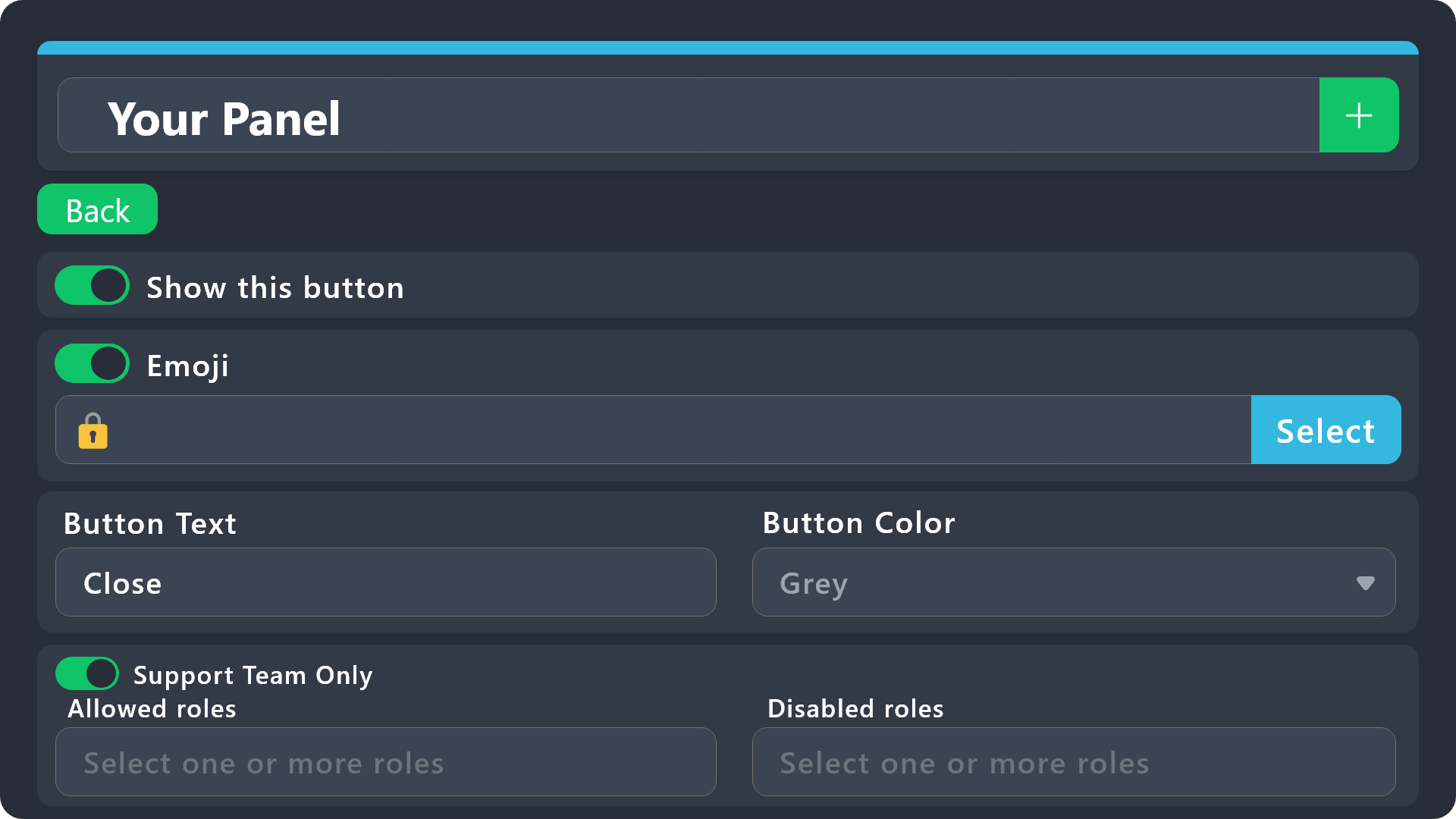
$buttonoptions
agile stream
@azure gorge ^
jade topaz
heavy rivet
How can I get rid of this and activate on my server the premium subscription - w...
#🎫│make-a-ticket with the billing team, they'll help as much as they can
heavy rivet
I done on #premium-tickets
jade topaz
cool, be patient 🙂
heavy rivet
I am 🙂
 fading lava
Setup guide
humble sequoiaBOT
First you will want to invite the bot to your server. Once the bot is in your server, you can manage your server in the dashboard.
To create a panel we are going to need to head over to the Panel Configs Tab on the Dashboard.
Once at the dashboard we will need to click Create Panel.
Enter a panel name (Fill in any optional settings you want).
Click Create Panel and you are ready to get started with configuring your panel.
An example of a creating a panel is shown below.
Once the panel has been created, use the blue Send button and select the channel you want the panel to be sent to.
The Panel wasn't send
Use the </debug:ID> command to diagnose possible permission issues with the bot.
jade topaz
fading lava
Setup guide
^^
jade topaz
How do you add the gold version of ticket tool
 minor hatch
So been looking around, is there a way for the ticket tool bot to leave/send a message when someone makes a ticket?
For example they get into the ticket channel and it says "Someone will be with you shortly" or something
limber portal
minor hatch
So been looking around, is there a way for the ticket tool bot to leave/send a m...
This is done automatically
Message can be customised in dashboard > panel configs > messages > edit ticket message
minor hatch
wait seriously, my bad let me check woops
oh wow, thank you so much been trying to figure it out lol
limber portal
minor hatch
oh wow, thank you so much been trying to figure it out lol
No worries
 fair ridge
Thread Permission Error
╰ It looks like you don't have permission to view the channel Erişim Yok
Docs page for this error
5169a39c-f50c-11ed-a05b-0242ac120003
ı need a help
 wet plaza
Im trying to setup and it keeps saying its not responding and i tried to debug and thats not working too.
 wild spire
wet plaza
Im trying to setup and it keeps saying its not responding and i tried to debug a...
wild spire
wet plaza
Im trying to setup and it keeps saying its not responding and i tried to debug a...
bot is missing a permission.
 wild spire
fair ridge
Thread Permission Error
╰ It looks like you don't have permission to view the ch...
wild spire
fair ridge
Thread Permission Error
╰ It looks like you don't have permission to view the ch...
When does this error occur?
wet plaza
wild spire
bot is missing a permission.
hmm
 bleak wind
No role mention ping when a ticket is opened.
humble sequoiaBOT
1. Go into your Dashboard
2. Open your Panel Configs tab
3. Select the panel you want to ping your support on
4. Open the Ticket options menu
5. Click on Edit Ticket Message
6. In the Message Content use one of the role mention syntax (**{@Role Name}**/**{Role ID}**)
7. Save changes
Note: For this to work properly, Ticket Tool requires the Mention Everyone permission. Or the role must have the Allow anyone to @mention this role setting enabled
jade topaz
bleak wind
No role mention ping when a ticket is opened.
^^
 jade topaz
bleak wind
jade topaz
bleak wind
You have defined the role incorrectly, follow the instructions above :)


 humble sequoiaBOT
Within all the messages the bot sends (both embeds and text) you can mention either channels, roles, or even users, these mentions will only send a notification to the user if they are used within a text field, e.g: a role mentioned in an embed won't ping at all the users who have that role.
For mentioning a role you can use one out of three options:
{@Role Name} ➞ Which is Case Sensitive.
{RoleID} ➞ Replace RoleId with the Id of the role you are trying to ping.
<@&RoleID> ➞ Discord's native syntax to ping roles.
<#ChannelID> ➞ Mention a channel by its ID.
<@UserID> ➞ Mention a user by its ID.
wild spire
Make sure TT has permission to mention all roles for it to ping.
lyric quartz
Hello , hope you all had a wonderful thanksgiving, my ticket tool is creating new tickets up at the top of all my channels and not in my selected category, is there a limit to the amount of tickets in one category ?
wild spire
lyric quartz
Hello , hope you all had a wonderful thanksgiving, my ticket tool is creating ne...
Max 50 channels per category.
Set a second category in your panel configs to avoid overflow.
bleak wind
wild spire
Make sure TT has permission to mention all roles for it to ping.
I fixed my mistake. I gave the TT bot admin privileges and it worked!
lyric quartz
ok the category only has 42 total channels , im just gonna create a backup to be safge
wild spire
bleak wind
I fixed my mistake. I gave the TT bot admin privileges and it worked!
Admin will fix it as well.
That gives the bot permission to mention all roles.
wild spire
lyric quartz
ok the category only has 42 total channels , im just gonna create a backup to be...
There might have been 50 channels at the time of and some were deleted by now.
 tawny lily
السلام عليكم
jade topaz
tawny lily
السلام عليكم
hi, If u require support in Arabic I suggest #🎫│make-a-ticket
 void cypress
Can you customise what it says in the embed that the tool sends?
humble sequoiaBOT
The Ticket Message is the first message sent by the bot on a new ticket. To customize it head over to your Dashboard ➞ Panel Configs ➞ Ticket ➞ Edit Ticket Message
cursive phoenix
This should help 🙂
void cypress
I meant the embed it automatically sends when you first make the panel ⬇️this embed⬇️
 limber portal
void cypress
limber portal
void cypress
Dashboard ➞ Panel Configs ➞ Messages ➞ Edit Panel Message
 void cypress
limber portal
Dashboard ➞ Panel Configs ➞ Messages ➞ Edit Panel Message
void cypress
limber portal
Dashboard ➞ Panel Configs ➞ Messages ➞ Edit Panel Message
Thank you
limber portal
void cypress
Thank you
np
humble sequoiaBOT
For more convenient use of multipanels, you can now combine panels on the dashboard. This will allow you to directly send the multipanel from the dashboard or via the $panel ID command.
Where can I find this?
You can find this setting on the Dashboard -> Panel Configs -> Panel -> Attached Panels
Note: if you're attaching all the panels to a panel called English, don't include English in the attached panel's box (If you do this, it will create a duplicate)
This will put all buttons from all of your panels on one message. The message is the panel message from the panel you're combining these panels in.
 lethal obsidian
Ah
limber portal
lethal obsidian
^^ refer above
lethal obsidian
That helps very much, thank you.
 wraith niche
hi i have a problem i am logging in my and it is detagging out of nowhere
limber portal
wraith niche
hi i have a problem i am logging in my and it is detagging out of nowhere
Is this related to ticket tool?
 pulsar cloak
Copy and pasting
This has probably been asked 1000 times, but can you change the avatar of the Ticket Tool?
humble sequoiaBOT
Ticket Tool Custom Avatar
As of now, you are not able to change Ticket Tool's profile picture, nonetheless, our Development Team is working on the release of white labels, this is your own custom bot!
For the time being, you can change the bot's nickname by right-clicking the bot in the user list on your server and clicking Change Nickname

$avatar
azure gorge
agile stream
<@874939559748710420> ^
Thank you for the help, I appreciate it! 
iron nightBOT
Gave +1 Rep to @agile stream
agile stream
azure gorge
Thank you for the help, I appreciate it! <:kinspikalove:1166562062558838894>
You are welcome!
jade topaz
How do you give members image perms in ticket channels? Perms are set for the category for everyone to have media perms, but it doesn't work
idle flint
jade topaz
How do you give members image perms in ticket channels? Perms are set for the ca...
Dashboard > Panel Configs > Permissions > Ticket Owner Open and then set "Attach Files" to
jade topaz
Thanks 👍
 spiral path
Can anybody help me with my ticket tool problem idk how discord works
jade topaz
spiral path
Can anybody help me with my ticket tool problem idk how discord works
What’s your problem?
 tidal tulip
Hello, why does the "undefined" message appear when trying to send a panel to a given channel?
 limber portal
tidal tulip
Hello, why does the "undefined" message appear when trying to send a panel to a ...
limber portal
tidal tulip
Hello, why does the "undefined" message appear when trying to send a panel to a ...
Try refreshing the dashboard
tidal tulip
limber portal
Try refreshing the dashboard
it didn't help ;/
limber portal
tidal tulip
it didn't help ;/
Does the bot have permissions to send messages into that channel?
tidal tulip
yes,
 limber portal
tidal tulip
yes,
limber portal
tidal tulip
yes,
Are all the emojis entered correctly?
humble sequoiaBOT
This error indicates you have selected an invalid emoji, i.e. an emoji the bot isn't capable of using, in a button field
Which Emoji?
This depends upon which action the error is appearing, the most common cases are the Create Ticket button or one of your Dropdown emojis. You can visit your Button's List to find all available buttons and find the conflicting one by yourself.
Why doesn't the bot accept it as valid?
- You selected an emoji that doesn't exist anymore, i.e. that has been deleted
- You wrote text there, instead of an emoji (or in addition to an emoji)
- You entered a code for a custom emoji from a server that the bot is not a member of
- You entered a custom emoji code incorrectly
- You're on iPhone and entered an emoji using the phone's emoji pad (use the emoji selector in the website instead)
tidal tulip


 limber portal
tidal tulip
limber portal
tidal tulip
I would make a ticket in #premium-tickets
tidal tulip
Ok, thank you
 deft isle
The bot won't allow me to run the premium command can someone help
limber portal
deft isle
The bot won't allow me to run the premium command can someone help
what happens when you try and run it?
deft isle
It just doesn't send like I hit send it appears like it's doing the thinking thing then disappears I've tried like 8 times
deft isle
limber portal
what happens when you try and run it?
So idk if it's perms or something
limber portal
deft isle
It just doesn't send like I hit send it appears like it's doing the thinking thi...
does it give you an error?
limber portal
what happens on prefix commands e.g $help
limber portal
deft isle
Shows up
what about other slash commands?
deft isle
They work to it's just the premium command
limber portal
deft isle
They work to it's just the premium command
probably a discord issue, try restarting the app
deft isle
I did 😂 I thought it was bugged and just wasn't showing so I restarted then ran it again and it done the same thing
 deft isle
Would it work for me if I tried it in this channel
deft isle
limber portal
cant reproduce
Yeah don't come up for me
limber portal
deft isle
Would it work for me if I tried it in this channel
should do
 deft isle
No I don't have perms to do it 😂
deft isle
Should I try kicking the bot then invite it back
limber portal
you can upgrade with the button on the bots profile
humble sequoiaBOT

Premium can now be purchased directly through discord! Either in the app directory (server settings) or directly from the bots profile.
<:TTWarning:1034178155872784494> Important Information <:TTWarning:1034178155872784494>
ONLY purchase premium through ONE of the two Ticket Tool Bots. If you purchased premium on the primary bot (White logo) and plan to use the premium bot, don't kick the primary bot!
What's different?
The Monthly price changed from $6.00 to $5.99

 Yearly subscriptions are not yet available
Don't kick the bot, otherwise, the subscription will be canceled automatically
You'll need to buy the subscription from a computer or on the Application Directory
You might need to run the /premium command on your server to sync the premium status with your dashboard
A subscription can not be transferred between Servers
 deft isle
Right I see it do u guys do a lifetime subscription instead of monthly
limber portal
deft isle
Right I see it do u guys do a lifetime subscription instead of monthly
nope
most you can do is prepay for like a year
humble sequoiaBOT
PayPal - paypal@tickettool.xyz
BitCoin - 3HhKKAdb9eEvCe2tvzB8bAa8nebHY6qcPA
LiteCoin - MEQX3knLAuotrKnvk3HDNBK5gdRn6PZhHy

Prepay/Direct Payment
To prepay send the payment using your desired method - Available options listed bellow.
⚠️ $18 per 3 months. ⚠️
$66 per year.
(If using the direct payment option, you need to be paying for at-least 3+ months.)
Regular Prices when paying within Discord:
$5.99/per month
Once your payment is sent let us know so we can confirm and get you your key.
- Purchases done with this method are non-refundable.
<:paypal:924596360840372234> Paypal ("Goods and Services" or "Family and Friends")
paypal@tickettool.xyz
<:bitcoin:924638849135689749> BTC - Bitcoin
3HhKKAdb9eEvCe2tvzB8bAa8nebHY6qcPA
<:Litecoin:972176945972383815> LTC - LiteCoin
MEQX3knLAuotrKnvk3HDNBK5gdRn6PZhHy
I sent the payment now what?
After you send the payment, please send a screenshot with proof of payment, our <@&615146349700186112> will verify your payment and will get you setup. For crypto payments, we are waiting for at least ONE verification.

All prices in USD - 3 months min for direct payment
deft isle
Oh right one of my friends have it for lifetime?
limber portal
deft isle
Oh right one of my friends have it for lifetime?
there did used to be a lifetime plan a while back
deft isle
Ah right ok
limber portal
not anymore tho as lifetime is just unsustainable
deft isle
Ok monthly will be fine then thanks for the help
limber portal
deft isle
Ok monthly will be fine then thanks for the help
no worries, glad to be able to help
deft isle
How do I get the gold version I've done the 7 day trail until I get paid in 2 days
humble sequoiaBOT
The first thing you will need to do is invite the premium bot, an invite can be found here
Once the bot is in your server we will head to the dashboard and manage your server. When you are managing your server, you want to head into "Server Configs" then click the drop down menu under "Select the bot you would like to use on this server" then click "Ticket Tool#6207" and then save.
 limber portal
deft isle
How do I get the gold version I've done the 7 day trail until I get paid in 2 da...
limber portal
deft isle
How do I get the gold version I've done the 7 day trail until I get paid in 2 da...
^^
deft isle
Cheers
limber portal
Np
jade topaz
can somone PLS make a ticket thing for my server im going crazy trying to do it
humble sequoiaBOT
First you will want to invite the bot to your server. Once the bot is in your server, you can manage your server in the dashboard.
To create a panel we are going to need to head over to the Panel Configs Tab on the Dashboard.
Once at the dashboard we will need to click Create Panel.
Enter a panel name (Fill in any optional settings you want).
Click Create Panel and you are ready to get started with configuring your panel.
An example of a creating a panel is shown below.
Once the panel has been created, use the blue Send button and select the channel you want the panel to be sent to.
The Panel wasn't send
Use the </debug:ID> command to diagnose possible permission issues with the bot.
jade topaz
jade topaz
can somone PLS make a ticket thing for my server im going crazy trying to do it
🙂
gilded verge
//@jade topaz, just note to the above question.:
we can help you, but don't ask others to do it for you
toxic aurora
How to setup bot in new server
pseudo ravine
humble sequoia
limber portal
jade topaz
will it show 10000 or reset
It just keeps counting up
 steel basalt
jade topaz
will it show 10000 or reset
steel basalt
jade topaz
will it show 10000 or reset
theres some servers with well over 40k tickets
you can reset the number back to 1 if you want though
limber portal
^
jade topaz
steel basalt
you can reset the number back to 1 if you want though
thanks
iron nightBOT
Gave +1 Rep to @steel basalt
jade topaz
limber portal
It just keeps counting up
thanks
steel basalt
no worries
 nimble adder
Alguém q fale português?
toxic aurora
How to eddit these?

 vocal leaf
you have to rename the panel name
toxic aurora
vocal leaf
you have to rename the panel name
what about the "to creat a ticket..." part
vocal leaf
that part you can change in panel message
i just dont know if you have to be a premium member for that... i dont think so
limber portal
nimble adder
Alguém q fale português?
There’s no Portuguese team here anymore so your best bet is #🎫│make-a-ticket in english and see if there is a support member who does speak it unless someone who can speak it comes along here
Não há mais equipe portuguesa aqui, então sua melhor aposta é #🎫│make-a-ticket em inglês e ver se há algum membro de suporte que fale a língua, a menos que alguém que saiba falar venha aqui (google translate)
toxic aurora
vocal leaf
that part you can change in panel message
how to updatet eh panel name in the server??
vocal leaf
no you have to do that via the backend of the website
so you have to login on the website and then from there you can do that
toxic aurora
vocal leaf
no you have to do that via the backend of the website
no i did it in the dashboard, but it did not update in my server
vocal leaf
aaaah ok
just send the panel to the server again.... to the right chanel
then it will show the updated version
iron nightBOT
Gave +1 Rep to @vocal leaf
vocal leaf
youre welcome!
nimble adder
limber portal
There’s no Portuguese team here anymore so your best bet is <#571706435449257997...
Ok, I translate, it takes a lot of work but that's what it is.
Does anyone know why this appears?, Is it an error?

I can't post a ticket on any channel.
jade topaz
nimble adder
Does anyone know why this appears?, Is it an error?
You must make a ticket from a dashboard panel to carry out this command
humble sequoiaBOT
First you will want to invite the bot to your server. Once the bot is in your server, you can manage your server in the dashboard.
To create a panel we are going to need to head over to the Panel Configs Tab on the Dashboard.
Once at the dashboard we will need to click Create Panel.
Enter a panel name (Fill in any optional settings you want).
Click Create Panel and you are ready to get started with configuring your panel.
An example of a creating a panel is shown below.
Once the panel has been created, use the blue Send button and select the channel you want the panel to be sent to.
The Panel wasn't send
Use the </debug:ID> command to diagnose possible permission issues with the bot.
jade topaz
nimble adder
I can't post a ticket on any channel.
Use this form for help 🙂
 mild sand
is there a slash command such as /ticket which can be used by members to open new tickets instead of using a panel?
limber portal
mild sand
is there a slash command such as /ticket which can be used by members to open ne...
You can enable command style tickets, but there are as of yet no slash commands, only prefix
humble sequoiaBOT
Command Style Tickets allow you to open tickets VIA the $new or $ticket commands. This feature also allows you to open tickets for people, by using the aforementioned commands with the user's ping or ID.
You can enable this feature by heading over to your server's dashboard. Then head over to Panel Configs ➞ Settings ➞ Command Style Tickets. (GIF below shows you how to get to it as well).
This section of the panel settings also contains the following features
- Bypass channel list and watch all of them → when you enable this option, Ticket Tool will create a ticket whenever someone uses the $new or the $ticket command in a channel it has access to .
- Channel to monitor for command $new and $ticket → This is the opposite of the previous option, you can actually select in which channels Ticket Tool should look for the $new command instead of looking in the whole server.
- Delete command after creating ticket → If enabled, Ticket Tool will delete the command (whether it's
$newor$ticket) a few seconds after you run it.
 jade topaz
is there a way i can make ticket tool respond to my own bot?
 limber portal
jade topaz
is there a way i can make ticket tool respond to my own bot?
limber portal
jade topaz
is there a way i can make ticket tool respond to my own bot?
Dashboard > server configs
 jade topaz
perfect thx!
limber portal
Np
 limber portal
 winged grove
«The application did not respond»
Are you seeing this message when you use a Ticket Tool command in a channel? It may be because the bot is missing permissions in that channel.
Try the following:
- Right-click the channel, select Edit Channel, then Permissions
- Scroll down to Advanced Permissions and add Ticket Tool there
- Make sure that View Channel and Send Messages are
- Save the changes
- In the channel, use the /debug command to check for any other missing permissions
- If needed, go back to the Permissions menu and grant Ticket Tool any missing permissions
- Retry using the command you wanted to use and confirm that it works properly now.
 buoyant pebble
hi, I'm trying to get open tickets to appear under where they are created. I followed what seemed to work for other people here but mine still appear at the top of the server. here's a few images. any ideas what i'm doing wrong here?

 humble sequoiaBOT
1. Go into your Dashboard
2. Open your Panel Configs tab
3. Select the panel you want to grant access to
4. Open the Category options menu
5. Select the categories of your preference
6. Save changes
 limber portal
buoyant pebble
hi, I'm trying to get open tickets to appear under where they are created. I fol...
limber portal
buoyant pebble
hi, I'm trying to get open tickets to appear under where they are created. I fol...
Have you done this ^^
And have you set it on the correct panel / saved changes
buoyant pebble
limber portal
Have you done this ^^
yes, thats in the screen shot above
limber portal
buoyant pebble
yes, thats in the screen shot above
And it’s been added on the correct panel?
buoyant pebble
limber portal
And it’s been added on the correct panel?
yes i only have 1
 cunning night
there is an option to make a cooldown fro creating tickets?
limber portal
cunning night
there is an option to make a cooldown fro creating tickets?
Unfortunately not
buoyant pebble
limber portal
And it’s been added on the correct panel?
is there a list of rules or conditions for what category a ticket can go in?
jade topaz
buoyant pebble
is there a list of rules or conditions for what category a ticket can go in?
A ticket can go in any category as long as it has the right permissions.
buoyant pebble
im not sure why it doesn't list the required permissions here https://docs.tickettool.xyz/debugging/errors/ff941d18-0ee3-46fa-86d1-ebadb1ef0015

ff941d18-0ee3-46fa-86d1-ebadb1ef0015 hash errors, causes and solutions
 rustic lintel
is there a way to open and close the support system ticket so people can't put tickets in when you're not available.
limber portal
rustic lintel
is there a way to open and close the support system ticket so people can't put t...
Yeah, It is a that can be configured under Panel Configs > Limits > Time Schedule.
rustic lintel
so I'm guessing there's no command that we could use that will open and close instead of just a schedule?
limber portal
rustic lintel
so I'm guessing there's no command that we could use that will open and close in...
Not really
You could go into the dashboard and set your member role as a blacklisted / disabled role when your are away
 plucky nebula
Need hel-
humble sequoiaBOT
Hello, we would love to help you, but if you don't tell us what you need help with we can't help you :(
buoyant pebble
Is there a list of the minimum permissions needed or do you all just open up permissions down the list for a category for Ticket tool
humble sequoiaBOT
When first invited to your server, Ticket Tool should have the permissions shown below in order to ensure an appropriate functioning:
When customizing permissions for the different ticket participants, you must make sure Ticket Tool has the permissions you want it to grant to others, you can learn more about this here.
Missing Permissions
This error is a direct outcome of the bot missing permissions as depicted above. When troubleshooting this error we suggest you go through these steps:
- Use the </debug:1029783024264564765> command to check if the bot is lacking core role or channel permissions.
- Compare the category/channel's overrides and contrast them with the bot's roles to identify any permission denial that is breaking the functioning
- If you can't still figure it out, let our <@&540295656720302081> know so they can guide you through
Additional Resources
- If you are a server administrator and would like to understand more how to set up your server's permissions, we suggest checking the Discord Support Knowledge Base
- If you are a bot developer and are interested in the internal permission hierarchy we suggest you this part of the Discord Developer Docs
Important Note
- Giving Administrator permissions is NOT required and we do NOT encourage you to do unless you are trying to troubleshoot your permissions setup.
see
winged grove
How do I get the bot to send a mention to the support role ?
humble sequoiaBOT
1. Go into your Dashboard
2. Open your Panel Configs tab
3. Select the panel you want to ping your support on
4. Open the Ticket options menu
5. Click on Edit Ticket Message
6. In the Message Content use one of the role mention syntax (**{@Role Name}**/**{Role ID}**)
7. Save changes
Note: For this to work properly, Ticket Tool requires the Mention Everyone permission. Or the role must have the Allow anyone to @mention this role setting enabled
winged grove
jade topaz
🙂
Arabic?
كيف اخلي البوت يمنشن لما شخص يفتح تكت
البوت الي عندي يمنشن الي فتح التكت بس
cursive phoenix
$articket
humble sequoiaBOT

فريق الدعم الفني العربي
عميلنا العزيز ان كنت تبحث عن مساعدة يرجى فتح تكت خاص بفريق الدعم الفني العربي
اذهب الى#🎫│make-a-ticket
ثم قم بلضغط على الايموجي الاتي (🇯🇴)
humble sequoiaBOT
⚠️ You're in the wrong place
We provide support for Ticket Tool Discord bot and cannot help you with whatever issue you have.
- We don't know which Support Team you should contact to get this issue resolved, and unfortunately we won't be able to accurately tell you.
If you don't have any further questions regarding our bot Ticket Tool, please close this ticket
 bold pawn
 obtuse charm
who can i buy with paypal for the site cracked.io?
obtuse charm
who can i buy with paypal for the site cracked.io?
Do you contain dementia?
 violet gazelle
probably a stupid question but is it possible to make it so that the channel name isn't just "ticket (number)" but something like "general support ticket" or would you need premium
cursive phoenix
please avoid posting messages not realted to ticket tool support in this channel
humble sequoiaBOT
The ticket name is the default channel name of all tickets. To edit it, go to your Dashboard > Panel Configs > Ticket. There you can edit the channel name of opened and closed tickets. You can also use variables in there.

 Note: This is a premium feature
violet gazelle
Note: This is a premium feature
violet gazelle
Alright, thank you
 jade topaz
 amber dome
This error takes place when your server has reached the 500 channel limit Discord has per server
Delete tickets, or other channels, on your server
jade topaz
pseudo ravine
I'm not sure why you're still getting blank pages
i figured out now
 hardy dust
how to make it mention the user created the ticket? the variable won't work anymore
humble sequoiaBOT
1. Go into your Dashboard
2. Open your Panel Configs tab
3. Select the panel you want to ping your support on
4. Open the Ticket options menu
5. Click on Edit Ticket Message
6. In the Message Content use one of the role mention syntax (**{@Role Name}**/**{Role ID}**)
7. Save changes
Note: For this to work properly, Ticket Tool requires the Mention Everyone permission. Or the role must have the Allow anyone to @mention this role setting enabled
jade topaz
hardy dust
how to make it mention the user created the ticket? the variable won't work anym...
^^
hardy dust
jade topaz
<:this:894279341108772914> ^^
I want to mention the user but, {@user} doesn't work anymore
jade topaz
hardy dust
I want to mention the user but, {@user} doesn't work anymore
try, {user} 🙂
hardy dust
jade topaz
try, {user} 🙂
are you sure
jade topaz
yes, without @ of course
like this: {user}
iron nightBOT
Gave +1 Rep to @harsh shuttle
jade topaz
np ^^
 dim wagon
How does leadership dismissal work? The leader hasn't been on for a while. But the dismissal option has not come up yet.
humble sequoiaBOT
⚠️ You're in the wrong place
We provide support for Ticket Tool Discord bot and cannot help you with whatever issue you have.
- We don't know which Support Team you should contact to get this issue resolved, and unfortunately we won't be able to accurately tell you.
If you don't have any further questions regarding our bot Ticket Tool, please close this ticket
jade topaz
How do I buy the premium bot?
humble sequoiaBOT
Premium can now be purchased directly through discord! Either in the app directory (server settings) or directly from the bots profile.
<:TTWarning:1034178155872784494> Important Information <:TTWarning:1034178155872784494>
ONLY purchase premium through ONE of the two Ticket Tool Bots. If you purchased premium on the primary bot (White logo) and plan to use the premium bot, don't kick the primary bot!
What's different?
The Monthly price changed from $6.00 to $5.99
Yearly subscriptions are not yet available
Don't kick the bot, otherwise, the subscription will be canceled automatically
You'll need to buy the subscription from a computer or on the Application Directory
You might need to run the /premium command on your server to sync the premium status with your dashboard
A subscription can not be transferred between Servers
pseudo ravine
jade topaz
i figured out now
That’s great! What did you do to fix it?
jade topaz
pseudo ravine
That’s great! What did you do to fix it?
with vpn
pseudo ravine
Not sure how that would fix it, but at least it’s fixed
jade topaz
pseudo ravine
Not sure how that would fix it, but at least it’s fixed
yes i used vpn and its just load
and finally i got in
humble sequoiaBOT
First you will want to invite the bot to your server. Once the bot is in your server, you can manage your server in the dashboard.
To create a panel we are going to need to head over to the Panel Configs Tab on the Dashboard.
Once at the dashboard we will need to click Create Panel.
Enter a panel name (Fill in any optional settings you want).
Click Create Panel and you are ready to get started with configuring your panel.
An example of a creating a panel is shown below.
Once the panel has been created, use the blue Send button and select the channel you want the panel to be sent to.
The Panel wasn't send
Use the </debug:ID> command to diagnose possible permission issues with the bot.
limber portal
@reef hornet saw u deleted ur message but here is a setup guide anyway
 grave current
Who know's how to fix this? It doesn't ping the actual role w/ the role's name and colour but it pings the ID
 humble sequoiaBOT
1. Go into your Dashboard
2. Open your Panel Configs tab
3. Select the panel you want to ping your support on
4. Open the Ticket options menu
5. Click on Edit Ticket Message
6. In the Message Content use one of the role mention syntax (**{@Role Name}**/**{Role ID}**)
7. Save changes
Note: For this to work properly, Ticket Tool requires the Mention Everyone permission. Or the role must have the Allow anyone to @mention this role setting enabled
limber portal
grave current
Who know's how to fix this? It doesn't ping the actual role w/ the role's name a...
That's a discord cache issue, the ping has still succesfully gone through right?
grave current
it has
limber portal
Yeah unfortunately it's a discord issue, try restarting your client
grave current
but Id want it to actually ping the colour and name of the role, what I did in the dashboard
 limber portal
It doesn't always show like that for all users, unfortunately there's nothing really you can do about it as it is an issue on discords end
limber portal
No worries
 ivory loom
Hi there ^^
Quick question: Is there any way to copy the configuration from one server to another in order to have way less work in setting up panels?
I dont really want to create a ticket for this since its not urgent 😅
humble sequoiaBOT
The Backup and Restore feature allows you to transfer your panels, tags, and all settings to a new server, even if the server the settings were created has been deleted! You will want to copy the whole key.
First, go to your server's Dashboard ➞ then Server Configs ➞ under Config Backup & Restore (Server Owner Only) click on Old version can be found here and generate a new backup key by pressing the green button. Now, a key should be generated in the box above. You may need to refresh the page to see this.
Once you have your backup key, navigate to the same page on the new server. Copy the key on the Restore from backup key field.
Now you can choose what you want to copy. Finally, press the green Restore Configs button.
IMPORTANT NOTE
- We suggest you keep this backup key somewhere safe, in case your server is deleted so you are able to recover your panel's settings.
- This feature is only usable by the server's owner
$backup
limber portal
ivory loom
Hi there ^^
Quick question: Is there any way to copy the configuration from on...
^^
ivory loom
Beautiful, knew this feature but didnt know how to find the key 😉 Thanks already! XD
limber portal
ivory loom
Beautiful, knew this feature but didnt know how to find the key 😉 Thanks alread...
np
 ocean lance
How do I cancel the subscription for ticket tool via discord
humble sequoiaBOT
<:TicketToolOffline:1018980643092312155> Cancel your subscription
We're sorry to see you go!
To cancel your Ticket Tool Premium Subscription, just head over to your User Settings in Discord, then Subscriptions. Look for Premium Apps and click on Manage Subscriptions. There you can cancel your subscription at the end of your billing cycle.
User Settings > Subscriptions > Premium Apps > Manage Subscriptions > Cancel
 prime basin
Hello! How can I make the message ping the user who created the ticket when a moderator uses a Custom Command
limber portal
prime basin
Hello! How can I make the message ping the user who created the ticket when a mo...
use the {ticket.owner} variable
prime basin
limber portal
use the `{ticket.owner}` variable
Perfect thank youuu, have a great day :))
iron nightBOT
Gave +1 Rep to @limber portal
limber portal
prime basin
Perfect thank youuu, have a great day :))
np, u2
 prisma shard
Why Is the button there twice
 limber portal
prisma shard
Why Is the button there twice
limber portal
prisma shard
Why Is the button there twice
head to Dashboard -> Panel Configs -> Panel -> Attached Panels and removed any attached panels
prisma shard
limber portal
head to ` Dashboard -> Panel Configs -> Panel -> Attached Panels` and removed an...
thanks
iron nightBOT
Gave +1 Rep to @limber portal
limber portal
prisma shard
thanks
np
 raw vessel
https://discord.com/channels/509192800865353738/1178751038329733212 here @supple mountain
Come here !! Any arabic guy
 supple mountain
yb anything to help?
raw vessel
Come to the tikcet
jade topaz
raw vessel
https://discord.com/channels/509192800865353738/1178751038329733212 here <@31845...
be patient.
supple mountain
oh im not support here haha
raw vessel
Oh yeah
raw vessel
raw vessel
https://discord.com/channels/509192800865353738/1178751038329733212 here <@31845...
Here💞
jade topaz
No need to spam here, be patient :)
 pseudo ravine
Please stop pinging members for support, you've already opened a ticket, you will need to be patient until someone is available to assist you
 broken nimbus
hey is it possible for all newly created tickets to be sent into the same channel?
a channel that already exists
pseudo ravine
Hey there. Tickets are channels, did you mean category?
raw vessel
pseudo ravine
Please stop pinging members for support, you've already opened a ticket, you wil...
Bro I want fast. Support because my problem is so big and hard !!
pseudo ravine
You still need to be patient
broken nimbus
no i wanted all tickets created to be "posted" publicly in a channel
pseudo ravine
broken nimbus
no i wanted all tickets created to be "posted" publicly in a channel
The closest thing will be using thread-style tickets
broken nimbus
pseudo ravine
The closest thing will be using thread-style tickets
a new thread for each ticket right?
raw vessel
@pseudo ravine if you’re supporter come support me here #1178751038329733212 .
broken nimbus
hm ok thanks anyway
pseudo ravine
broken nimbus
a new thread for each ticket right?
Yes
broken nimbus
thanks @pseudo ravine
iron nightBOT
Gave +1 Rep to @pseudo ravine
pseudo ravine
You're welcome, glad I could help!
broken nimbus
:)
raw vessel
Thanks @pseudo ravine
iron nightBOT
Gave +1 Rep to @pseudo ravine
pseudo ravine
raw vessel
<@865714582613524491> if you’re supporter come support me here <#117875103832973...
Again, you will need to be patient
raw vessel
pseudo ravine
Again, you will need to be patient
Ohhhh okay
Somebody know to solve this?
 humble sequoiaBOT
━━ User's inquiry has been moved to a ticket ━━
 velvet wolf
Can I make a ticket public or let certain members access it?
humble sequoiaBOT
1. Go into your Dashboard
2. Open your Panel Configs tab
3. Select the panel you want to grant access to
4. Open the Permissions options menu
5. Find what role you'd like to edit permissions for
6. Choose if you'd like to edit opened or closed permissions for that role
7. Edit the permissions by tickingeach permission
8. Save changes
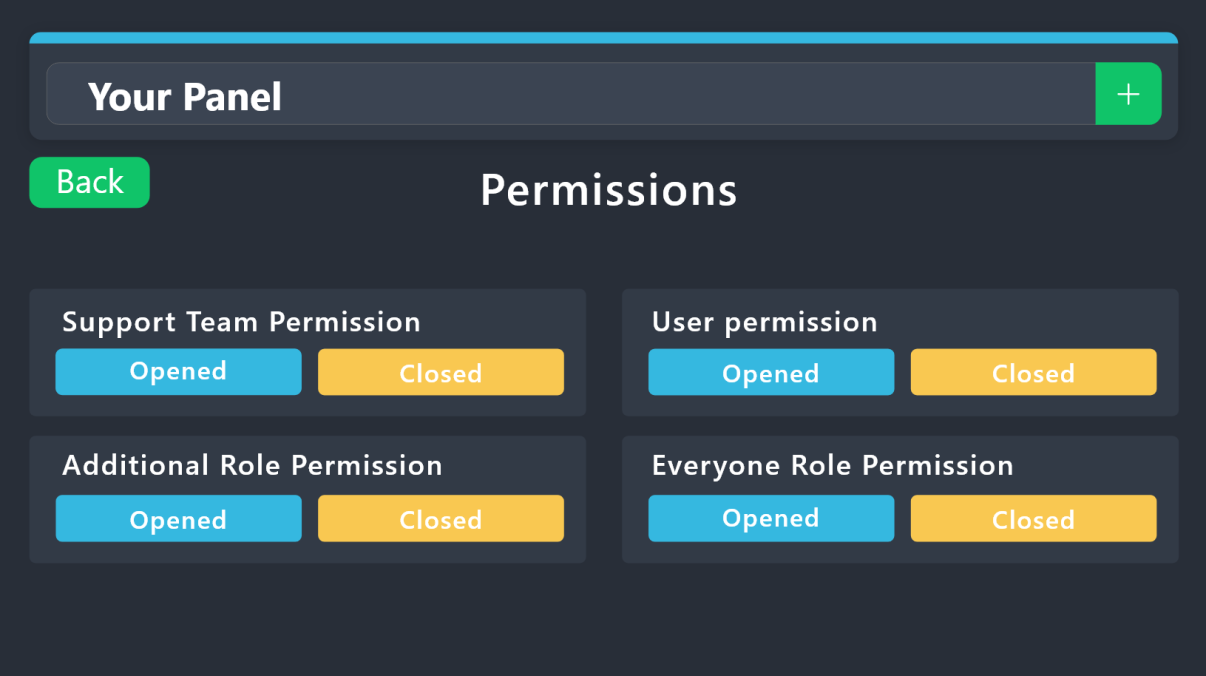
 sage aspen
Hello there just curious is there a way to increase the “ticket message” length? I’m using free version of the ticket tool currently.
If not possible on free version is it possible on the paid one?
 covert swallow
The message length has a higher limit on premium
sage aspen
How much higher? Like custom set or? Il pick up premium either way I think tomorrow then as I need that option but just curious incase you know.
humble sequoiaBOT
 Faster Premium Bot
Automatic Transcripts
Full Customization
Direct Messages
Ticket Automation
Thread Style Ticketing
Premium Support
Scheduled Panel Availability
Integrations
You can purchase premium here:
Price
$6 - Monthly
$66 - Yearly
 Premium
covert swallow
sage aspen
How much higher? Like custom set or? Il pick up premium either way I think tomor...
Premium
covert swallow
sage aspen
How much higher? Like custom set or? Il pick up premium either way I think tomor...
I believe it to be the embed limit but I could be mistaken, I do know its bonkers large tho
sage aspen
Ok thanks so much!
jade topaz
Hi, I want to sell some things but I can't
humble sequoiaBOT
⚠️ You're in the wrong place
We provide support for Ticket Tool Discord bot and cannot help you with whatever issue you have.
- We don't know which Support Team you should contact to get this issue resolved, and unfortunately we won't be able to accurately tell you.
If you don't have any further questions regarding our bot Ticket Tool, please close this ticket
 severe isle
Hey all!
Having an issue where new tickets are now being generated not in their assigned category. I believe i had this issue before, and it was because discord limits to 50 channels per category, so i created a new category "Tickets V2" but now after 17 tickets it stopped in that category and now all new tickets generate uncategorized (in no category up top)
Any ideas?
limber portal
severe isle
Hey all!
Having an issue where new tickets are now being generated not in thei...
Do you have an overflow category set?
humble sequoiaBOT
Discord only allows to stack up to 50 channels per category, meaning that if you have already 50 tickets in one category, the bot won't be able to place a ticket in that category, for such reason Ticket Tool counts with overflow categories, meaning that if your main category is filled, the bot will go ahead and place the ticket on the next one available, simply choose a second category in the category pickers:
limber portal
Do you need ticket tool help?
 kindred slate
I don’t sorry about the message
limber portal
All good
 floral warren
why i need to pay if i want to open a ticket in one server?
and in the others there is no problems
limber portal
floral warren
why i need to pay if i want to open a ticket in one server?
Can you send a screenshot?

 limber portal
floral warren
limber portal
floral warren
And that appears when you press create ticket?
floral warren
floral warren
when i press create ticket this
floral warren
floral warren
and this when i press mejorar
limber portal
It could be that the server’s premium subscription has expired
Reach out to admins of that server
floral warren
ok thanks its going to be difficult because have closed dms haha
jade topaz
Hi,
Can I add image in the ticket embed in free? or I need the premium version?
pseudo ravine
Hey there. It requires premium
 strange cipher
How can I do something like this?
 humble sequoiaBOT
The Drop-down menu or Select Menu replaces the buttons on your panel message and uses a drop-down menu with all of your panels. To set this up, go to your Panel Configs and select your main Panel.
<:Numbericons1:1018864164032225340> Enable Select Style
First you enable Select Style. Then you add an item in the Dropdown Editor. Now you can start editing your dropdown!
<:Numbericons2:1018864168041971712> Dropdown Editor
Each line in the dropdown editor represents a line in the drop down menu on discord. You can add more "Items", by clicking on
First you select a panel. That's the panel this option will open a ticket for. DONT select the same panel twice. Each option should have a different Panel
After that, you can put a Display. This is the title of this option and will appear in the drop down menu. The *Description can be set right after that, which will be below the title in grey.
Additionally you can select an emoji, that will be shown in front of each option. You can either manually input the ID of an emoji or select it in the selector.
Common Issues ⚠️
- Panel doesn't send? Make sure you have a valid emoji selected
- Option doesn't show up? Check if two options have the same panel in the DropDown Editor
$dropdown
limber portal
strange cipher
How can I do something like this?
^^
strange cipher
limber portal
^^
Thanks you
iron nightBOT
Gave +1 Rep to @limber portal
jade topaz
Hi there my messages are not showing in the ticket
 analog grove
Hiya, what's the best way to add more to this text? Seems like there's a character limit. Can I post a picture with instructions instead of the text?
 limber portal
analog grove
Hiya, what's the best way to add more to this text? Seems like there's a charact...
limber portal
analog grove
Hiya, what's the best way to add more to this text? Seems like there's a charact...
If you purchase premium you get a much larger character limit
analog grove
Do you know how many characters offhand?
severe isle
limber portal
Do you have an overflow category set?
No, but now that I added a “tickets v3” as an overflow, they are opening in v2 as intended lol, so I guess problem solved. Thanks!
iron nightBOT
Gave +1 Rep to @limber portal
analog grove
Thanks
limber portal
analog grove
Do you know how many characters offhand?
The premium character limit or base character limit?
analog grove
the premium
limber portal
severe isle
No, but now that I added a “tickets v3” as an overflow, they are opening in v2 a...
No worries, glad it was fixed
limber portal
analog grove
the premium
I’ll just check
limber portal
analog grove
the premium
^
analog grove
thank you!!

 jade topaz
 tall thorn
I am having trouble as I am getting this how do I solve this
tall thorn
I am having trouble as I am getting this how do I solve this
This error takes place when your server has reached the 500 channel limit Discord has per server
the server owner must delete tickets or channels
jade topaz
tall thorn
Like wht do I do ?
Asked the owner to delete channels or tickets to be able to create tickets.
jade topaz
no worries
analog grove
Ok I purchased premium lol, If I want multiple panels to show up here as options what do I need to do?
 gilded verge
depends if you want as dropdown or few buttons (panels) in the same message
example:
> with buttons you can find on #🎫│make-a-ticket
> dropdown (screenshot)
 analog grove
ohhh
how do I do the dropdown? that looks nice. I had the buttons before but I like the dropdown
humble sequoiaBOT
The Drop-down menu or Select Menu replaces the buttons on your panel message and uses a drop-down menu with all of your panels. To set this up, go to your Panel Configs and select your main Panel.
<:Numbericons1:1018864164032225340> Enable Select Style
First you enable Select Style. Then you add an item in the Dropdown Editor. Now you can start editing your dropdown!
<:Numbericons2:1018864168041971712> Dropdown Editor
Each line in the dropdown editor represents a line in the drop down menu on discord. You can add more "Items", by clicking on
First you select a panel. That's the panel this option will open a ticket for. DONT select the same panel twice. Each option should have a different Panel
After that, you can put a Display. This is the title of this option and will appear in the drop down menu. The *Description can be set right after that, which will be below the title in grey.
Additionally you can select an emoji, that will be shown in front of each option. You can either manually input the ID of an emoji or select it in the selector.
Common Issues ⚠️
- Panel doesn't send? Make sure you have a valid emoji selected
- Option doesn't show up? Check if two options have the same panel in the DropDown Editor
$dropdown
jade topaz
analog grove
how do I do the dropdown? that looks nice. I had the buttons before but I like t...
^^
strange cipher
The bot is offline
limber portal
strange cipher
The bot is offline
jade topaz
Can someone help me
Step 3 of the ticket tool setup
I don't understand it
Someone please help me
humble sequoiaBOT
Hello, we would love to help you, but if you don't tell us what you need help with we can't help you :(
jade topaz
Okay
 karmic bolt
الحين البوت نعه ادمنستريتور كيف امنعه من انه برسل بالشاتات ؟
يعني يوم اكتب امر $help مابيه يرد يمدي ؟
limber portal
karmic bolt
الحين البوت نعه ادمنستريتور كيف امنعه من انه برسل بالشاتات ؟
يعني يوم اكتب امر ...
$articket
humble sequoiaBOT
فريق الدعم الفني العربي
عميلنا العزيز ان كنت تبحث عن مساعدة يرجى فتح تكت خاص بفريق الدعم الفني العربي
اذهب الى#🎫│make-a-ticket
ثم قم بلضغط على الايموجي الاتي (🇯🇴)
analog grove
where do i edit this text
 jade topaz
analog grove
where do i edit this text
jade topaz
analog grove
where do i edit this text
Access the Dashboard -> Panel Configs -> Panel -> Go to "Edit Panel Message" and modify the "Field editor" category
Only for people with premium 🙂
 analog grove
thank you! got it
jade topaz
no worries 🫡
 wise valley
 wise valley
wise valley
wise valley
I need support pls
jade topaz
wise valley
hello, checked if TT has permission to send messages
wise valley
Okay thanks
analog grove
im having this issue - the permissions look good to me, is there something im missing
 limber portal
analog grove
im having this issue - the permissions look good to me, is there something im mi...
limber portal
analog grove
im having this issue - the permissions look good to me, is there something im mi...
run /debug in that channel and send a screenshot please
analog grove
 limber portal
analog grove
limber portal
analog grove
ticket tool does not have the required permissions
limber portal
analog grove
«The application did not respond»
Are you seeing this message when you use a Ticket Tool command in a channel? It may be because the bot is missing permissions in that channel.
Try the following:
- Right-click the channel, select Edit Channel, then Permissions
- Scroll down to Advanced Permissions and add Ticket Tool there
- Make sure that View Channel and Send Messages are
- Save the changes
- In the channel, use the /debug command to check for any other missing permissions
- If needed, go back to the Permissions menu and grant Ticket Tool any missing permissions
- Retry using the command you wanted to use and confirm that it works properly now.#
 hot ginkgo
how could i make it so it can show usernames instead of ticket numbers when someone creates a ticket
limber portal
hot ginkgo
how could i make it so it can show usernames instead of ticket numbers when some...
The {ticket.user.name} variable should work
hot ginkgo
limber portal
The {ticket.user.name} variable should work
where do i put that
limber portal
hot ginkgo
where do i put that
where you want their username to show
hot ginkgo
in the channel
whenever u make the ticket it will automatically make it to their username instead of ticket 001
humble sequoiaBOT
The ticket name is the default channel name of all tickets. To edit it, go to your Dashboard > Panel Configs > Ticket. There you can edit the channel name of opened and closed tickets. You can also use variables in there.
Note: This is a premium feature
hot ginkgo
ah.
 steel pine
So I put the bot ID in the configuration box now how do I setup disco utilities to open a ticket when a button is clicked
limber portal
steel pine
So I put the bot ID in the configuration box now how do I setup disco utilities ...
Seems like you are asking for help for the wrong bot? If you mean can you add ticket tool buttons to discohook embeds then unfortunately that is impossible
steel pine
limber portal
Seems like you are asking for help for the wrong bot? If you mean can you add ti...
then how does another bot trigger this bot?
limber portal
steel pine
then how does another bot trigger this bot?
If the bots id is in the box, and the bot runs a command like $new then ticket tool will respond instead of just ignoring
steel pine
okay
 flint sphinx

Okay so, whenever someone opens up a ticket in the server the embed doesnt show up?
It's as if it got deleted and it doesnt show up.
Should I remake the embed?
Or is there a reason behind why it doesnt show up?
the bot has all the permissions it needs for typing in the channels as well .
I'm just overall confused.
limber portal
flint sphinx
<a:GhostWave:607656953875005471>
Okay so, whenever someone opens up a ticket in...
Which specific embed do you mean?
flint sphinx
limber portal
Which specific embed do you mean?
It's one of our verification embeds for our server it's a gaming server lol.
limber portal
flint sphinx
It's one of our verification embeds for our server it's a gaming server lol.
Is it a ticket tool panel?
flint sphinx
I think it might be, I'm not the one who made it so I'd have to look or ask the owner.
We have the set up option so I'm thinking it may have auto deleted?
limber portal
flint sphinx
I think it might be, I'm not the one who made it so I'd have to look or ask the ...
Well, if it’s not sent by ticket tool then there’s not much we can do here as its a different bot issue, if you believe a panel has been deleted you can resend it with the send button on the dashboard underneath the panel name at the top
flint sphinx
limber portal
Well, if it’s not sent by ticket tool then there’s not much we can do here as it...
Thank you!! I'll try that if not I'll mess around with bot permissions.
iron nightBOT
Gave +1 Rep to @limber portal
limber portal
flint sphinx
Thank you!! I'll try that if not I'll mess around with bot permissions.
No worries
jade topaz
yo
 small drum
Someone know how to fix this
 jade topaz
small drum
Someone know how to fix this
jade topaz
small drum
Someone know how to fix this
This error takes place when your server has reached the 500 channel limit Discord has per server
the server owner must delete tickets or channels
small drum
thank you @jade topaz
jade topaz
no worries 😄
 coarse bolt
Hey guys, got a bit of an issue, was just wondering if anyone would be able to shed some light. Using ticket tool in a community discord server atm. I have a designated channel named ---ticket chat--- where the tickets will open and close. After what seems like 45 tickets being opened and remaining in the channel, the ticket tool starts to open the new tickets at the top of the discord server outside the channel designated for open/close. Any help would be appreciated!
pseudo ravine
Hey there. Discord has a limit of 50 channels in a category, so to prevent too many channels in a category, Ticket Tool has a limit of 45 tickets in a category
coarse bolt
Ah i see, is there any way to make it route to a different channel after hitting the 45?
humble sequoiaBOT
Discord only allows to stack up to 50 channels per category, meaning that if you have already 50 tickets in one category, the bot won't be able to place a ticket in that category, for such reason Ticket Tool counts with overflow categories, meaning that if your main category is filled, the bot will go ahead and place the ticket on the next one available, simply choose a second category in the category pickers:
coarse bolt
this is perfect, thank you.
 languid anvil
Yo
toxic aurora
can I choose a catgory where the ticket willbe make?? and not just in the top

and can i make multiple tickets in multiple different cattagory
humble sequoiaBOT
1. Go into your Dashboard
2. Open your Panel Configs tab
3. Select the panel you want to grant access to
4. Open the Category options menu
5. Select the categories of your preference
6. Save changes
jade topaz
toxic aurora
can I choose a catgory where the ticket willbe make?? and not just in the top
^^
toxic aurora
jade topaz
<:this:894279341108772914> ^^
alr ty
iron nightBOT
Gave +1 Rep to @harsh shuttle
toxic aurora
jade topaz
<:this:894279341108772914> ^^
btw is there a way to make logs for tickets opened and closed
and can I see transcript of clsoed tickets?
humble sequoiaBOT
1. Go into your Dashboard
2. Open your Panel Configs tab
3. Select the panel you want to grant access to
4. Open the Transcript options menu
5. Using the Transcript Channel selector, pick the channel you want your transcripts to be sent to
6. Save changes
 jade topaz
toxic aurora
and can I see transcript of clsoed tickets?
jade topaz
toxic aurora
and can I see transcript of clsoed tickets?
^^
velvet wolf
The panel should be the channel right? I look for them but they don't show up there
 humble sequoiaBOT
First you will want to invite the bot to your server. Once the bot is in your server, you can manage your server in the dashboard.
To create a panel we are going to need to head over to the Panel Configs Tab on the Dashboard.
Once at the dashboard we will need to click Create Panel.
Enter a panel name (Fill in any optional settings you want).
Click Create Panel and you are ready to get started with configuring your panel.
An example of a creating a panel is shown below.
Once the panel has been created, use the blue Send button and select the channel you want the panel to be sent to.
The Panel wasn't send
Use the </debug:ID> command to diagnose possible permission issues with the bot.
limber portal
velvet wolf
The panel should be the channel right? I look for them but they don't show up th...
Check this out ^^
toxic aurora
jade topaz
^^
Is it all premium?
limber portal
toxic aurora
Is it all premium?
Transcripts thenselves are free, automatically transcribing each ticket is premium
toxic aurora
limber portal
Transcripts thenselves are free, automatically transcribing each ticket is premi...
alr
 tacit flax
Hello, excuse me for disturbing you! I subscribed to ticket tool premium and I'm trying to set up the schedule, but I can't figure out how it works. Someone can help me ? (I used google translate, sorry if my english is bad...)
limber portal
tacit flax
Hello, excuse me for disturbing you! I subscribed to ticket tool premium and I'm...
If you want help in your native language check out #🎫│make-a-ticket
tacit flax
Okay, thank you !
 round spruce
Anyone else experiencing transcript links failing to generate?
Started a couple of hours ago, whenever I try to view transcripts it just sends me to this link. Going to this site if ofc an invalid request
 pseudo ravine
Hey there. Unfortunately there’s nothing we can do about it, since it’s all from Discords side
round spruce
🤔 Is discord having API issues or something? It will correct itself after some time?
pseudo ravine
It will fix itself eventually, yes
round spruce
Thank you kindly
pseudo ravine
You’re welcome, glad I could help!
 hollow fossil
round spruce
Anyone else experiencing transcript links failing to generate?
hollow fossil
round spruce
Anyone else experiencing transcript links failing to generate?
same problem here
 pliant wigeon
can anyone tell me how to do it?
 pseudo ravine
Hey there. Which part are you wanting to customize?
pliant wigeon
I'd like to recreate that multi-language support panel
humble sequoiaBOT
For more convenient use of multipanels, you can now combine panels on the dashboard. This will allow you to directly send the multipanel from the dashboard or via the $panel ID command.
Where can I find this?
You can find this setting on the Dashboard -> Panel Configs -> Panel -> Attached Panels
Note: if you're attaching all the panels to a panel called English, don't include English in the attached panel's box (If you do this, it will create a duplicate)
This will put all buttons from all of your panels on one message. The message is the panel message from the panel you're combining these panels in.
pliant wigeon
confused
pseudo ravine
Which part is confusing you?
pliant wigeon
how to create the differents panels
pseudo ravine
 pliant wigeon
Oh ok, Thank you so much
pseudo ravine
You're welcome, glad I could help!