
#🆘│community-support
1 messages · Page 75 of 1
 wild spire
 sick fossil
um i did coz it had 2 ticket tool roles
sick fossil
um i did coz it had 2 ticket tool roles
Then thats why.
sick fossil
maybe its the inviting prob
wild spire
If u kick the bot, it doesnt recognize open tickets anymore
 pseudo ravine
No, that’s something different
sick fossil
wild spire
If u kick the bot, it doesnt recognize open tickets anymore
So what now? 😭
T T
wild spire
sick fossil
So what now? 😭
You’ll have to manually delete it.
Still doesn’t explain why you cannot use slash commands.
I believe someone might have twitched in the server settings
pseudo ravine
@jade topaz Please don’t message in here if you don’t need support
sick fossil
What might have been twitched? xD
sick fossil
wild spire
You’ll have to manually delete it.
Still doesn’t explain why you cannot use slas...
Delete the bot? U mean kick it again?
wild spire
sick fossil
What might have been twitched? xD
Idk who did what in your server settings  😂
😂
Its in integrations on the desktop version
wild spire
sick fossil
Delete the bot? U mean kick it again?
Nooo delete the channel 
sick fossil
wild spire
Nooo delete the channel <:ohboy:900435193167486977>
The panel channel or?
wild spire
That one faulty ticket
sick fossil
wild spire
Idk who did what in your server settings <a:TTMM_SLOWtoohless:114867923112402543...
Well i looked at it and I didn't see any integration of this bot
ig i have to re invite it but then I might have to create those dashboard stuff
wild spire
Is it the server in your bio?
wild spire
sick fossil
ig i have to re invite it but then I might have to create those dashboard stuff
You kicked it again?
wild spire
okay. Let me join and make a test ticket
wild spire
Can u link the channel where u have the ticket tool create ticket panel ?
I cannot find it 
sick fossil
U want me to ping u?
wild spire
Ping or copy a message link
sick fossil
wild spire
Okay 👍🏻
wild spire
I get it, cool bot.
But I think you have 2 things to check.
- make sure none of the slash commands are disabled in the server settings
- Make sure your set up with Sapphire is correct.
Either of those 2 is the reason for ur slash commands and the interaction failed
Most likely the second.
sick fossil
Sapphire has ntg to do with it? Coz the ticket has been created?
And I see no TT's integration in the settings
wild spire
sick fossil
Sapphire has ntg to do with it? Coz the ticket has been created?
I saw TT had administrator in your dashboard.
So its not a permission error in Ticket Tool.
The integration with Sapphire is cool but its not the first time I hear issues with it.
sick fossil
Yea it ain't no perm error Prolly integration error
But I wanna know what happens to the dashboard if i kick him
wild spire
If u kick ticket tool your settings in the dashboard wont change
wild spire
That are already in your server?
sick fossil
Yea i have created it (5 panels)
wild spire
Since it is an integration with Sapphire, I’m not 100% sure.
Your ticket panel is via Sapphire.
But your overall settings in the TT dashboard wont get lost
sick fossil
I am still not convinced tht it's the prob with sapphire
 twilit river
how do you check how many tickets a moderator has took care of?
wild spire
sick fossil
I am still not convinced tht it's the prob with sapphire
try creating a random panel real quick. Send it without sapphire, see if u get interaction failed when pressing close
 limber portal
twilit river
how do you check how many tickets a moderator has took care of?
limber portal
twilit river
how do you check how many tickets a moderator has took care of?
Hey, check out dashboard > statistics
sick fossil
wild spire
try creating a random panel real quick. Send it without sapphire, see if u get i...
Alrr, good idea!
twilit river
limber portal
Hey, check out dashboard > statistics
i'm there but i wanna see how much i did alone if you know what i mean
limber portal
twilit river
i'm there but i wanna see how much i did alone if you know what i mean
If you use claiming, you can see in the claimed user section
sick fossil
@wild spire "interaction failed"
wild spire
sick fossil
<@822579606074032178> "interaction failed"
Even without sapphire?
twilit river
limber portal
If you use claiming, you can see in the claimed user section
this is all i see if you're talking about this section
 wild spire
let me rejoin
sick fossil
wild spire
Even without sapphire?
Yep a separate panel
sick fossil
wild spire
let me rejoin
Ty I have sent tht in the lounge
 iron nightBOT
Gave +1 Rep to @wild spire
 half skiff
Hi I’ve had to reset fire stick and I remember the thread and transcript for my username and password but how do I open a transcript on I phone
Keeps opening zoom really sorry
limber portal
twilit river
this is all i see if you're talking about this section
Apologies but I have to go to sleep so can’t help further, try to #🎫│make-a-ticket for staff help
 humble sequoiaBOT

⚠️ You're in the wrong place
We provide support for Ticket Tool Discord bot and cannot help you with whatever issue you have.
- We don't know which Support Team you should contact to get this issue resolved, and unfortunately we won't be able to accurately tell you.
If you don't have any further questions regarding our bot Ticket Tool, please close this ticket
limber portal
half skiff
Hi I’ve had to reset fire stick and I remember the thread and transcript for my ...
^^
twilit river
limber portal
Apologies but I have to go to sleep so can’t help further, try to <#571706435449...
no worries i just made a ticket a couple of minutes ago thank you for the help i really apprecaite it
iron nightBOT
Gave +1 Rep to @limber portal
wild spire
sick fossil
Ty I have sent tht in the lounge
like none at all.
 humble sequoiaBOT
The Drop-down menu or Select Menu replaces the buttons on your panel message and uses a drop-down menu with all of your panels. To set this up, go to your Panel Configs and select your main Panel.
<:Numbericons1:1018864164032225340> Enable Select Style
First you enable Select Style. Then you add an item in the Dropdown Editor. Now you can start editing your dropdown!
<:Numbericons2:1018864168041971712> Dropdown Editor
Each line in the dropdown editor represents a line in the drop down menu on discord. You can add more "Items", by clicking on 

First you select a panel. That's the panel this option will open a ticket for.  DONT select the same panel twice. Each option should have a different Panel
After that, you can put a Display. This is the title of this option and will appear in the drop down menu. The *Description can be set right after that, which will be below the title in grey.
Additionally you can select an emoji, that will be shown in front of each option. You can either manually input the ID of an emoji or select it in the selector.
Common Issues ⚠️
- Panel doesn't send? Make sure you have a valid emoji selected
- Option doesn't show up? Check if two options have the same panel in the DropDown Editor

$dropdown
sick fossil
wild spire
like none at all.
Ty again!
Btw will i be able to change the ticket channel name in the dashboard?
Oh oop
Right yea just noticed
Hmmm
sick fossil
Can't be done it seems
 river bridge
If u change mee6 welcome message to that
 spice cape
how do i talk to a mod
pseudo ravine
If it has anything to do with the ticket you opened, you'll get the same answer
 worn sierra
hello is this the right place to ask for help for my VR?
 agile stream
worn sierra
hello is this the right place to ask for help for my VR?
agile stream
worn sierra
hello is this the right place to ask for help for my VR?
Hey there, this is for Ticket Tool support only.
worn sierra
@agile stream would you be able to send me to the right place?
agile stream
worn sierra
<@706153469706371153> would you be able to send me to the right place?
Someone might be able to help in #💬│general-chat or you can find a server (NTTS has a support channel for anything).
worn sierra
agile stream
Someone might be able to help in <#509238831547940885> or you can find a server ...
thxs
agile stream
worn sierra
thxs
You are very welcome, jaydog! Have a great rest of your day/night.
 tranquil palm
Hey i just purchased another month because it ran out
And it's still saying i don't have it but the money's been taken out of my account and it says 14/12/2023 it ends? any help ❤️
 cursive phoenix
you are talking about premium for ticket tool right?
try syncing your dashboard
looks like you have a sub as i was able to apply the premium role to you
humble sequoiaBOT
━━ pirc's inquiry has been moved to a ticket ━━
tranquil palm
Yeah jay, I've now got the role however
my server still is telling me to upgrade still
cursive phoenix
did you try what i suggested?
If that still doesnt work, please wait for someone from our support team to assist you within your ticket as they will be better able to assist you
tranquil palm
I have 2 servers, 1 that has currently got it active n 1 doesn't if i click Sync servers will that change my discord up etc? or
Scared to click it and it changes my discord to the other server or something 😂
cursive phoenix
all that really does is update the dashboard with the lastest changes made to your server since you last logged in
tranquil palm
Alright i'll click that now
Nahh didn't work sadly still telling me to upgrade
It's strange because discord is saying it's active but, the actual site+ server is telling me differnt 😂
cursive phoenix
yeah further troubleshooting is needed then, so id just wait for someone to assist you in your ticket
tranquil palm
Sound's good thanks for trying to help either way ❤️
cursive phoenix
No worries
 misty glade
I am unable to send a panel into one of my text channels for a server which I have full admin access on. Panel config message is also completely uneditable within the dashboard. I'm at a loss.
 devout musk
.
 steel harness
Help

 steel basalt
steel harness
Help
steel basalt
steel harness
Help
try configuring it on the dashboard
steel harness
waht that mean
steel harness
it got fixed
 jade topaz
Is there a way of making a ticket automatically close after being inactive for a period of time
I get too many 😅
pseudo ravine
Hey there. Do you have premium?
misty glade
Are you required to have premium to make the bot work?
pseudo ravine
No
 wise wing
It possible to whitelist/blacklist certain roles from opening a specific ticket without locking it in a private channel?
pseudo ravine
Hey there. You can go to the Dashboard > Buttons > Create Ticket > Allowed & Disabled Roles
 spice gate
How do i change the text that says "Click a button to open a ticket" like above the buttons?
limber portal
spice gate
How do i change the text that says "Click a button to open a ticket" like above ...
Dashboard > panel configs > messages > edit panel message
spice gate
limber portal
Dashboard > panel configs > messages > edit panel message
Thank you so much!
iron nightBOT
Gave +1 Rep to @limber portal
limber portal
Np
spice gate
limber portal
Dashboard > panel configs > messages > edit panel message
I don't see panel configs, i see panel

What do i click? @limber portal
limber portal
spice gate
What do i click? <@1065295463089180763>
You are in the right place, head to messages
spice gate
Ohh
spice gate
limber portal
You are in the right place, head to `messages`
sorry i thought panel configs was a button. Ok ill do that
spice gate
limber portal
Dashboard > panel configs > messages > edit panel message
Ty!, It works!
limber portal
Np, glad to be able to help
 shut otter
Is the vote rewards will back
spice gate
How do i add a "claim ticket" button for staff when a ticket is created to say "You do not have permission for this" when a member tries to claim a ticket and for staff it will say to everyone in the ticket "(user) Has claimed the ticket"
limber portal
shut otter
Is the vote rewards will back
It does say it is likely to be replaced by a similar system
humble sequoiaBOT
Our claiming feature allows your support team to assign tickets to a support member. With this feature you will be able to change the ticket's name, it's category and permissions! We highly encourage you to explore this feature by checking our Claiming Options Documentation
Note: This is a 💎 Premium exclusive feature.
 limber portal
spice gate
How do i add a "claim ticket" button for staff when a ticket is created to say "...
limber portal
spice gate
How do i add a "claim ticket" button for staff when a ticket is created to say "...
^^
limber portal
spice gate
But i dont have premium
Claiming is premium only
spice gate
limber portal
Claiming is premium only
Awh
 dusky garnet
hi :3 how do you change the middle part ( to create a ticket react with 📩 ) ?
i cant find where to change it in the website
 limber portal
dusky garnet
hi :3 how do you change the middle part ( to create a ticket react with 📩 ) ?
i...
limber portal
dusky garnet
hi :3 how do you change the middle part ( to create a ticket react with 📩 ) ?
i...
Dashboard > panel configs > messages > edit panel message
dusky garnet
Thank you! ❤️
limber portal
dusky garnet
Thank you! ❤️
np
misty glade
Its not even letting me edit the message box in the dashboard.

Its completely grayed out.
limber portal
misty glade
Its not even letting me edit the message box in the dashboard.
Click to expand the embed editor

 humble sequoiaBOT
This error indicates you have selected an invalid emoji, i.e. an emoji the bot isn't capable of using, in a button field
Which Emoji?
This depends upon which action the error is appearing, the most common cases are the Create Ticket button or one of your Dropdown emojis. You can visit your Button's List to find all available buttons and find the conflicting one by yourself.
Why doesn't the bot accept it as valid?
- You selected an emoji that doesn't exist anymore, i.e. that has been deleted
- You wrote text there, instead of an emoji (or in addition to an emoji)
- You entered a code for a custom emoji from a server that the bot is not a member of
- You entered a custom emoji code incorrectly
- You're on iPhone and entered an emoji using the phone's emoji pad (use the emoji selector in the website instead)
 limber portal
misty glade
limber portal
misty glade
^^
misty glade
The default is invalid?!
limber portal
Try every step on that embed
misty glade
Its worked with no emojis
pseudo ravine
Could you send the server ID please
misty glade
DMed
pseudo ravine
Please delete it, I did not ask for it in DMs, and DMing staff is against the rules
pseudo ravine
Here
misty glade
I'm not putting a server id into public domain
pseudo ravine
Only the support team can use the ID
If you wish for it to be private, you can open a ticket in #🎫│make-a-ticket
humble sequoiaBOT
━━ DXOS3's inquiry has been moved to a ticket ━━
 past tiger
How can I add trascipts of closed tickets to be sent to a channel in my discord?
humble sequoiaBOT
1. Go into your Dashboard
2. Open your Panel Configs tab
3. Select the panel you want to grant access to
4. Open the Transcript options menu
5. Using the Transcript Channel selector, pick the channel you want your transcripts to be sent to
6. Save changes
 limber portal
past tiger
How can I add trascipts of closed tickets to be sent to a channel in my discord?
limber portal
past tiger
How can I add trascipts of closed tickets to be sent to a channel in my discord?
^^
past tiger
Thank you very much
limber portal
Np

 onyx tendon

 shut bolt
past tiger
I teste dit but no transcipt sent to my channel
shut bolt
past tiger
I teste dit but no transcipt sent to my channel
Transcripting tickets, is a free feature. Making them be generated automatically, that's a premium feature.
shut bolt
onyx tendon
The error message indicates you what's wrong as well as a link that explains how to fix it. You need to check the category you've selected for that ticket's panel.
onyx tendon
shut bolt
The error message indicates you what's wrong as well as a link that explains how...
I have selected the category
So, u mean same cagegory for panel+ tickets?
shut bolt
onyx tendon
So, u mean same cagegory for panel+ tickets?
Not sure what you mean by that
onyx tendon
shut bolt
Not sure what you mean by that
If my ticket panel chanel is in category a, then all tickets have to be in category a?
shut bolt
onyx tendon
If my ticket panel chanel is in category a, then all tickets have to be in categ...
If all of the below conditions are met, yeah;
- The category hasn't been deleted
- The bot is able to create tickets in that category
- The category hasn't reached the 50 channels limit
onyx tendon
shut bolt
If all of the below conditions are met, yeah;
- The category hasn't been deleted...
Issue still persists
shut bolt
onyx tendon
Issue still persists
#🎫│make-a-ticket and I'll further check it.
 thorn quail
Hello! Can help me?? Not start miner....entered seed phrase my wallet and key correctly....
Not open last file

Can resolve my problem?
humble sequoiaBOT
⚠️ You're in the wrong place
We provide support for Ticket Tool Discord bot and cannot help you with whatever issue you have.
- We don't know which Support Team you should contact to get this issue resolved, and unfortunately we won't be able to accurately tell you.
If you don't have any further questions regarding our bot Ticket Tool, please close this ticket
limber portal
thorn quail
Not open last file
^^
 worthy timber
is the tool down as ive had it in 7 of my servers been using and when i go to close ticket says interaction failed i then go to the site and sync it and its not in no servers apparently
 umbral pivot
worthy timber
is the tool down as ive had it in 7 of my servers been using and when i go to cl...
umbral pivot
worthy timber
is the tool down as ive had it in 7 of my servers been using and when i go to cl...
im having the same issue, but some of my servers are still up
worthy timber
yh all mine are down
umbral pivot
i cant even debug in the downed servers
worthy timber
but yet says the tool has no errors
 thorny pond
umbral pivot
i cant even debug in the downed servers
thorny pond
umbral pivot
i cant even debug in the downed servers
Same
jade topaz
Yall how do I access the the responses on the dashboard
 lyric quartz
so the entire ticket tool is busted lol ?
umbral pivot
lyric quartz
so the entire ticket tool is busted lol ?
oh shit what up dude
lyric quartz
umbral pivot
oh shit what up dude
what poppin slime
 cunning grove
ah dope im not the only one the dashboard isnt working right ive invited the bot but its showing it is not in my server..
worthy timber
yep bots broken lol
cunning grove
alright anyone know if the creator is quick to fix?
thorny pond
Commands and dashboard not working


 hexed fox
bro ticket tool is annyoing i invited him and then click manage servers and it didnt show up bro
 atomic elk
hexed fox
bro ticket tool is annyoing i invited him and then click manage servers and it d...
atomic elk
hexed fox
bro ticket tool is annyoing i invited him and then click manage servers and it d...
Same
 scenic plinth
We're actively looking at it, please be patient with us.
Please provide server ID's so I can try to further locate an issue, I am not currently seeing anything of concern, though it's possible nothing is appearing at the moment.
 muted silo
every time I try to close any ticket it shows me this red message

is there any solve for this problem?
lyric quartz
scenic plinth
Please provide server ID's so I can try to further locate an issue, I am not cur...
made a ticket and posted my server ID #1174130464051703828
atomic elk
I tried using the automated support that this server has but I cant run the debug command that its telling me to run in order to fix the problem

 manic vine
When I access the manage servers dashboard through a google search I can't see the servers I have permission to manage
jade topaz
How do I access my responses?
scenic plinth
Please try to use a /debug command, and provide your server IDs if you are having this issue. Even if the bot returns an error, this will give us something to work with.
lyric quartz
scenic plinth
Please try to use a /debug command, and provide your server IDs if you are havin...
 jade topaz
atomic elk
I tried using the automated support that this server has but I cant run the debu...
jade topaz
atomic elk
I tried using the automated support that this server has but I cant run the debu...
yes mine is down

 prime bridgeBOT
<:notallowed:660789872600285184> #🆘│community-support has been locked!
You will gain access again once the lockdown is lifted.
scenic plinth
This channel will be temporarily locked while we are investigating the issue. This affects primary and primary dashboard access. At the moment I have no ETA, fix, or bypass for anyone. This is again a partial outage/issue.
Please refrain from direct messaging staff about your issue in the mean time. We will unlock this channel when the issue is solved and provide updates as I can.
We are fully restarting the primary bot. Anyone on primary servers or utilizing the primary bot with premium will not be able to use the bot. We are not guaranteeing this will fix the issue...
For our premium users, premium was also restarted, but there was no noticeable downtime. (Meaning for you, it should hopefully be fixed)
4/5 of our primary servers have returned and should be working as expected.
Unfortunately 1 of our servers got ratelimited by Discord, so the remaining 1/5 of you primary users are unfortunately going to need to wait. This is expected to take around an hour and there is nothing we can do otherwise.
scenic plinth
If you are in need of support while we wait for the remaining servers, please refer to #🎫│make-a-ticket. Do not make a ticket regarding the bot outage, as everything you could possibly need regarding it is provided in this channel already.
We are also remaining rate limited as of now. Our developer is currently working on switching the defective server. As of writing, we have no ETA, but it should not be much longer should the transfer be successful.
prime bridgeBOT
<:allowed:660789592647008258> #🆘│community-support has been unlocked!
Everyone now has access to this channel.
jade topaz
Heyyyy
cursive phoenix
if you need help, please state your issue
for general chatting please move to #💬│general-chat
jade topaz
Oh sorry
 viral mirage
How do i edit the message of a panel?
I’ve been wondering around aimlessly within the official ticket tool page for an hour looking for the way to change the contents inside of the panel
humble sequoiaBOT
The panel message is where people react to make a ticket. To customize it head over to your Dashboard --> Panel Configs -> Panel -> Edit Panel Message
 shut bolt
@viral mirage here's how
iron nightBOT
Gave +1 Rep to @shut bolt
shut bolt

 ionic path
Hello! I wanted to ask, is there a limit on the amount of panels you can create? I created 8 and it doesn't let me put more.
 vestal pawn
yo
I bought premium and need help setting it up
is it suppose to invite another bot?
limber portal
vestal pawn
I bought premium and need help setting it up
If you purchased it through the upgrade button on @pseudo glen , you don’t need to switch to the premium bot, all the premium features enabled when you subscribed.
vestal pawn
limber portal
If you purchased it through the upgrade button on <@557628352828014614> , you do...
Alright
vestal pawn
limber portal
If you purchased it through the upgrade button on <@557628352828014614> , you do...
I need help setting it up
you able to help?
humble sequoiaBOT
First you will want to invite the bot to your server. Once the bot is in your server, you can manage your server in the dashboard.

To create a panel we are going to need to head over to the Panel Configs Tab on the Dashboard.
Once at the dashboard we will need to click Create Panel.
Enter a panel name (Fill in any optional settings you want).
Click Create Panel and you are ready to get started with configuring your panel.
An example of a creating a panel is shown below.

Once the panel has been created, use the blue Send button and select the channel you want the panel to be sent to.
The Panel wasn't send
Use the </debug:ID> command to diagnose possible permission issues with the bot.
 limber portal
vestal pawn
I need help setting it up
limber portal
vestal pawn
I need help setting it up
^^
limber portal
ionic path
Hello! I wanted to ask, is there a limit on the amount of panels you can create?...
You should be able to create more, try refreshing the dashboard
vestal pawn
@limber portalWhat is limits?
is that the number of tickets my server can have /day?
limber portal
vestal pawn
<@1065295463089180763>What is limits?
Depends what specific limit you are talking about - I’d assume it means the number of tickets a member can have open at a time
vestal pawn
oh
 lone ridge
Hi I had an interview scheduled for yesterday at 19:30 finnish time with Kristaun kaus and I was in time but I wasn't interviewed I waited for morethan an hour but no response. What shall I do ?
 idle flint
lone ridge
Hi I had an interview scheduled for yesterday at 19:30 finnish time with Kristau...
idle flint
lone ridge
Hi I had an interview scheduled for yesterday at 19:30 finnish time with Kristau...
You are in the wrong discord server, we are the support server for the Ticket Tool Discord Bot
 ebon salmon
hi guys i just want to ask something, i think the support team takes so long to reply, do u guys know how to set where my ticket is gonna appear?
humble sequoiaBOT
━━ Blackcat's inquiry has been moved to a ticket ━━
 honest turret
How do i make it so that the transcript auto saves?
idle flint
honest turret
How do i make it so that the transcript auto saves?
This is a premium  feature
idle flint
You can place a mention into your ticket message
humble sequoiaBOT
Within all the messages the bot sends (both embeds and text) you can mention either channels, roles, or even users, these mentions will only send a notification to the user if they are used within a text field, e.g: a role mentioned in an embed won't ping at all the users who have that role.
For mentioning a role you can use one out of three options:
{@Role Name} ➞ Which is Case Sensitive.
{RoleID} ➞ Replace RoleId with the Id of the role you are trying to ping.
<@&RoleID> ➞ Discord's native syntax to ping roles.
<#ChannelID> ➞ Mention a channel by its ID.
<@UserID> ➞ Mention a user by its ID.
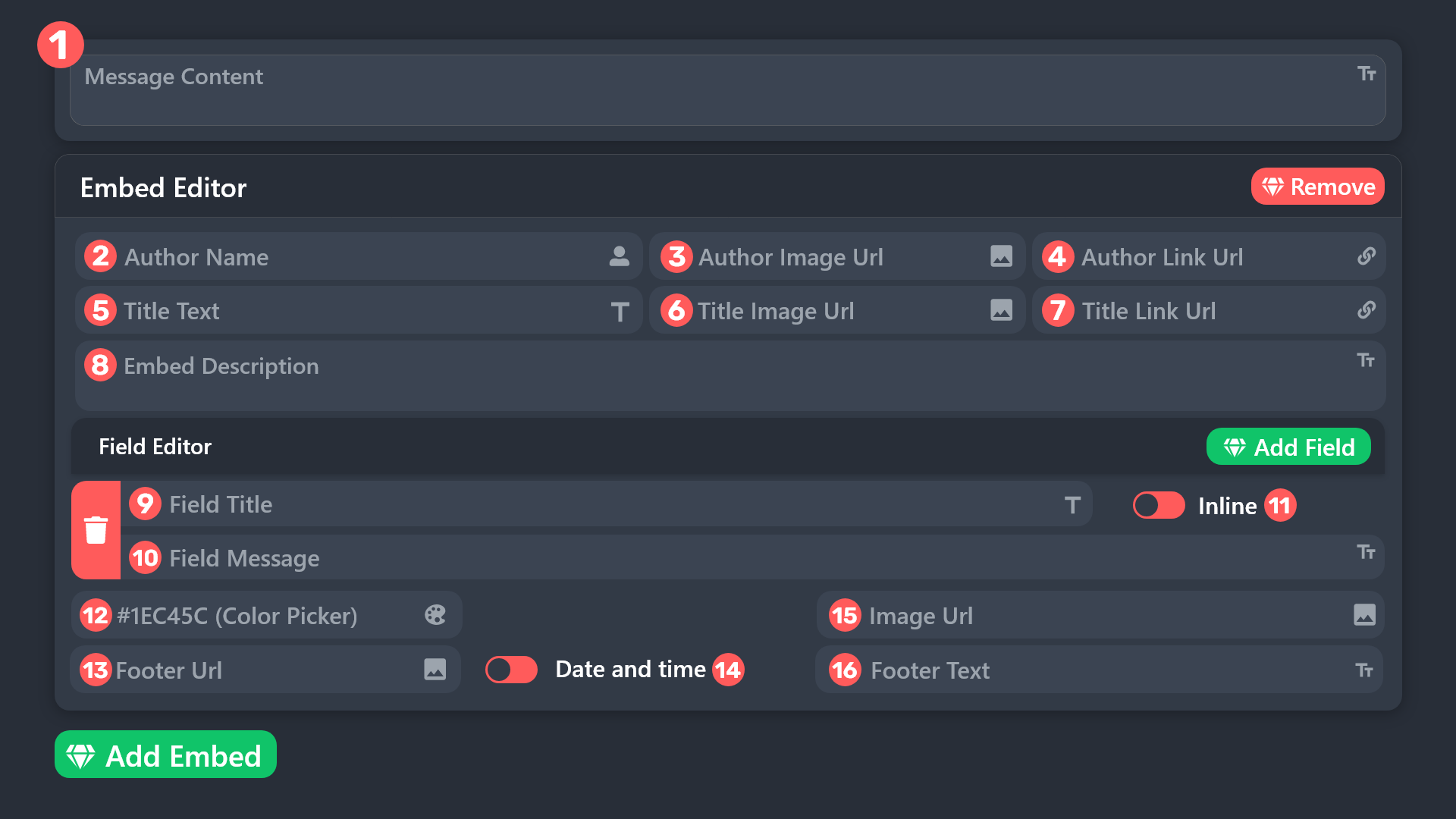 idle flint
Ensure that you place the mention into area 1 shown above. If you place it into the embed, it will not ping
honest turret
this thing that say {@Role name} do i have to say {@Role moderator} or {@moderator}?
idle flint
You will just say {<@&832847423801262090>} (ensure that it is the EXACT spelling of your role, and case sensitive)
honest turret
uhhh
idle flint
idle flint
You will just say {<@&832847423801262090>} (ensure that it is the EXACT spelling...
Sorry mods… forgot to turn the ping off…… 🤣🤣
honest turret
alr ty
idle flint
All good
 forest flame
Is there a way to give a temp role to the member who create a ticket? By temp role, I mean it should be removed when the ticket is closed/deleted.
 gilded verge
the settings will remain as you set, but if there is no premium, claiming will not work
gilded verge
forest flame
Is there a way to give a temp role to the member who create a ticket? By temp ro...
yep, it's premium feature, Panel Configs->Ticket

if you edited these messages with the darkened field (or any premium feature), your panel may have problems after premium expires
 humble sequoiaBOT
━━ User's inquiry has been moved to a ticket ━━
 real turret
hi, I have a problem with ticket bot permissions. it shows me this message. help from automatic support did not help.
 limber portal
real turret
hi, I have a problem with ticket bot permissions. it shows me this message. he...
limber portal
real turret
hi, I have a problem with ticket bot permissions. it shows me this message. he...
«You don't have permissions to use this»
Are your members seeing this message when they try to create a ticket?You may have accidentally denied them permission to use the Create Ticket button.
Look in the following places in your server's dashboard:
👉 Server Configs -> Blacklist Roles
Any roles there will be unable to interact with the bot in any way, including creating tickets.👉 Panel Configs -> Buttons -> Create Ticket -> Support team only
If this is enabled, only your staff will be able to use the button.
👉 Panel Configs -> Buttons -> Create Ticket -> Disabled Roles
Any roles there will be unable to use the button.
 marble flower
Don't Really need Support but can you pay for ticket tool Premium with Crypto at all?
jade topaz
marble flower
Don't Really need Support but can you pay for ticket tool Premium with Crypto at...
jade topaz
marble flower
ah okay yea i thought that 3m would prob be good
they r kinda slow in tickets tho :<
jade topaz
marble flower
thanks for ur support bro
np
pseudo ravine
jade topaz
they r kinda slow in tickets tho :<
We respond when we're available
 light plaza
holaaaaa donde puedo dscargar el juego
humble sequoiaBOT
⚠️ Está en el lugar equivocado
Brindamos soporte para el bot de Discord Ticket Tool y no le podemos ayudar con el problema que presenta.
- No sabemos a que equipo de soporte debería contactar para solucionar este problema, y desafortunadamente no podremos ayudarle acertadamente.
Si no tiene alguna duda relacionada a nuestro bot, Ticket Tool, por favor cierre este ticket.
 robust quest
Hello guys, any tutorial on how to change the location for the tickets showing once created? Every time a user creates a new ticket it creates the ticket on the beggining of the channels: Here

I need it to show in here:
 humble sequoiaBOT
1. Go into your Dashboard
2. Open your Panel Configs tab
3. Select the panel you want to grant access to
4. Open the Category options menu
5. Select the categories of your preference
6. Save changes
 limber portal
Check the embed(s) above
robust quest
Thanks!!!!
light plaza
por favor podia alguien mandarme el link del juego
pseudo ravine
You've already been told that we cannot help you with your issue
lyric quartz
is there a way to check who deleted a ticket
limber portal
lyric quartz
is there a way to check who deleted a ticket
Do you have logs enabled?
lyric quartz
i belive so
limber portal
lyric quartz
i belive so
Then you can check your logging channel, it will be displayed there
lyric quartz
ty
real turret
Hello, I have a problem that everyone can see the tickets? how to fix it?
limber portal
real turret
Hello, I have a problem that everyone can see the tickets? how to fix it?
Dashboard > panel configs > permissions > @everyone edit opened > make sure view channel is set to 
real turret
thanks
limber portal
Np
jade topaz
Hey, I got a quick question
If I was to create a server with panels/custom commands etc then copied the backup key, then deleted my server, would the backup key still work? How long does the backup stay available for?
idle flint
 hazy osprey
is it possible to send transcripts to dms ?
hazy osprey
is it possible to send transcripts to dms ?
It sure is, but it is also a premium feature
It can be enabled under the Transcript settings on the Dashboard
hazy osprey
gotcha
idle flint
jade topaz
Hey, I got a quick question
If I was to create a server with panels/custom comm...
Would it still work? Yes. How long for? I don’t think there is a timeframe for it to stop working ? (Happy to be corrected on this tho)
jade topaz
Thanks! ❤️
hexed fox
is ticket tool back on?
idle flint
hexed fox
is ticket tool back on?
From yesterday’s short outage? Yes? #📣│bot-news
hexed fox
alr
 stone topaz
Does anyone know how to fix this?
idle flint
stone topaz
Does anyone know how to fix this?
You are in the wrong discord server, we are the support team for the TicketTool Discord Bot only
stone topaz
idle flint
You are in the wrong discord server, we are the support team for the TicketTool ...
Which one do I go to?
humble sequoiaBOT
⚠️ You're in the wrong place
We provide support for Ticket Tool Discord bot and cannot help you with whatever issue you have.
- We don't know which Support Team you should contact to get this issue resolved, and unfortunately we won't be able to accurately tell you.
If you don't have any further questions regarding our bot Ticket Tool, please close this ticket
 wispy meteor
Is there a way to change the color that's on the side of the embed?
gilded verge
wispy meteor
Is there a way to change the color that's on the side of the embed?
shaded fields or emoji means that your server needs premium
so if you don't have, then you can't change color
wispy meteor
 why do I have to pay $6 to change a color aaaa. ok thank you.
 jade topaz
 naive marlin
like this
naive marlin
like this
Hello, go to the dashboard -> select your servers -> panel configs -> Panel and select the ticket category you want to add in the first line (they must be created beforehand)
which gives this :
 humble sequoiaBOT
━━ hannah 🎄's inquiry has been moved to a ticket ━━
jade topaz
hey there, wondering why is this interaction failed?
 pseudo ravine
jade topaz
hey there, wondering why is this interaction failed?
pseudo ravine
jade topaz
hey there, wondering why is this interaction failed?
Hey there. It seems like Discord was having some issues, but it should be resolved soon
jade topaz
tyty
pseudo ravine
Hey there. The panel ID is just the number that shows up on the dashboard
 pseudo ravine
jade topaz
tyty
pseudo ravine
jade topaz
tyty
You're welcome!
iron nightBOT
Gave +1 Rep to @pseudo ravine
 pure scroll
Hello! the ticket bot is in my server, but when I go to the dashboard, it says I need to invite the bot. I have refreshed multiple times already, am I doing something wrong?
pseudo ravine
Hey there. It seems like Discord was having some issues, but it should be resolved soon
scenic plinth
Interaction Failed Errors and Servers not loading (Dashboard)
There is an extremely small percentage of users that may not be able to use the bot on our primary servers because of an issue that was inflicted on a shard (server), causing the server to (again) rate limit itself. We will have this resolved as soon as possible.
There was also a Discord related issue previously, now resolved, involving connectivity. This may not resolve your issue, but attempt to restart your client. If this is unsuccessful, you are apart of the small percentage of people.
There is no work around for this at the moment, so be patient. Our developer is actively working to fix the issue. There is currently no ETA.
ETA Approx: <t:1700106420:R>
pure scroll
Oooo okok sounds good, no worries at all
thanks for the help!
thanks @pseudo ravine @scenic plinth
iron nightBOT
Gave +1 Rep to @pseudo ravine
pseudo ravine
You're welcome, glad we could help!
 solid stream
I found the issue
A fix has been pushed and we should be back in the next 10 minutes.
 radiant bluff
Ok
solid stream
We're back and running fine.
 queen berry
all my support tickets became viewable to my whole server
hey buddy, can you any insight on why all of my customer support tickets became viewable to all people who were in my server? I just came looking for help and I was trying to set the bot back up.
jade topaz
ty ty
solid stream
queen berry
hey buddy, can you any insight on why all of my customer support tickets became ...
Make sure the everyone permission is set to Deny View Channel
queen berry
solid stream
<https://docs.tickettool.xyz/dashboard/panel-configs/permission-options#everyone...
all of the cushions were correct it had been functioning perfectly for well over a year at this point and then all the sudden today it stopped functioning correctly so I'm a little confused I double checked all of the permissions on all of the rolls and the robot
queen berry
solid stream
Make sure the everyone permission is set to Deny View Channel
it was deff set to cant view
solid stream
queen berry
all of the cushions were correct it had been functioning perfectly for well over...
can I get your server ID to see if something has changed?
I haven't changed anything with the code that would result in this.
queen berry
solid stream
can I get your server ID to see if something has changed?
sure, where were the server ID? The robot wasn't functioning normally so I actually removed it will that prevent you from being able to see it?
i tried to re add it but it wont set up
queen berry
raw genetics
solid stream
server id: 898615669027922000
solid stream
They are not
queen berry
is there going to be a lifetime version i can pay for? figured id ask
queen berry
what was the one that got changed ?
maybe against when my community leader had somebody report that they could see that all the ticket system.
i tried to make it not visable for the ones that were still open maybe it was that
solid stream
Have you verifed with an Alt account that they're visible?
or a View server as role?
queen berry
yes i did view as verified and it saw the hole thing
solid stream
Tickets and all?
queen berry
verified is the role that you get after joining the server
yeah, reports from some of the community members that they could see all of the customer tickets with sensitive information in them.
solid stream
I think you should open a ticket so we can look into this more.
queen berry
the tool has been a great product so far this is the first time it's ever had any issues to be honest
solid stream
because there's no reason for the bot to randomly start doing that.
My best guess is either they have roles they shouldn't or another bot is messing with channel permissions.
queen berry
Ok I’ll open one so we can try to figure that out
 empty flower
Anyone else getting interaction failed now?
pseudo ravine
Hey there. The issue should be solved by now, are you still getting them?
 fair dust
If I want to add a user to a ticket I keep getting "Failed to add Missing Permissions". How can I fix this?
idle flint
fair dust
If I want to add a user to a ticket I keep getting "Failed to add Missing Permis...
Run a $debug within the ticket
fair dust
I did, all checkmarks
idle flint
fair dust
I did, all checkmarks
Just took a look at things - can you confirm which panel the ticket belongs to? (You have 21 panels)
Also, on your Dashboard > Command Configs > Add - you have specified a few “allowed roles” do you have one of those roles?
fair dust
idle flint
Just took a look at things - can you confirm which panel the ticket belongs to? ...
Panel 19, 20 and 21
And yes I have 1 of the allowed roles
idle flint
The issue is in your Permissions on the dashboard. I’ll explain shortly,
fair dust
I think the problem is when a ticket is created, the bot doesn't get the permissions to manage permissions but I don't know how to fix that honestly
idle flint

When you see the yellow symbol on the left, that means that the bot does not have those perms globally, therefore any yellow marked items MUST be left as /
 idle flint
check Ticket Owner Opened
fair dust
I've put that one on / also now
But I still get the same message when I try to add someone to the ticket
idle flint
Have you tried in a new ticket since adjusting the perms?
(Not one that was already open)
fair dust
Yes
idle flint
Hmmmm….. any chance you could send a screenshot through?
Of the error and things you are seeing in the ticket
fair dust
 idle flint
fair dust
idle flint
fair dust
Just to confirm, you tried a new ticket? I know the debug you ran earlier was in ticket #5 ? (I guess this could be a screenshot from earlier?)
fair dust
But I don't know why but in the category I gave Ticket Tool permission to manage permissions and when a ticket is created in that category, Ticket Tool doens't have that permission anymore
fair dust
idle flint
Just to confirm, you tried a new ticket? I know the debug you ran earlier was in...
Yes I tried a new ticket, this is in panel 19 (tier 1). The other screenshot was from panel 21 (tier 3).
But I can do it again if you want
 idle flint
Nope, that’s all good, just wanted to be sure 😊
For the Ticket Tool bot (the role) - can you go and give the “manage server” permission and see if that helps if it doesn’t have it already
fair dust
I did now. Try again in a new ticket now?
idle flint
Sure, just to eliminate any other things
idle flint
Perfect
iron nightBOT
Gave +1 Rep to @idle flint
 tight scroll
Hello
limber portal
tight scroll
Hello
Hey, do you need ticket tool help?
limber portal
tight scroll
How does ticket tool work?
I would reccomend checking out the docs https://docs.tickettool.xyz

Ticketing without Clutter
limber portal
tight scroll
And i am here because of some billing issue
You may want to open a billing ticket in #🎫│make-a-ticket
tight scroll
I have one
limber portal
Then you can wait for a response there
tight scroll
Should i press claim?
limber portal
No, that’s for staff
limber portal
tight scroll
What do i do to get my item back?
What item?
tight scroll
The $99.99 pack in Airline Manager 4
humble sequoiaBOT
⚠️ You're in the wrong place
We provide support for Ticket Tool Discord bot and cannot help you with whatever issue you have.
- We don't know which Support Team you should contact to get this issue resolved, and unfortunately we won't be able to accurately tell you.
If you don't have any further questions regarding our bot Ticket Tool, please close this ticket
limber portal
tight scroll
The $99.99 pack in Airline Manager 4
^
If that was the enquiry in your ticket, they can’t help either
tight scroll
Okay. Sorry to waste your time, and I wasted my money either
limber portal
No worries
tight scroll
limber portal
No worries
Okay, Im gonna leave the group
jade topaz
how can i make it so the bot pings a role when i open a ticket?
humble sequoiaBOT
1. Go into your Dashboard
2. Open your Panel Configs tab
3. Select the panel you want to ping your support on
4. Open the Ticket options menu
5. Click on Edit Ticket Message
6. In the Message Content use one of the role mention syntax (**{@Role Name}**/**{Role ID}**)
7. Save changes
Note: For this to work properly, Ticket Tool requires the Mention Everyone permission. Or the role must have the Allow anyone to @mention this role setting enabled
 iron nightBOT
Gave +1 Rep to @limber portal
limber portal
No problem
 empty kayak
Can someone lmk where to go on the website to add a new button here, been searching for 15minutes and lost lmao
 limber portal
empty kayak
Can someone lmk where to go on the website to add a new button here, been search...
limber portal
empty kayak
Can someone lmk where to go on the website to add a new button here, been search...
Dashboard > panel configs > panel
humble sequoiaBOT
For more convenient use of multipanels, you can now combine panels on the dashboard. This will allow you to directly send the multipanel from the dashboard or via the $panel ID command.
Where can I find this?
You can find this setting on the Dashboard -> Panel Configs -> Panel -> Attached Panels
Note: if you're attaching all the panels to a panel called English, don't include English in the attached panel's box (If you do this, it will create a duplicate)
This will put all buttons from all of your panels on one message. The message is the panel message from the panel you're combining these panels in.
 limber portal
Np
lyric quartz
is it at all possible to get to be able to see the attachments in the closed channel links
 humble sequoiaBOT
Attachments not being accessible
At the beginning of May 2022, Discord changed the way they store their deleted files, before this update, files could be accessible for up to 30 days after which they would get erased entirely from the Cloudflare cache. Now the files, including images, aren't accessible since they are deleted, which is why premium users [embed up to 8mb](#📣│bot-news message) worth of pictures within transcripts.
In the major update that's being worked on the developer is looking forward to implementing a better solution to this inconvenience in order for images to be saved, at least for a temporal way.
 shut bolt
@lyric quartz refer to the message above
lyric quartz
ty
 dense berry
humble sequoia
dense berry
humble sequoia
how does the transcript handle attachments? they embed the discord-link of the attachment which doesnt work after 30 days?
And the docs say "free version allows you to save up the last 500 messages of your tickets". is this 500 messages per transcripted ticket or in total over all transcripts?
limber portal
dense berry
how does the transcript handle attachments? they embed the discord-link of the a...
The limit is per transcript
dense berry
thanks for your quick answer! regarding my first question (attachments) I'm referring to the free ticket tool solution. How are attachments handled there?
limber portal
dense berry
thanks for your quick answer! regarding my first question (attachments) I'm refe...
I believe free attachments are handled as you described as the premium way has not been made free.
 limber rivet
Hello there! I am curious if it's possible for setting up an anonymous ticket tool. What I mean by that is that no-one from the admins know who sent the ticket. Cheers!
pseudo ravine
Hey there. It’s not really possible, since it’s a channel being created and adding the user to it
iron nightBOT
Gave +1 Rep to @pseudo ravine
pseudo ravine
You’re welcome, glad I could help!
limber rivet
another question that I have then, can support/mod team close the ticket or can only the one that sent the ticket do that?
cuz I cant seem to find the option to close it as a mod
jade topaz
Dashboard > Panel Configs > Buttons > Close Ticket
There you can select if the support team only can use the button or not, and you can also select allowed and disabled roles for the button.
iron nightBOT
Gave +1 Rep to @dire fiber
 main hazel
Is the dashboard down rn?
hmm ok
For me I can't see the servers, they are all in "Servers without Ticket Tool"
 stray bobcat
Try pressing the Sync button at the top of your page
If that doesn't work, try signing out and back in. It's usually a cache issue.
main hazel
and now this

 idle tide
main hazel
and now this
idle tide
main hazel
and now this
this is happening to me as well
jade topaz
same
pseudo ravine
@jade topaz @main hazel Could the both of you please send the server ID
main hazel
pseudo ravine
<@456226577798135808> <@197770628319674369> Could the both of you please send th...
1042585616359100537
pseudo ravine
Thank you
 alpine blade
Hi, this is also happening in my server! "This interaction failed"
 woeful eagle
I'm following the setup docs; and at Step 6 where I'm suppose to press the blue SEND button, and select the channel, I get an undefined error and nothing happens
pseudo ravine
Hey there. Could the both of you please send the server ID
 spark pollen
pseudo ravine
Hey there. Could the both of you please send the server ID
spark pollen
pseudo ravine
Hey there. Could the both of you please send the server ID
1060906457912062053
 pseudo ravine
I've alerted the developer
spark pollen
pseudo ravine
I've alerted the developer
 pseudo ravine
If you're reporting the interaction failed errors, the developer has already been alerted
spark pollen
pseudo ravine
If you're reporting the interaction failed errors, the developer has already bee...
He didn't mean it wrong
spark pollen
 novel nexus
ابي اسوي كذا كيف ؟
novel nexus
ابي اسوي كذا كيف ؟
He wants to create something like this
novel nexus
I want to do this and write what is the problem. I hope you understand
 stoic fog
for some reason everytime I invite the bot to my server it works but then the panel or dashboard keeps telling me invite it even though its in my server can someone help?
scenic plinth
Interaction Failed Errors and Servers not loading (Dashboard)
There is an extremely small percentage of users that may not be able to use the bot on our primary servers because of an issue that was inflicted on a shard (server), causing the server to (again) rate limit itself. We will have this resolved as soon as possible.
We apologize for the multiple instances of this occurring in the previous days. During this time, please do not mention and/or direct message staff. Currently we have no ETA on a fix.
novel nexus
 alpine blade
pseudo ravine
Hey there. Could the both of you please send the server ID
alpine blade
pseudo ravine
Hey there. Could the both of you please send the server ID
Sorry, I'm actually a mod so I can't find it and my admin is offline right now! We'll just wait it out! Thanks 🙂
iron nightBOT
Gave +1 Rep to @pseudo ravine
scenic plinth
scenic plinth
## Interaction Failed Errors and Servers not loading (Dashboard)
There is an ext...
spark pollen
scenic plinth
## Interaction Failed Errors and Servers not loading (Dashboard)
There is an ext...
novel nexus
spark pollen
He wants to create something like this
yes
humble sequoiaBOT
A Discord Form lets the user answer individual questions in a pop-up Form, which then displays the answers in the ticket message. This can save time if you already know what you want to ask the user.
Setup Forms
Forms can be enabled under Panel Settings > Form Options > Edit Forms Options. In the new pop-up window, you can now enable and edit your own Form.
Form Options
You can add up to 5 questions in the Discord form. This is a Discord limitation. Each question can have a placeholder in the input field, a minimum and maximum input, multi-line, and also the option to have the answer required.
Options
Question Title ➞ Your Question goes here
Question Placeholder ➞ The placeholder text in the input field
Required ➞ If enabled, the user has to answer this question, to submit the form
Multi-Line Input ➞Allows the user to input multiple lines
Minimum and Maximum Input ➞ Set a minimum and maximum input value for the user
Displaying the Answer
To display the answers from the user, you need to enable Auto display form results on the ticket message as an additional embed
If you don't want a second embed, go into your Panel Configs > Ticket Options > Edit Ticket Message. You use the variable {create.form.x} and replace x with the number of your question. For example, the response to Question 5 can be displayed with {create.form.5}.
 pseudo ravine
alpine blade
Sorry, I'm actually a mod so I can't find it and my admin is offline right now! ...
pseudo ravine
alpine blade
Sorry, I'm actually a mod so I can't find it and my admin is offline right now! ...
No worries! Even mods can get server IDs, just so you know
alpine blade
Oh, I'm just a noob lol, Found it: 1069835866173874227
spark pollen
اخواني العرب الي ظاهره له مشكله مايقدر يقفل التذكره ولا يفتح على كلامهم مشكله بسيطه وبتنحل ان شاء الله
 robust sandalBOT
My Arab brothers who have a problem can not close the ticket or open a simple problem for them and it will be solved hopefully
 Arabic (ar) → English (en)
هذا على الأرجح بسبب المشكلة الحالية مع أخطاء فشل التفاعل ، يرجى قراءة أحدث رسالة مثبتة في هذه القناة
English (en) → Arabic (ar)
spark pollen
robust sandal
Tell them that there is a problem with the server
 dire sun
is ticket tool down
 agile light
yes
spark pollen
dire sun
is ticket tool down
yes
spark pollen
scenic plinth
## Interaction Failed Errors and Servers not loading (Dashboard)
There is an ext...
.
agile light
i came here for same.
there was a report about it being down in the forums, and it was not a bug.
novel nexus
I want to access the bot's panel to program it I hope you understand
prime bridgeBOT
<:notallowed:660789872600285184> #🆘│community-support has been locked!
You will gain access again once the lockdown is lifted.
scenic plinth
Interaction Failed Errors and Servers not loading (Dashboard)
There is an extremely small percentage of users that may not be able to use the bot on our primary servers because of an issue that was inflicted on a shard (server), causing the server to (again) rate limit itself. We will have this resolved as soon as possible.
We apologize for the multiple instances of this occurring in the previous days. During this time, please do not mention and/or direct message staff. Currently we have no ETA on a fix.
prime bridgeBOT
<:allowed:660789592647008258> #🆘│community-support has been unlocked!
Everyone now has access to this channel.
scenic plinth
Back to lock
prime bridgeBOT
<:notallowed:660789872600285184> #🆘│community-support has been locked!
You will gain access again once the lockdown is lifted.
scenic plinth
Further updates (updates are edited into this message)
[ <t:1700180580:R> ] An issue regarding servers being ratelimited for a 3rd time in several days has been identified and our developer is currently working on a fix.
[ <t:1700181900:R> ] We are contacting Discord regarding rate limiting issues. We remain to have no ETA on a fix. We will provide an ETA when we have one available.
[ <t:1700183880:R> ] We are attempting to implement a temporary fix. See fix details posted by our developer [here](#🆘│community-support message). This also further elaborates on the cause of the outage.
[ <t:1700185140:R> ] We expect an ETA of about 2 hours from this update for these servers to return. Due to previous rate limits, we unfortunately have no spare servers to move the affected servers to, and we are waiting for yesterdays rate-limited servers to expire to move them to.
[ <t:1700190420:R> ] Resolved. Channels will be unlocked shortly.
Expected ETA counter: <t:1700192400:R>
Channels will remain locked. As a reminder, do not direct message staff members for any reason during this time.
Outage affects;
- Dashboard use/recognition. Servers may be treated as if you have not invited the bot, when the bot is invited. You are also unable to manage your server.
- Small amount of primary (white bot) servers. You may not be able to use the bot, though the bot appears online.
solid stream
There's a few servers more or less abusing Ticket Tool and causing us to hit Discord rate limits for the entire server hosting the bot.
I've added in rate limits to prevent their ability to do so.
 stark runeBOT
**Ticket Tool - All Systems are now __Online!__**
All Ticket Tool systems are fully online again! We apologize for any inconvenience this may have caused on your server.
If you are still experiencing any problem with Ticket Tool, please reach out to the <@&540295656720302081> within a ticket here, #🎫│make-a-ticket
 scenic plinth
If you are in need of support, please utilize this channel. We apologize for the inconvenience caused during the outage. Do not ping/direct message staff or spam channels with support requests. Our support members will endeavor a response time as soon as they become available.
prime bridgeBOT
<:allowed:660789592647008258> #🆘│community-support has been unlocked!
Everyone now has access to this channel.
scenic plinth
If you are still experiencing issues seeing your server(s) to manage because of the outage, please log out of the dashboard and log back in. Do not refresh...
 fleet garden
How to change what panel $new goes to for default or how to change it after? Or is it not possible I'm just confused lol
 paper meteor
I added my staff team roles to ticket tool but still my staffs cant see it why?
shut bolt
fleet garden
How to change what panel $new goes to for default or how to change it after? Or ...
Change the channel each panel monitors for the command style and have each panel set to a unique one. You can use threads or even forum posts
shut bolt
paper meteor
I added my staff team roles to ticket tool but still my staffs cant see it why?
Support team roles and other settings only apply to new tickets. Prior tickets keep the old configurations
fleet garden
shut bolt
Change the channel each panel monitors for the command style and have each panel...
Thank you I will try and let you know if I have issues I'm easily confused with so many commands and buttons lol
iron nightBOT
Gave +1 Rep to @shut bolt
paper meteor
shut bolt
Support team roles and other settings only apply to new tickets. Prior tickets k...
Thanks it's fixed now!!
shut bolt
fleet garden
Thank you I will try and let you know if I have issues I'm easily confused with ...
Sure thing, I suggest starting from the basics with just buttons and later on you can mess with the command style :) The learning curve is fast but sometimes with so many settings it's better to take it one at a time
shut bolt
paper meteor
Thanks it's fixed now!!
Glad to hear that
fleet garden
shut bolt
Sure thing, I suggest starting from the basics with just buttons and later on yo...
Yep it did work! Just wanted the option for one of the 3 to be used by mods only. I created a ticket and it did go under the correct one. Thanks again
iron nightBOT
Gave +1 Rep to @shut bolt
 fathom dirge
I've been trying to contact customer service for 5 days and no one answers. I did the $5 swap from the first wave and it can't be verified. Someone please help me
jade topaz
fathom dirge
I've been trying to contact customer service for 5 days and no one answers. I di...
Hello, how can we help you?
humble sequoiaBOT
⚠️ You're in the wrong place
We provide support for Ticket Tool Discord bot and cannot help you with whatever issue you have.
- We don't know which Support Team you should contact to get this issue resolved, and unfortunately we won't be able to accurately tell you.
If you don't have any further questions regarding our bot Ticket Tool, please close this ticket
scenic plinth
You were told already we cannot help you. Yesterday.
fathom dirge
jade topaz
Hello, how can we help you?
As I explained in the text, I have been trying for 5 days to get the task of the $5 swap of the first wave verified and in no way is it verified. I get Verification failed
fathom dirge
scenic plinth
You were told already we cannot help you. Yesterday.
If you're referring to me, I didn't get any messages. Otherwise I wouldn't be asking for help. I think you got the wrong person
jade topaz
humble sequoia
@fathom dirge
fathom dirge
jade topaz
<@1110342934169133216>
I have a colleague who had the same problem and she contacted you and you told her that you would verify her task and give you the 50 XP that the task is worth. So, can you or don't you want to?
jade topaz
fathom dirge
I have a colleague who had the same problem and she contacted you and you told h...
You are on a bot support server ticket tool, we can't help you
fathom dirge
jade topaz
You are on a bot support server ticket tool, we can't help you
The bot is going to tell me anything, but a bot is never going to solve my problem. The bot is sent by a person who wants to get out of a problem by saying it can't. My problem has to be worked on manually and apparently it's easier to say that you can't before you put in a little work and even if it's just trying. Anyway thanks! I will look for a way to fix the problem in a place that cares about the user's well-being
iron nightBOT
Gave +1 Rep to @harsh shuttle
 round minnow
Anyone know why it is saying this?
The buttons dont even have emojis I just removed them
Failed: `Invalid Form Body
components[0].components[0].options[0].emoji.id[BUTTON_COMPONENT_INVALID_EMOJI]: Invalid emoji
components[0].components[0].options[1].emoji.id[BUTTON_COMPONENT_INVALID_EMOJI]: Invalid emoji
components[0].components[0].options[2].emoji.id[BUTTON_COMPONENT_INVALID_EMOJI]: Invalid emoji```This error indicates you have selected an invalid emoji, i.e. an emoji the bot isn't capable of using, in a button field
Which Emoji?
This depends upon which action the error is appearing, the most common cases are the Create Ticket button or one of your Dropdown emojis. You can visit your Button's List to find all available buttons and find the conflicting one by yourself.
Why doesn't the bot accept it as valid?
- You selected an emoji that doesn't exist anymore, i.e. that has been deleted
- You wrote text there, instead of an emoji (or in addition to an emoji)
- You entered a code for a custom emoji from a server that the bot is not a member of
- You entered a custom emoji code incorrectly
- You're on iPhone and entered an emoji using the phone's emoji pad (use the emoji selector in the website instead)
limber portal
round minnow
Anyone know why it is saying this?
The buttons dont even have emojis I just rem...
^^
round minnow
limber portal
^^
Do you have this issue too? because i've been doing ticket tool for months using custom emojis. I changed them and then I got this error; so i removed them and even with no emojis I still get this error.
limber portal
round minnow
Do you have this issue too? because i've been doing ticket tool for months using...
Could be your button emoji
pseudo ravine
fathom dirge
The bot is going to tell me anything, but a bot is never going to solve my probl...
We only provide support for the Ticket Tool Discord bot, as you’ve been told multiple times, you are in the wrong place
 vague mesa
how to i add new buttom for panel?
humble sequoiaBOT
For more convenient use of multipanels, you can now combine panels on the dashboard. This will allow you to directly send the multipanel from the dashboard or via the $panel ID command.
Where can I find this?
You can find this setting on the Dashboard -> Panel Configs -> Panel -> Attached Panels
Note: if you're attaching all the panels to a panel called English, don't include English in the attached panel's box (If you do this, it will create a duplicate)
This will put all buttons from all of your panels on one message. The message is the panel message from the panel you're combining these panels in.
vague mesa
how to i create new buttom for panel?
pseudo ravine
humble sequoia
Read this
vague mesa
pseudo ravine
Read this
I know, but there is no such thing on the site
vague mesa
pseudo ravine
Are you just needing to create a new panel?
No, I just want one button like this
Ticket Panel
Other | Report
pseudo ravine
So one panel with one button?
pseudo ravine
humble sequoia
This gives you the information
vague mesa
ok Thanks
pseudo ravine
You’re welcome, glad I could help!
real turret
Hello, I have a problem with tickets. something like this is displayed.
 pseudo ravine
Hey there. Could you send the server ID
 runic canopy
Hello, I just reset my pc last night and lost the key to thr mw2 vip chair. How can I retrieve it ?
novel nexus
I want to enter this page so that the person can write his problem, but I did not find it. I hope you understand

 humble sequoiaBOT
⚠️ You're in the wrong place
We provide support for Ticket Tool Discord bot and cannot help you with whatever issue you have.
- We don't know which Support Team you should contact to get this issue resolved, and unfortunately we won't be able to accurately tell you.
If you don't have any further questions regarding our bot Ticket Tool, please close this ticket
pseudo ravine
@runic canopy Read this ^
pseudo ravine
novel nexus
I want to enter this page so that the person can write his problem, but I did no...
Hey there. You will need to scroll down until you see the Form button
novel nexus
Look @pseudo ravine


 novel nexus
Can you please teach me where to write the question and what should I do?

Maybe you can answer me
@pseudo ravine Maybe you can answer me
jade topaz
novel nexus
Can you please teach me where to write the question and what should I do?
You write the question in the Question Title
If you want to use forms make sure to tick the Enable Form option at the top 
 restive isle
hi
novel nexus
why like this
 novel nexus
why like this
novel nexus
novel nexus
why like this
@jade topaz
jade topaz
novel nexus
why like this
Make sure to give Ticket Tool permission to access the channel. So you can either give it administrator or the view channel and send messages permission for that specific channel
jade topaz
restive isle
i bought cheat and they scam me
You are in the incorrect server
jade topaz
You will have to figure that out yourself as this server is strictly for Ticket Tool
If you purchased and got a invoice try find a contact button
humble sequoiaBOT
⚠️ You're in the wrong place
We provide support for Ticket Tool Discord bot and cannot help you with whatever issue you have.
- We don't know which Support Team you should contact to get this issue resolved, and unfortunately we won't be able to accurately tell you.
If you don't have any further questions regarding our bot Ticket Tool, please close this ticket
jade topaz
Check the above message 🙂
restive isle
bro ich komme uas deutschland
was ist das hier fürn kack statt sich mal einerm eldet oder ne korrkete antwort abliefert hier
robust sandalBOT
restive isle
was ist das hier fürn kack statt sich mal einerm eldet oder ne korrkete antwort ...
What is this for shit instead of getting an eldet or delivering a corrected answer here
German (de) → English (en)
jade topaz
This isn’t the correct server for your cheats so we cannot help you with whatever issue you are having
restive isle
hammer support 😄
 tired python
So ticket tool website says to buy premium through discord and. Note in discord shop says “note: this is not how you purchase tickettool premium” glitch in the matrix? Or human error?
limber portal
tired python
So ticket tool website says to buy premium through discord and. Note in discord ...
You arent meant to purchase the server subscriptions, they are just donations in essence. You need to buy from the ‘upgrade’ button on the bots profile, or through the app directory
humble sequoiaBOT

Premium can now be purchased directly through discord! Either in the app directory (server settings) or directly from the bots profile.
<:TTWarning:1034178155872784494> Important Information <:TTWarning:1034178155872784494>
ONLY purchase premium through ONE of the two Ticket Tool Bots. If you purchased premium on the primary bot (White logo) and plan to use the premium bot, don't kick the primary bot!
What's different?
 The Monthly price changed from
 $6.00 to $5.99

 Yearly subscriptions are not yet available
Don't kick the bot, otherwise, the subscription will be canceled automatically
You'll need to buy the subscription from a computer or on the Application Directory
You might need to run the /premium command on your server to sync the premium status with your dashboard
 A subscription can not be transferred between Servers
 pseudo ravine
novel nexus
<@865714582613524491> Maybe you can answer me
pseudo ravine
novel nexus
<@865714582613524491> Maybe you can answer me
Maybe you could stop pinging me for support
Just send a message saying what the issue is, and someone will assist
novel nexus
pseudo ravine
Maybe you could stop pinging me for support
ok
humble sequoiaBOT
A Discord Form lets the user answer individual questions in a pop-up Form, which then displays the answers in the ticket message. This can save time if you already know what you want to ask the user.
Setup Forms
Forms can be enabled under Panel Settings > Form Options > Edit Forms Options. In the new pop-up window, you can now enable and edit your own Form.
Form Options
You can add up to 5 questions in the Discord form. This is a Discord limitation. Each question can have a placeholder in the input field, a minimum and maximum input, multi-line, and also the option to have the answer required.
Options
Question Title ➞ Your Question goes here
Question Placeholder ➞ The placeholder text in the input field
Required ➞ If enabled, the user has to answer this question, to submit the form
Multi-Line Input ➞Allows the user to input multiple lines
Minimum and Maximum Input ➞ Set a minimum and maximum input value for the user
Displaying the Answer
To display the answers from the user, you need to enable Auto display form results on the ticket message as an additional embed
If you don't want a second embed, go into your Panel Configs > Ticket Options > Edit Ticket Message. You use the variable {create.form.x} and replace x with the number of your question. For example, the response to Question 5 can be displayed with {create.form.5}.
 tawny sorrel
scenic plinth
restive isle
shit bots and tickets why cant any support help me ?
tawny sorrel
scenic plinth
restive isle
shit bots and tickets why cant any support help me ?
Because you decided to manage your money poorly for something that isn't related to our bot.
spice cape
i need a restore from a moderator, i have a clip and everything as evidence
limber portal
spice cape
i need a restore from a moderator, i have a clip and everything as evidence
What do you mean a restore?
spice cape
Is this not the deepwoken ticket support server
limber portal
Nope
spice cape
This is where it took me bruh wtf
humble sequoiaBOT
⚠️ You're in the wrong place
We provide support for Ticket Tool Discord bot and cannot help you with whatever issue you have.
- We don't know which Support Team you should contact to get this issue resolved, and unfortunately we won't be able to accurately tell you.
If you don't have any further questions regarding our bot Ticket Tool, please close this ticket
 south rune
Right so i need help when claiming a ticket i only want certain roles to be able to message when a ticket is claimed
where do i find that?
 vital glacier
This may be a simple fix. But is there a way for me to allow 1 person or role to access just ticket tool settings?
I know I've seen other bots allow like another role to access and change their settings with a setting in the bots dashboard
humble sequoiaBOT
Any role you put there will have full access to the ticket tool dashboard. The server owner and users with admin permissions already have access to the dashboard.
Be careful of which roles to put here
 vital glacier
humble sequoia
vital glacier
humble sequoia
Thank you for the help
iron nightBOT
Gave +1 Rep to @humble sequoia
 humble sequoiaBOT
The Drop-down menu or Select Menu replaces the buttons on your panel message and uses a drop-down menu with all of your panels. To set this up, go to your Panel Configs and select your main Panel.
<:Numbericons1:1018864164032225340> Enable Select Style
First you enable Select Style. Then you add an item in the Dropdown Editor. Now you can start editing your dropdown!
<:Numbericons2:1018864168041971712> Dropdown Editor
Each line in the dropdown editor represents a line in the drop down menu on discord. You can add more "Items", by clicking on
First you select a panel. That's the panel this option will open a ticket for. DONT select the same panel twice. Each option should have a different Panel
After that, you can put a Display. This is the title of this option and will appear in the drop down menu. The *Description can be set right after that, which will be below the title in grey.
Additionally you can select an emoji, that will be shown in front of each option. You can either manually input the ID of an emoji or select it in the selector.
Common Issues ⚠️
- Panel doesn't send? Make sure you have a valid emoji selected
- Option doesn't show up? Check if two options have the same panel in the DropDown Editor
$dropdown
limber portal
 iron arrow
^^
scenic plinth
iron arrow
Como eu posso fazer isso?
Veja "dropdown style" em sua painel.
jade topaz
How to get more buttons in one panel?
humble sequoiaBOT
For more convenient use of multipanels, you can now combine panels on the dashboard. This will allow you to directly send the multipanel from the dashboard or via the $panel ID command.
Where can I find this?
You can find this setting on the Dashboard -> Panel Configs -> Panel -> Attached Panels
Note: if you're attaching all the panels to a panel called English, don't include English in the attached panel's box (If you do this, it will create a duplicate)
This will put all buttons from all of your panels on one message. The message is the panel message from the panel you're combining these panels in.
cursive phoenix
@jade topaz  this should help
jade topaz
Ok
 orchid palm
@limber portal ok
pseudo ravine
orchid palm
<@1065295463089180763> ok
Is there any reason why you're pinging a member randomly?
 floral siren
how can i add multiple buttons to a panel?
humble sequoiaBOT
For more convenient use of multipanels, you can now combine panels on the dashboard. This will allow you to directly send the multipanel from the dashboard or via the $panel ID command.
Where can I find this?
You can find this setting on the Dashboard -> Panel Configs -> Panel -> Attached Panels
Note: if you're attaching all the panels to a panel called English, don't include English in the attached panel's box (If you do this, it will create a duplicate)
This will put all buttons from all of your panels on one message. The message is the panel message from the panel you're combining these panels in.
jade topaz
humble sequoia
@floral siren ^^
floral siren
ty
 dusk needle
floral siren
dusk needle
floral siren
is there a way to automatically delete closed ticket after a certain time has elapsed? I thought I saw it one time but I don't see it in automations
 fickle jungle
hi how can i make a image like at the embed of my screen like this

 quaint grotto
Plz guys i need help i want u to forgive me and unban me plz
 slender minnow
quaint grotto
Plz guys i need help i want u to forgive me and unban me plz
slender minnow
quaint grotto
Plz guys i need help i want u to forgive me and unban me plz
Banned from this server?
slender minnow
fickle jungle
hi how can i make a image like at the embed of my screen like this
If you click on the dropdown near embed editor then you should see a placeholder to add images
quaint grotto
No from battlefiled 4
humble sequoiaBOT
⚠️ You're in the wrong place
We provide support for Ticket Tool Discord bot and cannot help you with whatever issue you have.
- We don't know which Support Team you should contact to get this issue resolved, and unfortunately we won't be able to accurately tell you.
If you don't have any further questions regarding our bot Ticket Tool, please close this ticket
quaint grotto
Plz i want them to forgive i new pc gamer and they ban me bcs i use aimbot and i promise i will uesit again
I just buy game from a week
Plz
Can anyone answer me
humble sequoiaBOT
⚠️ Please read the messages previously sent by our team ⚠️
slender minnow
quaint grotto
Plz i want them to forgive i new pc gamer and they ban me bcs i use aimbot and i...
As I said before, you are in the wrong server.
We cannot assist you and we don't know whom you were supposed to contact.
floral siren
floral siren
is there a way to automatically delete closed ticket after a certain time has el...
any answer on this ^^
idle flint
floral siren
any answer on this ^^
On the Dashboard > Panel Configs > Automations, use the Add Automation button (also ensure the "Show advanced automation" slider is ON, then use these settings:

(the time, you can put your own value, I just put 30 minutes for an example)
 tidal light
Hey admins
I need a help on this, our community members are not able to see their ticket previous messages , it gets deleted every time
 jade topaz
tidal light
I need a help on this, our community members are not able to see their ticket pr...
jade topaz
tidal light
I need a help on this, our community members are not able to see their ticket pr...
Do you have an error message or a little more information please? Ticket Tool doesn’t delete messages in tickets.
jade topaz
Oh okay that’s a little more clear, for that you can go to the Dashboard > Panel Configs > Permissions > Ticket Owner
Make sure the Read Message History is 
For the changes to take place please try creating another ticket and see if you have the same issue.
tidal light
Okay
 rapid halo
Hello.. can anyone help me how to issue ticket
limber portal
rapid halo
Hello.. can anyone help me how to issue ticket
You can make a ticket in #🎫│make-a-ticket
jade topaz
Add me on https://discord.com/ so we can talk! My username is ali3nth3god.

Discord
Discord is the easiest way to talk over voice, video, and text. Talk, chat, hang out, and stay close with your friends and communities.
limber portal
jade topaz
Add me on https://discord.com/ so we can talk! My username is ali3nth3god.
This channel is for support only
 still ibex
Is ticket tool open source?
jade topaz
Nope 👎
 naive frost
why i cant use dashboard in my server?
humble sequoiaBOT
Don't see your server in the dashboard?
Try using the Sync Servers button on your top center of the Dashboard page
You will possibly need to relog. Look below to see the steps on how to relog.
If this doesn't work
You should relog from the dashboard, you can do this by clicking here to log out immediately, and then log back in
Note:
You need one of these 3 things to access the dashboard.
1. Server Owner (Level: 6)
2. Server Administrator (Level: 4)
3. Dashboard Role (Level: 2)
:warning: You can check your level using the </permissionlevel:1029797400174399542> command on your Discord Server
If the bot's response is:
- @User is permission level: 0 (User)
You don't have any of the 3 levels required to access the server's dashboard
 limber portal
naive frost
why i cant use dashboard in my server?
limber portal
naive frost
why i cant use dashboard in my server?
Try some steps from here ^^
limber portal
np
 honest maple
How can i see how who has changed the settings for ticket tool on my server?
pseudo ravine
Hey there. You can go to the Dashboard > Dashboard History
honest maple
pseudo ravine
Hey there. You can go to the Dashboard > Dashboard History
ohh okay! thank you! xx
iron nightBOT
Gave +1 Rep to @pseudo ravine
pseudo ravine
You’re welcome, glad I could help!
 tight cave
does it have a zero tech boing 737 900 license?
humble sequoiaBOT
⚠️ You're in the wrong place
We provide support for Ticket Tool Discord bot and cannot help you with whatever issue you have.
- We don't know which Support Team you should contact to get this issue resolved, and unfortunately we won't be able to accurately tell you.
If you don't have any further questions regarding our bot Ticket Tool, please close this ticket
limber portal
tight cave
does it have a zero tech boing 737 900 license?
^^
 lethal wharf
idle flint
lethal wharf
idle flint
oh dam i had a question about this in the application and i didnt said that
😭 im going to fail
limber portal
lethal wharf
oh dam i had a question about this in the application and i didnt said that
Please don’t use this channel if you don’t need support
lethal wharf
limber portal
Please don’t use this channel if you don’t need support
mb bro im just sad that i didnt said that
pseudo ravine
Please move to #💬│general-chat if you don't need support
floral siren
idle flint
On the Dashboard > Panel Configs > Automations, use the Add Automation button (a...
awesome i’ll try this out, thank you!
just to confirm i’m not being daft, when it says “automations will stop checking after 7 days”, that doesn’t mean i have to redo the automation every 7 days, more so if the automation parameters are not met for 7 consecutive days then it will need redoing?
iron nightBOT
Gave +1 Rep to @idle flint
 tall shuttle
Hello, I need help, my friend is saying that he doesn't have permission to access the ticket
limber portal
tall shuttle
Hello, I need help, my friend is saying that he doesn't have permission to acces...
«You don't have permissions to use this»
Are your members seeing this message when they try to create a ticket?You may have accidentally denied them permission to use the Create Ticket button.
Look in the following places in your server's dashboard:
👉 Server Configs -> Blacklist Roles
Any roles there will be unable to interact with the bot in any way, including creating tickets.👉 Panel Configs -> Buttons -> Create Ticket -> Support team only
If this is enabled👉 Panel Configs -> Buttons -> Create Ticket -> Disabled Roles
Any roles there will be unable to use the button.
tall shuttle
n foi
nunhuma delas
deixa foi
Hello, I need help, I solved the problem with the ticket not opening, now I have the problem that everyone is seeing the ticket that my friend opened
limber portal
tall shuttle
Hello, I need help, I solved the problem with the ticket not opening, now I have...
Dashboard > panel configs > permissions > @everyone edit opened > make sure view channel is set to
tall shuttle
no dc?
limber portal
Wym?
tall shuttle
on discord?
limber portal
No on the dashboard
tall shuttle
or in the ticket tool
limber portal
limber portal
No on the dashboard
^
 jade topaz
Yes go to Everyone Role Permissions
tall shuttle
ok
jade topaz
Make sure the View Channel is
 jade topaz
Are you editing the correct panel?
jade topaz
Sure 👍
tall shuttle
pear
I managed to solve it thank you very much
thanks @jade topaz and @limber portal
iron nightBOT
Gave +1 Rep to @dire fiber
 trail finch
Is it possible to make a hyperlink here? If so, how?
 limber portal
trail finch
** **
Is it possible to make a hyperlink here? If so, how?
** **
limber portal
trail finch
** **
Is it possible to make a hyperlink here? If so, how?
** **
Hey, unfortunatly it isnt possible
trail finch
limber portal
Hey, unfortunatly it isnt possible
Sad, thanks for the answer)
iron nightBOT
Gave +1 Rep to @limber portal
limber portal
trail finch
Sad, thanks for the answer)
no worries
 fallen swallow
I want the authorized role to be tagged when the ticket is opened. How do I do it?
@limber portal
@trail finch
humble sequoiaBOT
1. Go into your Dashboard
2. Open your Panel Configs tab
3. Select the panel you want to ping your support on
4. Open the Ticket options menu
5. Click on Edit Ticket Message
6. In the Message Content use one of the role mention syntax (**{@Role Name}**/**{Role ID}**)
7. Save changes
Note: For this to work properly, Ticket Tool requires the Mention Everyone permission. Or the role must have the Allow anyone to @mention this role setting enabled
limber portal
fallen swallow
I want the authorized role to be tagged when the ticket is opened. How do I do i...
^^
limber portal
 jaunty goblet
Hy
jaunty goblet
Hy
Hey, do you need ticket tool help?
humble sequoiaBOT
Hello, we would love to help you, but if you don't tell us what you need help with we can't help you :(
jaunty goblet
I dont receeved my émail
humble sequoiaBOT
⚠️ You're in the wrong place
We provide support for Ticket Tool Discord bot and cannot help you with whatever issue you have.
- We don't know which Support Team you should contact to get this issue resolved, and unfortunately we won't be able to accurately tell you.
If you don't have any further questions regarding our bot Ticket Tool, please close this ticket
pseudo ravine
fallen swallow
<@1065295463089180763>
Next time, please don't ping anyone for support. Just state your question/issue and someone will assist you
humble sequoiaBOT
1. Go into your Dashboard
2. Open your Panel Configs tab
3. Select the panel you want to grant access to
4. Open the General options menu
5. Select your Support Team Roles
6. Save changes
 limber portal
jade topaz
How do I add certain roles to be able to see a ticket when it’s created
limber portal
jade topaz
How do I add certain roles to be able to see a ticket when it’s created
^^
jade topaz
Can I make it to where certain tickets I can add other roles.. let’s say I have a support ticket and mods can respond in it but in report ticket mods can’t access it
limber portal
jade topaz
Can I make it to where certain tickets I can add other roles.. let’s say I have ...
If Report tickets and Support tickets are 2 seperate panels you can just add different support team roles for each
iron nightBOT
Gave +1 Rep to @limber portal
limber portal
np
 jovial spindle
what to do?
 idle flint
jovial spindle
what to do?
idle flint
jovial spindle
what to do?
Delete channels in the server
fallen swallow
no one can help me with my problem
I want the authorized role to be tagged when the ticket is opened. How do I do it?
pseudo ravine
humble sequoia
You were already informed how to do it ^
fallen swallow
humble sequoia
This is the answer to my problem
pseudo ravine
Yes
fallen swallow
I'm sorry my friend, I couldn't understand because my English is poor, thank you.
pseudo ravine
You're welcome, glad I could help!
 upper bronze
Hello I was seeing how to make someone ask their question and describe what is the problem they are having first instead of seeing a empty ticket that was opened
humble sequoiaBOT
A Discord Form lets the user answer individual questions in a pop-up Form, which then displays the answers in the ticket message. This can save time if you already know what you want to ask the user.
Setup Forms
Forms can be enabled under Panel Settings > Form Options > Edit Forms Options. In the new pop-up window, you can now enable and edit your own Form.
Form Options
You can add up to 5 questions in the Discord form. This is a Discord limitation. Each question can have a placeholder in the input field, a minimum and maximum input, multi-line, and also the option to have the answer required.
Options
Question Title ➞ Your Question goes here
Question Placeholder ➞ The placeholder text in the input field
Required ➞ If enabled, the user has to answer this question, to submit the form
Multi-Line Input ➞Allows the user to input multiple lines
Minimum and Maximum Input ➞ Set a minimum and maximum input value for the user
Displaying the Answer
To display the answers from the user, you need to enable Auto display form results on the ticket message as an additional embed
If you don't want a second embed, go into your Panel Configs > Ticket Options > Edit Ticket Message. You use the variable {create.form.x} and replace x with the number of your question. For example, the response to Question 5 can be displayed with {create.form.5}.
limber portal
upper bronze
Hello I was seeing how to make someone ask their question and describe what is t...
^^
upper bronze
ty!!
limber portal
Np
 lapis moth
كيف اسويها
 humble sequoiaBOT
A Discord Form lets the user answer individual questions in a pop-up Form, which then displays the answers in the ticket message. This can save time if you already know what you want to ask the user.
Setup Forms
Forms can be enabled under Panel Settings > Form Options > Edit Forms Options. In the new pop-up window, you can now enable and edit your own Form.
Form Options
You can add up to 5 questions in the Discord form. This is a Discord limitation. Each question can have a placeholder in the input field, a minimum and maximum input, multi-line, and also the option to have the answer required.
Options
Question Title ➞ Your Question goes here
Question Placeholder ➞ The placeholder text in the input field
Required ➞ If enabled, the user has to answer this question, to submit the form
Multi-Line Input ➞Allows the user to input multiple lines
Minimum and Maximum Input ➞ Set a minimum and maximum input value for the user
Displaying the Answer
To display the answers from the user, you need to enable Auto display form results on the ticket message as an additional embed
If you don't want a second embed, go into your Panel Configs > Ticket Options > Edit Ticket Message. You use the variable {create.form.x} and replace x with the number of your question. For example, the response to Question 5 can be displayed with {create.form.5}.
jade topaz
@lapis moth If you cannot understand i would reccomend #🎫│make-a-ticket
lapis moth
فتحت ولا حدا رد
jade topaz
You will have to wait patiently for someone to respond
 hollow compass
Is there a way to keep track of tickets instead of them disappearing when they're closed?
pseudo ravine
Hey there. That’s what the transcript feature is for
hollow compass
Ah! thank you
 analog olive
Hello, someone from support who speaks Spanish?
jade topaz
analog olive
Hello, someone from support who speaks Spanish?
hi, use the Spanish ticket support > #🎫│make-a-ticket 🙂
analog olive
Thank you
 silk marsh
everytime a ticket is made with ticket tool, im not receiving any mentions from it yet other people receive mentions from it perfectly fine. ive already checked my server settings as well. idk how to fix it
 dusky abyss
Please help me sir
 snow herald
Hi my users are unble to paste link or send image in the ticket any idea how i can resolve that ?
dusky abyss
My tricjet : 60456 please check
My address : 0x63595Bf190a9deCEB2a3A61bfc77BF63e78D00aA
Please check everything allow me pyth airdrop.
dusky abyss
#sos please check everuthing 0x63595Bf190a9deCEB2a3A61bfc77BF63e78D00aA
humble sequoiaBOT
⚠️ You're in the wrong place
We provide support for Ticket Tool Discord bot and cannot help you with whatever issue you have.
- We don't know which Support Team you should contact to get this issue resolved, and unfortunately we won't be able to accurately tell you.
If you don't have any further questions regarding our bot Ticket Tool, please close this ticket
limber portal
dusky abyss
#sos please check everuthing 0x63595Bf190a9deCEB2a3A61bfc77BF63e78D00aA
^^
limber portal
silk marsh
everytime a ticket is made with ticket tool, im not receiving any mentions from ...
Do you have the bot configured to automatically ping a role?
limber portal
snow herald
Hi my users are unble to paste link or send image in the ticket any idea how i c...
Dashboard > panel configs > permissions > ticket owner (edit opened) > change attach files to ✅
dusky abyss
I am early member vela but not eligable pyth airdrop why sir /
limber portal
dusky abyss
I am early member vela but not eligable pyth airdrop why sir /
As you’ve already been told you are in the wrong server
silk marsh
limber portal
Do you have the bot configured to automatically ping a role?
oh i dont know, its not my bot or server, but im guessing they do since it pings everyone else, im just not receiving pings from it at all
dusky abyss
limber portal
As you’ve already been told you are in the wrong server
How can get write server sir
limber portal
dusky abyss
How can get write server sir
We can’t tell you because we do not know
limber portal
silk marsh
oh i dont know, its not my bot or server, but im guessing they do since it pings...
You may not have the role that is being pinged
tidal light

Can someone help to fix this , it keeps deleting the history for user but chat is visible for admins
limber portal
tidal light
Do they have the ‘read message history’ permission?
silk marsh
limber portal
You may not have the role that is being pinged
i have the roles according to one of the mods, do you think theres another possibility?
limber portal
You could have notifications muted
 strong wagon
Hey , This feature needs a premium ?
 limber portal
strong wagon
Hey , This feature needs a premium ?
limber portal
strong wagon
Hey , This feature needs a premium ?
Hey, what specific feature are you reffering to
tidal light
limber portal
Do they have the ‘read message history’ permission?
Yes it's enabled
limber portal
tidal light
Yes it's enabled
Looks like a discord issue then, get them to try from pc and see if they experience the same thing
strong wagon
@limber portal This
 limber portal
strong wagon
<@1065295463089180763> This
limber portal
strong wagon
<@1065295463089180763> This
That’s just a panel which does not need premium
tidal light
limber portal
Looks like a discord issue then, get them to try from pc and see if they experie...
Are you admin here?
strong wagon
Ok Ty pro
limber portal
tidal light
Are you admin here?
No
strong wagon
@limber portal , i Can change This Name from how ?
 limber portal
What name?
strong wagon
strong wagon
<@1065295463089180763> This
.
limber portal
The panel name?
strong wagon
Ya
limber portal
Click the rename button
limber portal
Np
 steep ermine
how to creat logs who open and close ticket?
wild spire
steep ermine
how to creat logs who open and close ticket?
panel configs > logging
add a channel where the logs need to be send and enable which logs you want to be registered
tidal light
wild spire
panel configs > logging
 wild spire
tidal light
wild spire
tidal light
panel configs > permissions.
Support team opened or ticket owner opened depending on the person.
Make sure to enable read message history
 hazy nest
Can I transfer the system of tikets from one discord channel to another?
limber portal
hazy nest
Can I transfer the system of tikets from one discord channel to another?
You can send the panel to a new channel, just click the ‘send’ button underneath the panel select dropdown
hazy nest
limber portal
You can send the panel to a new channel, just click the ‘send’ button underneath...
i mean from discord server to another discord server
humble sequoiaBOT
The Backup and Restore feature allows you to transfer your panels, tags, and all settings to a new server, even if the server the settings were created has been deleted! You will want to copy the whole key.
First, go to your server's Dashboard ➞ then Server Configs ➞ under Config Backup & Restore (Server Owner Only) click on Old version can be found here and generate a new backup key by pressing the green button. Now, a key should be generated in the box above. You may need to refresh the page to see this.
Once you have your backup key, navigate to the same page on the new server. Copy the key on the Restore from backup key field.
Now you can choose what you want to copy. Finally, press the green Restore Configs button.
IMPORTANT NOTE
- We suggest you keep this backup key somewhere safe, in case your server is deleted so you are able to recover your panel's settings.
- This feature is only usable by the server's owner
$backup
limber portal
hazy nest
i mean from discord server to another discord server
^^
hazy nest
thank u
hazy nest
help xd
 limber portal
hazy nest
help xd
limber portal
hazy nest
help xd
Try pressing the sync button
hazy nest
still same problem
limber portal
Try using a different browser
jade topaz
hi, #🎫│make-a-ticket 🙂
humble sequoiaBOT
Invitando a Ticket Tool
Lo primero que debe hacer es invitar al bot, dando click aquí.
Una vez haya invitado al bot, diríjase al panel de control y cree un panel.
Un panel es usado para definir las configuraciones de un ticket (los usuarios que pueden ver el ticket, los permisos, los nombres, entre otros).
Creando un Panel
Para crear un panel, diríjase a la pestaña de Panel Configs o Configuraciones del Panel en el panel de control de su servidor.
Una vez esté allí, de click en Create Panel / Crear Panel.
Panel Name → Es el nombre que desea que tenga el panel, puede asignar el nombre de su preferencia.
Support Team Roles → Seleccione los roles que deseen que puedan ver los tickets que se creen desde este panel.
Panel Channel → Elija el canal al que quiera que el panel sea enviado al ser creado. (Este campo es opcional, puede reenviar el panel posteriormente si es necesario)
Finalmente de nuevamente click en Create Panel como ilustra el siguiente GIF:
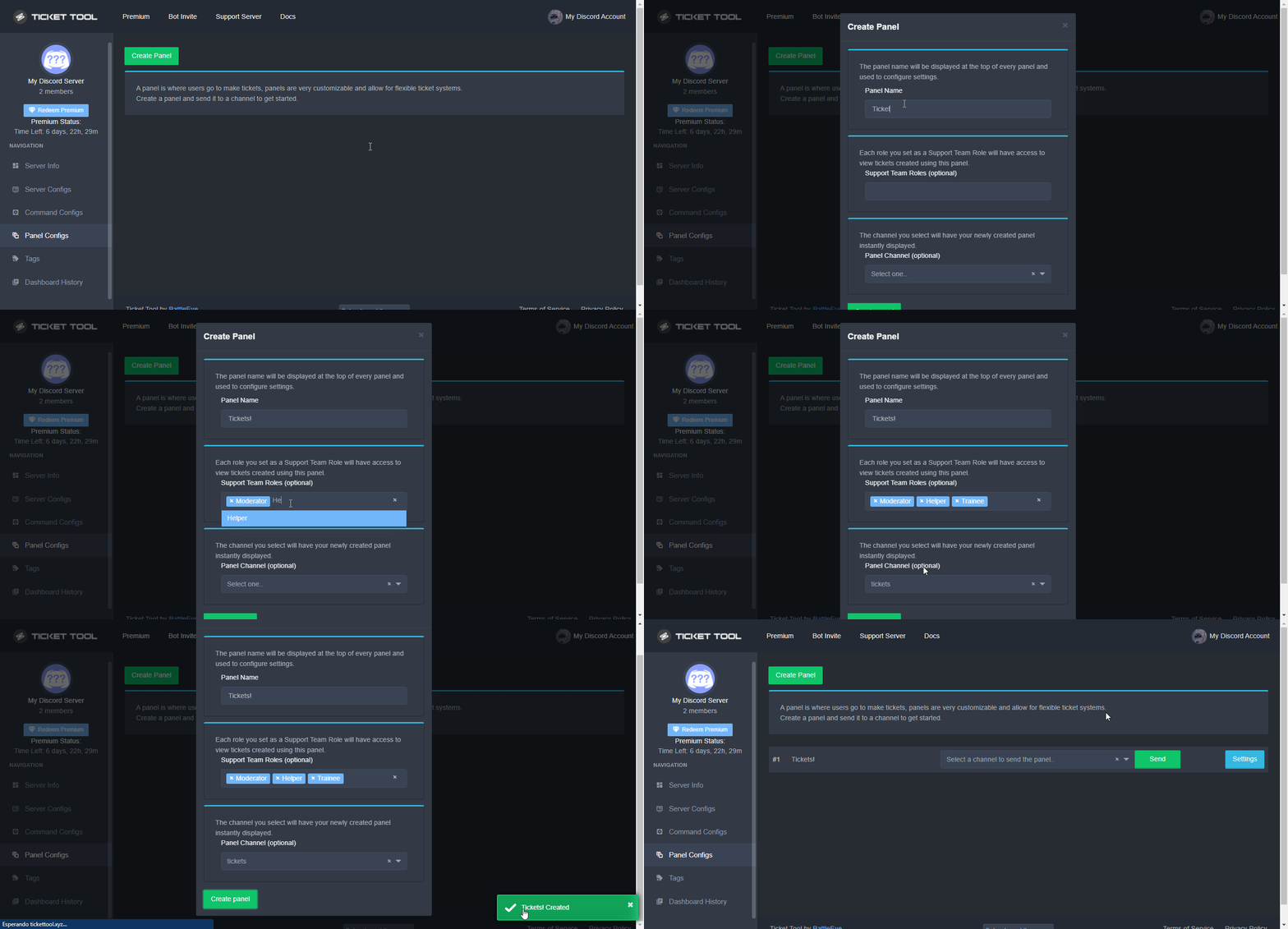
 river shoal
Can someone help me set a bot support ticket up ?
humble sequoiaBOT
First you will want to invite the bot to your server. Once the bot is in your server, you can manage your server in the dashboard.
To create a panel we are going to need to head over to the Panel Configs Tab on the Dashboard.
Once at the dashboard we will need to click Create Panel.
Enter a panel name (Fill in any optional settings you want).
Click Create Panel and you are ready to get started with configuring your panel.
An example of a creating a panel is shown below.
Once the panel has been created, use the blue Send button and select the channel you want the panel to be sent to.
The Panel wasn't send
Use the </debug:ID> command to diagnose possible permission issues with the bot.
limber portal
river shoal
Can someone help me set a bot support ticket up ?
^^
 spark scarab
I need help with purchasing a ticket
humble sequoiaBOT
Hello, we would love to help you, but if you don't tell us what you need help with we can't help you :(
jade topaz
Can you change the tickets colors that isn’t red, grey, blue, and green
shut bolt
jade topaz
Can you change the tickets colors that isn’t red, grey, blue, and green
You mean the embed's color?
jade topaz
No
jade topaz
Yes
shut bolt
No. That's a Discord limitation
jade topaz
Ah ok
Also when im changing the embed color it’s not changing when I post it in the channel
jade topaz
jade topaz
Also when im changing the embed color it’s not changing when I post it in the ch...
try to use "update" and see if it has changed

Alr
 silent nova
How do I make it ping a certain role after creating a ticket?
humble sequoiaBOT
1. Go into your Dashboard
2. Open your Panel Configs tab
3. Select the panel you want to ping your support on
4. Open the Ticket options menu
5. Click on Edit Ticket Message
6. In the Message Content use one of the role mention syntax (**{@Role Name}**/**{Role ID}**)
7. Save changes
Note: For this to work properly, Ticket Tool requires the Mention Everyone permission. Or the role must have the Allow anyone to @mention this role setting enabled
silent nova
limber portal
^^
Tysm
limber portal
Np
jade topaz
jade topaz
try to use "update" and see if it has changed
Didn’t work
It keeps saying message not found
limber portal
jade topaz
It keeps saying message not found
Try resending rather than updating
 craggy moon
/vote
what is this?
jade topaz
craggy moon
/vote
what is this?
It was a system for users who would like support and upvote TicketTool, when doing that they would gain premium credits.
The system has been disabled sadly
 sand dirge
I need a panel can anyone help me?
humble sequoiaBOT
First you will want to invite the bot to your server. Once the bot is in your server, you can manage your server in the dashboard.
To create a panel we are going to need to head over to the Panel Configs Tab on the Dashboard.
Once at the dashboard we will need to click Create Panel.
Enter a panel name (Fill in any optional settings you want).
Click Create Panel and you are ready to get started with configuring your panel.
An example of a creating a panel is shown below.
Once the panel has been created, use the blue Send button and select the channel you want the panel to be sent to.
The Panel wasn't send
Use the </debug:ID> command to diagnose possible permission issues with the bot.
limber portal
sand dirge
I need a panel can anyone help me?
^^
humble sequoiaBOT
Premium can now be purchased directly through discord! Either in the app directory (server settings) or directly from the bots profile.
<:TTWarning:1034178155872784494> Important Information <:TTWarning:1034178155872784494>
ONLY purchase premium through ONE of the two Ticket Tool Bots. If you purchased premium on the primary bot (White logo) and plan to use the premium bot, don't kick the primary bot!
What's different?
The Monthly price changed from $6.00 to $5.99
Yearly subscriptions are not yet available
Don't kick the bot, otherwise, the subscription will be canceled automatically
You'll need to buy the subscription from a computer or on the Application Directory
You might need to run the /premium command on your server to sync the premium status with your dashboard
A subscription can not be transferred between Servers
limber portal
craggy moon
<@1065295463089180763>
Please don't ping for support
craggy moon
i need year
limber portal
what do you mean?
craggy moon
preimuim year
not month
shut bolt
#🎫│make-a-ticket > Billing
Discord does not support yearly subs right now
So you'll have to open a ticket for us to provide you the alternatives we have for you to purchase a year worth of premium Ticket Tool
 jade harbor
Idk if y'all would be able to help me solve this issue...
first and foremost I'm using Carl bot for levels & i have channels blacklisted for certain reasonings from gaining exp unfortunately users are able to "bypass" by opening tickets & just spamming messages there. Is there a way to set a timed role? Or a way to solve this little work around?
limber portal
jade harbor
Idk if y'all would be able to help me solve this issue...
first and foremost I'...
Hey,
I would advise creating a blacklisted role and applying it to users who make these tickets.
humble sequoiaBOT
Any role you assign as a blacklisted role won't be able to use commands or reactions.
Selecting a blacklisted role
Go to your Dashboard ➞ Server Configs. There you will find the option to select blacklisted roles.
Note: Don't forget to save.
 limber portal
Additionally, as a side note, if it is possible to blacklist categories from xp gain through carl then you should definitely do that
jade harbor
See that's where I can't setup categories BUT
blacklist role I can add to Carl bot & this means if they close the ticket though they lose the blacklisted roll from tickettool?
Only gained when opening?
limber portal
You can apply automatic roles to be given on ticket open (if you have premium) but this will also apply to non spam tickets - so I would advise having mods manually add
jade harbor
limber portal
You can apply automatic roles to be given on ticket open (if you have premium) b...
And when tickets closed with premium does it remove??
or they keep?
limber portal
You can have it do either
You can configure for the role to be removed on ticket close or just leave the box blank for it to remain on them
humble sequoiaBOT
First you will want to invite the bot to your server. Once the bot is in your server, you can manage your server in the dashboard.
To create a panel we are going to need to head over to the Panel Configs Tab on the Dashboard.
Once at the dashboard we will need to click Create Panel.
Enter a panel name (Fill in any optional settings you want).
Click Create Panel and you are ready to get started with configuring your panel.
An example of a creating a panel is shown below.
Once the panel has been created, use the blue Send button and select the channel you want the panel to be sent to.
The Panel wasn't send
Use the </debug:ID> command to diagnose possible permission issues with the bot.
limber portal
^^
jade harbor
limber portal
You can configure for the role to be removed on ticket close or just leave the b...
You are a genius
And where would I see this option??
To give/remove role when ticket opened/closed
limber portal
Dashboard > panel configs > ticket
limber portal
limber portal
Dashboard > panel configs > ticket

You can edit the first message in dashboard > panel configs > messages > edit panel message and the second in dashboard > panel configs > messages > edit ticket message
humble sequoiaBOT
A Discord Form lets the user answer individual questions in a pop-up Form, which then displays the answers in the ticket message. This can save time if you already know what you want to ask the user.
Setup Forms
Forms can be enabled under Panel Settings > Form Options > Edit Forms Options. In the new pop-up window, you can now enable and edit your own Form.
Form Options
You can add up to 5 questions in the Discord form. This is a Discord limitation. Each question can have a placeholder in the input field, a minimum and maximum input, multi-line, and also the option to have the answer required.
Options
Question Title ➞ Your Question goes here
Question Placeholder ➞ The placeholder text in the input field
Required ➞ If enabled, the user has to answer this question, to submit the form
Multi-Line Input ➞Allows the user to input multiple lines
Minimum and Maximum Input ➞ Set a minimum and maximum input value for the user
Displaying the Answer
To display the answers from the user, you need to enable Auto display form results on the ticket message as an additional embed
If you don't want a second embed, go into your Panel Configs > Ticket Options > Edit Ticket Message. You use the variable {create.form.x} and replace x with the number of your question. For example, the response to Question 5 can be displayed with {create.form.5}.
humble sequoiaBOT

Ticket Tool - Ticketing without clutter - The #1 discord Ticketing bot
 dim nymph
How to set a note for management when opening a ticket
jade topaz
You can change the embed message for when someone opens a ticket if thats what you mean?
Dashboard > Panel Configs > Messages > Edit Ticket Message
limber portal
dim nymph
You can bring me educational pictures
 dim nymph
How do I set the options?
limber portal
It’s probably best you wait for a reply in your ticket
dim nymph
What does each option do?
limber portal
limber portal
It’s probably best you wait for a reply in your ticket
^^
dim nymph
limber portal
^^
I need it urgently
limber portal
dim nymph
I need it urgently
Well, it’s not advised to have support in both this channel and a ticket going on at the same time - whoever claimed your ticket will be able to help soon
robust sandalBOT
i want someone who knows how to make a ticket
Arabic (ar) → English (en)
dim nymph
Where do I put the administration roll?
limber portal
$articket
humble sequoiaBOT

فريق الدعم الفني العربي
عميلنا العزيز ان كنت تبحث عن مساعدة يرجى فتح تكت خاص بفريق الدعم الفني العربي
اذهب الى#🎫│make-a-ticket
ثم قم بلضغط على الايموجي الاتي (🇯🇴)
limber portal
@jade topaz ^^
limber portal
dim nymph
Where do I put the administration roll?
As you’ve been told you should wait for a response in your ticket
pseudo ravine
You will need to wait until someone is available
dim nymph
Explain to me the functions of good deeds
pseudo ravine
If you already opened a ticket, it's better if you wait until a support member of that language is available
pseudo ravine
dim nymph
Explain to me the functions of good deeds
Does this relate to Ticket Tool?
dim nymph
pseudo ravine
Does this relate to Ticket Tool?
Yes
pseudo ravine
How?
pseudo ravine
pseudo ravine
If you already opened a ticket, it's better if you wait until a support member o...
.
robust sandalBOT
@dim nymph Are you an Arab?
Arabic (ar) → English (en)
hazy osprey
Hey
I’d like to purchase premium but it’s not available on mobile
Anyway around it?
shut bolt
hazy osprey
I’d like to purchase premium but it’s not available on mobile
Use the browser version of Discord within your phone
iron nightBOT
Gave +1 Rep to @shut bolt
 humble sequoiaBOT
The Drop-down menu or Select Menu replaces the buttons on your panel message and uses a drop-down menu with all of your panels. To set this up, go to your Panel Configs and select your main Panel.
<:Numbericons1:1018864164032225340> Enable Select Style
First you enable Select Style. Then you add an item in the Dropdown Editor. Now you can start editing your dropdown!
<:Numbericons2:1018864168041971712> Dropdown Editor
Each line in the dropdown editor represents a line in the drop down menu on discord. You can add more "Items", by clicking on
First you select a panel. That's the panel this option will open a ticket for. DONT select the same panel twice. Each option should have a different Panel
After that, you can put a Display. This is the title of this option and will appear in the drop down menu. The *Description can be set right after that, which will be below the title in grey.
Additionally you can select an emoji, that will be shown in front of each option. You can either manually input the ID of an emoji or select it in the selector.
Common Issues ⚠️
- Panel doesn't send? Make sure you have a valid emoji selected
- Option doesn't show up? Check if two options have the same panel in the DropDown Editor
$dropdown
jade topaz
@past gyro Follow the guide above 🙂
 viral moon
Why can’t my members open tickets?
jade topaz
viral moon
Why can’t my members open tickets?
Are they getting any errors?
Check this,
Dashboard > Panel Configs > Buttons > Create Ticket
If Support Team Only = Only support team can make tickets
If  Support Team Only = Anyone that isn't blacklisted can make tickets
viral moon
No
pseudo ravine
Hey there. I notice that you have a ticket open, please be patient until the support member is available to assist
viral moon
Unfortunately I didn’t have time to wait.
I didn’t want to blow my ticket up so I asked for public help.
pseudo ravine
Asking more questions in your ticket is fine
jade topaz
opa
pseudo ravine
Do you need help with Ticket Tool?
 snow drum
For the ticket tool transcripts, if the URL is shared on another website will those URLs cease to work with the upcoming URL link 24h expire change?
jade topaz
In my discord when I tried to select a channel to put my ticket in the channel I wanted to put it in wouldn’t show up. How do I fix this?
stray bobcat
snow drum
For the ticket tool transcripts, if the URL is shared on another website will th...
As long as the message is not deleted, the link should still continue to work.
snow drum
will that link cease working after 24 hours on that website though?
stray bobcat
jade topaz
In my discord when I tried to select a channel to put my ticket in the channel I...
- Try to press the "sync" button at the top left of your dashboard.
- Ensure Ticket Tool has the required permissions everywhere it needs (like, for all categories and channels that you want to use the bot with).
humble sequoiaBOT
When first invited to your server, Ticket Tool should have the permissions shown below in order to ensure an appropriate functioning:
When customizing permissions for the different ticket participants, you must make sure Ticket Tool has the permissions you want it to grant to others, you can learn more about this here.
Missing Permissions
This error is a direct outcome of the bot missing permissions as depicted above. When troubleshooting this error we suggest you go through these steps:
- Use the </debug:1029783024264564765> command to check if the bot is lacking core role or channel permissions.
- Compare the category/channel's overrides and contrast them with the bot's roles to identify any permission denial that is breaking the functioning
- If you can't still figure it out, let our <@&540295656720302081> know so they can guide you through
Additional Resources
- If you are a server administrator and would like to understand more how to set up your server's permissions, we suggest checking the Discord Support Knowledge Base
- If you are a bot developer and are interested in the internal permission hierarchy we suggest you this part of the Discord Developer Docs
Important Note
- Giving Administrator permissions is NOT required and we do NOT encourage you to do unless you are trying to troubleshoot your permissions setup.

 scarlet pilot
hi, I would like to ask that is that possible I check back my history about my closed and delete ticket?
stray bobcat
snow drum
will that link cease working after 24 hours on that website though?
I'm sorry, not sure I understand your question.
If you share a link to a transcript, that link will keep working "indefinitely", until the message containing said link is deleted from the server.
If it is deleted from the server, it'll be up to Discord and usually after some time, it will stop working. We do not store any transcripts on our end.
stray bobcat
scarlet pilot
hi, I would like to ask that is that possible I check back my history about my c...
If you have a channel set up for your ticket logs, you can check that channel.
There is a stats feature on the dashboard, but I do not believe that it shows that information there.
humble sequoiaBOT
━━ Shiro's inquiry has been moved to a ticket ━━
snow drum
stray bobcat
I'm sorry, not sure I understand your question.
If you share a link to a transcr...
I mean about this https://www.reddit.com/r/DataHoarder/comments/16zs1gt/cdndiscordapp_links_will_expire_breaking/ as our links contain the timestamps now.
url=cdn.discordapp.com/attachments/xxxxxxxxxxxx/xxxxxxxxxx/transcript--xxxxxxxxx.html?ex=656d3c35&is=655ac735&hm=519a5187af16ea02a76264da0e7f77983a712a8f993ce95ba41effa43f383236&
Reddit
Explore this post and more from the DataHoarder community
stray bobcat
Oh, that's more a question for the Devs.
snow drum
well I guess another question is does this mean if you link evidence in a ticket the .html file URLs won't be updated essentially breaking evidence of all tickets? 🤔
 small meteor
how can I clear channels in the server?
gilded verge
small meteor
how can I clear channels in the server?
if you're owner of server, you can use /purge command to clear tickets
 honest herald
Can't login as it says my accound is not valid for Tigerz, why can't someone sort this out for me?????
humble sequoiaBOT
⚠️ You're in the wrong place
We provide support for Ticket Tool Discord bot and cannot help you with whatever issue you have.
- We don't know which Support Team you should contact to get this issue resolved, and unfortunately we won't be able to accurately tell you.
If you don't have any further questions regarding our bot Ticket Tool, please close this ticket
limber portal
honest herald
Can't login as it says my accound is not valid for Tigerz, why can't someone sor...
^^

 idle flint
 past gyro
Guys I cant select number two and three panel
past gyro
Guys I cant select number two and three panel
You possibly don’t have more than one panel. What is your server ID?
past gyro
Where can I tell my server id?
humble sequoiaBOT
How do I get the ID of Roles/Channels/Emojis?
Ticket Tool has a useful command that helps you get the ID of various things like channels, roles, emojis, and your server.
Just use the command </id:1029797400174399546> <#channel/@role/:emoji:>. Now copy everything, including the brackets <...>, to your dashboard (or wherever you want it)
If you want the server ID, just use the command without any option.
Examples:
Server ID: $id ➝
509192800865353738
Roles: $id @Role ➝<@&722196398635745312>
Channel: $id #channel ➝#🤖│bot-spam
User: $id @user ➝@copper owl
Emoji: $id➝

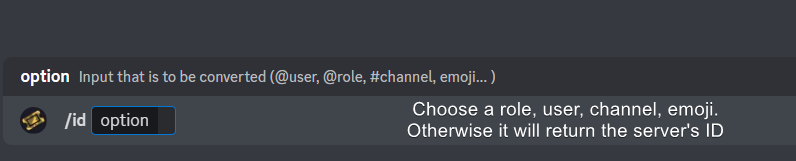 idle flint
past gyro
Where can I tell my server id?
idle flint
past gyro
Where can I tell my server id?
You can use the ID command ^^
 idle flint
Use the command in your server

 idle flint
You just need to send “$debug” as a message, no other additions on it