#🆘│community-support
1 messages · Page 74 of 1
 past fox
So I have this some what working just not in order.
I have it set to when joining it will send a command with dyno bot welcome module to do the command but it opens a ticket under dyno instead of @uername
 rustic gale
past fox
So I have this some what working just not in order.
I have it set to when join...
rustic gale
past fox
So I have this some what working just not in order.
I have it set to when join...
The command has to be $new followed by the new user's ID
If you follow it with nothing, it will create a ticket for the user who sends the command, in this case Dyno
If you follow it with a user ID, it creates a ticket for that user
 warped crest
eu comprei o negocio e nao enviaram nada no meu email
past fox
So this doesn't work?
{!new $1 {user.mention} }```What's $1 doing there
past fox
Base off of dynos variables it states for commands
rustic gale
warped crest
eu comprei o negocio e nao enviaram nada no meu email
This is a support server for a Discord bot called Ticket Tool. Does your question have anything to do with Ticket Tool?
 robust sandalBOT
Este é um servidor de suporte para um bot do Discord chamado Ticket Tool. Sua pergunta tem algo a ver com Ticket Tool?
 English (en) → Portuguese (pt)
past fox
past fox
Base off of dynos variables it states for commands
English (en) → Portuguese (pt)
past fox
past fox
Base off of dynos variables it states for commands
{!command} - execute a bot command, example: {!role $1 Regulars}
rustic gale
That's for executing Dyno commands
You don't want Dyno to run a Dyno command
You want Dyno to send a message
past fox
Ah okay
 topaz ermine
How to create ticket tool
warped crest
/supor chama pv
 humble sequoiaBOT
━━ icedoutjae's inquiry has been moved to a ticket ━━
robust sandalBOT
Suppose PV flame
Portuguese (pt) → English (en)
 idle flint
warped crest
/supor chama pv
idle flint
warped crest
/supor chama pv
Not sure what you are asking here? could you maybe ask again?
 scenic plinth
warped crest
/supor chama pv
scenic plinth
warped crest
/supor chama pv
Não podemos ajudá-lo com o que você está perguntando, desculpe.
 karmic nimbus
past fox
karmic nimbus
past fox
Got the ticket to open but it seems to be a hit and miss on if it will open or not when each person joins.
rustic gale
past fox
Got the ticket to open but it seems to be a hit and miss on if it will open or n...
If users are joining too fast, it will fail to create multiple tickets so fast
 timber turtle
hello, im new to this server, i have a question, does this bot help me purchase a ticket in an event?
past fox
rustic gale
If users are joining too fast, it will fail to create multiple tickets so fast
Okay, I was wondering if it was rate limited. I was using an alt wait about 10 seconds in-between. Thanks for the help.
 iron nightBOT
Gave +1 Rep to @rustic gale
humble sequoiaBOT
━━ jay's inquiry has been moved to a ticket ━━
 royal carbon
thank you!!
iron nightBOT
Gave +1 Rep to @pseudo ravine
 alpine delta
Why doesn't ticket tool save images in transcripts, it just comes up without the image
idle flint
alpine delta
Why doesn't ticket tool save images in transcripts, it just comes up without the...
You can save up to 8MB of images in your transcripts with Premium


Settings for saving your transcripts
idle flint
Hello
 wary mantle
Can I edit this embed?

 limber portal
wary mantle
Can I edit this embed?
limber portal
wary mantle
Can I edit this embed?
Yep, dashboard > panel configs > messages > panel message
 violet jacinth
If i have ticket claims setup (i have premium btw) will the automation i setup start when the tickets opened or when the tickets claimed? If its opened can i change it to start when claimed?
 steep wasp
what is this supposed to do?
 violet jacinth
steep wasp
what is this supposed to do?
violet jacinth
steep wasp
what is this supposed to do?
Close the ticket with a reason
steep wasp
violet jacinth
Close the ticket with a reason
yeah but it doesn't send the reason anywhere
limber portal
violet jacinth
If i have ticket claims setup (i have premium btw) will the automation i setup s...
What type of automation is it?
more specifically, what's the trigger?
 teal sparrow
steep wasp
yeah but it doesn't send the reason anywhere
teal sparrow
steep wasp
yeah but it doesn't send the reason anywhere
It will send it to the transcript channel if you have one set up.
steep wasp
teal sparrow
It will send it to the transcript channel if you have one set up.
is there a feature to send it to the user's dm, the one who created the ticket?
violet jacinth
limber portal
more specifically, what's the trigger?
My server has an issue with people opening tickets being pinged by a staff member that is available to respond then the owner responding like 5 hours later so i wanna setup an automation that after the ticket is claimed it sees if there is a message from the ticket owner within the hour if not it deletes the ticket
But i dont want the ticket closed if no staff respond to help
limber portal
violet jacinth
My server has an issue with people opening tickets being pinged by a staff membe...
Well, first off automations should start when the ticket is opened - this can be manually changed inside automations itself: trigger = ticket created; once triggered run the action = stop automation, and you can then setup automation to begin with trigger = ticket claimed; once triggered run the action = start automation.
Then you just need to have a configured watcher automation that closes tickets with no response from ticket owner after a certain amount of time.
violet jacinth
limber portal
Well, first off automations should start when the ticket is opened - this can be...
Awesome thanks for the help also do you know if theres a way to setup a like automated tracker of sorts or do i have to go and count out how many transcripts with one of my staff members names there are 😭
iron nightBOT
Gave +1 Rep to @limber portal
limber portal
violet jacinth
Awesome thanks for the help also do you know if theres a way to setup a like aut...
There is dashboard > statistics
violet jacinth
limber portal
There is dashboard > statistics
Yea i’ve seen that its probably cuz i didnt have premium til today but it only shows me how many tickets have been created will it show me who claimed the ticket too?
rustic gale
violet jacinth
Yea i’ve seen that its probably cuz i didnt have premium til today but it only s...
There's a section for claim statistics
violet jacinth
rustic gale
There's a section for claim statistics
Oh ok thanks
iron nightBOT
Gave +1 Rep to @rustic gale
violet jacinth
One more thing (sry for all the questions 😭) is it possible to like have the bot add a role after the ticket is closed/deleted preventing the owner from making another ticket for a selected amount of time?
limber portal
violet jacinth
One more thing (sry for all the questions 😭) is it possible to like have the bo...
You can make it add a role in dashboard > panel configs > ticket > ticket closed role
violet jacinth
limber portal
You can make it add a role in dashboard > panel configs > ticket > ticket closed...
Is there a way to have it remove the role after a set time?
 obtuse moat
How can i check who has done how many tickets through the bot
 tawny blade
Why are the ticks automatically deleted after a period of an hour or more? For your information, the number of ticks is large, meaning thirty to twenty per hour. Is this the reason?
rustic gale
violet jacinth
Is there a way to have it remove the role after a set time?
Sadly no
tawny blade
tawny blade
Why are the ticks automatically deleted after a period of an hour or more? For y...
For the regular Tact Prime, does the Premium remove this thing?
violet jacinth
rustic gale
Sadly no
Dang
rustic gale
obtuse moat
How can i check who has done how many tickets through the bot
Not really possible. You can enable logging and use Discord's search function to count creation logs
humble sequoiaBOT
With Ticket Tool, you can customize the behavior the bot takes when logging your tickets! For editing these options follow these steps:
Dashboard ➞ Panel Configs ➞ Logging Options
Logging Channel
Here you will define which channel @humble sequoia will save the Logs in (ticket created/deleted/closed, etc.)
Logs you can save:
➞ Ticket Created ➞ Logs when a ticket is created
➞ Ticket Closed ➞ Logs when a ticket is closed
➞ Ticket Opened ➞ Logs when a ticket is opened
➞ Ticket Renamed ➞ Logs when a ticket is renamed
➞ Ticket Deleted ➞ Logs when a ticket is deleted
➞ Transcript Saved ➞ Logs when a ticket is saved
Select with  (disable) or
  (enabled) which logs you would like
Below you can see an example of what the Logging Options will look like:
 rustic gale
tawny blade
Why are the ticks automatically deleted after a period of an hour or more? For y...
rustic gale
tawny blade
Why are the ticks automatically deleted after a period of an hour or more? For y...
Ticks?
Tact Prime?
Sorry, i don't know what you refer to.
tawny blade
rustic gale
Ticks?
Ticket, I apologize, I use a translator, I do not speak English fluently
tawny blade
rustic gale
Tact Prime?
@pseudo glen I mean this
As I told you, I use translation. I apologize
rustic gale
Does your server have premium?
violet jacinth
How does the private threads thing work? Ive given the bot the needed perms but it doesnt make a thread on the ticket
limber portal
obtuse moat
How can i check who has done how many tickets through the bot
Dashboard > statistics
 cosmic bay
How to change Picture profil / desc of bot ?
rustic gale
violet jacinth
How does the private threads thing work? Ive given the bot the needed perms but ...
Or maybe it is making a thread but it's not automatically adding you to it. Please check
rustic gale
cosmic bay
How to change Picture profil / desc of bot ?
Not possible
 rustic gale
That's not Ticket Tool.
violet jacinth
rustic gale
Or maybe it is making a thread but it's not automatically adding you to it. Plea...
Yea nah i did and even if it wasnt i have administrator so wouldnt i be able to see it regardless?
rustic gale
violet jacinth
Yea nah i did and even if it wasnt i have administrator so wouldnt i be able to ...
Not “regardless”. Private threads are very hidden even for mods
violet jacinth
rustic gale
Not “regardless”. Private threads are very hidden even for mods
I see…
rustic gale
Not completely hidden
But they're very out of the way
Unless you're added to it, in which case they appear on the channel list like every other thread you join
Or rather: unless you join it
obtuse moat
limber portal
Dashboard > statistics
Thanks mate
iron nightBOT
Gave +1 Rep to @limber portal
violet jacinth
rustic gale
Unless you're added to it, in which case they appear on the channel list like ev...
Do i have to re setup my panels with the premium bot btw?
rustic gale
violet jacinth
Do i have to re setup my panels with the premium bot btw?
You have to send them again, that's all.
violet jacinth
rustic gale
You have to send them again, that's all.
Got it
limber portal
obtuse moat
Thanks mate
Np
 granite thistle
Hello, I just wanted to know if the deleted tickets can be recovered somehow.
limber portal
granite thistle
Hello, I just wanted to know if the deleted tickets can be recovered somehow.
Hey, if you have transcripts set up you can view the transcript of the ticket. Unfortunately if you haven't got that set up they cannot be recovered
granite thistle
limber portal
Hey, if you have transcripts set up you can view the transcript of the ticket. U...
Thanks! Could you please let me know with which command I can check if the transcripts are set up? I believe I haven't done it. 🥲
iron nightBOT
Gave +1 Rep to @limber portal
limber portal
granite thistle
Thanks! Could you please let me know with which command I can check if the trans...
Well if you don't have a transcripts channel then it hasn't been set up
humble sequoiaBOT
1. Go into your Dashboard
2. Open your Panel Configs tab
3. Select the panel you want to grant access to
4. Open the Transcript options menu
5. Using the Transcript Channel selector, pick the channel you want your transcripts to be sent to
6. Save changes
 granite thistle
Thank you @limber portal! Appreciate your prompt response. ♥️
limber portal
no problem
 drifting rose
Is it possible to mix 2 different ticket panel buttons in 1 msg
humble sequoiaBOT
For more convenient use of multipanels, you can now combine panels on the dashboard. This will allow you to directly send the multipanel from the dashboard or via the $panel ID command.
Where can I find this?
You can find this setting on the Dashboard -> Panel Configs -> Panel -> Attached Panels
Note: if you're attaching all the panels to a panel called English, don't include English in the attached panel's box (If you do this, it will create a duplicate)
This will put all buttons from all of your panels on one message. The message is the panel message from the panel you're combining these panels in.

 limber portal
 lament knot
Looks like dropdowns, check below
humble sequoiaBOT
The Drop-down menu or Select Menu replaces the buttons on your panel message and uses a drop-down menu with all of your panels. To set this up, go to your Panel Configs and select your main Panel.
<:Numbericons1:1018864164032225340> Enable Select Style
First you enable Select Style. Then you add an item in the Dropdown Editor. Now you can start editing your dropdown!
<:Numbericons2:1018864168041971712> Dropdown Editor
Each line in the dropdown editor represents a line in the drop down menu on discord. You can add more "Items", by clicking on 

First you select a panel. That's the panel this option will open a ticket for.  DONT select the same panel twice. Each option should have a different Panel
After that, you can put a Display. This is the title of this option and will appear in the drop down menu. The *Description can be set right after that, which will be below the title in grey.
Additionally you can select an emoji, that will be shown in front of each option. You can either manually input the ID of an emoji or select it in the selector.
Common Issues ⚠️
- Panel doesn't send? Make sure you have a valid emoji selected
- Option doesn't show up? Check if two options have the same panel in the DropDown Editor

$dropdown
lament knot
limber portal
Looks like dropdowns, check below
Do i need pc to do it?
limber portal
lament knot
Do i need pc to do it?
nope, dash works on mobile
lament knot
limber portal
nope, dash works on mobile
I cant do it
limber portal
lament knot
I cant do it
What specifically can't you do
lament knot
 limber portal
What specifically can't you do on the dashboard? the embed contains the general instructions.
lament knot
limber portal
What specifically can't you do on the dashboard? the embed contains the general ...
It’s complicated on mobile
limber portal
lament knot
It’s complicated on mobile
I can't help unless I know what you are actually struggeling with, the embed contains the instructions that apply directly to both mobile and pc
 mild ruin
the bot in my server is generating tickets but none of the reaction buttons so i can log and close tickets.
I'm trying to use the /transcript command but it keeps giving me an error.

 dawn ember
Hiii, is there a variable to tag a specific channel in a claim message?
lament knot
Can I change this?
 dawn ember
lament knot
Can I change this?
dawn ember
lament knot
Can I change this?
 limber portal
dawn ember
Hiii, is there a variable to tag a specific channel in a claim message?
limber portal
dawn ember
Hiii, is there a variable to tag a specific channel in a claim message?
use the format <#channelid> and replace channelid with the id of the channel
dawn ember
limber portal
use the format `<#channelid>` and replace `channelid` with the id of the channel
Thank you so much!
iron nightBOT
Gave +1 Rep to @limber portal
limber portal
dawn ember
Thank you so much!
np
 crisp otter
Hello
idle flint
hello
crisp otter
عرب ؟
robust sandalBOT
Arab?
Persian (fa) → English (en)
ما پشتیبانی عربی در #🎫│make-a-ticketداریم یا می توانیم با استفاده از مترجمان کمک کنیم.
English (en) → Persian (fa)
 errant surge
robust sandal
errant surge
robust sandal
This is not Arabic
idle flint
I just translated back into the language that the bot detected
 jade topaz
Any ideas?
This is a legacy key, please contact Ticket Tool support with proof of purchase/generation
Please make a ticket regarding the Legacy Key message.
jade topaz
okay 🙂
 fallen elm
My bot doesn’t respond at all
 steel echo
hello, how can i close a ticket without it being deleted, i searched through all of the dashboard
yes i can
jade topaz
steel echo
hello, how can i close a ticket without it being deleted, i searched through all...
you can use the command $close 🙂
jade topaz
💀 ?
 civic wagon
steel echo
civic wagon
steel echo
Does this account have admin perms?
steel echo
civic wagon
Does this account have admin perms?
no, completely new account (ignore the name)
it does i couldnt find it on my main account
civic wagon
steel echo
no, completely new account (ignore the name)
You should test it by using an account that has sufficient perms. Because even if a ticket is closed, it won't be visible to the person who created it.
civic wagon
steel echo
it does i couldnt find it on my main account
In that case, visit the Dashboard > Panel Configs > General > Two Step Ticket 
Make sure it's enabled
iron nightBOT
Gave +1 Rep to @civic wagon
steel echo
civic wagon
In that case, visit the Dashboard > Panel Configs > General > Two Step Ticket <:...
okay imma try this, thank you
iron nightBOT
Gave +1 Rep to @civic wagon
civic wagon
Many users actually do not configure that.
steel echo
civic wagon
Many users actually do not configure that.
how can i configure that?
okay, thank you
civic wagon
steel echo
how can i configure that?
Dashboard > Panel Configs > Category and give closed tickets a category too. But then again, you must have Two Step Ticket enabled in order to close the ticket and not delete it. So I recommend you check this first and see if this was the issue
steel echo
omg thank you 😭
 steel echo
civic wagon
Dashboard > Panel Configs > Category and give closed tickets a category too. But...
steel echo
civic wagon
Dashboard > Panel Configs > Category and give closed tickets a category too. But...
you solved it, wow thanks @civic wagon
iron nightBOT
Gave +1 Rep to @civic wagon
civic wagon
It's 4:30 am for me and I can relate to that username. Anyhow, glad it worked out
steel echo
civic wagon
It's 4:30 am for me and I can relate to that username. Anyhow, glad it worked ou...
😭
steel echo
civic wagon
Dashboard > Panel Configs > Category and give closed tickets a category too. But...
im gonna do this, you snapped i appreciate it. take it easy
🙏
oh no i'm okay
thanks @jade topaz you though
lemme give u the point 😭
thanks @jade topaz
iron nightBOT
Gave +1 Rep to @lucid mural
steel echo
yuhh okay, take it easy, bye bye
alpine delta
idle flint
You can save up to 8MB of images in your transcripts with Premium
How about non premium? The images are saving they just don't load? Idk it's weird
I've sent 3 images before and the transcript saved, now with 1 image it doesn't
rustic gale
alpine delta
How about non premium? The images are saving they just don't load? Idk it's weir...
The images don't save.
The transcript saves the link to the file.
But because Discord deletes the file after the channel is deleted, the link is just a dead link.
alpine delta
rustic gale
But because Discord deletes the file after the channel is deleted, the link is j...
But sometimes the images do save? Why do some save and some don't?
As in when I check some transcripts the images there and some they're not
rustic gale
alpine delta
As in when I check some transcripts the images there and some they're not
Check again in a week. 100% guaranteed they will not be there
 heady oriole
How do you remove panels.
rustic gale
heady oriole
How do you remove panels.
 violet jacinth
Anyone know why ticket claiming is delaying how long it takes to close tickets for me?
I’ll press close but it will be another like minute or 2 before the prompt comes up
rustic gale
I've seen this issue before
Can you use /debug somewhere in your server please?
No, that won't solve the issue
It's for information purposes
@violet jacinth
violet jacinth
rustic gale
It's for information purposes
Ok
violet jacinth
rustic gale
<@678425103163326484>
Did it u want me to send the info here?
violet jacinth
rustic gale
Which panel is affected?
All of them…
rustic gale
Well. This doesn't look like the issue i remember
violet jacinth
rustic gale
Well. This doesn't look like the issue i remember
What was the solution? I’ll try it anyways
rustic gale
Unfortunately i can't stay to provide further help
violet jacinth
rustic gale
Unfortunately i can't stay to provide further help
Ah…ok thx anyways
rustic gale
The solution here would be to disable claim names
But that would not make sense if it's also occurring with unclaimed tickets
I honestly have no idea what you meant by
ticket claiming is delaying how long it takes to close tickets
 thorn obsidian
Hello how to allow X role to close the ticket without being an administrator? Only close
violet jacinth
rustic gale
I honestly have no idea what you meant by
> ticket claiming is delaying how long...
So basically i would claim the ticket
Close it
It would say it closed but it stayed open
rustic gale
thorn obsidian
Hello how to allow X role to close the ticket without being an administrator? O...
To allow whom to do what?
violet jacinth
Then a little bit later the panel to transcript or delete would show up
Like 2-3 mins later
thorn obsidian
rustic gale
To allow whom to do what?
A member opens a ticket , but I want them to have acess to close their own ticket but not delete them after they close it they don’t be able to see the ticket no more
rustic gale
thorn obsidian
A member opens a ticket , but I want them to have acess to close their own ticke...
That's how tickets work by default.
Is that not how tickets are working in your server?
thorn obsidian
Can they use command to close it ?
rustic gale
Yeah
thorn obsidian
Hmm didn’t work for me I might have to delete and re do again
rustic gale
Hmm
Well, not the command
They should be able to use the Close button by default
The $close command is support-team-only by default.
You can change its permissions in the Command Configs menu

Ticket Tool - Ticketing without clutter - The #1 discord Ticketing bot
rustic gale
violet jacinth
Like 2-3 mins later
Yeah, that sounds like it requires some testing that i don't have time for right now.
Consider making a ticket #🎫│make-a-ticket
thorn obsidian
rustic gale
https://tickettool.xyz/dashboard/server/configs#cc-commandConfigs
Thank you
iron nightBOT
Gave +1 Rep to @rustic gale
violet jacinth
rustic gale
Yeah, that sounds like it requires some testing that i don't have time for right...
Yea no worries thanks for the help anyways i’ll make a ticket tho
iron nightBOT
Gave +1 Rep to @rustic gale
 idle flint
thorn obsidian
How to fix ?
idle flint
thorn obsidian
How to fix ?
Check the button permissions, you probably have either allowed, disabled or support only roles set (having the everyone role in disabled means no one can use it)
humble sequoiaBOT
Button Options
 Enable Button
 Hide or show the button
 Emoji
Emoji
 Select an emoji to show on the button
You can either select one or use a valid Emoji ID
 Button Text
Edit the text that's shown on the button
 Button Color
Select one of four colors for the button. Grey, Green, Red, Blue.
 Support Team Only
Enable this to only let your support team click that button
 Allowed and disabled roles
Edit what roles can use or not use this button
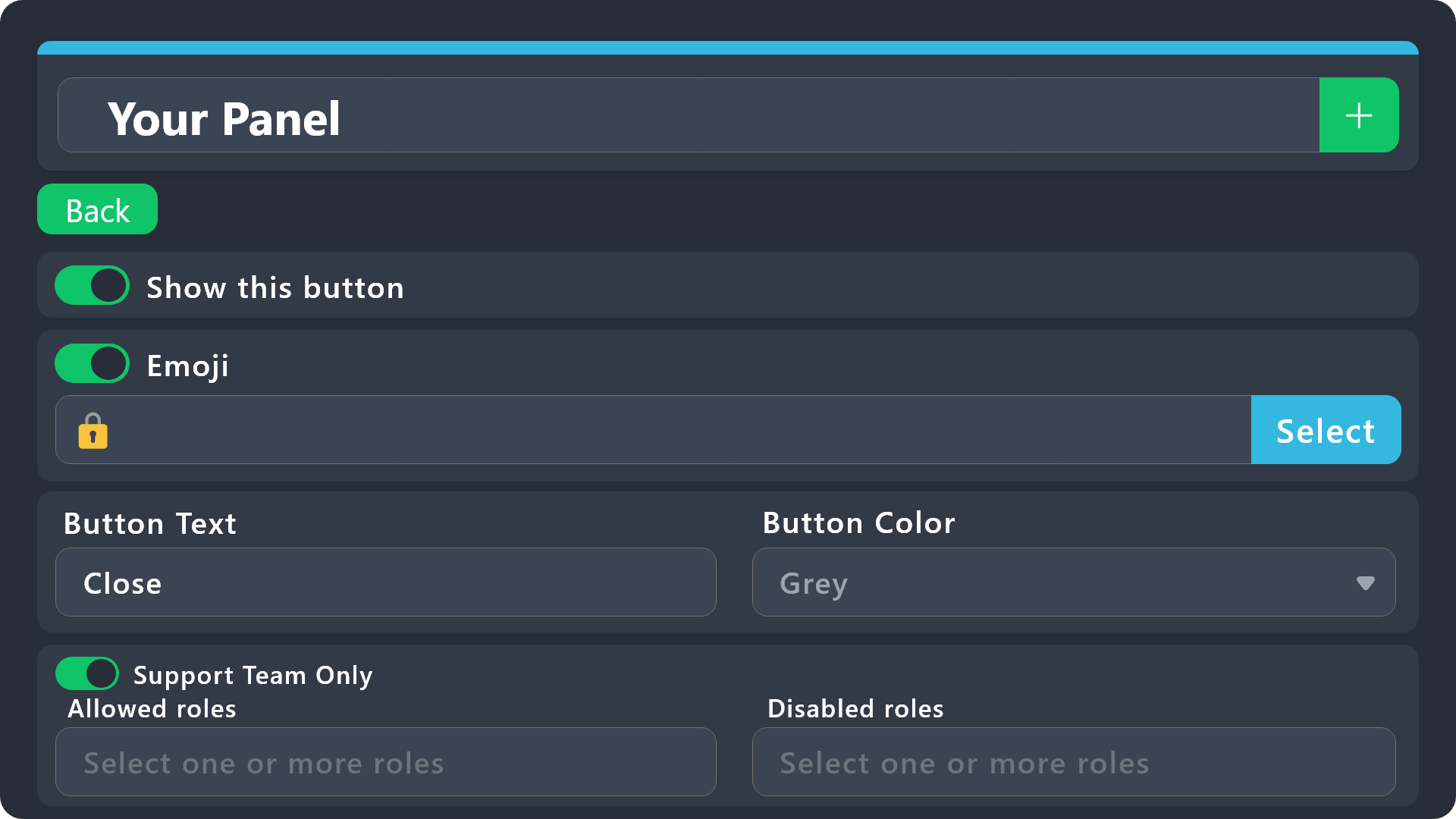
$buttonoptions
 teal verge
Any one know how to edit a departmental application message on a ticket. For instance, We have several LEO departments, with corresponding applications. One of these departments wanted to update its' application, but I don't know how to modify or edit the ticket text
idle flint
teal verge
Any one know how to edit a departmental application message on a ticket. For ins...
Replied in #premium-support
teal verge
Thanks sir
 small trellis
Can I write here?
I can't see anything...
Ah... There you go.
Okay, I would like to change the text of the "@xyz closed this ticket" or whatever it says. Where can I find that?
humble sequoiaBOT

Premium can now be purchased directly through discord! Either in the app directory (server settings) or directly from the bots profile.
<:TTWarning:1034178155872784494> Important Information <:TTWarning:1034178155872784494>
ONLY purchase premium through ONE of the two Ticket Tool Bots. If you purchased premium on the primary bot (White logo) and plan to use the premium bot, don't kick the primary bot!
What's different?
The Monthly price changed from $6.00 to $5.99

 Yearly subscriptions are not yet available
Don't kick the bot, otherwise, the subscription will be canceled automatically
You'll need to buy the subscription from a computer or on the Application Directory
You might need to run the /premium command on your server to sync the premium status with your dashboard
A subscription can not be transferred between Servers

 lunar solar
You will need premium to change the footer text
You can only change the message content, title (via renaming the panel) and the embed description
small trellis
No... Not that. The small message when I close a ticket... In the yellow embed.
alpine delta
rustic gale
Check again in a week. 100% guaranteed they will not be there
Have a ticket from almost a week ago and it still has the image💀💀💀

Over a week almost 2
lunar solar
small trellis
No... Not that. The small message when I close a ticket... In the yellow embed.
Send a ss
 lunar solar
Panel Configs --> Messages --> Edit closed message --> Embed Editor
small trellis
lunar solar
Panel Configs --> Messages --> Edit closed message --> Embed Editor
That one is darkened out... Can't click on it...
humble sequoiaBOT
Premium can now be purchased directly through discord! Either in the app directory (server settings) or directly from the bots profile.
<:TTWarning:1034178155872784494> Important Information <:TTWarning:1034178155872784494>
ONLY purchase premium through ONE of the two Ticket Tool Bots. If you purchased premium on the primary bot (White logo) and plan to use the premium bot, don't kick the primary bot!
What's different?
The Monthly price changed from $6.00 to $5.99
Yearly subscriptions are not yet available
Don't kick the bot, otherwise, the subscription will be canceled automatically
You'll need to buy the subscription from a computer or on the Application Directory
You might need to run the /premium command on your server to sync the premium status with your dashboard
A subscription can not be transferred between Servers
small trellis
Why? I could edit everything else...
lunar solar
It doesn't directly effect the functionality of the tool therefore its a nicety
Nicety = Premium (for the most part)
small trellis
Ah okay... Sad... Just wanted to have that single thing also translated...
humble sequoiaBOT
lunar solar
$vote
Votes
Current Votes: 0
Lifetime Votes: 0
Linked Votes: 0
Vote Links
Linking Info
Linked User: Not Linked
You can give your future votes to another user by linking with that user.
To link use $vote link (@user or userId)
To unlink use $vote unlink
Redeeming
Each vote is worth 12 hours of premium and can be redeemed once you have atleast 6 votes.
Your current votes are worth 0m
To redeem your current votes use $vote redeem
small trellis
When I have Premium, I can change the message and it will stay even when I loose premium?
lunar solar
No once you lose premium the features will revert
small trellis
😐
lunar solar
Otherwise whats the point of premium
small trellis
Yeah nah. That doesn't help me then. Okay, thanks for the help. Adios
lunar solar
No worries
wary mantle
limber portal
Yep, dashboard > panel configs > messages > panel message
Okay thanks for that and how can I add premium to the current white bot by only voting?
iron nightBOT
Gave +1 Rep to @limber portal
limber portal
$vote
humble sequoiaBOT
limber portal
$vote
Votes
Current Votes: 0
Lifetime Votes: 0
Linked Votes: 0
Vote Links
Linking Info
Linked User: Not Linked
You can give your future votes to another user by linking with that user.
To link use $vote link (@user or userId)
To unlink use $vote unlink
Redeeming
Each vote is worth 12 hours of premium and can be redeemed once you have atleast 6 votes.
Your current votes are worth 0m
To redeem your current votes use $vote redeem
limber portal
wary mantle
Okay thanks for that and how can I add premium to the current white bot by only ...
^^
 fossil citrus
Is there a way to split transcript storage by panel? I have a panel which contains some other panels in form of drop down menu, I get it that that’s useful for giving different message for each ticket and I’m thankful for that feature, but I think I might be missing some other advantages of using drop down menu or multiple buttons
idle flint
fossil citrus
Is there a way to split transcript storage by panel? I have a panel which contai...
Yes, for each Panel, go to the Dashboard > Panel Configs > Transcript - here you can select where your transcripts are stored (which channel) - Is this what you are asking ?
fossil citrus
Oh I can do that? I’m sorry was confused because I have 3 panels in total but 3 of those are the options of the drop down of a panel, it’s like a box inside itself and I don’t know if the settings of this box would ‘affect other boxes’ too because it contains them 💀
idle flint
fossil citrus
Oh I can do that? I’m sorry was confused because I have 3 panels in total but 3 ...
No, each panel can have different settings, even if in a drop down setting.
- Select which panel
- Under the Transcript menu, select a transcript channel for that panel (this can be a different channel for all of your panels )

 fossil citrus
idle flint
No, each panel can have different settings, even if in a drop down setting.
- S...
fossil citrus
idle flint
No, each panel can have different settings, even if in a drop down setting.
- S...
I see, yeah I think I get it. It’s just that because the button to opt for drop down style is available in any panel, it makes me think the settings of the panel of which I set up the drop down style would affect the panels that would be listed on this panel
 elfin rampart
Where do i edit the ticket entrance, for example where can I input 'Welcome to Tempest support, click to create a ticket'
idle flint
elfin rampart
Where do i edit the ticket entrance, for example where can I input 'Welcome to T...
You can edit it here: (note, you need to send or update the panel to see the change)
humble sequoiaBOT
The panel message is where people react to make a ticket. To customize it head over to your Dashboard --> Panel Configs -> Panel -> Edit Panel Message

 toxic sail
Hi
iron nightBOT
Gave +1 Rep to @idle flint
elfin rampart
idle flint
You can edit it here: (note, you need to send or update the panel to see the cha...
Thank you!
fossil citrus
idle flint
No, each panel can have different settings, even if in a drop down setting.
- S...
I was distracted, tysm
rustic gale
alpine delta
Have a ticket from almost a week ago and it still has the image💀💀💀
From your own server or a different server?
limber portal
Do you need ticket tool help?
 cosmic talon
Hi, is there a way to check the ticket history?
info about when were tickets created & user creating the ticket (no transcript about the chat)
humble sequoiaBOT
With Ticket Tool, you can customize the behavior the bot takes when logging your tickets! For editing these options follow these steps:
Dashboard ➞ Panel Configs ➞ Logging Options
Logging Channel
Here you will define which channel @humble sequoia will save the Logs in (ticket created/deleted/closed, etc.)
Logs you can save:
➞ Ticket Created ➞ Logs when a ticket is created
➞ Ticket Closed ➞ Logs when a ticket is closed
➞ Ticket Opened ➞ Logs when a ticket is opened
➞ Ticket Renamed ➞ Logs when a ticket is renamed
➞ Ticket Deleted ➞ Logs when a ticket is deleted
➞ Transcript Saved ➞ Logs when a ticket is saved
Select with (disable) or (enabled) which logs you would like
Below you can see an example of what the Logging Options will look like:
limber portal
cosmic talon
Hi, is there a way to check the ticket history?
info about when were tickets cre...
These are the logging options ^^
cosmic talon
thanksss
limber portal
No problem
jade topaz
Can you tell me why it won't close the ticket please?
 rustic gale
jade topaz
Can you tell me why it won't close the ticket please?
rustic gale
jade topaz
Can you tell me why it won't close the ticket please?
Because the command isn't enabled
A user with dashboard access can enable the command in the dashboard, in Command Configs
 cold portal
d
 fast jacinth
How do I get a ticket My cotv is saying I have been disabled for no reason
 whole ridge
how do i make a selection for ticket tool
humble sequoiaBOT

⚠️ You're in the wrong place
We provide support for Ticket Tool Discord bot and cannot help you with whatever issue you have.
- We don't know which Support Team you should contact to get this issue resolved, and unfortunately we won't be able to accurately tell you.
If you don't have any further questions regarding our bot Ticket Tool, please close this ticket
 naive juniper
is editing the panel message a premium feature? It doesn't look like it should be, but I can't type in the text box...
limber portal
naive juniper
is editing the panel message a premium feature? It doesn't look like it should b...
Some parts of it are premium
naive juniper
limber portal
Some parts of it are premium
Okay, thanks
iron nightBOT
Gave +1 Rep to @limber portal
violet jacinth
I think this is a discord issue but the bot is leaving like ghost channels… i can see them but i click on them and they dont exist and if i try to # them it says unknown for others
rustic gale
violet jacinth
I think this is a discord issue but the bot is leaving like ghost channels… i ca...
Clear the app's cache and it should disappear
On desktop or mobile, exit the app and restart it and the channel should disappear
violet jacinth
rustic gale
Clear the app's cache and it should disappear
It worked thanks
iron nightBOT
Gave +1 Rep to @rustic gale
 spiral fiber
How to add ticket Tool premium in server
 unborn tangle
Hello quick question. If i cant remove a user from a ticket can I manually do it using Channel Overrides or will that screw permissions up?
jade topaz
spiral fiber
How to add ticket Tool premium in server
@spiral fiber
Hello, go to Dashboard -> Select your server -> Server config, and add the Ticket Tool Premium with the option
 jade topaz
unborn tangle
Hello quick question. If i cant remove a user from a ticket can I manually do it...
jade topaz
unborn tangle
Hello quick question. If i cant remove a user from a ticket can I manually do it...
@unborn tangle
Hello, you can do it from a command manually by using $remove id to user or slash command ;
 jade topaz
 errant granite
كيف أخلي تكت مخفية عن الأشخاص ؟
How do I make a secret from people?
errant granite
كيف أخلي تكت مخفية عن الأشخاص ؟
How do I make a secret from people?
@errant granite
Hello, tell me more, what are you trying to hide?
 humble sequoiaBOT
Within all the messages the bot sends (both embeds and text) you can mention either channels, roles, or even users, these mentions will only send a notification to the user if they are used within a text field, e.g: a role mentioned in an embed won't ping at all the users who have that role.
For mentioning a role you can use one out of three options:
{@Role Name} ➞ Which is Case Sensitive.
{RoleID} ➞ Replace RoleId with the Id of the role you are trying to ping.
<@&RoleID> ➞ Discord's native syntax to ping roles.
<#ChannelID> ➞ Mention a channel by its ID.
<@UserID> ➞ Mention a user by its ID.
A Discord Form lets the user answer individual questions in a pop-up Form, which then displays the answers in the ticket message. This can save time if you already know what you want to ask the user.
Setup Forms
Forms can be enabled under Panel Settings > Form Options > Edit Forms Options. In the new pop-up window, you can now enable and edit your own Form.
Form Options
You can add up to 5 questions in the Discord form. This is a Discord limitation. Each question can have a placeholder in the input field, a minimum and maximum input, multi-line, and also the option to have the answer required.
Options
Question Title ➞ Your Question goes here
Question Placeholder ➞ The placeholder text in the input field
Required ➞ If enabled, the user has to answer this question, to submit the form
Multi-Line Input ➞Allows the user to input multiple lines
Minimum and Maximum Input ➞ Set a minimum and maximum input value for the user
Displaying the Answer
To display the answers from the user, you need to enable Auto display form results on the ticket message as an additional embed
If you don't want a second embed, go into your Panel Configs > Ticket Options > Edit Ticket Message. You use the variable {create.form.x} and replace x with the number of your question. For example, the response to Question 5 can be displayed with {create.form.5}.
 lunar solar
@spiral fiber See above
errant granite
jade topaz
> <@1078042600449265774>
Hello, tell me more, what are you trying to hide?
Members view all ticket opens
spiral fiber
should i put <@userid> ?
their is no certain id , it adjusts to who opens the ticket
jade topaz
errant granite
Members view all ticket opens
@errant granite
changed permissions, go to dashboard -> Panel config -> Permissions -> edit permisions for everyone
View channel 

 pseudo ravine
(As a note, there's no need to always mention the people you're helping)
unborn tangle
jade topaz
> <@507219109306564608>
Hello, you can do it from a command manually by using ...
Thanks, but say for some reason the slash command doesn’t work is it ok to change the ticket channels overrides?
iron nightBOT
Gave +1 Rep to @harsh shuttle
jade topaz
unborn tangle
Thanks, but say for some reason the slash command doesn’t work is it ok to chang...
If really the slash command, or the manual command doesn't work, yes you can always remove the user from the ticket in the discord channel permissions
This is very likely 
unborn tangle
jade topaz
If really the slash command, or the manual command doesn't work, yes you can alw...
Brilliant thank you👍
iron nightBOT
Gave +1 Rep to @harsh shuttle
jade topaz
unborn tangle
Brilliant thank you👍
I beg you 😋
alpine delta
rustic gale
From your own server or a different server?
From my own server
rustic gale
alpine delta
From my own server
Did your server have premium at the time? From a trial maybe
 ashen thorn
For some reason i add my ticket tool bot to my server and he doesnt pop up on my "manage servers" dashboard
rustic gale
ashen thorn
For some reason i add my ticket tool bot to my server and he doesnt pop up on my...
Try using the /debug command in your server
That won't fix the issue, but it will offer information
alpine delta
rustic gale
Did your server have premium at the time? From a trial maybe
No 😭
rustic gale
alpine delta
No 😭
Well, the best i can say is it's an unexpected anomaly
Unless those images were saved as part of the transcript because of premium,
Or unless they were actually posted as links to some external location
(for example as links to images on a different channel, where thay haven't been deleted)
Or unless the ticket itself still exists and hasn't been deleted
Basically, we can speculate about why those particular images are still visible
You could make a ticket #🎫│make-a-ticket and link me to the transcript and i could take a look and give a more accurate explanation
But this is what normal behavior is like. Channel is deleted -> links to files sent in the channel go dead sooner or later.
 fleet creek
For some reason, when someone makes a ticket, the channel doesn't go to the specified catagory for me. The channel pops up at the top of all catagories under a "Suggestion" category. For other admins in my server, the tickets appear under the correct catagory. Does anyone know why my tickets appear under the "Suggestion" tab?
idle flint
fleet creek
For some reason, when someone makes a ticket, the channel doesn't go to the spec...
At the top of the server, you should see something labeled "Channels and Roles" (or similar). Right click > Show All Channels
Edit: On your server (obviously)
 jade topaz
How would I go about stopping members from deleting their own tickets?
idle flint
jade topaz
How would I go about stopping members from deleting their own tickets?
Set some permissions on the Close button (either allowed or disabled roles, or set to Support Team Only)
humble sequoiaBOT
Button Options
Enable Button
Hide or show the button
Emoji
Select an emoji to show on the button
You can either select one or use a valid Emoji ID
Button Text
Edit the text that's shown on the button
Button Color
Select one of four colors for the button. Grey, Green, Red, Blue.
Support Team Only
Enable this to only let your support team click that button
Allowed and disabled roles
Edit what roles can use or not use this button
$buttonoptions
iron nightBOT
Gave +1 Rep to @idle flint
 charred garden
I sent the walk token by mistake, is it possible to collect it?
humble sequoiaBOT
⚠️ You're in the wrong place
We provide support for Ticket Tool Discord bot and cannot help you with whatever issue you have.
- We don't know which Support Team you should contact to get this issue resolved, and unfortunately we won't be able to accurately tell you.
If you don't have any further questions regarding our bot Ticket Tool, please close this ticket
 hollow basin
كيف؟
jade topaz
how do i create a ticket in my server??
idle flint
jade topaz
how do i create a ticket in my server??
Here is the basic setup instructions:
humble sequoiaBOT
First you will want to invite the bot to your server. Once the bot is in your server, you can manage your server in the dashboard.

To create a panel we are going to need to head over to the Panel Configs Tab on the Dashboard.
Once at the dashboard we will need to click Create Panel.
Enter a panel name (Fill in any optional settings you want).
Click Create Panel and you are ready to get started with configuring your panel.
An example of a creating a panel is shown below.

Once the panel has been created, use the blue Send button and select the channel you want the panel to be sent to.
The Panel wasn't send
Use the </debug:ID> command to diagnose possible permission issues with the bot.
 jade topaz
tysm!
idle flint
hollow basin
كيف؟
Are you asking how to create this or?
hollow basin
idle flint
Are you asking how to create this or?
yes
idle flint
Here is the info:
humble sequoiaBOT
A Discord Form lets the user answer individual questions in a pop-up Form, which then displays the answers in the ticket message. This can save time if you already know what you want to ask the user.
Setup Forms
Forms can be enabled under Panel Settings > Form Options > Edit Forms Options. In the new pop-up window, you can now enable and edit your own Form.
Form Options
You can add up to 5 questions in the Discord form. This is a Discord limitation. Each question can have a placeholder in the input field, a minimum and maximum input, multi-line, and also the option to have the answer required.
Options
Question Title ➞ Your Question goes here
Question Placeholder ➞ The placeholder text in the input field
Required ➞ If enabled, the user has to answer this question, to submit the form
Multi-Line Input ➞Allows the user to input multiple lines
Minimum and Maximum Input ➞ Set a minimum and maximum input value for the user
Displaying the Answer
To display the answers from the user, you need to enable Auto display form results on the ticket message as an additional embed
If you don't want a second embed, go into your Panel Configs > Ticket Options > Edit Ticket Message. You use the variable {create.form.x} and replace x with the number of your question. For example, the response to Question 5 can be displayed with {create.form.5}.
hollow basin
idle flint
Here is the info:
I want an explanation in Arabic because I do not understand English
@idle flint
humble sequoiaBOT
تتيح نماذج الدسكورد للمستخدم الإجابة على الأسئلة الفردية في النموذج المنبثق، والذي يعرض بعد ذلك الإجابات في رسالة التذكرة. يمكن أن يوفر هذا الوقت إذا كنت تعرف بالضبط ماذا تريد أن تطلبه من المستخدم.
إعداد النماذج
يمكنك تفعيل النماذج ضمن Panel Configs > Form Option > Edit Forms Option. في النافذه التي ظهرت، يمكنك الآن تفعيل وتعديل النموذج الخاص بك.
خيارات النموذج
يمكنك إضافة 5 أسئلة كحد أقصى في النماذج، وهو حد من قبل الدسكورد. ولكل سؤال يمكن أن يملك وصف يظهر في خانة الإجابة، حد أقصى وحد أدنى لعدد الحروف، متعدد الأسطر، وأيضًا الخيار لجعل السؤال مطلوب.
الخيارات
Question Title ➞ سؤالك هنا
Question Placeholder ➞ الوصف الذي سيظهر على خانة الإجابة
Required ➞ في حالة التفعيل، سيتوجّب على المستخدم الإجابة على هذا السؤال لإرسال النموذج
Multi-Line Input ➞ للسماح للمستخدم بإدخال نص متعدد الأسطر
Minimum and Maximum Input ➞ تعيين حد أدنى وحد أقصى للنص المُدخل بواسطة المستخدم
عرض الجواب
لعرض الإجابات من المستخدم، تحتاج إلى تفعيل
Auto display form results on the ticket message as an additional embed
إذا كنت لا تريد Embed آخر في رسالة التذكرة، فإنتقل إلى Panel Configs > Ticket Options > Edit Ticket Message. هناك ستستخدم المتغيّر (variable) {create.form.x} وإستبدل x برقم سؤالك. على سبيل المثال، يمكن عرض إجابة سؤال 1 بإستخدام المتغير {create.form.1}. إذا لم تستخدم هذا المتغير، فستفقد إجابة المستخدم على النموذج.
idle flint
hollow basin
I want an explanation in Arabic because I do not understand English
Here you go
hollow basin
idle flint
Here you go
شكرا 🫦
 subtle pike
 honest ermine
,
 old eagle
Hi I’m needing help, I’m trying to make a new ticket system using ticket tool. Obviously a new ticket pings the person who created the ticket but I’m wanting it to also ping my ticket managers. How do I do this please?
humble sequoiaBOT
━━ User's inquiry has been moved to a ticket ━━
 copper apex
Hello, I don’t know how to understand why the bot doesn’t respond all the time?

Please help!
limber portal
copper apex
Hello, I don’t know how to understand why the bot doesn’t respond all the time?
«The application did not respond»
Are you seeing this message when you use a Ticket Tool command in a channel? It may be because the bot is missing permissions in that channel.
Try the following:
- Right-click the channel, select Edit Channel, then Permissions
- Scroll down to Advanced Permissions and add Ticket Tool there
- Make sure that View Channel and Send Messages are
for Ticket Tool
- Save the changes
- In the channel, use the /debug command to check for any other missing permissions
- If needed, go back to the Permissions menu and grant Ticket Tool any missing permissions
- Retry using the command you wanted to use and confirm that it works properly now.
copper apex
Sorry, what should I do if I'm on my phone?
limber portal
copper apex
Sorry, what should I do if I'm on my phone?
Press and hold on channel > edit channel > channel permissions > advanced view > add ticket tool > add the perms
 carmine hinge
How do I make a ticket in regards to subscriptions
 mint wren
#🆘│community-support I bought an account but the information is incorrect, I wrote it before but I did not receive a response, can you please change it?
humble sequoiaBOT
⚠️ You're in the wrong place
We provide support for Ticket Tool Discord bot and cannot help you with whatever issue you have.
- We don't know which Support Team you should contact to get this issue resolved, and unfortunately we won't be able to accurately tell you.
If you don't have any further questions regarding our bot Ticket Tool, please close this ticket
jade topaz
hi i want to know how to make a ticket thing like this
 humble sequoiaBOT
━━ arc's inquiry has been moved to a ticket ━━
 frank helm
@humble sequoia
 pine karma
i there is commend that closes all tickets in the server
rustic gale
pine karma
i there is commend that closes all tickets in the server
Sadly no
However, there is a command that deletes all open tickets
or all closed tickets
It's the /purge command. Only the owner can use /purge
pine karma
rustic gale
Sadly no
i have in my server like 200 tickets and i want to delete them all
but sadly im doing it the hard
deleting them one by one
rustic gale
pine karma
i have in my server like 200 tickets and i want to delete them all
Like i said above, you can use /purge for it
Well. The owner can use /purge
 rustic gale
 trail garnet
«The application did not respond»
Are you seeing this message when you use a Ticket Tool command in a channel? It may be because the bot is missing permissions in that channel.
Try the following:
- Right-click the channel, select Edit Channel, then Permissions
- Scroll down to Advanced Permissions and add Ticket Tool there
- Make sure that View Channel and Send Messages are
- Save the changes
- In the channel, use the /debug command to check for any other missing permissions
- If needed, go back to the Permissions menu and grant Ticket Tool any missing permissions
- Retry using the command you wanted to use and confirm that it works properly now.
copper apex
«The application did not respond»
Are you seeing this message when you use a Ticket Tool command in a channel? It may be because the bot is missing permissions in that channel.
Try the following:
- Right-click the channel, select Edit Channel, then Permissions
- Scroll down to Advanced Permissions and add Ticket Tool there
- Make sure that View Channel and Send Messages are
- Save the changes
- In the channel, use the /debug command to check for any other missing permissions
- If needed, go back to the Permissions menu and grant Ticket Tool any missing permissions
- Retry using the command you wanted to use and confirm that it works properly now.
limber portal
By deafult only your support team roles can see tickets as well as the server owner and ticket owner, so don't add it as a support team role
 swift thistle
I want to give the ticket opener the permission to use /add command but not working i tried everything

 rustic gale
swift thistle
I want to give the ticket opener the permission to use /add command but not work...
rustic gale
swift thistle
I want to give the ticket opener the permission to use /add command but not work...
In the dashboard, head to the Command Configs menu.

@swift thistle That's where you set permissions for the /add command and other commands
swift thistle
rustic gale
<@1058824490357891142> That's where you set permissions for the /add command and...
TYSM it worked 
rustic gale
Glad to help!
 short plinth
Hey there. So i got premium, and I'm looking to add claiming for my support ticket. However, when claiming it removes all support users except for the individual who claimed the ticket and the ticket owner.
I would like for the support staff to still be able to see the ticket though. Any suggestions?
rustic gale
short plinth
Hey there. So i got premium, and I'm looking to add claiming for my support tick...
Panel Configs -> Claiming
disable Change other support team permissions when claimed
short plinth
Ahhhh Thank you!
jade topaz
Just curious. U removing keys only or also "vote to get premium" thingy?
short plinth
Another question. So, I've upgraded to premium, and am now using that for future tickets. I may have jumped the gun and removed the non-premium version from the discord, even though I have outstanding tickets underneath the older version. If I re-add the old bot, will the interactions be able to work still?
rustic gale
jade topaz
Just curious. U removing keys only or also "vote to get premium" thingy?
Yes, voting is being removed entirely
In fact, voting has already been disabled
rustic gale
short plinth
Another question. So, I've upgraded to premium, and am now using that for future...
Sort of.
When the bot rejoins the server, it won't automatically have access to the old tickets
You would have to re-add the bot to them.
The most convenient way to do this is usually to grant the bot a support team role
(if your panels have support team roles)
By the way. The greater worry when kicking the bot is that the subscription gets automatically cancelled.
short plinth
I'll make a note of that!
rustic gale
Let me paste a basic guide on how to switch bots
How to switch to the premium bot
The first thing you need to know is: if you don't have long-term premium, switching to @humble sequoia is not recommended. This is because when your premium ends, the premium bot will go inactive and you will have to switch back to the free bot, which is inconvenient.
The second thing is this: the premium bot is not required for access to premium features. All premium features such as claiming, automation, custom messages... are active with the free bot as long as your server has active premium.
Here's how to switch to the premium bot:
- Make sure the free bot is working properly: first, invite @pseudo glen to your server if it's not there. Then use the /botswitcher command to select Ticket Tool White. (If you have any difficulty with this, ask support)
- Make sure you have active premium: in your server's dashboard, look at the Premium Status and make sure it says something other than “Free”, such as “Linked Subscription...” or “Time left...”.
- Invite the premium bot to your server: in Server Configs in your dashboard, there's an Invite Premium Bot button. Use it to invite @humble sequoia.
- Set up permissions for @humble sequoia: if you have many open tickets, the easiest way to do this is to give the bot the Administrator permission. Another option is to give the bot a support team role so it has access to existing tickets. Remember to also grant it access to channels that have panel messages.
- Enable the premium bot: you can do this with the /botswitcher command or with the select menu in Server Configs.
- Re-send any panel messages: Use the Send button in Panel Configs to do this. This is necessary because existing panel messages sent with @pseudo glen will go inactive while the free bot is inactive.
And that's all! Enjoy using the premium bot!
short plinth
I had just figured that the tool would be able to convert all the tickets to the premium version. It's not a huge deal if I have to wait for the outstanding tickets to be cleared out (and then I got the dreaded interaction failed warnings)
rustic gale
There's no such thing as converting all the tickets to the premium version
 ashen widget
So there is no longer a way to earn premium for the foreseeable future?
limber portal
ashen widget
So there is no longer a way to earn premium for the foreseeable future?

There most likely will be something similar
ashen widget
That is not helpful. It's "likely" at some future point with no ETA. I just wanted to know if there was something I was missing.
limber portal
ashen widget
That is not helpful. It's "likely" at some future point with no ETA. I just want...
There’s no other current way to get free premium if that’s what you meant
ashen widget
Yes. Thanks!
limber portal
No worries
 fallen seal
Alguém mais com esse erro? 😔

 dawn plume
I am trying to add a role in the support teams role
But if someone makes a new ticket bot doesn't add the role in that ticket. Can someone help


 plucky sand
Is their a way to include a dropdown box in the ticket question creator where people can include pictures when creating tickets?!
dawn plume
dawn plume
I am trying to add a role in the support teams role
But if someone makes a new ...
Was looking at the wrong panel good now
 cyan breach
why refund mail does not exists? but advertised on site?
Am I entitled to a refund?
You may request a refund! Customer satisfaction is pivotal to us. If our service doesn't meet your expectations, you're eligible for a refund within 48 hours post-purchase. Direct your refund inquiries to refund@gptgirlfriend.online for guidance.
Your message wasn't delivered to refund@gptgirlfriend.online because the address couldn't be found, or is unable to receive mail.
very smart
humble sequoiaBOT
⚠️ You're in the wrong place
We provide support for Ticket Tool Discord bot and cannot help you with whatever issue you have.
- We don't know which Support Team you should contact to get this issue resolved, and unfortunately we won't be able to accurately tell you.
If you don't have any further questions regarding our bot Ticket Tool, please close this ticket
rustic gale
fallen seal
Alguém mais com esse erro? 😔
You're in the wrong place. We have no idea what transaction you're trying to make or what service you're trying to use. We have no idea where you should go to get the help you need.
robust sandalBOT
Você está no lugar errado. Não temos ideia de qual transação você está tentando fazer ou qual serviço você está tentando usar. Não temos ideia de onde você deve ir para obter a ajuda de que precisa.
English (en) → Portuguese (pt)
rustic gale
dawn plume
I am trying to add a role in the support teams role
But if someone makes a new ...
You're probably setting up a different panel.
At the top of the menu there's a dropdown box where you can select the panel you're editing.
Make sure the correct panel is selected there
 ebon rune
Eu fui retirado de um servidor dps q cliquei em um cadeado ai eu fui retirado de um servidor
alguém q me ajuda
rustic gale
plucky sand
Is their a way to include a dropdown box in the ticket question creator where pe...
No, Discord hasn't implemented that kind of thing, so even if the developer wanted to implement it, they couldn't.
rustic gale
ebon rune
Eu fui retirado de um servidor dps q cliquei em um cadeado ai eu fui retirado de...
Você está no lugar errado. Não temos ideia de onde você deve ir para obter a ajuda de que precisa.
ebon rune
ok
dawn plume
rustic gale
You're probably setting up a different panel.
Yeah I was
Took me a while to figure it out
 alpine meadow
How do i make a specific role see th#e tickets when someone makes one, only people with mod can see it
humble sequoiaBOT
1. Go into your Dashboard
2. Open your Panel Configs tab
3. Select the panel you want to grant access to
4. Open the General options menu
5. Select your Support Team Roles
6. Save changes
 limber portal
alpine meadow
How do i make a specific role see th#e tickets when someone makes one, only peop...
limber portal
alpine meadow
How do i make a specific role see th#e tickets when someone makes one, only peop...
^^
 rain geyser
Hello, I would like to know what I should do if when I claim a key to extend the bot's premium I get that this key has been discontinued?
pseudo ravine
Hey there. You can make a billing ticket in #🎫│make-a-ticket
 brittle crane
How do I open a ticket in a server I don’t own as a moderator? It keeps telling me to check which channels I can open a ticket in, but when I check my ticket tool dashboard it says no servers I’m in even have ticket-tool!
idle flint
What language are you needing?
Also, what part are you having issues with? The part you have highlighted is where you enter the roles that you want to be Support Team on your server
 plain surge
scenic plinth
plain surge
scenic plinth
O que você está tentando fazer?
Você é português?
Adicionar reações não me diz nada ...
Você quer que a imagem seja traduzida? @jade topaz
What are you spamming the images for?
idle flint
brittle crane
How do I open a ticket in a server I don’t own as a moderator? It keeps telling ...
Are you able to show the error you are recieving?
 devout eagle
Does anyone happen to know if there's any consequences / side effects to no longer being the owner of a server, but still having the subscription under your name? Should I have the subscription transferred, is there a way I can keep it without being the owner?
I'd also prefer to not have admin rights. I currently retained them to avoid the tool breaking.
idle flint
devout eagle
Does anyone happen to know if there's any consequences / side effects to no long...
You can keep the subscription under your account, it will just mean that you are still paying for it. Once you cancel the subscription and it ends, it will allow someone else to subscribe for that server
devout eagle
idle flint
You can keep the subscription under your account, it will just mean that you are...
Understood. So as long as the Ticket Tool itself has the same roles, I can personally lose admin rights / ownership and nothing will change or break?
 stark runeBOT
<:emote:1117544400113901638> Available commands
Use
s.help <command>to get more information
s.help
s.info
s.list
s.ping
s.guildmembercount
s.report
s.warns
s.setup
s.frsetup
s.desetup
idle flint
devout eagle
Understood. So as long as the Ticket Tool itself has the same roles, I can perso...
Correct - You would need to remain in the server tho (otherwise the Discord Sub would auto cancel I think?)
devout eagle
idle flint
Correct - You would need to remain in the server tho (otherwise the Discord Sub ...
Oh yeah I won't be leaving. I will follow your advice and keep my fingers crossed!
 cursive phoenix
@jade topaz please stop spamming thank you
iron nightBOT
Gave +1 Rep to @wheat sorrel
devout eagle
Okay so I think you were dead wrong LOL. I logged back into ticket tool after removing admin rights and now clicking the "Manage" button for the server in the web browser does nothing @idle flint
Should the new server owner try?
idle flint
devout eagle
Okay so I think you were dead wrong LOL. I logged back into ticket tool after re...
Oh, so yeah, you cant continue to manage TicketTool without either having the Administrator permission or having a role that has been designated a Dashboard Role. BUT your discord subsctiption to TicketTool Premium will still continue to be active even just as a member of the community (I thought you wanted to know about your subscription, not about having configuration permissions for the bot)
humble sequoiaBOT
Any role you put there will have full access to the ticket tool dashboard. The server owner and users with admin permissions already have access to the dashboard.
Be careful of which roles to put here

 lost monolith
Hi
rustic gale
lost monolith
Hi
Did you need help with Ticket Tool?
lost monolith
rustic gale
Premium is generally a paid service.
If I will do boost then?
rustic gale
Currently the only way to get Ticket Tool premium for free is to redeem it at the shop.
#🤖│bot-spam
lost monolith
rustic gale
Currently the only way to get Ticket Tool premium for free is to redeem it at th...
Vote are end ?
Another way to get premium?
lost monolith
rustic gale
That's the only one.
Which
rustic gale
Getting enough points and buying premium from the shop in #🤖│bot-spam
lost monolith
Now it will work?
 jagged lotus
hi, how do these new key things work? jsut saw it and still a bit confused'
limber portal
jagged lotus
hi, how do these new key things work? jsut saw it and still a bit confused'
The keys are the currently used system of redeeming premium on your server - the devs are discontinuing this and wanting to move towards another system
 steep stream
good afternoon, i have moved the channel for opening tickets from one category to another and updated the new category in the dashboard for opening. however, tickets are still being opened by the server at the top of the list. what am i doing wrong?
 deft grove
steep stream
good afternoon, i have moved the channel for opening tickets from one category t...
deft grove
steep stream
good afternoon, i have moved the channel for opening tickets from one category t...
There is a channel limit per category. If you did not set a backup category and the first category reached the limit, it will just create tickets at the top of your server
steep stream
an overhaul limit? there is actually no ticket open at all. what is the solution than?
humble sequoiaBOT
1. Go into your Dashboard
2. Open your Panel Configs tab
3. Select the panel you want to grant access to
4. Open the Category options menu
5. Select the categories of your preference
6. Save changes
 limber portal
steep stream
an overhaul limit? there is actually no ticket open at all. what is the solution...
limber portal
steep stream
an overhaul limit? there is actually no ticket open at all. what is the solution...
^^
 toxic aurora
When a dude makes a ticket
it is possible for the bot to ping a specific role
??
 steep stream
limber portal
^^
steep stream
limber portal
^^
did that as i mentioned above.

still it always get created above the category

i get this error:
Category Issues
╰ Failed to find a valid category.
╰ Ticket Tool is missing Manage Channels on "#🔹Willkommen🔹"
╰ Fix the issues or remove the categories
╰ You can add additional categories
 long light
Hi, can the ticket tool be run in two different channels e.g. One for member support issues & one for tracking other non-support related things like donations?
toxic aurora
toxic aurora
When a dude makes a ticket
it is possible for the bot to ping a specific role
??
hello?
steep stream
ok fixed it, i am dump but thank you 🙂
long light
toxic aurora
hello?
Yes, search for ping in the FAQs:
How do I make a ticket ping my support when it's created?
Go into the Dashboard
Open the Panel Configs
Open the Panel's Settings
Open the Ticket Options menu
Click on Edit Ticket Message
In the Message Text field place one of this two options
{@Role Name} (Case Sensitive)
{Role ID}
Save changes
toxic aurora
long light
Yes, search for ping in the FAQs:
How do I make a ticket ping my support when i...
ty blud
iron nightBOT
Gave +1 Rep to @long light
limber portal
long light
Hi, can the ticket tool be run in two different channels e.g. One for member sup...
Yes, you can make 2 seperate panels and send them to seperate channels
long light
Perfect, thank you
 odd parcel
hey guys, does anyone know how to make channels create by the bot being private? for example, on my server channels created by the bot are #ticket-<num> and if user A created a ticket-1 and user B created a ticket-2 then both them can see both channels at the same time
couldnt find an answer in the docs unfortunately
 torpid obsidian
 torpid obsidian
torpid obsidian
torpid obsidian
What is wrong ?
 proven sandal
Hi All, wondering if anyone can help. I'm trying to create a ticket with a form. with prefilled questions and they need to put answers in the box. however when i click the button it just creates the ticket and sends it to support and doesnt give the form to the person who is creating the ticket. Can anyone help?
 old bone
How do I claim
humble sequoiaBOT
This error indicates you have selected an invalid emoji, i.e. an emoji the bot isn't capable of using, in a button field
Which Emoji?
This depends upon which action the error is appearing, the most common cases are the Create Ticket button or one of your Dropdown emojis. You can visit your Button's List to find all available buttons and find the conflicting one by yourself.
Why doesn't the bot accept it as valid?
- You selected an emoji that doesn't exist anymore, i.e. that has been deleted
- You wrote text there, instead of an emoji (or in addition to an emoji)
- You entered a code for a custom emoji from a server that the bot is not a member of
- You entered a custom emoji code incorrectly
- You're on iPhone and entered an emoji using the phone's emoji pad (use the emoji selector in the website instead)
 limber portal
torpid obsidian
limber portal
torpid obsidian
^^
humble sequoiaBOT
A Discord Form lets the user answer individual questions in a pop-up Form, which then displays the answers in the ticket message. This can save time if you already know what you want to ask the user.
Setup Forms
Forms can be enabled under Panel Settings > Form Options > Edit Forms Options. In the new pop-up window, you can now enable and edit your own Form.
Form Options
You can add up to 5 questions in the Discord form. This is a Discord limitation. Each question can have a placeholder in the input field, a minimum and maximum input, multi-line, and also the option to have the answer required.
Options
Question Title ➞ Your Question goes here
Question Placeholder ➞ The placeholder text in the input field
Required ➞ If enabled, the user has to answer this question, to submit the form
Multi-Line Input ➞Allows the user to input multiple lines
Minimum and Maximum Input ➞ Set a minimum and maximum input value for the user
Displaying the Answer
To display the answers from the user, you need to enable Auto display form results on the ticket message as an additional embed
If you don't want a second embed, go into your Panel Configs > Ticket Options > Edit Ticket Message. You use the variable {create.form.x} and replace x with the number of your question. For example, the response to Question 5 can be displayed with {create.form.5}.
limber portal
proven sandal
Hi All, wondering if anyone can help. I'm trying to create a ticket with a form....
^^
humble sequoiaBOT
Our claiming feature allows your support team to assign tickets to a support member. With this feature you will be able to change the ticket's name, it's category and permissions! We highly encourage you to explore this feature by checking our Claiming Options Documentation
Note: This is a 💎 Premium exclusive feature.
 limber portal
old bone
How do I claim
limber portal
old bone
How do I claim
^^
 quasi yew
anyone knows how i put many choices to create a ticket in the panel message ?
like the one in #📂│information
proven sandal
limber portal
^^
Hey thanks for this. I have done all of this. The problem is when the user clicks create ticket the form does not appear for them.
iron nightBOT
Gave +1 Rep to @limber portal
rustic gale
proven sandal
Hey thanks for this. I have done all of this. The problem is when the user click...
Did you make sure to enable the switch at the top that says Enable form?
deft grove
steep stream
i get this error:
Category Issues
╰ Failed to find a valid category.
╰ Ticket T...
Ah, yes
Grant the bot the manage channels permission then
proven sandal
rustic gale
Did you make sure to enable the switch at the top that says <:Switch_enabled:104...
I have indeed, I also want the ticket to auto create for a new user as they join the server. Is it possible I’m asking too much of it?
rustic gale
proven sandal
I have indeed, I also want the ticket to auto create for a new user as they join...
Also, did you make sure you set up the form for the correct panel?
If your server has more than one panel, each of them has its own independent settings
which includes the form.
Setting up a form on one panel won't cause the form to be set up on any others.
proven sandal
rustic gale
Also, did you make sure you set up the form for the correct panel?
okay, i see i see. I'll have a play around. Thank you. ❤️
iron nightBOT
Gave +1 Rep to @rustic gale
rustic gale
proven sandal
okay, i see i see. I'll have a play around. Thank you. ❤️
In case that also doesn't solve the issue, you can try using the /debug command and letting me know. That will let me take a look at your settings and i'll check for anything unusual
Finally, as for making tickets automatically for new users
That's not possible with Ticket Tool alone
But it's possible with Ticket Tool + another bot that can send custom responses when a user joins.
proven sandal
rustic gale
But it's possible with Ticket Tool + another bot that can send custom responses ...
okay lovely, and would i be able to use carlbot or mee6 for that?
rustic gale
I don't know enough about Carl or Mee6 to say.
You have to make the bot say
$new 123456789
in a specific channel when a user joins. Except it's the user's ID instead of 123456789
 vapid nymph
Does ticket tool have stuff like this?

 rustic gale
vapid nymph
*Does ticket tool have stuff like this?*
rustic gale
vapid nymph
*Does ticket tool have stuff like this?*
The first one looks like something that could be set up with Ticket Tool. Closed schedule with a custom closed message
The second one can't be done with Ticket Tool.
vapid nymph
rustic gale
The second one can't be done with Ticket Tool.
Oh alright thanks
iron nightBOT
Gave +1 Rep to @rustic gale
rustic gale
rustic gale
The first one looks like something that could be set up with Ticket Tool. Closed...
I have to add that this is with premium only
vapid nymph
rustic gale
I have to add that this is with premium only
hm
rustic gale
vapid nymph
*hm*
You may have better luck using Sapphire for all of that.
@obtuse kraken help
 obtuse krakenBOT
rustic gale
<@678344927997853742> help
obtuse krakenBOT
rustic gale
<@678344927997853742> help
<:emote:865893025837350922> Available commands
Use
@obtuse krakenhelp <command>to get more information
@obtuse krakenhelp
@obtuse krakeninfo
@obtuse krakenlist
@obtuse krakenping
@obtuse krakenguildmembercount
@obtuse krakenreport
@obtuse krakensetslowmode
@obtuse krakenwarns
@obtuse krakensetup
@obtuse krakenfrsetup
@obtuse krakendesetup
rustic gale
That's Sapphire.
It's a more general-purpose bot than Ticket Tool, and the messages from your screenshot can all be done with it.
 rich haven
hello gamers, i have a ticket that was closed and deleted, but shows up for a mod on my team, and they cant get rid of it, and the ghost ping it brings. any known fixes? when they open it, there is no message history and its simply a broken/bugged channel. they can type but no messages send
jade topaz
rich haven
hello gamers, i have a ticket that was closed and deleted, but shows up for a mo...
if their on phone it usually fixes it self if they stay on the same discord server,go to another channel and restart the app
rich haven
jade topaz
if their on phone it usually fixes it self if they stay on the same discord serv...
ty ty
iron nightBOT
Gave +1 Rep to @jagged grotto
 dreamy pivot
I wish the moderators to have permission to manage message server wide, except in newly created ticket channels? How do I achieve this through ticket tool dashboard?
jade topaz
dreamy pivot
I wish the moderators to have permission to manage message server wide, __except...
Hello, Go to your server dashboard -> Panel configs -> Permissions and go to edit opened / manage message
Unless I'm mistaken, you can also set the role permissions directly from your server settings -> roles
dreamy pivot
jade topaz
Hello, Go to your server dashboard -> Panel configs -> Permissions and go to edi...
Thank you. This option helped resolve the problem
 iron nightBOT
Gave +1 Rep to @harsh shuttle
 oak meteor
Hi! I have a ticket bot set up that si supposed to move the ticket to a hidden channel when the ticket has been closed, however the last few tickets have not moved once they were closed. I tried to move them myself by changing the channel but it won't let me click the closed ticket channel.
How can I fix this?
 ionic path
Can you guys fix the dashboard not working in Chrome? It works in any other browser, but I don't know why it doesn't in Chrome.
 jade topaz
oak meteor
Hi! I have a ticket bot set up that si supposed to move the ticket to a hidden c...
jade topaz
oak meteor
Hi! I have a ticket bot set up that si supposed to move the ticket to a hidden c...
Hello, go to your server dashboard -> panel configs -> category -> and select the category you want the tickets to close
 oak meteor
I don't see that option on the dashboard
 violet jacinth
Is there like an accept/decline function for tickets?
oak meteor
A close button
limber portal
ionic path
Can you guys fix the dashboard not working in Chrome? It works in any other brow...
Hey, can you please send the url?
toxic aurora
is this possible with this bot?
 humble sequoiaBOT
The Drop-down menu or Select Menu replaces the buttons on your panel message and uses a drop-down menu with all of your panels. To set this up, go to your Panel Configs and select your main Panel.
<:Numbericons1:1018864164032225340> Enable Select Style
First you enable Select Style. Then you add an item in the Dropdown Editor. Now you can start editing your dropdown!
<:Numbericons2:1018864168041971712> Dropdown Editor
Each line in the dropdown editor represents a line in the drop down menu on discord. You can add more "Items", by clicking on
First you select a panel. That's the panel this option will open a ticket for. DONT select the same panel twice. Each option should have a different Panel
After that, you can put a Display. This is the title of this option and will appear in the drop down menu. The *Description can be set right after that, which will be below the title in grey.
Additionally you can select an emoji, that will be shown in front of each option. You can either manually input the ID of an emoji or select it in the selector.
Common Issues ⚠️
- Panel doesn't send? Make sure you have a valid emoji selected
- Option doesn't show up? Check if two options have the same panel in the DropDown Editor
$dropdown
limber portal
toxic aurora
is this possible with this bot?
%^
toxic aurora
limber portal
%^
need preimium or nah?
ionic path
limber portal
Hey, can you please send the url?
https://tickettool.xyz/dashboard/hiddenid:)/configs#pc-menu
Ticket Tool - Ticketing without clutter - The #1 discord Ticketing bot
limber portal
ionic path
https://tickettool.xyz/dashboard/hiddenid:)/configs#pc-menu
Try removing the #pc-menu part
limber portal
toxic aurora
need preimium or nah?
Not for dropdowns
ionic path
limber portal
Try removing the #pc-menu part
Nope, still the same error.
limber portal
ionic path
Nope, still the same error.
Is this for the whole dash or just a specific menu?
ionic path
The whole dashboard, I can't see or change anything.
limber portal
ionic path
The whole dashboard, I can't see or change anything.
Are you using any vpns/adblockers?
ionic path
Nope
humble sequoiaBOT
Ticket Tool - Ticketing without clutter - The #1 discord Ticketing bot
 glossy vapor
Help
 idle flint
glossy vapor
Help
idle flint
glossy vapor
Help
The message tells you everything you need to know.
Your server has 500 channels (the discord channel limit is 500). You need to delete channels before you can create more.
robust sandalBOT
Pe marandu omombe’u ndéve opa mba’e reikuaava’erã.
Nde servidor oguereko 500 canal (pe límite canal discord rehegua haꞌehína 500). Tekotevẽ rembogue umi canal ikatu mboyve remoheñói hetave.
 English (en) → Guarani (gn)
 little cairn
Hello, can anyone assist me?
I am wondering if it's possible for me to sell a couple skins, then with the balance I have purchase a higher valued skin.. But after I buy the new skin how do I withdraw it to my steam inventory? and is there a fee for the transaction?
idle flint
little cairn
Hello, can anyone assist me?
I am wondering if it's possible for me to sell a c...
You are on the wrong discord server. This is the Ticket Tool bot support server
little cairn
oh. 🙈🙈 whoops
 rough dune
Hi i was looking into the tickets i have and they are all the old panels i used to have and not the newer ones is their a way to fix this?
pseudo ravine
Hey there. Have you sent the new panels yet?
rough dune
Yes
pseudo ravine
Have you deleted the old panel message in your server?
rough dune
I think so
I deleted the panels from the old ones i have but now the ones we made aren’t showing up
pseudo ravine
Could you elaborate please
rough dune
Like the old panels I deleted them on the website and synced many times but its still not showing up
pseudo ravine
The panel message?
rough dune
No the ones i used to have they have been deleted but the new ones we made aren’t showing up on the website
pseudo ravine
Could you please send the server ID
pseudo ravine
Thank you
rough dune
Here’s also proof of the website and the panel we have sent

 pseudo ravine
It seems as if you've deleted all your panels
rough dune
I deleted the old panels not the ones that are in my server right now
pseudo ravine
rough dune
Here’s also proof of the website and the panel we have sent
The panel message doesn't reflect what's on the dashboard in real-time
If you try to create a ticket, it will send an error
pseudo ravine
Very odd
Just out of curiosity, what happens if you run $panel 1 inside a channel? Preferably a private channel
rough dune
in one of the tickets or just in a staff channel
pseudo ravine
Staff channel would be better
rough dune
Says i havent setup
Is it possibly someone can make a ticket thing and just send it to my server
 tropic crown
How did I get my cc back since it's banned and I'm in jail?
humble sequoiaBOT
⚠️ You're in the wrong place
We provide support for Ticket Tool Discord bot and cannot help you with whatever issue you have.
- We don't know which Support Team you should contact to get this issue resolved, and unfortunately we won't be able to accurately tell you.
If you don't have any further questions regarding our bot Ticket Tool, please close this ticket
pseudo ravine
rough dune
Is it possibly someone can make a ticket thing and just send it to my server
You can recreate a panel yourself, assuming that's what you're referring to
rough dune
pseudo ravine
You can recreate a panel yourself, assuming that's what you're referring to
Hm ok i had a freind help set it up so wondering if they did that
pseudo ravine
I'm just saying that none of us will just create it for you. Anyone with the specific permission and create panels in your server
rough dune
No i mean a freind i asked who was a admin to help me with it
tropic crown
alguien me puede ayudar para recuperar mi cc
pseudo ravine
You were told previously that we cannot help you
pseudo ravine
humble sequoia
Read this ^
pseudo ravine
rough dune
No i mean a freind i asked who was a admin to help me with it
Then yes, your friend can help you
rough dune
pseudo ravine
Then yes, your friend can help you
Ok then i will reach out to them and see if we can figure it out
pseudo ravine
Alright
 sand silo
Hello. I can have only certain roles be able to create a ticket if its a button. But if the ticket creating is through a dropdown, can I still filter which roles can create each ticket from the dropdown?
Say I have a dropdown with 3 different ticket options, and wanted only 1 role to be able to create the 1st ticket, another role for the 2nd, and another for the third. Is that possible?
 wraith peak
How to claim game price
Explain step by step pls
humble sequoiaBOT
⚠️ You're in the wrong place
We provide support for Ticket Tool Discord bot and cannot help you with whatever issue you have.
- We don't know which Support Team you should contact to get this issue resolved, and unfortunately we won't be able to accurately tell you.
If you don't have any further questions regarding our bot Ticket Tool, please close this ticket
 left steeple
Help I tried using commands a few days ago but this appears
 scenic plinth
Português or English?
The bot cannot see the channel to provide a response to the command. Please allow it permissions to read messages to that channel.
O bot não pode ver o canal para responder ao comando. Por favor, conceda permissão para ler mensagens nesse canal.
violet jacinth
Can you do multiple choice questions in ticket tool or nah?
 slender minnow
violet jacinth
Can you do multiple choice questions in ticket tool or nah?
slender minnow
violet jacinth
Can you do multiple choice questions in ticket tool or nah?
You can have a dropdown or multiple buttons attached to one embed.
 fiery heart
idk how like tickets work ive seen them on dc servers but to get them to only allow certain roles incuding the person who made it and noone else exept people who can help is confusing to me. Could anyone help
idle flint
fiery heart
idk how like tickets work ive seen them on dc servers but to get them to only al...
You can limit them in the button options
humble sequoiaBOT
Button Options
Enable Button
Hide or show the button
Emoji
Select an emoji to show on the button
You can either select one or use a valid Emoji ID
Button Text
Edit the text that's shown on the button
Button Color
Select one of four colors for the button. Grey, Green, Red, Blue.
Support Team Only
Enable this to only let your support team click that button
Allowed and disabled roles
Edit what roles can use or not use this button
$buttonoptions
fiery heart
Thanks @idle flint
iron nightBOT
Gave +1 Rep to @idle flint
fiery heart
op
 tribal valley
Just wondering is a way to make it so only a certain role can open a ticket?
idle flint
tribal valley
Just wondering is a way to make it so only a certain role can open a ticket?
See the message above - put the role in Allowed Roles for the Create Ticket button
tribal valley
idle flint
See the message above - put the role in Allowed Roles for the Create Ticket butt...
Thanks
iron nightBOT
Gave +1 Rep to @idle flint
 craggy moon
 ionic path
Hello, again! I would like to know if there is any way that everytime a moderator closes a ticket, it shows a message asking the ticket creator if they don't have any other questions, just like the feature in your guys' ticketing system. I was thinking if that was maybe a custom command that triggered a custom message like this?
jade topaz
ionic path
Hello, again! I would like to know if there is any way that everytime a moderato...
p sure you can edit the close request thing
limber portal
ionic path
Hello, again! I would like to know if there is any way that everytime a moderato...
Dashboard > panel configs > general > 2 step close
 jade topaz
Go to the dashboard and click messages,click edit close question,and change it
ionic path
limber portal
Dashboard > panel configs > general > 2 step close
Oh I'd never think of that, thanks!
iron nightBOT
Gave +1 Rep to @limber portal
limber portal
No worries
jade topaz
jade topaz
Go to the dashboard and click messages,click edit close question,and change it
This is for changing the text* btw
 wide fable
Hi! When you open a ticket and it gives you the :
@___ Welcome
Support will be with you shortly.
To close this ticket react with 🔒
How can i edit this text?
ionic path
wide fable
Hi! When you open a ticket and it gives you the :
@___ Welcome
Support will be ...
Panel Configs → Ticket → Ticket Message (Edit Ticket Message)
wide fable
ionic path
Panel Configs → Ticket → Ticket Message (Edit Ticket Message)
Awesome, i'll try this in a second! Thanks so much
iron nightBOT
Gave +1 Rep to @ionic path
ionic path
wide fable
Awesome, i'll try this in a second! Thanks so much
No problem :)
wide fable
ionic path
Panel Configs → Ticket → Ticket Message (Edit Ticket Message)
Is it possible to change the presets for all tickets messages?
ionic path
wide fable
Is it possible to change the presets for all tickets messages?
Unfortunately I don't think so, you'll have to do it manually one-by-one.
jade topaz
Currently setting up ticket tool and when I send the panel to the channel, it's sending two of the buttons when I only set up one.
 low sky
Everytime I press create a ticket it says interaction failed, I do not know how to fix this.

It’s been like this for atleast a month now
humble sequoiaBOT
━━ Slay3r203's inquiry has been moved to a ticket ━━
pseudo ravine
low sky
Everytime I press create a ticket it says interaction failed, I do not know how ...
Hey there. Is this in your server?
low sky
Yeah
pseudo ravine
Could you please run the /debug command
 low sky
ok I’ll try that
limber portal
jade topaz
Currently setting up ticket tool and when I send the panel to the channel, it's ...
Hey, head to dashboard > panel configs > panel and remove any attached panels
low sky
It just does this
 pseudo ravine
sacrifice, read the tt message
limber portal
Missed it myb
pseudo ravine
all good
pseudo ravine
low sky
It just does this
Did you run the command on this account?
low sky
yeah
pseudo ravine
Could you run it again please
pseudo ravine
low sky
It just says the same thing
It's usually because Ticket Tool doesn't have either the View Channel and/or Send Messages permission, make sure that Ticket Tool has both permissions in the role and inside the channel
low sky
alr
I try to go to dashboard and it says to switch my bot so I use bot switcher but again it jst says this
 pseudo ravine
Do you have premium?
low sky
I tried that free trial a while back and ever since then it wouldn’t let me switch the bots or it wouldn’t em
work*
pseudo ravine
But you currently don't have premium?
low sky
no
sorry late response but yeah I don’t I tried the free trial for a week and ever since then it wouldn’t let me switch it back and nothing will work
pseudo ravine
Could you send the server ID please
low sky
like a link?
pseudo ravine
No, please delete the link in my DMs. I just need the ID of the server, or the name if you don't know the ID
low sky
The name of the server is: Σ ·KREW Collab! ༊*·˚
low sky
how
pseudo ravine
Server Settings > Roles > Ticket Tool > Permissions > Scroll all the way down to Administrator
low sky
oh yeah ok I did that
oh my gosh 🤦 I should’ve just done that in the first place it works now thanks @pseudo ravine
pseudo ravine
You're welcome, glad I could help!
jade topaz
Hola
 torn mauve
I would the bot ping the staff, i think it work with this {Role ID} in the embed, but when i create a ticket i don't get the ping
limber portal
torn mauve
I would the bot ping the staff, i think it work with this {Role ID} in the embed...
The ping has to be outside the embed
limber portal
torn mauve
and where, send me a pic
 limber portal
torn mauve
And if i want do it in the embed?
limber portal
torn mauve
And if i want do it in the embed?
It’s a discord limitation, pings inside embeds won’t actually ping
torn mauve
Peccato
 fluid heron
HI! I would like to figure out if i can upload a pic that stored on my computer to the panel embed on ticket tool even though it doesnt have an url
idle flint
fluid heron
HI! I would like to figure out if i can upload a pic that stored on my computer ...
Hi there. To intergrate images into TicketTool, you need a url. Two options:
- Use an online image saving site (we are not affiliated with any, but if you google them there are many out there)
- Upload the image into your discord (in a spam channel or similar), the right click and "copy link"
fluid heron
idle flint
Hi there. To intergrate images into TicketTool, you need a url. Two options:
- U...
Thak you! Ive done custom images for my discord and saved them to my computer so the werent internet based images.
idle flint
fluid heron
Thak you! Ive done custom images for my discord and saved them to my computer so...
All good, note that if you do the second option, If you were to delete the image from within your discord channel at some point. It will continue to be available through the Discord cache for a period of time before becoming unuseable (so only use the discord option if you plan on letting the image remain in a spam chanel for the entire time you want to use the image url)
fluid heron
idle flint
All good, note that if you do the second option, If you were to delete the image...
Thank you!
iron nightBOT
Gave +1 Rep to @idle flint
 idle flint
 wintry loom
The bot doesnt have the View Channel permission
humble sequoiaBOT
When first invited to your server, Ticket Tool should have the permissions shown below in order to ensure an appropriate functioning:
When customizing permissions for the different ticket participants, you must make sure Ticket Tool has the permissions you want it to grant to others, you can learn more about this here.
Missing Permissions
This error is a direct outcome of the bot missing permissions as depicted above. When troubleshooting this error we suggest you go through these steps:
- Use the </debug:1029783024264564765> command to check if the bot is lacking core role or channel permissions.
- Compare the category/channel's overrides and contrast them with the bot's roles to identify any permission denial that is breaking the functioning
- If you can't still figure it out, let our <@&540295656720302081> know so they can guide you through
Additional Resources
- If you are a server administrator and would like to understand more how to set up your server's permissions, we suggest checking the Discord Support Knowledge Base
- If you are a bot developer and are interested in the internal permission hierarchy we suggest you this part of the Discord Developer Docs
Important Note
- Giving Administrator permissions is NOT required and we do NOT encourage you to do unless you are trying to troubleshoot your permissions setup.
 wintry loom
Thanks
 balmy jacinth

 hushed cedar
Help
 jade topaz
hushed cedar
Help
jade topaz
hushed cedar
Help
This error takes place when your server has reached the 500 channel limit Discord has per server
Delete tickets, or other channels, on your server
hushed cedar
jade topaz
This error takes place when your server has reached the 500 channel limit Discor...
Thanks
iron nightBOT
Gave +1 Rep to @harsh shuttle
jade topaz
hushed cedar
Thanks
ticket tool has access to the channel?
jade topaz
hushed cedar
No
If ticket tool doesn't have access to the channel, it won't be able to respond to the command.
 dusky finch
Hello so my members can't make it ticket says they don't have permission how do I fix this?
idle flint
dusky finch
Hello so my members can't make it ticket says they don't have permission how do ...
Probably check your Dashboard > Panel Configs > Buttons > Create Ticket button.
humble sequoiaBOT
Button Options
Enable Button
Hide or show the button
Emoji
Select an emoji to show on the button
You can either select one or use a valid Emoji ID
Button Text
Edit the text that's shown on the button
Button Color
Select one of four colors for the button. Grey, Green, Red, Blue.
Support Team Only
Enable this to only let your support team click that button
Allowed and disabled roles
Edit what roles can use or not use this button
$buttonoptions
jade topaz
can someone help
 ionic path
jade topaz
can someone help
ionic path
jade topaz
can someone help
Hello! Your server has reached the channel limit, which is 500 channels. In order to continue creating other channels or tickets, you'll need to delete some channels.
jade topaz
its not my server
ionic path
Then you'll have to contact a server owner or administrator about it.
jade topaz
ok ig
wait what does the error even mean
and that server dosent even have 500 channels
ionic path
jade topaz
and that server dosent even have 500 channels
It has less than 500?
ionic path
Weird, if you're not an admin in that server please contact an owner or admin, and if they are also having trouble with it, they can either come here or make a ticket so a support member can help them.
jade topaz
it also happened with other servers
i delete some other servers on my tab then it worked but now its not
ionic path
Yeah, maybe there is really an issue with creating tickets. If you need further assistance you can wait for a support member to reply to you as I'm not one, or you can open a ticket in #🎫│make-a-ticket.
humble sequoiaBOT
━━ cookie's inquiry has been moved to a ticket ━━
 sly venture
Can we open transcript ticket? Please
 median wigeon
sly venture
Can we open transcript ticket? Please
median wigeon
sly venture
Can we open transcript ticket? Please
Is there something i can help you with?
sly venture
median wigeon
Is there something i can help you with?
Yeah,I want to reopen a ticket that has been transcribed, it's important.
limber portal
sly venture
Yeah,I want to reopen a ticket that has been transcribed, it's important.
Hey, unfortunately this isn’t possible
 smoky shoal
Is there a way to make the tickettool timestamp works outside of tickettool? like this <t:{time+43200}:R>
 final garnet
@humble sequoia
 bright bronze
How can I send more than one ticket in one message?
 humble sequoiaBOT
For more convenient use of multipanels, you can now combine panels on the dashboard. This will allow you to directly send the multipanel from the dashboard or via the $panel ID command.
Where can I find this?
You can find this setting on the Dashboard -> Panel Configs -> Panel -> Attached Panels
Note: if you're attaching all the panels to a panel called English, don't include English in the attached panel's box (If you do this, it will create a duplicate)
This will put all buttons from all of your panels on one message. The message is the panel message from the panel you're combining these panels in.
dreamy pivot
Could I have the ticket generate in a particular thread in a forum instead of new channels in a category? That way we can keep it all organized and out of view.
limber portal
dreamy pivot
Could I have the ticket generate in a particular thread in a forum instead of ne...
Hey there, forums are not supported but if you have premium you can use thread style tickets which use threads in a channel
dreamy pivot
limber portal
Hey there, forums are not supported but if you have premium you can use thread s...
thank you!
iron nightBOT
Gave +1 Rep to @limber portal
limber portal
dreamy pivot
thank you!
No worries
 timid drift
سلام عليكم في سبروت عربي؟
limber portal
$articket
humble sequoiaBOT

فريق الدعم الفني العربي
عميلنا العزيز ان كنت تبحث عن مساعدة يرجى فتح تكت خاص بفريق الدعم الفني العربي
اذهب الى#🎫│make-a-ticket
ثم قم بلضغط على الايموجي الاتي (🇯🇴)
limber portal
timid drift
سلام عليكم في سبروت عربي؟
^^
 marble flower
does anyone know how to do this? like add an emoji and a custom name for when they open the ticket.
 humble sequoiaBOT
The ticket name is the default channel name of all tickets. To edit it, go to your Dashboard > Panel Configs > Ticket. There you can edit the channel name of opened and closed tickets. You can also use variables in there.

 Note: This is a premium feature
marble flower
Note: This is a premium feature
marble flower
Thank You
pseudo ravine
You're welcome, glad I could help!
 tame tusk
pls fix this i cant setup the ticket tool in my server
 pseudo ravine
Hey there. Could you please run the /debug command
marble flower
Hello, does anyone know how i can make the text bigger/bolder like this
 limber portal
marble flower
Hello, does anyone know how i can make the text bigger/bolder like this
: https...
limber portal
marble flower
Hello, does anyone know how i can make the text bigger/bolder like this
: https...
Hey there, you can try discords markdown (placing a ## before the sentance, e.g ## Get the support you deserve)

 limber portal
marble flower
it just does that. makes it look bad.
limber portal
marble flower
it just does that. makes it look bad.
Markdown doesn’t show in the message preview on the dashboard
marble flower
So if i was to post it, it would make it big?
limber portal
marble flower
So if i was to post it, it would make it big?

 marble flower
ahh it worked
 limber portal
Amazing
marble flower
thanks so much ❤️
limber portal
Glad to be able to help
errant granite
@limber portal can you help me?
limber portal
errant granite
<@1065295463089180763> can you help me?
With?
 fervent nimbus
Quick question
If i do for example the 7 day free premium trial, and it runs out, what stops working? does it just not let me edit/use those features and any feature i had before activley going still work? or would everything premium stop working?
 wary notch
I cannot figure out how to cancel sub, i tried going to the page but it says this even though im still being billed
 humble sequoiaBOT
<:TicketToolOffline:1018980643092312155> Cancel your subscription
We're sorry to see you go!
To cancel your Ticket Tool Premium Subscription, just head over to your User Settings in Discord, then Subscriptions. Look for Premium Apps and click on Manage Subscriptions. There you can cancel your subscription at the end of your billing cycle.

User Settings > Subscriptions > Premium Apps > Manage Subscriptions > Cancel
limber portal
wary notch
I cannot figure out how to cancel sub, i tried going to the page but it says thi...
^^
limber portal
fervent nimbus
Quick question
If i do for example the 7 day free premium trial, and it runs out...
Hey, premium features would just stop working
 limber portal
wary notch
limber portal
wary notch
Seems like it may be a discord issue as it’s not loading - I have to get off now so can’t help further but I would advise making a billing ticket in #🎫│make-a-ticket
errant granite
limber portal
With?
When I want to open a ticket, everyone looks at it.
@limber portal
errant granite
errant granite
When I want to open a ticket, everyone looks at it.
Can anyone help me please
@pseudo ravine
@old steeple @covert swallow
jade topaz
errant granite
Can anyone help me please
don't ping staff, what your problem
errant granite
jade topaz
don't ping staff, what your problem
When I want to open a ticket, everyone looks at it.
jade topaz
errant granite
When I want to open a ticket, everyone looks at it.
on your server?
errant granite
jade topaz
on your server?
Yes
jade topaz
check permissions for everyone from the ticket tool dashboard and see if you have "view channel"
 errant granite
jade topaz
check permissions for everyone from the ticket tool dashboard and see if you hav...
errant granite
jade topaz
check permissions for everyone from the ticket tool dashboard and see if you hav...


But everyone look
jade topaz
errant granite
Go to dashboard ticket tool -> select your server -> panel configs -> go to "permissions" check if you have "view channel" bro
errant granite
jade topaz
Go to dashboard ticket tool -> select your server -> panel configs -> go to "per...
 jade topaz
errant granite
jade topaz
errant granite
Reopen a ticket and check if everyone has access to the ticket
errant granite
jade topaz
Reopen a ticket and check if everyone has access to the ticket
Can you come my server ?
jade topaz
errant granite
Can you come my server ?
yes sir,
iron nightBOT
Gave +1 Rep to @harsh shuttle
jade topaz
You're welcome, glad I could help ! 🫡
cursive phoenix
Reminder:
 cursive phoenix
 lapis notch
How do I un-suspend my account
lapis notch
How do I un-suspend my account
Is this ticket tool related ?
If not sorry but you are in the wrong server
jade topaz
cursive phoenix
Reminder:
I'm not in a position to cause damage to other members' servers, I'm just here to help
lapis notch
Yes. I was told it was resolved meaning my account should be unlocked but it's not
cursive phoenix
lapis notch
Yes. I was told it was resolved meaning my account should be unlocked but it's n...
For this server?
lapis notch
For TYR REWARDS
cursive phoenix
jade topaz
I'm not in a position to cause damage to other members' servers, I'm just here t...
It doesnt matter we state this for a reason
cursive phoenix
lapis notch
For TYR REWARDS
You are in the wrong place
lapis notch
Okay. Where do I go
cursive phoenix
We are the support server for ticket tool bot
humble sequoiaBOT
⚠️ You're in the wrong place
We provide support for Ticket Tool Discord bot and cannot help you with whatever issue you have.
- We don't know which Support Team you should contact to get this issue resolved, and unfortunately we won't be able to accurately tell you.
If you don't have any further questions regarding our bot Ticket Tool, please close this ticket
plucky sand
how do I setup automation to delete a ticket if ticket owner doesnt respond within 1 day?
 steel basalt
plucky sand
how do I setup automation to delete a ticket if ticket owner doesnt respond with...
steel basalt
plucky sand
how do I setup automation to delete a ticket if ticket owner doesnt respond with...
You need premium for that
plucky sand
@steel basalt I have it
steel basalt
plucky sand
<@801839875305111563> I have it
You dont have the premium role thoough
plucky sand
@steel basalt i havent linked it I guess but I have ticketool premiun
steel basalt
plucky sand
<@801839875305111563> i havent linked it I guess but I have ticketool premiun
okay so you have to go here and set up an automation
 plucky sand
@steel basalt is their a way to only do it to unclaimed tickets? wanna prevent from deleting claimed tickets
cursive phoenix
i was able to get your premium role setup for you @plucky sand 🙂
steel basalt
plucky sand
<@801839875305111563> is their a way to only do it to unclaimed tickets? wanna p...
if someone claims the ticket and types a message, closing it shouldnt happen
i dont have premium so i cant show you but it shouldnt be too hard. screenshot me the options for the automation
plucky sand
this is what i got but not working
 steel basalt
plucky sand
this is what i got but not working
steel basalt
plucky sand
this is what i got but not working
okay. what are options for "if a message is NOT found"
send an image of the available options for that
plucky sand

 humble pike
How do I set up the form ticket tool feature in my server for when creating a ticket?
humble sequoiaBOT
━━ User's inquiry has been moved to a ticket ━━
humble sequoiaBOT
A Discord Form lets the user answer individual questions in a pop-up Form, which then displays the answers in the ticket message. This can save time if you already know what you want to ask the user.
Setup Forms
Forms can be enabled under Panel Settings > Form Options > Edit Forms Options. In the new pop-up window, you can now enable and edit your own Form.
Form Options
You can add up to 5 questions in the Discord form. This is a Discord limitation. Each question can have a placeholder in the input field, a minimum and maximum input, multi-line, and also the option to have the answer required.
Options
Question Title ➞ Your Question goes here
Question Placeholder ➞ The placeholder text in the input field
Required ➞ If enabled, the user has to answer this question, to submit the form
Multi-Line Input ➞Allows the user to input multiple lines
Minimum and Maximum Input ➞ Set a minimum and maximum input value for the user
Displaying the Answer
To display the answers from the user, you need to enable Auto display form results on the ticket message as an additional embed
If you don't want a second embed, go into your Panel Configs > Ticket Options > Edit Ticket Message. You use the variable {create.form.x} and replace x with the number of your question. For example, the response to Question 5 can be displayed with {create.form.5}.
jade topaz
@humble pike
pseudo ravine
they moved to a ticket
humble pike
jade topaz
<@749484536651448370>

pseudo ravine
hence the message under them
 hollow shale
yo guys
 viral mirage
Heya, does anyone happen to know how to make it to where the tickets channel name is something other than like “ticket-0001”
humble sequoiaBOT
The ticket name is the default channel name of all tickets. To edit it, go to your Dashboard > Panel Configs > Ticket. There you can edit the channel name of opened and closed tickets. You can also use variables in there.
Note: This is a premium feature
viral mirage
Is there a way to make it to where the open ticket pops at the top of the server with no category attached?
steel basalt
viral mirage
Is there a way to make it to where the open ticket pops at the top of the server...
just dont assign a category
steel basalt
viral mirage
Heya, does anyone happen to know how to make it to where the tickets channel nam...
you need ticket tool premium for this
viral mirage
steel basalt
just dont assign a category
You
steel basalt
me?
viral mirage
Are a genius !!!
steel basalt
viral mirage
Are a genius !!!
AHAHAHAH thankss
viral mirage
Sorry i use delay for more effect but the slowmode caught me lacking
viral mirage
If i get premium and then don’t make another payment after will it just take away all of the aesthetics i made ?
steel basalt
viral mirage
If i get premium and then don’t make another payment after will it just take awa...
Most likely
And if you use the gold bot, it’ll leave your server once the subscription is up
viral mirage
steel basalt
Most likely
Should i open a ticket to ask?
steel basalt
viral mirage
Should i open a ticket to ask?
If you’re really interested in the answer, sure
viral mirage
Okay, brb
humble sequoiaBOT
━━ User's inquiry has been moved to a ticket ━━
steel basalt
This is a problem on the servers end.
If I know correctly, they’ve set so a max of 1 ticket can be open for this panel. You opening a ticket would make 2 tickets, which they’ve set to be over the limit
 gleaming turret
steel basalt
If I know correctly, they’ve set so a max of 1 ticket can be open for this panel...
gleaming turret
steel basalt
If I know correctly, they’ve set so a max of 1 ticket can be open for this panel...
👍
 tacit grove
is anyone willing to help me setup ticket tool in my server?
 inner scarab
Anyone have cashapp?
pseudo ravine
inner scarab
Anyone have cashapp?
For what reason exactly? This isn’t a place for asking or giving money
pseudo ravine
Not the right place to ask, sorry
inner scarab
It’s okay
 stone shore
Have a specific command to call a correct panel? 🤔
I'm using $new ${userid} Ticket but always call the first panel, I want call the second panel manually, without being created by the 'send' button on the website
limber portal
stone shore
Have a specific command to call a correct panel? 🤔
I'm using `$new ${userid} T...
Inside dashboard > command style, you can select different channels that are monitered for the panels $new command - so you can have one channel set up where $new creates a ticket on one panel, and another channel where $new creates a ticket on a seperate panel
stone shore
limber portal
Inside dashboard > command style, you can select different channels that are mon...
Thank you so much!! I did it!

iron nightBOT
Gave +1 Rep to @limber portal
limber portal
stone shore
Thank you so much!! I did it!
<a:GideonSpecial:553728624893624366><a:GideonSpeci...
No worries, glad to be able to help
 modest oxide
.
limber portal
modest oxide
.
Hey, do you need ticket tool help?
 sinful forge
limber portal
Hey, do you need ticket tool help?
sinful forge
limber portal
Hey, do you need ticket tool help?
Hello I do
How do I cancel my premium subscription?
humble sequoiaBOT
<:TicketToolOffline:1018980643092312155> Cancel your subscription
We're sorry to see you go!
To cancel your Ticket Tool Premium Subscription, just head over to your User Settings in Discord, then Subscriptions. Look for Premium Apps and click on Manage Subscriptions. There you can cancel your subscription at the end of your billing cycle.
User Settings > Subscriptions > Premium Apps > Manage Subscriptions > Cancel
limber portal
sinful forge
How do I cancel my premium subscription?
^^
 tawny zodiac
How automation
sinful forge
limber portal
^^
Can this be done on mobile?
limber portal
sinful forge
Can this be done on mobile?
I believe so - it's been a little bit of time since I used it but the subscriptions tab should be there
humble sequoiaBOT
With Ticket Tool's automation, you'll be able to customize your ticket system workflow! Using the Automation Editor you can:
- Chose out of 6 different triggers
- Set a Message Watcher to wait for a message for a given time, or to wait for the absence of them
- Add delays on the execution of actions after the trigger or watcher finds a message!
Automation Command
Automations can be stopped, by running the /automation stop command inside the ticket you want it to stop in. Restart it with /automation start You'll also be able to view the current status of the automations with /automation.
__Important Notes__
- Automation is on ALPHA TESTING PHASE, things might work unexpectedly or not at all.
- Any automation will run for a maximum of 7 days or until the ticket is closed, afterward, it will stop checking
+ You can have 5 automations per panel
 limber portal
tawny zodiac
How automation
limber portal
tawny zodiac
How automation
check  out
out
tawny zodiac
@limber portal

 limber portal
tawny zodiac
<@1065295463089180763>
limber portal
tawny zodiac
<@1065295463089180763>
What specifically are you trying to do?
tawny zodiac
automaiton role @limber portal
limber portal
tawny zodiac
automaiton role <@1065295463089180763>
Can you elaborate?
You can set roles to be given on ticket open / ticket close in dashboard > panel configs > ticket
tawny zodiac
Can you make a video? @limber portal
limber portal
tawny zodiac
Can you make a video? <@1065295463089180763>
A video of what?
tawny zodiac
I will give you a picture of the example I need
sinful forge

 tawny zodiac
Hoe use this @limber portal
 tawny zodiac
Hoe use this <@1065295463089180763>
tawny zodiac
tawny zodiac
Hoe use this <@1065295463089180763>
 limber portal
sinful forge
limber portal
sinful forge
Try looking in manage nitro perhaps
Otherwise log onto discord from safari, it will give you the desktop view
humble sequoiaBOT
1. Go into your Dashboard
2. Open your Panel Configs tab
3. Select the panel you want to ping your support on
4. Open the Ticket options menu
5. Click on Edit Ticket Message
6. In the Message Content use one of the role mention syntax (**{@Role Name}**/**{Role ID}**)
7. Save changes
Note: For this to work properly, Ticket Tool requires the Mention Everyone permission. Or the role must have the Allow anyone to @mention this role setting enabled
 limber portal
tawny zodiac
Hoe use this <@1065295463089180763>
limber portal
tawny zodiac
Hoe use this <@1065295463089180763>
^^
 fluid fog
Hello everyone Created a billing ticket 2 hours ago! Can you tell me how long to wait for an answer?
limber portal
fluid fog
Hello everyone Created a billing ticket 2 hours ago! Can you tell me how long to...
Hey, you’ll have to be patient when waiting - there is no set response time
fluid fog
@limber portalUnderstood thanks!
iron nightBOT
Gave +1 Rep to @limber portal
limber portal
Np
sinful forge
limber portal
Otherwise log onto discord from safari, it will give you the desktop view
it doesn’t
 humble sequoiaBOT
━━ User's inquiry has been moved to a ticket ━━
 river bridge
is there a way to automatically open ticket upon a users arrival to a discord server
pseudo ravine
Yes, but you would have to use a 3rd party bot to do it
river bridge
pseudo ravine
Yes, but you would have to use a 3rd party bot to do it
Okay do you have any pointers?
pseudo ravine
You can have the 3rd party bot send a $new command once a member joins, but make sure that you add the bot’s ID in the Dashboard > Server Configs > Bot
dawn plume
So for the past few hours the bot is causing some problem where it doesn't open a ticket. Most of the time it shows something went wrong.

And if it somehow works it takes too long to process and then send this message. I can't seem to find the reason why this is happening.
Support tickets and all are working fine. But we are facing problems with normal tickets.

 limber portal
dawn plume
And if it somehow works it takes too long to process and then send this message....
limber portal
dawn plume
And if it somehow works it takes too long to process and then send this message....
Hey, that is not ticket tool
dawn plume
limber portal
Hey, that is not ticket tool
No
That's our own that reads the info in the form and then shows the data from the game api once the ticket is open
limber portal
dawn plume
No
That's our own that reads the info in the form and then shows the data from t...
We can't help with non ticket tool issues
humble sequoiaBOT
⚠️ You're in the wrong place
We provide support for Ticket Tool Discord bot and cannot help you with whatever issue you have.
- We don't know which Support Team you should contact to get this issue resolved, and unfortunately we won't be able to accurately tell you.
If you don't have any further questions regarding our bot Ticket Tool, please close this ticket
dawn plume
Umm okie
river bridge
pseudo ravine
You can have the 3rd party bot send a $new command once a member joins, but make...
it would not be able to be done here?
 limber portal
 sick fossil
i cant close tickets
sick fossil
i cant close tickets
Hey, are you receiving an error?
sick fossil
the button doesnt work
sick fossil
limber portal
Hey, are you receiving an error?
yea!
limber portal
sick fossil
yea!
can you send a screenshot pls
 limber portal
sick fossil
in here?
limber portal
sick fossil
in here?
Can you run /debug and send a screenshot please
sick fossil

and the error comes so fast
i dont wanna kick and re invite it back and loose all the data in the dashboard
am manually deleting the channels for now
lol am not tht dumb
river bridge
river bridge
is there a way to automatically open ticket upon a users arrival to a discord se...
any1 else know about this
sick fossil
well i dont have the ownership with me
u sure the settings wont get lost?
i dont wanna create those 5 panels again
limber portal
sick fossil
The bot needs permissions to view the channel and send messages
 wild spire
river bridge
any1 else know about this
wild spire
river bridge
any1 else know about this
If you enable command style and have another bot that can do $new user ID when a new member joins.
whitelist that bot ID in the ticket tool dashboard
wild spire
sick fossil
its been given admin perms
Did you change the $ prefix in the dashboard?
sick fossil
oh yea i did?
wild spire
I’m asking if you did 😅
wild spire
oh that is gonna confuse it a bit.
I wanted to ask to run $debug instead of the slash command.
sick fossil
uh lemme try changing its prefix
sick fossil
oh dam lol
wild spire
Let me know if u changed it and ran $debug.
But replace $ with the prefix you’ve set.
sick fossil
wild spire
sick fossil
https://discordapp.com/channels/509192800865353738/662692902245498910/1173729030...
okay and now run it in the channel where u got interaction failed
wild spire
If u run $debug in that channel, u get interaction failed as well? Or does debug go through?


 river bridge
wild spire
If you enable command style and have another bot that can do *$new user ID* when...
river bridge
wild spire
If you enable command style and have another bot that can do *$new user ID* when...
is there bots that do that or do i gotta make one
wild spire
sick fossil
With the prefix?
sick fossil
but when i use the prefix . it comes
wild spire
river bridge
is there bots that do that or do i gotta make one
I believe YAGPDB might be your best bet
wild spire
sick fossil
but when i use the prefix `.` it comes
did you or another admin fudge in the slash command settings in the server? 
sick fossil
um im not sure lol
wild spire
Also your debug is ticket 0010, your screenshot with interaction failed is 0009?
Its still not the same channel
sick fossil
u want the debug cmd to be in the same channel as the ticket? ok wait