#🆘│community-support
1 messages · Page 73 of 1
 rustic gale
I might be misunderstanding
But if i correctly understand what you want, that can't be done with Ticket Tool, no.
 gritty island
OK thanks
 wide shadow
guys
how do we add our form to our ticket message, does it reqire preminum?
pls ping for any responses
 humble sequoiaBOT
━━ flyrl's inquiry has been moved to a ticket ━━
 gilded verge
 shadow marlin
if i vote i get preimum
shadow marlin
if i vote i get preimum
this information is included in vote command, so yes
 drowsy hare
this license key was purchased from a turkısh companywıthtl so onlyturks can use it non turkısh people should buy using anathema and shoppy lf you think this is a bug please contact us on discord
bu hatayı alıyorum
ne ypmam lazm
gilded verge
drowsy hare
this license key was purchased from a turkısh companywıthtl so onlyturks can use...
Ticket Tool doesn't provide any "license"
humble sequoiaBOT

⚠️ You're in the wrong place
We provide support for Ticket Tool Discord bot and cannot help you with whatever issue you have.
- We don't know which Support Team you should contact to get this issue resolved, and unfortunately we won't be able to accurately tell you.
If you don't have any further questions regarding our bot Ticket Tool, please close this ticket
shadow marlin
gilded verge
this information is included in `vote` command, so yes
permenent ?
gilded verge
wait, shhh... my bad, i thought... //deleted
gilded verge
shadow marlin
permenent ?
please explain what you mean by permenent
shadow marlin
gilded verge
please explain what you mean by permenent
if i boost i get preimum ?
gilded verge
shadow marlin
if i boost i get preimum ?
if you mean boosts, then #📌│booster-perks
shadow marlin
gilded verge
if you mean boosts, then <#927789598208311366>
i dont understand
no preiimum ?
gilded verge
i don't understand now too...
you can get premium for voting for ticket tool but you can't get premium for boosting
 sonic sphinx
Guys my DMs with ticket tool bot are deleted how can I get them back I have important stuff in it ?
 dull nacelle
ticket..ohh...ticket..
gilded verge
sonic sphinx
Guys my DMs with ticket tool bot are deleted how can I get them back I have impo...
if in dm's, are you sure it's deleted? maybe you just closed conversation so right-click on Ticket Tool bot and choose option Message 🤔
sonic sphinx
gilded verge
if in dm's, are you sure it's deleted? maybe you just closed conversation so rig...
i did
 wild spire
wide shadow
how ddo we make it that the bot will ping a role once the ticket is created
wild spire
wide shadow
how ddo we make it that the bot will ping a role once the ticket is created
in panel configs > messages > edit ticket message.
use the following formats to ping a role
humble sequoiaBOT
Within all the messages the bot sends (both embeds and text) you can mention either channels, roles, or even users, these mentions will only send a notification to the user if they are used within a text field, e.g: a role mentioned in an embed won't ping at all the users who have that role.
For mentioning a role you can use one out of three options:
{@Role Name} ➞ Which is Case Sensitive.
{RoleID} ➞ Replace RoleId with the Id of the role you are trying to ping.
<@&RoleID> ➞ Discord's native syntax to ping roles.
<#ChannelID> ➞ Mention a channel by its ID.
<@UserID> ➞ Mention a user by its ID.
 scenic plinth
@dull aurora We not even 10 minutes ago said in a ticket we cannot help you. That still applies. If you cared to actually read the message further, you would see where you need to go to resolve your issue. I have deleted your message because of indirect advertising, but please do not ask about this again. Read the message instead of rushing to conclusions.
wide shadow
wild spire
in panel configs > messages > edit ticket message.
use the following formats to...
tysm for the help
 lilac pawn
 twin willow
benefits of ticket tool
 thorn barn
How to get id of a panel?
 low moon
thorn barn
How to get id of a panel?
low moon
thorn barn
How to get id of a panel?
Do you have developr mode enabled?
gilded verge
thorn barn
How to get id of a panel?
Panel ID you can find on the left,
my example:
 thorn barn
gilded verge
Panel ID you can find on the left,
my example:
thorn barn
gilded verge
Panel ID you can find on the left,
my example:
is it possible to send the panel in ephemeral?
gilded verge
panel must be visible to use it, otherwise use Command Style if you want to open tickets without the panel (so via command)
 winged lily
How do I close all tickets at once?
rustic gale
Not possible
You can delete all tickets at once, though.
No transcripts will be generated, however
winged lily
Okay
twin willow
how much is ticket tool prem
humble sequoiaBOT

Premium can now be purchased directly through discord! Either in the app directory (server settings) or directly from the bots profile.
<:TTWarning:1034178155872784494> Important Information <:TTWarning:1034178155872784494>
ONLY purchase premium through ONE of the two Ticket Tool Bots. If you purchased premium on the primary bot (White logo) and plan to use the premium bot, don't kick the primary bot!
What's different?
 The Monthly price changed from
 $6.00 to $5.99

 Yearly subscriptions are not yet available
Don't kick the bot, otherwise, the subscription will be canceled automatically
You'll need to buy the subscription from a computer or on the Application Directory
You might need to run the /premium command on your server to sync the premium status with your dashboard
 A subscription can not be transferred between Servers

 alpine delta
Just a quick question, when a ticket is closed why does it kick out the Support Team Role?
 pseudo ravine
Hey there. You most likely put the View Channel permission as  for your Support Team when a ticket gets closed
alpine delta
pseudo ravine
Hey there. You most likely put the `View Channel` permission as <:deny:106796018...
And how would I go about changing that? 😅
If I do it through channel settings and put view channel as a ☑️, then they'd be able to view all the tickets even ones that are meant for owners?
Since the channel override would give them automatic access
pseudo ravine
You can go to the Dashboard > Permissions > Support Team > Edit closed > View Channel should be 
Note: This will only affect newly created tickets
 shy path
mention
alpine delta
pseudo ravine
You can go to the Dashboard > Permissions > Support Team > Edit closed > View Ch...

The dashboard shows this?
I don't see where "Permissions" are?
NVM
It's in my face lol 😭😭😭😭
pseudo ravine
No worries
 vernal surge
Hello, someone can help me figure out what to do to add more button to this message? when I hit the update button I can only see two
 rustic gale
Head to Panel Configs in your dashboard
select the || Ticket Panels || panel at the top
head to the “Panel” submenu
in Attached Panels, add more panels
then update the panel message
that's about it
vernal surge
yes, thank you
 mellow forge
Hi. Has anyone encountered this today?
Only just started happening and I only have 16 tickets in the category
 wild spire
mellow forge
Hi. Has anyone encountered this today?
Only just started happening and I only ha...
wild spire
mellow forge
Hi. Has anyone encountered this today?
Only just started happening and I only ha...
Thats not our bot, looking at the profile picture
mellow forge
wild spire
Thats not our bot, looking at the profile picture
I am so sorry 🙈
 cedar jackal
How can I do it that the tickets are others for VIPs as for everyone?
 mellow mist
 humble sequoiaBOT
User's issue has been solved in another channel.
 crude hedge
How do I disable these emoji's? Thank you.
 rustic gale
You gotta delete them one by one, then disable the Add Reactions permission in the channel permissions
@crude hedge
crude hedge
rustic gale
<@219569666467561473>
Ok. Thank you
 iron nightBOT
Gave +1 Rep to @rustic gale
humble sequoiaBOT
With Ticket Tool, you can customize the behavior the bot takes when logging your tickets! For editing these options follow these steps:
Dashboard ➞ Panel Configs ➞ Logging Options
Logging Channel
Here you will define which channel @humble sequoia will save the Logs in (ticket created/deleted/closed, etc.)
Logs you can save:
➞ Ticket Created ➞ Logs when a ticket is created
➞ Ticket Closed ➞ Logs when a ticket is closed
➞ Ticket Opened ➞ Logs when a ticket is opened
➞ Ticket Renamed ➞ Logs when a ticket is renamed
➞ Ticket Deleted ➞ Logs when a ticket is deleted
➞ Transcript Saved ➞ Logs when a ticket is saved
Select with  (disable) or
  (enabled) which logs you would like
Below you can see an example of what the Logging Options will look like:

 limber portal
 light spindle
How can you add logs to ticket tool
light spindle
How can you add logs to ticket tool
Check out this ^^
 main ember
Hi, i'm currently using the thread style tickets and was wondering if I could add my support role to see the tickets created without pinging them. Is there a way?
rustic gale
main ember
Hi, i'm currently using the thread style tickets and was wondering if I could ad...
Pinging roles is how users and roles are added to threads.
You can put @silent at the start of the ticket message
That will avoid sending mention markers.
 drifting rose
Can someone help me how can we do like-
- if someone opens a ticket on my server and it will open like a different panel where it asks like your discord user and some question after filling those then only we can create the ticket
humble sequoiaBOT
A Discord Form lets the user answer individual questions in a pop-up Form, which then displays the answers in the ticket message. This can save time if you already know what you want to ask the user.
Setup Forms
Forms can be enabled under Panel Settings > Form Options > Edit Forms Options. In the new pop-up window, you can now enable and edit your own Form.
Form Options
You can add up to 5 questions in the Discord form. This is a Discord limitation. Each question can have a placeholder in the input field, a minimum and maximum input, multi-line, and also the option to have the answer required.
Options
Question Title ➞ Your Question goes here
Question Placeholder ➞ The placeholder text in the input field
Required ➞ If enabled, the user has to answer this question, to submit the form
Multi-Line Input ➞Allows the user to input multiple lines
Minimum and Maximum Input ➞ Set a minimum and maximum input value for the user
Displaying the Answer
To display the answers from the user, you need to enable Auto display form results on the ticket message as an additional embed
If you don't want a second embed, go into your Panel Configs > Ticket Options > Edit Ticket Message. You use the variable {create.form.x} and replace x with the number of your question. For example, the response to Question 5 can be displayed with {create.form.5}.
 drifting rose
How to rename a ticket automatic by ticket tool bot when ticket being created
 idle flint
drifting rose
How to rename a ticket automatic by ticket tool bot when ticket being created
idle flint
drifting rose
How to rename a ticket automatic by ticket tool bot when ticket being created
Here is the info:
humble sequoiaBOT
The ticket name is the default channel name of all tickets. To edit it, go to your Dashboard > Panel Configs > Ticket. There you can edit the channel name of opened and closed tickets. You can also use variables in there.

 Note: This is a premium feature
drifting rose
idle flint
Here is the info:
Note: This is a premium feature
drifting rose
idle flint
Here is the info:
Thanks
iron nightBOT
Gave +1 Rep to @idle flint
 lethal field
How can I change the ticket number?
light spindle
limber portal
Check out this ^^
Thx
iron nightBOT
Gave +1 Rep to @limber portal
gilded verge
lethal field
How can I change the ticket number?
if that's what you meant:

 lapis fern
Well the claim button doesn't show up although I set that the button should appeare

What can I do?
humble sequoiaBOT
Claiming allows you to change the ticket name, category and permissions. To use it you have to enable it first on your Dashboard > Panel Configs > Claiming

 Note: This is a premium feature
 next socket
humble sequoiaBOT
next socket
humble sequoiaBOT
⚠️ You're in the wrong place
We provide support for Ticket Tool Discord bot and cannot help you with whatever issue you have.
- We don't know which Support Team you should contact to get this issue resolved, and unfortunately we won't be able to accurately tell you.
If you don't have any further questions regarding our bot Ticket Tool, please close this ticket
 wise grotto
Does anyone know how to make the ticket tool bot so that only staff can close the ticket? I saw the option before but I can no longer find it
 slender minnow
wise grotto
Does anyone know how to make the ticket tool bot so that only staff can close th...
slender minnow
wise grotto
Does anyone know how to make the ticket tool bot so that only staff can close th...
Buttons > Settings > Enable support team only
this will only allow roles added as support team to use the button
wise grotto
slender minnow
Buttons > Settings > Enable support team only
Yesssss, I knew I've seen it somewhere! I was already looking through the community support history. Thank you so much! ❤️
iron nightBOT
Gave +1 Rep to @slender minnow
wise grotto
slender minnow
this will only allow roles added as support team to use the button
When I have an allowed role, are other roles automatically not allowed or do I have to add them manually to the "disabled roles"
slender minnow
if you are using the above method, then there's no need to add any roles under Disabled Roles
just make sure that the role you want to give access is added as support team
wise grotto
slender minnow
just make sure that the role you want to give access is added as support team
Got it, appreciated. Thank you so much. 🙂
iron nightBOT
Gave +1 Rep to @slender minnow
wise grotto
slender minnow
just make sure that the role you want to give access is added as support team
One last question. If I close the ticket it renames the ticket name to closed-number etc. Is there a way to keep the ticket name?
rustic gale
wise grotto
One last question. If I close the ticket it renames the ticket name to closed-nu...
Yes, but only with premium
wise grotto
rustic gale
Yes, but only with premium
Fair enough, is it also only premium that you can set the ticket name when it's created automatically?
rustic gale
Yes
 halcyon prairie
good afternoon
When I use the ''new'' or ''ticket'' command the bot simply does not respond, even with me using the correct prefix, can you help me?
wise grotto
If I want to use the /remove command and remove the owner of the Discord server from the ticket, it doesn't let me. It says the user has been removed but it hasn't.
Anyone know a workaround this?
rustic gale
wise grotto
Anyone know a workaround this?
Yes. Have that user transfer the ownership of the server to someone else
rustic gale
halcyon prairie
good afternoon
When I use the ''new'' or ''ticket'' command the bot simply does...
«The application did not respond»
Are you seeing this message when you use a Ticket Tool command in a channel? It may be because the bot is missing permissions in that channel.
Try the following:
- Right-click the channel, select Edit Channel, then Permissions
- Scroll down to Advanced Permissions and add Ticket Tool there
- Make sure that View Channel and Send Messages are
- Save the changes
- In the channel, use the /debug command to check for any other missing permissions
- If needed, go back to the Permissions menu and grant Ticket Tool any missing permissions
- Retry using the command you wanted to use and confirm that it works properly now.
 woven osprey
im not sure waht to do Category Permission Issues
╰ Missing required permissions for @humble sequoia:
╰ Category #talk to sinnamon is missing or blocking permissions
╰ ViewChannel
╰ skipping this category
Docs page for this error
ff941d18-0ee3-46fa-86d1-ebadb1ef0015
idk what permission is blocked or how its blocked im trying to fix it
wise grotto
rustic gale
Yes. Have that user transfer the ownership of the server to someone else
Thank you
iron nightBOT
Gave +1 Rep to @rustic gale
 trim quiver
how to change this text

 mental linden
Preciso de ajuda
 lapis plinth
Is there any way of allowing members who open tickets to have image perms automatically?
rustic gale
woven osprey
idk what permission is blocked or how its blocked im trying to fix it
Like it says right there, the View Channels permission in the category you selected
woven osprey
look at my ticket
rustic gale
You have a ticket? Alright
humble sequoiaBOT
━━ User's inquiry has been moved to a ticket ━━
rustic gale
trim quiver
how to change this text
Panel Configs -> Messages -> Edit Ticket Message -> Embed Editor
rustic gale
mental linden
Preciso de ajuda
Everyone here needs help, friend. Ask your question and whoever can help will help.
 robust sandalBOT
Todo mundo aqui precisa de ajuda, amigo. Faça sua pergunta e quem puder ajudar ajudará.
 English (en) → Portuguese (pt)
rustic gale
lapis plinth
Is there any way of allowing members who open tickets to have image perms automa...
English (en) → Portuguese (pt)
rustic gale
lapis plinth
Is there any way of allowing members who open tickets to have image perms automa...
Sure. Panel Configs -> Permissions -> Everyone Opened -> Attach Files
iron nightBOT
Gave +1 Rep to @rustic gale
 stray tiger
Hello I’ve been trying to set permissions for a new role, but once I ticket gets opened they can’t see it I don’t know how to fix it
rustic gale
stray tiger
Hello I’ve been trying to set permissions for a new role, but once I ticket gets...
How are you going about setting permissions for the new role?
stray tiger
I’ll be honest I have no clue what I’m doing, I had a guy set them up before but he has be unresponsive so I’m trying to do it and I’m lost
I just need the role to see the opened tickets and to type in them
 olive zephyr

 plain belfry
How invite the premium bot
humble sequoiaBOT
The first thing you will need to do is invite the premium bot, an invite can be found here
Once the bot is in your server we will head to the dashboard and manage your server. When you are managing your server, you want to head into "Server Configs" then click the drop down menu under "Select the bot you would like to use on this server" then click "Ticket Tool#6207" and then save.
 limber portal
plain belfry
How invite the premium bot
limber portal
plain belfry
How invite the premium bot
^
limber portal
olive zephyr
Hey, those customisation options are premium - the 2 other things you are looking for are multipanels and forms
humble sequoiaBOT
For more convenient use of multipanels, you can now combine panels on the dashboard. This will allow you to directly send the multipanel from the dashboard or via the $panel ID command.
Where can I find this?
You can find this setting on the Dashboard -> Panel Configs -> Panel -> Attached Panels
Note: if you're attaching all the panels to a panel called English, don't include English in the attached panel's box (If you do this, it will create a duplicate)
This will put all buttons from all of your panels on one message. The message is the panel message from the panel you're combining these panels in.

A Discord Form lets the user answer individual questions in a pop-up Form, which then displays the answers in the ticket message. This can save time if you already know what you want to ask the user.
Setup Forms
Forms can be enabled under Panel Settings > Form Options > Edit Forms Options. In the new pop-up window, you can now enable and edit your own Form.
Form Options
You can add up to 5 questions in the Discord form. This is a Discord limitation. Each question can have a placeholder in the input field, a minimum and maximum input, multi-line, and also the option to have the answer required.
Options
Question Title ➞ Your Question goes here
Question Placeholder ➞ The placeholder text in the input field
Required ➞ If enabled, the user has to answer this question, to submit the form
Multi-Line Input ➞Allows the user to input multiple lines
Minimum and Maximum Input ➞ Set a minimum and maximum input value for the user
Displaying the Answer
To display the answers from the user, you need to enable Auto display form results on the ticket message as an additional embed
If you don't want a second embed, go into your Panel Configs > Ticket Options > Edit Ticket Message. You use the variable {create.form.x} and replace x with the number of your question. For example, the response to Question 5 can be displayed with {create.form.5}.
olive zephyr
limber portal
Hey, those customisation options are premium - the 2 other things you are lookin...
The picture ect is for premium?
limber portal
Anything you can’t currently customise on the standard bot is premium
limber portal
No problem
rustic gale
stray tiger
I just need the role to see the opened tickets and to type in them
Tickets are set up from the dashboard, which is this website
humble sequoiaBOT

Ticket Tool - Ticketing without clutter - The #1 discord Ticketing bot
 late acorn
rustic gale
Tickets are set up from the dashboard, which is this website
late acorn
rustic gale
Tickets are set up from the dashboard, which is this website
may i know which website?
oh wait i found it thanks
humble sequoiaBOT
⚠️ You're in the wrong place
We provide support for Ticket Tool Discord bot and cannot help you with whatever issue you have.
- We don't know which Support Team you should contact to get this issue resolved, and unfortunately we won't be able to accurately tell you.
If you don't have any further questions regarding our bot Ticket Tool, please close this ticket
limber portal
@blissful halo ^
 blissful halo
Thanks
 bold forge
Can I put many buttons on the ticket panel? if so, show me how to do it pls..'(
humble sequoiaBOT
For more convenient use of multipanels, you can now combine panels on the dashboard. This will allow you to directly send the multipanel from the dashboard or via the $panel ID command.
Where can I find this?
You can find this setting on the Dashboard -> Panel Configs -> Panel -> Attached Panels
Note: if you're attaching all the panels to a panel called English, don't include English in the attached panel's box (If you do this, it will create a duplicate)
This will put all buttons from all of your panels on one message. The message is the panel message from the panel you're combining these panels in.
 pseudo ravine
 hoary whale
Egg
hoary whale
Egg
Do you need any support for Ticket Tool?
gilded verge
bold forge
Is it not like this?
it is indeed
bold forge
Then how do I set my custom emoji? should I put the name and ID together?
gilded verge
my example:
(Panel Configs->Buttons->Create Ticket)
 bold forge
Where can I find the ID??
gilded verge
you can use /id command on your server
iron nightBOT
Gave +1 Rep to @gilded verge
humble sequoiaBOT
⚠️ You're in the wrong place
We provide support for Ticket Tool Discord bot and cannot help you with whatever issue you have.
- We don't know which Support Team you should contact to get this issue resolved, and unfortunately we won't be able to accurately tell you.
If you don't have any further questions regarding our bot Ticket Tool, please close this ticket
pseudo ravine
As you've been told multiple times now, we cannot help you with your issue unfortunately. I suggest deleting this message if you don't want random people to be able to email you
blissful halo
Good
olive zephyr
@limber portal I don’t know if i can ping you but sorry if i am not allowed to but i got a question
Anyone know why it says no results for me?

im actually so lost rn
gilded verge
could you show your panels? i mean please expand panel list
my example:


 shrewd goblet
Anyone know why my premium is not showing? I bought it through discord
limber portal
 sinful bay
Hey, those are premium options
humble sequoiaBOT
━━ Spencer's inquiry has been moved to a ticket ━━
━━ xc0t0in's inquiry has been moved to a ticket ━━
 sand pond
Hi all. How can I rename bot and change the logo? /rename option doesnt work
humble sequoiaBOT
Ticket Tool Custom Avatar
As of now, you are not able to change Ticket Tool's profile picture, nonetheless, our Development Team is working on the release of white labels, this is your own custom bot!
For the time being, you can change the bot's nickname by right-clicking the bot in the user list on your server and clicking Change Nickname
 sand pond
Oh! Silly me. Thx!
pseudo ravine
You’re welcome, glad I could help!
 prime pollen
Hey how do I setup the panel up for the ticket bot thingy a member in a server having issues and don’t know to work it like don’t know how to fix it and stuff not that smart on working all the bots for discord tbh
humble sequoiaBOT
First you will want to invite the bot to your server. Once the bot is in your server, you can manage your server in the dashboard.

To create a panel we are going to need to head over to the Panel Configs Tab on the Dashboard.
Once at the dashboard we will need to click Create Panel.
Enter a panel name (Fill in any optional settings you want).
Click Create Panel and you are ready to get started with configuring your panel.
An example of a creating a panel is shown below.

Once the panel has been created, use the blue Send button and select the channel you want the panel to be sent to.
The Panel wasn't send
Use the </debug:ID> command to diagnose possible permission issues with the bot.
 prime pollen
Yeah that website is confusing
pseudo ravine
You could run the /setup command in your server
prime pollen
Think that work just waiting for a friend to test it out leave and rejoin so far wasn’t that hard to set it up tbh thank you so much ☺️
 jade topaz
Hello, is there a way to put several buttons on a panel and if so, when you click each button it opens in a different category?
humble sequoiaBOT
For more convenient use of multipanels, you can now combine panels on the dashboard. This will allow you to directly send the multipanel from the dashboard or via the $panel ID command.
Where can I find this?
You can find this setting on the Dashboard -> Panel Configs -> Panel -> Attached Panels
Note: if you're attaching all the panels to a panel called English, don't include English in the attached panel's box (If you do this, it will create a duplicate)
This will put all buttons from all of your panels on one message. The message is the panel message from the panel you're combining these panels in.
pseudo ravine
prime pollen
Think that work just waiting for a friend to test it out leave and rejoin so fa...
You’re welcome, glad I could help!
prime pollen
Yeah this one is way better tbh than the old fashioned way
pseudo ravine
Just know that most things you’ll need to configure on the dashboard
pseudo ravine
prime pollen
On the dashboard like website ??..
Yes
prime pollen
So for the dashboard on the website since got the one for the discord server setup now the dashboard what I do next for that
pseudo ravine
For what exactly?
 slow dawn
Help
 idle flint
slow dawn
Help
idle flint
slow dawn
Help
Missing permissions, check this out:
humble sequoiaBOT
When first invited to your server, Ticket Tool should have the permissions shown below in order to ensure an appropriate functioning:
When customizing permissions for the different ticket participants, you must make sure Ticket Tool has the permissions you want it to grant to others, you can learn more about this here.
Missing Permissions
This error is a direct outcome of the bot missing permissions as depicted above. When troubleshooting this error we suggest you go through these steps:
- Use the </debug:1029783024264564765> command to check if the bot is lacking core role or channel permissions.
- Compare the category/channel's overrides and contrast them with the bot's roles to identify any permission denial that is breaking the functioning
- If you can't still figure it out, let our <@&540295656720302081> know so they can guide you through
Additional Resources
- If you are a server administrator and would like to understand more how to set up your server's permissions, we suggest checking the Discord Support Knowledge Base
- If you are a bot developer and are interested in the internal permission hierarchy we suggest you this part of the Discord Developer Docs
Important Note
- Giving Administrator permissions is NOT required and we do NOT encourage you to do unless you are trying to troubleshoot your permissions setup.
 slow dawn
idle flint
Missing permissions, check this out:
slow dawn
idle flint
Missing permissions, check this out:
thanks
iron nightBOT
Gave +1 Rep to @idle flint
 low parcel
How supporter roles view ticket history
The newly set up supporter role only seems to see the latest opened tickets, not the historical ones.
humble sequoiaBOT
1. Go into your Dashboard
2. Open your Panel Configs tab
3. Select the panel you want to grant access to
4. Open the Transcript options menu
5. Using the Transcript Channel selector, pick the channel you want your transcripts to be sent to
6. Save changes
 limber portal
low parcel
The newly set up supporter role only seems to see the latest opened tickets, not...
limber portal
low parcel
The newly set up supporter role only seems to see the latest opened tickets, not...
Hey, check  to set up transcripts
low parcel
What the transcript function is used for

What I mean is that there are a lot of historical tickets in the channel, and when I set up a new supporter role, there's no way for those supporter roles to see the historical channel, only the new tickets that were opened after setting up the role for them
 low parcel
low parcel
low parcel
Can't see the ticket before setting supporter status
jade topaz
Hello, my ticket is deleted when I close it, how can I not delete it?
gilded verge
jade topaz
Hello, my ticket is deleted when I close it, how can I not delete it?
Hi,
Panel Configs->General->enable Two step Ticket
humble sequoiaBOT
View As Role feature
Discord's integrated View As Role feature will allow you to see how different groups of roles will have access to your server's channels. Even though, this feature isn't reliable for thoroughly testing Ticket Tool considering that the tickets are created based on User roles, and that Roles permissions are only used for Support Team Roles, and Additional Roles.
For testing Ticket Tool as a user we suggest you ask a friend to open a ticket for you as a regular member would do, or use an alternative account to simulate the same process to make sure everything is set properly.
gilded verge
humble sequoia
@low parcel, first make sure you're not using View As Role, as mentioned above, just use alt-account to check it
humble sequoiaBOT
How to edit `@everyone`'s permissions
Head over to your Dashboard ➞ Panel Configs ➞ Permission Options ➞ Everyone Role Opened/Closed and customize the base permissions for everyone in your tickets.
Note: This set of permissions may be affected by the overrides of Support Team, Additional Roles, and User permissions.
 jade topaz
gilded verge
Hi,
Panel Configs->General->enable Two step Ticket
jade topaz
gilded verge
Hi,
Panel Configs->General->enable Two step Ticket
Yes, but I just want it to close and not give you any more options.
gilded verge
then Panel Configs->Moderator->Moderator Message->and there you can turn off buttons so we can say there will be nothing to click
jade topaz
Thanks
low parcel
I've granted a new friend the supporter role, but he still doesn't see historical tickets, only new ones.
gilded verge
low parcel
I've granted a new friend the supporter role, but he still doesn't see historica...
if you added this role to the panel later than you created the tickets, your friend cannot see the previous tickets because the bot remains on the previous settings
unless by historical tickets you mean something else...
low parcel
That’s what it means, the History Channel has not synchronized the new permission settings.
Can’t the History Channel automatically synchronize new permission settings?
gilded verge
as I mentioned, tickets remain in the same settings as they were in the panel when the ticket was created
but you can close and reopen (or vice versa) the same ticket to update permissions
 inland oriole
Hello, i have my claim button on but it doesn't show up.
gilded verge
inland oriole
Hello, i have my claim button on but it doesn't show up.
Hi, red emoji means it's only for premium servers
 inland oriole
Oh, understood thank you.
jade topaz
not getting pinged
 limber portal
jade topaz
not getting pinged
limber portal
jade topaz
not getting pinged
Hey, pings won’t work inside the embed, they have to be outside in the regular message
jade topaz
limber portal
Hey, pings won’t work inside the embed, they have to be outside in the regular m...
ok thanks
iron nightBOT
Gave +1 Rep to @limber portal
 nimble musk
Does Ticket Tool have a premium option to create a custom bot identity? You know how MEE6 allows you to pay for premium to edit the PFP and name of the bot, does Ticket Tool have this?
limber portal
nimble musk
Does Ticket Tool have a premium option to create a custom bot identity? You know...
Not currently, but it is in development
nimble musk
limber portal
Not currently, but it is in development
Yeah, I've seen. That's unwarranting, seems like people ask this question over 50 times a day 😆.
Thank you for your answer!
If anyone knows any ticketing/module platforms that allow full blown bot customization, please let me know! <3
iron nightBOT
Gave +1 Rep to @limber portal
limber portal
nimble musk
Yeah, I've seen. That's unwarranting, seems like people ask this question over 5...
No worries, people won’t advertise other bots here but you can take a look at sites like top.gg
olive zephyr
Anyone able to help me with making extra buttons for like a ticket
Someone helped me yesterday but I couldn’t find it…
humble sequoiaBOT
For more convenient use of multipanels, you can now combine panels on the dashboard. This will allow you to directly send the multipanel from the dashboard or via the $panel ID command.
Where can I find this?
You can find this setting on the Dashboard -> Panel Configs -> Panel -> Attached Panels
Note: if you're attaching all the panels to a panel called English, don't include English in the attached panel's box (If you do this, it will create a duplicate)
This will put all buttons from all of your panels on one message. The message is the panel message from the panel you're combining these panels in.
olive zephyr
Oh wait i made a question about this im dumb one sec leme go up
olive zephyr
olive zephyr
Anyone know why it says no results for me?
@limber portal
limber portal
gilded verge
could you show your panels? i mean please expand panel list
my example:
@olive zephyr Can you please send the screenshot miro requested?
limber portal
The screenshot that miro, the user who replied to you, asked you to send
Check the message i replied to
 limber portal
Press the sync button, then panel 2 should come up in the options
olive zephyr
 limber portal
Great, you’ve attached it now. Save your changes and resend the panel to see the multiple buttons
olive zephyr
it says this now, but how can i make it so it says Support / Report, Donation / Claim Giveaway and Partnerships?
 limber portal
Create a panel for each thing, then add it in multipanels like u just did
limber portal
Delete the panel, although this will also remove the currently set up multipanel as support/report is attached to the create a ticket panel
 limber portal
You could just edit the create a ticket panel, but as you’ve already deleted it yes
olive zephyr
😭 is there like a tutorial you could send me that could help me out? Cause im clearly not smart enough for this type of stuff, its a pain
limber portal
olive zephyr
😭 is there like a tutorial you could send me that could help me out? Cause im c...
I’ve pretty much explained most of it, create a panel, customise, attach as multipanel in your base panel
olive zephyr
🐐
 humble sequoiaBOT
A Discord Form lets the user answer individual questions in a pop-up Form, which then displays the answers in the ticket message. This can save time if you already know what you want to ask the user.
Setup Forms
Forms can be enabled under Panel Settings > Form Options > Edit Forms Options. In the new pop-up window, you can now enable and edit your own Form.
Form Options
You can add up to 5 questions in the Discord form. This is a Discord limitation. Each question can have a placeholder in the input field, a minimum and maximum input, multi-line, and also the option to have the answer required.
Options
Question Title ➞ Your Question goes here
Question Placeholder ➞ The placeholder text in the input field
Required ➞ If enabled, the user has to answer this question, to submit the form
Multi-Line Input ➞Allows the user to input multiple lines
Minimum and Maximum Input ➞ Set a minimum and maximum input value for the user
Displaying the Answer
To display the answers from the user, you need to enable Auto display form results on the ticket message as an additional embed
If you don't want a second embed, go into your Panel Configs > Ticket Options > Edit Ticket Message. You use the variable {create.form.x} and replace x with the number of your question. For example, the response to Question 5 can be displayed with {create.form.5}.
rustic gale
That's how.
sinful bay
rustic gale
That's how.
ive done it now but the format wont show up when i open a ticket
Why is it not showing up?
 low spear
سلام
olive zephyr
How can i make it so the close ticket option is something like -close or something?
rustic gale
sinful bay
Why is it not showing up?
Many possible reasons
Maybe you didn't enable the switch that says Enable form
Maybe you set up the form for the wrong panel, if your server has more than one panel
rustic gale
olive zephyr
How can i make it so the close ticket option is something like -close or somethi...
?
It's $close by default. What do you mean exactly?
olive zephyr
Oh it is? Never knew that 😅 also how can i make it so it doesn’t ask me stuff like you sure you wanna close it and delete ect?
jade topaz
Hello everyone, how to make the Ticket bot not create a branch but create a new channel and ping in the category.

 stable silo
 rustic gale
olive zephyr
Oh it is? Never knew that 😅 also how can i make it so it doesn’t ask me stuff l...
rustic gale
olive zephyr
Oh it is? Never knew that 😅 also how can i make it so it doesn’t ask me stuff l...
It depends on what you mean.
Do you want to press the Close button and have the ticket immediately be deleted?
rustic gale
jade topaz
Hello everyone, how to make the Ticket bot not create a branch but create a new ...
That's the wrong bot.
olive zephyr
rustic gale
Do you want to press the Close button and have the ticket immediately be deleted...
Well yeah basically or use the $close command and then it saves the ticket logs automatically in the chosen channel
rustic gale
Our dashboard is here
humble sequoiaBOT
Ticket Tool - Ticketing without clutter - The #1 discord Ticketing bot
rustic gale
olive zephyr
Well yeah basically or use the $close command and then it saves the ticket logs ...
the ticket logs
Do you mean the transcript?
olive zephyr
Yeah transcript
rustic gale
Automatic transcripts are premium-only. Does your server have premium?
olive zephyr
No
I ment this basically, so when i do close it doesnt show the delete and the other buttons. That’s how i wanted it


Saw it in another server, thought it would be better to use it like that aswell…
rustic gale
So what you want is: you press the 🔒 Close button and the ticket is immediately deleted with no confirmation messages
olive zephyr
Yeah
rustic gale
Head to your dashboard. Panel Configs -> General
Disable Two Step Close  and Two Step Ticket
Note that you will not get a transcript button, so you will not get a chance to transcript the ticket after the Close button is pressed.
If you want a transcript, you will have to generate it manually with the /transcript command before closing the ticket.
rustic gale
Every panel has its own separate settings. Changing settings for one panel doesn't change them for any other panel
olive zephyr
Yeah makes sense, that was a dumb question
 fluid mirage
How to fix it I gave all permission to bot
 rustic gale
fluid mirage
How to fix it I gave all permission to bot
rustic gale
fluid mirage
How to fix it I gave all permission to bot
Probably an emoji issue
The best way to tell is to try using the /panel command in your server
In this case /panel 1 since you're trying to send panel number 1
You will see an error message
That will help us know what the problem is
fluid mirage
 fluid mirage
rustic gale
Probably an emoji issue
fluid mirage
rustic gale
Probably an emoji issue
Ya emoji issue
 fast junco
how to solve???
 rustic gale
fluid mirage
Ya emoji issue
rustic gale
fluid mirage
Ya emoji issue
Here you go
humble sequoiaBOT
This error indicates you have selected an invalid emoji, i.e. an emoji the bot isn't capable of using, in a button field
Which Emoji?
This depends upon which action the error is appearing, the most common cases are the Create Ticket button or one of your Dropdown emojis. You can visit your Button's List to find all available buttons and find the conflicting one by yourself.
Why doesn't the bot accept it as valid?
- You selected an emoji that doesn't exist anymore, i.e. that has been deleted
- You wrote text there, instead of an emoji (or in addition to an emoji)
- You entered a code for a custom emoji from a server that the bot is not a member of
- You entered a custom emoji code incorrectly
- You're on iPhone and entered an emoji using the phone's emoji pad (use the emoji selector in the website instead)
 rustic gale
fast junco
how to solve???
rustic gale
fast junco
how to solve???
Is that your server?
rustic gale
fast junco
nope..
Well you have to contact that server's staff some other way and let them know their server is full
 fresh hatch
Hey, is there anyone to reopen a ticket that has been closed?
gilded verge
fresh hatch
Hey, is there anyone to reopen a ticket that has been closed?
Hi, to reopen ticket you can ask the moderators of the server you mean, or if you are the moderator there, you can use the $open command
 nimble pelican
How to fix??
 humble sequoiaBOT
━━ temprox's inquiry has been moved to a ticket ━━
jade topaz
@humble sequoia @humble sequoia
jade topaz
If i try to open a ticket it wont open anything or create a channel
idle flint
jade topaz
If i try to open a ticket it wont open anything or create a channel
Are you the owner of the server or just a user in that discord?
jade topaz
owner
idle flint
Are any error messages given?
jade topaz
No and also not working for users in the dc
idle flint
What is the server ID (I dont see any servers owned by you with TicketTool in)
jade topaz
idle flint
What is the server ID (I dont see any servers owned by you with TicketTool in)
1117079011978387507 i own the server on an alt but i got perms on dis acc
idle flint
You have the TicketTool Gold bot selected but you dont have an active premium subscription. Use the /botswitcher command to switch to the TicketTool White bot
jade topaz
shi lemme buy gold then again
idle flint
That will also fix the issue 👍
 dire sun
is there any way for me to buy ticket tool premium with crypto
humble sequoiaBOT
PayPal - paypal@tickettool.xyz
BitCoin - 3HhKKAdb9eEvCe2tvzB8bAa8nebHY6qcPA
LiteCoin - MEQX3knLAuotrKnvk3HDNBK5gdRn6PZhHy

Prepay/Direct Payment
To prepay send the payment using your desired method - Available options listed bellow.
⚠️ $18 per 3 months. ⚠️
$66 per year.
(If using the direct payment option, you need to be paying for at-least 3+ months.)
Regular Prices when paying within Discord:
$5.99/per month
Once your payment is sent let us know so we can confirm and get you your key.
- Purchases done with this method are non-refundable.
<:paypal:924596360840372234> Paypal ("Goods and Services" or "Family and Friends")
paypal@tickettool.xyz
<:bitcoin:924638849135689749> BTC - Bitcoin
3HhKKAdb9eEvCe2tvzB8bAa8nebHY6qcPA
<:Litecoin:972176945972383815> LTC - LiteCoin
MEQX3knLAuotrKnvk3HDNBK5gdRn6PZhHy
I sent the payment now what?
After you send the payment, please send a screenshot with proof of payment, our <@&615146349700186112> will verify your payment and will get you setup. For crypto payments, we are waiting for at least ONE verification.

All prices in USD - 3 months min for direct payment
dire sun
humble sequoia
**PayPal** - `paypal@tickettool.xyz`
**BitCoin** - `3HhKKAdb9eEvCe2tvzB8bAa8nebH...
I just send there? how do I make this come up for myself
limber portal
dire sun
I just send there? how do I make this come up for myself
Make a billing ticket in #🎫│make-a-ticket
 runic dove
Why the tickets doesn't work
humble sequoiaBOT
When first invited to your server, Ticket Tool should have the permissions shown below in order to ensure an appropriate functioning:
When customizing permissions for the different ticket participants, you must make sure Ticket Tool has the permissions you want it to grant to others, you can learn more about this here.
Missing Permissions
This error is a direct outcome of the bot missing permissions as depicted above. When troubleshooting this error we suggest you go through these steps:
- Use the </debug:1029783024264564765> command to check if the bot is lacking core role or channel permissions.
- Compare the category/channel's overrides and contrast them with the bot's roles to identify any permission denial that is breaking the functioning
- If you can't still figure it out, let our <@&540295656720302081> know so they can guide you through
Additional Resources
- If you are a server administrator and would like to understand more how to set up your server's permissions, we suggest checking the Discord Support Knowledge Base
- If you are a bot developer and are interested in the internal permission hierarchy we suggest you this part of the Discord Developer Docs
Important Note
- Giving Administrator permissions is NOT required and we do NOT encourage you to do unless you are trying to troubleshoot your permissions setup.
 glacial whale
Hi there!
I was trying to ask about a feature about Ticket Tools
To have a ticket like this on our Discord (with two embeds), is it required for us to have the premium membership? If not, how can I create a ticket like this which has two embeds/possible destinations?

 frank dust
Hey guys so I'm trying to figure out how this vote linking is supposed to work. I have linked with another use and voted multiple times but the counts don't add up. Am I doing something wrong?
wild spire
glacial whale
To have a ticket like this on our Discord (with two embeds), is it required for ...
That example screenshot is just sending 2 panels seperately.
That does not require premium.
You could also combine both buttons on one embed with multipanel, which doesn’t require premium either.
wild spire
frank dust
Hey guys so I'm trying to figure out how this vote linking is supposed to work. ...
Just to be sure, you linked your votes to be going towards another user or?
frank dust
Correct
glacial whale
wild spire
That example screenshot is just sending 2 panels seperately.
That does not requ...
Oh, is there a guide on how to do that on the Docs? If so, I might have missed it
frank dust
But when she checked her stats for votes the math didn't add up
wild spire
glacial whale
Oh, is there a guide on how to do that on the Docs? If so, I might have missed i...

A list of Ticket Tool's commands
wild spire
frank dust
But when she checked her stats for votes the math didn't add up
Okay.
So sometimes the votes don’t register correctly.
It’s known that sometimes you lose one, but another time u get 3 instead of 2 (if you vote via both links).
frank dust
So all the vote on my end have come through all the math is there. But through linking they get poofed?
wild spire
Yes sometimes unfortunately it happens.
frank dust
Okay thank you for the quick response!
wild spire
No worries
glacial whale
wild spire
https://docs.tickettool.xyz/general/commands#multipanels
Thanks a lot, just created my ticket 🙂
iron nightBOT
Gave +1 Rep to @wild spire
 craggy trench
hi
 gaunt lily
so i cant use any of the ticket commands
i cant use setup or debug and its dosent respond to any commands
am i missing something?
 tranquil oasis
Hi, I invited Ticket Tool bot in my newly created server. But after creating a ticket, server members do not get any option to close the ticket. Kindly help me out in this regard, thanks
 last onyx
Are there any workarounds for the 5 question limit to forms? Maybe multiple panels? Not sure how to pull this off.
 median wigeon
gaunt lily
so i cant use any of the ticket commands
i cant use setup or debug and its dosen...
median wigeon
gaunt lily
so i cant use any of the ticket commands
i cant use setup or debug and its dosen...
Hey Can you run /debug in your server? And send here a picture of the debug.
median wigeon
tranquil oasis
Hi, I invited Ticket Tool bot in my newly created server. But after creating a t...
Hey can you run /debug in your server and send here the picture of the debug?
tranquil oasis
kindly wait
Whenever I create a ticket, then it comes. Whenever others do, only channel is created.It doesnt come
 median wigeon
Did they have the permission to see the ticket?
tranquil oasis
Yes, they also create tickets
median wigeon
Have they the permision to close the ticket?
 winter pine
anyone know how to fix this Missing Panel
╰ The panel 169853392793958698 is missing or invalid
Docs page for this error
51699a14-f50c-11ed-a05b-0242ac120003
none of my tickets working
tranquil oasis
median wigeon
Have they the permision to close the ticket?
I didnt find the setting
in my dashboard
median wigeon


You can go to Dashboard --> Panel Configs --> Ticket --> Buttons and you can add roles to allowed Roles. And than i think they can close the ticket to
tranquil oasis
thanks for the efort. Im on it. Will make you know
median wigeon
winter pine
anyone know how to fix this Missing Panel
╰ The panel 169853392793958698 is miss...
I think the best that you can do it to make a ticket at #🎫│make-a-ticket
winter pine
i did make a ticket
tranquil oasis
median wigeon
You can go to Dashboard --> Panel Configs --> Ticket --> Buttons and you can add...
Can you say a little detail Ig? Maybe we are close to it
median wigeon
tranquil oasis
Can you say a little detail Ig? Maybe we are close to it
Is the option Support Team Only - disabled of enabled?
If Enabled than only you and support members can close the ticket?

 median wigeon
Can you go to command Configs in your dashboard --> Close
tranquil oasis
Here
 median wigeon
Now Disable (Support team Only) And try again
 median wigeon
Do you have a different Role for people in your server?
tranquil oasis
no
median wigeon
Can you run the next command
/debug
tranquil oasis
yes some lists showed up
tranquil oasis
What can I do now? 
median wigeon
Do they have the permission to see messages in a ticket?
humble sequoiaBOT
━━ User's inquiry has been moved to a ticket ━━
tranquil oasis
The @every-one role has
View channel
Create invites
Read msg history
Permissions only
pseudo ravine
It would be easier if you stayed in your ticket, that way you aren't getting multiple things at once 
tranquil oasis
It is solved in the ticket. I never thought that I have to reorganize the permissions from the dashboard also.
Thanks to the supporting panel
Nice night
 edgy bolt
Guys, is possible to config ticketool to make or config CSAT?
 sweet tiger
How do i allow members to open tickets?
rustic gale
sweet tiger
How do i allow members to open tickets?
That is an extremely open-ended question
Try looking at the Setup Guide in #📂│information
If that doesn't help, feel free to ask more specific questions
scenic plinth
Be respectful or don't talk here.
scenic plinth
 rustic magnet
Alguno habla español?
rustic magnet
Alguno habla español?
¿Eso sería?
 forest lynx
I just cloned one of my tickets, changed the topic related settings, and went to my parent ticket type to set the new one on its panel. Thing is the new ticket type isn't showing in the selections there. Does anyone know what can cause this?

 steel basalt
jade topaz
How can I make it now show this?
steel basalt
jade topaz
How can I make it now show this?
Run /close
On your ticket, or you can press the “close” button on the message sent in the ticket by the bot.
jade topaz
steel basalt
Run /close
I meant not show it
steel basalt
jade topaz
I meant not show it
You can disable the two step ticket on the settings panel.
Let me know if that worked! It might be “two step close” that you have to disable instead of “two step ticket”…. It’s one or the other.
robust sandalBOT
jade topaz
I meant not show it
Je voulais dire qu’il ne fallait pas le montrer
English (en) → French (fr)
 plucky sand
On the ticket form how can I add attachment drop box for people to include pictures?
jade topaz
thanks @steel basalt
iron nightBOT
Gave +1 Rep to @steel basalt
 shrewd trench
Hi
 remote ridge
Hello, I can't create an account on the server...
It tells me that the username or password is not correct.
humble sequoiaBOT
⚠️ You're in the wrong place
We provide support for Ticket Tool Discord bot and cannot help you with whatever issue you have.
- We don't know which Support Team you should contact to get this issue resolved, and unfortunately we won't be able to accurately tell you.
If you don't have any further questions regarding our bot Ticket Tool, please close this ticket
 near halo
Hey guys! Im trying to get slash commands working for ticket tool, but it won’t come up in the “integrations” menu or under slash commands
Any idea why?
gilded verge
near halo
Hey guys! Im trying to get slash commands working for ticket tool, but it won’t ...
Hey, i think discord broke something so you can kick and reinvite Ticket Tool but this time use Bot Invite button
 near halo
gilded verge
Hey, i think discord broke something so you can kick and reinvite Ticket Tool bu...
near halo
gilded verge
Hey, i think discord broke something so you can kick and reinvite Ticket Tool bu...
Got it, thank you!
iron nightBOT
Gave +1 Rep to @gilded verge
rustic gale
forest lynx
I just cloned one of my tickets, changed the topic related settings, and went to...
Try reloading the page. That's the only thing that comes to mind
 plucky burrow
Hi, I did send but it didn't add the emoji for them to react to
gilded verge
plucky burrow
Hi, I did send but it didn't add the emoji for them to react to
Hey, are you sure? Ticket Tool uses buttons to create tickets, not reactions 🤔
plucky burrow
Yea, not sure why, but I made a new panel and just sent it straight away and that has worked
So I will just edit that one, just not sure why the first one didn't add the button
gilded verge
ou, but in the end everything worked, right? sometimes discord is broken and that could be the reason for no buttons (unless you turned off Show this button option)
plucky burrow
yea, i made sure that was ticked first, cause i have it set up in another server. but yet, i have made this one work so hopefully it's all good now
gilded verge
o, that's great! but could you please provide server id or it's name + name of the panel with the problem? i mean, so Staff can look at it
unless you don't want to say it here, then you can go to #🎫│make-a-ticket and ask Staff there ^^
plucky burrow
I can do that, i'll have to do it in a little bit, I am just about to leave work and drive home, so i'll do that soon!
limber portal
$articket
humble sequoiaBOT

فريق الدعم الفني العربي
عميلنا العزيز ان كنت تبحث عن مساعدة يرجى فتح تكت خاص بفريق الدعم الفني العربي
اذهب الى#🎫│make-a-ticket
ثم قم بلضغط على الايموجي الاتي (🇯🇴)
limber portal
 icy tapir
.......
icy tapir
.......
^
idle flint
icy tapir
Support AR ?
فريق الدعم الفني سيحاول الرد على تذكرتك خلال 24 - 48 ساعة, و لكن في احيان قد نكون مشغولين و قد تتأخر الردود
Inside the panel settings
 ember shale
الو
 naive thistle
yo what button do i have to press to activate the unlock tool in game
humble sequoiaBOT
⚠️ You're in the wrong place
We provide support for Ticket Tool Discord bot and cannot help you with whatever issue you have.
- We don't know which Support Team you should contact to get this issue resolved, and unfortunately we won't be able to accurately tell you.
If you don't have any further questions regarding our bot Ticket Tool, please close this ticket
 arctic solar
Hello, I'd like to know what happens when I reach the ticket max with Ticket Tool: during setup, there are only 4 zeros behind the ticket number. I'd like to know what happens when I reach the maximum. Thank you
rustic gale
arctic solar
Hello, I'd like to know what happens when I reach the ticket max with Ticket Too...
It keeps going
10000, 10001, 10002, and so on.
arctic solar
Why are there only 4 zeros in the free version then?
arctic solar
rustic gale
10000, 10001, 10002, and so on.
thanks
iron nightBOT
Gave +1 Rep to @rustic gale
rustic gale
arctic solar
Why are there only 4 zeros in the free version then?
It's not clear to me what you're asking here, sorry.
 tight sand
 pine laurel
hi i was wondering what transcripting does? does it save the messages in chat and send them to the owner of the ticket right? what about images in the channel, are there any limits to images being saved?
jade topaz
Hi i opened i tichet , o got banned for no reason on an account who was innactive for a long period please help, tgmOgami said don t know why and to ask here
What should i do
Hello someone plz ?
 patent light
pine laurel
hi i was wondering what transcripting does? does it save the messages in chat an...
patent light
pine laurel
hi i was wondering what transcripting does? does it save the messages in chat an...
Transcript copies the messages and stuff sent in the ticket, like a screenshot of sorts, they can be sent to the user who made the ticket and a channel where you can log your tickets or just the channel to log your tickets
gilded verge
jade topaz
Hi i opened i tichet , o got banned for no reason on an account who was innactiv...
Hi, banned where? or nvm... just read below...
If you mean some games or services, then you should know that you're on the wrong server, so just make sure that you know what Ticket Tool exactly is.
pine laurel
patent light
Transcript copies the messages and stuff sent in the ticket, like a screenshot o...
what if i send the transcript in their dms, and delete the channel, will they still be able to view rhe transcript? also how are images displayed in the transcript?
patent light
pine laurel
what if i send the transcript in their dms, and delete the channel, will they st...
I’ll have a quick look for you
Here’s how images look in transcripts @pine laurel

And I’d recommend having a channel for example “Transcript logs” or similar where they get sent
Really useful if you are a server owner and like to review and see how your staff handle tickets or if a user feels they didn’t get treated good in a ticket they could use the transcript to show what went wrong
rustic gale
@pine laurel @patent light Images are generally not saved as part of a transcript.
pine laurel
rustic gale
<@555346103973707777> <@801833050613874739> Images are generally not saved as pa...
wdym generally?
rustic gale
What the bot does is it saves the link to the file on Discord's system itself. The file is still viewable while it exists, but once the channel is deleted, Discord will delete the file from its system shortly afterward and the link will go dead.
rustic gale
With Ticket Tool Premium, some image files can be saved as part of the transcript.
However, the total filesize of the transcript can't exceed 8 MB
pine laurel
whats the max image size
rustic gale
and the images themselves are encoded in Base64, which adds like 33% to their size.
pine laurel
rustic gale
However, the total filesize of the transcript can't exceed 8 MB
oh good, i keep my images in 8-bit
im a thumbnail maker, so i need the images saved
also, is there a feature where ticket bot can delete the transcript channel after a set amount of days?
rustic gale
No, there's no such feature
patent light
patent light
Here’s how images look in transcripts <@555346103973707777>
This was an image
@rustic gale
Oh sry
 winter ore
Is there a way to have ticket tool assign a temporary role to anyone creating a ticket?
Nvm
slender minnow
winter ore
Is there a way to have ticket tool assign a temporary role to anyone creating a ...
Yes, but it's a premium feature.
Panel config > Tickets option > look for the option in ss
 winter ore
Yeah, the issue I was having has been resolved. But thanks anyway @slender minnow
sweet tiger
How to i make it so i can ping staff aswell as the member who created the ticket?
like with a role [@]
humble sequoiaBOT
Within all the messages the bot sends (both embeds and text) you can mention either channels, roles, or even users, these mentions will only send a notification to the user if they are used within a text field, e.g: a role mentioned in an embed won't ping at all the users who have that role.
For mentioning a role you can use one out of three options:
{@Role Name} ➞ Which is Case Sensitive.
{RoleID} ➞ Replace RoleId with the Id of the role you are trying to ping.
<@&RoleID> ➞ Discord's native syntax to ping roles.
<#ChannelID> ➞ Mention a channel by its ID.
<@UserID> ➞ Mention a user by its ID.
limber portal
sweet tiger
How to i make it so i can ping staff aswell as the member who created the ticke...
Check out
sweet tiger
awesome thank you!
 honest escarp
Someone help me please
 limber portal
honest escarp
Someone help me please
limber portal
honest escarp
Someone help me please
«The application did not respond»
Are you seeing this message when you use a Ticket Tool command in a channel? It may be because the bot is missing permissions in that channel.
Try the following:
- Right-click the channel, select Edit Channel, then Permissions
- Scroll down to Advanced Permissions and add Ticket Tool there
- Make sure that View Channel and Send Messages are
- Save the changes
- In the channel, use the /debug command to check for any other missing permissions
- If needed, go back to the Permissions menu and grant Ticket Tool any missing permissions
- Retry using the command you wanted to use and confirm that it works properly now.
jade topaz
How do i invite ticket gold to my server when i bought?
It says ticket white in the dashboard but gold in the server and the dashboard says i cant access it unless im on ticket white
 wheat willow
jade topaz
How do i invite ticket gold to my server when i bought?
wheat willow
jade topaz
How do i invite ticket gold to my server when i bought?
Sever Configs Page
 rustic gale
How to switch to the premium bot
The first thing you need to know is: if you don't have long-term premium, switching to @humble sequoia is not recommended. This is because when your premium ends, the premium bot will go inactive and you will have to switch back to the free bot, which is inconvenient.
The second thing is this: the premium bot is not required for access to premium features. All premium features such as claiming, automation, custom messages... are active with the free bot as long as your server has active premium.
Here's how to switch to the premium bot:
- Make sure the free bot is working properly: first, invite @pseudo glen to your server if it's not there. Then use the /botswitcher command to select Ticket Tool White. (If you have any difficulty with this, ask support)
- Make sure you have active premium: in your server's dashboard, look at the Premium Status and make sure it says something other than “Free”, such as “Linked Subscription...” or “Time left...”.
- Invite the premium bot to your server: in Server Configs in your dashboard, there's an Invite Premium Bot button. Use it to invite @humble sequoia.
- Set up permissions for @humble sequoia: if you have many open tickets, the easiest way to do this is to give the bot the Administrator permission. Another option is to give the bot a support team role so it has access to existing tickets. Remember to also grant it access to channels that have panel messages.
- Enable the premium bot: you can do this with the /botswitcher command or with the select menu in Server Configs.
- Re-send any panel messages: Use the Send button in Panel Configs to do this. This is necessary because existing panel messages sent with @pseudo glen will go inactive while the free bot is inactive.
And that's all! Enjoy using the premium bot!
jade topaz
Alright, thanks
robust sandalBOT
rustic gale
> **How to switch to the premium bot**
>
> The first thing you need to know is:...
Comment passer au bot premium
La première chose que vous devez savoir est la suivante : si vous n’avez pas de prime à long terme, il n’est pas recommandé de passer à @humble sequoia n’est pas recommandé. En effet, lorsque votre premium prendra fin, le bot premium deviendra inactif et vous devrez revenir au bot gratuit, ce qui n’est pas pratique.
La deuxième chose est la suivante : le bot premium n’est pas nécessaire pour accéder aux fonctionnalités premium. Toutes les fonctionnalités premium telles que la revendication, l’automatisation, les messages personnalisés... sont actifs avec le bot gratuit tant que votre serveur a une prime active.
Voici comment passer au bot premium :
- Assurez-vous que le bot gratuit fonctionne correctement : Tout d’abord, invitez @pseudo glen sur votre serveur s’il n’y est pas. Utilisez ensuite la commande /botswitcher pour sélectionner Ticket Tool White. (Si vous rencontrez des difficultés avec cela, demandez à l’assistance)
- Assurez-vous d’avoir un abonnement premium actif : dans le tableau de bord de votre serveur, regardez le statut Premium et assurez-vous qu’il indique autre chose que « Gratuit », tel que « Abonnement lié... » ou « Il reste du temps... ».
- Invitez le bot premium sur votre serveur : Dans les configurations de serveur de votre tableau de bord, il y a un bouton Inviter le bot premium. Utilisez-le pour inviter @humble sequoia.
- Configurez les autorisations pour @humble sequoia: si vous avez de nombreux tickets ouverts, le moyen le plus simple de le faire est de donner au bot l’autorisation Administrateur. Une autre option consiste à donner au bot un rôle d’équipe d’assistance afin qu’il ait accès aux tickets existants. N’oubliez pas de lui accorder également l’accès aux canaux qui ont des messages de panneau.
- Activer le bot premium : vous pouvez le faire avec la commande /botswitcher ou avec le menu de sélection dans Server Configs.
- Renvoyer tous les messages du panneau : Utilisez le bouton Envoyer dans Configuration du panneau pour le faire. Cela est nécessaire, car les messages de panneau existants envoyés avec @pseudo glen@humble sequoia seront inactifs tant que le bot gratuit sera inactif.
Et c’est tout ! Profitez de l’utilisation du bot premium !
English (en) → French (fr)
 tawny blade
How i do like this
كيف اسوي زي كذا؟
 humble sequoiaBOT
The Drop-down menu or Select Menu replaces the buttons on your panel message and uses a drop-down menu with all of your panels. To set this up, go to your Panel Configs and select your main Panel.
<:Numbericons1:1018864164032225340> Enable Select Style
First you enable Select Style. Then you add an item in the Dropdown Editor. Now you can start editing your dropdown!
<:Numbericons2:1018864168041971712> Dropdown Editor
Each line in the dropdown editor represents a line in the drop down menu on discord. You can add more "Items", by clicking on 

First you select a panel. That's the panel this option will open a ticket for.  DONT select the same panel twice. Each option should have a different Panel
After that, you can put a Display. This is the title of this option and will appear in the drop down menu. The *Description can be set right after that, which will be below the title in grey.
Additionally you can select an emoji, that will be shown in front of each option. You can either manually input the ID of an emoji or select it in the selector.
Common Issues ⚠️
- Panel doesn't send? Make sure you have a valid emoji selected
- Option doesn't show up? Check if two options have the same panel in the DropDown Editor

$dropdown
mental linden
Qual e a melhor data pra moto g30
idle flint
 solemn notch
ㅂ
solemn notch
ㅂ
Can I ask what assistance you require for TicketTool?
solemn notch
난 코리아
robust sandalBOT
Nan Korea
Korean (ko) → English (en)
티켓 도구 봇에 대해 어떻게 도와드릴까요?
English (en) → Korean (ko)
 shrewd plume
What is #demo-threads
 chilly acorn
Hey, I have one problem, can you tell me why I have two buttons in my message? Where can I fix it?
 limber portal
shrewd plume
What is <#1031264402969735198>
limber portal
shrewd plume
What is <#1031264402969735198>
An example of thread style tickets
limber portal
chilly acorn
Hey, I have one problem, can you tell me why I have two buttons in my message? W...
Head to dashboard > panel configs> panel and remove the extra multipanel
chilly acorn
aa right I'm so stupid.
I have another question @limber portal .
Since I'm here, maybe you can help me understand how multi-panels work.
I understand that you have to create two separate ones and then hook one up to the other yes?
I want to create
multi panel with two buttons
- application to Guild no. 1
- application Guild no. 2
Unfortunately, in the multipanel I do not see the possibility of connection
I have a two forms
 humble sequoiaBOT
For more convenient use of multipanels, you can now combine panels on the dashboard. This will allow you to directly send the multipanel from the dashboard or via the $panel ID command.
Where can I find this?
You can find this setting on the Dashboard -> Panel Configs -> Panel -> Attached Panels
Note: if you're attaching all the panels to a panel called English, don't include English in the attached panel's box (If you do this, it will create a duplicate)
This will put all buttons from all of your panels on one message. The message is the panel message from the panel you're combining these panels in.
limber portal
chilly acorn
I have another question <@1065295463089180763> .
Since I'm here, maybe you can h...
See if helps
 lavish rampart
I haven’t been able to purchase anything on this server since i been here
humble sequoiaBOT
Premium can now be purchased directly through discord! Either in the app directory (server settings) or directly from the bots profile.
<:TTWarning:1034178155872784494> Important Information <:TTWarning:1034178155872784494>
ONLY purchase premium through ONE of the two Ticket Tool Bots. If you purchased premium on the primary bot (White logo) and plan to use the premium bot, don't kick the primary bot!
What's different?
The Monthly price changed from $6.00 to $5.99
Yearly subscriptions are not yet available
Don't kick the bot, otherwise, the subscription will be canceled automatically
You'll need to buy the subscription from a computer or on the Application Directory
You might need to run the /premium command on your server to sync the premium status with your dashboard
A subscription can not be transferred between Servers
limber portal
lavish rampart
I haven’t been able to purchase anything on this server since i been here
Check out
 fossil creek
hey
can anyone help? if i open a ticket with a lower role in my discord server, i can't write inside the ticket, only administrators have the rights to send messages inside tickets

 hidden tundra
fossil creek
hidden tundra
fossil creek
Du bist hier im falschen Support. Ich weiß nicht ob deutsch schreiben hier erlaubt ist aber das ist ein anderer Ticket bot als @pseudo glen
lavish rampart
My ticket just sits they never answer
robust sandalBOT
hidden tundra
Du bist hier im falschen Support. Ich weiß nicht ob deutsch schreiben hier erlau...
You're in the wrong support here. I don't know if German writing is allowed here but this is a different ticket bot than @pseudo glen
German (de) → English (en)
 uneven carbon
K
 rain cipher
locked out of account
humble sequoiaBOT
⚠️ You're in the wrong place
We provide support for Ticket Tool Discord bot and cannot help you with whatever issue you have.
- We don't know which Support Team you should contact to get this issue resolved, and unfortunately we won't be able to accurately tell you.
If you don't have any further questions regarding our bot Ticket Tool, please close this ticket
 fallow bobcat
How do I make it so users can send images within their ticket?
limber portal
fallow bobcat
How do I make it so users can send images within their ticket?
Dashboard > panel configs > permissions > ticket owner (edit opened) > change attach files to ✅
humble sequoiaBOT
━━ User's inquiry has been moved to a ticket ━━
jade topaz
How to make the ticket close immediately?
pseudo ravine
Hey there. You can go to the Dashboard > General > Make sure both Two Step Close and Two Step Ticket are both disabled
 pseudo ravine
Is what going to be turned off? That message?
jade topaz
yes
pseudo ravine
No, it'll always be there
But assuming both options I said above are disabled, that message will send and the ticket will be deleted shortly after
jade topaz
okay
 random oxide
Hi, why can’t I access the codes, it says no access; I was on them a few days ago
humble sequoiaBOT
⚠️ You're in the wrong place
We provide support for Ticket Tool Discord bot and cannot help you with whatever issue you have.
- We don't know which Support Team you should contact to get this issue resolved, and unfortunately we won't be able to accurately tell you.
If you don't have any further questions regarding our bot Ticket Tool, please close this ticket
 void aspen
How do I let people use a ticket
 humble sequoiaBOT
Error: You do not have permission to use this
Blacklisted Roles
Head to your Dashboard. Proceed to Server Configs and make sure you have no role(s) selected under Blacklisted Roles.
Note that anyone with a blacklisted role cannot interact at all with Ticket Tool, for more information run $blacklist.
Buttons
Head to your Dashboard. Proceed to Panel Configs and click on Button Options. Choose the button(s) you have seen the error pop up:
- Check your Disabled roles, anyone with one of these roles can't use the button you are editing.
- Check your button is not Support team only, otherwise, only members with a Suppor Team Role can use this button.
Commands
Head to your Dashboard. Proceed to Command Configs and choose the command(s) you have seen the error showing up when running it:
- Check your Disabled roles.
- Check your command is not set to Support team only mode.
rustic gale
@void aspen See above
tawny blade
How do I get Tiktool Premium votes or how many votes do I have to get it?
rustic gale
$vote
humble sequoiaBOT
rustic gale
$vote
Votes
Current Votes: 1
Lifetime Votes: 276
Linked Votes: 0
Vote Links
Linking Info
Linked User: Not Linked
You can give your future votes to another user by linking with that user.
To link use $vote link (@user or userId)
To unlink use $vote unlink
Redeeming
Each vote is worth 12 hours of premium and can be redeemed once you have atleast 6 votes.
Your current votes are worth 12h, 0m
To redeem your current votes use $vote redeem
rustic gale
All the information is right there
 proper talon
I bought pnp pass but not activate
rustic gale
Wrong server, pal
tawny blade
I want premium benefits
jade topaz
Is the bot offline? Because it's not working on my server
More like it's not responding
pseudo ravine
Could you please run the /debug command in the channel you've been working on
jade topaz
Hm weird
My general chat works
But this other channel says "application doesn't respond" or smth
 humble sequoiaBOT
When first invited to your server, Ticket Tool should have the permissions shown below in order to ensure an appropriate functioning:
When customizing permissions for the different ticket participants, you must make sure Ticket Tool has the permissions you want it to grant to others, you can learn more about this here.
Missing Permissions
This error is a direct outcome of the bot missing permissions as depicted above. When troubleshooting this error we suggest you go through these steps:
- Use the </debug:1029783024264564765> command to check if the bot is lacking core role or channel permissions.
- Compare the category/channel's overrides and contrast them with the bot's roles to identify any permission denial that is breaking the functioning
- If you can't still figure it out, let our <@&540295656720302081> know so they can guide you through
Additional Resources
- If you are a server administrator and would like to understand more how to set up your server's permissions, we suggest checking the Discord Support Knowledge Base
- If you are a bot developer and are interested in the internal permission hierarchy we suggest you this part of the Discord Developer Docs
Important Note
- Giving Administrator permissions is NOT required and we do NOT encourage you to do unless you are trying to troubleshoot your permissions setup.
Hm probably
idle flint
The screenshot is from your /debug command
idle flint
jade topaz
Does @ everyone count as bots too?
Correct, so if you are blocking the everyone role, you will need to then give access for the bot
jade topaz
I just made it so they can't message but can read history
Works now 👍
Does it need the manage channels and roles permissiom?
Also, is there ways to change the description of the ticket?
idle flint
jade topaz
Does it need the manage channels and roles permissiom?
Manage channels - Tickets are channels, the bot needs to create, edit and delete these...
Manage roles - the bot is able to adjust the roles of users within tickets
idle flint
jade topaz
Also, is there ways to change the description of the ticket?
which are are you meaning?
jade topaz
Or to word it better. Can I add description?
idle flint
jade topaz
Or to word it better. Can I add description?
Again, some more detail might help me to help you (or a screenshot of where you are talking about )
jade topaz
Like this. Where I can edit the description of what the ticket or panel says.
 idle flint
jade topaz
Like this. Where I can edit the description of what the ticket or panel says.
idle flint
jade topaz
Like this. Where I can edit the description of what the ticket or panel says.
Yes, you can edit the Panel Message. From the Dashboard > Panel Configs > Panel > Edit Panel Message
jade topaz
The bot dashboard?
humble sequoiaBOT
Ticket Tool - Ticketing without clutter - The #1 discord Ticketing bot
jade topaz
Ah I see
 cursive phoenix
we are aware and looking into it
jade topaz
I was trying to make 3 tickets on a ticket or channel. Like a little drop-down menu where one can select where problem they're facing
cursive phoenix
website should be back
if you were having trouble accessing the website please try again
jade topaz
Yep it's working. I might sound dumb, but none of my features were saved to the panel, like the settings I tweaked, and I can't edit the panel message
And deleting the panel doesn't seem to work. I might just be super dumb to this bot
It does look kinda confusing the
 robust basalt
How do i remove my acc because I dont rememer the passwort
humble sequoiaBOT
⚠️ You're in the wrong place
We provide support for Ticket Tool Discord bot and cannot help you with whatever issue you have.
- We don't know which Support Team you should contact to get this issue resolved, and unfortunately we won't be able to accurately tell you.
If you don't have any further questions regarding our bot Ticket Tool, please close this ticket
jade topaz
Does anyone know if i open a ticket it doesnt show “you’ve opened general support ticket”
Im using a drop down style and how do i make it so when i open a general support ticket it says that or any other ticket

(Drop down style)
humble sequoiaBOT
The Ticket Message is the first message sent by the bot on a new ticket. To customize it head over to your Dashboard ➞ Panel Configs ➞ Ticket ➞ Edit Ticket Message
 jade topaz
Yeah but how do i do it with the drop down style, is it the same
pseudo ravine
Yes
pseudo ravine
You’re welcome, glad I could help!
jade topaz
If i want to type in something different in each one is that possible
pseudo ravine
Yes
jade topaz
Thats what i see right now
 pseudo ravine
Embed Editor
jade topaz
Oh nvm thats how you do it, you switch it from the top
 fringe gorge
So I'm creating a form ticket and the close option doesn't work for me, it clicks but doesn't close the ticket.
jade topaz
The bot is a little confusing
jade topaz
jade topaz
Thats what i see right now
How did you do that
The custom message
Go to panel config > ticket > edit ticket message
Is the bot broken?
It's all grayed out and doesn't let me configure the message
Only the embed message
Not even the panel name
See, bot doesn't work. Everything is grayed out except the embed message
 limber portal
jade topaz
See, bot doesn't work. Everything is grayed out except the embed message
limber portal
jade topaz
See, bot doesn't work. Everything is grayed out except the embed message
Hey, those parts are premium only
jade topaz
The message content??
The damm panel name requires premium??
I thought this bot was better than others and it is, but it's too confusing
Wait I'm so stupid
I figured it out
No longer need help
humble sequoiaBOT
━━ poziom88's inquiry has been moved to a ticket ━━
cursive phoenix
@minor drum You will have to wait for someone to assist you in your ticket, please be patient
 vital halo
Hello
How many tickets can my server support? Can i have them as long as i need or do i have to delete some?
limber portal
vital halo
How many tickets can my server support? Can i have them as long as i need or do ...
As a discord limit, each category can have 50 channels with a 500 channel total
so that's the limit
vital halo
limber portal
As a discord limit, each category can have 50 channels with a 500 channel total
Thanks a lot!
iron nightBOT
Gave +1 Rep to @limber portal
limber portal
no worries
 twin karma
who can help me set up the bot ?
humble sequoiaBOT
First you will want to invite the bot to your server. Once the bot is in your server, you can manage your server in the dashboard.
To create a panel we are going to need to head over to the Panel Configs Tab on the Dashboard.
Once at the dashboard we will need to click Create Panel.
Enter a panel name (Fill in any optional settings you want).
Click Create Panel and you are ready to get started with configuring your panel.
An example of a creating a panel is shown below.
Once the panel has been created, use the blue Send button and select the channel you want the panel to be sent to.
The Panel wasn't send
Use the </debug:ID> command to diagnose possible permission issues with the bot.
limber portal
twin karma
who can help me set up the bot ?
check
twin karma
ik how to do that i forget to make it where once they join my server they can only check out the tickets b4 getting their roles
limber portal
twin karma
ik how to do that i forget to make it where once they join my server they can on...
You'll have to configure channel permissions so users without roles can only see that channel
twin karma
limber portal
You'll have to configure channel permissions so users without roles can only see...
okayy thank youuu
iron nightBOT
Gave +1 Rep to @limber portal
limber portal
no problem
humble sequoiaBOT
First you will want to invite the bot to your server. Once the bot is in your server, you can manage your server in the dashboard.
To create a panel we are going to need to head over to the Panel Configs Tab on the Dashboard.
Once at the dashboard we will need to click Create Panel.
Enter a panel name (Fill in any optional settings you want).
Click Create Panel and you are ready to get started with configuring your panel.
An example of a creating a panel is shown below.
Once the panel has been created, use the blue Send button and select the channel you want the panel to be sent to.
The Panel wasn't send
Use the </debug:ID> command to diagnose possible permission issues with the bot.
twin karma
i’m still confused
 elder mason
Help
humble sequoiaBOT
Hello, we would love to help you, but if you don't tell us what you need help with we can't help you :(

 visual pawn
okay
cursive phoenix
so you have premium ?
visual pawn
on?
cursive phoenix
you were asking about the premium role yes?
visual pawn
cursive phoenix
you were asking about the premium role yes?
Yes
How do I get the role
cursive phoenix
ok so do you have ticket tool premium ?
visual pawn
cursive phoenix
ok so do you have ticket tool premium ?
no but I’m trying ways
limber portal
elder mason
«You don't have permissions to use this»
Are your members seeing this message when they try to create a ticket?You may have accidentally denied them permission to use the Create Ticket button.
Look in the following places in your server's dashboard:
👉 Server Configs -> Blacklist Roles
Any roles there will be unable to interact with the bot in any way, including creating tickets.👉 Panel Configs -> Buttons -> Create Ticket -> Support team only
If this is enabled👉 Panel Configs -> Buttons -> Create Ticket -> Disabled Roles
Any roles there will be unable to use the button.
cursive phoenix
the premium role is for premium subscribers only
visual pawn
cursive phoenix
the premium role is for premium subscribers only
yes but how do I subscribe
cursive phoenix
oh if you want to sub to Ticket tool premium go to the server you want to sub for premium for and click on the bot and there should be an upgrade button
do it in the server you want to buy premium for
cursive phoenix
$pc 1047630662133350470
humble sequoiaBOT
cursive phoenix
$pc 1047630662133350470

Premium Check
I was unable to detect a premium server for @visual pawn.
Found 7 servers in total and 0 with premium and permission
cursive phoenix
did you purchase premium?
visual pawn
is server subscriptions the way to purchase it
cursive phoenix
yeah subs are done via discord
we have a directpay option where you can prepay for time if you prefer but you must prepay for at least 3 months (or more) at a time
 primal harness
Hi! Thought I would ask here while I wait for response from the team, to see if any of you have quicker suggestions.
My ticket tool premium ran out today, so I went to repurchase it via the website. The website redirected me to discords app directory and had me purchase it there. After purchasing and selecting my server, I went to go check to see if it was fixed, and now on my server I cannot use my premium ticket tool, and the upgrade button pops up anytime I click on open a ticket buttons, but it's completely greyed out and I cannot click on it. The premium came out of my bank account, and when I go to my premium subscriptions on discord it says that it's there, but I cannot use it. How do I fix this?
jade topaz
One more question, can the ticket tool premium auto delete when you press “close” or is that not possible.
humble sequoiaBOT
━━ Gabby's inquiry has been moved to a ticket ━━
idle flint
jade topaz
One more question, can the ticket tool premium auto delete when you press “close...
You can turn off Two Step Ticket (and also Two Step Close) - Dashboard > Panel Configs > General. These are not premium features
jade topaz
idle flint
You can turn off Two Step Ticket (and also Two Step Close) - Dashboard > Panel C...
Then it will auto delete?
idle flint
Disabling Two Step Close: This will prevent the "Are you sure you want to close" message when you click "Close"
Disabling Two Step Ticket: This will prevent the ticket moving into a closed stage where you need to click "Delete"
The core settings of every panel
jade topaz
Oh ok, thanks @idle flint
 simple tapir
Hello
How do I make a pro bot if he does a $close bot ticket toll the ticket closes the ticket $close
simple tapir
simple tapir
How do I make a pro bot if he does a $close bot ticket toll the ticket closes th...
@opaque oxide
 opaque oxide
simple tapir
<@709121155113680906>
opaque oxide
simple tapir
<@709121155113680906>
you have the Ticket Tool (free version) in your server ?
simple tapir
opaque oxide
you have the Ticket Tool (free version) in your server ?
yes
Where are you from?
@opaque oxide
opaque oxide
simple tapir
Where are you from?
Click on it in your userlist and click on upgrade, it will bring you to the Discord store, there you could subscribe to premium.
Select your server > Pay for it > After it go to the tickettool dashboard and sync your server.
Then go to server settings > invite the premium bot to your server > under it change the bot to Tickettool Premium
 simple tapir
Are you sure?
opaque oxide
yes, just did upgrade another server
 oak scarab
is there is a way that when ticket is created it ping the staff role so they will get notify
simple tapir
@opaque oxide _ace you didn't understand what I meant
I want a pro bot if he writes $close a bot that closes the text.
simple tapir
simple tapir
I want a pro bot if he writes $close a bot that closes the text.
@opaque oxide
opaque oxide
Without it's asking "are you sure to close this ticket" you mean, so it closes right away without asking ?
with the $close command ?
simple tapir
No
rustic gale
simple tapir
I want a pro bot if he writes $close a bot that closes the text.
Add the bot's ID to the Bot ID field in Server Configs
Then Ticket Tool will respond to the bot's messages as if they were sent by a human user
rustic gale
oak scarab
is there is a way that when ticket is created it ping the staff role so they wil...
Yeah, include a role mention in the ticket message. See below for more:
humble sequoiaBOT
1. Go into your Dashboard
2. Open your Panel Configs tab
3. Select the panel you want to ping your support on
4. Open the Ticket options menu
5. Click on Edit Ticket Message
6. In the Message Content use one of the role mention syntax (**{@Role Name}**/**{Role ID}**)
7. Save changes
Note: For this to work properly, Ticket Tool requires the Mention Everyone permission. Or the role must have the Allow anyone to @mention this role setting enabled
simple tapir
rustic gale
Add the bot's ID to the **Bot ID** field in Server Configs
Where is her place?
opaque oxide
hi all! Sometimes i need additional information mid conversation in a ticket. Now i could send a form to this ticket with a command style "call". but instead of passing this information to a new ticket, is it possible to pass this information back to the original ticket ?
or should i write a bot myself ,or perhaps there is some other way to handle this
rustic gale
simple tapir
Where is her place?
 rustic gale
opaque oxide
hi all! Sometimes i need additional information mid conversation in a ticket. No...
rustic gale
opaque oxide
hi all! Sometimes i need additional information mid conversation in a ticket. No...
That is not a Ticket Tool feature, no.
opaque oxide
thanks
simple tapir
rustic gale
thanks
iron nightBOT
Gave +1 Rep to @rustic gale
 vapid leaf
Howdy. I was looking around in the ticket tool message box and i have it set up like this, and it doesnt ping the role.
 rustic gale
vapid leaf
Howdy. I was looking around in the ticket tool message box and i have it set up ...
rustic gale
vapid leaf
Howdy. I was looking around in the ticket tool message box and i have it set up ...
Mentions inside embed don't send pings
Put the mention in the message content, where it says {user} Welcome
vapid leaf
like this?
 vapid leaf
would the ID of the role work too?
humble sequoiaBOT
Within all the messages the bot sends (both embeds and text) you can mention either channels, roles, or even users, these mentions will only send a notification to the user if they are used within a text field, e.g: a role mentioned in an embed won't ping at all the users who have that role.
For mentioning a role you can use one out of three options:
{@Role Name} ➞ Which is Case Sensitive.
{RoleID} ➞ Replace RoleId with the Id of the role you are trying to ping.
<@&RoleID> ➞ Discord's native syntax to ping roles.
<#ChannelID> ➞ Mention a channel by its ID.
<@UserID> ➞ Mention a user by its ID.
rustic gale
These are the mention formats that work
vapid leaf
Alright, thank you.
 timber turtle
hello! can i dm a mod?
idle flint
timber turtle
hello! can i dm a mod?
No, please don't DM any of the Ticket Tool staff.
If you need assistance, you can either ask in #🆘│community-support or #🎫│make-a-ticket
idle flint
 rapid cradle
hi! i’m new here, can someone enlighten me how this works? thank you!
rapid cradle
hi! i’m new here, can someone enlighten me how this works? thank you!
Here is the basic setup guide:
humble sequoiaBOT
First you will want to invite the bot to your server. Once the bot is in your server, you can manage your server in the dashboard.
To create a panel we are going to need to head over to the Panel Configs Tab on the Dashboard.
Once at the dashboard we will need to click Create Panel.
Enter a panel name (Fill in any optional settings you want).
Click Create Panel and you are ready to get started with configuring your panel.
An example of a creating a panel is shown below.
Once the panel has been created, use the blue Send button and select the channel you want the panel to be sent to.
The Panel wasn't send
Use the </debug:ID> command to diagnose possible permission issues with the bot.
cursive phoenix
The command has been disabled also please do not ping staff as its against the rules
jade topaz
how to make discord ticket tool bot auto save transpicts in channel as soon as i type $close
limber portal
jade topaz
how to make discord ticket tool bot auto save transpicts in channel as soon as i...
Dashboard > panel configs > transcripts (this is a premium feature)
 civic quartz
سلام عليكم
 craggy moon
i need to make bot as ticket tool bot
 craggy seal
We got kicked out of our Tribe and cant play bc we dont get in and dont get out of our Base. Tribe is LosPepes my Name in Game is Adalmaier and my Friend is Norbert
Are we right here
humble sequoiaBOT
⚠️ You're in the wrong place
We provide support for Ticket Tool Discord bot and cannot help you with whatever issue you have.
- We don't know which Support Team you should contact to get this issue resolved, and unfortunately we won't be able to accurately tell you.
If you don't have any further questions regarding our bot Ticket Tool, please close this ticket
 lunar solar
@craggy seal ^
craggy seal
@lunar solar ?
craggy seal
oh okey but where should i write ?
lunar solar
humble sequoia
read this
lunar solar
craggy seal
oh okey but where should i write ?
Not sure wrong Discord server
craggy seal
oh okey thank you
lunar solar
np
 torn basin
How many tickets can be opened up at one time using this bot ?
limber portal
torn basin
How many tickets can be opened up at one time using this bot ?
As a discord limit, each category can have 50 channels with a 500 channel total, so thats the overall limit
 wide pendant
why cant i edit the embed title?
 limber portal
wide pendant
why cant i edit the embed title?
limber portal
wide pendant
why cant i edit the embed title?
That section is premium only
wide pendant
limber portal
That section is premium only
how can i edit the panel name then?
i couldnt see any option to edit the panel name
limber portal
wide pendant
how can i edit the panel name then?
 wide pendant
im actually blind
 trail finch
Hi, can I in 1 panel create some DropDown Styles with others DropDown Items after specific Embed's messages? And if i can how can I do it?
Example:
Panel:
  'Embed'
    button with DropDown Style
  'Embed'
  'Embed'
    button with DropDown Style
...etc...
UPD: or at least just create buttons after 'Embed'
limber portal
trail finch
** **
Hi, can I in 1 panel create some DropDown Styles with others DropDown Item...
The dropdown menus appear at the bottom of the panel embeds, so it would have to be multiple panels
trail finch
limber portal
The dropdown menus appear at the bottom of the panel embeds, so it would have to...
Is this the only way...?(
limber portal
trail finch
Is this the only way...?(
The dropdown menu will only appear at the bottom of the panel embeds
trail finch
limber portal
The dropdown menu will only appear at the bottom of the panel embeds
Sadly:(
limber portal
You can have multiple embeds, but the dropdown won’t be able to be inserted in the middle
trail finch
limber portal
You can have multiple embeds, but the dropdown won’t be able to be inserted in t...
Thanks for the answer 
iron nightBOT
Gave +1 Rep to @limber portal
limber portal
No problem
wide pendant
Is it possible to add a cool-down to a user in the context of let’s say they created a ticket, they instantly close it, they try to open a ticket again but they are slapped with a cool-down of our choice?
limber portal
Unfortunately not
wide pendant
mainly to prevent people from abusing our ticket system
 fossil saffron
the bot has every single permission even founder and the channel does but it wont send the webhoook
 limber portal
fossil saffron
the bot has every single permission even founder and the channel does but it won...
limber portal
fossil saffron
the bot has every single permission even founder and the channel does but it won...
Try giving the bot the administrator permission
fossil saffron
it has that
wide pendant
limber portal
Unfortunately not
Is there any way to prevent this abuse?
That you would recommend
limber portal
fossil saffron
it has that
Can you run /debug and send a screenshot
limber portal
wide pendant
Is there any way to prevent this abuse?
Make sure the panel limit / global limit is either at 1 or a similarly low number
fossil saffron
i did tht twice but ok
limber portal
Try pressing the sync button on the dashboard
limber portal
If that doesn’t work, try making a ticket in #🎫│make-a-ticket so staff can help further
fossil saffron
limber portal
If that doesn’t work, try making a ticket in <#571706435449257997> so staff can ...
ok so i have 2 panels
one panel worked and sent it to the channel but the other one didnt
@limber portal
rustic gale
fossil saffron
the bot has every single permission even founder and the channel does but it won...
That error message is very misleading
It's almost surely an emoji issue
If you try sending the panel with the /panel command instead of the Send button, you will see a different error message
If that error message says invalid emoji, then it's an emoji issue
humble sequoiaBOT
This error indicates you have selected an invalid emoji, i.e. an emoji the bot isn't capable of using, in a button field
Which Emoji?
This depends upon which action the error is appearing, the most common cases are the Create Ticket button or one of your Dropdown emojis. You can visit your Button's List to find all available buttons and find the conflicting one by yourself.
Why doesn't the bot accept it as valid?
- You selected an emoji that doesn't exist anymore, i.e. that has been deleted
- You wrote text there, instead of an emoji (or in addition to an emoji)
- You entered a code for a custom emoji from a server that the bot is not a member of
- You entered a custom emoji code incorrectly
- You're on iPhone and entered an emoji using the phone's emoji pad (use the emoji selector in the website instead)
 umbral silo
humble sequoia
umbral silo
humble sequoia
،okay
 light pelican
How do I make the emoji in the button right to open the ticket animated?
 flint bobcat
Why cant members in my server create tickets using my panel
Ive ready automated support and nothing works
idle flint
flint bobcat
Why cant members in my server create tickets using my panel
Depends what error message they are recieving?
idle flint
light pelican
How do I make the emoji in the button right to open the ticket animated?
Ensure that you for format: <a:name:id> (The a is for animated)
flint bobcat
idle flint
Depends what error message they are recieving?
It sdaid they dont have these roles
idle flint
flint bobcat
It sdaid they dont have these roles
What is your server ID?
flint bobcat
idle flint
What is your server ID?
How to find
humble sequoiaBOT
How do I get the ID of Roles/Channels/Emojis?
Ticket Tool has a useful command that helps you get the ID of various things like channels, roles, emojis, and your server.
Just use the command </id:1029797400174399546> <#channel/@role/:emoji:>. Now copy everything, including the brackets <...>, to your dashboard (or wherever you want it)
If you want the server ID, just use the command without any option.
Examples:
Server ID: $id ➝
509192800865353738
Roles: $id @Role ➝<@&722196398635745312>
Channel: $id #channel ➝#🤖│bot-spam
User: $id @user ➝@copper owl
Emoji: $id➝

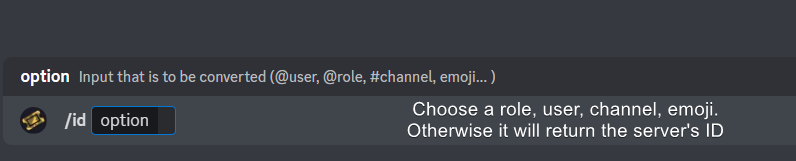 flint bobcat
I type the $id into my server and nothing happens
idle flint
flint bobcat
I type the $id into my server and nothing happens
Can you do a $debug command then please
flint bobcat
It syas the application did not respond in red
idle flint
Bot is missing heaps of perms
 humble sequoiaBOT
When first invited to your server, Ticket Tool should have the permissions shown below in order to ensure an appropriate functioning:
When customizing permissions for the different ticket participants, you must make sure Ticket Tool has the permissions you want it to grant to others, you can learn more about this here.
Missing Permissions
This error is a direct outcome of the bot missing permissions as depicted above. When troubleshooting this error we suggest you go through these steps:
- Use the </debug:1029783024264564765> command to check if the bot is lacking core role or channel permissions.
- Compare the category/channel's overrides and contrast them with the bot's roles to identify any permission denial that is breaking the functioning
- If you can't still figure it out, let our <@&540295656720302081> know so they can guide you through
Additional Resources
- If you are a server administrator and would like to understand more how to set up your server's permissions, we suggest checking the Discord Support Knowledge Base
- If you are a bot developer and are interested in the internal permission hierarchy we suggest you this part of the Discord Developer Docs
Important Note
- Giving Administrator permissions is NOT required and we do NOT encourage you to do unless you are trying to troubleshoot your permissions setup.
How do i give it perms
idle flint
Read the embed above......
Check your channel/category permissions (if you are denying the @everyone role from doing certain things, this would also block the bot)
 grand aspen
Please can someone help.. Trying to make one panel able to open two different types of ticket... Is it possible
idle flint
grand aspen
Please can someone help.. Trying to make one panel able to open two different ty...
You can use attached panels:
humble sequoiaBOT
For more convenient use of multipanels, you can now combine panels on the dashboard. This will allow you to directly send the multipanel from the dashboard or via the $panel ID command.
Where can I find this?
You can find this setting on the Dashboard -> Panel Configs -> Panel -> Attached Panels
Note: if you're attaching all the panels to a panel called English, don't include English in the attached panel's box (If you do this, it will create a duplicate)
This will put all buttons from all of your panels on one message. The message is the panel message from the panel you're combining these panels in.
grand aspen
I can't get it to work. It's meant to give multiple buttons correct
Oh wait!! Fixed it thankyou
 brisk vector
How does the color of the embed change?
limber portal
brisk vector
How does the color of the embed change?
Hey, you can change this with premium
brisk vector
limber portal
Hey, you can change this with premium
Oh 🥺
 tardy ridge
I need help with "You don't have permission to use this", though the blacklist is empty it only appears when a member using the ticket that is form type.
 paper pasture
@upper flower
 upper flower
?
paper pasture
Tell me the link to the official website to configure the bot
upper flower
docs.tickettool.xyz
paper pasture
OK
tardy ridge
anyone I can talk to about "You don't have permission to use this" using form ticket? It only shows up when a member is using a fill the form type ticket. The blacklist is empty. Only staff can use it successfully.
idle flint
tardy ridge
anyone I can talk to about "You don't have permission to use this" using form ti...
You probably have the “support team only” selector enabled on the “Create Ticket” button
humble sequoiaBOT
Button Options
 Enable Button
Hide or show the button
 Emoji
Emoji
Select an emoji to show on the button
You can either select one or use a valid Emoji ID
 Button Text
Edit the text that's shown on the button
 Button Color
Select one of four colors for the button. Grey, Green, Red, Blue.
 Support Team Only
Enable this to only let your support team click that button
 Allowed and disabled roles
Edit what roles can use or not use this button
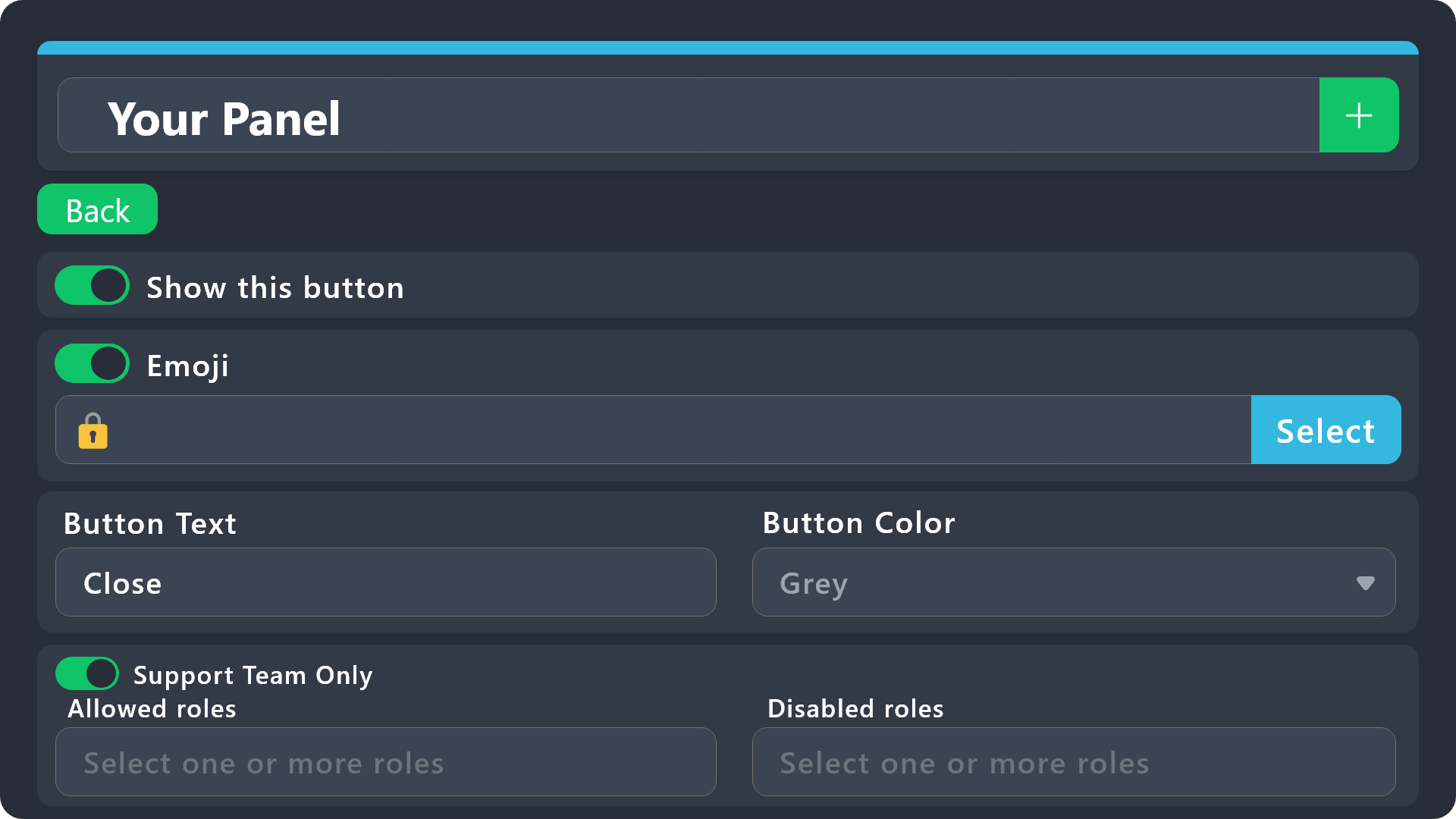
$buttonoptions
tardy ridge
idle flint
You probably have the “support team only” selector enabled on the “Create Ticket...
thank you so much! lifesaver
iron nightBOT
Gave +1 Rep to @idle flint
 desert vigil
do i need to have premium bot to have more than one dropdown option?
jade topaz
is there a way i can close all my tickets in my server at once? its very cluttering i have 500 that i dont want to manually delete
idle flint
desert vigil
do i need to have premium bot to have more than one dropdown option?
No, here is the info:
humble sequoiaBOT
The Drop-down menu or Select Menu replaces the buttons on your panel message and uses a drop-down menu with all of your panels. To set this up, go to your Panel Configs and select your main Panel.
<:Numbericons1:1018864164032225340> Enable Select Style
First you enable Select Style. Then you add an item in the Dropdown Editor. Now you can start editing your dropdown!
<:Numbericons2:1018864168041971712> Dropdown Editor
Each line in the dropdown editor represents a line in the drop down menu on discord. You can add more "Items", by clicking on
First you select a panel. That's the panel this option will open a ticket for. DONT select the same panel twice. Each option should have a different Panel
After that, you can put a Display. This is the title of this option and will appear in the drop down menu. The *Description can be set right after that, which will be below the title in grey.
Additionally you can select an emoji, that will be shown in front of each option. You can either manually input the ID of an emoji or select it in the selector.
Common Issues ⚠️
- Panel doesn't send? Make sure you have a valid emoji selected
- Option doesn't show up? Check if two options have the same panel in the DropDown Editor
$dropdown
idle flint
jade topaz
is there a way i can close all my tickets in my server at once? its very clutter...
Use the /purge command
 idle flint
 wary phoenix
I can't encrypt my password. Can you help me?
wary phoenix
I can't encrypt my password. Can you help me?
Nope, we definitely can’t!
humble sequoiaBOT
⚠️ You're in the wrong place
We provide support for Ticket Tool Discord bot and cannot help you with whatever issue you have.
- We don't know which Support Team you should contact to get this issue resolved, and unfortunately we won't be able to accurately tell you.
If you don't have any further questions regarding our bot Ticket Tool, please close this ticket


 ionic path
Hello! I bought the premium subscription of Ticket Tool and enabled the Direct Message when a ticket is closed, is there a variable where it sends the transcript of the ticket?
 civic wagon
ionic path
Hello! I bought the premium subscription of Ticket Tool and enabled the Direct M...
civic wagon
ionic path
Hello! I bought the premium subscription of Ticket Tool and enabled the Direct M...
Hello there! If you wish to DM a transcript to the ticket owner automatically upon closing of a ticket,
Dashboard > Panel Configs > Transcript > Direct Message Transcript
 ionic path
civic wagon
Hello there! If you wish to DM a transcript to the ticket owner automatically up...
ionic path
civic wagon
Hello there! If you wish to DM a transcript to the ticket owner automatically up...
Oh, I was looking at the wrong place. Thank you!
iron nightBOT
Gave +1 Rep to @civic wagon
ionic path
civic wagon
Hello there! If you wish to DM a transcript to the ticket owner automatically up...
Also one more thing, I've enabled claiming, but when I use $claim it says it isn't enabled. There is also no buttons for claiming.

 civic wagon
Make sure you're testing for the same panel you enabled claiming for
ionic path
It is the same, I thought of that too..
I found out what it was, the website was just bugging and I had to refresh it and re-enable the feature.
jade topaz
idle flint
Use the /purge command
thank u my sexy beast
iron nightBOT
Gave +1 Rep to @idle flint
 humble sequoiaBOT
The Drop-down menu or Select Menu replaces the buttons on your panel message and uses a drop-down menu with all of your panels. To set this up, go to your Panel Configs and select your main Panel.
<:Numbericons1:1018864164032225340> Enable Select Style
First you enable Select Style. Then you add an item in the Dropdown Editor. Now you can start editing your dropdown!
<:Numbericons2:1018864168041971712> Dropdown Editor
Each line in the dropdown editor represents a line in the drop down menu on discord. You can add more "Items", by clicking on
First you select a panel. That's the panel this option will open a ticket for. DONT select the same panel twice. Each option should have a different Panel
After that, you can put a Display. This is the title of this option and will appear in the drop down menu. The *Description can be set right after that, which will be below the title in grey.
Additionally you can select an emoji, that will be shown in front of each option. You can either manually input the ID of an emoji or select it in the selector.
Common Issues ⚠️
- Panel doesn't send? Make sure you have a valid emoji selected
- Option doesn't show up? Check if two options have the same panel in the DropDown Editor
$dropdown
civic wagon
 echo crest
hi ? how make this
echo crest
hi ? how make this
Refer to the embed above ^
 gusty arch
Is there a way to automatically close a ticket if it's been inactive for a certain amount of time?
ionic path
Sorry for all these questions, is there a way to delete all currently closed tickets with a command or something? I have a lot of closed tickets right now and going through them all to delete them one by one will take some time.
limber portal
ionic path
Sorry for all these questions, is there a way to delete all currently closed tic...
You can use /purge to delete all tickets
ionic path
limber portal
You can use /purge to delete all tickets
Yeah, but that deletes the opens ticket too, and it also needs permissions from the server owner himself.
limber portal
ionic path
Yeah, but that deletes the opens ticket too, and it also needs permissions from ...
Unfortunately that’s the only thing close to what you are requesting, otherwise the tickets have to be deleted manually
ionic path
limber portal
Unfortunately that’s the only thing close to what you are requesting, otherwise ...
Alright, thanks!
iron nightBOT
Gave +1 Rep to @limber portal
limber portal
Np
jade topaz
Is there a command or way of seeing your ticket number or a users ticket number
Cause I get a lot of tickets and they are hard to find
 dense tusk
Can anyone help me with verification to withdrawl?
 sharp cargo
In my game one state rp life simulator my mic are not earning sound
humble sequoiaBOT
⚠️ You're in the wrong place
We provide support for Ticket Tool Discord bot and cannot help you with whatever issue you have.
- We don't know which Support Team you should contact to get this issue resolved, and unfortunately we won't be able to accurately tell you.
If you don't have any further questions regarding our bot Ticket Tool, please close this ticket
civic wagon
sharp cargo
In my game one state rp life simulator my mic are not earning sound
Refer to the embed above
sharp cargo
How to
limber portal
sharp cargo
How to
How to what?
sharp cargo
@limber portal how to go to embed
limber portal
sharp cargo
<@1065295463089180763> how to go to embed
Can you clarify the question?
 sterile jolt
Deste smekeri
 vast tide
He won't walk, Wadi
sterile jolt
Sta je picko izdefinisana.
rustic gale
Please no off-topic talk
 vague kiln
hey sorry I just got back from my trip. I'm so sorry, I left my cousin with my sister while I was away and my cousin installed cheats or hacks or whatever happened onto my pc and now I can't jump out of the battle bus without getting kicked from the match, I did some reading and it has come to my attention I have been HWID banned do you know If I could ever play again and if you can make an exception I'm so sorry for the inconvenience. If you can my new username is: username: I'm not kidding...
humble sequoiaBOT
⚠️ You're in the wrong place
We provide support for Ticket Tool Discord bot and cannot help you with whatever issue you have.
- We don't know which Support Team you should contact to get this issue resolved, and unfortunately we won't be able to accurately tell you.
If you don't have any further questions regarding our bot Ticket Tool, please close this ticket
 stiff marlin
عرب ؟
limber portal
$articket
humble sequoiaBOT
فريق الدعم الفني العربي
عميلنا العزيز ان كنت تبحث عن مساعدة يرجى فتح تكت خاص بفريق الدعم الفني العربي
اذهب الى#🎫│make-a-ticket
ثم قم بلضغط على الايموجي الاتي (🇯🇴)
limber portal
@stiff marlin ^^
limber portal
stiff marlin
<@1065295463089180763> no one answered me
You have to be patient when waiting for a response
I don't speak arabic
 chilly sandal
Anyone know how to do this?
 humble sequoiaBOT
The Drop-down menu or Select Menu replaces the buttons on your panel message and uses a drop-down menu with all of your panels. To set this up, go to your Panel Configs and select your main Panel.
<:Numbericons1:1018864164032225340> Enable Select Style
First you enable Select Style. Then you add an item in the Dropdown Editor. Now you can start editing your dropdown!
<:Numbericons2:1018864168041971712> Dropdown Editor
Each line in the dropdown editor represents a line in the drop down menu on discord. You can add more "Items", by clicking on
First you select a panel. That's the panel this option will open a ticket for. DONT select the same panel twice. Each option should have a different Panel
After that, you can put a Display. This is the title of this option and will appear in the drop down menu. The *Description can be set right after that, which will be below the title in grey.
Additionally you can select an emoji, that will be shown in front of each option. You can either manually input the ID of an emoji or select it in the selector.
Common Issues ⚠️
- Panel doesn't send? Make sure you have a valid emoji selected
- Option doesn't show up? Check if two options have the same panel in the DropDown Editor
$dropdown
limber portal
chilly sandal
Anyone know how to do this?
^^
chilly sandal
limber portal
^^
Ty
iron nightBOT
Gave +1 Rep to @limber portal
 lunar hatch
How I change this message

 sterile patio
i noticed some servers have an autoresponder or command set up with ticket tool to rename the ticket with someones username and then something else (ex: report, concern, discussion, etc.), how do i go about making a command to do that?
edit: i know for a fact that the servers do not have the ticket tool premium because i asked
limber portal
lunar hatch
How I change this message
Dashboard > panel configs > messages > panel message
limber portal
sterile patio
i noticed some servers have an autoresponder or command set up with ticket tool ...
You can use the $rename command to rename the channel to whatever you'd like - it's not a custom command, just a regular command
 edgy oak
Hii! I was wondering if I can add multiple buttons for making a ticket. For example one for 'Support' and one for 'Apply for staff'
limber portal
edgy oak
Hii! I was wondering if I can add multiple buttons for making a ticket. For exam...
Hey, you can do this with multipanels
humble sequoiaBOT
For more convenient use of multipanels, you can now combine panels on the dashboard. This will allow you to directly send the multipanel from the dashboard or via the $panel ID command.
Where can I find this?
You can find this setting on the Dashboard -> Panel Configs -> Panel -> Attached Panels
Note: if you're attaching all the panels to a panel called English, don't include English in the attached panel's box (If you do this, it will create a duplicate)
This will put all buttons from all of your panels on one message. The message is the panel message from the panel you're combining these panels in.
limber portal
@edgy oak ^^
edgy oak
limber portal
<@707200980151828481> ^^
alrighty, thanks!!
iron nightBOT
Gave +1 Rep to @limber portal
lunar hatch
 sterile patio
limber portal
You can use the $rename command to rename the channel to whatever you'd like - i...
sterile patio
limber portal
You can use the $rename command to rename the channel to whatever you'd like - i...
is there a way to set it automatically to their username without typing it out? like i know sometimes it has {user_name} or {ticker.user.name}
limber portal
edgy oak
alrighty, thanks!!
No worries
limber portal
sterile patio
is there a way to set it automatically to their username without typing it out? ...
You can edit the automatic name of the channels in dashboard > panel configs > ticket, be aware this is a premium feature
limber portal
lunar hatch
Click on the arrow to expand the editor, you can change the text there
lunar hatch
Oh ok thank you @limber portal
limber portal
lunar hatch
Oh ok thank you <@1065295463089180763>
No problem
edgy oak
okay wait hold on, i'm here now, but how do i add a button?
 limber portal
edgy oak
okay wait hold on, i'm here now, but how do i add a button?
limber portal
edgy oak
okay wait hold on, i'm here now, but how do i add a button?
You are in the wrong section, check out the help embed (I'll resend it again for you)
humble sequoiaBOT
For more convenient use of multipanels, you can now combine panels on the dashboard. This will allow you to directly send the multipanel from the dashboard or via the $panel ID command.
Where can I find this?
You can find this setting on the Dashboard -> Panel Configs -> Panel -> Attached Panels
Note: if you're attaching all the panels to a panel called English, don't include English in the attached panel's box (If you do this, it will create a duplicate)
This will put all buttons from all of your panels on one message. The message is the panel message from the panel you're combining these panels in.
sterile patio
limber portal
You can edit the automatic name of the channels in dashboard > panel configs > t...
alright, thank you
iron nightBOT
Gave +1 Rep to @limber portal
edgy oak
is this the correct one?
 limber portal
edgy oak
is this the correct one?
limber portal
edgy oak
is this the correct one?
Yep, now when you've created the extra panels you can add them as buttons in there
edgy oak
limber portal
Yep, now when you've created the extra panels you can add them as buttons in the...
ooohh wait so i have to create new panels first
limber portal
edgy oak
ooohh wait so i have to create new panels first
Yes, each button you want is a seperate panel
edgy oak
limber portal
Yes, each button you want is a seperate panel
That explains a lot, thank you!!
iron nightBOT
Gave +1 Rep to @limber portal
limber portal
edgy oak
That explains a lot, thank you!!
np
 peak badger
Ok so, I'm quite new with setting up tickets and I want to make one with a specific action, like setting up a time limit / date. how would i do that? i barely know the commands or anything other and I would like a walk through to understand the basics. Like which thing does what
I want to do something for a hiatus notice sort of thing and I don't really know how to set it up
humble sequoiaBOT
First you will want to invite the bot to your server. Once the bot is in your server, you can manage your server in the dashboard.
To create a panel we are going to need to head over to the Panel Configs Tab on the Dashboard.
Once at the dashboard we will need to click Create Panel.
Enter a panel name (Fill in any optional settings you want).
Click Create Panel and you are ready to get started with configuring your panel.
An example of a creating a panel is shown below.
Once the panel has been created, use the blue Send button and select the channel you want the panel to be sent to.
The Panel wasn't send
Use the </debug:ID> command to diagnose possible permission issues with the bot.
limber portal
peak badger
I want to do something for a hiatus notice sort of thing and I don't really know...
This should help you with the basic setup ^^
peak badger
Oh okay, but do i need any specifics
limber portal
peak badger
Oh okay, but do i need any specifics
I didn’t quite understand what you were specifically trying to do - did you mean tickets with a time limit?
peak badger
mhm, I got the idea from another server, but i'm not exactly sure how they did it, but i want to do something similar

 limber portal
peak badger
mhm, I got the idea from another server, but i'm not exactly sure how they did i...
limber portal
peak badger
mhm, I got the idea from another server, but i'm not exactly sure how they did i...
The ticket panel looks fairly standard, so you shouldn’t have to deviate much from the setup steps other than a little extra customisation
peak badger
but how would i do the extra customization?
limber portal
peak badger
but how would i do the extra customization?
Just edit the panel author text in dashboard > panel configs > messages > panel message assuming you wanted to copy that one
peak badger
What do i do from here, if i want to add a date/time limit or does it not need the specifics or the certain commands
 limber portal
peak badger
What do i do from here, if i want to add a date/time limit or does it not need t...
limber portal
peak badger
What do i do from here, if i want to add a date/time limit or does it not need t...
What do you mean by time limit? You can just expand the editor and type the date in, unless im misunderstanding
peak badger
I’m not sure where everything is or what does what in the panel configuration or command configuration
limber portal
peak badger
I’m not sure where everything is or what does what in the panel configuration or...
I would advise checking out the docs https://docs.tickettool.xyz
Ticketing without Clutter
 royal carbon
hey! does anyone know how to set the permission so that one person can open multiple tickets at once?
pseudo ravine
Hey there. You can go to the Dashboard > Limits > Tickets Open > Open tickets each user > Increase the limit
 alpine hinge
The ticket tool says interaction failed, what should I do?
 past fox
Is there a way to have the ticket open once the player joins the server?
 tribal lichen
fix ?
 rustic gale
alpine hinge
The ticket tool says interaction failed, what should I do?
rustic gale
alpine hinge
The ticket tool says interaction failed, what should I do?
Probably a permission issue. Read the following, it's for a related problem, it might help
«The application did not respond»
Are you seeing this message when you use a Ticket Tool command in a channel? It may be because the bot is missing permissions in that channel.
Try the following:
- Right-click the channel, select Edit Channel, then Permissions
- Scroll down to Advanced Permissions and add Ticket Tool there
- Make sure that View Channel and Send Messages are
- Save the changes
- In the channel, use the /debug command to check for any other missing permissions
- If needed, go back to the Permissions menu and grant Ticket Tool any missing permissions
- Retry using the command you wanted to use and confirm that it works properly now.
alpine hinge
I will try to check things out
rustic gale
past fox
Is there a way to have the ticket open once the player joins the server?
Yes, but not with Ticket Tool alone
rustic gale
tribal lichen
fix ?
Well. The fix is to close that open ticket
past fox
rustic gale
Yes, but not with Ticket Tool alone
Please elaborate
rustic gale
past fox
Please elaborate
Ticket Tool does not have trigger responses to users joining the server
So you need a different bot that does
past fox
Ah okay thanks for the help.
rustic gale
What do you mean thanks for the help lol? I'm only beginning the explanation.
past fox
I kinda know a little bit about user.join response, just didn't know the bot could be triggered with that.
rustic gale
You need three things to automatically create a ticket when a user joins a server:
- You need to enable command-style tickets in a specific channel
- You need a bot that can send a custom response in that specific channel when a user joins the server, namely the $new command to create a ticket for the new member (this is the part that Ticket Tool alone can't do)
- You need to add that bot's ID to the Bot ID field in Server Configs in Ticket Tool's dashboard
 gray briar
can someone help me, i can't figure out how to add multiple drop down options to one panel
rustic gale
That's probably because you don't have multiple panels to assign to each of the options
Create more panels


Then you can assign them to the other items
gray briar
ok so i have 2 panels for example right
but i can't ad both panels to the same drop down no?
i figured it out
ty
rustic gale
gray briar
but i can't ad both panels to the same drop down no?
Yes, of course you can