#🆘│community-support
1 messages · Page 70 of 1
 timber kernel
 jade topaz
timber kernel
<:PabloTiphat:983791053842837624>
jade topaz
timber kernel
<:PabloTiphat:983791053842837624>
아 맞다 그런데 티켓을 얼었는데 티켓화면 이 왜 안나오나요?
timber kernel
jade topaz
아 맞다 그런데 티켓을 얼었는데 티켓화면 이 왜 안나오나요?
Not sure if the translation is correct I used, can you share a screenshot please to show what you mean? 🙂
jade topaz
timber kernel
Not sure if the translation is correct I used, can you share a screenshot please...
죄송합니다. 한번 다시 고쳐보고 한번 다 해봤더니 오류가 고쳐져 졌네요 감사합니다
timber kernel
jade topaz
죄송합니다. 한번 다시 고쳐보고 한번 다 해봤더니 오류가 고쳐져 졌네요 감사합니다

 lime vapor
it says interaction failed to every command i do does that mean the bot is down rn?
timber kernel
lime vapor
it says interaction failed to every command i do does that mean the bot is down ...
Please run /debug, most likely a permission problem.
 iron nightBOT
Gave +1 Rep to @timber kernel
timber kernel
lime vapor
it said'

The bot is not able to see the channel.
Please check the channel perms for channel view permission for the bot.
lime vapor
oh i made the channed private mb thanks @timber kernel
iron nightBOT
Gave +1 Rep to @timber kernel
jade topaz
How to make a multi panel
 humble sequoiaBOT
For more convenient use of multipanels, you can now combine panels on the dashboard. This will allow you to directly send the multipanel from the dashboard or via the $panel ID command.
Where can I find this?
You can find this setting on the Dashboard -> Panel Configs -> Panel -> Attached Panels
Note: if you're attaching all the panels to a panel called English, don't include English in the attached panel's box (If you do this, it will create a duplicate)
This will put all buttons from all of your panels on one message. The message is the panel message from the panel you're combining these panels in.

 rustic gale
@jade topaz
iron nightBOT
Gave +1 Rep to @rustic gale
 languid sigil
Quick question, have just subscribed to ticket tool premium in a new server, if we were to use the /botswitcher command will we have to redo all set we've done on the free bot?
 gilded verge
Every settings will be the same (i mean in panel configs, server configs etc) but remember to re-send your panel to the channel with premium bot
 strong lark
hiya, i set up a ticket system n my discord, someone filled it the form but idk where i can find the answers
jade topaz
im trying to send the panel into a channel but it doesnt show up, the bot has administrator perms
gilded verge
strong lark
hiya, i set up a ticket system n my discord, someone filled it the form but idk ...
Hi, there is two ways,
- in
Panel Configs->Ticket->Edit Ticket Messageyou can add variable{create.form.x}wherexis for question, so like if you want to get answer from first question, use{create.form.1}or second question{create.form.2} - in
Panel Configs->Formsyou can enableAuto display form results on the Ticket Message as an additional embed.

 sudden agate
how do i setup the tickets into an channel
gilded verge
jade topaz
im trying to send the panel into a channel but it doesnt show up, the bot has ad...
what's your panel id? you can find it by expanding your panel list
id is a number at the start, my example:
 humble sequoiaBOT
First you will want to invite the bot to your server. Once the bot is in your server, you can manage your server in the dashboard.

To create a panel we are going to need to head over to the Panel Configs Tab on the Dashboard.
Once at the dashboard we will need to click Create Panel.
Enter a panel name (Fill in any optional settings you want).
Click Create Panel and you are ready to get started with configuring your panel.
An example of a creating a panel is shown below.

Once the panel has been created, use the blue Send button and select the channel you want the panel to be sent to.
The Panel wasn't send
Use the </debug:ID> command to diagnose possible permission issues with the bot.
 gilded verge
humble sequoia
gilded verge
humble sequoia
@sudden agate, please check 
 finite fjord
How do I make more than one tickt with one message like this?
 humble sequoiaBOT
For more convenient use of multipanels, you can now combine panels on the dashboard. This will allow you to directly send the multipanel from the dashboard or via the $panel ID command.
Where can I find this?
You can find this setting on the Dashboard -> Panel Configs -> Panel -> Attached Panels
Note: if you're attaching all the panels to a panel called English, don't include English in the attached panel's box (If you do this, it will create a duplicate)
This will put all buttons from all of your panels on one message. The message is the panel message from the panel you're combining these panels in.
jade topaz
humble sequoia
@finite fjord look this tuto
 stark cedar
is there a way to have the ticket tool ping a specific role when a ticket is made?
it just pings the person that made the ticket and nothing else
jade topaz
{@Role Name} Yes sure this variables
 jade topaz
stark cedar
it just pings the person that made the ticket and nothing else
jade topaz
stark cedar
it just pings the person that made the ticket and nothing else
used {user} or {ticket.owner} to ping the owner of the ticket
stark cedar
jade topaz
used {user} or {ticket.owner} to ping the owner of the ticket
where do I put this?
edit panel message?
jade topaz
stark cedar
where do I put this?
in the ticket message
jade topaz
stark cedar
edit panel message?
ticket message
stark cedar
I see! Thanks! 🙂
 haughty kraken
hey guys i just wanna ask ..
Is it necessary for the ticket channel to be available for viewing to "everyone" role ?
or i can put it :false: for everyone and  for another role ?
 robust sandalBOT
Hé les gars, je veux juste demander .. Est-il nécessaire que la chaîne de billets soit disponible pour le visionnement du rôle « tout le monde » ? Ou je peux le mettre :false: pour tout le monde et pour un autre rôle?
 English (en) → French (fr)
jade topaz
haughty kraken
hey guys i just wanna ask ..
Is it necessary for the ticket channel to be availa...
English (en) → French (fr)
jade topaz
haughty kraken
hey guys i just wanna ask ..
Is it necessary for the ticket channel to be availa...
yes it's possible you set see the channel for everyone to false and for the support role see the channel true
haughty kraken
oh nice, thank u so much 🥇
jade topaz

 iron nightBOT
Gave +1 Rep to @rough mesa
 feral bear
Can I know the premium prices
humble sequoiaBOT

Premium can now be purchased directly through discord! Either in the app directory (server settings) or directly from the bots profile.
<:TTWarning:1034178155872784494> Important Information <:TTWarning:1034178155872784494>
ONLY purchase premium through ONE of the two Ticket Tool Bots. If you purchased premium on the primary bot (White logo) and plan to use the premium bot, don't kick the primary bot!
What's different?
 The Monthly price changed from
 $6.00 to $5.99

 Yearly subscriptions are not yet available
Don't kick the bot, otherwise, the subscription will be canceled automatically
You'll need to buy the subscription from a computer or on the Application Directory
You might need to run the /premium command on your server to sync the premium status with your dashboard
 A subscription can not be transferred between Servers

 cursive phoenix
@feral bear
feral bear
cursive phoenix
<@515187740644737044> <:this:894279341108772914>
Do you accept credit, i.e. the currency of the Pro Bot
cursive phoenix
If you want to purchase ticket tool premium see above
feral bear
cursive phoenix
If you want to purchase ticket tool premium see above
Yes, I want to buy, but I want to know payment methods other than the dollar, please
cursive phoenix
We only accept dollars.
If you prefer to prepay for several months at a time with money, you can do that as well.
The only other ways to get premium without using money is to vote for it or win via any giveaways we may have when they happen
feral bear
cursive phoenix
We only accept dollars.
If you prefer to prepay for several months at a time wi...
Oh well thank you for giving me your time
iron nightBOT
Gave +1 Rep to @cursive phoenix
 karmic trail
Will kicking the non-Premium version (once you have Premium/Gold) impact functionality? Will I have to remake my ticket panels, etc.?
jade topaz
hi guys does anybody know if the ticket bot can auto delete tickets when they’re closed, if it’s a premium feature or something thx
 shut bolt
jade topaz
hi guys does anybody know if the ticket bot can auto delete tickets when they’re...
shut bolt
jade topaz
hi guys does anybody know if the ticket bot can auto delete tickets when they’re...
Head to your Dashboard > Panel Configs > General Options and mark as  the Two Step Ticket option, it's completely free!

Ticket Tool - Ticketing without clutter - The #1 discord Ticketing bot
jade topaz
shut bolt
Head to your Dashboard > Panel Configs > [General Options](https://tickettool.xy...
do i have to update after? also thank u
iron nightBOT
Gave +1 Rep to @shut bolt
shut bolt
jade topaz
do i have to update after? also thank u
New tickets will have this applied, old ones will follow previous settings
jade topaz
shut bolt
New tickets will have this applied, old ones will follow previous settings
strange, i made a new ticket and pressed close and its giving me the options to transcript, open or delete.
i just want it to delete instantly
shut bolt
jade topaz
strange, i made a new ticket and pressed close and its giving me the options to ...
Weird, make sure to be using the same panel as the one you edited, sometimes people open tickets in a different panel from the one they edited
Also did you make sure to press Save?
jade topaz
shut bolt
Weird, make sure to be using the same panel as the one you edited, sometimes peo...
i’m stupid i was turning off 2 step close only sorry. thank you brother 🤝
iron nightBOT
Gave +1 Rep to @shut bolt
 nocturne torrent
I need to figure out why it’s hard for me to get a ticket I done everything but it was down but now it’ seems to be not working
rustic gale
Well. If you give us more details then we might be able to help you figure it out
I done everything and seems to be not working are very uninformative.
nocturne torrent
Wht do I got todo to start my career
rustic gale
Your career...?
Sounds like you've come to the wrong place
This is a support server for a Discord bot called Ticket Tool.
Ticket Tool is not related to “careers” or anything similar.
 raven thicket
question, is there a setting that makes it so only server staff can close tickets instead of everyone being able to?
 valid marten
Hello, how do I create a ticket like:

 cloud loom
I setup the ticket bot, however every role in the server can now see the tickets and it's content... how can I make it so no one but Staff, Admins and the ticket owner can see the content inside of the ticket?
valid marten
Support??!
humble sequoiaBOT
The Drop-down menu or Select Menu replaces the buttons on your panel message and uses a drop-down menu with all of your panels. To set this up, go to your Panel Configs and select your main Panel.
<:Numbericons1:1018864164032225340> Enable Select Style
First you enable Select Style. Then you add an item in the Dropdown Editor. Now you can start editing your dropdown!
<:Numbericons2:1018864168041971712> Dropdown Editor
Each line in the dropdown editor represents a line in the drop down menu on discord. You can add more "Items", by clicking on 

First you select a panel. That's the panel this option will open a ticket for.  DONT select the same panel twice. Each option should have a different Panel
After that, you can put a Display. This is the title of this option and will appear in the drop down menu. The *Description can be set right after that, which will be below the title in grey.
Additionally you can select an emoji, that will be shown in front of each option. You can either manually input the ID of an emoji or select it in the selector.
Common Issues ⚠️
- Panel doesn't send? Make sure you have a valid emoji selected
- Option doesn't show up? Check if two options have the same panel in the DropDown Editor

$dropdown
 idle flint
valid marten
Hello, how do I create a ticket like:
idle flint
valid marten
Hello, how do I create a ticket like:
See the above
idle flint
raven thicket
question, is there a setting that makes it so only server staff can close ticket...
You can adjust the button settings for the close button
humble sequoiaBOT
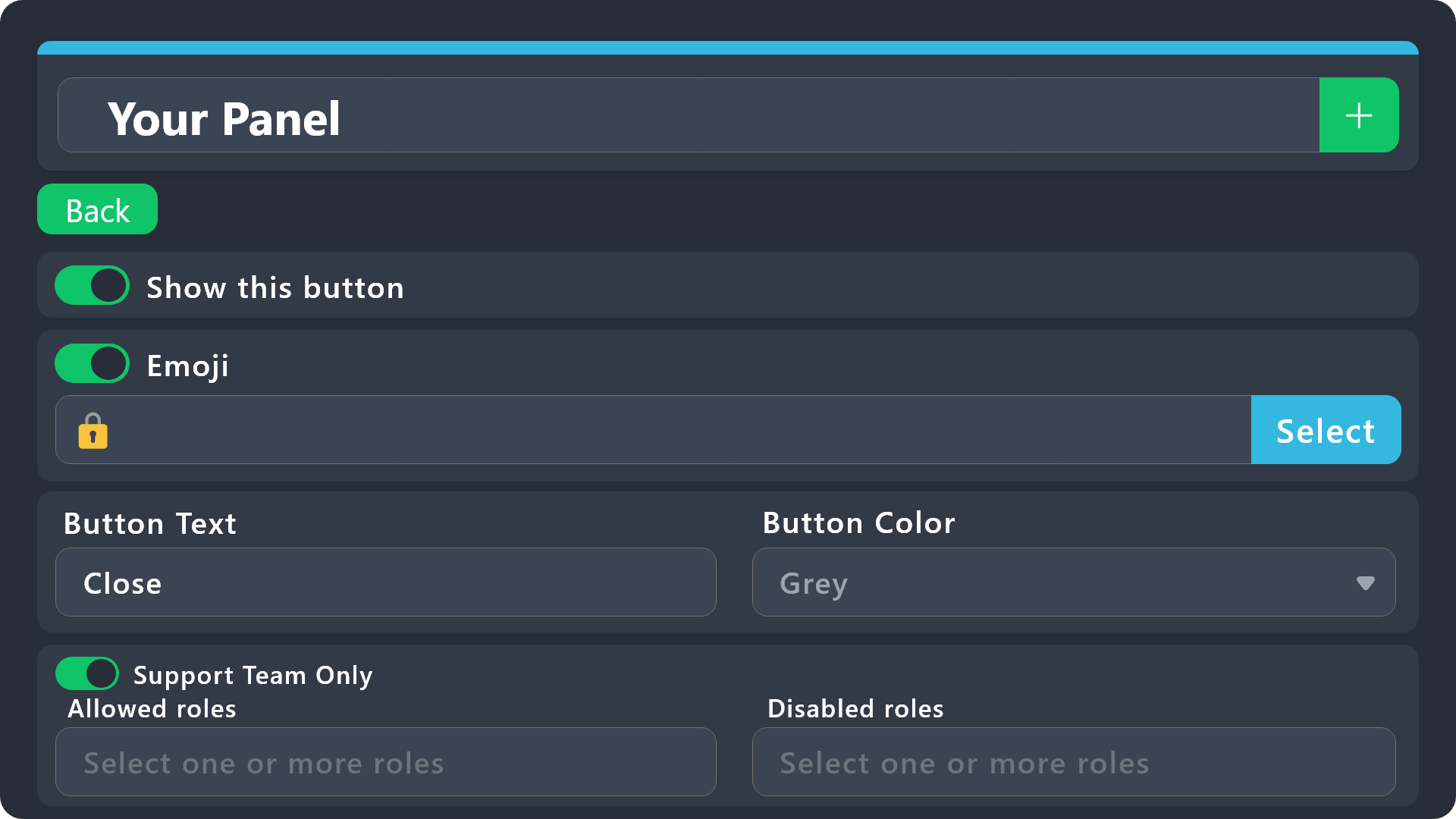
Button Options
 Enable Button
Hide or show the button
 Emoji
Emoji
Select an emoji to show on the button
You can either select one or use a valid Emoji ID
 Button Text
Edit the text that's shown on the button
 Button Color
Select one of four colors for the button. Grey, Green, Red, Blue.
 Support Team Only
Enable this to only let your support team click that button
 Allowed and disabled roles
Edit what roles can use or not use this button
$buttonoptions
raven thicket
i tried turning off show the button and that still didn't work
its used for verifying in the server, when people join they have an unverified role and even putting in disabled roles didn't stop it
idle flint
raven thicket
i tried turning off show the button and that still didn't work
You will need to either select Support Team Only (if you have Support Team roles set up in the General settings) or input some “allowed” roles
lime vapor
it said this when i tried to set up the bot and im the one who invited it to the server "Only admins and people with dashboard access can use this command."
raven thicket
is this right, studio staff is the staff role in the server
 idle flint
lime vapor
it said this when i tried to set up the bot and im the one who invited it to the...
idle flint
lime vapor
it said this when i tried to set up the bot and im the one who invited it to the...
Are you the server owner?
idle flint
You most likely don’t have the Administrator permission (not a role called Admin, but the actual permission). Either have the server owner give you that permission OR have them allocate you a role and put it as a Dashboard Role:
humble sequoiaBOT
Any role you put there will have full access to the ticket tool dashboard. The server owner and users with admin permissions already have access to the dashboard.
Be careful of which roles to put here
 idle flint
raven thicket
is this right, studio staff is the staff role in the server
idle flint
raven thicket
is this right, studio staff is the staff role in the server
Yes and no, if you have Support Team Only selected, ensure you have some Support Team Roles selected in the General setting tab.
For what you want, it will probably work with the Support Team Only selected turned OFF
lime vapor
idle flint
You most likely don’t have the Administrator permission (not a role called Admin...
thanks it worked
iron nightBOT
Gave +1 Rep to @idle flint
idle flint
raven thicket
is this right, studio staff is the staff role in the server
This will mean that only people with the “studio staff” role can use the button, but should one have the “studio staff” and the “unverified” roles, they can’t use it
raven thicket
idle flint
Yes and no, if you have Support Team Only selected, ensure you have some Support...
so where abouts do i find that?
 idle flint
valid marten
where? I want to do like this
idle flint
valid marten
where? I want to do like this
The information below will help
humble sequoiaBOT
The Drop-down menu or Select Menu replaces the buttons on your panel message and uses a drop-down menu with all of your panels. To set this up, go to your Panel Configs and select your main Panel.
<:Numbericons1:1018864164032225340> Enable Select Style
First you enable Select Style. Then you add an item in the Dropdown Editor. Now you can start editing your dropdown!
<:Numbericons2:1018864168041971712> Dropdown Editor
Each line in the dropdown editor represents a line in the drop down menu on discord. You can add more "Items", by clicking on
First you select a panel. That's the panel this option will open a ticket for. DONT select the same panel twice. Each option should have a different Panel
After that, you can put a Display. This is the title of this option and will appear in the drop down menu. The *Description can be set right after that, which will be below the title in grey.
Additionally you can select an emoji, that will be shown in front of each option. You can either manually input the ID of an emoji or select it in the selector.
Common Issues ⚠️
- Panel doesn't send? Make sure you have a valid emoji selected
- Option doesn't show up? Check if two options have the same panel in the DropDown Editor
$dropdown
idle flint
raven thicket
so where abouts do i find that?
Dashboard > Panel Configs > General
raven thicket
idle flint
Dashboard > Panel Configs > General
so do i take off studio staff?
 idle flint
raven thicket
so do i take off studio staff?
idle flint
raven thicket
so do i take off studio staff?
Nope, what I ment is, if on the button, you have “Support Team Only” selected, it means that only roles listed as Support Team can use that button.
So because you have “studio staff” listed as a Support Team Role, for the Close Button, you could just use the Support Team Only slider set to On and nothing in the “allowed” and “disallowed” roles
 idle flint
raven thicket
*sorry for asking so many times* so like this?
idle flint
raven thicket
*sorry for asking so many times* so like this?
Correct
raven thicket
cool and is that with show this button turned off or leave it?
idle flint
Leave it on, “show button” being off means that the button won’t be displayed to anyone
raven thicket
ok
idle flint
If you were to do that, you would have to use application commands to close the tickets (ie $close)
raven thicket
ok thanks, hopefully it works now, thanks for the help
valid marten
Hello, how do I create a ticket like this?

As soon as I press (🚫) it creates a ticket
 jolly marlin
هلا
 hybrid bolt
what are the features of ticket premium?
humble sequoiaBOT
Premium can now be purchased directly through discord! Either in the app directory (server settings) or directly from the bots profile.
<:TTWarning:1034178155872784494> Important Information <:TTWarning:1034178155872784494>
ONLY purchase premium through ONE of the two Ticket Tool Bots. If you purchased premium on the primary bot (White logo) and plan to use the premium bot, don't kick the primary bot!
What's different?
The Monthly price changed from $6.00 to $5.99
Yearly subscriptions are not yet available
Don't kick the bot, otherwise, the subscription will be canceled automatically
You'll need to buy the subscription from a computer or on the Application Directory
You might need to run the /premium command on your server to sync the premium status with your dashboard
A subscription can not be transferred between Servers
jade topaz
hybrid bolt
what are the features of ticket premium?
Please check it out all information about premium bot
humble sequoiaBOT
 Faster Premium Bot
Automatic Transcripts
Full Customization
Direct Messages
Ticket Automation
Thread Style Ticketing
Premium Support
Scheduled Panel Availability
Integrations
You can purchase premium here:
Price
$6 - Monthly
$66 - Yearly
 Premium
jade topaz
Premium
jade topaz
These are perks for premium
 ripe carbon
I really need help
can you reopen closed tickets? Do closed tickets get stored somewhere? I recently got scammed and I really need to see the closed ticket for chat logs and other info
was this the appropriate place to ask this question?
 sweet tiger
How do i make it so a member can access a certain ticket like for example
ticket for Staff application, Support and reports
jade topaz
ripe carbon
I really need help
can you reopen closed tickets? Do closed tickets get stored s...
-
Can you reopen closed tickets?
A. Yes, you can reopen closed tickets by using command/openin the closed channel. -
Do closed tickets get stores somewhere?
A. Yes, it was stored in transcript channels which you sets in server. Or if you have premium you can enable auto transcripts so it will directly send transcripts in dm when ticket was closed. -
I recently got scammed and i really need to see the closed ticket for chat logs and other info
A. If your the server owner please read the q.answer no.2, if your'nt server owner then its not possible maybe only having premium for directly see transcripts in dm's.
Having any questions/enquirie please ask we will help to solve the problem as possible.
Thank you.
iron nightBOT
Gave +1 Rep to @ripe carbon
jade topaz
sweet tiger
How do i make it so a member can access a certain ticket like for example
ticke...
Role Settings
Support Team Roles
In this field you'll be able to select the roles that, by default, will have access to tickets as well as to commands and buttons that have been marked to be Support Team Only.
Additional Roles
This fields allows you to pick a different group of roles to get assigned different permissions from your support team roles. One of the most common uses given to this feature is having an observer role, i.e. someone who can see the ticket but doesn't have the permission to talk on it.
To setup the role:
Head to your Dashboard
Select your server
Go to the Panel Configs Tab
Under General, click on General Options and after you clicks it shows Support Team Roles you can add role here which you want to access tickets.
 iron sparrow
is it possible to have a button without a panel connected to it? like no message shows up. i’ve seen it done before but i can’t do it now
gilded verge
iron sparrow
is it possible to have a button without a panel connected to it? like no message...
if your server don't have premium, just remove embed

result:

 odd star
Dumb question. When/If you add a Role or User to a ticket does it logs that?
 viscid bloom
So hm, everytime i save the transcript and i go check the log, the attachments that was sent in there does not upload... How can i fix this?
 tranquil palm
I've just bought premium and its saying its not active in the server? when i try use the tools never had this issueb efore
Fixed it ',3
odd star
viscid bloom
So hm, everytime i save the transcript and i go check the log, the attachments t...
I think they have a size limit.
So if the attachment is over some size its not saved.
It shows in the logs. Attachment Sent, Attachment Saved.
I think, not sure.
viscid bloom
odd star
I think they have a size limit.
So if the attachment is over some size its not s...
It opens a new page, which says that it might be temporarily unavaible or could have been moved to a new web address... lol its confusing
odd star
Discord Deletes the images when the channel is deleted.
So if the transcript saved the image URL, it will be gone after the ticket is deleted.
 bronze terrace


 pseudo ravine
Hey there. You need to attach a panel for each of them, that's why only 1 of them is available to pick
 scenic plinth
odd star
I think they have a size limit.
So if the attachment is over some size its not s...
scenic plinth
odd star
I think they have a size limit.
So if the attachment is over some size its not s...
Yes, though slight correction. Discord stopped saving images or other forms of files from deleted channels, so we cant save them from any size, or atleast for now. Premium has an ¨experimental¨ feature for saving files of up to 5mb (If I recall correctly).
 spark plume
help me please
I bought a client for a moon, paid for it, then I received a letter on my email, and I accidentally deleted it, what should I do?
gilded verge
spark plume
I bought a client for a moon, paid for it, then I received a letter on my email,...
what client
spark plume
moon
gilded verge
please send name of this discord server where you are or just read it

and now you can see --> @pseudo glen <-- right?
so conclusion is, this support server is for ticket tool discord bot, nothing else
spark plume
Honestly, I didn't understand anything I needed to do
gilded verge
in other words, nobody can't help you because you're on the wrong server
humble sequoiaBOT

⚠️ You're in the wrong place
We provide support for Ticket Tool Discord bot and cannot help you with whatever issue you have.
- We don't know which Support Team you should contact to get this issue resolved, and unfortunately we won't be able to accurately tell you.
If you don't have any further questions regarding our bot Ticket Tool, please close this ticket
rustic gale
odd star
Dumb question. When/If you add a Role or User to a ticket does it logs that?
No, it doesn't
 white aurora
How does the premium bot works? Like do i have to keep the primary one? Since i wanna customize the name etc so dont want a ticket bot with the name\
jade topaz
white aurora
How does the premium bot works? Like do i have to keep the primary one? Since i ...
You dont need to keep the primany in the server, and whitelabel isnt a thing yet
white aurora
jade topaz
You dont need to keep the primany in the server, and whitelabel isnt a thing yet
Thanks! Also you can fully customize with premium? Like name change logo etc?
iron nightBOT
Gave +1 Rep to @untold whale
jade topaz
white aurora
Thanks! Also you can fully customize with premium? Like name change logo etc?
No sir, whitelabel isnt a thing yet 😦
white aurora
jade topaz
No sir, whitelabel isnt a thing yet 😦
Ow so you can only get the premium features but not change anything from the bot it self as in name etc
jade topaz
you can change the nickname of the bot, but if you want to change logo, username etc you will have to wait until they bring out the whitelabel feature
the bot you will get is @humble sequoia
white aurora
jade topaz
you can change the nickname of the bot, but if you want to change logo, username...
Ah okay, any ideas when that could happen?
Since i prefer Ticket Tool a lot more then other ticket bots but just need a fully customization thing....
jade topaz
white aurora
Ah okay, any ideas when that could happen?
i really dont know, its been on the suggestions list for a while but no eta has been given 😦
jade topaz
white aurora
Since i prefer Ticket Tool a lot more then other ticket bots but just need a ful...
yep, im the same. i just changed the nickname and embeds and stuck with it 🙂
 dusk mountain
How I get the premium key. I puchased premium but I cant find the key
white aurora
jade topaz
i really dont know, its been on the suggestions list for a while but no eta has ...
Awh, well then i wait for that before buying premium
jade topaz
dusk mountain
How I get the premium key. I puchased premium but I cant find the key
You dont get a premium key upon purchase sir?
did you purchase within discord?
dusk mountain
jade topaz
did you purchase within discord?
Yes, I did
jade topaz
did you choose a server to activate premium upon while doing that?
dusk mountain
jade topaz
did you choose a server to activate premium upon while doing that?
Yes. I selected
jade topaz
ok great, so if you go to the dashboard below you should be able to find your server then invite the premium bot
if it dosent show try clicking the sync button as you recently purchased
dusk mountain
jade topaz
if it dosent show try clicking the sync button as you recently purchased
It don't show up
when I sync
jade topaz
are you owner of that server?
dusk mountain
jade topaz
are you owner of that server?
the co owner
jade topaz
alright i think you will need to ask the person with full server ownership to go to the dashboard and create a dashboard access role, then give it to you.

then when you sync you will have access to the dashboard
dusk mountain
My role got set on the dashboard (It called "Projektleitung"). But When I sync it dont work
 jade topaz
did you give yourself that role?
dusk mountain
I tried it to give it myself
The role in the guild give my friend
In the dashboard I tried it to give it myself
jade topaz
dusk mountain
My role got set on the dashboard (It called "Projektleitung"). But When I sync i...
to access the dashboard you will need one of them roles, so try get someone with admin or the owner to give you that role
dusk mountain
jade topaz
to access the dashboard you will need one of them roles, so try get someone with...
I have acces to the dashboard already
But it dont show up
jade topaz
ok so you have access to the dashboard, what are you trying to do? invite the premium bot?
dusk mountain
jade topaz
ok so you have access to the dashboard, what are you trying to do? invite the pr...
Yes, I try to invite the premium bot
jade topaz
okay so follow the path below
Dashboard > Server Configs > Invite Premium Bot
if you click that button that will then redirect you to inviting the premium bot
make sure to also switch to the premium bot like the screenshot below

 olive quest
Can I use the "Create a Ticket" button as a "Reaction Role"?
rustic gale
jade topaz
You dont need to keep the primany in the server, and whitelabel isnt a thing yet
@white aurora It depends.
As far as Discord is concerned, the two bots are two separate bots and their subscriptions are handled separately.
If you subscribe to White and then kick it because you want to use Gold, Discord will automatically cancel the subscription.
rustic gale
olive quest
Can I use the "Create a Ticket" button as a "Reaction Role"?
What do you mean a “reaction role”
white aurora
rustic gale
<@163907072864419840> It depends.
As far as Discord is concerned, the two bots ...
Ah okay, yeah im just gonna wait till white label is available tbh
olive quest
By clicking the Button u will get a special server role
as example, click "creat Ticket" and u will get the Support role
rustic gale
Sort of
olive quest
usally u need bot for it
rustic gale
Well. Ticket Tool is a bot
So it's not like you're avoiding the need to use a bot by using Ticket Tool for that
In any case, Ticket Tool is for making tickets
There's functionality that lets you add a role to the user that creates a ticket
but it's premium-only
Honestly, it's best if you actually use an actual bot that's designed for giving roles to users
olive quest
Well.. i use Ticket Tool to creat a Team / The caption need to click on the Button " click here to creat a team" and i want to give him the caption Role then
olive quest
iam premium
i use translater now -> I used Ticket Tool for my tournament. If a player wants to create a team, he has to create a ticket. I want him to automatically get the role "captain" when he clicks on create ticket
olive quest
oh its that easy 🙂 Thanks ! 🙂
nocturne torrent
How do I get the bot to work this been having me going crazy for days no seem to give me the right guide
humble sequoiaBOT
First you will want to invite the bot to your server. Once the bot is in your server, you can manage your server in the dashboard.
To create a panel we are going to need to head over to the Panel Configs Tab on the Dashboard.
Once at the dashboard we will need to click Create Panel.
Enter a panel name (Fill in any optional settings you want).
Click Create Panel and you are ready to get started with configuring your panel.
An example of a creating a panel is shown below.
Once the panel has been created, use the blue Send button and select the channel you want the panel to be sent to.
The Panel wasn't send
Use the </debug:ID> command to diagnose possible permission issues with the bot.
 loud elk
Is it possible to make a rôle able to view tickets
gilded verge
humble sequoia
@nocturne torrent,
humble sequoiaBOT
1. Go into your Dashboard
2. Open your Panel Configs tab
3. Select the panel you want to grant access to
4. Open the General options menu
5. Select your Support Team Roles
6. Save changes
 gilded verge
humble sequoia
gilded verge
humble sequoia
@loud elk, if you mean your moderators, check
nocturne torrent
I’m trying to help my husband get this set up - is there a video or can we screen share somehow?
rustic gale
Sure, you could share your screen if there were anyone volunteering to guide you through it
It's generally not so difficult that it requires screen sharing
Which difficulty have you found?
 dense dragon
What is the command do ticket?
 remote wren
Any reason why my tickets are not moving themselves when they are closed anymore?
It moves from pending to claimed but won't move from claimed to closed
rustic gale
remote wren
Any reason why my tickets are not moving themselves when they are closed anymore...
Probably the category's full.
humble sequoiaBOT
Discord only allows to stack up to 50 channels per category, meaning that if you have already 50 tickets in one category, the bot won't be able to place a ticket in that category, for such reason Ticket Tool counts with overflow categories, meaning that if your main category is filled, the bot will go ahead and place the ticket on the next one available, simply choose a second category in the category pickers:
 rustic gale
Depends what exactly you see when you try them
You can show me anyway and maybe i understand 
 lucid lintel
Same situation has been happening to me, it's with every command except for ping.
cursive phoenix
Just fyi, generally, unless staff have specifically said to ping them, pinging staff is against our rules ( #📂│information ) .
humble sequoiaBOT
When first invited to your server, Ticket Tool should have the permissions shown below in order to ensure an appropriate functioning:
When customizing permissions for the different ticket participants, you must make sure Ticket Tool has the permissions you want it to grant to others, you can learn more about this here.
Missing Permissions
This error is a direct outcome of the bot missing permissions as depicted above. When troubleshooting this error we suggest you go through these steps:
- Use the </debug:1029783024264564765> command to check if the bot is lacking core role or channel permissions.
- Compare the category/channel's overrides and contrast them with the bot's roles to identify any permission denial that is breaking the functioning
- If you can't still figure it out, let our <@&540295656720302081> know so they can guide you through
Additional Resources
- If you are a server administrator and would like to understand more how to set up your server's permissions, we suggest checking the Discord Support Knowledge Base
- If you are a bot developer and are interested in the internal permission hierarchy we suggest you this part of the Discord Developer Docs
Important Note
- Giving Administrator permissions is NOT required and we do NOT encourage you to do unless you are trying to troubleshoot your permissions setup.
 jade topaz
lucid lintel
Same situation has been happening to me, it's with every command *except* for pi...
jade topaz
lucid lintel
Same situation has been happening to me, it's with every command *except* for pi...
Read it to set permissions properly, even got any issue please inform here.
rustic gale
@jade topaz @lucid lintel
«The application did not respond»
Are you seeing this message when you use a Ticket Tool command in a channel? It may be because the bot is missing permissions in that channel.
Try the following:
- Right-click the channel, select Edit Channel, then Permissions
- Scroll down to Advanced Permissions and add Ticket Tool there
- Make sure that View Channel and Send Messages are for Ticket Tool
- Save the changes
- In the channel, use the /debug command to check for any other missing permissions
- If needed, go back to the Permissions menu and grant Ticket Tool any missing permissions
- Retry using the command you wanted to use and confirm that it works properly now.
 bright rose
it's possible tu create 2 transcripts ? one category have his own transcript and an other have his too ?
humble sequoiaBOT
━━ User's inquiry has been moved to a ticket ━━
 shadow nest
U
 topaz wing
Great
 agile parrot
any idea if custom variables will be supported in the future? I'd like to be able to edit an image link to multiple footers and other url spaces at once
rustic gale
What do you mean by custom variables
agile parrot
like the option for users to easily add a variable i. e. {example} = "example.org"
or is there currently any other way to edit multiple messages simultaneously?
agile parrot
just figured it'd be convenient
thanks @rustic gale for the quick reply though - hope the devs may at some point think about ux in that regard
 left bison
Have you gotten through with it
 queen helm
I've seen in other server, people have a ticket page with all the tickets under one post like this

How can I add them like this on my server, anytime I send I get the ticket message the message and the ticket.
humble sequoiaBOT
For more convenient use of multipanels, you can now combine panels on the dashboard. This will allow you to directly send the multipanel from the dashboard or via the $panel ID command.
Where can I find this?
You can find this setting on the Dashboard -> Panel Configs -> Panel -> Attached Panels
Note: if you're attaching all the panels to a panel called English, don't include English in the attached panel's box (If you do this, it will create a duplicate)
This will put all buttons from all of your panels on one message. The message is the panel message from the panel you're combining these panels in.
 open orchid
Why doesn't the support team see the Claim option after sending a Ticket message?
gilded verge
open orchid
Why doesn't the support team see the Claim option after sending a Ticket message...
claiming is a premium feature, are you sure your server has premium? 🤔
open orchid
gilded verge
claiming is a premium feature, are you sure your server has premium? 🤔
No
jade topaz
how do i buy a premium key so i can use it on the normal ticket tool, for this
 humble sequoiaBOT
PayPal - paypal@tickettool.xyz
BitCoin - 3HhKKAdb9eEvCe2tvzB8bAa8nebHY6qcPA
LiteCoin - MEQX3knLAuotrKnvk3HDNBK5gdRn6PZhHy

Prepay/Direct Payment
To prepay send the payment using your desired method - Available options listed bellow.
⚠️ $18 per 3 months. ⚠️
$66 per year.
(If using the direct payment option, you need to be paying for at-least 3+ months.)
Regular Prices when paying within Discord:
$5.99/per month
Once your payment is sent let us know so we can confirm and get you your key.
- Purchases done with this method are non-refundable.
<:paypal:924596360840372234> Paypal ("Goods and Services" or "Family and Friends")
paypal@tickettool.xyz
<:bitcoin:924638849135689749> BTC - Bitcoin
3HhKKAdb9eEvCe2tvzB8bAa8nebHY6qcPA
<:Litecoin:972176945972383815> LTC - LiteCoin
MEQX3knLAuotrKnvk3HDNBK5gdRn6PZhHy
I sent the payment now what?
After you send the payment, please send a screenshot with proof of payment, our <@&615146349700186112> will verify your payment and will get you setup. For crypto payments, we are waiting for at least ONE verification.

All prices in USD - 3 months min for direct payment
rustic gale
You make a ticket and post your payment confirmation there and wait for the billing team to make a key for you
@jade topaz
A premium key is not the only way to get premium, though
jade topaz
Okay, 1 moment
rustic gale
You can also get a subscription via Discord's app subscription feature
Sorry, not make a thread
make a ticket
not make a thread
jade topaz
rustic gale
You can also get a subscription via Discord's app subscription feature
Okay thank you sir,
iron nightBOT
Gave +1 Rep to @rustic gale
open orchid
According to the documentation, this option should work without premium
 tall ridge
People, for days this error has been appearing and it's not a problem with /debug, it's okay. What could it be? Please?
 rustic gale
tall ridge
People, for days this error has been appearing and it's not a problem with /debu...
rustic gale
tall ridge
People, for days this error has been appearing and it's not a problem with /debu...
The server is making way too many tickets.
 vapid vine
Alguien que me pueda ayudar con Formulario de recuperacion de cuenta ? Gracias a todo !
humble sequoiaBOT
⚠️ Está en el lugar equivocado
Brindamos soporte para el bot de Discord Ticket Tool y no le podemos ayudar con el problema que presenta.
- No sabemos a que equipo de soporte debería contactar para solucionar este problema, y desafortunadamente no podremos ayudarle acertadamente.
Si no tiene alguna duda relacionada a nuestro bot, Ticket Tool, por favor cierre este ticket.
 turbid rivet
Hello. When I delete a ticket, there's a way for the person who opened to received the history but only for this person?
 robust hinge
Hey! Does anyone know how to fix this? I want each embed to have the option to open each ticket.
 jade topaz
robust hinge
Hey! Does anyone know how to fix this? I want each embed to have the option to o...
jade topaz
robust hinge
Hey! Does anyone know how to fix this? I want each embed to have the option to o...
are all them embeds attatched onto one panel?
robust hinge
jade topaz
are all them embeds attatched onto one panel?
This is what I done
 jade topaz
yeah you cant do that, it wont work
humble sequoiaBOT
For more convenient use of multipanels, you can now combine panels on the dashboard. This will allow you to directly send the multipanel from the dashboard or via the $panel ID command.
Where can I find this?
You can find this setting on the Dashboard -> Panel Configs -> Panel -> Attached Panels
Note: if you're attaching all the panels to a panel called English, don't include English in the attached panel's box (If you do this, it will create a duplicate)
This will put all buttons from all of your panels on one message. The message is the panel message from the panel you're combining these panels in.
jade topaz
check that
robust hinge
Alright thank you
jade topaz
with that you can keep your embeds, but you will have a button for each
robust hinge
robust hinge
This is what I done
So I don't need to delete anything from here?
robust hinge
jade topaz
with that you can keep your embeds, but you will have a button for each
Managed to fix this
robust hinge
Does anyone know how I could name each ticket so for example when you open mod ticket it should say "mod-ticket#0001" for admin "admin-ticket#0001" and so on
 humble sequoiaBOT
The ticket name is the default channel name of all tickets. To edit it, go to your Dashboard > Panel Configs > Ticket. There you can edit the channel name of opened and closed tickets. You can also use variables in there.

 Note: This is a premium feature
idle flint
robust hinge
Does anyone know how I could name each ticket so for example when you open mod t...
Note: This is a premium feature
idle flint
robust hinge
Does anyone know how I could name each ticket so for example when you open mod t...
Use this ^^
robust hinge
idle flint
Use this ^^
Thank you!
iron nightBOT
Gave +1 Rep to @idle flint
 novel monolith
Anyone know how to put a link in? It's not html is it?

 foggy briar
jade topaz
novel monolith
Anyone know how to put a link in? It's not html is it?
foggy briar
jade topaz
novel monolith
Anyone know how to put a link in? It's not html is it?
i cant send you the tuto on this server look in your private message
 fallow sigil
pseudo ravine
jade topaz
i cant send you the tuto on this server look in your private message
fallow sigil
pseudo ravine
jade topaz
i cant send you the tuto on this server look in your private message
Nothing should be sent via DMs, please keep everything help related to this channel
 wheat dew
can anyone show me how to get ticket tool into my sever and work it pls
jade topaz
just a question
how do u change what shows on the tickets when one is created like the message of what was inputted in the drop down selection
 crude lagoon
 drowsy herald
anyone can help me?
humble sequoiaBOT
Hello, we would love to help you, but if you don't tell us what you need help with we can't help you :(
humble sequoiaBOT
For more convenient use of multipanels, you can now combine panels on the dashboard. This will allow you to directly send the multipanel from the dashboard or via the $panel ID command.
Where can I find this?
You can find this setting on the Dashboard -> Panel Configs -> Panel -> Attached Panels
Note: if you're attaching all the panels to a panel called English, don't include English in the attached panel's box (If you do this, it will create a duplicate)
This will put all buttons from all of your panels on one message. The message is the panel message from the panel you're combining these panels in.
For more convenient use of multipanels, you can now combine panels on the dashboard. This will allow you to directly send the multipanel from the dashboard or via the $panel ID command.
Where can I find this?
You can find this setting on the Dashboard -> Panel Configs -> Panel -> Attached Panels
Note: if you're attaching all the panels to a panel called English, don't include English in the attached panel's box (If you do this, it will create a duplicate)
This will put all buttons from all of your panels on one message. The message is the panel message from the panel you're combining these panels in.
 brittle canopy
$vote
humble sequoiaBOT
brittle canopy
$vote
Votes
Current Votes: 0
Lifetime Votes: 102
Linked Votes: 98
Vote Links
Linking Info
Linked User: 414262796222595073
You can give your future votes to another user by linking with that user.
To link use $vote link (@user or userId)
To unlink use $vote unlink
Redeeming
Each vote is worth 12 hours of premium and can be redeemed once you have atleast 6 votes.
Your current votes are worth 0m
To redeem your current votes use $vote redeem
pseudo ravine
#🤖│bot-spam
jade topaz
for the ticket to be closed in 12 hours if there's not activity on the channel
here

should i put stop checking or keep checking?

 sly compass
 crisp dust
@rustic gale
Me podrias ayudar no puedo conseguir que cuando crean ticket se elimine solo el ticket sin tener que eliminarlo yo
rustic gale
crisp dust
Me podrias ayudar no puedo conseguir que cuando crean ticket se elimine solo el ...
?
Por qué razón se eliminaría el ticket solo
crisp dust
A no se puede?
rustic gale
Claro que se puede, pero es una pregunta lo que te hago
Por ejemplo, quieres que se elimine solo cinco minutos después de creado
O quieres que se elimine solo al cerrarlo
O quieres que se elimine solo si el usuario no envía mensaje en tres días
Por qué razón
 faint flume

Hi! Does anyone know what this means and why it's popping up? My sister tried to open a ticket to test it in my server and this thing showed up, but she did make a ticket so it is working?
rustic gale
faint flume
Hi! Does anyone know what this means and why it's popping up? My sister tried to...
The bot is set to create tickets in a category, but the bot is missing the View Channels permission in the category. Thus the bot can't create tickets inside the category.
When that happens. the bot will create the ticket outside a category if able.
 empty bolt
Monke
faint flume
rustic gale
The bot is set to create tickets in a category, but the bot is missing the **Vie...
Ohh, alright! It was indeed because it's a hidden channel, so I'll change it then. Thank you!
iron nightBOT
Gave +1 Rep to @rustic gale
 static path
Is there a way to rename a channel to name-0001 for and have the name be the person who claimed the ticket?
I tried {claim.user}-{count} but it puts the claimed persons id instead of name
rustic gale
static path
I tried {claim.user}-{count} but it puts the claimed persons id instead of name
or .nickname
static path
Ah okay ty, I may have missed the part that says "same sub-variables as ticket.user" lol
Thanks @rustic gale
iron nightBOT
Gave +1 Rep to @rustic gale
 brisk light
how i can use the form ?
humble sequoiaBOT
A Discord Form lets the user answer individual questions in a pop-up Form, which then displays the answers in the ticket message. This can save time if you already know what you want to ask the user.
Setup Forms
Forms can be enabled under Panel Settings > Form Options > Edit Forms Options. In the new pop-up window, you can now enable and edit your own Form.
Form Options
You can add up to 5 questions in the Discord form. This is a Discord limitation. Each question can have a placeholder in the input field, a minimum and maximum input, multi-line, and also the option to have the answer required.
Options
Question Title ➞ Your Question goes here
Question Placeholder ➞ The placeholder text in the input field
Required ➞ If enabled, the user has to answer this question, to submit the form
Multi-Line Input ➞Allows the user to input multiple lines
Minimum and Maximum Input ➞ Set a minimum and maximum input value for the user
Displaying the Answer
To display the answers from the user, you need to enable Auto display form results on the ticket message as an additional embed
If you don't want a second embed, go into your Panel Configs > Ticket Options > Edit Ticket Message. You use the variable {create.form.x} and replace x with the number of your question. For example, the response to Question 5 can be displayed with {create.form.5}.

 halcyon cedar
ال
 viscid grail
How I can add ticket tool premium
idle flint
viscid grail
How I can add ticket tool premium
Here is some info:
humble sequoiaBOT
Premium can now be purchased directly through discord! Either in the app directory (server settings) or directly from the bots profile.
<:TTWarning:1034178155872784494> Important Information <:TTWarning:1034178155872784494>
ONLY purchase premium through ONE of the two Ticket Tool Bots. If you purchased premium on the primary bot (White logo) and plan to use the premium bot, don't kick the primary bot!
What's different?
The Monthly price changed from $6.00 to $5.99
Yearly subscriptions are not yet available
Don't kick the bot, otherwise, the subscription will be canceled automatically
You'll need to buy the subscription from a computer or on the Application Directory
You might need to run the /premium command on your server to sync the premium status with your dashboard
A subscription can not be transferred between Servers
crisp dust
rustic gale
O quieres que se elimine solo ***si el usuario no envía mensaje en tres días***
No quiero que se elimine al cerrarlo
rustic gale
crisp dust
No quiero que se elimine al cerrarlo
¿Quieres que se elimine automáticamente al cerrarlo?
crisp dust
Si
rustic gale
Panel Configs -> Ticket -> Two Step Ticket 
crisp dust
?
humble sequoiaBOT
Ticket Tool - Ticketing without clutter - The #1 discord Ticketing bot
rustic gale
Encuentra tu servidor y presiona Manage
crisp dust


 rustic gale
“Boleto de dos pasos”
Que es la traducción automática chimba de Two Step Ticket, como dije arriba
Desactiva eso
Y ya
 rustic gale
Ahora guarda los cambios
rustic gale
No
Ahora vas a tu servidor y creas un ticket y lo cierras y compruebas que se elimina solo
humble sequoiaBOT
For more convenient use of multipanels, you can now combine panels on the dashboard. This will allow you to directly send the multipanel from the dashboard or via the $panel ID command.
Where can I find this?
You can find this setting on the Dashboard -> Panel Configs -> Panel -> Attached Panels
Note: if you're attaching all the panels to a panel called English, don't include English in the attached panel's box (If you do this, it will create a duplicate)
This will put all buttons from all of your panels on one message. The message is the panel message from the panel you're combining these panels in.
rustic gale
@tribal jackal
Don't use #1020426768450080899 to get help with your issue
@tribal jackal My friend, you're trying your hardest to get help in all the wrong places
Do not send me a friend request again.
«The application did not respond»
Are you seeing this message when you use a Ticket Tool command in a channel? It may be because the bot is missing permissions in that channel.
Try the following:
- Right-click the channel, select Edit Channel, then Permissions
- Scroll down to Advanced Permissions and add Ticket Tool there
- Make sure that View Channel and Send Messages are
- Save the changes
- In the channel, use the /debug command to check for any other missing permissions
- If needed, go back to the Permissions menu and grant Ticket Tool any missing permissions
- Retry using the command you wanted to use and confirm that it works properly now.
 fiery swallow
how do you tag channels in the ticket message?
idle flint
fiery swallow
how do you tag channels in the ticket message?
Here is some info, you will "Mention" the channel within the ticket message:
humble sequoiaBOT
Within all the messages the bot sends (both embeds and text) you can mention either channels, roles, or even users, these mentions will only send a notification to the user if they are used within a text field, e.g: a role mentioned in an embed won't ping at all the users who have that role.
For mentioning a role you can use one out of three options:
{@Role Name} ➞ Which is Case Sensitive.
{RoleID} ➞ Replace RoleId with the Id of the role you are trying to ping.
<@&RoleID> ➞ Discord's native syntax to ping roles.
<#ChannelID> ➞ Mention a channel by its ID.
<@UserID> ➞ Mention a user by its ID.
fiery swallow
ty @idle flint
iron nightBOT
Gave +1 Rep to @idle flint
 lethal copper
i am not really sure if its possible but when i make a new ticket i wanna make it so that the admin cant see it unless they get ping i thought it had something to do with the support team but i didnt even put a role and theyre still apearing idk what to do and idek if its possible (hopefully i am in the right place)
 thorn barn
lethal copper
i am not really sure if its possible but when i make a new ticket i wanna make i...
thorn barn
lethal copper
i am not really sure if its possible but when i make a new ticket i wanna make i...
I think you can do something with claim system but I'm not sure
lethal copper
cuz like i am sure its possible since ik a server that does that but they wont tell me how they did it
jade topaz
My mention doesn't work
lethal copper
lethal copper
i am not really sure if its possible but when i make a new ticket i wanna make i...
i think i found the problem the admin role have administrator perm which make them able to see any channl even the private so is there a way to go around that and still make them not being able see or my only solution is to just remove that perms?
 ocean mountain
How do i make multi-panels?
 wraith cipher
jade topaz
ocean mountain
How do i make multi-panels?
wraith cipher
jade topaz
ocean mountain
How do i make multi-panels?
Check the below 👇 and read
humble sequoiaBOT
For more convenient use of multipanels, you can now combine panels on the dashboard. This will allow you to directly send the multipanel from the dashboard or via the $panel ID command.
Where can I find this?
You can find this setting on the Dashboard -> Panel Configs -> Panel -> Attached Panels
Note: if you're attaching all the panels to a panel called English, don't include English in the attached panel's box (If you do this, it will create a duplicate)
This will put all buttons from all of your panels on one message. The message is the panel message from the panel you're combining these panels in.
 lost ravine
hi i need help
I have a problem where all Panels do not appear to add more than one button


 jade topaz
 tranquil schooner
How?
tranquil schooner
How?
it's drop menu
thorn barn
tranquil schooner
How?
dropstyle
jade topaz
tranquil schooner
How?
Read this if want more information
humble sequoiaBOT
The Drop-down menu or Select Menu replaces the buttons on your panel message and uses a drop-down menu with all of your panels. To set this up, go to your Panel Configs and select your main Panel.
<:Numbericons1:1018864164032225340> Enable Select Style
First you enable Select Style. Then you add an item in the Dropdown Editor. Now you can start editing your dropdown!
<:Numbericons2:1018864168041971712> Dropdown Editor
Each line in the dropdown editor represents a line in the drop down menu on discord. You can add more "Items", by clicking on
First you select a panel. That's the panel this option will open a ticket for. DONT select the same panel twice. Each option should have a different Panel
After that, you can put a Display. This is the title of this option and will appear in the drop down menu. The *Description can be set right after that, which will be below the title in grey.
Additionally you can select an emoji, that will be shown in front of each option. You can either manually input the ID of an emoji or select it in the selector.
Common Issues ⚠️
- Panel doesn't send? Make sure you have a valid emoji selected
- Option doesn't show up? Check if two options have the same panel in the DropDown Editor
$dropdown
humble sequoiaBOT
⚠️ You're in the wrong place
We provide support for Ticket Tool Discord bot and cannot help you with whatever issue you have.
- We don't know which Support Team you should contact to get this issue resolved, and unfortunately we won't be able to accurately tell you.
If you don't have any further questions regarding our bot Ticket Tool, please close this ticket
thorn barn
humble sequoia
do you send this with custom command?
rustic gale
Yes, it's a custom command
thorn barn
crazy
jade topaz
 pale pike
Yo can someone help me
pale pike
Yo can someone help me
what u need help with bro
i need help with sendin image url, wont work!!!!!!!!!!!!!!!!!!!!!!
insane
i cant send my image url wont work to send, what the im going to dooooooooooooooo
rustic gale
«You don't have permissions to use this»
Are your members seeing this message when they try to create a ticket?
You may have accidentally denied them permission to use the Create Ticket button.
Look in the following places in your server's dashboard:
👉 Server Configs -> Blacklist Roles
Any roles there will be unable to interact with the bot in any way, including creating tickets.
👉 Panel Configs -> Buttons -> Create Ticket -> Support team only
If this is enabled  , only your staff will be able to use the button.
👉 Panel Configs -> Buttons -> Create Ticket -> Disabled Roles
Any roles there will be unable to use the button.
 red cliff
Is there a way to recover deleted tickets?
 trail herald
thorn barn
red cliff
Is there a way to recover deleted tickets?
trail herald
thorn barn
red cliff
Is there a way to recover deleted tickets?
Create a channel where you save all deleted tickets, if you have premium bot can automatically send a transcript on the channel you want otherwise you'll need to do it manually
Just put: "Report staff member" no?
red cliff
thorn barn
Create a channel where you save all deleted tickets, if you have premium bot ca...
thanks ❤️
iron nightBOT
Gave +1 Rep to @thorn barn
 dark glen
why is ticket tool not responding to any command
 bright swallow
Hey Community.
Is it possible to create just one Ticket per User, but everytime the User Creates a new ticket, it opens a Thread under the Users Ticket?
rustic gale
bright swallow
Hey Community.
Is it possible to create just one Ticket per User, but everytime...
That sounds like an interesting feature but it does not currently exist.
bright swallow
Okay, then i will make a suggestion and hope many people find it interesting
rustic gale
dark glen
why is ticket tool not responding to any command
Probably a permission issue
 lavish grotto
i need help
humble sequoiaBOT
Hello, we would love to help you, but if you don't tell us what you need help with we can't help you :(
 fossil glen
can I add Manage server if I am only co-owner on that server??
 slender minnow
fossil glen
can I add Manage server if I am only co-owner on that server??
slender minnow
fossil glen
can I add Manage server if I am only co-owner on that server??
You (or your server staff) cannot access the dashboard with MANAGE SERVER
access to dashboard requires a dashboard role or ADMINISTRATOR permission
humble sequoiaBOT
Any role you put there will have full access to the ticket tool dashboard. The server owner and users with admin permissions already have access to the dashboard.
Be careful of which roles to put here
fossil glen
slender minnow
You (or your server staff) cannot access the dashboard with `MANAGE SERVER`
thank you already solved
iron nightBOT
Gave +1 Rep to @slender minnow
jade topaz
Hi i need help with sending Image URL in my discord ticket tool panel. My gif/picture wont show up on my feed, what can i do?
humble sequoiaBOT
━━ User's inquiry has been moved to a ticket ━━
turbid rivet
Hello. If someone open a ticket and then save the transcript, others people will be able to see the ticket transcrited? I want everbody to be able to keep the history, but only for themselves
 idle flint
 supple python
<@252364399669542913>
supple python
<@252364399669542913>
Please do not ping our team, it will not expediate the assistance that we provide.
supple python
Ok sorry
idle flint
THis looks like a "Drop Down" style ticket. Here is some info
humble sequoiaBOT
The Drop-down menu or Select Menu replaces the buttons on your panel message and uses a drop-down menu with all of your panels. To set this up, go to your Panel Configs and select your main Panel.
<:Numbericons1:1018864164032225340> Enable Select Style
First you enable Select Style. Then you add an item in the Dropdown Editor. Now you can start editing your dropdown!
<:Numbericons2:1018864168041971712> Dropdown Editor
Each line in the dropdown editor represents a line in the drop down menu on discord. You can add more "Items", by clicking on
First you select a panel. That's the panel this option will open a ticket for. DONT select the same panel twice. Each option should have a different Panel
After that, you can put a Display. This is the title of this option and will appear in the drop down menu. The *Description can be set right after that, which will be below the title in grey.
Additionally you can select an emoji, that will be shown in front of each option. You can either manually input the ID of an emoji or select it in the selector.
Common Issues ⚠️
- Panel doesn't send? Make sure you have a valid emoji selected
- Option doesn't show up? Check if two options have the same panel in the DropDown Editor
$dropdown
idle flint
turbid rivet
Hello. If someone open a ticket and then save the transcript, others people will...
With premium, you would be able to "DM Transcript" to the user. This way they can keep the transcript of their ticket for themselves.
idle flint
supple python
Or I can do it for free ?
Dropdowns are free
iron nightBOT
Gave +1 Rep to @idle flint
 bright raft
How do I make 2 tickets at once
 feral cove
Hey guys, how do you make it so people need to select what type of issue people are opening the ticket for?
 pulsar dune
<@&540295656720302081> I recently bought a Premium subscription, am I still able to grab the role?
 buoyant karma
how do i make @pseudo glen automatic change the ticket name so my staff can know what to go!
pulsar dune
I have tickets that were closed using the Ticket Tool White bot. After setting Ticket Tool Gold bot as the default, I'm no longer able to delete the ticket. I tried using the bot switcher command, but still can't delete the ticket. Any ideas?

 tacit sleet
Is there a way to put the ticket system on the website
 little narwhal
This may seem a little dumb, but I have a question about transcripts. When you transcript a ticket, is there some sort of like expiration on them? Im asking because it has a "direct transcript" link which Im assuming thats like stored data. Does that ever get deleted/stop working/expire?
pseudo ravine
Hey there. Read this for more information

 sullen ether
J
jade topaz
how to config business hours?
idle flint
jade topaz
how to config business hours?
It is a Premium feature, that can be configured under Panel Configs > Limits > Time Schedule.
jade topaz
I try to open a ticket on another server but it says that channel "Channel limit" and "Server at channel limit of 500" what do I do?
 covert swallow
Close and delete some tickets
thorn barn
kinda weird that they have 500 open ticket
jade topaz
covert swallow
Close and delete some tickets
How can I do that?
 cursive lava
Hello, good morning, with a question guys.
I need help, does anyone know how to reset HWID?
covert swallow
jade topaz
How can I do that?
$delete
jade topaz
where I can redeem premium key for ticket tool on dashboard?
i cant even get access to manage my server currently.
humble sequoiaBOT
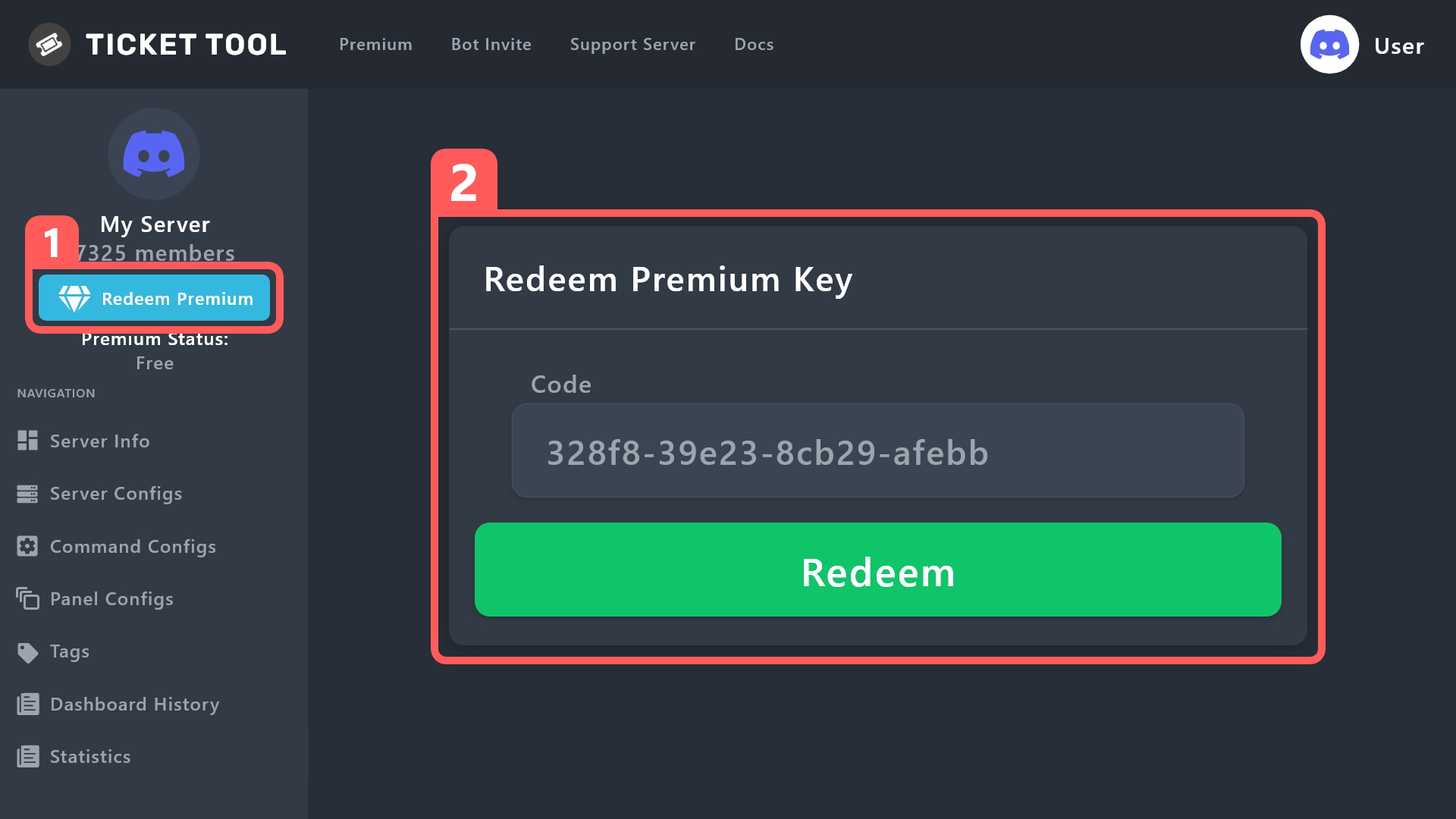
How to redeem premium (Key)
To redeem your premium key, go to the Dashboard, select your server, then click " Redeem Premium" under the server's icon and name.
 cursive lava
Can someone help me please?
humble sequoiaBOT
Hello, we would love to help you, but if you don't tell us what you need help with we can't help you :(
 lapis valve
Salut j’ai un problème
Je peux parler français ?
J’ai un problème avec les tickets : quand un membre @ everyone essaie d’ouvrir un ticket il a un message d’erreur comme quoi il n’a pas les permissions pour ouvrir un ticket
 void siren
so
if i add roles to support team, they'll be able to see tickets right?, will they see past tickets too?
cursive lava
no you cannot see previous tickets
 sleek bronze
Can someone please help me get the free bar fill I haven't received it yet and I don't know what I'm doing wrong
void siren
any way to make new support team roles view past tickets?
 sullen mist
whenever i put {create.form.x} in my ticket message, it always shows up with this

 merry tusk
is there a way to integrate making a ticket and have the ticket information and record automatically input into a google doc or excel file?
pseudo ravine
 karmic radish
Where are my mesage
karmic radish
Where are my mesage
It’s physically not possible for a bot to take ownership of a server, please stop spreading fake information
merry tusk
I am trying to do a ticket tool integration to an excel file, is there a bot for this?
pseudo ravine
merry tusk
is there a way to integrate making a ticket and have the ticket information and ...
Hey there. Unfortunately that’s not possible
karmic radish
pseudo ravine
Hey there. Unfortunately that’s not possible
Look
merry tusk
Ah i see. and there's no way for that info to auto input into a different application? there's gotta be a bot for that
pseudo ravine
karmic radish
Look
I know how bots work, it is impossible for a bot to take ownership of a server
karmic radish
pseudo ravine
I know how bots work, it is impossible for a bot to take ownership of a server
I thought that too.
It's not my lie, he won't let it. I show it in print.
pseudo ravine
merry tusk
Ah i see. and there's no way for that info to auto input into a different applic...
There might be a bot that does that, but I know Ticket Tool does not
merry tusk
pseudo ravine
There might be a bot that does that, but I know Ticket Tool does not
thanks for your help
iron nightBOT
Gave +1 Rep to @pseudo ravine
 pseudo ravine
You’re welcome, glad I could help
pseudo ravine
karmic radish
That just means that the Ticket Tool role is above all roles
It does not have ownership
karmic radish
pseudo ravine
It **does not** have ownership

I'm going to have to make another server, you guys have to sort this out, immediately, please!
pseudo ravine
You aren’t the server owner of the server, so you can’t manage users above your highest role
karmic radish
pseudo ravine
You aren’t the server owner of the server, so you can’t manage users above your ...
I am yes, enter the server and see what is there, I swear it is not a lie.
pseudo ravine
I will not join the server
karmic radish
I created the server and didn't transfer ownership, and I still have the crown.
pseudo ravine
But this account does not have ownership of the server, so therefore you can’t manage Ticket Tool since it’s above your highest role
karmic radish
pseudo ravine
But this account does not have ownership of the server, so therefore you can’t m...
Then my god, sorry, this account has property is my secondary, sorry, I will transfer the property to my main account
SORRY
pseudo ravine
I’m just explaining that Ticket Tool did not steal ownership of the server
scenic plinth
@karmic radish Também ocorre porque você não pode transferir a propriedade para bots. Nesse caso, você não pode gerenciar o bot porque ele tem uma função superior à sua. O bot nunca “tirou” nenhum servidor de ninguém.
karmic radish
scenic plinth
<@1058436104103141457> Também ocorre porque você não pode transferir a proprieda...
Entendo, foi um engano, me desculpe!
scenic plinth
karmic radish
Entendo, foi um engano, me desculpe!
Tudo bem, evite enviar mensagens diretas para nossa equipe no futuro, você quase foi banido por enviar um convite 🙂
karmic radish
scenic plinth
Tudo bem, evite enviar mensagens diretas para nossa equipe no futuro, você quase...
Entendido.
sullen mist
whenever i put {create.form.x} in my ticket message, it always shows up with this

 lucid niche
one question, I invited ticket tool to my serve...but In manager page...I couldn't find my serve... I don't understand

I clicked on sync serves...and is still said like no serve have ticket tool
 full oracle
sullen mist
whenever i put {create.form.x} in my ticket message, it always shows up with thi...
full oracle
sullen mist
whenever i put {create.form.x} in my ticket message, it always shows up with thi...
Don’t do .x, it has to be the number linking to the question, for example: {create.form.1}
full oracle
lucid niche
Is it your server? And do you have dashboard access?
lucid niche
Is not mine, but I have the same rol as the guy who created the serve
sullen mist
full oracle
Don’t do .x, it has to be the number linking to the question, for example: {crea...
how do i know the form number?
full oracle
lucid niche
Is not mine, but I have the same rol as the guy who created the serve
Ask the owner to add that role to dashboard access
full oracle
sullen mist
how do i know the form number?
Click on the form question, it’ll appear underneath it
lucid niche
full oracle
Ask the owner to add that role to dashboard access
what is dashboard access?
lucid niche
full oracle
Ask the owner to add that role to dashboard access
I have the same role like a owner
full oracle
lucid niche
what is dashboard access?
On Server Configs
 full oracle
lucid niche
I have the same role like a owner
full oracle
lucid niche
I have the same role like a owner
Still need to add 🙂
full oracle
full oracle
Click on the form question, it’ll appear underneath it
@sullen mist

Where it says Question Variable: *formID*
lucid niche
full oracle
On Server Configs
only the owner can do that? or I can do it?
full oracle
lucid niche
only the owner can do that? or I can do it?
If you can't access the server on https://tickettool.xyz/manage-servers then he will need to
Ticket Tool - Ticketing without clutter - The #1 discord Ticketing bot
lucid niche
full oracle
If you can't access the server on https://tickettool.xyz/manage-servers then he ...
can't find where is dashboard
full oracle
lucid niche
can't find where is dashboard
Click Manage on the selected server
 lucid niche
full oracle
Click `Manage` on the selected server
lucid niche
full oracle
Click `Manage` on the selected server
In ticket tool, I click on manager serve...and can't find my serve
full oracle
Then the Server Owner needs to if you have the same role and cannot access it
lucid niche
And I have already invited ticket tool bot

 jade topaz
slender minnow
you'll need dashboard access to redeem the key
jade topaz
slender minnow
you'll need dashboard access to redeem the key
Ye i solved. I could not access to the dashboard as I needed to invite first regular free bot
lucid niche
full oracle
thanks
iron nightBOT
Gave +1 Rep to @full oracle
full oracle

empty bolt
@jade topaz
 vague flare
Hey. New to the bot but i think i have most things figured out. The only thing i cant figure out how to do is to stop the message that appears after a ticket is created...or atleast have it remove itself after x amount of seconds. Any help would be greatly appreciated.
 pseudo ravine
empty bolt
<@456226577798135808>
pseudo ravine
empty bolt
<@456226577798135808>
Please don't randomly ping members
pseudo ravine
vague flare
Hey. New to the bot but i think i have most things figured out. The only thing i...
Hey there. You can't prevent the message from showing up, and the only way to get rid of it is to press the blue Dismiss message
vague flare
pseudo ravine
Hey there. You can't prevent the message from showing up, and the only way to ge...
Ok no problem. Thank you for getting back so quick. Last question. Is there a way to reset the ticket count?
iron nightBOT
Gave +1 Rep to @pseudo ravine
pseudo ravine
Yes, you can go to the Dashboard > Click on the gray Set Count button > Set the count
vague flare
pseudo ravine
Yes, you can go to the Dashboard > Click on the gray `Set Count` button > Set th...
Ah!!! Perfect! Thank you again!
iron nightBOT
Gave +1 Rep to @pseudo ravine
pseudo ravine
You're welcome, glad I could help!
full oracle
👁️
pseudo ravine
If you don't need any support for Ticket Tool, then don't please don't chat in this channel. You may move to #💬│general-chat if you want to have a conversation
humble sequoiaBOT
Within all the messages the bot sends (both embeds and text) you can mention either channels, roles, or even users, these mentions will only send a notification to the user if they are used within a text field, e.g: a role mentioned in an embed won't ping at all the users who have that role.
For mentioning a role you can use one out of three options:
{@Role Name} ➞ Which is Case Sensitive.
{RoleID} ➞ Replace RoleId with the Id of the role you are trying to ping.
<@&RoleID> ➞ Discord's native syntax to ping roles.
<#ChannelID> ➞ Mention a channel by its ID.
<@UserID> ➞ Mention a user by its ID.
cursive phoenix
@jade topaz see
iron nightBOT
Gave +1 Rep to @cursive phoenix
 void hemlock
Is there a way to restrict a role from closing a ticket?
gilded verge
void hemlock
Is there a way to restrict a role from closing a ticket?
Panel Configs->Buttons->Edit Close Ticket Button->add their role to Disabled Roles or enable Support Team Only
void hemlock
gilded verge
`Panel Configs`->`Buttons`->`Edit Close Ticket Button`->add their role to `Disab...
Thanks
iron nightBOT
Gave +1 Rep to @gilded verge
feral cove
feral cove
Hey guys, how do you make it so people need to select what type of issue people ...
Can anyone help with this
Pls 🙏
sleek bronze
Hello everyone I'm new here and I really don't know how this works can someone please help me out
 brave nimbus
الو شباب
 thin frost
Hello, I'm new to the server, I'm looking for someone/staff to tell me what the option is to have people create a ticket on my discord server.
humble sequoiaBOT
First you will want to invite the bot to your server. Once the bot is in your server, you can manage your server in the dashboard.
To create a panel we are going to need to head over to the Panel Configs Tab on the Dashboard.
Once at the dashboard we will need to click Create Panel.
Enter a panel name (Fill in any optional settings you want).
Click Create Panel and you are ready to get started with configuring your panel.
An example of a creating a panel is shown below.
Once the panel has been created, use the blue Send button and select the channel you want the panel to be sent to.
The Panel wasn't send
Use the </debug:ID> command to diagnose possible permission issues with the bot.
feral cove
feral cove
Can anyone help with this
Anyone?
 normal nebula
Only the mods and owners can see it it’s a setting they have and it does not show people other than the mods and owners
normal nebula
It automatically only gives the roles you selected when making it access to the tickets so if you do /setup then edit and then 2 you can add or remove roles people need to access tickets made by other users
 upbeat slate
Is there a way to change the prefix
 near widget
I want to know how to put like before i opened the ticket he asked me why did you create a ticket how?
 bleak wind

 oblique cedar
Hello!
I would like to know if there is an option to close the ticket automatically if the person who opened the ticket has not sent a message after a some time.
 cold heron
how do i send them the sony verification code
do they delete your account after their done boosting it
full oracle
{@Role Name} | Replace Role Name with the name of your role and it will ping that role
{Role ID} | Replace Role ID with the ID of your role and it will ping that role
or <@&ROLEID>
iron nightBOT
Gave +1 Rep to @full oracle
full oracle
oblique cedar
Hello!
I would like to know if there is an option to close the ticket automatica...
Here is an example of what you can do for this.
To get here:
Panel Config -> Select Panel -> Automation -> Add Automation -> Make sure to have Show Advanced Automation checked.

 north gazelle
@iron night
 wheat phoenix
 drifting glen
Hi, having issues getting a second code to invite bot into our server any ideas?
pseudo ravine
Hey there. What "code" do you mean?
 waxen minnow
Hello, I'm from Brazil and I wanted help adding the ticket to my server.
full oracle
Ticket Tool - Ticketing without clutter - The #1 Discord support bot
scenic plinth
waxen minnow
Hello, I'm from Brazil and I wanted help adding the ticket to my server.
Você pode adicionar o bot com o convite acima. Se você tiver alguma outra dúvida, fique à vontade para perguntar e entrarei em contato assim que estiver disponível.
 silent herald
Ticket Tool - Ticketing without clutter - The #1 discord Ticketing bot
 viscid harbor
Invalid Modal
╰ This modal doesn't contain any components
╰ Disable this feature or add a component
Docs page for this error
4f111f96-f4d3-11ed-a05b-0242ac120003
helpe me
aparece isto ao crear tecket no meu servidor
full oracle
Going to need more information on what you're actually trying to do
jade topaz
pseudo ravine
Hey there. What "code" do you mean?
He mean invite link
 civic quartz
سلام عليكم كيف اسوي زي كدا

 past siren
Does anyone know how to have your tickets looking like this?


With like a drop down menu
 pseudo ravine
Please don't attempt to ping everyone, it won't work
humble sequoiaBOT
First you will want to invite the bot to your server. Once the bot is in your server, you can manage your server in the dashboard.
To create a panel we are going to need to head over to the Panel Configs Tab on the Dashboard.
Once at the dashboard we will need to click Create Panel.
Enter a panel name (Fill in any optional settings you want).
Click Create Panel and you are ready to get started with configuring your panel.
An example of a creating a panel is shown below.
Once the panel has been created, use the blue Send button and select the channel you want the panel to be sent to.
The Panel wasn't send
Use the </debug:ID> command to diagnose possible permission issues with the bot.
pseudo ravine
Read this ^
waxen minnow
scenic plinth
Você pode adicionar o bot com o convite acima. Se você tiver alguma outra dúvida...
Qual?
 worldly rampart
pseudo ravine
Read this ^
worldly rampart
pseudo ravine
Read this ^
I did that but for some reason some ppl couldn’t see my ticket for when they joined my server
pseudo ravine
The channel the panel was sent to? Or your actual ticket?
worldly rampart
pseudo ravine
The channel the panel was sent to? Or your actual ticket?
Like my actual ticket it would be there for when they joined but then it disappeared
pseudo ravine
By default, only the ticket owner and admins can have access to tickets
worldly rampart
pseudo ravine
By default, only the ticket owner and admins can have access to tickets
Yeah but like I am saying like say you try and join my server the create ticket does not show up
pseudo ravine
So then that's the channel the panel was sent to
Make sure the everyone role can view it, assuming that your members dont get any roles on join
worldly rampart
Okay so like on the pannel it says everyone to I put they can see read history and view it right
pseudo ravine
No, that's for permissions when a ticket gets created
You need to make sure the channel the panel is in has the correct permissions
worldly rampart
pseudo ravine
You need to make sure the channel the panel is in has the correct permissions
Okay and what permission should they have
pseudo ravine
They just need to view the channel
pseudo ravine
You're welcome, glad I could help
 eternal pecan
**__Abrimos gracias a los iniciadores
• 『1』Id:
• 『2』somos: 1
• 『3』Aviso 1/5: 1
• leer las normas para estar siempre atento y no hacer antirol <@&1131750334994337852> __**
scenic plinth
waxen minnow
Qual?
O link abaixo. Clique no link e selecione um servidor.
Ticket Tool - Ticketing without clutter - The #1 Discord support bot
scenic plinth
eternal pecan
**__Abrimos gracias a los iniciadores
• 『1』Id:
• 『2』somos: 1
• 『3』Aviso 1/...
¿Qué pasa con esto que estás preguntando?
cursive phoenix
I recommend you using a alt if you would like to test things on your server as we dont advise anyone joining servers to help test things etc
 storm zephyr
is it possible to edit the ephemeral message here?
 worldly rampart
Does anyone know why other ppl other than support team can see the ticket
 lethal mantle
How to do ticket like this

@storm zephyr
@radiant moss @covert swallow @plain surge
supple python
@full oracle hello
full oracle
supple python
<@434891575659724811> hello
Hi?
supple python
What's the official website to do the drop style
full oracle
supple python
What's the official website to do the drop style
https://tickettool.xyz/manage-servers -> Your server -> Panel Config -> Dropdown
Ticket Tool - Ticketing without clutter - The #1 discord Ticketing bot
iron nightBOT
Gave +1 Rep to @full oracle
supple python
🙂
full oracle
full oracle
 timid kestrel
could you help me?
timid kestrel
could you help me?
Whats up
timid kestrel
full oracle
Whats up
i got it now thank u
iron nightBOT
Gave +1 Rep to @full oracle
drifting glen
pseudo ravine
Hey there. What "code" do you mean?
First one is dual authentication and the second is an authorise code by the looks
pseudo ravine
You’ll find the 2FA code in your authenticator mobile app
waxen minnow
I'm Brazilian, can anyone log into my server to add a ticket?
pseudo ravine
No, we can help you setup Ticket Tool, but we will not do it for you. Especially regular members helping
waxen minnow
Ha bro help me here you go
pulsar dune
Is it possible using a Ticket Tool form to send the result of the form as a post in a text channel? Or maybe instead of creating a new channel after submitting the form, the ticket message panel gets sent to an existing text channel?
pulsar dune
pulsar dune
<@&540295656720302081> I recently bought a Premium subscription, am I still able...
Will someone give me the premium role, please? 🙏
 quartz anchor
U should auto get it
pseudo ravine
pulsar dune
Is it possible using a Ticket Tool form to send the result of the form as a post...
Hey there. You can only use forms inside the ticket channel
quartz anchor
Otherwise u prob needa send proof
pseudo ravine
It's been given
scenic plinth
waxen minnow
Ha bro help me here you go
Peça a alguém no servidor que você criou para experimentar. Se você não tem ninguém, tente convidar seu(s) amigo(s) ou experimente você mesmo. Você não deveria perguntar aqui.
 earnest fulcrum
Hello
How do i select the channel pannel like if i have an open a ticket channel how do i select it to display create a ticket thing
like for example i need to select this channel its not in any category
 earnest fulcrum
can someone help?
jade topaz
i need help with that too
 hard osprey
Hi, i have question. Ive played and setted up ticket tool bot for some time. one ticket i put to store it after closing and deleting. Ticket is rn closed but delete button isnt working nor command. What i can do?
😅if its something unsolveable here i will open ticket
hard osprey
Okey thank you
hard osprey
jade topaz
Invite me to server and I look to your problem
Where i can send it to you?
 wild spire
earnest fulcrum
can someone help?
wild spire
earnest fulcrum
can someone help?
are u just trying to set up a ticket panel? Have u already used the /setup command or made a panel in the dashboard?
wild spire
hard osprey
Hi, i have question. Ive played and setted up ticket tool bot for some time. one...
are u getting an error when pressing the delete button?
wild spire
hard osprey
No
if nothing like interaction failed appears it might be a cache issue.
- Use /debug and press clear cache at the bottom
- clear your discord cache
(PC: CTRL + R / mobile: user settings > clear cache)
If that doesnt work #🎫│make-a-ticket so I can look into it.
wild spire
jade topaz
<@822579606074032178> I solve the problem
Cool thanks 👍🏻
hard osprey
thank you for your help again
earnest fulcrum
wild spire
are u just trying to set up a ticket panel? Have u already used the */setup* com...
No
earnest fulcrum
wild spire
are u just trying to set up a ticket panel? Have u already used the */setup* com...
Can you guide me? You can private msg me
wild spire
earnest fulcrum
Can you guide me? You can private msg me
I cannot DM you as per the rules.
#🎫│make-a-ticket
wild spire
here’s a starting guide about creating it
earnest fulcrum
Alr
 stark runeBOT
1. Invite Ticket Tool to your server
First you will want to invite the bot to your server. Once the bot is in your server, you can manage your server in the dashboard.
2. Create a Panel
To create a panel we are going to need to head over to the panel configs on the dashboard.
Once at the dashboard we will need to click Create Panel.
Enter a panel name (Fill in any optional settings you want).
Click Create Panel and your ready to get started with configuring your panel.
An example of a creating a panel is shown below.
3. Send the Panel to a Channel
Once you've created a panel on the dashboard you will need to send it to a channel using send on the dashboard.
Select the channel you want your panel to be created in and click send.
For other questions checkout $help faq.
An example of a sending a panel is shown below.
Having a Problem Sending the Panel?
Do $debug in a channel with Ticket Tool and make sure it has all the necessary Discord permissions.
earnest fulcrum
ohhh thanks
 ruby crag
How i can reset number of tickets
humble sequoiaBOT
━━ abdelrhman's inquiry has been moved to a ticket ━━
 rare siren

 pure veldt
Hi, I have activated the premium code in my server, how can I invite ticktool premium?
jade topaz
pure veldt
Hi, I have activated the premium code in my server, how can I invite ticktool pr...
Do you need help
Or you already find out
humble sequoiaBOT
The first thing you will need to do is invite the premium bot, an invite can be found here
Once the bot is in your server we will head to the dashboard and manage your server. When you are managing your server, you want to head into "Server Configs" then click the drop down menu under "Select the bot you would like to use on this server" then click "Ticket Tool#6207" and then save.
 jade topaz
@pure veldt ^
 devout crest
how i can change colored line ?
jade topaz
On the embeds?
devout crest
 jade topaz
Dashboard -> Panel Configs -> Messages
You will need to select the correct message you want the edit the embed colour then you can go to the Field Editor and change the hex colour.
 whole cargo
How to change embed colur of ticket
 echo stream
I have set up tickets, but I can't open them. Help please
 jade topaz
see if you close a ticket can you reopen it?
jade topaz
whole cargo
How to change embed colur of ticket
Please view the message below 🙂
Do you have ticket tool premium?
Dashboard > Panel Configs > Ticket
Ticket open/closed roles
jade topaz
echo stream
I have set up tickets, but I can't open them. Help please
Dashboard > Panel Configs > Buttons > Create Ticket
If you want this button to be used by members then the Support Team Only option should be
echo stream
jade topaz
**Dashboard > Panel Configs > Buttons > Create Ticket**
If you want this button ...
thank you very much
iron nightBOT
Gave +1 Rep to @untold whale

 cursive bane
Someone put me tickets on the server
 fluid jungle
 thorn barn
fluid jungle
thorn barn
fluid jungle
I think you click on edit raw and change something that you don't have to change
If not idk
 wooden inlet
bot just go down for anyone else?
scenic plinth
It underwent a planned restart as it had not been restarted for a while. Everything should be online at the moment.
rustic gale
fluid jungle
Invalid emoji
humble sequoiaBOT
This error indicates you have selected an invalid emoji, i.e. an emoji the bot isn't capable of using, in a button field
Which Emoji?
This depends upon which action the error is appearing, the most common cases are the Create Ticket button or one of your Dropdown emojis. You can visit your Button's List to find all available buttons and find the conflicting one by yourself.
Why doesn't the bot accept it as valid?
- You selected an emoji that doesn't exist anymore, i.e. that has been deleted
- You wrote text there, instead of an emoji (or in addition to an emoji)
- You entered a code for a custom emoji from a server that the bot is not a member of
- You entered a custom emoji code incorrectly
- You're on iPhone and entered an emoji using the phone's emoji pad (use the emoji selector in the website instead)
 rustic gale
jade topaz
Olá queria aprender como cria um ticket
rustic gale
jade topaz
Olá queria aprender como cria um ticket
Look at the Setup Guide in #📂│information
scenic plinth
jade topaz
Já tentei mais e muitas coisas
Veja o guia de configuração em #📂│information.
gilded verge
 grand idol
what does trimming mean
grand idol
what does trimming mean
you found that term on ticket tool docs? cuz this channel is only for ticket tool
because server needs premium to use Image url field
just to confirm, on your server please run /debug command and here send link you'll get from bot
as mentioned, you can send this link here
after using /debug
why you deleted messages?
you deleted few messages, not only link but nvm...
anyway, please show how your problem looks like, i mean on screenshot
 solar scaffold
Does anyone know how you would add multiple options to a drop down ticket panel? It's only giving me the option for 1.
idle flint
solar scaffold
Does anyone know how you would add multiple options to a drop down ticket panel?...
First create multiple panels (the green + at the top of the screen)
solar scaffold
To have multiple options in this panel, I need to create a new panel?
 jade topaz
solar scaffold
To have multiple options in this panel, I need to create a new panel?
jade topaz
solar scaffold
To have multiple options in this panel, I need to create a new panel?
Yea
Then add it on the dropdown bit
solar scaffold
@jade topaz I figured it out. Thank you guys
iron nightBOT
Gave +1 Rep to @untold whale
jade topaz
🙂
 idle flint
 sick rapids
If you run a $debug command, you will be able to see if the bot has appropriate permissions
humble sequoiaBOT
When first invited to your server, Ticket Tool should have the permissions shown below in order to ensure an appropriate functioning:
When customizing permissions for the different ticket participants, you must make sure Ticket Tool has the permissions you want it to grant to others, you can learn more about this here.
Missing Permissions
This error is a direct outcome of the bot missing permissions as depicted above. When troubleshooting this error we suggest you go through these steps:
- Use the </debug:1029783024264564765> command to check if the bot is lacking core role or channel permissions.
- Compare the category/channel's overrides and contrast them with the bot's roles to identify any permission denial that is breaking the functioning
- If you can't still figure it out, let our <@&540295656720302081> know so they can guide you through
Additional Resources
- If you are a server administrator and would like to understand more how to set up your server's permissions, we suggest checking the Discord Support Knowledge Base
- If you are a bot developer and are interested in the internal permission hierarchy we suggest you this part of the Discord Developer Docs
Important Note
- Giving Administrator permissions is NOT required and we do NOT encourage you to do unless you are trying to troubleshoot your permissions setup.
Thanks
iron nightBOT
Gave +1 Rep to @idle flint
 sick rapids
I try to make a system ticket
pseudo ravine
I understand that, but what panel did you send when you got the error?
pseudo ravine
Was it tickets or Support Tickets?
pseudo ravine
Is the 😎-ticket channel the channel you tried to send the panel to?
sick rapids
Yes
pseudo ravine
What happens if you tried to send the panel again?
pseudo ravine
So you tried to send the panel, and you got the same error?
pseudo ravine
It's still saying that Ticket Tool needs the Embed Links permission?
sick rapids
pseudo ravine
It's still saying that Ticket Tool needs the `Embed Links` permission?
Well.. I dont Remember but I think yes
pseudo ravine
Is the error message not in your channel?
pseudo ravine
Have you been using the /setup command?
sick rapids
Yes
pseudo ravine
I'm just wondering if it will give the same error or not
It should give the same error, but it doesn't hurt to test
sick rapids
Is a test or something?
pseudo ravine
Test to see if it's going to produce the same error
pseudo ravine
Did it fix itself?
sick rapids
pseudo ravine
Did it fix itself?
No
pseudo ravine
So you tried to send the panel and it's still giving the same error?
sick rapids
Yes it's Like That
pseudo ravine
Could you please give Ticket Tool the Administrator permission and then try again?
You may remove the permission after if you wish
sick rapids
pseudo ravine
Could you please give Ticket Tool the `Administrator` permission and then try ag...
Ok let me try
I DID IT 😎!!!!
sick rapids
pseudo ravine
Could you please give Ticket Tool the `Administrator` permission and then try ag...
Thanks
iron nightBOT
Gave +1 Rep to @pseudo ravine
sick rapids
pseudo ravine
Could you please give Ticket Tool the `Administrator` permission and then try ag...
Vergonha thanks your job is greater
Very*
pseudo ravine
So it got sent after you gave it Administrator?
sick rapids
Yup
pseudo ravine
It's not exactly recommended to give Ticket Tool the administrator permission, but for your server, it shouldn't really be an issue
 restive thistle
how do you make a button for your ticket pannel
pseudo ravine
Hey there. Buttons are always on the panel message (unless they have dropdown style). Have you setup Ticket Tool yet?
restive thistle
ish
pseudo ravine
I'm assuming you came here because you noticed that your panel message does not have a button?
 blissful quest
How do I get the ticket bot to make it where people can make Tickets
humble sequoiaBOT
First you will want to invite the bot to your server. Once the bot is in your server, you can manage your server in the dashboard.
To create a panel we are going to need to head over to the Panel Configs Tab on the Dashboard.
Once at the dashboard we will need to click Create Panel.
Enter a panel name (Fill in any optional settings you want).
Click Create Panel and you are ready to get started with configuring your panel.
An example of a creating a panel is shown below.
Once the panel has been created, use the blue Send button and select the channel you want the panel to be sent to.
The Panel wasn't send
Use the </debug:ID> command to diagnose possible permission issues with the bot.
gilded verge
humble sequoia
@blissful quest,
blissful quest
got it Done thanks
 sand moat
How can I see a composite image
gilded verge
sand moat
How can I see a composite image
try to explain what you mean
 steel oxide
Is it possible to receive notifs once a ticket is created?
rustic gale
steel oxide
Is it possible to receive notifs once a ticket is created?

{@Role name}
{Role ID}
<@&Role ID>
steel oxide
rustic gale
Thanks! But are there other ways to do this?
iron nightBOT
Gave +1 Rep to @rustic gale
 odd marsh
i made a ticket in the support in the web page how to del it
 fickle wren
 full cargo
How can I recover the data of a ticket I opened ?
Someone scammed me but I didn't took screenshots of the ticket conversation I'll just need the data of the conversation to show scamalert
 civic wagon
full cargo
Someone scammed me but I didn't took screenshots of the ticket conversation I'll...
civic wagon
full cargo
Someone scammed me but I didn't took screenshots of the ticket conversation I'll...
If you are a normal member of the server, unfortunately you cannot get the chat transcript unless provided by the staff
full cargo
civic wagon
If you are a normal member of the server, unfortunately you cannot get the chat ...
And how could the staff provide it
civic wagon
full cargo
And how could the staff provide it
If they saved a transcript, they could simply share you the link
By staff I mean, the staff of the server you made the ticket in
full cargo
civic wagon
By staff I mean, the staff of the server you made the ticket in
Yep he's asking for proof I'll just ask for the ticket transcript
But how's he supposed to get that from
pure veldt
jade topaz
<@832638061183500319> ^
?
pure veldt
humble sequoia
Thx ❤️
iron nightBOT
Gave +1 Rep to @humble sequoia
jade topaz
🙂
 manic shore
Hey hello,
So we are using the ticketbot and made everything how we wanted it to be, but now we realize that our normal members cant actually create a ticket ( you dont have permission). Where in settings do i have to adjust it?

nvm found it 😄
found it in the history of this chat 😄
 spiral jay
Hello
 fervent rock
hey gents, I have been using ticket tool for the longest time and this is the first time I am trying to automate customer service support for my whole team with ticket tool. I'd like to setup everytime a new ticket is created that it pushes that notification to my private team server notifying everybody that, that certain category of ticket has been generated and someone needs immediate help.
Does anybody have any suggestions on how to tackle this?
 formal kestrel
How do you make a ticket for school rp?
 lament coral
@lament sandalالسلام عليكم
pulsar dune
pulsar dune
I have tickets that were closed using the Ticket Tool White bot. After setting T...
I have almost a dozen Ticket Tool (white) tickets open but I upgraded to Ticket Tool (gold) and the white tickets no longer respond to close or delete commands. Tried using the "botswitcher" command, but it doesn't do anything. It's super inconvenient having to change my server's active bot, close the white tickets, then set it back to gold. And this all has to be done before users open more gold tickets mind you, else it will fail on them.
Is "botswitcher" broken or does it not do what I think it does?
 jade topaz
formal kestrel
How do you make a ticket for school rp?
jade topaz
formal kestrel
How do you make a ticket for school rp?
You can start by using the command /setup 🙂
jade topaz
pulsar dune
I have almost a dozen Ticket Tool (white) tickets open but I upgraded to Ticket ...
You don’t need to change bots sir
You can keep white and use the premium features still
gilded verge
+1, or you can just copy-paste $delete for all tickets
jade topaz
fervent rock
hey gents, I have been using ticket tool for the longest time and this is the fi...
You can ping support on ticket creation?
pulsar dune
jade topaz
You can keep white and use the premium features still
I wanted the extra speed
 jade topaz
Then you will need to invite the premium bot
Try changing the bot on the dashboard if the commands are bugging
But you will need to re send all your panels again with the premium bot
pulsar dune
jade topaz
But you will need to re send all your panels again with the premium bot
I added the bot already, resent all the panels, and set the server config to use the premium bot.
 jade topaz
Yep that’s good, so you can kick white if you want as that won’t work and then you can test your panels to see if they work
pulsar dune
gilded verge
+1, or you can just copy-paste `$delete` for all tickets
Tried using the prefix command and the slash command, both not working.
 jade topaz
You are using the incorrect bot
pulsar dune
jade topaz
Yep that’s good, so you can kick white if you want as that won’t work and then y...
The problem with that method is that only the white bot can save transcripts for a white ticket. Correction: Now that I solved the gold bot permission problem, the gold bot was able to close, delete, and save the transcript of the white ticket.
jade topaz
When you do the /delete command make sure to select the premium bot for the slash command not the white bot
pulsar dune
jade topaz
You are using the incorrect bot
gold bot won't respond
 gilded verge
pulsar dune
gold bot won't respond
gilded verge
pulsar dune
gold bot won't respond
this is problem
 pulsar dune
jade topaz
Do **/debug**
pulsar dune
jade topaz
Do **/debug**
 jade topaz
If you go into your roles and to the ticket tool premium role then make sure the Read Channels permission is ticked like @gilded verge said 🙂
gilded verge
nono, not roles, bot don't have this permission in channel settings 😅
jade topaz
My fault 🤦♂️
If you go into that channel settings that you are trying to execute the commands in and make sure that ticket tool premium has the read channels permission
pulsar dune
@jade topaz @gilded verge Can't believe I missed that, but I forgot to add the gold bot to the channel view perms. It works now. Thanks for helping me through that guys.
iron nightBOT
Gave +1 Rep to @untold whale
pulsar dune
rookie mistake, haha
fervent rock
jade topaz
You can ping support on ticket creation?
I understand that, I have that setup, I want it to be pushed to another discord though.
jade topaz
Just copy the backup key and load it all into another server then send the panels again
fervent rock
jade topaz
Just copy the backup key and load it all into another server then send the panel...
that wouldn’t achieve what I am trying to achieve though right? I just want an embed on my private team discord that a ticket has been created in our public discord.
jade topaz
Oh no you can’t do that
fervent rock
I am exploring the option of programming my own bot to do so in collab with ticket tool but is there anyway to not do that
jade topaz
You can try programme your bot so if a channel is created under the ticket open categories, it will send an embed to that server VIA a webhook. That could work 🤷♂️
Or you can set up ticket tool logging into a channel, specifically the Ticket Created log. Then in the private server you can just follow that logging channel so then when it logs a ticket is created it will also send that in the private server as you followed the channel.
gilded verge
certain category or name im not sure but i know that you can ask Staff on #🎫│make-a-ticket so they can enable webhook feature on your server
 proper falcon
Hello, I would like to have the possibility to open several tickets at the same time but I can not configure it, can someone help me please?
 hollow owl
\
humble sequoiaBOT
First you will want to invite the bot to your server. Once the bot is in your server, you can manage your server in the dashboard.
To create a panel we are going to need to head over to the Panel Configs Tab on the Dashboard.
Once at the dashboard we will need to click Create Panel.
Enter a panel name (Fill in any optional settings you want).
Click Create Panel and you are ready to get started with configuring your panel.
An example of a creating a panel is shown below.
Once the panel has been created, use the blue Send button and select the channel you want the panel to be sent to.
The Panel wasn't send
Use the </debug:ID> command to diagnose possible permission issues with the bot.
gilded verge
humble sequoia
Hi @proper falcon, please check
 gilded verge
it only means that you've set limits in this panel and you can't open more than one, so if you want to remove this limit, go to Panel Configs->Limits and increase number
Open tickets each user, this is the one you need if you want to increase limits in your panel

 fossil matrix
Whenever I create a ticket it doesn't go in the open tickets slot, how do I fix that?

Please ping me @fossil matrix if you can help me
gilded verge
fossil matrix
Whenever I create a ticket it doesn't go in the open tickets slot, how do I fix ...
by tickets slot you mean category, right?
ah yes, it appears so, in that case let's skip my question ^^
anyway, two things, please make sure that Ticket Tool has permission Manage Channels and Manage Permissions in your category
and another that in Panel Configs->Category you've set this category you want
fossil matrix
K I got that fixed, but how do I make sure only the support team, and the ticket creator can only see it?
humble sequoiaBOT
How to edit `@everyone`'s permissions
Head over to your Dashboard ➞ Panel Configs ➞ Permission Options ➞ Everyone Role Opened/Closed and customize the base permissions for everyone in your tickets.
Note: This set of permissions may be affected by the overrides of Support Team, Additional Roles, and User permissions.
 fossil matrix
Sorry to say this but one last question,
After the support team closes the ticket, how do I make it so it goes in another category, such as closed tickets. That only The Owner, or support team can see?
gilded verge
no need to sorry, ask every time you need help ^^
in Panel Configs->Category->Category Closed, set category where closed tickets should go and then go to Panel Configs->Permissions->Edit closed (ticket owner and everyone role)->switch View Channel and Read Message History to ❌
 dire zodiac
the channel i want the ticket panel to show up isnt showing on the dropdown and i have done debug and everythign is ticked
gilded verge
if you can't see channel there, you can write it's name or in your channel you can use $panel id command to send your panel there
id is a number of your panel, you can find it at the start of your panel name
*id is a number, only number
 tacit lake
Did someone join?
gilded verge
eh?
 forest shale
When a player tries to create a ticket. It tells them they do not have permission and clearly I set it up for all players to create one. I don't understand. If a staff member creates a ticket, they can do it perfectly however.
wild spire
forest shale
When a player tries to create a ticket. It tells them they do not have permissio...
Error: You do not have permission to use this
Blacklisted roles
Go in your Dashboard. Proceed to server configs and make sure you have no role(s) in Blacklisted roles
Anyone with a blacklisted role cannot click any button or use any command
Buttons
Go to your Dashboard. Proceed to panel configs and select Buttons. Check the button(s) users report problems with.
- Check if you added no role(s) to Disabled roles.
- Check if you have Support team only disabled.
Commands
Go to your Dashboard. Proceed to command configs. Check the command(s) users report problems with.
- Check if you added no role(s) to Disabled roles.
- Check if you have Support team only disabled.
 normal flame
i would like to inquire.
 lament sandal
lament coral
<@680423367223803943>السلام عليكم
lament sandal
lament coral
<@680423367223803943>السلام عليكم
<@&832847423801262090>
 frigid vine
Hallo ich hätte ein problem?
 ebon pilot
jade topaz
ebon pilot
jade topaz
鯖にbotを導入したがCreate ticketがない
bright swallow
Is there a chance to get a document pinned at first message? Like a button „upload document“ which the ticket user can push to upload a document what everybody in the ticket can see?!
I use the ticket tool for process where I have to mark many thinks like routing code, labels, documents. I would love to pin them in a embedded message where everybody can click on.
bright swallow
frigid vine
Hallo ich hätte ein problem?
Am einfachsten ist es, wenn du dein Problem einfach schilderst - anstelle nur zu erwähnen, dass du eins hast. Die Reaktionszeit ist hier nicht wie in einem normalen Gespräch. Bis Dich dann einer gefragt hat, was für ein Problem besteht, vergehen teilweise Stunden. Und wenn du dann antwortest, ist die helfende Person wieder nicht verfügbar.
Also womit brauchst du Hilfe (ungeachtet das ich dir ggf. nicht helfen kann)
jade topaz
bright swallow
Is there a chance to get a document pinned at first message? Like a button „uplo...
Forms are a thing that TicketTool has, upon the ticket creator filling out the form you can select a option for that form answers to be displayed on the ticket opened embed 🙂
 jade topaz
hi is there a way for a mod to claim the ticket like only one mod other than all the mods?
gilded verge
 prisma prawn
how can I add a reason in the ticket closed dm
prisma prawn
how can I add a reason in the ticket closed dm
{close.reason} variable should help you
jade topaz
only work if the moderator use / commands
 ionic path
Hey! I was trying to get into the dashboard of the bot, but before I could do that this error appears. What can I do?
 jade topaz
ionic path
Hey! I was trying to get into the dashboard of the bot, but before I could do th...
jade topaz
ionic path
Hey! I was trying to get into the dashboard of the bot, but before I could do th...
reload the page
or wait
rustic gale
Well, it says
Please try again in a few minutes.
so that may be a good idea.
jade topaz
how can i make someone see the tickets and delete them
 remote atlas
Can someone help me ? Im kinda confused with the new dashboard
jade topaz
Is there a way to increase the text limit without premium? I’m trying to switch to ticket tool but if this isn’t possible then I’ll switch to a different bot.
forest shale
wild spire
# Error: You do not have permission to use this
### Blacklisted roles
Go in yo...
We use the panel configs for players to open a ticket and I don't see anywhere to disable the support role. We are using ticket tool premium too. Our other 2 panels work flawlessly.
jade topaz
jade topaz
Is there a way to increase the text limit without premium? I’m trying to switch ...
Guess not
jade topaz
jade topaz
Is there a way to increase the text limit without premium? I’m trying to switch ...
What do you mean?
jade topaz
jade topaz
What do you mean?
Like the embed limit on the ticket message within the ticket channel
jade topaz
jade topaz
how can i make someone see the tickets and delete them
Add them to the support team VIA the dashboard, they will then have access to delete, close and claim tickets 🙂
jade topaz
jade topaz
Like the embed limit on the ticket message within the ticket channel
I think it’s a discord issue not a ticket tool issue, but you can #🎫│make-a-ticket and ask in there 🤷♂️
jade topaz
jade topaz
I think it’s a discord issue not a ticket tool issue, but you can <#571706435449...
It’s not, it limits you on how much text you can write in the embed for the ticket message
All others bots let me write all I want in the embed and doesn’t have a limitation
@jade topaz It’s the bot limitation, they want me to pay for premium
Pretty unreasonable if you ask me but whatever
jade topaz
jade topaz
<@456226577798135808> It’s the bot limitation, they want me to pay for premium
Pay for premium then
jade topaz
jade topaz
Pay for premium then
Don’t want to pay for a Discord Bot at the moment. I find that pretty unreasonable. I do understand the devs need to make money to keep the bot going but as of now I am not buying premium on bots. I’ll look elsewhere. Have a great day
 austere cave
.
jade topaz
jade topaz
Add them to the support team VIA the dashboard, they will then have access to de...
huh
 fallen depot
no one in my server including me can make a ticket because when we press the button it says " this button is disabled " idk how to fix or turn it back on
humble sequoiaBOT
Buttons within Discord can have multiple functions and are used to control your tickets. With Ticket Tool, you can edit all the buttons however you like! Buttons can show emojis, text and can have 4 different colors.
Where can I edit them?
With the 
 Panel Config V2 Editor, buttons don't have their own place anymore. Now buttons can be found under the message settings for each message that has a button!
Example: The Close and Claim Buttons are on the Ticket Message. Therefore, you can edit the buttons under Ticket > Edit Ticket Message. The buttons are below the message editor.
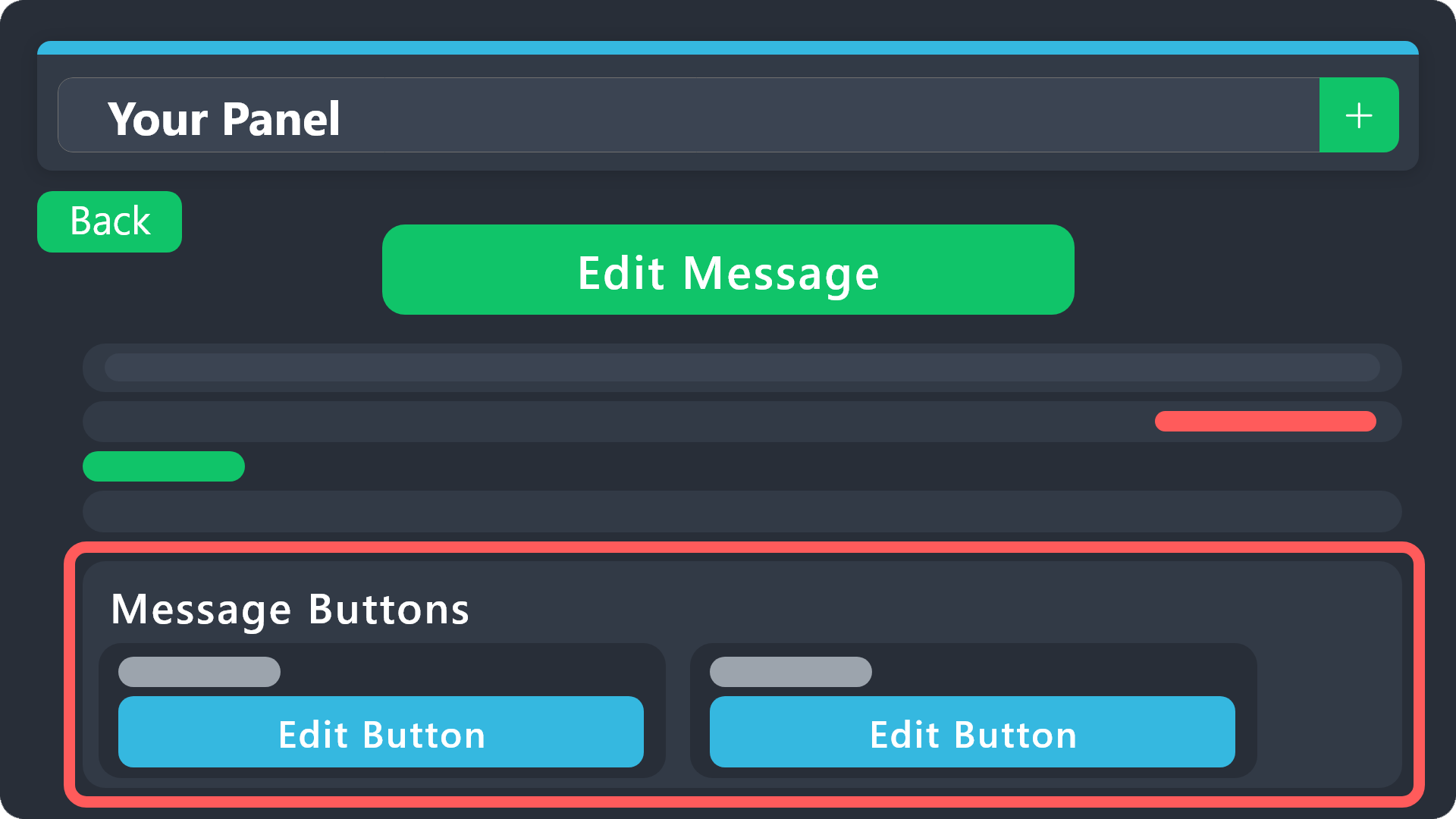 idle flint
fallen depot
no one in my server including me can make a ticket because when we press the but...
idle flint
fallen depot
no one in my server including me can make a ticket because when we press the but...
Head to the Dashboard > Buttons and enable the button (or adjust the permissions)
humble sequoiaBOT
Button Options
Enable Button
Hide or show the button
Emoji
Select an emoji to show on the button
You can either select one or use a valid Emoji ID
Button Text
Edit the text that's shown on the button
Button Color
Select one of four colors for the button. Grey, Green, Red, Blue.
Support Team Only
Enable this to only let your support team click that button
Allowed and disabled roles
Edit what roles can use or not use this button
$buttonoptions
jade topaz
jade topaz
Add them to the support team VIA the dashboard, they will then have access to de...
im sorry i dont understand
can you tell me in a different way
humble sequoiaBOT
1. Go into your Dashboard
2. Open your Panel Configs tab
3. Select the panel you want to grant access to
4. Open the General options menu
5. Select your Support Team Roles
6. Save changes
gilded verge
humble sequoia
@jade topaz, is what @Polar meant
jade topaz
ok thank you
 silent sorrel
How can I acquire the script?
humble sequoiaBOT
⚠️ You're in the wrong place
We provide support for Ticket Tool Discord bot and cannot help you with whatever issue you have.
- We don't know which Support Team you should contact to get this issue resolved, and unfortunately we won't be able to accurately tell you.
If you don't have any further questions regarding our bot Ticket Tool, please close this ticket
 quiet inlet
I brought the custom job for 60 bucks and i went out of it to copy the player model and then it went out of the custom job thing it is really annoying because i payed 60 bucks for it
 finite shale
can the bot has more than 1 react button?
gilded verge
quiet inlet
I brought the custom job for 60 bucks and i went out of it to copy the player mo...
you did what? 🧐
this is server for Ticket Tool bot, not your game job
humble sequoiaBOT
For more convenient use of multipanels, you can now combine panels on the dashboard. This will allow you to directly send the multipanel from the dashboard or via the $panel ID command.
Where can I find this?
You can find this setting on the Dashboard -> Panel Configs -> Panel -> Attached Panels
Note: if you're attaching all the panels to a panel called English, don't include English in the attached panel's box (If you do this, it will create a duplicate)
This will put all buttons from all of your panels on one message. The message is the panel message from the panel you're combining these panels in.
gilded verge
humble sequoia
@finite shale, check
ow they left..
 stable sluice
Hello so I have setted up the ticket tool but when someone goes and make a ticket it won’t let me see it and yes I’m the server owner. Can anyone help me?
 finite tulip
Server
gilded verge
stable sluice
Hello so I have setted up the ticket tool but when someone goes and make a ticke...
Hi, on your server please run /debug and here send link you will get from Ticket Tool, i need to clarify one thing
stable sluice
gilded verge
Hi, on your server please run `/debug` and here send link you will get from Tick...
Kk
gilded verge
i've checked it so link is not needed now ^^
so generally it's not possible for you as server owner to not see the ticket which was created by anyone... and now time for question, are you using View As Role?
if answer is no, please make a quick video to show how you're doing it 🤔
but if you're using this feature, please check below ⬇️
humble sequoiaBOT
View As Role feature
Discord's integrated View As Role feature will allow you to see how different groups of roles will have access to your server's channels. Even though, this feature isn't reliable for thoroughly testing Ticket Tool considering that the tickets are created based on User roles, and that Roles permissions are only used for Support Team Roles, and Additional Roles.
For testing Ticket Tool as a user we suggest you ask a friend to open a ticket for you as a regular member would do, or use an alternative account to simulate the same process to make sure everything is set properly.
stable sluice
gilded verge
i've checked it so link is not needed now ^^
so generally it's not possible for...
Wdym by Show you a quick vid. What will I ment to show
gilded verge
as I mentioned, there is no way you cannot see the tickets created, so I would like to see how you can be sure that the ticket has been created
idle flint
gilded verge
as I mentioned, there is no way you cannot see the tickets created, so I would l...
By the way, this user has had a Support Ticket open for this issue for the past 12 hours and is being helped in there currently
 wise mulch
How can I set the bot's Turkish language option?
idle flint
wise mulch
How can I set the bot's Turkish language option?
There isnt a way to "set" the bots language.
You can customise areas of the bot with "non-english" text
idle flint
You can not "Set" the bot to "Turkish"
ie, there is no button to change the language.
wise mulch
okey thank you
idle flint
You can manually change the text of the bot to display in Turkish in your server if that is what you want
 granite cave
Hello, is there's a way for me to set the member to see their closed ticket, and also set the Re-open button available for like a week for example
 idle flint
granite cave
Hello, is there's a way for me to set the member to see their closed ticket, and...
idle flint
granite cave
Hello, is there's a way for me to set the member to see their closed ticket, and...
For the first part of your question - Head to the Dashboard > Permissions > Ticket Owner Closed. Here you can set the View Channel to ✅
idle flint
granite cave
Hello, is there's a way for me to set the member to see their closed ticket, and...
For the second part of your question - Head to the Dashboard > Buttons > Re-Open > Show Button
You can't "show the button for only a week" tho