#🆘│community-support
1 messages · Page 56 of 1
 wide prairie
 humble sequoiaBOT
@wide prairie

⚠️ You're in the wrong place
We provide support for Ticket Tool Discord bot and cannot help you with whatever issue you have.
- We don't know which Support Team you should contact to get this issue resolved, and unfortunately we won't be able to accurately tell you.
If you don't have any further questions regarding our bot Ticket Tool, please close this ticket
 vague cosmos
Sorry Lupus. 😉
 misty fractal
But I don't want it in Amped
vague cosmos
What do you mean by "Amped"?
misty fractal
Embed
vague cosmos
Then you'll need to add the image link to the message content and hope it embeds.
 willow violet
I have a server with 500 dead tickets. How can I remove all of them?
misty fractal
vague cosmos
Then you'll need to add the image link to the message content and hope it embeds...
I did it and a link just popped up
vague cosmos
You can't remove all tickets at once, @willow violet.
willow violet
vague cosmos
You can't remove all tickets at once, <@697243738858192947>.
can I reset or something?
vague cosmos
misty fractal
I did it and a link just popped up
Does the image embed when you send it yourself?
willow violet
Or am I forced to close each of them individually
If I just delete the channel, does it also work?
vague cosmos
willow violet
can I reset or something?
Not really, there is no way to mass delete channels. So using $delete by hand is your only way, but then even then you'll have a ratelimit.
misty fractal
vague cosmos
Does the image embed when you send it yourself?
Yup
willow violet
vague cosmos
Not really, there is no way to mass delete channels. So using `$delete` by hand ...
can I right click on the ticket channel and press delete?
 pseudo ravine
willow violet
I have a server with 500 dead tickets. How can I remove all of them?
pseudo ravine
willow violet
I have a server with 500 dead tickets. How can I remove all of them?
Hey there. You can try to use the /purge command
vague cosmos
There is no such "reset" option.
vague cosmos
pseudo ravine
Hey there. You can try to use the `/purge` command
Oh wow, didn't know about that command.
willow violet
pseudo ravine
Hey there. You can try to use the `/purge` command
Thanks it work!
 iron nightBOT
Gave +1 Rep to @pseudo ravine
vague cosmos
misty fractal
Yup
Hmm, not sure what is causing this. You might want to open a ticket in #🎫│make-a-ticket or #premium-tickets to see if staff has a solution.
pseudo ravine
willow violet
Thanks it work!
You're welcome, glad we could help. If you have any other questions/issues, don't hesitate to reach out again 
willow violet
I was 100% sure there should be such an option. Because when server raids happen, some people create hundreds of tickets
pseudo ravine
No worries
 dense marsh
How do I cancel premium?
humble sequoiaBOT
<:TicketToolOffline:1018980643092312155> Cancel your subscription
We're sorry to see you go!
To cancel your Ticket Tool Premium Subscription, just head over to your User Settings in Discord, then Subscriptions. Look for Premium Apps and click on Manage Subscriptions. There you can cancel your subscription at the end of your billing cycle.

User Settings > Subscriptions > Premium Apps > Manage Subscriptions > Cancel
vague cosmos
@dense marsh ^
dense marsh
ik
willow violet
pseudo ravine
Hey there. You can try to use the `/purge` command
/purge command doesn't work. It's written there is no tickets detected, but I still have a tons to be deleted.

 pseudo ravine
I would recommend to open a ticket in #🎫│make-a-ticket and have a support member help. It worked for me, so I'm not sure why it's not working for you
willow violet
pseudo ravine
I would recommend to open a ticket in <#571706435449257997> and have a support m...
Well it worked at a certain point, I mean it deleted some, but not all
Yes I am server Owner
vague cosmos
Ticket would be the best indeed.
 pseudo ravine
Have you created a ticket yet?
willow violet
pseudo ravine
Have you created a ticket yet?
I did. I manually deleted all tickets channel. So it's more to just report the bug
pseudo ravine
Then I would recommend to stay in the ticket and have the Support Member help you out
humble sequoiaBOT
━━ excelant's inquiry has been moved to a ticket ━━
 uncut falcon
do you guys know how you can do /remove in a ticket it will not work
humble sequoiaBOT
⚠️ You're in the wrong place
We provide support for Ticket Tool Discord bot and cannot help you with whatever issue you have.
- We don't know which Support Team you should contact to get this issue resolved, and unfortunately we won't be able to accurately tell you.
If you don't have any further questions regarding our bot Ticket Tool, please close this ticket
 junior quarry
 pseudo ravine
humble sequoia
pseudo ravine
humble sequoia
Read this embed please. We can't help you
junior quarry
Hello, I have been muted and cannot chat
pseudo ravine
We cannot help you. This is the Ticket Tool Support server
junior quarry
Ok
 little nimbus
@junior quarry I'm surprised that hasn't happened to me yet. 😂
pseudo ravine
(I would recommend deleting this message as it contains your email address)
pseudo ravine
little nimbus
<@880167922444685402> I'm surprised that hasn't happened to me yet. 😂
Do you need any help with @pseudo glen?
junior quarry
Yes that's right
little nimbus
@pseudo ravine No, just sticking my nose in someone else's business for a moment . 😂
pseudo ravine
Then please don't talk in here if you don't need any help
little nimbus
@pseudo ravine O yes, Sir.
pseudo ravine
You don't need to ping with every message either
junior quarry
What should I do exactly?
pseudo ravine
Find the correct place to get support, perhaps there's something in the game. But if you don't need Ticket Tool support, I would recommend to stop talking in here as well
junior quarry
Ok
little nimbus
@pseudo ravine isn't it your job to direct him to the correct place to get support. Like isn't that customer service? Isn't that your job to help people when they don't know what to do?
junior quarry
little nimbus
<@865714582613524491> isn't it your job to direct him to the correct place to ge...
I am Iranian and it is difficult for me to speak English, that's why I got lost
pseudo ravine
humble sequoia
We can't help if we don't know where to direct them too
I'm also not a Support Member here
little nimbus
Then how do you have the right to tell anyone no to speak in here?
pseudo ravine
If a support member was here, they would do the exact same. And like I've already said, this channel is only for Ticket Tool support. Any other conversation should be in #💬│general-chat. I'm not gonna argue about this
little nimbus
Yeah me not argue either. Don't be telling anyone no to speak in here without you are a support member. You don't have the right.
The man needed help.
pseudo ravine
He did, but it wasn't related to Ticket Tool
little nimbus
Direct him to the correct area to get help. If you don't know then no response was necessary from you. That's sucks to have someone do that. Customer Service would've worked just fine.
 versed wing
humble sequoiaBOT
versed wing
humble sequoiaBOT
@versed wing
⚠️ You're in the wrong place
We provide support for Ticket Tool Discord bot and cannot help you with whatever issue you have.
- We don't know which Support Team you should contact to get this issue resolved, and unfortunately we won't be able to accurately tell you.
If you don't have any further questions regarding our bot Ticket Tool, please close this ticket
 scenic plinth
little nimbus
Direct him to the correct area to get help. If you don't know then no response w...
scenic plinth
little nimbus
Direct him to the correct area to get help. If you don't know then no response w...
I appreciate your concern, though like previously stated in the entire conversation we have 0 idea where to navigate anyone when it is not an inquiry related to Ticket Tool. Thereas we are not obligated, nor is members simply trying to assist here, to attempt to assist someone or direct someone outside of Ticket Tool as we cannot accurately guide them. We tell people they are in the wrong place so they can look themselves.
He has all "right" otherwise to speak here and tell people we cannot properly help them, as per what the command says, so politely quit the arguing.
vague cosmos
@lament cypress what issue(s) are you having exactly?
 lament cypress
I cant use this bot in my server

 stark runeBOT
1. Invite Ticket Tool to your server
First you will want to invite the bot to your server. Once the bot is in your server, you can manage your server in the dashboard.

2. Create a Panel
To create a panel we are going to need to head over to the panel configs on the dashboard.
Once at the dashboard we will need to click Create Panel.
Enter a panel name (Fill in any optional settings you want).
Click Create Panel and your ready to get started with configuring your panel.
An example of a creating a panel is shown below.

3. Send the Panel to a Channel
Once you've created a panel on the dashboard you will need to send it to a channel using send on the dashboard.
Select the channel you want your panel to be created in and click send.
For other questions checkout $help faq.
An example of a sending a panel is shown below.
Having a Problem Sending the Panel?
Do $debug in a channel with Ticket Tool and make sure it has all the necessary Discord permissions.
 vague cosmos
Start at step 2 create a panel. You can eventually run /setup in your server.
lament cypress
Ok
vague cosmos
You're an Arabic speaker right?
lament cypress
vague cosmos
You're an Arabic speaker right?
Yeah
humble sequoiaBOT
**١- دعوة البوت إلى سيرفرك**
يجب عليك اولاً دعوة البوت إلى سيرفرك من خلال رابط دعوة البوت، بعد ذلك يُمكنك تعديل خصائص البوت عبر لوحة التحكم.
**٢- إنشاء لوحة**
لإنشاء لوحة يجب عليك التوجه إلى لوحة التحكم ، ثم قم بإختيار سيرفرك ، بعد ذلك توجه إلى قسم "Panel Config".
بمُجرد وصولك إلى القسم المذكور أعلاه، يجب عليك الضغط على زر "Create Panel" لإنشاء اللوحة ، ومن ثمها قُم بإدخال اسم اللوحة (يمكنك ملء اي اعدادات اختياريه تريدها).
بعد إدخال اسم اللوحة و ملء الإعدادات ، قُم بالضغط على "Create Panel" لإتمام عملية انشاء اللوحة الخاصة بك بنجاح!
سيتم إرفاق صورة توضيحية لعملية إنشاء اللوحة بالطريقة الصحيحة؛
**٣- إرسال اللوحة إلى روم**
بعد الإنتهاء من عملية إنشاء اللوحة بنجاح ، يجب عليك الآن إرسالها إلى روم بإستخدام زر "Send" على لوحة التحكم بقسم الـ "Panel Config".
بعد الضغط على الزر ، قم بإختيار الروم المفضل لإرسال اللوحة.
بعد إختيار الروم قُم بالضغط على زر "Send" لإتمام عملية إرسال اللوحة!
سيتم إرفاق صورة توضيحية لعملية إرسال اللوحة بالطريقة الصحيحة؛
**هل تواجهك مشكلة أثناء محاولة إرسال اللوحة؟**
قُم بإرسال الامر `/debug" في اي روم يستطيع البوت رؤيته ، ثم تأكد أن البوت لدية جميع الصلاحيات اللازمة لإرسال اللوحة.
lament cypress
Oh thx
vague cosmos
no worries
vague cosmos
lament cypress
Oh thx
إذا احتجت إلى مساعدة أخرى اعلمني.
lament cypress
vague cosmos
إذا احتجت إلى مساعدة أخرى اعلمني.
شكرا لك
 sly thunder
How often are suggestions approved (read: sent to #💡│suggestions) so that the community can vote on them?
vague cosmos
No idea, but they're all reviewed by staff first.
And staff decides if something makes it to #💡│suggestions or not.
@sly thunder I believe some suggestions never make it that far. 😛
sly thunder
I want a solid answer, not an "I think" or "I believe" (uncertain) answer. Please don't answer questions you don't know 100% the answer to. 👍
vague cosmos
If you want an answer from staff, feel free to open a ticket. Users don't have access to submitted reviews, only staff has to review them. So I answer with my experience regarding suggestions.
So not sure why you're commenting something dumb like that. You get an answer and should be happy someone answers you.
Not pointing out it has nothing to do with Ticket Tool and should have fit perfectly in #💬│general-chat...
@lament cypress كيف تسير الأمور مع إعداد الروبوت؟
sly thunder
vague cosmos
If you want an answer from staff, feel free to open a ticket. Users don't have a...
When I ask a question, my intention is to receive accurate information from individuals who are certain about the answer. I believe it's important to avoid providing speculative or uncertain responses that may mislead others.
I prefer to ensure the accuracy of the information shared. By leaving the question open, it allows others who possess the necessary knowledge or expertise to contribute and provide a reliable response.
lament cypress
vague cosmos
<@859049868610109481> كيف تسير الأمور مع إعداد الروبوت؟
لم ابدا بعد لان الwi fi جدا سئ
لا استطيع إتمام اي شي الان
عندما ابدا سوف اتواصل معك
vague cosmos
sly thunder
When I ask a question, my intention is to receive accurate information from indi...
Again, this is community runned and users don't have access to reviews that are submitted. So I give an answer on the experience I have with suggestions, and I am sure an other normal users would do the same.
Like I said, open a ticket and get an answer from support if you expect the perfect answer.
لا توجد مشكلة ، نأمل أن تعمل شبكة WiFi بشكل جيد مرة أخرى قريبًا.
ليست هناك حاجة لإجراء اختبار اتصال لي عندما تعمل شبكة WiFi. يمكنك فقط طرح سؤالك (أسئلتك) وسيسر شخص ما أو أنا مساعدتك.
sly thunder
vague cosmos
Again, this is community runned and users don't have access to reviews that are ...
I understand that the platform is community-run and that users, including yourself, may not have access to submitted suggestions. I appreciate your willingness to share your experience and provide answers based on suggestions. However, my preference remains unchanged. When I ask a question, I value accurate information from individuals who are certain about the answer. I believe it's important to avoid speculative or uncertain responses to maintain the integrity of the information shared.
While opening a ticket to seek support directly from the staff might provide the most accurate answer, it's also beneficial to leave the question open for other users who possess the necessary knowledge.
vague cosmos
As I said, open a ticket if you want to receive an answer from staff. I'm not going to continue this AI generated discussion.
 zealous zephyr
ㅅ
 lusty whale
hey , so i wondered if i bought the premium subscription will my current bot be automatically updated to a premium ?
or its like a new bot
vague cosmos
@lusty whale hey you'll need to invite the premium bot.
humble sequoiaBOT
The first thing you will need to do is invite the premium bot, an invite can be found here
Once the bot is in your server we will head to the dashboard and manage your server. When you are managing your server, you want to head into "Server Configs" then click the drop down menu under "Select the bot you would like to use on this server" then click "Ticket Tool#6207" and then save.
 vague cosmos
zealous zephyr
ㅅ
vague cosmos
zealous zephyr
ㅅ
Do you need any help?
zealous zephyr
No sorry
lusty whale
vague cosmos
<@923841902476951553> hey you'll need to invite the premium bot.
thx appreciate it
iron nightBOT
Gave +1 Rep to @vague cosmos
vague cosmos
lusty whale
thx appreciate it
No worries, did you have any other questions?
lusty whale
vague cosmos
No worries, did you have any other questions?
Nah Thanks 👍
 rocky mason
in the ticket tool, how to allow my support team to make a ticket and then add 2 person in it?
what is the proper way to do so?
yes I have the same question
humble sequoiaBOT
To add or remove a user, or a role, from a specific ticket use the corresponding command:
</add:1029783024306507887>
</remove:1029783024306507887>
Make sure to input the user or role you want to add/remove as well as the ticket to perform this action, in case you run the command from a different channel
vague cosmos
That? For both.
 vague cosmos
That’s for the support team, see below
humble sequoiaBOT
1. Go into your Dashboard
2. Open your Panel Configs tab
3. Select the panel you want to grant access to
4. Open the General options menu
5. Select your Support Team Roles
6. Save changes
 rocky mason
I want my support team to be able to add people in the ticked
rocky mason
so they're already has this feature I don't need to give them permission
they just need to run commands right?
vague cosmos
Ye
rocky mason
Thanks @vague cosmos
iron nightBOT
Gave +1 Rep to @vague cosmos
vague cosmos
No worries
vague cosmos
@jade topaz was the issue resolved for you too with the above answer(s)?
 hidden mural
HI can I see my past tickets in a server after they have been closed?
vague cosmos
Hey if they're deleted and you don't have a transcript: no.
@hidden mural if they're only closed and not deleted you might be able to see them again (and save the transcript).
hidden mural
But I dont see that ticket window anymore
vague cosmos
Was you a normal user in the server and not a support team member?
hidden mural
Yes just a normal user
vague cosmos
Thats why, you might ask a support member in that server if you can get the transcript; but otherwise there is no way for you.
@hidden mural did you have any other questions?
hidden mural
no, thanks that is all
 soft viper
Hey, does tickettool have an API or can it send new tickets to a webhook? I want to connect it to my existing CRM.
vague cosmos
I don't believe so. Also afk now.
 near sentinel
Hello to all, I am in need of some help, someone set up the ticket tool bot for me as I have no idea about discord, I added a 2nd admin group to the ticketbot the other day and no "Normal" users can access or create a ticket, I have no idea what i am doing or what to do
vague cosmos
Hey, did you create a panel by the bot?
So users have an option to create a ticket.
@near sentinel in short is there any message send by @pseudo glen with the option to create a ticket?
Should look like this.
 near sentinel
that just confused me even more
vague cosmos
Okay, don't worry. Are users (normal users) able to create a ticket using the bot? If not, are they getting any error?
near sentinel
everything worked before I added a 2nd admin group, after I created the 2nd amin group it stopped working and now "Normal" users get this
https://cdn.discordapp.com/attachments/1095282267183665163/1122530948345499708/afbeelding.png
 vague cosmos
Je bent Nederlands?
near sentinel
I never set it up, have no clue how to do it, i needed to add a 2nd admin group and i added them in "General" - "Support Team Roles"
no i am english but that is the message a user sent me
vague cosmos
Ah, gotcha. What were they exactly trying to do?
vague cosmos
Okay; can you check the following for me?
Dashboard > Server Configs > Is there anything under Blacklisted Roles?
near sentinel
that is empty
vague cosmos
Okay.
Dashboard > Panel Config > Buttons > Create Ticket (Edit Button) > Can you send me a screenshot of that page?
near sentinel
 vague cosmos
You have Support Team Only  which means only users with the roles listed below it can open tickets.
 that, save and it should work.
humble sequoiaBOT
@restive marsh, we would love to help you, but if you don't tell us what you need help with we can't help you :(
vague cosmos
I am happy to help, but I need to know whats wrong.
 restive marsh
i cant join the server
near sentinel
Thank you very much @vague cosmos for your help, that worked and stopped 400 users dm'ing me
iron nightBOT
Gave +1 Rep to @vague cosmos
vague cosmos
restive marsh
i cant join the server
What server?
vague cosmos
near sentinel
Thank you very much <@143705466734641152> for your help, that worked and stoppe...
Haha no worries, do you have any other questions?
near sentinel
no that is all thank you 
vague cosmos
Alright if you've more questions in the future we're here to help! Have a fantastic day and thank you for using Ticket Tool!
lusty whale
how can i invite the premium bot?
humble sequoiaBOT
The first thing you will need to do is invite the premium bot, an invite can be found here
Once the bot is in your server we will head to the dashboard and manage your server. When you are managing your server, you want to head into "Server Configs" then click the drop down menu under "Select the bot you would like to use on this server" then click "Ticket Tool#6207" and then save.
vague cosmos
@lusty whale ^~^
 vague cosmos
lusty whale
vague cosmos
vague cosmos
lusty whale
Not sure how you got that?
lusty whale
vague cosmos
Try this direct link: https://discord.com/oauth2/authorize?client_id=72219639863...
thx
iron nightBOT
Gave +1 Rep to @vague cosmos
vague cosmos
No worries.
lusty whale
vague cosmos
Not sure how you got that?
i clicked on this tho
 vague cosmos
Ah did you pay using the Discord system?
vague cosmos
Ah, then you don't have an subscription to manage.
lusty whale
yeah , i didn't understand the bot switcher thing
i try the command but it says application doesn't respond
sorry it worked now
vague cosmos
Alright, do you have any other questions? 🙂
lusty whale
vague cosmos
Alright, do you have any other questions? 🙂
what is the padding value ?
vague cosmos
Where do you see that exactly?
lusty whale
 vague cosmos
It's how the numbers will look in a ticket, 20 will add 0 20 times before.
lusty whale
vague cosmos
It's how the numbers will look in a ticket, `20` will add `0` 20 times before.
oh got it , thx
iron nightBOT
Gave +1 Rep to @vague cosmos
vague cosmos
No problem. Do you have any more questions?
lusty whale
vague cosmos
No problem. Do you have any more questions?
i try the claim command , and i already enabled it , but it says its not enabled

 humble sequoiaBOT
Claiming allows you to change the ticket name, category and permissions. To use it you have to enable it first on your Dashboard > Panel Configs > Claiming

 Note: This is a premium feature
vague cosmos
Note: This is a premium feature
vague cosmos
Did you enable it there? 🙂
lusty whale
wait let me see
vague cosmos
Alright.
lusty whale
vague cosmos
Alright.
yes it worked , now how can i mention a role in the ticket message ?
humble sequoiaBOT
1. Go into your Dashboard
2. Open your Panel Configs tab
3. Select the panel you want to ping your support on
4. Open the Ticket options menu
5. Click on Edit Ticket Message
6. In the Message Content use one of the role mention syntax (**{@Role Name}**/**{Role ID}**)
7. Save changes
Note: For this to work properly, Ticket Tool requires the Mention Everyone permission. Or the role must have the Allow anyone to @mention this role setting enabled 
 lusty whale
humble sequoia
lusty whale
humble sequoia
Thx
iron nightBOT
Gave +1 Rep to @humble sequoia
vague cosmos
No problem. 🙂 Have any more questions?
lusty whale
vague cosmos
No problem. 🙂 Have any more questions?
Thats it , thanks tho and sorry for disturbing you
iron nightBOT
Gave +1 Rep to @vague cosmos
vague cosmos
lusty whale
Thats it , thanks tho and sorry for disturbing you
No problem and I'm here to help others, so you didn't disturb. 🙂
pseudo ravine
Hey there. Are you wanting a ticket open for everyone?
 jade topaz
yes, so like everybody could claim without expiring
pseudo ravine
Claiming is a premium feature, and only for Support Team
pseudo ravine
It can be for your server. The Support Team I'm referring to is the roles you put as Support Team for that panel. If you want the command to claim a ticket, run /claim
Could I ask what your native langauge is?
sly thunder
pseudo ravine
Claiming is a premium feature, and only for Support Team
You can turn Support Only off.

 humble sequoiaBOT
A panel is the core of Ticket Tool, so its important to do the adequate process:
1. Go into your Dashboard
2. Open your Panel Configs tab
3. Click on the+or in theCreatebutton
4. Fill in the blanks
5. Create the panel
 civic wagon
@jade topaz refer to the embed above ^
Dashboard > Panel Configs > Panel > Edit Panel Message
 cursive thorn
How can i delete all tickets on my server?
civic wagon
cursive thorn
How can i delete all tickets on my server?
/purge
cursive thorn
civic wagon
`/purge`
Tysm i found it old messages 🙂
cursive thorn
civic wagon
`/purge`
Hey, its so slow... Can i do something about that? ( Bot deleting 500 channel 😊 )
civic wagon
cursive thorn
Hey, its so slow... Can i do something about that? ( Bot deleting 500 channel 😊...
I think it's slow on purpose cuz of discord limitations
pseudo ravine
sly thunder
You can turn Support Only off.

 sturdy garden
how do i make it so only users with a specific role can open a ticket?
pseudo ravine
Hey there. You can go to the Dashboard > Panel Configs > Buttons > Create Ticket > Allowed Roles
sturdy garden
thank you!
pseudo ravine
You’re welcome, glad I could help. If you have any other questions/issues, don’t hesitate to reach out again
 strong plover
Hello, I have purchased the upgraded version of the bot, but I have no idea how to change the name of the main bot or how to use it
humble sequoiaBOT
The first thing you will need to do is invite the premium bot, an invite can be found here
Once the bot is in your server we will head to the dashboard and manage your server. When you are managing your server, you want to head into "Server Configs" then click the drop down menu under "Select the bot you would like to use on this server" then click "Ticket Tool#6207" and then save.
vague cosmos
@strong plover you can invite the premium bot using that way.
You can switch on the dashboard or use /botswitcher to activate it.
strong plover
Thanks @vague cosmos 🌹
vague cosmos
No worries.
 sleek turtle
hello, so im on the dashboard going to panel config but nothing loads
and its not my internet because when i go to dashboard history and statistics it loads info
but anything else it doesnt load, i reloaded the page
 fickle zodiac
Hi I i need help pls@sleek turtle @strong plover
pseudo ravine
There's no need to ping anyone for support
sleek turtle
dude ian even support
fickle zodiac
Ok
pseudo ravine
sleek turtle
hello, so im on the dashboard going to panel config but nothing loads
Hey there. I would recommend to open a ticket in #🎫│make-a-ticket and have a Support Member help you out
sleek turtle
damn i alr did
pseudo ravine
Then wait until someone is available
fickle zodiac
How to make a ticket like this
 humble sequoiaBOT
The panel message is where people react to make a ticket. To customize it head over to your Dashboard --> Panel Configs -> Panel -> Edit Panel Message
 vague cosmos
sleek turtle
hello, so im on the dashboard going to panel config but nothing loads
vague cosmos
sleek turtle
hello, so im on the dashboard going to panel config but nothing loads
Did you relog the dashboard?
sleek turtle
vague cosmos
Did you relog the dashboard?
i tried a different browser and it wokred but idk why it doesnt work on opera
vague cosmos
Could you try to relog on Opera?
sleek turtle
wym relog opera
humble sequoiaBOT
Don't see your server in the dashboard?
You will possibly need to relog. Look below to see the steps on how to relog.
How to relog in the Dashboard.
Note:
You need one of these 3 things to access the dashboard.
1. Server Owner (Level: 6)
2. Server Administrator (Level: 4)
3. Dashboard Role (Level: 2)
:warning: You can check your level using the </permissionlevel:1029797400174399542> command on your Discord Server
User permission level with Ticket Tool
@User is permission level: 0 (User)
```» *If it shows that your permission is **0**, you don't have any of the above **3 things** to manage the dashboard.*
**See the Image below on how to relog:** vague cosmos
Try that on Opera.
vague cosmos
Can you try incognito in Opera? To see if it works then?
sleek turtle
i think im using an old oversion of the website because the website looks nothing like the pictures in the help sections
sleek turtle
vague cosmos
Can you try incognito in Opera? To see if it works then?
i already did still doesnt work
vague cosmos
Are you using the built-in VPN?
vague cosmos
sleek turtle
i think im using an old oversion of the website because the website looks nothin...
Can you send a picture of the dashboard you see?
sleek turtle
 vague cosmos
Only in Opera, right?
vague cosmos
vague cosmos
Are you using the built-in VPN?
I want to know this and if your browser is up-to-date. Are you also running any kind of extension that can block stuff?
sleek turtle
it was my anti adblock
vague cosmos
Whitelist the TT website, there are no ads on it.
But it's working when you disable that?
misty fractal
Hello, how can I know if someone changed something in the bot or added a new ticket from the bot site?
vague cosmos
You can check the Dashboard History on the dashboard for changes being made via the dashboard.
If you want to see when (and by who) a ticket is created you can log it:
humble sequoiaBOT
With Ticket Tool, you can customize the behavior the bot takes when logging your tickets! For editing these options follow these steps:
Dashboard ➞ Panel Configs ➞ Logging Options
Logging Channel
Here you will define which channel @humble sequoia will save the Logs in (ticket created/deleted/closed, etc.)
Logs you can save:
➞ Ticket Created ➞ Logs when a ticket is created
➞ Ticket Closed ➞ Logs when a ticket is closed
➞ Ticket Opened ➞ Logs when a ticket is opened
➞ Ticket Renamed ➞ Logs when a ticket is renamed
➞ Ticket Deleted ➞ Logs when a ticket is deleted
➞ Transcript Saved ➞ Logs when a ticket is saved
Select with  (disable) or (enabled) which logs you would like
Below you can see an example of what the Logging Options will look like:
 vague cosmos
No worries.
misty fractal
Thanks @vague cosmos
iron nightBOT
Gave +1 Rep to @vague cosmos
vague cosmos
Did you have any other questions?
misty fractal
no
 ocean gyro
hi anyone know how to add roles to ticket support so that they can see/respond to them? i added them to the dashboard but still no dice
humble sequoiaBOT
1. Go into your Dashboard
2. Open your Panel Configs tab
3. Select the panel you want to grant access to
4. Open the General options menu
5. Select your Support Team Roles
6. Save changes
vague cosmos
@ocean gyro that should do it.
ocean gyro
vague cosmos
<@693902461953507388> that should do it.
yeah i did that we added new roles to the server so i went there and added them there
vague cosmos
It should work for newly created tickets then.
humble sequoiaBOT
1. Go into your Dashboard
2. Open your Panel Configs tab
3. Select the panel you want to grant access to
4. Open the Permissions options menu
5. Find what role you'd like to edit permissions for
6. Choose if you'd like to edit opened or closed permissions for that role
7. Edit the permissions by ticking
8. Save changes
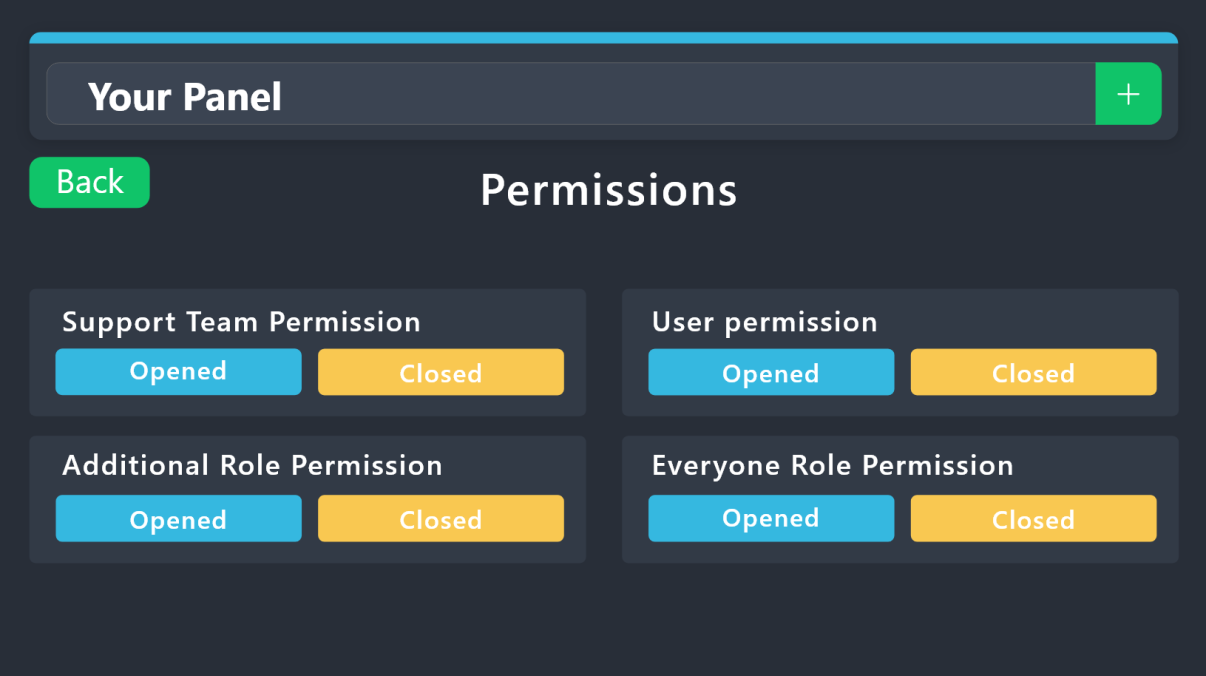 vague cosmos
You might also double check the permissions.
ocean gyro
vague cosmos
You might also double check the permissions.
i added the perms to support channel in the discord and added the roles in the dashboard
vague cosmos
Did you change the permissions per embed above?
vague cosmos
TT will check the perms from there.
I'm heading off to bed now @ocean gyro, if you've any more questions someone else will be happy to help.
ocean gyro
vague cosmos
I'm heading off to bed now <@693902461953507388>, if you've any more questions s...
appreciate your time and help thank you
iron nightBOT
Gave +1 Rep to @vague cosmos
pseudo ravine
I can take over for her
civic wagon
Me too 
 grim pilot
Is reason for $close premium? Cause I tried using it and it didn’t say I couldn’t (non premium) but the reason didn’t show in logs/transcript logs.
 gilded verge
it's free but are you sure you added {close.reason} to your moderator message? - so you can see reason in transcript

 harsh pagoda
hello, is there any way to recover a deleted ticket? i accidentally pressed delete before transcripting
gilded verge
*that's why i couldn't use {}
 gilded verge
harsh pagoda
hello, is there any way to recover a deleted ticket? i accidentally pressed dele...
gilded verge
harsh pagoda
hello, is there any way to recover a deleted ticket? i accidentally pressed dele...
Hi, nope, if ticket was deleted, there is no way to recover it, and transcripts are not saved unless you do it yourself (or you'll get premium where you can set auto-save transcripts)
harsh pagoda
thank u
ocean gyro
pseudo ravine
I can take over for her
great. still have this issue where i add a team role and see the perms are correct but they cant see any tickets that have been opened before they got the role?
pseudo ravine
That's because Ticket Tool never gave access to previously created tickets, because it wasn't told to
ocean gyro
pseudo ravine
That's because Ticket Tool never gave access to previously created tickets, beca...
how do i fix that?
pseudo ravine
You'll have to manually give access
ocean gyro
pseudo ravine
You'll have to manually give access
is that something i do on the dashboard?
pseudo ravine
No, through the channel permissions of the previously created tickets
ocean gyro
pseudo ravine
No, through the channel permissions of the previously created tickets
ahh i see
pseudo ravine
Is that all you needed?
ocean gyro
pseudo ravine
Is that all you needed?
yeah was just having trouble with team not seeing the tickets but since its server side i think i got it
moving forward am i going to have to sync perms again?
pseudo ravine
No, after you set the Support Team Roles, Ticket Tool will manage that for you
ocean gyro
pseudo ravine
No, after you set the Support Team Roles, Ticket Tool will manage that for you
ah ok thank you
iron nightBOT
Gave +1 Rep to @pseudo ravine
pseudo ravine
You're welcome, glad I could help. If you have any other questions/issues, don't hesitate to reach out again
gilded verge
Hi, you can add this role to Server Configs->Blacklist Roles (they won't be able to open any ticket on your server)
or Panel Configs->Buttons->Edit Create Ticket Button->Disabled Roles (they will not be able to open ticket from the panel to which you have added roles)
iron nightBOT
Gave +1 Rep to @gilded verge
gilded verge
only you and Staff can close your ticket, im a former so i don't have access
grim pilot
gilded verge
it's free but are you sure you added `{close.reason}` to your moderator message?...
Nope. I just wanted to see if it would work. Thanks
 sonic zodiac
Hello
I need help close the ticket i already have
gilded verge
sonic zodiac
Hello
I need help close the ticket i already have
Hi, please explain what exactly you mean 🤔
sonic zodiac
I need close a ticket i have
gilded verge
but here, so on this support server or on another server?
sonic zodiac
On another server
gilded verge
then you need to ask on this server you mean
 soft kraken
As a server member how can I see my closed tickets?
pseudo ravine
Hey there. Are you referring to the transcript of the ticket?
 lament bluff
puedo ver el registro de tickets si no los guarde? tipo en la pagina
pseudo ravine
Hola. ¿Se refiere a la transcripción del ticket?
 sand briar
How can I add when a ticket gets opened that there are more people, like staff, in the ticket than only the owner and the opener?
humble sequoiaBOT
1. Go into your Dashboard
2. Open your Panel Configs tab
3. Select the panel you want to grant access to
4. Open the General options menu
5. Select your Support Team Roles
6. Save changes
gilded verge
humble sequoia
@sand briar,  should help you
sand briar
gilded verge
<@878281876689788938>, <:this:894279341108772914> should help you
Thanks @gilded verge
iron nightBOT
Gave +1 Rep to @gilded verge
 devout meteor
how I let the ticket tool mentons a staff role when a member open a ticket?
humble sequoiaBOT
1. Go into your Dashboard
2. Open your Panel Configs tab
3. Select the panel you want to ping your support on
4. Open the Ticket options menu
5. Click on Edit Ticket Message
6. In the Message Content use one of the role mention syntax (**{@Role Name}**/**{Role ID}**)
7. Save changes
Note: For this to work properly, Ticket Tool requires the Mention Everyone permission. Or the role must have the Allow anyone to @mention this role setting enabled
vague cosmos
@devout meteor see above. 🙂
devout meteor
vague cosmos
<@1109423980097577041> see above. 🙂
ty
iron nightBOT
Gave +1 Rep to @vague cosmos
vague cosmos
No worries, did you have any other questions?
devout meteor
vague cosmos
No worries, did you have any other questions?
well yeah
vague cosmos
Go ahead, I'm happy to help.
devout meteor
how do I do the question panel when someone open a tickethe should answer it before the ticket begins?
humble sequoiaBOT
A Discord Form lets the user answer individual questions in a pop-up Form, which then displays the answers in the ticket message. This can save time if you already know what you want to ask the user.
Setup Forms
Forms can be enabled under Panel Settings > Form Options > Edit Forms Options. In the new pop-up window, you can now enable and edit your own Form.
Form Options
You can add up to 5 questions in the Discord form. This is a Discord limitation. Each question can have a placeholder in the input field, a minimum and maximum input, multi-line, and also the option to have the answer required.
Options
Question Title ➞ Your Question goes here
Question Placeholder ➞ The placeholder text in the input field
Required ➞ If enabled, the user has to answer this question, to submit the form
Multi-Line Input ➞Allows the user to input multiple lines
Minimum and Maximum Input ➞ Set a minimum and maximum input value for the user
Displaying the Answer
To display the answers from the user, you need to enable Auto display form results on the ticket message as an additional embed
In case you don't want a second embed, go into your Panel Configs > Ticket Options > Edit Ticket Message. In there you use the variable {create.form.x} and just replace x with the number of your question. For example, the response to Question 1 can be displayed with {create.form.1}. If you don't use this variable, the response from the user is lost.
 vague cosmos
You can do that using forms, see above.
iron nightBOT
Gave +1 Rep to @vague cosmos
vague cosmos
No problem, let me know if you've any more questions.
devout meteor
and one last question :}
vague cosmos
Go ahead.
devout meteor
how do I let the claim button appears and how I let two different tickets in one message?
vague cosmos
For the first question: Claiming is a premium only feature.
For the second question: Do you want two different tickets in one message? I don't think that is possible.
devout meteor
oh wait nvm
like i meant
nvm
nothing sry for disturbing and ty
thanks @vague cosmos
iron nightBOT
Gave +1 Rep to @vague cosmos
vague cosmos
No problem, but what did you mean?
devout meteor
it was like two buttons in one message
 devout meteor
yh but like that appears before the ticket begins
vague cosmos
Oh, I get what you mean.
humble sequoiaBOT
For more convenient use of multipanels, you can now combine panels on the dashboard. This will allow you to directly send the multipanel from the dashboard or via the $panel ID command.
Where can I find this?
You can find this setting on the Dashboard -> Panel Configs -> Panel -> Attached Panels
Note: if you're attaching all the panels to a panel called English, don't include English in the attached panel's box (If you do this, it will create a duplicate)
This will put all buttons from all of your panels on one message. The message is the panel message from the panel you're combining these panels in.
 vague cosmos
You can make it using multipanels. Which looks like this.

@devout meteor does it work for you? 🙂
vague cosmos
Awesome.
iron nightBOT
Gave +1 Rep to @vague cosmos
vague cosmos
You sure there are no other questions? 🙂
devout meteor
vague cosmos
You sure there are no other questions? 🙂
nothanks :}
 remote rampart
Hi, how can I get a message into the ticket?
civic wagon
remote rampart
Hi, how can I get a message into the ticket?
Could you please elaborate
remote rampart
I mean something like this
 humble sequoiaBOT
The Ticket Message is the first message sent by the bot on a new ticket. To customize it head over to your Dashboard ➞ Panel Configs ➞ Ticket ➞ Edit Ticket Message
civic wagon
@remote rampart please refer to the embed above ^
vague cosmos
Isn’t using forms easier?
remote rampart
humble sequoia
how i get to there?
civic wagon
Dashboard ➞ Panel Configs ➞ Ticket ➞ Edit Ticket Message
remote rampart
So in the website?
civic wagon
Yes
remote rampart
Ok ty
 opaque tapir
hey can i ask a question about discord that isnt related to ticket support bot? please
vague cosmos
Hmm, depends on the question. Maybe I know the answer about it.
Even as this is specfic for TT questions, normally. 😛
opaque tapir
or does this cancel out my invites?
vague cosmos
https://dis.gd/support can help you with that.
opaque tapir
thank you
vague cosmos
No worries, do you have any other questions?
iron nightBOT
Gave +1 Rep to @vague cosmos
vague cosmos
No problem, have a nice day!
devout meteor
hello again
vague cosmos
Hey! How can I assist you?
devout meteor
uhh how do I let the question apperars automatically with the ticket opened. I tried and didnt work i think i did something wrong
vague cosmos
Using the forms option?
devout meteor
it says {create form.1} but idk where to put
vague cosmos
Do you have this enabled at the under forms?
 devout meteor
bruh im blind
vague cosmos
If you use that, the answers will be displayed in a second embed.
devout meteor
does that need a premium ticket tool or something like that?
vague cosmos
No.
devout meteor
oh kk
vague cosmos
If you that one it will look like this.
 devout meteor
imma try
 rocky night
hello you all, good evening
vague cosmos
@devout meteor alright, let me know how it goes.
@rocky night hi do you need any help?
rocky night
yes 🙂
i've got few questions for you... first one is: can i group the tickets when they get craeted?
cause right now i have them all in the root of my discord
humble sequoiaBOT
1. Go into your Dashboard
2. Open your Panel Configs tab
3. Select the panel you want to grant access to
4. Open the Category options menu
5. Select the categories of your preference
6. Save changes
 vague cosmos
You can set them in categories (see above).
rocky night
yeah i've done that, but they got placed outside of the category anyhow
humble sequoiaBOT
When first invited to your server, Ticket Tool should have the permissions shown below in order to ensure an appropriate functioning:
When customizing permissions for the different ticket participants, you must make sure Ticket Tool has the permissions you want it to grant to others, you can learn more about this here.
Missing Permissions
This error is a direct outcome of the bot missing permissions as depicted above. When troubleshooting this error we suggest you go through these steps:
- Use the </debug:1029783024264564765> command to check if the bot is lacking core role or channel permissions.
- Compare the category/channel's overrides and contrast them with the bot's roles to identify any permission denial that is breaking the functioning
- If you can't still figure it out, let our <@&540295656720302081> know so they can guide you through
Additional Resources
- If you are a server administrator and would like to understand more how to set up your server's permissions, we suggest checking the Discord Support Knowledge Base
- If you are a bot developer and are interested in the internal permission hierarchy we suggest you this part of the Discord Developer Docs
Important Note
- Giving Administrator permissions is NOT required and we do NOT encourage you to do unless you are trying to troubleshoot your permissions setup.
 vague cosmos
Does TT has the required perms?
rocky night
this is my current setting
 rocky night
vague cosmos
Does TT has the required perms?
rocky night
vague cosmos
Does TT has the required perms?
let me double check
vague cosmos
Also how many channels are under the category?
rocky night
just one
i can't even execute commands

if i remove the app and start from zero, will the ticket-channels be lost?
vague cosmos
No, but I'd suggest you to open a ticket in #🎫│make-a-ticket so the support team can assist you.
iron nightBOT
Gave +1 Rep to @vague cosmos
vague cosmos
No problem. ❤️
 pure robin
my other members can see all the tickets i have
humble sequoiaBOT
1. Go into your Dashboard
2. Open your Panel Configs tab
3. Select the panel you want to grant access to
4. Open the Permissions options menu
5. Find what role you'd like to edit permissions for
6. Choose if you'd like to edit opened or closed permissions for that role
7. Edit the permissions by ticking
8. Save changes
vague cosmos
@pure robin ^
vague cosmos
Only works for new tickets.
 loud cargo
I'm having an intermittent issue where some discord users can't see the ticket tool message in our ticket creation channel. View message history is allowed, and the users in question have 'view embeds/links' on as well. Most users have no issue creating a ticket but every day or two we get someone who sees the channel as entirely blank. Any ideas as to whats going on?
Apparently one of the users who was unable to see the bot message in the discord client was able to see it on the web app
i suppose i should just make a ticket for this 🤓
vague cosmos
is their app up to date?
loud cargo
ive asked them to update it, they havent responded yet
 orchid jetty
if i purchase ticekt tool premium , can i add into 2 server?
vague cosmos
User settings > Text & Images is this enabled:
 civic wagon
orchid jetty
if i purchase ticekt tool premium , can i add into 2 server?
civic wagon
orchid jetty
if i purchase ticekt tool premium , can i add into 2 server?
No you cannot. Ticket Tool premium subscriptions are server based and not user based
vague cosmos
orchid jetty
if i purchase ticekt tool premium , can i add into 2 server?
You pay per server.
orchid jetty
2 server = 12$ ?
vague cosmos
Not gonna delete it and make a ghostping. Sorry Jasvir.
orchid jetty
is there any discount for 2 servers?
civic wagon
vague cosmos
Not gonna delete it and make a ghostping. Sorry Jasvir.
There's no need to lol
civic wagon
orchid jetty
is there any discount for 2 servers?
No
civic wagon
orchid jetty
2 server = 12$ ?
technically, yes. But then again, you buy subscriptions on different servers so that'll be 6*2 $
 urban beacon
This can sound, weird, but im really having problems with this
 vague cosmos
Don't see your server?
civic wagon
urban beacon
This can sound, weird, but im really having problems with this
What exactly is the issue?
urban beacon
civic wagon
What exactly is the issue?
Im trying to manage a server, when I click it, it appears the follow message "Please select a server you have access to manage to be redirected"
loud cargo
vague cosmos
User settings > Text & Images is this enabled:
yeah, even when i turn it off i can still see part of the message - which they don't see
vague cosmos
loud cargo
yeah, even when i turn it off i can still see part of the message - which they d...
Ask them to enable it, it's for embeds.
urban beacon
loud cargo
yeah, even when i turn it off i can still see part of the message - which they d...
Thats usually some discord problem, one time it happend the same to me
vague cosmos
urban beacon
Im trying to manage a server, when I click it, it appears the follow message "Pl...
Can you run /permissionlevel and send a screenshot of the result?
urban beacon
vague cosmos
Can you run `/permissionlevel` and send a screenshot of the result?
sure
loud cargo
i'm saying they have it on, and even when it's off part of the message is still visible so it's definitely not the issue
vague cosmos
Hmm, not sure what is causing it. But they can't see the embed right? Can you double check channel permissions?
orchid jetty
civic wagon
technically, yes. But then again, you buy subscriptions on different servers so ...
Thanks for clearing
iron nightBOT
Gave +1 Rep to @civic wagon
urban beacon
vague cosmos
Can you run `/permissionlevel` and send a screenshot of the result?
"The app did not respond"
loud cargo
some users can, others cant
vague cosmos
urban beacon
"The app did not respond"
Could you try again, second time it might work.
loud cargo
its not a permission issue, its user specific
 woven abyss
Is there a specific time to respond to the application for Arab support ot not ?
urban beacon
vague cosmos
Could you try again, second time it might work.
kk
civic wagon
loud cargo
its not a permission issue, its user specific
What I feel is that it's a discord issue at the end of the day. If you could share a ss for both the senarios, in which they can and cannot see, that'll help
vague cosmos
Looks like an issue on Discords side, I'd suggest you to contact Discord: https://dis.gd/support
woven abyss
woven abyss
Is there a specific time to respond to the application for Arab support ot not ?
@civic wagon pls ..
pseudo ravine
woven abyss
Is there a specific time to respond to the application for Arab support ot not ?
Hey there. You'll just have to wait until someone responds
woven abyss
pseudo ravine
Hey there. You'll just have to wait until someone responds
ok thank you
iron nightBOT
Gave +1 Rep to @pseudo ravine
vague cosmos
You don't have access to manage the dashboard.
urban beacon
vague cosmos
You don't have access to manage the dashboard.
weird
humble sequoiaBOT
Any role you put there will have full access to the ticket tool dashboard. The server owner and users with admin permissions already have access to the dashboard.
Be careful of which roles to put here
 pseudo ravine
woven abyss
ok thank you <:PabloTiphat:983791053842837624>
pseudo ravine
woven abyss
ok thank you <:PabloTiphat:983791053842837624>
You're welcome, glad I could help. If you have any other questions/issues, don't hesitate to reach out again
urban beacon
vague cosmos
You don't have access to manage the dashboard.
kk thanks for your help :)
iron nightBOT
Gave +1 Rep to @vague cosmos
vague cosmos
humble sequoia
@urban beacon ask the server owner to give a role you have dashboard access.
urban beacon
vague cosmos
<@483385009969823754> ask the server owner to give a role you have dashboard acc...
thats what im going to do
vague cosmos
Do you have any other questions?
urban beacon
vague cosmos
Do you have any other questions?
No thank you
loud cargo

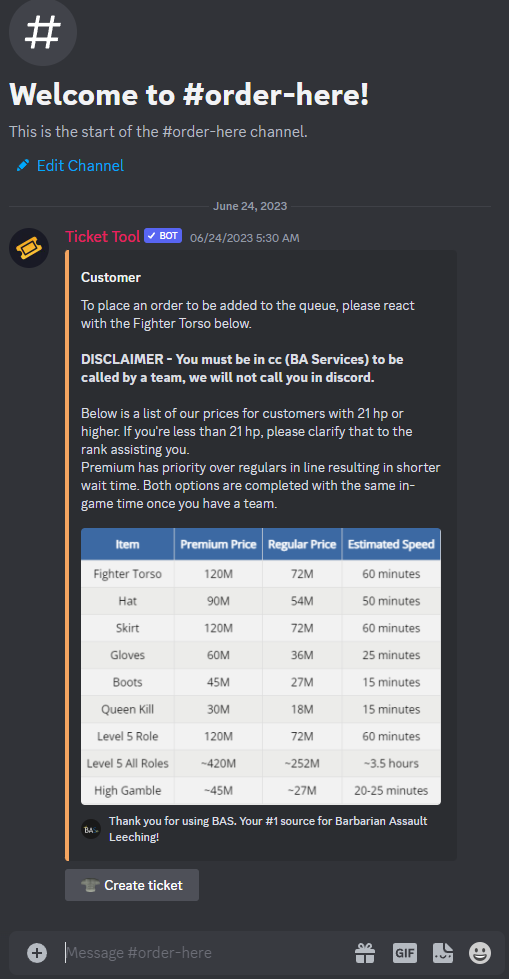
if i turn off the embed setting i cant see the info/pricing, but can still see the create ticket button
vague cosmos
Looks like a Discord issue, @loud cargo. https://dis.gd/support to contact Discord about this.
humble sequoiaBOT
@teal grail, we would love to help you, but if you don't tell us what you need help with we can't help you :(
loud cargo
yeah its seeming so meg, i was hoping it wasnt though. ty for help (also hearing that both uninstalling/reinstalling has fixed it, as well as leaving and rejoining the server)
vague cosmos
Hmm, would still contact Discord about it so they might have a easier solution. It's not right.
Jdog, can you take over from here? I'm going to get ready for work. Night shift, yay!
 subtle hedge
how do i change the highlighted text
 humble sequoiaBOT
The panel message is where people react to make a ticket. To customize it head over to your Dashboard --> Panel Configs -> Panel -> Edit Panel Message
subtle hedge
i don’t see the option to change it though
pseudo ravine
Could you please send a screenshot of what you're looking at on the Dashboard?
subtle hedge
 pseudo ravine
Click on the Embed Editor
 restive pilot
quick question, if I set a ticket to support only, and then add an allowed role, will that allowed role still be able to open a ticket?
subtle hedge
pseudo ravine
Click on the `Embed Editor`
okay i see now thanks
iron nightBOT
Gave +1 Rep to @pseudo ravine
pseudo ravine
restive pilot
quick question, if I set a ticket to support only, and then add an allowed role,...
Hey there. I believe the Support Team Only overrides the Allowed Role, but I could be wrong.
pseudo ravine
subtle hedge
okay i see now thanks
You're welcome, glad I could help. If you have any other questions/issues, don't hesitate to reach out again
restive pilot
damn. okay.
have way too many roles everyone has to dissallow them all 🙃
pseudo ravine
Sorry
restive pilot
oh, I guess if I disallow everyone, but allow booster, it should work?
(concept is, everyone can see booster perks channel, but only boosters can open a ticket to contact for certain perks)
pseudo ravine
That should work, since Allowed Roles override Disabled Roles
pseudo ravine
pseudo ravine
Hey there. I believe the `Support Team Only` overrides the `Allowed Role`, but I...
Allowed Roles override Support Team Only, in case you needed to know
iron nightBOT
Gave +1 Rep to @pseudo ravine
pseudo ravine
You're welcome, glad I could help. If you have any other questions/issues, don't hesitate to reach out again
 velvet python
Hi is there any feature that a ticket sender will be anonymous if they ever send a ticket?
pseudo ravine
Hey there. Unfortunately there is no feature
velvet python
pseudo ravine
Hey there. Unfortunately there is no feature
oh alrighty! Thank youuuu!
iron nightBOT
Gave +1 Rep to @pseudo ravine
pseudo ravine
You’re welcome, glad I could help. If you have any other questions/issues, don’t hesitate to reach out again
 heady roost
Clicking on manage server and nothing is happening. Anyone else facing the issue
humble sequoiaBOT
━━ User's inquiry has been moved to a ticket ━━
 open ore
Hello. I have an issue
humble sequoiaBOT
@open ore, we would love to help you, but if you don't tell us what you need help with we can't help you :(
 lament cypress
@vague cosmos THX BRO
iron nightBOT
Gave +1 Rep to @vague cosmos
open ore
open ore
the message of the ticket doesn't appear
I need help!
 autumn stream
 pseudo ravine
open ore
the message of the ticket doesn't appear
pseudo ravine
open ore
the message of the ticket doesn't appear
Hey there. Can you please take a screenshot of what you’re referring to?
pseudo ravine
autumn stream
https://tenor.com/view/happy-gif-25392652
Do you need any help with @pseudo glen?
autumn stream
 pseudo ravine
If you don’t need any help, I would recommend to move to #💬│general-chat
 golden thunder
Hello everyone i need help, do you now how to create this pls
 humble sequoiaBOT
First you will want to invite the bot to your server. Once the bot is in your server, you can manage your server in the dashboard.
To create a panel we are going to need to head over to the Panel Configs Tab on the Dashboard.
Once at the dashboard we will need to click Create Panel.
Enter a panel name (Fill in any optional settings you want).
Click Create Panel and you are ready to get started with configuring your panel.
An example of a creating a panel is shown below.
Once the panel has been created, use the blue Send button and select the channel you want the panel to be sent to.
The Panel wasn't send
Use the </debug:ID> command to diagnose possible permission issues with the bot.
heady roost
When we want to ping a role in the ticket generated we use <@&roleid>
Whats role id?
open ore
pseudo ravine
Hey there. Can you please take a screenshot of what you’re referring to?
when someone opens a ticket , no message appear
Like that
 pseudo ravine
If you already created a support ticket here, please wait until an available Support Member assists you
open ore
what is this error ?
 pseudo ravine
heady roost
When we want to ping a role in the ticket generated we use <@&roleid>
Whats role...
pseudo ravine
heady roost
When we want to ping a role in the ticket generated we use <@&roleid>
Whats role...
Hey there. The role id is the ID of the role you want to ping. You can use the /id command to get the role ID you need
pseudo ravine
open ore
what is this error ?
You can ask that in your ticket, but stay in your ticket and have a Support Member assist you when they’re available
open ore
pseudo ravine
You can ask that in your ticket, but stay in your ticket and have a Support Memb...
Sir help me .
I closed the ticket
pseudo ravine
What button did you press when you got the error?
open ore
Create a ticket
pseudo ravine
Could you please go to the Dashboard > Buttons > Create Ticket > Send a screenshot
open ore
 pseudo ravine
That's a different page. Could you go to the Menu > Buttons > Create Ticket > Send a screenshot
heady roost
Ive created the panel and everything but it still isnt creating a ticket what could be the issue
pseudo ravine
Did you get some sort of error?
heady roost
No not really
Created the panel gave it permissions and everything but cant seem to find its message
pseudo ravine
Did you send the panel?
pseudo ravine
Go to the Dashboard > Panel Configs > Click the Send button
pseudo ravine
You're welcome, glad I could help. If you have any other questions/issues, don't hesitate to reach out again
heady roost
I've created the form option but i dont understand how to add the variable.
 teal grail
heady roost
I've created the form option but i dont understand how to add the variable.
teal grail
heady roost
I've created the form option but i dont understand how to add the variable.
Wym?
teal grail
heady roost
I've created the form option but i dont understand how to add the variable.
{create.form.x} this?
 thorn quiver
السلام عليكم
 robust sandalBOT
thorn quiver
السلام عليكم
robust sandalBOT
thorn quiver
السلام عليكم
Peace be upon you
 Arabic (ar) → English (en)
teal grail
thorn quiver
السلام عليكم
Arabic (ar) → English (en)
teal grail
thorn quiver
السلام عليكم
هل تحتاج شيئا؟
robust sandalBOT
 frank palm
انا اشتركت في البريميو ولا اقدر ادخلة السيرفر
frank palm
انا اشتركت في البريميو ولا اقدر ادخلة السيرفر
I subscribed to the premio and I can't enter the server
Arabic (ar) → English (en)
 brazen kelp
What does "sync servers" do? Does it affect the already set server configs?
vague cosmos
It will sync server’s you’re in to check eventually access.
vague cosmos
brazen kelp
What does "sync servers" do? Does it affect the already set server configs?
So, no. It doesn’t affect them.
brazen kelp
vague cosmos
So, no. It doesn’t affect them.
Great! Thank you! 🙂
iron nightBOT
Gave +1 Rep to @vague cosmos
vague cosmos
No worries, did you have any other questions?
brazen kelp
No, thank you!
 carmine mango
what does it mean by "undefined"? i tried sending my panel and it's giving me undefined
vague cosmos
carmine mango
what does it mean by "undefined"? i tried sending my panel and it's giving me un...
As message in Discord?
Did you change anything on the panel, such as the button?
 rustic gale
carmine mango
what does it mean by "undefined"? i tried sending my panel and it's giving me un...
rustic gale
carmine mango
what does it mean by "undefined"? i tried sending my panel and it's giving me un...
Try sending it with the /panel command instead of the Send button
robust sandalBOT
 ember geyser
Onde consigo o transcript?
ember geyser
Onde consigo o transcript?
Where do I get the transcript?
Portuguese (pt) → English (en)
vague cosmos
You can use $transcript.
humble sequoiaBOT
━━ BulaCha's inquiry has been moved to a ticket ━━
ember geyser
where can i find transcript??
 covert dawn
ember geyser
where can i find transcript??
covert dawn
ember geyser
where can i find transcript??
A ticket was opened... follow up in that ticket with the support team
robust sandalBOT
 leaden coral
algun soporte aqui
leaden coral
algun soporte aqui
some support here
Spanish (es) → English (en)
leaden coral
alguin plis
robust sandalBOT
leaden coral
alguin plis
Alguin Plis
Spanish (es) → English (en)
civic wagon
leaden coral
algun soporte aqui
Puede crear un ticket de soporte en español desde #🎫│make-a-ticket
 spring vigil
Is possible create a multipanel with menu instead of buttons?
humble sequoiaBOT
The Drop-down menu or Select Menu replaces the buttons on your panel message and uses a drop-down menu with all of your panels. To set this up, go to your Panel Configs and select your main Panel.
<:Numbericons1:1018864164032225340> Enable Select Style
First you enable Select Style. Then you add an item in the Dropdown Editor. Now you can start editing your dropdown!
<:Numbericons2:1018864168041971712> Dropdown Editor
Each line in the dropdown editor represents a line in the drop down menu on discord. You can add more "Items", by clicking on 

First you select a panel. That's the panel this option will open a ticket for.  DONT select the same panel twice. Each option should have a different Panel
After that, you can put a Display. This is the title of this option and will appear in the drop down menu. The *Description can be set right after that, which will be below the title in grey.
Additionally you can select an emoji, that will be shown in front of each option. You can either manually input the ID of an emoji or select it in the selector.
Common Issues ⚠️
- Panel doesn't send? Make sure you have a valid emoji selected
- Option doesn't show up? Check if two options have the same panel in the DropDown Editor

$dropdown
vague cosmos
humble sequoia
@spring vigil
spring vigil
thanks
orchid jetty
hi
how can i get premium subscriber role?
i have subscribed to premuim on my server
also why its showing this
 vague cosmos
orchid jetty
how can i get premium subscriber role?
vague cosmos
orchid jetty
how can i get premium subscriber role?
With some magic. Did you pay via Discord?
orchid jetty
vague cosmos
With some magic. Did you pay via Discord?
yes
there was no option to pay in website
humble sequoiaBOT
PayPal - paypal@tickettool.xyz
BitCoin - 3HhKKAdb9eEvCe2tvzB8bAa8nebHY6qcPA
LiteCoin - MEQX3knLAuotrKnvk3HDNBK5gdRn6PZhHy

Prepay/Direct Payment
To prepay send the payment using your desired method - Available options listed bellow.
⚠️ $18 per 3 months. ⚠️
$66 per year.
(If using the direct payment option, you need to be paying for at-least 3+ months.)
Regular Prices when paying within Discord:
$5.99/per month
Once your payment is sent let us know so we can confirm and get you your key.
- Purchases done with this method are non-refundable.
<:paypal:924596360840372234> Paypal ("Goods and Services" or "Family and Friends")
paypal@tickettool.xyz
<:bitcoin:924638849135689749> BTC - Bitcoin
3HhKKAdb9eEvCe2tvzB8bAa8nebHY6qcPA
<:Litecoin:972176945972383815> LTC - LiteCoin
MEQX3knLAuotrKnvk3HDNBK5gdRn6PZhHy
I sent the payment now what?
After you send the payment, please send a screenshot with proof of payment, our <@&615146349700186112> will verify your payment and will get you setup. For crypto payments, we are waiting for at least ONE verification.

All prices in USD - 3 months min for direct payment
vague cosmos
There is ^
orchid jetty
oki
jade topaz
Guys how do i make it that the member need a role to open a ticket?
and make the limit be 1
 tardy carbon
Guys, maybe someone can help me? When a player makes a ticket he gets to see the following: no welcome text and no way to close his own ticket. As an Admin I see his ticket like this: So it looks like the Admin gets the ticket for the player. I have no clue how this can be. Can anyone help me please?


I want the player to see the same text as in the picture on the right. What am I doing wrong?
scenic plinth
Can I get your servers ID please with the panel name?
 spice scroll
Help
scenic plinth
tardy carbon
1094332650409431100 1 | Tickets
Is this specifically this user this happens to?
Please ensure the user in your channel settings has permissions to read message history.
scenic plinth
Are any other tickets like that? Are you able to use commands like $close & $rename
tardy carbon
The user didn't have permissions to read message history. Let me make a new ticket.
No, not working still empty
and $close is working on my side
In Command Configs, what's the difference between Close & Close Request?
I think I made a mistake in those categories
scenic plinth
$closerequest provides the close ask message and allows the ability to close through a button, and $close directly closes the ticket.
tardy carbon
okay
tardy carbon
scenic plinth
Is this specifically this user this happens to?
Please ensure the user in your...
I wanted you to know that what you said was indeed the culprit. I started a new channel from scratch and it works now like it should. Thx again.
iron nightBOT
Gave +1 Rep to @scenic plinth
civic wagon
 twin bone
как поменять язык в боте
twin bone
как поменять язык в боте
Эй! К сожалению, вы не можете изменить язык бота.
 light spoke
what does the sync button mean? Is it possible to transfer ticket settings from 1 discord server to another?
robust sandalBOT
 cyan escarp
Bonjour ! Est-ce normal que le bot répond pas ?
cyan escarp
Bonjour ! Est-ce normal que le bot répond pas ?
Hello! Is it normal for the bot not to respond?
French (fr) → English (en)
vague cosmos
light spoke
what does the sync button mean? Is it possible to transfer ticket settings from ...
It will sync servers you've access/you're in too. You can transfer settings as server owner.
humble sequoiaBOT
The Backup and Restore feature allows you to transfer your panels, tags, and all settings to a new server, even if the server the settings were created has been deleted! You will want to copy the whole key.
First, go to your server's Dashboard ➞ then Server Configs ➞ under Config Backup & Restore (Server Owner Only) click on Old version can be found here and generate a new backup key by pressing the green button. Now, a key should be generated in the box above. You may need to refresh the page to see this.
Once you have your backup key, navigate to the same page on the new server. Copy the key on the Restore from backup key field.
Now you can choose what you want to copy. Finally, press the green Restore Configs button.
IMPORTANT NOTE
- We suggest you keep this backup key somewhere safe, in case your server is deleted so you are able to recover your panel's settings.
- This feature is only usable by the server's owner

L'équipe du support Français
Cher client,
Si vous avez besoin d'aide, ouvriez un ticket pour le support Français s'il vous plaît.
Allez au #🎫│make-a-ticket et tapez sur le button contenant l'emoji 🇫🇷
vague cosmos
humble sequoia
@cyan escarp
pseudo ravine
cyan escarp
Bonjour ! Est-ce normal que le bot répond pas ?
Salut. Pourriez-vous s'il vous plaît exécuter la commande /debug ? Et si l'application répond, envoyer le lien ici ?
 worthy fulcrum
Heyyy. I wanna ask for help. In my server, the Ticket channels are separated into two category. How can I make them get into one category? Many Thanks!
pseudo ravine
Hey there. You can set the “Category Created/Opened” to the same category for both panels
Dashboard > Panel Configs > Category
worthy fulcrum
pseudo ravine
Hey there. You can set the “Category Created/Opened” to the same category for bo...
I have tried it. There is only one category. But the channels are separated like the picture shown
pseudo ravine
It won’t change the category for previously created tickets, only newly created tickets after you changed the settings
worthy fulcrum
So there is no way for me to make the existed channels into one category?
pseudo ravine
You'll have to do that manually, sorry
jade topaz
Guys, maybe someone can help me? Can anyone help me please?
humble sequoiaBOT
Hello, we would love to help you, but if you don't tell us what you need help with we can't help you :(
 pseudo ravine
Unfortunately we can't do anything about that. Due to how Discord timeouts work, you can't use buttons while in timeout
humble sequoiaBOT
**١- دعوة البوت إلى سيرفرك**
يجب عليك اولاً دعوة البوت إلى سيرفرك من خلال رابط دعوة البوت، بعد ذلك يُمكنك تعديل خصائص البوت عبر لوحة التحكم.
**٢- إنشاء لوحة**
لإنشاء لوحة يجب عليك التوجه إلى لوحة التحكم ، ثم قم بإختيار سيرفرك ، بعد ذلك توجه إلى قسم "Panel Config".
بمُجرد وصولك إلى القسم المذكور أعلاه، يجب عليك الضغط على زر "Create Panel" لإنشاء اللوحة ، ومن ثمها قُم بإدخال اسم اللوحة (يمكنك ملء اي اعدادات اختياريه تريدها).
بعد إدخال اسم اللوحة و ملء الإعدادات ، قُم بالضغط على "Create Panel" لإتمام عملية انشاء اللوحة الخاصة بك بنجاح!
سيتم إرفاق صورة توضيحية لعملية إنشاء اللوحة بالطريقة الصحيحة؛
**٣- إرسال اللوحة إلى روم**
بعد الإنتهاء من عملية إنشاء اللوحة بنجاح ، يجب عليك الآن إرسالها إلى روم بإستخدام زر "Send" على لوحة التحكم بقسم الـ "Panel Config".
بعد الضغط على الزر ، قم بإختيار الروم المفضل لإرسال اللوحة.
بعد إختيار الروم قُم بالضغط على زر "Send" لإتمام عملية إرسال اللوحة!
سيتم إرفاق صورة توضيحية لعملية إرسال اللوحة بالطريقة الصحيحة؛
**هل تواجهك مشكلة أثناء محاولة إرسال اللوحة؟**
قُم بإرسال الامر `/debug" في اي روم يستطيع البوت رؤيته ، ثم تأكد أن البوت لدية جميع الصلاحيات اللازمة لإرسال اللوحة.
scenic plinth
@jade topaz
robust sandalBOT
إذا كنت بحاجة إلى مساعدة باللغة العربية ، فيرجى عمل تذكرة عربية وسيتمكن شخص ما من مساعدتك أكثر من هناك.
English (en) → Arabic (ar)
scenic plinth


 tawny mirage
Can someone help me and remind me how I add ticker in one channel?
I already have it in other channels and it's all good but now I want to add the ticket open button in another channel and I forgot how lolll 😦
I can't see how in dashboard.
vague cosmos
tawny mirage
Can someone help me and remind me how I add ticker in one channel?
I already hav...
You can send a panel using the send button at the dashboard. There you can select a channel.
tawny mirage
vague cosmos
You can send a panel using the **send** button at the dashboard. There you can s...
Sorry, I don't understand 😕
Got it ! Simple, sorry 😕 Big thank you!!
 marsh viper
Hello, is it possible to recover ticket logs from a disabled account?
vague cosmos
If you've transcripts saved yes, otherwise no.
robust sandalBOT
jade topaz
Jak je dostanu?
How do I get them?
Czech (cs) → English (en)
vague cosmos
They should be logged in a transcript channel, from there you can access them.
@jade topaz what do you mean?
You didn't say that, but then it's not possible.
scenic plinth
 wind gyro
где я бля
wind gyro
где я бля
Вы находитесь на сервере Discord для Discord bot Ticket Tool. Пожалуйста, избегайте использования нецензурной лексики.
cyan escarp
pseudo ravine
Salut. Pourriez-vous s'il vous plaît exécuter la commande /debug ? Et si l'appli...
C bon je régler le problème
pseudo ravine
Avez-vous exécuté la commande /debug ?
 quick wave
Question/Issue ⇒ FAQ does not instruct me as to when and how exactly I can make profit withdrawals from my new 2 step account. Please help me understand so that I may maximize my hard work. Need to know step by step please what needs to happen in trading tool as well as next step funded activity to do fluently. Also if the cap is 5% for the first withdrawl - whenever that is, does my balance that remains over 5% stay in tact to enjoy my hard work with the portfolio?
humble sequoiaBOT
⚠️ You're in the wrong place
We provide support for Ticket Tool Discord bot and cannot help you with whatever issue you have.
- We don't know which Support Team you should contact to get this issue resolved, and unfortunately we won't be able to accurately tell you.
If you don't have any further questions regarding our bot Ticket Tool, please close this ticket
jade topaz
hey guys need some help here, ive added ticket tool to my server and when a user create a ticket our support admins who have the permission to reply do not see the bot messege to close the ticket. can anyone help here?
pseudo ravine
jade topaz
hey guys need some help here, ive added ticket tool to my server and when a user...
Hey there. Are you referring to the close button?
jade topaz
yeah we just added the bot and tried a test ticket but the support guy do not see the bot messege on the ticket to close it
pseudo ravine
Can you see the buttons as the owner/admin?
jade topaz
as the owner yes
pseudo ravine
Tell them to update their Discord app
 summer tundra

vague cosmos
summer tundra
<:pepe_confetti:984105711367770132>
Do you need any help?
summer tundra
Yes
 gray remnant
You changed all the bot, I understand nothing
gilded verge
gray remnant
You changed all the bot, I understand nothing
if you need help, just ask or you can find answer in docs 🤔
 atomic creek
Algún suporte q me ayude
rustic gale
 tranquil scaffold
The premium
tranquil scaffold
The premium
By asking the server's users until one of them says they are
 craggy rose
helpp
humble sequoiaBOT
@craggy rose, we would love to help you, but if you don't tell us what you need help with we can't help you :(
craggy rose
I made 2 tickets in my server and can't make more why
vague cosmos
Dashboard > panel config > limits
But what error you get?
craggy rose
vague cosmos
Dashboard > panel config > limits
But what error you get?
where I go
vague cosmos
Exactly where I say, but what error do you get?
craggy rose
vague cosmos
Exactly where I say, but what error do you get?
No more paintings can be made
vague cosmos
Can you send a screenshot of the error here please?
craggy rose
how
vague cosmos
Do you know how to make a screenshot?
vague cosmos
craggy rose
No more paintings can be made
But are you sure this an error from Ticket Tool? @pseudo glen
craggy rose
vague cosmos
But are you sure this an error from Ticket Tool? <@557628352828014614>
Yes
vague cosmos
A screenshot of the error would be helpful
craggy rose
vague cosmos
Do you know how to make a screenshot?
I don't know how to make out of PC
vague cosmos

How to take a screenshot on your smartphone, tablet, notebook or desktop computer
iron nightBOT
Gave +1 Rep to @vague cosmos
 vague cosmos
Awesome, did you have any other questions?
craggy rose
vague cosmos
Awesome, did you have any other questions?
Yup
How can I make the bot give a rank to people who open a ticket?
vague cosmos
You need premium for that.
craggy rose
vague cosmos
You need premium for that.
I have a temporary one
vague cosmos
Dashboard > panel config > ticket there you can set it
craggy rose
vague cosmos
Dashboard > panel config > ticket there you can set it
where
 craggy rose
vague cosmos
craggy rose
vague cosmos
Do you click on the word tick
vague cosmos
vague cosmos
Dashboard > panel config > ticket
craggy rose
vague cosmos
Dashboard > panel config > ticket
I do not mean the responsible people who get the rank I want the members to take the rank
vague cosmos
That’s how you can give a role to someone who’s opening a ticket.
craggy rose
vague cosmos
That’s how you can give a role to someone who’s opening a ticket.
Do you choose when to open or when to close
vague cosmos
Depends on what you want
craggy rose
vague cosmos
Depends on what you want
I put rank on first place and rank on close and no one gets anything
vague cosmos
Is Ticket Tool his role higher, can the bot manage roles?
craggy rose
vague cosmos
Is Ticket Tool his role higher, can the bot manage roles?
What do you mean
vague cosmos
Exactly what I say, can you also not ping me every time?
craggy rose
vague cosmos
Exactly what I say, can you also not ping me every time?
I didn't call you
vague cosmos
Can you stop pinging
craggy rose
I don't understand
vague cosmos
What not?
jade topaz
Jak dostat tiket
robust sandalBOT
jade topaz
Jak dostat tiket
How to get a ticket
Czech (cs) → English (en)
 low quarry
does ticket bot have its own log?
vague cosmos
low quarry
does ticket bot have its own log?
What do you want to log?
stark runeBOT
1. Invite Ticket Tool to your server
First you will want to invite the bot to your server. Once the bot is in your server, you can manage your server in the dashboard.
2. Create a Panel
To create a panel we are going to need to head over to the panel configs on the dashboard.
Once at the dashboard we will need to click Create Panel.
Enter a panel name (Fill in any optional settings you want).
Click Create Panel and your ready to get started with configuring your panel.
An example of a creating a panel is shown below.
3. Send the Panel to a Channel
Once you've created a panel on the dashboard you will need to send it to a channel using send on the dashboard.
Select the channel you want your panel to be created in and click send.
For other questions checkout $help faq.
An example of a sending a panel is shown below.
Having a Problem Sending the Panel?
Do $debug in a channel with Ticket Tool and make sure it has all the necessary Discord permissions.
low quarry
I mean , A guy trolling our server's ticket system so i want to find this guy
vague cosmos
stark rune
@jade topaz
humble sequoiaBOT
With Ticket Tool, you can customize the behavior the bot takes when logging your tickets! For editing these options follow these steps:
Dashboard ➞ Panel Configs ➞ Logging Options
Logging Channel
Here you will define which channel @humble sequoia will save the Logs in (ticket created/deleted/closed, etc.)
Logs you can save:
➞ Ticket Created ➞ Logs when a ticket is created
➞ Ticket Closed ➞ Logs when a ticket is closed
➞ Ticket Opened ➞ Logs when a ticket is opened
➞ Ticket Renamed ➞ Logs when a ticket is renamed
➞ Ticket Deleted ➞ Logs when a ticket is deleted
➞ Transcript Saved ➞ Logs when a ticket is saved
Select with (disable) or (enabled) which logs you would like
Below you can see an example of what the Logging Options will look like:
low quarry
thanks!
vague cosmos
No problem
 sleek lake
Hey everyone! I could use some help...
I set up ticket tool in my server. And its working. However, when a user creates a ticket, our support admins (who appear to have the correct permission/role) aren't able to see/reply/close the ticket. Can you tell me which permissions need to be granted for my entire support team role to be able to respond to the tickets as they come in?
humble sequoiaBOT
1. Go into your Dashboard
2. Open your Panel Configs tab
3. Select the panel you want to grant access to
4. Open the General options menu
5. Select your Support Team Roles
6. Save changes
vague cosmos
@sleek lake that?
humble sequoiaBOT
1. Go into your Dashboard
2. Open your Panel Configs tab
3. Select the panel you want to grant access to
4. Open the Permissions options menu
5. Find what role you'd like to edit permissions for
6. Choose if you'd like to edit opened or closed permissions for that role
7. Edit the permissions by ticking
8. Save changes
vague cosmos
Might also check that
 dusky pivot
How to update your roles and how do I know if I still have Premium? It’s been a while.
 plain surge
You can run $pc in #🤖│bot-spam to check
jade topaz
@humble sequoia Jak je získám? #🤖│bot-spam message
sleek lake
vague cosmos
<@1122992523091124336> that?
As silly as it is, i had to toggle on the "Read Message History" in panel configs. It works now 🙂
vague cosmos
Awesome
sleek lake
yep!
pseudo ravine
jade topaz
<@722196398635745312> Jak je získám? https://discord.com/channels/5091928008653...
This isn't the support server for @tepid island, you can ask in their support server
 wispy copper
damn bruh i was hoping to be able to do something like this other ticket bot but there seems to be a length limit

max i could get is this
 vague cosmos
The free version has a character limit, premium has not.
 solid jolt
السلام عليكم
 chrome yew
Why isn't the said person who opened the ticket able to see the ticket
solid jolt
Hi
pseudo ravine
chrome yew
Why isn't the said person who opened the ticket able to see the ticket
Hey there. Make sure the Ticket Owner has the View Channel permission
Dashboard > Panel Configs > Permissions > Ticket Owner Permissions > Edit opened > View Channel > 
pseudo ravine
solid jolt
Hi
Do you need any help with @pseudo glen?
misty fractal
I want a custom emoji on my button but the emoji picker isnt showing it
humble sequoiaBOT
How do I get the ID of Roles/Channels/Emojis?
Ticket Tool has a useful command that helps you get the ID of various things like channels, roles, emojis, and your server.
Just use the command </id:1029797400174399546> <#channel/@role/:emoji:>. Now copy everything, including the brackets <...>, to your dashboard (or wherever you want it)
If you want the server ID, just use the command without any option.
Examples:
Server ID: $id ➝
509192800865353738
Roles: $id @Role ➝@humble sequoia
Channel: $id #channel ➝#🤖│bot-spam
User: $id @user ➝@copper owl
Emoji: $id➝

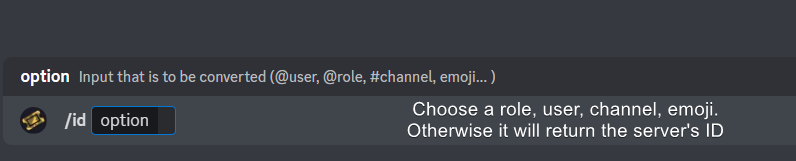 civic wagon
misty fractal
I want a custom emoji on my button but the emoji picker isnt showing it
civic wagon
misty fractal
I want a custom emoji on my button but the emoji picker isnt showing it
refer to the embed above and use the emoji ID in the button emoji option
misty fractal
civic wagon
refer to the embed above and use the emoji ID in the button emoji option
Do I use id emoji instead of emoji?
civic wagon
Yes
 frank helm
The support roles can also delete / close ticks?
If yes then how I can limit that to just see ticket and type in that
 velvet zealot
hi
How can I close the ticket for a while and then open it again? I don't want anyone to open a new ticket
 idle flint
velvet zealot
How can I close the ticket for a while and then open it again? I don't want anyo...
idle flint
velvet zealot
How can I close the ticket for a while and then open it again? I don't want anyo...
Do you mean like an "open" and "closed" time for your tickets (like a shops opening times) ?
If so, there is a Premium  feature on the Dashboard > Panel Configs > Limits > Time Schedule. Here you can specify what times tickets can be open (when your support is "open for business")
velvet zealot
idle flint
Do you mean like an "open" and "closed" time for your tickets (like a shops open...
Also, I want the ticket to be automatically deleted if no one responds to it for a day or more, how do I do that?
vague cosmos
You can with automations, which is a premium feature.
velvet zealot
where is that
idle flint
velvet zealot
Also, I want the ticket to be automatically deleted if no one responds to it for...
Also a Premium feature, but you can head to the Dashboard > Automation > Automation Editor.
Here you can add an automation. The process is relatively straight forward:
- Trigger: Check for message
The rest of the options are up to you
velvet zealot
Thanks @idle flint
iron nightBOT
Gave +1 Rep to @idle flint
 novel crest
Hello
How can i change Premium in to Normal ?
pseudo ravine
Hey there. You can use the /botswitcher command
 sly root
How do I setup notifications for the tickets?
humble sequoiaBOT
1. Go into your Dashboard
2. Open your Panel Configs tab
3. Select the panel you want to ping your support on
4. Open the Ticket options menu
5. Click on Edit Ticket Message
6. In the Message Content use one of the role mention syntax (**{@Role Name}**/**{Role ID}**)
7. Save changes
Note: For this to work properly, Ticket Tool requires the Mention Everyone permission. Or the role must have the Allow anyone to @mention this role setting enabled
novel crest
Thx. So i can switch again when we need the Premium in Winter again?
sly root
@pseudo ravine Thanks but I'd like to know how to get notifications for messages within a ticket, not just when a ticket opens, is this possible without having them auto on for the entire category
iron nightBOT
Gave +1 Rep to @pseudo ravine
pseudo ravine
novel crest
Thx. So i can switch again when we need the Premium in Winter again?
If you have a premium subscription while using the Primary bot (because of the /botswitcher command), you can still use the premium features
pseudo ravine
sly root
<@865714582613524491> Thanks but I'd like to know how to get notifications for m...
That would be the Discord feature, Ticket Tool doesn’t have something like that
novel crest
I want only the free Version right now. In Winter i want Premium back
pseudo ravine
Then your only solution would be the cancel the subscription for now, and then purchase it again when you need it
 silk crown
Hello! I am inquring to note if it is possibly to have a forum within a thread for a ticketing?
pseudo ravine
Hey there. Are you referring to the Discord form?
silk crown
i am!
novel crest
How i can cancel the subscription?
pseudo ravine
silk crown
i am!
As far as I’m aware, you should be able to
humble sequoiaBOT
<:TicketToolOffline:1018980643092312155> Cancel your subscription
We're sorry to see you go!
To cancel your Ticket Tool Premium Subscription, just head over to your User Settings in Discord, then Subscriptions. Look for Premium Apps and click on Manage Subscriptions. There you can cancel your subscription at the end of your billing cycle.
User Settings > Subscriptions > Premium Apps > Manage Subscriptions > Cancel
silk crown
alright thankyou, I will note it for my testing as it would benefit me
pseudo ravine
You’re welcome, glad I could help. If you have any other questions/issues, don’t hesitate to reach out again 
novel crest
Thanks @pseudo ravine
iron nightBOT
Gave +1 Rep to @pseudo ravine
pseudo ravine
You’re welcome, glad I could help. If you have any other questions/issues, don’t hesitate to reach out again
misty fractal
How do I find out who has access to and control the bot?
vague cosmos
Everyone who has dashboard access can manage the bot. Dashboard > Server Configs
All stuff in Discord is based on if they're support team, have additional permissons.
Users who have administrator in Discord can manage the bot too via the dashboard.
 hybrid harbor
How do I make it so the user that created the ticket can still see it after I close it? I have it move it from one category to another on my server once it closes but they can't see it in that category
humble sequoiaBOT
1. Go into your Dashboard
2. Open your Panel Configs tab
3. Select the panel you want to grant access to
4. Open the Permissions options menu
5. Find what role you'd like to edit permissions for
6. Choose if you'd like to edit opened or closed permissions for that role
7. Edit the permissions by ticking
8. Save changes
vague cosmos
That is how you can do it, @hybrid harbor.
hybrid harbor
So I did that and I did user permission, closed, then put view channel and send messages but it isn't letting them for some reason
vague cosmos
Check the permissions for the category in Discord too, it might override.
misty fractal
vague cosmos
All stuff in Discord is based on if they're support team, have additional permis...
I do not mean this
I have 3 ranks in tickets, how can I know which rank is the most unlocked?
vague cosmos
You can't check it with Ticket Tool.
hybrid harbor
My "Open Ticket" and "Closed Ticket" category has the same settings. Will the settings update right away after I change them on the ticket tool? Like I haven't closed a ticket since making changes but all the previous ones still don't have access
vague cosmos
Did you change it right now, it will work only for new tickets.
misty fractal
vague cosmos
You can't check it with Ticket Tool.
why
hybrid harbor
Yeah I just changed it. Once I close a ticket I will check. Thank you
vague cosmos
misty fractal
why
Because you can't.
hybrid harbor
Works @vague cosmos thank you
iron nightBOT
Gave +1 Rep to @vague cosmos
misty fractal
vague cosmos
Because you can't.
There is no record or anything like that
vague cosmos
As I told you, not with Ticket Tool.
misty fractal
vague cosmos
As I told you, not with Ticket Tool.
where
vague cosmos
... which part of "NOT with Ticket Tool" is not clear?
misty fractal
Entire
 left compass
Arab?
humble sequoiaBOT

فريق الدعم الفني العربي
عميلنا العزيز ان كنت تبحث عن مساعدة يرجى فتح تكت خاص بفريق الدعم الفني العربي
اذهب الى#🎫│make-a-ticket
ثم قم بلضغط على الايموجي الاتي (🇯🇴)
 bright bronze
I need that the administration cannot close the ticket or delete it
plain surge
bright bronze
I need that the administration cannot close the ticket or delete it
اذا الشخص عنده صلاحية ادمين على السرفر لا يمكنك منعه من اى خاصية فى البوت
bright bronze
plain surge
اذا الشخص عنده صلاحية ادمين على السرفر لا يمكنك منعه من اى خاصية فى البوت
تمام انا عايز الاداره العاديه الذي ما معهم ادمن استريتر
 cosmic fulcrum
Why when someone presses the lock on the ticket, the ticket is locked immediately? I want the confirmation command to appear in the ticket lock
Is the bot idle?
plain surge
bright bronze
تمام انا عايز الاداره العاديه الذي ما معهم ادمن استريتر
توجه الى الموقع و اختر سرفرك
https://tickettool.xyz/manage-servers
ثم اذهب Panel configs
ثم اذهب الى Buttons
ثم اذهب الى الزر اللى تريد تعديله
ثم ضع رتب الإدارة العادية فى خانة Disabled roles

Ticket Tool - Ticketing without clutter - The #1 discord Ticketing bot
bright bronze
plain surge
توجه الى الموقع و اختر سرفرك
https://tickettool.xyz/manage-servers
ثم اذهب Panel...
 plain surge
اى خاصية تريد تعديلها؟
 plain surge
اضغط على الزر تحت Close ticket لخاصية الغلق
و اضغط على الزر تحت Delete ticket للمسح
plain surge
bright bronze
ذي رتبه السبورت اشيلها؟
هل الإدارة عندها هذه الرتبة؟
bright bronze
plain surge
هل الإدارة عندها هذه الرتبة؟
نعم
plain surge
اذا شيلها اه، و ضع رتبة الإدارة العامة فى الخانة اللى بجانبها Disabled roles
plain surge
cosmic fulcrum
Why when someone presses the lock on the ticket, the ticket is locked immediatel...
Does the ticket get deleted when you press the lock button?
cosmic fulcrum
plain surge
Does the ticket get deleted when you press the lock button?
Yes
bright bronze
plain surge
اذا شيلها اه، و ضع رتبة الإدارة العامة فى الخانة اللى بجانبها `Disabled roles`
لمه اكتب امر delete تنمسح
 frank helm
Any way from which I can delete all ticket in 1 command?
 random torrent
bright bronze
bright bronze
لمه اكتب امر delete تنمسح
random torrent
bright bronze
bright bronze
لمه اكتب امر delete تنمسح
وايضا امر $close اريد ان اغلق هذه الاوامر@plain surge
woven abyss
السلام عليكم @plain surge
كنت عايز استفسر عن شئ انا اول امبارح عامل تقديم علي السبورت العربي بس ما جاء لي رد هل الرد راح يجي يوم انتهاء موعد التقديم الشهر الجاي ولا وش ؟
woven abyss
@olive eagle
 desert pawn
Is there a way to allow people access to a channel while preventing them from clicking the create ticket button without having a specified role, and if so, how?
rustic gale
Panel Configs -> Buttons -> Create Ticket
Add everyone to the disabled roles, and add the specified role to the allowed roles
ocean gyro
is there a way to make it so only certain links are allowed in tickets that get opened?
 pallid sentinel
.
cosmic fulcrum
plain surge
Does the ticket get deleted when you press the lock button?
..
 little falcon
What does this mean,can someone help me
 stark runeBOT
1. Invite Ticket Tool to your server
First you will want to invite the bot to your server. Once the bot is in your server, you can manage your server in the dashboard.
2. Create a Panel
To create a panel we are going to need to head over to the panel configs on the dashboard.
Once at the dashboard we will need to click Create Panel.
Enter a panel name (Fill in any optional settings you want).
Click Create Panel and your ready to get started with configuring your panel.
An example of a creating a panel is shown below.
3. Send the Panel to a Channel
Once you've created a panel on the dashboard you will need to send it to a channel using send on the dashboard.
Select the channel you want your panel to be created in and click send.
For other questions checkout $help faq.
An example of a sending a panel is shown below.
Having a Problem Sending the Panel?
Do $debug in a channel with Ticket Tool and make sure it has all the necessary Discord permissions.
vague cosmos
@little falcon
jade topaz
is it possible to make it so i get pinged when someone opens a ticket
humble sequoiaBOT
1. Go into your Dashboard
2. Open your Panel Configs tab
3. Select the panel you want to ping your support on
4. Open the Ticket options menu
5. Click on Edit Ticket Message
6. In the Message Content use one of the role mention syntax (**{@Role Name}**/**{Role ID}**)
7. Save changes
Note: For this to work properly, Ticket Tool requires the Mention Everyone permission. Or the role must have the Allow anyone to @mention this role setting enabled
vague cosmos
Same should work for you using <@ID>.
 final elk
hello why when you open a ticket it closes automatically
jade topaz
ty
final elk
can you write in full please
vague cosmos
final elk
hello why when you open a ticket it closes automatically
That shouldn’t happen, are you sure nobody is using the close button?
Also since when does the issue appear?
cosmic fulcrum
Can you answer my question
final elk
vague cosmos
Also since when does the issue appear?
today
vague cosmos
cosmic fulcrum
Can you answer my question
What question?
vague cosmos
final elk
yes
Can you enable logging so we can see how it’s getting closed?
humble sequoiaBOT
With Ticket Tool, you can customize the behavior the bot takes when logging your tickets! For editing these options follow these steps:
Dashboard ➞ Panel Configs ➞ Logging Options
Logging Channel
Here you will define which channel @humble sequoia will save the Logs in (ticket created/deleted/closed, etc.)
Logs you can save:
➞ Ticket Created ➞ Logs when a ticket is created
➞ Ticket Closed ➞ Logs when a ticket is closed
➞ Ticket Opened ➞ Logs when a ticket is opened
➞ Ticket Renamed ➞ Logs when a ticket is renamed
➞ Ticket Deleted ➞ Logs when a ticket is deleted
➞ Transcript Saved ➞ Logs when a ticket is saved
Select with (disable) or (enabled) which logs you would like
Below you can see an example of what the Logging Options will look like:
vague cosmos
ocean gyro
is there a way to make it so only certain links are allowed in tickets that get ...
Not with TT.
cosmic fulcrum
cosmic fulcrum
Why when someone presses the lock on the ticket, the ticket is locked immediatel...
@vague cosmos
vague cosmos
Dashboard > panel config > general > two step close
rustic gale
Two step close, not two step ticket
vague cosmos
rustic gale
Two step close, not two step ticket
Thanks.
iron nightBOT
Gave +1 Rep to @rustic gale
ocean gyro
vague cosmos
Not with TT.
ok thats what i thought. thank you
iron nightBOT
Gave +1 Rep to @vague cosmos
bright bronze
bright bronze
وايضا امر $close اريد ان اغلق هذه الاوامر<@278649994477830145>
@plain surge
velvet zealot
Can I move the ticket to a separate group when creating it?
pseudo ravine
Hey there. You can set the category when opening/creating a ticket
Dashboard > Panel Configs > Category
 daring wadi
 plain surge
bright bronze
وايضا امر $close اريد ان اغلق هذه الاوامر<@278649994477830145>
plain surge
bright bronze
وايضا امر $close اريد ان اغلق هذه الاوامر<@278649994477830145>
بعتذر عن التأخير في الرد
فى القائمة اللى اخترت منها Panel configs، اختر Command configs
bright bronze
شكرا حليتها
bright bronze
بس احتاج كيف اسوي log وكل تكت تتسجل فيها
bright bronze
plain surge
بعتذر عن التأخير في الرد
فى القائمة اللى اخترت منها Panel configs، اختر Command ...
Thank you
iron nightBOT
Gave +1 Rep to @plain surge
plain surge
تفهم انجليزي؟
bright bronze
يب
pseudo ravine
daring wadi
Hey there. What button was pressed when you received the error?
humble sequoiaBOT
With Ticket Tool, you can customize the behavior the bot takes when logging your tickets! For editing these options follow these steps:
Dashboard ➞ Panel Configs ➞ Logging Options
Logging Channel
Here you will define which channel @humble sequoia will save the Logs in (ticket created/deleted/closed, etc.)
Logs you can save:
➞ Ticket Created ➞ Logs when a ticket is created
➞ Ticket Closed ➞ Logs when a ticket is closed
➞ Ticket Opened ➞ Logs when a ticket is opened
➞ Ticket Renamed ➞ Logs when a ticket is renamed
➞ Ticket Deleted ➞ Logs when a ticket is deleted
➞ Transcript Saved ➞ Logs when a ticket is saved
Select with (disable) or (enabled) which logs you would like
Below you can see an example of what the Logging Options will look like:
bright bronze
تسلم
 lament scarab
Is there a way to stop non support staff members from closing their tickets?
Ping with response ^
pseudo ravine
lament scarab
Is there a way to stop non support staff members from closing their tickets?
Hey there. You can go to the Dashboard > Panel Configs > Buttons > Close Ticket > Support Team Only
pseudo ravine
It's free
 patent turret
- is there a way to make the bot auto delete old channels?
- is there a way to make it not post a physical file when it gives us the transcript?
pseudo ravine
patent turret
1. is there a way to make the bot auto delete old channels?
2. is there a way to...
Hey there.
- You can have an Automation going to check if a message hasn't been sent for a specified amount of time and it'll close/delete after that (Note: This is a premium feature)
- Unfortunately there is no option for that
patent turret
pseudo ravine
Hey there.
1. You can have an Automation going to check if a message hasn't be...
- thank you. ill look into that now.
- dang. there should be an option to turn that off to make the channel not look so cluttered
iron nightBOT
Gave +1 Rep to @pseudo ravine
pseudo ravine
You can make a suggestion for that, by running s!suggest (suggestion here) in #🤖│bot-spam
 shut bolt
Don't suggest that
pseudo ravine
And you're welcome, glad I could help. If you have any other questions/issues, don't hesitate to reach out again
shut bolt
I'll explain why
patent turret
im assuming im looking to make an advanced automation?
pseudo ravine
Yes
patent turret
listens intently to weird letter name guy
shut bolt
Right now the only way for the transcript to not be sent as a file is if it where stored on a different location than your Discord channel, saving it on our servers and due to privacy reasons it's not viable at all, for now it's not possible but from a time ago the developer has been considering creating a feature that allows transcripts to be saved to a Google Drive account you set up.
That's why suggesting this isn't viable, at least not now
pseudo ravine
pablo saves the day!
shut bolt
Thanks for assisting him @pseudo ravine
iron nightBOT
Gave +1 Rep to @pseudo ravine
patent turret
shut bolt
Right now the only way for the transcript to not be sent as a file is if it wher...
oooo the google drive option would work. long as you can have it send to a specific folder in your drive
shut bolt
patent turret
oooo the google drive option would work. long as you can have it send to a speci...
Yup! Right now it's just an idea tho, but it would be great to see it :)
patent turret
keep up the good work @shut bolt
shut bolt
patent turret
how do i get my premium role btw?
shut bolt
There we go 
shut bolt
patent turret
it only allows a check for 2 days. any way to make it longer?
@pseudo ravine all yours again mate
My work here is done
pseudo ravine
lmao
shut bolt

 pseudo ravine
patent turret
it only allows a check for 2 days. any way to make it longer?
pseudo ravine
patent turret
it only allows a check for 2 days. any way to make it longer?
Unfortunately 2 days is the maximum duration
patent turret
F
new suggestion. give us a text box that lets us type how long
wait



it wont delete closed tickets. which is what i was looking for
pseudo ravine
Seems like you can only choose either Close or Delete
patent turret
yes, but i was hoping it would auto delete already closed channels
so i dont have to go and delete them when i reach my 50 channel limit
pseudo ravine
pseudo ravine
Unfortunately 2 days is the maximum duration
2 days is the maximum duration from the pre-made list of durations, but the maximum is 7 days if you use seconds
pseudo ravine
I'm pretty sure it only applies to newly created tickets after saving the changes
jade topaz
how to make tickettool delete inactive ticket channels
vague cosmos
Hey @jade topaz you can do that with automations which is a premium only feature.
jade topaz
okay ty
vague cosmos
No worries, did you have any other questions?
 long pawn
Is possible that a admin can create a ticket with an specified user ?
vague cosmos
Hey @long pawn if a admin has opened a ticket they can use /add @user to add someone to the ticket.
long pawn
vague cosmos
Hey <@331241391126740992> if a admin has opened a ticket they can use `/add @use...
That work, thanks
iron nightBOT
Gave +1 Rep to @vague cosmos
vague cosmos
Happy to help. Did you have any other questions?
long pawn
vague cosmos
Happy to help. Did you have any other questions?
Yeah, for curiosity, when I get to 9999 tickets, what happend ?
Reset to 0?
vague cosmos
It will continue to count, I'd guess? I never tested it.
 jovial hearth
Hello, i need to do a backup of my server, it's possible to migrate or exp/import setting from my dashboard to integrate it on the new serv ?
humble sequoiaBOT
The Backup and Restore feature allows you to transfer your panels, tags, and all settings to a new server, even if the server the settings were created has been deleted! You will want to copy the whole key.
First, go to your server's Dashboard ➞ then Server Configs ➞ under Config Backup & Restore (Server Owner Only) click on Old version can be found here and generate a new backup key by pressing the green button. Now, a key should be generated in the box above. You may need to refresh the page to see this.
Once you have your backup key, navigate to the same page on the new server. Copy the key on the Restore from backup key field.
Now you can choose what you want to copy. Finally, press the green Restore Configs button.
IMPORTANT NOTE
- We suggest you keep this backup key somewhere safe, in case your server is deleted so you are able to recover your panel's settings.
- This feature is only usable by the server's owner
@jovial hearth see above.
@long pawn it will indeed continue, as you can see here on a ticket I have.
 long pawn
vague cosmos
<@331241391126740992> it will indeed continue, as you can see here on a ticket I...
long pawn
vague cosmos
<@331241391126740992> it will indeed continue, as you can see here on a ticket I...
Oh! I see, thanks. Yeah a lot of tickets
iron nightBOT
Gave +1 Rep to @vague cosmos
vague cosmos
No worries, did you have any more questions?
long pawn
vague cosmos
No worries, did you have any more questions?
No for the moment I dont have any other question, thanks have a great day!
 scenic cliff
can someone tell me if there's an option to ping staff member if someone clicks on "I have more questions" when requesting ticket closure
 north crag
؟؟
 vague cosmos
north crag
؟؟
vague cosmos
north crag
؟؟
Looks like your PayPal denied the payment.
gilded verge
north crag
؟؟
User Settings->Billing->Edit Payment methods->Delete your payment method and then go make new one... u can make same as u had and payments will work again...
vague cosmos
gilded verge
User Settings->Billing->Edit Payment methods->Delete your payment method and the...
Did they fix that? Because for me that didn't work last time.
scenic cliff
scenic cliff
can someone tell me if there's an option to ping staff member if someone clicks ...
?
gilded verge
vague cosmos
Did they fix that? Because for me that didn't work last time.
yup, but if that not works, you need log in to your paypal account->click the gear icon (next to logout)->payments tab->automatic payments->revoke access for discord payment->and repeat as in my last message: User Settings->Billing->Edit Payment methods->Delete your payment method and then go make new one
vague cosmos
scenic cliff
can someone tell me if there's an option to ping staff member if someone clicks ...
You mean when they cancel the close request?
scenic cliff
vague cosmos
You mean when they cancel the close request?
Yes
vague cosmos
I don't think you can send an automatic message after, so you'll need to add it to the close request message.
scenic cliff
vague cosmos
I don't think you can send an automatic message after, so you'll need to add it ...
It's impossible to do that I think