#🆘│community-support
1 messages · Page 51 of 1
 quasi oasis
quasi oasis
quasi oasis

 rustic gale
The bot is missing the Send Messages permission in the channel you're trying to use the command in
quasi oasis
weird
rustic gale
Grant it the permission in the channel's permission settings
Then try again
(you can remove Administrator now)
rustic gale
 steel hedge
my community cant create a ticket
steel hedge
my community cant create a ticket
Is the server owner at least able to create tickets?
steel hedge
yes I can
rustic gale
What happens when a regular user tries to create a ticket?
steel hedge
 rustic gale
«You don't have permissions to use this»
Are your members seeing this message when they try to create a ticket?You may have accidentally denied them permission to use the Create Ticket button.
Look in the following places in your server's dashboard:
👉 Server Configs -> Blacklist Roles
Any roles there will be unable to interact with the bot in any way, including creating tickets.👉 Panel Configs -> Buttons -> Create Ticket -> Support team only
If this is enabled, only your staff will be able to use the button.
👉 Panel Configs -> Buttons -> Create Ticket -> Disabled Roles
Any roles there will be unable to use the button.
 rustic gale
 wanton topaz
How do I add my ticket tool gold?
wanton topaz
How do I add my ticket tool gold?
Does your server have premium at least?
wanton topaz
 rustic gale
First, head to the dashboard and press the Sync button there
If the premium status doesn't say Linked Subscription (Discord), let me know
 rustic gale
You need to switch back to White first
Also, before you do it:
Don't kick @pseudo glen from your server
I repeat: don't kick @pseudo glen from your server
wanton topaz
rustic gale
You need to switch back to White first
👍 having the owner swich it back
rustic gale
That will cause your subscription to be cancelled, which will be a hassle down the line
wanton topaz
got it
rustic gale
wanton topaz
👍 having the owner swich it back
Then head to the dashboard and press the Sync button
then head to Server Configs in the dashboard and use the button there to invite the premium bot
wanton topaz
Ok one moment.
rustic gale
Finally, use /botswitcher to switch to the premium bot
wanton topaz
rustic gale
Finally, use /botswitcher to switch to the premium bot
Which permission do I need to manage the dashboard?
It was invited.
 mossy zephyr
Can someone help me how to make it show up like this when people fill in questions?
 rustic gale
wanton topaz
Which permission do I need to manage the dashboard?
rustic gale
wanton topaz
Which permission do I need to manage the dashboard?
Administrator
wanton topaz
👍
rustic gale
mossy zephyr
Can someone help me how to make it show up like this when people fill in questio...
Have a look
 humble sequoiaBOT
A Discord Form lets the user answer individual questions in a pop-up Form, which then displays the answers in the ticket message. This can save time if you already know what you want to ask the user.
Setup Forms
Forms can be enabled under Panel Settings > Form Options > Edit Forms Options. In the new pop-up window, you can now enable and edit your own Form.
Form Options
You can add up to 5 questions in the Discord form. This is a Discord limitation. Each question can have a placeholder in the input field, a minimum and maximum input, multi-line, and also the option to have the answer required.
Options
Question Title ➞ Your Question goes here
Question Placeholder ➞ The placeholder text in the input field
Required ➞ If enabled, the user has to answer this question, to submit the form
Multi-Line Input ➞Allows the user to input multiple lines
Minimum and Maximum Input ➞ Set a minimum and maximum input value for the user
Displaying the Answer
To display the answers from the user, you need to enable Auto display form results on the ticket message as an additional embed
In case you don't want a second embed, go into your Panel Configs > Ticket Options > Edit Ticket Message. In there you use the variable {create.form.x} and just replace x with the number of your question. For example, the response to Question 1 can be displayed with {create.form.1}. If you don't use this variable, the response from the user is lost.

 lucid spindle
hey How do I make it so it pings support when a thread is made?
 torn kiln
what’s happening
why did it add this (the thing circled) i didn’t even add that how do i get rid of it?
 torn kiln
lucid spindle
hey How do I make it so it pings support when a thread is made?
torn kiln
lucid spindle
hey How do I make it so it pings support when a thread is made?
yess so go into the website, manage servers, select server, ticket category, edit ticket message and just do this eg {@therolenamethatyouwannaping} make sure u add these{}
@lucid spindle
ticket>edit ticket message
 gilded verge
torn kiln
why did it add this (the thing circled) i didn’t even add that how do i get rid ...
gilded verge
torn kiln
why did it add this (the thing circled) i didn’t even add that how do i get rid ...
you need to expand your embed and then you can change it
 trail quiver
Why does the ticket always appear in a different area in my server
Even though I set up a dedicated Ticket category, there are a lot of Tickets that are constantly appearing at the top, making the server look messy
gilded verge
are you sure you using correct panel?
 plucky creek
who know dc SebasGamer2002_
humble sequoiaBOT

⚠️ You're in the wrong place
We provide support for Ticket Tool Discord bot and cannot help you with whatever issue you have.
- We don't know which Support Team you should contact to get this issue resolved, and unfortunately we won't be able to accurately tell you.
If you don't have any further questions regarding our bot Ticket Tool, please close this ticket
 lunar solar
 novel ravine
Hey i'm looking for a way to send the transcript url from closed tickets to a web api with the discord ID of the player who opened the ticket - has anyone done anything like this? Given tickettool doesn't have an API i'm thinking the only way to do this might be to make a discord bot which just tracks the closed tickets.. Any better suggestions?
 jaunty hornet

 vague cosmos
You don't have permission to manage channels
 vague yacht
Website down ?
vague cosmos
vague yacht
Website down ?
Is down
 vague yacht
It's back up again, that was weird
vague cosmos
vague yacht
It's back up again, that was weird
See #📣│bot-news
 frigid bear
k so I made a panel which asks users to fill out a form, although when the ticket is made, it doesn't show us what they answered in the form
can some1 tell me how to enable that
humble sequoiaBOT
A Discord Form lets the user answer individual questions in a pop-up Form, which then displays the answers in the ticket message. This can save time if you already know what you want to ask the user.
Setup Forms
Forms can be enabled under Panel Settings > Form Options > Edit Forms Options. In the new pop-up window, you can now enable and edit your own Form.
Form Options
You can add up to 5 questions in the Discord form. This is a Discord limitation. Each question can have a placeholder in the input field, a minimum and maximum input, multi-line, and also the option to have the answer required.
Options
Question Title ➞ Your Question goes here
Question Placeholder ➞ The placeholder text in the input field
Required ➞ If enabled, the user has to answer this question, to submit the form
Multi-Line Input ➞Allows the user to input multiple lines
Minimum and Maximum Input ➞ Set a minimum and maximum input value for the user
Displaying the Answer
To display the answers from the user, you need to enable Auto display form results on the ticket message as an additional embed
In case you don't want a second embed, go into your Panel Configs > Ticket Options > Edit Ticket Message. In there you use the variable {create.form.x} and just replace x with the number of your question. For example, the response to Question 1 can be displayed with {create.form.1}. If you don't use this variable, the response from the user is lost.
vague cosmos
See the Displaying the Answer steps. 🙂
frigid bear
alr thx mate, didnt know that was an option lmao, I just thought the bot was glitching out
thanks @vague cosmos
 iron nightBOT
Gave +1 Rep to @vague cosmos
vague cosmos
No worries! Can I help you with anything else?
frigid bear
no, just this
vague yacht
vague cosmos
See <#571104498483986466>
sooo, nothing new ?
vague cosmos
vague yacht
sooo, nothing new ?
Website works fine again.
vague yacht
yes I know x)
vague cosmos
So idk if we get an update or not. Did you need any help with the bot?
vague yacht
Well no. I came here wanting to read any info, an ETA or at least a postmortem about the website downtime, and got exactly what I expected: nothing
vague cosmos
Be happy it works again, I think it's just a hiccup.
vague yacht
well I can be both happy and disappointed x)
 cold cloak
hey I need help
humble sequoiaBOT
@cold cloak, we would love to help you, but if you don't tell us what you need help with we can't help you :(
cold cloak
how can I make the tickets visible for the moderators?
humble sequoiaBOT
1. Go into your Dashboard
2. Open your Panel Configs tab
3. Select the panel you want to grant access to
4. Open the General options menu
5. Select your Support Team Roles
6. Save changes
 vague cosmos
@cold cloak see above. 🙂
 nimble belfry
hhh
vague cosmos
@nimble belfry do you need any help?
cold cloak
vague cosmos
<@1059790643779616818> see above. 🙂
this?
 cold cloak
alr ty ❤️
vague cosmos
No worries!
cold cloak
thanks @vague cosmos ❤️
iron nightBOT
Gave +1 Rep to @vague cosmos
 azure hull
This started yesterday, I've done all my updates on my computer. Other people dont have this issue in the server, just me so far.

 teal grail
What was this supposed to be?
azure hull
They were closing the ticket, I believe
teal grail
The panel?
azure hull
It's a screenshot clip of the actual chat area
teal grail
But what should appear?
azure hull
um, 'would you like to close this ticket" and the buttons, i believe
azure hull
then the buttons for transcript/close etc
but its only me in the server
everyone else says its normal for them
nimble belfry
hhh
teal grail
Maybe you disabled something
azure hull
I didnt touch anything, I logged in an it was like this
teal grail
Hmm
vague cosmos
Does it happen to new tickets too?
azure hull
I just made a ticket, and it seems to be working. It may just be the one ticket, then, though I cannot test on other tickets since theyre not resolved yet.
the buttons are coming up, but the text doesnt show when its working
teal grail
you want this?
 azure hull
it shows the buttons but not the section with 'support team ticket controls'
azure hull
I didn't touch the bot at all, how would Io go about finding how to reenable it if i shomehow keycoammanded it to by accident?
azure hull
I'm not in charge of the bot, I just get to see it
teal grail
Check in, Dashboard, Moderator , Message Mod
teal grail
azure hull
I'm not in charge of the bot, I just get to see it
you see this?
 azure hull
 teal grail
you delete the message
azure hull

I didnt do anything to the bot, I have no idea how I would have, I'm not in charge of the bot
I told it to transcript and the (edited) is all that shows up after 'trying' to write message
vague cosmos
teal grail
Check in, Dashboard, `Moderator` , `Message Mod`
Open the Embed Editor and add text there.
That is what is missing.


 azure hull
Well I'll figure out who does control the bot, still weird it only affected me though.
teal grail
But did it work?
azure hull
I dont know, I dont have control of the bot.
 crimson rivet
Bonjour, comment je peux faire pour créer un ticket qui fais que quand la personne elle demande le ticket un administrateur doit accepter la demande. Possible de m’aider ?
 frank plover
Weiss wer wie man einstellt das man wen jemadn ein Ticket öffnet das eine bestimmte rolle da gepingt wird?
humble sequoiaBOT
1. Go into your Dashboard
2. Open your Panel Configs tab
3. Select the panel you want to ping your support on
4. Open the Ticket options menu
5. Click on Edit Ticket Message
6. In the Message Content use one of the role mention syntax (**{@Role Name}**/**{Role ID}**)
7. Save changes
Note: For this to work properly, Ticket Tool requires the Mention Everyone permission. Or the role must have the Allow anyone to @mention this role setting enabled
 vague cosmos
@frank plover ^
vague cosmos
crimson rivet
Bonjour, comment je peux faire pour créer un ticket qui fais que quand la person...
Pouvez-vous expliquer ce que vous voulez dire exactement ?
frank plover
vague cosmos
<@960593456957382656> ^
Jo habs danke vielmals
 tiny berry
Hi, do you guys know if I can access Ticket Tool invoices somewhere from the dashboard?
I need them for my accountant...
nimble belfry
hhh
vague cosmos
@nimble belfry need any help?
@tiny berry I think you need to open a billing ticket in #🎫│make-a-ticket for that.
crimson rivet
En gros quand quelqu’un demande un ticket un admin doit accepter la demande pour l’ouvrir
vague cosmos
Ce n'est pas directement possible, vous devez laisser un administrateur ouvrir un ticket et ajouter l'utilisateur avec /add mais il n'y a pas d'autre moyen.
teal grail
c'est pas possible je pense
crimson rivet
Ok pas grave
vague cosmos
Vous pouvez toujours faire une suggestion dans #🤖│bot-spam pam en utilisant s!suggest pour cela, @crimson rivet.
crimson rivet
Ok
nimble belfry
hhh
vague cosmos
nimble belfry
hhh
Are you in need of any help now?

 cursive phoenix
it seems to be working for me
vague cosmos
No it's not. Try another browser.
 hardy viper
 cursive phoenix
can you try refreshing, clearing cache and/or using another browser
vague cosmos
Hard refresh (CTRL+F5) mostly will fix it.
hardy viper
i changed the hole browser
vague cosmos
hardy viper
i changed the hole browser
What browser are you using?
hardy viper
vague cosmos
What browser are you using?
chrom + brave + firefox all doesn't work
cursive phoenix
try closing the page then going directly to https://tickettool.xyz/

Ticket Tool - Ticketing without clutter - The #1 Discord support bot
vague cosmos
Does incognito work?
hardy viper
vague cosmos
Does incognito work?
no
vague cosmos
What exactly do you see in incognito?
hardy viper
My friend tried and it doesn't work
vague cosmos
What are you seeing in incognito when you open the website? Screenshots would be helpful.
hardy viper
vague cosmos
What are you seeing in incognito when you open the website? Screenshots would be...
 nimble belfry
hhh
 humble sequoiaBOT
Don't see your server in the dashboard?
You will possibly need to relog. Look below to see the steps on how to relog.
How to relog in the Dashboard.
Note:
You need one of these 3 things to access the dashboard.
1. Server Owner (Level: 6)
2. Server Administrator (Level: 4)
3. Dashboard Role (Level: 2)
:warning: You can check your level using the </permissionlevel:1029797400174399542> command on your Discord Server
User permission level with Ticket Tool
@User is permission level: 0 (User)
```» *If it shows that your permission is **0**, you don't have any of the above **3 things** to manage the dashboard.*


**See the Image below on how to relog:**
 pseudo ravine
azure hull
pseudo ravine
azure hull
Hey, do you have this disabled?
 vague cosmos
Can you try to relog?
hardy viper
I already see my server
and i pressed on manage after pressing mangae panels and options doesnt appear
- my friend tried with his device it doesnt' work
vague cosmos
Doesn't matter, can you still try it? @hardy viper
@pseudo ravine they left the server / got it solved.
@cursive phoenix don't want to open a new ticket but: #🆘│community-support message
pseudo ravine
vague cosmos
Doesn't matter, can you still try it? <@756566449463492789>
<@8657145826135244...
I noticed
vague cosmos
@hardy vipercan you run /permissionlevel in your server and send a screenshot of the response?
hardy viper
i loged out and signed in again same problem
cursive phoenix
vague cosmos
Doesn't matter, can you still try it? <@756566449463492789>
<@8657145826135244...
already aware
hardy viper
vague cosmos
<@756566449463492789>can you run `/permissionlevel` in your server and send a sc...
i am the owner
vague cosmos
Can you try to clear the browser cache and gotcha! ^
hardy viper
vague cosmos
Can you try to clear the browser cache and gotcha! ^
sir me and my friend has same problem with same server
he never logged in ticket tool and this is his first time so he has no cache and still same problem and he has administrator role
vague cosmos
Send a screenshot of the response of /permissionlevel please from yourself and your friend.
hardy viper
vague cosmos
Send a screenshot of the response of `/permissionlevel` please from yourself and...
 vague cosmos
Okay that should give you access indeed.
Did you clear the browser cache?
hardy viper
vague cosmos
Okay that should give you access indeed.
Did you clear the browser cache?
 vague cosmos
You're not answering my question.
hardy viper
vague cosmos
You're not answering my question.
i cleared it and my friend too + he didn't log in the site before to have cache in his browser and if this is problem from my device it cannot be same problem with my friend devices
vague cosmos
What happens if oyu click on for example "Panel Configs"?
hardy viper
nothing happened
vague cosmos
Can you try to delete all cookies too?
nimble belfry
hhh
hardy viper
vague cosmos
Can you try to delete all cookies too?
no i cannot + it doesn't make any sence i used diagnose
incognito
vague cosmos
It's weird it doesn't work in incognito either.
hardy viper
- my friend has just did what u said he cleared everything aand still same poblem
using a lot of broswers
this problem cames from ur side
vague cosmos
Not sure what is causing the issue, I'd suggest you to open a support ticket in #🎫│make-a-ticket so the support team can look into it.
It's not something on our side, as it's working fine here.
vague cosmos
vague cosmos
Not sure what is causing the issue, I'd suggest you to open a **support ticket**...
No idea what is causing the issue; see my reply above.
 silk junco
how do i change the category the tickets open in
humble sequoiaBOT
1. Go into your Dashboard
2. Open your Panel Configs tab
3. Select the panel you want to grant access to
4. Open the Category options menu
5. Select the categories of your preference
6. Save changes
 vague cosmos
@silk junco ^
silk junco
ty
vague cosmos
No worries, did you have any other questions?
silk junco
no
vague cosmos
Where do you want to add a picture exactly?
Dash > Panel Config > Messages > Message Ticket > Embed Editior
There you can add a thumbmail url
Uploading it to a source like imgur.com works. ^~^
gilded verge
torn kiln
wdym?
i meant you need to expand your Embed Editor so you can change your message ^^
 vague cosmos
What do you man by this?
 marble nymph
Hello, I'm currently setting the bot up in my server. I'm facing an issue where when opening a ticket, the ticket channel does not go to the correct category and rather just stays at the top of the server. I also been facing the issue of trying to get the ticket to go to a seperate category when the ticket is closed.
rustic gale
marble nymph
Hello, I'm currently setting the bot up in my server. I'm facing an issue where ...
Categories are set up in Panel Configs -> Category
If tickets aren't going to the correct category, it's usually for one of two reasons
- The category is denying permissions to the bot. Head to Edit Category -> Permissions and add Ticket Tool with the View Channels and Manage Channels permissions.
- The category's full. Discord sets a limit of 50 channels per category. If there's 50 channels, no more channels can be added to the category. Remove some channels, or make extra overflow categories for your tickets.
humble sequoiaBOT
Discord only allows to stack up to 50 channels per category, meaning that if you have already 50 tickets in one category, the bot won't be able to place a ticket in that category, for such reason Ticket Tool counts with overflow categories, meaning that if your main category is filled, the bot will go ahead and place the ticket on the next one available, simply choose a second category in the category pickers:
marble nymph
Thank you, it was the first issue, much appreciated.
vague cosmos
You can't in a embed.
You can show the mention, but not mention it like a normal ping. @jade topaz
 jade topaz
vague cosmos
You can show the mention, but not mention it like a normal ping. <@4562265777981...
jade topaz
vague cosmos
You can show the mention, but not mention it like a normal ping. <@4562265777981...
o
is there a way to like ghost ping with ticket tool or anything?
 wind estuary
anyone know how to change what this part of my ticket says?
any help is greatly appreciated
 humble sequoiaBOT
The panel message is where people react to make a ticket. To customize it head over to your Dashboard --> Panel Configs -> Panel -> Edit Panel Message
 vague cosmos
@wind estuary see above.
torn kiln
gilded verge
i meant you need to expand your Embed Editor so you can change your message ^^
i know i’ve done that i’ll send u a photo of the preview and what it days i didn’t type down

 gilded verge
look here:

you can't remove it or change because you don't have premium
if you didn't write it, someone else in your administration did when your server had premium, there is no other explaination
so the only solution I have for you is that you copy the entire text from the Embed Description (the point is that you save it somewhere), then next to the Embed Editor click Remove and then click Add Embed, then paste your message to Embed Description
problem solved :3
 fallen tendon
hello, do i need premium to be able to transcript files such as images? thanks
pseudo ravine
fallen tendon
hello, do i need premium to be able to transcript files such as images? thanks
Hey there. I believe attachments will show up as normal on the transcript if you have Premium, yes
 merry junco
Need help on our setup set up. Right now, When someone makes a ticket, everyone on the discord can read and post. How do i make it private so only the one who opened it and the admins can interact?
 barren granite
hello how can i make people use the ticeting system because my friend says he has no permission
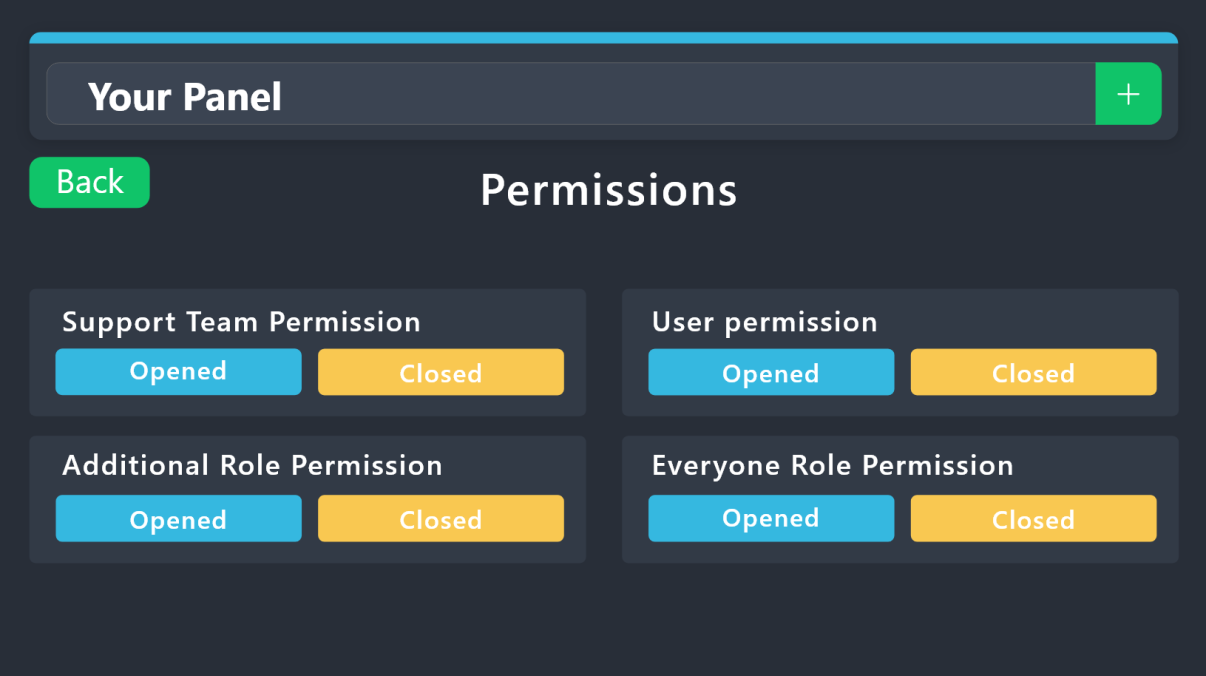
humble sequoiaBOT
1. Go into your Dashboard
2. Open your Panel Configs tab
3. Select the panel you want to grant access to
4. Open the Permissions options menu
5. Find what role you'd like to edit permissions for
6. Choose if you'd like to edit opened or closed permissions for that role
7. Edit the permissions by tickingor unticking
each permission
8. Save changes
 vague cosmos
humble sequoia
vague cosmos
humble sequoia
@merry junco
barren granite
/help
vague cosmos
barren granite
hello how can i make people use the ticeting system because my friend says he ha...
When he tries to open a ticket?
Dashboard > panel configs > buttons > create ticket > check permissions
vague cosmos
barren granite
/help
#🤖│bot-spam for commands
 bright roost
Hello, how do I make the ticket look like this?
 vague cosmos
Remove the panel message and edit the button emoji + remove the text.
I can't access the dashboard right now for exact steps.
bright roost
OK thanks
 gilded verge
change your browser
 formal hamlet
gilded verge
change your browser
formal hamlet
gilded verge
change your browser
I change but nerver changed
formal hamlet
gilded verge
it's problem with your device or browser
how
 loud gale
What is this and what does it do?
 rustic gale
formal hamlet
Can Someone help
rustic gale
formal hamlet
Can Someone help
Try incognito mode
When that happens it's usually because an extension on your browser is blocking javascript on the site
Use incognito or private browsing, or a mode where extensions are disabled, and open the site there
rustic gale
loud gale
What is this and what does it do?
Makes Ticket Tool respond to a bot's commands as if they were sent by a human user
fallen tendon
pseudo ravine
Hey there. I believe attachments will show up as normal on the transcript if you...
oh thanks. so theres no way they can be transcripted like they used to last year without premium then? or is there a file limit for non-premium
iron nightBOT
Gave +1 Rep to @pseudo ravine
vague cosmos
fallen tendon
oh thanks. so theres no way they can be transcripted like they used to last year...
You should try the $transcript command, it does the same but not automatically like with premium.
fallen tendon
vague cosmos
You should try the `$transcript` command, it does the same but not automatically...
i just tested it, it worked! thanks!
iron nightBOT
Gave +1 Rep to @vague cosmos
 fair lotus
Hi guys
do you have any cool down feature in your bot
i mean block creating ticket for new users for some hours
teal grail
fair lotus
Hi guys
do you have any cool down feature in your bot
i mean block creating ti...
you need premium
fair lotus
Thank u buddy
vague cosmos
@fair lotus I don't think you can do that exactly with automations (which is premium) and I don't think there is an option at all; using the blacklisted roles is only permanent so you would need another bot which gives those roles temporary.
humble sequoiaBOT
**١- دعوة البوت إلى سيرفرك**
يجب عليك اولاً دعوة البوت إلى سيرفرك من خلال رابط دعوة البوت، بعد ذلك يُمكنك تعديل خصائص البوت عبر لوحة التحكم.

**٢- إنشاء لوحة**
لإنشاء لوحة يجب عليك التوجه إلى لوحة التحكم ، ثم قم بإختيار سيرفرك ، بعد ذلك توجه إلى قسم "Panel Config".
بمُجرد وصولك إلى القسم المذكور أعلاه، يجب عليك الضغط على زر "Create Panel" لإنشاء اللوحة ، ومن ثمها قُم بإدخال اسم اللوحة (يمكنك ملء اي اعدادات اختياريه تريدها).
بعد إدخال اسم اللوحة و ملء الإعدادات ، قُم بالضغط على "Create Panel" لإتمام عملية انشاء اللوحة الخاصة بك بنجاح!
سيتم إرفاق صورة توضيحية لعملية إنشاء اللوحة بالطريقة الصحيحة؛

**٣- إرسال اللوحة إلى روم**
بعد الإنتهاء من عملية إنشاء اللوحة بنجاح ، يجب عليك الآن إرسالها إلى روم بإستخدام زر "Send" على لوحة التحكم بقسم الـ "Panel Config".
بعد الضغط على الزر ، قم بإختيار الروم المفضل لإرسال اللوحة.
بعد إختيار الروم قُم بالضغط على زر "Send" لإتمام عملية إرسال اللوحة!
سيتم إرفاق صورة توضيحية لعملية إرسال اللوحة بالطريقة الصحيحة؛
**هل تواجهك مشكلة أثناء محاولة إرسال اللوحة؟**
قُم بإرسال الامر `/debug" في اي روم يستطيع البوت رؤيته ، ثم تأكد أن البوت لدية جميع الصلاحيات اللازمة لإرسال اللوحة.
 vague cosmos
 ebon flame
<@143705466734641152>
ebon flame
<@143705466734641152>
من فضلك لا ping للحصول على الدعم وانظر أعلاه.
ebon flame
humble sequoia
هذا ليس سؤالي
vague cosmos
حسنًا ، لقد سألت عن كيفية إضافة زر ، هذه هي الطريقة ... ولكن هل لديك مثال؟
@ebon flame
ebon flame
vague cosmos
حسنًا ، لقد سألت عن كيفية إضافة زر ، هذه هي الطريقة ... ولكن هل لديك مثال؟
اقصد كم أستطيع أضافة زر من دون بريميوم
vague cosmos
أعتقد أنه نفس كمية التفاعلات التي تبلغ 20. لم أختبر الحد مطلقًا.
formal hamlet
rustic gale
When that happens it's usually because an extension on your browser is blocking ...
I used it but It not working
 covert nimbus
Is that possible to see who close ticket ?
vague cosmos
Yes with logging.
humble sequoiaBOT
With Ticket Tool, you can customize the behavior the bot takes when logging your tickets! For editing these options follow these steps:
Dashboard ➞ Panel Configs ➞ Logging Options
Logging Channel
Here you will define which channel @humble sequoia will save the Logs in (ticket created/deleted/closed, etc.)
Logs you can save:
➞ Ticket Created ➞ Logs when a ticket is created
➞ Ticket Closed ➞ Logs when a ticket is closed
➞ Ticket Opened ➞ Logs when a ticket is opened
➞ Ticket Renamed ➞ Logs when a ticket is renamed
➞ Ticket Deleted ➞ Logs when a ticket is deleted
➞ Transcript Saved ➞ Logs when a ticket is saved
Select with  (disable) or (enabled) which logs you would like
Below you can see an example of what the Logging Options will look like:
 vague cosmos
humble sequoia
vague cosmos
humble sequoia
See this and you should be able to send images here.
covert nimbus
it url look like this right ? configs#pc-menu/pc-logging
covert nimbus
Oh I get it sorry I forgot to let ticket bot permission to read/write log channel
 lethal saddle
so i did the setup of the bot, how do i put the "make a ticket" msg'
humble sequoiaBOT
First you will want to invite the bot to your server. Once the bot is in your server, you can manage your server in the dashboard.
To create a panel we are going to need to head over to the Panel Configs Tab on the Dashboard.
Once at the dashboard we will need to click Create Panel.
Enter a panel name (Fill in any optional settings you want).
Click Create Panel and you are ready to get started with configuring your panel.
An example of a creating a panel is shown below.
Once the panel has been created, use the blue Send button and select the channel you want the panel to be sent to.
The Panel wasn't send
Use the </debug:ID> command to diagnose possible permission issues with the bot.
pseudo ravine
@lethal saddle Read this ^
pseudo ravine
 violet urchin
there is a problem in the dashboared
violet urchin
there is a problem in the dashboared
Hey there. What exactly is the problem?
lethal saddle
okk tyy
violet urchin
pseudo ravine
Hey there. What exactly is the problem?
 pseudo ravine
You're welcome, glad I could help. If you have any other questions/issues, don't hesitate to reach out again 
violet urchin
cant see any thing
pseudo ravine
Have you tried using a different browser?
pseudo ravine
Have you tried going onto Incognito mode?
violet urchin
no
pseudo ravine
Try that
violet urchin
same
 pseudo ravine
Hmm, I would recommend opening up a ticket in #🎫│make-a-ticket then, hopefully a support member knows how to fix it
violet urchin
ok thx
vague cosmos
@pseudo ravine did they try to relog the dashboard?
violet urchin
thanks @pseudo ravine 🫶
iron nightBOT
Gave +1 Rep to @pseudo ravine
pseudo ravine
vague cosmos
<@865714582613524491> did they try to relog the dashboard?
They're right there, why'd you ask me?
vague cosmos
Because you're helping them, but @violet urchin did you?
violet urchin
vague cosmos
Because you're helping them, but <@744634021576835162> did you?
what?
humble sequoiaBOT
Don't see your server in the dashboard?
You will possibly need to relog. Look below to see the steps on how to relog.
How to relog in the Dashboard.
Note:
You need one of these 3 things to access the dashboard.
1. Server Owner (Level: 6)
2. Server Administrator (Level: 4)
3. Dashboard Role (Level: 2)
:warning: You can check your level using the </permissionlevel:1029797400174399542> command on your Discord Server
User permission level with Ticket Tool
@User is permission level: 0 (User)
```» *If it shows that your permission is **0**, you don't have any of the above **3 things** to manage the dashboard.*


**See the Image below on how to relog:**It sometimes fixes issues, because Discord is being Discord.
 craggy geyser
We have also alerted the dev as multiple people are reporting this and it isn't the expected behaviour
violet urchin
 vague cosmos
craggy geyser
We have also alerted the dev as multiple people are reporting this and it isn't ...
vague cosmos
craggy geyser
We have also alerted the dev as multiple people are reporting this and it isn't ...
Oh that is even better, thanks for the update!
iron nightBOT
Gave +1 Rep to @craggy geyser
craggy geyser
violet urchin
Do the log out and log back in mentioned
vague cosmos
What does eventually cause this kind of issues, Swift?
 vague cosmos
I think it's something the devs need to fix, see: #🆘│community-support message
iron nightBOT
Gave +1 Rep to @vague cosmos
vague cosmos
No problem.
violet urchin
same thing on mobile but its ok
vague cosmos
I'd guess you need to keep refreshing and be lucky it fixes itself, that was the fix for me on mobile.
rustic gale
violet urchin
Try incognito mode in your browser. I've heard that works for some people
violet urchin
 solid stream
refresh and it should be working now.
solid stream
refresh and it should be working now.
thanks ❤️❤️❤️❤️❤️❤️
iron nightBOT
Gave +1 Rep to @solid stream
 rose lagoon
Hi! I would like to know if there is a way to change permission on closing tickets so only team members are able to close them and how to do so. Thank you!
vague cosmos
rose lagoon
Hi! I would like to know if there is a way to change permission on closing ticke...
Hey! Dashboard > Panel Config > Buttons > Edit the close one > Make it support team only.
rose lagoon
You rock! thank you so much!
vague cosmos
No worries. ❤️
 keen hull
hi how do i have my ticket message get all these buttons that lead to a different category?

 lost pawn
selam arkdaşlar yenım ve ilk defa geliyorum
csmacro.com/ sitesinden geldim satın alma porblemı yasıyorum
bana kım yardımcı olur bılıyormusunuz
humble sequoiaBOT
For more convenient use of multipanels, you can now combine panels on the dashboard. This will allow you to directly send the multipanel from the dashboard or via the $panel ID command.
Where can I find this?
You can find this setting on the Dashboard -> Panel Configs -> Panel -> Attached Panels
Note: if you're attaching all the panels to a panel called English, don't include English in the attached panel's box (If you do this, it will create a duplicate)
This will put all buttons from all of your panels on one message. The message is the panel message from the panel you're combining these panels in.
 pseudo ravine
@keen hull Read this ^
humble sequoiaBOT
⚠️ You're in the wrong place
We provide support for Ticket Tool Discord bot and cannot help you with whatever issue you have.
- We don't know which Support Team you should contact to get this issue resolved, and unfortunately we won't be able to accurately tell you.
If you don't have any further questions regarding our bot Ticket Tool, please close this ticket
pseudo ravine
@lost pawn Read this ^
lost pawn
pseudo ravine
<@426118808319819776> Read this ^
buyrun efendim anlamadım sizi neyi okuyayım
pseudo ravine
humble sequoia
bu mesajı oku
 somber lantern
how to mention role in Message Ticket
pseudo ravine
Hey there. You can ping a role by adding <@&roleID> into the message. You can get the role ID by using the /id command
Example:

 civic wagon
<@&RoleID>*
pseudo ravine
(Thanks, it was a typo)
 humble sequoiaBOT
The Drop-down menu or Select Menu replaces the buttons on your panel message and uses a drop-down menu with all of your panels. To set this up, go to your Panel Configs and select your main Panel.
<:Numbericons1:1018864164032225340> Enable Select Style
First you enable Select Style. Then you add an item in the Dropdown Editor. Now you can start editing your dropdown!
<:Numbericons2:1018864168041971712> Dropdown Editor
Each line in the dropdown editor represents a line in the drop down menu on discord. You can add more "Items", by clicking on 

First you select a panel. That's the panel this option will open a ticket for.  DONT select the same panel twice. Each option should have a different Panel
After that, you can put a Display. This is the title of this option and will appear in the drop down menu. The *Description can be set right after that, which will be below the title in grey.
Additionally you can select an emoji, that will be shown in front of each option. You can either manually input the ID of an emoji or select it in the selector.
Common Issues ⚠️
- Panel doesn't send? Make sure you have a valid emoji selected
- Option doesn't show up? Check if two options have the same panel in the DropDown Editor

$dropdown
 eternal roost
I used the embed editor to change the content of the embed on the dashboard, which shows in the preview, however, the actual message has not been changed/replaced, etc.
Am I doing something wrong?

 civic wagon
You'll need to re-send the panel
eternal roost
civic wagon
You'll need to re-send the panel
How do you do that?
vague cosmos
Dash> panel Config> send
 gray relic
I need if, for example, he selects support, the ticket is created in the support category
iron nightBOT
Gave +1 Rep to @vague cosmos
civic wagon
gray relic
I need if, for example, he selects support, the ticket is created in the support...
Dashboard > panel configs > category
eternal roost
thanks @civic wagon

 civic wagon
gray relic
civic wagon
gray relic
Scroll up and you'll see a Category option
gray relic

 candid oasis
Hello, how can you set what you have selected in the dropdown menu to see later in the ticket? Or that you have the choice in the ticket name.
humble sequoiaBOT
1. Go into your Dashboard
2. Open your Panel Configs tab
3. Select the panel you want to grant access to
4. Open the Category options menu
5. Select the categories of your preference
6. Save changes
civic wagon
@gray relic refer to the above embed ^
eternal roost
Is it possible to make this link embed?

 civic wagon
candid oasis
Hello, how can you set what you have selected in the dropdown menu to see later ...
civic wagon
candid oasis
Hello, how can you set what you have selected in the dropdown menu to see later ...
Just put that in your respective ticket message.
Unless someone has a better way for this
eternal roost
eternal roost
Is it possible to make this link embed?
The right image is what it normally looks like
candid oasis
civic wagon
Just put that in your respective ticket message.
Unless someone has a better wa...
Enter what? what is the placeholder?
 stuck storm
How can I edit this? or what is it called in the CP?
 humble sequoiaBOT
A Discord Form lets the user answer individual questions in a pop-up Form, which then displays the answers in the ticket message. This can save time if you already know what you want to ask the user.
Setup Forms
Forms can be enabled under Panel Settings > Form Options > Edit Forms Options. In the new pop-up window, you can now enable and edit your own Form.
Form Options
You can add up to 5 questions in the Discord form. This is a Discord limitation. Each question can have a placeholder in the input field, a minimum and maximum input, multi-line, and also the option to have the answer required.
Options
Question Title ➞ Your Question goes here
Question Placeholder ➞ The placeholder text in the input field
Required ➞ If enabled, the user has to answer this question, to submit the form
Multi-Line Input ➞Allows the user to input multiple lines
Minimum and Maximum Input ➞ Set a minimum and maximum input value for the user
Displaying the Answer
To display the answers from the user, you need to enable Auto display form results on the ticket message as an additional embed
In case you don't want a second embed, go into your Panel Configs > Ticket Options > Edit Ticket Message. In there you use the variable {create.form.x} and just replace x with the number of your question. For example, the response to Question 1 can be displayed with {create.form.1}. If you don't use this variable, the response from the user is lost.
stuck storm
Thanks to whoever ran that command
 vestal burrow
i cant go to the dashboard of a server
humble sequoiaBOT
Don't see your server in the dashboard?
You will possibly need to relog. Look below to see the steps on how to relog.
How to relog in the Dashboard.
Note:
You need one of these 3 things to access the dashboard.
1. Server Owner (Level: 6)
2. Server Administrator (Level: 4)
3. Dashboard Role (Level: 2)
:warning: You can check your level using the </permissionlevel:1029797400174399542> command on your Discord Server
User permission level with Ticket Tool
@User is permission level: 0 (User)
```» *If it shows that your permission is **0**, you don't have any of the above **3 things** to manage the dashboard.*


**See the Image below on how to relog:**@vestal burrow, read all of  message
 limber pendant
Hi! Quick question, is there any option that when a ticket is closed and it gets moved onto a full category, it would delete the oldest ticket in that category?
vague cosmos
I don't think so, because storage mode doesn't exactly do that.
Would be a great feature too.
 carmine topaz
Hello how do i setup the permissions so members dont see the category but the opener see them and the support roles?
humble sequoiaBOT
1. Go into your Dashboard
2. Open your Panel Configs tab
3. Select the panel you want to grant access to
4. Open the General options menu
5. Select your Support Team Roles
6. Save changes
vague cosmos
@carmine topaz see above. By default, the @everyone role has  on view channel for a ticket and the person who opens the ticket a
  .
.
vague cosmos
No, that is by default.
If you check the dashboard > panel config > permissions > everyone opened you can see that.
This is how that looks default, meaning the ticket can't be seen. @carmine topaz
 candid oasis
Hey, why is the picture not loading?
 vague cosmos
Does the image work in a browser?
candid oasis
yes
vague cosmos
Is it a image, directly from Discord?
candid oasis
it is a direct link
vague cosmos
What is the exact link?
candid oasis
vague cosmos
Is it a image, directly from Discord?
how do you mean?
vague cosmos
Not sure if cloudfare is making it not load, could you try to upload it to imgur and then add it?
vague cosmos
I think it's because your website is protected by Cloudflare, but not sure. Glad it works now.
candid oasis
yes, we use Cloudflare
vague cosmos
I saw, best to use Imgur for the images in that case, so you can be sure the images will show. 🙂
candid oasis
Can I also use {create.form.2} here?
 vague cosmos
candid oasis
Can I also use {create.form.2} here?
vague cosmos
candid oasis
Can I also use {create.form.2} here?
Yes you can, just tested it.
candid oasis
Okay thanks 😁
vague cosmos
No worries, can I help you with anything else?
candid oasis
not at first 😄
vague cosmos
👍🏻 if you've any other questions in the future feel free to ask them.
 muted python
Hi
vague cosmos
Hey there @muted python, do you need any help? 🙂
vague cosmos
You can ask your question(s) here in your native language.
vague cosmos
Yes. 🙂
muted python
Can I become an Arab helper in this server?
vague cosmos
Applications for the Arabic support team just got closed.
muted python
Ok
 leaden basin
how do I enable claim on my bot?
vague cosmos
Hey there @leaden basin, claiming is a premium only feature.
vague cosmos
No worries, can I help you with anything else?
 hybrid walrus
Hey friends, how to edit a ticket panel?
humble sequoiaBOT
The panel message is where people react to make a ticket. To customize it head over to your Dashboard --> Panel Configs -> Panel -> Edit Panel Message
vague cosmos
@hybrid walrus is that what you meant? 🙂
hybrid walrus
humble sequoia
 vague cosmos
What link did you click on?
hybrid walrus
vague cosmos
<@663157355424251944> is that what you meant? 🙂
To edit the embedded message in an already existing ticket panel
hybrid walrus
vague cosmos
What link did you click on?
dashboard link in the bot message
humble sequoiaBOT
Ticket Tool - Ticketing without clutter - The #1 discord Ticketing bot
vague cosmos
That one should work, then you can follow the other steps.
I'll make a bug report regarding the dead link.
hybrid walrus
vague cosmos
That one should work, then you can follow the other steps.
I'll make a bug repo...
thank you
iron nightBOT
Gave +1 Rep to @vague cosmos
vague cosmos
No problem, can I help you with anything else?
Also regarding the dead link: #1116325713155465367
hybrid walrus
vague cosmos
No problem, can I help you with anything else?
Also regarding the dead link: <#...
nothing else for now
vague cosmos
Alright, if you've any other questions in the future we're here to help.
eternal roost
Is it possible to make this link embed? (The right image is what it normally looks like)

 vague cosmos
Hey @eternal roost form answers are always in a codeblock, that is not something you can change.
eternal roost
vague cosmos
Hey <@627226801504256013> form answers are always in a codeblock, that is not so...
truly unfortunate
vague cosmos
You can always make a suggestion.
 normal python
Does anyone know if it is possible to essentially auto generate a ticket when a new member has joined the server with the premium plan?
vague cosmos
It's not possible.
teal grail
No
vague cosmos
@normal python you can always make a suggestion for it.
 upbeat zephyr
لقد قدمت الى الدعم الفني لكن لم يصلني رد
 shy wigeon
Pictures/photos doesn't work when downloading the transcript can someone tell me how to fix this issue?
rustic gale
@vague cosmos @teal grail For the next time someone asks something like that: it's possible with the help of another bot that can send custom messages on join.
teal grail
Ok
rustic gale
There are many bots with that capability. Just make it send the $new command in a designated command-style tracking channel
and make sure the bot's ID is included in the corresponding field in Server Configs
easy
 coarse spruce
When providing a reason in the command /close where does the reason go? I'm looking through my audit log channel, and Discord audit logs and I see nothing.
teal grail
upbeat zephyr
لقد قدمت الى الدعم الفني لكن لم يصلني رد
انتظر.
rustic gale
coarse spruce
When providing a reason in the command `/close` where does the reason go? I'm lo...
The reason field is not included by default.
coarse spruce
rustic gale
The reason field is not included by default.
"by default", is there a setting I can edit to include it?
rustic gale
Yeah, by including the {close.reason} variable in the messages
But the messages can't be edited without premium, so
You basically can't use close reasons without premium
coarse spruce
I have premium, it just doesn't show up on my roles 😢
rustic gale
It does now
rustic gale
Anyway. Include the {close.reason} variable in the transcript message
coarse spruce
rustic gale
Anyway. Include the {close.reason} variable in the transcript message
It doesn't seem to use the reason when I provide a reason in the /closerequest command. is this intended?
shy wigeon
Pictures/photos doesn't work when downloading the transcript can someone tell me how to fix this issue?
vague cosmos
shy wigeon
Pictures/photos doesn't work when downloading the transcript can someone tell me...
Are the images uploaded to Discord and is the channel deleted? Images are gone then.
 keen sail
How do I control the roles that can manage tickets?
pseudo ravine
Hey there. You can add the role as a Support Role
humble sequoiaBOT
1. Go into your Dashboard
2. Open your Panel Configs tab
3. Select the panel you want to grant access to
4. Open the General options menu
5. Select your Support Team Roles
6. Save changes
rustic gale
coarse spruce
It doesn't seem to use the reason when I provide a reason in the /closerequest c...
There's no close request reason. Close request is equivalent to pressing the Close button (with Two Step Close enabled)
All it does is call the close question
You can add the suggestion in #1019685143046279208 if you like
coarse spruce
Are you saying there's no variable for it?

 hushed wadi
Hi! First time using Ticket Tool premium and wondering:
- How can i change the bots pfp.
- How can i make this type of panel:
 rustic gale
coarse spruce
Are you saying there's no variable for it?
rustic gale
coarse spruce
Are you saying there's no variable for it?
Hmm. Looks like there is a close request reason
 stray bobcat
hushed wadi
Hi! First time using Ticket Tool premium and wondering:
1) How can i change the...
stray bobcat
hushed wadi
Hi! First time using Ticket Tool premium and wondering:
1) How can i change the...
- You cannot change the Bot's pfp at this time.
- You should be able to do something similar by editing the embed of your panel (with Premium), via Panel Configs > Panel > Edit Panel Message.
hushed wadi
stray bobcat
1. You cannot change the Bot's pfp at this time.
2. You should be able to do som...
But where can i add multiple buttons to one message? Rn i can only add one
 humble sequoiaBOT
For more convenient use of multipanels, you can now combine panels on the dashboard. This will allow you to directly send the multipanel from the dashboard or via the $panel ID command.
Where can I find this?
You can find this setting on the Dashboard -> Panel Configs -> Panel -> Attached Panels
Note: if you're attaching all the panels to a panel called English, don't include English in the attached panel's box (If you do this, it will create a duplicate)
This will put all buttons from all of your panels on one message. The message is the panel message from the panel you're combining these panels in.
 shrewd olive
hello, my support team role cannot see the tickets can someone help me ?
humble sequoiaBOT
1. Go into your Dashboard
2. Open your Panel Configs tab
3. Select the panel you want to grant access to
4. Open the General options menu
5. Select your Support Team Roles
6. Save changes
shrewd olive
i did this but they still cannot see the tickets
pseudo ravine
Did you make a new ticket? Or are you just viewing current tickets?
shrewd olive
i'm viewing the current tickets but my support team cannot
pseudo ravine
They can't view them because Ticket Tool didn't add the role to the ticket, if you create a new ticket, it should work
shrewd olive
ok let me check
hushed wadi
stray bobcat
1. You cannot change the Bot's pfp at this time.
2. You should be able to do som...
Where can i edit the multiple button texts and emojis?
stray bobcat
hushed wadi
Where can i edit the multiple button texts and emojis?
Panel Configs > Buttons > Create Ticket: Edit Button
Edit your buttons there, and when you send the multipanel, they will show.
hushed wadi
stray bobcat
Edit your buttons there, and when you send the multipanel, they will show.
But you can only edit one button here, no?
hushed wadi
Oh, okay.
 brazen lintel
hello, 
what does this mean > System Failure: Unable to convert color to a number.
pseudo ravine
Hey there. Could you send a screenshot of the color you're trying to set?
brazen lintel
I get this error message when I try to close a ticket
hushed wadi
Now, i got it but the create ticket button is still there. How can i remove that
 pseudo ravine
brazen lintel
I get this error message when I try to close a ticket
pseudo ravine
brazen lintel
I get this error message when I try to close a ticket
Are you using Premium Ticket Tool?
stray bobcat
hushed wadi
Now, i got it but the create ticket button is still there. How can i remove that
Thats cause there are 4 panels linked. Did you re-add the main panel by any chance?
hushed wadi
stray bobcat
Thats cause there are 4 panels linked. Did you re-add the main panel by any chan...
Already got it fixed. Thank you guys for the support!
iron nightBOT
Gave +1 Rep to @stray bobcat
stray bobcat
If you cant find it out, I suggest you https://discord.com/channels/509192800865353738/571706435449257997 so that we can help you on a one to one basis.
Awesome 🙂
brazen lintel
pseudo ravine
Are you using Premium Ticket Tool?
Yes
pseudo ravine
Could you go to the Dashboard > Panel Configs > Messages > Edit Closed Message > Embed Editor > Send a screenshot please?
brazen lintel
 gilded verge
brazen lintel
gilded verge
brazen lintel
color in this message is correct, please check another messages 🤔
 raven tangle
Hi
humble sequoiaBOT

please don't say just hello in chat
brazen lintel
So I've checked everything, we have 7 areas and we just can't find the problem.
rustic gale
brazen lintel
So I've checked everything, we have 7 areas and we just can't find the problem.
is this related to Ticket Tool?
brazen lintel
No No... I have checked all the texts in the ticket tool and I don't know what to do. We only get this error when we close the ticket.
 rustic gale
brazen lintel
rustic gale
brazen lintel
Can you please use /debug somewhere in your server
That won't solve the problem, but it will give me some information i need
brazen lintel
rustic gale
Can you please use /debug somewhere in your server
Executed the command, do you need a screenshot here or should I just post the link here ?
brazen lintel
gilded verge
how many panels you have?
example:

if more than one panel, please write which panel is affected by this problem so Support Team can help more
rustic gale
brazen lintel
Executed the command, do you need a screenshot here or should I just post the li...
This happens when you try to close the ticket?
Also, as miroxik74 asked, which panel is showing this issue?
brazen lintel
Panel 3 & 4 there comes this error message and we have close the ticket with the command and icon respectively.
 slow shard
Howdy I Saw This In A Server And Was Wondering on how you can recreate this menu
 humble sequoiaBOT
The Drop-down menu or Select Menu replaces the buttons on your panel message and uses a drop-down menu with all of your panels. To set this up, go to your Panel Configs and select your main Panel.
<:Numbericons1:1018864164032225340> Enable Select Style
First you enable Select Style. Then you add an item in the Dropdown Editor. Now you can start editing your dropdown!
<:Numbericons2:1018864168041971712> Dropdown Editor
Each line in the dropdown editor represents a line in the drop down menu on discord. You can add more "Items", by clicking on
First you select a panel. That's the panel this option will open a ticket for. DONT select the same panel twice. Each option should have a different Panel
After that, you can put a Display. This is the title of this option and will appear in the drop down menu. The *Description can be set right after that, which will be below the title in grey.
Additionally you can select an emoji, that will be shown in front of each option. You can either manually input the ID of an emoji or select it in the selector.
Common Issues ⚠️
- Panel doesn't send? Make sure you have a valid emoji selected
- Option doesn't show up? Check if two options have the same panel in the DropDown Editor
$dropdown
rustic gale
brazen lintel
Panel 3 & 4 there comes this error message and we have close the ticket with the...
That's really weird. Can you please make a ticket so i can take a closer look?
slow shard
humble sequoia
is this premium only?
rustic gale
Dropdown menus? No
slow shard
Alright Thank You Very Much And Have A Great Day
 dapper basalt
how do i get access to others tickets on my own server?
pseudo ravine
Hey there. Could you elaborate on that? Are you the owner of the server?
dapper basalt
pseudo ravine
Hey there. Could you elaborate on that? Are you the owner of the server?
not this server a diffrent one
and i want to find out how to see the ticket threads because when someone else opens a ticket i dont have access to it
pseudo ravine
If it's a thread, you can have Ticket Tool ping you when a new thread is made so you can get access to it
dapper basalt
pseudo ravine
If it's a thread, you can have Ticket Tool ping you when a new thread is made so...
how do i get that ping?
pseudo ravine
Dashboard > Panel Configs > Ticket > Edit Ticket Message > Message Content > Add @MADDY#2702 to the message
 silk swallow
Is it possible to make that only until a user claim a ticket then they can reply
dapper basalt
may i DM you because i see none of those options?
pseudo ravine
No, I don't do DM Support
 pseudo ravine
Click on the button on the left side
 dapper basalt
this is what i see
 pseudo ravine
silk swallow
Is it possible to make that only until a user claim a ticket then they can repl...
pseudo ravine
silk swallow
Is it possible to make that only until a user claim a ticket then they can repl...
Hey there. Unfortunately that's not possible
silk swallow
dapper basalt
this is what i see
That's a different bot 💀
dapper basalt
silk swallow
That's a different bot 💀
oh
pseudo ravine
dapper basalt
this is what i see
Is that Ticket Tool? (https://tickettool.xyz)
dapper basalt
ok i will get back to you when i add this bot instead 😄
silk swallow
pseudo ravine
Is that Ticket Tool? (https://tickettool.xyz)
Use this it's better
silk swallow
pseudo ravine
Hey there. Unfortunately that's not possible
Oh tysm
pseudo ravine
(I guess there is a loophole that might work, if you want me to explain it)
dapper basalt
pseudo ravine
Is that Ticket Tool? (https://tickettool.xyz)
hi i have done it all
when you said add MADDY#2702 i dont see anywhere where i can add my name


 barren skiff
I cant find my Premium Key anywhere! Where would i find it after purchasing it?
dapper basalt
dapper basalt
hi i have done it all
when you said add MADDY#2702 i dont see anywhere where i...
@pseudo ravine
gilded verge
barren skiff
I cant find my Premium Key anywhere! Where would i find it after purchasing it?
//nvm, your problem has been solved in ticket
dapper basalt
gilded verge
//nvm, your problem has been solved in ticket
i have a question how do i add my name to be pinged when evera ticket is opened?
humble sequoiaBOT
Within all the messages the bot sends (both embeds and text) you can mention either channels, roles, or even users, these mentions will only send a notification to the user if they are used within a text field, e.g: a role mentioned in an embed won't ping at all the users who have that role.
For mentioning a role you can use one out of three options:
{@Role Name} ➞ Which is Case Sensitive.
{RoleID} ➞ Replace RoleId with the Id of the role you are trying to ping.
<@&RoleID> ➞ Discord's native syntax to ping roles.
<#ChannelID> ➞ Mention a channel by its ID.
<@UserID> ➞ Mention a user by its ID.
rustic gale
Add <@827030046933647461> to the ticket message
That's your ID mention
Including the <>
dapper basalt
rustic gale
That's your ID mention
how doid you get the id?
rustic gale
Copy User ID
 dapper basalt
oh thx
 crisp pawn
So i tried using drop down menu, but it shows up as buttons, how can i resolve this?
@ me if yk, thanks
humble sequoiaBOT
━━ User's inquiry has been moved to a ticket ━━
teal grail
crisp pawn
So i tried using drop down menu, but it shows up as buttons, how can i resolve t...
Still need help?
vague cosmos
humble sequoia
━━ *User's inquiry has been moved to a ticket* ━━
I believe their issue is moved to a ticket. 👍🏻
 hasty ibex
guys how do i make so that my ticket bot gives options instead of a button
vague cosmos
@hasty ibex do you mean the dropdown way?
hasty ibex
yes
humble sequoiaBOT
The Drop-down menu or Select Menu replaces the buttons on your panel message and uses a drop-down menu with all of your panels. To set this up, go to your Panel Configs and select your main Panel.
<:Numbericons1:1018864164032225340> Enable Select Style
First you enable Select Style. Then you add an item in the Dropdown Editor. Now you can start editing your dropdown!
<:Numbericons2:1018864168041971712> Dropdown Editor
Each line in the dropdown editor represents a line in the drop down menu on discord. You can add more "Items", by clicking on
First you select a panel. That's the panel this option will open a ticket for. DONT select the same panel twice. Each option should have a different Panel
After that, you can put a Display. This is the title of this option and will appear in the drop down menu. The *Description can be set right after that, which will be below the title in grey.
Additionally you can select an emoji, that will be shown in front of each option. You can either manually input the ID of an emoji or select it in the selector.
Common Issues ⚠️
- Panel doesn't send? Make sure you have a valid emoji selected
- Option doesn't show up? Check if two options have the same panel in the DropDown Editor
$dropdown
vague cosmos
@hasty ibex that is how. 🙂
hasty ibex
but i cant find dropdown style option
vague cosmos
Are you at the dashboard?
hasty ibex
yes i think so i went to panel configs tab as it says where i alr made a pannel
vague cosmos
If you scroll a bit down, you see DropDown Style.
hasty ibex
oh wow i guess i was just blind thank you lol
vague cosmos
No worries, happy to help! Did you have any other questions?
hasty ibex
not rn but if i got any ill ask
vague cosmos
👍🏻
hasty ibex
i think i created my options but when i look in the channel where its supposed to be its still the original one
how do i make it like update
vague cosmos
Re-send the panel.
hasty ibex
how do i do that
vague cosmos
Dash > Panel Configs > Try the Update button to update the panel, if that doesn't work click the Send button.
hasty ibex
alr it worked but i would like to have a text above it where it says all the options and descriptions
can u do that or do i just write it myself
vague cosmos
@kindred gazelle what do you mean by "ticket button"? To create a new ticket?
hasty ibex
Is it possible to do what i said?
vague cosmos
hasty ibex
alr it worked but i would like to have a text above it where it says all the opt...
In the embed? Dash > Panel Configs > Messages > Edit Panel Message
hasty ibex
Is it ok if i send a pic?
 kindred gazelle
vague cosmos
<@1003085789053321246> what do you mean by "ticket button"? To create a new tick...
kindred gazelle
vague cosmos
<@1003085789053321246> what do you mean by "ticket button"? To create a new tick...
 hasty ibex
vague cosmos
In the embed? Dash > Panel Configs > Messages > Edit Panel Message
hasty ibex
vague cosmos
In the embed? Dash > Panel Configs > Messages > Edit Panel Message
this is what i meant
 kindred gazelle
kindred gazelle
kindred gazelle
@vague cosmos
vague cosmos
hasty ibex
this is what i meant
See above, there you can edit the 'TO create a...'
vague cosmos
kindred gazelle
Claiming is a premium only feature.
humble sequoiaBOT
Claiming allows you to change the ticket name, category and permissions. To use it you have to enable it first on your Dashboard > Panel Configs > Claiming

 Note: This is a premium feature
vague cosmos
Note: This is a premium feature
vague cosmos
See above, I see you have premium. 🙂
hasty ibex
vague cosmos
See above, there you can edit the 'TO create a...'
srry but wdym about that, and thats not my server its someone elses
kindred gazelle
vague cosmos
See above, I see you have premium. 🙂
Thx
iron nightBOT
Gave +1 Rep to @vague cosmos
vague cosmos
hasty ibex
srry but wdym about that, and thats not my server its someone elses
You want to edit the text saying react with to crete a ticket right?
hasty ibex
ye i think so, i just kinda want it as the pic
because u cant rlly see the description in the options otherwise
vague cosmos
Dash > Panel Configs > Messages > Edit Panel message
There you can edit the text.
hasty ibex
vague cosmos
Dash > Panel Configs > Messages > Edit Panel message
There you can edit the tex...
alr i think thats good so thank you
iron nightBOT
Gave +1 Rep to @vague cosmos
vague cosmos
No worries.
hasty ibex
btw last question, when ur 7 days trial premium runs out it doesnt charge u right?
gilded verge
//just little note: charging is not possible, because Trial Premium does not require providing any data
hasty ibex
vague cosmos
But you'll lose access to a lot of things. 😛
ye that doesnt matter as long as i dont get charged ty
iron nightBOT
Gave +1 Rep to @vague cosmos
vague cosmos
gilded verge
//just little note: charging is not possible, because Trial Premium does not req...
Thanks, didn't know that extra note, as I never had the trial.
iron nightBOT
Gave +1 Rep to @gilded verge
vague cosmos
hasty ibex
ye that doesnt matter as long as i dont get charged ty
No worries. Happy to help.
 cursive heart
Hello everyone, I'm stuck on setting up the bot. Namely, at the 2nd level they got it, tell me what to do?
 vague cosmos
Hey there, it doesnt show a dropdown with roles right?
cursive heart
Yes
vague cosmos
You can set those later in the dashboard, what happens if you click Save & Continue?
cursive heart
it skips the choice of roles and flips to the next level of the panel 3/5
gilded verge
*if you can't see dropdown, please update your discord app
vague cosmos
Can you try to setup that and the rest, I'll help you setup the support team roles after via the dashboard.
cursive heart
vague cosmos
Can you try to setup that and the rest, I'll help you setup the support team rol...
ok
And yet, can I somehow change the language of the bot or is it exclusively English?
vague cosmos
It's English only, but you can change a lot of texts.
cursive heart
gilded verge
*if you can't see dropdown, please update your discord app
indeed, using the original discord, I was able to set everything up, and using the discord client, I could not get further than 1 setting. (that is, on setting 2 I was already stuck with the fact that nothing worked for me)
thank you very much friends
 tame crater
is it possible to add a role to all currently open tickets at once?
vague cosmos
[Removed]
tame crater
okay, thank you!
vague cosmos
No worries, can I help you with anything else today?
rustic gale
tame crater
okay, thank you!
Please don't use category permissions to sync tickets
vague cosmos
Did Discord change how that works? 👀
tame crater
yea I didn't kekw
I just went trhough and added the role through the /add command
vague cosmos
Because that way you was able to set permissions for multiple channels before.
rustic gale
This will remove the ticket user from the ticket, because each ticket has its own individual user-based settings for the ticket user
vague cosmos
Discord should make permissions easier tbh to update for channels.
tame crater
channels and tickets are different
rustic gale
You would have to re-add every ticker user anyway. That's why it's better to do what @tame crater said
vague cosmos
A ticket ≠ channel and Discord sucks with editting permissions for multiple at once if the category way doesn't work anymore.
rustic gale
Tickets are channels (except when they're threads)
tame crater
probably would be a good suggestion to be able to add a role to all currently open tickets
vague cosmos
I agree with that one, s!suggest in #🤖│bot-spam so you can suggest it. But not sure if that is possible too with Discords limits.
ebon flame
If I do a new panel, $setup, how can I send the ticket to channel?.
pseudo ravine
Hey there. Are you asking how to send the panel message?
pseudo ravine
You can run $panel [panel ID} inside the channel you want the panel to be
 wild haven
hello, how can we close this
the ticker owners can close the ticket , can re open and save transcript as admin
pseudo ravine
Hey there. What exactly is your question/issue? I couldn't understand
wild haven
pseudo ravine
Hey there. What exactly is your question/issue? I couldn't understand
when a person opens ticket in my server , they can save transcript , close the ticket and re open
is that normal, shouldnt be only admins can save transcripts
vague cosmos
Closing is normal, same for transcripts, but re-opening not; as normally a user should not see a closed ticket.
pseudo ravine
You can make it so only the Support Team can use the buttons
Dashboard > Panel Configs > Buttons > Edit Button > Enable Support Team Only
vague cosmos
Sup?
 finite ember
so basically im tryin to make multipanels, one for general support, one from premium, etc, and im not sure how to do it
i try stuff but aint working
vague cosmos
So, it's a question on how to it and not a bug? 😛 What did you try so far? See also below:
finite ember
vague cosmos
So, it's a question on how to it and not a bug? 😛 What did you try so far? See ...
i thought its a bug, cuz i did sum but its aint workin, yk
humble sequoiaBOT
For more convenient use of multipanels, you can now combine panels on the dashboard. This will allow you to directly send the multipanel from the dashboard or via the $panel ID command.
Where can I find this?
You can find this setting on the Dashboard -> Panel Configs -> Panel -> Attached Panels
Note: if you're attaching all the panels to a panel called English, don't include English in the attached panel's box (If you do this, it will create a duplicate)
This will put all buttons from all of your panels on one message. The message is the panel message from the panel you're combining these panels in.
vague cosmos
finite ember
i thought its a bug, cuz i did sum but its aint workin, yk
See the steps above, that should work. Let me know if something isn't clear.
Also @finite ember what did you do exactly?
finite ember
what from here?
 finite ember
Well, how?
vague cosmos
You created multipe panels, right?
finite ember
nah, only this, im noob in ticket tool, idk sh*t
vague cosmos
No worries!
I'll help you, can you click on the back button?
You'll see your panel name and all options such as the general ticket options, right?
finite ember
vague cosmos
No worries!
I'll help you, can you click on the **back** button?
You'll see you...
Yeah
 finite ember
Yeah
vague cosmos
If you click that, you make a new panel.
finite ember
Just made a new panel, 2 actually
 royal seal
33
finite ember
 vague cosmos
humble sequoia
vague cosmos
humble sequoia
@royal seal need any help?
@finite ember thats awesome, if you now go follow this steps, you can add them as multiple.
royal seal
4
vague cosmos
@royal seal again, do you need any help?
Let me know if it works and if you need help with editting the panel message or button texts. 🙂
finite ember
can u come into my server a bit to help me with this? (if u want and have time)
royal seal
vague cosmos
Let me know if it works and if you need help with editting the panel message or ...
ugh sorry, my brother just playing my keyboard
vague cosmos
finite ember
can u come into my server a bit to help me with this? (if u want and have time)
Sorry, I am not allowed to join servers for support; but I can help you here. 🙂
finite ember
vague cosmos
Sorry, I am not allowed to join servers for support; but I can help you here. 🙂
can we hop on voice so i show u screenshare?
vague cosmos
I don't VC either, sorry. If you tell me where you are stuck I can do my best to help.
You can eventually send screenshots, @finite ember.

 vague cosmos
Did you add the 4th recently?
Remove the first one from the second image, otherwise it will send double.
finite ember
vague cosmos
Did you add the 4th recently?
Remove the first one from the second image, other...
I added all now..
Okay showing now, did a refresh
vague cosmos
Okay, did you remove the Support Tickets one?
finite ember
vague cosmos
Okay, did you remove the **Support Tickets** one?
Yeah
vague cosmos
Awesome, if you now click Back you'll see all the options again, now click Send and choose the channel where you want the message.
finite ember
Also i would need like to fill a form, for example for report a user, to fill the @, or the premium thing, to tell the payment method n stuff
 hoary sleet
Is the bot down or sth? Commands seems stopped working on free bot
 vague cosmos
@finite ember see below: (Hang on, slowmode)
@hoary sleet there are not any issues with the bot, as ping works. Can you try to refresh your Discord?
humble sequoiaBOT
A Discord Form lets the user answer individual questions in a pop-up Form, which then displays the answers in the ticket message. This can save time if you already know what you want to ask the user.
Setup Forms
Forms can be enabled under Panel Settings > Form Options > Edit Forms Options. In the new pop-up window, you can now enable and edit your own Form.
Form Options
You can add up to 5 questions in the Discord form. This is a Discord limitation. Each question can have a placeholder in the input field, a minimum and maximum input, multi-line, and also the option to have the answer required.
Options
Question Title ➞ Your Question goes here
Question Placeholder ➞ The placeholder text in the input field
Required ➞ If enabled, the user has to answer this question, to submit the form
Multi-Line Input ➞Allows the user to input multiple lines
Minimum and Maximum Input ➞ Set a minimum and maximum input value for the user
Displaying the Answer
To display the answers from the user, you need to enable Auto display form results on the ticket message as an additional embed
In case you don't want a second embed, go into your Panel Configs > Ticket Options > Edit Ticket Message. In there you use the variable {create.form.x} and just replace x with the number of your question. For example, the response to Question 1 can be displayed with {create.form.1}. If you don't use this variable, the response from the user is lost.
finite ember
@vague cosmos so i sent the panel in the channel but is bugged, showin only the first panel
 vague cosmos
Can you check Panel at the Dashboard? I think you didn't save it.
finite ember
I did
hoary sleet
vague cosmos
<@793421571074818048> see below: (Hang on, slowmode)
<@323899274674962433> there...
Thanks, Currently using web version on discord and just opened it. Also tried refreshing still the same
iron nightBOT
Gave +1 Rep to @vague cosmos
vague cosmos
Are all other panels, still there?
vague cosmos
hoary sleet
Thanks, Currently using web version on discord and just opened it. Also tried re...
Not sure what is causing this. I'd suggest you to open a support ticket in #🎫│make-a-ticket so the staff can assist you.
finite ember
vague cosmos
Are all other panels, still there?
Yeap
vague cosmos
Hmm, can you try to send it again, Dani?
hoary sleet
vague cosmos
Not sure what is causing this. I'd suggest you to open a **support ticket** in <...
Okay, also wondering why I cannot see any slash commands in #🤖│bot-spam
Might it be a discord problem?
Or are there no commands in there
 vague cosmos
There are, but that seems to be an issue on your side.
Not something we can help you with here, as we give support for @pseudo glen.
hoary sleet
I will try a different browser
finite ember
i think ik the problem, i didnt made the panel itself like to chose it and make a ticket, will come back
vague cosmos
Hmm, but you got the multiple panels now?
finite ember
so i figured out how, it works, but why these tickets are in a different category, also they dont have the same embed as i put
@vague cosmos
vague cosmos
For the category: Dashboard > Panel Configs > Category
For the embed, what do you mean exactly?
finite ember
vague cosmos
For the category: Dashboard > Panel Configs > Category
For the embed, what do yo...
Category: Is set as that but these new channels are sent wrong
Also @vague cosmos what is the command to ping the user? like {user} or sum
vague cosmos
finite ember
Category: Is set as that but these new channels are sent wrong
Does the bot have permissions in the category?
finite ember
vague cosmos
Does the bot have permissions in the category?
Yeah, the tickets from general support its sent in there, but the upgrading no
vague cosmos
Ah, you'll need to set it for each panel; which you can do by selecting a panel at the dashboard.
Also {user} for the mention should work.
@finite ember for the above, where you created the new panels, you can also select which one you want to edit (dropdown).
finite ember
ill just let it one category, will see later
vague cosmos

 woeful mortar
Didn't have enough vote
 vague cosmos
@woeful mortar what is your question exactly?
woeful mortar
vague cosmos
<@786524665627541534> what is your question exactly?
I tried vote someone they didn't got vote
vague cosmos
You don't have a user linked.
 vague cosmos
Hmm, votes should be added to the other user then.
 vague cosmos
jade topaz
guys i set a limit support to 0 for all members where remove it
vague cosmos
jade topaz
guys i set a limit support to 0 for all members where remove it
Dashboard > Server Configs > Global limit
jade topaz
oh my god thank you ive been browsing the wwebsite for 20 minutes
thank @vague cosmos
iron nightBOT
Gave +1 Rep to @vague cosmos
vague cosmos
@woeful mortar if the other user runs $vote no votes appear?
@jade topaz no worries, happens the best. Happy to help. ❤️
jade topaz
vague cosmos
<@786524665627541534> if the other user runs `$vote` no votes appear?
<@4562265...
❤️
woeful mortar
vague cosmos
<@786524665627541534> if the other user runs `$vote` no votes appear?
<@4562265...
Yeah
vague cosmos
Hmm, not sure what is causing this. I'd would say open a support ticket in #🎫│make-a-ticket so the staff can assist you with this.
ebon flame
Cailmed ticket Is it for this bot?@pseudo glen
vague cosmos
No, it's a premium feature @ebon flame.
vague cosmos
They have premium then and don't use @humble sequoia, but claiming is a premium only feature.
@ebon flame so as long you don't have premium, there is no way to use it.
woeful mortar
Vote reward are bannable?
vague cosmos
What do you mean exactly by that, @woeful mortar?
woeful mortar
vague cosmos
What do you mean exactly by that, <@786524665627541534>?
'1 vote = 1K owo cash'
humble sequoiaBOT
⚠️ You're in the wrong place
We provide support for Ticket Tool Discord bot and cannot help you with whatever issue you have.
- We don't know which Support Team you should contact to get this issue resolved, and unfortunately we won't be able to accurately tell you.
If you don't have any further questions regarding our bot Ticket Tool, please close this ticket
vague cosmos
@woeful mortar ^
 coral hare
I subscribed to the premium by clicking on the Ticket Tool bot in my Discord, where do i find my key to redeem?
vague cosmos
You shouldn't get a key then, but should be able to invite the premium bot iirc.
humble sequoiaBOT
The first thing you will need to do is invite the premium bot, an invite can be found here
Once the bot is in your server we will head to the dashboard and manage your server. When you are managing your server, you want to head into "Server Configs" then click the drop down menu under "Select the bot you would like to use on this server" then click "Ticket Tool#6207" and then save.
 vague cosmos
@coral hare ^
coral hare
vague cosmos
<@341212299278811136> ^
When I do that, I go to the subscription page and I click "manage subscriptions", it tells me to enter my email then says "You don't have an account with us"
ok its linked now
vague cosmos
Can you open a billing ticket in #🎫│make-a-ticket, so the Billing Team can assist you with this.
Nvm.
iron nightBOT
Gave +1 Rep to @vague cosmos
vague cosmos
Awesome! Thank you for becoming a premium user!
 junior panther
how do you close all tickets at once ?
vague cosmos
You can't.
junior panther
oh
 cursive moth
How to open a new ticket in same panel?
vague cosmos
What do you mean exactly by that?
cursive moth
vague cosmos
What do you mean exactly by that?
like there are 2 buttons that say different things. How can i make a 3rd button here.
 humble sequoiaBOT
For more convenient use of multipanels, you can now combine panels on the dashboard. This will allow you to directly send the multipanel from the dashboard or via the $panel ID command.
Where can I find this?
You can find this setting on the Dashboard -> Panel Configs -> Panel -> Attached Panels
Note: if you're attaching all the panels to a panel called English, don't include English in the attached panel's box (If you do this, it will create a duplicate)
This will put all buttons from all of your panels on one message. The message is the panel message from the panel you're combining these panels in.
cursive moth
so a followup
consider i make a panel named partner
so will i put partner in the original panel or the opposite?
vague cosmos
You'll add it as attached panel.
 rose cave
How do I do the feature of receiving the bot?
vague cosmos
What do you mean?
vague cosmos
rose cave
I don't know what you mean in English
ماذا تقصد بكليمي؟
vague cosmos
حسنًا ، فهمت ما تعنيه. لا توجد علامة عربية ، لذلك سأستخدم مترجمًا.
انتقل إلى لوحة القيادة ، وانقر فوق تكوينات اللوحة ، ثم قم بالتمرير لأسفل قليلاً حتى ترى المطالبة.
@rose cave ^
rose cave
حسناً
vague cosmos
من هناك يمكنك تغيير الإعدادات ، تأكد من تمكينها.
rose cave
لقد فعلتها لكن هنالك مشكله انه لاتظهر
vague cosmos
سيظهر فقط على التذاكر الجديدة.
rose cave
اذا اسوي تكت جديد لكي يشتغل؟
vague cosmos
أعتقد أنه يمكنك استخدام "claim $" على التذاكر الحالية.
vague cosmos
rose cave
اذا اسوي تكت جديد لكي يشتغل؟
نعم.
أنا ذاهب إلى السرير الآن ، وأنا متأكد من أن شخصًا آخر يمكنه مساعدتك إذا كان لديك المزيد من الأسئلة.
rose cave
طيب
 gilded remnant
who do this work??
 pseudo ravine
Hey there. Are you asking how it works?
gilded remnant
yea like how to set it up
humble sequoiaBOT
The Drop-down menu or Select Menu replaces the buttons on your panel message and uses a drop-down menu with all of your panels. To set this up, go to your Panel Configs and select your main Panel.
<:Numbericons1:1018864164032225340> Enable Select Style
First you enable Select Style. Then you add an item in the Dropdown Editor. Now you can start editing your dropdown!
<:Numbericons2:1018864168041971712> Dropdown Editor
Each line in the dropdown editor represents a line in the drop down menu on discord. You can add more "Items", by clicking on
First you select a panel. That's the panel this option will open a ticket for. DONT select the same panel twice. Each option should have a different Panel
After that, you can put a Display. This is the title of this option and will appear in the drop down menu. The *Description can be set right after that, which will be below the title in grey.
Additionally you can select an emoji, that will be shown in front of each option. You can either manually input the ID of an emoji or select it in the selector.
Common Issues ⚠️
- Panel doesn't send? Make sure you have a valid emoji selected
- Option doesn't show up? Check if two options have the same panel in the DropDown Editor
$dropdown
jade topaz
Hi there!! For the last two days I have been trying to figure something out but I can’t so I need help. I want to automate my ticket system! We use the tickets for verification. Is there a way to send an automated message into the ticket once it opens? Like if the ticket opens it immediately post a message in there giving you info about how to verify!!
 idle flint
jade topaz
Hi there!! For the last two days I have been trying to figure something out but ...
idle flint
jade topaz
Hi there!! For the last two days I have been trying to figure something out but ...
Hi there.
I guess there are two ways to go about this, but one requires premium:
-
Include the information in the Ticket Message.
-
Set up an Automation to send a custom command once a ticket has been opened (and set up a custom command containing the required information). Automation requires Premium
jade topaz
idle flint
Hi there.
I guess there are two ways to go about this, but one requires premiu...
I tried the first one but you can’t really put a lot of info in the the character limit is just so ahhh
idle flint
jade topaz
I tried the first one but you can’t really put a lot of info in the the characte...
Yep, the character limit is only applied to non-premium subscribers too. So you could always grab a premium subscription to give yourself more customization options
jade topaz
Huhhh we actually have premium let me take a look if that doesn’t help let me see how the automation stuff works cuz I couldn’t figure it out before :c
Thank you!!!
idle flint
jade topaz
Huhhh we actually have premium let me take a look if that doesn’t help let me se...
If you need further help, just yell out or head to #🎫│make-a-ticket for some further support
 smoky stone
Is it possible to link a channel in the ticket message?
Like #📂│information but it should be in the ticket message of the bot itself (not the panel)
civic wagon
There's no YouTube tutorial for this, nor can we join your server to help you out. However, our docs is pretty detailed and goes step by step on how to achieve this.
Read the embed below, if you get stuck on any step, you may ask for assistance again
humble sequoiaBOT
A Discord Form lets the user answer individual questions in a pop-up Form, which then displays the answers in the ticket message. This can save time if you already know what you want to ask the user.
Setup Forms
Forms can be enabled under Panel Settings > Form Options > Edit Forms Options. In the new pop-up window, you can now enable and edit your own Form.
Form Options
You can add up to 5 questions in the Discord form. This is a Discord limitation. Each question can have a placeholder in the input field, a minimum and maximum input, multi-line, and also the option to have the answer required.
Options
Question Title ➞ Your Question goes here
Question Placeholder ➞ The placeholder text in the input field
Required ➞ If enabled, the user has to answer this question, to submit the form
Multi-Line Input ➞Allows the user to input multiple lines
Minimum and Maximum Input ➞ Set a minimum and maximum input value for the user
Displaying the Answer
To display the answers from the user, you need to enable Auto display form results on the ticket message as an additional embed
In case you don't want a second embed, go into your Panel Configs > Ticket Options > Edit Ticket Message. In there you use the variable {create.form.x} and just replace x with the number of your question. For example, the response to Question 1 can be displayed with {create.form.1}. If you don't use this variable, the response from the user is lost.
civic wagon
@jade topaz the embed above ^
Basically, that server uses the Forms feature. Whenever a user opens a ticket, they need to fill in their roblox ID. And then it gets displayed in the ticket.
 harsh jungle
When paying for a premium subscription, it gives an error "Declined"
What to do?
civic wagon
smoky stone
Is it possible to link a channel in the ticket message?
Like <#5092390054816645...
Dashboard > Panel Config > Ticket > Edit Ticket Message.
You can put the message/channel link there.
smoky stone
civic wagon
Dashboard > Panel Config > Ticket > Edit Ticket Message.
You can put the message...
Thanks for the quick answer but unfortunately this doesn’t work.
It shows me the channel as #Unknown and I can’t follow it.
I‘m admin and have full access on the server.
iron nightBOT
Gave +1 Rep to @civic wagon
civic wagon
smoky stone
Thanks for the quick answer but unfortunately this doesn’t work.
It shows me th...
Seems to be working fine for me. Are you pasting a channel link or a thread link? If it's a channel, can you share a screensot of the format that you're using?
smoky stone
civic wagon
Seems to be working fine for me. Are you pasting a channel link or a thread link...
It’s a channel link
I also tried to add < > but it’s the same outcome just visualized different in the ticket message
 civic wagon
the ID isn't complete
copy the link again
also you don't need to put < and >. since it'll be shown like this https://discord.com/channels/509192800865353738/509239005481664524
as a channel mention
smoky stone
You’re right it’s cut off. Don’t know why because the text after the link is complete again.
I’ll give it another try, thanks
civic wagon
smoky stone
You’re right it’s cut off. Don’t know why because the text after the link is com...
you can alternatively try <#ID> as well
where ID --> Channel ID
smoky stone
civic wagon
where ID --> Channel ID
Thanks a lot this worked. I still don’t know why the link got cut again and again in the middle of the text but it seems the form with ID was short enough.
Looks great and thanks for that bot 
iron nightBOT
Gave +1 Rep to @civic wagon
civic wagon
I'm unsure then. Either someone else will help or you may #🎫│make-a-ticket
 crimson stump
I know how
Just tell me if you want it done
You don’t need it
Invite me to the server I’ll do it
civic wagon
If you have no premium, using Forms would be a good workaround in my opinion. If it's necessary to display roblox information inside the ticket, that is.
civic wagon
crimson stump
Invite me to the server I’ll do it
We discourage users to join others' servers to help them out since we (the TT Staff) is not responsible for anything that happens within that said server.
crimson stump
A want a video on how to do it
civic wagon
crimson stump
A want a video on how to do it
How to do what?
crimson stump
The thing he wants to do
@jade topaz an ERLC server?
@jade topaz I’ll send you a video on how to do it if you want.
humble sequoiaBOT

Premium can now be purchased directly through discord! Either in the app directory (server settings) or directly from the bots profile.
<:TTWarning:1034178155872784494> Important Information <:TTWarning:1034178155872784494>
ONLY purchase premium through ONE of the two Ticket Tool Bots. If you purchased premium on the primary bot (White logo) and plan to use the premium bot, don't kick the primary bot!
What's different?
 The Monthly price changed from
 $6.00 to $5.99

 Yearly subscriptions are not yet available
Don't kick the bot, otherwise, the subscription will be canceled automatically
You'll need to buy the subscription from a computer or on the Application Directory
You might need to run the /premium command on your server to sync the premium status with your dashboard
 A subscription can not be transferred between Servers

 solemn plover
Hi i have a problem, i want to users see only their ticket and not the others but i dont know how to set the permissions for it and i cant find any tutorial for it
civic wagon
humble sequoia
@jade topaz ^
crimson stump
Alr 1 sec
iron nightBOT
Gave +1 Rep to @civic wagon
civic wagon
solemn plover
Hi i have a problem, i want to users see only their ticket and not the others bu...
Dashboard > Panel Config > Permissions > Everyone Role Permission
crimson stump
@jade topaz made the video
civic wagon
No. You'll need to buy another subscription for that server.
solemn plover
civic wagon
Dashboard > Panel Config > Permissions > Everyone Role Permission
thanks man
iron nightBOT
Gave +1 Rep to @civic wagon
crimson stump
@jade topaz did it work,?
So you want to make it so when someone makes a ticket it askes them questions?
What do you need?
What is your server code?
pseudo ravine
They don’t need anymore help
 wide mango
hi there
everyone 's fine ?
pseudo ravine
Hey there. Do you need any help with @pseudo glen?
wide mango
possible, but i'm french, and my english is not so bad, but for a suppot, i would like someone who speaking french
It's possible ?
pseudo ravine
You can open a French Support Ticket in #🎫│make-a-ticket
iron nightBOT
Gave +1 Rep to @pseudo ravine
pseudo ravine
You’re welcome. If you have any other questions/issues, don’t hesitate to reach out again
rose cave
How do I convert the language of the bot into Arabic?
humble sequoiaBOT
The ticket name is the default channel name of all tickets. To edit it, go to your Dashboard > Panel Configs > Ticket. There you can edit the channel name of opened and closed tickets. You can also use variables in there.

 Note: This is a premium feature
vague cosmos
rose cave
How do I change the names of the ROMs that the bot makes?
Note: This is a premium feature
vague cosmos
rose cave
How do I change the names of the ROMs that the bot makes?
What do you mean by ROMs?
rose cave
Rooms *
vague cosmos
Channels you mean?
rose cave
yes
vague cosmos
humble sequoia
If so, see this.
vague cosmos
Dashboard> panel Config > Ticket
vague cosmos
Dashboard > Panel Configs > Tickets check if it gives roles. I've to go because of work, @pseudo ravine can you take over?
pseudo ravine
Sure
pseudo ravine
There’s no need to ping me.
You can go to the Dashboard > Click on Panel Configs > Click on Ticket > Scroll down to Ticket Opened Roles
rose cave
ok
 hot jacinth
@humble sequoia
pseudo ravine
Do you need any help?
rose cave
When will you add the Arabic language in the bot? We need it soon
violet urchin
How to make when the support member type re it get renamed with his name?
pseudo ravine
rose cave
When will you add the Arabic language in the bot? We need it soon
That's nothing I can control, and I'm pretty sure has been suggested a lot of times
pseudo ravine
violet urchin
How to make when the support member type re it get renamed with his name?
Hey there. Could you elaborate a little bit more?
violet urchin
When a member with support role type re in the ricket it got renamed with his name
rose cave
pseudo ravine
That's nothing I can control, and I'm pretty sure has been suggested a lot of ti...
What do you think about the subject will do?
pseudo ravine
violet urchin
When a member with support role type re in the ricket it got renamed with his na...
You're saying they're typing re inside the ticket and the channel name gets changed?
pseudo ravine
There is already a rename command.
$rename [name]
Example: $rename jdog-ticket
violet urchin
Yes i know
I want to make a brief for it with command 're' only
pseudo ravine
You can't change the name of the command
 last dust
Anybody know what to do if user see this after creating ticket?
Category #Support is missing or blocking permissions ViewChannel for @humble sequoia - Skipping
pseudo ravine
Hey there. Ticket Tool needs to have the ViewChannel permission for the Support category
last dust
Oh I think I got it, Thanks!
pseudo ravine
You're welcome, glad I could help. If you have any other questions/issues, don't hesitate to reach out again
hot jacinth
I got banned
pseudo ravine
Do you need any help with @pseudo glen?
teal grail
hot jacinth
I got banned
?
hot jacinth
Idk how to appeal my grind told me to do this
humble sequoiaBOT
⚠️ You're in the wrong place
We provide support for Ticket Tool Discord bot and cannot help you with whatever issue you have.
- We don't know which Support Team you should contact to get this issue resolved, and unfortunately we won't be able to accurately tell you.
If you don't have any further questions regarding our bot Ticket Tool, please close this ticket
teal grail
Open a ticket
pseudo ravine
But it doesn't relate to Ticket Tool?
keen sail
Why server members can not open a ticket?
 rustic gale
keen sail
Why server members can not open a ticket?
rustic gale
keen sail
Why server members can not open a ticket?
Probably a permission issue
«The application did not respond»
Are you seeing this message when you use a Ticket Tool command in a channel? It may be because the bot is missing permissions in that channel.
Try the following:
- Right-click the channel, select Edit Channel, then Permissions
- Scroll down to Advanced Permissions and add Ticket Tool there
- Make sure that View Channel and Send Messages are
- Save the changes
- In the channel, use the /debug command to check for any other missing permissions
- If needed, go back to the Permissions menu and grant Ticket Tool any missing permissions
- Retry using the command you wanted to use and confirm that it works properly now.
This is a solution for a similar problem
Try it and let me know if it works
keen sail
Ok
keen sail
rustic gale
> **«The application did not respond»**
>
> Are you seeing this message when yo...
Any one?

😕
rustic gale
keen sail
Any one?
Not the permissions in the dashboard
The permissions in the category, on Discord itself
i mean channel. The permissions in the channel
keen sail
I am translating my words into English, so I do not understand some words
 long sundial
keen sail
I am translating my words into English, so I do not understand some words
long sundial
keen sail
I am translating my words into English, so I do not understand some words
مرحبا عزيزي العميل ما يقصده الدعم الفني انه يجب عليك التاكد من ان صلاحيات البوت في الكاتجوري بعدها تفعل للبوت رؤية الغرف + يمكنه ارسال رسائل ..
 gusty rover
how do I make a custom command in which the command closes + saves transcript + deletes the ticket?
humble sequoiaBOT
With Ticket Tool, you can customize the behavior the bot takes when logging your tickets! For editing these options follow these steps:
Dashboard ➞ Panel Configs ➞ Logging Options
Logging Channel
Here you will define which channel @humble sequoia will save the Logs in (ticket created/deleted/closed, etc.)
Logs you can save:
➞ Ticket Created ➞ Logs when a ticket is created
➞ Ticket Closed ➞ Logs when a ticket is closed
➞ Ticket Opened ➞ Logs when a ticket is opened
➞ Ticket Renamed ➞ Logs when a ticket is renamed
➞ Ticket Deleted ➞ Logs when a ticket is deleted
➞ Transcript Saved ➞ Logs when a ticket is saved
Select with (disable) or (enabled) which logs you would like
Below you can see an example of what the Logging Options will look like:
vague cosmos
Like that? 🙃
gusty rover
vague cosmos
Like that? 🙃
what does that do?
 oblique bramble
long sundial
مرحبا عزيزي العميل ما يقصده الدعم الفني انه يجب عليك التاكد من ان صلاحيات البوت ...
oblique bramble
long sundial
مرحبا عزيزي العميل ما يقصده الدعم الفني انه يجب عليك التاكد من ان صلاحيات البوت ...
طيب تقدر تقولي كيف احصل على برميوم سمعت انو فيك تحصل على برميوم عن طريق تصويت؟ اذا سويت تصويت اقدر اخذ برميوم مجاني
 silk yacht
موجوده في النسخه المجانيه ؟
 keen sail
long sundial
مرحبا عزيزي العميل ما يقصده الدعم الفني انه يجب عليك التاكد من ان صلاحيات البوت ...
keen sail
long sundial
مرحبا عزيزي العميل ما يقصده الدعم الفني انه يجب عليك التاكد من ان صلاحيات البوت ...
تمام قمت بحلها
long sundial
oblique bramble
طيب تقدر تقولي كيف احصل على برميوم سمعت انو فيك تحصل على برميوم عن طريق تصويت؟ ا...
، يمكنك الحصول على برميوم مجاني من خلال التصويت للبوت كل 12 ساعة. أنت بحاجة إلى 6 تصويت على الأقل عن طريق كتابة
$vote > #🤖│bot-spam .
long sundial
keen sail
تمام قمت بحلها
 سعيد لأجلك
gusty rover
vague cosmos
Like that? 🙃
no, I wanna create a custom command that does ticket tool's 3 commands together
close + transcript + delete
I'll make a ticket
humble sequoiaBOT
For more convenient use of multipanels, you can now combine panels on the dashboard. This will allow you to directly send the multipanel from the dashboard or via the $panel ID command.
Where can I find this?
You can find this setting on the Dashboard -> Panel Configs -> Panel -> Attached Panels
Note: if you're attaching all the panels to a panel called English, don't include English in the attached panel's box (If you do this, it will create a duplicate)
This will put all buttons from all of your panels on one message. The message is the panel message from the panel you're combining these panels in.
long sundial
humble sequoia
@silk yacht
vague cosmos
gusty rover
what does that do?
It allows you to log stuff
keen sail
long sundial
<:PabloTiphat:983791053842837624> سعيد لأجلك
انت عربي ام تترجم سؤال فضولي🙂
gusty rover
vague cosmos
It allows you to log stuff
yea I don't want that
vague cosmos
gusty rover
no, I wanna create a custom command that does ticket tool's 3 commands together
Can't help with that on phone
long sundial
keen sail
انت عربي ام تترجم سؤال فضولي🙂
عربي
keen sail
اها
long sundial
للدردشة معي يمكنك التوجه هنا #💬│gen-chat-multilingual
vague cosmos
Seems like a Discord hiccup. Can you try again in like 15 min?
What are you trying to do?
What settings exactly? Did you change something in the dashboard?
vague cosmos
@jade topaz because the information you give is very limited.
pseudo ravine
Hey there. Could you elaborate a bit more?
 umbral badger
my roblox is linked to ticket tool i dont want that
vague cosmos
I think you need to do that from Roblox itself.
umbral badger
no?
roblox has nothing to do with ticket tool
i dont know why my roblox acc is in the system of ticket tool
vague cosmos
But I dont believe you can link yourself to Roblox using Ticket Tool, so it's not really clear of what you mean.
Do you have a screenshot with an example?
pseudo ravine
It has to do with Bloxlink, which is a different bot
vague cosmos
I think Jdog is right, @umbral badger. I would try to find support for that bot.
vague cosmos
It might be a intergration from that bot.