
#🆘│community-support
1 messages · Page 48 of 1
 jade topaz
 vague cosmos
Is it here?
 jade topaz
vague cosmos
Is it here?
jade topaz
vague cosmos
Is it here?
from where to enable it?
vague cosmos
I just said it here: #🆘│community-support message
 iron nightBOT
Gave +1 Rep to @vague cosmos
vague cosmos
No worries. 🙂
 drifting sun
how do i make it so when someone creates a ticket it puts their username in the ticket name

oh and how do i make it so when one of my staff members clicks on the ticket is sends a message to the person saying the username of the personh elping them today
kinda like in this server
 raven tangle
/setup
 lucid nexus
drifting sun
how do i make it so when someone creates a ticket it puts their username in the ...
lucid nexus
drifting sun
how do i make it so when someone creates a ticket it puts their username in the ...
You could use tags like {user} via the dashboard!
lucid nexus
drifting sun
oh and how do i make it so when one of my staff members clicks on the ticket is ...
That's standard the claiming ticket function/message, also located in the dashboard.
 humble sequoiaBOT
- Note: Remove the ! from all of the variables for proper work
{!server.name} ➞ Name of the server
{!server.id} ➞ ID of the Server
{!server.icon} ➞ Direct URL to the Server's Icon
{!server.banner} ➞ Direct URL to the Server's banner, if available

{!channel} = <#channel> ➞ Channel link of the current channel
{!channel.name} ➞ Name of the current channel
{!channel.id} ➞ ID of the current channel

{!author} = <@user> ➞ Mention of the user triggering this message
{!author.name} ➞ Name of the user triggering this message
{!author.id} ➞ ID of the user triggering this message
{!author.nickname} ➞ Nickname of the user triggering this message
{!author.icon} ➞ Direct Url of the profile picture of the user triggering this message
{!author.tag} ➞ 4 digit tag (discriminator) of the user triggering this message
{!author.full} ➞ username + 4 digit discriminator of the user triggering this message```
```diff
- Note: The variables below are meant to be used within ticket messages, or tags triggered within tickets
{!panel.count} ➞ The current count number of the panel
{!panel.name} ➞ The name of the panel
{!panel.ticketLimit} ➞ The current limit of the panel

{!ticket} = <#channel> ➞ Channel mention of the ticket
{!ticket.id} ➞ Channel ID of the ticket

{!ticket.user} = <@user> ➞ User mention of the ticket user
{!ticket.user.name} ➞ Name of the ticket user
{!ticket.user.id} ➞ User ID of the ticket user
{!ticket.user.nickname} ➞ Nickname of the ticket user
{!ticket.user.icon} ➞ Direct Url of the profile picture of the ticket user
{!ticket.user.tag} ➞ Tag / Discriminator of the ticket user
{!ticket.user.full} ➞ Username + Discirimator of the ticket user```
_ _
_ _
Additional variables
Roles can be either
{@role name} or {role ID}
{create.reason}
{claim.reason}
{close.reason}
{delete.reason}
» Reasons for a given action
Transcript Variables
{!ticket_name}➞ Name of the ticket
{!panel_name}➞ Name of the panel
{!transcript_url}➞ File link of the transcript
Hide Link under blue text:
[Click me](https://tickettool.xyz)➞ Click me
Time Variable
Sends the current unix time in seconds. Optionally add or remove seconds
<t:{!time?m=+43200}:R>➞ <t:1684461770:R>
<t:{!time?m=-43200}:R>➞ <t:1684375370:R>
<t:{!time}:R>➞ <t:1684418570:R>
_ _
<t:1641006000>➞ <t:1641006000>
<t:1641006000:f>➞ <t:1641006000:f>
<t:1641006000:F>➞ <t:1641006000:F>
<t:1641006000:D>➞ <t:1641006000:D>
<t:1641006000:d>➞ <t:1641006000:d>
<t:1641006000:t>➞ <t:1641006000:t>
<t:1641006000:T>➞ <t:1641006000:T>
<t:1641006000:R>➞ <t:1641006000:R>
» You can use https://hammertime.djdavid98.art/ to create custom dates/times
lucid nexus
@drifting sun Do you mind giving me rep? You can just do this my answering with thanks on my message.
drifting sun
lucid nexus
That's standard the claiming ticket function/message, also located in the dashbo...
ohhh ok thanks
iron nightBOT
Gave +1 Rep to @lucid nexus
vague cosmos
humble sequoia
@drifting sun a list of all variables.
vague cosmos
raven tangle
/setup
Hey! Do you need any help?
drifting sun
thanks
 fleet garden
Hey guys thought I'd ask here before creating a ticket cuz it might be a very small issue. When people click to open a ticket it says no form options added or something and I'm new to this lol
vague cosmos
Hey, you want a form people need to fill out when creating a ticket? See below:
humble sequoiaBOT
A Discord Form lets the user answer individual questions in a pop-up Form, which then displays the answers in the ticket message. This can save time if you already know what you want to ask the user.
Setup Forms
Forms can be enabled under Panel Settings > Form Options > Edit Forms Options. In the new pop-up window, you can now enable and edit your own Form.
Form Options
You can add up to 5 questions in the Discord form. This is a Discord limitation. Each question can have a placeholder in the input field, a minimum and maximum input, multi-line, and also the option to have the answer required.
Options
Question Title ➞ Your Question goes here
Question Placeholder ➞ The placeholder text in the input field
Required ➞ If enabled, the user has to answer this question, to submit the form
Multi-Line Input ➞Allows the user to input multiple lines
Minimum and Maximum Input ➞ Set a minimum and maximum input value for the user
Displaying the Answer
To display the answers from the user, you need to enable Auto display form results on the ticket message as an additional embed
In case you don't want a second embed, go into your Panel Configs > Ticket Options > Edit Ticket Message. In there you use the variable {create.form.x} and just replace x with the number of your question. For example, the response to Question 1 can be displayed with {create.form.1}. If you don't use this variable, the response from the user is lost.
 vague cosmos
@fleet garden ^
fleet garden
Don't want forms, I have it switched off and it still tells me no form options??
 slender minnow
fleet garden
Don't want forms, I have it switched off and it still tells me no form options??
slender minnow
fleet garden
Don't want forms, I have it switched off and it still tells me no form options??
Hi, did you disable it from the panel config > forms
fleet garden
slender minnow
Hi, did you disable it from the panel config > forms
Yes
slender minnow
fleet garden
Yes
can I have your server id so that I can check whats wrong?
fleet garden
Yep give me a sec (and I promise you it's because I have no idea what I'm doing 😂)
humble sequoiaBOT
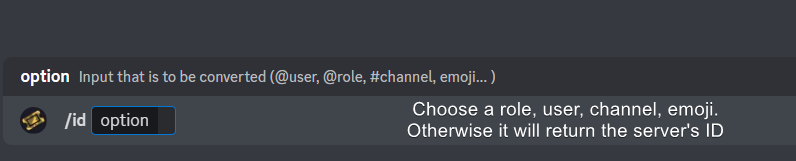
How do I get the ID of Roles/Channels/Emojis?
Ticket Tool has a useful command that helps you get the ID of various things like channels, roles, emojis, and your server.
Just use the command </id:1029797400174399546> <#channel/@role/:emoji:>. Now copy everything, including the brackets <...>, to your dashboard (or wherever you want it)
If you want the server ID, just use the command without any option.
Examples:
Server ID: $id ➝
509192800865353738
Roles: $id @Role ➝@humble sequoia
Channel: $id #channel ➝#🤖│bot-spam
User: $id @user ➝@copper owl
Emoji: $id➝

 drifting sun
how do you invite ticket tool preium to ur server again
drifting sun
thanks
vague cosmos
No problem. ❤️
slender minnow
@fleet garden you need this disabled for your panel 1 (assuming your issue is with the first panel) to disable forms
https://i.imgur.com/Iyf90kX.png
 drifting sun
 vague cosmos
Did you switch bots?
You need either use /botSwitcher or switch at the dashboard at Server Configs, @drifting sun.
drifting sun
yes
 final aurora
new number, who dis?
humble sequoiaBOT
Hello, we would love to help you, but if you don't tell us what you need help with we can't help you :(
final aurora
you should run /debug in the channel you're trying to send into
Likely it's missing permissions.
vague cosmos
@drifting sun try to run the command again.
@jade topaz does Ticket Tool have the required permissions?
@final aurora do you need any help?
humble sequoiaBOT
ᅠ
@pseudo glen requires the following permissions:
Add Reactions
Read Channels
Send Messages
Manage Messages
Embed Links
Attach Files
Read History
Manage Roles
Manage Channels
To change the role permissions, you can go to your Discord Server ➞ Server Settings ➞ Roles ➞ @Ticket Tool
To change the category permissions, you can got to your Channel List ➞ Select Category ➞ Options ➞ Permissions ➞ @Ticket Tool
To change the channel permissions, you can go to your Channel Settings ➞ Permissions ➞ Ticket Tool
ᅠ
Note:
You can give Ticket Tool Administrative Permissions instead of all the permissions listed above, but it's entirely optional and NOT necessary.
 vague cosmos
See the message above, @jade topaz.
fleet garden
slender minnow
<@717496092257681418> you need this disabled for your panel 1 (assuming your iss...
And for some reason I was looking at panel 2 haha give me a sec
final aurora
The same as you would for any user or role on the channel.
otherwise here's a page that might help:
https://support.discord.com/hc/en-us/articles/10543994968087-Channel-Permissions-Settings-101
https://support.discord.com/hc/en-us/articles/206029707-Setting-Up-Permissions-FAQ#h_01FFTVYFNVY8GHKTHCFBXMBGAZ
Discord
Channel permissions are an integral part of running a Discord server. Specific settings can ensure that certain server members or roles don’t have specific permissions while other key server member...
Discord
One of the great things about creating communities on Discord is our permission system! In this Help Center article, you'll learn more about permissions, how to create and customize permissions bas...
vague cosmos
@final aurora 😉
 final aurora
vague cosmos
<@78432587386728448> 😉
final aurora
vague cosmos
<@78432587386728448> 😉
was I not the first to respond?
vague cosmos
humble sequoia
@jade topaz is this clear enough or do you need any more help with this?
Awesome! Do you need any more help? 🙂
final aurora
but.. ok.. my bad..
vague cosmos
But did you need help too, war?
final aurora
nah, just visiting for updates/news.
vague cosmos
👍🏻 if you want to chat, #💬│general-chat.
 shy jolt
Hello everyone and good evening.
Context: I have multiple panels in my ticket,
Is it possible for a member to only have one ticket if he / she already opened a ticket?
Example I only clicked SOS, the other 4 should not open a ticket
 vague cosmos
Hey, you can set limits.
Dashboard > Panel Configs > Limits
shy jolt
vague cosmos
Hey, you can set limits.
Dashboard > Panel Configs > Limits
I did, but I tested for some reason I am still able to open a ticket, even if I already have one
vague cosmos
Are all those buttons on the same panel?
shy jolt
vague cosmos
Are all those buttons on the same panel?
yes
vague cosmos
vague cosmos
Hey, you can set limits.
Dashboard > Panel Configs > Limits
Can you send a screenshot of that, to be exact this:
 shy jolt
vague cosmos
Can you send a screenshot of that, to be exact this:
shy jolt
vague cosmos
Can you send a screenshot of that, to be exact this:
on all panels?
vague cosmos
No, the panel you use with the multipanel.
shy jolt
vague cosmos
No, the panel you use with the multipanel.
My bad
 vague cosmos
Hmm, that should be fine and you're sure all buttons belong to the same panel?
shy jolt
yes
 vague cosmos
There are only 3 buttons there, but on your earlier image I see 5. So one is missing, since one is the main.
Are you sure those missing one is not a different one?
shy jolt
let me check once again.
shy jolt
vague cosmos
There are only 3 buttons there, but on your earlier image I see 5. So one is mis...
Tried refreshing this is it now
 vague cosmos
That looks fine, if you create a ticket now and try to open another one what happens?

 vague cosmos
Hmm, are you the server owner?
shy jolt
only an admin
vague cosmos
Okay, so that can't be it...
Can you try to set the limit to 2, save it and change it back to 1?
shy jolt
vague cosmos
Okay, so that can't be it...
Can you try to set the limit to **2**, save it and...
ill be right back
shy jolt
vague cosmos
Okay, so that can't be it...
Can you try to set the limit to **2**, save it and...
Followed your instructions same results
 vague cosmos
Can you try to re-send the panel?
slender minnow
@vague cosmos mind if i helped?
shy jolt
Just to be clear
All panels shoujld have 1 limit?
vague cosmos
slender minnow
<@143705466734641152> mind if i helped?
Sure, go ahead.
slender minnow
thanks
@shy jolt go to your server config > set global limit to one
that should restrict one ticket across all panels
vague cosmos
I just now saw that it's a thing, thanks @slender minnow! 😊
iron nightBOT
Gave +1 Rep to @slender minnow
jade topaz
umm i got the error again sir
 shy jolt
Are you referring to this opne?
@slender minnow
 vague cosmos
jade topaz
umm i got the error again sir
vague cosmos
jade topaz
umm i got the error again sir
What are you trying to do?
slender minnow
shy jolt
Are you referring to this opne?
<@776084862728667156>
yup
shy jolt
let me check on my end if it works. (Hopefulyl)
vague cosmos
Did you setup the dropdowns correctly?
jade topaz
vague cosmos
Did you setup the dropdowns correctly?
umm i dont know how to set it up correctly
wait lemme give ss
humble sequoiaBOT
The Drop-down menu or Select Menu replaces the buttons on your panel message and uses a drop-down menu with all of your panels. To set this up, go to your Panel Configs and select your main Panel.
<:Numbericons1:1018864164032225340> Enable Select Style
First you enable Select Style. Then you add an item in the Dropdown Editor. Now you can start editing your dropdown!
<:Numbericons2:1018864168041971712> Dropdown Editor
Each line in the dropdown editor represents a line in the drop down menu on discord. You can add more "Items", by clicking on 

First you select a panel. That's the panel this option will open a ticket for.  DONT select the same panel twice. Each option should have a different Panel
After that, you can put a Display. This is the title of this option and will appear in the drop down menu. The *Description can be set right after that, which will be below the title in grey.
Additionally you can select an emoji, that will be shown in front of each option. You can either manually input the ID of an emoji or select it in the selector.
Common Issues ⚠️
- Panel doesn't send? Make sure you have a valid emoji selected
- Option doesn't show up? Check if two options have the same panel in the DropDown Editor

$dropdown
vague cosmos
This explains you how to setup the dropdown style, @jade topaz.
jade topaz
 shy jolt
Thanks you two, much love @slender minnow @vague cosmos thats all
iron nightBOT
Gave +1 Rep to @slender minnow
jade topaz
is it correct?
shy jolt
thank you @vague cosmos as well
vague cosmos
Yes and no.
You're using the emoji wrong; since it's a customm one try to add a : right after the < and before the >.
jade topaz
vague cosmos
Yes and no.
You're using the emoji wrong; since it's a customm one try to add a...
no. emoji is coming
in the dropdown
vague cosmos
Read my message again please, it tells you what to do.
@shy jolt there's a limit on rep, feel free to ping me in ±5 mins in #💬│general-chat with a thank you.
iron nightBOT
Gave +1 Rep to @shy jolt
vague cosmos
@jade topaz <:exane_mm:numbers:> should do it.
Where you replace numbers with the current numbers you already have.
shy jolt
Thank you @vague cosmos
iron nightBOT
Gave +1 Rep to @vague cosmos
jade topaz
vague cosmos
Where you replace `numbers` with the current numbers you already have.
Which numbers? The I'd of emoji?
 vague cosmos
Can you open a ticket for this? #🎫│make-a-ticket
slender minnow
@jade topaz have you tried updating the panel/resending it after making the changes
 mild birch
.
 stark runeBOT
1. Invite Ticket Tool to your server
First you will want to invite the bot to your server. Once the bot is in your server, you can manage your server in the dashboard.

2. Create a Panel
To create a panel we are going to need to head over to the panel configs on the dashboard.
Once at the dashboard we will need to click Create Panel.
Enter a panel name (Fill in any optional settings you want).
Click Create Panel and your ready to get started with configuring your panel.
An example of a creating a panel is shown below.

3. Send the Panel to a Channel
Once you've created a panel on the dashboard you will need to send it to a channel using send on the dashboard.
Select the channel you want your panel to be created in and click send.
For other questions checkout $help faq.
An example of a sending a panel is shown below.
Having a Problem Sending the Panel?
Do $debug in a channel with Ticket Tool and make sure it has all the necessary Discord permissions.
 vague cosmos
@mild birch that is how you can setup @pseudo glen. 🙂
Let me know if you need any help with it.
jade topaz
slender minnow
<@456226577798135808> have you tried updating the panel/resending it after makin...
Yess
Is the panel's title locked behind premium, or is this (yet another) me issue?
 jade topaz
Is the panel's title locked behind premium, or is this (yet another) me issue?
jade topaz
jade topaz
Is the panel's title locked behind premium, or is this (yet another) me issue?
Means?💀
vague cosmos
From a embed? Thats premium.
jade topaz
vague cosmos
From a embed? Thats premium.
Alright, thanks!
iron nightBOT
Gave +1 Rep to @vague cosmos
jade topaz
vague cosmos
From a embed? Thats premium.
I have premium
slender minnow
jade topaz
Yess
still not fixed?
jade topaz
@slender minnow not
vague cosmos
jade topaz
I have premium
Yes, but @jade topaz not.
slender minnow
can you open a ticket so i can take a look
jade topaz
slender minnow
can you open a ticket so i can take a look
Okay come dm lemme give server link
vague cosmos
slender minnow
jade topaz
Okay come dm lemme give server link
vague cosmos
Do you still have access to it?
Then you can use the button that allows you to re-open it.
jade topaz
vague cosmos
Do you still have access to it?
No it's been closed and deleted, so I'm guessing there's no way
vague cosmos
Nope.
 sullen void
How to get premium code
jade topaz
vague cosmos
Nope.
thanks for your help!
iron nightBOT
Gave +1 Rep to @vague cosmos
humble sequoiaBOT

Premium can now be purchased directly through discord! Either in the app directory (server settings) or directly from the bots profile.
<:TTWarning:1034178155872784494> Important Information <:TTWarning:1034178155872784494>
ONLY purchase premium through ONE of the two Ticket Tool Bots. If you purchased premium on the primary bot (White logo) and plan to use the premium bot, don't kick the primary bot!
What's different?
 The Monthly price changed from
 $6.00 to $5.99

 Yearly subscriptions are not yet available
Don't kick the bot, otherwise, the subscription will be canceled automatically
You'll need to buy the subscription from a computer or on the Application Directory
You might need to run the /premium command on your server to sync the premium status with your dashboard
 A subscription can not be transferred between Servers
 vague cosmos
@jade topaz no problem!
@sullen void see above.
sullen void
vague cosmos
<@456226577798135808> no problem!
<@709146848694239332> see above.
Is there is a way to buy it and it give me a code and i redeem it from the bot website?
humble sequoiaBOT
PayPal - paypal@tickettool.xyz
BitCoin - 3HhKKAdb9eEvCe2tvzB8bAa8nebHY6qcPA
LiteCoin - MEQX3knLAuotrKnvk3HDNBK5gdRn6PZhHy

Prepay/Direct Payment
To prepay send the payment using your desired method - Available options listed bellow.
⚠️ $18 per 3 months. ⚠️
$66 per year.
(If using the direct payment option, you need to be paying for at-least 3+ months.)
Regular Prices when paying within Discord:
$5.99/per month
Once your payment is sent let us know so we can confirm and get you your key.
- Purchases done with this method are non-refundable.
<:paypal:924596360840372234> Paypal ("Goods and Services" or "Family and Friends")
paypal@tickettool.xyz
<:bitcoin:924638849135689749> BTC - Bitcoin
3HhKKAdb9eEvCe2tvzB8bAa8nebHY6qcPA
<:Litecoin:972176945972383815> LTC - LiteCoin
MEQX3knLAuotrKnvk3HDNBK5gdRn6PZhHy
I sent the payment now what?
After you send the payment, please send a screenshot with proof of payment, our <@&615146349700186112> will verify your payment and will get you setup. For crypto payments, we are waiting for at least ONE verification.

All prices in USD - 3 months min for direct payment
vague cosmos
This are the other payments methods you can use, @sullen void.
If you want to use one of those payments methods, open a billing ticket in #🎫│make-a-ticket so the billing team can assist you further.
jade topaz
Any way to rename tickets upon creation? I.e report tickets being called "Report-ticket-0001", role tickets being called "Role-ticket-0001", etc...
 vague cosmos
jade topaz
Any way to rename tickets upon creation? I.e report tickets being called "Report...
vague cosmos
jade topaz
Any way to rename tickets upon creation? I.e report tickets being called "Report...
Dashboard > Panel Configs > Ticket
jade topaz
vague cosmos
Dashboard > Panel Configs > Ticket
Ah, thanks again!
iron nightBOT
Gave +1 Rep to @vague cosmos
vague cosmos
No worries, as always happy to help!
@jade topaz you'll need to do this for each panel by the way.
jade topaz
vague cosmos
<@456226577798135808> you'll need to do this for each panel by the way.
Alrighty, noted! 🙏
guys how to do like this

 placid sage
i'm paying for the sub for premium but i dont have, nor can i find the key
vague cosmos
jade topaz
guys how to do like this
Dashboard > Panel Configs > Messages
vague cosmos
placid sage
i'm paying for the sub for premium but i dont have, nor can i find the key
How did you pay?
placid sage
through paypal
vague cosmos
Open a billing ticket in #🎫│make-a-ticket so the billing team can assist you.
@jade topaz you're looking for the opened message by the way.
jade topaz
yeah ty
vague cosmos
No worries, happy to help!
fleet garden
Others (everyone else not ticket owner) are seeing the tickets as unknown. How do I fix that?
humble sequoiaBOT
1. Go into your Dashboard
2. Open your Panel Configs tab
3. Select the panel you want to grant access to
4. Open the General options menu
5. Select your Support Team Roles
6. Save changes
 vague cosmos
@fleet garden ^
fleet garden
I'm saying others can see the ticket (as unknown) that shouldn't see them at all
vague cosmos
Dash > Panel config > Permissions
Check the permissions there.
@fleet garden I'll be afk so responds may delay.
fleet garden
vague cosmos
<@717496092257681418> I'll be afk so responds may delay.
You are fine, everyone has a life! I do have the everyone opened, view set to x but they can see the ticket as unknown (sorry can I still ping you or are you busy)
vague cosmos
It's fine, how are the category permissions?
Also mind if you share a screenshot of what you mean by unknown?
vague cosmos
That's awesome, how did you fix it?
fleet garden
vague cosmos
That's awesome, how did you fix it?
Not sure 😂 when I asked for a ss of the unknown, they said it wasn't there so maybe it hadn't loaded properly yet?
vague cosmos
If you have it feel free to send it
jade topaz
Hello I'm trying to create and support ticket on my server, I left the support team only for the staff and the common members said they couldn't create the ticket (it says the have no permission) when I added the common members role to the support team everyone was able to see the ticket the person created;
How do I manage to the common members to create a ticket but only the person who created it and the staff sees it?
I tried looking every tutorial but non explained
Everything else is already settled
vague cosmos
Hey @jade topaz,
Can you check if there is any blacklisted role on the dashboard under server configs? Also, for your second question see below:
humble sequoiaBOT
1. Go into your Dashboard
2. Open your Panel Configs tab
3. Select the panel you want to grant access to
4. Open the General options menu
5. Select your Support Team Roles
6. Save changes
jade topaz
vague cosmos
Hey <@456226577798135808>,
Can you check if there is any blacklisted role on th...
Nope there is not
jade topaz
humble sequoia
I did that already...
vague cosmos
If you did that, nobody should be able to see the ticket, unless your Discord permissions are messed up.
Can you check if there is any permission issue here:
Dashboard > Panel Configs > Buttons > Button Create Ticket
If you use a category, make sure you set the permissions for the category the same as the channels by default, because Discord may override channel by category. @jade topaz
jade topaz
vague cosmos
If you use a category, make sure you set the permissions for the category the sa...
Ok.
jade topaz
vague cosmos
If you use a category, make sure you set the permissions for the category the sa...
What permissions the category must have to the common members use the ticket°?
vague cosmos
You don't want them to see it right? So a ❌ on view channel.
jade topaz
vague cosmos
You don't want them to see it right? So a ❌ on view channel.
I want them to see the channel but not see the ticket when created
 vague cosmos
humble sequoia
vague cosmos
humble sequoia
For the channel, should be for the everyone role on  or
or  , for the ticket itself, see this message.
 velvet verge
Does anyone know why this happens?
 vague cosmos
velvet verge
Does anyone know why this happens?
vague cosmos
velvet verge
Does anyone know why this happens?
Hey! Can you try to run the command again? Sometimes it happens, a second time it will work and if that's not the case let me know.
velvet verge
I've ran it 4 times but still no luck

 timber kernel
velvet verge
I've ran it 4 times but still no luck
timber kernel
velvet verge
I've ran it 4 times but still no luck
Bot is missing a permission in that channel:
 velvet verge
How do I give it the permission?
vague cosmos
Edit the channel permissions in Discord (or give the bot administrator).
velvet verge
Thanks, I'll try it right now
velvet verge
I'm not sure how to give the bot administrator
I've tried but for some reason it just doesnt work
vague cosmos
Server settings > roles > you can give admin there for the bot role, @velvet verge.
But, if you edit the channel, you can give it read perms only.
@velvet verge I'm heading off to bed now, you can always #🎫│make-a-ticket so the support team can assist you. 🙂
iron nightBOT
Gave +1 Rep to @iron night
 clear elm
hello. I have discord server. When a member opens a ticket they are unable to paste a Cardano Wallet address. I am an admin and I cant post one either. can anyone help please
Its a long and contains random numbers and letters
 midnight isle
vague cosmos
midnight isle
vague cosmos
@midnight isle dashboard > panel Configs > permissions. Take a look there, where you can set permissions for in a ticket.
vague cosmos
clear elm
hello. I have discord server. When a member opens a ticket they are unable to ...
Check the audit if a bot is blocking it.
 digital veldt
I can't see ticketers on the server, only my other authorized friends can see the incoming tickets, why am I having this problem? can you help me?
humble sequoiaBOT
1. Go into your Dashboard
2. Open your Panel Configs tab
3. Select the panel you want to grant access to
4. Open the General options menu
5. Select your Support Team Roles
6. Save changes
vague cosmos
Check that and if you have one of those roles, @digital veldt.
digital veldt
vague cosmos
Check that and if you have one of those roles, <@981607067540402207>.
Authorizations available
vague cosmos
You can't see the new tickets, you have a role that should be able to see them?
digital veldt
vague cosmos
You can't see the new tickets, you have a role that should be able to see them?
All authorizations available
vague cosmos
 a yes or no would be easier.
If you click on the server name at the left top, is show all channels turned on?
digital veldt
vague cosmos
If you click on the server name at the left top, is **show all channels** turned...
Yes
vague cosmos
And you have a role that should see the tickets, is someone able to check the permission of a ticket to see if something (a role for example) is removing your access?
 overrides
digital veldt
I have the authority to open and close a ticket and reply.
vague cosmos
Yes, so can you see the channel now? Also what is your native language, maybe I can give you some advice on getting easier help on that language.
vague cosmos
Merhaba, biletleri siz göremezsiniz ama diğerleri görebilir. Kanallara erişimi engelleyebilecek bir rolünüz yok mu?
digital veldt
vague cosmos
Merhaba, biletleri siz göremezsiniz ama diğerleri görebilir. Kanallara erişimi e...
Kanallara eririm rolum mevcur
vague cosmos
Peki şimdi tam olarak sorun nedir?
 opaque notch
so i purchased premium ticket tool. it still displays as normal on dashboard. what do i do
 gilded verge
opaque notch
so i purchased premium ticket tool. it still displays as normal on dashboard. wh...
gilded verge
opaque notch
so i purchased premium ticket tool. it still displays as normal on dashboard. wh...
click Sync button in dashbaord or run /debug on your server
//then your premium status will be refreshed
opaque notch
gilded verge
click `Sync` button in dashbaord or run `/debug` on your server
//then your prem...
And if i bought premium and add premium bot to server will it continue working or i need to redo tickets
gilded verge
yes, it will work but then you need to resend panels with premium bot to work
if you bought premium with free bot, you shouldn't kick him because your premium will be cancelled (but not deleted so you will still have premium until the end of the billing period),
vague cosmos
vague cosmos
Peki şimdi tam olarak sorun nedir?
@digital veldt 🙂
 wooden breach
what do i do if the ticket tool keeps saying the application didnt respond
digital veldt
vague cosmos
Peki şimdi tam olarak sorun nedir?
Sorun tam olarak ticket gelince görüntülenmiyor. 1 kişi de bu sorun var.
vague cosmos
wooden breach
what do i do if the ticket tool keeps saying the application didnt respond
What are you trying to do? Does the bot have all permissions it needs, did you try it again?
vague cosmos
digital veldt
Sorun tam olarak ticket gelince görüntülenmiyor. 1 kişi de bu sorun var.
Anlıyorum, bu kişi yeni oluşturulan biletleri göremiyor mu?
vague cosmos
No problem!
opaque notch
gilded verge
yes, it will work but then you need to resend panels with premium bot to work
i...
So i need to redo tickets
vague cosmos
That is correct, as it are two different bots.
gilded verge
no need, you can just use commands to close/delete etc.
vague cosmos
Since when? Didn't @pseudo glen and @humble sequoia not conflict with tickets? Or is that panels only, @gilded verge?
digital veldt
vague cosmos
Anlıyorum, bu kişi yeni oluşturulan biletleri göremiyor mu?
Evet yeni oluşturulan biletleri göremiyor.
vague cosmos
digital veldt
Evet yeni oluşturulan biletleri göremiyor.
Herhangi bir destek ekibi rolü var mı?
gilded verge
vague cosmos
Since when? Didn't <@557628352828014614> and <@722196398635745312> not conflict ...
yes but if ticket was created with free bot, you still can close/delete with premium, but since now im confused, I will check it again especially for you ^^
vague cosmos
gilded verge
yes but if ticket was created with free bot, you still can close/delete with pre...
Yea, cause I'm wondering now and just want to be sure, as it sounds confusing.
gilded verge
so as i said, you still can close/delete ticket with premium bot which was created with free bot, you just need to use commands, instead of buttons ^^

 digital veldt
vague cosmos
Herhangi bir destek ekibi rolü var mı?
digital veldt
vague cosmos
Herhangi bir destek ekibi rolü var mı?
Evet rolü var.
vague cosmos
digital veldt
Evet rolü var.
"Destek ekibi" veya "ek rol" kapsamına giriyor mu?
digital veldt

Moderetör arkadaşların hepsinde ticket yeni biletlerine cevap verme yetkisi var. Görüntüleme yetkisi var. Yeni biletlere tek bir moderetör arkadaşımız görüntüleyemiyor yeni biletleri. Sorun nedir yeni biletleri neden gürültüleyemiyor. @vague cosmos
vague cosmos
Biletler bir kategoriye mi yerleştirildi? Oradaki izinleri kontrol edebilir misin? Bir varsa, görüntülemelerini engellemek mümkün olmalıdır.
 civic wagon
is ticket claiming free now?
 safe stratus
The bot isn't working for new arrivals who cannot see all my chats to use the ticket tool they can see the channel but not make a ticket idk how to fix
 wild spire
safe stratus
The bot isn't working for new arrivals who cannot see all my chats to use the ti...
wild spire
safe stratus
The bot isn't working for new arrivals who cannot see all my chats to use the ti...
did u set their role as disabled role?
safe stratus
I don't think so
wild spire
safe stratus
I don't think so
server ID?
safe stratus
927657894072168488
wild spire
safe stratus
927657894072168488
open a ticket please ?
then I can ask more questions 😂
#🎫│make-a-ticket
gilded verge
civic wagon
is ticket claiming free now?
still premium ^^
 strong harbor
Im having trouble making a multipanel ticket support button thing. Is the video on ticket tool youtube updated ?
gilded verge
strong harbor
Im having trouble making a multipanel ticket support button thing. Is the video ...
im not sure if updated but what exactly is your problem?
 bleak valve
Hi, can someone tell me how to turn off random tickets that just say "Welcome"?
vague cosmos
Hey @bleak valve, those tickets must be created by someone. Are you sure nobody is abusing it, see also this to edit the message:
humble sequoiaBOT
The Ticket Message is the first message sent by the bot on a new ticket. To customize it head over to your Dashboard ➞ Panel Configs ➞ Ticket ➞ Edit Ticket Message
 vague cosmos
@strong harbor did you still need help?
bleak valve
vague cosmos
Hey <@662039565409714177>, those tickets must be created by someone. Are you sur...
Ive received quite a few of them in my server, just curious why it happens from time to time. Possibly bots opening tickets?
vague cosmos
Not sure if bots can do that, might be selfbots. How often does it happen?
But those tickets, are they just showing "welcome", as you can change that (see message above).
@bleak valve ^
bleak valve
vague cosmos
But those tickets, are they just showing "welcome", as you can change that (see ...
a ticket is opened, just saying "Welcome" from whoever opened the ticket 🤣 im working on a server currently, it happens several times a day. but the server is still quite new, only has pandez for security atm
vague cosmos
Gotcha @bleak valve! You can edit that message, here: #🆘│community-support message
humble sequoiaBOT
- Note: Remove the ! from all of the variables for proper work
{!server.name} ➞ Name of the server
{!server.id} ➞ ID of the Server
{!server.icon} ➞ Direct URL to the Server's Icon
{!server.banner} ➞ Direct URL to the Server's banner, if available

{!channel} = <#channel> ➞ Channel link of the current channel
{!channel.name} ➞ Name of the current channel
{!channel.id} ➞ ID of the current channel

{!author} = <@user> ➞ Mention of the user triggering this message
{!author.name} ➞ Name of the user triggering this message
{!author.id} ➞ ID of the user triggering this message
{!author.nickname} ➞ Nickname of the user triggering this message
{!author.icon} ➞ Direct Url of the profile picture of the user triggering this message
{!author.tag} ➞ 4 digit tag (discriminator) of the user triggering this message
{!author.full} ➞ username + 4 digit discriminator of the user triggering this message```
```diff
- Note: The variables below are meant to be used within ticket messages, or tags triggered within tickets
{!panel.count} ➞ The current count number of the panel
{!panel.name} ➞ The name of the panel
{!panel.ticketLimit} ➞ The current limit of the panel

{!ticket} = <#channel> ➞ Channel mention of the ticket
{!ticket.id} ➞ Channel ID of the ticket

{!ticket.user} = <@user> ➞ User mention of the ticket user
{!ticket.user.name} ➞ Name of the ticket user
{!ticket.user.id} ➞ User ID of the ticket user
{!ticket.user.nickname} ➞ Nickname of the ticket user
{!ticket.user.icon} ➞ Direct Url of the profile picture of the ticket user
{!ticket.user.tag} ➞ Tag / Discriminator of the ticket user
{!ticket.user.full} ➞ Username + Discirimator of the ticket user```
_ _
_ _
Additional variables
Roles can be either
{@role name} or {role ID}
{create.reason}
{claim.reason}
{close.reason}
{delete.reason}
» Reasons for a given action
Transcript Variables
{!ticket_name}➞ Name of the ticket
{!panel_name}➞ Name of the panel
{!transcript_url}➞ File link of the transcript
Hide Link under blue text:
[Click me](https://tickettool.xyz)➞ Click me
Time Variable
Sends the current unix time in seconds. Optionally add or remove seconds
<t:{!time?m=+43200}:R>➞ <t:1684542028:R>
<t:{!time?m=-43200}:R>➞ <t:1684455628:R>
<t:{!time}:R>➞ <t:1684498828:R>
_ _
<t:1641006000>➞ <t:1641006000>
<t:1641006000:f>➞ <t:1641006000:f>
<t:1641006000:F>➞ <t:1641006000:F>
<t:1641006000:D>➞ <t:1641006000:D>
<t:1641006000:d>➞ <t:1641006000:d>
<t:1641006000:t>➞ <t:1641006000:t>
<t:1641006000:T>➞ <t:1641006000:T>
<t:1641006000:R>➞ <t:1641006000:R>
» You can use https://hammertime.djdavid98.art/ to create custom dates/times
vague cosmos
You can also use variables, to ping for example a user in the ticket. 🙂
bleak valve
vague cosmos
Gotcha <@662039565409714177>! You can edit that message, here: https://canary.di...
hmm okay, i will try to edit it soon. but isn't it possible to just turn it off all together? not sure why people would send a "Welcome" message through a ticket several times a day
vague cosmos
Is the message send by the user or by @pseudo glen? Because you can remove the message itself, but if a user sends it it's something the user does.
Do you have a screenshot eventually?
bleak valve
vague cosmos
Is the message send by the user or by <@557628352828014614>? Because you can rem...
I will get a screenshot soon, just not at the computer managing that server
vague cosmos
No worries, if you have one feel free to ping me. 🙂
vague cosmos
@crystal gale what do you exactly want to know?
Because everyone is using Ticket Tool for other things, so if you tell me what you want to do exactly I can help you.
 crystal gale
How tu use ticket tool properly
vague cosmos
What do you mean exactly?
vague cosmos
vague cosmos
Because everyone is using Ticket Tool for other things, so if you tell me what y...
Because as I said here, everyone uses it in a different way.
@crystal gale so do you want to know how to setup the bot?
crystal gale
How to use it
stark runeBOT
1. Invite Ticket Tool to your server
First you will want to invite the bot to your server. Once the bot is in your server, you can manage your server in the dashboard.
2. Create a Panel
To create a panel we are going to need to head over to the panel configs on the dashboard.
Once at the dashboard we will need to click Create Panel.
Enter a panel name (Fill in any optional settings you want).
Click Create Panel and your ready to get started with configuring your panel.
An example of a creating a panel is shown below.
3. Send the Panel to a Channel
Once you've created a panel on the dashboard you will need to send it to a channel using send on the dashboard.
Select the channel you want your panel to be created in and click send.
For other questions checkout $help faq.
An example of a sending a panel is shown below.
Having a Problem Sending the Panel?
Do $debug in a channel with Ticket Tool and make sure it has all the necessary Discord permissions.
vague cosmos
This tells you how to setup Ticket Tool. 🙂
@crystal gale if you need any help with that, let me know. 🙂
vague cosmos
stark rune
In your own server? This is how you setup @pseudo glen.
 hidden otter
@vague cosmos can u make it to me please
vague cosmos
No, but if you follow the above steps it should be fine, if not can you tell me where the issues are?
hidden otter
 vague cosmos
You did create the panel, can you click the Send button and select the channel?
iron nightBOT
Gave +1 Rep to @vague cosmos
vague cosmos
No problem, do you need any more help? 🙂
hidden otter
No thx
vague cosmos
Alright if you need any more help in the future you can always ask. Have a fantastic day!
crystal gale
I put a script and ticket tool din't anwser why?
vague cosmos
I'm not sure if a powershell script does work in a ticket...
So I'm really confused about what you mean, @crystal gale.
crystal gale
I send a powershell script to know the password of someone and its not rlying
replying*
vague cosmos
I don't think you can use powershell scripts with @pseudo glen...
Also, "knowing someones password" does not seem to be legal.
@crystal gale so what are you trying to do?
crystal gale
No i was joking xD im not trying to have a password but he is not rpelying me
vague cosmos
I don't like this kind of jokes, but what is your exact issue?
vague cosmos
You can wait. We can help with @pseudo glen here, not with something else.
crystal gale
Normaly he have to reply when?
humble sequoiaBOT

⚠️ You're in the wrong place
We provide support for Ticket Tool Discord bot and cannot help you with whatever issue you have.
- We don't know which Support Team you should contact to get this issue resolved, and unfortunately we won't be able to accurately tell you.
If you don't have any further questions regarding our bot Ticket Tool, please close this ticket
vague cosmos
^ read that.
vague cosmos
No I am not, but that message gives you an answer.
vague cosmos
No I am not, but do you need any help with @pseudo glen?
clear elm
vague cosmos
Check the audit if a bot is blocking it.
Where would I go to find audit info?
vague cosmos
Server settings > Audit log
My laptop needs to update, so responses can delay @clear elm.
clear elm
vague cosmos
Server settings > Audit log
Thanks. I am assuming you mean on my tickettool dashboard
iron nightBOT
Gave +1 Rep to @vague cosmos
vague cosmos
clear elm
Thanks. I am assuming you mean on my tickettool dashboard
No, Discord itself. Because it looks like another bot deletes the messages.
clear elm
Thanks. So i am looking at the audit log for TicketTool and it doesnt create and entry
 rustic gale
It probably has nothing to do with Ticket Tool
clear elm
Its what I am thinking
rustic gale
Ticket Tool is not a moderation bot and it doesn't delete users' messages.
The only exception is custom command triggers
clear elm
So when a member opens a ticket where do the permissions come from within that ticket
rustic gale
Whether a user's messages get deleted has nothing to do with the user's permissions
vague cosmos
You should filter on Delete Messages in the audit. So you can see which bot might do it.
 clear elm
its not like they actually delete the message. You see it posted then it disappears
vague cosmos
vague cosmos
You should filter on **Delete Messages** in the audit. So you can see which bot ...
So they get deleted, if you check the audit like this way you can see by who. Like Outsider said - and so did I - it's not Ticket Tool.
clear elm
yup defo not ticket tool. Further investigation required. Thanks for your time
vague cosmos
No problem, checking the audit would still be the answer. 😛
jade topaz
Can you change the bots name with premium?
vague cosmos
You can change the username in your server, not the bot name itself.
humble sequoiaBOT
Ticket Tool Custom Avatar
As of now, you are not able to change Ticket Tool's profile picture, nonetheless, our Development Team is working on the release of white labels, this is your own custom bot!
For the time being, you can change the bot's nickname by right-clicking the bot in the user list on your server and clicking Change Nickname
 jade topaz
What about the profile picture?
vague cosmos
See the message above, @jade topaz.
jade topaz
Oh okay.
vague cosmos
Can I help you with anything else? 👍🏻
jade topaz
Can you create embeds with it?
vague cosmos
Yes and with the premium bot you can edit those.
jade topaz
Oh okay!
humble sequoiaBOT
Faster Premium Bot
Automatic Transcripts
Full Customization
Direct Messages
Ticket Automation
Thread Style Ticketing
Premium Support
Scheduled Panel Availability
Integrations
You can purchase premium here:
Price
$6 - Monthly
$66 - Yearly
 Premium
vague cosmos
Premium
vague cosmos
This are all the perks you get with @humble sequoia. 🙂
vague cosmos
humble sequoia
@jade topaz 🙂
jade topaz
Oh okay!
 pallid rain
Not sure if this is a feature or not.
With the claiming a ticket option, can you make it that no one besides the person that opened the ticket can type until someone has claimed it?
vague cosmos
Should be do-able with permissions.
@pallid rain I did look at the permissions of claiming, but:
"Within this setting you can modify the permissions the support team roles get applied once a ticket is claimed. The ticket claimer will receive the Support Opened Permissions. This is often used to make tickets a read only channel for the rest of the team or to hide it."
So unless you work with additonal role permissions, there is no easy way.
 lime maple
Does anyone know if there’s a way to delete tickets at the same time without having to do it manually for each tickets ?
 ember python
Trying to setup a dropdown menu with multiple options but it only lets me add one option and I cant select the same pannel for hte other option?
 humble sequoiaBOT
The Drop-down menu or Select Menu replaces the buttons on your panel message and uses a drop-down menu with all of your panels. To set this up, go to your Panel Configs and select your main Panel.
<:Numbericons1:1018864164032225340> Enable Select Style
First you enable Select Style. Then you add an item in the Dropdown Editor. Now you can start editing your dropdown!
<:Numbericons2:1018864168041971712> Dropdown Editor
Each line in the dropdown editor represents a line in the drop down menu on discord. You can add more "Items", by clicking on
First you select a panel. That's the panel this option will open a ticket for. DONT select the same panel twice. Each option should have a different Panel
After that, you can put a Display. This is the title of this option and will appear in the drop down menu. The *Description can be set right after that, which will be below the title in grey.
Additionally you can select an emoji, that will be shown in front of each option. You can either manually input the ID of an emoji or select it in the selector.
Common Issues ⚠️
- Panel doesn't send? Make sure you have a valid emoji selected
- Option doesn't show up? Check if two options have the same panel in the DropDown Editor
$dropdown
vague cosmos
@ember python ^
@lime maple not sure about your case.
ember python
vague cosmos
<@276413253213487105> ^
<@297392125291659264> not sure about your case.
How do I create another panel?
lime maple
vague cosmos
<@276413253213487105> ^
<@297392125291659264> not sure about your case.
If I have to delete 600tickets manually it’s gonna take for ever 😅
vague cosmos
lime maple
If I have to delete 600tickets manually it’s gonna take for ever 😅
Maybe the support team has a solution, #🎫│make-a-ticket but I don't think it's possible.
lime maple
vague cosmos
Maybe the support team has a solution, <#571706435449257997> but I don't think i...
Aight thanks
iron nightBOT
Gave +1 Rep to @vague cosmos
 warped geode
Can someone please help this panel is hard to understand and I can’t find tutorials how do I make it that the ticket opens when someone’s uses a command
rustic gale
warped geode
Can someone please help this panel is hard to understand and I can’t find tutori...
Head to Panel Configs -> Command Style
You can enable it there. Select a channel to track
When someone sends $new or $ticket in that channel, it will create a ticket for them
warped geode
Ah ok thanks
 echo laurel
I'm fairly new to Ticket Tool and can't for the life of me figure out how to add the name of whose opening the ticket. Is anyone able to help me with this? Thank you in advance
Like this

 opaque gate
is there any way to change the commands? instead of /close something like !c
rustic gale
echo laurel
I'm fairly new to Ticket Tool and can't for the life of me figure out how to add...
That's a premium feature:
humble sequoiaBOT
The ticket name is the default channel name of all tickets. To edit it, go to your Dashboard > Panel Configs > Ticket. There you can edit the channel name of opened and closed tickets. You can also use variables in there.

 Note: This is a premium feature
rustic gale
opaque gate
is there any way to change the commands? instead of /close something like !c
Note: This is a premium feature
rustic gale
opaque gate
is there any way to change the commands? instead of /close something like !c
Not possible unfortunately
 grand shell
Does anybody know when you try to send the ticket into a channel and it says Failed to send. It has the permission to send it but idk how.
vague cosmos
Do /debug it should show what is wrong.
Are you trying to send a panel?
@grand shell
humble sequoiaBOT
━━ valxd's inquiry has been moved to a ticket ━━
 opaque token
How do I add ticket tool to my server
stark runeBOT
1. Invite Ticket Tool to your server
First you will want to invite the bot to your server. Once the bot is in your server, you can manage your server in the dashboard.
2. Create a Panel
To create a panel we are going to need to head over to the panel configs on the dashboard.
Once at the dashboard we will need to click Create Panel.
Enter a panel name (Fill in any optional settings you want).
Click Create Panel and your ready to get started with configuring your panel.
An example of a creating a panel is shown below.
3. Send the Panel to a Channel
Once you've created a panel on the dashboard you will need to send it to a channel using send on the dashboard.
Select the channel you want your panel to be created in and click send.
For other questions checkout $help faq.
An example of a sending a panel is shown below.
Having a Problem Sending the Panel?
Do $debug in a channel with Ticket Tool and make sure it has all the necessary Discord permissions.
vague cosmos
@opaque token
 modern herald
hello
need help, how can i make for my staff can read ticket, whitout can close them ?
 cunning crystal
How come when someone closes a ticket, it is automatically deleted
 cold nebula
i cant have the claim button if i didnt pay for the premium version right?
humble sequoiaBOT
━━ CheeseGrinder's inquiry has been moved to a ticket ━━
 lunar solar
modern herald
need help, how can i make for my staff can read ticket, whitout can close them ?
lunar solar
modern herald
need help, how can i make for my staff can read ticket, whitout can close them ?
Set allowed and disabled roles:
Panel Configs --> Buttons --> Close ticket (edit button) --> Allowed / Disabled Roles (Must set @ everyone in disabled roles)
lunar solar
cunning crystal
How come when someone closes a ticket, it is automatically deleted
Enable two step ticket
Panel Configs --> General -->  Two Step Ticket
iron nightBOT
Gave +1 Rep to @lunar solar
cunning crystal
lunar solar
Panel Configs --> General --> <:Switch_enabled:1041734627330625586> Two Step Tic...
When I closed the ticket, I did not wipe it automatically
@lunar solar
lunar solar
cunning crystal
When I closed the ticket, I did not wipe it automatically
Yeah you asked why it deleted automatically
I showed you how to stop that
cunning crystal
lunar solar
I showed you how to stop that
It doesn't work
lunar solar
cunning crystal
It doesn't work
If you have more than one panel you would need to do it for all
cunning crystal
ok
 buoyant crystal
Will Ticket transcripts be sotred on the internet forever? Is the only way to stop people from viewing it is hide the transcript link?
lunar solar
buoyant crystal
Will Ticket transcripts be sotred on the internet forever? Is the only way to st...
They are stored in Discord
So the file that attaches to the embed
Thats Discord hosting the file
So as long as that file exists the link will work
buoyant crystal
lunar solar
So as long as that file exists the link will work
what if someone download the file to local? for example, the user will get the file from the bot DM isn't it?
vague cosmos
Then they have it and might be share it... it's not anything you can control?
lunar solar
Then you would be able to see it hosted from your pc
If you have DM transcript yes they receive their own file
buoyant crystal
lunar solar
If you have DM transcript yes they receive their own file
Bruh how do I disable that?
lunar solar
buoyant crystal
Bruh how do I disable that?
You don't have premium
so currently they are not receiving transcripts
even if you had premium is a feature you need to enable
buoyant crystal
lunar solar
even if you had premium is a feature you need to enable
Ok, good to know, I guess.
 north hawk
idk whats going on here
 lunar solar
north hawk
idk whats going on here
lunar solar
north hawk
idk whats going on here
Go to the settings of the mention category
And give ticket tool those two permissions
lunar solar
No worries
north hawk
Have a nice day
lunar solar
You too!
echo laurel
rustic gale
That's a premium feature:
I have Premium
lunar solar
$pc 740258208601473115
humble sequoiaBOT
lunar solar
$pc 740258208601473115

Thank you
Thank you for purchasing Ticket Tool Premium @echo laurel. You have now been given the <@&535595160189403136> role!
Found 2 servers in total and 1 with premium and permission
 pulsar harness

vague cosmos
@lunar solar running it with the slash command doesn't show a message but will check too. Isn't that easier / more clean?
lunar solar
echo laurel
I have Premium
Panel Configs --> Ticket --> Ticket Opened channel name --> Edit to your liking
lunar solar
vague cosmos
<@892854649172946985> running it with the slash command doesn't show a message b...
Clean yes, easier 
vague cosmos
pulsar harness
<:pepe_confetti:984105711367770132>
Hey, do you need any help? 🙂
pulsar harness
No need to thank you
 pale vessel
"At the end of the Day we check who the top 3 messagers are" when is the time they check and what do they mean by "messagers"
vague cosmos
You mean, when a ticket get closed or?
@pale vessel because I can't think of anything inside Ticket Tool besides the people who send messages in a ticket, are you sure it's about @pseudo glen?
pale vessel
ohh so thats how
vague cosmos
Are you sure it's @pseudo glen? 👀
pale vessel
i meant in the available tasks
vague cosmos
Because, only way to see how many messages are send is in a ticket transcript.

@pale vessel I think you're looking at another bot.
humble sequoiaBOT
⚠️ You're in the wrong place
We provide support for Ticket Tool Discord bot and cannot help you with whatever issue you have.
- We don't know which Support Team you should contact to get this issue resolved, and unfortunately we won't be able to accurately tell you.
If you don't have any further questions regarding our bot Ticket Tool, please close this ticket
vague cosmos
If not, do you have an example or something of what you mean?
 hot tiger
Why does it not ping the role I have?

 vague cosmos
Because you can't mention a role in an embed.
humble sequoiaBOT
1. Go into your Dashboard
2. Open your Panel Configs tab
3. Select the panel you want to ping your support on
4. Open the Ticket options menu
5. Click on Edit Ticket Message
6. In the Message Content use one of the role mention syntax (**{@Role Name}**/**{Role ID}**)
7. Save changes
Note: For this to work properly, Ticket Tool requires the Mention Everyone permission. Or the role must have the Allow anyone to @mention this role setting enabled 
vague cosmos
That explains how you can do it, outside the embed. 🙂
gilded verge
vague cosmos
<@910140188154552351> I think you're looking at another bot.
you got this correctly, he meant another bot
hot tiger
oh I'm dumb I have another panel and I thought it was mentioning a role but it was doing @hot tiger
vague cosmos
gilded verge
you got this correctly, he meant another bot
Oh thank you for the confirmation! ❤️
iron nightBOT
Gave +1 Rep to @gilded verge
vague cosmos
hot tiger
oh I'm dumb I have another panel and I thought it was mentioning a role but it w...
The message above should explain how to fix it, but doing it in a embed will never give a notification.
 pure kite
I cant use ticket tool commands please help me
vague cosmos
@pure kite hey! What commands are not working?
Because "I can't use commands" is not really giving us information. Are you getting any error? What are you trying to do?
pure kite
I mean
I cant see the commands of ticket tool,I write the commands but i cant see commands of ticket tool bot
vague cosmos
So, you don't get a reply when you run a command, right?
Does the bot have the right permissions?
humble sequoiaBOT
ᅠ
@pseudo glen requires the following permissions:
Add Reactions
Read Channels
Send Messages
Manage Messages
Embed Links
Attach Files
Read History
Manage Roles
Manage Channels
To change the role permissions, you can go to your Discord Server ➞ Server Settings ➞ Roles ➞ @Ticket Tool
To change the category permissions, you can got to your Channel List ➞ Select Category ➞ Options ➞ Permissions ➞ @Ticket Tool
To change the channel permissions, you can go to your Channel Settings ➞ Permissions ➞ Ticket Tool
ᅠ
Note:
You can give Ticket Tool Administrative Permissions instead of all the permissions listed above, but it's entirely optional and NOT necessary.
pure kite
yeah?
vague cosmos
If so, what command are you trying to run?
pure kite
But it can only access to 2 channels and i made bot administrator in that channel
pure kite
vague cosmos
If so, what command are you trying to run?
setup command
vague cosmos
pure kite
But it can only access to 2 channels and i made bot administrator in that channe...
You can't make a bot administrator in a channel, only server wide.
Can you run $setup and send a screenshot of what you got?
pure kite
ok
pure kite
vague cosmos
You can't make a bot administrator in a channel, only server wide.
Can you run ...
I mean, I gave the bot all the channel permissions on certain channels
sorry for the ping
 flint crown
How would you open a ticket with the bot
vague cosmos
humble sequoia
But did you do it for the role itself? Like explained here?
Role and channel permission are different things, doing it for the role itself is always the best and no worries.
vague cosmos
flint crown
How would you open a ticket with the bot
Hey! See the small tutorial below on how to setup the bot.
stark runeBOT
1. Invite Ticket Tool to your server
First you will want to invite the bot to your server. Once the bot is in your server, you can manage your server in the dashboard.
2. Create a Panel
To create a panel we are going to need to head over to the panel configs on the dashboard.
Once at the dashboard we will need to click Create Panel.
Enter a panel name (Fill in any optional settings you want).
Click Create Panel and your ready to get started with configuring your panel.
An example of a creating a panel is shown below.
3. Send the Panel to a Channel
Once you've created a panel on the dashboard you will need to send it to a channel using send on the dashboard.
Select the channel you want your panel to be created in and click send.
For other questions checkout $help faq.
An example of a sending a panel is shown below.
Having a Problem Sending the Panel?
Do $debug in a channel with Ticket Tool and make sure it has all the necessary Discord permissions.
pure kite
vague cosmos
But did you do it for the role itself? Like explained here?
Role and channel pe...
yeah i didnt remove the role permissions.also the setup command worked,thanks
vague cosmos
pure kite
yeah i didnt remove the role permissions.also the setup command worked,thanks
No worries! If you need any more help feel free to ask. 🙂
flint crown
the channel i want to send it to isnt shwoing up
vague cosmos
Does @pseudo glen has permission to view the channel?
vague cosmos
flint crown
the channel i want to send it to isnt shwoing up
Also, where not exactly? Dash? Try to refresh; channel may appear then.
flint crown
i did it
vague cosmos
Does the channel show now?
humble sequoiaBOT
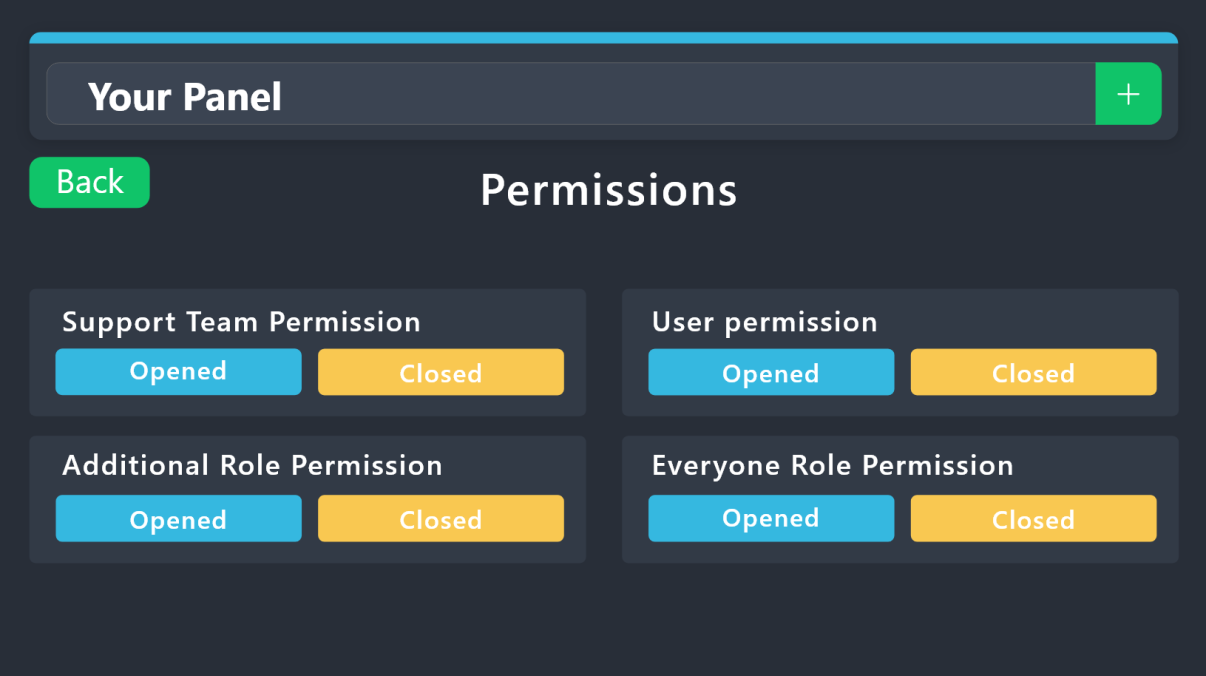
1. Go into your Dashboard
2. Open your Panel Configs tab
3. Select the panel you want to grant access to
4. Open the Permissions options menu
5. Find what role you'd like to edit permissions for
6. Choose if you'd like to edit opened or closed permissions for that role
7. Edit the permissions by tickingeach permission
8. Save changes
 vague cosmos
At the dashboard > panel configs > General you can setup Support Team roles.
flint crown
ty
vague cosmos
 flint crown
yup i did it
vague cosmos
No worries, happy to help. 🙂
flint crown
how do i make it ping the person who is meant to answer the ticket

 lusty locust
Failed: Invalid Form Body components[0].components[0].options[1].emoji.id[BUTTON_COMPONENT_INVALID_EMOJI]: Invalid emoji components[0].components[0].options[2].emoji.id[BUTTON_COMPONENT_INVALID_EMOJI]: Invalid emoji
this is showing up in my channel
Failed to send: Access Denied (Ticket Tool doesn't have permission to view or send into this channel) and on website its showing
vague cosmos
Hey! Can you send me a screenshot of the dashboard, where you editted what you edit what gives the error? 🙂
rustic gale
«Invalid emoji»
This means that you entered into an emoji field something that the bot doesn't recognize as a valid emoji.
Which emoji field? It depends on what's the action that causes the error message to appear. It's usually the Create Ticket button, or a dropdown emoji field if you're using dropdowns
Why doesn't the bot accept it as valid? That depends too. It's possible that
- you wrote text there, instead of an emoji (or in addition to an emoji)
- you entered a custom emoji code incorrectly
- you entered a code for a custom emoji from a server that the bot isn't in
- you're on iPhone and entered an emoji using the phone's emoji pad (use the emoji selector in the website instead)
vague cosmos
Or read what @rustic gale said, thanks mate!
iron nightBOT
Gave +1 Rep to @rustic gale

 rustic gale
Read above
 lunar solar
lusty locust
lunar solar
lusty locust
remove buy-here from the emoji field
and add it to button text
save and try again
lusty locust
 lunar solar
Button Text
lusty locust
 lusty locust
 lunar solar
lusty locust
lunar solar
lusty locust
do me a favour and #🎫│make-a-ticket or #premium-tickets so I can look at your server specifically
 echo tulip
.
echo tulip
vague cosmos
Do you need help?
no sorry i was searching for things
vague cosmos
Alright. 👍🏻
echo tulip


 uncut pecan
Hello, I need help, how to set so that the channel with the created ticket can see only the person with the rank ticket support, I mean that other administrative ranks can not see it.
 stray bobcat
If you grant a role the Administrator access, they will see all channels and tickets, regardless.
echo tulip
echo tulip
why the bot dont mention the role ?

wild spire
echo tulip
<:Salute:885742724626661436>
did u use the correct mention?
because thats only a preview so I suggest testing it in ur server
echo tulip
wild spire
did u use the correct mention?
yes the correct mention
 twilit basin
I want a person to open a maximum of 5 tickets, how do I set it up?
twilit basin
twilit basin
I want a person to open a maximum of 5 tickets, how do I set it up?
@wild spire
wild spire
echo tulip
yes the correct mention
did u test it in ur server?
echo tulip
wild spire
did u test it in ur server?
Wait
wild spire
disable it in command configs
 wild spire
twilit basin
I want a person to open a maximum of 5 tickets, how do I set it up?
wild spire
twilit basin
I want a person to open a maximum of 5 tickets, how do I set it up?
panel configs > limits

 wild spire
echo tulip
wild spire
echo tulip
roles are <@&ID>
echo tulip
ah ok

 shy vigil
How do I make it so TicketTool stops responding to “$vote”?
Is it a prefix thing or?
 echo tulip
pepole can see my ticket how can i fix it ?
wild spire
twilit basin
İm not look
scroll down
wild spire
shy vigil
How do I make it so TicketTool stops responding to “$vote”?
Is it a prefix thing...
i replied to ur question above
humble sequoiaBOT
A Discord Form lets the user answer individual questions in a pop-up Form, which then displays the answers in the ticket message. This can save time if you already know what you want to ask the user.
Setup Forms
Forms can be enabled under Panel Settings > Form Options > Edit Forms Options. In the new pop-up window, you can now enable and edit your own Form.
Form Options
You can add up to 5 questions in the Discord form. This is a Discord limitation. Each question can have a placeholder in the input field, a minimum and maximum input, multi-line, and also the option to have the answer required.
Options
Question Title ➞ Your Question goes here
Question Placeholder ➞ The placeholder text in the input field
Required ➞ If enabled, the user has to answer this question, to submit the form
Multi-Line Input ➞Allows the user to input multiple lines
Minimum and Maximum Input ➞ Set a minimum and maximum input value for the user
Displaying the Answer
To display the answers from the user, you need to enable Auto display form results on the ticket message as an additional embed
In case you don't want a second embed, go into your Panel Configs > Ticket Options > Edit Ticket Message. In there you use the variable {create.form.x} and just replace x with the number of your question. For example, the response to Question 1 can be displayed with {create.form.1}. If you don't use this variable, the response from the user is lost.
wild spire
echo tulip
pepole can see my ticket how can i fix it ?
you mean everyone?
echo tulip
wild spire
you mean everyone?
yep
wild spire
echo tulip
yep
panel configs > permissions > everyone opened. Disable view channel
iron nightBOT
Gave +1 Rep to @wild spire
shy vigil
hmm
 opal coral
wild spire
i replied to ur question above
opal coral
wild spire
i replied to ur question above
There is an explanation video
wild spire
wild spire
disable it in command configs
@shy vigil see attached message
shy vigil
I’m looking at the page now
wild spire
opal coral
There is an explanation video
about forms ?
shy vigil
wild spire
<@211418472226357248> see attached message
thank you
iron nightBOT
Gave +1 Rep to @wild spire
opal coral
wild spire
about forms ?
أعرف كيفية إعداد هذا
 humble sequoiaBOT

فريق الدعم الفني العربي
عميلنا العزيز ان كنت تبحث عن مساعدة يرجى فتح تكت خاص بفريق الدعم الفني العربي
اذهب الى#🎫│make-a-ticket
ثم قم بلضغط على الايموجي الاتي (🇯🇴)
opal coral
wild spire
i unfortunately do not speak arabic
Normally, I'd like you to make a regular English how-to video
wild spire
opal coral
Normally, I'd like you to make a regular English how-to video
sorry im not able to make a full how to video atm
opal coral
I need to have a premiere version to know how to do it first
 quartz hatch
Hello can I add more than 1 server too ticket tool
 pseudo ravine
quartz hatch
Hello can I add more than 1 server too ticket tool
pseudo ravine
quartz hatch
Hello can I add more than 1 server too ticket tool
Hey there. Are you asking if you can add Ticket Tool to more than 1 server?
quartz hatch
Yeah
pseudo ravine
Yes you can
quartz hatch
Do I need more than 1 discord account to do that
pseudo ravine
Nope, you just need the Manage Server permission inside the server
(Or Administrator)
pseudo ravine
The server owner will have to give you the permission on your role
jade topaz
After you vote how do you get it
 hard dirge
When I try to click manage on the dashboard after adding the bot to my server, it just refreshes the page, and doesn’t get me to the manage section. Is this a bug?
rustic gale
hard dirge
When I try to click manage on the dashboard after adding the bot to my server, i...
That probably just means you don't have dashboard permission in that server.
try using the /debug command. There's a “permission level” field in the output there
If it's 0, that's why you can't access the dashboard.
You'd have to tell the server owner to make one of these for you:
humble sequoiaBOT
Any role you put there will have full access to the ticket tool dashboard. The server owner and users with admin permissions already have access to the dashboard.
Be careful of which roles to put here

 fading sundial
 sinful pike
is there any way to close a ticket after a specific time?
humble sequoiaBOT
━━ User's inquiry has been moved to a ticket ━━
vague cosmos
 plucky inlet
Tutorial
plucky inlet
Tutorial
For?
plucky inlet
@vague cosmos what fot?
plucky inlet
@vague cosmos yes
vague cosmos
I'm at work rn
stark runeBOT
1. Invite Ticket Tool to your server
First you will want to invite the bot to your server. Once the bot is in your server, you can manage your server in the dashboard.
2. Create a Panel
To create a panel we are going to need to head over to the panel configs on the dashboard.
Once at the dashboard we will need to click Create Panel.
Enter a panel name (Fill in any optional settings you want).
Click Create Panel and your ready to get started with configuring your panel.
An example of a creating a panel is shown below.
3. Send the Panel to a Channel
Once you've created a panel on the dashboard you will need to send it to a channel using send on the dashboard.
Select the channel you want your panel to be created in and click send.
For other questions checkout $help faq.
An example of a sending a panel is shown below.
Having a Problem Sending the Panel?
Do $debug in a channel with Ticket Tool and make sure it has all the necessary Discord permissions.
vague cosmos
@plucky inlet
 humble sequoiaBOT
The Drop-down menu or Select Menu replaces the buttons on your panel message and uses a drop-down menu with all of your panels. To set this up, go to your Panel Configs and select your main Panel.
<:Numbericons1:1018864164032225340> Enable Select Style
First you enable Select Style. Then you add an item in the Dropdown Editor. Now you can start editing your dropdown!
<:Numbericons2:1018864168041971712> Dropdown Editor
Each line in the dropdown editor represents a line in the drop down menu on discord. You can add more "Items", by clicking on
First you select a panel. That's the panel this option will open a ticket for. DONT select the same panel twice. Each option should have a different Panel
After that, you can put a Display. This is the title of this option and will appear in the drop down menu. The *Description can be set right after that, which will be below the title in grey.
Additionally you can select an emoji, that will be shown in front of each option. You can either manually input the ID of an emoji or select it in the selector.
Common Issues ⚠️
- Panel doesn't send? Make sure you have a valid emoji selected
- Option doesn't show up? Check if two options have the same panel in the DropDown Editor
$dropdown
fading sundial
all 3 accounts were banned before I purchased I want a refund or 8 ball account equal to money spent.
order #420255
Order #420256
order #420020
 drowsy falcon
Hii
Is there a way to recover old ticket transcript?
fading sundial
Bought 3 8 ball accounts I 2-3 days and all 3 were already banned before I even purchase my name is Nathan and order #s are
order #420020
order #420255
order #420256
humble sequoiaBOT
@fading sundial
⚠️ You're in the wrong place
We provide support for Ticket Tool Discord bot and cannot help you with whatever issue you have.
- We don't know which Support Team you should contact to get this issue resolved, and unfortunately we won't be able to accurately tell you.
If you don't have any further questions regarding our bot Ticket Tool, please close this ticket
wild spire
drowsy falcon
Hii
Is there a way to recover old ticket transcript?
Was it deleted from your saving channel? If so, its not recoverable
fading sundial
No I need to know who to speak with about the inactive accounts you sold me
wild spire
fading sundial
No I need to know who to speak with about the inactive accounts you sold me
we dont sell accounts
You’re in the wrong place
 wild spire
 thorny frost
I can’t find categories for tickets
thorny frost
I can’t find categories for tickets
what’s the server ID?
thorny frost
wild spire
what’s the server ID?
I send you my waiter in private
wild spire
thorny frost
I send you my waiter in private
please refrain from DMing staff.
#🎫│make-a-ticket if you dont want to send it here
humble sequoiaBOT
The Drop-down menu or Select Menu replaces the buttons on your panel message and uses a drop-down menu with all of your panels. To set this up, go to your Panel Configs and select your main Panel.
<:Numbericons1:1018864164032225340> Enable Select Style
First you enable Select Style. Then you add an item in the Dropdown Editor. Now you can start editing your dropdown!
<:Numbericons2:1018864168041971712> Dropdown Editor
Each line in the dropdown editor represents a line in the drop down menu on discord. You can add more "Items", by clicking on
First you select a panel. That's the panel this option will open a ticket for. DONT select the same panel twice. Each option should have a different Panel
After that, you can put a Display. This is the title of this option and will appear in the drop down menu. The *Description can be set right after that, which will be below the title in grey.
Additionally you can select an emoji, that will be shown in front of each option. You can either manually input the ID of an emoji or select it in the selector.
Common Issues ⚠️
- Panel doesn't send? Make sure you have a valid emoji selected
- Option doesn't show up? Check if two options have the same panel in the DropDown Editor
$dropdown
humble sequoiaBOT
wild spire
$pc 1092041961336221746
Premium Check
I was unable to detect a premium server for @placid wing.
Found 9 servers in total and 0 with premium and permission
 naive crane
help
Hello can you remove all the configuration I did on ticket tool please basically I want you to re-trade it as when it was before I configure it
pleas
wild spire
naive crane
Hello can you remove all the configuration I did on ticket tool please basically...
Just delete all panels and start over ? 
I’m not sure its possible to reset it
vague cosmos
wild spire
Just delete all panels and start over ? <:thinking:1082754957750571008>
I’m not...
You can't.
naive crane
wild spire
Just delete all panels and start over ? <:thinking:1082754957750571008>
I’m not...
You can give me a tutorial
pleas
stark runeBOT
1. Invite Ticket Tool to your server
First you will want to invite the bot to your server. Once the bot is in your server, you can manage your server in the dashboard.
2. Create a Panel
To create a panel we are going to need to head over to the panel configs on the dashboard.
Once at the dashboard we will need to click Create Panel.
Enter a panel name (Fill in any optional settings you want).
Click Create Panel and your ready to get started with configuring your panel.
An example of a creating a panel is shown below.
3. Send the Panel to a Channel
Once you've created a panel on the dashboard you will need to send it to a channel using send on the dashboard.
Select the channel you want your panel to be created in and click send.
For other questions checkout $help faq.
An example of a sending a panel is shown below.
Having a Problem Sending the Panel?
Do $debug in a channel with Ticket Tool and make sure it has all the necessary Discord permissions.
naive crane
vague cosmos
Start at step 2
I want to reinvisialize my thing
vague cosmos
Delete panels, start creating new ones
naive crane
I want my thing to return as when it is not yet configured
vague cosmos
So delete all panels
naive crane
I can't delete them
vague cosmos
Why not?
naive crane
How to remove them tutorial
vague cosmos
There's none, just choose delete on the dashboard at panel Config
vague cosmos
@naive crane does that work?
 small moss
i lost my kills what me need to do? idk
timber kernel
small moss
i lost my kills what me need to do? idk
You are on the wrong server it seems. We are giving support here for the ticket tool bot.
jade topaz
is there any way to change profile picture on the ticket premium bot?
humble sequoiaBOT
Ticket Tool Custom Avatar
As of now, you are not able to change Ticket Tool's profile picture, nonetheless, our Development Team is working on the release of white labels, this is your own custom bot!
For the time being, you can change the bot's nickname by right-clicking the bot in the user list on your server and clicking Change Nickname
vague cosmos
@jade topaz see above. 🙂
jade topaz
Thanks 🙂
vague cosmos
No worries!
 rustic apex
How do I make it for the bot to add a role into the channel that can type
So when a user creates a ticket, the bot creates the channel and adds a role that can type in there aswell
nevermind found it in panel thx
no i still need help where can i add support team roles
humble sequoiaBOT
1. Go into your Dashboard
2. Open your Panel Configs tab
3. Select the panel you want to grant access to
4. Open the General options menu
5. Select your Support Team Roles
6. Save changes
 wicked heath
 pseudo ravine
Hey there. Does Ticket Tool have access to view that channel?
humble sequoiaBOT
━━ JAPA's inquiry has been moved to a ticket ━━
 modern patrol
why cant i add multiple dropdown options to my panel
humble sequoiaBOT
The Drop-down menu or Select Menu replaces the buttons on your panel message and uses a drop-down menu with all of your panels. To set this up, go to your Panel Configs and select your main Panel.
<:Numbericons1:1018864164032225340> Enable Select Style
First you enable Select Style. Then you add an item in the Dropdown Editor. Now you can start editing your dropdown!
<:Numbericons2:1018864168041971712> Dropdown Editor
Each line in the dropdown editor represents a line in the drop down menu on discord. You can add more "Items", by clicking on
First you select a panel. That's the panel this option will open a ticket for. DONT select the same panel twice. Each option should have a different Panel
After that, you can put a Display. This is the title of this option and will appear in the drop down menu. The *Description can be set right after that, which will be below the title in grey.
Additionally you can select an emoji, that will be shown in front of each option. You can either manually input the ID of an emoji or select it in the selector.
Common Issues ⚠️
- Panel doesn't send? Make sure you have a valid emoji selected
- Option doesn't show up? Check if two options have the same panel in the DropDown Editor
$dropdown
 loud citrus
Hi! I sent a transaction from my MetaMask to my Braavov. The blockchain transaction was completed, and the money was deducted from my MetaMask, but I haven't received it on my Braavoos. 0x2d862c9c894d7d54ca9b8f3bd5d4b06615a97cb27c3f48ffcec6cb1ac281dcb3
It was ARB chain
gilded verge
loud citrus
Hi! I sent a transaction from my MetaMask to my Braavov. The blockchain transact...
Hi, are you sure this is related to Ticket Tool? because i don't see anything
//just to clarify: i don't see anything related to Ticket Tool in your message
loud citrus
Sorry for that, maybe it`s wrong topic
humble sequoiaBOT
⚠️ You're in the wrong place
We provide support for Ticket Tool Discord bot and cannot help you with whatever issue you have.
- We don't know which Support Team you should contact to get this issue resolved, and unfortunately we won't be able to accurately tell you.
If you don't have any further questions regarding our bot Ticket Tool, please close this ticket
 glass musk
Hello, the claim button isn't showing in the tickets opened even tho I made it so it should show.

 vague cosmos
Claiming is premium only.
glass musk
Ohh ok, thank you!
 pure portal
$new
vague cosmos
pure portal
$new
Do you need any help?
 clever vale
Hi, I'm trying to get the overview of my panels to make a multipanel but once I click on "Panel Configs" always shows the last opened panel. Any help?
humble sequoiaBOT
For more convenient use of multipanels, you can now combine panels on the dashboard. This will allow you to directly send the multipanel from the dashboard or via the $panel ID command.
Where can I find this?
You can find this setting on the Dashboard -> Panel Configs -> Panel -> Attached Panels
Note: if you're attaching all the panels to a panel called English, don't include English in the attached panel's box (If you do this, it will create a duplicate)
This will put all buttons from all of your panels on one message. The message is the panel message from the panel you're combining these panels in.
 clever vale
ty 😄
vague cosmos
No worries. 😉
 lost night
im tryna make a ticket with multiple reactions (Bug Reports, Staff Applications, etc) and im not sure how to. can someone explain?
it only lets me make 1 reaction button but i wanna make many
@covert swallow (sorry if im not meant to ping)
oop
just saw a message come up mb
rustic gale
lost night
im tryna make a ticket with multiple reactions (Bug Reports, Staff Applications,...
That's called a multipanel
humble sequoiaBOT
For more convenient use of multipanels, you can now combine panels on the dashboard. This will allow you to directly send the multipanel from the dashboard or via the $panel ID command.
Where can I find this?
You can find this setting on the Dashboard -> Panel Configs -> Panel -> Attached Panels
Note: if you're attaching all the panels to a panel called English, don't include English in the attached panel's box (If you do this, it will create a duplicate)
This will put all buttons from all of your panels on one message. The message is the panel message from the panel you're combining these panels in.
lost night
Thank you @rustic gale and 1 last question, for applications, i saw on another server on ticket tool that they put like a question in a box, set a word limit and type the response in there and it comes out in a black box with thin text. not sure what its called but could you help me do that?
iron nightBOT
Gave +1 Rep to @rustic gale
rustic gale
That's called a creation form
humble sequoiaBOT
A Discord Form lets the user answer individual questions in a pop-up Form, which then displays the answers in the ticket message. This can save time if you already know what you want to ask the user.
Setup Forms
Forms can be enabled under Panel Settings > Form Options > Edit Forms Options. In the new pop-up window, you can now enable and edit your own Form.
Form Options
You can add up to 5 questions in the Discord form. This is a Discord limitation. Each question can have a placeholder in the input field, a minimum and maximum input, multi-line, and also the option to have the answer required.
Options
Question Title ➞ Your Question goes here
Question Placeholder ➞ The placeholder text in the input field
Required ➞ If enabled, the user has to answer this question, to submit the form
Multi-Line Input ➞Allows the user to input multiple lines
Minimum and Maximum Input ➞ Set a minimum and maximum input value for the user
Displaying the Answer
To display the answers from the user, you need to enable Auto display form results on the ticket message as an additional embed
In case you don't want a second embed, go into your Panel Configs > Ticket Options > Edit Ticket Message. In there you use the variable {create.form.x} and just replace x with the number of your question. For example, the response to Question 1 can be displayed with {create.form.1}. If you don't use this variable, the response from the user is lost.
lost night
tysm @rustic gale
rustic gale
Glad to help
 mental plover
needd help
humble sequoiaBOT
Hello, we would love to help you, but if you don't tell us what you need help with we can't help you :(
mental plover
I want to add the bot to my discord, but I don't know
 rain dragon
any one their i need a help
mental plover
@humble sequoia
rain dragon
@humble sequoia
humble sequoiaBOT
Ticket Tool Invite & Support
fleet garden
How do I make a custom command to just say a message when using the command? The custom commands are confusing to me. I'm on mobile is that makes a difference.
 crimson silo
how do I change this text?
 vague cosmos
crimson silo
how do I change this text?
vague cosmos
crimson silo
how do I change this text?
Dashboard > Panel Configs > Messages > Edit Panel Message iirc
@rain dragon see below
humble sequoiaBOT
 crimson silo
vague cosmos
Dashboard > Panel Configs > Messages > Edit Panel Message iirc
crimson silo
vague cosmos
Dashboard > Panel Configs > Messages > Edit Panel Message iirc
when i click on it and type, nothing happens
 crimson silo
vague cosmos
<@1054137932484710603>
crimson silo
vague cosmos
<@1054137932484710603>
yep fixed
 vague cosmos
Awesome!
jade topaz
can you use custom emojis in the embeds?
rustic gale
Yes, of course
You can find an emoji's ID using the /id command
It will be a long string of symbols, similar to this !PabloTiphat
Just copy that and insert it wherever you want to use it in the bot's messages
Note that the bot has to be in the server where the emoji is from. It's safest to upload the emoji to your own server
 twilit flume
can I make it so a ticket is made whenever someone joins
 modest badger
hey i made a multipanel and the person opening the ticket cant send pics so how can i turn on that ?
rustic gale
twilit flume
can I make it so a ticket is made whenever someone joins
Yes, but it's not easy and it will also require another bot for part of the procedure
twilit flume
rustic gale
Yes, but it's not easy and it will also require another bot for part of the proc...
do you know what bot?
rustic gale
Yes, and i can also explain the procedure to you, but like i said, it's not easy
It takes work
twilit flume
how hard would it be on a scale of 1 to 10?
rustic gale
It depends on your familiarity with how Discord works and how bots work
twilit flume
yeah I think I could do that
modest badger
modest badger
hey i made a multipanel and the person opening the ticket cant send pics so how ...
??
rustic gale
modest badger
??
Grant them the Attach Files permission
Either grant the everyone role in your server Attach Files
Or grant the generic member role in your server Attach Files, if you have such a role
Or head to the Permissions tab in your panel's Panel Configs and enable Attach Files on the everyone role's permissions or the ticket owner's permissions
modest badger
rustic gale
Or head to the Permissions tab in your panel's Panel Configs and enable Attach F...
ticket owner permission means the person open the ticket right ?
rustic gale
Correct
iron nightBOT
Gave +1 Rep to @rustic gale
rustic gale
twilit flume
yeah I think I could do that
Here's a summary of what you need to do:
- Invite into your server a bot that can send a custom message whenever a user joins a server, such as <@&815660789414756364> (known here as @iron night)
- Add the bot's ID to the Bot field in Ticket Tool's Server Configs page
- Create a channel just for YAGPDB to send messages and Ticket Tool to read them
- in your panel's Command Style menu, enable command style tickets and select that channel for tracking
- Set up YAGPDB to send this message into that channel when a user joins:
$new {{.User.ID}}
twilit flume
thanks @rustic gale
iron nightBOT
Gave +1 Rep to @rustic gale
 earnest moth
hi, can I include the captcha in the bot to avoid spammers who open just empty tickets?
vague cosmos
As far I know not. Thanks person below to confirm this.
rustic gale
No such thing sadly
vague cosmos
But you should create a blacklist role, add that to the dashboard and give it to the users, so they can't interact with the bot.
humble sequoiaBOT
Any role you assign as a blacklisted role won't be able to use commands or reactions.
Selecting a blacklisted role
Go to your Dashboard ➞ Server Configs. There you will find the option to select blacklisted roles.
Note: Don't forget to save.
 earnest moth
thank you! I'll look up to it. also, I have the same questions from users over and over again - could the bot answer them the same phrases triggered by the certain words? like OG or Zealy
vague cosmos
Would be with custom commands.
But don't ask me how exactly, as I never really looked into those.
earnest moth
vague cosmos
But don't ask me how exactly, as I never really looked into those.
this is sad 😦 thank you anyway! we'll be waiting for an answer from someone who knows
iron nightBOT
Gave +1 Rep to @vague cosmos
vague cosmos
No worries, you can always #🎫│make-a-ticket so the support team can assist with that.
twilit flume
rustic gale
Here's a summary of what you need to do:
- Invite into your server a bot that ca...
I got it working, thanks again!
iron nightBOT
Gave +1 Rep to @rustic gale
rustic gale
earnest moth
thank you! I'll look up to it. also, I have the same questions from users over a...
You can use a custom comand with a regexp trigger
modest badger
is there any setting for deleted tickets log ? so i can check the deleted tickets
humble sequoiaBOT
With Ticket Tool, you can customize the behavior the bot takes when logging your tickets! For editing these options follow these steps:
Dashboard ➞ Panel Configs ➞ Logging Options
Logging Channel
Here you will define which channel @humble sequoia will save the Logs in (ticket created/deleted/closed, etc.)
Logs you can save:
➞ Ticket Created ➞ Logs when a ticket is created
➞ Ticket Closed ➞ Logs when a ticket is closed
➞ Ticket Opened ➞ Logs when a ticket is opened
➞ Ticket Renamed ➞ Logs when a ticket is renamed
➞ Ticket Deleted ➞ Logs when a ticket is deleted
➞ Transcript Saved ➞ Logs when a ticket is saved
Select with  (disable) or (enabled) which logs you would like
Below you can see an example of what the Logging Options will look like:
 vague cosmos
humble sequoia
vague cosmos
humble sequoia
@modest badger that?
 red light
here) I'm sorry i did exploit and i regret from my acts that caused harm to lost of players i would like to requrest another chance please i really like this game and my name roblox:ddddfff1212.
vague cosmos
@red light you're in the wrong place.
humble sequoiaBOT
⚠️ You're in the wrong place
We provide support for Ticket Tool Discord bot and cannot help you with whatever issue you have.
- We don't know which Support Team you should contact to get this issue resolved, and unfortunately we won't be able to accurately tell you.
If you don't have any further questions regarding our bot Ticket Tool, please close this ticket
red light
ok
 fallen rose
.
vague cosmos
@fallen rose do you need any help?
 ember spindle
Can we get it integrated with Slack?
ember spindle
Yeah, when tickets pop up, I was hoping for a notification on slack
vague cosmos
I don't think that is possible.
ember spindle
No problem! Thank you!
 humble sequoiaBOT
Claiming allows you to change the ticket name, category and permissions. To use it you have to enable it first on your Dashboard > Panel Configs > Claiming

 Note: This is a premium feature
vague cosmos
Note: This is a premium feature
vague cosmos
@kindred gazelle - Claiming is a premium only feature ^
 kindred gazelle
This server is present in the normal and existing feature
vague cosmos
If the server owner has premium, you can use claiming, otherwise not.
kindred gazelle
Well, can I buy the premium via credit?
humble sequoiaBOT
PayPal - paypal@tickettool.xyz
BitCoin - 3HhKKAdb9eEvCe2tvzB8bAa8nebHY6qcPA
LiteCoin - MEQX3knLAuotrKnvk3HDNBK5gdRn6PZhHy
Prepay/Direct Payment
To prepay send the payment using your desired method - Available options listed bellow.
⚠️ $18 per 3 months. ⚠️
$66 per year.
(If using the direct payment option, you need to be paying for at-least 3+ months.)
Regular Prices when paying within Discord:
$5.99/per month
Once your payment is sent let us know so we can confirm and get you your key.
- Purchases done with this method are non-refundable.
<:paypal:924596360840372234> Paypal ("Goods and Services" or "Family and Friends")
paypal@tickettool.xyz
<:bitcoin:924638849135689749> BTC - Bitcoin
3HhKKAdb9eEvCe2tvzB8bAa8nebHY6qcPA
<:Litecoin:972176945972383815> LTC - LiteCoin
MEQX3knLAuotrKnvk3HDNBK5gdRn6PZhHy
I sent the payment now what?
After you send the payment, please send a screenshot with proof of payment, our <@&615146349700186112> will verify your payment and will get you setup. For crypto payments, we are waiting for at least ONE verification.
All prices in USD - 3 months min for direct payment
vague cosmos
That are the payment options outside Discord.
kindred gazelle
Is it on Discord?
humble sequoiaBOT
Premium can now be purchased directly through discord! Either in the app directory (server settings) or directly from the bots profile.
<:TTWarning:1034178155872784494> Important Information <:TTWarning:1034178155872784494>
ONLY purchase premium through ONE of the two Ticket Tool Bots. If you purchased premium on the primary bot (White logo) and plan to use the premium bot, don't kick the primary bot!
What's different?
The Monthly price changed from $6.00 to $5.99
Yearly subscriptions are not yet available
Don't kick the bot, otherwise, the subscription will be canceled automatically
You'll need to buy the subscription from a computer or on the Application Directory
You might need to run the /premium command on your server to sync the premium status with your dashboard
A subscription can not be transferred between Servers
vague cosmos
That way you can buy it from "inside Discord".
kindred gazelle
Do you speak Arabic
vague cosmos
No, but Google Translate does and you can always open an Arabic ticket in #🎫│make-a-ticket.
humble sequoiaBOT
فريق الدعم الفني العربي
عميلنا العزيز ان كنت تبحث عن مساعدة يرجى فتح تكت خاص بفريق الدعم الفني العربي
اذهب الى#🎫│make-a-ticket
ثم قم بلضغط على الايموجي الاتي (🇯🇴)
kindred gazelle
 kindred gazelle
الله عربي
 crystal viper
هلا
kindred gazelle
kindred gazelle
كيف اسوي كذا
crystal viper
kindred gazelle
كيف اسوي كذا
ايش؟
vague cosmos
kindred gazelle
انت تريد هذا؟
kindred gazelle
vague cosmos
انت تريد هذا؟
Yes
vague cosmos
$arforms
humble sequoiaBOT
A Discord Form lets the user answer individual questions in a pop-up Form, which then displays the answers in the ticket message. This can save time if you already know what you want to ask the user.
Setup Forms
Forms can be enabled under Panel Settings > Form Options > Edit Forms Options. In the new pop-up window, you can now enable and edit your own Form.
Form Options
You can add up to 5 questions in the Discord form. This is a Discord limitation. Each question can have a placeholder in the input field, a minimum and maximum input, multi-line, and also the option to have the answer required.
Options
Question Title ➞ Your Question goes here
Question Placeholder ➞ The placeholder text in the input field
Required ➞ If enabled, the user has to answer this question, to submit the form
Multi-Line Input ➞Allows the user to input multiple lines
Minimum and Maximum Input ➞ Set a minimum and maximum input value for the user
Displaying the Answer
To display the answers from the user, you need to enable Auto display form results on the ticket message as an additional embed
In case you don't want a second embed, go into your Panel Configs > Ticket Options > Edit Ticket Message. In there you use the variable {create.form.x} and just replace x with the number of your question. For example, the response to Question 1 can be displayed with {create.form.1}. If you don't use this variable, the response from the user is lost.
kindred gazelle
Is it a paid feature?
vague cosmos
No.
crystal viper
bro
vague cosmos
Do you need any help, @crystal viper?
kindred gazelle
vague cosmos
No.
Thx
iron nightBOT
Gave +1 Rep to @vague cosmos
vague cosmos
I can't access that, I assume it's a support ticket. Wait for a support member to assist you or ask your question(s) here and I might be able to assist you here.
crystal viper
bro
vague cosmos
You can ask your question(s) here or wait for a support member in your ticket, just saying "bro" is not going to give you a quicker answer.
Do you need help? If so, ask your question(s) here and I can do an attempt to help.
crystal viper
How do I specify a specific rank that can reply to my tiktok in my private biography?
vague cosmos
We give support for @pseudo glen and @humble sequoia here, not for TikTok.
So could you explain what you exactly mean and eventually include a screenshot?
crystal viper
How do I specify a specific rank that can reply to my a ticket in my private biography?
humble sequoiaBOT
1. Go into your Dashboard
2. Open your Panel Configs tab
3. Select the panel you want to grant access to
4. Open the Permissions options menu
5. Find what role you'd like to edit permissions for
6. Choose if you'd like to edit opened or closed permissions for that role
7. Edit the permissions by ticking
8. Save changes
vague cosmos
This is what you asked... like I said, send a screenshot of what you mean. It might make it easier.
kindred gazelle
vague cosmos
No.
Where is the option to add the feature
 vague cosmos
humble sequoia
vague cosmos
humble sequoia
Read this message, step 4 gives the answer.
Open the Permissions options menu
kindred gazelle
kindred gazelle
Where is the option to add the feature
@vague cosmos
 ashen vessel
Hello all, has anyone encountered the error when opening the transcript html do not load images that were attached to the ticket?
vague cosmos
kindred gazelle
<@143705466734641152>
What feature?
@ashen vessel can you send a screenshot?

 vague cosmos
If the channel is deleted, attachments are gone in a channel. They're saved on Discord servers and gone if the channel is gone I believe.
crystal viper
bro
vague cosmos
crystal viper
bro
What?
 vague cosmos
Dashboard > Panel Configs > Messages > Edit Panel Message > Embed Editor > {panel_name} should show the name as the panel you set.
 junior sequoia
vague cosmos
Dashboard > Panel Configs > Messages > Edit Panel Message > Embed Editor > `{pan...
junior sequoia
vague cosmos
Dashboard > Panel Configs > Messages > Edit Panel Message > Embed Editor > `{pan...

Do I need to pay?
vague cosmos
I believe not for that, but is your panel named Support?
junior sequoia
Yea
vague cosmos
Rename your panel and re-send it, so the message will change.
junior sequoia
vague cosmos
Rename your panel and re-send it, so the message will change.
hmm
Okay I will sure thx 😉 But I want the panel to be named Support though, just not the box lol.
vague cosmos
So, it's fine how it is?
Otherwise, you can try to edit {panel_name} to something, I believe you can do that without premium too.
junior sequoia
vague cosmos
Otherwise, you can try to edit `{panel_name}` to something, I believe you can do...
I can't sir.
vague cosmos
madam* and your right, so changing the panel name is your only optin
vague cosmos
Awesome, can I help with anything else?
junior sequoia
vague cosmos
Awesome, can I help with anything else?
Nope!
 obsidian harness
how do i get the ticketbot to close out a ticket and make it create a log and dissappear from server side channel view?
humble sequoiaBOT
With Ticket Tool, you can customize the behavior the bot takes when logging your tickets! For editing these options follow these steps:
Dashboard ➞ Panel Configs ➞ Logging Options
Logging Channel
Here you will define which channel @humble sequoia will save the Logs in (ticket created/deleted/closed, etc.)
Logs you can save:
➞ Ticket Created ➞ Logs when a ticket is created
➞ Ticket Closed ➞ Logs when a ticket is closed
➞ Ticket Opened ➞ Logs when a ticket is opened
➞ Ticket Renamed ➞ Logs when a ticket is renamed
➞ Ticket Deleted ➞ Logs when a ticket is deleted
➞ Transcript Saved ➞ Logs when a ticket is saved
Select with (disable) or (enabled) which logs you would like
Below you can see an example of what the Logging Options will look like:
vague cosmos
humble sequoia
@obsidian harness this?
obsidian harness
vague cosmos
<@837340216368562226> this?
so you need premium in order to have logs ?
obsidian harness
vague cosmos
Uh, no?
ticket just sits there after being closed out
vague cosmos
Can you send a screenshot?
Also, if you enable logging, it does only work for new tickets, not old ones.
vague cosmos
obsidian harness
ticket just sits there after being closed out
But if you want a ticket to be gone, at all you can delete it, should be a button for.
humble sequoiaBOT
━━ Cohen's inquiry has been moved to a ticket ━━
vague cosmos
That works too.
jade topaz
If Premium costs $5.99 which is £5.82 is there any fees?
vague cosmos
It's the prices Discord takes, but $ and £ are different?
jade topaz
Okay.
 keen sail
Hi
vague cosmos
Hey! Do you need any help, @keen sail?
keen sail
Does anyone here speak Arabic?
vague cosmos
I don't, but I can use Google Translate.

 vague cosmos
نعم ، أنت بحاجة إلى تحديث اللوحة.
keen sail
قمت بتحديث اللوحة لكن لم يتغير شيء
vague cosmos
هل يمكنك إعادة إرسالها؟
 vague cosmos
تحتاج إلى إدخال رابط الرسالة الخاص باللوحة.
keen sail
كيف اخذ الرابط؟
vague cosmos
انقر على النقاط الثلاث في الرسالة واختر نسخ رابط الرسالة.
@keen sail أنا ذاهب للنوم ، إذا احتجت إلى مزيد من المساعدة يمكنك فتح تذكرة باللغة العربية. يرجى ملاحظة أن الردود هناك قد تستغرق وقتًا أطول ، حيث لا يتحدث كل فريق الدعم اللغة العربية.
wild spire
$articket
humble sequoiaBOT
فريق الدعم الفني العربي
عميلنا العزيز ان كنت تبحث عن مساعدة يرجى فتح تكت خاص بفريق الدعم الفني العربي
اذهب الى#🎫│make-a-ticket
ثم قم بلضغط على الايموجي الاتي (🇯🇴)
keen sail
vague cosmos
<@1092129695937605642> أنا ذاهب للنوم ، إذا احتجت إلى مزيد من المساعدة يمكنك فتح...
👍
pseudo ravine
If you made a ticket, you will need to wait until someone is available to help you
jade topaz
Hello,
I don't mean to be offensive but I noticed a mini mistake when trying to upgrade the Ticket Tool Bot.
 pseudo ravine
Hey there. What is the "mini mistake"?
jade topaz
There's a full stop missing.
pseudo ravine
You mean a period? Like this .
pseudo ravine
It's probably supposed to be there, but it's not affecting anything
jade topaz
Oh, okay.
crystal viper
اريد الدعم
humble sequoiaBOT
Hello, we would love to help you, but if you don't tell us what you need help with we can't help you :(
 robust sandalBOT
لديك حاليا تذكرة عربية مفتوحة. يرجى الانتظار حتى يرد شخص ما على تذكرتك أو يشرح مشكلتك بكفاءة. يرجى عدم اختبار اتصال الموظفين في هذه العملية ، فسيؤدي ذلك إلى اتخاذ إجراءات تأديبية ضدك.
 English (en) → Arabic (ar)
 lyric blaze


 humble sequoiaBOT
⚠️ You're in the wrong place
We provide support for Ticket Tool Discord bot and cannot help you with whatever issue you have.
- We don't know which Support Team you should contact to get this issue resolved, and unfortunately we won't be able to accurately tell you.
If you don't have any further questions regarding our bot Ticket Tool, please close this ticket
 gray gust
Hi! So i have one panel for Support Tickets, which my upper staff roles can access. We are trying to change it to allow our lower mod roles to also assist on these tickets. I have added the lower mod roles to the Support Team Roles for our Support Tickets. They can now see and $close the tickets, but are then blocked from messaging further. They also don't have access to the popup that appears for transcripting or deleting. Help? Please ping in replies!
rustic gale
gray gust
Hi! So i have one panel for Support Tickets, which my upper staff roles can acce...
that's not super usual
Probably best to #🎫│make-a-ticket about it. Share your server's ID in there when you do
or the server's name, if you don't know the ID
 spiral plaza
any way to change the 📩 in this without premium?

 flint hemlock
any way to change the color of the embed?
why is something like that is a premium feature
lunar solar
flint hemlock
why is something like that is a premium feature
because it is not required for the functionality of the tool
lunar solar
spiral plaza
any way to change the 📩 in this without premium?
Panel configs --> Panel --> Edit Panel Message (Green Button) --> Embed Editor --> Change to your liking
 pearl osprey
hi does anyone know how to do this
 humble sequoiaBOT
The Drop-down menu or Select Menu replaces the buttons on your panel message and uses a drop-down menu with all of your panels. To set this up, go to your Panel Configs and select your main Panel.
<:Numbericons1:1018864164032225340> Enable Select Style
First you enable Select Style. Then you add an item in the Dropdown Editor. Now you can start editing your dropdown!
<:Numbericons2:1018864168041971712> Dropdown Editor
Each line in the dropdown editor represents a line in the drop down menu on discord. You can add more "Items", by clicking on
First you select a panel. That's the panel this option will open a ticket for. DONT select the same panel twice. Each option should have a different Panel
After that, you can put a Display. This is the title of this option and will appear in the drop down menu. The *Description can be set right after that, which will be below the title in grey.
Additionally you can select an emoji, that will be shown in front of each option. You can either manually input the ID of an emoji or select it in the selector.
Common Issues ⚠️
- Panel doesn't send? Make sure you have a valid emoji selected
- Option doesn't show up? Check if two options have the same panel in the DropDown Editor
$dropdown
vague cosmos
@pearl osprey is the above clear or do you need more help with it? 🙂
pearl osprey
no thx
 dusty pier
how do i make it where only one person can handle that ticket
vague cosmos
@dusty pier you can do that with claiming, but that is a premium feature.
humble sequoiaBOT
Claiming allows you to change the ticket name, category and permissions. To use it you have to enable it first on your Dashboard > Panel Configs > Claiming
Note: This is a premium feature
dusty pier
vague cosmos
<@818688242042798110> you can do that with claiming, but that is a premium featu...
is there a custom command i can make
vague cosmos
For claiming, I don't think so.
dusty pier
bummer
vague cosmos
But premium is worth it to get.
dusty pier
i dont have any server money yet and i dont went to blow my bal on bots
vague cosmos
You can get it by voting, do $vote in #🤖│bot-spam.
dusty pier
#🤖│bot-spam message what is this
vague cosmos
A channel to run bot commands.
dusty pier
how do i vote tho
vague cosmos
Run $vote in #🤖│bot-spam and everything is explained.
There are two links you can vote for, since you need to login with Discord, both votes get automatic linked to your account.
dusty pier
So I can’t make it where I have certain tickets do certain things for different kind of staff
vague cosmos
You can use multipanels, and put them all in different categories.
dusty pier
Ohhh true
vague cosmos
Do you know how to make multipanels?
 last wing
So trying to make it so when i close a ticket it goes to a closed category, but it doesn’t move whenver i close it.
I have the closed category set in the website for the right category
vague cosmos
Hey @last wing, does @pseudo glen have permission to manage channels?
last wing
Yes
vague cosmos
Are there currently 50 channels in the closed category?
last wing
Probably something around that
vague cosmos
That might be the issue, as you can only have 50 channels per category.
last wing
I see alright one sec gonna make a new category
vague cosmos
Alrighties!
vague cosmos
vague cosmos
Do you know how to make multipanels?
@dusty pier
last wing
Yes that worked. thanks
vague cosmos
last wing
Yes that worked. thanks
Amazing, happy to help! Did you have any other questions?
humble sequoiaBOT
For more convenient use of multipanels, you can now combine panels on the dashboard. This will allow you to directly send the multipanel from the dashboard or via the $panel ID command.
Where can I find this?
You can find this setting on the Dashboard -> Panel Configs -> Panel -> Attached Panels
Note: if you're attaching all the panels to a panel called English, don't include English in the attached panel's box (If you do this, it will create a duplicate)
This will put all buttons from all of your panels on one message. The message is the panel message from the panel you're combining these panels in.
vague cosmos
In case youn need a guide for it.
 smoky trail
Hello 🙂 I am wondering if it's possible for the ticket owner to add users to their ticket?
I've set all the "Ticket Owner Permissions" in the panel to the green x, but when I view server as a non-staff role I still can't add users.
vague cosmos
Hey @smoky trail, if you go to the dashboard, command config > Add how are the settings?
 odd star
Can we log who was the Ticket Owner? Like and by whom the ticket was Closed?
humble sequoiaBOT
With Ticket Tool, you can customize the behavior the bot takes when logging your tickets! For editing these options follow these steps:
Dashboard ➞ Panel Configs ➞ Logging Options
Logging Channel
Here you will define which channel @humble sequoia will save the Logs in (ticket created/deleted/closed, etc.)
Logs you can save:
➞ Ticket Created ➞ Logs when a ticket is created
➞ Ticket Closed ➞ Logs when a ticket is closed
➞ Ticket Opened ➞ Logs when a ticket is opened
➞ Ticket Renamed ➞ Logs when a ticket is renamed
➞ Ticket Deleted ➞ Logs when a ticket is deleted
➞ Transcript Saved ➞ Logs when a ticket is saved
Select with (disable) or (enabled) which logs you would like
Below you can see an example of what the Logging Options will look like:
odd star
But that doesn't tell who the ticket owner is tho
vague cosmos
Not 100% sure, should try it. 🙂
smoky trail
vague cosmos
Hey <@202638395116224512>, if you go to the dashboard, command config > Add how ...
Ooohhh 👀
in "AddOptions" both Enabled and Support Team Only are toggled on.
not roles or channels allowed or disabled.
odd star
It doesn't
Logged Info
Ticket: Ticket-0007
Action: Created
Panel Verification
Unless there is a customizing option that Im too dump to see?
vague cosmos
@smoky trail try to disable it.
@odd star are you sure? Cause the embed does seem to show different.
 odd star
Ticker Owner is the person who Created the ticket right?
vague cosmos
Correct.
odd star
Its just showing me tho?
vague cosmos
Did you open a ticket / close it?
vague cosmos
What does it show?
odd star
Could it be a discord side issues?

Because my discord been pretty buggy for the past month
vague cosmos
Seems to be working as how it should be.
vague cosmos
Are you sure you was on the right account?
Because this is in my test server, waiting for him to close it to get a screenshot of that too.
 odd star
I... not sure let me do that again (Im really really sorry if that was the case )
vague cosmos
Hey, don't worry! We all make mistakes and we're here to help.
This is when it's closed, @odd star.
 smoky trail
vague cosmos
<@202638395116224512> try to disable it.
<@1085194938997805139> are you sure? Ca...
smoky trail
vague cosmos
<@202638395116224512> try to disable it.
<@1085194938997805139> are you sure? Ca...
ok so I was kind of an annoying support requester and did several things after disabling the add options didn't work.
TLDR add and remove options are both enabled and staff only, and ticket owner still has all the manage channel perms I could give them.
In discord perms, I gave ticket bot administrator (oop he didn't already have that) annnnd my ticket owners can add members to their ticket now.
Thank you for your help!
iron nightBOT
Gave +1 Rep to @vague cosmos
vague cosmos
No worries, happy to help! Did you have any more questions?
smoky trail
Nope that was the big snag in my elaborate plan so far, thanks!
vague cosmos
Your welcome, have a nice day!
odd star
vague cosmos
Are you sure you was on the right account?
I... Im really sorry. It was just me being dumb I was switching accounts so much I didn't even realized Im on the same account 😖
Thank you soo much for bearing with my stupidity 😫
iron nightBOT
Gave +1 Rep to @vague cosmos
vague cosmos
Hey @odd star like I said, we all make mistakes and I'm happy you resolved it! Can I assist you with anything else?