#🆘│community-support
1 messages · Page 46 of 1
 vague cosmos
vague cosmos
vague cosmos
Did you recently change anything on the channel(s)?
 jade topaz
Not me, let me check the logs maybe one of my staff did that
vague cosmos
Did you also try to re-send the panel?
jade topaz
Bruhhh I checked the logs and it was my crow bot that automatically deleted new channels 💀
Sorry for the wasted time and thank you very much !
thanks @vague cosmos
 iron nightBOT
Gave +1 Rep to @vague cosmos
vague cosmos
No worries, we are here to help. 🙂
 ornate citrus
hi
can someone tell me how the ping staff role pls?
like how can i ping a helper etc
 humble sequoiaBOT
Within all the messages the bot sends (both embeds and text) you can mention either channels, roles, or even users, these mentions will only send a notification to the user if they are used within a text field, e.g: a role mentioned in an embed won't ping at all the users who have that role.
For mentioning a role you can use one out of three options:
{@Role Name} ➞ Which is Case Sensitive.
{RoleID} ➞ Replace RoleId with the Id of the role you are trying to ping.
<@&RoleID> ➞ Discord's native syntax to ping roles.
<#ChannelID> ➞ Mention a channel by its ID.
<@UserID> ➞ Mention a user by its ID.
ornate citrus
thx
 lunar solar
No worries
vague cosmos
I was looking for the command but wasn't able to find it, thanks @lunar solar. ❤️
iron nightBOT
Gave +1 Rep to @lunar solar
lunar solar
vague cosmos
I was looking for the command but wasn't able to find it, thanks <@8928546491729...
$mentions
Np
 scenic plinth
Try to share links with videos if you're asking for support in spread out messages, or only try sharing 1, the bot doesnt like that.
ornate citrus
and how can we create different categorys in one message like help reward and shop
vague cosmos
scenic plinth
Try to share links with videos if you're asking for support in spread out messag...
Can't you put the automod a bit higher in here?
vague cosmos
ornate citrus
and how can we create different categorys in one message like help reward and sh...
You can set a category for each Panel.
scenic plinth
I cant configure it, and it seems it was just multiple of the same link, regardless, should probably not do that.
ornate citrus
no i mean like how can u do this
 vague cosmos
Oh, you mean a dropdown menu.
ornate citrus
yes sry
humble sequoiaBOT
The Drop-down menu or Select Menu replaces the buttons on your panel message and uses a drop-down menu with all of your panels. To set this up, go to your Panel Configs and select your main Panel.
<:Numbericons1:1018864164032225340> Enable Select Style
First you enable Select Style. Then you add an item in the Dropdown Editor. Now you can start editing your dropdown!
<:Numbericons2:1018864168041971712> Dropdown Editor
Each line in the dropdown editor represents a line in the drop down menu on discord. You can add more "Items", by clicking on 

First you select a panel. That's the panel this option will open a ticket for.  DONT select the same panel twice. Each option should have a different Panel
After that, you can put a Display. This is the title of this option and will appear in the drop down menu. The *Description can be set right after that, which will be below the title in grey.
Additionally you can select an emoji, that will be shown in front of each option. You can either manually input the ID of an emoji or select it in the selector.
Common Issues ⚠️
- Panel doesn't send? Make sure you have a valid emoji selected
- Option doesn't show up? Check if two options have the same panel in the DropDown Editor

$dropdown
ornate citrus
thx
vague cosmos
ornate citrus
yes sry
Also don't worry. 🙂
ornate citrus
🙂
ornate citrus
hi i did the 7 day premium trial and i changed the ticket name when it opens. my question is will the name change back to default once the trial is over?
vague cosmos
No.
ornate citrus
so the names will stay same?
vague cosmos
As far I know, yes.
ornate citrus
k thx
vague cosmos
But you can always change the ticket name right?
Things as automation, claiming will be lost when you lose premium.
 fathom sand
How do I change the panel's color? it doesnt change
vague cosmos
fathom sand
How do I change the panel's color? it doesnt change
What do you mean exactly? Which panel?
Do you mean the colour of an embed send by Ticket Tool?
fathom sand
ornate citrus
no i mean like how can u do this
like this pic, the green color
vague cosmos
Oh gotcha, that is a premium only option.
fathom sand
Yes but where is it
vague cosmos
Dash > Panel Configs > Messages > Edit Panel Message
fathom sand
Alright ty!
 dense prawn
vague cosmos
Dash > Panel Configs > Messages > Edit Panel Message
dense prawn
vague cosmos
Dash > Panel Configs > Messages > Edit Panel Message
thanks bro, i honestly was wondering how to do that
iron nightBOT
Gave +1 Rep to @vague cosmos
vague cosmos
No worries, happy to help! ❤️
dense prawn
vague cosmos
No worries, happy to help! ❤️
is premium needed?
vague cosmos
Not for the messages, but to edit the embed yes.
 ,
,  or
or  at the dashboard means it's a premium only feature.
 gilded verge
vague cosmos
<:premium_blue:880957870236127253>, <:premium_red:662032717906444329> or <:premi...
gilded verge
vague cosmos
<:premium_blue:880957870236127253>, <:premium_red:662032717906444329> or <:premi...
it depends 🤔
- server has premium so you can use
- server requires premium
- you can use it without premium but there is limit
vague cosmos
gilded verge
it depends 🤔
<:premium_blue:880957870236127253> - server has premium so you ca...
Same but more clear😂🙈
gilded verge
hi, bot is online on your server?
 potent thorn
Bro
Can someone help me so I’m the description of the ticket message I want to @ the staff role to answer the ticket I do the role id thing no ping and it is the role id name like numbers not like (STAFF TEAM)
humble sequoiaBOT
Within all the messages the bot sends (both embeds and text) you can mention either channels, roles, or even users, these mentions will only send a notification to the user if they are used within a text field, e.g: a role mentioned in an embed won't ping at all the users who have that role.
For mentioning a role you can use one out of three options:
{@Role Name} ➞ Which is Case Sensitive.
{RoleID} ➞ Replace RoleId with the Id of the role you are trying to ping.
<@&RoleID> ➞ Discord's native syntax to ping roles.
<#ChannelID> ➞ Mention a channel by its ID.
<@UserID> ➞ Mention a user by its ID.
gilded verge
humble sequoia
and make sure you used correct format
looks like bot don't have permissions so he can't send panel 🤔
 gilded verge
humble sequoia
gilded verge
humble sequoia
ekhm, check again  message
gilded verge
you used <@> instead of <@&> 😐
 rich lake
Hello, can´t seem to use the bot on my Discord, and I just purchased premium.
potent thorn
 rich lake
Hello, can´t seem to use the bot on my Discord, and I just purchased premium.
rich lake
rich lake
Hello, can´t seem to use the bot on my Discord, and I just purchased premium.
Help?
 potent thorn
@rich lake I’m not support but try use the dashboard on there website
rich lake
potent thorn
<@435119423012077608> I’m not support but try use the dashboard on there website
How so?
potent thorn
Just search ticket tool and then it will come up with like invite the bot and dashboard
gilded verge
potent thorn
check again if this name is correct but if is, then try with role id
rich lake
Thats not right, it should work on discord too. I must be doing something wrong.
potent thorn
Maybe it doesn’t have commands
rich lake
I don't think so...
potent thorn
@gilded verge it comes up with the role but my staff are not getting pinged
 gilded verge
if bot can't ping then, then he don't have permission to mention all roles
can you run /debug on your server? and send link from bot's message 🤔
gilded verge
i sent answer before
potent thorn
It doesn’t work bro!!!!
gilded verge
you gave this permission for bot to ping all roles and used role id?
gilded verge
don't ping, it's not necessary * 🙂
jade topaz
i just bought premium but it dont work on the dashboard
 timber kernel
jade topaz
i just bought premium but it dont work on the dashboard
timber kernel
jade topaz
i just bought premium but it dont work on the dashboard
It does not show in the dashboard?
Press the Sync button please.
timber kernel
jade topaz
thx
np
jade topaz
thanks @timber kernel
iron nightBOT
Gave +1 Rep to @timber kernel
rich lake
How can I update the Panel mensage?
This one

I changed at the Web site but it didn't update.
timber kernel
rich lake
I changed at the Web site but it didn't update.
You need to send the panel again or use the update button via the dashboard.
For the update button copy the message id of the current panel to update it like this.
rich lake
Tried that, did not work.
timber kernel
rich lake
Tried that, did not work.
For update: Don't use Discord canary or ptb links, they will not work.
You also tried to send it again?
rich lake
I pasted the link, and it says that there is no massage to be updated
How to send it again?
timber kernel
Send button:
 rich lake
thanks @timber kernel
iron nightBOT
Gave +1 Rep to @timber kernel
 patent sage
I have a problem that I can't solve at all all members of my server don't have permission to open a ticket what do I do?
 timber kernel
patent sage
I have a problem that I can't solve at all all members of my server don't have p...
timber kernel
patent sage
I have a problem that I can't solve at all all members of my server don't have p...
Have you configured something here?
Like only allow support team or Disabled the member role ?

 timber kernel
patent sage
Do I need to add anything?
timber kernel
patent sage
Do I need to add anything?
Can you please run
/debug
in the channel on your server with that panel. I wanna check something.
timber kernel
patent sage
Am I supposed to use the /debug command?
Yes please.
patent sage
used
timber kernel
patent sage
used
Thank you.
I found the problem.
You blacklisted the everyone role globally:
 iron nightBOT
Gave +1 Rep to @patent sage
patent sage
Have you fixed it yet?
timber kernel
patent sage
Have you fixed it yet?
I only have read access, you need to fix it on your own please 🙂
timber kernel
patent sage
Sorry I'm very stupid about tickets
Don't worry, we are here to help.
patent sage
Where is this blacklist located?
timber kernel
patent sage
Where is this blacklist located?
Server Configs
patent sage
Ok
timber kernel
In the General Options part
iron nightBOT
Gave +1 Rep to @timber kernel
 timber kernel
patent sage
I just solved
timber kernel
patent sage
I just solved
You are welcome 
jade topaz
can i put a ticket button on a webhook i made?
 pseudo ravine
Hey there, unfortunately you cannot do that I believe. Ticket Tool has to send the panel message
jade topaz
damn alr
pseudo ravine
Sorry
 mystic lake
 rotund flame
I had a ticket opened for 2 hours and no one answered
rotund flame
I had a ticket opened for 2 hours and no one answered
wait like others u get free help
 brisk stump
 drifting sleet
is there a way to check staff statistics?
drifting sleet
is there a way to check staff statistics?
no
vague cosmos
rotund flame
I had a ticket opened for 2 hours and no one answered
You need to be patient or ask your question here.
 grizzled cradle
why is it that when i try to manage my server and i click "manage" on the dashboard page it says "Please select a server you have access to manage to be redirected
"
ive got the 2nd highest role aswell
humble sequoiaBOT
Don't see your server in the dashboard?
You will possibly need to relog. Look below to see the steps on how to relog.
How to relog in the Dashboard.
Note:
You need one of these 3 things to access the dashboard.
1. Server Owner (Level: 6)
2. Server Administrator (Level: 4)
3. Dashboard Role (Level: 2)
:warning: You can check your level using the </permissionlevel:1029797400174399542> command on your Discord Server
User permission level with Ticket Tool
@User is permission level: 0 (User)
```» *If it shows that your permission is **0**, you don't have any of the above **3 things** to manage the dashboard.*
**See the Image below on how to relog:** gilded verge
humble sequoia
gilded verge
humble sequoia
@grizzled cradle, please read all of
grizzled cradle
i see the server in the dashboard but when i click manage it says Please select a server you have access to manage to be redirected
gilded verge
could you please run /debug on your server? 🤔
gilded verge
humble sequoia
yep as i thought, you don't have permissions, so again, please read all of
grizzled cradle
gilded verge
yep as i thought, you don't have permissions, so again, please read all of <:thi...
how can i fix that?
do i need the owner to give me certain permissions?
gilded verge
you need Administrator permission or ask your admins to add your role to Dashboard Roles (in dashboard in Server Configs) so then you can manage
humble sequoiaBOT
Any role you put there will have full access to the ticket tool dashboard. The server owner and users with admin permissions already have access to the dashboard.
Be careful of which roles to put here
 grizzled cradle
gilded verge
you need `Administrator` permission or ask your admins to add your role to `Dash...
grizzled cradle
gilded verge
you need `Administrator` permission or ask your admins to add your role to `Dash...
ah alr, i have all perms but administartor alr
gilded verge
as in Note mentioned:
1. Server Owner (Level: 6)
2. Server Administrator (Level: 4)
3. Dashboard Role (Level: 2)``` steady kayak
Hi
Please I can't login on my MT5 account the server kept saying authorization failed
Kindly help
humble sequoiaBOT

⚠️ You're in the wrong place
We provide support for Ticket Tool Discord bot and cannot help you with whatever issue you have.
- We don't know which Support Team you should contact to get this issue resolved, and unfortunately we won't be able to accurately tell you.
If you don't have any further questions regarding our bot Ticket Tool, please close this ticket
 velvet cave
vague cosmos
velvet cave
-
velvet cave
vague cosmos
velvet cave
-
Hi, do you need any help?
steady kayak
Please I'm lost here,can someone help me I can't login my 5k evaluation account on my MT5 kept saying authorization failed likewise have tried MT4 too.
vague cosmos
humble sequoia
@steady kayak see this message.
We give support for @pseudo glen and @humble sequoia. We are NOT able to help you with your issue and we do NOT know where you can get help.
 rotund dune
Hi, I have a problem, I paid via discord, but it seems that I don't have access to premium features. do you think you can help me?
 vague cosmos
You should have premium as it's linked, what happens if you want to enable a premium only feature, such as claiming?
steady kayak
@Ticket Tool white is not replied my message
vague cosmos
steady kayak
@Ticket Tool white is not replied my message
I gave you an answer about your issue, again we can not help you.
velvet cave
vague cosmos
Hi, do you need any help?
yeah i didnt understand this server
vague cosmos
velvet cave
yeah i didnt understand this server
We give support for @pseudo glen (and @humble sequoia if you have the premium bot). For a general conservation you can go to #💬│general-chat. 
velvet cave
vague cosmos
We give support for <@557628352828014614> (and <@722196398635745312> if you have...
oh ty
iron nightBOT
Gave +1 Rep to @vague cosmos
rotund dune
vague cosmos
You should have premium as it's linked, what happens if you want to enable a pre...
Is good!
But, where can I modify the bot ticket tool? Change your bio, profile picture etc?
vague cosmos
You can't (yet).
rotund dune
oh... okay
vague cosmos
It might become a thing in the future, but that will cost extra.
rotund dune
ok, Is there a language system? Can I put the bot in French? And the website?
vague cosmos
Website no, but you are able to edit message content so you can make the context French.
rotund dune
Ok, thx 🙂
vague cosmos
No worries, happy to help.
 prime pewter
how do i make my ticket tool have a drop down section where you can react to a certain emoji ?
humble sequoiaBOT
The Drop-down menu or Select Menu replaces the buttons on your panel message and uses a drop-down menu with all of your panels. To set this up, go to your Panel Configs and select your main Panel.
<:Numbericons1:1018864164032225340> Enable Select Style
First you enable Select Style. Then you add an item in the Dropdown Editor. Now you can start editing your dropdown!
<:Numbericons2:1018864168041971712> Dropdown Editor
Each line in the dropdown editor represents a line in the drop down menu on discord. You can add more "Items", by clicking on
First you select a panel. That's the panel this option will open a ticket for. DONT select the same panel twice. Each option should have a different Panel
After that, you can put a Display. This is the title of this option and will appear in the drop down menu. The *Description can be set right after that, which will be below the title in grey.
Additionally you can select an emoji, that will be shown in front of each option. You can either manually input the ID of an emoji or select it in the selector.
Common Issues ⚠️
- Panel doesn't send? Make sure you have a valid emoji selected
- Option doesn't show up? Check if two options have the same panel in the DropDown Editor
$dropdown
vague cosmos
@prime pewter see above.
vague cosmos
No.
prime pewter
whats this do ? @vague cosmos
 vague cosmos
Can you send me a full screenshot of where you are? Also no need to ping.
prime pewter
 prime pewter
vague cosmos
Can you send me a full screenshot of where you are? Also no need to ping.
prime pewter
vague cosmos
Can you send me a full screenshot of where you are? Also no need to ping.
sorry.
vague cosmos
It's used for dropdown options, which you can add by using the "Add item" iirc.
prime pewter
What does it do?
vague cosmos
It allows you to create multipe dropdown options.
prime pewter
when i add another it doesnt give me the option to pick the main one again, how do i fix this ?
humble sequoiaBOT
For more convenient use of multipanels, you can now combine panels on the dashboard. This will allow you to directly send the multipanel from the dashboard or via the $panel ID command.
Where can I find this?
You can find this setting on the Dashboard -> Panel Configs -> Panel -> Attached Panels
Note: if you're attaching all the panels to a panel called English, don't include English in the attached panel's box (If you do this, it will create a duplicate)
This will put all buttons from all of your panels on one message. The message is the panel message from the panel you're combining these panels in.
 vague cosmos
I've tested it myself and I was able to create a dropdown without issues.

 prime pewter
how do i make this go into my server now ? i clicked sync.
vague cosmos
You'll need to send the panel.
If you're at Panel Configs you select the panel you want to send, click on Send and choose a channel. Then you can send it.
@prime pewter is it working for you? 🙂
prime pewter
yes thanks
 final magnet
Hi, I am using tickettool and today updated the open ticket message but for some reason keep getting 2 buttons

But I only have 1 single panel setup, is there another setting that could be causing this
vague cosmos
Hey there @final magnet, are you sure you did not select multiple panels?
Dashboad > Panel Configs > Panel
 vague cosmos
Can you remove it and send the panel again? 🙂
final magnet
All sorted, I thought you had to include the solo panel in the attached panels bit, removed it and all is well.
Sorry about that and thanks 🙂
vague cosmos
No worries, we are here to help. The following migh help you, about using multiple panels.
humble sequoiaBOT
For more convenient use of multipanels, you can now combine panels on the dashboard. This will allow you to directly send the multipanel from the dashboard or via the $panel ID command.
Where can I find this?
You can find this setting on the Dashboard -> Panel Configs -> Panel -> Attached Panels
Note: if you're attaching all the panels to a panel called English, don't include English in the attached panel's box (If you do this, it will create a duplicate)
This will put all buttons from all of your panels on one message. The message is the panel message from the panel you're combining these panels in.
final magnet
Thanks a lot much appreciated 🙂
vague cosmos
No problem and if you need any other help with the bot, we are here for you.
final magnet
Oh one other thing, can I give a moderator in my discord access to the tickettool webpanel?
vague cosmos
Yes, if you are at the dashboard, go to Server Configs and add your Moderator role to Dashboard Roles.
Please note that someone who has dashboard access can change everything on te dashboard.
final magnet
Brilliant thanks a lot
vague cosmos
No worries.
 gaunt pond
hello everyone, seeking for some help, can someone tell me where I can find the option to block certain users from accessing tickets that are already created?
vague cosmos
Hey, you should work with Discord permissions then, because as far I know you settings you change in the dashboard will not work for active tickets.
gaunt pond
ok, no problem, I just need to change newly created tickets
in short, I need to block a bot from accessing tickets
 vale echo
Hello, i want to adjust the ticket channel names depending on what sort of panel is that ticket assigened for
 humble sequoiaBOT
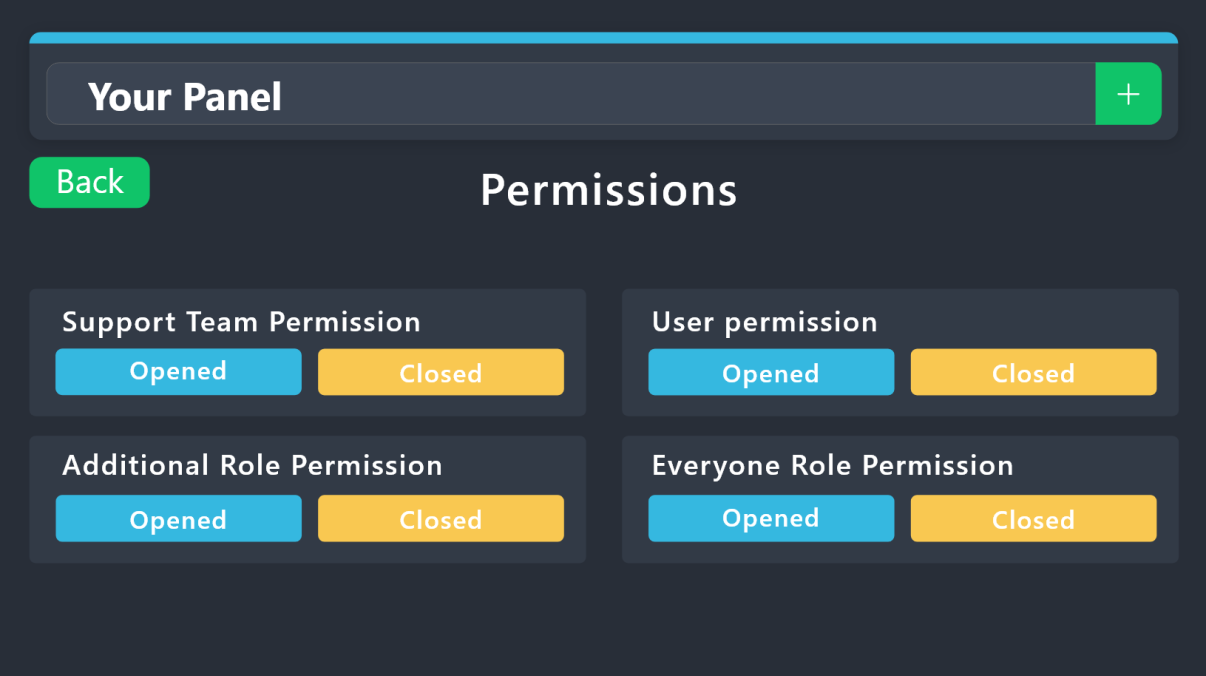
1. Go into your Dashboard
2. Open your Panel Configs tab
3. Select the panel you want to grant access to
4. Open the Permissions options menu
5. Find what role you'd like to edit permissions for
6. Choose if you'd like to edit opened or closed permissions for that role
7. Edit the permissions by tickingor unticking
each permission
8. Save changes
 vale echo
humble sequoia
vale echo
humble sequoia
that is not what i asked for..
vague cosmos
@gaunt pond see above.
@vale echo Dashboard > Panel Configs > Ticket > Select the right panel and you can change the name there.
gaunt pond
humble sequoia
I am now trying that, thanks for the help
iron nightBOT
Gave +1 Rep to @humble sequoia
vague cosmos
vale echo
that is not what i asked for..
I know, but someone else was. 😉
vale echo
vague cosmos
I know, but someone else was. 😉
mb didn't notice
vague cosmos
No worries, does my solution for your issue help?
vale echo
vague cosmos
No worries, does my solution for your issue help?
yea, thanks
iron nightBOT
Gave +1 Rep to @vague cosmos
vague cosmos
No worries, happy to help.
final magnet
thanks @vague cosmos, hmm that dont work. trying to give you the thanks rep thingy
iron nightBOT
Gave +1 Rep to @vague cosmos
vague cosmos
What doesn't work? Giving me a reputation, as that works fine or something with the bot?
final magnet
Rep, prolly done it wrong
vague cosmos
iron night
Gave +1 Rep to **<@143705466734641152>**
It worked. 😉
 steep steppe
Hey, is it possible to change it so people can open more than 1 ticket at a time??
We use it to report bugs on our server and some people want to report more than 1
pseudo ravine
Hey, you can increase the limit of open tickets by going to the Dashboard > Panel Configs > Advanced Settings > Limits > Open tickets each user
steep steppe
pseudo ravine
Hey, you can increase the limit of open tickets by going to the Dashboard > Pane...
appreciate you!
pseudo ravine
You're welcome, glad I could help. If you have any other questions/issues, don't hesitate to reach out again
steep steppe
Worked thank you! I didn’t look through advanced before 🤦🏻♂️
pseudo ravine
No worries!
 bleak lodge
If i enable drop down style still doesnt show only button.
humble sequoiaBOT
The Drop-down menu or Select Menu replaces the buttons on your panel message and uses a drop-down menu with all of your panels. To set this up, go to your Panel Configs and select your main Panel.
<:Numbericons1:1018864164032225340> Enable Select Style
First you enable Select Style. Then you add an item in the Dropdown Editor. Now you can start editing your dropdown!
<:Numbericons2:1018864168041971712> Dropdown Editor
Each line in the dropdown editor represents a line in the drop down menu on discord. You can add more "Items", by clicking on
First you select a panel. That's the panel this option will open a ticket for. DONT select the same panel twice. Each option should have a different Panel
After that, you can put a Display. This is the title of this option and will appear in the drop down menu. The *Description can be set right after that, which will be below the title in grey.
Additionally you can select an emoji, that will be shown in front of each option. You can either manually input the ID of an emoji or select it in the selector.
Common Issues ⚠️
- Panel doesn't send? Make sure you have a valid emoji selected
- Option doesn't show up? Check if two options have the same panel in the DropDown Editor
$dropdown
vague cosmos
That is how you make a dropdown, @bleak lodge. Can you send a screenshot of what your issue is?
bleak lodge
Thanks @vague cosmos ! already solved the issue with a simple mistake forgot to toggle the enable button 😆 .
vague cosmos
No worries, happens to the best.
 outer socket
Is Premium Bot down? Stopped working in my server
vague cosmos
outer socket
Is Premium Bot down? Stopped working in my server
See #premium-support, they are working on it.
humble sequoiaBOT
User's issue has been solved in another channel.
vague cosmos
@jade topaz does the below help?
humble sequoiaBOT
For more convenient use of multipanels, you can now combine panels on the dashboard. This will allow you to directly send the multipanel from the dashboard or via the $panel ID command.
Where can I find this?
You can find this setting on the Dashboard -> Panel Configs -> Panel -> Attached Panels
Note: if you're attaching all the panels to a panel called English, don't include English in the attached panel's box (If you do this, it will create a duplicate)
This will put all buttons from all of your panels on one message. The message is the panel message from the panel you're combining these panels in.
 uncut cairn
Hello
vague cosmos
uncut cairn
Hello
Hey! How can I help?
humble sequoiaBOT

Premium can now be purchased directly through discord! Either in the app directory (server settings) or directly from the bots profile.
<:TTWarning:1034178155872784494> Important Information <:TTWarning:1034178155872784494>
ONLY purchase premium through ONE of the two Ticket Tool Bots. If you purchased premium on the primary bot (White logo) and plan to use the premium bot, don't kick the primary bot!
What's different?
 The Monthly price changed from
 $6.00 to $5.99

 Yearly subscriptions are not yet available
Don't kick the bot, otherwise, the subscription will be canceled automatically
You'll need to buy the subscription from a computer or on the Application Directory
You might need to run the /premium command on your server to sync the premium status with your dashboard
 A subscription can not be transferred between Servers

 wanton zephyr
How do I make it to where the ticket creator can't close the ticket? I only want mods to be able to close it.
uncut cairn
vague cosmos
Hey! How can I help?
How to buy and see ticket tool premium?
vague cosmos
See above, this will help you. 🙂
uncut cairn
Thank you So much  @vague cosmos
iron nightBOT
Gave +1 Rep to @vague cosmos
uncut cairn
+1 rep @vague cosmos
vague cosmos
wanton zephyr
How do I make it to where the ticket creator can't close the ticket? I only want...
Dash > Panel Configs > Buttons > Edit the close button > Make sure this is on.
 uncut cairn
+1 @vague cosmos
wanton zephyr
vague cosmos
Dash > Panel Configs > Buttons > Edit the close button > Make sure this is on.
Oh it already is on, so that means members can't close their own ticket?
vague cosmos
@uncut cairn do you need any other help? Otherwise I prefer if you don't ping me for no reason.
vague cosmos
wanton zephyr
Oh it already is on, so that means members can't close their own ticket?
If I am correct, yes.
wanton zephyr
vague cosmos
If I am correct, yes.
Alright thank you very much!
iron nightBOT
Gave +1 Rep to @vague cosmos
uncut cairn
vague cosmos
<@771780018165776445> do you need any other help? Otherwise I prefer if you don'...
I was trying to give you rep
vague cosmos
uncut cairn
I was trying to give you rep
You already did, also no worries @wanton zephyr!
uncut cairn
vague cosmos
You already did, also no worries <@896826851807342632>!
Have a good day
 tidal sleet
How do you change the name of the bot?
vague cosmos
RIght click on it, change username?
tidal sleet
vague cosmos
RIght click on it, change username?
I cant xD
vague cosmos
Then you don't have permissions to manage nicknames.
tidal sleet
vague cosmos
Then you don't have permissions to manage nicknames.
I already got the premium ticket, but I don't know how to do it with the normal ticket.
vague cosmos
You mean for tickets, to change the channel name?
Dash > Panel Configs > Ticket
@tidal sleet you might need to select the right panel.
 vague cosmos
😕 - Is the free bot above your highest role?
tidal sleet
Yeah
tidal sleet
vague cosmos
😕 - Is the free bot above your highest role?
Is the firts role xD
vague cosmos
Does the bot have any role that is above your highest role?
If so, you can not manage the nickname and need to ask someone with permission who can.
tidal sleet
vague cosmos
Does the bot have _any_ role that is above _your_ highest role?
If so, you can ...
Nop, check:
 vague cosmos
Yes it is, the role is locked (see the 🔒 befoe it), it means you can not manage the user.
tidal sleet
vague cosmos
Yes it is, the role is locked (see the 🔒 befoe it), it means you can not manage...
Thanks 😄
iron nightBOT
Gave +1 Rep to @vague cosmos
vague cosmos
No problem.
jade topaz
vague cosmos
<@456226577798135808> does the below help?
Yes Thank you so much
iron nightBOT
Gave +1 Rep to @vague cosmos
 ocean violet
Why are my panels and descriptions limited to 250 characters? I see massive walls of texts in other panels
vague cosmos
ocean violet
Why are my panels and descriptions limited to 250 characters? I see massive wall...
Because that is the Discord limit?
ocean violet
vague cosmos
Because that is the Discord limit?
oh. Are Drop-down responses able to be longer?
vague cosmos
I think they have the same limit.
ocean violet
vague cosmos
I think they have the same limit.
As an example, if you look at #📌│automated-support and click troubleshooting > my server isn't listed, you'll get an ~800 character instruction
vague cosmos
Yes, but that is a different bot.
ocean violet
So, ticket tool can't write detailed instructions inside of a ticket automatically?
Maybe that's the question I wanted to ask 😆

 ocean violet
vague cosmos
Hmm, looks like it is.
ocean violet
vague cosmos
Hmm, looks like it is.
darn you, capitalism.  Thanks
iron nightBOT
Gave +1 Rep to @vague cosmos
vague cosmos
No worries, never checked that as I have premium. 😛
ocean violet
vague cosmos
No worries, never checked that as I have premium. 😛
I've only been at this for a few days, but it seems like premium might be worth it 👀
vague cosmos
It is, since you can do a lot more with it.
humble sequoiaBOT
 Faster Premium Bot
Automatic Transcripts
Full Customization
Direct Messages
Ticket Automation
Thread Style Ticketing
Premium Support
Scheduled Panel Availability
Integrations
You can purchase premium here:
Price
$6 - Monthly
$66 - Yearly
 Premium
gilded verge
Premium
gilded verge
 karmic bison
<@768144576946110475>
karmic bison
<@768144576946110475>
hi, please don't ping staff as rule 4 on #📂│information 🙂
just send your question if you need help

 fallow ingot
That isn’t ticket tool.
gilded verge
karmic bison
<@334671104704774154>
stop pinging please 🙂
karmic bison
fallow ingot
That isn’t ticket tool.
i know
fallow ingot
That’s another bot. You could create something very similar using ticket tool but you’d need premium for most features.
karmic bison
i need a premium cod
fallow ingot
Premium codes are giving for direct payments. You can purchase premium through Discord, the app discovery.
karmic bison
payments with credits ?
fallow ingot
What do you mean?
karmic bison
i can buy one with credit ?
fallow ingot
What is one credit?
karmic bison
Can I buy the premium version code for credit?
fallow ingot
Alternatively you can also get free premium by voting for ticket tool every 12 hours. You need at least 6 votes to redeem the premium.
fallow ingot
karmic bison
Can I buy the premium version code for credit?
I understand what you want to do, but what is credit? I’m confused.
karmic bison
It is fake coin from Pro Bot
It is very famous and used for trade and many other things
@fallow ingot
fallow ingot
karmic bison
It is very famous and used for trade and many other things
No sorry you cannot buy premium with credit.
We have plenty of guides to help you navigate through the ticket tool dashboard. Our website is compatible with mobile devices and works pretty well, basically the same as computer but smaller.
Here’s the setup guide:
 stark runeBOT
1. Invite Ticket Tool to your server
First you will want to invite the bot to your server. Once the bot is in your server, you can manage your server in the dashboard.

2. Create a Panel
To create a panel we are going to need to head over to the panel configs on the dashboard.
Once at the dashboard we will need to click Create Panel.
Enter a panel name (Fill in any optional settings you want).
Click Create Panel and your ready to get started with configuring your panel.
An example of a creating a panel is shown below.

3. Send the Panel to a Channel
Once you've created a panel on the dashboard you will need to send it to a channel using send on the dashboard.
Select the channel you want your panel to be created in and click send.
For other questions checkout $help faq.
An example of a sending a panel is shown below.
Having a Problem Sending the Panel?
Do $debug in a channel with Ticket Tool and make sure it has all the necessary Discord permissions.

 buoyant monolith
How do I do this? Was in my friends server and would like to put it into my server as well.
 humble sequoiaBOT
The Drop-down menu or Select Menu replaces the buttons on your panel message and uses a drop-down menu with all of your panels. To set this up, go to your Panel Configs and select your main Panel.
<:Numbericons1:1018864164032225340> Enable Select Style
First you enable Select Style. Then you add an item in the Dropdown Editor. Now you can start editing your dropdown!
<:Numbericons2:1018864168041971712> Dropdown Editor
Each line in the dropdown editor represents a line in the drop down menu on discord. You can add more "Items", by clicking on
First you select a panel. That's the panel this option will open a ticket for. DONT select the same panel twice. Each option should have a different Panel
After that, you can put a Display. This is the title of this option and will appear in the drop down menu. The *Description can be set right after that, which will be below the title in grey.
Additionally you can select an emoji, that will be shown in front of each option. You can either manually input the ID of an emoji or select it in the selector.
Common Issues ⚠️
- Panel doesn't send? Make sure you have a valid emoji selected
- Option doesn't show up? Check if two options have the same panel in the DropDown Editor
$dropdown
fallow ingot
buoyant monolith
Thank you!
jade topaz
Someone knows how to create multiple panel buttoms on the same ticket channel?
pseudo ravine
jade topaz
Someone knows how to create multiple panel buttoms on the same ticket channel?
Hey there, thanks for reaching out. I would recommend to read this message below
iron nightBOT
Gave +1 Rep to @sleek barn
humble sequoiaBOT
For more convenient use of multipanels, you can now combine panels on the dashboard. This will allow you to directly send the multipanel from the dashboard or via the $panel ID command.
Where can I find this?
You can find this setting on the Dashboard -> Panel Configs -> Panel -> Attached Panels
Note: if you're attaching all the panels to a panel called English, don't include English in the attached panel's box (If you do this, it will create a duplicate)
This will put all buttons from all of your panels on one message. The message is the panel message from the panel you're combining these panels in.
buoyant monolith
Why does it only show one panel and not the rest?

I have more panels that it should show.

But it only shows General Support one.
gilded verge
buoyant monolith
I have more panels that it should show.
because you forgot to select other panels here
 modern nimbus
hii!! im new to this bot and i just recently made a pannel, but its not working when i press "create a ticket"
 spark marten
May I ask how could I know the renew date for my sub?
buoyant monolith
gilded verge
because you forgot to select other panels here
When I click it, nothing shows up.
gilded verge
show list of your all panels
example:
 gilded verge
modern nimbus
hii!! im new to this bot and i just recently made a pannel, but its not working ...
gilded verge
modern nimbus
hii!! im new to this bot and i just recently made a pannel, but its not working ...
hi, do you have any errors?
gilded verge
spark marten
May I ask how could I know the renew date for my sub?
if you bought via discord, it'll renew automatically
spark marten
gilded verge
if you bought via discord, it'll renew automatically
How could I know the renew date?
Thank you.
buoyant monolith
gilded verge
show list of your all panels
example:
 gilded verge
spark marten
How could I know the renew date?
gilded verge
spark marten
How could I know the renew date?
User Settings->Subscriptions->there :3
spark marten
gilded verge
User Settings->Subscriptions->there :3
Thanks
iron nightBOT
Gave +1 Rep to @gilded verge
gilded verge
buoyant monolith
how you want to add more panels to your dropdown if you have only 1 panel? you said you have more panels but you don't 🤔
buoyant monolith
gilded verge
how you want to add more panels to your dropdown if you have only 1 panel? you s...
I figured it out now, nvm lol. Ty.
buoyant monolith
gilded verge
how you want to add more panels to your dropdown if you have only 1 panel? you s...
One more question: How do I add a claim button so support team members can claim tickets?
humble sequoiaBOT
Our claiming feature allows your support team to assign tickets to a support member. With this feature you will be able to change the ticket's name, it's category and permissions! We highly encourage you to explore this feature by checking our Claiming Options Documentation
Note: This is a 💎 Premium exclusive feature.
 buoyant monolith
And how do I make it that for example, if someone opens a staff complaint ticket, only selected members can view the ticket?
gilded verge
selected members no, but selected role yes (so members who has a given role)
if these members you mentioned are not your staff, then add their role to Additional Roles in General category ^^
buoyant monolith
gilded verge
if these members you mentioned are not your staff, then add their role to Additi...
Wdym?
gilded verge
buoyant monolith
And how do I make it that for example, if someone opens a staff complaint ticket...
because there you have Support Team Roles and Additional Roles, so if these "selected members" you mentioned are not your staff/moderators, then add them to Additional Roles
 buoyant monolith
Oh okay, ty.
modern nimbus
gilded verge
hi, do you have any errors?
it doesnt give any errors, but whenever i click "make ticket" nothing happens
i ran $debug but nothing seemed wrong
im not sure if i missed a step or two
gilded verge
please run /debug, if there will be something like "application did not respond" then bot don't have permissions
 storm epoch
I set up tickettool in my server, but only I can see it, not new people who have joined. They can see the channel that has tickettool, but the ticket tool thing doesn't pop up
stark runeBOT
1. Invite Ticket Tool to your server
First you will want to invite the bot to your server. Once the bot is in your server, you can manage your server in the dashboard.
2. Create a Panel
To create a panel we are going to need to head over to the panel configs on the dashboard.
Once at the dashboard we will need to click Create Panel.
Enter a panel name (Fill in any optional settings you want).
Click Create Panel and your ready to get started with configuring your panel.
An example of a creating a panel is shown below.
3. Send the Panel to a Channel
Once you've created a panel on the dashboard you will need to send it to a channel using send on the dashboard.
Select the channel you want your panel to be created in and click send.
For other questions checkout $help faq.
An example of a sending a panel is shown below.
Having a Problem Sending the Panel?
Do $debug in a channel with Ticket Tool and make sure it has all the necessary Discord permissions.
vague cosmos
@storm epoch
storm epoch
vague cosmos
<@794802476494749696>
Hi, thank you. I thought I had already set it up for the most part, but the send panel worked.
iron nightBOT
Gave +1 Rep to @vague cosmos
vague cosmos
No worries. 🙃
 cosmic condor
how to cancel that someone can claim the ticket i calimed (gold version)
like this
 vague cosmos
Should be a option under permissions of claiming, I can't check as I'm on mobile and at work.
cosmic condor
i need a sure answer
 vague cosmos
Should work in new tickets
cosmic condor
vague cosmos
Should work in new tickets
i will try
vague cosmos
Let me know
cosmic condor
ok
cosmic condor
vague cosmos
Let me know
Same thing
vague cosmos
Weird. I'd suggest you to open a ticket so the support team can assist you.
cosmic condor
vague cosmos
Weird. I'd suggest you to open a ticket so the support team can assist you.
ok thx
iron nightBOT
Gave +1 Rep to @vague cosmos
karmic bison
c
vague cosmos
karmic bison
c
Do you need any help?
 rustic gale
cosmic condor
like this
rustic gale
cosmic condor
like this
Can you use /debug in that ticket please
modern nimbus
gilded verge
please run `/debug`, if there will be something like "application did not respon...
i did, there were no issues
jade topaz
How to make the ticket pin also ticket system on thread mode
jade topaz
Got it
vague cosmos
👍🏻
jade topaz
Thx
 inland fox
Hey I need help please I’ve been dealing with some middle man I believe to have stolen a call of duty mobile account I purchased along with a 45$ fee he charged me for the service I have screenshots of all conversations and I’ve been needing help with who to report this issue to
humble sequoiaBOT
⚠️ You're in the wrong place
We provide support for Ticket Tool Discord bot and cannot help you with whatever issue you have.
- We don't know which Support Team you should contact to get this issue resolved, and unfortunately we won't be able to accurately tell you.
If you don't have any further questions regarding our bot Ticket Tool, please close this ticket
vague cosmos
humble sequoia
@inland fox
 kindred prism
humble sequoiaBOT
kindred prism
humble sequoiaBOT
⚠️ You're in the wrong place
We provide support for Ticket Tool Discord bot and cannot help you with whatever issue you have.
- We don't know which Support Team you should contact to get this issue resolved, and unfortunately we won't be able to accurately tell you.
If you don't have any further questions regarding our bot Ticket Tool, please close this ticket
vague cosmos
humble sequoia
@lilac oxide
gilded verge
modern nimbus
i did, there were no issues
I don't know if you found solution but if no, try to create new panel without changing anything, send to the channel and create a ticket 🤔
 snow furnace
Hi,
is there anyone facing an issue with ticket tool update channel overrides for userxx in the ticketing tool logs ?
reset permissions
read / send messages.
vague cosmos
No, but can you tell me what issue you exactly have?
 vague cosmos
I see, is this in a ticket?
snow furnace
no in the logs of Discord
vague cosmos
Yes, but is the channel a ticket?
snow furnace
no
vague cosmos
What kind of channel is it?
snow furnace
this channel do not exist in my discord
vague cosmos
Does it happen more?
snow furnace
and I have a lot like that so wondering if someone is trying to scam.
vague cosmos
snow furnace
and I have a lot like that so wondering if someone is trying to scam.
How would they do that?
But I'd suggest you to open a ticket in #🎫│make-a-ticket so support staff can assist you with this.
Also are you sure no other bot is doing something with the channels?
snow furnace
vague cosmos
How would they do that?
But I'd suggest you to open a ticket in <#5717064354492...
this is what I'm trying to figure out and opened a ticket.
thanks for your kind replies!
vague cosmos
No worries, good luck!
humble sequoiaBOT
━━ E.'s inquiry has been moved to a ticket ━━
 cyan geyser
hi someone pls help me i cant write anything there and i don’t understand and idk if im doing anything wrong or not
 vague cosmos
cyan geyser
hi someone pls help me i cant write anything there and i don’t understand and id...
vague cosmos
cyan geyser
hi someone pls help me i cant write anything there and i don’t understand and id...
Hey! You're not doing anything wrong, that is a Premium Only feature.
humble sequoiaBOT
Premium can now be purchased directly through discord! Either in the app directory (server settings) or directly from the bots profile.
<:TTWarning:1034178155872784494> Important Information <:TTWarning:1034178155872784494>
ONLY purchase premium through ONE of the two Ticket Tool Bots. If you purchased premium on the primary bot (White logo) and plan to use the premium bot, don't kick the primary bot!
What's different?
The Monthly price changed from $6.00 to $5.99
Yearly subscriptions are not yet available
Don't kick the bot, otherwise, the subscription will be canceled automatically
You'll need to buy the subscription from a computer or on the Application Directory
You might need to run the /premium command on your server to sync the premium status with your dashboard
A subscription can not be transferred between Servers
cyan geyser
vague cosmos
Hey! You're not doing anything wrong, that is a **Premium Only** feature.
ooh thank you!
iron nightBOT
Gave +1 Rep to @vague cosmos
vague cosmos
In case you want to buy it ^
humble sequoiaBOT
Faster Premium Bot
Automatic Transcripts
Full Customization
Direct Messages
Ticket Automation
Thread Style Ticketing
Premium Support
Scheduled Panel Availability
Integrations
You can purchase premium here:
Price
$6 - Monthly
$66 - Yearly
Premium
vague cosmos
And the perks you get with premium. 😉
modern nimbus
gilded verge
I don't know if you found solution but if no, try to create new panel without ch...
like a brand new one or do i resend the current one
vague cosmos
Create a new one.
ocean violet
I have a carl-bot command for users in a ticket. When used, Carl types $add <@&Role> to add a group of people that I normally don't want to see a ticket, but in a very specific circumstance should be added. Carl works and types the command correctly. Carl's role is a part of the ticket's support team. Ticket Tool doesn't react to Carl's add command. Why?
timber kernel
ocean violet
I have a carl-bot command for users in a ticket. When used, Carl types ``$add <@...
Have you added carl bots id to the bots id list ?
 ocean violet
No, definitely haven't done that.
timber kernel
You find it in Server configs
ocean violet
timber kernel
You find it in Server configs
aha! Thank you very very much.
ocean violet
timber kernel
You find it in Server configs
Thanks @timber kernel
iron nightBOT
Gave +1 Rep to @timber kernel
cyan geyser
also hi again, can someone tell me if it’s a real thing or not to have a ticket button on a webhook, if yes pls tell me how
vague cosmos
If I remember correctly, you can't.
cyan geyser
vague cosmos
If I remember correctly, you can't.
oh okok thankss
vague cosmos
No worries.
jade topaz
How do I make it so in a channel they press a button and can make a ticket
timber kernel
jade topaz
How do I make it so in a channel they press a button and can make a ticket
Seems like you are looking for the basic setup.
stark runeBOT
1. Invite Ticket Tool to your server
First you will want to invite the bot to your server. Once the bot is in your server, you can manage your server in the dashboard.
2. Create a Panel
To create a panel we are going to need to head over to the panel configs on the dashboard.
Once at the dashboard we will need to click Create Panel.
Enter a panel name (Fill in any optional settings you want).
Click Create Panel and your ready to get started with configuring your panel.
An example of a creating a panel is shown below.
3. Send the Panel to a Channel
Once you've created a panel on the dashboard you will need to send it to a channel using send on the dashboard.
Select the channel you want your panel to be created in and click send.
For other questions checkout $help faq.
An example of a sending a panel is shown below.
Having a Problem Sending the Panel?
Do $debug in a channel with Ticket Tool and make sure it has all the necessary Discord permissions.
 valid summit
Anyone help me?
vague cosmos
@valid summit how can we help if we don't know the issue?
valid summit
I opened a tocket instead.
But since your here.
Everyone can see the ticket I make. Like members. How do I change who can view a ticket?
vague cosmos
Dashboard > Panel Configs > Permissions
Check the Everyone Role Permissions and then Edit opened
humble sequoiaBOT
1. Go into your Dashboard
2. Open your Panel Configs tab
3. Select the panel you want to grant access to
4. Open the Permissions options menu
5. Find what role you'd like to edit permissions for
6. Choose if you'd like to edit opened or closed permissions for that role
7. Edit the permissions by ticking
8. Save changes
vague cosmos
@valid summit ^
 knotty yacht
Why does my ticket tool say "Application did not respond"?
vague cosmos
knotty yacht
Why does my ticket tool say "Application did not respond"?
Try again, it's mostly a one time issue. Also what are you trying to do?
knotty yacht
make a new ticket
vague cosmos
Try it again, does it work then?
vague cosmos
I know what the error is, I only don't have time to assist more. I'd suggest you to open a ticket in #🎫│make-a-ticket and include your server ID.
knotty yacht
ok thx
jade topaz
help
vague cosmos
jade topaz
help
Why do you think you're getting any help by just saying help?
Do we need to guess what your issue is?
jade topaz
vague cosmos
Why do you think you're getting any help by just saying help?
Do we need to gue...
I was pressing $redem And nothing came
vague cosmos
jade topaz
I was pressing $redem And nothing came
Could you elobrate?
jade topaz
vague cosmos
Could you elobrate?
What
vague cosmos
It's not clear what you exactly mean
jade topaz
I want to get a free taktool after I voted and I don't know the word
vague cosmos
$vote and $redeem?
jade topaz
Thanks
vague cosmos
jade topaz
Thanks
It's $vote redeem and your welcome.
steep steppe
I feel like i'm being stupid with something really easy...
How do i add a role to be able to see all the tickets on the discord server and be able to close and delete them?
Is it the support team roles? I've got like 10 open tickets and i've put a Role onto the "Support team role" part of the Dashboard. But they still don't seem to be able to see the tickets
humble sequoiaBOT
1. Go into your Dashboard
2. Open your Panel Configs tab
3. Select the panel you want to grant access to
4. Open the General options menu
5. Select your Support Team Roles
6. Save changes
 vague cosmos
@steep steppe
steep steppe
vague cosmos
<@199249104092528640>
They don't seem to be able to see any Already opened tickets. Only new ones. Is there anyway to fix that?
iron nightBOT
Gave +1 Rep to @vague cosmos
 deft grove
Hey guys
Is there any way to hide the white bot? Im only using the gold bot
vague cosmos
If you use the premium bot and did switch, you can kick the other one.
deft grove
vague cosmos
If you use the premium bot and did switch, you can kick the other one.
Oh sweet. Will do, thanks @vague cosmos
 stiff anvil
Hey there.
How to modify the ticket's permissions when they get created?
I basically have a role that for some reason does not have the permission to read the history in all of the tickets, and I want them to be able to read the history for only the channel they're added in.
humble sequoiaBOT
1. Go into your Dashboard
2. Open your Panel Configs tab
3. Select the panel you want to grant access to
4. Open the General options menu
5. Select your Support Team Roles
6. Save changes
vague cosmos
humble sequoia
@stiff anvil this? Also good night now. 💚
stiff anvil
Goodnight!
Although I wasn't referring to that.
I have a role, which limits one's membership temporarily. Limiting them only to see the ticket creation channel.
The problem is, they don't have the permission to view the message history when they a new ticket is opened & they are added to it.
I am trying to fix that somehow.

 idle flint
stiff anvil
Although I wasn't referring to that.
I have a role, which limits one's membershi...
idle flint
stiff anvil
Although I wasn't referring to that.
I have a role, which limits one's membershi...
If it is isolated to just one role - check the role configuration on the discord, ensure that Read Message History isn't disabled for that role.
Also check the category and see if it is blocking that permission for that role
stiff anvil
Does the bot sync new ticket's permissions to the category it's in?
idle flint
technically yes. If the category is blocking certain permissions for a specific role, then that can follow into the tickets that are created within that category
stiff anvil
I see, thanks @idle flint!
iron nightBOT
Gave +1 Rep to @idle flint
 tawdry cosmos
modern nimbus
vague cosmos
Create a new one.
tawdry cosmos
modern nimbus
vague cosmos
Create a new one.
ive done that a few times now. everytime i create a new ticket and send it without changing anything, it works, but whenever i change the settings up a bit it doesnt
 boreal harness
hihi ! my verification tickets won't go into the verification ticket category. i have them set too.
 jade topaz
TIMMAH
jade topaz
how do u tag a different channel from the one you're in using variables
pseudo ravine
jade topaz
how do u tag a different channel from the one you're in using variables
Hey there. You can use the Channel ID and mention the channel inside the message by using <#channelID>
pseudo ravine
You're welcome, glad I could help. If you have any other questions/issues, don't hesitate to reach out again ❤️
gilded verge
Hi, please make sure this user's role is not blacklisted (Server Configs->Blacklist Roles)
or in Disabled Roles (Panel Configs->Buttons->Edit Create Ticket Button->Disabled Roles)
vague cosmos
modern nimbus
ive done that a few times now. everytime i create a new ticket and send it witho...
Is it still an issue? If so #🎫│make-a-ticket.
modern nimbus
vague cosmos
Is it still an issue? If so <#571706435449257997>.
update, it seems most issues have been solved!! the ticket works well now, but only on laptops. still though, its a lot better than nothing
thank you all for your help :)
 jade topaz
jade topaz
jade topaz
Can you help me please how to setup this type of tickets
How to make thread mode
rustic gale
jade topaz
You set it up in Panel Configs -> Forms
rustic gale
jade topaz
How to make thread mode
You set it up in Panel Configs -> Thread Style. It's a premium-only feature however
jade topaz
rustic gale
You set it up in Panel Configs -> Thread Style. It's a premium-only feature howe...

jade topaz
hi
vague cosmos
jade topaz
Not more than one**
Dash > panel configs > limits
vague cosmos
jade topaz
hi
Do you need any help?
jade topaz
vague cosmos
Do you need any help?
Is it possible to activate Prime in the credit currency?
humble sequoiaBOT
⚠️ You're in the wrong place
We provide support for Ticket Tool Discord bot and cannot help you with whatever issue you have.
- We don't know which Support Team you should contact to get this issue resolved, and unfortunately we won't be able to accurately tell you.
If you don't have any further questions regarding our bot Ticket Tool, please close this ticket
vague cosmos
humble sequoia
@jade topaz
 vague cosmos
Message content is not, embed is
jade topaz
vague cosmos
Message content is not, embed is
So message content how found this category
How found message content
vague cosmos
Phones too wet to type normal. #🎫│make-a-ticket sorry
vague cosmos
@civic wagon
 novel hollow
How do i add pics to my panel?
humble sequoiaBOT
Reve's issue has been solved in another channel.
 wraith forum
Is there a way to move the "username" and "claiming" up?

I'm currently using fields to do this
 vague cosmos
wraith forum
Is there a way to move the "username" and "claiming" up?
vague cosmos
wraith forum
Is there a way to move the "username" and "claiming" up?
Not that I know
wraith forum
😦
Also how can I get the premium subscriber role?
I am the server manager for my server, and I handle the bots and stuff, so I'm normally the one who has the role
If there isn't any benefits in this server to having the role (such as better support), then it doesn't matter
vague cosmos
Seems like you got the role.
 rigid raft
how can other people not see my tickets?
humble sequoiaBOT
1. Go into your Dashboard
2. Open your Panel Configs tab
3. Select the panel you want to grant access to
4. Open the General options menu
5. Select your Support Team Roles
6. Save changes
vague cosmos
rigid raft
how can other people not see my tickets?
Would the above help?
rigid raft
vague cosmos
Would the above help?
Great, I fixed it. Thank you very much!
iron nightBOT
Gave +1 Rep to @vague cosmos
vague cosmos
No worries, happy to help!
vague cosmos
You mean you want it in a category?
As a thread, you mean?
So it doesn't create a new channel, but it creates a thread under the current channel. If so, that is a premium only feature.
humble sequoiaBOT
First you will want to invite the bot to your server. Once the bot is in your server, you can manage your server in the dashboard.
To create a panel we are going to need to head over to the Panel Configs Tab on the Dashboard.
Once at the dashboard we will need to click Create Panel.
Enter a panel name (Fill in any optional settings you want).
Click Create Panel and you are ready to get started with configuring your panel.
An example of a creating a panel is shown below.
Once the panel has been created, use the blue Send button and select the channel you want the panel to be sent to.
The Panel wasn't send
Use the </debug:ID> command to diagnose possible permission issues with the bot.
vague cosmos
That should work too ^
vague cosmos
@robust violet did it work? 🙂
 vapid blaze
🇩🇪| Kann mir jemand helfen das so einzustellen? Hab Ticket Tool Premium wäre sehr korrekt.
DM Me
 vague cosmos
@vapid blaze that is done with a dropdown, see below.
Dash > Panel Configs > Dropdown Stye (I tought it had a command)
 sinful onyx
ticketbot geht nicht ,,,
vague cosmos
sinful onyx
ticketbot geht nicht ,,,
What isn't working?
sinful onyx
vague cosmos
What isn't working?
nothing .... here i cant too open a ticket , and on my server i cant close and open
vague cosmos
Do you get an interaction failed?
sinful onyx
vague cosmos
Do you get an interaction failed?
yes
vague cosmos
Hey @covert swallow are there any issues with Ticket Tool on the moment? Since I can confirm that @humble sequoia is very slow here too.
vague cosmos
 covert swallow
uhm
covert swallow
uhm
Thanks. ❤️
iron nightBOT
Gave +1 Rep to @covert swallow
vague cosmos
Re-trying mostly works, but it's a issue that appears more the last time.
covert swallow
what shards are the isisues occurring on
vague cosmos
@sinful onyx what is your server ID? So Prizafal can find the shard you're on.
It also happens in this server.
sinful onyx
vague cosmos
<@887087530716069909> what is your server ID? So Prizafal can find the shard you...
lifeline
vague cosmos
Thats not what I meant, do you have Developer Mode on? Right click on the server and choose Copy ID. Otherwise run /debug and your server ID should appear there too.
humble sequoiaBOT
How do I get the ID of Roles/Channels/Emojis?
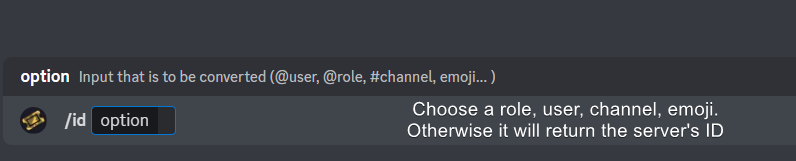
Ticket Tool has a useful command that helps you get the ID of various things like channels, roles, emojis, and your server.
Just use the command </id:1029797400174399546> <#channel/@role/:emoji:>. Now copy everything, including the brackets <...>, to your dashboard (or wherever you want it)
If you want the server ID, just use the command without any option.
Examples:
Server ID: $id ➝
509192800865353738
Roles: $id @Role ➝@humble sequoia
Channel: $id #channel ➝#🤖│bot-spam
User: $id @user ➝@copper owl
Emoji: $id
 covert swallow
$idcommand @vague cosmos
vague cosmos
covert swallow
`$idcommand` <@143705466734641152>
Can you DM me a list of all those commands?
Because then I can save them somewhere, as it's very useful.
 civic wagon
vague cosmos
Because then I can save them somewhere, as it's very useful.
civic wagon
vague cosmos
Because then I can save them somewhere, as it's very useful.
#🤖│bot-spam pins
 covert swallow
yeah, can you copy paste it here?
sinful onyx
covert swallow
yeah, can you copy paste it here?
Server id - 914935335081873468
Server id - 914935335081873468
covert swallow
Alright I'll make note if it being slow, if it continues to be an issue let us know
sinful onyx
covert swallow
Alright I'll make note if it being slow, if it continues to be an issue let us k...
okay thanks
iron nightBOT
Gave +1 Rep to @covert swallow
 dusty pier
Can someone help me make my ticket where it’s added to the list
vague cosmos
Hey, did you setup Ticket Tool?
vague cosmos
No sorry, but if you create a ticket it should create a new channel in the category you set and if none at the top of the channel list. Can you tell me what happens?
dusty pier
How can I put more here someone else did this one for me
 humble sequoiaBOT
The Drop-down menu or Select Menu replaces the buttons on your panel message and uses a drop-down menu with all of your panels. To set this up, go to your Panel Configs and select your main Panel.
<:Numbericons1:1018864164032225340> Enable Select Style
First you enable Select Style. Then you add an item in the Dropdown Editor. Now you can start editing your dropdown!
<:Numbericons2:1018864168041971712> Dropdown Editor
Each line in the dropdown editor represents a line in the drop down menu on discord. You can add more "Items", by clicking on
First you select a panel. That's the panel this option will open a ticket for. DONT select the same panel twice. Each option should have a different Panel
After that, you can put a Display. This is the title of this option and will appear in the drop down menu. The *Description can be set right after that, which will be below the title in grey.
Additionally you can select an emoji, that will be shown in front of each option. You can either manually input the ID of an emoji or select it in the selector.
Common Issues ⚠️
- Panel doesn't send? Make sure you have a valid emoji selected
- Option doesn't show up? Check if two options have the same panel in the DropDown Editor
$dropdown
vague cosmos
That is how you can make a dropdown (and add more items), but what happens if you try to choose one? Does it create a channel or gives it an error?
dusty pier
What command is it
vague cosmos
For what?
There is no command for creating more dropdowns in your server, you need to do it in the dashboard.
dusty pier
How
vague cosmos
humble sequoia
This explains it.
dusty pier
Is there any video
vague cosmos
Not that I know, but if you tell me what isn't clear I can help you with that.
dusty pier
Please do I perfer a video or someone show me then that
vague cosmos
humble sequoia
I can't make a video myself, but if you tell me what isn't clear in here I can explain it to you.
dusty pier
How do I set up one drop-down on the same drop-down
vague cosmos
Are you at the Dashboard?
 vague cosmos
Ok, you're at the right page!
Do you see the add item button? If you click that, you can add more items for the dropdown menu.
dusty pier
Ok there’s more tho I don’t know how to access to them
vague cosmos
You want to add new ones, right? Click this button and you can add them.
 vague cosmos
What do you mean by that? Questions you get before the ticket opens?
Dashboard > Panel Configs > Forms
That will give this result, with ofcourse the question(s) you add.
 dusty pier
What’s multi-line
vague cosmos
The Question Title in the screenshot above is a single line and the test is a multi-line.
So it's just a bigger text field.
dusty pier
What dose that do though
 vague cosmos
Placeholder?
 stray bobcat
Yeah, it is placeholder text. Like above, you see "test". the word "test" was written in the "Question Placeholder" field.
vague cosmos
The placeholder is where you going to type your answer. 🙂 See image for an example.
 dusty pier
I see thanks a lot
vague cosmos
Here two better examples, added also a charater limit to the last one, I can't go above 5 there.

 iron nightBOT
Gave +1 Rep to @vague cosmos
dusty pier
iron night
Gave +1 Rep to **<@143705466734641152>**
How do I do this is is cool
vague cosmos
That is a different bot, we can't help you with that here.
dusty pier
Can you send the boys name???
vague cosmos
It's yagpdb.
If you click the bot profile you should see their website and find a support server for it.
dusty pier
Ok if I need help I will fill free to ask
vague cosmos
Just ask your question(s) here and someone (or myself) will help you. You can also create a ticket in #🎫│make-a-ticket so the support team can help you.
dusty pier
Ok
dusty pier
How do I add what I did to the bot

@vague cosmos how do you put it on the discord thing after I did that
scenic plinth
Lets try to avoid pinging people randomly for help please.
humble sequoiaBOT
━━ TheCrazyKid's inquiry has been moved to a ticket ━━
humble sequoiaBOT
etup
⚠️ You're in the wrong place
We provide support for Ticket Tool Discord bot and cannot help you with whatever issue you have.
- We don't know which Support Team you should contact to get this issue resolved, and unfortunately we won't be able to accurately tell you.
If you don't have any further questions regarding our bot Ticket Tool, please close this ticket
pseudo ravine
oops
covert swallow
etup lol
pseudo ravine
 sullen bay
So what do I do?
sullen bay
So what do I do?
Hey there. I would recommend to look through the Setup Documentation https://docs.tickettool.xyz/general/setup
Instructions on setting up Ticket Tool in your server.
pseudo ravine
covert swallow
etup lol
$ttsetup doesn't work anymore apparently
covert swallow
Thats not a command lol
stark runeBOT
1. Invite Ticket Tool to your server
First you will want to invite the bot to your server. Once the bot is in your server, you can manage your server in the dashboard.
2. Create a Panel
To create a panel we are going to need to head over to the panel configs on the dashboard.
Once at the dashboard we will need to click Create Panel.
Enter a panel name (Fill in any optional settings you want).
Click Create Panel and your ready to get started with configuring your panel.
An example of a creating a panel is shown below.
3. Send the Panel to a Channel
Once you've created a panel on the dashboard you will need to send it to a channel using send on the dashboard.
Select the channel you want your panel to be created in and click send.
For other questions checkout $help faq.
An example of a sending a panel is shown below.
Having a Problem Sending the Panel?
Do $debug in a channel with Ticket Tool and make sure it has all the necessary Discord permissions.
covert swallow
Tts is wrong place
pseudo ravine
I swear it was 🤔 my fault
covert swallow
All good
pseudo ravine
Is it normal that I can't use slash commands in here? For help embeds like you used ^
pseudo ravine
No worries
modern nimbus
when i try to send a panel to a channel, it sends an error and says the bot doesnt have permission to view to send messages to the channel, but in the permissions thing everything is on yes
also, when i create a new panel and dont change anything and send it to the same channel, it works
jade topaz
Como hago para que las transcript se suban a un canal específico
pseudo ravine
modern nimbus
when i try to send a panel to a channel, it sends an error and says the bot does...
Hey there. When you say "but in the permissions thing everything is on" are you referring to the role permissions or channel permissions?
 cerulean seal
guys
modern nimbus
pseudo ravine
Hey there. When you say "`but in the permissions thing everything is on`" are yo...
the channel permissions, but in the role, the majority of the sections are on too
pseudo ravine
Is it still not working?
 nimble pollen
In this screenshot I have the ticket channel placed above in its own category, yet the actual tickets switch under a different category.
 pseudo ravine
Hey there. You could change which category by going to the Dashboard > Panel Configs > Category

 pseudo ravine
There's no need to ping me. But could I ask if you have multiple panels?
rustic gale
modern nimbus
when i try to send a panel to a channel, it sends an error and says the bot does...
Try sending it with the /panel command instead of sending it from the dashboard
It asks for the “id” of the panel, that's just the number that appears on the dashboard next to the panel name
modern nimbus
im not sure what i did wrong, its saying
Failed to send `Invalid Form Body
components[0].components[0].emoji.name[BUTTON_COMPONENT_INVALID_EMOJI]: Invalid emoji`
rustic gale
modern nimbus
im not sure what i did wrong, its saying
Failed to send `Invalid Form Body
comp...
«Invalid emoji»
This means that you entered into an emoji field something that the bot doesn't recognize as a valid emoji.
Which emoji field? It depends on what's the action that causes the error message to appear. It's usually the Create Ticket button, or a dropdown emoji field if you're using dropdowns
Why doesn't the bot accept it as valid? That depends too. It's possible that
- you wrote text there, instead of an emoji (or in addition to an emoji)
- you entered a custom emoji code incorrectly
- you entered a code for a custom emoji from a server that the bot isn't in
- you're on iPhone and entered an emoji using the phone's emoji pad (use the emoji selector in the website instead)
modern nimbus
rustic gale
«Invalid emoji»
This means that you entered into an emoji field something that ...
i havent changed any of the original emojis, except for the create ticket one, and i changed it back to the original soon after
 random imp
Hello, i wanted to ask if there is any way to know which staff team closed a ticket ?
rustic gale
random imp
Hello, i wanted to ask if there is any way to know which staff team closed a tic...
Not in hindsight sadly
For the future you may want to set up logs in your server
humble sequoiaBOT
With Ticket Tool, you can customize the behavior the bot takes when logging your tickets! For editing these options follow these steps:
Dashboard ➞ Panel Configs ➞ Logging Options
Logging Channel
Here you will define which channel @humble sequoia will save the Logs in (ticket created/deleted/closed, etc.)
Logs you can save:
➞ Ticket Created ➞ Logs when a ticket is created
➞ Ticket Closed ➞ Logs when a ticket is closed
➞ Ticket Opened ➞ Logs when a ticket is opened
➞ Ticket Renamed ➞ Logs when a ticket is renamed
➞ Ticket Deleted ➞ Logs when a ticket is deleted
➞ Transcript Saved ➞ Logs when a ticket is saved
Select with  (disable) or
  (enabled) which logs you would like
Below you can see an example of what the Logging Options will look like:
 random imp
Dang thats great. Didnt know i could do that. Thanks for the help
rustic gale
modern nimbus
i havent changed any of the original emojis, except for the create ticket one, a...
That's odd. Try disabling the emoji and sending it again
modern nimbus
this is what it looks like. im not sure if i did something wrong here or not
 rustic gale
modern nimbus
this is what it looks like. im not sure if i did something wrong here or not
rustic gale
modern nimbus
this is what it looks like. im not sure if i did something wrong here or not
See the switch next to where it says Button Emoji? Try disabling that
 high crown
I'm thinking about switching some channels on my server to a ticket based system. Images are a big part of the channels I'm thinking about converting, so I'd need premium. According to the website docs, premium supports up to 8mb of attachments, which really isn't all that much. Does ticket tool use image compression in creating attachments, or would I need my users to submit images hosted by a 3rd party site?
humble sequoiaBOT
PayPal - paypal@tickettool.xyz
BitCoin - 3HhKKAdb9eEvCe2tvzB8bAa8nebHY6qcPA
LiteCoin - MEQX3knLAuotrKnvk3HDNBK5gdRn6PZhHy

Prepay/Direct Payment
To prepay send the payment using your desired method - Available options listed bellow.
⚠️ $18 per 3 months. ⚠️
$66 per year.
(If using the direct payment option, you need to be paying for at-least 3+ months.)
Regular Prices when paying within Discord:
$5.99/per month
Once your payment is sent let us know so we can confirm and get you your key.
- Purchases done with this method are non-refundable.
<:paypal:924596360840372234> Paypal ("Goods and Services" or "Family and Friends")
paypal@tickettool.xyz
<:bitcoin:924638849135689749> BTC - Bitcoin
3HhKKAdb9eEvCe2tvzB8bAa8nebHY6qcPA
<:Litecoin:972176945972383815> LTC - LiteCoin
MEQX3knLAuotrKnvk3HDNBK5gdRn6PZhHy
I sent the payment now what?
After you send the payment, please send a screenshot with proof of payment, our <@&615146349700186112> will verify your payment and will get you setup. For crypto payments, we are waiting for at least ONE verification.

All prices in USD - 3 months min for direct payment
 cursive phoenix
@tepid oyster
open a billing ticket in #🎫│make-a-ticket if you wish to use any of the above methods
modern nimbus
rustic gale
See the switch next to where it says **Button Emoji**? Try disabling that
i did and it worked!! thank you :)
iron nightBOT
Gave +1 Rep to @rustic gale
rustic gale
high crown
I'm thinking about switching some channels on my server to a ticket based system...
You should tell your users to use third-party hosting in that case.
 pearl needle
jade topaz
pearl needle
jade topaz
Hi folks ! I'm trying to disable the close button of Ticket Tool for anyone except moderators. Is it possible ? I've tried to change some permissions but for now everything I've tried doesn't work...
vague cosmos
jade topaz
Hi folks ! I'm trying to disable the close button of Ticket Tool for anyone exce...
Dash > Panel Config > Buttons > make the close button > make it support team only
jade topaz
Thanks for your reply. I've tried it a few days ago but this isn't working correctly I guess ? I wan't to hide the button in user side. I realized now that my first message isn't really clear about my goal

 vague cosmos
You can't hide it for the user and show it to mods only.
But users shouldn't be able to use it. @jade topaz
jade topaz
This is the answer I'm looking for. Thank you for your help 🙏
vague cosmos
No worries👍🏻
 fair gale


 fading kite
Anyone happen to know how to view exactly who deleted a ticket?
 robust edge
fading kite
Anyone happen to know how to view exactly who deleted a ticket?
robust edge
fading kite
Anyone happen to know how to view exactly who deleted a ticket?
i think u cant see it
u should have the premium and must enabled the auto transcript.
fading kite
That sucks.
Like I know who did it, I just need evidence but I can't find his USERID or anything.
humble sequoiaBOT
With Ticket Tool, you can customize the behavior the bot takes when logging your tickets! For editing these options follow these steps:
Dashboard ➞ Panel Configs ➞ Logging Options
Logging Channel
Here you will define which channel @humble sequoia will save the Logs in (ticket created/deleted/closed, etc.)
Logs you can save:
➞ Ticket Created ➞ Logs when a ticket is created
➞ Ticket Closed ➞ Logs when a ticket is closed
➞ Ticket Opened ➞ Logs when a ticket is opened
➞ Ticket Renamed ➞ Logs when a ticket is renamed
➞ Ticket Deleted ➞ Logs when a ticket is deleted
➞ Transcript Saved ➞ Logs when a ticket is saved
Select with (disable) or (enabled) which logs you would like
Below you can see an example of what the Logging Options will look like:
vague cosmos
@fading kite does it help?
vague cosmos
It does only work for new tickets by the way.
fading kite
vague cosmos
It does only work for new tickets by the way.
I haven't got it yet, was waiting a response to see if tickets that have already been deleted can be logged to show some sort of identification on who deleted them.
I just need to see who deleted a mass amount of tickets that were deleted within a 2 minute period by one person.
fading kite
Nothing in there to indicate as everything is logged as the bot.
I figured a Developer for the bot would maybe have some sort of commands he could run as I know some bot developers do.
vague cosmos
I don't think they will do that, for one user.
So I guess you're out of luck for older logs
 gritty kiln
humble sequoiaBOT
gritty kiln
humble sequoiaBOT
⚠️ You're in the wrong place
We provide support for Ticket Tool Discord bot and cannot help you with whatever issue you have.
- We don't know which Support Team you should contact to get this issue resolved, and unfortunately we won't be able to accurately tell you.
If you don't have any further questions regarding our bot Ticket Tool, please close this ticket
vague cosmos
@gritty kiln see above.
 novel sphinx
How can I add samone to a ticket??
humble sequoiaBOT
To add or remove a user, or a role, from a specific ticket use the corresponding command:
</add:1029783024306507887>
</remove:1029783024306507887>
Make sure to input the user or role you want to add/remove as well as the ticket to perform this action, in case you run the command from a different channel
vague cosmos
@novel sphinx see above.
In case you want your support team to view tickets, see below.
humble sequoiaBOT
1. Go into your Dashboard
2. Open your Panel Configs tab
3. Select the panel you want to grant access to
4. Open the General options menu
5. Select your Support Team Roles
6. Save changes
 barren geyser
can we add a ticket button to an embed we made , using id message?
vague cosmos
If I remember correctly, no.
@barren geyser but in the future you're able to get a whitelabel for Ticket Tool, which allows you to customize it more (with a custom avatar for example).
rustic gale
A whitelabel. 
vague cosmos
Yes I said that, but my autocorrect changed it. Thanks @rustic gale!
iron nightBOT
Gave +1 Rep to @rustic gale
jade topaz
how do i make a auto responder with ticket tool?
vague cosmos
What do you mean by "auto responder"?
vague cosmos
Dash > Panel Configs > Automations > Add Automation > Trigger: [Watcher] Check for Message.
jade topaz
i will lyk if it works
vague cosmos
Not sure if that does what you want, but otherwise I don't think it's possible unless you create custom commands.
jade topaz
 jade topaz
vague cosmos
Not sure if that does what you want, but otherwise I don't think it's possible u...
jade topaz
vague cosmos
Not sure if that does what you want, but otherwise I don't think it's possible u...
how do i do that
vague cosmos
Toggle the Show Advanced.
jade topaz
and after
vague cosmos
vague cosmos
Dash > Panel Configs > Automations > Add Automation > Trigger: **[Watcher] Check...
This, also afk. Dinner.
 vague cosmos
I don't think it's possible then, unless you use custom commands.
vague cosmos
Not sure if you can do it with @humble sequoia.
Let me do some research after dinner.
@jade topaz hey! There is a tab custom commands, that might work for you.
 zenith ledge
I want my tickets to ping my support staff, currently it only pings the user. What the variable I can add to ping my support roles? Also where do I put the variable?
humble sequoiaBOT
1. Go into your Dashboard
2. Open your Panel Configs tab
3. Select the panel you want to ping your support on
4. Open the Ticket options menu
5. Click on Edit Ticket Message
6. In the Message Content use one of the role mention syntax (**{@Role Name}**/**{Role ID}**)
7. Save changes
Note: For this to work properly, Ticket Tool requires the Mention Everyone permission. Or the role must have the Allow anyone to @mention this role setting enabled
 vague cosmos
humble sequoia
vague cosmos
humble sequoia
@zenith ledge
 robust sandalBOT
vague cosmos
<@593609893076926513>
robust sandalBOT
vague cosmos
<@593609893076926513>
@zenith ledge
 English (en) → Hawaiian (haw)
jade topaz
English (en) → Hawaiian (haw)
jade topaz
is it possible to auto delete/close a ticket after a certain time?
pseudo ravine
Hey there. It is possible, however it is a premium feature
jade topaz
pseudo ravine
Hey there. It is possible, however it is a premium feature
ohh ok thank you
iron nightBOT
Gave +1 Rep to @pseudo ravine
pseudo ravine
You're welcome, glad I could help. If you have any other questions/issues, don't hesitate to reach out again or use #🎫│make-a-ticket
 trim jolt
what ?
 vague cosmos
trim jolt
what ?
vague cosmos
trim jolt
what ?
You're using a invalid emoji. Did you set the emoji as :one: instead of 1️⃣?
 high marten
:OSCAR_What5:
vague cosmos
high marten
:OSCAR_What5:
Do you need any help?
 tepid oyster
cursive phoenix
<@356441694012571653> <:this:894279341108772914>
tepid oyster
cursive phoenix
<@356441694012571653> <:this:894279341108772914>
just weird bro $5.99 if i pay on discord, but if direct (for supposedly cheaper), its $6.0 minimum 3 months? 
vague cosmos
tepid oyster
just weird bro $5.99 if i pay on discord, but if direct (for supposedly cheaper)...
3 months is 18$
Discord has a regular price P/M
 wild spire
tepid oyster
just weird bro $5.99 if i pay on discord, but if direct (for supposedly cheaper)...
wild spire
tepid oyster
just weird bro $5.99 if i pay on discord, but if direct (for supposedly cheaper)...
buy 12 months, get one free 
tepid oyster
wild spire
buy 12 months, get one free <:CH_PepeShhh:705059720007909377>
yeah figured 😄 thanks
iron nightBOT
Gave +1 Rep to @wild spire
tepid oyster
bought already
vague cosmos
Awesome! ❤️
jade topaz
why is my ticket tool updating members roles when they make a ticket
vague cosmos
jade topaz
why is my ticket tool updating members roles when they make a ticket
Dash > Panel Config > Ticket > Do you have anything here?
 jade topaz
vague cosmos
Dash > Panel Config > Ticket > Do you have anything here?
jade topaz
vague cosmos
Dash > Panel Config > Ticket > Do you have anything here?
nope
can you dm me i will explain in detial
vague cosmos
Are you sure Ticket Tool manages roles?
And no, you can explain it here. I don't answer DMs.
Just explain it here and I'll try to help you. Can always forward you if needed.
(DMs are turned off, again)
 gilded verge
check Claiming too, maybe there you have something


 vague cosmos
And it's the same for the Ticket one?
jade topaz
wdym)
vague cosmos
jade topaz
the person bought the ticket tool
What do you mean?
Also Dash > Panel Configs > Ticket
Because, that should be the only way TT can give roles
jade topaz
vague cosmos
What did the user do, to get the roles added? Open a ticket?
vague cosmos
Dashboard > Panel Configs > Ticket > Check there.
If the user opened a ticket and received roles, there should be roles listed here.

You mean, in the dashboard?
@jade topaz cause I'm wondering now.
 tawdry verge
hello i have some iseus whit a ticket form when i set a qustion requiriet it do`t set it requiriet and no red small star and i cant see the filling qustion also when i ad {create.form.x} to the ticket message, any help?
vague cosmos
tawdry verge
hello i have some iseus whit a ticket form when i set a qustion requiriet it do`...
Hey! You're Dutch right (looking at your name) if you want I can help you in Dutch.
But if I understand it correct, you set a form question as "required" and you don't see a red star?
tawdry verge
vague cosmos
Hey! You're Dutch right (looking at your name) if you want I can help you in Dut...
ja ik had ook een probleem met het toevoegen van de antwoorden in de ticket message ook als {create.form.x} toevoeg
vague cosmos
Hey, daar moet ik zo even naar kijken. Maar het eerste, waarbij de * mist kan ik inderdaad bevestigen; dat lijkt me een bugje.
tawdry verge
vague cosmos
Hey, daar moet ik zo even naar kijken. Maar het eerste, waarbij de `*` mist kan ...
maar het heeft wel bij de 1e vraag het sterretje en hij staat ik niet als verplicht ik kan gewoon door gaan zonder het in tevullen
vague cosmos
Maar je hebt hem in de dash als "required" gezet?
tawdry verge
vague cosmos
Maar je hebt hem in de dash als "required" gezet?
ja
wacht hij springt nu ineens in onserplicht
nu doet hij het wel
 fair wind
what is it?

 vague cosmos
fair wind
what is it?
vague cosmos
fair wind
what is it?
Hey! It looks like you're linked to a panel that does not exsist, did you delete any panels?
vague cosmos
tawdry verge
nu doet hij het wel
Dus alles werkt nu zoals het hoort? 🙂
tawdry verge
vague cosmos
Dus alles werkt nu zoals het hoort? 🙂
nee, "Hey, daar moet ik zo even naar kijken." ik heb hier nog wel last van
vague cosmos
Ik kan wel bevestigen dat {create.form.x} niet werkt.
Laat me even snel wat navragen.
 tawdry verge
vague cosmos
Ik kan wel bevestigen dat `{create.form.x}` niet werkt.
tawdry verge
vague cosmos
Ik kan wel bevestigen dat `{create.form.x}` niet werkt.
oh ik heb het in een andere server ook zonder dus ik snap het zoiezo nu even niet
vague cosmos
Heb het even snel nagevraagd in een andere chat, maar het lijkt erop dat die stuk is.
fair wind
vague cosmos
Hey! It looks like you're linked to a panel that does not exsist, did you delete...
Yes, but I updated the one from which this message is from..
tawdry verge
vague cosmos
Heb het even snel nagevraagd in een andere chat, maar het lijkt erop dat die stu...
ook "lijm" om het te maken?
vague cosmos
fair wind
Yes, but I updated the one from which this message is from..
Update as in re-send?
vague cosmos
@tawdry verge helaas.
@fair wind delete the message and re-send so you're sure it's the right one which is linked.
fair wind
vague cosmos
<@1043867381228912671> helaas.
<@890139054228783124> delete the message and re-s...
I did :(
vague cosmos
Same error, again?
fair wind
vague cosmos
Same error, again?
yes
vague cosmos
Can you create a new panel and send that? Does it appear then too?
fair wind
Maybe this should be edited somewhere in the settings?
fair wind
vague cosmos
Can you create a **new panel** and send that? Does it appear then too?
hmmm
vague cosmos
@tawdry verge volgens iemand zijn de devs bezig ermee, dus hopelijk is dat het probleem.
 echo tapir
how do I make the ticket go at the very top once someone makes one? It annoys me 😭
 vague cosmos
fair wind
Maybe this should be edited somewhere in the settings?
vague cosmos
fair wind
Maybe this should be edited somewhere in the settings?
Choosing "update" on the annel and set the current message (link) should work normally.
vague cosmos
echo tapir
how do I make the ticket go at the very top once someone makes one? It annoys me...
Dash > Panel Configs > Category
fair wind
vague cosmos
Can you create a **new panel** and send that? Does it appear then too?
That helped!!! Thank you!!!
iron nightBOT
Gave +1 Rep to @vague cosmos
vague cosmos
fair wind
That helped!!! Thank you!!!
No worries, happy to help! ❤️
vague cosmos
vague cosmos
Dash > Panel Configs > Category
Your tickets currently don't go in any category which means they'll always show on top.
tawdry verge
vague cosmos
<@1043867381228912671> volgens iemand zijn de devs bezig ermee, dus hopelijk is ...
Ik hoop het
vague cosmos
tawdry verge
Ik hoop het
Zou het voor nu even laten rusten en morgen opnieuw kijken, mocht het dan nog steeds niet werken ping me dan even, dan kan ik kijken voor je.
Zal het zelf ook even in de gaten houden als ik het niet vergeet.
wild spire
tawdry verge
ja ik had ook een probleem met het toevoegen van de antwoorden in de ticket mess...
even totaal terzijde. Je vervangt ‘x’ toch door 1, 2 enzovoorts hoop ik?
vague cosmos
wild spire
even totaal terzijde. Je vervangt ‘x’ toch door 1, 2 enzovoorts hoop ik?
Heel eerlijk, nooit geweten dat het moest. Ik gebruik variablen echt nooit, want dat klinkt als wiskunde
wild spire
vague cosmos
Heel eerlijk, nooit geweten dat het moest. Ik gebruik variablen echt nooit, want...
de 1 verwijst naar vraag 1 enzovoort tot 5
vague cosmos
Dan werkt het perfect, inderdaad. Niet echt duidelijk in mijn ogen. CC: @tawdry verge ^
 flat chasm
hey there! How do I make it so that only a certain role can access a certain ticket panel?
vague cosmos
flat chasm
hey there! How do I make it so that only a certain role can access a certain ti...
You want specfic roles, access a ticket right?
humble sequoiaBOT
1. Go into your Dashboard
2. Open your Panel Configs tab
3. Select the panel you want to grant access to
4. Open the General options menu
5. Select your Support Team Roles
6. Save changes
vague cosmos
That should do it, @flat chasm.
flat chasm
vague cosmos
That should do it, <@189094783384289290>.
@vague cosmos thanks for the quick response. However, I am asking for a non-support team role. I.e: a user who has a premium role in our Discord server should only be able to open up a support ticket. For example, I have access to TTS premium ticket channels
iron nightBOT
Gave +1 Rep to @vague cosmos
vague cosmos
flat chasm
<@143705466734641152> thanks for the quick response. However, I am asking for a ...
You should work with Discord permissions then, like what is done here.
If you have the <@&535595160189403136> role you can choose to open a ticket in #🎫│make-a-ticket or #premium-tickets. While a normal user only can see #🎫│make-a-ticket.
You can't really limit it, without Discord perms as far I know.
flat chasm
vague cosmos
You should work with Discord permissions then, like what is done here.
If you h...
Ah, I see, so ensuring the roles correlate directly to a channel
vague cosmos
Yes if you "hide" the channel for normal users, they can't open a ticket for the category as they cant see the channel.
See my example above.
 tough zealot
how do i enable sending pictures/videos only inside tickets?
vague cosmos
tough zealot
how do i enable sending pictures/videos only inside tickets?
Discord permissions.
tough zealot
vague cosmos
Discord permissions.
no only inside tickets
i tried enabling it for the channel the threads are in
but it doesnt work
vague cosmos
Dash > Panel Configs > Permissions
tough zealot
ok
 crystal socket
I can’t create ticket …
vague cosmos
crystal socket
I can’t create ticket …
Could you be more specfic? Are you getting an error?
crystal socket
vague cosmos
Could you be more specfic? Are you getting an error?
Yes « error of interaction »
vague cosmos
Interaction failed? Or can you send a screenshot of the error?
crystal socket
vague cosmos
Interaction failed? Or can you send a screenshot of the error?
Yes interaction d’ailés
vague cosmos
Hmm, try again it's a Discord issue; should work then.
 obsidian dune
how do i fix that?
 vague cosmos
obsidian dune
how do i fix that?
vague cosmos
obsidian dune
how do i fix that?
Hey! Try to run the command again, does it work then?
obsidian dune
vague cosmos
Hey! Try to run the command again, does it work then?
it doesnt.
scenic plinth
We are actively investigating interaction failed errors for both Primary and Premium bots, including issues inviting Ticket Tool, interacting with buttons, or using the ticket system in general. There is currently no ETA on a fix. Visit https://status.tickettool.xyz/incidents/rt1ny3b431cp for updates 🙂
You may get unexpected errors such as "Error reading -----", this is part of this issue.
 vague cosmos
scenic plinth
We are actively investigating interaction failed errors for both Primary and Pre...
vague cosmos
scenic plinth
We are actively investigating interaction failed errors for both Primary and Pre...
I wasn't sure if I should mention that, as it said "when creating tickets" and /setup is a different thing.
Also, does that not get posted in #📣│bot-news?
 whole pecan
is there a way to make timers in automation post an embed with button attached?
the close ticket button
vague cosmos
I don't see an option for that under automations, so I don't think so.
tough zealot
vague cosmos
Dash > Panel Configs > Permissions
thx
iron nightBOT
Gave +1 Rep to @vague cosmos
outer socket
how do I add multiple buttons?
vague cosmos
outer socket
how do I add multiple buttons?
To a panel?
humble sequoiaBOT
For more convenient use of multipanels, you can now combine panels on the dashboard. This will allow you to directly send the multipanel from the dashboard or via the $panel ID command.
Where can I find this?
You can find this setting on the Dashboard -> Panel Configs -> Panel -> Attached Panels
Note: if you're attaching all the panels to a panel called English, don't include English in the attached panel's box (If you do this, it will create a duplicate)
This will put all buttons from all of your panels on one message. The message is the panel message from the panel you're combining these panels in.
vague cosmos
Good night now.
 fair halo
What does this mean?

 shut bolt
fair halo
What does this mean?
shut bolt
fair halo
What does this mean?
Is the user you input the ID for on the server?
fair halo
Yeah it's on the server
@hexed grove is the player in question
And this player is definitely on my server
But it happens with any players actually
shut bolt
Can you open a #premium-tickets please?
fair halo
ok 🙂

 gaunt monolith
 fading vale
stuck on this
fading vale
stuck on this
Me too
stray bobcat
There seems to be issues with some Discord actions at the moment. Buttons not responding, duplicating, and now there seems to be an issue with the invite.
<@&509246780802596864> This is something you might want to be aware of.
shut bolt
Hi
stray bobcat
I checked, and same issue for me.
shut bolt
We are aware, our developer is investigating this issue but it's likely an issue on Discord's side
stray bobcat
Yeah thats what I mentioned. Thanks for the confirmation Pablo ❤️ Here's a free bread: 🍞
shut bolt
Thanks
fading vale
it works to click on the bot in here and "add to server" for now
however i have a different question.
How do i change the name from "ticket" to something else when it creates the tickets?
 humble sequoiaBOT
The ticket name is the default channel name of all tickets. To edit it, go to your Dashboard > Panel Configs > Ticket. There you can edit the channel name of opened and closed tickets. You can also use variables in there.

 Note: This is a premium feature
stray bobcat
Note: This is a premium feature
stray bobcat
It's a premium feature though.
humble sequoiaBOT
Premium can now be purchased directly through discord! Either in the app directory (server settings) or directly from the bots profile.
<:TTWarning:1034178155872784494> Important Information <:TTWarning:1034178155872784494>
ONLY purchase premium through ONE of the two Ticket Tool Bots. If you purchased premium on the primary bot (White logo) and plan to use the premium bot, don't kick the primary bot!
What's different?
The Monthly price changed from $6.00 to $5.99
Yearly subscriptions are not yet available
Don't kick the bot, otherwise, the subscription will be canceled automatically
You'll need to buy the subscription from a computer or on the Application Directory
You might need to run the /premium command on your server to sync the premium status with your dashboard
A subscription can not be transferred between Servers
stray bobcat
5.99 /month via Discord, or you can pay directly.
humble sequoiaBOT
PayPal - paypal@tickettool.xyz
BitCoin - 3HhKKAdb9eEvCe2tvzB8bAa8nebHY6qcPA
LiteCoin - MEQX3knLAuotrKnvk3HDNBK5gdRn6PZhHy
Prepay/Direct Payment
To prepay send the payment using your desired method - Available options listed bellow.
⚠️ $18 per 3 months. ⚠️
$66 per year.
(If using the direct payment option, you need to be paying for at-least 3+ months.)
Regular Prices when paying within Discord:
$5.99/per month
Once your payment is sent let us know so we can confirm and get you your key.
- Purchases done with this method are non-refundable.
<:paypal:924596360840372234> Paypal ("Goods and Services" or "Family and Friends")
paypal@tickettool.xyz
<:bitcoin:924638849135689749> BTC - Bitcoin
3HhKKAdb9eEvCe2tvzB8bAa8nebHY6qcPA
<:Litecoin:972176945972383815> LTC - LiteCoin
MEQX3knLAuotrKnvk3HDNBK5gdRn6PZhHy
I sent the payment now what?
After you send the payment, please send a screenshot with proof of payment, our <@&615146349700186112> will verify your payment and will get you setup. For crypto payments, we are waiting for at least ONE verification.
All prices in USD - 3 months min for direct payment
scenic plinth
scenic plinth
We are actively investigating interaction failed errors for both Primary and Pre...
stray bobcat
You can also get free premium credits by /vote'ing
iron nightBOT
Gave +1 Rep to @stray bobcat
 shut bolt
Hey there, yes, we are looking into it
jade topaz
 scenic plinth
Refer to pins please.
humble sequoiaBOT
⚠️ Please read the messages previously sent by our team ⚠️
jade topaz
Tf you mean by refer to pins
valid summit
It keeps saying this:
jade topaz
it sure is
valid summit
 scenic plinth
Yes, refer to the pinned message please.
stray bobcat
fading vale
shut bolt
Hey there, yes, we are looking into it
is it okay to just delete the channels or do they have to be closed so it doesnt break?
shut bolt
fading vale
is it okay to just delete the channels or do they have to be closed so it doesnt...
Wait for the issue to be solved, that way you prevent future issues
jade topaz
What does this mean?
 stiff anvil

 wanton fern
ah yeah it's the pinned
stiff anvil
Oh ok.
shut bolt
wanton fern
bot down right?
Me extraña araña
 stiff knoll
Guys is there an issue with tickettool?
shut bolt
shut bolt
Me extraña araña
Esperaba más de ti Drec 
wanton fern
shut bolt
Me extraña araña
nunca había visto ese error, por eso vine a preguntar
 dull linden
scenic plinth
https://discord.com/channels/509192800865353738/776680605517742090/1106280582289...
dull linden
scenic plinth
https://discord.com/channels/509192800865353738/776680605517742090/1106280582289...
OKAY
dull linden
scenic plinth
https://discord.com/channels/509192800865353738/776680605517742090/1106280582289...
enough
wanton fern
JAJAJAJ kenzy is so done