#🆘│community-support
1 messages · Page 45 of 1
 jade topaz
 urban warren
So on ticket tool, there should be something that says General, if you click on that button, it will have a little box that says Support Team Roles, in that box, you can put the role in that box and everyone with that role can see those type of tickets
Did you get it?
jade topaz
i did that but that role still cant see them
urban warren
refresh if you just created the role
jade topaz
do i have to confirm it or something
 humble sequoiaBOT
1. Go into your Dashboard
2. Open your Panel Configs tab
3. Select the panel you want to grant access to
4. Open the General options menu
5. Select your Support Team Roles
6. Save changes

 cursive phoenix
that should help with adding support roles
urban warren
cursive phoenix
that should help with adding support roles
thanks Jayy
 iron nightBOT
Gave +1 Rep to @cursive phoenix
jade topaz
i did that but they still cant see the new tickets for some reason
urban warren
Look at the thing that was posted by the bot, that should help you
cursive phoenix
i think this will only apply to new tickets made after the change you did, so did you try a brand new ticket after adding the roles?
urban warren
They should be able to see the ticket if you put the role there
jade topaz
cursive phoenix
i think this will only apply to new tickets made after the change you did, so di...
let me try it again
team role still no access

 urban warren
Ohhhhh, I see what you want to do know
i am going to show you, one sec
So do this, {@Role Name}
cursive phoenix
you dont need to add role that the ticket tool bot has to the support team roles btw
also can your "team" see the ticket? Or you just wanting them pinged
urban warren
remove the role name part and copy and past the actual role name and paste it betwwen there
jade topaz
so like that? {@Team}
jade topaz
cursive phoenix
you dont need to add role that the ticket tool bot has to the support team roles...
im just messing w the perms to try n get it to work
jade topaz
urban warren
then it should work
that adds them to future tickets?
urban warren
jade topaz
that adds them to future tickets?
Yes, it will add them to every ticket
Did it work?
jade topaz
urban warren
Did it work?
no
urban warren
put the role id instead
jade topaz
how do i get role id?
urban warren
{Role ID}
jade topaz
also ty for answering all my dumb questions
cursive phoenix
id suggest opening a ticket over in #🎫│make-a-ticket for help
jade topaz
cursive phoenix
id suggest opening a ticket over in <#571706435449257997> for help
i did
cursive phoenix
as i think keandre is talking about something different
urban warren
jade topaz
also ty for answering all my dumb questions
these are not dumb questions, these is what this server is for to help you
urban warren
cursive phoenix
as i think keandre is talking about something different
lol
urban warren
jade topaz
i did
Ex. {886771845909594122}
cursive phoenix
your talking about adding a role id and stuff
but thats different from adding the support role to the actual support team roles for access to the ticket
urban warren
this is how it would go for the role id
urban warren
cursive phoenix
your talking about adding a role id and stuff
but thats different from adding t...
yea, he sent a picture of him putting the support team role in and that role not being pinged when the ticket was opened
cursive phoenix
but their issue is their team role still cant see the ticket
urban warren
oh i got you know. If that part still doesn't work, then i would say that he can open a ticket. I was looking at the part of the message sent my tickettool when the ticket was opened that the role getting pinged, lol
urban warren
Yea, open a ticket under #🎫│make-a-ticket and someone on the support team will help
urban warren
jade topaz
thanks though fr
np, sorry i couldn't help but i know the people on the support team can
cursive phoenix
yeah its two separate things going on the team not seeing the tickets and then if they want the role pinged or not
humble sequoiaBOT
1. Go into your Dashboard
2. Open your Panel Configs tab
3. Select the panel you want to grant access to
4. Open the Permissions options menu
5. Find what role you'd like to edit permissions for
6. Choose if you'd like to edit opened or closed permissions for that role
7. Edit the permissions by tickingor unticking
each permission
8. Save changes
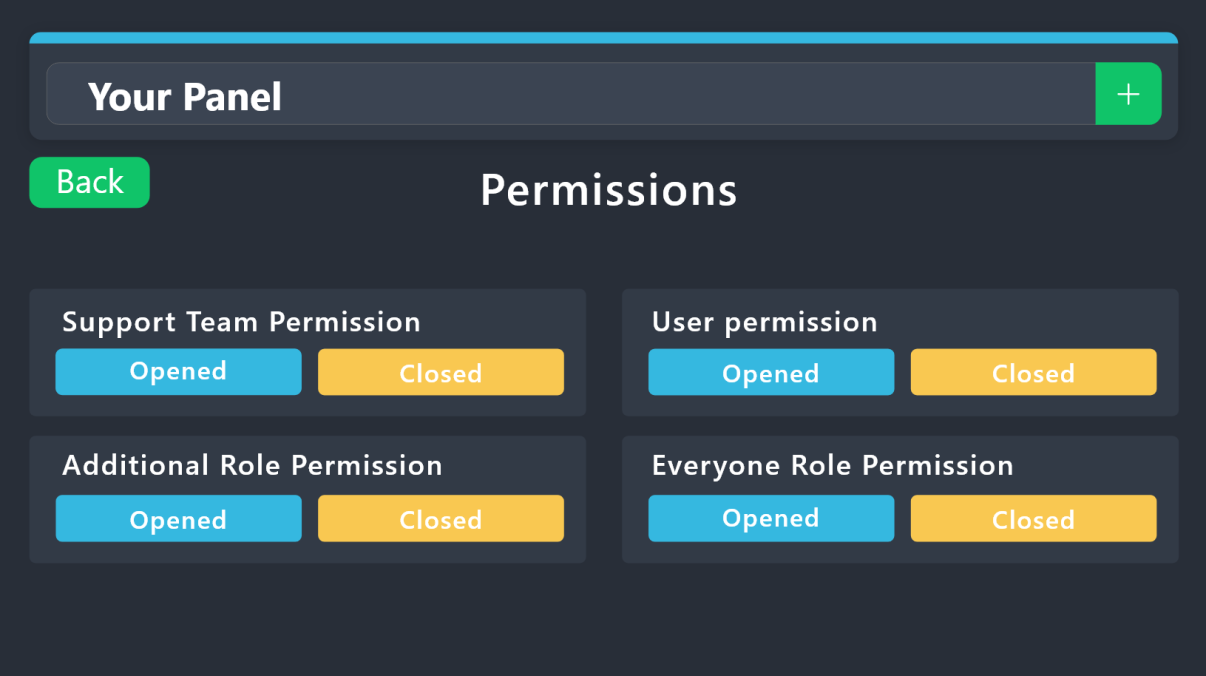 cursive phoenix
this might help while your waiting on your ticket @jade topaz
jade topaz
honestly im just so tired of trying to figure this out but let me try that
maybe i need to make ticket too admin?
cursive phoenix
you can run $debug in your support channel or a ticket channel and see if its an issue with ticket tool not having permissions
 proud wharf
hi, i need to fix a problem... when close a ticket i cant receive the direct transcript... don´t know what to change in conf
 sand grove
Is there a way for the bot to ping the ticket creator whenever support sends a message in the ticket?
jade topaz
How to change this?
 urban warren
proud wharf
hi, i need to fix a problem... when close a ticket i cant receive the direct tra...
urban warren
proud wharf
hi, i need to fix a problem... when close a ticket i cant receive the direct tra...
So for the transcript, you will need to go to the transcript panel in tickettool and select the channel that you want it to transcript to
jade topaz
jade topaz
How to change this?
Should I open a ticket?
jade topaz
jade topaz
How to change this?
I want to change the message in the inbed
I’m sorry for this
 jade topaz
Where to go exactly
urban warren
Menu > Ticket > Message Ticket
urban warren
sand grove
Is there a way for the bot to ping the ticket creator whenever support sends a m...
Can you elaborate a little more?
jade topaz
urban warren
Menu > Ticket > Message Ticket
 sand grove
urban warren
Can you elaborate a little more?
sand grove
urban warren
Can you elaborate a little more?
For example the user creates the ticket, they can type in the ticket and add any information they want, but once someone with a support role talks in said ticket, it will ping that user then delete the message (message a ghost ping for faster responses)
urban warren
jade topaz
Go ticket then click Ticket Message
urban warren
jade topaz
Huh pic?
 jade topaz
urban warren
jade topaz
urban warren
No, the category
urban warren
jade topaz
No, the category
 jade topaz
What’s a unban request message
urban warren
?
urban warren
sand grove
For example the user creates the ticket, they can type in the ticket and add any...
Unfortunately I don't understand what you are saying. Can you open a Ticket under #🎫│make-a-ticket ? I don't understand sorry. I am sorry i couldn't help you
urban warren
jade topaz
What’s a unban request message
Is it on tickettool or are you talking about something else?
jade topaz
urban warren
Is it on tickettool or are you talking about something else?
Ticket tool
I need a message for
urban warren
jade topaz
Ticket tool
Could you show me what your talking about?
jade topaz
It’s hard to explain
urban warren
can you send a picture?
jade topaz
I will say it in a sentence
So, like a user got banned from a server, I need to unban message
urban warren
If you have an unban message and would like to put it in a ticket or something like manually from like a bot or a person, then they will have to manually do it. Tickettool doesn't have a unban message or something that it can send manually in a ticket if it isn't in the ticket message or the embed under the ticket
jade topaz
urban warren
If you have an unban message and would like to put it in a ticket or something l...
I need the message
urban warren
jade topaz
I need the message
Are you trying to have it get sent my tickettool? or are you trying to put it in a message in a ticket by tickettool? or are you trying to find a unban message?
jade topaz
urban warren
Are you trying to have it get sent my tickettool? or are you trying to put it in...
Find a unban message
urban warren
jade topaz
Find a unban message
oh ok, so you will have to make and unban message
jade topaz
I don’t know how
urban warren
you can have a friend make you one
 jolly quail
Hi, how can i make many buttons in a panel
urban warren
jolly quail
Hi, how can i make many buttons in a panel
I can help you
jolly quail
urban warren
I can help you
Yes pls
jade topaz
How to make a user to claim ticket
urban warren
If you would like more buttons on a panel, you will need to make the amount of ticket buttons you want like your making a brand new panel, and head to a panel on tickettool named Panel and on there you can click on the grey box and attach all the ones you want on there and it will make it all on one panel
urban warren
jolly quail
Yes pls
^^^^^^^^
jade topaz
jade topaz
How to make a user to claim ticket
.
jolly quail
urban warren
If you would like more buttons on a panel, you will need to make the amount of t...
This?
 urban warren
yes
jolly quail
urban warren
yes
And now?
urban warren
and on there in the grey box that says attached panels, you will put all the ticket panels to be on that 1 message
urban warren
jade topaz
.
I am going to help you
jolly quail
urban warren
and on there in the grey box that says attached panels, you will put all the tic...
It says no results found
jade topaz
urban warren
I am going to help you
K
urban warren
refresh
jade topaz
How to help
jolly quail
urban warren
refresh
 urban warren
For the claiming, you will need to go to the panel called Claiming and click on it and enable the claiming feature
 silver herald
Hello
jade topaz
urban warren
For the claiming, you will need to go to the panel called Claiming and click on ...
Pic
urban warren
jolly quail
Go back to the main panel where you can see all the options and at the top, it is going to have that ticket panel name and next to it, it will have a green plus and if you click on the grey box with the writing on it, multiple panels should come up and if more panels show up, you need to click on the green + and create a pannel
jolly quail
urban warren
Go back to the main panel where you can see all the options and at the top, it i...
And now?
 urban warren
jolly quail
And now?
urban warren
jolly quail
And now?
Then you will send it to the channel you want it in and your done!
jade topaz
jade topaz
Pic
.
urban warren
jade topaz
Pic
 urban warren
jolly quail
And now?
urban warren
jolly quail
And now?
Did it work?
jolly quail
urban warren
Did it work?
Only two
 urban warren
jolly quail
Only two
urban warren
jolly quail
Only two
Yes, the amount of panels that you put on the attached panels in tickettool, there will be more buttons
And for the buttons, it you go to the buttons panel in tickettool, you can change the name of the buttons
jolly quail
urban warren
Yes, the amount of panels that you put on the attached panels in tickettool, the...
I put 5 and only two are there
urban warren
jolly quail
I put 5 and only two are there
You need to go to all of the panels and make sure that every one of those panels that you attached to that 1 is connected to the panel with all of the panels attached
urban warren
jade topaz
.
Did you get it?
 round spear
How do I make it ask questions before the ticket opens
urban warren
round spear
How do I make it ask questions before the ticket opens
I can help you
urban warren
So for that, it is called a form which you can make up your own questions and place it there so they will have to fill it out before the ticket is opened. This is where you can go to set it up
 round spear
alr thanks, appreciate it
urban warren
it is right under the Command Style
urban warren
round spear
alr thanks, appreciate it
np
jolly quail
urban warren
You need to go to all of the panels and make sure that every one of those panels...
Tysmmm, it workss
urban warren
No Problem, have a great rest of your day!
jolly quail
urban warren
No Problem, have a great rest of your day!
And another question, why the Orange button repeat?
 urban warren
jolly quail
And another question, why the Orange button repeat?
urban warren
jolly quail
And another question, why the Orange button repeat?
You may have set another color to be the same color
jolly quail
urban warren
You may have set another color to be the same color
It happened the same
 jade topaz
urban warren
jade topaz
urban warren
Ye this is my first time using it
urban warren
jade topaz
Ye this is my first time using it
Alright! Have a good one!
jade topaz
urban warren
Alright! Have a good one!
Can I ping you? I need help.
urban warren
jolly quail
It happened the same
Check to see if on one of the panels that you have it twice maybe
urban warren
jade topaz
Can I ping you? I need help.
go again?
Like if you need help again can you ping me?
jade topaz
urban warren
Like if you need help again can you ping me?
Yes
urban warren
Sure, i'm sure someone else may help you if they see that you need help just in case i may not respond all the time
jolly quail
urban warren
Check to see if on one of the panels that you have it twice maybe
Only 5
 jade topaz
urban warren
Sure, i'm sure someone else may help you if they see that you need help just in ...
jade topaz
urban warren
Sure, i'm sure someone else may help you if they see that you need help just in ...
How to get my new ticket
Menu
urban warren
jolly quail
Only 5
Try to click on both of the purple circles and see if they do the ticket panel message is the same
urban warren
jade topaz
How to get my new ticket
How to get back to it? or how to create a new one?
jolly quail
urban warren
How to get back to it? or how to create a new one?
Yes they are the same
jade topaz
I want to add multiple
jolly quail
urban warren
Try to click on both of the purple circles and see if they do the ticket panel m...
When i put/setup and send the panel to the channel it repeats that button
urban warren
jade topaz
I want to add multiple
You can click on the + next to the grey box to create another panel
urban warren
jolly quail
When i put/setup and send the panel to the channel it repeats that button
One second, let me see if i can see whats causing that
jolly quail
urban warren
One second, let me see if i can see whats causing that
Ok ty
jade topaz
jolly quail
This?
Where is this?
jolly quail
jade topaz
Where is this?
Panel config>panel
jolly quail
jade topaz
The category
 urban warren
jolly quail
Ok ty
urban warren
jolly quail
Ok ty
Try and go to the button panel in tickettool and click on the create ticket button and turn off the show button button for the purple button and see if that works
If that doesn't work, open a ticket under #🎫│make-a-ticket and someone from the Support Team will assist you
jolly quail
urban warren
Try and go to the button panel in tickettool and click on the create ticket butt...
Okey, tysm, have a nice day!
urban warren
jolly quail
Okey, tysm, have a nice day!
Did it work?
jolly quail
urban warren
Did it work?
No : (
urban warren
I'm so sorry that it didn't work, someone from the support team can help you
humble sequoiaBOT
━━ a''s inquiry has been moved to a ticket ━━
jolly quail
urban warren
I'm so sorry that it didn't work, someone from the support team can help you
Heyyy, it Works now!
 urban warren
jolly quail
Heyyy, it Works now!
urban warren
jolly quail
Heyyy, it Works now!
Alright!
urban warren
jade topaz
Please help
Go to the button panel and lick on create button and you can change the button name
jade topaz
urban warren
Go to the button panel and lick on create button and you can change the button n...
I want a dropdown
urban warren
jade topaz
I want a dropdown
If you want a drop down, you will need to go to drop down style
jade topaz
urban warren
If you want a drop down, you will need to go to drop down style
Can I have pick?
humble sequoiaBOT
The Drop-down menu or Select Menu replaces the buttons on your panel message and uses a drop-down menu with all of your panels. To set this up, go to your Panel Configs and select your main Panel.
<:Numbericons1:1018864164032225340> Enable Select Style
First you enable Select Style. Then you add an item in the Dropdown Editor. Now you can start editing your dropdown!
<:Numbericons2:1018864168041971712> Dropdown Editor
Each line in the dropdown editor represents a line in the drop down menu on discord. You can add more "Items", by clicking on 

First you select a panel. That's the panel this option will open a ticket for.  DONT select the same panel twice. Each option should have a different Panel
After that, you can put a Display. This is the title of this option and will appear in the drop down menu. The *Description can be set right after that, which will be below the title in grey.
Additionally you can select an emoji, that will be shown in front of each option. You can either manually input the ID of an emoji or select it in the selector.
Common Issues ⚠️
- Panel doesn't send? Make sure you have a valid emoji selected
- Option doesn't show up? Check if two options have the same panel in the DropDown Editor

$dropdown
urban warren
jade topaz
Can I have pick?
Yes
jade topaz
urban warren
Yes
Now?
jade topaz
Can you send me the pic?
urban warren
Oh, not at the moment
urban warren
jade topaz
I’m going to bed can you DM it to me?
Yes
jade topaz
@urban warren
urban warren
jade topaz
<@886771845909594122>
Yes?
jade topaz
urban warren
Yes?
May I have a question
urban warren
jade topaz
May I have a question
sure
jade topaz
I know it is difficult, but I want to explain about the bot from the beginning so that I can open the ticket
urban warren
jade topaz
I know it is difficult, but I want to explain about the bot from the beginning s...
What about it?
jade topaz
I mean that you tell me how to use the bot because I do not know anything about it
urban warren
What do you want to know how to use?
Its pretty much just a bot that has tickets and things that you create
jade topaz
Well, I forget this question. If I use the bot from the computer or from the mobile phone, does this make a difference?
urban warren
jade topaz
Well, I forget this question. If I use the bot from the computer or from the mob...
nope, everything will still be and look the same
jade topaz
This is what appears to me when I want to send, what is the solution?
 urban warren
jade topaz
This is what appears to me when I want to send, what is the solution?
urban warren
jade topaz
This is what appears to me when I want to send, what is the solution?
Give tickettool admin perms
or if you don't feel comfortable giving it admin perms, you can give it view channel perms and send messages in channels perms
jade topaz
Does it mean that I give it to Admin Streeter?
urban warren
Admin streeter?
jade topaz
urban warren
Admin streeter?
yes
urban warren
I don't understand what admin streeter is
jade topaz
I will try
urban warren
jade topaz
I will try
DId it work?
jade topaz
urban warren
DId it work?
Yes
But until now, I did not learn about the bot settings, as it is a little complicated
urban warren
jade topaz
Yes
Alright! Have a great rest of your evening
jade topaz
hey i got the redeem code but where should i apply ?
 vague cosmos
For premium? Dash.
jade topaz
ok ty
how to add multiple buttons ?
in ticket
i want to add 2 buttons and i got premium but i cant
hey
also

whats this ? i gave admin to bot still some errors plz help
 rustic gale
Geez, i had an invalid emoji explanation and i don't know where i placed it
jade topaz
jade topaz
it says no permissions tho i gave admin
rustic gale
jade topaz
«Invalid emoji»
This means that you entered into an emoji field something that the bot doesn't recognize as a valid emoji.
Which emoji field? It depends on what's the action that causes the error message to appear. It's usually the Create Ticket button, or a dropdown emoji field if you're using dropdowns
Why doesn't the bot accept it as valid? That depends too. It's possible that
- you wrote text there, instead of an emoji (or in addition to an emoji)
- you entered a custom emoji code incorrectly
- you entered a code for a custom emoji from a server that the bot isn't in
- you're on iPhone and entered an emoji using the phone's emoji pad (use the emoji selector in the website instead)
jade topaz
k let me check

ehh it has admin perms still cant do it
i also gave more perms and refreshed it
rustic gale
That's what the invalid emoji error looks like from the website
jade topaz
do i need to add premium bot for this ?
rustic gale
What you have to fix is the emoji
vague cosmos
What happens if you add a Discord default emoji?
rustic gale
 jade topaz
i add default one
rustic gale
See. It has an emoji followed by the word Ticket
jade topaz
wait let me create another pannel
rustic gale
Just remove the word Ticket and try again
jade topaz
rustic gale
Just remove the word `Ticket` and try again
one last thing how do i add multiple buttons ?
for creating ticket
its the last thing i want
humble sequoiaBOT
For more convenient use of multipanels, you can now combine panels on the dashboard. This will allow you to directly send the multipanel from the dashboard or via the $panel ID command.
Where can I find this?
You can find this setting on the Dashboard -> Panel Configs -> Panel -> Attached Panels
Note: if you're attaching all the panels to a panel called English, don't include English in the attached panel's box (If you do this, it will create a duplicate)
This will put all buttons from all of your panels on one message. The message is the panel message from the panel you're combining these panels in.

 civic wagon
humble sequoia
civic wagon
humble sequoia
@jade topaz
 jade topaz
with commands ?
jade topaz
rustic gale
First create the panels in the dashboard using this button
ok done and
rustic gale
Then head to Panel Configs -> Panel -> Attached Panels and put them all together
jade topaz
rustic gale
Then head to Panel Configs -> Panel -> Attached Panels and put them all together
ohhh
thanks man you guys are so helpfull
 young wave
Hello there. I need help. I keep trying to assign a role but all I get is unknown. Why?

 rustic gale
young wave
Hello there. I need help. I keep trying to assign a role but all I get is unknow...
rustic gale
young wave
Hello there. I need help. I keep trying to assign a role but all I get is unknow...
Because that's a channel mention, not a role mention
Channel mentions use #
Role mentions use @& instead
young wave
@&?
young wave
Yeah that did it lol
humble sequoiaBOT
The Drop-down menu or Select Menu replaces the buttons on your panel message and uses a drop-down menu with all of your panels. To set this up, go to your Panel Configs and select your main Panel.
<:Numbericons1:1018864164032225340> Enable Select Style
First you enable Select Style. Then you add an item in the Dropdown Editor. Now you can start editing your dropdown!
<:Numbericons2:1018864168041971712> Dropdown Editor
Each line in the dropdown editor represents a line in the drop down menu on discord. You can add more "Items", by clicking on
First you select a panel. That's the panel this option will open a ticket for. DONT select the same panel twice. Each option should have a different Panel
After that, you can put a Display. This is the title of this option and will appear in the drop down menu. The *Description can be set right after that, which will be below the title in grey.
Additionally you can select an emoji, that will be shown in front of each option. You can either manually input the ID of an emoji or select it in the selector.
Common Issues ⚠️
- Panel doesn't send? Make sure you have a valid emoji selected
- Option doesn't show up? Check if two options have the same panel in the DropDown Editor
$dropdown
 gilded verge
jade topaz
How to add a ticket to multiple
gilded verge
jade topaz
How to add a ticket to multiple
answer for dropdown 
ticket to multiple...? finish your question because i don't understand
 elfin glade
How can I put more than one button in a panel?
humble sequoiaBOT
For more convenient use of multipanels, you can now combine panels on the dashboard. This will allow you to directly send the multipanel from the dashboard or via the $panel ID command.
Where can I find this?
You can find this setting on the Dashboard -> Panel Configs -> Panel -> Attached Panels
Note: if you're attaching all the panels to a panel called English, don't include English in the attached panel's box (If you do this, it will create a duplicate)
This will put all buttons from all of your panels on one message. The message is the panel message from the panel you're combining these panels in.
gilded verge
humble sequoia
@elfin glade
elfin glade
gilded verge
<@652281304330534941> <:this:894279341108772914>
Thanks!!
iron nightBOT
Gave +1 Rep to @gilded verge
jade topaz
gilded verge
answer for dropdown <:this:894279341108772914>
`ticket to multiple`...? finish ...
How to get the panel
Ticket
gilded verge
jade topaz
How to get the panel
but how to create panel or how to send panel to the channel?
jade topaz
gilded verge
but how to create panel or how to send panel to the channel?
Create
humble sequoiaBOT
First you will want to invite the bot to your server. Once the bot is in your server, you can manage your server in the dashboard.

To create a panel we are going to need to head over to the Panel Configs Tab on the Dashboard.
Once at the dashboard we will need to click Create Panel.
Enter a panel name (Fill in any optional settings you want).
Click Create Panel and you are ready to get started with configuring your panel.
An example of a creating a panel is shown below.

Once the panel has been created, use the blue Send button and select the channel you want the panel to be sent to.
The Panel wasn't send
Use the </debug:ID> command to diagnose possible permission issues with the bot.
 gilded verge
humble sequoia
gilded verge
humble sequoia
check
jade topaz
humble sequoia
Where is category?
humble sequoiaBOT
1. Go into your Dashboard
2. Open your Panel Configs tab
3. Select the panel you want to grant access to
4. Open the Category options menu
5. Select the categories of your preference
6. Save changes
 jade topaz
Like this
 gilded verge
humble sequoia
gilded verge
humble sequoia
i sent dropdown before,
jade topaz
humble sequoia
What is the category?
gilded verge
Panel Configs->Dropdown Style, as in instruction 🤔
jade topaz
Can you attach a pic?
gilded verge

 gilded verge
so now you sent panel and it works as you wanted, right?
jade topaz
jade topaz
Like this
I want it like this
gilded verge
but this is multipanel, not dropdown
check this:
humble sequoiaBOT
For more convenient use of multipanels, you can now combine panels on the dashboard. This will allow you to directly send the multipanel from the dashboard or via the $panel ID command.
Where can I find this?
You can find this setting on the Dashboard -> Panel Configs -> Panel -> Attached Panels
Note: if you're attaching all the panels to a panel called English, don't include English in the attached panel's box (If you do this, it will create a duplicate)
This will put all buttons from all of your panels on one message. The message is the panel message from the panel you're combining these panels in.
jade topaz
gilded verge
but this is multipanel, not dropdown
check this:
Where is the category? Can you attach a pic?
gilded verge
please read instruction...
jade topaz
gilded verge
please read instruction...
And
 gilded verge
humble sequoia
gilded verge
humble sequoia
"Where can I find this?
You can find this setting on the Dashboard -> Panel Configs -> Panel -> Attached Panels"
 visual maple
opened a ticket no response for 3 days what to do?
vague cosmos
visual maple
opened a ticket no response for 3 days what to do?
What is your issue?
visual maple
hello, accidentally sent money to the orbiter finance wallet, please forgive me, can you return my cash

 vague cosmos
Ok that is something I can't help with, I assume you have a billing ticket open in #🎫│make-a-ticket?
@visual maple if so, you might eventually send a message in it, to kick it up.
gilded verge
visual maple
hello, accidentally sent money to the orbiter finance wallet, please forgive me,...
this isn't even related to ticket tool :/
for BTC is 3HhKKAdb9eEvCe2tvzB8bAa8nebHY6qcPA and LTC MEQX3knLAuotrKnvk3HDNBK5gdRn6PZhHy so there is no way that ticket tool can help you
vague cosmos
^ oh, I had no idea about that (I don't even know how BTC works).
gilded verge
there is direct payment ^^, check last message in #🤖│bot-spam
vague cosmos
Yea I got TT with a lifetime license. ;D
 limber portal
Is exporting settings server owner only?
vague cosmos
You mean the backup & restore feature? In that case, yes.
 grizzled hawk
Is there a way to add a feature that counts how many people do tickets?
jade topaz
can iget bottrades pls i have 9%
 mellow sentinel
Getting this whenever I use the botswitcher command
 vague cosmos
Did you add the premium bot?
mellow sentinel
ah shit omg
vague cosmos
Was that the problem? 😛
 visual knoll
Is there any way to pull information on tickets outside of tickettool.xyz? I'm working on a dashboard of sorts to pull in data from a number of different sources --- tickettool potentially being one of them.
vague cosmos
I don't think so, not sure if the bot is opensource too.
visual knoll
yeah i'd probably have to ask a dev some questions
vague cosmos
I think you have the most change on a reaction if you open up a ticket in #🎫│make-a-ticket.
 scenic root
.
 indigo crag
How do I make it to where anyone can make a ticket?
 wild spire
visual knoll
Is there any way to pull information on tickets outside of tickettool.xyz? I'm w...
wild spire
visual knoll
Is there any way to pull information on tickets outside of tickettool.xyz? I'm w...
the statistics page can be exported to csv

 pseudo ravine
indigo crag
How do I make it to where anyone can make a ticket?
pseudo ravine
indigo crag
How do I make it to where anyone can make a ticket?
Hey there, I'm pretty sure by default anyone can make a ticket.
elfin glade
Hello, why i can't see the Claim button when someone open a ticket? Claim button is enabled and i have uploaded the panel

 indigo crag
I’ve been trying to recently assign roles to tickets and I haven’t had any luck every time I add someone to the role they are not able to see the tickets made
pseudo ravine
indigo crag
I’ve been trying to recently assign roles to tickets and I haven’t had any luck ...
Hey there, could you elaborate a bit more? Are you saying you're manually giving someone a Support Team role and they still can't view the tickets?
pseudo ravine
elfin glade
Hey there, claiming is a Premium feature
indigo crag
pseudo ravine
Hey there, could you elaborate a bit more? Are you saying you're manually giving...
Yes!
pseudo ravine
Have you added the role as a Support Team role in the Dashboard?
 umbral delta
How do I make it so a role is unable to make a ticket?
pseudo ravine
Hey there, unfortunately that's not possible
 wispy aspen
hey i'm struggling with giving the bots the permissions it needs, even though they are already checked off
pseudo ravine
Hey there, is the bot sending an error message saying it needs a certain permission?
wispy aspen
yes
pseudo ravine
Have you tried giving it that permission in its integrated role?
 shut bolt
pseudo ravine
Hey there, unfortunately that's not possible
shut bolt
pseudo ravine
Hey there, unfortunately that's not possible
It is
pseudo ravine
It is? I haven't seen it anywhere
shut bolt
umbral delta
How do I make it so a role is unable to make a ticket?
You have two ways of doing it, way 1 is blacklisting the role globally (check the information below) which will make the role not to be able to use the role at all.
Option 2 is going to Panel Configs > Button Options > Create Ticket > Mark the role as disallowed
humble sequoiaBOT
Any role you assign as a blacklisted role won't be able to use commands or reactions.
Selecting a blacklisted role
Go to your Dashboard ➞ Server Configs. There you will find the option to select blacklisted roles.
Note: Don't forget to save.
 wispy aspen
pseudo ravine
Have you tried giving it that permission in its integrated role?
wispy aspen
pseudo ravine
Have you tried giving it that permission in its integrated role?
maybe?? what is it??
shut bolt
pseudo ravine
It is? I haven't seen it anywhere
Feel free to let me know if you've got questions on the matter, I'll be glad to guide you through
pseudo ravine
humble sequoia
Ah. my apologies
shut bolt
pseudo ravine
Ah. my apologies
It's fine no worries
pseudo ravine
shut bolt
Feel free to let me know if you've got questions on the matter, I'll be glad to ...
Thank you
iron nightBOT
Gave +1 Rep to @shut bolt
pseudo ravine
wispy aspen
maybe?? what is it??
Could you send a screenshot of the error message?
wispy aspen
pseudo ravine
Could you send a screenshot of the error message?
yea hang on
pseudo ravine
No worries
wispy aspen
pseudo ravine
No worries
 umbral delta
shut bolt
You have two ways of doing it, way 1 is blacklisting the role globally (check th...
umbral delta
shut bolt
You have two ways of doing it, way 1 is blacklisting the role globally (check th...
Thank you
iron nightBOT
Gave +1 Rep to @shut bolt
pseudo ravine
wispy aspen
You can do that by going inside the permissions of the category and giving Ticket Tool the View Channels and Send Messages permission. The image is an example of what it should look like.
 wispy aspen
pseudo ravine
You can do that by going inside the permissions of the category and giving Ticke...
wispy aspen
pseudo ravine
You can do that by going inside the permissions of the category and giving Ticke...
yea i'm pretty sure i did that but i'll double check
yea they're checked but i'm still getting the error
pseudo ravine
Could you send a screenshot of what you did then?

 pseudo ravine
Ah. I see the issue. You gave it permissions for the channel. It needs permissions for the whole category.
wispy aspen
ohhh so the bot as a whole?
pseudo ravine
That would probably work, but I would recommend to give the permission inside the category just in case as well
Giving it permissions in the role and category won't hurt
 coarse spruce
is there an after support review? Like you close the ticket and it asks how they rate the support etc
 dry mica
hiya, i have the bot in my server for me and my friend to use with others who wish to open a ticket with either one of us (we both have separate panels), yet he keeps talking in my tickets no matter how many times i tell him not to, how can i remove his permissions to see into my panel but leave him so he can still see tickets opened with his own
 wispy aspen
pseudo ravine
That would probably work, but I would recommend to give the permission inside th...
wispy aspen
pseudo ravine
That would probably work, but I would recommend to give the permission inside th...
what do you mean by category?
dry mica
(if that makes sense)
pseudo ravine
dry mica
hiya, i have the bot in my server for me and my friend to use with others who wi...
Hey there, did you add a Support Team role that your friend has?
dry mica
pseudo ravine
Hey there, did you add a Support Team role that your friend has?
I don’t have any support team roles added, we both just have the @jade topaz role on my server
i hope that didn’t ping anybody
pseudo ravine
wispy aspen
what do you mean by category?
In the error message, it shows the Important category, you'll need to change the permissions in there. Just right click on the category name and then click on Edit Category
 wispy aspen
pseudo ravine
In the error message, it shows the Important category, you'll need to change the...
wispy aspen
pseudo ravine
In the error message, it shows the Important category, you'll need to change the...
ohhhh i see. lemme try that
pseudo ravine
dry mica
I don’t have any support team roles added, we both just have the <@4562265777981...
Does the owner role have the Administrator permission?
dry mica
No, i’ve removed that
wispy aspen
perfect, it worked! one more question: if i only want certain roles to be notified with the ticket role, where do i edit that?
pseudo ravine
dry mica
No, i’ve removed that
Did you add an Additional Role by chance?
dry mica
No
 pseudo ravine
wispy aspen
perfect, it worked! one more question: if i only want certain roles to be notifi...
pseudo ravine
wispy aspen
perfect, it worked! one more question: if i only want certain roles to be notifi...
There may be an easier way, but I found that you could edit the Message Panel message to include a role ping. Dashboard > Messages > Edit Ticket Message > Message Content
pseudo ravine
dry mica
No
Then I'm gonna assume it's an issue with how the permissions are setup in the channels and/or category. Perhaps you gave a role View Channel and Send Messages permission that your friend has
wispy aspen
pseudo ravine
There may be an easier way, but I found that you could edit the Message Panel me...
where do i find the message panel? online?
wispy aspen
ah ok thank you!!
pseudo ravine
You're welcome, glad I could help!
wispy aspen
pseudo ravine
There may be an easier way, but I found that you could edit the Message Panel me...
will this alert owners, admin etc if someone creates a ticket?
i want this to alert my mods if that makes sense
pseudo ravine
You can make Ticket Tool ping any role, assuming it has the permission to do so. In case you don't know, I would add it as <@&roleID> inside the message so it pings
wispy aspen
pseudo ravine
You can make Ticket Tool ping any role, assuming it has the permission to do so....
ah ok thank you!!
iron nightBOT
Gave +1 Rep to @pseudo ravine
pseudo ravine
wispy aspen
ah ok thank you!!
You're welcome, glad I could help!
wispy aspen
pseudo ravine
You're welcome, glad I could help!
will it look like a hashtag in the preview?
pseudo ravine
It should look something similar to this, if that's what you're wondering
 wispy aspen
how should the role id look in the panel while writing it out?
nvm got it
ok i promise this is the last question lol. i edited the panel message. do i need to re-add the ticket? if so, how do i do that??
pseudo ravine
It won't update current tickets, it'll show the new message content in future tickets
wispy aspen
no like what you look at before you open it
pseudo ravine
Could you elaborate a bit more?
wispy aspen
i updated this but it’s not showing up
 pseudo ravine
You can't edit the message content of a Panel Message. Once someone clicks on Create Ticket, it'll show the new message content you saved
pseudo ravine
Edit the message above the Embed Editor
 wispy aspen
pseudo ravine
Edit the message above the `Embed Editor`
wispy aspen
pseudo ravine
Edit the message above the `Embed Editor`
i did and it didn't show on discord
pseudo ravine
Did you save changes and create a new ticket after saving?
wispy aspen
i saved, i'm trying to figure out how to make a new ticket "opener" if that makes sense (like where they open the ticket)
i went to / add and i didn't see anything
pseudo ravine
wispy aspen
i updated this but it’s not showing up
Are you trying to make another one of these?
wispy aspen
replace it i guess since i made edits
pseudo ravine
I don't believe you need to replace it
wispy aspen
well the original one isn't showing up with the edits
pseudo ravine
Could you send a screenshot of what you edited in the dashboard?
wispy aspen
pseudo ravine
Could you send a screenshot of what you edited in the dashboard?
yea hang on
 pseudo ravine
That's the panel message (where the user clicks to create a ticket), you can't change that message content. Instead of clicking on Edit Panel Message, click on Edit Ticket Message in the bottom right area of the list of messages
wispy aspen
oh danget sorry
pseudo ravine
No worries
wispy aspen
the message is fine. that works. the one i sent is the one with issues
pseudo ravine
Which one?
 pseudo ravine
I don't think the Panel message is related to this issue
wispy aspen
now i'm confused
pseudo ravine
Click on this button, and then send a screenshot of what your Message Content looks like
 wispy aspen
 pseudo ravine
If you scroll up, there should be a box that shows {user} welcome!!, you can add your pings into that message
wispy aspen
pings?? i'm not having trouble with the pings...i'm having trouble with the message that's not updating. i might just delete the old one and put a new one in. it's not a huge deal
pseudo ravine
I thought that you were trying to ping your mods when a ticket gets opened?
wispy aspen
no i already got that done...i was sending a photo saying that the message from the dashboard wasn't matching up with the one on discord and if i had to delete the old one
the message before the ticket
pseudo ravine
Oh, my apologies. Then yes, you will need to resend the message
wispy aspen
ok what command?
pseudo ravine
I don't know if there is a command, however, if you click on Menu at the top of the screen it'll bring you back to the panel menu and you can click on Send
wispy aspen
ok cool got it
pseudo ravine
Did that fix everything?
wispy aspen
yea
pseudo ravine
Alright, glad I could help. Sorry about it taking so long, I thought you were still having issues with adding the pings inside the ticket message
wispy aspen
no worries, it's all fixed
pseudo ravine
❤️
 potent oracle
I am trying to do the command, and it says the command isn't enabled, how do I enable it?
Edit: Never mind found where to enable it.
 proud kelp
Hello guys if I delete a message in a discord chat that is created with ticket tool,will ticket tool save it or not
will the ticket log have the deleted message
urban warren
proud kelp
Hello guys if I delete a message in a discord chat that is created with ticket t...
If you delete a message in a ticket, on the log, the deleted message won’t show up
umbral delta
Is there a way to change the bot pfp?
umbral delta
vague cosmos
In the future you might with premium.
Okay, thank you
iron nightBOT
Gave +1 Rep to @vague cosmos
coarse spruce
coarse spruce
is there an after support review? Like you close the ticket and it asks how they...
Bumping this
vague cosmos
coarse spruce
Bumping this
I believe not, but can always make a suggestion for it.
gilded verge
jade topaz
hi, use another browser
there is no need to ping others, just wait for help
jade topaz
gilded verge
hi, use another browser
there is no need to ping others, just wait for help
I used google and safari
gilded verge
try to update them
vague cosmos
I'm at work, can't help rn
jade topaz
Oh
jade topaz
gilded verge
try to update them
They alr done
vague cosmos
Clear cache
vague cosmos
Apple Support
Learn how to delete your history, cookies, and cache in Settings.
gilded verge
jade topaz
Hi ? <@143705466734641152> <@334671104704774154>
i said before don't ping others
jade topaz
Done .
jade topaz
gilded verge
i said before don't ping others
First how to invite ticket tool premium
Fast I need to go
humble sequoiaBOT
The first thing you will need to do is invite the premium bot, an invite can be found here
Once the bot is in your server we will head to the dashboard and manage your server. When you are managing your server, you want to head into "Server Configs" then click the drop down menu under "Select the bot you would like to use on this server" then click "Ticket Tool#6207" and then save.
 gilded verge
there is no need to rush, you can do this later too, can help
iron nightBOT
Gave +1 Rep to @gilded verge
vague cosmos
Try another internet connection
vague cosmos
Turn phone off and on?
jade topaz
Hm ok
jade topaz
vague cosmos
Turn phone off and on?
Not work
vague cosmos
You did clear the cache too?
jade topaz
If I did this it will not make me connect to dis in the ticket tool
vague cosmos
If you login again after, you should see the server
 jade topaz
vague cosmos
Try another browser
jade topaz
vague cosmos
Try another browser
Done thank you very much
iron nightBOT
Gave +1 Rep to @vague cosmos
jade topaz
But why it don’t work in my phone ?
 compact trellis
pro>?
 jade topaz
compact trellis
pro>?
jade topaz
compact trellis
pro>?
Give ticket tool administrator
That’s all
يابا اعمل اللي بقلك عليه والثقه فالله نجاح
compact trellis
jade topaz
Give ticket tool administrator
pro im I've already given it to him.
compact trellis
jade topaz
Give ticket tool administrator
يعم عربي
jade topaz
لول
compact trellis
بس انا عطيتو اونر
jade topaz
اديلو رتبه فيها ادمن ستراتور
compact trellis
طب بجرب
vague cosmos
jade topaz
But why it don’t work in my phone ?
Dunno
 opaque notch
hello, ive heard there is a way to get 12 hrs of ticket tool premium by voting. is it true? if yes how can i do so
also i would like to customise my tickets to request info before opening a ticket
also how can i get the bot to ping staff roles when a ticket is opened
gilded verge
opaque notch
hello, ive heard there is a way to get 12 hrs of ticket tool premium by voting. ...
Hi, please go to #🤖│bot-spam (or to your server) and use $vote or /vote
Then vote in Top.gg and BotsForDiscord. Vote on both sites and after 12 hours do the same again.
You need minimum 6 votes to redeem premium ($vote redeem) | 6 votes = 3 days of premium
gilded verge
opaque notch
also i would like to customise my tickets to request info before opening a ticke...
describe of what you mean, or example 🤔
humble sequoiaBOT
Within all the messages the bot sends (both embeds and text) you can mention either channels, roles, or even users, these mentions will only send a notification to the user if they are used within a text field, e.g: a role mentioned in an embed won't ping at all the users who have that role.
For mentioning a role you can use one out of three options:
{@Role Name} ➞ Which is Case Sensitive.
{RoleID} ➞ Replace RoleId with the Id of the role you are trying to ping.
<@&RoleID> ➞ Discord's native syntax to ping roles.
<#ChannelID> ➞ Mention a channel by its ID.
<@UserID> ➞ Mention a user by its ID.
gilded verge
humble sequoia
Panel Configs->Ticket->Edit Ticket Message->add mentions to Message Content
jade topaz
vague cosmos
Dunno
What is that mean
vague cosmos
That I have no idea.
jade topaz
vague cosmos
That I have no idea.
Ok thanks for help
iron nightBOT
Gave +1 Rep to @vague cosmos
wild spire
@analog yew how was your premium purchased?
jade topaz
Hey can someone help
Ima make any supporter to join server and let me know how to make ticket like this
jade topaz
@vague cosmos how to do this

 vague cosmos
I don't have time to help rn
humble sequoiaBOT
For more convenient use of multipanels, you can now combine panels on the dashboard. This will allow you to directly send the multipanel from the dashboard or via the $panel ID command.
Where can I find this?
You can find this setting on the Dashboard -> Panel Configs -> Panel -> Attached Panels
Note: if you're attaching all the panels to a panel called English, don't include English in the attached panel's box (If you do this, it will create a duplicate)
This will put all buttons from all of your panels on one message. The message is the panel message from the panel you're combining these panels in.
jade topaz
What is this
When can u help ?
And when u end what u do can u do like this for me !?
jade topaz
@vague cosmos
vague cosmos
jade topaz
<@143705466734641152>
I don't have time.
jade topaz
When will u have !?
 timber kernel
jade topaz
When will u have !?
timber kernel
jade topaz
When will u have !?
Have you followed that guide?
In short:
Create for each button you want a new panel.
And attached them to the first one using Attached Panels in the Dashboard.
That is all you need to do in the first step.
- send the main panel again to your channel
vague cosmos
@jade topaz does the above help? ^
jade topaz
vague cosmos
<@456226577798135808> does the above help? ^
I don’t think
vague cosmos
Can you tell me what doesn't work? As the instruction of Tux is pretty clear.
 vital ginkgo
Failed to send: Access Denied (Ticket Tool doesn't have permission to view or send into this channel)
vague cosmos
vital ginkgo
Failed to send: Access Denied (Ticket Tool doesn't have permission to view or se...
Hey! Can you confirm that Ticket Tool has permission to view the channel and send messages?
vital ginkgo
Failed: Invalid Form Body components[0].components[0].emoji.name[BUTTON_COMPONENT_INVALID_EMOJI]: Invalid emoji
vague cosmos
Can you send me a screenshot of the dashboard, where you get the error?
vital ginkgo
 vague cosmos
vital ginkgo
Failed: `Invalid Form Body
components[0].components[0].emoji.name[BUTTON_COMPONE...
vague cosmos
vital ginkgo
Failed: `Invalid Form Body
components[0].components[0].emoji.name[BUTTON_COMPONE...
And this error?
Are you trying to edit a button?
If so, can I see a screenshot of the full dashboard?
vital ginkgo
 vague cosmos
Ok, can you confirm that the required permissions are given in Discord?
The following permissions are needed.
 vital ginkgo
I did it all
vague cosmos
Can you do $debug in the channel you are trying to send a message in by Ticket Tool and send a screenshot of the response?
It should look like this, but with details about your server.

 vague cosmos
No need to ping me. 👍🏻
But you should be able to do that here iirc: https://tickettool.xyz/dashboard/859522749575069746/configs#pc-menu/pc-messages/pc-message_panel


Ticket Tool - Ticketing without clutter - The #1 discord Ticketing bot
jade topaz
vague cosmos
Can you tell me what doesn't work? As the instruction of Tux is pretty clear.
My phone don’t open ticket tool panel
vague cosmos
Hmm, I'm currently limited in what I can do. Give me ~10 minutes.
jade topaz
Ok
vital ginkgo
vague cosmos
No need to ping me. 👍🏻
But you should be able to do that here iirc: https://...
Ok, what should I do?
vital ginkgo
vital ginkgo
https://discord.gg/sFgKMa9c
Can you give this robe to teach me how?
@vague cosmos
vital ginkgo
vital ginkgo
https://discord.gg/sFgKMa9c
؟؟
vague cosmos
@vital ginkgo there is no need to ping me, can you explain what you mean?
vital ginkgo
Liver put the logo on the ticks.\
vague cosmos
@jade topaz open the dashboad > panel configs > Panel > Edit Panel Message
vital ginkgo
I saw a server, journalist, logo, the same bot. No, I have it.
jade topaz
vague cosmos
<@456226577798135808> open the dashboad > panel configs > Panel > Edit Panel Mes...
I can’t see anything lol
vital ginkgo
Can you come to me for this rum? Because I understand you.
vague cosmos
jade topaz
I can’t see anything lol
I'd suggest you to open a ticket in #🎫│make-a-ticket so someone of the Support Team can assist you.
@vital ginkgo same goes for you, I think that - in your case - opening a ticket to the Arabic team is the best, assuming that is your native language.
 cosmic oracle
.
vague cosmos
cosmic oracle
.
Hi, do you need any help?
vague cosmos
No I'd suggest you to open a ticket so support can assist you.
vague cosmos
You need to be patient, they are all voltuneers.
But having a computer makes it easier to use the dashboard, mobile devices are just very limited.
 vague cosmos
No, but I believe it's a feature that is being requisted.
 hazy gazelle
hmm so how do i get it? if possible
vague cosmos
On this moment it's not a feature.
hazy gazelle
oh noted
vague cosmos
But feel free to suggest it using s!suggest in #🤖│bot-spam.
gilded verge
vague cosmos
But feel free to suggest it using `s!suggest` in <#910978476536905738>.
suggestion about rating was sent earlier ^^ <#💡│suggestions message>
vague cosmos
Thanks, somehow I wasn't able to find it.
CC: @hazy gazelle
iron nightBOT
Gave +1 Rep to @hazy gazelle
gilded verge
//you said 'thanks' and in the same message mentioned user, that's why ^^
hazy gazelle
thank @vague cosmos
iron nightBOT
Gave +1 Rep to @vague cosmos
hazy gazelle
gave it back 🤣
shut bolt
vague cosmos
But feel free to suggest it using `s!suggest` in <#910978476536905738>.
No need, it's part of the development roadmap
vague cosmos
shut bolt
No need, it's part of the development roadmap
Is there a public roadmap? Also thanks!
iron nightBOT
Gave +1 Rep to @shut bolt
jade topaz
does anyone know why i cant config my server Ticket tool on the web?
shut bolt
vague cosmos
Is there a public roadmap? Also thanks!
There's not really a public one yet, usually our Developer will post the released changes to #📣│premium-news and #📣│bot-news
jade topaz
if i click the button it doesnt open anything it just not opening
vague cosmos
@jade topaz hey, what button do you mean? Can you send a screenshot?
jade topaz
the manage button doesnt work
 vague cosmos
Are you the server owner or do you have administrator permission?
jade topaz
admin
vague cosmos
A role called Admin I assume, does it have Administrator permission in Discord?
vague cosmos
Administrator should normally be fine, can you ask the server owner to access the dashboard, go to Server Configs and add the admin role as Dashboard Role.
 vague cosmos
What happens if you use this link, do you get redicted to the dashboard of your server?
https://tickettool.xyz/dashboard/859522749575069746/configs
jade topaz
Yeah and the one i am Admin in
vague cosmos
You are able to manage it then (the one where you are admin)?
 lost kestrel
@lament sandal Can you please help me add the ticket bot to a server?
vague cosmos
lost kestrel
<@680423367223803943> Can you please help me add the ticket bot to a server?
Rule 4, but what is the issue you have?
lost kestrel
Sorry to violate that rule, Tho I really don't know how to add the ticket bot to my server and set it up can you please help me? I haven't used this in a while.
 stark runeBOT
1. Invite Ticket Tool to your server
First you will want to invite the bot to your server. Once the bot is in your server, you can manage your server in the dashboard.
2. Create a Panel
To create a panel we are going to need to head over to the panel configs on the dashboard.
Once at the dashboard we will need to click Create Panel.
Enter a panel name (Fill in any optional settings you want).
Click Create Panel and your ready to get started with configuring your panel.
An example of a creating a panel is shown below.
3. Send the Panel to a Channel
Once you've created a panel on the dashboard you will need to send it to a channel using send on the dashboard.
Select the channel you want your panel to be created in and click send.
For other questions checkout $help faq.
An example of a sending a panel is shown below.
Having a Problem Sending the Panel?
Do $debug in a channel with Ticket Tool and make sure it has all the necessary Discord permissions.
vague cosmos
@lost kestrel there you go.^~^
lost kestrel
okay thanks
vague cosmos
No worries, if you need any help feel free to ask.
lost kestrel
Okay.
 velvet ruin
Hello, can someone guide me to talk about the support? I need help
vague cosmos
velvet ruin
Hello, can someone guide me to talk about the support? I need help
Hey! You can ask your questions here for community support or #🎫│make-a-ticket for support from the staff.
I am happy to assist you here, if I can. 🙂
velvet ruin
Ok thanks, yesterday I bought a challenge so far I haven't received the email with my credential
@velvet ruin
vague cosmos
velvet ruin
Ok thanks, yesterday I bought a challenge so far I haven't received the email wi...
Has this to do with Ticket Tool? 🤔
velvet ruin
I don't know, that's why I write here to see how I can contact the support team to help me
humble sequoiaBOT

⚠️ You're in the wrong place
We provide support for Ticket Tool Discord bot and cannot help you with whatever issue you have.
- We don't know which Support Team you should contact to get this issue resolved, and unfortunately we won't be able to accurately tell you.
If you don't have any further questions regarding our bot Ticket Tool, please close this ticket
lost kestrel
vague cosmos
No worries, if you need any help feel free to ask.
How do i set a ticket's info?
vague cosmos
What do you mean by that?
lost kestrel
Like wait
vague cosmos
I'll be AFK and may respond slower.

 surreal kestrel
I'm not finding the "ticket starting number" or "ticket count" option that I've used before. basically i want to start the count at 1000 (such as ticket-1000 rather than 0001)
It used to be in panel config - general
Nevermind. It's a button at the top of the page now.
Crisis averted 😂 - I looked for that for like 30 minutes
vague cosmos
@lost kestrel dashboard > panel configs > panel
iron nightBOT
Gave +1 Rep to @vague cosmos
lost kestrel
thanks @vague cosmos
iron nightBOT
Gave +1 Rep to @vague cosmos
vague cosmos
No worries. 🙂
 iron venture
can i make ny bot when it send $close the ticket closed?
vague cosmos
You want another bot, to respond to your bot?
So if bot A says $close, TT closes the ticket?
iron venture
yes @vague cosmos
vague cosmos
I don't believe that is possible.
If I remember correctly, bots are not allowed to respond to other bots.
shut bolt
iron venture
can i make ny bot when it send $close the ticket closed?
Yes, head to your Server Configs and whitelist the bot's ID you want Ticket Tool to listen commands from
shut bolt
vague cosmos
If I remember correctly, bots are not allowed to respond to other bots.
It is but must used carefully jajaja
vague cosmos
shut bolt
It is but must used carefully jajaja
Isn't that API abuse or some stuff?
iron venture
thx a lot
shut bolt
vague cosmos
Isn't that API abuse or some stuff?
Whose API are you referring to
vague cosmos
shut bolt
Whose API are you referring to
Idk, but I always tought bots are not allowed to react to bots
cause api or something? idk, I no dev.
shut bolt
vague cosmos
Idk, but I always tought bots are not allowed to react to bots
It's a good practice to not allow that, we enabled it since many servers code their own bots in order for them to include it into their workflow
And so far it hasn't led to misuse, it isn't enabled by default and only users who can access the dashboard can allow it, so shouldn't be chaotic
vague cosmos
Hmm, true story.
 lilac sentinel
hello
how i solve this problem
 timber kernel
lilac sentinel
hello
how i solve this problem
timber kernel
lilac sentinel
hello
how i solve this problem
You need to have admin permissions or an admin (or the owner) add one of your role to the dashboard roles via the dashboard.
lilac sentinel
timber kernel
You need to have admin permissions or an admin (or the owner) add one of your ro...
tnx
 sly root
Hey guys, I'm struggling to find the option to auto delete a ticket when closed... am I just being blind or is this not a possibility? I don't want a new closed ticket channel created every time a ticket is closed.
shut bolt
sly root
Hey guys, I'm struggling to find the option to auto delete a ticket when closed....
Panel Configs > General Options > Disable Two Step Ticket
Once the ticket is closed, after 5 seconds more or less it should delete
sly root
shut bolt
Once the ticket is closed, after 5 seconds more or less it should delete
Perfect! tysm
shut bolt

 lost fractal
hello, is editing the message of panels a premium feature or something? because i can't type in the "message content" box on mobile or desktop
 gilded verge
lost fractal
hello, is editing the message of panels a premium feature or something? because ...
gilded verge
lost fractal
hello, is editing the message of panels a premium feature or something? because ...
hi, yes, in panel message message content required premium, but in ticket message you can edit message content without premium
if you see a shaded box or an emoji  , then it require premium
lost fractal
ahhh, i see. thank you!
jade topaz
Hello there. 🙂
We recently set up Ticket Tool on our server and we asked ourselves if renaming the tickets might be responsible for the fact that the histories in those tickets are not visible anymore to our users.
We renamed some of them from default names like "ticket-0004" to "ticket-0004-test", after they we're created of course, while we were still using them for support.
We asked ourselves if this correlates.
gilded verge
jade topaz
Hello there. 🙂
We recently set up Ticket Tool on our server and we asked ourse...
Hey hey, if i understand correctly then no, this isn't related to your changes,
please go to Panel Configs->Permissions->Edit opened Ticket Owner Permissions->change Read Message History to ✅
jade topaz
Thanks for the answer. This will help us in ruling out renaming as a problem. We will try your solution. Thanks again. 🙂
jade topaz
Your solution worked. Thanks for the help. 
gilded verge
im glad i could help ^^
 royal canopy
Hey I'm getting this while I'm trying to create a ticket with my alt. Idk what I've missed. Please help me
 gilded verge
royal canopy
Hey I'm getting this while I'm trying to create a ticket with my alt. Idk what I...
gilded verge
royal canopy
Hey I'm getting this while I'm trying to create a ticket with my alt. Idk what I...
Hi, please make sure this user's role is not blacklisted (Server Configs->Blacklist Roles)
or in Disabled Roles (Panel Configs->Buttons->Edit Create Ticket Button->Disabled Roles)
royal canopy
gilded verge
Hi, please make sure this user's role is not blacklisted (`Server Configs`->`Bla...
It worked ty 😄
iron nightBOT
Gave +1 Rep to @gilded verge
jade topaz
Hello
in ticket creation, i have enabled ticket to be created for @ everyone, and then i want to blacklist some roles from being able to create the ticket. Is that possible to disable Some of the roles to not be able to make ticket even tho @ everyone can make that ticket ?
jade topaz
yah but then it would remove them at all times
its more like, lets say there are tiers in our discord, so i would like to disable simple support button for the ones who have VIP

something like this but this doesnt seem to be working
vague cosmos
gilded verge
Hi, please make sure this user's role is not blacklisted (`Server Configs`->`Bla...
What about the second way mentioned by miro?
Then you can disable a button per role.
gilded verge
jade topaz
blacklist roles means they can't do any interactions with ticket tool, so this isn't the same as disabled roles
on your screenshot problem is that you've enabled Support Team Only so neither Allowed nor Disabled roles will work because Support has priority
vague cosmos
Don't ask to ask, just ask.
lost kestrel
How do I add more buttons to the ticket tool?
humble sequoiaBOT
For more convenient use of multipanels, you can now combine panels on the dashboard. This will allow you to directly send the multipanel from the dashboard or via the $panel ID command.
Where can I find this?
You can find this setting on the Dashboard -> Panel Configs -> Panel -> Attached Panels
Note: if you're attaching all the panels to a panel called English, don't include English in the attached panel's box (If you do this, it will create a duplicate)
This will put all buttons from all of your panels on one message. The message is the panel message from the panel you're combining these panels in.
lost kestrel
thanks.
lost kestrel
vague cosmos
Don't ask to ask, just ask.
It says no results
vague cosmos
lost kestrel
It says no results
What?
 vague cosmos
You need to add them yourself
vague cosmos
humble sequoia
There? Or follow this? It's pretty clear.
 gilded verge
because you need to create another panels if you want to add them there...
gilded verge
no, you can just duplicate/clone this one
lost kestrel
vague cosmos
There? Or follow this? It's pretty clear.
would you mind helping me add those buttons on the server, like i cannot do it by myself
vague cosmos
You can, I'm not doing it for you.
vague cosmos
Or you just make multipe panels, and then add them together at the message earlier.
lost kestrel
vague cosmos
You can, I'm not doing it for you.
Last year a helper in the server helped me by joining the server and did everything and left
vague cosmos
I'm a normal user and you can do it yourself. You learn from that too.
gilded verge
lost kestrel
Last year a helper in the server helped me by joining the server and did everyth...
from what i know, Ticket Tool Staff does not join other servers to do something for someone else, you need to do yourself
vague cosmos
If you let others do everything for you, you never learn how do it and will ask the same question again and again.
gilded verge
you just need to create other panels and add them to this first panel where you want buttons
fast example:
vague cosmos
sigh it takes 10 minutes and you have what you want? You need to put some time in it.
Berlin wasn't build in a day either.
lost kestrel
.
jade topaz
Question/Issue ⇒ Good afternoon!
I need a custom bot that I don't know how to configure.
The bot needs to calculate, deliver the pix key, ask for the customer's nickname.
I sell robux and wanted to automate my server with this bot.
there is a server with your bot that is like this and I wanted it too.
jade topaz
jade topaz
Question/Issue ⇒ Good afternoon!
I need a custom bot that I don't know how to co...
Custom commands can probably do something close to that but delivering the product im not sure
Best course of action would be develop your own custom bot or find someone to do that for you
jade topaz
jade topaz
Best course of action would be develop your own custom bot or find someone to do...
You don't need to deliver the product, I deliver it myself.
I just need the bot to ask questions and send my pix key that's all.
jade topaz
jade topaz
You don't need to deliver the product, I deliver it myself.
I just need the bot ...
Oh just go into custom commands then and do like $pix or something and it'll send ur key in the chat
jade topaz
jade topaz
Oh just go into custom commands then and do like $pix or something and it'll sen...
YES, but there's a bot here on the ticket on a server where we don't need to use any command, just click on next which gives the pix key

You can create a panel and attach a button to it
& have that open a ticket
jade topaz
jade topaz
& have that open a ticket
ok thanks i will see if i can
iron nightBOT
Gave +1 Rep to @slate rock
vague cosmos
lost kestrel
.
What? We told you what to do.
lost kestrel
vague cosmos
What? We told you what to do.
ok
 short flare
How do I put the ticket tool on the channel?
humble sequoiaBOT
1. Go into your Dashboard
2. Open your Panel Configs tab
3. Select the panel you want to send
4. Indicate to which channel it should be sent to
5. Send the panel
gilded verge
check
jade topaz
I've bought ticket tool premium through discord (proof is attached) but when I go onto the subscriptions page, it says I have none

 gilded verge
jade topaz
I've bought ticket tool premium through discord (proof is attached) but when I g...
gilded verge
jade topaz
I've bought ticket tool premium through discord (proof is attached) but when I g...
if via discord then you should go to User Settings->Subscriptions
jade topaz
Hello guys ! i doesn’t see the "Membership Screening", anyone can help me ?

i want to setup the Rules screen but i can’t find the Membership Screening i the community settings..
humble sequoiaBOT
@jade topaz
⚠️ You're in the wrong place
We provide support for Ticket Tool Discord bot and cannot help you with whatever issue you have.
- We don't know which Support Team you should contact to get this issue resolved, and unfortunately we won't be able to accurately tell you.
If you don't have any further questions regarding our bot Ticket Tool, please close this ticket
jade topaz
mm idk i just need help, what should i do ?
iron nightBOT
Gave +1 Rep to @vague cosmos
vague cosmos
No worries, good luck!
jade topaz
gilded verge
blacklist roles means they can't do any interactions with ticket tool, so this i...
still works same, everyone can make tickets. and the roles that are "disabled" still can create tickets.
vague cosmos
Do you have roles which can make tickets and roles who can't and does a user have both roles?
jade topaz
vague cosmos
Do you have roles which can make tickets and roles who can't and does a user hav...
yes
because one of roles are @ everyone
vague cosmos
I am pretty sure a whitelist (allow) overrides a blackist (deny).
I would work with channel permissions inside Discord, in your case.
 craggy geyser
vague cosmos
I am pretty sure a whitelist (allow) overrides a blackist (deny).
craggy geyser
vague cosmos
I am pretty sure a whitelist (allow) overrides a blackist (deny).
You are correct
vague cosmos
craggy geyser
You are correct
Thanks for the confirmation, Swift.
iron nightBOT
Gave +1 Rep to @craggy geyser
vague cosmos
jade topaz
uhh yah wanted to stack up all on same pannel
I don't think - in the way you want - it's possible to do that because of the overrides.
craggy geyser
vague cosmos
Thanks for the confirmation, Swift.
No worries
 broken apex
ticket support isnt working here?
wild spire
broken apex
ticket support isnt working here?
it should?

 humble sequoiaBOT
For more convenient use of multipanels, you can now combine panels on the dashboard. This will allow you to directly send the multipanel from the dashboard or via the $panel ID command.
Where can I find this?
You can find this setting on the Dashboard -> Panel Configs -> Panel -> Attached Panels
Note: if you're attaching all the panels to a panel called English, don't include English in the attached panel's box (If you do this, it will create a duplicate)
This will put all buttons from all of your panels on one message. The message is the panel message from the panel you're combining these panels in.

 tidal sleet
I can xD i solved it
shut bolt
tidal sleet
I can xD i solved it
I misread this lmao
tidal sleet
xD

 dense prawn
how do u make a welcome message when someone opens a ticket?
 tawny sail
if i give me the adm perm, i can create normally
tawny sail
dense prawn
how do u make a welcome message when someone opens a ticket?
panel on the website
dense prawn
tawny sail
if i give me the adm perm, i can create normally
can’t give everyone admin if ur planning to open tickets w a command
iron nightBOT
Gave +1 Rep to @tawny sail
dense prawn
lol
tawny sail
what permission does my role have to have to stop giving error?
 covert swallow
It depends on the error youre getting
tawny sail
tawny sail
.
tawny sail
covert swallow
It depends on the error youre getting
i create a account to test the ticket and this happen
covert swallow
It wouldbe an issue with the button permissions for that panel
One of your roles is disallowed for that button, or the entire panel
dense prawn
tawny sail
i create a account to test the ticket and this happen
add me to ur server
tawny sail
where is this setting
dense prawn
i could probably help
covert swallow
tawny sail
where is this setting
Depends on the button, and if its an issue with the whole panel or not
Noah I can handle it
dense prawn
Alr mb gang
covert swallow
Also make sure to read the channel description
tawny sail
it's in Portuguese
 covert swallow
Are you staff on that server?
covert swallow
Do you have access to the dashboard?
tawny sail
yes
covert swallow
What's the server ID, I'll take a peek to see what needs to be changed
tawny sail
where i see the server id
humble sequoiaBOT
How do I get the ID of Roles/Channels/Emojis?
Ticket Tool has a useful command that helps you get the ID of various things like channels, roles, emojis, and your server.
Just use the command </id:1029797400174399546> <#channel/@role/:emoji:>. Now copy everything, including the brackets <...>, to your dashboard (or wherever you want it)
If you want the server ID, just use the command without any option.
Examples:
Server ID: $id ➝
509192800865353738
Roles: $id @Role ➝@humble sequoia
Channel: $id #channel ➝#🤖│bot-spam
User: $id @user ➝@copper owl
Emoji: $id➝

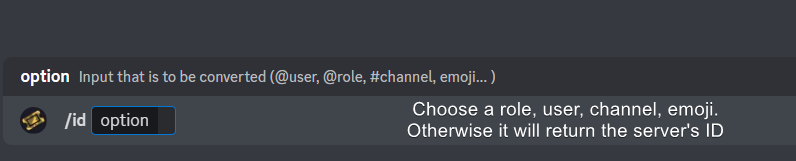
━━ User's inquiry has been moved to a ticket ━━
gilded verge
dense prawn
my welcome message ain’t working
what exactly is not working? you mean they can't see this message?
dense prawn
gilded verge
what exactly is not working? you mean they can't see this message?
i saved it and i went to test it and the message I have never popped u;
gilded verge
could you send screenshot? just to confirm 🤔
dense prawn
suree
dense prawn
gilded verge
could you send screenshot? just to confirm 🤔
help nvm i figured it out
tawny sail
@dense prawn all is working 😌🤌
 uneven lake
Hey guys, bit of a noob question here. The $add command doesnt work for me. After using the command the Ticket Tool says the user was added successfully, but they are not
 dense prawn
uneven lake
Hey guys, bit of a noob question here. The $add command doesnt work for me. Afte...
dense prawn
uneven lake
Hey guys, bit of a noob question here. The $add command doesnt work for me. Afte...
give them a role where they can see the tickets.
vague cosmos
uneven lake
Hey guys, bit of a noob question here. The $add command doesnt work for me. Afte...
Does TT have permission to manage the permission of the ticket channel?
vague cosmos
dense prawn
give them a role where they can see the tickets.
I'm pretty sure they don't want the user to see all tickets, so that is why they use the $add command.
 wraith forum
how do I set up multiple options for a dropdown menu on ticket tool?
humble sequoiaBOT
The Drop-down menu or Select Menu replaces the buttons on your panel message and uses a drop-down menu with all of your panels. To set this up, go to your Panel Configs and select your main Panel.
<:Numbericons1:1018864164032225340> Enable Select Style
First you enable Select Style. Then you add an item in the Dropdown Editor. Now you can start editing your dropdown!
<:Numbericons2:1018864168041971712> Dropdown Editor
Each line in the dropdown editor represents a line in the drop down menu on discord. You can add more "Items", by clicking on
First you select a panel. That's the panel this option will open a ticket for. DONT select the same panel twice. Each option should have a different Panel
After that, you can put a Display. This is the title of this option and will appear in the drop down menu. The *Description can be set right after that, which will be below the title in grey.
Additionally you can select an emoji, that will be shown in front of each option. You can either manually input the ID of an emoji or select it in the selector.
Common Issues ⚠️
- Panel doesn't send? Make sure you have a valid emoji selected
- Option doesn't show up? Check if two options have the same panel in the DropDown Editor
$dropdown
vague cosmos
@wraith forum ^
vague cosmos
Thats nice! 🙂
vague cosmos
Hey, what are you trying to do?
Dashboard > Panel Configs > Click the + right top > Create panel
Okay and you want to send it in your Discord?
You want to send the panel message to a channel in your server, right?
Dashboard > Panel Configs > Select the panel > Send > Choose channel > Send
vague cosmos
vague cosmos
Dashboard > Panel Configs > Click the `+` right top > Create panel
In that case, follow this.
If you told me that earlier, I shoud have linked it for you: https://tickettool.xyz/dashboard/
Ticket Tool - Ticketing without clutter - The #1 discord Ticketing bot
That one should work.
jade topaz
How do I make one embed for both panels (general support and ia support)
Instead of 2 seperate embeds, I want one all together
humble sequoiaBOT
For more convenient use of multipanels, you can now combine panels on the dashboard. This will allow you to directly send the multipanel from the dashboard or via the $panel ID command.
Where can I find this?
You can find this setting on the Dashboard -> Panel Configs -> Panel -> Attached Panels
Note: if you're attaching all the panels to a panel called English, don't include English in the attached panel's box (If you do this, it will create a duplicate)
This will put all buttons from all of your panels on one message. The message is the panel message from the panel you're combining these panels in.
vague cosmos
@jade topaz ^~^
jade topaz
I have 2 panels, but only 1 appears
vague cosmos
Did you add the other panel as attached panel as shown in the steps above?
jade topaz

 vague cosmos
You should be able to attach the second panel to the first one.
Dashboard -> Panel Configs -> Panel -> Attached Panels
Otherwise, can you send a full screenshot of the dash?
 vague cosmos
Select the General one, save and send panel 2.

 vague cosmos
Hmm, I'm currently kinda limited. I'd suggest you to open a ticket in #🎫│make-a-ticket so the support team can assist you.
 soft rock
Hello guys. Do you know if it's possible to send an automatic message after a user has opened a ticket ? Thanks in advance !
vague cosmos
Hey @soft rock,
You should be able to edit the message that is being send when a ticket got opened. Is that what you want?
Dashboard > Panel Configs > Messages> > Edit Opened Message
 soft rock
Thanks for your answer ! It's not exactly this. This message, not many users pay attention to it. I want a new message to be written like the following screen:
 vague cosmos
I don't think that is possible, but you can mention the user up on ticket creation.
If you add {ticket.owner} it will mention the user who opened the ticket. See the example on the screenshot.
 soft rock
Thanks a lot bro !
vague cosmos
No problem, happy to help!
vague cosmos
@jade topaz I'm not sure if you made a ticket or not, but I do have some more time.
What did you do so far?
 modern iron
Hi, can someone tell me how I allow more that one ticket at a time from same user ?
vague cosmos
Dashboad > Panel Configs > Limits > Open tickets each user > Change the number.
@modern iron
 modern iron
Thank you
vague cosmos
Your welcome!
 humble sequoiaBOT
━━ User's inquiry has been moved to a ticket ━━
 frozen matrix
How long does it take for premium to be put onto the website?
vague cosmos
What do you mean exactly?
 wild spire
frozen matrix
still says it's free
wild spire
frozen matrix
still says it's free
press that “sync” button
frozen matrix
It's possible to add more buttons right?
humble sequoiaBOT
For more convenient use of multipanels, you can now combine panels on the dashboard. This will allow you to directly send the multipanel from the dashboard or via the $panel ID command.
Where can I find this?
You can find this setting on the Dashboard -> Panel Configs -> Panel -> Attached Panels
Note: if you're attaching all the panels to a panel called English, don't include English in the attached panel's box (If you do this, it will create a duplicate)
This will put all buttons from all of your panels on one message. The message is the panel message from the panel you're combining these panels in.
vague cosmos
That should do it. 👍🏻
frozen matrix
Thanks
vague cosmos
No worries. ❤️
 digital heath
hello, is there a way I can see historical actions on tickets?
vague cosmos
What do you mean by "historical actions"?
digital heath
Which user opening / closing tickets?
vague cosmos
@digital heath:
Dashboard > Panel Configs > Logging
digital heath
if i had it switched off before, is it not possible to find historical actions?
vague cosmos
I don't think so.
digital heath
thanks!
 thick laurel
It says I dont have access even tho I have admin perms? I could access it before 6hr + I can access other servers but not this
 vague cosmos
Ask the server owner to add your role as dashboard access
thick laurel
Huh? Is it something like new feature?
timber kernel
thick laurel
It says I dont have access even tho I have admin perms? I could access it before...
Run
/permissionlevel
to double check you perms.
thick laurel
timber kernel
Run
/permissionlevel
to double check you perms.
Its 0, how did it change or what is it? Never heard of it and its happening me first time nor did the other server did something like this i just had admin perms but I can access them
timber kernel
thick laurel
Its 0, how did it change or what is it? Never heard of it and its happening me f...
It seems someone revoked your admin perms.
You need to talk to the owner in that case.
thick laurel
So only owner can do it?
Or any other admin
I dont mean the role because I have admin perms
timber kernel
thick laurel
I dont mean the role because I have admin perms
The bot shows something different. So yes, the owner should double check your Discord role.
0 means you don't have access to the dashboard.
You need to be owner or have global admin perms in the server.
As an alternative you can use dashboard roles in Ticket Tool.
jade topaz
how to ticket autoclose when user dont send any messages?
jade topaz
vague cosmos
Automations is a premium only feature.
😦
vague cosmos
You can get free premium by voting too. See $vote in #🤖│bot-spam.
vague cosmos
Hey @weak bison regarding your question, you are trying to edit a button right?
 turbid halo
@vague cosmos Brother, please, how do I edit the a ticket message?
vague cosmos
Dash > Panel Configs > Messages
turbid halo
ok
vague cosmos
Also, there is no need to ping me with a question @turbid halo. If I see it, can answer. 🙂
 sinful root
I Nedd Helper Arbaic
vague cosmos
sinful root
I Nedd Helper Arbaic
You can open a Arabic ticket in #🎫│make-a-ticket or ask your question in Arabic and I can try to help with Google Translate.
@sinful root كيف يمكنني مساعدك؟ سأستخدم ترجمة Google للتواصل معك.
 vague cosmos
يا! يبدو أن هذا روبوت آخر ، يحتوي Ticket Tool Premium على "تذكرة ذهبية" كأفاتار.
vague cosmos
sinful root
This Ticket Prumuim ?
إذا كانت الرسالة الأولى من نفس الروبوت - والتي لا يمكنني رؤيتها - فهذا يعني أنه لا يمكننا مساعدتك في ذلك هنا.
sinful root
@vague cosmos لا بس هيا ticket toll
vague cosmos
هل يمكنك إرسال لقطة شاشة حيث تظهر الرسالة الأولى (مع الأزرار) اسم الروبوت؟ لذا يمكنني أن أؤكد أنه روبوت آخر.
sinful root
@vague cosmos
vague cosmos
لا حاجة إلى ping لي في كل مرة ، أرى رسائلك. 🙂
sinful root

 vague cosmos
هذه أداة التذاكر ، ما هو سؤالك بالضبط؟
sinful root
This Ticket Purimin ?
vague cosmos
That is the free version, but I think it's easier if you make a Arabic ticket in #🎫│make-a-ticket.
 visual cairn
من وين احصل رابط البوت ؟
vague cosmos
لا حاجة إلى ping ، كان علي ترجمة رسالتك. ولكن ماذا يعني؟
vague cosmos
Ticket Tool - Ticketing without clutter - The #1 discord Ticketing bot
 vague cosmos
@cursive phoenix, sorry to ping you here but...
cursive phoenix
No worries thanks
vague cosmos
أقترح عليك فتح تذكرة في ( <571706435449257997#> ) للتواصل مع الفريق العربي ، قد يكون ذلك أسهل.
cursive phoenix
يرجى احترام رغبات المستخدمين ، إذا طلبوا منك التوقف عن اختبار اتصالهم ، فيرجى عدم الاستمرار في اختبار الاتصال بهم.
@visual cairn
visual cairn
وت
vague cosmos
من و ئەو گوتمان دەتوانم یارمەتیت بدەم، بەڵام پێویستە پەیامەکان وەربگێڕم. پێویست ناکات پینگ بکەیت، وەک ئەوەی من دەیانبینم.
jade topaz
Do you have a video for setting it up
urban warren
Is the bot doing it?
So you are putting explicit content into a message and the bot is not going to send it
Right, but if it is giving you a message saying that you can't send explicit content to that desired recipient, you won't be able to send it at all through the bot
are you wanting to change the permissions so that tickettool can't see the ticket?
I think that it is wanting to keep others safe and it won't let you upload it. You many open up a Support Ticket in #🎫│make-a-ticket and the Dev team can help you, but i personally think that it is just prompting that message to keep others safe and to minimize the explicit content
I'm sorry that i couldn't help with your issue
 ocean violet
Heyo. I'm trying to give ticket closing permissions to the person that opened it, without using the close button. But for some reason, when they use the *close command, it tells them they don't have permission. I can't seem to find the right setting.
gilded verge
ocean violet
Heyo. I'm trying to give ticket closing permissions to the person that opened it...
Hi, Command Configs->there find Close
 ocean violet
gilded verge
Hi, `Command Configs`->there find `Close`
ocean violet
gilded verge
Hi, `Command Configs`->there find `Close`
So easy and obvious, and yet, I still failed.
Thank you kindly.
iron nightBOT
Gave +1 Rep to @gilded verge
 misty whale
hello modedrator you know how to auto rename ticket in discord ?
urban warren
misty whale
hello modedrator you know how to auto rename ticket in discord ?
I can help you, so for the auto rename, you must have tickettool premium for that feature to work
misty whale
y but i buy later
wild spire
misty whale
y but i buy later
the profile of the bot in your server shows an “upgrade” button.
 peak wind
.
 sleek mesa
battleeye as in fortnite battleeye?
 jade topaz
can we mass delete tickets?? too boring to delete 1-1
vague cosmos
jade topaz
can we mass delete tickets?? too boring to delete 1-1
I don't believe so, using the $delete command is the fastest way.
vague cosmos
sleek mesa
battleeye as in fortnite battleeye?
Not sure, might be possible but not really a question about Ticket Tool.
vague cosmos
jade topaz
where can I find the bit where it has my disabled roles
Dashboard? I'm on phone so can't check exactly where, but I believe Server Config.
jade topaz
vague cosmos
Dashboard? I'm on phone so can't check exactly where, but I believe Server Confi...
So I set member roles as disabled roles, not knowing it wouldn't allow them to open a ticket. But server configs just shows random stuff

 vague cosmos
jade topaz
So I set member roles as disabled roles, not knowing it wouldn't allow them to o...
vague cosmos
jade topaz
So I set member roles as disabled roles, not knowing it wouldn't allow them to o...
If you disable a role, they can't use the bot.
vague cosmos
jade topaz
What is that pls
What are you trying to do exactly? Open a ticket? Can you run $debug and send a screenshot of the message @pseudo glen gives?
jade topaz
Ok Nice
vague cosmos
@jade topaz for when your TO is over - oh which is now - can you tell me which command you're running?
jade topaz
It’s when I click on create ticket, I’ll make you a video.