
#🆘│community-support
1 messages · Page 43 of 1
 rain comet
 rustic gale
Try sending the panel with the /panel command in the channel instead
That should show an error message indicating the cause of the error
rain comet
where can I find the panel ID
rain comet
 rustic gale
Figures
The Create Ticket button probably has an invalid emoji
This can mean one of several things:
 hexed edge
@rustic gale Thanks for your support my problem has been solved ♥
 iron nightBOT
Gave +1 Rep to @rustic gale
rustic gale
rain comet
- You entered something that isn't an emoji, such as text
- You entered an emoji that Ticket Tool doesn't have access to
- You're on iPhone and entered one of a few default emojis that load broken invisible characters when sent from the iPhone's emoji keyboard
 vale niche
Has there been a change to transcripts? It's asking me to specify a transcript channel but previously it's generated them into the ticket
rustic gale
vale niche
Has there been a change to transcripts? It's asking me to specify a transcript c...
Yes, there was a change
We changed it because sending the transcript within the ticket is equivalent to not making a transcript
rain comet
rustic gale
- You entered something that isn't an emoji, such as text
- You entered an emoji...
Okay, I got the problem, thank you for your help
iron nightBOT
Gave +1 Rep to @rustic gale
vale niche
Ok, I did check change log but couldn't see it
rustic gale
I don't know if the change was documented
vale niche
I see, ok thanks I'll set it up, it might be better this was, but will need to change a process or two
Thanks @rustic gale
iron nightBOT
Gave +1 Rep to @rustic gale
 dense nimbus
Is there a way for me to copy a fully set-up ticket system from one server to another.
I made one on a test server and got it to fully function and would like to transfer it.
Am I able to copy and past the whole setup?
rustic gale
dense nimbus
Is there a way for me to copy a fully set-up ticket system from one server to an...
Sort of
rustic gale
You can use the Backup & Restore feature to copy it over
 humble sequoiaBOT
Backup and Restore allows you to transfer your premium status, panels, tags, and all settings to a new server.
You can also use it to keep a backup of your settings incase you need to suddenly move servers. We suggest you keep this backup key somewhere safe, incase your server is deleted. You will want to copy the whole key.
First, go to your dashboard, then Server Configs and generate a new backup key by pressing the green button. Now, a key should be generated in the box above. You may need to refresh the page to see this.
Once you have your backup key, navigate to the same page on the new server. Copy the key on the second field.
Now you can choose what you want to copy. Finally, press the green “Restore Configs” button.
dense nimbus
ah, nice.
But is this a Premium feature only?
rustic gale
With the help of the owners of both servers, if they're not you
dense nimbus
rustic gale
With the help of the owners of both servers, if they're not you
Yeah, logical
rustic gale
dense nimbus
ah, nice.
But is this a Premium feature only?
No, it's available for everyone
It will copy over all panels
But anything that's server-specific, such as roles, categories and channels, will have to be reselected
dense nimbus
But I just need the pannels
dense nimbus
rustic gale
Let me know if you have any difficulty with it
I think I'll be fine, I'm just glad TT supports multiple tickets (4+), looking at other ticket bots.
I do thank you for the help good sir.
thanks @rustic gale
iron nightBOT
Gave +1 Rep to @rustic gale
 zinc heath
There are so many buttons to configure ticket but where tf do I even create a ticket…..
 timid crane
hey guys
i have question
can i made a dropdown menu with this bot inside the ticket
like example
i opened a ticket
selected a ticket
after that
a dropdown menu showed
asking me what i need
can someone help
rustic gale
timid crane
hey guys
i have question
can i made a dropdown menu with this bot inside the t...
Not possible
timid crane
hmm
but i saw a server
had the thing i talked about
so maybe he is using an external bot ?? right ?
i thought maybe this bot had this feature premuim ? i had to ask
anyways
thanks for your effort
rustic gale
timid crane
hmm
but i saw a server
had the thing i talked about
so maybe he is using an e...
This is likely
 viral fox
How do I make a ticket's transcript appear in the ticket instead of a channel?
rustic gale
viral fox
How do I make a ticket's transcript appear in the ticket instead of a channel?
Why would you want the transcript inside the ticket itself?
viral fox
rustic gale
Why would you want the transcript inside the ticket itself?
To just get the link and log it differently in a seperate channel
rustic gale
What do you do with the ticket afterwards?
viral fox
Delete it
rustic gale
That causes the “direct link” to go dead.
viral fox
So it ends up like this
 rustic gale
If you've been doing this for longer than about a week, the oldest links are dead by now.
viral fox
Ohh, okay, thanks
rustic gale
You should open the ones that are still available, download them, and reupload them somewhere.
viral fox
Thanks @rustic gale
iron nightBOT
Gave +1 Rep to @rustic gale
rustic gale
The reason why we disabled transcripts being sent into the ticket itself when no transcript channel is set
is precisely to help people avoid this very common, very irreversible issue.
 sick garnet
Is there a way to auto delete/archive tickets after a period of time? I would like to auto close maybe after a week with no response, and perhaps auto delete after 30 days if possible
rustic gale
sick garnet
Is there a way to auto delete/archive tickets after a period of time? I would li...
30 days is beyond the longest possible interval, which is 7 days
Also, this is a premium feature. You will need to have premium in your server
sick garnet
yep got that already, so the automations don't take place until 7 days? not immediately
 scenic plinth
You can purchase it direct from us, but please refrain from asking about selling keys like such.
 sharp mango
Can i ask here any question ?
 idle flint
sharp mango
Can i ask here any question ?
idle flint
sharp mango
Can i ask here any question ?
You sure can
sharp mango
i have a Problem im playing warzone 1 caldera, and on Site is The UAv Tool u can buy., But when im typing in the loader the Code is all good it says succesfull, But in Game the Uav is not working … can someone help i also have Team viewer
humble sequoiaBOT

⚠️ You're in the wrong place
We provide support for Ticket Tool Discord bot and cannot help you with whatever issue you have.
- We don't know which Support Team you should contact to get this issue resolved, and unfortunately we won't be able to accurately tell you.
If you don't have any further questions regarding our bot Ticket Tool, please close this ticket
idle flint
sharp mango
i have a Problem im playing warzone 1 caldera, and on Site is The UAv Tool u can...
Not the right server, sorry
sharp mango
Okay sorry
 jade topaz
if I buy premium how do I get a key
will it get sent to my dms?
 timber kernel
jade topaz
if I buy premium how do I get a key
will it get sent to my dms?
timber kernel
jade topaz
if I buy premium how do I get a key
will it get sent to my dms?
If you buy it through Discord it will automatically be applied and there is no need to use a key.
If you want to buy it here via direct payment, please open a ticket and we guide you through it.
 cold void
so i have manage server perms
on the ticket bot website when i click,manage it redirects me to dashboard
timber kernel
cold void
on the ticket bot website when i click,manage it redirects me to dashboard
You need to be admin or owner or your role is added as dashboard role in the general settings.
 upbeat falcon
i got an error :
Failed: `Invalid Form Body
components[0].components[2].emoji.id[BUTTON_COMPONENT_INVALID_EMOJI]: Invalid emoji
can someone help me
can someone help me
timber kernel
upbeat falcon
i got an error :
Failed: `Invalid Form Body
components[0].components[2].emoji.i...
You are using an emoji, most likely on a button, that is not found by ticket tool.
Please check it in the dashboard.
upbeat falcon
 timber kernel
upbeat falcon
timber kernel
upbeat falcon
Run
/debug
in the channel you want to send the panel.
upbeat falcon
thanks
timber kernel
upbeat falcon
thanks
And it is already telling you what the problem is in that case.
The Bot is missing permissions in that channel.
Please check for View Channel and Send Messages.
 covert swallow
Is that a Discord server with @pseudo glen in it?
 slim pulsar
sharp mango
Ac Diamond Server don’t work
slim pulsar
sharp mango
Ac Diamond Server don’t work
It’s dead lmao
slim pulsar
covert swallow
Is that a Discord server with <@557628352828014614> in it?
He’s talking about something that breaks TOS lol sooooo 🤫
covert swallow
I wasnt sure if he was talking about his server je couldnt find on his dashboard
slim pulsar
covert swallow
I wasnt sure if he was talking about his server je couldnt find on his dashboard
Nah lol ACD is a cheat provider 🤣
Idk why he’s speaking about them in here
 lavish basin
How do I access the transcript? After I download it it just shows random stuff
humble sequoiaBOT
━━ User's inquiry has been moved to a ticket ━━
 umbral isle
i can change the bot avatar or name in premuim?
 wild spire
umbral isle
i can change the bot avatar or name in premuim?
wild spire
umbral isle
i can change the bot avatar or name in premuim?
name yes, but only as a user nickname.
Profile picture no.
This will be a feature soon with whitelabel
edit: nickname doesnt need premium
 finite herald
when a ticket is created it goes uncategorized, how do i put it in a category?
humble sequoiaBOT
━━ User's inquiry has been moved to a ticket ━━
 safe gust
will this section (Support Team, Only Allowed Roles) make it so people need a specific role to use the create ticket button?
 wild spire
safe gust
will this section (Support Team, Only Allowed Roles) make it so people need a sp...
wild spire
safe gust
will this section (Support Team, Only Allowed Roles) make it so people need a sp...
allowed roles -> user needs either of those roles to use it
disabled roles -> if user has any of those roles they cannot use it
support team only -> if none of the user roles is marked as support team in the dashboard, they cannot use it
humble sequoiaBOT
Zackie, we would love to help you, but if you don't tell us what you need help with we can't help you :(
 wide glen
for my server im trying to add ticket tool as a bot but when i run /set up i get this:

 trim inlet
/claim
rustic gale
wide glen
for my server im trying to add ticket tool as a bot but when i run /set up i get...
Probably an issue with the bot's permissions.
Head to that channel's permission settings
Add Ticket Tool and make sure it has View Channel and Send Messages
then use the /debug command to check for other missing permissions
grant them to it
then use /setup again
 ancient comet
Hello, quick question... ¿Is it possible to change the profile picture of the premium BOT? If so, how?
rustic gale
ancient comet
Hello, quick question... ¿Is it possible to change the profile picture of the pr...
Not possible
iron nightBOT
Gave +1 Rep to @rustic gale
wide glen
rustic gale
Probably an issue with the bot's permissions.
alr thx!
 brave shoal
how can i add this?
 humble sequoiaBOT
A Discord Form lets the user answer individual questions in a pop-up Form, which then displays the answers in the ticket message. This can save time if you already know what you want to ask the user.
Setup Forms
Forms can be enabled under Panel Settings > Form Options > Edit Forms Options. In the new pop-up window, you can now enable and edit your own Form.
Form Options
You can add up to 5 questions in the Discord form. This is a Discord limitation. Each question can have a placeholder in the input field, a minimum and maximum input, multi-line, and also the option to have the answer required.
Options
Question Title ➞ Your Question goes here
Question Placeholder ➞ The placeholder text in the input field
Required ➞ If enabled, the user has to answer this question, to submit the form
Multi-Line Input ➞Allows the user to input multiple lines
Minimum and Maximum Input ➞ Set a minimum and maximum input value for the user
Displaying the Answer
To display the answers from the user, you need to enable Auto display form results on the ticket message as an additional embed
In case you don't want a second embed, go into your Panel Configs > Ticket Options > Edit Ticket Message. In there you use the variable {create.form.x} and just replace x with the number of your question. For example, the response to Question 1 can be displayed with {create.form.1}. If you don't use this variable, the response from the user is lost.
 brave shoal
how to get panel id?
timber kernel
brave shoal
how to get panel id?
The Id is the number starting with one you see before the panel name:

 sleek kindle
If i want to stop premium service, how can i stop it?
brave shoal
thanks @timber kernel
iron nightBOT
Gave +1 Rep to @timber kernel
rustic gale
sleek kindle
If i want to stop premium service, how can i stop it?
Depends on how you got it
sleek kindle
rustic gale
Depends on how you got it
is there any docs or FAQs that explain how to stop it? I can
i can't find it
rustic gale
Honestly, i can't find it either
I could explain it to you, but i don't know if it's documented on the site
 misty epoch
hey guys - quick question, is there a way with ticket tool to track what person has closed tickets etc?
timber kernel
misty epoch
hey guys - quick question, is there a way with ticket tool to track what person ...
Hello, like you want to see how many people of your staff has currently how many closed tickets that are not deleted yet?
misty epoch
timber kernel
Hello, like you want to see how many people of your staff has currently how many...
yes mate
 solar river
How do I get multiple ones like this?
As I can only add one.
 idle flint
solar river
How do I get multiple ones like this?
As I can only add one.
idle flint
solar river
How do I get multiple ones like this?
As I can only add one.
Create multiple panels, then add them all under the drop-down menu of your main panel
humble sequoiaBOT
The Drop-down menu or Select Menu replaces the buttons on your panel message and uses a drop-down menu with all of your panels. To set this up, go to your Panel Configs and select your main Panel.
<:Numbericons1:1018864164032225340> Enable Select Style
First you enable Select Style. Then you add an item in the Dropdown Editor. Now you can start editing your dropdown!
<:Numbericons2:1018864168041971712> Dropdown Editor
Each line in the dropdown editor represents a line in the drop down menu on discord. You can add more "Items", by clicking on 

First you select a panel. That's the panel this option will open a ticket for.  DONT select the same panel twice. Each option should have a different Panel
After that, you can put a Display. This is the title of this option and will appear in the drop down menu. The *Description can be set right after that, which will be below the title in grey.
Additionally you can select an emoji, that will be shown in front of each option. You can either manually input the ID of an emoji or select it in the selector.
Common Issues ⚠️
- Panel doesn't send? Make sure you have a valid emoji selected
- Option doesn't show up? Check if two options have the same panel in the DropDown Editor

$dropdown
solar river
Ah, that is so I can customize each message to show wich option they chose?
 idle flint
Correct, create each panel with whatever settings/ticket message you desire - they don't have to be the same (i.e one for "Support", one for "Information", one for "Billing")
solar river
Gotcha!
And at the case number, it's counting the amout of tickets created before that.
If I for example open a ticket with the moderation support tab, it will say 1408, and does it say 1409 if there is one created after that with the general support tab?
idle flint
solar river
Gotcha!
And at the case number, it's counting the amout of tickets created befor...
each ticket type would count individually, so you would have all the tickets start at 1, and it would count up for each type of ticket
solar river
Mh, alright.
So there is no way to sync the ticket count?
idle flint
Not that I am aware of
 oak quest
is this were to ask for help..? please dont bann me if its not this is super confusing
ok i scroleld up i think im in the right place
solar river
oak quest
is this were to ask for help..? please dont bann me if its not this is super con...
Yes, this is! 🙌
oak quest
How can i give veiw and edit rights to one of my staff?
idle flint
oak quest
How can i give veiw and edit rights to one of my staff?
For the tickets or for the dashboard?
timber kernel
misty epoch
yes mate
That is unfortunately not possible. You can suggest this if you like -> #💡│suggestions 🙂
oak quest
In a server i used to work for I was only a mod but was given perms to claim and see tickets with all the other mods an we could all do it. Are you sure? was that a different ticket bot?
idle flint
oak quest
In a server i used to work for I was only a mod but was given perms to claim and...
Tux was replying to someone else
You can do this through Support Roles
This can be done on the Dashboard > Panel Configs > Support Roles
oak quest
oh! ok thank you!
brave shoal
any way to make tickets get automatically deleted in 3days?
 gilded verge
brave shoal
any way to make tickets get automatically deleted in 3days?
gilded verge
brave shoal
any way to make tickets get automatically deleted in 3days?
your server need premium, but go to panel configs -> automation
brave shoal
gilded verge
your server need premium, but go to panel configs -> automation
i dont have premium. ;-:
but thank you @gilded verge
oak quest
so i Added the role to support roles in the dashboard but they cant see new or old tickets? did i do something incorrect?
 wild spire
oak quest
so i Added the role to support roles in the dashboard but they cant see new or o...
wild spire
oak quest
so i Added the role to support roles in the dashboard but they cant see new or o...
did u add them to the correct panel?
oak quest
This is my only panel i think
oh wait i have 2 of the same oone moment
Ok so i added them in both Pannels, afraid to delete the extra but neither having the role their gave them the ability to see
wild spire
oak quest
Ok so i added them in both Pannels, afraid to delete the extra but neither havin...
u opened a new ticket to test right?
oak quest
yes each time. I also figured out wich was the duup as 1 doesnt have a channel selected like pannel 2 does which is selected for my welcome and roles channel
wild spire
can u take a look at permissions > support team > edit opened?

 oak quest
Did that but ur still doesnt give them the ability to see the ticket when its made
only my pic and the ticket bot pic are above it for roles that can see
wild spire
oak quest
Did that but ur still doesnt give them the ability to see the ticket when its ma...
okay one thing totally aside. TT is missing “add reactions” permissions
thats a necessary permission for normal functionality
oak quest
so do i tick this one?

The tickets work perfect for me and archive and everything i just cant get that role to see it, idk if knowing that helps
all perms are green now globally but still doesnt work
I need to sleep, ill come back to this
 woeful fable
@iron night
 stoic swallow
how do i make it so when using the dropdown style, it will put the certain button in a certain category
or how do i make it so it tells me which button they clicked on
woeful fable
@stoic swallow
stoic swallow
woeful fable
<@1075191802321178624>
?
woeful fable
Como activo mi ticket
stoic swallow
woeful fable
Como activo mi ticket
idk
woeful fable
Idk
 plain surge
stoic swallow
how do i make it so when using the dropdown style, it will put the certain butto...
plain surge
stoic swallow
how do i make it so when using the dropdown style, it will put the certain butto...
You can change where tickets from a certain panel are opened by following these instructions
$help
humble sequoiaBOT
plain surge
$help
1. Go into your Dashboard
2. Open your Panel Configs tab
3. Select the panel you want to grant access to
4. Open the Category options menu
5. Select the categories of your preference
6. Save changes
 plain surge
stoic swallow
or how do i make it so it tells me which button they clicked on
plain surge
stoic swallow
or how do i make it so it tells me which button they clicked on
For this, you can add the panel name to the ticket message (the automatic message sent in the ticket when it is opened) or you can just type something unique for you to know
For the panel name just put {panel_name} somewhere in the ticket message
humble sequoiaBOT
The Ticket Message is the first message sent by the bot on a new ticket. To customize it head over to your Dashboard ➞ Panel Configs ➞ Ticket ➞ Edit Ticket Message

 tawdry rock
hey does anyone have any tips to make ur ticket be first in line when many people are making tickets at one
plain surge
Tickets are sorted based on when they were created
Inside the category old ticketz are at the top and new tickets are created under them
tawdry rock
yeah so i guess what i’m saying is are there tips to being quick
plain surge
No, just make sure you have a stable internet connection so that Discord registers your button click and you don't get interaction failed. Also about your ticket, when many people are creating tickets the bot doesn't glitch, it's waiting for like a cooldown to be over as Discord has a rate limit in place
 split spindle
what I do?
 rustic gale
split spindle
what I do?
rustic gale
split spindle
what I do?
Are you staff in that server? Or are you just a user?
split spindle
User
rustic gale
You will have to contact staff and tell them that you're unable to create a ticket
If they don't know what to do, they can join this server and ask for help.
split spindle
Okey
jade topaz
hi is there any way i can put 2 buttons in one panel?
split spindle
@rustic gale hi, they don't know what to do
rustic gale
split spindle
<@832864595726172162> hi, they don't know what to do
Then they can join this server and ask for help
rustic gale
jade topaz
hi is there any way i can put 2 buttons in one panel?
Of course. This is called a multipanel
humble sequoiaBOT
For more convenient use of multipanels, you can now combine panels on the dashboard. This will allow you to directly send the multipanel from the dashboard or via the $panel ID command.
Where can I find this?
You can find this setting on the Dashboard -> Panel Configs -> Settings -> Panel
Note: if you're attaching all the panels to a panel called English, don't include English in the attached panel's box (If you do this, it will create a duplicate)
This will put all buttons from all of your panels on one message. The message is the panel message from the panel you're combining these panels in.
 woeful fable
@Ticket Tool#6207
sharp mango
Hey guys How i can make Ticket for questions about store?
 limber copper
hello everyone! can someone help me to configure my server? I can't get the integrations to claim a ticket, and the rest. thanks
jade topaz
rustic gale
Of course. This is called a multipanel
alr thank you, how bout this one?
 iron nightBOT
Gave +1 Rep to @rustic gale
rustic gale
sharp mango
Hey guys How i can make Ticket for questions about store?
Please clarify a bit what you need
rustic gale
limber copper
hello everyone! can someone help me to configure my server? I can't get the inte...
Take a look at the Setup Guide in #📂│information
rustic gale
jade topaz
alr thank you, how bout this one?
Invalid emoji. You probably entered something into the button emoji field that Discord doesn't recognize as a valid emoji
limber copper
rustic gale
Take a look at the **Setup Guide** in <#509239005481664524>
it's okay
i have forget to make /panel
good journey 😉
rustic gale
This could be:
- text instead of an emoji, or in addition to an emoji
- an emoji from a server that the bot is not in
- if you're on an iPhone, an emoji entered with the phone's emoji keyboard (use the emoji selector on the website instead)
jade topaz
rustic gale
Invalid emoji. You probably entered something into the button emoji field that D...
this is my button, does the word Order make it invalid?
 rustic gale
jade topaz
this is my button, does the word `Order` make it invalid?
rustic gale
jade topaz
this is my button, does the word `Order` make it invalid?
Correct
That word goes in the Button Text field located below.
 amber jasper
How to do multi panels
jade topaz
humble sequoia
^^
rustic gale
humble sequoia
@amber jasper
amber jasper
rustic gale
<@821570434675376150>
I dont find the settings button in the dashboard after the config panels
rustic gale
amber jasper
I dont find the settings button in the dashboard after the config panels
Oh. that's a mistake
It's the Panel button in Panel Configs
amber jasper
rustic gale
It's the **Panel** button in Panel Configs
Where is that too
The place where u create panels?
rustic gale
amber jasper
The place where u create panels?

 frosty oxide
Hello! So when after I download the transcript for a ticket, the images that were shared don't load. Does anybody know how to fix this or a workaround?
rustic gale
frosty oxide
Hello! So when after I download the transcript for a ticket, the images that wer...
Images aren't saved as part of a transcript
frosty oxide
so there isn't any way to review them once the ticket is closed and deleted?
rustic gale
Sadly no
I regret that you may have lost data you wanted to keep
The only real way to preserve them is to download them
Premium also lets you preserve some images in the transcript
frosty oxide
I see, thanks a lot for your feedback
amber jasper
How to do a claim method without premium
rustic gale
amber jasper
How to do a claim method without premium
The regular claiming feature requires premium. There's no other way
Without premium, you could have your staff use the /rename command to rename the tickets
 echo peak
When i use ticket tool cmd it's say this application did not respond
 sage aspen
Hello everyone, silly question here but I have not adjust my ticket settings for over 2 years now however I was curious how many different ticket categories can I set up? What I mean by that is currently I have one for support and one for other things like claiming boosting rewards.
Does the free ticket version allow me to add more like that? Hopefully that makes sense
Also I believe i’m able to set up a predetermined message that automatically sends when a ticket is created and sends inside the ticket also tagging the individual who opened the ticket is this also on the free version or the premium one?
rustic gale
echo peak
When i use ticket tool cmd it's say this application did not respond
Probably a permission issue. Try the following
- Edit Channel -> Permissions
- Add Ticket Tool and grant it the View Channel and Send Messages permissions
- Use the /debug command. It should show if any other permissions are missing
- Add the missing permissions
- Try again
rustic gale
sage aspen
Hello everyone, silly question here but I have not adjust my ticket settings for...
how many different ticket categories can I set up?
Literally dozens
i’m able to set up a predetermined message that automatically sends when a ticket is created and sends inside the ticket also tagging the individual who opened the ticket is this also on the free version or the premium one?
It's free. You would use the {ticket.user} variable in the ticket message
 fair oasis
I am trying to get a [custom command] to send a $new command to open a ticket but the ticket bot seems to be ignoring itself. Is this possible?
Here's my custom command

My prefix is a dash instead of the dollar sign BTW
When I type out the command myself, it works.
like when I type
-new @Staff Team 1299p-senlar
But when the custom command is used that makes the bot type that same exact message... nothing happens.
 slender minnow
fair oasis
Here's my custom command
slender minnow
fair oasis
Here's my custom command
why not just use the new command?
fair oasis
I'm trying to automate it
So I am having an automation rule trigger the custom command that should then open a new ticket channel
slender minnow
so you have a bot for automation?
fair oasis
 slender minnow
iirc that only works in tickets
fair oasis
Yeah its working
I mean its putting the message into the ticket (From automation)
But the message itself isn't then executing to create a new ticket
slender minnow
because the bot only listens to the channel set for the command style ticket
fair oasis
I set it to all channels
slender minnow
try setting it to your ticket
fair oasis
and it works when I manually type the same command
slender minnow
slender minnow
try setting it to your ticket
that channel*
tbh i never tried automation like that
fair oasis

So here's the ticket that is opened by a player, you can see at the bottom the automation has run the custom command and placed the command in that should create a new ticket
But that command itself isn't be executed
slender minnow
why not just get a bot that would help you automate it
so make tt listen to that bot response
and you are good to go
sage aspen
rustic gale
> how many different ticket categories can I set up?
Literally dozens
> i’m able...
Thanks for the help!!! Truly appreciate it!
fair oasis
What I am trying to do is get the bot to open a thread in another channel that my staff can use to discuss the ticket.
I know there's the private thread option, but the problem with that is I have to delete those ticket channels that the private threads are attached to over time or my discord reaches channel limits. I cannot maintain history of the private threads that staff used to discuss the tickets because of that.
 dusty crypt
can i make ticket tool edit (update) the panel in its same message or does it have to send a new message entirely?
fair oasis
Delete and resend the panel
dusty crypt
sigh
slender minnow
fair oasis
I know there's the private thread option, but the problem with that is I have to...
checking some stuff out
timber kernel
dusty crypt
can i make ticket tool edit (update) the panel in its same message or does it ha...
You also can update it.
Use the Update button (see screenshot).
For this you need to copy the message link from the current panel. Then it gets replaced.
 timber kernel
dusty crypt
that is good to know for the next time i have to update😅😅
timber kernel
dusty crypt
that is good to know for the next time i have to update😅😅
Learning something every day 😅
slender minnow
fair oasis
I know there's the private thread option, but the problem with that is I have to...
i think you are confused between thread style and command style
in thread style, the user has to click the panel button to open a ticket as thread
whereas in command style, the user uses a command to open a ticket
frosty oxide
how do i create a ticket panel similar to the one in #🎫│make-a-ticket?
humble sequoiaBOT
For more convenient use of multipanels, you can now combine panels on the dashboard. This will allow you to directly send the multipanel from the dashboard or via the $panel ID command.
Where can I find this?
You can find this setting on the Dashboard -> Panel Configs -> Settings -> Panel
Note: if you're attaching all the panels to a panel called English, don't include English in the attached panel's box (If you do this, it will create a duplicate)
This will put all buttons from all of your panels on one message. The message is the panel message from the panel you're combining these panels in.
timber kernel
frosty oxide
how do i create a ticket panel similar to the one in <#571706435449257997>?
Here you go ^
frosty oxide
thank you very much
timber kernel

 rapid jungle
I had a small question I wanted to know if it was possible to use an existing post as an embed to integrate the buttons that allow members of a server to open different tickets without the post being sent by ticket tool?
rustic gale
rapid jungle
I had a small question I wanted to know if it was possible to use an existing po...
Not possible
 sly root
Hey guys, I want my mods to be able to edit the tickettool dashboard, they have the required permissions on discord but it won't let them manage the server on tickettool, how do I fix this?
 tough knot
Hello! My support team can't edit the tickets that themselves created, only the ones opened by other members.. how to get around this? Thank you
timber kernel
sly root
Hey guys, I want my mods to be able to edit the tickettool dashboard, they have ...
Add there role to the dashboard roles in Server Configs:

 round crypt
the bot does not delete the channel when I use /delete instead it deletes all messages
it has administrator
 timber kernel
tough knot
Hello! My support team can't edit the tickets that themselves created, only the ...
timber kernel
tough knot
Hello! My support team can't edit the tickets that themselves created, only the ...
Check the permissions.
You may not grant the necessary permissions to the support team.
 timber kernel
round crypt
the bot does not delete the channel when I use /delete instead it deletes all me...
timber kernel
round crypt
the bot does not delete the channel when I use /delete instead it deletes all me...
Are you sure you selected the correct bot for the delete command?
round crypt
timber kernel
Are you sure you selected the correct bot for the delete command?
yes
there is only 1 bot in the server with /delete
tough knot
timber kernel
Check the permissions.
You may not grant the necessary permissions to the suppo...
Which permissions do i have to enable for the support team can edit all the tickets? because i can't permit other members to edit. they're on the Dashboard roles in general options
round crypt
timber kernel
round crypt
yes
That's weird. Please open a ticket so we can investigate it further -> #🎫│make-a-ticket
timber kernel
tough knot
Which permissions do i have to enable for the support team can edit all the tick...
What do you mean by edit?
It is up to you which perms you grant, additionally to Send messages for example.
tough knot
timber kernel
What do you mean by edit?
It is up to you which perms you grant, additionally to...
edit i mean add user to the ticket and manage their permitions. the support team can do so in the tickets other users created, but not in the tickets themselves created

 naive helm
im on desktop
scenic plinth
Thats... odd, is it updated? It could be dependent on your browser, because it appears fine for me.
naive helm

honeslty its fine, i just wanted to raise it because it could be an easy fix but i guess not
scenic plinth
Unfortunately not in the context you want it, you can try hiding the channel though if its really that bothering.
 brisk obsidian
Quick question, when we paid for the premium, does it work on only one server or on multiple server ?
rustic gale
brisk obsidian
Quick question, when we paid for the premium, does it work on only one server or...
Only one server
rustic gale
naive helm
Sadly there's no real way to fix that
brisk obsidian
So it on locks the server when I modify the premium permissions?
rustic gale
brisk obsidian
So it on locks the server when I modify the premium permissions?
Not sure what you mean, please clarify
brisk obsidian
How do I choose on which server i want premium ?
rustic gale
brisk obsidian
How do I choose on which server i want premium ?
You chose it when you bought it.
 hot summit
Is there a way to allow the ticket creator to re-open the ticket whenever they please?
brisk obsidian
hot summit
Is there a way to allow the ticket creator to re-open the ticket whenever they p...
i'll check and i'll tell you
it may be this settings
 hot summit
brisk obsidian
it may be this settings
hot summit
brisk obsidian
it may be this settings
I have that off in the case that the user wants to open the ticket again if they need to. But I'm curious if the closed ticket channel will still be available for the user if they decide to re-open it again in the future
brisk obsidian
No, it doesn't seem to be able
Maybe available with custom commands and some acknowledge of Command trigger
i don't know honestly
rustic gale
brisk obsidian
If it's vote premium ?
If it's vote premium it's not paid
If it's vote premium, you redeem the key in whichever server you want
rustic gale
hot summit
I have that off in the case that the user wants to open the ticket again if they...
By default, a ticket is hidden from the ticket user when it's closed.
If you want the ticket to remain visible for the user, you can toggle its View Channel closed permission to  .
.
You would do this in Panel Configs -> Permissions -> Edit User Closed.
hot summit
rustic gale
You would do this in Panel Configs -> Permissions -> Edit User Closed.
Thank you so much 🙏
iron nightBOT
Gave +1 Rep to @rustic gale
brisk obsidian
iron night
Gave +1 Rep to **<@832864595726172162>**
how to ?
rustic gale
How to do what?
Give me rep when someone thanks me?
That's <@&815660789414756364>'s rep module. It's a different bot, not related to Ticket Tool despite the misleading nickname
 split tulip
I have the bot on my server. When I want to finish a panel & when i have to choose where the script will shown I can't select the channel i want . only a few are shown
anybody knows what to do=?^^
rustic gale
split tulip
anybody knows what to do=?^^
Press the Sync button on the left-hand sidebar
rustic gale
split tulip
can u make a screenshot?
 split tulip
thank u ^-^ im dumb. i didnt checked that i have to use the website ^^ works now :3
 flint socket
How to make the bot set conversation logs every time a ticket is closed and the channel is deleted?
rustic gale
What do you mean by «set conversation logs»?
 cerulean obsidian
I am using {time.opened.age} but it does not work.

 white zealot
It said the application did not respond. What should I do?
rustic gale
white zealot
It said the application did not respond. What should I do?
Depends on what you were trying to do, but this is usually a permission issue
- Edit Channel -> Permissions
- Add Ticket Tool and make sure it has View Channel and Send Messages
- Use /debug and give it any other missing permissions
- Try again what you were trying to do
rustic gale
 crisp dirge
How do I stop my normal verified members from using tickettool commands
crisp dirge
How do I stop my normal verified members from using tickettool commands
Depends on what you want to disable and where
crisp dirge
rustic gale
Depends on what you want to disable and where
I dont want my members to have any available preset commands
humble sequoiaBOT
━━ User's inquiry has been moved to a ticket ━━
 gilded surge
buffering on all live stations. Buffering last night on LFC match.
humble sequoiaBOT
⚠️ You're in the wrong place
We provide support for Ticket Tool Discord bot and cannot help you with whatever issue you have.
- We don't know which Support Team you should contact to get this issue resolved, and unfortunately we won't be able to accurately tell you.
If you don't have any further questions regarding our bot Ticket Tool, please close this ticket
 serene smelt
Was there a change recently that made transcripts premium-only?
I don't remember us using premium but we had transcripts up until a few days ago
timber kernel
serene smelt
Was there a change recently that made transcripts premium-only?
I don't remembe...
No. You can use it with the free version too, but it will not automatically trigger, you need to actively create it after you closed the ticket for example.
 rotund yarrow
I pressed Pannel Configs to set up a ticket system but for some reason nothing's working. I kept exiting and refreshing but still nothing
 timber kernel
rotund yarrow
I pressed Pannel Configs to set up a ticket system but for some reason nothing's...
timber kernel
rotund yarrow
I pressed Pannel Configs to set up a ticket system but for some reason nothing's...
Thats weird. Can you please try logout from the dashboard and login again?
rotund yarrow
timber kernel
Thats weird. Can you please try logout from the dashboard and login again?
Yup I'll try that
timber kernel
rotund yarrow
Yup I'll try that
Can you try a different browser? Just to see if it makes a difference?
I just checked your server and I can access the panel configs.(
( in case first idea is not helping)
rotund yarrow
timber kernel
Can you try a different browser? Just to see if it makes a difference?
I just ch...
It looks like I did need to log out and log back in, thank you for the help!
iron nightBOT
Gave +1 Rep to @timber kernel
timber kernel
rotund yarrow
It looks like I did need to log out and log back in, thank you for the help!
serene smelt
timber kernel
No. You can use it with the free version too, but it will not automatically trig...
yeah it was doing it automatically until like 2 days ago
 trim stag
Hey quick question, how would i access the pictures in tickets that are in the transripts?
 weak bison
Can i change this logo somehow?
 gilded verge
weak bison
Can i change this logo somehow?
gilded verge
weak bison
Can i change this logo somehow?
whitelabels are planned from what i remember so not yet
rotund yarrow
Hey I was wondering why these messages keep popping up when I try to change the Ticket message
 scenic plinth
Something within your ticket panel button wise is an emoji the bot cannot use (Doesnt share a mutual server, animated emoji, emoji name or ID doesnt match any emoji, etc.)
rotund yarrow
scenic plinth
Something within your ticket panel button wise is an emoji the bot cannot use (D...
THank you for the help!
iron nightBOT
Gave +1 Rep to @scenic plinth
 arctic burrow
Ok so basically I have some tickets set up and when the person is finished with said ticket, everyone can delete the ticket and I need help trying to solve this so people cant just delete the ticket.
rustic gale
arctic burrow
Ok so basically I have some tickets set up and when the person is finished with ...
I would recommend adding everyone to the disabled roles for the Delete Ticket button.
You can do this in the dashboard, in Panel Configs -> Buttons -> Delete Ticket -> Disabled Roles
arctic burrow
Thank you, I will check if its enabled, if it is and still happens I'll be back
rustic gale
I would also recommend disabling the delete command (this is done in Command Configs in the dashboard)
arctic burrow
Thank you for your help!
Hm, it still seems to happen, I tried closing it on my alt and it is still happening, i may have to add a command to close it.

shmoulder is my alt by the way
 nova wharf
arctic burrow
Hm, it still seems to happen, I tried closing it on my alt and it is still happe...
nova wharf
arctic burrow
Hm, it still seems to happen, I tried closing it on my alt and it is still happe...
Did you save when you edited the permissions?
arctic burrow
Yes Of course
nova wharf
arctic burrow
Yes Of course
Did you maybe add the everyone role to support team roles?
 past tiger
How can I make it so all of my tickets are sent to here in my Discord? https://gyazo.com/b794a07313c6d8182c7172cc6d33afca

I cant figure out how to do this in the itcket tool panel

 lilac silo
past tiger
https://gyazo.com/c7aacf7763ab5ef348287cfaba29710b
lilac silo
past tiger
https://gyazo.com/c7aacf7763ab5ef348287cfaba29710b
Panel Configs > Category


then choose where you want opened tickets and closed tickets to go (which category)
 rustic gale
arctic burrow
Hm, it still seems to happen, I tried closing it on my alt and it is still happe...
rustic gale
arctic burrow
Hm, it still seems to happen, I tried closing it on my alt and it is still happe...
I'm not sure i understand what the problem is.
Can your alt delete the ticket still?
arctic burrow
Yes
rustic gale
Can you confirm that your alt does not have a support team role?
arctic burrow
Alright, i'll check over everything again and hopefully it doesn't
rustic gale
arctic burrow
Alright, i'll check over everything again and hopefully it doesn't
You can share your screen in #1070106933115240448 if you'd like
arctic burrow
I think I got it
 lapis sun
hi, is there a way to change the profile pic/name of tickettool?
wild spire
lapis sun
hi, is there a way to change the profile pic/name of tickettool?
you can set a nickname for your bot.
Full custom name and pfp will be released with whitelabel in the near future.
lapis sun
wild spire
you can set a nickname for your bot.
Full custom name and pfp will be released ...
Awesome, do you have an ETA for that or just within the coming months
wild spire
lapis sun
Awesome, do you have an ETA for that or just within the coming months
There’s no ETA as we cannot rush programming and testing from our developers in case some bugs pop up.
It’s being worked on atm.
Better a longer wait and a good system. Than rushed and many complaints 
lapis sun
wild spire
Better a longer wait and a good system. Than rushed and many complaints <a:CH_Pe...
of course! I appreciate the response, thank you 🙂
iron nightBOT
Gave +1 Rep to @wild spire
wild spire
anytime
 raw ravine
can someone help me? im tryna purge the tickets in my server but it doesnt work...
humble sequoiaBOT
━━ User's inquiry has been moved to a ticket ━━
oak quest
hello!
ok now ill be at my desk for at least an hour
May i have more help trying to figure out why the ticket bot wont see the perms i gave to a staff?
 topaz dagger
Hello, I want to close my subscription but I can't! can anyone help?
 warped tree
hi
 coarse spruce
Are we able to edit the closerequest command?
oak quest
is tere a place that uses hammer time for the most optimal time ot ask for help?
gilded verge
coarse spruce
Are we able to edit the closerequest command?
you can edit response for this command: panel configs->ticket->edit close question
oak quest
May i have help giving ticket access using the panel?
oak quest
Should i just put in a ticket?
This is holding up operations for us, i dont want to be a pest but i cant keep coming back and sitting around for hours >.<
jade topaz
I bought a premium but it writes to me on the server for 1 day until the end of the premium, and I just bought it


 timber kernel
jade topaz
timber kernel
jade topaz
Click the sync button please.

 stark fractal
hi guys. i have transcripts from 2021. there are photos sent there. how to see those photos?
all i see is this
 timber kernel
jade topaz
timber kernel
jade topaz
What does it show in Discord in the Subscription options? (in your account settings)
stark fractal
stark fractal
all i see is this
is there any option to see it? it's super important
jade topaz
timber kernel
What does it show in Discord in the Subscription options? (in your account setti...
Nothing has changed

I had a temporary premium status and I paid and the date has not changed, but I'm afraid my settings will fly
timber kernel
jade topaz
I had a temporary premium status and I paid and the date has not changed, but I'...
They will not. Even if premium would run out, settings stay.
Is the subscription time correctly shown in your Discord account (under subscriptions)?
jade topaz
timber kernel
They will not. Even if premium would run out, settings stay.
Is the subscription...
How to watch?
timber kernel
jade topaz
How to watch?
Account settings -> Subscriptions
timber kernel
stark fractal
is there any option to see it? it's super important
Most likely no. In the free version the attachments are not saved persistently.
From the docs:

 primal wadi
I can't send a ticket message to the bot and I can't set it up.
 stark runeBOT
1. Invite Ticket Tool to your server
First you will want to invite the bot to your server. Once the bot is in your server, you can manage your server in the dashboard.

2. Create a Panel
To create a panel we are going to need to head over to the panel configs on the dashboard.
Once at the dashboard we will need to click Create Panel.
Enter a panel name (Fill in any optional settings you want).
Click Create Panel and your ready to get started with configuring your panel.
An example of a creating a panel is shown below.

3. Send the Panel to a Channel
Once you've created a panel on the dashboard you will need to send it to a channel using send on the dashboard.
Select the channel you want your panel to be created in and click send.
For other questions checkout $help faq.
An example of a sending a panel is shown below.
Having a Problem Sending the Panel?
Do $debug in a channel with Ticket Tool and make sure it has all the necessary Discord permissions.
 timber kernel
primal wadi
I can't send a ticket message to the bot and I can't set it up.
timber kernel
primal wadi
I can't send a ticket message to the bot and I can't set it up.
That is the initial setup ^
Please follow it.

 gilded verge
jade topaz
What did I pay 6 bucks for?
gilded verge
jade topaz
What did I pay 6 bucks for?
you bought via discord, so go to user settings->subscriptions, as @Tux mentioned
jade topaz
gilded verge
you bought via discord, so go to user settings->subscriptions, as `@Tux` mention...
Show me how?
gilded verge
in your discord you need to click user settings, then you can find
 flint socket
How to prevent certain roles from not opening tickets?
 gilded verge
flint socket
How to prevent certain roles from not opening tickets?
gilded verge
flint socket
How to prevent certain roles from not opening tickets?
panel configs->buttons->edit Close Ticket button-> add this role to Disabled Roles
jade topaz
jade topaz
Why does it write to me on the site for 1 day and 15 minutes?
gilded verge
jade topaz
so this is place where you can see your premium status
you can see 1 day because you activated free trial
but everything is okay so no need to worry ^^
jade topaz
And after it, the full one is activated for a month?
My subscription ended on the server and everything flew to the dicks
gilded verge
your premium will be active until 19.05, as in your screenshot
 low niche
Hello, how do I make a role have access to the ticket and can make one, because in my discord the citizen can not make a ticket and do not see the button to do it
plz
 ruby oriole
when I try to edit the message its grayed out and wont let me
 humble sequoiaBOT
━━ Kyle's inquiry has been moved to a ticket ━━
 vagrant zenith
when I close tickets they get renamed "closed-cauliflower"
and im not sure which setting is causing that
timber kernel
vagrant zenith
when I close tickets they get renamed "closed-cauliflower"
From Panel Configs -> Ticket
 timber kernel
low niche
Hello, how do I make a role have access to the ticket and can make one, because ...
timber kernel
low niche
Hello, how do I make a role have access to the ticket and can make one, because ...
Check your config:
Panel Configs -> Buttons -> Button Create Ticket
You can edit if the button is shown or not and which roles are allowed to use it.
 topaz parrot
hi, I have a question. we have a category for tickets, it is private, and it has a primary server role with permissions to send messages and read message history. but when a user with this primary role creates a ticket, the bot in this category creates a channel to which the user with this role does not have access, i.e. the bot creates a ticket where this role is not added at all in the permissions. how to fix it?
idle flint
topaz parrot
hi, I have a question. we have a category for tickets, it is private, and it has...
Put the role as a Support Role or an Additional Role on your dashboard
The core settings of every panel
jade topaz
topaz parrot
hi, I have a question. we have a category for tickets, it is private, and it has...
Im not a support member but are you saying that you set a role for Ticket Support, and it isnt allowing the Ticket Support role you selected to be a person that can access tickets?
idle flint
I read the message that the user has set the permissions for the category on Discord.
topaz parrot
idle flint
Put the role as a `Support Role` or an `Additional Role` on your dashboard
sorry, put to whom? as far as I see, it is for support. in my case, the issue is with access to ticket by a user. ticket tool creates a ticket without permission for a user to see the message history in a channel bot creates.
example: user A reacts to envelope icon, and after that the bot creates a channel with support for him. but user A is not able to send msgs in that channel, because bot doesn't include user's A role to channels permissions. in category everything set up and user's A role must has access to channels under category
idle flint
topaz parrot
sorry, put to whom? as far as I see, it is for support. in my case, the issue is...
Can I get your Server ID?
Feel free to head to #🎫│make-a-ticket if you don't want to share it here
jade topaz
how do i get ticket tool premium
humble sequoiaBOT
Ticket Tool Premium
Get premium at https://tickettool.xyz/premium
Manage your subscriptions at https://tickettool.xyz/subscriptions
Why Premium?
Premium lets you customize the bot just how you want it. It also helps keep the bot running.
idle flint
jade topaz
how do i get ticket tool premium
here is the info ^
jade topaz
ok
 worthy yarrow
hi admin I have some token hora to my wallet old tronlink. I want to change new token hora. and add my tronlink to chrome but not connect to horahub. it's error, user not found
humble sequoiaBOT
⚠️ You're in the wrong place
We provide support for Ticket Tool Discord bot and cannot help you with whatever issue you have.
- We don't know which Support Team you should contact to get this issue resolved, and unfortunately we won't be able to accurately tell you.
If you don't have any further questions regarding our bot Ticket Tool, please close this ticket

 wild spire
 frosty needle
does anyone know how to fix this?
frosty needle
does anyone know how to fix this?
You put text in your button emoji field
 wild spire
 tiny pond
after?
tiny pond
after?
after what?
tiny pond
I need to recover my blood strike account, I stopped playing a long time ago and I did not transfer data
wild spire
tiny pond
I need to recover my blood strike account, I stopped playing a long time ago and...
then you’re in the wrong place here.
We offer support for the bot Ticket Tool. Not blood strike
tiny pond
then what should I do?
wild spire
tiny pond
then what should I do?
Contact the right people/place 🤷♀️
 hazy gazelle
how to be partner with ticket tool
 drifting sun
how do i make a panel where it says a message then have buttons below that have forms
like this

for my server
 plucky mica
drifting sun
for my server
plucky mica
drifting sun
for my server
I can help you
drifting sun
plucky mica
I can help you
ok thank you
iron nightBOT
Gave +1 Rep to @plucky mica
drifting sun
ok
plucky mica
You Need to put this in YOUR server, but download it

With the app that i send here wait again

 drifting sun
what does that app do hmm
plucky mica
Its for your bots
drifting sun
oh
plucky mica
You can put every bot in your server
plucky mica
drifting sun
oh
Give me a respond in dm
jade topaz
image error

 wild spire
jade topaz
On the site shows
wild spire
jade topaz
On the site shows
njet pravda.
<:name:id>
jade topaz
wild spire
njet pravda.
<:name:id>
Which team to add a person to the ticket?
wild spire
jade topaz
Which team to add a person to the ticket?
Which support team?
jade topaz
Yes
 raw wave
how to I make it where one panel has all the buttons to each individual tickets
like multipanels
humble sequoiaBOT
For more convenient use of multipanels, you can now combine panels on the dashboard. This will allow you to directly send the multipanel from the dashboard or via the $panel ID command.
Where can I find this?
You can find this setting on the Dashboard -> Panel Configs -> Panel -> Attached Panels
Note: if you're attaching all the panels to a panel called English, don't include English in the attached panel's box (If you do this, it will create a duplicate)
This will put all buttons from all of your panels on one message. The message is the panel message from the panel you're combining these panels in.
 brazen laurel
if you buy premium and then dont renew will it set everything you needed premium to change back to the default
 stray bobcat
If you don't renew, you will not be able to use the Premium features anymore.
brazen laurel
ah alright, premium is the only way to change ticket names automatically right?
thats literally all i want it for so it doesnt seem worth 6 dollars a month for me
stray bobcat
Correct.
iron nightBOT
Gave +1 Rep to @stray bobcat
stray bobcat
If money is an issue, you can always $vote and earn free premium credits..
Personally, 6$ a month is nothing; not even the price of a meal. All the work put into this tool, the hosting cost etc. Honestly, I would personally be ready to pay even 8$ per month for premium!
But I can understand your say, only for one feature..
brazen laurel
i dont think its a lot but I believe that for what I am going to use it for, literally just to change names its not really worth that passive drain
looking at all the other features premium has though 6 dollars seems like a steal but just not for me
im sure im not the main audience
 dapper geyser
Can you temporarily disable certain tickets without deleting them?
wild spire
dapper geyser
Can you temporarily disable certain tickets without deleting them?
just yeet the panel in your channel (but not the dashboard) and resend it when u need it again?
hazy gazelle
how do i be able to partner with ticket tool
humble sequoiaBOT

Partnership Program
Our partnership program is currently closed.
We appreciate you being interested in partnering with Ticket Tool! Unfortunately, the program for partnering is closed as of now. Nonetheless, make sure to keep an eye at #📣│server-news where we announce partner applications opening!
 TicketTool.xyz - Ticketing without clutter
hazy gazelle
TicketTool.xyz - Ticketing without clutter
hazy gazelle
noted.
 limpid drift
can stop the one from being forwarded to the main panel
I need to recover my blood strike account, I stopped playing a long time ago and I did not transfer data
humble sequoiaBOT
⚠️ You're in the wrong place
We provide support for Ticket Tool Discord bot and cannot help you with whatever issue you have.
- We don't know which Support Team you should contact to get this issue resolved, and unfortunately we won't be able to accurately tell you.
If you don't have any further questions regarding our bot Ticket Tool, please close this ticket
 worn quartz
D
topaz parrot
hello, where I can check my closed ticket history on this server in case I need info from it?
gilded verge
topaz parrot
hello, where I can check my closed ticket history on this server in case I need ...
Hi, if you haven't saved the transcript, you won't be able to access it because the tickets are not stored, so make sure you set the transcript channel (Panel Configs->Transcript->set Transcript Channel)
and before deleting ticket, use command $transcript or /transcript
 pseudo rivet
What do I do to view 💀?
gilded verge
pseudo rivet
What do I do to view 💀?
if you mean transcripts, then as i said in last message, before deleting ticket, use command $transcript or /transcript and in your transcript channel you can see
 crimson sequoia
Hey guys, my ticket bot is not showing the correct opened message? It is truncated and I cant edit it on the message ticket
idle flint
crimson sequoia
Hey guys, my ticket bot is not showing the correct opened message? It is truncat...
Hi there, the free version of the bot has a character limit, so that might be your issue?
crimson sequoia
idle flint
Hi there, the free version of the bot has a character limit, so that might be yo...
Did it just got introduced? Had no problem few weeks earlier
idle flint
crimson sequoia
Did it just got introduced? Had no problem few weeks earlier
Nope, it has been around for a while. have you recently moved from having a subscription (either paid or through the trial/voting system)
crimson sequoia
idle flint
Nope, it has been around for a while. have you recently moved from having a subs...
hoo okay yes I started with a paid one and it expired.
Thank you
iron nightBOT
Gave +1 Rep to @idle flint
 sinful hedge
Hey
Anyone have time to tell me some stuff how to make this tool work on my server ? I'm a bit new to this
 lunar solar
Sup
lunar solar
sinful hedge
Hey
Anyone have time to tell me some stuff how to make this tool work on my serv...
What are you stuck on?
 sweet ridge
Alguien me puede responder una duda? Es que abrí ticket ayer y no me han atendido
 robust sandalBOT
Can anyone answer a question? It is that I opened ticket yesterday and I have not been attended
 Spanish (es) → English (en)
Me he puesto en contacto con el equipo por usted, ¡responderán tan pronto como puedan!
English (en) → Spanish (es)
lunar solar
@sweet ridge
sinful hedge
lunar solar
What are you stuck on?
After I add it to my server and then click send , it showing up as I'm admin of server I can see the tool but once I try with other user that not admin it show up when I click on send and then it disappear also when create a ticket it's showing by other members and I want it to be showing only for admin and the one who create the ticket
drifting sun
if i just want to use the premium ticket bot, how do i prevent the normal ticket bot commands from popping up when i press slash so there isn't 2 of the same commands and just the premium ones

 compact anvil
stark runeBOT
compact anvil
stark runeBOT
1. Invite Ticket Tool to your server
First you will want to invite the bot to your server. Once the bot is in your server, you can manage your server in the dashboard.
2. Create a Panel
To create a panel we are going to need to head over to the panel configs on the dashboard.
Once at the dashboard we will need to click Create Panel.
Enter a panel name (Fill in any optional settings you want).
Click Create Panel and your ready to get started with configuring your panel.
An example of a creating a panel is shown below.
3. Send the Panel to a Channel
Once you've created a panel on the dashboard you will need to send it to a channel using send on the dashboard.
Select the channel you want your panel to be created in and click send.
For other questions checkout $help faq.
An example of a sending a panel is shown below.
Having a Problem Sending the Panel?
Do $debug in a channel with Ticket Tool and make sure it has all the necessary Discord permissions.
lunar solar
@compact anvil ^
wild spire
drifting sun
if i just want to use the premium ticket bot, how do i prevent the normal ticket...
server settings > Integrations > command perms
sinful hedge
sinful hedge
After I add it to my server and then click send , it showing up as I'm admin of ...
Anyone can help on this?
jade topaz
Can anyone help me i am not able to send ticket panel to a channel it always says that it has no permission to send Or read message but i already give it the highest role
lunar solar
jade topaz
Can anyone help me i am not able to send ticket panel to a channel it always say...
If the role has no permissions to the specific channel it will make no difference
You'll want to give it the following permissions to your desired channel:
humble sequoiaBOT
ᅠ
@pseudo glen requires the following permissions:
Add Reactions
Read Channels
Send Messages
Manage Messages
Embed Links
Attach Files
Read History
Manage Roles
Manage Channels
To change the role permissions, you can go to your Discord Server ➞ Server Settings ➞ Roles ➞ @Ticket Tool
To change the category permissions, you can got to your Channel List ➞ Select Category ➞ Options ➞ Permissions ➞ @Ticket Tool
To change the channel permissions, you can go to your Channel Settings ➞ Permissions ➞ Ticket Tool
ᅠ
Note:
You can give Ticket Tool Administrative Permissions instead of all the permissions listed above, but it's entirely optional and NOT necessary.
 jade topaz
Given all permission in channel and server to
lunar solar
Can you run /debug in the channel you are trying to send the panel to
and show me the results pls
sinful hedge
 lunar solar
And what error do you get when you try to send the panel there?
 main estuary
I wrote wrong my device id at Dashboard how can I change it?
sinful hedge
No error it showing in my server but after I leave the server and rejoin it disappear
but I'm as admin I still see it but when I join the server with another account that not admin nothing appear

 lunar solar
Ohh there's an emoji error
@jade topaz Can you #🎫│make-a-ticket so we can discuss this further please
jade topaz
Ok
worn quartz
wild spire
sinful hedge
but I'm as admin I still see it but when I join the server with another account ...
can u maybe send a screenrecord of the issue appearing?
If i understood correctly u want the panel to not show up for non admins?
sinful hedge
I need it to show to member they join my server it's only appear to me since I'm admin of server , and I want the ticket once created to be showing for me (admin) and the one who create the ticket ( in my case it showing to all member once someone create ticket ) so I need to fix those 2 issues I face
wild spire
sinful hedge
I need it to show to member they join my server it's only appear to me since I'm...
okay so everyone can see a ticket when its created?
lets tackle issues one by one, so will help with the other one after
sinful hedge
Sure can I talk to u through message instead of here so other people who need help they can get the help easier
wild spire
sinful hedge
Sure can I talk to u through message instead of here so other people who need he...
open a ticket #🎫│make-a-ticket
sinful hedge
There’s arabic team i see? That’s will be better for me to understand and explain my problem
wild spire
sinful hedge
There’s arabic team i see? That’s will be better for me to understand and explai...
aah ofcourse! If thats ur first language it’s recommended
drifting sun
What permissions should ticket tool have
What permissions should I give to Ticket Tool?
humble sequoiaBOT
ᅠ
@pseudo glen requires the following permissions:
Add Reactions
Read Channels
Send Messages
Manage Messages
Embed Links
Attach Files
Read History
Manage Roles
Manage Channels
To change the role permissions, you can go to your Discord Server ➞ Server Settings ➞ Roles ➞ @Ticket Tool
To change the category permissions, you can got to your Channel List ➞ Select Category ➞ Options ➞ Permissions ➞ @Ticket Tool
To change the channel permissions, you can go to your Channel Settings ➞ Permissions ➞ Ticket Tool
ᅠ
Note:
You can give Ticket Tool Administrative Permissions instead of all the permissions listed above, but it's entirely optional and NOT necessary.
sinful hedge
wild spire
aah ofcourse! If thats ur first language it’s recommended
I was not giving the bot right permission now it show to other member , so for now I just want one thing , I want the created ticket only seen by Admin not showing to other member
jade topaz
Is there other way to pay support ticket tool? I dont have paypal or credit card 😦
but binance
humble sequoiaBOT
PayPal - paypal@tickettool.xyz
BitCoin - 3HhKKAdb9eEvCe2tvzB8bAa8nebHY6qcPA
Ethereum - 0xF47a27D6a3225bB8e71fd03B5C14bbb374b41149
LiteCoin - MEQX3knLAuotrKnvk3HDNBK5gdRn6PZhHy

Prepay/Direct Payment
To prepay send the payment using your desired method - Available options listed bellow.
⚠️ $18 per 3 months. ⚠️
$66 per year.
(If using the direct payment option, you need to be paying for at-least 3+ months.)
Regular Prices when paying within Discord:
$5.99/per month
Once your payment is sent let us know so we can confirm and get you your key.
<:paypal:924596360840372234> Paypal ("Goods and Services" or "Family and Friends")
paypal@tickettool.xyz
<:bitcoin:924638849135689749> BTC - Bitcoin
3HhKKAdb9eEvCe2tvzB8bAa8nebHY6qcPA
<:Ethereum:972177326580301835> ETH - Ethereum
0xF47a27D6a3225bB8e71fd03B5C14bbb374b41149
<:Litecoin:972176945972383815> LTC - LiteCoin
MEQX3knLAuotrKnvk3HDNBK5gdRn6PZhHy
I sent the payment now what?
After you send the payment, please send a screenshot with proof of payment, our <@&615146349700186112> will verify your payment and will get you setup. For crypto payments, we are waiting for at least ONE verification.
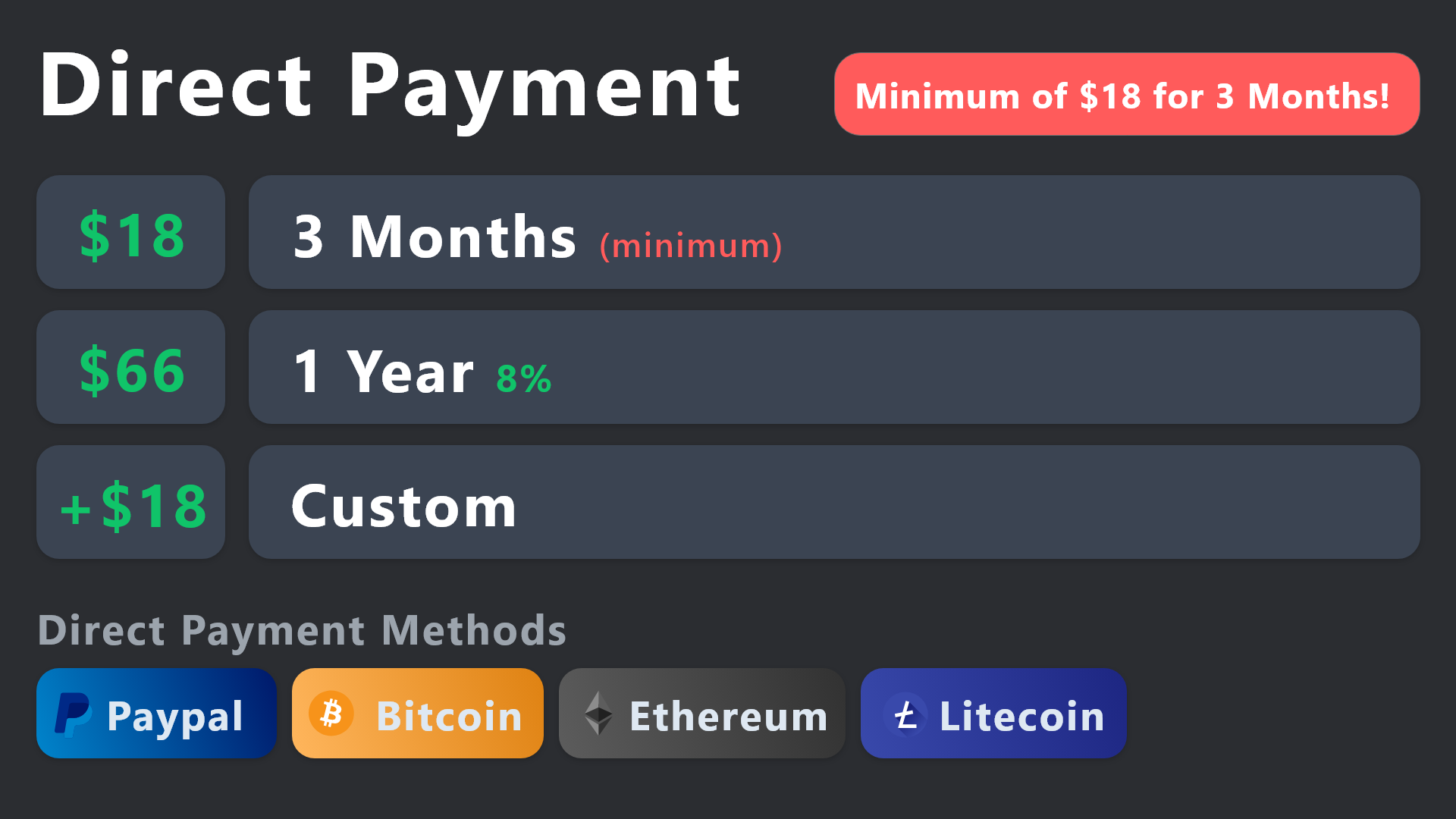
All prices in USD - 3 months min for direct payment
lunar solar
@jade topaz see above
jade topaz
lunar solar
<@456226577798135808> see above
thanks for fast response!
iron nightBOT
Gave +1 Rep to @lunar solar
wild spire
sinful hedge
I was not giving the bot right permission now it show to other member , so for n...
only admin? not support? not the creator?
sinful hedge
Yea Creator and admin
wild spire
Dashboard > panel configs > permissions > edit everyone opened (disabled view channel)
sinful hedge
wild spire
Dashboard > panel configs > permissions > edit everyone opened (disabled view ch...
Thank u so much
iron nightBOT
Gave +1 Rep to @wild spire
wild spire
sinful hedge
Thank u so much
no worries 👍🏻
 raw talon
Hello, first of all thank you very much for this great bot.
I would like to know if I can configure the Ticket Toll so that when I create a Button and the user clicks on it, instead of opening a new text channel, it will open a direct link. Is something like this possible already?

 shut bolt
@jade topaz please open a billing ticket in #🎫│make-a-ticket and we'll provide you the premium key
 whole drift
Does anyone know how I can give permissions for ticket owners to be able to use dayz++ commands inside of a ticket?
Ive added permissions in integrations for the support channel, ive added permissions on the ticket tool dashboard.
timber kernel
 errant sandal
I bymistakley deleted an important ticket is there anyway i can get that back
errant sandal
I bymistakley deleted an important ticket is there anyway i can get that back
Please don't ping staff.
If you have not created a transcript, there is no way to get it back. Sry.
errant sandal
timber kernel
Please don't ping staff.
If you have not created a transcript, there is no way t...
Transcript what's that
whole drift
errant sandal
Transcript what's that
In the dashboard you can have the bot send transcripts to a log channel
errant sandal
whole drift
In the dashboard you can have the bot send transcripts to a log channel
Log channel that means if i have it on it will be in my logs like every message and all?of the ticket...?
wild spire
whole drift
In the dashboard you can have the bot send transcripts to a log channel
note this is only automatically saved with premium.
The free version needs to manually download transcripts
whole drift
Yes you will log all tickets
errant sandal
whole drift
Yes you will log all tickets
Hmm thanks for the information
iron nightBOT
Gave +1 Rep to @whole drift
whole drift
wild spire
note this is only automatically saved with premium.
The free version needs to ma...
Ok I've only used premium so didn't realize
wild spire
set it here (panel configs > transcript)
 flint socket
How to remove this message?
 gilded verge
flint socket
How to remove this message?
gilded verge
flint socket
How to remove this message?
Panel Configs->Moderator->Edit Closed Message , but your server need premium to edit/remove this
 tidal onyx
Is it possible to have tickets automatically be renamed to the name of the person opening the ticket?
shut bolt
tidal onyx
Is it possible to have tickets automatically be renamed to the name of the perso...
Yeap, with premium you can edit the default name
humble sequoiaBOT
The ticket name is the default channel name of all tickets. To edit it, go to your Dashboard > Panel Configs > Ticket. There you can edit the channel name of opened and closed tickets. You can also use variables in there.

 Note: This is a premium feature
shut bolt
Note: This is a premium feature
shut bolt
Using the {ticket.user.name} on the Ticket Opened field should make it
tidal onyx
shut bolt
Using the `{ticket.user.name}` on the Ticket Opened field should make it
Thank you for that - that's a big help 🙂
iron nightBOT
Gave +1 Rep to @shut bolt
shut bolt
 brazen stream
How do I find ticket logs
 vocal mural
Is it possible to increase the character limit for ticket panel embed builders? I used to have a much longer embed, but I guess it was reduced in an update?
gilded verge
brazen stream
How do I find ticket logs
example of these logs please 🤔
gilded verge
make sure you set the transcript channel (Panel Configs->Transcript->set Transcript Channel)
and before deleting ticket, use command $transcript or /transcript
gilded verge
so as i said, you need to use command to save transcript
brazen stream
gilded verge
so as i said, you need to use command to save transcript
I cant set it. I opened the ticket in another server as a member. I want to see the transcrip of my closed ticket. I have no logs of it and would like to know where I find it on website
gilded verge
we don't store transcripts, so if you didn't save it before deleting the ticket, there's no way to get it
(oof sorry for pronounce 'we', i meant ticket tool 😅)
 hidden wedge
hi how are you. im sorry im a bit confused. i was redoing my ticket section and practicing it with my alt. i had my alt open a ticket and only she can see it, not the owner of the server? thank you
@severe path hi im sorry to bother you. could you help me please?
oh
humble sequoiaBOT
━━ User's inquiry has been moved to a ticket ━━
 pastel iris
hi how to mention a support role when i open ticket
 woeful lantern
You can mentions role with <@&ROLEID>
pastel iris
thank you so much https://cdn.discordapp.com/emojis/1084970420912017418.gif?size=48&name=poggers&quality=lossless
 woeful lantern
You’re welcome!
pastel iris
thanks @woeful lantern
iron nightBOT
Gave +1 Rep to @woeful lantern

 woeful lantern
Claiming is a premium feature from what I am aware of.
So, if your server isn't premium, you will not have a claim button. If you wish to have one, you can upgrade at: https://tickettool.xyz/premium
Sorry for any inconvenience.
gilded verge
woeful lantern
Sorry for any inconvenience.
that was correct, if their server don't have premium then they can't use/see this button/command ^^
jade topaz
is there any way to block a user from opening a ticket by some command?
 wheat crag
jade topaz
wheat crag
jade topaz
How can I get a specific role other than the owner to stay on the claimed tickets? Cant find the option 😦
timber kernel
jade topaz
is there any way to block a user from opening a ticket by some command?
You can use a role for that and add it to disabled roles / or other way around.
timber kernel
jade topaz
How can I get a specific role other than the owner to stay on the claimed ticket...
You have Support Team roles and Additional roles you can use for that. Or what you mean by stay when claimed?
jade topaz
timber kernel
You have Support Team roles and Additional roles you can use for that. Or what y...
where can I find this?
timber kernel
jade topaz
where can I find this?
Panel Configs -> General
 jade topaz
tysm brother @timber kernel
jade topaz
timber kernel
Panel Configs -> General
pmd u sir for sensitive info
timber kernel
jade topaz
pmd u sir for sensitive info
Please do not DM me, it is forbidden by the rules.
Open a ticket instead -> #🎫│make-a-ticket

 humble sequoiaBOT
The Drop-down menu or Select Menu replaces the buttons on your panel message and uses a drop-down menu with all of your panels. To set this up, go to your Panel Configs and select your main Panel.
<:Numbericons1:1018864164032225340> Enable Select Style
First you enable Select Style. Then you add an item in the Dropdown Editor. Now you can start editing your dropdown!
<:Numbericons2:1018864168041971712> Dropdown Editor
Each line in the dropdown editor represents a line in the drop down menu on discord. You can add more "Items", by clicking on
First you select a panel. That's the panel this option will open a ticket for. DONT select the same panel twice. Each option should have a different Panel
After that, you can put a Display. This is the title of this option and will appear in the drop down menu. The *Description can be set right after that, which will be below the title in grey.
Additionally you can select an emoji, that will be shown in front of each option. You can either manually input the ID of an emoji or select it in the selector.
Common Issues ⚠️
- Panel doesn't send? Make sure you have a valid emoji selected
- Option doesn't show up? Check if two options have the same panel in the DropDown Editor
$dropdown
timber kernel
@jade topaz ^ There you go
jade topaz
Tysm
 wanton mesa
yo guys how do i use external emojis like  in my embed/panel?
timber kernel
gilded verge
before emoji add `\` so in this example, will be \<:paypal:924596360840372234>
Was solved in a ticket, but thanks miro 
iron nightBOT
Gave +1 Rep to @gilded verge
 humble sequoiaBOT
For more convenient use of multipanels, you can now combine panels on the dashboard. This will allow you to directly send the multipanel from the dashboard or via the $panel ID command.
Where can I find this?
You can find this setting on the Dashboard -> Panel Configs -> Panel -> Attached Panels
Note: if you're attaching all the panels to a panel called English, don't include English in the attached panel's box (If you do this, it will create a duplicate)
This will put all buttons from all of your panels on one message. The message is the panel message from the panel you're combining these panels in.
timber kernel
@clear vessel There you go ^
 clear vessel
Thanks
 uncut ginkgo
How do I subscribe?
flint socket
What is that?
 flint socket
wild spire
that’s a multi line 😅
flint socket
wild spire
that’s a multi line 😅
Thank
iron nightBOT
Gave +1 Rep to @wild spire
 zealous flame
When trying to add my ticket tool bot to my server I get this issue:
Failed: Invalid Form Body
components[0].components[0].emoji.name[BUTTON_COMPONENT_INVALID_EMOJI]: Invalid emoji
wild spire
zealous flame
Failed: Invalid Form Body
components[0].components[0].emoji.name[BUTTON_COMPONEN...
this means u added text in your emoji field of the button
 wild spire
zealous flame
I didn't add any text
wild spire
zealous flame
I didn't add any text
what’s the server name?
dont post an invitation btw. Just the name
wild spire
zealous flame
but why is my server name relevant?
because I was gonna check.
You put an invalid emoji in the field
 zealous flame
wild spire
because I was gonna check.
You put an invalid emoji in the field
zealous flame
wild spire
because I was gonna check.
You put an invalid emoji in the field
WHAT
 wild spire
zealous flame
WHAT
wild spire
zealous flame
WHAT
are u looking in the correct button field?
zealous flame
 wild spire
zealous flame
wild spire
zealous flame
thats “claim ticket”
ur wrong emoji is in “create ticket”

 zealous flame
OMG THANK YOU SO MUCH ❤️
wild spire

woeful lantern
You can view how to set up ticket tool by heading to #📂│information and clicking the selection of "SetUp Guide"
 flint socket
How to make the bot send the log of conversations in the channel?
gilded verge
flint socket
How to make the bot send the log of conversations in the channel?
what you mean by log of conversations ?
transcript from ticket? 🤔
flint socket
gilded verge
transcript from ticket? 🤔
Yes
humble sequoiaBOT
1. Go into your Dashboard
2. Open your Panel Configs tab
3. Select the panel you want to grant access to
4. Open the Transcript options menu
5. Using the Transcript Channel selector, pick the channel you want your transcripts to be sent to
6. Save changes
 gilded verge
so first you need to set a transcript channel  , and then before deleting ticket, use transcript button or
 /transcript command
flint socket
gilded verge
so first you need to set a transcript channel <:this:894279341108772914>, and th...
Is this a premium feature?
gilded verge
if you can't see emoji  , then this is free
flint socket
gilded verge
if you can't see emoji <:premium_red:662032717906444329>, then this is free
A question if the premium runs out, are the settings reset?
gilded verge
nope, everything will be the same
but then you will not be able to use the panel that had premium options enabled ^^
flint socket
gilded verge
nope, everything will be the same
Thank you
iron nightBOT
Gave +1 Rep to @gilded verge
flint socket
gilded verge
but then you will not be able to use the panel that had premium options enabled ...
Example if I enable a Premium feature, it will remain enabled but I won't be able to disable it correct?
gilded verge
yup, if the premium option is enabled, it will of course remain enabled, but you will not be able to use this panel because you will get errors if the premium ends
flint socket
gilded verge
yup, if the premium option is enabled, it will of course remain enabled, but you...
Ok, thank you
iron nightBOT
Gave +1 Rep to @gilded verge
 ivory cosmos
None
 paper tapir
Anyway to buy premium for lifetime?
lunar solar
paper tapir
Anyway to buy premium for lifetime?
We do not offer a lifetime premium
 eager briar
Hello, it isn't possible to download the transcript anymore? Instead of sending automatically in a chat
wild spire
eager briar
Hello, it isn't possible to download the transcript anymore? Instead of sending ...
hey
Its still possible!
Automatically saving is a premium feature, so free version requires you to manually save each one
slim pulsar
Can I get the premium role please
wild spire
slim pulsar
Can I get the premium role please
the bot detected ur premium. Welcome to the premium side
slim pulsar
Ty
 feral thistle
can anyone tell me how do i add more tickets on my server?
timber kernel
feral thistle
can anyone tell me how do i add more tickets on my server?
How many tickets do you have atm?
Keep in mind, there is a Discord limit at 500 channels
feral thistle
no no i mean like there is one chanell
there is that ticket msg and i want to add more reaction stuff
if u understand me
 whole pecan
Hello guys
how can i make bot create private threads instead of channels tickets? private threads no longer require level 2 server boost
and by the way what does the red icon mean in the bot dashboard site ? is it premium feature only?
 scenic plinth
All of the features you just asked about are premium or marked premium.
feral thistle
mhm
timber kernel
feral thistle
if u understand me
Yes, you talked about multipanels. Here is a guide for you:
humble sequoiaBOT
For more convenient use of multipanels, you can now combine panels on the dashboard. This will allow you to directly send the multipanel from the dashboard or via the $panel ID command.
Where can I find this?
You can find this setting on the Dashboard -> Panel Configs -> Panel -> Attached Panels
Note: if you're attaching all the panels to a panel called English, don't include English in the attached panel's box (If you do this, it will create a duplicate)
This will put all buttons from all of your panels on one message. The message is the panel message from the panel you're combining these panels in.
feral thistle
yeah yeah

i have it like this and i want to ad more of them but i dont see anything on site to add
 frosty moth
Is there a way to make the bot ask the user trying to open a ticket a series of questions before the ticket is opened?
E.G. if I'm trying to have a complaints ticket I'd like the Ticket Tool bot to ask the user trying to open the ticket a series of questions regarding the nature of the complaint and then display that information when the ticket is opened
feral thistle
no its like u just click on it and it opens another chanel where u can ask question
frosty moth
Yeah but I'm trying to make it more automated so I'm wondering if there's a way to make the bot ask the questions (in DMs or something) for me
feral thistle
i thought u were answering my question
@timber kernel i wanted to add more buttons how do i do that?
timber kernel
feral thistle
<@153489496317493248> i wanted to add more buttons how do i do that?
Yes I did. Multipanels is the feature you should check out. Like this you add more buttons.
timber kernel
frosty moth
Yeah but I'm trying to make it more automated so I'm wondering if there's a way ...
You can use forms.
humble sequoiaBOT
A Discord Form lets the user answer individual questions in a pop-up Form, which then displays the answers in the ticket message. This can save time if you already know what you want to ask the user.
Setup Forms
Forms can be enabled under Panel Settings > Form Options > Edit Forms Options. In the new pop-up window, you can now enable and edit your own Form.
Form Options
You can add up to 5 questions in the Discord form. This is a Discord limitation. Each question can have a placeholder in the input field, a minimum and maximum input, multi-line, and also the option to have the answer required.
Options
Question Title ➞ Your Question goes here
Question Placeholder ➞ The placeholder text in the input field
Required ➞ If enabled, the user has to answer this question, to submit the form
Multi-Line Input ➞Allows the user to input multiple lines
Minimum and Maximum Input ➞ Set a minimum and maximum input value for the user
Displaying the Answer
To display the answers from the user, you need to enable Auto display form results on the ticket message as an additional embed
In case you don't want a second embed, go into your Panel Configs > Ticket Options > Edit Ticket Message. In there you use the variable {create.form.x} and just replace x with the number of your question. For example, the response to Question 1 can be displayed with {create.form.1}. If you don't use this variable, the response from the user is lost.
feral thistle
do u have time for voice? to help me it would be easyer
timber kernel
feral thistle
do u have time for voice? to help me it would be easyer
Voice not atm sry.
Short explanation:
- create the panels you need (for each button -> one panel)
- add the additional panels to the first via attached panels (see screen -> Panel Configs -> Panel)
- send the panel
That is all you need to get started.

 pallid raft
How do i make the "ticket created #ticket" delete by itself?
pallid raft
 humble sequoiaBOT
How can I edit/disable the ephemeral message?
These pop-ups can only be seen by the user who triggered a certain action, like creating a ticket. They cannot be edited or disabled, as they are a discord requirement that is set by the developer of any bot. The ephemeral messages can be removed by pressing the little blue Dismiss message text, or by restarting your discord client.
 shut bolt
@pallid raft this is the response to your question
 radiant echo
So my tickets are appearing like this. I did use to have premium but I don’t think premium has anything to do with. It should look like this (2nd pic)

 shut bolt
radiant echo
So my tickets are appearing like this. I did use to have premium but I don’t thi...
shut bolt
radiant echo
So my tickets are appearing like this. I did use to have premium but I don’t thi...
Do you still have premium on that server?
radiant echo
shut bolt
Do you still have premium on that server?
No
shut bolt
radiant echo
No
That's why, the image field is a premium customization
radiant echo
shut bolt
That's why, the image field is a premium customization
Ohh. I see!! I thought it would be fine if I bought premium one time cause I thought it would still work!!
shut bolt
radiant echo
Ohh. I see!! I thought it would be fine if I bought premium one time cause I tho...
Sadly not, since it's a subscription the premium settings rely on your subscription being active
radiant echo
shut bolt
Sadly not, since it's a subscription the premium settings rely on your subscript...
Ohh I see!! Ty!!
shut bolt
radiant echo
Ohh I see!! Ty!!
No problem , anything else I can help you with?
radiant echo
shut bolt
No problem <:PabloTiphat:983791053842837624> , anything else I can help you with...
Not that I know of!
shut bolt
Have a great day
whole pecan
hello guys
is it possible to allow ticket creator to kick a member from the ticket private thread? (after inviting this member by mentioning him)
i gave Ticket Owner permission to manage threads here but still cant kick someone from the private thread of my created tickets
 whole pecan
can i modify or remove this message please?

 royal canopy
Hello, how do I make the bot to ping roles after creating a ticket?
lunar solar
whole pecan
i gave Ticket Owner permission to manage threads here but still cant kick someon...
Show me edit opened section please
lunar solar
whole pecan
can i modify or remove this message please?
No
lunar solar
royal canopy
Hello, how do I make the bot to ping roles after creating a ticket?
See below regarding mentions:
humble sequoiaBOT
Within all the messages the bot sends (both embeds and text) you can mention either channels, roles, or even users, these mentions will only send a notification to the user if they are used within a text field, e.g: a role mentioned in an embed won't ping at all the users who have that role.
For mentioning a role you can use one out of three options:
{@Role Name} ➞ Which is Case Sensitive.
{RoleID} ➞ Replace RoleId with the Id of the role you are trying to ping.
<@&RoleID> ➞ Discord's native syntax to ping roles.
<#ChannelID> ➞ Mention a channel by its ID.
<@UserID> ➞ Mention a user by its ID.

 lunar solar
Give me a moment
whole pecan
by the way i tried to remove member by /remove command and the reply was that it's not allowed in threads
royal canopy
lunar solar
See below regarding mentions:
Where do I edit them?
whole pecan
 lunar solar
royal canopy
Where do I edit them?
lunar solar
royal canopy
Where do I edit them?
Panel Configs --> Messages --> Edit Ticket Message --> Embed Editor or Message content
royal canopy
ok ty
lunar solar
whole pecan
Remove command won't work in threads

Can the ticket owner right click on an individual and remove them?
whole pecan
lunar solar
Can the ticket owner right click on an individual and remove them?
naa i tried
maybe because i am trying to kick admin ? i dont think so
lunar solar
I'll have to properly test, busy right now but I'll have a crack as soon as I can
It might not be possible
whole pecan
admins can be kicked from private threads as far as i know
lunar solar
whole pecan
maybe because i am trying to kick admin ? i dont think so
Ohh they won't be able to remove someone who has higher roles
whole pecan
lunar solar
Ohh they won't be able to remove someone who has higher roles
well i tried inviting someone with lower role (not admin) and still cant kick
what happens when someone creates a ticket but the ticket category is full of 50 channels limit ?
timber kernel
whole pecan
what happens when someone creates a ticket but the ticket category is full of 50...
If you have not defined a second category in the settings, it will overflow and will be put on top of your server channel list.
humble sequoiaBOT
Discord only allows to stack up to 50 channels per category, meaning that if you have already 50 tickets in one category, the bot won't be able to place a ticket in that category, for such reason Ticket Tool counts with overflow categories, meaning that if your main category is filled, the bot will go ahead and place the ticket on the next one available, simply choose a second category in the category pickers:
iron nightBOT
Gave +1 Rep to @timber kernel
jade topaz
How to automatic close ticket when user doesnt msg in ticket till 15min..
timber kernel
jade topaz
How to automatic close ticket when user doesnt msg in ticket till 15min..
You can use automation (premium feature):
https://docs.tickettool.xyz/dashboard/panel-configs/automation-options
whole pecan
please tell me what is this number (max seconds = 518400??)

 warped summit
Hey! Where can I find the option to create different buttons on my tickets in the dashboard?
 wild spire
whole pecan
please tell me what is this number (max seconds = 518400??)
wild spire
whole pecan
please tell me what is this number (max seconds = 518400??)
this indicates a maximum of 6 days
wild spire
warped summit
Hey! Where can I find the option to create different buttons on my tickets in th...
This is a multipanel
humble sequoiaBOT
For more convenient use of multipanels, you can now combine panels on the dashboard. This will allow you to directly send the multipanel from the dashboard or via the $panel ID command.
Where can I find this?
You can find this setting on the Dashboard -> Panel Configs -> Panel -> Attached Panels
Note: if you're attaching all the panels to a panel called English, don't include English in the attached panel's box (If you do this, it will create a duplicate)
This will put all buttons from all of your panels on one message. The message is the panel message from the panel you're combining these panels in.
warped summit
wild spire
This is a multipanel
Ahh awesome, thank u!
iron nightBOT
Gave +1 Rep to @wild spire
sinful hedge
Hey
I need help when customer make a ticket and get back to the ticket he opened it’s not showing what i have replied and he saw nothing only blank
gilded verge
sinful hedge
Hey
I need help when customer make a ticket and get back to the ticket he opened...
Hi, go to Panel Configs->Permissions->Edit opened Ticket Owner Permissions->switch Read Message History to ✅
sinful hedge
Owner permission or member permission?
Since the customer not see the messages not me
gilded verge
ticket owner is this user who opened a ticket
 sinful hedge
Appreciate it bro
 formal kelp
None
 vague cosmos
Hey - Lifetime payment user here but I believe that happend on another account, can I get the role(s) for it here or do I need to open a ticket?
whole pecan
hmm im having an issue and im not sure how to fix it.
i made all ticket channels appear public and all members can participate in the ticket chat but it seems they can also use the ticket buttons like closing the ticket lol.
how to only allow ticket owner using that button ?
vague cosmos
Hey @whole pecan,
Go to Panel Config and select the Panel you want to change the permission for. You'll see different options, click on Buttons and then Close ticket (Edit Button).
Make sure that Support Team Only is green. Under Allowed Roles you enter the role(s) of who can use the close button.
Does this help you? 🙂
 whole pecan
vague cosmos
Hey <@349103561977757706>,
Go to **Panel Config** and select the **Panel** you ...
whole pecan
vague cosmos
Hey <@349103561977757706>,
Go to **Panel Config** and select the **Panel** you ...
thanks but this means the ticket owner cannot close it anymore
iron nightBOT
Gave +1 Rep to @vague cosmos
vague cosmos
If I am correct, yes. That is what you want right? You should also hide the button and use the slash commands with an override for /close.
whole pecan
ok i will try
vague cosmos
Keep me updated. 🙂
whole pecan
actually slash command will not work, same problem . thanks anyway
thanks @vague cosmos
iron nightBOT
Gave +1 Rep to @vague cosmos
vague cosmos
whole pecan
actually slash command will not work, same problem . thanks anyway
I see, but you want the person who openend the ticket to not close it right?
whole pecan
vague cosmos
I see, but you want the person who openend the ticket to not close it right?
no i want owner + staff support to close and @everyone observers cannot
vague cosmos
You might try the first advice I gave, otherwise I would open a ticket in #🎫│make-a-ticket so someone from the Support Team can assist you.
What you also can try is to disallow it from the @everyone role and keep Support Team Only turned off.
whole pecan
i will try
whole pecan
vague cosmos
What you also can try is to **disallow** it from the `@everyone` role and keep *...
did not work, ticket owner can no longer close
vague cosmos
Hmm, I'd suggest you to open a ticket in #🎫│make-a-ticket so a Support Team Member can assist you.
 mossy ermine
اكو دعم فني عربي ؟
wild spire
vague cosmos
Hey - Lifetime payment user here but I believe that happend on another account, ...
we don’t have a lifetime subscription 
vague cosmos
wild spire
we don’t have a lifetime subscription <:thinking:1082754957750571008>
Got a ticket open and it was possible back in the day.
mossy ermine
vague cosmos
يمكنك طرح أسئلتك بلغتك الأم هنا أو فتح تذكرة في
تمام سانتظر رد علي
whole pecan
vague cosmos
Hmm, I'd suggest you to open a ticket in <#571706435449257997> so a Support Team...
they didnt find a solution but i did haha
you remove button and allow /close command
you dont allow additional roles (observers) to use application commands in permissions and allow it for ticket owner
vague cosmos
mossy ermine
تمام سانتظر رد علي
سيساعدك شخص ما في أقرب وقت ممكن ، لأن لغتك لا تحتوي على عدد كبير من أعضاء الدعم مثل فريق اللغة الإنجليزية.
@whole pecan glad to see you resolved it!
whole pecan
vague cosmos
<@349103561977757706> glad to see you resolved it!
sorry to disappoint you but it did not work :(, bot still responds to /close from observer
thanks anyways cya
vague cosmos
Oh. feels sad - I don't have other idea, sadly.
 exotic wasp
my members cant see the ticket's message history
the category containing the tickets has no perms whatsoever.
humble sequoiaBOT
User's issue has been solved in another channel.
brave shoal
how to send the panel?
timber kernel
brave shoal
how to send the panel?
Send button on top in the dashboard:

 true kite
Hey, is it possible to add a user to a ticket opened by another user?
timber kernel
true kite
Hey, is it possible to add a user to a ticket opened by another user?
Yes, use the /add command
You can add a user or a role.
true kite
To an existing ticket only?
timber kernel
true kite
To an existing ticket only?
Yes. If you want it for every new ticket, you can use the Addtional roles if you like.
true kite
Thanks I got it working 🙂
timber kernel
 lean cedar
how can we search the text from the HTML transcript?
it seems that DC cannot search the text in the code snippet.
jade topaz
is tickets tool open source?
scenic plinth
No
humble sequoiaBOT
 Faster Premium Bot
Automatic Transcripts
Full Customization
Direct Messages
Ticket Automation
Thread Style Ticketing
Premium Support
Scheduled Panel Availability
Integrations
You can purchase premium here:
Price
$6 - Monthly
$66 - Yearly
 Premium
 fierce pike
Hey Team, having issues with setting up the panel message configs since the site is updated.
I can't seem to find the current details in there 😦
please ping if responding ❤️
also if I sync the status will it fuck the current stuff and override it with what's on the site?
 flint oasis
Can I block some role?
so he can't open any ticket in my server ?
 stoic isle
Is there any way I can edit where it says Welcome?
 stoic isle
Also, is there a way to make people not able to close a ticket?
 fossil vale
I have a question I have an RP server and I need tickets for unbany and I do not know how to set it up, can you advise me?
 odd stump
all my channels are visible but not my support channel are visible only how to fix it
humble sequoiaBOT
━━ Tito's inquiry has been moved to a ticket ━━
lunar solar
flint oasis
Can I block some role?
so he can't open any ticket in my server ?
Yes see details below:
humble sequoiaBOT
Any role you assign as a blacklisted role won't be able to use commands or reactions.
Selecting a blacklisted role
Go to your Dashboard ➞ Server Configs. There you will find the option to select blacklisted roles.
Note: Don't forget to save.
 lunar solar
stoic isle
Is there any way I can edit where it says Welcome?
lunar solar
stoic isle
Is there any way I can edit where it says Welcome?
Yes,
Panel configs —> Ticket —> Edit Ticket Message (Green button) —> Message Content —> Edit and save
lunar solar
stoic isle
Also, is there a way to make people not able to close a ticket?
Yes,
Panel Configs —> Buttons —> Close Ticket (Edit button) —>  Support Team Only
lunar solar
fossil vale
I have a question I have an RP server and I need tickets for unbany and I do not...
See below:
stark runeBOT
1. Invite Ticket Tool to your server
First you will want to invite the bot to your server. Once the bot is in your server, you can manage your server in the dashboard.
2. Create a Panel
To create a panel we are going to need to head over to the panel configs on the dashboard.
Once at the dashboard we will need to click Create Panel.
Enter a panel name (Fill in any optional settings you want).
Click Create Panel and your ready to get started with configuring your panel.
An example of a creating a panel is shown below.
3. Send the Panel to a Channel
Once you've created a panel on the dashboard you will need to send it to a channel using send on the dashboard.
Select the channel you want your panel to be created in and click send.
For other questions checkout $help faq.
An example of a sending a panel is shown below.
Having a Problem Sending the Panel?
Do $debug in a channel with Ticket Tool and make sure it has all the necessary Discord permissions.
humble sequoiaBOT
DhanLelo's issue has been solved in another channel.
 wary fjord
So i need help i cant figure out why it wont let me claim tickets
lunar solar
wary fjord
So i need help i cant figure out why it wont let me claim tickets
Setup claiming you mean?
wary fjord
I guess? This is my first time using this bot
lunar solar
Ahh okay so the use of the claiming feature requires premium
wary fjord
Ohh
lunar solar
Ye
lean cedar
hi, can we search the text from the HTML transcript?
it seems that DC cannot search the text in the code snippet.
how can we search the deleted ticket messages from the HTML transcript
 marble rose
Hey @covert swallow I'm having trouble accessing my channel via dashboard. Getting this message 'Please select a server you have access to manage to be redirected'
I've got all channel permission but admin, is there a way to manage the tool without admin?
humble sequoiaBOT
Don't see your server in the dashboard?
You will possibly need to relog. Look below to see the steps on how to relog.
How to relog in the Dashboard.
Note:
You need one of these 3 things to access the dashboard.
1. Server Owner (Level: 6)
2. Server Administrator (Level: 4)
3. Dashboard Role (Level: 2)
:warning: You can check your level using the </permissionlevel:1029797400174399542> command on your Discord Server
User permission level with Ticket Tool
@User is permission level: 0 (User)
```» *If it shows that your permission is **0**, you don't have any of the above **3 things** to manage the dashboard.*


**See the Image below on how to relog:**
 languid python
how do i remove one of the ticket buttons? I have two buttons, both of them create the ticket
scenic plinth
lean cedar
hi, can we search the text from the HTML transcript?
it seems that DC cannot sea...
You will need to view the transcript itself or download the HTML file, Discord makes it difficult to search files when they are in the preview stage like HTMLs.
humble sequoiaBOT
━━ Yahav's inquiry has been moved to a ticket ━━
scenic plinth
languid python
how do i remove one of the ticket buttons? I have two buttons, both of them crea...
Menu -> Buttons -> Show Button
languid python
and thats on the site?
scenic plinth
On the dashboard, yes
lean cedar
scenic plinth
You will need to view the transcript itself or download the HTML file, Discord m...
thanks for reply. is there any webhook we can connect while transcript was generated or sent?
iron nightBOT
Gave +1 Rep to @scenic plinth
languid python
scenic plinth
On the dashboard, yes
but it has two "create ticket" buttons

and now its not updating the changes...
eh, I'll figure it out eventually
jade topaz
yo I just bought premium how do Icustomize bot?
lunar solar
languid python
but it has two "create ticket" buttons
Looks like a panel maybe attached to another one
If you #🎫│make-a-ticket I can resolve this issue with you
lunar solar
jade topaz
yo I just bought premium how do Icustomize bot?
Panel configs —> Panel —> Edit Panel Message (green button) —> Embed Editor —> Customise to your liking
Panel configs —> Ticket —> Edit Ticket Message (green button) —> Embed Editor —> Customise to your liking
 acoustic basalt
I attempted to do this command but when I trigger with solved (@ username) the response will only mention me 😅
(Alex's issue has been solved)
how do I correct it to mention the person I tag? {User} will only mention me
{user}s issue has been solved in another channel.
lunar solar
acoustic basalt
I attempted to do this command but when I trigger with solved (@ username) the r...
#premium-tickets or #🎫│make-a-ticket and I’ll take a look at how you’ve set it up so far and how we can fix it
 mystic reef
hiya - is it just me or is the dashboard portal not working today?
mystic reef
hmmm so basically i tried to click a server to manage (i just added ticket tool to a server) but when i click "manage", it just keeps popping back to the same "manage server" page
i tried with my phone and it's the same
lunar solar
Click Sync Servers and try again
mystic reef
have done that and the same response occured
lunar solar
Do you have permissions to that server?
mystic reef
lunar solar
Do you have permissions to that server?
yes - i'm not the administrator though
i mean i am*, but not the server owner
ticket tool is also not granted administrator rights - is that possibly the reason why?
lunar solar
Do /permissionlevel in the server and send me the results
 lunar solar
Will need to be in a channel that it has send messages permission to


 mystic reef
gotchu, let me switch to another account with true admin access
lunar solar
Get the owner to assign a Dashboard role to you, Dashboard role setup can be seen below:
humble sequoiaBOT
Any role you put there will have full access to the ticket tool dashboard. The server owner and users with admin permissions already have access to the dashboard.
Be careful of which roles to put here
 mystic reef
awesome, thanks!
lunar solar
No worries
stoic isle
lunar solar
Yes,
Panel configs —> Ticket —> Edit Ticket Message (Green button) —> Message C...
Thanks but is there a way to do it on individual tickets?
iron nightBOT
Gave +1 Rep to @lunar solar
lunar solar
stoic isle
Thanks but is there a way to do it on individual tickets?
Per Panel yes
Per Ticket no
iron nightBOT
Gave +1 Rep to @lunar solar
 shy vigil
so uh, what’s the difference between the {ticket.user} and {author} variables?
lunar solar
shy vigil
so uh, what’s the difference between the {ticket.user} and {author} variables?
Author applies to the most recent action
E.g. They click create ticket they are the author of that action
But as a support member if I claim that ticket
I am now the author
Whereas ticket user will always reference the person that created the ticket
shy vigil
Okay thank you very much. This is a bit confusing and I’ve only begun to use this bot since my server is growing and I want users to have the option
lunar solar
Description of the variables you can use across your ticket system
shy vigil
I will probably return once I hit another wall
lunar solar
The docs cover the variables in great detail
lunar solar
shy vigil
I will probably return once I hit another wall
No worries, we will be here
shy vigil
See, that was the page I was reading. And I still wished for clarification. Which you explained very well actually
lunar solar
Ah no worries
 pallid rain
Is there anyway to copy a panel config from one server build to another?
lunar solar
pallid rain
Is there anyway to copy a panel config from one server build to another?
Yes
A sec while I find the directory for you
From Server:
Server Configs --> Config Backup & Restore (Server Owner Only) --> Click Old version can be found here --> Generate New Key --> Copy it
To Server:
Server Configs --> Config Backup & Restore (Server Owner Only) --> Click Old version can be found here --> Restore from backup key --> Paste it --> Restore Configs
Note: Only the owner can do this @pallid rain
However one owner can gift another owner their config link