#🆘│community-support
1 messages · Page 40 of 1
 gray stirrup
 analog leaf
gray stirrup
do you mean when they create a ticket?
analog leaf
gray stirrup
do you mean when they create a ticket?
yes
analog leaf
gray stirrup
do you mean when they create a ticket?
and when they fill out and take the information to change the nickname
gray stirrup
analog leaf
and when they fill out and take the information to change the nickname
This isn't possible with ticket tool, you can suggest it in #1019685143046279208
 hollow sigil
Where can I find this in the panel?

 rustic gale
hollow sigil
Where can I find this in the panel?
rustic gale
hollow sigil
Where can I find this in the panel?
That looks like a dropdown item.
 humble sequoiaBOT
The Drop-down menu or Select Menu replaces the buttons on your panel message and uses a drop-down menu with all of your panels. To set this up, go to your Panel Configs and select your main Panel.
<:Numbericons1:1018864164032225340> Enable Select Style
First you enable Select Style. Then you add an item in the Dropdown Editor. Now you can start editing your dropdown!
<:Numbericons2:1018864168041971712> Dropdown Editor
Each line in the dropdown editor represents a line in the drop down menu on discord. You can add more "Items", by clicking on 

First you select a panel. That's the panel this option will open a ticket for.  DONT select the same panel twice. Each option should have a different Panel
After that, you can put a Display. This is the title of this option and will appear in the drop down menu. The *Description can be set right after that, which will be below the title in grey.
Additionally you can select an emoji, that will be shown in front of each option. You can either manually input the ID of an emoji or select it in the selector.
Common Issues ⚠️
- Panel doesn't send? Make sure you have a valid emoji selected
- Option doesn't show up? Check if two options have the same panel in the DropDown Editor

$dropdown
 jade topaz
Help

 wild spire
jade topaz
Help
wild spire
jade topaz
Help
it tells you to use /botswitcher
jade topaz
wild spire
it tells you to use /botswitcher
How to switch
wild spire
jade topaz
How to switch
use the command /botswitcher in your server
and select white
 wild spire
jade topaz
Ohh sorry got it thnks
wild spire
jade topaz
Ohh sorry got it thnks
did it work?
 white zephyr
I have a question does anyone know if you can mention someone in your own commands by writing User gave user a cookie (example)
wild spire
white zephyr
I have a question does anyone know if you can mention someone in your own comman...
You can mention the ticket owner in your CC in tickets 
white zephyr
So I meant whether this is possible with Custom Commands?
wild spire
white zephyr
So I meant whether this is possible with Custom Commands?
you cannot just mention random users with CC no. It has to be a variable supported by TT and usually this is just ticket owners inside a ticket.
white zephyr
Ok thanks so there is no variable for this for custom commands?
wild spire
white zephyr
Ok thanks so there is no variable for this for custom commands?
There’s no variable for that no.
white zephyr
ok Thanks ^^
rustic gale
white zephyr
I have a question does anyone know if you can mention someone in your own comman...
Cuatom commands support arguments now. I haven't looked into how those work yet, but i can look when i'm free
white zephyr
rustic gale
Cuatom commands support arguments now. I haven't looked into how those work yet,...
Thanks
 iron nightBOT
Gave +1 Rep to @rustic gale
rustic gale
white zephyr
Thanks
If you'd like to give more details on what exactly you want the bot to do
white zephyr
rustic gale
If you'd like to give more details on what exactly you want the bot to do
So eg you can invent a variable where a user can mention another user for example for a fun command like user1 hugged user2
rustic gale
white zephyr
So eg you can invent a variable where a user can mention another user for exampl...
Sort of, yeah
 rigid oyster
حد عربي
 robust sandalBOT
Arab person
 Arabic (ar) → English (en)
wild spire
Arabic (ar) → English (en)
wild spire
$articket
humble sequoiaBOT

فريق الدعم الفني العربي
عميلنا العزيز ان كنت تبحث عن مساعدة يرجى فتح تكت خاص بفريق الدعم الفني العربي
اذهب الى#🎫│make-a-ticket
ثم قم بلضغط على الايموجي الاتي (🇯🇴)
jade topaz
how do i make the bot ping a role when a ticket is opened?
humble sequoiaBOT
Within all the messages the bot sends (both embeds and text) you can mention either channels, roles, or even users, these mentions will only send a notification to the user if they are used within a text field, e.g: a role mentioned in an embed won't ping at all the users who have that role.
For mentioning a role you can use one out of three options:
{@Role Name} ➞ Which is Case Sensitive.
{RoleID} ➞ Replace RoleId with the Id of the role you are trying to ping.
<@&RoleID> ➞ Discord's native syntax to ping roles.
<#ChannelID> ➞ Mention a channel by its ID.
<@UserID> ➞ Mention a user by its ID.
 timber kernel
jade topaz
how do i make the bot ping a role when a ticket is opened?
timber kernel
jade topaz
how do i make the bot ping a role when a ticket is opened?
{@Role Name}
Here:
 iron nightBOT
Gave +1 Rep to @timber kernel
jade topaz
lol
 gentle goblet
B0t not w0rk1ng
 scenic plinth
Well, you see, we cannot help you if you cannot tell us what is not working exactly.
 arctic path
I have problem, i have enabled claim button but there no claim button, how to fix it?
*Im admin, when i test, there no claim button. i have setting support team roles only ( i have put admin role)
 idle flint
arctic path
I have problem, i have enabled claim button but there no claim button, how to fi...
idle flint
arctic path
I have problem, i have enabled claim button but there no claim button, how to fi...
Is your server using the premium or the free version of TicketTool?
arctic path
idle flint
Is your server using the premium or the free version of TicketTool?
free version
idle flint
arctic path
free version
Ah, claiming is a premium feature, therefore you won’t be able to enable it unless you upgrade
arctic path
idle flint
Ah, claiming is a premium feature, therefore you won’t be able to enable it unle...
ah okay, Is there alternative to claiming?
rustic gale
Manually renaming the channel with the /rename command
arctic path
thanks @idle flint
iron nightBOT
Gave +1 Rep to @idle flint
arctic path
thanks @rustic gale
 vestal umbra
Hi! I have a question) How can I prohibit in the tickets to tag our server command with "@"?
rustic gale
vestal umbra
Hi! I have a question) How can I prohibit in the tickets to tag our server comma...
What do you mean by «our server command»?
jade topaz
how do i make it so someone gets a role when they make a ticket?
wild spire
jade topaz
how do i make it so someone gets a role when they make a ticket?
panel configs > ticket.
But this is premium.
 jade topaz
damn premium fuck
 near bluff

 faint pendant
Pls how can i make multi buttons
humble sequoiaBOT
For more convenient use of multipanels, you can now combine panels on the dashboard. This will allow you to directly send the multipanel from the dashboard or via the $panel ID command.
Where can I find this?
You can find this setting on the Dashboard -> Panel Configs -> Settings -> Panel
Note: if you're attaching all the panels to a panel called English, don't include English in the attached panel's box (If you do this, it will create a duplicate)
This will put all buttons from all of your panels on one message. The message is the panel message from the panel you're combining these panels in.
 vestal umbra
rustic gale
What do you mean by «our server command»?
vestal umbra
rustic gale
What do you mean by «our server command»?
"Our server team", sorry)
wild spire
vestal umbra
"Our server team", sorry)
So you mean to avoid the ticket creator from pinging the staff role or stop the bot from pinging it?
vestal umbra
wild spire
So you mean to avoid the ticket creator from pinging the staff role or stop the ...
ticket creator
wild spire
vestal umbra
ticket creator
panel configs > permissions > ticket owner / edit ticket openend > disable mention roles
Be sure to also disable this in all possible roles permissions in your server itself.
 vestal umbra
wild spire
panel configs > permissions > ticket owner / edit ticket openend > disable menti...
vestal umbra
wild spire
panel configs > permissions > ticket owner / edit ticket openend > disable menti...
thanks
iron nightBOT
Gave +1 Rep to @wild spire
 arctic dune
Hi,
Is it possible to have open tickets sorted by type of ticket within a category or is it purely down to the server admin/moderator to do this with native discord functionality. Thanks
wild spire
arctic dune
Hi,
Is it possible to have open tickets sorted by type of ticket within a categ...
you can set a category per ticket panel.
 arctic dune
We have that already separated by open and closed tickets into different categories. But we have different types of open tickets that we’d ideally want grouped together within the same category.
wild spire
arctic dune
We have that already separated by open and closed tickets into different categor...
Ideally you make a panel per ticket type. And then u can categorize them how u want
iron nightBOT
Gave +1 Rep to @wild spire
wild spire
arctic dune
Thanks <@822579606074032178>
no worries!
vestal umbra
wild spire
panel configs > permissions > ticket owner / edit ticket openend > disable menti...
I did like this, but nothing changed

 wild spire
vestal umbra
I did like this, but nothing changed
wild spire
vestal umbra
I did like this, but nothing changed
that’s not a role ping but a user ping 
vestal umbra
wild spire
that’s not a role ping but a user ping <:AaronThink:993233991081668648>
Oh, how can I disable pinging users?
wild spire
vestal umbra
Oh, how can I disable pinging users?
that’s unfortunately not possible with discord atm
 sacred slate
$help ping
humble sequoiaBOT
sacred slate
$help ping
1. Go into your Dashboard
2. Open your Panel Configs tab
3. Select the panel you want to ping your support on
4. Open the Ticket options menu
5. Click on Edit Ticket Message
6. In the Message Content use one of the role mention syntax (**{@Role Name}**/**{Role ID}**)
7. Save changes
Note: For this to work properly, Ticket Tool requires the Mention Everyone permission. Or the role must have the Allow anyone to @mention this role setting enabled 

 sacred crown
Member cannot create ticket , i have been try to edit permisson , anyone help
 wild spire
sacred crown
Member cannot create ticket , i have been try to edit permisson , anyone help
wild spire
sacred crown
Member cannot create ticket , i have been try to edit permisson , anyone help
you’ve disabled “view message history”
faint pendant
I dont know how to attach panels
humble sequoiaBOT
For more convenient use of multipanels, you can now combine panels on the dashboard. This will allow you to directly send the multipanel from the dashboard or via the $panel ID command.
Where can I find this?
You can find this setting on the Dashboard -> Panel Configs -> Settings -> Panel
Note: if you're attaching all the panels to a panel called English, don't include English in the attached panel's box (If you do this, it will create a duplicate)
This will put all buttons from all of your panels on one message. The message is the panel message from the panel you're combining these panels in.
sacred crown
wild spire
you’ve disabled “view message history”
Done , but after member close ticket , showing msg like this

Transc , open , delete
wild spire
sacred crown
Done , but after member close ticket , showing msg like this
I mean it's already closed so you cannot close it again. That's why the bot gives that error
sacred crown
wild spire
I mean it's already closed so you cannot close it again. That's why the bot give...
I know but why trans , open , delete button showing in member role , its normal ?
wild spire
sacred crown
I know but why trans , open , delete button showing in member role , its normal ...
Oh you mean the ticket owners can still see those buttons after the ticket was closed

 wild spire
sacred crown
I know but why trans , open , delete button showing in member role , its normal ...
wild spire
sacred crown
I know but why trans , open , delete button showing in member role , its normal ...
chose ticket owner edit closed
 vale moth
Hello ! i have a problem with the tickets in my server
i made 2 categories one for opened tickets and one for closed
but at first i had +300 ticket with no category i tried to re-open and closed them , it worked very good until it stopped sending the ticket to the category
 humble sequoiaBOT
Discord only allows to stack up to 50 channels per category, meaning that if you have already 50 tickets in one category, the bot won't be able to place a ticket in that category, for such reason Ticket Tool counts with overflow categories, meaning that if your main category is filled, the bot will go ahead and place the ticket on the next one available, simply choose a second category in the category pickers:
 vale moth
@wild spire Tysm ❤️
jade topaz
hey
 teal grail
?
 meager gyro
Hi can someone please answer? How to let people attach files/ images in ticket they create automatically and not change permissions manually each time.
 slender minnow
meager gyro
Hi can someone please answer? How to let people attach files/ images in ticket t...
slender minnow
meager gyro
Hi can someone please answer? How to let people attach files/ images in ticket t...
Panel config > Permissions > User open ticket > allow the perms
meager gyro
slender minnow
Panel config > Permissions > User open ticket > allow the perms
Lemme try that and get back, thanks ^^
iron nightBOT
Gave +1 Rep to @slender minnow
jade topaz
how can i pin multiple drop down options to a panel this is not shown to me on 2x
meager gyro
slender minnow
Panel config > Permissions > User open ticket > allow the perms
I don’t find “user open ticket” ((
jade topaz
jade topaz
how can i pin multiple drop down options to a panel this is not shown to me on 2...
 meager gyro
I don’t find “user open ticket” ((
meager gyro
meager gyro
I don’t find “user open ticket” ((
Is it “ticket owner?”
wild spire
meager gyro
I don’t find “user open ticket” ((
 wild spire
jade topaz
wild spire
jade topaz
you need an unique panel for each item on your dropdown
jade topaz
but it is sent as 1x panel ?
wild spire
jade topaz
but it is sent as 1x panel ?
it’s combining multiple panels in one
jade topaz
oh
jade topaz
wild spire
it’s combining multiple panels in one
thx
iron nightBOT
Gave +1 Rep to @wild spire
meager gyro
wild spire
thanks!
iron nightBOT
Gave +1 Rep to @wild spire
meager gyro
All done ^^ ❤️
meager gyro
wild spire
and please which one for moderators?
wild spire
meager gyro
and please which one for moderators?
support team
iron nightBOT
Gave +1 Rep to @wild spire
jade topaz
how do i use emojis in my emblem panels
meager gyro
wild spire
support team
actually i did change it but our mods still can’t attach files lol. I enabled “attach files” from perms, anything else to do for that?
 glad token
i am not sure what i am missing here
when opening a ticket, the user sees the ticket as intended. however, once the ticket closes, they can still see the ticket.

 rustic gale
glad token
i am not sure what i am missing here
when opening a ticket, the user sees the t...
rustic gale
glad token
i am not sure what i am missing here
when opening a ticket, the user sees the t...
See the orange dots next to the permission names?
That's a permission that Ticket Tool can't toggle because it doesn't have it.
If there's permissions like that, the entire permission edit operation will fail
And the permissions will remain as in the open ticket
iron nightBOT
Gave +1 Rep to @rustic gale
 ornate rampart
Please how do I do chaptcha
humble sequoiaBOT

⚠️ You're in the wrong place
We provide support for Ticket Tool Discord bot and cannot help you with whatever issue you have.
- We don't know which Support Team you should contact to get this issue resolved, and unfortunately we won't be able to accurately tell you.
If you don't have any further questions regarding our bot Ticket Tool, please close this ticket
meager gyro
meager gyro
actually i did change it but our mods still can’t attach files lol. I enabled “a...
guys???^^^
slender minnow
meager gyro
guys???^^^
did you add their role as support team?
meager gyro
slender minnow
did you add their role as support team?
no/:
slender minnow
you'll have to do it and then open a fresh new ticket to test the perm configuration
 devout tulip
Before i buy the paid plan do i need to renew it every month or no?
slender minnow
devout tulip
Before i buy the paid plan do i need to renew it every month or no?
depends how you are purchasing it
discord is a recurring subscription
devout tulip
is there a lifetime subscription
slender minnow
nope
iron nightBOT
Gave +1 Rep to @slender minnow
 formal rapids
 humble sequoiaBOT
The first thing you will need to do is invite the premium bot, an invite can be found here
Once the bot is in your server we will head to the dashboard and manage your server. When you are managing your server, you want to head into "Server Configs" then click the drop down menu under "Select the bot you would like to use on this server" then click "Ticket Tool#6207" and then save.
 timber kernel
@formal rapids 
rustic gale
Note that we do not recommend using the premium bot unless you're going to get long-term premium after the trial is over
This is because at the end of the trial, the premium bot goes inactive and you would have to switch to @pseudo glen
 stoic hemlock
my ticket tool dont work in my server Vizior ESports write setup and dont working
my ticket tool dont work in my server Vizior ESports write setup and dont working can you help me
humble sequoiaBOT
━━ moved to ticket ━━
 hasty python
is there a reason other people can see tickets people make? how can i set it so
if someone with a role makes a ticket, other people cant see the tickets made by people with those roles if that makes sense
wild spire
hasty python
is there a reason other people can see tickets people make? how can i set it so ...
Did u add roles to support team or additional roles that aren’t supposed to see tickets?
hasty python
i didnt add additional roles
i added roles to support team i believe
wild spire
hasty python
i didnt add additional roles
i added roles to support team i believe
check if they’re all supposed to see the tickets.
If not delete the role(s) that aren’t
 sleek crest
@wild spire
When somebody open ticket bot isn't add him in ticket then i should add him manual
 dim phoenix
anyway to change this colour?
 wild spire
dim phoenix
anyway to change this colour?
wild spire
dim phoenix
anyway to change this colour?
that color is a premium feature
dim phoenix
wild spire
that color is a premium feature
ahhh thank you so much
iron nightBOT
Gave +1 Rep to @wild spire
wild spire
can u send me a screenshot what you’re referring to?
are u trying to update your existing panel?
have u clicked this on your existing panel?

#🎫│make-a-ticket That might be easier 😅
 tacit arch
Hello excuse me I have a question how I cancel my subscription ?
humble sequoiaBOT
<:TicketToolOffline:1018980643092312155> Cancel your subscription
We're sorry to see you go!
To cancel your Ticket Tool Premium Subscription, just head over to your User Settings in Discord, then Subscriptions. Look for Premium Apps and click on Manage Subscriptions. There you can cancel your subscription at the end of your billing cycle.

User Settings > Subscriptions > Premium Apps > Manage Subscriptions > Cancel
 celest nebula
how do i get the bot to ping me in the tickets it creates
humble sequoiaBOT
Within all the messages the bot sends (both embeds and text) you can mention either channels, roles, or even users, these mentions will only send a notification to the user if they are used within a text field, e.g: a role mentioned in an embed won't ping at all the users who have that role.
For mentioning a role you can use one out of three options:
{@Role Name} ➞ Which is Case Sensitive.
{RoleID} ➞ Replace RoleId with the Id of the role you are trying to ping.
<@&RoleID> ➞ Discord's native syntax to ping roles.
<#ChannelID> ➞ Mention a channel by its ID.
<@UserID> ➞ Mention a user by its ID.
scenic plinth

 crystal ridge
why when i create a ticket the whole server can see the ticket? I don’t know how to make it private to the person that created it.
 thorny lily
can have more then 1 ticket bot ??
rustic gale
crystal ridge
why when i create a ticket the whole server can see the ticket? I don’t know how...
How do you tell that everyone can see the ticket?
rustic gale
thorny lily
can have more then 1 ticket bot ??
Please clarify
 craggy stirrup
I need ticket
thorny lily
like 2-3 bot tikect for diferent utility on save server
crystal ridge
rustic gale
How do you tell that everyone can see the ticket?
Server members were able to enter the ticket and even drop messages
rustic gale
thorny lily
like 2-3 bot tikect for diferent utility on save server
You don't need multiple bots for that
It's enough to create multiple panels
rustic gale
crystal ridge
Server members were able to enter the ticket and even drop messages
I recommend to #🎫│make-a-ticket
 uncut coral
hello, i would like to know how to let member to open a ticket ( by role )
rustic gale
uncut coral
hello, i would like to know how to let member to open a ticket ( by role )
I'm not sure what that means. Can you clarify please
uncut coral
i create ( clan member role ) i want any one have this role can open the ticket.
ay one not a clan member can not open the ticket
@rustic gale
uncut coral
any one can help please.
rustic gale
uncut coral
ay one not a clan member can not open the ticket
Panel Configs -> Buttons -> Create Ticket
Under Allowed Roles, include that role
Then, under Disabled Roles, include everyone
 ripe kayak
I have been using Ticket Tool successfully for about nine months. Love it. Automated a lot of stuff. People can submit one of three types of tickets, and they get answers in private.
But now I am wondering about the other side of this. What if we, as a moderator staff, have to suspend somebody. The only way we can tell them now is in public (not preferred), and in private DMs (not preferred).
Is there a reverse ticket system available where we open a ticket, type in the offender's handle#XXXX, and it opens a new ticket between all moderators/admins and that one singular person, with no one else able to see it?
Maybe it's there and I'm blind or just need that gentle nudge into what to do.
humble sequoiaBOT
Command Style Tickets allow you to open tickets VIA the $new or $ticket commands. This feature also allows you to open tickets for people, by using the aforementioned commands with the user's ping or ID.
You can enable this feature by heading over to your server's dashboard. Then head over to Panel Configs ➞ Settings ➞ Command Style Tickets. (GIF below shows you how to get to it as well).
This section of the panel settings also contains the following features
- Bypass channel list and watch all of them → when you enable this option, Ticket Tool will create a ticket whenever someone uses the $new or the $ticket command in a channel it has access to .
- Channel to monitor for command $new and $ticket → This is the opposite of the previous option, you can actually select in which channels Ticket Tool should look for the $new command instead of looking in the whole server.
- Delete command after creating ticket → If enabled, Ticket Tool will delete the command (whether it's
$newor$ticket) a few seconds after you run it.
 scenic plinth
Enable that, and use $new {targetsid} in the channel you have set,
ripe kayak
scenic plinth
Enable that, and use `$new {targetsid}` in the channel you have set,
Thank you kind person. I will look into doing this. Might be tomorrow since it's late, but if I have any further issues, I'll let you know. Probably straightforward if I can set up my own ticket system, though.
iron nightBOT
Gave +1 Rep to @scenic plinth
arctic path
Is there automatic transcript save?
 heavy harbor
How do I have ticket tool send the transcript file in dms on close?
rustic gale
heavy harbor
How do I have ticket tool send the transcript file in dms on close?
Panel Configs -> Transcript -> Auto DM Transcript
heavy harbor
rustic gale
Panel Configs -> Transcript -> Auto DM Transcript
Thanks.
iron nightBOT
Gave +1 Rep to @rustic gale
rustic gale
arctic path
Is there automatic transcript save?
It's premium only
iron nightBOT
Gave +1 Rep to @waxen mountain
 waxen mountain
arctic path
thanks <@969927871382573056>
waxen mountain
arctic path
thanks <@969927871382573056>
For what thanks?
iron nightBOT
Gave +1 Rep to @arctic path
arctic path
waxen mountain
For what thanks?
I accidentally mention you, sorry
waxen mountain
arctic path
I accidentally mention you, sorry
No problem
humble sequoiaBOT
jade topaz
$vote
Votes
Current Votes: 0
Lifetime Votes: 0
Linked Votes: 0
Vote Links
Linking Info
Linked User: Not Linked
You can give your future votes to another user by linking with that user.
To link use $vote link (@user or userId)
To unlink use $vote unlink
Redeeming
Each vote is worth 12 hours of premium and can be redeemed once you have atleast 6 votes.
Your current votes are worth 0m
To redeem your current votes use $vote redeem
jade topaz
Sre
wild spire
jade topaz
Sre
please read here #1085548159616434176 message
jade topaz
wild spire
please read here https://discord.com/channels/509192800865353738/108554815961643...
Are you fixing it?
 gilded verge
jade topaz
Why my votes are not showing up
gilded verge
jade topaz
Why my votes are not showing up
How many times you voted on top.gg and botsfordiscord?
gilded verge
but for both?
jade topaz
What are you talking about?
gilded verge
but you voted on both sites?
jade topaz
I did not vote on the website
gilded verge
If you didn't vote then I don't understand the problem 🤔
jade topaz
gilded verge
If you didn't vote then I don't understand the problem 🤔
Is a voting thing on the website
gilded verge
yes, you have to go to the website and vote
jade topaz
$vote
humble sequoiaBOT
jade topaz
$vote
Votes
Current Votes: 1
Lifetime Votes: 1
Linked Votes: 0
Vote Links
Linking Info
Linked User: Not Linked
You can give your future votes to another user by linking with that user.
To link use $vote link (@user or userId)
To unlink use $vote unlink
Redeeming
Each vote is worth 12 hours of premium and can be redeemed once you have atleast 6 votes.
Your current votes are worth 12h, 0m
To redeem your current votes use $vote redeem
gilded verge
see? i told you 
now you can vote in this second link, then you will have 2 votes
but please use commands in #🤖│bot-spam or on your server
jade topaz
Ok sre
 fresh frigate
how do i make a custom command
so like i do $crypto and it sends my addresses
humble sequoiaBOT
Custom Commands
Custom Commands are used to send a predefined response to your channels. Commands will only respond if the command itself is used, it will not function if you put the tag into a sentence.
To create commands, go to: Dashboard > Custom Commands > New. After creating and naming one, you can edit the command trigger and behaviors. Tap on the edit message button to edit the response of the command.

 vivid finch
Help please, I have set up my tickets like this but whenever I close a ticket it just stays in the Registration tickets section
 gilded verge
Probably the bot does not have permission to manage the closed category 🤔
vivid finch
gilded verge
Probably the bot does not have permission to manage the closed category 🤔
Just gave it every permission in that category, still not seeming to work
gilded verge
on your server, please run /debug and send link from bot ^^
vivid finch
 gilded verge
Do you get any error when you close the ticket?
vivid finch
Nope, just says ticket closed and then stays in the category
gilded verge
How many channels do you have in the closed ticket category?
Because in one category you can have max 50 channels
vivid finch
gilded verge
Because in one category you can have max 50 channels
Lifesaver, thankyou!
 lethal fable
Hi, how can I change the language in the bot?
gilded verge
Hey, example please *because I don't know what you want to change 🤔
 shadow gull
I need support Ar
timber kernel
shadow gull
I need support Ar
Please open a ticket, we have Arabic support -> #🎫│make-a-ticket
 charred yoke
How I setup log?
jade topaz
How to setup
lethal fable
gilded verge
Hey, example please *because I don't know what you want to change 🤔

it was like that in the old version of the site
now I can't find the button to change the language
slender minnow
lethal fable
it has been removed
lethal fable
slender minnow
it has been removed
So now it's impossible to change the language?
jade topaz
How to unlink premium from discord
slender minnow
lethal fable
So now it's impossible to change the language?
what exactly are you trying to translate here?
slender minnow
jade topaz
How to unlink premium from discord
you mean transfer it to other server?
jade topaz
slender minnow
you mean transfer it to other server?
Yes
 past hornet
Hey guys! Is anybody knows do I still need to have Free version of bot on my server if I use Premium version?
slender minnow
jade topaz
Yes
how did you purchase it?
slender minnow
past hornet
Hey guys! Is anybody knows do I still need to have Free version of bot on my ser...
its not needed, premium version has a better up time and response speed in comparison with the free bot as it is in less number of servers
past hornet
slender minnow
its not needed, premium version has a better up time and response speed in compa...
cool! So I can delete a free bot from the server, right?
slender minnow
past hornet
cool! So I can delete a free bot from the server, right?
just confirming before you actually do it, did you purchase your premium through discord?
jade topaz
jade topaz
How to setup
.
humble sequoiaBOT

You can check our documentation here;
You can also check #📂│information for the basic setup, or run the </setup:1025379472167403530> command within #🤖│bot-spam to find information on how to setup Ticket Tool.
Alternatively, you can use the /setup command with Ticket Tool in your own server to setup the basics of Ticket Tool!
Our documentation contains all the info you need about the bot to be able to setup and configure the bot however you like.
slender minnow
@jade topaz ^
jade topaz
slender minnow
<@456226577798135808> ^
Can I use the old dashboard?
lethal fable
slender minnow
what exactly are you trying to translate here?
bro I'm not trying to translate the site, I'm trying to change the language of the bot system
 jade topaz
Can I use the old dashboard?
jade topaz
jade topaz
Can I use the old dashboard?
?
slender minnow
lethal fable
bro I'm not trying to translate the site, I'm trying to change the language of t...
almost all responses are customizable so you can enter your own content
slender minnow
jade topaz
Can I use the old dashboard?
nope
if you are stuck somewhere you can ask here or open a ticket through #🎫│make-a-ticket
slender minnow
 compact valley
how do you edit the text on ticket
compact valley
how do you edit the text on ticket
panel config > ticket > edit ticket message > dropdown near embed editor
lethal fable
slender minnow
almost all responses are customizable so you can enter your own content
the fact of the matter is that almost and not all
ok thanks anyway
compact valley
slender minnow
panel config > ticket > edit ticket message > dropdown near embed editor
Ohh, thanks
iron nightBOT
Gave +1 Rep to @slender minnow
slender minnow
lethal fable
the fact of the matter is that almost and not all
that almost excludes ephemeral responses as discord translates them client wise
past hornet
slender minnow
its not needed, premium version has a better up time and response speed in compa...
I will try to have a look, I just new manager on the company's server. Is it important?
slender minnow
past hornet
I will try to have a look, I just new manager on the company's server. Is it imp...
yup, if its purchased through discord then you'll have to keep the bot in the server
otherwise discord cancels the subscription
past hornet
slender minnow
yup, if its purchased through discord then you'll have to keep the bot in the se...
cool! Thank you really! 🙂 I'll try to find it 🙂
iron nightBOT
Gave +1 Rep to @slender minnow
 white flicker
 flint osprey
Hello, I am a user of ticket tool. In my server the users who create ticket cant access to message history. How could I solve this, please help
rustic gale
flint osprey
Hello, I am a user of ticket tool. In my server the users who create ticket cant...
Grant your everyone role the Read Message History permission
https://cdn.discordapp.com/attachments/1065154397358796800/1067922359710916689/imagen.png
https://cdn.discordapp.com/attachments/1065154397358796800/1067922540305064016/imagen.png
https://cdn.discordapp.com/attachments/1065154397358796800/1067922908288122890/imagen.png


 jade topaz
Hi! Is there any way I can make it so every person that makes a ticket can add 1 person to the ticket?
Or any backdoor around this?
rustic gale
jade topaz
Hi! Is there any way I can make it so every person that makes a ticket can add 1...
Not really.
You can grant them the unrestricted use of the /add command
But you can't restrict it so they're only able to add one user
jade topaz
Alright
 lapis marsh
jade topaz
Hi! Is there any way I can make it so every person that makes a ticket can add 1...
lapis marsh
jade topaz
Hi! Is there any way I can make it so every person that makes a ticket can add 1...
Yes
You can give the person making a ticket manager perms
Or you could make manager perms for that ticket channel so they only can manage that channel to add 1 person
jade topaz
lapis marsh
Or you could make manager perms for that ticket channel so they only can manage ...
Can it be automated tho?
lapis marsh
jade topaz
Can it be automated tho?
Lazy much
@jade topaz if you go to the dashboard and go to permissions and ticket owner permsions there’s a set of permissions one of which is “manage permissions” enable that idk if it’ll work or not since I never did it
uncut coral
rustic gale
Panel Configs -> Buttons -> Create Ticket
Thank you very much, I appreciate your supporting
iron nightBOT
Gave +1 Rep to @rustic gale
ripe kayak
humble sequoia
Good afternoon. I am clearly misreading something somewhere, and it could be my discombobulated mind.
I'm good on ticket setup for the most part. But I need an ELI5 on how to get this general setup:
This system I am making isn't a user submitting a ticket for assistance, this is for mods to reach out to members to discuss something in private, like a warning or suspension. I want my mods to be able to...
- When creating ticket, be able to @ the person you want it to go to.
- When ticket opens, only the @ 'd person can be in there (besides mods and admins, of course.) (This would function like a normal ticket.)
A prior help response to me said: Enable that and use $new {targetsid} in the channel you have set. but now that I've slept on it, where do I even put that?
 lunar solar
Put what?
Panel Configs —> Command Style —>  Command Style Ticket Creation —> Set channel for commands to be sent in
ripe kayak
lunar solar
Panel Configs —> Command Style —> <:Switch_enabled:1041734627330625586> Command ...
I am apparently that stupid today. I am sorry to bother you with such a dumb question. I will go do some testing now.
lunar solar
ripe kayak
I am apparently that stupid today. I am sorry to bother you with such a dumb que...
No dumb questions
Happy to help 🙂
ripe kayak
Its Monday, what can I say? 😄
ripe kayak
Okay so I do this in the channel made for creating tickets. I've tried each one of these, one with just the display name of the person, one with the full name and the hashtag numbers behind it. But when I go into the newly-created ticket channel, that person doesn't have access when I right click on the channel and see permissions. So something is off somewhere.
 lunar solar
No brackets to start with
Plus you need to @
You are also better off using user IDs
Instead of usernames
For example this is yours 599315374139506719
ripe kayak
Oh the bracket was for demonstration purposes. I got it.
Ill follow up with you after the wife's phone call, @lunar solar and let you know if I have success. Thanks again.
iron nightBOT
Gave +1 Rep to @lunar solar
ripe kayak
I did say thanks, lol.
ripe kayak
I know
lapis marsh
lapis marsh
<@456226577798135808> if you go to the dashboard and go to permissions and ticke...
@jade topaz did it work or….
jade topaz
Hi
So I want to use ticket tool in another sevrer (without premium) and was wondering if there was a way to make the ticket message longer?
jade topaz
teal grail
If you have primium, you can write more
I’m trying to in a server I don’t have premium in
teal grail
jade topaz
I’m trying to in a server I don’t have premium in
I think you can only write more on the server where you bought the Premium tool ticket
jade topaz
teal grail
I think you can only write more on the server where you bought the Premium tool ...
Oh ok
I didn’t buy it I have admin perms in that server
 lusty swan
I'm having an issue where the support roles do not have permissions to use slash commands in tickets (such as adding a user) despite updating the command configs to explicitly allow those roles.

The category where tickets are made also allow support roles to use slash commands.
But the support roles do not have the slash command permission server wide. So far server-wide perms is the only solution that works, and I would rather not implement that.
gilded verge
Just to be sure, can they not use this command because they get some error or because they can't see this command?
lusty swan
They cannot see the command.
If I manually update the ticket / channel to allow permissions, they can use it no problem
gilded verge
but you tried to update their permissions in Panel Configs->Permissions->Edit opened (or closed if you want too) Support Team Permissions->and add Use Application Commands to ✅ ?
lusty swan
doing now, will report back
this one is not checked, I'm checking it, syncing the bot, and then testing with my team.
 gilded verge
just remember that new settings do not affect currently open tickets, so you would have to create a new one ^^
lapis marsh
jade topaz
So I want to use ticket tool in another sevrer (without premium) and was wonderi...
There’s a bypass without premium
You could use Carl bot auto response feature to finish typing what you want
gilded verge
or you can just get free premium by voting
lapis marsh
Or Carl bot
lusty swan
gilded verge
just remember that new settings do not affect currently open tickets, so you wou...
yes, I've opened a new ticket... waiting on a response.
lapis marsh
Carl bots easier and a one time thing
lusty swan
gilded verge
or you can just get free premium by voting
what now? 👀
gilded verge
do you want info about voting? ^^
lusty swan
gilded verge
do you want info about voting? ^^
I mean, I'm waiting for my people to confirm whether this update fixed the issue, so why not?
 torpid yoke
Can somebody help only one dropdown item is shown but not the other

 lapis marsh
Who?
gilded verge
so instruction:
Please go to #🤖│bot-spam (or to your server) and use $vote or /vote
Then vote in Top.gg and BotsForDiscord. Vote on both sites and after 12 hours do the same again.
You need minimum 6 votes to redeem premium ($vote redeem) | 6 votes = 3 days of premium
ripe kayak
@lunar solar All is working. Even a slash command instead of the $ command if I wanted to. Thanks for the help and clarifications.
iron nightBOT
Gave +1 Rep to @lunar solar
lapis marsh
torpid yoke
Can somebody help only one dropdown item is shown but not the other
Did you hit save
torpid yoke
lapis marsh
Did you hit save
Yeah
lapis marsh
torpid yoke
Yeah
Did you hit sync
gilded verge
torpid yoke
Can somebody help only one dropdown item is shown but not the other
it doesn't automatically update when you add something, so use the Update button or resend this panel to the channel
 lusty swan
gilded verge
but you tried to update their permissions in `Panel Configs`->`Permissions`->`Ed...
lusty swan
gilded verge
but you tried to update their permissions in `Panel Configs`->`Permissions`->`Ed...
this worked, thank you. I'm still confused as to what the config page is for then?
iron nightBOT
Gave +1 Rep to @gilded verge
lapis marsh
torpid yoke
Still doesn't work.
Did you have one at first when the ticket was initially created and trying to add another now
torpid yoke
gilded verge
it doesn't automatically update when you add something, so use the `Update` butt...
Oh
gilded verge
lusty swan
this worked, thank you. I'm still confused as to what the config page is for th...
which config exactly? 😅
 lusty swan
gilded verge
which config exactly? 😅
lusty swan
gilded verge
which config exactly? 😅
command configs for specific slash commands
torpid yoke
Thank you @gilded verge and @lapis marsh
iron nightBOT
Gave +1 Rep to @gilded verge
lusty swan
As I had found that initially and whitelisted certain roles. (which didn't work)
lusty swan
lusty swan
I'm having an issue where the support roles do not have permissions to use slash...
as in this screenshot
lapis marsh
gilded verge
so instruction:
Please go to <#910978476536905738> (or to your server) and use `...
So say you have a premium extra long message perk will that disappear after premium gone
gilded verge
in command configs you can set permissions for who you want to be able to use a given command
but about your screenshot... you enabled Support Team Only so if you added Allowed Roles, then those roles you added won't work becase Support Team Only is active
lusty swan
even if those roles were the support team roles?
gilded verge
lapis marsh
So say you have a premium extra long message perk will that disappear after prem...
even if the premium ends, you don't lose anything, just a panel that had premium options might stop working
lusty swan
well, i guess the answer to my questions is , "yes, duh" because ultimately that's what happened.
lapis marsh
lusty swan
well, i guess the answer to my questions is , "yes, duh" because ultimately that...
Yah duh
gilded verge
gilded verge
in command configs you can set permissions for who you want to be able to use a ...
here i just meant that only roles with Support Team will work ^^
lusty swan
anyhow, thank you again @gilded verge ! I don't know if I skipped over this situation in the documentation, but I would encourage the dev team to add something about this. Would be super helpful!
iron nightBOT
Gave +1 Rep to @gilded verge
lapis marsh
Thank you @lapis marsh
lusty swan
ooo, nice try
lapis marsh
Worth a try
gilded verge
lusty swan
anyhow, thank you again <@334671104704774154> ! I don't know if I skipped over ...
oh, ofc ^^ also you can send suggestion, so please go to #🤖│bot-spam and use: s!suggest your-message
lapis marsh
Is premium based on person or server
gilded verge
could you please give an example of what you mean? 🤔
lapis marsh
gilded verge
could you please give an example of what you mean? 🤔
Um ok
gilded verge
I just want to understand well so as not to mislead you ^^
lapis marsh
If I were to buy premium would it be premium for that server only or every server I’m in
Create a ticket in*
gilded verge
so answer will be, based on server ^^
lapis marsh
gilded verge
so answer will be, based on server ^^
As in based on the servers I go in or based on the server I brought it in
gilded verge
where premium has been purchased (or redeemed by voting), it will be active there 
lapis marsh
gilded verge
where premium has been purchased (or redeemed by voting), it will be active ther...
So how’s that work
You buy it through discord ?
gilded verge
yup, so you need go to server where you want to buy premium, then click on Ticket Tool bot and Upgrade button
lapis marsh
I’ll be back
gilded verge
wait please
lapis marsh
I’m not seeing this upgrade button
gilded verge
just please remember that if you buy premium in a free bot, then you change it to a premium bot in Server Configs and kick the free bot from the server, the subscription will be canceled (canceled but not deleted) so the best is to invite premium bot in Server Configs and then buy premium in Gold bot
Upgrade button is available only on desktop (from what i now but now im not sure, gimme sec😳)
lapis marsh
Ok I’ll wait
gilded verge
yup, checked, available only on pc
jade topaz
How much do I have to pay to have a license forever
I can’t be bothered renewing it yearly
gilded verge
we don't have lifetime
jade topaz
gilded verge
we don't have lifetime
Can I pay for it now for years at a time if that makes sense
humble sequoiaBOT
PayPal - paypal@tickettool.xyz
BitCoin - 3HhKKAdb9eEvCe2tvzB8bAa8nebHY6qcPA
Ethereum - 0xF47a27D6a3225bB8e71fd03B5C14bbb374b41149
LiteCoin - MEQX3knLAuotrKnvk3HDNBK5gdRn6PZhHy

Prepay/Direct Payment
To prepay send the payment using your desired method - Available options listed bellow.
⚠️ $18 per 3 months. ⚠️
$66 per year.
(If using the direct payment option, you need to be paying for at-least 3+ months.)
Regular Prices when paying within Discord:
$5.99/per month
Once your payment is sent let us know so we can confirm and get you your key.
<:paypal:924596360840372234> Paypal ("Goods and Services" or "Family and Friends")
paypal@tickettool.xyz
<:bitcoin:924638849135689749> BTC - Bitcoin
3HhKKAdb9eEvCe2tvzB8bAa8nebHY6qcPA
<:Ethereum:972177326580301835> ETH - Ethereum
0xF47a27D6a3225bB8e71fd03B5C14bbb374b41149
<:Litecoin:972176945972383815> LTC - LiteCoin
MEQX3knLAuotrKnvk3HDNBK5gdRn6PZhHy
I sent the payment now what?
After you send the payment, please send a screenshot with proof of payment, our <@&615146349700186112> will verify your payment and will get you setup. For crypto payments, we are waiting for at least ONE verification.
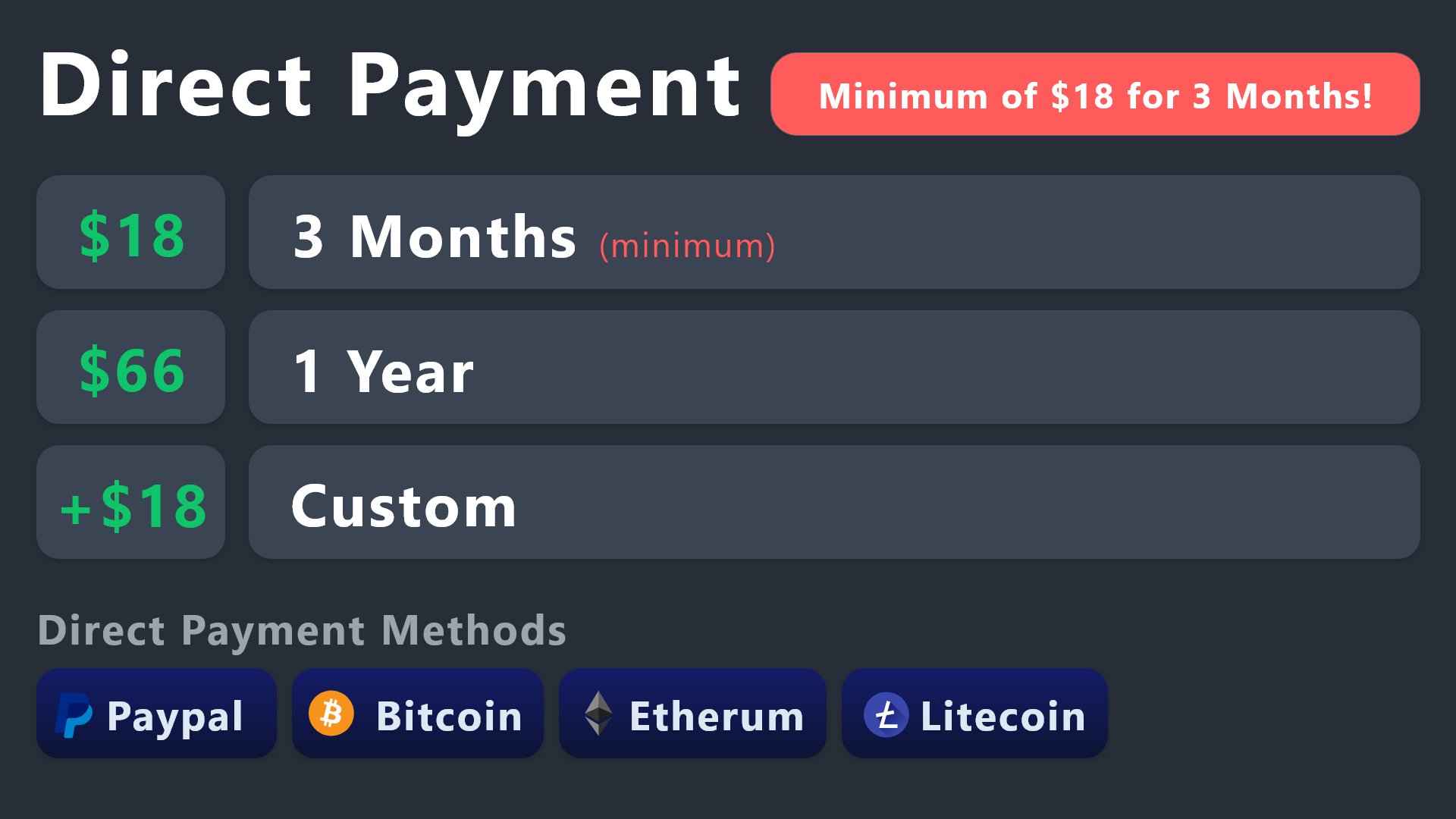
All prices in USD - 3 months min for direct payment
lapis marsh
jade topaz
How much do I have to pay to have a license forever
Not even worth paying for a discord bot better bypass methods
And I mean how good do you need a ticket system to be anyways
lapis marsh
No
 near creek
a
lapis marsh
near creek
tu hablas español
near creek
well
scenic plinth
near creek
tu hablas español
¡Hola! Si necesitas ayuda, ¡no dudes en hacer un ticket! 🙂 ( #🎫│make-a-ticket )
near creek
ya
scenic plinth
@lapis marsh We appreciate that you are willing to offer your help and time to others within this channel, although it has come to of concern you seem passive-aggressive, in all due respect, f not misleading. If you are unsure about a question or how to answer someone, please double verify your answer or do not answer the person at all. Just a fair warning and wanting to let you know, I wont conversate about it further, so dont worry 🙂
lapis marsh
scenic plinth
<@823224399859286057> We appreciate that you are willing to offer your help and ...
When
Was I passive aggressive
lapis marsh
scenic plinth
¡Hola! Si necesitas ayuda, ¡no dudes en hacer un ticket! 🙂 ( <#5717064354492579...
Said that same thing cough cough
 mighty dagger
»«
 lapis marsh
 topaz merlin
Slow internet
topaz merlin
nevermind I figured it out
lapis marsh
topaz merlin
nevermind I figured it out
What was it
topaz merlin
lapis marsh
Slow internet
it didn't have permissions to the channel I guess
lapis marsh
topaz merlin
it didn't have permissions to the channel I guess
Thought so
scenic plinth
Again, if you are unsure, please refrain from offering support or an answer to the question. It is clear you are unaware of what you are answering or intentionally answering incorrectly, and then giving snarky responses.
 bronze mason
How do I open a created ticket?
rustic gale
bronze mason
How do I open a created ticket?
This probably needs clarification.
 terse brook
hello is it possible for me to auto display results as an embed into one public channel so other members can also see it ?
rustic gale
terse brook
hello is it possible for me to auto display results as an embed into one public ...
Not possible sadly
 hidden linden
I have a new server setup and ready to go but it is not pulling up in my Plex login. Any idea how I link the 2? Thanks in advance.
rustic gale
Your Plex login? I don't know what that means, sorry.
timber kernel
hidden linden
I have a new server setup and ready to go but it is not pulling up in my Plex lo...
You are wrong here. We are giving support for the ticket tool bot and not for any server issues regarding Plex.
 earnest moth
hey, I was trying to put all the tickets to one category on two servers - but it seems that this feature doesn't work, any advice on that?
teal grail
Category Option
teal grail
earnest moth
hey, I was trying to put all the tickets to one category on two servers - but it...

 earnest moth
teal grail
earnest moth
teal grail
yes, and i saved it, but the tickets are still sending on the top of all channels
so, it's still like this on the both servers, what surprised me

 lunar solar
earnest moth
hey, I was trying to put all the tickets to one category on two servers - but it...
lunar solar
earnest moth
hey, I was trying to put all the tickets to one category on two servers - but it...
Are the categories you are trying to use full?
Discord has a 50 channel limit per category
It’s that or TT doesn’t have perms to the category
terse brook
do we have a suggestion feature ?
teal grail
No.
jade topaz
Hey I need help.
Im not the owner anymore of the server because I lost access to my account but I have admin perms.
Is there any chance I can purge all the channels?
trough dashboard or something? I cant handle it anymore 100+ closed tickets and 70+ opened and I want to delete all
heavy harbor
jade topaz
trough dashboard or something? I cant handle it anymore 100+ closed tickets and ...
If you have your role in “Dashboard Roles”
jade topaz
guys is there a way to place on the ticket average response time?
rustic gale
terse brook
do we have a suggestion feature ?
Depends on what you mean by that.
Does Ticket Tool have an out-of-the-box suggestion feature that you can use in your server? No
Does this server have a suggestion feature that you can use to suggest improvements to the bot? Yes, use the s!suggest command in #🤖│bot-spam
jade topaz
ok

 torn sonnet
 steel tangle
Please why it didn't close the ticket
steel tangle
Please why it didn't close the ticket
bots usually ignore other bot's message
timber kernel
steel tangle
Please why it didn't close the ticket
Check this in Server config:

 brazen orbit
Good evening, I'm facing the same problem. When creating a ticket, the button for taking a ticket does not appear. The button is enabled in settings. How can this be fixed?
 slender minnow
brazen orbit
Good evening, I'm facing the same problem. When creating a ticket, the button fo...
slender minnow
brazen orbit
Good evening, I'm facing the same problem. When creating a ticket, the button fo...
If you are mean the claim button, then it requires a premium subscription. If you have an active premium subscription, you can configure claiming from the claiming option.
 covert abyss
Good evening, when I click on the server 2 button, a text appears, even though I am on that server with admin rights in discord on the server.
 slender minnow
covert abyss
Good evening, when I click on the server 2 button, a text appears, even though I...
slender minnow
covert abyss
Good evening, when I click on the server 2 button, a text appears, even though I...
you're unable to access the server dashboard?
nvm
humble sequoiaBOT
━━ moved to ticket ━━
covert abyss
Yes
slender minnow
you have a ticket open you can ask there 
covert abyss
slender minnow
someone from the team will assist you shortly
covert abyss
Thank you!
 silver zodiac
when i open ticket it goes on top i want to remain in the same catagory
how to fix that
any one please help
@olive eagle hi
 olive eagle
silver zodiac
when i open ticket it goes on top i want to remain in the same catagory
olive eagle
silver zodiac
when i open ticket it goes on top i want to remain in the same catagory
Hello there, please follow the steps below:
1- Head to your Dashboard
2- Select your server
3- Go to the "Panel Configs" Tab
4- Under "General", click on "Category Options"
humble sequoiaBOT
Discord only allows to stack up to 50 channels per category, meaning that if you have already 50 tickets in one category, the bot won't be able to place a ticket in that category, for such reason Ticket Tool counts with overflow categories, meaning that if your main category is filled, the bot will go ahead and place the ticket on the next one available, simply choose a second category in the category pickers:
jade topaz
updated to gold ticket tools but still got white pfp on my panel message
wild spire
jade topaz
updated to gold ticket tools but still got white pfp on my panel message
you need to use /botswitcher to swap to the yellow bot and then resend all panels
jade topaz
wild spire
you need to use /botswitcher to swap to the yellow bot and then resend all panel...
I already have gold enabled, when I try to update, it says failed, cannot edit other user, being white panel. How do I resend? I want all settings to stay the same
wild spire
jade topaz
I already have gold enabled, when I try to update, it says failed, cannot edit o...
You go to the dashboard and press “send” for each panel once the yellow bot is set up properly
jade topaz
Thank you
 jagged crag
how do i add custom branding to the premium bot?
humble sequoiaBOT
━━ moved to ticket ━━
 deft quest
trying to move where the tickets are located. When someone opens a ticket it used to add it to the top of the server now the bottom. any help?
 simple gale
why can i not see ticket read history when i open a ticket on an alt? it has all normal permissions
nevermind problem solved, just turn oon read message history for @ everyone if you have an issue with this too
jade topaz
wild spire
You go to the dashboard and press “send” for each panel once the yellow bot is s...
Btw, I noticed this does not apply to current tickets, so how do i close the ones that where already open? and will the new ones using gold go to the same archive and transcript logs?
scenic plinth
Yes, any changes made while on the standard subscription with standard features will remain the same unless modified in some way, the only way you would lose features are premium features when canceling your subscription or the subscription expires.
 twilit mantle
Hello, is there a way to make it so staff doesn't have to "join" a ticket
rustic gale
Panel Configs -> Limits
You can set a higher limit, or you can set roles that bypass the limit
 brisk musk
Hello, I can't open a ticket that tells me you don't have a permission how do I give people a permission to open ticket?
slender minnow
brisk musk
Hello, I can't open a ticket that tells me you don't have a permission how do I ...
go to panel config > buttons > settings of the button you are facing issue with > check that the button is not marked with as support only
brisk musk
slender minnow
go to panel config > buttons > settings of the button you are facing issue with ...
?
 slender minnow
brisk musk
?
slender minnow
brisk musk
?
this is what preventing your server members from opening tickets
https://i.imgur.com/YpQrA5D.png
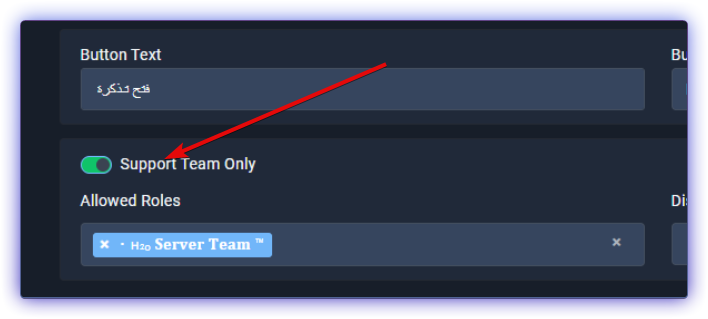
only your users with their roles added as Support Team can make a ticket
brisk musk
✅
 tired gyro
What's this?
 gilded verge
tired gyro
What's this?
gilded verge
tired gyro
What's this?
The panel appears to have been deleted, but if you still see it in the dashboard, clone it and use the cloned panel ^^
humble sequoiaBOT
The first thing you will need to do is invite the premium bot, an invite can be found here
Once the bot is in your server we will head to the dashboard and manage your server. When you are managing your server, you want to head into "Server Configs" then click the drop down menu under "Select the bot you would like to use on this server" then click "Ticket Tool#6207" and then save.


 autumn oriole
@full estuary
When you purchase you select the server you want to purchase TicketTool premium
Make sure to add ticket tool premium bot into server
You can go to dashboard of the server that you purchased and in left menu you should see something like this

That means that purchased subscription is activated
But if you didnt activated the premium key, go to server dashboard that you want to premium key activate and then click to open left menu and find button rendeem and paste the Premium key in and click on button rendeem and the subscription will start to work.
But make sure to add premium bot
 autumn oriole
humble sequoia
autumn oriole
humble sequoia
Guide here
gilded verge
autumn oriole
But make sure to add premium bot
Just to be clear, premium features also work in the free bot so there is no need to add the premium bot to the server ^^
autumn oriole
gilded verge
Just to be clear, premium features also work in the free bot so there is no need...
True but if you want it look coll you can add it @full estuary
gilded verge
indeed,
also if you (@full estuary) bought premium via Discord, you don't get any code because you have active premium immediately after purchase
 full estuary
Alrighty thanks
jade topaz
How do I make it so that tickettool doesnt rename the tickets when the ticket closes?
gilded verge
You can set the same name ^^ Panel Configs->Ticket->here
Example:
 jade topaz
that wouldnt work because i have another bot that changes the channel name based on a factor, but tickettool changes the name back once the ticket is closed
@gilded verge
 grim cipher
hello
gilded verge
jade topaz
<@334671104704774154>
wait, im sorry, my bad, so you don't want it to change name after closing the ticket... so you can leave this field blank ^^
 grim cipher
I want to add it to my server. but when i type /setup i get this error. "application did not respond"
 gilded verge
could you please run /debug on your server?
grim cipher
okey
gilded verge
oh, and here send link from bot
Example:
 grim cipher
i get the same error
 gilded verge
ah right, so ticket tool don't have permission to send messages, please fix ^^
grim cipher
ahahaha thank you 😄
humble sequoiaBOT
How to edit `@everyone`'s permissions
Head over to your Dashboard ➞ Panel Configs ➞ Permission Options ➞ Everyone Role Opened/Closed and customize the base permissions for everyone in your tickets.
Note: This set of permissions may be affected by the overrides of Support Team, Additional Roles, and User permissions.
 jade topaz
is it possible for people to open multiople tickets at once? I have gold
teal grail
Yes
teal grail
jade topaz
is it possible for people to open multiople tickets at once? I have gold
Limits Option
jade topaz
Does anyone know how to ping a role inside of a ticket?
humble sequoiaBOT
Within all the messages the bot sends (both embeds and text) you can mention either channels, roles, or even users, these mentions will only send a notification to the user if they are used within a text field, e.g: a role mentioned in an embed won't ping at all the users who have that role.
For mentioning a role you can use one out of three options:
{@Role Name} ➞ Which is Case Sensitive.
{RoleID} ➞ Replace RoleId with the Id of the role you are trying to ping.
<@&RoleID> ➞ Discord's native syntax to ping roles.
<#ChannelID> ➞ Mention a channel by its ID.
<@UserID> ➞ Mention a user by its ID.
jade topaz
Thanks.
 granite grove
If I wanted to remove Ticket Tool from my server - what do I need to do to make sure access is revoked?
wild spire
granite grove
If I wanted to remove Ticket Tool from my server - what do I need to do to make ...
if u kick it, all access from the bot is revoked 
 lyric sigil
When in Embed Editor - 2 it's only to Premium servers?
 gilded verge
Those fields that are shaded, are only changeable in premium
lyric sigil
gilded verge
Those fields that are shaded, are only changeable in premium
so when make another embed editor, its only works in premium right?
in Embed Editor - 1 , i can use Embed Description, but in Embed Editor - 2 i can't
 gilded verge
in Embed 2 everything is shaded so yes, without premium it won't work
lyric sigil
ooh ok
jade topaz
What does #demo-threads do?
gilded verge
by opening a ticket there you can check what it looks like with threads
jade topaz
Ah thanks.
jade topaz
gilded verge
by opening a ticket there you can check what it looks like with threads
Thank you.
iron nightBOT
Gave +1 Rep to @gilded verge
jade topaz
How do I make a dropdown with multiple options for a ticket panel??
it only lets me select support centre once
 humble sequoiaBOT
━━ moved to ticket ━━
 copper bane
At my server there is no emoji to open the ticket
wild spire
copper bane
At my server there is no emoji to open the ticket
you can set it in the button settings if u mean there’s no emoji on the button
copper bane
No there is no button
wild spire
copper bane
No there is no button
can u send a screenshot?
copper bane

 dapper depot
copper bane
dapper depot
copper bane
Did you disable the panel?
copper bane
No
dapper depot
copper bane
Maybe resend it.
copper bane
Ok i will do it tomorrow
wild spire
copper bane
hey nederlands 
copper bane
Haha
wild spire
kijk even na in je dashboard of je bot wel alle permissions heeft btw
wild spire
copper bane
Goed
server info.
En dan is alles behalve admin verplicht

nou success met je toets
copper bane
Bedankt
copper bane
Zal ik doen
lapis marsh
scenic plinth
Again, if you are unsure, please refrain from offering support or an answer to t...
Who ?
scenic plinth
I am referring to you. Please refrain from commenting further on the subject within this channel.
 fossil prairie
Hello. I am having trouble getting my panel to connect to my Discord Channel. Is there anyone that could possibly help me?
 shut bolt
fossil prairie
Hello. I am having trouble getting my panel to connect to my Discord Channel. ...
shut bolt
fossil prairie
Hello. I am having trouble getting my panel to connect to my Discord Channel. ...
Hello, would you please explain more what's the issue being?
 unkempt tangle
how do i make it so closed tickets go into a separate category?
i did it before, but now the server has 2 different panels running and i cant figure out how to do it again
shut bolt
$help
humble sequoiaBOT
shut bolt
$help
1. Go into your Dashboard
2. Open your Panel Configs tab
3. Select the panel you want to grant access to
4. Open the Category options menu
5. Select the categories of your preference
6. Save changes
shut bolt
unkempt tangle
how do i make it so closed tickets go into a separate category?
Set a closed category for your panels as shown above
unkempt tangle
thanks @shut bolt
iron nightBOT
Gave +1 Rep to @shut bolt
shut bolt
unkempt tangle
next question, how do i make it so it pings a support role when a ticket is created?
humble sequoiaBOT
Within all the messages the bot sends (both embeds and text) you can mention either channels, roles, or even users, these mentions will only send a notification to the user if they are used within a text field, e.g: a role mentioned in an embed won't ping at all the users who have that role.
For mentioning a role you can use one out of three options:
{@Role Name} ➞ Which is Case Sensitive.
{RoleID} ➞ Replace RoleId with the Id of the role you are trying to ping.
<@&RoleID> ➞ Discord's native syntax to ping roles.
<#ChannelID> ➞ Mention a channel by its ID.
<@UserID> ➞ Mention a user by its ID.
 coral bobcat
Hi
unkempt tangle
thanks @shut bolt
iron nightBOT
Gave +1 Rep to @shut bolt
shut bolt
unkempt tangle
thanks <@518666147441278998>
No problem
coral bobcat
How i can do this ?
 humble sequoiaBOT
For more convenient use of multipanels, you can now combine panels on the dashboard. This will allow you to directly send the multipanel from the dashboard or via the $panel ID command.
Where can I find this?
You can find this setting on the Dashboard -> Panel Configs -> Settings -> Panel
Note: if you're attaching all the panels to a panel called English, don't include English in the attached panel's box (If you do this, it will create a duplicate)
This will put all buttons from all of your panels on one message. The message is the panel message from the panel you're combining these panels in.
shut bolt
Follow the guide above
coral bobcat
Can you refer me from the site?
shut bolt
What do you mean by that
 shut bolt
coral bobcat
shut bolt
coral bobcat
Panel
 shut bolt
No problem
coral bobcat
thanks @shut bolt
iron nightBOT
Gave +1 Rep to @shut bolt
shut bolt

 astral stirrup
coral bobcat
i want delete this
astral stirrup
coral bobcat
i want delete this
My tickets never come up
 wild mulch
Hey guys... having some trouble here. I'm trying to set up my Moderation Bot to ignore the ticket channels but dont have a good way to
I can't have the moderation bot ignore the newly created ticket channel
scenic plinth
You need to ask in the moderation bots support server, the best thing you can do is set it to ignore the categories that tickets are created in. Other than that, we cannot help you.
No, because moderation bots cant ignore channels that dont exist.
coral bobcat
i can try premuim bot 1 week for free ?
wild mulch
thank you @scenic plinth ill ask them
iron nightBOT
Gave +1 Rep to @scenic plinth
scenic plinth
coral bobcat
i want delete this
Go to whatever your first panel is and disable the "create ticket" button (Menu -> Buttons -> Button Create Ticket) and turn off "show this button". Make sure to resend the panel.
scenic plinth
coral bobcat
i can try premuim bot 1 week for free ?
Yes, there is a 1 week free trial for each server the bot is in, and can only be used once within that server. Premium features reset after those 7 days.
dapper depot
How I make it so that on free only people with a role can only close tickets?
 covert swallow
Buttons > Close Ticket > Allowed Roles / Support Team only (whichever works better for you)
dapper depot
What you mean by support team?
dapper depot
covert swallow
Buttons > Close Ticket > Allowed Roles / <:Switch_enabled:1041734627330625586>...
^
covert swallow

Support Team is the role you defined in the general settings of your panel, basically the staff team helping out
dapper depot
So for me to be able to test the close button I can't do view server as role?
covert swallow
Correct
humble sequoiaBOT
View As Role feature
Discord's integrated View As Role feature will allow you to see how different groups of roles will have access to your server's channels. Even though, this feature isn't reliable for thoroughly testing Ticket Tool considering that the tickets are created based on User roles, and that Roles permissions are only used for Support Team Roles, and Additional Roles.
For testing Ticket Tool as a user we suggest you ask a friend to open a ticket for you as a regular member would do, or use an alternative account to simulate the same process to make sure everything is set properly.
dapper depot
thanks @covert swallow
iron nightBOT
Gave +1 Rep to @covert swallow
 nimble lion
How do I set up the /clam command
covert swallow
Assuming you have premium, the majority of the setup can be done in the "Claiming" portion of the panel settings
jade topaz
How to invite @humble sequoia
humble sequoiaBOT
The first thing you will need to do is invite the premium bot, an invite can be found here
Once the bot is in your server we will head to the dashboard and manage your server. When you are managing your server, you want to head into "Server Configs" then click the drop down menu under "Select the bot you would like to use on this server" then click "Ticket Tool#6207" and then save.
lunar solar


 timber kernel
coral bobcat
How can I do this
timber kernel
coral bobcat
How can I do this
Here you go:
humble sequoiaBOT
The Drop-down menu or Select Menu replaces the buttons on your panel message and uses a drop-down menu with all of your panels. To set this up, go to your Panel Configs and select your main Panel.
<:Numbericons1:1018864164032225340> Enable Select Style
First you enable Select Style. Then you add an item in the Dropdown Editor. Now you can start editing your dropdown!
<:Numbericons2:1018864168041971712> Dropdown Editor
Each line in the dropdown editor represents a line in the drop down menu on discord. You can add more "Items", by clicking on
First you select a panel. That's the panel this option will open a ticket for. DONT select the same panel twice. Each option should have a different Panel
After that, you can put a Display. This is the title of this option and will appear in the drop down menu. The *Description can be set right after that, which will be below the title in grey.
Additionally you can select an emoji, that will be shown in front of each option. You can either manually input the ID of an emoji or select it in the selector.
Common Issues ⚠️
- Panel doesn't send? Make sure you have a valid emoji selected
- Option doesn't show up? Check if two options have the same panel in the DropDown Editor
$dropdown
timber kernel
 violet saffron
how to make it
violet saffron
how to make it
And here for you:
humble sequoiaBOT
For more convenient use of multipanels, you can now combine panels on the dashboard. This will allow you to directly send the multipanel from the dashboard or via the $panel ID command.
Where can I find this?
You can find this setting on the Dashboard -> Panel Configs -> Settings -> Panel
Note: if you're attaching all the panels to a panel called English, don't include English in the attached panel's box (If you do this, it will create a duplicate)
This will put all buttons from all of your panels on one message. The message is the panel message from the panel you're combining these panels in.
 true kite
Hey, I just tried out the #demo-threads ticket, is the "Fill this out" window a premium feature or can I use that as a free user?
 civic wagon
true kite
Hey, I just tried out the <#1031264402969735198> ticket, is the "Fill this out" ...
civic wagon
true kite
Hey, I just tried out the <#1031264402969735198> ticket, is the "Fill this out" ...
It is a free feature. Please refer to the embed below
humble sequoiaBOT
A Discord Form lets the user answer individual questions in a pop-up Form, which then displays the answers in the ticket message. This can save time if you already know what you want to ask the user.
Setup Forms
Forms can be enabled under Panel Settings > Form Options > Edit Forms Options. In the new pop-up window, you can now enable and edit your own Form.
Form Options
You can add up to 5 questions in the Discord form. This is a Discord limitation. Each question can have a placeholder in the input field, a minimum and maximum input, multi-line, and also the option to have the answer required.
Options
Question Title ➞ Your Question goes here
Question Placeholder ➞ The placeholder text in the input field
Required ➞ If enabled, the user has to answer this question, to submit the form
Multi-Line Input ➞Allows the user to input multiple lines
Minimum and Maximum Input ➞ Set a minimum and maximum input value for the user
Displaying the Answer
To display the answers from the user, you need to go into your Panel Settings > Ticket Options > Edit Ticket Message. In there you use the variable {create.form.x} and just replace x with the number of your question. For example, the response to Question 1 can be displayed with {create.form.1}. If you don't use this variable, the response from the user is lost.
 true kite
civic wagon
It is a free feature. Please refer to the embed below
true kite
civic wagon
It is a free feature. Please refer to the embed below
Thank you 🙏
iron nightBOT
Gave +1 Rep to @civic wagon
humble sequoiaBOT
The Drop-down menu or Select Menu replaces the buttons on your panel message and uses a drop-down menu with all of your panels. To set this up, go to your Panel Configs and select your main Panel.
<:Numbericons1:1018864164032225340> Enable Select Style
First you enable Select Style. Then you add an item in the Dropdown Editor. Now you can start editing your dropdown!
<:Numbericons2:1018864168041971712> Dropdown Editor
Each line in the dropdown editor represents a line in the drop down menu on discord. You can add more "Items", by clicking on
First you select a panel. That's the panel this option will open a ticket for. DONT select the same panel twice. Each option should have a different Panel
After that, you can put a Display. This is the title of this option and will appear in the drop down menu. The *Description can be set right after that, which will be below the title in grey.
Additionally you can select an emoji, that will be shown in front of each option. You can either manually input the ID of an emoji or select it in the selector.
Common Issues ⚠️
- Panel doesn't send? Make sure you have a valid emoji selected
- Option doesn't show up? Check if two options have the same panel in the DropDown Editor
$dropdown
violet saffron
where can i download???
 rustic gale
Download what?
rustic gale
Sorry, i don't understand what you mean
if you write in Arabic, we can use the translator bot to translate it to English
robust sandalBOT
إذا كنت تكتب باللغة العربية ، فيمكننا استخدام بوت المترجم لترجمته إلى الإنجليزية
English (en) → Arabic (ar)
violet saffron
اقول كيف انشر ال دروب داون في الروم
robust sandalBOT
I say how to spread the drop down in the room
Arabic (ar) → English (en)
rustic gale
Well. That dropdown is set up incorrectly
See the text that says Select a panel (required)?

Well
Selecting a panel is required
Display (required) is also required
 violet saffron
rustic gale
violet saffron
now what i make
violet saffron
rustic gale
violet saffron
now what i make
Now you use the Send button to send it to your channel
 violet saffron
k
 main gulch
 lament steppe
Does anyone know if there’s an audit log for created, transcripted, and deleted tickets on the website?
My server is currently investigating a support ticket that was deleted without being transcripted.
And our audit log channel doesn’t record that specific type of support ticket, for some reason.
shut bolt
 buoyant perch
I wanna get unbanned
buoyant perch
I wanna get unbanned
Unbanned from where?
shut bolt
lament steppe
Does anyone know if there’s an audit log for created, transcripted, and deleted ...
There is not, the only log, that needs to be setup before it's effective, are the logs shown below
humble sequoiaBOT
With Ticket Tool, you can customize the behavior the bot takes when logging your tickets! For editing these options follow these steps:
Dashboard ➞ Panel Configs ➞ Logging Options
Logging Channel
Here you will define which channel @humble sequoia will save the Logs in (ticket created/deleted/closed, etc.)
Logs you can save:
➞ Ticket Created ➞ Logs when a ticket is created
➞ Ticket Closed ➞ Logs when a ticket is closed
➞ Ticket Opened ➞ Logs when a ticket is opened
➞ Ticket Renamed ➞ Logs when a ticket is renamed
➞ Ticket Deleted ➞ Logs when a ticket is deleted
➞ Transcript Saved ➞ Logs when a ticket is saved
Select with  (disable) or (enabled) which logs you would like
Below you can see an example of what the Logging Options will look like:
 lament steppe
shut bolt
There is not, the only log, that needs to be setup before it's effective, are th...
lament steppe
shut bolt
There is not, the only log, that needs to be setup before it's effective, are th...
Crap.
Alright, thanks.
shut bolt
 light frost
Hello i need a help i did the dropdown list with the options but every time when i will create ticket/chat room with it its the same name i need to help on how to set custom name on each ticket option
@shut bolt
coral bobcat
how i do this


 naive cloak
Hello! Is there a problem if I enabled only the minimum permissions for the Ticket bot to work? I tested the bot and for now, is working fine. I should expect some limitations for the settings I made?

(Support Team Permissions)
@safe prairie What do you think?
Where I can find this panel in the current version of the TicketTools?
 wild spire
naive cloak
Where I can find this panel in the current version of the TicketTools?
wild spire
naive cloak
Where I can find this panel in the current version of the TicketTools?
Server info tab 
be sure the bot has all permissions there except administrator enabled to work properly
naive cloak
wild spire
Server info tab <:pepe_confetti:984105711367770132>
It's not there anymore.
wild spire
naive cloak
It's not there anymore.
it should be
 naive cloak
This is how my Server Info section looks
 wild spire
naive cloak
This is how my Server Info section looks
wild spire
naive cloak
This is how my Server Info section looks
give me the server ID?
Or try under server configs
 wild spire
naive cloak
wild spire
naive cloak
apart from admin these are required
 naive cloak
So I should have those enabled both on the role permission and on the channel permission when the bot will operate, right?
wild spire
naive cloak
So I should have those enabled both on the role permission and on the channel pe...
Yes. But u should still be able to just enable them in the dashboard
naive cloak
Now I know what should I look for. Thank you so much!
wild spire
naive cloak
Now I know what should I look for. Thank you so much!
no worries!
naive cloak
wild spire
Yes. But u should still be able to just enable them in the dashboard <:AaronThin...
Hi. I solved the problem but I come back with a short question. I noticed that the bot requires Manage Channels permission for the channel it uses. I should enable this permission also for the TicketTools role. It doesn't appear on the list you provided above.
gilded verge
naive cloak
Hi. I solved the problem but I come back with a short question. I noticed that t...
Hey, this screenshot @Maud sent is only visible for Ticket Tool Staff, but if you want to see if the bot has the required permissions, on your server please use /debug ^^
 pseudo umbra
How can i mention a role in the ticket message
humble sequoiaBOT
Within all the messages the bot sends (both embeds and text) you can mention either channels, roles, or even users, these mentions will only send a notification to the user if they are used within a text field, e.g: a role mentioned in an embed won't ping at all the users who have that role.
For mentioning a role you can use one out of three options:
{@Role Name} ➞ Which is Case Sensitive.
{RoleID} ➞ Replace RoleId with the Id of the role you are trying to ping.
<@&RoleID> ➞ Discord's native syntax to ping roles.
<#ChannelID> ➞ Mention a channel by its ID.
<@UserID> ➞ Mention a user by its ID.
timber kernel
@pseudo umbra
pseudo umbra
Thanks
pseudo umbra
timber kernel
<@871084157491642428> <:this:894279341108772914>
It didn’t work
timber kernel
pseudo umbra
It didn’t work
Please show your configuration.
 iron nightBOT
Gave +1 Rep to @timber kernel
timber kernel
pseudo umbra
Ok thanks i have been solved it <@153489496317493248>
You are welcome.
 hardy depot
Do I need the Premium version to edit the "Ticket created" message?
Cause its greyed out, I cant klick on it


 turbid cargo
is there any way to make it so that your closed tickets go to a diff category?
if any1 could help that would be vv appreciated. tyy!
timber kernel
turbid cargo
if any1 could help that would be vv appreciated. tyy!
Yes there is. Use the closed category setting in the dashboard:
 turbid cargo
ok tyvm !!! 😁
 scarlet dome
hello guys can someone help i allready did the ticket but when the ticket chat-room is created i dont have the close message in the room
 obsidian yacht
Okay
Can you tell me how to make the ticket after creating it Be down the support room
scarlet dome
Can´t help u with that dont know try to make a ticket with that problem
rustic gale
obsidian yacht
Can you tell me how to make the ticket after creating it Be down the support roo...
What do you mean by this
rustic gale
scarlet dome
hello guys can someone help i allready did the ticket but when the ticket chat-r...
So, the ticket is created normally, but no ticket message appears?
Try creating a ticket yourself. The bot should send a message confirming that the ticket is created
Take a screenshot of that message and post it here
 brittle hare
Is there a way to temporarily disable a ticket button so I don't have to reconfigure it later?
Couldn't figure it out, will just change view permissions of the channel. Thanks anyway.
 hardy crater
Hey there! Can I pull anyone into a ticket (non-admin) by just tagging them?
 hallow kayak
I have a similar question, my mods have the Support role, but when they claim a ticket, only the mod who claimed it can see the ticket and pinging other mods dosent work
hardy crater
hallow kayak
I have a similar question, my mods have the Support role, but when they claim a ...
My mods can see all tickets but I am curious if I can ping a normal user into a single ticket vs. allowing them to see all.
hallow kayak
They can see them all when they are unclaimed, one one is clamied only the mod who claimed gets to see it, that my issue
My other issue is i dont understand how placeholders work in embeds. I want top @compact valley ticket creator and ping my staff when the ticket is created
rustic gale
hallow kayak
I have a similar question, my mods have the Support role, but when they claim a ...
You enabled this:

Disable it and your other mods should keep their channel permissions when a fellow mod claims a ticket.
(it's not retroactive)
 leaden locust
any arabic support?
civic wagon
leaden locust
any arabic support?
 lament dew
Hey all. I was curious if you could give me some help on creating a custom command that the ticket responder uses to give some one a Role?
I've got the ticket system all set-up and working. We play a game that allows alliances between groups so we're using the ticket tool to open a ticket so we can verify the diplomats coming into our server.
I would love to create a command (using vdiplo as the trigger), which will auto-assign the role as Verified Diplomat once the support staff use it in the ticket.
Is this possible?
rustic gale
lament dew
Is this possible?
No. Currently, custom commands do not assign roles.
You could use a different bot for that, such as Dyno or YAGPDB.xyz
lament dew
Ahh ok!
idle flint
 iron nightBOT
Gave +1 Rep to @idle flint
 random agate
is there any ways to check the deleted tickets?
humble sequoiaBOT
1. Go into your Dashboard
2. Open your Panel Configs tab
3. Select the panel you want to grant access to
4. Open the Transcript options menu
5. Using the Transcript Channel selector, pick the channel you want your transcripts to be sent to
6. Save changes
 gilded verge
humble sequoia
gilded verge
humble sequoia
Hey @random agate, we don't store any transcripts, so if you didn't save it before deleting the ticket, it can't be restored. As above, you can set a channel for the transcript and before deleting the ticket, click the button to save the transcript or use the $transcript command ^^
random agate
ty
jade topaz
Hi
 ruby sky
如何讓成員點選Ticket後彈出視窗填寫問題
jade topaz
yo just paid for the premium and its not showing up in my dash board on google
any fix
slender minnow
jade topaz
yo just paid for the premium and its not showing up in my dash board on google
try clicking the sync button if its a purchase through discord
jade topaz
yea i just did that that worked
 spice mist
how check the user form answers except the tool messages like it will save
humble sequoiaBOT
@rancid canyon, we would love to help you, but if you don't tell us what you need help with we can't help you :(
scenic plinth
spice mist
how check the user form answers except the tool messages like it will save
You need to add {create.form.x} (replace X with the question number) in your ticket message.
 rancid canyon
humble sequoia
rancid canyon
humble sequoia
okay so I dont understand how i can make it so it can dropdown like this and make you pick one

and make seperate transcripts for the different catagories
humble sequoiaBOT
The Drop-down menu or Select Menu replaces the buttons on your panel message and uses a drop-down menu with all of your panels. To set this up, go to your Panel Configs and select your main Panel.
<:Numbericons1:1018864164032225340> Enable Select Style
First you enable Select Style. Then you add an item in the Dropdown Editor. Now you can start editing your dropdown!
<:Numbericons2:1018864168041971712> Dropdown Editor
Each line in the dropdown editor represents a line in the drop down menu on discord. You can add more "Items", by clicking on
First you select a panel. That's the panel this option will open a ticket for. DONT select the same panel twice. Each option should have a different Panel
After that, you can put a Display. This is the title of this option and will appear in the drop down menu. The *Description can be set right after that, which will be below the title in grey.
Additionally you can select an emoji, that will be shown in front of each option. You can either manually input the ID of an emoji or select it in the selector.
Common Issues ⚠️
- Panel doesn't send? Make sure you have a valid emoji selected
- Option doesn't show up? Check if two options have the same panel in the DropDown Editor
$dropdown
rancid canyon
humble sequoia
thanks
iron nightBOT
Gave +1 Rep to @humble sequoia
scenic plinth
Great job
rancid canyon
scenic plinth
Great job
thanks
iron nightBOT
Gave +1 Rep to @scenic plinth
rancid canyon
i got a question how do you make theese emojis custom emojis?

nvm i figured it out
 desert rover
Is there a way to make a custom command send the response in the ticket owner's DMs?
 edgy plinth
i used the /setup in my server and did everything it wanted me to do but it never showed up in any channel, even tho i picked the channel i wanted the "order here" thing to show up
rustic gale
edgy plinth
i used the /setup in my server and did everything it wanted me to do but it neve...
Make sure the bot has the correct permissions in that channel.
edgy plinth
oh okay i thought that didnt matter since that i checked all the boxes on the invitation, ill try that right now! are there any specific perms it needs?
humble sequoiaBOT
ᅠ
@pseudo glen requires the following permissions:
Add Reactions
Read Channels
Send Messages
Manage Messages
Embed Links
Attach Files
Read History
Manage Roles
Manage Channels
To change the role permissions, you can go to your Discord Server ➞ Server Settings ➞ Roles ➞ @Ticket Tool
To change the category permissions, you can got to your Channel List ➞ Select Category ➞ Options ➞ Permissions ➞ @Ticket Tool
To change the channel permissions, you can go to your Channel Settings ➞ Permissions ➞ Ticket Tool
ᅠ
Note:
You can give Ticket Tool Administrative Permissions instead of all the permissions listed above, but it's entirely optional and NOT necessary.
 rustic gale
If, for example, your channel has Send Messages set to  for
for everyone, that overrides the global Send Messages permission from the bot role (that you granted it when you invited it).
iron nightBOT
Gave +1 Rep to @rustic gale
 true schooner
How do you change the colour of a panel
 young halo
How do you make a transcript designated channel
timber kernel
young halo
How do you make a transcript designated channel
Create the channel on your server, with the name you like, then configure it here:
 young halo
timber kernel
Create the channel on your server, with the name you like, then configure it her...
young halo
timber kernel
Create the channel on your server, with the name you like, then configure it her...
yea i tried to go that route but it isnt saving it is saving directly to the closing ticket
timber kernel
young halo
yea i tried to go that route but it isnt saving it is saving directly to the clo...
What is configured on the settings below?
On close it gets send to the ticket author. If you delete it, then it gets saved to you transcript channel.
 young halo
let me try agaig
It deletes everything in the ticket and doesnt sent the transcript anywhere
young halo
timber kernel
What is configured on the settings below?
On close it gets send to the ticket au...
I believe that command or whatever is broken
It is not saving to a channel and i have tried so many times
wild spire
young halo
It is not saving to a channel and i have tried so many times
can we get a server ID so we can check something?
wild spire
young halo
I believe that is the ID
are u trying to save transcripts for all 4 panels or only for “support”?
young halo
all 4?
 young halo
Oh that might be the issue
wild spire
young halo
Oh that might be the issue
You’ve only set up transcripts saving for 1 out of 4.
If that doesn’t work, run $debug in your transcripts channel
young halo
yea that is where the mistake was
wild spire
young halo
yea that is where the mistake was
Glad it was solved
jade topaz
Hey, if I found a server that is heavily against tos of discord and is using ticket tool to scam, is it worth the time sending it here?
rustic gale
jade topaz
Hey, if I found a server that is heavily against tos of discord and is using tic...
Not really. It's best to report it directly to Discord
jade topaz
I did
jade topaz
rustic gale
Not really. It's best to report it directly to Discord
But from my experience, discord takes a while to solve it, so I thought if somehow ticket tool would be disabled there, it would be better
rustic gale
Staff doesn't usually blacklist servers based on reports.
scenic plinth
In better words, we dont police what people do in their servers, especially since there is other ways for people to just simply bypass us even acting against them, its not our job as unfortunate as it is for Discord to need to respond, but its how this works.
jade topaz
Thanks
 harsh kettle
Heyo, an user in a discord i use the ticket bot in is unable to make tickets.
When they are trying to do so, they get this error-message.
I dont really understand the error-message, could maybe one of you help me out?
 covert swallow
Youre in the wrong support server, we are support for @humble sequoia
harsh kettle
oh damn sorry
idle flint
 green drum
When i click on manage it kind of "Refreshes" the page
green drum
When i click on manage it kind of "Refreshes" the page
Are you a server owner or have you confirmed the server owner has given you dashboard permissions?
If so, try a different browser (i.e chrome, edge, firefox)
green drum
idle flint
Are you a server owner or have you confirmed the server owner has given you dash...
I added the bot myself, does the server owner need to give me permission?
idle flint
green drum
I added the bot myself, does the server owner need to give me permission?
It depends if you have administrator access - if you added the bot then that should mean you have admin access (but not always). I will post some info you can pass onto the server owner to check. But I would still try a different browser too if I were you
humble sequoiaBOT
Any role you put there will have full access to the ticket tool dashboard. The server owner and users with admin permissions already have access to the dashboard.
Be careful of which roles to put here

 frail bay
how do you make a ticket like this?
 humble sequoiaBOT
The Drop-down menu or Select Menu replaces the buttons on your panel message and uses a drop-down menu with all of your panels. To set this up, go to your Panel Configs and select your main Panel.
<:Numbericons1:1018864164032225340> Enable Select Style
First you enable Select Style. Then you add an item in the Dropdown Editor. Now you can start editing your dropdown!
<:Numbericons2:1018864168041971712> Dropdown Editor
Each line in the dropdown editor represents a line in the drop down menu on discord. You can add more "Items", by clicking on
First you select a panel. That's the panel this option will open a ticket for. DONT select the same panel twice. Each option should have a different Panel
After that, you can put a Display. This is the title of this option and will appear in the drop down menu. The *Description can be set right after that, which will be below the title in grey.
Additionally you can select an emoji, that will be shown in front of each option. You can either manually input the ID of an emoji or select it in the selector.
Common Issues ⚠️
- Panel doesn't send? Make sure you have a valid emoji selected
- Option doesn't show up? Check if two options have the same panel in the DropDown Editor
$dropdown
teal grail
You can write the rule in the ticket.
idle flint
This is called "Mentions". Here is the info:
humble sequoiaBOT
Within all the messages the bot sends (both embeds and text) you can mention either channels, roles, or even users, these mentions will only send a notification to the user if they are used within a text field, e.g: a role mentioned in an embed won't ping at all the users who have that role.
For mentioning a role you can use one out of three options:
{@Role Name} ➞ Which is Case Sensitive.
{RoleID} ➞ Replace RoleId with the Id of the role you are trying to ping.
<@&RoleID> ➞ Discord's native syntax to ping roles.
<#ChannelID> ➞ Mention a channel by its ID.
<@UserID> ➞ Mention a user by its ID.
jade topaz
hey,
My bot has the following problem.
If I change the people who should be pinged when a ticket is created, the old roles are still pinged and not the new one.
wild spire
jade topaz
hey,
My bot has the following problem.
If I change the people who should be ping...
Did you put the correct role ID?
 slim nest
Is there any chance of getting the 7 Day Free Trial for TT?
rustic gale
You get the trial by clicking the Start Trial button in the dashboard
It's on the left-hand sidebar below the server icon.
slim nest
hmmm... Can you check, if i have tried it before?
rustic gale
Maybe. What's the ID of your server?
slim nest
Because I don't remember, but there is no button 🤔
 slim nest
rustic gale
Maybe. What's the ID of your server?
slim nest
rustic gale
Maybe. What's the ID of your server?
1012823182111146014
rustic gale
You started the trial on August 27.
gilded verge
slim nest
Then I forgot it xD
Thank you ;)
if you pick it up quickly, this is for 6 days ||e11d7-2bb43-ca576-2bb02||
 iron nightBOT
Gave +1 Rep to @gilded verge
 regal thorn
how can u use custom emojis on the create a ticket button
jade topaz
I wish there was was a way to put a whole message on the ticket welcome embed
Im trying to use ticket tool on my server without premium. The reason I have premium role is cause I manage a server with premium
 rose echo
Hi. When I attempt to use the setup command, the only thing the bot replies with is, 'The application did not respond'. Is this an issue for everyone at the moment, or is it something on my end?
idle flint
head to #🎫│make-a-ticket to create a ticket
You are possibly using the incorrect format, feel free to either post in here or head to #🎫│make-a-ticket for some further information/help
humble sequoiaBOT
You can check our documentation here;
You can also check #📂│information for the basic setup, or run the </setup:1025379472167403530> command within #🤖│bot-spam to find information on how to setup Ticket Tool.
Alternatively, you can use the /setup command with Ticket Tool in your own server to setup the basics of Ticket Tool!
Our documentation contains all the info you need about the bot to be able to setup and configure the bot however you like.
idle flint
rose echo
Hi. When I attempt to use the setup command, the only thing the bot replies with...
Possibly a bot permission issue, check these permissions on the bot, or just visit the dashboard for a more user-friendly set-up
humble sequoiaBOT
ᅠ
@pseudo glen requires the following permissions:
Add Reactions
Read Channels
Send Messages
Manage Messages
Embed Links
Attach Files
Read History
Manage Roles
Manage Channels
To change the role permissions, you can go to your Discord Server ➞ Server Settings ➞ Roles ➞ @Ticket Tool
To change the category permissions, you can got to your Channel List ➞ Select Category ➞ Options ➞ Permissions ➞ @Ticket Tool
To change the channel permissions, you can go to your Channel Settings ➞ Permissions ➞ Ticket Tool
ᅠ
Note:
You can give Ticket Tool Administrative Permissions instead of all the permissions listed above, but it's entirely optional and NOT necessary.
rose echo
idle flint
Possibly a bot permission issue, check these permissions on the bot, or just vis...
That fixed it. Thank you very much!
coral bobcat
hi
How do I make the rank see the tick while it is locked and the other ranks can't
jade topaz
Is it possible to have a ticket auto-assign to one user out of a pool (eg. a pool of moderators)?
 cinder wolf
how do I send the panel to a specific channel?
 teal grail
jade topaz
Is it possible to have a ticket auto-assign to one user out of a pool (eg. a poo...
teal grail
jade topaz
Is it possible to have a ticket auto-assign to one user out of a pool (eg. a poo...
I didn't understand
teal grail
coral bobcat
How do I make the rank see the tick while it is locked and the other ranks can't
Permissions Option
cinder wolf
Thank you
teal grail
cinder wolf
Thank you
No Problem
jade topaz
How can I get who deleted/closed the ticket?
coral bobcat
teal grail
`Permissions` Option
how ?
gilded verge
jade topaz
How can I get who deleted/closed the ticket?
In Panel Configs->Moderator->Moderator message/Delete Message you can use {user} or {author}
Example

 dull dew
gilded verge
In `Panel Configs->Moderator`->`Moderator message`/`Delete Message` you can use ...
dull dew
gilded verge
In `Panel Configs->Moderator`->`Moderator message`/`Delete Message` you can use ...
hello
@gilded verge
gilded verge
dull dew
<@334671104704774154>
Hi, first you opened ticket, then you closed him (after few mins) and later you opened a ticket in another language which i don't understand, now you opened another ticket so just please be patient and wait there
also, don't ping Staff - #📂│information, rule 4
jade topaz
teal grail
I didn't understand
When someone creates a ticket, can I have the ticket bot tag one user out of a pool (to request they resolve it)?
dull dew
gilded verge
Hi, first you opened ticket, then you closed him (after few mins) and later you ...
Well, I want a solution to my problem. Come to the ticket and find a suitable solution for me
please
gilded verge
like i mentioned before, please be patient 😕
dull dew
I don't have a problem, I can be patient, but I want to solve the problem as soon as possible
 humble sequoiaBOT
A Discord Form lets the user answer individual questions in a pop-up Form, which then displays the answers in the ticket message. This can save time if you already know what you want to ask the user.
Setup Forms
Forms can be enabled under Panel Settings > Form Options > Edit Forms Options. In the new pop-up window, you can now enable and edit your own Form.
Form Options
You can add up to 5 questions in the Discord form. This is a Discord limitation. Each question can have a placeholder in the input field, a minimum and maximum input, multi-line, and also the option to have the answer required.
Options
Question Title ➞ Your Question goes here
Question Placeholder ➞ The placeholder text in the input field
Required ➞ If enabled, the user has to answer this question, to submit the form
Multi-Line Input ➞Allows the user to input multiple lines
Minimum and Maximum Input ➞ Set a minimum and maximum input value for the user
Displaying the Answer
To display the answers from the user, you need to go into your Panel Settings > Ticket Options > Edit Ticket Message. In there you use the variable {create.form.x} and just replace x with the number of your question. For example, the response to Question 1 can be displayed with {create.form.1}. If you don't use this variable, the response from the user is lost.
 storm raven
Can bot translate to ar lang ?
wild spire
storm raven
Can bot translate to ar lang ?
$articket
humble sequoiaBOT
فريق الدعم الفني العربي
عميلنا العزيز ان كنت تبحث عن مساعدة يرجى فتح تكت خاص بفريق الدعم الفني العربي
اذهب الى#🎫│make-a-ticket
ثم قم بلضغط على الايموجي الاتي (🇯🇴)
storm raven
I'm open
 sullen jackal
what does claim do
rustic gale
It's for letting other staff know that you're in charge of a ticket
 shut bolt
jade topaz
shut bolt
jade topaz
Well you broke the one thing he asked for jajaja
jade topaz
Ik..
But tbh theres no harm in doing that, Discord doesnt mind it's users using it as a platform to sell products
Good to see his pfp hasnt changed and the bot is still going strong
shut bolt
It's been a while since that. Many things have changed and bots having premium subscriptions within the app it's a proof of it so yeap
jade topaz
Yep. I was doing through old dms and found some screenshots
shut bolt
jade topaz
Good to see his pfp hasnt changed and the bot is still going strong
His pfp has changed tho, his current PFP is somewhat recent
jade topaz
Hmm
Dif account?
Josiah
Gonna sleep. Woke up from trying to sleep and yeah found that
shut bolt
jade topaz
Dif account?
Don't think so
jade topaz
Dont say he died
scenic plinth
No....
teal grail
jade topaz
When someone creates a ticket, can I have the ticket bot tag one user out of a p...
Support Team Roles
jade topaz
How to transfer my votes to another account ?
jade topaz
i want if any ticket open tt should ping but it don't ping.
i dn like <@roleid> but it doesn't work
@timber kernelhelp pls
timber kernel
jade topaz
<@153489496317493248>help pls
Please don't ping staff.
jade topaz
timber kernel
Please don't ping staff.
Sorry



 iron nightBOT
Gave +1 Rep to @timber kernel
timber kernel
jade topaz
Thanks <@153489496317493248> <:doggopray:929543803621212252>
np
timber kernel
jade topaz
same for channels?
For channels you should be able to use <#channelid>
jade topaz
timber kernel
For channels you should be able to use `<#channelid>`
expected
 obsidian onyx
Yo, how do I remove ticket tool bot from the server?
jade topaz
obsidian onyx
Yo, how do I remove ticket tool bot from the server?
Just simply kick the bot then it will removed from server.
 woeful iris
Hey, is there a way staff can have private chat about the ticket, within the ticket, and those messages don't get sent to the user?
jade topaz
woeful iris
Hey, is there a way staff can have private chat about the ticket, within the tic...
You can close the ticket and reopen it as the user cant see inside the ticket while it is closed
woeful iris
Can they then see those messages when the ticket is reopened?
timber kernel
woeful iris
Hey, is there a way staff can have private chat about the ticket, within the tic...
You may use private threads.
From the Ticket settings. Just give it a try.

It is then not inside the ticket directly, but it is an alternative.
(Premium feature)
woeful iris
Is that a premium service? Ahh
woeful iris
Ok, after testing, no, they can't see those messages, but that's a pain in the butt to have to close when needing to discuss with staff AND no doubt the user would get pissy because their ticket gets closed before getting an answer.
Thanks for the help - it looks like I'll have to retrain my staff not to chat in ticket - though a private chat option would be fantastic (like other ticket services do "=" messages)...
timber kernel
woeful iris
Ok, after testing, no, they can't see those messages, but that's a pain in the b...
Feel free to add a #💡│suggestions
woeful iris
The suggestion was denied due to it apparently already being a (premium) feature, which is inaccurate as I'm not asking for threads
rustic gale
woeful iris
Hey, is there a way staff can have private chat about the ticket, within the tic...
This doesn't sound like something Discord can do.
Any user who can see the messages sent into a channel can see every message sent into the channel.
woeful iris
We actually use this with our current ticket bot, so I know it's possible
heavy harbor
woeful iris
We actually use this with our current ticket bot, so I know it's possible
If the person who creates the ticket has access to the channel, this is not possible (unless discord adds it). You must be talking about a dm -> server channel ticket system.
woeful iris
Yes, that's probably why then.
jade topaz
teal grail
`Support Team Roles`
I'm not seeing how to tag one specific user from the pool of support team members -- the goal is to auto-assign someone to be responsible for handling the ticket. Is that possible?
 uneven barn
Hello , I got an issue with my bot… for some reason ticket tool isn’t being invited to my server, can anyone help?
rustic gale
jade topaz
Command to suggest
Use s!suggest in #🤖│bot-spam
jade topaz
Alright
rustic gale
Note that suggestions aren't sent to #💡│suggestions immediately.
They're sent to a staff channel first
jade topaz
Oki
rustic gale
uneven barn
Hello , I got an issue with my bot… for some reason ticket tool isn’t being invi...
What happens when you try to invite it
uneven barn
rustic gale
What happens when you try to invite it
Oh never mind it was the protection bot kicking it.