#🆘│community-support
1 messages · Page 36 of 1
 blazing sluice
 rugged dawn
wdym being on that panel
blazing sluice
the ticket you want to edit the message on is the panel
 ornate jay
 normal hamlet
whats a transcript channel
normal hamlet
whats a transcript channel
The bot logs the ticket and what's been said in it in the channel you want it to do so
normal hamlet
Ok
 tulip flower
How can I increase my allowance of open tickets?
 runic path
uhh…. question…. how do i fix that members have perms to open a ticket? bc if someone trys to open a ticket it just says „You dont have permission to use this“.
 rustic gale
tulip flower
How can I increase my allowance of open tickets?
rustic gale
tulip flower
How can I increase my allowance of open tickets?
Panel Configs -> Permissions
rustic gale
runic path
uhh…. question…. how do i fix that members have perms to open a ticket? bc if so...
Did you add everyone to the Blacklist Roles? (in Server Configs)
Did you set the Create Ticket button to Support Team Only  ? (in Panel Configs -> Buttons -> Create Ticket)
 wet knoll
Help pls
 rustic gale
wet knoll
Help pls
rustic gale
wet knoll
Help pls
Probably a permission issue
Make sure the bot has View Channel and Send Messages in that channel
then use /debug to check if there are other missing permissions
 iron nightBOT
Gave +1 Rep to @rustic gale
 jade topaz
why it told me that?

 jade topaz
I added them
 vapid spoke
what is that?

 teal grail
vapid spoke
what is that?
teal grail
vapid spoke
what is that?
Form
vapid spoke
what
teal grail
vapid spoke
what is that?
A ticket
vapid spoke
yes, i know, but what is different here?
teal grail
Bc is demo
vapid spoke
why is it written there with roblox for example
vapid spoke
I use something like this for tickets on my server, but I don't understand the roblox phase, because I didn't fill in any questions when I opened the related ticket
 teal grail
Idk
runic path
rustic gale
Did you add everyone to the Blacklist Roles? (in Server Configs)
the „everyone“ role is like not able to do anything for my verify system.
jade topaz
jade topaz
I added them
i clone panels and it work thank you
 scenic sleet
why is my embed color always showing up as green
blazing sluice
scenic sleet
why is my embed color always showing up as green
That’s the default color
scenic sleet
yea, i changed it as red and its not showing up
blazing sluice
scenic sleet
yea, i changed it as red and its not showing up
You have to have premium
scenic sleet
bruh
blazing sluice
It says it when trying to change it
teal grail
scenic sleet
yea, i changed it as red and its not showing up
What you do in colors, it's just visual.
Sry...
scenic sleet
is changing the ticket name also premium?
 lunar solar
Yes
 wide lagoon
Can I buy Prem for credit?
lunar solar
What do you mean premium for credit?
wide lagoon
lunar solar
What do you mean premium for credit?
I want to buy the prime
lunar solar
wide lagoon
I want to buy the prime
You would like to purchase premium ticket tool? If so please head to #🎫│make-a-ticket and create a billing ticket
 karmic rose
lunar solar
What do you mean premium for credit?
karmic rose
lunar solar
What do you mean premium for credit?
It means the currency of one of the bots ( ProBot )
wide lagoon
lunar solar
You would like to purchase premium ticket tool? If so please head to <#571706435...
Opened
I want to know the prices of the prime
 humble sequoiaBOT

Premium can now be purchased directly through discord! Either in the app directory (server settings) or directly from the bots profile.
<:TTWarning:1034178155872784494> Important Information <:TTWarning:1034178155872784494>
ONLY purchase premium through ONE of the two Ticket Tool Bots. If you purchased premium on the primary bot (White logo) and plan to use the premium bot, don't kick the primary bot!
What's different?
 The Monthly price changed from
 $6.00 to $5.99

 Yearly subscriptions are not yet available
Don't kick the bot, otherwise, the subscription will be canceled automatically
You'll need to buy the subscription from a computer or on the Application Directory
You might need to run the /premium command on your server to sync the premium status with your dashboard
 A subscription can not be transferred between Servers
 runic path
rustic gale
Did you set the Create Ticket button to Support Team Only <:onswitch:83626840430...
runic path
rustic gale
Did you set the Create Ticket button to Support Team Only <:onswitch:83626840430...
yeah that was the prob, thx for the help Outsider
iron nightBOT
Gave +1 Rep to @rustic gale
scenic sleet
Why are there two categories for tickets, is it for unclaimed and claimed?
wide lagoon
teal grail
هو يتحدث
اريد مميزات تكت برايم
teal grail
هل تريد معرفة مزايا الحصول على علاوة أداة التذكرة؟
teal grail
wide lagoon
اريد مميزات تكت برايم
?
wide lagoon
teal grail
?
انا معي تكت بريم اريد مميزاته
teal grail
هل لديك بالفعل قسط أداة التذاكر؟
 grizzled holly
hello, can someone help me with a question? It's not about this bot. I own a server and I am not able to move categories or tabs. :(

 vital vessel
you got 2FA on
 gilded verge
grizzled holly
hello, can someone help me with a question? It's not about this bot. I own a ser...
gilded verge
grizzled holly
hello, can someone help me with a question? It's not about this bot. I own a ser...
Hey, please try to enable Show all channels, this should help you ^^

 ionic helm
how would i got ticket tool to save transcripts automatically and send it to a specific channel. sorta like this:
 humble sequoiaBOT
1. Go into your Dashboard
2. Open your Panel Configs tab
3. Select the panel you want to grant access to
4. Open the Transcript options menu
5. Using the Transcript Channel selector, pick the channel you want your transcripts to be sent to
6. Save changes
 gilded verge
humble sequoia
gilded verge
humble sequoia
first please set channel (  )
)
then you need to use $transcript or transcript button ^^
but automatically, this is premium feature
ionic helm
how would i name tickets based on the panel it derieves from, such as
- user selects support ticket creator
- ticket gets named ticket-s-0001
humble sequoiaBOT
The ticket name is the default channel name of all tickets. To edit it, go to your Dashboard > Panel Configs > Ticket. There you can edit the channel name of opened and closed tickets. You can also use variables in there.

 Note: This is a premium feature
 dusky stag
Is there a way to make it so that people who join the server don’t automatically have to use tickets? I want to have the ticket bot give roles to people who want verify, but when I preview the role, they have to verify before they get access to the rest of the server.
 pliant garnet
@olive eagle I need help
grizzled holly
gilded verge
Hey, please try to enable `Show all channels`, this should help you ^^
OK TANKS
 strong light
is there a way to add a limit of 1 ticket of all panels x 24 hours?
rustic gale
strong light
is there a way to add a limit of 1 ticket of all panels x 24 hours?
That's not a supported feature currently
rustic gale
dusky stag
Is there a way to make it so that people who join the server don’t automatically...
I'm not sure i understand this situation
strong light
rustic gale
That's not a supported feature currently
will it be added in the future?
rustic gale
I don't know.
strong light
rustic gale
I don't know.
Alright.
dusky stag
rustic gale
I'm not sure i understand this situation
Whenever someone joins they have to make a ticket to verify. But I don’t want that. I just want people to use the bot when they need to.
 mint tundra
why is it when i click the manage button, it doesn't redirect me to its dashboard. it just refresh. but when i click manage to other servers, it redirects me to its dashboard. can someone help?
 rustic gale
dusky stag
Whenever someone joins they have to make a ticket to verify. But I don’t want th...
rustic gale
dusky stag
Whenever someone joins they have to make a ticket to verify. But I don’t want th...
That sounds like a matter of your server's setup, not something that can be solved from Ticket Tool's side.
rustic gale
mint tundra
why is it when i click the manage button, it doesn't redirect me to its dashboar...
Sounds like something best handled in a ticket. #🎫│make-a-ticket
Wrong bot
That's Tickets
We're Ticket Tool
dusky stag
rustic gale
That sounds like a matter of your server's setup, not something that can be solv...
Yeah I’m asking if there’s a way to set it up like that, cuz I don’t really understand the controls.
 ornate remnant
LOL sorry i forgot
rustic gale
dusky stag
Yeah I’m asking if there’s a way to set it up like that, cuz I don’t really unde...
Use another bot to automatically grant the role to any user that joins.
Sapphire could be a good choice. Also maybe YAGPDB.xyz or Carl-bot
There's lots of bots that have autorole features.
dusky stag
Okay, thank you sm.
jade topaz
dusky stag
Yeah I’m asking if there’s a way to set it up like that, cuz I don’t really unde...
I would personally use dyno.
dusky stag
jade topaz
I would personally use dyno.
I actually have no idea how to do that cuz I haven’t set up a server in so long. Could you help me?
jade topaz
dusky stag
I actually have no idea how to do that cuz I haven’t set up a server in so long....
DM me.

 past yarrow
 clever lagoon
Question is which option is it to make different type of ticket options like this?
ive been looking for about 15minutes
past yarrow
clever lagoon
Multi panel <@456226577798135808>
you have a gyazo of where I can find that, I dont see multi panal

 south cove
is there any way to place the answered questions from the panel onto the server logging channel?
 tawdry falcon
How do i know if i passed the applications
 drowsy tide
Can someone send an example of what multi panel looks like/ what it does?
drowsy tide
clever lagoon
How did you do that?
 unique sonnet
Hey, can anyone please tell me how to make ticket bot like so when someone wants to open a ticket, they have to type to reason before opening a ticket?
rustic gale
unique sonnet
Hey, can anyone please tell me how to make ticket bot like so when someone wants...
That's called a creation form
humble sequoiaBOT
A Discord Form lets the user answer individual questions in a pop-up Form, which then displays the answers in the ticket message. This can save time if you already know what you want to ask the user.
Setup Forms
Forms can be enabled under Panel Settings > Form Options > Edit Forms Options. In the new pop-up window, you can now enable and edit your own Form.
Form Options
You can add up to 5 questions in the Discord form. This is a Discord limitation. Each question can have a placeholder in the input field, a minimum and maximum input, multi-line, and also the option to have the answer required.
Options
Question Title ➞ Your Question goes here
Question Placeholder ➞ The placeholder text in the input field
Required ➞ If enabled, the user has to answer this question, to submit the form
Multi-Line Input ➞Allows the user to input multiple lines
Minimum and Maximum Input ➞ Set a minimum and maximum input value for the user
Displaying the Answer
To display the answers from the user, you need to go into your Panel Settings > Ticket Options > Edit Ticket Message. In there you use the variable {create.form.x} and just replace x with the number of your question. For example, the response to Question 1 can be displayed with {create.form.1}. If you don't use this variable, the response from the user is lost.

 harsh gazelle
so i wanted to add this role Leader germa 66 but for some reason it wont add it. $taff is also there with the same permissions but for some reason it wont allow the leader gema 66 to be added.
https://media.discordapp.net/attachments/1079315506424717323/1079316180415827988/image.png
https://media.discordapp.net/attachments/1079315506424717323/1079316227261988924/image.png?width=1088&height=612
https://media.discordapp.net/attachments/1079315506424717323/1079316308367245362/image.png?width=1440&height=492


 teal grail
harsh gazelle
so i wanted to add this role `Leader germa 66` but for some reason it wont add i...
teal grail
harsh gazelle
so i wanted to add this role `Leader germa 66` but for some reason it wont add i...
Hmm
teal grail
harsh gazelle
so i wanted to add this role `Leader germa 66` but for some reason it wont add i...
Remove the rule, and back to pole again
After removing rule, safe
If not, go to General and put the roles
harsh gazelle
teal grail
Remove the rule, and back to pole again
wdym by the rule?
harsh gazelle
nothing
teal grail
teal grail
If not, go to `General` and put the roles
.
 fading python
Is there a way to make a ticket panel but give it a custom message? Such as "click to open a ticket for this" blah blah?
 wild spire
fading python
Is there a way to make a ticket panel but give it a custom message? Such as "cli...
wild spire
fading python
Is there a way to make a ticket panel but give it a custom message? Such as "cli...
panel configs > messages > edit panel message
fading python
wild spire
panel configs > messages > edit panel message
Thank you
iron nightBOT
Gave +1 Rep to @wild spire
wild spire
fading python
Thank you

jade topaz
Hello, how can i add multiple buttons on the panel's main message?
humble sequoiaBOT
For more convenient use of multipanels, you can now combine panels on the dashboard. This will allow you to directly send the multipanel from the dashboard or via the $panel ID command.
Where can I find this?
You can find this setting on the Dashboard -> Panel Configs -> Settings -> Panel
Note: if you're attaching all the panels to a panel called English, don't include English in the attached panel's box (If you do this, it will create a duplicate)
This will put all buttons from all of your panels on one message. The message is the panel message from the panel you're combining these panels in.

 slender minnow
@jade topaz
jade topaz
Thank you very much.
 orchid dune
Thank you very much.
 timber hare
jade topaz
Hello, how can i add multiple buttons on the panel's main message?
timber hare
jade topaz
Hello, how can i add multiple buttons on the panel's main message?
It looks like you doing it, right
jade topaz
timber hare
It looks like you doing it, right
Yes its fine, now i got an issue. Is there a way to mention a (#)channel on panel's text?
jade topaz
jade topaz
Yes its fine, now i got an issue. Is there a way to mention a (#)channel on pane...
you you can by the channel's id in this format
<#ChannelID>
 novel whale
jade topaz
you you can by the channel's id in this format
<#ChannelID>
novel whale
jade topaz
you you can by the channel's id in this format
<#ChannelID>
Thanks
iron nightBOT
Gave +1 Rep to @topaz grove
 fervent sierra
hey, so the bot doesn't seem to recognize that it has channel overrides to create thread-style tickets

 thick imp
fervent sierra
thick imp
fervent sierra
role permissions shouldn't matter tho? channel perms override it
at least, to my understanding
fervent sierra
all servers can now
rustic gale
And you server doesn't have premium
fervent sierra
that's not indicated anywhere in the docs
rustic gale
 fervent sierra
ah. alright, i'll have to find a different bot then, i suppose
rustic gale
Good luck
 hexed rivet
I want to rename this message, but I don't have premium, how can I??

 hexed rivet
wild spire
hexed rivet
wild spire
where is that
 wild spire
You can edit the “edit closed message” and “edit opened message” without needing premium @hexed rivet
wild spire
hexed rivet
where is that
Messages
hexed rivet
wild spire
Messages
 hexed rivet
wild spire
Messages
hexed rivet
wild spire
Messages
and now
wild spire
hexed rivet
and now
“edit closed message” and “edit opened message”
hexed rivet
wild spire
“edit closed message” and “edit opened message”
https://screenrec.com/share/X1t2wePILN i dont have perm for click

Recorded with ScreenRec
wild spire

hexed rivet
wild spire
<:AaronThink:993233991081668648>
do I have to do something before releasing it?
rustic gale
Editing those messages is a premium feature sadly.
hexed rivet
rustic gale
Editing those messages is a premium feature sadly.
ah ok thx
iron nightBOT
Gave +1 Rep to @rustic gale
 stray surge
what does botswitcher...do
jade topaz
help
stray surge
stray surge
what does botswitcher...do
?
 scenic plinth
A way for people to switch between Premium and Standard bot.
stray surge
how would it be done before?
rustic gale
stray surge
how would it be done before?
In a dropdown selector in Server Configs in the dashboard
stray surge
interesting
jade topaz
Why can't I add colours?
gilded verge
 required premium
 jade topaz
gilded verge
<:premium_red:662032717906444329> required premium
jade topaz
gilded verge
<:premium_red:662032717906444329> required premium
Do I need a paid version?
🫠
gilded verge
voted premium (voting for ticket tool) is the same form as paid premium - i mean, you can use voted premium too because this is still premium
jade topaz
gilded verge
voted premium (voting for ticket tool) is the same form as paid premium - i mean...
I didn't understand
gilded verge
there is two forms of premium, paid and voted, so you can pay for premium or you can just vote for ticket tool to get premium, do you need info about voting?
jade topaz
gilded verge
there is two forms of premium, paid and voted, so you can pay for premium or you...
Yes
gilded verge
Please go to #🤖│bot-spam (or to your server) and use $vote or /vote
Then vote in Top.gg and BotsForDiscord. Vote on both sites and after 12 hours do the same again.
You need minimum 6 votes to redeem premium ($vote redeem) | 6 votes = 3 days of premium
jade topaz
gilded verge
Please go to <#910978476536905738> (or to your server) and use `$vote` or `/vote...
And after voting can I change the color?
gilded verge
first you need to get premium key, so if you get 6 votes, you need to use $vote redeem and need to use this key in Dashboard to activate premium
humble sequoiaBOT
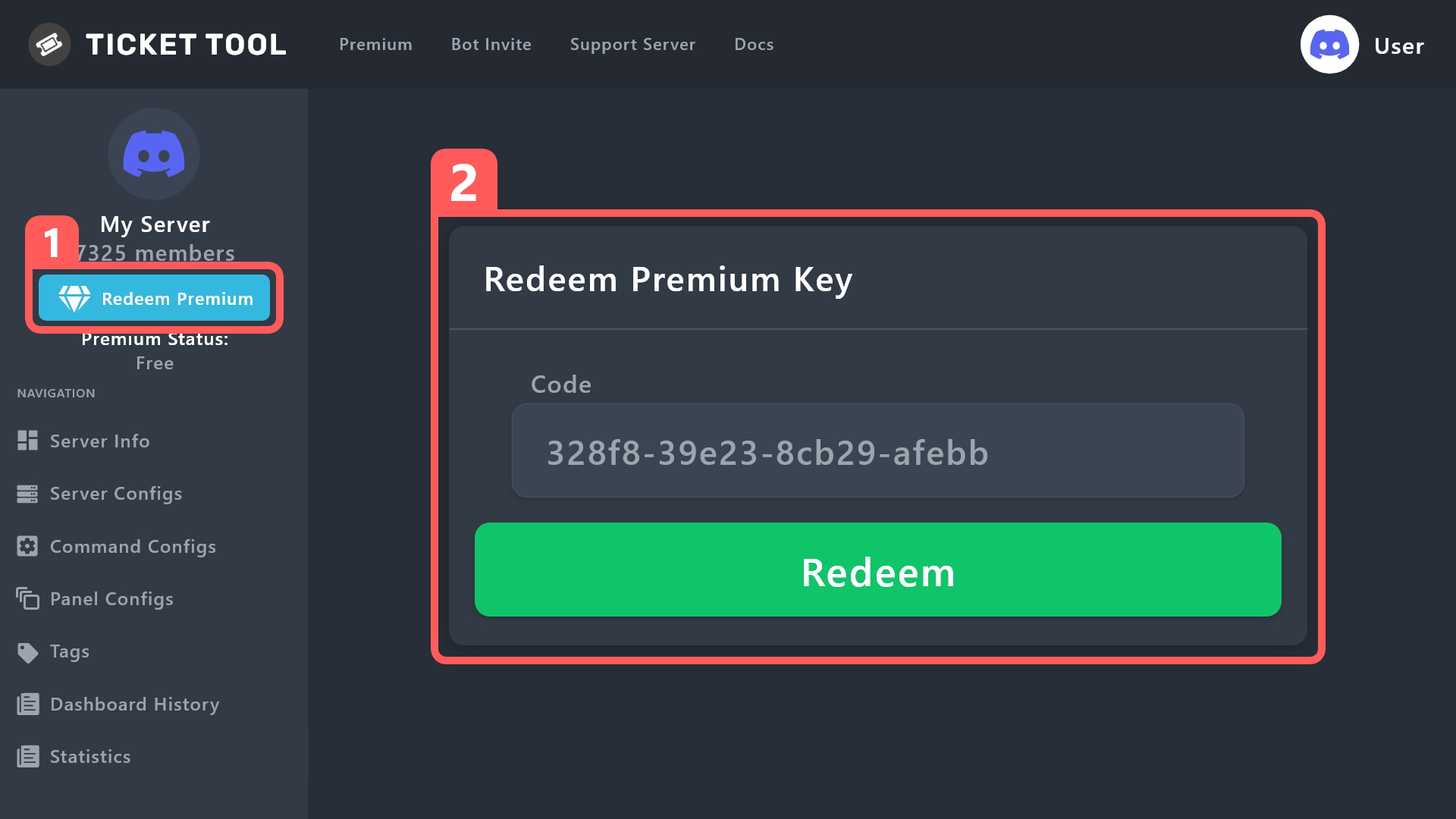
How to redeem premium (Key)
To redeem your premium key, go to the dashboard, select your server, then click " Redeem Premium" under the server's icon and name.
 gilded verge
but answer is yes
jade topaz
gilded verge
first you need to get premium key, so if you get 6 votes, you need to use `$vote...
After I vote 6 times, will the code come automatically or what?
jade topaz
Is there any way that a panel button is shown only to a specific role ?
@gilded verge
do you have one
gilded verge
jade topaz
Is there any way that a panel button is shown only to a specific role ?
It is not possible to change the display of a button by a given role, but you can limit the use of this button so that only a given role can use it, please go to Panel Configs->Buttons->there
example:
 gilded verge
jade topaz
<@334671104704774154>
do you have one
gilded verge
jade topaz
<@334671104704774154>
do you have one
yes i have but why do you ask? 🤔
gilded verge
gilded verge
Please go to <#910978476536905738> (or to your server) and use `$vote` or `/vote...
no, it doesn't take much time, so you can vote yourself, here i explaned how to vote
jade topaz
gilded verge
no, it doesn't take much time, so you can vote yourself, <:this:8942793411087729...
I can't understand, I don't speak English, can you speak Arabic?
stray surge
if you keep voting does it extend premium automatically? assuming you consistently vote every 12 hours indefinitely
 robust sandalBOT
gilded verge
Please go to <#910978476536905738> (or to your server) and use `$vote` or `/vote...
robust sandalBOT
gilded verge
Please go to <#910978476536905738> (or to your server) and use `$vote` or `/vote...
okie, por favor espera \ ✅
Vaya a #🤖│bot-spam (o a su servidor) y use '$vote' o '/vote'
Luego vote en 'Top.gg' y 'BotsForDiscord'. Vote en ambos sitios y después de 12 horas haga lo mismo nuevamente.
Necesitas un mínimo de 6 votos para canjear la prima ('$vote canjear') | 6 votos = 3 días de prima
 English (en) → Spanish (es)
jade topaz
English (en) → Spanish (es)
jade topaz
Well, when I vote and take the code, how many tickets can I create?
jade topaz
robust sandal
This is not Arabic
gilded verge
stray surge
if you keep voting does it extend premium automatically? assuming you consistent...
you can vote and vote and vote, but you have to manually redeem ($vote redeem) and activate key in dashboard ^^
gilded verge
gilded verge
Please go to <#910978476536905738> (or to your server) and use `$vote` or `/vote...
in that case my bad, i'll make sure i ask Staff who know arabic to translate that text for you, please be patient ^^
stray surge
try 🇵🇸
stray surge
gilded verge
you can vote and vote and vote, but you have to manually redeem (`$vote redeem`)...
i see
robust sandalBOT
gilded verge
Please go to <#910978476536905738> (or to your server) and use `$vote` or `/vote...
يرجى الانتقال إلى #🤖│bot-spam (أو إلى الخادم الخاص بك) واستخدام "$vote" أو "/تصويت"
ثم صوت في "Top.gg" و "BotsForDiscord". التصويت على كلا الموقعين وبعد 12 ساعة تفعل الشيء نفسه مرة أخرى.
تحتاج إلى 6 أصوات على الأقل لاسترداد قسط التأمين ("$vote استرداد") | 6 أصوات = 3 أيام من قسط التأمين
English (en) → Arabic (ar)
strong light
is there a way to modifiy this text?
 gilded verge
strong light
is there a way to modifiy this text?
gilded verge
strong light
is there a way to modifiy this text?
only developers can, so no
 narrow surge
how do i make the bot tagg a certain role again {@...} doenst work
humble sequoiaBOT
Within all the messages the bot sends (both embeds and text) you can mention either channels, roles, or even users, these mentions will only send a notification to the user if they are used within a text field, e.g: a role mentioned in an embed won't ping at all the users who have that role.
For mentioning a role you can use one out of three options:
{@Role Name} ➞ Which is Case Sensitive.
{RoleID} ➞ Replace RoleId with the Id of the role you are trying to ping.
<@&RoleID> ➞ Discord's native syntax to ping roles.
<#ChannelID> ➞ Mention a channel by its ID.
<@UserID> ➞ Mention a user by its ID.
 broken plank
any solution for this problem ?
 wild spire
broken plank
any solution for this problem ?
wild spire
broken plank
any solution for this problem ?
Can you open a ticket here and run $debug ? Then we can see what permission is missing.
Also describe if everyone has this issue or only certain members
south cove
How can forbid a role from submitting a panel but then allow them to submit other panels (forms)?
gilded verge
south cove
How can forbid a role from submitting a panel but then allow them to submit othe...
by "submitting" do you mean sending a panel to a channel or taking away the ability to create a ticket from a specific panel?
south cove
Correct, I have a "Whitelist Application" which if accepted, I no longer want to have members apply for. However, thier should be other application panels for them to apply for like "Staff Application" or "Developer Application".
I doing this using the "Panels" with "Forms" and "Questions".
gilded verge
oh, then you can go to Panel Configs->there select panel->Buttons->Edit Create Ticket Button->and add roles to Disabled Roles
iron nightBOT
Gave +1 Rep to @gilded verge
south cove
Are the max amount of questions only 5?
gilded verge
yep, this is Discord limit
south cove
Very unfortunate, I hope they increase it to at least between eight and then soon.
jade topaz
Hello, I think I saw that the bot was doing multi panels, but I can't figure out how to do it.
humble sequoiaBOT
For more convenient use of multipanels, you can now combine panels on the dashboard. This will allow you to directly send the multipanel from the dashboard or via the $panel ID command.
Where can I find this?
You can find this setting on the Dashboard -> Panel Configs -> Settings -> Panel
Note: if you're attaching all the panels to a panel called English, don't include English in the attached panel's box (If you do this, it will create a duplicate)
This will put all buttons from all of your panels on one message. The message is the panel message from the panel you're combining these panels in.
 blazing sluice
Indeed it is
You would goto the panel you want to change, then goto Buttons, Button Create Ticket then you would edit it under Button Text
jade topaz
Okkk thanks
blazing sluice
np
jade topaz
blazing sluice
You would goto the panel you want to change, then goto `Buttons`, `Button Create...
You don't have to have the premium for that?
blazing sluice
jade topaz
You don't have to have the premium for that?
Negative, theres no diamond by it.
jade topaz
okk
 spring anchor
wait how do i make it so only you can see all ticketa
blazing sluice
spring anchor
wait how do i make it so only you can see all ticketa
Only people who have the support team role can see the tickets, which you can add a support team role in the General tab of ticket tool, then you have to select the role

 blazing sluice
@zealous spruce The bot needs manage_roles only because just incase you want to add roles / remove roles.
 zealous spruce
I don't know why but the website doesn't load for me.
blazing sluice
weird, clear your application cache
zealous spruce
blazing sluice
weird, clear your application cache
It continues not to work.
Gateway time-out Error code 504
blazing sluice
zealous spruce
Gateway time-out Error code 504
Try another browser
zealous spruce
I tried using Safari, Opera and Google Chrome. Nothing to do. :/
blazing sluice
Weird, search up ticket tool on google, then click the link that way
blazing sluice
must be your ISP
zealous spruce
blazing sluice
must be your ISP
ISP?
blazing sluice
Internet Provider
zealous spruce
Yes, you may be right. It was one of my hypothesis but with the dashboards of other discord bots works fine. I mean my communication is not excellent but it's quite good.
@spark mango loads instantly.
blazing sluice
Are you based outside of the US?
zealous spruce
Yes.
blazing sluice
that may be why idk though
zealous spruce
Yes. 🤔
Could it be because of hotspot? I'm using 5G internet connection of my mobile phone at the moment.
By disabling Addblocker and Antivirus the website still not load.
 rough vigil
good evening is there the possibility of being able to limit the creation of tickets to only one per person or not?
zealous spruce
rough vigil
good evening is there the possibility of being able to limit the creation of tic...
Yes. It is possible. If I remember correctly, on the dashboard.
rough vigil
ok thank you very much for your help
zealous spruce
rough vigil
ok thank you very much for your help
Np. If I'm wrong ask again. I'm not a member of the support team.
 primal marlin
rough vigil
good evening is there the possibility of being able to limit the creation of tic...
primal marlin
rough vigil
good evening is there the possibility of being able to limit the creation of tic...
Hi, yes 🙂
Go to dashboard -> panels configs -> Limits
And edit number « open ticket each user »
rough vigil
Ok thank you
primal marlin
No problem
 gleaming kettle
humble sequoiaBOT
gleaming kettle
humble sequoiaBOT
Any role you put there will have full access to the ticket tool dashboard. The server owner and users with admin permissions already have access to the dashboard.
Be careful of which roles to put here
 blazing sluice
 tranquil palm
Emojis on embed
tranquil palm
Emojis on embed
You would have to get that emojis id, basically just send the emoji, then you would just grab that id by Right Clicking -> Copy ID, this does require to have developer tools on
Actually, you would need to type the emoji in, then place a \ at the beginning of it.

 tranquil palm

this is what i'm getting in the preview of the message
would i do for example /:wave
blazing sluice
Did you get this as a result
 tranquil palm
nope
blazing sluice
it has to be in your server, do you mind dming me
tranquil palm
ye all good
humble sequoiaBOT
━━ moved to ticket ━━
jade topaz
Hello, I was wondering if anyone knows how to make the bot ping the Support Team role when the ticket is created?
humble sequoiaBOT
Within all the messages the bot sends (both embeds and text) you can mention either channels, roles, or even users, these mentions will only send a notification to the user if they are used within a text field, e.g: a role mentioned in an embed won't ping at all the users who have that role.
For mentioning a role you can use one out of three options:
{@Role Name} ➞ Which is Case Sensitive.
{RoleID} ➞ Replace RoleId with the Id of the role you are trying to ping.
<@&RoleID> ➞ Discord's native syntax to ping roles.
<#ChannelID> ➞ Mention a channel by its ID.
<@UserID> ➞ Mention a user by its ID.
jade topaz
Ty
gilded verge
and you need to add this mention to Message Content:
 iron nightBOT
Gave +1 Rep to @gilded verge
 hollow thunder
How do I make a ticket system??
humble sequoiaBOT

You can check our documentation here;
You can also check #📂│information for the basic setup;
or run the </setup:1025379472167403530> command within #🤖│bot-spam
Our documentation contains all the info you need about the bot to be able to setup and configure the bot however you like.
iron nightBOT
Gave +1 Rep to @shut bolt
 shut bolt
 wet hatch
Is it possible to have the ticket ping a role when it's created? I swear I've done it before but I can't get it to work now.
shut bolt
wet hatch
Is it possible to have the ticket ping a role when it's created? I swear I've do...
Yup!
humble sequoiaBOT
The Ticket Message is the first message sent by the bot on a new ticket. To customize it head over to your Dashboard ➞ Panel Configs ➞ Ticket ➞ Edit Ticket Message
 shut bolt
Edit the ticket message and use one of the following syntax
humble sequoiaBOT
Within all the messages the bot sends (both embeds and text) you can mention either channels, roles, or even users, these mentions will only send a notification to the user if they are used within a text field, e.g: a role mentioned in an embed won't ping at all the users who have that role.
For mentioning a role you can use one out of three options:
{@Role Name} ➞ Which is Case Sensitive.
{RoleID} ➞ Replace RoleId with the Id of the role you are trying to ping.
<@&RoleID> ➞ Discord's native syntax to ping roles.
<#ChannelID> ➞ Mention a channel by its ID.
<@UserID> ➞ Mention a user by its ID.
wet hatch
shut bolt
Edit the ticket message and use one of the following syntax
That's what I was missing. Thank you!
iron nightBOT
Gave +1 Rep to @shut bolt
shut bolt
 idle flint
 gleaming abyss
Help me
gleaming abyss
Help me
What’s up buddy? Feel free to post your issue in here or head to #🎫│make-a-ticket
idle flint
Hi Menno. One of our support team is currently replying in your open ticket regarding this issue.
humble sequoiaBOT
━━ moved to ticket ━━
 mortal kernel
Hello! Please, help me. How watch closed ticket? There is a possibility?
 oak shuttle
Hey, what do you mean by that?
 gray stirrup
mortal kernel
How can I read closed tickets.
gray stirrup
mortal kernel
How can I read closed tickets.
Unless you saved the transcript there is no way.
mortal kernel
how enable saved the transcript?
humble sequoiaBOT

Ticket Tool is the only ticketing bot you'll ever need! Explore its features and set the best ticket system for your server!
<:CommandIcon:1018980659064221746> Commands
Browse through Ticket Tool's commands list and find new utilities!
<:TextIcon:1018980662881030144> FAQ
Solutions for the most frequent questions our users have when implementing the bot on their server.
<:Setup:1034174646788030664> Setup
The steps to follow when setting the bot for the first time on any server
gray stirrup
I'm trying to use the bot to send the docs about transcripts
I'll find the link give me a sec
Settings for saving your transcripts
 lucid mirage
Does one have to have premium in order to have more than one button when making the panel? I'm super new to this lol
gray stirrup
lucid mirage
Does one have to have premium in order to have more than one button when making ...
No, that is multipanels
broken plank
wild spire
Can you open a ticket here and run $debug ? Then we can see what permission is m...
its only for members without adminstrator
gray stirrup
If you are talking about the button used to create a ticket
lucid mirage
yes that is what i'm referring to.
humble sequoiaBOT
For more convenient use of multipanels, you can now combine panels on the dashboard. This will allow you to directly send the multipanel from the dashboard or via the $panel ID command.
Where can I find this?
You can find this setting on the Dashboard -> Panel Configs -> Settings -> Panel
Note: if you're attaching all the panels to a panel called English, don't include English in the attached panel's box (If you do this, it will create a duplicate)
This will put all buttons from all of your panels on one message. The message is the panel message from the panel you're combining these panels in.
oak shuttle
broken plank
its only for members without adminstrator
Hey, do you have any specific permissions in the server you're having problems with?
broken plank
oak shuttle
Hey, do you have any specific permissions in the server you're having problems w...
ye
 oak shuttle
What permissions do you have?
oak shuttle
In the server
broken plank
broken plank
ye
bro its from the bot dashbord , i want fix it someone of the members sent me that photo
oak shuttle
So you do have permissions in the server you're having issues with?
broken plank
oak shuttle
So you do have permissions in the server you're having issues with?
yee i have
gilded verge
broken plank
ye
Please make sure this user's role is not blacklisted (Server Configs->Blacklist Roles)
or in Disabled Roles (Panel Configs->Buttons->Edit Create Ticket Button->Disabled Roles)
mint tundra
hello! i want to attach 2 panels but its only showing 1 panel even tho i have 2.


can someone help? i
mint tundra
gray stirrup
Click `Sync` on the sidebar
omg it worked ahahaha thank youuuu!
iron nightBOT
Gave +1 Rep to @gray stirrup
gray stirrup
np
broken plank
gilded verge
Please make sure this user's role is not blacklisted (`Server Configs`->`Blackli...
ok
zealous spruce
Oh. Ok. Finally the website loads!
I continue not to unterstand why does the bot need role permission management to close a ticket. I mean, if there are not roles to give or remove it is a useless permission. Generally owners want to give as less permissions as possible to bots and members trying to get as much functionalities as possible.
If for example a simple chess bot would require the administrator permission to work it would be quite strange, because it sends only messages. Mee6 text custom commands still work if it is not able to give or remove roles.
Also the manage channels permission is not so important if the bot only creates channels in a given category. If it has the permission to create and manage channels in that category everything is fine. Correct me if I’m wrong.
blazing sluice
zealous spruce
I continue not to unterstand why does the bot need role permission management to...
It needs manage roles overall
blazing sluice
zealous spruce
Also the manage channels permission is not so important if the bot only creates ...
Manage channel permissions are to add the people to the ticket that opens
 copper knoll

 spice arch
right so when my members tap on the panel make yoke it says they can do it why?
spice arch
spice arch
right so when my members tap on the panel make yoke it says they can do it why?
?
rustic gale
zealous spruce
I continue not to unterstand why does the bot need role permission management to...
Manage Roles is required because
- to manage permissions in a channel, a bot requires the Manage Permissions channel-level permission or its server-wide analogue, Manage Roles
- Manage Permissions can't be toggled by a bot unless it has Administrator (this is imposed by the Discord API)
- it is normal and expected that a ticket's closed permissions are different from its open permissions, so checking that the permissions are the same (thus allowing skipping the Manage Permissions requirement) would be unnecessary in the vast majority of cases
- and in any case, the main purpose of the open/closed functionality is to change permissions, so if the closed and open permissions are identical, that sort of defeats the purpose. (Admittedly, closing a ticket changes the channel name and category as well. This may be what you're after. I don't know.)
 quasi sinew
Hey, is there a way to remove the "Transcript sent to User ABC" Message? The second the Tickets gets closed, the Message shows up and its the only one, I cant find at the Dashboard. Thank u in advance!
 rough radish
Currently received “interaction failed” when trying to delete or create ticket
 stone swallow
Cannot seem to rename tickets
scenic plinth
 Partial Bot Outage | Premium and Primary
We are aware of an ongoing bot outage or those experiencing interaction failed errors. Please refrain from spamming, direct messaging, pinging, or repeatedly asking staff about this issue and refer to the below link for updates. Thanks!

 stark runeBOT
**Ticket Tool - Technical Difficulties Notice**
Official Ticket Tool bot(s) are currently experiencing some technical difficulties in some shards.
Please stand by as the TT Development Team looks into and fixes the issues.
Please do not spam tickets within the support server & do not keep asking in public channels.
You can view our status page here and keep an eye on #📣│bot-news!

 vague latch
how do i make it so the channel permissions sync
rustic gale
vague latch
how do i make it so the channel permissions sync
Please give more details about what you mean by that
vague latch
rustic gale
Please give more details about what you mean by that
so everytime i create a ticket for testing, it doesnt sync permissions so it doesnt show the team that will actually support the people
just the perosn that made the ticket and people who have perms to the entire group
rustic gale
Tickets aren't made to sync permissions. Manually syncing permissions will not cause your ticket to have the correct permissions either.
humble sequoiaBOT
1. Go into your Dashboard
2. Open your Panel Configs tab
3. Select the panel you want to grant access to
4. Open the General options menu
5. Select your Support Team Roles
6. Save changes
 rustic gale
This is how you set up support team roles for your tickets.
hollow thunder
shut bolt
Or use in your server the `$setup` command
Thanks I set up a ticket system now.
iron nightBOT
Gave +1 Rep to @shut bolt
jade topaz
How do you get those super reactions that you mentioned?

 timber kernel
 finite coral
Good morning
at the very end I see a closing " ` "
This is maybe the problem here?
rustic gale
finite coral
why does it come like this
Line breaks in form answers mess with the formatting
finite coral
rustic gale
Line breaks in form answers mess with the formatting
Ah gotcha
Thanks ♥ @rustic gale
iron nightBOT
Gave +1 Rep to @rustic gale
 vivid mauve
Does anyone know how I can go about linking a channel when a new ticket is created?
Like
{user} Welcome.
Please follow the steps in #channelname. etc etc.
rustic gale
Include a channel mention
humble sequoiaBOT
Within all the messages the bot sends (both embeds and text) you can mention either channels, roles, or even users, these mentions will only send a notification to the user if they are used within a text field, e.g: a role mentioned in an embed won't ping at all the users who have that role.
For mentioning a role you can use one out of three options:
{@Role Name} ➞ Which is Case Sensitive.
{RoleID} ➞ Replace RoleId with the Id of the role you are trying to ping.
<@&RoleID> ➞ Discord's native syntax to ping roles.
<#ChannelID> ➞ Mention a channel by its ID.
<@UserID> ➞ Mention a user by its ID.
rustic gale
In the ticket message
humble sequoiaBOT
The Ticket Message is the first message sent by the bot on a new ticket. To customize it head over to your Dashboard ➞ Panel Configs ➞ Ticket ➞ Edit Ticket Message
rustic gale
Example, #🆘│community-support is [#🆘│community-support](/guild/509192800865353738/channel/776680605517742090/)
 umbral raft
rustic gale
Example, <#776680605517742090> is \<#776680605517742090>
umbral raft
rustic gale
Example, <#776680605517742090> is \<#776680605517742090>
Pro tip: if you use #🆘│community-support and put a backward slash in front, you also get that
ornate jay
umbral raft
Pro tip: if you use <#776680605517742090> and put a backward slash in front, you...
Same goes for roles, emojis and users!
 light holly

 noble scarab
How long are transcripts kept
 outer current
Does anyone know why I could be getting "interaction failed" when trying to open/close tickets?
timber kernel
outer current
Does anyone know why I could be getting "interaction failed" when trying to open...
Please check that te Bot has all permissions.
Run $debug in a ticket on your server.
It then shows you an overview.
outer current
timber kernel
Please check that te Bot has all permissions.
Run `$debug` in a ticket on your s...
I am getting "this application did not respond"
 young arrow
Has anyone else had an issue where the ticket is not being moved to a set chanel when closed?
teal grail
young arrow
Has anyone else had an issue where the ticket is not being moved to a set chanel...
you need to select the cannel
 teal geyser
Hi can i transfer the prime to another account?
teal grail
teal grail
you need to select the cannel
in Category
teal grail
teal geyser
Hi can i transfer the prime to another account?
maybe not.
young arrow
teal grail
you need to select the cannel
it is selected. It was working fine for a few months and then stopped after the last outage the other week
jade topaz
Can you add one of those discord timestamps that always shows the current time into a ticket panel / message?
lunar solar
jade topaz
Can you add one of those discord timestamps that always shows the current time i...
Current time or time posted to Discord?
jade topaz
lunar solar
Current time or time posted to Discord?
current time for the user, adaptive to timezone
 jade topaz
yup, that exactly
lunar solar
jade topaz
yup, that exactly
Easy, head to:
https://www.unixtimestamp.com/
Pick any date —> choose your desired time —> Convert —> Copy the converted Unix timestamp —> Add it inside this message structure:
<t:1617238800:t>
Epoch and unix timestamp converter for developers. Date and time function syntax reference for various programming languages.
Adding it in the middle of the two : : replacing the current timestamp already within that example
jade topaz
lunar solar
Easy, head to:
https://www.unixtimestamp.com/
Pick any date —> choose your desi...
wow thats cool, thanks very much brother
iron nightBOT
Gave +1 Rep to @lunar solar
 jade topaz
Can you edit the ephemeral message that appears on ticket open?
 solar yew
Has the {reason} always had a character cap? Just noticed that it got cut off. Is it extended with premium?
gilded verge
jade topaz
Can you edit the ephemeral message that appears on ticket open?
no, only developers can
jade topaz
gilded verge
no, only developers can
Gotcha
jade topaz
An odd problem I've noticed is that when I use a discord bot to run "$close", it is only picked up a portion of the times. Whenever a user manually runs $close it seems to work 100% of the time. Is there any explanation or resolve for this?
rustic gale
jade topaz
An odd problem I've noticed is that when I use a discord bot to run "$close", it...
It sometimes fails when the same bot sends it?
zealous spruce
rustic gale
Manage Roles is required because
- to manage permissions in a channel, a bot req...
I see. But I didn’t understand well the part of the manage roles. So without manage roles permission the bot can’t edit the permissions of a channel but it can thus create and delete channels?
rustic gale
solar yew
Has the {reason} always had a character cap? Just noticed that it got cut off. I...
Please elaborate. Where did you notice this character cap? I'm not aware of a character limit but i might just be unfamiliar with {reason} or musinderstanding something
rustic gale
zealous spruce
I see. But I didn’t understand well the part of the manage roles. So without man...
That's correct. I don't really know how it works on the backend, but a bot can (with the Manage Channels permission) create a channel with pretty much any permission setup, as long as it doesn't involve the Manage Permissions permission
It just can't edit those permissions after creation
zealous spruce
Oh, now I see.
rustic gale
Don't ask me why it works that way, that's just how it works. I've tested it plenty
zealous spruce
Thanks! I just wanted to know better how permissions work and why. There are quite a lot of strange things on Discord.
thanks @rustic gale
iron nightBOT
Gave +1 Rep to @rustic gale
jade topaz
rustic gale
It sometimes fails when the same bot sends it?
If another bot runs $close instead of an actual staff member, it only works 90% of the time or so
rustic gale
jade topaz
If another bot runs $close instead of an actual staff member, it only works 90% ...
How many bots are you using in your server for running Ticket Tool commands?
solar yew
rustic gale
Please elaborate. Where did you notice this character cap? I'm not aware of a ch...

 rustic gale
See, the thing is this
Ticket Tool will only respond to commands sent by bot IDs registered in the Bot field in Server Configs, in the dashboard
If the command is sent by a bot there, it should work 100% of the time
If the command is sent by a bot not registered there, it will fail 100% of the time
jade topaz
rustic gale
How many bots are you using in your server for running Ticket Tool commands?
Only 1
rustic gale
Then it's definitely strange that the command is failing only sometimes
solar yew
So basically {reason} is capped at 250 characters if the server isn't premium
rustic gale
I can't say for sure, but it's likely that it's not related to a specific character limit for the {reason} variable specifically
It's about the message's character limit rather than the variable's
Type too long a reason, and it won't fit in the message. That's it pretty much
 stoic dove
Greetings dear communtiy why does it's not mention me or i get any notfication when someone make a ticket ? where can i set it up ?
 timber kernel
stoic dove
Greetings dear communtiy why does it's not mention me or i get any notfication w...
timber kernel
stoic dove
Greetings dear communtiy why does it's not mention me or i get any notfication w...
You can edit the Ticket Message:
-> Panel Configs -> Messages -> Edit Ticket Message
-> You can add a ping for a role for example to ping you: For example {@Role Name}
 stoic dove
timber kernel
You can edit the Ticket Message:
-> Panel Configs -> Messages -> Edit Ticket Me...
stoic dove
timber kernel
You can edit the Ticket Message:
-> Panel Configs -> Messages -> Edit Ticket Me...
On it 1 moment
stoic dove
timber kernel
You can edit the Ticket Message:
-> Panel Configs -> Messages -> Edit Ticket Me...
Oh i understand and this is the only solution 🙂 ?
timber kernel
stoic dove
Oh i understand and this is the only solution 🙂 ?
Yes, that is the only solution as far as I know.
stoic dove
timber kernel
Yes, that is the only solution as far as I know.
Okay i'll use it thx mate 👍
iron nightBOT
Gave +1 Rep to @timber kernel
timber kernel
You are welcome.
timber kernel
 dusk steppe
what should i do
dusk steppe
what should i do
Does this happen directly after you send the panel via the dashboard to your support channel on your server?
dusk steppe
timber kernel
Does this happen directly after you send the panel via the dashboard to your sup...
to the support channel
gilded verge
just to confirm, you used /panel command, right?
 cobalt crescent
Heres dashoard?
humble sequoiaBOT

Ticket Tool - Ticketing without clutter - The #1 discord Ticketing bot
cobalt crescent
Dashboard not working
gilded verge
please provide more information 😦
cobalt crescent
Ok
jade topaz
Can tt do autoresponders inside tickets?
rustic gale
jade topaz
Can tt do autoresponders inside tickets?
Probably. With custom commands, probably
wild spire
rustic gale
Probably. With custom commands, probably
it certainly can
I use it
jade topaz
Never used them before, mind giving me a rundown?
wild spire
either timed responses with a regex *
and automation trigger in tickets
Or command triggers with words
jade topaz
How would one go about setting that up?
wild spire
jade topaz
How would one go about setting that up?
I’m setting a test up rn to show some screenshots
only downside is bot can only check once every 5mins so the response is not instant
wild spire
jade topaz
How would one go about setting that up?
can you open a ticket already in #premium-tickets ?
jade topaz
wild spire
can you open a ticket already in <#796568540311715870> ?
Sure!
jade topaz
where do i edit this message thing

i want to change the to create a ticket react with
@plain surge
humble sequoiaBOT
The panel message is where people react to make a ticket. To customize it head over to your Dashboard --> Panel Configs -> Panel -> Edit Panel Message

 uneven vale
Someone please tell me what this is Failed: Invalid Form Body components[0].components[0].emoji.name[BUTTON_COMPONENT_INVALID_EMOJI]: Invalid emoji
rustic gale
uneven vale
Someone please tell me what this is Failed: `Invalid Form Body
components[0].com...
Invalid emoji
You probably wrote text instead of an emoji in the Button Emoji field
uneven vale
Do you know where I can find it?
rustic gale
Panel Configs -> Buttons -> Create Ticket
scenic plinth
 Partial Outage Notice
We are currently restarting a few servers to fix a few prior issues. This should be fixed momentarily, in the meantime please refrain from asking.
 glossy patrol
Is this why I can’t close tickets and for the last 24 hours
Also I have premium membership, not displaying on here
lunar solar
$pc 547297041286692864
humble sequoiaBOT
lunar solar
$pc 547297041286692864

Premium Check
I was unable to detect a premium server for @glossy patrol.
Found 2 servers in total and 0 with premium and permission
lunar solar
glossy patrol
Also I have premium membership, not displaying on here
If you have it, it’s not linked to any of your servers
 raven bobcat
Hello - I'm getting this error message
lunar solar
Could also be related to the partial outage
raven bobcat
Does anyone know why?
 lunar solar
scenic plinth
<:ttidle:818757771209474069> **Partial Outage Notice**
We are currently restart...
lunar solar
scenic plinth
<:ttidle:818757771209474069> **Partial Outage Notice**
We are currently restart...
See here ^
 mortal grotto
raven bobcat
Does anyone know why?
mortal grotto
raven bobcat
Does anyone know why?
Me to
lunar solar
Experiencing a partial outage
raven bobcat
Okay this is for my work - How long will it be off for?
mortal grotto
When does it work?
lunar solar
I can’t provide you with an ETA, our developer is looking into it now. We will announce when it’s back up and running fully.
raven bobcat
Thanks Lupus, i'll wait for that announcement .
jade topaz
how to fix?

 languid pasture
jade topaz
how to fix?
languid pasture
jade topaz
how to fix?
 terse tundra
jade topaz
how to fix?
terse tundra
jade topaz
how to fix?
Partial Outage Notice
We are currently restarting a few servers to fix a few prior issues. This should be fixed momentarily, in the meantime please refrain from asking.
-𝙺𝚊𝚗𝚣𝚊#6343
jade topaz
thx
terse tundra
** lPartial Outage Notice
We are currently restarting a few servers to fix a few prior issues. This should be fixed momentarily, in the meantime please refrain from asking.
-𝙺𝚊𝚗𝚣𝚊#6343**
uneven vale
I Have a Question How Do I Make A Limit For How Many Tickets You Can Have? @ Me Please!
 winter sage
"this interaction failed" error. Will it go away?
 golden orbit
Hey, I wanted to pay for a premium ticket tool and I've been charged 2 times
wild spire
golden orbit
Hey, I wanted to pay for a premium ticket tool and I've been charged 2 times
open a ticket in billing #🎫│make-a-ticket
wild spire
uneven vale
I Have a Question How Do I Make A Limit For How Many Tickets You Can Have? **@ M...
panels configs > limits
uneven vale
wild spire
panels configs > limits
thanks
iron nightBOT
Gave +1 Rep to @wild spire
terse tundra
winter sage
"this interaction failed" error. Will it go away?
lPartial Outage Notice
We are currently restarting a few servers to fix a few prior issues. This should be fixed momentarily, in the meantime please refrain from asking.
-𝙺𝚊𝚗𝚣𝚊#6343
jade topaz
When Someone make a ticket in my server only I (owner) can see them, but my head staff cannot. How do I give them perms so whenever a ticket is opened they have full access
 crystal arrow
i need help in my roblox client
humble sequoiaBOT

⚠️ You're in the wrong place
We provide support for Ticket Tool Discord bot and cannot help you with whatever issue you have.
- We don't know which Support Team you should contact to get this issue resolved, and unfortunately we won't be able to accurately tell you.
If you don't have any further questions regarding our bot Ticket Tool, please close this ticket
lunar solar
@crystal arrow ^
 languid scroll
Hey when i go the ticket tool manage webside, i just can invite the ticket tool bot to my server but he is already on it. Can someone help me?
lunar solar
languid scroll
Hey when i go the ticket tool manage webside, i just can invite the ticket tool ...
Hi,
Can you trying clicking Sync Servers on the manage servers page please
crystal arrow
sorry server wrong
lunar solar
No worries, have a good day
languid scroll
lunar solar
Hi,
Can you trying clicking Sync Servers on the manage servers page please
nothing happens
lunar solar
In your discord can you run:
/permissionlevel
Please and send a screenshot of the response
Or
/debug
languid scroll
y one sec
jade topaz
The bot is still not working properly for me with the drop down menu. It says interaction failed.
lunar solar
jade topaz
The bot is still not working properly for me with the drop down menu. It says in...
Yes, the partial outage is still ongoing
jade topaz
lunar solar
Yes, the partial outage is still ongoing
Ah thanks.
iron nightBOT
Gave +1 Rep to @lunar solar
lunar solar
Np
languid scroll
can i send it in here?
languid scroll
lunar solar
In your discord can you run:
/permissionlevel
Please and send a screenshot of ...
 lunar solar
languid scroll
lunar solar
languid scroll
This may be related to the partial outage, please head over to #🎫│make-a-ticket so we can take a closer look
lunar solar
jade topaz
Ah thanks.
Do you get interaction failed on/debug?
 brave linden
hi the bot is showing offline in my discord and it wont let anyone make tickets but in other servers its online and im able to make tickets? how do i fix?
wild spire
brave linden
hi the bot is showing offline in my discord and it wont let anyone make tickets ...
we’re having a partial outage atm
Partial Outage Notice
We are currently restarting a few servers to fix a few prior issues. This should be fixed momentarily, in the meantime please refrain from asking.
-𝙺𝚊𝚗𝚣𝚊#6343
 pallid beacon
Just piggybacking on this, so if I delete a channel, but save the link to the direct transcript of a conversation within that channel, it would be invalidated and I wouldn't be able to recover the conversation?
scenic plinth
scenic plinth
<:ttidle:818757771209474069> **Partial Outage Notice**
We are currently restart...
 Operations stable
Services have returned operational for the above issue. If you have questions or have persisting issues, please ask.
 ivory merlin
What happens to my billing if I transfer server ownership?
rustic gale
ivory merlin
What happens to my billing if I transfer server ownership?
Nothing. What do you wish to do with your subscription?
 ivory elbow
hey
I am not able to delete the chat from the ticket
It deletes the messages but it doesn't delete the room that was deleted, why does that happen? <@&540295656720302081>

 lunar solar
ivory elbow
It deletes the messages but it doesn't delete the room that was deleted, why doe...
lunar solar
ivory elbow
It deletes the messages but it doesn't delete the room that was deleted, why doe...
Run /debug in that channel and send me the result
rustic gale
ivory elbow
It deletes the messages but it doesn't delete the room that was deleted, why doe...
Because you enabled Server Storage in Server Configs
Disable that
 jolly bane
Sorry. i'm a noob. Is there way to archive the closed ticket automatically or manually?
lunar solar
jolly bane
Sorry. i'm a noob. Is there way to archive the closed ticket automatically or ma...
Automatically and manually both yes
Automatically is a premium feature
Manually can be done on free version
jolly bane
lunar solar
Manually can be done on free version
how do i do that?
lunar solar
For manual:
Panel Configs —> General —>  Two Step Ticket
Whenever a ticket closes you need click the transcript button on the moderator message, this will generate a file in that channel. You then need to download the file and reupload it your channel of choosing. E.g. an archiving channel
Downloading and reuploading file is super important as the link will not work without the file existing in a non-deleted channel in Discord as the file is hosted from Discord.
jolly bane
lunar solar
For manual:
Panel Configs —> General —> <:Switch_enabled:1041734627330625586> Tw...
Thanks, Appreciate it !!
iron nightBOT
Gave +1 Rep to @lunar solar
lunar solar
Np
 quaint leaf
jade topaz
quaint leaf
jade topaz
can ticket-tool invoke another bot's slash commands?
ie:
/start action
or
@bot start action
when a ticket is made
jade topaz
jade topaz
can ticket-tool invoke another bot's slash commands?
ie:
`/start action`
or
`@b...
disregard this, it is possible, the bot being invoked needs to have the process_commands methods in overridden
jade topaz
hey anyone know what variable to put if i want to show their username? (channel name)
eg: ticket-"notkhyro"
not finding it anywhere
lunar solar
jade topaz
hey anyone know what variable to put if i want to show their username? (channel ...
{ticker.user.nickname} or {ticket.user.name}
Difference is their server name in your server if any and their actual Discord name
jade topaz
thanks! it worked ❤️
lunar solar
Np
jade topaz
hey team! I adjusted some settings on browser but it's not reflecting on the server bot. any idea why or how I can fix this?
idle flint
jade topaz
hey team! I adjusted some settings on browser but it's not reflecting on the ser...
What settings were you making changes to?
jade topaz
idle flint
What settings were you making changes to?
Nevermind, just figured I had to click "Send"! Thank you
iron nightBOT
Gave +1 Rep to @idle flint
idle flint
jade topaz
Nevermind, just figured I had to click "Send"! Thank you
Glad I could help..... Or at least be some moral support!
 drowsy blade
i neeed help
because i get banned in survive the killer permanent banned i hope guys can respond it 😦
idle flint
drowsy blade
because i get banned in survive the killer permanent banned i hope guys can resp...
This sounds like you are talking about an in-game issue, is that correct?
drowsy blade
idle flint
This sounds like you are talking about an in-game issue, is that correct?
yea
drowsy blade
idle flint
This sounds like you are talking about an in-game issue, is that correct?
because i get banned in survive the killer permanent banned i hope guys can respond it 😦 my user zeya_1w
humble sequoiaBOT
⚠️ You're in the wrong place
We provide support for Ticket Tool Discord bot and cannot help you with whatever issue you have.
- We don't know which Support Team you should contact to get this issue resolved, and unfortunately we won't be able to accurately tell you.
If you don't have any further questions regarding our bot Ticket Tool, please close this ticket
jade topaz
help
idle flint
jade topaz
help
Can you elaborate? Feel free to ask here or open a ticket in #🎫│make-a-ticket
jade topaz
idle flint
Can you elaborate? Feel free to ask here or open a ticket in <#57170643544925799...
I can't take the free link even though I voted 7 times
idle flint
Use “ $vote redeem” to redeem your link
 faint oak
How do I add a claim button for management inside the ticket?

 idle flint
Claiming is a premium bot feature enabled from Panel Configs > Claiming
jade topaz
"All Ticket Tool systems are shutdown at this moment in time. Server is on lockdown for the time being. Stay tuned in this channel for updates." The latest message in #📣│bot-news
Is the regular bot fixed now?
jade topaz
What does this

 opal cradle
jade topaz
"All Ticket Tool systems are shutdown at this moment in time. Server is on lockd...
opal cradle
jade topaz
"All Ticket Tool systems are shutdown at this moment in time. Server is on lockd...
it has been fixed for almost 2 days now
stoic dove
There is a feature to blacklist only for a spesifc pannel or discord channel ?
jade topaz
opal cradle
it has been fixed for almost 2 days now
strange it was not updated in #📣│bot-news
 pastel belfry
How much is premium ticket tool?
wild spire
stoic dove
There is a feature to blacklist only for a spesifc pannel or discord channel ?
edit create ticket button > disabled role
wild spire
pastel belfry
How much is premium ticket tool?
$5,99 per month 
jade topaz
Why is there no other button and why is there no emoji in the word close
 opal cradle
jade topaz
Why is there no other button and why is there no emoji in the word close
opal cradle
jade topaz
Why is there no other button and why is there no emoji in the word close
what other button are you looking for?
jade topaz
opal cradle
what other button are you looking for?
claim
opal cradle
jade topaz
claim
its a premium feature
jade topaz
opal cradle
its a premium feature
But I have a premium
opal cradle
ah
opal cradle
jade topaz
claim
select the correct panel > Buttons
-
Claim
SetShow this buttonto -
Close & Cancel
SetButton Emojito
jade topaz
opal cradle
select the correct panel > Buttons
1. Claim
Set `Show this button` to <:Switch...
Do I do this thing
 opal cradle
jade topaz
Do I do this thing
opal cradle
jade topaz
Do I do this thing
no
which one are you trying to set right now? Claim button or Close & Cancel emoji?
jade topaz
opal cradle
which one are you trying to set right now? Claim button or Close & Cancel emoji?
I don't know
opal cradle
jade topaz
Do I do this thing
screenshot your whole screen
jade topaz
opal cradle
screenshot your whole screen
The claim button is enabled but not working
 opal cradle
jade topaz
The claim button is enabled but not working
opal cradle
jade topaz
The claim button is enabled but not working
did you select the correct panel?
jade topaz
opal cradle
did you select the correct panel?
Yes
opal cradle
idk then
jade topaz
How do I fix and make a ticket thing not working does this

 royal seal
I don't know which permission normal member missing that they cannot open form ticket
 ornate jay
royal seal
I don't know which permission normal member missing that they cannot open form t...
ornate jay
royal seal
I don't know which permission normal member missing that they cannot open form t...
On the dashboard, go into Panels > Buttons > Create Ticket and see if the Support Team Only option is enabled. If it is, then disable it.
 dry kindle
Have private threads enabled for tickets but the thread doesn’t show? Have made sure all permissions are correct as well
ornate jay
dry kindle
Have private threads enabled for tickets but the thread doesn’t show? Have made ...
Does your server have Level 2 Boosting Perks unlocked?
dry kindle
ornate jay
Does your server have Level 2 Boosting Perks unlocked?
Yes, at level 3
ornate jay
dry kindle
Yes, at level 3
Hmm, I am unsure of how to help with threads as I have not had been an Owner / Administrator in a server with Level 2 boosting.
@dry kindle check out #premium-support though, I answered your other question
stoic dove
wild spire
edit create ticket button > disabled role
Amezing and does it possible to change the message "You don't have permissions to use this." ? or can't be done and that's still okay by me 🙂
ornate jay
stoic dove
Amezing and does it possible to change the message "You don't have permissions t...
Nope, that message cannot be edited as far as I'm aware.
stoic dove
ornate jay
Nope, that message cannot be edited as far as I'm aware.
Oh alright cool anyway yeah it's by discord default i thought so as well.
 granite tide
are the servers still down?
rustic gale
granite tide
are the servers still down?
They shouldn't be. Why do you ask?
granite tide
rustic gale
They shouldn't be. Why do you ask?
Cause there has never been an announcement about the service running again
In bot support
rustic gale
Hmm
stark runeBOT
**Ticket Tool - All Systems are now __Online!__**
All Ticket Tool systems are fully online again! We apologize for any inconvenience this may have caused on your server.
If you are still experiencing any problem with Ticket Tool, please reach out to the <@&540295656720302081> within a ticket here, #🎫│make-a-ticket
 stoic dove
What does it mean it's from the forms in yellow mark ?: https://gyazo.com/a5ca19d26b72b2a68c74bdf7d8d5468a
[2;33m* To display the results from the form you need to add the {create.form.x} variable to yourTicket Message[0m
 jade topaz
stark rune
jade topaz
stark rune
Thank you for updating that the bot is operational now! I was concerned even if premium wasn't affected.
gray stirrup
stoic dove
What does it mean it's from the forms in yellow mark ?: https://gyazo.com/a5ca19...
You have to add that variable to your ticket opened messages if you want to display the results of the form
There is an option to do it automatically in the settings
rustic gale
stoic dove
What does it mean it's from the forms in yellow mark ?: https://gyazo.com/a5ca19...
Let's say your form has three questions
Whatever your user answers for the first goes in the {create.form.1} variable
What they answer for the second goes in {create.form.2}
for the third, goes in the {create.form.3} variable
You put those variables in the bot's messages, for example
- the ticket message
- custom commands
- the transcript message
And they will be replaced by the corresponding content every time the message is sent
stoic dove
rustic gale
Let's say your form has three questions
Okay thanks guys i think i understand now. btw outsider can you check my ticket (Bug-report-53262) i can't open another ticket and for now i asked you something there will be glad for help.
iron nightBOT
Gave +1 Rep to @rustic gale
stoic dove
Or maybe someone can tell me where can i make /tags ? any guide 🙂
rustic gale
stoic dove
Or maybe someone can tell me where can i make /tags ? any guide 🙂
Tags are now called Custom Commands
humble sequoiaBOT
Tags
Tags are used to send a predefined response to your channels using a command. Tags will only respond if the command itself is used, it will not function if you put the tag into a sentence. The prefix is not included.
To create tags, go to: Dashboard > Tags > Create Tag. After creating and naming one, tap on the response button, and you can edit the response.
 rustic gale
Huh. That's still outdated.
stoic dove
rustic gale
Tags are now called **Custom Commands**
Great thanks for answer here and also in the ticket, i have another question/isuue. Once someone made a ticket can i have a Channel topic e.g. General support ? i sent screenshot via the ticket if you didn't understand what i mean you can check.
But if you did understand can you tell/guide me where can i done that ?
iron nightBOT
Gave +1 Rep to @rustic gale
 round falcon
stoic dove
Great thanks for answer here and also in the ticket, i have another question/isu...
round falcon
stoic dove
Great thanks for answer here and also in the ticket, i have another question/isu...
By that do you mean the channels being put into different categories upon creation?
 clear spear
/invites
stoic dove
round falcon
By that do you mean the channels being put into different categories upon creati...
I mean the channel topic will be diffrent(Channel topic is like this:"⚠️ We recommend that" . but i understand ticket.tool don't manage channel topics 🙂
round falcon
Sorry, I don't really understand what you mean by that
jade topaz
i dont wanna purchase within discord is there another way?
humble sequoiaBOT
PayPal - paypal@tickettool.xyz
BitCoin - 3HhKKAdb9eEvCe2tvzB8bAa8nebHY6qcPA
Ethereum - 0xF47a27D6a3225bB8e71fd03B5C14bbb374b41149
LiteCoin - MEQX3knLAuotrKnvk3HDNBK5gdRn6PZhHy

Prepay/Direct Payment
To prepay send the payment using your desired method - Available options listed bellow.
⚠️ $18 per 3 months. ⚠️
$66 per year.
(If using the direct payment option, you need to be paying for at-least 3+ months.)
Regular Prices when paying within Discord:
$5.99/per month
Once your payment is sent let us know so we can confirm and get you your key.
<:paypal:924596360840372234> Paypal ("Goods and Services" or "Family and Friends")
DiscordTicketTool@gmail.com
<:bitcoin:924638849135689749> BTC - Bitcoin
3HhKKAdb9eEvCe2tvzB8bAa8nebHY6qcPA
<:Ethereum:972177326580301835> ETH - Ethereum
0xF47a27D6a3225bB8e71fd03B5C14bbb374b41149
<:Litecoin:972176945972383815> LTC - LiteCoin
MEQX3knLAuotrKnvk3HDNBK5gdRn6PZhHy
I sent the payment now what?
After you send the payment, please send a screenshot with proof of payment, our <@&615146349700186112> will verify your payment and will get you setup. For crypto payments, we are waiting for at least ONE verification.
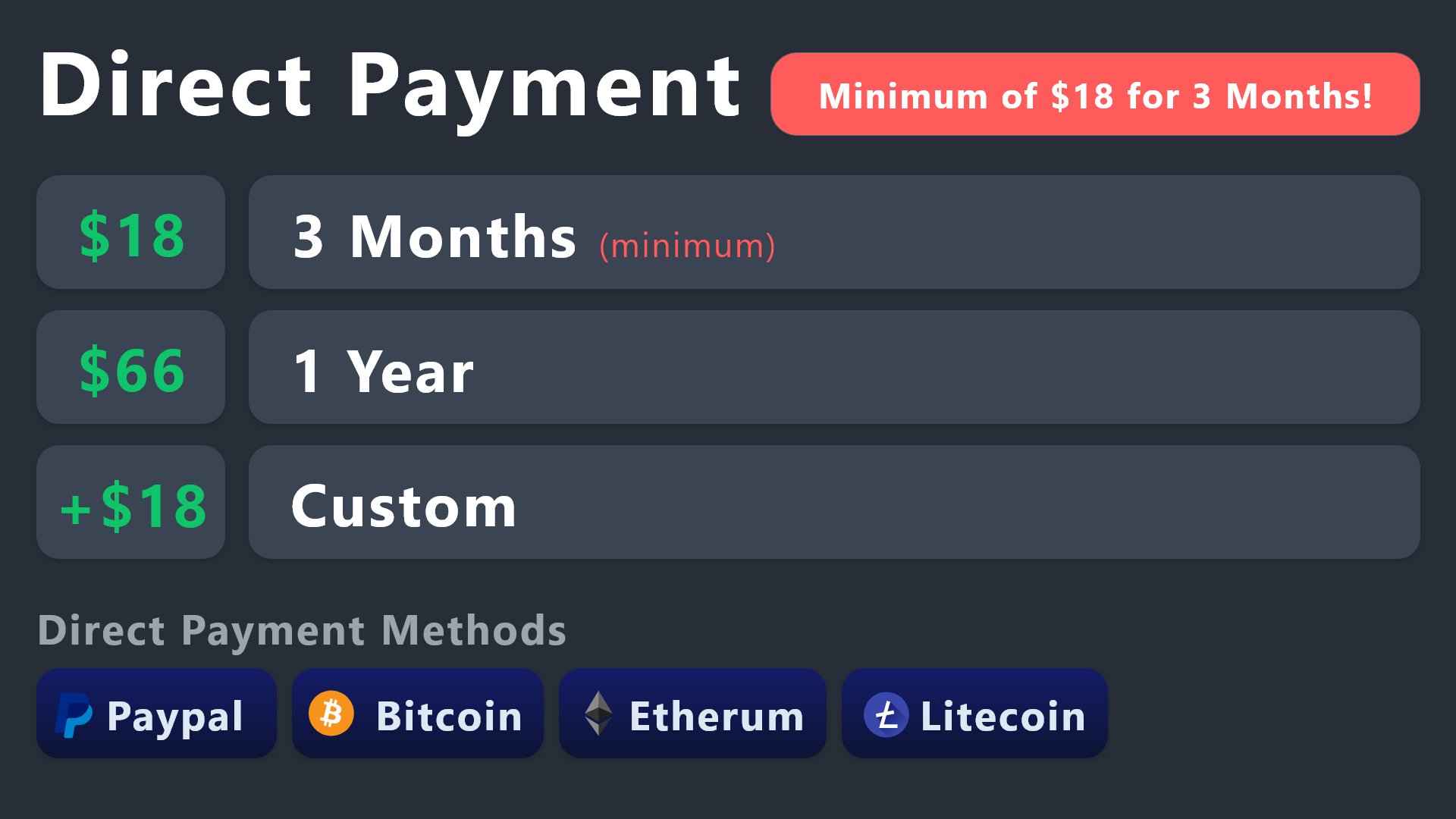
All prices in USD - 3 months min for direct payment
idle flint
You can still use the payment options above, but note that the prices are in USD, so some conversion may need to occur to ensure the correct amount is paid
lunar solar
jade topaz
i dont wanna purchase within discord is there another way?
Don’t want to or can’t?
 lunar solar
Just clarifying, as Discord is available to you and there is no other reason preventing you from using it you will need to use discord
jade topaz
discord system is weird af i would just stick with an external system like sellix/stripe in my opinion
lunar solar
Or direct methods are for users who can’t use Discord
jade topaz
i can still pay through them tho?
lunar solar
Yes but there is no regular subscription option with the direct methods
jade topaz
thats fine i can pay the 3months its no worries
jade topaz
lunar solar
Yes but there is no regular subscription option with the direct methods
so im sending $18 correct?
lunar solar
jade topaz
so im sending $18 correct?
Yes, $18USD that’s the minimum
jade topaz
for 3 month?
lunar solar
Yes
jade topaz
ok
lunar solar
Caps
jade topaz
lunar solar
Yes, $18USD that’s the minimum
lets say i pay with discord and then loose access to my discord account. then what?
will i just prove i paid and get premium on anouther acc?
lunar solar
jade topaz
lets say i pay with discord and then loose access to my discord account. then wh...
Subscriptions are managed by Discord so if you lose access you can request it to be cancelled and refunded via Discords billing support tickets
 molten hinge
Hello everyone. I have a question. I know a business owner who uses ticket tool, and he's having an issue with a customer, but says he deleted the ticket so cannot prove his point.
My question is, are transcripts saved to the dashboard, whether or not the server owner enabled them in the server?
I'm questioning if transcripts are truly available, whether a specific channel has been set up for them or not.
round falcon
As far as I know transcripts aren't saved into the dashboard, only into the specified channels.
molten hinge
round falcon
As far as I know transcripts aren't saved into the dashboard, only into the spec...
Oh no. That's too bad. People need to realize if something isn't documented it didn't happen. Lol.
Well thank you. I was just trying to see if there was a way to get to the truth of a business matter.
round falcon
Of course, if DM transcripts were set up then the client would've gotten one, if not then there wouldn't be one saved assuming the channel isn't setup.
 analog wind
Hello! How can I change the title of a ticket? Like the embed from when a ticket is opened? Whenever I click it nothing happens.
humble sequoiaBOT
The panel message is where people react to make a ticket. To customize it head over to your Dashboard --> Panel Configs -> Panel -> Edit Panel Message
 stray bobcat
Thats for the embed message, for the title of the ticket, :
humble sequoiaBOT
The ticket name is the default channel name of all tickets. To edit it, go to your Dashboard > Panel Configs > Ticket. There you can edit the channel name of opened and closed tickets. You can also use variables in there.
Note: This is a premium feature
analog wind
i mean in here
 languid pasture
analog wind
i mean in here
languid pasture
analog wind
i mean in here
Do you have tt premium
analog wind
nope
languid pasture
Then you don’t have access to that
analog wind
oh
jade topaz
says it at the top
analog wind
i thought basic features were free
languid pasture
This isn’t a basic feature
analog wind
well thanks ig
 native crest
Hello, can you send me the link to create the command to pars the tickets? thank you
rustic gale
I'm not sure what that means. Please clarify
 ripe dome
 jade topaz
Pretty sure you need to link discord or ask for it
shut bolt
Now you do @ripe dome
You can run the /checkpremium command which will confirm you are able to gain the role
 jovial swallow
im still confused
shut bolt
 solid stream
Want roles back?
solid stream
Want roles back?
Not yet thanks
iron nightBOT
Gave +1 Rep to @solid stream
shut bolt
solid stream
Or just checking in 🙂
Pretty much jaja :')
solid stream

rustic gale
jovial swallow
im still confused
What are you confused about?
jade topaz
did the site go down?
rustic gale
jade topaz
did the site go down?
Probably not. What are you seeing?
jade topaz
I want to specify which roles can delete tickets. Is there a way?
 timber kernel
jade topaz
I want to specify which roles can delete tickets. Is there a way?
timber kernel
jade topaz
I want to specify which roles can delete tickets. Is there a way?
Go to the Dashboard -> Panel Configs -> Buttons -> Button Delete Ticket
There you can add roles (allow or disallow them)
 pulsar stag
Hello i wanna ask you something i try to a server to open ticket for a problem that i have and it says you cannot right here .. do you know why ?
Actually it says that i dont have permission to write over there
 hardy depot
I deletet all tickets, but when a new one is createt it says "ticket-0003", how can I reset this to 0?
timber kernel
hardy depot
I deletet all tickets, but when a new one is createt it says "ticket-0003", how ...
That is possible yes:
Dashboard -> Panel Configs.
Press the grey " Set Count" Button.

There you can configure it. 🙂
hardy depot
timber kernel
There you can configure it. 🙂
Awesome, thanks!
iron nightBOT
Gave +1 Rep to @timber kernel
timber kernel
You are welcome.
timber kernel
pulsar stag
Hello i wanna ask you something i try to a server to open ticket for a problem t...
Is it your server you talking about?
If not you should talk to the Staff on this server, maybe you don't have the required roles / permissions.
pulsar stag
No its not mine i am just a viewer
No i have the roles
And the staff doesnt know to answer me
timber kernel
pulsar stag
No i have the roles
How do you know that for sure?
pulsar stag
They told me that i have the roles
I had opened a ticket in the past
But i cant now
timber kernel
Please tell them that an admin or the Owner of this server should contact us here, so we can have a look at it.
pulsar stag
Ok thanks
 untold merlin
@timber kernelbro
jovial swallow
rustic gale
What are you confused about?
I found with a YouTube video, but thanks for trying to help (highly appreciated)
iron nightBOT
Gave +1 Rep to @rustic gale
stoic dove
Any agent online ? if so can someone kindly check my ticket ? 🙂 it's about billing ticket
stoic dove
BTW Do you have the feature of /closerequest with delay like after 1/2/3.. hour it will close/delete the ticket ? or other way to set a custom command to close a ticket after certain time ?
solid stream
stoic dove
BTW Do you have the feature of /closerequest with delay like after 1/2/3.. hour ...
Not yet, but it's on the list of my top 3 priority updates.
stoic dove
solid stream
Not yet, but it's on the list of my top 3 priority updates.
Where can i check the list what come in the next update ? and also can you check my ticket dear mate ? or you not from support 🙂
solid stream
stoic dove
BTW Do you have the feature of /closerequest with delay like after 1/2/3.. hour ...
Though, technically we do have automation that can trigger after you run /closeRequest.
And you can have it delay for 2 hours.
round falcon
I think that's a premium only feature
stoic dove
solid stream
Though, technically we do have automation that can trigger after you run /closeR...
Can you explain a lil bit more on it ? like once i run the commannd /closeRequest after 2 hours the ticket will be close or up to 2 hours ?
solid stream
round falcon
I think that's a premium only feature
Correct.
stoic dove
round falcon
I think that's a premium only feature
I'm gonna buy premuim today so no worries thx for let me know mate.
iron nightBOT
Gave +1 Rep to @round falcon
round falcon
stoic dove
I'm gonna buy premuim today so no worries thx for let me know mate.
Sounds good
round falcon
stoic dove
Can you explain a lil bit more on it ? like once i run the commannd /closeReques...
Looks a bit like this, you'll be able to select "Ask close" as a trigger, then close or delete the ticket after "x" time is up

It's what I have setup, works well
solid stream
round falcon
Looks a bit like this, you'll be able to select "Ask close" as a trigger, then c...
And something I've recently added is pressing cancel on close ask will stop the automation
stoic dove
round falcon
Looks a bit like this, you'll be able to select "Ask close" as a trigger, then c...
Oh great
round falcon
Oh that's pretty cool
solid stream
Also running /closeRequest again will reset the timer.
stoic dove
solid stream
Also running /closeRequest again will reset the timer.
That's awesome.
round falcon
Off topic but it's nice seeing a developer for a bot being active, lots of devs are too busy or just don't wanna interact, great bot too
Either way yeah the automation is really helpful
solid stream
round falcon
Off topic but it's nice seeing a developer for a bot being active, lots of devs ...
Thanks, I've been pretty busy and hadn't been talking much, but now I'm sick.. So not too busy..
iron nightBOT
Gave +1 Rep to @round falcon
round falcon
Ah ouch, hope that gets better soon, I haven't been feeling well either, sucks but eh that's life
round falcon
round falcon
Off topic but it's nice seeing a developer for a bot being active, lots of devs ...
I mostly say this cause I sure know none of my devs talk to anyone, so seeing someone actually doing that is refreshing
 red narwhal
 solid stream
red narwhal
solid stream
red narwhal
It's possible you took too long to respond, or the bots lagging, try and submit again.
If took too long then you will need to cancel and start over.
iron nightBOT
Gave +1 Rep to @solid stream
stoic dove
How can i prevent from everyone use it and only me can use it and my staff team support ?
Didn't realy understand that don't wanna make any silliy mistake:
Command Style Tickets- Note: The $new and $ticket commands are usable by anyone! We encourage you to have a list of channels to prevent your users creating tickets via commands unnecesarily.
wild spire
stoic dove
How can i prevent from everyone use it and only me can use it and my staff team...
You could disable the command options and only use a panel with enabled and disabled roles however u see fit?
Otherwise you’ll have to review each command in command configs.
There’s a support team only setting
stoic dove
wild spire
Otherwise you’ll have to review each command in command configs.
There’s a suppo...
Okay so here in command configs i need to click disable on the Enabled and only the support team only stay ?
 round falcon
Are you trying to make the command for reopening tickets support team only?
If so then yes those settings as you have them now will do that
stoic dove
I try it for /new for example and it's send me this message: https://gyazo.com/dd17e202b7c564db6fff70bd03dfdaaa
 round falcon
Another thing to note, if you have the button for it enabled you'll also need to go into the buttons menu and make the "Reopen ticket" button support team only, as seen here
 round falcon
stoic dove
I try it for /new for example and it's send me this message: https://gyazo.com/d...
round falcon
stoic dove
I try it for /new for example and it's send me this message: https://gyazo.com/d...
This is because you need to set a channel for that command to work in
stoic dove
round falcon
This is because you need to set a channel for that command to work in
Yes so once i set a channel. i want only me and my support team will do the commands of course. so i need to go to command configs and choose support team only ?
round falcon
Indeed
If you go into the "Command style" section you'll see these settings, you can select channels to look for the /new command here

You've already set the /new command to be support team only, but you need to select a channel or multiple channels for the command to be usable in
stoic dove
round falcon
You've already set the /new command to be support team only, but you need to sel...
Okay so if i don't choose a spesifc channel i can write the command from all the channels right ?
round falcon
No, but in the screenshot you can see "Bypass channel list and watch all of them" yes? You can toggle that to be on and that'll do what you want
round falcon
stoic dove
I try it for /new for example and it's send me this message: https://gyazo.com/d...
You're seeing this because you don't have that setting enabled
stoic dove
round falcon
You're seeing this because you don't have that setting enabled
Okay great it's working. i now come from my alt to check if he can do the command too.
round falcon
Sounds good
stoic dove
round falcon
Sounds good
https://gyazo.com/6ea6563f2cc36e3cbb3de4cc3910d7d6
Do i need to disable everything here and only the support team role right ? also in all the panels oof why i can't do it one time xD
 round falcon
Assuming you only want your support team to run any command shown there, yes, the command needs to be "enabled" and support team only
solid stream
stoic dove
https://gyazo.com/6ea6563f2cc36e3cbb3de4cc3910d7d6
Do i need to disable everythi...
Commands configs are not per panel.
round falcon
Not sure if you can do multiple at once though
stoic dove
solid stream
Commands configs are not per panel.
Oh great
round falcon
If you disable a command it won't work for anyone, even the support team I believe
shut bolt
The only configs that will apply on a panel-basis are button's permissions
round falcon
Correct me if I'm wrong though
shut bolt
round falcon
If you disable a command it won't work for anyone, even the support team I belie...
It depends on what your disabled and enabled roles look like. But overall yeap
stoic dove
round falcon
How's it working out currently Mate1?
Wait do i need to do it ? like anyway i disabled the application command via discord. So only me and my staff team support can do the command.
I think i can only enable the commands and don't touch the command confic or should i change the command config just in case ?
So for example if someone isn't a staff team support he can do / command in my server.
round falcon
Uh, well you should just set each command to be enabled and support team only mode, like this

If it's like this then only your support team role(s) will be able to run the commands
stoic dove
Oh i got confused totaly but now i understand. yeah yeah no worries.
round falcon
Cool, you can test it with your alt to make sure it's working
stoic dove
round falcon
Cool, you can test it with your alt to make sure it's working
Yeah i was understand it to be honest after i Disabled all xD and then i saw it's not working. but thanks appricate that.
iron nightBOT
Gave +1 Rep to @round falcon
round falcon
Of course, if it's "disabled" then the command is basically turned off
stoic dove
round falcon
Of course, if it's "disabled" then the command is basically turned off
Yeah at first i thought the enabled it's like mean public for everyone.. and if only staff team only enabled it's only for the staff team
I'm just tired so wasn't in focus 🙂
round falcon
All good, enabled means the command is turned on, support team only means only the support team can use it
stoic dove
round falcon
All good, enabled means the command is turned on, support team only means only t...
Okay all working i think you mention something about buttons or something ?
round falcon
Oh yes, let me get some screenshots, one second
stoic dove
round falcon
Oh yes, let me get some screenshots, one second
https://gyazo.com/4825c3b041df77dfbe52de47bb6171ef Do i need to do support team only ? no i want everyone can click on it
 round falcon
So in panel configs you'll see a menu called "buttons", then when in there you can edit each button to be support team only or not
round falcon
stoic dove
https://gyazo.com/4825c3b041df77dfbe52de47bb6171ef Do i need to do support team ...
Yes a lot like that, so just decide which buttons you want to be open to the ticket owner and which open to only support team
stoic dove
round falcon
Yes a lot like that, so just decide which buttons you want to be open to the tic...
Sorry what you mean open only for support and only for owner ?
round falcon
The ticket owner is the person who made the ticket, so let's say I make a ticket, I'd be the ticket owner
And anyone else that is /added to the ticket
stoic dove
round falcon
And anyone else that is /added to the ticket
Can you send me a screenshot maybe as example so i'll understand we are in same mind ? if you not busy of course.
round falcon
Let's say for example you're looking at the delete ticket button, I'd assume you want that to be support only right? If so you'd go to the button config and set it to support only, that way only support team can click it, the person who made the ticket won't be able to
stoic dove
stoic dove
https://gyazo.com/4825c3b041df77dfbe52de47bb6171ef Do i need to do support team ...
Like if i choose here Support team only then normal members can't open the ticket it's kinda like blacklist no ?
round falcon
Is that the "Create ticket" button or "Open ticket" button?
stoic dove
round falcon
Is that the "Create ticket" button or "Open ticket" button?
1 moment
stoic dove
round falcon
Is that the "Create ticket" button or "Open ticket" button?
Button Create Ticket 😂
 round falcon
Ah, I'd keep that as everyone, that button is what they press to create the ticket to begin with, the open ticket button is what lets you reopen a ticket after it's been closed
But yes if you were to make it support only then only support team members could press the button
stoic dove
round falcon
But yes if you were to make it support only then only support team members could...
Yeah so you want me to click on the re-open one and the claim one right only them for support team ?
round falcon
I'd say so yes
stoic dove
round falcon
I'd say so yes
Done make sense
round falcon
Delete should also likely be support only
stoic dove
round falcon
Delete should also likely be support only
Hmm let me test it with the delete.
round falcon
If you want the ticket creator to be able to close their own ticket then keep the "close" one as non-support only, but if you only want support team members closing it then turn that on
stoic dove
round falcon
If you want the ticket creator to be able to close their own ticket then keep th...
When a user click close and confirm close it's delete it auto there is no delete function in my server. since i disabled the Two step Ticket
round falcon
Alright then you can ignore the delete one
stoic dove
round falcon
Alright then you can ignore the delete one
Yeah but i understand now how everything works here np thanks for your dear time mate.
iron nightBOT
Gave +1 Rep to @round falcon
stoic dove
round falcon
If you go into the "Command style" section you'll see these settings, you can se...
Just one more thing automantion i need to set it for all the panels right ?
round falcon
I don't believe so, though automation is a premium feature
stoic dove
round falcon
I don't believe so, though automation is a premium feature
I now have the premium feature trial. when i finish to set up it i buy the premuim for 3 month
round falcon
Alrighty
stoic dove
round falcon
Alrighty
Yes i need to do it for all the pannels 1 by 1 as i see. you done it too or there is a short way ?
stoic dove
round falcon
Oh I see what you mean, yes it's per panel
Okay np i'm on it.
round falcon
Good luck
stoic dove
round falcon
Good luck
What you shows me at your image is closed ticket(Closed ticket mean if i didn't disabled the Two step Ticket and once someone close a ticket if i set any duration time to delete it then it will delete the channel right ? but if i disabled the Two step Ticket and i wanna send a reminder Close request then i need to choose the Close request and after spesifc time it will close it if the member not clicking cancel ? https://gyazo.com/179af513988c9f7c2f28221fa02e1268
 round falcon
Yes


 iron nightBOT
Gave +1 Rep to @round falcon
round falcon
I am the captain now
 wicked shard
My dashboard is loading and loading and loading
round falcon
Any specific part that keeps loading? Or just the dashboard as a whole?
wild spire
wicked shard
My dashboard is loading and loading and loading
You can send your server ID in #🎫│make-a-ticket and we can see if a different link works
wicked shard
wild spire
You can send your server ID in <#571706435449257997> and we can see if a differe...
Ok
stoic dove
round falcon
Good luck
Okay so Miner i finished, i already backup the server does it's save all the settings or i need to generate another/new code ? or i can just use this code to move to my main server ?
round falcon
I believe you can just use that backup code that you just used, though I've never used that feature so I may be wrong
Maud likely would know better about that
stoic dove
round falcon
I believe you can just use that backup code that you just used, though I've neve...
Okay thanks for honestly i'll wait for any agent to answer me before i make any mistakes.
iron nightBOT
Gave +1 Rep to @round falcon
stoic dove
wild spire
You can send your server ID in <#571706435449257997> and we can see if a differe...
Hey dear Maud are you online ?
wild spire
stoic dove
Hey dear Maud are you online ?
I am 🙂
round falcon
To clarify you set all this up on a separate server for testing, and now you want to transfer it to your main server?
Oh- uhh
Well he just got timed out
stoic dove
round falcon
To clarify you set all this up on a separate server for testing, and now you wan...
Yes, So should i generate new key ? or i can just use the one i already generated ? *note i didn't use the code on my main that's why i asking if i can still use it or i need to generate new one
round falcon
I'd generate a new one to make sure it has everything, but if you haven't changed anything since making the last code then that one is fine
wild spire
round falcon
Maud likely would know better about that
Sorry can I get a TLDR? Which code?
round falcon
Backup codes, he wants to restore his settings from one server to another
He's just not sure how it all operates, also dang that slowmode is annoying
wild spire
round falcon
He's just not sure how it all operates, also dang that slowmode is annoying
it can be 😂
wild spire
round falcon
Backup codes, he wants to restore his settings from one server to another
Let me look this up real quick because I know how to transfer premium but not all settings
round falcon
Looks like this, pretty sure if he just has them all marked to on then it'll work fine

But I've never used it and I don't want to misinform so yeah
wild spire
ah yes, generate key there and restore in new server
 fast heath
How to channel the ticket bot's message
round falcon
Cool
round falcon
fast heath
How to channel the ticket bot's message
Could you be more specific? Which message(s)
fast heath
that message bot says
to create ticket react with..
round falcon
Ah I see, while in panel configs press the button that says "Send" at the top, a menu will open and you can pick the channel from there
 stoic dove
I don't need to give ticket tool administrator permission correct ? or do i ?
round falcon
stoic dove
I don't need to give ticket tool administrator permission correct ? or do i ?
Technically no but it's easier on you if you do
fast heath
round falcon
oh Okay thank you so much 🙂
iron nightBOT
Gave +1 Rep to @round falcon
wild spire
stoic dove
I don't need to give ticket tool administrator permission correct ? or do i ?
always easiest and safest ways imo
stoic dove
wild spire
always easiest and safest ways imo
So better to give him the administrator alright.
wild spire
Damn Miner 😂 you really take our jobs here
round falcon
If you don't give it administrator then you'll need to manually set every permission per channel and give it manage channel perms, manage messages, etc
Yeah sorry, I'm lead manager for a minecraft gamemode so I'm used to explaining stuff
wild spire
stoic dove
So better to give him the administrator alright.
these are the permissions it absolutely needs to function
 stoic dove
round falcon
If you don't give it administrator then you'll need to manually set every permis...
stoic dove
round falcon
If you don't give it administrator then you'll need to manually set every permis...
Oh gotcha. and yeah he online 24/7 add him part of the support team hehe
stoic dove
wild spire
these are the permissions it absolutely needs to function
Thank you will check it out.
iron nightBOT
Gave +1 Rep to @wild spire
wild spire
stoic dove
Oh gotcha. and yeah he online 24/7 add him part of the support team hehe
not my place to decide unfortunately 😅
round falcon
If something stops working, for example a message doesn't send or something then you'll want to make sure that category/channel allows tickettool to talk in there
wild spire
We need HR to kidnap him
round falcon
I just give it administrator, it's the lazy way out, also oi
wild spire
round falcon
If something stops working, for example a message doesn't send or something then...
run /debug to find missing permissions
stoic dove
round falcon
If something stops working, for example a message doesn't send or something then...
I'll just grand him admin as the other ticket i use had.
round falcon
Oh yeah I forgot debug was an added thing
stoic dove
wild spire
<:PabloTiphat:983791053842837624>
Does it possible to buy a 6 month plan ?
wild spire
stoic dove
Does it possible to buy a 6 month plan ?
through Discord only a month per month subscription is possible
stoic dove
wild spire
through Discord only a month per month subscription is possible
So other payment method i can only do 3 month or 1 year correct ? not possible to send $36.00 for 6 month ?
wild spire
stoic dove
So other payment method i can only do 3 month or 1 year correct ? not possible t...
Via direct payment yes. But we don't just do direct payments, you need to have a reason for it. (The reasons are more a matter for billing team as I don't want to give the wrong information)
stoic dove
wild spire
Via direct payment yes. But we don't just do direct payments, you need to have a...
Okay i opened a ticket already i think they are sleep 🙂
round falcon
Tinyy is billing, either way they'll see it when they can
wild spire
stoic dove
Okay i opened a ticket already i think they are sleep 🙂
They'll be with you as soon as they can 🙂
round falcon
I know first hand how many tickets can be opened at once, bleh, so many tickets, can take time
stoic dove
wild spire
They'll be with you as soon as they can 🙂
Sure np not in rush.
stoic dove
Anyway if the billing team missed my ticket somehow, it's called billing-ticket-0659
round falcon
The way it's structured makes it basically impossible to miss
stoic dove
round falcon
The way it's structured makes it basically impossible to miss
Well then if they still won't response today i'll try tmrw. maybe i catch them in busy hour or something.
round falcon
Yeah that's for the best
stray bobcat
I confirm that your ticket won't be "missed". Just gotta be patient for Billing to step in 🙂
wild spire
Billing get your ass to work 😂
 deft estuary
{user} is to @ user running command what is used to @ user who created ticket
rustic gale
deft estuary
{user} is to @ user running command what is used to @ user who created ticket
{ticket.user}
 spare night
Good evening, I had the premium Ticket Tool but I think I just lost it. How can I get back to normal because the bot no longer works at all for me. THANKS
 round falcon
Do /botswitcher in your server, that should let you switch back to white
spare night
round falcon
Do /botswitcher in your server, that should let you switch back to white
I've used this command before but it doesn't change anything.
 round falcon
Is the white bot on your server?
spare night
 round falcon
Not that one
They're two different bots, you need to invite the "white" bot in for it to work
spare night
round falcon
They're two different bots, you need to invite the "white" bot in for it to work
Oh ok
round falcon
You should be able to see the "Ticket tool white" bot in the top right in this server, click it and press add to server
Invite that one in, then run /botswitcher, that should work
spare night
It works perfect thank you @round falcon 😉
iron nightBOT
Gave +1 Rep to @round falcon
round falcon
Any time
jade topaz
كيف نجيب تكت تول بريم
round falcon
#💬│gen-chat-multilingual استخدم هذه القناة لهذا الغرض
gilded verge
round falcon
<#956946297087197184> استخدم هذه القناة لهذا الغرض
he is on correct channel, because he need help with Ticket Tool
humble sequoiaBOT
Faster Premium Bot
Automatic Transcripts
Full Customization
Custom Buttons
Direct Messages
Ticket Automation
Premium Support
Scheduled Panel Availability
Integrations
You can purchase premium here:
Price
$6 - Monthly
$66 - Yearly
 Premium
gilded verge
humble sequoia
Premium
gilded verge
humble sequoia
@jade topaz
round falcon
Ah whoops
stoic dove
Hey wanted to know why does i have 2 transcript like this "support-mate1-2" and second is "closed-support-mate1-2" always ? and not only one transcript like just the first one ?
As i see
ticket tool yellow/gold one when i make a ticket here always send me 1 transcript and i want it like this it's only happend to me or other people have this issue that it's send 2 transcript ?
wild spire
stoic dove
Hey wanted to know why does i have 2 transcript like this "support-mate1-2" and ...
its that u enabled it to send 2 transcripts
Do u have premium?
stoic dove
wild spire
its that u enabled it to send 2 transcripts
Do u have premium?
Still have trial since the billing team sleeping. anyway i also DM them i gonna sleep right now i'm from my phone.
But trial mean i have premuim for 7 days right ? do i need to add the yellow/gold bot ?
wild spire
stoic dove
Still have trial since the billing team sleeping. anyway i also DM them i gonna ...
dont DM them
change this to only allow one transcript to be saved
 stoic dove
wild spire
change this to only allow one transcript to be saved
stoic dove
wild spire
change this to only allow one transcript to be saved
Okay will check it out tmrw thanks
iron nightBOT
Gave +1 Rep to @wild spire
round falcon
I personally recommend setting it for deleted, only one will ever be sent, if it's set to send upon close then if it's reopened and reclosed it'll make two transcripts
stoic dove
round falcon
I personally recommend setting it for deleted, only one will ever be sent, if it...
I'll check both of the option thanks for the advice mate
round falcon
Sure thing
jade topaz
how to cancel tt premium
wild spire
jade topaz
how to cancel tt premium
Hey you're already being helped in a ticket 🙂
 craggy ore
wild spire
Hey you're already being helped in a ticket 🙂
craggy ore
wild spire
Hey you're already being helped in a ticket 🙂
تقدر تساعدني بالعربي؟
HOW TO MAKE Custom Commands
?
wild spire
craggy ore
تقدر تساعدني بالعربي؟
Hey if you need Arabic support I suggest making a ticket with our Arabic team via #🎫│make-a-ticket I cannot help you in Arabic unfortunately
craggy ore
wild spire
Hey if you need Arabic support I suggest making a ticket with our Arabic team vi...
i opend ticket
but No one answers me
HOW TO MAKE Custom Commands
wild spire
craggy ore
i opend ticket
Our Arabic support team will get to you when they can. It's late over there.
craggy ore
Can you help me in English
scenic plinth
Please be patient with the support team, appreciate it 🙂
 night loom
Please what next should I do

 hushed oak
How do I make the tickets private?
night loom
Or do I need to complete the level before I can get a ticket tool
round falcon
night loom
Please what next should I do
Press ticket tool - bot invite, then add it to the server of your choice
round falcon
hushed oak
How do I make the tickets private?
There's setting within the panel config, check the "permissions" section
round falcon
 paper heron
How do I add more than one button?
<@822579606074032178>
paper heron
How do I add more than one button?
<@822579606074032178>
When you're in the panel configs menu go to the button that says "panel", it's in there
paper heron
round falcon
When you're in the panel configs menu go to the button that says "panel", it's i...
؟
 round falcon
Yes
"Attached panels", add whichever ones you want there and the buttons will show up when you send the whole ticket creation message
 hushed oak
round falcon
There's setting within the panel config, check the "permissions" section
hushed oak
round falcon
There's setting within the panel config, check the "permissions" section
what do i have to do in permission?
round falcon
You see these right?
 hushed oak
yes
paper heron
round falcon
"Attached panels", add whichever ones you want there and the buttons will show u...
thx
iron nightBOT
Gave +1 Rep to @round falcon
round falcon
Support team is your staff, they're likely ones you want in the ticket. Ticket owner is the one who made the ticket. Additional roles can generally be ignored, but you can optionally add other specific roles to view tickets. Everyone is.. well everyone else, and the one you likely want to make not viewable on the ticket. You can modify each one to fit however you need it to
These permissions are what'll be the default for each created ticket
craggy ore
HOW TO MAKE Custom Commands
wild spire
paper heron
How do I add more than one button?
<@822579606074032178>
please dont ping staff members