
#🆘│community-support
1 messages · Page 34 of 1
 jade topaz
 rustic gale
jade topaz
anyone know how to resolve this ?
rustic gale
jade topaz
anyone know how to resolve this ?
Have a look at your Close Ticket button. You probably made it empty
rustic gale
 rigid flint
<@832864595726172162>
rigid flint
<@832864595726172162>
Don't ping users for support. It's rude, it doesn't help you get support any faster, and pinging staff is against the rules
rustic gale
rigid flint
Can I buy prime through the credit ?
You can buy premium through any payment method that Discord will let you choose.
jade topaz
rustic gale
Have a look at your **Close Ticket** button. You probably made it empty
....
 rigid flint
rustic gale
You can buy premium through any payment method that Discord will let you choose.
rigid flint
rustic gale
You can buy premium through any payment method that Discord will let you choose.
Where can I get from?
rigid flint
rustic gale
Don't ping users for support. It's rude, it doesn't help you get support any fas...
Ok
rustic gale
jade topaz
....
Try the following:
- disable the button emoji
- then copy the emoji into the Button Text field that you left empty
rustic gale
rigid flint
Where can I get from?
I'm not sure i understand the question.
jade topaz
rustic gale
Try the following:
- disable the button emoji
- then copy the emoji into the **B...
okay i tried it and...
xD

no emote
rustic gale
jade topaz
xD
Try the following:
- enable the emoji again
- but instead of leaving Button Text empty, type one space there
jade topaz
rustic gale
Try the following:
- enable the emoji again
- but instead of leaving **Button Te...
not working
 humble sequoiaBOT
━━ moved to ticket ━━
 eternal hill
i add the bot to my server
but i cant manage it
i mean

there is no any thing to do !
 lunar solar
eternal hill
lunar solar
eternal hill
Have you tried clicking on server configs or panel configs on the left?
 gilded verge
try another browser ^^
eternal hill
oh . okey
 mint geode
eternal hill
there is no any thing to do !
mint geode
eternal hill
there is no any thing to do !
are you the server owner?
Server owner has to give you permission over bot controls
eternal hill
mint geode
are you the server owner?
yes
mint geode
Ok, that’s a different issue than what I had
You’ll probably need to open a bot support ticket
 safe lava
Hi, I'm setting up Ticket Tool on my server and I'm currently running some tests-- it seems that when I close a ticket, it makes the entire category that was assigned to the Closed Tickets disappear
rustic gale
safe lava
Hi, I'm setting up Ticket Tool on my server and I'm currently running some tests...
You're not the server owner or administrator, right?
safe lava
rustic gale
You're not the server owner or administrator, right?
Nope, only moderator
rustic gale
The category doesn't stop existing
It's only hidden from you because you can't see any channels in it
safe lava
Oof, so it doesn't matter even if I was the one who set the perms for that channel / category?
rustic gale
safe lava
Oof, so it doesn't matter even if I was the one who set the perms for that chann...
What do you mean by «I was the one who set the perms»
safe lava
rustic gale
What do you mean by «I was the one who set the perms»
So I was the one who set up the categories for the bots
Ex. I had 'Mod' role and I set the category for 'Mod' to manage + Ticket Tool
eternal hill
i changed the name of my server . i think it was because of that . i kicked the bot and invited it again. and now it's okay
rustic gale
safe lava
So I was the one who set up the categories for the bots
Ex. I had 'Mod' role an...
I still don't understand what you mean by that. Sorry
safe lava
rustic gale
I still don't understand what you mean by that. Sorry
Okay, so, for example, here are the permissions -- It's set for -my role- and Ticket Tool
But the categories are disappearing when I test closing a ticket, even though I should be able to view the category with the permissions set
So I am wondering if this is supposed to happen, even if -my role- was the role that set up the category.
Does that make sense? 😅
 rustic gale
So... you have Manage Channels in the category...
but the category disappears when a ticket is closed?
safe lava
rustic gale
So... you have Manage Channels in the category...
Yes exactly
rustic gale
Is the server using the onboarding feature maybe
If you can find this Show All Channels option, try enabling it
 safe lava
Nope, also enabled that option and it's still not showing
rustic gale
Well that's funny
So you can't manage the category if there are no open tickets, even though you have the Manage Channels permission in it?
Well. I'm going to call it a Discord issue rather than a Ticket Tool issue
After all, Ticket Tool doesn't manage category-level permissions. It only manages permissions in the channels it creates
So there is no way the problem is caused by Ticket Tool.
Talk to the server owner and get their help with this issue.
rustic gale
safe lava
Alright then, will do! Thank you for your help ❤️
If y'all ever do figure it out, let me know. I'm curious about it
safe lava
Will do!
rigid flint
rustic gale
I'm not sure i understand the question.
Where can I get $ale premium bot ?
rustic gale
I don't understand the question. Also don't ping people for support
 mental pine
hi
i need help :I my ticket tool bot leaves the server everytime i open a ticket also it sends me message when i try to clse a ticket by saying : This interaction failed
any help ?
 vestal hatch
Hello. I followed the 3 step setup guide, but where is the config guides on customizing the ticket? Sorry I am new.
Or maybe there is an example ticket to follow?
rustic gale
mental pine
i need help :I my ticket tool bot leaves the server everytime i open a ticket al...
It's probably getting kicked by another bot
 rain monolith
Is there any way to reopen a closed ticket?
rustic gale
rain monolith
Is there any way to reopen a closed ticket?
For a general member? No
For staff? Yeah, just press the Open button
rain monolith
Admin pov
rustic gale
Don't see the Open button? Try the /open command
rain monolith
after it's been deleted?
rustic gale
If it's deleted it's gone forever
rustic gale
vestal hatch
Hello. I followed the 3 step setup guide, but where is the config guides on cust...
What exactly do you want to customize?
 plain scroll
guys i have many tickets how to close all at once>?
vestal hatch
rustic gale
What exactly do you want to customize?
Well I might create the look and flow of the ticket.
My use case is gaming and for players to create a ticket to appeal a ban or other issues. So need to put text in and links.
Guess I will start with the form options
rustic gale
plain scroll
guys i have many tickets how to close all at once>?
Not possible. You can delete them all though
rustic gale
vestal hatch
My use case is gaming and for players to create a ticket to appeal a ban or othe...
Panel Configs -> Messages -> Edit Ticket Message
plain scroll
rustic gale
Not possible. You can delete them all though
yeah how
rustic gale
Also Edit Panel Message
rustic gale
plain scroll
yeah how
With the /purge command
plain scroll
rustic gale
With the /purge command
can i delete only 20?
rustic gale
No
plain scroll
oki thanks
 vestal hatch

Is this the right syntax? {create.form.x} shows up in the Discord DM
Trying to add form questions.
 lunar solar
vestal hatch
lunar solar
vestal hatch
for each question x correlates to the question number
So question 1 = {create.form.1}
Question 2 = {create.form.2}
etc
up to 5 questions as per Discord limitations with modals (forms)
vestal hatch
ok
So I should have a panel for appeal server bans for example and a panel for topic B
Sine no if/else quetions
lunar solar
I don't understand what you mean here but here is an example:

Someone clicks ban appeals, questions appear in form
then in ticket message the variables are:
{create.form.1}
{create.form.2}
{create.form.3}
{create.form.4}
lunar solar
Would you mind #🎫│make-a-ticket please
vestal hatch
ok
lunar solar
Just so I can have a more in depth look
 sonic pewter
How do i keep the closed tickets from deleting?
 quick kestrel
Is it also possible to translate the messages etc.
lunar solar
sonic pewter
How do i keep the closed tickets from deleting?
Enable two step ticket
sonic pewter
Where do i find two step ticket
lunar solar
A sec
lunar solar
sonic pewter
Where do i find two step ticket
Panel configs --> General -->  Two Step Ticket
sonic pewter
I have it enabled but still deletes tickets once closed
lunar solar
sonic pewter
I have it enabled but still deletes tickets once closed
The above will only apply to newly created tickets
 sharp drift
why cant i add ticket tool to my server it says it did it but it doesnt
rustic gale
sonic pewter
I have it enabled but still deletes tickets once closed
Make sure it's enabled for the correct panel
sonic pewter
Yea i didnt change anything but it fixed itself
rustic gale
So everything's good now?
sonic pewter
yes thank you guys
 upper shell
Hi Team, somehow Managers and the rest of the staff can see the Create ticket button, however new users can't see the button.
On the allowed roles button for creating tickets is set to -everyone with an @. When reacting as a new user with the designated ticket does not create a new ticket either.
rustic gale
upper shell
Hi Team, somehow Managers and the rest of the staff can see the Create ticket bu...
They can see the message, but they can't see the button?
or are they also unable to view the message?
 rustic gale
upper shell
rustic gale
upper shell
But other users can see the button?
upper shell
rustic gale
But other users can see the button?
Support roles, management can see button. However recently joined users cannot see button.

 rustic gale
upper shell
Support roles, management can see button. However recently joined users cannot s...
rustic gale
upper shell
Support roles, management can see button. However recently joined users cannot s...
That is 100% not related to Ticket Tool's settings
The users probably need to update their app.
upper shell
rustic gale
The users probably need to update their app.
Well, thank you for taking the time to check. I'll suggest the user to check the update on his app.
Have a great rest of the day.
 iron nightBOT
Gave +1 Rep to @rustic gale
rustic gale
Try pressing the Sync Servers button
Try using Ticket Tool's /debug command in your server
That won't solve the problem, but it may give us info
Let me know
Even if it fails
Ah, small wonder. Glad you resolved it
 pastel pivot
I added ticket tool to a server I mod today, and it’s mostly working, except I have at least one member who cannot see the ‘create a ticket’ button (screenshot of what they’re seeing attached)
I’ve checked permissions, used the debug command, and they’ve updated their discord app and they still can’t see it, altho I and other members (both mods and otherwise) can see it and make a ticket. Wondering if anyone has any thoughts/suggestions/potential fixes? TIA 🤗
 gilded verge
pastel pivot
I added ticket tool to a server I mod today, and it’s mostly working, except I h...
gilded verge
pastel pivot
I added ticket tool to a server I mod today, and it’s mostly working, except I h...
Hey, generally updating the app should fix it, but since the update didn't solve it for him, please ask this member to uninstall and install Discord again, then this member should see the ticket creation button without problems ^^
iron nightBOT
Gave +1 Rep to @gilded verge
pastel pivot
They uninstalled the app and still can’t see it. Any other thoughts? /genq /nm
I will say theirs is showing blue on the arrow in the letter emoji ect in their screens and mine shows red, but idk if that’s an iPhone/android difference or if it’s pertinent at all but it’s the only difference I can see in anything (other than me seeing the button ofc lol)
sharp drift
pastel pivot
I will say theirs is showing blue on the arrow in the letter emoji ect in their ...
the last person that had this issue was running on ticket tool premium but they subscription had ran out so it could be that
pastel pivot
Like the person having the issue had the premium subscription run out? /genq
If so I don’t think so, they weren’t aware of what the ticket tool was, but ofc that’s assuming they’re being honest/genuine 😅
sharp drift
idk do u have it
rustic gale
pastel pivot
They uninstalled the app and still can’t see it. Any other thoughts? /genq /nm
They may have a way-too-old phone.
 forest carbon
humble sequoiaBOT
forest carbon
humble sequoiaBOT

Premium can now be purchased directly through discord! Either in the app directory (server settings) or directly from the bots profile.
<:TTWarning:1034178155872784494> Important Information <:TTWarning:1034178155872784494>
ONLY purchase premium through ONE of the two Ticket Tool Bots. If you purchased premium on the primary bot (White logo) and plan to use the premium bot, don't kick the primary bot!
What's different?
 The Monthly price changed from
 $6.00 to $5.99

 Yearly subscriptions are not yet available
Don't kick the bot, otherwise, the subscription will be canceled automatically
You'll need to buy the subscription from a computer or on the Application Directory
You might need to run the /premium command on your server to sync the premium status with your dashboard
 A subscription can not be transferred between Servers

 plush shale
Is there any way I can see deleted tickets?
humble sequoiaBOT
1. Go into your Dashboard
2. Open your Panel Configs tab
3. Select the panel you want to grant access to
4. Open the Transcript options menu
5. Using the Transcript Channel selector, pick the channel you want your transcripts to be sent to
6. Save changes
 gilded verge
humble sequoia
gilded verge
humble sequoia
@plush shale, If you didn't use the $transcript command or the transcript button before deleting the ticket, then no
plush shale
gilded verge
<@961503600985669683>, If you didn't use the `$transcript` command or the transc...
Is it a premium function?
jade topaz
why the claims button don't appear ?

 jagged rapids
Same here... Members of the community can't close tickets, why

 agile hound
Hello, whats the prefix for ticket tool?
 pale pilot
agile hound
Hello, whats the prefix for ticket tool?
pale pilot
agile hound
Hello, whats the prefix for ticket tool?
$
 sullen jackal
how can i reset number of opened tickets?

 undone cairn
is there an automated way to create a new ticket for every new discord member?
 misty shadow
Can i get premium code and pay with probot credit?
 scenic plinth
No, thats a completely different bot...
scenic plinth
sullen jackal
how can i reset number of opened tickets?
Gray set count button on the panel configs page, once you select a panel to manage. If you wish to reset it back to 1, set the value to 0.
 cold plinth
when it asks me what channel to put the tickets in, it gives me the option of every single channel in my server except the one i want to use "gotd-screenshots". anyone know why? i made sure the bot has access to that channel
edit - i was able to do it by typing in the channel name manually


 novel crest
Some german here?
 south topaz
undone cairn
**is there an automated way to create a new ticket for every new discord member?...
south topaz
undone cairn
**is there an automated way to create a new ticket for every new discord member?...
Ticket Tool does not have that option. But, you could do that using some other bots together with Ticket Tool.
cold plinth
pastel pivot
I added ticket tool to a server I mod today, and it’s mostly working, except I h...
how can i get something like this in my support channel? something for my users to click on to create a ticket. i did the /setup command in discord and it never had an option for something like this
rustic gale
cold plinth
how can i get something like this in my support channel? something for my users ...
At the end of the process it asks which channel you want to send the panel to.
Choose a channel and the panel message should appear there.
If it doesn't, something's wrong.
cold plinth
i did that but it doesn't show up. any ideas for troubleshooting? tried restarting discord
pastel pivot
If you have permissions in your server it might not show up in channels. You might have to create a ‘bot’ role giving permissions, or add the bot to the channel individually if it doesn’t show up on the side bar showing members in that channel!
novel crest
What permissions do I need to set so that my community members can open a ticket? Communitymember is a role that all have except support
When my community members click on " create Ticket " is not working. No permission for this
rustic gale
novel crest
What permissions do I need to set so that my community members can open a ticket...
Did you blacklist that role?
humble sequoiaBOT
Any role you assign as a blacklisted role won't be able to use commands or reactions.
Selecting a blacklisted role
Go to your Dashboard ➞ Server Configs. There you will find the option to select blacklisted roles.
Note: Don't forget to save.
 jade topaz
Any 1 here that can help me?
humble sequoiaBOT
We would love to help you, but if you don't tell us what you need help with we can't help you :(
novel crest
rustic gale
Did you blacklist that role?
Thank you
iron nightBOT
Gave +1 Rep to @rustic gale
jade topaz
How do I make it so people can have multiple tickets open at once
 covert swallow
Changed the global limit to something greater than 1
jade topaz
How @covert swallow
covert swallow
 sullen jackal
how can i change embed color?
 grizzled meadow
Hey, just need someone to remind me how to put my @ in a ticket
humble sequoiaBOT
Within all the messages the bot sends (both embeds and text) you can mention either channels, roles, or even users, these mentions will only send a notification to the user if they are used within a text field, e.g: a role mentioned in an embed won't ping at all the users who have that role.
For mentioning a role you can use one out of three options:
{@Role Name} ➞ Which is Case Sensitive.
{RoleID} ➞ Replace RoleId with the Id of the role you are trying to ping.
<@&RoleID> ➞ Discord's native syntax to ping roles.
<#ChannelID> ➞ Mention a channel by its ID.
<@UserID> ➞ Mention a user by its ID.
grizzled meadow
Blesssss
lunar solar
sullen jackal
how can i change embed color?
It's a premium feature under:
Panel configs --> Panel --> Edit Panel Message --> Embed Editor --> Colour
 iron tulip
/@iron tulip
@humble sequoia @covert swallow
@iron tulip ¯_(ツ)_/¯
@iron tulip (╯°□°)╯︵ ┻━┻
@lunar solar @lunar solar
lunar solar
…..

 sinful sand
Is there a template/ guide to follow for creating a channel like your #📌│automated-support ?
 lapis hearth
yo anyone could help?

 crimson hull
@humble sequoia
rustic gale
 sharp warren
The panel was deleted from the dashboard
Are you the owner of the server? You will have to head to your dashboard and create a new one.
Are you just a user of the server? Contact staff by some other means and explain the problem.
rustic gale
sinful sand
Is there a template/ guide to follow for creating a channel like your <#97795112...
That's not Ticket Tool. That's a different bot
rustic gale
lapis hearth
yo anyone could help?
Probably a permission issue. Make sure the bot has View Channel and Send Messages in that channel, then use the /debug command to figure out which other permissions may be missing.
lunar solar
rustic gale
That's not Ticket Tool. That's a different bot
@obtuse kraken
Click for info ^
 violet basalt
ola presiso de ajuda
sinful sand
rustic gale
That's not Ticket Tool. That's a different bot
Appreciate the info, do you happen to know the name of the bot so I can use that service?
 lapis hearth
rustic gale
Probably a permission issue. Make sure the bot has **View Channel** and **Send M...
lapis hearth
rustic gale
Probably a permission issue. Make sure the bot has **View Channel** and **Send M...
YE THANKS G
iron nightBOT
Gave +1 Rep to @rustic gale
lapis hearth
 exotic estuary
Probably a permission issue. Make sure the bot has View Channel and Send Messages in that channel, then use the /debug command to figure out which other permissions may be missing.
lapis hearth
go to channel tap settings button and everyone make can see and send chat


then /setup and u good to go
lapis hearth
is it possible to do this message? Please Copy And Paste The 📝・format Into Here And Fill It Out. so they get direction from where to get format and then go back and do it
like those channel thinks
 gilded verge
sinful sand
Appreciate the info, do you happen to know the name of the bot so I can use that...
gilded verge
sinful sand
Appreciate the info, do you happen to know the name of the bot so I can use that...
I don't know if you found the answer, but this is @obtuse kraken so you can check his About me 
 tulip birch
How do i make ticket message mention a specific role ?
tulip birch
tulip birch
How do i make ticket message mention a specific role ?
@lapis hearthCan you help me with that pls ?
lapis hearth
ye
tulip birch
lapis hearth
give me sec
tulip birch
Okay
lapis hearth
so basically {@role}
lapis hearth
just make it like that {user} but with @ and role
tulip birch
lapis hearth
just make it like that {user} but with @ and role
and role name right ?
Didn't work

No mention Just a text @lapis hearth
tulip birch
iT WORKED
lapis hearth
nice xd
 icy thicket
 humble sequoiaBOT
━━ moved to ticket ━━
 sonic dirge
 humble sequoiaBOT
The panel message is where people react to make a ticket. To customize it head over to your Dashboard --> Panel Configs -> Panel -> Edit Panel Message
 gilded verge
humble sequoia
gilded verge
humble sequoia
@sonic dirge, please check 
 rich breach
@gilded verge
How can I, if someone opens a ticket, and the person in charge receives the ticket, how can I, as soon as he presses the button to receive the ticket, the name of the one who received the ticket is printed along with the ticket number?
jade topaz
I’m trying to open up a ticket, and it says: “This interaction failed” every time. How do I fix this? Is the bot down?
 fierce estuary
Anyone know if the tickets have changed slightly? Tickets I've had ongoing for a while I've now noticed that it's cut out some of the text which Is on the ticket when they open it
 weak quail
Is there a limit on the message length of the message included in the panel?
lunar solar
rich breach
How can I, if someone opens a ticket, and the person in charge receives the tick...
Renaming the ticket to the user who claimed falls under:
Claiming --> Enable claim name --> {author.name}-{count}
Note: This is a premium feature
lunar solar
weak quail
Is there a limit on the message length of the message included in the panel?
For Message Content yes two thousand characters, however editing or adding Message Content is a premium feature
lunar solar
fierce estuary
Anyone know if the tickets have changed slightly? Tickets I've had ongoing for a...
Can you elaborate a bit more please, screenshots are always a good source of info so I can have something to reference 🙂
jade topaz
Bit confused with the multiple buttons - i managed to combine the panels but both buttons had the same color/emoji/text, despite the fact i changed those things on the button of the panel I added
lunar solar
jade topaz
Bit confused with the multiple buttons - i managed to combine the panels but bot...
Hi,
Have you re-sent the panel to Discord or used the update button to update the embed message?
jade topaz
I resent the panel yeah
lunar solar
Would you mind #🎫│make-a-ticket so I can investigate further with you please
jade topaz
Sure
 old nest
humble sequoiaBOT
old nest
humble sequoiaBOT
━━ moved to ticket ━━
jade topaz
hey again, can you configure the bot so tickets are automatically deleted after they are closed?
 upper vessel
Is there a way we can tag the tickets as OPEN, ON HOLD, IN PROGRESS?
 rigid reef
Wanted to ask why emojis are not appearing on ticket tool embed, when they're added in the server?
 lunar solar
jade topaz
hey again, can you configure the bot so tickets are automatically deleted after ...
lunar solar
jade topaz
hey again, can you configure the bot so tickets are automatically deleted after ...
Disable two step ticket
Panel Configs --> General -->  Two step ticket
lunar solar
upper vessel
Is there a way we can tag the tickets as OPEN, ON HOLD, IN PROGRESS?
You can with changing channel names at different ticket states with utilising claiming however this is a premium feature
If you would like me to exactly how I can
jade topaz
lunar solar
Disable two step ticket
Panel Configs --> General --> <:Switch_disabled:1041734...
ty 😄
iron nightBOT
Gave +1 Rep to @lunar solar
lunar solar
np
upper vessel
I want to do it automatically
lunar solar
yes it would be automatic for the most part besides pressing claim & close
lunar solar
upper vessel
How is that possible to change in premium?
Panel configs --> Ticket --> Ticket Opened channel name --> Edit this to your liking, this will be the name of the ticket when it's opened
Panel configs --> Ticket --> Ticket Closed channel name --> Edit this to your liking, this will be the name of the ticket when it's closed
Panel configs --> Claiming --> Enable claiming --> Enable claim name --> Edit this to your liking, this will be the name of the ticket when it's in progress
lunar solar
Apologies you wouldn't be able to do ON HOLD
missed that one
but the rest is possible
upper vessel
thanks @lunar solar
iron nightBOT
Gave +1 Rep to @lunar solar
lunar solar
No worries
 glad silo
 solid gull
Hey! Why DropDown Style not showing in msg?
On test server all working fine but on main server not working with the same settings.
Bot has permission administrator
 lunar solar
solid gull
Hey! Why DropDown Style not showing in msg?
On test server all working fine bu...
lunar solar
solid gull
Hey! Why DropDown Style not showing in msg?
On test server all working fine bu...
Can you do /debug in that channel and send me the results please
 lunar solar
solid gull
https://discordapp.com/channels/509192800865353738/662692902245498910/1076547983...
lunar solar
solid gull
https://discordapp.com/channels/509192800865353738/662692902245498910/1076547983...
Do me a favour and #🎫│make-a-ticket
jade topaz
What’s the correct syntax for pinging someone after ticket open? I tried <@wanton heronid> but it didn’t actually ping, just showed the id
lunar solar
it's <@!userID> however with ticket tool it has a built in variable so you can just do {user}
@jade topaz ^
jade topaz
lunar solar
it's <@!userID> however with ticket tool it has a built in variable so you can j...
Tyvm 
 dim phoenix
how do you remove a panel
 pulsar knoll
how to cancel automatic close of ticket?
lunar solar
dim phoenix
how do you remove a panel
Delete a panel?
Panel Configs --> Dropdown select the desired panel --> Delete button (All located top centre screen)
lunar solar
Ohh enable two step ticket
Panel configs --> General --> Two Step Ticket
Note: This change will only apply to newly created tickets
dim phoenix
lunar solar
Delete a panel?
Panel Configs --> Dropdown select the desired panel --> Delete ...
i have to go all the way to the app? 😭
humble sequoiaBOT

Ticket Tool - Ticketing without clutter - The #1 discord Ticketing bot
lunar solar
dim phoenix
i have to go all the way to the app? 😭
/setup --> Edit & Manage Panels --> Select Panel --> Delete Panel
In Discord ^
dim phoenix
lunar solar
/setup --> Edit & Manage Panels --> Select Panel --> Delete Panel
oh ok tyy
lunar solar

 jagged ingot
it shows
Warning: Ticket limit reached, You already have 1 tickets open of the 1 allowed for this panel
but i dont have any ticket open
jade topaz
hi everyone can some admin help me with RDR2 cheat is old version and i dont have link to download
 wild lintel
Does anyone know how to change this general message?
 pale pilot
wild lintel
Does anyone know how to change this general message?
pale pilot
wild lintel
Does anyone know how to change this general message?
expand the embed editor
jagged ingot
jagged ingot
it shows
> **Warning:** Ticket limit reached, You already have 1 tickets open o...
..
jade topaz
can i change Avatar for the tool?

 solid stream
 pine owl
i create a command and the bot dont work
pine owl
i create a command and the bot dont work
Use /botswitcher, the selected bot isn't currently in your server
solid stream
pine owl
i put the bot switcher
You used the bot switcher and selected Ticket Tool white?
According to the screenshot you posted, that isn't the case..
 white oak
bruh
white oak
solid stream
You used the bot switcher and selected Ticket Tool white?
i have a question
is there a way to make than an embedded link to a channel and say "here" instead of the channel name?
 solid stream
white oak
is there a way to make than an embedded link to a channel and say "here" instead...
solid stream
white oak
is there a way to make than an embedded link to a channel and say "here" instead...
Yes
Use the channel ID with discord format
humble sequoiaBOT
solid stream
$id <#776680605517742090>
<#776680605517742090>
solid stream
Unfortunately discord doesn't allow that for channels names like this.
But you could potentially hyper link a shared url.
solid stream
So it would be (text here)[url here]
white oak
i get what your saying i just dont know how to execute it lol
thats on the ticket tool correct?
solid stream
Actually, I think i wrote the markdown backwards..
Do it would be:
[Here](https://discord.com/channels/509192800865353738/776680605517742090)
white oak
ok
solid stream
When used inside an embed from bots it would show the words "Here"

This is how i got the link.
white oak
okay gotcha
solid stream
pine owl
i put the bot switcher
Manage to get that worked out?
white oak
oh it worked
solid stream

white oak
thank you dudew
huh thats wack on the panel it shows the here thing but on the ticket it just shows the discord channel link and stuff
white oak
solid stream
<a:ablobsunglasses:635255773483630592>
hey 1 more question how do you do it regularly without the "here" like just showing the "#"
solid stream
white oak
huh thats wack on the panel it shows the here thing but on the ticket it just sh...
Not every discord field supports hyperlink
It only works inside embeds
white oak
no not hyperlink uh
solid stream
humble sequoiaBOT
solid stream
$id <#776680605517742090>
<#776680605517742090>
white oak
like if you were to do it on a cancel message like redirect you to like #announcements for example
solid stream
Use the id <#ID HERE>
 jade topaz
what is ticket tool's white color hex code?
lunar solar
jade topaz
what is ticket tool's white color hex code?
#fafafa
lunar solar
white oak
do i have to add something to get the channel name
Are you sure you have the right ID? or does the channel still exist?
white oak
yeah i did the command for the id and the channel still exists
i just put in the id the way it came out from the command
lunar solar
Hmm, do me a favour and #🎫│make-a-ticket and I will take a look for you
white oak
ok
 vestal beacon
i added the {create.form.x} to my ticket message and its not working
lunar solar
vestal beacon
i added the {create.form.x} to my ticket message and its not working
So for each question you replace x
so for question 1
{create.form.1}
vestal beacon
ooooo
vestal beacon
how do i tag a role in the message tho?
humble sequoiaBOT
Within all the messages the bot sends (both embeds and text) you can mention either channels, roles, or even users, these mentions will only send a notification to the user if they are used within a text field, e.g: a role mentioned in an embed won't ping at all the users who have that role.
For mentioning a role you can use one out of three options:
{@Role Name} ➞ Which is Case Sensitive.
{RoleID} ➞ Replace RoleId with the Id of the role you are trying to ping.
<@&RoleID> ➞ Discord's native syntax to ping roles.
<#ChannelID> ➞ Mention a channel by its ID.
<@UserID> ➞ Mention a user by its ID.
vestal beacon
did not work
lunar solar
Show me how you did it please
 lunar solar
what are you trying to reference?
vestal beacon
a server role
vestal beacon
i need glasses
lunar solar

 bitter timber
Any know how to fix this?
 rustic gale
bitter timber
Any know how to fix this?
rustic gale
bitter timber
Any know how to fix this?
By granting those permissions to the bot in that category
 minor temple
gilded verge
minor temple
minor temple
gilded verge
minor temple
Looks like another bot kicked Ticket Tool, you can check: Server Settings->Audit Log


 terse fulcrum
 humble sequoiaBOT
For more convenient use of multipanels, you can now combine panels on the dashboard. This will allow you to directly send the multipanel from the dashboard or via the $panel ID command.
Where can I find this?
You can find this setting on the Dashboard -> Panel Configs -> Settings -> Panel
Note: if you're attaching all the panels to a panel called English, don't include English in the attached panel's box (If you do this, it will create a duplicate)
This will put all buttons from all of your panels on one message. The message is the panel message from the panel you're combining these panels in.

 turbid ledge
Hello I am trying to send the ticket panel to the channel but it keeps saying the bot doesn’t have perms to when it does
 humble sequoiaBOT
━━ moved to ticket ━━
lunar solar
jade topaz
someone can help me ? i want to delete +200 ticket at the same time
Do you have any tickets you want to leave open?
jade topaz
lunar solar
Do you have any tickets you want to leave open?
yes
lunar solar
jade topaz
yes
Then you will have to manually delete each ticket
/purge deletes all tickets
jade topaz
k ty
jade topaz
https://cdn.discordapp.com/attachments/1076858740508217385/1076858808883761153/image.png
https://cdn.discordapp.com/attachments/1076858740508217385/1076858887749259334/image.png


how do i do buttons like this
cant figure it out

and how do i make my but premium ive paid for it ):
humble sequoiaBOT
━━ moved to ticket ━━
 outer forge
@humble sequoia
jade topaz
Can you purchase a custom branded version of the bot or is that not supported?
 shut bolt
jade topaz
Can you purchase a custom branded version of the bot or is that not supported?
shut bolt
jade topaz
Can you purchase a custom branded version of the bot or is that not supported?
Not possible as of now
outer forge
/setup
jade topaz
shut bolt
Not possible as of now
May be a thing in the future tho?
shut bolt
jade topaz
May be a thing in the future tho?
Yes, it's on the roadmap and it's one of the features that's been developed
jade topaz
shut bolt
Yes, it's on the roadmap and it's one of the features that's been developed
👍
 wild jewel
why does it the ticket bot close the ticket?
gilded verge
wild jewel
why does it the ticket bot close the ticket?
it's because you have set Missing user check(so user left the server) or Automation
 iron nightBOT
Gave +1 Rep to @gilded verge
 pure verge
How do I add a Premium bot to my server?
 golden sonnet
I've got premium but how do I do a dropdown style like this?
So how do I setup a panel like that?
 pale pilot
 winter ore
How do I cancel premium?
winter ore
How do I cancel premium?
If it's a discord subscription, it can be cancelled in your user settings on discord under subscriptions
The only subscription I see from your account has been cancelled already

 flint ledge
Its possible to put a date on the ticket channel name?
jade topaz
WHY CANT I FUCKING CHANGE THE TICKET TOOL COLOR
IT ALWAYS APPEARS AS GREEN ITS SO FUCKING ANNOYING IM GOING CRAZY
HOW THE FUCK DO I FIX THIS
rustic gale
jade topaz
HOW THE FUCK DO I FIX THIS
By getting premium
Custom embed colors are a premium feature
rustic gale
flint ledge
Its possible to put a date on the ticket channel name?
Sadly no
jade topaz
A PREMIUM FEATURE NOW??
OH MY GOD
since when the fuck did it become a premium feature i could change the color like 3 fucking weeks ago
motherfuck
shut bolt
jade topaz
since when the fuck did it become a premium feature i could change the color lik...
It has always been premium, it was just a bug with the editor which has been patched.
jade topaz
okay i want to cry
 quartz mural
I’m really bad at permissions?? How do I make it so only the people who open the ticket and support staff can see inside a ticket?? (Right now everyone in the server can)
 rustic gale
quartz mural
I’m really bad at permissions?? How do I make it so only the people who open the...
rustic gale
quartz mural
I’m really bad at permissions?? How do I make it so only the people who open the...
Did you add everyone to Support Team Roles
Or a role everyone has to Support Team Roles
quartz mural
No. It’s the admin role and the staff role and that’s it
rustic gale
Did you make everyone's View Channel permission 
quartz mural
Nope. Only verified users can see channels
rustic gale
quartz mural
Nope. Only verified users can see channels
I meant in Ticket Tool's permission settings, in the dashboard
quartz mural
Sorry, no. It’s also blocked there
rustic gale
Please #🎫│make-a-ticket and post your server's ID there
or its name if you don't know the ID
 late dawn
bro for some reason bro when i setup my voice meeter, when i put in my mic and headphones. When i load into a game its keep saying no sound driver
humble sequoiaBOT

⚠️ You're in the wrong place
We provide support for Ticket Tool Discord bot and cannot help you with whatever issue you have.
- We don't know which Support Team you should contact to get this issue resolved, and unfortunately we won't be able to accurately tell you.
If you don't have any further questions regarding our bot Ticket Tool, please close this ticket
scenic plinth
Before this chat goes crazy, ~~
~~
We are aware the bot is offline. Do not ping or direct message staff about this issue. We are working to implement a fix. There is no ETA on a complete fix as of sending this.
Refer to #📣│bot-news for any major updates.
Services have returned to normal.... we hope.
 supple idol
Hello guys- is it possible to check old tickets already closed ? Is there somwhere history of tickets generated by you ?
 dusty jacinth
Why are the embeds, showing up as an ugly green color and not the color I assigned?
lunar solar
supple idol
Hello guys- is it possible to check old tickets already closed ? Is there somwhe...
Unless you saved the transcript file and link to a specific channel, no.
lunar solar
dusty jacinth
Why are the embeds, showing up as an ugly green color and not the color I assign...
Changing the colour of a embed is a premium feature, until recently there was a long standing bug that allowed it to be used without being subbed to premium. This has since been fixed.
dusty jacinth
ew...................
golden sonnet
golden sonnet
I've got premium but how do I do a dropdown style like this?
So how do I setup a...
Anyone got a answer to this??
humble sequoiaBOT
The Drop-down menu or Select Menu replaces the buttons on your panel message and uses a drop-down menu with all of your panels. To set this up, go to your Panel Configs and select your main Panel.
<:Numbericons1:1018864164032225340> Enable Select Style
First you enable Select Style. Then you add an item in the Dropdown Editor. Now you can start editing your dropdown!
<:Numbericons2:1018864168041971712> Dropdown Editor
Each line in the dropdown editor represents a line in the drop down menu on discord. You can add more "Items", by clicking on 

First you select a panel. That's the panel this option will open a ticket for.  DONT select the same panel twice. Each option should have a different Panel
After that, you can put a Display. This is the title of this option and will appear in the drop down menu. The *Description can be set right after that, which will be below the title in grey.
Additionally you can select an emoji, that will be shown in front of each option. You can either manually input the ID of an emoji or select it in the selector.
Common Issues ⚠️
- Panel doesn't send? Make sure you have a valid emoji selected
- Option doesn't show up? Check if two options have the same panel in the DropDown Editor

$dropdown
 versed oar
I just bought premium, but I still have lots of tickets with the default old bot. Can I transfer these, because these are now useless and I can't use them anymore
gilded verge
versed oar
I just bought premium, but I still have lots of tickets with the default old bot...
Hey, just to be sure, what you mean by transfer?
rustic gale
versed oar
I just bought premium, but I still have lots of tickets with the default old bot...
Give the new bot Administrator
And manage those tickets with commands instead of the buttons
 brisk juniper
Hey,
I have a question:
is it posible to let the form answers transfer to a google sheet?
Thanks for answering
Greetings
Sve
rustic gale
No such feature exists sadly.
brisk juniper
ok sad. than another question is it Posible to send the discord id from the user witch open the ticket in the ticket?
 warped heart
One question, how do I make the bot put the message in a channel?
rustic gale
brisk juniper
ok sad. than another question is it Posible to send the discord id from the user...
Add the {ticket.user.id} variable to the ticket message
brisk juniper
perfekt thanks
rustic gale
warped heart
One question, how do I make the bot put the message in a channel?
With the Send button
 simple breach
Hello, any reason why i can’t manage servers right now? The page just keep going back to its origin, i wasn’t redirected to the manage server page of a certain server
humble sequoiaBOT
Don't see your server in the dashboard?
You will possibly need to relog. Look below to see the steps on how to relog.
How to relog in the Dashboard.
Note:
You need one of these 3 things to access the dashboard.
1. Server Owner (Level: 6)
2. Server Administrator (Level: 4)
3. Dashboard Role (Level: 2)
:warning: You can check your level using the </permissionlevel:1029797400174399542> command on your Discord Server
User permission level with Ticket Tool
@User is permission level: 0 (User)
```» *If it shows that your permission is **0**, you don't have any of the above **3 things** to manage the dashboard.*
**See the Image below on how to relog:** brisk juniper
Hey i have one more question:
Can i build my self the embed like the automatic one from the form?
Picture:
first embed my creation
second the automatic generatet.
Thanks for helping
greetings Sve
 gilded verge
humble sequoia
gilded verge
humble sequoia
@simple breach, I'm not sure if I understood correctly but please check ,
but if i misunderstood, then please send screenshots with problem 🤔
simple breach
gilded verge
<@918857160459444294>, I'm not sure if I understood correctly but please check <...
The server is showing up, but when i click manage, it doesn’t go to the manage page. It just keep going back to the origin page
gilded verge
oh, can you show this in screenshot please? because I didn't quite understand what you mean by origin page 😅
dusty jacinth
Question: If there no way other then buying premium to get rid of the ugly green color embed
gilded verge
ofc there is, you can vote for Ticket Tool bot to get premium ^^ do you need info about this?
dusty jacinth
Yes..
gilded verge
okay, please wait \✅
Please go to #🤖│bot-spam (or to your server) and use $vote or /vote
Then vote in Top.gg and BotsForDiscord. Vote on both sites and after 12 hours do the same again.
You need minimum 6 votes to redeem premium ($vote redeem) | 6 votes = 3 days of premium
dusty jacinth
ok question, after the premium ends: Will the ticket that like opens up, will it be the ugly green color again?
gilded verge
if premium ends and premium features were activated in the panel (e.g. color) then the panel will stop working and you will have to use the one in which it was not changed
dusty jacinth
mmm.. ok
jade topaz
Una pregunta:
A mi me deja meter a ticket tool premium al servidor pero no se si me cobrarán
gilded verge
dusty jacinth
mmm.. ok
also, you can vote all the time and receive and activate premium whenever you have the key, each key extends premium time so you can do this over and over again ^^ //btw, ||yesterday on #💬│general-chat I randomly sent 1 premium key so if you hurry up and find him, you can activate it and you will have active premium right away||
simple breach
gilded verge
oh, can you show this in screenshot please? because I didn't quite understand wh...
From the word origin means from where it land first. What i mean is that when i click manage on a certain server, it doesn’t redirect to the manage page but instead its just keep going back to the same page.
gilded verge
oh, I'm sorry I didn't know that 😅
can you try to use another browser or/and device? 🤔
dusty jacinth
gilded verge
also, you can vote all the time and receive and activate premium whenever you ha...
I know your parents love you
dusty jacinth
gilded verge
also, you can vote all the time and receive and activate premium whenever you ha...
question: When you redeem a premium key, does it only work for the server you claimed it on..
gilded verge
yup, this is only for server
humble sequoiaBOT
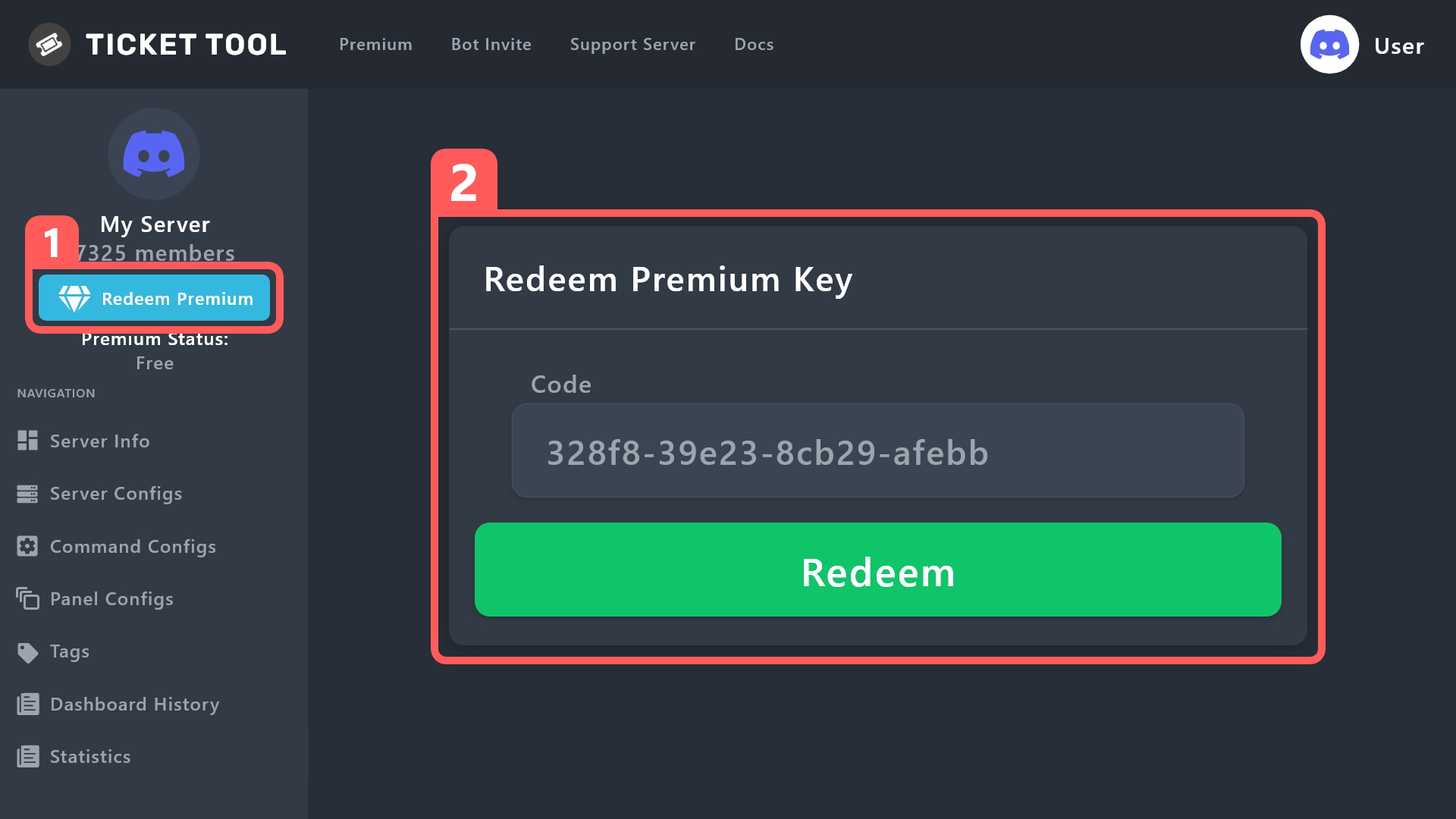
How to redeem premium (Key)
To redeem your premium key, go to the dashboard, select your server, then click " Redeem Premium" under the server's icon and name.
 gilded verge
i mean, if you activate key1 on server1, but if you have key2 then you can activate on another server ^^
dusty jacinth
I did the first one, on the wrong server
gilded verge
if we activate a key on a given server, it is not possible to take it away or transfer it - unless you're owner of the server, so you can transfer premium with using backup (in server configs)
gilded verge
please try to describe, I will try to help as best as I can ^^
iron nightBOT
Gave +1 Rep to @gilded verge
dusty jacinth
:D
 idle sparrow
I need help
humble sequoiaBOT
We would love to help you, but if you don't tell us what you need help with we can't help you :(
 thin marlin
how do you do this
 humble sequoiaBOT
For more convenient use of multipanels, you can now combine panels on the dashboard. This will allow you to directly send the multipanel from the dashboard or via the $panel ID command.
Where can I find this?
You can find this setting on the Dashboard -> Panel Configs -> Settings -> Panel
Note: if you're attaching all the panels to a panel called English, don't include English in the attached panel's box (If you do this, it will create a duplicate)
This will put all buttons from all of your panels on one message. The message is the panel message from the panel you're combining these panels in.
iron nightBOT
Gave +1 Rep to @slender minnow
thin marlin
humble sequoia
@slender minnow is that a premium feature (sorry for ping)
 slender minnow
no
scenic plinth
The bot is not nice.
slender minnow
i thought i was gonna be pinged twice today
 sage dock
hey guys i have the ticket bot set up but the folks that open a ticket can never see the message history when its opened. I always have to manually turn on read histroy for each individual person in each ticket. how can i avoid this?
 desert zealot
Go to your Panel, then Permissions then go to Ticket Owner Permissions then Edit opened select the relevant permission.
Pretty sure you can also just give the everyone role that perm in your actual discord though.
sage dock
desert zealot
Go to your Panel, then `Permissions` then go to `Ticket Owner Permissions` then ...
ty ty that was it
iron nightBOT
Gave +1 Rep to @desert zealot
jade topaz
I’m pretty dumb, but how do you get the id needed to add a custom emoji to a button (<:name:id>) ; an example would be appreciated
rustic gale
jade topaz
I’m pretty dumb, but how do you get the id needed to add a custom emoji to a but...
With the /id command
jade topaz
And the name is just the emoji name right

 jade topaz
rustic gale
jade topaz
rustic gale
Ahh tyvm
rustic gale
jade topaz
❤️
 lean lotus
how long is it supposed to take for the panel message to update after saving changes
jade topaz
if i had ticket tool prem on a old server, and i dont own the server anymore, how can i cancel the subscription
 bright sphinx
 humble sequoiaBOT
⚠️ You're in the wrong place
We provide support for Ticket Tool Discord bot and cannot help you with whatever issue you have.
- We don't know which Support Team you should contact to get this issue resolved, and unfortunately we won't be able to accurately tell you.
If you don't have any further questions regarding our bot Ticket Tool, please close this ticket
jade topaz
Thread style disconnects members / staff when closing?!!?
 hot edge
How can I have someone with staff role not see a ticket?
 dim breach
اني عربي
hot edge
like if they have staff and I have staff, how can I make it so I can see the ticket but they cant
desert zealot
lean lotus
how long is it supposed to take for the panel message to update after saving cha...
You need to update it, go to your Panel, click the blue Update Button at the top. Go to where your message is, right click it Copy Message Link provide that link in the box that pops up. Click the Update Panel Button
desert zealot
hot edge
like if they have staff and I have staff, how can I make it so I can see the tic...
2 Separate roles?
 mystic ruin
can u blacklist someone from opening a ticket?
desert zealot
Probably best to make a role and use that to stop them opening a ticket
Make a role, go to Buttons on your Panel.
Go to Edit Button under Create Ticket
Then add the role to that under Disabled roles
jade topaz
What is the difference between ticket tool and ticket tool gold bot ?
shut bolt
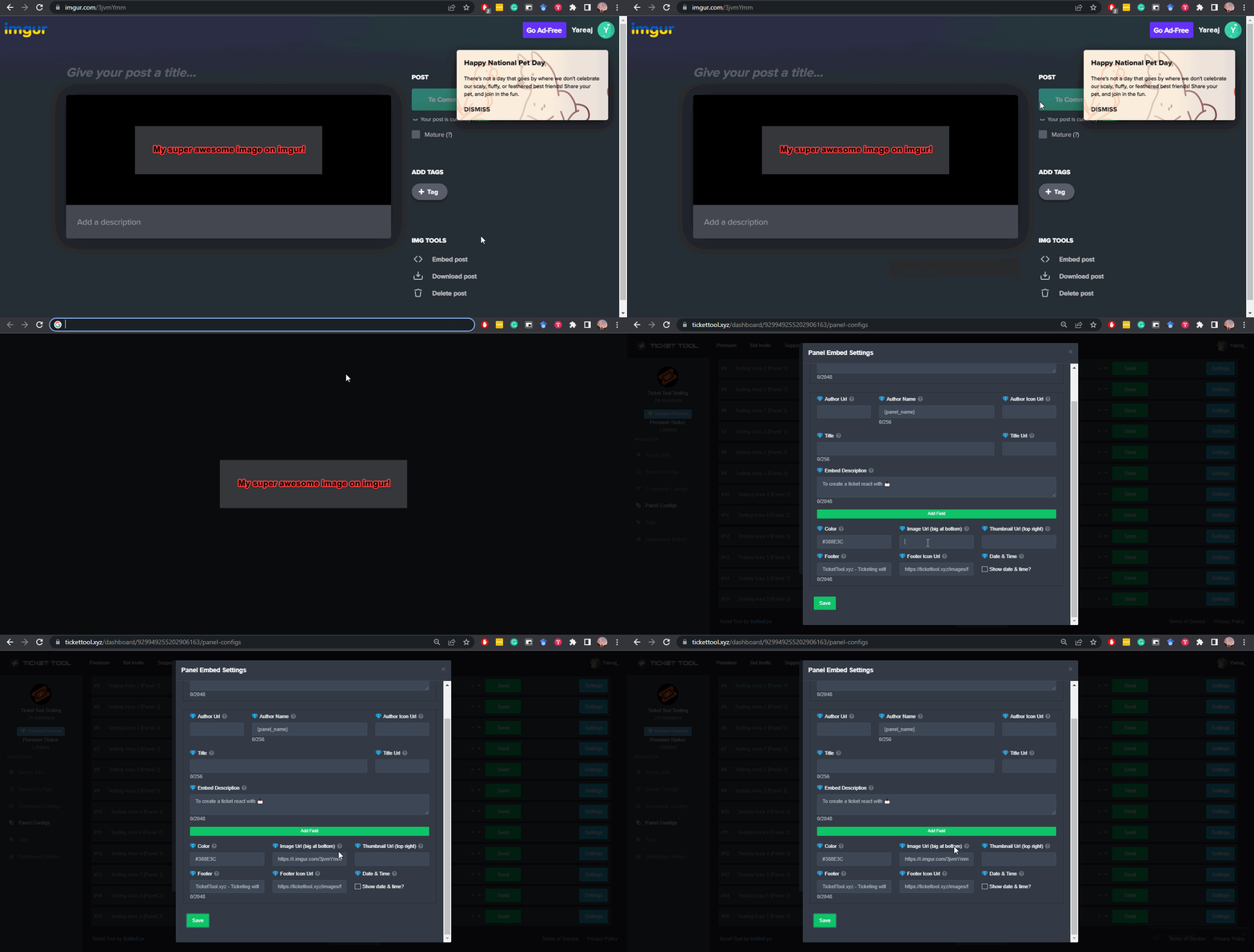
Use a direct url as the message content field, more information on direct urls below
humble sequoiaBOT
What are the direct URLs?
A direct access URL is an easy to read URL that users can enter to get to a specific item, document, page, category, or perspective, in which our bot TicketTool can read and get it displayed in your 'Panel Message' or your 'Ticket Message'.
Where can I get them?
The recommended way is to use 'Imgur', you can signup within a few minutes and then upload the image you want, and copy the URL of the uploaded image and paste it into one of the four boxes. There are alternatives to this, such as other image or video storing websites or using 'Open Original' of an image and paste it in (please be aware that if your image is deleted, Discord will automatically delete the link to it in a few days). Please note this requires 'Premium'. Imgur
 shut bolt
jade topaz
What is the difference between ticket tool and ticket tool gold bot ?
shut bolt
jade topaz
What is the difference between ticket tool and ticket tool gold bot ?
Ticket Tool Gold, or the Ticket Tool Premium bot is a separate bot exclusive for premium subscribers which has better response time and tends to not have outages since it's hosted on separate servers from the Ticket Tool White bot
jade topaz
ok
 stray surge
how long are transcripts kept on the site? is it permanent or do they expire?
shut bolt
stray surge
how long are transcripts kept on the site? is it permanent or do they expire?
We do not keep any transcripts at all, we send them to a discord channel which makes it be hosted on Discord's servers itself. It will be available as long as the message containing the file isn't deleted
stray surge
oh i thought there was a tt.xyz....ohhhhhh wait
see we use both modmail and ticket tool so i think i was getting them mixed up lol, thanks
shut bolt
No worries
shut bolt
stray surge
oh i thought there was a tt.xyz....ohhhhhh wait
Yeah our website just allows you to render the file from Discord's CDN
But we don't store the files
stray surge
yeah that's what i was just about to say, that's what i was thinking of
but viewing the html is the same since the actual formatter and such is srced in the code
yeah
cool
ty
it's really b64 instead of json now 💀
lean lotus
Can you add a panel button to a message sent by someone else as a reaction
rustic gale
lean lotus
Can you add a panel button to a message sent by someone else as a reaction
No
 viscid lichen
how can i fix this?
i have tried to reset the buttons and the form names already.
“ > System Failure: Invalid Form Body
components[0].components[1].emoji.id[BUTTON_COMPONENT_INVALID_EMOJI]: Invalid emoji “
rustic gale
viscid lichen
how can i fix this?
i have tried to reset the buttons and the form names already...
Invalid emoji
Probably an incorrect Button Emoji field in one of the panel's buttons
Could be many things. You wrote text instead of an emoji
You inserted a custom emoji that the bot can't use
Something like that
viscid lichen
can it not use nitro emojis anymore?
rustic gale
Which button it might be depends on which action triggers the error message exactly
If you find your server's ID for me i could take a look
 viscid prawn
One message removed from a suspended account.
 gentle storm
Hey Fam, can anyone help me?
I install the bot on my server.
Only i (serverowner) can close tickets.
I like that ticket-Owner can also close the ticket.
I try but no funktion
desert zealot
viscid prawn
One message removed from a suspended account.
Panel -> DropDown Style -> Enable
desert zealot
gentle storm
Hey Fam, can anyone help me?
I install the bot on my server.
Only i (serverowner...
Panel -> General -> Add a support team role
gentle storm
desert zealot
Panel -> General -> Add a support team role
I have a team role.
The team can close the Tickets.
But the Ticket-owner what open the ticket dont can close it!
desert zealot
You want the ticket owner to be able to close it?
gentle storm
desert zealot
You want the ticket owner to be able to close it?
yes, when he think its finish so i like the ticketowner can close it
desert zealot
Panel -> Buttons -> Close Ticket Edit Button -> Uncheck Support Team only
gentle storm
desert zealot
Panel -> Buttons -> `Close Ticket` **Edit Button** -> Uncheck Support Team only
is still unchecked
desert zealot
?
If you want the ticket owner to be able to close the ticket, you just uncheck that permission
gentle storm
 desert zealot
Still doesn't work?
gentle storm
no
desert zealot
Did you try a new ticket?
gentle storm
yes
desert zealot
Try clicking at the top and updating the panel
Update then paste the message link of the panel by the bot in it
Also, try going to Command Configs on the left side, then go to Close then removing the Support Team Only permission aswell
gentle storm
??link of the panel by the bot in it??
desert zealot
desert zealot
Also, try going to `Command Configs` on the left side, then go to `Close` then r...
try this first
gentle storm
desert zealot
try this first
also try and no funktion
 gentle storm
desert zealot
Did this one right? https://i.imgur.com/GvTVidp.png
gentle storm
desert zealot
Did this one right? https://i.imgur.com/GvTVidp.png
yes
Can it be that another bot is interfering?
desert zealot
No idea, it shouldn't do, try remaking the panel
jade topaz
is claim system free now
covert swallow
It is not
stray surge
bug?
 pale pilot
stray surge
bug?
pale pilot
stray surge
bug?
Probably related to your form settings
stray surge
nah they weren't in the server, somehow the command passed but the error is not very verbose
it must be a members.get(id).id and since they're not in the server members.get returns undefined meaning you end up with undefined.id
should be an undefined check in there but ig not
jade topaz
Can someone show me how to access panel settings please?? My interface is not same as the guides on the webpage… i cant find the panel settings 😦 i want to increase the ticket limit
jade topaz
covert swallow
It is not
paid?
covert swallow
If its not free it implies that it is paid
pale pilot
stray surge
nah they weren't in the server, somehow the command passed but the error is not ...
Ah right, forgot that the values aren't shown in the command preview there
jade topaz
*is there a delete all tickets command
pale pilot
jade topaz
*is there a delete all tickets command
It's /purge
stray surge
pale pilot
Ah right, forgot that the values aren't shown in the command preview there
huh
pale pilot
Can only be run by the owner of the server
jade topaz
pale pilot
Can only be run by the owner of the server
is there a way he can allow me to run it
pale pilot
stray surge
huh
In your screenshot, it only showed you used the /new command, not that you created it for someone else
pale pilot
jade topaz
is there a way he can allow me to run it
Nope
jade topaz
damn, ty anyway
 boreal breach
How to give everyone the perms to add users in the ticket?
jade topaz
Hi. Is there a way to make it so when someone leaves. The ticket is automatically closed?
 weak storm
do you need to add another bot if you get premium ?
like i see on the discord Ticket tool white and gold
 livid coral
how long is the demo?
 gray stirrup
weak storm
do you need to add another bot if you get premium ?
gray stirrup
weak storm
do you need to add another bot if you get premium ?
no
other bot is optional, but is faster
weak storm
i know that what i want to know is to use the premium bot does it need to be added to the server or it replace the normal bot when premium is active
gray stirrup
weak storm
i know that what i want to know is to use the premium bot does it need to be add...
yes
sorry
 cobalt crescent
I know no here is dashboard
gray stirrup
yes you need to add the premium bot
cobalt crescent
Oh
gray stirrup
cobalt crescent
I know no here is dashboard
?
cobalt crescent
gray stirrup
yes you need to add the premium bot
You are a bot
gray stirrup
???
cobalt crescent
Sorry
gray stirrup
Why would you randomly call me a bot... Weird...
cobalt crescent
SORRY
jade topaz
Hi. Is there a way to make it so when someone leaves. The ticket is automatically closed?
gray stirrup
jade topaz
Hi. Is there a way to make it so when someone leaves. The ticket is automaticall...
Automation > Missing user check
cobalt crescent
Noob
Sorry its a joke
 languid python
how do i add a ui like this one to my server?
 gray stirrup
languid python
how do i add a ui like this one to my server?
gray stirrup
languid python
how do i add a ui like this one to my server?
Go to panel configs > Panel Here you can edit the panel message. When done go back to the panel configs and click send at the top.
languid python
i figured it out!
 grim bloom
Hello!

@gray stirrup please can you say me this?
i need this.
(sorry for the ping"
gray stirrup
Panel Configs > DropDown Style > Add dropdowns from here > Go back to panel configs > Click Send
 grim bloom
and now?
gray stirrup
Panel should be in the channel you sent it to
iron nightBOT
Gave +1 Rep to @gray stirrup
 dark topaz
help
gray stirrup
dark topaz
help
with?
gray stirrup
no
dark topaz
ok im sory'
 hexed violet
I want to make a custom command to make a custom ticket, How do I do that?
rustic gale
hexed violet
I want to make a custom command to make a custom ticket, How do I do that?
Please clarify and give more detail
hexed violet
its fine
 upper gulch
hmmm my tickets arent closing
 merry agate
upper gulch
hmmm my tickets arent closing
merry agate
upper gulch
hmmm my tickets arent closing
Same^
upper gulch
merry agate
Same^
glad i wont the only one
 lost wraith
Same here
merry agate
lol
 urban wharf
ive invited the bot several times and i still cannot access the dashboard, help
 jade topaz
Seems like bot is down?
 eternal trout
I think the dashboard is down. I can't access mine either
 silent haven
help please
 scenic plinth
 We are aware of premium users experiencing issues with the premium bot. We have made the proper party aware and are currently working on a fix.
 Premium Ticket Tool is currently being restarted. Services will be unavailable temporarily.
 Ticket Tools data center seems to be experiencing issues. Currently, there is no ETA on a fix, and the bot may appear offline and become unresponsive during this time. You will also not be able to manage your affected server(s) through the dashboard while the bot is offline.
shut bolt

 rough cove
How do I create multiple buttons for different ticket options? Sry- just switched to ticket bot from another ticket system
shut bolt
rough cove
How do I create multiple buttons for different ticket options? Sry- just switche...
$mp2
Oops I just realized
Allow me a second
shut bolt
rough cove
How do I create multiple buttons for different ticket options? Sry- just switche...
https://docs.tickettool.xyz/dashboard/panel-configs/panel-options#attached-panels
Attach panels to a main panel
Customizing your panel!
jade topaz
Hello, how can i add emojis to embed ticket messages?
 finite dragon
is the ticket bot down or sum
solid stream
finite dragon
is the ticket bot down or sum
yes
One of our datacenters is having networks issues.
so some of it's offline.
jade topaz
when will the bot be working again?
 raven quest
jade topaz
when will the bot be working again?
raven quest
jade topaz
when will the bot be working again?
It seems to be working right now.
For me
jade topaz
not for me
 static path
raven quest
It seems to be working right now.
static path
raven quest
It seems to be working right now.
It's still offline lol
 raven quest
static path
It's still offline lol
raven quest
static path
It's still offline lol
Well its working for me.
jade topaz
I already invited the bot to my server but the panel does not appear..

try refreshing
 autumn mortar
usually when it goes down its off and on and lets tickets go through here and there
autumn mortar
so thats why itll work off and on for some but not everyone should be up fairly soon tho usually doesnt go down long
jade topaz
any eta?
solid stream
jade topaz
any eta?
Should be back in a few minutes
I found the issue is our nameserver
I'm switching it out and should be back soon.
jade topaz
awesome
scenic plinth
Ticket Tool is currently experiencing technical issues with the database used for the bot. Premium services have moved to another server for the time being, fixing premium related outages.
During this time if your bot experiences this issue, you will not be able to access the dashboard or manage your servers.
(So please read and dont spam the channel)
solid stream
jade topaz
awesome
We should be 100% back online now.
 stark runeBOT
**Ticket Tool - All Systems are now __Online!__**
All Ticket Tool systems are fully online again! We apologize for any inconvenience this may have caused on your server.
If you are still experiencing any problem with Ticket Tool, please reach out to the <@&540295656720302081> within a ticket here, #🎫│make-a-ticket

 soft ravine
My premium Ticket Tool will not let me enter a password on the Manage Sub page online.
 jade topaz
how can you add more than one option on a dropdown style panel please?
humble sequoiaBOT
The Drop-down menu or Select Menu replaces the buttons on your panel message and uses a drop-down menu with all of your panels. To set this up, go to your Panel Configs and select your main Panel.
<:Numbericons1:1018864164032225340> Enable Select Style
First you enable Select Style. Then you add an item in the Dropdown Editor. Now you can start editing your dropdown!
<:Numbericons2:1018864168041971712> Dropdown Editor
Each line in the dropdown editor represents a line in the drop down menu on discord. You can add more "Items", by clicking on
First you select a panel. That's the panel this option will open a ticket for. DONT select the same panel twice. Each option should have a different Panel
After that, you can put a Display. This is the title of this option and will appear in the drop down menu. The *Description can be set right after that, which will be below the title in grey.
Additionally you can select an emoji, that will be shown in front of each option. You can either manually input the ID of an emoji or select it in the selector.
Common Issues ⚠️
- Panel doesn't send? Make sure you have a valid emoji selected
- Option doesn't show up? Check if two options have the same panel in the DropDown Editor
$dropdown
jade topaz
that's litteraly what I told you in #💬│general-chat
covert swallow
Have you tried clicking "add item" as described in that message
 gloomy wind
hey! its been months since ive worked with ticket tool
how do i change the ticket message, outside of just the "{user} welcome"? https://gyazo.com/e1575ecca73ac16437bab926f97c97c4

 gloomy wind
oh, of course, thank you
interface changed a lot since the last time i used it
thanks @covert swallow
iron nightBOT
Gave +1 Rep to @covert swallow
covert swallow
Np
covert swallow
gloomy wind
oh, of course, thank you
interface changed a lot since the last time i used it
Yeah we did have a bit of a dashboard overall
gloomy wind
its way better
gloomy wind
covert swallow
Yeah we did have a bit of a dashboard overall
oh, i meant the stuff at the green line
whenever i write in that box, it looks like this
https://gyazo.com/4482545cfc99aad594e8bbe00ac0b9e8
i would like the description to stay in that little green box, while the {user} welcome is out of it
 gloomy wind
oh duh
 drowsy tide
Is it down?
jade topaz
drowsy tide
Is it down?
Depends what “it” is. If you mean ticket tool, read this: #🆘│community-support message
 crystal halo
From which age can you apply as staff?
 paper falcon
crystal halo
paper falcon
crystal halo
?
paper falcon
чо?
crystal halo
I dont speak Russian
scenic plinth
crystal halo
From which age can you apply as staff?
Not quite sure we can say, but youre welcome to give an attempt!
 fathom nest
Ticket tool interaction failed
need help for that DM
scenic plinth
We are aware of an ongoing issue with Standard Ticket Tool servers. We are currently ¨investigating¨ and looking into a fix. There is no ETA on a fix.
You will not be able to login to the dashboard during this time and manage your server if it is affected.
Just because you have the bot on your server does not mean you will be able to access the dashboard, this is because of the outage, so dont freak out!
 abstract hinge
I don't see my server in dashboard i make relogin but nothing happened
 blazing sluice
abstract hinge
I don't see my server in dashboard i make relogin but nothing happened
blazing sluice
abstract hinge
I don't see my server in dashboard i make relogin but nothing happened
Make sure you're logged into the correct discord account.
 naive python
Good morning,
I have been using the ticket tool since yesterday and I am looking for an permission. I would like to prevent support members from deleting a ticket. But I can't find a permission that I could revoke that the staff can delete the tickets. I would like to keep this for traceability.
blazing sluice
You can always remove the delete button, would you like help removing that?
blazing sluice
naive python
Good morning,
I have been using the ticket tool since yesterday and I am looking...
aswell as trackability, you could add transcript logs
naive python
blazing sluice
You can always remove the delete button, would you like help removing that?
Removing the button would be an option I can live with. Where can I set this option?
blazing sluice
Alright all good, so you would goto the server you want to edit this on, then goto the correct panel
viscid prawn
One message removed from a suspended account.
One message removed from a suspended account.
blazing sluice
then you would click the panel, after clicking that you would see an option in the first section that says buttons, then you should click that and it should say 'Edit Delete Button'
blazing sluice
viscid prawn
One message removed from a suspended account.
You must make multiple selections with one of them being the primary target
naive python
blazing sluice
then you would click the panel, after clicking that you would see an option in t...
found it, i can disable it 😄 i thougt i have to edit the pannel itself 😄
blazing sluice
naive python
Removing the button would be an option I can live with. Where can I set this opt...
Sorry, Kinda hard to see the options since the websites down
blazing sluice
naive python
found it, i can disable it 😄 i thougt i have to edit the pannel itself 😄
Ah nice
viscid prawn
blazing sluice
You must make multiple selections with one of them being the primary target
One message removed from a suspended account.
One message removed from a suspended account.
blazing sluice
viscid prawn
One message removed from a suspended account.
So you would make a name, in which that name will be the panel itself
naive python
blazing sluice
Ah nice
 scenic plinth
<:ttidle:818757771209474069> **We are aware of an ongoing issue with Standard Ti...
blazing sluice
naive python
scenic plinth
scenic plinth
<:ttidle:818757771209474069> **We are aware of an ongoing issue with Standard Ti...
blazing sluice
naive python
Yeah that
scenic plinth
(So its not lost)
naive python
blazing sluice
Yeah that
Great, thanks for helping 🙂
iron nightBOT
Gave +1 Rep to @blazing sluice
blazing sluice
scenic plinth
(So its not lost)
The website down aswell?
naive python
for me its up and working
blazing sluice
its not reading any servers im in and have the bot
scenic plinth
If your bot is affected, you wont be able to manage / see your server in the dashboard.
blazing sluice
Ah alright thanks
abstract hinge
blazing sluice
Make sure you're logged into the correct discord account.
Yes i logged in correct discord account
blazing sluice
viscid prawn
One message removed from a suspended account.
I'd have to help when the bot gets up and running again
blazing sluice
abstract hinge
Yes i logged in correct discord account
If your bot is affected, you wont be able to manage / see your server in the dashboard.
scenic plinth
Which seems to be in relation to an identical issue we had with premium servers earlier as 4 or so of our main servers are experiencing issues, and others pop on and offline, which is why sometimes members are able to use the bot, and other times it immediately dies again.
blazing sluice
How do they code the ticket bots lol, I code mine within JS but ik theres other languages
viscid prawn
blazing sluice
I'd have to help when the bot gets up and running again
One message removed from a suspended account.
scenic plinth
blazing sluice
How do they code the ticket bots lol, I code mine within JS but ik theres other ...
Ticket Tool is coded with JS, yes.
blazing sluice
scenic plinth
Ticket Tool is coded with JS, yes.
Ah, nice
blazing sluice
viscid prawn
One message removed from a suspended account.
With this, you would have to give me some time in order to let my panel to work again, but since theres docs we can go look there, so basically you would create a panel with the name of something like Ticket Panel and that would be the panel you would use in order to have this work, now then you would basically create more panels by clicking the green + at the top, and naming them whatever the ticket is based off of, after that, you would just then go back to your main panel that you named Ticket Panel and you would do something like this

 sudden oracle
why is ticket bot in my server offline?
-dashboard doesnt even show my server is connected
gilded verge

blazing sluice
sudden oracle
why is ticket bot in my server offline?
-dashboard doesnt even show my server is...
If your bot is affected, you wont be able to manage / see your server in the dashboard.
sudden oracle
sad
scenic plinth
 livid kite
I checked #📣│bot-news first when we encountered an issue. How ever it says 02 am that it was fixed.
So it would be nice that before you ask people to visit that page for details and updates, that it would be written there that "oops, the bot is down again" 🙂
scenic plinth
Not everyone on the support team has access to it, although we alerted the correct people to fix the issues currently affecting the services, and since it is 3am for the US, it is late at night for the developers, so not likely to be posted right away.
Moral of the story, that channel is more likely to contain updates when they become available, because myself or another staff member is not always available to update the message here in relation to the outages experienced during that time.
livid kite
My message was just a suggestion in cases like this 🙂 For me it looked weird when last post was "it's sorted" when you still have (new) issues with it.
scenic plinth
Well, it was as that was related to the premium bot, not primary, but completely understandable.
 barren locust
the bot website says it's not in any of my servers but it is... im trying to use the bot to run my community and it just brings up an error
blazing sluice
barren locust
the bot website says it's not in any of my servers but it is... im trying to use...
barren locust
blazing sluice
https://discord.com/channels/509192800865353738/776680605517742090/1077859776312...
alr cool
 tranquil zealot

 novel whale
Anyone know why the bot is not working now?
 blazing sluice
novel whale
Anyone know why the bot is not working now?
novel whale
blazing sluice
novel whale
Anyone know why the bot is not working now?
novel whale
It was working for months
 round nexus
봇이 작동을 하지 않습니다...
 novel whale
blazing sluice
https://discord.com/channels/509192800865353738/776680605517742090/1077859776312...
novel whale
blazing sluice
https://discord.com/channels/509192800865353738/776680605517742090/1077859776312...
Thanks
iron nightBOT
Gave +1 Rep to @blazing sluice
blazing sluice
round nexus
봇이 작동을 하지 않습니다...
여기를 클릭 #🆘│community-support message
jade topaz
The bot is not working!
blazing sluice
Make a panel, then just edit some settings within that panel
blazing sluice
jade topaz
The bot is not working!
Click the link I send above.
 blazing sluice
Like I said click this link #🆘│community-support message, or look in 
Discord
Discord is the easiest way to communicate over voice, video, and text. Chat, hang out, and stay close with your friends and communities.
jade topaz
Fine, thank you
blazing sluice
jade topaz
It's already on the server!
Np
scenic plinth
Maybe I should make it clear on there...
livid kite
I do not envy your work at the moment 😂
scenic plinth
We are aware of an ongoing issue with Standard Ticket Tool servers. We are currently ¨investigating¨ and looking into a fix. There is no ETA on a fix. It is currently 3-4 AM US time for most of our team, meaning development updates are not posted. We redirect users to #📣│bot-news for when they do become available, for the meantime support offer updates through this channel when needed, which is why you see us redirect you to #📣│bot-news despite nothing being posted there in some occasions.
You will not be able to login to the dashboard during this time and manage your server if it is affected.
Just because you have the bot on your server does not mean you will be able to access the dashboard, this is because of the outage, so dont freak out!
 glossy yarrow
Hi create ticket keeps giving This interaction failed
 half musk
glossy yarrow
Hi create ticket keeps giving This interaction failed
half musk
glossy yarrow
Hi create ticket keeps giving This interaction failed
The bot is down
scenic plinth
Read above your question 🙂
blazing sluice
glossy yarrow
unable to run /setup too
glossy yarrow
yup i understand now thx
 last belfry
my server ticket is faulty, does anyone know how it is?
 blazing sluice
Read the message above
jade topaz
i need help my i ticket tool bot dosnt work a few days ago i added it to my server and everything worked well but since this morning i woke up the bot just dont work and on the darshboard its saying i have to invite
i also kicked the bot from server and invited again but the bot still dosnt work
blazing sluice
We are aware of an ongoing issue with Standard Ticket Tool servers. We are currently ¨investigating¨ and looking into a fix. There is no ETA on a fix. It is currently 3-4 AM US time for most of our team, meaning development updates are not posted. We redirect users to #📣│bot-news for when they do become available, for the meantime support offer updates through this channel when needed, which is why you see us redirect you to #📣│bot-news despite nothing being posted there in some occasions.
NOTE: You will not be able to login to the dashboard during this time and manage your server if it is affected.
Just because you have the bot on your server does not mean you will be able to access the dashboard, this is because of the outage, so dont freak out!
scenic plinth
You can reply to it to make that easier on yourself
jade topaz
oh okey thx
blazing sluice
scenic plinth
You can reply to it to make that easier on yourself
true
 sinful cedar
moved role to upper added administrator permissions, not work command (bot not respond)
 blazing sluice
<:ttidle:818757771209474069> **We are aware of an ongoing issue with Standard Ti...
blazing sluice
blazing sluice
<:ttidle:818757771209474069> **We are aware of an ongoing issue with Standard Ti...
@sinful cedar
sinful cedar
ahh ok 😄 sry
 drifting basalt
Changing this colour is a premium feature ?
 blazing sluice
All good
scenic plinth
drifting basalt
Changing this colour is a premium feature ?
Yes.
 lament birch
believe its 1024
scenic plinth
250 without premium
drifting basalt
Oh ok
blazing sluice
dang lol thats not that much open space
scenic plinth
No
drifting basalt
Hmm premium is needed ig 😂
 frigid ginkgo
hi, im trying to close a ticket and i get this error:
This interaction failed
any ideas?
blazing sluice
blazing sluice
<:ttidle:818757771209474069> **We are aware of an ongoing issue with Standard Ti...
@frigid ginkgo
frigid ginkgo
blazing sluice
<@209681571039412225>
thanks
iron nightBOT
Gave +1 Rep to @blazing sluice
blazing sluice
Np
 unkempt radish
Bro where is drop-down?
 half musk
frigid ginkgo
hi, im trying to close a ticket and i get this error:
This interaction failed
an...
half musk
frigid ginkgo
hi, im trying to close a ticket and i get this error:
This interaction failed
an...
This bot is down.
frigid ginkgo
half musk
This bot is down.
ye got it
blazing sluice
unkempt radish
Bro where is drop-down?
It’s under styles methods
blazing sluice
unkempt radish
Bro where is drop-down?
Using Dropdowns for ticket creation!
unkempt radish
blazing sluice
It’s under styles methods
Thx sir my ticket made
iron nightBOT
Gave +1 Rep to @blazing sluice
blazing sluice
 faint osprey
how to do?
faint osprey
how to do?
Bots down, please read
blazing sluice
unkempt radish
Thx sir my ticket made
No problem
 sharp sparrow
?

 inland flint
Hi,why offline my ticket tool bot on my server?
 somber meteor
I'm seeing the same thing
blazing sluice
blazing sluice
<:ttidle:818757771209474069> **We are aware of an ongoing issue with Standard Ti...
Bots having issues @inland flint @sharp sparrow @somber meteor
somber meteor
and on the dash board
sharp sparrow
blazing sluice
Bots having issues <@1001814066412658788> <@1009937224911036539> <@9966799654981...
Ok
inland flint
blazing sluice
Bots having issues <@1001814066412658788> <@1009937224911036539> <@9966799654981...
Ohh,okey thanks
iron nightBOT
Gave +1 Rep to @blazing sluice
blazing sluice
Np
somber meteor
thanks heaps
blazing sluice
Np
 flint oasis
When the issue will solution ?
 fervent agate
who can help me with smth
my ticket bot is online but it doesn t respond
ye i can t debug it
plush shale
Hey, how do I know if the spam defender is working or not?
 opal cradle
fervent agate
my ticket bot is online but it doesn t respond
opal cradle
fervent agate
my ticket bot is online but it doesn t respond
there is an outage
opal cradle
flint oasis
When the issue will solution ?
no ETA
 wet zealot
Same problem here, on the dashboard the it shows that the tool isn´t on my server anymore but on Discord it is still there
 meager rampart
hey team! Love the tool, just setting some amazing things for our community!
I need some help/direction.
I want when a user submits a ticket and then the ticket is closed. To get the text from the chat (I assume its the transcript) and then put in a Google Spreadsheet.
Here is the main idea. We have paid course members. In their course they have 5 assignments. We want each new assignment thread N1-N5 to capture their responses and add them in a spreadsheet. So that at the end we can go in one place and look the assignments delievered for all course members in one place.
I assume I need some kind of automation, but I don't see how to get gSheet in.
Maybe post the logs on a seperate channel and do external automation to take those messages and add them in a spreadsheet?
Would really apprecaite the help or if anyone has done it already to share.
viscid prawn
blazing sluice
With this, you would have to give me some time in order to let my panel to work ...
One message removed from a suspended account.
iron nightBOT
Gave +1 Rep to @blazing sluice
 lapis raptor
Is the bot still out?
opal cradle
lapis raptor
Is the bot still out?
think so
 winged basin

 tardy galleon
The Bot is offline. Do you know how i can get it online?

 wet knoll

 scenic plinth
We are aware of an ongoing issue with Standard Ticket Tool servers. We are currently ¨investigating¨ and looking into a fix. You will not be able to login to the dashboard during this time and manage your server if it is affected.
As of posting this, there is noting on the bot status page. Yes, we are very well aware that it says all services are fine and operational in #📣│bot-news as well. This was due to a similar situation earlier very identical to this one with premium services. Very limited support members have access to update this page or announcements channel, and because it is late at night when this is occurring, nothing will be posted because they are asleep / unresponsive. Support members redirect you all to bot news for when updates in relation to the outage are posted. In the meantime, there is very limited things I myself and other support members can do to keep communication with you all during the outage and the status of it.
Just because you have the bot on your server does not mean you will be able to access the dashboard, this is because of the outage, so dont freak out!
Making this clear now, no, there is no ETA. Repeat. No ETA. The developer is sound asleep. You will live
@subtle lark Make a ticket and I will help you there please. I am trying to keep this channel relatively contained 🙂
Feel free to ping me in your ticket.
scenic plinth
scenic plinth
<:ttidle:818757771209474069> **We are aware of an ongoing issue with Standard Ti...
This has since been resolved. If you experienced issues during this time with the dashboard, refresh, relog, or sync your dashboard, this should return it to normal.
And yes, you can talk here again asking your questions without it being filtered.
jade topaz
Why bot isnt sending panel message?
 blazing sluice
You have to send it yourself through the dashboard
When you click send, you’ll get a list of what channels
jade topaz
Nah.
blazing sluice
Nah?


 oak shuttle
All good
jade topaz
I have message too
 blazing sluice
It should work just fine if you’re opening that said ticket
jade topaz
When member opens ticket, its blank i have given all permissions too

There is no even ticket close butto
Button
blazing sluice
Ok so make sure you save changes, aswell as resend the panel for the ticket open
 restive bone
Are staffs on this server getting paid?
blazing sluice
restive bone
Are staffs on this server getting paid?
Not sure, but tbh that’s really beyond the point rather that’s more confidential for the servers purpose rather then a public purpose
 languid pasture
restive bone
Are staffs on this server getting paid?
languid pasture
restive bone
Are staffs on this server getting paid?
no
Volunteer position with benefit of getting tt premium
restive bone
Oh okay ty
scenic plinth
Staff get a form of ¨reward¨ like all servers.... but no, its voluntary and dont get or ask for compensation.
Actually I just now saw threads thing, but regardless, no, nobody gets paid.
 keen dune
where i can find ticket tool settings?
 blazing sluice
keen dune
where i can find ticket tool settings?
blazing sluice
keen dune
where i can find ticket tool settings?
Depends, what are you trying to do
 teal grail
keen dune
where i can find ticket tool settings?
teal grail
keen dune
where i can find ticket tool settings?
What you want to do?
keen dune
am searching ticket tool settings
keen dune
wait sec
 robust sandalBOT
يحاول الأعضاء مساعدتك ، لكن لا يمكنهم ذلك لأنك لا تشرح مشكلتك بكفاءة. يرجى إخبارنا بالإعدادات التي تحاول الوصول إليها للروبوت ، وإلا فلن نتمكن من مساعدتك.
 English (en) → Arabic (ar)
keen dune
teal grail
What settings do you want?
English (en) → Arabic (ar)
keen dune
teal grail
What settings do you want?
i want to do like this and i need settings
 teal grail
Hoo
Go to painel
Panel next you click in Edit Panel Message
Slide up
Click in Edit Button
Now you choose
but if you want to have multiple buttons, you can say
keen dune
i did it
teal grail
Like this

 stiff anvil
Does this message on the dashboard mean I don't have enough permissions for that server?
 blazing sluice
stiff anvil
Does this message on the dashboard mean I don't have enough permissions for that...
blazing sluice
stiff anvil
Does this message on the dashboard mean I don't have enough permissions for that...
Click the button that says “sync with servers”
stiff anvil
Done, after selecting the server I still get the same error
blazing sluice
stiff anvil
Done, after selecting the server I still get the same error
Make sure the bot has admin perms
safe lava
rustic gale
If y'all ever do figure it out, let me know. I'm curious about it
Hii so I figured out that weird permission issue I was having, just letting you know, basically if roles aren't added under 'Support Team Roles' then the ticket won't be viewable, even if one of those roles was the one that set up the category.
So if a <Mod> set up a <Ticket> category, the category would now disappear for that <Mod> because the <Ticket> category will revert to only being viewable by Admin Roles.
rustic gale
That's weird.
teal grail
..
 lethal crest
how do i change the color instead of it being green
 blazing sluice
lethal crest
how do i change the color instead of it being green
blazing sluice
lethal crest
how do i change the color instead of it being green
Yeah it’s a premium only feature
lethal crest
oh ok thx
 formal mulch
I need help
teal grail
formal mulch
I need help
For?
stiff anvil
teal grail
This is a form?
Ohh, nevermind that.
Completely different bot ☠️, sorry.
teal grail
stiff anvil
Ohh, nevermind that.
Completely different bot ☠️, sorry.
Hahahah np
formal mulch
I need a video tutorial how to create a ticket panel and all are with the old version
formal mulch
ok
teal grail
Manage Server
formal mulch
ok
teal grail
Chosse your Server
formal mulch
ok
teal grail
Swipe up until you find Panel
formal mulch
yes
teal grail
Click
formal mulch
ok
formal mulch
umm I dont see it