
#🆘│community-support
1 messages · Page 28 of 1
 wary sparrow
 rustic gale
Usually in the ticket message
wary sparrow
like this correct?
rustic gale
Well, you already turned on the automatic embed
wary sparrow
rustic gale
Usually in the ticket message
but where? in the embed editor?
rustic gale
So you would not need to add the variables to your ticket message anyway
wary sparrow
this correct like this? 😄
rustic gale
It should be. Did you test?
 iron nightBOT
Gave +1 Rep to @rustic gale
 pallid dragon
How can I ping the support team (role) when the ticket is created?
 humble sequoiaBOT
1. Go into your Dashboard
2. Open your Panel Configs tab
3. Select the panel you want to ping your support on
4. Open the Ticket options menu
5. Click on Edit Ticket Message
6. In the Message Content use one of the role mention syntax (**{@Role Name}**/**{Role ID}**)
7. Save changes
Note: For this to work properly, Ticket Tool requires the Mention Everyone permission. Or the role must have the Allow anyone to @mention this role setting enabled 

 gilded verge
humble sequoia
gilded verge
humble sequoia
@pallid dragon, please check 
pallid dragon
Thanks 🙂 Great Support! ❤️
 acoustic gull
the page is not loading
rustic gale
Which page
 compact escarp
Hi I’m having difficulties with a form that someone is trying to send yet it wont? I’m confused as to what it could be as I’m able to open a ticket fill in the form and send it. Yet this other person can’t? Is there a max Word limit for them?
rustic gale
compact escarp
Hi I’m having difficulties with a form that someone is trying to send yet it won...
What exactly do they see?
 pearl apex
How do i add a second person in order to manage the ticket tool settings? Do i have to enable permission to manage ticktool, or is it inherited somehow?
rustic gale
pearl apex
How do i add a second person in order to manage the ticket tool settings? Do i h...
Make a dashboard role
humble sequoiaBOT
Any role you put there will have full access to the ticket tool dashboard. The server owner and users with admin permissions already have access to the dashboard.
Be careful of which roles to put here
 rustic gale
How long have you been getting this error and what's your server's ID
That was not for you
Try using the /ping command and see what response you get
Right. A few minutes please
I've informed staff about this, please be patient as they become available to address the issue
 tropic sonnet
hey! i triedd this but not sure what you mean. are you able to help? thanks
iron nightBOT
Gave +1 Rep to @pale pilot
gilded verge
tropic sonnet
hey! i triedd this but not sure what you mean. are you able to help? thanks
Hey, Lukas meant that probably your server has the Browse Channels option available as in the screenshot below and it's possible that you unchecked the channels there, so that's why they are not visible to you ^^
 tropic sonnet
gilded verge
Hey, Lukas meant that probably your server has the `Browse Channels` option avai...
tropic sonnet
gilded verge
Hey, Lukas meant that probably your server has the `Browse Channels` option avai...
oh awesome! i’ve checked it now so hopefully it’ll work. thank you!
iron nightBOT
Gave +1 Rep to @gilded verge
 arctic arch
how to reset ticket
gilded verge
reset?
arctic arch
yes
gilded verge
uhm, what you mean?
 gilded verge
did you leave the server and rejoin it? because if so, when you left, you lost your permissions to see that ticket
arctic arch
oh
gilded verge
so you need to ask admins of this server (not ticket tool server) to add you to your ticket again ^^
/add @user
arctic arch
thanks shawty
 jade topaz
After ticket tool has sent the message, that open the ticket channel, that message has 2 reactions, why?
 karmic rose
jade topaz
After ticket tool has sent the message, that open the ticket channel, that messa...
karmic rose
jade topaz
After ticket tool has sent the message, that open the ticket channel, that messa...
Take a picture of the problem you are facing
 karmic rose
jade topaz
2 reactions.
karmic rose
jade topaz
2 reactions.
go to the Dashboard -> Settings -> Panel -> Attached Panela
 jade topaz
karmic rose
go to the Dashboard -> Settings -> Panel -> Attached Panela
jade topaz
karmic rose
go to the Dashboard -> Settings -> Panel -> Attached Panela
Then? I want those 2 different messages and 1 reaction.
karmic rose
jade topaz
Then? I want those 2 different messages and 1 reaction.
If you want 1 reaction Make sure there is nothing here (Empty)

Then save and send the ticket and 1 will appear for you
jade topaz
Ok, thanks!

 cinder pewter
Hey i compltely forgot how to get to Ticket tool's Dashboard, can't seem to find the link to it either
anyone could help ? 🙂
karmic rose
cinder pewter
Hey i compltely forgot how to get to Ticket tool's Dashboard, can't seem to find...

Ticket Tool - Ticketing without clutter - The #1 discord Ticketing bot
karmic rose
cinder pewter
where can i find it tho ?
If you can't find it anywhere, you can go to it @pseudo glen And look at the "About me" And you will find it next to the word "Dashboard"
cinder pewter
karmic rose
If you can't find it anywhere, you can go to it <@557628352828014614> And look a...
Thx ! again
iron nightBOT
Gave +1 Rep to @karmic rose
karmic rose
Your Welcome.. 
 old geode
I have a question, how to activate the claim option
karmic rose
old geode
I have a question, how to activate the claim option
$claim is available only for premium servers
old geode
karmic rose
`$claim` is available only for premium servers
i have premium
karmic rose
old geode
i have premium
Ok, Go to the dashboard -> Button s -> Claiming Button
And activate the feature
jade topaz
Hi any admin?
 granite lodge
does ticket tool premium only work on 1 server?
karmic rose
jade topaz
Hi any admin?
Hello, How Can i help you
karmic rose
granite lodge
does ticket tool premium only work on 1 server?
Yes
 willow forge
granite lodge
does ticket tool premium only work on 1 server?
willow forge
granite lodge
does ticket tool premium only work on 1 server?
Premium is 6$/month for 1 server. You can have more than 1 active premium subscription at the time though.
 ripe barn
But do you have to have the premium server for the bot to work?
karmic rose
ripe barn
But do you have to have the premium server for the bot to work?
No, The bot has two versions
- @pseudo glen
- @humble sequoia
It can work normally @pseudo glen
 tame kayak
@karmic rose
karmic rose
tame kayak
<@582107343085502485>
Hello, how can i help you?
tame kayak
karmic rose
Hello, how can i help you?
احكي عربي
karmic rose
tame kayak
احكي عربي
تفضل كيف اقدر اساعدك؟
karmic rose
يعني بدك تعمل تكت ويكون شغال طبيعي؟
tame kayak
karmic rose
يعني بدك تعمل تكت ويكون شغال طبيعي؟
نعم صحيح
karmic rose
tame kayak
نعم صحيح
1- اول خطوة تضيف البوت لسيرفرك
2- ثاني خطوة تعطي البوت الصلاحيات المطلوبة
3- ثالث خطوة انك تدخل على لوحة التحكم بعدها تروح على Panel Config و تعدل الاشياء الي تبيها من ناحية الصلاحيات السبورت وغيره وتحدد رتب الدعم الفني و بعدها تحدد الشات المطلوب الي تبي تنرسل فيه التذكرة وتسوي Send
tame kayak
karmic rose
1- اول خطوة تضيف البوت لسيرفرك
2- ثاني خطوة تعطي البوت الصلاحيات المطلوبة
3- ثال...
جزاك الله خيرا ♥️
من وين أخذ رتبة اشعارات
karmic rose
tame kayak
جزاك الله خيرا ♥️
الله يجازيك خير 🤍
tame kayak
karmic rose
الله يجازيك خير 🤍
حبيبي حبيبي 🗿
karmic rose
tame kayak
من وين أخذ رتبة اشعارات
روح هنا #📂│information وعلى خيار Self roles
tame kayak
Thank you @karmic rose
iron nightBOT
Gave +1 Rep to @karmic rose
karmic rose
Your Welcome 
tame kayak
بس اسمع
karmic rose
تفضل
tame kayak
karmic rose
تفضل
كيف اشترك برميوم
karmic rose
يمكنك شراء قسط من خلال النقر فوق الزر "Update" عند النقر فوق @humble sequoia ، قم بدعوتها إلى الخادم الخاص بك أولاً
يوجد فترة مجانية لكل سيرفر "7 Day" يمكنك تجربته وفي حال اعجبك يمكنك شرائه
tame kayak
karmic rose
يوجد فترة مجانية لكل سيرفر "7 Day" يمكنك تجربته وفي حال اعجبك يمكنك شرائه
كيف اجرب المجانية
karmic rose
tame kayak
كيف اجرب المجانية
تروح لوحة التحكم وتفعل
 tame kayak
karmic rose
تروح لوحة التحكم وتفعل
tame kayak
karmic rose
تروح لوحة التحكم وتفعل
ممكن رابط لوحة تحكم
jade topaz
Opa
karmic rose
tame kayak
ممكن رابط لوحة تحكم
Ticket Tool - Ticketing without clutter - The #1 discord Ticketing bot
karmic rose
jade topaz
Opa
Hello, How can i help you?
tame kayak
karmic rose
https://tickettool.xyz/manage-servers
Thx ☺️😊
iron nightBOT
Gave +1 Rep to @karmic rose
karmic rose
tame kayak
Thx ☺️😊
Your Welcome 💃
karmic rose
jade topaz
where can i see chat transcript
You need to create transcript?
karmic rose
jade topaz
well i gotta scam report a server
You can't see chat of ticket delete If you don't do it transcript
+
Ticket tool It has nothing to do with scams.. that occur by members
jade topaz
bruh i dont want to report ticket tool
i want to see the chat i had in a server
doesnt ticket tool have transcript/archive of chats?
karmic rose
jade topaz
doesnt ticket tool have transcript/archive of chats?
No, if That you previously created transcript You will be able to see deleted tickets through chat I selected it earlier
jade topaz
what? is english ur native language? i dont understand anything...
karmic rose
jade topaz
what? is english ur native language? i dont understand anything...
🤨
In short, You can't if you aren't Support In the server you want to see deleted tickets
tame kayak
كيف اظهر الزر في التكت واخلي اشخاص معينين يقدرو يستخدمو؟
karmic rose
tame kayak
كيف اظهر الزر في التكت واخلي اشخاص معينين يقدرو يستخدمو؟
Panel Configs -> Claiming
ملاحظة: لمستخدمين الروبوت المدفوع فقط.
سؤال الثاني حق كيف تخلي ناس معينين
Panel Configs -> Buttons -> ومثل ما هو موضح بالصورة عند "Allowed Roles" تحط الرتب الي تبي تقدر تسوي.
 tame kayak
karmic rose
Panel Configs -> Claiming
ملاحظة: لمستخدمين الروبوت المدفوع فقط.
-
سؤال الثاني...
tame kayak
karmic rose
Panel Configs -> Claiming
ملاحظة: لمستخدمين الروبوت المدفوع فقط.
-
سؤال الثاني...
♥️ thx again
iron nightBOT
Gave +1 Rep to @karmic rose
karmic rose

 pallid lichen
There’s a ticket on my server that multiple staff members have attempted to remove and it doesn’t work. Our process is to close, transcript, and then delete. Everything works except the delete button. If I hit the delete button it just tells me a transcript was saved and absolutely will not delete. Can anyone help?
willow forge
pallid lichen
There’s a ticket on my server that multiple staff members have attempted to remo...
Does this problem occur with every ticket or just with one?
jade topaz
yo how can i buy premium with crypto
humble sequoiaBOT
PayPal - DiscordTicketTool@gmail.com
BitCoin - 3HhKKAdb9eEvCe2tvzB8bAa8nebHY6qcPA
Ethereum - 0xF47a27D6a3225bB8e71fd03B5C14bbb374b41149
LiteCoin - MEQX3knLAuotrKnvk3HDNBK5gdRn6PZhHy

Prepay/Direct Payment
To prepay send the payment using your desired method - Available options listed bellow.
⚠️ $18 per 3 months. ⚠️
$66 per year.
(If using the direct payment option, you need to be paying for at-least 3+ months.)
Regular Prices when paying on our website:
$6/per month
$66/per year
Once your payment is sent let us know so we can confirm and get you your key.
<:paypal:924596360840372234> Paypal ("Goods and Services" or "Family and Friends")
DiscordTicketTool@gmail.com
<:bitcoin:924638849135689749> BTC - Bitcoin
3HhKKAdb9eEvCe2tvzB8bAa8nebHY6qcPA
<:Ethereum:972177326580301835> ETH - Ethereum
0xF47a27D6a3225bB8e71fd03B5C14bbb374b41149
<:Litecoin:972176945972383815> LTC - LiteCoin
MEQX3knLAuotrKnvk3HDNBK5gdRn6PZhHy
I sent the payment now what?
After you send the payment, please send a screenshot with proof of payment, our <@&615146349700186112> will verify your payment and will get you setup. For crypto payments, we are waiting for at least ONE verification.
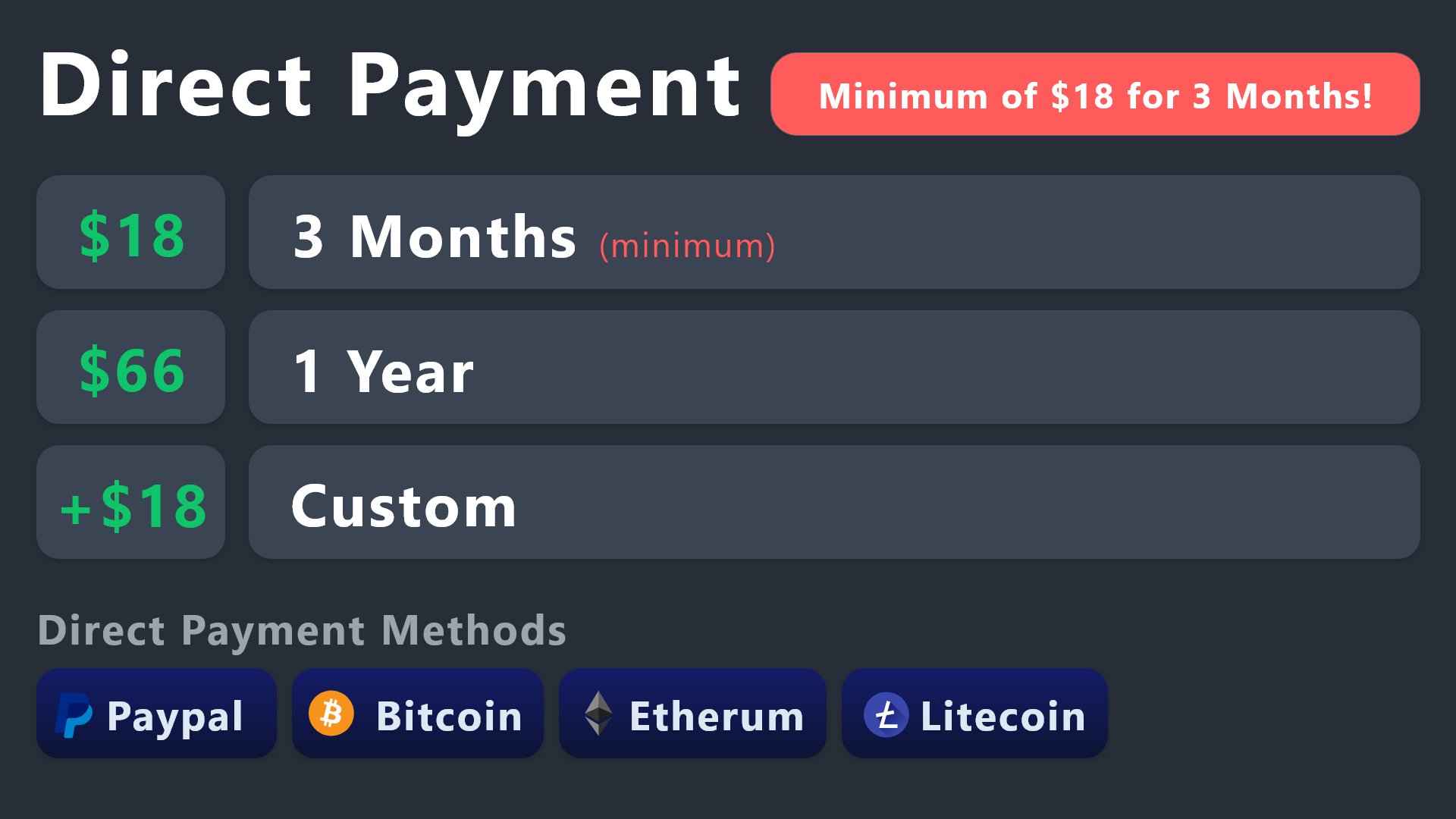
All prices in USD - 3 months min for direct payment
 quick bone
@jade topaz ^ all ticke ttool payment methods
jade topaz
quick bone
<@456226577798135808> ^ all ticke ttool payment methods
thanks
iron nightBOT
Gave +1 Rep to @quick bone
jade topaz
i cant pay for 1 month using crypto?
quick bone
jade topaz
i cant pay for 1 month using crypto?
no as it is a direct payment method so it's a minimum of 3 months
jade topaz
quick bone
no as it is a direct payment method so it's a minimum of 3 months
i paid, where do i send the proof?
quick bone
jade topaz
i paid, where do i send the proof?
open a billing ticket via #🎫│make-a-ticket
pallid lichen
willow forge
Does this problem occur with every ticket or just with one?
Not sure. It’s never happened before now and we don’t have any other open tickets rn
willow forge
pallid lichen
Not sure. It’s never happened before now and we don’t have any other open ticket...
Try opening a ticket and deleting it. That’s the easiest way to find out.
pallid lichen
willow forge
Try opening a ticket and deleting it. That’s the easiest way to find out.
Looks like it’s just that one
willow forge
pallid lichen
Looks like it’s just that one
Just delete the channel then.
iron nightBOT
Gave +1 Rep to @willow forge
willow forge
np
willow forge
pallid lichen
Okay. Wonder why it did that in the first place. So odd 🤔
Yea. You don’t really need to know that if it’s just one ticket.
tame kayak
@karmic rose
karmic rose
tame kayak
<@582107343085502485>
Hello, How Can i help you again?
karmic rose
tame kayak
اقدر اسوي اكثر من تكت
تقصد انك تبي تسوي اكثر من تذكرة الاعضاء يقدرون يفتحونها؟
Explain your question more
tame kayak
karmic rose
تقصد انك تبي تسوي اكثر من تذكرة الاعضاء يقدرون يفتحونها؟
يعني اريد كل رومات معينة يكون فيها ذيك الخاص بتكتات لما تضغط تفتح
karmic rose
tame kayak
يعني اريد كل رومات معينة يكون فيها ذيك الخاص بتكتات لما تضغط تفتح
يب تقدر تنشئ اكثر من تكت
tame kayak
karmic rose
يب تقدر تنشئ اكثر من تكت
و كيف
karmic rose
You mean you want certain roles that can unlock tickets?
tame kayak
@karmic rose لا تسحب بليز
karmic rose
Follow the following steps:
-> settings -> Buttons -> Create Ticket
Then it is an option "Allowed Roles" Select the role you want to be able to open tickets
 topaz copper
Where can I report misuse of the bot in a scam discord?
karmic rose
@jade topaz
 karmic rose
topaz copper
Where can I report misuse of the bot in a scam discord?
karmic rose
topaz copper
Where can I report misuse of the bot in a scam discord?
You can't
topaz copper
karmic rose
You can't
Fantastic
karmic rose
tame kayak
<@582107343085502485> لا تسحب بليز
معلش بساعد الناس ، روح على التذكرة الي تبي ترسلها وبعدها على Send واختار الروم الي تبي ترسل فيه
 jade topaz
good afternoon i would just like to inquire how would I be able to ping a necessary channel in the ticket message shown when a member opens a ticket because i used the channel ID as a variable with the necessary brackets and it was not shown.
quick bone
jade topaz
good afternoon i would just like to inquire how would I be able to ping a necess...
what did you put exactly?
quick bone
jade topaz
umm {number}
try this: <#channelid>
jade topaz
okay i shall try it
 hexed token
Could someone help because I don't know how to stop the ticket bot from creating a closed channel after closing the opened channel
jade topaz
hexed token
Could someone help because I don't know how to stop the ticket bot from creating...
There should be a delete button
Delete, Transcript, or Reopen
hexed token
Yes there is that three buttons but when I click delete the open channel disappears and create one saying closed and wanted to know if it I can turn that thing off
gilded verge
deleted
rustic gale
hexed token
Could someone help because I don't know how to stop the ticket bot from creating...
The bot doesn't create a closed channel
The bot renames the same channel
hexed token
oh
rustic gale
Does the bot also delete every message in the channel?
hexed token
yes
rustic gale
Like, it becomes empty?
Yeah, that's because you enabled Server Storage in Server Configs
Disable that setting
hexed token
oh ok thank you
 queen anvil
Hello,
It seems my members in discord are unable to see the original message from the ticket. Is there a specific setting on the dashboard that I can let them see it? Or is this a discord permissions thing?
gilded verge
Hey, It looks like they don't have permission to read messages, so please go to Panel Configs->Permissions->User Permissions-Edit opened->change Read Message History to \✅
 queen anvil
gilded verge
Hey, It looks like they don't have permission to read messages, so please go to ...
queen anvil
gilded verge
Hey, It looks like they don't have permission to read messages, so please go to ...
Thank you! I’ll give that a go
iron nightBOT
Gave +1 Rep to @gilded verge
gilded verge
@solemn tulip, No, it's just a visual glitch and it happens, so the next time you vote, it should be fine ^^
rustic gale
 solemn tulip
If I vote Top.gg and BFD will I get 1 vote only ?
solemn tulip
If I vote Top.gg and BFD will I get 1 vote only ?
You should get 2 votes
solemn tulip
rustic gale
You should get 2 votes
I only have 1.
rustic gale
solemn tulip
I only have 1.
Did you try voting again?
tame kayak
karmic rose
معلش بساعد الناس ، روح على التذكرة الي تبي ترسلها وبعدها على Send واختار الروم ...
Thx
iron nightBOT
Gave +1 Rep to @karmic rose
solemn tulip
rustic gale
Did you try voting again?
It says I have already voted I think.
rustic gale
On both sites?
solemn tulip
I think.
rustic gale
That's very strange
gilded verge
i mentioned before  ,
,
it's just a visual glitch and it happens, so the next time you vote, it should be fine and you can see all votes ^^
rustic gale
Let's hope that's the case
It happened to me just now and it hadn't happened to me before.
 gleaming sonnet
I have the bot set to disallow message sending in closed tickets, yet people can still do it. Any advice?
 solemn tulip
gilded verge
i mentioned before <:pleading:877970814035689482>,
it's just a visual glitch and...
solemn tulip
gilded verge
i mentioned before <:pleading:877970814035689482>,
it's just a visual glitch and...
Oh alr.
 ocean spear
gleaming sonnet
I have the bot set to disallow message sending in closed tickets, yet people can...
ocean spear
gleaming sonnet
I have the bot set to disallow message sending in closed tickets, yet people can...
If you have role permissions set to allow it then itll bypass that setting
 stoic lodge
new to the bot, apologies if asked before. When closing a ticket, is the requester removed from the ticket thread? How can we make sure they still have access to the thread to view the result

 scenic plinth
No, because it is how Discord views HTML files, which ticket tool sends.
You end up seeing this with moderation bots as well in some cases when logging messages.
scenic plinth
stoic lodge
new to the bot, apologies if asked before. When closing a ticket, is the request...
If you have it set to where the owner of the ticket can no longer see the channel after closing the ticket, no, they cannot view threads attached to the channel anymore. In short terms, you can allow them to view the ticket to see the thread(s) attached.
rustic gale
 vapid sonnet
Can you set the bot to send only the panel without the script?
vapid sonnet
Can you set the bot to send only the panel without the script?
That's like asking if they can send you the box without the pizza.
vapid sonnet
scenic plinth
No, because it is how Discord views HTML files, which ticket tool sends.
Thx
iron nightBOT
Gave +1 Rep to @scenic plinth
 delicate furnace
Wait, what is this? How can I set it up?
 bold arrow
Where can I remove a create ticket in which option? I have 2
 scenic plinth
You attached the panel to itself...
humble sequoiaBOT
For a more convenient use of multipanels, you can now combine panels on the dashboard. This will allow you to directly send the multipanel from the dashboard or via the $panel ID command.
Where can I find this?
You can find this setting on the Dashboard -> Panel Configs -> Settings -> Panel
Note: if you're attaching all the panels to a panel called English, don't include English in the attached panel's box (If you do this, it will create a duplicate)
This will put all buttons from all of your panels on one message. The message is the panel message from the panel you're combining these panels in.
 scenic plinth
The message that was sent by ticket tool immediately after....
bold arrow
scenic plinth
You attached the panel to itself...
Thanks
iron nightBOT
Gave +1 Rep to @scenic plinth
 gentle lichen
heya!! how do we edit this message here?
 humble sequoiaBOT
The panel message is where people react to make a ticket. To customize it head over to your Dashboard --> Panel Configs -> Panel -> Edit Panel Message

 hardy thunder
 analog prairie
How do i make the dropdown menu have multiple options? Only one on the top shows up for me
rustic gale
delicate furnace
Wait, what is this? How can I set it up?
That's called a tag.
humble sequoiaBOT
Tags
Tags are used to send a predefined response to your channels using a command. Tags will only respond if the command itself is used, it will not function if you put the tag into a sentence. The prefix is not included.
To create tags, go to: Dashboard > Tags > Create Tag. After creating and naming one, tap on the response button, and you can edit the response.
 rustic gale
gentle lichen
heya!! how do we edit this message here?
rustic gale
gentle lichen
heya!! how do we edit this message here?
That's the panel message
rustic gale
analog prairie
How do i make the dropdown menu have multiple options? Only one on the top shows...
Did you select the same panel for all of them?
analog prairie
rustic gale
Did you select the same panel for all of them?
Yeah
rustic gale
If so, that's why they don't show.
analog prairie
rustic gale
If so, that's why they don't show.
But it's required
gentle lichen
rustic gale
That's the panel message
Am aware! But I got it :)
rustic gale
analog prairie
But it's required
Pick a different panel for each option
analog prairie
rustic gale
Pick a different panel for each option
Wym
then how will the dropdown options show in one?
rustic gale
They do
analog prairie
rustic gale
They do
Ohhh i got it finally thank you
iron nightBOT
Gave +1 Rep to @rustic gale
jade topaz
anyone else having trouble changing the ticket category?

How do I fix this, I just invited the bot

@jolly ginkgo
1063689832305545337 server ID
The bot is online
what command is this

 radiant moss
jade topaz
How do I fix this, I just invited the bot
radiant moss
jade topaz
How do I fix this, I just invited the bot
solved
radiant moss
jade topaz
what command is this
$panelmessage
 gaunt ibex
 thick magnet
how do I set a channel for the ticket (sorry if this sounds dumb)
 sharp blaze
What does Ticket Tool bot do?
and what's the different
between Ticket bot and ticket tool bot?
rustic gale
thick magnet
how do I set a channel for the ticket (sorry if this sounds dumb)
You don't “set a channel for the ticket”
You send the panel message to a channel using the Send button
rustic gale
sharp blaze
What does Ticket Tool bot do?
and what's the different
between Ticket bot and ti...
Ticket Tool creates and manages tickets, which are channels (or optionally threads) in your server
The basic use case is for the users in your server to contact staff privately without having to DM them
But it's a lot more flexible and versatile than just that
 raven marten
Can we do a ticket whit a react instead of a button ? (Ping me)
raven marten
Ok thanks
rustic gale
You can use a different bot that is capable of sending a custom message when a user reacts, though
And make it send the $new command
raven marten
I see
thick magnet
rustic gale
You don't “set a channel for the ticket”
I solved it thank you
iron nightBOT
Gave +1 Rep to @rustic gale
 deft grove
rustic gale
Ticket Tool creates and manages tickets, which are channels (or optionally threa...
deft grove
rustic gale
Ticket Tool creates and manages tickets, which are channels (or optionally threa...
Where can I see more info on using threads for tickets
jade topaz
Hi
 quick raptor
how do i change the permissions from orange to green?
 charred monolith
Hey
small doubt i have my transcript channel set but the transcripts arent going there
@oak shuttle
sry
jade topaz
How can i make the bot auto transcript when someone from the team deletes the ticket
rustic gale
quick raptor
how do i change the permissions from orange to green?
You don't. That's a known bug
If the indicators worked correctly: you would change the indicator by granting the permission to the Ticket Tool role in your server's role settings
(or to any role that the bot has)
rustic gale
charred monolith
small doubt i have my transcript channel set but the transcripts arent going the...
Where are they going?
rustic gale
jade topaz
How can i make the bot auto transcript when someone from the team deletes the ti...
It's premium only
Head to Panel Configs -> Transcript and enable Auto Save Transcript
jade topaz
rustic gale
Head to Panel Configs -> Transcript and enable Auto Save Transcript
For premium only?
No other way to get it do it for free?
rustic gale
jade topaz
No other way to get it do it for free?
You can get premium for free
Use $vote to know more
jade topaz
$vote
humble sequoiaBOT
jade topaz
$vote
Votes
Current Votes: 0
Lifetime Votes: 0
Linked Votes: 0
Vote Links
Linking Info
Linked User: Not Linked
You can give your future votes to another user by linking with that user.
To link use $vote link (@user or userId)
To unlink use $vote unlink
Redeeming
Each vote is worth 12 hours of premium and can be redeemed once you have atleast 6 votes.
Your current votes are worth 0m
To redeem your current votes use $vote redeem
 dire laurel
Anyone know why it says ‘the application did not respond’
rustic gale
dire laurel
Anyone know why it says ‘the application did not respond’
Many possible reasons. Try using the /debug command
dire laurel
rustic gale
Many possible reasons. Try using the /debug command
Same msg
rustic gale
The bot is missing the Send Messages permission in that channel
dire laurel
Where would I go to add it? The dash?
rustic gale
It's missing other permissions as well. Start by giving it Send Messages and use /debug again to see the rest
The channel's permission settings
dire laurel
rustic gale
It's missing other permissions as well. Start by giving it Send Messages and use...
Manage roles is missing
rustic gale
dire laurel
Manage roles is missing
In the channel settings it's called Manage Permissions
dire laurel
rustic gale
In the channel settings it's called **Manage Permissions**
Thank you
iron nightBOT
Gave +1 Rep to @rustic gale
karmic rose
 cloud forge
Morning folks. Am I able to determine where new tickets are created? They currently appear right at the top of my server, can I have them appear underneath the channel where the create a ticket panel is at all? Appreciate you all
humble sequoiaBOT
1. Go into your Dashboard
2. Open your Panel Configs tab
3. Select the panel you want to grant access to
4. Open the Category options menu
5. Select the categories of your preference
6. Save changes

 lapis marsh
Wondering if as a mod, can I create a ticket and then use a command to add users to it?
delicate furnace
rustic gale
That's called a tag.
Oh, so it doesn't move a message to a ticket or something like that?
delicate furnace
lapis marsh
Wondering if as a mod, can I create a ticket and then use a command to add users...
Yes
willow forge
delicate furnace
Yes
They left…
delicate furnace
I figured
rustic gale
delicate furnace
Oh, so it doesn't move a message to a ticket or something like that?
No
delicate furnace
Ah, I wish
 quick orbit
How can I make a role ping upon opening a ticket? It says the role but doesn't ping it.
Nevermind figured it out :)
jade topaz
Hi
 primal nexus
Hi, can't seem to close tickets (error : This interaction failed.), debug & level commands don't work ?
 slender minnow
primal nexus
Hi, can't seem to close tickets (error : `This interaction failed.`), debug & le...
slender minnow
primal nexus
Hi, can't seem to close tickets (error : `This interaction failed.`), debug & le...
Hey Neo, can you make sure that your client is updated to latest version? Also check your connectivity to ensure that it is not affecting
primal nexus
slender minnow
Hey Neo, can you make sure that your client is updated to latest version? Also c...
how do I do this ? Do i remove the bot and add it again ? (Does this break the current system and opened tickets ?)
slender minnow
primal nexus
how do I do this ? Do i remove the bot and add it again ? (Does this break the c...
by client i was referring to your discord app that you downloaded from your browser (if on pc) or app store (android/ios)
for pc client it should check for updates and auto install them on each launch
primal nexus
slender minnow
by client i was referring to your discord app that you downloaded from your brow...
its updated, just tried again to confirm.
slender minnow
i don't think its appropriate to ping for support, this is a community support channel
anyone is free to help others as per their conveience :)
primal nexus
@jade topaz if you're just starting out, https://docs.tickettool.xyz/dashboard/panel-configs
What are panels, how do I customize them?
slender minnow
if you are in an urgent need for help, you should open a ticket through #🎫│make-a-ticket and a team member will be with you as soon as possible
slender minnow
primal nexus
its updated, just tried again to confirm.
did the bot respond to the debug and ping command usage?
primal nexus
slender minnow
did the bot respond to the debug and ping command usage?
nope. it just says : The application did not respond.
slender minnow
can you open a ticket so that we can take a further look at this
primal nexus
slender minnow
can you open a ticket so that we can take a further look at this
sure, thanks for the response mate 🙂
iron nightBOT
Gave +1 Rep to @slender minnow
humble sequoiaBOT
━━ moved to ticket ━━
primal nexus
how do I give you +1rep ? 😅
slender minnow
dw about that, its an external bot giving rep to whoever thanks someone
 robust sandalBOT
I want someone to be able to open a ticket room when they come to my server because I'm going to register there how do I set it up?
 Turkish (tr) → English (en)
 jaunty solar
How can I become staff?
humble sequoiaBOT
How do be I become a Support Member?
You can become a support member in 2 ways:
1. You can be really active in #🆘│community-support gain <@&799500225579712543> role and get chosen by a Manager
2. You can apply VIA our applications that would be sent in #📣│server-news
We currently have Support Teams for the following languages:
:flag_us: English
:flag_jo: Arabic
:flag_fr: French
:flag_de: German
:flag_br: Portuguese
:flag_es: Spanish.
 earnest garnet
Team, I feel stupid. I created a new ticket system and I want to make just those tickets visible to our mods (we have two systems for admin support) and I can't figure out how to do this - help?
 lyric schooner
How do I add a role that can't open tickets?
karmic rose
earnest garnet
Team, I feel stupid. I created a new ticket system and I want to make just those...
You mean that you want a certain role that has the ability to tickets?
quick bone
lyric schooner
How do I add a role that can't open tickets?
Use blacklisted roles menu
lyric schooner
quick bone
Use blacklisted roles menu
Sorry where is that?
humble sequoiaBOT
Any role you assign as a blacklisted role won't be able to use commands or reactions.
Selecting a blacklisted role
Go to your Dashboard ➞ Server Configs. There you will find the option to select blacklisted roles.
Note: Don't forget to save.
 lyric schooner
Ty
quick bone
nws
earnest garnet
karmic rose
You mean that you want a certain role that has the ability to tickets?
Yeah basically - We have a role in our discord called Game Managers and I want them to have their own ticket system to offer support for our players.
apart from our admin/general support
karmic rose
earnest garnet
Yeah basically - We have a role in our discord called Game Managers and I want t...
I honestly did not understand you, do you want to make a specific role that can open tickets, or a specific role that can see tickets
quick bone
earnest garnet
Yeah basically - We have a role in our discord called Game Managers and I want t...
You can use support team roles
(sorry for interrupting @karmic rose)
earnest garnet
quick bone
You can use support team roles
That's what I thought but do I need to like...give my game managers a certain role for that? I was kind of expecting a drop down for me to select an already existing role in my discord
quick bone
earnest garnet
That's what I thought but do I need to like...give my game managers a certain ro...
it should be able to give you an existing role
if you created a new role whilst on the page you need to refresh
earnest garnet
It would be this right?
 quick bone
No
earnest garnet
lmao okay so I was looking in the wrong place, where should I be looking right now xD
quick bone
earnest garnet
lmao okay so I was looking in the wrong place, where should I be looking right n...
 earnest garnet
AHHHHHH
quick bone
there it should give you a little box saying support team roles and lets you pick any role in the server
earnest garnet
Yessss this is exactly what I was looking for
quick bone
yep no worries
earnest garnet
Thank you so much!!!! ❤️ @quick bone
iron nightBOT
Gave +1 Rep to @quick bone
earnest garnet
One last thing, since I have this ticket system selected up top, this choice is specific only to this ticket system right?

probably a dumb question but have to ask
quick bone
earnest garnet
One last thing, since I have this ticket system selected up top, this choice is ...
Yes, it will only apply to that panel
earnest garnet
awesome sauce - this is going to make my life so much easier lmao ❤️ thanks again
quick bone
nws
 abstract lintel
Hi
quick bone
abstract lintel
Hi
hi! send ur issue here
lyric schooner
Ok soo.. I need a bit of help
quick bone
with what?
lyric schooner
I have the tags thing but how do I make it respond if its in the middle of a sentence
quick bone
wdym?
humble sequoiaBOT
Tags
Tags are used to send a predefined response to your channels using a command. Tags will only respond if the command itself is used, it will not function if you put the tag into a sentence. The prefix is not included.
To create tags, go to: Dashboard > Tags > Create Tag. After creating and naming one, tap on the response button, and you can edit the response.
lyric schooner
So it's report so if someone types I do I report someone how do I get the bot to then respond
As in I have a tag
But does it respond if the word is used in the middle of a sentence
Oh nvm I read the embed above
quick bone
yep nws
humble sequoiaBOT
First you will want to invite the bot to your server. Once the bot is in your server, you can manage your server in the dashboard.

To create a panel we are going to need to head over to the Panel Configs Tab on the Dashboard.
Once at the dashboard we will need to click Create Panel.
Enter a panel name (Fill in any optional settings you want).
Click Create Panel and you are ready to get started with configuring your panel.
An example of a creating a panel is shown below.

Once the panel has been created, use the blue Send button and select the channel you want the panel to be sent to.
The Panel wasn't send
Use the </debug:ID> command to diagnose possible permission issues with the bot.
 gilded verge
humble sequoia
gilded verge
humble sequoia
@jade topaz, please check
 deep tapir
Hey I have been banned off of rag and I was yet following the rules
humble sequoiaBOT

⚠️ You're in the wrong place
We provide support for Ticket Tool Discord bot and cannot help you with whatever issue you have.
- We don't know which Support Team you should contact to get this issue resolved, and unfortunately we won't be able to accurately tell you.
If you don't have any further questions regarding our bot Ticket Tool, please close this ticket
jade topaz
How do I create a suggestion.? I’ve tried the . Command line and the / but neither works
rustic gale
jade topaz
How do I create a suggestion.? I’ve tried the . Command line and the / but neith...
It's s!suggest
jade topaz
how do i make my button show up when someone uses the proper emoji
 supple badge
What is the transcript for?
rustic gale
supple badge
What is the transcript for?
Transcripts are a way to record the contents of a ticket channel so you can delete it safely without losing the information in int
rustic gale
jade topaz
how do i make my button show up when someone uses the proper emoji
Please explain?
supple badge
rustic gale
Transcripts are a way to record the contents of a ticket channel so you can dele...
But the message is lose and just time and members in ticket show
rustic gale
supple badge
But the message is lose and just time and members in ticket show
I don't understand
solemn tulip
How to get this ?
 jade topaz
solemn tulip
How to get this ?
jade topaz
solemn tulip
How to get this ?
Get Ticket Tool premium
solemn tulip
jade topaz
Get Ticket Tool premium
I have.
jade topaz
did you buy it from discord?
solemn tulip
jade topaz
did you buy it from discord?
I got it with votes.
solemn tulip
jade topaz
did you buy it from discord?
Wym from discord ?
jade topaz
solemn tulip
Wym from discord ?
#🤖│bot-spam message
 sage wolf
me


 neon spoke
how do i set up if im not the server owner
rustic gale
solemn tulip
I got it with votes.
If you got it with votes you won't see that symbol
rustic gale
jade topaz
the buttons wont show up when a ticket is opened
What's the ID of your server
rustic gale
jade topaz
The button that goes there is the Close Ticket button.
And you have that button disabled
jade topaz
Oh Ok thanks
 twilit grove
How do I send a Tag?
scenic plinth
You type whatever you set the name of the tag, tags do not have a prefix unless you set one.
scenic plinth
 hushed oak
can i have some help with setting up my support roles and perms
hushed oak
can i have some help with setting up my support roles and perms
You will need to ask what you need help with specifically on those perms for someone to help you if that is what you are asking.
 visual marlin
Hi, is there any way to put closed tickets on a retention policy? Something like, I want ticket channel closed-X-0001 to automatically delete after 5 days. Thanks!
rustic gale
visual marlin
Hi, is there any way to put closed tickets on a retention policy? Something like...
Have a look in Panel Configs -> Automation
It's a premium feature though
visual marlin
Will do
jade topaz
How to make my downloaded transcript into a link??
rustic gale
There's not really a convenient way to do that.
rustic gale
jade topaz
but i saw someone do it\\
What did you see?
jade topaz
rustic gale
What did you see?
rustic gale
That looks like the direct URL that is generated by Ticket Tool when you create a transcript.
rustic gale

If you're manually reuploading a downloaded transcript, there's no easy convenient way to generate such a URL.
humble sequoiaBOT
The Ticket Message is the first message sent by the bot on a new ticket. To customize it head over to your Dashboard ➞ Panel Configs ➞ Ticket ➞ Edit Ticket Message
jade topaz
rustic gale
Like i said, there's no easy convenient way to do it
once downloaded?
rustic gale
 rustic gale
jade topaz
once downloaded?
rustic gale
jade topaz
once downloaded?
Yes, that's what i said
rustic gale
It's easy if you're on a computer and are using Firefox
jade topaz
how
 jade topaz
kk
rustic gale
then select Copy Link
Next, paste the link at the end of this URL:
And that's your direct link
jade topaz
rustic gale
Find the uploaded file
But I dont see that I only have the file
rustic gale
jade topaz
But I dont see that I only have the file
What do you see?
rustic gale
jade topaz
I deleted the ticket but I downloaded it so I have the file
Upload the file somewhere
On some channel where it won't be deleted
jade topaz
No like
Someone made a ticket in my server and we did and then I did $transcript downloaded and deleted the ticket
rustic gale
If you downloaded the file
You can reupload it
By the way, it sounds like you don't have a transcript channel set
It is strongly recommended that you set up a transcript channel for your server
 cobalt skiff
Does anyone know a way to restore a deleted ticket?
rustic gale
cobalt skiff
Does anyone know a way to restore a deleted ticket?
Deleted? Impossible
That's what transcripts are for, so you can delete the tickets without losing their contents
rustic gale
That's unfortunate.
 boreal mantle
Me responden mi ticket pls?
 slim nest
boreal mantle
Me responden mi ticket pls?
slim nest
boreal mantle
Me responden mi ticket pls?
Pls wait a bit.
They don't have only your ticket.
twilit grove
My Tag isnt posting anything thats in the embed area and is only posting the stuff that is in the message Text Area
rustic gale
twilit grove
My Tag isnt posting anything thats in the embed area and is only posting the stu...
What's your server's ID. I'll take a look at your settings
twilit grove
rustic gale
What's your server's ID. I'll take a look at your settings
1060438067896406016
This is what comes up when I run the command

Which I put Thr to see if it was even working fo rme
rustic gale
Well. As you can see in the dashboard, the embed fields have a  next to them
The red means it's a premium feature and your server does not have premium
 toxic belfry
 wind siren
Do u have to have ticket tool premium to have the color change
 solid zodiac
Hello, I would like to connect your bot to Telegram or JivoChat so that my site employees receive notifications. This can be done?
scenic plinth
No...
 viral lynx
Hi! Where can I find someone reliable and experienced to set up my support system in exchange for payment/h? I can see that the support team isn't allowed to do that, but maybe we find someone experienced here. Please only contact me with some reference. Thanks!
 lavish matrix
Does ticket tool no longer work in forums?
We had a ticket request option open in a forum, used to work fine until a few days ago. Kept saying “interaction failed” and wouldn’t open any tickets.
Tried to resend the ticket message… didn’t work either could only select actual channels
rustic gale
lavish matrix
We had a ticket request option open in a forum, used to work fine until a few da...
Make sure the forum post is not closed
 twilit grove
When i run a tag, it doesnt send all the information thats in the Text Area, and Im not over the 2k Limit I am at 600.
rustic gale
twilit grove
When i run a tag, it doesnt send all the information thats in the Text Area, and...
If you don't have premium you will hit the character limit.
twilit grove
rustic gale
If you don't have premium you will hit the character limit.
I know, the character limit is 2046 and My character count is 600 currently
rustic gale
The character limit without premium is 250 characters
 austere nimbus
Is there a way to make a ticket channel marked as NSFW when created?
rustic gale
Not possible
 trim citrus
how do i change the ticket count
solved
austere nimbus
rustic gale
Not possible
Thx
 rough isle
hi guys my server isn't showing up
humble sequoiaBOT
Don't see your server in the dashboard?
You will possibly need to relog. Look below to see the steps on how to relog.
How to relog in the Dashboard.
Note:
You need one of these 3 things to access the dashboard.
1. Server Owner (Level: 6)
2. Server Administrator (Level: 4)
3. Dashboard Role (Level: 2)
:warning: You can check your level using the </permissionlevel:1029797400174399542> command on your Discord Server
User permission level with Ticket Tool
@User is permission level: 0 (User)
```» *If it shows that your permission is **0**, you don't have any of the above **3 things** to manage the dashboard.*
**See the Image below on how to relog:** rough isle
thank you
jade topaz
quick questions guys... is there a way to ping a certain role when a ticket is created?
 chrome ingot
Hey frens! Everyone in my server (a private one) can see the tickets that are created. What's the setting I need to change in order to make it visible only to the person who created the ticket?
humble sequoiaBOT
1. Go into your Dashboard
2. Open your Panel Configs tab
3. Select the panel you want to ping your support on
4. Open the Ticket options menu
5. Click on Edit Ticket Message
6. In the Message Content use one of the role mention syntax (**{@Role Name}**/**{Role ID}**)
7. Save changes
Note: For this to work properly, Ticket Tool requires the Mention Everyone permission. Or the role must have the Allow anyone to @mention this role setting enabled
 cursive phoenix
jade topaz
quick questions guys... is there a way to ping a certain role when a ticket is c...
cursive phoenix
jade topaz
quick questions guys... is there a way to ping a certain role when a ticket is c...
jade topaz
cursive phoenix
<:this:894279341108772914>
Thanks, very helpful
iron nightBOT
Gave +1 Rep to @cursive phoenix
 sour inlet
Is there any way to change the "To create a ticket react with" to something else on the free version? It doesnt make sense when I use the dropdown menu instead

Nvm sorry I found it now
 cerulean shell
Does ticket tool have an overflow category option?
Nvm
 solid stream
cerulean shell
~~Does ticket tool have an overflow category option?~~
Nvm
solid stream
cerulean shell
~~Does ticket tool have an overflow category option?~~
Nvm
I'm not sure exactly if you found this the answer, but you can select multiple categories as overflow categories.
 restive mulch
every time I use /new, it says the application does not respond... any ideas?
 sour inlet
Is there a way to automatically reference another channel in the welcome message when its created
Like just for it to say #general or something in the ticket
 olive cliff
how do i add moderator roles to tickets
cerulean shell
solid stream
I'm not sure exactly if you found this the answer, but you can select multiple c...
Yeah. I figured it out. Thanks tho 👍
solid stream
sour inlet
Is there a way to automatically reference another channel in the welcome message...
If it doesn't seen to be dynamic, it's pretty simple.
You can just use the built in discord format, an easy way to convert pings or say #💬│general-chat Refrence is to use my /id command or put a \ before the Refrence.
rustic gale
chrome ingot
Hey frens! Everyone in my server (a private one) can see the tickets that are cr...
Everyone can see your tickets? If you look at the channel's user list, every user is there?
 frozen moon
I won discord nitro (premium) but don’t know how to redeem it
humble sequoiaBOT
━━ moved to ticket ━━
 edgy arch
How to make it so I can open up unlimited tickets with 1 panel?
rustic gale
edgy arch
How to make it so I can open up unlimited tickets with 1 panel?
Look in Panel Configs -> Limits
 humble sequoiaBOT
The panel message is where people react to make a ticket. To customize it head over to your Dashboard --> Panel Configs -> Panel -> Edit Panel Message
 open sparrow
what's this ? how to open it
rustic gale
open sparrow
what's this ? how to open it
In the dashboard
That's the standard way of setting up the bot
It's this website:
humble sequoiaBOT
Ticket Tool - Ticketing without clutter - The #1 discord Ticketing bot
rustic gale
In there you will find your server and press Manage
you will be directed to the Panel Configs menu
find the submenu called Panel, then press Edit Panel Message
 glacial bay
Hi, I am trying to remove the permission to delete ticket so I can store all tickets. is there a way!
 lusty yoke
Hello, I'm having a problem and cant seem to fix it. It won't allow members create a ticket. It's saying "You dont have permission to use this". If anyone can help, that would be great.
gilded verge
glacial bay
Hi, I am trying to remove the permission to delete ticket so I can store all tic...
Hey, please go to Panel Configs->Buttons->Edit Delete Ticket Button->and to Disabled Roles add everyone
//Remember that you can also set the transcript channel, and once you set that channel then you have to do is click the transcription button after closing the ticket and the bot will send there the conversation history from the given ticket ^^

but if anyone on your server has the Administrator permission, they will be able to delete the ticket because they have full permissions on the server
glacial bay
gilded verge
Hey, please go to `Panel Configs`->`Buttons`->`Edit Delete Ticket Button`->and t...
How long the direct transcript stay on ticket website before deleted?
gilded verge
glacial bay
How long the direct transcript stay on ticket website before deleted?
as long as you don't delete the message with the transcript, you can view it at any time ^^
My example:

 frozen acorn
Hi.i earned a whitelist and I don't know what is next.can you tell me?
gilded verge
Hi, whitelist? what do you mean?
 violet karma
Hi Ticket tool was working fine, but suddenly it is offline for my server
gilded verge
violet karma
Hi Ticket tool was working fine, but suddenly it is offline for my server
Hey,
> what's your server id?
> please send a screenshot of bot status (whether online or offline)
> how long is he offline?
violet karma
gilded verge
Hey,
`>` what's your server id?
`>` please send a screenshot of bot status (whet...
Server ID: 736562838453354576
Screenshot attached
Offline for approx an hour or so
 gilded verge
I have informed the developers, please be patient ^^
 pale pilot
@violet karma hey there, please try again now. It should work again
violet karma
pale pilot
<@723572479699845132> hey there, please try again now. It should work again
Thanks a lot! Working now 🙂
iron nightBOT
Gave +1 Rep to @pale pilot
jade topaz
How do I change who can access my tickets when I’ve already created the ticket
karmic rose
jade topaz
How do I change who can access my tickets when I’ve already created the ticket
go to the settings -> general -> Support Team Roles
Define the roles that can see the tickets
jade topaz
karmic rose
go to the settings -> general -> Support Team Roles
Define the roles that can ...
thanks!!
iron nightBOT
Gave +1 Rep to @karmic rose
karmic rose
Take a full picture of me so I can see where your problem is
Please try using the following command in the channel where you want to send the panel to:
/panel 1
 fervent agate
Guys look

That s what i can t do i need him online so i can do commands
So if someone knows
Ping me guys if someone knows
rustic gale
fervent agate
Ping me guys if someone knows
Is it still offline?
What's your server's ID?
fervent agate
rustic gale
Is it still offline?
It is offline for 9 hours
 pallid parrot
HELP ME
 fervent agate
Look for a tutorial maybe it will help
pallid parrot
the gitbook not up to date so I can't find it
karmic rose
fervent agate
Look for a tutorial maybe it will help
send id your server And when it comes it will say to deliver it to the developers
fervent agate
karmic rose
send id your server And when it comes it will say to deliver it to the developer...
Can you help me find the Id idk how i tried to look i m on phone
jade topaz
i did create panel the ticket not shoow up
 fervent agate
jade topaz
i did create panel the ticket not shoow up
fervent agate
jade topaz
i did create panel the ticket not shoow up
Did you save
fervent agate
jade topaz
i did create panel the ticket not shoow up
Try to do the panel from google
karmic rose
fervent agate
Can you help me find the Id idk how i tried to look i m on phone
go to the Appearance and activate the feature Developer mode
 fervent agate
Ok
 narrow glen
ticket tool has been great so far but today it stopped moving closed tickets to the correct category. it changes the name to closed___ but stays in the original category with other opened tickets
fervent agate
narrow glen
ticket tool has been great so far but today it stopped moving closed tickets to ...
Did you delete it
narrow glen
fervent agate
Did you delete it
delete the ticket? no, just closed it. i have a separate cateogry i setup for closed tickets and the bot would usually move it there
fervent agate
Ok
 stoic gate
hello, my bot is offline since morning, help me?
 spring sand
stoic gate
hello, my bot is offline since morning, help me?
spring sand
stoic gate
hello, my bot is offline since morning, help me?
Bot is offline
Just have to wait
scenic plinth

rustic gale
narrow glen
ticket tool has been great so far but today it stopped moving closed tickets to ...
Probably because the category is full
humble sequoiaBOT
Discord only allows to stack up to 50 channels per category, meaning that if you have already 50 tickets in one category, the bot won't be able to place a ticket in that category, for such reason Ticket Tool counts with overflow categories, meaning that if your main category is filled, the bot will go ahead and place the ticket on the next one available, simply choose a second category in the category pickers:
 fathom basin
its possible to add role to ppl who have ticket? i just wanna add private chat for ppl who have ticket.
rustic gale
Yes, but it's a premium-only feature
fathom basin
rustic gale
Yes, but it's a premium-only feature
can u explain more , im interested, can u give link?
this one im right?
 rustic gale
fathom basin
this one im right?
rustic gale
fathom basin
this one im right?
Incorrect
It's in the Ticket submenu of Panel Configs
fathom basin
rustic gale
It's in the **Ticket** submenu of Panel Configs
this one
 rustic gale
fathom basin
this one
rustic gale
fathom basin
this one
Correct
fathom basin
rustic gale
Correct
ty
iron nightBOT
Gave +1 Rep to @rustic gale
 hearty plank
pls help
 rustic gale
hearty plank
pls help
rustic gale
hearty plank
pls help
Use the /debug command, that may help find the cause

 velvet agate
Command add chanell
 vast onyx
Hi all, quick question regarding thread mode: Is it possible to have a "mentions channel" where the ticket tool can ping roles alongside the creation of private ticket threads?
rustic gale
vast onyx
Hi all, quick question regarding thread mode: Is it possible to have a "mentions...
There's no such feature currently. Feel free to use the s!suggest command in #🤖│bot-spam to suggest it
vast onyx
Gotcha, just asking because it seems like the utility is reduced when you can't mention roles with more than 100 people


 vast robin
 slender ferry
can anyone else confirm
scenic plinth
 prisma lodge
hello, the documentation says to update the opening message of a ticket to
Head to your Dashboard
Select your server
Go to the Panel Configs Tab
Under General, click on Ticket Options
There is not a ticket option under general and im not sure what to do about it

this is the documentation i followed https://docs.tickettool.xyz/dashboard/panel-configs/ticket-options
Settings related to the Tickets belonging a given panel
i also checked some of the other panels in case it changed, but no, is sad day
rustic gale
prisma lodge
hello, the documentation says to update the opening message of a ticket to
Hea...
It's a bit confusing because the header that now says General Ticket Options used to say just General until very recently
 prisma lodge
omg
rustic gale
The interface was updated in the last few days
prisma lodge
i looked there like 20 times, and i missed it every time, thank you, that helps out a lot
im just blind
 shadow eagle
How to Remove it?
rustic gale
Remove what?
 green hollow
how do I change the channel that the ticket is linked to without making a new one
rustic gale
Making a new what?
rustic gale
By using the Send button to send the panel message again
And deleting the old panel message
 wispy meteor
Is there a way to tag another channel in a ticket? Not the channel of the ticket itself, but another one that tickettool has access to?
humble sequoiaBOT
Within all the messages the bot sends (both embeds and text) you can mention either channels, roles, or even users, these mentions will only send a notification to the user if they are used within a text field, e.g: a role mentioned in an embed won't ping at all the users who have that role.
For mentioning a role you can use one out of three options:
{@Role Name} ➞ Which is Case Sensitive.
{RoleID} ➞ Replace RoleId with the Id of the role you are trying to ping.
<@&RoleID> ➞ Discord's native syntax to ping roles.
<#ChannelID> ➞ Mention a channel by its ID.
<@UserID> ➞ Mention a user by its ID.
wispy meteor
ohh I see what I did wrong
 thorny egret
Dont work ticket tool?
 stable fulcrum
Hello
im trying to use the create.form but i cant make its work on my discord
i need to purchase premium?
rustic gale
jade topaz
The bot is down for me
Please check the pinned posts
jade topaz
yeah the bot has been down for hours and i tried the steps
the debug command is not available in this channel
so i guess ill open a ticket?
rustic gale
jade topaz
yeah the bot has been down for hours and i tried the steps
the debug command is...
You use the debug command in your own server, not here
rustic gale
stable fulcrum
i need to purchase premium?
Forms do not require premium
jade topaz
rustic gale
You use the debug command in your own server, not here
yeah the interaction fails
i followed the steps
rustic gale
jade topaz
i followed the steps
Did you check if it's offline?
jade topaz
rustic gale
Did you check if it's offline?
yes the bot displays being offline
rustic gale
stable fulcrum
im trying to use the create.form but i cant make its work on my discord
What seems to be the problem exactly?
 robust cloud
Same here. Seeing an error: “this interaction failed.” When I try and start a new support ticket in my server.
rustic gale
robust cloud
Same here. Seeing an error: “this interaction failed.” When I try and start a ne...
Please read the pinned post
rustic gale
fervent agate
And after i copied my id what do i do?
I can't find your server's ID anywhere. What's your server's ID?
fervent agate
rustic gale
I can't find your server's ID anywhere. What's your server's ID?
1046040862288789524
Here
fervent agate
rustic gale
I can't find your server's ID anywhere. What's your server's ID?
Ping me or reply because i won t be online
pale pilot
fervent agate
Ping me or reply because i won t be online
Should be back within a few minutes
fervent agate
pale pilot
Should be back within a few minutes
It s off for 25hourss
He came online now lol
rustic gale
Just like Lukas said
fervent agate
rustic gale
Just like Lukas said
It was off for 25 hours
rustic gale
And it came back online a few minutes after staff reset it
pale pilot
It unfortunately doesn't show us in our systems and it only seems to be affecting some servers, not entire shards. If it happens again, just come to us and we'll fix it 🙂
fervent agate
rustic gale
And it came back online a few minutes after staff reset it
Good ok thanks
iron nightBOT
Gave +1 Rep to @rustic gale
fervent agate
pale pilot
It unfortunately doesn't show us in our systems and it only seems to be affectin...
Thanks
rustic gale
Thanks @pale pilot
iron nightBOT
Gave +1 Rep to @pale pilot
spring sand
pale pilot
It unfortunately doesn't show us in our systems and it only seems to be affectin...
still offline for us
702522764300517499
pale pilot
spring sand
still offline for us
Try again 🙂
karmic rose
 loud fjord
/WORK
loud fjord
/WORK
How Can i help you?
Explain your problem
spring sand
pale pilot
Try again 🙂
Thanks! ❤️
iron nightBOT
Gave +1 Rep to @pale pilot
 kind canopy
i can't create ticket it says missing permissions
i tried many times
but there's nothing missing
 robust coyote
why when i try to log in on my phone i see this? (On the ticket tool website)
 karmic rose
robust coyote
why when i try to log in on my phone i see this? (On the ticket tool website)
karmic rose
robust coyote
why when i try to log in on my phone i see this? (On the ticket tool website)
Log in from another browser
 sour quartz
i need help to the utopia menu. i cant login i got error
robust coyote
karmic rose
Log in from another browser
alr thank you
iron nightBOT
Gave +1 Rep to @karmic rose
karmic rose
sour quartz
i need help to the utopia menu. i cant login i got error
Send a picture of the problem you are facing
sour quartz
invalid username or password. but i got the username and right password.

hmm now i got in
karmic rose
sour quartz
invalid username or password. but i got the username and right password.
Are you serious? Your problem has nothing to do with ticket tool bot
sour quartz
I couldn't find anywhere to contact you. in here.
I have also tried email with no response
karmic rose
If you don't want help with bot, you can go to #💬│general-chat
 void blade
how to make when someone press close it close the ticket and delete it
karmic rose
void blade
how to make when someone press close it close the ticket and delete it
You cannot, but when you close the ticket, you will have an option to delete it
Or You can delete the ticket by ( $delete )
You Can close the ticket by ( $close )
void blade
karmic rose
You cannot, but when you close the ticket, you will have an option to delete it ...
I have server
when I close the ticket it close and delete
I want to disable it
 smoky shoal
void blade
how to make when someone press close it close the ticket and delete it
smoky shoal
void blade
how to make when someone press close it close the ticket and delete it
disable two step close
void blade
I will try
 wicked quartz
I got a "this interaction failed" message. Why is that? Bot was working perfectly in the lost days
smoky shoal
wicked quartz
I got a "this interaction failed" message. Why is that? Bot was working perfectl...
Check your subcription status and if tickettool has the correct perms
wicked quartz
smoky shoal
Check your subcription status and if tickettool has the correct perms
We were using the free version. The options haven't changed at all so I can't figure out what could have gone wrong
 crude gale
how do i change this?

 cosmic cosmos
Could anyone tell me how I can make it so 1 person can't open multiple tickets and spam a bunch of useless tickets?
humble sequoiaBOT
Unlike the regular Ticket Limit, the global limit will limit the amount of tickets a user can create at the same time for ALL Panels. When a ticket is closed again, the limit resets for that user.
To customize it head over to your Dashboard ➞ Server Configs ➞ Global Ticket Limit
Note: This is not a limit for how many tickets a user can open at all times or how many tickets you can have open on the server in total. This is just a limit per user for open tickets.
 scenic plinth
Theres the tag, you can also alternatively add limits in ¨limits¨ section of the panel config, which allows for better limits really.


 fleet bolt
is there any way of being able to open multiple tickets at once and how?
rustic gale
fleet bolt
is there any way of being able to open multiple tickets at once and how?
By increasing the ticket limit
In Panel Configs -> Limits
The default limit is 1 ticket per panel per user
fleet bolt
thx
rustic gale
You can make it whatever you like, and you can set up roles that bypass the limit
fleet bolt
thanks @rustic gale
iron nightBOT
Gave +1 Rep to @rustic gale
fleet bolt
where do i find this @rustic gale
 willow forge
fleet bolt
where do i find this <@832864595726172162>
willow forge
fleet bolt
where do i find this <@832864595726172162>
In the panel settings, there is a setting called “forms”
fleet bolt
thanks!
willow forge
np :)
willow forge
iron night
Gave +1 Rep to **<@832864595726172162>**
how does that work @rustic gale?
slender minnow
willow forge
how does that work <@832864595726172162>?
It's an external bot.
You didn't had to ping for that lol
willow forge
slender minnow
It's an external bot.
nah I mean what you have to do to get a rep
slender minnow
just say ty, thanks or any other variation with the ping to the targeted user
willow forge
ok :)
fleet bolt
is there a way to categories the tickets by "Question title" or "Question placeholder"
like this? ^
 rustic gale
fleet bolt
like this? ^
rustic gale
fleet bolt
like this? ^
Each of those buttons corresponds to a separate panel with its own separate settings.
fleet bolt
Okay thanks
 gray fiber
How do I ping my staff when someone Is making a Ticket and needs support?
Ping me back
fleet bolt
rustic gale
Each of those buttons corresponds to a separate panel with its own separate sett...
How to i make each ticket stay in the same message?

 stable stag
Une personne qui parle francais qui peut m'aider ?
 jolly ocean
Is the bot currently offline?
smoky shoal
gray fiber
How do I ping my staff when someone Is making a Ticket and needs support?
Ping the role your staff has <@roleid> in the ticket embed or thread styled
gray fiber
smoky shoal
Ping the role your staff has <@roleid> in the ticket embed or thread styled
Dont i need premium for that
gray fiber
smoky shoal
im not sure
Do i have to do it in the embed
smoky shoal
embed title or attach thread
iron nightBOT
Gave +1 Rep to @smoky shoal
smoky shoal
fleet bolt
is there a way to categories the tickets by "Question title" or "Question placeh...
You can try a dropdown menu
 gray fiber
smoky shoal
Ping the role your staff has <@roleid> in the ticket embed or thread styled
gray fiber
smoky shoal
Ping the role your staff has <@roleid> in the ticket embed or thread styled
It doesn’t work, I put <@Staff> and It doesn’t work
smoky shoal
gray fiber
It doesn’t work, I put <@Staff> and It doesn’t work
Can you show a screenshot?
quick bone
gray fiber
It doesn’t work, I put <@Staff> and It doesn’t work
try <@&ROLEID>
 velvet veldt
the ticket not work but i am sure all things true
stable stag
Can someone help me I can't configure the bot on my server
 stark runeBOT
1. Invite Ticket Tool to your server
First you will want to invite the bot to your server. Once the bot is in your server, you can manage your server in the dashboard.
2. Create a Panel
To create a panel we are going to need to head over to the panel configs on the dashboard.
Once at the dashboard we will need to click Create Panel.
Enter a panel name (Fill in any optional settings you want).
Click Create Panel and your ready to get started with configuring your panel.
An example of a creating a panel is shown below.
3. Send the Panel to a Channel
Once you've created a panel on the dashboard you will need to send it to a channel using send on the dashboard.
Select the channel you want your panel to be created in and click send.
For other questions checkout $help faq.
An example of a sending a panel is shown below.
Having a Problem Sending the Panel?
Do $debug in a channel with Ticket Tool and make sure it has all the necessary Discord permissions.
stable stag
thank you

 hushed ravine
Hi, I need help. When I tried to publish the panels on Discord, it showed duplicate panels, even though I only had 5.
jade topaz
is ticket tool bot down?
 icy mirage
jade topaz
is ticket tool bot down?
icy mirage
jade topaz
is ticket tool bot down?
think so I came to ask same question...
jade topaz
it must be...their own tickets aren't working here either.
pale pilot
 icy niche
ey
 bronze python
bot its partially down due to a restart, #📣│bot-news
pale pilot
 slim thicket
I bought something again but I didn’t get it
pale pilot
slim thicket
I bought something again but I didn’t get it
If it's not ticket tool premium, then you're in the wrong place
slim thicket
Wdym?
icy niche
what is reason for restar ticket tool?
pale pilot
icy niche
what is reason for restar ticket tool?
To apply a fix for an issue that some servers were randomly offline
icy niche
pale pilot
To apply a fix for an issue that some servers were randomly offline
ok , thx
iron nightBOT
Gave +1 Rep to @pale pilot
 hasty kestrel
There's already a bot on the server, but it pops up like this.
How do I get it to manage
 humble sequoiaBOT
Don't see your server in the dashboard?
You will possibly need to relog. Look below to see the steps on how to relog.
How to relog in the Dashboard.
Note:
You need one of these 3 things to access the dashboard.
1. Server Owner (Level: 6)
2. Server Administrator (Level: 4)
3. Dashboard Role (Level: 2)
:warning: You can check your level using the </permissionlevel:1029797400174399542> command on your Discord Server
User permission level with Ticket Tool
@User is permission level: 0 (User)
```» *If it shows that your permission is **0**, you don't have any of the above **3 things** to manage the dashboard.*
**See the Image below on how to relog:** lapis idol
If that does not work, feel free to open up a ticket and we will get everything sorted
hasty kestrel
Even if I log in again, the results are the same, but how do I solve it?
lapis idol
hasty kestrel
Even if I log in again, the results are the same, but how do I solve it?
The bot is currently rebooting right now, that could be another issue to why you are unable to solve anything
hasty kestrel
ok.
Thank you for your answer.
jade topaz
Do you need a desktop to make a dashboard?
pale pilot
Phone is good too
jade topaz
Doesn’t let me do it
When i click on the links it just lets me click on the sever and ut says done that’s it
scenic plinth
What browser are you using on your phone?
jade topaz
Discord and safari
 vague geyser
Good afternoon,
If I change my Primary Bot to Premium, will it take over the tickets already created?
scenic plinth
jade topaz
When i click on the links it just lets me click on the sever and ut says done th...
Can you show me what you mean by this?
jade topaz
Yeah
pale pilot
vague geyser
Good afternoon,
If I change my Primary Bot to Premium, will it take over the tic...
If the premium bot has access to your existing tickets, yes. Buttons won't work, but commands will

 gleaming girder
Hello, I'm having issues with my tickets. When members try to do anything with the bot whether creating tickets or apps this comes up. I tried to create my own ticket by selecting the english flag on #🎫│make-a-ticket and I get the same response.
 scenic plinth
jade topaz
scenic plinth
jade topaz
Thats you inviting the bot, to manage it you need to go to:
~~https://tickettool.xyz/dashboard~~
vague geyser
gleaming girder
Hello, I'm having issues with my tickets. When members try to do anything with t...
jade topaz
scenic plinth
Thats you inviting the bot, to manage it you need to go to:
~~https://tickettool...
Page not found
scenic plinth
I inputted that wrong, sorry.
humble sequoiaBOT
Ticket Tool - Ticketing without clutter - The #1 discord Ticketing bot
scenic plinth
Use that one, I have no idea what I was thinking.
 copper lark
gleaming girder
Hello, I'm having issues with my tickets. When members try to do anything with t...
copper lark
gleaming girder
Hello, I'm having issues with my tickets. When members try to do anything with t...
Have the same issue too
pale pilot
 knotty sphinx
Is the bot down?
scenic plinth
Well... you did just get an answer before even asking...
robust sandalBOT
jade topaz
البوت موقف خاوه
La bota es un soporte sucio
Arabic (ar) → Spanish (es)
knotty sphinx
gleaming girder
Hello, I'm having issues with my tickets. When members try to do anything with t...
same
scenic plinth
jade topaz
I can only invite
Its possible that you cant manage it due to the bot restarting, to be safe I would recommend logging out and back in, assuming the bot joined your server.
vague geyser
Anyone have Premium Bot invite? 🤔
 valid spoke
scenic plinth
Its possible that you cant manage it due to the bot restarting, to be safe I wou...
valid spoke
scenic plinth
Its possible that you cant manage it due to the bot restarting, to be safe I wou...
Hey
humble sequoiaBOT
The first thing you will need to do is invite the premium bot, an invite can be found here
Once the bot is in your server we will head to the dashboard and manage your server. When you are managing your server, you want to head into "Server Configs" then click the drop down menu under "Select the bot you would like to use on this server" then click "Ticket Tool#6207" and then save.

 sharp hare
https://i.imgur.com/UBiqRfQ.png
interactions are failing for the premium bot
 jade topaz
The bots in my server but it isn’t online
valid spoke
scenic plinth
Its possible that you cant manage it due to the bot restarting, to be safe I wou...
Why did the bot turn off?
scenic plinth
humble sequoia
@vague geyser
I have actually a large concern that many of you do not know how to scroll or read, and recommend reading a book. Which is also why I have yet to respond to anyone asking about the bot being offline or not working, because it has been said to look in #📣│bot-news countless times. There you will get your answer.
valid spoke
Will you answer my question?
scenic plinth
Yes, I just did.
pale pilot
The bot is currently being restarted to apply an important fix. It can take around 30 minutes for the bot to be online in your server again
valid spoke
@scenic plinth When will the bot turn on?
sharp hare
The status page only says the primary bot is being restarted, not the premium one, so that is why I was bringing that up here
scenic plinth
valid spoke
<@615207454443044904> When will the bot turn on?
Bro.
You just got an answer.
Right above the message.
pale pilot
sharp hare
The status page only says the primary bot is being restarted, not the premium on...
Premium bot should be fully back
scenic plinth
It will be offline for infinity, is that what you are wondering?
It will be back in max 30 minutes.
Hopefully.
sharp hare
pale pilot
Premium bot should be fully back
It still seems to be offline: https://i.imgur.com/a2fXkxq.png
 valid spoke
scenic plinth
You just got an answer.
valid spoke
scenic plinth
You just got an answer.
Well, I'm sorry, I don't know English, and I was waiting for an answer only from you.
sharp hare
Wait, that's the regular bot but it has premium on it. Weird. Sorry, let me add the regular bot
pale pilot
sharp hare
It still seems to be offline: https://i.imgur.com/a2fXkxq.png
That is not the premium bot
humble sequoiaBOT
The first thing you will need to do is invite the premium bot, an invite can be found here
Once the bot is in your server we will head to the dashboard and manage your server. When you are managing your server, you want to head into "Server Configs" then click the drop down menu under "Select the bot you would like to use on this server" then click "Ticket Tool#6207" and then save.
pale pilot
You can switch to the premium bot though
 timber wedge
there is a bug with the bot! he is offline
sharp hare
pale pilot
You can switch to the premium bot though
Thank you, apologies for the confusion!
iron nightBOT
Gave +1 Rep to @pale pilot
pale pilot
timber wedge
there is a bug with the bot! he is offline
The bot is currently being restarted to apply an important fix. It can take around 30 minutes for the bot to be online in your server again
timber wedge
@pale pilot Ah ok thank you very much that's nice
iron nightBOT
Gave +1 Rep to @pale pilot
scenic plinth
valid spoke
Well, I'm sorry, I don't know English, and I was waiting for an answer only from...
I would recommend speaking in your native language then, sometimes it is just easier for us in a sense.


 pale pilot
The bot is currently being restarted to apply an important fix. It can take around 30 minutes for the bot to be online in your server again
About 30% is back
 thick apex
ok thanks
gleaming girder
pale pilot
The bot is currently being restarted to apply an important fix. It can take arou...
The bot hasn't been working for several hours.. so how long is that 30 minutes going to take? lol.
 hearty roost
The bot hasn't worked for like an hour max
pale pilot
Okay, judging by the speed of this restart, the current ETA is 45 minutes for EVERY shard to be back online. Could be in in 5 minutes for you if you're lucky
gleaming girder
Thanks Lukas
pale pilot
gleaming girder
The bot hasn't been working for several hours.. so how long is that 30 minutes g...
It's about an hour now. The restart had to be stopped and done over again, because of an issue that has been fixed now. Now it's just slowly restarting back up again
gleaming girder
pale pilot
It's about an hour now. The restart had to be stopped and done over again, becau...
We've had the issue since 1:52PM EST.
pale pilot
Well, we restarted the bot an hour and 20 minutes ago. Not sure if that lines up with that time for that time zone
If it was offline for you before, than that's what the restart was for. We had to deploy a fix for an issue with discord.js.
jade topaz
Is the issue solved guys? Stil offline for me.
jade topaz
jade topaz
Is the issue solved guys? Stil offline for me.
same
hearty roost
pale pilot
Okay, judging by the speed of this restart, the current ETA is 45 minutes for EV...
Here's the answer
 spice hamlet
jade topaz
Is the issue solved guys? Stil offline for me.
spice hamlet
jade topaz
Is the issue solved guys? Stil offline for me.
its coming online slowly
jade topaz
hearty roost
Here's the answer
okay cool, thanks
iron nightBOT
Gave +1 Rep to @hearty roost
spice hamlet
just wait it out
jade topaz
What's up with the bot?
hearty roost
pale pilot
The bot is currently being restarted to apply an important fix. It can take arou...
.
 drowsy pivot
jade topaz
What's up with the bot?
drowsy pivot
jade topaz
What's up with the bot?
Read back man please…
hearty roost
drowsy pivot
Read back man please…
It's easier to wait for an answer for some people apparently
drowsy pivot
hearty roost
It's easier to wait for an answer for some people apparently
Damn.. unreal 😂
pale pilot
40% back
 buoyant ingot

hearty roost
pale pilot
40% back
Thanks for your help!
 plucky kayak
we all appreciate
pale pilot
55%
It's funny how the reports of the bot being offline gradually decrease with the bot slowly coming back
 rigid oyster
Why is the bot not working?
rough isle
rigid oyster
Why is the bot not working?
its down
jade topaz
for how long
plucky kayak
Is it possible to not see it in the server, during the update?
rough isle
jade topaz
for how long
idk until its back
jade topaz
when is it back
rough isle
keep waiting
violet karma
Hi Ticket tool was working fine, but suddenly it is offline for my server
jade topaz
violet karma
Hi Ticket tool was working fine, but suddenly it is offline for my server
no way
violet karma
jade topaz
no way
Not sure if you're being sarcastic or what
jade topaz
violet karma
Not sure if you're being sarcastic or what
scroll up
 rain musk
Bot working?
rain musk
Button don't working but bot online
 covert swallow
Run /debug in the channel
pale pilot
Then the bot probably was just restarted in your server
 tight grail
the tool is also offline for me
tight grail
kk thx sorry
primal nexus
covert swallow
be patient
do we have a cause for why it restarted ? 🤔
pale pilot
primal nexus
do we have a cause for why it restarted ? 🤔
We restarted the bot to apply an important fix
Unfortunately a full restart takes a lot of time.
 crude geode

 blissful canopy
?

 steel pebble
its back online in one of my servers but the other one is still down
 wispy bobcat

 severe cedar
 pale pilot
Just a tiny bit more patience please. It's almost fully back
 haughty monolith
hello good morning, does anyone know what time the bot will be online again?
pale pilot
88% online
Hopefully not more than 15 minutes
Though I have given wrong ETAs before ..
haughty monolith
pale pilot
Hopefully not more than 15 minutes
ok thank you very much
iron nightBOT
Gave +1 Rep to @pale pilot
jade topaz
Is tool ticket broken
jade topaz
Oh how long
pale pilot
Read up
stark runeBOT
**Ticket Tool - All Systems are now __Online!__**
All Ticket Tool systems are fully online again! We apologize for any inconvenience this may have caused on your server.
If you are still experiencing any problem with Ticket Tool, please reach out to the <@&540295656720302081> within a ticket here, #🎫│make-a-ticket
 jade topaz
hey
how i can change pannel name

<@&735932334699708490>
how can i make the bot type the name of the opener ?
rustic gale
jade topaz
how can i make the bot type the name of the opener ?
Use the variable {ticket.user.name}
rustic gale
jade topaz
That's the ticket message:
humble sequoiaBOT
The Ticket Message is the first message sent by the bot on a new ticket. To customize it head over to your Dashboard ➞ Panel Configs ➞ Ticket ➞ Edit Ticket Message
jade topaz
rustic gale
That's the ticket message:
ok but i want to mension the one who open
this variable {ticket.user.name} dont do what i want
rustic gale
jade topaz
ok but i want to mension the one who open
The mention is {ticket.user}
jade topaz
rustic gale
The mention is {ticket.user}
ohh ok thank you man
iron nightBOT
Gave +1 Rep to @rustic gale
jade topaz
iron night
Gave +1 Rep to **<@832864595726172162>**
hhhh nice system
 kindred ferry
Hi everyone.
Is Ticket Tool down or something? I am seeing a yellow popup window telling that the system is being restarted. Also all commands and setups is being failing.
jade topaz
kindred ferry
Is Ticket Tool down or something? I am seeing a yellow popup window telling that...
send a picture with this problem
 languid trellis
kindred ferry
Is Ticket Tool down or something? I am seeing a yellow popup window telling that...
languid trellis
kindred ferry
Is Ticket Tool down or something? I am seeing a yellow popup window telling that...
Hi, check the status at https://status.tickettool.xyz/.

Welcome to Ticket Tool's home for real-time and historical data on system performance.
kindred ferry
Yeah I did check the status, but it seems like all my connections and setups are failing. I deleted some functions but after that, I can't setup again because it keeps telling that the primary bot has been restarted. Even when I remove and add again the bot, it keeps showing me the issue.


 languid trellis
kindred ferry
Yeah I did check the status, but it seems like all my connections and setups are...
languid trellis
kindred ferry
Yeah I did check the status, but it seems like all my connections and setups are...
Also check #📣│bot-news. Maybe you just have to wait until it ends. c:
rustic gale
 kindred bluff
my bot doesn't allow someone to use external emotes?
kindred bluff
my bot doesn't allow someone to use external emotes?
Please give more details about your issue
 modern narwhal
Goodnight. I bought 100 C on the VerasBSHOP website. I made the payment by pix, but my crown didn't land on the account.
 hushed rampart
hello, how to give access to a moderator so that he can see all the tickets?
gilded verge
modern narwhal
Goodnight. I bought 100 C on the VerasBSHOP website. I made the payment by pix, ...
wrong server
humble sequoiaBOT
1. Go into your Dashboard
2. Open your Panel Configs tab
3. Select the panel you want to grant access to
4. Open the General options menu
5. Select your Support Team Roles
6. Save changes
 gilded verge
humble sequoia
gilded verge
humble sequoia
Hey @hushed rampart, please check
modern narwhal
gilded verge
wrong server
Sorry. It's just that I sent a message to everyone, I opened a tick and I had no response from support.
gilded verge
I'm sorry but I don't see you ever opening a ticket on this server
modern narwhal
No problems. In question of the tickt, I opened it on the "normal" server. But I didn't get any answers and I came to this one. I didn't know this was for other things. Sorry for the inconvenience and thank you for your attention!
kindred bluff
i need some help.. i have another bot within the ticket tool and it doesn't allow it to use external emotes
gilded verge
You have an open ticket so please wait patiently
kindred bluff
ticket been open
jade topaz
@radiant moss the staff can use the ticket panels to open a ticket but the members cant it shows interaction failed
ohk sorry
 tardy beacon
hello, I also want to transfer my Ticket Tool Premium to another server
 neat cloak
rustic gale
tardy beacon
hello, I also want to transfer my Ticket Tool Premium to another server
neat cloak
rustic gale
tardy beacon
hello, I also want to transfer my Ticket Tool Premium to another server
Head to your Subscriptions page:
Ticket Tool - Ticketing without clutter - The #1 discord Ticketing bot
If you have an available subscription there, you can transfer it from that menu
If you have no available subscriptions there, head to your server's dashboard and check what premium status it has
If it says “Time remaining:” you can use the Backup and Restore menu in Server Configs to do the transfer
If it says “Linked Subscription (Discord)”, then you can't transfer premium. You will have to cancel your subscription and start a new one in the new server.
 dim crane
how do i get another role to see tickets
 sturdy laurel
how to fix application did not respond?
rustic gale
dim crane
how do i get another role to see tickets
Make them a support team role
humble sequoiaBOT
1. Go into your Dashboard
2. Open your Panel Configs tab
3. Select the panel you want to grant access to
4. Open the General options menu
5. Select your Support Team Roles
6. Save changes
dim crane
rustic gale
Make them a support team role
tysm
rustic gale
sturdy laurel
how to fix application did not respond?
Many possible reasons
Try using the /debug command
sturdy laurel
rustic gale
Try using the /debug command
doesn't work
rustic gale
sturdy laurel
doesn't work
The bot doesn't have the View Channel permission in the channel where you used the command
sturdy laurel
lemme try a sec
sturdy laurel
rustic gale
The bot doesn't have the View Channel permission in the channel where you used t...
i added the administrator permission and it works, thanks for ur help
iron nightBOT
Gave +1 Rep to @rustic gale
sturdy laurel
one last think, why is my ticket shows 2 create ticket button?
rustic gale
sturdy laurel
one last think, why is my ticket shows 2 create ticket button?
Because you attached the panel to itself in Attached Panels
sturdy laurel
Thank u so much for ur help @rustic gale
iron nightBOT
Gave +1 Rep to @rustic gale
jade topaz
guys how can i put a black list role in the ticket bot
 glossy edge
hlw
 raven shale
.
jade topaz
guys i need help
jade topaz
jade topaz
guys how can i put a black list role in the ticket bot
i need to solve my problem
karmic rose
jade topaz
i need to solve my problem
You mean setting a role that cannot create tickets?
jade topaz
karmic rose
You mean setting a role that cannot create tickets?
no i mean i make a role that cant open ticket with it
black list from ticket
karmic rose
jade topaz
black list from ticket
go to the Dashboard -> Buttons -> Create Ticket -> Disabled Roles
Select a role that cant open tickets
 jade topaz
karmic rose
go to the Dashboard -> Buttons -> Create Ticket -> Disabled Roles
Select a role...
jade topaz
karmic rose
go to the Dashboard -> Buttons -> Create Ticket -> Disabled Roles
Select a role...
ok thx bro
iron nightBOT
Gave +1 Rep to @karmic rose
karmic rose
Your Welcome..
 snow ruin
User names have stopped showing on the channel name when someone opens a ticket