#🆘│community-support
1 messages · Page 24 of 1
 jade topaz
 humble sequoiaBOT
━━ moved to ticket ━━
 slate tendon
How do I choose the channel that will have the ticket message?
jade topaz
Why people who create the ticket cant talk on thread ticket option
how to setup thread tickets
 dense sage
Can I make the ticket tool ping the support roles when a ticket is made
 rustic gale
slate tendon
How do I choose the channel that will have the ticket message?
rustic gale
slate tendon
How do I choose the channel that will have the ticket message?
You use the Send button near the top of the Panel Configs menu
rustic gale
dense sage
Can I make the ticket tool ping the support roles when a ticket is made
Of course. Insert the role mention in the ticket message
humble sequoiaBOT
The Ticket Message is the first message sent by the bot on a new ticket. To customize it head over to your Dashboard ➞ Panel Configs ➞ Ticket ➞ Edit Ticket Message
 rustic gale
The role mention will look something like this <@&642118166243311646>
You can find out the role's mention using the /id command
 forest pond
How can i get ticket tool premium ?
dense sage
rustic gale
You can find out the role's mention using the /id command
how would I get the ID of a specific role using this id command
like.. would I /id @role
rustic gale
dense sage
like.. would I /id @role
Correct
rustic gale
forest pond
How can i get ticket tool premium ?
Buying a subscription through Discord's app directory (desktop/web only)
Or buying premium through a direct payment
Or redeeming votes (use the $vote command to know more)
 light needle
whenever i use ticket tool to make the new thread beta it wont let the person that made the ticket talk and prob wont let the person that i add to the ticket talk either
jade topaz
Hello, how many time before should I prepare the bots for a DAN raffle?
 charred canopy
light needle
whenever i use ticket tool to make the new thread beta it wont let the person th...
charred canopy
light needle
whenever i use ticket tool to make the new thread beta it wont let the person th...
THIS!!! ALL OF THIS!!!
I was thinking you can make a specific role with permissions to see the 'Parent' channel cause I believe that's whats causing the issue, but then everyone with the role would see each of my ticket topic channels unless I make individual roles.
Anyone else have any better suggestions on this? I feel like there's gotta be a better way to utilize the panel tickets.
Also evidently my premium role doesn't work in this server 🤔
 lunar solar
charred canopy
Also evidently my premium role doesn't work in this server 🤔
lunar solar
charred canopy
Also evidently my premium role doesn't work in this server 🤔
done
I will look at the thread thing shortly just in a meeting
charred canopy
lunar solar
done
Aye thank ya!
 iron nightBOT
Gave +1 Rep to @lunar solar
light needle
lupus u should check ticket 50620 once ur done ❤️
lunar solar
ye
charred canopy
lunar solar
I will look at the thread thing shortly just in a meeting
Appreciate your help! If I should make a ticket let minnow 🐟 🙂
rustic gale
You can't
rustic gale
charred canopy
THIS!!! ALL OF THIS!!!
I was thinking you can make a specific role with permiss...
The permissions they need in the parent channel is Send Messages in Threads
Give them just that permission and it won't cause any unwanted access issues
jade topaz
Hi guys, do you know where I can config this "Private" channel? Just can't remember where to find it : (

Because my staff team is getting double ping for it
 plain jay
How many pannels can ticket tool have in one discord server?
lunar solar
plain jay
How many pannels can ticket tool have in one discord server?
Unlimited
Free or Premium same same
 lunar solar
jade topaz
Because my staff team is getting double ping for it
lunar solar
jade topaz
Because my staff team is getting double ping for it
It's cause for them to be added to the thread it has to @ them
plain jay
God this is the most amazing discord bot 😍 I love it
lunar solar
You can turn it off they will just have to manually join by hovering over the channel
plain jay
Thank you
plain jay
Thanks @lunar solar
iron nightBOT
Gave +1 Rep to @lunar solar
jade topaz
So maybe i can remove the ping from my welcome message at the tiicket
lunar solar
Yeah you could

You can also just disable auto add
then they have to manually join
plain jay
Oh my god we can give you gold stars for answering questions 😂
lunar solar
I also updated your roles for premium Robin
jade topaz
lunar solar
Where is this config? I just can't find haha
jade topaz
Thank you a lot!
lunar solar
plain jay
Oh my god we can give you gold stars for answering questions 😂
You should see Outsider haha
But thank you
rustic gale
You can give him rep over and over, that works too
jade topaz
lunar solar
You can also just disable auto add
Well, since I asked something, I'm getting @deleted-role in the private channel but my support roles are correct, should I update something?
lunar solar
@rustic gale if you can answer the above I am getting in the car.
lunar solar
jade topaz
Well, since I asked something, I'm getting @deleted-role in the private channel ...
Sorry stepping out or I'd take a look
jade topaz
Np at all. Thank u
rustic gale
Ah. I see you asked in #premium-support too
 spare solstice
Hello! Sorry if it's already been asked, but I couldn't find this question in the FAQ. Just wondering if it's possible to set the opened ticket rooms to go under the same channel category as the ticket submission channel? Or turn on notifications for members in the ticket room by default? Thanks so much!
 brittle shale
Hi. where can I see the premium code
rustic gale
spare solstice
Hello! Sorry if it's already been asked, but I couldn't find this question in th...
to set the opened ticket rooms to go under the same channel category as the ticket submission channel
You can make tickets be created in any category you want. You can set them in Panel Configs -> Category. Just make sure the bot has the Manage Channels permission in that category.
spare solstice
rustic gale
> to set the opened ticket rooms to go under the same channel category as the ti...
Awesome, thank you! I'll try that when I get home
rustic gale
turn on notifications for members in the ticket room by default
Head to Panel Configs -> Ticket -> Edit Ticket Message and delete the {user} variable from the message text.
iron nightBOT
Gave +1 Rep to @rustic gale
spare solstice
rustic gale
> turn on notifications for members in the ticket room by default
Head to Panel ...
Thank you! I'll try that out as well.
rustic gale
brittle shale
Hi. where can I see the premium code
Did you buy your subscription through Discord's app directory?
Or through Discord in any case
brittle shale
app directory
rustic gale
Can you tell me your server's name?
Actually, can you please #🎫│make-a-ticket about this?
 willow vapor
quick question, is possible to make a support member to must have 2 rules to see a ticket ?
example :
I got couple of support members who speak different languages, and I gave them English support + Tickettool support rule, and I want them to only access any ticket created under those 2 rules (by default If I placed both of those rules, and if he got any of those rules he can access the ticket) hope I made sense xD
brittle shale
ok
rustic gale
Is it possible to require a user to have two roles to view a channel?
Oh, my dear friend, if only.
willow vapor
🤦♂️
rustic gale
Is it possible to require a user to have at least one of two roles to view a channel?
Yes, very easily.
brittle shale
rustic gale
Actually, can you please <#571706435449257997> about this?
done
willow vapor
yup, I just realized 🤦
rustic gale
Is your question answered? Or do you still need help?
 round kiln
 pastel estuary
turn on notifications for members in the ticket room by default
Head to Panel Configs -> Ticket -> Edit Ticket Message and delete the {user} variable from the message text.
jade topaz
hi how to let a role have access to a ticket?
spare solstice
rustic gale
> turn on notifications for members in the ticket room by default
Head to Panel ...
Hi! I've tried this but I've been told that others don't receive a ping. Is it because they have notifications muted by default (except for mentions)? I'd like to know if it's possible to override this default setting so that all support role members get a notification (akin to a mention).
 lime pond
Yo how do I make a ticket auto save to transcripts?
lunar solar
lime pond
Yo how do I make a ticket auto save to transcripts?
Panel Configs --> Transcript --> Auto save --> Select on what action
Note: This is a premium feature
lunar solar
No worries
lime pond
started my free trial haha
lunar solar
jade topaz
hi how to let a role have access to a ticket?
To the Dashboard?
lunar solar
spare solstice
Hi! I've tried this but I've been told that others don't receive a ping. Is it b...
Where is the @ mention within the message?
spare solstice
lunar solar
Where is the @ mention within the message?
There's no mention in the text message, but I'd like to turn on notifs for ticket channels, effectively doing this
 lunar solar
spare solstice
There's no mention in the text message, but I'd like to turn on notifs for ticke...
lunar solar
spare solstice
There's no mention in the text message, but I'd like to turn on notifs for ticke...
Yeah so just add a @ mention of a role they all have to the Message Content section of the ticket message.
Panel Configs —> Ticket —> Edit ticket message (Green Button) —> Message Content (should be the first box) —> Add a role mention of your chosen role.
humble sequoiaBOT
Within all the messages the bot sends (both embeds and text) you can mention either channels, roles, or even users, these mentions will only send a notification to the user if they are used within a text field, e.g: a role mentioned in an embed won't ping at all the users who have that role.
For mentioning a role you can use one out of three options:
{@Role Name} ➞ Which is Case Sensitive.
{RoleID} ➞ Replace RoleId with the Id of the role you are trying to ping.
<@&RoleID> ➞ Discord's native syntax to ping roles.
<#ChannelID> ➞ Mention a channel by its ID.
<@UserID> ➞ Mention a user by its ID.
 robust sandalBOT
lunar solar
Yeah so just add a @ mention of a role they all have to the `Message Content` se...
robust sandalBOT
lunar solar
Yeah so just add a @ mention of a role they all have to the `Message Content` se...
Oui, il suffit d’ajouter une mention @ d’un rôle qu’ils ont tous dans la section « Contenu du message » du message du ticket.
Configurations de panneau —Ticket > —> Modifier le message du ticket (bouton vert) —Contenu du message > (doit être la première case) —> Ajoutez une mention de rôle du rôle choisi.
 English (en) → French (fr)

 spiral dagger
idk
 open steppe
help please 🙏

 sullen walrus
How can I change the words here?
 rustic gale
spare solstice
Hi! I've tried this but I've been told that others don't receive a ping. Is it b...
rustic gale
spare solstice
Hi! I've tried this but I've been told that others don't receive a ping. Is it b...
Apologies. I misread. It thought you'd said “turn off” instead of “turn on”
 olive eagle
sullen walrus
How can I change the words here?
olive eagle
sullen walrus
How can I change the words here?
Answered in ticket.
rustic gale
open steppe
help please 🙏
This seems complicated. It may be best if you #🎫│make-a-ticket to get support on this
rustic gale
lime pond
How do i make it my own words
Panel Configs -> Panel -> Edit Panel Message
spare solstice
lunar solar
Yeah so just add a @ mention of a role they all have to the `Message Content` se...
Thanks! It'll allow support roles to be notified of the opening of a ticket but I'm looking to turn on notifications by default for all messages in the ticket rooms, i.e. pre-set the notification settings of opened rooms. Would that be possible?
iron nightBOT
Gave +1 Rep to @lunar solar
rustic gale
That's not possible.
New channels use whatever the user has set as the default for notification settings in the server. All you can do is ask your staff to turn on notifications by default in your server.
jade topaz
how do i add claims in threads
rustic gale
Claims aren't working in threads?
Like, you can make claiming work in regular channel tickets, but you can't make it work in threads?
jade topaz
I’m trying to test my support system and this pops up what can I do to fix this?
 rustic gale
jade topaz
I’m trying to test my support system and this pops up what can I do to fix this?
rustic gale
jade topaz
I’m trying to test my support system and this pops up what can I do to fix this?
If i remember correctly this happens when you leave the form title empty
Panel Configs -> Forms
jade topaz
thank you
 sterile canyon
Hello! I would like to make a drop down ticket that has multiple options, pings the role related to the option and has the ticket renamed as that option#001
is this possible?
I am stuck where i added items to the dropdown Item(s) but it only appear the first item
rustic gale
sterile canyon
Hello! I would like to make a drop down ticket that has multiple options, pings ...
First you have to create multiple panels in the selector at the top
Then each dropdown item needs to be associated with a different panel. Items with repeated panels are not shown
humble sequoiaBOT
━━ moved to ticket ━━
rustic gale
I see you just made a ticket
sterile canyon
rustic gale
Then each dropdown item needs to be associated with a different panel. Items wit...
yes
jade topaz
Heya, can we re-brand bot with premium?
rustic gale
jade topaz
Heya, can we re-brand bot with premium?
Not currently, but it's a future update that the developer has been working on.
Well, not with premium necessarily. I hear it will have a higher cost than regular premium
jade topaz
rustic gale
Well, not with premium necessarily. I hear it will have a higher cost than regul...
Damn, wanted to this feature with this bot, instead of another that already has it
🤔
rustic gale
It's coming in the future. Stay posted
 solid stream
With the last major change I made we got alot closer to having white label added.
The new shard manager I added is much better at handling new tokens then the old one so I'll be able to add and remove tokens live without causing issues to other things.
Though it's going to be interesting to see how it all handles running hundreds of different tokens..
I thinking I'll be releasing whitelabel shortly with a limited availability to get things started.
I'll have a setup fee, but I don't think I'll charge more for it the actually monthly cost..
jade topaz
Hi, if i turn on forms, it says interaction failed or something. Anyone know why?
rustic gale
 manic tree
what do i need to do
manic tree
what do i need to do
Log out and log in again
If you're the owner, you should be able to see it after that
rustic gale
jade topaz
Hi, if i turn on forms, it says interaction failed or something. Anyone know why...
How many questions does your form have?
And if you turn off forms, do tickets open correctly?
manic tree
rustic gale
Log out and log in again
had someone else help but that what it was
jade topaz
rustic gale
How many questions does your form have?
1 question
Yeah works fine if i turn off forms
rustic gale
jade topaz
1 question
Yeah works fine if i turn off forms
Interesting. What's the name of your server?
I'll take a look at your settings.
jade topaz
The Blue Ridge Caravan Co.
jade topaz
rustic gale
I'll take a look at your settings.
Thx
iron nightBOT
Gave +1 Rep to @rustic gale
rustic gale
It doesn't look like you have added any questions
Press the Add Question button and set a question up
then try again
 jade topaz
solid stream
With the last major change I made we got alot closer to having white label added...
jade topaz
solid stream
With the last major change I made we got alot closer to having white label added...
That sound good. Figure this out 😄
 azure cargo
How do you do this?
azure cargo
azure cargo
How do you do this?
@solid stream
azure cargo
azure cargo
How do you do this?
@rustic gale
rustic gale
jade topaz
It still gives error tho
What error do you get?
jade topaz
rustic gale
What error do you get?
Failed to interact
rustic gale
azure cargo
How do you do this?
How do you do what exactly? Also don't ping people for support. It's rude
rustic gale
jade topaz
Failed to interact
Please #🎫│make-a-ticket, this may need a closer look
jade topaz
Thx
rustic gale
azure cargo
I want to add two buttons
That's called a multipanel
humble sequoiaBOT
For a more convenient use of multipanels, you can now combine panels on the dashboard. This will allow you to directly send the multipanel from the dashboard or via the $panel ID command.
Where can I find this?
You can find this setting on the Dashboard -> Panel Configs -> Settings -> Panel
Note: if you're attaching all the panels to a panel called English, don't include English in the attached panel's box (If you do this, it will create a duplicate)
This will put all buttons from all of your panels on one message. The message is the panel message from the panel you're combining these panels in.
 azure cargo
rustic gale
That's called a multipanel
azure cargo
rustic gale
That's called a multipanel
where

 empty flower
azure cargo
where
empty flower
azure cargo
where
Panel.
 scenic plinth
Like did you not just read that?
 harsh galleon
How do we get more reactions on our discord ?
rustic gale
Do you mean more buttons in your panel message? Scroll up a bit to the “Multipanels” message
Do you mean something different? Please clarify so we can help
harsh galleon

 warm cave
is the bot down rn
rustic gale
harsh galleon
I did not understand
Create a bunch of panels with the green + button at the top
Head to Panel Configs -> Buttons -> Create Ticket and customize the buttons one by one
Then select the panel corresponding to the first button, head to Panel Configs -> Panels, and attach all the other panels in Attached Panels
Finally send the panel with the Send button
harsh galleon
You need the prenium
rustic gale
harsh galleon
You need the prenium
Premium is not necessary for any of it
warm cave
Is the bot down? - im in a server and you can’t add people to tickets
harsh galleon
ok
jade topaz
Is editing the create a ticket pannel a premium feature? I click "message content" and nothing happens
rustic gale
jade topaz
Is editing the create a ticket pannel a premium feature? I click "message conten...
The message content can't be edited without premium.
jade topaz
Ohhh okay thx
rustic gale
Only the embed description. Click “Embed Editor” to expand the embed editor.
jade topaz
Oh cool, thanks thats what i want @rustic gale
iron nightBOT
Gave +1 Rep to @rustic gale
jade topaz
The form keeps turning off and deleting all settings, know why?
 neat tree
How do I make it so my users can just press a button to create a ticket instead of using /open?
jade topaz
neat tree
How do I make it so my users can just press a button to create a ticket instead ...
Create a pannel
rustic gale
jade topaz
The form keeps turning off and deleting all settings, know why?
What...
rustic gale
 waxen kindle
how do i redeem it online?
waxen kindle
how do i redeem it online?
Could i bother you to #🎫│make-a-ticket about this please?
 jagged reef
How do you setup the bot
jade topaz
rustic gale
What...
When i edit the message or maybe randomly, the form won't work because it turned it's self off. Is that normal that I have to turn it back on?
rustic gale
jade topaz
When i edit the message or maybe randomly, the form won't work because it turned...
That's not normal. Perhaps #🎫│make-a-ticket and we'll take a look at it
jade topaz
rustic gale
That's not normal. Perhaps <#571706435449257997> and we'll take a look at it
Thx i will if it happens again
iron nightBOT
Gave +1 Rep to @rustic gale
 hidden wedge
hi how are you. this might be silly but i was wondering, how do i make it so mods can see the tickets as well?
 scenic scarab
hey, i have the premium pack. i can switch the bot name and the bot logo?
 runic lotus
What do the numbers mean on auto greener?
neat tree
jade topaz
Create a pannel
Ty it worked!
iron nightBOT
Gave +1 Rep to @sage jewel
robust sandalBOT
 abstract fossil
<@924286729949675590> بدي سبورت عربي (:
abstract fossil
<@924286729949675590> بدي سبورت عربي (:
@olive eagle Body Sport Arabe (:
Arabic (ar) → French (fr)
robust sandalBOT
runic lotus
What do the numbers mean on auto greener?
Que signifient les chiffres sur l’écologisation automatique?
English (en) → French (fr)
 gilded verge
abstract fossil
The forms need premium ?
gilded verge
abstract fossil
The forms need premium ?
premium is required where you notice an emoji  , but answer is: not required
 unborn tangle
Hey guys i am trying to change my ticket name where can i do so ?
Ticket {0001}to Support ticket {0001}
humble sequoiaBOT
The ticket name is the default channel name of all tickets. To edit it, go to your Dashboard > Panel Configs > Ticket. There you can edit the channel name of opened and closed tickets. You can also use variables in there.

 Note: This is a premium feature
gilded verge
Note: This is a premium feature
gilded verge
Hey, please check 
unborn tangle
gilded verge
Hey, please check <:this:894279341108772914>
Thankk youu
 boreal halo
so as you can see i've been trying tag staff in the ticket (im the owner) but i can't
notic: the command is <@&1052517786448039936>
 robust sandalBOT
unborn tangle
Hey guys i am trying to change my ticket name where can i do so ?
Ticket {0001}t...
robust sandalBOT
unborn tangle
Hey guys i am trying to change my ticket name where can i do so ?
Ticket {0001}t...
Hé les gars, j’essaie de changer le nom de mon billet où puis-je le faire ?
Ticket {0001}to Support ticket {0001}
English (en) → French (fr)
robust sandalBOT
boreal halo
so as you can see i've been trying tag staff in the ticket (im the owner) but i...
Donc, comme vous pouvez le voir, j’ai essayé de taguer le personnel dans le billet (im le propriétaire) mais je ne peux pas
notic: la commande est ''<@&1052517786448039936>''
English (en) → French (fr)
jade topaz
hello
can I make the ticket numbers start at like 1472, so it doesn't look like my server only has had only 1 ticket opened with the name 0001..
Hello
Hello, no matter what discord I am on it is impossible for me to open a ticket, can you fix it please?
 slender minnow
jade topaz
Hello, no matter what discord I am on it is impossible for me to open a ticket, ...
slender minnow
jade topaz
Hello, no matter what discord I am on it is impossible for me to open a ticket, ...
Hi, can you please explain what you mean?
jade topaz
 slender minnow
jade topaz
slender minnow
jade topaz
do you have the button enabled?
jade topaz
There is nothing, on all the discord where I go people manage to open tickets, except me
slender minnow
Can you check if your client is updated to the latest version?
 royal nebula
where do you find the bracket commands {}
rustic gale
royal nebula
where do you find the bracket commands {}
Description of the variables you can use across your ticket system
boreal halo
boreal halo
so as you can see i've been trying tag staff in the ticket (im the owner) but i...
@slender minnow 
im sorry
rustic gale
boreal halo
so as you can see i've been trying tag staff in the ticket (im the owner) but i...
Make sure Ticket Tool has the Mention everyone, here, and All Roles permission
boreal halo
rustic gale
Make sure Ticket Tool has the **Mention everyone, here, and All Roles** permissi...
thx!!
 lunar parrot
Is there a way to have transcripts in something other than HTML?
Ideally I'd like to save the transcripts as .txt or .md or any other lightweight version.
rustic gale
lunar parrot
Ideally I'd like to save the transcripts as .txt or .md or any other lightweight...
No such feature, but feel free to leave the suggestion using the s!suggest command in #🤖│bot-spam
jade topaz
привет еще раз)
robust sandalBOT
jade topaz
привет еще раз)
Bonjour à nouveau)
Russian (ru) → French (fr)
jade topaz
подскажите пожалуйста насколько забанили мой аккаунт и можно ли его разблокировать ?
robust sandalBOT
jade topaz
подскажите пожалуйста насколько забанили мой аккаунт и можно ли его разблокирова...
S’il vous plaît dites-moi combien mon compte a été banni et s’il est possible de le débloquer?
Russian (ru) → French (fr)
 flint radish
Is there a way to get the transcript or history of a deleted ticket?
robust sandalBOT
jade topaz
подскажите пожалуйста насколько забанили мой аккаунт и можно ли его разблокирова...
please tell me how much my account was banned and whether it is possible to unblock it?
Russian (ru) → English (en)
humble sequoiaBOT

⚠️ Vous n'êtes pas au bon endroit
Nous offrons support pour le bot Ticket Tool et nous ne pouvons pas vous aider avec d'autres problèmes hors du bot.
- Assurez-vous de contacter l'équipe d'assistance appropriée, s'il vous plaît.
**Si il n'y a pas quelque chose d'autre dont nous pouvons vous aider, fermerez le ticket s'il vous plaît **
rustic gale
flint radish
Is there a way to get the transcript or history of a deleted ticket?
If it was deleted without transcript, it's gone unfortunately.
A deleted ticket is the same as a deleted channel.
flint radish
How do you make a transcript automatic every after closing the ticket?
rustic gale
flint radish
How do you make a transcript automatic every after closing the ticket?
Panel Configs -> Transcript -> Auto Save Transcript
It's premium-only
flint radish
For the transcript, will it only be sent to the member who created the ticket or will I also get a copy of it?
rustic gale
flint radish
For the transcript, will it only be sent to the member who created the ticket or...
Auto Save Transcript is for transcripts that get sent to the transcript channel
For automatic DM transcripts there's Direct Message Transcript, in the same menu
 fast falcon
Hello, the partner is closed and there are no exceptions right?
 median ginkgo
Need help bought the switch from someone on Facebook marketplace and I’m unable to link my switch to the teknik.app on tinfoil cuz I thin he did link the switch on he’s discord account what can I do?
humble sequoiaBOT
⚠️ You're in the wrong place
We provide support for Ticket Tool Discord bot and cannot help you with whatever issue you have.
- We don't know which Support Team you should contact to get this issue resolved, and unfortunately we won't be able to accurately tell you.
If you don't have any further questions regarding our bot Ticket Tool, please close this ticket
neat tree
median ginkgo
Need help bought the switch from someone on Facebook marketplace and I’m unable ...
You ask relevant questions
 vestal flower
Hello, does anyone know how to appeal to unban me?
humble sequoiaBOT
⚠️ You're in the wrong place
We provide support for Ticket Tool Discord bot and cannot help you with whatever issue you have.
- We don't know which Support Team you should contact to get this issue resolved, and unfortunately we won't be able to accurately tell you.
If you don't have any further questions regarding our bot Ticket Tool, please close this ticket
jade topaz
Hey, does anyone know how to invite ticket tool premium?
 wooden dune
how do i make a or word direct to a link
rustic gale
wooden dune
how do i make a or word direct to a link
[Text here](link here)
Example:
Wikipedia
 floral cosmos
Здравствуйте, почему на сайте панели конфига я не могу добавить панель? Сайт просто ничего не делает
 grim harbor
I have faced an issue where it just tells me ticket tool didnt respond. this is the command i sent and the response it gave, and the debug i did before i came here


 rustic gale
grim harbor
I have faced an issue where it just tells me ticket tool didnt respond. this is ...
rustic gale
grim harbor
I have faced an issue where it just tells me ticket tool didnt respond. this is ...
Command-style tickets aren't set up in your server. What are you trying to do when using the /new command?
grim harbor
rustic gale
Command-style tickets aren't set up in your server. What are you trying to do wh...
My first attachment is that
wooden dune
I have an open ticket since yesterday and no one has replied to me
jade topaz
@robust sandal
 proud forge
opa
 oblique glacier
@oak shuttle pls any ETA on statistics feature?
like avg. response time, avg. resolution time etc.

 prime bridgeBOT
Warn result:
 Reason: No reason.
 Moderator: @eager cargo


Warned:

 NOVA / PATTİS#0907 [
652825996168396800]
 eager cargo
pinging staff*
rustic gale
jade topaz
You don't see your server? Are you the owner of the server?
If so, log out of the dashboard and log in again
rustic gale
wooden dune
I have an open ticket since yesterday and no one has replied to me
Ticket response times can be anywhere up to 24-48 hours
You can ask here in case someone can help
rustic gale
grim harbor
My first attachment is that
Your first attachment?
Do you mean sending a panel message? Oh you mean
test, pretend some s*** is hitting a fan atm
The usual way to create tickets is by pressing a button on a panel message
A button that looks like this on a message that looks like this

You can create tickets directly through commands. Those are called command-style tickets and aren't enabled by default. The /new command does nothing by default
If you want to use /new to create tickets, you have to enable it in the dashboard, in the Panel Configs -> DropDown Style submenu
 rustic gale
jade topaz
I don't see the button
rustic gale
jade topaz
I don't see the button
There are several possible reasons
The most common one is that you're using an outdated app
Try updating your app and checking again
 late hearth
Not asking for the status of the support team applications but how do i know if i passed or failed
 covert swallow
You will be told if you pass, due to quantity it is infeasible to tell everyone who failed
late hearth
Weeks?
covert swallow
I have no idea, I am not privy to support team application statuses
grim harbor
rustic gale
If you want to use /new to create tickets, you have to enable it in the dashboar...
Ah, that makes sense. Thanks
iron nightBOT
Gave +1 Rep to @rustic gale
grim harbor
Clever bot
 proud ibex
suuport
 alpine hazel
 jade topaz
how come ive got 2 "create ticket"?

 scenic plinth
We are currently looking into an issue with Ticket Tool primary bot being offline. Please be patient and do not ping staff members in the meantime. Thanks!
Resolved
 remote peak
Is there a way to copy panels from one server to another one
rustic gale
remote peak
Is there a way to copy panels from one server to another one
If you're the owner, yes. Use the Backup and Restore feature in Server Configs in the dashboard
 mental niche
hello , how do i create more than one button for a panel
general questions , ban appeals etc
rustic gale
mental niche
general questions , ban appeals etc
First you create a panel for each button
Then you do this
humble sequoiaBOT
For a more convenient use of multipanels, you can now combine panels on the dashboard. This will allow you to directly send the multipanel from the dashboard or via the $panel ID command.
Where can I find this?
You can find this setting on the Dashboard -> Panel Configs -> Settings -> Panel
Note: if you're attaching all the panels to a panel called English, don't include English in the attached panel's box (If you do this, it will create a duplicate)
This will put all buttons from all of your panels on one message. The message is the panel message from the panel you're combining these panels in.
mental niche
rustic gale
First you create a panel for each button
thanks bro but can i set this to the right?
iron nightBOT
Gave +1 Rep to @rustic gale
mental niche

 daring bolt
How do I edit the "Support team ticket options" message
rustic gale
daring bolt
How do I edit the "Support team ticket options" message
Panel Configs -> Moderator -> Edit Moderator Message
jade topaz
Hola alguien habla español

 maiden crypt
Hello, could anyone help me on claiming system? I want to make the claimed ticket seem only by the claimer and admin, because I have 1 more than 20 guys on role staff, I want them to check the unclaimed tickets, and if they claim it, other staffs can not see.
 primal zealot
My bot is offline that is not right huh? Can I kick it and let it join the server again?
 tardy mulch
Hello
How can i make a ticket
remote peak
Hey my slash commands aren't working either
lunar solar
maiden crypt
Hello, could anyone help me on claiming system? I want to make the claimed ticke...
Yes,
Panel Configs —> Claiming —> Edit permissions (green button) —> View channel 
lunar solar
primal zealot
My bot is offline that is not right huh? Can I kick it and let it join the serve...
I’ll take a look and see if anything is down now
humble sequoiaBOT

You can check our documentation here;
You can also check #📂│information for the basic setup;
or run the </setup:1025379472167403530> command within #🤖│bot-spam
Our documentation contains all the info you need about the bot to be able to setup and configure the bot however you like.
 stark runeBOT
1. Invite Ticket Tool to your server
First you will want to invite the bot to your server. Once the bot is in your server, you can manage your server in the dashboard.

2. Create a Panel
To create a panel we are going to need to head over to the panel configs on the dashboard.
Once at the dashboard we will need to click Create Panel.
Enter a panel name (Fill in any optional settings you want).
Click Create Panel and your ready to get started with configuring your panel.
An example of a creating a panel is shown below.

3. Send the Panel to a Channel
Once you've created a panel on the dashboard you will need to send it to a channel using send on the dashboard.
Select the channel you want your panel to be created in and click send.
For other questions checkout $help faq.
An example of a sending a panel is shown below.
Having a Problem Sending the Panel?
Do $debug in a channel with Ticket Tool and make sure it has all the necessary Discord permissions.
 lunar solar
tardy mulch
Hello
How can i make a ticket
lunar solar
tardy mulch
Hello
How can i make a ticket
See above
lunar solar
remote peak
Hey my slash commands aren't working either
Let me check something and get back to you
remote peak
Ty!
tardy mulch
Thanks
primal zealot
lunar solar
I’ll take a look and see if anything is down now
Having this issue since yesterday really weird
maiden crypt
lunar solar
Yes,
Panel Configs —> Claiming —> Edit permissions (green button) —> View channe...
Thanks! It worked now, may I also ask about the role to add when claimed, other than showing ppl that user is having a ticket , what else can this setting effect?
iron nightBOT
Gave +1 Rep to @lunar solar
lunar solar
@remote peak please #🎫│make-a-ticket
lunar solar
maiden crypt
Thanks! It worked now, may I also ask about the role to add when claimed, other ...
Sorry I don’t follow
Could you maybe explain it in a different way
maiden crypt
would the bot do anything else with this role?
Or just adding and remove?

 maiden crypt
would the bot do anything else with this role?
Or just adding and remove?
maiden crypt
maiden crypt
would the bot do anything else with this role?
Or just adding and remove?
Other than this one, do you have instruction on how to make automation support using drop down style? @lunar solar
 fresh oyster
How I bot the ticket in my service
 rotund sorrel
Ola
 elfin dome
i bought premium via discord and on dashboard it still says free
 broken zodiac
how do i get a higher permission level? i added the bot and have admin but dont own the server. my permission level is 0 though
rustic gale
broken zodiac
how do i get a higher permission level? i added the bot and have admin but dont ...
Tell the owner to make you admin
Or tell the owner to make a dashboard role for you
humble sequoiaBOT
Any role you put there will have full access to the ticket tool dashboard. The server owner and users with admin permissions already have access to the dashboard.
Be careful of which roles to put here
 rustic gale
elfin dome
i bought premium via discord and on dashboard it still says free
rustic gale
elfin dome
i bought premium via discord and on dashboard it still says free
Is this still an issue? Use the /premium command, you should see “Discord: Active”, then refresh the dashboard
rustic gale
tardy mulch
Why are there 2 emojis for opening the ticket
That's probably because you attached the panel to itself in Attached Panels (in Panel Configs -> Panel)
If you don't want extra buttons, leave Attached Panels empty
Also don't ping people for support. That's rude
 rustic gale
You can't read huh

 sharp cedar
yes id can't read
and u can't help peoples
rustic gale
You change it in Panel Configs -> Panel -> Edit Panel Message
 halcyon bramble
How do i set a ticket limit i went to automated support but it doesnt show it preciscely
rustic gale
Depends on what you mean by a ticket limit
halcyon bramble
rustic gale
Depends on what you mean by a ticket limit
Like say once a person creates a ticket and its ticket 100, it goes back to 0 it doesnt go 101 102 so on
sharp cedar
warn? 😂😂😂😂
rustic gale
halcyon bramble
Like say once a person creates a ticket and its ticket 100, it goes back to 0 it...
Not possible sadly
halcyon bramble
Bru alr
rustic gale
halcyon bramble
Bru alr
You can make the suggestion in #🤖│bot-spam with the s!suggest command
 fallow ingot
Where do you want the button removed from?
 fallow ingot
It's called "Buttons"
jade topaz
Yes, I tried it and it worked , Very Thx.
fallow ingot
Great. If you have any more questions, let us know.
iron nightBOT
Gave +1 Rep to @fallow ingot
jade topaz
I have a problem, When I Pree the lock button , Don't be locked! @fallow ingot
 fallow ingot
Is there any error?
jade topaz
No
broken zodiac
why is my permission level 0 and how can I change it
I added the bot and im admin, but don’t own the server
jade topaz
jade topaz
I have a problem, When I Pree the lock button , Don't be locked! <@7681445769461...
It is Don't be locked!
fallow ingot
jade topaz
No
It looks like there is an error in that screenshot.
jade topaz
yp
fallow ingot
broken zodiac
why is my permission level 0 and how can I change it
I added the bot and im adm...
Please contact the owner to ensure that you have the permission administrator although you may think you have, if when you run /level and you have level 0 you do not have admin.
fallow ingot
jade topaz
yp
So when you click close (the lock button) nothing happens and nothing is displayed after clicking the button?
jade topaz
fallow ingot
So when you click close (the lock button) nothing happens and nothing is display...
yes when i press the button " Close " But it does not lock!
fallow ingot
Please open a ticket and we can help you further.

 fickle cloud
how can I do a message with 3 buttons?
rustic gale
fickle cloud
how can I do a message with 3 buttons?
That's called a multipanel
humble sequoiaBOT
For a more convenient use of multipanels, you can now combine panels on the dashboard. This will allow you to directly send the multipanel from the dashboard or via the $panel ID command.
Where can I find this?
You can find this setting on the Dashboard -> Panel Configs -> Settings -> Panel
Note: if you're attaching all the panels to a panel called English, don't include English in the attached panel's box (If you do this, it will create a duplicate)
This will put all buttons from all of your panels on one message. The message is the panel message from the panel you're combining these panels in.
rustic gale
 swift flame
Invalid emoji. You probably wrote text into the Button Emoji field
The Button Emoji field is for the emoji alone, not text
swift flame
rustic gale
Invalid emoji. You probably wrote text into the Button Emoji field
THANK YOUUUUUUUU
iron nightBOT
Gave +1 Rep to @rustic gale
rustic gale
Other possible reasons: you may have entered a custom emoji incorrectly
swift flame
rustic gale
Other possible reasons: you may have entered a custom emoji incorrectly
No, is it
rustic gale
Or you may be using an emoji from a server Ticket Tool is not in
 royal moat
how do i make it so that ticket transcripts sends to the person who opened the ticket after the ticket closes
rustic gale
royal moat
how do i make it so that ticket transcripts sends to the person who opened the t...
Panel Configs -> Transcript -> Direct Message Transcript
Enable DM transcript when ticket is closed.
royal moat
rustic gale
Enable DM transcript when ticket is closed.
is this not a premium feature only?
rustic gale
royal moat
is this not a premium feature only?
Yes, yes it is
Without premium you can manually DM transcripts using the /transcript @(user) command
royal moat
ah i see
 shell dragon
Guys, why am I banned from viewing transcripts. It says I’m banned
 jade topaz
how do i make it When he opens his ticket and when he closed it press a " Close " It does not appear to him " Delete "
humble sequoiaBOT

Error 1015 - You are being rate limited
If you get the above error when trying to access our web page, don't be scared. This is just a security feature on our dashboard to mitigate possible attacks to the site. The only way to access the site is to wait for the temporary ban to be lifted automatically. It typically takes around 1 hour but can be quicker or longer.
gilded verge
humble sequoia
@shell dragon,
shell dragon
Alright. Thank you
shell dragon
gilded verge
<@762818663270449152>, <:this:894279341108772914>
Also
Got another question.
How do you make it so that when you do $transcript, it just sends the transcript to a certain channel
Instead of like “$transcript #channel”
@gilded verge ?
humble sequoiaBOT
1. Go into your Dashboard
2. Open your Panel Configs tab
3. Select the panel you want to grant access to
4. Open the Transcript options menu
5. Using the Transcript Channel selector, pick the channel you want your transcripts to be sent to
6. Save changes
 gilded verge
jade topaz
how do i make it When he opens his ticket and when he closed it press a " Close ...
gilded verge
jade topaz
how do i make it When he opens his ticket and when he closed it press a " Close ...
you can set the permissions that the user (who opened the ticket) will not have access to it after closing because he will not see the channel when the ticket is closed -because as we know, the button to delete the ticket appears only after closing it.
Panel Configs->Permissions->Edit User Permissions closed->check screenshot
 jade topaz
gilded verge
you can set the permissions that the user (who opened the ticket) will not have ...
jade topaz
gilded verge
you can set the permissions that the user (who opened the ticket) will not have ...
noo, i need Cancellation button " Delete " I want a button " Close " Only Without " Delete "
gilded verge
ah, so you want to hide this button, then please go to Buttons->Edit Delete Ticket button->turn off visibility

I hope I understood correctly now
jade topaz
gilded verge
ah, so you want to hide this button, then please go to Buttons->Edit Delete Tick...
I did this And when I opened his ticket And I locked it not locked!!
gilded verge
jade topaz
I did this And when I opened his ticket And I locked it not locked!!
so after closing the ticket, the user is still visible there, right?
because I'm not sure what you mean
jade topaz
yes @gilded verge
gilded verge
gilded verge
you can set the permissions that the user (who opened the ticket) will not have ...
then please check again
iron nightBOT
Gave +1 Rep to @gilded verge
 sick path
Hello, I need help to configure a ticket tool on my server, can someone help me?
rustic gale
Of course. What sort of help do you need
I mean, 99% of everyone here either needs help setting up the bot in their server or is providing said help
sick path
Thank you very much, I had already found a tutorial on youtube thank you very much
thanks @rustic gale
iron nightBOT
Gave +1 Rep to @rustic gale
jade topaz
i already have a server with the bot added but once i made a new server and invited it. it doesnt pop up on my dashboard
lunar solar
jade topaz
i already have a server with the bot added but once i made a new server and invi...
Try relogging
humble sequoiaBOT
Don't see your server in the dashboard?
You will possibly need to relog. Look below to see the steps on how to relog.
How to relog in the Dashboard.
Note:
You need one of these 3 things to access the dashboard.
1. Server Owner (Level: 6)
2. Server Administrator (Level: 4)
3. Dashboard Role (Level: 2)
:warning: You can check your level using the </permissionlevel:1029797400174399542> command on your Discord Server
User permission level with Ticket Tool
@User is permission level: 0 (User)
```» *If it shows that your permission is **0**, you don't have any of the above **3 things** to manage the dashboard.*
**See the Image below on how to relog:** jade topaz
lunar solar
Try relogging
jade topaz
lunar solar
Try relogging
thank you
iron nightBOT
Gave +1 Rep to @lunar solar
lunar solar
No worries
 wanton flare
Hey. How can I cancel my Premium subscription?
rustic gale
wanton flare
Hey. How can I cancel my Premium subscription?
On desktop/web, head to your Discord user settings, enter the Subscriptions menu, look for your Ticket Tool subscription and cancel it
wanton flare
Even if it says canceled there will still be an invoice
 rustic gale
Ah. You have a legacy subscription
Mind making a ticket about this? #🎫│make-a-ticket
rustic gale
You're in the wrong place.
humble sequoiaBOT
⚠️ You're in the wrong place
We provide support for Ticket Tool Discord bot and cannot help you with whatever issue you have.
- We don't know which Support Team you should contact to get this issue resolved, and unfortunately we won't be able to accurately tell you.
If you don't have any further questions regarding our bot Ticket Tool, please close this ticket
 void blade
Hi
How can I make select menu
And how can I make many buttons in one message
 anyone
Don't mind
I found it without help
 south topaz
void blade
Hi
How can I make select menu
And how can I make many buttons in one message
south topaz
void blade
Hi
How can I make select menu
And how can I make many buttons in one message
For menu check:

Oh sorry for ping then 😊
void blade
south topaz
Oh sorry for ping then 😊
Not a problem
 gaunt hawk
Hi, I have a question.How long does it take for the bot to respond when you don't have Ticket Tool premium bot
 untold fiber
Hey, how can I make tickets that are newly created open in a certain category? Does anyone know?
I want to have the ticket here if I had created a new ticket
 jade topaz
Hey ! Why i have 2 buttons please ? :c
 jade topaz
@south topaz Can you help me please ?
 pearl vapor
hello interactions with our bot has been failing, not sure how to fix ?
south topaz
jade topaz
<@525387071540690944> Can you help me please ?
Check this:
jade topaz
south topaz
Check this:
??
south topaz

 fallen dove
Question…why can’t I purchase premium?
south topaz
jade topaz
??
If you dont want second panel, that needs to be empty...
south topaz
untold fiber
I want to have the ticket here if I had created a new ticket
You can find that option here:
 untold fiber
south topaz
You can find that option here:
untold fiber
south topaz
You can find that option here:
That doesn´t work.
south topaz
untold fiber
That doesn´t work.
It must work. Make sure you are working on the right panel and be sure to save after making changes.
untold fiber
I checked it 2 times, it's all right, but the tickets still appear at the top. Do I have to resend the panel to the channel or something?
jade topaz
south topaz
Thanks !
iron nightBOT
Gave +1 Rep to @south topaz
 ornate echo
guys can someone help me here, my ticket stopped working hotem! it's not working but no! when I click on create tickets it gives the error This interaction failed
my bot ticket is going offline on my server does anyone know how to solve it?
 ornate echo
??
 woeful shard
hello how to use the command /new?
rustic gale
gaunt hawk
Hi, I have a question.How long does it take for the bot to respond when you don'...
Usually no more than a few seconds? Are you having issues?
rustic gale
untold fiber
I checked it 2 times, it's all right, but the tickets still appear at the top. D...
Make sure Ticket Tool has the Manage Channels permission in that category.
rustic gale
fallen dove
Question…why can’t I purchase premium?
You can purchase premium through Discord's subscriptions feature, which is available on desktop/web only.
gaunt hawk
Yes, I sent everything in the ticket I opened and since December 5th no answer
jade topaz
how to redeem vote reward premium key
rustic gale
gaunt hawk
Yes, I sent everything in the ticket I opened and since December 5th no answer
I don't see a ticket from you.
 uncut hedge
how to claim premium key
rustic gale
ornate echo
my bot ticket is going offline on my server does anyone know how to solve it?
It may be best if you #🎫│make-a-ticket about this as there are many possible causes
rustic gale
jade topaz
how to redeem vote reward premium key
You use $vote redeem and get a key
You copy the key, head to your dashboard and use the Redeem Key button on the left-hand side menu, below your server icon
uncut hedge
rustic gale
You use $vote redeem and get a key
he get but how to claim it
rustic gale
You paste the key there. Your premium status should update with a “Time remaining:” notice
gaunt hawk
rustic gale
I don't see a ticket from you.
 rustic gale
gaunt hawk
rustic gale
gaunt hawk
That's not in this server. We provide help with Ticket Tool for server managers who use Ticket Tool in their server, but we can't help if staff in such a server aren't reaching out to you.
 rustic gale
jade topaz
How do I fix this
rustic gale
jade topaz
How do I fix this
Please read the following carefully
humble sequoiaBOT
Don't see your server in the dashboard?
You will possibly need to relog. Look below to see the steps on how to relog.
How to relog in the Dashboard.
Note:
You need one of these 3 things to access the dashboard.
1. Server Owner (Level: 6)
2. Server Administrator (Level: 4)
3. Dashboard Role (Level: 2)
:warning: You can check your level using the </permissionlevel:1029797400174399542> command on your Discord Server
User permission level with Ticket Tool
@User is permission level: 0 (User)
```» *If it shows that your permission is **0**, you don't have any of the above **3 things** to manage the dashboard.*


**See the Image below on how to relog:** unreal scarab
im using my alt and this is showing up

it works for administrators but not for members
 swift kayak
If I click the delete reaction on a ticket it only deletes the messages and not the channel. Im an admin.
Is that normal?
 frail tree
 green citrus
how do i invite the premuim bot
green citrus
how do i invite the premuim bot
log into tickettool.xyz and you should see the invite there
 fluid panther
what will happen if the subscription ends ?
will the ticket disappear?
rustic gale
unreal scarab
it works for administrators but not for members
That's almost surely because you blacklisted everyone in Blacklist Roles in Server Configs
jade topaz
My members can't create a ticket, why ? 😮
 rustic gale
swift kayak
Is that normal?
rustic gale
swift kayak
Is that normal?
It's normal if you enabled Server Storage in Server Configs. If you want the channel to be deleted, disable that setting. Then you can delete it with the /delete command, and new tickets will be deleted as you expect
rustic gale
jade topaz
My members can't create a ticket, why ? 😮
That's almost surely because you blacklisted everyone in Blacklist Roles in Server Configs
rustic gale
green citrus
how do i invite the premuim bot
Please have a look
humble sequoiaBOT
The first thing you will need to do is invite the premium bot, an invite can be found here
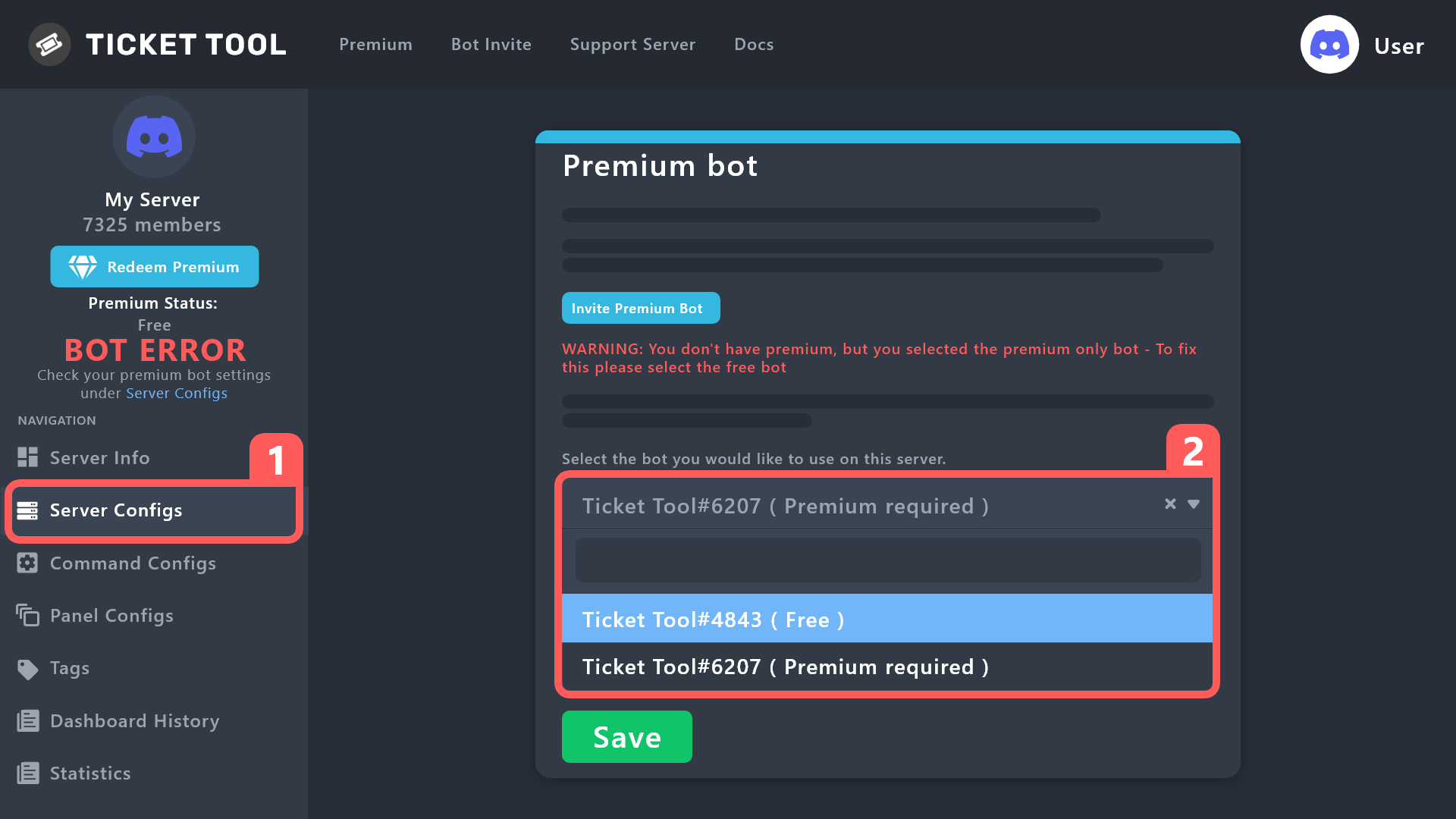
Once the bot is in your server we will head to the dashboard and manage your server. When you are managing your server, you want to head into "Server Configs" then click the drop down menu under "Select the bot you would like to use on this server" then click "Ticket Tool#6207" and then save.
 rustic gale
Note that the basic bot must not leave the server
or else your subscription will be cancelled
jade topaz
rustic gale
That's almost surely because you blacklisted everyone in Blacklist Roles in **Se...
Where is the blacklist roles please ?
swift kayak
Where you can find server storage?
jade topaz
rustic gale
That's almost surely because you blacklisted everyone in Blacklist Roles in **Se...

Nothing in Blacklist Roles
rustic gale
jade topaz
Nothing in Blacklist Roles
Then head to Panel Configs -> Buttons -> Create Ticket
swift kayak
rustic gale
It's normal if you enabled **Server Storage** in Server Configs. If you want the...
Will it also auto deletes when i click it if i do that?
rustic gale
Make sure you didn't enable Support team only
rustic gale
swift kayak
Where you can find server storage?
 rustic gale
swift kayak
Will it also auto deletes when i click it if i do that?
rustic gale
swift kayak
Will it also auto deletes when i click it if i do that?
It will first ask you to confirm the delete. If you want to skip the confirmation, head to Panel Configs -> General and disable the switch that says Two Step Ticket
iron nightBOT
Gave +1 Rep to @rustic gale
swift kayak
😂😂
 lusty geode
desfsd
jade topaz
@rustic gale Please, why my Support team can't see the Forms when a member create a ticket please ?
Oh sorry for the ping !
Me is the first image, and the second it's my support team

 jade topaz
fallow ingot
Please do not ping support staff.
jade topaz
fallow ingot
Please do not ping support staff.
Yes sorry !
But do you have one explication please ? :c
Ah mais tu es français aussi, tu serais m'expliquer pourquoi mon "Equipe de support" ne voit pas les formulaires s'il te plaît ? :c
fallow ingot
oui & ils peuvent voir des formulaires
jade topaz
fallow ingot
oui & ils peuvent voir des formulaires
Justement, je suis en partage d'écran avec lui et lorsque je créer un ticket, il ne voit pas le formulaires :/
fallow ingot
Je vais t'aider dans #1053789787271733368
jade topaz
fallow ingot
Je vais t'aider dans <#1053789787271733368>
D'accord !
jade topaz
how do i make it that ticket tool message auto pin
lunar solar
jade topaz
how do i make it that ticket tool message auto pin
Panel Configs —> General —> Auto Pin Ticket
fallow ingot
fallow ingot
Je n'ai plus qu'à promener mon chien et je reviens lol
Solved
 fallen wigeon
Hello, I would like to know how I can put a role and the channel to create a ticket. Could you help me because I am confused? 🙂
rustic gale
 wild juniper
does the team need someone who can speak russian/german
wild juniper
does the team need someone who can speak russian/german
Stay tuned for application calls in #📣│server-news. That's where they are published when we need new support team members
rustic gale
fallen wigeon
Hello, I would like to know how I can put a role and the channel to create a tic...
I'm confused too. What do you mean by a role?
fallen wigeon
rustic gale
I'm confused too. What do you mean by _a role_?
sorry rol I was not mistaken the panel as I think they told me something like that but I don't know how I do it
rustic gale
Check out the Setup Guide in #📂│information
wild juniper
rustic gale
Stay tuned for application calls in <#509770538051305493>. That's where they are...
kk
 sinful oar
Hey on mobile there is no Symbol to click on it to open a Ticket is this normal?
 tribal bone
rustic gale
sinful oar
Hey on mobile there is no Symbol to click on it to open a Ticket is this normal?
tribal bone
rustic gale
sinful oar
Hey on mobile there is no Symbol to click on it to open a Ticket is this normal?
There should be a button
If you can't see the button, it's likely that you're using an outdated app
Try updating your app and checking again
 woeful oyster
I need help. I have a problem. If I make a ticket, but the server is not showing up, I mean, it is not there. I cannot add a ticket.
 spark gull
Why are there 2 buttons when I send the panel when I only set one up?
 desert geyser
Is this a premium feature ? 
 slender minnow
Nope
humble sequoiaBOT
The Drop-down menu or Select Menu replaces the buttons on your panel message and uses a drop-down menu with all of your panels. To set this up, go to your Panel Configs and select your main Panel.
<:Numbericons1:1018864164032225340> Enable Select Style
First you enable Select Style. Then you add an item in the Dropdown Editor. Now you can start editing your dropdown!
<:Numbericons2:1018864168041971712> Dropdown Editor
Each line in the dropdown editor represents a line in the drop down menu on discord. You can add more "Items", by clicking on 

First you select a panel. That's the panel this option will open a ticket for.  DONT select the same panel twice. Each option should have a different Panel
After that, you can put a Display. This is the title of this option and will appear in the drop down menu. The *Description can be set right after that, which will be below the title in grey.
Additionally you can select an emoji, that will be shown in front of each option. You can either manually input the ID of an emoji or select it in the selector.
Common Issues ⚠️
- Panel doesn't send? Make sure you have a valid emoji selected
- Option doesn't show up? Check if two options have the same panel in the DropDown Editor

$dropdown
 unreal oracle
Hi . When tickets are opened in my server , users can’t send images
fallow ingot
unreal oracle
Hi . When tickets are opened in my server , users can’t send images
You have to enable  Attach files in Permissions under General.
jade topaz
2 button ?
 solid stream
jade topaz
2 button ?
solid stream
jade topaz
2 button ?
Customizing your panel!
 shy storm
Hello can the closed tickets get moved to an other category when I close the ticket?(not transcript)
swift kayak
Yeah you can do it in panel configs than click on category than you should see create/opened tickets and closed
shy storm
i have changed that but the closed tickets stay on the same category
swift kayak
Than idk sorry
shy storm
 solid stream
shy storm
solid stream
shy storm
Multiple reasons, first, do you have over 50 channels in the closed category? that's the Discord limit.. 2nd, make sure Ticket Tool has perms to manage that category.
shy storm
solid stream
Multiple reasons, first, do you have over 50 channels in the closed category? th...
i probably have not given perms at ticket tool
that seemed to be the issue thanks and have a nice day :D
rustic gale
woeful oyster
_____________________________
I need help. I have a problem. If I make a ticket,...
Are you still having this issue?
sinful oar
rustic gale
Try updating your app and checking again
Now it works thank you
iron nightBOT
Gave +1 Rep to @rustic gale
 livid kite
When a person opens up a ticket on my server, there will be set up officer team but also bots that we have on that server.
When I go to settings, it only shows officers that should be able to see the ticket.
Is there a way to remove those bots from the channel to keep it more clear?
 steep valley
Hey friends!
How do i get the bot to @ a role when creating a ticket.
@rustic gale
srry
humble sequoiaBOT
1. Go into your Dashboard
2. Open your Panel Configs tab
3. Select the panel you want to ping your support on
4. Open the Ticket options menu
5. Click on Edit Ticket Message
6. In the Message Content use one of the role mention syntax (**{@Role Name}**/**{Role ID}**)
7. Save changes
Note: For this to work properly, Ticket Tool requires the Mention Everyone permission. Or the role must have the Allow anyone to @mention this role setting enabled 

 craggy geyser
Role names are case sensitive, and the role must be pingable (either have everyone able to ping it, or TT able to ping everyone)
steep valley
my bad,. srry
jade topaz

???
On one server it works and on the other it doesnt
Its the same bot's account
@craggy geyser
Definitely thanking him
 pastel timber
how to make a panel with multiple buttons
rustic gale
jade topaz
You activated the premium bot. You need to either invite the premium bot, or disable the premium bot
Head to Server Configs in your dashboard
jade topaz
rustic gale
You activated the premium bot. You need to either invite the premium bot, or dis...
Say ong
rustic gale
There's an Invite Premium Bot button if you want to invite it
And there's a dropdown selector if you want to choose the basic bot instead
jade topaz
rustic gale
There's an Invite Premium Bot button if you want to invite it
Is it free to invite
And use
rustic gale
Your server doesn't have premium?
Then you should definitely disable the premium bot
humble sequoiaBOT
How to disable the premium bot
To disable the premium bot you will have to go to the Dashboard ➞ Server Configs ➞ Premium bot ➞ And on the right-hand side select the primary free bot in the drop down menu.
Premium features will still work on the normal bot.
 rustic gale
Are you afraid you're talking to a robot?
jade topaz
Oh my bad seems like you arent an AI
Okay listen dawg how can i see if i got premium
Hello?
How do i buy premium and how much is it for
slender minnow
jade topaz
How do i buy premium and how much is it for
Premium is $ 5.99 per month, you can purchase it through the app direcotry, the bot's profile or through alternate payment options (not supported by discord) such as paypal, eth, btc, etc.
note, currently we don't support annual subscriptions via the app directory
woeful oyster
rustic gale
Are you still having this issue?
yes
jade topaz
slender minnow
Premium is $ 5.99 per month, you can purchase it through the app direcotry, the ...
Ong??
jade topaz
slender minnow
*note, currently we don't support annual subscriptions via the app directory*
How much does it cost usually
 empty crystal
how do u fix "you dont have permisson to use this"
slender minnow
jade topaz
How much does it cost usually
we don't support annual subscriptions anymore iirc
jade topaz
slender minnow
we don't support annual subscriptions anymore iirc
Say ong
slender minnow
??
jade topaz
How much it used to cost and why it got canceled
slender minnow
we moved over to discord as a payment processing platform, so it doesnt supports annual subscriptions yet
empty crystal
slender minnow
we don't support annual subscriptions anymore iirc
do yk how to fix "you dont have permisson to use this"-ticket tool
jade topaz
slender minnow
we moved over to discord as a payment processing platform, so it doesnt supports...
Its not even available on mobile dawg
slender minnow
empty crystal
do yk how to fix "you dont have permisson to use this"-ticket tool
sorry, but i'll be going off in a few minutes
possible reason would be you set up permissions for that button wrong
slender minnow
jade topaz
Its not even available on mobile dawg
its not available for mobile users, you can either purchase it through discord using a pc/browser client or open a ticket with us to use a different payment method (btc, eth, paypal, etc.)
gilded verge
empty crystal
do yk how to fix "you dont have permisson to use this"-ticket tool
You have an open ticket, so to avoid confusion, please make sure you ask for help in one channel.
rustic gale
woeful oyster
yes
Please use /permissionlevel in that server
let me know what permission level you see
woeful oyster
no
solid stream
slender minnow
we don't support annual subscriptions anymore iirc
we will again once Discord allows us..
 crude flame
My account is my main account, how do I get it back?
fallow ingot
what?
crude flame
My account is my main account, how do I get it back?
crude flame
what?
gilded verge
 mossy frigate
Hello?
mossy frigate
Hello?
Literally 4 minutes ago you opened a ticket... to avoid confusion, please make sure you ask for help in one channel and just wait for help.
crude flame
I have a problem

My account is my main account, how do I get it back?
@mossy frigate
crude flame
I have a problem, I can't write
crude flame
I don't know
mossy frigate
I check this to make an ticket
crude flame
I entered the server and it happened
mossy frigate

Struggling to setup ticket tool in your discord server? By the end of today you will be able to have a working ticket system in your own discord server. Ticket's can make sorting issues out with your members so much easier and allows decisions to be dealt with correctly and in one place.
If you found the video useful, consider dropping a like!
...
Oh so I don’t know sorry
I wish to help but I need to go now cya good wishes
And don’t dm me pls
jade topaz
how do i make it that the person who made a ticket can talk in ticket (thread style)
forest pond
I just subscribed, but I couldn't get the premium bot, how is that?
 rustic gale
jade topaz
how do i make it that the person who made a ticket can talk in ticket (thread st...
rustic gale
jade topaz
how do i make it that the person who made a ticket can talk in ticket (thread st...
Make sure they have the Send Messages in Threads permission
rustic gale
forest pond
I just subscribed, but I couldn't get the premium bot, how is that?
Using the premium bot is optional. All premium features are available in the primary bot anyway
Here's how you invite it
humble sequoiaBOT
The first thing you will need to do is invite the premium bot, an invite can be found here
Once the bot is in your server we will head to the dashboard and manage your server. When you are managing your server, you want to head into "Server Configs" then click the drop down menu under "Select the bot you would like to use on this server" then click "Ticket Tool#6207" and then save.
rustic gale
Note that because you bought the subscription with the basic bot, it must stay in the server
otherwise the subscription wil be cancelled
jade topaz
rustic gale
Make sure they have the **Send Messages in Threads** permission
ok
still no
jade topaz
rustic gale
Make sure they have the **Send Messages in Threads** permission
should i give that pemrs
to everyone
forest pond
rustic gale
Note that because you bought the subscription with the basic bot, **it must stay...
But still i can't use premium features
rustic gale
forest pond
But still i can't use premium features
Use the /premium command. You should see “Discord: Active”
Then refresh the dashboard
jade topaz
help me pls
rustic gale
jade topaz
to everyone
Yes, unless there's a reason why you don't want everyone to be able to send messages in threads everywhere
jade topaz
rustic gale
Yes, unless there's a reason why you don't want everyone to be able to send mess...
i dont want everyone to see the threads only the person who made the ticket and gets added
 glossy onyx
What is the problem?
 jade topaz
if i dont what everyone to see it should i turn it of
rustic gale
jade topaz
i dont want everyone to see the threads only the person who made the ticket and ...
Ticket threads are private
Users can't see private threads unless they're invited or they have the Manage Threads permission
jade topaz
could you do it for me it would be much appreciated?
rustic gale
Sorry, that's not the sort of support we provide here
 rustic gale
jade topaz
which one should i turn on ?
rustic gale
jade topaz
which one should i turn on ?
It doesn't work there
Thread-style ticket permissions don't use those permissions
You have to set up the permissions through the Edit Channel -> Permissions menu on Discord itself
 royal lark
How to put ticket tool in salon
royal lark
royal lark
How to put ticket tool in salon
.
forest pond
How can i invite premium bot to my server ?
humble sequoiaBOT
First you will want to invite the bot to your server. Once the bot is in your server, you can manage your server in the dashboard.
To create a panel we are going to need to head over to the Panel Configs Tab on the Dashboard.
Once at the dashboard we will need to click Create Panel.
Enter a panel name (Fill in any optional settings you want).
Click Create Panel and you are ready to get started with configuring your panel.
An example of a creating a panel is shown below.
Once the panel has been created, use the blue Send button and select the channel you want the panel to be sent to.
The Panel wasn't send
Use the </debug:ID> command to diagnose possible permission issues with the bot.
gilded verge
humble sequoia
@royal lark, check
humble sequoiaBOT
The first thing you will need to do is invite the premium bot, an invite can be found here
Once the bot is in your server we will head to the dashboard and manage your server. When you are managing your server, you want to head into "Server Configs" then click the drop down menu under "Select the bot you would like to use on this server" then click "Ticket Tool#6207" and then save.
gilded verge
humble sequoia
@forest pond, check
 nimble oracle
I was wondering if it was possible to add a cooldown to how many tickets a user can create within a specific panel, premium or not?
steep valley
It's basic. It's shows on the dashboard
nimble oracle
steep valley
It's basic. It's shows on the dashboard
Yes. Where?
steep valley
Look through. Can't remember exactly where but it shows in the panel config just look through those one by one
gilded verge
nimble oracle
I was wondering if it was possible to add a cooldown to how many tickets a user ...
If you want set limits for panel, you can check Panel Configs->Limits, but if global, then please check Server Configs->Global Ticket Limit
premium is only where you notice emoji
iron nightBOT
Gave +1 Rep to @gilded verge
 grim surge
Hey guys, I’m not receiving any message from a new ticket anymore. When created, the bot just doesn’t send the default message. Can anyone help me?
 gilded verge
grim surge
Hey guys, I’m not receiving any message from a new ticket anymore. When created,...
gilded verge
grim surge
Hey guys, I’m not receiving any message from a new ticket anymore. When created,...
Hey, i'll try to help you ^^
On your server please run /debug command and send link from bot here.
Example:
 grim surge
gilded verge
Hey, i'll try to help you ^^
On your server please run `/debug` command and send...
gilded verge
grim surge
gilded verge
Hey, i'll try to help you ^^
On your server please run `/debug` command and send...
gilded verge
hmmm, seems like everything is okay with permissions 🤔 please wait...
grim surge
gilded verge
hmmm, seems like everything is okay with permissions 🤔 please wait...
ok! first time I tried this command, it showed “The application did not respond” if it helps you
gilded verge
okay so few questions:
1. When did you create the panel?
2.Has this problem happened before or is this the first time?
gilded verge
grim surge
ok! first time I tried this command, it showed “The application did not respond”...
oh, then it means the bot didn't have permission to the channel, that's why you got this error
grim surge
gilded verge
okay so few questions:
`1.` When did you create the panel?
`2.`Has this problem...
Tbh I created the panel has been a long time, like 2 years… This problem never have had happened until today, now it’s happening every time anyone create a new ticket
grim surge
gilded verge
oh, then it means the bot didn't have permission to the channel, that's why you ...
The bot has total access to my server, administrator permission
gilded verge
grim surge
Tbh I created the panel has been a long time, like 2 years… This problem never h...
oh 😳
please duplicate your panel->send to channel->open a ticket->and check if problem is solved ^^
grim surge
gilded verge
oh 😳
please duplicate your panel->send to channel->open a ticket->and check if ...
ok! tysm for your excellent support
gilded verge
oof, im sorry, button's name is Clone, not Duplicate 😅
 grim surge
thanks @gilded verge
iron nightBOT
Gave +1 Rep to @gilded verge
 shy plume
I have a question:
Do you think the user who created the ticket should be able to close the ticket? Or does it make no sense to you?
I ask for advice, because one could create one and then immediately close it and so on.
gilded verge
shy plume
I have a question:
Do you think the user who created the ticket should be able ...
Hmmm, of course it's a good option for a user to close a ticket because then you'll be sure he doesn't need help anymore, but he shouldn't be able to delete tickets, deletion should only be available to your moderators ^^
shy plume
gilded verge
Hmmm, of course it's a good option for a user to close a ticket because then you...
It is also true that in order to create a new ticket the previous one must have been deleted.
It hadn't occurred to me.
gilded verge
noo, he can open new ticket even if the previous one was only closed 😳
*unless you have set limits, then the previous one ofc should be removed 🤔

 clever swan
olá @gilded verge, eu estou com problemas para abrir tickets no meu servidor.
os meus administradores não estão sendo notificados através do BOT quando um ticket é criado no servidor.
 gilded verge
clever swan
olá <@334671104704774154>, eu estou com problemas para abrir tickets no meu serv...
gilded verge
clever swan
olá <@334671104704774154>, eu estou com problemas para abrir tickets no meu serv...
Olá, desculpe, mas não posso ajudá-lo porque não conheço o idioma. O ideal é abrir um ticket no canal #🎫│make-a-ticket ^^
grim surge
just to update: I got this message error when trying to clone the ticket, as soon as I get home I’ll try to check the issue in my embed message.
 shy plume
gilded verge
*unless you have set limits, then the previous one ofc should be removed 🤔
shy plume
gilded verge
*unless you have set limits, then the previous one ofc should be removed 🤔
Yes, but it is not possible to set any particular limit. That is, I could set the limit to create 0 open tickets per user, but it doesn't make sense, because nobody could create any ticket, because it has already reached the limit as soon as the bot tries to create a new ticket; not succeeding.
gilded verge
grim surge
just to update: I got this message error when trying to clone the ticket, as so...
oh... from what i can see, this panel can't work good because there are added fields that require premium and that's why it doesn't work 😳
this in Ticket Message for example:
 shy plume
Yes, but it is not possible to set any particular limit. That is, I could set th...
shy plume
shy plume
Yes, but it is not possible to set any particular limit. That is, I could set th...
You're telling me that I should impose a limit like this: you who created the ticket until your ticket is deleted are not allowed to create any new ticket. But is there a way to do that? Maybe limit the number of closed tickets to 1?
gilded verge
shy plume
Yes, but it is not possible to set any particular limit. That is, I could set th...
when you have the opportunity, please send a screenshot because I would like to see what the bot will reply when you try to create it but it fails - referring to your first message today ^^
shy plume
gilded verge
when you have the opportunity, please send a screenshot because I would like to ...
No but, it says that: "Ticket limit reached, You already have 0 tickets open of the 0 allowed for this panel". Just like I said before.
gilded verge
🤔 could you please send your server id or name?
shy plume
gilded verge
🤔 could you please send your server id or name?
This happened (I mean the bot's "Ticket limit reached, You already have 0 tickets open of the 0 allowed for this panel" error) when I set the maximum ticket limit per user to 0 zero, but it doesn't make sense and so it can't be the solution to what I wanted to do.
Could a solution be to impose the maximum limit of closed tickets per user to 1? Or to a certain number? So that they can't open and close a large number?
gilded verge
yup, it's a good idea to set it to 1
if you want to see, I have these settings and I know that 1 is perfect:
 shy plume
Perfect. Thank you @gilded verge
iron nightBOT
Gave +1 Rep to @gilded verge
nimble oracle
gilded verge
If you want set limits for panel, you can check `Panel Configs`->`Limits`, but i...
This settings only has for open tickets, is there an option to limit tickets, open or closed, per user for a specific amount of time?
If not, I'll post it as a suggestion as a feature
rustic gale
nimble oracle
This settings only has for open tickets, is there an option to limit tickets, op...
For a specific amount of time? No, not a feature that exists
nimble oracle
Oh alright
 lunar solar
jade topaz
How do i fix this?
lunar solar
jade topaz
How do i fix this?
You attached the panel to itself
Panel configs —> Panel —> Attached Panels (Multi Panels) —> Make sure this box is empty
After that resend the panel message to Discord using the send button or update the message using our update button
 tawdry lily
Does anyone know how I can make it to where only like my mod's can see the ticket?
well the mods and the people who opened it
rustic gale
tawdry lily
Does anyone know how I can make it to where only like my mod's can see the ticke...
That's how it is by default, unless you moved the permission settings
Take a look in Panel Configs -> Permissions -> Everyone Opened Permissions
Is the View Channel permission set to ?
tawdry lily
rustic gale
That's how it is by default, unless you moved the permission settings
ohh, thankyou.
 mystic flame
why can’t i edit the panel message on mobile
livid kite
rustic gale
Do the bots have the Administrator permission?
Only one bot has so it should not be because of that. My officers doesn't have administrator permission and they are added to tickets through the webpage. I cannot find a place where to take off bots from the ticket 😄
 torn prism
Hi I bought Ticket tool premium subscription through the App Directory but what after that, how to activate it?
 pale pilot
torn prism
Hi I bought Ticket tool premium subscription through the App Directory but what ...
pale pilot
torn prism
Hi I bought Ticket tool premium subscription through the App Directory but what ...
run the /premium command if you havent already
jade topaz

I completed my subscription, but it's been 30 minutes but I can't use it
After a 7-day free premium subscription, I paid for a paid 30-day
woeful oyster
rustic gale
let me know what permission level you see
no
fallow ingot
jade topaz
Did you purchase through Discord?
pale pilot
already solved in a ticket
 wicked orbit
is there a way to contact an admin directly? i dont have the feeling my ticket is gonna help me
nvm im wrong
rustic gale
livid kite
Only one bot has so it should not be because of that. My officers doesn't have a...
Consider making a ticket to ask about this #🎫│make-a-ticket
livid kite
Will do that, thanks!
humble sequoiaBOT
━━ moved to ticket ━━
 fallow wedge
hi!
I was saving some closed tickets in a category, but now they're deleted
is there a way to avoid that? i don't exactly know why it happened
sterile canyon
is there anyway to activate the transcript button without having two-step ticket on and without buying premium
sharp cedar
the bot have all permissions

 shrewd herald
Hi I need help to reset my 2fa, anybody can help me with this?
 wise bloom
Does anyone know why I have 2 create ticket buttons? I can turn them both off or both on, I dont see a setting to make it just one
lunar solar
Can you elaborate on what you mean by custom tickets?
lunar solar
fallow wedge
is there a way to avoid that? i don't exactly know why it happened
Was it always doing this?
lunar solar
sterile canyon
is there anyway to activate the transcript button without having `two-step ticke...
Unfortunately no
lunar solar
sharp cedar
the bot have all permissions
Can you do /debug in the channel you are trying to send it to and show me the results
lunar solar
shrewd herald
Hi I need help to reset my 2fa, anybody can help me with this?
Discord 2FA?
shrewd herald
lunar solar
Discord 2FA?
Of my account in dxcup
humble sequoiaBOT
⚠️ You're in the wrong place
We provide support for Ticket Tool Discord bot and cannot help you with whatever issue you have.
- We don't know which Support Team you should contact to get this issue resolved, and unfortunately we won't be able to accurately tell you.
If you don't have any further questions regarding our bot Ticket Tool, please close this ticket
lunar solar
wise bloom
Does anyone know why I have 2 create ticket buttons? I can turn them both off or...
You've attached the panel to itself:
Panel Configs --> Panel --> Attached Panel (Multi Panel) --> Make sure this box is empty
Then resend the message to Discord or use our update button and update the message in Discord
fallow wedge
lunar solar
Was it always doing this?
I just invited the bot yesterday and put it to work
wise bloom
lunar solar
You've attached the panel to itself:
Panel Configs --> Panel --> Attached Panel ...
Thank you very much!
iron nightBOT
Gave +1 Rep to @lunar solar
fallow wedge
fallow wedge
I just invited the bot yesterday and put it to work
and that happened, I don't exactly know what happened cause' I wasn't at the moment, but one of my mods says they randomly deleted
lunar solar
fallow wedge
I just invited the bot yesterday and put it to work
Ahh okay sounds like you don't have two step ticket enabled which means when the close button interaction happens it will just follow the process to delete the ticket
Panel Configs --> General -->  Two Step Ticket
Note: This will only take effect for newly created tickets
fallow wedge
lunar solar
Ahh okay sounds like you don't have two step ticket enabled which means when the...
nope, they deleted one after another, I had like 8 or 9 closed tickets
and they just deleted themselves
lunar solar
They don't delete themselves
fallow wedge
And I do have that option enabled
lunar solar
I suggest setting up logging
as one of your staff members has run the delete command or button interaction
Panel Configs --> Logging --> Pick a channel --> Select what logs you want, in this case specifically the ticket deleted log
As there is no way to tell otherwise

 solid stream
Hmm, that's an odd error
solid stream
 tepid oyster
hi guys any help?
tepid oyster
hi guys any help?
Can I get your server id?
solid stream
tepid oyster
hi guys any help?
Ahh
The issue is with your ticket message
Seems the limit for that is 2000, not 2048 Like I have set..
@tepid oyster
jade topaz
hello, how do i add other roles to a ticket
tepid oyster
solid stream
Ahh
hi, but if you can see
solid stream
tepid oyster
hi, but if you can see

Ticket Tool - Ticketing without clutter - The #1 discord Ticketing bot
tepid oyster
i got timed out hehe how can i send you the server id? and also theres barely messages there
solid stream
 solid stream
tepid oyster
i got timed out hehe how can i send you the server id? and also theres barely me...
solid stream
tepid oyster
i got timed out hehe how can i send you the server id? and also theres barely me...
It's not the panel message, it's the ticket message
tepid oyster
ohhhhh oke i change thank you ill try ❤️
tepid oyster
solid stream
It's not the panel message, it's the ticket message
bro dm pls
 austere rampart
Hi how can I reset tickets counter?
 solid stream
Top of the panel configs page of the dashboard (after selecting a panel)
There's a button to set count.
austere rampart
solid stream
Top of the panel configs page of the dashboard (after selecting a panel)
This one?
 solid stream
austere rampart
This one?
solid stream
austere rampart
This one?
Yup
austere rampart
Ok thanks
lunar solar
If there are more than 50 channels (tickets) in a category then Discord will start putting them at the top of Discord. This is a Discord limitation.
Either set another category for overflow under:
Panel Configs —> Category (You can have more than one, tickets will flow under categories based on order set on the Dashboard)
Or
Delete some tickets
 rigid parrot
How to get the Questions visible in panel after creating the Ticket
 south topaz
rigid parrot
How to get the Questions visible in panel after creating the Ticket
south topaz
rigid parrot
How to get the Questions visible in panel after creating the Ticket
insert this: {create.form.1} and {create.form.2}
 frank portal
Was wondering if I can change settings to have new tickets appear on the top of the category instead of on the bottom?
 warm scaffold
How do I put 4 buttons or remove 1 of these 2? or change the name of just one?

@slender minnow
Helper me?
slender minnow

Please do not ping unless you were specifically asked to do so (which i don't think anyone from the team would ask you to do)
humble sequoiaBOT
For a more convenient use of multipanels, you can now combine panels on the dashboard. This will allow you to directly send the multipanel from the dashboard or via the $panel ID command.
Where can I find this?
You can find this setting on the Dashboard -> Panel Configs -> Settings -> Panel
Note: if you're attaching all the panels to a panel called English, don't include English in the attached panel's box (If you do this, it will create a duplicate)
This will put all buttons from all of your panels on one message. The message is the panel message from the panel you're combining these panels in.
slender minnow
How to add 4 buttons
to answer your first message
 tidal tulip
Is there a command that removes each ticket? There are 700 tickets on my server
gilded verge
tidal tulip
Is there a command that removes each ticket? There are 700 tickets on my server
- Maximum number of all channels on one discord server is 500, so you can't have 700 🙂
- There is no such command because the bot would reach the rate limit and many servers would not be able to use the bot 😕
- The only thing i can recommend you is to on your server paste
$deleteto every ticket
scenic plinth
Well thats interesting, what app are you on? Surely it is not Discord, because you can only create 500 channels maximum.
||Did not register you were typing or I would not have responded Miro||
gilded verge
scenic plinth
||*Did not register you were typing or I would not have responded Miro*||
||noooo, it's okay Kenzy  ||
||
 mild field
humble sequoiaBOT
mild field
humble sequoiaBOT
━━ moved to ticket ━━
tidal tulip
gilded verge
1. Maximum number of all channels on one discord server is 500, so you can't hav...
pv jakbyś mógł
gilded verge
tidal tulip
pv jakbyś mógł
nie pomagamy na priv, od tego jest ten serwer wsparcia 🙂
jeśli nie chcesz tutaj, to otwórz bilet na kanale #🎫│make-a-ticket, tam poproś o pomoc
 idle flint
Hi guys, I think I already know the answer but I will ask to confirm - Are images that are sent within the ticket channel only saved within transcripts via the premium version of the bot or should they be getting saved (and able to be viewed within the transcript) via the free version too?
scenic plinth
Images are currently not stored in transcripts without premium, this is because Discord no longer stores files once the channel is deleted, and premium is currently using a different method with being able to save files to transcripts.
idle flint
scenic plinth
Images are currently not stored in transcripts without premium, this is because ...
Appreciate the reply - we run tickettool on 3 servers but one isn't premium. Some of our members had complained about losing images on that server compared to others, just wanted to make sure it was the lack of premium that was causing it.
 rustic gale
frank portal
Was wondering if I can change settings to have new tickets appear on the top of ...
rustic gale
frank portal
Was wondering if I can change settings to have new tickets appear on the top of ...
Currently not possible. But you can leave the suggestion using the s!suggest command in #🤖│bot-spam
rustic gale
 wicked timber
Is this still happening?
jade topaz
Hello, I have made a form on one of my tickets in which there is a question I can not delete no matter what. Every time I delete it, it comes back.
wicked timber
rustic gale
Is this still happening?
yes
 shut bolt
Head to your dashboard, panel configs, choose the message you want to edit, probably Panel Message, and within the editor use the color picker, field 12 of the image below
humble sequoiaBOT
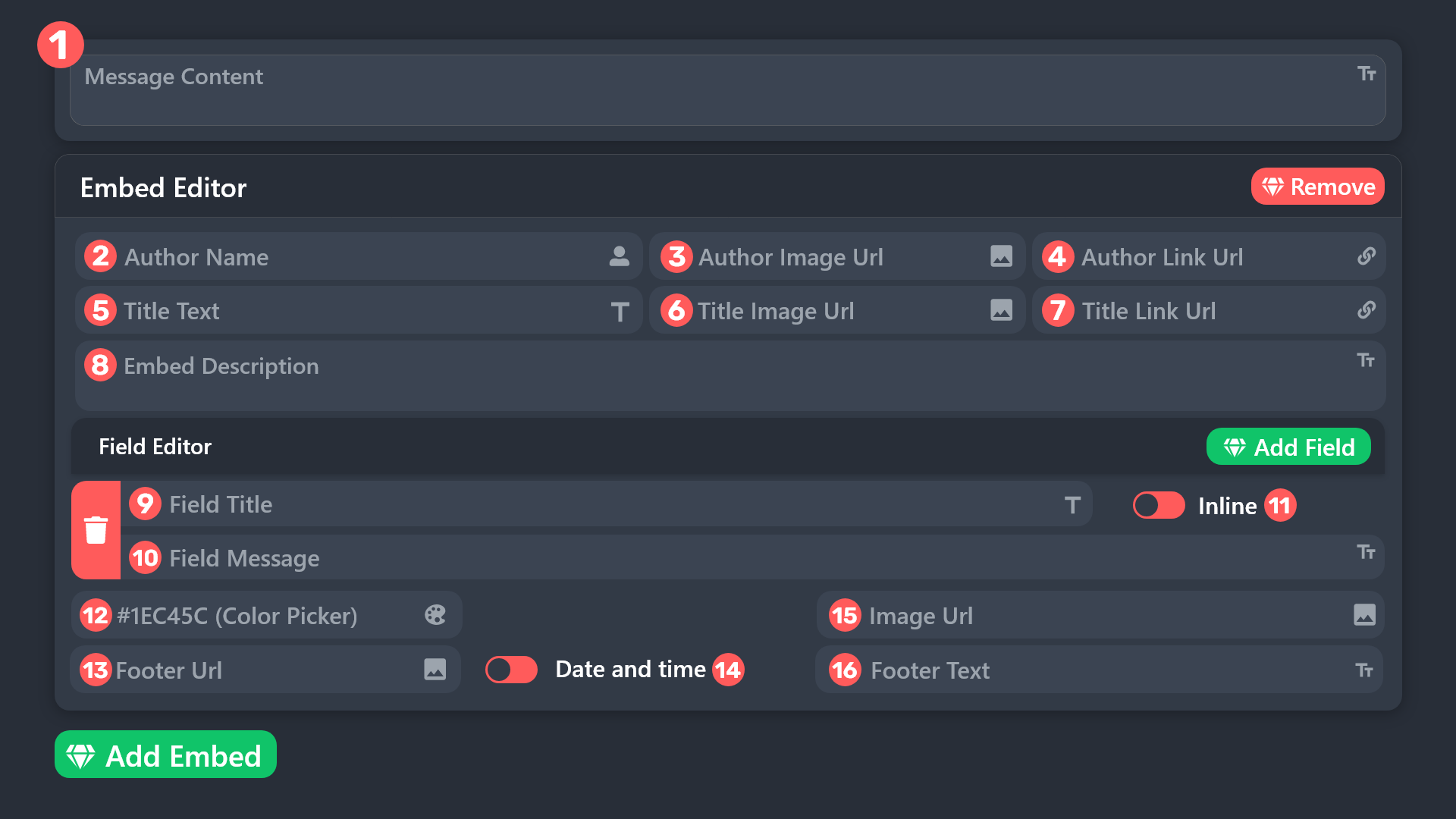 shut bolt
Which message do you want to edit?
Editing the color of an embed counts as editing the message
As mentioned, then choose Panel > Edit Panel Message
And there you'll see the editor


 shut bolt
wicked timber
every interaction same error
shut bolt
wicked timber
every interaction same error
Does this happens with all commands? Or just this specific one?
Great
You need to save changes and resend the panel
wicked timber
shut bolt
Does this happens with all commands? Or just this specific one?
all
shut bolt
wicked timber
all
Mind sharing with us the server's ID please?
shut bolt
wicked timber
740311842307571722
Alright, would you please #🎫│make-a-ticket so we can check in depth what's causing it
shut bolt
wicked timber
very sorry something came up I 'll be back in 30 min or so
No worries
wicked timber
ok thanks
rustic gale
jade topaz
Hello, I have made a form on one of my tickets in which there is a question I ca...
That's funny. Could you #🎫│make-a-ticket so we can take a look?
wicked timber
shut bolt
Alright, would you please <#571706435449257997> so we can check in depth what's ...
 terse kiln
hey guys is the transcript saving still bugged?
 formal salmon
Hey guys, does anyone know how to add multiple buttons to a panel? I literally can't figure it out for the life of me
I have premium just can't figure it out with the new settings interface update
lunar solar
formal salmon
Hey guys, does anyone know how to add multiple buttons to a panel? I literally c...
Panel configs —> Panel —> Attached Panels (Multi Panel) —> Add your other panels inside this box.
Some points:
- Each button requires its own panel (clone your original so your settings are pre configured and then just make small changes)
- Do the above to one panel, do not attach the same panel to itself as it will be the first button.
- The buttons appear in the order you attach them
Once you’ve attached the buttons you will either need to send the selected “primary” panel to Discord again or use the update button to update the already exisiting embed message
lunar solar
terse kiln
hey guys is the transcript saving still bugged?
Sorry can you elaborate? I’m not aware of any issues with transcripting
 humble sequoiaBOT
The panel message is where people react to make a ticket. To customize it head over to your Dashboard --> Panel Configs -> Panel -> Edit Panel Message
 terse kiln
lunar solar
Sorry can you elaborate? I’m not aware of any issues with transcripting
terse kiln
lunar solar
Sorry can you elaborate? I’m not aware of any issues with transcripting
Recently whenever saving transcripts it doesn't actually save them, and then when we click delete it just with the obvious deletes instead
rustic gale
That sounds terrible. You should probably #🎫│make-a-ticket so we can take a closer look
 candid oasis
?
 rustic gale
candid oasis
?
rustic gale
candid oasis
?
Invalid emoji
This is often because you added text to the Button Emoji field
The Button Emoji field is for the emoji alone.
candid oasis
oh
terse kiln
rustic gale
That sounds terrible. You should probably <#571706435449257997> so we can take a...
will do shortly, not quite the issue but seems a few of our tickets also went missing
 candid niche
where do i receive the code for premium?
rustic gale
candid niche
where do i receive the code for premium?
You don't. Try using the /premium command in your server. You should see “Discord: Active”
rustic gale
Yes, yes it is
 rancid pollen
rustic gale
rancid pollen
rustic gale
 meager mason
can i get support on how to make my own ticket?
meager mason
can i get support on how to make my own ticket?
Have a look at the Setup Guide in #📂│information
You can ask me what you don't know
meager mason
@rustic gale so question - i wanna make a ticket for reporting staffs but i dont want the staff members to see
very tempting to mention someone
lunar solar
meager mason
<@832864595726172162> so question - i wanna make a ticket for reporting staffs b...
#🎫│make-a-ticket and select the staff report option
meager mason
lunar solar
<#571706435449257997> and select the staff report option
Not that 😂 - for my server tickets
 obtuse mountain
Heya can anyone help me rq?
how do I name the ticket after the person who pulled it again?
meager mason
obtuse mountain
Heya can anyone help me rq?
how do I name the ticket after the person who pulled...
explain a little more
obtuse mountain
that the channel that gets created automatically has the name of the person who pulled the ticket
meager mason
im not understanding - please give me your question in better english
obtuse mountain
dude its not getting better XD
meager mason
Dude?
obtuse mountain
how else am I supposed to say it XD
obtuse mountain
sorry I cannot see through your screen
giving the channel the name of the person who pulled the ticket XD
meager mason
obtuse mountain
sorry I cannot see through your screen
understandable
meager mason
obtuse mountain
giving the channel the name of the person who pulled the ticket XD
im sure thats a premium thing - never had it maybe someone else could help you
lunar solar
For the staff reports panel just remove everyone from your support team role:
Panel Configs —> General —> Support Team Roles
It won’t work though if some of your staff have administrator permissions to the server
meager mason
lunar solar
For the staff reports panel just remove everyone from your support team role:
Pa...
so leave it blank?
meager mason
lunar solar
It won’t work though if some of your staff have administrator permissions to the...
could i take it away and just add that role to the chats i want them to access?
lunar solar
obtuse mountain
Heya can anyone help me rq?
how do I name the ticket after the person who pulled...
Panel configs —> Ticket —> Ticket Opened channel name:
{ticket.user.nickname}-{count}
Or
{ticket.user.name}-{count}
Essentially the same
lunar solar
meager mason
so leave it blank?
Ye
meager mason
okay
obtuse mountain
lunar solar
Panel configs —> Ticket —> Ticket Opened channel name:
{ticket.user.nickname}-{c...
thankies 🥰
lunar solar
meager mason
could i take it away and just add that role to the chats i want them to access?
Yeah just used the $add or /add command:
$add @ role
In the ticket once it’s created *
meager mason
OMG - thats so much easy
jade topaz
Hi
 inland fiber
I need help
rustic gale
inland fiber
I need help
Everyone here either needs help or is willing to help. What people usually do is they post their concern and wait for help
inland fiber
Okey
 solemn pagoda
What are dashboard roles
lunar solar
solemn pagoda
What are dashboard roles
People that can login to the dashboard and edit configs etc
solemn pagoda
Ohh okay
lunar solar
Yeah so if they have that Discord role they can login
Anyone with the administrator permission automatically has access as well
jade topaz
Hello everyone, I have started a new server up and in my last server a member of my staff managed to make a folder for transcripted tickets that have been closed which automatically went to the folder, how do I do this?
rustic gale
jade topaz
Hello everyone, I have started a new server up and in my last server a member of...
Depends on what you mean by “folder”
My guess is that you mean a channel category
jade topaz
Like a channel where the automatically get transferred to once transcript
 silver solstice
Hello .. I Need Support
how may i fix that ?
i gived the bot role all premissions and the chanel that the msdg is sending to but i have the same erorr

 golden skiff
silver solstice
how may i fix that ?
i gived the bot role all premissions and the chanel that th...
golden skiff
silver solstice
how may i fix that ?
i gived the bot role all premissions and the chanel that th...
Just give the bot admin perms
silver solstice
golden skiff
Just give the bot admin perms
what is it ?
golden skiff
silver solstice
what is it ?
The bot does not have the correct permissions
silver solstice
golden skiff
The bot does not have the correct permissions
what is the premissions that the bot want
golden skiff
silver solstice
what is the premissions that the bot want
It literally tells you. View and send messages
silver solstice
golden skiff
It literally tells you. View and send messages
i really gived the bot this
silver solstice
I Need Support !
 digital osprey


 wintry pier
Hi
 wheat axle
how can i get free premuim bot ??
gilded verge
wheat axle
how can i get free premuim bot ??
Please go to #🤖│bot-spam (or to your server) and use $vote or /vote
Then vote in Top.gg and BotsForDiscord. Vote on both sites and after 12 hours do the same again.
You need minimum 6 votes to redeem premium ($vote redeem) | 6 votes = 3 days of premium
wheat axle
gilded verge
Please go to <#910978476536905738> (or to your server) and use `$vote` or `/vote...
is this method for 1 time or i can try it for many times
gilded verge
"and after 12 hours do the same again." -you can do that many times but if you voted, then you have to wait 12 hours before you can vote again on the same site ^^
wheat axle
thank u
 gentle iron
how can i link my acc ?
i want to link my acc like this

and how i get my free premium bot


 agile river
sorted
gentle iron
i have redeem code how can i charge it
jade topaz
Hello guys my indicator dosen t show up on tradingview and i waited like a week but i opend my tradingview account just after i purchased the indicator what can i do
pale pilot
jade topaz
Hello guys my indicator dosen t show up on tradingview and i waited like a week ...
Wrong place mate
 river loom
Can someone help me? is creating two same buttons
