#🆘│community-support
1 messages · Page 22 of 1
 rustic gale
 jade topaz
rustic gale
I'm not sure what you mean
jade topaz
rustic gale
I'm not sure what you mean
how did you make such an icon?
 rustic gale
That's the button for Discord's new payment system
Basically, that's a Discord question, not a Ticket Tool question
 lost pond
Anyone know if the ticket tool bot is currently down?
 pale pilot
lost pond
Anyone know if the ticket tool bot is currently down?
pale pilot
lost pond
Anyone know if the ticket tool bot is currently down?
Should be up and running
 bright ice
I keep getting an error in the website that I don't have the bot on my server. It asks me to reloggin but I have and still isnt working.
I need to change the response message to tag the user so they know what to do
rustic gale
bright ice
I keep getting an error in the website that I don't have the bot on my server. I...
Try using /debug in your server
bright ice
rustic gale
Try using /debug in your server
I can't remember the command I gave it. But I'll try that
rustic gale
Let me know.
jade topaz
rustic gale
That's the button for Discord's new payment system
how to make it?
rustic gale
jade topaz
how to make it?
Ask Discord about it
jade topaz
rustic gale
Ask Discord about it
 light flower
how do you enable a claim button>
jade topaz
I have a claim button set up, but is there any way to change the category a ticket is moved to based on who claims it?
I was looking to set it up so maybe around 10 different people, each with their own category, would be able to claim
but right now I only see an option for claim category and overflow which wouldn't do what I'm looking for
 smoky silo
jade topaz
I was looking to set it up so maybe around 10 different people, each with their ...
smoky silo
jade topaz
I was looking to set it up so maybe around 10 different people, each with their ...
I don’t think there is a way to really do that, I mean if you give each of them a custom role and have a private ticket channel for each one of them with a different panel in each one you could make the tickets go to different places, but that would be a lot of hassle.
jade topaz
smoky silo
I don’t think there is a way to really do that, I mean if you give each of them ...
ah okay
rustic gale
light flower
how do you enable a claim button>
Panel Configs -> Claiming
It's premium-only
 brave mason

 humble sequoiaBOT
The panel message is where people react to make a ticket. To customize it head over to your Dashboard --> Panel Configs -> Panel -> Edit Panel Message
 jade topaz
have entered the bott in to the server but still can't find the server under Manage Servers, Does anyone know why?
humble sequoiaBOT
Don't see your server in the dashboard?
You will possibly need to relog. Look below to see the steps on how to relog.
How to relog in the Dashboard.
Note:
You need one of these 3 things to access the dashboard.
1. Server Owner (Level: 6)
2. Server Administrator (Level: 4)
3. Dashboard Role (Level: 2)
:warning: You can check your level using the </permissionlevel:1029797400174399542> command on your Discord Server
User permission level with Ticket Tool
@User is permission level: 0 (User)
```» *If it shows that your permission is **0**, you don't have any of the above **3 things** to manage the dashboard.*


**See the Image below on how to relog:**
 edgy arch
Hello, is there a way to make it so you need a certain role to open a ticket
 oak sapphire
edgy arch
Hello, is there a way to make it so you need a certain role to open a ticket
oak sapphire
edgy arch
Hello, is there a way to make it so you need a certain role to open a ticket
Panel config -> buttons -> button create ticket -> allowed roles
 old furnace
When I try to send the panel message into my server, I receive an undefined error. The bot has permission to see and send the panel in this channel. What could be some of the potential issues/fixes to this situation?
 gilded verge
old furnace
When I try to send the panel message into my server, I receive an undefined erro...
gilded verge
old furnace
When I try to send the panel message into my server, I receive an undefined erro...
Please run /debug and send link here from bot.
old furnace

Ticket Tool - Ticketing without clutter - The #1 discord Ticketing bot
 jade topaz
How do I become a member of the support team?
humble sequoiaBOT
How do be I become a Support Member?
You can become a support member in 2 ways:
1. You can be really active in #🆘│community-support gain <@&799500225579712543> role and get chosen by a Manager
2. You can apply VIA our applications that would be sent in #📣│server-news
We currently have Support Teams for the following languages:
:flag_us: English
:flag_jo: Arabic
:flag_fr: French
:flag_de: German
:flag_br: Portuguese
:flag_es: Spanish.
jade topaz
Alr
old furnace
ok i think i figured out the issue
gilded verge
okay ^^
edgy arch
oak sapphire
Panel config -> buttons -> button create ticket -> allowed roles
Thanks, does this apply to drop down too?
 iron nightBOT
Gave +1 Rep to @oak sapphire
 zenith stream
my tickets dont go in either open, nor closed categories
this doesnt work \ / \ / \ /
 oak sapphire
edgy arch
Thanks, does this apply to drop down too?
oak sapphire
edgy arch
Thanks, does this apply to drop down too?
Yes
oak sapphire
zenith stream
this doesnt work \ / \ / \ /
Does the bot have perms in those categories?
zenith stream
oak sapphire
Does the bot have perms in those categories?
thanks 🙂
iron nightBOT
Gave +1 Rep to @oak sapphire
oak sapphire
np
 olive eagle
Hello there,@fickle narwhal
We don't have any ready-translated languages(except English). You must manually translate the bot into your native language via the dashboard.
edgy arch
I can't add clickable channel redirect text in the embedded panel message
ends up looking like this
 rustic gale
edgy arch
I can't add clickable channel redirect text in the embedded panel message
rustic gale
edgy arch
I can't add clickable channel redirect text in the embedded panel message
Mention the channel by its ID:
humble sequoiaBOT
Within all the messages the bot sends (both embeds and text) you can mention either channels, roles, or even users, these mentions will only send a notification to the user if they are used within a text field, e.g: a role mentioned in an embed won't ping at all the users who have that role.
For mentioning a role you can use one out of three options:
{@Role Name} ➞ Which is Case Sensitive.
{RoleID} ➞ Replace RoleId with the Id of the role you are trying to ping.
<@&RoleID> ➞ Discord's native syntax to ping roles.
<#ChannelID> ➞ Mention a channel by its ID.
<@UserID> ➞ Mention a user by its ID.
 fickle narwhal
olive eagle
Hello there,<@379418951987232768>
We don't have any ready-translated languages...
fickle narwhal
olive eagle
Hello there,<@379418951987232768>
We don't have any ready-translated languages...
ty
iron nightBOT
Gave +1 Rep to @olive eagle
 gusty spruce
Ohj
 azure pelican
I just bought premium through the discord way and it still says i have the free version how do i fix?
rustic gale
azure pelican
I just bought premium through the discord way and it still says i have the free ...
Use the /premium command in your server
Then refresh the dashboard
 fresh hatch
How can I send the create ticket button to a message already sent by someone else
 oak tiger
is ticket tool down?
fresh hatch
No
oak tiger
hmm its not working in my server anymore
oak tiger
anyone know why we cant create or delete tickets in our sercer?

 molten edge
oak tiger
anyone know why we cant create or delete tickets in our sercer?
molten edge
oak tiger
anyone know why we cant create or delete tickets in our sercer?
Try to put Administrator in the Ticket tool role..
oak tiger
molten edge
Try to put Administrator in the Ticket tool role..
i did
molten edge
oak tiger
i did
Try to send new panel i think it will work..
 vale comet
does smbody know how i get the ticket create thing in a channel ? im a bit confused
 void blade
There are problem with interaction,_,
 sullen jackal
how can i make ticket tool respond with botS?
molten edge
vale comet
does smbody know how i get the ticket create thing in a channel ? im a bit confu...
Like #Ticket_{Number} or Ticket panel?
vale comet
molten edge
Like #Ticket_{Number} or Ticket panel?
panel
where u can open a ticket yk
molten edge
Oh, yeah..
molten edge
vale comet
where u can open a ticket yk
Manage Server (Choose your server you want to have a ticket) > Panel Cofigs > Create panel
vale comet
molten edge
Manage Server (Choose your server you want to have a ticket) > Panel Cofigs > Cr...
thankyou 
molten edge
vale comet
thankyou <:pepe_confetti:984105711367770132>
Ofc!
sullen jackal
sullen jackal
how can i make ticket tool respond with botS?
can some one help?
gilded verge
sullen jackal
can some one help?
I can try to help you but you have to explain what you mean.
 lapis granite
gilded verge
lapis granite
gilded verge
im sorry, what you mean by "salon" ?
 trail lichen
.
humble sequoiaBOT
First you will want to invite the bot to your server. Once the bot is in your server, you can manage your server in the dashboard.

To create a panel we are going to need to head over to the Panel Configs Tab on the Dashboard.
> Once at the dashboard we will need to click Create Panel.
> Enter a panel name (Fill in any optional settings you want).
> Click Create Panel and you are ready to get started with configuring your panel.
An example of a creating a panel is shown below.

Once the panel has been created, use the blue Send button and select the channel you want the panel to be sent to.
The Panel wasn't send
Use the </debug:ID> command to diagnose possible permission issues with the bot.
 gilded verge
please check  ^^
^^
iron nightBOT
Gave +1 Rep to @gilded verge
sullen jackal
gilded verge
I can try to help you but you have to explain what you mean.
I have a bot and I want it to send $close and when my bot send it ticket tool respond
gilded verge
sullen jackal
I have a bot and I want it to send $close and when my bot send it ticket tool re...
oh, so please go to Server Configs and here add your bot id

 rain fiber
hello. is it possible for the bot to send an image in the ticket? ping if you reply
 plush geyser
Hello how to fix the failed interaction problem?
 tall gull
Bot is looking offline on one of my servers but on other one is online. Anyone with the same problem?
humble sequoiaBOT
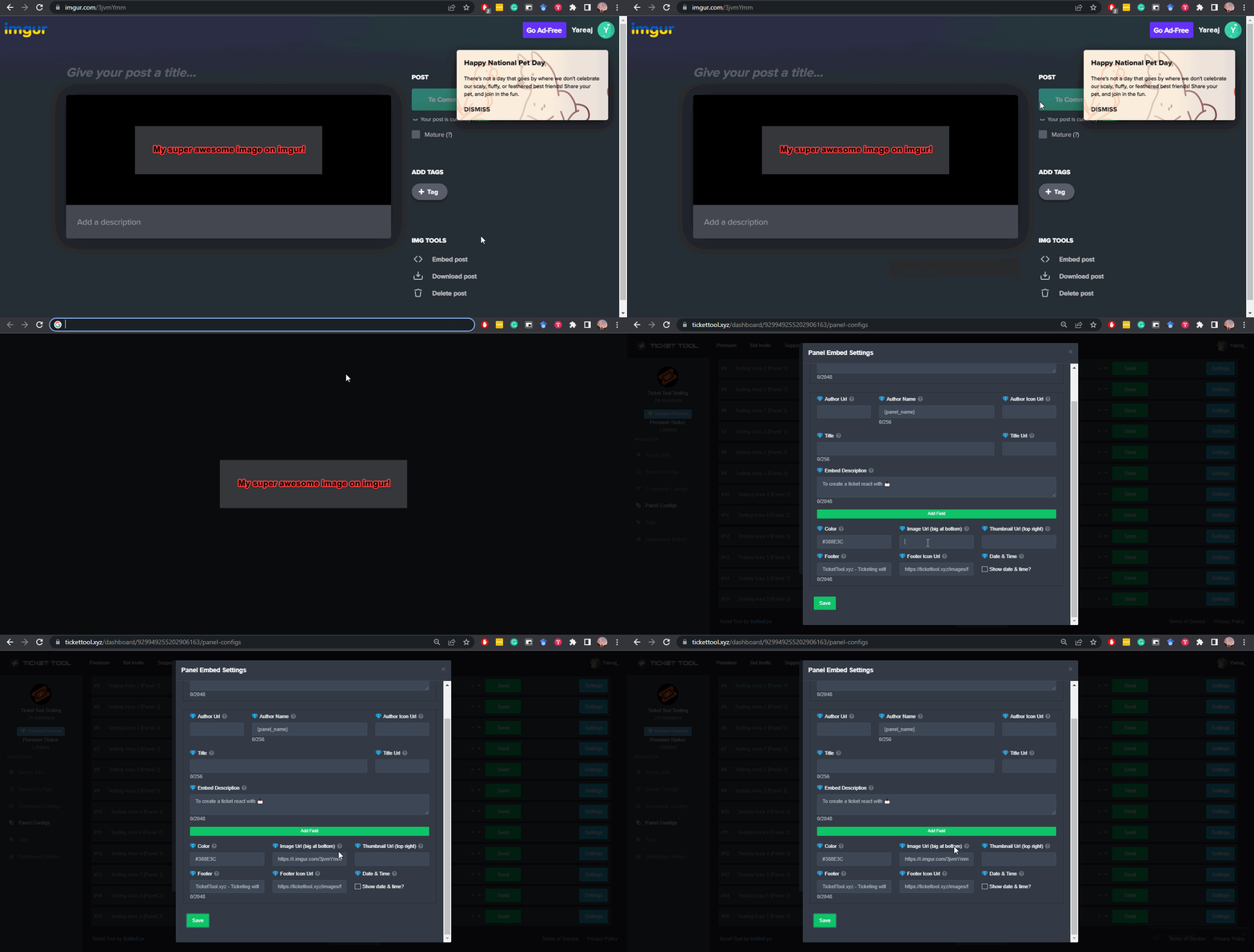
What are the direct URLs?
A direct access URL is an easy to read URL that users can enter to get to a specific item, document, page, category, or perspective, in which our bot TicketTool can read and get it displayed in your 'Panel Message' or your 'Ticket Message'.
Where can I get them?
The recommended way is to use 'Imgur', you can signup within a few minutes and then upload the image you want, and copy the URL of the uploaded image and paste it into one of the four boxes. There are alternatives to this, such as other image or video storing websites or using 'Open Original' of an image and paste it in (please be aware that if your image is deleted, Discord will automatically delete the link to it in a few days). Please note this requires 'Premium'. Imgur
 gilded verge
humble sequoia
gilded verge
humble sequoia
Hey @rain fiber, please check
You can also add an image link to the Embed Description, but then the image link may be visible
 gilded verge
plush geyser
Hello how to fix the failed interaction problem?
gilded verge
plush geyser
Hello how to fix the failed interaction problem?
Hey, bot is online on your server?
gilded verge
tall gull
Bot is looking offline on one of my servers but on other one is online. Anyone w...
The developer has been notified, please be patient 
rain fiber
gilded verge
Hey <@300296497277173761>, please check <:this:894279341108772914>
You can also...
its not that the link is visible, the img didnt even appear. Ill try that
plush geyser
gilded verge
Hey, bot is online on your server?
 gilded verge
plush geyser
gilded verge
plush geyser
okay but bot is online?
plush geyser
gilded verge
okay but bot is online?
Nope it's offline.
gilded verge
a few minutes ago the bot was restarted, so please be patient, thank you ^^
jade topaz
gilded verge
a few minutes ago the bot was restarted, so please be patient, thank you ^^
hi sir
plush geyser
gilded verge
a few minutes ago the bot was restarted, so please be patient, thank you ^^
thank you very much.
iron nightBOT
Gave +1 Rep to @gilded verge
jade topaz
in my server i have an issue the claim option is on but it is showing an error like this ^^
 rain fiber
is it possible to send multiple images with the bot?
oh it's premium no wonder it doesnt work
jade topaz
rain fiber
oh it's premium no wonder it doesnt work
lmao im a premium user too...............
gilded verge
jade topaz
in my server i have an issue the claim option is on but it is showing an error l...
Hey, looks like you need to go to Panel Configs->choose your panel->Claiming->and please enable ^^
 rain fiber
jade topaz
lmao im a premium user too...............
rain fiber
jade topaz
lmao im a premium user too...............
was talking about my issue
jade topaz
gilded verge
Hey, looks like you need to go to `Panel Configs`->*choose your panel*->`Claimin...
ok thank-you very much ill try and reply too you!
gilded verge
rain fiber
oh it's premium no wonder it doesnt work
about "multiple images" im not sure what can i reply but what's your server id?
jade topaz
gilded verge
about "multiple images" im not sure what can i reply but what's your server id?
thank you mister the issue has ben solved!
iron nightBOT
Gave +1 Rep to @gilded verge
rain fiber
gilded verge
about "multiple images" im not sure what can i reply but what's your server id?
why is my server id important? and the feature for a single image is premium and Im not, so cant use it
gilded verge
is not important, but I wanted to ask so that I could see what's wrong inside
rain fiber
when you use forms and get the results, if you have any links they will be turned into text. is it possible for them to remain as links? they appear as www.link.com
gilded verge
rain fiber
when you use forms and get the results, if you have any links they will be turne...
so you want like in first message where is "form answer", right?

if so, then in Ticket Message you need add variable for your question (Panel Configs->Ticket->Ticket Message), you can get variable from Question Variable (Panel Configs->Forms->there expand Question Editor)
 rain fiber
gilded verge
if so, then in Ticket Message you need add variable for your question (Panel Con...
rain fiber
gilded verge
if so, then in Ticket Message you need add variable for your question (Panel Con...
by the way I just changed my ticket msg and my form got deleted, not sure if because of that. I gladly had a ticket open with my previous questions so it was easy to fix.
gilded verge
Unfortunately, I don't know if this is a bug or not, but to be sure, you can go to Dashboard History, maybe someone else changed something in the panel 😳
rain fiber
thanks. and no Im the only one that has power
rain fiber
when people send links in the form and I retrieve their answer, it doesnt show the preview. can this be fixed?
rustic gale
rain fiber
when people send links in the form and I retrieve their answer, it doesnt show t...
Sadly no.
As a workaround, you can create a tag whose content is just {create.form.1} or {create.form.2} and so on as appropriate
And call the tag in the ticket if the responses contain links
rain fiber
rustic gale
And call the tag in the ticket if the responses contain links
I did but this is for a gaming community and one of the main issues on this game are phishing links. people have the weirdest sites to post their videos and screenshots, so having a preview is always nice to not risk anyone. we'll try it for a few days and then decide if we stop using it
 limber pike
How do i set up ticket tool in my server
humble sequoiaBOT

You can check our documentation here;
You can also check #📂│information for the basic setup;
or run the </setup:1025379472167403530> command within #🤖│bot-spam
Our documentation contains all the info you need about the bot to be able to setup and configure the bot however you like.
 stark runeBOT
1. Invite Ticket Tool to your server
First you will want to invite the bot to your server. Once the bot is in your server, you can manage your server in the dashboard.
2. Create a Panel
To create a panel we are going to need to head over to the panel configs on the dashboard.
Once at the dashboard we will need to click Create Panel.
Enter a panel name (Fill in any optional settings you want).
Click Create Panel and your ready to get started with configuring your panel.
An example of a creating a panel is shown below.
3. Send the Panel to a Channel
Once you've created a panel on the dashboard you will need to send it to a channel using send on the dashboard.
Select the channel you want your panel to be created in and click send.
For other questions checkout $help faq.
An example of a sending a panel is shown below.
Having a Problem Sending the Panel?
Do $debug in a channel with Ticket Tool and make sure it has all the necessary Discord permissions.
 ripe owl
Guys
is there a way to automatically delete channels after certain time of inactivity?
 chrome falcon
Is there a way to let other members with a specific role set up the ticket bot? I am part of a Star Citizen Community an I am not the 'Owner' of the server but I am a ranking officer in the org and we would like to use the ticket bot to allow other people or Orgs to hire us. I was wondering if there was a way our Org leader could invite the bot to the server and then let me set it up since ive been playing with it in my personal server and could save him the time of having to learn all of the set up 😄
humble sequoiaBOT
Any role you put there will have full access to the ticket tool dashboard. The server owner and users with admin permissions already have access to the dashboard.
Be careful of which roles to put here

 devout quail
can someone help me i have problem with ticket tool
rustic gale
ripe owl
Guys
is there a way to automatically delete channels after certain time of inact...
No such feature exists
 umbral mica
Verification code
rustic gale
devout quail
can someone help me i have problem with ticket tool
Everyone here has a problem with Ticket Tool or is helping people who do. If you need help, explain your issue and whoever can help will help
rustic gale
umbral mica
Verification code
That's your 2FA code
umbral mica
How do I re verify my code
rustic gale
What code
 vagrant gazelle
how do i create a new button to open a ticket?

 night marsh
البوت اوف عندي
night marsh
 onyx rivet
is not working in my server
onyx rivet
is not working in my server
نفس مشكلتك
 limpid wren
It' down?
onyx rivet
That seems, the bot is turned off
night marsh
onyx rivet
That seems, the bot is turned off
غثس
night marsh
onyx rivet
That seems, the bot is turned off
yes me to
gilded verge
Developers are notified, please be patient
pale pilot
@night marsh @limpid wren @onyx rivet it's up now
onyx rivet
Thanks!
night marsh
pale pilot
<@994742975483625522> <@710614833602625618> <@835247789319127101> it's up now
thanks
iron nightBOT
Gave +1 Rep to @pale pilot
ripe owl
rustic gale
No such feature exists
I have to manually close?
It is hard to manage large servers
Ppl open tickets ask questions and then stop responding
 digital sun
So panels can only have 1 ticket open now?
How long are direct transcripts saved for? (The transcript I can view after clicking the 'direct transcript' button)
night marsh
The bot is offline
rustic gale
digital sun
So panels can only have 1 ticket open now?
What...?
rustic gale
digital sun
How long are direct transcripts saved for? (The transcript I can view after clic...
As long as the file exists you can use the link to view it.
digital sun
 rustic gale
digital sun
rustic gale
digital sun
Panel Configs -> Limits -> User Opened Limit
That limit is per user per panel. You can set up bypass roles too if you want to keep the limit for regular users but allow staff to bypass it
iron nightBOT
Gave +1 Rep to @rustic gale
digital sun
I was just thinking of a way to give my staff some kind of rep.. that’s awesome
 ocean mica
someone knows?
 rustic gale
ocean mica
someone knows?
rustic gale
ocean mica
someone knows?
Use /debug to check which permissions are missing
ocean mica
rustic gale
Use /debug to check which permissions are missing
it doesnt say the missing permissions just a some bot and users permssions and a link
"send this link if support asked you to use debug"
 distant pebble
Hey, how do you reset the ticket number? I have a lot of tickets from testing and would like to reset them when I open my server to the public.
rustic gale
distant pebble
Hey, how do you reset the ticket number? I have a lot of tickets from testing an...
Use the Set Count button in Panel Configs
rustic gale
ocean mica
it doesnt say the missing permissions just a some bot and users permssions and a...
The bit may be missing permissions in the ticket category. Make sure it has Manage Channels there
ocean mica
rustic gale
The bit may be missing permissions in the ticket category. Make sure it has Mana...
i got it
thanks @rustic gale
iron nightBOT
Gave +1 Rep to @rustic gale
limber pike
@rustic gale
Can you tell me why when I try to send my panel to my server it says undefined
Or anybody
rustic gale
limber pike
Can you tell me why when I try to send my panel to my server it says undefined
There's many possible causes. Try the following command in your server and tell us what error you find:
/panel 1
limber pike
rustic gale
There's many possible causes. Try the following command in your server and tell ...
It says the bot isn’t active on this server but it’s because it’s not letting me send it to the server
rustic gale
limber pike
It says the bot isn’t active on this server but it’s because it’s not letting me...
Go to Server Configs in your dashboard and make sure the correct bot is selected in the dropdown selector there
limber pike
rustic gale
Go to Server Configs in your dashboard and make sure the correct bot is selected...
Still having trouble
jade topaz
Greetings. I was wondering, and if a user wanted to get support from a specific moderator, how would that be set up? Is there a way to allow users to select which moderator/s they want to speak with? Thank you.
iron nightBOT
Gave +1 Rep to @covert swallow
rustic gale
limber pike
Still having trouble
#🎫│make-a-ticket then. explain the issue and share yout server's ID
 wide ether
humble sequoiaBOT
wide ether
humble sequoiaBOT

⚠️ Está en el lugar equivocado
Brindamos soporte para el bot de Discord Ticket Tool y no le podemos ayudar con el problema que presenta.
- No sabemos a que equipo de soporte debería contactar para solucionar este problema, y desafortunadamente no podremos ayudarle acertadamente.
Si no tiene alguna duda relacionada a nuestro bot, Ticket Tool, por favor cierre este ticket.
jade topaz
rustic gale
<#571706435449257997> then. explain the issue and share yout server's ID
Should I make a ticket as well or did the answer above apply to me as well, "<@&ROLEID>"?
rustic gale
jade topaz
Greetings. I was wondering, and if a user wanted to get support from a specific ...
This is not really something that Ticket Tool implements
There's a few clumsy workarounds, but they're clumsy indeed
jade topaz
For example?
rustic gale
Give each moderator their own specific role, create a separate panel for each of them and then attach them all into a single multipanel (or send them as a single dropdown menu)
Every time there's a change in your support team you will have to redo it all
 native orbit
Hey, im having issues having a Server pop up on the manage servers tab. ive tried logging out and back in many times. Is there any perms or such i need to make sure the role to have for it to show up? I've also attempted to use $ debug and it tells me to give permission to embed links which it has.
rustic gale
native orbit
Hey, im having issues having a Server pop up on the manage servers tab. ive trie...
Your permission level in that server is 0.
That means you can't access the dashboard.
You will need to ask the server owner to make you a dashboard role
humble sequoiaBOT
Any role you put there will have full access to the ticket tool dashboard. The server owner and users with admin permissions already have access to the dashboard.
Be careful of which roles to put here
native orbit
rustic gale
Your permission level in that server is 0.
I appreciate the response, thank you.
iron nightBOT
Gave +1 Rep to @rustic gale
 crude hedge
Is ticket tool down for anyone else?
 sleek kindle
how do i make a ticket where only a certain role can see it only
 restive ice
how to make transcripts be sent to a specefic room
 slender kelp
i believe its,
Panel Configs > Transcript
then you should be able to set it
jade topaz
How to make it so members can’t close ticket
slender kelp
Probably enable "Support team only"
jade topaz
I have
slender kelp
 jade topaz
Thank you
 unreal condor
hello! does anyone know why my ticket tool is currently displaying 2 create ticket buttons?

only 1 message button under my Message Panel menu

 abstract hinge
@unreal condor
unreal condor
abstract hinge
<@384714517164326922> <:this:894279341108772914>
Hmm, can't seem to find that panel setting
 slender minnow
unreal condor
hello! does anyone know why my ticket tool is currently displaying 2 create tick...
slender minnow
unreal condor
hello! does anyone know why my ticket tool is currently displaying 2 create tick...
Remove the panel linked from dropdown option
unreal condor
slender minnow
Remove the panel linked from dropdown option
Any idea where I can find this option?
slender minnow
Thats exactly what i answered
unreal condor
slender minnow
Thats exactly what i answered
i'm not sure what dropdown option you are referring to
slender minnow
Head over to the panel config option, select the panel and look for an option called Dropdown
unreal condor
slender minnow
Head over to the panel config option, select the panel and look for an option ca...
there's nothing here though
 abstract hinge
unreal condor
Hmm, can't seem to find that panel setting
abstract hinge
unreal condor
Hmm, can't seem to find that panel setting
 unreal condor
abstract hinge
unreal condor
abstract hinge
right! got it, thanks!
iron nightBOT
Gave +1 Rep to @abstract hinge
 orchid radish
There is a discord server that I didn't start, but I have all the permissions, but I don't see the Ticket Tool bot on the website
humble sequoiaBOT
Don't see your server in the dashboard?
You will possibly need to relog. Look below to see the steps on how to relog.
How to relog in the Dashboard.
Note:
You need one of these 3 things to access the dashboard.
1. Server Owner (Level: 6)
2. Server Administrator (Level: 4)
3. Dashboard Role (Level: 2)
:warning: You can check your level using the </permissionlevel:1029797400174399542> command on your Discord Server
User permission level with Ticket Tool
@User is permission level: 0 (User)
```» *If it shows that your permission is **0**, you don't have any of the above **3 things** to manage the dashboard.*


**See the Image below on how to relog:**thx
oak sapphire
sleek kindle
how do i make a ticket where only a certain role can see it only
go to panel configs -> buttons -> button create ticket -> allowed roles
 kind ginkgo
Hey,
is there a possibility to remove empty lines, when using the {create.form.1} variable? Like it is possible to do with Sapphire?
rustic gale
kind ginkgo
Hey,
is there a possibility to remove empty lines, when using the `{create.form....
Sounds like a suggestion to make. You can use the s!suggest command in #🤖│bot-spam
 gilded juniper
 last pine
$help room
humble sequoiaBOT
last pine
$help room
First you will want to invite the bot to your server. Once the bot is in your server, you can manage your server in the dashboard.
To create a panel we are going to need to head over to the Panel Configs Tab on the Dashboard.
> Once at the dashboard we will need to click Create Panel.
> Enter a panel name (Fill in any optional settings you want).
> Click Create Panel and you are ready to get started with configuring your panel.
An example of a creating a panel is shown below.
Once the panel has been created, use the blue Send button and select the channel you want the panel to be sent to.
The Panel wasn't send
Use the </debug:ID> command to diagnose possible permission issues with the bot.
last pine
hm. I can't seem to figure out where/how to set what ROOM the panel gets posted, only which category :\
I'm searching through the documentation but not finding it anywhere TT_TT
oak sapphire
when you select 'send' it should give you the option of choosing the channel
last pine
ohh really? so it's not in the settings anywhere? didn't think of thhat!
oak sapphire
yep
last pine
wish it was easier to find that in the documentation ^-^;;
ok thanks very much for the help! I'm trying to automate as much as I can on my server since I Can't be around at all hours of the day, lol
thanks @oak sapphire
iron nightBOT
Gave +1 Rep to @oak sapphire
oak sapphire
;)
last pine
ok one more question i can't find an answer to--is there a way to set slowmode on created tickets?
oak sapphire
i'm not sure if that's a ticket tool feature
iron nightBOT
Gave +1 Rep to @oak sapphire
oak sapphire
last pine
ok, i figured not but thought i'd ask. thanks again!
you can suggest it with s!suggest in #🤖│bot-spam
 maiden drum
Someone in my server is unable to see the button to make a ticket. They just see the message that says to use the button to make a ticket. Everyone else can see it tho
 woven ginkgo
J
oak sapphire
jade topaz
In the dashboard, it says "Bot error"
When does that happen?
jade topaz
oak sapphire
When does that happen?
When i add the bot to my server
oak sapphire
jade topaz
When i add the bot to my server
Did you have premium and don't have it anymore?
jade topaz
oak sapphire
Did you have premium and don't have it anymore?
dont have it
abstract hinge
jade topaz
In the dashboard, it says "Bot error"
Change bot in server config
jade topaz
fixed it
 gloomy cedar

i cant figure out how to do this
how do i put my tickets in a specific section
pls help
abstract hinge
gloomy cedar
Panel Config -> Category

 signal fulcrum
Hi, Anyone speak Arabic?
 inner elbow
hi, how to fix error (everything worked before) "interaction error"?
oak sapphire
When is the error happening?
inner elbow
oak sapphire
When is the error happening?
When I click on create ticket
humble sequoiaBOT
ᅠ
@pseudo glen requires the following permissions:
Add Reactions
Read Channels
Send Messages
Manage Messages
Embed Links
Attach Files
Read History
Manage Roles
Manage Channels
To change the role permissions, you can go to your Discord Server ➞ Server Settings ➞ Roles ➞ @Ticket Tool
To change the channel permissions, you can go to your Channel Settings ➞ Permissions ➞ Ticket Tool
ᅠ
Note:
You can give Ticket Tool Administrative Permissions instead of all the permissions listed above, but it's entirely optional and NOT necessary.
 inner elbow
 oak sapphire
Does the bot have permissions in the discord category where the ticket would go?
inner elbow
Yes
oak sapphire
Is the bot online?
inner elbow
oak sapphire
Is the bot online?
how to understand that he is online? he is not in the list of people
oak sapphire
If you open the bot's profile you can see the online status like any other user
oak sapphire
Is the bot in your server?
oak sapphire
I'm asking for help from higher support members
inner elbow
thanks, I'm waiting
 covert swallow
It should be good now
inner elbow
covert swallow
It should be good now
what to do
covert swallow
Server ID?
inner elbow
covert swallow
Server ID?
803328491109744661
covert swallow
Your shard is 100% online, are you sure its offline?
inner elbow
 jade topaz
after paying for ticket using disocrd. how to acitve the sup?
covert swallow
Im asking around, theres no reason it should be offline
crude hedge
Can someone help please we keep getting this message when users try to open a ticket.
 covert swallow
Is the bot online?
crude hedge
I don't see a status.
inner elbow
crude hedge
Can someone help please we keep getting this message when users try to open a ti...
++++
covert swallow
crude hedge
I don't see a status.
Is it grey?
covert swallow
inner elbow
Like this?
crude hedge
covert swallow
Like this?
yes
covert swallow
crude hedge
yes
Whats your server ID?
crude hedge
covert swallow
Whats your server ID?
Sorry. Server id?
covert swallow
Discord
Users, individual messages, and entire Discord servers all have a multi-digit ID number that can be used in various cases. While you can use Discord entirely without knowing any of these ID numbers...
crude hedge
covert swallow
https://support.discord.com/hc/en-us/articles/206346498-Where-can-I-find-my-User...
This? 740330402920529951
jade topaz
Good evening, where can I edit the message inside the box please? Thanks !
 crude hedge
covert swallow
Thank you
crude hedge
covert swallow
Thank you
You didn't mean ticket tool id did you?
covert swallow
I meant server ID, you gave me what I needed
crude hedge
covert swallow
I meant server ID, you gave me what I needed
ok
covert swallow
We are investigating the issue currently
crude hedge
covert swallow
We are investigating the issue currently
Ok thank you. I have to run out for a bit. If you can either dm or ping me here with what you find out. Thank you.
iron nightBOT
Gave +1 Rep to @covert swallow
covert swallow
@crude hedge @inner elbow is it still offline?
covert swallow
inner elbow
yes(
Now?
 scenic plinth
We are currently looking into fixes for reports of the primary bot being offline, due to this, there may be periodic times when the bot is offline for you as we are attempting to restart the ones affected.
humble sequoiaBOT
━━ moved to ticket ━━
crude hedge
covert swallow
<@219569666467561473> <@271067502102970371> is it still offline?
Looks to be working now. Thank you.
 tender dawn
When im trying to setup panel and using send cmd its showing undefined


 hot ibex
How do people make tickets in the form of a verification method. where when someone joins the server all they can see are certain channels, and once they do the ticket and verification process in your server, it unlocks all the other channels.
abstract hinge
humble sequoia
@grand stratus
 viral solar
Is it down? Because I can’t make tickets in my server rn and I was able to a couple hours ago
 pine finch
 grand stratus
Try relogging
night marsh
The bot is not working @pine finch
pine finch
I'm using it?
 onyx badge
the bot is offline on my server
night marsh
Hey developers The bot is offline He never opens his ticket
night marsh
@pale pilot
 little flint
I have the same issue
little flint
scenic plinth
**We are currently looking into fixes for reports of the primary bot being offli...
Might wanna write that under your incedents page

 unkempt swan
my bot is offline, but in an other server withour premium, still working
little flint
scenic plinth
**We are currently looking into fixes for reports of the primary bot being offli...
@wise flare
 wise flare
Ok
 elfin trout
hello I would like to anulate the renewal of the prenium how I should do
abstract hinge
Bot down 💀
 shut minnow

 golden gate

 fathom moat
Bot is offline for me
 true rain
Same bot is offlinw
little flint
scenic plinth
**We are currently looking into fixes for reports of the primary bot being offli...
@fathom moat @true rain @golden gate
fathom moat
Aware
 south isle
how to leave one button? otherwise I did not find in the settings how to make only one button

I don't know English and I use a translator
@mystic hound
fathom moat
Delete the message and re-run the command
TicketTool is experiencing issues so I would wait around a day or two to use TicketTool again.
south isle
Already done this many times and everything exactly appears 2 buttons
fathom moat
Thats weird, go report it in #1020426768450080899
south isle
Okay, right now the bot doesn't want to send a message to the channel at all
fathom moat
The bot is experiencing outages, if you check #📣│bot-news you can see what staff has said, its probably because of 2mil servers
south isle
Okay
oak sapphire
south isle
how to leave one button? otherwise I did not find in the settings how to make on...
this is a multipanel problem
humble sequoiaBOT
For a more convenient use of multipanels, you can now combine panels on the dashboard. This will allow you to directly send the multipanel from the dashboard or via the $panel ID command.
Where can I find this?
You can find this setting on the Dashboard -> Panel Configs -> Settings -> Panel
Note: if you're attaching all the panels to a panel called English, don't include English in the attached panel's box (If you do this, it will create a duplicate)
This will put all buttons from all of your panels on one message. The message is the panel message from the panel you're combining these panels in.

 oak sapphire
is the bot online on your server?
south isle
yes
 oak sapphire
Can you do /debug in the channel where you're trying to send the panel please
south isle
oak sapphire
Can you do /debug in the channel where you're trying to send the panel please
 humble sequoiaBOT
The first thing you will need to do is invite the premium bot, an invite can be found here
Once the bot is in your server we will head to the dashboard and manage your server. When you are managing your server, you want to head into "Server Configs" then click the drop down menu under "Select the bot you would like to use on this server" then click "Ticket Tool#6207" and then save.
 oak sapphire
Since you have premium you have to select one of the bots
south isle
oak sapphire
Since you have premium you have to select one of the bots
Thank you very much, everything is working now
oak sapphire
np
hot ibex
How do people make tickets in the form of a verification method??? where someone joins the server all they can see are certain channels, and once they do the ticket and verification process in your server, it unlocks all the other channels????
jade topaz
How to u use thread ticket format?
 spring thistle
how to recive the member sumbits (form) in private room
 woeful mortar
how yo fix
 oak sapphire
is the bot online in your server?
spring thistle
spring thistle
how to recive the member sumbits (form) in private room
..
woeful mortar
oak sapphire
is the bot online in your server?
yes
humble sequoiaBOT
ᅠ
@pseudo glen requires the following permissions:
Add Reactions
Read Channels
Send Messages
Manage Messages
Embed Links
Attach Files
Read History
Manage Roles
Manage Channels
To change the role permissions, you can go to your Discord Server ➞ Server Settings ➞ Roles ➞ @Ticket Tool
To change the channel permissions, you can go to your Channel Settings ➞ Permissions ➞ Ticket Tool
ᅠ
Note:
You can give Ticket Tool Administrative Permissions instead of all the permissions listed above, but it's entirely optional and NOT necessary.
 fallow ingot
spring thistle
how to recive the member sumbits (form) in private room
fallow ingot
spring thistle
how to recive the member sumbits (form) in private room
can you elaborate?
spring thistle
fallow ingot
can you elaborate?
how to make log channel for form sumbits
fallow ingot
There isn’t an option to log form sumbits.
You’ll be able to see what people imputed vis the transcript.
spring thistle
ok thanks
 harsh steeple
why i cant write in message panel?
 humble sequoiaBOT
━━ moved to ticket ━━
 ebon prairie
fallow ingot
ebon prairie
fallow ingot
We're a bot support server for the amazing bot @pseudo glen
 trail dock
Can someone tell how to fix this
 rustic gale
trail dock
Can someone tell how to fix this
rustic gale
trail dock
Can someone tell how to fix this
Head to Server Configs in your dashboard
 vapid pecan
How can i get premium for free
rustic gale
find the dropdown menu, and select Ticket Tool#4843 (Free)
rustic gale
vapid pecan
How can i get premium for free
By voting
vapid pecan
rustic gale
By voting
voting link?.. and how much vote to get
rustic gale
Use the $vote command for more information
vapid pecan
$vote
humble sequoiaBOT
vapid pecan
$vote
Votes
Current Votes: 1
Lifetime Votes: 57
Linked Votes: 0
Vote Links
Linking Info
Linked User: Not Linked
You can give your future votes to another user by linking with that user.
To link use $vote link (@user or userId)
To unlink use $vote unlink
Redeeming
Each vote is worth 12 hours of premium and can be redeemed once you have atleast 6 votes.
Your current votes are worth 12h, 0m
To redeem your current votes use $vote redeem
jade topaz
$vote redeem
humble sequoiaBOT
jade topaz
$vote redeem
You need at least 6 votes to redeem
jade topaz
$vote redeem
humble sequoiaBOT
jade topaz
$vote redeem
You need at least 6 votes to redeem
rustic gale
vapid pecan
Period of the premium
Like it says, 12 hours per vote
vapid pecan
rustic gale
Like it says, 12 hours per vote
yep, i mean what's the period of the ticket tool premium
rustic gale
I don't understand what you're asking, sorry
vapid pecan
rustic gale
I don't understand what you're asking, sorry
when you vote 6 time you get a premium, right?
What is the duration of the premium you got from the 6 voting
 thick garden
I purchased premium through discord, but the web dashboard isn't updated - I don't have any key to redeem. What am I supposed to do? All the FAQ information leads me to a process that says changed on 11/11
 vapid pecan
rustic gale
Like i said. 12 hours per vote
vapid pecan
rustic gale
Like i said. 12 hours per vote
thx!
rustic gale
thick garden
I purchased premium through discord, but the web dashboard isn't updated - I don...
Please try using the /premium command in your server. That shouls activate the subscription
thick garden
rustic gale
Please try using the /premium command in your server. That shouls activate the s...
Beautiful that worked, thank you!!
iron nightBOT
Gave +1 Rep to @rustic gale
thick garden
I swapped the emoji for the create ticket button - when I uncheck this button to not show the button, the panel has 0 buttons (as expected). However when I check it, it duplicates this button two times. Any ideas?

 rustic gale
thick garden
I swapped the emoji for the create ticket button - when I uncheck this button to...
rustic gale
thick garden
I swapped the emoji for the create ticket button - when I uncheck this button to...
That's likely because you attached the panel to itself in Attached Panels
thick garden
rustic gale
That's likely because you attached the panel to itself in Attached Panels
Goodness me you are right, THANK YOU
iron nightBOT
Gave +1 Rep to @rustic gale
rustic gale
Leave Attached Panels empty unless you want extra buttons
 cursive shale
Hey my bot appears to be offline and does not answer to anything not even debug.
scenic plinth
A server was just restarted, so this is likely the reason as to why it is not responding to anything.
cursive shale
The problem startet about 10 hours ago.
rustic gale
cursive shale
The problem startet about 10 hours ago.
What's the name of your server
Or its ID if you have it
cursive shale
920527256034611231
edgy arch
Hello, how do I make a command that reminds the ticket user to respond to their ticket
 pure ruin
You probably just ping them in the ticket
rustic gale
Make a tag
humble sequoiaBOT
Tags
Tags are used to send a predefined response to your channels using a command. Tags will only respond if the command itself is used, it will not function if you put the tag into a sentence. The prefix is not included.
To create tags, go to: Dashboard > Tags > Create Tag. After creating and naming one, tap on the response button, and you can edit the response.
 rustic gale
that contains {ticket.user}
rustic gale
cursive shale
The problem startet about 10 hours ago.
Make sure @humble sequoia is in the server
cursive shale
rustic gale
Make sure <@722196398635745312> is in the server
it is but it does not respond
 woven tangle
Hello I have a little problem I can no longer create a ticket at the bot level it is the bot offline or it comes from me thank you
rustic gale
cursive shale
it is but it does not respond
Please #🎫│make-a-ticket for more assistance
rustic gale
woven tangle
Hello I have a little problem I can no longer create a ticket at the bot level i...
You should be able to view if the bot is online or not
Green circle = online. Gray circle = offline
 woven tangle
offline 😒
 turbid marsh
someone is trying to make a ticket but it says "You do not have permission to use this" but it works if they try to make a different type of ticket I have set up
 brisk jungle
$vote
scenic plinth
What do I do if Ticket Tool is appearing offline in my server(s)?
(The following also applies if you are getting ¨ïnteraction failed¨ errors)
Sometimes the bot going offline just happens because of a simple malfunction with server hosting, other times, it can be due to bugs with Discord API and whatnot.
The developer had implemented systems to hopefully limit the amount of downtime the bot has, implementing an auto-restart system for the bot, meaning, servers in the event of them being offline, should restart automatically, typically taking anywhere up to 10 minutes at times. The bot theoretically should restart itself, which is why developers may not immediately respond to outage notices.
Always read #📣│bot-news before proceeding with the following in the event of the bot being down.
In the case the bot is appearing offline on your server for an extended period of time, do not panic and follow the instructions below!
- First and firstmost, never ping, direct message, or spam Support Members or helpers that are or are not active in this channel. You will be kicked by a moderator as actions against staff such is a violation of our rules and regulations, which can be found in #📂│information if you wish to give it a read, which you should have.
- Ensure the bot actually appears offline in your server and it is not just for you. Try the
/debugcommand, if you get a response of "This Application did not respond" or it is infinitely loading, proceed to step 3.
- If debug works, provide the link the bot gives you and proceed to step 4.
- Grab your servers ID by right clicking on PC and scrolling to the bottom, clicking "copy ID". On mobile, obtain your server ID by clicking on the arrow by your servers name, and click "copy ID".
- Do not ping staff, however, place the ID or link from the debug command in this channel or a ticket, if available, and state the bot is offline in the server and await a staff member's response.
- Follow staff instructions and view #📣│bot-news for updates on the outage.
 reef cape
How do I change bot profile picture?
olive eagle
reef cape
How do I change bot profile picture?
You can't
 old haven
Awaiting on any updates regarding the Tool issue of "Interaction Failed" - I assume this covers the "bot being offline and/or not responding" issue?

 old haven
 fierce hound
how to fix my bot This interaction failed for creat ticket pls.🥹
fierce hound
how to fix my bot This interaction failed for creat ticket pls.🥹
I did, thanks. 🙂
iron nightBOT
Gave +1 Rep to @fierce hound

 mystic drift
I am also having the same issue.

Anyone know why this is happening? Thanks in advance!
covert swallow
scenic plinth
**What do I do if Ticket Tool is appearing offline in my server(s)?**
*(The fol...
Looks like your being hit by the issue described in the message I replied to
mystic drift
Thank you for the information my friend. I will wait until someone figures out the issue.
mystic drift
covert swallow
Looks like your being hit by the issue described in the message I replied to
Thank you for your comment.
iron nightBOT
Gave +1 Rep to @covert swallow
scenic plinth
scenic plinth
**What do I do if Ticket Tool is appearing offline in my server(s)?**
*(The fol...
turbid marsh
turbid marsh
someone is trying to make a ticket but it says "You do not have permission to us...
.
covert swallow
You probably added a role or @ everyone to a the role blacklist for that panel
jade topaz
when i click general and add a support team role it doesnt change in my server the person with the new role cant see the ticket
how do i fix this
jade topaz
Porque me sale esto?

 green citrus
same
 cursive flame
The bot is offline on my server
 kind jay
Hi
 unkempt nest
The bot has been interaction failing for a solid 5 hours, will there be a fix to it anytime soon?
 lunar solar
I have made our development team aware of it, hopefully they will get a fix sorted soon
Edit: The shard that was down has been fixed.
 burnt yew
How do I reset ticket count? I am resting the tickets but want to reset it to -0001
 plain surge
burnt yew
How do I reset ticket count? I am resting the tickets but want to reset it to -0...
plain surge
burnt yew
How do I reset ticket count? I am resting the tickets but want to reset it to -0...
Go to the dashboard and press on Set count to be able to change the ticket count
 burnt yew
plain surge
Go to the dashboard and press on `Set count` to be able to change the ticket cou...
burnt yew
plain surge
Go to the dashboard and press on `Set count` to be able to change the ticket cou...
Thanks a lot c:
iron nightBOT
Gave +1 Rep to @plain surge
plain surge
No problem 👍
 rustic gale
 versed bison
can someone help?
versed bison
can someone help?
What's the name of your server
Or its ID if you have it
versed bison
1023270616666751116
rustic gale
versed bison
1023270616666751116
How long has it been like that?
rustic gale
Your server has never had premium, right?
It's most likely related to the ongoing bug. Ticket Tool has been experiencing some backend issues
You will have to be patient and wait for the developer to restart your shard
 hot wasp
Why is it that in all the tutorials I see that you can add a panel to a channel when creating the panel, I only have the option to name it.
jade topaz
Comment on met un ticket svp on active un ticket ?
rustic gale
hot wasp
Why is it that in all the tutorials I see that you can add a panel to a channel ...
Because all tutorials are outdated
After creating the panel, you can send it to a channel using the Send button
hot wasp
I see thanks
 robust sandalBOT
jade topaz
Comment on met un ticket svp on active un ticket ?
robust sandalBOT
jade topaz
Comment on met un ticket svp on active un ticket ?
How do we please activate a ticket?
 French (fr) → English (en)
versed bison
hot wasp
Why is it that in all the tutorials I see that you can add a panel to a channel ...
French (fr) → English (en)
versed bison
hot wasp
Why is it that in all the tutorials I see that you can add a panel to a channel ...
beacuse it was the old layout now its a new one
rustic gale
If you don't mind reading English, you can check out the Setup Guide in #📂│information
robust sandalBOT
rustic gale
If you don't mind reading English, you can check out the **Setup Guide** in <#50...
Si cela ne vous dérange pas de lire l’anglais, vous pouvez consulter le Guide d’installation dans #📂│information
English (en) → French (fr)
versed bison
rustic gale
Your server has never had premium, right?
yea ive never had premium
woven tangle
Hello I have a problem with the bot it's been 1 day that it's offline on my discord server I would like to know when it will come back online thanks to you.
 lunar solar
jade topaz
Need premium for this?
lunar solar
jade topaz
Need premium for this?
No
lunar solar
jade topaz
Is ticket bot down
What’s your server Id?
jade topaz
lunar solar
No
Can u say me how to do that pls
humble sequoiaBOT
You can check our documentation here;
You can also check #📂│information for the basic setup;
or run the </setup:1025379472167403530> command within #🤖│bot-spam
Our documentation contains all the info you need about the bot to be able to setup and configure the bot however you like.
stark runeBOT
1. Invite Ticket Tool to your server
First you will want to invite the bot to your server. Once the bot is in your server, you can manage your server in the dashboard.
2. Create a Panel
To create a panel we are going to need to head over to the panel configs on the dashboard.
Once at the dashboard we will need to click Create Panel.
Enter a panel name (Fill in any optional settings you want).
Click Create Panel and your ready to get started with configuring your panel.
An example of a creating a panel is shown below.
3. Send the Panel to a Channel
Once you've created a panel on the dashboard you will need to send it to a channel using send on the dashboard.
Select the channel you want your panel to be created in and click send.
For other questions checkout $help faq.
An example of a sending a panel is shown below.
Having a Problem Sending the Panel?
Do $debug in a channel with Ticket Tool and make sure it has all the necessary Discord permissions.
lunar solar
Covered in the above info ^
lunar solar
No stress what do you mean remove the embed?
jade topaz
how to remove this green
 lunar solar
Ohh that’s just the colour my guy
You just need to find the hex code for Discord colour
And change the embed colour to that
It’s still an embed
jade topaz
lunar solar
You just need to find the hex code for Discord colour
Oh alr , under which category can i find this opt
lunar solar
Panel configs —> Panel —> Edit Panel Message (Grenn Button) —> Embed Editor —> Colour
jade topaz
thanks
lunar solar
Np
jade topaz
thanks @lunar solar
iron nightBOT
Gave +1 Rep to @lunar solar
 jade topaz
jade topaz
jade topaz
oh nvm it came
 quasi turret
Ticket tool was working before but It stopped working. Now, when I try to send ticket create message to my channel, it doesnt see my channels. Any idea? Tool has right permissions.
I think the bot is not even try to get new channel list when I try to select one of the channel.
 fossil solstice
any one knows where to edit who can open ticket ?
lunar solar
Are you still having this issue?
 quasi saddle
Is it possible to add information like #📂│information in my server
With the same bot
lunar solar
That is a custom version of @obtuse kraken
 prime berry
quasi saddle
Is it possible to add information like <#509239005481664524> in my server
prime berry
quasi saddle
Is it possible to add information like <#509239005481664524> in my server
You can using webhooks and Discohook
or as Lupus said above, using the Sapphire bot
quasi turret
lunar solar
Are you still having this issue?
Yes
 nova pawn
When people create a ticket they can tag roles. How do i disable it ?
 sour kindle
SEUESSWEYCCFGHJCKLKCBB BB GCVGV GVCCGVXCSCXDVGCDHSCDYYVU9DICUCG V VC
versed bison
When is the offline bot bug Fixed?
 misty torrent
my server id is 801533020989161493 and interactions are not working , any ideas how to fix
unkempt nest
i don’t know if it helps the developer’s but my server id is 873324459006771210 and interactions are still failing. it’s almost been 24 hours
unkempt swan
Update your panel message without having to resend it using the message link to select the panel of your choice.
What link do they mean?
unkempt swan
unkempt swan
Update your panel message without having to resend it using the message link to ...
i want to change the first one ''create ticket'' to ''NOT AVAILABLE YET'' without deleting both tickets to change it. how can i do that with an update??

 dry kindle
This is happening to me, i dont have a ticket open. Is also happening to others
 woven tangle
Hello bot offline 24h . Id serveur 615866478868037654 please help thank you
rustic gale
unkempt swan
i want to change the first one ''create ticket'' to ''NOT AVAILABLE YET'' withou...
- In the dashboard, rename the button
- On Discord, right-click the panel message and select Copy Message Link
- In the dashboard, press the Update button and paste the message link there
rustic gale
unkempt nest
i don’t know if it helps the developer’s but my server id is 873324459006771210 ...
That's because your server lost premium
Resubscribe or switch to @pseudo glen
unkempt swan
rustic gale
1. In the dashboard, rename the button
2. On Discord, right-click the panel mess...
where can i see the panel message in discord (maybe dumb question but i dont know)
rustic gale
unkempt swan
i want to change the first one ''create ticket'' to ''NOT AVAILABLE YET'' withou...
The ones in the image you shared are two panel messages, one on top of the other
unkempt swan
rustic gale
The ones in the image you shared are two panel messages, one on top of the other
oh ok but how can i see the panel message in discord, is that just the ticket message or?
unkempt nest
rustic gale
That's because your server lost premium
Ah, okay. I’ll inform my friend about it.
unkempt swan
rustic gale
The ones in the image you shared are two panel messages, one on top of the other
if i try with one ticket, still not working
it says: message not found to update
rustic gale
unkempt swan
it says: message not found to update
Can you use /debug in that channel
unkempt swan
rustic gale
Can you use /debug in that channel
everything is fine ig
nope still not working sadly
humble sequoiaBOT
━━ moved to ticket ━━
rustic gale
versed bison
When is the offline bot bug Fixed?
Is the bot still down in your server?
Is the bot still down in your server?
 errant agate
I have a problem I can't figure out. We have 4 different ticket tools in our discord. They have been working fine until recently. Now anyone without the "administrator" role in discord cant create a ticket. I have all the roels set correctly , but I cant figure out what is blocking them from creating tickets. I have attached the debug from our discord if that helps any.
 rustic gale
errant agate
I have a problem I can't figure out. We have 4 different ticket tools in our dis...
rustic gale
errant agate
I have a problem I can't figure out. We have 4 different ticket tools in our dis...
There's a role called Owl in Blacklisted Roles. (that's in Server Configs)
If that's like a general member role, that may be the cause.
Anyone with the role will be completely unable to interact with the bot, including creating tickets.
errant agate
rustic gale
There's a role called **Owl** in Blacklisted Roles. (that's in Server Configs)
Thank you so much! I was looking all through panel configs, and didnt even think to look in server configs. I appreciate the help!
iron nightBOT
Gave +1 Rep to @rustic gale
rustic gale
woven tangle
Hello bot offline 24h . Id serveur 615866478868037654 please help thank you
Is the bot still down for you?
woven tangle
rustic gale
Is the bot still down for you?
Is good thank you 😉
iron nightBOT
Gave +1 Rep to @rustic gale
quasi turret
rustic gale
Is the bot still down in your server?
it is ok now. Thanks.
iron nightBOT
Gave +1 Rep to @rustic gale
jade topaz
do yall know why I cant open a ticket in another server because it says I have one open when I dont
versed bison
rustic gale
Is the bot still down in your server?
nope tysm
rustic gale
jade topaz
do yall know why I cant open a ticket in another server because it says I have o...
Did you leave the server and rejoin? If so, that's why
 lavish juniper
Hello what is the short command symbol for tickettool like ''?'' for dyno
The / is slow
rustic gale
lavish juniper
Hello what is the short command symbol for tickettool like ''?'' for dyno
The / ...
$
You can set it up to anything you like in the Dashboard, in Server Configs
jade topaz
rustic gale
Did you leave the server and rejoin? If so, that's why
Yes it is. Any suggestions?
Or can I not make tickets anymore
 timber hamlet
When you pay for premium how soon the the status change?
rustic gale
jade topaz
Yes it is. Any suggestions?
Get in touch with the server's staff some other way
humble sequoiaBOT
⚠️ Está en el lugar equivocado
Brindamos soporte para el bot de Discord Ticket Tool y no le podemos ayudar con el problema que presenta.
- No sabemos a que equipo de soporte debería contactar para solucionar este problema, y desafortunadamente no podremos ayudarle acertadamente.
Si no tiene alguna duda relacionada a nuestro bot, Ticket Tool, por favor cierre este ticket.
 elder pagoda
me dice que tengo que descagar un tiket
jade topaz
rustic gale
Get in touch with the server's staff some other way
Will do thanks!
iron nightBOT
Gave +1 Rep to @rustic gale
rustic gale
timber hamlet
When you pay for premium how soon the the status change?
Use the /premium command, that should update the status
 mystic dune
Hey is anyone know why the Ticket bot refuse to respond to any command in the serv i administrate ? (You can ping me if you can help thanks ;-;)
quasi saddle
Hello I need help
 vague bone
Hey, i need some help. I bought the premium version of ticket tool on discord. the payment was successfull but i cant use the premium features on the website.
rustic gale
vague bone
Hey, i need some help. I bought the premium version of ticket tool on discord. t...
Please use the /premium command in your server
That should activate the subscription.
rustic gale
quasi saddle
Hello I need help
Everyone here needs help. Everyone just explains their issue and waits for help
rustic gale
mystic dune
Hey is anyone know why the Ticket bot refuse to respond to any command in the se...
What's the server's ID?
vague bone
rustic gale
Please use the /premium command in your server
the "premium subscription management page" shows me canceled
rustic gale
vague bone
the "premium subscription management page" shows me canceled
Was the bot kicked from the server after buying premium?
If so, that's why
rustic gale
Reinvite the bot. I don't know if maybe you can uncancel the subscription after that

 vague bone
rustic gale
Reinvite the bot. I don't know if maybe you can _uncancel_ the subscription afte...
vague bone
rustic gale
Reinvite the bot. I don't know if maybe you can _uncancel_ the subscription afte...
i dont know what i should do

why 6 days
sry for the ping
 glossy onyx
Can I create multiple drop-down lists?
rustic gale
vague bone
“DIscord: Active”
Awesome. That means the subscription is active
The countdown is for the trial, that's a separate thing
Now you just refresh the dashboard, the premium status should be updated there
rustic gale
glossy onyx
Can I create multiple drop-down lists?
Not on the same message
Each dropdown list goes on a separate message
glossy onyx
rustic gale
Not on the same message

Look this is a custom bot
can't I do the same with tickettool
rustic gale
Interesting. You could make that suggestion in #1019685143046279208
mystic dune
rustic gale
What's the server's ID?
It's : 925120310838173716
vague bone
So does everything work?
 tawny orbit
when using {create.form.1} it embeds the answer twice, how to fix it?
is there a workaround?
nova pawn
rustic gale
Interesting. You could make that suggestion in <#1019685143046279208>
When people create a ticket they can tag roles. How do i disable it ?
glossy onyx
rustic gale
Not on the same message
oh okay what does mean with * A panel can only be used on one item at a time, using it more than once will result in the other items not showing.
rustic gale
tawny orbit
when using {create.form.1} it embeds the answer twice, how to fix it?
Please explain? I recommend making a ticket. #🎫│make-a-ticket
rustic gale
glossy onyx
oh okay what does mean with * A panel can only be used on one item at a time, us...
It means, for example, these all need to be different

If they were all General Question, only the first General Question item would be shown.
 tame bane
I have all this ticket glitched I can t event delete it

How can I delete this bugged ticket
 shrewd ferry
tame bane
I have all this ticket glitched I can t event delete it
shrewd ferry
tame bane
I have all this ticket glitched I can t event delete it
Dashboard
Open/delete/close ticket
 grizzled plover
Anyone knows how to deal with this when I try to pay the subscription?
 rustic gale
grizzled plover
Anyone knows how to deal with this when I try to pay the subscription?
rustic gale
grizzled plover
Anyone knows how to deal with this when I try to pay the subscription?
you will have to contact Discord about it.
 glad solstice
Hello everyone, i have a question, i have this config on button-create-ticket, i give permisson to all people to create tickets, but when i go to discord with an usser that's not admin to create a ticket, it gives me this error: You don't have permissions to use this. Anyone knows what could it be this error? i don't know what tod o
 rustic gale
glad solstice
Hello everyone, i have a question, i have this config on button-create-ticket, i...
rustic gale
glad solstice
Hello everyone, i have a question, i have this config on button-create-ticket, i...
Look in Server Configs. There's a field there called Blacklist Roles
Users with those roles will be unable to interact with the bot in any way, including creating tickets
That may be the cause of the problem.
glad solstice
You solved it
glad solstice
rustic gale
Look in **Server Configs**. There's a field there called **Blacklist Roles**
Thank you very much, 1 hours and 30 min with this haha, thank youuuuuuuuuuuuuuuuuuuuuuuuuuuu
iron nightBOT
Gave +1 Rep to @rustic gale
 pearl violet
hey how do i copy the settings that i have in the other server to the current server that i want to paste into?
rustic gale
pearl violet
hey how do i copy the settings that i have in the other server to the current se...
Head to Server Configs and scroll down to the Backup and Restore section
If you're the server owner, you can use that to transfer settings
Create a backup key on the old server, and use it on the new server to transfer settings
pearl violet
wait, how do i make a backup key?
oh nvm, so i amde a backup key but how do i make the restore key
rustic gale
pearl violet
oh nvm, so i amde a backup key but how do i make the restore key
There's no such thing as a restore key...
You take the backup key from one server and paste it into the other server's Server Configs to restore the settings
 mellow jacinth
i need help
i added the bot too my server but i didnt get a thing for tickets can someone help me
@everyone
can someone just help me
UGH
rustic gale
mellow jacinth
i added the bot too my server but i didnt get a thing for tickets can someone h...
Have a look at the Setup Guide in #📂│information
Actually nevermind. That bot might be down
$help
humble sequoiaBOT
rustic gale
$help
First you will want to invite the bot to your server. Once the bot is in your server, you can manage your server in the dashboard.
To create a panel we are going to need to head over to the Panel Configs Tab on the Dashboard.
> Once at the dashboard we will need to click Create Panel.
> Enter a panel name (Fill in any optional settings you want).
> Click Create Panel and you are ready to get started with configuring your panel.
An example of a creating a panel is shown below.
Once the panel has been created, use the blue Send button and select the channel you want the panel to be sent to.
The Panel wasn't send
Use the </debug:ID> command to diagnose possible permission issues with the bot.
rustic gale
Here you go.
 limber vessel
rustic gale
Have a look at the Setup Guide in <#509239005481664524>
limber vessel
rustic gale
Have a look at the Setup Guide in <#509239005481664524>
It says interaction failed
 south jetty
limber vessel
It says interaction failed
south jetty
limber vessel
It says interaction failed
same here. encountering this issue too. Not seeing any news about the bot being down
It might be people are still asleep,
They usually advise issues here: #📣│bot-news
I'm not able to close tickets on my end.
oh thanks for this. I am actually about to test it in my dummy account in the server lol
iron nightBOT
Gave +1 Rep to @tender mantle
 magic spruce
не дает выбрать нужный канал для создания тикетов, че делать
mellow jacinth
rustic gale
Here you go.
it worked
 winged bramble
Invite
 dense moon
Hey I’m trying to set up this bot but it’s only letting me select the category, not the channel
 tiny sigil
Looking for an invitation from the ticket tool bot?
humble sequoiaBOT
Ticket Tool Invite & Support
 trail veldt
Is there a way to make a moderator who answers ticket to be anonymous?
\
covert swallow
 quick beacon
Guys my ticket bot is of filing
quick beacon
Guys my ticket bot is of filing
We have a minor outage currently, please be patient
covert swallow
trail veldt
Is there a way to make a moderator who answers ticket to be anonymous?
\
There is not
dense moon
covert swallow
There is not
Can you help me setup the bot please
stark runeBOT
1. Invite Ticket Tool to your server
First you will want to invite the bot to your server. Once the bot is in your server, you can manage your server in the dashboard.
2. Create a Panel
To create a panel we are going to need to head over to the panel configs on the dashboard.
Once at the dashboard we will need to click Create Panel.
Enter a panel name (Fill in any optional settings you want).
Click Create Panel and your ready to get started with configuring your panel.
An example of a creating a panel is shown below.
3. Send the Panel to a Channel
Once you've created a panel on the dashboard you will need to send it to a channel using send on the dashboard.
Select the channel you want your panel to be created in and click send.
For other questions checkout $help faq.
An example of a sending a panel is shown below.
Having a Problem Sending the Panel?
Do $debug in a channel with Ticket Tool and make sure it has all the necessary Discord permissions.
dense moon
Ok thanks
tiny sigil
Looking for an invitation from the ticket tool bot?
dense moon
thanks @covert swallow
iron nightBOT
Gave +1 Rep to @covert swallow
humble sequoiaBOT
Ticket Tool Invite & Support
dense moon
Why have I been warned
tiny sigil
thank
dense moon
It said to ping you to give you 1 rep
covert swallow
dense moon
Why have I been warned
The warn reason gives you that information, the rep ping occurred after the warn
dense moon
covert swallow
The warn reason gives you that information, the rep ping occurred after the warn
So did I do anything wrong
covert swallow
Yes
covert swallow
In the reply you pinged me
dense moon
Huh
covert swallow
If its in an active support session with you I am okay with it, but I was not actively giving you support
covert swallow
dense moon
Huh
 covert swallow
Its okay, just try not to do it again
dense moon
I won’t
 jaunty summit
Is this a bug or.. how do I fix this? This usually happens when I close my ticket..what should I do??
 oak sapphire
jaunty summit
Is this a bug or.. how do I fix this? This usually happens when I close my ticke...
oak sapphire
jaunty summit
Is this a bug or.. how do I fix this? This usually happens when I close my ticke...
it means that you're using an emoji that the bot doesn't have access or that was deleted
jaunty summit
I'll have that remove then.
oak sapphire
do you have text on the emoji box?
rustic gale
That's usually the cause. You wrote text into the Button Emoji field
 neon halo
anyone know how to fix this?
 rustic gale
neon halo
anyone know how to fix this?
rustic gale
neon halo
anyone know how to fix this?
Only the server's staff can fix it. Are you the owner/administrator of the server?
 hallow kayak
Hi guys, for some reason my mods can't see the tickets, already added their roles on the dashboard
 rustic gale
hallow kayak
Hi guys, for some reason my mods can't see the tickets, already added their role...
rustic gale
hallow kayak
Hi guys, for some reason my mods can't see the tickets, already added their role...
Try on a new ticket and make sure it works for new tickets at least.
Then let me know
hallow kayak
rustic gale
Try on a new ticket and make sure it works for new tickets at least.
I did already, and it doesnt
rustic gale
hallow kayak
I did already, and it doesnt
What's the name of your server
hallow kayak
rustic gale
What's the name of your server
Blatant
Moderator missing, the most important one
 rustic gale
hallow kayak
Blatant
rustic gale
hallow kayak
Blatant
You have two panels
You set support team roles for only one of the panels
Set them for the other panel as well
iron nightBOT
Gave +1 Rep to @rustic gale
 jade crag
.
 silk glacier
Direct Transcript is sending me to this addy and which says Invalid Request https://tickettool.xyz/direct?url=%7Btranscript_url%7D Any way to fix this?
rustic gale
silk glacier
Direct Transcript is sending me to this addy and which says Invalid Request `htt...
Are you trying to transcript a non-ticket channel?
silk glacier
Yeppers. It didn't do that before, I'm assuming things changed?
rustic gale
It's a relatively recent issue
silk glacier
Damn alright. It still gives me the html thankfully.
rustic gale
You can also manually construct the direct URL
 unique birch
The bot is down in a server where im staff we can't open or close tickets anymore
silk glacier
Hm, how would I go about doing that for future notice? The html is fine but the URL would be helpful as well, I think.
rustic gale
unique birch
The bot is down in a server where im staff we can't open or close tickets anymor...
Is the bot offline in your server?
unique birch
Yep
rustic gale
What's the server's name? Or its ID if you know it
rustic gale
unique birch
I know it
What's the server's ID?
unique birch
539844645379637249
rustic gale
silk glacier
Hm, how would I go about doing that for future notice? The html is fine but the ...
Here's what a transcript message looks like, right

Circled in orange is the direct download “button”
But it's also a direct link to the file
You have to copy that link somehow. On Firefox i do Shift + right-click, then choose Copy Link
unique birch
unique birch
539844645379637249
.
rustic gale
Can you be patient? I'm dealing with issues from multiple users at the same time. I will get to yours eventually
unique birch
Okay
rustic gale
unique birch
539844645379637249
Your server's cluster is down. I've contacted the developer. All you can do for now is wait for them to restart your cluster
unique birch
Okay
glossy onyx
how to send the transcript to the user dm
rustic gale
glossy onyx
how to send the transcript to the user dm
Use the transcript command. Something like /transcript @[user] should do it
Or with premium you can set up auto transcripts on close/delete in Panel Configs -> Transcript
(it may be Panel Configs -> Automation, i forget. It's one of those two)
iron nightBOT
Gave +1 Rep to @rustic gale
rustic gale
@silk glacier If for some reason you can't copy that link (for example, on mobile i can't figure out how to), here's how you construct the direct link
https://tickettool.xyz/direct?url=https://cdn.discordapp.com/attachments/[channel ID]/[message ID]/[filename].html
Channel meaning the channel that has the transcript file, and message meaning the transcript message
 rustic gale
 jovial grove
the bot offline
jovial grove
the bot offline
What's the name of your server
jovial grove
rustic gale
What's the name of your server
『𝙆𝙄𝙉𝙂𝘿𝙊𝙈 𝙂𝙐𝘼𝙍𝘿 33𝙍𝘽』
rustic gale
jovial grove
『𝙆𝙄𝙉𝙂𝘿𝙊𝙈 𝙂𝙐𝘼𝙍𝘿 33𝙍𝘽』
Can you get the server's ID please
jovial grove
ok
jovial grove
rustic gale
Can you get the server's ID please
887022785237483592
unique birch
Ticket bot is back online in my server.
rustic gale
jovial grove
887022785237483592
Please check again
 bright swallow
Hey there, I try to send a command through another bot, but Ticket tool doesn’t listen to it.
If I use the tag „!paid“, ticket tool send an embedded message. Also it should rename the ticket name (exchange 🟢 with 🔵 {ticket 1234}) but I don’t find the option. So I decided to make another bot, which just write the $rename command after I make !paid.
But id don’t listen. Do you guys have an idea?
jovial grove
rustic gale
Please check again
thx
iron nightBOT
Gave +1 Rep to @rustic gale
jovial grove
yes
rustic gale
bright swallow
Hey there, I try to send a command through another bot, but Ticket tool doesn’t ...
Include the bot's ID in the Bot ID field in Server Configs in your dashboard
That should make it respond to your bot's command
 abstract stag
Can someone help me figure out how to add multiple buttons to a panel?
their docs are not helpful with that
rustic gale
abstract stag
Can someone help me figure out how to add multiple buttons to a panel?
Here's how you do it
- In your dashboard, enter Panel Configs -> Panel
- On the selector at the top, select your “main panel”. You will use the main panel's panel message as the multipanel's panel message. And its button will be the first button shown.
- In Attached Panels, add all the other panels whose buttons you want to include, in the order you want them to be shown.
- Save the changes, then go back to the main Panel Configs menu and use the Send button to send the panel. (Or use the Update button to update an existing message)
There's quite a few possible failure points, so let me know how it goes and i'll help you troubleshoot any problems
abstract stag
Do you have to seperately configure each panel? how do you configure what happens with each button?
rustic gale
abstract stag
Do you have to seperately configure each panel? how do you configure what happen...
Panels' settings are independent.
A multipanel is just one panel message with multiple buttons. All panels' settings are independent even if their buttons are sent as part of the same multipanel
humble sequoiaBOT
Sobre Ticket Tool
Ticket Tool es un bot fantástico que trata con Tickets! Con un Panel de Control/Página web que es fácil de usar en https://tickettool.xyz/. Ticket Tool es único con su personalización y es verdaderamente un gran bot que tiene más de 200 millones de usuarios!
El bot ofrece:
 Sistema de Tickets sin desorden!
Total Personalización!
Fácil de usar y personalizar!
Soporte Increíble!
Transcripciones de Tickets
Funcionamiento 24/7
Etiquetas personalizables
Ticket Tool está siendo usado actualmente en más de 1,900,000+ servidores, con un total de 540+ millones de usuarios y ha creado más de 180 millones de tickets.
Ticket Tool es verdaderamente un bot increíble que tiene un impacto muy grande en este servidor!
:globe_with_meridians: https://tickettool.xyz/
 https://discord.gg/tickettool
:scroll: https://docs.tickettool.xyz/
~ El Equipo de Ticket Tool
·
 rustic gale
jade topaz
tickets are appearing to me , they have been deleted already
rustic gale
jade topaz
tickets are appearing to me , they have been deleted already
Please clarify

 remote drift
Someone help me, I already invited the bot to my server, but when I enter the manage servers page it says Servers - (server not showing up? try relogging) and I don't understand why, if my account is logged in
@mystic hound

 wise parrot
wise parrot
wise parrot
@rustic gale
 wanton blade
Hello, so I have a ticket tool and the people in the support role can't close the ticket but I (the discord owner) can?
Anyone know if I'm doing something wrong? The bot has administrator permissions
wise parrot
?? @rustic gale
jade topaz
Ticket tool isn't working in my server
 ornate fulcrum
remote drift
Someone help me, I already invited the bot to my server, but when I enter the ma...
ornate fulcrum
remote drift
Someone help me, I already invited the bot to my server, but when I enter the ma...
I have the same issue (fixed)
Someone help
jade topaz
Warning: Ticket limit reached, You already have 0 tickets across all panels of the global limit set for this server
hi guys, my bot is saying this but i already set the limit to 3
can someone help to me
 worthy arch
wanton blade
Hello, so I have a ticket tool and the people in the support role can't close th...
worthy arch
wanton blade
Hello, so I have a ticket tool and the people in the support role can't close th...
I think you need to change something via panel/dashboard
If I can remember it correctly
 barren star
Yoo do they still have a store on here
 jaunty sonnet
Does anyone know why non of my members can see the ticket I created?
rustic gale
Geez, there's a lot of stuff going on. I'm going over everything from the most recent and back
rustic gale
jaunty sonnet
Does anyone know why non of my members can see the ticket I created?
It may be because of the Read Message History permission. Have a look in your server's settings (on Discord) -> Roles -> Default Permissions and make sure Read Message History is enabled. Then ask your members to refresh (close/reopen) their app and look in the channel again
rustic gale
jade topaz
hi guys, my bot is saying this but i already set the limit to 3
There's two places where you can set ticket limits
- Server Configs -> Global Ticket Limit
- Panel Configs -> Limits -> User Opened Ticket Limit
If a space is left empty, it will be treated as 0
So no tickets could be created
jaunty sonnet
rustic gale
It may be because of the Read Message History permission. Have a look in your se...
Ye it was just a miss understanding between me and my members
rustic gale
wanton blade
Hello, so I have a ticket tool and the people in the support role can't close th...
There's several possibilities. Best to #🎫│make-a-ticket so we can take a closer look
rustic gale
remote drift
Someone help me, I already invited the bot to my server, but when I enter the ma...
Relogging means logging out of the dashboard and logging in again. Try that. If you can't see your server after that, let me know
rustic gale
wise parrot
bot is offline
Is it still offline? What's the ID of your server?
rustic gale
jade topaz
Ticket tool isn't working in my server
Is it still not working? What's the ID of your server?
 royal jewel
One of my servers has quite a few channels with ticket panels. I am concerned that if there is a raid that the tickets will get spam opened. I am already aware of the universal limit but was wondering if there was a way to quick disable all tickets being opened from discord (not dashboard). This is because malicious users could spam open and close tickets which would bypass the universal ticket limit. I also explored quick ways to disable view perms of the ticket panel channels but that isn’t super quick to execute. I also know if the ability to disable people from closing tickets but given our server structure that would lead to an overflow of tickets. In short, I am wondering about a quick method for admins to be able to lockdown ticket opening temporarily from discord.
I’m also aware of the time schedule for opening tickets but have concerns about it limiting legitimate users
jade topaz
how do i make it so the ticket is automatically renamed to an answer on a form when opening a ticket
 halcyon herald
Hi, I have 150+ tickets open and I want to delete all of them, can I do this?
rustic gale
royal jewel
One of my servers has quite a few channels with ticket panels. I am concerned th...
Quickest may be to add everyone to the blacklisted roles in Server Configs
Honestly though, deleting the panel messages is probably quicker
royal jewel
Hmmm
rustic gale
jade topaz
how do i make it so the ticket is automatically renamed to an answer on a form w...
Use {create.form.1} or {create.form.2} or whichever number the corresponding question is on the ticket name
Custom automatic names are a premium-only feature though
royal jewel
Ig I could talk to owner about giving jr admins perms if needed bc the end goal is to provide Junior admins in the server with sufficient perms to handle all aspects of a raid
jade topaz
how do I enable auto transcripts (premium)
rustic gale
Look in Panel Configs -> Transcript
Make sure you set a transcript channel
Then enable auto transcripts in that menu
 worn pond
Hello, I have many doubts I have created the base of a ticket but I can not put more buttons below and when I press the button to create ticket I get the same as in the first section. I don't know how to explain myself very well, it is very difficult for me to use this bot, I need help.
i want this type of ticket

But its impossible i cant create that buttoms
humble sequoiaBOT
━━ moved to ticket ━━
wanton blade
rustic gale
There's several possibilities. Best to <#571706435449257997> so we can take a cl...
Got it sorted but thank you!
iron nightBOT
Gave +1 Rep to @rustic gale
rustic gale
I do nothing and still get rep. I'm amazing
remote drift
Help, I do not understand what option is doing that does not let me create
 rustic gale
remote drift
Help, I do not understand what option is doing that does not let me create
rustic gale
remote drift
Help, I do not understand what option is doing that does not let me create
Your bot is missing the Manage Messages permission
remote drift
rustic gale
Your bot is missing the Manage Messages permission
here?

It won't let me change the option, I don't own the sv, I only have an administrator
rustic gale
remote drift
It won't let me change the option, I don't own the sv, I only have an administra...
You don't change the permissions in the dashboard
You change them in the server's role settings
remote drift
rustic gale
You don't change the permissions in the dashboard
yeah thanks bro
iron nightBOT
Gave +1 Rep to @rustic gale
 austere sonnet
I’m sure this has been asked a million times but I am on a weird version of discord in a browser where I can’t seem to search for anything, so i was just wondering if there are any status updates on the auto-close feature?
austere sonnet
i suddenly dont feel so bad for asking my question.
 elder stump
Need manage server permission for Ticket Tool
rustic gale
austere sonnet
I’m sure this has been asked a million times but I am on a weird version of disc...
It's confirmed but still pending
rustic gale
elder stump
I want to open a Ticket
Please clarify a bit what you need
elder stump
I want to my 2FA disable, because i lost my 2FA code
elder stump
rustic gale
Please clarify a bit what you need
I want to my 2FA disable, because i lost my 2FA code
rustic gale
elder stump
I want to my 2FA disable, because i lost my 2FA code
Sorry, we can't help you with that
You should contact Discord about it
elder stump
How to i contract Discord
austere sonnet
rustic gale
It's confirmed but still pending
is there an anticipated timeline?
rustic gale
austere sonnet
is there an anticipated timeline?
Sadly no
jade topaz
rustic gale
Please clarify
tickets appear for me , they have been deleted
but when I click on ticket It's just download and no thing appear
 warm tide
Anyone can help me out in here?
I invited the ticket tool bot, everything was working fine for 10 days approx
now interaction with the button doesn't work anymore, I kicked the bot invited him again, I have no more channel with the ticket tool button
 winter hatch
Because the bot ( @pseudo glen ) is down on my server
Maybe it's the same for you
 round cedar
Now my ticket is not online for everyone, is it?
jade topaz
it keeps going offline and online
round cedar
But I can't use it at all.
 west flame
My boy is down too.
 brittle path
Hello I just joined, the bot is down on all the discord servers I manage
 hollow kestrel
Is there a way to assign a ticket to an user instead of the user assigning it to hisself?
oak sapphire
hollow kestrel
Is there a way to assign a ticket to an user instead of the user assigning it to...
you can create tickets for users using /new user the ticket will be opened on the user's name
hollow kestrel
oak sapphire
you can create tickets for users using /new user the ticket will be opened on th...
It is limited to premium bot?
oak sapphire
hollow kestrel
It is limited to premium bot?
nope, that's a free feature
hollow kestrel
That's weird. Application doesn't respond. Tried twice.
 oak sapphire
is the bot online on your server?
hollow kestrel
It is. I think I misunderstood the usage of the command. It needs to be ran inside a ticket channel?
Because trying to create a new ticket in name of other person, creates this error. If I run $add inside a ticket channel, it adds the new person just fine.
oak sapphire
do you have multiple panels?
hollow kestrel
No, I have a single one

 regal chasm
How do I get the tool to @ a role when a ticket is opened, I’ve tryed with the role ID @ typing it
hollow kestrel
Try with <@& ID OF ROLE>
Will result in something like this <@&764970362341425233>
 somber oxide
how do i fix this
 humble sequoiaBOT

Error 1015 - You are being rate limited
If you get the above error when trying to access our web page, don't be scared. This is just a security feature on our dashboard to mitigate possible attacks to the site. The only way to access the site is to wait for the temporary ban to be lifted automatically. It typically takes around 1 hour but can be quicker or longer.
 fading tree
5 ppl online n nb can help sb 
somber oxide
humble sequoia
ok ty
iron nightBOT
Gave +1 Rep to @humble sequoia
regal chasm
hollow kestrel
Try with <@& ID OF ROLE>
That hasn’t worked either
 sterile badge
Hey
 crimson adder
oak sapphire
is the bot online on your server?
crimson adder
oak sapphire
is the bot online on your server?
no, offline
sterile badge
It is not supposed to be in a free week, the premium boot
 knotty pawn
sterile badge
It is not supposed to be in a free week, the premium boot
knotty pawn
sterile badge
It is not supposed to be in a free week, the premium boot
this made no sense
jade topaz
What to do if the Ticket is immediately deleted when it closes where is this setting?!
gilded verge
jade topaz
What to do if the Ticket is immediately deleted when it closes where is this set...
Panel Configs->General->enable Two step Ticket
knotty pawn
the ticket bot keeps saying This interaction failed for some reason.
 jade topaz
gilded verge
Panel Configs->General->enable `Two step Ticket`
jade topaz
gilded verge
Panel Configs->General->enable `Two step Ticket`
Thank you))
iron nightBOT
Gave +1 Rep to @gilded verge
 knotty pawn
scenic plinth
<:CheckPins:590325329651040256>
knotty pawn
scenic plinth
<:CheckPins:590325329651040256>
So just send the servers ID here?
gilded verge
yep
jade topaz
Is it possible to make closed tickets see current certain roles?!
knotty pawn
965438124618551306
gilded verge
knotty pawn
965438124618551306
your server has interaction failed because you have to disable premium bot ^^
 humble sequoiaBOT
How to disable the premium bot
To disable the premium bot you will have to go to the Dashboard ➞ Server Configs ➞ Premium bot ➞ And on the right-hand side select the primary free bot in the drop down menu.
Premium features will still work on the normal bot.
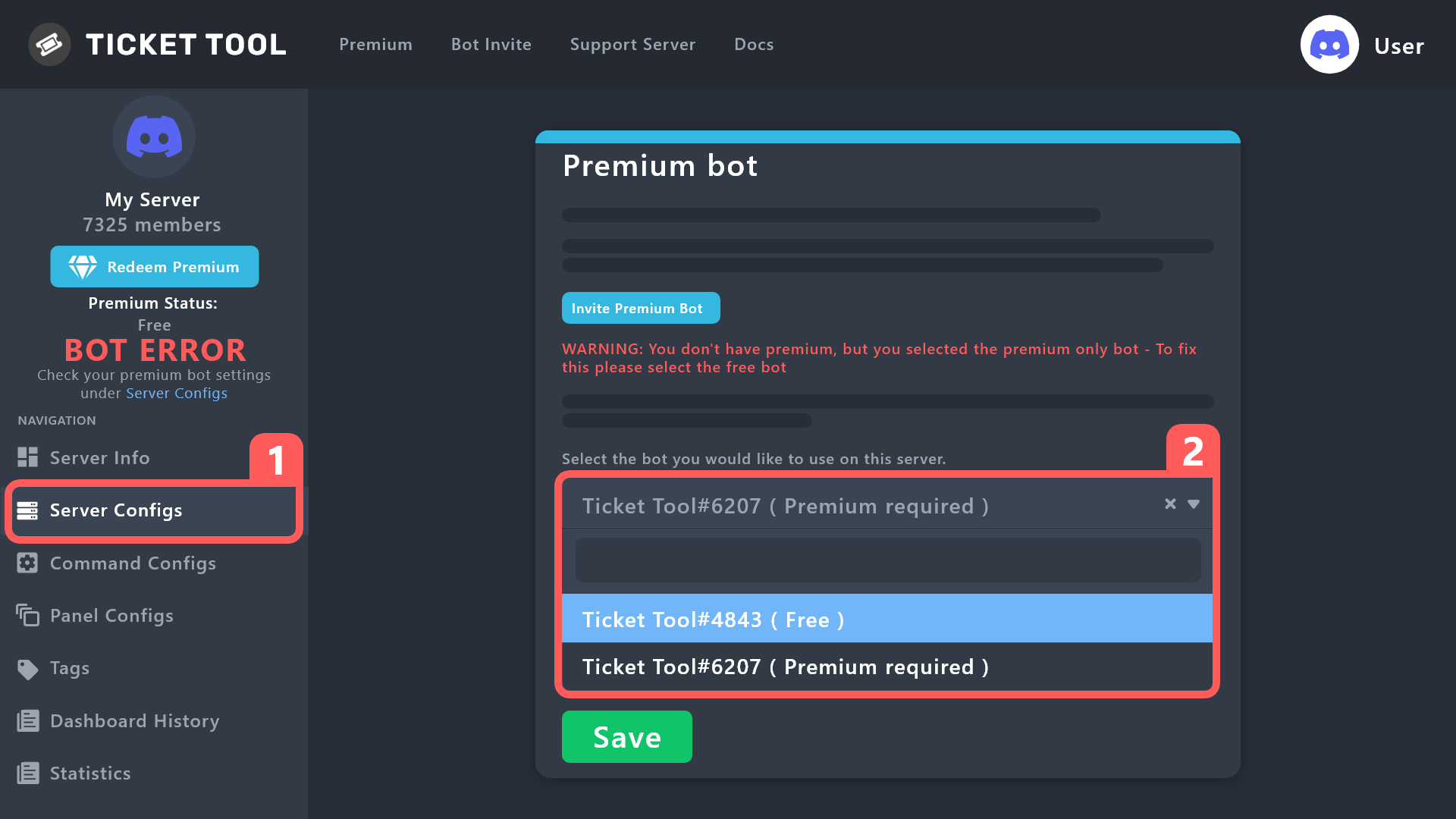 gilded verge
jade topaz
Is it possible to make closed tickets see current certain roles?!
gilded verge
jade topaz
Is it possible to make closed tickets see current certain roles?!
Im not sure what you mean, so please give an example ^^
jade topaz
Well, for example, you opened a ticket, there is, for example, a Support. And after you either support closes the ticket, only for example stay Curators
crimson adder
where can I find my server ID?
gilded verge
jade topaz
Well, for example, you opened a ticket, there is, for example, a Support. And af...
so yes, this is possible, please go to Panel Configs->General->there add Additional Roles->go back to all settings->go to Permissions->and Edit closed Additional Roles Permissions ^^
gilded verge
crimson adder
where can I find my server ID?
do you have developer mode enabled?
jade topaz
Thank you very much!!!!!
crimson adder
gilded verge
do you have developer mode enabled?
seem disabled, where can I check this?
humble sequoiaBOT
How to turn on developer mode
To enable developer mode do the following:
[:desktop: PC] go to Settings ➞ Advanced ➞ Developer mode
[:mobile_phone: Mobile] go to Settings ➞ Appearance ➞ Developer mode
Developer Mode allows you to get the ID of any channel, user, role, or server.
VIA the ID, you can use them with <> alongside their corresponding format to mention a channel/role/user...
They're mostly used in Embeds
Formats
Channels: <#ID> ➝ #🤖│bot-spam
Users: <@ID> ➝ @humble sequoia
Roles: <@&ID> ➝ <@&642118166243311646>
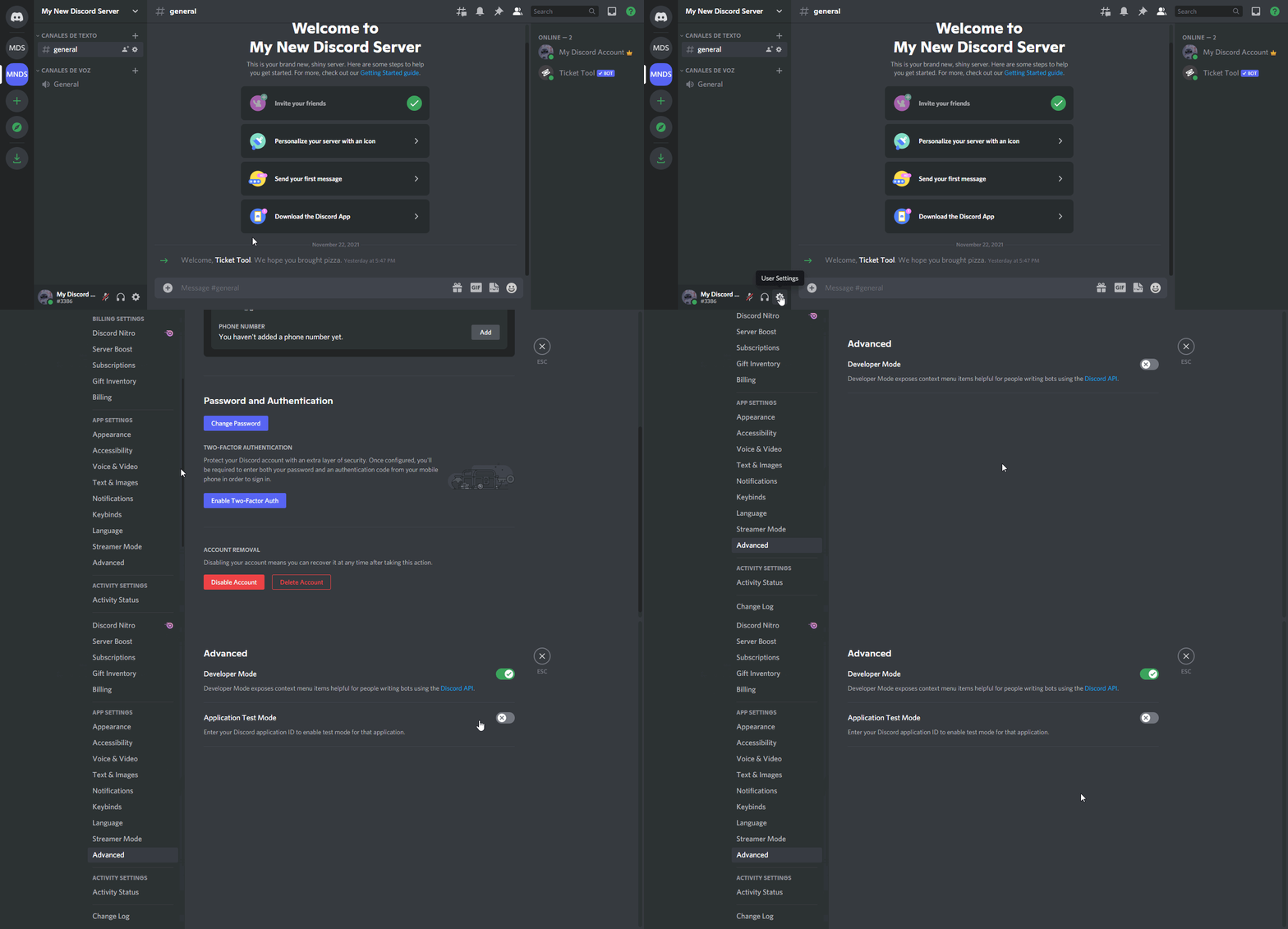 gilded verge
then use right click on your server and copy id
crimson adder
gilded verge
then use right click on your server and copy id
about the robot offline and interaction failed issue, just send the server ID and wait for their response?
only way to solve this problems?
gilded verge
that's exactly what Kenzy said in the pinned message
crimson adder
gilded verge
that's exactly what Kenzy said in the pinned message
ok, I have created a ticket and send the server ID
 olive ocean
only admins are allowed to make tickets in the server? how to allow everyone
rustic gale
olive ocean
only admins are allowed to make tickets in the server? how to allow everyone
There's several possible causes
- You blacklisted everyone or a generic member role in Server Configs -> Blacklist Roles
- You made the Create Ticket button support-team-only (Panel Configs -> Buttons -> Create Ticket)
- You denied the Create Ticket button to everyone or a generic member role (same menu as 2)

 rustic gale
What's the ID of your server please
rustic gale
 sweet nebula
Edit Panel Message
humble sequoiaBOT
The panel message is where people react to make a ticket. To customize it head over to your Dashboard --> Panel Configs -> Panel -> Edit Panel Message
rustic gale
After editing the panel message, re-send it with the Send button (or update it with the Update button)
Your server lost its premium subscription
Either obtain premium again, or switch to @pseudo glen
humble sequoiaBOT
How to disable the premium bot
To disable the premium bot you will have to go to the Dashboard ➞ Server Configs ➞ Premium bot ➞ And on the right-hand side select the primary free bot in the drop down menu.
Premium features will still work on the normal bot.
 scarlet seal
Ticket bot is down in our server.
1033613408236482580
 tidal copper
952320777905143858
 robust sandalBOT
rustic gale
After editing the panel message, re-send it with the **Send** button (or update ...
robust sandalBOT
rustic gale
After editing the panel message, re-send it with the **Send** button (or update ...
Après avoir modifié le message du panneau, renvoyez-le avec le bouton Envoyer (ou mettez-le à jour avec le bouton Mettre à jour)
English (en) → French (fr)
 ashen vault
Is the "direct transcript" broken? If i go on that one, the website say "SSL handshake failed" with error code 525 ^^
rustic gale
ashen vault
Is the "direct transcript" broken? If i go on that one, the website say "SSL han...
The website may be down. Please try again to confirm
ashen vault
rustic gale
The website may be down. Please try again to confirm
ur a wizard, thank u ❤️
iron nightBOT
Gave +1 Rep to @rustic gale
jade topaz
All it keeps saying is

 dusky sphinx
jade topaz
All it keeps saying is
dusky sphinx
jade topaz
All it keeps saying is
I'm having the same issue, nothing changed on my end but suddenly my users are all seeing this
rustic gale
What are the IDs of your servers?
jade topaz
Exactly, I re did them all and it still says the same thing
jade topaz
rustic gale
Or the names if you don't know the IDs
I don’t know the id
 rare owl
Flash
jade topaz
Yes?
rare owl
Would u like to join my server ?
rustic gale
That's not what this channel is for, pal
jade topaz
lol
rare owl
I know I’m just asking
jade topaz
But it still says it and I don’t know y
rustic gale
Anyway. If you don't know the server's ID just tell me the name
jade topaz
4life LA
rustic gale
jade topaz
4life LA
Can you confirm that the bot is offline in your server? (Gray circle instead of green dot)
jade topaz
rustic gale
Can you confirm that the bot is offline in your server? (Gray circle instead of ...
Oh yes it is offline
 rustic gale
Oh dear
jade topaz
I don’t like how you said that
mystic dune
Hey guys i have a lil prob the tickets in the serv i administrate wont close like the close button just dont do anything :/
rustic gale
jade topaz
I don’t like how you said that
Yeah, it's another instance of that invisible backend issue. I've let staff know
jade topaz
K
 spiral cipher
rustic gale
It's confirmed but still pending
spiral cipher
rustic gale
It's confirmed but still pending
Is there anywhere to track progress on this?
rustic gale
Sadly no
spiral cipher
Kk, thank you
mystic dune
mystic dune
Hey guys i have a lil prob the tickets in the serv i administrate wont close lik...
Because even the delete or the close command dont work :/
 golden locust
mystic dune
Hey guys i have a lil prob the tickets in the serv i administrate wont close lik...
golden locust
mystic dune
Hey guys i have a lil prob the tickets in the serv i administrate wont close lik...
Does the bot appear online?