#🆘│community-support
1 messages · Page 21 of 1
 rustic gale
 sullen shard
 jade topaz
Is there a way of stopping the other support members from being booted if an Admin claims a ticket?
 charred pike
Halo
 robust sandalBOT
jade topaz
Is there a way of stopping the other support members from being booted if an Adm...
robust sandalBOT
jade topaz
Is there a way of stopping the other support members from being booted if an Adm...
Gibt es eine Möglichkeit, das Booten der anderen Support-Mitglieder zu verhindern, wenn ein Administrator ein Ticket beansprucht?
 English (en) → German (de)
 fresh badger
Can anyone else see our conversation in the ticket channel?
fresh badger
Oh ok but not other members?
 cobalt fractal
No, unless they’re support team
 slate mantle
hey guys - im having issues with the ticket bot - it was working fine earlier and now people can't interact with the bot i.e. when they go to raise a ticket or if we try and close existing tickets we get "this interaction failed" does anyone have a solution?
anyone can help? its not responding to the application
 scenic plinth
One of our premium servers seem to be having issues. Anything relating to the standard version of the bot seems to be online as I send this. Relating to the one premium server being offline, I will notify someone in a few minutes if the issue does not fix itself.
 south topaz
fresh badger
And are disabled roles the roles that can make tickets ??
south topaz
fresh badger
And are disabled roles the roles that can make tickets ??
Roles which you set there will not be able to open specific ticket ...If you want to block one role completely check this:
 slate mantle
scenic plinth
One of our premium servers seem to be having issues. Anything relating to the st...
slate mantle
scenic plinth
One of our premium servers seem to be having issues. Anything relating to the st...
im only using the free version - so not sure why its not working
I don't have premium
fresh badger
south topaz
Roles which you set there will not be able to open specific ticket ...If you wan...
Aye ok thank you
 iron nightBOT
Gave +1 Rep to @south topaz
scenic plinth
slate mantle
im only using the free version - so not sure why its not working
Resend your panel or update your Discord application.
 opal cradle
scenic plinth
One of our premium servers seem to be having issues. Anything relating to the st...
opal cradle
scenic plinth
One of our premium servers seem to be having issues. Anything relating to the st...
normal bot is still down on my server
scenic plinth
Is the bot not appearing online or just not responding?
opal cradle
its not online
scenic plinth
Can you provide a screenshot and the server name please?
opal cradle
server id 735651766607020144
 scenic plinth
That is our dead server at the moment. You will need to wait until the developer has restarted that server.
opal cradle
okay
scenic plinth
I have been told it should be fixed as I said that.
opal cradle
yep, its back up
Thanks
 icy thorn
How do I setup ticket tool for a server?
jade topaz
hi, in manage servers i refresh the page many times and the servers still do not come out, any solution?
 humble sequoiaBOT
Don't see your server in the dashboard?
You will possibly need to relog. Look below to see the steps on how to relog.
How to relog in the Dashboard.
Note:
You need one of these 3 things to access the dashboard.
1. Server Owner (Level: 6)
2. Server Administrator (Level: 4)
3. Dashboard Role (Level: 2)
:warning: You can check your level using the </permissionlevel:1029797400174399542> command on your Discord Server
User permission level with Ticket Tool
@User is permission level: 0 (User)
```» *If it shows that your permission is **0**, you don't have any of the above **3 things** to manage the dashboard.*


**See the Image below on how to relog:**
 fallow ingot
@jade topaz check this out ^^
humble sequoiaBOT

You can check our documentation here;
You can also check #📂│information for the basic setup;
or run the </setup:1025379472167403530> command within #🤖│bot-spam
Our documentation contains all the info you need about the bot to be able to setup and configure the bot however you like.
fallow ingot
@icy thorn check this out ^^
icy thorn
Thx!
fallow ingot
No problemo
jade topaz
fallow ingot
<@456226577798135808> check this out ^^
Tysm 
 vague hound
Hi guys anyone know how they have set the automated responses in #📂│information
seems really cool but cannot figure it out
 slender minnow
vague hound
seems really cool but cannot figure it out
slender minnow
vague hound
seems really cool but cannot figure it out
its a whitelabled version of another bot
vague hound
slender minnow
its a whitelabled version of another bot
Do you know what bot it is?
slender minnow
@obtuse kraken
vague hound
slender minnow
<@678344927997853742>
Cool thanks mate
iron nightBOT
Gave +1 Rep to @slender minnow
jade topaz
sorry but i can't put emote, i tried with id
 rustic gale
jade topaz
sorry but i can't put emote, i tried with id
rustic gale
jade topaz
sorry but i can't put emote, i tried with id
Make sure the bot has the Use External Emoji permission
Make sure the emoji is in a server that Ticket Tool is in
Make sure the ID is correctly entered
jade topaz
rustic gale
Make sure the bot has the Use External Emoji permission
have rol with admin permission
and i added the emoji, the ID it's correctly
rustic gale
What's the server's ID
 rustic gale
jade topaz
rustic gale
jade topaz
You need to check the ID
The emoji in the button has a different ID than the emoji in the message
I'm 90% sure you're trying to use an emoji from a server that Ticket Tool is not in
 frozen sonnet
Which variable do I need to use to tag the person who created the ticket?
 wise cloak
is there any way to view transcripts on the website?
 abstract hinge
frozen sonnet
Which variable do I need to use to tag the person who created the ticket?
abstract hinge
frozen sonnet
Which variable do I need to use to tag the person who created the ticket?
nothing is needed, the bot automatically writes who created the ticket
 wise cloak
is there any way to view transcripts on the website?
abstract hinge
wise cloak
is there any way to view transcripts on the website?
you can view it by following the link sent by the bot
 wise cloak
abstract hinge
you can view it by following the link sent by the bot
wise cloak
abstract hinge
you can view it by following the link sent by the bot
that doesnt show up
abstract hinge
wise cloak
that doesnt show up
can you send a screenshot?
wise cloak
a screenshot of what.. it doesnt show shit
abstract hinge
wise cloak
a screenshot of what.. it doesnt show shit
it is not visible on the downloaded file, but it is visible on the link
wise cloak
abstract hinge
it is not visible on the downloaded file, but it is visible on the link
bro you're dumb, it shows literally nothing. how am i meant to find that when it doesnt show
scenic plinth
Let's watch our tone and be respectful please 🙂
And to answer your question to help him out, no, the only way you can view transcripts is if you have a transcript channel saved / saved the transcript somewhere before the ticket was closed. There is no such feature on our dashboard to view transcripts.
abstract hinge
wise cloak
bro you're dumb, it shows literally nothing. how am i meant to find that when it...
I don't know why you can't see it, but it works: https://tickettool.xyz/direct?url=https://cdn.discordapp.com/attachments/1045373778370252851/1045373922096468068/transcript-closed-0065.html
 rapid spade
yes it doesnt show
wise cloak
scenic plinth
And to answer your question to help him out, no, the only way you can view trans...
should def be a feature
rapid spade
does any1 know how tf to do this then
humble sequoiaBOT
You can check our documentation here;
You can also check #📂│information for the basic setup;
or run the </setup:1025379472167403530> command within #🤖│bot-spam
Our documentation contains all the info you need about the bot to be able to setup and configure the bot however you like.
scenic plinth
wise cloak
should def be a feature
You can always make a suggestion 🙂
( #💡│suggestions )
 scenic plinth
Typically meaning the website received too many requests from your IP, and as a security measure, it was blocking further requests. This will take about 10 minutes to an hour to resolve itself, assuming there is no more spam coming from the IP 🙂
 distant niche
How do I change that message ?

 blissful atlas
distant niche
How do I change that message ?
blissful atlas
distant niche
How do I change that message ?
Go to dashboard>panel configs>select panel then


@distant niche
 alpine crater
Hi, How can I add 1 more create ticket button for the same panel?
Something like automated support
distant niche
Thx @blissful atlas
iron nightBOT
Gave +1 Rep to @blissful atlas
blissful atlas
alpine crater
Hi, How can I add 1 more create ticket button for the same panel?
Something like...
What do you mean? Change button?
alpine crater
blissful atlas
What do you mean? Change button?
Something like this in support ticket, is this premium feature?
 abstract hinge
@alpine crater 
alpine crater
Thanks @abstract hinge
iron nightBOT
Gave +1 Rep to @abstract hinge
blissful atlas
What is the point of rep points?
rustic gale
blissful atlas
What is the point of rep points?
Bragging rights
rustic gale
frozen sonnet
Which variable do I need to use to tag the person who created the ticket?
{ticket.user}

 rugged kite
L’emoji que tu a assigné sur le bouton n’est probablement pas sur le serveur ou n’est pas accessible au bot
robust sandalBOT
rugged kite
L’emoji que tu a assigné sur le bouton n’est probablement pas sur le serveur ou ...
The emoji you assigned to the button is probably not on the server or is not accessible to the bot
French (fr) → English (en)
rugged kite
@ancient citrus
rustic gale
 ancient citrus
Invalid emoji. That's usually because you wrote text into the emoji field
Instead of the emoji alone
 green valley
Hey, I've been using Ticket Tool for a growing server, and our open ticket numbers have been shooting up recently. This is starting to make it difficult to differentiate between tickets, and our staff is having some trouble figuring out which tickets they've claimed and which are claimed by other people.
Any tips or organizational structures for this problem?
Thanks!
 nova granite
when i try managing my servers in ticket tool my server doesnt show up ive reopened my browser and discord
robust sandalBOT
ancient citrus
How do I switch it
Comment puis-je le changer
English (en) → French (fr)
rustic gale
nova granite
when i try managing my servers in ticket tool my server doesnt show up ive reope...
Log out of the dashboard and log in again
#🎫│make-a-ticket and we'll take a look
^ The last one was for @ancient citrus
rustic gale
green valley
Hey, I've been using Ticket Tool for a growing server, and our open ticket numbe...
Add {author.name} to the ticket name
To the claimed name, concretely
ancient citrus
Thanks it works now
abstract hinge
how to use bot @robust sandal
robust sandalBOT
abstract hinge
how to use bot <@722141347603284001>
Comment utiliser le bot @robust sandal
English (en) → French (fr)
abstract hinge
Oh understood
robust sandalBOT
abstract hinge
Oh understood
О, зрозумів
English (en) → Ukrainian (uk)
 hollow void
Anyone know how to make a ticket work its been 3 days and no reply
robust sandalBOT
hollow void
Anyone know how to make a ticket work its been 3 days and no reply
Будь-хто знає, як змусити квиток працювати 3 дні і без відповіді
English (en) → Ukrainian (uk)
jade topaz
anyone know why my premium aint showing up i purchased today
robust sandalBOT
jade topaz
anyone know why my premium aint showing up i purchased today
Будь-хто знає, чому мій преміальний айнт з'явився, який я придбав сьогодні
English (en) → Ukrainian (uk)
 fringe bolt
hi @wanton fern, are you perhaps available to help me?
I wasn't. I am trying to set this up but it's glitching
fringe bolt
yeah sorry for that. I am trying to make 2 different ticket systems, and the dashboard displays it correctly but when I send it, it doesn't
fringe bolt
 wanton fern
Ah, did you try following the guide?
wanton fern
Ah, did you try following the guide?
I don't think that's the issue here to be fair, but no, I didn't
 jade topaz
wanton fern
<:pepe_think:974387285254623252>
jade topaz
wanton fern
<:pepe_think:974387285254623252>
can u look my ticket as well
fringe bolt
wanton fern
can you open a ticket?
done 🙂
jade topaz
 hardy ledge
how can i get a skin in lol
wanton fern
fringe bolt
done 🙂
i see the problem fixed itself hahaha, probably a hiccup on our server
we had problems yesterday with some servers only, not all
but its up and running now
 prime shoal
@prime shoal
 outer current
logged like 5 times and my server won't show up
 oak shuttle
outer current
logged like 5 times and my server won't show up
oak shuttle
outer current
logged like 5 times and my server won't show up
be sure you have the necessary permissions to access the dashboard
green valley
rustic gale
Add {author.name} to the ticket name
Ah, thank you!
iron nightBOT
Gave +1 Rep to @rustic gale
humble sequoiaBOT
Don't see your server in the dashboard?
You will possibly need to relog. Look below to see the steps on how to relog.
How to relog in the Dashboard.
Note:
You need one of these 3 things to access the dashboard.
1. Server Owner (Level: 6)
2. Server Administrator (Level: 4)
3. Dashboard Role (Level: 2)
:warning: You can check your level using the </permissionlevel:1029797400174399542> command on your Discord Server
User permission level with Ticket Tool
@User is permission level: 0 (User)
```» *If it shows that your permission is **0**, you don't have any of the above **3 things** to manage the dashboard.*


**See the Image below on how to relog:**how do i see that?
 outer current
i have level 6
 sand gate
How bad is that?
 robust sandalBOT
sand gate
How bad is that?
robust sandalBOT
sand gate
How bad is that?
Наскільки це погано?
English (en) → Ukrainian (uk)
rustic gale
sand gate
How bad is that?
How bad is what?
sand gate
yas
 pine finch
sand gate
How bad is that?
pine finch
sand gate
How bad is that?
nah thats good ngl
u got ads partner and other so its good enough
sand gate
There are people who speak Arabic, I don't know how to speak English
abstract hinge
sand gate
There are people who speak Arabic, I don't know how to speak English
you can translate messages using a bot: @robust sandal
pine finch
sand gate
There are people who speak Arabic, I don't know how to speak English
i know how to speak them 2 :))
sand gate
اجل تكلم مدامك تعرف
robust sandalBOT
sand gate
اجل تكلم مدامك تعرف
Yes, talk as long as you know.
Arabic (ar) → English (en)
sand gate
🙂
pine finch
sand gate
اجل تكلم مدامك تعرف
مبحبش ;-;
robust sandalBOT
pine finch
مبحبش ;-;
I don't like ;-;
Arabic (ar) → English (en)
sand gate
ماعرف انقليزي والله
abstract hinge
;-;
robust sandalBOT
sand gate
ماعرف انقليزي والله
I don't know English
Arabic (ar) → English (en)
pine finch
sand gate
ماعرف انقليزي والله
انا اعرف :))
sand gate
خلاص يامسلم تكلم
abstract hinge
@sand gate you can translate what you don't understand
pine finch
طب منا بتكلم اهو
pine finch
abstract hinge
<@884117185017032754> you can translate what you don't understand
true ez af ngl lmao
sand gate
كيف اسوي كذا
 pine finch
sand gate
كيف اسوي كذا
pine finch
sand gate
كيف اسوي كذا
انا ممكن اساعد
sand gate
تمام علمني
pine finch
ابعت انفيت
sand gate
وش ذا
robust sandalBOT
abstract hinge
<@884117185017032754> you can translate what you don't understand
@sand gate يمكنك ترجمة ما لا تفهمه
English (en) → Arabic (ar)
abstract hinge
pine finch
wait wtf thats a bot
pine finch
@sand gate ابعت انفيت
robust sandalBOT
pine finch
<@884117185017032754> ابعت انفيت
@sand gate Надіслати відмовлено
Arabic (ar) → Ukrainian (uk)
pine finch
abstract hinge
+
bruh i though that was a normaly person but the msg is deleted ;-; why just why
how tf did u translate?
abstract hinge
pine finch
how tf did u translate?
I select flag which i need translate
robust sandalBOT
abstract hinge
I select flag which i need translate
أختار العلم الذي أحتاج إلى ترجمته
English (en) → Arabic (ar)
pine finch
oh alr
bruh i understand english fr
im the 2nd nerd in my class
oh and im from egypt
abstract hinge
pine finch
im the 2nd nerd in my class
;-;
pine finch
abstract hinge
;-;
no kidding fr fr
 rancid sandal
@rustic galeHey man, im creating new server and i set up ticket tool as it should be but till now members when closing ticket still able to type and read it and in perms they are off
rustic gale
rancid sandal
<@832864595726172162>Hey man, im creating new server and i set up ticket tool as...
Don't ping people for help. Not even staff
#🎫│make-a-ticket and we'll take a closer look
rancid sandal
done
 cosmic blaze
hi, is there a button to unclaim tickets?
rustic gale
cosmic blaze
hi, is there a button to unclaim tickets?
The claim button is also the unclaim button
cosmic blaze
got it, thank you!
cosmic blaze
is there a variable for claimed user?
 thorny quail
Why does this happen?

 honest thicket
Is it possible to manage ticket tools bot in a server you don't own?
pine finch
honest thicket
Is it possible to manage ticket tools bot in a server you don't own?
If u have perms to u can if u don't then no
honest thicket
pine finch
If u have perms to u can if u don't then no
Well what perms?
 limpid cloud
How to auto delete ticket when it is closed?
 fringe condor
Hi! I am premium subscription on the Ticket Tool
Can I increase the limit of ticket opened per user?
pine finch
honest thicket
Well what perms?
Add bots perms
limpid cloud
limpid cloud
How to auto delete ticket when it is closed?
anyone?
slender minnow
thorny quail
Why does this happen?
Temprary ban, should be good to go within an hour
 warped aurora
не обязан
rustic gale
cosmic blaze
is there a variable for claimed user?
Not really. Depends on what you're trying to do with it
rustic gale
honest thicket
Well what perms?
Administrator
or a dashboard role. Have a look
humble sequoiaBOT
Any role you put there will have full access to the ticket tool dashboard. The server owner and users with admin permissions already have access to the dashboard.
Be careful of which roles to put here
 rustic gale
fringe condor
Can I increase the limit of ticket opened per user?
rustic gale
fringe condor
Can I increase the limit of ticket opened per user?
Of course. Have a look in Panel Configs -> Limits
rustic gale
limpid cloud
How to auto delete ticket when it is closed?
Panel Configs -> General -> disable Two Step Ticket
honest thicket
rustic gale
Administrator
or a dashboard role. Have a look
Thanks but I finally figured it all now
 iron nightBOT
Gave +1 Rep to @rustic gale
rustic gale
Awesome
 agile mortar
hello, I want to create a permission request ticket.
The administrator should be able to choose either yes or no and close the ticket.
I can even send the message that your request has been approved through the ticket tool by clicking the ticket close button, confirm and delete, but I cannot put a reject option in the same way.
Let me give an example for better understanding.
- user presses button "I want permission today (create ticket button )"
-"Confirm and delete in the created thread(close button)"
-auto delete
I would be glad if you help me
rustic gale
agile mortar
hello, I want to create a permission request ticket.
The administrator should be...
It seems you're trying to do something Ticket Tool is not designed to do
 hallow anvil
 iron nightBOT
Gave +1 Rep to @abstract hinge
robust sandalBOT
@rustic gale
Дякую за швидку відповідь.
Раніше я вніс деякі обмеження щодо дозволів панелі на інформаційній панелі. Як тільки я їх виправив, проблем не було. Я також 🙂 хотів повідомити вас про це
English (en) → Ukrainian (uk)
abstract hinge
np
 silk zenith
Hello
If I try to acces the ticket tool dashboard then I can’t find my server
@pale pilot
cosmic blaze
rustic gale
Not really. Depends on what you're trying to do with it
i would like the ticket title to have the claimed user name. if not, i would like the ticket to automatically sort into a separate category depending on WHO claims it. like, jim's tickets, rebecca's tickets etc. because my mods forget that they claim tickets sometimes
 light spindle
H
rustic gale
i would like the ticket to automatically sort into a separate category depending on WHO claims it
This one is impossible.
i would like the ticket title to have the claimed user name
Add {author.name} to the claimed name.
rustic gale
silk zenith
If I try to acces the ticket tool dashboard then I can’t find my server
You may either need to log out and log in again
or you don't have dashboard permissions in the server
jade topaz
Hi how can i use custom emoji in panel embed editor?
rustic gale
jade topaz
Hi how can i use custom emoji in panel embed editor?
Make sure the emoji is in a server that Ticket Tool is in
ideally you upload it in your own server
Then you paste the emoji ID wherever you want to use it
You can find out the emoji's id using the /id command


 toxic mortar
How do I make a ticket
rustic gale
toxic mortar
How do I make a ticket
Check the Setup Guide in #📂│information
 frozen rock
Hi everyone, i cannot see my server in the Dashboard of TicketTool, I only have this issue with one server tho. I am the owner, TicketTool is admin on it. Any idea ?
rustic gale
frozen rock
Hi everyone, i cannot see my server in the Dashboard of TicketTool, I only have ...
Log out of the dashboard and log in again
 topaz apex
How do I see my ticket order history?
 empty thistle
With the move to discord for premium subscriptions, I am unsure of how to transfer a premium sub from one account to another when the original account has been deleted. Is that no longer possible without manual support?
jade topaz
So I need some help, when a ticket is created I want to to have a role automatically added to it(like the support role) however I want to be able to remove people with this role if possible.
rustic gale
empty thistle
With the move to discord for premium subscriptions, I am unsure of how to transf...
It hasn't been possible without contacting support for a while now. Even before the move to Discord's subscription system.
rustic gale
topaz apex
How do I see my ticket order history?
What do you mean by ticket order history?
empty thistle
rustic gale
It hasn't been possible without contacting support for a while now. Even before ...
I seem to remember being able to just use the same payment email on the respective discord account which allowed it to switch. Oh well though :(
rustic gale
empty thistle
I seem to remember being able to just use the same payment email on the respecti...
It used to be possible, yes
empty thistle
Any plans on bringing that back?
rustic gale
I think it's very unlikely. You will have to ask for support. #🎫│make-a-ticket
empty thistle
That's unfortunate. Thanks though yes

 ruby harbor
.
 cedar fog
For the Form, do I add the {create.form.1} to the raw or the description? I get the answers posted in the description posted twice. One in the message posted from the bot and as an embed.
 fossil gale
 desert ridge
?
desert ridge
?
Receiving the same error.
 polar inlet
Can you make ticket tool send transcription automatically after the room is deleted?
honest thicket
Hey, my members can't make a ticket I don't know why it says they don't have permission.
 novel fog
hello, how can I add more than 1 button to a ticket?
rustic gale
cedar fog
For the Form, do I add the {create.form.1} to the raw or the description? I get ...
You probably enabled the automatic embed in addition to including the form variables in a different embed.
You could disable the automatic embed as it's not needed
rustic gale
polar inlet
Can you make ticket tool send transcription automatically after the room is dele...
Yes, with premium
rustic gale
novel fog
hello, how can I add more than 1 button to a ticket?
It's called a multipanel
humble sequoiaBOT
For a more convenient use of multipanels, you can now combine panels on the dashboard. This will allow you to directly send the multipanel from the dashboard or via the $panel ID command.
Where can I find this?
You can find this setting on the Dashboard -> Panel Configs -> Settings -> Panel
Note: if you're attaching all the panels to a panel called English, don't include English in the attached panel's box (If you do this, it will create a duplicate)
This will put all buttons from all of your panels on one message. The message is the panel message from the panel you're combining these panels in.
 novel fog
rustic gale
It's called a multipanel
novel fog
rustic gale
It's called a multipanel
Okey thx, i will reply back
 grand wasp
why my server doesn't show up?
 abstract hinge
humble sequoia
abstract hinge
humble sequoia
@grand wasp
grand wasp
oh, I see
abstract hinge
humble sequoia
@jade topaz
grand wasp
Thanks.
abstract hinge
grand wasp
Thanks.
np
prime shoal
@karmic stump
rustic gale
jade topaz
Hello I Don't know How to Use this bot
Look at the Setup Guide in #📂│information
 hasty garnet
سلام عليكم
في سبورت عربي !
@rustic gale
How can I make two tickets together with one button?
novel fog
rustic gale
It's called a multipanel
I have administrator role but I cannot change the embed editor part. why is this happening?
@rustic gale
jade topaz
how to create a ticket in my discord?
cedar fog
rustic gale
You probably enabled the automatic embed in addition to including the form varia...
Ty!
cedar fog
jade topaz
how to create a ticket in my discord?
You gotta log into the tickettool dashboard and configure your panel before opening a ticket.
rustic gale
novel fog
I have administrator role but I cannot change the embed editor part. why is this...
You should probably #🎫│make-a-ticket for that issue
rustic gale
hasty garnet
<@832864595726172162>
How can I make two tickets together with one button?
It's called a multipanel. Have a look
humble sequoiaBOT
For a more convenient use of multipanels, you can now combine panels on the dashboard. This will allow you to directly send the multipanel from the dashboard or via the $panel ID command.
Where can I find this?
You can find this setting on the Dashboard -> Panel Configs -> Settings -> Panel
Note: if you're attaching all the panels to a panel called English, don't include English in the attached panel's box (If you do this, it will create a duplicate)
This will put all buttons from all of your panels on one message. The message is the panel message from the panel you're combining these panels in.
hasty garnet
rustic gale
It's called a multipanel. Have a look
Thank you I found
iron nightBOT
Gave +1 Rep to @rustic gale
hasty garnet
rustic gale
It's called a multipanel. Have a look
How can I appoint an administrator to close the ticket, but the regular member cannot close the ticket?
jade topaz
hasty garnet
How can I appoint an administrator to close the ticket, but the regular member c...
\
 rustic gale
hasty garnet
How can I appoint an administrator to close the ticket, but the regular member c...
rustic gale
hasty garnet
How can I appoint an administrator to close the ticket, but the regular member c...
Panel Configs -> Buttons -> Close Ticket -> enable Support Team Only
 humble sequoiaBOT
The Ticket Message is the first message sent by the bot on a new ticket. To customize it head over to your Dashboard ➞ Panel Configs ➞ Ticket ➞ Edit Ticket Message

 quaint robin
how do I make sure that when I create a ticket the ticket channel goes into a category instead of being at the top of the channels?
 quaint robin
For open ticket is the same
 undone vapor
try to do it again and save
 undone vapor
quaint robin
undone vapor
quaint robin
did u selected correct panel?
quaint robin
i have only 1 panel
undone vapor
well
quaint robin
:(
undone vapor
idk
quaint robin
Ok
 iron gate
can you give me a link " dash board"
undone vapor
iron gate
can you give me a link " dash board"

Ticket Tool - Ticketing without clutter - The #1 discord Ticketing bot
iron gate
How can I make a letter making a ticket
undone vapor
iron gate
How can I make a letter making a ticket
what do you mean?
iron gate
Like this
 undone vapor
iron gate
Like this
undone vapor
iron gate
Like this
i dont really know what u mean, there are different functions for tickets
iron gate
Oh my god
undone vapor
explain
iron gate
Like this :
 undone vapor
iron gate
Like this :
undone vapor
iron gate
Like this :
its default?
undone vapor
not really
 undone vapor
ohh
jade topaz
@rustic gale please tell me yall get paid to put up with this shit 😭
humble sequoiaBOT
Identifiy the number of your question and select it using the menu at the end of the message
 - How do I create a panel?
 - How do I send a panel?
 - How can I grant my team access to tickets?
 - How do I add/remove users from a ticket?
 - How to automatically ping my support team on a ticket?
 - How do I set what category tickets are created in?
 - How does claiming work?
 - What is the prefix and how do I change it?
 - How do I limit the number of tickets a user can create?
 - How do I set a transcript channel?
iron gate
God!
undone vapor
and u go to attached panels
i dont really know how to explain
i never did dat thing
 undone vapor
your bot ???
iron gate
It's a just message
humble sequoiaBOT
A panel is the core of Ticket Tool, so its important to do the adequate process:
> 1. Go into your Dashboard
> 2. Open your Panel Configs tab
> 3. Click on the + or in the Create button
> 4. Fill in the blanks
> 5. Create the panel
 undone vapor
do this
iron gate
1min
undone vapor
..?
 humble sequoiaBOT

Ticket Tool is the only ticketing bot you'll ever need! Explore its features and set the best ticket system for your server!
<:CommandIcon:1018980659064221746> Commands
Browse through Ticket Tool's commands list and find new utilities!
<:TextIcon:1018980662881030144> FAQ
Solutions for the most frequent questions our users have when implementing the bot on their server.
<:Setup:1034174646788030664> Setup
The steps to follow when setting the bot for the first time on any server
undone vapor
go down and there will be ticket message
humble sequoiaBOT
The Ticket Message is the first message sent by the bot on a new ticket. To customize it head over to your Dashboard ➞ Panel Configs ➞ Ticket ➞ Edit Ticket Message
rustic gale
@iron gate

 safe apex
my second server dosnt come up in ticket tool what do i do @wanton fern
 simple panther
Help pls
rustic gale
iron gate
._. I want to change the writing underneath that.
Click the text that says Embed Editor and you will see the embed editor
 daring bolt
Hi! Quick question: is it possible to make it do that tickets are not able to be deleted by the designated support team. Only closed? (Not with the premium bot)
 candid pine
If someone opens a ticket how do I make it so it automatically goes into a category?
daring bolt
candid pine
If someone opens a ticket how do I make it so it automatically goes into a categ...
Click that link and follow the insturctions that I made. It should be quick
LMK if that helps
candid pine
@rustic gale Already
it in a ticket.
daring bolt
ok oki!
candid pine
daring bolt
ok oki!
But thanks anyways!
iron nightBOT
Gave +1 Rep to @daring bolt
daring bolt
np
 frigid jay
how can i reset the counter for tickets?
daring bolt
frigid jay
how can i reset the counter for tickets?
well one way i can think of right off the bat is to delete the panel then create it again
Thats not the most practical, but it will reset the count for sure
let me think abt smth else to do
candid pine
frigid jay
how can i reset the counter for tickets?
1.Go into the Dashboard
2.Open the Panel Configs
3.Open the Panel's Settings.
4.Open the General Options menu.
5.Update the Ticket Limit counter.
@frigid jay Thats the easiest way to do it.
daring bolt
@candid pine thx
iron nightBOT
Gave +1 Rep to @candid pine
candid pine
daring bolt
<@827607464379154525> thx
Anytime.
daring bolt
frigid jay
how can i reset the counter for tickets?
candid pine
What do Reps do?
candid pine
ok
 wet parrot
Hi, I have a potentially silly question. I did do a search, but I'm still confused on how the dropdown option works. What I want to do is have a panel for tech help, and in the drop down, I want to give options that they have to select. Like option one help with Zoom option two help with Discord. I want them to select one and then open a ticket in the tech-help category for that specific option.
When I look at dropdowns, it says I can't select the same panel twice. Is there a way to do this?
scenic plinth
No, if it says you can't select the same panel, you can't select the same panel. Not quite sure how you expected a different answer.
wet parrot
Helpful, thank you. So, I have to set up separate panels for each option, which I get. There is no way to then combine them into one drop down menu?
humble sequoiaBOT
The Drop-down menu or Select Menu replaces the buttons on your panel message and uses a drop-down menu with all of your panels. To set this up, go to your Panel Configs and select your main Panel.
<:Numbericons1:1018864164032225340> Enable Select Style
First you enable Select Style. Then you add an item in the Dropdown Editor. Now you can start editing your dropdown!
<:Numbericons2:1018864168041971712> Dropdown Editor
Each line in the dropdown editor represents a line in the drop down menu on discord. You can add more "Items", by clicking on 

First you select a panel. That's the panel this option will open a ticket for.  DONT select the same panel twice. Each option should have a different Panel
After that, you can put a Display. This is the title of this option and will appear in the drop down menu. The *Description can be set right after that, which will be below the title in grey.
Additionally you can select an emoji, that will be shown in front of each option. You can either manually input the ID of an emoji or select it in the selector.
Common Issues ⚠️
- Panel doesn't send? Make sure you have a valid emoji selected
- Option doesn't show up? Check if two options have the same panel in the DropDown Editor

$dropdown
 quick tundra
Hii! I need help changing the ticket tool kind of bot to change it back to the normal one
humble sequoiaBOT
How to disable the premium bot
To disable the premium bot you will have to go to the Dashboard ➞ Server Configs ➞ Premium bot ➞ And on the right-hand side select the primary free bot in the drop down menu.
Premium features will still work on the normal bot.
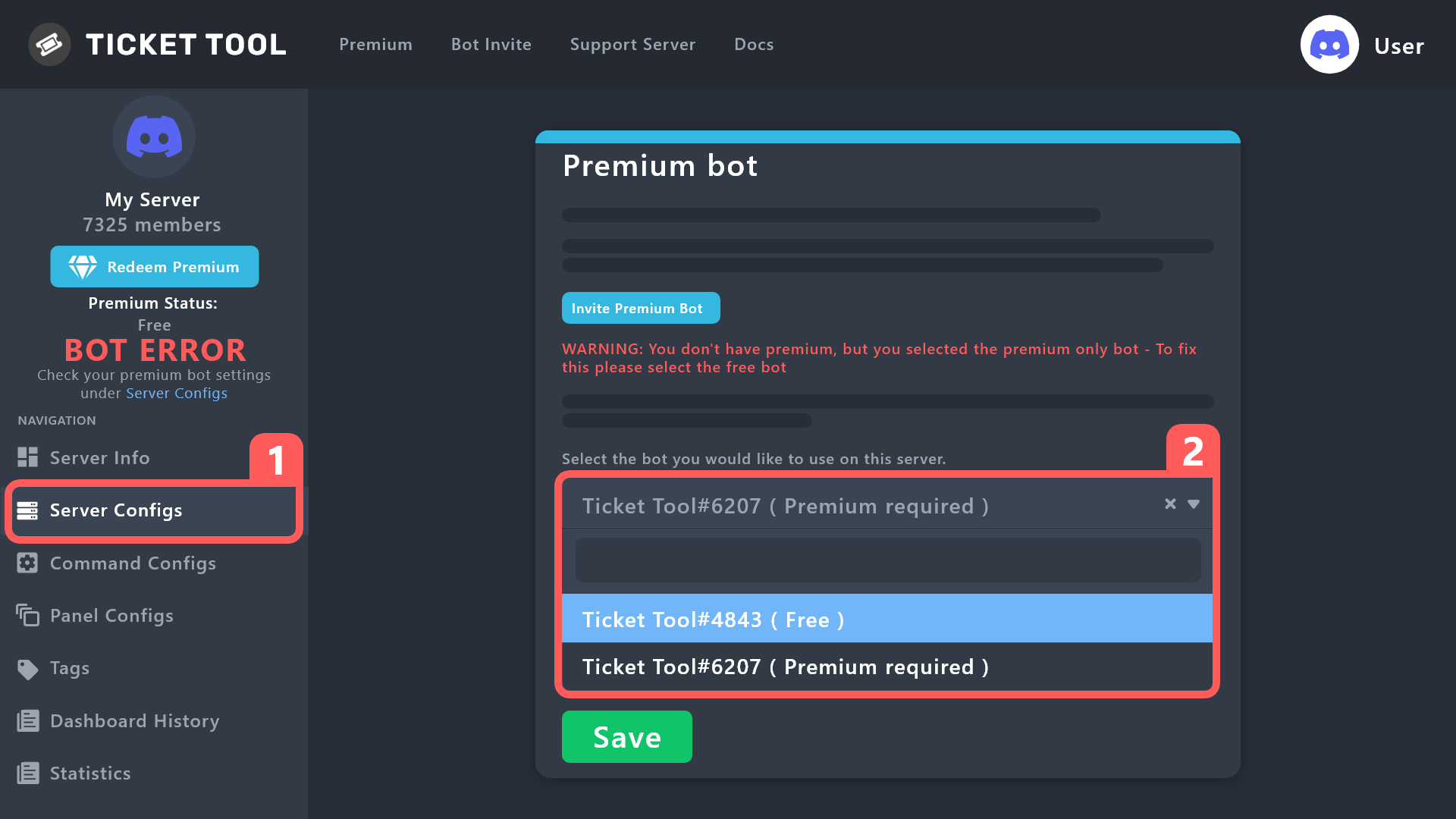 quick tundra
Tanks
wet parrot
I saw that. Which is still a little confusing. Do I create a panel for each option, then create a panel for the dropdown and add each of the other panels to it?
scenic plinth
You don't need to create an entirely new panel to add each of the other ones to it if you do not want to, just whichever panel you choose to send is the one that will use the panel message, panel style, etc.
Each option has to have its own dedicated panels, yes.
wet parrot
Thank you
daring bolt
@scenic plinth thanks
iron nightBOT
Gave +1 Rep to @scenic plinth
candid pine
@scenic plinth What are reps for?
scenic plinth
I am going to pretend you did not just close your ticket that you asked the same question in only to come here to ping me to get an answer, in which, it is just a system with that bot, nothing else much I can say. Although I am going to say do not ping staff again please, unless you are thanking them that is.
 rustic heath
What's it called when you press to open a ticket and it gives you a prompt before making it to fill in extra information and is it a premium feature?
 errant blade
@candid pine
daring bolt
rustic heath
What's it called when you press to open a ticket and it gives you a prompt befor...
no it is just forms
It is not a premium feature
 inland sage
m
daring bolt
rustic heath
What's it called when you press to open a ticket and it gives you a prompt befor...

By --- ---
Be sure to enable the form when your done. I forgot to include that step

 humble cipher
hi how do u make it such that images in ticket transcript shows when you look at the transcript, since when I look at it the images are usually unaccessible
humble sequoiaBOT
━━ moved to ticket ━━
 elder orbit
NEED HELP DM ME WHEN YOU HAVE TIME
 undone vapor
elder orbit
NEED HELP DM ME WHEN YOU HAVE TIME
undone vapor
elder orbit
NEED HELP DM ME WHEN YOU HAVE TIME
Please do not use caps and do not ask people to DM you.
humble sequoiaBOT
Ticket Tool is the only ticketing bot you'll ever need! Explore its features and set the best ticket system for your server!
<:CommandIcon:1018980659064221746> Commands
Browse through Ticket Tool's commands list and find new utilities!
<:TextIcon:1018980662881030144> FAQ
Solutions for the most frequent questions our users have when implementing the bot on their server.
<:Setup:1034174646788030664> Setup
The steps to follow when setting the bot for the first time on any server
undone vapor
@elder orbit You need to go in the dashboard. Click on your Discord profile icon and Log Out. Then u log in again
 turbid mango
undone vapor
<@913607920325918731> You need to go in the dashboard. Click on your Discord pro...
turbid mango
undone vapor
<@913607920325918731> You need to go in the dashboard. Click on your Discord pro...
He left.
turbid mango
 jade topaz
How can I put a question if I opened the a ticket
 molten bay
Hi team. Please how i can creat ticket ?
abstract hinge
molten bay
Hi team. Please how i can creat ticket ?
On your server?
abstract hinge
jade topaz
How can I put a question if I opened the a ticket
after opening the ticket, just write your question in it
jade topaz
abstract hinge
after opening the ticket, just write your question in it
If I created it, how can I add the question?
abstract hinge
jade topaz
If I created it, how can I add the question?
Yes
jade topaz
Hello I can't, when someone closes the ticket it automatically deletes it without going through the confirmation
candid pine
I think thats a premium feature. 
 gilded verge
jade topaz
Hello I can't, when someone closes the ticket it automatically deletes it withou...
gilded verge
jade topaz
Hello I can't, when someone closes the ticket it automatically deletes it withou...
Hey, I didn't quite understand your question but...
If you do not want the ticket to be automatically deleted after closing, please enable the "Two step Ticket" option [Panel Configs->General->here]
humble sequoiaBOT
First you will want to invite the bot to your server. Once the bot is in your server, you can manage your server in the dashboard.

To create a panel we are going to need to head over to the Panel Configs Tab on the Dashboard.
> Once at the dashboard we will need to click Create Panel.
> Enter a panel name (Fill in any optional settings you want).
> Click Create Panel and you are ready to get started with configuring your panel.
An example of a creating a panel is shown below.
Once the panel has been created, use the blue Send button and select the channel you want the panel to be sent to.
The Panel wasn't send
Use the </debug:ID> command to diagnose possible permission issues with the bot.
 gilded verge
humble sequoia
gilded verge
humble sequoia
Hey @molten bay, please check
 tame kayak
Yummi
 glossy onyx
I am trying to send the ticket message to a channel but it says undefined
jade topaz
abstract hinge
Yes
Can you teach me the way
molten bay
abstract hinge
On your server?
Please I need a ticket and I really don't know how it works to get one. Help me please
 elder moss
i agree hiw di i open a ticket
jade topaz
I neeed help
candid pine
elder moss
i agree hiw di i open a ticket
What language are you fluent in?
candid pine
elder moss
i agree hiw di i open a ticket
Because go into #📌│automated-support than choose what lanugage
abstract hinge
molten bay
Please I need a ticket and I really don't know how it works to get one. Help me ...
 alpine hazel
what is this error
Failed: Invalid Form Body components[0].components[0].emoji.name[BUTTON_COMPONENT_INVALID_EMOJI]: Invalid emoji
abstract hinge
alpine hazel
what is this error
Failed: `Invalid Form Body
components[0].components[0].emoji....
Invalid emoji. That's usually because you wrote text into the emoji field
Instead of the emoji alone
alpine hazel
oh
 wicked holly
HI
daring bolt
hello
 wary snow
So, my server was not showing up on the "Manage Server" Dashboard. So i logged out and logged back in and it says i have no servers that ticket tool is in?
abstract hinge
humble sequoia
@jade topaz
 shrewd bone
Two Ticket Creation Buttons, What to do?
frigid jay
look 4 messages up
 knotty ether
how can i make an ticket tool in my server?
frigid jay
humble sequoia
Hey @knotty ether, read
rustic gale
wary snow
So, my server was not showing up on the "Manage Server" Dashboard. So i logged o...
Use /permissionlevel in the server and tell me what you get
shrewd bone
Where do I change the embed text in the ticket creation?
rustic gale
shrewd bone
Where do I change the embed text in the ticket creation?
The one that says “to create a ticket react with 📩”?
Panel Configs -> Panel -> Edit Panel Message
shrewd bone
hahaha))) thx
rustic gale
You will need to re-send the panel with the Send button after that
(or update it with the Update button)
jade topaz
.
 late dawn
why cant my members create tickets
idk what im doing wrong, it says they dont have permission
abstract hinge
late dawn
why cant my members create tickets
Panel Config -> Panel -> Permission
 molten ridge
I am in two servers with the Premium bot, one is able to close tickets as normal, the other one is timing out and not closing anything either through text commands or the button at the top of the ticket
 dire river
Hey guys how do I set up auto transcript. When a ticket is closed I want the transcript of it to automatically go to a botspam and logs channel
Where it logs when the tickets are deleted already.
daring bolt
dire river
Hey guys how do I set up auto transcript. When a ticket is closed I want the tra...
Hi! auto-transcript is a premium feature
late dawn
abstract hinge
Panel Config -> Panel -> Permission
which one do i edit
 daring bolt
User perms
late dawn
do they neeed all of them to create a ticket ?
 late dawn
 daring bolt
oh... let me check smth rq
late dawn
okay
late dawn

i have a verification system in the server that why the everyone role is disable, but i put the members role and it still says no permission
late dawn
still says it dont have permission
molten ridge
Premium ticket bot isn't functioning, what is a safe way to refresh it?
daring bolt
Oh that’s weird. Has it always been like that?
abstract hinge
late dawn
which one do i edit
User Permissions
 eager orbit
Hello I am brasilliam:
Como faço pra colocar o ticket em algum canal?
 errant phoenix
Onde abrir um ticket?
late dawn
daring bolt
Oh that’s weird. Has it always been like that?
yea idk why its like that
eager orbit
@abstract hinge Help
robust sandalBOT
eager orbit
Hello I am brasilliam:
Como faço pra colocar o ticket em algum canal?
Привіт, я бразиліам:
Як розмістити квиток на якомусь каналі?
Portuguese (pt) → Ukrainian (uk)
eager orbit
Thanks
abstract hinge
eager orbit
Thanks
Wait
late dawn
abstract hinge
Delete 'Disabled Roles'
after deleting disable roles it still doesnt work
robust sandalBOT
Щоб розмістити квиток вам треба Panel Config -> Create Panel -> Send Channel
English (en) → Ukrainian (uk)
Щоб розмістити квиток вам треба Panel Config -> Create Panel -> Send Channel
English (en) → Portuguese (pt)
Щоб розмістити квиток вам треба Panel Config -> Create Panel -> Send Channel
English (en) → Portuguese (pt)
eager orbit
I don't know how to put the ticket can someone help me?
abstract hinge
To post a ticket you need Panel Config -> Create Panel -> Send Channel
robust sandalBOT
abstract hinge
To post a ticket you need Panel Config -> Create Panel -> Send Channel
Para postar um tíquete, você precisa do Panel Config -> Create Panel -> Send Channel
English (en) → Portuguese (pt)
abstract hinge
robust sandal
@eager orbit
abstract hinge
late dawn
after deleting disable roles it still doesnt work
Okay go Panel Config -> Panel -> Buttons -> Button Create Ticket and change permission here
abstract hinge
eager orbit
Where do I go into configuration?
Sorry? You want setup?
 late dawn
abstract hinge
Okay go Panel Config -> Panel -> Buttons -> Button Create Ticket and change perm...
late dawn
abstract hinge
Okay go Panel Config -> Panel -> Buttons -> Button Create Ticket and change perm...
 abstract hinge
eager orbit
abstract hinge
eager orbit
No no
abstract hinge
humble sequoia
@eager orbit
late dawn
abstract hinge
Off support team only and test
after taking support team only off it still says no permission
abstract hinge
late dawn
after taking support team only off it still says no permission
You updated panel?
late dawn
yes
eager orbit
Thanks <33@abstract hinge
iron nightBOT
Gave +1 Rep to @abstract hinge
abstract hinge
late dawn
yes
Okay wait support team
abstract hinge
late dawn
you think it will work
you can simply create a new panel without the settings that were in the previous one
 light lake
Does anyone know, how i can make the bot ping a role whenever a ticket is created. I've tried with copying the role's id, but that doesn't work.

 balmy jewel
Why is it doing this

 pliant wigeon
hi
rustic gale
balmy jewel
Why is it doing this
It's a security measure. You will have to wait until it wears off
30 to 60 minutes
balmy jewel
Why did it happen?
rustic gale
I don't know. It usually happens when the user presses a button several times very fast
 marble charm
I am an admin is a server but when i go to setup the bot iin the dashboard it doesnt show the server that i added the bot to.
gilded verge
marble charm
I am an admin is a server but when i go to setup the bot iin the dashboard it do...
please log out and log back in to dashboard
marble charm
i did and it still doesnt show
humble sequoiaBOT
Don't see your server in the dashboard?
You will possibly need to relog. Look below to see the steps on how to relog.
How to relog in the Dashboard.
Note:
You need one of these 3 things to access the dashboard.
1. Server Owner (Level: 6)
2. Server Administrator (Level: 4)
3. Dashboard Role (Level: 2)
:warning: You can check your level using the </permissionlevel:1029797400174399542> command on your Discord Server
User permission level with Ticket Tool
@User is permission level: 0 (User)
```» *If it shows that your permission is **0**, you don't have any of the above **3 things** to manage the dashboard.*


**See the Image below on how to relog:**just to be sure, please read all of message
marble charm
when i try to check my permission level the command fails
marble charm
i tried it again in another channel and it worked
says im permission level 0 though
but im an admin in the server
jade topaz
This isn't working

 open junco
I got everything set up and went to do a test ticket and it keeps telling me something went wrong lol
rustic gale
open junco
I got everything set up and went to do a test ticket and it keeps telling me som...
Can you share a screenshot of the error message?
rustic gale
marble charm
but im an admin in the server
You may have a role called admin, but you don't have the Administrator permission.
open junco
rustic gale
Can you share a screenshot of the error message?

I believe I have administrator perms I'm able to invite and edit all the bots
Yea it says administrator under my role
rustic gale
That's Tickety
It's a different bot
You should go to Tickety's support server to find support for Tickety, but of course we recommend you switch to Ticket Tool instead

open junco
Oops sorry lol images looked the same
 uncut hedge
how to make ticket like this
 jade topaz
Can someone please help me, ive opened a ticket
rustic gale
uncut hedge
how to make ticket like this
That's called a dropdown menu
You set it up in Panel Configs -> DropDown Style
 tardy quail
How do I change the transcript app it takes me to zoom
 upper night
jade topaz
This isn't working
upper night
jade topaz
This isn't working
I'm having this same issue, I don't understand what the problem is either. 😿
upper night
jade topaz
This isn't working
Okay I think I resolved mine, maybe you did the same thing.
On your select menu page, for your drop-down emoji icons, did you type in the emoji's code like this :gear: or did you press the select button to pick it from the display?
Silly me typed it in, it didn't like that. I only just realized I had to use the select button. Which then allowed it to post properly
 late orbit
Hey guys - is anyone familiar with the "undefined" error while trying to send the panel from the dashboard to the channel?

 granite zephyr
late orbit
Hey guys - is anyone familiar with the "undefined" error while trying to send th...
granite zephyr
late orbit
Hey guys - is anyone familiar with the "undefined" error while trying to send th...
puts administrator permissions to the Ticket Tool role and then send the panel
late orbit
It has administrator roles in Discord. Thanks for getting back to me
late orbit
granite zephyr
puts administrator permissions to the Ticket Tool role and then send the panel
Have double checked it all - it won't send the bot out the ticket tool into any of my channels unfortunately.
granite zephyr
Do you want me to do it to you? @late orbit
 lunar solar
late orbit
Hey guys - is anyone familiar with the "undefined" error while trying to send th...
lunar solar
late orbit
Hey guys - is anyone familiar with the "undefined" error while trying to send th...
Hi please #🎫│make-a-ticket so I can troubleshoot this issue with you.
late orbit
It keeps giving me an error message that I had already opened a ticket, that's why I had started texting here. 🙃
lunar solar
ahh wait one
lunar solar
late orbit
It keeps giving me an error message that I had already opened a ticket, that's w...
Would you be happy to discuss the matter in English? If not I will have to ask that you wait for our team to respond to your current ticket.
late orbit
English is fine 🙂.
lunar solar
alr 2 secs
humble sequoiaBOT
━━ moved to ticket ━━
lunar solar
late orbit
English is fine 🙂.
 civic wagon
Hi, can anyone let me know from where I might get TT's logo?
humble sequoiaBOT
━━ moved to ticket ━━
 sullen jackal
how to make more than one button in ticket tool?
abstract hinge
humble sequoia
@sullen jackal
sullen jackal
abstract hinge
<@641902613872508928> <:this:894279341108772914>
where is the setting ?
 gilded verge
sullen jackal
where is the setting ?
gilded verge
sullen jackal
where is the setting ?
in Panel
 iron nightBOT
Gave +1 Rep to @gilded verge
sullen jackal
why the bot is offline
 scenic plinth
Because it can happen. Not everything is perfect. We will look into it.
sullen jackal
okay
 shrewd marsh
How fix?
 abstract hinge
shrewd marsh
How fix?
abstract hinge
shrewd marsh
How fix?
Привет! Выйти с аккаунта (на сайте) и зайти снова
shrewd marsh
abstract hinge
Привет! Выйти с аккаунта (на сайте) и зайти снова
Не сработало уже пробовал
abstract hinge
humble sequoia
Посмотри ето @shrewd marsh
shrewd marsh
Спасибо!
 limpid linden

This is happening quite frequently could u explain why - is it a problem on my end?
rustic gale
limpid linden
The bot is down in a few shards. Yours may be one of the affected servers
limpid linden
Oh ok when will it be fixed and will it be reliable after that
Because I’m having quite a lot of issues with tje Ticket tool reliability and if members can’t open tickets it’s a big problem and I don’t want to replace Ticket bot if possible
rustic gale
You can try getting premium. It significantly increases reliability
The premium bot would also be online right now
limpid linden
Breh - i dont want to pay I would rather use a different bot thank you - im sorry but I don’t have moeny to pay $6 a month which is nearly as much as nitro 💀
@rustic gale please give me a straight answer - will Ticket tool free version be reliable moving forward or not or I will replace it
I think there is a problem to cause even tho bot is online interactions keep saying they r failing

And it’s down again….. may just replace bot tbh
 cursive ember
How to make tickets visible to people with a given rank so that they can write there but only the creator can close it?
rustic gale
cursive ember
How to make tickets visible to people with a given rank so that they can write t...
Add it to Additional Roles, and make the Close Ticket (and Confirm Close, just in case) buttons support-team-only
cursive ember
rustic gale
~~Add it to Additional Roles, and make the Close Ticket (and Confirm Close, just...
But will the creator of the ticket be able to close it?
rustic gale
Oh. The creator
Sorry. I misunderstood
Add the role to Additional Roles and then add it to Denied Roles for the Close Ticket (and Confirm Close) buttons
The downside is that if a user with that role creates a ticket they will be unable to close it
rustic gale
limpid linden
<@832864595726172162> please give me a straight answer - will Ticket tool free v...
There is no such thing as a reliable bot in the abstract
Every bot has downtime eventually
cursive ember
rustic gale
The downside is that if a user with that role creates a ticket they will be unab...
I just need everyone to see these tickets, but only the creator of the ticket can close it
limpid linden
rustic gale
There is no such thing as _a reliable bot_ in the abstract
Yes but the downtime on ticket tool is insane compared to other bots
rustic gale
cursive ember
I just need everyone to see these tickets, but only the creator of the ticket ca...
That is currently not possible, but the developer has received the suggestion
cursive ember
Ouch okay
limpid linden
like this week I have received so many complaints with tickets being down and tbh compared to other bots ticket tool hasn't worked for me in a while
I have been trying to get it to work again for the past hour - failed interactions each time
rustic gale
Right now there's nothing to do but be patient
limpid linden
something is wrong wither with bot or my server
rustic gale
The staff team is currently working on the issue
It seems to be up again. Check again
limpid linden
rustic gale
Right now there's nothing to do but be patient
hmmmmmmmm ok - bot used to be 95% reliable like a month ago now it is like 60% relaible
when it works 100% one of the best ticket bots and easiest to use but it's annoying with so much downtime especially in the past month or so
cursive ember
Bro chill xD
rustic gale
limpid linden
hmmmmmmmm ok - bot used to be 95% reliable like a month ago now it is like 60% r...
There was a major update a few weeks ago that unexpectedly created many issues
 wanton saffron
Why does he repeat the buttons when I collect them
 rustic gale
The developer has been working on solving those issues
rustic gale
wanton saffron
Why does he repeat the buttons when I collect them
Because you attached the panel to itself in Attached Panels
Include all the other panels, not the panel itself
limpid linden
cursive ember
Bro chill xD
I am slightly fristrated thats all - when u get 30 dms about tickets being down and not functioning properly for the past 3 weeks you will understand y
rustic gale
You think we don't get 30 DMs about the bot being down when the bot is down? 😅
limpid linden
ik lol which is y I'm wondering when reliabilty will be fixed
Or I would have to fine a backup bot as alternative
rustic gale
Always have a backup bot. Always
limpid linden
hard to find them + takes a while to set up properly
rustic gale
@iron night is a good general-purpose bot and it has a simple ticket system that you can use in an emergency
limpid linden
I know one but we already tried it and it wasn't the best may use it tho - our custom bot has gone offline which used to be other backup which is y we were relying solely on ticket tool for a few weeks
limpid linden
rustic gale
<@204255221017214977> is a good general-purpose bot and it has a simple ticket s...
ok thanks
iron nightBOT
Gave +1 Rep to @rustic gale
 bitter skiff
how do i make ticket tool bot put the message and like members can open a ticket on it
HELP
abstract hinge
humble sequoia
@bitter skiff
 lunar parrot
Where would I find the process for adding support staff to look at the Dashboard on the website for my server?
tardy quail
How do I change the transcript app
humble sequoiaBOT
Any role you put there will have full access to the ticket tool dashboard. The server owner and users with admin permissions already have access to the dashboard.
Be careful of which roles to put here
gilded verge
humble sequoia
@lunar parrot, please check
gilded verge
tardy quail
How do I change the transcript app
Please explain what you mean
tardy quail
So when I save the transcript it takes me to zoom
lunar parrot
gilded verge
<@1020341089347051550>, please check <:this:894279341108772914>
Despite being added, my support can't see the dashboard on the website
gilded verge
oh, then log out and log back in, this can help 
rustic gale
lunar parrot
Despite being added, my support can't see the dashboard on the website
The dashboard role you added is Ticket Tool.
 iron nightBOT
Gave +1 Rep to @gilded verge
jade topaz
Can anyone assist me team?
 rain cypress
is a german support there??
 nocturne sorrel
support ar ?
abstract hinge
What your problem?
nocturne sorrel
abstract hinge
What your problem?
.
nocturne sorrel
nocturne sorrel
support ar ?
.
 west drum
Can someone help me set up the ticket? I’ll pay you.
nocturne sorrel
are you have support ar ?
west drum
Huh
humble sequoiaBOT
You can check our documentation here;
You can also check #📂│information for the basic setup;
or run the </setup:1025379472167403530> command within #🤖│bot-spam
Our documentation contains all the info you need about the bot to be able to setup and configure the bot however you like.
 orchid gazelle
Hi, I can't edit the embed, is like the buttons don't work, only the color one works, someone know why?

 plush jasper
Hey! I was wondering where the multi panel button can be found? I'm having trouble navigating in the new UI.
 oak sapphire
plush jasper
Hey! I was wondering where the multi panel button can be found? I'm having troub...
oak sapphire
plush jasper
Hey! I was wondering where the multi panel button can be found? I'm having troub...
panel configs, close to the bottom under "ticket creation" in panel
humble sequoiaBOT
For a more convenient use of multipanels, you can now combine panels on the dashboard. This will allow you to directly send the multipanel from the dashboard or via the $panel ID command.
Where can I find this?
You can find this setting on the Dashboard -> Panel Configs -> Settings -> Panel
Note: if you're attaching all the panels to a panel called English, don't include English in the attached panel's box (If you do this, it will create a duplicate)
This will put all buttons from all of your panels on one message. The message is the panel message from the panel you're combining these panels in.
plush jasper
oak sapphire
panel configs, close to the bottom under "ticket creation" in panel
That option doesn't appear at all. It's just a black square with no content inside.
I believe this may be happening due to a browser bug, but I've refreshed the page several times, as well as restarted chrome.
oak sapphire
have you tried relogging into the dashboard?
plush jasper
oak sapphire
have you tried relogging into the dashboard?
Yep. I believe I've tried everything you can think of.
I'll try use a different browser ig.
oak sapphire
if that doesn't work you might want to open a ticket to get better assistance for it
west drum
Help
 jade topaz
west drum
Help
jade topaz
west drum
Help
the emoji you're trying to use is invalid
west drum
jade topaz
the emoji you're trying to use is invalid
@shrewd ferry
west drum
jade topaz
the emoji you're trying to use is invalid
What emojis are not Invalid.
jade topaz
west drum
What emojis are not Invalid.
i can't see what emojis you're trying to use that screenshot gives no other information aside from the emojis in the form body are invalid lol
and button
west drum
@jade topaz the emoji that provides ticket tool
do you think this is the problem?😅
jade topaz
west drum
<@456226577798135808> the emoji that provides ticket tool
do you think this is ...
bro i don't know i can't see the emojis you're trying to use
west drum
Dm me
jade topaz
im good, but good luck to u
west drum
Oh my.
jade topaz
i don't work for ticket tool im not obligated to help you
west drum
it tells me that ticket does not have permission to publish But is impossible
What does that mean^^
oak sapphire
jade topaz
according to the error it gave, the bot is missing the necessary perms to send messages in the channel.
humble sequoiaBOT
ᅠ
@pseudo glen requires the following permissions:
Add Reactions
Read Channels
Send Messages
Manage Messages
Embed Links
Attach Files
Read History
Manage Roles
Manage Channels
To change the role permissions, you can go to your Discord Server ➞ Server Settings ➞ Roles ➞ @Ticket Tool
To change the channel permissions, you can go to your Channel Settings ➞ Permissions ➞ Ticket Tool
ᅠ
Note:
You can give Ticket Tool Administrative Permissions instead of all the permissions listed above, but it's entirely optional and NOT necessary.

 oak sapphire
You're using emojis that the bot doesn't have access to
jade topaz
Is there a list of the restricted emoji's? That would be very helpfull
 copper jay
how do i fix the error where people dont have permission to create a ticket?
 neon oar
Any admin on?
oak sapphire
jade topaz
Is there a list of the restricted emoji's? That would be very helpfull
i don't believe so, which emojis were you using?
oak sapphire
neon oar
Any admin on?
i'm not an admin but what's up?
copper jay
how do i fix the error where people dont have permission to create a ticket? @oak sapphire
neon oar
I have payed subscription. And now it say I do not have one
It worked from Saturday till now..
jade topaz
Have a look at my video Pepsi
copper jay
jade topaz
Have a look at my video Pepsi
how do i fix the error where people dont have permission to create a ticket?
help me please @jade topaz
scenic plinth
Stop pinging randomly and be patient, they are wanting support just like you are and there are only so much people can do at one time.
scenic plinth
neon oar
I have payed subscription. And now it say I do not have one
I have realized you opened a ticket, please be patient and wait for someone to respond to you.
oak sapphire
jade topaz
Have a look at my video Pepsi
i'm not sure how to fix this yet but i'll ask a support member to help you when they can
jade topaz
i cant find my server on the servers list
ive kicked the bot and added it back but still nothing
jade topaz
oak sapphire
i'm not sure how to fix this yet but i'll ask a support member to help you when ...
Keep me in the loop fam
oak sapphire
jade topaz
i cant find my server on the servers list
try relogging into the dashboard
jade topaz
I want to be able to finalize the bot in the next hour or so
Im basically almost there
oak sapphire
i have told the team about it, but i can't guarantee a time because people get to it when they have time
jade topaz
does the bot do bump reminders?
Pepsi, goal is for me to wrap this up
ive added all same emoji's
But still nothing
scenic plinth
jade topaz
Typically this means the emoji is animated, misspelled/formatted incorrectly for the bot to understand, or just the emoji is uploaded to a server the bot is not in.
jade topaz
Can I open a ticket Ranza?
I just need you for 15min - been trying to set this bot up since morning
scenic plinth
Kenzy, and yes, if that is what you prefer, I have no guarantee I will be the one responding though, as I am only really here as Pepsi had notified me of your inquiry.
jade topaz
how do you add someone to a already opened ticket?
rustic gale
jade topaz
how do you add someone to a already opened ticket?
Use the /add command
 civic palm
Hello peeps!
I'm using the ticket tool and I'm facing an issue, when I have a certain number of closed tickets, the new closed one doesn't go to the closed category but stays in the open tickets category..
Any hint on how to fix it?
Thanks
 bleak granite
civic palm
Hello peeps!
I'm using the ticket tool and I'm facing an issue, when I have a ce...
bleak granite
civic palm
Hello peeps!
I'm using the ticket tool and I'm facing an issue, when I have a ce...
Not sure I think you can change the closed ticket amount in Settings on the website though. Or just delete all the closed tickets👍
civic palm
bleak granite
Not sure I think you can change the closed ticket amount in Settings on the webs...
thanks, but I found the trick:
Discord only allows to stack up to 50 channels per category, meaning that if you have already 50 tickets in one category, the bot won't be able to place a ticket in that category, for such reason Ticket Tool counts with overflow categories, meaning that if your main category is filled, the bot will go ahead and place the ticket on the next one available, simply choose a second category in the category pickers
iron nightBOT
Gave +1 Rep to @bleak granite
bleak granite
civic palm
thanks, but I found the trick:
Discord only allows to stack up to 50 channels pe...
Oh okay that's great you found your answer have a great day/night
 flat basin
is your bot online? my bot is offline
gilded verge
flat basin
is your bot online? my bot is offline
I checked it and passed the information, the bot should be available again soon, please be patient ^^
 icy yoke
Is there any way i can check past tickets that have been closed that i opened?
flat basin
gilded verge
I checked it and passed the information, the bot should be available again soon,...
OK thank you
iron nightBOT
Gave +1 Rep to @gilded verge
 frail vigil
Yo
 spring thistle
how to do maltipanels (with new dashboard)
humble sequoiaBOT
For a more convenient use of multipanels, you can now combine panels on the dashboard. This will allow you to directly send the multipanel from the dashboard or via the $panel ID command.
Where can I find this?
You can find this setting on the Dashboard -> Panel Configs -> Settings -> Panel
Note: if you're attaching all the panels to a panel called English, don't include English in the attached panel's box (If you do this, it will create a duplicate)
This will put all buttons from all of your panels on one message. The message is the panel message from the panel you're combining these panels in.
gilded verge
humble sequoia
@spring thistle, please check
 broken needle
gilded verge
I checked it and passed the information, the bot should be available again soon,...
broken needle
gilded verge
I checked it and passed the information, the bot should be available again soon,...
... The bot is down in some servers
 cinder badge
hmm
icy yoke
icy yoke
Is there any way i can check past tickets that have been closed that i opened?
.
gilded verge
cinder badge
Is the bot down?
Hey, what's your server id?
broken needle
icy yoke
.
If it's a server that you're admin in the tickets may shown as closed-tickets if set up and could download transcript or re-open it
gilded verge
flat basin
OK thank you
Please try now, fixed ^^
cinder badge
gilded verge
Hey, what's your server id?
843762636091949066
 real relic
Is the Bot down?
gilded verge
cinder badge
843762636091949066
oh, you've BOT ERROR, so need to change premium bot to free - in Server Configs
cinder badge
gilded verge
oh, you've `BOT ERROR`, so need to change premium bot to free - in Server Config...
bot error how?
did my premium end ?
gilded verge
you don't have premium on this server, yup 😦
gilded verge
real relic
Is the Bot down?
nope
 slender cipher
i just create a panel on ticket tool what do i do now?
humble sequoiaBOT
First you will want to invite the bot to your server. Once the bot is in your server, you can manage your server in the dashboard.
To create a panel we are going to need to head over to the Panel Configs Tab on the Dashboard.
> Once at the dashboard we will need to click Create Panel.
> Enter a panel name (Fill in any optional settings you want).
> Click Create Panel and you are ready to get started with configuring your panel.
An example of a creating a panel is shown below.
Once the panel has been created, use the blue Send button and select the channel you want the panel to be sent to.
The Panel wasn't send
Use the </debug:ID> command to diagnose possible permission issues with the bot.
gilded verge
humble sequoia
@slender cipher, please check
slender cipher
gilded verge
<@923740940986908684>, please check <:this:894279341108772914>
ok
uhh how i add Field?
gilded verge
field? where exactly you want to add field?
 gilded verge
im still here, no need to ping.
what's your server id?
slender cipher
 real relic
939671072914165820
gilded verge
slender cipher
this emoji  means you need premium to be able to use this option
slender cipher
gilded verge
this emoji <:premium_red:662032717906444329> means you need premium to be able t...
ohhhhhhhh
thx
gilded verge
real relic
939671072914165820
are you sure bot is on this server?
real relic
yes
gilded verge
okay my bad, im sorry, so.. seems like there is problem with permissions for bot 🤔
humble sequoiaBOT
ᅠ
@pseudo glen requires the following permissions:
Add Reactions
Read Channels
Send Messages
Manage Messages
Embed Links
Attach Files
Read History
Manage Roles
Manage Channels
To change the role permissions, you can go to your Discord Server ➞ Server Settings ➞ Roles ➞ @Ticket Tool
To change the channel permissions, you can go to your Channel Settings ➞ Permissions ➞ Ticket Tool
ᅠ
Note:
You can give Ticket Tool Administrative Permissions instead of all the permissions listed above, but it's entirely optional and NOT necessary.
gilded verge
humble sequoia
@real relic, please make sure the bot has required permissions and permissions in channel: View Channel, Send Messages, Read Message History
 gilded verge
so please make sure he has permissions in channel: View Channel, Send Messages, Read Message History
gilded verge
is the bot online on your server?
real relic
gilded verge
is the bot online on your server?
yeah
I beleive, still not working
Actually its offline
 winter wigeon
Is there an auto close option for inactive tickets?
flat basin
gilded verge
Please try now, fixed ^^
thank you normalized
iron nightBOT
Gave +1 Rep to @gilded verge
 solid vault
does anyone know if the price for Premium is per server or can I have this on more than one server for $5.99/mo?
broken needle
You can check their deals on the website
slender minnow
solid vault
does anyone know if the price for Premium is per server or can I have this on mo...
Its per server
 lethal lintel
How can I find my server id?
humble sequoiaBOT
How do I get the ID of Roles/Channels/Emojis?
Ticket Tool has a useful command that helps you get the ID of various things like channels, roles, emojis, and your server.
Just use the command </id:1029797400174399546> <#channel/@role/:emoji:>. Now copy everything, including the brackets <...>, to your dashboard (or wherever you want it)
If you want the server ID, just use the command without any option.
Examples:
Server ID: $id ➝
509192800865353738
Roles: $id @Role ➝@humble sequoia
Channel: $id #channel ➝#🤖│bot-spam
User: $id @user ➝@copper owl
Emoji: $id➝

 lethal lintel
Can someone join my server and help me set up the bot?
 sweet halo
How to add this multi buttons? Like this picture.
The FAQ is outdated by the V2.
Is this for premium?
 rustic gale
lethal lintel
Can someone join my server and help me set up the bot?
rustic gale
lethal lintel
Can someone join my server and help me set up the bot?
It's a bad idea to ask for this kind of help. The support team will not give you this type of support, and you don't want to trust a random user with access to your server.
If you need help setting up the bot, it's best that you #🎫│make-a-ticket and ask for support there.
rustic gale
sweet halo
How to add this multi buttons? Like this picture.
The FAQ is outdated by the V2...
Have a look:
humble sequoiaBOT
For a more convenient use of multipanels, you can now combine panels on the dashboard. This will allow you to directly send the multipanel from the dashboard or via the $panel ID command.
Where can I find this?
You can find this setting on the Dashboard -> Panel Configs -> Settings -> Panel
Note: if you're attaching all the panels to a panel called English, don't include English in the attached panel's box (If you do this, it will create a duplicate)
This will put all buttons from all of your panels on one message. The message is the panel message from the panel you're combining these panels in.
sweet halo
Thanks! ❤️
 dim ridge
hello well I have the prize as I configure the message permissions on the bot
 acoustic glacier
@rustic gale is it possible to make this 12345 categories in premium?
 rustic gale
acoustic glacier
<@832864595726172162> is it possible to make this 12345 categories in premium?
rustic gale
acoustic glacier
<@832864595726172162> is it possible to make this 12345 categories in premium?
That's a different bot. It's called Sapphire
acoustic glacier
sorry for ping
rustic gale
@obtuse kraken
More to the point, @obtuse kraken is the generic version and @stark rune is a custom instance
acoustic glacier
Ok thanks
dim ridge
dim ridge
hello well I have the prize as I configure the message permissions on the bot
?
gilded verge
dim ridge
?
Hey, I'm sorry but you didn't describe your problem so we can't help you
dim ridge
gilded verge
Hey, I'm sorry but you didn't describe your problem so we can't help you
How do I set up permissions to send messages on Ticket through the dashboard
acoustic glacier
rustic gale
That's a different bot. It's called Sapphire
Is there a thing in ticket tool that does that, example when i click a category it makes a ticket?
gilded verge
dim ridge
How do I set up permissions to send messages on Ticket through the dashboard
You can set his permissions only in your discord server, you can't change his perms in dashboard
 real hazel
Look for channels I think
 candid coral
Got it
 tranquil geyser
Hi
 analog wind
How do I change the limit of tickets a user can have opened?
rustic gale
analog wind
How do I change the limit of tickets a user can have opened?
It's in Panel Configs -> Limits
analog wind
Thanks
 modest yacht
 jade topaz
Hi!!
You could use the prefix command instead, it'd be $help
يمكنك استخدام أمر البادئة بدلا من ذلك ، سيكون $help
 jade topaz
Thats called a panel!
I'll show you how to get it send shortly.
From there, you can edit the button text and title!

 echo iron
ok thanks a lor
jade topaz
Your welcome :)
echo iron
lot*
 neat quartz
Como colocar para traduzir através das bandeiras?
robust sandalBOT
jade topaz
Your welcome :)
O seu :) de boas-vindas
English (en) → Portuguese (pt)
robust sandalBOT
jade topaz
Thats called a panel!
Isso é chamado de painel!
English (en) → Portuguese (pt)
robust sandalBOT
neat quartz
Como colocar para traduzir através das bandeiras?
How to put to translate through the flags?
Portuguese (pt) → English (en)
rustic gale
neat quartz
Como colocar para traduzir através das bandeiras?
That's a different bot. It's called @robust sandal
robust sandalBOT
rustic gale
That's a different bot. It's called <@722141347603284001>
Esse é um bot diferente. Chama-se @robust sandal
English (en) → Portuguese (pt)
 prime void
It has been doing this for 2 days, any help I can get?
 rustic gale
prime void
It has been doing this for 2 days, any help I can get?
rustic gale
prime void
It has been doing this for 2 days, any help I can get?
You don't see the server you're trying to manage? Are you the owner of the server?
Try using /debug in the server and let me know
prime void
rustic gale
You don't see the server you're trying to manage? Are you the owner of the serve...
No. But I have Administrator perms and it worked just a week ago.
 rustic gale
prime void
rustic gale
prime void
What you need to do is log out of the dashboard and log in again.
You should see the server after that
prime void
rustic gale
You should see the server after that
Done, thanks! Now I feel dumb, thought I already did that 😅
iron nightBOT
Gave +1 Rep to @rustic gale
prime void
Its working now.
rustic gale
Awesome

 eternal mesa
Hey, if I were to upgrade to premium to use the DM ticket transcript feature, does the transcript include files (pdfs) that members can download from the transcript?
 flat rune
Hey everyone I can't seem to get the ticket tool bot to be able to create tickets any way i can fix this?
oak sapphire
 loud quest
is your discord app updated?
oak sapphire
loud quest
yes!
can you try reinstalling the app please?
loud quest
I am a group owner ,everyone can not open the ticket..
loud quest
oak sapphire
can you try reinstalling the app please?
please fix it
oak sapphire
is the bot online on the server?
oak sapphire
flat rune
Hey everyone I can't seem to get the ticket tool bot to be able to create ticket...
have you done the setup?
oak sapphire
eternal mesa
Hey, if I were to upgrade to premium to use the DM ticket transcript feature, do...
i'm not sure and i will ask the support team but the transcripts i've seen come as a .txt file that you can download. i'll return to you with a certain answer as soon as i can
loud quest
oak sapphire
is the bot online on the server?
no is not online
oak sapphire
loud quest
no is not online
okay, so this can happen if there's an outage and the bot becomes offline
loud quest
it is online now, but still not work
oak sapphire
i'll have a look at who would be able to help you with this, it's a bit above my level right now. i'll answer you soon
loud quest
Thanks!
flat rune
@oak sapphire pretty sure I've done it
 loud quest
oak sapphire
okay, so this can happen if there's an outage and the bot becomes offline
loud quest
oak sapphire
okay, so this can happen if there's an outage and the bot becomes offline
1
eternal mesa
oak sapphire
i'm not sure and i will ask the support team but the transcripts i've seen come ...
Fosho
Just lmk
rustic gale
flat rune
<@763538604798509066> pretty sure I've done it
Are you getting an error message? What does it say?
rustic gale
eternal mesa
Hey, if I were to upgrade to premium to use the DM ticket transcript feature, do...
Images, yes, up to 8 mb. Files in general, no
rustic gale
loud quest
Sometimes online and Sometimes offline
What's the ID of your server
loud quest
rustic gale
What's the ID of your server
How to check the server. ID?
752816389995102268
 toxic kestrel
The same is happening to my server. It is offline and whenever someone tries to make a ticket it says this

It is online for other communities who use the same bot though.
rustic gale
Interesting...
rustic gale
toxic kestrel
The same is happening to my server. It is offline and whenever someone tries to ...
What's your server's ID?
toxic kestrel
207682313239134208
rustic gale
All of them on shard 427.
toxic kestrel
Ah, so only a single shard is down at the moment?
loud quest
So how to fix it?
rustic gale
@toxic kestrel @loud quest The developer has been notified. All that remains for now is to be patient as he becomes available and works to fix the problem.
toxic kestrel
Ok! Thanks for your help.
 vapid cove
Is it possible to make it so when someone opens a ticket they also get a role assigned to them as well?
 hearty badger
It seems ticket system is dead now. Anyone can. check it?
oak sapphire
hearty badger
It seems ticket system is dead now. Anyone can. check it?
the team is aware and the issue will be looked into as soon as possible
green valley
vapid cove
Is it possible to make it so when someone opens a ticket they also get a role as...
Yes, it's available as a premium feature under the Ticket settings
I have a separate question for anyone who can help: I've been trying to make use of the private threads within tickets, but I would like to only have the person who claimed the ticket added to the private thread. Is this possible?
rustic gale
@toxic kestrel @loud quest Please check again now
rustic gale
hearty badger
It seems ticket system is dead now. Anyone can. check it?
You too, please check again
toxic kestrel
rustic gale
<@217098431393431553> <@325277924875829248> Please check again now
It works now. Thank you!
iron nightBOT
Gave +1 Rep to @rustic gale
hearty badger
It works now! Thx
loud quest
thanks!
 fast fiber
why my button is doubled
 spring thistle
how to edit the description of the panel (in the new dashboard)

 covert swallow
Panel configs > Ticket > Ticket Message > Embed Editor
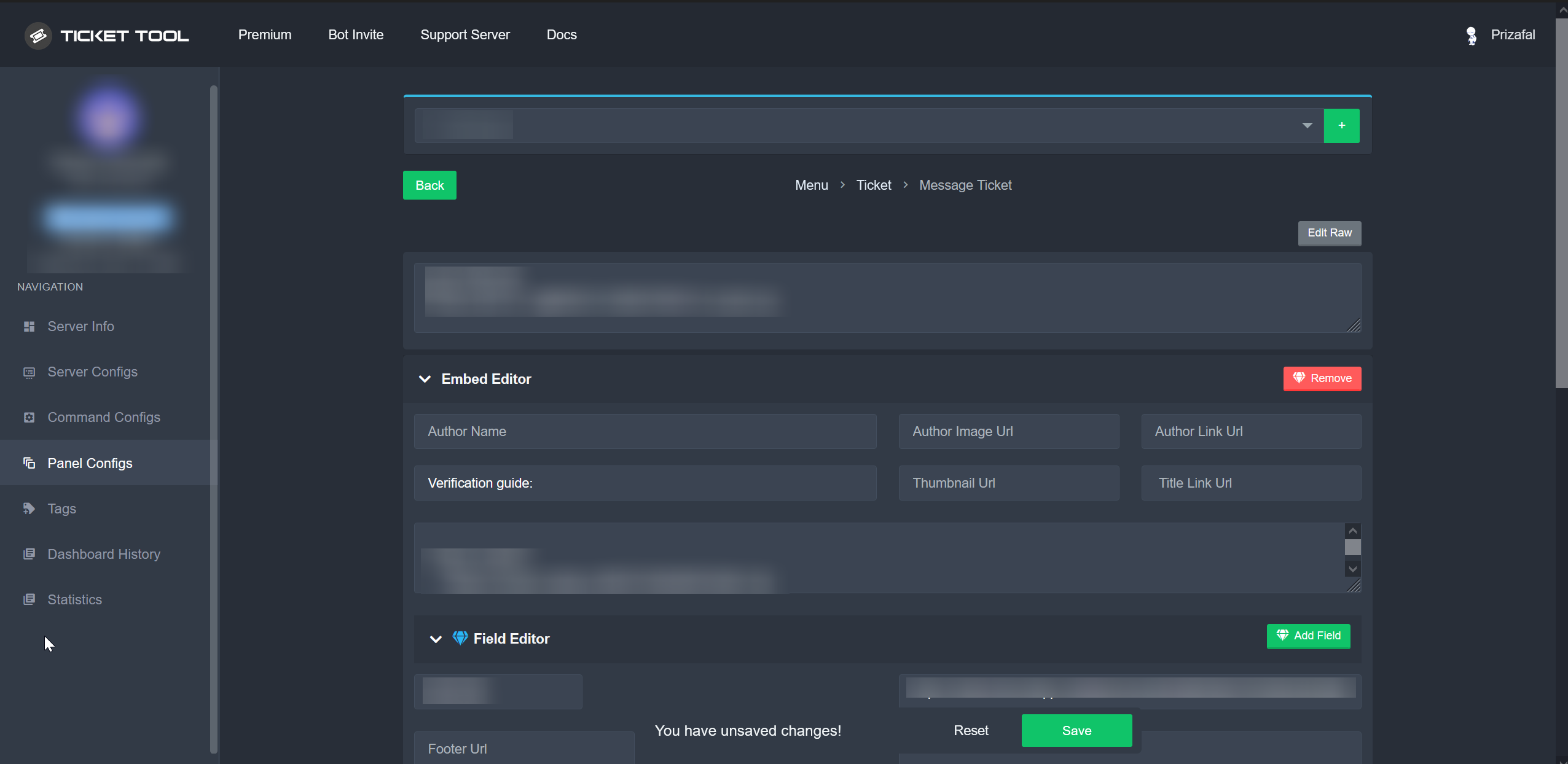 covert swallow
fast fiber
why my button is doubled
covert swallow
fast fiber
why my button is doubled
You attached the panel to itself
humble sequoiaBOT
For a more convenient use of multipanels, you can now combine panels on the dashboard. This will allow you to directly send the multipanel from the dashboard or via the $panel ID command.
Where can I find this?
You can find this setting on the Dashboard -> Panel Configs -> Settings -> Panel
Note: if you're attaching all the panels to a panel called English, don't include English in the attached panel's box (If you do this, it will create a duplicate)
This will put all buttons from all of your panels on one message. The message is the panel message from the panel you're combining these panels in.
spring thistle
covert swallow
Panel configs > Ticket > Ticket Message > Embed Editor
https://i.imgur.com/TFAz...
i mean the start of the panel not after opening it
covert swallow
Panel > Message Panel > Embed Editor
 spring thistle
thanks @covert swallow
iron nightBOT
Gave +1 Rep to @covert swallow
covert swallow
No problem!
spring thistle
covert swallow
No problem!
onther question, is there is a way to change the ticket name when someone open it?

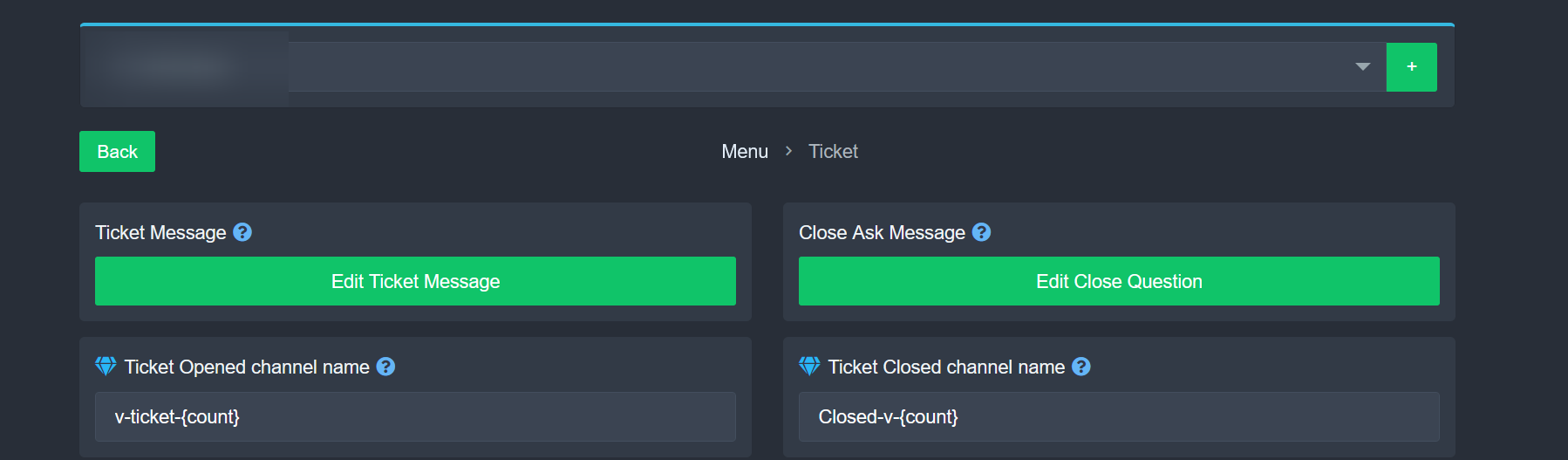 iron nightBOT
Gave +1 Rep to @covert swallow
covert swallow
No problem
 still steeple

 autumn oriole
Lol I am waiting for portguese support team answer whole day! Where are they?
 coarse pulsar
What's this about?
 coarse pulsar
autumn oriole
Lol I am waiting for portguese support team answer whole day! Where are they?
coarse pulsar
autumn oriole
Lol I am waiting for portguese support team answer whole day! Where are they?
hey
@covert swallow
covert swallow
autumn oriole
Lol I am waiting for portguese support team answer whole day! Where are they?
The Portuguese support team is relatively small, please be patient
covert swallow
coarse pulsar
What's this about?
Could you please translate that error for me? I don't know how to read Chinese
coarse pulsar
 covert swallow
Does the bot have the ability to see that channel?
rustic gale
coarse pulsar
Try using
/panel 1
in the channel, and show us what error you get
coarse pulsar
rustic gale
Try using
/panel 1
in the channel, and show us what error you get
Where is that /pane 1?
rustic gale
It's a slash command
You write /panel, then select the command that appears, then write 1


 rustic gale
coarse pulsar
I don't think it's this robot.
rustic gale
coarse pulsar
I don't think it's this robot.
Yes it is. That's the free version
coarse pulsar
rustic gale
Yes it is. That's the free version
That needs to be upgraded?
coarse pulsar
I'd like to get this. Is it free to use?
 rustic gale
I'm helping you get it right now
coarse pulsar
rustic gale
I'm helping you get it right now
I love you.
rustic gale
Use /panel 1 and show us what error you get
coarse pulsar
 rustic gale
Try using /debug
coarse pulsar
Same result.
rustic gale
In your dashboard, head over to Server Configs
and use the dropdown selector there to select the free bot

 alpine bone
O
coarse pulsar
rustic gale
I'm done.
rustic gale
Now go back to Panel Configs and try sending the panel again
coarse pulsar
rustic gale
Now go back to **Panel Configs** and try sending the panel again
Sent successfully. Thank you very much.
iron nightBOT
Gave +1 Rep to @rustic gale
rustic gale
Good luck. If you have any other questions please #🎫│make-a-ticket
coarse pulsar
rustic gale
Good luck. If you have any other questions please <#571706435449257997>
But sending me doesn't show the screenshot I posted above
rustic gale
coarse pulsar
But sending me doesn't show the screenshot I posted above
What did you get?
coarse pulsar
rustic gale
What did you get?
I got the wrong channel category.
jade topaz
Hi, how to do the same?
 coarse pulsar
extremely grateful
jade topaz
@rustic gale
rustic gale
coarse pulsar
extremely grateful
Is everything solved?