#🆘│community-support
1 messages · Page 20 of 1
 gilded verge
 jagged seal
<@334671104704774154>
jagged seal
<@334671104704774154>
check rule 4 please
 humble citrus
can I edit the ticket count ?
 jovial hollow
If I delete ticket tool and re-invite it, will it delete any currently open tickets when the bot is removed?
 lunar solar
humble citrus
can I edit the ticket count ?
lunar solar
humble citrus
can I edit the ticket count ?
Yes, Panel Configs --> Set Count (Grey button, top centre screen) --> Enter your desired count
humble citrus
lunar solar
Yes, Panel Configs --> Set Count (Grey button, top centre screen) --> Enter your...
tysm
 jade topaz
Hello how to configure ticket bot
 humble sequoiaBOT

You can check our documentation here;
You can also check #📂│information for the basic setup;
or run the </setup:1025379472167403530> command within #🤖│bot-spam
Our documentation contains all the info you need about the bot to be able to setup and configure the bot however you like.
 stark runeBOT
1. Invite Ticket Tool to your server
First you will want to invite the bot to your server. Once the bot is in your server, you can manage your server in the dashboard.

2. Create a Panel
To create a panel we are going to need to head over to the panel configs on the dashboard.
Once at the dashboard we will need to click Create Panel.
Enter a panel name (Fill in any optional settings you want).
Click Create Panel and your ready to get started with configuring your panel.
An example of a creating a panel is shown below.

3. Send the Panel to a Channel
Once you've created a panel on the dashboard you will need to send it to a channel using send on the dashboard.
Select the channel you want your panel to be created in and click send.
For other questions checkout $help faq.
An example of a sending a panel is shown below.
Having a Problem Sending the Panel?
Do $debug in a channel with Ticket Tool and make sure it has all the necessary Discord permissions.
 lunar solar
@jade topaz Please see above
jagged seal
.
lunar solar
jagged seal
.
Please #🎫│make-a-ticket so I can assist you further
 scenic plinth
It's something our website automatically does when it receives too many requests from you. Also be patient when it comes to receiving answers, thanks.
 quick vector
/setup
 fervent vector
were to buy premium?
jade topaz
/setup
 rustic gale
fervent vector
were to buy premium?
rustic gale
fervent vector
were to buy premium?
the Upgrade button. desktop version only
 jade topaz
Is there a way to get a rebranded bot? So I could use my own Application via Discord Developer Portal with my own name and pfp?
rustic gale
jade topaz
Is there a way to get a rebranded bot? So I could use my own Application via Dis...
It's an upcoming feature. Stay tuned
jade topaz
rustic gale
It's an upcoming feature. Stay tuned
Estimate?
rustic gale
None available. We can tell you that the developer is working on it, but we can't give a planned or estimated release date
jade topaz
Gotcha, what does this mean btw?


 magic birch
How do I make a multi-ticket?
I can't find the button to configure my ticket in such a way
humble sequoiaBOT
For a more convenient use of multipanels, you can now combine panels on the dashboard. This will allow you to directly send the multipanel from the dashboard or via the $panel ID command.
Where can I find this?
You can find this setting on the Dashboard -> Panel Configs -> Settings -> Panel
Note: if you're attaching all the panels to a panel called English, don't include English in the attached panel's box (If you do this, it will create a duplicate)
This will put all buttons from all of your panels on one message. The message is the panel message from the panel you're combining these panels in.
 magic birch
Where do I find the settings?

 covert swallow
Afri, your ticket was open for under 20 minutes, if you read the ticket instructions you would have seen the warning of 24-48 hour response time
humble sequoiaBOT

Ticket Tool - Ticketing without clutter - The #1 discord Ticketing bot
magic birch
I'm not sure where they are, or maybe I don't see them on the panel board
covert swallow
Bottom left corner has the panel button
jade topaz
covert swallow
Afri, your ticket was open for under 20 minutes, if you read the ticket instruct...
regardless of the reason they shouldn't have said that lol
magic birch
Ok
jade topaz
not hard to comprehend
magic birch
So I am on panel configs
covert swallow
jade topaz
regardless of the reason they shouldn't have said that lol
Staff issues will be dealt with internally
It will br handled appropriately
covert swallow
magic birch
So I am on panel configs
Bottom left, second row from the bottom
 covert swallow
Scoll down
 covert swallow
No worries
 covert swallow
You can open a report ticket in #🎫│make-a-ticket
It will go directly to the hr manager
 idle cypress
thx
magic birch
one more question
covert swallow
Ill do my best to answer but my phone may die
magic birch
when I add the multipanels to my ticket message, they all show up as the same "Create Ticket" and I was wondering how to fix that?
covert swallow
You gotra change the button name
magic birch
In the buttons section?
magic birch
ok
covert swallow
When im on my laptop and not risking frostbite
magic birch
I might have one more question to ask you then also
but it might not be one that applies to the bot or is solveable with the bot
covert swallow
Alright im at 5% battery now, ill answer in 10 mind
magic birch
and if that the case then it is ok
covert swallow
Were you able to find where to change the button?
magic birch
Not yet
covert swallow
Go back to that panel page and scroll down
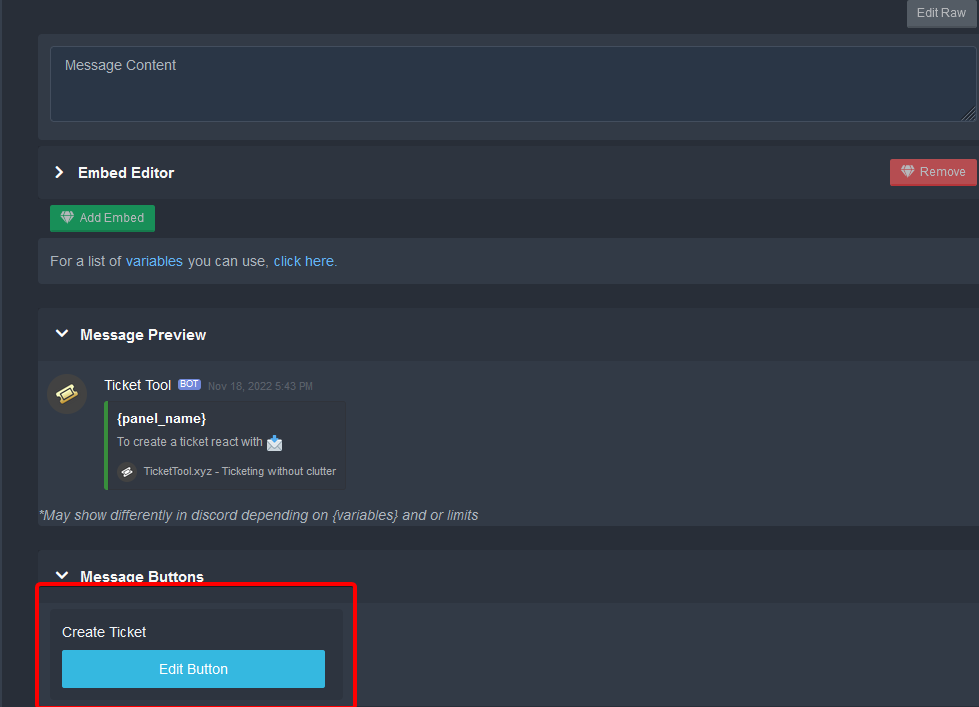 covert swallow
Button text
magic birch
Ohhhh
covert swallow
You will have to resend the panel
magic birch
Thank you!
covert swallow
Any other questions?
magic birch
Yes
Is there a way to set a role to be automatically given to a user when they create a ticket? Say I wanted to have all of the tickets appear under a certain category, but wanted to minimize the clutter by hiding that category until a user creates a ticket that will appear under that category
They would be able to see the category when given a role after creating a ticket
Is there a way to do that?
covert swallow
The category will appear to them if they have a channel they can see in it, you dont need to give them a role
covert swallow
yep
covert swallow
No problem!
 fleet pier
Anyone know how to make a drop down menu when having multi panels on a embed instead of the multiple buttons?
humble sequoiaBOT
The Drop-down menu or Select Menu replaces the buttons on your panel message and uses a drop-down menu with all of your panels. To set this up, go to your Panel Configs and select your main Panel.
<:Numbericons1:1018864164032225340> Enable Select Style
First you enable Select Style. Then you add an item in the Dropdown Editor. Now you can start editing your dropdown!
<:Numbericons2:1018864168041971712> Dropdown Editor
Each line in the dropdown editor represents a line in the drop down menu on discord. You can add more "Items", by clicking on 

First you select a panel. That's the panel this option will open a ticket for.  DONT select the same panel twice. Each option should have a different Panel
After that, you can put a Display. This is the title of this option and will appear in the drop down menu. The *Description can be set right after that, which will be below the title in grey.
Additionally you can select an emoji, that will be shown in front of each option. You can either manually input the ID of an emoji or select it in the selector.
Common Issues ⚠️
- Panel doesn't send? Make sure you have a valid emoji selected
- Option doesn't show up? Check if two options have the same panel in the DropDown Editor

$dropdown
 slender minnow
@fleet pier this? ^
jade topaz
Hello, I was wondering if you guys updated recently because I am trying to watch yt guides on how to do it but their screen for panel configs looks totally different from mine and then I’m unable to follow along with the rest of the video. Does anyone have a explanation?
covert swallow
It was a couple months ago but yes panels did get an update
stark runeBOT
1. Invite Ticket Tool to your server
First you will want to invite the bot to your server. Once the bot is in your server, you can manage your server in the dashboard.
2. Create a Panel
To create a panel we are going to need to head over to the panel configs on the dashboard.
Once at the dashboard we will need to click Create Panel.
Enter a panel name (Fill in any optional settings you want).
Click Create Panel and your ready to get started with configuring your panel.
An example of a creating a panel is shown below.
3. Send the Panel to a Channel
Once you've created a panel on the dashboard you will need to send it to a channel using send on the dashboard.
Select the channel you want your panel to be created in and click send.
For other questions checkout $help faq.
An example of a sending a panel is shown below.
Having a Problem Sending the Panel?
Do $debug in a channel with Ticket Tool and make sure it has all the necessary Discord permissions.
 karmic quail
how to remove / slash commands from a bot?
This is not about a ticket tool, this is a question about discord!
karmic quail
karmic quail
how to remove / slash commands from a bot?
Example

 formal wren
(╯°□°)╯︵ ┻━┻
 true rain
@plain surge
@covert swallow
gilded verge
true rain
and i cant make any ticket
You must describe the problem or show errors so that we can help you
 gray jolt
سلام عليكم
gilded verge
karmic quail
how to remove / slash commands from a bot?
server settings->integrations->select bot and there you will be able to change
//you cannot delete commands but you can prevent use
karmic quail
Ok thanks
 sullen rapids
Hi! I own a server and on an alt account i tried to make a ticket, i can make a ticket on my main but not on my alt [which is just a normal member] and members have been telling me that too, how can i change this?
 fleet pier
slender minnow
<@452256802055127051> this? ^
fleet pier
slender minnow
<@452256802055127051> this? ^
perfect
scenic plinth
sullen rapids
Hi! I own a server and on an alt account i tried to make a ticket, i can make a ...
Try sending the panel again or update the Discord application.
 zealous whale
How would I change the color on the panel?
 jade topaz
only see 3 servers on the dashboard but have more where the bot is on top of it reload brings nothing
 cobalt fractal
How do I make it so whenever a ticket gets created, it goes under a category like this?
 zealous whale
How would I change the color on the panel?
zealous whale
zealous whale
How would I change the color on the panel?
I also bought premium how do I register my premium bot?
humble sequoiaBOT
1. Go into your Dashboard
2. Open your Panel Configs tab
3. Select the panel you want to grant access to
4. Open the Category options menu
5. Select the categories of your preference
6. Save changes
 slender minnow
@cobalt fractal re above ^
cobalt fractal
oh ok thx
 worthy yarrow
Servers - (server not showing up? try relogging) but im not getting my server there $debug is the command for relog right?
jade topaz
worthy yarrow
Servers - (server not showing up? try relogging) but im not getting my server th...
i have the same problem
 noble prawn
hello, how do i remove this another button?
 worthy yarrow
Got different ticket bot since i got not help from here.
slender minnow
noble prawn
hello, how do i remove this another button?
Panel Config > Panel
Remove the linked panel there
slender minnow
worthy yarrow
Got different ticket bot since i got not help from here.
Hey Leon, I am really sorry that you had a hard time getting help. Just to let you know, you can reach out to us through #🎫│make-a-ticket and a support member will be with you as soon as possible 🙂
Also to answer your question, refer the response below
humble sequoiaBOT
Don't see your server in the dashboard?
You will possibly need to relog. Look below to see steps on how to relog.
How to relog in the Dashboard.
Note:
You need one of these 3 things to access the dashboard.
1. Server Owner (Level: 6)
2. Server Administrator (Level: 4)
3. Dashboard Role (Level: 2)
:warning: You can check your level using $level on your Discord Server
User permission level with Ticket Tool
@User is permission level: 0 (User)
```» *If it shows that your permission is **0**, you don't have any of the above **3 things** to manage the dashboard.*
**See the Image below on how to relog:** slender minnow
@jade topaz re 
cobalt fractal
how do i make it so the bot pings a certain role whenever a ticket gets created? ive checked but i dont think that feature exists
slender minnow
$mentions
humble sequoiaBOT
Within all the messages the bot's sends (both embeds and text) you can mention either channels, roles, or even users, these mentions will only send a notification to the user if they are used within a text field, e.g: a role mentioned in an embed won't ping at all the users who have that role.
For mentioning a role you can use one out of three options:
{@Role Name} ➞ Which is Case Sensitive.
{RoleID} ➞ Replace RoleId with the Id of the role you are trying to ping.
<@&RoleID> ➞ Discord's native syntax to ping roles.
<#ChannelID> ➞ Mention a channel by its ID.
<@UserID> ➞ Mention a user by its ID.
slender minnow
@cobalt fractal refer above ^
cobalt fractal
slender minnow
<@742789784983830569> refer above ^
ty
 iron nightBOT
Gave +1 Rep to @slender minnow
 cyan scarab
hi, is there a way to put a channel in a panel? thank you guys
slender minnow
cyan scarab
hi, is there a way to put a channel in a panel? thank you guys
mentioning channel?
i am not sure what you meant by putting a channel in a panel
cyan scarab
yeah like #🆘│community-support but in the panel
slender minnow
humble sequoia
refer to this response
cobalt fractal
cyan scarab
yeah like <#776680605517742090> but in the panel
<# (channel id)>
dont type the ( then it should work
cyan scarab
ohh thank you so much guys!!!! do i have to make rep+ or something?
thanks @cobalt fractal @slender minnow
iron nightBOT
Gave +1 Rep to @cobalt fractal
cyan scarab
thanks @slender minnow
cobalt fractal
np and idk myself lmao
cyan scarab
i think i've done
rustic gale
jade topaz
only see 3 servers on the dashboard but have more where the bot is on top of it ...
Here's what you need to know
humble sequoiaBOT
Don't see your server in the dashboard?
You will possibly need to relog. Look below to see steps on how to relog.
How to relog in the Dashboard.
Note:
You need one of these 3 things to access the dashboard.
1. Server Owner (Level: 6)
2. Server Administrator (Level: 4)
3. Dashboard Role (Level: 2)
:warning: You can check your level using $level on your Discord Server
User permission level with Ticket Tool
@User is permission level: 0 (User)
```» *If it shows that your permission is **0**, you don't have any of the above **3 things** to manage the dashboard.*
**See the Image below on how to relog:** eternal vale
humble sequoiaBOT
eternal vale
humble sequoiaBOT
━━ moved to ticket ━━
 lapis thunder
I put ticket tool on and it works fine. I cant seem to figure out how to do so theres no cooldown of creating a ticket
rustic gale
lapis thunder
I put ticket tool on and it works fine. I cant seem to figure out how to do so t...
That's impossible
Ticket Tool sets a cooldown on ticket creation because Discord sets a rate limit on channel creation
 cyan quest
Hola??? Como puedo crear un mensaje al cual se reaccione y se entre a un ticket?
lapis thunder
rustic gale
Ticket Tool sets a cooldown on ticket creation because Discord sets a rate limit...
oh alright
cobalt fractal
cyan quest
Hola??? Como puedo crear un mensaje al cual se reaccione y se entre a un ticket?
#📂│information haga clic en el botón de configuración
lapis thunder
didnt know that srry for bothering
cobalt fractal
cobalt fractal
<#509239005481664524> haga clic en el botón de configuración
¿ayudas?
jade topaz
Hi, i just bought Enlisted 24h hack and the loader says the key its incorect
lapis thunder
w
 vestal parrot
How to use the old ticket tool panel config? I'm not into this new
cyan quest
cobalt fractal
<#509239005481664524> haga clic en el botón de configuración
Me ayuda?? Disculpe es que no se Inglés
rustic gale
cyan quest
Me ayuda?? Disculpe es que no se Inglés
En #🎫│make-a-ticket puedes hacer un ticket para recibir ayuda en español
cyan quest
Muchas gracias
rustic gale
Tienes que aprovechar que estoy en línea, soy de los pocos que ofrece ayuda en español
rustic gale
vestal parrot
How to use the old ticket tool panel config? I'm not into this new
You will have to get used to it, the same way you got used to the old one when you first started using Ticket Tool
vestal parrot
rustic gale
You will have to get used to it, the same way you got used to the old one when y...
Damn... I hope so, thank you
iron nightBOT
Gave +1 Rep to @rustic gale
vestal parrot
How to make the bot ping a role?
vestal parrot
cobalt fractal
<@506429893416976385> this
Why did it say "deleted-role"?
cobalt fractal
vestal parrot
Why did it say "deleted-role"?
you may have forgot the &
vestal parrot
I didn't, it is in the panel.
cobalt fractal
could you show a picture if possible?

 cobalt fractal
did you copy the right ID?
vestal parrot
I surely did
cobalt fractal
the bot has permission to ping roles right
vestal parrot
Let me try again
Oh damn.. I forgot to turn on the mention
Got it, thank you @cobalt fractal
iron nightBOT
Gave +1 Rep to @cobalt fractal
cobalt fractal
no problem
 orchid dagger
my server isnt showing up on my dash
cobalt fractal
login again
iron nightBOT
Gave +1 Rep to @cobalt fractal
cobalt fractal
np
jade topaz

orchid dagger
*also if i do the 7 day free trial will it charge my card after the 7 days?
orchid dagger
okay thanks!!
orchid dagger
cobalt fractal
yea
i pressed start free 7 day trial but it didnt ask for my card info, o.O
cobalt fractal
orchid dagger
i pressed start free 7 day trial but it didnt ask for my card info, o.O
oh 💀
orchid dagger
welp-
gilded verge
orchid dagger
*also if i do the 7 day free trial will it charge my card after the 7 days?
7 days is completely free so there is no need to ask for your card details ^^
cobalt fractal
gilded verge
7 days is completely free so there is no need to ask for your card details ^^
my first time legit seeing this
gilded verge
I'm shocked because I've never seen in Ticket Tool that you have to add your card in order to use the free 7 day trial 😳
finally: no need to add your card, just get the trial to get free premium ^^
 cobalt fractal
gilded verge
I'm shocked because I've never seen in Ticket Tool that you have to add your car...
cobalt fractal
gilded verge
I'm shocked because I've never seen in Ticket Tool that you have to add your car...
sounds like an ad
rustic gale
cobalt fractal
yea
Incorrect. The free trial is free, no strings attached
cobalt fractal
W
cobalt fractal
yea
rustic gale
orchid dagger
so im trying to add a photo for my embeds but its not showing up,
What's the URL of the image?
 versed ledge
Podem me ajudar?
rustic gale
versed ledge
Podem me ajudar?
#🎫│make-a-ticket pode crear um ticket en portugues
versed ledge
Já fiz isso meu bem
scenic plinth
Consulte o que enviei no seu ticket.
noble prawn
slender minnow
Panel Config > Panel
thank you so much!
iron nightBOT
Gave +1 Rep to @slender minnow
jade topaz
How do I set up the bot itself?
versed ledge
Pode me tira aquela dúvida @scenic plinth
orchid dagger
rustic gale
What's the URL of the image?
sorry, late reply : https://media.discordapp.net/attachments/1037558371567554577/1042923013093466232/6000867954a2ee599a045f8ca5ebbaf8ff73606br1-320-61_hq.gif

idek why it wont work... 💔
rustic gale
orchid dagger
idek why it wont work... 💔
That's strange. What's the server's ID?
orchid dagger
rustic gale
That's strange. What's the server's ID?
wym? 
rustic gale
orchid dagger
wym? <:AaronThink:993233991081668648>
What do i mean by “what's the server's ID”?
orchid dagger
yes
rustic gale
Use the /id command in the server, that will tell you the server's ID
orchid dagger
okok lemme check
 eager pine
Is there a way that specific people can be notified when a user replies to their ticket?
Like an opt in feature or a role or something?
slender minnow
eager pine
Is there a way that specific people can be notified when a user replies to their...
like if User A (ticket owner) answers the ticket, a User B will be pinged/notified?
eager pine
slender minnow
like if User A (ticket owner) answers the ticket, a User B will be pinged/notifi...
Yes exactly!
slender minnow
eager pine
Yes exactly!
That's not possible with ticket tool (you can post it as a suggestion)
eager pine
slender minnow
That's not possible with ticket tool (you can post it as a suggestion)
Ok thank you!
iron nightBOT
Gave +1 Rep to @slender minnow
 fierce scarab
for me my ticket isnt showing up
covert swallow
Follow this relog guife
humble sequoiaBOT
Don't see your server in the dashboard?
You will possibly need to relog. Look below to see steps on how to relog.
How to relog in the Dashboard.
Note:
You need one of these 3 things to access the dashboard.
1. Server Owner (Level: 6)
2. Server Administrator (Level: 4)
3. Dashboard Role (Level: 2)
:warning: You can check your level using $level on your Discord Server
User permission level with Ticket Tool
@User is permission level: 0 (User)
```» *If it shows that your permission is **0**, you don't have any of the above **3 things** to manage the dashboard.*


**See the Image below on how to relog:**Make sure you have permission to view the dashboard
covert swallow
fierce scarab
for me my ticket isnt showing up
Are you staff in the server?
fierce scarab
yeah
i cant seem to log into my main so im on my alt, but im the founder so
i've done this a few times on this acc but it's the first time it didnt show up for me
covert swallow
Youre referring to the ticket in the server correct?
iron nightBOT
Gave +1 Rep to @covert swallow
fierce scarab
mhm
covert swallow
No problem!
covert swallow
fierce scarab
mhm
Are you able to ensure the ticket was actually created?
fierce scarab
mhm, give me a sec to take a screenshot
oct 25, 2021 was the last time i resent it
 covert swallow
What happens when you hit create ticker


 covert swallow
So what exactly is the issue?
fierce scarab
i want to resend the ticket embed so it's at the bottom of the webhook 😭 but it won't let me configure it
covert swallow
fierce scarab
oct 25, 2021 was the last time i resent it
In this channel?
fierce scarab
mhm, i cant seem to find the ticket in the config panels section, it's literally blank and it wont let me create another one too lmaoo
covert swallow
In the panel configs theres a button called "send panel"
 covert swallow
Do you have anything that would block any content from loading?
fierce scarab
i dont think so, im borrowing my sister's chromebook on a guest account
covert swallow
What happens when you click the white box with an arrow
 humble sequoiaBOT
Don't see your server in the dashboard?
You will possibly need to relog. Look below to see steps on how to relog.
How to relog in the Dashboard.
Note:
You need one of these 3 things to access the dashboard.
1. Server Owner (Level: 6)
2. Server Administrator (Level: 4)
3. Dashboard Role (Level: 2)
:warning: You can check your level using $level on your Discord Server
User permission level with Ticket Tool
@User is permission level: 0 (User)
```» *If it shows that your permission is **0**, you don't have any of the above **3 things** to manage the dashboard.*


**See the Image below on how to relog:**alright
it still hasn't changed jsjs 😟
retrying again rq
nope , idk if others have this problem thoughh
fierce scarab
im level 4 because im on my alt that has all of the perms on it so idk if that was part of the problem
covert swallow
Shouldn't be
fierce scarab
it doesn't seem to respond, i need to figure out how to record on a chromebook omg jsjs
covert swallow
My best guess is you have some sort of script blocker
fierce scarab
alright, thanks for ur time anyway
ill check tmrw i guess , ill just go with the old one for now
iron nightBOT
Gave +1 Rep to @covert swallow
 red yacht
covert swallow
My best guess is you have some sort of script blocker
red yacht
covert swallow
My best guess is you have some sort of script blocker
how to rename ticket command
cobalt fractal
red yacht
how to rename ticket command
The prefix?
If so go to the server configs, should be right in front of you if your there
 red yacht
ok
cobalt fractal
its a discord bug, youre either lagging a lot, dont have the right permissions with the bot
 cold surge
cobalt fractal
its a discord bug, youre either lagging a lot, dont have the right permissions w...
cold surge
cobalt fractal
its a discord bug, youre either lagging a lot, dont have the right permissions w...
me?
cobalt fractal
yes
 indigo ember
it is possible that the free bot is offline
scenic plinth
Yes, there is a single shard offline, typically it will restart itself, so please do not go crazy because you see me saying this...
jade topaz
bot isnt working
indigo ember
yes it is because it it offline
btw is there a status site where you can see the status of the shards
jade topaz
bruh
scenic plinth
That as a support member can see, yes, which makes it easy to identify these things.
Since I just identified that one is offline, we typically wait 10 minutes to see if it restarts itself, so it really does not have an ETA before it gets fixed.
indigo ember
but yeah it is just a shard that is donw
indigo ember
scenic plinth
Since I just identified that one is offline, we typically wait 10 minutes to see...
10 minutes
that is long
scenic plinth
indigo ember
but yeah it is just a shard that is donw
Correct, if it was more, you would be able to easily notice that without having to view a status page because people cannot read and spam this channel.
indigo ember
but it is now almost 20 minutes
scenic plinth
It's 10 minutes as a support member identifies it, because we can't exactly see how long it has been offline.
indigo ember
if I say it in Belguim time it is now here 2:35pm and the bot went offline at 2:18pm
scenic plinth
Well, good news it's another 2 minute wait before I can get any sort of update.
I've notified the developer and it should be fairly soon before he kicks the server in the butt off the bed from sleepy time.
indigo ember
nope it didn't come online so far
scenic plinth
It's not going to be immediate, I think with respect he might be sleeping considering how early on a Sunday morning it is for him...
cobalt fractal
i havent checked yet but is it possible to blacklist roles/members from creating tickets? if no i have other solutions but still wanted to know
scenic plinth
View https://docs.tickettool.xyz/general/faqs#warning-you-dont-have-permissions-to-use-this in terms of blacklist roles for your server.
cobalt fractal
scenic plinth
View **https://docs.tickettool.xyz/general/faqs#warning-you-dont-have-permission...
thanks
iron nightBOT
Gave +1 Rep to @scenic plinth
scenic plinth
indigo ember
nope it didn't come online so far
Said it should have restarted now and does not look like there are any errors showing up here, let us know if you have further troubles!
indigo ember
yes now is the bot back online
jade topaz
I’m trying to set up my ticket in my server and my server won’t pop up even after resetting many times
Me too.
 shut bolt
jade topaz
I’m trying to set up my ticket in my server and my server won’t pop up even afte...
shut bolt
jade topaz
I’m trying to set up my ticket in my server and my server won’t pop up even afte...
Reloading won't solve it
humble sequoiaBOT
Don't see your server in the dashboard?
You will possibly need to relog. Look below to see steps on how to relog.
How to relog in the Dashboard.
Note:
You need one of these 3 things to access the dashboard.
1. Server Owner (Level: 6)
2. Server Administrator (Level: 4)
3. Dashboard Role (Level: 2)
:warning: You can check your level using $level on your Discord Server
User permission level with Ticket Tool
@User is permission level: 0 (User)
```» *If it shows that your permission is **0**, you don't have any of the above **3 things** to manage the dashboard.*


**See the Image below on how to relog:** humble sequoiaBOT
Any role you put there will have full access to the ticket tool dashboard. The server owner and users with admin permissions already have access to the dashboard.
Be careful of which roles to put here
 cobalt fractal
The same way you created a panel message
Oh the message, in panel configs, then click on “Ticket, General ticket options” then edit ticket message
eager pine
So if I put my custom bot ID in here, then Ticket Tool will respond?
 rustic gale
It should.
eager pine
interesting
Instead of a drop down, can we do buttons for tickets like the attached picture?
 covert swallow
Yes
humble sequoiaBOT
For a more convenient use of multipanels, you can now combine panels on the dashboard. This will allow you to directly send the multipanel from the dashboard or via the $panel ID command.
Where can I find this?
You can find this setting on the Dashboard -> Panel Configs -> Settings -> Panel
Note: if you're attaching all the panels to a panel called English, don't include English in the attached panel's box (If you do this, it will create a duplicate)
This will put all buttons from all of your panels on one message. The message is the panel message from the panel you're combining these panels in.
 frail ember
hey support team can any one tell me how can i make ticket tool bot ( not premium ) mention support roles when a person open a ticket.
cobalt fractal
frail ember
hey support team can any one tell me how can i make ticket tool bot ( not premiu...
edit ticket message and put in "<@&(role id that u want to get pinged)>
frail ember
cobalt fractal
edit ticket message and put in "<@&(role id that u want to get pinged)>
please tell me where is edit ticket msg?
cobalt fractal
frail ember
please tell me where is edit ticket msg?
panel config, click on the "ticket, general ticket options"
then scroll up a bit and youll see edit ticket message
 cobalt fractal
yea
frail ember
so what should i do in here
cobalt fractal
frail ember
so what should i do in here
copy the id of the role you want to get pinged
frail ember
ok i copied
cobalt fractal
then in the message type <@& then the role id>
frail ember
cobalt fractal
then in the message type <@& then the role id>
here?
 cobalt fractal
yes
cobalt fractal
frail ember
ok tysm so how can i claim a ticket?
wdym?
frail ember
cobalt fractal
wdym?
there are no claim button in a ticket
cobalt fractal
oh idk thjat
iron nightBOT
Gave +1 Rep to @cobalt fractal
cobalt fractal
np
frail ember
cobalt fractal
np
❤️
 frail ember
jade topaz
what do I do
frail ember
jade topaz
what do I do
did u fill user and reason?
frail ember
then let me check in my server
frail ember
frail ember
then let me check in my server
did u give the permission to do command in ur server?
@jade topaz
 terse umbra
Is it possible to make the ticket closed only by the people who opened it?
rustic gale
terse umbra
Is it possible to make the ticket closed only by the people who opened it?
No, but that feature has been suggested
rustic gale
jade topaz
what do I do
What are you trying to do?
iron nightBOT
Gave +1 Rep to @rustic gale
 brittle apex
Hi, I’m not sure what’s wrong with my ticket tool bot. I have the correct permissions and everything to use the bot and the bot has the correct permissions in order to work properly. But when I try to manage the bot on the dashboard, my server won’t pop up. I’ve restarted my discord and tried kicking the bot and re inviting but nothing has fixed it. Any help would be appreciated
 split nest
Hey fam whats the best way to setup ticket tool to have multiple panels to choose from depending on the option
i.e.

but I want 4 more button options on the same panel
humble sequoiaBOT
For a more convenient use of multipanels, you can now combine panels on the dashboard. This will allow you to directly send the multipanel from the dashboard or via the $panel ID command.
Where can I find this?
You can find this setting on the Dashboard -> Panel Configs -> Settings -> Panel
Note: if you're attaching all the panels to a panel called English, don't include English in the attached panel's box (If you do this, it will create a duplicate)
This will put all buttons from all of your panels on one message. The message is the panel message from the panel you're combining these panels in.
shut bolt
Check this :)
brittle apex
@indigo ember I do, when I do the level command it shows that I have level 6
eager pine
How do we auto delete a ticket instead of saving it as a closed ticket?
 lunar abyss
Hey does anyone know how you can make a ticket name be name of the person who opened it?
for example not #ticket-1297 but #aggelus
cobalt fractal
dont think its possible rn
lunar abyss
I had seen it happen in the past so I was wondering how
lunar abyss
thank you lad
cobalt fractal
eager pine
{ticket.user.name}
youre a life saver
eager pine
woohoo I helped lol
lunar abyss
oh I need to be subscribed
cobalt fractal
💀
rustic gale
eager pine
How do we auto delete a ticket instead of saving it as a closed ticket?
Panel Configs -> General, disable “Two Step Ticket”
rustic gale
brittle apex
<@773929228991201291> I do, when I do the level command it shows that I have lev...
Log out of the dashboard, then log in again
rustic gale
split nest
is there a way to get more options for the colors of the button?
Not possible. Those colors are set by Discord, and they already include all the options given by Discord
split nest
rustic gale
Not possible. Those colors are set by Discord, and they already include all the ...
Figured so, appreciate it!
eager pine
rustic gale
Panel Configs -> General, disable “Two Step Ticket”
Thank you +1 🙂
iron nightBOT
Gave +1 Rep to @rustic gale
eager pine
How can I make the Footer text be clickable?
I pasted a channel link, but it didn't do anything
 jade topaz
Hello, how do I add more than one button in the same panel?
eager pine
jade topaz
Hello, how do I add more than one button in the same panel?
Go to panel and add additional panels...
If you don't have additional panels, you'd have to create more than one and then have one as the default
 jade topaz
eager pine
Go to panel and add additional panels...
If you don't have additional panels, y...
jade topaz
eager pine
Go to panel and add additional panels...
If you don't have additional panels, y...
Thank you
iron nightBOT
Gave +1 Rep to @eager pine
 neat dagger
Hi
Hello. I bought a Switch with a hack and now the tinfoil will not load since the discord account is not the same as the one that hacked it for the first time
humble sequoiaBOT

⚠️ You're in the wrong place
We provide support for Ticket Tool Discord bot and cannot help you with whatever issue you have.
- We don't know which Support Team you should contact to get this issue resolved, and unfortunately we won't be able to accurately tell you.
If you don't have any further questions regarding our bot Ticket Tool, please close this ticket
rustic gale
eager pine
How can I make the Footer text be clickable?
I pasted a channel link, but it did...
Not possible
eager pine
rustic gale
Not possible
What is the URL link utilized for?
rustic gale
eager pine
What is the URL link utilized for?
Which one?
Ah, Footer URL
that's for the footer icon
eager pine
rustic gale
that's for the footer icon
Oh! Thank you 😌
iron nightBOT
Gave +1 Rep to @rustic gale
eager pine
Can premium change the bot logo?
rustic gale
eager pine
Can premium change the bot logo?
Not possible currently, but the developer is working on it
No, i can't tell you when it will be released
eager pine
Thanks again @rustic gale
iron nightBOT
Gave +1 Rep to @rustic gale
eager pine
I ask a lot 🙃
jade topaz
How do I verify my email on discord? I was told to on here from staff bc they were helping me
guys I can’t verify on the Website
gilded verge
jade topaz
guys I can’t verify on the Website
I don't understand so please show screenshot
 gilded verge
uhm... what exactly are you trying to do that you are getting this message? 😳
gilded verge
jade topaz
How do I verify my email on discord? I was told to on here from staff bc they we...
jade topaz
gilded verge
uhm... what exactly are you trying to do that you are getting this message? 😳
impressed login in the corner then logged in
gilded verge
gilded verge
-> <https://support.discord.com/hc/en-us/articles/213219267-Resending-Verificati...
I've never seen it, so it's best you take a look here  and see how to verify your email
jade topaz
thank you
 minor slate
Hi
 heady osprey
When a ticket is opened and it sends a message in the open-ticket - how do I get the bot to refer to a channel, such as #📂│information
rustic gale
heady osprey
When a ticket is opened and it sends a message in the open-ticket - how do I get...
Insert a channel mention in the ticket message
humble sequoiaBOT
Within all the messages the bot sends (both embeds and text) you can mention either channels, roles, or even users, these mentions will only send a notification to the user if they are used within a text field, e.g: a role mentioned in an embed won't ping at all the users who have that role.
For mentioning a role you can use one out of three options:
{@Role Name} ➞ Which is Case Sensitive.
{RoleID} ➞ Replace RoleId with the Id of the role you are trying to ping.
<@&RoleID> ➞ Discord's native syntax to ping roles.
<#ChannelID> ➞ Mention a channel by its ID.
<@UserID> ➞ Mention a user by its ID.
The Ticket Message is the first message sent by the bot on a new ticket. To customize it head over to your Dashboard ➞ Panel Configs ➞ Ticket ➞ Edit Ticket Message
 heady osprey
rustic gale
Insert a channel mention in the ticket message
heady osprey
rustic gale
Insert a channel mention in the ticket message
Thanks!
iron nightBOT
Gave +1 Rep to @rustic gale
 robust sandalBOT
rustic gale
Insert a channel mention in the ticket message
robust sandalBOT
rustic gale
Insert a channel mention in the ticket message
Bilet mesajına kanal bahsi ekleme
 English (en) → Turkish (tr)
 rustic gale
No idea
This is a server for Ticket Tool support. We don't offer support for anything else
 cobalt sandal
So pretty much I then have a console I can use tinfoil on?
rustic gale
cobalt sandal
So pretty much I then have a console I can use tinfoil on?
You're in the wrong place for the problem you need help with, pal.
How did you even get here?
cobalt sandal
I joined it
 broken nest
hello
jade topaz
cobalt sandal
I joined it
I think their asking why this server?
cobalt sandal
Oh my mistake, it said community support, so I figured someone in the community could help?
Im just very lost at the moment and don’t know how to resolve this
jade topaz
It's Ok your welcome to stay in the server or leave
 frozen moss
what if it shows this interaction failed?
humble sequoiaBOT
ᅠ
@pseudo glen requires the following permissions:
Add Reactions
Read Channels
Send Messages
Manage Messages
Embed Links
Attach Files
Read History
Manage Roles
Manage Channels
To change the role permissions, you can go to your Discord Server ➞ Server Settings ➞ Roles ➞ @Ticket Tool
To change the channel permissions, you can go to your Channel Settings ➞ Permissions ➞ Ticket Tool
ᅠ
Note:
You can give Ticket Tool Administrative Permissions instead of all the permissions listed above, but it's entirely optional and NOT necessary.
 gilded verge
humble sequoia
gilded verge
humble sequoia
@frozen moss, please make sure the bot has required permissions and permissions in the channel: View Channel, Send Messages, Read Message History
*if you're using Discord on your phone, update it
jade topaz

Help, This is ss after click on close button
@oak shuttle @covert swallow @radiant moss
 sudden swallow
I need help with the claiming the ticket
 supple talon
Hi, has anybody encountered an issue where a ticket opens under a wrong category? For instance, I configured all tickets to be opened under a "Support-ticket" category, but somehow one of the ticket opened under my "Announcement" category.
Oddly enough, the ticket before that opened at the top of the "Support-ticket" category, although all other tickets before that opened below one another, e.g.: ticket 0059, then ticket 0060, then ticket 0061, then ticket 0062 opened above ticket 0001.
jade topaz
jade topaz
@supple talon pls
 still eagle
 jade topaz
jade topaz
jade topaz
Pls help
jade topaz
@fallow ingot
 fallow ingot
jade topaz
fallow ingot
jade topaz
Read what the error says. “buttons must have a label and/or an emoji”
fallow ingot
supple talon
Hi, has anybody encountered an issue where a ticket opens under a wrong category...
You can refer to your ticket: #1044162979878404107
jade topaz
fallow ingot
Read what the error says. “buttons must have a label and/or an emoji”
I changed emoji but still same problem
 robust trench
Hello, if it is possible to set up automatic closing of tickets if the person has not written anything
 prime cave
I've tried a lot of times already, but my server still won't show up.
 jade topaz
prime cave
I've tried a lot of times already, but my server still won't show up.
jade topaz
prime cave
I've tried a lot of times already, but my server still won't show up.
me too
cobalt fractal
prime cave
I've tried a lot of times already, but my server still won't show up.
Did you relogin? Sorry I haven’t seen the conversation and stuff but if you still don’t see it clear your web history, entirely then visit and login again then try
prime cave
cobalt fractal
Did you relogin? Sorry I haven’t seen the conversation and stuff but if you stil...
I tried re-logging in for a lot of times already
frail ember
hi i cant do command with ticket tool bot how can i do that
rustic gale
frail ember
hi i cant do command with ticket tool bot how can i do that
What are you trying to do?
rustic gale
prime cave
I tried re-logging in for a lot of times already
Use /debug in the server and let me know
rustic gale
robust trench
Hello, if it is possible to set up automatic closing of tickets if the person ha...
Not possible
frail ember
rustic gale
What are you trying to do?
i cant do any command
i cant make a new ticket with command close the ticket like that
rustic gale
jade topaz
I changed emoji but still same problem
The one that's blank is probably the Close button
frail ember
what should i do
rustic gale
What's your server's ID? I'll take a look
frail ember
rustic gale
What's your server's ID? I'll take a look
FighterCommunity
rustic gale
That was for @jade topaz and that's your server's name, not its ID
frail ember
rustic gale
That was for <@456226577798135808> and that's your server's name, not its ID
ho sry
want my server id?
rustic gale
frail ember
want my server id?
#🎫│make-a-ticket so we can take a closer look
frail ember
rustic gale
<#571706435449257997> so we can take a closer look
ok
jade topaz
rustic gale
That was for <@456226577798135808> and that's your server's name, not its ID
Server Name- Let's Get Bus¡ness !
scenic plinth
That is also a server name, not ID.
cobalt fractal
incase your wondering you get an option which says copy ID if you got developer mode enabled
left click on your servers icon then look down
scenic plinth
You can also use the $id command :)
cobalt fractal
^
rustic gale
jade topaz
Server Name- Let's Get Bus¡ness !
Panel Configs -> Buttons -> Cancel Close

The emoji is disabled and the text is also empty
That's the cause of the problem
jade topaz
Ahh yeah thank@rustic gale you
 alpine bone
Oha
jade topaz

 errant blade
عع
jade topaz
Where do I setup "Support" role - to only allow certain roles/members to use Ticket-Tool slash commands?
cobalt fractal
jade topaz
Where do I setup "Support" role - to only allow certain roles/members to use Tic...
panel configs, then the first option where it says general
jade topaz
cobalt fractal
panel configs, then the first option where it says general
Thanks bobby
 iron nightBOT
Gave +1 Rep to @cobalt fractal
humble sequoiaBOT
━━ moved to ticket ━━
iron nightBOT
Gave +1 Rep to @cobalt fractal
humble sequoiaBOT
The first thing you will need to do is invite the premium bot, an invite can be found here
Once the bot is in your server we will head to the dashboard and manage your server. When you are managing your server, you want to head into "Server Configs" then click the drop down menu under "Select the bot you would like to use on this server" then click "Ticket Tool#6207" and then save.
 slender minnow
@calm peak refer above ^
 calm peak
alright thanks +rep @slender minnow
 proud vortex
tariqat eamal takat
 ruby rose
Why doesn't the channel where I want to put the ticket appear?
 cobalt fractal
ruby rose
Why doesn't the channel where I want to put the ticket appear?
cobalt fractal
ruby rose
Why doesn't the channel where I want to put the ticket appear?
#📂│information click setup and youll see
 pallid haven
how to remove this limit ( Ticket limit reached, You already have 0 tickets on all panels of the global limit set for this server)
cobalt fractal
pallid haven
how to remove this limit ( Ticket limit reached, You already have 0 tickets on a...
go to server configs and youll see something saying global ticket limit
pallid haven
cobalt fractal
go to server configs and youll see something saying global ticket limit
is this a problem with the server or bot settings ?
cobalt fractal
pallid haven
is this a problem with the server or bot settings ?
bot settings prob
pallid haven
cobalt fractal
bot settings prob
Ok, I'll look for it! I've been sitting for an hour putting everything in the positive value
🧐
ruby rose
cobalt fractal
<#509239005481664524> click setup and youll see
server settings?
 regal stream
Hey guys I can't see my server in my dashboard, I have relogged, it still isn't showing
cobalt fractal
ruby rose
server settings?
wait you mean the message where is says to click to create ticket?
pallid haven
ruby rose
server settings?
on the website in the bot settings
regal stream
regal stream
Hey guys I can't see my server in my dashboard, I have relogged, it still isn't ...
@mystic hound @rustic gale
cobalt fractal
pallid haven
on the website in the bot settings
^ that and click panel configs then click send
scenic plinth
regal stream
<@413723907619684352> <@832864595726172162>
Avoid pinging our staff members. Use $level in the server, you either need to have a dashboard role, by the owner of the server, or have administrator permissions.
rustic gale
regal stream
<@413723907619684352> <@832864595726172162>
Use /debug and let me know
ruby rose
cobalt fractal
wait you mean the message where is says to click to create ticket?
no, I saw some videos on how to configure it and in other people's videos, the chat where I want to put the ticket appears
but in mine it appears to create not the chat in which I want to put it
rustic gale
pallid haven
Ok, I'll look for it! I've been sitting for an hour putting everything in the po...
Server Configs is a section on the dashboard. Open the dashboard, look at the left-hand side menu. You will see Server Configs there. If you left the global ticket limit empty, it will be considered 0
ruby rose
for example, in this video that I saw, they showed all these options of which channel I want to put the ticket. don't care that it's in Portuguese

and in mine it shows the option to create
 pallid haven
rustic gale
Server Configs is a section on the dashboard. Open the dashboard, look at the le...
pallid haven
rustic gale
Server Configs is a section on the dashboard. Open the dashboard, look at the le...
Thank you so much.
iron nightBOT
Gave +1 Rep to @rustic gale
ruby rose
ruby rose
and in mine it shows the option to create
I got it but thanks
 opal cradle
is there any way to change the order of the 2 buttons? (close ask message)
 rustic gale
opal cradle
is there any way to change the order of the 2 buttons? (close ask message)
rustic gale
opal cradle
is there any way to change the order of the 2 buttons? (close ask message)
Not currently possible. But you can leave the suggestion by using the s!suggest command in #🤖│bot-spam
opal cradle
kk
rustic gale
ruby rose
for example, in this video that I saw, they showed all these options of which ch...
That's an outdated video
Currently you select the channel after creating the panel, by using the Send button
ruby rose
rustic gale
Currently you select the channel ***after*** creating the panel, by using the Se...
yes i found that now
ty
jade topaz
Do you need admin to see the tickets?
gilded verge
but you mean for your moderators/support?
rustic gale
jade topaz
Do you need admin to see the tickets?
By default yes
Support team roles can be added in the dashboard though
Support team roles are granted permissions on new tickets
jade topaz
Thanks!
 north bison
Whats going on whit the bot?
 scenic plinth
An emoji you are using for the button you are clicking or the button needing to be sent is one the bot cannot use. (Animated, not in a mutual server, etc.)
 lethal crest
Is there a way i can copy a ticket setup from one server to another so that I don’t have to create the same ticket category all over again just to get it on another server?
 strong trail
is bot down?
 wary turret
why is the bot off?
 dapper depot
strong trail
is bot down?
dapper depot
strong trail
is bot down?
i think so because it wont show any of my servers
 late dawn
strong trail
late dawn
strong trail
@mystic hound bot down
scenic plinth
Do not mention staff members please.
dapper depot
scenic plinth
Do not mention staff members please.
Why cant I find a server that I added the ticket bot to
It wont appear in manage servers thing
jade topaz
bot is offline
scenic plinth
Replying to every person that sends a message is annoying and I am going to ask you one time to stop doing it please, you will need to log out and log back in to the dashboard.
jade topaz
for my server
scenic plinth
I will have a look in a few minutes in regards to the bot being offline, in the meantime, please be patient for those of you who ask about the bot being offline.
 midnight plume
hey guys! anyone know if there's more in depth reporting available on the site or if we need to go manual mode for it? mostly looking for data re: # of tickets closed per team member, # of tickets participated in, etc.
I know there's stuff on the site but it's just numbers by day which doesn't help too much so figured I'd ask.
scenic plinth
scenic plinth
I will have a look in a few minutes in regards to the bot being offline, in the ...
If the bot appears offline in your server, the developer has been made aware of 5 servers (hosting) that the bot appears offline for. While there is no ETA on a fix, it will be fixed as soon as the developer becomes available and I am sure a fellow support member will update here accordingly when a fix has been applied. Do not ping staff members in the mean time, thanks.
 chilly vale
midnight plume
hey guys! anyone know if there's more in depth reporting available on the site o...
chilly vale
midnight plume
hey guys! anyone know if there's more in depth reporting available on the site o...
i think this is only a thing if u have the claiming premium thing - where u can look in the 'claimed ticket statistics' (im not sure though as i dont have that feature)
midnight plume
chilly vale
i think this is only a thing if u have the claiming premium thing - where u can ...
i don't either :"( rip
ty tho!
chilly vale
midnight plume
i don't either :"( rip
yeah looks like that is it
 dapper depot
scenic plinth
**If the bot appears offline in your server, the developer has been made aware o...
dapper depot
scenic plinth
**If the bot appears offline in your server, the developer has been made aware o...
How do I see my server when its not showing up on manage servers
chilly vale
dapper depot
How do I see my server when its not showing up on manage servers
i think theyre working on it, so we just need to be patient cause its down rn for some servers, but not all /g/nm
dapper depot
chilly vale
i think theyre working on it, so we just need to be patient cause its down rn fo...
Ok but 2 other servers do
chilly vale
yeah its down for some, not all - as stated in the bots message :>
^ im having the same issue with 1 of my servers but its ok for the other 2, all we can do is wait - i dont mean to sound rude ehehe
dapper depot
Ok
chilly vale
i mean mine just came back
chilly vale
dunno why but thanks
rustic gale
dapper depot
How do I see my server when its not showing up on manage servers
Here's what you need to know
humble sequoiaBOT
Don't see your server in the dashboard?
You will possibly need to relog. Look below to see the steps on how to relog.
How to relog in the Dashboard.
Note:
You need one of these 3 things to access the dashboard.
1. Server Owner (Level: 6)
2. Server Administrator (Level: 4)
3. Dashboard Role (Level: 2)
:warning: You can check your level using the </permissionlevel:1029797400174399542> command on your Discord Server
User permission level with Ticket Tool
@User is permission level: 0 (User)
```» *If it shows that your permission is **0**, you don't have any of the above **3 things** to manage the dashboard.*


**See the Image below on how to relog:**Make a backup key in the old server (Dashboard -> Server Configs -> Backup & Restore) and use it in the new server to copy the settings over. That will transfer all the panel settings.
scenic plinth
dapper depot
How do I see my server when its not showing up on manage servers
I have answered your question, please stop pinging me and other staff about it, and I will not answer again seeing as someone else has again also replied to your question.
eager pine
Are we able to close with a time frame?
Like /close 1h
 rocky pier
how can i get my premium key?
jade topaz
yo
can someone help me
im trying to make it to where anyone can open a ticket on the ticket bot
it keep saying no permission
 abstract hinge
jade topaz
yo
can someone help me
im trying to make it to where anyone can open a ticket on...
abstract hinge
jade topaz
yo
can someone help me
im trying to make it to where anyone can open a ticket on...
Panel Configs -> Buttons -> Ticket Open
("Support only" feature is sometimes enabled)
 sonic solstice
i have to buttons that says the same thing n idk how to take one off

yes it is off
 abstract hinge
Hm idk
rustic gale
eager pine
Are we able to close with a time frame?
Like /close 1h
Not possible
rustic gale
sonic solstice
i have to buttons that says the same thing n idk how to take one off
You probably attached the panel to itself in Attached Panels
just remove the attached panel and send the panel again
sonic solstice
i was able to fix it ty ❤️
rustic gale
Awesome
 rustic gale
jade topaz
rustic gale
jade topaz
Invalid emoji
90% of the time that's because you wrote text in the emoji field instead of the emoji alone
 viral island
How do I change the text where it says "To create a ticket react with"?

Ive searched the entire dash board
humble sequoiaBOT
The panel message is where people react to make a ticket. To customize it head over to your Dashboard --> Panel Configs -> Panel -> Edit Panel Message
 gilded verge
humble sequoia
gilded verge
humble sequoia
@viral island, please check
 sonic solstice
question can i get the bot to refer to a specific channel when the open a ticket?
 pale swift
كم اسعار الاشتركات حقت بريميوم و برايم ؟
 stray surge
jade topaz
How do I get it to give me the result of the forms function?
stray surge
jade topaz
How do I get it to give me the result of the forms function?
* To display the results from the form you need to add the {create.form.x} variable to your Ticket Message
I'm sure it's also documented somewhere
dapper depot
rustic gale
Here's what you need to know
Ok thanks
iron nightBOT
Gave +1 Rep to @rustic gale
 onyx osprey
Heya i need help with posting my ticket panel in a channel with the new update 
cobalt fractal
onyx osprey
Heya i need help with posting my ticket panel in a channel with the new update <...
go to panel configs, then click "send"
onyx osprey
cobalt fractal
go to panel configs, then click "send"
Ok thanks
iron nightBOT
Gave +1 Rep to @cobalt fractal
cobalt fractal
np
cobalt fractal
cobalt fractal
go to panel configs, then click "send"
(and then select a channel where you want it to be posted in ofc)
 cobalt fractal
ah
onyx osprey
Ive clicked a category and a channel so sorry for the interruption
abstract hinge
pale swift
كم اسعار الاشتركات حقت بريميوم و برايم ؟
الاشتراك المتميز يكلف ستة دولارات. مزيد من المعلومات هنا: https://tickettool.xyz/premium
Ticket Tool - Ticketing without clutter - The #1 discord Ticketing bot
 lavish yarrow
can someone help why is the bot offline in my server?
abstract hinge
lavish yarrow
can someone help why is the bot offline in my server?
Maybe the problem is in the bot's shard
 hasty garnet
I need help with subscriptions
lavish yarrow
abstract hinge
Maybe the problem is in the bot's shard
do i wait for it to be available while the bot's down or i have to do smth?
 steady viper
Offline.
jade topaz
hmmm mine just keeps saying this interaction failed
 drowsy island
same
abstract hinge
lavish yarrow
do i wait for it to be available while the bot's down or i have to do smth?
Wait
abstract hinge
jade topaz
my discord was out of sync also how do i make it ping me
in the ticket?
 rough ocean
How do I solve " interaction failed" message?
rough ocean
hmm let me test it
abstract hinge
jade topaz
my discord was out of sync also how do i make it ping me
bot can only ping assistant roles but not their account
abstract hinge
Panel config -> Ticket Message -> Embed Edition (and write this {@Role Name} )
 jade topaz
ty
rough ocean
rough ocean
hmm let me test it
Nope, same issue. Happening with me and 2 other guys who aren't even on my country, still getting "This interaction failed" message when trying to close a ticket
just tested discord web, same issue
abstract hinge
check whether there is permission so that not only assistants can close the ticket
rough ocean
on dashboard panel?
abstract hinge
rough ocean
on dashboard panel?
Panel Config -> Permissions
rough ocean
yeah its indeed permission, trying to fix it lol, is there a way to reset bot's role permission?
abstract hinge
rough ocean
yeah its indeed permission, trying to fix it lol, is there a way to reset bot's ...
Kick him and add again (maybe)
rough ocean
abstract hinge
Kick him and add again (maybe)
did it, sadly this didn't work lol
its working on another server, so it's a local issue
 oak sapphire
is there a way to make people only be able to have one ticket open from a multi panel?
jade topaz
bot down?
 plucky creek
Why bot down ?!
scenic plinth
Because it happens.
We will wait a few minutes to see if it restarts itself, in the meantime it is not expected to work properly, so don't ping staff in the meantime or flood the channel with "whY IS tHE BoT DoWN" because we'll just mute, read first, thanks 🙂
 cobalt fractal
y'all should make an autoresponder with @iron night whenever someone says "why is bot down"


 raw furnace
dont even remember the last time i saw ticket tool bot online
scenic plinth
plucky creek
How to be connected in a server and another server is not connected
I literally gave you an answer to this... twice.
 cobalt fractal
frail ember
how can i turn on this
cobalt fractal
frail ember
how can i turn on this
go into interegations in your server settings then find ticket tool and enable admin perms or just simply find the ticket tool role in server settings --> roles --> permissions --> enable admin perms
scenic plinth
scenic plinth
We will wait a few minutes to see if it restarts itself, in the meantime it is n...
Developer has now been made aware of the servers offline and will work on a fix soon, and before you ask anyone, no, there is not an ETA on a complete fix, so don't spam support or someone helping here because your bot is not working. Thanks!
frail ember
scenic plinth
Developer has now been made aware of the servers offline and will work on a fix ...
ok sry i didnt see that msg
scenic plinth
Most don't.
 steady dew
Say the terms
 slender minnow
scenic plinth
We will wait a few minutes to see if it restarts itself, in the meantime it is n...
slender minnow
scenic plinth
We will wait a few minutes to see if it restarts itself, in the meantime it is n...
@slim nest
 viscid hare
Hi, the ticket bot stopped working. It's showing that it's turned off.
 slim nest
scenic plinth
We will wait a few minutes to see if it restarts itself, in the meantime it is n...
slim nest
scenic plinth
We will wait a few minutes to see if it restarts itself, in the meantime it is n...
@viscid hare
viscid hare
Ty
slim nest
and, why is this still online? 0.o
 plucky creek
slim nest
and, why is this still online? 0.o
plucky creek
slim nest
and, why is this still online? 0.o
error 404
slim nest
😂
 green zinc
Hi
slim nest
plucky creek
error 404
alright
green zinc
Please help me
I want to open a ticket channel, but there is no create ticket button.
plucky creek
Please do not delay the return of the bot because my work has been stopped due to the bot not connecting to the Internet
slender minnow
green zinc
I want to open a ticket channel, but there is no create ticket button.
Hi, can I see a screenshot?
wary turret
man this is taking too long to be solved
 pine finch
can i know what is taking so long?
slender minnow
wary turret
man this is taking too long to be solved
Hi, my apologies that resolving your issue is getting delayed. Do you have a ticket open with us?
@pine finch ^
pine finch
?
slender minnow
ah mb, i read it wrong 
wary turret
slender minnow
Hi, my apologies that resolving your issue is getting delayed. Do you have a tic...
no, but i dont think thats necessary. Everyone knows whats happening is damaging servers a lot because of the ticket bot being down
people are probably thinking over a bot switch
if this doesnt get solved asap
slender minnow
wary turret
no, but i dont think thats necessary. Everyone knows whats happening is damaging...
ah yes, it was a bit unstable for the past few days but our dev is working hard to make the best experience for the users ^^
wary turret
well i suggest you of making the bot paid only and prevent this happening again because this is a catastrophe
slender minnow
we have a premium bot for premium servers that has a better response speed and uptime ^^;
pine finch
how do i add diffrent panels? or that things i create to open a ticket
slender minnow
pine finch
how do i add diffrent panels? or that things i create to open a ticket
multi panels?
pine finch
ye
humble sequoiaBOT
For a more convenient use of multipanels, you can now combine panels on the dashboard. This will allow you to directly send the multipanel from the dashboard or via the $panel ID command.
Where can I find this?
You can find this setting on the Dashboard -> Panel Configs -> Settings -> Panel
Note: if you're attaching all the panels to a panel called English, don't include English in the attached panel's box (If you do this, it will create a duplicate)
This will put all buttons from all of your panels on one message. The message is the panel message from the panel you're combining these panels in.
pine finch
alr thank u
slender minnow
refer above
pine finch
do i need to buy prem?
slender minnow
nope
slender minnow
wdym?
pine finch
when i try to edit anything in it it doesnt
can i invite u and u do everything? like invite u to my server and gib u perms to
slender minnow
nope
pine finch
alr
slender minnow
pine finch
when i try to edit anything in it it doesnt
save and then update/resend the panel
pine finch
alr
yep still
it doesnt let me edit message content or embed editor
but i can edit other
 sleek ether
How do I get ticket bot like this in a channel in my sever?
 pine finch
from configs panel
sleek ether
Okaii so I create a panel what would people name it usually it says new panel 1
sleek ether
Okaii so this comes after I’ve made it
 pine finch
see if u want anything else and if u do just do it and if u dont go on send and choose the channel u want the ticket to be on
sleek ether
Ohhhh Shìt thank you‼️‼️😭this been stressing me out W support @pine finch
iron nightBOT
Gave +1 Rep to @pine finch
pine finch
sleek ether
Ohhhh Shìt thank you‼️‼️😭this been stressing me out W support <@921480977044353...
np
pine finch
slender minnow
save and then update/resend the panel
this is wat is shows me when i go on panel config

any idea wat to do?
slender minnow
pine finch
this is wat is shows me when i go on panel config
go to drop down style
Please do not spam
 worthy osprey
WTF
slender minnow
if you need help, simply ask or #🎫│make-a-ticket
 prime bridgeBOT
 Successful Timeouts:
 1
 Unsuccessful Timeouts:
 0
 Reason: Spamming emojis
 Moderator: @scenic plinth
slender minnow
there's always someone lurking 
abstract hinge
pine finch
this is wat is shows me when i go on panel config
What happened?
onyx osprey
Hello Again Does anyone know how to fix this error i keep seeing? 
 scenic plinth
What are you doing when this happens?
rustic gale
onyx osprey
Hello Again Does anyone know how to fix this error i keep seeing? <a:muchlove:92...
That undefined is typically because you enabled the premium bot but didn't invite it
onyx osprey
rustic gale
That undefined is typically because you enabled the premium bot but didn't invit...
Ohh
rustic gale
Or because you removed the primary bot but didn't enable the premium one
rustic gale
Have a look in Server Configs in your dashboard
onyx osprey
Ty
pine finch
slender minnow
go to drop down style
How?
wary turret
slender minnow
we have a premium bot for premium servers that has a better response speed and u...
seems like that bot is down also
rustic gale
wary turret
seems like that bot is down also
Why would you say so?
wary turret
cant confirm but saw someone in the chat that said it
rustic gale
pine finch
How?
 rustic gale
wary turret
cant confirm but saw someone in the chat that said it
rustic gale
wary turret
cant confirm but saw someone in the chat that said it
The premium bot should be 100% up currently.
pine finch
rustic gale
Thx
iron nightBOT
Gave +1 Rep to @rustic gale
 stuck umbra
Hi I was wondering if there was a way to create a custom command. For example a user submits a ticket, but it need to go to another support department. So I type /cst in the message and i automatically displays another message. Is that Possible?
rustic gale
stuck umbra
Hi I was wondering if there was a way to create a custom command. For example a ...
Not with slash commands
But you can use tags
humble sequoiaBOT
Tags
Tags are used to send a predefined response to your channels using a command. Tags will only respond if the command itself is used, it will not function if you put the tag into a sentence. The prefix is not included.
To create tags, go to: Dashboard > Tags > Create Tag. After creating and naming one, tap on the response button, and you can edit the response.
 rustic gale
This, for example, is a tag explaining tags, which i pulled by typing the $tags command
stuck umbra
Got it. My only other question is, is there a way in the ticket (for mods only to see) a legend of commands? Just so they can remember what command does what.
rustic gale
Use /help commands and you'll see this

 plucky meadow
When a user makes a ticket. How do i set it up to ring a role when the ticket 001 is made?
rustic gale
plucky meadow
When a user makes a ticket. How do i set it up to ring a role when the ticket 00...
Include a role mention in the ticket message:
humble sequoiaBOT
Within all the messages the bot sends (both embeds and text) you can mention either channels, roles, or even users, these mentions will only send a notification to the user if they are used within a text field, e.g: a role mentioned in an embed won't ping at all the users who have that role.
For mentioning a role you can use one out of three options:
{@Role Name} ➞ Which is Case Sensitive.
{RoleID} ➞ Replace RoleId with the Id of the role you are trying to ping.
<@&RoleID> ➞ Discord's native syntax to ping roles.
<#ChannelID> ➞ Mention a channel by its ID.
<@UserID> ➞ Mention a user by its ID.
The Ticket Message is the first message sent by the bot on a new ticket. To customize it head over to your Dashboard ➞ Panel Configs ➞ Ticket ➞ Edit Ticket Message
rustic gale
 blissful atlas
Where is ticket support?
rustic gale
blissful atlas
Can i join portguese support team?
blissful atlas
Where is ticket support?
rustic gale
blissful atlas
Can i join portguese support team?
When new staff is wanted, applications will be posted in #📣│server-news
rustic gale
Not currently
blissful atlas
Ok sad
blissful atlas
rustic gale
Not currently
Espero que abran pronto y felicidades al personal del mes
abstract hinge
 clear lava
عندي مشكله
clear lava
عندي مشكله
أيها
clear lava
abstract hinge
أيها
ابي اسأل اول بعدين بقلك هل بوت التكت البريميوم في تجربه مجاناً لمده ٧ ايام صح؟
abstract hinge
نعم إنه كذلك
clear lava
abstract hinge
نعم إنه كذلك
طيب ياخوي انا سويت التجربه بس معرفت كيف ادخله
انا سويت تجربه بس ماعرفت كيف ادخله @abstract hinge
abstract hinge
ماذا بالضبط للدخول؟
clear lava
abstract hinge
ماذا بالضبط للدخول؟
نعم ابي اعرف كيف ادخل البوت البريميوم انا سويت تجربه بس ابي اعرف كيف ادخله ماعرفت
@abstract hinge
abstract hinge
تحتاج إلى الانتقال إلى لوحة الخادم الخاص بك وسيكون هناك زر إصدار تجريبي مميز في الأعلى
 clear lava
abstract hinge
تحتاج إلى الانتقال إلى لوحة الخادم الخاص بك وسيكون هناك زر إصدار تجريبي مميز في ...
clear lava
abstract hinge
تحتاج إلى الانتقال إلى لوحة الخادم الخاص بك وسيكون هناك زر إصدار تجريبي مميز في ...
طيب ياخوي انا ضغط على هذا الزر بس ابي اعرف كيف ادخل البوت البريميوم
@abstract hinge
humble sequoiaBOT
The first thing you will need to do is invite the premium bot, an invite can be found here
Once the bot is in your server we will head to the dashboard and manage your server. When you are managing your server, you want to head into "Server Configs" then click the drop down menu under "Select the bot you would like to use on this server" then click "Ticket Tool#6207" and then save.
jade topaz
How do I get pings for giveaways?
rustic gale
Inviting the premium bot is not necessary, and we don't recommend that you do it with the free trial unless you plan to get a full subscription. All premium features are available in the basic bot too.
robust sandalBOT
rustic gale
Inviting the premium bot is not necessary, and we don't recommend that you do it...
دعوة الروبوت المميز ليست ضرورية ، ولا نوصي بالقيام بذلك مع الإصدار التجريبي المجاني إلا إذا كنت تخطط للحصول على اشتراك كامل. تتوفر جميع الميزات المتميزة في الروبوت الأساسي أيضا.
English (en) → Arabic (ar)
rustic gale
jade topaz
How do I get pings for giveaways?
#📂│information -> Self Roles -> General Roles
jade topaz
rustic gale
<#509239005481664524> -> Self Roles -> General Roles
Alr thanks man
iron nightBOT
Gave +1 Rep to @rustic gale
clear lava
Inviting the premium bot is not necessary, and we don't recommend that you do it with the free trial unless you plan to get a full subscription. All premium features are available in the basic bot too.
clear lava
robust sandal
Ok
abstract hinge
when is the next recruitment for a support?
scenic plinth
When there is an announcement in #📣│server-news, currently if anything, we are only looking for Portuguese Support Team members. Although to my knowledge, all applications are closed.
abstract hinge
scenic plinth
When there is an announcement in <#509770538051305493>, currently if anything, w...
thanks (i don't know portuguese)
iron nightBOT
Gave +1 Rep to @scenic plinth
abstract hinge
Is the "support only" function turned off? @grizzled iron
rustic gale
Look in Panel Configs -> Permissions -> User Opened
At the left of each permission is either a green dot 🟢 or an orange dot 🟠
If it's orange, that means Ticket Tool is missing that permimssion and can't toggle it. In other words, that permission can't be set to  or
or  in the Permissions menus, only
If you want to toggle that permission for ticket users/roles, you need to grant the Ticket Tool role that permission in your server
i.e. in your server's role settings
 trim flower
Hi, so I bought the Pro thing and I just wanted to know how do I add it to my said so server?
rustic gale
trim flower
Hi, so I bought the Pro thing and I just wanted to know how do I add it to my sa...
The Pro thing? Do you mean a premium subscription?
trim flower
Yes, so sorry.
rustic gale
trim flower
Yes, so sorry.
If you bought it it should be active already
trim flower
I meant how to use the bot though, it said it came with a bot.
rustic gale
You can use the premium bot, which is optional
trim flower
How do I add it?
humble sequoiaBOT
The first thing you will need to do is invite the premium bot, an invite can be found here
Once the bot is in your server we will head to the dashboard and manage your server. When you are managing your server, you want to head into "Server Configs" then click the drop down menu under "Select the bot you would like to use on this server" then click "Ticket Tool#6207" and then save.
rustic gale
Here's how.
trim flower
Thank you!
rustic gale
rustic gale
~~If it's orange, that means Ticket Tool is missing that permimssion and can't t...
Apologies @grizzled iron I've been informed that this feature is currently bugged and every permission is shown with an orange dot
Safest thing to do is give the bot all permissions in your server
You can also #🎫│make-a-ticket and we'll take a closer look
humble sequoiaBOT
First you will want to invite the bot to your server. Once the bot is in your server, you can manage your server in the dashboard.
To create a panel we are going to need to head over to the Panel Configs Tab on the Dashboard.
> Once at the dashboard we will need to click Create Panel.
> Enter a panel name (Fill in any optional settings you want).
> Click Create Panel and you are ready to get started with configuring your panel.
An example of a creating a panel is shown below.
Once the panel has been created, use the blue Send button and select the channel you want the panel to be sent to.
The Panel wasn't send
Use the </debug:ID> command to diagnose possible permission issues with the bot.
gilded verge
humble sequoia
@jade topaz, please check
humble sequoiaBOT
1. Go into your Dashboard
2. Open your Panel Configs tab
3. Select the panel you want to grant access to
4. Open the General options menu
5. Select your Support Team Roles
6. Save changes
 gilded verge
and
 topaz crest
can you change the color of the side strip of the embed the bot posts?
 drowsy dirge
can someone help me? How do i create multiple buttons for the bot?
how do i change this emoji?
 humble sequoiaBOT
━━ moved to ticket ━━
covert swallow
topaz crest
can you change the color of the side strip of the embed the bot posts?
Yes
 sand rose
how do i give my moderators access to be able to see, close and delete tickets?
jade topaz
Should be a role you give them no?
rustic gale
This reaction  means the question was moved to a ticket
abstract hinge
drowsy dirge
how do i change this emoji?
Hi
Panel Config -> Message Panel <a:CH_PepeRave:1020614187141042196 >
abstract hinge
abstract hinge
Hi
Panel Config -> Message Panel <a:CH_PepeRave:1020614187141042196 >
You need the name and ID of the emoji as specified here
abstract hinge
abstract hinge
Hi
Panel Config -> Message Panel <a:CH_PepeRave:1020614187141042196 >
 rustic gale
abstract hinge
Hi
Panel Config -> Message Panel <a:CH_PepeRave:1020614187141042196 >
rustic gale
abstract hinge
Hi
Panel Config -> Message Panel <a:CH_PepeRave:1020614187141042196 >
This message means the question was moved to a ticket:
humble sequoiaBOT
━━ moved to ticket ━━
rustic gale
Responding to such questions is not necessary
jade topaz
bonjour j'ai besoin de vous pour configuré le bot
 primal zealot
Sup, anyone else has issues with tickets not getting moved into the selected section upon closing them?
It was all working perfectly but all of a sudden it doesnt work anymore.
abstract hinge
jade topaz
bonjour j'ai besoin de vous pour configuré le bot
Instructions on setting up Ticket Tool in your server.
primal zealot
I see that it was in bug reports already. So probably being worked on?
abstract hinge
primal zealot
I see that it was in bug reports already. So probably being worked on?
it works
jade topaz
the ticket channel won't let members send images. is this a new feature or are there perms i haven't enabled
 drifting path
Uhm 😭
 jade topaz
abstract hinge
https://docs.tickettool.xyz/general/setup
jade topaz
abstract hinge
https://docs.tickettool.xyz/general/setup
ça veut pas
 native gate
Is ticket tool down for anyone?
 tepid coral
native gate
Is ticket tool down for anyone?
tepid coral
native gate
Is ticket tool down for anyone?
Down here too
native gate
tepid coral
Down here too
Thanks, any idea when it will be back up
iron nightBOT
Gave +1 Rep to @tepid coral
jade topaz
how much votes should I have to get 1 month code for Premium ?
tepid coral
 dense garden
is ticket tool offline?
dense garden
is ticket tool offline?
Not for all servers. I have TicketTools on several servers and one server doesn't work, another works
dense garden
can i send the image?
dense garden
tepid coral
Not for all servers. I have TicketTools on several servers and one server doesn'...
ohh, is there a way to fix it?
tepid coral
dense garden
ohh, is there a way to fix it?
Unfortunately I don't know :/
jade topaz
jade topaz
how much votes should I have to get 1 month code for Premium ?
@tepid coral
dense garden
ok
rustic gale
The bot is down in a few servers due to a backend issue. If it stopped working in yours, that's probably why.
The developer has been contacted about this. Please be patient while they fix the issue. Don't ping staff or make tickets about it as there's nothing else we can do.
rustic gale
jade topaz
how much votes should I have to get 1 month code for Premium ?
30 days = 60 votes
This is incorrect by a factor of 10
rustic gale
drifting path
Uhm 😭
Try again now. That's temporary
Also be patient with the buttons please
rustic gale
jade topaz
the ticket channel won't let members send images. is this a new feature or are t...
By default users don't get the Attach Files permission in tickets. They inherit it from their role permissions. If they don't have any role with the permission they will be unable to send files
If you don't want to grant them the permission server-wide, you can grant it to them in tickets this way:
Panel Configs -> Permissions -> Edit User Opened Permissions
Give them Attach Files, and just in case, Embed Links as well. Then close and reopen any existing tickets to make sure the new permissions are applied to them
rustic gale
primal zealot
I see that it was in bug reports already. So probably being worked on?
It's usually because the category filled up.
humble sequoiaBOT
Discord only allows to stack up to 50 channels per category, meaning that if you have already 50 tickets in one category, the bot won't be able to place a ticket in that category, for such reason Ticket Tool counts with overflow categories, meaning that if your main category is filled, the bot will go ahead and place the ticket on the next one available, simply choose a second category in the category pickers:
rustic gale
—
Lastly, let me repeat this
The bot is down in a few servers due to a backend issue. If it stopped working in yours, that's probably why.
The developer has been contacted about this. Please be patient while they fix the issue. Don't ping staff or make tickets about it as there's nothing else we can do.
 strong quail
I put the bot on one server and it is offline, but when I put it on another server it is online? how can I solve this?
scenic plinth
If you read, maybe it would answer your question.
I am going to make this extremely clear for those who just do not want to read or cannot read....
Yes, we are aware Ticket Tool is offline for some servers, not all. It may be offline for one of your servers, but appear online for another.
This is not a bug report. This does not give you an excuse to ping or direct message staff members. You will be kicked if you direct message staff about the outage or make a bug report in the meantime until this is resolved. Staff will likely not answer questions in result of the outage here, because we have given you multiple answers. Read the message and you will be fine.
- Yes, the developer has been notified and there is not an estimated time or ETA on a fix. We will provide one once it becomes available.

Also send that while I think of it.
jade topaz
aww : (
abstract hinge
jade topaz
ça veut pas
quoi exactement?
abstract hinge
Create a panel and through it choose which channel you want to send to
Кста Ава не очень
scenic plinth
Я уверен, что он свяжется с вами, как только сможет, если он захочет написать прямое сообщение, пожалуйста, наберитесь терпения.
iron nightBOT
Gave +1 Rep to @rustic gale
 undone vapor
what do you mean?
humble sequoiaBOT

Ticket Tool is the only ticketing bot you'll ever need! Explore its features and set the best ticket system for your server!
<:CommandIcon:1018980659064221746> Commands
Browse through Ticket Tool's commands list and find new utilities!
<:TextIcon:1018980662881030144> FAQ
Solutions for the most frequent questions our users have when implementing the bot on their server.
<:Setup:1034174646788030664> Setup
The steps to follow when setting the bot for the first time on any server
undone vapor
you cant create a dashboard
the dashboard is at https://tickettool.xyz
Ticket Tool - Ticketing without clutter - The #1 Discord support bot
?
primal zealot
rustic gale
It's usually because the category filled up.
Actually that was the issue. We have very man tickets. So probably just need some more Archieves THANKS!
undone vapor
 untold plank
Anyone have any clue as to why Ticket Tool has decided to stop working on my server? No settings have been changed
undone vapor
untold plank
Anyone have any clue as to why Ticket Tool has decided to stop working on my ser...
try checking #📣│bot-news or the status page, ticket tool loses shards sometimes
rustic gale
primal zealot
Actually that was the issue. We have very man tickets. So probably just need som...
Why not just transcript and delete the tickets?
abstract hinge
Так ти прими
abstract hinge
scenic plinth
Я уверен, что он свяжется с вами, как только сможет, если он захочет написать пр...
👍
jade topaz
rustic gale
If you don't want to grant them the permission server-wide, you can grant it to ...
thank you so much!
iron nightBOT
Gave +1 Rep to @rustic gale
 ornate abyss
are there players with 1163? Urgently needed
 fair halo
How come that I have double buttons?
If I enable the button it gives me 2x "SCUM support"
If I disable the buttong it doesn't show any "SCUM Support"
 undone vapor
fair halo
How come that I have double buttons?
If I enable the button it gives me 2x "SCUM...
undone vapor
fair halo
How come that I have double buttons?
If I enable the button it gives me 2x "SCUM...
attached panels
abstract hinge
humble sequoia
@fair halo
fair halo
I feel a bit lost in the new UI on the website. Haven't been there for a long time 😛
But I think it's good 😄
undone vapor
fair halo
But I think it's good 😄
reply "thank you" to a person that helped u for give them a rep
fair halo
undone vapor
attached panels
thank you
iron nightBOT
Gave +1 Rep to @undone vapor
fair halo
abstract hinge
<@210689056936427532> <:this:894279341108772914>
thank you
undone vapor
np
 ancient sleet
My site didn’t update, any help??
 hazy ore
Hey Skillz, tell me, what happens when you access the site?
abstract hinge
humble sequoia
@jade topaz
jade topaz
Is changing emoji in buttons free?
abstract hinge
jade topaz
Is changing emoji in buttons free?
Yes
jade topaz
abstract hinge
Yes
Thanks
iron nightBOT
Gave +1 Rep to @abstract hinge
abstract hinge
ancient sleet
My site didn’t update, any help??
what exactly is not working on your site?
to receive thanks from people
abstract hinge
np
 tiny sable
Is there some ETA for the bot backs on again?
 final elk
Hello, The bot it will restart when?
abstract hinge
tiny sable
Is there some ETA for the bot backs on again?
🤷
 plain lantern
final elk
Hello, The bot it will restart when?
plain lantern
final elk
Hello, The bot it will restart when?
It’s on
final elk
All right


 humble sequoiaBOT
Don't see your server in the dashboard?
You will possibly need to relog. Look below to see the steps on how to relog.
How to relog in the Dashboard.
Note:
You need one of these 3 things to access the dashboard.
1. Server Owner (Level: 6)
2. Server Administrator (Level: 4)
3. Dashboard Role (Level: 2)
:warning: You can check your level using the </permissionlevel:1029797400174399542> command on your Discord Server
User permission level with Ticket Tool
@User is permission level: 0 (User)
```» *If it shows that your permission is **0**, you don't have any of the above **3 things** to manage the dashboard.*
**See the Image below on how to relog:** tacit girder
i have tried that
tacit girder
i have waited in 10 min
 fresh badger
Hi so two questions I have
-
Is there any way to automaticly add and remove someone from a role when they make or delete a ticket?
-
Can anyone else see our conversation in the ticket channel?
 safe mauve
Hi, my Panel Configs won't let me make tickets


I attempted relogging but that didn't help either
safe mauve
safe mauve
Hi, my `Panel Configs` won't let me make tickets
I already had tickets made from before and I wanted to update them but only this shows up
The ticket still works, and I am also the server owner
Attempted on a different server and it just shows same thing
safe mauve
safe mauve
Hi, my `Panel Configs` won't let me make tickets
the + button and v button don't do anything either
rustic gale
fresh badger
Hi so two questions I have
1. Is there any way to automaticly add and remove s...
Yes, but it's a premium feature
rustic gale
safe mauve
Hi, my `Panel Configs` won't let me make tickets
Try enabling Javascript and/or try with a different web browser
 tribal kestrel
The bot hasn't back online on my server?
rustic gale
tribal kestrel
The bot hasn't back online on my server?
What's the server's name
tribal kestrel
There is no news on #📣│bot-news
rustic gale
tribal kestrel
There is no news on <#571104498483986466>
What's the name of the server?
 sullen shard
rustic gale
What's the name of the server?
sullen shard
rustic gale
What's the name of the server?
Sorry I'm Quain actually, I just send a server link and been banned. The server name is Meson
Should I create a ticket for this issue?
It's premium tickettool.