#🆘│community-support
1 messages · Page 19 of 1
 lunar solar
 fleet cove
Thank you so much
lunar solar
Np
 livid arch
hello everyone i purchased the premium ticket version and i cant seem to find how to remove the ticket tool branding, can anyone share how thats possible?

 humble sequoiaBOT
Ticket Tool avatar/status Customisation
@pseudo glen is like another discord user; you can't control its avatar icon or status, and we cannot change it for a specific server.
However, on your server, you can change the bot's nickname
 lunar solar
@livid arch see above ^
lunar solar
livid arch
hello everyone i purchased the premium ticket version and i cant seem to find ho...
Unless you are talking about the panel message and footer then:
Panel configs —> Panel —> Edit Panel Message (Green button) —> Embed Editor —> Make your desired changes
After that resend the panel message or update it using the update button
livid arch
thank you @lunar solar ! let me try that out
 iron nightBOT
Gave +1 Rep to @lunar solar
lunar solar
Np

 jade topaz
I can't let my mods see the tickets
 covert swallow
Make sure you marked them as support team
 lavish lantern
uhh theres 2 create ticket buttons in panel for some reason, what should I do?
 covert swallow
Looks like you linked a panel to itself
humble sequoiaBOT
For a more convenient use of multipanels, you can now combine panels on the dashboard. This will allow you to directly send the multipanel from the dashboard or via the $panel ID command.
Where can I find this?
You can find this setting on the Dashboard -> Panel Configs -> Settings -> Panel
Note: if you're attaching all the panels to a panel called English, don't include English in the attached panel's box (If you do this, it will create a duplicate)
This will put all buttons from all of your panels on one message. The message is the panel message from the panel you're combining these panels in.


 mellow sail
FYI the documentation on the website and FAQ is incorrect about per panel ticket limits. The per panel ticket limit defaults to 1, not 3, and the setting is under "Limits" not "General Options" like the FAQ and documentation here says https://docs.tickettool.xyz/general/faqs#how-do-i-limit-the-number-of-tickets-a-user-can-create
I spent a while looking for the setting until I read someone here saying the setting was in the Limits section.

Common questions and troubleshooting.
 abstract hinge
What to do when member can't see Text Message from a bot?

 rustic gale
abstract hinge
What to do when member can't see Text Message from a bot?
rustic gale
abstract hinge
What to do when member can't see Text Message from a bot?
Give everyone in your server the Read Message History permission
 bold ermine
Hello guys, I've invite the bot on a new server I have but i don't see it on my panel. My friend who has admin permission (as i've got) see it.
The question is Why i can't see it on my panel ?
humble sequoiaBOT
Don't see your server in the dashboard?
You will possibly need to relog. Look below to see steps on how to relog.
How to relog in the Dashboard.
Note:
You need one of these 3 things to access the dashboard.
1. Server Owner (Level: 6)
2. Server Administrator (Level: 4)
3. Dashboard Role (Level: 2)
:warning: You can check your level using $level on your Discord Server
User permission level with Ticket Tool
@User is permission level: 0 (User)
```» *If it shows that your permission is **0**, you don't have any of the above **3 things** to manage the dashboard.*


**See the Image below on how to relog:**
 quasi field
holy fuck stop this bs im editing server config and this is so annoying, keeps popping every 5 secs
 jade topaz
Yea I can’t access my other servers……
mellow sail
Do you need to have premium to edit ticket message? I cant seem to do it.
I'd like the "create a ticket" message panel to have an image in it!
rustic gale
mellow sail
I'd like the "create a ticket" message panel to have an image in it!
Images are premium only, yes
rustic gale
quasi field
holy fuck stop this bs im editing server config and this is so annoying, keeps p...
Maybe don't attempt editing your settings when the bot is in the middle of an update. It should be alright now Nevermind, i'm an idiot
rustic gale
jade topaz
Yea I can’t access my other servers……
It only shows servers you have dashboard access in. To have dashboard access you need either
- to be server owner
- the Administrator permission
- a dashboard role (which only users with dashboard access can grant you)
If you meet the requirements, you may still need to log out of the dashboard and log in again:
@bold ermine read the above, as it applies to your case too
jade topaz
Hola
 subtle summit
I have 10 ticket pannels in my server but only 9 of them are working. None of my members can open it including my staff. Ticket Tool has administration perms so don’t know what’s wrong
Shows up as interaction failed for everyone
Seems like a problem for just desktop users ^
 lyric pendant
can someone help me setting up the bot ive been trying to do that for the last 10 minutes and nothing is working/ i dont understand
 stark runeBOT
1. Invite Ticket Tool to your server
First you will want to invite the bot to your server. Once the bot is in your server, you can manage your server in the dashboard.

2. Create a Panel
To create a panel we are going to need to head over to the panel configs on the dashboard.
Once at the dashboard we will need to click Create Panel.
Enter a panel name (Fill in any optional settings you want).
Click Create Panel and your ready to get started with configuring your panel.
An example of a creating a panel is shown below.

3. Send the Panel to a Channel
Once you've created a panel on the dashboard you will need to send it to a channel using send on the dashboard.
Select the channel you want your panel to be created in and click send.
For other questions checkout $help faq.
An example of a sending a panel is shown below.
Having a Problem Sending the Panel?
Do $debug in a channel with Ticket Tool and make sure it has all the necessary Discord permissions.
 jade topaz
it doesn't pop up in my servers

 rancid crow
How do I make the ticket to get my purchase?
humble sequoiaBOT
Don't see your server in the dashboard?
You will possibly need to relog. Look below to see steps on how to relog.
How to relog in the Dashboard.
Note:
You need one of these 3 things to access the dashboard.
1. Server Owner (Level: 6)
2. Server Administrator (Level: 4)
3. Dashboard Role (Level: 2)
:warning: You can check your level using $level on your Discord Server
User permission level with Ticket Tool
@User is permission level: 0 (User)
```» *If it shows that your permission is **0**, you don't have any of the above **3 things** to manage the dashboard.*


**See the Image below on how to relog:**Purchase of what
rancid crow
Camo unlock console services
humble sequoiaBOT

⚠️ You're in the wrong place
We provide support for Ticket Tool Discord bot and cannot help you with whatever issue you have.
- We don't know which Support Team you should contact to get this issue resolved, and unfortunately we won't be able to accurately tell you.
If you don't have any further questions regarding our bot Ticket Tool, please close this ticket
jade topaz
covert swallow
Make sure you marked them as support team
HOW TO DO THAT?
 balmy parrot
hi guys quick question where can i get some help for constant disconnecting
from the day we were told to use that reverse thingy i dont know how to apply it
humble sequoiaBOT
⚠️ You're in the wrong place
We provide support for Ticket Tool Discord bot and cannot help you with whatever issue you have.
- We don't know which Support Team you should contact to get this issue resolved, and unfortunately we won't be able to accurately tell you.
If you don't have any further questions regarding our bot Ticket Tool, please close this ticket
balmy parrot
iok ty
 supple talon
Hi, is there a way to automatically save tickets into a Google Sheet every time a ticket is opened? I know this has been asked in May 2021 and January 2022, the response was no then. Just checking if there's been any changes. Thanks 🙂
 next epoch
$help
humble sequoiaBOT
next epoch
$help
1. Go into your Dashboard
2. Open your Panel Configs tab
3. Select the panel you want to ping your support on
4. Open the Ticket options menu
5. Click on Edit Ticket Message
6. In the Message Content use one of the role mention syntax (**{@Role Name}**/**{Role ID}**)
7. Save changes
**Note:** For this to work properly, Ticket Tool requires the `Mention Everyone` permission. Or the role must have the `Allow anyone to @mention this role` setting enabled 
 rustic gale
supple talon
Hi, is there a way to automatically save tickets into a Google Sheet every time ...
rustic gale
supple talon
Hi, is there a way to automatically save tickets into a Google Sheet every time ...
Still no, sadly
 shut bolt
@jade topaz the problem the user is facing is likely due to an outdated mobile app
humble sequoiaBOT

Update your Discord App
Devices running old versions of Discord may interfere with the proper display of interactions such as buttons or context menus. Please verify that you have the latest version of Discord, by going to the App Store, or Play Store.
Discord for the  App Store
Discord for the  Play Store
shut bolt
Have them update the app to see if it works, if not, have them reinstall it completely
jade topaz
Right, I’ll let them know. Thank you!!
shut bolt

 robust forge
 covert swallow
You added text in the emoji body portion
 cobalt basalt
hi i buyed apex premium ch frome ebook but they didnt send me active key
humble sequoiaBOT
⚠️ You're in the wrong place
We provide support for Ticket Tool Discord bot and cannot help you with whatever issue you have.
- We don't know which Support Team you should contact to get this issue resolved, and unfortunately we won't be able to accurately tell you.
If you don't have any further questions regarding our bot Ticket Tool, please close this ticket
 wind rune
hi, i recently closed a tickst and deleted it however the buyer has now disputed on paypal and I need proof. is there a way i can see the ticket on the dashboard or anywhere?
Ping me once you have response
humble sequoiaBOT
━━ moved to ticket ━━
jade topaz
is there a function to save tickets into certain channel on ticket tool / ticket tool premium
and if i buy ticket tool premium does the whole server get access or what
humble sequoiaBOT
1. Go into your Dashboard
2. Open your Panel Configs tab
3. Select the panel you want to grant access to
4. Open the Transcript options menu
5. Using the Transcript Channel selector, pick the channel you want your transcripts to be sent to
6. Save changes

 gilded verge
humble sequoia
gilded verge
humble sequoia
@jade topaz, please check 
gilded verge
jade topaz
and if i buy ticket tool premium does the whole server get access or what
but here im not sure what you mean 🤔
jade topaz
I own two switches. one for my son. I used the key on both devices. now nothing works. Tinfoil no longer loads the Teknik data on any device. what do i have to do to solve the problem?
humble sequoiaBOT
⚠️ You're in the wrong place
We provide support for Ticket Tool Discord bot and cannot help you with whatever issue you have.
- We don't know which Support Team you should contact to get this issue resolved, and unfortunately we won't be able to accurately tell you.
If you don't have any further questions regarding our bot Ticket Tool, please close this ticket
gilded verge
humble sequoia
@jade topaz,
jade topaz
gilded verge
but here im not sure what you mean 🤔
hihi, i can't really explain but i bought premium, but uh how do i link it to a server?
gilded verge
you bought with button Upgrade, right?
jade topaz
gilded verge
you bought with button `Upgrade`, right?
oh nvm i got it, sorry for the ping the with the other mention
 long sundial
how can I apply for translator
lunar solar
long sundial
how can I apply for translator
You can #🎫│make-a-ticket with the language you speak for the issue you are having with the Ticket Tool Discord bot
long sundial
I don’t have issues i mean if you guy’s need a translator to translate more things in the bot
lunar solar
Staff applications for different languages open via posts on #📣│server-news
If you see the language you speak accepting applications feel free to apply 🙂
lunar solar
Yes like that but they appear to be closed at the moment
lunar solar
I will check 2 secs
long sundial
ty
lunar solar
long sundial
ty
At this stage it appears not, keep an eye on #📣│server-news for updates regarding open applications
iron nightBOT
Gave +1 Rep to @lunar solar
long sundial
❤️
 still oar
Hey guys how do we set ticket tool to save transcripts to a specified channel
jade topaz
still oar
Hey guys how do we set ticket tool to save transcripts to a specified channel
hi read
jade topaz
humble sequoia
still oar
jade topaz
<:this:894279341108772914>
Thank you
iron nightBOT
Gave +1 Rep to @rancid pendant
 brittle peak
I have been permanently banned from Washiez for NSFW. What should I do next?
 undone vapor
brittle peak
I have been permanently banned from **Washiez** for **NSFW**. What should I do n...
undone vapor
brittle peak
I have been permanently banned from **Washiez** for **NSFW**. What should I do n...
You are in the wrong place.
brittle peak
undone vapor
You are in the wrong place.
Sorry I don't know where can I ask.
undone vapor
You may discuss this in #💬│general-chat or in another channel.
 sleek vector
What role permission do I need to allow someone to conig the dashboard?
 lament coral
سبورتر عربي تكفون
rustic gale
sleek vector
What role permission do I need to allow someone to conig the dashboard?
Administrator, or just give them a dashboard role
humble sequoiaBOT
Any role you put there will have full access to the ticket tool dashboard. The server owner and users with admin permissions already have access to the dashboard.
Be careful of which roles to put here
 long sundial
lament coral
سبورتر عربي تكفون
long sundial
lament coral
سبورتر عربي تكفون
تقدر تفتح تكت للمساعدة في اللغة العربية #🎫│make-a-ticket .
 robust sandalBOT
lament coral
سبورتر عربي تكفون
robust sandalBOT
lament coral
سبورتر عربي تكفون
Sporter Arabi, please.
 Arabic (ar) → English (en)
rustic gale
Arabic (ar) → English (en)
rustic gale
#🎫│make-a-ticket has Arabic support
jade topaz
how do i make it so that
users cant close tickets by pressing the close ticket button
 sullen rapids
The panel in my server won’t send, it says it’s because it doesn’t have access to the channel but it’s able to send this:
 gilded verge
sullen rapids
The panel in my server won’t send, it says it’s because it doesn’t have access t...
gilded verge
sullen rapids
The panel in my server won’t send, it says it’s because it doesn’t have access t...
"invalid emoji" 🤔
are you sure you chose the right emoticon for panel?
 sullen rapids
gilded verge
"invalid emoji" 🤔
are you sure you chose the right emoticon for panel?
sullen rapids
gilded verge
"invalid emoji" 🤔
are you sure you chose the right emoticon for panel?
I used ⭐️, would that not have worked for some reason?
gilded verge
Could you provide the server ID or name?
gilded verge
please try to change to this: ⭐ and let me know if it worked
sullen rapids
Ok thank you!
 ocean aspen
Someone knows what it is?
 gilded verge
yep, you can't have more channels than 500, this is Discord limit
ocean aspen
gilded verge
yep, you can't have more channels than 500, this is Discord limit
500 ticket channels, or 500 general channels?

undone vapor
ocean aspen
500 ticket channels, or 500 general channels?
500 ticket channels
I don't think there's a limit for not ticket channels
gilded verge
if i remember correctly, 500 channels applies to the entire server (all channels) 😳
ocean aspen
undone vapor
500 ticket channels
I'm far from 500 open ticket channels, as shown in the image
 undone vapor
Yeah
ocean aspen
gilded verge
if i remember correctly, 500 channels applies to the entire server (all channels...
but if this information here was true, it changes the story
 wide mesa
humble sequoiaBOT
wide mesa
humble sequoiaBOT
For a more convenient use of multipanels, you can now combine panels on the dashboard. This will allow you to directly send the multipanel from the dashboard or via the $panel ID command.
Where can I find this?
You can find this setting on the Dashboard -> Panel Configs -> Settings -> Panel
Note: if you're attaching all the panels to a panel called English, don't include English in the attached panel's box (If you do this, it will create a duplicate)
This will put all buttons from all of your panels on one message. The message is the panel message from the panel you're combining these panels in.
 upper flower
- Support is currently closed. Please read #📣│server-news & #📣│bot-news for more details -
DMS to TT Staff are not allowed, if you are caught DMing staff - there will be moderation action taken
shut bolt
We are back! 
 final sierra
hey, you guys don't have a question that I have. on the automated support channel but I need help one creating a panel channel. It shows different from the tutorials I've seen. I can also show proof
These are the proofs.


 modest thorn
Why is it when I try to make a panel it won’t let me press create I keep pressing it and it won’t work?
 slender minnow
final sierra
These are the proofs.
slender minnow
final sierra
These are the proofs.
click the + to create a new pane;
panel*
the guides are a bit oudated and is being worked on
modest thorn
White wolf
modest thorn
It won’t let me create a panel it just keeps loading and it won’t let me advance
Someone pls help idk why it won’t work
 shut ferry
modest thorn
Why is it when I try to make a panel it won’t let me press create I keep pressin...
shut ferry
modest thorn
Why is it when I try to make a panel it won’t let me press create I keep pressin...
Same
Someone help
 charred trench
I bought the Ticket tool premium and it does not recognize it
 midnight vine
guys give me a hand me that I cant create a panel How do I do this?
modest thorn
Bro it’s not letting me make panel so anoyying been trying all day
slender minnow
charred trench
I bought the Ticket tool premium and it does not recognize it <:smil:93648553540...
which platform did you made the purchase on?
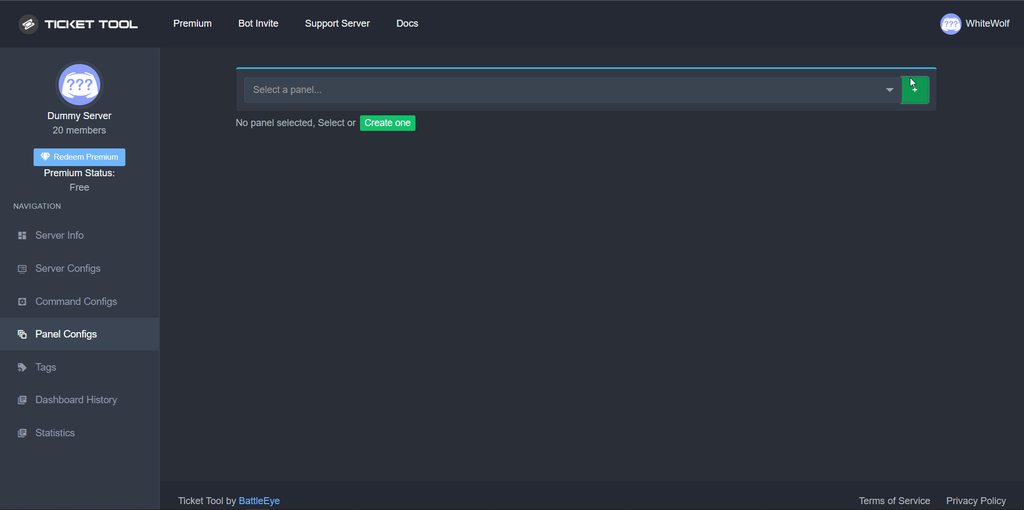 charred trench
slender minnow
which platform did you made the purchase on?
charred trench
slender minnow
which platform did you made the purchase on?
Discord
shut ferry
slender minnow
<@648911778650259458>
https://i.imgur.com/aXOcsc4.gif
I do but when I press create it dosent redirect me
charred trench
slender minnow
which platform did you made the purchase on?
Do you want me to send you the invoice? 😦
slender minnow
charred trench
Discord
run /premium in your server to check the status
charred trench
slender minnow
run /premium in your server to check the status
How?
midnight vine
there is no action even when the button is pressed
 slender minnow
shut ferry
I do but when I press create it dosent redirect me
slender minnow
shut ferry
I do but when I press create it dosent redirect me
you need to name the panel and click create
shut ferry
slender minnow
you need to name the panel and click create
I did
shut ferry
fr
slender minnow
charred trench
How?
use the slash command to check the server status
and i gave you your role 🙂
slender minnow
shut ferry
I did
so what happens when you click create?
shut ferry
slender minnow
so what happens when you click create?
Nothing
modest thorn
Don’t redirect
shut ferry
Yes
slender minnow
can you guys please open a ticket so that our team can assist you?
slender minnow
modest thorn
Try it for yourself
already done, and i made a panel so i dont think its broken
modest thorn
Well for others it is
midnight vine
midnight vine
there is no action even when the button is pressed
someone to help me......
charred trench
slender minnow
use the slash command to check the server status
Can I contact you via MD? Open a ticket but my main language is Spanish.
slender minnow
charred trench
Can I contact you via MD? Open a ticket but my main language is Spanish.
sorry but my dms arent for support, feel free to open a ticket and our team will assist you
 kind umbra
Hello, I just paid the bot membership through discord but on the discord server it only shows 1 day and a few hours (of the free trial) shouldn't they add the 30 days I paid?
i see this :
 charred trench
slender minnow
sorry but my dms arent for support, feel free to open a ticket and our team will...
charred trench
slender minnow
sorry but my dms arent for support, feel free to open a ticket and our team will...
I already opened a ticket
rustic gale
kind umbra
Hello, I just paid the bot membership through discord but on the discord server ...
No, the free trial is a separate thing basically
kind umbra
rustic gale
No, the free trial is a separate thing basically
oh okay, ty
iron nightBOT
Gave +1 Rep to @rustic gale
modest thorn
Anybody have any idea how to solve the not being able to make a pea ‘em problem
 crystal halo
I cant create a panel
 north forum
all i can say is what i read if your having a problem open a ticket you know since this isnt a bug. . .
midnight vine
I cant create a panel.............. can you help me...?
north forum
everyone thats said this is having the same problem there is currently no fix until a Dev can look into this as far as i know cause all support will run in circles
midnight vine
thank u 4 ur reply maybe it's better to wait
north forum
:/ idk they just fixed one problem and when i tried to let them know this was an issue to support said it wasnt a bug.... which now its clear it is
 fresh sinew
🤓
midnight vine
I'll wait until it works........
crystal halo
midnight vine
I'll wait until it works........
Same
jade topaz
north forum
:/ idk they just fixed one problem and when i tried to let them know this was an...
Ur a 90s guy that’s why
north forum
jade topaz
Ur a 90s guy that’s why
yea an grew up with computers so im pretty sure id know a thing or two
north forum
everyone that was having this issue please check and see if your still having the issue it seems to be resolved
rustic gale
Refresh the page, then try again
modest thorn
Thank you for the hell stff
 limpid raven
 plain surge
 desert wolf
how to fix

 gleaming bloom
can i change the texts of it? so like i can have fonts on it?
 cinder holly
How do I buy premium
jade topaz
How can i add cooldown to tickets?

 errant blade
 proper parcel
I have the same problem
proper parcel
proper parcel
HELP ME PLEASE!!
humble sequoiaBOT
━━ moved to ticket ━━
 atomic comet
Why cant anyone with the member role in my server open a ticket
It says you don't have the permission to
Even tho I checked things 10 times up and everything should be fine with the perms
Could someone help me out please?
atomic comet
Support can you please help me?
jade topaz
atomic comet
Support can you please help me?
Can you invite me to your server?
Maybe i can try to help you
atomic comet
Sure
lunar solar
atomic comet
It says you don't have the permission to
Looks like you enabled Support Team Only on your Create Ticket button, fix:
Panel Configs --> Buttons --> Create Ticket (Edit button) --> Untick Support Team Only so it looks like this:  but Red
 oblique eagle
Hello for some reason the bot doesn't show the transcript, Open or close
lunar solar
oblique eagle
Hello for some reason the bot doesn't show the __**transcript, Open or close**__
You don’t see the message or the buttons? After the ticket is closed?
oblique eagle
lunar solar
You don’t see the message or the buttons? After the ticket is closed?
Yeah,
oblique eagle
I don't see both.
 dire jolt
how do i buy premium?
lunar solar
oblique eagle
I don't see both.
Ahh too easy you need to enable Two Step Ticket to see the moderator message
Panel Configs —> General —> Enable Two Step Ticket
Just confirming we are talking about this?
 oblique eagle
Yes
lunar solar
lunar solar
Ahh too easy you need to enable Two Step Ticket to see the moderator message
Pa...
This will fix that then
 inner robin
كيف يمكنن انشاء اكثر من زر لنوعية تذكرة ... مثلا نوعية لـ تقديم ادارة داخل تيكت و النوعية الثانيه للمساعدة . كيف
jade topaz
كيف يمكنن انشاء اكثر من زر لنوع
ادارة داخ
كيف يمكنن انشاء اكثر من زر لنوعية. ادارة داخ
lunar solar
dire jolt
how do i buy premium?
You can buy premium by clicking the Upgrade button when you click on @humble sequoia, invite it to your server first
jade topaz
...ت و النو
oblique eagle
lunar solar
This will fix that then
Thanks your great at helping!
iron nightBOT
Gave +1 Rep to @lunar solar
lunar solar
oblique eagle
Thanks your great at helping!
Np
jade topaz
كيف يمكنن انشاء اكثر من زر لنوع
ادارة داخ
dire jolt
lunar solar
You can buy premium by clicking the `Upgrade` button when you click on <@7221963...
tysm hun
lunar solar
dire jolt
tysm hun
Np
jade topaz
كيف يمكنن انشاء اكثر من زر لنوع
ادارة داخكيف يمكنن انشاء اكثر من زر لنوعية. ادارة داخ
inner robin
How can I create more than one type of ticket button ... For example, a type for submitting an administration within a ticket and the second type for assistance. How
dire jolt
it didn’t let me add the bot
lunar solar
dire jolt
it didn’t let me add the bot
You can do it via the free bot if you you’ve already got it in your Discord
dire jolt
i do have it already
lunar solar
You must keep whichever bot you use the upgrade button on in your Discord though
It doesn’t matter if you have both
humble sequoiaBOT

فريق الدعم الفني العربي
عميلنا العزيز ان كنت تبحث عن مساعدة يرجى فتح تكت خاص بفريق الدعم الفني العربي
اذهب الى#🎫│make-a-ticket
ثم قم بلضغط على الايموجي الاتي (🇯🇴)
dire jolt
i’m confused lol i’m sorrryy
lunar solar
humble sequoia
@jade topaz
lunar solar
dire jolt
i’m confused lol i’m sorrryy
Sorry the channel is a little busy, if it’s easier #🎫│make-a-ticket and I can work through it with you
lunar solar
inner robin
How can I create more than one type of ticket button ... For example, a type for...
You can use Attached Panels (Multi Panels)
humble sequoiaBOT
For a more convenient use of multipanels, you can now combine panels on the dashboard. This will allow you to directly send the multipanel from the dashboard or via the $panel ID command.
Where can I find this?
You can find this setting on the Dashboard -> Panel Configs -> Settings -> Panel
Note: if you're attaching all the panels to a panel called English, don't include English in the attached panel's box (If you do this, it will create a duplicate)
This will put all buttons from all of your panels on one message. The message is the panel message from the panel you're combining these panels in.
lunar solar
For each button you need a different panel
Create the amount you want
Then attach all of them to one
Don’t attach that panel to itself though
jade topaz
lunar solar
<@456226577798135808>
I am russian😅
lunar solar
Was the above not Arabic?
jade topaz
lunar solar
Was the above not Arabic?
Yes😅
jade topaz
lunar solar
Was the above not Arabic?
And I am Russia)))
lunar solar
I don’t believe we offer Russian support but we do have Arabic if you need it. Or if you are fluent enough in English we can assist that way but as per #📂│information —> Rules this channel is English only.
 steady sparrow
proper parcel
steady sparrow
proper parcel
anyone knows what happens with this? same problem
rustic gale
steady sparrow
anyone knows what happens with this? same problem
We don't know. Probably a bug. The developer has been made aware and will work on the issue shortly
steady sparrow
great 🙂
 wanton blade
Is ticket tool down?
rustic gale
It shouldn't be.
 digital elk
it's down in some servers :p
wanton blade
Hmm none of my tickets are working just says interaction failed
 rustic gale
Hmm
wanton blade

 trail flume
wanton blade
trail flume
wanton blade
the bot is offline on a few servers
inner robin
How do I change the language of the Dashport Control Panel?
 pale pilot
@trail flume @wanton blade @digital elk can you guys give me your server ID?
wanton blade
pale pilot
<@729673673119629372> <@259417097094955009> <@221646655521292290> can you guys g...
Yeah, how can I find that
pale pilot
right click on your server. You may need to enable developer options in your settings
 cyan agate
HOW DO I GET MORE THAN ONE TICKET PER PERSON AT A TIME?
cyan agate
work computer haha its always set to caps
digital elk
pale pilot
<@729673673119629372> <@259417097094955009> <@221646655521292290> can you guys g...
1037221443852832768
wanton blade
pale pilot
right click on your server. You may need to enable developer options in your set...
929941519232823306
cyan agate
pale pilot
go to limits in your panel configs
not really sure where to find that tbh
pale pilot
can you share a screenshot of the bot being offline?
 pale pilot
cyan agate
not really sure where to find that tbh
pale pilot
cyan agate
not really sure where to find that tbh
but you know where to find the panel configs right?
cyan agate
had someone else set it up and it isnt doin what i need it to do was hoping it was an easy fix im new to this
pale pilot
our developer is on it
cyan agate
pale pilot
but you know where to find the panel configs right?
no i dont
pale pilot
one cluster is down
pale pilot
cyan agate
no i dont
and the dashboard? lol
humble sequoiaBOT

Ticket Tool - Ticketing without clutter - The #1 discord Ticketing bot
pale pilot
select your server and then go to panel configs
wanton blade
pale pilot
and the dashboard? lol
Did u get my server Id buddy
pale pilot
wanton blade
Did u get my server Id buddy
it was just to find out what the problem is. It has been identified and is now being fixed by our dev
wanton blade
Ah nice ok thank you
cyan agate
pale pilot
select your server and then go to panel configs
im not seein panel configs
pale pilot
cyan agate
im not seein panel configs
what do you see?
cyan agate
 digital elk
ur looking at ur discord settings, not the ticket tool dashboard
 pine scaffold
humble sequoia
https://tickettool.xyz/manage-servers
pine scaffold
humble sequoia
https://tickettool.xyz/manage-servers
@cyan agate
digital elk
also, thank you lukas for having the dev look into the outage 💪
cyan agate
thank you guys i got it now!
jade topaz
cant see my server in manage servers
 snow steppe
Hi
digital elk
jade topaz
cant see my server in manage servers
is ticket tool currently down in ur server?
jade topaz
yea
digital elk
wait for it to go back online
jade topaz
ok
snow steppe
@digital elk
 static acorn
jade topaz
cant see my server in manage servers
static acorn
jade topaz
cant see my server in manage servers
me too
pale pilot
Ticket tool is currently down in a few shards. So if your bot is offline, it's because of that. Our dev is currently on it
 reef vigil
Hey guys, I have a quick question. with Ticket tool when you set up reaction panels. to open a ticket, is there a way to make the reaction automatically be removed. so other people cant see which applications have been applied for? a little like MEE6 can do with role reacts? thanks in advance!
proper parcel
steady sparrow
anyone knows what happens with this? same problem
I tried again after deleting the bot. now fixed
jade topaz
Hey my bot offline
 neon slate
Servers down 👎
steady sparrow
proper parcel
I tried again after deleting the bot. now fixed
like kick it and reinvite or delete all the panels and start over ? 😛
 open junco
Ticket tool randomly stopped working and showing up in ticket tools server list. It's still in my server and not responding to commands I've removed and re added but nothing
jade topaz
pale pilot
Ticket tool is currently down in a few shards. So if your bot is offline, it's b...
^
 slender hawk

i have setup the right perms and still saying this anyone know why?
i have

saying this
 cobalt wagon
Bot down for anyone else?
 spring spire
cobalt wagon
Bot down for anyone else?
spring spire
cobalt wagon
Bot down for anyone else?
 sudden vine
on my server , the bot just lay down , does not work and is not even online , although everything was fine for about a week, what can it be related to?
undone vapor
sudden vine
on my server , the bot just lay down , does not work and is not even online , al...
undone vapor
undone vapor
https://discord.com/channels/509192800865353738/776680605517742090/1041735189237...
@sudden vine
sudden vine
undone vapor
<@830419209817292800> <:this:894279341108772914>
sorry, thanks for the help
iron nightBOT
Gave +1 Rep to @undone vapor
undone vapor
sudden vine
sorry, thanks for the help
no problem!

 winter carbon
 frank walrus
+1
abstract hinge
Wow my bot working
 lusty summit
Ticket tool is up and running now
 boreal hare
whenever we use commands it's used twice

same goes with closing the ticket, any way to fix this issue?
 scenic plinth
I am going to say this once and once only, so you all have something to go off of and stop panicking. We are aware of issues of double sending, bot being offline, what not. The developer was made aware a while ago and no, there is no ETA unless someone says, do not make bug reports because of this, I am saying this now, punitive action will be given.
And no, don't reply to me asking why it's offline... I am not going to respond to you, you saw the message to ping me, you can read it.
jade topaz
scenic plinth
And no, don't reply to me asking why it's offline... I am not going to respond t...
why is it offline?
scenic plinth
My exact point everyone.
 teal jungle
jade topaz
why is it offline?
teal jungle
jade topaz
why is it offline?
me too
jade topaz
jade topaz
why is it offline?
me three
teal jungle
😂
teal jungle
jade topaz
me three
hahahahaha😂
boreal hare
scenic plinth
I am going to say this once and once only, so you all have something to go off o...
ah okok, i thought it was an issue on my end with the set up - thank you
jade topaz
does ticket tool support guatemala residents
dire jolt
premium transfers right? like it’ll be in my other server too?
scenic plinth
boreal hare
whenever we use commands it's used twice
Does this still occur?
boreal hare
yeah
scenic plinth
Can you send a screenshot of your attempts so I can relay that to the developer please?
Also your server ID if this occurs on a specific server.
boreal hare
this is the most recent attempt just now
 scenic plinth
Is that with slash commands, text commands, or buttons?
boreal hare
this occurs when im using the prefix and slash commands
buttons are fine
990527994969874493 here's the server ID, this is the only server this is occurring on
 scenic plinth
boreal hare
990527994969874493 here's the server ID, this is the only server this is occurri...
scenic plinth
boreal hare
990527994969874493 here's the server ID, this is the only server this is occurri...
@solid stream Summon 
990527994969874493
scenic plinth
Nope.
 delicate owl
Hello, i have a issue, it does not allow me to send the panel, I get an "Undefined" error

 undone escarp
I keep getting this error when trying to add a user
Invalid bitfield flag or number: VIEW_CHANNEL.
scenic plinth
Known error, working on being resolved, meanwhile you will have to add people manually.
undone escarp
oh okay
thanks
 charred light
 undone vapor
charred light
undone vapor
charred light
If you don't speak english, please make a ticket: #🎫│make-a-ticket
 solid stream
undone escarp
I keep getting this error when trying to add a user
```Invalid bitfield flag or...
solid stream
undone escarp
I keep getting this error when trying to add a user
```Invalid bitfield flag or...
should be fixed now
solid stream
boreal hare
this occurs when im using the prefix and slash commands
Can I get an invite?
undone escarp
solid stream
should be fixed now
no isnt 🥲
 solid stream
undone escarp
solid stream
undone escarp
can I get an invite to your server?
long sundial
scenic plinth
Nope.
If you don’t speak Arabic then move him to this channel #🎫│make-a-ticket
Don't leave him like that he need a help
shut bolt
long sundial
If you don’t speak Arabic then move him to this channel <#571706435449257997>
...
Before making assumptions you should have asked if he was already on a ticket. Our team is already assisting him there. Note that this channel is an open chat in which anyone can provide help to other users, Support will always answer #🎫│make-a-ticket requests but they aren't on the obligation to assist everyone here.
stark runeBOT
**Ticket Tool - Technical Difficulties Notice**
Official Ticket Tool bot(s) are currently experiencing some technical difficulties in some shards.
Please stand by as the TT Development Team looks into and fixes the issues.
Please do not spam tickets within the support server & do not keep asking in public channels.
You can view our status page here and keep an eye on #📣│bot-news!
 long sundial
shut bolt
Before making assumptions you should have asked if he was already on a ticket. O...
long sundial
shut bolt
Before making assumptions you should have asked if he was already on a ticket. O...
I know that and I respect that but he didn't have to leave him like this with the “nope” He can tell him there is a way to help
I usually don't get involved, but I'm his brother
Anyway ty you for you’re note
scenic plinth
Anyways.
 nocturne garnet
jade topaz
Is it back online
nocturne garnet
jade topaz
Is it back online
Dont think it is
 plucky swan
its not
 nocturne garnet
 amber verge
It’s cause the bot is down
plucky swan
amber verge
outrage you gotta wait till it fixes then you will see all the servers.
 keen sand
Bot off
jade topaz
amber verge
my server wont show up i reloged alot
Can´t Do Anything and That´s The Problem
shut bolt
keen sand
Bot off
 plucky swan
lol
shut bolt
I've been using this gif for almost a year whenever we have an outage 😂
plucky swan
🤣
 covert sphinx
ayoo
scenic plinth
Saves me time.
covert sphinx
ticket bot is offline. does purchasing premium increases the chances of it not going offline?
shut bolt
covert sphinx
ticket bot is offline. does purchasing premium increases the chances of it not g...
Premium has a higher uptime than free bot
jade topaz
How Much Is It?
shut bolt
$5.99 per month
jade topaz
per month??!!
shut bolt
Yes
amber verge
bot back up?
 amber verge
ik
shut bolt
jade topaz
im a brokey
Once the bot is back, feel free to use the $vote command on your server
scenic plinth
amber verge
bot back up?
Wonder, has anyone said anything?
 calm fog
Meu bot está off
jade topaz
shut bolt
Once the bot is back, feel free to use the `$vote` command on your server
What Does That Do?
calm fog
my bot is off
 native apex
also it's known that bot is off atm
shut bolt
jade topaz
What Does That Do?
Feel free to try it out in #🤖│bot-spam
native apex
Just wait
shut bolt
native apex
also it's known that bot is off atm
People from all languages can use this chat
plucky swan
I was trying to buy premium
calm fog
Is there any way I can call?
scenic plinth
Pablo, translate bot commands aren't working here....
jade topaz
shut bolt
Feel free to try it out in <#910978476536905738>
Votes For What?
calm fog
calm fog
Is there any way I can call?
He's a bot
jade topaz
i am so confused haha
shut bolt
jade topaz
Votes For What?
Free premium
jade topaz
shut bolt
Free premium
Nice
shut bolt
scenic plinth
*Pablo, translate bot commands aren't working here....*
What does it say?
scenic plinth
They just don't appear, unless it's Discord going brrt.
scenic plinth
calm fog
Meu bot está off
Estamos cientes de que está inativo, o desenvolvedor está trabalhando em uma correção 🙂
robust sandalBOT
Test
Spanish (es) → French (fr)
 static mortar
The bot is not working at the rn moment?
shut bolt
static mortar
The bot is not working at the rn moment?
No, please refer to #📣│bot-news
static mortar
alr ty
shut bolt
Np
scenic plinth
robust sandal
La discordia es estupida...
shut bolt
lmao
covert sphinx
it keeps going online and offline haha
 smoky glen
Dang I was trying to make my discord server with it and of course my luck
jade topaz
smoky glen
Dang I was trying to make my discord server with it and of course my luck
Same Here Bud
covert sphinx
do we know when it might be back up and running?
 frosty latch
nocturne garnet
smoky glen
frosty latch
nocturne garnet
smoky glen
Mine just came back on anybody else?
nocturne garnet
Mine aswell
 charred estuary
can someone join move night and help me pls
jade topaz
charred estuary
can someone join move night and help me pls
What Do Need Help With?
nocturne garnet
nocturne garnet
Mine aswell
Well on some of my servers it is
jade topaz
charred estuary
so you can do ticket
You Want Me To Configure The Bot?
 grizzled imp
My bot is not active at the moment, what is the reason?
charred estuary
idk how to set up it
jade topaz
Like To Set it Up?
charred estuary
yeah
charred estuary
is not my but if you can tell me
jade topaz
It´s Easy
charred estuary
like i have it in my server
jade topaz
Just Go To tickettool.xyz
jade topaz
charred estuary
like i have it in my server
idk
charred estuary
on googel?
nocturne garnet
jade topaz
Just Go To tickettool.xyz
Doesn’t work rn cuz bot’s down
jade topaz
charred estuary
on googel?
yes
jade topaz
nocturne garnet
Doesn’t work rn cuz bot’s down
For me it´s workin
nocturne garnet
K
charred estuary
i have it
jade topaz
Now Choose a Server
 charred estuary
and it is?
rustic gale
 wraith roost
I'm totally not trying to drive your guys' bus or anything but...
When you post something in #📣│bot-news , pls pls pls hit the "Publish" button. My server uses the ticket tool at least 20x a day and it really catches us off guard when it stops working and our announcements chat doesn't have anything in it for Ticket Tool being down.
That's all 🙂 otherwise I love your guys' bot lol
I pay for premium, too. Not sure why it's not reflecting that. Oh well 🙂 thanks again guys! ^-^
jade topaz
ong
 sage belfry
hello why i dont have permission to create tiket on other an all server that use ticket tool
nothing buton create ticket
rustic gale
sage belfry
nothing buton create ticket
You don't see the Create Ticket button?
Update your app
upper flower
wraith roost
I'm totally not trying to drive your guys' bus or anything but...
When you post...
Sorry about that.. we literally post and then go deal with a million tickets or fixing the bot.. so we always forget to press publish. We will do better!
 covert ridge
I would like to know how to use the correct commands in the ticket can anyone help me?
 pine jacinth
I paid for premium priority I have proof that I paid for it but it said I had to list a user name or some thing in order to get the title but that did not work can I still get the premium priority otherwise I want my money back
covert swallow
pine jacinth
I paid for premium priority I have proof that I paid for it but it said I had to...
You do not have access to the dashboard in any server with a premium subscription
wraith roost
upper flower
Sorry about that.. we literally post and then go deal with a million tickets or ...
All good!! Thanks for being cool with the critique 🙂 you guys do good work
iron nightBOT
Gave +1 Rep to @upper flower
upper flower
wraith roost
All good!! Thanks for being cool with the critique 🙂 you guys do good work
Thank you for taking the time to give respectful constructive criticism. It’s the disrespectful criticism other people give that we don’t put up with..
iron nightBOT
Gave +1 Rep to @wraith roost
upper flower
Thank you for your continued support of Ticket Tool - we appreciate you 🙂
wraith roost
:>
 heavy vector
hey guys how can I create category for ticket tool?
I want to have separate category so I can whitelist it for links and invites
ok im an idiot sandwich
saw the question in faq
but I have another question, which might be stupid, but I have to ask, when making category I should make it visible to default role / everyone?
 tranquil ember
Why does the mention/ping apear as numbers
 brittle hedge
I can't create my ticket, the option to create a ticket doesn't appear
proper parcel
steady sparrow
like kick it and reinvite or delete all the panels and start over ? 😛
right. I did. you should try it too!
 upper gulch
i got a brain fart
how tf do you make it where it auto deletes the ticket when you hit the delete option
i damn sure forgot

 normal imp
Hey guys, I'm trying to set up the ticket tool to auto close tickets after 24 hours if there is no response. Is there a way to set this up?
I've been scrolling through the guides for a while a now and can't seem to find it
rustic gale
normal imp
I've been scrolling through the guides for a while a now and can't seem to find ...
There is no such feature
rustic gale
plucky swan
theres no blacklist role
You may have made the Create Ticket button “Support Team Only”
Panel Configs -> Buttons -> Create Ticket
make sure Support Team Only is disabled.
SInce it's a multipanel you will have to do it for every single panel
rustic gale
upper gulch
how tf do you make it where it auto deletes the ticket when you hit the delete o...
What do you see when you press Delete?
rustic gale
brittle hedge
I can't create my ticket, the option to create a ticket doesn't appear
Please explain, what do you see?
rustic gale
heavy vector
but I have another question, which might be stupid, but I have to ask, when maki...
All that matters is that the bot can view the category and manage channels in it
The ticket channels have their own permissions independent from the category's itself
rustic gale
tranquil ember
Why does the mention/ping apear as numbers
Probably set up incorrectly
Here's how you set up a mention
$mentions
humble sequoiaBOT
Within all the messages the bot's sends (both embeds and text) you can mention either channels, roles, or even users, these mentions will only send a notification to the user if they are used within a text field, e.g: a role mentioned in an embed won't ping at all the users who have that role.
For mentioning a role you can use one out of three options:
{@Role Name} ➞ Which is Case Sensitive.
{RoleID} ➞ Replace RoleId with the Id of the role you are trying to ping.
<@&RoleID> ➞ Discord's native syntax to ping roles.
<#ChannelID> ➞ Mention a channel by its ID.
<@UserID> ➞ Mention a user by its ID.
normal imp
rustic gale
There is no such feature
thank you
iron nightBOT
Gave +1 Rep to @rustic gale
heavy vector
rustic gale
All that matters is that the bot can view the category and manage channels in it
Thank you
iron nightBOT
Gave +1 Rep to @rustic gale
 gloomy pollen
how do I add multiply buttons?
upper gulch
rustic gale
What do you see when you press Delete?
It just deletes the messages inside it but not the actual channel for the ticket
 lyric pond
If somebody opens a ticket, is there a way to then forward the info in the open ticket to a specific channel?
 vital mortar
How to make panel
jade topaz
vital mortar
How to make panel
hi, go to #🤖│bot-spam and do /help
then do (on the help menu) search, then do How to create a panel?
vital mortar
Thanks
vital mortar
He is saying to me unrefined
Undefined*
@jade topaz @lyric pond @upper gulch @gloomy pollen
brittle hedge
rustic gale
Please explain, what do you see?
hello i was doing it wrong sorry
tranquil ember
rustic gale
Probably set up incorrectly
It’s always been like that tho, the panel came with that variable
tranquil ember
Kinda just works when it wants to


2 different users, 2 different tickets
it’s weird idk who to blame, discord or tickettool
 opal cradle
tranquil ember
it’s weird idk who to blame, discord or tickettool
opal cradle
tranquil ember
it’s weird idk who to blame, discord or tickettool
discord
covert swallow
Thats a caching issue
gloomy pollen
vital mortar
<@456226577798135808> <@418901396667105280> <@361016547608625153> <@959308554311...
why u ping me
 grizzled jungle
Howto add custom command
undone vapor
covert swallow
Thats a caching issue
@opal cradle @tranquil ember
undone vapor
grizzled jungle
Howto add custom command
You can't add custom commands.
grizzled jungle
Auto add autoresponse
undone vapor
grizzled jungle
Auto add autoresponse
there is no auto respond or auto command
tranquil ember
I’ll just wait for it to clear on its own, my sever has 164,000 users , discord be lacking when it comes to big servers
undone vapor
tranquil ember
I’ll just wait for it to clear on its own, my sever has 164,000 users , discord ...
can you send me the invite of the server in DMs, so i can check the error
grizzled jungle
Bro like if i type $hi
Bot will reply = hi welcome to ticket sir
undone vapor
grizzled jungle
Bro like if i type $hi
Bot will reply = hi welcome to ticket sir
as i said many times, no.
humble sequoiaBOT

Ticket Tool is the only ticketing bot you'll ever need! Explore its features and set the best ticket system for your server!
<:CommandIcon:1018980659064221746> Commands
Browse through Ticket Tool's commands list and find new utilities!
<:TextIcon:1018980662881030144> FAQ
Solutions for the most frequent questions our users have when implementing the bot on their server.
<:Setup:1034174646788030664> Setup
The steps to follow when setting the bot for the first time on any server
 grizzled jungle
Brother i need to do this can u help me
undone vapor
grizzled jungle
Brother i need to do this can u help me
sure
grizzled jungle
I need to add the tag $reply (mentioneduser)
The bot answer will.
Hello (mentioneduser) please reply
What i need to add on tag?
undone vapor
idk if that's possible
grizzled jungle
Ik its on tag but howto
undone vapor
you cannot do $reply (mentioneduser)
grizzled jungle
$reply {user}
grizzled jungle
Yes
undone vapor
not an auto responder
grizzled jungle
Oh ok
undone vapor
you can just maybe do $reply
grizzled jungle
I need to name the tag with prefix / or without prefix.
Like.
$reply/reply
undone vapor
if you are not premium, you cannot choose custom messages
undone vapor
you have member role..
grizzled jungle
Im on another id its banned
undone vapor
please do /checkpremium in #🤖│bot-spam
grizzled jungle
For one dm promo
undone vapor
u need the bot to be premium
undone vapor
im just a premium subscriber
you need to ask moderators, but you need to follow rules.
not following rules = punishments
scenic plinth
You have asked us and have been given the option to appeal via our form that we linked in the ticket you created. We aren't going to unban your account just because you ask us consistently.
undone vapor
scenic plinth
You have asked us and have been given the option to appeal via our form that we ...
@grizzled jungle
grizzled jungle
Ok ok
undone vapor
if you already did an appeal and they declined it, you don't ask it anymore.
grizzled jungle
I didnt....
undone vapor
grizzled jungle
I didnt....
you did
undone vapor
scenic plinth
You have asked us and have been given the option to appeal via our form that we ...
@grizzled jungle
undone vapor
they said asked
grizzled jungle
.ty for support and sorry for tthis
undone vapor
she said asked
grizzled jungle

Google Docs
If you would like to appeal a moderation action taken against you within the Ticket Tool Support Server, please fill out this form

 oak shuttle
Please no not ping the Support Team.
 vapid grotto
Is closing with reason a premium only feature?
slender minnow
vapid grotto
Is closing with reason a premium only feature?
nope, you can use {close.reason} to add the reason
vapid grotto
slender minnow
nope, you can use {close.reason} to add the reason
Does it dm the owner of the ticket with the closing reason?
trail flume
I dont see my discord server
 undone vapor
trail flume
I dont see my discord server
undone vapor
trail flume
I dont see my discord server
try reloading the page
trail flume
undone vapor
try reloading the page
I have reload 2176253x
trail flume
undone vapor
did you invited the bot?
rustic gale
trail flume
I dont see my discord server
Log out of the dashboard and log in again
That's what “try relogging” means
undone vapor
yeah
trail flume
THANKSSSSS
 plain lantern
Is it normal that in my sev ticket tool is down?
 warm stump
mine is down as well
 brittle tartan
Why it doesn't go ticket ?
warm stump
prolly their server crashed
brittle tartan
:(
 pallid mauve
(This interaction failed) It gives a warning. The bot on my server is not working. What is the reason?
warm stump
yep yep
 light warren
Hello
plain lantern
Any Modo can help with this issue?
 azure kiln
My bot is offline ?
jade topaz
bot is down again
azure kiln
Why?
jade topaz
smh, seems like we're all in the hole again
covert swallow
We are going though a full restart to fix a memory leak
jade topaz
bot offline
covert swallow
Yes
covert swallow
covert swallow
jade topaz
how long
Should be up soon
covert swallow
covert swallow
https://media.discordapp.net/attachments/771887985931059200/813811437255393370/3...
jade topaz
why am i getting this?
 covert swallow
The bot is currently restarting
 spiral cipher
Thanks 🙂
 elder breach
covert swallow
The bot is currently restarting
elder breach
covert swallow
The bot is currently restarting
thanks for the info
iron nightBOT
Gave +1 Rep to @covert swallow
covert swallow
No problem!
 fast bluff
How long?
covert swallow
Should be up soon
plain lantern
covert swallow
No problem!
You’re a real saver thanks for all you help it means so much to me that you take your own time to answer to us! Appreciate it
iron nightBOT
Gave +1 Rep to @covert swallow
fast bluff
covert swallow
Should be up soon
Mk
 fervent flax
Eyy I didn’t even have to ask to figure out the issue XD
 vapid glacier
my customer cant open ticket Did something happen?

 split blaze
vapid glacier
split blaze
vapid glacier
Thanks 😍
 proper viper
why ticket tool bot stopped working rn?
 eternal mesa
Is there an actual ETA that’s not just “soon” ?
proper viper
how many time for restart?
covert swallow
eternal mesa
Is there an actual ETA that’s not just “soon” ?
If you want me to lie there can be
stark runeBOT
**Ticket Tool - All Systems are now __Online!__**
All Ticket Tool systems are fully online again! We apologize for any inconvenience this may have caused on your server.
If you are still experiencing any problem with Ticket Tool, please reach out to the <@&540295656720302081> within a ticket here, #🎫│make-a-ticket
 shut bolt
Channel reopened 
 timber dagger
How do I get the bot to send a ticket message?
 late hearth
How do i apply for Arabic support team?
covert swallow
late hearth
How do i apply for Arabic support team?
$staffapps
humble sequoiaBOT
How do be I become a Support Member?
You can become a support member in 2 ways:
1. You can be really active in #🆘│community-support gain <@&799500225579712543> role and get chosen by a Manager
2. You can apply VIA our applications that would be sent in #📣│server-news
We currently have Support Teams for the following languages:
:flag_us: English
:flag_jo: Arabic
:flag_fr: French
:flag_de: German
:flag_br: Portuguese
:flag_es: Spanish.
covert swallow
timber dagger
How do I get the bot to send a ticket message?
Follow this guide
late hearth
Ohh
stark runeBOT
1. Invite Ticket Tool to your server
First you will want to invite the bot to your server. Once the bot is in your server, you can manage your server in the dashboard.
2. Create a Panel
To create a panel we are going to need to head over to the panel configs on the dashboard.
Once at the dashboard we will need to click Create Panel.
Enter a panel name (Fill in any optional settings you want).
Click Create Panel and your ready to get started with configuring your panel.
An example of a creating a panel is shown below.
3. Send the Panel to a Channel
Once you've created a panel on the dashboard you will need to send it to a channel using send on the dashboard.
Select the channel you want your panel to be created in and click send.
For other questions checkout $help faq.
An example of a sending a panel is shown below.
Having a Problem Sending the Panel?
Do $debug in a channel with Ticket Tool and make sure it has all the necessary Discord permissions.
late hearth
Arabic support applications are not closed
But when i tap the button is says you dont have permission?
@mystic hound
Oh sorry
covert swallow
If you dont have permission to open an application it means applications are closed
 weak path
I need a refund, where do I go to for help ?
covert swallow
Open a billing ticket
weak path
Thanks you @covert swallow
iron nightBOT
Gave +1 Rep to @covert swallow
weak path
@iron night sorry I did not know where to go sorry
gilded verge
@weak path, -> #🎫│make-a-ticket
weak path
Thank you all for your support
jade topaz
i want make partner
humble sequoiaBOT

Partnership Program
Our partnership program is currently closed.
We appreciate you being interested in partnering with Ticket Tool! Unfortunately, the program for partnering is closed as of now. Nonetheless, make sure to keep an eye at #📣│server-news where we announce partner applications opening!
 TicketTool.xyz - Ticketing without clutter
jade topaz
TicketTool.xyz - Ticketing without clutter
jade topaz
oof
 stone field
A support member kindly gave me a premium code for helping them with sleep. How do I redeem it?
humble sequoiaBOT
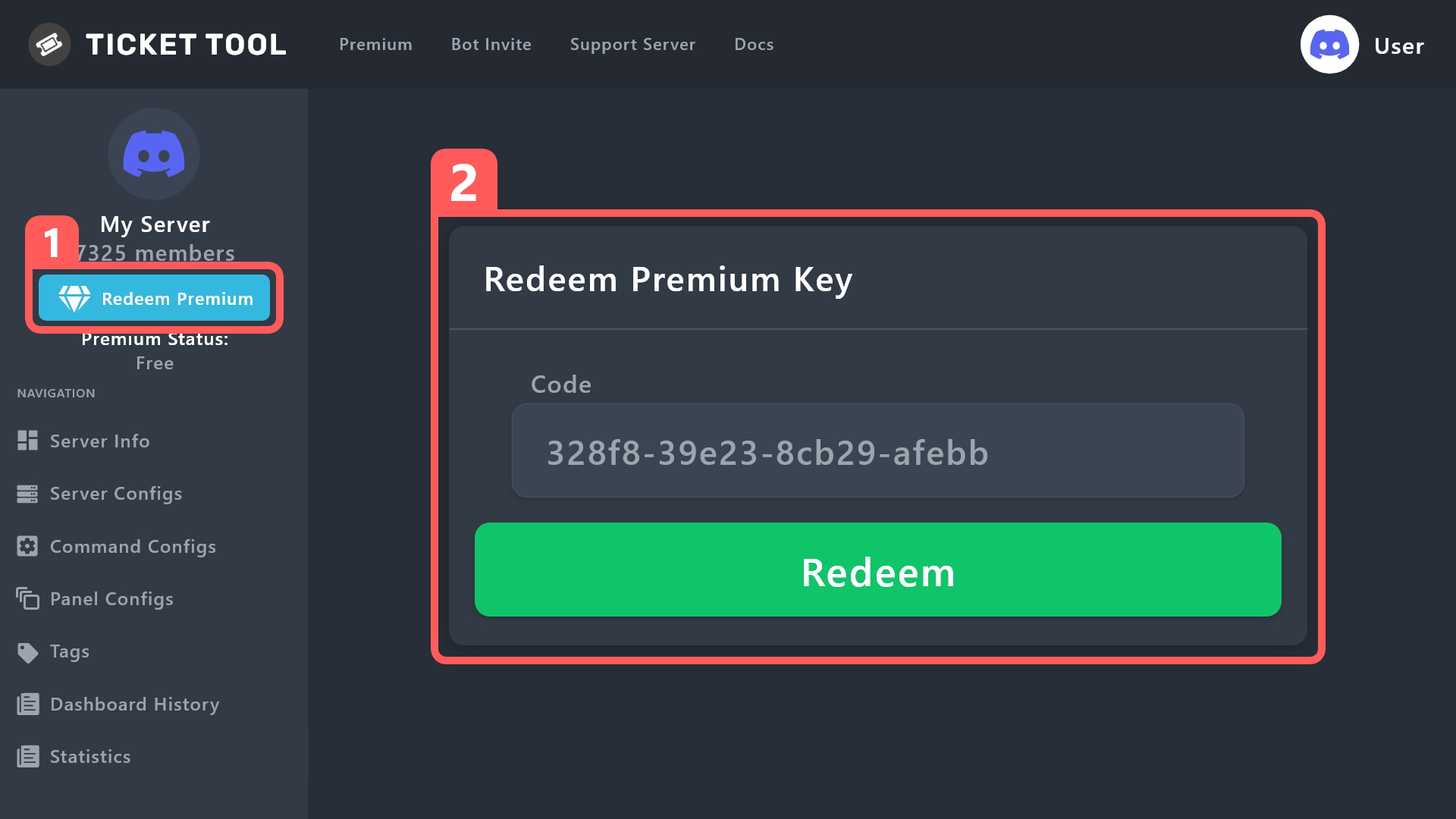
How to redeem premium (Key)
To redeem your premium key, go to the dashboard, select your server, then click " Redeem Premium" under the server's icon and name.
 gilded verge
Please check 
iron nightBOT
Gave +1 Rep to @gilded verge
jade topaz
$vote
humble sequoiaBOT
jade topaz
$vote
Votes
Current Votes: 0
Lifetime Votes: 0
Linked Votes: 0
Vote Links
Linking Info
Linked User: Not Linked
You can give your future votes to another user by linking with that user.
To link use $vote link (@user or userId)
To unlink use $vote unlink
Redeeming
Each vote is worth 12 hours of premium and can be redeemed once you have atleast 6 votes.
Your current votes are worth 0m
To redeem your current votes use $vote redeem

Discord has started a beta for large bots to offer premium payments directly through discord!
<:TTWarning:1034178155872784494> Important Information <:TTWarning:1034178155872784494>
On December 1st we will be cancelling all auto subscription renewals for our international (Non-USA) customers on Chargebee. If you purchased a subscription after 2020, you're using chargebee.
What's different?
 The Monthly price changed from
 $6.00 to $5.99
Yearly subscription are not yet available 

10% of Servers don't have that feature enabled yet. You can still purchase our subscription here
 A subscription can not be transferred between Servers

 frank kelp
hlo can i make auto transcript the cannels of temporary vcs or category ?
 fading saffron
I need support arabic
fading saffron
How to Switch name panel
 supple zinc
fading saffron
I need support arabic
supple zinc
fading saffron
I need support arabic
And me
 modest jasper
hi I have a question
there is this discord server related to a game , some people lost some things in that game , so they created a ticket server and they told to send tickets of what we lost however I dont know what tickets are and how to make them...
the restore tickets to restore lost things to players
grizzled jungle
Hi check my appeal
 dim ridge
The Ticket tool as I configure it through the panel for different ticket categories up to Premium
covert swallow
frank kelp
hlo can i make auto transcript the cannels of temporary vcs or category ?
That is not something you can do with TicketTool
covert swallow
fading saffron
How to Switch name panel
If you need support in Arabic please open an Arabic ticket in #🎫│make-a-ticket
covert swallow
supple zinc
And me
See above
covert swallow
modest jasper
there is this discord server related to a game , some people lost some things in...
Follow the guide below
stark runeBOT
1. Invite Ticket Tool to your server
First you will want to invite the bot to your server. Once the bot is in your server, you can manage your server in the dashboard.
2. Create a Panel
To create a panel we are going to need to head over to the panel configs on the dashboard.
Once at the dashboard we will need to click Create Panel.
Enter a panel name (Fill in any optional settings you want).
Click Create Panel and your ready to get started with configuring your panel.
An example of a creating a panel is shown below.
3. Send the Panel to a Channel
Once you've created a panel on the dashboard you will need to send it to a channel using send on the dashboard.
Select the channel you want your panel to be created in and click send.
For other questions checkout $help faq.
An example of a sending a panel is shown below.
Having a Problem Sending the Panel?
Do $debug in a channel with Ticket Tool and make sure it has all the necessary Discord permissions.
frank kelp
covert swallow
That is not something you can do with TicketTool
ohh
covert swallow
Transcripts are only made from actual TicketTool tickets
still oar
My tickets transcripts won’t save to the channel I set in the hub
 neat cloak
Bro
still oar
neat cloak
Bro
?
neat cloak
This bot not makin tickets in my server
 radiant plaza
Hello, I'm getting undefined error when trying to update additional panel
slender minnow
radiant plaza
Hello, I'm getting `undefined` error when trying to update additional panel
Hello there, can you please open a ticket so that we can further assist you :)
slender minnow
neat cloak
This bot not makin tickets in my server
moved to ticket
radiant plaza
slender minnow
Hello there, can you please open a ticket so that we can further assist you \:)
thanks
iron nightBOT
Gave +1 Rep to @slender minnow
 slender minnow
 lapis helm
https://media.discordapp.net/attachments/1042203766620962857/1042203861617758328...
lapis helm
https://media.discordapp.net/attachments/1042203766620962857/1042203861617758328...
they are just multiple panels sent in a channel
 stray mountain

 lapis helm
slender minnow
they are just multiple panels sent in a channel
lapis helm
slender minnow
they are just multiple panels sent in a channel
yes but what doing of this form
and not make it simple
 dusk yoke
The bot is offline
solid stream
It's offline in a few shards
but is starting back up
about 10/77 went offline to restart.
 round belfry
Whats a shard?
slender minnow
round belfry
Whats a shard?
shards are like servers where the bot is on
one shard has multiple servers (discord servers)
round belfry
slender minnow
shards are like servers where the bot is on
Ohhhhhh Thanks for that answer!
iron nightBOT
Gave +1 Rep to @slender minnow
solid stream
So, one cluster has x shards and each shard has x servers.
 swift osprey
I can't make it
solid stream
 karmic quail
> **System Failure:** Expected the value to not be null
karmic quail
> **System Failure:** Expected the value to not be null
i see the issue in my logs
Pushing a fix out
solid stream
karmic quail
> **System Failure:** Expected the value to not be null
Should be fixed now
 undone heart
HI i need help please
undone heart
solid stream
Should be fixed now
Can you help me
scenic plinth
Ask the question first, then someone can attempt. No this is not saying I am going to, this is me saying you need to tell us what you need help with before we can even think about helping you.
undone heart
I have a problem, which is that the ticket is not opened in my server or even in Google


What can i do
jade topaz
I've bought premium, how do I invite the Premium Bot?
humble sequoiaBOT
The first thing you will need to do is invite the premium bot, an invite can be found here
Once the bot is in your server we will head to the dashboard and manage your server. When you are managing your server, you want to head into "Server Configs" then click the drop down menu under "Select the bot you would like to use on this server" then click "Ticket Tool#6207" and then save.
 karmic quail
Oh ok
jade topaz
Does anyone know how to change the language in the ticket tool?
jade topaz
I do not. Maybe go the the bot and settings.
jade topaz
not work
 harsh orchid
I want to select a channel for transcripts but the one channel i want it to use, doesn't show up :(
jade topaz
damn it. how to change the language?
jade topaz
jade topaz
I do not. Maybe go the the bot and settings.
does not work
sure wacky update
the last one was great
jade topaz
Does anyone know how to make this automated message? I took a screenshot from another server to show you what I mean.

My server got nuked last month, I think, and I forgot how to do that.
stark runeBOT
1. Invite Ticket Tool to your server
First you will want to invite the bot to your server. Once the bot is in your server, you can manage your server in the dashboard.
2. Create a Panel
To create a panel we are going to need to head over to the panel configs on the dashboard.
Once at the dashboard we will need to click Create Panel.
Enter a panel name (Fill in any optional settings you want).
Click Create Panel and your ready to get started with configuring your panel.
An example of a creating a panel is shown below.
3. Send the Panel to a Channel
Once you've created a panel on the dashboard you will need to send it to a channel using send on the dashboard.
Select the channel you want your panel to be created in and click send.
For other questions checkout $help faq.
An example of a sending a panel is shown below.
Having a Problem Sending the Panel?
Do $debug in a channel with Ticket Tool and make sure it has all the necessary Discord permissions.
 fallow ingot
@jade topaz Check this out ^^
jade topaz
Gee whizz, thanks!
fallow ingot
harsh orchid
I want to select a channel for transcripts but the one channel i want it to use,...
If the channel is new then that’s to be expected. You need to click manage servers again and then go back to the dashboard
fallow ingot
jade topaz
Does anyone know how to change the language in the ticket tool?
There isn’t any button to change the bot’s language, you’d need to change all the text in English to your language. You can change the language on our website if that helps. (Bottom middle footer)
harsh orchid
fallow ingot
If the channel is new then that’s to be expected. You need to click manage serve...
ye, it took awhile. it's there now. Thanks!!
iron nightBOT
Gave +1 Rep to @fallow ingot
fallow ingot
Coolz, happy to help.
 nimble inlet
$help faq
humble sequoiaBOT
nimble inlet
$help faq
</add:1029783024306507887> - Gives an additional user or role access to the current ticket channel. They are given the same permissions as the User Opened Permissions.
</remove:1029783024306507888> - Removes a user's or role's access to the ticket channel if they had access to the ticket when it was created, or if they had been added with the </add:ID> command.
</open:1029783024306507893> - Re-opens a ticket channel that is in the Closed state.
</close:1029783024306507892> - Closes a ticket channel that is in the Opened state.
</rename:1029783024264564757> - Changes the ticket name, or resets its name if no new name given.
</claim:1029783024306507889> 💎 - If Ticket Claiming is enabled, this command allows a support team member to claim or unclaim the ticket.
</closerequest:1029783024306507891> - Sends the Close Ask Message to the ticket channel.
</transcript:1029783024264564758> - Generates a transcript of the ticket, or channel if 💎 Premium, with the given settings.
</new:1029783024264564762> - Create a new Command Style Ticket
</premium:1029783024306507894> - Checks the Premium status of the server you ran the command on.
</debug:1029783024264564765> - Provides you troubleshooting information about your server and the channel you ran the command.
</permissionlevel:1029783024264564760> - Your level permissions within the server, allows you to know if you are able to access a dashboard.
</ping:1029783024306507895> - Provides the current latency between your server, the bot, and the Discord API. This might be used while troubleshooting.
</help:1029783024264564756> - The command you used to get here!
</id:1029783024264564764> - Returns the ID of the given channel/role/emoji, providing no input will return the server's ID.
</vote:1029783024264564761> - Vote for Ticket Tool and gain free Premium!
</invite:1029783024264564763> - Invite for the bot and the Support Server.
jade topaz
How do I become a member of the support team?
 desert hare
hello! i added ticket tool to my server today, and i can see it in my server although can't see my server on the ticket tool dashboard and whenever i try to use a command in the server, it says application not responding. anyone know why this could be?
jade topaz
desert hare
hello! i added ticket tool to my server today, and i can see it in my server alt...
Try again later
humble sequoiaBOT
How do be I become a Support Member?
You can become a support member in 2 ways:
1. You can be really active in #🆘│community-support gain <@&799500225579712543> role and get chosen by a Manager
2. You can apply VIA our applications that would be sent in #📣│server-news
We currently have Support Teams for the following languages:
:flag_us: English
:flag_jo: Arabic
:flag_fr: French
:flag_de: German
:flag_br: Portuguese
:flag_es: Spanish.
gilded verge
humble sequoia
@jade topaz, please check
humble sequoiaBOT
ᅠ
@pseudo glen requires the following permissions:
Add Reactions
Read Channels
Send Messages
Manage Messages
Embed Links
Attach Files
Read History
Manage Roles
Manage Channels
To change the role permissions, you can go to your Discord Server ➞ Server Settings ➞ Roles ➞ @Ticket Tool
To change the channel permissions, you can go to your Channel Settings ➞ Permissions ➞ Ticket Tool
ᅠ
Note:
You can give Ticket Tool Administrative Permissions instead of all the permissions listed above, but it's entirely optional and NOT necessary.
 gilded verge
humble sequoia
gilded verge
humble sequoia
Hey @desert hare, about dashboard, please log out and log in again, and as for the commands, please make sure that the bot has the required permissions and channel permissions: View Channel, Send Messages, Read Mesasge History
if that doesn't help, you can give us the server ID or server name ^^
 buoyant garnet
is 500 the global limit to number of tickets on a server? is there a global max?
shut bolt
buoyant garnet
is 500 the global limit to number of tickets on a server? is there a global max?
500 is the amount of channels any Discord server can possibly have
You can set your global limit to any number beyond that but once you've reached the 500-channel limit, you won't be able to create new ticket channels
buoyant garnet
shut bolt
You can set your global limit to any number beyond that but once you've reached ...
ok, thank you! I think we hit a new record!
iron nightBOT
Gave +1 Rep to @shut bolt
shut bolt
 jade topaz
BRO WHO DO I ADD IT
 uneven briar
@rustic gale
rustic gale
uneven briar
Try /debug. Let me know when you've used it
Even if it throws the same error
jade topaz
How do I get pings?
uneven briar
Ok
rustic gale
 flat inlet
I think the bot is down
flat inlet
I think the bot is down
What's your server's ID
flat inlet
Gimme a sec
rustic gale
uneven briar
Ok
Pretty sure it's a permission issue in that channel
rustic gale
jade topaz
How do I get pings?
Include a mention in the ticket message. here's how to enter mentions
$mentions
humble sequoiaBOT
Within all the messages the bot's sends (both embeds and text) you can mention either channels, roles, or even users, these mentions will only send a notification to the user if they are used within a text field, e.g: a role mentioned in an embed won't ping at all the users who have that role.
For mentioning a role you can use one out of three options:
{@Role Name} ➞ Which is Case Sensitive.
{RoleID} ➞ Replace RoleId with the Id of the role you are trying to ping.
<@&RoleID> ➞ Discord's native syntax to ping roles.
<#ChannelID> ➞ Mention a channel by its ID.
<@UserID> ➞ Mention a user by its ID.
rustic gale
And here's how to edit the ticket message
humble sequoiaBOT
The Ticket Message is the first message sent by the bot on a new ticket. To customize it head over to your Dashboard ➞ Panel Configs ➞ Ticket ➞ Edit Ticket Message
 torn python
bot down ?
covert swallow
no?
 viral solar
how do I redeem my premium purchase? I paid for it but my dashboard isn't reflecting that I have premium and I can't find the key to redeem it anywhere. Help!
karmic quail
why is it not closed?
 jade topaz
karmic quail
why is it not closed?
jade topaz
karmic quail
why is it not closed?
it is closed, it says closed right there lol
vapid grotto
💀
jade topaz
What's wrong with the ticket bot?
undone vapor
jade topaz
What's wrong with the ticket bot?
nothing?
jade topaz
undone vapor
nothing?
why is offline
 upper gulch
how do get Ticket Tool to the delete the channel once you delete the ticket
plain lantern
upper gulch
how do get Ticket Tool to the delete the channel once you delete the ticket
It will do it automatically within seconds if you press « closed » and « delete »
upper gulch
plain lantern
It will do it automatically within seconds if you press « closed » and « delete...
It hasn’t been in this appeal server I had to make, deletes the contents for not the channel
plain lantern
upper gulch
It hasn’t been in this appeal server I had to make, deletes the contents for not...
Can you take your time and write or take a screenshot of what you want to know and I could help you but without explanation I can’t help you
upper gulch
@plain lantern So essentially, when you press delete you get the normal message

And after it deletes you get this

 grizzled jungle
Check my appeal
uneven briar
Online
 torn pawn
I need help
humble sequoiaBOT
We would love to help you, but if you don't tell us what you need help with we can't help you :(
humble sequoiaBOT
Ticket Tool - Ticketing without clutter - The #1 discord Ticketing bot
slender minnow
@torn pawn you can set up the bot from here ^
 blissful glacier
I am not able to create a panel for my members to open a ticket how do I do it??
humble sequoiaBOT

You can check our documentation here;
You can also check #📂│information for the basic setup;
or run the </setup:1025379472167403530> command within #🤖│bot-spam
Our documentation contains all the info you need about the bot to be able to setup and configure the bot however you like.
karmic quail
jade topaz
it is closed, it says closed right there lol
Why isn't the channel removed?
jade topaz
karmic quail
Why isn't the channel removed?
Closed isn't deleted
karmic quail
jade topaz
Closed isn't deleted
Why?
jade topaz
karmic quail
Why?
mf idk ask the developers
karmic quail
when I started it will automatically be deleted
rustic gale
upper gulch
And after it deletes you get this
That's called storage mode. If you want channels to delete as normal, enter Server Configd in the dashboard and disable storage mode
rustic gale
 jaunty thunder
Anyone can help? keep getting this message when someone wants to open a ticket
jaunty thunder
Anyone can help? keep getting this message when someone wants to open a ticket
There's like a billion reasons why that can be happening. Best if you #🎫│make-a-ticket so we can help you figure it out
rustic gale
viral solar
how do I redeem my premium purchase? I paid for it but my dashboard isn't reflec...
What's your server's ID?
rustic gale
karmic quail
Why?
Closed tickets can be reopened if needed. Deleted tickets are gone forever. That's the difference between closed and deleted
rustic gale
karmic quail
when I started it will automatically be deleted
You can set them up like that by disabling “Two Step Ticket” in Panel Configs -> General.
(don't confuse it with Two Step Close, which is a different thing)
karmic quail
Ok
 tribal light
can i make the button more than one?
 rustic gale
tribal light
can i make the button more than one?
rustic gale
tribal light
can i make the button more than one?
You can make as many options as you like, but each option has to be associated with a different panel
If there are repeated panels, they won't show up in the dropdown
tribal light
rustic gale
You can make as many options as you like, but each option has to be associated w...
how to do that? can you give me a tutorial?
i tried many times but somehow its not work for me.
tribal light
rustic gale
You can make as many options as you like, but each option has to be associated w...
are you opens for voice ?
rustic gale
Go back to the main Panel Configs menu
clone your panel a bunch of times
then select the main panel, enter Dropdown Style, and select a different clone for each menu option

 rustic gale
tribal light
you mean this one?
rustic gale
tribal light
you mean this one?
Yes, see how you selected “Customer Service” for both?
It can't be the same for both
That's why the second one doesn't appear
 scenic plinth
Your emoji you have set for a button is one the bot cannot use (Animated, In another server Ticket Tool is not in, etc.)
round belfry
I hope this is the right place to ask:
I tried finding it online and may have overlooked it, but if someone could help me that would be amazing! Im trying to embed an image as the entry panel, (what you would see before opening the ticket) and no matter what size I put it as, it doesnt pull through.
What am I doing wrong? Im using imbgg for my image url conversions.
pls help 😅
 slender minnow
grizzled jungle
488367866798669837
slender minnow
grizzled jungle
488367866798669837
please appeal through https://tickettool.xyz/appeal if you haven't done it yet
Google Docs
If you would like to appeal a moderation action taken against you within the Ticket Tool Support Server, please fill out this form
grizzled jungle
I did no response
scenic plinth
You asking more than once does not exactly get it to go faster, especially since you filled it out around 48 hours ago. You have this account within this server now, and only a limited amount of people have access to the form, so it is going to be a while.
scenic plinth
round belfry
I hope this is the right place to ask:
I tried finding it online and may have ...
Needs to be the direct image link.
round belfry
scenic plinth
Needs to be the direct image link.
Thanks! I think im only slightly confused because it allowed me to do this before using this method and still works on other ticket panels that I have running. Ill keep trying.
Best,
Blank
iron nightBOT
Gave +1 Rep to @scenic plinth
jade topaz
pls help me

 worthy cedar
can you make it so people get a special role when they create a ticket
 rapid mural
jade topaz
pls help me
rapid mural
jade topaz
pls help me
/debug on your server / can confirm the bot is in the server
 signal field
 scenic plinth
Be respectful 🙂
scenic plinth
signal field
Logout and log in to the dashboard.
 void cedar
Can @pseudo glen be linked to zendesk?
 vagrant patrol
Is anyone experiencing any issues with the bot at the moment? It's unresponsive and the debug command is returning a "The application did not respond" error.
 lusty prairie
Hello
Someone know how auto delete the closed ticket ?
rustic gale
lusty prairie
Hello
Someone know how auto delete the closed ticket ?
Disable “Two Step Ticket” in Panel Configs -> General
(not to be confused with “Two Step Close”, which is a different thing)
rustic gale
vagrant patrol
Is anyone experiencing any issues with the bot at the moment? It's unresponsive ...
rustic gale
void cedar
Can <@557628352828014614> be linked to zendesk?
There is currently no such integration
 keen dome
jaunty thunder
keen dome
jaunty thunder
same problem here 😭
abstract hinge
Пон
jade topaz
rustic gale
There is currently no such integration
why does it do this when i try to make ticket
 rustic gale
jade topaz
why does it do this when i try to make ticket
rustic gale
jade topaz
why does it do this when i try to make ticket
Try using /debug there
in that channel
rustic gale
keen dome
same problem here 😭
Try using /debug in that channel
 restive bone
Is there any way to apply for staff on the community?
 scenic plinth
Yes, there is a singular shard down at the moment, we will wait for a few minutes to see if it fixes itself, and if it does not, we will update you accordingly.
restive bone
restive bone
Is there any way to apply for staff on the community?
No one replyed to me ;-;
covert swallow
$staffapps
humble sequoiaBOT
How do be I become a Support Member?
You can become a support member in 2 ways:
1. You can be really active in #🆘│community-support gain <@&799500225579712543> role and get chosen by a Manager
2. You can apply VIA our applications that would be sent in #📣│server-news
We currently have Support Teams for the following languages:
:flag_us: English
:flag_jo: Arabic
:flag_fr: French
:flag_de: German
:flag_br: Portuguese
:flag_es: Spanish.
scenic plinth
Before you ask... no we are currently not accepting direct applications at the moment.
vagrant patrol
It's been down for a few hours now.
scenic plinth
I have not seen anything until now, and it hasn't seemingly been noticeable until a few minutes ago. Again, I will wait for a few minutes to see if it fixes itself, as it is just 1 primary shard and it is typical to see things like this fix itself.
scenic plinth
Should be online again, fixed itself.
 idle delta
Hi 👋
tribal light
hey i manage made two option but the complaints menu is not going to the category what i want. can someone help me?
 grizzled jungle
Check my appeal please
solid stream
grizzled jungle
Unban my id pls
You got banned for DM advertising, I'll have your case reviewed..
Mind dming me a screenshot of what you advertised? (for my records, will be cross referenced with reports)
Likely a server invite.. As that'd normally what happens..
lunar solar
tribal light
hey i manage made two option but the complaints menu is not going to the categor...
Hey,
You need to select the complaints panel and then head to Category and select which category you want
lunar solar
English please
 drifting remnant
ok but i dont understand
lunar solar
Screenshot the problem
lunar solar
What’s the issue you are having?
grizzled jungle
solid stream
You got banned for DM advertising, I'll have your case reviewed..
Check appeal pls
Explained.....,.,.,.😓
Why late
slender minnow
@grizzled jungle your appeal will he reviewed by the moderation team and the higher ups. Please be patient until it is reviewed.
I don't see the need to flood the channel with the same message. It will not speed up the review process.
shut bolt
@grizzled jungle The use or alternative accounts to avoid a ban won't help you towards your appeal.
scenic plinth
You can ask here with this one, the only difference with that one is that it manages your premium.
 deep trout
and what if I can't control the bot through the site?
slender minnow
deep trout
and what if I can't control the bot through the site?
you cant customize then
slender minnow
grizzled jungle
Howto vote bot and reedem this.....
$vote
scenic plinth
grizzled jungle
Howto vote bot and reedem this.....
Use the command /vote or $vote and vote using the links, using the command gives you another command that you can use to redeem the key, keep in mind there is a minimum amount of votes you need to redeem the votes.
 scenic plinth
Log out and log back into the dashboard.
humble sequoiaBOT
Don't see your server in the dashboard?
You will possibly need to relog. Look below to see steps on how to relog.
How to relog in the Dashboard.
Note:
You need one of these 3 things to access the dashboard.
1. Server Owner (Level: 6)
2. Server Administrator (Level: 4)
3. Dashboard Role (Level: 2)
:warning: You can check your level using $level on your Discord Server
User permission level with Ticket Tool
@User is permission level: 0 (User)
```» *If it shows that your permission is **0**, you don't have any of the above **3 things** to manage the dashboard.*


**See the Image below on how to relog:**oh it worked thanks
 deft bobcat
at some point here recently our claim feature stopped working. not sure when or why. it was working fine and far as i can tell no settings have changed. Has anyone else ran into this? Know how to fix it?
desert hare
my server still isn't showing up on my dashboard, i've been logging in and out for the last day, anyone have any idea? i can see the bot on the member list in my server but can't access it!
desert hare
gilded verge
Hey <@608235488536428544>, about dashboard, please log out and log in again, and...
hi! it didn't seem to work, can i give you my server id?
gilded verge
desert hare
hi! it didn't seem to work, can i give you my server id?
what's your $level on your server? - use this command
desert hare
gilded verge
what's your `$level` on your server? - use this command
it's just saying the application did not respond 😕
gilded verge
okay, please send server id
desert hare
gilded verge
okay, please send server id
can't find the ID, server name is Sigrid Official if that can do anything
gilded verge
desert hare
can't find the ID, server name is Sigrid Official if that can do anything
please give it admin rights for a while and see if it responds to commands then 🤔
karmic quail
how to make it so that when you click on the close button and confirm close and this channel is deleted
desert hare
gilded verge
please give it admin rights for a while and see if it responds to commands then ...
i'm unable to give it admin rights at the moment, it appeared on my other server just not this one. have checked all permissions, removed the integration and reinvited etc is there anything else i can try?
karmic quail
I just don’t understand why the channel is not being deleted, it has been working for a long time
gilded verge
desert hare
i'm unable to give it admin rights at the moment, it appeared on my other server...
Please wait for someone else, I can't help you now
 jagged seal