#🆘│community-support
1 messages · Page 17 of 1
 pale pilot
Send a screenshot of the drop-down menu page and I can tell you what's the issue there
 lone willow
i think i fixed it
pale pilot
@jade topaz check your drop-down setting page. Some fields there seem to be left empty
 iron nightBOT
Gave +1 Rep to @pale pilot
 full seal
Hello guys
can you please tell me after i create a panel where do i go to let the bot send the ticket messege
because i've been trying for so long to just let the bot send the ticket messege to allow tickets in my discord server but idk
i even tried searching in youtube and no one helped me
so please if any one knows how to add the ticket messege or the embed messege
just tell me please dudes.
after this where do i go?

@mystic hound sorr yfor ping
oki am sorry
BRRRUH
pale pilot
@full seal the blue send button on top
iron nightBOT
Gave +1 Rep to @pale pilot
 twilit geyser
Bro
my server is not appearing in the manager server, I have already relogged a thousand times
😩
and I already invited him
😩 😩
 humble sequoiaBOT
Don't see your server in the dashboard?
You will possibly need to relog. Look below to see steps on how to relog.
How to relog in the Dashboard.
Note:
You need one of these 3 things to access the dashboard.
1. Server Owner (Level: 6)
2. Server Administrator (Level: 4)
3. Dashboard Role (Level: 2)
:warning: You can check your level using $level on your Discord Server
User permission level with Ticket Tool
@User is permission level: 0 (User)
```» *If it shows that your permission is **0**, you don't have any of the above **3 things** to manage the dashboard.*


**See the Image below on how to relog:** twilit geyser
Thanks @pale pilot
iron nightBOT
Gave +1 Rep to @pale pilot
 full cliff
a certain baroness ordered the meridian to block everything because i replied to her without profanity i just ignored her and can you? I've been in this game for a long time, please help me. They curse at me several times and ignore me and I never complained
humble sequoiaBOT

⚠️ You're in the wrong place
We provide support for Ticket Tool Discord bot and cannot help you with whatever issue you have.
- We don't know which Support Team you should contact to get this issue resolved, and unfortunately we won't be able to accurately tell you.
If you don't have any further questions regarding our bot Ticket Tool, please close this ticket

 lunar solar
 clear patrol
Learn the basics of Discord text formatting, including basic formatting commands (bolding, italicizing, underlining), and color formatting techniques.
About a third of the way down covers colouring
clear patrol
lunar solar
https://www.writebots.com/discord-text-formatting/
thank you sir! you still here?
iron nightBOT
Gave +1 Rep to @lunar solar
lunar solar
clear patrol
thank you sir! you still here?
Yes, did you need more help?
clear patrol
lunar solar
Yes, did you need more help?
yes please sorry might be stupid question
clear patrol
how to hide this - at the start and still colour red

@lunar solar
oh sorry about the mention just got warned
lunar solar
2 secs just taking a look
Can’t remember if there is a red that doesn’t require a symbol at the front
 jade topaz
what is transcript exactly? cuz i enabled it for a specific channel and thought it would be like a logging of the ticket in that channel but no. so may i know what exactly it is, and if there is a way to log tickets
lunar solar
jade topaz
what is transcript exactly? cuz i enabled it for a specific channel and thought ...
It’s a html screenshot of the ticket so a log of the ticket.
Auto saving requires on ticket close or delete requires premium.
jade topaz
ok thanks
 boreal yoke
I need help...
How do I make it so this pops up for my server? I wanna make it so people just have to click the button to create a ticket @lunar solar

Oops! Sorry!
I'm not suppose to ping you.
 rustic gale
boreal yoke
How do I make it so this pops up for my server? I wanna make it so people just h...
rustic gale
boreal yoke
How do I make it so this pops up for my server? I wanna make it so people just h...
Please have a look at the Setup Guide in #📂│information

 keen arrow
clear patrol
keen arrow
clear patrol
I want this too, if anyone know, ping me
 slender minnow
@keen arrow @clear patrol
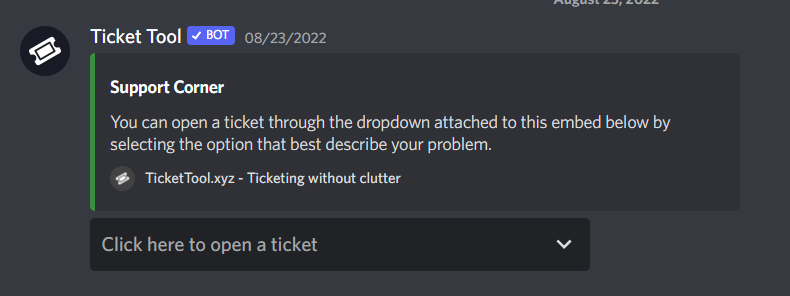
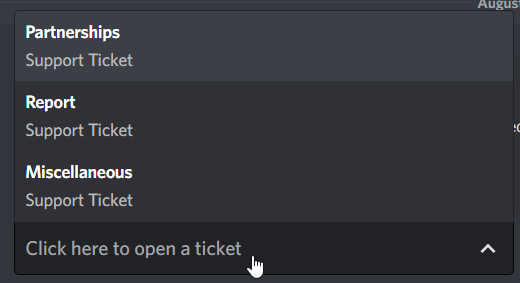
something like this dropdown?
https://i.imgur.com/ELKvz0o.png
 clear patrol
slender minnow
<@308262784401932288> <@291340375417683968>
something like this dropdown?
https...
clear patrol
slender minnow
<@308262784401932288> <@291340375417683968>
something like this dropdown?
https...
Yes please
humble sequoiaBOT
The Drop-down menu or Select Menu replaces the buttons on your panel message and uses a drop-down menu with all of your panels. To set this up, go to your Panel Configs and select your main Panel.
<:Numbericons1:1018864164032225340> Enable Select Style
First you enable Select Style. Then you add an item in the Dropdown Editor. Now you can start editing your dropdown!
<:Numbericons2:1018864168041971712> Dropdown Editor
Each line in the dropdown editor represents a line in the drop down menu on discord. You can add more "Items", by clicking on 

First you select a panel. That's the panel this option will open a ticket for.  DONT select the same panel twice. Each option should have a different Panel
After that, you can put a Display. This is the title of this option and will appear in the drop down menu. The *Description can be set right after that, which will be below the title in grey.
Additionally you can select an emoji, that will be shown in front of each option. You can either manually input the ID of an emoji or select it in the selector.
Common Issues ⚠️
- Panel doesn't send? Make sure you have a valid emoji selected
- Option doesn't show up? Check if two options have the same panel in the DropDown Editor

$dropdown
slender minnow
this response should answer most of your questions
clear patrol
slender minnow
this response should answer most of your questions
im sorry but im on panel config now
where to click?
 kindred forge
Does anyone have a list of the bot commands
slender minnow
kindred forge
Does anyone have a list of the bot commands
its listed in command config
you can also use the slash commands
slender minnow
clear patrol
im sorry but im on panel config now
look for the dropdown option
clear patrol
slender minnow
look for the dropdown option
have one more questsion if your free
 vernal musk
فيه سبورت للعرب هنا ؟
 slow sandal
ooo
full cliff
79 / 5.000
Resultados de tradução
can someone help me they sent me to block me on the meridian without even defending me
jade topaz
Dropdowns, dosent show all the options
 pale pilot
jade topaz
Dropdowns, dosent show all the options
pale pilot
jade topaz
Dropdowns, dosent show all the options
Did you resend the panel?
pale pilot
Ah I see the issue. Was hard to see with the resolution of the image.
You selected the same panel for all options. You need to select a different panel for each option, otherwise only one will show
 weak path
Hi, I could not get into my account because it said I owe you 183 diamonds, and I don't know why all I did was buy a pack for £1.89 witch I never got so I got a refund for it then I could not get into my account till I paid for 173 diamonds because I bought a £1.89 pack to try and get the diamonds down so I could play but it did not help it said I owed you another 173 diamonds to play so I paid another £11.89 so I could play and I don't know why I had to pay all this?
humble sequoiaBOT
⚠️ You're in the wrong place
We provide support for Ticket Tool Discord bot and cannot help you with whatever issue you have.
- We don't know which Support Team you should contact to get this issue resolved, and unfortunately we won't be able to accurately tell you.
If you don't have any further questions regarding our bot Ticket Tool, please close this ticket
pale pilot
How am I supposed to know what you want to do?
If you need help with that bot, contact the support team of that bot
 blissful atlas
Want to apply for staffB
 void sail
hey
i got a question, so when someone opens a ticket and i have a supporter role. How do i make sure that supporter role cant close it and delete it. Because i wanna look at the logs and transcript it, so no supporter mass closes all the tickets
clear patrol
i need help with this

when i click questing or achievment for example it open ticket
i need it to open the tab thats called "questing"
not a ticket
 kindred zodiac
how to crete ticket that som player can click and crete ticket pleas help
pleas helppp??????????
 rustic gale
jade topaz
rustic gale
jade topaz
If the link is dead, nothing you can do
rustic gale
kindred zodiac
how to crete ticket that som player can click and crete ticket pleas help
Check the Setup Guide in #📂│information
jade topaz
rustic gale
If the link is dead, nothing you can do
bruh i need it so important
rustic gale
clear patrol
i need it to open the tab thats called "questing"
What do you mean by tab?
jade topaz
😢
 storm wave
Я нихуя не понимаю
 robust sandalBOT
storm wave
Я нихуя не понимаю
robust sandalBOT
storm wave
Я нихуя не понимаю
I don't understand
 Russian (ru) → English (en)
rustic gale
Russian (ru) → English (en)
rustic gale
What do you need help with?
robust sandalBOT
rustic gale
What do you need help with?
В чем вам нужна помощь?
English (en) → Russian (ru)
jade topaz
rustic gale
What do you need help with?
bro my ticket bot is not working in my server
jade topaz
I need help
I am having problems selecting what my ticket channel is from what I understand it is supposed to be under create a new panel but all I can select there is the name
 mystic bison
Bă, de ce ați scos frate să nu mai poți cumpăra pe an?
robust sandalBOT
mystic bison
Bă, de ce ați scos frate să nu mai poți cumpăra pe an?
Well, why did you take out bro to not be able to buy a year?
Romanian (ro) → English (en)
jade topaz
كيف اصفر التكتات؟
robust sandalBOT
jade topaz
كيف اصفر التكتات؟
Cum îngălbenesc biletele?
Arabic (ar) → Romanian (ro)
 wheat pivot
Hi, i have a question. I know i can use "{Role ID}" for ping a role in ticket creation, but I don't know how to ping a single user. Is it possible ?
weak path
david18812 Oct 29, 2022 4:20 PM
Hi, I could not get into my account because it said I owe you 183 diamonds, and I don't know why all I did was buy a pack for £1.89 witch I never got so I got a refund for it then I could not get into my account till I paid for 173 diamonds because I bought a £1.89 pack to try and get the diamonds down so I could play but it did not help it said I owed you another 173 diamonds to play so I paid another £11.89 so I could play and I don't know why I had to pay all this? please can you help me why this happened??
humble sequoiaBOT
⚠️ You're in the wrong place
We provide support for Ticket Tool Discord bot and cannot help you with whatever issue you have.
- We don't know which Support Team you should contact to get this issue resolved, and unfortunately we won't be able to accurately tell you.
If you don't have any further questions regarding our bot Ticket Tool, please close this ticket
jade topaz
weak path
david18812 Oct 29, 2022 4:20 PM
Hi, I could not get into my account because it s...
You're still asking about something nobody here can help you with.
 sharp robin
whats status code 502?
pale pilot
sharp robin
whats status code 502?
Failed connection with cloudlfare. Was it a one-time error or are you still getting it?
sharp robin
it jus spammed me with it everytime i saved like 20minutes ago
rustic gale
jade topaz
I am having problems selecting what my ticket channel is from what I understand ...
You're looking at an outdated tutorial.
 rustic gale
You can't. That's a Discord requirement
sharp robin
damn
 rustic gale
sharp robin
rustic gale
sharp robin
Panel Configs -> Panel -> Edit Panel Message
sharp robin
thank you!
 hardy thunder
how do i send the ticket message to my server
robust sandalBOT
mystic bison
Bă, de ce ați scos frate să nu mai poți cumpăra pe an?
Ну, почему вы взяли бро, чтобы не иметь возможности купить год?
Romanian (ro) → Russian (ru)
robust sandalBOT
jade topaz
كيف اصفر التكتات؟
Как получить желтые билеты?
Arabic (ar) → Russian (ru)
 frank kelp
Hlo is is possible to log the actions like who closeed ticket, deleted it , opened it? If yes how to set up
rustic gale
frank kelp
Hlo is is possible to log the actions like who closeed ticket, deleted it , open...
Panel Configs -> Logging
humble sequoiaBOT
With Ticket Tool, you can customize the behavior the bot takes when logging your tickets! For editing these options follow these steps:
Dashboard ➞ Panel Configs ➞ Logging Options
Logging Channel
Here you will define which channel @humble sequoia will save the Logs in (ticket created/deleted/closed, etc.)
Logs you can save:
➞ Ticket Created ➞ Logs when a ticket is created
➞ Ticket Closed ➞ Log when a ticket is closed
➞ Ticket Opened ➞ Log when a ticket is opened
➞ Ticket Renamed ➞ Log when a ticket is renamed
➞ Ticket Deleted ➞ Log when a ticket is deleted
➞ Transcript Saved ➞ Log when a ticket is saved
Select with  (disable) or
  (enabled) which logs you would like
Below you can see an example of what the Logging Options will look like:
 frank kelp
rustic gale
Panel Configs -> Logging
frank kelp
rustic gale
Panel Configs -> Logging
thanks
iron nightBOT
Gave +1 Rep to @rustic gale
jade topaz
i just want to give one of my roles the ability to view/close/manage all tickets
how do i do that
rustic gale
jade topaz
i just want to give one of my roles the ability to view/close/manage all tickets
You make them a support team role
In your dashboard, enter Panel Configs -> General. You can select support team roles there
Note that this won't grant the role any permissions in existing tickets
Only to new tickets created after the change
To make sure the permissions are applied to old tickets, you may close and reopen them
rustic gale
What i said just now applies.
iron nightBOT
Gave +1 Rep to @rustic gale
jade topaz
Good Day Support Team
I would just like to know how do you add a role to a specific ticket like for example support ticket for support team role etc

as you can see in the picture above they are added as my spoort team but not showing
@safe prairie do you mind helping me maybe please.
sorry
@slender minnow
 safe prairie
Stop pinging us! If you need help, open a #🎫│make-a-ticket and wait.
 dim orchid
is there a why i can get an image off of a saved ticket ?
 thorn fractal
My son and I are new on SMPCaves. We urgently need more informations. For example: How are we able to gain more than 1 homes, how can we claim lands? - ./region create, but we have no permission..... Would be great to get finally these information.
humble sequoiaBOT
⚠️ You're in the wrong place
We provide support for Ticket Tool Discord bot and cannot help you with whatever issue you have.
- We don't know which Support Team you should contact to get this issue resolved, and unfortunately we won't be able to accurately tell you.
If you don't have any further questions regarding our bot Ticket Tool, please close this ticket
 autumn tinsel
How to add a support role to tickets ?
 humble sequoiaBOT
For a more convenient use of multipanels, you can now combine panels on the dashboard. This will allow you to directly send the multipanel from the dashboard or via the $panel ID command.
Where can I find this?
You can find this setting on the Dashboard -> Panel Configs -> Settings -> Panel
Note: if you're attaching all the panels to a panel called English, don't include English in the attached panel's box (If you do this, it will create a duplicate)
This will put all buttons from all of your panels on one message. The message is the panel message from the panel you're combining these panels in.
 slender minnow
@toxic crypt 
 toxic crypt
slender minnow
<@948682552808452126> <:This:729503857662492782>
toxic crypt
slender minnow
<@948682552808452126> <:This:729503857662492782>
tnk u broo !
weak path
Hi, I could not get into my account because it said I owe you 183 diamonds, and I don't know why all I did was buy a pack for £1.89 witch I never got so I got a refund for it then I could not get into my account till I paid for 173 diamonds because I bought a £1.89 pack to try and get the diamonds down so I could play but it did not help it said I owed you another 173 diamonds to play so I paid another £11.89 so I could play and I don't know why I had to pay all this?
slender minnow
weak path
Hi, I could not get into my account because it said I owe you 183 diamonds, and ...
You were already told that you are in the wrong server.
weak path
Where do I need to put this info at ?
slender minnow
No idea, but this is certainly not the right place to ask.
weak path
Where do I make a report problem
slender minnow
No idea
pale pilot
@quartz imp You mean transcripts right? You can save all your transcripts to one channel and have them all there. Our dev is currently working on a feature to have them all show on the dashboard too
 quartz imp
Okay, thanks @pale pilot
 merry inlet

why does it say this ? when its in my server and i tried relogging it didnt work
@slender minnow
rustic gale
Relogging means logging out of the dashboard and logging in again. @merry inlet @jade topaz
humble sequoiaBOT
Don't see your server in the dashboard?
You will possibly need to relog. Look below to see steps on how to relog.
How to relog in the Dashboard.
Note:
You need one of these 3 things to access the dashboard.
1. Server Owner (Level: 6)
2. Server Administrator (Level: 4)
3. Dashboard Role (Level: 2)
:warning: You can check your level using $level on your Discord Server
User permission level with Ticket Tool
@User is permission level: 0 (User)
```» *If it shows that your permission is **0**, you don't have any of the above **3 things** to manage the dashboard.*


**See the Image below on how to relog:**Panel Configs -> General -> Support Team Roles
This won't add the role to old tickets. To add it to old tickets you will have to close and reopen them, that will refresh the permissions
slender minnow
merry inlet
<@776084862728667156>
merry inlet
rustic gale
Relogging means logging out of the dashboard and logging in again. <@92498359079...
i tried it didnt work :((
rustic gale
merry inlet
i tried it didnt work :((
Are you the owner of the server?
merry inlet
rustic gale
Are you the owner of the server?
no im admin
autumn tinsel
rustic gale
Panel Configs -> General -> Support Team Roles
Where is support team roles i can not dind it
 obtuse lotus
Good day
I have a question. Where can I show that when a ticket is closed, a channel is opened?

 covert swallow
You probably added text into the emoji portion of the button
covert swallow
obtuse lotus
Good day
I have a question. Where can I show that when a ticket is closed, a cha...
Im not quite sure what you mean, coukd you elaborate?
 acoustic portal
Hi can someone help me out and tell me how to change this part of the ticket tool message in the panel
 covert swallow
acoustic portal
Hi can someone help me out and tell me how to change this part of the ticket too...
covert swallow
acoustic portal
Hi can someone help me out and tell me how to change this part of the ticket too...
Thats the embed message
Menu > ticket > ticket message > embed editor
acoustic portal
covert swallow
Menu > ticket > ticket message > embed editor
it only lets me edit the message once the person opens the ticket I mean by how do I edit the message before the person opens it
 acoustic portal
thanks
rustic gale
merry inlet
no im admin
Try using this command in your server, in a channel the bot can see: /permissionlevel

 robust sandalBOT
Похоже, вы пытаетесь перевести на тот же язык. Пожалуйста, попробуйте перевести на/с другого языка.
English (en) → Russian (ru)
How to pay for a subscription from Russia, the cue ball does not work
Russian (ru) → English (en)
 ember hound
Как оплатить подписку из России, биткоин не работает
robust sandalBOT
ember hound
Как оплатить подписку из России, биткоин не работает
How to pay for a subscription from Russia, bitcoin does not work
Russian (ru) → English (en)
robust sandalBOT
ember hound
Как оплатить подписку из России, биткоин не работает
How to pay for a subscription from Russia, bitcoin does not work
Russian (ru) → English (en)
humble sequoiaBOT
PayPal - DiscordTicketTool@gmail.com
BitCoin - 3HhKKAdb9eEvCe2tvzB8bAa8nebHY6qcPA
Ethereum - 0xF47a27D6a3225bB8e71fd03B5C14bbb374b41149
LiteCoin - MEQX3knLAuotrKnvk3HDNBK5gdRn6PZhHy

Prepay/Direct Payment
To prepay send the payment using your desired method - Available options listed bellow.
⚠️ $18 per 3 months. ⚠️
$66 per year.
(If using the direct payment option, you need to be paying for at-least 3+ months.)
Regular Prices when paying on our website:
$6/per month
$66/per year
Once your payment is sent let us know so we can confirm and get you your key.
<:paypal:924596360840372234> Paypal ("Goods and Services" or "Family and Friends")
DiscordTicketTool@gmail.com
<:bitcoin:924638849135689749> BTC - Bitcoin
3HhKKAdb9eEvCe2tvzB8bAa8nebHY6qcPA
<:Ethereum:972177326580301835> ETH - Ethereum
0xF47a27D6a3225bB8e71fd03B5C14bbb374b41149
<:Litecoin:972176945972383815> LTC - LiteCoin
MEQX3knLAuotrKnvk3HDNBK5gdRn6PZhHy
I sent the payment now what?
After you send the payment, please send a screenshot with proof of payment, our <@&615146349700186112> will verify your payment and will get you setup. For crypto payments, we are waiting for at least ONE verification.
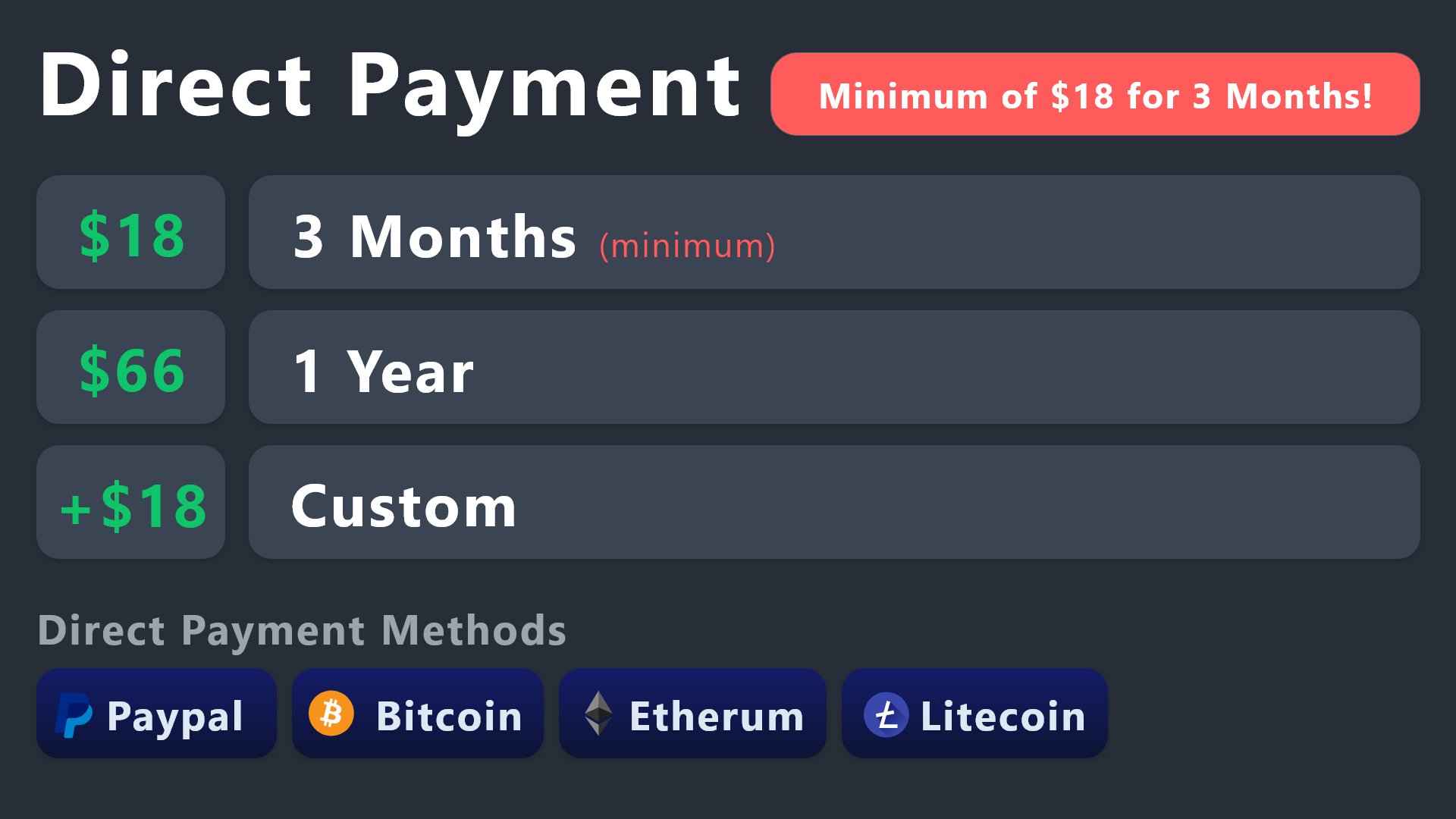
All prices in USD - 3 months min for direct payment
covert swallow
Ethereum and Litecoin are also options
 sage fiber
CADE O IDIOMA BRASILEIRO
 fleet copper
How i can change the name of the channel??
 merry inlet
rustic gale
Try using this command in your server, in a channel the bot can see: /permission...
merry inlet
rustic gale
Try using this command in your server, in a channel the bot can see: /permission...
what does that do?
 gleaming sonnet
Do I need to re-do the embed when I update the text in the embed?
covert swallow
gleaming sonnet
Do I need to re-do the embed when I update the text in the embed?
Yes
covert swallow
merry inlet
what does that do?
It tells you if you have access to the dashboard
covert swallow
fleet copper
How i can change the name of the channel??
With premium you can change it in the Ticket settings
Menu > Tickets
 brave schooner
@covert swallow how i can mention role?
 fallow ingot
 languid flax
hi we cant close members ticket
languid flax
hi we cant close members ticket
Check that your close button permissions
fallow ingot
brave schooner
<@129308185629687809> how i can mention role?
Please don’t ping members of the team!
Instructions to ping a role:
 Go to the Panel Configs page then click ticket button. Once on that page click edit ticket message.
 You can either ping the role using the ID, or the role name. Both variables are below:
<@Role_Name><Role_ID>
obtuse lotus
Help Me Pls 😅
 pale pilot
obtuse lotus
Help Me Pls 😅
pale pilot
obtuse lotus
Help Me Pls 😅
That's a new one.. I'm guessing this is the title field when you use a drop-down. Go into your dropdown settings and make sure there is no required field empty
obtuse lotus
All mandatory fields are filled in Unfortunately without success
pale pilot
obtuse lotus
All mandatory fields are filled in Unfortunately without success
Can you send a screenshot?
obtuse lotus
pale pilot
Can you send a screenshot?
 pale pilot
obtuse lotus
pale pilot
obtuse lotus
How many fields do you have?
pale pilot
obtuse lotus
Können Auch Gerne Über Deutsch Reden 😅
Welche Aktion führst du aus wenn du den Fehler bekommst?
obtuse lotus
Versuche Über Das menu Ein Ticket Zu Öffnen
 pale pilot
Passiert das bei allen Tickets?
obtuse lotus
Ja Bei Allen Außer Beim Allgemein Ticket
pale pilot
Hmm, dann liegt das an der Ticket Message. Ich hab leider nichts im Dashboard gefunden, was komisch aussieht. Kannst du versuchen ein paar der Felder leer zu lassen?
obtuse lotus
In Ticket Message?
pale pilot
Jo
obtuse lotus
Ja Ein Moment
Auch Nicht Der Channel Wurde von denn Rechten Ja Kopiert
Soll Ich Mal Am Besten In Ein Talk Oder So Gehen?
jade topaz
How do I create a panel in ticketool? The layout seems to have changed and I have no clue where to go
rustic gale
jade topaz
How do I create a panel in ticketool? The layout seems to have changed and I hav...
Dashboard -> Panel Configs. In the dropdown menu at the top, press the green + button
jade topaz
The green + button?
I click on it but it's not showing my specific channels.. just the categories but I need the ticket in specific channels
pale pilot
obtuse lotus
Soll Ich Mal Am Besten In Ein Talk Oder So Gehen?
Ticket am besten
 loud plank
obtuse lotus
pale pilot
Ticket am besten
loud plank
obtuse lotus
pale pilot
Ticket am besten
✅
rustic gale
jade topaz
I click on it but it's not showing my specific channels.. just the categories bu...
Press the Send button
jade topaz
rustic gale
Press the Send button
I don't see the send button. That's the problem LOL. And it's not going to send to the proper channel because it only allowed me to select the category
Is there like a video or something I can watch @rustic gale
robust sandalBOT
covert swallow
Ethereum and Litecoin are also options
Ethereum и Litecoin также являются опционами
English (en) → Russian (ru)
 teal ravine
So I’m admin on sever and I have administrator but the option to go to it on the dashboard isn’t there
rustic gale
jade topaz
I don't see the send button. That's the problem LOL. And it's not going to send ...
What do you see?
A screenshot could help
 quasi estuary
Hi, does ticket tool integrate with click up?
rustic gale
Not currently, no
 hot pumice
how far do this discord bots ticket go back?
 dim summit
hello can one of you help me set it up in my server
I've tried from yt vids for long time now, would be helpful if i was helpe
 daring socket
hello
dose anyone know how to fix like when you wanna make a ticket theres 2 create a ticket
 covert swallow
Mak sure you didnt link the panel to itself
humble sequoiaBOT
For a more convenient use of multipanels, you can now combine panels on the dashboard. This will allow you to directly send the multipanel from the dashboard or via the $panel ID command.
Where can I find this?
You can find this setting on the Dashboard -> Panel Configs -> Settings -> Panel
Note: if you're attaching all the panels to a panel called English, don't include English in the attached panel's box (If you do this, it will create a duplicate)
This will put all buttons from all of your panels on one message. The message is the panel message from the panel you're combining these panels in.
daring socket
covert swallow
Mak sure you didnt link the panel to itself
?
covert swallow
humble sequoia
Check here for an explanation of how panels get linked together
 woeful mist
How can I add a image to the create ticket embed?
daring socket
$help
humble sequoiaBOT
daring socket
$help
1. Go into your Dashboard
2. Open your Panel Configs tab
3. Select the panel you want to ping your support on
4. Open the Ticket options menu
5. Click on Edit Ticket Message
6. In the Message Content use one of the role mention syntax (**{@Role Name}**/**{Role ID}**)
7. Save changes
**Note:** For this to work properly, Ticket Tool requires the `Mention Everyone` permission. Or the role must have the `Allow anyone to @mention this role` setting enabled 

 humble sequoiaBOT
━━ moved to ticket ━━
 rustic gale
clear patrol
need help please these gif show as photo in the ticket not moving
rustic gale
clear patrol
need help please these gif show as photo in the ticket not moving
Try making a ticket #🎫│make-a-ticket so we can take a closer look
 sick flume
Algum Brasileiro?
rustic gale
What do you need help with?
robust sandalBOT
rustic gale
What do you need help with?
Com o que precisa de ajuda?
English (en) → Portuguese (Portugal) (pt-PT)
pale pilot
@pseudo steeple this is not a bug
humble sequoiaBOT
Don't see your server in the dashboard?
You will possibly need to relog. Look below to see steps on how to relog.
How to relog in the Dashboard.
Note:
You need one of these 3 things to access the dashboard.
1. Server Owner (Level: 6)
2. Server Administrator (Level: 4)
3. Dashboard Role (Level: 2)
:warning: You can check your level using $level on your Discord Server
User permission level with Ticket Tool
@User is permission level: 0 (User)
```» *If it shows that your permission is **0**, you don't have any of the above **3 things** to manage the dashboard.*


**See the Image below on how to relog:**Hello can u help me I cannot log into my account can someone help me please??
I can use all the websites but not sky warriors please help
covert swallow
Is this related to @pseudo glen ?
weak path
I don't know
blissful atlas
weak path
I can use all the websites but not sky warriors please help
In discord?
weak path
It's ok I sorted it now, but thank you so much for your help @blissful atlas
iron nightBOT
Gave +1 Rep to @blissful atlas
 cloud agate
is it possible to hide the support role and making use of this ticket bot as anonymous for support team members?
rustic gale
You can always drop the suggestion using the s!suggest command in #🤖│bot-spam
blissful atlas
$new
 plain rover
Hello, when i try to add someone in a ticket with /add user name it says: failed to add missing permissions, I noticed the bot apparently is missing "manage channel"permissions, but on another server i don't have it either and /add works fine?
 round mesa
How do I get my ticket manager to be able to access tickets. It won’t show up on role permissions
 last estuary
Do transcripts get saved anywhere?
plain rover
last estuary
Do transcripts get saved anywhere?
In the channel u want them saved u can pick one
 shut bolt
Sorry for that jajaj
Yeap, actions logs are a default message, if you wish for it to show up then use it on the Transcript Message and use the {close.reason} variable there
 plucky meadow
is there any guide on how to the Forms work? I've set it up but Its not working for me, Its totally a "me" problem
shut bolt
plucky meadow
is there any guide on how to the Forms work? I've set it up but Its not working ...

Questionaries for ticket opening!
plucky meadow
So its a half free feature. you can enable it but you can't actually use it because you need access to the Embed Editor, correct?
rustic gale
What
plucky meadow
placing " {create.form.1} " needs to be in the Embed?
rustic gale
You enter Panel Configs -> Form, enable the form, enable the auto display embed, and set up the form questions
The auto display embed does not require premium in any way
And it also does not require editing the ticket message embed
plucky meadow
oh my god. It was red, i thought it was enabled. Jesus christ You sir are correct. I'mma log off now. fml
 lean chasm
hi
sorry my problem is that I'm level 10 at https://rblxwild.com/ and they don't let me claim the daily codes they seem false to me and the other was that I invested 5 thousand robux in the flying monkey game and the game was restarted and I lost everything i don't know anything just that please explain to me about the level 10 daily codes and if there is a refund of those 5 thousand that happened yesterday marchenaelamis account thank you good night
 white karma
Hey, when I press little “$” icon on the side it says in the message “Ticket Tool Premium” twice.
 clear patrol
how to make ticket tool close ticket automatic when the guy who opened ticket leave
 hollow bloom
 warped fog
covert swallow
clear patrol
how to make ticket tool close ticket automatic when the guy who opened ticket le...
warped fog
covert swallow
clear patrol
how to make ticket tool close ticket automatic when the guy who opened ticket le...
Unfortunately this can not be done automatically
rustic gale
clear patrol
how to make ticket tool close ticket automatic when the guy who opened ticket le...
Panel Configs -> Automation
Enable the “Missing user check” and select “Close the ticket” in the dropdown
It's premium only
jade topaz
Ticket bot is in my server, but doesnt appear in my manage server section on the website. Any fix?
humble sequoiaBOT
Don't see your server in the dashboard?
You will possibly need to relog. Look below to see steps on how to relog.
How to relog in the Dashboard.
Note:
You need one of these 3 things to access the dashboard.
1. Server Owner (Level: 6)
2. Server Administrator (Level: 4)
3. Dashboard Role (Level: 2)
:warning: You can check your level using $level on your Discord Server
User permission level with Ticket Tool
@User is permission level: 0 (User)
```» *If it shows that your permission is **0**, you don't have any of the above **3 things** to manage the dashboard.*
**See the Image below on how to relog:** pseudo fulcrum
How do i add more buttons? Like this?
 humble sequoiaBOT
For a more convenient use of multipanels, you can now combine panels on the dashboard. This will allow you to directly send the multipanel from the dashboard or via the $panel ID command.
Where can I find this?
You can find this setting on the Dashboard -> Panel Configs -> Settings -> Panel
Note: if you're attaching all the panels to a panel called English, don't include English in the attached panel's box (If you do this, it will create a duplicate)
This will put all buttons from all of your panels on one message. The message is the panel message from the panel you're combining these panels in.
rustic gale
You probably attached the panel to itself
pseudo fulcrum
Wym
rustic gale
Just make sure the panel itself is not among the attached panels
pseudo fulcrum
Wat
So imma off the button of the pannel
And create a new one for the group funds button/panel?
rustic gale
Attached Panels is for additional buttons
pseudo fulcrum
Oh ye
rustic gale
If Attached Panels is empty, you still get the panel's default button
pseudo fulcrum
I understand now
rustic gale
If Attached Panels has one entry, you get two buttons
pseudo fulcrum
Mb, and thx
 sand arch
Hi, is there a way to display the form answers in a specific channel instead of in a new ticket channel?
rustic gale
Not currently, no. You can suggest that feature with the s!suggest command in #🤖│bot-spam
@sand arch
 rotund yarrow
@rotund yarrow can someone help me
I want to put the TICKET TOOL on my server but I don't know how to configure
jade topaz
شباب انا حذفت تكت كيف رجها
jade topaz
Howto claim.premium after voting
 stark runeBOT
1. Invite Ticket Tool to your server
First you will want to invite the bot to your server. Once the bot is in your server, you can manage your server in the dashboard.

2. Create a Panel
To create a panel we are going to need to head over to the panel configs on the dashboard.
Once at the dashboard we will need to click Create Panel.
Enter a panel name (Fill in any optional settings you want).
Click Create Panel and your ready to get started with configuring your panel.
An example of a creating a panel is shown below.

3. Send the Panel to a Channel
Once you've created a panel on the dashboard you will need to send it to a channel using send on the dashboard.
Select the channel you want your panel to be created in and click send.
For other questions checkout $help faq.
An example of a sending a panel is shown below.
Having a Problem Sending the Panel?
Do $debug in a channel with Ticket Tool and make sure it has all the necessary Discord permissions.

 gilded verge
stark rune
gilded verge
stark rune
@rotund yarrow, please check 
 hybrid scaffold
for some reason my server wont show up when i try to fix it up in the websit and idk why
ive tried reloading several tims and it still wont show up
humble sequoiaBOT
Don't see your server in the dashboard?
You will possibly need to relog. Look below to see steps on how to relog.
How to relog in the Dashboard.
Note:
You need one of these 3 things to access the dashboard.
1. Server Owner (Level: 6)
2. Server Administrator (Level: 4)
3. Dashboard Role (Level: 2)
:warning: You can check your level using $level on your Discord Server
User permission level with Ticket Tool
@User is permission level: 0 (User)
```» *If it shows that your permission is **0**, you don't have any of the above **3 things** to manage the dashboard.*


**See the Image below on how to relog:**@hybrid scaffold, please check message
hybrid scaffold
it works now thanks! 🙂
 tribal ore
I need some help
I want do a ticket in my server
How ?
stark runeBOT
1. Invite Ticket Tool to your server
First you will want to invite the bot to your server. Once the bot is in your server, you can manage your server in the dashboard.
2. Create a Panel
To create a panel we are going to need to head over to the panel configs on the dashboard.
Once at the dashboard we will need to click Create Panel.
Enter a panel name (Fill in any optional settings you want).
Click Create Panel and your ready to get started with configuring your panel.
An example of a creating a panel is shown below.
3. Send the Panel to a Channel
Once you've created a panel on the dashboard you will need to send it to a channel using send on the dashboard.
Select the channel you want your panel to be created in and click send.
For other questions checkout $help faq.
An example of a sending a panel is shown below.
Having a Problem Sending the Panel?
Do $debug in a channel with Ticket Tool and make sure it has all the necessary Discord permissions.
gilded verge
Please check
 jade topaz
Hi. How do I setup my ticket bot?
gilded verge
stark rune
Hey @jade topaz, please check
 jade topaz
Ayo
I don't want the creator of the ticket to be able to delete their own ticket, only the few people who has support roles.
How can I set that up?
lunar solar
Panel configs —> Buttons —> Delete Button —> Edit Button —> Enable Support Team only or adjust allowed / disabled roles.
@jade topaz
 languid edge
hello, to get the key of 7days premium free I have to be the ownership or what?
rustic gale
It's not a key. You enter the dashboard and redeem it there
 livid turtle
Hi
languid edge
rustic gale
It's not a key. You enter the dashboard and redeem it there
can you tell me from where or give me a photo , and should I be the owner ship to redeem it ?
from where do I get this code, and what he request permissions..

 oblique bloom
$help
humble sequoiaBOT
oblique bloom
$help
Identifiy the number of your question and select it using the menu at the end of the message
 - How do I create a panel?
- How do I send a panel?
- How can I grant my team access to tickets?
 - How do I add/remove users from a ticket?
 - How to automatically ping my support team on a ticket?
 - How do I set what category tickets are created in?
 - How does claiming work?
 - What is the prefix and how do I change it?
 - How do I limit the number of tickets a user can create?
 - How do I set a transcript channel?
 past junco
humble sequoiaBOT
past junco
humble sequoiaBOT

Ticket Tool is the only ticketing bot you'll ever need! Explore its features and set the best ticket system for your server!
<:CommandIcon:1018980659064221746> Commands
Browse through Ticket Tool's commands list and find new utilities!
<:TextIcon:1018980662881030144> FAQ
Solutions for the most frequent questions our users have when implementing the bot on their server.
<:Setup:1034174646788030664> Setup
The steps to follow when setting the bot for the first time on any server
lunar solar
@past junco
languid edge
languid edge
from where do I get this code, and what he request permissions..
@lunar solar ?


 covert swallow
 torpid depot
The hell?
torpid depot
The hell?
Refer to the rules
torpid depot
I haven't broken any rules. What rules do you say I'm violating?
covert swallow
Common sense, it is assumed that channels are to be used for their intended purpose. #🆘│community-support is for support, #🤖│bot-spam is for bot commands
 peak spoke
Transcripts are being sent even though they're not enabled. ?
covert swallow
Whats the server ID
torpid depot
What is the feature called for the buttons that send a message that only you can see, as found in #📂│information?
 brittle junco
Does the ticket receipt button have a subscription?
rustic gale
languid edge
can you tell me from where or give me a photo , and should I be the owner ship t...
You don't see the “Start 7-day Trial” button?
 languid edge
rustic gale
You don't see the “Start 7-day Trial” button?
languid edge
rustic gale
You don't see the “Start 7-day Trial” button?
one minute
rustic gale
torpid depot
What is the feature called for the buttons that send a message that only you can...
Those are called ephemeral messages
brittle junco
brittle junco
> **Warning:** Claiming isn't enabled why ?
@rustic gale

الو يا اجانب افهمو يولاد
brittle junco
rustic gale
Those are called ***ephemeral messages***
يبن المرة
 rustic gale
Ticket Tool doesn't do ephemeral messages @torpid depot The bot you see in #📂│information is a custom instance of Sapphire, https://sapph.xyz

A Discord Bot — Done Right | Custom slash commands, buttons & select menus, Auto Moderation, Social Notifications, Reaction Roles, Logging, Custom (ephemeral) messages, Scheduled messages, Automated / triggered messages and more
torpid depot
Interesting. Thanks for the info, I appreciate it.
rustic gale
languid edge
The yellow Start Trial button should be right below the text that says “Premium Status: Free”
languid edge
rustic gale
The yellow Start Trial button should be right below the text that says “Premium ...
but it doesn't exist
rustic gale
brittle junco
> **Warning:** Claiming isn't enabled why ?
Claiming is a premium-only feature. You can enable it in Panel Configs -> Claiming
languid edge
what the prob?
rustic gale
languid edge
but it doesn't exist
Then your server has already used its 7-day trial
 rustic gale
Yes, because the trial is over
brittle junco
rustic gale
Claiming is a premium-only feature. You can enable it in Panel Configs -> Claimi...
Do you speak Arabic ?
rustic gale
No. You can get Arabic help in #🎫│make-a-ticket
languid edge
rustic gale
Yes, because the trial is over
so I can't get premium
rustic gale
languid edge
so I can't get premium
Not for free
languid edge
rustic gale
Not for free
ok ty.
humble sequoiaBOT
rustic gale
$vote
Votes
Current Votes: 0
Lifetime Votes: 0
Linked Votes: 0
Vote Links
Linking Info
Linked User: Not Linked
You can give your future votes to another user by linking with that user.
To link use $vote link (@user or userId)
To unlink use $vote unlink
Redeeming
Each vote is worth 12 hours of premium and can be redeemed once you have atleast 6 votes.
Your current votes are worth 0m
To redeem your current votes use $vote redeem
languid edge
thanks @rustic gale
iron nightBOT
Gave +1 Rep to @rustic gale
 granite vigil
helpp
humble sequoiaBOT
We would love to help you, but if you don't tell us what you need help with we can't help you :(
 smoky shoal
How to make a slash command be "hyperlinked"?

 steel portal
how do i make a ticket
 worldly grove
Hi! I have two questions.
- Am i only allowed to make one panel in my server? And if so, is that something new?
- For drop down menu, can i make a panel that has a dropdown menu with several items?
- Apply for moderator
- Server access
- Report a member etc
I'm a little confused with what's the point of dropdown if i can only use my panel on one item at a time. English is not my first language so i might be misunderstanding it?

The reason i ask about one panel is that i don't see the option to create another, after i made the first one.

 scenic plinth
worldly grove
Hi! I have two questions.
1) Am i only allowed to make one panel in my server? ...
scenic plinth
worldly grove
Hi! I have two questions.
1) Am i only allowed to make one panel in my server? ...
No, you can have multiple panels, and if my mind is not funky, there is no limit as to how many panels a server has (some apparently have around 100 for whatever the reason may be)
As for dropdowns, once you create another panel (in this case, you need two more), you will replace two options where it says "Hey welcome to the help button" with whatever those two panels are.
scenic plinth
worldly grove
The reason i ask about one panel is that i don't see the option to create anothe...
Green plus sign on the top right of the screenshot.
humble sequoiaBOT
The Drop-down menu or Select Menu replaces the buttons on your panel message and uses a drop-down menu with all of your panels. To set this up, go to your Panel Configs and select your main Panel.
<:Numbericons1:1018864164032225340> Enable Select Style
First you enable Select Style. Then you add an item in the Dropdown Editor. Now you can start editing your dropdown!
<:Numbericons2:1018864168041971712> Dropdown Editor
Each line in the dropdown editor represents a line in the drop down menu on discord. You can add more "Items", by clicking on
First you select a panel. That's the panel this option will open a ticket for. DONT select the same panel twice. Each option should have a different Panel
After that, you can put a Display. This is the title of this option and will appear in the drop down menu. The *Description can be set right after that, which will be below the title in grey.
Additionally you can select an emoji, that will be shown in front of each option. You can either manually input the ID of an emoji or select it in the selector.
Common Issues ⚠️
- Panel doesn't send? Make sure you have a valid emoji selected
- Option doesn't show up? Check if two options have the same panel in the DropDown Editor
$dropdown
scenic plinth
steel portal
how do i make a ticket
Visit the setup docs here: https://docs.tickettool.xyz/general/setup
worldly grove
Okay so i can't have one panel with three different reaction emojis with three respecitve tags, for example?
scenic plinth
You can have one panel display the message you want for ticket creation (Example: Click the button below to contact support!), however, you need 3 to create the dropdown like you want to. These other 2 panels you would need to create don't show their messages.
jade topaz
My GIF wont load, any fix?
 scenic plinth
Can you send the gif link please?
jade topaz
where do i go to select what channel the panel goes to
 scenic plinth
jade topaz
: https://imgur.com/a/ijQId44
scenic plinth
jade topaz
: https://imgur.com/a/ijQId44
Can you provide your server ID and panel name please?
scenic plinth
jade topaz
where do i go to select what channel the panel goes to
On panel configs, select a panel, and click the blue "send" button on the top of your screen.
jade topaz
scenic plinth
Can you provide your server ID and panel name please?
Would I be able to make a ticket and have you help me there?
scenic plinth
You can make a ticket here if you prefer, sure.
jade topaz
Thank you
 spare agate
Quick question. Is there an option to close stale tickets automatically?
scenic plinth
Define stale.
spare agate
scenic plinth
Define stale.
like inactive for idk a month
 acoustic hedge
How people can create qwestion in tickets?
 scenic plinth
They answer...
scenic plinth
spare agate
like inactive for idk a month
Ticket Tool doesn't have a setting to close after a certain amount of time at the moment.
spare agate
scenic plinth
Ticket Tool doesn't have a setting to close after a certain amount of time at th...
alr, is there an api endpoint i could trigger from our own bot
to make ticket bot close the ticket
worldly grove
scenic plinth
You can have one panel display the message you want for ticket creation (Example...
Oh right, i think i get it. Thank you! I'll try and see how it goes 😃
iron nightBOT
Gave +1 Rep to @scenic plinth
 cold bridge
i have bot error but why
humble sequoiaBOT
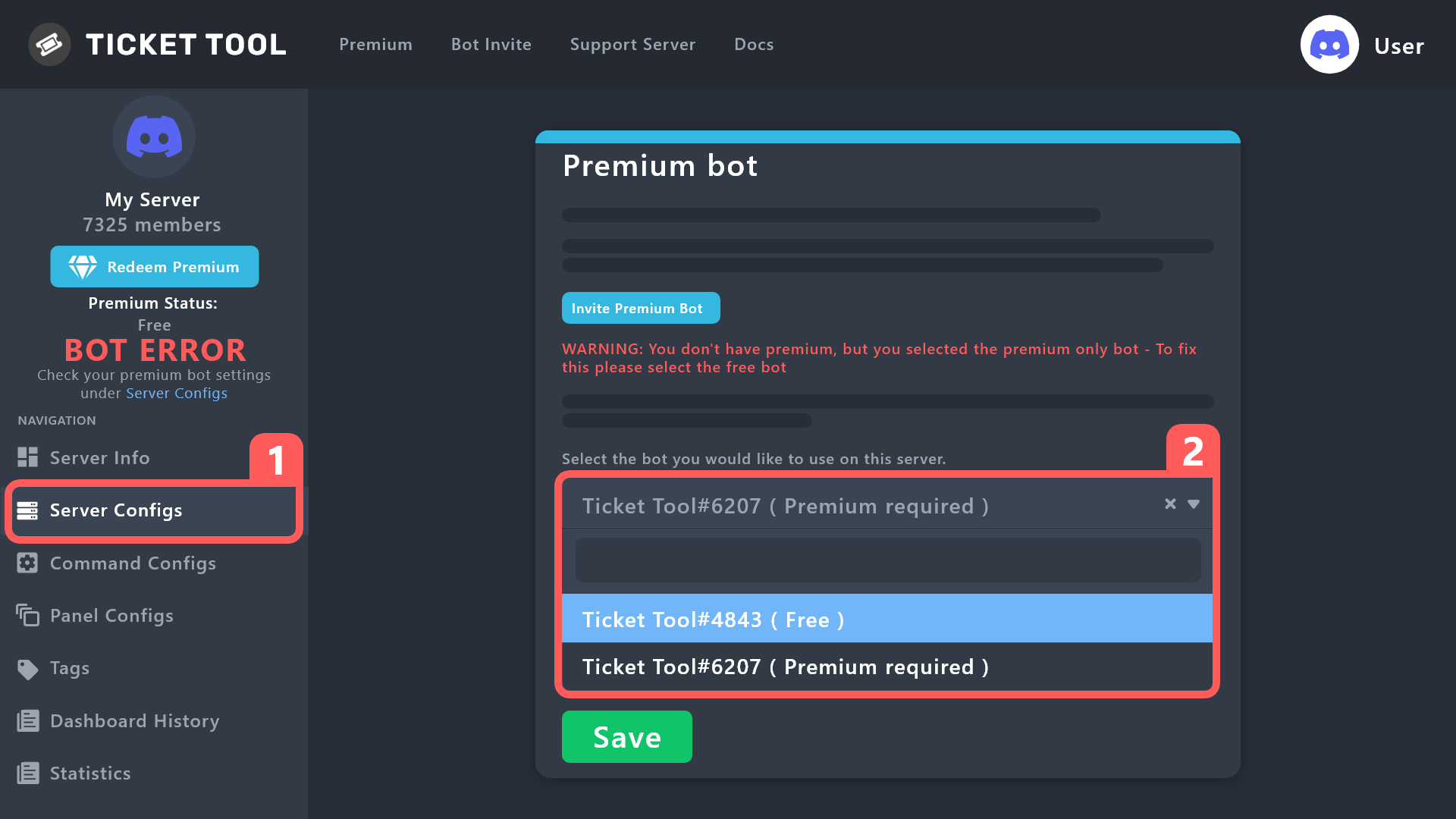
How to disable the premium bot
To disable the premium bot you will have to go to the Dashboard ➞ Server Configs ➞ Premium bot ➞ And on the right-hand side select the primary free bot in the drop down menu.
Premium features will still work on the normal bot.
 worldly grove
Is there any way to create one to one help tickets?
cold bridge
thaks
worldly grove
worldly grove
Is there any way to create one to one help tickets?
While still giving several mods the same support role?
spare agate
scenic plinth
Ticket Tool doesn't have a setting to close after a certain amount of time at th...
...
cold bridge
how i can make multiple buttons
 lofty echo
cold bridge
how i can make multiple buttons
lofty echo
cold bridge
how i can make multiple buttons
i also have this question
 cosmic blaze
how do i display form results if i had the auto embed turned off?
worldly grove
When i made a panel i scrolled down to bottom and selected a style here:
Then made 3 different panels for the 3 buttons i wanted to the main panel

It wasnt buttons but a drop down menu
scenic plinth
You wanted a drop down menu, right?
worldly grove
Yeah it worked for me
cosmic blaze
is it possible to get the ticket tool bot to make a new ticket message within the same open ticket? trying to display form results with adding the {create.form.x} variable
 meager sapphire
where the panel channel?
lofty echo
meager sapphire
where the panel channel?
here!

 neat hearth
how do i get when a ticket is opened to fall into a selected catagory
anyone help me please
meager sapphire
lofty echo
here!
no i saying where i put the panel in discord channel
i cant find it
no respone
meager sapphire
this is why i prefer old website
neat hearth
yeh
lofty echo
meager sapphire
no i saying where i put the panel in discord channel
ohhh

then u should have smthing like this!
 cosmic blaze
how do i see form results
scenic plinth
neat hearth
do u know how to make opened tickets automatically go into a catgory
Panel Options --> Select Panel --> Category
scenic plinth
cosmic blaze
how do i see form results
{create.form.1} (up to 5)
lofty echo
how can i change the amount of buttons?
cosmic blaze
scenic plinth
{create.form.1} (up to 5)
where do i put that?
humble sequoiaBOT
For a more convenient use of multipanels, you can now combine panels on the dashboard. This will allow you to directly send the multipanel from the dashboard or via the $panel ID command.
Where can I find this?
You can find this setting on the Dashboard -> Panel Configs -> Settings -> Panel
Note: if you're attaching all the panels to a panel called English, don't include English in the attached panel's box (If you do this, it will create a duplicate)
This will put all buttons from all of your panels on one message. The message is the panel message from the panel you're combining these panels in.
scenic plinth
(L3MON^)
cosmic blaze
scenic plinth
$mp
nothing happened when i typed this in the ticket
 scenic plinth
No, you put {create.form.1} in the ticket message... in your panel settings....
 lyric light
?
cosmic blaze
scenic plinth
No, you put {create.form.1} in the ticket message... in your panel settings....
right i know that but i asked a couple times earlier and no one answered
i already have a ticket open
where someone filled out a form
i want to get those form results. putting that in the ticket message will work for any new ticket. but im trying to get the results for that ticket thats open now

someone created a ticket and put a lot of work into the results on their form but i accidentally had the auto embed turned off. so im trying to figure out how to get the results for that already opened ticket now
 scenic plinth
You can't get results for an already opened ticket unfortunately.

 hearty folio
IT KEEPS ON SAYING APPLICATION IS NOT RESPONDING
I DIDNT EVEN KNOW YOU WERENT ALLOWED TO SAY SUPPORT IN GENERAL
BRUH
shut bolt
hearty folio
I DIDNT EVEN KNOW YOU WERENT ALLOWED TO SAY SUPPORT IN GENERAL
First of all you should calm, second, read the channel description
 hearty folio
i didnt see it i just joined cause i needed support then i saw the support
shut bolt
Funny, cause support is above general chat
lofty echo
scenic plinth
(L3MON^)
tysm!
shut bolt
shut bolt
Funny, cause support is above general chat
If you need help, then state your issue here and someone will assist you. If you want help from our support team then #🎫│make-a-ticket, if you are facing issues with the bot then I presume you are using mobile discord since right now the bot is working fine, update your app and try again.
gilded verge
lofty echo
i cannot find the settings
hey, go there and choose your server ^^ https://tickettool.xyz/dashboard/server-id/panel-configs-v2#/panel
hearty folio
shut bolt
Funny, cause support is above general chat
i saw make a ticket
after i typed it i saw support
 gusty sandal
Hello, I'm unable to Tag the persons in the Ticket which is generated, am i missing anything?
rustic gale
gusty sandal
Hello, I'm unable to Tag the persons in the Ticket which is generated, am i miss...
What did you try that failed?
gusty sandal
I'm a Mod in a Server, when tickets generate I want to tag the Support Staff.
I'm just unable to Tag the users
like when I type @native bone it will not give me any suggetions
rustic gale
Well
When you type @ the only suggestions that appear are users that can view the channel and roles that you can mention
If a user can't view the channel, they will not appear among the suggestions
That's not a Ticket Tool thing, that's a Discord thing
Because tickets are private channels, the only users that can view them by default are the ticket creator, the server owner, and users with the Administrator permission
To set up support staff, you add support team roles in your panel's settings
In your dashboard, enter Panel Configs -> General
you can add Support Team Roles there.
This will only affect future tickets created, not old existing ones
To add the support team to old tickets, you should close them and reopen them.
@gusty sandal
gusty sandal
rustic gale
If a user can't view the channel, they will not appear among the suggestions
They are part of private channel, other people able to tag among themselves. Its just me who cant tag Admin memebers, however I will try the above steps once. thank you!
iron nightBOT
Gave +1 Rep to @rustic gale
 deep island
does anyone know how to limit the amount of tickts a person makes?
rustic gale
deep island
does anyone know how to limit the amount of tickts a person makes?
Panel Configs -> Limits
You can set limits there
 sand rose
hey guys anyone know why im getting interaction failed when i try to close ticket?
nevermind its working again lol
covert swallow
Kick and reinvite the bot
 last crag
Hi everyone i need help for the transcription
Someone create a ticket we talk with it etc etc...
But we need to have the history of the ticket in an other channel (like admin) and want delete the ticket too.
I don't know if I was clear an sorry for that
I'm French so if someone talk french dm me
Thanks you 
covert swallow
Has the ticket already been deleted?
last crag
No its just for later
covert swallow
$help transcripts
humble sequoiaBOT
covert swallow
$help transcripts
Ticket Tool is the only ticketing bot you'll ever need! Explore its features and set the best ticket system for your server!
<:CommandIcon:1018980659064221746> Commands
Browse through Ticket Tool's commands list and find new utilities!
<:TextIcon:1018980662881030144> FAQ
Solutions for the most frequent questions our users have when implementing the bot on their server.
<:Setup:1034174646788030664> Setup
The steps to follow when setting the bot for the first time on any server
 rustic gale
 digital oyster
Can you change the color of the embed without premium or do you need premium?
digital oyster
Can you change the color of the embed without premium or do you need premium?
Custom color is premium only
rustic gale
tribal ore
How to do a bot
Look at the Setup Guide in #📂│information
scenic plinth
The person likely has DMs closed or it is not configured correctly, assuming you have premium to DM transcripts.
 queen root
hi does any1 now how to delete a ticket that automatically daves the transcript? (since u usually have to tap the button of save transcript before deleteing)
 gritty ember
rustic gale
Look at the Setup Guide in <#509239005481664524>
gritty ember
rustic gale
Look at the Setup Guide in <#509239005481664524>
The buttons don't work for me in the #📂│information channel. (Error messages: Unsuccessful interaction.)
humble sequoiaBOT
</add:1029783024306507887> - Gives an additional user or role access to the current ticket channel. They are given the same permissions as the User Opened Permissions.
</remove:1029783024306507888> - Removes a user's or role's access to the ticket channel if they had access to the ticket when it was created, or if they had been added with the </add:ID> command.
</open:1029783024306507893> - Re-opens a ticket channel that is in the Closed state.
</close:1029783024306507892> - Closes a ticket channel that is in the Opened state.
</rename:1029783024264564757> - Changes the ticket name, or resets its name if no new name given.
</claim:1029783024306507889> 💎 - If Ticket Claiming is enabled, this command allows a support team member to claim or unclaim the ticket.
</closerequest:1029783024306507891> - Sends the Close Ask Message to the ticket channel.
</transcript:1029783024264564758> - Generates a transcript of the ticket, or channel if 💎 Premium, with the given settings.
</new:1029783024264564762> - Create a new Command Style Ticket
</premium:1029783024306507894> - Checks the Premium status of the server you ran the command on.
</debug:1029783024264564765> - Provides you troubleshooting information about your server and the channel you ran the command.
</permissionlevel:1029783024264564760> - Your level permissions within the server, allows you to know if you are able to access a dashboard.
</ping:1029783024306507895> - Provides the current latency between your server, the bot, and the Discord API. This might be used while troubleshooting.
</help:1029783024264564756> - The command you used to get here!
</id:1029783024264564764> - Returns the ID of the given channel/role/emoji, providing no input will return the server's ID.
</vote:1029783024264564761> - Vote for Ticket Tool and gain free Premium!
</invite:1029783024264564763> - Invite for the bot and the Support Server.
rustic gale
queen root
hi does any1 now how to delete a ticket that automatically daves the transcript?...
Automation is a premium feature
You set up auto transcripts in Panel Configs -> Transcript
rustic gale
@gritty ember Here you go
Oh. It's dead...
Well. The basic setup is this:
- Enter the dashboard
humble sequoiaBOT

Ticket Tool - Ticketing without clutter - The #1 discord Ticketing bot
rustic gale
- Enter Panel Configs
- Create a panel
- Use the Send button to send the panel to a channel
rustic gale
queen root
is there no lifetime subscription
No
jade topaz
guys help
 deep ermine
Whts actually wrong with permision
 jade topaz
so basiclly poeple are abelt to acces my sevrer ticket ooll
how do i disbale that from happening ?!??!
jade topaz
deep ermine
Whts actually wrong with permision
you have to fix perms
deep ermine
jade topaz
you have to fix perms
Which perms
gritty ember
However the bot has permissions and roles for the dedicated channel it can't send the panel:
jade topaz
How do i add the bot to my server so pepole can Get support
rustic gale
jade topaz
so basiclly poeple are abelt to acces my sevrer ticket ooll
Dashboard -> Server Configs -> Dashboard Roles
Make sure it's empty or there's only administrator roles there
rustic gale
rustic gale
1. Enter the dashboard
Look here @jade topaz
rustic gale
deep ermine
Whts actually wrong with permision
You have to talk to the owners of that server and let them know their bot is set up incorrectly
rustic gale
gritty ember
However the bot has permissions and roles for the dedicated channel it can't sen...
There's many possible reasons for that. Best to #🎫│make-a-ticket so we can take a closer look
 static lichen
how do i make the bot @a role when ticket is opened?
jade topaz
rustic gale
Dashboard -> Server Configs -> Dashboard Roles
tysm
u deserve staff of the month fr
static lichen
@rustic gale Can you help me?
rustic gale
static lichen
how do i make the bot @a role when ticket is opened?
Dashboard -> Panel Configs -> Ticket -> Edit Ticket Message
In the text box at the top, include the role mention
A role mention looks something like this <@&642118166243311646>
You can find the mention for your role using the /id command in your server
jade topaz
pls help i cant select a channel to put ticket tool in my server
humble sequoiaBOT
━━ moved to ticket ━━
rustic gale
But for reference: you press the Send button and select the channel there
jade topaz
rustic gale
But for reference: you press the Send button and select the channel there
where is the send buttom
rustic gale
You will see it after you've created the panel
jade topaz
tyyy
humble sequoiaBOT
━━ moved to ticket ━━
 granite tide
When you have a form set up, where does that actually go if it doesn't go in to a ticket?
rustic gale
granite tide
When you have a form set up, where does that actually go if it doesn't go in to ...
 granite tide
rustic gale
granite tide
rustic gale
Oh ok cool, I have that set up - was just unsure if it stored it else where (like a way to download it) no worries appreciate you
 burnt needle
Why do ticket tools tell me that I havent permissions to create a ticket as a member, I did not touch the perm settings
rustic gale
burnt needle
Why do ticket tools tell me that I havent permissions to create a ticket as a me...
Does it say “system failure: missing permissions” or “warning: you don't have permission to use this”?
Those two messages mean different things
rustic gale
granite tide
Oh ok cool, I have that set up - was just unsure if it stored it else where (lik...
Sadly no, no way to download form answers or send them separately anywhere other than the ticket itself
granite tide
rustic gale
Sadly no, no way to download form answers or send them separately anywhere other...
No worries appreciate it!
burnt needle
warning: you don't have permission to use this, I guess its a config problem but I dont know how to fix it because all looks to be ok
 cursive copper
Is there a variable for who claimed a ticket
jade topaz
Where do I claim a ticket?
cursive copper
jade topaz
Where do I claim a ticket?
You use -claim
rustic gale
burnt needle
warning: you don't have permission to use this, I guess its a config problem but...
You can't solve that. Only the server owner/administrator/a user with dashboard access can solve that
burnt needle
Im the owner
burnt needle
rustic gale
You can't solve that. Only the server owner/administrator/a user with dashboard ...
I mean I wasnt able to create a ticket as a simply member but I can as an admin
rustic gale
burnt needle
I mean I wasnt able to create a ticket as a simply member but I can as an admin
You probably blacklisted everyone or a generic member role in Server Configs
cursive copper
rustic gale
You probably blacklisted `everyone` or a generic member role in Server Configs
Is there a variable for who claimed a ticket
burnt needle
rustic gale
You probably blacklisted `everyone` or a generic member role in Server Configs
You're right I don't remember I did that, missclick probably
Thank you ^^
 oak sapphire
is it possible to have certain dropdown buttons or just panel buttons require a specific role to be used?
jade topaz
When someone in my server opens a ticket they cant see it, how can i make it so each person can only see their ticket and nobody elses?
 pulsar panther
Hey there. I've just purchased premium via Discord, however I'm not sure where to find the premium key to redeem it on the dashboard. Any help please!
humble sequoiaBOT
━━ moved to ticket ━━
jade topaz
how do you fix it so when u invite the bot it wont leave again
shut bolt
jade topaz
how do you fix it so when u invite the bot it wont leave again
The bot doesn't leave on it's own. Check your audit logs to see who's removing it
pulsar panther
pulsar panther
Hey there. I've just purchased premium via Discord, however I'm not sure where t...
@shut bolt sorry to ping but been a lil while
shut bolt
pulsar panther
<@518666147441278998> sorry to ping but been a lil while
Oh
I thought you had a ticket open rn
Someone then asked almost the same thing, my bad
pulsar panther
Oh, no, sorry
shut bolt
pulsar panther
Hey there. I've just purchased premium via Discord, however I'm not sure where t...
Can I have your server's ID? Since you bought it via Discord no redeem key is needed
pulsar panther
1034806338158600293
shut bolt
pulsar panther
Oh, no, sorry
It's fine, it was my mistake
shut bolt
pulsar panther
Hey there. I've just purchased premium via Discord, however I'm not sure where t...
The subscription is active :)
 iron nightBOT
Gave +1 Rep to @shut bolt
shut bolt

rustic gale
jade topaz
When someone in my server opens a ticket they cant see it, how can i make it so ...
Are you testing using “View as Role”?
rustic gale
oak sapphire
is it possible to have certain dropdown buttons or just panel buttons require a ...
Of course. You open the corresponding panel in Panel Configs, then access Buttons -> Edit Create Ticket Button
Set everyone as denied role, and the role you want as allowed role
oak sapphire
thanks
jade topaz
how do i edit that message, "read delete channel"
 humble sequoiaBOT
The Ticket Message is the first message sent by the bot on a new ticket. To customize it head over to your Dashboard ➞ Panel Configs ➞ Ticket ➞ Edit Ticket Message
jade topaz
that's for when a ticket is open, i'm looking for the embed message for when you create a ticket
gilded verge
oh right, my bad
humble sequoiaBOT
The panel message is where people react to make a ticket. To customize it head over to your Dashboard --> Panel Configs -> Panel -> Edit Panel Message

 pale swift

Good morning, I encountered a problem, which is that the bot did not receive the message to send tikes to the specified ROM
<@&540295656720302081>
 umbral oyster
Good morning, when i'm trying to save my changes after editing the text, it says: '' Missing permission to save ''
what do i do?
slender minnow
pale swift
Good morning, I encountered a problem, which is that the bot did not receive the...
you'll need to fix this error
https://i.imgur.com/FWafdKw.png
check the premium bot settings under server configs, you don't have a premium subscription
umbral oyster
umbral oyster
Good morning, when i'm trying to save my changes after editing the text, it says...
 slender minnow
umbral oyster
Good morning, when i'm trying to save my changes after editing the text, it says...
slender minnow
umbral oyster
Good morning, when i'm trying to save my changes after editing the text, it says...
can you please make sure that the bot permissions are right
try giving the bot admin permission and let me know if it still does not works
umbral oyster
nevermind i found the problem
I'm very sorry
slender minnow
No worries :D
umbral oyster
:D
 odd hornet
when I go to send the panel for a help ticket, says the bot doesn’t have perms to view or post in the channel.. yet it’s an unlocked channel and the bot has a bot role with admin perms
never mind, I added it directly to the channel. got it lol
gritty ember
I paid the Premium on Server, but I can't see it on Dashboard
humble sequoiaBOT
The first thing you will need to do is invite the premium bot, an invite can be found here
Once the bot is in your server we will head to the dashboard and manage your server. When you are managing your server, you want to head into "Server Configs" then click the drop down menu under "Select the bot you would like to use on this server" then click "Ticket Tool#6207" and then save.
 lunar solar
@gritty ember have a look through that
tribal ore
Guys why modsysteme kicked me
humble sequoiaBOT
⚠️ You're in the wrong place
We provide support for Ticket Tool Discord bot and cannot help you with whatever issue you have.
- We don't know which Support Team you should contact to get this issue resolved, and unfortunately we won't be able to accurately tell you.
If you don't have any further questions regarding our bot Ticket Tool, please close this ticket
tribal ore
Xd
 proper sand
xd
 odd karma
I was pinged? 👀
lunar solar
odd karma
I was pinged? 👀
Yeah I fucked up trying to ping an individual and pinged a role
My bad
iPhone moment
odd karma
All good 🙂 ❤️
 frail epoch
 pale swift
slender minnow
you'll need to fix this error
https://i.imgur.com/FWafdKw.png
pale swift
slender minnow
you'll need to fix this error
https://i.imgur.com/FWafdKw.png
How can i fix it ??
 gleaming ember
Someone ping me?
granite tide
Hey how do we go about making #📌│automated-support in our own discords?
Is it the 'drop down editor'?
ok I answered my own question - but how can I get it to not open a ticket?
jade topaz
granite tide
ok I answered my own question - but how can I get it to not open a ticket?
You can't, since this is not a feature this bot supports. The automated support you see here is simply a different bot coded just for that specific purpose of being an FAQ
granite tide
jade topaz
You can't, since this is not a feature this bot supports. The automated support ...
Well, damn. Do you know what bot? Or is it coded by these guys and not for public?
jade topaz
Afaik there's no bot anywhere that only exists for people to make dropdown FAQs, and their bot is self made.
If you want to make your own without "much" coding knowledge (you'll still need to sit your ass down and look around a little) I recommend Discord Bot Maker.
granite tide
jade topaz
Afaik there's no bot anywhere that only exists for people to make dropdown FAQs,...
legend thank you
iron nightBOT
Gave +1 Rep to @sullen scaffold
jade topaz
It's 10 bucks on Steam and allows you to easily make most features your average bot has without much coding knowledge required
And if you're even more lazy than that, they also have their own community with a website where people dump all their "raw code" that you can just download and import to the program, including also things like a dropdown menu that you just need to edit
 old ermine
lunar solar
Ignore ping sorry
old ermine
lunar solar
Ignore ping sorry
D: - Dw
humble sequoiaBOT
How to disable the premium bot
To disable the premium bot you will have to go to the Dashboard ➞ Server Configs ➞ Premium bot ➞ And on the right-hand side select the primary free bot in the drop down menu.
Premium features will still work on the normal bot.
slender minnow
@pale swift
pale swift
 pale swift
pale swift
pale swift
what should I do ?
spare agate
pale swift
what should I do ?
Give the bot send message perm for that channel
 steep valley
how remove?
 humble sequoiaBOT
━━ moved to ticket ━━
jade topaz
How get rank Support team
humble sequoiaBOT
━━ moved to ticket ━━
 dark vessel
I have a feeling the answer is no, but in the dropdown with the panels, one can't re-arrange the order of those panels, right?
slender minnow
dark vessel
I have a feeling the answer is no, but in the dropdown with the panels, one can'...
you can
change the order of the panel attached
dark vessel
I mean here in this dropdown on the dashboard:
 gilded verge
You wrote about dropdown so we thought you meant this:

but you wrote about the dropdown list of panels and there you can't reorder 😦
rustic gale
granite tide
Hey how do we go about making <#977951125674291271> in our own discords?
It's called Sapphire
A Discord Bot — Done Right | Custom slash commands, buttons & select menus, Auto Moderation, Social Notifications, Reaction Roles, Logging, Custom (ephemeral) messages, Scheduled messages, Automated / triggered messages and more
Tagging @jade topaz for the knowledge
dark vessel
gilded verge
but you wrote about the dropdown list of panels and there you can't reorder 😦
awe damn, alright thanks!
iron nightBOT
Gave +1 Rep to @gilded verge
granite tide
rustic gale
It's called Sapphire
❤️
 stable jacinth
السلام عليكم
gritty ember
Is there available the feature which can close ticket automatically?
 glossy laurel
gritty ember
Is there available the feature which can close ticket automatically?
glossy laurel
gritty ember
Is there available the feature which can close ticket automatically?
theres automation options for panels
gritty ember
That’s all what I see
Missing user check
and DMs
I opened a ticket here, and when I didn’t get answer I got a notification which contain a timer when the ticket will be closed
rustic gale
gritty ember
I opened a ticket here, and when I didn’t get answer I got a notification which ...
That's just text
There's no automation associated with it
gritty ember
Ohh I see
worldly grove
Hi, i have created a drop down menu and have the following question:
How do i get the ticket bot to post instruction for the respective support they choose?
Like if they click 'report a member' the bot will send a welcome message saying: _'Hi, welcome to member report. Please state your problem as clearly as possible and provide any extra evicende like screenshots etc' _?
 rustic gale
worldly grove
Hi, i have created a drop down menu and have the following question:
How do i ge...
rustic gale
worldly grove
Hi, i have created a drop down menu and have the following question:
How do i ge...
Panel Configs -> Ticket -> Edit Ticket Message
The “ticket message” is the first message sent by the bot when a new ticket is created.
worldly grove
Lovely, thank you very much!
Side question, how can we use the yagpdb give rep thing if we aren't allowed to ping anyone? How does that work?
rustic gale
You're allowed to ping staff for rep, the bot will yell at you but everyone knows you're doing it for rep
worldly grove
Okay, thanks for the help @rustic gale 🙂
iron nightBOT
Gave +1 Rep to @rustic gale
jade topaz
How to disable ticket deletion
i dont want my support to delete tickets
Only admins should be able to do it
humble sequoiaBOT
━━ moved to ticket ━━
 mint osprey
السلام عليكم
humble sequoiaBOT
━━ moved to ticket ━━
jade topaz
One of the few things I don't know myself - "Moved to ticket" is that an on-server only feature or a premium thing? Where do I set that?
rustic gale
It's a tag
humble sequoiaBOT
Tags
Tags are used to send a predefined response to your channels using a command. Tags will only respond if the command itself is used, it will not function if you put the tag into a sentence. The prefix is not included.
To create tags, go to: Dashboard > Tags > Create Tag. After creating and naming one, tap on the response button, and you can edit the response.
 jade topaz
rustic gale
It's a tag
jade topaz
rustic gale
It's a tag
Real sadness Ticket Tool doesn't utilize Discords app feature to open tickets from messages
 blazing mountain
Hey guys, I've been playing with this bot for some time and I love how it's come such a long way! I use this bot to allow users to create their own custom rooms for specific topics, but I have a concern:
If a user recieves a muted role from an automod infraction or a moderator, I don't have a way to disable this role from being able to create channels using the drop down menu. In other words, if a troll came into the server and got themselves muted, they could still use the group panel and create tickets and manage their own rooms. My work around for this is to put the panel in a channel that cannot be seen by muted users, but I was wondering if there was a way to disable this role from creating a room instead of hiding a channel?
Would love some developer opinions, love the bot!
jade topaz
blazing mountain
Hey guys, I've been playing with this bot for some time and I love how it's come...
Modifying the core settings of your server.
That should do what you're looking for, just put the Muted role as blacklisted
 pastel vessel
Opa
humble sequoiaBOT
We would love to help you, but if you don't tell us what you need help with we can't help you :(
blazing mountain
jade topaz
https://docs.tickettool.xyz/dashboard/server-configs#blacklist-roles
You're the best! That was super helpful. It was in the server config section, not a direct panel option. Testing now.
jade topaz
blazing mountain
You're the best! That was super helpful. It was in the server config section, no...
No problem, if that helped you can always +rep me
iron nightBOT
Gave +1 Rep to @blazing mountain
jade topaz
or that works too, lmao... anyway, glad I can be of help 😂
blazing mountain
jade topaz
No problem, if that helped you can always +rep me
Okay so that worked, the problem is if the muted user needs to contact us to dispute their ban, they can't use the contact us panel either. Any suggestions?
jade topaz
blazing mountain
Okay so that worked, the problem is if the muted user needs to contact us to dis...
Well you'll have to make a compromise there. Either you don't want them to contact at all, or you use a different bot (you could use Dyno) in this case to have them use the submission form to dispute their ban
Dyno finally included a feature where people that got banned through the bot can now submit an appeal through a form that you can customize
I guess you could use that, since Ticket Tool afaik doesn't allow you to selectively make certain buttons non functional
for example, if someone has role Muted, he can still press the "appeal" button that you made in the panels but not "general support"
rustic gale
You can disable individual roles from using individual panels by adding them to Denied Roles
Panel Configs -> Buttons -> Edit Create Ticket Button -> Denied Roles
jade topaz
rustic gale
You can disable individual roles from using individual panels by adding them to ...
I totally forgot about that, thanks for the correction 👍
iron nightBOT
Gave +1 Rep to @rustic gale
rustic gale
I haven't 100% confirmed that disabling them in button options works for dropdown menus as well, but i see no reason why it shouldn't
blazing mountain
For the record, I didn't post an actual invite link lol
jade topaz
psure the bot triggers on certain endings etc.
 formal anvil
hello, i have a question on allowed role for use button
if i do this
all member of suport team AND admin can use button ?
or
ONLY ADMIN can use button ?

(i look for limit buton only for admin, and suport team cant use it, but i dont know if i put directly " members " on disabled role, and admin in allowed, admin whit member role cam use button ?
and if i put membre role in disabled, and i no activate ' suport team only ' suport team role whit member role can use whit support team power or not ? )
 plain surge
If the admin role has the Administrator permission enabled, it will bypass any setting set
~
Having the support team only enabled doesn't affect the roles in allowed. They will both have access
~
If the admin role doesn't have the administrator permission and you add it to Allowe roles while adding the members role to Disabled roles, people with the admin role will still have access
~
Lastly, people with support team role will still have access even if they have a role that is in Disabled roles
Did I miss a scenario? @formal anvil
formal anvil
hmmm
for simplicity
I need the delete button to be usable only by administrators, so that it does a security check
so that the support team has its support permissions on everything else, but it's just not the possibility to use the delete button
rustic gale
formal anvil
hello, i have a question on allowed role for use button
if i do this
all membe...
The support team can't be prevented from using a button
Support team overrides everything else
You can try adding the support team roles to Denied Roles. I haven't confirmed whether it works, but i'm fairly sure it actually doesn't
formal anvil
ow okay
i just no set suport role and put role in all pannel in this case
thanks for you answer !! ^^
plain surge
rustic gale
You can try adding the support team roles to Denied Roles. I haven't confirmed w...
We just tested this out @formal anvil
Adding the support team role in the Disabled roles will deny the users access to the button
jade topaz
Hello, when I try to make a ticket it says: > Warning: Ticket limit reached, You already have 1 tickets open of the 1 allowed for this panel, How do I fix this, I left the server with a ticket open and rejoined, and have no access to the ticket, I also cannot dm the moderators so I don’t know what to do
plain surge
The server staff have to close/delete the ticket. You should probably try contacting someone in general chat in the server if the DMs are closed
formal anvil
hmm
no i can have message dm in request
maybe discord has not yet added the function on pc
 mellow lake
Hello, i have a problem with ticket tool's bot, i invited the bot but my server does not appear in the panel...
i already kicked him i re invited him
 red narwhal
The “is there anything else we can do to assist you” prompt in a ticket, to remind the user they can close.
Where can I find that feature/how to in the dashboard?
rustic gale
mellow lake
i already kicked him i re invited him
Are you the owner of the server?
mellow lake
rustic gale
Are you the owner of the server?
Yes
rustic gale
red narwhal
The “is there anything else we can do to assist you” prompt in a ticket, to remi...
Panel Configs -> Ticket -> Edit Close Question
rustic gale
mellow lake
Yes
Log out of the dashboard and log in again
mellow lake
rustic gale
Log out of the dashboard and log in again
It's work ! Thanks
iron nightBOT
Gave +1 Rep to @rustic gale
 ivory fjord
can you help me ?
 rustic gale
ivory fjord
can you help me ?
rustic gale
ivory fjord
can you help me ?
The server's staff set up the bot so you don't have permission to use that button.
Only the server's staff can solve the problem. You will have to contact them
ivory fjord
I am the owner can you tell me where to activate them so they can open them
jade topaz
how i can make a create ticket button?
rustic gale
ivory fjord
I am the owner can you tell me where to activate them so they can open them
You probably blacklisted everyone or a generic member role in Server Configs
Remove it from the blacklisted roles and try again
rustic gale
jade topaz
how i can make a create ticket button?
Look at the Setup Guide in #📂│information
jade topaz
why i see the reaction button only on pc?
humble sequoiaBOT

Update your Discord App
Devices running old versions of Discord may interfere with the proper display of interactions such as buttons or context menus. Please verify that you have the latest version of Discord, by going to the App Store, or Play Store.
Discord for the  App Store
Discord for the  Play Store
 rocky spoke
I invited the bot to 2 of my discord servers and neither of them show up in the Manage Servers panel
rustic gale
rocky spoke
I invited the bot to 2 of my discord servers and neither of them show up in the ...
Are you the owner? If so, log out of the dashboard and log in again
rocky spoke
rustic gale
Are you the owner? If so, log out of the dashboard and log in again
Thank you
iron nightBOT
Gave +1 Rep to @rustic gale
 round gull
covert swallow
round gull
covert swallow
Luck
worldly grove
Hi, so i got this far

Then this happened 🤔

I couldn't find out how to add panels like i could with drop down menu
What else do i need to do?
rustic gale
worldly grove
I couldn't find out how to add panels like i could with drop down menu
Wait. Do you want buttons, or do you want a dropdown?
worldly grove
I want button menu, please. I forgot to remove the dropdown. I'm wondering if i skipped a step or just forgot to save.
rustic gale
worldly grove
I want button menu, please. I forgot to remove the dropdown. I'm wondering if i ...
Disable the dropdown by entering Panel Configs -> DropDown Style and making sure the switch is disabled
You should edit the Create Ticket buttons one by one to make sure they don't all say Create Ticket
Panel Configs -> Buttons -> Edit Create Ticket Button
 worldly grove
Okay so now it worked and looks like this. But why is the bottom button on a third row?

I tried to put this to 6 and saved but it went back to 5 immediately.
 humble sequoiaBOT

Error 1015 - You are being rate limited
If you get the above error when trying to access our web page, don't be scared. This is just a security feature on our dashboard to mitigate possible attacks to the site. The only way to access the site is to wait for the temporary ban to be lifted automatically. It typically takes around 1 hour but can be quicker or longer.
shut bolt
@fierce gale 
shut bolt
worldly grove
I tried to put this to 6 and saved but it went back to 5 immediately.
Discord only allows 5 buttons per row
 fierce gale
shut bolt
<@694148583276019753> <:This:866074913563869204>
fierce gale
shut bolt
<@694148583276019753> <:This:866074913563869204>
Oh, thanks
iron nightBOT
Gave +1 Rep to @shut bolt
shut bolt
fierce gale
Oh, thanks
worldly grove
shut bolt
Discord only allows 5 buttons per row
Oh i see! Thank you
iron nightBOT
Gave +1 Rep to @shut bolt
worldly grove
And thank you @rustic gale
jade topaz
No matter what command i do it just says “this application did not respond”
nvm figured it out
 thick compass
I want to know how to display 1 create ticket. There are two buttons.
 lunar solar
thick compass
I want to know how to display 1 create ticket. There are two buttons.
lunar solar
thick compass
I want to know how to display 1 create ticket. There are two buttons.
You’ve attached the panel to itself
Panels configs —> Panel —> Attached Panels (Multi Panels) —> Make sure this box is empty
humble sequoiaBOT
For a more convenient use of multipanels, you can now combine panels on the dashboard. This will allow you to directly send the multipanel from the dashboard or via the $panel ID command.
Where can I find this?
You can find this setting on the Dashboard -> Panel Configs -> Settings -> Panel
Note: if you're attaching all the panels to a panel called English, don't include English in the attached panel's box (If you do this, it will create a duplicate)
This will put all buttons from all of your panels on one message. The message is the panel message from the panel you're combining these panels in.
lunar solar
Then resend the message to Discord or update the message via the update feature
thick compass
Super Thanks!
 noble monolith
Hi all, i have a questions
How can I delete it?

When I create a ticket, it appears every time
 tidal elk
just press dismiss button at the bottom
noble monolith
Isn't there an order that makes that when I request a ticket, it does it automatically?
Am i obliged all the times to delete it myself?
gilded verge
noble monolith
How can I delete it?
This is not our bot
noble monolith
gilded verge
This is not our bot
Oh really ! My bad sorry :/
gilded verge
noble monolith
How can I delete it?
btw Ticket Tool is better than this bot 
noble monolith
When I added the bot I got this server in case of help^^
gilded verge
https://tickettool.xyz -this is our site
Ticket Tool - Ticketing without clutter - The #1 Discord support bot
noble monolith
It's my first time i do that ahah ^^ I'm a moderator for a discord server ^^
I check that, Thanks !
 charred notch
noble monolith
Am i obliged all the times to delete it myself?
charred notch
noble monolith
Am i obliged all the times to delete it myself?
I'm pretty sure all you have to press is one singular button...
jade topaz
gilded verge
btw Ticket Tool is better than this bot <:EZ:936547992528379984>
Both have their pros and cons ngl
 cedar mirage
The money symbol is given by discord?
 gilded verge
cedar mirage
The money symbol is given by discord?
gilded verge
cedar mirage
The money symbol is given by discord?
Yes, and this symbol is only displayed when premium is purchased via the "Upgrade" button
*this button is only available in the pc version, at least for now
 slow pier
so the bot says it got all the permissions...but the bot isnt opening the tickets in the same channel bc the category doesnt give the bot permission to do so...eventho it does so im confused
 gilded verge
slow pier
so the bot says it got all the permissions...but the bot isnt opening the ticket...
gilded verge
slow pier
so the bot says it got all the permissions...but the bot isnt opening the ticket...
In your support category, add Ticket Tool role and permission: Manage Messages
(right click on category->edit category->permissions->there add bot role->and permission for manage messages)
slow pier
thank you it works now!
 obsidian nacelle


 broken cedar
شباب احتاج تفعيل البوت اكو ناس عرب اهنا تساعدني بتفعيلة ..؟
 obsidian carbon
How to immediately delete all closed tickets
 umbral oyster
go in each ticket and type; /delete
jade topaz
worldly grove
Okay so now it worked and looks like this. But why is the bottom button on a thi...
how did you do this?
 cursive sleet
help me game no have game
worldly grove
jade topaz
how did you do this?
Enter Panel Config
First i made one main panel that all the buttons will attach to.
Then you make panels for the other buttons in the order you want them to appear as buttons.
After that you scroll down to 'Panel' in the 'Ticket creation' category. Its on the bottom left.
In there you enter the panels that will be your buttons (Multi panels)
Next step is to go back to the menu and look to the right. Number two from the top is called 'Buttons'. There you can edit your buttons with name ad emoji etc.
And if you want an extra touch you can go to 'Ticket' that's above 'Buttons' to add in a welcome message in 'Edit ticket message' that will tag user once they open ticket.
For example for my report a user button i would type in: Welcome to member report, please provide as much info you can etc
worldly grove
jade topaz
how did you do this?
All of this you will find in Panel Config
 analog geyser
How to create ticket anyone tell me commands ?
worldly grove
jade topaz
how did you do this?
Make sure you are in the specific panel you want to make the changes in, every time. Dont add any buttons in the Main panel as it will show up as an extra button.
analog geyser
analog geyser
How to create ticket anyone tell me commands ?
@worldly grove
@pale pilot
worldly grove
analog geyser
<@836666578330189854>
I went into dashboard and Panel config. Click create Panel. Typed in what i wanted it to say. Then click send and select channel you want it to go to.
But i'm not support so you can probably get better answers from the others here ☺️
 short wave
Hi all, can i edit this message in the free version?

I'd like to change: To create a ticket react with 📩
humble sequoiaBOT
The panel message is where people react to make a ticket. To customize it head over to your Dashboard --> Panel Configs -> Panel -> Edit Panel Message
scenic plinth
You have a 250 character limit in free version although.
short wave
It worked only for the ticket-0001 that pops up when the client clicks 'create ticket'
Can I change "To create a ticket react with 📩" also?
scenic plinth
Yes, the one you modified then was incorrect, modify the message I mentioned above and either update your message using the current panel message link or resend your panel, otherwise it does not appear.
short wave
Okay, but I can't find the section to edit it

And... How do I get a url for updating? Sorry, I'm just really new in this
rustic gale
short wave
Okay, but I can't find the section to edit it
See the text that says “embed editor”? Click it
rustic gale
short wave
And... How do I get a url for updating? Sorry, I'm just really new in this
Find the panel message in your server, right-click it and select Copy Message Link
rustic gale
analog geyser
How to create ticket anyone tell me commands ?
Check out the Setup Guide in #📂│information
robust sandalBOT
broken cedar
شباب احتاج تفعيل البوت اكو ناس عرب اهنا تساعدني بتفعيلة ..؟
Guys I need to activate the bot there are Arab people here who help me activate it ..?
Arabic (ar) → English (en)
rustic gale
Unfortunately no, but we can help you through automatic translation
robust sandalBOT
rustic gale
Unfortunately no, but we can help you through automatic translation
للأسف لا، ولكن يمكننا مساعدتك من خلال الترجمة الآلية
English (en) → Arabic (ar)
jade topaz
Where can I buy a code for 1 month premium here ?
short wave
rustic gale
Find the panel message in your server, right-click it and select Copy Message Li...
Thanks. This worked, but now there are 2 buttons. How can I make it just 1?
 iron nightBOT
Gave +1 Rep to @rustic gale
rustic gale
jade topaz
Where can I buy a code for 1 month premium here ?
You open a ticket #🎫│make-a-ticket
Here's the direct methods of payment
Actually nevermind. I keep forgetting that you have to buy minimum 3 months
You want to get one month, you have tl subscribe for one month and then cancel the subscription
rustic gale
short wave
Thanks. This worked, but now there are 2 buttons. How can I make it just 1?
You attached the panel to itself in Attached Panels
Just leave Attached Panels empty and resend/update the panel
iron nightBOT
Gave +1 Rep to @rustic gale
jade topaz
how do i edit this message?

the msg that basically u get when u open the ticket
nvm i figured it out!
 mystic sorrel
help? what is this?

I subscribed to "ticket tool" and put ticket-tool-premium on the server.
rustic gale
mystic sorrel
help? what is this?
Like it says, your subscription expired and you need to resubscribe
mystic sorrel
rustic gale
Like it says, your subscription expired and you need to resubscribe
I just subscribed today bro))
fallow ingot
mystic sorrel
I just subscribed today bro))
If that's the case try some basic things to fix it.
- Close the app (if you're using the Discord App)
- If you're using the browser then refresh etc
mystic sorrel
thanks!
fallow ingot
np
 modern saddle
is there a way for you to make Ticket Tool run other bot's commands or the built-in discord commands?
rustic gale
What are you trying to do?
scenic plinth
The only way you can try to do that is seeing if the bot you are trying to use responds to other bots, and then you can try using tags. However slash commands aren´t exactly going to work doing that.
 knotty bramble
hey guys... need some help with my subscription. I added the free bot to my discord. Started playing with it and decided to subscribe. I clicked on the bot and went to upgrade which it then charged me through discord. I later invited the Premium Bot to my discord and kicked the old one. Now it has auto cancelled my subscription because I kicked the old bot out. Am I suppose to subscribe to the premium bot? I really dont want to have to pay twice lol.
scenic plinth
I am not quite sure how that system works quite yet as it is with Discord. My best answer for you is to visit https://tickettool.xyz/subscriptions and see if anything shows there, manage the server accordingly.
Ticket Tool - Ticketing without clutter - The #1 discord Ticketing bot
knotty bramble
hmm looks like im out of luck. Ill just have to resubscribe with the link you providedn. You guys should add some clarity around that fact if you kick the bot it dumps the subscription. 🙂
 lunar hamlet
hey there ia no arabic support mods online qhat should i do
Should i make an english onel
rustic gale
lunar hamlet
Should i make an english onel
Yeah, that would help
 lean pulsar
Hello people! - Just curious, is it possible to have multiple option to create ticket? e.g.
Button 1: General help
Button 2: Billing Help
Button 3: Code Help ?
gilded verge
Hey @knotty bramble, you've probably already purchased a new subscription (i mean in https://tickettool.xyz/subscriptions), but I'd like to ask a few things.
When after the subscription was canceled (after kicking the free bot from the server), did the premium bot stop working? I mean opening tickets, or if the commands stopped working
//Because I checked it on my server and I know everything is working fine. Yes, the subscription has been canceled, but it is still active and you can use it until the expiry date.
(I bought premium in free bot [in Upgrade button]-> then I invited a premium bot->and in Server Configs I changed to a premium bot)
humble sequoiaBOT
For a more convenient use of multipanels, you can now combine panels on the dashboard. This will allow you to directly send the multipanel from the dashboard or via the $panel ID command.
Where can I find this?
You can find this setting on the Dashboard -> Panel Configs -> Settings -> Panel
Note: if you're attaching all the panels to a panel called English, don't include English in the attached panel's box (If you do this, it will create a duplicate)
This will put all buttons from all of your panels on one message. The message is the panel message from the panel you're combining these panels in.
gilded verge
humble sequoia
Hey @lean pulsar, please check
lean pulsar
gilded verge
Hey <@98468376409550848>, please check <:this:894279341108772914>
Uhm im getting
 gilded verge
probably you added the same panel to multipanels
lean pulsar
ahh probably ye
jade topaz
can someone help
humble sequoiaBOT
We would love to help you, but if you don't tell us what you need help with we can't help you :(
jade topaz
I have @pseudo glen in more then 1 server but others dont show up
Premium bot doesn't work for at the moment?
covert swallow
Yaboi try reloggging
humble sequoiaBOT
Don't see your server in the dashboard?
You will possibly need to relog. Look below to see steps on how to relog.
How to relog in the Dashboard.
Note:
You need one of these 3 things to access the dashboard.
1. Server Owner (Level: 6)
2. Server Administrator (Level: 4)
3. Dashboard Role (Level: 2)
:warning: You can check your level using $level on your Discord Server
User permission level with Ticket Tool
@User is permission level: 0 (User)
```» *If it shows that your permission is **0**, you don't have any of the above **3 things** to manage the dashboard.*


**See the Image below on how to relog:**Kaj, its probably offline. Josiah is aware
jade topaz
covert swallow
Yaboi try reloggging
I did
covert swallow
Your server is probably offline then, just wait patiently
 timid trail
Sorry to disturb you but can someone explain to me how can i change that thing

 stark wind
مساء الخير ،
حابب أعرف ايه هو سبب المشكلة دي وايه هو الحل ؟
 covert swallow
You have text in the emoji name
covert swallow
covert swallow
Your server is probably offline then, just wait patiently
Bot is back online
timid trail
Can someone help me ? 🥲
covert swallow
Which thing?
timid trail
timid trail
Sorry to disturb you but can someone explain to me how can i change that thing
This one if it's possible
covert swallow
What part of it
timid trail
Change the message
covert swallow
The contents of the embed?
timid trail
The contents
covert swallow
Panel Configs > Ticket > Edit Ticket Message > Embed Editor
timid trail
That's change the message after i click on the emote to create a ticket
covert swallow
Oops
timid trail
And i want if it possible to change the message of the main Ticket XD
covert swallow
Panel Configs > Panel Message > Edit Panel Message
timid trail
Thank you so much i didn't see it 🧑🦯
timid trail
Nope thank's
stark wind
covert swallow
You have text in the emoji name
hmmm ,
thx bro 💛
iron nightBOT
Gave +1 Rep to @covert swallow
 misty skiff
Is there a way to pull people from your discord into a ticket?
covert swallow
$add
 visual spear
may ticket tool is not working ok
humble sequoiaBOT
━━ moved to ticket ━━
covert swallow
 shy oracle
Or must I do them all manually?
shy oracle
Or must I do them all manually?
manually
shy oracle
covert swallow
manually
ah rip thanks, was this suggested at all? If not I'd like to make it into one
iron nightBOT
Gave +1 Rep to @covert swallow
covert swallow
I think it has been
shy oracle
Can you give a rough estimate of when?
shut bolt
covert swallow
I think it has been
I can confirm, multiple times
shy oracle
Interesting, has it ever been taken into consideration?
shy oracle
Alright good to hear, thanks.
shut bolt
Np
 bleak aspen
Ho speak spanish?
 runic wharf
X2
knotty bramble
gilded verge
Hey <@310607157332672512>, you've probably already purchased a new subscription ...
Hey Miroxik74, The steps I made where as follows
- Sign up for Ticket Tool
- claim free 7 day trial
- Hours later I purchased the premium version
- setup a few panels and ran some tests on tickets
- noticed the premium bot invite feature, so invite the bot and switched to on the dashboard
- noticed my panels stopped working. added new panels via new shinny premium bot
- Verified functions works with new bot and then decided to kick old free bot
- got a DM saying my subscription has been cancelled
- tickets remained working however it could have been cause i still had time left on my subscription or the fact that i still had 6ish days on my free trial
- now my dashboard shows that I am super subscribed.. lol

On a side note, is there a way to make the bot make Thread Style Tickets that are public threads not private? I am repurposing a panel to make a suggestion system but its not the greatest when you need to ping entire groups of people to get them added to a thread. I tried to make an "Additional Role" so those people could see the private thread however it doesnt work. I am guessing Additional role doesnt work cause only moderators and invited people can see private threads... Any ideas?
runic wharf
Hello good, I need help because when a new person arrives at my server there will be a ticket and they do not see what is sent to them, everything is deleted (I speak Spanish and use a translator)☺️
gleaming sonnet
Is there a way to auto-delete closed tickets after a period of time?
rustic gale
gleaming sonnet
Is there a way to auto-delete closed tickets after a period of time?
Not possible
rustic gale
runic wharf
Hello good, I need help because when a new person arrives at my server there wil...
Puedes conseguir ayuda en español en #🎫│make-a-ticket
$pc 310607157332672512
rustic gale
knotty bramble
On a side note, is there a way to make the bot make Thread Style Tickets that ar...
Public threads sounds like a suggestion you can make in #1019685143046279208
gleaming sonnet
rustic gale
Not possible
Darn, sadly missing this feature
The server storage seems to be like a janky approach to this
I don't know that I understand right what it means to store "deleted" tickets
I thought deleted tickets means the channel is, well, deleted
If I delete a ticket with Storage Mode Enabled, that ticket then goes into a category like any other closed ticket? Does it still create a transcript? And then it can just be overwritten when I have more tickets?
I've had +1000 tickets today so not being able to auto-delete after a set amount of time is a huge pain. Will server storage be a viable option?
rustic gale
gleaming sonnet
The server storage seems to be like a janky approach to this
Not at all. That's not what server storage is for
rustic gale
gleaming sonnet
I've had +1000 tickets today so not being able to auto-delete after a set amount...
The best you can do is threads
knotty bramble
Suggestion added .. thanks for the link Outsider
gleaming sonnet
rustic gale
The best you can do is threads
Is auto-delete a planned feature? I saw people asking for it a few months ago in here, not sure if it's on the roadmap
Threading doesn't seem ideal ...but at least it gets by the channel limit