#🆘│community-support
1 messages · Page 12 of 1
 lunar solar
 humble sequoiaBOT
Within all the messages the bot's sends (both embeds and text) you can mention either channels, roles, or even users, these mentions will only send a notification to the user if they are used within a text field, e.g: a role mentioned in an embed won't ping at all the users who have that role.
For mentioning a role you can use one out of three options:
{@Role Name} ➞ Which is Case Sensitive.
{RoleID} ➞ Replace RoleId with the Id of the role you are trying to ping.
<@&RoleID> ➞ Discord's native syntax to ping roles.
<#ChannelID> ➞ Mention a channel by its ID.
<@UserID> ➞ Mention a user by its ID.
lunar solar
Use the above format to mention a particular role
Note: Mentioning a role only works outside of a Discord embed so the role mention needs to appear in the Message Content section of the Ticket Message
lunar solar
Awesome 🙂
 dusty kelp
thanks @lunar solar
 iron nightBOT
Gave +1 Rep to @lunar solar
 stiff lark
For some reason the closed tickets started to not move to the right place & how do you make them auto delete?
 lunar solar
stiff lark
For some reason the closed tickets started to not move to the right place & how ...
lunar solar
stiff lark
For some reason the closed tickets started to not move to the right place & how ...
You can turn on auto delete by turning off Two step ticket
It's under the General section
stiff lark
Which one?
 lunar solar
The right one
stiff lark
ahh right 😄 thanks Lupus
lunar solar
No worries 🙂
 brazen goblet
Hello
Please, I don't see options to choose my ticket channel
lunar solar
brazen goblet
Hello
Please, I don't see options to choose my ticket channel
Panel configs --> top centre screen --> blue send button
brazen goblet
lunar solar
Panel configs --> top centre screen --> blue send button
I'm sorry I don't get you

 brazen goblet
Thank you
lunar solar
No worries
brazen goblet
Please, how about where to choose where the tickets will be viewed by admins?
lunar solar
brazen goblet
Please, how about where to choose where the tickets will be viewed by admins?
Category

 brazen goblet
lunar solar
Category
brazen goblet
lunar solar
Category
Which option should I chose
lunar solar
brazen goblet
Which option should I chose
 brazen goblet
Thank you
brazen goblet
lunar solar
In the Category, there's no option to select channels for open and closed tickets
lunar solar
brazen goblet
In the Category, there's no option to select channels for open and closed ticket...
You need to create a category in your discord
After you do that refresh the website
 lunar solar
brazen goblet
This is what I get.
No option to select specific channels
lunar solar
brazen goblet
This is what I get.
No option to select specific channels
Are you trying to send the discord embed panel message or have a location for where tickets open?
brazen goblet
lunar solar
Are you trying to send the discord embed panel message or have a location for wh...
I want to set where tickets will be sent for admins to respond
Can't I direct open tickets to be sent in a specific channel for admins to review them?
brazen goblet
lunar solar
Are you trying to send the discord embed panel message or have a location for wh...
Hello
Are you still there?
lunar solar
brazen goblet
Can't I direct open tickets to be sent in a specific channel for admins to revie...
Ticket tool creates channels, so select the category text channels and the tickets will create as new channels under there
brazen goblet
Okay. Understood
 half creek
Hello I need help I setup the ticket tool bot to do forms but idk how to find or where to look at them
lunar solar
half creek
Hello I need help I setup the ticket tool bot to do forms but idk how to find or...

For each question setup you can either:
Auto display form results on the Ticket Message as an embed
or
You can edit the ticket message to contain the results using:
{create.form.x}
x being the number associated to the question on the form
forms have a limit of 5
so x would be 1 through 5
 weak lake
How can I disable users permissions to click the close button on the closed message? (I allow users to re-view their closed tickets)
brazen goblet
lunar solar
Ticket tool creates channels, so select the category text channels and the ticke...
I just opened a ticket with another account but I don't see it here as an Admin
lunar solar
brazen goblet
I just opened a ticket with another account but I don't see it here as an Admin
Head to General and add your admin roles to Support Team Roles
 lunar solar
weak lake
How can I disable users permissions to click the close button on the closed mess...
lunar solar
weak lake
How can I disable users permissions to click the close button on the closed mess...
Permissions --> User Permissions --> Edit closed --> View channel ✅, if you don't want them to be able to talk Send messages Red cross
lunar solar
Yeah 2 secs finding that
weak lake
This one
 lunar solar
weak lake
No
lunar solar
weak lake
No
You wan them to receive a transcript?
half creek
lunar solar
That’s how I make forms but how do I look at the responses?
brazen goblet
lunar solar
Head to `General` and add your admin roles to `Support Team Roles`
Okay
I tried creating another ticket but I'm getting a response that there's still an open ticket while I've already closed the ticket already
lunar solar
lunar solar
For each question setup you can either:
`Auto display form results on the Ticket...
Read this bit @half creek
weak lake
Nope, I want them to be unable to click that delete button as they can currently delete the ticket while I still want them to view it.
We send players a response to their report, then close the ticket. We still want them to view the response, so we allow them to see their closed tickets.
Some players are now clicking the delete button every time, but I want to still view the tickets before they get deleted.
For multiple purposes, one of them being to review the evidence after the moderators did.
lunar solar
Yeah so for them to view those closed tickets you will need to do the permissions setup I said before
weak lake
They already can view tickets
I don't want them to delete the tickets by clicking that button
lunar solar
I'm having trouble finding where the delete button permissions are, it's moved bare with me
weak lake
^
 brazen goblet
Okay
I tried creating another ticket but I'm getting a response that there's sti...
brazen goblet
brazen goblet
Okay
I tried creating another ticket but I'm getting a response that there's sti...
@lunar solar
weak lake
lunar solar
I'm having trouble finding where the delete button permissions are, it's moved b...
Yeah, I've checked all and it's not there
half creek
Alright thank you vary much
lunar solar
weak lake
Yeah, I've checked all and it's not there
Found it:
Moderator --> Edit Moderator Message --> Edit delete button --> Enable support team only or Disable the roles
brazen goblet
Also, how can I set it that only members who open ticket will view their tickets or texts sent
brazen goblet
brazen goblet
Also, how can I set it that only members who open ticket will view their tickets...
@lunar solar
 jade topaz
Good, one question I have, the default text of To create a ticket react with 📩 in the panel where was it to change it?
brazen goblet
brazen goblet
Okay
I tried creating another ticket but I'm getting a response that there's sti...
@lunar solar
lunar solar
brazen goblet
<@892854649172946985>
yes mate just wait a second, one thing at a time
 plain surge
brazen goblet
Okay
I tried creating another ticket but I'm getting a response that there's sti...
plain surge
brazen goblet
Okay
I tried creating another ticket but I'm getting a response that there's sti...
Hello there, what is your role on the server?
brazen goblet
plain surge
Hello there, what is your role on the server?
I'm the owner
plain surge
Okay, can you explain the issue you are having again please
brazen goblet
how can I set it that only members who open ticket will view their tickets or texts sent
plain surge
brazen goblet
how can I set it that only members who open ticket will view their tickets or te...
Head to Panel configs > Permissions > User opened permissions and enable Read messages & Send messages & Read message history
Did you set up a panel?
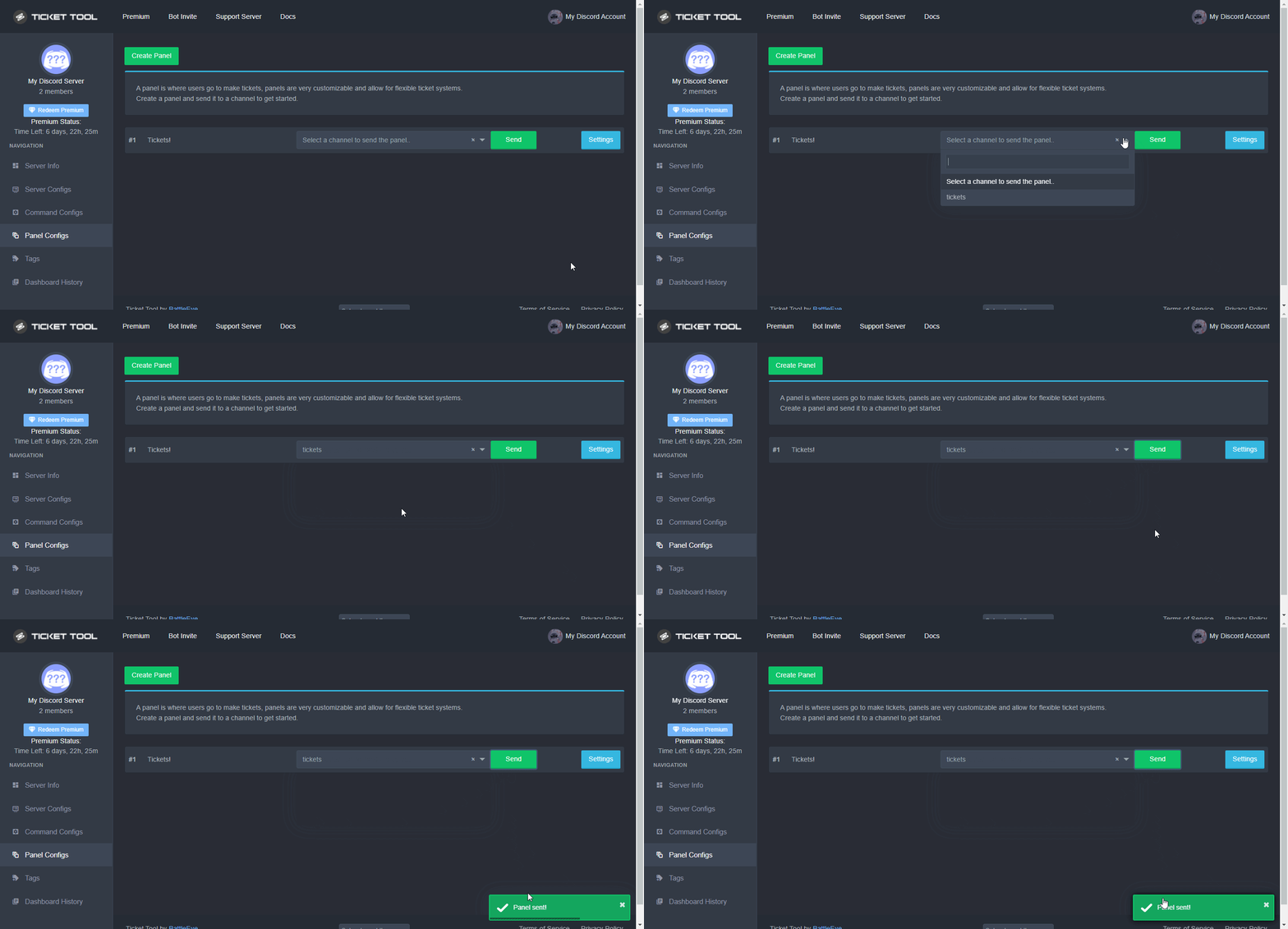
So you created a panel, now you have to send it in a channel by following these steps
$help send
humble sequoiaBOT
Sending a panel
Once you've created a panel on the dashboard you will need to send it to a channel using send on the dashboard
Select the channel you want your panel to be created in and click send.
For other questions checkout $help faq
An example of a sending a panel is shown below.
 brazen goblet
plain surge
Head to Panel configs > Permissions > User opened permissions and enable `Read m...
brazen goblet
plain surge
Head to Panel configs > Permissions > User opened permissions and enable `Read m...
With this, others can't view their tickets right?
They alone can see the messages sent in their created tickets
plain surge
brazen goblet
With this, others can't view their tickets right?
They alone can see the message...
If other people can see the tickets then you need to disable the View channel permission for Everyone opened permissions
humble sequoiaBOT
How to edit `@everyone`'s permissions
Head over to your Dashboard ➞ Panel Configs ➞ Permissions ➞ Open / Closed and customize the base permissions for everyone on your tickets.
Note: This set of permissions may be affected by the overrides of Support Team, Attached Roles, and User permissions.
 brazen goblet
@plain surge
I tried creating another ticket but I'm getting a response that there's still an open ticket while I've already closed the ticket already
 plain surge
brazen goblet
<@278649994477830145>
I tried creating another ticket but I'm getting a respons...
plain surge
brazen goblet
<@278649994477830145>
I tried creating another ticket but I'm getting a respons...
That's a missing permissions error, meaning the bot doesn't have all the required permissions.
Please run $debug in the channel and give the bot the missing permissions
plain surge
plain surge
Can you send a screenshot of what you are seeing
Please send a screenshot of what you are seeing @jade topaz
Are these not the categories on the server?
 rustic gale
Refresh the web page
plain surge
Did you try refreshing the page?
 polar socket
I have all bot permissions on except admin and still getting system failure: missing permissions when trying to create a ticket
plain surge
So some categories are missing or are these not even the categories on your server, because you make it seem like the second option
plain surge
polar socket
I have all bot permissions on except admin and still getting system failure: mis...
Can you please run $debug on your server and send me the bot's response
humble sequoiaBOT

Ticket Tool - Ticketing without clutter - The #1 discord Ticketing bot
polar socket
plain surge
Can you please run `$debug` on your server and send me the bot's response
getting no response
plain surge
Yes Outsider is talking to you @jade topaz
plain surge
polar socket
getting no response
Can I have your server ID please
That isn't an issue, just go to this link
https://tickettool.xyz/manage-servers
And select your server
Ticket Tool - Ticketing without clutter - The #1 discord Ticketing bot
Then go to Panel configs and try again
polar socket
plain surge
Can I have your server ID please
857993771139596318
rustic gale
brazen goblet

 plain surge
polar socket
857993771139596318
plain surge
polar socket
857993771139596318
Running $debug didn't work because you changed the bot prefix.
Please try pinging the bot and then typing debug like this:
@pseudo glen debug
plain surge
brazen goblet
Please give the bot the permissions marked with ❌ in the first screenshot.
brazen goblet
plain surge
Please give the bot the permissions marked with ❌ in the first screenshot.
Administrator role?
polar socket
plain surge
Running `$debug` didn't work because you changed the bot prefix.
Please try pin...
plain surge
brazen goblet
Administrator role?
No, the permissions here
https://media.discordapp.net/attachments/776680605517742090/1025405918332080209/Screenshot_20220930-145500_Discord.jpg
 brazen goblet
plain surge
No, the permissions here
https://media.discordapp.net/attachments/77668060551774...
brazen goblet
plain surge
No, the permissions here
https://media.discordapp.net/attachments/77668060551774...
Okay
plain surge
polar socket
https://discordapp.com/channels/509192800865353738/662692902245498910/1025406771...
Please give the bot the permission Manage channels as you can see it is marked with a ❌
polar socket
plain surge
Please give the bot the permission `Manage channels` as you can see it is marke...
Got it! Thanks so much!
iron nightBOT
Gave +1 Rep to @plain surge
brazen goblet
Hi Dom
This is what I get when someone opened a ticket.
Where can I view his message?
 plain surge
brazen goblet
Hi Dom
This is what I get when someone opened a ticket.
Where can I view his me...
plain surge
brazen goblet
Hi Dom
This is what I get when someone opened a ticket.
Where can I view his me...
Do you have forms enabled?
brazen goblet
plain surge
Do you have forms enabled?
I don't think so
plain surge
Well then the user didn't send a message for you to view
Ask them to send something in the ticket
brazen goblet
It was sent in the ticket
I did it with another account
plain surge
Try sending a message again in the ticket
brazen goblet
plain surge
Try sending a message again in the ticket
This is not click able
 rustic gale
brazen goblet
This is not click able
rustic gale
brazen goblet
This is not click able
You press there and nothing happens?
brazen goblet
rustic gale
You press there and nothing happens?
Yes
rustic gale
Swipe right and look for #ticket-0006 in the channel list
brazen goblet
Okay
One more question
How can I give them permission yo close their tickets
rustic gale
They should have permission to close their ticketse by default
brazen goblet
There's no option for that on their screen
rustic gale
brazen goblet
There's no option for that on their screen
The ticket message has a Close button by default
Can't they see the ticket message?
 sturdy geyser
Is there a limit of the quantity of text I can transcript?
And can old messages for about a year ago messages be transcripted?
brazen goblet
rustic gale
Can't they see the ticket message?
No, they can't
rustic gale
brazen goblet
No, they can't
Might be an issue with the Read Message History permission
brazen goblet
Okay
I will check it out
 stone pollen
Someone know who to edit the bots Name an logo ?
lunar solar
stone pollen
Someone know who to edit the bots Name an logo ?
Not currently possible, it's been confirmed as a future premium feature.
stone pollen
lunar solar
Not currently possible, it's been confirmed as a future premium feature.
Yarh okay, thanks
iron nightBOT
Gave +1 Rep to @lunar solar
sturdy geyser
Is there a limit of the quantity of text I can transcript?
And can old messages for about a year ago messages be transcripted?
lunar solar
sturdy geyser
Is there a limit of the quantity of text I can transcript?
And can old messages ...
Currently I believe the limit is 1000msgs, however I am not sure if there is a difference between non-premium and premium
Doesn't matter the age of the channel as long as the bot can access the channel it will transcript up to that 1k msg mark.
 scenic plinth
Last checked, and I cannot remember off the top of my head, regular is limited 500 and premium is limited 1000, 1000 apparently being the max from Discord.
sturdy geyser
lunar solar
Currently I believe the limit is 1000msgs, however I am not sure if there is a d...
damn
so ex: if the messages on that channel increases to 1k every week I will have to transcript it since its the limit right?
scenic plinth
To answer your other question quickly, I am not too sure, you can try. However to my knowledge bots can only retrieve messages up to 2 weeks old, but that is mainly from moderation bots, I do not have tickets opened for typically more then a week, but to my knowledge otherwise there is not a limit on the time-frame.
If that is something you have to do, yes. Only the last 1,000 messages are captured each time.
lunar solar
scenic plinth
To answer your other question quickly, I am not too sure, you can try. However t...
Na there is no limit to time frame, I use ticket tool to archive old channels in the Discord by creating a transcript of the channel and then I delete the channel
scenic plinth
So it´s deleting then, that clarifies that.
 slender minnow
scenic plinth
To answer your other question quickly, I am not too sure, you can try. However t...
slender minnow
scenic plinth
To answer your other question quickly, I am not too sure, you can try. However t...
That is only applicable for deleting messages iirc
scenic plinth
Just did say that.
brazen goblet
Users still can't see option to close open tickets
rustic gale
Please go ahead and #🎫│make-a-ticket so we can take a closer look
brazen goblet
Okay
 tame warren
stone pollen
Someone know who to edit the bots Name an logo ?
tame warren
stone pollen
Someone know who to edit the bots Name an logo ?
Does changing the bot nickname not change botname for you?
not sure if a premium only feature as mentioned already
 robust imp
how do i make a ticket in my server?
lunar solar
robust imp
how do i make a ticket in my server?
Have a look through #📂│information
sturdy geyser
lunar solar
Na there is no limit to time frame, I use ticket tool to archive old channels in...
I want to do the exact same thing you did
But sadly it's a premium feature so i have to do it the sketchy way
rustic gale
It's being considered by the developer for a future update
 shell quarry
how can i know who deleted the ticket
lunar solar
shell quarry
how can i know who deleted the ticket
If you have ticket logs setup and logging to a channel you can check, if not there is no way to know
shell quarry
lunar solar
If you have ticket logs setup and logging to a channel you can check, if not the...
ticket tool deletes the msg that have the deletion
i have logs but it doesnt show
lunar solar
shell quarry
ticket tool deletes the msg that have the deletion
Panel configs --> Logging --> Select logging channel --> Tick what you want to log e.g. Ticket Deleted
Would look like this:
 shell quarry
thanks @lunar solar
iron nightBOT
Gave +1 Rep to @lunar solar
 wise dawn

 broken apex
Hello, how to recover a deleted ticket? please
 charred vortex
No one can see our ticket button anymore?
 strong lichen
I can't turn the "Claim ticket" option, what should i do? It doesn't let me turn it on

 muted bough
strong lichen
I can't turn the "Claim ticket" option, what should i do? It doesn't let me turn...
muted bough
strong lichen
I can't turn the "Claim ticket" option, what should i do? It doesn't let me turn...
You are not a premium member ^^
💎 = Red not premium member
strong lichen
ooh ok
muted bough
strong lichen
ooh ok

 gilded verge
broken apex
Hello, how to recover a deleted ticket? please
gilded verge
broken apex
Hello, how to recover a deleted ticket? please
If a channel has been deleted, you cannot restore it 😕
muted bough
blue 💎 Premium Member
gilded verge
yup ^^
 - you have premium so you can change
 - you can change but there is limit
 - required premium
muted bough
gilded verge
yup ^^
<:premium_blue:880957870236127253> - you have premium so you can change
<...
@strong lichen
strong lichen
ye, i saw it
muted bough
good 😉
 fossil crane
muted bough
fossil crane
muted bough
Rename or Ticket Creation > Panel > Panel Message > Edit Panel Message
And then on "Embed Editor"
gilded verge
hmm
humble sequoiaBOT
The ticket name is the default channel name of all tickets. To edit it, go to your Dashboard > Panel Configs > Ticket. There you can edit the channel name of opened and closed tickets. You can also use variables in there.

 Note: This is a premium feature
muted bough
gilded verge
hmm
Note: This is a premium feature
muted bough
gilded verge
hmm
Wow, where do you get the commands?
 gilded verge
yep, all in pinned messages :>
 humble sequoiaBOT

Ticketing without Clutter
gilded verge
please use commands in #🤖│bot-spam
muted bough
Yes sorry, wanted to test it. then delete it again ^^
Wow there is also german language. I do not believe it ...
muted bough
#🤖│bot-spam message
How can make this red field, with the red font color?
rustic gale
- Red field
That didn't work
There you go
Here's what that looks like under the hood:
```diff
- Red field
```
The diff and the - are necessary
jade topaz
Hi uh
How do I change the title? In the first thing, it's not letting me click {panel_name} to replace it at all :I

 rustic gale
jade topaz
Hi uh
How do I change the title? In the first thing, it's not letting me click ...
rustic gale
jade topaz
Hi uh
How do I change the title? In the first thing, it's not letting me click ...
It's a premium feature
rustic gale
That's the preview
When you actually send it, it replaces {panel_name} with the actual panel name
jade topaz
okay that's what I didn't get, I thought it was just gonna end up saying panel name
thanks
muted bough
These are yes the endings of the files, programming language. lol
#🤖│bot-spam message
One more question, what is the deal with it? 🤔 I read this in german, but I still don't understand it.
 covert swallow
Looks like someone was playing with tags
jade topaz
Is there a way to temporarily disable a ticket panel? Like if I have an application system and it's only open every now and again, but I don't want to have to delete and re-send the panel each time, can I stop the panel from opening the tickets or something? 
covert swallow
You can set the panel limit to 0
jade topaz
would I do it here?
 covert swallow
Yes
jade topaz
covert swallow
Yes
thank you
iron nightBOT
Gave +1 Rep to @covert swallow
covert swallow
Just drop that 1 to a 0 and make sure to hit save
jade topaz
im so happy that it's that easy ;w;
covert swallow
If you want to close all tickets you can edit the global ticket limits
jade topaz
last time I had an apps system we just remade the panel each time and it was so tedious
 patent flume
مافي عرب هنا ولا وشو يعني؟
 vast lodge
hey guys i'm trying to set up the bot in my server but after i created a "closet ticket" channel, I looked back on the web to link the bot to it, all of a sudden the website doesn't register tool bot in my server
I have tried relogging, reloading, kicking the bot and readding him but none of it seems to be working
if i could get some help that would awesome, not sure what i did wrong or if its a common bug, etc
ok, finally fixed that issue, now im struggling to find where I can select the panel channel
broken apex
muted bough
You are not a premium member ^^
help me please
muted bough
broken apex
help me please
At what?
muted bough
broken apex
how to recover it ? please
Not at all, if you have transscript active you can read them
broken apex
where?
muted bough
broken apex
where?
Can not show where it is right now because I am renewing my ticket 🙂
broken apex
i wait
gilded verge
gilded verge
If a channel has been deleted, you cannot restore it 😕
im pretty sure i replied here @Satoshi Nakamoto 🤔
rustic gale
You deleted a ticket by mistake? If it's deleted, it's gone
muted bough
Would have to be installed as a protocol, if it has been accidentally deleted ...
 ornate anvil
 robust sandalBOT
Você pode querer se referir à sua equipe de suporte de jogos se há um script matando você, nós não somos essas pessoas para perguntar, e não, eu não posso dizer onde ir para encontrar o suporte adequado.
 English (en) → Portuguese (pt)
 ruby sky
why can't i type

 prisma cove
{create.form.x} I added this to the message but it doesn't create a form. Is x supposed to equal the name of the Ticket Panel?
lunar solar
prisma cove
{create.form.x} I added this to the message but it doesn't create a form. Is x s...
x is the value of the question
 night urchin
Any supporter handle me in #1025576733077938257 ?
Please
prisma cove
lunar solar
x is the value of the question
Can you elaborate on that?
lunar solar
Question 1 would be {create.form.1}
Question 2 would be {create.form.2}
Put those variables in the ticket message embed
Panel configs —> Ticket —> Ticket Message —> Embed editor
lunar solar
Yes just in a field inside the ticket message embed, 1 for every question that you make
prisma cove
🤔
lunar solar
Let me show you what one looks like
lunar solar
no, also there can only be up to 5 as that is Discords limit for forms, 5 questions max
lunar solar

thats what I mean when I say one per question
looks like this inside the embed editor

remove all the ``` if you don't want them answers inside the black boxes
lunar solar
No worries
jade topaz
why dont it show the sever i want
 humble sequoiaBOT
Don't see your server in the dashboard?
You will possibly need to relog. Look below to see steps on how to relog.
How to relog in the Dashboard.
Note:
You need one of these 3 things to access the dashboard.
1. Server Owner (Level: 6)
2. Server Administrator (Level: 4)
3. Dashboard Role (Level: 2)
:warning: You can check your level using $level on your Discord Server
User permission level with Ticket Tool
@User is permission level: 0 (User)
```» *If it shows that your permission is **0**, you don't have any of the above **3 things** to manage the dashboard.*


**See the Image below on how to relog:**
 acoustic oasis
Can anyone help me downloading a license key
lunar solar
acoustic oasis
Can anyone help me downloading a license key
The premium key?
lunar solar
What do you mean mod menu key? for ticket tool?
 dim parcel
does anybody knows how to fix this issue? It says "this interaction failed"

 signal river
Is anybody else all of a sudden getting "This interaction failed" with the ticket tool or is it just our server?
signal river
dim parcel
does anybody knows how to fix this issue? It says "this interaction failed"
Our server is getting the same thing
jade topaz
i have the same problem
acoustic oasis
i bought from gtamodders idk where to go
dim parcel
signal river
Our server is getting the same thing
damn
humble sequoiaBOT

⚠️ You're in the wrong place
We provide support for Ticket Tool Discord bot and cannot help you with whatever issue you have.
- We don't know which Support Team you should contact to get this issue resolved, and unfortunately we won't be able to accurately tell you.
If you don't have any further questions regarding our bot Ticket Tool, please close this ticket
lunar solar
@acoustic oasis this Discord server is for the Ticket Tool bot, not for gtamodders keys
acoustic oasis
thank you
signal river
@lunar solar do you know if the bot is down?
lunar solar
signal river
<@892854649172946985> do you know if the bot is down?
Not a clue sorry, I just help out in community support. Not staff sorry, best to #🎫│make-a-ticket
signal river
lunar solar
Not a clue sorry, I just help out in community support. Not staff sorry, best to...
Thanks
iron nightBOT
Gave +1 Rep to @lunar solar
 scenic plinth
Does the bot appear online and respond to commands?
 ivory hornet
It does not, when buttons are clicked it pops up that error and sometimes fixes itself but it's currently broken again.
scenic plinth
Alright, you might be part of the very few people that are experiencing issues right now, we are waiting to see if it recovers itself before anything else, which leads me to the next message, so ignore it.
 We are aware of some issues relating to ticket tool primary bot giving "interaction failed" errors and dashboards not displaying information, this issue is currently being looked at. No, there is no ETA on a fix. Currently only affects non premium services.
 The bot / servers affected are currently being restarted, no, still not ETA as of update.
The bot has been fully restarted and should appear online. If there are further issues, please let us know by creating a ticket.
 Resolved
scenic plinth
scenic plinth
<:TicketToolOffline:1018980643092312155> **We are aware of some issues relating ...
 dawn quest
scenic plinth
Alright, you might be part of the very few people that are experiencing issues r...
dawn quest
scenic plinth
Alright, you might be part of the very few people that are experiencing issues r...
Hello, I am experiencing the same issue in my server. When I try to close tickets it's says 'this interaction failed'
scenic plinth
Well, you replied to the message, how about you read it.
dawn quest
scenic plinth
Well, you replied to the message, how about you read it.
Lol, forgive me. I was gonna ask if there was another way I close tickets from the dashboard. The server just gets too clustered with tickets.
rustic gale
Unfortunately no
ivory hornet
You can delete them the hard way, just open them like a channel and click delete. That's what I did anyway.
rustic gale
(when the bot is operational again) you can go in them one by one and type $delete
dawn quest
Alright, thank you guys. 👍
 naive ravine
we renamed our discord server and not ticket tool is not working
is there something that i can do to get it working again
lunar solar
naive ravine
is there something that i can do to get it working again
Are you receiving Interaction Failed when you interact with the buttons?
 daring lynx
Ticket tool just stopped working in our server out of nowhere. Doesn't show up on tt manage servers either. Really odd. I pay for premium too
lunar solar
If so see:
#🆘│community-support message
About a current issue with some servers.
naive ravine
yes
daring lynx
lunar solar
If so see:
https://discord.com/channels/509192800865353738/776680605517742090/10...
Ahhh yes me too
naive ravine
it didn't do it till we renamed
daring lynx
Ty!
naive ravine
it works fine on my other discord though
lunar solar
naive ravine
it didn't do it till we renamed
The issue has only just popped up
daring lynx
Thanks @lunar solar
iron nightBOT
Gave +1 Rep to @lunar solar
lunar solar
naive ravine
it works fine on my other discord though
Ticket tool bots are sharded meaning different bots are hosted on different servers.
naive ravine
ok so it will be corrected soon i hope?
daring lynx
naive ravine
it works fine on my other discord though
Lol I'm literally in the same exact boat as you bro
lunar solar
naive ravine
ok so it will be corrected soon i hope?
Hopefully yes.
naive ravine
lol first mee6 doesn't work with record now this bot doesnt make tickets i need to start hosting my own bots
scenic plinth
No need to be disrespectful, check pins here, thanks 🙂
signal river
Looks like its back up for me
 solid stream
 acoustic wren
hi is ticket bot down
acoustic wren
hi is ticket bot down
it was, I've fixed it
We hit a rate limit on one of our servers due to an error loop... I've fixed the ability for that to happen and restarted things.
acoustic wren
okay thankyou
 covert imp
how do i invite the premium ticket tool bot to my server? i have premium but i cant figure out how to invite it and none of my tickets are working it keeps saying "This server isn't active, Please make sure this is the correct bot (premium vs free)"
lunar solar
covert imp
how do i invite the premium ticket tool bot to my server? i have premium but i c...
$pc 683585489852432458
humble sequoiaBOT

Premium Check
I was unable to detect a premium server for @covert imp.
Found 4 servers in total and 0 with premium and permission
The first thing you will need to do is invite the premium bot, an invite can be found here
Once the bot is in your server we will head to the dashboard and manage your server. When you are managing your server, you want to head into "Server Configs" then click the drop down menu under "Select the bot you would like to use on this server" then click "Ticket Tool#6207" and then save.
 lunar solar
Follow that @covert imp ^
covert imp
thank youuuu
lunar solar
covert imp
thank youuuu
Everything working now? bots in your server?
covert imp
yes
lunar solar
$pc 683585489852432458
humble sequoiaBOT
Premium Check
I was unable to detect a premium server for @covert imp.
Found 4 servers in total and 0 with premium and permission
lunar solar
Hmm odd
covert imp
i kicked it and added it back, try again maybe?
lunar solar
I will give it time to update, will try again in 15mins. Hopefully then it will update your roles.
covert imp
ahh
rustic gale
What's the problem?
slender minnow
@covert imp do you have premium purchased for that server or are you on premium trial?
signal river
solid stream
We hit a rate limit on one of our servers due to an error loop... I've fixed the...
Thanks for the speedy fix!
iron nightBOT
Gave +1 Rep to @solid stream
humble sequoiaBOT
We would love to help you, but if you don't tell us what you need help with we can't help you :(
jade topaz
im trying to find where i can put the ticket thingy in a channel
 finite jacinth
can we rename the command ticket commands from new and ticket to something else? and if so how?
jade topaz
the guides helped but the ui changed
rustic gale
finite jacinth
can we rename the command ticket commands from new and ticket to something else?...
Not possible, but you can make the suggestion in #1019685143046279208
rustic gale
jade topaz
im trying to find where i can put the ticket thingy in a channel
Use the Send button near the top of Panel Configs
iron nightBOT
Gave +1 Rep to @rustic gale
finite jacinth
rustic gale
Not possible, but you can make the suggestion in <#1019685143046279208>
am i doing something wrong that it won't let me post the post in there?
nevermind figured it out
 odd wind
He is not loyal, he is not worthy, he cannot even be called a good player because he already knows where everyone is, I would like the administrator to see the video and be banned immediately

 humble sequoiaBOT
⚠️ You're in the wrong place
We provide support for Ticket Tool Discord bot and cannot help you with whatever issue you have.
- We don't know which Support Team you should contact to get this issue resolved, and unfortunately we won't be able to accurately tell you.
If you don't have any further questions regarding our bot Ticket Tool, please close this ticket
 humble sequoiaBOT
⚠️ You're in the wrong place
We provide support for Ticket Tool Discord bot and cannot help you with whatever issue you have.
- We don't know which Support Team you should contact to get this issue resolved, and unfortunately we won't be able to accurately tell you.
If you don't have any further questions regarding our bot Ticket Tool, please close this ticket
 tidal dawn
Hey guys because although I authorize between the bot and the server I do not see the panel?
rustic gale
You have to send it
tidal dawn
rustic gale
You have to send it
No, i try thanks
iron nightBOT
Gave +1 Rep to @rustic gale
rustic gale
tidal dawn
No, i try thanks
After you create a panel, you see a bunch of colored buttons near the top,
just below the panel selector
One of those buttons is labeled Send
That's the button you use
tidal dawn
rustic gale
After you create a panel, you see a bunch of colored buttons near the top,
I don't see
rustic gale
What do you see?
 vale gull
الو
tidal dawn
rustic gale
What do you see?
 vale gull
الو و
tidal dawn
 tidal dawn
tidal dawn
tidal dawn
this is result 😦
rustic gale
Are you the owner of the server?
tidal dawn
rustic gale
Are you the owner of the server?
Yes
tidal dawn
rustic gale
Are you the owner of the server?
I'm admin with all permiss
tidal dawn
rustic gale
Then log out of the dashboard
I try but nothing
rustic gale
Then you're not the owner of the server
Get in touch with the owner and ask them to give you a dashboard role
humble sequoiaBOT
Any role you put there will have full access to the ticket tool dashboard. The server owner and users with admin permissions already have access to the dashboard.
Be careful of which roles to put here
 tidal dawn
rustic gale
Get in touch with the owner and ask them to give you a dashboard role
tidal dawn
rustic gale
Get in touch with the owner and ask them to give you a dashboard role
Perfect thanks
iron nightBOT
Gave +1 Rep to @rustic gale
 shut minnow
Hello, how can I modify the description of the panel? The new interface only has "message content".
 blissful moon
how can i setup a panel with diffrent deperatements and diffrent channel categories for those departements like this?
 shut minnow
rustic gale
Click the text that says “Embed Editor”
shut minnow
rustic gale
Click the text that says “Embed Editor”
ohh really wow 😄 , thank you ❤️
iron nightBOT
Gave +1 Rep to @rustic gale
blissful moon
blissful moon
how can i setup a panel with diffrent deperatements and diffrent channel categor...
is it this?
 blissful moon
is it this?
blissful moon
blissful moon
is it this?
UPDATE: Yeah it was
 pale pilot
blissful moon
UPDATE: Yeah it was
pale pilot
blissful moon
UPDATE: Yeah it was
Yes, though that's not ticket tool in the screenshot and it's not a panel
 tame fiber
i need help! just realised the ticket tool interface has been updated, i cant find the "panel channel"
this is old version

this is new version, i cant find it, how can i add into my channel with ticket tools?
 humble sequoiaBOT
━━ moved to ticket ━━
jade topaz
It doesn’t show the sever I want to do why
 humble sequoiaBOT
Don't see your server in the dashboard?
You will possibly need to relog. Look below to see steps on how to relog.
How to relog in the Dashboard.
Note:
You need one of these 3 things to access the dashboard.
1. Server Owner (Level: 6)
2. Server Administrator (Level: 4)
3. Dashboard Role (Level: 2)
:warning: You can check your level using $level on your Discord Server
User permission level with Ticket Tool
@User is permission level: 0 (User)
```» *If it shows that your permission is **0**, you don't have any of the above **3 things** to manage the dashboard.*
**See the Image below on how to relog:** fallow ingot
Check this out ^^ @jade topaz
 buoyant timber
Can I only get the ticket to one mod instead of all the mods?
gilded verge
This is Ticket Tool bot, no mods for games
buoyant timber
gilded verge
This is Ticket Tool bot, no mods for games
I know what I mean is when someone opens a ticket in my server, all the moderators can see it
buoyant timber
gilded verge
This is Ticket Tool bot, no mods for games
And I only want one moderator to see the ticket
gilded verge
oh 🤔
I'm just thinking about a solution, but all I found was the "claim" to let only one moderator see the channel. However, the claim option is for premium servers.
Hmm... You can create a role for this one moderator and add it as Support Team Roles so that no other moderator can see the tickets.
iron nightBOT
Gave +1 Rep to @gilded verge
gilded verge
no no, its okay ^^
buoyant timber
😂
muted bough
cannot have a custom icon at "button create ticket" ...

Wanted to give it a try, it doesn't even work.
gilded verge
muted bough
oh, you missed something, look, you used  but you need <ttonline:818757771310792704>
see? 😊

as written in Manual Input Formats:
- Custom: name:id or <a:name:id>
 ivory urchin
Hello dear community and dear support team,
I have a question.
How can I reset the tickets?
So that they start again with ticket #0001?
Best regards
MotoMarv
pale pilot
ivory urchin
Hello dear community and dear support team,
I have a question.
How can I reset ...
at the top of each panel settings, there's a count button. There you can edit the number
ivory urchin
Ah okay. I totally overlooked that.
Thank you
muted bough
pale pilot
at the top of each panel settings, there's a count button. There you can edit th...
screenshot pls
Button is "Set count"?
@ivory urchin oben auf dem set count gehen & dann auf 1 stellen
lunar solar
muted bough
screenshot pls
 muted bough
lunar solar
muted bough
lunar solar
yeah is ok ^^ i seen
lunar solar
muted bough
yeah is ok ^^ i seen
Adjust the amount of numbers here:
 muted bough
YEAH IS SEEN
lunar solar
 muted bough
lunar solar
muted bough
lunar solar
It is not about this, but reset the counter. ^^ alright ?
lunar solar
muted bough
It is not about this, but reset the counter. ^^ alright ?
yeah the first screenshot I shared
lunar solar
lunar solar
this one
ivory urchin
muted bough
<@260764721580474378> oben auf dem set count gehen & dann auf 1 stellen
Ja, habe ich schon gefunden.
Übrigens auf 0 Stellen, damit der nächste Ticket die 1 ist.
 sly otter
hello, on the creation of a basic ticket there is only one button can you create other buttons?
muted bough
ivory urchin
Ja, habe ich schon gefunden.
Übrigens auf 0 Stellen, damit der nächste Ticket di...
ja sorry, hab zu schnell geschrieben
muted bough
lunar solar
this one
yes, No need to repeat yourself 😉
rustic gale
sly otter
hello, on the creation of a basic ticket there is only one button can you create...
You can create what's called a multipanel, which is attaching several panels into one main panel
sly otter
rustic gale
You can create what's called a multipanel, which is attaching several panels int...
hum yeah I don't see too much, I want 2 buttons in addition to the buttons which is all alone on the same panel
rustic gale
You create two more panels, one for each of the buttons
Let's say the main one is Support and the others are Bug Reports and Billing
Then you open Panel Configs, select the Support panel, then press the “Panel” button near the bottom.
There's a field called Attached Panels
you include Bug Reports and Billing there
Then you press Edit Panel Message, followed by Create Ticket Edit Button
Edit the button text to make sure it doesn't just read “Create Ticket”
 manic sandal
مافي عرب
rustic gale
Then do the same for the Bug Report and Billing buttons
Then you go back to the main Panel Configs menu, select the main panel, and send it
If everything's done right you will have three buttons
robust sandalBOT
manic sandal
مافي عرب
Muffy Arab.
Persian (fa) → English (en)
rustic gale
Bad translation, i'll guess
sly otter
rustic gale
Then do the same for the Bug Report and Billing buttons
thank you I found, but we can do the same but on the same panel?
iron nightBOT
Gave +1 Rep to @rustic gale
 stark hawk
Hello, so basically I added a new role but when someone creates a ticket, they cant see their own ticket. How do i fix that?
manic sandal
يب @native oxide
 native oxide
اسمع
native oxide
manic sandal
يب <@1025686034127802418>
اسمع
rustic gale
stark hawk
Hello, so basically I added a new role but when someone creates a ticket, they c...
By not testing with the View as Role feature
rustic gale
sly otter
thank you I found, but we can do the same but on the same panel?
I don't understand what you mean by this
Do you mean different buttons, but they're all associated with the same panel?
sly otter
rustic gale
Do you mean different buttons, but they're all associated with the same panel?
yes
native oxide
عرب
rustic gale
sly otter
yes
Not possible
You can make the suggestion in #premium-suggestions though
I meant #1019685143046279208
native oxide
عرب
robust sandalBOT
native oxide
عرب
Arab
Persian (fa) → English (en)
rustic gale
You can make an Arabic ticket in #🎫│make-a-ticket
robust sandalBOT
rustic gale
You can make an Arabic ticket in <#571706435449257997>
يمكنك إنشاء تذكرة باللغة العربية في #🎫│make-a-ticket
English (en) → Arabic (ar)
 rustic gale
 sullen frigate
what is the problem here?
sullen frigate
what is the problem here?
Invalid emojis, just like it says
sullen frigate
but its clear to me
 rustic gale
Give me a minute please
 rustic gale
It's invalid emojis in the buttons or menus
sullen frigate
alright
rustic gale
sullen frigate
alright
What's your server's ID? I'll take a look at your configs
sullen frigate
rustic gale
What's your server's ID? I'll take a look at your configs
914117906437144596

i change it from the website and still the give me an a error
 sullen frigate
i get it ty!
 alpine moth
willing to pay someone to help me
I have my own discord channel for my community and there is a issue with my create a ticket system where other people can see the ticket of the person who created it, do you know how to fix that?
rustic gale
alpine moth
I have my own discord channel for my community and there is a issue with my crea...
Open your server's dashboard
Enter Panel Configs
Enter Permissions
Under Everyone Role, press Edit Opened Permissions
Make sure View Channel is 
Test that it worked by creating a new ticket and making sure unwanted users can't view it
alpine moth
you saved me thank you so much, it means a lot!!! @rustic gale
iron nightBOT
Gave +1 Rep to @rustic gale
jade topaz
bonjour comment on fait pour crée un ticket ?
humble sequoiaBOT

L'équipe du support Français
Cher client,
Si vous avez besoin d'aide, ouvriez un ticket pour le support Français s'il vous plaît.
Allez au #🎫│make-a-ticket et tapez sur le button contenant l'emoji 🇫🇷
 royal moat
is there a way to increase the limit or to echo the information in a ticket?

 rustic gale
royal moat
is there a way to increase the limit or to echo the information in a ticket?
rustic gale
royal moat
is there a way to increase the limit or to echo the information in a ticket?
You can increase the limit by getting premium
royal moat
if i cannot get premium, is there a way to use a discord bot to echo the message whenever a ticket is opened?
such as dyno
royal moat
alr, if i get free trial premium will the limit reset and remove the text
rustic gale
it will cut off at the limit after the trial is over
royal moat
appreciate the help thank you
 undone barn
With the new dashboard interface I found creating a multi-panel system a lot easier (and will hopefully prompt people to use the system faster with less hesitancy). Every time I go to send the new panel to the channel it gives the attached error in the server and on the web dashboard it says that it doesn't have the permissions needed. Though I have given the bot every permission in that channel, multiple times over. I don't know what it needs to be able to work correctly.

And for clarification, the client I am using is the web client and it's as current as possible, so I know it's not an issue with the app on my phone being outdated.
jade topaz
How do you activate premium after buying
rustic gale
undone barn
With the new dashboard interface I found creating a multi-panel system a lot eas...
It's not about permissions. It says Invalid emoji
It means the buttons or menu options don't have something the bot recognizes as a valid emoji in the emoji field
undone barn
rustic gale
It means the buttons or menu options don't have something the bot recognizes as ...
ooooh... Duuuur... thankies.
rustic gale
 shell lotus
every single open ticket
shell lotus
every single open ticket
Not possible. You can go one by one and paste the $delete command into them all
 errant harness
How do I access the saved transcripts
royal moat
also how do i make it so other the whole server cant see someones ticket
and its only limited to moderators + the user that made the ticket
humble sequoiaBOT
How do I save transcript to a channel?
To save transcripts to a channel go to the Dashboard -> Panel Configs -> Settings -> Logging Options -> Transcript Channel
 gilded verge
@errant harness, First, you need set transcript channel and then in ticket you need use transcript command or transcript button
errant harness
Thank you
humble sequoiaBOT
How to edit `@everyone`'s permissions
Head over to your Dashboard ➞ Panel Configs ➞ Permissions ➞ Open / Closed and customize the base permissions for everyone on your tickets.
Note: This set of permissions may be affected by the overrides of Support Team, Attached Roles, and User permissions.
gilded verge
@royal moat, here is how to hide ^^
royal moat
works thanks, also how do i make saved transcripts work in this channel
 fallow ingot
You’ll firstly need to enable transcripts, follow these steps:
 Go to panel configs and under —Other— click the transcript plugin.
 Select a transcript channel (click the drop-down menu)
 There is none! All set - make sure you click save.
You can see other options available to premium subscribers (totally recommend btw)
@royal moat
royal moat
royal moat
works thanks, also how do i make saved transcripts work in this channel
yeah i know but isnt this kinda useless to mods if they cant get a copy of the transcript?
fallow ingot
royal moat
yeah i know but isnt this kinda useless to mods if they cant get a copy of the t...
Do server-staff not have access to the channel?
You see the screenshot you provided as reference is not transcripts.
It is the logging feature.
royal moat
is there a way to log the transcript fully?
fallow ingot
fallow ingot
You’ll firstly need to enable transcripts, follow these steps:
<:Numbericons1:1...
.
You first have to setup the transcript plugin.
royal moat
ah mb thanks for the help
fallow ingot
No problem, happy to help!
 regal cedar
scenic plinth
regal cedar
scenic plinth
Should explain it.
humble sequoiaBOT
We would love to help you, but if you don't tell us what you need help with we can't help you :(
jade topaz
I don't have access to my old account with ticket tool premium on it. how shjould I transfer?
rustic gale
jade topaz
I don't have access to my old account with ticket tool premium on it. how shjoul...
Make a billing ticket in #🎫│make-a-ticket, or just a regular ticket
And explain your case, give us the details
jade topaz
alr
jade topaz
server not showing in manage servers
rustic gale
jade topaz
server not showing in manage servers
Do you own the server?
 ocean meadow
help me
rustic gale
jade topaz
i have all permisiions
Tell the owner to make you a dashboard role
humble sequoiaBOT
Any role you put there will have full access to the ticket tool dashboard. The server owner and users with admin permissions already have access to the dashboard.
Be careful of which roles to put here
 midnight reef
anyone know how to do this? https://prnt.sc/bmqcVSCR48V8 i tried following a tutorial on yt but when creating a panel config i only had one option which was the name of the panel
 slender minnow
midnight reef
anyone know how to do this? https://prnt.sc/bmqcVSCR48V8 i tried following a tu...
slender minnow
midnight reef
anyone know how to do this? https://prnt.sc/bmqcVSCR48V8 i tried following a tu...
after making the panel, send it to a channel
$help send
humble sequoiaBOT
Sending a panel
Once you've created a panel on the dashboard you will need to send it to a channel using send on the dashboard
Select the channel you want your panel to be created in and click send.
For other questions checkout $help faq
An example of a sending a panel is shown below.
slender minnow
well its a bit outdated
 late granite
how do i make it so the transcript saves to a different channel??
lunar solar
late granite
how do i make it so the transcript saves to a different channel??
Panel Configs --> Transcript --> Transcript channel
late granite
lunar solar
Panel Configs --> Transcript --> Transcript channel
TY!!
i think i’ve asked this b4 but i forgot 😭 how do i make it so normal members can’t close tickets ?
so only staff members/certain roles
fallow ingot
There is two things you would have to do
Go to the panel configs under —General— look for the plugin called Ticket, click it. Click the green button that says edit ticket message, scroll down. Click the blue button that says edit close button scroll down, and turn  Support Team only on.
Go the command configs look for the $close command, click settings and also make that Support Team only.
@late granite
late granite
fallow ingot
<@937800542367924254>
kk thanks!
iron nightBOT
Gave +1 Rep to @fallow ingot
fallow ingot
Np!
royal moat
is there a way that i can give members perms to post images in tickets? and only on tickets
fallow ingot
Yup
You’ll need to go to panel configs then under —General— look for the plugin permissions, click it. Then go to user opened permissions and then look for a permission that says attach files and  it.
it.
@royal moat
royal moat
yeah thank you i think enabled it @fallow ingot
iron nightBOT
Gave +1 Rep to @fallow ingot
fallow ingot
No problem, happy to help!
If it doesn’t work let me know and I can look into it :)
 quartz karma
hello I was wondering if some can help me understand how I did a double EMS button?

 lunar solar
quartz karma
hello I was wondering if some can help me understand how I did a double EMS butt...
lunar solar
quartz karma
hello I was wondering if some can help me understand how I did a double EMS butt...
You've attached the same panel to itself
 tribal ore
Me too
quartz karma
ohhhh XD thank you XD
lunar solar
So under Panel --> Attached Panels --> Remove the EMS panel
tribal ore
Can u help me for ticket
lunar solar
Yes, what are you trying to do?
tribal ore
Make a ticket
lunar solar
Are you the owner of your Discord?
tribal ore
Like this
 jade topaz
im selling ticket toll premium
tribal ore
lunar solar
Are you the owner of your Discord?
Yeh
lunar solar
tribal ore
Yeh
Follow the steps in #📂│information, it covers how to set it up
tribal ore
I need help
lunar solar
What specifically with?
 slender minnow
@tribal ore you can refer #📂│information for a quick setup guide
for full customization you can also refer to the setup guide
humble sequoiaBOT

You can check our documentation here;
You can also check #📂│information for the basic setup;
You can also watch this video tutorial.
Our documentation contains all the info you need about the bot to be able to setup and configure the bot however you like.
tribal ore
And ?
 bleak sage
I'm having trouble accessing my nebulous account, could someone help me??
humble sequoiaBOT
⚠️ You're in the wrong place
We provide support for Ticket Tool Discord bot and cannot help you with whatever issue you have.
- We don't know which Support Team you should contact to get this issue resolved, and unfortunately we won't be able to accurately tell you.
If you don't have any further questions regarding our bot Ticket Tool, please close this ticket
tribal ore
Ok
 deft kettle
Hi, someone know if is possible to save the answer of the form when someone open the ticket ?
slender minnow
deft kettle
Hi, someone know if is possible to save the answer of the form when someone open...
you can add the form variables in the ticket message embed to copy the responses from the form
humble sequoiaBOT
Pop-up Form
A discord Form allows you to let the user answer individual questions in a pop up Form, which then displays the answers in the ticket message. This can save time if you already know what you want to ask the user.
Setup Forms
Forms can be enabled under Panel Settings > Form Options > Edit Forms Options.
In the new pop up window, you can now enable and edit your own Form.
Form Options
You can add up to 5 questions in the discord form. This is a discord limitation. Each question can have a placeholder in the input field, a minimum and maximum input, multi-line and also the option to have the answer required.
Options:
Question Title: Your Question goes here
Question Placeholder: The placeholder text in the input field
Required: If enabled, the user has to answer this question, to submit the form
Multi-Line Input: Allows the user to input multiple lines
Minimum and Maximum Input: Set a minimum and maximum input value for the user
❗Display the answer ❗
To display the answers from the user, you need to go into your Panel Settings > Ticket Options > Edit Ticket Message. In there you use the variable {create.form.x} and just replace x with the number of your question. For example, the response to Question 1 can be displayed with {create.form.1}. If you don't use this variable, the response from the user is lost.
 slender minnow
For more info, you can refer the above response ^
deft kettle
I need to save the answer in a google sheet for example
 tame smelt

I have invited the bot 10 times already and nothing has changed
i can't log in dashboard
 winter carbon
tame smelt
i can't log in dashboard
winter carbon
tame smelt
i can't log in dashboard
try log out the ticket tool then back in again. also clearing cookies might help
tame smelt
winter carbon
try log out the ticket tool then back in again. also clearing cookies might help
no,not work
 uneven osprey
Hello, how do I do something like this with the normal version or other water?
 fallow ingot
uneven osprey
Hello, how do I do something like this with the normal version or other water?
fallow ingot
uneven osprey
Hello, how do I do something like this with the normal version or other water?
I’m not quite understanding at the moment. Do you want to know how to edit the ticket message?
 worthy cedar
Is there a way for me to make it so only certain roles can delete the ticket that's been made?
"all my moderators should be allowed to see and help the person in the ticket but they shouldn't be allowed to delete the ticket"
uneven osprey
fallow ingot
I’m not quite understanding at the moment. Do you want to know how to edit the t...
forget the topic +
I want to activate the (reception) feature in the ticket, how?
uneven osprey
uneven osprey
forget the topic +
I want to activate the (reception) feature in the ticket, how...
*Unpaid version!
fallow ingot
uneven osprey
forget the topic +
I want to activate the (reception) feature in the ticket, how...
There is no reception feature..
fallow ingot
worthy cedar
Is there a way for me to make it so only certain roles can delete the ticket tha...
Yup that’s possible
uneven osprey
fallow ingot
There is no reception feature..
There is no reception feature in the paid version?
lunar solar
worthy cedar
Is there a way for me to make it so only certain roles can delete the ticket tha...
Panel Configs --> Moderator --> Edit Moderator Message --> Edit Delete Ticket Button --> Add allowed roles or disable roles
fallow ingot
uneven osprey
There is no reception feature in the paid version?
I have absolutely no clue what you’re on about. No there is no “reception” feature, do you mean multi-panels like #🎫│make-a-ticket?
With forms included.
lunar solar
fallow ingot
I was typing it out but lupus bet me.
Haha sorry wasn’t racing saw the message, started typing it out as I looked at it, posted it, saw your message 😛
uneven osprey
fallow ingot
I have absolutely no clue what you’re on about. No there is no “reception” featu...
If I open the ticket, there is a (ticket lock + reception) I want to receive, how?
@fallow ingot
fallow ingot
I’m guessing you mean the ticket message + the close button.
humble sequoiaBOT
The Ticket Message is the first message sent by the bot in a new ticket. To customise it head over to your Dashboard ➞ Panel Configs ➞ Ticket ➞ Edit Ticket Message
 fallow ingot

uneven osprey
I do not mean !!
I mean if you open the ticket and there are two options for receiving and locking!!
How do I unlock my tick?
@fallow ingot
fallow ingot
Yes there are two options:
Close button
Claim button
Both of these buttons can be found by going to panel configs > then —General— > then Ticket Options then edit ticket message and scroll down.
uneven osprey
You have entered the page me want
I did everything but it didn't work?
 fallow ingot
Are you a premium subscriber?
The claiming feature is only available to premium subscribers.
tribal ore
Guys what is this
 humble sequoiaBOT
Backup and Restore allows you to transfer your premium status, panels, tags, and all settings to a new server.
You can also use it to keep a backup of your settings incase you need to suddenly move servers. We suggest you keep this backup key somewhere safe, incase your server is deleted. You will want to copy the whole key.
First, go to your dashboard, then Server Configs and generate a new backup key by pressing the green button. Now, a key should be generated in the box above. You may need to refresh the page to see this.
Once you have your backup key, navigate to the same page on the new server. Copy the key on the second field.
Now you can choose what you want to copy. Finally, press the green “Restore Configs” button.
 pale pilot
@tribal ore
pale pilot
Well, the explanation of this feature is above
tribal ore
Yh
 dusk condor
Can we integrate ticket tool transcript system in our custom bot? If yes then how we can
rustic gale
How exactly would you like to integrate it?
dusk condor
rustic gale
How exactly would you like to integrate it?
Like our own custom panel, and code (we wanna edit claim system).
But transcript should be of ticketool
lunar solar
dusk condor
But transcript should be of ticketool
In theory you could do it by having your bot send the command to transcript a channel as part of the close process, the way this is done is:
Server Configs --> Bot (Bottom right) --> Add the ID of your bot as Ticket tool can respond to other approved bots added here.
The command would be:
$transcript #yourchannel
Your channel being the place you want the transcripts to save to
Or you could just use ticket tool as your primary bot 😛
lunar solar
 mint helm
How can bot mention role pls
<@991376980723384411>
mint helm
How can bot mention role pls
<@991376980723384411>
$mentions
humble sequoiaBOT
Within all the messages the bot's sends (both embeds and text) you can mention either channels, roles, or even users, these mentions will only send a notification to the user if they are used within a text field, e.g: a role mentioned in an embed won't ping at all the users who have that role.
For mentioning a role you can use one out of three options:
{@Role Name} ➞ Which is Case Sensitive.
{RoleID} ➞ Replace RoleId with the Id of the role you are trying to ping.
<@&RoleID> ➞ Discord's native syntax to ping roles.
<#ChannelID> ➞ Mention a channel by its ID.
<@UserID> ➞ Mention a user by its ID.
lunar solar
See above @mint helm ^
mint helm
Thank

 paper arrow
Can TT bot (not premium) auto delete closed tickets? For example after 12 hours after closing.
tribal ore
U talk with me ?
rustic gale
paper arrow
Can TT bot (not premium) auto delete closed tickets? For example after 12 hours ...
Currently not possible. This could be added in a future update
tribal ore
Dude
rustic gale
tribal ore
What are you trying to do?
tribal ore
Help me for create ticket
rustic gale
There's a setup guide in #📂│information
 steel crypt
??
 rustic gale
steel crypt
??
rustic gale
steel crypt
??
Do you own the server?
muted bough
steel crypt
??
You are already server owner or have admin role ^^
 covert hinge
how do i use the new panel config
humble sequoiaBOT
━━ moved to ticket ━━
dusk condor
lunar solar
In theory you could do it by having your bot send the command to transcript a ch...
this is not what I mean
lunar solar
dusk condor
this is not what I mean
What do you mean then?
dusk condor
lunar solar
What do you mean then?
there is a server (name: scammer alert) which have a custom bot for ticketing and it also acts as a helper bot, and their ticket transcript link uses tickettool domain. I also wanna integrate like this, so how to do it?
 ivory pawn
salut svp comment on configure le bot
 cinder cosmos
When i add him to server i go on website it doesnt show that i have it on my server and command $ doesn't wok help@lunar solar
lunar solar
dusk condor
there is a server (name: scammer alert) which have a custom bot for ticketing an...
Not a clue, best to #🎫│make-a-ticket and someone with a better idea might be able to answer your question.
lunar solar
ivory pawn
salut svp comment on configure le bot
$frticket
humble sequoiaBOT
L'équipe du support Français
Cher client,
Si vous avez besoin d'aide, ouvriez un ticket pour le support Français s'il vous plaît.
Allez au #🎫│make-a-ticket et tapez sur le button contenant l'emoji 🇫🇷
lunar solar
cinder cosmos
When i add him to server i go on website it doesnt show that i have it on my ser...
Are you the owner of the Discord?
humble sequoiaBOT
Don't see your server in the dashboard?
You will possibly need to relog. Look below to see steps on how to relog.
How to relog in the Dashboard.
Note:
You need one of these 3 things to access the dashboard.
1. Server Owner (Level: 6)
2. Server Administrator (Level: 4)
3. Dashboard Role (Level: 2)
:warning: You can check your level using $level on your Discord Server
User permission level with Ticket Tool
@User is permission level: 0 (User)
```» *If it shows that your permission is **0**, you don't have any of the above **3 things** to manage the dashboard.*


**See the Image below on how to relog:**Ah. They left
tribal ore
rustic gale
Ah. They left
I need some help
 strange skiff
how do i insert the button of the panel again in my discord channel if i deleted by accident?
the ticket genereting button
the website of ticket tool changed and cannot find the way to re insert the creating ticket button
rustic gale
strange skiff
the website of ticket tool changed and cannot find the way to re insert the crea...
Panel Configs
Select your panel at the top, the press the Send button just below
Choose the channel, then press Send
rustic gale
tribal ore
I need some help
Sure. What help do you need
humble sequoiaBOT
You can check our documentation here;
You can also check #📂│information for the basic setup;
You can also watch this video tutorial.
Our documentation contains all the info you need about the bot to be able to setup and configure the bot however you like.
 tribal ore
A
rustic gale
tame smelt
pls help
Do you own the server?
tame smelt
rustic gale
Do you own the server?
yes
rustic gale
Log out of the dashboard and log in again
tame smelt
already did
rustic gale
What's the server's ID
rustic gale
Here. Use this link
Ticket Tool - Ticketing without clutter - The #1 discord Ticketing bot
tame smelt
thx
 spring thistle
how to make buttons in ticket panel
humble sequoiaBOT
For a more convenient use of multipanels, you can now combine panels on the dashboard. This will allow you to directly send the multipanel from the dashboard or via the $panel ID command.
Where can I find this?
You can find this setting on the Dashboard -> Panel Configs -> Settings -> Panel
Note: if you're attaching all the panels to a panel called English, don't include English in the attached panel's box (If you do this, it will create a duplicate)
This will put all buttons from all of your panels on one message. The message is the panel message from the panel you're combining these panels in.

 inner token
How to auto ping role
tribal ore
Guys what is back up key [
 rustic gale
It's for restoring your configurations if the server is deleted
or if you're moving servers
tribal ore
So what i say ?
fallow ingot
inner token
How to auto ping role
$help ping
humble sequoiaBOT
How to make Ticket Tool ping a role
To make ticket tool ping a role when a ticket is opened, go to the Dashboard -> Panel Configs -> Settings -> Ticket Options -> Ticket Message -> Message Text and do this:
{@Role name} This is case sensitive and the role must have @mentions enabled

 tribal ore
$help
humble sequoiaBOT
Help Options
$help commands - Information on commands
$help setup - Information on bot setup
$help faq - Frequently asked questions
lunar solar
 pseudo pecan
How to fix
pseudo pecan
How to fix
Run $debug in the channel you are trying to use ticket tool in
 pseudo pecan
no
lunar solar
Hmm I'm not sure then, just have to wait for the support team to weigh in or #🎫│make-a-ticket and speak to them there
pseudo pecan
lmao
errant harness
do we have to be a premium member to be able to save transcripts to a separate channel?
 mystic hound
No
 sleek coral
No one responds from support
lunar solar
pseudo pecan
lmao
Do you know your server ID?
 oak shuttle
pseudo pecan
oak shuttle
pseudo pecan
Hi there! This error means that the bot does not have enough permissions to send an embed in your server. Please double check the bot’s role and make sure it has all the necessary permissions
$perms
humble sequoiaBOT
ᅠ
@pseudo glen requires the following permissions:
Add Reactions
Read Channels
Send Messages
Manage Messages
Embed Links
Attach Files
Read History
Manage Roles
Manage Channels
To change the role permissions, you can go to your Discord Server ➞ Server Settings ➞ Roles ➞ @Ticket Tool
To change the channel permissions, you can go to your Channel Settings ➞ Permissions ➞ Ticket Tool
ᅠ
Note:
You can give Ticket Tool Administrative Permissions instead of all the permissions listed above, but it's entirely optional and NOT necessary.
 oak shuttle
Check this out ^
 hearty epoch
Please aide me i m french
 worldly grove
Hi! I just added the bot to a new server and have every permission except administrator permission. The server in question does not appear in the "manage servers" area. I have tried to log out and in of control panel serveral times and restart discord but nothing happens. Do i need more permissions or is it a bot problem, or what can i do? Thank you in advance
humble sequoiaBOT
Don't see your server in the dashboard?
You will possibly need to relog. Look below to see steps on how to relog.
How to relog in the Dashboard.
Note:
You need one of these 3 things to access the dashboard.
1. Server Owner (Level: 6)
2. Server Administrator (Level: 4)
3. Dashboard Role (Level: 2)
:warning: You can check your level using $level on your Discord Server
User permission level with Ticket Tool
@User is permission level: 0 (User)
```» *If it shows that your permission is **0**, you don't have any of the above **3 things** to manage the dashboard.*
**See the Image below on how to relog:** idle harness
I need help
rustic gale
Talk to the owner and tell them to make you a dashboard role
idle harness
Who’s the owner
worldly grove
Thank you, what is a dashboard role exactly?
idle harness
Bruh I bought a pack and it isn’t working
humble sequoiaBOT
Any role you put there will have full access to the ticket tool dashboard. The server owner and users with admin permissions already have access to the dashboard.
Be careful of which roles to put here
rustic gale
That's a dashboard role
idle harness
Bruh 🤦🏽♂️
worldly grove
Thank you @rustic gale 🙂
iron nightBOT
Gave +1 Rep to @rustic gale
rustic gale
idle harness
Bruh I bought a pack and it isn’t working
No idea what a pack is
Does this have to do with Ticket Tool?


 shut bolt
idle harness
Y’all scamming
shut bolt
idle harness
Y’all scamming
You are in the wrong server
humble sequoiaBOT
⚠️ You're in the wrong place
We provide support for Ticket Tool Discord bot and cannot help you with whatever issue you have.
- We don't know which Support Team you should contact to get this issue resolved, and unfortunately we won't be able to accurately tell you.
If you don't have any further questions regarding our bot Ticket Tool, please close this ticket
 visual glacier
Good evening, where can I setup who can close a ticket ?
muted bough
idle harness
Can you please delete this
If we're going to cheat, get out of the discord ticket tool server.!!!!
 true mirage
Whats the command to add people to tickets
true mirage
$ is what i needed to know
rustic gale
That's called the prefix
The default prefix is $ but it can be changed in Server Configs
 languid pier
Is there a way to see who closed and deleted a ticket?
rustic gale
languid pier
Is there a way to see who closed and deleted a ticket?
Not retroactively, but you can enable logs
Panel Configs -> Logging
languid pier
rustic gale
Not retroactively, but you can enable logs
Will logs tell me who closes a ticket?
rustic gale
languid pier
Will logs tell me who closes a ticket?
You can set up logs for any of these actions

Yes, the user who triggered the action is logged
languid pier
rustic gale
Yes, the user who triggered the action is logged
Alright, thank you!
iron nightBOT
Gave +1 Rep to @rustic gale
 crisp patio
Hi there. When a user closes a ticket, he sees a "Transcript" button.
However, the Transcript is written in a private channel and the user doesnt have access to it (and if they did, they would see all the transcripts anyway, so that would also be unacceptable).
So, the only way that the person can receive a Transcript is via DM?
In that case, why does the user is shown a "Transcript" button?
Am I missing something?
rustic gale
crisp patio
Hi there. When a user closes a ticket, he sees a "Transcript" button.
However, t...
The button isn't shown to users by default.
The button appears when the ticket is closed, and the ticket creator doesn't see the ticket when it's closed, under the default settings.
The button is intended to be used by the support team.
That's the reason why the (default) moderator message says Support team ticket controls
 crisp patio
Ok, thanks, im trying to find where I can "deactivate" the Transcript button
rustic gale
Panel Configs -> Moderator -> Edit Moderator Message -> Transcript, Edit Button
You can disable showing the button
crisp patio
Yes, thanks, Im seeing it there now. It was not an obvious place for me. (because being in the Moderator section). OK, Im going to change it.
It works now, Thanks a lot! Excellent support from you, very grateful 🙂
thanks @rustic gale 🙏
iron nightBOT
Gave +1 Rep to @rustic gale
 solid vine
Hi, I’m just basically confused on where I make the ticket, it’s confusing me 👁👄👁
 obtuse krakenBOT
1. Invite Ticket Tool to your server
First you will want to invite the bot to your server. Once the bot is in your server, you can manage your server in the dashboard.

2. Create a Panel
To create a panel we are going to need to head over to the panel configs on the dashboard.
Once at the dashboard we will need to click Create Panel.
Enter a panel name (Fill in any optional settings you want).
Click Create Panel and your ready to get started with configuring your panel.
An example of a creating a panel is shown below.

3. Send the Panel to a Channel
Once you've created a panel on the dashboard you will need to send it to a channel using send on the dashboard.
Select the channel you want your panel to be created in and click send.
For other questions checkout $help faq.
An example of a sending a panel is shown below.
Having a Problem Sending the Panel?
Do $debug in a channel with Ticket Tool and make sure it has all the necessary Discord permissions.
 iron nightBOT
Gave +1 Rep to @rustic gale
 quick falcon
Hello, my ticket tool premium has a provlem. Me and my staff members on my discord server tried to close some tickets but the ticket tool said this:
idk, im the owner of the server and it said that i can’t close the ticket :/

i also can’t create a ticket
rustic gale
It's a problem with the bot's permissions, not yours
Type $debug somewhere in the server
that the bot can see
rustic gale
Great, let us know if you have any other difficulties.
quick falcon
thanks @rustic gale
iron nightBOT
Gave +1 Rep to @rustic gale

 rustic gale
tribal ore
Help me pls
rustic gale
tribal ore
Help me pls
Make a ticket #🎫│make-a-ticket
 glacial storm
So the tickets in #ticket-logs or whatever the logs channels are, are all posted as embeds? Meaning we can't search for the content in anyway in the channel. So how am i supposed to search through old ticket logs in a convenient way? Or is this just impossible to find old tickets
 covert prairie
How do I make it so the panel auto embed responds like the one does in #📌│automated-support
lunar solar
covert prairie
How do I make it so the panel auto embed responds like the one does in <#9779511...
This a custom version of @obtuse kraken, click on Helper for more info
covert prairie
lunar solar
This a custom version of <@678344927997853742>, click on Helper for more info
Will they be able to assist me with the setup?
lunar solar
covert prairie
Will they be able to assist me with the setup?
In the Sapphire Discord yes, here no.
covert prairie
Ty
covert prairie
covert prairie
Ty
Thanks @lunar solar
iron nightBOT
Gave +1 Rep to @lunar solar
visual glacier
Hello is there any way to chose who can or can not click the "close" button on an open ticket ?
lunar solar
visual glacier
Hello is there any way to chose who can or can not click the "close" button on a...
Yes,
Panel Configs --> Ticket --> Ticket Message --> Edit --> Scroll to the bottom, Close ticket --> Edit Button --> Enable Support Team Only or add Allowed/Disabled Roles
visual glacier
Very clear, thank you 🙂
lunar solar
Support team only is based off of the roles you set in:
Panel Configs --> General --> Support team roles
visual glacier
thanks @lunar solar
iron nightBOT
Gave +1 Rep to @lunar solar
 ancient bramble
how can i apply as a supporter here.
lunar solar
ancient bramble
how can i apply as a supporter here.
Usually applications appear in #📣│server-news specifying which teams are looking for new staff. Applications are only accepted for a period of time and then closed again.
ancient bramble
lunar solar
Usually applications appear in <#509770538051305493> specifying which teams are ...
is it opened rn
lunar solar
ancient bramble
is it opened rn
For which language?
ancient bramble
lunar solar
For which language?
Arabic maybe
lunar solar
ancient bramble
Arabic maybe
This was the last application post:
#📣│server-news message
However here it says that it would be closing in a few days:
#📣│server-news message
Probably best to #🎫│make-a-ticket and ask if they are still accepting applications
sullen frigate
how i can edit the buttons error with this

 static meadow
I have a problem: Everything is set up, but Users still can't create tickets, help pls
 remote urchin
static meadow
I have a problem: Everything is set up, but Users still can't create tickets, he...
remote urchin
static meadow
I have a problem: Everything is set up, but Users still can't create tickets, he...
check if the create ticket button is set to support team only, if it is, uncheck support team only
rustic gale
static meadow
I have a problem: Everything is set up, but Users still can't create tickets, he...
Are they getting an error?
rustic gale
sullen frigate
how i can edit the buttons error with this
Please explain what you need in more detail?
shut bolt
@normal bolt have you selected different panels per dropdown option?
 normal bolt
shut bolt
<@1023261030379442176> have you selected different panels per dropdown option?
normal bolt
shut bolt
<@1023261030379442176> have you selected different panels per dropdown option?
No
normal bolt
shut bolt
That's the issue
You have yo select different panels?
shut bolt
Yeap
normal bolt
Why would that fix anything?
shut bolt
I recall that being a note on the dashboard
rustic gale
Because it does
shut bolt
normal bolt
Why would that fix anything?
Cause backend settings link dropdowns to a panel, and having multiple times the sme panel messes it
normal bolt
Thanks @shut bolt
iron nightBOT
Gave +1 Rep to @shut bolt
shut bolt
Ignore that warning jajaja
normal bolt
Ill ignore it
 fallow dirge
Can I have my fire stick updated
shut bolt
fallow dirge
Can I have my fire stick updated
Not sure, but you are on the wrong support server
fallow dirge
Sorry
shut bolt
It's fine
normal bolt
Why did i lose my premium role?
shut bolt
normal bolt
Why did i lose my premium role?
Got removed, no clue why ¯_(ツ)_/¯
 ancient wasp
obtuse krakenBOT
ancient wasp
obtuse krakenBOT
1. Invite Ticket Tool to your server
First you will want to invite the bot to your server. Once the bot is in your server, you can manage your server in the dashboard.
2. Create a Panel
To create a panel we are going to need to head over to the panel configs on the dashboard.
Once at the dashboard we will need to click Create Panel.
Enter a panel name (Fill in any optional settings you want).
Click Create Panel and your ready to get started with configuring your panel.
An example of a creating a panel is shown below.
3. Send the Panel to a Channel
Once you've created a panel on the dashboard you will need to send it to a channel using send on the dashboard.
Select the channel you want your panel to be created in and click send.
For other questions checkout $help faq.
An example of a sending a panel is shown below.
Having a Problem Sending the Panel?
Do $debug in a channel with Ticket Tool and make sure it has all the necessary Discord permissions.
covert swallow
How is it not working
covert swallow
Did you invite and enable the premium bot?
humble sequoiaBOT
The first thing you will need to do is invite the premium bot, an invite can be found here
Once the bot is in your server we will head to the dashboard and manage your server. When you are managing your server, you want to head into "Server Configs" then click the drop down menu under "Select the bot you would like to use on this server" then click "Ticket Tool#6207" and then save.
jade topaz
covert swallow
Did you invite and enable the premium bot?
nvm
worked now
 white turret
How do I change the ticket number?
The number of ticks does not increase when I open other ticks

 shut bolt
white turret
The number of ticks does not increase when I open other ticks
shut bolt
white turret
The number of ticks does not increase when I open other ticks
That's because you've set a static number, you need to use the {count} variable
white turret
shut bolt
That's because you've set a static number, you need to use the {count} variable
How can I change from 8700 to 8701, I mean if I open a ticket, the number is from 8700 to 8701, and the other person when he opens a ticket, the number is 8702
shut bolt
white turret
How can I change from 8700 to 8701, I mean if I open a ticket, the number is fro...
Replace {8700} with {count}
Then go to the Panel Configs tab
And use the blue button that says Set Count
Assign the 8700 number there and new tickets will follow the count
white turret
ok thank you i will try💙
white turret
shut bolt
Replace `{8700}` with `{count}`
Yes it worked

 white turret
Be well
 still sparrow
how do make a panel with multiple buttons? Like this?
 humble sequoiaBOT
For a more convenient use of multipanels, you can now combine panels on the dashboard. This will allow you to directly send the multipanel from the dashboard or via the $panel ID command.
Where can I find this?
You can find this setting on the Dashboard -> Panel Configs -> Settings -> Panel
Note: if you're attaching all the panels to a panel called English, don't include English in the attached panel's box (If you do this, it will create a duplicate)
This will put all buttons from all of your panels on one message. The message is the panel message from the panel you're combining these panels in.
still sparrow
thanks
 cerulean fiber
hi, does anyone know why i cant select the panel channel?
its now showing hte option when i ceate a panel
It looks like this

instead of like this on the guide

 hollow berry
It is not letting me link my discord, can someone help i want to join rain im level 18
humble sequoiaBOT
⚠️ You're in the wrong place
We provide support for Ticket Tool Discord bot and cannot help you with whatever issue you have.
- We don't know which Support Team you should contact to get this issue resolved, and unfortunately we won't be able to accurately tell you.
If you don't have any further questions regarding our bot Ticket Tool, please close this ticket
 karmic oak
Trying to figure out how I can make it so that the ticket channel doesnt automatically get deleted when it's closed. Any help? TIA
gilded verge
cerulean fiber
hi, does anyone know why i cant select the panel channel?
Hey, to send panel use Send button or in your channel use command $panel id 

 gilded verge
karmic oak
Trying to figure out how I can make it so that the ticket channel doesnt automat...
gilded verge
karmic oak
Trying to figure out how I can make it so that the ticket channel doesnt automat...
In General, enable the option Two step Ticket and your tickets will not be deleted after closing
scenic plinth
no
 clever solstice
What's the slow mode command?
rustic gale
Ticket Tool doesn't have a slow mode command
Maybe it should? You can leave a suggestion in #🤖│bot-spam with the s!suggest command.
jade topaz
@rustic gale why can I change the emoji and I don’t have premium

I hope I don’t got premium cause I never bought premium
rustic gale
Because changing the emoji isn't a premium feature
jade topaz
It was before
I remember you had to pay to change it
^
@rustic gale wait do I have premium I’m scared I never bought it
@wanton fern ?
@pale pilot
Is this feature free cause it wasn’t free before
And I’m scared cause I didn’t buy premium that I know of
Ok @scenic plinth sorry but please help
jade topaz
Could you help
scenic plinth
Once you stop pinging people.
jade topaz
Why can I change the emoji buttons it was premium before
And now it doesn’t have the premium crown and when I change emote it works and I don’t have premium
scenic plinth
If there is no premium crown, its not premium.
jade topaz
scenic plinth
If there is no premium crown, its not premium.
So I won’t get charged or anything
Cause it lets me change the emotes on the buttons did y’all make it free now
scenic plinth
No, you wouldn't get charged automatically like that in the first place, and when I say pinging, that includes reply pinging please.
jade topaz
If y’all did that’s epic cause I really like the bot and makes it better if that feature is free
jade topaz
scenic plinth
No, you wouldn't get charged automatically like that in the first place, and whe...
There I clicked the ping @ off on replies it won’t ping you no more
scenic plinth
Good job.
jade topaz
So it’s free wow
scenic plinth
Yes, as I stated many times.
jade topaz
Ok so y’all made it free ig
scenic plinth
Yes, again, yes.
jade topaz
Alright sorry for pinging and thanks for helping have a good day
Ticket tool such a W now
scenic plinth
Coolio
 topaz flume
How can I make it so the person who clicked the ticket gets added to the channel
 ancient sleet
i just deposited 7k using a visa card during the 40% event, wheres my robux
 blazing siren
How do I make a ticket in my server