#🆘│community-support
1 messages · Page 10 of 1
 obsidian canopy
 loud wren
Helo i have a question why do my ticket's rename to a user who is closing it, so basicaly when i close it the name changes to the staff who closed it
 rustic gale
obsidian canopy
im unable to see filled out forms even tho its enabled for some reason
rustic gale
obsidian canopy
im unable to see filled out forms even tho its enabled for some reason
You need to include the variables in your ticket message.
{create.form.1} and 2 and 3 and so on?
If they're not in your ticket message, the forms aren't doing anything.
obsidian canopy
ah i see
rustic gale
loud wren
Helo i have a question why do my ticket's rename to a user who is closing it, so...
If you've included {user.name} or {author.name} in the closed channel name, that's what will happen
What do you want it to be?
loud wren
I jsut want it to stay the author name
rustic gale
Meaning the ticket creator name?
loud wren
Yup
rustic gale
If the closed ticket name is supposed to be the same as the open ticket name, you can leave that field empty
and it will not change the name
loud wren
I mean i already have the ticket name as the {author.name}
rustic gale
{author} is the user who triggers an action
In the case of creating a ticket, it's the ticket creator
loud wren
Same goes for ticket closed channel, so i probalby just make ticket closed name to empty
rustic gale
In the case of closing a ticket, it's the user who closes it
loud wren
 rustic gale
Even in the case of reopening a ticket, {author} is the user who reopens it
loud wren
So if i want to make that the name of the ticket author stays the same always i just need to make the 2 field empty? Or do i need to use different variable?
rustic gale
Different variables
 gray estuary
How do I make a ticket open by reaction?
rustic gale
The variable you want to use is {ticket.user.name} in all cases @loud wren
rustic gale
gray estuary
How do I make a ticket open by reaction?
Ticket Tool doesn't use reactions any longer. It can use buttons or dropdown menus or a command
loud wren
rustic gale
The variable you want to use is {ticket.user.name} in all cases <@44532581983793...
Thnx
 remote canyon
am i able to change the hex of the embed?
 gilded verge
remote canyon
am i able to change the hex of the embed?
gilded verge
remote canyon
am i able to change the hex of the embed?
if you see emoji  , this means that the server must have premium
 remote canyon
so changing the hex is premium?
gilded verge
yes
remote canyon
can u tell me the default hex?
gilded verge
the default hex can be found in the panel settings ^^
answer: #388E3C
gilded verge
uhmm 😳 what you mean?
 humble sequoiaBOT
Any role you assign as a blacklisted role won't be able to use commands or reactions.
Selecting a blacklisted role
Go to your Dashboard ➞ Server Configs. There you will find the option to select blacklisted roles.
Note: Don't forget to save.
 gilded verge
if you want to add a specific role to block the user, e.g. creating tickets, check 
remote canyon
and certain users?
gilded verge
nope, only roles 😳
remote canyon
👍
gilded verge
so if a given user has the role that is on the blacklist, he will not be able to interact ^-^
remote canyon
can i ask another question
gilded verge
sure!
remote canyon
can i limit closing and controlling tickets to a role?
gilded verge
hmm 🤔 no but you can set global limit and limit for panel ^-^
unless I misunderstand something, the Staff will correct me ^^, yes i misunderstood, sorry 😦
rustic gale
You can make buttons and commands support team only
remote canyon
so r those ticket controls not limited already? the opener can use them too?
rustic gale
By default, only the server owner and admins are support team.
Depends on the button
remote canyon
closing, deleting
rustic gale
Close and confirm close are unrestricted by default
Delete is support team only by default
remote canyon
so can i restrict closing?
rustic gale
You can add roles to the support team as needed
And you can restrict buttons as needed
You can also set specific denied roles for each button
remote canyon
rustic gale
And you can restrict buttons as needed
how
rustic gale
$buttons
humble sequoiaBOT

The new Discord Buttons allow for a much smoother and convenient experience. They reduce lag and work much better than emojis. With ticket tool you can edit all the buttons however you like! Buttons can show emojis, text and can have 4 different colors.
Where can I edit them?
Dashboard ➞ Panel Configs ➞ Settings ➞ Button Options ➞ Setting
 remote canyon
i see
 atomic pivot
Hey guys, how do I turn on “read ticket history” by default when new tickets opened
 frank hazel
tell me where you can replace the text after you have created the application "Ticket created ticket#0023"
 pale pilot
atomic pivot
Hey guys, how do I turn on “read ticket history” by default when new tickets ope...
pale pilot
atomic pivot
Hey guys, how do I turn on “read ticket history” by default when new tickets ope...
That must be your default setting for the member role (or @ everyone role). You can change the perms on the dashboard (or your server if you want)
$help perms
humble sequoiaBOT
How to set the permissions for tickets
To set a change permissions go to the Dashboard -> Panel Configs -> Settings -> Permission Options
 pale pilot
frank hazel
tell me where you can replace the text after you have created the application "T...
pale pilot
frank hazel
tell me where you can replace the text after you have created the application "T...
That text cannot be edited right now
remote canyon
how to use ticket claiming?
rustic gale
remote canyon
how to use ticket claiming?
It's a premium feature. Once you have premium you just enable it in Claiming Options
Make another panel and set it to the second option
 clever herald
 clever plover
How do I find an emoji's ID?
clever plover
How do I find an emoji's ID?
put the emote in a message then put \ infront of the emote.
\:one: for example
would output \1️⃣
\1️⃣
clever plover
clever herald
put the emote in a message then put \ infront of the emote.
`\:one:` for example...
thank you
 iron nightBOT
Gave +1 Rep to @clever herald
clever herald
huh!DailyPoll
LOL it doesnt work with the default set. cool good to know. but yeah thats how it works with custom ones
 keen bay
.
rustic gale
Enter the first panel's Settings, look in General Options, there's a field called Attached Panels. Insert the second panel there
Then send the first panel with the Send button
You don't need to send the second panel as well.
 brisk sentinel
Dear Sir,could you please tell me where can I file a complaint?I was banned just yesterday.
I am a green-hand to the flanker,as a result I know little about its IFF. My team-killing is totally occured by mistake.Please allow me to express my sincere apology to my teammates and server staffs. I promise that from now on,I'll do my best to avoid this iuuse.
 scenic plinth
We just told you we cannot help you, so find the place where someone can help you, because it is not here.
brisk sentinel
Thanks! Could you please tell me where can I get help?Thanks!
scenic plinth
No, as we told you.
 jade topaz
can i see deleted tickets?
gilded verge
if you haven't saved the transcript, it's not possible
iron nightBOT
Gave +1 Rep to @gilded verge
 solid stream
brisk sentinel
Thanks! Could you please tell me where can I get help?Thanks!
solid stream
brisk sentinel
Thanks! Could you please tell me where can I get help?Thanks!
Hi @SJBZ1#5350, we're support for the bot Ticket Tool, not whatever server is using it.
You will need to go over to whatever discord server is for your game and ask on it.
 solid compass
@SJBZ1#5350
jade topaz
:success: You passed the verification successfully. You can now access Ticket Tool Support!
jade topaz
Hello! Plz tell me how to claim and open the ticket.
 oak shuttle
$help claim
humble sequoiaBOT
How does the claim command work?
Ticket Tool claiming is a premium only command that allows your support team to claim tickets and have the ticket renamed, changed permissions or moved to another category
 fleet bane
اريد اضافة سيرفر اخر لتعديل عليه

 vestal flame
 humble sequoiaBOT
Don't see your server in the dashboard?
You will possibly need to relog. Look below to see steps on how to relog.
How to relog in the Dashboard.
Note:
You need one of these 3 things to access the dashboard.
1. Server Owner (Level: 6)
2. Server Administrator (Level: 4)
3. Dashboard Role (Level: 2)
:warning: You can check your level using $level on your Discord Server
User permission level with Ticket Tool
@User is permission level: 0 (User)
```» *If it shows that your permission is **0**, you don't have any of the above **3 things** to manage the dashboard.*


**See the Image below on how to relog:**
 digital lotus
It's not taking empty button text. Gives error "Failed: Invalid Form Body components[0].components[0].style: This field is required" when button text is empty.
Has happened to all previous panels too.
rustic gale
digital lotus
It's not taking empty button text. Gives error "Failed: `Invalid Form Body
compo...
Yeah, the developer has been made aware
In the meantime, please add a space to button text fields
solid stream
I'll be fixing that in a couple of hours.
 solid stream
Run $debug in the ticket and see if it shows any errors
solid stream
solid stream
I'll be fixing that in a couple of hours.
Fixed this
 hot smelt
I'll try tnx
hot smelt
solid stream
Run $debug in the ticket and see if it shows any errors
Ddint work nothing happened or no pop out msg
solid stream
hot smelt
Ddint work nothing happened or no pop out msg
Then it seems like for some reason TicketTool doesn't have access to send messages into that channel.
Or is missing something else in the server
Try creating a new channel without any limits and run $debug in that.
hot smelt
solid stream
Then it seems like for some reason TicketTool doesn't have access to send messag...
Thank you. Idk if my other admin removed the bot from that ticket. I added it back, I have closed it now
iron nightBOT
Gave +1 Rep to @solid stream
 solid stream
Not that I'm aware of
jade topaz
solid stream
Not that I'm aware of
bots down in my server
rustic gale
jade topaz
bots down in my server
What's your server's ID?
jade topaz
rustic gale
What's your server's ID?
996129287776247929
solid stream
Seems like we do actually have a few shards restarting
They should be back online in a few moments.
jade topaz
solid stream
They should be back online in a few moments.
Okay, could you ping me when they are up.
We have tickets flowing 24/7 and its causing a pileup.
Its up thanks!
solid stream
Yup, was just going to say
 acoustic beacon
guys
solid stream
guys
rustic gale
guys
jade topaz
Now you have concluded your subscription bot ticket premium free and I heard about something called Voting and what is this?
And what does that mean?
 solid stream
Your can view the statistics for the last 7 days on the dashboard under statistics.
While premium you can view them back forever.
jade topaz
jade topaz
what does that mean?
solid stream
If you use the command $vote you can vote on those sites and earn premium time.
That can be redeemed for premium.
 nimble plank
Can someone help me i want so everyone can make a ticket

 cold dock
hey how do i view the contents of the "forms" our users submit?
rustic gale
cold dock
hey how do i view the contents of the "forms" our users submit?
Please take a look at the following, especially the last section:
humble sequoiaBOT
Pop-up Form
A discord Form allows you to let the user answer individual questions in a pop up Form, which then displays the answers in the ticket message. This can save time if you already know what you want to ask the user.
Setup Forms
Forms can be enabled under Panel Settings > Form Options > Edit Forms Options.
In the new pop up window, you can now enable and edit your own Form.
Form Options
You can add up to 5 questions in the discord form. This is a discord limitation. Each question can have a placeholder in the input field, a minimum and maximum input, multi-line and also the option to have the answer required.
Options:
Question Title: Your Question goes here
Question Placeholder: The placeholder text in the input field
Required: If enabled, the user has to answer this question, to submit the form
Multi-Line Input: Allows the user to input multiple lines
Minimum and Maximum Input: Set a minimum and maximum input value for the user
❗Display the answer ❗
To display the answers from the user, you need to go into your Panel Settings > Ticket Options > Edit Ticket Message. In there you use the variable {create.form.x} and just replace x with the number of your question. For example, the response to Question 1 can be displayed with {create.form.1}. If you don't use this variable, the response from the user is lost.
 cold dock
tyy
 fallow herald
The server's right, it doesn't work
 granite crypt
How do I set this up
humble sequoiaBOT

You can check our documentation here;
You can also check #📂│information for the basic setup;
You can also watch this video tutorial.
Our documentation contains all the info you need about the bot to be able to setup and configure the bot however you like.
 shut bolt
Check this guide out
granite crypt
Thanks
shut bolt
Np
 rigid flint
Hi , How do I make more than one button, for example technical support, submit support, when I make a receipt (claim) the button does not appear!.
humble sequoiaBOT
Multipanels are panels with multiple buttons attached to them.
How to create a Multipanel
All users can combine multiple panels into one multipanel!
First, find the IDs of each panel you wish to combine. You can find them in your Panel Configs in the Dashboard
Next, send the multipanel to a channel using $panel [id1] [id2] {id3} ....
e.g. $panel 1 2 4 17 35 to combine panels 1, 2, 4, 17 and 35.
Up to 25 panels may be combined.
You can also watch this video tutorial.

For a more convenient use of multipanels, you can now combine panels on the dashboard. This will allow you to directly send the multipanel from the dashboard or via the $panel ID command.
Where can I find this?
You can find this setting on the Dashboard -> Panel Configs -> Settings -> General Options
Note: if you're attaching all the panels to a panel called English, don't include English in the attached panels box (If you do this, it will create duplicate)
This will put all buttons from all of your panels on one message. The message is the panel message from the panel you're combining these panels in.
You can also watch this video tutorial.

 opal cradle
@rigid flint ⤴️
rigid flint
I Have a ticket #1021388608411811870
opal cradle
i am not staff xd
rigid flint
Premium bot is free ?@opal cradle
opal cradle
no
 sturdy geyser
How can I add another option

 plain surge
If you mean how to add other panels to the drop-down menu, then you will need to make other panels first then attach them to this panel like the following instructions
humble sequoiaBOT
For a more convenient use of multipanels, you can now combine panels on the dashboard. This will allow you to directly send the multipanel from the dashboard or via the $panel ID command.
Where can I find this?
You can find this setting on the Dashboard -> Panel Configs -> Settings -> General Options
Note: if you're attaching all the panels to a panel called English, don't include English in the attached panels box (If you do this, it will create duplicate)
This will put all buttons from all of your panels on one message. The message is the panel message from the panel you're combining these panels in.
You can also watch this video tutorial.
 rich wigeon
plain surge
If you mean how to add other panels to the drop-down menu, then you will need to...
rich wigeon
plain surge
If you mean how to add other panels to the drop-down menu, then you will need to...
Help me
humble sequoiaBOT
We would love to help you, but if you don't tell us what you need help with we can't help you :(
rich wigeon
plain surge
If you mean how to add other panels to the drop-down menu, then you will need to...
How to make roblox messages like ticket bot
plain surge
Please don't ping me in the reply
rich wigeon
plain surge
Please don't ping me in the reply
Wdym reply
sturdy geyser
plain surge
If you mean how to add other panels to the drop-down menu, then you will need to...
OHHH
so all will be just on the same dropdown
right?
plain surge
rich wigeon
Wdym reply
See the ON button in the right press on it so it says OFF next time
 rich wigeon
plain surge
See the ON button in the right press on it so it says OFF next time
rich wigeon
plain surge
See the ON button in the right press on it so it says OFF next time
There is nothing
plain surge
sturdy geyser
so all will be just on the same dropdown
If attached to that panel which has drop-down enabled, then yes
sturdy geyser
Is it possible changing the emojis?
rich wigeon
plain surge
If attached to that panel which has drop-down enabled, then yes
I'm on xbox, how to reply off
plain surge
sturdy geyser
Is it possible changing the emojis?
The emojis in the drop-down menu would be the emojis for the create ticket button in each panel.
You can find it by going to Button options in panel settings then to the create button settings. It's a premium feature however
plain surge
rich wigeon
I'm on xbox, how to reply off
What can I help you with regarding Ticket Tool?
rich wigeon
plain surge
What can I help you with regarding Ticket Tool?
How to make roblox messages like ticket bot
plain surge
I don't quite understand your question, can you explain it a bit more?
sturdy geyser
Alright thanks
plain surge
No problem 👍
rich wigeon
plain surge
I don't quite understand your question, can you explain it a bit more?
How
plain surge
You tell me
It's your question after all
rich wigeon
plain surge
You tell me
It's your question after all
Yes
plain surge
sturdy geyser
Is it possible changing the emojis?
One last thing I forgot to mention, you can change the create button name, that changes the name besides the emoji in the menu
rich wigeon
plain surge
One last thing I forgot to mention, you can change the create button name, that ...
Help
scenic plinth
Went from TV to xbox, ok. Once you explain, we can try to help you.
sturdy geyser
plain surge
One last thing I forgot to mention, you can change the create button name, that ...
That's wonderful
jade topaz
solid stream
If you use the command $vote you can vote on those sites and earn premium time.
Can you make me a video of how I should do it?
sturdy geyser
plain surge
If you mean how to add other panels to the drop-down menu, then you will need to...
Umh it makes me create a whole new thing not add an additional option to the current panel
I wanted 1 panel with 4 options
rustic gale
sturdy geyser
I wanted 1 panel with 4 options
Okay, so
Each option corresponds to a different panel
That's why, if you want four options, you need four panels
sturdy geyser
And how does all connects?
rustic gale
You don't need to send the other three panels though. You just send the main one
sturdy geyser
 rustic gale
They connect by selecting them in the dropdown menu editor
Again: you don't send the extra panels
You only send the main panel once it's set up to link to the others
sturdy geyser
sturdy geyser
The first panel doesnt have multiple options
rustic gale
You have to add the options
Are you using v1 Panel Configs or the v2 beta Panel Configs?
 rustic gale
Yes
sturdy geyser
rustic gale
Yes
What about permissions ? Will modifying the main panel affect the sub panels?
rustic gale
sturdy geyser
What about permissions ? Will modifying the main panel affect the sub panels?
No. Each panel has its own independent configurations
The dropdown menu is just a convenient way to set up a single message with multiple panels
sturdy geyser
rustic gale
The dropdown menu is just a convenient way to set up a single message with multi...
gotcha
thanks @rustic gale
iron nightBOT
Gave +1 Rep to @rustic gale
 zealous hedge
سلام
 whole thicket
how do I get it to pull a customers name when opening a ticket - say zach-ticket
{name}-ticket? {user} pulls uid
humble sequoiaBOT
- Note: Remove the ! from all of the variables for proper work
{!server.name} ➞ Name of the server
{!server.id} ➞ ID of the Server
{!server.icon} ➞ Direct URL to the Server's Icon
{!server.banner} ➞ Direct URL to the Server's banner, if available

{!channel} = <#channel> ➞ Channel link of the current channel
{!channel.name} ➞ Name of the current channel
{!channel.id} ➞ ID of the current channel

{!author} = <@user> ➞ Mention of the user triggering this message
{!author.name} ➞ Name of the user triggering this message
{!author.id} ➞ ID of the user triggering this message
{!author.nickname} ➞ Nickname of the user triggering this message
{!author.icon} ➞ Direct Url of the profile picture of the user triggering this message
{!author.tag} ➞ 4 digit tag (discriminator) of the user triggering this message
{!author.full} ➞ username + 4 digit discriminator of the user triggering this message```
```diff
- Note: The variables below are meant to be used within ticket messages, or tags triggered within tickets
{!panel.count} ➞ The current count number of the panel
{!panel.name} ➞ The name of the panel
{!panel.ticketLimit} ➞ The current limit of the panel

{!ticket} = <#channel> ➞ Channel mention of the ticket
{!ticket.id} ➞ Channel ID of the ticket

{!ticket.user} = <@user> ➞ User mention of the ticket user
{!ticket.user.name} ➞ Name of the ticket user
{!ticket.user.id} ➞ User ID of the ticket user
{!ticket.user.nickname} ➞ Nickname of the ticket user
{!ticket.user.icon} ➞ Direct Url of the profile picture of the ticket user
{!ticket.user.tag} ➞ Tag / Discriminator of the ticket user
{!ticket.user.full} ➞ Username + Discirimator of the ticket user```
_ _
_ _
Additional variables
Roles can be either
{@role name} or {role ID}
{reason}
» works on $close <reason>, $delete <reason>, $new <reason>, $claim <reason>
» displays the reason, you can optionally give with some commands
Transcript Variables
{!ticket_name}➞ Name of the ticket
{!panel_name}➞ Name of the panel
{!transcript_url}➞ File link of the transcript
Hide Link under blue text:
[Click me](https://tickettool.xyz)➞ Click me
Time Variable
Sends the current unix time in seconds. Optionally add or remove seconds
<t:{!time+43200}:R>➞ <t:1663658778:R>
<t:{!time-43200}:R>➞ <t:1663572378:R>
<t:{!time}:R>➞ <t:1663615578:R>
_ _
<t:1641006000>➞ <t:1641006000>
<t:1641006000:f>➞ <t:1641006000:f>
<t:1641006000:F>➞ <t:1641006000:F>
<t:1641006000:D>➞ <t:1641006000:D>
<t:1641006000:d>➞ <t:1641006000:d>
<t:1641006000:t>➞ <t:1641006000:t>
<t:1641006000:T>➞ <t:1641006000:T>
<t:1641006000:R>➞ <t:1641006000:R>
» You can use https://hammertime.djdavid98.art/ to create custom dates/times
 covert swallow
{!ticket.user.name} i believe

 covert swallow
Yeah the dupe e was a typo on my end

 covert swallow
Np! Sorry it took me so long lmao, I need to get some sleep
whole thicket
No stress, your help was greatly appreciated. Get some sleep asap friend 🙂
 torn kettle
is there a way to make myself...the server owner, have unlimited tickets open? so i can kind of use it as an internal tracker?
rustic gale
No, but i'll leave a suggestion in your place
 mortal stone
Can you please tell me why my live TV freezes all the time. I just upgraded to the QD app to see if ot helps, but it’s still freezing all the time
humble sequoiaBOT

⚠️ You're in the wrong place
We provide support for Ticket Tool Discord bot and cannot help you with whatever issue you have.
- We don't know which Support Team you should contact to get this issue resolved, and unfortunately we won't be able to accurately tell you.
If you don't have any further questions regarding our bot Ticket Tool, please close this ticket
 swift kiln
Ticket tool role perms in my server
-View Channels
-Manage Channels
-Manage roles
-send messages
-embeled links
-attach files
-add reaction
-manage messages
-read message history
-use application commands
same for text channel and category

 solid stream
swift kiln
Ticket tool role perms in my server
-View Channels
-Manage Channels
-Manage role...
solid stream
swift kiln
Ticket tool role perms in my server
-View Channels
-Manage Channels
-Manage role...
So it actually sent, the issue is the error you're getting
It looks like you enabled the dropdown style
But you didn't add any items to the dropdown list.
swift kiln
solid stream
But you didn't add any items to the dropdown list.
let me check one more time plz

 iron nightBOT
Gave +1 Rep to @solid stream
swift kiln
also what error code 502 means?
solid stream
swift kiln
also what error code 502 means?
Dashboard api is having issues
Most likely I restarted it.
humble sequoiaBOT
Don't see your server in the dashboard?
You will possibly need to relog. Look below to see steps on how to relog.
How to relog in the Dashboard.
Note:
You need one of these 3 things to access the dashboard.
1. Server Owner (Level: 6)
2. Server Administrator (Level: 4)
3. Dashboard Role (Level: 2)
:warning: You can check your level using $level on your Discord Server
User permission level with Ticket Tool
@User is permission level: 0 (User)
```» *If it shows that your permission is **0**, you don't have any of the above **3 things** to manage the dashboard.*


**See the Image below on how to relog:**Try this
iron nightBOT
Gave +1 Rep to @shut bolt
shut bolt

jade topaz
$help setup
humble sequoiaBOT
Setting up Ticket Tool
Visit the docs for setup info
General Setup
 high basalt
Is this for pbf
shut bolt
This is for Ticket Tool
rigid flint
I want to premium bot @shut bolt
shut bolt
rigid flint
I want to premium bot <@518666147441278998>
Don't ping us, if you want to redeem the 15d of premium then open a ticket.
rustic gale
This is not a tiktok support server, so
humble sequoiaBOT
⚠️ You're in the wrong place
We provide support for Ticket Tool Discord bot and cannot help you with whatever issue you have.
- We don't know which Support Team you should contact to get this issue resolved, and unfortunately we won't be able to accurately tell you.
If you don't have any further questions regarding our bot Ticket Tool, please close this ticket
 brave cobalt
i need support Arabic @rustic gale
 echo linden
i have a problem with my license key says does not exist need help
rustic gale
There's Arabic support in #🎫│make-a-ticket
rustic gale
echo linden
i have a problem with my license key says does not exist need help
What license key?
brave cobalt
ok thx
 stoic python
hi for some reason it's not letting me login to my IPTV any ideas also I can't view all us channels
humble sequoiaBOT
⚠️ You're in the wrong place
We provide support for Ticket Tool Discord bot and cannot help you with whatever issue you have.
- We don't know which Support Team you should contact to get this issue resolved, and unfortunately we won't be able to accurately tell you.
If you don't have any further questions regarding our bot Ticket Tool, please close this ticket
 fallow ingot
@stoic python ^^
 dim haven
is it possible to edit this message? i cannot find this option

 digital heath
hey guys, anyone know why I get "Warning: you don't have permission to use this" when i set up the ticket bot?
I am testing it out for the normal user
humble sequoiaBOT
The Ticket Message is the first message sent by the bot in a new ticket. To customise it head over to your Dashboard ➞ Panel Configs ➞ Settings ➞ Ticket Options ➞ Edit Ticket Message
 pale pilot
@dim haven
humble sequoiaBOT
Any role you assign as a blacklisted role won't be able to use commands or reactions.
Selecting a blacklisted role
Go to your Dashboard ➞ Server Configs. There you will find the option to select blacklisted roles.
Note: Don't forget to save.
pale pilot
@digital heath Check if you have a blacklisted role
 digital heath
pale pilot
<@723200555538710590> Check if you have a blacklisted role
digital heath
pale pilot
<@723200555538710590> Check if you have a blacklisted role
thanks, trying to check but website seems down
iron nightBOT
Gave +1 Rep to @pale pilot
brave cobalt
@pale pilot
 raw cloud
Bot is down?
digital heath
lol yeah is bot down? 😮
 tawdry linden
@pseudo glen down 😭
brave cobalt
😔
 stark runeBOT
**Ticket Tool - Restart Notice**
Shards within the Ticket Tool bot(s) are going through a restart at the moment of this notice, the Development Team is fully aware of the possible inconveniences this may cause, thanks for your patience!
To keep track of this restart keep an eye on #📣│bot-news, you can also visit our status page here.
Please do not spam tickets within the support server & do not keep asking in public channels.
 pale pilot
Hmm weird, this should have been the outage notice, not outage
 wise parrot
bot not work and not create ticktes
pale pilot
Read the messages above
wise parrot
how much we will wait?
 fading wolf
Thank you for your hard work. I look forward to your quick service recovery. 
 calm swift

 radiant terrace
Bot is dawn??
calm swift
 flint quarry
<@904975746219524127> thats whats happining now
flint quarry
<@904975746219524127> thats whats happining now
Hi, I'm unable to close tickets ..this is the error message I'm getting
flint quarry
im unable close them and nobody can open them the amound of dms i just got 💀
jade topaz
radiant terrace
Bot is dawn??
dalna to ty masz
iron nightBOT
Gave +1 Rep to @radiant terrace
sturdy geyser
How can I edit the emojis of a ticket panel dropdowm?
calm swift
flint quarry
im unable close them and nobody can open them the amound of dms i just got 💀
haha what if we upgrade to premium is this still the case?
pale pilot
The bot is coming back now
flint quarry
calm swift
haha what if we upgrade to premium is this still the case?
who knows
 narrow surge
hey is it correct that the bot is still down ?
radiant terrace
How you dif the bugs channel
pale pilot
Yes
calm swift
narrow surge
hey is it correct that the bot is still down ?
yes its still down ..we are patiently waiting for the support team to sort it out
pale pilot
radiant terrace
How you dif the bugs channel
It's a forums channel
narrow surge
calm swift
yes its still down ..we are patiently waiting for the support team to sort it ou...
thanks :p
iron nightBOT
Gave +1 Rep to @calm swift
radiant terrace
Oh ok ty
pale pilot
calm swift
yes its still down ..we are patiently waiting for the support team to sort it ou...
Support team is just handling everything here, our dev is doing the real magic
calm swift
pale pilot
Support team is just handling everything here, our dev is doing the real magic
i'll start learning py ..hope i can get into the team too
pale pilot
py = Python?
radiant terrace
Ye
pale pilot
Don't think that'll work lol
calm swift
pale pilot
Don't think that'll work lol
haha which language then . Rust? h NO!
pale pilot
Actually not sure, but the support team has nothing to do with the actual development
Outage. Don't know when it will be back
It's coming back right now
 neat tulip
when it comes back online will i have to do anything to make it work on my server or it should just work as it did
pale pilot
Nope it will just continue working as normal
 shadow quarry
it went to all of us offline?
neat tulip
okay thank u
shadow quarry
estimated time?
 prisma spruce
pale pilot
Nope it will just continue working as normal
prisma spruce
pale pilot
Nope it will just continue working as normal
стальных вам нервов и терпения)
pale pilot
shadow quarry
estimated time?
Slowly coming back, so can be anything from now to 30 minutes
Takes a while for the entire bot the be restarted
shadow quarry
okay thanks
 robust sandalBOT
prisma spruce
стальных вам нервов и терпения)
robust sandalBOT
prisma spruce
стальных вам нервов и терпения)
nerves and patience)
 Russian (ru) → English (en)
neat tulip
Russian (ru) → English (en)
neat tulip
30 mins is not bad
flint quarry
thanks @pale pilot btw were gonna play rust at some point
iron nightBOT
Gave +1 Rep to @pale pilot
 pale pilot
It's a custom version of Sapphire
radiant terrace
Oh okok
 steady bronze
why the bot is offline
flint quarry
read^^
solid stream
Not sure why it's offline, but I am working to get it back online now
I'll be looking into the outage once we're back up.
flint quarry
your pfp just aint it
solid stream
steady bronze
solid stream
Not sure why it's offline, but I am working to get it back online now
ok bro but quickly
pale pilot
flint quarry
your pfp just aint it
That's it, no ticket tool for you today!!!
solid stream
steady bronze
ok bro but quickly
We're already 1/5 online
flint quarry
wtfffff you got animated stickers for it too
solid stream
flint quarry
woahhhh wait wait
@pale pilot dont do that to me im dying over here without it. i get grumpy bc my dms flood
steady bronze
solid stream
We're already 1/5 online
so
pale pilot
flint quarry
<@336243658816749570> dont do that to me im dying over here without it. i get gr...
Okay, I'm making an exception this time
🙂
solid stream
🙂
flint quarry
and i said i wanted to play rust with you so that should give me a free pass next time i get grumpy too
pale pilot
I don't play rust though
flint quarry
oof lost respect
steady bronze
steady bronze
so
@solid stream
solid stream
Idk.. I played rust for a little.. never really liked it myself, but this isn't #💬│general-chat
solid stream
steady bronze
<@279639060996292609>
so... it's starting up 😉
steady bronze
solid stream
so... it's starting up 😉
the bot is online again?
solid stream
steady bronze
the bot is online again?
Not for all servers.. no..
steady bronze
solid stream
Not for all servers.. no..
in my server its offline
solid stream
Right.. it's starting up
pale pilot
Yeah it is restarting right now. Patience
hot smelt
 solid stream
It's currently online for over 700k servers the others are starting up..
hot smelt
This error now:(
pale pilot
Read up
steady bronze
in my server is offline
 lost forge
solid stream
It's currently online for over 700k servers the others are starting up..
lost forge
solid stream
It's currently online for over 700k servers the others are starting up..
Would it take allot of time
solid stream
lost forge
Would it take allot of time
no more than 20 minutes
lost forge
Ok thx
solid stream
And sorry for it being out for soo long, I was asleep on only got a call about the outage a little bit ago.
steady bronze
solid stream
And sorry for it being out for soo long, I was asleep on only got a call about t...
np bro
jade topaz
my bot got offline is server dead ? or something from my side
 lunar solar
jade topaz
my bot got offline is server dead ? or something from my side
lunar solar
jade topaz
my bot got offline is server dead ? or something from my side
Read up, servers are slowly coming back online progressively
 trim pumice
هلا
wise parrot
bot is back ?
trim pumice
The bot is back or not?
 bold shale
are the booster perks of 15d bot premium still there?
 stuck roost
bold shale
are the booster perks of 15d bot premium still there?
stuck roost
bold shale
are the booster perks of 15d bot premium still there?
i guess so???
 outer merlin
is there a way to add multiple people to one ticket with one command?
jade topaz
i dont think so lol
wise parrot
@pale pilot bot is back ?
jade topaz
cool cool
solid stream
It's been 100% back for a little bit.
 slate needle
why add server in website?
jade topaz
anyone know why my panel wont send in its channel?
solid stream
jade topaz
anyone know why my panel wont send in its channel?
What error is it showing?
jade topaz
solid stream
What error is it showing?
none its showing its sent but no message
solid stream
jade topaz
none its showing its sent but no message
I see, hmm.. try using the $panel command
$panel <Panel Number>
It might show you more details on an error.
jade topaz
wheres the panel number?
jade topaz
where can i find the premium key
rustic gale
If you bought a subscription through the website, you don't get a premium key.
humble sequoiaBOT
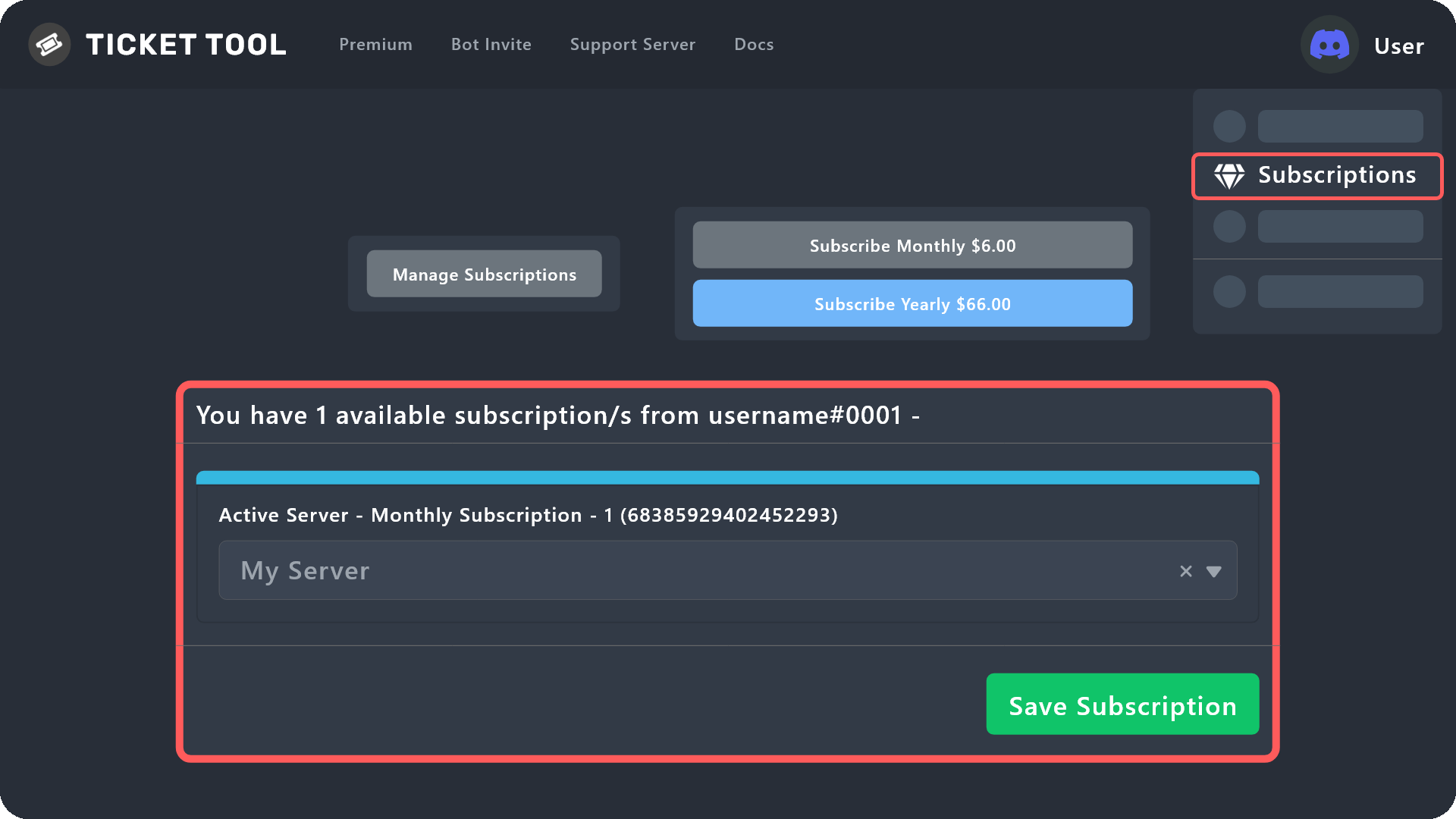
Redeeming premium on your server is really simple. Just head over to your Subscriptions Page. There you can select a server of your choice, which will get premium. You can change the server at any point.
 worldly zephyr
Someone got a message saying they have reached the limit of tickets but they dont have any open tickets, any ideas?
scenic plinth
You deleted the channel manually, so it still thinks there is a ticket opened.
 empty star
Who won’t my server load?
covert swallow
Try this
humble sequoiaBOT
Don't see your server in the dashboard?
You will possibly need to relog. Look below to see steps on how to relog.
How to relog in the Dashboard.
Note:
You need one of these 3 things to access the dashboard.
1. Server Owner (Level: 6)
2. Server Administrator (Level: 4)
3. Dashboard Role (Level: 2)
:warning: You can check your level using $level on your Discord Server
User permission level with Ticket Tool
@User is permission level: 0 (User)
```» *If it shows that your permission is **0**, you don't have any of the above **3 things** to manage the dashboard.*
**See the Image below on how to relog:** tiny minnow
Hello, how does the complaint work?

 humble sequoiaBOT
How to disable the premium bot
To disable the premium bot you will have to go to the Dashboard ➞ Server Configs ➞ Premium bot ➞ And on the right-hand side select the primary free bot in the drop down menu.
Premium features will still work on the normal bot.
 plain surge
Please follow these steps ^
plain surge
tiny minnow
Hello, how does the complaint work?
Can you explain your question a bit more, I didn't quite understand what you meant
 velvet whale
humble sequoia
velvet whale
humble sequoia
thx
iron nightBOT
Gave +1 Rep to @humble sequoia
velvet whale
plain surge
Can you explain your question a bit more, I didn't quite understand what you mea...
thanks you solved my problem
plain surge
No problem 👍
worldly zephyr
Is there a way I can change the name of the tickets that Ticket tool creates?
plain surge
That's a premium feature.
However you can use the command $rename to manually change the name of the ticket
If you would like to try the premium feature with the 7days free trial (the ticket won't get renamed after the trial ends), you can do so by following these steps
humble sequoiaBOT
The ticket name is the default channel name of all tickets. To edit it, go to your Dashboard > Panel Configs > Settings > Ticket Options. There you can edit the channel name of opened and closed tickets. You can also use variables in there.

 Note: This is a premium feature
worldly zephyr
plain surge
That's a premium feature.
However you can use the command `$rename` to manually ...
Note: This is a premium feature
worldly zephyr
plain surge
That's a premium feature.
However you can use the command `$rename` to manually ...
where can I find a list of commands for Ticket Tool also?
plain surge
$help commands
humble sequoiaBOT
() = optional
[] = required
*==================================
Ticket Commands
==================================*
_ _
`$add [User] (channel)`
Description: Adding additional users to a ticket
Aliases: none
`$remove [User] (channel)`
Description: Removing users from a ticket
Aliases: none
`$close`
Description: Closing tickets
Aliases: none
`$open`
Description: Opening closed tickets
Aliases: none
`$delete`
Description: Deleting tickets
Aliases: none
`$rename`
Description: Renaming tickets/channels
Aliases: none
`$transcript (send channel)`
Description: Creating transcripts
Aliases: none
`$new (user) (reason)`
Description: Creating tickets in a monitored channel (when command style is enabled)
Aliases: none
`$claim`
Description: Claiming tickets (when claim is enabled)
Aliases: "unclaim"
_ _
*==================================
General Commands
==================================*
_ _
`$help (Help Options)`
Description: Help Command
Aliases: none
`$debug`
Description: Debuging issues with running Ticket Tool
Aliases: none
`$id (@role/@user/#channel/emoji)`
Description: Converting roles, users, channels and emojis to ID
Aliases: "getid"
`$permlevel`
Description: Checking permission level with Ticket Tool
Aliases: "level"
`$ping`
Description: Checking response time with discord api
Aliases: none
`$vote (link | unlink | redeem) (user)`
Description: Earn premium by voting on top.gg or Discord.boats
Aliases: "votes"
plain surge
Ticket commands mean that they need to be used inside a ticket
worldly zephyr
plain surge
Ticket commands mean that they need to be used inside a ticket
So the only way to rename the default name of a ticket at creation is with Premium?
fallow ingot
Correct.
 fervent heath
Any way to transfer the owner of a ticket after creation?
I'm also trying to get command tickets to work, so that we can make the ticket specifically for that person to begin with, but I'm having trouble getting the bot to respond. I have the listening channel set. Does the player need to be in the listening channel?
Being able to transfer ownership so that the bot sends a transcript at the end is preferred (the idea is to use this for warning tickets for members of the server, and being able to craft the warning inside the ticket is nice) but if I can get the commands to work instead it should be just as good.
If anyone knows a better way of doing this, let me know. 
fallow ingot
Sure thing, give me a minute to type this out for ya.
fallow ingot
fervent heath
Any way to transfer the owner of a ticket after creation?
I'm also trying to g...
You cannot transfer ownership of a ticket, you can add and remove people but cannot make another user owner of a ticket.
Command Style Tickets need to be sent in the channel you selected TT to monitor for $ticket or $new, you can use the user ID so server-staff can also make tickets on behalf of a user.
There is a solution if you want to send a transcript to another user via DM's. Which is using the $transcript command e.g $transcript <User_ID> and it will DM the user with a transcript for that ticket.
fervent heath
Oh, that'd work! I must have missed that. I will try a bit more to get the command style to work, might still want it... Thanks a lot!
fallow ingot
No worries, let me know if you are still experiencing issue with command style tickets.
 broken ravine
Hello I'm getting this message when clicking the button on my panel.
 pale pilot
broken ravine
Hello I'm getting this message when clicking the button on my panel.
pale pilot
broken ravine
Hello I'm getting this message when clicking the button on my panel.
I think that happens if you edit the message from the panel in config v1, after having edited something in V2 already. Try editing the message on V2 and see if the issue persists
broken ravine
pale pilot
I think that happens if you edit the message from the panel in config v1, after ...
still getting same message
pale pilot
What's your server ID? @broken ravine
pale pilot
broken ravine
<@336243658816749570>
what panel?
broken ravine
pale pilot
what panel?
Job Applications
pale pilot
@broken ravine enable forms on panel configs v1
broken ravine
pale pilot
<@414198271075024898> enable forms on panel configs v1
done
pale pilot
and does it work now?
broken ravine
pale pilot
and does it work now?
nope same message
pale pilot
@solid stream can you help out here? I don't exactly remember what the error message above was
solid stream
So this is actually saying they need to add titles to the form questions.
Guess I need to validate that.
 solid stream
pale pilot
<@279639060996292609> can you help out here? I don't exactly remember what the e...
solid stream
pale pilot
<@279639060996292609> can you help out here? I don't exactly remember what the e...
^
broken ravine
solid stream
So this is actually saying they need to add titles to the form questions.
That was the problem, it's fixed now. Thank you very much
iron nightBOT
Gave +1 Rep to @solid stream
pale pilot
Oh
solid stream
Usually it should just not add the broken items, but I also need to make notes that these are required.
 atomic tide
hi guys
how do i delete all tickets at the same time?
hi @mystic hound bring some cookies
 full cedar
.
 gusty osprey
yall know how to change the name and information that pops up when someone makes a ticket?
rustic gale
gusty osprey
yall know how to change the name and information that pops up when someone makes...
What information do you mean exactly?
Screenshots can help
 rustic gale
Yep, it's the ticket message
humble sequoiaBOT
The Ticket Message is the first message sent by the bot in a new ticket. To customise it head over to your Dashboard ➞ Panel Configs ➞ Settings ➞ Ticket Options ➞ Edit Ticket Message
echo linden
need help with my license key i summit my ticket but never recive an anwser
humble sequoiaBOT
⚠️ You're in the wrong place
We provide support for Ticket Tool Discord bot and cannot help you with whatever issue you have.
- We don't know which Support Team you should contact to get this issue resolved, and unfortunately we won't be able to accurately tell you.
If you don't have any further questions regarding our bot Ticket Tool, please close this ticket
 honest sky
I've bought the script for trading view.com but I'm pretty sure I put the wrong username in for it
 mortal dock
Paramount+
Hi, When I log in it says to Get Started or to Sign out, I’m in the UK. I force stop the app, change location to USA with a VPN, it then says that it is not yet available in this location (United States). Is there anything that can be done that can fix this please?
humble sequoiaBOT
⚠️ You're in the wrong place
We provide support for Ticket Tool Discord bot and cannot help you with whatever issue you have.
- We don't know which Support Team you should contact to get this issue resolved, and unfortunately we won't be able to accurately tell you.
If you don't have any further questions regarding our bot Ticket Tool, please close this ticket
sturdy geyser
How can I change the emojis to a different one but still the default emojis? like this: ➕
 plain surge
sturdy geyser
How can I change the emojis to a different one but still the default emojis? lik...
plain surge
sturdy geyser
How can I change the emojis to a different one but still the default emojis? lik...
Changing the emoji in a drop-down menu, requires you to change the emoji of the button, which is a premium feature
sturdy geyser
plain surge
Changing the emoji in a drop-down menu, requires you to change the emoji of the ...
Even if it is a default one?
sturdy geyser
rip
 zinc tusk
Is there a way to close multiple closed tickets at once?
 jagged abyss
 south lake
On one of the panels we don't have a role to ping, but we are still getting a ping once the ticket is open. Is there a way to get rid of that?
 slender minnow
south lake
On one of the panels we don't have a role to ping, but we are still getting a pi...
slender minnow
south lake
On one of the panels we don't have a role to ping, but we are still getting a pi...
remove the mention from the ticket message
south lake
slender minnow
remove the mention from the ticket message
from inside embed?
It has only user mention in a message
jade topaz
Hello i got a question how do i add the roles to be able to have access to the tickets being made?
south lake
jade topaz
Hello i got a question how do i add the roles to be able to have access to the t...
In general panel settings add support team roles
slender minnow
south lake
from inside embed?
If you go to your dashboard > Panel configs > Settings of the panel > Under ticket options > Edit ticket message
jade topaz
south lake
In general panel settings add support team roles
ok ty will try rn
iron nightBOT
Gave +1 Rep to @south lake
slender minnow
south lake
In general panel settings add support team roles
adding on to that, don't forget to specify the perms for the support team from permission options
jade topaz
south lake
In general panel settings add support team roles
where is general panel settings
its on the ticket tool dashboard?
south lake
slender minnow
If you go to your dashboard > Panel configs > Settings of the panel > Under tick...
 south lake
jade topaz
its on the ticket tool dashboard?
south lake
jade topaz
its on the ticket tool dashboard?
yes, on your dashboard > Panel configs > Settings of the panel > General Options
jade topaz
south lake
yes, on your dashboard > Panel configs > Settings of the panel > General Option...
alr thanks it worked
iron nightBOT
Gave +1 Rep to @south lake
slender minnow
south lake
ok so I just realised what you were talking about 
sorry about that
so when do you get pinged? is it when the ticket is made or during any other action?
south lake
just when it's created. it's not like a normal notification as nothing shows on the channel
slender minnow
what type of notification is it then? I can only think of one notification when it comes to mentioning ^^
south lake
I will have to ask others if they get push notifications, but I sure hear pings
slender minnow
do you get discord pop ups if you are not on dnd?
btw push notifications give notifications for every message iirc
i am not sure if its every message but it gives notification
south lake
2step close pings and sends push notifications as you close and delete 😂 🤣 and people were ready to murder me when I was closing multiple tickets
south lake
slender minnow
btw push notifications give notifications for every message iirc
what's iirc?
slender minnow
if i remember correctly
slender minnow
south lake
2step close pings and sends push notifications as you close and delete 😂 🤣 an...
oof 
that's why i never enable push notif on any servers unless they are rarely active and important
south lake
we don't get for all messages, only for what's enabled usually. But ticket shouldn't ping unless we want it to
 rustic gale
Did you enable Server Storage in Server Configs? That's probably why
 rustic gale
 brittle river
is it correct
brittle river
is it correct
Well, the ticket not deleting is Server Storage working as intended
If you want your tickets to delete as normal, you probably don't want to enable Server Storage

 jaunty cloak
How do you view answers a user gives for forms? I have the variable in the message, but they don't show up.
scenic plinth
Make sure to replace the X with the number of the form variable, (Ex: {create.form.1})
jaunty cloak
Yep, did that
scenic plinth
Are you sure they are not empty answers?
jaunty cloak
Yes, I've tried making tickets myself and don't see them showing up
scenic plinth
What is your servers ID and panel this occurs on?
 nimble tiger
hia,- if I purchase premium on my test server,- and set everything up the way I like,--- can I move it to my normal live server? Is that possible?
shut bolt
nimble tiger
hia,- if I purchase premium on my test server,- and set everything up the way I ...
Yeap, you can just move the subscription among servers
And you can also move the panels and configurations using a backup key, more info below
humble sequoiaBOT
Backup and Restore allows you to transfer your premium status, panels, tags, and all settings to a new server.
You can also use it to keep a backup of your settings incase you need to suddenly move servers. We suggest you keep this backup key somewhere safe, incase your server is deleted. You will want to copy the whole key.
First, go to your dashboard, then Server Configs and generate a new backup key by pressing the green button. Now, a key should be generated in the box above. You may need to refresh the page to see this.
Once you have your backup key, navigate to the same page on the new server. Copy the key on the second field.
Now you can choose what you want to copy. Finally, press the green “Restore Configs” button.
 nimble tiger
shut bolt
Yeap, you can just move the subscription among servers
nimble tiger
shut bolt
Yeap, you can just move the subscription among servers
Ah thank you, I was just coming back to edit and that I figured it out! But thank you for the config/restore info too.
One other quickie question,- once I have premium and I invite the premium bot and select the premium one in the server configs,--- do I have to keep both bots? Or am I ok to kick the non-premium one?
iron nightBOT
Gave +1 Rep to @shut bolt
shut bolt
nimble tiger
Ah thank you, I was just coming back to edit and that I figured it out! But tha...
You can just kick the free bot but note that the premium bot will need to resend the panels and will also require permissions on tickets created by the free bot
nimble tiger
Awesome,- thanks so much!
shut bolt
 prime tendon
yo
Bug
With the new forum channels
But the problem is that there are no transcripts and the channels are public
 shut bolt
prime tendon
Bug
With the new forum channels
But the problem is that there are no transcripts...
shut bolt
prime tendon
Bug
With the new forum channels
But the problem is that there are no transcripts...
Ticket Tool doesn't support forums yet, how is this related to Ticket Tool?
prime tendon
shut bolt
Ticket Tool doesn't support forums yet, how is this related to Ticket Tool?
idk a co owner of a server told me to come here
he said this "And no ping for us
You could ask ticket tool support
If it is a known issue
Or if they are working on slash commands"
shut bolt
prime tendon
idk a co owner of a server told me to come here
Ask the co owner how it's related to us cause so far I don't get what he means that it's an issue with us
prime tendon
shut bolt
Ask the co owner how it's related to us cause so far I don't get what he means t...
i did
shut bolt
prime tendon
he said this "And no ping for us
You could ask ticket tool support
If it is a kn...
Slash commands are in the roadmap, yes, but I still don't get how that's related to forums
prime tendon
shut bolt
Slash commands are in the roadmap, yes, but I still don't get how that's related...
nvm smh he meant that people can close tickets whenever they want and that annoying and they abuse it how do we change th perms to where they cant use that button
shut bolt
prime tendon
nvm smh he meant that people can close tickets whenever they want and that annoy...
$buttons
humble sequoiaBOT
The new Discord Buttons allow for a much smoother and convenient experience. They reduce lag and work much better than emojis. With ticket tool you can edit all the buttons however you like! Buttons can show emojis, text and can have 4 different colors.
Where can I edit them?
Dashboard ➞ Panel Configs ➞ Settings ➞ Button Options ➞ Setting
shut bolt
Go to the Button Options of the button you want to restrict
And make it a support team only button
Save changes and you are good to go
prime tendon
ok thanks
shut bolt

 cerulean arch
Hey, does the bot actually log pictures? I try using the picture link it logged but it just shows a page that says it doesn't exist. I am trying to get a photo recovered of someone exploiting from a ticket and am on the struggle bus trying to recover the photo. Is this like only a premium bot feature or something?
 ornate pendant
I can't enter the site of manage server
humble sequoiaBOT
Don't see your server in the dashboard?
You will possibly need to relog. Look below to see steps on how to relog.
How to relog in the Dashboard.
Note:
You need one of these 3 things to access the dashboard.
1. Server Owner (Level: 6)
2. Server Administrator (Level: 4)
3. Dashboard Role (Level: 2)
:warning: You can check your level using $level on your Discord Server
User permission level with Ticket Tool
@User is permission level: 0 (User)
```» *If it shows that your permission is **0**, you don't have any of the above **3 things** to manage the dashboard.*


**See the Image below on how to relog:**Premium currently has a feature allowing you to save images, currently is in testing, but for now, standard does / cannot save images as Discord stopped saving images of deleted channels.
The best alternative is to save the images to another channel or a 3rd part site before you delete the channel, unless you move to premium, but that is not a requirement.
cerulean arch
scenic plinth
Premium currently has a feature allowing you to save images, currently is in tes...
Thank you for the help.
iron nightBOT
Gave +1 Rep to @scenic plinth
robust sandalBOT
 potent plover
Как сделать выбор категории в тикете, например: вопросы, жалобы?
potent plover
Как сделать выбор категории в тикете, например: вопросы, жалобы?
How to make a choice of category in the ticket, for example: questions, complaints?
Russian (ru) → English (en)
rustic gale
You create multiple panels, each panel corresponding to a different choice
robust sandalBOT
rustic gale
You create multiple panels, each panel corresponding to a different choice
Вы создаете несколько панелей, каждая из которых соответствует отдельному выбору
English (en) → Russian (ru)
rustic gale
Please don't ping the support team
robust sandalBOT
rustic gale
Please don't ping the support team
Пожалуйста, не пингуйте службу поддержки
English (en) → Russian (ru)
 delicate ore
is there an admin
potent plover
Нет, я видел на других серверах именно выбор: жалоба либо вопрос

Что-то по типу этого
Заранее спасибо)
potent plover
?
robust sandalBOT
potent plover
Нет, я видел на других серверах именно выбор: жалоба либо вопрос
No, I saw on other servers exactly the choice: complaint or question
Russian (ru) → English (en)
robust sandalBOT
potent plover
Что-то по типу этого
Something like this
Russian (ru) → English (en)
robust sandalBOT
potent plover
Заранее спасибо)
Thanks in advance)
Russian (ru) → English (en)
humble sequoiaBOT
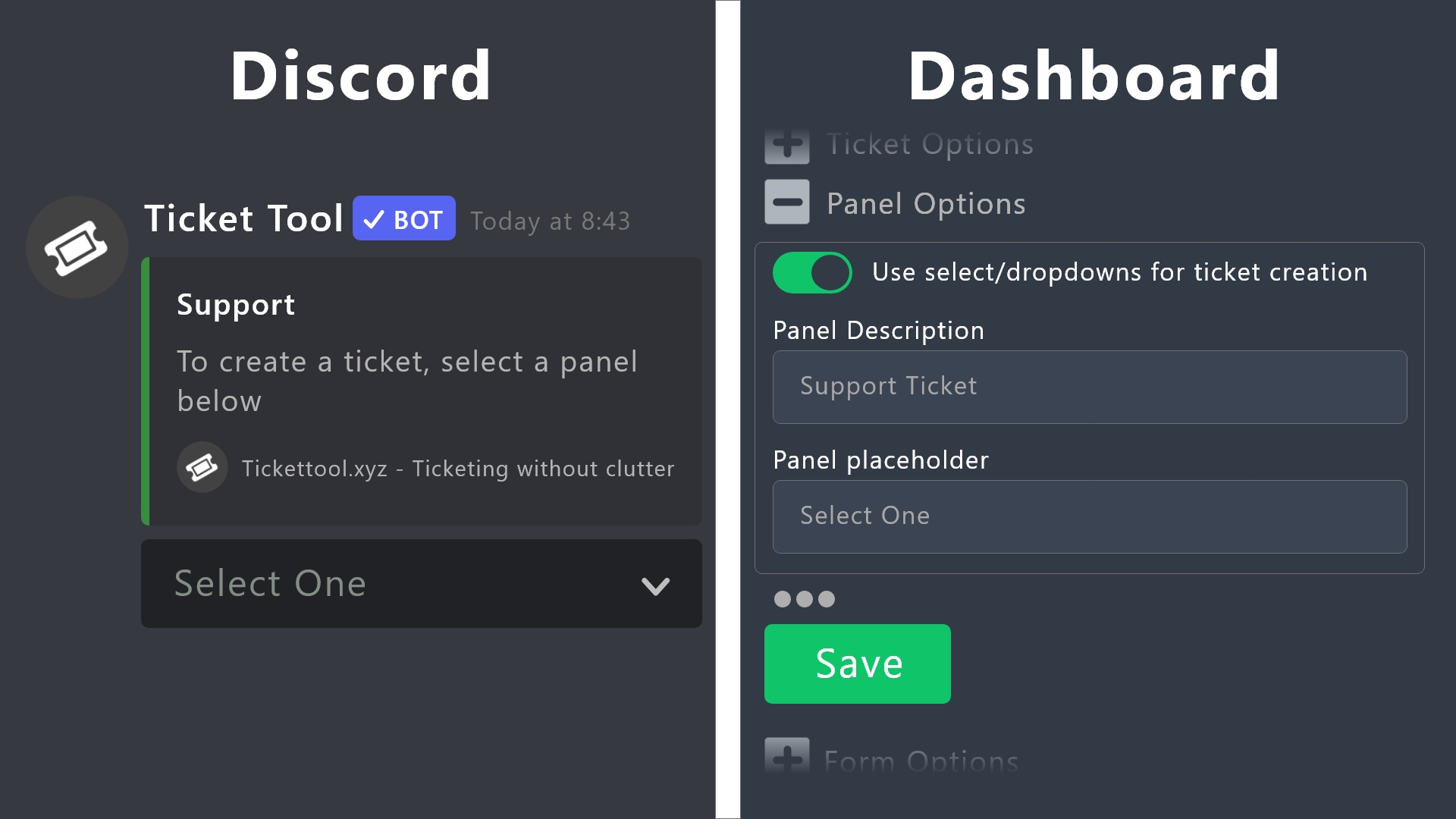
Drop-down / Select Menu <:NewIcon1:1018858809541804124><:NewIcon2:1018858813266333706>
The Drop-down menu or Select Menu replaces the buttons on your panel message and uses a drop-down menu with all of your panels. To set this up, you need to do multiple steps
Step <:Numbericons1:1018864164032225340> - Create a Multipanel
Create your Multipanel by using Attached Panels
 Go into the panel settings of your main panel
General Options
 Select Attached Panels (in order of appearence)
more details about multipanels:
$mp2
Step <:Numbericons2:1018864168041971712> - Enabling Drop-Down
After that, you enable the Drop-Down-Menu.
Panel Settings of your main Panel
Panel Options
Enable 
Use select/dropdowns for ticket creation
Put a placeholder text for the select/drop down menu. This will appear on the drop down menu, before selecting anything.
Step <:Numbericons3:1018864171783303208> - Description
Next you can change the description for each panel, that will be displayed in the Drop Down.
Panel Settings (for each panel)
Panel Options
Edit the Text for the Panel Description
Step <:Numbericons4:1018864175155519538> - Emojis
At last you can change the emoji for each Panel. (currently )
Panel Settings (each panel)
Button Options
Create Ticket Settings
Select a new Emoji.
 pale pilot
@potent plover
iron nightBOT
Gave +1 Rep to @pale pilot
 woeful dirge
I have a problem if I enter the boots it will come out in a 1minute
 fast jewel
Hello, my server named "NGT-OFFICIAL" isn't showing up even tho the bots in the server

Please help me with this.
 open talon
i how to change "Ticket created #channel" message

i didnt find in panel configs
hadi ama
robust sandalBOT
open talon
hadi ama
come on but
Turkish (tr) → English (en)
open talon
lol wrong translate
 proud iris
Hi
jade topaz
Hi
proud iris
Why was money deducted from me when I entered the wrong zip code and the premium was not issued? And the money was not returned either.
 jade topaz
You are from
proud iris
Im from Ukraine
jade topaz
Ok
rustic gale
proud iris
Why was money deducted from me when I entered the wrong zip code and the premium...
Please create a ticket in #🎫│make-a-ticket so we can take a closer look
rustic gale
fast jewel
Hello, my server named "NGT-OFFICIAL" isn't showing up even tho the bots in the ...
You need to log out of the dashboard and then log in again
jade topaz

proud iris
rustic gale
Please create a ticket in <#571706435449257997> so we can take a closer look
Everything is fine, I have already returned the money
 restive condor
Is it possible to join the translation team (if the is one) since i've seen several errors in the dashboard/website
shadow quarry
how can i have in one server 2 different kind of tickets?
shadow quarry
shadow quarry
how can i have in one server 2 different kind of tickets?
Does anyone know?
restive condor
rustic gale
It's automatic translation from Google
Makes sense. You guys should consider adding manual translations, especially if this is a ticket bot and ''ticket'' is being translated as receipt/plane ticket. Thanks anyways
humble sequoiaBOT
For a more convenient use of multipanels, you can now combine panels on the dashboard. This will allow you to directly send the multipanel from the dashboard or via the $panel ID command.
Where can I find this?
You can find this setting on the Dashboard -> Panel Configs -> Settings -> General Options
Note: if you're attaching all the panels to a panel called English, don't include English in the attached panels box (If you do this, it will create duplicate)
This will put all buttons from all of your panels on one message. The message is the panel message from the panel you're combining these panels in.
You can also watch this video tutorial.
gilded verge
humble sequoia
@shadow quarry, here ^^
shadow quarry
oh okay thanks a lot
gilded verge
shadow quarry
oh okay thanks a lot
psst, maybe this example can help you 😳
1: #🆘│community-support message
2: #🆘│community-support message
 novel ocean
Does anyone know if there is a way to reset the ticket number?
gilded verge
in panel settings, then in General Options use a minus sign and Save

if not work, use + and then - and Save
humble sequoiaBOT
We would love to help you, but if you don't tell us what you need help with we can't help you :(
scenic plinth
Guess we´ll never know
Resend your panel and follow the steps below, also avoid pinging staff.
humble sequoiaBOT
Pop-up Form
A discord Form allows you to let the user answer individual questions in a pop up Form, which then displays the answers in the ticket message. This can save time if you already know what you want to ask the user.
Setup Forms
Forms can be enabled under Panel Settings > Form Options > Edit Forms Options.
In the new pop up window, you can now enable and edit your own Form.
Form Options
You can add up to 5 questions in the discord form. This is a discord limitation. Each question can have a placeholder in the input field, a minimum and maximum input, multi-line and also the option to have the answer required.
Options:
Question Title: Your Question goes here
Question Placeholder: The placeholder text in the input field
Required: If enabled, the user has to answer this question, to submit the form
Multi-Line Input: Allows the user to input multiple lines
Minimum and Maximum Input: Set a minimum and maximum input value for the user
❗Display the answer ❗
To display the answers from the user, you need to go into your Panel Settings > Ticket Options > Edit Ticket Message. In there you use the variable {create.form.x} and just replace x with the number of your question. For example, the response to Question 1 can be displayed with {create.form.1}. If you don't use this variable, the response from the user is lost.
scenic plinth
You didn´t turn off the ping though, make sure the question placeholder is not empty / containing a variable, should just be plain text.

A screenshot, anything else related to ticket tool?
scenic plinth
humble sequoia
Tell you to fix your reply pinging, and maybe your eyes. I left the tutorial here. Ensure nothing is blank here.
You did, 6 times. Anything else related to Ticket Tool?
Anything else related to Ticket Tool?
 ember wind
I Invited ticket tool and gave admin perms but when i try going to dashboard it doesnt show up
humble sequoiaBOT
Don't see your server in the dashboard?
You will possibly need to relog. Look below to see steps on how to relog.
How to relog in the Dashboard.
Note:
You need one of these 3 things to access the dashboard.
1. Server Owner (Level: 6)
2. Server Administrator (Level: 4)
3. Dashboard Role (Level: 2)
:warning: You can check your level using $level on your Discord Server
User permission level with Ticket Tool
@User is permission level: 0 (User)
```» *If it shows that your permission is **0**, you don't have any of the above **3 things** to manage the dashboard.*


**See the Image below on how to relog:**Follow that abstract
ember wind
Thank You!
scenic plinth
Avoid sending duplicates please, if you wish to help, please ensure you are not cross supporting.
digital heath
hello, for tickettools premium is there a auto close function after x time not responded?
rustic gale
digital heath
hello, for tickettools premium is there a auto close function after x time not r...
Not currently but i'ts being considered for an update
 delicate wraith
does anyone know why my server is not pooping up when I go to put it into my server?
scenic plinth
I'd see a doctor about that, or relog into the dashboard.
 vocal portal
I vote go to the doctor @scenic plinth
digital heath
rustic gale
Not currently but i'ts being considered for an update
thanks
iron nightBOT
Gave +1 Rep to @rustic gale
 stoic wagon
What does this mean
System Failure: TextInputComponent placeholder must be a string
rustic gale
stoic wagon
What does this mean
> **System Failure:** TextInputComponent placeholder must be...
Make a ticket in #🎫│make-a-ticket so we can take a closer look.
 clever crater
why?
 scenic plinth
How about ask the bots support team
 glacial perch
Is there a Option to delete a finished ticket? After close a ticket it appear "closed 1234" unter the create ticket Chanel .
I like that it will be deleted automatically 🙂
 fierce rampart
website down?
fallow ingot
glacial perch
Is there a Option to delete a finished ticket? After close a ticket it appear "c...
You can disable  Two step ticket

Which is under general options.
fallow ingot
fierce rampart
website down?
I'm using it right now, no issues. If it's still not working for you let me know.
 tribal patio
Does this bot have a GitHub?
 warm heath
 fallow ingot
tribal patio
Does this bot have a GitHub?
fallow ingot
tribal patio
Does this bot have a GitHub?
No
humble sequoiaBOT
Don't see your server in the dashboard?
You will possibly need to relog. Look below to see steps on how to relog.
How to relog in the Dashboard.
Note:
You need one of these 3 things to access the dashboard.
1. Server Owner (Level: 6)
2. Server Administrator (Level: 4)
3. Dashboard Role (Level: 2)
:warning: You can check your level using $level on your Discord Server
User permission level with Ticket Tool
@User is permission level: 0 (User)
```» *If it shows that your permission is **0**, you don't have any of the above **3 things** to manage the dashboard.*


**See the Image below on how to relog:**@warm heath ^^
warm heath
tahku
glacial perch
fallow ingot
You can disable <:offswitch:836268364238290954> Two step ticket
I like that this closed-0015 dont appear on that chanel. Is there a Option?
2 Step close didnt helped
 fallow ingot
If it doesn’t go into the selected category then you haven’t saved it or ticket tool doesn’t have access to the category.
If the ticket isn’t new the changes you made won’t have effect.
 jade topaz
What does this mean?
jade topaz
jade topaz
What does this mean?
And when I try to move tickets to categories, they don’t exist in the “reorder” section. But when I leave. They’re all there.
@safe prairie
pale pilot
jade topaz
What does this mean?
It means the bot doesn't have enough permissions to function. Run the $debug command in that channel. If the bot doesn't respond, it's even missing permissions to read and send messages
And please refrain from pinging staff
jade topaz
pale pilot
And please refrain from pinging staff
Will do.
jade topaz
pale pilot
It means the bot doesn't have enough permissions to function. Run the $debug com...
So o have to go through each ticket and edit permissions for the bot?
You’re a legend. Thank you
glacial perch
fallow ingot
If it doesn’t go into the selected category then you haven’t saved it or ticket ...
I dont like that it goes to any category . Just delete
I have my support category. There is a create a ticket chanel and a transcript chanel. After I open a ticket I get a ticket under my transcript chanel.
Thats what I like. But after I close and delete the ticket its saved as a closed ticket under my transcript chanel.
(Transcript is Protokoll for me)
glacial perch
But my last Owner could do that?
pale pilot
Please don't listen to this troll
glacial perch
Can you help?
pale pilot
I'm not really sure I understand your problem
humble sequoiaBOT
We would love to help you, but if you don't tell us what you need help with we can't help you :(
glacial perch
pale pilot
I'm not really sure I understand your problem
This is a closed ticket. I dont like that it open a own category.
I like that it will be deleted after close and delete
 pale pilot
Disable two step ticket in general options
Then the ticket deletes instantly after closing
glacial perch
pale pilot
Disable two step ticket in general options
Dont work.
 pale pilot
glacial perch
Dont work.
pale pilot
glacial perch
Dont work.
But you want your ticket to be deleted when you close to right? Or are you concerned about the category?
glacial perch
Yes right
pale pilot
That was not a yes or no question but okay. Create a new ticket, close it and tell me what happens
 scarlet bay
tickets are being created outside the set category
how can I fix this?
glacial perch
pale pilot
That was not a yes or no question but okay. Create a new ticket, close it and te...
Opened-->closed-->channel remain


 rustic gale
Do you have Storage Mode enabled? (in Server Configs)
glacial perch
Yes it was enabled. Tooked it off now its working. Thanks a lot
pale pilot
@glacial perch can you run the $debug command in the ticket please?
Ah nevermind, didn't see new messages here
 desert summit
Hey, how can I use the variable {!channel.id} ? Where do I have to put the ID in
rustic gale
desert summit
Hey, how can I use the variable {!channel.id} ? Where do I have to put the ID i...
Remove the exclamation mark
What are you trying to do?
desert summit
rustic gale
What are you trying to do?
Like Look here this channel --> e.g. #🤖│bot-spam
As Ticketmessage
rustic gale
Not sure what you're referring to
desert summit
@severe path
 timber kernel
 mystic hound
Don't bother
 prime bridgeBOT
 Successful bans:
 1
 Unsuccessful bans:
 0
 Reason: NSFW
 Moderator: @mystic hound
 plucky kraken
Ty.
 severe path
what the heck
slender minnow

desert summit
rustic gale
Not sure what you're referring to
On my channel for the rules of moderation. Like this is if sm want to apply for mod and he opens a ticket and in the ticket message is: Hey, please look at the precondition in #... first
desert summit
Alr
rustic gale
$mentions
humble sequoiaBOT
Within all the messages the bot's sends (both embeds and text) you can mention either channels, roles, or even users, these mentions will only send a notification to the user if they are used within a text field, e.g: a role mentioned in an embed won't ping at all the users who have that role.
For mentioning a role you can use one out of three options:
{@Role Name} ➞ Which is Case Sensitive.
{RoleID} ➞ Replace RoleId with the Id of the role you are trying to ping.
<@&RoleID> ➞ Discord's native syntax to ping roles.
<#ChannelID> ➞ Mention a channel by its ID.
<@UserID> ➞ Mention a user by its ID.
desert summit
Thank you buddy :)
rustic gale
For example, <#776680605517742090> yields #🆘│community-support
 strange flame
Minha conta foi bloqueada
jade topaz
anyone knows how to make something like this?
 humble sequoiaBOT
━━ moved to ticket ━━
sturdy geyser
humble sequoia
━━ moved to ticket ━━
?
 compact tusk
is there a way to get more than 5 form questions
rustic gale
compact tusk
is there a way to get more than 5 form questions
Ask Discord about it
Sadly, nothing that can be done from our end
compact tusk
Gotcha
 quasi sinew
Hello, I dont know it thats a bug, but if you transcript a Ticket, the Images are not shown? It been like that for a while, but always thought it would fix the problem by itself... https://tickettool.xyz/direct?url=https://cdn.discordapp.com/attachments/860592619867078696/1022229719489466480/transcript-ticket-1228.html The Images are missing in every other Ticket as well, I just used this as example because of the Users Privacy :)
humble sequoiaBOT
Attachments not being accessible
At the beginning of May 2022, Discord changed the way they store their deleted files, before this update, files could be accessible for up to 30 days after which they would get erased entirely from the Cloudflare cache. Now the files, including images, aren't accessible since they are deleted, which is why premium users [embed up to 8mb](#📣│bot-news message) worth of pictures within transcripts.
In the major update that's being worked on the developer is looking forward to implementing a better solution to this inconvenience in order for images to be saved, at least for a temporal way.
 shut bolt
Hi @quasi sinew , this is a brief explanation of what's the cause of this issue
quasi sinew
Thank u, great Bot tho ❤️
shut bolt

 sour loom
how i can do a panel in one
shut bolt
sour loom
how i can do a panel in one
What do you mean by a panel in one
 humble sequoiaBOT
For a more convenient use of multipanels, you can now combine panels on the dashboard. This will allow you to directly send the multipanel from the dashboard or via the $panel ID command.
Where can I find this?
You can find this setting on the Dashboard -> Panel Configs -> Settings -> General Options
Note: if you're attaching all the panels to a panel called English, don't include English in the attached panels box (If you do this, it will create duplicate)
This will put all buttons from all of your panels on one message. The message is the panel message from the panel you're combining these panels in.
You can also watch this video tutorial.
sour loom
i have only 1
shut bolt
You'll have to create more
prime bridgeBOT
Warn result:
Reason: Pinging support team
Moderator: @shut bolt


Warned:
 GamerLetsPlay_TV#0001 [
722928606870765568]
 Couldn't dm
shut bolt
sour loom
<@518666147441278998>how clone panels?
Which panel version?
sour loom
shut bolt
Which panel version?
 jade topaz
i have perms in 3 server and it says relogin i tried more than 15x
 shut bolt
jade topaz
i have perms in 3 server and it says relogin i tried more than 15x
shut bolt
jade topaz
i have perms in 3 server and it says relogin i tried more than 15x
What do you understand by relogin
jade topaz
shut bolt
What do you understand by relogin
logut from the right top corner and login again ig?
shut bolt
jade topaz
logut from the right top corner and login again ig?
Cool, confirming cause more than half of the people who say they've relogged they just refresh
Run $level on one of the servers and send us a screenshot of the bot's response
jade topaz
okhy
jade topaz
shut bolt
Run $level on one of the servers and send us a screenshot of the bot's response

its solved tyyyy
 modest pecan
how long does it take to respond to a ticket?
sour loom
shut bolt
There's a button labeled Clone
ok i must config first all panels
shut bolt
modest pecan
how long does it take to respond to a ticket?
If you opened a ticket here, it depends on the language, some are faster than others due to the team members of each. However we ensure your ticket gets handled before 48 hours
 sour loom
k
modest pecan
OK, +-24 hours have already passed, that is, I should be called for a check-up tomorrow if it works like that? (in short, I was banned from "Autofish" when I was just fishing)
scenic plinth
In short, you're in the wrong place.
modest pecan
I'm sorry, this is the first time something like this has happened and I don't know where to write
rustic gale
How did you get here?
Walk your steps back, you took a wrong turn somewhere
You found the place where you're supposed to go for help, and then somehow got here.
modest pecan
ok , thank you.
 severe sluice
can I download a transcript for a ticket already closed?
severe sluice
i am the server staff 
 jagged lotus
i set a emoji for create ticket but it aint there.. this is for dropdowns
 rustic gale
severe sluice
i am the server staff <:IRface:567904915272237096>
rustic gale
severe sluice
i am the server staff <:IRface:567904915272237096>
If it's closed but not deleted, just go ahead and transcript it
If it's deleted, it's gone forever, same as any other deleted channel
severe sluice
i believe the person who opened it closed it so is it gone? cant see in any channels
sour loom
each a pv thread is not work
he ping all team roles but they not invited
the team users
 swift prawn
When Im Accessing The Dashboard i do not see my server
(yes i reloaded and etc..)
sour loom
do u sure u are with the right acc logged in?
sour loom
swift prawn
When Im Accessing The Dashboard i do not see my server
(yes i reloaded and etc...
⬆️
rustic gale
swift prawn
When Im Accessing The Dashboard i do not see my server
(yes i reloaded and etc...
It's possible you don't have dashboard permission in the server
If you're not the owner or administrator, you can't access the dashboard by default
swift prawn
rustic gale
If you're not the owner or administrator, you can't access the dashboard by defa...
my friend gave me ownership
sour loom
do u have perms
shut bolt
swift prawn
When Im Accessing The Dashboard i do not see my server
(yes i reloaded and etc...
Reloading isn't the same as relogging
swift prawn
relogging?
humble sequoiaBOT
Don't see your server in the dashboard?
You will possibly need to relog. Look below to see steps on how to relog.
How to relog in the Dashboard.
Note:
You need one of these 3 things to access the dashboard.
1. Server Owner (Level: 6)
2. Server Administrator (Level: 4)
3. Dashboard Role (Level: 2)
:warning: You can check your level using $level on your Discord Server
User permission level with Ticket Tool
@User is permission level: 0 (User)
```» *If it shows that your permission is **0**, you don't have any of the above **3 things** to manage the dashboard.*


**See the Image below on how to relog:**do you have perms, manage perms?
sour loom
swift prawn
my friend gave me ownership
yes but ownership does not mean that you have all rights, you can check if you have rights like manage or admin rights
of course, it may be that you only have Standard Moderations Perms
rustic gale
Try sending $level in a channel the bot can see
humble sequoiaBOT
User permission level with Ticket Tool
@sour loom is permission level: 0 (User)
rustic gale
In your server, not here
sour loom
idk i think he dont have manage perms
rustic gale
Ah. Wrong user. Sorry
sour loom
y that was i
its was long time to create a ticket system
with 2 differents pannels
but i cant see the Message Pannel
i must switch to v2 of panel manage
rustic gale
Possibly
It's better to use v2 now since it's going to become the officially supported menu anyway
jagged lotus
with dropdowns, once a user selects an option, is there a function to DM them like tags?
humble sequoiaBOT
━━ moved to ticket ━━
 vital raptor
how could i make support ticket dm only not to create a channel in my server - and the message come to me in dashboard and i could reply to user
oak shuttle
jade topaz
Does the ticket have a timed feature?
What do you mean?
oak shuttle
vital raptor
how could i make support ticket dm only not to create a channel in my server - a...
If you're referring to a "modmail" system then our bot is not made for that.
vital raptor
oak shuttle
What do you mean?
i mean when i open a ticket the bot dm me not to make an channel to open a ticket
oak shuttle
vital raptor
i mean when i open a ticket the bot dm me not to make an channel to open a ticke...
That's not possible currently
 harsh ledge
What permissions i need to setup the ticket bot on a server?
jade topaz
oak shuttle
What do you mean?
I want it to close automatically 20 minutes after someone opens a ticket (time ticket)
humble sequoiaBOT
ᅠ
@pseudo glen requires the following permissions:
Add Reactions
Read Channels
Send Messages
Manage Messages
Embed Links
Attach Files
Read History
Manage Roles
Manage Channels
To change the role permissions, you can go to your Discord Server ➞ Server Settings ➞ Roles ➞ @Ticket Tool
To change the channel permissions, you can go to your Channel Settings ➞ Permissions ➞ Ticket Tool
ᅠ
Note:
You can give Ticket Tool Administrative Permissions instead of all the permissions listed above, but it's entirely optional and NOT necessary.
 gilded verge
humble sequoia
gilded verge
humble sequoia
@harsh ledge, I don't know if you found the answer but check
gilded verge
jade topaz
I want it to close automatically 20 minutes after someone opens a ticket (time t...
If I associate it well, it is planned 😳
 jade topaz
After that time, the ticket will be closed automatically.?
Is this in the ticket tool?
I want it to close automatically 20 minutes after someone opens a ticket (time ticket)
 agile crystal
jade topaz
After that time, the ticket will be closed automatically.?
agile crystal
jade topaz
After that time, the ticket will be closed automatically.?
U can't, there is nothing
 hot thistle
hi how do i deny the main role 's permission to close the ticket that they opened?
lunar solar
hot thistle
hi how do i deny the main role 's permission to close the ticket that they opene...
Are you asking to deny the close permission to the person who created the ticket?
hot thistle
lunar solar
Are you asking to deny the close permission to the person who created the ticket...
ahh yes!
lunar solar
hot thistle
ahh yes!
Panel configs --> Settings --> Button Options --> Close ticket settings --> Do support team only at the top
 hot thistle
lunar solar
Panel configs --> Settings --> Button Options --> Close ticket settings --> Do s...
hot thistle
lunar solar
Panel configs --> Settings --> Button Options --> Close ticket settings --> Do s...
wow, thank you so much! a big help 
iron nightBOT
Gave +1 Rep to @lunar solar
lunar solar
No worries
 lunar mirage
how would i allow a certain role to be in tickets ?
rustic gale
lunar mirage
how would i allow a certain role to be in tickets ?
Make it support team, or make it an additional role
$help support
humble sequoiaBOT
How to let support team see into a ticket
About support roles
A support role lets your support team see into tickets with out having to add them manually to each and every ticket.
You can add as many support roles as you like per panel.
NOTE that the way discord works all admins can see into tickets regardless of this.
How to set a support role
To set a Support role go to the Dashboard -> Panel Configs -> Settings -> General Options -> Support Team Roles.

NOTE that the support role will not be able to see into tickets that are already created..
rustic gale
$addroles
humble sequoiaBOT
Additional Roles are roles that are independent from Support Roles. You can assign unique permissions for roles defined as additional roles in tickets.
To assign permissions for additional roles, go to Dashboard ➞ Panel Configs ➞ Settings ➞ Permission Options ➞ Additional Opened/Closed Permissions.
Note: Additional Roles do NOT get affected by the Change other support team permissions when claimed feature under Claiming Options, meaning they don't gain/lose any permissions set in that feature once a ticket is claimed.
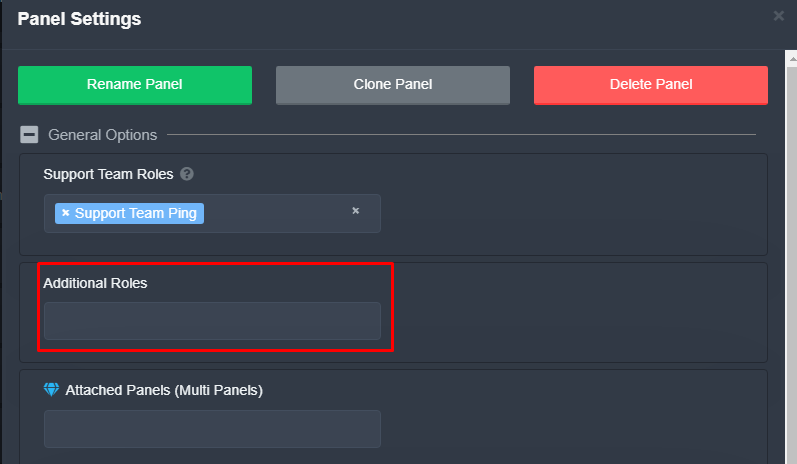 rustic gale
(That's where the settings are in v1, i'm sure you can find them in v2 if you look for them)
 hot ore
@rustic gale oye
humble sequoiaBOT
Don't see your server in the dashboard?
You will possibly need to relog. Look below to see steps on how to relog.
How to relog in the Dashboard.
Note:
You need one of these 3 things to access the dashboard.
1. Server Owner (Level: 6)
2. Server Administrator (Level: 4)
3. Dashboard Role (Level: 2)
:warning: You can check your level using $level on your Discord Server
User permission level with Ticket Tool
@User is permission level: 0 (User)
```» *If it shows that your permission is **0**, you don't have any of the above **3 things** to manage the dashboard.*


**See the Image below on how to relog:**¿Necesitas ayuda?
 grim sierra
i tried relogging
humble sequoiaBOT
━━ moved to ticket ━━
grim sierra
but dosent work
hot ore
rustic gale
¿Necesitas ayuda?
quiero ser soporte
rustic gale
hot ore
quiero ser soporte
Está atento a los anuncios en #📣│server-news, cuando haya solicitudes para soporte las publicaremos allí
hot ore
va
harsh ledge
Why i don't see a server on the list server?
humble sequoiaBOT
Don't see your server in the dashboard?
You will possibly need to relog. Look below to see steps on how to relog.
How to relog in the Dashboard.
Note:
You need one of these 3 things to access the dashboard.
1. Server Owner (Level: 6)
2. Server Administrator (Level: 4)
3. Dashboard Role (Level: 2)
:warning: You can check your level using $level on your Discord Server
User permission level with Ticket Tool
@User is permission level: 0 (User)
```» *If it shows that your permission is **0**, you don't have any of the above **3 things** to manage the dashboard.*
**See the Image below on how to relog:** sweet spoke
Hello, do the support service members communicate only in English? Are there any Russian speakers?
I need help, I have an error with the subscription payment on the site. What to do? Who can help?
Pl.
harsh ledge
humble sequoia
And how do i create a dashboard role?
humble sequoiaBOT
Any role you put there will have full access to the ticket tool dashboard. The server owner and users with admin permissions already have access to the dashboard.
Be careful of which roles to put here
 harsh ledge
Thx
 torpid flower
how do I allow people to add members to a ticket with a command?
rustic gale
torpid flower
how do I allow people to add members to a ticket with a command?
Enable the $add command in Command Options and make sure Support Team Only is disabled
 feral otter
 humble sequoiaBOT
━━ moved to ticket ━━
 small heart
how do i close and save a ticket transcript
humble sequoiaBOT
━━ moved to ticket ━━
jade topaz
how do i claim my premium after boosting twice?
humble sequoiaBOT
━━ moved to ticket ━━
 rough vigil
سلام عليكم
اخوي انا حسابي رابطه في الفيس بوك واحد دخله وربط ايميله في مونتون ابغا احد يساعدني بالله يفكلي ايميله
والله العلي العظيم انو الحساب حسابي وحقي وتعبان عليه ومستعد اعطيك كل الاثباتات الى تطلبها مني عشان اثبتلك ان الحساب حسابي
اتمنى تساعدوني الله يسعدكم واتمنى الرد على مشكلتي سريع
humble sequoiaBOT
⚠️ أنت في المكان الخطأ
نحن نقدم دعمًا لـTicket Tool ديسكورد بوت ولا يمكننا مساعدتك في المشكلة التي تواجهها.
- يرجى التأكد من الاتصال بفريق الدعم المناسب.
إذا لم يكن لديك أي أسئلة أخرى بخصوص بوت تيكت توول ، يرجى إغلاق هذه التذكرة
 buoyant adder
 boreal oxide
oLA
 silent saddle
How to create ticket
rustic gale
Who's still around and needs help?
 restive cosmos
rustic gale
Who's still around and needs help?
restive cosmos
rustic gale
Who's still around and needs help?
me
a member of my community created a ticket (not like pressing create from another ticket) but was able to delete and create tickets, how do i remove that
rustic gale
restive cosmos
a member of my community created a ticket (not like pressing create from another...
It depends. Wanna make a ticket so we can take a closer look?
restive cosmos
rustic gale
It depends. Wanna make a ticket so we can take a closer look?
wym?:)
solid compass
Ticket Tool#6207
rustic gale
restive cosmos
wym?:)
 icy spade
How do you have a thing in your server where people can make tickets?
 agile ridge
How do you edit the message of the ticket? "Support will be with you shorty" but in my text
 rustic gale
agile ridge
How do you edit the message of the ticket? "Support will be with you shorty" but...
rustic gale
agile ridge
How do you edit the message of the ticket? "Support will be with you shorty" but...
Here's how you do it in Panel Configs v2
agile ridge
rustic gale
Here's how you do it in Panel Configs v2
Beta?
rustic gale
Yes
Select your panel at the top
Then press “Ticket”
Then press Edit Ticket Message
Then press Embed Editor
That will expand the menu where you edit the embed
agile ridge
Oh, thank you very much!
 rustic gale
That's the panel message
- Enter your dashboard
- Enter Panel Configs (v2 recommended)
- Create a panel
- Send the panel to a channel in your server
 dense rampart
can u ex with picture?
 obtuse krakenBOT
1. Invite Ticket Tool to your server
First you will want to invite the bot to your server. Once the bot is in your server, you can manage your server in the dashboard.

2. Create a Panel
To create a panel we are going to need to head over to the panel configs on the dashboard.
Once at the dashboard we will need to click Create Panel.
Enter a panel name (Fill in any optional settings you want).
Click Create Panel and your ready to get started with configuring your panel.
An example of a creating a panel is shown below.

3. Send the Panel to a Channel
Once you've created a panel on the dashboard you will need to send it to a channel using send on the dashboard.
Select the channel you want your panel to be created in and click send.
For other questions checkout $help faq.
An example of a sending a panel is shown below.
Having a Problem Sending the Panel?
Do $debug in a channel with Ticket Tool and make sure it has all the necessary Discord permissions.

 rustic gale
Are you the owner or administrator?
If so, you may need to log out of the dashboard and log in again
 warm sun
rustic gale
Are you the owner or administrator?
warm sun
rustic gale
Are you the owner or administrator?
owner
rustic gale
Then definitely relog
warm sun
Ok
 spring rivet
Why can't I see my second server?
 rustic gale
You need to relog
spring rivet
on the second server I am the creator
rustic gale
Log out of the dashboard and log in again
spring rivet
rustic gale
You need to relog
I have already restarted 10 times, it did not help
rustic gale
 spring rivet
rustic gale
spring rivet
rustic gale
I have already restarted 10 times, it did not help
rustic gale
Did you invite the bot?
spring rivet
rustic gale
Did you invite the bot?
yes
rustic gale
What's your server's ID?
spring rivet
rustic gale
Did you invite the bot?
I can go to private messages with you and show a screen demo, but I'm Russian and I won't be able to understand you, so you will have to write me in private messages
spring rivet
rustic gale
What's your server's ID?
how to see?
rustic gale
Go in your server
spring rivet
okey
spring rivet
humble sequoiaBOT
Ticket Tool Invite & Support
rustic gale
Invite the bot, then try again
spring rivet
rustic gale
Invite the bot, then try again
thank you
iron nightBOT
Gave +1 Rep to @rustic gale
 vale vault
The bot isnt showing up on manage servers what do i do?
rustic gale
Do you own the server?
vale vault
Yep
rustic gale
Did you invite the bot?
vale vault
yep
rustic gale
Log out of the dashboard and log in again
 balmy bison
How do I apply to be staff
 iron slate
Hi guys, do you know how to remove a user from a ticket pls
 next patio
How do I check my permission ranks in a server?
obtuse krakenBOT
1. Invite Ticket Tool to your server
First you will want to invite the bot to your server. Once the bot is in your server, you can manage your server in the dashboard.
2. Create a Panel
To create a panel we are going to need to head over to the panel configs on the dashboard.
Once at the dashboard we will need to click Create Panel.
Enter a panel name (Fill in any optional settings you want).
Click Create Panel and your ready to get started with configuring your panel.
An example of a creating a panel is shown below.
3. Send the Panel to a Channel
Once you've created a panel on the dashboard you will need to send it to a channel using send on the dashboard.
Select the channel you want your panel to be created in and click send.
For other questions checkout $help faq.
An example of a sending a panel is shown below.
Having a Problem Sending the Panel?
Do $debug in a channel with Ticket Tool and make sure it has all the necessary Discord permissions.
slender minnow
@obsidian nacelle please restrict testing of commands to #🤖│bot-spam
slender minnow
next patio
How do I check my permission ranks in a server?
I suppose you are in the wrong server
slender minnow
iron slate
Hi guys, do you know how to remove a user from a ticket pls
$remove <user mention or user id> without the <>
iron slate
slender minnow
`$remove <user mention or user id>` without the <>
so for me it's $remove Yodraz#6406 ?
slender minnow
iron slate
so for me it's $remove Yodraz#6406 ?
$remove @iron slate
or the mention can be replaced by the user id
slender minnow
balmy bison
How do I apply to be staff
Your question was answered in your ticket
balmy bison
Yes but where
 obsidian nacelle
slender minnow
<@856873019343765504> please restrict testing of commands to <#91097847653690573...
obsidian nacelle
slender minnow
<@856873019343765504> please restrict testing of commands to <#91097847653690573...
Okay, sorry about it
slender minnow
obsidian nacelle
Okay, sorry about it
No worries, just be careful next time ^^
obsidian nacelle
slender minnow
No worries, just be careful next time ^^
okay, thanks!
iron nightBOT
Gave +1 Rep to @slender minnow
obsidian nacelle
iron night
Gave +1 Rep to **<@776084862728667156>**
???
 next patrol
 rustic gale
Yup, blacklisted roles are in Server Configs
humble sequoiaBOT
Don't see your server in the dashboard?
You will possibly need to relog. Look below to see steps on how to relog.
How to relog in the Dashboard.
Note:
You need one of these 3 things to access the dashboard.
1. Server Owner (Level: 6)
2. Server Administrator (Level: 4)
3. Dashboard Role (Level: 2)
:warning: You can check your level using $level on your Discord Server
User permission level with Ticket Tool
@User is permission level: 0 (User)
```» *If it shows that your permission is **0**, you don't have any of the above **3 things** to manage the dashboard.*
**See the Image below on how to relog:** ember escarp
Does Ticket Tool premium offer buttons/dropdown and modals?
plain surge
ember escarp
Does Ticket Tool premium offer buttons/dropdown and modals?
You set that up with the free bot normally
humble sequoiaBOT
You can check our documentation here;
You can also check #📂│information for the basic setup;
You can also watch this video tutorial.
Our documentation contains all the info you need about the bot to be able to setup and configure the bot however you like.
plain surge
For button ^
humble sequoiaBOT
Drop-down / Select Menu <:NewIcon1:1018858809541804124><:NewIcon2:1018858813266333706>
The Drop-down menu or Select Menu replaces the buttons on your panel message and uses a drop-down menu with all of your panels. To set this up, you need to do multiple steps
Step <:Numbericons1:1018864164032225340> - Create a Multipanel
Create your Multipanel by using Attached Panels
Go into the panel settings of your main panel
General Options
Select Attached Panels (in order of appearence)
more details about multipanels:
$mp2
Step <:Numbericons2:1018864168041971712> - Enabling Drop-Down
After that, you enable the Drop-Down-Menu.
Panel Settings of your main Panel
Panel Options
Enable Use select/dropdowns for ticket creation
Put a placeholder text for the select/drop down menu. This will appear on the drop down menu, before selecting anything.
Step <:Numbericons3:1018864171783303208> - Description
Next you can change the description for each panel, that will be displayed in the Drop Down.
Panel Settings (for each panel)
Panel Options
Edit the Text for the Panel Description
Step <:Numbericons4:1018864175155519538> - Emojis
At last you can change the emoji for each Panel. (currently )
Panel Settings (each panel)
Button Options
Create Ticket Settings
Select a new Emoji.
plain surge
For drop-down menu ^
ember escarp
plain surge
For drop-down menu ^
May I also ask why the dashboard is so laggy?
 low finch
Hello