#🆘│community-support
1 messages · Page 8 of 1
 drifting basalt
 iron nightBOT
Gave +1 Rep to @rustic gale
 rustic gale
You're in the wrong server
 humble sequoiaBOT

⚠️ You're in the wrong place
We provide support for Ticket Tool Discord bot and cannot help you with whatever issue you have.
- We don't know which Support Team you should contact to get this issue resolved, and unfortunately we won't be able to accurately tell you.
If you don't have any further questions regarding our bot Ticket Tool, please close this ticket
 vital ruin
What server do I go in?
rustic gale
A GTA5 server
humble sequoiaBOT
━━ moved to ticket ━━


 forest goblet
 jade topaz
😩
jade topaz
😩
You have the transcript channel set as that exact channel, therefore this is expected behavior.
iron nightBOT
Gave +1 Rep to @rotund osprey
 solid locust
How can Members who create a ticket include a picture in that ticket section?
 opal cradle
You give them image perms
 fallow ingot
Keno
 hard kayak
Hi, I hope someone may be able to assist me..?
Some of the memberson my server are not able to create a ticket by reacting on the emoji.. Once they click on the emoji they get a a notification saying "interaction failed". How can I as the server owner fix this?
Thank you in advance.
humble sequoiaBOT
━━ moved to ticket ━━
 mint helm
@mystic hound
 robust sandalBOT
شما نیاز به ویرایش دکمه های ایجاد بلیط از هر یک از پانل های خود را
 English (en) → Persian (fa)
 halcyon zodiac
my account was lost due a new phone. This is the 2nd time I've lost account with (The Ant Underground). Invested large amounts finances in each of these account 106 and 619. Account 106 is locked Facebook and goolegame and 619 is not recognized in (VK) not allowing me access my profile.
My game names are bushvt1(Spider Nation) and Deadly Fangs.
Please help me concerning this matter.
Thank you
Thanks
humble sequoiaBOT
⚠️ You're in the wrong place
We provide support for Ticket Tool Discord bot and cannot help you with whatever issue you have.
- We don't know which Support Team you should contact to get this issue resolved, and unfortunately we won't be able to accurately tell you.
If you don't have any further questions regarding our bot Ticket Tool, please close this ticket
 lilac shore
how to make new role be able to see old tickets?
 slate wren
please delete a certain message your bot dmed me
fallow ingot
lilac shore
how to make new role be able to see old tickets?
Do you mean closed tickets?
rustic gale
lilac shore
how to make new role be able to see old tickets?
Close them and reopen them
(This won't work if your tickets are set up to automatically delete when closed)
humble sequoiaBOT
We would love to help you, but if you don't tell us what you need help with we can't help you :(
 obtuse krakenBOT
1. Invite Ticket Tool to your server
First you will want to invite the bot to your server. Once the bot is in your server, you can manage your server in the dashboard.

2. Create a Panel
To create a panel we are going to need to head over to the panel configs on the dashboard.
Once at the dashboard we will need to click Create Panel.
Enter a panel name (Fill in any optional settings you want).
Click Create Panel and your ready to get started with configuring your panel.
An example of a creating a panel is shown below.

3. Send the Panel to a Channel
Once you've created a panel on the dashboard you will need to send it to a channel using send on the dashboard.
Select the channel you want your panel to be created in and click send.
For other questions checkout $help faq.
An example of a sending a panel is shown below.
Having a Problem Sending the Panel?
Do $debug in a channel with Ticket Tool and make sure it has all the necessary Discord permissions.
 humble sequoiaBOT

You can check our documentation here;
You can also check #📂│information for the basic setup;
You can also watch this video tutorial.
Our documentation contains all the info you need about the bot to be able to setup and configure the bot however you like.
 gilded verge
or check video tutorial
error?
can you show screenshot?
so write what it says
i mean what error says
jade topaz
What do I do from depression
gilded verge
if you can't show an error, it's hard for me to pinpoint what your problem is.
humble sequoiaBOT
FAQ: System Failure
- System Failure: @Ticket Tool Missing permission(s): PERMISSION(S)
+ Ticket Tool is missing permissions to work properly, check the mentioned permissions by the bot in the channel, in the category, and in the role. You can use $debug as a help tool.
- System Failure: Panel “XX” not found
+ The panel they are trying to interact with has been deleted.
- Failed: `Invalid Form Body components[X].components[X].emoji.id: Invalid emoji
+ The bot no longer has access to the emoji (external server) or the emoji has been deleted
- Failed: `Invalid Form Body components[X].components[X]: this is a required field
+ There is a certain necessary field you left blank. You will have to input a valid argument (most likely text) in the required field for ticket tool to continue functioning normally.
- System Failure: allMessages.users.sort is not a function
- System Failure: Unknown Webhook
- System failure: Service unavailable?
- System Failure: Internal Server Error
+ The bot has run into an issue, please try again as these are cases that tend to fail only once, if the problem is persistent, contact our support team
- Warning: Ticket Tool Failed to connect to it's database, please wait or try again.
+ There might be an issue with Ticket Tool, most likely a database issue, you'll have to wait a few minutes before creating another ticket. This is in place to prevent certain bugs to happen with tickets
 pale pilot
Some people cannot be helped
 sudden tusk
Oii
pale pilot
Sorry, Partner applications are currently closed
jade topaz
Is button names a premium feature?
iron nightBOT
Gave +1 Rep to @pale pilot
jade topaz
@pale pilot
pale pilot
jade topaz
Is button names a premium feature?
nope
jade topaz
pale pilot
nope
Wait so I can use for free
jade topaz
Also I did the free trial months ago and Im scared that I might get charged so
But I don’t think so cause I don’t have payment info on my discord or ticket tool thing
pale pilot
of course not. You haven't put any bank details in have you?
jade topaz
pale pilot
of course not. You haven't put any bank details in have you?
No, not that I know of
pale pilot
Yeah, don't worry
jade topaz
I also went to the subscription page and it says I don’t have any
 oak shuttle
Then it’s all fine, you won’t be charged !
jade topaz
oak shuttle
Then it’s all fine, you won’t be charged !
Alright so I can change the button name for free right? And can I change color maybe for free or is it premium?
oak shuttle
jade topaz
Alright so I can change the button name for free right? And can I change color m...
Color is free as well
jade topaz
oak shuttle
Color is free as well
Oh wow I didn’t know I think maybe the emoji is the premium thing for that only
jade topaz
oak shuttle
Color is free as well
Alright thank you
iron nightBOT
Gave +1 Rep to @oak shuttle
jade topaz
pale pilot
Yeah, don't worry
Also thanks for helping
iron nightBOT
Gave +1 Rep to @pale pilot
 vocal breach
Is there a way to transfer ticket bot perms to another account?
To they can make panels and all of that
gilded verge
vocal breach
To they can make panels and all of that
Hey, I'm not sure what you're talking about. Do you mean the settings in the Server Configs category or something else?
 fleet bane
Support arabic ?
humble sequoiaBOT

فريق الدعم الفني العربي
عميلنا العزيز ان كنت تبحث عن مساعدة يرجى فتح تكت خاص بفريق الدعم الفني العربي
اذهب الى#🎫│make-a-ticket
ثم قم بلضغط على الايموجي الاتي (🇯🇴)
vocal breach
gilded verge
Hey, I'm not sure what you're talking about. Do you mean the settings in the `Se...
I mean In th me browser were you add tickets and edit them
gilded verge
Sorry but unfortunately I still don't understand what you mean so please wait for a response from the Staff, thank you.
humble sequoiaBOT
Any role you put there will have full access to the ticket tool dashboard. The server owner and users with admin permissions already have access to the dashboard.
Be careful of which roles to put here
 jade topaz
Guys so changing emojis on the buttons is premium only right?
Also the multi panel is premium right
jade topaz
pale pilot
of course not. You haven't put any bank details in have you?
Lukas can you answer this if possible
jade topaz
jade topaz
Also the multi panel is premium right
This
 scenic plinth
Changing the emoji is premium, whether the emoji shows is not premium. Multipanel however recently went to standard version of ticket tool.
jade topaz
scenic plinth
Changing the emoji is premium, whether the emoji shows is not premium. Multipane...
So is multipanel free?
scenic plinth
In case you did not read the message, yes.
jade topaz
scenic plinth
In case you did not read the message, yes.
How do I make multi panel in dashboard or what
humble sequoiaBOT
Multipanels are panels with multiple buttons attached to them.
How to create a Multipanel
All users can combine multiple panels into one multipanel!
First, find the IDs of each panel you wish to combine. You can find them in your Panel Configs in the Dashboard
Next, send the multipanel to a channel using $panel [id1] [id2] {id3} ....
e.g. $panel 1 2 4 17 35 to combine panels 1, 2, 4, 17 and 35.
Up to 25 panels may be combined.
You can also watch this video tutorial.
 jade topaz
Alright thanks
halcyon zodiac
My account was lost due a new phone. This is the 2nd time I've lost account with (The Ant Underground). I've invested large amounts finances in each of these account 106 and 619. Account 106 is locked Facebook and Google game and 619 is not recognized in (VK) not allowing me access my profile.
My game name Deadly Fangs. (Iron Spiders)
ID 31257451
Alliance Server 619 KOD
Please help me concerning this matter.
Thank you
humble sequoiaBOT
⚠️ You're in the wrong place
We provide support for Ticket Tool Discord bot and cannot help you with whatever issue you have.
- We don't know which Support Team you should contact to get this issue resolved, and unfortunately we won't be able to accurately tell you.
If you don't have any further questions regarding our bot Ticket Tool, please close this ticket
halcyon zodiac
Thanks
jade topaz
how do I open more than one ticket at a time?
humble sequoiaBOT
━━ moved to ticket ━━
 night hearth
 humble sequoiaBOT
⚠️ You're in the wrong place
We provide support for Ticket Tool Discord bot and cannot help you with whatever issue you have.
- We don't know which Support Team you should contact to get this issue resolved, and unfortunately we won't be able to accurately tell you.
If you don't have any further questions regarding our bot Ticket Tool, please close this ticket
 brave iris
How do i make it so i can make tickets go to a specific category?
humble sequoiaBOT
How to set the open category
To set a open category go to the Dashboard -> Panel Configs -> Settings -> Category Options -> Category Open
 gilded verge
check 
iron nightBOT
Gave +1 Rep to @gilded verge
humble sequoiaBOT
Within all the messages the bot's sends (both embeds and text) you can mention either channels, roles, or even users, these mentions will only send a notification to the user if they are used within a text field, e.g: a role mentioned in an embed won't ping at all the users who have that role.
For mentioning a role you can use one out of three options:
{@Role Name} ➞ Which is Case Sensitive.
{RoleID} ➞ Replace RoleId with the Id of the role you are trying to ping.
<@&RoleID> ➞ Discord's native syntax to ping roles.
<#ChannelID> ➞ Mention a channel by its ID.
<@UserID> ➞ Mention a user by its ID.
The Ticket Message is the first message sent by the bot in a new ticket. To customise it head over to your Dashboard ➞ Panel Configs ➞ Settings ➞ Ticket Options ➞ Edit Ticket Message
 gilded verge
and put your mention in Message Text
gilded verge
good ^-^
brave iris
but doesnt work
gilded verge
can you show screenshot please?
 gilded verge
can you show now from Message Text? like that:

 gilded verge
{@Role Name}
gilded verge
please don't ping random people 😦
gilded verge
no no, you put @Support Team but try with {@Support Team}
iron nightBOT
Gave +1 Rep to @gilded verge
 wind tusk
hi guys
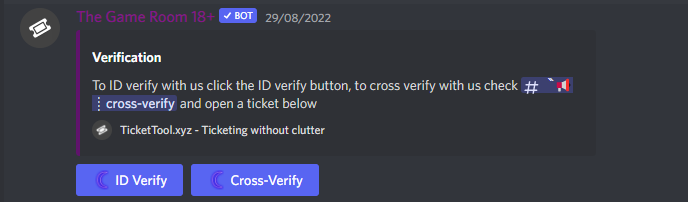
how do you make it so the ticket has options like this
https://i.imgur.com/Uy7D0fa.png
 humble sequoiaBOT
For a more convenient use of multipanels, you can now combine panels on the dashboard. This will allow you to directly send the multipanel from the dashboard or via the $panel ID command.
Where can I find this?
You can find this setting on the Dashboard -> Panel Configs -> Settings -> General Options
Note: if you're attaching all the panels to a panel called English, don't include English in the attached panels box (If you do this, it will create duplicate)
This will put all buttons from all of your panels on one message. The message is the panel message from the panel you're combining these panels in.
You can also watch this video tutorial.

 shut oracle
Is there currently a way to mass edit panels on the dashboard? I'm currently adding the forms / updating the ticket messages to all mine and its kinda a pain to fill in the info over and over lol
scenic plinth
You can clone an already made panel, but there is no current way to "mass edit" in the context I believe you mean.
shut oracle
scenic plinth
You can clone an already made panel, but there is no current way to "mass edit" ...
Alright thanks ❤️
iron nightBOT
Gave +1 Rep to @scenic plinth
gilded verge
@fossil gale, Hey, unfortunately I didn't have time to ask you to wait before you close your ticket, but since that's happened, please check the private message. There you will find the code for 10 days, 12h, 0m of premium that I wanted to give you for choosing the best Ticket Tool bot 
Below you will find information on how to activate the code.
humble sequoiaBOT
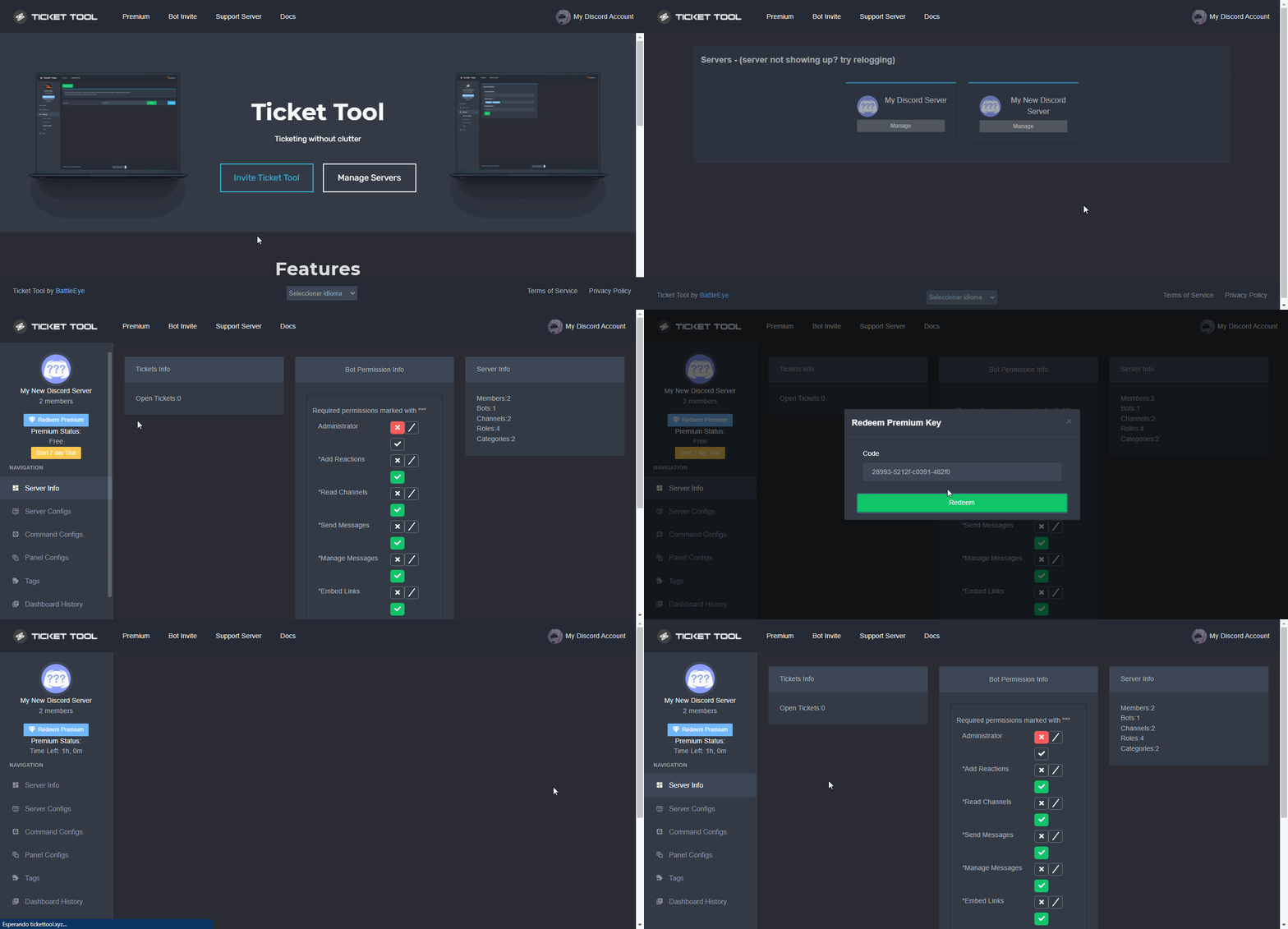
How to redeem premium (Key)
To redeem your premium key, go to the dashboard, select your server, then click " Redeem Premium" under the server's icon and name.
 fossil gale
gilded verge
<@935008313425420379>, Hey, unfortunately I didn't have time to ask you to wait ...
fossil gale
gilded verge
<@935008313425420379>, Hey, unfortunately I didn't have time to ask you to wait ...
Thank you so much @gilded verge !
iron nightBOT
Gave +1 Rep to @gilded verge
 proper jetty
anyone know how to add my support team to my tickets
I added them to the ticket support role didnt work
humble sequoiaBOT
How to let support team see into a ticket
About support roles
A support role lets your support team see into tickets with out having to add them manually to each and every ticket.
You can add as many support roles as you like per panel.
NOTE that the way discord works all admins can see into tickets regardless of this.
How to set a support role
To set a Support role go to the Dashboard -> Panel Configs -> Settings -> General Options -> Support Team Roles.

NOTE that the support role will not be able to see into tickets that are already created..
gilded verge
humble sequoia
@proper jetty, check
gilded verge
Have you created a new ticket to check it?
gilded verge
wait, did you use View As Role?
proper jetty
yes
humble sequoiaBOT
View As Role feature
Discord's integrated View As Role feature will allow you to see how different groups of roles will have access to your server's channels. Even though, this feature isn't reliable for thoroughly testing Ticket Tool considering that the tickets are created based on User roles, and that Roles permissions are only used for Support Team Roles, and Additional Roles.
For testing Ticket Tool as a user we suggest you ask a friend to open a ticket for you as a regular member would do, or use an alternative account to simulate the same process to make sure everything is set properly.
humble sequoiaBOT
━━ moved to ticket ━━
 tame warren
Morning ☕
Have purchased tickttool premium,
however still showing im not a premium member when managing servers.
could anyone point me in the right direction as to obtain the redeem key?
When i select server i wish to have premium for it save and just reapeats on that screen
Any help would be appreciated please&thank you
🙂
humble sequoiaBOT

Thank you
Thank you for purchasing Ticket Tool Premium @tame warren. You have now been given the <@&535595160189403136> role!
Found 11 servers in total and 1 with premium and permission
tame warren
thank you @mental grail for prompt response.
eh? delete my whole discord account or the tickettool servers please?
iron nightBOT
Gave +1 Rep to @rain finch
tame warren
i need to take the capitals from my discord username or server. sorry im new to this an a lilttle confussed. thank you
iron nightBOT
Gave +1 Rep to @rain finch
fallow ingot
This is incorrect information.
fallow ingot
tame warren
Morning ☕
Have purchased tickttool premium,
however still showing im not a pr...
Hi, please ignore the responses that the above user has provided, they’re incorrect. Can you try to log out and back in?
Unless of course you have resolved this issue :)
tame warren
surely i shouldnt have to delete my account to redeem preium tickettool
fallow ingot
no no no
 atomic zinc
how so i set it up i dont understand?
tame warren
fallow ingot
Unless of course you have resolved this issue :)
have tried logging out and in yes, i even edited and took all caps form username.
but still struggling to get past the server were i want premium on 🙂
Thank you for your response, appreciated
iron nightBOT
Gave +1 Rep to @fallow ingot
 restive ice
hello , i want to know how to make claim button to not make everyone talk in the ticket only 1 can talk
restive ice
@fallow ingot or anyone
 cold cargo
How do I fix manage servers in dashboard?
 slender minnow
restive ice
<@768144576946110475> or anyone
slender minnow
restive ice
<@768144576946110475> or anyone
Please avoid pinging a single individual, you can read #📂│information rule section before asking for help 
also, claiming is a premium feature
slender minnow
mint helm
I have some problem in bot
I can't fix it
You can explain your problem instead of stating that you have one. That way someone would be able to help you out efficiently.
mint helm
slender minnow
You can explain your problem instead of stating that you have one. That way some...

 soft jackal
I need help getting roles to synce up with tickets
rustic gale
soft jackal
I need help getting roles to synce up with tickets
What do you mean?
humble sequoiaBOT
How to disable the premium bot
To disable the premium bot you will have to go to the Dashboard ➞ Server Configs ➞ Premium bot ➞ And on the right-hand side select the primary free bot in the drop down menu.
Premium features will still work on the normal bot.

 opal nacelle
My server isn’t showing up?
humble sequoiaBOT
Don't see your server in the dashboard?
You will possibly need to relog. Look below to see steps on how to relog.
How to relog in the Dashboard.
First, you will need to go to the dashboard. Once your there, click on your avatar on the top right. after you clicked it, you will see button that says Logout. You must click that. Once you have logged out, you can log back in.
Note:
You need one of these 3 things to access the dashboard.
1. Server Owner (Level: 6)
2. Server Administrator (Level: 4)
3. Dashboard Role (Level: 2)
:warning: You can check your level using $level on your Discord Server
User permission level with Ticket Tool
@User is permission level: 0 (User)
```» *If it shows that your permission is **0**, you don't have any of the above **3 things** to manage the dashboard.*


**See the GIF below on how to relog:**
 humble meadow
can i make a new image to my ticket tool
rustic gale
What do you mean by “make a new image”
humble meadow
that lllogo
 rustic gale
Currently not possible
In the future there will be a paid version that lets you change it
humble meadow
do you know when'
rustic gale
Not sure, sorry

 rustic gale
humble meadow
can i change this then
rustic gale
humble meadow
can i change this then
Sure, that's the panel message
humble sequoiaBOT
The panel message is where people react to make a ticket. To customize it head over to your Dashboard --> Panel Configs -> Settings -> Panel Options -> Edit Panel Message
 rustic gale
Most options are premium only, but there's a few things you can change without premium
soft jackal
rustic gale
Most options are premium only, but there's a few things you can change without p...
I need help putting support roles.
 humble sequoiaBOT
⚠️ You're in the wrong place
We provide support for Ticket Tool Discord bot and cannot help you with whatever issue you have.
- We don't know which Support Team you should contact to get this issue resolved, and unfortunately we won't be able to accurately tell you.
If you don't have any further questions regarding our bot Ticket Tool, please close this ticket
rustic gale
soft jackal
I need help putting support roles.
What problem are you experiencing with support roles?
soft jackal
rustic gale
What problem are you experiencing with support roles?
When i add the role & I save it doesnt show in ticket
rustic gale
Changes to permissions in the dashboard are not retroactively applied to existing tickets
Only to new tickets created after the change
rustic gale
To apply the changes to old tickets, you can try closing and reopening them
(This won't work if your tickets are set to autodelete when closed)
soft jackal
tty
 prime bridgeBOT
 Successful bans:
 1
 Unsuccessful bans:
 0
 Reason: Ban evasion, troll
 Moderator: @forest goblet
 rustic wing
is there a option to see old tickets from other servers?
scenic plinth
If you have a transcript saved somewhere, yes, otherwise, no.
 wanton hornet
yo
when closing a ticket, it isnt sending to a category even though I have it set to do so
 wicked topaz
can i use premium on more than 1 discord server?
wicked topaz
pls
rustic gale
wicked topaz
can i use premium on more than 1 discord server?
Of course, you just have to buy multiple subscriptions
wicked topaz
rustic gale
Of course, you just have to buy multiple subscriptions
So 1 sub per server?
rustic gale
Yes
wicked topaz
Alright thanks
 twilit pulsar
How to make a ticket
obtuse krakenBOT
1. Invite Ticket Tool to your server
First you will want to invite the bot to your server. Once the bot is in your server, you can manage your server in the dashboard.
2. Create a Panel
To create a panel we are going to need to head over to the panel configs on the dashboard.
Once at the dashboard we will need to click Create Panel.
Enter a panel name (Fill in any optional settings you want).
Click Create Panel and your ready to get started with configuring your panel.
An example of a creating a panel is shown below.
3. Send the Panel to a Channel
Once you've created a panel on the dashboard you will need to send it to a channel using send on the dashboard.
Select the channel you want your panel to be created in and click send.
For other questions checkout $help faq.
An example of a sending a panel is shown below.
Having a Problem Sending the Panel?
Do $debug in a channel with Ticket Tool and make sure it has all the necessary Discord permissions.
humble sequoiaBOT
You can check our documentation here;
You can also check #📂│information for the basic setup;
You can also watch this video tutorial.
Our documentation contains all the info you need about the bot to be able to setup and configure the bot however you like.
gilded verge
or check video tutorial
 dire garden
So im having issues trying to check dashboard on the site. I have added the bot to the server im trying to do it for but it keeps saying ticket tool is not in the server or is offline.
rustic gale
dire garden
So im having issues trying to check dashboard on the site. I have added the bot ...
You need to log out of the dashboard and then log in again.
dire garden
I did that a few times and it still says the same
rustic gale
What's your server's ID?
jade topaz
$help support
humble sequoiaBOT
How to let support team see into a ticket
About support roles
A support role lets your support team see into tickets with out having to add them manually to each and every ticket.
You can add as many support roles as you like per panel.
NOTE that the way discord works all admins can see into tickets regardless of this.
How to set a support role
To set a Support role go to the Dashboard -> Panel Configs -> Settings -> General Options -> Support Team Roles.
NOTE that the support role will not be able to see into tickets that are already created..
jade topaz
@rapid nacelle
 green radish
can you change ticket tool pfp with premium?
fleet bane
I want you not to be clear technical support for everyone

 vast pebble
How do I answer a ticket?
 tame kayak
 mortal iron
vast pebble
How do I answer a ticket?
mortal iron
vast pebble
How do I answer a ticket?
You just a member....
 fierce spindle
How to make a ticket tool for members being able to create ticket?
Anyone can help?
 livid orbit
I bought a account yesterday and I never got the email
scenic plinth
green radish
can you change ticket tool pfp with premium?
No.
humble sequoiaBOT
⚠️ You're in the wrong place
We provide support for Ticket Tool Discord bot and cannot help you with whatever issue you have.
- We don't know which Support Team you should contact to get this issue resolved, and unfortunately we won't be able to accurately tell you.
If you don't have any further questions regarding our bot Ticket Tool, please close this ticket
You can check our documentation here;
You can also check #📂│information for the basic setup;
You can also watch this video tutorial.
Our documentation contains all the info you need about the bot to be able to setup and configure the bot however you like.
scenic plinth
Mutant^ (Setup message)
livid orbit
I didn’t get the account I bought it yesterday
humble sequoiaBOT
Premium Check
I was unable to detect a premium server for @livid orbit.
Found 2 servers in total and 0 with premium and permission
gilded verge
Please don't lie to users because it's not true.
Whitelabels is planned but not available at the moment
 coarse fable
How do I view member forms?
 plain surge
You need to added the question variable to the ticket message so that the response to the form questions show there

The question variable is the one highlighted in Yellow
You need to copy paste that into the ticket message embed description
humble sequoiaBOT
The Ticket Message is the first message sent by the bot in a new ticket. To customise it head over to your Dashboard ➞ Panel Configs ➞ Settings ➞ Ticket Options ➞ Edit Ticket Message
plain surge
@coarse fable
coarse fable
I already did that and the bot did nothing
plain surge
Can you send me a screenshot of the ticket message?
coarse fable
 plain surge
Can I have your server ID
plain surge
1 moment please
coarse fable
Ok...
plain surge
coarse fable
Which panel is this?
You have 4 panels
coarse fable
and the 4
plain surge
You need to add {create.form.1} here
 coarse fable
this is the message to close the ticket
 frigid mortar
Hey, is there a way to add a custom command?
plain surge
coarse fable
That's the message sent here
In there you can put the question title then in the line after it the answer
coarse fable
plain surge
That's the message sent here
Okay thanks, I'll see that later.
plain surge
While keeping the instructions of how they can close the ticket
iron nightBOT
Gave +1 Rep to @plain surge
plain surge
No problem 👍
plain surge
frigid mortar
Hey, is there a way to add a custom command?
Do you mean an auto response?
frigid mortar
No, like, a !command
plain surge
Ah, no
Ticket Tool doesn't have that.
However, you can use another bot and set an auto response there with the commands available in Ticket Tool
Ticket Tool can respond to bots if you set it up in Server configs
iron nightBOT
Gave +1 Rep to @plain surge
plain surge
No problem 👍
 bright sorrel
Has anyone figured out a way for new tickets to post to slack?
coarse fable
plain surge
That's the message sent here
I already have the form created, I want to see the answers
plain surge
Yes, you need to copy paste the variable in the ticket message embed
Like I mentioned above
coarse fable
A yes, but he doesn't answer, I already typed and nothing
plain surge
You need to add it here
 humble sequoiaBOT
The Ticket Message is the first message sent by the bot in a new ticket. To customise it head over to your Dashboard ➞ Panel Configs ➞ Settings ➞ Ticket Options ➞ Edit Ticket Message
plain surge
This is how you get to there
 gilded verge
@coarse fable, and please make sure you have forms turned on 😊

 livid orbit
I haven’t got the account I bought
gilded verge
livid orbit
I haven’t got the account I bought
what account? we are not selling anything
livid orbit
Is this not the fnaccounts.xyz website
humble sequoiaBOT
⚠️ You're in the wrong place
We provide support for Ticket Tool Discord bot and cannot help you with whatever issue you have.
- We don't know which Support Team you should contact to get this issue resolved, and unfortunately we won't be able to accurately tell you.
If you don't have any further questions regarding our bot Ticket Tool, please close this ticket
gilded verge
what did you try to do? 🤔
 undone sandal
livid orbit
Is this not the fnaccounts.xyz website
undone sandal
livid orbit
Is this not the fnaccounts.xyz website
Can you help me
livid orbit
On what ?
undone sandal
livid orbit
On what ?
How to start using the bot?? I have added it to my server
livid orbit
Idk
gilded verge
undone sandal
How to start using the bot?? I have added it to my server
You've opened a ticket so please wait for answer there.
undone sandal
gilded verge
You've opened a ticket so please wait for answer there.
How much time?
gilded verge
just be patient...
undone sandal
Fine
 rotund leaf
gilded verge
what did you try to do? 🤔
rotund leaf
gilded verge
what did you try to do? 🤔
i already fixed it, i am sorry 4 interruption
gilded verge
it's okay 😊
undone sandal
gilded verge
it's okay 😊
Can you help me it’s simple
How to start using the bot?? I have added it to my server
gilded verge
gilded verge
just be patient...
.
 humble sequoiaBOT
Don't see your server in the dashboard?
You will possibly need to relog. Look below to see steps on how to relog.
How to relog in the Dashboard.
First, you will need to go to the dashboard. Once your there, click on your avatar on the top right. after you clicked it, you will see button that says Logout. You must click that. Once you have logged out, you can log back in.
Note:
You need one of these 3 things to access the dashboard.
1. Server Owner (Level: 6)
2. Server Administrator (Level: 4)
3. Dashboard Role (Level: 2)
:warning: You can check your level using $level on your Discord Server
User permission level with Ticket Tool
@User is permission level: 0 (User)
```» *If it shows that your permission is **0**, you don't have any of the above **3 things** to manage the dashboard.*


**See the GIF below on how to relog:** sudden hare
Server is not displayed
sudden hare
Server is not displayed
BOT op
sudden hare
I logged out, but no luck.
gilded verge
humble sequoia
@sudden hare, please check all of this message.
undone sandal
Useless staff
gilded verge
@undone sandal, ok *and please stop spamming and sending dm's
undone sandal
gilded verge
<@806378589795778570>, ok *and please stop spamming and sending dm's
Bruh at least you can help you are just wasting time
Can I give a feedback?? About this bot
 obtuse krakenBOT
1. Invite Ticket Tool to your server
First you will want to invite the bot to your server. Once the bot is in your server, you can manage your server in the dashboard.
2. Create a Panel
To create a panel we are going to need to head over to the panel configs on the dashboard.
Once at the dashboard we will need to click Create Panel.
Enter a panel name (Fill in any optional settings you want).
Click Create Panel and your ready to get started with configuring your panel.
An example of a creating a panel is shown below.
3. Send the Panel to a Channel
Once you've created a panel on the dashboard you will need to send it to a channel using send on the dashboard.
Select the channel you want your panel to be created in and click send.
For other questions checkout $help faq.
An example of a sending a panel is shown below.
Having a Problem Sending the Panel?
Do $debug in a channel with Ticket Tool and make sure it has all the necessary Discord permissions.
humble sequoiaBOT
You can check our documentation here;
You can also check #📂│information for the basic setup;
You can also watch this video tutorial.
Our documentation contains all the info you need about the bot to be able to setup and configure the bot however you like.
gilded verge
@sudden hare, or you can check video tutorial if you want
sudden hare
Thx bro
 glass saddle
Good Morning/evening… one of my buddies in my squadron lost his account, he doesn’t have it synced by apple or Facebook. I heard someone in the server got his account back and I’m trying to help this guy out he doesn’t know english much.
Much respect!
humble sequoiaBOT
⚠️ You're in the wrong place
We provide support for Ticket Tool Discord bot and cannot help you with whatever issue you have.
- We don't know which Support Team you should contact to get this issue resolved, and unfortunately we won't be able to accurately tell you.
If you don't have any further questions regarding our bot Ticket Tool, please close this ticket
undone sandal
@gilded verge how much more time? Is this some kind of joke
coarse fable
I can't see the forms my members submit.
gilded verge
gilded verge
<@1005678222807142444>, and please make sure you have forms turned on 😊
@coarse fable, I wrote back to your message before, please check 😳
coarse fable
gilded verge
<@1005678222807142444>, I wrote back to your message before, please check <:this...
It's active, I already did what you asked
gilded verge
Can you go to Ticket Options->Ticket Message and show screenshot? Example:
 coarse fable
 gilded verge
Because you need to put this variable in Message Text or Embed Description
coarse fable
I've done this
gilded verge
okay, to be sure, please show screenshot from this settings
 coarse fable
 gilded verge
no, not this 😅
Panel Configs->Panel Settings->Form Options->Edit Form Options ^-^
 gilded verge
coarse fable
gilded verge
coarse fable
okay, now please create new ticket and fill this form
and after creating the ticket, please show the screenshot
coarse fable


 gilded verge
In a few minutes I will send a video with an example of how to correctly create forms, please wait 😊
jade topaz
fastest way to close 900 tickets?
coarse fable
gilded verge
In a few minutes I will send a video with an example of how to correctly create ...
Thanks
iron nightBOT
Gave +1 Rep to @gilded verge
gilded verge
coarse fable
Thanks
here you go ^-^
coarse fable
gilded verge
here you go ^-^
❤️❤️
gilded verge
jade topaz
fastest way to close 900 tickets?
Unfortunately, it is not possible to delete all tickets at the same time (ratelimit), so the best way is to paste the command $delete on each ticket. However, it is impossible to have 900 tickets because the discord limit is a maximum of 500 channels on each server
jade topaz
gilded verge
Unfortunately, it is not possible to delete all tickets at the same time (rateli...
yes i said the wrong thing actually
the tickets r up to number 900 but theres probably only maybe 100 open
or maybe 200
gilded verge
anyway, it's best to copy and paste the said command ($delete) and use it in each ticket one by one
jade topaz
ok
 lone dust
how to set your data from the premium bot to the normal bc my premium version is over
 ashen dagger
guys the / commands are not working
 upper bolt
No
ashen dagger
like /ordering
upper bolt
Ni👍
what to do to unblock the account because his brother's account is dear to him he spent a lot of time to increase the rank and because of me because I went to it he was blocked what to do
Please help 🥺
Please help 😖
😖
gilded verge
ashen dagger
guys the / commands are not working
prefix of @pseudo glen is $
gilded verge
upper bolt
what to do to unblock the account because his brother's account is dear to him h...
wrong server 😕
 cursive socket
I cant do ticket some help?
gilded verge
What do you mean? Do you have error?
 brisk atlas
humble sequoiaBOT
brisk atlas
humble sequoiaBOT
Ticket Tool Premium
Get premium at https://tickettool.xyz/premium
Manage your subscriptions at https://tickettool.xyz/subscriptions
Why Premium?
Premium lets you customize the bot just how you want it. It also helps keep the bot running.
 echo crag
Hi! How do I see forms that have been filled out?
pale pilot
You use the variable that you can find in the form settings and put it in the ticket message @echo crag
 finite lava
I set up a form intake, but the information isnt being displayed in the ticket
echo crag
pale pilot
You use the variable that you can find in the form settings and put it in the ti...
It does not seem to work out for me doing this.
pale pilot
What variable did you use?
echo crag
{create.form.1}
pale pilot
In the ticket message?
echo crag
correct
pale pilot
And what is displayed in the message?
echo crag
no message pops up at all when I do that
pale pilot
But a ticket is created?
echo crag
yes
finite lava
I think I have same issue

 pale pilot
And there's no message in the ticket?
 distant vortex
how do i do this like make there be multiple butttons
 echo crag
That message, yes I do get that
pale pilot
finite lava
I think I have same issue
You need to put the variable in the ticket message {create.form.1}
pale pilot
echo crag
That message, yes I do get that
Can you send a screenshot of what you put on the dashboard?
finite lava
pale pilot
You need to put the variable in the ticket message `{create.form.1}`
where? embed description? footer?
humble sequoiaBOT
For a more convenient use of multipanels, you can now combine panels on the dashboard. This will allow you to directly send the multipanel from the dashboard or via the $panel ID command.
Where can I find this?
You can find this setting on the Dashboard -> Panel Configs -> Settings -> General Options
Note: if you're attaching all the panels to a panel called English, don't include English in the attached panels box (If you do this, it will create duplicate)
This will put all buttons from all of your panels on one message. The message is the panel message from the panel you're combining these panels in.
You can also watch this video tutorial.
pale pilot
@distant vortex
distant vortex
ty
pale pilot
finite lava
where? embed description? footer?
Wherever you want the answer of the first question to be. Inside the ticket message. User the numbers 1-5 for the variable to get the rest of the answers
 nimble mauve
How do I work here??
finite lava
pale pilot
Wherever you want the answer of the first question to be. Inside the ticket mess...
it only returned 1 answer
 pale pilot
nimble mauve
How do I work here??
pale pilot
nimble mauve
How do I work here??
When we have applications open, you will be notified in #📣│server-news
finite lava
Do i need more createform for each question
pale pilot
finite lava
it only returned 1 answer
Yes, the number in the variable is for each answer. Use the same variable again but with a 2 for the second answer. And so on
nimble mauve
pale pilot
When we have applications open, you will be notified in <#509770538051305493>
I have been looking tho every single day since I joined but still nothing.
pale pilot
English only?
nimble mauve
When will they come out
echo crag
omg I feel so lost, where exactly do I need to put the variable?
nimble mauve
pale pilot
English only?
Yeah
 crude hedge
Is there a way to pull someone in a ticket if there not in our discord? Thank you.
pale pilot
echo crag
omg I feel so lost, where exactly do I need to put the variable?
In the ticket message. The message that is at the top of each ticket
pale pilot
nimble mauve
Yeah
Yeah, for English only we don't often open applications. Currently there are no plans to reopen them anytime soon. Sorry
pale pilot
crude hedge
Is there a way to pull someone in a ticket if there not in our discord? Thank yo...
No that's not possible
echo crag
Which to do that I need to go into Panel Message correct?
nimble mauve
pale pilot
Yeah, for English only we don't often open applications. Currently there are no ...
What ones are open?
crude hedge
pale pilot
No that's not possible
Dang. Thank you.
iron nightBOT
Gave +1 Rep to @pale pilot
pale pilot
echo crag
Which to do that I need to go into Panel Message correct?
It's not the panel message, it's the ticket message. Under ticket options
nimble mauve
I can just learn a new language if it means I can get a job
pale pilot
nimble mauve
What ones are open?
Arabic I think. Not too sure, as we currently have no active application. It's more of an open application
pale pilot
nimble mauve
I can just learn a new language if it means I can get a job
Lol, that'd take years
nimble mauve
pale pilot
Lol, that'd take years
I’m a quick learner
I know Spanish if that helps.
jade topaz
does ticket tool support custom bots as a feature
gilded verge
jade topaz
does ticket tool support custom bots as a feature
whitelabels are planned 😊
finite lava
pale pilot
Lol, that'd take years
how many question variables can exist in the form?
echo crag
pale pilot
It's not the panel message, it's the ticket message. Under ticket options
I GOT IT! THANK YOU
iron nightBOT
Gave +1 Rep to @pale pilot
 tulip torrent
help. when people try to use my ticket it just says they dont have access, they have access to talk in the channel so idk why :(
 covert swallow
Did you add one of their roles as a blacklisted role?
 earnest breach
prizafal please help me and onyx
rustic gale
What's going on?
earnest breach
we need help
tulip torrent
srrry wrong chat and help
earnest breach
me and onyx
rustic gale
What do you need help with?
earnest breach
tulip torrent
help. when people try to use my ticket it just says they dont have access, they...
thos
tulip torrent
tulip torrent
help. when people try to use my ticket it just says they dont have access, they...
here
rustic gale
Can you share a screenshot of the error?
 tulip torrent
got it!
tulip torrent
OH
YES TEHRE IS
rustic gale
Any role that's there is 100% completely prevented from interacting with the bot in any way
tulip torrent
Thank you!
rustic gale
unless they're admins or the server owner
tulip torrent
<3
rustic gale
Is the problem solved now?
I'm not sure what you're asking or what you need. Sorry
Did you take a look at our setup resources?
humble sequoiaBOT
You can check our documentation here;
You can also check #📂│information for the basic setup;
You can also watch this video tutorial.
Our documentation contains all the info you need about the bot to be able to setup and configure the bot however you like.
rustic gale
$help setup
humble sequoiaBOT
Setting up Ticket Tool
Visit the docs for setup info
General Setup
scenic plinth
What is not working? Can you send a screenshot?
I mean what I mean.
Question is, what do you mean?
Wdym?
humble sequoiaBOT
We would love to help you, but if you don't tell us what you need help with we can't help you :(
scenic plinth
$mentions
humble sequoiaBOT
Within all the messages the bot's sends (both embeds and text) you can mention either channels, roles, or even users, these mentions will only send a notification to the user if they are used within a text field, e.g: a role mentioned in an embed won't ping at all the users who have that role.
For mentioning a role you can use one out of three options:
{@Role Name} ➞ Which is Case Sensitive.
{RoleID} ➞ Replace RoleId with the Id of the role you are trying to ping.
<@&RoleID> ➞ Discord's native syntax to ping roles.
<#ChannelID> ➞ Mention a channel by its ID.
<@UserID> ➞ Mention a user by its ID.
humble sequoiaBOT
Ticket Tool Invite & Support
scenic plinth
Proved wrong 😊
Ok, then send a screenshot of it not working 🙂
By searching the keybinds on a web browser, if you can get that on TV.
You purchase a TV, once you learn how to screenshot your receipt, you can show it to the Delivery person.
 scenic scaffold
How do I add bot to my server ?
scenic plinth
$invite
humble sequoiaBOT
Ticket Tool Invite & Support
scenic plinth
2nd link
Ah yes, yet you used it to invite the bot you are asking questions for... gg.
Screenshot the scam?
Ah weird, you did that to invite the bot anyway 
Then why you asking questions about the bot?
A friend that you met within an hour?
No thanks 🙂
I will indeed keep myself, thanks.
prime bridgeBOT
Successful Timeouts: 1
Unsuccessful Timeouts: 0
Reason: Trolling questions, promoting suicide to staff members, trolling pinging staff members, get off the TV
Moderator: @scenic plinth
scenic plinth
☮️
prime bridgeBOT
Successful bans: 1
Unsuccessful bans: 0
Reason: Trolling and ban evading
Moderator: @pale pilot
scenic plinth
Anyways, feel free to ask questions, as long as you can screenshot your issues 🙂
 deft dust
When I go on lower ranks and stuff in my discord and click on open ticket it wont pop up for me, but when I go to my main role it shows. Pls help
 bold wraith
Ok, I just set up form options where do I find the information they filled out?
rustic gale
deft dust
When I go on lower ranks and stuff in my discord and click on open ticket it won...
Don't use View as Role for testing tickets
Tickets use user-level permissions instead of role-level permissions for the ticket creator, which can't be imitated using View as Role.
humble sequoiaBOT
View As Role feature
Discord's integrated View As Role feature will allow you to see how different groups of roles will have access to your server's channels. Even though, this feature isn't reliable for thoroughly testing Ticket Tool considering that the tickets are created based on User roles, and that Roles permissions are only used for Support Team Roles, and Additional Roles.
For testing Ticket Tool as a user we suggest you ask a friend to open a ticket for you as a regular member would do, or use an alternative account to simulate the same process to make sure everything is set properly.
rustic gale
bold wraith
Ok, I just set up form options where do I find the information they filled out?
You have to include the form variables in the ticket message:
humble sequoiaBOT
The Ticket Message is the first message sent by the bot in a new ticket. To customise it head over to your Dashboard ➞ Panel Configs ➞ Settings ➞ Ticket Options ➞ Edit Ticket Message
rustic gale
“Form variables” meaning {create.form.1} and so on
bold wraith
rustic gale
You have to include the form variables in the ticket message:
Sorry I should have deleted that message I searched for the term here in discord and found the anwser! Thanks very much
iron nightBOT
Gave +1 Rep to @rustic gale
rustic gale
bold wraith
Sorry I should have deleted that message I searched for the term here in discord...
Good luck, and let us know if you have any other difficulties!
 vapid aurora
rustic gale
Good luck, and let us know if you have any other difficulties!
vapid aurora
rustic gale
Good luck, and let us know if you have any other difficulties!
hey
you still here?
anyways my question is how to make it so when someone creates a ticket the new created ticket will be made in the same category not in a different categories
figured it out sry for ping
humble sequoiaBOT
We would love to help you, but if you don't tell us what you need help with we can't help you :(
plain surge
$help ping
humble sequoiaBOT
How to make Ticket Tool ping a role
To make ticket tool ping a role when a ticket is opened, go to the Dashboard -> Panel Configs -> Settings -> Ticket Options -> Ticket Message -> Message Text and do this:
{@Role name} This is case sensitive and the role must have @mentions enabled
 plain surge
You can also use {Role ID}
Can you send me a screenshot of what the ticket message looks like
Take a screenshot of your screen inside the ticket
And send it
Open Google and search how to take a screenshot then come back when you've figured it out
Or you can always take a photo of the screen with your phone
opal cradle
@plain surge im sorry for you XD
How many braincells have you lost dealing with ppl?
plain surge
too many to count
opal cradle
Type "how to take a screenshot " in your browser
You are just brain dead
Or a troll
plain surge
Alright @opal cradle, thanks for trying to help, but I'll continue from here.
iron nightBOT
Gave +1 Rep to @opal cradle
plain surge
Tell me the name of your server @visual vector
I'll have a look at it
The name of your server
 marsh sail
c
 radiant cove
Might be a dumb question, but how can I invite Ticket Tool Helper to a server, if at all? Is that the only bot I could make a staff list with, like the one in #📂│information ?
pale pilot
radiant cove
Might be a dumb question, but how can I invite Ticket Tool Helper to a server, i...
It's a custom branded bot of the Sapphire Bot.
 quaint junco
I invited the bot, but it doesn't show up on the manage servers
@pale pilot ?
Sorry
rustic gale
quaint junco
I invited the bot, but it doesn't show up on the manage servers
Please read the following carefully:
humble sequoiaBOT
Don't see your server in the dashboard?
You will possibly need to relog. Look below to see steps on how to relog.
How to relog in the Dashboard.
First, you will need to go to the dashboard. Once your there, click on your avatar on the top right. after you clicked it, you will see button that says Logout. You must click that. Once you have logged out, you can log back in.
Note:
You need one of these 3 things to access the dashboard.
1. Server Owner (Level: 6)
2. Server Administrator (Level: 4)
3. Dashboard Role (Level: 2)
:warning: You can check your level using $level on your Discord Server
User permission level with Ticket Tool
@User is permission level: 0 (User)
```» *If it shows that your permission is **0**, you don't have any of the above **3 things** to manage the dashboard.*
**See the GIF below on how to relog:** kindred mountain
Hi I have tried to join my families clan. They are in a different area that I can't access. I've made v purchases and linked all my info. I can't start over please help me move.
Thank you
humble sequoiaBOT
⚠️ You're in the wrong place
We provide support for Ticket Tool Discord bot and cannot help you with whatever issue you have.
- We don't know which Support Team you should contact to get this issue resolved, and unfortunately we won't be able to accurately tell you.
If you don't have any further questions regarding our bot Ticket Tool, please close this ticket
 rapid stone
is ticket tool transitioning to slash commands
radiant cove
pale pilot
It's a custom branded bot of the Sapphire Bot.
Thank you! If I wanted to make a staff list like yours then, would I use Sapphire Bot?
iron nightBOT
Gave +1 Rep to @pale pilot
pale pilot
radiant cove
Thank you! If I wanted to make a staff list like yours then, would I use Sapphir...
If you want
pale pilot
rapid stone
is ticket tool transitioning to slash commands
In v5, but that's not happening for another few months
rapid stone
pale pilot
In v5, but that's not happening for another few months
but will it be mandatory to switch?
bc i know it depends on discord giving you permissions for your bot
pale pilot
rapid stone
bc i know it depends on discord giving you permissions for your bot
This deadline is already over and we have the message intent
rapid stone
pale pilot
This deadline is already over and we have the message intent
ahh okay so yall have message intent. so we'll not be forced to actually used slash, its just preference
 mellow sentinel
Can't get help for major glitches....Game Sucks
humble sequoiaBOT
⚠️ You're in the wrong place
We provide support for Ticket Tool Discord bot and cannot help you with whatever issue you have.
- We don't know which Support Team you should contact to get this issue resolved, and unfortunately we won't be able to accurately tell you.
If you don't have any further questions regarding our bot Ticket Tool, please close this ticket
 clever egret
 rustic gale
clever egret
rustic gale
clever egret
That's a bot issue. Which version of the bot do you have in the server, and which version of the bot is enabled in Server Configs in your dashboard?
clever egret
rustic gale
That's a bot issue. Which version of the bot do you have in the server, and whic...
where to see the version
rustic gale
This is the basic (free) bot, #4843. Note the white ticket avatar

This is the premium bot, #6207. Note the golden ticket avatar
 clever egret
rustic gale
This is the premium bot, #6207. Note the golden ticket avatar
clever egret
rustic gale
This is the premium bot, #6207. Note the golden ticket avatar
so i'll have to add the bot ticket tool premium
 proud talon
Hello! In my ticket message, I am putting {userId}, but it doesn’t seem to be pinging the role. It just outputs {userId}. I also have other roles that I want the bot to ping, and I did the same thing as the other role, yet these roles are pinged. Any ideas?
humble sequoiaBOT
Within all the messages the bot's sends (both embeds and text) you can mention either channels, roles, or even users, these mentions will only send a notification to the user if they are used within a text field, e.g: a role mentioned in an embed won't ping at all the users who have that role.
For mentioning a role you can use one out of three options:
{@Role Name} ➞ Which is Case Sensitive.
{RoleID} ➞ Replace RoleId with the Id of the role you are trying to ping.
<@&RoleID> ➞ Discord's native syntax to ping roles.
<#ChannelID> ➞ Mention a channel by its ID.
<@UserID> ➞ Mention a user by its ID.
gilded verge
humble sequoia
Hey @proud talon, check
the entire list of available variables can be found in Panel Configs->Panel Settings->Supported Variables 😊
 proud talon
Alr, ty!
 cloud quiver
How do i let users send pictures and links inside the tickets
rustic gale
Grant them the Embed Links and Attach Files permissions in Permission Options
$help perms
humble sequoiaBOT
How to set the permissions for tickets
To set a change permissions go to the Dashboard -> Panel Configs -> Settings -> Permission Options
 rustic gale
@cloud quiver
 violet nexus
i need help
gilded verge
violet nexus
i need help
You opened the ticket and didn't ask for help there
gilded verge
violet nexus
how do i do tht
this is your ticket: --- -click this channel
 hasty sapphire
uhh i Accidentally clicked the tickets
 brazen gulch
Hiya, just wondering. Is there a way to make a ticket show the answers to the form (used to create the ticket) ?
Not sure if I'm being simple! Probably am.
So information is shown in the channel created here;
 fossil sleet
Hello. I'm about to transfer a server to another owner. Do I need to perform any actions in TicketTool for it?
 tall dragon
The Towns don't work doesn't let me interact with mine
jade topaz
.
 lunar solar
brazen gulch
Hiya, just wondering. Is there a way to make a ticket show the answers to the fo...
lunar solar
brazen gulch
Hiya, just wondering. Is there a way to make a ticket show the answers to the fo...
Yes, so each question has a question variable:

so for each question the end number goes up by 1
so under ticket options you would add those variables in the embed for the form questions output. e.g.
Question 1: {create.form.1}
Question 2: {create.form.2}
Question 3: {create.form.2}
etc
rustic gale
fossil sleet
Hello. I'm about to transfer a server to another owner. Do I need to perform any...
The server owner always has dashboard access. No action should be needed
jade topaz
@rustic gale
hiiiii, oh oops anyways!
how do i make it so all the tickets go under one category!
rustic gale
$help category
humble sequoiaBOT
How to set the open category
To set a open category go to the Dashboard -> Panel Configs -> Settings -> Category Options -> Category Open
rustic gale
@jade topaz Here's how
jade topaz
thank you so much!
 narrow pike
Hello there how can i see the answers on the ticket form ? I've already seen the site there https://docs.tickettool.xyz/dashboard/panel-configs/form-options#usage-of-the-responses but I still haven't figured out how to see the answers on the form

Questionaries on ticket opening!
humble sequoiaBOT
Pop-up Form
A discord Form allows you to let the user answer individual questions in a pop up Form, which then displays the answers in the ticket message. This can save time if you already know what you want to ask the user.
Setup Forms
Forms can be enabled under Panel Settings > Form Options > Edit Forms Options.
In the new pop up window, you can now enable and edit your own Form.
Form Options
You can add up to 5 questions in the discord form. This is a discord limitation. Each question can have a placeholder in the input field, a minimum and maximum input, multi-line and also the option to have the answer required.
Options:
Question Title: Your Question goes here
Question Placeholder: The placeholder text in the input field
Required: If enabled, the user has to answer this question, to submit the form
Multi-Line Input: Allows the user to input multiple lines
Minimum and Maximum Input: Set a minimum and maximum input value for the user
❗Display the answer ❗
To display the answers from the user, you need to go into your Panel Settings > Ticket Options > Edit Ticket Message. In there you use the variable {create.form.x} and just replace x with the number of your question. For example, the response to Question 1 can be displayed with {create.form.1}. If you don't use this variable, the response from the user is lost.
 rustic gale
Look at “Display the answer” above
 raw merlin
@rustic gale
I want help How do I make the bot open the tick list?
I mean how do I do the bot
rustic gale
raw merlin
I want help How do I make the bot open the tick list?
Please clarify your question...?
 brazen violet
Hello guys 😊
I want to create a ticket tool log do u know how to do it?
@rustic gale
rustic gale
brazen violet
Hello guys 😊
I want to create a ticket tool log do u know how to do it?
What do you mean by a ticket tool log?
$logs
humble sequoiaBOT
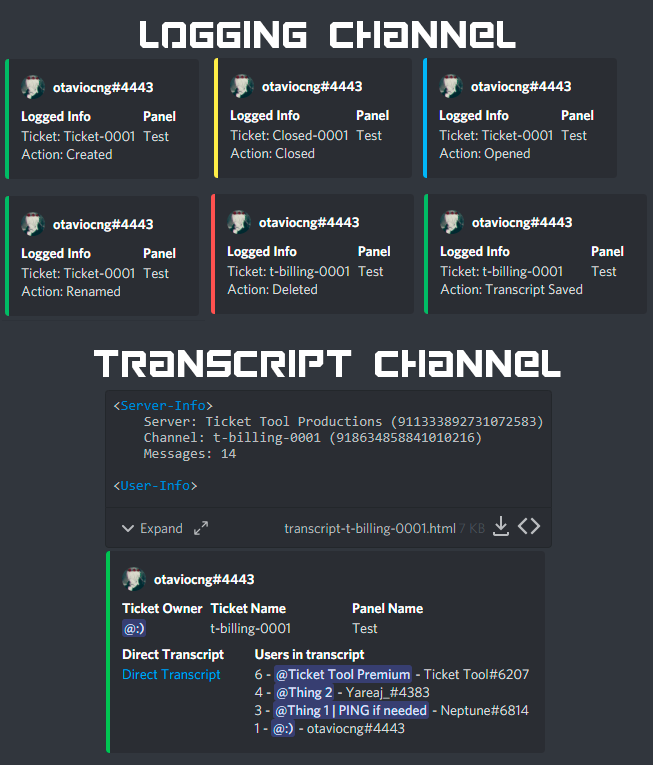
With Ticket Tool, you can customize the behavior the bot takes when logging your tickets! For editing these options follow these steps:
Dashboard ➞ Panel Configs ➞ Settings ➞ Logging Options
Transcript Channel
Here you will choose the channel where @humble sequoia would send a copy of the transcript to
Logging Channel
Here you will define which channel @humble sequoia will save the Logs in (ticket created/deleted/closed, etc.)
Logs you can save:
➞ Ticket Created ➞ Logs when a ticket is created
➞ Ticket Closed ➞ Log when a ticket is closed
➞ Ticket Opened ➞ Log when a ticket is opened
➞ Ticket Renamed ➞ Log when a ticket is renamed
➞ Ticket Deleted ➞ Log when a ticket is deleted
➞ Transcript Saved ➞ Log when a ticket is saved
Select with  (disable) or
  (enabled) which logs you would like
ᅠ
 Premium Features
Direct Message Transcript ➞ Sends the ticket transcript to the ticket user whenever the ticket is either closed, deleted, or both.
Auto Save Transcript ➞ Saves the ticket transcript into to the transcript channel whenever the ticket is either closed, deleted, or both.
Below you can see an example of what the Logging Channel will look like as well as the Transcript Channel:
 rustic gale
Here's the bot's logging options
brazen violet
rustic gale
What do you mean by a ticket tool log?
Means to create a channel that shows when a ticket is opened or closed
opal cradle
brazen violet
Means to create a channel that shows when a ticket is opened or closed
Transcripts?
brazen violet
opal cradle
Transcripts?
Yup
opal cradle
Its all in the embed above
opal cradle
humble sequoia
This one
 dry blade
i want the bot to when someone opens a ticket he tags a role, but i dont know how to do it
i know how to edit the opening message, but idk how to tag a role in the message
rustic gale
$mentions
humble sequoiaBOT
Within all the messages the bot's sends (both embeds and text) you can mention either channels, roles, or even users, these mentions will only send a notification to the user if they are used within a text field, e.g: a role mentioned in an embed won't ping at all the users who have that role.
For mentioning a role you can use one out of three options:
{@Role Name} ➞ Which is Case Sensitive.
{RoleID} ➞ Replace RoleId with the Id of the role you are trying to ping.
<@&RoleID> ➞ Discord's native syntax to ping roles.
<#ChannelID> ➞ Mention a channel by its ID.
<@UserID> ➞ Mention a user by its ID.
rustic gale
Include a role mention in the message text
 sharp pecan
My server doesn’t show up on the server list when I go to manage servers
humble sequoiaBOT
━━ moved to ticket ━━
 deep inlet
Global open ticket limit (Across all your panels) : in one day by all the members ?
humble sequoiaBOT
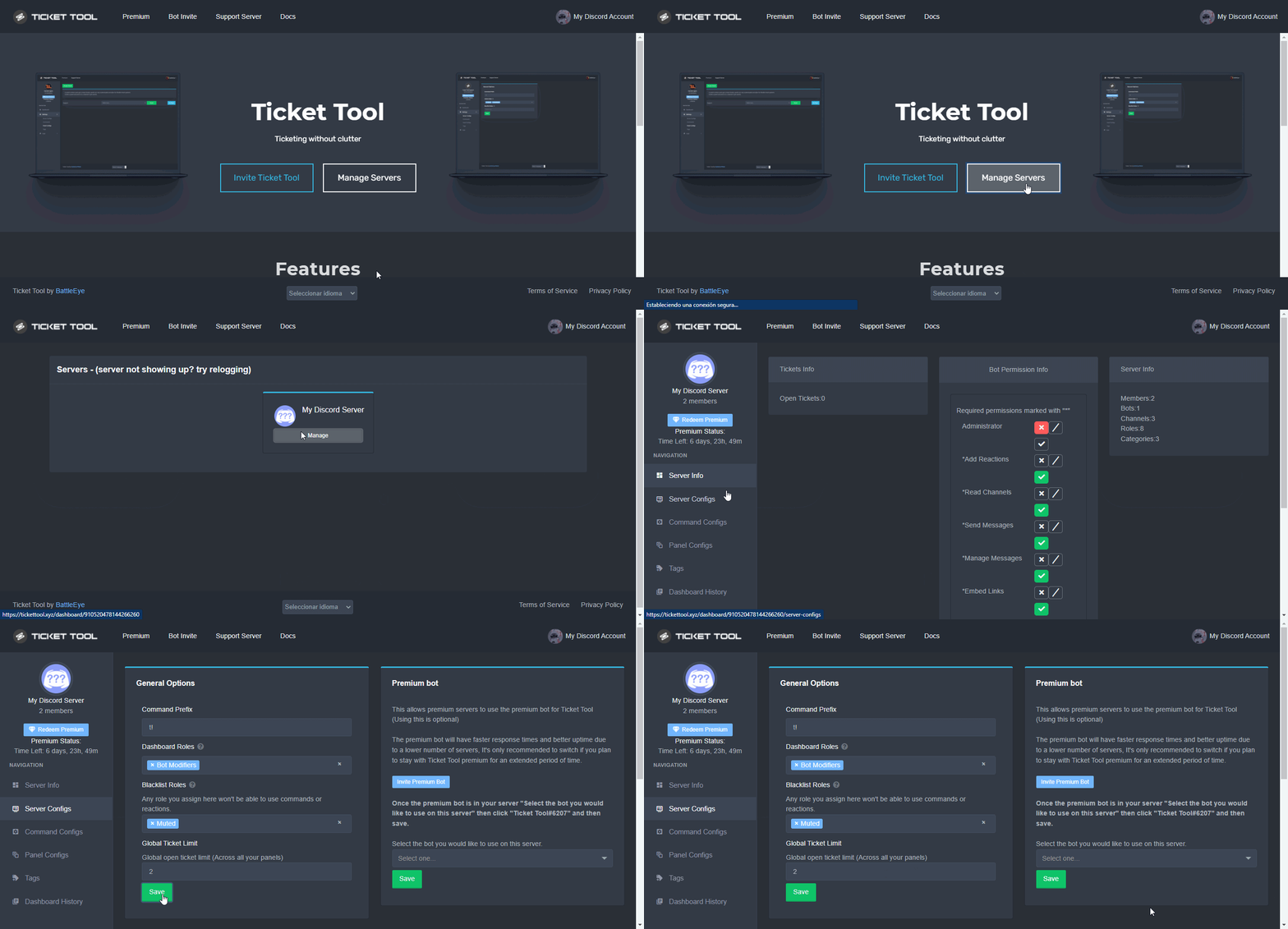
Unlike the regular Ticket Limit, the global limit will limit the amount of tickets a user can create at the same time for ALL Panels. When a ticket is closed again, the limit resets for that user.
To customize it head over to your Dashboard ➞ Server Configs ➞ Global Ticket Limit
Note:
This is not a limit for how many tickets a user can open at all times or how many tickets you can have open on the server in total. This is just a limit per user for open tickets.
 gilded verge
humble sequoia
gilded verge
humble sequoia
check
deep inlet
humble sequoia
so it's not for all the members.
rustic gale
Sadly, that functionality does not exist yet
 simple viper
why can't I manage the ticket tool on the website? it just comes up Servers - (server not showing up? try relogging)
It looks like Ticket Tool isn't online or in any servers you have permission to access,Invite Ticket Toolor check it'sstatus
 warm garnet
Do saved options auto-update for a panel that has already been sent to your server? For example, I updated the setting from the dashboard to pin the main ticket message once created. Will that auto-update for a panel that has already been sent to the server or will I need to re-send it?
deep inlet
i need premuim to write in panel ?
how
custom description on the panel ?
i think u need premuim
i think
Updating the settings for your panels.
rustic gale
warm garnet
Do saved options auto-update for a panel that has already been sent to your serv...
Re-send it with the Send butto or update it with the Update Panel button
crude hedge
So we at times we have to add a link into our tickets to use as proof. Problem is the link seems to die after awhile. Is there a reason for that? Thank you.
rustic gale
 stoic nimbus
There is any one speak arabic here ..?
stoic nimbus
There is any one speak arabic here ..?
There is Arabic support in #🎫│make-a-ticket
rustic gale
crude hedge
So we at times we have to add a link into our tickets to use as proof. Problem i...
Please describe your issue in more detail?
stoic nimbus
rustic gale
There is Arabic support in <#571706435449257997>
Oh no they will reply me after 24h ...
I have a small problem
When i need go to dashboard i have this
 crude hedge
rustic gale
Please describe your issue in more detail?
crude hedge
rustic gale
Please describe your issue in more detail?
I'll do my best lol.
So basically we use the ticket tool to reprimand people. We use a reason wich includes a link that may be a video or a picture. If we try to view the link it's no longer valid (won't open anymore).
Hope that helps.
rustic gale
stoic nimbus
When i need go to dashboard i have this
Relog: log out of the dashboard, then log in again
rustic gale
crude hedge
I'll do my best lol.
So basically we use the ticket tool to reprimand people. W...
A link to where?
crude hedge
rustic gale
A link to where?
It may be a discord link or youtube etc..
rustic gale
If whatever you're linking to stops existing, of course it will become a dead link
That includes images and videos uploaded into the ticket itself
With premium, media uploaded into the ticket is saved along with the transcript, up to 8 MB
crude hedge
Strange Not sure how it becomes no existent.
rustic gale
crude hedge
Strange Not sure how it becomes no existent.
When the channel is deleted, the media disappears along with the rest of the channel
crude hedge
rustic gale
With premium, media uploaded into the ticket is saved along with the transcript,...
Oh. Maybe that's the issue then. We do keep a transcript though.
Thank you though.
rustic gale
Let us know if you need any more help
 runic robin
is there anything else I need to do to activate premium?
rustic gale
$pc @runic robin
humble sequoiaBOT
Thank you
Thank you for purchasing Ticket Tool Premium @runic robin. You have now been given the <@&535595160189403136> role!
Found 12 servers in total and 2 with premium and permission
rustic gale
Probably already active, are you having any trouble?
 humble sequoiaBOT
━━ moved to ticket ━━
 compact tusk
when i move a ticket from the category i set for category open and close it, it doesnt move to the category i set for category closed
is there a way around that
rustic gale
compact tusk
when i move a ticket from the category i set for category open and close it, it ...
But if you leave it there and close it, it moves to the closed category correctly?
compact tusk
rustic gale
But if you leave it there and close it, it moves to the closed category correctl...
Correct
rustic gale
The bot may not have permission to manage channels in the category it's trying to move the channel from
Create a new channel in that category and type $debug to see what happens
compact tusk
Ok will try when i get the chance
I'm not sure if the character counter is broken or not, but it displays "24/250" yet I can't add anymore characters. This is on Ticket Embed Settings
It seems to cut off the last characters as well
rustic gale
Character counter may be broken unfortunately
compact tusk
no worries, just giving a heads up
scenic plinth
Character count doesn't display the proper counts, and is known of. However, it is still restricted to 250.
 spiral dune
how do i make the link to a tickect i have a server but i cant get it to make tickects
rustic gale
spiral dune
how do i make the link to a tickect i have a server but i cant get it to make ti...
- Enter your dashboard
- Create a panel
- Send the panel to a channel in your server
Which step are you stuck on
 storm raven
hi
i have problem
I changed the name of the ticket that will be opened, but it remains as usual. The ticket remains, not the seller.
 rustic gale
storm raven
I changed the name of the ticket that will be opened, but it remains as usual. T...
rustic gale
storm raven
I changed the name of the ticket that will be opened, but it remains as usual. T...
Well, that's because you don't have premium enabled
The red means it's a premium-exclusive feature you don't have access to
humble sequoiaBOT
Ticket Tool Premium
Get premium at https://tickettool.xyz/premium
Manage your subscriptions at https://tickettool.xyz/subscriptions
Why Premium?
Premium lets you customize the bot just how you want it. It also helps keep the bot running.
 Faster Premium Bot
Automatic Transcripts
Full Customization
Custom Buttons
Direct Messages
Ticket Automation
Premium Support
You can purchase premium here:
Price
$6 - Monthly
$66 - Yearly
 Premium
storm raven
Premium
storm raven
i don't have visa , paypal , mastercard
rustic gale
What payment methods do you have?
storm raven
rustic gale
What payment methods do you have?
no thing
storm raven
rustic gale
What payment methods do you have?
i don't have any payment 😦
humble sequoiaBOT
Votes
Current Votes: 0
Lifetime Votes: 0
Linked Votes: 0
Vote Links
Linking Info
Linked User: Not Linked
You can give your future votes to another user by linking with that user.
To link use $vote link (@user or userId)
To unlink use $vote unlink
Redeeming
Each vote is worth 12 hours of premium and can be redeemed once you have atleast 6 votes.
Your current votes are worth 0m
To redeem your current votes use $vote redeem
humble sequoiaBOT
You can't link to yourself.. sillypants. =)
rustic gale
Click the links up there
 rustic gale
Redeeming
Each vote is worth 12 hours of premium and can be redeemed once you have atleast 6 votes.
storm raven
next ?
storm raven
rustic gale
> **Redeeming**
> Each vote is worth 12 hours of premium and can be redeemed onc...
next ?
before 6 vote ? next
rustic gale
humble sequoia
I'm sure you can read the rest of the embed
prime bridgeBOT
Successful bans: 1
Unsuccessful bans: 0
Reason: troll, ban evading
Moderator: @pale pilot
storm raven
Hello
i want make this how ?
 humble sequoiaBOT
Pop-up Form
A discord Form allows you to let the user answer individual questions in a pop up Form, which then displays the answers in the ticket message. This can save time if you already know what you want to ask the user.
Setup Forms
Forms can be enabled under Panel Settings > Form Options > Edit Forms Options.
In the new pop up window, you can now enable and edit your own Form.
Form Options
You can add up to 5 questions in the discord form. This is a discord limitation. Each question can have a placeholder in the input field, a minimum and maximum input, multi-line and also the option to have the answer required.
Options:
Question Title: Your Question goes here
Question Placeholder: The placeholder text in the input field
Required: If enabled, the user has to answer this question, to submit the form
Multi-Line Input: Allows the user to input multiple lines
Minimum and Maximum Input: Set a minimum and maximum input value for the user
❗Display the answer ❗
To display the answers from the user, you need to go into your Panel Settings > Ticket Options > Edit Ticket Message. In there you use the variable {create.form.x} and just replace x with the number of your question. For example, the response to Question 1 can be displayed with {create.form.1}. If you don't use this variable, the response from the user is lost.
lunar solar
@storm raven ^
 opaque terrace
Hey! I tried the new Form Options killer feature 🔥
Little bug: the message of the form doesn't appear on the ticket!

Also: How can I create a new button (I can't find the feature in the Dashboard)
Thanks for your help 🙏
humble sequoiaBOT

The new Discord Buttons allow for a much smoother and convenient experience. They reduce lag and work much better than emojis. With ticket tool you can edit all the buttons however you like! Buttons can show emojis, text and can have 4 different colors.
Where can I edit them?
Dashboard ➞ Panel Configs ➞ Settings ➞ Button Options ➞ Setting
 opal cradle
@opaque terrace
opaque terrace
opal cradle
<@576706846203707403>
Thanks for your help but I can't see the option to add an other button 😕
iron nightBOT
Gave +1 Rep to @opal cradle
opaque terrace
I want to add an other button, near my "Create a ticket one"
 humble sequoiaBOT
For a more convenient use of multipanels, you can now combine panels on the dashboard. This will allow you to directly send the multipanel from the dashboard or via the $panel ID command.
Where can I find this?
You can find this setting on the Dashboard -> Panel Configs -> Settings -> General Options
Note: if you're attaching all the panels to a panel called English, don't include English in the attached panels box (If you do this, it will create duplicate)
This will put all buttons from all of your panels on one message. The message is the panel message from the panel you're combining these panels in.
You can also watch this video tutorial.
opaque terrace
opal cradle
You will need to set up multipanels
thanks man!
iron nightBOT
Gave +1 Rep to @opal cradle
opal cradle
Wait
humble sequoiaBOT
Multipanels are panels with multiple buttons attached to them.
How to create a Multipanel
All users can combine multiple panels into one multipanel!
First, find the IDs of each panel you wish to combine. You can find them in your Panel Configs in the Dashboard
Next, send the multipanel to a channel using $panel [id1] [id2] {id3} ....
e.g. $panel 1 2 4 17 35 to combine panels 1, 2, 4, 17 and 35.
Up to 25 panels may be combined.
You can also watch this video tutorial.
storm raven
what is problem ?

 opal cradle
opaque terrace
And for the bug on the Options Forms?
opal cradle
opaque terrace
And for the bug on the Options Forms?
Its explained somewhere above I belive
lunar solar
opaque terrace
And for the bug on the Options Forms?
it's not a bug
In ticket options in the ticket message section you need to include {create.form.1} in the description section of the embed
each question under the forms section has a Question Variable the number corresponds to the question. Forms can have a maximum of 5 questions so at the most you would have 5 question varibles:
{create.form.2}
{create.form.3}
{create.form.4}
{create.form.5}```How you would structure it in the embed description under ticket options --> ticket message might be:
Response: {create.form.1}```
etc

@opaque terrace @storm ravenRead through:
humble sequoiaBOT
Pop-up Form
A discord Form allows you to let the user answer individual questions in a pop up Form, which then displays the answers in the ticket message. This can save time if you already know what you want to ask the user.
Setup Forms
Forms can be enabled under Panel Settings > Form Options > Edit Forms Options.
In the new pop up window, you can now enable and edit your own Form.
Form Options
You can add up to 5 questions in the discord form. This is a discord limitation. Each question can have a placeholder in the input field, a minimum and maximum input, multi-line and also the option to have the answer required.
Options:
Question Title: Your Question goes here
Question Placeholder: The placeholder text in the input field
Required: If enabled, the user has to answer this question, to submit the form
Multi-Line Input: Allows the user to input multiple lines
Minimum and Maximum Input: Set a minimum and maximum input value for the user
❗Display the answer ❗
To display the answers from the user, you need to go into your Panel Settings > Ticket Options > Edit Ticket Message. In there you use the variable {create.form.x} and just replace x with the number of your question. For example, the response to Question 1 can be displayed with {create.form.1}. If you don't use this variable, the response from the user is lost.
storm raven
lunar solar
How you would structure it in the embed description under `ticket options` --> `...
bruh i don't know ._.
 fathom crypt
Hey there lads! I am setting up the premium ticket tool and i was wondering if i can setup that the ticket tool automatically sends a file when a ticket is opened? Thanks in advance
 opal cradle
humble sequoia
opal cradle
humble sequoia
@lunar solar whats the $ command for this embed?
humble sequoiaBOT
Don't see your server in the dashboard?
You will possibly need to relog. Look below to see steps on how to relog.
How to relog in the Dashboard.
First, you will need to go to the dashboard. Once your there, click on your avatar on the top right. after you clicked it, you will see button that says Logout. You must click that. Once you have logged out, you can log back in.
Note:
You need one of these 3 things to access the dashboard.
1. Server Owner (Level: 6)
2. Server Administrator (Level: 4)
3. Dashboard Role (Level: 2)
:warning: You can check your level using $level on your Discord Server
User permission level with Ticket Tool
@User is permission level: 0 (User)
```» *If it shows that your permission is **0**, you don't have any of the above **3 things** to manage the dashboard.*


**See the GIF below on how to relog:**@stoic nimbus check the embed above
lunar solar
opal cradle
<@892854649172946985> whats the $ command for this embed?
$form
opal cradle
Thanks
 gentle scroll
Hello. I have a support/question;
One of my Mods delete a ticket yesterday that I have to pull up so that way me and my Co-owner can look at. Is there a possible way to recover that channel?
slender minnow
gentle scroll
Hello. I have a support/question;
One of my Mods delete a ticket yesterday that ...
if the ticket was saved (as transcript) then you can view the content
otherwise there is no way of recovering the conversation
gentle scroll
slender minnow
otherwise there is no way of recovering the conversation
I did not save it as a transcript. RIP.
Thank you for the help, I was afraid that was gonna be the answer
iron nightBOT
Gave +1 Rep to @slender minnow
jade topaz
Can I limit the number of tickets which can be created through a panel
 onyx canyon
wher i can find the self roles ?
covert swallow
jade topaz
Can I limit the number of tickets which can be created through a panel
Yes
covert swallow
onyx canyon
wher i can find the self roles ?
onyx canyon
covert swallow
<#509239005481664524>
thx
iron nightBOT
Gave +1 Rep to @covert swallow
lunar solar
jade topaz
How
Without looking pretty sure it’s general settings at the top
covert swallow
jade topaz
How
Wait do you mean per user or in general
covert swallow
jade topaz
How to change created ticket channels category?
Not a feaute yet, its in development
jade topaz
covert swallow
Wait do you mean per user or in general
In general like a lets say i set limit to 25
Then after 25 tickets nobody will be able to open them
covert swallow
There is not, you can put it in #💡│suggestions though
 unique sapphire
Guys I have a problem with Ticket tool
pale pilot
I assume that's why you are here


 humble sequoiaBOT
How to disable the premium bot
To disable the premium bot you will have to go to the Dashboard ➞ Server Configs ➞ Premium bot ➞ And on the right-hand side select the primary free bot in the drop down menu.
Premium features will still work on the normal bot.
 weak oasis
here you go
rustic gale
 muted marsh
hi, how do i make a multiple pannel button options?
muted marsh
hi, how do i make a multiple pannel button options?
Here's how
humble sequoiaBOT
Multipanels are panels with multiple buttons attached to them.
How to create a Multipanel
All users can combine multiple panels into one multipanel!
First, find the IDs of each panel you wish to combine. You can find them in your Panel Configs in the Dashboard
Next, send the multipanel to a channel using $panel [id1] [id2] {id3} ....
e.g. $panel 1 2 4 17 35 to combine panels 1, 2, 4, 17 and 35.
Up to 25 panels may be combined.
You can also watch this video tutorial.
For a more convenient use of multipanels, you can now combine panels on the dashboard. This will allow you to directly send the multipanel from the dashboard or via the $panel ID command.
Where can I find this?
You can find this setting on the Dashboard -> Panel Configs -> Settings -> General Options
Note: if you're attaching all the panels to a panel called English, don't include English in the attached panels box (If you do this, it will create duplicate)
This will put all buttons from all of your panels on one message. The message is the panel message from the panel you're combining these panels in.
You can also watch this video tutorial.
muted marsh
thank you
 weary elk
Hello, I'm trying to push out a ticket panel to a channel, but I'm getting this message even though the bot has admin perms:

I think the bot is malfunctioning.
Does anyone know how to fix this?
rustic gale
weary elk
Hello, I'm trying to push out a ticket panel to a channel, but I'm getting this ...
Hello. Do you still need help with this?
Actually, i just noticed you made a ticket
humble sequoiaBOT
━━ moved to ticket ━━
 quiet cape

 cunning sage
Why i got this, when i have adminstrator in so many server

And i relogging so many times
rustic gale
$pc @cunning sage
humble sequoiaBOT
Premium Check
I was unable to detect a premium server for @cunning sage.
Found 28 servers in total and 0 with premium and permission
rustic gale
Try typing $level in your server, in a channel the bot can see.
Then tell us what response you get
 sleek shuttle
is there a way to set it up to not send this message after hitting "create ticket"

 rustic gale
cunning sage
<@832864595726172162>
rustic gale
cunning sage
<@832864595726172162>
Well, it says you're level 0
That means, despite whatever your roles are named or whatever you might believe about your permissions, you're not a server administrator
Get in touch with the owner or someone who is an actual administrator
And show them this:
humble sequoiaBOT
Any role you put there will have full access to the ticket tool dashboard. The server owner and users with admin permissions already have access to the dashboard.
Be careful of which roles to put here
jade topaz
يا شباب لما اروح سيرفري واكتب $debug ما يصير شيء وحتى $help
robust sandalBOT
jade topaz
يا شباب لما اروح سيرفري واكتب $debug ما يصير شيء وحتى $help
Guys when I go to my server and write $debug nothing happens and even $help
Arabic (ar) → English (en)
rustic gale
There are many possible causes for that. You should make an Arabic ticket in #🎫│make-a-ticket
robust sandalBOT
rustic gale
There are many possible causes for that. You should make an Arabic ticket in <#5...
هناك العديد من الأسباب المحتملة لذلك. يجب عليك عمل تذكرة باللغة العربية #🎫│make-a-ticket
English (en) → Arabic (ar)
cunning sage
rustic gale
That means, despite whatever your roles are named or whatever you might believe ...
Yes sir, thnx u for helping
rustic gale
Good luck.
 amber jungle
حل؟
 rustic gale
You're doing that too fast.
robust sandalBOT
rustic gale
You're doing that too fast.
أنت تفعل ذلك بسرعة كبيرة.
English (en) → Arabic (ar)
rustic gale
Wait several seconds and then try again.
robust sandalBOT
rustic gale
Wait several seconds and then try again.
انتظر عدة ثوان ثم حاول مرة أخرى.
English (en) → Arabic (ar)
rustic gale
@amber jungle
 rustic gale
robust sandal
rustic gale
robust sandal
@amber jungle
 spare fog
Is there a way to limit the amount of tickets a category can have?
covert swallow
Theres the in built discord limit, beyond that no
You can limit the number of tickets a user can create though
spare fog
alr ty
jade topaz
is it possible to make limits on tickets opened for each panel?
covert swallow
Per user ye
 hot mortar
hi i need assistance with the bot
humble sequoiaBOT
We would love to help you, but if you don't tell us what you need help with we can't help you :(
hot mortar
I have to set up the bot on the site but the site can't find the server is normal?
humble sequoiaBOT
Don't see your server in the dashboard?
You will possibly need to relog. Look below to see steps on how to relog.
How to relog in the Dashboard.
First, you will need to go to the dashboard. Once your there, click on your avatar on the top right. after you clicked it, you will see button that says Logout. You must click that. Once you have logged out, you can log back in.
Note:
You need one of these 3 things to access the dashboard.
1. Server Owner (Level: 6)
2. Server Administrator (Level: 4)
3. Dashboard Role (Level: 2)
:warning: You can check your level using $level on your Discord Server
User permission level with Ticket Tool
@User is permission level: 0 (User)
```» *If it shows that your permission is **0**, you don't have any of the above **3 things** to manage the dashboard.*
**See the GIF below on how to relog:** foggy void
How do u save ur transcripts?
covert swallow
You have to set a transcript channel in settings
They can save automatically if you have premium but, if you dont you can save them manually
foggy void
Is there a command to put so they are saved?
covert swallow
If you click the button they are saved
foggy void
Ik but I'm trying to put them on my transcript channel
humble sequoiaBOT
With Ticket Tool, you can customize the behavior the bot takes when logging your tickets! For editing these options follow these steps:
Dashboard ➞ Panel Configs ➞ Settings ➞ Logging Options
Transcript Channel
Here you will choose the channel where @humble sequoia would send a copy of the transcript to
Logging Channel
Here you will define which channel @humble sequoia will save the Logs in (ticket created/deleted/closed, etc.)
Logs you can save:
➞ Ticket Created ➞ Logs when a ticket is created
➞ Ticket Closed ➞ Log when a ticket is closed
➞ Ticket Opened ➞ Log when a ticket is opened
➞ Ticket Renamed ➞ Log when a ticket is renamed
➞ Ticket Deleted ➞ Log when a ticket is deleted
➞ Transcript Saved ➞ Log when a ticket is saved
Select with (disable) or (enabled) which logs you would like
ᅠ
Premium Features
Direct Message Transcript ➞ Sends the ticket transcript to the ticket user whenever the ticket is either closed, deleted, or both.
Auto Save Transcript ➞ Saves the ticket transcript into to the transcript channel whenever the ticket is either closed, deleted, or both.
Below you can see an example of what the Logging Channel will look like as well as the Transcript Channel:
jade topaz
Is it possible to attach a panel to an existing message instead of the bot posting it?
 jaunty mango
Im having issues, My Ticket bot allows support tickets but wont allow application tickets. Any idea how to fix?
gilded verge
jade topaz
Is it possible to attach a panel to an existing message instead of the bot posti...
Currently not possible
jade topaz
Without sweat - thx.
gilded verge
jaunty mango
Im having issues, My Ticket bot allows support tickets but wont allow applicatio...
Could you please send a screenshot of the error or show what you mean?
He left the server.
 mystic ruin
How do I make it ping a role when a ticket is open?
Please @ me when someone responds
rustic gale
mystic ruin
How do I make it ping a role when a ticket is open?
Include a role mention in the ticket message. Make sure it's in the Message Text field (otherwise it won't ping)
Here's where to edit the ticket message:
humble sequoiaBOT
The Ticket Message is the first message sent by the bot in a new ticket. To customise it head over to your Dashboard ➞ Panel Configs ➞ Settings ➞ Ticket Options ➞ Edit Ticket Message
humble sequoiaBOT
Within all the messages the bot's sends (both embeds and text) you can mention either channels, roles, or even users, these mentions will only send a notification to the user if they are used within a text field, e.g: a role mentioned in an embed won't ping at all the users who have that role.
For mentioning a role you can use one out of three options:
{@Role Name} ➞ Which is Case Sensitive.
{RoleID} ➞ Replace RoleId with the Id of the role you are trying to ping.
<@&RoleID> ➞ Discord's native syntax to ping roles.
<#ChannelID> ➞ Mention a channel by its ID.
<@UserID> ➞ Mention a user by its ID.
mystic ruin
rustic gale
$mentions
Do I just do {(role id}?
mystic ruin
Oh alr tysm
brazen gulch
In ticket options; ticket message text. I am wanting to show;
User
Form question
Form answer
{user}
{?}
{create.form.1}
Anyone know how to get the form question in the ticket?
Looked everywhere in supported variables
rustic gale
brazen gulch
In ticket options; ticket message text. I am wanting to show;
User
Form question...
Literally just copy and paste it
brazen gulch
ahahhahahaha
ffs. american taking milliondolla pen to space. Russians taking a pencil.
Mb. I should do this while not high.
brazen gulch
❤️
 willow crane
hi my server has ticket tool premium bot but its not responding
@rustic gale @gilded verge
slender minnow
willow crane
<@832864595726172162> <@334671104704774154>
didn't you read the rule no. 4 in #📂│information?
willow crane
slender minnow
didn't you read the rule no. 4 in <#509239005481664524>?
no☠️ ☠️
rustic gale
willow crane
hi my server has ticket tool premium bot but its not responding
Here's what you need to do, please read this information carefully
humble sequoiaBOT
Redeeming premium on your server is really simple. Just head over to your Subscriptions Page. There you can select a server of your choice, which will get premium. You can change the server at any point.
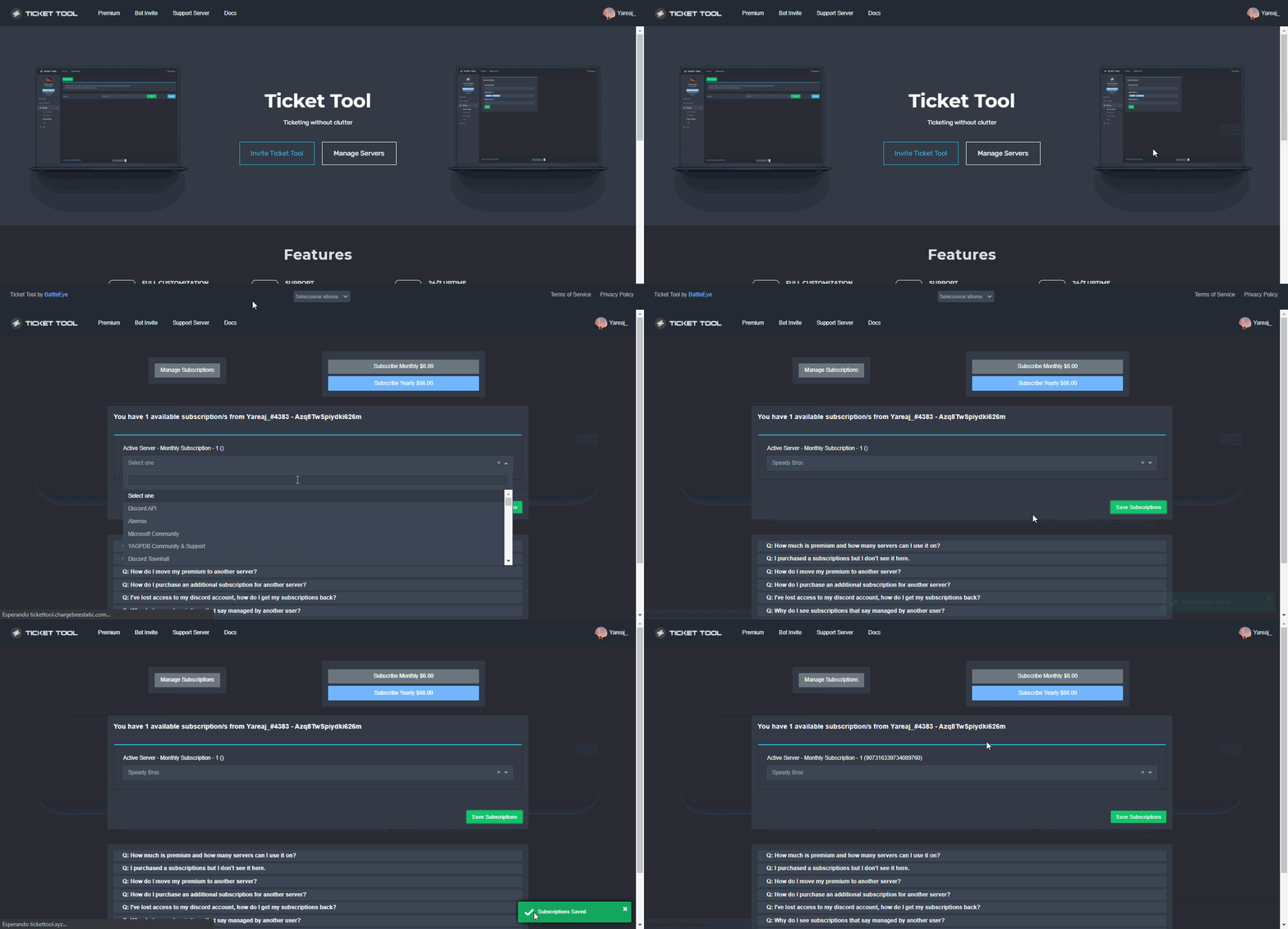
The first thing you will need to do is invite the premium bot, an invite can be found here
Once the bot is in your server we will head to the dashboard and manage your server. When you are managing your server, you want to head into "Server Configs" then click the drop down menu under "Select the bot you would like to use on this server" then click "Ticket Tool#6207" and then save.
 mystic ruin
rustic gale
If the ID is 0123456789 include {0123456789} in the message text
mystic ruin
rustic gale
If the ID is 0123456789 include {0123456789} in the message text
I did {Role number} and it does @ the role but it does not work
Please @ me when someone responds
gilded verge
mystic ruin
I did {Role number} and it does @ the role but it does not work
are you sure? please check screenshot below 😳

 rustic gale
mystic ruin
I did {Role number} and it does @ the role but it does not work
rustic gale
mystic ruin
I did {Role number} and it does @ the role but it does not work
Make sure it's in the Message Text
if it's in the Embed Description or somewhere else, no ping will be sent
 sturdy wharf
How can I claim my tt premium
gilded verge
sturdy wharf
How can I claim my tt premium
You mean premium for boosts, right?
sturdy wharf
gilded verge
You mean premium for boosts, right?
Yes
gilded verge
Oh, you have an open ticket 😳
 dapper grail
Yo, anyone for my ticket ?
humble sequoiaBOT
━━ moved to ticket ━━
 faint merlin
Can you generate a transcript on the website using https://tickettool.xyz/direct?url=attachmenturl
this random one worked but my html attachment urls dont
 rustic gale
You don't generate a transcript on the website
That just grabs the file and renders it in your browser for you to see
If the file is gone, it won't have anything to render
The file itself isn't stored on Ticket Tool's servers
faint merlin
rustic gale
You don't _generate a transcript on the website_
Meant generate a visual of the specified attachment URL
rustic gale
It's stored in your server, as an attachment in your transcript channel
faint merlin
The file exists, still getting a 404 error
rustic gale
If you delete the transcript message or the transcript channel, there will be nothing to render.
Hmm
That's funny.
Consider making a ticket #🎫│make-a-ticket so we can take a closer look
faint merlin
Okay
 rain fiber
is there a way to make a ticket as admin but use a command or something to add someone to the ticket?
for example I make a ticket for person A and use a command so they can now join in?
 modest hinge
rain fiber
is there a way to make a ticket as admin but use a command or something to add s...
modest hinge
rain fiber
is there a way to make a ticket as admin but use a command or something to add s...
$add [userid]
rain fiber
pog thanks!
modest hinge
example: $add 820807193782648864
rain fiber
ooh only the id? it's an extra step but would still be faster than what we're currently doing
modest hinge
rain fiber
ooh only the id? it's an extra step but would still be faster than what we're cu...
yeah.
just command and the id for invite peoples to the ticket .
gilded verge
mention works too 😳
modest hinge
And for remove them use $remove [user id]
modest hinge
rain fiber
❤️ thanks both you saved us a lot of effort
you're welcome 😉
 serene rapids
Can I get a little help here. I am trying to use the form system but it doesnt populate the information into the ticket response
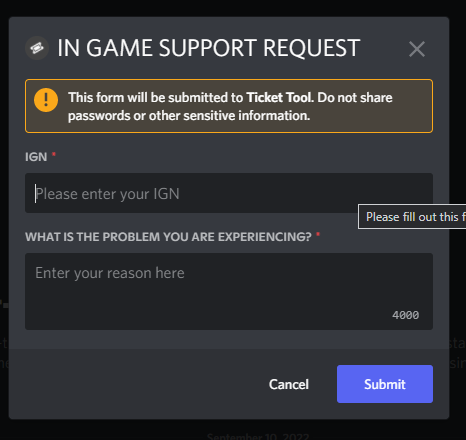
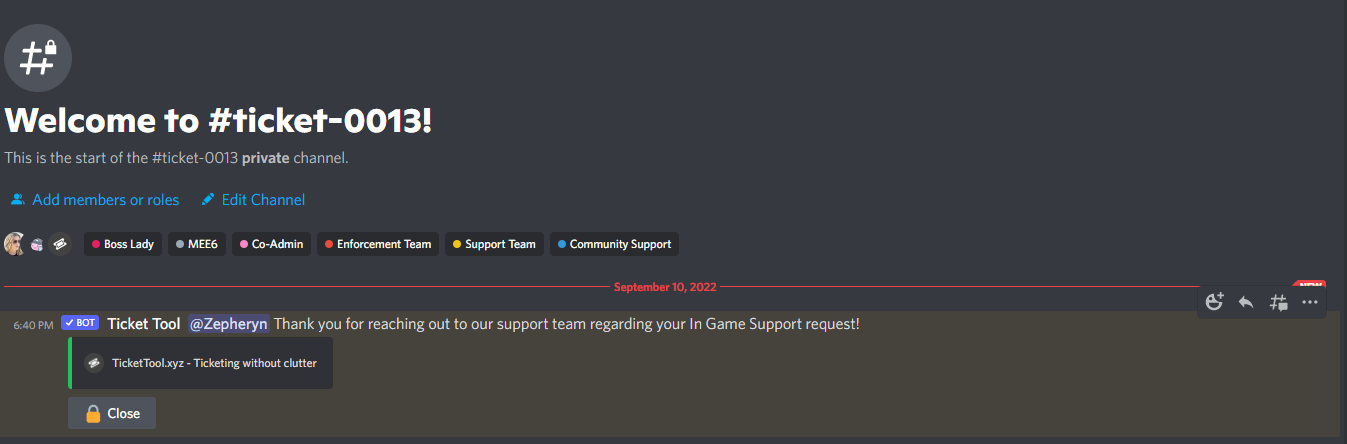 humble sequoiaBOT
Pop-up Form
A discord Form allows you to let the user answer individual questions in a pop up Form, which then displays the answers in the ticket message. This can save time if you already know what you want to ask the user.
Setup Forms
Forms can be enabled under Panel Settings > Form Options > Edit Forms Options.
In the new pop up window, you can now enable and edit your own Form.
Form Options
You can add up to 5 questions in the discord form. This is a discord limitation. Each question can have a placeholder in the input field, a minimum and maximum input, multi-line and also the option to have the answer required.
Options:
Question Title: Your Question goes here
Question Placeholder: The placeholder text in the input field
Required: If enabled, the user has to answer this question, to submit the form
Multi-Line Input: Allows the user to input multiple lines
Minimum and Maximum Input: Set a minimum and maximum input value for the user
❗Display the answer ❗
To display the answers from the user, you need to go into your Panel Settings > Ticket Options > Edit Ticket Message. In there you use the variable {create.form.x} and just replace x with the number of your question. For example, the response to Question 1 can be displayed with {create.form.1}. If you don't use this variable, the response from the user is lost.
plain surge
Please read this information carefully
serene rapids
Thank you so much!
plain surge
No problem 👍
serene rapids
Another question: Am I able to add images to the embedded area?
gilded verge
serene rapids
Another question: Am I able to add images to the embedded area?
required premium *on server
humble sequoiaBOT
What are the direct URLs?
A direct access URL is an easy to read URL that users can enter to get to a specific item, document, page, category, or perspective, in which our bot TicketTool can read and get it displayed in your 'Panel Message' or your 'Ticket Message'.
Where can I get them?
The recommended way is to use 'Imgur', you can signup within a few minutes and then upload the image you want, and copy the URL of the uploaded image and paste it into one of the four boxes. There are alternatives to this, such as other image or video storing websites or using 'Open Original' of an image and paste it in (please be aware that if your image is deleted, Discord will automatically delete the link to it in a few days). Please note this requires 'Premium'. Imgur
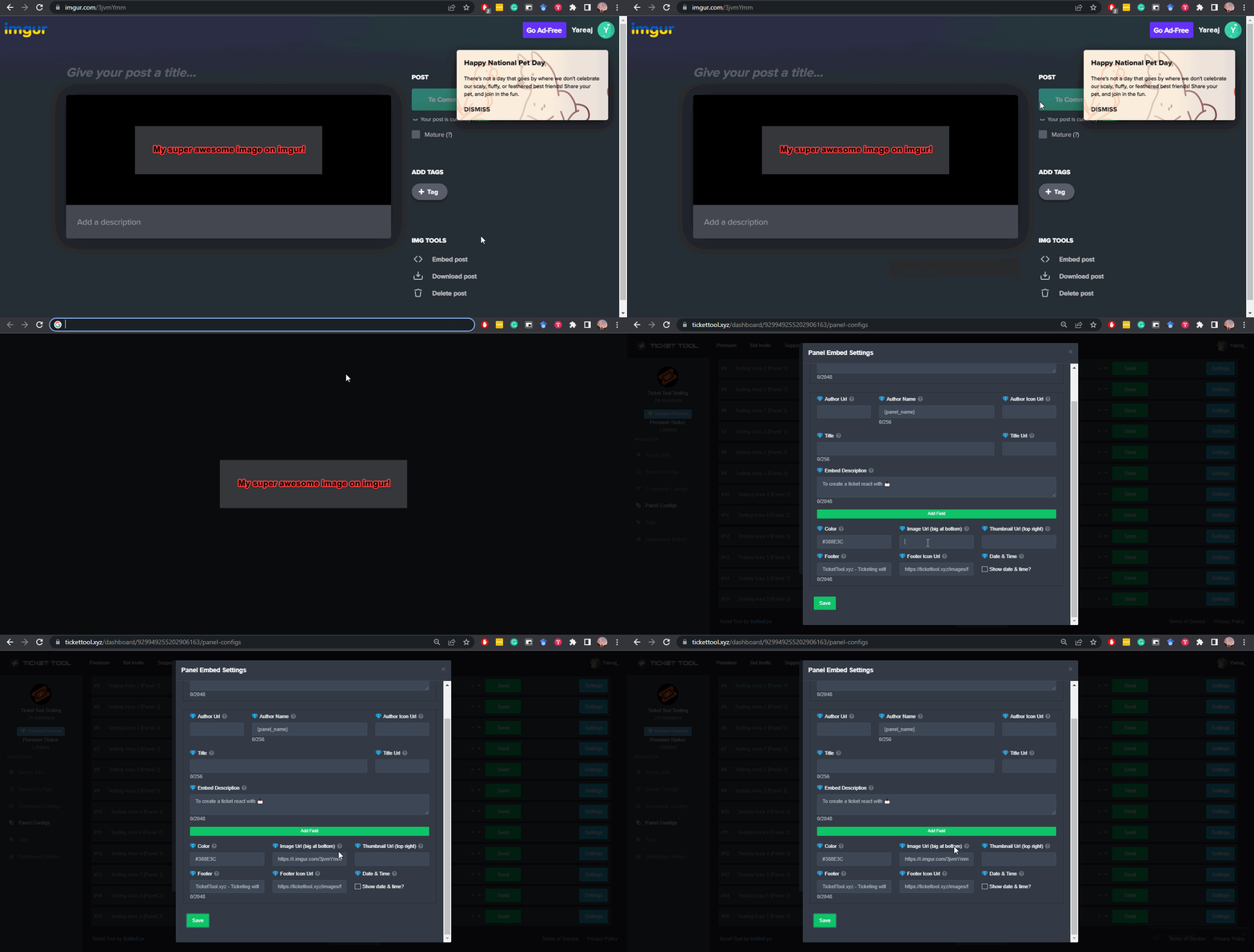 plain surge
serene rapids
Another question: Am I able to add images to the embedded area?
plain surge
serene rapids
Another question: Am I able to add images to the embedded area?
And this is how you can add them incase you want to try it out using the 7 days free premium trial
serene rapids
I will give this a go! Ill sign up for the free trial now
 twin mulch
Hey, everybody, can you help?
I have a ticket category on my server and after I close it, it does not move to the closed category
and I can't move the channel.
what to do?
gilded verge
twin mulch
what to do?
Hey, does the bot have permissions in closed category? View Channel, Send Messages, Read Message History
twin mulch
Yes, the bot does not transfer exactly certain tickets, it transferred the rest, and exactly 2 tickets do not transfer to a closed category
gilded verge
in the panel, could you re-add the category of closed tickets?
twin mulch
gilded verge
in the panel, could you re-add the category of closed tickets?
and how do you do that?
gilded verge
there delete from category closed and add again:

on your server could you use the command $debug and send the link that you get from the bot?
 wind ridge
plain surge
wind ridge
plain surge
$help support
humble sequoiaBOT
How to let support team see into a ticket
About support roles
A support role lets your support team see into tickets with out having to add them manually to each and every ticket.
You can add as many support roles as you like per panel.
NOTE that the way discord works all admins can see into tickets regardless of this.
How to set a support role
To set a Support role go to the Dashboard -> Panel Configs -> Settings -> General Options -> Support Team Roles.
NOTE that the support role will not be able to see into tickets that are already created..
plain surge
يمكنك إضافة الرتبة، تكون رتبة سوبورت من هنا
humble sequoiaBOT
━━ moved to ticket ━━
 woeful nova
I am trying to use the form on the premium version of ticket tool. Unfortunately, neither the questions, nor the ticket writer's responses are showing up in the ticket.
humble sequoiaBOT
Pop-up Form
A discord Form allows you to let the user answer individual questions in a pop up Form, which then displays the answers in the ticket message. This can save time if you already know what you want to ask the user.
Setup Forms
Forms can be enabled under Panel Settings > Form Options > Edit Forms Options.
In the new pop up window, you can now enable and edit your own Form.
Form Options
You can add up to 5 questions in the discord form. This is a discord limitation. Each question can have a placeholder in the input field, a minimum and maximum input, multi-line and also the option to have the answer required.
Options:
Question Title: Your Question goes here
Question Placeholder: The placeholder text in the input field
Required: If enabled, the user has to answer this question, to submit the form
Multi-Line Input: Allows the user to input multiple lines
Minimum and Maximum Input: Set a minimum and maximum input value for the user
❗Display the answer ❗
To display the answers from the user, you need to go into your Panel Settings > Ticket Options > Edit Ticket Message. In there you use the variable {create.form.x} and just replace x with the number of your question. For example, the response to Question 1 can be displayed with {create.form.1}. If you don't use this variable, the response from the user is lost.
 late granite
how do i make it so normal members can’t close tickets?
gilded verge
Panel Settings->Button Options->Close Ticket Settings->add everyone to Disabled Roles or choose Support Team Only
 late granite
tyy !!
 plain jacinth
how can i make it so bots can add people to tickets, say if i said said something then the bot goes $add quit#0001 <--- currently it doesnt add the person, whys that?
twin mulch
gilded verge
on your server could you use the command `$debug` and send the link that you get...
 scenic plinth
Visit server stats support server.... I have no idea how in the world you got here but find their support server and get help there.
Or you used the wrong command. That is not ticket tool.
serene rapids
Hi all, how do I create something like this? The buttons redirect to the same chat for that specific user only.
https://i.imgur.com/l1i8Oex.png
This is what ive replicated, but its just tickets that make channels....https://i.imgur.com/09MVIQb.png


 rustic gale
serene rapids
This is what ive replicated, but its just tickets that make channels....https://...
rustic gale
serene rapids
This is what ive replicated, but its just tickets that make channels....https://...
That's a custom instance of Sapphire
Which is a different bot.
 waxen folio
Hello, I would like to make a suggestion for the ticket tool developers, is this where I do that?
@rustic gale how do I type a suggestion in #💡│suggestions
rustic gale
waxen folio
Hello, I would like to make a suggestion for the ticket tool developers, is this...
You use the s!suggest command
In #🤖│bot-spam
iron nightBOT
Gave +1 Rep to @rustic gale
waxen folio
You just fucking said to
jade topaz
how do i add a support member to my ticket
 covert smelt
I think it is under general options
rustic gale
jade topaz
how do i add a support member to my ticket
It depends on what you mean by that
You can set up support team roles in your ticket's settings
$help support
humble sequoiaBOT
How to let support team see into a ticket
About support roles
A support role lets your support team see into tickets with out having to add them manually to each and every ticket.
You can add as many support roles as you like per panel.
NOTE that the way discord works all admins can see into tickets regardless of this.
How to set a support role
To set a Support role go to the Dashboard -> Panel Configs -> Settings -> General Options -> Support Team Roles.
NOTE that the support role will not be able to see into tickets that are already created..
rustic gale
But those settings won't be applied to old tickets, only to new tickets
And it's for roles only, not for specific users
If you want to add a specific user to a ticket, you should do it with the $add command
$help commands
humble sequoiaBOT
() = optional
[] = required
*==================================
Ticket Commands
==================================*
_ _
`$add [User] (channel)`
Description: Adding additional users to a ticket
Aliases: none
`$remove [User] (channel)`
Description: Removing users from a ticket
Aliases: none
`$close`
Description: Closing tickets
Aliases: none
`$open`
Description: Opening closed tickets
Aliases: none
`$delete`
Description: Deleting tickets
Aliases: none
`$rename`
Description: Renaming tickets/channels
Aliases: none
`$transcript (send channel)`
Description: Creating transcripts
Aliases: none
`$new (user) (reason)`
Description: Creating tickets in a monitored channel (when command style is enabled)
Aliases: none
`$claim`
Description: Claiming tickets (when claim is enabled)
Aliases: "unclaim"
_ _
*==================================
General Commands
==================================*
_ _
`$help (Help Options)`
Description: Help Command
Aliases: none
`$debug`
Description: Debuging issues with running Ticket Tool
Aliases: none
`$id (@role/@user/#channel/emoji)`
Description: Converting roles, users, channels and emojis to ID
Aliases: "getid"
`$permlevel`
Description: Checking permission level with Ticket Tool
Aliases: "level"
`$ping`
Description: Checking response time with discord api
Aliases: none
`$vote (link | unlink | redeem) (user)`
Description: Earn premium by voting on top.gg or Discord.boats
Aliases: "votes"
lunar solar
 devout hill
Does anyone know how to send transcripts to a channel?
devout hill
Does anyone know how to send transcripts to a channel?
You have to set it to transcript on close or delete, the feature is under Logging Options however it is a premium feature
lunar solar
Ahh interesting you should have the yellow role then
devout hill
How do I get it? Is it automatic
lunar solar
Should be linked to your Discord account via the website, mine was automatic from memory.
I unfortunately don't know how to force it sorry, one of the support staff should know though just wait for them to reply.
devout hill
Eh, a role isn’t that important to me
lunar solar
I would get it if I were you, premium support channel like this and premium tickets for priority
amongst other things
devout hill
Okay I’ll make a ticket then
rustic gale
$pc @devout hill
humble sequoiaBOT
Thank you
Thank you for purchasing Ticket Tool Premium @devout hill. You have now been given the <@&535595160189403136> role!
Found 9 servers in total and 1 with premium and permission
jade topaz
I’m having an issue where people can’t open tickets but I don’t see any reason they shouldn’t be able too
Figured it out don’t blackist @everyone role
gilded verge
jade topaz
I’m having an issue where people can’t open tickets but I don’t see any reason t...
Now that you've made sure that the user's role is not in Blacklist Roles, go to Panel Settings->Button Options->Create Ticket and check that the user's role is not in Disabled Roles
 molten echo
hy
I lost a fruit to try to eat what do I do?
can you measure the same fruit?
humble sequoiaBOT
⚠️ You're in the wrong place
We provide support for Ticket Tool Discord bot and cannot help you with whatever issue you have.
- We don't know which Support Team you should contact to get this issue resolved, and unfortunately we won't be able to accurately tell you.
If you don't have any further questions regarding our bot Ticket Tool, please close this ticket
gilded verge
humble sequoia
@molten echo
 sonic mauve
can anyone tell me how to merge two panels please?
humble sequoiaBOT
Multipanels are panels with multiple buttons attached to them.
How to create a Multipanel
All users can combine multiple panels into one multipanel!
First, find the IDs of each panel you wish to combine. You can find them in your Panel Configs in the Dashboard
Next, send the multipanel to a channel using $panel [id1] [id2] {id3} ....
e.g. $panel 1 2 4 17 35 to combine panels 1, 2, 4, 17 and 35.
Up to 25 panels may be combined.
You can also watch this video tutorial.
For a more convenient use of multipanels, you can now combine panels on the dashboard. This will allow you to directly send the multipanel from the dashboard or via the $panel ID command.
Where can I find this?
You can find this setting on the Dashboard -> Panel Configs -> Settings -> General Options
Note: if you're attaching all the panels to a panel called English, don't include English in the attached panels box (If you do this, it will create duplicate)
This will put all buttons from all of your panels on one message. The message is the panel message from the panel you're combining these panels in.
You can also watch this video tutorial.
sonic mauve
okay thank you also when people open ticket the default name for the ticket channel is ticket-xxxx right....how can i change that?
humble sequoiaBOT
The ticket name is the default channel name of all tickets. To edit it, go to your Dashboard > Panel Configs > Settings > Ticket Options. There you can edit the channel name of opened and closed tickets. You can also use variables in there.

 Note: This is a premium feature
modest hinge
humble sequoia
Note: This is a premium feature
modest hinge
humble sequoia
@sonic mauve See but its a premium feature.
 vivid rock
Hello
 bleak fable
HI
 languid pier
Is there a way to make it so that only staff/support role can close tickets?
lunar solar
languid pier
Is there a way to make it so that only staff/support role can close tickets?
Button Options --> Close Ticket Settings --> Support Team only
languid pier
lunar solar
Button Options --> Close Ticket Settings --> Support Team only
Thank you!
iron nightBOT
Gave +1 Rep to @lunar solar
jade topaz
how come whenever i change my button it simply goes back to what it was before?
oh nevermind lmao
 patent cave
Hello got sky glass , been playing up deleted app and tried re installing but not accepting the info given on down loader app any suggestions
humble sequoiaBOT
⚠️ You're in the wrong place
We provide support for Ticket Tool Discord bot and cannot help you with whatever issue you have.
- We don't know which Support Team you should contact to get this issue resolved, and unfortunately we won't be able to accurately tell you.
If you don't have any further questions regarding our bot Ticket Tool, please close this ticket
 void ruin
Does anyone know how to configure the bot that is called tickt-toll
fallow ingot
humble sequoia
Refer to this
We provide support for Ticket Tool and no other bots.
Although I’d love to help you with this, I cannot.
void ruin
fallow ingot
We provide support for Ticket Tool and no other bots.
So bro I want someone to configure the tickt toll bot on my server
void ruin
fallow ingot
Although I’d love to help you with this, I cannot.
So who can help me with this?