#🆘│community-support
1 messages · Page 7 of 1
 oak shuttle
 mint hamlet
LMAO why would tickettool ban all members
 gilded verge
Ticket Tool bot has no ban or kick command so it is completely impossible to break your server
we need actual proof of your words
oak shuttle
@snow fox Did you check the bot that raided your server's full tag and compare it with @pseudo glen ?
Could you show me screenshots from the audit log?
 real marlin
@snow fox we already had this conversation earlier.
oak shuttle
Then we can't help you, but the bot that raided your server wasn't TicketTool.
 covert swallow
It is physically impossible for Ticket Tool to have taken any punitive action against any user as at no point does it have access to the ability to kick or ban. Unless you can demonstrate irrefutable proof that Ticket Tool somehow got permission to kick and/or ban user, in addition to actually utilizing these permissions to execute a "nuke" on your server, your claims will be seen as unfounded and libelous.
 obtuse krakenBOT
1. Invite Ticket Tool to your server
First you will want to invite the bot to your server. Once the bot is in your server, you can manage your server in the dashboard.

2. Create a Panel
To create a panel we are going to need to head over to the panel configs on the dashboard.
Once at the dashboard we will need to click Create Panel.
Enter a panel name (Fill in any optional settings you want).
Click Create Panel and your ready to get started with configuring your panel.
An example of a creating a panel is shown below.

3. Send the Panel to a Channel
Once you've created a panel on the dashboard you will need to send it to a channel using send on the dashboard.
Select the channel you want your panel to be created in and click send.
For other questions checkout $help faq.
An example of a sending a panel is shown below.
Having a Problem Sending the Panel?
Do $debug in a channel with Ticket Tool and make sure it has all the necessary Discord permissions.

 humble sequoiaBOT

You can check our documentation here;
You can also check #📂│information for the basic setup;
You can also watch this video tutorial.
Our documentation contains all the info you need about the bot to be able to setup and configure the bot however you like.
gilded verge
Hi @fresh grove, or check video tutorial :>
 fresh grove
Thanks!
fresh grove
fixed it now
 white bear
I have the owner role in a server and yet am unable to see it in my server list
@rustic gale ||sorry for the ping but I am in a hurry|| can you help me?
 neon spire
Hello, I would like to know how to create several panels here: Use select/dropdowns for ticket creation
humble sequoiaBOT
Don't see your server in the dashboard?
You will possibly need to relog. Look below to see steps on how to relog.
How to relog in the Dashboard.
First, you will need to go to the dashboard. Once your there, click on your avatar on the top right. after you clicked it, you will see button that says Logout. You must click that. Once you have logged out, you can log back in.
Note:
You need one of these 3 things to access the dashboard.
1. Server Owner (Level: 6)
2. Server Administrator (Level: 4)
3. Dashboard Role (Level: 2)
:warning: You can check your level using $level on your Discord Server
User permission level with Ticket Tool
@User is permission level: 0 (User)
```» *If it shows that your permission is **0**, you don't have any of the above **3 things** to manage the dashboard.*
**See the GIF below on how to relog:** gilded verge
humble sequoia
gilded verge
humble sequoia
@white bear, Please make sure you have read the server rules [rule 4 #📂│information] and check  message from bot
Hey @neon spire, I hope can help you
neon spire
thank you and how to edit this message :

 slender minnow
neon spire
thank you and how to edit this message :
slender minnow
neon spire
thank you and how to edit this message :
It's not possible to edit that message, sorry
 iron coyote
Hey wanted to know if it was possible to make two ticket messages that leads to two different kinds of tickets (a support like ticket for staff and a submission like ticket for staff and animators)
(Ping me for response please)
real marlin
iron coyote
Hey wanted to know if it was possible to make two ticket messages that leads to ...

Ticket Tool is the best Discord bot for tickets you'll find! Learn more about multipanels and how to improve your users' experience while asking for support.
Invite: https://tickettool.xyz/invite
Website: https://tickettool.xyz
Support Server: https://discord.gg/tickettool
00:00 Intro
00:11 What is a multipanel
00:32 How to do a multipanel
Ta...
After each panel will be with different permissions that you need to setup.
iron coyote
Ok thanks for your time
 gleaming elk
So how do I make a ticket channel on a sever that I have manager on but the boy is already invited
real marlin
gleaming elk
So how do I make a ticket channel on a sever that I have manager on but the boy ...
Check the our docs https://docs.tickettool.xyz/

Ticketing without Clutter
Yes?
 trim chasm
gleaming elk
trim chasm
gleaming elk
How many servers can you use it on without premium
real marlin
Please wait and someone will answer your ticket.
real marlin
gleaming elk
How many servers can you use it on without premium
Unlimited
trim chasm
Hi, I want TicketTool to set permissions for the user (when they create a ticket) so that the user can use slash commands. I tried going thru User Opened Permissions but it didn't help since it didn't have permissions for slash commands.
real marlin
maybe because your friend actually did something.
Your ticket was closed for been empty.
Next time please write your issue.
trim chasm
hmm?
real marlin
trim chasm
Hi, I want TicketTool to set permissions for the user (when they create a ticket...
A ticket is open, please wait.
Are you talking about the person that don't know how to take a screenshot, uses a TV, plugs the keyboard and mouse with magic, refuses to collaborate?
Sorry we are not compatible with magic.
trim chasm
real marlin
A ticket is open, please wait.
Ok ill close it
trim chasm
real marlin
A ticket is open, please wait.
Hi, I want TicketTool to set permissions for the user (when they create a ticket) so that the user can use slash commands. I tried going thru User Opened Permissions but it didn't help since it didn't have permissions for slash commands.
Ticket closed
Feel free to help me DoctorSneaky
DoctorSneaky?! 😢
 rustic gale
Yeah, sadly that's currently not possible
trim chasm
ok
rustic gale
Next version of the bot will have that capacity though
trim chasm
Ok
 jade topaz
ممكن سؤال؟
real marlin
jade topaz
ممكن سؤال؟
if you can ask in english will be great if not feel free to ask and i will try.
jade topaz
real marlin
if you can ask in english will be great if not feel free to ask and i will try.
ماذا تقول؟
انا لا افهمك
real marlin
إذا كان بإمكانك أن تسأل باللغة الإنجليزية ، فسيكون ذلك رائعًا إذا لم تتردد في السؤال وسأحاول.
jade topaz
real marlin
إذا كان بإمكانك أن تسأل باللغة الإنجليزية ، فسيكون ذلك رائعًا إذا لم تتردد في ال...
اشكرك لفهمي حقا
انا اريد السؤال عن اذا كان بامكاني ان اظهر التكت للشخص الذي اغلقها
فهمت؟
real marlin
أنا لا أتحدث العربية ، لكن يمكنني أن أحاول مساعدتك في ترجمة جوجل.
real marlin
jade topaz
انا اريد السؤال عن اذا كان بامكاني ان اظهر التكت للشخص الذي اغلقها
فهمت؟
المترجم معطل بعض الشيء ، يرجى فتح تذكرة هنا:
واختر اللغة العربية ، سيكون معك متحدث بطلاقة قريبًا.
real marlin
لا مشكلة ، إنها الآن مسألة انتظار وسيتواجد شخص ما معك قريبًا.
jade topaz
Ok thank
 quiet cape
سلام عليكم
jade topaz
Can I make a ticket that’s already created moved to a different category?
real marlin
jade topaz
Can I make a ticket that’s already created moved to a different category?
Yes, manually move it.
 rough zenith
hey! how can i change the language of the bot from english to some other?
rustic gale
By manually translating the messages. Sad, but it's the only option currently
 mystic hound
You can use $transcript @ user
If you have premium, you can also enable auto-DM transcripts to have it done automatically
covert swallow
light i was halfway to typing "we know", before seeing your message properly
 sterile crest
is ticket tool down
covert swallow
Yes
sterile crest
thanks
covert swallow
sterile crest
oh im ever so sorry for asking i did not read that 100% my fault
 plain surge
Ticket Tool is undergoing a restart. Please be patient as the bot gets back up 😊
You can check #📣│bot-news for updates
 olive gull
بوتكم الزق طافي
 faint onyx
olive gull
بوتكم الزق طافي
faint onyx
olive gull
بوتكم الزق طافي
تشوف
gilded verge
olive gull
يب مسوي مسابقة ومحد يقدر يشارك ديم
jade topaz
Where can I find ticket tool premium codes?
covert swallow
You get premium keys through boosts, and purchasing premium via crypto
 narrow surge
the bot shows as offline but online in a diffrent server
 scenic plinth
jade topaz
olive gull
بوتكم الزق طافي
scenic plinth
jade topaz
olive gull
بوتكم الزق طافي
This guy said a curse word. I would like to report him.
covert swallow
Unless its a slur we dont tend to take action on those
narrow surge
scenic plinth
<#571104498483986466>
we dont have premium it doesnt show my server in the dashboard but its in still in the server
scenic plinth
plain surge
Ticket Tool is undergoing a restart. Please be patient as the bot gets back up �...
Now read pins, I'll delete that after, thanks :)
narrow surge
scenic plinth
Now read pins, I'll delete that after, thanks :)
oh im sorry
 cosmic canopy
@everyone why is the ticket bot down??
cosmic canopy
Sory
 shrewd gyro
Hey! Sorry to bother, but is the bot down momentarily?
shrewd gyro
covert swallow
Jts restarting
oh wait...
 idle haven
Read 2 messages above
rustic gale
 tough flame

rustic gale
I'm going to keep spamming #📣│bot-news until people stop asking what's up with the bot
tough flame

cosmic canopy
@rustic gale stop :)
 teal grail
Need help
idle haven
teal grail
My ticket boot is off
cosmic canopy
@iron night why not
shrewd gyro
rustic gale
I'm going to keep spamming <#571104498483986466> until people stop asking what's...
my bad 💀
tough flame
Yes
jade topaz
In my server is offline
 elfin ruin
plain surge
elfin ruin
plain surge
Ticket Tool is undergoing a restart. Please be patient as the bot gets back up 😊
You can check #📣│bot-news for updates
 stable frost
So it's completely normal the ticket tool interaction fails atm from what I understand?
 vestal nest

 vestal nest
vestal nest
vestal nest
?
rustic gale
It's going to be failing because the bot is down. As soon as the bot is back online it will start working again
plain surge
Ticket Tool is undergoing a restart. Please be patient as the bot gets back up 😊
You can check #📣│bot-news for updates
~
البوت بيسوي رستارت حاليا، و سيكون اونلاين في بضع دقائق.
من فضلك كن صبوراً، يمكنك متابعة #📣│bot-news للمستجدات
~
Le bot était redémarrer, il sera en ligne pendant quelques minutes
Vous pouvez suivre #📣│bot-news pour les nouvelles
 deft pewter
Now active thx
scenic plinth
You could also read pins :)
jade topaz
hello y'all! appears to me that the Primary bot is down in my server, not that i need it or anything but i thought id report it.
 open fern
Hello guys
scenic plinth
Hey yall! It appears the pins is on the top of your screen, you should read them!
open fern
So I started using the tool but noone except the management can create a ticket and I cant figure out how to do it myself, I already went into setting>button options and then to give permission to create a ticket to everyone but it still doesnt work
gilded verge
open fern
So I started using the tool but noone except the management can create a ticket ...
Hello, please make sure you haven't added the role of a user who wants to open a ticket to the Blacklist Roles (Dashboard->Server Configs)
Also note that this could be due to the roles you have added to the Allowed Roles or the Disabled Roles (Dashboard->Panel Configs->Panel Settings->Button Options->Create Ticket Settings)
 high oyster
Jeez it’s been a while since I’ve been here let’s see if I still got the skills, anyone need help from a experienced discordian?
rustic gale
Also make sure the bot is online, as it's currently undergoing a reset.
open fern
I got everyone under allowed roles and none under disabled roles
And the should be working fine I guess
the bot*
rustic gale
Is Support Team Only enabled?
Also yeah, blacklisted roles
Blacklisted roles are in Server Configs in your dashboard
Any blacklisted roles will be unable to create tickets no matter how the button options are set up
 stone root
where does the form answer go?
 silver shadow
/ticket
teal grail
$delete
jade topaz
scenic plinth
Hey yall! It appears the pins is on the top of your screen, you should read them...
ur a little unhappy aint ya
scenic plinth
No need to attempt to be toxic 🙂
Also, hate to be that person, but next time, rule 4 🙂
rustic gale
stone root
where does the form answer go?
You include them as {create.form.1} or 2 or 3 and so on in the ticket message
humble sequoiaBOT
The Ticket Message is the first message sent by the bot in a new ticket. To customise it head over to your Dashboard ➞ Panel Configs ➞ Settings ➞ Ticket Options ➞ Edit Ticket Message

 foggy void
How do u set up the bot so u have to press a button to make a ticket?
obtuse krakenBOT
1. Invite Ticket Tool to your server
First you will want to invite the bot to your server. Once the bot is in your server, you can manage your server in the dashboard.
2. Create a Panel
To create a panel we are going to need to head over to the panel configs on the dashboard.
Once at the dashboard we will need to click Create Panel.
Enter a panel name (Fill in any optional settings you want).
Click Create Panel and your ready to get started with configuring your panel.
An example of a creating a panel is shown below.
3. Send the Panel to a Channel
Once you've created a panel on the dashboard you will need to send it to a channel using send on the dashboard.
Select the channel you want your panel to be created in and click send.
For other questions checkout $help faq.
An example of a sending a panel is shown below.
Having a Problem Sending the Panel?
Do $debug in a channel with Ticket Tool and make sure it has all the necessary Discord permissions.
humble sequoiaBOT
You can check our documentation here;
You can also check #📂│information for the basic setup;
You can also watch this video tutorial.
Our documentation contains all the info you need about the bot to be able to setup and configure the bot however you like.
gilded verge
@foggy void, or check video tutorial
 rustic gale
 leaden cradle
Help please
leaden cradle
Help please
You left something empty that can't be left empty.
leaden cradle
Thanks
 fossil cargo
Help
humble sequoiaBOT
We would love to help you, but if you don't tell us what you need help with we can't help you :(
 humble sequoiaBOT
ᅠ
@pseudo glen requires the following permissions:
Add Reactions
Read Channels
Send Messages
Manage Messages
Embed Links
Attach Files
Read History
Manage Roles
Manage Channels
To change the role permissions, you can go to your Discord Server ➞ Server Settings ➞ Roles ➞ @Ticket Tool
To change the channel permissions, you can go to your Channel Settings ➞ Permissions ➞ Ticket Tool
ᅠ
Note:
You can give Ticket Tool Administrative Permissions instead of all the permissions listed above, but it's entirely optional and NOT necessary.
 fossil cargo
The problem is, should he have these powers?
gilded verge
humble sequoia
yes, here explained
gilded verge
about...?
fossil cargo
Can I edit this? Marked in red!
 humble sequoiaBOT
The panel message is where people react to make a ticket. To customize it head over to your Dashboard --> Panel Configs -> Settings -> Panel Options -> Edit Panel Message
 fossil cargo
edit to:To creat Ticket React With 📩
gilded verge
humble sequoia
so you need change embed description
fossil cargo
Tnx
stone root
rustic gale
You include them as {create.form.1} or 2 or 3 and so on in the ticket message
Thank you so much friend!
 iron nightBOT
Gave +1 Rep to @rustic gale
 copper mountain
Can someone help ? I'm trying to add a thumbnail to the ticket tool for my server, and it never loads. it's a link pointing directly to the image.
rustic gale
copper mountain
Can someone help ? I'm trying to add a thumbnail to the ticket tool for my serve...
Where is the image hosted?
copper mountain
rustic gale
Where is the image hosted?
imgur
rustic gale
What's the file format?
 copper mountain
rustic gale
When you copy the link make sure it ends in .png
copper mountain
rustic gale
When you copy the link make sure it ends in .png

you think because it's newly uploaded?
copper mountain
rustic gale
What's your server's ID?
1012193821917970502
rustic gale
Give me a few mins
I checked
Go back to the Edit Panel Message menu and make sure the url is entered correctly
Then update or re-send the panel
copper mountain
rustic gale
Then update or re-send the panel
Works like a charm tysm!
 tardy pagoda
humble sequoiaBOT
tardy pagoda
humble sequoiaBOT
You can check our documentation here;
You can also check #📂│information for the basic setup;
You can also watch this video tutorial.
Our documentation contains all the info you need about the bot to be able to setup and configure the bot however you like.
humble sequoiaBOT
Don't see your server in the dashboard?
You will possibly need to relog. Look below to see steps on how to relog.
How to relog in the Dashboard.
First, you will need to go to the dashboard. Once your there, click on your avatar on the top right. after you clicked it, you will see button that says Logout. You must click that. Once you have logged out, you can log back in.
Note:
You need one of these 3 things to access the dashboard.
1. Server Owner (Level: 6)
2. Server Administrator (Level: 4)
3. Dashboard Role (Level: 2)
:warning: You can check your level using $level on your Discord Server
User permission level with Ticket Tool
@User is permission level: 0 (User)
```» *If it shows that your permission is **0**, you don't have any of the above **3 things** to manage the dashboard.*


**See the GIF below on how to relog:**@bitter lava, ?
 bitter lava
I am Ukrainian, so I am writing through a translator
gilded verge
no
bitter lava
And then what does he do?
gilded verge
on your server please run command $level and show response from bot
 gilded verge
nope
humble sequoiaBOT
 gilded verge
humble sequoia
https://tickettool.xyz/manage-servers
gilded verge
humble sequoia
https://tickettool.xyz/manage-servers
open this link directly in your browser, not like you did in the video, but in your browser. copy it yourself etc.
(copy link->go to browser->paste link->log in to discord)
bitter lava
It works thanks(◍•ᴗ•◍)
gilded verge
check **rule 2 in #📂│information ** 😕
Wrong channel for general chat
i saw that
stop
You're breaking the server rules, I'm not gonna help you
Stop pinging me
 frozen mural
aswell, as these people are here to help please try and avoid pinging them.
gilded verge
yup, this is #🆘│community-support but he is toxic and still deletes his messages so i don't help him
frozen mural
Sorry i thought this was general apologies.
gilded verge
frozen mural
Sorry i thought this was general apologies.
its okay, you need help?
frozen mural
@short thistle If this is the case, no points coming here for support then! Please refrain from toxicity and abusing the servers rules
How can we help?
can you elaborate?
Can you tell me more information about the problem.
what did you do / trying to do
yes, let me read please.
Give me 1 minute please.
I believe you have to go onto the dashbaord and selet the option / options with the role once the ticket is closed to access the ticket.
sorry?
yuo have so many questions?
@short thistle I have a feeling you are not actually having these problems.
Keep abusing here and your access will be removed.
covert swallow
Charlie, please do not threaten punitive action you have no way of executing.
frozen mural
i do believe since this is no way to ask in a sorten way since these look very suspiscious if they are not even on the correct section
slender minnow
Onr way would be to add them as support team role or as additional role
Second way would be to use $add command
Answering this, make sure your server has a premium plan
$pc @short thistle
humble sequoiaBOT

Premium Check
I was unable to detect a premium server for @short thistle.
Found 3 servers in total and 0 with premium and permission
slender minnow
I dont think so
- Share the error ss please
- You can edit the ticket message to your requirement
- Relog
quick question, are you facing all those issues?
What device are you using?
iron nightBOT
Gave +1 Rep to @slender minnow
humble sequoiaBOT
━━ moved to ticket ━━
 edgy panther
I need help in my server people are saying they don’t have permission to open up a ticket how do I give them permission
 fallow ingot
Hey! There can be a view reasons this error can occur, here are the most common:
> Member role is blacklisted, or any other role's member(s) have. Check server configs.
> Create ticket button is enabled to  Support team only
If it isn't any of these above, ping me and we can look into it further. :)
humble sequoiaBOT
Any role you assign as a blacklisted role won't be able to use commands or reactions.
Selecting a blacklisted role
Go to your Dashboard ➞ Server Configs. There you will find the option to select blacklisted roles.
Note: Don't forget to save.
 fallow ingot
There are the instructions to check if you have any blacklisted role's set ^
 outer edge
Is there a way to stop the bot from posting updates in the server ?
I did ask in general I didn’t know where to ask
scenic plinth
Do you mean things from #📣│bot-news?
outer edge
Like when you get a notification from the bot saying it’s down and that
scenic plinth
You would have to remove the web hook in the channels settings.
outer edge
So that’s the only way ? There’s no short way ?
 trail niche
What y'all talking about
 solid stream
We are TACAOS!
 shut bolt
TACOS!
 junior ridge
Is there any way to make it so only a support team role close the ticket?
nevermind i got it
 devout spindle
is there a way to ping roles once someone opens a ticket? i've been having an issue where it only does this (image)

 royal wolf
is there anyway to get closed tickets back if they were closed by the admin?
slender minnow
devout spindle
is there a way to ping roles once someone opens a ticket? i've been having an is...
Refer the response below
$mentions
humble sequoiaBOT
Within all the messages the bot's sends (both embeds and text) you can mention either channels, roles, or even users, these mentions will only send a notification to the user if they are used within a text field, e.g: a role mentioned in an embed won't ping at all the users who have that role.
For mentioning a role you can use one out of three options:
{@Role Name} ➞ Which is Case Sensitive.
{RoleID} ➞ Replace RoleId with the Id of the role you are trying to ping.
<@&RoleID> ➞ Discord's native syntax to ping roles.
<#ChannelID> ➞ Mention a channel by its ID.
<@UserID> ➞ Mention a user by its ID.
slender minnow
Just use the variable in ticket message ^
devout spindle
slender minnow
Refer the response below
Tinny already helped me but ty tho
iron nightBOT
Gave +1 Rep to @slender minnow
 hot smelt
hi guys, is it possible to relocate the tickets? bc it kinda making other dc categories at the bottom?
 odd elm
 pallid nexus
فيه دعم عربي؟
 lilac cedar
pallid nexus
فيه دعم عربي؟
lilac cedar
pallid nexus
فيه دعم عربي؟
يب
 plain surge
مرحبا @lone cave
من فضلك حاول الخطوات التاليه
humble sequoiaBOT
لا تستطيع رؤية سيرفرك في لوحة التحكم؟
غالبا ستحتاج إلى إعادة التسجيل. انظر أدناه لمعرفة الخطوات الخاصة بكيفية إعادة تسجيل الدخول
كيفية إعادة التسجيل في لوحة التحكم.
اولا، يجب ان تذهب الى لوحة التحكم. اضغط على صورتك الشخصية في الجهة اليمنى اعلى الصفحة. بعد الضغط عليها، ستجد زر بمسمى Logout يجب ان تضغط على هذا الزر. ثم سجل دخولك مرة اخرى.
ملاحظة:
تحتاج ٣ اشياء لتستطيع الدخول الى لوحة التحكم
اونر السيرفر (المستوى: 6) .1
صلاحية الادمن (المستوى: 4) .2
رتبة لوحة التحكم (المستوى: 2) .3
تحذير: تستطيع معرفة مستواك بأمر $level في سيرفرك
مستوى صلاحيات المستخدم مع تكت تول
مستوى صلاحية المستخدم: 0 (User)
```» اذا ظهر ان مستوى صلاحيتك **0**, ليس لديك اي من ال**3** مستويات المذكورة اعلاه للوصول الى لوحة التحكم
**انظر الى الصورة ادناه لشرح كيفية اعادة تسجيل الدخول** rancid lance
hi .I need some bot ID .
jade topaz
Help
plain surge
rancid lance
hi .I need some bot ID .
Can you explain your request a bit more?
jade topaz
Sure
I'm trying to make a server but I need people to join but I don't have any friends
Will u help me
rancid lance
plain surge
Can you explain your request a bit more?
I need an ID to turn on moderation for one bot
jade topaz
What id
 lone cave
@plain surge اقعد احاول مايضبط عزيزي
fallow ingot
jade topaz
I'm trying to make a server but I need people to join but I don't have any frien...
We’re a support server for a Discord bot, we do not provide any sort of growth advise. Nor are we going to advertise your server for you.
You can join other communities to connect with people and maybe they’d ask for an invite and extend that out to others.
plain surge
rancid lance
I need an ID to turn on moderation for one bot
Is your question regarding Ticket Tool?
plain surge
lone cave
<@278649994477830145> اقعد احاول مايضبط عزيزي
ممكن ID سرفرك
plain surge
بفتحلك تكت
humble sequoiaBOT
━━ moved to ticket ━━
lone cave
@plain surge وين
jade topaz
Can u help me
 radiant helm
why isn’t the $ prefix working
covert swallow
jade topaz
Can u help me
If you tell us what you need help with
covert swallow
radiant helm
why isn’t the $ prefix working
Did someone in your server change the prefix on the dashboard?
 whole lotus
heyy, im having trouble finding my server on ticket tool website, i tried reloading and relogging but still diesnt work, what should i do?
 tropic delta
It says I have 1/1 ticket open. How do I bypass it?
humble sequoiaBOT
Don't see your server in the dashboard?
You will possibly need to relog. Look below to see steps on how to relog.
How to relog in the Dashboard.
First, you will need to go to the dashboard. Once your there, click on your avatar on the top right. after you clicked it, you will see button that says Logout. You must click that. Once you have logged out, you can log back in.
Note:
You need one of these 3 things to access the dashboard.
1. Server Owner (Level: 6)
2. Server Administrator (Level: 4)
3. Dashboard Role (Level: 2)
:warning: You can check your level using $level on your Discord Server
User permission level with Ticket Tool
@User is permission level: 0 (User)
```» *If it shows that your permission is **0**, you don't have any of the above **3 things** to manage the dashboard.*


**See the GIF below on how to relog:**For bobbyy
covert swallow
tropic delta
It says I have 1/1 ticket open. How do I bypass it?
Increase the ticket limit in your dashboard
tropic delta
covert swallow
Increase the ticket limit in your dashboard
alr
But I don't own the server can I still do it?
covert swallow
Do you have access to the dashboard?
tropic delta
yh im on the website
tropic delta
no
covert swallow
Then no you can not change it, the server staff set the limit as 1 for a reason
tropic delta
ok
whole lotus
covert swallow
For bobbyy
thanks
iron nightBOT
Gave +1 Rep to @covert swallow
 cedar blade
Help me
humble sequoiaBOT
We would love to help you, but if you don't tell us what you need help with we can't help you :(
cedar blade
I cant see bot
humble sequoiaBOT
━━ moved to ticket ━━
 hardy shadow
Help me
humble sequoiaBOT
We would love to help you, but if you don't tell us what you need help with we can't help you :(
humble sequoiaBOT
━━ moved to ticket ━━
 lofty lodge
help me
humble sequoiaBOT
We would love to help you, but if you don't tell us what you need help with we can't help you :(
━━ moved to ticket ━━
jade topaz
help me
 restive meadow
please help me figure it out, my server is not displayed in the bot settings, what is the reason for this?
 thick heron
restive meadow
please help me figure it out, my server is not displayed in the bot settings, wh...
thick heron
restive meadow
please help me figure it out, my server is not displayed in the bot settings, wh...
log out here

then log back in and it should work 👍
restive meadow
Thanks
thick heron
restive meadow
Thanks
np
 wintry jetty
will ticket tool switch too slash commands ?
rustic gale
wintry jetty
will ticket tool switch too slash commands ?
Slash commands will be implemented, but a switch won't be necessary
 merry tusk
Hi! wheneverrr someone trys making a ticket it tells them they dont have permission to do so, can someone help me out? 🙂
rustic gale
It's likely that you blacklisted a generic member role in Server Configs
Check your blacklisted roles in Server Configs and make sure “everyone” isn't there, or some generic member role that every member is supposed to have
cedar blade
Help me
scenic plinth
We have told you multiple times, we cannot help you if you do not explain your issue. And this does not mean ping us, or ghost ping us. Thanks.
 rare ledge
scenic plinth
We have told you multiple times, we cannot help you if you do not explain your i...
rare ledge
scenic plinth
We have told you multiple times, we cannot help you if you do not explain your i...
Heyyy, I want to add a role (mod) to be able to see created tickets but mods don't have administrator permissions, how do I do that?
scenic plinth
In case you did not read that, which I presume you did as you replied to get support from me, please avoid pinging staff.
$help support
humble sequoiaBOT
How to let support team see into a ticket
About support roles
A support role lets your support team see into tickets with out having to add them manually to each and every ticket.
You can add as many support roles as you like per panel.
NOTE that the way discord works all admins can see into tickets regardless of this.
How to set a support role
To set a Support role go to the Dashboard -> Panel Configs -> Settings -> General Options -> Support Team Roles.

NOTE that the support role will not be able to see into tickets that are already created..
 summer zephyr
Where do I make it where the ticket doesn't auto delete when closed
 mystic ruin
How can I change the description of a ticket? Like can I ass a format?
Please @ me when someone responds.
rustic gale
summer zephyr
Where do I make it where the ticket doesn't auto delete when closed
Enable “Two Step Ticket” in your panel's settings -> General Options
rustic gale
mystic ruin
How can I change the description of a ticket? Like can I ass a format?
What do you mean by “the description”?
Oh, you opened a ticket
humble sequoiaBOT
━━ moved to ticket ━━
summer zephyr
tysm
mystic ruin
When i say s!suggest and my suggestion it does not work.
rustic gale
It does work, your suggestion has been received and is now awaiting review
 craggy citrus
Opa
white bear
How to give an user a level 4 permission
I meant how to promote the member from level 0 permission
rustic gale
white bear
I meant how to promote the member from level 0 permission
Give them a dashboard role
humble sequoiaBOT
Any role you put there will have full access to the ticket tool dashboard. The server owner and users with admin permissions already have access to the dashboard.
Be careful of which roles to put here

 trim jacinth
hello, can someone tell me why it doesn't show closed and deleted in dropdown?

 craggy geyser
trim jacinth
hello, can someone tell me why it doesn't show closed and deleted in dropdown?
craggy geyser
trim jacinth
hello, can someone tell me why it doesn't show closed and deleted in dropdown?
Recent additions seem to have caused a dashboard bug. The developer has been notified
trim jacinth
craggy geyser
Recent additions seem to have caused a dashboard bug. The developer has been not...
ah, I see, thanks for helping!
 celest bramble
Someone help me how to set up ticket tool bot
 quick thicket
pls help me
lone cave
احد عربي يارجال
 unique roost
I have an issue with ticket tool. So I have people send in their ID for access to an adult server and I'm JUST finding out the transcript doesnt show the image when I go back into it. is that normal?? I kind of want proof that someone is 18 should I ever end up getting in trouble
craggy geyser
It's due to how discord handles it. We don't save it on our servers, it is all saved on discord and so when the channel is deleted they delete attachments.
The premium bot will save up to 8mb per ticket but you would need premium
unique roost
so essentially, the reason why the image doesnt save is because it exceeds the memory the channel provides?
craggy geyser
If using the premium bot yes. If on the free bot, I don't know if that saves anything. I know it didn't at first but not sure if it was added at a later date
unique roost
oh okay. Yeah as of now it doesnt save. Like the attatchment at an equivalent shows like an unloaded picture and when you click it essentially an error appears
but buying premium will more likely save the image when I transcript it?
craggy geyser
It should do. As well as giving other customisation
unique roost
interesting. I may consider that at a later date
lone cave
احد عربي يارجاله
craggy geyser
It will also allow you to send the transcript to the users if they want proof they have sent it
 robust sandalBOT
lone cave
احد عربي يارجاله
robust sandalBOT
lone cave
احد عربي يارجاله
an arabian one guys
 Arabic (ar) → English (en)
craggy geyser
Arabic (ar) → English (en)
craggy geyser
$articket
humble sequoiaBOT

فريق الدعم الفني العربي
عميلنا العزيز ان كنت تبحث عن مساعدة يرجى فتح تكت خاص بفريق الدعم الفني العربي
اذهب الى#🎫│make-a-ticket
ثم قم بلضغط على الايموجي الاتي (🇯🇴)
unique roost
thats awesome. Thank you very much and honestly I may consider buying at a later date
 tardy solstice
without primium aс, how can I remove it so that not all users see the ticket and can make changes?
craggy geyser
$kv
humble sequoiaBOT
How to hide tickets from everyone
Head over to your Dashboard ➞ Panel Configs ➞ Settings ➞ Permission Options ➞ Edit Everyone Roles Opened Permissions

NOTE that @everyone can type aswell if it has permissions to send messages
 restive ice
heyy, i want to make someone to claim the ticket to not make to many ppl take it can someone answer me?
also i didnt mean to open ticket i though i will make smth like custom
anyone?
oh and another thing how to make when someone open a ticket the ticket meantions a specific role
slender minnow
$mentions
humble sequoiaBOT
Within all the messages the bot's sends (both embeds and text) you can mention either channels, roles, or even users, these mentions will only send a notification to the user if they are used within a text field, e.g: a role mentioned in an embed won't ping at all the users who have that role.
For mentioning a role you can use one out of three options:
{@Role Name} ➞ Which is Case Sensitive.
{RoleID} ➞ Replace RoleId with the Id of the role you are trying to ping.
<@&RoleID> ➞ Discord's native syntax to ping roles.
<#ChannelID> ➞ Mention a channel by its ID.
<@UserID> ➞ Mention a user by its ID.
slender minnow
@restive ice refer above for mentioning ^
slender minnow
restive ice
heyy, i want to make someone to claim the ticket to not make to many ppl take it...
claiming is a premium feature
$help claim
humble sequoiaBOT
How does the claim command work?
Ticket Tool claiming is a premium only command that allows your support team to claim tickets and have the ticket renamed, changed permissions or moved to another category
humble sequoiaBOT
━━ moved to ticket ━━
scenic plinth
You don't accidentally ping like that, especially since it's funny the last person pinged a manager and said the same thing. Look at your ticket and wait for someone :)
craggy geyser
scenic plinth
You don't accidentally ping like that, especially since it's funny the last pers...
Yeah. It's no accident. They want to be spotted. Some people get a kick out of trolling
scenic plinth
That was the intent of my message..
robust sandalBOT
lone cave
احد عربي يارجال
An Arab one, man.
Arabic (ar) → English (en)
jade topaz
hey guys
fallow ingot
hi
jade topaz
so whenever a role other than admin opens a ticket, it cant see the ticket
only admin can see the ticket
humble sequoiaBOT
How to let support team see into a ticket
About support roles
A support role lets your support team see into tickets with out having to add them manually to each and every ticket.
You can add as many support roles as you like per panel.
NOTE that the way discord works all admins can see into tickets regardless of this.
How to set a support role
To set a Support role go to the Dashboard -> Panel Configs -> Settings -> General Options -> Support Team Roles.
NOTE that the support role will not be able to see into tickets that are already created..
jade topaz
but the person who opened it cant
jade topaz
staff can see the ticket but normal person cant
fallow ingot
Go to permissions options can be found via this path Dashboard > Panel Configs > Settings > Permissions Options > User Opened Permissions and make sure the permissions aren’t set to ❌
jade topaz
ok ima try it out

its like, when a normal person opens the ticket, the channel doesnt pop up for him
but for staff it does
My discord account got disabled
how do i transfer my premium to another account
humble sequoiaBOT
━━ moved to ticket ━━
fallow ingot
jade topaz
its like, when a normal person opens the ticket, the channel doesnt pop up for h...
Hi sorry
Can you move to a ticket please and I’ll help you :)
covert swallow
We are aware of @pseudo glen being offline in a number of servers. The developer is aware of the issue. It is a Discord side problem due to the deployment of privileged message intent across the platform. All downtime issues should be resolved soon.
covert swallow
\
 bronze hollow
Help
bronze hollow
jade topaz
how do i transfer my premium to another account
U can't
bronze hollow
jade topaz
My discord account got disabled
Then go to support
@pale pilot
Oh oops I accidentally ping, don't ban me plz
 pale pilot
Long Time no see
bronze hollow
pale pilot
Long Time no see
Can you help me, how to find ping role Id
bronze hollow
pale pilot
Can you take a screenshot of what you mean?
Wdym
pale pilot
Idk wdym
bronze hollow
pale pilot
Idk wdym
What
scenic plinth
no
pale pilot
Yes
scenic plinth
maybe
shut bolt
Perhaps
pale pilot
Probably
bronze hollow
pale pilot
Probably
Help
bronze hollow
shut bolt
Perhaps
Help
humble sequoiaBOT
We would love to help you, but if you don't tell us what you need help with we can't help you :(
We would love to help you, but if you don't tell us what you need help with we can't help you :(
bronze hollow
$pc @pale pilot
humble sequoiaBOT
Thank you
Thank you for continuing to support Ticket Tool @pale pilot.
Found 2 servers in total and 1 with premium and permission
humble sequoiaBOT

Who are you?
Either you're a bot or a phantom, because I can't find you!
bronze hollow
$pc @pseudo glen
humble sequoiaBOT
Who are you?
Either you're a bot or a phantom, because I can't find you!
jade topaz
Help
humble sequoiaBOT
We would love to help you, but if you don't tell us what you need help with we can't help you :(
jade topaz
why wait for 30 minutes on the dashboard?
rustic gale
Where does it say to wait for 30 minutes on the dashboard?
scenic plinth
You might be reading the outage message.
jade topaz
Ok

 tough jacinth
En Spain
shut bolt
tough jacinth
En Spain
Vete a Form Options dentro de los ajustes del panel
He isn't helping you, he's asking lol
tough jacinth
Gracias
shut bolt

 thorn heath
Oh I see 😄
 tough jacinth
Vale vale te agrego y te uso de traductor 😂
humble sequoiaBOT
Don't see your server in the dashboard?
You will possibly need to relog. Look below to see steps on how to relog.
How to relog in the Dashboard.
First, you will need to go to the dashboard. Once your there, click on your avatar on the top right. after you clicked it, you will see button that says Logout. You must click that. Once you have logged out, you can log back in.
Note:
You need one of these 3 things to access the dashboard.
1. Server Owner (Level: 6)
2. Server Administrator (Level: 4)
3. Dashboard Role (Level: 2)
:warning: You can check your level using $level on your Discord Server
User permission level with Ticket Tool
@User is permission level: 0 (User)
```» *If it shows that your permission is **0**, you don't have any of the above **3 things** to manage the dashboard.*


**See the GIF below on how to relog:**Si llegas a necesitar ayuda dirígete a #🎫│make-a-ticket y puedes crear ticket en español
tough jacinth
Vale vale
jade topaz
humble sequoia
Ty
iron nightBOT
Gave +1 Rep to @humble sequoia
 inland quarry
How do I change open icons with multipanel? I keep changing them then re linking to the multipanel but its not working when i resend the ticket tool
gilded verge
inland quarry
How do I change open icons with multipanel? I keep changing them then re linking...
You probably changed the icons well but for this to work your server needs to be premium
 - you have premium so you can change
 - you can change but there is limit
 - required premium

 languid yoke
@quaint walrus
 quaint walrus
@languid yoke this is what is suppsoed to show up. If nothing ahowed up, that means your bot isnt registering your command or it's not allowed to send messages.
If your prefix is not $ then the bot will not register $vote as the command. Hence why i asked you what your bot's prefix is. Anyway its better to make a ticket or ask here

Like my custom prefix is ticket!
So thats why it showed up
quaint walrus
What do you use to write commands for the bot
languid yoke
quaint walrus
What do you use to write commands for the bot
/
quaint walrus
Then try /vote
quaint walrus
Well anyway, ask whatever questions you want here or make a ticket.
I cannot help you from this point on
languid yoke
When i make a / , all bots are there but i there is no commands for tickettool
quaint walrus
(I am just a regular member not support)

 quaint walrus
languid yoke
Voted , what now? I dont see a premium
quaint walrus
languid yoke
Voted , what now? I dont see a premium
Read the reedem section in the first screenshot you sent
languid yoke
I need 6 votes?
quaint walrus
Yes
languid yoke
Oh hell naa
languid yoke
Cant i just use premium bot from the server here , i want to invite him , can i like test him
quaint walrus
Anyway make a ticker and ask all your questions #🎫│make-a-ticket
Someone will get back to you. Like i said, I'm just a regular member so i cant help you fully like they can
 chrome sedge
I was told the claim ticket feature is premium only. Does this feature also prevent other mods from seeing the ticket once its been claimed?
rustic gale
chrome sedge
I was told the claim ticket feature is premium only. Does this feature also prev...
It can be set up that way, yes
(Unless they have the Administrator permission. Server administrators cannot be prevented from viewing all channels in the server by any means)
chrome sedge
Awesome, I'll buy the premium right now. Thank you @rustic gale
iron nightBOT
Gave +1 Rep to @rustic gale
chrome sedge
Oh, sorry
rustic gale
Eh, i'll take it!
chrome sedge
So I just bought the premium version. Does the premium bot join my server or how does it work exactly
humble sequoiaBOT
The first thing you will need to do is invite the premium bot, an invite can be found here
Once the bot is in your server we will head to the dashboard and manage your server. When you are managing your server, you want to head into "Server Configs" then click the drop down menu under "Select the bot you would like to use on this server" then click "Ticket Tool#6207" and then save.

 lilac girder
chrome sedge
So I just bought the premium version. Does the premium bot join my server or how...
lilac girder
chrome sedge
So I just bought the premium version. Does the premium bot join my server or how...
Kindly follow the above instructions

 opal cradle
 idle folio
$help setup
humble sequoiaBOT
Setting up Ticket Tool
Visit the docs for setup info
General Setup
jade topaz
rustic gale
Eh, i'll take it!
Hi outsider, is automated support (like the buttons in #📌│automated-support) a premium feature?
I want to know if the bot can create ephemeral messages.
 snow lintel
Hi
i bought ticket tool premium but idk how to move it to my server
should i do like this or what

i already have the normal one but i want to replace it with the premium one
 granite magnet
Hi, is there a reason Ticket Tool would change the location that tickets are opening to? Usually they open under support but now they are opening right at the top of the server?
I'm not sure if it's related but I have just added Wick to the server too
 quasi cliff
snow lintel
should i do like this or what
quasi cliff
snow lintel
should i do like this or what
Simply select the server in drop-down for Premium and you're done
quasi cliff
granite magnet
Hi, is there a reason Ticket Tool would change the location that tickets are ope...
Do you have 50 channels in that category?
granite magnet
quasi cliff
Do you have 50 channels in that category?
No
Only have about 10 open I think
quasi cliff
Check if Ticket Tool has perms in that category
quasi cliff
granite magnet
Only have about 10 open I think
Total channels can not exceed 50 in a category
snow lintel
quasi cliff
Simply select the server in drop-down for Premium and you're done
i didnt understand
where i can find The drop-down ? 😅
quasi cliff
 quasi cliff
snow lintel
i didnt understand
where i can find The drop-down ? 😅
quasi cliff
snow lintel
i didnt understand
where i can find The drop-down ? 😅
Just select it there and click Save ^
snow lintel
quasi cliff
Just select it there and click Save ^
and then i just re send the panels?
quasi cliff
Was that server selected already
Also did you change bot or edit Panel message? If you didn't then you don't need to resend
snow lintel
i dont know how to explain the prob
but , The premium bot not joining my server
humble sequoiaBOT
The first thing you will need to do is invite the premium bot, an invite can be found here
Once the bot is in your server we will head to the dashboard and manage your server. When you are managing your server, you want to head into "Server Configs" then click the drop down menu under "Select the bot you would like to use on this server" then click "Ticket Tool#6207" and then save.
quasi cliff
You'll have to invite it
iron nightBOT
Gave +1 Rep to @quasi cliff
rustic gale
jade topaz
Hi outsider, is automated support (like the buttons in <#977951125674291271>) a ...
That's a custom instance of <@&977951598850506765> ( @obtuse kraken )
 humble sequoiaBOT
Don't see your server in the dashboard?
You will possibly need to relog. Look below to see steps on how to relog.
How to relog in the Dashboard.
First, you will need to go to the dashboard. Once your there, click on your avatar on the top right. after you clicked it, you will see button that says Logout. You must click that. Once you have logged out, you can log back in.
Note:
You need one of these 3 things to access the dashboard.
1. Server Owner (Level: 6)
2. Server Administrator (Level: 4)
3. Dashboard Role (Level: 2)
:warning: You can check your level using $level on your Discord Server
User permission level with Ticket Tool
@User is permission level: 0 (User)
```» *If it shows that your permission is **0**, you don't have any of the above **3 things** to manage the dashboard.*


**See the GIF below on how to relog:**Try these steps @true shadow
 true shadow
plain surge
Try these steps <@728002735621799986>
true shadow
plain surge
Try these steps <@728002735621799986>
OH thx its work
iron nightBOT
Gave +1 Rep to @plain surge
plain surge
No problem 👍
granite magnet
quasi cliff
Check if Ticket Tool has perms in that category
Can I check - what perms does it need specifically?
plain surge
$perms
humble sequoiaBOT
ᅠ
@pseudo glen requires the following permissions:
Add Reactions
Read Channels
Send Messages
Manage Messages
Embed Links
Attach Files
Read History
Manage Roles
Manage Channels
To change the role permissions, you can go to your Discord Server ➞ Server Settings ➞ Roles ➞ @Ticket Tool
To change the channel permissions, you can go to your Channel Settings ➞ Permissions ➞ Ticket Tool
ᅠ
Note:
You can give Ticket Tool Administrative Permissions instead of all the permissions listed above, but it's entirely optional and NOT necessary.
jade topaz
ho do i send a msg like this when some one opnes tickets?
 jade topaz
rustic gale
That's a custom instance of <@&977951598850506765> ( <@678344927997853742> )
jade topaz
rustic gale
That's a custom instance of <@&977951598850506765> ( <@678344927997853742> )
thank you!
iron nightBOT
Gave +1 Rep to @rustic gale
 sick narwhal
Hey guys
need a advise for my ticket, i want to make not only devs but mods able to read the tickets, do you know how to?
Please 🙂
anybody?
humble sequoiaBOT
The Ticket Message is the first message sent by the bot in a new ticket. To customise it head over to your Dashboard ➞ Panel Configs ➞ Settings ➞ Ticket Options ➞ Edit Ticket Message
scenic plinth
sick narwhal
Hey guys
need a advise for my ticket, i want to make not only devs but mods able...
$help support
humble sequoiaBOT
How to let support team see into a ticket
About support roles
A support role lets your support team see into tickets with out having to add them manually to each and every ticket.
You can add as many support roles as you like per panel.
NOTE that the way discord works all admins can see into tickets regardless of this.
How to set a support role
To set a Support role go to the Dashboard -> Panel Configs -> Settings -> General Options -> Support Team Roles.
NOTE that the support role will not be able to see into tickets that are already created..
snow lintel
How can i send the panel msg from the premium bot?
plain surge
First you need to invite and enable the premium bot, as shown below
humble sequoiaBOT
The first thing you will need to do is invite the premium bot, an invite can be found here
Once the bot is in your server we will head to the dashboard and manage your server. When you are managing your server, you want to head into "Server Configs" then click the drop down menu under "Select the bot you would like to use on this server" then click "Ticket Tool#6207" and then save.
humble sequoiaBOT
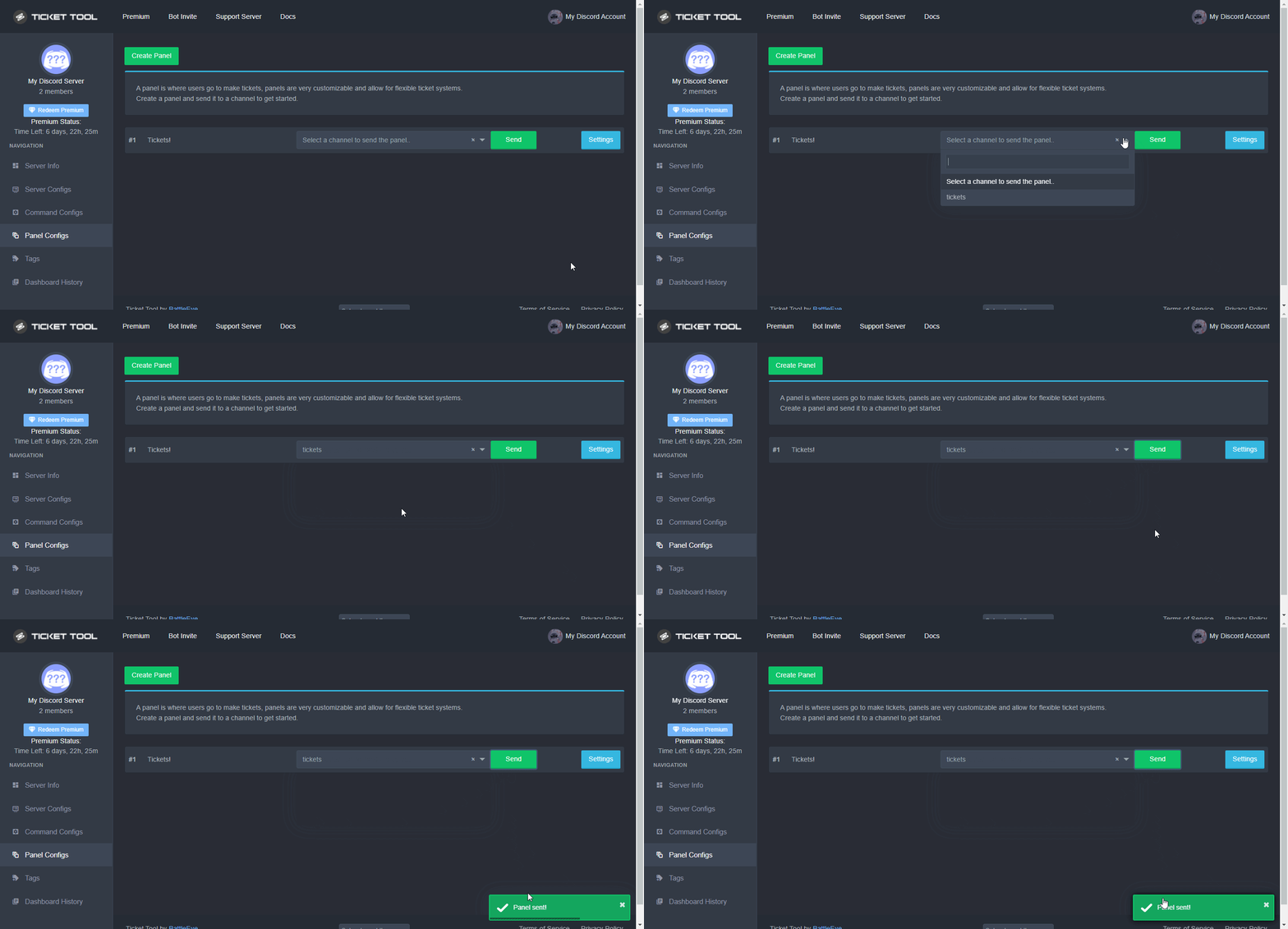
Sending a panel
Once you've created a panel on the dashboard you will need to send it to a channel using send on the dashboard
Select the channel you want your panel to be created in and click send.
For other questions checkout $help faq
An example of a sending a panel is shown below.
 plain surge
After that you can delete the previous panel message sent by the free bot @snow lintel
snow lintel
Thanks @plain surge
iron nightBOT
Gave +1 Rep to @plain surge
 prime bridgeBOT
 Sopley#5878 has been warned!

 They were notified via dms.
humble sequoiaBOT
We would love to help you, but if you don't tell us what you need help with we can't help you :(
gilded verge
languid yoke
I need support
If you are asking for help, don't do it on many channels. Remember that you still have an open ticket so if you no longer want help there, first close it and then ask here 😕
 flat bridge
Hello there, is there potentially a way to make it so tickets need a "confirmation" to be created? I have so many users who accidently open tickets because they are curious
fallow ingot
flat bridge
Hello there, is there potentially a way to make it so tickets need a "confirmati...
Wasssup! There is a way which I use and works pretty good. That is to enable forums and ask for a reason on ticket creation.
flat bridge
Thats a interesting way to handle it so that means on bot side not at the moment?
fallow ingot
It would look something like this:
 flat bridge
Ooooh
fallow ingot
yeah quite cool eh
flat bridge
Yeah I actually like that I shall take a look thanks for that proposal
fallow ingot
No worries, let me know if you've got any questions in regards to it.
flat bridge
Works fantastic thanks @fallow ingot for that!
iron nightBOT
Gave +1 Rep to @fallow ingot
fallow ingot
No problem, happy to help where I can :)
 kind ginkgo
@severe path ich hab gerade nh nachricht geschrieben..
die hab ich dann noch paar mal nachbearbeitet und dann hat der @prime bridge gemeint 'similar message spam'
jetzt is sie weg :(
könntest du die noch mal reinschicken? 
 severe path
hey,
i've got a kind of a problem..
i set the categories for closed and openedlike this but if i click on the close button, the closed ticket won't be moved to the other channel...
idk what to do and why it does this
on a different server i set the settings the exact same way and it works perfectly fine

it does move the closed ticket to *archivierte Tickets* tho but only after i clicked on Delete
any help?

 severe path
kind ginkgo
<@252364399669542913> ich hab gerade nh nachricht geschrieben..
die hab ich dann...
severe path
kind ginkgo
<@252364399669542913> ich hab gerade nh nachricht geschrieben..
die hab ich dann...
öffne doch einfach ein deutsches Ticket
kind ginkgo

humble sequoiaBOT
━━ moved to ticket ━━
 worthy violet
jade topaz
worthy violet
jade topaz
Hello, I did not have any problems when I installed the bot on my server, but when I tried to make a support request from the panel to a channel, I could not get a message.
jade topaz
how do i send a msg when someone opens a ticket
pls dont mind the msg in the img
 humble sequoiaBOT
The Ticket Message is the first message sent by the bot in a new ticket. To customise it head over to your Dashboard ➞ Panel Configs ➞ Settings ➞ Ticket Options ➞ Edit Ticket Message
 rustic gale
The dashboard works on your phone's browser too.
 novel wagon
rustic gale
The dashboard works on your phone's browser too.
novel wagon
rustic gale
The dashboard works on your phone's browser too.
Portuguese plis
Brazilian
robust sandalBOT
rustic gale
The dashboard works on your phone's browser too.
O painel também funciona no browser do seu telefone.
English (en) → Portuguese (Portugal) (pt-PT)
 arctic pagoda
novel wagon
Portuguese plis
arctic pagoda
novel wagon
Portuguese plis
^
novel wagon
Thanks
arctic pagoda
You're welcome
novel wagon
Thanks @arctic pagoda
iron nightBOT
Gave +1 Rep to @arctic pagoda
humble sequoiaBOT
Ticket Tool - Ticketing without clutter - The #1 discord Ticketing bot
We would love to help you, but if you don't tell us what you need help with we can't help you :(
languid yoke
What are the vote premium perms?
I got premium by 6 votes , but idk what to do with them
rustic gale
languid yoke
I got premium by 6 votes , but idk what to do with them
You redeem them with $vote redeem and get a key that you can redeem in your dashboard for premium
 open hazel
Hi!.
when a ticket is opened it's creating it at the top of the channel list rather than under the channel group i have selected. what am i doing wrong?
rustic gale
open hazel
Hi!.
when a ticket is opened it's creating it at the top of the channel list ra...
Consider opening a ticket in #🎫│make-a-ticket so we can take a closer look
humble sequoiaBOT
Sending a panel
Once you've created a panel on the dashboard you will need to send it to a channel using send on the dashboard
Select the channel you want your panel to be created in and click send.
For other questions checkout $help faq
An example of a sending a panel is shown below.
open hazel
how do i make discord tag the user who created the ticket in the ticket message?
lilac girder
$mentions
humble sequoiaBOT
Within all the messages the bot's sends (both embeds and text) you can mention either channels, roles, or even users, these mentions will only send a notification to the user if they are used within a text field, e.g: a role mentioned in an embed won't ping at all the users who have that role.
For mentioning a role you can use one out of three options:
{@Role Name} ➞ Which is Case Sensitive.
{RoleID} ➞ Replace RoleId with the Id of the role you are trying to ping.
<@&RoleID> ➞ Discord's native syntax to ping roles.
<#ChannelID> ➞ Mention a channel by its ID.
<@UserID> ➞ Mention a user by its ID.
lilac girder
open hazel
how do i make discord tag the user who created the ticket in the ticket message?
See above
open hazel
that's how i have it setup but it doesn't seem to be working.
rustic gale
open hazel
that's how i have it setup but it doesn't seem to be working.
You include {ticket.user} in the Message Text in the ticket message
 obsidian nacelle
help
jade topaz
How do I add the ticket tool to a channel-
 sand horizon
Guys how do I make it so that the bot does this:
 humble sequoiaBOT
You can check our documentation here;
You can also check #📂│information for the basic setup;
You can also watch this video tutorial.
Our documentation contains all the info you need about the bot to be able to setup and configure the bot however you like.
fallow ingot
@jade topaz this ^^
humble sequoiaBOT
For a more convenient use of multipanels, you can now combine panels on the dashboard. This will allow you to directly send the multipanel from the dashboard or via the $panel ID command.
Where can I find this?
You can find this setting on the Dashboard -> Panel Configs -> Settings -> General Options
Note: if you're attaching all the panels to a panel called English, don't include English in the attached panels box (If you do this, it will create duplicate)
This will put all buttons from all of your panels on one message. The message is the panel message from the panel you're combining these panels in.
You can also watch this video tutorial.
 fallow ingot
@sand horizon this ^^
humble sequoiaBOT
We would love to help you, but if you don't tell us what you need help with we can't help you :(
sand horizon
ah ok thanks 😄
fallow ingot
humble sequoia
@obsidian nacelle
fallow ingot
sand horizon
ah ok thanks 😄
No worries.
languid yoke
rustic gale
You redeem them with $vote redeem and get a key that you can redeem in your dash...
I redeemed, but what do I do with it , what are the perms
obsidian nacelle
fallow ingot
<@856873019343765504>
humble sequoiaBOT
━━ moved to ticket ━━
obsidian nacelle
humble sequoia
━━ moved to ticket ━━
??
 rotund halo
_Kisa#6732 Помогите сменить IP адрес 212.164.39.44 ник KoTeNoK
kind ginkgo

 raven hare
can creating a ticket using a servers ticket tool open a link or download a file that cant be seen kind of like those discord viruses
slender minnow
raven hare
can creating a ticket using a servers ticket tool open a link or download a file...
so basically, any link you click in a ticket (that is malicious) is the same as clicking the link in the channel
but you can still save/download the transcript as long as you don't click on anything sussy
raven hare
slender minnow
so basically, any link you click in a ticket (that is malicious) is the same as ...
the ticket didnt have any links or anything im safe right?
slender minnow
???
so before answering anything else, can I ask you to rephrase your question into something that is easily understandable
raven hare
it looks like this
 slender minnow
@humble sequoia this one?
raven hare
ye
raven hare
ok was just making sure making a ticket with the bot doesnt have a feature where it can open some weird link
really paranoid cuz the community game where im from alot of people rat/hack people for their stuff
 solid locust
Hey guys, which permissions do I need to give a Collab Manager for example so he can see incoming tickets?
 supple badge
I want to have a blacklist in bot, how should I do this?
fallow ingot
solid locust
Hey guys, which permissions do I need to give a Collab Manager for example so he...
Additional roles, if you want them to be able to close, delete etc then give them support. You can add additional roles under the General Options.
 sharp cradle
Hello I'm a Director of Kansas State Roleplay and it says I need to debug the channel foe the Bot to work in there none of the commands are working for it now I user it before buy someone deleted the bots message so if you guys could get back to me as soon as possible that would be great
fallow ingot
supple badge
I want to have a blacklist in bot, how should I do this?
Go to your Dashboard then > Server Configs.
here's a tutorial
 supple badge
thank you very much
fallow ingot
no worries
sharp cradle
fallow ingot
no worries
What about me
fallow ingot
I'm getting to you, patience is key :)
sharp cradle
Yeah your right
fallow ingot
sharp cradle
What about me
You have the premium bot enabled but have no active subscription.
humble sequoiaBOT
How to disable the premium bot
To disable the premium bot you will have to go to the Dashboard ➞ Server Configs ➞ Premium bot ➞ And on the right-hand side select the primary free bot in the drop down menu.
Premium features will still work on the normal bot.
 fallow ingot
 fallow ingot
Yup
that's because you have the premium bot enabled
Disable the premium bot and try again.
 fallow ingot
No, you've activated the free trial.
sharp cradle
Yes
fallow ingot
Yes, so now everything should work. However when that seven days ends, you’ll be presented with a “BOT ERROR” basically meaning you have the premium bot activated but no subscription.
 sour swallow
I would like to become Support .
supple badge
you're haven't got iranian support?
supple badge
fallow ingot
https://i.imgur.com/A06NCE5.gif
I did this but it didn't work
 granite mason
I cant see the ticket icon when i try to make a ticket so i cant make tickets
rustic gale
supple badge
I did this but it didn't work
What exactly do you need?
rustic gale
granite mason
I cant see the ticket icon when i try to make a ticket so i cant make tickets
What do you mean by the ticket icon?
supple badge
rustic gale
What exactly do you need?
I want to have a blacklist in bot, how should I do this?
rustic gale
supple badge
I want to have a blacklist in bot, how should I do this?
What do you mean by a blacklist in bot?
supple badge
add a role to can't make tickets
rustic gale
- Enter your dashboard
- Look at the left-hand menu (on mobile, tap the
 at the top left) and select Server Configs
 - Look for a field called Blacklist Roles
- Add the role there
supple badge
I did this but it didn't work
rustic gale
Please make a ticket in #🎫│make-a-ticket and we'll take a closer look
granite mason
rustic gale
What do you mean by the ticket icon?
When making a ticket i cant see see the ticket icon to press on it and make it so i cant make tickets at all on any server
rustic gale
granite mason
When making a ticket i cant see see the ticket icon to press on it and make it s...
Oh, you don't see the Create Ticket button?
You will likely need to update your app.
granite mason
rustic gale
You will likely need to update your app.
Omg i feel like an idiot 😅 ty so much
iron nightBOT
Gave +1 Rep to @rustic gale
iron nightBOT
Gave +1 Rep to @rustic gale
 lone dust
I would like to apply for support
fallow ingot
$staffapps
humble sequoiaBOT
How do be I become a Support Member?
You can become a support member in 2 ways:
1. You can be really active in #🆘│community-support gain <@&799500225579712543> role and get chosen by a Manager
2. You can apply VIA our applications that would be sent in #📣│server-news
We currently have Support Teams for the following languages:
:flag_us: English
:flag_jo: Arabic
:flag_fr: French
:flag_de: German
:flag_br: Portuguese
:flag_es: Spanish.
 lilac herald
Failed:
Invalid Form Body components[0].components: This field is required
- I check the {trouble shoot} section but like I’m in the newest update on discord but idk why I can’t
supple badge
Very of Iranians using ticket tool bot and they want to have a support team for Iranians and I can support the Iranians because I’m a Iranian
من بلدم ایرانی صحبت کنم
supple badge
supple badge
من بلدم ایرانی صحبت کنم
This means : I can speak Persian
You can make a support team for Iran 🇮🇷 ?
languid yoke
supple badge
من بلدم ایرانی صحبت کنم
انا عربي ها
scenic plinth
No, we do not have a support team specifically for Iranian/Persian speaking people, and we have not had the need for such support team. If enough comes from Iranian/Persian, then we take consideration, but much over a long period of time has to be considered.
scenic plinth
lilac herald
> Failed: `Invalid Form Body
components[0].components: This field is required`
...
You left something empty in a message ticket tool uses, I am unsure what message or action you are doing that gives you this error, but whatever it is, ensure the message does not have a blank area.
 valid drum

 humble sequoiaBOT
Don't see your server in the dashboard?
You will possibly need to relog. Look below to see steps on how to relog.
How to relog in the Dashboard.
First, you will need to go to the dashboard. Once your there, click on your avatar on the top right. after you clicked it, you will see button that says Logout. You must click that. Once you have logged out, you can log back in.
Note:
You need one of these 3 things to access the dashboard.
1. Server Owner (Level: 6)
2. Server Administrator (Level: 4)
3. Dashboard Role (Level: 2)
:warning: You can check your level using $level on your Discord Server
User permission level with Ticket Tool
@User is permission level: 0 (User)
```» *If it shows that your permission is **0**, you don't have any of the above **3 things** to manage the dashboard.*


**See the GIF below on how to relog:** gentle steppe
U
sour swallow
languid yoke
انا عربي ها
تفضل
languid yoke
sour swallow
تفضل
شسوي؟
sour swallow
تبي مساعدة؟
languid yoke
لا خوي شكرا ، بس ابي اسوي اقتراح
sour swallow
languid yoke
لا خوي شكرا ، بس ابي اسوي اقتراح
#🤖│bot-spam s!suggest اقتراحك
 light swallow
hi ! can anybody help me understanding the ticket storage system pls ?
I either still don't understand how it works or I use it wrong but I can't make it work.
supple badge
languid yoke
انا عربي ها
Arabic with Persian is two different languages
fallow ingot
light swallow
hi ! can anybody help me understanding the ticket storage system pls ?
I either...
What part are you struggling with?
 vocal breach
Hey so I need help logging out of the ticketool dashboard because it auto logs into another account and I need to log into another one
light swallow
fallow ingot
What part are you struggling with?
well i do actually have an idea of what's wrong now but in short channels in storage aren't being re-used for new tickets.
I re-read the info on the dashboard again and if i understood well it's because the storage category isn't full (not storing 50 channels yet).
light swallow
fallow ingot
What part are you struggling with?
and if this isn't the reason why channels are not being re-used then i have no clue why the feature does not work
fallow ingot
vocal breach
Hey so I need help logging out of the ticketool dashboard because it auto logs i...
Click your profile picture and username, then at the very bottom you'll see a button called "Logout". Screenshot below.

 vocal breach
fallow ingot
vocal breach
fallow ingot
 fallow ingot
that's odd
vocal breach
Does not let me scroll down
fallow ingot
Can you try another browser?
vocal breach
Sure
fallow ingot
LivingPizza Inquiry
vocal breach
fallow ingot
Can you try another browser?
It is my browser that does not let me log out
fallow ingot
Have you tried another browser?
humble sequoiaBOT
━━ moved to ticket ━━
 dusty mason
😋 👍 😎 😋 😎 😋
 tall dragon
Me hicieron tpakill
 tame path
how do i get claimed tickets to have the name of the staff that claimed it in the name, instead of the ticket being named “claimed”
tame path
also wondering that!
rustic gale
 torn kettle
can a ticket be auto deleted after a preset time?
torn kettle
can a ticket be auto deleted after a preset time?
That's a future update
rustic gale
tame path
how do i get claimed tickets to have the name of the staff that claimed it in th...
You include {user} in the claimed name, in place of claimed
torn kettle
rustic gale
That's a future update
10-4 i thought in the past the close option would auto delete. i do like the transcript button now 🙂
tame path
yea ive seen videos of ticket tool deleting the ticket channel after you hit “delete”
tame path
rustic gale
You include {user} in the claimed name, in place of `claimed`
ill try this thank you.
iron nightBOT
Gave +1 Rep to @rustic gale
rustic gale
torn kettle
10-4 i thought in the past the close option would auto delete. i do like the tra...
It can be set up to autodelete immediately, just not after a given delay
tame path
will it transcribe the ticket before it auto deletes?
and how do i got about setting that up. Last time i tried it just deleted the contents of the ticket, not the channel
rustic gale
tame path
and how do i got about setting that up. Last time i tried it just deleted the co...
Sounds like a bug. Are you sure you were using the same bot before?
Ticket Tool isn't the only ticket bot.
(but it's the best)
tame path
yes, my guess was i set up the panel configs to conflict somehow, but i dont know what configs are conflicting
i use ticket tool premium now, i was using the free bot before
rustic gale
tame path
will it transcribe the ticket before it auto deletes?
It can be set up for it, but it's a premium feature
$logging
tame path
rustic gale
It can be set up for it, but it's a premium feature
okay, thank you
iron nightBOT
Gave +1 Rep to @rustic gale
rustic gale
$logs
humble sequoiaBOT
With Ticket Tool, you can customize the behavior the bot takes when logging your tickets! For editing these options follow these steps:
Dashboard ➞ Panel Configs ➞ Settings ➞ Logging Options
Transcript Channel
Here you will choose the channel where @humble sequoia would send a copy of the transcript to
Logging Channel
Here you will define which channel @humble sequoia will save the Logs in (ticket created/deleted/closed, etc.)
Logs you can save:
➞ Ticket Created ➞ Logs when a ticket is created
➞ Ticket Closed ➞ Log when a ticket is closed
➞ Ticket Opened ➞ Log when a ticket is opened
➞ Ticket Renamed ➞ Log when a ticket is renamed
➞ Ticket Deleted ➞ Log when a ticket is deleted
➞ Transcript Saved ➞ Log when a ticket is saved
Select with  (disable) or (enabled) which logs you would like
ᅠ
Premium Features
Direct Message Transcript ➞ Sends the ticket transcript to the ticket user whenever the ticket is either closed, deleted, or both.
Auto Save Transcript ➞ Saves the ticket transcript into to the transcript channel whenever the ticket is either closed, deleted, or both.
Below you can see an example of what the Logging Channel will look like as well as the Transcript Channel:
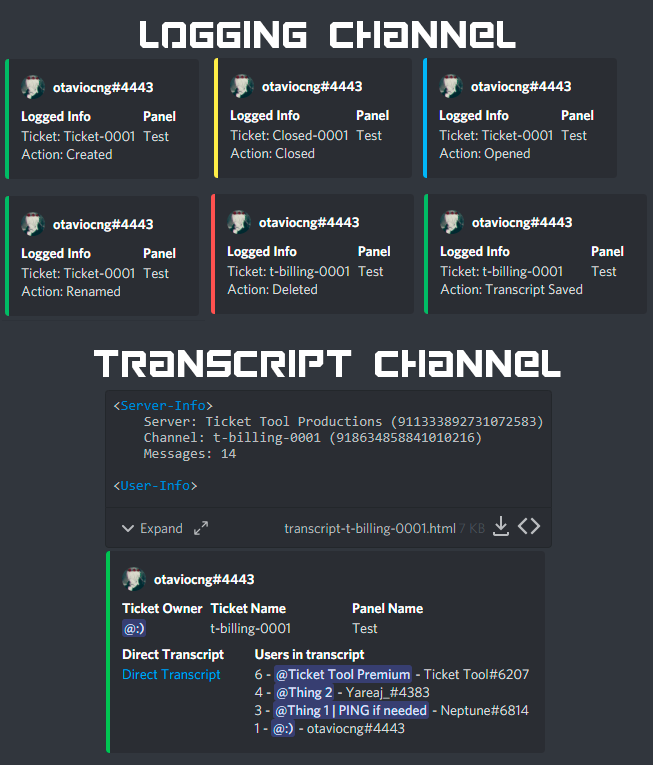 tame path
this is what happens when i use the delete option, the ticket channel stays but the contents are deleted.

I want it to delete the channel entirely instead, not just the contents so im really confused 😩
vocal breach
Is there a way to transfer a ticket to another server?
 compact galleon
tame path
I want it to delete the channel entirely instead, not just the contents so im re...
compact galleon
tame path
I want it to delete the channel entirely instead, not just the contents so im re...
You can type $delete ;-;
compact galleon
vocal breach
Is there a way to transfer a ticket to another server?
Nah
tame path
compact galleon
You can type $delete ;-;
im aware, it does the exact same thing as clicking the delete button in the ticket does
compact galleon
tame path
im aware, it does the exact same thing as clicking the delete button in the tick...
Oh ur ticket setting is different
tame path
yeah i dont know what setting isnt letting it delete the channel though
humble sequoiaBOT
ᅠ
@pseudo glen requires the following permissions:
Add Reactions
Read Channels
Send Messages
Manage Messages
Embed Links
Attach Files
Read History
Manage Roles
Manage Channels
To change the role permissions, you can go to your Discord Server ➞ Server Settings ➞ Roles ➞ @Ticket Tool
To change the channel permissions, you can go to your Channel Settings ➞ Permissions ➞ Ticket Tool
ᅠ
Note:
You can give Ticket Tool Administrative Permissions instead of all the permissions listed above, but it's entirely optional and NOT necessary.
gilded verge
humble sequoia
@tame path, check
previously someone wrote that to delete the channel, you have to write $delete or use the button, but from what I understood, the bot deleted the message, not the channel, so probably the Ticket Tool prefix on your server is different because in this case it would delete the entire channel 🤔
and since Ticket Tool does not have a command to delete messages, it must have been done by another bot or user
tame path
no no, when i used $delete it deletes all the messages within the ticket, but left the ticket channel
so the ticket becomes vacant when i use that command
gilded verge
could you please provide the server id?
tame path
895605972901462047
gilded verge
when you enter Server Configs, what prefix does the bot have?
tame path
$
gilded verge
hmm...
tame path
ive even deleted the panel and remade it
tame path
rustic gale
What if you delete it with the Delete button?
i tried the delete button and the delete command, they both end up deleting the contents of the ticket but leave the ticket channel there and empty
gilded verge
 ripe gust
Hey please can a Moderator setup a ticket bot in a server
ripe gust
Hey please can a Moderator setup a ticket bot in a server
Hey, sorry but you have to do it yourself
vocal breach
If I get premium and use premium commands and my premium runs out will the premium commands not work?
rustic gale
ripe gust
Hey please can a Moderator setup a ticket bot in a server
Sorry, we don't provide that kind of support. You can take a look at our setup resources, but you can't get one of us to just do the job for you
ripe gust
gilded verge
Hey, sorry but you have to do it yourself
So a mod can't
humble sequoiaBOT
You can check our documentation here;
You can also check #📂│information for the basic setup;
You can also watch this video tutorial.
Our documentation contains all the info you need about the bot to be able to setup and configure the bot however you like.
rustic gale
$help setup
humble sequoiaBOT
Setting up Ticket Tool
Visit the docs for setup info
General Setup
ripe gust
rustic gale
Sorry, we don't provide that kind of support. You can take a look at our setup r...
How much will it cost me
rustic gale
tame path
i tried the delete button and the delete command, they both end up deleting the ...
Try sending $debug in there
vocal breach
If I get premium and use premium commands and my premium runs out will the premium commands not work?
gilded verge
vocal breach
If I get premium and use premium commands and my premium runs out will the premi...
Currently the only premium command is claim so yes, if your premium runs out you won't be able to use it.
rustic gale
ripe gust
How much will it cost me
You can't pay us for it. And if someone's charging you for it they're scamming you
There's a good example
vocal breach
gilded verge
Currently the only premium command is `claim` so yes, if your premium runs out y...
what about the auto transcript and stuff like that?
gilded verge
no premium feature will be available then 😕
ripe gust
rustic gale
You can't pay us for it. And if someone's charging you for it they're scamming y...
Okay so should I invite you too the server so you set it for me please
Cool
Free right
rustic gale
Especially not one who just lied about being a moderator
ripe gust
rustic gale
Especially not one who just ***lied about being a moderator***
You're right
rustic gale
That's also a lie
shut bolt
@autumn shell stop claiming to be a moderator or any kind of staff in our server, this will be your only warning
ripe gust
Please who'll help me
humble sequoiaBOT
You can check our documentation here;
You can also check #📂│information for the basic setup;
You can also watch this video tutorial.
Our documentation contains all the info you need about the bot to be able to setup and configure the bot however you like.
ripe gust
Okay thanks
shut bolt
Np
prime bridgeBOT
Successful bans: 1
 Unsuccessful bans:
 0
 Reason: Pretending to be a moderator
 Moderator: @shut bolt
shut bolt
Yeah, an ex moderator with an account 8 hours old jajaja
gilded verge
Hey Staff, I have a question about Config Backup & Restore (Server Owner Only).
If I have the settings like in the screenshot, can I share my generated key and each server will be able to use it? My point is to generate such an exemplary ready-made version of panels, etc. 🤔
 shut bolt
gilded verge
Hey Staff, I have a question about `Config Backup & Restore (Server Owner Only)`...
shut bolt
gilded verge
Hey Staff, I have a question about `Config Backup & Restore (Server Owner Only)`...
The settings aren't created with the backup, the settings are the ones the dashboard will use on the transfer
gilded verge
okay, that is, the settings are not, but it will work as intended, right?
I just want to make sure the panels will work on each server as they are set up with key
shut bolt
They will, but if you have timed premium it could be transferred too
Also, the new update will have something to make this easier
gilded verge
gilded verge
shut bolt
Also, the new update will have something to make this easier
oh, sorry for the sticker 😳 thank you for help ❤️
iron nightBOT
Gave +1 Rep to @shut bolt
 small pond
is anyone having trouble with reflex
 humble sequoiaBOT

⚠️ You're in the wrong place
We provide support for Ticket Tool Discord bot and cannot help you with whatever issue you have.
- We don't know which Support Team you should contact to get this issue resolved, and unfortunately we won't be able to accurately tell you.
If you don't have any further questions regarding our bot Ticket Tool, please close this ticket
We would love to help you, but if you don't tell us what you need help with we can't help you :(
gilded verge
Here: @humble sequoia @pseudo glen
I don't see the error since you didn't show it to us
 frail tree
take a screenshot and post it
gilded verge
scenic plinth
Get off the TV
gilded verge
bro, stop trolling and send screenshot or don't ask for help
frail tree
use a computer or mobile device
scenic plinth
Sure, like the other guy said.
We'll provide support when you get the ability to take a screenshot then, we're not helping you on a TV.
And don't go "accidentally" pinging either 🙂
shut bolt

jade topaz
my server with ticket bot in it is not showing up on the manage server list
and I am not sure what "relogging" means
not sure if there is a wait time to get it to show up or something
Resolved.
tame path
this is my issue, still 😞
ive no idea why it doesnt delete the whole channel, when we tested it on a test server, it deletes the whole channel.
should i just make a ticket?
rustic gale
tame path
should i just make a ticket?
Yeah, probably.
rustic gale
Phew. Solved
 rustic gale
 south violet
That's called a multipanel
humble sequoiaBOT
For a more convenient use of multipanels, you can now combine panels on the dashboard. This will allow you to directly send the multipanel from the dashboard or via the $panel ID command.
Where can I find this?
You can find this setting on the Dashboard -> Panel Configs -> Settings -> General Options
Note: if you're attaching all the panels to a panel called English, don't include English in the attached panels box (If you do this, it will create duplicate)
This will put all buttons from all of your panels on one message. The message is the panel message from the panel you're combining these panels in.
You can also watch this video tutorial.
 silent pier
I have a question. I recently brought ticket tool in my discord server and was wondering if the dashboard is able to be used by multiple users? for staff access
rustic gale
silent pier
I have a question. I recently brought ticket tool in my discord server and was w...
Of course. Any user with the Administrator permission will be able to access the dashboard by default
Additionally, you can set up dashboard roles like this
humble sequoiaBOT
Any role you put there will have full access to the ticket tool dashboard. The server owner and users with admin permissions already have access to the dashboard.
Be careful of which roles to put here
silent pier
@rustic gale thank you
supple badge
how we can send the multipanels?
my embed has got two ticket creater i don't know why please help me
 rustic gale
supple badge
my embed has got two ticket creater i don't know why please help me
rustic gale
supple badge
my embed has got two ticket creater i don't know why please help me
You need to edit the Create Ticket buttons of each of your panels
$buttons
humble sequoiaBOT

The new Discord Buttons allow for a much smoother and convenient experience. They reduce lag and work much better than emojis. With ticket tool you can edit all the buttons however you like! Buttons can show emojis, text and can have 4 different colors.
Where can I edit them?
Dashboard ➞ Panel Configs ➞ Settings ➞ Button Options ➞ Setting
 rustic gale
After you've edited the buttons, you should resend the panel
supple badge
edit where?
 rustic gale
You can, for example, disable the emoji. You can also change the color. And you should definitely change the button text
To something that's representative of the type of ticket the button is for
supple badge
i should to edit where of the setting for delete one of them?
rustic gale
You mean you want only one button?
supple badge
yes
rustic gale
Look in General Options, there's a field called Attached Panels
Make sure it's empty
Then re-send the panel
supple badge
ok
supple badge
supple badge
how we can send the multipanels?
.
rustic gale
But that's what a multipanel is... a panel with multiple buttons
robust sandalBOT
rustic gale
But that's what a multipanel is... a panel with multiple buttons
اما اين چيزيه که يه چندپانل... پانل با دکمه های متعدد
English (en) → Persian (fa)
robust sandalBOT
rustic gale
Look in General Options, there's a field called Attached Panels
در گزینه های عمومی نگاه کنید، یک زمینه به نام پانل های پیوست وجود دارد
English (en) → Persian (fa)
robust sandalBOT
rustic gale
You can, for example, disable the emoji. You can also change the color. And you ...
مثلا ً می توانید ایموجی را غیرفعال کنید. شما همچنین می توانید رنگ را تغییر دهید. و شما باید قطعا متن دکمه را تغییر دهید
English (en) → Persian (fa)
robust sandalBOT
south violet
How do I add multiple categories Users can pick from
چگونه می توانم چند دسته اضافه کنم کاربران می توانند از انتخاب
English (en) → Persian (fa)
rustic gale
supple badge
I want also have a multipanel
Here's how you make a multipanel
humble sequoiaBOT
For a more convenient use of multipanels, you can now combine panels on the dashboard. This will allow you to directly send the multipanel from the dashboard or via the $panel ID command.
Where can I find this?
You can find this setting on the Dashboard -> Panel Configs -> Settings -> General Options
Note: if you're attaching all the panels to a panel called English, don't include English in the attached panels box (If you do this, it will create duplicate)
This will put all buttons from all of your panels on one message. The message is the panel message from the panel you're combining these panels in.
You can also watch this video tutorial.
supple badge
شما گفتید که حواسم باشه که اون قسمت خالی باشه
robust sandalBOT
supple badge
شما گفتید که حواسم باشه که اون قسمت خالی باشه
You told me to make sure that part was empty.
Persian (fa) → English (en)
rustic gale
Yes, because you said you wanted only one button instead of two
robust sandalBOT
rustic gale
Yes, because you said you wanted only one button instead of two
آره، چون گفتي به جاي دو تا فقط يه دکمه ميخواي
English (en) → Persian (fa)
supple badge
اون قسمت وصل کردن چی کار میکنه؟
robust sandalBOT
supple badge
اون قسمت وصل کردن چی کار میکنه؟
What's that connecting part doing?
Persian (fa) → English (en)
supple badge
Attach part
rustic gale
Let's say you want to make a multipanel out of panels 1, 2, 3, 4 and 5
robust sandalBOT
rustic gale
Let's say you want to make a multipanel out of panels 1, 2, 3, 4 and 5
بیایید بگوییم شما می خواهید به چند پانل از پانل های 1، 2، 3، 4 و 5
English (en) → Persian (fa)
rustic gale
The main panel will be panel 1
robust sandalBOT
rustic gale
The main panel will be panel 1
پنل اصلی پانل 1 خواهد بود
English (en) → Persian (fa)
rustic gale
In panel 1's Attached Panels you include panels 2, 3, 4 and 5
robust sandalBOT
rustic gale
In panel 1's Attached Panels you include panels 2, 3, 4 and 5
در پانل های متصل پانل 1 شما شامل پانل های 2، 3، 4 و 5
English (en) → Persian (fa)
rustic gale
Then, when you send panel 1, you get a multipanel with five buttons, one for each panel
supple badge
یعنی تقریبا یه کپی ازش میگیره و توی ۱ میزاره
robust sandalBOT
supple badge
یعنی تقریبا یه کپی ازش میگیره و توی ۱ میزاره
I mean, he'll take almost a copy of it and put it in one.
Persian (fa) → English (en)
robust sandalBOT
rustic gale
Then, when you send panel 1, you get a multipanel with five buttons, one for eac...
سپس، هنگامی که شما ارسال پانل 1، شما یک چند پانل با پنج دکمه، یکی برای هر پانل
English (en) → Persian (fa)
rustic gale
Please explain
robust sandalBOT
rustic gale
Please explain
لطفا توضیح دهید
English (en) → Persian (fa)
supple badge
I say when we attach 1 to 2, a copy of buttons in 2 paste in 1
rustic gale
You have to edit the buttons to make them look different
robust sandalBOT
rustic gale
You have to edit the buttons to make them look different
شما باید دکمه ها را ویرایش کنید تا آنها متفاوت به نظر برسند
English (en) → Persian (fa)
rustic gale
supple badge
edit where?
Here
supple badge
چجوری میتونیم دکمه های متصل شده رو ویرایش کنیم
robust sandalBOT
supple badge
چجوری میتونیم دکمه های متصل شده رو ویرایش کنیم
How can we edit the connected buttons?
Persian (fa) → English (en)
supple badge
Attached buttons
rustic gale
supple badge
edit where?
Here
After editing the buttons, you will have to send the panel again
 drifting basalt
How to fix this ?
 robust sandalBOT
rustic gale
After editing the buttons, you will have to send the panel again
robust sandalBOT
rustic gale
After editing the buttons, you will have to send the panel again
پس از ویرایش دکمه ها باید پنل را دوباره ارسال کنید
English (en) → Persian (fa)
supple badge
rustic gale
After editing the buttons, you will have to send the panel again
Thank you 🙏
iron nightBOT
Gave +1 Rep to @rustic gale
rustic gale
drifting basalt
How to fix this ?
What are you trying to do when you get that message?
drifting basalt
Adding users in the ticket
supple badge
هر موقع کاری داشتم بازم بهتون میگم ممنونم
robust sandalBOT
supple badge
هر موقع کاری داشتم بازم بهتون میگم ممنونم
Whenever I have a job, I'll tell you again thank you.
Persian (fa) → English (en)
supple badge
Have a issue
rustic gale
drifting basalt
Adding users in the ticket
You have to type $add ID
Or $add @mention
drifting basalt
Yeah Ik I did that
rustic gale
Can we get a screenshot of the command you sent
rustic gale
supple badge
Have a issue
Yes?
drifting basalt
It instantly deletes the command
rustic gale
Can you try again then?
supple badge
rustic gale
Yes?
No no I editing the mr.translate translate it says have job I say have a issue
drifting basalt
However I was able to ss it
 drifting basalt
But I can do that in other panels
Did it change recently ?
Earlier I used to add users in that way
rustic gale
Are you sure?
rustic gale
supple badge
No no I editing the mr.translate translate it says have job I say have a issue
Ah! Okay. I understand
drifting basalt
Earlier it was working
Now it's not working
Anyways I will just add with IDs.
thanks

 drifting basalt
Also , how can we disable members of support team using commands like close and delete ?
 vital ruin
Message #🆘│community-support I need help having friends in GTA5 because my friends are mean so I don’t have them as a friend and most people use me for cash because I’m level 350
rustic gale
drifting basalt
Also , how can we disable members of support team using commands like close and ...
By making those roles Additional Roles instead of Support Team Roles