#🆘│community-support
1 messages · Page 6 of 1
 shell oyster
 rustic gale
Include them in the ticket message
 humble sequoiaBOT
The Ticket Message is the first message sent by the bot in a new ticket. To customise it head over to your Dashboard ➞ Panel Configs ➞ Settings ➞ Ticket Options ➞ Edit Ticket Message
 shell oyster
How?
rustic gale
First enter the menu shown in the animation above
Then, in the “Ticket Message” field, include {create.form.1}
Or in the “Embed Description” field
shell oyster
Is it possible to show the questions or only the answers?
shell oyster
@rustic gale
rustic gale
shell oyster
Is it possible to show the questions or only the answers?
You will have to manually copy the questions into the ticket message
 stray tartan
NAO REDENRIDOU PARA MIN E O CARRO CAIU DENTRO DO RIO
 floral wing
$vote
humble sequoiaBOT
Votes
Current Votes: 72
Lifetime Votes: 1513
Linked Votes: 0
Vote Links
Linking Info
Linked User: Not Linked
You can give your future votes to another user by linking with that user.
To link use $vote link (@user or userId)
To unlink use $vote unlink
Redeeming
Each vote is worth 12 hours of premium and can be redeemed once you have atleast 6 votes.
Your current votes are worth 36 days, 0h, 0m
To redeem your current votes use $vote redeem
floral wing
$vote redeem
 quasi cliff
Please use #🤖│bot-spam
 jade topaz
When i test trial so does it immediately start the right Premium
 night urchin
@support teams, will I get tickettool premium if I boost the server?
 scenic plinth
night urchin
@support teams, will I get tickettool premium if I boost the server?
scenic plinth
night urchin
@support teams, will I get tickettool premium if I boost the server?
You have to boost twice, but yes. Also, don't attempt to ping support please, although it was a clear failure.
scenic plinth
jade topaz
When i test trial so does it immediately start the right Premium
Assuming you mean you purchased premium and activated it during a trial, yes, it automatically adds afterwards, assuming you did all the selections properly.
 tranquil tide
Is there a way to download attachments from transcripts?
rustic gale
Only if the attachments were uploaded somewhere outside the ticket.
Which is almost never the case
tranquil tide
rustic gale
Only if the attachments were uploaded somewhere outside the ticket.
Gotcha, thank you
 iron nightBOT
Gave +1 Rep to @rustic gale
rustic gale
$commandstyle
humble sequoiaBOT
Command Style Tickets!
Command Style Tickets allow you to open tickets VIA the $new or $ticket commands. This feature also allows you to open tickets for people, by using the aforementioned commands with the user's ping or ID.
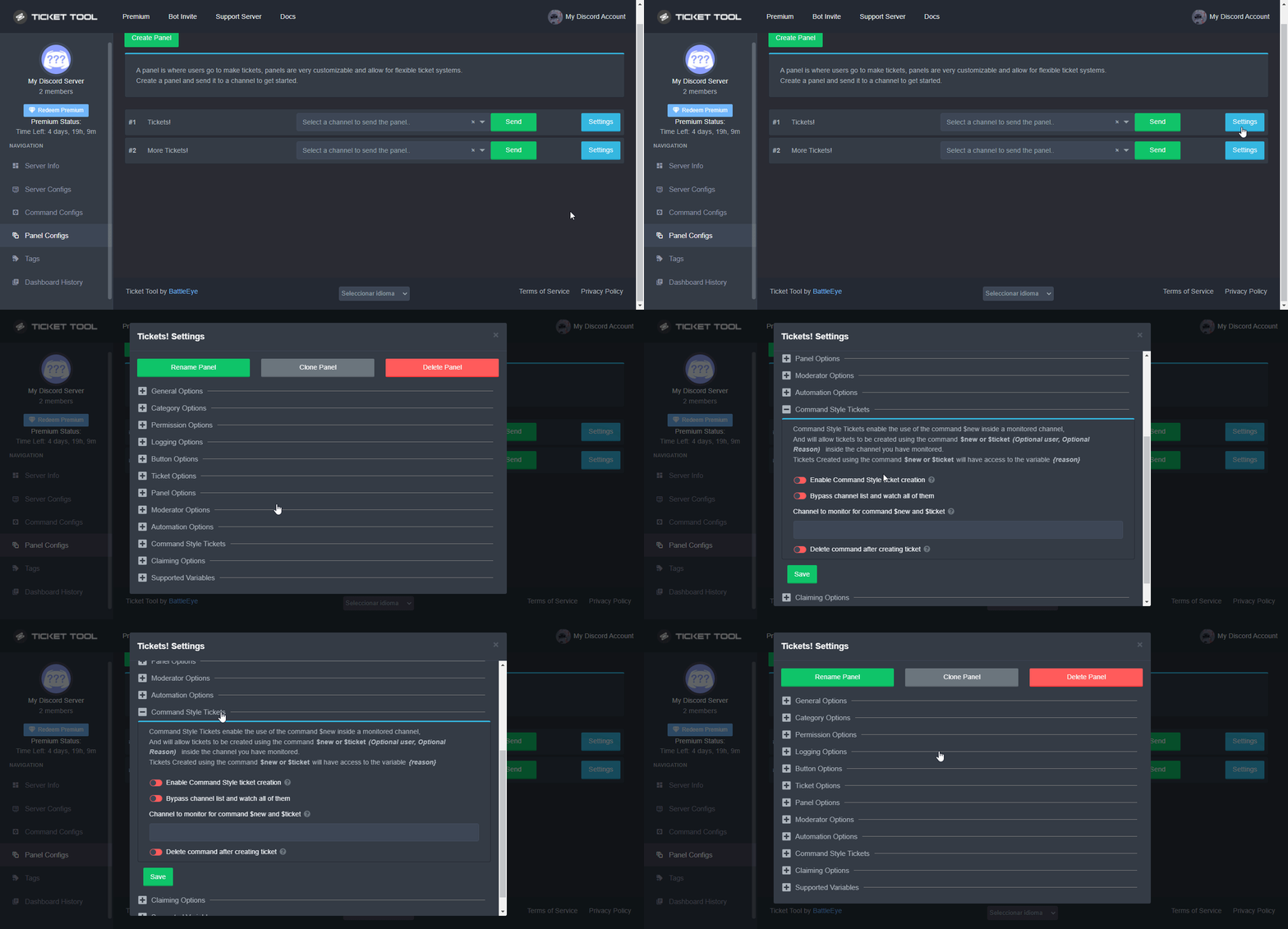
You can enable this feature by heading over to your server's dashboard. Then head over to Panel Configs ➞ Settings ➞ Command Style Tickets. (GIF below shows you how to get to it as well).
This section of the panel settings also contains the following features
- Bypass channel list and watch all of them → when you enable this option, Ticket Tool will create a ticket whenever someone uses the $new or the $ticket command in a channel it has access to .
- Channel to monitor for command $new and $ticket → This is the opposite of the previous option, you can actually select in which channels Ticket Tool should look for the $new command instead of looking in the whole server.
- Delete command after creating ticket → If enabled, Ticket Tool will delete the command (whether it's
$newor$ticket) a few seconds after you run it.
 compact delta
thx
rustic gale
There is no command to create tickets by default. You have to set them up
rustic gale
If you mean creating panels, that's done with the Send button in the dashboard
$help send
humble sequoiaBOT
Sending a panel
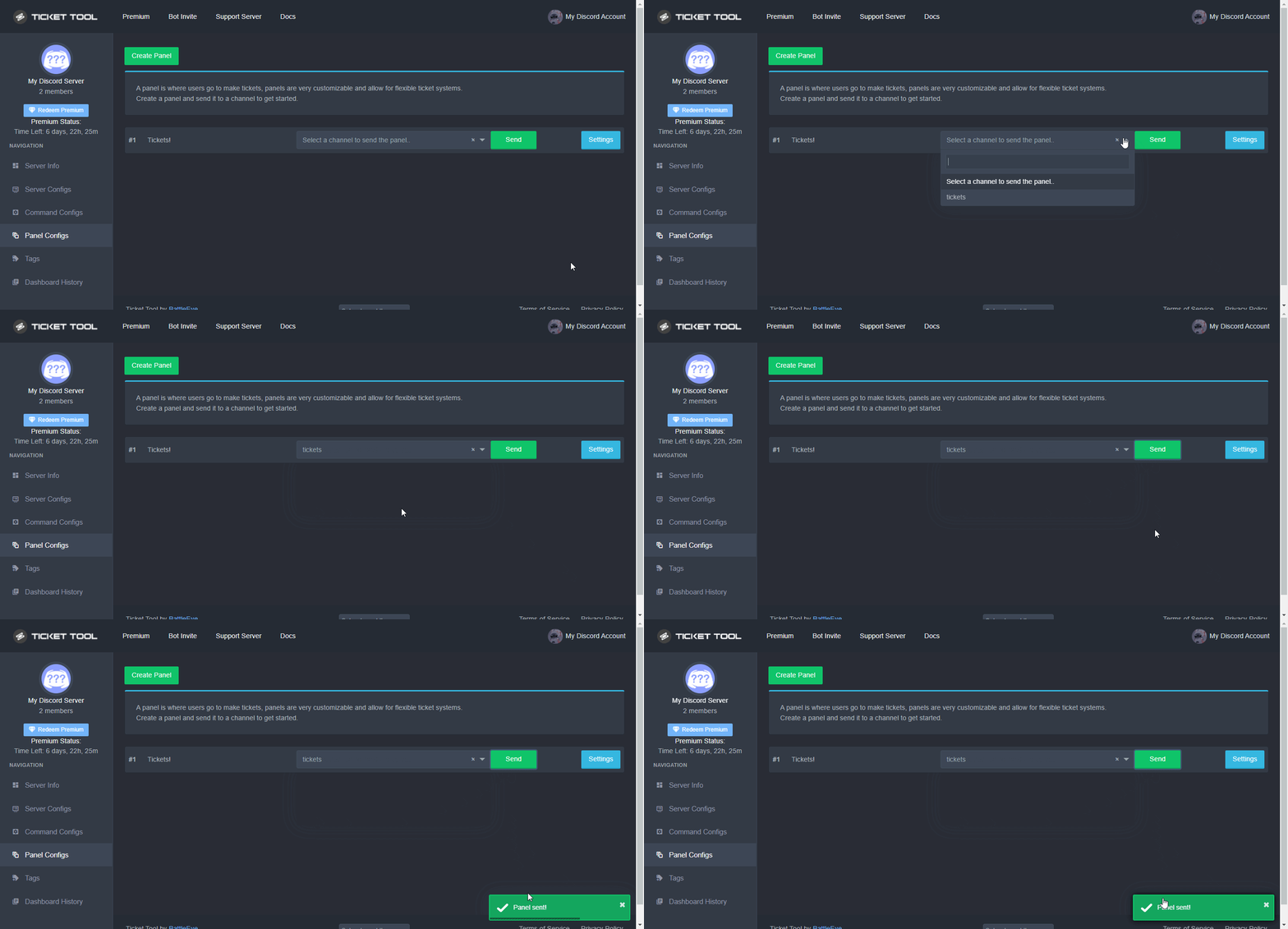
Once you've created a panel on the dashboard you will need to send it to a channel using send on the dashboard
Select the channel you want your panel to be created in and click send.
For other questions checkout $help faq
An example of a sending a panel is shown below.
 humble sequoiaBOT
Help Options
$help commands - Information on commands
$help setup - Information on bot setup
$help faq - Frequently asked questions
quasi cliff
Please use #🤖│bot-spam for testing commands
 worn lintel
Tnx
 stoic furnace
quasi cliff
Please use <#910978476536905738> for testing commands
stoic furnace
quasi cliff
Please use <#910978476536905738> for testing commands
excuse me
i need Help
humble sequoiaBOT
Help Options
$help commands - Information on commands
$help setup - Information on bot setup
$help faq - Frequently asked questions
jade topaz
$help commands
humble sequoiaBOT
() = optional
[] = required
*==================================
Ticket Commands
==================================*
_ _
`$add [User] (channel)`
Description: Adding additional users to a ticket
Aliases: none
`$remove [User] (channel)`
Description: Removing users from a ticket
Aliases: none
`$close`
Description: Closing tickets
Aliases: none
`$open`
Description: Opening closed tickets
Aliases: none
`$delete`
Description: Deleting tickets
Aliases: none
`$rename`
Description: Renaming tickets/channels
Aliases: none
`$transcript (send channel)`
Description: Creating transcripts
Aliases: none
`$new (user) (reason)`
Description: Creating tickets in a monitored channel (when command style is enabled)
Aliases: none
`$claim`
Description: Claiming tickets (when claim is enabled)
Aliases: "unclaim"
_ _
*==================================
General Commands
==================================*
_ _
`$help (Help Options)`
Description: Help Command
Aliases: none
`$debug`
Description: Debuging issues with running Ticket Tool
Aliases: none
`$id (@role/@user/#channel/emoji)`
Description: Converting roles, users, channels and emojis to ID
Aliases: "getid"
`$permlevel`
Description: Checking permission level with Ticket Tool
Aliases: "level"
`$ping`
Description: Checking response time with discord api
Aliases: none
`$vote (link | unlink | redeem) (user)`
Description: Earn premium by voting on top.gg or Discord.boats
Aliases: "votes"
quasi cliff
Please use #🤖│bot-spam for testing commands
jade topaz
Tg
 obsidian briar
hello, if it is possible can someone explain to me how to re open an old ticket?
humble sequoiaBOT
━━ moved to ticket ━━
jade topaz
how do i set someone roles like ticket team and give dem to where they can see in the ticket with out Administrator permission
rustic gale
jade topaz
how do i set someone roles like ticket team and give dem to where they can see i...
That's a support team role
$help support
humble sequoiaBOT
How to let support team see into a ticket
About support roles
A support role lets your support team see into tickets with out having to add them manually to each and every ticket.
You can add as many support roles as you like per panel.
NOTE that the way discord works all admins can see into tickets regardless of this.
How to set a support role
To set a Support role go to the Dashboard -> Panel Configs -> Settings -> General Options -> Support Team Roles.

NOTE that the support role will not be able to see into tickets that are already created..
 pallid moth
Hi, I set up ticket bot , I tried it out and made a ticket, but it send the tickets to the top, do I need to Create Category and place my Channel ticket support in there for my tickets to be linked
rustic gale
$help category
humble sequoiaBOT
How to set the open category
To set a open category go to the Dashboard -> Panel Configs -> Settings -> Category Options -> Category Open
 rustic gale
This is what you need to do
 wide urchin

 gilded verge
wide urchin
gilded verge
wide urchin
I don't see the question. If you have a problem, please describe it.
 fallow ingot
gilded verge
I don't see the question. If you have a problem, please describe it.
fallow ingot
gilded verge
I don't see the question. If you have a problem, please describe it.
think they mean because it won’t open any tickets further because of Discord’s max channel limit (500) has been reached.
gilded verge
oh, that's right 😅
but I don't know how we could help if it's not a bot problem 😄
 distant cargo
is there a way to automatically log transcripts without premium?
 jaunty remnant
hi, how i can make more buttons for tickets? 😄
 sleek ore
hi how can make a ticket
humble sequoiaBOT

How Do I setup Ticket Tool
You can check our documentation here;
You can also check #📂│information for the basic setup;
You can also watch this video tutorial.
Our documentation contains all the info you need about the bot to be able to setup and configure the bot however you like.
 covert swallow
jaunty remnant
hi, how i can make more buttons for tickets? 😄
covert swallow
jaunty remnant
hi, how i can make more buttons for tickets? 😄
Follow this guide
humble sequoiaBOT
Multipanels (2)
For a more convenient use of multipanels, you can now combine panels on the dashboard. This will allow you to directly send the multipanel from the dashboard or via the $panel ID command.
Where can I find this?
You can find this setting on the Dashboard -> Panel Configs -> Settings -> General Options
Note: if you're attaching all the panels to a panel called English, don't include English in the attached panels box (If you do this, it will create duplicate)
This will put all buttons from all of your panels on one message. The message is the panel message from the panel you're combining these panels in.
You can also watch this video tutorial.
 jaunty remnant
covert swallow
Follow this guide
jaunty remnant
covert swallow
Follow this guide
thanks! ♥
covert swallow
Np!
iron nightBOT
Gave +1 Rep to @covert swallow
covert swallow
That was delayed
wide urchin
Np!
rustic gale
gilded verge
oh, that's right 😅
but I don't know how we could help if it's not a bot proble...
Telling them to delete some channels, for example
 rocky sierra
rustic gale
rocky sierra
rustic gale
Meridiano? What do you mean?
quasi cliff
$help role
humble sequoiaBOT
Help Options
$help commands - Information on commands
$help setup - Information on bot setup
$help faq - Frequently asked questions
humble sequoiaBOT
Mentions
Within all the messages the bot's sends (both embeds and text) you can mention either channels, roles, or even users, these mentions will only send a notification to the user if they are used within a text field, e.g: a role mentioned in an embed won't ping at all the users who have that role.
For mentioning a role you can use one out of three options:
{@Role Name} ➞ Which is Case Sensitive.
{RoleID} ➞ Replace RoleId with the Id of the role you are trying to ping.
<@&RoleID> ➞ Discord's native syntax to ping roles.
<#ChannelID> ➞ Mention a channel by its ID.
<@UserID> ➞ Mention a user by its ID.
humble sequoiaBOT
How to make Ticket Tool ping a role
To make ticket tool ping a role when a ticket is opened, go to the Dashboard -> Panel Configs -> Settings -> Ticket Options -> Ticket Message -> Message Text and do this:
{@Role name} This is case sensitive and the role must have @mentions enabled

 stark olive
When a ticket is closed, the person who claimed the ticket can no longer see the channel. is there a way to fix that to where the person who claimed the ticket can still see the channel after it has been closed?
rustic gale
stark olive
When a ticket is closed, the person who claimed the ticket can no longer see the...
Of course, see the following
$help perms
humble sequoiaBOT
How to set the permissions for tickets
To set a change permissions go to the Dashboard -> Panel Configs -> Settings -> Permission Options
 rustic gale
In Edit User Closed Permissions, enable Read Messages
Note that changes to permissions in the dashboard will not be applied to existing tickets, but only to tickets created after the change
stark olive
So how would I make it so that if the person opening the ticket still gets hidden from it? @rustic gale
stark olive
ye
the person who claimed the ticket gets removed when it is closed
but they cant delete it since they've been removed
rustic gale
Please disregard my previous suggestion then
 naive canyon
how to make text bold in the ticket
rustic gale
Anyway. When the ticket is closed, the person who claims it has the same permissions as the rest of staff
rustic gale
naive canyon
how to make text bold in the ticket
**put it between double asterisks**
jade topaz
Bot down?
stark olive
rustic gale
Anyway. When the ticket is closed, the person who claims it has the same permiss...
well it kicks out the person who claimed it, but not any other staff member
rustic gale
Did you test this with different accounts?
stark olive
yes
i can also see this via the discord memberlist showing who has access to the channel
rustic gale
That's strange. Can you open a ticket so we can take a closer look?
stark olive
will do.
jade topaz
Did I hit my 500 limit or is the bot restarting lol
rustic gale
The bot is fine right now. What's your server's ID?
 jade topaz
rustic gale
The bot is fine right now. What's your server's ID?
jade topaz
rustic gale
The bot is fine right now. What's your server's ID?
Any luck papi
rustic gale
jade topaz
Any luck papi
You will have to do this
humble sequoiaBOT
How to disable the premium bot
To disable the premium bot you will have to go to the Dashboard ➞ Server Configs ➞ Premium bot ➞ And on the right-hand side select the primary free bot in the drop down menu.
Premium features will still work on the normal bot.
 jade topaz
What’s the cause? @rustic gale
rustic gale
The cause is that you're not subscribed to premium but have the premium bot enabled in Server Configs
jade topaz
Oh shit again I’ll pay it lol
 opal mica
jade topaz
Oh shit again I’ll pay it lol
opal mica
jade topaz
Oh shit again I’ll pay it lol
You probably keep forgetting to pay each week
jade topaz
Yes
opal mica
month**
 real marlin
You can pay yearly and get a free month since it's only charged 11 months
 humble sequoiaBOT
Don't see your server in the dashboard?
You will possibly need to relog. Look below to see steps on how to relog.
How to relog in the Dashboard.
First, you will need to go to the dashboard. Once your there, click on your avatar on the top right. after you clicked it, you will see button that says Logout. You must click that. Once you have logged out, you can log back in.
Note:
You need one of these 3 things to access the dashboard.
1. Server Owner (Level: 6)
2. Server Administrator (Level: 4)
3. Dashboard Role (Level: 2)
:warning: You can check your level using $level on your Discord Server
User permission level with Ticket Tool
@User is permission level: 0 (User)
```» *If it shows that your permission is **0**, you don't have any of the above **3 things** to manage the dashboard.*
**See the GIF below on how to relog:** real marlin
 fallow python
Have you tried this above?
real marlin
There is more steps than just logout and login.
rustic gale
Try typing $level in your server in a channel the bot can see
 hasty garnet
There is a video explaining how to subscribe to the bot ?
real marlin
hasty garnet
There is a video explaining how to subscribe to the bot ?
You mean buy the premium?
hasty garnet
yup
real marlin
No we do not have a video, but if you wish I can assist you with.
Open a ticket here: #🎫│make-a-ticket and I will be with you in a moment.
real marlin
hasty garnet
yup
This due some personal information can be said during the help.
hasty garnet
The problem is that I'm a buyer before and I didn't get the interactive code
real marlin
So you have already purchased before?
hasty garnet
I purchased and did not receive a message with the code
real marlin
When did you purchase?
real marlin
hasty garnet
I received a message stating that an amount has been deducted
Please create a ticket, since sensitive information can be necessary.
hasty garnet
I opened a ticket but got no response
real marlin
A billing ticket or a English ticket?
hasty garnet
real marlin
A billing ticket or a English ticket?
billing ticket
real marlin
Ok in that I do not have access to them. You will need to wait for an answer from the billing team.
real marlin
hasty garnet
billing ticket
Someone will be with you shortly. 😄
jade topaz
Hey how do I setup ticket support in my own server
real marlin
jade topaz
Hey how do I setup ticket support in my own server
The answer is here: https://docs.tickettool.xyz/

Ticketing without Clutter
jade topaz
How do I get someone to open support on my server
I'm using the regular bot of the ticket tool but I couldn't find the command to open support
 swift sapphire
k
real marlin
jade topaz
I'm using the regular bot of the ticket tool but I couldn't find the command to ...
You can find all the information here: https://docs.tickettool.xyz/
Ticketing without Clutter
jade topaz
Thanks
 safe heron
Hello, I can't configure the ticket tool, I'm French, I use google translation and I'm on the phone.
real marlin
safe heron
Hello, I can't configure the ticket tool, I'm French, I use google translation a...
You can find all the information here: https://docs.tickettool.xyz/ if you not speak English please feel free to translate the page in the options of your Browser.
Ticketing without Clutter
safe heron
real marlin
You can find all the information here: https://docs.tickettool.xyz/ if you not s...
it doesn't work I have to speak English I'm on the phone it doesn't want
real marlin
I am sorry, there is nothing we can do for that, what you can do is to open a ticket and try your luck with the French support here: #🎫│make-a-ticket
safe heron
real marlin
I am sorry, there is nothing we can do for that, what you can do is to open a ti...
thank you it can take how long the tickets
iron nightBOT
Gave +1 Rep to @real marlin
real marlin
safe heron
thank you it can take how long the tickets
Since its specific teams take longer than usual, but the it will not take more than 24h.
safe heron
real marlin
Since its specific teams take longer than usual, but the it will not take more t...
that's a lot
real marlin
safe heron
that's a lot
We also have our personal jobs, once a French speaker has time he will answer you.
jade topaz
safe heron
Hello, I can't configure the ticket tool, I'm French, I use google translation a...
Salut , je suis français comment puis-je t’aider ?
 burnt bay
 safe heron
jade topaz
Salut , je suis français comment puis-je t’aider ?
safe heron
jade topaz
Salut , je suis français comment puis-je t’aider ?
C’est avec ticket tools
jade topaz
safe heron
C’est avec ticket tools
Explique moi le problème
safe heron
jade topaz
Explique moi le problème
J’arrive pas à le config sur mon serveur je suis sur téléphone
jade topaz
safe heron
J’arrive pas à le config sur mon serveur je suis sur téléphone
Hmm
Tu n’a pas de pc ?
safe heron
Non
safe heron
Le config sur mon serveur
jade topaz
Ok alors
safe heron
Dit moi
safe heron
Ça marche pas
safe heron
Je suis sur téléphone ça veut pas
jade topaz
safe heron
Je suis sur téléphone ça veut pas
Mais va sur le lien que je t’ai envoyer
safe heron
jade topaz
Mais va sur le lien que je t’ai envoyer
C’est que j’ai fait ça fait une page blanche
jade topaz
Envoie un screen
 jade topaz
Re actualise
safe heron
Ça marche pas
jade topaz
Bah c’est sûrement un problème de connexion
safe heron
Non
 wide cargo

 humble sequoiaBOT
Don't see your server in the dashboard?
You will possibly need to relog. Look below to see steps on how to relog.
How to relog in the Dashboard.
First, you will need to go to the dashboard. Once your there, click on your avatar on the top right. after you clicked it, you will see button that says Logout. You must click that. Once you have logged out, you can log back in.
Note:
You need one of these 3 things to access the dashboard.
1. Server Owner (Level: 6)
2. Server Administrator (Level: 4)
3. Dashboard Role (Level: 2)
:warning: You can check your level using $level on your Discord Server
User permission level with Ticket Tool
@User is permission level: 0 (User)
```» *If it shows that your permission is **0**, you don't have any of the above **3 things** to manage the dashboard.*


**See the GIF below on how to relog:** fluid anvil
Trying to figure out how to edit the permissions of the ticket so only my staff can close it and not the user.
 charred pecan
Hello, how can I make the bot work through a slash command?
real marlin
fluid anvil
Trying to figure out how to edit the permissions of the ticket so only my staff ...
Hey, Dashboard - Panel Configs - Setting - Button Options - Close Ticket Settings -  Support Team Only
charred pecan
@real marlin, help please
real marlin
charred pecan
<@294530389425258497>, help please
Sure thing, read #📂│information, once you have read tell me what rule you violated right now.
real marlin
Nobody can read rules in less than a minute so I will give you sometime to be familiar with our rules.
real marlin
I will be in a work meeting in 2 minutes so I will make you wait until the end unless someone else wishes to help you.
real marlin
if you want a quick support feel free to open a ticket #🎫│make-a-ticket
charred pecan
ok
 trim citrus
since an 'are you sure you want to open this ticket?'-ephemeral button thing is going to be far-fetched for this bot, this is the next best thing

take notes, tickettool - take notes
and yes, i've confirmed that this actually works
 distant bolt
How to add multi panel ticket?
 humble sequoiaBOT
Multipanels
Multipanels are panels with multiple buttons attached to them.
How to create a Multipanel
All users can combine multiple panels into one multipanel!
First, find the IDs of each panel you wish to combine. You can find them in your Panel Configs in the Dashboard
Next, send the multipanel to a channel using $panel [id1] [id2] {id3} ....
e.g. $panel 1 2 4 17 35 to combine panels 1, 2, 4, 17 and 35.
Up to 25 panels may be combined.
You can also watch this video tutorial.

 arctic pagoda
distant bolt
How to add multi panel ticket?
arctic pagoda
distant bolt
How to add multi panel ticket?
^^
distant bolt
And will there be slash commands?
arctic pagoda
At the moment, Ticket Tool doesn't have them but I believe that they will come after the bot rewrite
 median knot
hey - so it appears that the attached media in tags in not working atm - anyone experience this issue this am?
humble sequoiaBOT
━━ moved to ticket ━━
 hybrid sierra
How do I use this feature..? Everytime I enable it, it only has one option on the dropdown.
 rustic gale
hybrid sierra
How do I use this feature..? Everytime I enable it, it only has one option on th...
rustic gale
hybrid sierra
How do I use this feature..? Everytime I enable it, it only has one option on th...
Include additional panels in Attached Panels
humble sequoiaBOT
Multipanels (2)
For a more convenient use of multipanels, you can now combine panels on the dashboard. This will allow you to directly send the multipanel from the dashboard or via the $panel ID command.
Where can I find this?
You can find this setting on the Dashboard -> Panel Configs -> Settings -> General Options
Note: if you're attaching all the panels to a panel called English, don't include English in the attached panels box (If you do this, it will create duplicate)
This will put all buttons from all of your panels on one message. The message is the panel message from the panel you're combining these panels in.
You can also watch this video tutorial.
 barren rose
How do I get the gift?
#📌│booster-perks
hybrid sierra
rustic gale
Include additional panels in Attached Panels
Thank you sooo much. I overlooked that I guess.
iron nightBOT
Gave +1 Rep to @rustic gale
rustic gale
barren rose
How do I get the gift?
<#927789598208311366>
Make a ticket in #🎫│make-a-ticket and request it
trim citrus
hybrid sierra
How do I use this feature..? Everytime I enable it, it only has one option on th...
where is this?
pallid moth
@rustic gale thank you for the help the other night with ticket issue. It works now and all linked
iron nightBOT
Gave +1 Rep to @rustic gale
 honest tartan
bot isnt working for some reason
i did $help multiple times but it did not work + i kicked and re added the bot as well but nothings working..
please help
rustic gale
honest tartan
bot isnt working for some reason
i did $help multiple times but it did not work ...
What's your server's ID?
honest tartan
rustic gale
What's your server's ID?
One second let me check
honest tartan
rustic gale
What's your server's ID?
Uhh where do i check the servers id
Oh wait it’s working now
rustic gale
$devmode
humble sequoiaBOT
How to turn on developer mode
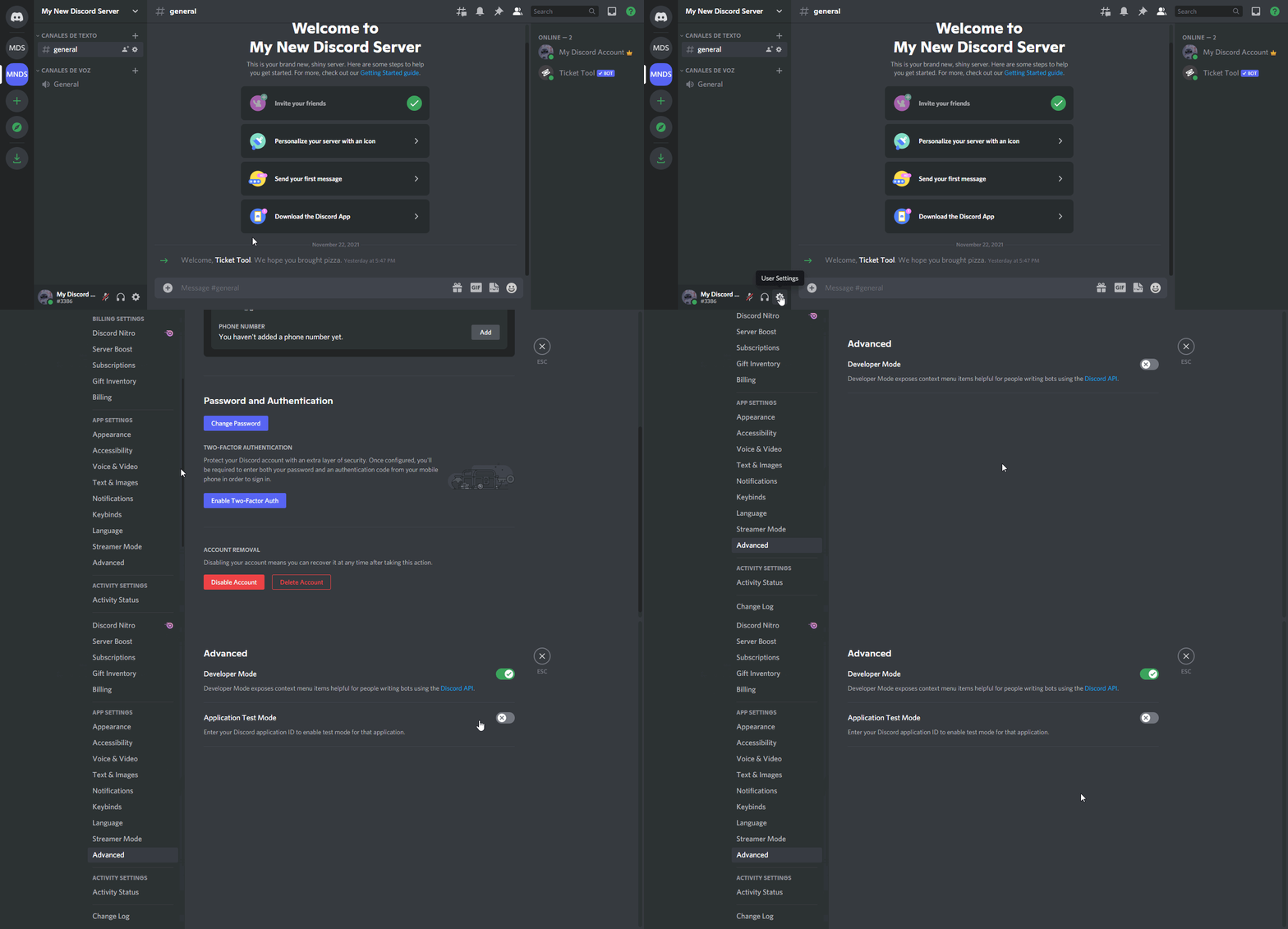
To enable developer mode do the following:
[:desktop: PC] go to Settings ➞ Advanced ➞ Developer mode
[:mobile_phone: Mobile] go to Settings ➞ Appearance ➞ Developer mode
Developer Mode allows you to get the ID of any channel, user, role, or server.
VIA the ID, you can use them with <> alongside their corresponding format to mention a channel/role/user...
They're mostly used to mention channels, users, or roles in Embeds
Formats
Channels: <#ID> ➝ #🤖│bot-spam
Users: <@ID> ➝ @humble sequoia
Roles: <@&ID> ➝ <@&642118166243311646>
 digital pond
two questions that are probably silly, but:
- if I have premium, how do I snag the premium role in this server?
- if I invite the premium bot, will I have to re-drop the panels with the new bot?
covert swallow
digital pond
two questions that are probably silly, but:
1) if I have premium, how do I sna...
- type
$pcin #🤖│bot-spam - yes
dont forget to enable the premium bot
humble sequoiaBOT
Inviting and Enabling Premium Bot
The first thing you will need to do is invite the premium bot, an invite can be found here
Once the bot is in your server we will head to the dashboard and manage your server. When you are managing your server, you want to head into "Server Configs" then click the drop down menu under "Select the bot you would like to use on this server" then click "Ticket Tool#6207" and then save.
 digital pond
covert swallow
1) type `$pc` in <#910978476536905738>
2) yes
digital pond
covert swallow
1) type `$pc` in <#910978476536905738>
2) yes
thank you!
iron nightBOT
Gave +1 Rep to @covert swallow
digital pond
listen that's incredibly valid of you
 grave fiber
trim citrus
since an 'are you sure you want to open this ticket?'-ephemeral button thing is ...
grave fiber
trim citrus
since an 'are you sure you want to open this ticket?'-ephemeral button thing is ...
Sorry, how does this work?
 tame path
hi sorry if this is written somewhere, but am i able to have a role pinged for when tickets are opened?
gilded verge
tame path
hi sorry if this is written somewhere, but am i able to have a role pinged for w...
Hey, we're not pinging anyone, rule 4 in #📂│information, support is notified automatically in tickets
tame path
gilded verge
Hey, we're not pinging anyone, rule 4 in <#509239005481664524>, support is notif...
no i mean I have ticket tool set up on my server, and I want to be able to set a role up to get pinged when my members open a ticket
just wondering if thats possible at all
gilded verge
so I misunderstood, then forgive me ^-^
humble sequoiaBOT
Mentions
Within all the messages the bot's sends (both embeds and text) you can mention either channels, roles, or even users, these mentions will only send a notification to the user if they are used within a text field, e.g: a role mentioned in an embed won't ping at all the users who have that role.
For mentioning a role you can use one out of three options:
{@Role Name} ➞ Which is Case Sensitive.
{RoleID} ➞ Replace RoleId with the Id of the role you are trying to ping.
<@&RoleID> ➞ Discord's native syntax to ping roles.
<#ChannelID> ➞ Mention a channel by its ID.
<@UserID> ➞ Mention a user by its ID.
**Ticket Message**
The Ticket Message is the first message sent by the bot in a new ticket. To customise it head over to your Dashboard ➞ Panel Configs ➞ Settings ➞ Ticket Options ➞ Edit Ticket Message
gilded verge
put your mention in Message Text ^-^
tame path
is this premium only or can i do this without premium?
gilded verge
up to 250 characters are free :>
iron nightBOT
Gave +1 Rep to @gilded verge
 ornate trout
I put a new graphics card in and now my key won’t work
humble sequoiaBOT

⚠️ You're in the wrong place
We provide support for Ticket Tool Discord bot and cannot help you with whatever issue you have.
- We don't know which Support Team you should contact to get this issue resolved, and unfortunately we won't be able to accurately tell you.
If you don't have any further questions regarding our bot Ticket Tool, please close this ticket
 warm cargo
I am trying to figure out how to set up the ticket bot to my server.
 obtuse krakenBOT
1. Invite Ticket Tool to your server
First you will want to invite the bot to your server. Once the bot is in your server, you can manage your server in the dashboard.

2. Create a Panel
To create a panel we are going to need to head over to the panel configs on the dashboard.
Once at the dashboard we will need to click Create Panel.
Enter a panel name (Fill in any optional settings you want).
Click Create Panel and your ready to get started with configuring your panel.
An example of a creating a panel is shown below.

3. Send the Panel to a Channel
Once you've created a panel on the dashboard you will need to send it to a channel using send on the dashboard.
Select the channel you want your panel to be created in and click send.
For other questions checkout $help faq.
An example of a sending a panel is shown below.
Having a Problem Sending the Panel?
Do $debug in a channel with Ticket Tool and make sure it has all the necessary Discord permissions.
 humble sequoiaBOT
How Do I setup Ticket Tool
You can check our documentation here;
You can also check #📂│information for the basic setup;
You can also watch this video tutorial.
Our documentation contains all the info you need about the bot to be able to setup and configure the bot however you like.
gilded verge
humble sequoia
@warm cargo, or check  if you want video tutorial
 tall spear
Is there a way to disable someone from closing their own ticket?
gilded verge
tall spear
Is there a way to disable someone from closing their own ticket?
Panel Settings->Button Options->Close Ticket Settings->add everyone to Disabled Roles or choose Support Team Only

 grand sky
is there an option to purchase a custom instance of the bot?
rustic gale
Not currently, but it's under consideration by the developer
grand sky
rustic gale
Not currently, but it's under consideration by the developer
kk t hanks
and what would be the estimated cost of it?
jade topaz
rustic gale
Not currently, but it's under consideration by the developer
any ideas on how to add reason to my ticket options with form
i have forms setup but the reason never shows in the tickets
rustic gale
jade topaz
any ideas on how to add reason to my ticket options with form
{create.form.1}
 fossil ocean
the bot tell me"system failure:missing permission"
what it means
help!
rustic gale
Type $debug in that channel to see which permissions it's missing
fossil ocean
I'll try then
fossil ocean
rustic gale
Type $debug in that channel to see which permissions it's missing
thx bro, i figure out
iron nightBOT
Gave +1 Rep to @rustic gale
 onyx hatch
$invite
humble sequoiaBOT
Ticket Tool Invite & Support
onyx hatch
Click the one that says "Ticket Too - Bot Invite" and you should be good to go. Follow the steps and directions after that and you should be good to go.
 high needle
trim citrus
grave fiber
Sorry, how does this work?
high needle
trim citrus
grave fiber
Sorry, how does this work?
you make an optional field, and set the preview text to what it shows there
then when the user hits 'Submit' it'll create a ticket
but if they click the X (mobile) or 'Cancel' (PC) it won't create a ticket
 devout brook
I can't see old ticket creation reactions I don't understand why I can't see them
 scenic plinth
"Reactions" are not a thing anymore with Ticket Tool. In this case, if you mean buttons, try resending the panel if you saw them before, or update your Discord Application.
 delicate ore
dc.verify
 cobalt kraken
How do you create multiple buttons under a post. So say I want 4 buttons to create 4 different tickets.
Sorry I’ve tried finding it and can’t
 astral coyote
what does relogging mean?
 last kiln
hi! I was wondering if ticket tool can auto close a ticket if the user doesnt type anything in the channel?
rustic gale
astral coyote
what does relogging mean?
Logging out of the dashboard and then logging in again
rustic gale
last kiln
hi! I was wondering if ticket tool can auto close a ticket if the user doesnt ty...
Not currently but it's a planned feature
last kiln
rustic gale
Not currently but it's a planned feature
Awesome! Thank you 🙂
iron nightBOT
Gave +1 Rep to @rustic gale
rustic gale
cobalt kraken
How do you create multiple buttons under a post. So say I want 4 buttons to crea...
Here you go
humble sequoiaBOT
Multipanels (2)
For a more convenient use of multipanels, you can now combine panels on the dashboard. This will allow you to directly send the multipanel from the dashboard or via the $panel ID command.
Where can I find this?
You can find this setting on the Dashboard -> Panel Configs -> Settings -> General Options
Note: if you're attaching all the panels to a panel called English, don't include English in the attached panels box (If you do this, it will create duplicate)
This will put all buttons from all of your panels on one message. The message is the panel message from the panel you're combining these panels in.
You can also watch this video tutorial.
 sour sphinx
Is it possible to get an invoice for the Ticket Tool purchase?
rustic gale
You should get it in your email when you do the purchase.
rustic gale
Please clarify your question?
gilded verge
Whitelabels are planned
gilded verge
whitelabels = custom ticket tool bot
 median talon
I'm trying to set up the bot on one of my servers, but it isn't showing up on the Dashboard, only 2 of my servers are
 pearl moth
Is there a way to disable channel rename when closed? Sometimes when the ticket is already renamed and someone closes the ticket it changes the ticket name
quasi cliff
pearl moth
Is there a way to disable channel rename when closed? Sometimes when the ticket ...
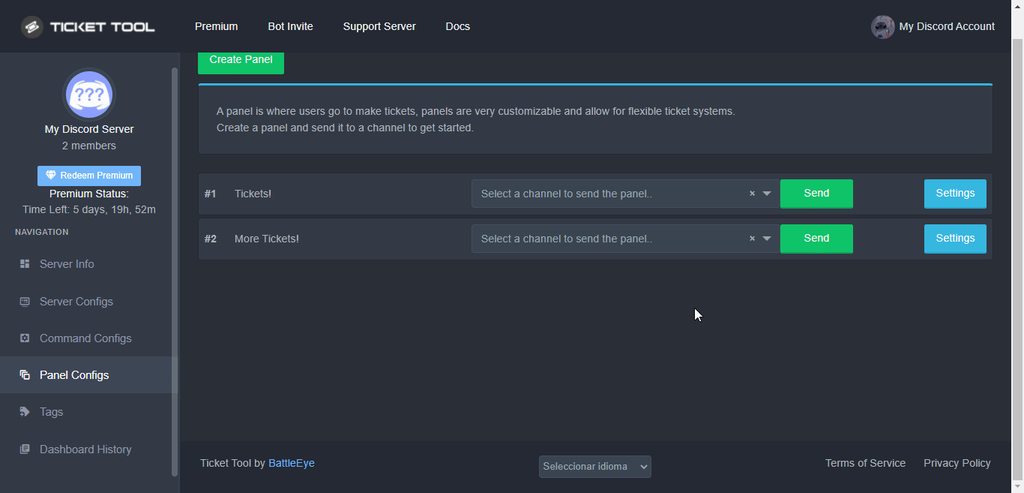
Simply remove the closed ticket name there
iron nightBOT
Gave +1 Rep to @quasi cliff
gilded verge
median talon
I'm trying to set up the bot on one of my servers, but it isn't showing up on th...
log out and log back in
 slim root
gilded verge
slim root
gilded verge
Please wait patiently
obtuse krakenBOT
1. Invite Ticket Tool to your server
First you will want to invite the bot to your server. Once the bot is in your server, you can manage your server in the dashboard.
2. Create a Panel
To create a panel we are going to need to head over to the panel configs on the dashboard.
Once at the dashboard we will need to click Create Panel.
Enter a panel name (Fill in any optional settings you want).
Click Create Panel and your ready to get started with configuring your panel.
An example of a creating a panel is shown below.
3. Send the Panel to a Channel
Once you've created a panel on the dashboard you will need to send it to a channel using send on the dashboard.
Select the channel you want your panel to be created in and click send.
For other questions checkout $help faq.
An example of a sending a panel is shown below.
Having a Problem Sending the Panel?
Do $debug in a channel with Ticket Tool and make sure it has all the necessary Discord permissions.
humble sequoiaBOT
How Do I setup Ticket Tool
You can check our documentation here;
You can also check #📂│information for the basic setup;
You can also watch this video tutorial.
Our documentation contains all the info you need about the bot to be able to setup and configure the bot however you like.
gilded verge
or check video tutorial
 serene iris
humble sequoiaBOT
serene iris
humble sequoiaBOT
We would love to help you, but if you don't tell us what you need help with we can't help you :(
━━ moved to ticket ━━
 rugged scaffold
how i put ticket support
 crystal marsh
After i finish my ticket do i need to close it or an admin after they read it ?
rustic gale
rugged scaffold
how i put ticket support
Check out the Setup Guide button in #📂│information
rustic gale
 cloud flint
how do i get my mini account
cloud flint
how do i get my mini account
What do you mean by mini account?
rustic gale
crystal marsh
After i finish my ticket do i need to close it or an admin after they read it ?
It depends on the server's setup. By default it's staff who close tickets
cloud flint
mini box for a fortnite account
rustic gale
Users can usually close tickets as well, but normally it's staff who handle that unless you hear otherwise
rustic gale
cloud flint
mini box for a fortnite account
You're in the wrong server for that, sorry we can't help
humble sequoiaBOT
⚠️ You're in the wrong place
We provide support for Ticket Tool Discord bot and cannot help you with whatever issue you have.
- We don't know which Support Team you should contact to get this issue resolved, and unfortunately we won't be able to accurately tell you.
If you don't have any further questions regarding our bot Ticket Tool, please close this ticket
covert swallow
@vestal slate im feeling nice so ask again here so you dont get a second warn
 lofty orbit
hi how do i give permission to Mods to manage the tickets?
rustic gale
lofty orbit
hi how do i give permission to Mods to manage the tickets?
Depends what you mean by manage the tickets
humble sequoiaBOT
━━ moved to ticket ━━
 wise fog
How do I stop members from generating invites through the ticket section? It’s a closed discord and I’ve disabled them from generating invites from permissions but they’re still generating.
humble sequoiaBOT
━━ moved to ticket ━━
 rugged halo

Hey I have been trying to create a ticket for days on this server but it gives same message everytime I try to create a ticket, please help. Its not happening with others in the server
humble sequoiaBOT
How to disable the premium bot
To disable the premium bot you will have to go to the Dashboard ➞ Server Configs ➞ Premium bot ➞ And on the right-hand side select the primary free bot in the drop down menu.
Premium features will still work on the normal bot.
gilded verge
check
rugged halo
I don't own the server
gilded verge
you don't need to be owner of the server, you need administrator role, or dashboard role
look in Note:
humble sequoiaBOT
Don't see your server in the dashboard?
You will possibly need to relog. Look below to see steps on how to relog.
How to relog in the Dashboard.
First, you will need to go to the dashboard. Once your there, click on your avatar on the top right. after you clicked it, you will see button that says Logout. You must click that. Once you have logged out, you can log back in.
Note:
You need one of these 3 things to access the dashboard.
1. Server Owner (Level: 6)
2. Server Administrator (Level: 4)
3. Dashboard Role (Level: 2)
:warning: You can check your level using $level on your Discord Server
User permission level with Ticket Tool
@User is permission level: 0 (User)
```» *If it shows that your permission is **0**, you don't have any of the above **3 things** to manage the dashboard.*
**See the GIF below on how to relog:** fallow saddle
how to use the bot?
fallow saddle
how to use the bot?
i'm not sure what you mean
rugged halo
gilded verge
you don't need to be owner of the server, you need administrator role, or dashbo...
I am just a mere member of that server....
 gilded verge
rugged halo
I am just a mere member of that server....
gilded verge
rugged halo
I am just a mere member of that server....
so pass it to the server administration for them to change to free bot
jade topaz
jade topaz
Can we make like this
.
gilded verge
fallow saddle
idk how to use
but you mean how to setup or something else?
rugged halo
No, I mean others have been able to create tickets but except me
humble sequoiaBOT
Update your discord App
Buttons are a relatively new addition to discord and don't work with some older versions of the app.
Please verify that you have the latest version of discord, by going to the app or play store.
Discord for the  App Store
Discord for the  Play Store
gilded verge
@rugged halo, hm... try update Discord
obtuse krakenBOT
1. Invite Ticket Tool to your server
First you will want to invite the bot to your server. Once the bot is in your server, you can manage your server in the dashboard.
2. Create a Panel
To create a panel we are going to need to head over to the panel configs on the dashboard.
Once at the dashboard we will need to click Create Panel.
Enter a panel name (Fill in any optional settings you want).
Click Create Panel and your ready to get started with configuring your panel.
An example of a creating a panel is shown below.
3. Send the Panel to a Channel
Once you've created a panel on the dashboard you will need to send it to a channel using send on the dashboard.
Select the channel you want your panel to be created in and click send.
For other questions checkout $help faq.
An example of a sending a panel is shown below.
Having a Problem Sending the Panel?
Do $debug in a channel with Ticket Tool and make sure it has all the necessary Discord permissions.
humble sequoiaBOT
If Ticket Tool support requested this debug give them this link:
https://discordapp.com/channels/509192800865353738/662692902245498910/1012364606368387242
Bot Permissions ឵ ឵឵ ឵ ឵឵ ឵ ឵឵ ឵ ឵឵
✅ - Read Channels
✅ - Send Messages
✅ - Embed Links
✅ - Attach Files
✅ - Manage Roles
✅ - Manage Channels
✅ - Manage Messages
✅ - Read History
Channel Permissions ឵ ឵឵ ឵ ឵឵ ឵ ឵឵ ឵ ឵឵
✅ - Read Channels
✅ - Send Messages
✅ - Embed Links
✅ - Attach Files
✅ - Manage Roles
✅ - Manage Channels
✅ - Manage Messages
✅ - Read History
Server Information ឵ ឵឵ ឵ ឵឵ ឵ ឵឵ ឵ ឵឵ ឵ ឵឵
Channel name:
🆘│community-support
Channel ID:
776680605517742090
Channel Count:
269/500
Server name:
Ticket Tool Support
Server ID:
509192800865353738
User Information ឵ ឵឵ ឵ ឵឵ ឵ ឵឵ ឵ ឵឵ ឵ ឵឵
User name:
Oѕk4r#4328
User ID:
772062700485869569
Permission Level:
0 - User ()
Bot Information ឵ ឵឵ ឵ ឵឵ ឵ ឵឵ ឵ ឵឵ ឵ ឵឵
Prefix:
$
Premium Status:
Lifetime - ["subV2","time"]
Current shard:
11
API Latency:
78
You can check our documentation here;
You can also check #📂│information for the basic setup;
You can also watch this video tutorial.
Our documentation contains all the info you need about the bot to be able to setup and configure the bot however you like.
fallow saddle
ok
gilded verge
Could you please provide the ID of that server?
rugged halo
1007018042124943462
gilded verge
humble sequoia
@rugged halo, oh... I don't know how others could create tickets but please tell the administration to change to a free bot as mentioned here.
rugged halo
Okay will do
naive canyon
how to make the ticket ping a user
humble sequoiaBOT
━━ moved to ticket ━━
gilded verge
@jade topaz, btw you didn't have to close your ticket, I was working on an example of how this can be done and it was enough to wait as I said...
so you can, but in one panel you can only have 1 select, so you need to create several panels and then connect to the main one, which is the same as if you were creating a multipanel, but here it is very important that in each panel where you add select, you must have the Enable Button turned on.
~~Very important!!!
I forgot to show in the video but in the Main panel it is very important that the button for creating a ticket must be turned off ~~ ~Updated ⬇️
 hot smelt
QUESTION, how to add more mod to see the tickets made by the members?
humble sequoiaBOT
How to let support team see into a ticket
About support roles
A support role lets your support team see into tickets with out having to add them manually to each and every ticket.
You can add as many support roles as you like per panel.
NOTE that the way discord works all admins can see into tickets regardless of this.
How to set a support role
To set a Support role go to the Dashboard -> Panel Configs -> Settings -> General Options -> Support Team Roles.
NOTE that the support role will not be able to see into tickets that are already created..
gilded verge
check
hot smelt
gilded verge
check <:this:894279341108772914>
this will make other moderators in the server get access to reply back to the tickets made by the members?
gilded verge
sure, when you add their role to the Support Team Roles, they will have access to every ticket 😊
jade topaz
gilded verge
<@456226577798135808>, btw you didn't have to close your ticket, I was working o...
Ohk thx sorry for the closing the ticket
iron nightBOT
Gave +1 Rep to @gilded verge
gilded verge
you're welcome 😊
 dense oyster
So i love the new form stuff .. get answers to simple things before staff even join tickets ..
but where does the form info go to?
I thought it would be in the ticket when it opened but it was not.
oooh i need to add the variable into the ticket opening
jade topaz
gilded verge
you're welcome 😊
Can you tell me in typing because I am not able to understand with the video
gilded verge
In the video I just showed an example of what it should look like, but you can configure as you like ^-^
 keen salmon
when i open a ticcket it show me you do not have permission to view message history how can i do that fix ?
Due to that i am not able to se close button a client
jade topaz
gilded verge
In the video I just showed an example of what it should look like, but you can c...
K
gilded verge
keen salmon
when i open a ticcket it show me you do not have permission to view message hist...
Dashboard->Panel Configs->Panel Settings->Expand Permission Options->Edit User Opened Permissions->add Read Messages, Send Messages, Read Message History to \✅ and Save.
 keen salmon
@gilded verge Sir need to know two more things how can i give Ticket name as Ticket-{Username}
&
How to add more button or change button name from Open ticket
jade topaz
can we add emoji in placeholder ?
rustic gale
The variable is {ticket.user.name}
Button names are set up in Button Options
$buttons
humble sequoiaBOT

The new Discord Buttons allow for a much smoother and convenient experience. They reduce lag and work much better than emojis. With ticket tool you can edit all the buttons however you like! Buttons can show emojis, text and can have 4 different colors.
Where can I edit them?
Dashboard ➞ Panel Configs ➞ Settings ➞ Button Options ➞ Setting
 rustic gale
And a panel with multiple buttons is called a multipanel, here's how you make one
humble sequoiaBOT
For a more convenient use of multipanels, you can now combine panels on the dashboard. This will allow you to directly send the multipanel from the dashboard or via the $panel ID command.
Where can I find this?
You can find this setting on the Dashboard -> Panel Configs -> Settings -> General Options
Note: if you're attaching all the panels to a panel called English, don't include English in the attached panels box (If you do this, it will create duplicate)
This will put all buttons from all of your panels on one message. The message is the panel message from the panel you're combining these panels in.
You can also watch this video tutorial.
rustic gale
jade topaz
can we add emoji in placeholder ?
What do you mean by “placeholder”?
jade topaz
rustic gale
What do you mean by “placeholder”?
new update
gilded verge
select menu/dropdown
jade topaz
gilded verge
<:this:894279341108772914> select menu/dropdown
yes
jade topaz
gilded verge
<:this:894279341108772914> select menu/dropdown
can we add emojis in placeholder section ?
gilded verge
like this?

 gilded verge
okay wait... I'm already checking 🤔
jade topaz
gilded verge
okay wait... I'm already checking 🤔
okie
gilded verge
jade topaz
okie
oh... unfortunately it is not possible to add emoji to text in placeholder. You can only change the emoji in the button

 jade topaz
gilded verge
oh... unfortunately it is not possible to add emoji to text in placeholder. You ...
jade topaz
gilded verge
oh... unfortunately it is not possible to add emoji to text in placeholder. You ...
How much ticket panel can we creat
jade topaz
gilded verge
oh... unfortunately it is not possible to add emoji to text in placeholder. You ...
ik that for button
okie
thanks
gilded verge
jade topaz
How much ticket panel can we creat
I tested it recently and you can create more than 52 panels but I don't know the limit
jade topaz
Ohk
jade topaz
hey how do I change the color of the ticket tool embed and bot name
fallow ingot
jade topaz
hey how do I change the color of the ticket tool embed and bot name
Hey Mitch!
You can change the colour of an embed by looking for a feature called “colour” usually found near the bottom of the customisation, if that be ticket embed, panel embed or tags - looks like the screenshot below :)
In regards to your second question, sadly that is not possible at the moment. We plan to implement something very similar or exact soon.

If you click the hex it allows you to select a colour instead of having to search for a hex via another website. Pretty convenient.
jade topaz
Hello, I have a double problem.
I can't create tickets in Spanish and I can't enter the bot administration panel either.
What's going on?

 sour swallow
When I click on Manage Premium and then put an email saying an error, what is the solution?
fallow ingot
Check this out below
humble sequoiaBOT
You can check our documentation here;
You can also check #📂│information for the basic setup;
You can also watch this video tutorial.
Our documentation contains all the info you need about the bot to be able to setup and configure the bot however you like.
No ves tu servidor en el Dashboard (Panel de control)?
Posiblemente debas reiniciar sesión. Sigue los pasos que encuentras abajo para saber como reiniciar sesión.
Cómo reiniciar sesión en el panel de control?
Primero debes ingresar a tu panel de control. Una vez estés allí, da click en tu imagen de perfil en la esquina superior derecha, luego de ello verás un botón que dice Logout (Cerrar Sesión). Da click en él. Una vez que hayas cerrado sesión, podrás volver a iniciar sesión de nuevo.
Notas:
Debes tener al menos una de las siguientes cosas para acceder al panel de control.
1. Dueño del Servidor (Nivel 6)
2. Administrador del Servidor (Nivel 4)
3. Rol de panel de control (Nivel 2)
:warning: Puedes verificar tu nivel usando el comando $level en tu servidor de Discord
User permission level with Ticket Tool
@User is permission level: 0 (User)
```» *Si se muestra que su permiso es **0**, no tiene ninguna de las **3 cosas** mencionadas previamente para acceder al panel de control*


**A continuación tiene un GIF que muestra como hacer un reinicio de sesión**@jade topaz
fallow ingot
sour swallow
When I click on Manage Premium and then put an email saying an error, what is th...
Does it just say error? Anything else?
check this out below
humble sequoiaBOT
Don't see your server in the dashboard?
You will possibly need to relog. Look below to see steps on how to relog.
How to relog in the Dashboard.
First, you will need to go to the dashboard. Once your there, click on your avatar on the top right. after you clicked it, you will see button that says Logout. You must click that. Once you have logged out, you can log back in.
Note:
You need one of these 3 things to access the dashboard.
1. Server Owner (Level: 6)
2. Server Administrator (Level: 4)
3. Dashboard Role (Level: 2)
:warning: You can check your level using $level on your Discord Server
User permission level with Ticket Tool
@User is permission level: 0 (User)
```» *If it shows that your permission is **0**, you don't have any of the above **3 things** to manage the dashboard.*


**See the GIF below on how to relog:**Gave +1 Rep to @fallow ingot
sour swallow
fallow ingot
Does it just say error? Anything else?
I don't understand
fallow ingot
no problem
fallow ingot
sour swallow
I don't understand
Can I see a screenshot of this error your experiencing?
sour swallow
 rustic gale
You have to make an account there
sour swallow
rustic gale
You have to make an account there
I already have this email
rustic gale
Well, you can open a billing ticket in #🎫│make-a-ticket and we'll look into the problem
 knotty bramble
Hey guys. Is there a GUI to see ticket history and search with this tool?
 graceful glacier
hey guys,
hi, when ai create new tickets
this is the message.
i also selected the bot premium and save on dashboard server configs premium bot
but it continues the error

also clicked on blue button invite premium bot
and the error continues

 shut bolt
graceful glacier
shut bolt
graceful glacier
That message was sent by the Free bot
You need to resend your panels with the premium bot
And old tickets that were created with the free bot need to be handled using the commands instead of the free bot buttons
graceful glacier
shut bolt
You need to resend your panels with the premium bot
How can I do it?
This is the current status

There was a paid bot, and it was not paid and went free for some days and now I am re-paying the bot
shut bolt
graceful glacier
How can I do it?
This is the current status
$help send
humble sequoiaBOT
Sending a panel
Once you've created a panel on the dashboard you will need to send it to a channel using send on the dashboard
Select the channel you want your panel to be created in and click send.
For other questions checkout $help faq
An example of a sending a panel is shown below.
 shut bolt
graceful glacier
hey <@518666147441278998> I did what you said but still the error
shut bolt
graceful glacier
hey <@518666147441278998> I did what you said but still the error
What button are you clicking?
graceful glacier
 shut bolt
graceful glacier
shut bolt
graceful glacier
Doesn't look like you resent the panel
You need to click the send button
 shut bolt
Is the website showing an error?
 shut bolt
graceful glacier
shut bolt
graceful glacier
The premium bot is missing permissions on that channel then
Run $debug and check which perms is it missing
If it doesn't answer, not even to your DMs (if opened), then the bot can't see the channel or it's history
It needs all of the following perms
$perms
humble sequoiaBOT
ᅠ
@pseudo glen requires the following permissions:
Add Reactions
Read Channels
Send Messages
Manage Messages
Embed Links
Attach Files
Read History
Manage Roles
Manage Channels
To change the role permissions, you can go to your Discord Server ➞ Server Settings ➞ Roles ➞ @Ticket Tool
To change the channel permissions, you can go to your Channel Settings ➞ Permissions ➞ Ticket Tool
ᅠ
Note:
You can give Ticket Tool Administrative Permissions instead of all the permissions listed above, but it's entirely optional and NOT necessary.
 shut bolt
I suggest removing the free bot and it's messages once you've resent the panels with the premium bot
graceful glacier
Ok, remove the free bot on discord server or website?
shut bolt
From the server
If the problem is persisting please open a ticket and wait for a support team member to handle it 
 dense kernel
How do I make it so my bot sends a dm
 crude sedge
I've tried doing a Form for recruitment and I'm trying to figure where that outputs
I see that {create.form.1} is said by a few folks, but I don't know where to put that and if it's precluded with the prefix $
rustic gale
You put it in the ticket message
humble sequoiaBOT
The Ticket Message is the first message sent by the bot in a new ticket. To customise it head over to your Dashboard ➞ Panel Configs ➞ Settings ➞ Ticket Options ➞ Edit Ticket Message
crude sedge
awesome, thanks @rustic gale
 rustic moon
How i can get ticket tool Premium?
 craggy geyser
Are you after the premium bot? Because based on your messages the trial might have started so you have features available already
Where the button was, is there a countdown for the premium trial?
rustic moon
craggy geyser
Are you after the premium bot? Because based on your messages the trial might ha...
Yah but nothing happened
 craggy geyser
So you have got premium now. You can edit premium options in the dashboard
If you want the premium bot (not essential, all features work on the free bot, and the premium bot will stop working if your premium expires) you can get it
humble sequoiaBOT
The first thing you will need to do is invite the premium bot, an invite can be found here
Once the bot is in your server we will head to the dashboard and manage your server. When you are managing your server, you want to head into "Server Configs" then click the drop down menu under "Select the bot you would like to use on this server" then click "Ticket Tool#6207" and then save.
rustic moon
But when i don't know how to make the bot send 3 options
craggy geyser
Are you on about something like #🎫│make-a-ticket?
craggy geyser
That is no longer a premium option so you can do that anyway
humble sequoiaBOT
Multipanels are panels with multiple buttons attached to them.
How to create a Multipanel
All users can combine multiple panels into one multipanel!
First, find the IDs of each panel you wish to combine. You can find them in your Panel Configs in the Dashboard
Next, send the multipanel to a channel using $panel [id1] [id2] {id3} ....
e.g. $panel 1 2 4 17 35 to combine panels 1, 2, 4, 17 and 35.
Up to 25 panels may be combined.
You can also watch this video tutorial.
For a more convenient use of multipanels, you can now combine panels on the dashboard. This will allow you to directly send the multipanel from the dashboard or via the $panel ID command.
Where can I find this?
You can find this setting on the Dashboard -> Panel Configs -> Settings -> General Options
Note: if you're attaching all the panels to a panel called English, don't include English in the attached panels box (If you do this, it will create duplicate)
This will put all buttons from all of your panels on one message. The message is the panel message from the panel you're combining these panels in.
You can also watch this video tutorial.
rustic moon
@craggy geyser my English isn't good enough how can i send it?
how i can rename the ticket panel?
arctic pagoda
Dashboard > Panel configs > Choose the panel you want to rename and click "Settings" > Rename panel (green button in the upper left corner)
rustic moon
arctic pagoda
Dashboard > Panel configs > Choose the panel you want to rename and click "Setti...
i don't mean that
This one

@arctic pagoda
gilded verge
rustic moon
<@132147174212501504> my English isn't good enough how can i send it?
Read the server rules again, more specifically point 4 in #📂│information
arctic pagoda
rustic moon
<@742367118628225034>
Also, please don't ping me two times as you pinged me while replying too
arctic pagoda
rustic moon
This one
I don't think that would be possible
rustic moon
arctic pagoda
Also, please don't ping me two times as you pinged me while replying too
Yah I'm sorry
arctic pagoda
No problem
gilded verge
rustic moon
This one
uhm... its possible 😄
but you need check Button Options in your panel settings
 normal cedar
Coucou j’aurais besoin d’aide
 mystic spruce
For some reason when im making a ticket its not going into the selected category, any idea why?
humble sequoiaBOT
ᅠ
@pseudo glen requires the following permissions:
Add Reactions
Read Channels
Send Messages
Manage Messages
Embed Links
Attach Files
Read History
Manage Roles
Manage Channels
To change the role permissions, you can go to your Discord Server ➞ Server Settings ➞ Roles ➞ @Ticket Tool
To change the channel permissions, you can go to your Channel Settings ➞ Permissions ➞ Ticket Tool
ᅠ
Note:
You can give Ticket Tool Administrative Permissions instead of all the permissions listed above, but it's entirely optional and NOT necessary.
gilded verge
humble sequoia
@mystic spruce, Are you sure that the bot has the required permissions and that you have added its role to the selected category?
humble sequoiaBOT
What are the direct URLs?
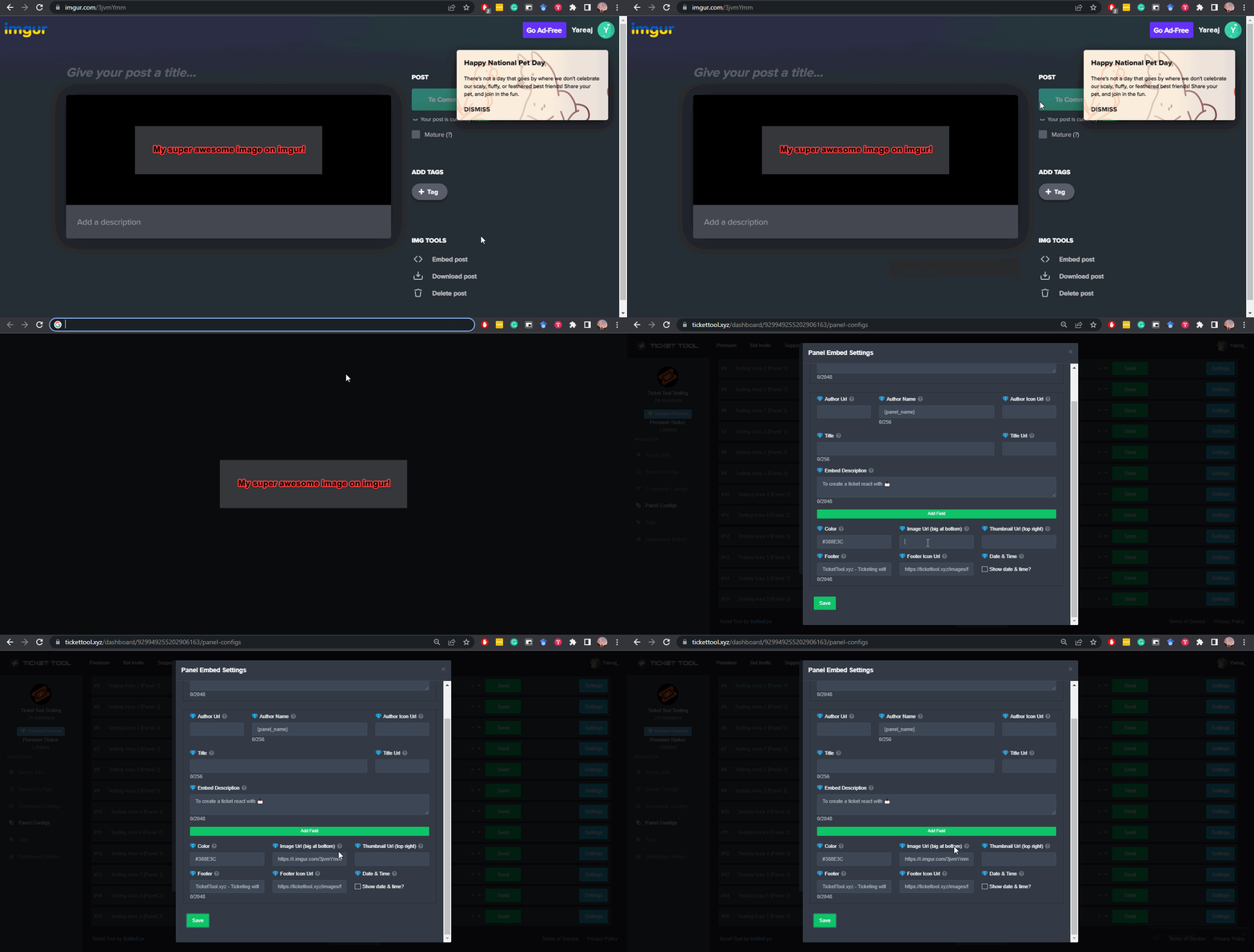
A direct access URL is an easy to read URL that users can enter to get to a specific item, document, page, category, or perspective, in which our bot TicketTool can read and get it displayed in your 'Panel Message' or your 'Ticket Message'.
Where can I get them?
The recommended way is to use 'Imgur', you can signup within a few minutes and then upload the image you want, and copy the URL of the uploaded image and paste it into one of the four boxes. There are alternatives to this, such as other image or video storing websites or using 'Open Original' of an image and paste it in (please be aware that if your image is deleted, Discord will automatically delete the link to it in a few days). Please note this requires 'Premium'. Imgur
 gilded verge
humble sequoia
gilded verge
humble sequoia
@jade topaz, check
iron nightBOT
Gave +1 Rep to @gilded verge
jade topaz
gilded verge
<@271609693795778560>, Are you sure that the bot has the required permissions an...
Hey yesterday I got some issue with the ticket combine I have forget to tell
That the ticket were not combine at my side
gilded verge
jade topaz
That the ticket were not combine at my side
I have absolutely no idea what you're talking about
humble sequoiaBOT
We would love to help you, but if you don't tell us what you need help with we can't help you :(
 solemn pivot
 pearl dove
humble sequoiaBOT
pearl dove
humble sequoiaBOT
Help Options
$help commands - Information on commands
$help setup - Information on bot setup
$help faq - Frequently asked questions
jade topaz
Can you help me please
 quasi cliff
jade topaz
Can you help me please
quasi cliff
jade topaz
Can you help me please
Is that an issue for everyone? Maybe that's a visual bug of your discord. Check if others can see the bot and try restarting discord
jade topaz
quasi cliff
Is that an issue for everyone? Maybe that's a visual bug of your discord. Check ...
It's that me the others don't see it and I tried to restart discord how can I do pls
quasi cliff
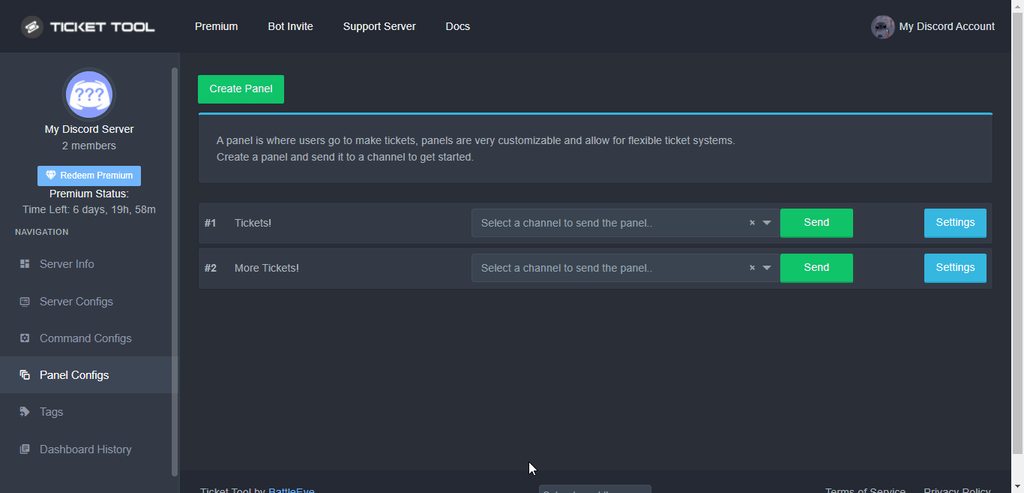
Did you disable button dashboard?
Do the following thing for "Create Ticket" button
 vivid harbor
my bot doesnt use the emojis i put in the text
humble sequoiaBOT
Solved in another channel.
jade topaz
jade topaz
Hey yesterday I got some issue with the ticket combine I have forget to tell
I mean that i asked multipanel but after creating it it show me this

And i added 2 more it is not showing me
humble sequoiaBOT
The new Discord Buttons allow for a much smoother and convenient experience. They reduce lag and work much better than emojis. With ticket tool you can edit all the buttons however you like! Buttons can show emojis, text and can have 4 different colors.
Where can I edit them?
Dashboard ➞ Panel Configs ➞ Settings ➞ Button Options ➞ Setting
rustic gale
Change their names, maybe change their colors
Make sure they look different
After you've edited the buttons you should send the panel again.
Also, make sure all the panels are attached to the main panel!
Changes you make on the dashboard aren't automatically applied to the message in the server. You have to re-send the panel for them to take effect.
jade topaz
rustic gale
Change their names, maybe change their colors
Ohk thx
iron nightBOT
Gave +1 Rep to @rustic gale
jade topaz
rustic gale
Also, make sure all the panels are attached to the main panel!
So should I attached all right?
In every panel
rustic gale
You should attach every panel to the main panel.
 keen raven
I want help
humble sequoiaBOT
The new Discord Buttons allow for a much smoother and convenient experience. They reduce lag and work much better than emojis. With ticket tool you can edit all the buttons however you like! Buttons can show emojis, text and can have 4 different colors.
Where can I edit them?
Dashboard ➞ Panel Configs ➞ Settings ➞ Button Options ➞ Setting
 gloomy warren
keen raven
I want help
gloomy warren
keen raven
I want help
What’s up
keen raven
gloomy warren
What’s up
How do I get the admin to hold the ticket?
gloomy warren
keen raven
How do I get the admin to hold the ticket?
Check the dashboard
 full stone
help dashboard keeps giving me the error server not showing up try relogging
pls help
sos
keen raven
gloomy warren
Check the dashboard
And ?
humble sequoiaBOT
Don't see your server in the dashboard?
You will possibly need to relog. Look below to see steps on how to relog.
How to relog in the Dashboard.
First, you will need to go to the dashboard. Once your there, click on your avatar on the top right. after you clicked it, you will see button that says Logout. You must click that. Once you have logged out, you can log back in.
Note:
You need one of these 3 things to access the dashboard.
1. Server Owner (Level: 6)
2. Server Administrator (Level: 4)
3. Dashboard Role (Level: 2)
:warning: You can check your level using $level on your Discord Server
User permission level with Ticket Tool
@User is permission level: 0 (User)
```» *If it shows that your permission is **0**, you don't have any of the above **3 things** to manage the dashboard.*


**See the GIF below on how to relog:**@full stone, check
gilded verge
keen raven
How do I get the admin to hold the ticket?
@keen raven, could you describe more precisely what your problem is? or give an example of what you would like to do 😕
 turbid fable
hi guys is there a payment plan for multiple servers?
like if we take a year are we available to put premium for multiple servers or nah
 slender minnow
turbid fable
like if we take a year are we available to put premium for multiple servers or n...
slender minnow
turbid fable
like if we take a year are we available to put premium for multiple servers or n...
There is none, but you get a discount after purchasing your first subscription.
turbid fable
slender minnow
There is none, but you get a discount after purchasing your first subscription.
where can i get that discount pllease?
slender minnow
i just noticed you have a ticket open
humble sequoiaBOT
━━ moved to ticket ━━
turbid fable
slender minnow
i just noticed you have a ticket open
i closed it woops
 compact badger
Hey guys, is there a way to give the users who create a ticket a specific role until their ticket ends?
slender minnow
compact badger
Hey guys, is there a way to give the users who create a ticket a specific role u...
Nope, not possible. However, you can try suggesting it.
compact badger
👍
 winter osprey
If i setup this thing bot in my server what will he do?
fallow ingot
 ornate oxide
How do I set it up on mobile
ornate oxide
How do I set it up on mobile
You can check our documentation below, or you can ask any specific questions here. The dashboard is accessible on any mobile device and is pretty decent ngl.
humble sequoiaBOT
You can check our documentation here;
You can also check #📂│information for the basic setup;
You can also watch this video tutorial.
Our documentation contains all the info you need about the bot to be able to setup and configure the bot however you like.
ornate oxide
fallow ingot
You can check our documentation below, or you can ask any specific questions her...
I figured it out using some YouTube tutorials
fallow ingot
winter osprey
If i setup this thing bot in my server what will he do?
@pseudo glen is a ticket bot, allowing your members to communicate with server staff in a secured channel with the option of logging the conversation. You can check the documentation above for further information, or ask here
fallow ingot
ornate oxide
I figured it out using some YouTube tutorials
Yeah our YouTube tutorials are lit!
helpful too
 drifting prawn
Hi, a question I'm trying to setup different resons for creating a ticket. Let's say one is for support, one for excusing absence on event and one is for suggestion
I do not know the syntax on how to separate each - or where the list of veriables should be nested. Is it bugged, WIP or something ? This is not even shown on wiki.
 gilded verge
Hey, soooo you need an example of this select menu, right?
drifting prawn
gilded verge
Hey, soooo you need an example of this select menu, right?
yes, basically i need to see how can I make this
 gilded verge
<@456226577798135808>, btw you didn't have to close your ticket, I was working o...
gilded verge
gilded verge
<@456226577798135808>, btw you didn't have to close your ticket, I was working o...
@drifting prawn, Recently I made an example especially for another user, so I hope helps
 frozen pilot
👀👀👀
gilded verge
gilded verge
oh... unfortunately it is not possible to add emoji to text in placeholder. You ...
+if you want to ask about changing the emoji, here's the answer
drifting prawn
gilded verge
<@383665569188020235>, Recently I made an example especially for another user, s...
thx
iron nightBOT
Gave +1 Rep to @gilded verge
gilded verge
you're welcome 😊
jade topaz
How do I make a ticket channel
obtuse krakenBOT
1. Invite Ticket Tool to your server
First you will want to invite the bot to your server. Once the bot is in your server, you can manage your server in the dashboard.
2. Create a Panel
To create a panel we are going to need to head over to the panel configs on the dashboard.
Once at the dashboard we will need to click Create Panel.
Enter a panel name (Fill in any optional settings you want).
Click Create Panel and your ready to get started with configuring your panel.
An example of a creating a panel is shown below.
3. Send the Panel to a Channel
Once you've created a panel on the dashboard you will need to send it to a channel using send on the dashboard.
Select the channel you want your panel to be created in and click send.
For other questions checkout $help faq.
An example of a sending a panel is shown below.
Having a Problem Sending the Panel?
Do $debug in a channel with Ticket Tool and make sure it has all the necessary Discord permissions.
humble sequoiaBOT
You can check our documentation here;
You can also check #📂│information for the basic setup;
You can also watch this video tutorial.
Our documentation contains all the info you need about the bot to be able to setup and configure the bot however you like.
gilded verge
or check video tutorial
 mighty bolt
ticket 0153 nie dokonczony
gilded verge
mighty bolt
ticket 0153 nie dokonczony
Czy możesz rozwinąć jaki ticket masz na myśli?
mighty bolt
chodzi o bota do hero zero
gilded verge
Ten serwer jest przeznaczony do pomocy w sprawie bota Ticket Tool więc nie możemy Ci pomóc bo nie dotyczy bota. Nie wiemy gdzie powinieneś się udać ale to nie jest tutaj, po angielsku informacja poniżej ⬇️
humble sequoiaBOT
⚠️ You're in the wrong place
We provide support for Ticket Tool Discord bot and cannot help you with whatever issue you have.
- We don't know which Support Team you should contact to get this issue resolved, and unfortunately we won't be able to accurately tell you.
If you don't have any further questions regarding our bot Ticket Tool, please close this ticket
 solid stream
@split mortar Even if the bot has Manage Permissions, bots are unable to assign it, even with admin.. only user are able to assign the Manage Permissions..
@split mortar
and that doesn't work for each and every ticket..
gilded verge
no ETA
humble sequoiaBOT
Don't see your server in the dashboard?
You will possibly need to relog. Look below to see steps on how to relog.
How to relog in the Dashboard.
First, you will need to go to the dashboard. Once your there, click on your avatar on the top right. after you clicked it, you will see button that says Logout. You must click that. Once you have logged out, you can log back in.
Note:
You need one of these 3 things to access the dashboard.
1. Server Owner (Level: 6)
2. Server Administrator (Level: 4)
3. Dashboard Role (Level: 2)
:warning: You can check your level using $level on your Discord Server
User permission level with Ticket Tool
@User is permission level: 0 (User)
```» *If it shows that your permission is **0**, you don't have any of the above **3 things** to manage the dashboard.*


**See the GIF below on how to relog:**@jade topaz, Выйдите из панели и войдите снова. Вот как это сделать
 minor radish
obtuse krakenBOT
minor radish
obtuse krakenBOT
1. Invite Ticket Tool to your server
First you will want to invite the bot to your server. Once the bot is in your server, you can manage your server in the dashboard.
2. Create a Panel
To create a panel we are going to need to head over to the panel configs on the dashboard.
Once at the dashboard we will need to click Create Panel.
Enter a panel name (Fill in any optional settings you want).
Click Create Panel and your ready to get started with configuring your panel.
An example of a creating a panel is shown below.
3. Send the Panel to a Channel
Once you've created a panel on the dashboard you will need to send it to a channel using send on the dashboard.
Select the channel you want your panel to be created in and click send.
For other questions checkout $help faq.
An example of a sending a panel is shown below.
Having a Problem Sending the Panel?
Do $debug in a channel with Ticket Tool and make sure it has all the necessary Discord permissions.
humble sequoiaBOT
You can check our documentation here;
You can also check #📂│information for the basic setup;
You can also watch this video tutorial.
Our documentation contains all the info you need about the bot to be able to setup and configure the bot however you like.
gilded verge
or check video tutorial
 ancient relic
I keep looking for pictures to put in the like "large image irl" but I don't know what websites to use, typically they are invalid and won't display
humble sequoiaBOT
What are the direct URLs?
A direct access URL is an easy to read URL that users can enter to get to a specific item, document, page, category, or perspective, in which our bot TicketTool can read and get it displayed in your 'Panel Message' or your 'Ticket Message'.
Where can I get them?
The recommended way is to use 'Imgur', you can signup within a few minutes and then upload the image you want, and copy the URL of the uploaded image and paste it into one of the four boxes. There are alternatives to this, such as other image or video storing websites or using 'Open Original' of an image and paste it in (please be aware that if your image is deleted, Discord will automatically delete the link to it in a few days). Please note this requires 'Premium'. Imgur
gilded verge
@ancient relic, check
iron nightBOT
Gave +1 Rep to @gilded verge
ancient relic
wh- b- the bot said-
gilded verge
its okay ^-^
 woven briar
$buttons
humble sequoiaBOT
The new Discord Buttons allow for a much smoother and convenient experience. They reduce lag and work much better than emojis. With ticket tool you can edit all the buttons however you like! Buttons can show emojis, text and can have 4 different colors.
Where can I edit them?
Dashboard ➞ Panel Configs ➞ Settings ➞ Button Options ➞ Setting
gilded verge
woven briar
$buttons
please use commands on #🤖│bot-spam
scenic plinth
Unless you are helping someone
gilded verge
yup ^-^
scenic plinth
@frozen mural You can purchase premium here: https://tickettool.xyz/premium

 frozen mural
I never want to buy it i have the role
 ruby temple
Hello. Where can I edit these permissions? I can't edit from the dashboard.
(PT-BR Olá. Aonde eu consigo editar essas permissões? Não consigo editar pela dashboard.)
 gilded verge
ruby temple
Hello. Where can I edit these permissions? I can't edit from the dashboard.
(PT-...
gilded verge
ruby temple
Hello. Where can I edit these permissions? I can't edit from the dashboard.
(PT-...
Hey, Server Settings->Roles->Ticket Tool->Permissions

 ruby temple
gilded verge
Hey, Server Settings->Roles->Ticket Tool->Permissions
ruby temple
gilded verge
Hey, Server Settings->Roles->Ticket Tool->Permissions
thank you.
iron nightBOT
Gave +1 Rep to @gilded verge
 crude hedge
Hi. I made a ticket transcript channel pointed the dashboard logging to that channel but transcripts are not saving. Did I miss something. Thank you.
crude hedge
Figured it out.
jade topaz
so i just saw the forms updates.
what is "placeholder"?

 split mortar
solid stream
<@690700350369300541> Even if the bot has `Manage Permissions`, bots are unable ...
split mortar
solid stream
<@690700350369300541> Even if the bot has `Manage Permissions`, bots are unable ...
I created a category. I gave a test bot "Manage Permissions" in that category. I had the bot create a channel in the category. The bot got "Manage Permissions" over the newly-created channel by default. Ticket Tool is doing something which mislays that permission.
(I tried to attach example code and a screenshot of the resulting channel, but some bot timed me out for it. 😞 )
solid stream
Dm me the example, it's possible discord changed it.
 atomic barn
is there a way for staff to be pinged into a ticket when a role is assigned?
 vestal falcon
#🆘│community-support اتنصب عليا في سياره من نوع سوبرا و وشخص ذا ما عطاني ملكيه وكل شوي ياخذ السياره وضيعها وهو اخد ١٠٠ الف ف من فضلكم اب تعويض مادي
gilded verge
jade topaz
so i just saw the forms updates.
what is "placeholder"?
placeholder is the place where the user enters his answer ^-^

$mentions
humble sequoiaBOT
Within all the messages the bot's sends (both embeds and text) you can mention either channels, roles, or even users, these mentions will only send a notification to the user if they are used within a text field, e.g: a role mentioned in an embed won't ping at all the users who have that role.
For mentioning a role you can use one out of three options:
{@Role Name} ➞ Which is Case Sensitive.
{RoleID} ➞ Replace RoleId with the Id of the role you are trying to ping.
<@&RoleID> ➞ Discord's native syntax to ping roles.
<#ChannelID> ➞ Mention a channel by its ID.
<@UserID> ➞ Mention a user by its ID.
The Ticket Message is the first message sent by the bot in a new ticket. To customise it head over to your Dashboard ➞ Panel Configs ➞ Settings ➞ Ticket Options ➞ Edit Ticket Message
gilded verge
@atomic barn, check both and put your mention to Message Text
humble sequoiaBOT
⚠️ أنت في المكان الخطأ
نحن نقدم دعمًا لـTicket Tool ديسكورد بوت ولا يمكننا مساعدتك في المشكلة التي تواجهها.
- يرجى التأكد من الاتصال بفريق الدعم المناسب.
إذا لم يكن لديك أي أسئلة أخرى بخصوص بوت تيكت توول ، يرجى إغلاق هذه التذكرة
gilded verge
@vestal falcon
vestal falcon
انا بس ابي اكتب الشكوي وين اكتبها
gilded verge
🤷
gilded verge
humble sequoia
.
vestal falcon
ياربت احد يساعدني
gilded verge
مشكلتك لا تتعلق ببوت أداة التذاكر. يرجى قراءة الرسالة مرة أخرى
atomic barn
gilded verge
<@784529533503799316>, check <:this:894279341108772914> both and put your mentio...
thx!
jade topaz
{create.form.x} doesnt work
jade topaz

 quasi cliff
x is number
jade topaz
like?
jade topaz
oh ok
jade topaz
quasi cliff
It's from the form
whats the number for question?
quasi cliff
Did you make form?
quasi cliff
Can you send screenshot of the form config on dashboard
 brazen abyss
How do you add ticket creator onto a chanel
jade topaz
 quasi cliff
The form
jade topaz
wym
 quasi cliff
You have only 1 question so only {create.form.1} will work with the 1st answer
If you need the question then you have to manually add it to the embed since it does not depend on user's response
jade topaz
quasi cliff
If you need the question then you have to manually add it to the embed since it ...
alright thanks
quasi cliff

jade topaz
How i can make ticket-discordusername instead of ticket-4981
quasi cliff
That's premium
jade topaz
i have 7d so xd
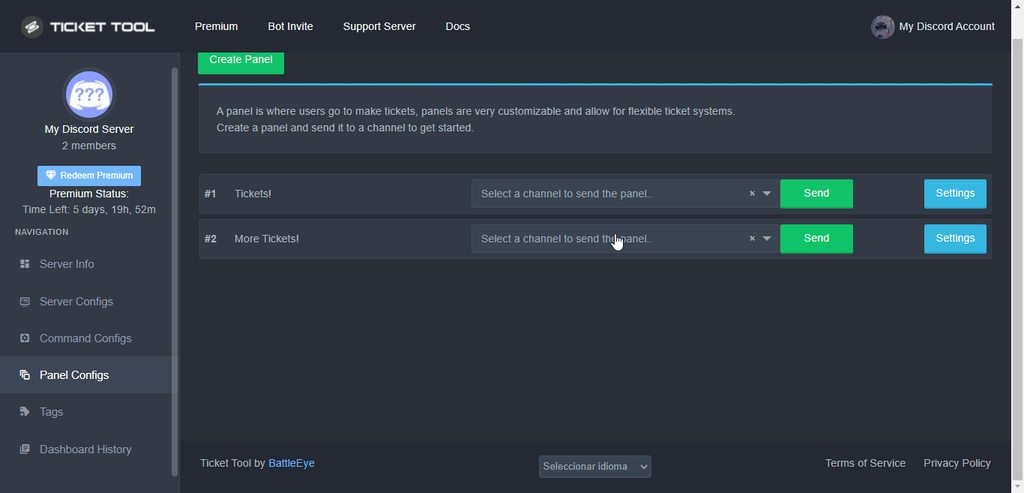 jade topaz
is there a chance whenever someones from the staff team is offline in tickets to not shown his name
or jut a chosen person that cant be shown
jade topaz
$helpde setup
humble sequoiaBOT
Ticket Tool zu deinem Server einladen
Der erste Schritt ist, den Bot zu deinem Server einzuladen. Dazu klicke einfach hier.
Im Anschluss gehst du zum Dashboard und drückst auf Create Panel
Ein Panel wird dazu verwendet um die Einstellungen für einzelne Tickets festzlegen und es ist außerdem die Nachricht, wo deine User das Ticket via. drücken der Reaktion ein Ticket öffnen.
Hier ein Beispiel zu einem gesendeten Panel:

Ein Panel erstellen
Um ein Panel zu erstellen öffne zuerst das Dashboard
Im Anschluss drückst auf Create Panel, gibst deinem Panel einen Namen und füllst bei bedarf auch noch die optionalen Felder aus
Jetzt klickst du nochmals auf Create Panel und dein es ist fertig
Weitere Anpassungen kannst du in den Panel Settings vornehmen.
Ein Beispiel siehst du hier:

Ein Panel senden
Sobald du ein Panel auf dem Dashboard erstellt hast,
musst du es mit Hilfe von Send in den dafür vorgesehenen Kanal posten.
Wähle dazu den Kanal wie unten gezeigt aus und drücke im Anschluss auf Send

 nimble latch
how to move my ticket tool to another server
 trim jackal
 slate crystal
I need help it says that ticket tool is not in not server or check it status or try relogging what should i do
gilded verge
jade topaz
$helpde setup
commands in #🤖│bot-spam
gilded verge
nimble latch
how to move my ticket tool to another server
I don't understand what it means to move ticket tool to another server, please describe what you mean.
 lament sandal
gilded verge
I don't understand what it means to move ticket tool to another server, please d...
lament sandal
gilded verge
I don't understand what it means to move ticket tool to another server, please d...
I can purchase premium and give the code to someone to redeem it right?
gilded verge
lament sandal
I can purchase premium and give the code to someone to redeem it right?
If you buy a monthly subscription you don't get the code but you get invoice on your e-mail. After purchasing, you add premium to the given server here: https://tickettool.xyz/subscriptions
but you can get the key if you choose one of these methods:
humble sequoiaBOT
PayPal - DiscordTicketTool@gmail.com
BitCoin - 3HhKKAdb9eEvCe2tvzB8bAa8nebHY6qcPA
Ethereum - 0xF47a27D6a3225bB8e71fd03B5C14bbb374b41149
LiteCoin - MEQX3knLAuotrKnvk3HDNBK5gdRn6PZhHy

Prepay/Direct Payment
To prepay send the payment using your desired method - Available options listed bellow.
⚠️ $18 per 3 months. ⚠️
$66 per year.
(If using the direct payment option, you need to be paying for at-least 3+ months.)
Regular Prices when paying on our website:
$6/per month
$66/per year
Once your payment is sent let us know so we can confirm and get you your key.
<:paypal:924596360840372234> Paypal ("Goods and Services" or "Family and Friends")
DiscordTicketTool@gmail.com
<:bitcoin:924638849135689749> BTC - Bitcoin
3HhKKAdb9eEvCe2tvzB8bAa8nebHY6qcPA
<:Ethereum:972177326580301835> ETH - Ethereum
0xF47a27D6a3225bB8e71fd03B5C14bbb374b41149
<:Litecoin:972176945972383815> LTC - LiteCoin
MEQX3knLAuotrKnvk3HDNBK5gdRn6PZhHy
I sent the payment now what?
After you send the payment, please send a screenshot with proof of payment, our <@&615146349700186112> will verify your payment and will get you setup. For crypto payments, we are waiting for at least ONE verification.
All prices in USD - 3 months min for direct payment
jade topaz
gilded verge
placeholder is the place where the user enters his answer ^-^
thanks
iron nightBOT
Gave +1 Rep to @gilded verge
 frank holly
Bonjour ?
 vapid dove
I have been getting this message for a couple days, can anyone help?
 jade topaz
Guys can who help me Ticket tool bot don’t work ! I do all but nothing come
 brisk chasm
When i Make a ticket They say to me failed to panel run
rustic gale
vapid dove
I have been getting this message for a couple days, can anyone help?
Usually caused by Discord errors. You should try again and it should work. Do you keep trying and it never works?
rustic gale
jade topaz
Guys can who help me Ticket tool bot don’t work ! I do all but nothing come
Where are you stuck?
rustic gale
brisk chasm
When i Make a ticket They say to me failed to panel run
Please show a screenshot of the problem
 mental grotto
sorry, do you know why the ticket I created does not appear in the panel where I created it? it tells me that I have already created 1 but I do not see it how can I do?
rustic gale
mental grotto
sorry, do you know why the ticket I created does not appear in the panel where I...
Did you leave and rejoin the server?
 gritty vector
?
 humble sequoiaBOT
ᅠ
@pseudo glen requires the following permissions:
Add Reactions
Read Channels
Send Messages
Manage Messages
Embed Links
Attach Files
Read History
Manage Roles
Manage Channels
To change the role permissions, you can go to your Discord Server ➞ Server Settings ➞ Roles ➞ @Ticket Tool
To change the channel permissions, you can go to your Channel Settings ➞ Permissions ➞ Ticket Tool
ᅠ
Note:
You can give Ticket Tool Administrative Permissions instead of all the permissions listed above, but it's entirely optional and NOT necessary.
gilded verge
humble sequoia
@gritty vector,
gritty vector
THX
 midnight night
How do you get access to all the transcripts
humble sequoiaBOT
How do I save transcript to a channel?
To save transcripts to a channel go to the Dashboard -> Panel Configs -> Settings -> Logging Options -> Transcript Channel
 gilded verge
humble sequoia
gilded verge
humble sequoia
@midnight night, set the channel on which the transcripts will be sent and then use the transcript button or command $transcript in the ticket
iron nightBOT
Gave +1 Rep to @gilded verge
 stable willow
How to add ticket to my server
obtuse krakenBOT
1. Invite Ticket Tool to your server
First you will want to invite the bot to your server. Once the bot is in your server, you can manage your server in the dashboard.
2. Create a Panel
To create a panel we are going to need to head over to the panel configs on the dashboard.
Once at the dashboard we will need to click Create Panel.
Enter a panel name (Fill in any optional settings you want).
Click Create Panel and your ready to get started with configuring your panel.
An example of a creating a panel is shown below.
3. Send the Panel to a Channel
Once you've created a panel on the dashboard you will need to send it to a channel using send on the dashboard.
Select the channel you want your panel to be created in and click send.
For other questions checkout $help faq.
An example of a sending a panel is shown below.
Having a Problem Sending the Panel?
Do $debug in a channel with Ticket Tool and make sure it has all the necessary Discord permissions.
humble sequoiaBOT
You can check our documentation here;
You can also check #📂│information for the basic setup;
You can also watch this video tutorial.
Our documentation contains all the info you need about the bot to be able to setup and configure the bot however you like.
gilded verge
@stable willow, or check video tutorial
 chrome pecan
What is the id command if it's not $id @ user?
gilded verge
chrome pecan
What is the id command if it's not $id @ user?
b-but this is $id @user 😳
 jade topaz
Will Ticket Tool be adding slash commands?
 grizzled plover
When a user opens a ticket the new ticket-channel gets e.g. #ticket-123 as channel name. a) Is there an option to name that ticket channel per default different? or b) Can I rename that channel name without any problem?
humble sequoiaBOT
- Note: Remove the ! from all of the variables for proper work
{!server.name} ➞ Name of the server
{!server.id} ➞ ID of the Server
{!server.icon} ➞ Direct URL to the Server's Icon
{!server.banner} ➞ Direct URL to the Server's banner, if available

{!channel} = <#channel> ➞ Channel link of the current channel
{!channel.name} ➞ Name of the current channel
{!channel.id} ➞ ID of the current channel

{!author} = <@user> ➞ Mention of the user triggering this message
{!author.name} ➞ Name of the user triggering this message
{!author.id} ➞ ID of the user triggering this message
{!author.nickname} ➞ Nickname of the user triggering this message
{!author.icon} ➞ Direct Url of the profile picture of the user triggering this message
{!author.tag} ➞ 4 digit tag (discriminator) of the user triggering this message
{!author.full} ➞ username + 4 digit discriminator of the user triggering this message

0000 ➞ The current count number of the panel (Tickets only)
null ➞ The name of the panel (Tickets Only)
1 ➞ The current limit of the panel (Ticket Only)

{ticket} = <#channel> ➞ Channel mention of the ticket
{ticket.id} ➞ Channel ID of the ticket

{ticket.user} = <@user> ➞ User mention of the ticket user
[unknown] ➞ Name of the ticket user
[unknown] ➞ User ID of the ticket user
[unknown] ➞ Nickname of the ticket user
https://cdn.discordapp.com/embed/avatars/0.png ➞ Direct Url of the profile picture of the ticket user
[unknown] ➞ Tag / Discriminator of the ticket user
[unknown] ➞ Username + Discirimator of the ticket user```
Roles can be either
{@role name} or {role ID}
_ _
_ _
Additional variables
{reason}
» works on $close <reason>, $delete <reason>, $new <reason>, $claim <reason>
» displays the reason, you can optionally give with some commands
Transcript Variables
Ticket-0000➞ Name of the ticket
null➞ Name of the panel
{transcript_url}➞ File link of the transcript
Hide Link under blue text:
[Click me](https://tickettool.xyz)➞ Click me
Time Variable
Sends the current unix time in seconds. Optinally add or remove seconds
<t:{!time+43200}:R>➞ <t:1661718601:R>
<t:{!time-43200}:R>➞ <t:1661632201:R>
<t:{!time}:R>➞ <t:1661675401:R>
_ _
<t:1641006000>➞ <t:1641006000>
<t:1641006000:f>➞ <t:1641006000:f>
<t:1641006000:F>➞ <t:1641006000:F>
<t:1641006000:D>➞ <t:1641006000:D>
<t:1641006000:d>➞ <t:1641006000:d>
<t:1641006000:t>➞ <t:1641006000:t>
<t:1641006000:T>➞ <t:1641006000:T>
<t:1641006000:R>➞ <t:1641006000:R>
» You can use https://hammertime.djdavid98.art/ to create custom dates/times
The ticket name is the default channel name of all tickets. To edit it, go to your Dashboard > Panel Configs > Settings > Ticket Options. There you can edit the channel name of opened and closed tickets. You can also use variables in there.

 Note: This is a premium feature
 pale pilot
@grizzled plover
You can rename the channel manually whenever you want. Doesn't break anything
 fathom helm
How is it going how can I create more than one button
 pale pilot
Well, this message is not done with our ticket tool bot. But if you want to have a multipanel:
humble sequoiaBOT
Multipanels are panels with multiple buttons attached to them.
How to create a Multipanel
All users can combine multiple panels into one multipanel!
First, find the IDs of each panel you wish to combine. You can find them in your Panel Configs in the Dashboard
Next, send the multipanel to a channel using $panel [id1] [id2] {id3} ....
e.g. $panel 1 2 4 17 35 to combine panels 1, 2, 4, 17 and 35.
Up to 25 panels may be combined.
You can also watch this video tutorial.
grizzled plover
pale pilot
You can rename the channel manually whenever you want. Doesn't break anything
perfect, thank you
iron nightBOT
Gave +1 Rep to @pale pilot
 narrow oracle
Hello
I was suddenly banned from fivem for cheat, when I swear I have never used cheats, you can also do an anticheat check, my account is called disantograu, my steam is Steam ID: 76561198078905476 I ask you with due kindness if you can solve it, I have a 13 day ban, this is my mobile number 3313311207 thank you very much for your kindness please update me on my email thank you in advance
humble sequoiaBOT
⚠️ You're in the wrong place
We provide support for Ticket Tool Discord bot and cannot help you with whatever issue you have.
- We don't know which Support Team you should contact to get this issue resolved, and unfortunately we won't be able to accurately tell you.
If you don't have any further questions regarding our bot Ticket Tool, please close this ticket
rustic gale
jade topaz
Will Ticket Tool be adding slash commands?
Slash commands will be added, eventually.
 coarse shore
Hola saludos cordiales
Quería hacer una petición, quería ver si puedo ser ADM ya que aportaría mucho con las personas latinas en ayudarlos y asistir en el juego también tengo planeado crear contenido para las redes
 robust sandalBOT
coarse shore
Quería hacer una petición, quería ver si puedo ser ADM ya que aportaría mucho co...
robust sandalBOT
coarse shore
Quería hacer una petición, quería ver si puedo ser ADM ya que aportaría mucho co...
I wanted to make a request, I wanted to see if I can be ADM as I would contribute a lot with Latino people in helping them and assisting in the game I also plan to create content for the networks
 Spanish (es) → English (en)
humble sequoiaBOT
Spanish (es) → English (en)
humble sequoiaBOT
⚠️ Está en el lugar equivocado
Brindamos soporte para el bot de Discord Ticket Tool y no le podemos ayudar con el problema que presenta.
- No sabemos a que equipo de soporte debería contactar para solucionar este problema, y desafortunadamente no podremos ayudarle acertadamente.
Si no tiene alguna duda relacionada a nuestro bot, Ticket Tool, por favor cierre este ticket.
 brazen raven
Guys, why i have error - System Failure: Missing Permissions
slender minnow
$sf
humble sequoiaBOT
FAQ: System Failure
- System Failure: @Ticket Tool Missing permission(s): PERMISSION(S)
+ Ticket Tool is missing permissions to work properly, check the mentioned permissions by the bot in the channel, in the category, and in the role. You can use $debug as a help tool.
- System Failure: Panel “XX” not found
+ The panel they are trying to interact with has been deleted.
- Failed: `Invalid Form Body components[X].components[X].emoji.id: Invalid emoji
+ The bot no longer has access to the emoji (external server) or the emoji has been deleted
- Failed: `Invalid Form Body components[X].components[X]: this is a required field
+ There is a certain necessary field you left blank. You will have to input a valid argument (most likely text) in the required field for ticket tool to continue functioning normally.
- System Failure: allMessages.users.sort is not a function
- System Failure: Unknown Webhook
- System failure: Service unavailable?
- System Failure: Internal Server Error
+ The bot has run into an issue, please try again as these are cases that tend to fail only once, if the problem is persistent, contact our support team
- Warning: Ticket Tool Failed to connect to it's database, please wait or try again.
+ There might be an issue with Ticket Tool, most likely a database issue, you'll have to wait a few minutes before creating another ticket. This is in place to prevent certain bugs to happen with tickets
@brazen raven
 frail thicket
hey, how can i edit these texts that get sent when closing or opening a ticket

 woeful mortar
 slender minnow
frail thicket
hey, how can i edit these texts that get sent when closing or opening a ticket
slender minnow
frail thicket
hey, how can i edit these texts that get sent when closing or opening a ticket
the top one is edited through the edit ticket message option
bottom one can be edited through the edit close confirmation option
slender minnow
woeful mortar
is that a tag or a ticket message?
woeful mortar
slender minnow
is that a tag or a ticket message?
ticket message
 carmine gorge
A como pongo el ticket en un servidor jaja
slender minnow
woeful mortar
ticket message
can I have the server id?
woeful mortar
slender minnow
can I have the server id?
for what
woeful mortar
slender minnow
can I have the server id?
946460905556815902
scenic plinth
carmine gorge
A como pongo el ticket en un servidor jaja
$helpes setup
humble sequoiaBOT
Invitando a Ticket Tool
Lo primero que debe hacer es invitar al bot, dando click aquí.
Una vez haya invitado al bot, diríjase al panel de control y cree un panel.
Un panel es usado para definir las configuraciones de un ticket (los usuarios que pueden ver el ticket, los permisos, los nombres, entre otros).
Creando un Panel
Para crear un panel, diríjase a la pestaña de Panel Configs o Configuraciones del Panel en el panel de control de su servidor.
Una vez esté allí, de click en Create Panel / Crear Panel.
Panel Name → Es el nombre que desea que tenga el panel, puede asignar el nombre de su preferencia.
Support Team Roles → Seleccione los roles que deseen que puedan ver los tickets que se creen desde este panel.
Panel Channel → Elija el canal al que quiera que el panel sea enviado al ser creado. (Este campo es opcional, puede reenviar el panel posteriormente si es necesario)
Finalmente de nuevamente click en Create Panel como ilustra el siguiente GIF:
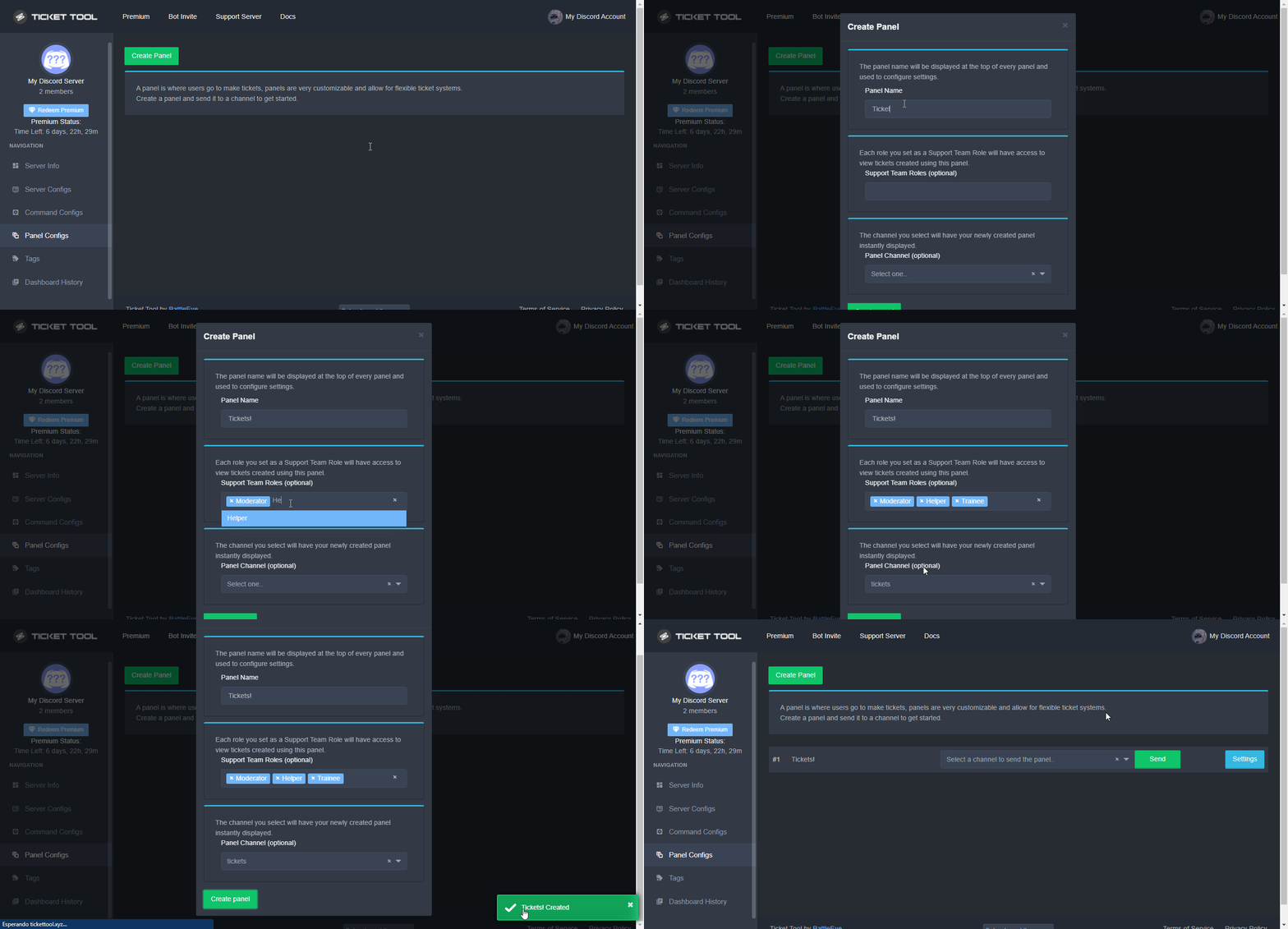 slender minnow
woeful mortar
946460905556815902
slender minnow
woeful mortar
946460905556815902
that's weird, can you please open a ticket so that we could further investigate the problem
#🎫│make-a-ticket to open a ticket
woeful mortar
slender minnow
<#571706435449257997> to open a ticket <:smil:936485535403356221>
english?
covert swallow
Whatever language you speak best
woeful mortar
covert swallow
Whatever language you speak best
Yiddish
covert swallow
Out of the options we have
 indigo seal
Can you help me set up it?
humble sequoiaBOT
━━ moved to ticket ━━
 grizzled trout
Hola como hago aparecer un ticket?? ósea q reaccionan a un msj y se habrá un ticket
 livid kelp
shut bolt
livid kelp
shut bolt
Nope, it's a discord limitation
 fathom reef
I need help lol
humble sequoiaBOT
We would love to help you, but if you don't tell us what you need help with we can't help you :(
fathom reef
@humble sequoia
I'm trying to change citys on one of my accounts but it says I can't becouse it thinks I'm in governors war s2 when I'm not
humble sequoiaBOT
⚠️ You're in the wrong place
We provide support for Ticket Tool Discord bot and cannot help you with whatever issue you have.
- We don't know which Support Team you should contact to get this issue resolved, and unfortunately we won't be able to accurately tell you.
If you don't have any further questions regarding our bot Ticket Tool, please close this ticket
 clever wigeon
How do I disable 'create invite' for the User Opened Permissions? I don't see that option anywhere. And the category where the tickets go in have it disabled but the tickets don't
rustic gale
clever wigeon
How do I disable 'create invite' for the User Opened Permissions? I don't see th...
Currently there's no way to edit that particular permission. You will have to deny the permission role-wise instead of channel-wise.
clever wigeon
rustic gale
Currently there's no way to edit that particular permission. You will have to de...
Ahh alright, thank you!
iron nightBOT
Gave +1 Rep to @rustic gale
 azure breach
سلام عليكم
robust sandalBOT
azure breach
سلام عليكم
Peace be upon you
Arabic (ar) → English (en)
 upbeat palm
azure breach
سلام عليكم
upbeat palm
azure breach
سلام عليكم
Do you need any help?
robust sandalBOT
upbeat palm
Do you need any help?
به کمکي احتياج داري؟
English (en) → Persian (fa)
upbeat palm
robust sandal
Ignore
 narrow portal
For some reason when i make it so u gotta put reason to open the ticket for others like mods it doesnt show the reason
shut bolt
narrow portal
For some reason when i make it so u gotta put reason to open the ticket for othe...
While using the command style tickets modals can't be used since modals can only be used through interactions and regular messages don't work
 harsh gazelle
Anyone know why when I add the bot the server I have admin in that it just doesn't showup in the manage servers area?
harsh gazelle
harsh gazelle
Anyone know why when I add the bot the server I have admin in that it just doesn...
I have relogged and cleared cookies more times than I can count
harsh gazelle
harsh gazelle
Anyone know why when I add the bot the server I have admin in that it just doesn...
nvm ik why
 cosmic lion
So when I hit close ticket, it closes, saves transcript, then deletes the ticket. How can I do it that it closes, only allows support team to view it and then it moves to a different catergory
rustic gale
cosmic lion
So when I hit close ticket, it closes, saves transcript, then deletes the ticket...
First of all, disable Two Step Ticket in General Options
cosmic lion
rustic gale
First of all, disable Two Step Ticket in General Options
It already is
rustic gale
And it's still automatically deleting tickets after closing?
cosmic lion
Yeah
rustic gale
What's your server's ID?
cosmic lion
Where would I find that in ticket tool dashboard. Or are you referring to the one discord gives, by copying id?
rustic gale
cosmic lion
Where would I find that in ticket tool dashboard. Or are you referring to the on...
The Discord ID, found by copying ID
cosmic lion
702121281507819540
rustic gale
I'll take a few minutes to check
cosmic lion
Ok, thank you
rustic gale
You have nine panels. Which one's showing this problem?
cosmic lion
all of them, but i am currently messing with Open a Ticket! one
rustic gale
Ah
Well, that's on me
I should have said enable Two Step Ticket instead of disable it
cosmic lion
ah okay. No worries. I will enable and test it out. Thanks
It worked. Thanks @rustic gale
iron nightBOT
Gave +1 Rep to @rustic gale
 steel swan
@cosmic lion i need help please
how do i do this list with tickiet tool like this one

how can i make my tickeit tool creating things like this
rustic gale
@steel swan That's done by editing your panel message
humble sequoiaBOT
The panel message is where people react to make a ticket. To customize it head over to your Dashboard --> Panel Configs -> Settings -> Panel Options -> Edit Panel Message

 stoic hazel
When you are done I need help to
stoic hazel

 crimson elm

stoic hazel
Explain
steel swan
Lololol
crimson elm
But*
steel swan
Then get a new one lol
همه قولو ياعم دي مش فاهم شاكله
انت شغال علي ايه يا برو
كلموني بريفيت
لا عادي ولا يهمك
Hahahahaha
crimson elm
أمسح الأول\🙃
crimson elm
@humble sequoia
وأنت أسمك طول الأرض ليه؟
هه\🙃
@weak oasis@radiant moss@oak shuttle@hallow marlin
@odd karma
مالك؟
 oak shuttle
crimson elm
<@355579366991986688><@513792641016659971><@892447238427672607><@855793296155607...
oak shuttle
crimson elm
<@355579366991986688><@513792641016659971><@892447238427672607><@855793296155607...
Please Do Not ping the support team.
crimson elm
oak shuttle
Please Do Not ping the support team.
help mee
اخخخ بعت لي فريند ب الغلط وشاله قبل أخذ سكرين
حزننن
@everyone
@fathom ravine
999
666

@here
نا أذلف\🙃
في السينما
يا أدري
ميتين السابورت البيض\🙃
@radiant moss
يبني مفيش سابورت أصلاً
@mystic hound
Manager
!!!!!!!
Help Me
@mystic hound
Manager
Help Me
أذلف
يو في شخص حي في ذا السيرفر
@real marlin
 random coyote
Ping?
crimson elm
random coyote
Ping?
Help mee
real marlin
@crimson elm @late owl Pinging staff is against the rules, I suggest to stop pinging or a severe action will be taken. I recommend you do read the rules in #📂│information.
random coyote
No
real marlin
You guys actually do not read the rules since pings are not allowed by anyone.
random coyote
Its a raid
real marlin
except us.
random coyote
No
crimson elm
real marlin
You guys actually do not read the rules since pings are not allowed by anyone.
أذلف
مش على كيف أمك
أنا فوق القانون وهات كل القوانين وهكسرها
crimson elm
real marlin
except us.
"us"؟
أذلف يبني
هيهي الحكمة أنه مش فاهم\🙃
تخيل لو اللي رد علينا في الأول كان سابورت وشتمته ب العربي
"مشاعر"
مشاعر
تعال ننشر سيرفر نو رولز بدل العبط دة\🙃
@mystic hound
Help mee
 prime bridgeBOT
 Successful kicks:
 1
 Unsuccessful kicks:
 0
 Reason: Continually pinging staff after being told not to.
 Moderator: @mystic hound
crimson elm
@late owl
بعدل بس
هيهي
@mystic hound
فك يو
prime bridgeBOT
Successful kicks: 1
Unsuccessful kicks: 0
Reason: Duplicate of above case, obvious troll
Moderator: @mystic hound
robust sandalBOT
Are we going to fool around? @mystic hound
Arabic (ar) → English (en)
 mystic hound
Not really, if you keep pinging you'll just get banned
robust sandalBOT
mystic hound
Not really, if you keep pinging you'll just get banned
ليس حقا ، إذا واصلت اختبار pinging ، حظرك
English (en) → Arabic (ar)
real marlin
Same applies to other members.
mystic hound
?ban 989151797484584960 ?r Ignoring continuous warnings ?t 10d
prime bridgeBOT
mystic hound
?ban 989151797484584960 ?r Ignoring continuous warnings ?t 10d
Unsuccessful Operation!

 No actual members were found! Try again!
Successful bans: 1
Unsuccessful bans: 0
Reason: troll
Moderator: @mystic hound
 sweet hound
$help
humble sequoiaBOT
Help Options
$help commands - Information on commands
$help setup - Information on bot setup
$help faq - Frequently asked questions
sweet hound
$help @pseudo glen
humble sequoiaBOT
Help Options
$help commands - Information on commands
$help setup - Information on bot setup
$help faq - Frequently asked questions
sweet hound
$help commands
humble sequoiaBOT
() = optional
[] = required
*==================================
Ticket Commands
==================================*
_ _
`$add [User] (channel)`
Description: Adding additional users to a ticket
Aliases: none
`$remove [User] (channel)`
Description: Removing users from a ticket
Aliases: none
`$close`
Description: Closing tickets
Aliases: none
`$open`
Description: Opening closed tickets
Aliases: none
`$delete`
Description: Deleting tickets
Aliases: none
`$rename`
Description: Renaming tickets/channels
Aliases: none
`$transcript (send channel)`
Description: Creating transcripts
Aliases: none
`$new (user) (reason)`
Description: Creating tickets in a monitored channel (when command style is enabled)
Aliases: none
`$claim`
Description: Claiming tickets (when claim is enabled)
Aliases: "unclaim"
_ _
*==================================
General Commands
==================================*
_ _
`$help (Help Options)`
Description: Help Command
Aliases: none
`$debug`
Description: Debuging issues with running Ticket Tool
Aliases: none
`$id (@role/@user/#channel/emoji)`
Description: Converting roles, users, channels and emojis to ID
Aliases: "getid"
`$permlevel`
Description: Checking permission level with Ticket Tool
Aliases: "level"
`$ping`
Description: Checking response time with discord api
Aliases: none
`$vote (link | unlink | redeem) (user)`
Description: Earn premium by voting on top.gg or Discord.boats
Aliases: "votes"
real marlin
sweet hound
$help <@557628352828014614>
If you have a question, just ask and the community will help you.
jade topaz
real marlin
If you have a question, just ask and the community will help you.
hi doc, is making multiple custom buttons a free feature?

 blazing vessel


 rustic kernel
oh sorry there'a a community support here
I wanted to ask if there's a way to make transcripts private?
azure breach
سلام عليكم
 hearty ermine
Can member review the messages after the ticket is closed?
rustic kernel
hearty ermine
Can member review the messages after the ticket is closed?
looks like it if a transcript is made
as it logs to a webpage, there doesn't seem to be a way to delete it
 wanton gulch
Is it possible to make a button to direct delete a ticket and noget close and then delete?
real marlin
The reviews are in #📈│reviews
Can you please clarify?
Can you please explain with details your question?
Pinging is against the rules please check them #📂│information
Scroll up until you see information and click on rules in that channel.
real marlin
Stop troll, if you have any issue please feel free to ask, if not you can use the #💬│general-chat for English only or #💬│gen-chat-multilingual for all languages.
Do you have a premium subscription?
So why are you asking for a refund?
Do you have any question regarding the Ticket Tool?
humble sequoiaBOT
We would love to help you, but if you don't tell us what you need help with we can't help you :(
real marlin
 fiery jacinth
An need help please
fiery jacinth
An need help please
If you ask your question someone will answer.
fiery jacinth
I did ask
quasi cliff
fiery jacinth
When a member wants to close a ticket they have to scroll all above the pm?
They can simply use $close
fiery jacinth
Ok. Can i change that prefix?
quasi cliff
$help prefix
humble sequoiaBOT
How to change Ticket tool's prefix
The default prefix for ticket tool is $ and @Ticket Tool#4843 however that can be changed on the Dashboard under Server Configs -> Command Prefix.
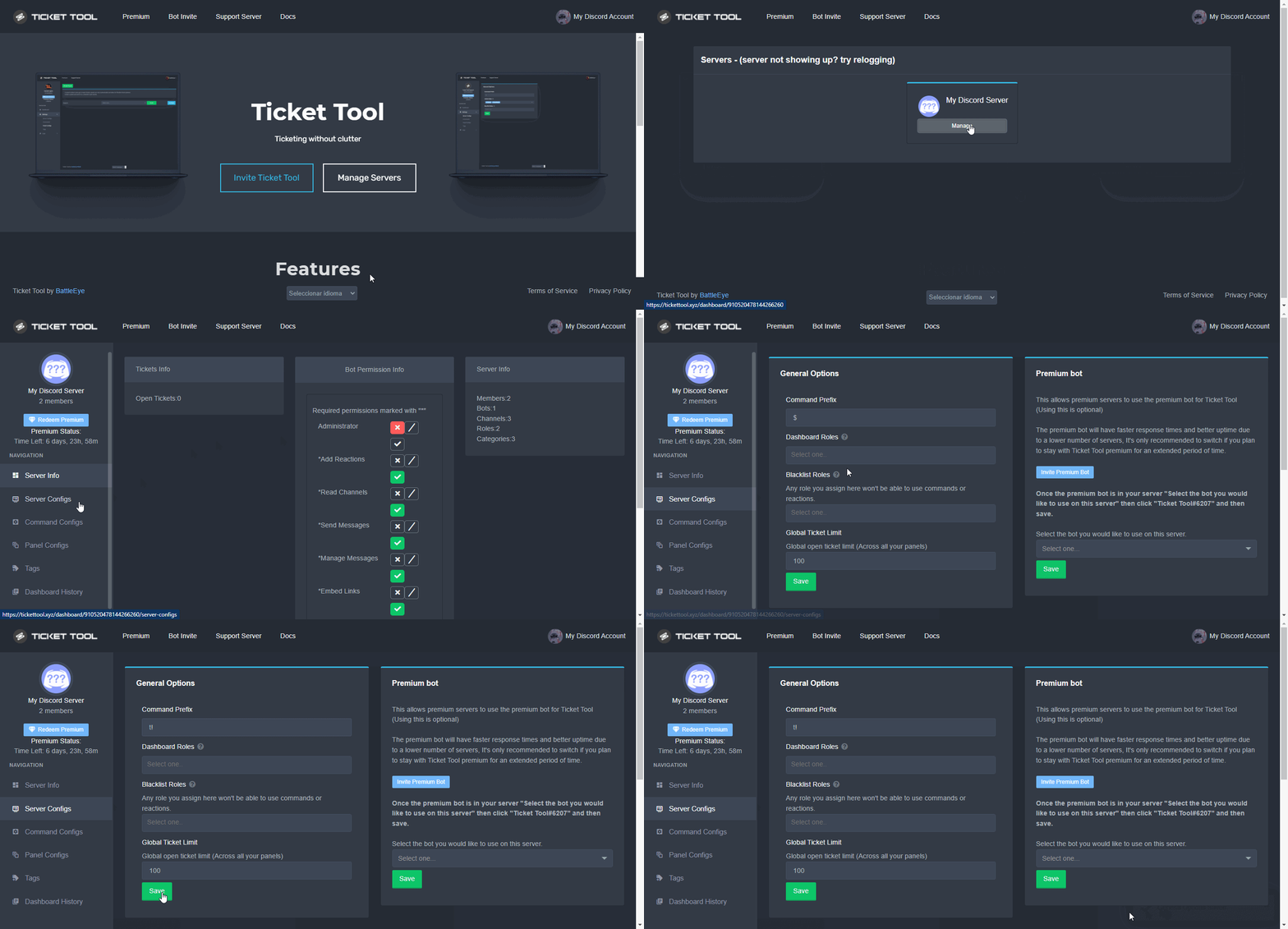
NOTE that @Ticket Tool#4843 will always work as a prefix even if there is a custom prefix.
fiery jacinth
Thanks so much
 mighty iris
quasi cliff
$help prefix
mighty iris
quasi cliff
$help prefix
wene i go to manage server its give me this
 humble sequoiaBOT
Don't see your server in the dashboard?
You will possibly need to relog. Look below to see steps on how to relog.
How to relog in the Dashboard.
First, you will need to go to the dashboard. Once your there, click on your avatar on the top right. after you clicked it, you will see button that says Logout. You must click that. Once you have logged out, you can log back in.
Note:
You need one of these 3 things to access the dashboard.
1. Server Owner (Level: 6)
2. Server Administrator (Level: 4)
3. Dashboard Role (Level: 2)
:warning: You can check your level using $level on your Discord Server
User permission level with Ticket Tool
@User is permission level: 0 (User)
```» *If it shows that your permission is **0**, you don't have any of the above **3 things** to manage the dashboard.*


**See the GIF below on how to relog:**thx it work
quasi cliff

frail thicket
is it possible to close a ticket if the user who opened it did not send a message within 24h?
 digital dagger
I need help. Can soneone help me in the ticket?
quasi cliff
frail thicket
is it possible to close a ticket if the user who opened it did not send a messag...
It's not possible yet but expected to release soon
Hey, I'm still confused about your issue. Did you buy Ticket Tool Premium?
Did you buy it on https://tickettool.xyz/subscriptions ?

Then what's the issue?
I can't find any premium linked with your account
Can you please create a billing ticket in #🎫│make-a-ticket and send your email ID (the one you used while buying) inside the billing ticket
Can you send screenshot of that
You technically can't buy on the website without that
Can you copy paste the error message
Then look at it and type it here
 strong lake
my users sees the open tickets in my discord sever, does anyone know how to change that?>
 icy grove
Afternoon
I've just configured ticket tool using multi panel. I have three panels with different forms to complete. All working well and really pleased with the bot.
Is there any way to synchronise the ticket numbering with a multi-panel so that whatever option is chosen it generates the next number. I have Panel 1 and have linked in Panel 2 and Panel 3 so could Panel 1 co-ordinate the ticket numbers for example ?
rustic gale
strong lake
my users sees the open tickets in my discord sever, does anyone know how to chan...
There could be many causes of that. You do better opening a ticket so we can troubleshoot it. Explain the problem there and give us your server ID
rustic gale
icy grove
Afternoon
I've just configured ticket tool using multi panel. I have three pane...
Not currently, but you can make a suggestion to that effect in #🤖│bot-spam with the s!suggest command.
icy grove
rustic gale
Not currently, but you can make a suggestion to that effect in <#910978476536905...
Cheers. Just realised I can change the channel name for each ticket type so it's not so bad but will raise thank you.
iron nightBOT
Gave +1 Rep to @rustic gale
 mint hamlet
How can I make it so that there are multiple reactions to open different tickets in one panel? (if that made sense...)
Basically, I want one panel with multiple reactions to create different tickets which go to different categories (i have premium... well, not me but someone else who has access to the server got it for us)
For example, "create a ticket by reacting below with the problem you need help with", "support" "support2" "support3". "support" will go to a category called support, "support" will go to a category called "support2" so on so on. Can anybody help? Thanks so much. Also I want it to be in one embed, ive seen it before in other servers. Sorry if this message didnt make much sense I can try rewording it if needed.
humble sequoiaBOT
Multipanels are panels with multiple buttons attached to them.
How to create a Multipanel
All users can combine multiple panels into one multipanel!
First, find the IDs of each panel you wish to combine. You can find them in your Panel Configs in the Dashboard
Next, send the multipanel to a channel using $panel [id1] [id2] {id3} ....
e.g. $panel 1 2 4 17 35 to combine panels 1, 2, 4, 17 and 35.
Up to 25 panels may be combined.
You can also watch this video tutorial.
For a more convenient use of multipanels, you can now combine panels on the dashboard. This will allow you to directly send the multipanel from the dashboard or via the $panel ID command.
Where can I find this?
You can find this setting on the Dashboard -> Panel Configs -> Settings -> General Options
Note: if you're attaching all the panels to a panel called English, don't include English in the attached panels box (If you do this, it will create duplicate)
This will put all buttons from all of your panels on one message. The message is the panel message from the panel you're combining these panels in.
You can also watch this video tutorial.
gilded verge
Hey @mint hamlet, i think you mean multipanels 🤔 please check
oak shuttle
Huh?