#🆘│community-support
1 messages · Page 4 of 1
 humble sequoiaBOT

The new Discord Buttons allow for a much smoother and convenient experience. They reduce lag and work much better than emojis. With ticket tool you can edit all the buttons however you like! Buttons can show emojis, text and can have 4 different colors.
Where can I edit them?
Dashboard ➞ Panel Configs ➞ Settings ➞ Button Options ➞ Setting

 wheat ruin
Thanks a lot.
 shrewd oracle
 rustic gale
Press the Setup Guide button in #📂│information
 pure stratus
How can I fix?

 scenic plinth
I'm not too sure what you're asking to fix.
 humble raft
I have a this problem

 jade topaz
😩
 versed finch
$help
humble sequoiaBOT
Help Options
$help commands - Information on commands
$help setup - Information on bot setup
$help faq - Frequently asked questions
versed finch
$help setup
humble sequoiaBOT
Setting up Ticket Tool
Visit the docs for setup info
General Setup
rustic gale
humble raft
I have a this problem
Uninstall and reinstall Discord
humble raft
rustic gale
Uninstall and reinstall Discord
Who thanx
rustic gale
humble raft
Who thanx
Did it work?
 crisp finch
how to add a server so that it can be managed, I want to manage it but it does not appear
 humble sequoiaBOT
Don't see your server in the dashboard?
You will possibly need to relog. Look below to see steps on how to relog.
How to relog in the Dashboard.
First, you will need to go to the dashboard. Once your there, click on your avatar on the top right. after you clicked it, you will see button that says Logout. You must click that. Once you have logged out, you can log back in.
Note:
You need one of these 3 things to access the dashboard.
1. Server Owner (Level: 6)
2. Server Administrator (Level: 4)
3. Dashboard Role (Level: 2)
:warning: You can check your level using $level on your Discord Server
User permission level with Ticket Tool
@User is permission level: 0 (User)
```» *If it shows that your permission is **0**, you don't have any of the above **3 things** to manage the dashboard.*


**See the GIF below on how to relog:**
 dusky flint
An amount has been withdrawn from me to renew the bot contract, but the order has not been completed. What is the reason?
@plain surge
 covert swallow
Have you assigned the premium to a server?
 unkempt barn
Hey gamers, I’ve recently lost some admin roles for a server that I was paying premium for, is there a way I can cancel my subscription without having those roles?
Edit: Nvm. Automated Support helped.
 rocky grotto
ok so is there a possible command or way to make the tickets generate on a different category and not on top of every channel?

 rose trout
rocky grotto
ok so is there a possible command or way to make the tickets generate on a diffe...
rose trout
rocky grotto
ok so is there a possible command or way to make the tickets generate on a diffe...
You can set the open category in the dashboard! Look below

 stone quest
Hello, I would like to ask, I am using your bot and the players cannot use the ticket, but I still do not understand where I am making a mistake. Thank you for the info
humble sequoiaBOT
━━ moved to ticket ━━
 sick ravine
 tawny lichen
How do you open a ticket as the owner and add someone to it? Cause I need to open a ticket to talk to a member of my server
jade topaz
كيف اخلي البوت يحفظ التكت عند قفل التكت مباشره
rustic gale
tawny lichen
How do you open a ticket as the owner and add someone to it? Cause I need to ope...
Enable Command Style Tickets and use the $new command
tawny lichen
Alr ty!
jade topaz
How do I get the bot to save the tick when the tick is locked directly?
rustic gale
$commandstyle
humble sequoiaBOT
Command Style Tickets allow you to open tickets VIA the $new or $ticket commands. This feature also allows you to open tickets for people, by using the aforementioned commands with the user's ping or ID.
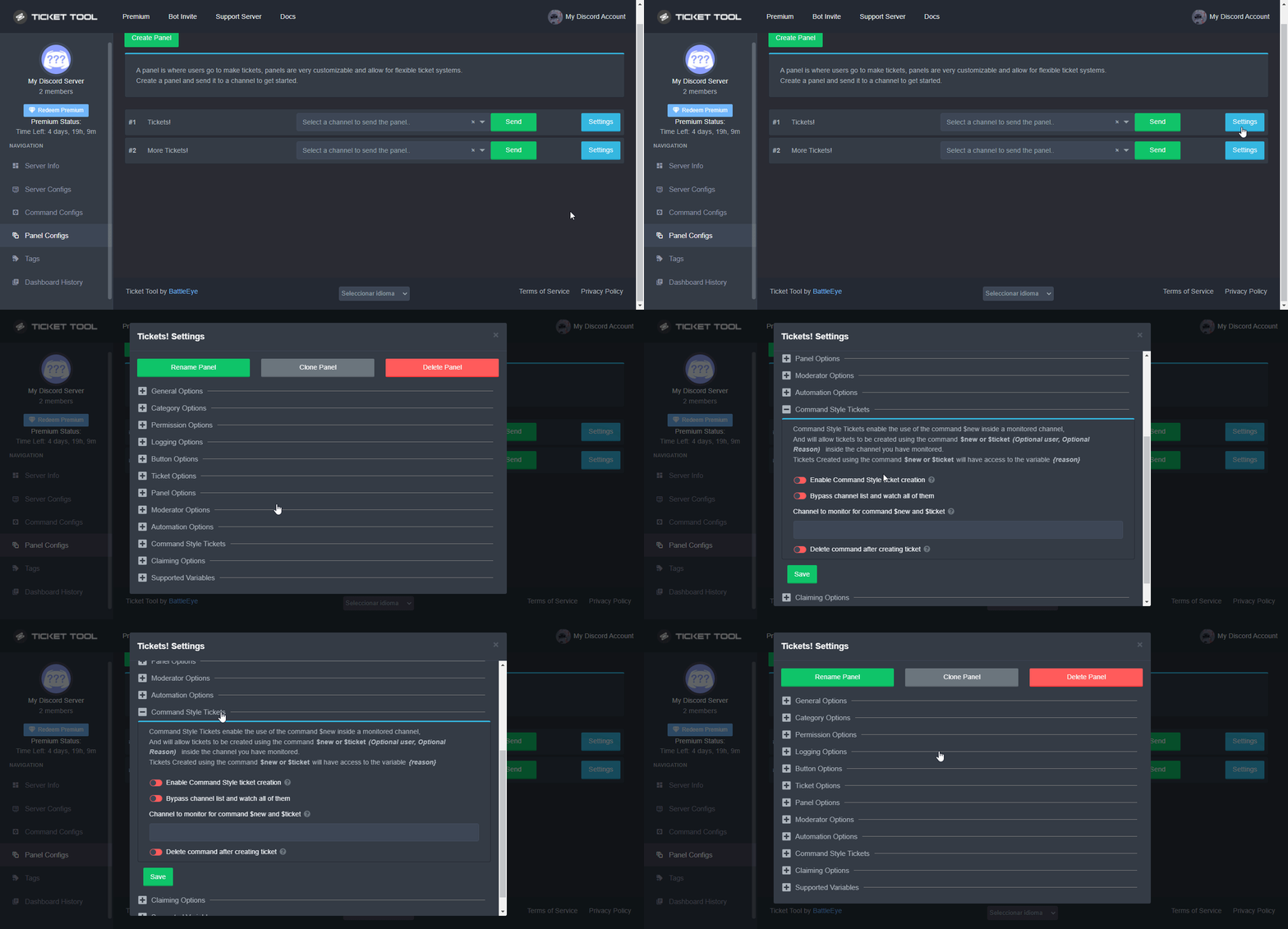
You can enable this feature by heading over to your server's dashboard. Then head over to Panel Configs ➞ Settings ➞ Command Style Tickets. (GIF below shows you how to get to it as well).
This section of the panel settings also contains the following features
- Bypass channel list and watch all of them → when you enable this option, Ticket Tool will create a ticket whenever someone uses the $new or the $ticket command in a channel it has access to .
- Channel to monitor for command $new and $ticket → This is the opposite of the previous option, you can actually select in which channels Ticket Tool should look for the $new command instead of looking in the whole server.
- Delete command after creating ticket → If enabled, Ticket Tool will delete the command (whether it's
$newor$ticket) a few seconds after you run it.
 jade topaz
How do I get the bot to save the Ticket when the Ticket is locked directly?
rustic gale
You will do something like $new (user mention or ID), for example
$new @tawny lichen
which would make a new ticket as if you were the creator
rustic gale
jade topaz
How do I get the bot to save the Ticket when the Ticket is locked directly?
You should enable Two Step Ticket
It's in General Options in your ticket's settings
Then when a ticket is closed you will see a Transcript button. Press that and the ticket will be transcripted
If you mean auto saving transcripts, that's a premium feature and it's enabled in Automation Options
jade topaz
There is a server that made saving the ticket to be automatic
@rustic gale
rustic gale
I don't think i understand your question then
jade topaz
Can I make a ticket with command
 fallow ingot
Sure
You can go to the Dashboard > Panel Configs > Settings > Command Style Tickets
fallow ingot
$new or $ticket make sure you set a channel for ticket tool to monitor in the Dashboard.
 long slate
hey guys is anyone around
i have integrated ticket tool on three servers and it works fine. I have invited it to a fourth server and the bot is there but in tickettool.xyz it is not showing the new server
humble sequoiaBOT
Don't see your server in the dashboard?
You will possibly need to relog. Look below to see steps on how to relog.
How to relog in the Dashboard.
First, you will need to go to the dashboard. Once your there, click on your avatar on the top right. after you clicked it, you will see button that says Logout. You must click that. Once you have logged out, you can log back in.
Note:
You need one of these 3 things to access the dashboard.
1. Server Owner (Level: 6)
2. Server Administrator (Level: 4)
3. Dashboard Role (Level: 2)
:warning: You can check your level using $level on your Discord Server
User permission level with Ticket Tool
@User is permission level: 0 (User)
```» *If it shows that your permission is **0**, you don't have any of the above **3 things** to manage the dashboard.*


**See the GIF below on how to relog:**ty
rose trout
jade topaz
كيف اخلي البوت يحفظ التكت عند قفل التكت مباشره
You may want to open a support ticket with Arabic so we can assist you faster!
 tranquil yew
how do i fix this ?
 covert swallow
Make sure TT can send messages in the channel youre trying to send the message in
tranquil yew
do u no how ?
covert swallow
Check the permissions on the channel
 lunar hearth
Hi how do you create buttons on your ticket and is it premium?
 fleet path
this may be a stupid question but I'm totally new to this. As the host, is there a way I can see opened tickets so I can give them the verification role?
rustic gale
lunar hearth
Hi how do you create buttons on your ticket and is it premium?
Which buttons do you mean?
rustic gale
fleet path
this may be a stupid question but I'm totally new to this. As the host, is there...
You can't see open tickets in your server?
fleet path
rustic gale
You can't see open tickets in your server?
don't think so
lunar hearth
rustic gale
Which buttons do you mean?
Like message buttons that u can react with
rustic gale
Message buttons?
rustic gale
fleet path
don't think so
Then you need to get in touch with the server owner or an administrator
rustic gale
Then you are able to see open tickets just as you are able to see all the channels in your server
 iron nightBOT
Gave +1 Rep to @rustic gale
fleet path
right here?
rustic gale
In your server
fleet path
yes
 crystal timber
How works the {@role name} or {role ID} -The role name you want to mention (role names are case sensitive.)
?
covert swallow
Its how you ping a role in a ticket message
So if I wanted to ping our Operations manager, it would be {<@&838465505936539649>}
Hi pablo
Blame mobile
 crystal timber
covert swallow
So if I wanted to ping our Operations manager, it would be {<@&83846550593653964...
crystal timber
covert swallow
So if I wanted to ping our Operations manager, it would be {<@&83846550593653964...
Ah thanks!
iron nightBOT
Gave +1 Rep to @covert swallow
covert swallow
Anything else I can help ya with?
crystal timber
Nope thx
 eternal lotus
Hi im having problems with the transcripts people sometimes send pics or videos in our tickets and we sometimes need to redownload or access a video, but recently ive been getting this error when trying to download them
 eternal lotus
Hi im having problems with the transcripts people sometimes send pics or videos ...
eternal lotus
eternal lotus
Hi im having problems with the transcripts people sometimes send pics or videos ...
they show up as an xml file
 raven herald
How do you add people into a ticket
rustic gale
raven herald
How do you add people into a ticket
Use the $add command
raven herald
Thanks
rustic gale
eternal lotus
Hi im having problems with the transcripts people sometimes send pics or videos ...
Media isn't saved as part of a ticket.
When you upload a file to a Discord channel, the file is deleted when the message it's attached to is deleted
eternal lotus
rustic gale
Media isn't saved as part of a ticket.
but usually i could redownload the attachments from tickets?
rustic gale
The files remain accessible for a time but they're deleted shortly afterwards
eternal lotus
how long is that time?
rustic gale
Around one week as far as i can tell
eternal lotus
okay
rustic gale
It's a Discord thing, not a Ticket Tool thing
eternal lotus
so is there no way to keep attachments with the ticket tool?
rustic gale
Currently the premium version has a small space for storing files
up to 8 MB per ticket
eternal lotus
okay
 burnt finch
hello can someone help me out please?
I am trying to set up ticket tool to a server and i am a mod and was given administration permission but when i go to manage it in a server the server does not pop up for me.
 sullen igloo
Hey can someone help me please, I'm the owner of a server and when people join they have to open a ticket to verify with me or the support team to get into the actual server. I would like to put a message in the ticket without me having to type it, how could I do that?
humble sequoiaBOT
The Ticket Message is the first message sent by the bot in a new ticket. To customise it head over to your Dashboard ➞ Panel Configs ➞ Settings ➞ Ticket Options ➞ Edit Ticket Message
 jade topaz
How can i add a role in the Ticket Message so the role get pinged in the ticket ?
 native shadow
humble sequoiaBOT
native shadow
humble sequoiaBOT
Within all the messages the bot's sends (both embeds and text) you can mention either channels, roles, or even users, these mentions will only send a notification to the user if they are used within a text field, e.g: a role mentioned in an embed won't ping at all the users who have that role.
For mentioning a role you can use one out of three options:
{@Role Name} ➞ Which is Case Sensitive.
{RoleID} ➞ Replace RoleId with the Id of the role you are trying to ping.
<@&RoleID> ➞ Discord's native syntax to ping roles.
<#ChannelID> ➞ Mention a channel by its ID.
<@UserID> ➞ Mention a user by its ID.
 steel basalt
What settings should I use to put multiple buttons/Dropdown menu for one Embed? I don't want 6 embeds...
humble sequoiaBOT
For a more convenient use of multipanels, you can now combine panels on the dashboard. This will allow you to directly send the multipanel from the dashboard or via the $panel ID command.
Where can I find this?
You can find this setting on the Dashboard -> Panel Configs -> Settings -> General Options
Note: if you're attaching all the panels to a panel called English, don't include English in the attached panels box (If you do this, it will create duplicate)
This will put all buttons from all of your panels on one message. The message is the panel message from the panel you're combining these panels in.
You can also watch this video tutorial.

 gilded verge
humble sequoia
gilded verge
humble sequoia
Hey @steel basalt, check 
steel basalt
gilded verge
Hey <@801839875305111563>, check <:this:894279341108772914>
Thank you! 😂
iron nightBOT
Gave +1 Rep to @gilded verge
steel basalt
Ohhh its a premium feature 😭
 tawdry meteor
rose trout
tawdry meteor
<#1005966272573472778>
tawdry meteor
rose trout
tawdry meteor
<#1005966272573472778>
Yes I will get to your ticket soon
jade topaz
is it possible to make it so that it pings a role when you open a ticket
humble sequoiaBOT
Within all the messages the bot's sends (both embeds and text) you can mention either channels, roles, or even users, these mentions will only send a notification to the user if they are used within a text field, e.g: a role mentioned in an embed won't ping at all the users who have that role.
For mentioning a role you can use one out of three options:
{@Role Name} ➞ Which is Case Sensitive.
{RoleID} ➞ Replace RoleId with the Id of the role you are trying to ping.
<@&RoleID> ➞ Discord's native syntax to ping roles.
<#ChannelID> ➞ Mention a channel by its ID.
<@UserID> ➞ Mention a user by its ID.
gilded verge
and put mention in Message Text
(Dashboard->Panel Configs->Panel Settings->Expand Ticket Options->Edit Ticket Message->Message Text)
 severe mirage

Pfv me ajude sou brasileiro n entendo MT bem porque aconteceu isso
@humble sequoia @humble sequoia pfv me ajude meu jogo travou e diz a só entro no novo lançamento
humble sequoiaBOT

⚠️ Você está no lugar errado
Nós oferecemos suporte para o bot de Discord @pseudo glen, então não podemos ajudá-lo com qualquer outro problema que você tenha.
- Certifique-se de entrar em contato com a equipe de suporte apropriada para solucionar seu problema.
Se você não possui nenhuma dúvida sobre o nosso bot de tickets, por favor feche este ticket.
gilded verge
humble sequoia
@severe mirage
severe mirage
Com quem posso falar ? Pfv
gilded verge
Leia a mensagem do bot 😕
 gloomy wind
yo, how would i make a transcript be sent automatically upon closing the ticket?
i know how to send it to a specific channel and all, just not how to exactly make it send a transcript, even if the "transcript" option isn't selected
rustic gale
It's a premium feature
iron nightBOT
Gave +1 Rep to @rustic gale
gloomy wind
there we go
kk bye bye, thank youu
 somber belfry
Hey, is it possible, that the person who created the ticket can claim it (auto or by himself?)
And Buttons that are only can be clicked by supporters are they still visible to everyone?
 arctic plank
What's up ma boys
 pallid widget
 rain orchid
Can anyone help me to how to do the setup
rain orchid
Can anyone help me to how to do the setup
Still need help?
pallid widget
somber belfry
Hey, is it possible, that the person who created the ticket can claim it (auto o...
No ?
fallow ingot
somber belfry
Hey, is it possible, that the person who created the ticket can claim it (auto o...
 The person who opens a ticket is unable to claim the ticket that they made, only support or anyone else who has access. Buttons are able to be viewed by everyone regardless if it is marked support team only.
 primal trench
how to open ticket
humble sequoiaBOT

You can check our documentation here;
You can also check #📂│information for the basic setup;
You can also watch this video tutorial.
Our documentation contains all the info you need about the bot to be able to setup and configure the bot however you like.
rose trout
primal trench
how to open ticket
There is the setup guide. But if you need support you can open a ticket in #🎫│make-a-ticket
 celest lake
Warning: This server isn't active, Please make sure this is the correct bot (premium vs free)
humble sequoiaBOT
How to disable the premium bot
To disable the premium bot you will have to go to the Dashboard ➞ Server Configs ➞ Premium bot ➞ And on the right-hand side select the primary free bot in the drop down menu.
Premium features will still work on the normal bot.
 gilded verge
humble sequoia
gilded verge
humble sequoia
@celest lake, If your message means you have a problem, please check
rustic gale
Consider using a different browser
jade topaz
hi does anyone know how i can do buttons like this?

i keep trying but i have no clue how.
gilded verge
nope, multipanels are free
humble sequoiaBOT
For a more convenient use of multipanels, you can now combine panels on the dashboard. This will allow you to directly send the multipanel from the dashboard or via the $panel ID command.
Where can I find this?
You can find this setting on the Dashboard -> Panel Configs -> Settings -> General Options
Note: if you're attaching all the panels to a panel called English, don't include English in the attached panels box (If you do this, it will create duplicate)
This will put all buttons from all of your panels on one message. The message is the panel message from the panel you're combining these panels in.
You can also watch this video tutorial.
gilded verge
humble sequoia
Hey @jade topaz, check
jade topaz
gilded verge
Hey <@456226577798135808>, check <:this:894279341108772914>
thanks, i am trying but then this happiness.
iron nightBOT
Gave +1 Rep to @gilded verge
jade topaz
 gilded verge
okay, ill give you my example, wait please 🤔
jade topaz
ok!
rustic gale
Are you on computer or phone?
gilded verge
jade topaz
ok!
*If you are not sure if you did the multipanel right, you can check my example:
Message link 1: #🆘│community-support message
Message link 2: #🆘│community-support message
jade topaz
gilded verge
*If you are not sure if you did the multipanel right, you can check my example:
...
thanks! i am getting the idea.
iron nightBOT
Gave +1 Rep to @gilded verge
 zenith fossil
Hey guys, I have a bot that is checking support tickets to auto close if the user is unactive for x time. What is the best way to auto close the ticket using a bot and still give the user the logs? Just deleting the channel does not give logs and using $close on a bot dont work
rustic gale
zenith fossil
Hey guys, I have a bot that is checking support tickets to auto close if the use...
You can enable the bot in Server Configs.
There's a field to add the IDs of bots that you want Ticket Tool to respond to.
French tickets in #🎫│make-a-ticket
 maiden cipher
How to use my ticket in my server please ??
 stark runeBOT
1. Invite Ticket Tool to your server
First you will want to invite the bot to your server. Once the bot is in your server, you can manage your server in the dashboard.

2. Create a Panel
To create a panel we are going to need to head over to the panel configs on the dashboard.
Once at the dashboard we will need to click Create Panel.
Enter a panel name (Fill in any optional settings you want).
Click Create Panel and your ready to get started with configuring your panel.
An example of a creating a panel is shown below.

3. Send the Panel to a Channel
Once you've created a panel on the dashboard you will need to send it to a channel using send on the dashboard.
Select the channel you want your panel to be created in and click send.
For other questions checkout $help faq.
An example of a sending a panel is shown below.
Having a Problem Sending the Panel?
Do $debug in a channel with Ticket Tool and make sure it has all the necessary Discord permissions.

 shadow glacier
this possible to remove in a ticket the permision to @ a role

 quasi cliff
shadow glacier
this possible to remove in a ticket the permision to @ a role
quasi cliff
shadow glacier
this possible to remove in a ticket the permision to @ a role
For the person who opened the ticket or staff?
Do they have mention perms in category or their role perms
 latent sonnet
humble sequoiaBOT
latent sonnet
humble sequoiaBOT
 plain kite
Is there a way to make one specific panel usable by users with a specific role?
rose trout
plain kite
Is there a way to make one specific panel usable by users with a specific role?
Yes you can!
 rose trout
plain kite
Is there a way to make one specific panel usable by users with a specific role?
rose trout
plain kite
Is there a way to make one specific panel usable by users with a specific role?
If you go to the button options and go to create you can but allowed roles!
plain kite
rose trout
If you go to the button options and go to create you can but allowed roles!
Thx bud!
iron nightBOT
Gave +1 Rep to @rose trout
rose trout
plain kite
Thx bud!
of couse!
shadow glacier
quasi cliff
For the person who opened the ticket or staff?
person
shadow glacier
quasi cliff
Do they have mention perms in category or their role perms
let me check
plain kite
rose trout
If you go to the button options and go to create you can but allowed roles!
i did this, i added the booster role for my server in allowed roles, but those without it can still open a ticket
shadow glacier
off and they still can
 rose trout
plain kite
i did this, i added the booster role for my server in allowed roles, but those w...
rose trout
plain kite
i did this, i added the booster role for my server in allowed roles, but those w...
Did you re send the panel?
 rose trout
plain kite
yep!
rose trout
plain kite
yep!
mhm ok
rose trout
plain kite
ok did the person have admin that tested the ticket?
plain kite
rose trout
ok did the person have admin that tested the ticket?
yeah im server owner, ive set the button as per above, resent the panel (Twice) and those without the role specified can still open a ticket
basically i need it so only those who boost can open a ticket
rose trout
plain kite
yeah im server owner, ive set the button as per above, resent the panel (Twice) ...
Administator will overide that
plain kite
rose trout
Administator will overide that
Ive tested it on accounts without the booster or any staff roles, ive asked members to test along with an alt account of mine with no roles
rose trout
plain kite
Ive tested it on accounts without the booster or any staff roles, ive asked memb...
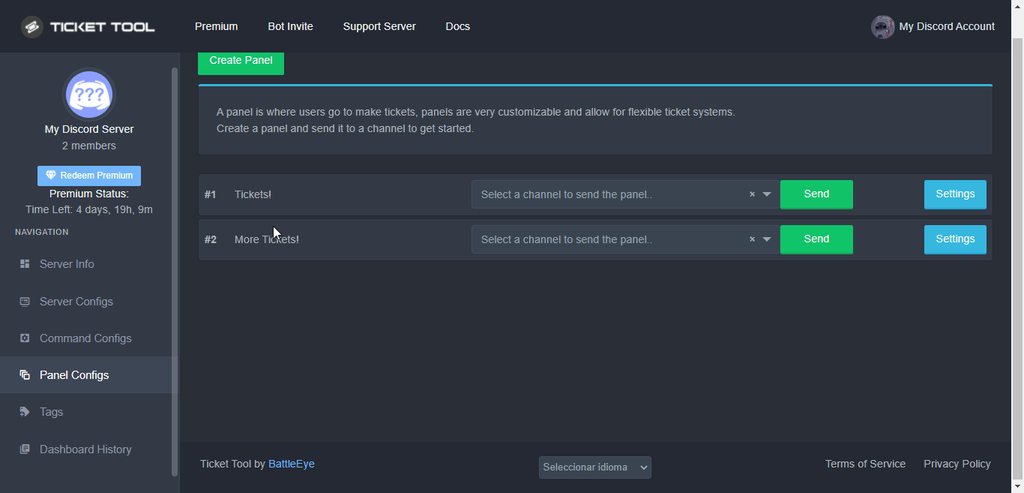
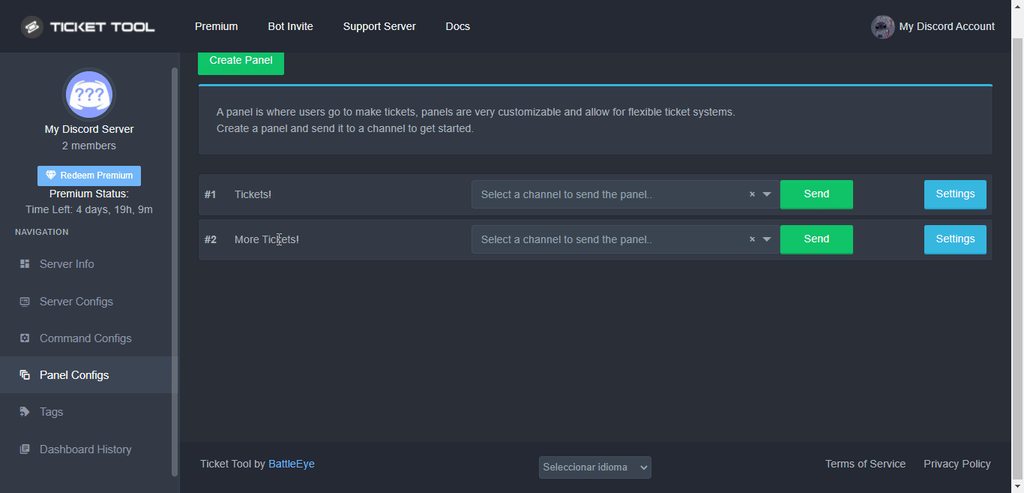
Fixed!
 jade topaz
quasi cliff
https://i.imgur.com/DFRNaHg.gif
jade topaz
quasi cliff
https://i.imgur.com/DFRNaHg.gif
😍 😚
 upbeat palm
shadow glacier
<@924356699161231410>
upbeat palm
shadow glacier
<@924356699161231410>
So if it is off in role permissions it is most likely that a different role they have has ping perms also.
 sullen wind
Is there any way to see the log for closed tickets
shadow glacier
upbeat palm
So if it is off in role permissions it is most likely that a different role they...
?
upbeat palm
sullen wind
Is there any way to see the log for closed tickets
Yes, you can log transcripts when you go to close a ticket.
Click the transcript button on this.
shadow glacier
upbeat palm
The person must have a different role that can ping.
Wdym?
im still not understad
upbeat palm
I don’t know, I am not a developer.
upbeat palm
shadow glacier
Wdym?
The person must have a specific role that has permission to ping.
shadow glacier
upbeat palm
The person must have a specific role that has permission to ping.
he have
he cant in other channelfor ticket yes
jade topaz
hi is there a way to see all the ticket logs thats being saved onto the database? or i need to manually save transcript onto a channel
 stoic pivot
i can manage most of 1 server?
 trail jasper
im wondering how can i get it to where ppl can make the tickets but they arent allowed to use commands such as !close/delete etc
rustic gale
$buttons
humble sequoiaBOT
The new Discord Buttons allow for a much smoother and convenient experience. They reduce lag and work much better than emojis. With ticket tool you can edit all the buttons however you like! Buttons can show emojis, text and can have 4 different colors.
Where can I edit them?
Dashboard ➞ Panel Configs ➞ Settings ➞ Button Options ➞ Setting
rustic gale
In Button Options you can set the permissions for individual buttons
trail jasper
ah got it thank u
 still sparrow
shadow glacier
still sparrow
shadow glacier
how can i do for disabled tempory a ticket for none make new one?
humble sequoiaBOT
Don't see your server in the dashboard?
You will possibly need to relog. Look below to see steps on how to relog.
How to relog in the Dashboard.
First, you will need to go to the dashboard. Once your there, click on your avatar on the top right. after you clicked it, you will see button that says Logout. You must click that. Once you have logged out, you can log back in.
Note:
You need one of these 3 things to access the dashboard.
1. Server Owner (Level: 6)
2. Server Administrator (Level: 4)
3. Dashboard Role (Level: 2)
:warning: You can check your level using $level on your Discord Server
User permission level with Ticket Tool
@User is permission level: 0 (User)
```» *If it shows that your permission is **0**, you don't have any of the above **3 things** to manage the dashboard.*


**See the GIF below on how to relog:**@still sparrow
rustic gale
shadow glacier
how can i do for disabled tempory a ticket for none make new one?
You can set the ticket limit to 0 in General Options
shadow glacier
rustic gale
You can set the ticket limit to 0 in General Options
but this will do for every ticket no?
i just want one
rustic gale
shadow glacier
but this will do for every ticket no?
Only for the panel you do it for
upbeat palm
 delicate sigil
and how do u get $help to work
delicate sigil
and how do u get $help to work
$help will always work unless you set a different prefix.
humble sequoiaBOT
Help Options
$help commands - Information on commands
$help setup - Information on bot setup
$help faq - Frequently asked questions
 idle peak
Question about premium?
upbeat palm
delicate sigil
how do u change what perms the ticket tool has
https://gyazo.com/62ab142377dcfb550eceeb513643319e Click on the role with the bots name. (Ignore, I don't have a server that I have admin in with ticket tool rn)
 upbeat palm
idle peak
Question about premium?
upbeat palm
idle peak
Question about premium?

please don't say just hello in chat
idle peak
huh?
upbeat palm
idle peak
huh?
So basically when you go to a support channel or ask for help please, you can say hello or something but just ask your question also in the same message.
Imagine calling someone on the phone, going hello! then putting them on hold... 🤦♀️, you wouldn't do that so the same thing applies here.
But just ask your question. @idle peak


 slender minnow
jade topaz
That's how it is for me
slender minnow
jade topaz
That's how it is for me
Edit the button names and emoji from button option ---> Create Ticket button settings
you'll have to edit the button for each panel linked
jade topaz
slender minnow
Edit the button names and emoji from button option ---> Create Ticket button set...
I got it now. Thank you very much for the help ^^
iron nightBOT
Gave +1 Rep to @slender minnow
 bronze willow
How to block user on ticket?
humble sequoiaBOT
Any role you assign as a blacklisted role won't be able to use commands or reactions.
Selecting a blacklisted role
Go to your Dashboard ➞ Server Configs. There you will find the option to select blacklisted roles.
Note: Don't forget to save.

 pale pilot
@bronze willow
bronze willow
humble sequoia
User
upbeat palm
bronze willow
User
You would have to give them a role that is blacklisted like how to mute someone you have to give them a muted role (or a bot does it). You can't blacklist a specific user currently.
 neat quartz
How can I make the bot tag a role at the beginning of a ticket? Just typing the role into the settings doesn't turn it into a tag when the bot sends it
humble sequoiaBOT
Within all the messages the bot's sends (both embeds and text) you can mention either channels, roles, or even users, these mentions will only send a notification to the user if they are used within a text field, e.g: a role mentioned in an embed won't ping at all the users who have that role.
For mentioning a role you can use one out of three options:
{@Role Name} ➞ Which is Case Sensitive.
{RoleID} ➞ Replace RoleId with the Id of the role you are trying to ping.
<@&RoleID> ➞ Discord's native syntax to ping roles.
<#ChannelID> ➞ Mention a channel by its ID.
<@UserID> ➞ Mention a user by its ID.
gilded verge
and put mention on Message Text
neat quartz
ah thanks this will work
 timid echo
Is the claim ticket feature only available to premium users?
Or is it available to everyone
scenic plinth
Yes, only premium.
jade topaz
Hmm
 rancid sandal
hello team, i have no issue in anything when i set things up for my server except one thing,
When a member close the ticket he will still able to type in the ticket even after being closed
What is the solution and thanks in advance
gilded verge
rancid sandal
hello team, i have no issue in anything when i set things up for my server excep...
Hey, please go to Panel Configs->Panel Settings->Expand Permission Options->and in User Closed Permissions add perms: Read Messages, Send Messages, Read Message History
Exactly like this:
 rancid sandal
thanks a lot bro appreciated
 zinc dome
question- is there a limit to how many panels you can have ??
rustic gale
As far as i remember the limit is 25
gilded verge
wai, this was not the limit for multipanels? 😳
iron nightBOT
Gave +1 Rep to @rustic gale
rustic gale
Ah
@zinc dome @gilded verge is right, 25 is thr limit of buttons in a multipanel, not the limit of panels in a server
Though clearly the panel limit must be at least as high
zinc dome
rustic gale
<@786451111862992916> <@334671104704774154> is right, 25 is thr limit of buttons...
ohhhhhhhhhh
so what is the limit for individual panels??
rustic gale
No idea. How many panels are you thinking of making?
1000?
Probably too many
100? Probably fine
gilded verge
Especially for your answer, I am creating different panels at the moment, so I will let you know within 30 minutes if you can have more than or less than 30 panels
zinc dome
gilded verge
Especially for your answer, I am creating different panels at the moment, so I w...
make sure to ping us!
gilded verge
okay ^-^
zinc dome
rustic gale
No idea. How many panels are you thinking of making?
no no 😅😅😅 just wondering thanks again @rustic gale
iron nightBOT
Gave +1 Rep to @rustic gale
gilded verge
@zinc dome, @rustic gale
Okay, I made 52 panels but I still don't know how much the panel limit is... At least we are sure that we can create 52 panels XDDDD
iron nightBOT
Gave +1 Rep to @gilded verge
rancid sandal
gilded verge
Hey, please go to `Panel Configs`->`Panel Settings`->Expand `Permission Options`...
guys i just did this but still the member can type when its closed
zinc dome
gilded verge
<@786451111862992916>, <@832864595726172162>
Okay, I made 52 panels but I still...
thank you so much!!
iron nightBOT
Gave +1 Rep to @gilded verge
gilded verge
rancid sandal
guys i just did this but still the member can type when its closed
Remember that you need to create a new ticket for the new settings to take effect
zinc dome
😅 fair enough
gilded verge
I recommend these perms: https://cdn.discordapp.com/attachments/979861967936290816/979874986946875412/Panel_Permissions.mp4
rancid sandal
I went to the settings of the created pannel, then did these changes and then send
gilded verge
gilded verge
I recommend these perms: https://cdn.discordapp.com/attachments/9798619679362908...
Try them, I hope this help you
rancid sandal
I did them same and press send to send a new ticket pannel and it occured there and i tried with a member for testing and still he can type
gilded verge
btw you don't have to resend panel, just save settings 😄
rancid sandal
haha thanks for this also btw 👌
gilded verge
hm, I have a feeling the user has a role that you placed in the Support Team Roles or in the Additional Roles 😳
rancid sandal
no not at all i checked that too
gilded verge
I can offer to join your server if you send me an invitation in a private message, then I create a ticket and we'll see what's there. What do you think about it?
rustic gale
It's probably a permission issue
gilded verge
rustic gale
It's probably a permission issue
I think so too
rustic gale
What's your server's ID or name?
zinc dome
gilded verge
btw you don't have to resend panel, just save settings 😄
that’s why it’s double sending 😅
rancid sandal
@gilded verge i dont mind sure
 desert zenith
see now what can i do
 gilded verge
rustic gale
What's your server's ID or name?
gilded verge
rustic gale
What's your server's ID or name?
1001777096747659265
desert zenith
desert zenith
see now what can i do
@gilded verge can u help me out of this
gilded verge
desert zenith
<@334671104704774154> can u help me out of this
wait, are you using VPN ?
desert zenith
nope
humble sequoiaBOT
gilded verge
okay, try again
 rustic gale
rancid sandal
I did them same and press send to send a new ticket pannel and it occured there ...
rustic gale
rancid sandal
I did them same and press send to send a new ticket pannel and it occured there ...
For the sake of testing, give Ticket Tool the Administrator permission
Then reopen and reclose the ticket
And see if the user can still view the ticket
desert zenith
pls help me
rustic gale
desert zenith
pls help me
Try using a different browser and seeing if it works
desert zenith
wait
desert zenith
rustic gale
Try using a different browser and seeing if it works
i tried it on browser now it didnt worked
 timber hare
How do I make my tickets go somewhere when they’re open and close.
gilded verge
rustic gale
And see if the user can still view the ticket
it is strange, it has permissions like in the video from me, even a copy of the panel was made but it did not change anything
 desert zenith
pls help me
rustic gale
desert zenith
pls help me
Try using a different device, such as your phone
rustic gale
Awesome
desert zenith
thanks @rustic gale
iron nightBOT
Gave +1 Rep to @rustic gale
rancid sandal
thanks a lot for heping in great way, now issue solved @gilded verge
iron nightBOT
Gave +1 Rep to @gilded verge
gilded verge
yay! 😊
 rugged spruce
How do I create a ticket? I forgot my fatcat password
 obtuse krakenBOT
1. Invite Ticket Tool to your server
First you will want to invite the bot to your server. Once the bot is in your server, you can manage your server in the dashboard.
2. Create a Panel
To create a panel we are going to need to head over to the panel configs on the dashboard.
Once at the dashboard we will need to click Create Panel.
Enter a panel name (Fill in any optional settings you want).
Click Create Panel and your ready to get started with configuring your panel.
An example of a creating a panel is shown below.
3. Send the Panel to a Channel
Once you've created a panel on the dashboard you will need to send it to a channel using send on the dashboard.
Select the channel you want your panel to be created in and click send.
For other questions checkout $help faq.
An example of a sending a panel is shown below.
Having a Problem Sending the Panel?
Do $debug in a channel with Ticket Tool and make sure it has all the necessary Discord permissions.
rugged spruce
It’s not letting me select a bot. Can someone reach out to me please?
gilded verge
rugged spruce
It’s not letting me select a bot. Can someone reach out to me please?
So I am supposed to understand that you have premium on the server, right?
rugged spruce
I’m not sure what exactly means tbh, I’m not well with understanding discord.
When I go invite bot to create the ticket it won’t let me continue
gilded verge
rugged spruce
When I go invite bot to create the ticket it won’t let me continue
Do you have any error?
stop being rude, please
rugged spruce
No error
humble sequoiaBOT
How to disable the premium bot
To disable the premium bot you will have to go to the Dashboard ➞ Server Configs ➞ Premium bot ➞ And on the right-hand side select the primary free bot in the drop down menu.
Premium features will still work on the normal bot.
rugged spruce
It’s just blank
 gilded verge
oh.. sorry
rugged spruce
So I can’t get past this to continue
gilded verge
log out and log back in or take this invite link:
https://discord.com/oauth2/authorize?client_id=557628352828014614&scope=applications.commands+bot&permissions=2416045072
rustic gale
You have no permissions to add the bot to any of your servers.
Are you the owner of the server?
 brisk thistle
hi
rugged spruce

 prime bridgeBOT
 Successful bans:
 1
 Unsuccessful bans:
 0
 Reason: Joined to be disrespectful for no reason
 Moderator: @forest goblet
rugged spruce
I’m just needing a new password. This is a lot of trouble it seems. I’ve tried logging out and back in. Can anyone reach out to me please
rugged spruce
I don’t understand bots or master accounts
slender minnow
brisk thistle
hi
Hello there, is there anything i can help you out with?
rugged spruce
Is this not for the tv service?
brisk thistle
slender minnow
Hello there, is there anything i can help you out with?
How can I add buttons in a single ticket ?
Example :
 rustic gale
It's possible that your TV service uses Ticket Tool in their Discord server
humble sequoiaBOT
For a more convenient use of multipanels, you can now combine panels on the dashboard. This will allow you to directly send the multipanel from the dashboard or via the $panel ID command.
Where can I find this?
You can find this setting on the Dashboard -> Panel Configs -> Settings -> General Options
Note: if you're attaching all the panels to a panel called English, don't include English in the attached panels box (If you do this, it will create duplicate)
This will put all buttons from all of your panels on one message. The message is the panel message from the panel you're combining these panels in.
You can also watch this video tutorial.
slender minnow
humble sequoia
@brisk thistle
rustic gale
But then being here is like going to the phone company to ask why your TV company isn't taking your calls
rugged spruce
Ohh so I’m in the wrong place. I’m sorry. Thank you for messaging me
Again, thank you
brisk thistle
slender minnow
<@698284045112705024>
Is it mandatory to subscribe in premium ?
rustic gale
Multipanels are a free feature
slender minnow
brisk thistle
Is it mandatory to subscribe in premium ?
not necessary for multi panels but you unlock more features
rustic gale
The emojis for example require premium yeah
brisk thistle
slender minnow
not necessary for multi panels but you unlock more features
ok how to make embed message in tickettool

 glass estuary
Does the ticket transcripts not save the attachments that were in the ticket or am I doing something wrong?
rustic gale
The transcript does not save the attachments, no.
brisk thistle
rustic gale
Basic non-premium tags won't have as much detail though
Well, is it possible to create a way embed ?
rustic gale
Attachments are includes as links to the files that were uploaded to the Discord channel
Channel ceases to exist, files are deleted
iron nightBOT
Gave +1 Rep to @rustic gale
brisk thistle
brisk thistle
Well, is it possible to create a way embed ?
@rustic gale
can you help me ?
slender minnow
brisk thistle
<@832864595726172162>
Please do not ping for support.
You can either make embeds by making tags (for a predefined response) or make panel (for opening tickets).
brisk thistle
slender minnow
Please do not ping for support.
You can either make embeds by making tags (for a...
I want to know how to create embed only
humble sequoiaBOT
Tags
Tags are used to send a predefined response to your channels using a command. Tags will only respond if the command itself is used, it will not function if you put the tag into a sentence. The prefix is not included.
To create tags, go to: Dashboard > Tags > Create Tag. After creating and naming one, tap on the response button, and you can edit the response.
 brisk thistle
thanks @rustic gale
iron nightBOT
Gave +1 Rep to @rustic gale
rustic gale
You can use tags to create embeds, but you won't be able to add much detail to them unless you're subscribed to premium
brisk thistle
rustic gale
You can use tags to create embeds, but you won't be able to add much detail to t...
ok thx ♥
timid echo
Is it possible to make a voice channel that is linked to the ticket that is open for support over vc?
Also allows those in the ticket to join only instead of us dragging them from another vc
rustic gale
Sadly no, there's no such functionality
timid echo
rustic gale
Sadly no, there's no such functionality
Oh, thank you
iron nightBOT
Gave +1 Rep to @rustic gale
timid echo
Also, is it possible to create different buttons for a ticket? For example, report a user, questions etc
Without premium?

 plain surge
timid echo
Also, is it possible to create different buttons for a ticket? For example, repo...
plain surge
timid echo
Also, is it possible to create different buttons for a ticket? For example, repo...
Yes, that is called a multipanel. Like the one in #🎫│make-a-ticket
You can follow these steps to make one
humble sequoiaBOT
For a more convenient use of multipanels, you can now combine panels on the dashboard. This will allow you to directly send the multipanel from the dashboard or via the $panel ID command.
Where can I find this?
You can find this setting on the Dashboard -> Panel Configs -> Settings -> General Options
Note: if you're attaching all the panels to a panel called English, don't include English in the attached panels box (If you do this, it will create duplicate)
This will put all buttons from all of your panels on one message. The message is the panel message from the panel you're combining these panels in.
You can also watch this video tutorial.
plain surge
Please keep in mind that changing the button emoji is a premium feature
timid echo
Thank you for the help
When the ticket is opened by the user, is it possible to mention the reason to why the ticket was created?
plain surge
However you can change the text of the button tho, that's a free feature
plain surge
timid echo
When the ticket is opened by the user, is it possible to mention the reason to w...
That's not possible currently no, as the user just presses a button
You can however change the ticket message to ask them to explain why they opened a ticket
humble sequoiaBOT
The Ticket Message is the first message sent by the bot in a new ticket. To customise it head over to your Dashboard ➞ Panel Configs ➞ Settings ➞ Ticket Options ➞ Edit Ticket Message
plain surge
jade topaz
get the ticket to @ the person
$help ping
humble sequoiaBOT
How to make Ticket Tool ping a role
To make ticket tool ping a role when a ticket is opened, go to the Dashboard -> Panel Configs -> Settings -> Ticket Options -> Ticket Message -> Message Text and do this:
{@Role name} This is case sensitive and the role must have @mentions enabled
 plain surge
Or you can use IDs
timid echo
Can different panels have different messages when a ticket is created?
plain surge
$mentions
humble sequoiaBOT
Within all the messages the bot's sends (both embeds and text) you can mention either channels, roles, or even users, these mentions will only send a notification to the user if they are used within a text field, e.g: a role mentioned in an embed won't ping at all the users who have that role.
For mentioning a role you can use one out of three options:
{@Role Name} ➞ Which is Case Sensitive.
{RoleID} ➞ Replace RoleId with the Id of the role you are trying to ping.
<@&RoleID> ➞ Discord's native syntax to ping roles.
<#ChannelID> ➞ Mention a channel by its ID.
<@UserID> ➞ Mention a user by its ID.
plain surge
timid echo
Can different panels have different messages when a ticket is created?
Yes, each button on the multipanel is it's own panel on the website. Inside each panel you can change the ticket message
timid echo
plain surge
Yes, each button on the multipanel is it's own panel on the website. Inside each...
Will the ticket numbers continue in order for all multipanels?
plain surge
According to the number of each ticket yes
Which you can edit in the panel settings under General options
 buoyant perch
humble sequoiaBOT
buoyant perch
humble sequoiaBOT
⚠️ You're in the wrong place
We provide support for Ticket Tool Discord bot and cannot help you with whatever issue you have.
- We don't know which Support Team you should contact to get this issue resolved, and unfortunately we won't be able to accurately tell you.
If you don't have any further questions regarding our bot Ticket Tool, please close this ticket
 jade topaz
jade topaz
jade topaz
nvm fixed the problem was from discord not TT
quasi cliff

 humble sequoiaBOT
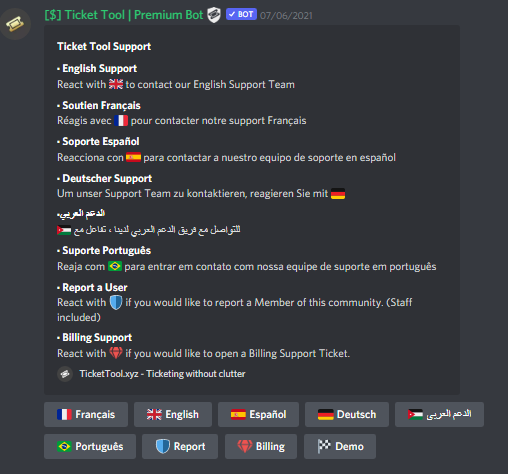
Multipanels are panels with multiple buttons attached to them.
How to create a Multipanel
All users can combine multiple panels into one multipanel!
First, find the IDs of each panel you wish to combine. You can find them in your Panel Configs in the Dashboard
Next, send the multipanel to a channel using $panel [id1] [id2] {id3} ....
e.g. $panel 1 2 4 17 35 to combine panels 1, 2, 4, 17 and 35.
Up to 25 panels may be combined.
You can also watch this video tutorial.

For a more convenient use of multipanels, you can now combine panels on the dashboard. This will allow you to directly send the multipanel from the dashboard or via the $panel ID command.
Where can I find this?
You can find this setting on the Dashboard -> Panel Configs -> Settings -> General Options
Note: if you're attaching all the panels to a panel called English, don't include English in the attached panels box (If you do this, it will create duplicate)
This will put all buttons from all of your panels on one message. The message is the panel message from the panel you're combining these panels in.
You can also watch this video tutorial.
 pulsar violet
for some reason i cannot see the option to create a panel
gilded verge
pulsar violet
for some reason i cannot see the option to create a panel
If you created a ticket, wait there for help 😕
pulsar violet
gilded verge
If you created a ticket, wait there for help 😕
i have 12 mins ago
jade topaz
how do i fix this
 zinc dome
how come the dashboard clears everything when a new panel is made?
gilded verge
zinc dome
how come the dashboard clears everything when a new panel is made?
I'm not sure what's going on there, but in general, after creating a new panel, all that happens is the page is refreshed 😕
gilded verge
jade topaz
how do i fix this
If you created a ticket, wait there for help 😕
zinc dome
it is refreshed but everything is wiped
gilded verge
can you show this?
zinc dome
one moment
gilded verge
if you opened a ticket, please complete this case there
 sweet tendon
How can I invite the premium bot? I enabled the free premium trial.
humble sequoiaBOT
The first thing you will need to do is invite the premium bot, an invite can be found here
Once the bot is in your server we will head to the dashboard and manage your server. When you are managing your server, you want to head into "Server Configs" then click the drop down menu under "Select the bot you would like to use on this server" then click "Ticket Tool#6207" and then save.
 gilded verge
humble sequoia
gilded verge
humble sequoia
@sweet tendon, check
iron nightBOT
Gave +1 Rep to @gilded verge
 topaz flume
how do i make the ticket tool @ roles?
 jade topaz
topaz flume
how do i make the ticket tool @ roles?
jade topaz
topaz flume
how do i make the ticket tool @ roles?
{role ID}
topaz flume
alright thanks
jade topaz
How do u make the ticket default name the name of the ticket panel then there name
So like support-diski
humble sequoiaBOT
The ticket name is the default channel name of all tickets. To edit it, go to your Dashboard > Panel Configs > Settings > Ticket Options. There you can edit the channel name of opened and closed tickets. You can also use variables in there.

 Note: This is a premium feature
{server.name} ➞ Name of the server
{server.id} ➞ ID of the Server

[#🆘│community-support](/guild/509192800865353738/channel/776680605517742090/) = <#channel> ➞ Channel link of the current channel
{channel.name} ➞ Name of the current channel
{channel.id} ➞ ID of the current channel

{author} = <@user> ➞ Mention of the user triggering this message
{author.name} ➞ Name of the user triggering this message
{author.id} ➞ ID of the user triggering this message
{author.nickname} ➞ Nickname of the user triggering this message
{author.icon} ➞ Direct Url of the profile picture of the user triggering this message
{author.tag} ➞ 4 digit tag (discriminator) of the user triggering this message
{author.full} ➞ username + 4 digit discriminator of the user triggering this message

{panel.count} ➞ The current count number of the panel (Tickets only)
{panel.name} ➞ The name of the panel (Tickets Only)
{panel.ticketLimit} ➞ The current limit of the panel (Ticket Only)

{ticket} = <#channel> ➞ Channel mention of the ticket
{ticket.id} ➞ Channel ID of the ticket

{ticket.user} = <@user> ➞ User mention of the ticket user
{ticket.user.name} ➞ Name of the ticket user
{ticket.user.id} ➞ User ID of the ticket user
{ticket.user.nickname} ➞ Nickname of the ticket user
{ticket.user.icon} ➞ Direct Url of the profile picture of the ticket user
{ticket.user.tag} ➞ Tag / Discriminator of the ticket user
{ticket.user.full} ➞ Username + Discirimator of the ticket user```
Roles can be either
{@role name} or {role ID}
_ _
_ _
Additional variables
{reason}
» works on $close <reason>, $delete <reason>, $new <reason>, $claim <reason>
» displays the reason, you can optionally give with some commands
Transcript Variables
{ticket_name}➞ Name of the ticket
{panel_name}➞ Name of the panel
{transcript_url}➞ File link of the transcript
Hide Link under blue text:
[Click me](https://tickettool.xyz)➞ Click me
Time Variable
Sends the current unix time in seconds. Optinally add or remove seconds
<t:{!time+43200}:R>➞ <t:1660207112:R>
<t:{!time-43200}:R>➞ <t:1660120712:R>
<t:{!time}:R>➞ <t:1660163912:R>
» Remove ! before time
_ _
<t:1641006000>➞ <t:1641006000>
<t:1641006000:f>➞ <t:1641006000:f>
<t:1641006000:F>➞ <t:1641006000:F>
<t:1641006000:D>➞ <t:1641006000:D>
<t:1641006000:d>➞ <t:1641006000:d>
<t:1641006000:t>➞ <t:1641006000:t>
<t:1641006000:T>➞ <t:1641006000:T>
<t:1641006000:R>➞ <t:1641006000:R>
» You can use https://hammertime.djdavid98.art/ to create custom dates/times
jade topaz
@gilded vergeso it would be {panel.name.ticket.user.name} ?
gilded verge
uhm... if you have a variable for example {panel.name} and {ticket.user.name}, that is, they are separate, i.e. you cannot combine them into one, you just have to write them next to each other
so finally: {panel.name}{ticket.user.name}
next time, try to not ping, just wait for help @jade topaz 😕
jade topaz
gilded verge
next time, try to not ping, just wait for help <@456226577798135808> 😕
Oh sorry i jst pinged u cuz u was the one that sent the guide... sorry
jade topaz
gilded verge
uhm... if you have a variable for example `{panel.name}` and `{ticket.user.name}...
Thank you:)
iron nightBOT
Gave +1 Rep to @gilded verge
 indigo lichen
can you change the ticket channel names?
quasi cliff
indigo lichen
can you change the ticket channel names?
You can do that using $rename command
If you want to change for particular panel automatically then it's part of premium
quasi cliff
 azure gazelle
.work
 tepid islandBOT
 witaminka#3206
You worked hard at your dish cleaning job but failed. Then you tried fish cleaning! You earned  487
487
Reply #636441
azure gazelle
.bal
tepid islandBOT
azure gazelle
.slut
tepid islandBOT
witaminka#3206
You got your daily dose of Vitamin D 928 : D
Reply #635875
azure gazelle
.crime
tepid islandBOT
witaminka#3206
You were caught dipping Oreos in milk! You were beaten up and had 1,641 stolen from you!
Reply #635932
gilded verge
@azure gazelle, Nie rozumiem dlaczego używasz komend na kanale do supportu, tutaj piszesz tylko potrzebujesz pomocy związanej z botem Ticket Tool.
Jak chcesz używać tych komend, to przejdź na #🤖│bot-spam okay?
azure gazelle
Przepraszam jedno razowa pomylka
gilded verge
W porządku, to taka mała prośba aby utrzymać kanały w czystości 😊
gilded verge
Czy Twoje pytanie jest związane z botem Ticket Tool?
@azure gazelle, Nie wiem o co pytasz ale jeśli Twoje pytanie nie jest związane z botem Ticket Tool, przejdź na kanał #💬│gen-chat-multilingual
 lament yoke
 bitter vine
How do I get to Mission help page
humble sequoiaBOT
⚠️ You're in the wrong place
We provide support for Ticket Tool Discord bot and cannot help you with whatever issue you have.
- We don't know which Support Team you should contact to get this issue resolved, and unfortunately we won't be able to accurately tell you.
If you don't have any further questions regarding our bot Ticket Tool, please close this ticket
jade topaz
Hi i need some help please-
When a ticket is made how do i make it ping my staff team
when making the ticket i put all the support roles down, but it doesnt seem to be pinging the support roles..
@gilded verge Could i get some help please?
oh, sorry!
humble sequoiaBOT
Within all the messages the bot's sends (both embeds and text) you can mention either channels, roles, or even users, these mentions will only send a notification to the user if they are used within a text field, e.g: a role mentioned in an embed won't ping at all the users who have that role.
For mentioning a role you can use one out of three options:
{@Role Name} ➞ Which is Case Sensitive.
{RoleID} ➞ Replace RoleId with the Id of the role you are trying to ping.
<@&RoleID> ➞ Discord's native syntax to ping roles.
<#ChannelID> ➞ Mention a channel by its ID.
<@UserID> ➞ Mention a user by its ID.
gilded verge
Oh so you said please, so...
Hello @jade topaz! Please put your mentions in Message Text (Ticket Options->Ticket Message)
jade topaz
Do i have to buy premium to use this feature?
gilded verge
nonono 😳
jade topaz
gilded verge
Oh so you said please, so...
Hello <@456226577798135808>! Please put your mentio...
erm, Sorry? 😭
jade topaz
humble sequoia
lemme try this
gilded verge
250 characters in both:
so 250 in message text and 250 in embed description
 jade topaz
OHH there, so i mention the roles there
jade topaz
gilded verge
250 characters in both:
so 250 in message text and 250 in embed description
How can i get to that
gilded verge
jade topaz
erm, Sorry? 😭
it's alright, the point is, you asked for help, you didn't shout, so here i am 😊
yup, just put mention in Message Text ^-^
jade topaz
gilded verge
it's alright, the point is, you asked for help, you didn't shout, so here i am �...
oh right
where is message text tho
gilded verge
Panel Configs->Panel Settings->Ticket Options->Ticket Message
gilded verge
if you use thanks @user you can 😄
jade topaz
thanks @gilded verge
iron nightBOT
Gave +1 Rep to @gilded verge
gilded verge
you can't... cooldown 😳
jade topaz
Sorry i forgot to ask sumn before i left,
How do customise this message?

I wanted to add something in there like please dont spam the tickets
jade topaz
gilded verge
you can't... cooldown 😳
ooh.
gilded verge
jade topaz
Panel Configs->Panel Settings->Panel Options
 graceful vigil
can you create a ticket based on a emoji reaction?
jade topaz
gilded verge
`Panel Configs`->`Panel Settings`->`Panel Options`
thank you very much
iron nightBOT
Gave +1 Rep to @gilded verge
gilded verge
graceful vigil
can you create a ticket based on a emoji reaction?
Emoji were changed to buttons a while ago 😳
graceful vigil
so can you add a button to each message in a channel?
obtuse krakenBOT
1. Invite Ticket Tool to your server
First you will want to invite the bot to your server. Once the bot is in your server, you can manage your server in the dashboard.
2. Create a Panel
To create a panel we are going to need to head over to the panel configs on the dashboard.
Once at the dashboard we will need to click Create Panel.
Enter a panel name (Fill in any optional settings you want).
Click Create Panel and your ready to get started with configuring your panel.
An example of a creating a panel is shown below.
3. Send the Panel to a Channel
Once you've created a panel on the dashboard you will need to send it to a channel using send on the dashboard.
Select the channel you want your panel to be created in and click send.
For other questions checkout $help faq.
An example of a sending a panel is shown below.
Having a Problem Sending the Panel?
Do $debug in a channel with Ticket Tool and make sure it has all the necessary Discord permissions.
gilded verge
Please check
Buttons are added to created panels
graceful vigil
hmmm so what we want to do is put something that is available in a channel, and then people click on that button to request it. Rather than one button at the top, which then people create the request and then type in what they are requesting
gilded verge
It is very likely that I do not fully understand your question, so please wait for someone else from the Staff, im sorry 🥺
graceful vigil
thats cool 🙂
scenic plinth
No.
graceful vigil
ok thanks for the short and quick reply 🙂
 oak field
.suggest I want to search certain text in all saved ticket transcript. I close some tickets but need to find them. Want to global search be implemented across all close tickets in transcripts.
tepid islandBOT
 Alex Packer#0203
 The
The server settings module has been denied for your role on this server.
stark runeBOT
:error: No permissions
You are not allowed to execute this command.
jade topaz
Hi, I have a question. I already have the standard bot setup in my server how I want it but now I want the features of premium, so if I purchase it will I need to go through the entire setup process all over again with the premium version too?
 craggy geyser
No. All dashboard features stay. They are applied to both bots, you just choose which bot to use under server configs. Also, all premium features work on the free bot
Even if you lose premium, the premium changes on the dashboard stay, just in discord the default options will happen until premium is restored
zinc dome
dumb question maybe
can you use the tickets as like a lazy man’s DM function?
iron nightBOT
Gave +1 Rep to @craggy geyser
jade topaz
@dark hound Why are you DMing me asking me to join your server? Try getting members the honest way bud.
rustic gale
zinc dome
dumb question maybe
can you use the tickets as like a lazy man’s DM function?
Not sure how tickets are lazier than just DMing a person, could you explain what you're trying to go for?
zinc dome
usually when you DM, you can't invite other bots to the DM- this would be useful if you are plural.. but since, you cant [invite bots to DM] i thought maybe tickets would be a good use for that
rustic gale
Sure, that makes sense!
You'll want to add the bots' roles to Additional Roles so you don't have to manually add them every single time
zinc dome
rustic gale
You'll want to add the bots' roles to Additional Roles so you don't have to manu...
thank you!
iron nightBOT
Gave +1 Rep to @rustic gale
zinc dome
also what’s the variable for including a user into the ticket
like when you’re inside the ticket
what’s the command for mentioning user at the top
rustic gale
{ticket.user}
rustic gale
The username is {ticket.user.name}
zinc dome
rustic gale
The username is {ticket.user.name}
thanks!!
iron nightBOT
Gave +1 Rep to @rustic gale
rustic gale
The mention is {ticket.user}.
zinc dome
rustic gale
The mention is {ticket.user}.
😅 ah yes yea ok thank you
iron nightBOT
Gave +1 Rep to @rustic gale
 strong widget
rustic gale
The mention is {ticket.user}.
strong widget
rustic gale
The mention is {ticket.user}.
Hey outsider
I answered your questions
Ticker 44583
 tulip scroll
where can i activate my key?
humble sequoiaBOT
How to redeem premium (Key)
To redeem your premium key, go to the dashboard, select your server, then click " Redeem Premium" under the server's icon and name.
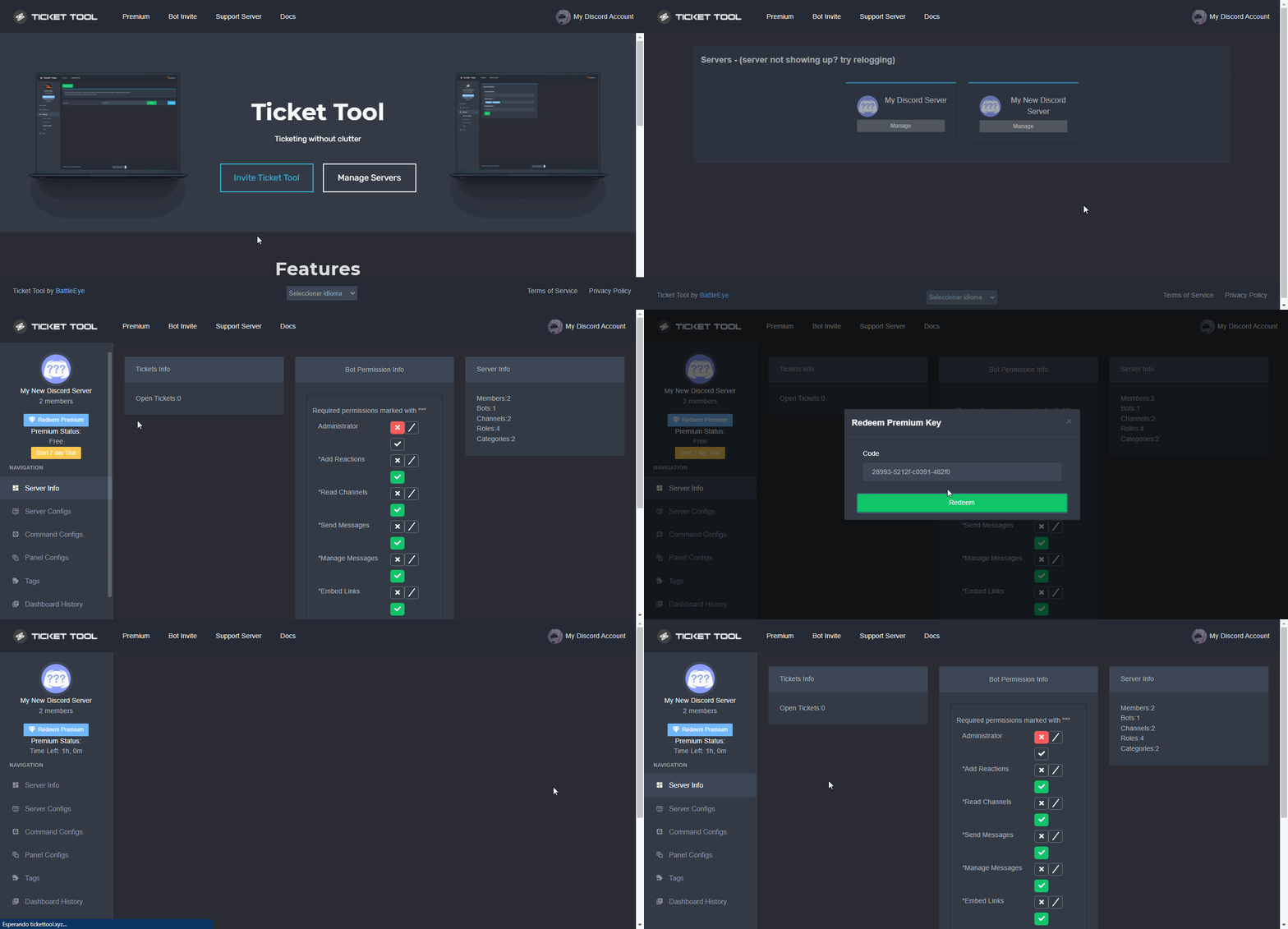 tulip scroll
it says: Servers - (server not showing up? try relogging)
It looks like Ticket Tool isn't online or in any servers you have permission to access,Invite Ticket Toolor check it'sstatus
humble sequoiaBOT
Don't see your server in the dashboard?
You will possibly need to relog. Look below to see steps on how to relog.
How to relog in the Dashboard.
First, you will need to go to the dashboard. Once your there, click on your avatar on the top right. after you clicked it, you will see button that says Logout. You must click that. Once you have logged out, you can log back in.
Note:
You need one of these 3 things to access the dashboard.
1. Server Owner (Level: 6)
2. Server Administrator (Level: 4)
3. Dashboard Role (Level: 2)
:warning: You can check your level using $level on your Discord Server
User permission level with Ticket Tool
@User is permission level: 0 (User)
```» *If it shows that your permission is **0**, you don't have any of the above **3 things** to manage the dashboard.*


**See the GIF below on how to relog:**Check all of message
tulip scroll
still the same message
gilded verge
the bot is on your server, right?
if so, run command $level on your server and please send a screenshot of the bot response
tulip scroll
where is my server
gilded verge
wait, have you added a bot to your server?
tulip scroll
no i just ordered from the website
tulip scroll
i ordered a month from the website and got the key in my mail clicked the tutorial there and joined discord
gilded verge
but why did you join here and not to the server from which the information came? 🤔
tulip scroll
i never received anything like that?
gilded verge
to sum it all up ...
humble sequoiaBOT
⚠️ You're in the wrong place
We provide support for Ticket Tool Discord bot and cannot help you with whatever issue you have.
- We don't know which Support Team you should contact to get this issue resolved, and unfortunately we won't be able to accurately tell you.
If you don't have any further questions regarding our bot Ticket Tool, please close this ticket
 quick ingot
So I had opened a ticket and now I can’t access it, can anyone help?
gilded verge
quick ingot
So I had opened a ticket and now I can’t access it, can anyone help?
We cannot manage tickets that are on other servers.
Please go to the server on which you opened the ticket and ask the administration to add you to it again or open a new one.
quick ingot
Thanks for the advice
jade topaz
im Sorry i keep joining and leading but i got more questions to ask @gilded verge
oh yea.
First question is: How do i edit the ticket message again
Second one, Does the pink diamond next to the options mean i need premium?
gilded verge
Panel Configs->Panel Settings->Ticket Options->Ticket Message
jade topaz
Third, do you partner serevrs with this server?
Fourth, Is there a category i can create which stores all the tickets in?
Fifth, Why does it say there can be only 1 ticket opened at a time
gilded verge
wait, pink diamond?
jade topaz
gilded verge
wait, pink diamond?
yeah,
gilded verge
no premium required
 premium required
 you have premium so you can use
I did not notice the pink one 🤔 can you show screenshot?
humble sequoiaBOT

Partnership Program
Our partnership program is currently closed.
We appreciate you being interested in partnering with Ticket Tool! Unfortunately the program for partnering is closed as of now. Nonetheless, the program will be reopened soon, make sure to keep an eye at #📣│server-news!
 TicketTool.xyz - Ticketing without clutter
jade topaz
humble sequoia
TicketTool.xyz - Ticketing without clutter
jade topaz
humble sequoia
DAMN, what are the perks for getting partnered?
humble sequoiaBOT
How to set the open category
To set a open category go to the Dashboard -> Panel Configs -> Settings -> Category Options -> Category Open
 jade topaz
👍🏻
jade topaz
gilded verge
<:premium_white:880958597712994314> no premium required
<:premium_red:6620327179...
 gilded verge
5: please check Ticket Limit in Panel Settings->General Options
gilded verge
jade topaz
DAMN, what are the perks for getting partnered?
oof, I don't know the answer yet, but I will ask 😳
jade topaz
gilded verge
oof, I don't know the answer yet, but I will ask 😳
Thank you, and check if they can open it again
iron nightBOT
Gave +1 Rep to @gilded verge
jade topaz
gilded verge
5: please check Ticket Limit in Panel Settings->General Options
alright thank you
gilded verge
jade topaz
Thank you, and check if they can open it again
Hey again, please check this: #📣│server-news message
gilded verge
 arctic sinew
Guys i have un linked account i have the name and id of the account can i get i...
arctic sinew
Guys i have un linked account i have the name and id of the account can i get i...
unlinked from...?
jade topaz
DAMN IT i cant use the feilds 😭
gilded verge
premium required 🥺
jade topaz
gilded verge
Hey again, please check this: https://discord.com/channels/509192800865353738/50...
It says, Warning you do not have perms to do this :./
jade topaz
gilded verge
<:premium_red:662032717906444329> premium required 🥺
ikr 😭
quasi cliff
jade topaz
It says, Warning you do not have perms to do this :./
#📣│server-news 2nd last message
iron nightBOT
Gave +1 Rep to @quasi cliff
jade topaz
oh zamn they are closed, Any idea when they will reopen @quasi cliff ?
quasi cliff
No idea sadly
jade topaz
quasi cliff
No idea sadly
Alright, Please dm/ping me when they open again :)
thank you @quasi cliff
iron nightBOT
Gave +1 Rep to @quasi cliff
covert swallow
Grab an announcement ping role, you'll get pinged for sure
 astral pulsar
Can anyone tell me why the three bars do not appear in the upper left corner when I enter the dashboard?
quasi cliff
Please send screenshot
 quasi cliff
Click on "Gerenciar" to manage that server
 icy pumice
Hey, is auto claiming a thing yet? Like the first support member who replies to the ticket, claims the ticket?
 worldly kiln
Hi ! I have a question . How can i add a role for he can look ticket ?|| Sorry for my english ^^'||
quasi cliff
icy pumice
Hey, is auto claiming a thing yet? Like the first support member who replies to ...
Nope, the only two options to claim are: button and command
icy pumice
Sad. Thanks though. Hopefully it'll be added some time 🙂
quasi cliff
You can suggest it in #premium-suggestions
quasi cliff
worldly kiln
Hi ! I have a question . How can i add a role for he can look ticket ?|| *Sorry ...
Which language are you more comfortable in?
worldly kiln
quasi cliff
Which language are you more comfortable in?
french
quasi cliff
You can create a French ticket in #🎫│make-a-ticket for better help
worldly kiln
Thank you !
 willow remnant
Hi
jade topaz
Why this gives warning?
 humble sequoiaBOT
Don't see your server in the dashboard?
You will possibly need to relog. Look below to see steps on how to relog.
How to relog in the Dashboard.
First, you will need to go to the dashboard. Once your there, click on your avatar on the top right. after you clicked it, you will see button that says Logout. You must click that. Once you have logged out, you can log back in.
Note:
You need one of these 3 things to access the dashboard.
1. Server Owner (Level: 6)
2. Server Administrator (Level: 4)
3. Dashboard Role (Level: 2)
:warning: You can check your level using $level on your Discord Server
User permission level with Ticket Tool
@User is permission level: 0 (User)
```» *If it shows that your permission is **0**, you don't have any of the above **3 things** to manage the dashboard.*


**See the GIF below on how to relog:**Thank You Bot.
 uneven seal
Does anyone know if there is a way to auto tag a role when a ticket has been opened by someone??
humble sequoiaBOT
Within all the messages the bot's sends (both embeds and text) you can mention either channels, roles, or even users, these mentions will only send a notification to the user if they are used within a text field, e.g: a role mentioned in an embed won't ping at all the users who have that role.
For mentioning a role you can use one out of three options:
{@Role Name} ➞ Which is Case Sensitive.
{RoleID} ➞ Replace RoleId with the Id of the role you are trying to ping.
<@&RoleID> ➞ Discord's native syntax to ping roles.
<#ChannelID> ➞ Mention a channel by its ID.
<@UserID> ➞ Mention a user by its ID.
gilded verge
humble sequoia
@uneven seal, sure! Put mention in Message Text
 limpid palm
How to fix unknown intergration when closing ticket
gilded verge
limpid palm
How to fix unknown intergration when closing ticket
Discord on mobile?
gilded verge
only when closing ticket?
limpid palm
Yes
limpid palm
 gilded verge
discord on mobile...
humble sequoiaBOT
Update your discord App
Buttons are a relatively new addition to discord and don't work with some older versions of the app.
Please verify that you have the latest version of discord, by going to the app or play store.
Discord for the  App Store
Discord for the  Play Store
limpid palm
But thats same on pc
gilded verge
ok i will try this on my servers 🤔
but during this time I will ask you to create a new panel and try if the new panel will work, okay?
limpid palm
Okay
gilded verge
everything works for me, how is it for you? managed to?
 quaint rampart
How do I remove the member's permission to close the ticket?
gilded verge
Panel Settings->Button Options->Close Ticket Settings->add everyone to Disabled Roles or choose Support Team Only

 dire robin
hi
i need help with sum. ticket tool used to open tickets at the bottom of all the channels, but now theyre at the top and when i try to move them it says this
 humble sequoiaBOT
How to set the open category
To set a open category go to the Dashboard -> Panel Configs -> Settings -> Category Options -> Category Open
gilded verge
humble sequoia
Hey @dire robin, uhm, why are you getting tired? after all, you can set the category to which the tickets will be transferred/moved 😳
quaint rampart
Is there a way to remove these messages?
 humble sequoiaBOT
How can I edit/disable the ephemeral message?
These pop ups can only be seen by the user who triggered a certain action, like creating a ticket. They cannot be edited or disabled, as they are a discord requirement that is set by the developer of any bot. The ephemeral messages can be removed by pressing the little blue Dismiss message text, or by restarting your discord client.
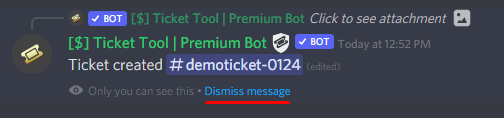 quaint rampart
I just want the bot not to send these messages, is there any way?
gilded verge
humble sequoia
I don't understand your question because everything is written here. Please read this message again
 quaint rampart
Disable sending these messages, I want the bot not to simply send
gilded verge
jade topaz
What to do now?
I don't understand your question, it's your first message 😕 Please explain
gilded verge
quaint rampart
Disable sending these messages, I want the bot not to simply send
"They cannot be edited or disabled, as they are a discord requirement that is set by the developer of any bot."
quaint rampart
Is there a way to edit the message then?
gilded verge
...
quaint rampart
I'm just asking, because I wanted to put the message in my language
gilded verge
I sent you two times here saying that you cannot edit or delete it 😐
dire robin
gilded verge
Hey <@537402370221539329>, uhm, why are you getting tired? after all, you can se...
still didnt work
its at the top
gilded verge
dire robin
its at the top
please run command $debug on your server and send link from bot, send link here
Example:
 gilded verge
jade topaz
How do I use the ticket
gilded verge
jade topaz
How do I use the ticket
So you are asking how to configure the bot on your server, right?
dire robin
nvm found the issue
obtuse krakenBOT
1. Invite Ticket Tool to your server
First you will want to invite the bot to your server. Once the bot is in your server, you can manage your server in the dashboard.
2. Create a Panel
To create a panel we are going to need to head over to the panel configs on the dashboard.
Once at the dashboard we will need to click Create Panel.
Enter a panel name (Fill in any optional settings you want).
Click Create Panel and your ready to get started with configuring your panel.
An example of a creating a panel is shown below.
3. Send the Panel to a Channel
Once you've created a panel on the dashboard you will need to send it to a channel using send on the dashboard.
Select the channel you want your panel to be created in and click send.
For other questions checkout $help faq.
An example of a sending a panel is shown below.
Having a Problem Sending the Panel?
Do $debug in a channel with Ticket Tool and make sure it has all the necessary Discord permissions.
humble sequoiaBOT
You can check our documentation here;
You can also check #📂│information for the basic setup;
You can also watch this video tutorial.
Our documentation contains all the info you need about the bot to be able to setup and configure the bot however you like.
gilded verge
or you can check tutorial
 buoyant monolith
I want to make something like this, but how do I?

It is from my friends server, but he seems have forgotten how he did.
humble sequoiaBOT
Multipanels are panels with multiple buttons attached to them.
How to create a Multipanel
All users can combine multiple panels into one multipanel!
First, find the IDs of each panel you wish to combine. You can find them in your Panel Configs in the Dashboard
Next, send the multipanel to a channel using $panel [id1] [id2] {id3} ....
e.g. $panel 1 2 4 17 35 to combine panels 1, 2, 4, 17 and 35.
Up to 25 panels may be combined.
You can also watch this video tutorial.
For a more convenient use of multipanels, you can now combine panels on the dashboard. This will allow you to directly send the multipanel from the dashboard or via the $panel ID command.
Where can I find this?
You can find this setting on the Dashboard -> Panel Configs -> Settings -> General Options
Note: if you're attaching all the panels to a panel called English, don't include English in the attached panels box (If you do this, it will create duplicate)
This will put all buttons from all of your panels on one message. The message is the panel message from the panel you're combining these panels in.
You can also watch this video tutorial.
gilded verge
What exactly do you want to disable? A button or something else? Please describe it
hmm🤔
Panel Settings->Button Options->choose button, example for now we choose Transcript Button Settings->turn off Enable Button and save settings
Example:

let us know if that's what you mean ^-^
Have you disabled this button and created a new ticket? 🤔

it works 😳


I don't know how many panels you have created, but please make sure you change the settings in the correct panel
you don't need premium to turn off buttons ^-^
hmm..
could you show screenshot with settings in button?
nonono, just enable button to off
did you save the settings? if so, please try now to create new ticket and let us know if there is still a button
 fossil lynx
hello! is there any way that in the ticket it'll automatically allow the person that opened the ticket to ping a role? for example, in my server i have a ticket panel and the person who opened the ticket wants to ping a role (staff member) but it won't let them. do i have to grant permission manually?
gilded verge
fossil lynx
hello! is there any way that in the ticket it'll automatically allow the person ...
Hey, I think here it's a matter of server role permissions. All you have to do is check the role that you can ping Allow everyone to @mention this role 🤔
but If someone else has a better idea, please write 😳


in the sense that it is marked to 
fossil lynx
gilded verge
Hey, I think here it's a matter of server role permissions. All you have to do i...
ohh so there's no way that they're able to ONLY be able to ping a role in the tickets? because i want to only grant that permission for the tickets but not for other channels for example the general chat. is this a matter of category permissions?
gilded verge
You wrote that you don't want the buttons to be displayed but I didn't know anything about the text 😳
so you want to delete the text too?
gilded verge
fossil lynx
ohh so there's no way that they're able to ONLY be able to ping a role in the ti...
I will tell you that as much as I check the settings on the discord, unfortunately I have not found one that allows you to ping a specific role only in a given category or channel and this is the only thing I know 🥺
I can be wrong, but I do not want to be misleading
fossil lynx
gilded verge
I will tell you that as much as I check the settings on the discord, unfortunate...
ah i see okay thank you anyways! <3
iron nightBOT
Gave +1 Rep to @gilded verge
 ionic zodiac
Any new updates coming to the bot asides from the counter for the Discord channel daily limit?
jade topaz
How to verify??
 proven escarp
how I can change the color of the embed of the ticket and description?
humble sequoiaBOT
The Ticket Message is the first message sent by the bot in a new ticket. To customise it head over to your Dashboard ➞ Panel Configs ➞ Settings ➞ Ticket Options ➞ Edit Ticket Message
The panel message is where people react to make a ticket. To customize it head over to your Dashboard --> Panel Configs -> Settings -> Panel Options -> Edit Panel Message
 rustic gale
Editing the color is a premium feature, but that's where you would do it
proven escarp
oh ok ty
humble sequoiaBOT
⚠️ You're in the wrong place
We provide support for Ticket Tool Discord bot and cannot help you with whatever issue you have.
- We don't know which Support Team you should contact to get this issue resolved, and unfortunately we won't be able to accurately tell you.
If you don't have any further questions regarding our bot Ticket Tool, please close this ticket
jade topaz
i want these ticket in a diff category is there a way to do
 humble sequoiaBOT
━━ moved to ticket ━━
 zenith crypt
can we change what the opened ticket says? like for eg:, instead of ticket#3140 something like ticket-support?
humble sequoiaBOT
━━ moved to ticket ━━
 stiff ember
 humble sequoiaBOT
━━ moved to ticket ━━
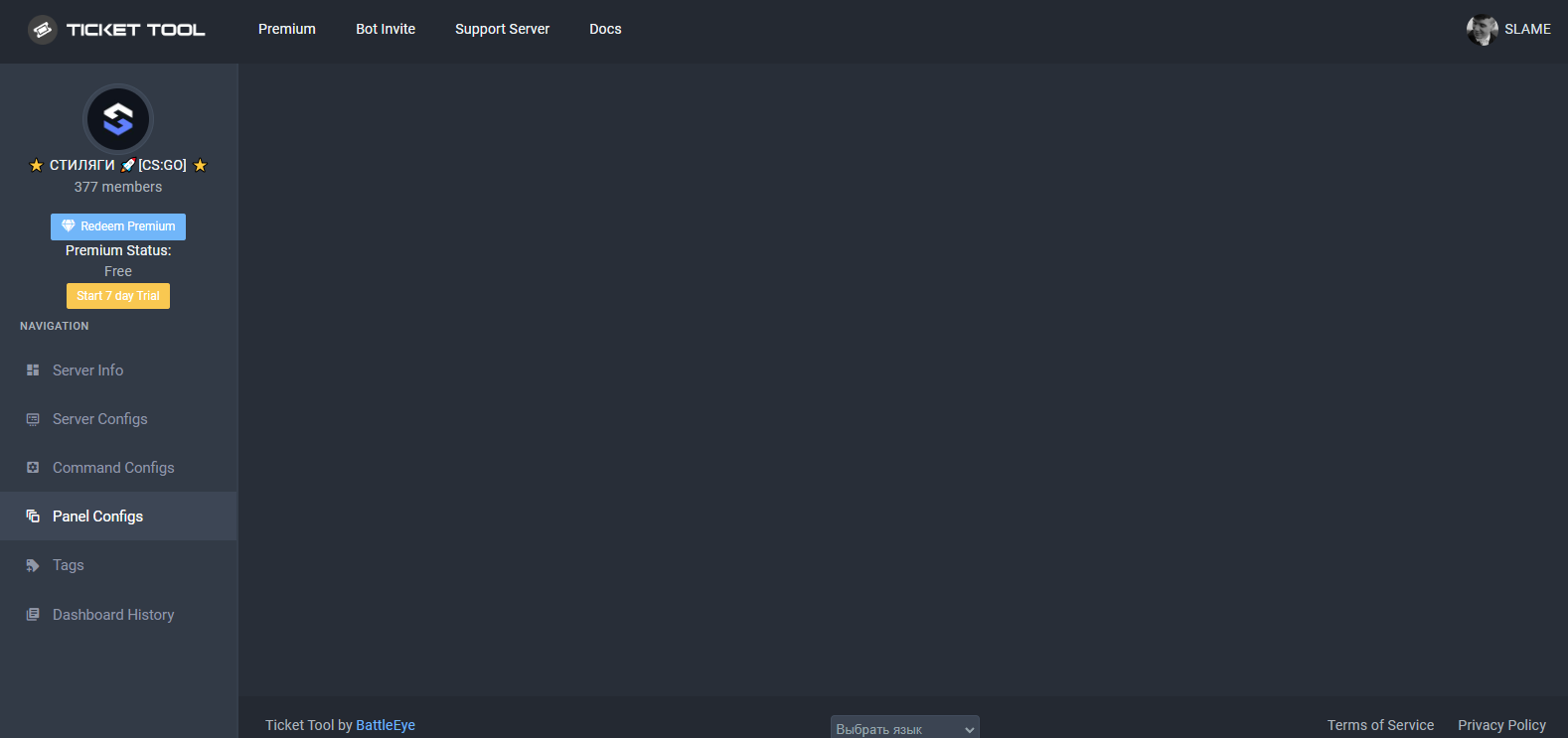
 spare anchor
في سبورت عربي ؟
rustic gale
 ruby acorn
hello everyone, why this panel is not working?
ruby acorn
hello everyone, why this panel is not working?
Please try with a different browser
 weak acorn
Hey, do I need the premium version to add multiple buttons like this?
 rustic gale
No, you don't
humble sequoiaBOT
For a more convenient use of multipanels, you can now combine panels on the dashboard. This will allow you to directly send the multipanel from the dashboard or via the $panel ID command.
Where can I find this?
You can find this setting on the Dashboard -> Panel Configs -> Settings -> General Options
Note: if you're attaching all the panels to a panel called English, don't include English in the attached panels box (If you do this, it will create duplicate)
This will put all buttons from all of your panels on one message. The message is the panel message from the panel you're combining these panels in.
You can also watch this video tutorial.
weak acorn
Thanks!
ruby acorn
rustic gale
Please try with a different browser
work with google chrome, hmmm.... with edge is not working
ty vm!
rustic gale
Yep. It's known
 brisk viper
How do I set up the games on my channel
gilded verge
brisk viper
How do I set up the games on my channel
What games? I don't understand what you are talking about
obtuse krakenBOT
1. Invite Ticket Tool to your server
First you will want to invite the bot to your server. Once the bot is in your server, you can manage your server in the dashboard.
2. Create a Panel
To create a panel we are going to need to head over to the panel configs on the dashboard.
Once at the dashboard we will need to click Create Panel.
Enter a panel name (Fill in any optional settings you want).
Click Create Panel and your ready to get started with configuring your panel.
An example of a creating a panel is shown below.
3. Send the Panel to a Channel
Once you've created a panel on the dashboard you will need to send it to a channel using send on the dashboard.
Select the channel you want your panel to be created in and click send.
For other questions checkout $help faq.
An example of a sending a panel is shown below.
Having a Problem Sending the Panel?
Do $debug in a channel with Ticket Tool and make sure it has all the necessary Discord permissions.
humble sequoiaBOT
You can check our documentation here;
You can also check #📂│information for the basic setup;
You can also watch this video tutorial.
Our documentation contains all the info you need about the bot to be able to setup and configure the bot however you like.
gilded verge
humble sequoia
@dapper island, you can check tutorial too if you want
brisk viper
Anyone know how to add games
gilded verge
I will ask again:
What games? I don't understand what you are talking about.
brisk viper
The Pokémon game roulette
gilded verge
what does this have to do with Ticket Tool? 🤨
humble sequoiaBOT
⚠️ You're in the wrong place
We provide support for Ticket Tool Discord bot and cannot help you with whatever issue you have.
- We don't know which Support Team you should contact to get this issue resolved, and unfortunately we won't be able to accurately tell you.
If you don't have any further questions regarding our bot Ticket Tool, please close this ticket
 dapper island
gilded verge
<@1007684906295492639>, you can check tutorial too if you want
dapper island
gilded verge
<@1007684906295492639>, you can check tutorial too if you want
Where?
gilded verge
I do not understand what you mean. It's best to show it 😕
buoyant monolith

It is for my server.
But for my friend’s, it is way bigger.

Or someone tell me how to do that.
gilded verge
buoyant monolith
But for my friend’s, it is way bigger.
It is very possible that he has to reduce that in his settings 🤔
humble sequoiaBOT
Multipanels are panels with multiple buttons attached to them.
How to create a Multipanel
All users can combine multiple panels into one multipanel!
First, find the IDs of each panel you wish to combine. You can find them in your Panel Configs in the Dashboard
Next, send the multipanel to a channel using $panel [id1] [id2] {id3} ....
e.g. $panel 1 2 4 17 35 to combine panels 1, 2, 4, 17 and 35.
Up to 25 panels may be combined.
You can also watch this video tutorial.
For a more convenient use of multipanels, you can now combine panels on the dashboard. This will allow you to directly send the multipanel from the dashboard or via the $panel ID command.
Where can I find this?
You can find this setting on the Dashboard -> Panel Configs -> Settings -> General Options
Note: if you're attaching all the panels to a panel called English, don't include English in the attached panels box (If you do this, it will create duplicate)
This will put all buttons from all of your panels on one message. The message is the panel message from the panel you're combining these panels in.
You can also watch this video tutorial.
gilded verge
 sharp maple
Hello! Just wanted to come in here and report a bug ig? Our ticket boy has started making double channels or giving tickets the same name. We have had no issues with it up till now so this is very worrying

For reference 2 different people got 2051, and then I made 2052 (the top one) to see if it would give me the same number and then it made me the channel and then made a copy of it but with no ping or message
gilded verge
Hey, I'll pass it on to the Staff. Expect responses from them soon 😊
buoyant monolith
gilded verge
It is very possible that he has to reduce that in his settings 🤔
Wdym by that?
sharp maple
gilded verge
Hey, I'll pass it on to the Staff. Expect responses from them soon 😊
Thank you!
gilded verge
buoyant monolith
Wdym by that?
user settings->appearance->zoom level
 buoyant monolith
Oh okay, thanks!
One more question for now, is there a way to not have a character maximum? I want to type a bit more, but it says I have reached the maximum. And I used the premium free trial, but my ticket took still says that it is just “ticket tool” and not “ticket tool premium”.
rustic gale
The bot isn't going to change the name. Both because the premium bot isn't invited automatically and because both bots have the same name.
buoyant monolith
The role is what I am talking about.
rustic gale
Ah. You will have to invite the premium bot
humble sequoiaBOT
The first thing you will need to do is invite the premium bot, an invite can be found here
Once the bot is in your server we will head to the dashboard and manage your server. When you are managing your server, you want to head into "Server Configs" then click the drop down menu under "Select the bot you would like to use on this server" then click "Ticket Tool#6207" and then save.
rustic gale
The regular way to invite the premium bot (aside from the invite link which is in the embed above)
is to enter Server Configs and press the Invite Premium Bot button
buoyant monolith
Thank you!
 shut bolt
sharp maple
Hello! Just wanted to come in here and report a bug ig? Our ticket boy has start...
shut bolt
sharp maple
Hello! Just wanted to come in here and report a bug ig? Our ticket boy has start...
Hey there, how apart were the tickets created from each?
 chrome bridge
How do I view saved transcripts? I’m on an iPhone by the way.
sharp maple
Not very long! Maybe a minute maximum
shut bolt
sharp maple
Not very long! Maybe a minute maximum
This issue happens when 2, or more, users click the create ticket at the same time, the developer has a fix for this issue which is part of the update he's working on right now, thanks for letting us know about the issue being around :)
iron nightBOT
Gave +1 Rep to @sharp maple
sharp maple
Of course! Glad to be of help
jade topaz
Yo, sorry to bother you, how long does it take for fr tickets to receive a response?
covert swallow
jade topaz
Yo, sorry to bother you, how long does it take for fr tickets to receive a respo...
Depends on the availability of the french support team, usually under a day
covert swallow
buoyant monolith
Is there a way to bypass the character limit?
Which character limit?
buoyant monolith
For ticket tool.
covert swallow
Yes, which character limit are you referring to, there is more than one
buoyant monolith
The panel name one.
rustic gale
I tried naming a panel something with 200 characters and it stuck.
covert swallow
Yeah I havent seen a limit on panel names
 novel lotus
how do i @ a role when a ticket is created
rustic gale
{@Role Name} or {Role ID}
 novel lotus
thank u!!
 lethal seal

 humble sequoiaBOT
Don't see your server in the dashboard?
You will possibly need to relog. Look below to see steps on how to relog.
How to relog in the Dashboard.
First, you will need to go to the dashboard. Once your there, click on your avatar on the top right. after you clicked it, you will see button that says Logout. You must click that. Once you have logged out, you can log back in.
Note:
You need one of these 3 things to access the dashboard.
1. Server Owner (Level: 6)
2. Server Administrator (Level: 4)
3. Dashboard Role (Level: 2)
:warning: You can check your level using $level on your Discord Server
User permission level with Ticket Tool
@User is permission level: 0 (User)
```» *If it shows that your permission is **0**, you don't have any of the above **3 things** to manage the dashboard.*


**See the GIF below on how to relog:**Help Options
$help commands - Information on commands
$help setup - Information on bot setup
$help faq - Frequently asked questions
jade topaz
why not working in my server
gilded verge
jade topaz
$help
Please use commands on #🤖│bot-spam
Make sure that:
- the bot has the required permissions in his role
- the bot has permission to view channel, send messages there and read the message history
- you are using the correct prefix (check the prefix in Dashboard->Server Configs)
humble sequoiaBOT
ᅠ
@pseudo glen requires the following permissions:
Add Reactions
Read Channels
Send Messages
Manage Messages
Embed Links
Attach Files
Read History
Manage Roles
Manage Channels
To change the role permissions, you can go to your Discord Server ➞ Server Settings ➞ Roles ➞ @Ticket Tool
To change the channel permissions, you can go to your Channel Settings ➞ Permissions ➞ Ticket Tool
ᅠ
Note:
You can give Ticket Tool Administrative Permissions instead of all the permissions listed above, but it's entirely optional and NOT necessary.

 misty prawn
Does anyone know how to create a ticket like this?
 scenic plinth
Don't ping me for support please.
humble sequoiaBOT
Tags
Tags are used to send a predefined response to your channels using a command. Tags will only respond if the command itself is used, it will not function if you put the tag into a sentence. The prefix is not included.
To create tags, go to: Dashboard > Tags > Create Tag. After creating and naming one, tap on the response button, and you can edit the response.
scenic plinth
You simply type what you placed in the tag name.
 olive eagle
.
 graceful acorn
anyone know why it won’t let me select ticket tool premium
 humble sequoiaBOT
━━ moved to ticket ━━
 torpid wind
Hi there. I went ahead and added ticket tool to my server however when going to the dashboard my server doesn't show up
humble sequoiaBOT
Don't see your server in the dashboard?
You will possibly need to relog. Look below to see steps on how to relog.
How to relog in the Dashboard.
First, you will need to go to the dashboard. Once your there, click on your avatar on the top right. after you clicked it, you will see button that says Logout. You must click that. Once you have logged out, you can log back in.
Note:
You need one of these 3 things to access the dashboard.
1. Server Owner (Level: 6)
2. Server Administrator (Level: 4)
3. Dashboard Role (Level: 2)
:warning: You can check your level using $level on your Discord Server
User permission level with Ticket Tool
@User is permission level: 0 (User)
```» *If it shows that your permission is **0**, you don't have any of the above **3 things** to manage the dashboard.*
**See the GIF below on how to relog:** jaunty raven
hi
using the ticket premium trial
how do i use the multipanel or at least send it ?
ive created two ticket panels and have one ticket with the setting enabled but nothing has happened
humble sequoiaBOT
━━ moved to ticket ━━
 sonic umbra
• If you've answered the questions and have yet to get a response, please directly message a {@sonic umbra} for a quicker response! - I want it to be like this but it doesn't work?
I want to put my own @ in the ticket so they can click it and send me a message
fallow ingot
$help ping
humble sequoiaBOT
How to make Ticket Tool ping a role
To make ticket tool ping a role when a ticket is opened, go to the Dashboard -> Panel Configs -> Settings -> Ticket Options -> Ticket Message -> Message Text and do this:
{@Role name} This is case sensitive and the role must have @mentions enabled
fallow ingot
oh that doesn’t explain it for user mentions
fallow ingot
sonic umbra
• ***If you've answered the questions and have yet to get a response, please dir...
do this
@sonic umbra
sonic umbra
Alright, bare with me
sonic umbra
fallow ingot
`<@1007433061203447908>`
Should I put it inside {}?
fallow ingot
nope
sonic umbra
Perfect 
 placid creek
How can I creat ticket agains
obtuse krakenBOT
1. Invite Ticket Tool to your server
First you will want to invite the bot to your server. Once the bot is in your server, you can manage your server in the dashboard.
2. Create a Panel
To create a panel we are going to need to head over to the panel configs on the dashboard.
Once at the dashboard we will need to click Create Panel.
Enter a panel name (Fill in any optional settings you want).
Click Create Panel and your ready to get started with configuring your panel.
An example of a creating a panel is shown below.
3. Send the Panel to a Channel
Once you've created a panel on the dashboard you will need to send it to a channel using send on the dashboard.
Select the channel you want your panel to be created in and click send.
For other questions checkout $help faq.
An example of a sending a panel is shown below.
Having a Problem Sending the Panel?
Do $debug in a channel with Ticket Tool and make sure it has all the necessary Discord permissions.
humble sequoiaBOT
You can check our documentation here;
You can also check #📂│information for the basic setup;
You can also watch this video tutorial.
Our documentation contains all the info you need about the bot to be able to setup and configure the bot however you like.
gilded verge
humble sequoia
@placid creek, or check video tutorial
Hey, please make sure you haven't added the role of a user who wants to open a ticket to the Blacklist Roles (Dashboard->Server Configs)
Also note that this could be due to the roles you have added to the Allowed Roles or the Disabled Roles (Dashboard->Panel Configs->Panel Settings->Button Options->Create Ticket Settings)
You can set it up as you like 😳
I can't recommend much, but if I remember correctly, you don't have to set any role, ofc you can, but you don't have to

 spiral bay
misty prawn
Does anyone know how to create a ticket like this?
spiral bay
misty prawn
Does anyone know how to create a ticket like this?
premium multiipanel
gilded verge
Multipanels are no longer premium: #📣│bot-news message
 smoky shoal
will ticket sometime have a switch to text commands that allow for it to reply to the user the executor replied to?
 dim egret
I keep getting this message while trying to create a ticket. I am an admin in the server and I have admin perms, I don't have any roles that are blacklisted. It also prevents me from closing, transcripting tickets. What should me and the owner do?

It is not the first time as well, last time it fixed itself
gilded verge
dim egret
It is not the first time as well, last time it fixed itself
It looks like the bot doesn't have some permissions. Please use $debug on your server and send link here.
Example:
 dim egret
gilded verge
dim egret
gilded verge
oh...Do you see missing permissions?
humble sequoiaBOT
ᅠ
@pseudo glen requires the following permissions:
Add Reactions
Read Channels
Send Messages
Manage Messages
Embed Links
Attach Files
Read History
Manage Roles
Manage Channels
To change the role permissions, you can go to your Discord Server ➞ Server Settings ➞ Roles ➞ @Ticket Tool
To change the channel permissions, you can go to your Channel Settings ➞ Permissions ➞ Ticket Tool
ᅠ
Note:
You can give Ticket Tool Administrative Permissions instead of all the permissions listed above, but it's entirely optional and NOT necessary.
dim egret
alright let me try this, i'll come back with the results
gilded verge
okay
dim egret
it didn't have roles and messages managing
gilded verge
channels too
dim egret
there's no option for that in dashboard
gilded verge
wait... are you trying to change permissions in dashboard? 😳
gilded verge
to change permissions, you have to do it in the bot role on the server settings
dim egret
thank you, someone must've disabled it
 rocky birch
Hi hi! How do prevent certain roles from making tickets at all?
 scenic silo
rocky birch
Hi hi! How do prevent certain roles from making tickets at all?
scenic silo
rocky birch
Hi hi! How do prevent certain roles from making tickets at all?
navigate to Server configs, and there u can blacklist certain roles
how can i give a role the permission for unlimited ticket creation
rocky birch
scenic silo
navigate to Server configs, and there u can blacklist certain roles
Thank you, I'll look into it!
iron nightBOT
Gave +1 Rep to @scenic silo
buoyant monolith
Anyone know how I do this?
 covert swallow
Are you asking how to set up a panel message?
buoyant monolith
covert swallow
Are you asking how to set up a panel message?
Yes.
covert swallow
Open up the panel settings
Theres a dropdown called Panel Options

Click on that big blue box that pops up
covert swallow
The what?
 gilded verge
 clear tusk
Why did the channel not change its name by the bot?
clear tusk
Why did the channel not change its name by the bot?
Hey, sorry, I don't see anything related to Ticket Tool here ... Maybe I don't fully understand or missed something, but are you sure you are on the correct server?
clear tusk
gilded verge
Hey, sorry, I don't see anything related to Ticket Tool here ... Maybe I don't f...
Hello, now my bot is writing $rename and the ticket tool bot doesn't change the name of the ticket
gilded verge
oooh... there you are 😄
please go to Server Configs and add your bot id ^-^
Exactly there:
 buoyant monolith
covert swallow
Click on that big blue box that pops up
buoyant monolith
covert swallow
Click on that big blue box that pops up
Thank you.
iron nightBOT
Gave +1 Rep to @covert swallow
clear tusk
gilded verge
Exactly there:
ty very much
iron nightBOT
Gave +1 Rep to @gilded verge
 night raptor
when someone makes a ticket, should i be able to see it immediately or after they send something in it?

 covert swallow
Use an embed for the whole message
buoyant monolith
Oh okay, thanks!

 woeful chasm
woe i can doo more buttons on a ticket?
humble sequoiaBOT
Multipanels are panels with multiple buttons attached to them.
How to create a Multipanel
All users can combine multiple panels into one multipanel!
First, find the IDs of each panel you wish to combine. You can find them in your Panel Configs in the Dashboard
Next, send the multipanel to a channel using $panel [id1] [id2] {id3} ....
e.g. $panel 1 2 4 17 35 to combine panels 1, 2, 4, 17 and 35.
Up to 25 panels may be combined.
You can also watch this video tutorial.
jade topaz
i can use src transcript.bundle.min.obv.js for my bot?
it don't has copyright in that file. So I don't know if can use.
buoyant monolith
How do you embed messages?
rustic gale
Alright. I'm around to help, what are people's questions
 sleek lotus
hey, is there a option where the ticket would be automatically closed if the person who made the ticket haven't sent any messages?
sleek lotus
and i have tried to update my current ticket, removing the default footer and edited the current ticket panel name, it still hasn't updated in the ticket channel which i have created, what do i do about that?
scenic plinth
sleek lotus
hey, is there a option where the ticket would be automatically closed if the per...
No, the only option for auto closing is for if the user left your server.
You have to resend your ticket panel for the message to update. For the footer to be removed, you need premium.
sleek lotus
scenic plinth
No, the only option for auto closing is for if the user left your server.
You ...
alright thanks!
iron nightBOT
Gave +1 Rep to @scenic plinth
 autumn forum
how to set user names instead of ticket number
humble sequoiaBOT
The ticket name is the default channel name of all tickets. To edit it, go to your Dashboard > Panel Configs > Settings > Ticket Options. There you can edit the channel name of opened and closed tickets. You can also use variables in there.
Note: This is a premium feature
autumn forum
so what will change it to lets say ticket- Bob instead of ticket - 01
rustic gale
ticket-{ticket.user}
 autumn forum
ok thank you once again
 tidal cape
Why I cant manage my server?

 humble sequoiaBOT
Don't see your server in the dashboard?
You will possibly need to relog. Look below to see steps on how to relog.
How to relog in the Dashboard.
First, you will need to go to the dashboard. Once your there, click on your avatar on the top right. after you clicked it, you will see button that says Logout. You must click that. Once you have logged out, you can log back in.
Note:
You need one of these 3 things to access the dashboard.
1. Server Owner (Level: 6)
2. Server Administrator (Level: 4)
3. Dashboard Role (Level: 2)
:warning: You can check your level using $level on your Discord Server
User permission level with Ticket Tool
@User is permission level: 0 (User)
```» *If it shows that your permission is **0**, you don't have any of the above **3 things** to manage the dashboard.*


**See the GIF below on how to relog:**You will need to relog. Read this guide
tidal cape
ok
 upbeat mesa
added a tool ticket to the server but it is not there


 humble sequoiaBOT
Don't see your server in the dashboard?
You will possibly need to relog. Look below to see steps on how to relog.
How to relog in the Dashboard.
First, you will need to go to the dashboard. Once your there, click on your avatar on the top right. after you clicked it, you will see button that says Logout. You must click that. Once you have logged out, you can log back in.
Note:
You need one of these 3 things to access the dashboard.
1. Server Owner (Level: 6)
2. Server Administrator (Level: 4)
3. Dashboard Role (Level: 2)
:warning: You can check your level using $level on your Discord Server
User permission level with Ticket Tool
@User is permission level: 0 (User)
```» *If it shows that your permission is **0**, you don't have any of the above **3 things** to manage the dashboard.*


**See the GIF below on how to relog:**@upbeat mesa,
upbeat mesa
thanks
 coarse arrow
Привіт
scenic plinth
Якщо вам потрібна допомога, повідомте нас. Якщо ви тут, щоб поспілкуватися, використовуйте #💬│gen-chat-multilingual
 robust sandalBOT
coarse arrow
Привіт
robust sandalBOT
coarse arrow
Привіт
Hello
 Ukrainian (uk) → English (en)
 long pumice


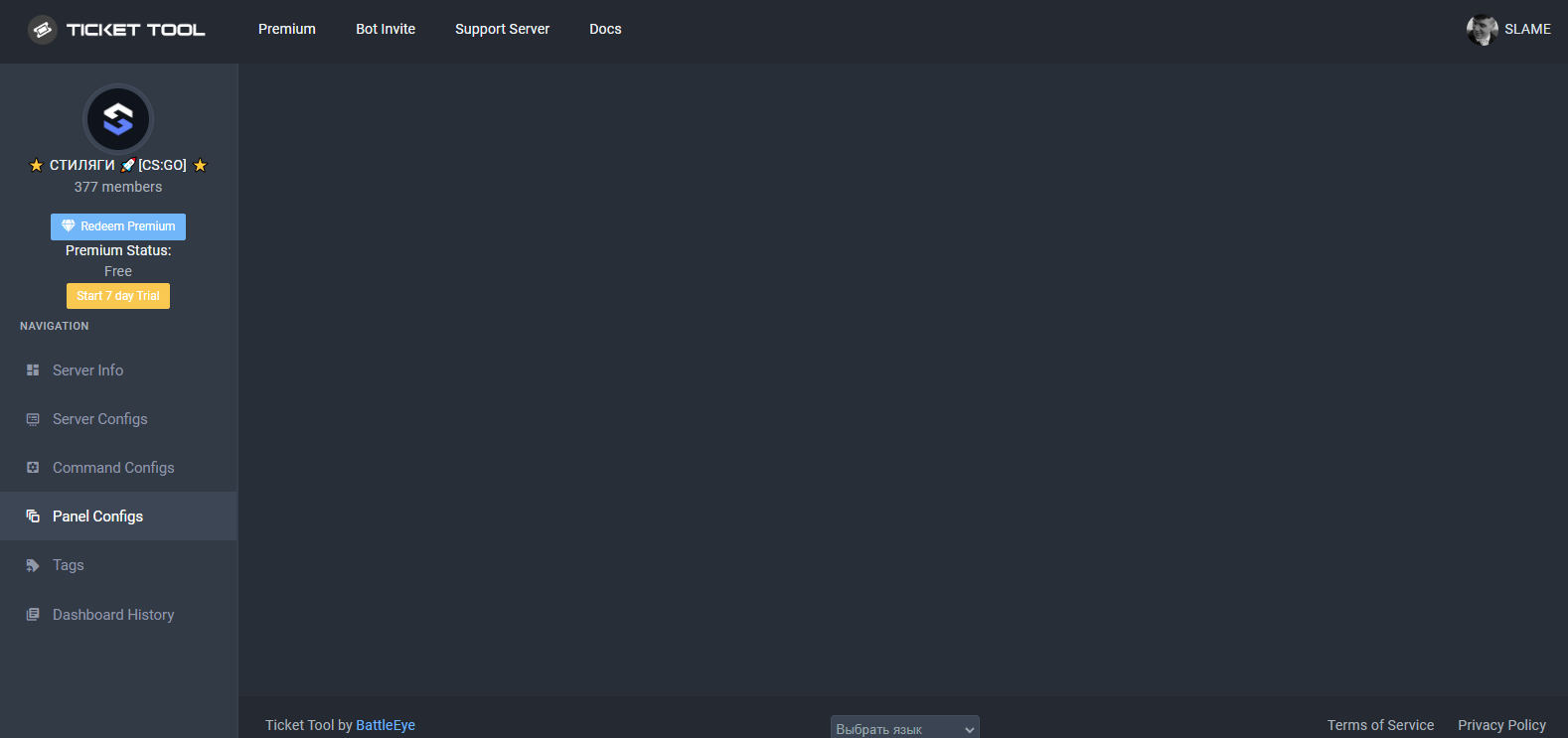 buoyant monolith
rustic gale
Without premium you can't modify the emoji
buoyant monolith
rustic gale
Without premium you can't modify the emoji
What if you modified the emoji, and then your premium ran out, what will happen?
 small mirage
The ticket has been deleted by deleting the channel.
One ticket is still open on the management page, so is there a way to delete it?
 gilded verge
buoyant monolith
What if you modified the emoji, and then your premium ran out, what will happen?
gilded verge
buoyant monolith
What if you modified the emoji, and then your premium ran out, what will happen?
You will have to change the emoji and re-send to the channel or the panel will not work 😕
gilded verge
small mirage
The ticket has been deleted by deleting the channel.
One ticket is still open on...
When I had this problem, all I had to do was wait some time and it would fix itself. As far as I know, you just have to wait for it to update itself 😳
 gray lantern
How do you make it so tickets have @mental grail instead of a number
humble sequoiaBOT
The ticket name is the default channel name of all tickets. To edit it, go to your Dashboard > Panel Configs > Settings > Ticket Options. There you can edit the channel name of opened and closed tickets. You can also use variables in there.
Note: This is a premium feature
 mental grail
👀
gilded verge
gray lantern
How do you make it so tickets have <@421274119481458688> instead of a number
and please don't ping anyone
mental grail
Lol np.
gilded verge
humble sequoia
but coming back... here is the answer
gray lantern
gilded verge
but coming back... here is the answer <:this:894279341108772914>
thank you 🙏
iron nightBOT
Gave +1 Rep to @gilded verge
small mirage
gilded verge
When I had this problem, all I had to do was wait some time and it would fix its...
Thank you😀
iron nightBOT
Gave +1 Rep to @gilded verge
gray lantern
How can i create a category for tickets that are created