#🆘│community-support
1 messages · Page 3 of 1
 rustic gale
Ah. You can disable Two Step Ticket in your panel's General Options
 steep cypress
who?
rustic gale
That will cause closed tickets to delete instantly
 green flower
rustic gale
Ah. You can disable Two Step Ticket in your panel's General Options
green flower
rustic gale
Ah. You can disable Two Step Ticket in your panel's General Options
where
rustic gale
green flower
where
 green flower
can you link me to that website
 round bough
I need help with something
 humble sequoiaBOT
rustic gale
humble sequoiaBOT
rustic gale
Please open a ticket #🎫│make-a-ticket and we'll look at this closer
green flower
rustic gale
i dont have that page thing
rustic gale
Panel Configs -> the blue Settings button
green flower
oh alr
steep cypress
rustic gale
Please open a ticket <#571706435449257997> and we'll look at this closer
done
 bitter cairn
Hi there, I was curious if there is a limit on the amount of transcript that a server can save
rustic gale
bitter cairn
Hi there, I was curious if there is a limit on the amount of transcript that a s...
Not really
green flower
im confused on how the multi panels work, can somebody explain
does this mean its premium only?
 rustic gale
Settings with a red diamond are premium only yes.
rustic gale
Correct
 rustic gale
Um
Message Text is the plain text that appears above the embed
What you're looking for is Embed Description. You can edit that
You get only 250 characters without premium though
green flower
it says that you have to wait minimum 24 hours for that
rustic gale
I'm the one who answers tickets lol, i'm right here
green flower
alr
bitter cairn
rustic gale
Not really
Thanks!
 iron nightBOT
Gave +1 Rep to @rustic gale
 marble citrus
How to become ticketool support?
rustic gale
You wait until applications are posted in #📣│server-news, then apply
 rustic gale
Please update your app
 viral kayak
It is uptodate
rustic gale
Please uninstall and reinstall your app
rustic gale
Press the Claim button on the ticket message (the first message in the channel)
If you see no claim button, claiming is disabled for that ticket
You can enable claiming in Claiming Options
 wheat sparrow
How do i enabel it
rustic gale
It's a premium feature
wheat sparrow
Ok
rustic gale
You will need a Premium Subscription
wheat sparrow
Thanks
 ocean cove
I have the trial premium thing. A few days ago I bought premium but its not showing on the counter in the dashboard, still the trial time is showing. Will the time for the premium show after the trial is due?
humble sequoiaBOT
━━ moved to ticket ━━
 deep storm
Just subscribed to premium again after it was disconnected but it still shows BOT ERROR
How do I fix this?
humble sequoiaBOT
The first thing you will need to do is invite the premium bot, an invite can be found here
Once the bot is in your server we will head to the dashboard and manage your server. When you are managing your server, you want to head into "Server Configs" then click the drop down menu under "Select the bot you would like to use on this server" then click "Ticket Tool#6207" and then save.
 deep storm
Unfortunately this hasn’t been helpful after following the steps, on the dashboard still shows BOT ERROR
ocean cove
The bot needs the right role and permissions. If the bot has problems with doing something that involved another user then bumping up the role of the bot in the role list will help.
deep storm
Bot has the right permissions, even applied admin permission to be absolutely sure I didn’t get anything wrong
deep storm
Premium bot
rustic gale
What's your server id?
deep storm
943543312722313317
humble sequoiaBOT

Premium Check
I was unable to detect a premium server for @deep storm.
Found 38 servers in total and 0 with premium and permission
Redeeming premium on your server is really simple. Just head over to your Subscriptions Page. There you can select a server of your choice, which will get premium. You can change the server at any point.
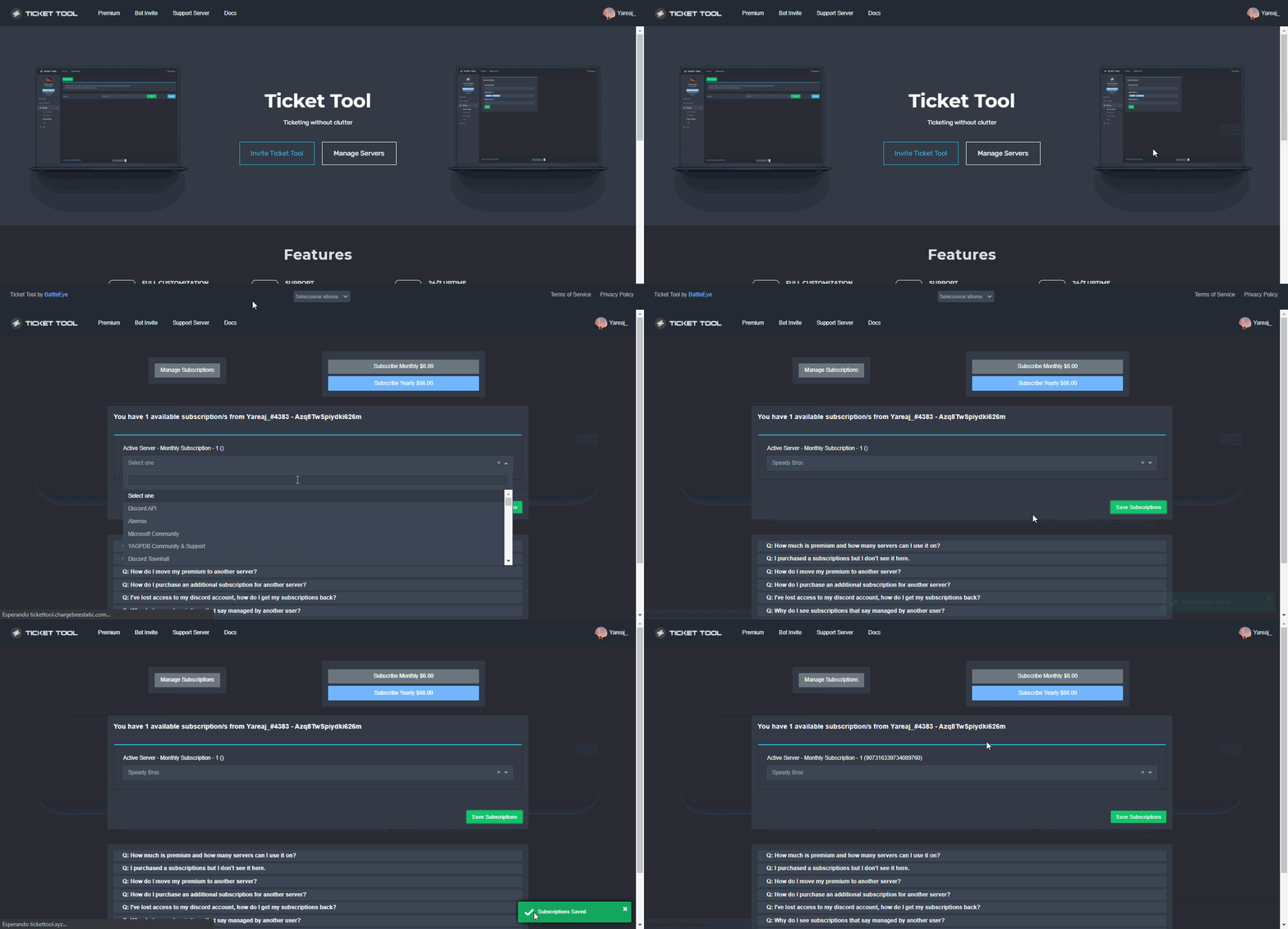 rustic gale
You will need to do this
deep storm
Done. All sorted now. Thank you
rustic gale
✌️
 foggy thunder
So this ticket tool voting site BFD asks for

is it safe? to allow to "join servers for you"
also i just voted in top.gg and it still sats 0 votes
 leaden widget
What are the premium perks
 mystic hound
At least ask your question before breaking the rules..
 jade topaz
Sir can u help can u come in dm
mystic hound
No, open a ticket or ask here if you need something
jade topaz
mystic hound
No, open a ticket or ask here if you need something
Where
mystic hound
jade topaz
#1003022704317825044 come
 obtuse ember
hello
i want to make a ticket
for my discord
but how can you enable that you can choose topics
rustic gale
Topics?
humble sequoiaBOT
Multipanels are panels with multiple buttons attached to them.
How to create a Multipanel
All users can combine multiple panels into one multipanel!
First, find the IDs of each panel you wish to combine. You can find them in your Panel Configs in the Dashboard
Next, send the multipanel to a channel using $panel [id1] [id2] {id3} ....
e.g. $panel 1 2 4 17 35 to combine panels 1, 2, 4, 17 and 35.
Up to 25 panels may be combined.
You can also watch this video tutorial.

For a more convenient use of multipanels, you can now combine panels on the dashboard. This will allow you to directly send the multipanel from the dashboard or via the $panel ID command.
Where can I find this?
You can find this setting on the Dashboard -> Panel Configs -> Settings -> General Options
Note: if you're attaching all the panels to a panel called English, don't include English in the attached panels box (If you do this, it will create duplicate)
This will put all buttons from all of your panels on one message. The message is the panel message from the panel you're combining these panels in.
You can also watch this video tutorial.
 rustic gale
That is currently not a feature, sadly. But it's being considered for the next update.
You can manually add and remove roles with the $add and $remove commands though.
 lilac stag
I just deleted a category where my ticket tool is in, I moved the channel to a different channel and now when creating a ticket the ticket goes to uncategorized. Can someone assist how I can put open tickets in the same category as the ticket tool
rustic gale
$help category
humble sequoiaBOT
How to set the open category
To set a open category go to the Dashboard -> Panel Configs -> Settings -> Category Options -> Category Open
 lilac stag
does that mean it should be a category of it's own and not with the other categories?
rustic gale
It can be any category
jade topaz
Why i cant open a Ticket?
 compact trellis
Hey support. Can you please tell me what will happen if tickets will reach number 9999? Because every new ticket counting number like 0001, 0002 and if I will reach 9999 then what will happen after when I will open next ticket?
jade topaz
Ther is a text white : invalid Form body
 nova coyote
Claimed-{author.name}
 wispy basin
My server is not visible on the Meraba website, how do we do it?
compact trellis
compact trellis
Hey support. Can you please tell me what will happen if tickets will reach numbe...
Please can anyone tell me from developers or support??
 fossil osprey
Hey guys how do I set up the dm-ing of a transcript when the ticket is transcripted? It appears I have only option to do so when the ticket is closed/deleted
 slim dune
yo
humble sequoiaBOT
━━ moved to ticket ━━
rustic gale
compact trellis
Hey support. Can you please tell me what will happen if tickets will reach numbe...
It goes back to 0000
 stark olive
rustic gale
It goes back to 0000
stark olive
rustic gale
It goes back to 0000
im not too sure. it might keep counting. @compact trellis
 rustic gale
stark olive
im not too sure. it might keep counting. <@753242452982497311>
rustic gale
stark olive
im not too sure. it might keep counting. <@753242452982497311>
Only if it's set up like that
Four digits is the default
stark olive
ah
rustic gale
You can set it to five digits in the dashboard
stark olive
makes sense.
rustic gale
I just checked and it seems i might be wrong though
stark olive
im having a look rn as well
rustic gale
@compact trellis Either way, it's not going to stop making tickets. It will be fine. Chances are it will just go to 10000
rustic gale
 shut shadow
how do i make the ticket bot @ a role
shut shadow
how do i make the ticket bot @ a role
Add a role mention to the ticket message
humble sequoiaBOT
The Ticket Message is the first message sent by the bot in a new ticket. To customise it head over to your Dashboard ➞ Panel Configs ➞ Settings ➞ Ticket Options ➞ Edit Ticket Message

Within all the messages the bot's sends (both embeds and text) you can mention either channels, roles, or even users, these mentions will only send a notification to the user if they are used within a text field, e.g: a role mentioned in an embed won't ping at all the users who have that role.
For mentioning a role you can use one out of three options:
{@Role Name} ➞ Which is Case Sensitive.
{RoleID} ➞ Replace RoleId with the Id of the role you are trying to ping.
<@&RoleID> ➞ Discord's native syntax to ping roles.
<#ChannelID> ➞ Mention a channel by its ID.
<@UserID> ➞ Mention a user by its ID.
 verbal ember
Please tell me why tickets after 100 are not created in branches, but just at the top?
compact trellis
@rustic gale @stark olive thanks for help guys and I have 1 more question
iron nightBOT
Gave +1 Rep to @rustic gale
rustic gale
verbal ember
Please tell me why tickets after 100 are not created in branches, but just at th...
Your category is full
compact trellis
I making verification with other bot and if I want only people to be able to create ticked who have NotVerified role then is this correct how I did it? Or there are other ways tho without setting overrides to not see channel? (nvrf is short name of not verified role in test server)
 rustic gale
$help category
humble sequoiaBOT
How to set the open category
To set a open category go to the Dashboard -> Panel Configs -> Settings -> Category Options -> Category Open
rustic gale
compact trellis
I making verification with other bot and if I want only people to be able to cre...
That should work, yes
compact trellis
So this is only way how to do it that only unverified people will be able to create ticket? Or there is any other better way in ticket tool settings?
verbal ember
rustic gale
Your category is full
is there always a limit of 100? is this a discord limitation?
rustic gale
$overflow
humble sequoiaBOT
Discord only allows to stack up to 50 channels per category, meaning that if you have already 50 tickets in one category, the bot won't be able to place a ticket in that category, for such reason Ticket Tool counts with overflow categories, meaning that if your main category is filled, the bot will go ahead and place the ticket on the next one available, simply choose a second category in the category pickers:
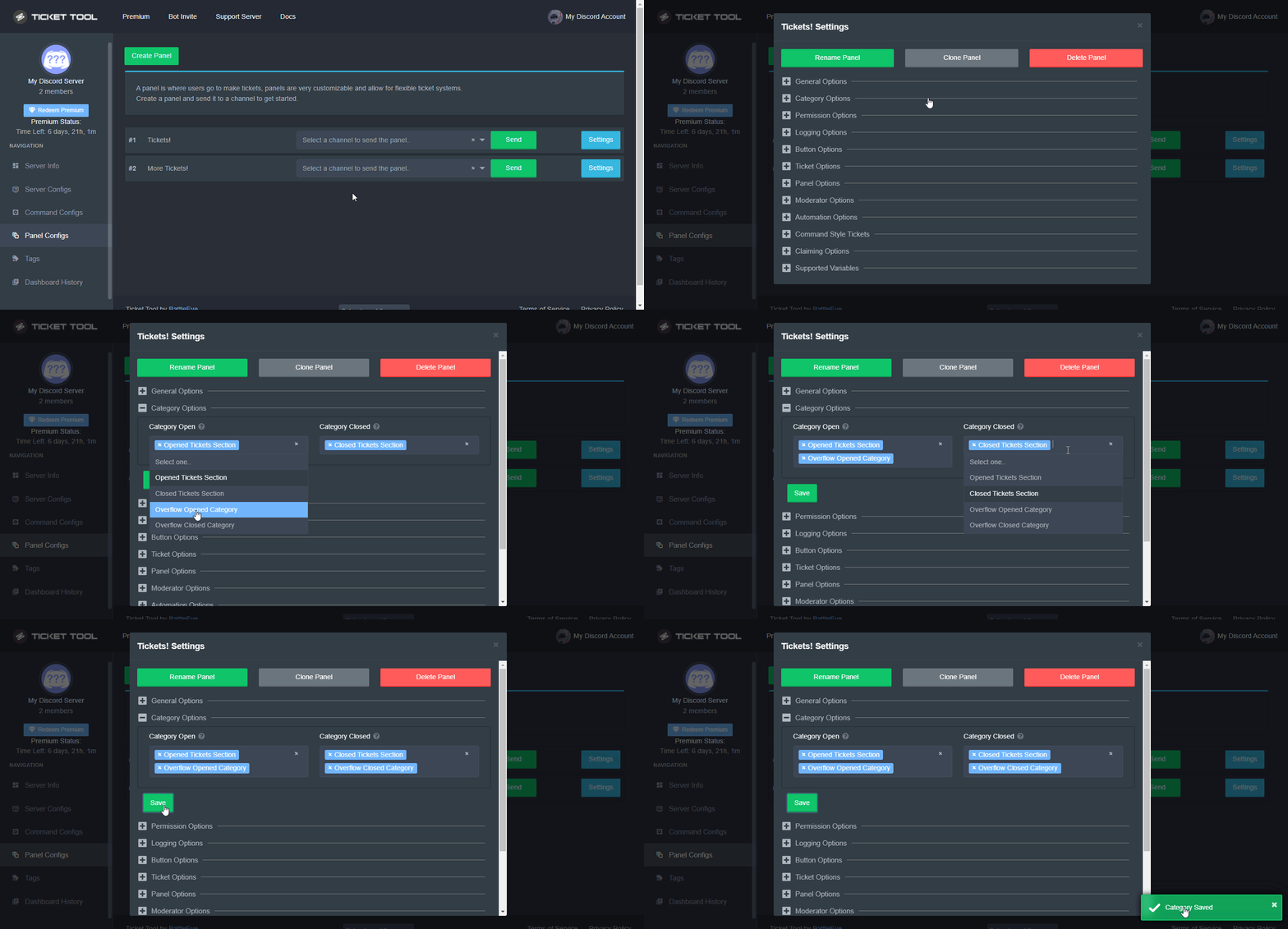 rustic gale
It's at most 50 tickets per category
compact trellis
rustic gale
<@753242452982497311> Either way, it's not going to stop making tickets. It will...
And is there any way how to reset that number without creating new panel and deleting last one what have big number?
 modest silo
where can i stop the bot to send the transcript in an open channel ?
 slender minnow
modest silo
where can i stop the bot to send the transcript in an open channel ?
slender minnow
modest silo
where can i stop the bot to send the transcript in an open channel ?
Hi, you can change where the transcript is being sent from the respective panel config. For more information, refer the below response
$help transcript
humble sequoiaBOT
How do I save transcript to a channel?
To save transcripts to a channel go to the Dashboard -> Panel Configs -> Settings -> Logging Options -> Transcript Channel
 slender minnow
If no channel is selected, the bot will save the transcript in the ticket itself.
You can also change the channel settings and make it private if that's an option
rustic gale
compact trellis
And is there any way how to reset that number without creating new panel and del...
In your ticket's Settings, look under General Options. There's a field called Ticket Count there
You can set it to anything you want
compact trellis
rustic gale
In your ticket's Settings, look under General Options. There's a field called Ti...
But it will just not show number but it will still count?
Oh I see but its just number there what I can make bigger or smaller and I see 8 now
Probably 8 opened and closed tickets
Oh so if I will have for example 2000 used tickets and deleted then I can set that number to 0 and it will count from 0 again or it will still have in database that I had 2000 tickets?
jade topaz
How would I go about becoming Support Team here?
rustic gale
compact trellis
Oh so if I will have for example 2000 used tickets and deleted then I can set th...
Existing tickets are not affected. It's only for setting the name of new tickets
The only thing that's affected is the names
compact trellis
rustic gale
Existing tickets are not affected. It's only for setting the name of new tickets
So if I have used 300 tickets and I put number to 0 then it will start from 0? And 2nd question in bot database will be still 300 or it will be set to 0 if I will do it?
 tall yarrow
How do i sort out ticket on iPhone
rustic gale
I'm not sure what you mean by bot database
compact trellis
Bot database I mean that if bot will still remember that I had 300 tickets if I will set number to 0
rustic gale
tall yarrow
How do i sort out ticket on iPhone
The dashboard works just fine on your phone's browser.
compact trellis
Yes dashboard works good I have iphone and I think I used it on it
rustic gale
compact trellis
Bot database I mean that if bot will still remember that I had 300 tickets if I ...
Well, the bot keeps track of how many open tickets there are
compact trellis
Because it remember deleted ones I seen 8 and if I will set it to 0 then bot will not remember that 8 and it will be reset to 0?
Sorry sometimes Im bad at explaining
rustic gale
Well, yes. That 8 is gone forever
That 8 is not from any kind of database query
It's just a counter that gets incremented every time a ticket is created
compact trellis
So bot will not remember how many tickets I and before and it will just reset number to what I select for example if from 300 I will make 1?
compact trellis
rustic gale
It's just a counter that gets incremented every time a ticket is created
So bot not remember tickets but it remember only amount of used tickets?
rustic gale
You can see the number of open tickets in the dashboard, in Server Info
that's the only count the bot does keep track of
compact trellis
So setting it to 0 will reset that and tickets will start from 1 right?
When I will open new or someone else
rustic gale
compact trellis
So setting it to 0 will reset that and tickets will start from 1 right?
Correct
iron nightBOT
Gave +1 Rep to @rustic gale
compact trellis
Btw is this bot made by same developers who made ticket tool?
Your server not appear on dashboard?
Try to restart it or close and open again
humble sequoiaBOT
Don't see your server in the dashboard?
You will possibly need to relog. Look below to see steps on how to relog.
How to relog in the Dashboard.
First, you will need to go to the dashboard. Once your there, click on your avatar on the top right. after you clicked it, you will see button that says Logout. You must click that. Once you have logged out, you can log back in.
Note:
You need one of these 3 things to access the dashboard.
1. Server Owner (Level: 6)
2. Server Administrator (Level: 4)
3. Dashboard Role (Level: 2)
:warning: You can check your level using $level on your Discord Server
User permission level with Ticket Tool
@User is permission level: 0 (User)
```» *If it shows that your permission is **0**, you don't have any of the above **3 things** to manage the dashboard.*
**See the GIF below on how to relog:** rustic gale
compact trellis
Btw is this bot made by same developers who made ticket tool?
rustic gale
compact trellis
Btw is this bot made by same developers who made ticket tool?
No, that's YAGPDB.xyz, a completely different bot
compact trellis
U must be administrator or owner of server
compact trellis
rustic gale
No, that's YAGPDB.xyz, a completely different bot
Oh ok thanks tho. I thought its made by same devs bc it have xyz at end
iron nightBOT
Gave +1 Rep to @rustic gale
compact trellis
humble sequoia
Read that @jade topaz and if it dont help then check bot permissions
No problem
Bot should have this permissions: view channels, manage channels, manage roles, manage webhooks, send messages, embed links, attach files, add reactions, manage messages, read message history
I hope I added all what are enabled
compact trellis
compact trellis
Bot should have this permissions: `view channels, manage channels, manage roles,...
Bot have all this permissions?
Russian yes.. nvm u deleted that message
And bot is new in server or some panels are already sent?
Try to kick and add again its my advice what I do when bots not works for me or if you added bot to server and you had opened dashboard from other day when you didnt have added it to new then reload dashboard in browser
rustic gale
What did you get when you sent $level?
compact trellis
I tried to send that in my test server and it just delete that message and nothing else
Is bot online tho? Because it can happen if bot shard fall offline so bot is offline in just some servers not all
And did you try to type $level how Outsider said?
For me it do nothing only delete that message and idk if its right that
iron nightBOT
Gave +1 Rep to @compact trellis
compact trellis
No problem :))) and did you kicked and added bot back or you reloaded dashboard?
Okay good then. If you create for example new role in your server then it not appear in dashboard until you reload it bc I tried it when I wanted to set role what will allow to create tickets and so much bots have that so if you for example have opened dashboard from other day and you add bot to new server then it will not appear until you reload it so this is advice for future :))
 opaque heath

For some reason, when a user creates a ticket, they cant see the message history
but can send messages
@plain surge Sorry for the ping, (I checked the rules about pinging didnt see anything but i might be blind)
oop got it sorry
 plain surge
opaque heath
For some reason, when a user creates a ticket, they cant see the message history...
plain surge
opaque heath
For some reason, when a user creates a ticket, they cant see the message history...
Please make sure you set the permissions correctly for the user opened perms
 jade topaz
When i wanted open a Ticket there is a Text white : invalid Form body
 willow thorn
jade topaz
When i wanted open a Ticket there is a Text white : invalid Form body
willow thorn
jade topaz
When i wanted open a Ticket there is a Text white : invalid Form body
same thing is happening for me

 timid echo
can any admin help me
or something
idk what to do XD
help plz
please dm if anyone can help
 crystal timber
timid echo
can any admin help me
crystal timber
timid echo
can any admin help me
Do you know how to do it?
timid echo
oh no
crystal timber
Unfortunately
timid echo
nova is helping now but idk if its a real person
crystal timber
idk
timid echo
XD
rustic gale
jade topaz
When i wanted open a Ticket there is a Text white : invalid Form body
Did you solve this?
rustic gale
willow thorn
same thing is happening for me
Did you solve this?
crystal timber
Can you help me?
rustic gale
That's called a multipanel
humble sequoiaBOT
Multipanels are panels with multiple buttons attached to them.
How to create a Multipanel
All users can combine multiple panels into one multipanel!
First, find the IDs of each panel you wish to combine. You can find them in your Panel Configs in the Dashboard
Next, send the multipanel to a channel using $panel [id1] [id2] {id3} ....
e.g. $panel 1 2 4 17 35 to combine panels 1, 2, 4, 17 and 35.
Up to 25 panels may be combined.
You can also watch this video tutorial.
For a more convenient use of multipanels, you can now combine panels on the dashboard. This will allow you to directly send the multipanel from the dashboard or via the $panel ID command.
Where can I find this?
You can find this setting on the Dashboard -> Panel Configs -> Settings -> General Options
Note: if you're attaching all the panels to a panel called English, don't include English in the attached panels box (If you do this, it will create duplicate)
This will put all buttons from all of your panels on one message. The message is the panel message from the panel you're combining these panels in.
You can also watch this video tutorial.
rustic gale
Please take a look at these guides
crystal timber
Thanks
jade topaz
I need help
having issues every time I try to go set up my ticket tool it is saying that if your server doesn’t pop up relog or something like that but I do it and my silver still does not come up
rustic gale
Did you invite the bot to your server?
Are you sure you have the right permissions to manage the bot in your server?
jade topaz
Yes I have all the permission set It worked on my old server but for some reason it’s not working on my new one I mean I know how to use it I’ve been using it for a really long time I just need help
 rustic gale
That looks like a different account? The avatar is different?
Make sure you're logging in with the right account
jade topaz
It is it’s picking up other servers but mine
rustic gale
Type $level in the server and see what happens
If nothing happens, type $debug and let us know
jade topaz
Nothings working
 rustic gale
Can you see the bot in the user list in the right side?
jade topaz
Yes
jade topaz
OK a whole big list of things just popped up
rustic gale
Yup
There's no way you can't find your server in the dashboard. Are you sure you're logging out and logging in correctly?
jade topaz
Yes
rustic gale
This is your avatar

This is the avatar of the account you're logged in as in the Ticket Tool dashboard

They're different avatars. They're different accounts
 quick ridge
Hi, while setting up the button emoji for ticket tool, I saw that old emojis that have already been deleted from the server are still showing up in the list of available emojis. Is there any way to clear those non-existent emojis from the ticket tool web interface so that only actual existing emojis are shown?
rustic gale
quick ridge
Hi, while setting up the button emoji for ticket tool, I saw that old emojis tha...
That's strange. Consider logging out of the the dashboard and then back in and seeing if it helps the issue?
quick ridge
rustic gale
That's strange. Consider logging out of the the dashboard and then back in and s...
hmm still the same. Strangely enough, when I selected those deleted emoji, the emoji would actually still show up in the button on Discord. Seems like there's some ghosting on Discord's end. However, I think the latest icons are listed on the extreme left as the first emoji, so I'm using this way to determine which emoji I should use. The unique numerical ID (I assume it's tied to the time of uploading the emojis) are similar for the emojis I uploaded recently, which includes brand new emojis, so I'm using that to check whether an emoji is the latest or not. Hopefully the bot can tell which emojis are deleted though, or maybe there's some caching somewhere somehow that I cannot access and purge.
rustic gale
Maybe it's a repeat emoji from a different server?
Ticket Tool has access to all the emojis from servers it shares with you, not just the server you're managing.
jade topaz
I know I seen that I miss up 😂😂😂
It’s a same account I just Change my avatar I messed up but I fixed it now I appreciate it guys and I do apologize for my messed up in the general chat
rustic gale
You got it to work?
quick ridge
rustic gale
Ticket Tool has access to all the emojis from servers it shares with you, not ju...
oooh. I didn't know. That might just be the case! Yes I do have similar kind of emoji with same name from different servers, albeit with slightly different looks. I just thought that the bot will only pull emojis from the server I'm configuring the panels for.
 latent veldt
I need help making a ticket I am verified
humble sequoiaBOT
━━ moved to ticket ━━
 full turret
Hey guys
How can I know which admin deleted a ticket ?
he had some tickets that had some info so I need to know which admin deleted that ticket
 heavy sparrow
full turret
How can I know which admin deleted a ticket ?
heavy sparrow
full turret
How can I know which admin deleted a ticket ?
Do you have your transcript log?
jade topaz
Ist hier ein deutscher mod mit dem ich reden kann????
 hallow marlin
jade topaz
Ist hier ein deutscher mod mit dem ich reden kann????
hallow marlin
jade topaz
Ist hier ein deutscher mod mit dem ich reden kann????
Erstelle gerne ein Ticket in #🎫│make-a-ticket
jade topaz
hallow marlin
Erstelle gerne ein Ticket in <#571706435449257997>
Ich kann aber keine Tickets erstellen
hallow marlin
jade topaz
Ich kann aber keine Tickets erstellen
Hab ein ticket für dich erstellt.
humble sequoiaBOT
━━ moved to ticket ━━
 sinful sapphire
Fff. 5 j@rustic gale b bm😛 ..n
 lone condor
السلام عليكم
 orchid badger
Heyo.
I would like to ask, why i got this message? The bot has admin rights.

This error message when someone clicks on the Transcript button
hallow marlin
orchid badger
Heyo.
I would like to ask, why i got this message? The bot has admin rights.
The bot has no permissions to view the channel or send messages to it.
 sick sage
humble sequoiaBOT
sick sage
humble sequoiaBOT
━━ moved to ticket ━━
jade topaz
Open a billing ticket for that one!
humble sequoiaBOT

You are in #💬│general-chat
:flag_us: English only
General chat for anything/everything SFW.
:warning: Please use #📌│automated-support for quick help.
If you have further questions, ask in #🆘│community-support or #🎫│make-a-ticket.
 cold kite
help
rustic gale
@jade topaz Which browser were you using before, and which browser did it work in?
Gotcha. Thank you for the heads-up
Can you find out the version of Edge you're using?
 wheat shore
when i invite it to my server it doesnt show up in dashboard
rustic gale
Thank you! @jade topaz
iron nightBOT
Gave +1 Rep to @hot egret
humble sequoiaBOT
Don't see your server in the dashboard?
You will possibly need to relog. Look below to see steps on how to relog.
How to relog in the Dashboard.
First, you will need to go to the dashboard. Once your there, click on your avatar on the top right. after you clicked it, you will see button that says Logout. You must click that. Once you have logged out, you can log back in.
Note:
You need one of these 3 things to access the dashboard.
1. Server Owner (Level: 6)
2. Server Administrator (Level: 4)
3. Dashboard Role (Level: 2)
:warning: You can check your level using $level on your Discord Server
User permission level with Ticket Tool
@User is permission level: 0 (User)
```» *If it shows that your permission is **0**, you don't have any of the above **3 things** to manage the dashboard.*


**See the GIF below on how to relog:**ty
 fierce tiger
When i want to create ticket and click on button, discord gives "Invalid Form Body" error.
 rustic gale
fierce tiger
When i want to create ticket and click on button, discord gives "Invalid Form Bo...
rustic gale
fierce tiger
When i want to create ticket and click on button, discord gives "Invalid Form Bo...
Please update your app
fierce tiger
rustic gale
Please update your app
I haven't updates
rustic gale
Please uninstall and reinstall your app
fierce tiger
rustic gale
Please uninstall and reinstall your app
Thx
iron nightBOT
Gave +1 Rep to @rustic gale
 muted swan
How do i give a role permissions to see tickets and manage them
I made it a ‘dashboard’ role but they cannot see tickets
rustic gale
Dashboard roles are for accesing the dashboard only.
What you're looking for is Support Team Roles
$help support
humble sequoiaBOT
How to let support team see into a ticket
About support roles
A support role lets your support team see into tickets with out having to add them manually to each and every ticket.
You can add as many support roles as you like per panel.
NOTE that the way discord works all admins can see into tickets regardless of this.
How to set a support role
To set a Support role go to the Dashboard -> Panel Configs -> Settings -> General Options -> Support Team Roles.

NOTE that the support role will not be able to see into tickets that are already created..
rustic gale
Note that the support team roles won't be added to existing tickets, only to tickets created after the change
For existing tickets you will have to change the permissions manually.
muted swan
rustic gale
What you're looking for is Support Team Roles
we did this but the role cannot see the tickets
oh i get it ok
rustic gale
Try creating a new ticket and seeing if it works
muted swan
thanks
 pulsar knoll
is there anyway for a ticket to identify it's aging and turn around time?
 grizzled snow
How do I give a role permission to view tickets?
humble sequoiaBOT
━━ moved to ticket ━━
 bright slate
is there a way to track the # of opened/closed transcripts in a 7/day period?
i do this manually, but would be easier if it could do this automatically
ex: general help: 5 open tickets, dev: 7 open tickets
total: 12 open tickets
humble sequoiaBOT
With Ticket Tool, you can customize the behavior the bot takes when logging your tickets! For editing these options follow these steps:
Dashboard ➞ Panel Configs ➞ Settings ➞ Logging Options
Transcript Channel
Here you will choose the channel where @humble sequoia would send a copy of the transcript to
Logging Channel
Here you will define which channel @humble sequoia will save the Logs in (ticket created/deleted/closed, etc.)
Logs you can save:
➞ Ticket Created ➞ Logs when a ticket is created
➞ Ticket Closed ➞ Log when a ticket is closed
➞ Ticket Opened ➞ Log when a ticket is opened
➞ Ticket Renamed ➞ Log when a ticket is renamed
➞ Ticket Deleted ➞ Log when a ticket is deleted
➞ Transcript Saved ➞ Log when a ticket is saved
Select with  (disable) or
  (enabled) which logs you would like
ᅠ
 Premium Features
Direct Message Transcript ➞ Sends the ticket transcript to the ticket user whenever the ticket is either closed, deleted, or both.
Auto Save Transcript ➞ Saves the ticket transcript into to the transcript channel whenever the ticket is either closed, deleted, or both.
Below you can see an example of what the Logging Channel will look like as well as the Transcript Channel:
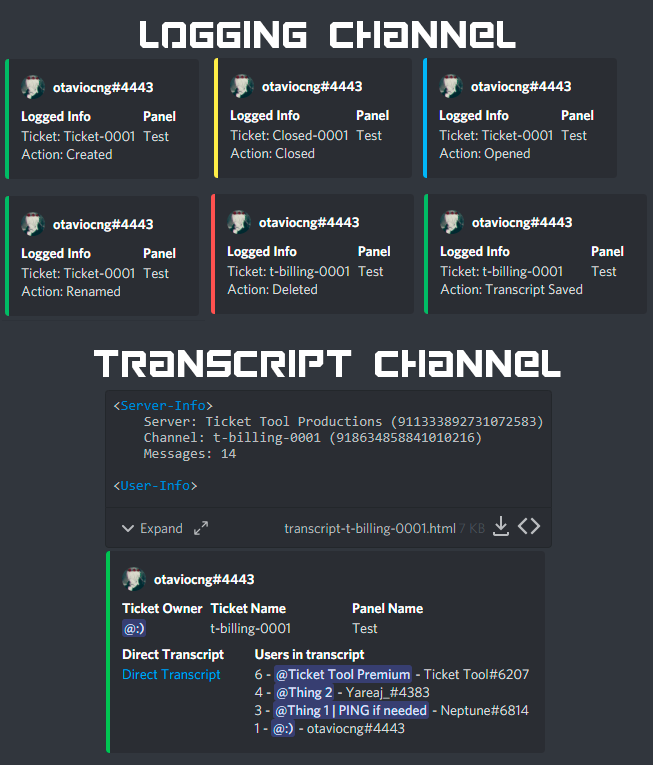 rustic gale
Surely checking the logs will be easier than tracking tickets one by one
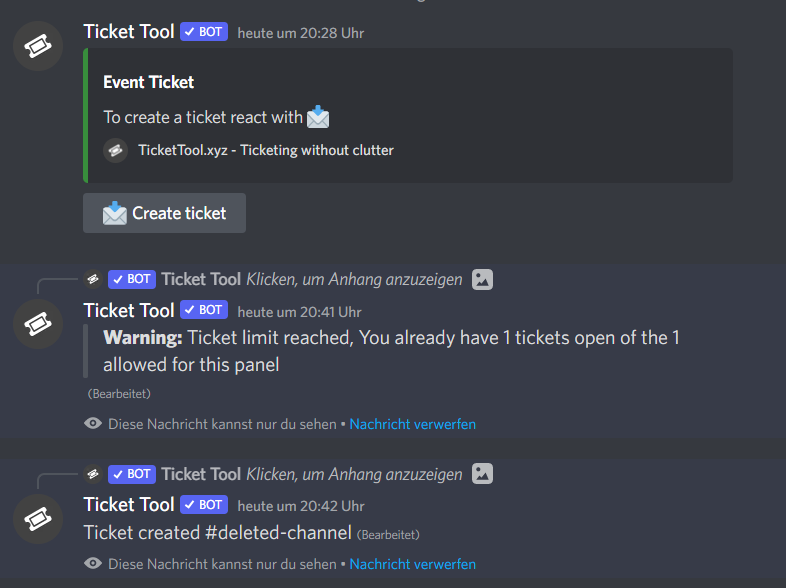
 tardy wolf
I have bought premium on a server where I have been banned. Can I get my premium back on another server?
 wanton lake
Hello, i have no idea how i have handeld it long time ago, that these messages from ticket tool dont come, if i press on create a ticket :X
rustic gale
wanton lake
Hello, i have no idea how i have handeld it long time ago, that these messages f...
Those messages can't be disabled, no
humble sequoiaBOT
Redeeming premium on your server is really simple. Just head over to your Subscriptions Page. There you can select a server of your choice, which will get premium. You can change the server at any point.
wanton lake
does they get removed automaticly?
rustic gale
Simply go ahead and pick a different server in your Subscriptions page
rustic gale
wanton lake
does they get removed automaticly?
You can press Dismiss message and they disappear
wanton lake
im 100% sure we dont had it
rustic gale
How long ago?
jade topaz
$epmessage
humble sequoiaBOT
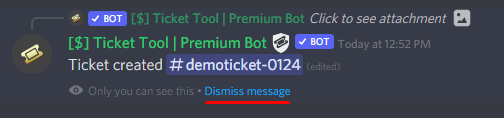
How can I edit/disable the ephemeral message?
These pop ups can only be seen by the user who triggered a certain action, like creating a ticket. They cannot be edited or disabled, as they are a discord requirement that is set by the developer of any bot. The ephemeral messages can be removed by pressing the little blue Dismiss message text, or by restarting your discord client.
 jade topaz
@wanton lake 
 cobalt mortar
Hi there! Trying to set some info of my server like you have it in #📂│information. Hopefully someone can point me to the right direction.
How do I set it up so that when interacting with the buttons the information shows up on that same channel?

 scenic plinth
cobalt mortar
Hi there! Trying to set some info of my server like you have it in <#50923900548...
scenic plinth
cobalt mortar
Hi there! Trying to set some info of my server like you have it in <#50923900548...
That is not our bot, that is a custom bot that has been purchased for Ticket Tool Support.
scenic plinth
 jade coral
Is this via paypal? Are you trying to purchase ticket tool related products?
jade coral
scenic plinth
Is this via paypal? Are you trying to purchase ticket tool related products?
Im tryna boy premium
Via debit card
scenic plinth
jade coral
Im tryna boy premium
Alright, what country are you from if you do not mind me asking?
jade coral
scenic plinth
Alright, what country are you from if you do not mind me asking?
Denmark
cobalt mortar
scenic plinth
That is not our bot, that is a custom bot that has been purchased for Ticket Too...
Daw man 😅 I appreciate that.
jade coral
scenic plinth
Alright, what country are you from if you do not mind me asking?
U got answer?
jade coral
@scenic plinth do you have a answer?
 rustic gale
Ah. You're in the wrong place to solve that
 wheat mason
rustic gale
Ah. You're in the wrong place to solve that
wheat mason
rustic gale
Ah. You're in the wrong place to solve that
what
rustic gale
This is the support server for a Discord bot called Ticket Tool
We can't help you with that issue
wheat mason
rustic gale
Ah. You're in the wrong place to solve that
what i do to breng my accout back i was have lots of things
pleas help me
rustic gale
Do $debug and tell us what happens
Can you see the bot in the user list in the right-hand side of the screen?
Find a channel where you can see the bot
What's the server's ID?
Either you got the wrong ID or the bot is not in your server
You need to give the bot permissions to view channels
Either add the Ticket Tool role to the channel permissions with View Channel enabled
Or give the bot a role that can view channels
Now try sending $debug again
Alright. Let us know if you need any more help
iron nightBOT
Gave +1 Rep to @rustic gale
rustic gale
$help setup
humble sequoiaBOT
Setting up Ticket Tool
Visit the docs for setup info
General Setup

You can check our documentation here;
You can also check #📂│information for the basic setup;
You can also watch this video tutorial.
Our documentation contains all the info you need about the bot to be able to setup and configure the bot however you like.
scenic plinth
Oh.. thats right... this is just the channel you ask questions in...
Use $add {userid} in the ticket.
iron nightBOT
Gave +1 Rep to @rustic gale
 dark gull
anyone ever run into an issue where closed tickets suddenly stop automatically moving into the history section?
 shrewd fractal
$help
humble sequoiaBOT
Help Options
$help commands - Information on commands
$help setup - Information on bot setup
$help faq - Frequently asked questions
 plush sun
hello why the players can close the ticket when they open a ticket i want they can't close the ticket and we need a support team close the ticket thanks
shrewd fractal
anyone can see my ticket
 waxen portal
How do I get rid of these?
 waxen portal
shrewd fractal
can u help me
waxen portal
shrewd fractal
can u help me
What's your issue?
shrewd fractal
waxen portal
What's your issue?
can i open ticket and show u
 fringe tinsel
Is there a way to restrict who can make a ticket in my server using another bot?
shrewd fractal
@waxen portal i open new ticket?
 humble sequoiaBOT
━━ moved to ticket ━━
humble sequoiaBOT
The first thing you will need to do is invite the premium bot, an invite can be found here
Once the bot is in your server we will head to the dashboard and manage your server. When you are managing your server, you want to head into "Server Configs" then click the drop down menu under "Select the bot you would like to use on this server" then click "Ticket Tool#6207" and then save.
 meager charm
How do I make transcripts go to a channel I want?
rustic gale
$help transcript
humble sequoiaBOT
How do I save transcript to a channel?
To save transcripts to a channel go to the Dashboard -> Panel Configs -> Settings -> Logging Options -> Transcript Channel
 dusky tiger
is there a way to disable ticket creation without privating the channel? Server im in is flooded with tickets and we need to clear them out but none of us wanna do it till ticket creation is closed
jade topaz
oh my dasboard it says no sever found what i do i did invite it in
humble sequoiaBOT
Don't see your server in the dashboard?
You will possibly need to relog. Look below to see steps on how to relog.
How to relog in the Dashboard.
First, you will need to go to the dashboard. Once your there, click on your avatar on the top right. after you clicked it, you will see button that says Logout. You must click that. Once you have logged out, you can log back in.
Note:
You need one of these 3 things to access the dashboard.
1. Server Owner (Level: 6)
2. Server Administrator (Level: 4)
3. Dashboard Role (Level: 2)
:warning: You can check your level using $level on your Discord Server
User permission level with Ticket Tool
@User is permission level: 0 (User)
```» *If it shows that your permission is **0**, you don't have any of the above **3 things** to manage the dashboard.*
**See the GIF below on how to relog:** quasi cliff
dusky tiger
is there a way to disable ticket creation without privating the channel? Server ...
quasi cliff
dusky tiger
is there a way to disable ticket creation without privating the channel? Server ...
You can either disable the ticket create button OR set the global limit to 0
dusky tiger
quasi cliff
You can either disable the ticket create button OR set the global limit to 0
where would the disable button be? or is it a command
 quasi cliff
dusky tiger
where would the disable button be? or is it a command
quasi cliff
dusky tiger
where would the disable button be? or is it a command
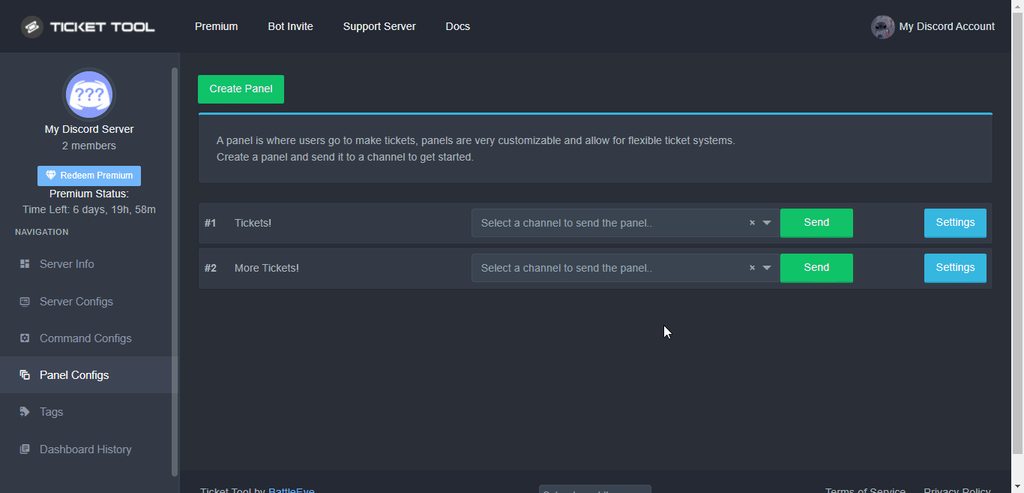
Do the following for Create Ticket Button
 dusky tiger
I assume this means it worked? Cuz its like inf loading

 night jolt
ola how can i remove all the tickets at once ?

 calm lava
Hi, only me can't see panels?
humble sequoiaBOT
━━ moved to ticket ━━
jade topaz
how do i ping myself when someone opens a ticket?
jade topaz
 tepid notch
anyone know if the premium price is in USD? I am assuming it is
tepid notch
anyone know if the premium price is in USD? I am assuming it is
it is the dollar symbol so should be
 rustic gale
Custom emojis are a premium feature
Without premium you can have 📩 or no emoji at all
If you mean the button text, just edit the button text in Create Ticket Settings
$buttons
humble sequoiaBOT

The new Discord Buttons allow for a much smoother and convenient experience. They reduce lag and work much better than emojis. With ticket tool you can edit all the buttons however you like! Buttons can show emojis, text and can have 4 different colors.
Where can I edit them?
Dashboard ➞ Panel Configs ➞ Settings ➞ Button Options ➞ Setting

 cinder lagoon
I have a premium
rustic gale
$pc @cinder lagoon
humble sequoiaBOT
Premium Check
I was unable to detect a premium server for @cinder lagoon.
Found 26 servers in total and 0 with premium and permission
cinder lagoon
Thx
tepid notch
jade topaz
it is the dollar symbol so should be
Could be AUD, thought to check
 tender olive
How can i be a support
rustic gale
Be active and helpful and wait for staff to notice
Or wait until applications are announced in #📣│server-news
tender olive
Notice...???
 fiery elk
hey there
can you open tickets with username instead of number ?
I cant find it
I got premium bot
rustic gale
fiery elk
hey there
can you open tickets with username instead of number ?
I cant find it
Look under Ticket Options in your ticket's Settings
You can edit the name there
Use {ticket.user.name} for the ticket creator's username
fiery elk
 rustic gale
{ticket.user.name}-{count}
fiery elk
Thank you very much kind sir @rustic gale
 scenic plinth
I wonder what this button do?

Also stop pinging random people for support and deleting it, you did it twice.
cinder lagoon
no I want to copy a panel
scenic plinth
try hitting clone panel on your panel settings as I showed
scenic plinth
you clearly forget I just said clone panel on the panel settings
also again stop pinging staff for the third time please
cinder lagoon
ohhh sorry , thx
 humble sequoiaBOT
The first thing you will need to do is invite the premium bot, an invite can be found here
Once the bot is in your server we will head to the dashboard and manage your server. When you are managing your server, you want to head into "Server Configs" then click the drop down menu under "Select the bot you would like to use on this server" then click "Ticket Tool#6207" and then save.
How to disable the premium bot
To disable the premium bot you will have to go to the Dashboard ➞ Server Configs ➞ Premium bot ➞ And on the right-hand side select the primary free bot in the drop down menu.
Premium features will still work on the normal bot.
 rustic gale
One of these. @jade topaz
 deep haven
When I try to open or close ticket it keep saying invalid form body
 sudden cliff
Do you have any command to see a Transcript?
deep haven
sudden cliff
Do you have any command to see a Transcript?
It saids when I hit it invalid form body to
rustic gale
sudden cliff
Do you have any command to see a Transcript?
Command, no. Look at the transcript channel and click the Direct Transcript link.
rustic gale
deep haven
When I try to open or close ticket it keep saying invalid form body
Uninstall and reinstall your app
deep haven
rustic gale
Uninstall and reinstall your app
Thank you it qork after I did it
iron nightBOT
Gave +1 Rep to @rustic gale
jade topaz
hey guys! Was wondering, how do i config to allow moderators to see my tickets?
 long basin
Can someone help me get my license from the ticket I’m trynna get the free otp from bot from@a chat and I created a ticket just don’t know where to go from there
jade topaz
hi how do i hide the tickets from other members? like the only i want the members to see are the admins and staff. thank you
 fathom reef
I need to make a ticket and it won't let me
rustic gale
jade topaz
hey guys! Was wondering, how do i config to allow moderators to see my tickets?
Add them to Support Team Roles, see next guide
$help support
humble sequoiaBOT
How to let support team see into a ticket
About support roles
A support role lets your support team see into tickets with out having to add them manually to each and every ticket.
You can add as many support roles as you like per panel.
NOTE that the way discord works all admins can see into tickets regardless of this.
How to set a support role
To set a Support role go to the Dashboard -> Panel Configs -> Settings -> General Options -> Support Team Roles.
NOTE that the support role will not be able to see into tickets that are already created..
jade topaz
Thanks!!!
rustic gale
jade topaz
hi how do i hide the tickets from other members? like the only i want the member...
Make sure Everyone Opened Permissions and Everyone Closed Permissions have Read Messages set to  . See next guide
$help perms
humble sequoiaBOT
How to set the permissions for tickets
To set a change permissions go to the Dashboard -> Panel Configs -> Settings -> Permission Options
 rustic gale
@jade topaz@jade topaz Note that the changes you make in the dashboard will not be applied to existing tickets, only to tickets created after the change
iron nightBOT
Gave +1 Rep to @rustic gale
 plain torrent
$pc
humble sequoiaBOT
Thank you
Thank you for purchasing Ticket Tool Premium @plain torrent. You have now been given the <@&535595160189403136> role!
Found 12 servers in total and 1 with premium and permission
jade topaz
rustic gale
Make sure Everyone Opened Permissions and Everyone Closed Permissions have Read ...
oh wait like i want only the person who created the ticket and the staff are the ones who can see the ticket but not other members though (sorry for bad english)
 rigid patrol
$PC
humble sequoiaBOT
Premium Check
I was unable to detect a premium server for @rigid patrol.
Found 3 servers in total and 0 with premium and permission
rustic gale
jade topaz
oh wait like i want only the person who created the ticket and the staff are the...
Set the Everyone permission for Read Messages as and that will stop every user from seeing the ticket, except the owner and admins and the ticket creator
If there's other staff roles you want to be able to see the ticket, add them to Support Team Roles
$help support
humble sequoiaBOT
How to let support team see into a ticket
About support roles
A support role lets your support team see into tickets with out having to add them manually to each and every ticket.
You can add as many support roles as you like per panel.
NOTE that the way discord works all admins can see into tickets regardless of this.
How to set a support role
To set a Support role go to the Dashboard -> Panel Configs -> Settings -> General Options -> Support Team Roles.
NOTE that the support role will not be able to see into tickets that are already created..
jade topaz
rustic gale
If there's other staff roles you want to be able to see the ticket, add them to ...
OH
TY
 mental leaf
$pc
humble sequoiaBOT
Premium Check
I was unable to detect a premium server for @mental leaf.
Found 6 servers in total and 0 with premium and permission
jade topaz
$pc
humble sequoiaBOT
Thank you
Thank you for purchasing Ticket Tool Premium @opal arrow. You have now been given the <@&535595160189403136> role!
Found 4 servers in total and 1 with premium and permission
jade topaz
Hi I'm not getting ping if someone opening Ticket
jade topaz
jade topaz
Hi I'm not getting ping if someone opening Ticket
Hi! Can you send the bots response when you open a ticket?
jade topaz
jade topaz
Hi! Can you send the bots response when you open a ticket?

Like I'm not getting ping until I'm not checking the server
I can't explain oof
Are you sure that you dont have the server muted?
Because that is the case here.
jade topaz
jade topaz
Are you sure that you dont have the server muted?
yes
Are you sure that @humble sequoia has permission to ping roles?
jade topaz
jade topaz
Are you sure that <@722196398635745312> has permission to ping roles?
yes
my friends getting ping
You have the server muted then.
@jade topaz
jade topaz
jade topaz
You have the server muted then.
no bruh
Okay well, no idea what the issue may be.
jade topaz
jade topaz
Okay well, no idea what the issue may be.
okay
 idle tapir
I need help with my account, what should I do?
humble sequoiaBOT

⚠️ You're in the wrong place
We provide support for @pseudo glen discord bot and cannot help you with whatever issue you have.
- We don't know which Support Team you should contact to get this issue resolved, and unfortunately we won't be able to accurately tell you.
If you don't have any further questions regarding our bot Ticket Tool, please close this ticket
 fierce relic
What to do if tickets don’t work, and writes «this interaction failed»?
 humble sequoiaBOT
Update your discord App
Buttons are a relatively new addition to discord and don't work with some older versions of the app.
Please verify that you have the latest version of discord, by going to the app or play store.
Discord for the  App Store
Discord for the  Play Store
jade topaz
@fierce relic
jade topaz
Your very welcome! :D
cold kite
i need help
 brisk viper
How do I set up the games
jade topaz
Its not showing up on the dashboard
rustic gale
$mentions
humble sequoiaBOT
Within all the messages the bot's sends (both embeds and text) you can mention either channels, roles, or even users, these mentions will only send a notification to the user if they are used within a text field, e.g: a role mentioned in an embed won't ping at all the users who have that role.
For mentioning a role you can use one out of three options:
{@Role Name} ➞ Which is Case Sensitive.
{RoleID} ➞ Replace RoleId with the Id of the role you are trying to ping.
<@&RoleID> ➞ Discord's native syntax to ping roles.
<#ChannelID> ➞ Mention a channel by its ID.
<@UserID> ➞ Mention a user by its ID.
 fathom sand
thx
jade topaz
jade topaz
Its not showing up on the dashboard
.
humble sequoiaBOT
Don't see your server in the dashboard?
You will possibly need to relog. Look below to see steps on how to relog.
How to relog in the Dashboard.
First, you will need to go to the dashboard. Once your there, click on your avatar on the top right. after you clicked it, you will see button that says Logout. You must click that. Once you have logged out, you can log back in.
Note:
You need one of these 3 things to access the dashboard.
1. Server Owner (Level: 6)
2. Server Administrator (Level: 4)
3. Dashboard Role (Level: 2)
:warning: You can check your level using $level on your Discord Server
User permission level with Ticket Tool
@User is permission level: 0 (User)
```» *If it shows that your permission is **0**, you don't have any of the above **3 things** to manage the dashboard.*
**See the GIF below on how to relog:** novel gate
How i Can make i ticket
tall yarrow
novel gate
How i Can make i ticket
Exactly
rustic gale
Press Setup Guide in #📂│information
jade topaz
Alternatively….
humble sequoiaBOT
You can check our documentation here;
You can also check #📂│information for the basic setup;
You can also watch this video tutorial.
Our documentation contains all the info you need about the bot to be able to setup and configure the bot however you like.
jade topaz
howdy
so the user permissions don't change after the ticket gets closed
any fix for that?
humble sequoiaBOT
━━ moved to ticket ━━
 pulsar dock
 covert swallow
If you have a premium subscription you can invite the premium bot by following the guide below
humble sequoiaBOT
The first thing you will need to do is invite the premium bot, an invite can be found here
Once the bot is in your server we will head to the dashboard and manage your server. When you are managing your server, you want to head into "Server Configs" then click the drop down menu under "Select the bot you would like to use on this server" then click "Ticket Tool#6207" and then save.
 worn monolith
I'm not able to make a ticket message
rustic gale
What problem are you having?
 noble cedar
rustic gale
noble cedar
rustic gale
Feel free to make an Arabic ticket in #🎫│make-a-ticket
rustic gale
 normal tusk
i keep getting this thing telling me to $debug
normal tusk
i keep getting this thing telling me to $debug
You need to disable the premium bot
humble sequoiaBOT
How to disable the premium bot
To disable the premium bot you will have to go to the Dashboard ➞ Server Configs ➞ Premium bot ➞ And on the right-hand side select the primary free bot in the drop down menu.
Premium features will still work on the normal bot.
normal tusk
rustic gale
You need to disable the premium bot
but i bought premium
covert swallow
Did you enable it?
rustic gale
Then you need to redeem it and enable the premium bot
humble sequoiaBOT
Redeeming premium on your server is really simple. Just head over to your Subscriptions Page. There you can select a server of your choice, which will get premium. You can change the server at any point.
The first thing you will need to do is invite the premium bot, an invite can be found here
Once the bot is in your server we will head to the dashboard and manage your server. When you are managing your server, you want to head into "Server Configs" then click the drop down menu under "Select the bot you would like to use on this server" then click "Ticket Tool#6207" and then save.
normal tusk
rustic gale
Then you need to redeem it and enable the premium bot
how do i get it to put the users name
instead of number of the ticket
iron nightBOT
Gave +1 Rep to @rustic gale
normal tusk
+1 rep

and how do i make each channel under the thing like that
@rustic gale
i just dragged them to there for an example
rustic gale
$help category
humble sequoiaBOT
How to set the open category
To set a open category go to the Dashboard -> Panel Configs -> Settings -> Category Options -> Category Open
rustic gale
That's how
normal tusk
rustic gale
That's how
is it not possible to put the tickets under each channel
so if someone opens donate ticket it will go under donate channel if someone opens a support ticket it will go under supportchannel
rustic gale
Under a channel? no
normal tusk
 rustic gale
You can sort them into categories, that's all
normal tusk
when i open each ticket from each channel it doesnt mention what the opened the ticket for

it says that for every channel that i open a ticket on weather its support/report/appeal/donate
humble sequoiaBOT
The Ticket Message is the first message sent by the bot in a new ticket. To customise it head over to your Dashboard ➞ Panel Configs ➞ Settings ➞ Ticket Options ➞ Edit Ticket Message
rustic gale
This is where you customize it
 stark moat
humble sequoiaBOT
stark moat
humble sequoiaBOT
We would love to help you, but if you don't tell us what you need help with we can't help you :(
 normal tusk
thx bro
 placid knoll
rustic gale
that will help us figure out the problem
placid knoll
rustic gale
that will help us figure out the problem
@rustic gale there you go! here is the screenshot from only one of them

there is about 29 open ones like that rn
rustic gale
That's the wrong bot
placid knoll
What do you mean?
scenic plinth
That message is not from Ticket Tool, refer to the bots support server, which we cannot guide you to.
placid knoll
My apologies, I have no idea what you just referenced. Can you provide me with any additional guidance please.
covert swallow
We are support for @pseudo glen exclusively
rustic gale
We didn't get a debug message on our own server, so Ticket Tool probably has a different prefix on your server
placid knoll
Would it be best for me to remove the integration and then download it again?
placid knoll
rustic gale
What's your server's ID?
952019457931374602
 placid knoll
Where would I go to edit that
rustic gale
Your server's settings, under Roles, look for the Ticket Tool role
rustic gale
That would probably solve the issue, yes
placid knoll
like so?
 rustic gale
But like this
placid knoll
Of course! haha.. thank you so much for walking me through that, I was unsure because it mentions its a dangerous permission to grant.. following through with it now. thank you for your patience! first day on discord !!
thank you @rustic gale a god send indeed!
iron nightBOT
Gave +1 Rep to @rustic gale
rustic gale
Let me know if it works @placid knoll
 turbid trail
Yo
Is there a way to make it so
When someone opens a ticket the ticket name changes to there discord name
rustic gale
Yes, it's a premium feature
turbid trail
How much is permium
placid knoll
Yes @rustic gale THANK YOU! Now im going through and closing each one
humble sequoiaBOT
Ticket Tool Premium
Get premium at https://tickettool.xyz/premium
Manage your subscriptions at https://tickettool.xyz/subscriptions
Why Premium?
Premium lets you customize the bot just how you want it. It also helps keep the bot running.
 Faster Premium Bot
Automatic Transcripts
Full Customization
Custom Buttons
Direct Messages
Ticket Automation
Premium Support
You can purchase premium here:
Price
$6 - Monthly
$66 - Yearly
 Premium
iron nightBOT
Premium
iron nightBOT
Gave +1 Rep to @rustic gale
 restive frost
hey how do i make a support team?
rustic gale
$help support
humble sequoiaBOT
How to let support team see into a ticket
About support roles
A support role lets your support team see into tickets with out having to add them manually to each and every ticket.
You can add as many support roles as you like per panel.
NOTE that the way discord works all admins can see into tickets regardless of this.
How to set a support role
To set a Support role go to the Dashboard -> Panel Configs -> Settings -> General Options -> Support Team Roles.
NOTE that the support role will not be able to see into tickets that are already created..
rustic gale
Try creating a new ticket and seeing if it works
iron nightBOT
Gave +1 Rep to @rustic gale
 cedar ivy
my server aint showing up
humble sequoiaBOT
Don't see your server in the dashboard?
You will possibly need to relog. Look below to see steps on how to relog.
How to relog in the Dashboard.
First, you will need to go to the dashboard. Once your there, click on your avatar on the top right. after you clicked it, you will see button that says Logout. You must click that. Once you have logged out, you can log back in.
Note:
You need one of these 3 things to access the dashboard.
1. Server Owner (Level: 6)
2. Server Administrator (Level: 4)
3. Dashboard Role (Level: 2)
:warning: You can check your level using $level on your Discord Server
User permission level with Ticket Tool
@User is permission level: 0 (User)
```» *If it shows that your permission is **0**, you don't have any of the above **3 things** to manage the dashboard.*
**See the GIF below on how to relog:** sleek sail
السلام عليكم
 jolly topaz
Hello, I would like to change the color on a part of the text for an embed description please
 slim rock
Hey, does someone know how to change the $close button action when you open a ticket? I want to change it to $delete action instead.
 proper wing
Hello i have a discord shop server with a ticket tool bot the problem there a random guys they can see the hidden channel & tickets with betterdiscord is there anyway to make it invisible them
 modern jewel
Hello can someone help me?
slender minnow
proper wing
Hello i have a discord shop server with a ticket tool bot the problem there a ra...
Nothing can be done from our side. Report them to discord since bd is a direct violation of their tos.
covert swallow
 floral kayak
Bots ID's Ticket Tool can respond to (Comma separated)
what is this??
floral kayak
Bots ID's Ticket Tool can respond to (Comma separated)
what is this??
If you put a bots UUID in that feild and save, TicketTool will respond to those bots
covert swallow
jolly topaz
Hello, I would like to change the color on a part of the text for an embed descr...
Discord limitations mean we cannot change text color
covert swallow
slim rock
Hey, does someone know how to change the `$close` button action when you open a ...
You need to disable 2 step ticket in the panel settings
 dreamy viper
Does this bot support ticket creators required to fill out a form or certain information before the ticket is sent to administration?
covert swallow
Unfortunately not at this time
 narrow monolith
How do I set up a channel for the bot
covert swallow
Im not sure what you mean, could you please elaborate?
narrow monolith
Nvm
tender olive
Sorry SUport i need help
humble sequoiaBOT
We would love to help you, but if you don't tell us what you need help with we can't help you :(
 proven void
Good morning.
If I go back to a ticket that's closed and select to reopen... how can I get it to open with the original ticket creator's id?
rustic gale
Change the name variable to {ticket.user.name}
proven void
Or am I stuck just renaming it afterwards?
humble sequoiaBOT
The ticket name is the default channel name of all tickets. To edit it, go to your Dashboard > Panel Configs > Settings > Ticket Options. There you can edit the channel name of opened and closed tickets. You can also use variables in there.

 Note: This is a premium feature
proven void
rustic gale
Change the name variable to {ticket.user.name}
Note: This is a premium feature
proven void
rustic gale
Change the name variable to {ticket.user.name}
Ah, ok, thank you
iron nightBOT
Gave +1 Rep to @rustic gale
proven void
You smort
 upbeat palm
tender olive
Sorry SUport i need help
upbeat palm
tender olive
Sorry SUport i need help

please don't say just hello in chat
pulsar knoll
HELP: How to automate created tickets to move to category folder?
slender minnow
$help category
humble sequoiaBOT
How to set the open category
To set a open category go to the Dashboard -> Panel Configs -> Settings -> Category Options -> Category Open
slender minnow
@pulsar knoll
iron nightBOT
Gave +1 Rep to @slender minnow
 slow gulch
Hello, i'm sorry for this question: in my server when he opens the ticket and posts his discord ... he deletes it automatically ... I wanted to know if it was a ticket tool option or another bot. What can I do to verify?
rustic gale
Can you give more details about the problem?
 rustic gale
A server invite?
slow gulch
yes
rustic gale
There's probably another bot in your server that's detecting and deleting the invite
slow gulch
Ok, thanks, i think Dyno
rustic gale
If the bot isn't Administrator you can deny it access to the ticket
 prime bridgeBOT
 Successful bans:
 1
 Unsuccessful bans:
 0
 Reason: Advertising referral link
 Moderator: @forest goblet
 harsh yacht
Hey, the bot is acting up real bad. It keeps changing the perms to then not enable users to open up tickets... any idea what is causing this?
 hoary bolt
hey can we stop people from tagging @ everyone when they open a ticket?
 brazen citrus
where am i supposed to write jill?
rustic gale
harsh yacht
Hey, the bot is acting up real bad. It keeps changing the perms to then not enab...
We'd have to take a look how your permissions are set up
harsh yacht
all good, my ticket has been resolved. Sorry for the troubles
rustic gale
hoary bolt
hey can we stop people from tagging @ everyone when they open a ticket?
Currently Ticket Tool cannot toggle that permission sadly. You would have to remove that permission in your server's role permissions, and manually add them back on a channel basis.
hoary bolt
rustic gale
Currently Ticket Tool cannot toggle that permission sadly. You would have to rem...
so manually change the permissions for each ticket right?
rustic gale
Let me clarify
If a user doesn't otherwise have the permission to ping everyone, Ticket Tool does not grant it to them in tickets
jade topaz
The settings menu is not displayed. Tell me how you can fix it. pls
 rustic gale
jade topaz
The settings menu is not displayed. Tell me how you can fix it. pls
rustic gale
jade topaz
The settings menu is not displayed. Tell me how you can fix it. pls
Use a different browser
jade topaz
Thank you.
 robust holly
Hello i need help i Can t open pannel on m'y serveur
 arctic plank
How can i make the option of create a ticket for my server so the members can get the role they need
I'm in mobile
how to do it pls
reply please.
rustic gale
arctic plank
How can i make the option of create a ticket for my server so the members can ge...
Ticket Tool does not assign roles
To get started, enter the dashboard
humble sequoiaBOT
rustic gale
Look for your server and press Manage
Open the  menu and select Panel Configs
Create a panel, then when you're done select a channel and press Send
$help send
humble sequoiaBOT
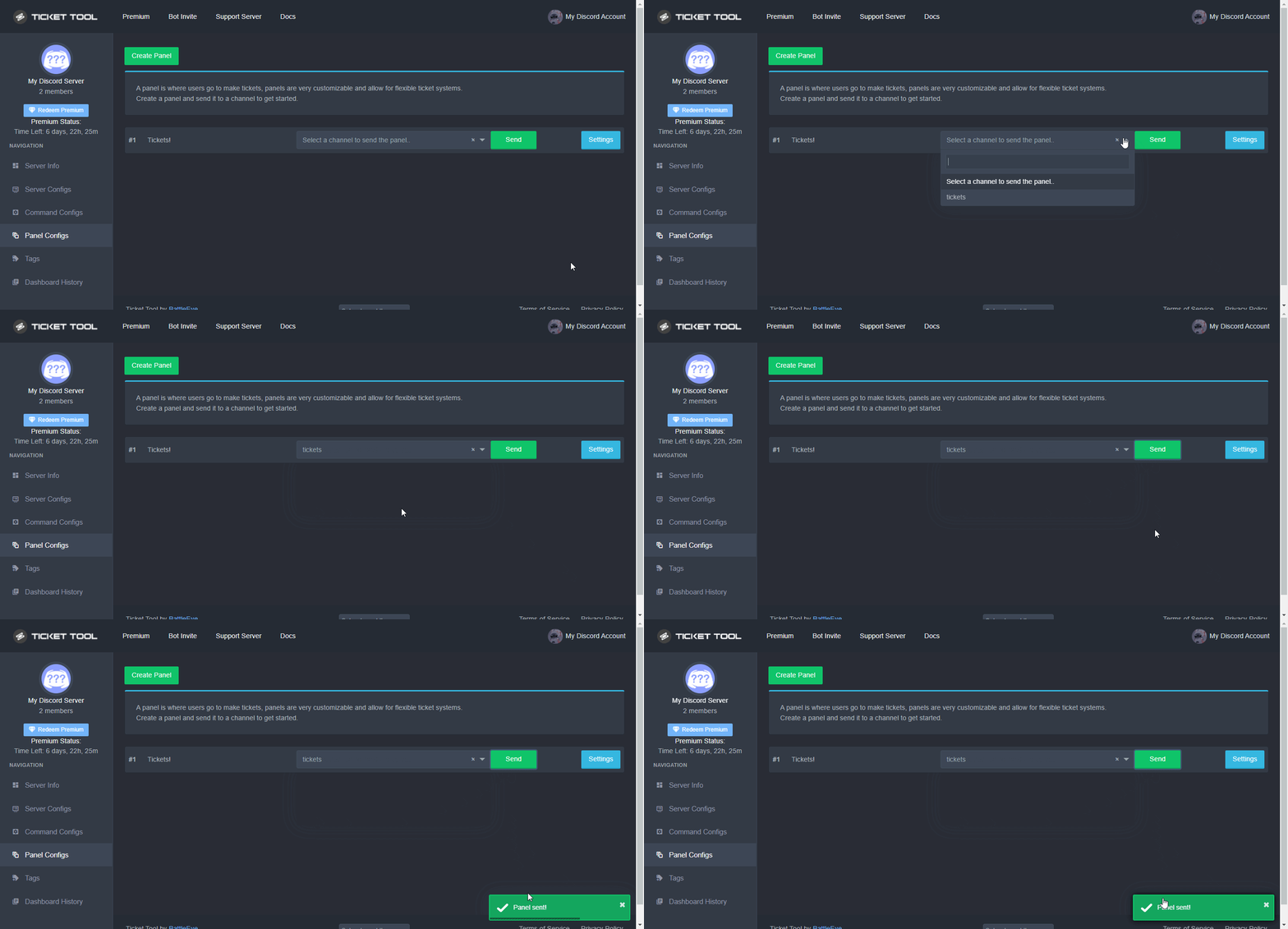
Sending a panel
Once you've created a panel on the dashboard you will need to send it to a channel using send on the dashboard
Select the channel you want your panel to be created in and click send.
For other questions checkout $help faq
An example of a sending a panel is shown below.
 potent lotus
Hay I've just got ticket tool premium how do I invite the premium bot?
And how do I claim my premium role
rustic gale
$pc @potent lotus
humble sequoiaBOT
Thank you
Thank you for purchasing Ticket Tool Premium @potent lotus. You have now been given the <@&535595160189403136> role!
Found 10 servers in total and 1 with premium and permission
rustic gale
There's an invite right here...
humble sequoiaBOT
The first thing you will need to do is invite the premium bot, an invite can be found here
Once the bot is in your server we will head to the dashboard and manage your server. When you are managing your server, you want to head into "Server Configs" then click the drop down menu under "Select the bot you would like to use on this server" then click "Ticket Tool#6207" and then save.
iron nightBOT
Gave +1 Rep to @rustic gale
 heady wedge
How much is premium ticket bot
jade topaz
How can I set up the support ticket for my server
rustic gale
Check out the Setup Guide button in #📂│information
 stray swallow
how do i enable claiming?
rustic gale
It's a premium feature and it's enabled in Claiming Options
stray swallow
bruh everything fr a premium feature
heady wedge
 fiery plinth
https://tickettool.xyz/premium
fiery plinth
https://tickettool.xyz/premium
Thanks
iron nightBOT
Gave +1 Rep to @fiery plinth
stray swallow
alright ty
fiery plinth
heady wedge
Thanks
np
 mossy spindle
hello, how can I tag the role in the article that comes out when the ticket is opened?
rustic gale
$mentions
humble sequoiaBOT
Within all the messages the bot's sends (both embeds and text) you can mention either channels, roles, or even users, these mentions will only send a notification to the user if they are used within a text field, e.g: a role mentioned in an embed won't ping at all the users who have that role.
For mentioning a role you can use one out of three options:
{@Role Name} ➞ Which is Case Sensitive.
{RoleID} ➞ Replace RoleId with the Id of the role you are trying to ping.
<@&RoleID> ➞ Discord's native syntax to ping roles.
<#ChannelID> ➞ Mention a channel by its ID.
<@UserID> ➞ Mention a user by its ID.
mossy spindle
thank you
turbid trail
Hello
Is there a way to make it so if the ticket doesn't get interacted with in 24hrs it gets deleted
scenic plinth
No
 stone galleon
please can someone help me i have invited the ticket bot to my server but when i go onto the dashboard it says the bot is not in the server
humble sequoiaBOT
Don't see your server in the dashboard?
You will possibly need to relog. Look below to see steps on how to relog.
How to relog in the Dashboard.
First, you will need to go to the dashboard. Once your there, click on your avatar on the top right. after you clicked it, you will see button that says Logout. You must click that. Once you have logged out, you can log back in.
Note:
You need one of these 3 things to access the dashboard.
1. Server Owner (Level: 6)
2. Server Administrator (Level: 4)
3. Dashboard Role (Level: 2)
:warning: You can check your level using $level on your Discord Server
User permission level with Ticket Tool
@User is permission level: 0 (User)
```» *If it shows that your permission is **0**, you don't have any of the above **3 things** to manage the dashboard.*
**See the GIF below on how to relog:** buoyant perch
Hello, how do I appeal?
humble sequoiaBOT
⚠️ You're in the wrong place
We provide support for @pseudo glen discord bot and cannot help you with whatever issue you have.
- We don't know which Support Team you should contact to get this issue resolved, and unfortunately we won't be able to accurately tell you.
If you don't have any further questions regarding our bot Ticket Tool, please close this ticket
jade topaz
$mentions
humble sequoiaBOT
Within all the messages the bot's sends (both embeds and text) you can mention either channels, roles, or even users, these mentions will only send a notification to the user if they are used within a text field, e.g: a role mentioned in an embed won't ping at all the users who have that role.
For mentioning a role you can use one out of three options:
{@Role Name} ➞ Which is Case Sensitive.
{RoleID} ➞ Replace RoleId with the Id of the role you are trying to ping.
<@&RoleID> ➞ Discord's native syntax to ping roles.
<#ChannelID> ➞ Mention a channel by its ID.
<@UserID> ➞ Mention a user by its ID.
 nimble mauve
 idle ridge
How do I make it so roles get pinged in tickets
idle ridge
How do I make it so roles get pinged in tickets
Add the role you want to get pinged then your done!
nimble mauve
jade topaz
Thats incorrect
It works for me.
idle ridge
Can you show me please
humble sequoiaBOT
The Ticket Message is the first message sent by the bot in a new ticket. To customise it head over to your Dashboard ➞ Panel Configs ➞ Settings ➞ Ticket Options ➞ Edit Ticket Message
rustic gale
This is where you add the mention.
idle ridge
I mean the command
rustic gale
The command?
Um. Grab the role ID and do one of these things
{Role ID}
<@&Role ID>
That's what you include in the message.
If the ID is 0123456789 it's going to look like {0123456789} or <@&0123456789>
iron nightBOT
Gave +1 Rep to @rustic gale
humble sequoiaBOT
We would love to help you, but if you don't tell us what you need help with we can't help you :(
You can check our documentation here;
You can also check #📂│information for the basic setup;
You can also watch this video tutorial.
Our documentation contains all the info you need about the bot to be able to setup and configure the bot however you like.
rustic gale
You can also check the Setup Guide button in #📂│information
rustic gale
Ask us for any help you need.
iron nightBOT
Gave +1 Rep to @rustic gale
rustic gale
Awesome!
What are you trying to do?
The command $add is for adding users to tickets
If you use it in a channel that's not a ticket, it won't work
You have to go into a ticket and use it there
Did you create a panel yet?
$help send
humble sequoiaBOT
Sending a panel
Once you've created a panel on the dashboard you will need to send it to a channel using send on the dashboard
Select the channel you want your panel to be created in and click send.
For other questions checkout $help faq
An example of a sending a panel is shown below.
rustic gale
This is how you send a panel into a channel
Where it says “Select a channel...” select a channel
Then press Send
Good question
I'm not really sure what the purpose is of those panels you created
Apparently you copied a panel twice?
The different panels are different categories of ticket
For example, in this server we have English, Spanish, French, and so on
Billing and Premium
Those are all different kinds of tickets, each of them is its own panel
Also sorry, i couldn't accept the invitation, that's not the sort of support we provide
Yeah, that would make sense
Alright, now press Save and close the menu
Then select a channel and press Send
Depending on your permission settings that may fail. If it does, don't despair
Did it work? Sending the panel?
That's not necessary
Setting up command permissions
The way they are out of the box works just fine
Just go back to Panel Configs
select the channel
and press Send
Now go check the channel
humble sequoiaBOT
The panel message is where people react to make a ticket. To customize it head over to your Dashboard --> Panel Configs -> Settings -> Panel Options -> Edit Panel Message
 rustic gale
There you go, check out the tip above
?
Try sending the panel again
That's funny
Try exiting the app and opening it again
The command?
What command?
What about it?
What do you want to do with it?
rustic gale
That's not $add
That's $new
You set it up in Command Style Tickets in the ticket's settings
 wraith kettle
How can I change the name of the tikt?
humble sequoiaBOT
The ticket name is the default channel name of all tickets. To edit it, go to your Dashboard > Panel Configs > Settings > Ticket Options. There you can edit the channel name of opened and closed tickets. You can also use variables in there.
Note: This is a premium feature
wraith kettle
Thanks
 balmy ibex
hi! new here.. where can i ask questions about payments into daxio?
rustic gale
You're in the wrong place
How did you get here? You need to go back and look for a different way to get the help you're seeking.
balmy ibex
Tried Ticket Tool and opened a ticket - but it did not work out... that why I ended up here 🙂
rustic gale
What didn't work out?
 fallow ingot
 worldly shore
bot spamming in my server
worldly shore
bot spamming in my server
Can you show me a screenshot?
worldly shore
sending in every channel

 visual jungle
can we make ticket tool like the opened ticket can only be closed by server staff and not the one who opened it?
worldly shore
@fallow ingot so is it fixed?
fallow ingot
worldly shore
sending in every channel
What's the server ID?
worldly shore
587263318968762368
 craggy geyser
worldly shore
587263318968762368
craggy geyser
worldly shore
587263318968762368
Do you know a user 喝奶長大的#0001?
worldly shore
no
craggy geyser
They were spamming it according to the dashboard
worldly shore
ohh
craggy geyser
 craggy geyser
You have that role as a dashboard role so anyone with that role can access
If that is a general member role I recommend removing it. If it is staff it makes sense to leave it
worldly shore
ok
 rough skiff
anyone know why the ticket doesn't move to the closed category when closed? the open category works fine? :peanut:
must be permission related on discord since when the bot has admin perm it does move it to closed category when ticket is closed
 long minnow
from where did you get hex code of colours used in ticket tool embeds
@gloomy jacinth help?
 gloomy jacinth
Hey
long minnow
yes?
gloomy jacinth
Please don't mention support team
long minnow
sorry...
gloomy jacinth
And if you need help open a ticket
long minnow
..ok
long minnow
👍
gloomy jacinth
long minnow
from where did you get hex code of colours used in ticket tool embeds
You want to know the hexa code of color of a ticket tool embeed ?
Or you want to choose a color to add it to the embeed ?
long minnow
gloomy jacinth
You want to know the hexa code of color of a ticket tool embeed ?
..from where u got it, i wanna know that
i needed for node.js
making all in one bot .-.
long minnow
gloomy jacinth
You want to know the hexa code of color of a ticket tool embeed ?
ok tell me this
long minnow
gloomy jacinth
What do you want to do
i want hex codes of ticket tool embed, nothing else
gloomy jacinth
You can change hex code of an embeed
gloomy jacinth
long minnow
i want hex codes of ticket tool embed, nothing else
You want to know it from a discord bot ?
long minnow
but from where do i get those hex codes
long minnow
gloomy jacinth
You want to know it from a discord bot ?
no no no, I want to get hex code
for my bot, so where do I get hex codes for like any colour for ex. green
long minnow
yes, green, red, grey
long minnow
gloomy jacinth
Which code for green ?
yup
long minnow
ooo ok thanks
gloomy jacinth
You will find a library for node Js to have a lot of hex code from color.name
Or search it by yourself in Google 😀
long minnow
kk thanks 👍
long minnow
thanks @gloomy jacinth
iron nightBOT
Gave +1 Rep to @gloomy jacinth
gloomy jacinth
😀
long minnow
😄
long minnow
gloomy jacinth
Tu étais français je crois aha
i dont know that language sorry...
long minnow
gloomy jacinth
On aurai pu aller plus rapidement droit au but 😅😅
sorry about that...
gloomy jacinth
 gloomy jacinth
long minnow
sorry about that...
gloomy jacinth
long minnow
sorry about that...
No no that's okay 😅
long minnow
gloomy jacinth
ok got it
 rose trout
$vote
humble sequoiaBOT
Votes
Current Votes: 7
Lifetime Votes: 7
Linked Votes: 0
Vote Links
Linking Info
Linked User: Not Linked
You can give your future votes to another user by linking with that user.
To link use $vote link (@user or userId)
To unlink use $vote unlink
Redeeming
Each vote is worth 12 hours of premium and can be redeemed once you have atleast 6 votes.
Your current votes are worth 3 days, 12h, 0m
To redeem your current votes use $vote redeem
rose trout
.work
 tepid islandBOT
 Shard#3937
You bought and sold items and profited 302
Reply #636437
rose trout
.bal
tepid islandBOT
 sly mural
Do you have to purchase premium for every server or can you use it on more than 1 server
rustic gale
1 subscription, 1 server.
jade topaz
what do i put in the ticket open message to make it ping me everytime a ticket is opened
 low sequoia
C
rustic gale
jade topaz
what do i put in the ticket open message to make it ping me everytime a ticket i...
$mentions
humble sequoiaBOT
Within all the messages the bot's sends (both embeds and text) you can mention either channels, roles, or even users, these mentions will only send a notification to the user if they are used within a text field, e.g: a role mentioned in an embed won't ping at all the users who have that role.
For mentioning a role you can use one out of three options:
{@Role Name} ➞ Which is Case Sensitive.
{RoleID} ➞ Replace RoleId with the Id of the role you are trying to ping.
<@&RoleID> ➞ Discord's native syntax to ping roles.
<#ChannelID> ➞ Mention a channel by its ID.
<@UserID> ➞ Mention a user by its ID.
Help Options
$help commands - Information on commands
$help setup - Information on bot setup
$help faq - Frequently asked questions
jade topaz
Ok so if I use premium for 5 days and set up a ticket, will the custom name of my ticket disappear when it runs out?
rustic gale
Please explain the question?
jade topaz
rustic gale
Please explain the question?
Ok so I made a create ticket that has premium features like a custom name, description and other stuff that you can’t do with basic mode. So I’m wondering if that ticket will no longer have a custom name and description after my trial ends.
rustic gale
Gotcha. Yes, the premium features will stop working and revert to their free mode after the trial is over.
The settings themselves will be saved, so that if you subscribe they will go back to work as normal
But they will be inactive while you're not subscribed
jade topaz
rustic gale
But they will be inactive while you're not subscribed
Alright thanks
iron nightBOT
Gave +1 Rep to @rustic gale

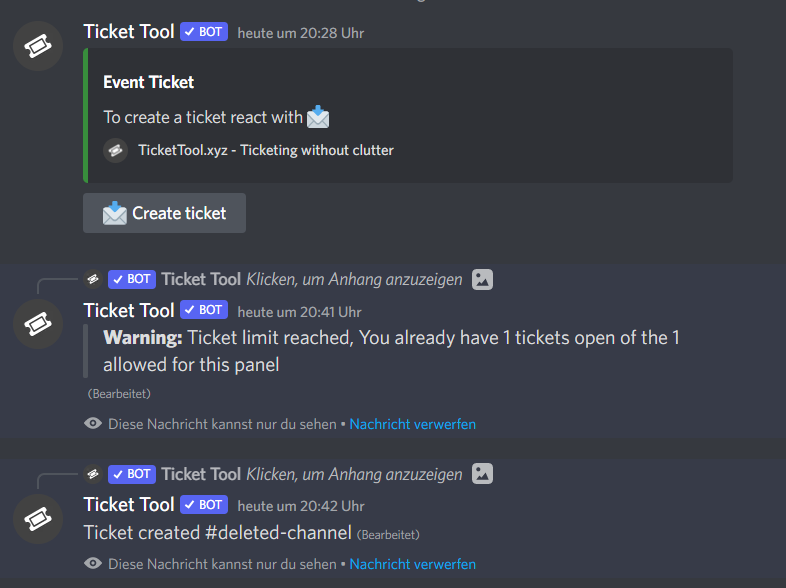

 covert swallow
You need to get some boosts, its a server background. Please use this channel only for questions related to @pseudo glen next time though
 tall flare
Ok. My apologies. Sorry...
 past light
How to start a ticket
rustic gale
past light
How to start a ticket
Check out the Setup Guide button in #📂│information
 shadow axle
Are y'all going to do anything about the channel creation limit?
 viscid rock
what do i do if debug command does not work ?
humble sequoiaBOT
━━ moved to ticket ━━
rustic gale
shadow axle
Are y'all going to do anything about the channel creation limit?
That's imposed by Discord, nothing we can do about it
covert swallow
I think nance met is how are we dealing with the new limits
 junior cypress
my friends please help me I adapted the ticket tool bot to a channel and gave all the permissions but it still does not update even though I changed the description part
 mint grotto
Just curious, as I havent come across it, is there a way when the ticket is created to manually assign it to someone else listed in the support team?
mint grotto
junior cypress
my friends please help me I adapted the ticket tool bot to a channel and gave al...
Did you hit send in the channel configs after saving your settings?
junior cypress
mint grotto
Did you hit send in the channel configs after saving your settings?
yes
I pressed the save button and it was saved at the bottom left, but when I looked at the bot again, the same text was still there, it did not write a small text that I wrote.
mint grotto
I'd double check it saved, and try it again... I had the same issue at one time and it wasnt saving properly
junior cypress
mint grotto
I'd double check it saved, and try it again... I had the same issue at one time ...
i will test
junior cypress
mint grotto
I'd double check it saved, and try it again... I had the same issue at one time ...
so how did you fix it?
mint grotto
Resaved everything again and hit send, you should see a new ticket embed appear below the previous one in whatever channel you are directing it to post in
junior cypress
mint grotto
Resaved everything again and hit send, you should see a new ticket embed appear ...
I did not fully understand
rustic gale
$help send
humble sequoiaBOT
Sending a panel
Once you've created a panel on the dashboard you will need to send it to a channel using send on the dashboard
Select the channel you want your panel to be created in and click send.
For other questions checkout $help faq
An example of a sending a panel is shown below.
rustic gale
Do this
junior cypress
rustic gale
Do this
THXXX
jade topaz
Hello guys, how to change default message of auto saving transcript in ticket chat?
rustic gale
jade topaz
Hello guys, how to change default message of auto saving transcript in ticket ch...
Which message do you mean exactly?
 clever plover
Is there a way to have the user messaged when creating a ticket
Somehow alert them the ticket is there
covert swallow
You can have them pinged in the ticket message
clever plover
Yeah that’s what I have now
rustic gale
You mean sending a DM? No
clever plover
Something like this
 rustic gale
Is that a direct message from the bot?
clever plover
Yeah I joined some server and created a ticket and was sent that
covert swallow
Those are transcripts, they can be sent to users upon close
clever plover
covert swallow
Those are transcripts, they can be sent to users upon close
How do I do that
Only for close?
rustic gale
It's a premium feature. You will need a premium subscription
It's enabled in Automation Options in your ticket's Settings
covert swallow
If you have premium, its a toggle in the Logging Options dropdown for the panel
jade topaz
rustic gale
Which message do you mean exactly?
Transcript saved to channel-name
rustic gale
😮
It doesn't look like that can be edited
You could leave that as a suggestion in #🤖│bot-spam using s!suggest
 rough hawk
When buying Premium, why do we need to enter our billing address?
rustic gale
That's when doing pretty much any transaction online
rustic gale
When you made your Paypal you gave them your billing address
rough hawk
derp I just saw (Optional) lol
rustic gale
And credit card transactions still usually ask for you billing address
jade topaz
rustic gale
It doesn't look like that can be edited
thank you!
iron nightBOT
Gave +1 Rep to @rustic gale
shadow axle
covert swallow
I think nance met is how are we dealing with the new limits
Yeah if you're gonna reuse existing tickets or cap it at 500 tickets or something
 valid compass
It doesn't make a ticket, why?
 humble sequoiaBOT
Update your discord App
Buttons are a relatively new addition to discord and don't work with some older versions of the app.
Please verify that you have the latest version of discord, by going to the app or play store.
Discord for the App Store
Discord for the Play Store
 limber gazelle
Yes sir
 quasi wraith
I'm not able to see all the server in manage server
humble sequoiaBOT
Don't see your server in the dashboard?
You will possibly need to relog. Look below to see steps on how to relog.
How to relog in the Dashboard.
First, you will need to go to the dashboard. Once your there, click on your avatar on the top right. after you clicked it, you will see button that says Logout. You must click that. Once you have logged out, you can log back in.
Note:
You need one of these 3 things to access the dashboard.
1. Server Owner (Level: 6)
2. Server Administrator (Level: 4)
3. Dashboard Role (Level: 2)
:warning: You can check your level using $level on your Discord Server
User permission level with Ticket Tool
@User is permission level: 0 (User)
```» *If it shows that your permission is **0**, you don't have any of the above **3 things** to manage the dashboard.*


**See the GIF below on how to relog:**@quasi wraith Read this
 quaint pumice
is ticket tool slash command?
quasi wraith
rustic gale
<@763684057493143552> Read this
Did that but still not showing
 mint frigate
How can I level up my permission level ?
rustic gale
Which permission level do you mean?
mint frigate
rustic gale
Which permission level do you mean?
 rustic gale
You ask the server owner or an administrator to give you a dashboard role
humble sequoiaBOT
Any role you put there will have full access to the ticket tool dashboard. The server owner and users with admin permissions already have access to the dashboard.
Be careful of which roles to put here
 rustic gale
This is what they have to do
 wheat ruin
Need little help
As a server owner how can I remove permission from users to close ticket?