#🆘│community-support
1 messages · Page 2 of 1
 half quiver
 rustic gale
Give me a second please
half quiver
oki
rustic gale
half quiver
oki
Please try again now
half quiver
rustic gale
Please try again now
oki
half quiver
rustic gale
Please try again now
uhm no the tickets won't delete still
 humble sequoiaBOT
How to disable the premium bot
To disable the premium bot you will have to go to the Dashboard ➞ Server Configs ➞ Premium bot ➞ And on the right-hand side select the primary free bot in the drop down menu.
Premium features will still work on the normal bot.
 rustic gale
And try again
half quiver
oh im not server owner, i mod in there
rustic gale
You're going to need to take it up with an owner or administrator
Or someone who can manage the bot
half quiver
rustic gale
Or someone who can manage the bot
oh oki thank u
 iron nightBOT
Gave +1 Rep to @rustic gale
 zenith crypt
i have a query, how can we make it so each ticket we make goes to a certain category? the website is so complex i dont understand anything
 quasi cliff
$help category
humble sequoiaBOT
How to set the open category
To set a open category go to the Dashboard -> Panel Configs -> Settings -> Category Options -> Category Open

 dark lake
.
zenith crypt
quasi cliff
$help category
thank you!
 jolly fiber
 stark radish
humble sequoiaBOT
stark radish
humble sequoiaBOT

You can check our documentation here;
You can also check #📂│information for the basic setup;
You can also watch this video tutorial.
Our documentation contains all the info you need about the bot to be able to setup and configure the bot however you like.
 gilded verge
humble sequoia
gilded verge
humble sequoia
Hey @jolly fiber, I'm not sure what you mean, please describe.
Have you watched the tutorial?
 jade topaz
Hello.
How do I use Ticket Tool to verify?
gilded verge
jade topaz
Hello.
How do I use Ticket Tool to verify?
Hey, uhm, what do you mean? 😳
jade topaz
gilded verge
Hey, uhm, what do you mean? 😳
Is there a way so that I can make Ticket Tool a verification step?
gilded verge
If you mean reaction roles then no. Ticket Tool has no such option
But try to describe it, maybe a solution can be found 🤔
jade topaz
Okay. What's the solution?
 languid trench

 fiery knot
Hi


 jade sage
 languid patrol
is it possible to edit something in this?
languid patrol
is it possible to edit something in this?
Panel configs > Select panel > Logging options > Edit transcript message > Voila
 gilded verge
 +this:
 languid patrol
gilded verge
<:this:894279341108772914> +this:
languid patrol
gilded verge
<:this:894279341108772914> +this:
but is premium?
gilded verge
😳

 gilded verge
mostly requires premium but not all
languid patrol
languid patrol
is it possible to edit something in this?
just simple question
what i can edit for free from this ss
then i want simple answer.\
gilded verge
okay, Moderator Message, Delete Message 😳
 livid stream
So... weird ass message i got before a transcript
 languid patrol
gilded verge
okay, `Moderator Message`, `Delete Message` 😳
languid patrol
gilded verge
okay, `Moderator Message`, `Delete Message` 😳
THANKS!!!!
iron nightBOT
Gave +1 Rep to @gilded verge
gilded verge
livid stream
So... weird ass message i got before a transcript
If you don't want this message (Support team ticket controls), you can delete it. Then only the buttons will remain 😳
livid stream
Oh no i don't mind it
It's the
cannot read properties of undefined
That was weird
gilded verge
ooh...
this means that this user has private messages disabled and the bot cannot send him
livid stream
Didn't know if it was related to the bot code cause it's the first time i have seen it
🤔
Well keep my eye out and see if it's consecutive
Cause that's just an odd message to get
gilded verge
I just checked again and now I'm sure. Yes, this means that the user in question has private messaging disabled and the bot cannot send him a transcript
 fossil sleet
Hey! Could someone tell me how to remove user's ability to delete their own tickets? I can't figure it out
gilded verge
fossil sleet
Hey! Could someone tell me how to remove user's ability to delete their own tick...
Hey, go to Dashboard->Command Configs->command $delete Settings->choose Support team only
Then go to Panel Configs->Panel Settings->Expand Button Options->Delete Ticket Settings->choose Support team only
iron nightBOT
Gave +1 Rep to @gilded verge
 oblique river
What I do to the ticket tool bot to work in my server
humble sequoiaBOT
You can check our documentation here;
You can also check #📂│information for the basic setup;
You can also watch this video tutorial.
Our documentation contains all the info you need about the bot to be able to setup and configure the bot however you like.
 smoky ivy
Hello, I'm using the Tcket tool and I would like to know if you have the possibility to send a log to a discord chat. containing the tick data some form of control
quasi cliff
smoky ivy
Hello, I'm using the Tcket tool and I would like to know if you have the possibi...
what do you mean by tick data? Ticket Tool has a feature of Transcripting the ticket
smoky ivy
quasi cliff
what do you mean by tick data? Ticket Tool has a feature of Transcripting the ti...
I got it thanks a lot for the help
iron nightBOT
Gave +1 Rep to @quasi cliff
 brazen seal
how to i make tickettool mention a role when they have opened the ticket?
quasi cliff
$help ping
humble sequoiaBOT
How to make Ticket Tool ping a role
To make ticket tool ping a role when a ticket is opened, go to the Dashboard -> Panel Configs -> Settings -> Ticket Options -> Ticket Message -> Message Text and do this:
{@Role name} This is case sensitive and the role must have @mentions enabled
 quasi cliff
brazen seal
how to i make tickettool mention a role when they have opened the ticket?
quasi cliff
brazen seal
how to i make tickettool mention a role when they have opened the ticket?
You can also use <@&RoleID>
iron nightBOT
Gave +1 Rep to @quasi cliff
jade topaz
Why doesn't vote redeem command work?
gilded verge
jade topaz
Why doesn't vote redeem command work?
Please make sure you have private messaging turned on
jade topaz
gilded verge
Please make sure you have private messaging turned on
It's already on
gilded verge
Are you sure you haven't received the private message with the key?
quasi cliff
Try running $vote redeem in @pseudo glen's DM itself
gilded verge
I passed this information on to the Staff. @jade topaz, Should I mention you if it starts working again? 🤔
 upper vessel
is there anyway for a ticket to identify it's aging and turn around time?
gilded verge
Hey again @jade topaz, sorry for ping but $vote redeem working again 😄
 gentle marten
If a user clicks the close ticket button - can Ticket Tool remove specific assigned roles?
rustic gale
No, that sort of functionality is not available.
gentle marten
ok - thank you
 granite fog
how do we get a ticket please? French if possible? Because English I speak but little
if I speak English it's normal I have Gborad which allows you to translate into French English ect ect so I translate
humble sequoiaBOT
Vous pouvez consulter notre documentation ici.
Vous pouvez également vérifier #📂│information pour les étapes générales.
Notre documentation contient toutes les informations dont vous avez besoin sur le bot pour pouvoir l'installer et le configurer comme vous le souhaitez.
quasi cliff
You can open a french ticket in #🎫│make-a-ticket
 quasi cliff
<#Channel_ID>
Like [#🆘│community-support](/guild/509192800865353738/channel/776680605517742090/)
humble sequoiaBOT
━━ moved to ticket ━━
 tribal pewter
Whats that?
 quasi cliff
if you set it as 3, that means there will be 3 buttons per row
jade topaz
How do I add the ticket tool to my server?
tribal pewter
jade topaz
How do I add the ticket tool to my server?
Check the bots about me section. @pseudo glen
 obtuse krakenBOT
1. Invite Ticket Tool to your server
First you will want to invite the bot to your server. Once the bot is in your server, you can manage your server in the dashboard.

2. Create a Panel
To create a panel we are going to need to head over to the panel configs on the dashboard.
Once at the dashboard we will need to click Create Panel.
Enter a panel name (Fill in any optional settings you want).
Click Create Panel and your ready to get started with configuring your panel.
An example of a creating a panel is shown below.

3. Send the Panel to a Channel
Once you've created a panel on the dashboard you will need to send it to a channel using send on the dashboard.
Select the channel you want your panel to be created in and click send.
For other questions checkout $help faq.
An example of a sending a panel is shown below.
Having a Problem Sending the Panel?
Do $debug in a channel with Ticket Tool and make sure it has all the necessary Discord permissions.
 quasi cliff
This should help ^
tribal pewter
I set the ticket limit and the global limit to 3.
I want to make that a user can just open maximum 3 opened ticket at the all time. Does the limits counts closed tickets? If yes or no, what is the difference about ticket limit and the global limit?
I am really confused between ticket and global limit.
rustic gale
Ticket limit is per panel, global limit is for all panels
And closed tickets do not count.
tribal pewter
I have one panel so I think there is no problem to make them both same.
rustic gale
It's up to you, but if you ever decide to make more panels you might want to change the setting
iron nightBOT
Gave +1 Rep to @rustic gale
tribal pewter
Thanks for the answers, I really appreciate it. Have a nice day yall.
 bold totem
How to make one panel open to another panel
trying to push this bot to its limits today
 stone vapor
 bold totem
nothing, that is just your landing page in the dashboard
just showing you what perms you have enabled for the bot
quasi cliff
bold totem
How to make one panel open to another panel
Can you describe more
bold totem
I have a panel with 3 attached panels for buttons. however, when one button is pressed, I would like it to then give two new buttons and remove the others
for example, if I have a discord support panel in my master support panel, and someone selects that, they would then be able to pick between permissions or bots depending on what they needed help with
 heavy dragon
bold totem
I have a panel with 3 attached panels for buttons. however, when one button is p...
heavy dragon
bold totem
I have a panel with 3 attached panels for buttons. however, when one button is p...
whats the command to do 3 panels on 1 pannel
but with 3 buttons
bold totem
there isnt one, you just need to connect them in the general settings of the first panel
quasi cliff
bold totem
for example, if I have a discord support panel in my master support panel, and s...
That's not really possible as of now, not sure if it's in the coming update
bold totem
oh dang that is a real bummer
quasi cliff
bold totem
trying to push this bot to its limits today
It reached the limit haha
bold totem
multipage panels would be amazing.
quasi cliff
You can suggest it using s!suggest in #🤖│bot-spam or #premium-suggestions
iron nightBOT
Gave +1 Rep to @quasi cliff
quasi cliff
You get access to all the premium features for 7days
If you love using premium features then you can continue premium at 6$ per month
Yes
You can also get premium by voting for the bot
jade topaz
question, a few weeks ago when clicking "attachments" in a transcript, they attachment keeps getting a error. Is this normal?

it used to work before, but not anymore. TIA!!
quasi cliff
Did you link your cc? If you just did 7d trial then you don't need to pay
Type $vote in #🤖│bot-spam
iron nightBOT
Gave +1 Rep to @quasi cliff
quasi cliff
jade topaz
question, a few weeks ago when clicking "attachments" in a transcript, they atta...
Discord automatically removes deleted images/attachments after certain period of time so there's no option available as of now. (Premium has some extra capacity iirc)
jade topaz
quasi cliff
Discord automatically removes deleted images/attachments after certain period of...
ok I thought so. figured after like 10 days or so it was removed. thanks and just voted after you saying it can unlock premium
iron nightBOT
Gave +1 Rep to @quasi cliff
quasi cliff
Simply click the 2 links -> login on website -> vote for TT. You get 12h prem for every vote but you need at least 6 votes to redeem.
The 2 links on vote embed
jade topaz
quasi cliff
Discord automatically removes deleted images/attachments after certain period of...
do you think it's the same issue for 1 day old messages? none of the new messages can open either
quasi cliff
jade topaz
do you think it's the same issue for 1 day old messages? none of the new message...
Messages get saved in Transcript but the attachments are deleted by discord, I'm not sure about the time
$staffapps
humble sequoiaBOT
How do be I become a Support Member?
You can become a support member in 2 ways:
1. You can be really active in #🆘│community-support gain <@&799500225579712543> role and get chosen by a Manager
2. You can apply VIA our applications that would be sent in #📣│server-news
We currently have Support Teams for the following languages:
:flag_us: English
:flag_jo: Arabic
:flag_fr: French
:flag_de: German
:flag_br: Portuguese
:flag_es: Spanish.
quasi cliff
What languages do you know?
I think we're open to Arabic and Portuguese
Any other?
With Translator?
Sadly we already have English Team
You need to know it without Translator
#📣│server-news you need to scroll up to the Arabic Applications
 fallow ingot
Please don’t ping members of our team.
On the server dashboard there is a left side menu on that should be a option called Dashboard History. Note that you can’t see actions in tickets but only in the Dashboard i.e changes to panels etc
 warped heart
Como configuro el bot?
 scenic plinth
warped heart
Como configuro el bot?
scenic plinth
warped heart
Como configuro el bot?
Visite el enlace proporcionado a continuación, también hay una guía de configuración aquí: https://docs.tickettool.xyz/general/setup
Si tiene otras preguntas, abra un ticket en español y espere el soporte en español.
humble sequoiaBOT
 quasi portal
thanks!
iron nightBOT
Gave +1 Rep to @rustic gale
 fiery pivot
Need help
 rustic gale
fiery pivot
Need help
rustic gale
fiery pivot
Need help
Take a look at this
humble sequoiaBOT
How to disable the premium bot
To disable the premium bot you will have to go to the Dashboard ➞ Server Configs ➞ Premium bot ➞ And on the right-hand side select the primary free bot in the drop down menu.
Premium features will still work on the normal bot.
 upper zenith
Hello, is it possible to ping any staffs automatically in the server when someone creates a ticket ?
rustic gale
$mentions
humble sequoiaBOT
Within all the messages the bot's sends (both embeds and text) you can mention either channels, roles, or even users, these mentions will only send a notification to the user if they are used within a text field, e.g: a role mentioned in an embed won't ping at all the users who have that role.
For mentioning a role you can use one out of three options:
{@Role Name} ➞ Which is Case Sensitive.
{RoleID} ➞ Replace RoleId with the Id of the role you are trying to ping.
<@&RoleID> ➞ Discord's native syntax to ping roles.
<#ChannelID> ➞ Mention a channel by its ID.
<@UserID> ➞ Mention a user by its ID.
upper zenith
i'm not sure how that works
 ionic canopy
in my server, if someone with the @ everyone role creates a ticket, they can't see the actual ticket channel so i was wondering how i could fix that
^meaning they dont have any roles
rustic gale
ionic canopy
in my server, if someone with the `@ everyone` role creates a ticket, they can't...
Deny the Read Messages permission to everyone in your ticket's Permission Options
ionic canopy
where can i find "ticket's Permission Options"
like the discord category options or
rustic gale
In your dashboard -> Panel Configs on the left-hand menu -> Settings (the blue button) -> Permission Options -> Edit Everyone Roles Open Permissions
You will also want to deny the same permission to the Everyone Roles Closed Permissions by the way
Honestly the best solution is to just deny @ everyone the View Channels permission in your Discord server's Settings -> Roles -> Default Permissions
 rustic gale
Please open a ticket #🎫│make-a-ticket and we'll look at this closer
ionic canopy
alr
rustic gale
upper zenith
i'm not sure how that works
Please follow these steps
- Copy the ID of the role you want to ping when a ticket is created (if you don't know how to copy an ID, let me know)
- Enter your dashboard and select Panel Configs in the left-hand menu
- Choose the panel you're setting up and press the blue Settings button
- Open the Ticket Options menu and press the Edit Ticket Message button
- Look for a field called Message Text and include this: <@&______> (fill in the blank with the role ID you copied)
So if the role ID is 0123456789 you should include <@&0123456789>
upper zenith
OH OK
iron nightBOT
Gave +1 Rep to @rustic gale
ionic canopy
go you
upper zenith
rustic gale
Please follow these steps
- Copy the ID of the role you want to ping when a tick...
thank you!
iron nightBOT
Gave +1 Rep to @rustic gale
 brisk crow
I need help
humble sequoiaBOT
We would love to help you, but if you don't tell us what you need help with we can't help you :(
 glad geyser
If I opened a ticket on a server then I had to rejoin the server is there a way to see that ticket again? I tried opening another ticket but it says one is already opened. The channel where the ticket was is no longer visible.
 shut bolt
glad geyser
If I opened a ticket on a server then I had to rejoin the server is there a way ...
shut bolt
glad geyser
If I opened a ticket on a server then I had to rejoin the server is there a way ...
The staff of the server must re-add you to the ticket. When a user leaves a server, Discord wipes their user-based permission overrides, it's not something Ticket Tool controls
glad geyser
shut bolt
The staff of the server must re-add you to the ticket. When a user leaves a serv...
Got it thank you.
iron nightBOT
Gave +1 Rep to @shut bolt
shut bolt

 summer tree
It is not showing the right server I want to use ticket tool for
humble sequoiaBOT
Don't see your server in the dashboard?
You will possibly need to relog. Look below to see steps on how to relog.
How to relog in the Dashboard.
First, you will need to go to the dashboard. Once your there, click on your avatar on the top right. after you clicked it, you will see button that says Logout. You must click that. Once you have logged out, you can log back in.
Note:
You need one of these 3 things to access the dashboard.
1. Server Owner (Level: 6)
2. Server Administrator (Level: 4)
3. Dashboard Role (Level: 2)
:warning: You can check your level using $level on your Discord Server
User permission level with Ticket Tool
@User is permission level: 0 (User)
```» *If it shows that your permission is **0**, you don't have any of the above **3 things** to manage the dashboard.*


**See the GIF below on how to relog:**
 silver parcel
Hey guys i love the bot and it's helped out our server a ton! I had an issue another day that included a mod and when the ticket was made all my mods can see the conversation. Is there a way to make it so only the mod that opens the ticket to help can see it and maybe myself as the server owner? As of right now when a ticket is opened any mod can see it even if i was the one to answer the ticket? I really do appreciate your time. I know there's a claiming option but it's a smidge confusing 😦
I just enabled the claiming ticket option
quasi cliff
So do you want the other Support Team not be able to read messages when a ticket is claimed?
Simply change the Read Messages perms to off
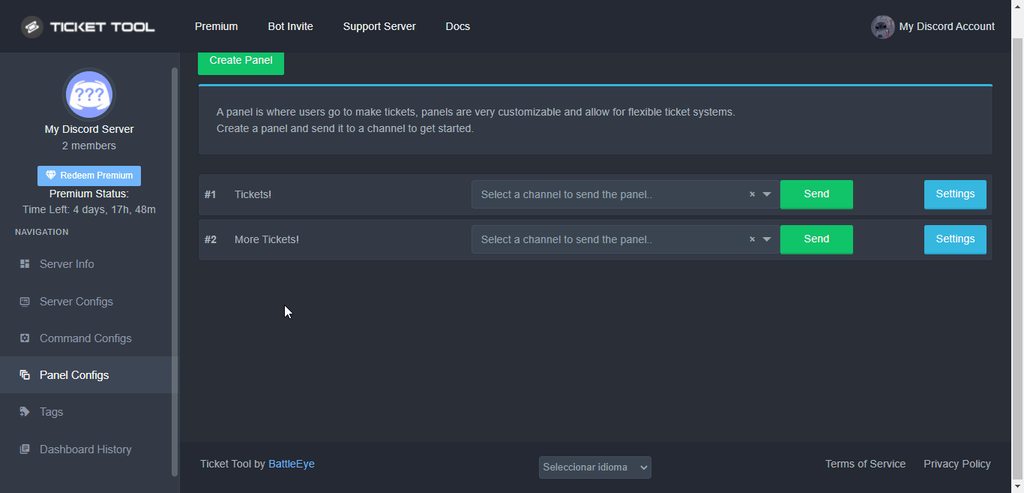 silver parcel
Idk how to word what i'm trying to ask lol.. Is there a way that a mod can claim the ticket and make it so the other mods can't see that one ticket?
quasi cliff
yes that's what I said
quasi cliff
quasi cliff
Simply change the Read Messages perms to off
https://i.imgur.com/rA6Zjne.gif
Change the permissions for other support, disabling read message perms for others
quasi cliff
Yeah we're here to help
silver parcel
with me being the server admin can i still see those tickets even if another mod claimed?
If that makes sense
quasi cliff
User with Admin perms can see all channels
silver parcel
Thank you for your help @quasi cliff I really do appreciate it!
iron nightBOT
Gave +1 Rep to @quasi cliff
quasi cliff

 austere isle
humble sequoiaBOT
austere isle
humble sequoiaBOT
Ticket Tool is a fantastic bot that deals with Tickets! With an easy to use bot that has a dashboard/website at https://tickettool.xyz/. Ticket tool is one of a kind with its customization and truly is a great bot which is why it has amassed over 200 million users!
The bot offers:
Ticketing without clutter!
Ticket Tool is currently being used within 1,700,000+ servers, with a total of 260 million+ users, and has created over 160 million+ tickets.
Ticket Tool truly is an amazing bot that has such a big impact on this server!
:globe_with_meridians: https://tickettool.xyz/
 https://discord.gg/tickettool
:scroll: https://docs.tickettool.xyz/
~ Ticket Tool Team
·
 solid oasis
Good evening, I was wondering if there is a command to pull deleted tickets or are tickets that are deleted permanently gone?
quasi cliff
Tickets get deleted permanently if you do not save a Transcript
You can simply click the Transcript button before deleting to save it or setup auto-transcript (Premium)
quasi cliff
It's $transcript
solid oasis
Thats the create command. I need a pull command or query command
quasi cliff
You can't get transcript of already deleted ticket now
quasi cliff
You can go with Premium for auto transcripting in a channel
It will transcript all deleted tickets there and you can search them
solid oasis
I'm on to saving transcripts, then deleting them, and then referencing them later.
quasi cliff
Yes you can either by manually saving the transcripts or by bot automatically with premium
solid oasis
Those were 2 different questions, sorry I wasn't clear
I got that auto part, I haven no issue with manually saving the transcripts. But they live somewhere right?
quasi cliff
Transcripts are saved as html files
and you can add a Transcript channel
$help transcript
humble sequoiaBOT
How do I save transcript to a channel?
To save transcripts to a channel go to the Dashboard -> Panel Configs -> Settings -> Logging Options -> Transcript Channel
 solid oasis
I was just sent a warning for "misusing general support" by the ticket bot. Not sure what error I made to warrant that
This is the correct channel to ask questions right?
 pseudo juniper
can someone help me ticket tool is in my server but on the website its not coming up
humble sequoiaBOT
Don't see your server in the dashboard?
You will possibly need to relog. Look below to see steps on how to relog.
How to relog in the Dashboard.
First, you will need to go to the dashboard. Once your there, click on your avatar on the top right. after you clicked it, you will see button that says Logout. You must click that. Once you have logged out, you can log back in.
Note:
You need one of these 3 things to access the dashboard.
1. Server Owner (Level: 6)
2. Server Administrator (Level: 4)
3. Dashboard Role (Level: 2)
:warning: You can check your level using $level on your Discord Server
User permission level with Ticket Tool
@User is permission level: 0 (User)
```» *If it shows that your permission is **0**, you don't have any of the above **3 things** to manage the dashboard.*
**See the GIF below on how to relog:** hallow marlin
@pseudo juniper check this out
pseudo juniper
ok but how do i give out levels
hallow marlin
pseudo juniper
?
To access the dashboard, you simply need the following permissions:
- Server Owner
- Server Administrator
- Dashboard Role
jade topaz
How to do that a role can't make tickets?¿
gilded verge
jade topaz
How to do that a role can't make tickets?¿
Please go to Panel Configs->Panel Settings->Button Options->Create Ticket Settings->and to Disabled Roles add roles you don't want them to open a ticket :>
jade topaz
Thanks :)
 north zephyr
@gilded verge sir no help
gilded verge
north zephyr
<@334671104704774154> sir no help
I don't remember answering any of your questions. If you need help, write here and do not ping 🤨
north zephyr
gilded verge
I don't remember answering any of your questions. If you need help, write here a...
Sir! I have ticket tool premium in my server but neither the premium one nor the non premium bot is responding
gilded verge
you need space after ping, so like:
@humble sequoia help
Please make sure you are using the correct prefix (Server Configs)
north zephyr
Didn't work
 north zephyr
gilded verge
Please make sure you are using the correct prefix (Server Configs)
north zephyr
gilded verge
Please make sure you are using the correct prefix (Server Configs)
Idk the prefix my admin invited the bot
And from then it's useless
gilded verge
In a private message, please send me a link to your server
north zephyr
Check dm
gilded verge
actually, are you sure that the bot has permissions to a given channel ?
north zephyr
I gave it admin perms
gilded verge
hm... has your server purchased premium or redeemed premium from votes? 🤔
north zephyr
lemme ask him
gilded verge
okay
humble sequoiaBOT
How to disable the premium bot
To disable the premium bot you will have to go to the Dashboard ➞ Server Configs ➞ Premium bot ➞ And on the right-hand side select the primary free bot in the drop down menu.
Premium features will still work on the normal bot.
gilded verge
humble sequoia
@north zephyr, If a premium bot was invited but your server does not have an active premium, the bot will not work, so it looks like you should see BOT ERROR on the left side of the dashboard and in this case you need to change from a premium bot to a free version.
Please check if you see something like this 🤔
 foggy mango
How can i create something like that
 humble sequoiaBOT
Multipanels are panels with multiple buttons attached to them.
How to create a Multipanel
Premium users can combine multiple panels into one multipanel.
First, find the IDs of each panel you wish to combine. You can find them in your Panel Configs in the Dashboard
Next, send the multipanel to a channel using $panel [id1] [id2] {id3} ....
e.g. $panel 1 2 4 17 35 to combine panels 1, 2, 4, 17 and 35.
Up to 25 panels may be combined.
You can also watch this video tutorial.

 arctic pagoda
foggy mango
How can i create something like that
arctic pagoda
foggy mango
How can i create something like that
^
foggy mango
arctic pagoda
^
thx dude 😄
iron nightBOT
Gave +1 Rep to @arctic pagoda
arctic pagoda
foggy mango
thx dude 😄
No problem.
 tiny scarab
where can I find my created request for help, on a specific server?
I was even told that they had already given an answer to my ticket (under the number so and so) and I can't find where it can be seen in any way?
gilded verge
 mint steeple
i need you to debug ticket tool please
mint steeple
i need you to debug ticket tool please
Hey, if you are posting this link, does that mean you have a problem with something? If so, please describe 😳
mint steeple
Ticket Tool does not reply when I do the help command.
humble sequoiaBOT
━━ moved to ticket ━━
 past birch
mint steeple
Ticket Tool does not reply when I do the help command.
past birch
mint steeple
Ticket Tool does not reply when I do the help command.
same
quasi cliff
mint steeple
Ticket Tool does not reply when I do the help command.
Bot does not have Send Message permissions in that channel
mint steeple
quasi cliff
Bot does not have Send Message permissions in that channel
Thank you
iron nightBOT
Gave +1 Rep to @quasi cliff
 grave coyote
hi im french can u help me for install a driver for f1 22 on ferrari t80 488?
humble sequoiaBOT

⚠️ You're in the wrong place
We provide support for @pseudo glen discord bot and cannot help you with whatever issue you have.
- We don't know which Support Team you should contact to get this issue resolved, and unfortunately we won't be able to accurately tell you.
If you don't have any further questions regarding our bot Ticket Tool, please close this ticket
north zephyr
gilded verge
<@969883502029996082>, If a premium bot was invited but your server does not hav...
He said he got link from somewhere to invite the bot
humble sequoiaBOT
Ticket Tool Invite & Support
gilded verge
try invite bot link :>
 violet thunder
it says that it doesnt have acess to view the channel
 gilded verge
Yup, then you need go to channel settings and give permission View Channel and Send Messages for Ticket Tool
north zephyr
gilded verge
try <:this:894279341108772914> invite bot link :>
Me?
Can anyone gimme the link of dashboard,whenever i Google it, it gives me the docs website
humble sequoiaBOT
 stoic falcon
It is correct to say that only support staff can or should see the ticket transcripts channel? And therefore is the only way for users to get their transcripts is to go premium so it can be DM'ed to them?
gilded verge
stoic falcon
It is correct to say that only support staff can or should see the ticket transc...
Of course, it would be best if only your staff/mods saw the transcripts to keep your ticket private, but you can change the transcription channel setting to open, here no problem but remember that then they would see all transcripts.
As for DM transcripts, the server need premium to sent to users, unfortunately there is no other way 😳
stoic falcon
Thanks for confirming. That might be something we consider in the future since the server I co-admin is official to a company and they may find it useful.
thanks @gilded verge
iron nightBOT
Gave +1 Rep to @gilded verge
 fresh bane
I'm a little bit paranoid when it comes to giving server-wide permissions to bots, so I'm setting the required permissions manually. I managed to set up the panel successfuly, however, once the ticket is open, the bot is unable to manage the channel
I've set up a dedicated category for the tickets that does give the needed manage permissions, but Ticket Tool isn't able to make use of them. If I sync the channel permissions manually, everything works properly, except it removes the person who opened the ticket
Is there a way to make the bot sync the permissions with the category after it creates the channel but before "inviting" the user?
 rustic gale
fresh bane
I'm a little bit paranoid when it comes to giving server-wide permissions to bot...
rustic gale
fresh bane
I'm a little bit paranoid when it comes to giving server-wide permissions to bot...
Unfortunately no.
I managed to set up the panel successfuly, however, once the ticket is open, the bot is unable to manage the channel
This problem is due to the bot lacking one or more of the permissions it's trying to toggle.
You will need to give the bot the following permissions...
fresh bane
rustic gale
> I managed to set up the panel successfuly, however, once the ticket is open, t...
the bot does have those permissions in the category dedicated to tickets, but it seems to be creating the channel from a blank template
rustic gale
You will need to give them to the Ticket Tool role in the server's role settings
Manage Channel
View Channel
Send Messages
Send Text-to-Speech Messages
Manage Messages
Embed Links
Attach Files
Read Message History
Use External Emojis
Add Reactions
fresh bane
that's a shame, I really liked the tool... appreciate the help
rustic gale
The other workaround is to manually give the bot the Manage Permissions permission on each new ticket.
Last i heard, it is apparently a Discord limitation that the bot can't grant itself the Manage Permissions permission.
fresh bane
thanks @rustic gale
iron nightBOT
Gave +1 Rep to @rustic gale
fresh bane
I created a channel myself and the tool does have the permissions it needs... I'll try some stuff out
 jade topaz
Hi i was wondering how to put the ticket automatically under a category because i dont want it to go to the top all of the time
rustic gale
$help category
humble sequoiaBOT
How to set the open category
To set a open category go to the Dashboard -> Panel Configs -> Settings -> Category Options -> Category Open
rustic gale
@jade topaz There you go
rustic gale
fresh bane
I created a channel myself and the tool does have the permissions it needs... I'...
There's a few phantom permissions that aren't mentioned there but are still required depending on how you've set open and closed permissions for your ticket
Everything that has a  or
or  somewhere is mandatory if the bot isn't admin.

That may include things such as Send Text-to-Speech Messages and Use External Emojis
fresh bane
rustic gale
There's a few phantom permissions that aren't mentioned there but are still requ...
I had somebody help me test it by creating a channel in that category, and the ticket tool does have the permissions it needs
 rustic gale
Can i have a screenshot of your ticket's open permissions and closed permissions please?
User open permissions and user closed permissions
fresh bane
rustic gale
Can i have a screenshot of your ticket's open permissions and closed permissions...
screenshot of what, sorry? is that in the bot's dashboard or my server settings?
rustic gale
fresh bane
screenshot of what, sorry? is that in the bot's dashboard or my server settings?
In the bot's dashboard.
 fresh bane
rustic gale
fresh bane
rustic gale
I can't find that anywhere
rustic gale
$help perms
humble sequoiaBOT
How to set the permissions for tickets
To set a change permissions go to the Dashboard -> Panel Configs -> Settings -> Permission Options


 rustic gale
Can you quickly check whether the other categories (Support Team, Additional Roles, and Everyone) have any permissions that change state when going open to closed, and which permissions change
fresh bane
rustic gale
Can you quickly check whether the other categories (Support Team, Additional Rol...
they all look like the default settings, and I don't remember changing them
rustic gale
By default the only permissions that need to be toggled are View Channel and Send Messages, so the bot should have View Channels and Send Messages as server-wide permissions
If those are enabled and the bot has all the required channel-wise permissions then it should work
fresh bane
rustic gale
If those are enabled and the bot has all the required channel-wise permissions t...
it does have those permissions
rustic gale
fresh bane
it does have those permissions
What problems are you experiencing?
fresh bane
rustic gale
What problems are you experiencing?
tool is unable to close tickets
rustic gale
What happens when you try to close a ticket?
fresh bane

but the issue is at channel creation, because the category sets the permissions the tool needs to close tickets
rustic gale
Give me a few minutes
fresh bane
rustic gale
Give me a few minutes
of course
let me know if there's anything else I can provide
 heavy sparrow
how do I get my premium rank on here please dm me bc I have to go back to work.
quasi cliff
you got the role 🙂
iron nightBOT
Gave +1 Rep to @quasi cliff
quasi cliff
fresh bane
Hey, like Outsider said before that it's discord's limitation. According to what I know, bots can't add Manage Channel permissions to themselves for categories so they need perms under role in server settings
fresh bane
quasi cliff
Hey, like Outsider said before that it's discord's limitation. According to what...
been checking out some libraries to understand how discord works, and it looks like syncing the channel permissions is an extra step. So this is likely a feature request instead
quasi cliff
Syncing a channel will always remove the user added
since the category is never gonna have user perms for each different user in new ticket
fresh bane
quasi cliff
Syncing a channel will always remove the user added
not if you do it before the user is added
rustic gale
I don't think syncing perms is something a bot can do? Is there such a thing?
quasi cliff
Bots can
fresh bane
rustic gale
I don't think syncing perms is something a bot can do? Is there such a thing?
https://discordpy.readthedocs.io/en/stable/api.html#discord.TextChannel.permissions_synced and https://discordjs.guide/popular-topics/permissions.html#syncing-with-a-category

Imagine a guide... that explores the many possibilities for your discord.js bot.
quasi cliff
Also it's still the same ig, if they have perms to sync then they have perms to manage channel. So they will still need Manage Channel perms in the bot role
fresh bane
quasi cliff
Also it's still the same ig, if they have perms to sync then they have perms to ...
that's a good point, I'll test if it's possible with a friend and create a ticket for the feature request if discord is smart to know
quasi cliff
It's like you can't add perms to send msgs if you dont have perms urself
fresh bane
quasi cliff
It's like you can't add perms to send msgs if you dont have perms urself
thanks for the help
iron nightBOT
Gave +1 Rep to @quasi cliff
fresh bane
thanks @rustic gale again
 vernal vale
Hey. I want to know how to claim tickets. ty
rustic gale
vernal vale
Hey. I want to know how to claim tickets. ty
It's a premium feature. Enable it in Claiming Options in your dashboard
vernal vale
rustic gale
It's a premium feature. Enable it in Claiming Options in your dashboard
i want to mean how can i claim a ticket
 rustic gale
Please explain what you mean by “claim a ticket”
rustic gale
You want to create one of these?
 vernal vale
no to claim one
i got trial helper role on the server
but idk how can i claim tickets
rustic gale
vernal vale
but idk how can i claim tickets
Enter the ticket you want to claim, then press this button

 severe gyro
Que
rustic gale
It should be somewhere in your channel list
iron nightBOT
Gave +1 Rep to @rustic gale
 silver marsh
How do i make buttons, so like 1 embed and 3 buttons
clicking the button corresponds with what ticket to open
humble sequoiaBOT
Multipanels are panels with multiple buttons attached to them.
How to create a Multipanel
Premium users can combine multiple panels into one multipanel.
First, find the IDs of each panel you wish to combine. You can find them in your Panel Configs in the Dashboard
Next, send the multipanel to a channel using $panel [id1] [id2] {id3} ....
e.g. $panel 1 2 4 17 35 to combine panels 1, 2, 4, 17 and 35.
Up to 25 panels may be combined.
You can also watch this video tutorial.
For a more convenient use of multipanels, you can now combine panels on the dashboard. This will allow you to directly send the multipanel from the dashboard or via the $panel ID command.
Where can I find this?
You can find this setting on the Dashboard -> Panel Configs -> Settings -> General Options
Note: if you're attaching all the panels to a panel called English, don't include English in the attached panels box (If you do this, it will create duplicate)
This will put all buttons from all of your panels on one message. The message is the panel message from the panel you're combining these panels in.
You can also watch this video tutorial.
 silver marsh
ofc its premium
rustic gale
silver marsh
ofc its premium
It's not
Oh, it says premium users
I'll tell staff to correct that, it's not premium
silver marsh
it literally shows a diamond icon in the video
rustic gale
silver marsh
it literally shows a diamond icon in the video
The video is outdated, but the instructions work just as well
You don't need premium to use multipanels
 drowsy flower
Hi everyone hope you are doing well !
I would like to know , if it's possible to get a notification on my cellphone or discord app
When someone create a ticket !
Best regards !
rustic gale
drowsy flower
Hi everyone hope you are doing well !
I would like to know , if it's possible ...
It depends on how your notifications are set
You can also make the ticket message ping you or a role you have.
 worldly relic
هلوو
drowsy flower
rustic gale
It depends on how your notifications are set
Currently , i would like to get a notifcation on my cellphone when someone open a ticket ,
Currently that the notification setting i got
 rustic gale
How are the app's notifications set up on your phone?
drowsy flower
rustic gale
How are the app's notifications set up on your phone?
Notification are enable !
rustic gale
And you're not getting notifications when tickets are created?
drowsy flower
rustic gale
And you're not getting notifications when tickets are created?
Currently I'm on desktop
i get a sounds from discord , but nothing on my cellphone
or i don't have a 1 in my discord thing !
If i setup a ping , i would get notification everywhere right ?
rustic gale
It depends on how your notifications are set up, but it could work
Also
While you're active on desktop, Discord stops sending notifications to your phone.
 drowsy flower
rustic gale
While you're active on desktop, Discord stops sending notifications to your phon...
drowsy flower
rustic gale
While you're active on desktop, Discord stops sending notifications to your phon...
Yes i know this , But i would like to get a ping if possible
or get a 1 on the server icons , if it's possible ? 🙂
rustic gale
Sure enough, including a ping in the ticket message will do just that.
Open your dashboard -> Panel Configs -> Settings -> Ticket Options -> Edit Ticket Message
drowsy flower
I'm there !
rustic gale
Do you want it to ping you, or do you want it to ping a role you have?
drowsy flower
Me or the role i have that the same , but yes !
i am the only one who allocated to the ticket
rustic gale
$mentions
humble sequoiaBOT
Within all the messages the bot's sends (both embeds and text) you can mention either channels, roles, or even users, these mentions will only send a notification to the user if they are used within a text field, e.g: a role mentioned in an embed won't ping at all the users who have that role.
For mentioning a role you can use one out of three options:
{@Role Name} ➞ Which is Case Sensitive.
{RoleID} ➞ Replace RoleId with the Id of the role you are trying to ping.
<@&RoleID> ➞ Discord's native syntax to ping roles.
<#ChannelID> ➞ Mention a channel by its ID.
<@UserID> ➞ Mention a user by its ID.
rustic gale
Just include a mention like that in the ticket message and press Save
drowsy flower
in the first or second section ?
 rustic gale
drowsy flower
in the first or second section ?
rustic gale
drowsy flower
in the first or second section ?
In the first section. If you do it in the second section you will not get mentioned
drowsy flower
I tried couple attempts , and it's not working
Maybe i miss something
rustic gale
Make sure it looks like this:
@drowsy flower
drowsy flower
 rustic gale
Send the $delete command in each of them one by one
drowsy flower
I mean all the previous ticket
im not at 0010 ticket
how to delete to start from 0 ?
rustic gale
drowsy flower
I mean all the previous ticket
im not at 0010 ticket
how to delete to start fro...
General Options -> Ticket Count, you can set it to 0
 sturdy plume
when i set up a ticket embed message to @ the user who opened the ticket, It shows the username correctly on mobile, but on desktop site as well as the desktop app, it shows up as an id number surrounded by <>. is there any way to make it so that it shows up as a @ username on desktop?

and heres how it looks on mobile the way i want it on desktop
 rustic gale
It looks different on both versions?
sturdy plume
yeah strangely enough ^
rustic gale
That's very odd.
sturdy plume
heres the dashboard setup

 halcyon comet
sturdy plume
heres the dashboard setup
halcyon comet
sturdy plume
heres the dashboard setup
Do you have the "Advanced > Developer Mode " Enabled on computer?
sturdy plume
halcyon comet
Do you have the "Advanced > Developer Mode " Enabled on computer?
I did on one account actually, but i tried the ticket on another account as well thats on desktop and it still shows up as the ID. I just turned off developer mode on the one account and restarted the site as well as the app and the same thing still happens
rustic gale
Is your desktop app up to date?
sturdy plume
rustic gale
Is your desktop app up to date?
yes i just downloaded it, but again its also this way on desktop website
rustic gale
Oddly enough, it doesn't display correctly for me on either desktop or mobile.
It's likely a Discord issue.
You may have to refrain from using mentions in embed titles as that inconsistency doesn't seem easy to resolve.
sturdy plume
rustic gale
Oddly enough, it doesn't display correctly for me on either desktop or mobile.
oh weird, on mobile either for you? yeah i guess ill remove it. please @ me if you figure out a solution at any point cause i really like how it looks with it included when it displays correctly
 vast schooner
I just bought the premium but I can't use the premium bot
sturdy plume
vast schooner
I just bought the premium but I can't use the premium bot
go to server configs in the dashboard and invite it
then select the premium one on drop down menu
jade topaz
ayo how do i gett rid of the second button
 fallow ingot
You’ve probably accidentally added an attached panel.
You can check under General Options.
jade topaz
 fallow ingot
Hmm.
jade topaz
thanks @fallow ingot
iron nightBOT
Gave +1 Rep to @fallow ingot
jade topaz
:)
fallow ingot
ah legend 
jade topaz
fallow ingot
ah legend <a:DC_stickman:817455324273049601>
always
 misty shale
I need help
humble sequoiaBOT
We would love to help you, but if you don't tell us what you need help with we can't help you :(
misty shale
🤦🏾♂️ I can't work the bot and I don't know how to
 naive canyon
how to ping role in ticket (message)
misty shale
Fuck this
naive canyon
humble sequoia
lol
fallow ingot
$help ping
humble sequoiaBOT
How to make Ticket Tool ping a role
To make ticket tool ping a role when a ticket is opened, go to the Dashboard -> Panel Configs -> Settings -> Ticket Options -> Ticket Message -> Message Text and do this:
{@Role name} This is case sensitive and the role must have @mentions enabled
fallow ingot
@naive canyon ^
If you want to ping inside the embed that won’t work, it will show but it won’t actually ping.
jade topaz
how do i add a role to support team
 humble sequoiaBOT
Within all the messages the bot's sends (both embeds and text) you can mention either channels, roles, or even users, these mentions will only send a notification to the user if they are used within a text field, e.g: a role mentioned in an embed won't ping at all the users who have that role.
For mentioning a role you can use one out of three options:
{@Role Name} ➞ Which is Case Sensitive.
{RoleID} ➞ Replace RoleId with the Id of the role you are trying to ping.
<@&RoleID> ➞ Discord's native syntax to ping roles.
<#ChannelID> ➞ Mention a channel by its ID.
<@UserID> ➞ Mention a user by its ID.
humble sequoiaBOT
How to let support team see into a ticket
About support roles
A support role lets your support team see into tickets with out having to add them manually to each and every ticket.
You can add as many support roles as you like per panel.
NOTE that the way discord works all admins can see into tickets regardless of this.
How to set a support role
To set a Support role go to the Dashboard -> Panel Configs -> Settings -> General Options -> Support Team Roles.

NOTE that the support role will not be able to see into tickets that are already created..
fallow ingot
@jade topaz ^
iron nightBOT
Gave +1 Rep to @fallow ingot
 humble sequoiaBOT
━━ moved to ticket ━━
jade topaz
I've been trying to figure this out all day, is there a way to ping a certain role for my ticket? I've been watching youtube videos but can't figure it out
fallow ingot
$help ping
humble sequoiaBOT
How to make Ticket Tool ping a role
To make ticket tool ping a role when a ticket is opened, go to the Dashboard -> Panel Configs -> Settings -> Ticket Options -> Ticket Message -> Message Text and do this:
{@Role name} This is case sensitive and the role must have @mentions enabled
fallow ingot
@jade topaz check this out ^
jade topaz
fallow ingot
<@456226577798135808> check this out ^
thank you very much.
iron nightBOT
Gave +1 Rep to @fallow ingot
fallow ingot
 jolly topaz
Hey i voted on top.gg and get nothing, the second work
jolly topaz
Hey i voted on top.gg and get nothing, the second work
Click the link again does it let you vote again or telling you to wait 12 hours?
fallow ingot
jade topaz
thank you very much.
np
jolly topaz
fallow ingot
Click the link again does it let you vote again or telling you to wait 12 hours?
need to wait 😦
fallow ingot
Hmm. And it is still isn’t showing on the $vote command?
There was an issue with the vote command not long ago, sometimes there can be connection issues and it doesn’t go through so if this persists in the next 12 hours, please let us know #🎫│make-a-ticket
 balmy cloak
Hello, may I ask how can I auto @role when a ticket is created?
The @role permission is on. Did I do it wrong?
 rustic gale
It's {@Team} not @Team
balmy cloak
rustic gale
It's {@Team} not @Team
thanks man you are my hero
iron nightBOT
Gave +1 Rep to @rustic gale
 orchid moat
How can i make the open ticket with members name not a number
 rose trout
orchid moat
How can i make the open ticket with members name not a number
rose trout
orchid moat
How can i make the open ticket with members name not a number
Check the panel config!
 tame tree
i cant get the premium bot in my discord server can you help
 knotty creek
i don't know how to apologize
rustic gale
orchid moat
How can i make the open ticket with members name not a number
Include {ticket.user.name} in the name
It's a premium-only feature by the way
rustic gale
tame tree
i cant get the premium bot in my discord server can you help
Look in Server Configs, there's an Invite Premium Bot button there
rose trout
^* forgot to mention that sorry
rose trout
orchid moat
Where is it
Do you have premium ticket tool?
orchid moat
Yeah
orchid moat
rustic gale
Include {ticket.user.name} in the name
Wheres that
rose trout
orchid moat
Wheres that
Ticket options under the panel
Let me know if you can not find it but
 rose trout
orchid moat
What next
rose trout
orchid moat
What next
You should be able to change the name ticket to what ever you want
orchid moat
Oh
rose trout
I recommend keeping the -count part
rose trout
orchid moat
Oh
Hope that helped you!
orchid moat
Thx but thats not what i want
If any of members open ticket
It show with number
How can i make it show with his name
rose trout
Do you not want the number?
orchid moat
No a member name
rose trout
Send me like an example then I can assist you more
I am thinking of 2 ways but I don’t want to give you the wrong one

 rose trout
Ah
-count is the number
So replace the entire section of what I showed you to this {ticket.user.name}
orchid moat
Thanks @rose trout
iron nightBOT
Gave +1 Rep to @rose trout
orchid moat
🙂
rose trout
Of course!
knotty creek
What open the ticket?
rose trout
knotty creek
What open the ticket?
Do you me how do you open a ticket?
knotty creek
how do i open a ticket?
knotty creek
knotty creek
how do i open a ticket?
@rose trout
rose trout
knotty creek
how do i open a ticket?
For this server?
rose trout
If it is this Server look at #🎫│make-a-ticket or if it is in another sever look at my pic below
 rose trout
knotty creek
For my server
rose trout
knotty creek
For my server
If you want to set up ticket tool this video is a good start : https://youtu.be/rPz5-r4KEgo

Struggling to setup ticket tool in your discord server? By the end of today you will be able to have a working ticket system in your own discord server. Ticket's can make sorting issues out with your members so much easier and allows decisions to be dealt with correctly and in one place.
If you found the video useful, consider dropping a like!
...
I hope this helps you!
knotty creek
Thanks!
rose trout
Of course!
rose trout
knotty creek
Thanks!
Glad I could help you!
jade topaz
rose trout
Glad I could help you!
Hey
Question for you!
I have premium bot don’t have the premium bot how do I get it?
knotty creek
?
jade topaz
Like how do I get @humble sequoia in my server and not the basic one
balmy cloak
hello, I tried to @ 2 roles in the ticket message but it's not working. @ 1 is fine
 jade topaz
Wait found it
balmy cloak
balmy cloak
hello, I tried to @ 2 roles in the ticket message but it's not working. @ 1 is f...
nope, @1 role stops working too
rustic gale
balmy cloak
nope, @1 role stops working too
Put each of them in its own set of brackets
{@Role1} {@Role2}
rose trout
jade topaz
I have premium bot don’t have the premium bot how do I get it?
You can invite it on the portal
jade topaz
Found it!
rose trout
Sorry for my delayed reply!
rose trout
jade topaz
Found it!
Hope it helped!
jade topaz
rose trout
Sorry for my delayed reply!
Your all good trying to get support!?
jade topaz
rose trout
Hope it helped!
It did thank you
iron nightBOT
Gave +1 Rep to @rose trout
rose trout
jade topaz
Your all good trying to get support!?
I just like helping people! I don’t think I am eligible to apply atm!
jade topaz
Well tbh you should be! Thanks for the help!
rose trout
Any time!
balmy cloak
rustic gale
Put each of them in its own set of brackets
got it, thanks!
iron nightBOT
Gave +1 Rep to @rustic gale
 rotund sinew
quasi cliff
Sadly we already have English Team
rotund sinew
quasi cliff
Sadly we already have English Team
Add korean support
 visual cradle
Why can’t I make a ticket legit says fail on every single server I try to make a ticket
rustic gale
Update your app
iron nightBOT
Gave +1 Rep to @rustic gale
 rapid flax
@rustic gale I Can't send the ticket. How do i change it. Even if i send $debug it allways doesn't work. And i have watched tutorials.
rustic gale
rapid flax
<@832864595726172162> I Can't send the ticket. How do i change it. Even if i se...
What's your server's ID?
 mortal forge
Is there a way to make it so the tickets get sent to a category instead of just above all the channels?
rustic gale
$help category
humble sequoiaBOT
How to set the open category
To set a open category go to the Dashboard -> Panel Configs -> Settings -> Category Options -> Category Open
mortal forge
Oh I guess I'm just blind lol ty
 crystal crystal
I have ticket tool premium but it not show on dashboard
humble sequoiaBOT
Don't see your server in the dashboard?
You will possibly need to relog. Look below to see steps on how to relog.
How to relog in the Dashboard.
First, you will need to go to the dashboard. Once your there, click on your avatar on the top right. after you clicked it, you will see button that says Logout. You must click that. Once you have logged out, you can log back in.
Note:
You need one of these 3 things to access the dashboard.
1. Server Owner (Level: 6)
2. Server Administrator (Level: 4)
3. Dashboard Role (Level: 2)
:warning: You can check your level using $level on your Discord Server
User permission level with Ticket Tool
@User is permission level: 0 (User)
```» *If it shows that your permission is **0**, you don't have any of the above **3 things** to manage the dashboard.*


**See the GIF below on how to relog:**What to do
rustic gale
Read the guide above
rustic gale
humble sequoia
This
crystal crystal
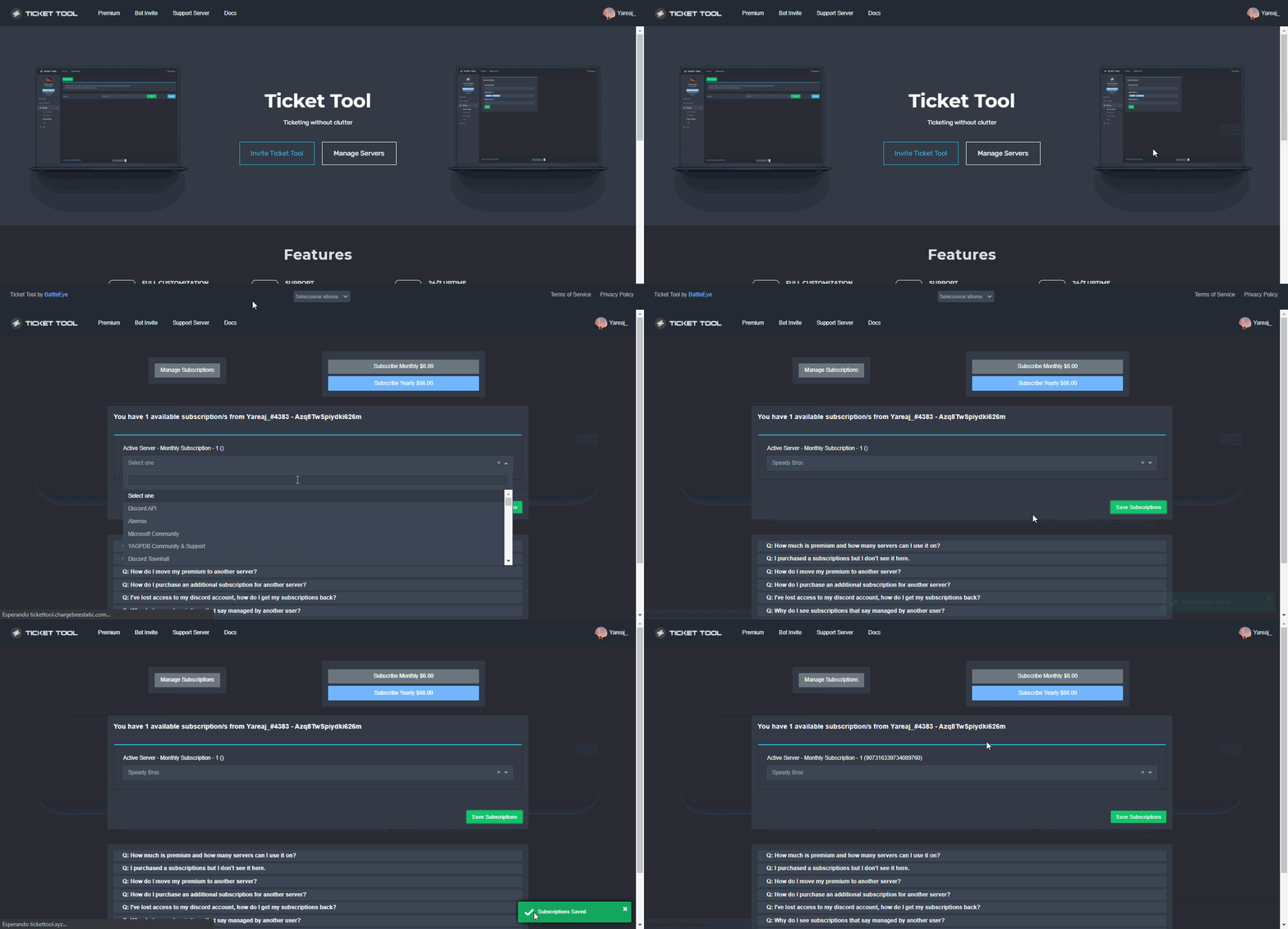
I can see dashboard but there is my premium not show
humble sequoiaBOT
Redeeming premium on your server is really simple. Just head over to your Subscriptions Page. There you can select a server of your choice, which will get premium. You can change the server at any point.
 jade topaz
Hi, can I change so that only staff can close tickets and not regular members? If so, how do I do it?
rose trout
jade topaz
Hi, can I change so that only staff can close tickets and not regular members? I...
Yes! If you look at the permission settings you can change that

Hope that helped!
jade topaz
rose trout
Yes! If you look at the permission settings you can change that
Hi, I try to understand, but unfortunately I don't
rose trout
jade topaz
Hi, I try to understand, but unfortunately I don't
Ok! So under the panel configs tab if you go to the panel (tickets) on the dashboard then go down to the + button with Permission Options. The close support is the thing you want to change
Let me know if you need me to rephrase this!
jade topaz
rose trout
Ok! So under the panel configs tab if you go to the panel (tickets) on the dashb...
What settings should I have?
rose trout
jade topaz
What settings should I have?
This depends on what roles you want to have it close ect
jade topaz
I want only me as the owner and staff to be able to close
not the regular verified members
fallow ingot
You would need to go to the close button and make it support team only or disable the member role.
$buttons
humble sequoiaBOT

The new Discord Buttons allow for a much smoother and convenient experience. They reduce lag and work much better than emojis. With ticket tool you can edit all the buttons however you like! Buttons can show emojis, text and can have 4 different colors.
Where can I edit them?
Dashboard ➞ Panel Configs ➞ Settings ➞ Button Options ➞ Setting
 fallow ingot
rose trout
Yes! If you look at the permission settings you can change that
fallow ingot
rose trout
Yes! If you look at the permission settings you can change that
Those kind of permissions are for what permissions users have inside the ticket, not what actions users can do.
jade topaz
fallow ingot
You would need to go to the close button and make it support team only or disabl...
Okay, ty. It worked!
fallow ingot
No problem
rose trout
 drifting stump
I can’t open to login it’s black screen when I open
drifting stump
I can’t open to login it’s black screen when I open
That looks like a downloadable file. If you download it you should be able to open and view the transcript
drifting stump
@rose trout wdym?
rose trout
drifting stump
<@471096143447851039> wdym?
The file you attached is a transcript file. To view it you can download it.
rose trout
drifting stump
Oh you mean that. Click on the link then there should be a login button!
drifting stump
Yea I can’t login
rose trout
drifting stump
Yea I can’t login
I can’t help with that so you will need to open a ticket in #🎫│make-a-ticket
I am just a community member so I don’t know what would be happening
fallow ingot
drifting stump
Yea I can’t login
What do you mean you can’t login?
drifting stump
Look at the video
drifting stump
Yep
fallow ingot
Try with this link below
humble sequoiaBOT
fallow ingot
Hmm. Can you use another browser?
drifting stump
But this acc what I need
fallow ingot
Using another browser will likely solve your issue, safari isn’t always the best with me either but I’m not having any issues atm.
 harsh cradle
My ticket tool was working but all of a sudden it shows "this interaction failed" whenever I click "create ticket"
 slender minnow
If Ticket Tool is down in your server, allow it a few more minutes.
 worthy zealot
slender minnow
If Ticket Tool is down in your server, allow it a few more minutes.
worthy zealot
slender minnow
If Ticket Tool is down in your server, allow it a few more minutes.
Okay thanks
iron nightBOT
Gave +1 Rep to @slender minnow
harsh cradle
harsh cradle
My ticket tool was working but all of a sudden it shows "this interaction failed...
But what about this @slender minnow
Sorry
worthy zealot
How do I give +rep to u whitewolf
 robust wolf
 slender minnow
if ticket tool is down in your server, clicking buttons should give you interaction failed
jade topaz
slender minnow
if ticket tool is down in your server, clicking buttons should give you interact...
why is it down
 harsh cradle
How long does it usually take for the bot to come online
 crimson light
 robust wolf
557628352828014614
crimson light
The bot if offine
robust wolf
bro the bot is offline
crimson light
And its not working
robust wolf
crimson light
The bot if offine
sameee problemmm
crimson light
What should i do
 long mica
Anyone know why I get "This Interaction Failed"
 hard dock
البوت طافي
crimson light
long mica
Anyone know why I get "This Interaction Failed"
The bot is down
robust wolf
long mica
Anyone know why I get "This Interaction Failed"
cz the bot is offline
worthy zealot
Bot is offline =[
crimson light
hard dock
البوت طافي
اي
long mica
Oh true! Did this just happen?
hard dock
crimson light
The bot is down
how much up?
 dense burrow
Back online?
worthy zealot
 dense burrow
Nvm
harsh cradle
 robust wolf
shit bot ticket tool
worthy zealot
robust wolf
shit bot ticket tool
Bro it happens sometimes, don't make the bot sh1t!
The bot is very good!
robust wolf
worthy zealot
Bro it happens sometimes, don't make the bot sh1t!
what ever
when it will sloved?
worthy zealot
Soon.. Idk when
robust wolf
worthy zealot
The bot is very good!
idc
robust wolf
worthy zealot
Soon.. Idk when
mhmmm
worthy zealot
Then f off
rose trout
robust wolf
what ever
when it will sloved?
Most likely with time but you can also make a ticket
robust wolf
worthy zealot
Then f off
same bruh
hard dock
$help
humble sequoiaBOT
Help Options
$help commands - Information on commands
$help setup - Information on bot setup
$help faq - Frequently asked questions
rose trout
As members will most likely not know this
hard dock
@pseudo glen go one line
dense burrow
robust wolf
shit bot ticket tool
If u have such problems buy the premium one that’s still working.
robust wolf
rose trout
Most likely with time but you can also make a ticket
no not is is showing offline + when i create ticket interraction failed
dense burrow
@humble sequoia
rose trout
robust wolf
no not is is showing offline + when i create ticket interraction failed
Mhm interesting. It fails interaction because it is offline
It is just the error message discord does with this bot
robust wolf
 dense burrow
Omg something’s wrong with the servers the bot is hosted on what’s so hard to understand
robust wolf
rose trout
Mhm interesting. It fails interaction because it is offline
idk but u can see here @pseudo glen bot is online
slender minnow
Hey guys, apologies for the outage. Please allow some time for the team to fix the outages ^^;
worthy zealot
How do I +rep u WhiteWolf
worthy zealot
slender minnow
Hey guys, apologies for the outage. Please allow some time for the team to fix t...
No problem ❤️
harsh cradle
worthy zealot
Back online!!!!!!!
Not for me :(
hard dock
robust wolf
bruh win 7
crimson light
worthy zealot
Back online!!!!!!!
Nope still
 robust wolf
worthy zealot
Back online!!!!!!!
robust wolf
worthy zealot
Back online!!!!!!!
mehhh in my offline
rose trout
Yes
robust wolf
crimson light
Nope still
yeahh!
robust wolf
hard dock
bruh win 7
not my one
harsh cradle
Offline :(
hard dock
robust wolf
not my one
bruh
robust wolf
rose trout
Ticket tool is on shards
he is drunkedd
rose trout
Yes again if it is coming back online it needs to start the shards
rose trout
robust wolf
he is drunkedd
Ok! Hope I helped!
robust wolf
rose trout
Ok! Hope I helped!
not better -_-
 quartz folio
why is tickettool down?!?!?1?
 robust wolf
quartz folio
why is tickettool down?!?!?1?
robust wolf
quartz folio
why is tickettool down?!?!?1?
idk
rose trout
robust wolf
not better -_-
Again it is down please wait for it to be back. Outages happen even to major bots
robust wolf
mee6 is alsoo doo thatt
robust wolf
rose trout
Again it is down please wait for it to be back. Outages happen even to major bot...
yep iam waiting but my server member are slanging mee -_-
$help
humble sequoiaBOT
Help Options
$help commands - Information on commands
$help setup - Information on bot setup
$help faq - Frequently asked questions
rose trout
robust wolf
yep iam waiting but my server member are slanging mee -_-
Yes so if you need just create a support channel in your server. Atm ticket tool is down in some areas

 buoyant kestrel
The bot is down right?
worthy zealot
Yeah
robust wolf
rose trout
Yes so if you need just create a support channel in your server. Atm ticket tool...
yes see that
buoyant kestrel
Ripp
worthy zealot
Just give it some time
rose trout
^^
robust wolf
worthy zealot
bot is down bruhh
 dawn monolith
worthy zealot
dawn monolith
worthy zealot
i have this proplem too why not work ?
robust wolf
rip ticket tool
worthy zealot
slender minnow
If Ticket Tool is down in your server, allow it a few more minutes.
.
robust wolf
dawn monolith
i have this proplem too why not work ?
bot is down bruhh -_-
worthy zealot
slender minnow
Hey guys, apologies for the outage. Please allow some time for the team to fix t...
.
dawn monolith
okey
dense burrow
robust wolf
bot is down bruhh -_-
It’s not down anymore
robust wolf
dense burrow
It’s not down anymore
is that real w8 let me check
dense burrow
K

 calm dew
its down
jade topaz
Ticket tool down?
calm dew
yeah
 calm dew
it dosent work for m
dense burrow
It was working not long ago
calm dew
wwait hes back
jade topaz

 upper rover
it says it’s online now but still not working
jade topaz
 dense burrow
I can close but I can’t open lmao
harsh cradle
Ticket tool works now but I can't delete ticket
 jade topaz
I cannot make / open / close tickets
 novel kraken
Mine is working just fine
dense burrow
novel kraken
Mine is working just fine
You use the premium bot
novel kraken
dense burrow
You use the premium bot
Yes I do but I also use the regular one in another server that I manage and that one is also working just fine
dense burrow
harsh cradle
Ticket tool works now but I can't delete ticket
I mean there’s still the delete channel button.
 jade topaz
Huh, my own server, there its online but mh other server not
harsh cradle
dense burrow
I mean there’s still the delete channel button.
Ik, but other helpers don't have access to it
buoyant kestrel
novel kraken
Yes I do but I also use the regular one in another server that I manage and that...
Is there another way to delete tickets using the premium bot?
jade topaz
$close?
dense burrow
Isn’t it just the same bot on a different server
jade topaz
No, cuz the discriminator is the same
buoyant kestrel
Nah it doesn't work
jade topaz

 dense burrow
Both have .$help
upper rover
working for us now👍
jade topaz
Both 4843
novel kraken
jade topaz
$close?
$delete
dense burrow
So the premium bot also saves the conversation?
jade topaz
I think ye
 slender minnow
dense burrow
So the premium bot also saves the conversation?
slender minnow
dense burrow
So the premium bot also saves the conversation?
Premium bot does everything that the primary bot can do.
The only difference is the response time and up time
dense burrow
Oh.
 slender minnow
There seems to be an outage with the primary bot. The issue is being monitored and the development team has been notified.
 upper marlin
ok thx u
Is it normal that ticket tools can create just 1 ticket and the person has to close the ticket so that we can make a ticket?
slender minnow
yes
 meager crest
hey I have a question
slender minnow
because that's how the panel has been set up
robust wolf
is it onnline??
meager crest
I am alone with this error ?
 robust wolf
meager crest
I am alone with this error ?
robust wolf
meager crest
I am alone with this error ?
nopee i am alsoo with u
meager crest
okay thanks I had create a support ticket
slender minnow
slender minnow
There seems to be an outage with the primary bot. The issue is being monitored a...
@robust wolf@meager crest
robust wolf
slender minnow
<@736796132847517696><@300663731610714122> <:this:894279341108772914>
thanks a lot man
in my server its has been solved
iron nightBOT
Gave +1 Rep to @slender minnow
 supple lodge
on my server bot offline
slender minnow
slender minnow
There seems to be an outage with the primary bot. The issue is being monitored a...
@supple lodge
 errant compass
I need someone
supple lodge
slender minnow
<@846001362587353109> <:this:894279341108772914>
thx
iron nightBOT
Gave +1 Rep to @slender minnow
errant compass
I have a problem
 vapid widget
The ticket tool bot is offline how do i fix it?
meager crest
slender minnow
There seems to be an outage with the primary bot. The issue is being monitored a...
but my bot is not offline
slender minnow
did you tried again after a few mins? Make sure your discord client is updated and have a decent connection.
 analog sable
bot offline
 gleaming blaze
Hey, why is the Bot offline and do you guys have an ETA when its going to be back online
rustic gale
There's an outage. Staff is aware and tracking the issue. We can't be sure when it will be solved
 vestal summit
O bot não aparece, queria configurar mais não dar
The bot does not appear, I wanted to configure but not give
humble sequoiaBOT
Don't see your server in the dashboard?
You will possibly need to relog. Look below to see steps on how to relog.
How to relog in the Dashboard.
First, you will need to go to the dashboard. Once your there, click on your avatar on the top right. after you clicked it, you will see button that says Logout. You must click that. Once you have logged out, you can log back in.
Note:
You need one of these 3 things to access the dashboard.
1. Server Owner (Level: 6)
2. Server Administrator (Level: 4)
3. Dashboard Role (Level: 2)
:warning: You can check your level using $level on your Discord Server
User permission level with Ticket Tool
@User is permission level: 0 (User)
```» *If it shows that your permission is **0**, you don't have any of the above **3 things** to manage the dashboard.*


**See the GIF below on how to relog:**
Não vê seu servidor no painel?
Você possivelmente precisará relogar. Veja abaixo as etapas sobre como relogar.
Como relogar o painel.
Primeiro, você precisa ir para o painel. Quando estiver lá, clique no seu avatar no canto superior direito. depois de clicar nele, você verá o botão Logout. Você deve clicar nisso. Depois de fazer logout, você pode fazer login novamente.
Observação:
Você precisa de uma dessas três coisas para acessar o painel.
1. Proprietário do servidor (Level: 6)
2. Administrador do servidor (Level: 4)
3. Função do painel (Level: 2)
:warning: Você pode verificar o seu nível usando $level no seu servidor Discord
User permission level with Ticket Tool
@User is permission level: 0 (User)
```» *Se mostrar que sua permissão é **0**, você não tem nenhuma das **3 coisas** acima para gerenciar a dashboard.*
**Veja o GIF abaixo sobre como relogar:** fervent cape
hey guys my bot randomly started acting up.
its not letting ticket creators send messages in the ticket
 viscid dagger
Hello, I added your bot ticket tool to my server, but it is not displayed on my site what to do?
humble sequoiaBOT
Don't see your server in the dashboard?
You will possibly need to relog. Look below to see steps on how to relog.
How to relog in the Dashboard.
First, you will need to go to the dashboard. Once your there, click on your avatar on the top right. after you clicked it, you will see button that says Logout. You must click that. Once you have logged out, you can log back in.
Note:
You need one of these 3 things to access the dashboard.
1. Server Owner (Level: 6)
2. Server Administrator (Level: 4)
3. Dashboard Role (Level: 2)
:warning: You can check your level using $level on your Discord Server
User permission level with Ticket Tool
@User is permission level: 0 (User)
```» *If it shows that your permission is **0**, you don't have any of the above **3 things** to manage the dashboard.*


**See the GIF below on how to relog:**
 fallow ingot
 hidden silo
Can you try to log out and back in?
hidden silo
Have it doesnt work.
 onyx frost
 rustic gale
@onyx frost
humble sequoiaBOT
How to disable the premium bot
To disable the premium bot you will have to go to the Dashboard ➞ Server Configs ➞ Premium bot ➞ And on the right-hand side select the primary free bot in the drop down menu.
Premium features will still work on the normal bot.
long mica
Any Discord wizards here?
rustic gale
Or you can go ahead and say what you need help with and we'll see if we can help you
harsh cradle
Members can see closed tickets, how do I fix this issue?
humble sequoiaBOT
How to set the permissions for tickets
To set a change permissions go to the Dashboard -> Panel Configs -> Settings -> Permission Options
harsh cradle
But wouldn't that make open tickets invisible too?
rustic gale
There's open permissions and there's closed permissions
iron nightBOT
Gave +1 Rep to @rustic gale
 lime dust
Hello, sorry for my english 😅
I have a question about the Ticket Tool. Is it possible, That the created Channel for the Ticket, get the Name from the User?
rustic gale
Of course, but it's a premium feature
lime dust
Wow. Thank you for the fast answer 👍
fallow ingot
outsider is wayy too fast for me now 🔥
rustic gale
You can manually change the channel name using the $rename command though
lime dust
And the second question.
We want to make an online flea market. And for the Organisation i want to make a private group for the users, and in the Channels they can Only See Their Channels with the Tickets they Made, Not from the Other Users in the Same group. Behause of That, i Set the everyone role for the group invisible. But When the flea market Starts, i want, That everyone can See the Other Channels.
rustic gale
Okay, so, let me understand
Before the market starts, you want each user to see only his/her own created tickets yes?
lime dust
Yes
rustic gale
That's normal ticket behavior, so that's no problem
But after the market starts you want everyone to be able to see all the tickets yes?
rustic gale
So you don't want them to be able to send messages in other's tickets
lime dust
Yes.
rustic gale
Hmmmm
Let me think about this. It's possible but i'm thinking of the best way to do it
lime dust
I Need this Setting or not?
 rustic gale
Changing the permission in the dashboard will not work because those permissions don't get applied to old tickets
Only to new tickets created after the change
lime dust
Oh okay.
But when i say in the group Setting for Everyone, dont Show the group With the textchannels, is the Ticket Setting still showing the Channel for everyone?
rustic gale
Quick question. In your server's role settings, for the default permissions, is View Channels enabled or disabled?
lime dust
The Setting for the group. And when it starts, i Want to enable it, That all private Tickets Can See Everybody

 brave mason
how to put only 3 roles to mange the ticket
brave mason
i dont want support to see the tickets ..
fallow ingot
What do you want?
rustic gale
lime dust
I Need this Setting or not?
Here, you should make Read Messages NEUTRAL  instead of enabled
fallow ingot
brave mason
only the owner and the mod
I’m confused, you want to add the owner and mod to support team?
lime dust
rustic gale
Here, you should make Read Messages NEUTRAL <:SlashCommand:846772177697374228> i...
Before the start disable, and at Start neutral?
brave mason
fallow ingot
I’m confused, you want to add the owner and mod to support team?
I only want the mod and the admin see the ticket, I don't want the support see the ticket
rustic gale
No, neutral now and neutral later. Always neutral
And in your server's role settings, deny everyone the View Channels permission. Let me show you how
fallow ingot
brave mason
I only want the mod and the admin see the ticket, I don't want the support see ...
Ok, so add your mods to the support team.
$help support
humble sequoiaBOT
How to let support team see into a ticket
About support roles
A support role lets your support team see into tickets with out having to add them manually to each and every ticket.
You can add as many support roles as you like per panel.
NOTE that the way discord works all admins can see into tickets regardless of this.
How to set a support role
To set a Support role go to the Dashboard -> Panel Configs -> Settings -> General Options -> Support Team Roles.
NOTE that the support role will not be able to see into tickets that are already created..
 lusty bluff
i cant see my server
humble sequoiaBOT
Don't see your server in the dashboard?
You will possibly need to relog. Look below to see steps on how to relog.
How to relog in the Dashboard.
First, you will need to go to the dashboard. Once your there, click on your avatar on the top right. after you clicked it, you will see button that says Logout. You must click that. Once you have logged out, you can log back in.
Note:
You need one of these 3 things to access the dashboard.
1. Server Owner (Level: 6)
2. Server Administrator (Level: 4)
3. Dashboard Role (Level: 2)
:warning: You can check your level using $level on your Discord Server
User permission level with Ticket Tool
@User is permission level: 0 (User)
```» *If it shows that your permission is **0**, you don't have any of the above **3 things** to manage the dashboard.*


**See the GIF below on how to relog:**on dashboard
fallow ingot
humble sequoia
@lusty bluff check this out
rustic gale
@lime dust


Make sure View Channels is disabled 
When the market starts, you enable it  That will let everyone see everyone's tickets
lime dust
Okay. But i have a Server With more Channels. I cant disable it 😅
rustic gale
Hmm. Let me think of a different solution
lime dust
rustic gale
Hmm. Let me think of a different solution
Its ok. Please dont put to much time in it.
rustic gale
Here's another option. In Permission Options you see there's Everyone Opened Permissions and Everyone Closed Permissions
Make sure Read Messages is in Everyone Opened Permissions and in Everyone Closed Permissions
Then make sure Read Messages and Send Messages are in User Opened Permissions AND in User Closed Permissions
When each user makes their ticket, close the ticket
The ticket will be hidden from everyone while it is closed and the user can set up their shop
Then, when the market starts, open all the tickets
lime dust
Ok. But Only the User and the Supporter roles can Open and close the Tickets?
rustic gale
You can set that up in Button Options
rustic gale
The Open button can be left as default
Because other users won't have access to it because the channel will be hidden
The Close button can be made Support Team Only
The user won't be able to close the ticket, but neither will other users
Only the support team
lime dust
Yeah. That sounds greate.
rustic gale
Also you will want to make sure the Delete button is Support Team Only
jade topaz
how do i set up the bot in my server
 stark runeBOT
1. Invite Ticket Tool to your server
First you will want to invite the bot to your server. Once the bot is in your server, you can manage your server in the dashboard.
2. Create a Panel
To create a panel we are going to need to head over to the panel configs on the dashboard.
Once at the dashboard we will need to click Create Panel.
Enter a panel name (Fill in any optional settings you want).
Click Create Panel and your ready to get started with configuring your panel.
An example of a creating a panel is shown below.
3. Send the Panel to a Channel
Once you've created a panel on the dashboard you will need to send it to a channel using send on the dashboard.
Select the channel you want your panel to be created in and click send.
For other questions checkout $help faq.
An example of a sending a panel is shown below.
Having a Problem Sending the Panel?
Do $debug in a channel with Ticket Tool and make sure it has all the necessary Discord permissions.
humble sequoiaBOT
You can check our documentation here;
You can also check #📂│information for the basic setup;
You can also watch this video tutorial.
Our documentation contains all the info you need about the bot to be able to setup and configure the bot however you like.
fallow ingot
drowsy flower
I would like to thank @rustic gale for the help everything work perfect
But got a new question 🙂
does this menu are with ticket tool ?
I would like to setup something like that on my server as well
 iron nightBOT
Gave +1 Rep to @rustic gale
rustic gale
That's Sapphire @obtuse kraken A different bot
jade topaz
im tryna cop premium how do u go about it
rustic gale
Take a look in https://tickettool.xyz/premium
 fast pasture
How do I make ticket tool bot say open a ticket with reaction role open a ticket?
rustic gale
Please explain your question in more detail?
jade topaz
bet, just copped, thx
rustic gale
$pc @jade topaz
humble sequoiaBOT

Thank you
Thank you for purchasing Ticket Tool Premium @feral hound. You have now been given the <@&535595160189403136> role!
Found 6 servers in total and 1 with premium and permission
rustic gale
Nice
fast pasture
rustic gale
Please explain your question in more detail?
Explain? Oh...
I am bad at explaining.
But I can do a image example of that.
rustic gale
Sure, an image example works
fast pasture
Brb.
fast pasture
fast pasture
How do I make ticket tool bot say open a ticket with reaction role open a ticket...
Btw the image might take long to appear in my files, I have to draw for a example on the phone, and then take a picture of the image, and then it will take long to get on pc files....
 vast tangle
hey i have a lil problem the ticket bot just disabled my perms to transcript tickets (im the owner of the server)
rustic gale
vast tangle
hey i have a lil problem the ticket bot just disabled my perms to transcript tic...
What error are you getting? Type $debug in the channel
vast tangle
my bad, the sitaution is already fixed
one of my below average iq mods deleted the ticket bot's admin role so it didnt have perms to transcript and delete tickets
 brisk juniper
Hey, I have a question,
is it posible to make a ticket in a ticket? When i open a ticket that inside i can make more opinions.
second question:
how can I make a drop down list like in the FAQ in the automated Support?
Thanks for Helping
Sve
slender minnow
brisk juniper
Hey, I have a question,
is it posible to make a ticket in a ticket? When i open...
First, that's not possible. Ticket Tool uses private channels as tickets, so you can't make another private channel inside a private channel.
Second, that has been done using another bot.
brisk juniper
slender minnow
First, that's not possible. Ticket Tool uses private channels as tickets, so you...
Ok thanks
iron nightBOT
Gave +1 Rep to @slender minnow
slender minnow
that's because the channel you made is a normal channel
you will have to create a panel first and then send it in the channel or use the command style (whichever you prefer)
 signal atlas
hello i need help
slender minnow
that response means that the channel is not a ticket
humble sequoiaBOT
Don't see your server in the dashboard?
You will possibly need to relog. Look below to see steps on how to relog.
How to relog in the Dashboard.
First, you will need to go to the dashboard. Once your there, click on your avatar on the top right. after you clicked it, you will see button that says Logout. You must click that. Once you have logged out, you can log back in.
Note:
You need one of these 3 things to access the dashboard.
1. Server Owner (Level: 6)
2. Server Administrator (Level: 4)
3. Dashboard Role (Level: 2)
:warning: You can check your level using $level on your Discord Server
User permission level with Ticket Tool
@User is permission level: 0 (User)
```» *If it shows that your permission is **0**, you don't have any of the above **3 things** to manage the dashboard.*


**See the GIF below on how to relog:** exotic steppe
When we create a ticket in our own server (to test if it works for members) how can we respond to the ticket? Like where does the notification that there's an open ticket go?
slender minnow
can you explain how?
slender minnow
exotic steppe
When we create a ticket in our own server (to test if it works for members) how ...
refer the response below
$mentions
humble sequoiaBOT
Within all the messages the bot's sends (both embeds and text) you can mention either channels, roles, or even users, these mentions will only send a notification to the user if they are used within a text field, e.g: a role mentioned in an embed won't ping at all the users who have that role.
For mentioning a role you can use one out of three options:
{@Role Name} ➞ Which is Case Sensitive.
{RoleID} ➞ Replace RoleId with the Id of the role you are trying to ping.
<@&RoleID> ➞ Discord's native syntax to ping roles.
<#ChannelID> ➞ Mention a channel by its ID.
<@UserID> ➞ Mention a user by its ID.
slender minnow
which applications are you talking about?
Ticket Tool?
if you did not receive a response within 2-3 weeks then you can assume that your response may be rejected
you cant, because it is visible to the management from the time the application was opened
humble sequoiaBOT
If Ticket Tool support requested this debug give them this link:
https://discordapp.com/channels/509192800865353738/662692902245498910/1002907374660636692
Bot Permissions ឵ ឵឵ ឵ ឵឵ ឵ ឵឵ ឵ ឵឵
✅ - Read Channels
✅ - Send Messages
✅ - Embed Links
✅ - Attach Files
✅ - Manage Roles
✅ - Manage Channels
✅ - Manage Messages
✅ - Read History
Channel Permissions ឵ ឵឵ ឵ ឵឵ ឵ ឵឵ ឵ ឵឵
✅ - Read Channels
✅ - Send Messages
✅ - Embed Links
✅ - Attach Files
✅ - Manage Roles
✅ - Manage Channels
✅ - Manage Messages
✅ - Read History
Server Information ឵ ឵឵ ឵ ឵឵ ឵ ឵឵ ឵ ឵឵ ឵ ឵឵
Channel name:
🆘│community-support
Channel ID:
776680605517742090
Channel Count:
213/500
Server name:
Ticket Tool Support
Server ID:
509192800865353738
User Information ឵ ឵឵ ឵ ឵឵ ឵ ឵឵ ឵ ឵឵ ឵ ឵឵
User name:
slay.kalinka#0350
User ID:
902523105803640943
Permission Level:
0 - User ()
Bot Information ឵ ឵឵ ឵ ឵឵ ឵ ឵឵ ឵ ឵឵ ឵ ឵឵
Prefix:
$
Premium Status:
Lifetime - ["subV2","time"]
Current shard:
11
API Latency:
77
 steep cypress
nvm
jade topaz
😢
jade topaz
a ok
steep cypress
thanks @jade topaz
iron nightBOT
Gave +1 Rep to @paper smelt
humble sequoiaBOT
If Ticket Tool support requested this debug give them this link:
https://discordapp.com/channels/509192800865353738/662692902245498910/1002907727581958297
Bot Permissions ឵ ឵឵ ឵ ឵឵ ឵ ឵឵ ឵ ឵឵
✅ - Read Channels
✅ - Send Messages
✅ - Embed Links
✅ - Attach Files
✅ - Manage Roles
✅ - Manage Channels
✅ - Manage Messages
✅ - Read History
Channel Permissions ឵ ឵឵ ឵ ឵឵ ឵ ឵឵ ឵ ឵឵
✅ - Read Channels
✅ - Send Messages
✅ - Embed Links
✅ - Attach Files
✅ - Manage Roles
✅ - Manage Channels
✅ - Manage Messages
✅ - Read History
Server Information ឵ ឵឵ ឵ ឵឵ ឵ ឵឵ ឵ ឵឵ ឵ ឵឵
Channel name:
🆘│community-support
Channel ID:
776680605517742090
Channel Count:
213/500
Server name:
Ticket Tool Support
Server ID:
509192800865353738
User Information ឵ ឵឵ ឵ ឵឵ ឵ ឵឵ ឵ ឵឵ ឵ ឵឵
User name:
blondi's.time!#9667
User ID:
986318083465576478
Permission Level:
0 - User ()
Bot Information ឵ ឵឵ ឵ ឵឵ ឵ ឵឵ ឵ ឵឵ ឵ ឵឵
Prefix:
$
Premium Status:
Lifetime - ["subV2","time"]
Current shard:
11
API Latency:
82
jade topaz
niee
 sly mural
You know the person who purchased the premium are they the only ones who can use premium features, not admins?
 spare chasm
I purchased and nothing happened for an hour
steep cypress
can someone help me and my friend? we can't add the panel and when we type $debug or $help nothing shows up :/
rustic gale
brisk juniper
Hey, I have a question,
is it posible to make a ticket in a ticket? When i open...
“Tickets within tickets” may be possible by integrating Ticket Tool with other bots. A bot that can send a custom response can send the $panel command, which can be used to send a multipanel.
 tawdry oracle
With premium, will members stop getting this?
 steep cypress
can someone help me and my friend? we can't add the panel and when we type $debu...
steep cypress
steep cypress
can someone help me and my friend? we can't add the panel and when we type $debu...
still asking for help
rustic gale
steep cypress
still asking for help
Hello. Give me a sec
Did you type $debug or was it your friend? If it was them can you please type it yourself?
steep cypress
no one on my friends server can type it
 green flower
hello how do i disable closed tickets
rustic gale
I don't mean getting a response from the bot, i mean just sending the command
jade topaz
yeah we did that
rustic gale
green flower
hello how do i disable closed tickets
What do you mean by disabling closed tickets?
steep cypress
