#🆘│community-support
1 messages · Page 1 of 1 (latest)
 dusty crypt
 quasi cliff
No, Ticket Tool has no such commands to delete
 jade topaz
Is it possible to grant members whom created the ticket rename ticket perms? (Please ping me)
quasi cliff
jade topaz
Is it possible to grant members whom created the ticket rename ticket perms? (Pl...
Turn off "Support Only"
 jade topaz
TY
jade topaz
quasi cliff
Turn off "Support Only"
sorry where do i find this?
quasi cliff
Dashboard -> Command Configs -> Rename
 jade topaz
tysm (i was looking under panel config the whole time)
quasi cliff
You can always ask here!
 lyric basin
How do I do claim
 gilded verge
$claim is available only for premium servers
 lean fog
hi, bot didnt see my server. I relog more time
 humble sequoiaBOT
Don't see your server in the dashboard?
You will possibly need to relog. Look below to see steps on how to relog.
How to relog in the Dashboard.
First, you will need to go to the dashboard. Once your there, click on your avatar on the top right. after you clicked it, you will see button that says Logout. You must click that. Once you have logged out, you can log back in.
Note:
You need one of these 3 things to access the dashboard.
1. Server Owner (Level: 6)
2. Server Administrator (Level: 4)
3. Dashboard Role (Level: 2)
:warning: You can check your level using $level on your Discord Server
User permission level with Ticket Tool
@User is permission level: 0 (User)
```» *If it shows that your permission is **0**, you don't have any of the above **3 things** to manage the dashboard.*
**See the GIF below on how to relog:** gilded verge
humble sequoia
gilded verge
humble sequoia
Hi @lean fog, please read all of  message
 somber belfry
Hey, As I read, it's not possible to shorten the cooldown when renaming a channel, is it? (Channel being renamed too quickly, timeout: 7m, 31s - skipping)
If not, is there a way to set a cooldown on claiming so there are no inconsistencies in channel names?
humble sequoiaBOT

Suggestions for Ticket Tool
See Suggestions in #💡│suggestions
Make a Suggestion
Use s!suggest <suggestion> in #🤖│bot-spam
somber belfry
 fallow ingot
Unfortunately not
fallow ingot
Unfortunately not
Thank you for the fast reply
 iron nightBOT
Gave +1 Rep to @fallow ingot
fallow ingot
Yup 👍
 slender minnow
jade topaz
Sos
slender minnow
jade topaz
Sos
Hi, is there anything I can help you with?
 hexed creek
How can i cancel my subscription?
gilded verge
hexed creek
How can i cancel my subscription?
Go to Dashboard -> click Active-Manage -> click Manage Subscriptions -> enter the e-mail that was provided during the purchase -> go to your e-mail box to get a one-time login password -> choose your subscription -> click Cancel subscription
hexed creek
gilded verge
Go to `Dashboard` -> click `Active-Manage` -> click `Manage Subscriptions` -> en...
Thank you so much
iron nightBOT
Gave +1 Rep to @gilded verge
 sage obsidian
I don't setup ticket tool in my server i don't know how to setup ticket tool
 upbeat palm
sage obsidian
I don't setup ticket tool in my server i don't know how to setup ticket tool
upbeat palm
sage obsidian
I don't setup ticket tool in my server i don't know how to setup ticket tool
What exactly do you not understand?
sage obsidian
@upbeat palm no
upbeat palm
sage obsidian
<@689852331570888707> no
Try going to https://docs.tickettool.xyz/general/setup and reading the docs!

Instructions on setting up Ticket Tool in your server.
(Currently the #📂│information is broken due some problems with discord)
gilded verge
sage obsidian
I don't setup ticket tool in my server i don't know how to setup ticket tool
you've opened ticket so please stay there ^-^
sage obsidian
@upbeat palm come in my server and pls setup ticket tool pls
upbeat palm
sage obsidian
<@689852331570888707> come in my server and pls setup ticket tool pls
I can’t do that, go back to your ticket.
sage obsidian
@upbeat palm why
 twilit coral
is there option to automatically delete ticket after closed?
upbeat palm
I’m not home right now and I would need admin in your discord to do it.
 covert swallow
We highly discourage giving users permissions in your server for the means of @pseudo glen support
upbeat palm
covert swallow
We highly discourage giving users permissions in your server for the means of <@...
^*
sage obsidian
@upbeat palm i give yu
upbeat palm
sage obsidian
<@689852331570888707> i give yu
I can’t.
sage obsidian
Pls
upbeat palm
Ticket tool is actually semi broken right now due a discord bug.
So I would just wait.
@sage obsidian ^^
sage obsidian
Ok
jade topaz
hello guys i have an issue with the ticket bot can someone help 🙂 ?
I just implemented it
say
same
the $help cmd is not working and the $setup
I just added the bot but I dont have the commands on the server
Ye
and the $setup command doesnt work
jade topaz
jade topaz
I just added the bot but I dont have the commands on the server
0 command is working on my end
same
 scenic plinth
Both aren't commands.
humble sequoiaBOT

You can check our documentation here;
You can also check #📂│information for the basic setup;
You can also watch this video tutorial.
Our documentation contains all the info you need about the bot to be able to setup and configure the bot however you like.
jade topaz
scenic plinth
Both aren't commands.
So if someone wants to create a ticket he has to use /ticket but it doesn't show up
scenic plinth
Our bots dont use slash commands
jade topaz
also the $help
scenic plinth
jade topaz
also the $help
Refer to your ticket.
jade topaz
jade topaz
also the $help
I changed the $ to /
upbeat palm
Also currently discord api is having a problem with the buttons, it will be fixed soon.
scenic plinth
Command style tickets are created by /new in your case.
 scenic plinth
Again, we don't use slash commands. It will not appear there.
upbeat palm
jade topaz
Changing the prefix will not make it pop up there
jade topaz
upbeat palm
Changing the prefix will not make it pop up there
oh really how can i fix that buddy ?
upbeat palm
jade topaz
oh really how can i fix that buddy ?
You can’t. The devs would have to add slash commands which is planned I assume
scenic plinth
You can't... those are slash commands... and ticket tool doesnt use slash commands....
There it is for you twice
jade topaz
oh ok great thanks for clarifying
 upbeat palm
 sharp path
So I haven’t seen the commands not work today even though buttons and slash commands are slightly broken. I would suggest opening a ticket in #🎫│make-a-ticket
 tough geyser
who doesn't find it difficult how to close a ticket?
upbeat palm
tough geyser
who doesn't find it difficult how to close a ticket?
Are you asking how to close a ticket?
upbeat palm
I gtg rn someone else will help you!
tough geyser
ok
slender minnow
upbeat palm
Are you asking how to close a ticket?
you can just click close button to close it (you will be prompted with a close confirmation message if you have it enabled)
or you can just run $close
tough geyser
thx
 young prism
How do I make it so nobody can delete a ticket besides me as the owner
 obsidian timber
slender minnow
or you can just run `$close`
obsidian timber
slender minnow
or you can just run `$close`
any issues with the bot rn?
doesnt close tickets at all
 humble sequoiaBOT
Don't see your server in the dashboard?
You will possibly need to relog. Look below to see steps on how to relog.
How to relog in the Dashboard.
First, you will need to go to the dashboard. Once your there, click on your avatar on the top right. after you clicked it, you will see button that says Logout. You must click that. Once you have logged out, you can log back in.
Note:
You need one of these 3 things to access the dashboard.
1. Server Owner (Level: 6)
2. Server Administrator (Level: 4)
3. Dashboard Role (Level: 2)
:warning: You can check your level using $level on your Discord Server
User permission level with Ticket Tool
@User is permission level: 0 (User)
```» *If it shows that your permission is **0**, you don't have any of the above **3 things** to manage the dashboard.*


**See the GIF below on how to relog:**@waxen inlet
 waxen inlet
thank you
 marsh totem
Is there a way to do options within a ticket?
For example, lets say you open a ticket. You click the button it opens. But then you have 3 different roles it could ping depending on what they need. Lets say Product support, tech support, or customer service (making up names). Is there a way to after ticket creation have an option for these 3 options where it will ping the corresponding role?
 past oar
marsh totem
Is there a way to do options within a ticket?
For example, lets say you open a t...
past oar
marsh totem
Is there a way to do options within a ticket?
For example, lets say you open a t...
No , you can only before he open the ticket to do 3 options on 1 ticket embed and they click one of them.
marsh totem
past oar
No , you can only before he open the ticket to do 3 options on 1 ticket embed an...
Got it ty
iron nightBOT
Gave +1 Rep to @past oar
jade topaz
How can I write any description?
upbeat palm
humble sequoia
@jade topaz Do you mean something like this, something on a panel, or something when you open a ticket?
jade topaz
No, before you open the ticket
upbeat palm
jade topaz
No, before you open the ticket
So on the panel I assume.
@jade topaz Are you trying with a regular panel or a multi panel?
upbeat palm
jade topaz
No, before you open the ticket
^^
humble sequoiaBOT
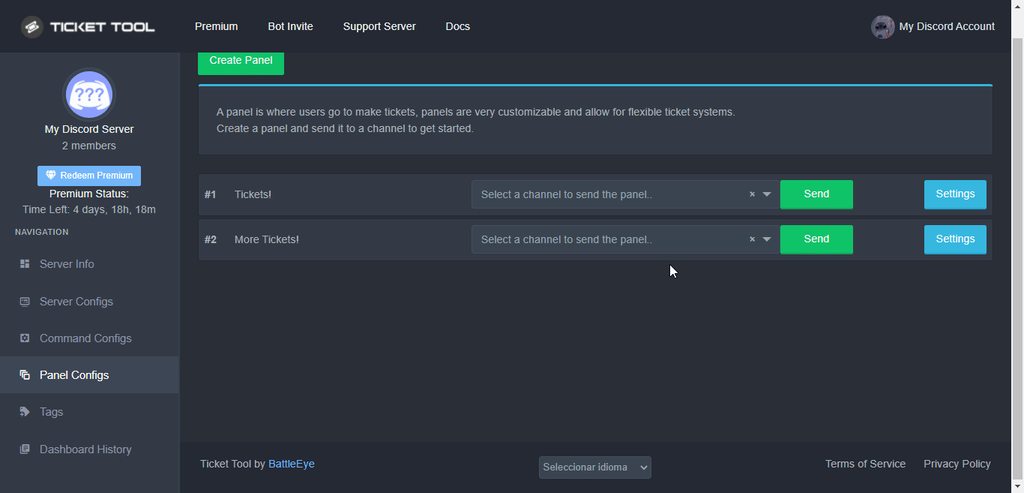
The panel message is where people react to make a ticket. To customize it head over to your Dashboard --> Panel Configs -> Settings -> Panel Options -> Edit Panel Message
 fallow ingot
@jade topaz ^
jade topaz
Ty
upbeat palm
jade topaz
Ty
Sorry for not answering when I looked it said it was premium only so I wasn't sure if it maybe worked differently with a multi panel.
upbeat palm
fallow ingot
<@456226577798135808> ^
Ty for stepping in.
iron nightBOT
Gave +1 Rep to @fallow ingot
fallow ingot
upbeat palm
Ty for stepping in.
Sure
 west star
Why can’t I access the ticket tool? Even when I invite it to my server my discord server still don’t show up in the dashboard?
How do I get help? I don’t understand. I just need someone to answer this question
humble sequoiaBOT
Don't see your server in the dashboard?
You will possibly need to relog. Look below to see steps on how to relog.
How to relog in the Dashboard.
First, you will need to go to the dashboard. Once your there, click on your avatar on the top right. after you clicked it, you will see button that says Logout. You must click that. Once you have logged out, you can log back in.
Note:
You need one of these 3 things to access the dashboard.
1. Server Owner (Level: 6)
2. Server Administrator (Level: 4)
3. Dashboard Role (Level: 2)
:warning: You can check your level using $level on your Discord Server
User permission level with Ticket Tool
@User is permission level: 0 (User)
```» *If it shows that your permission is **0**, you don't have any of the above **3 things** to manage the dashboard.*


**See the GIF below on how to relog:**Oh nvm was connected to my other account. Lol okay thanks very much 😊
Thanks @rustic gale
iron nightBOT
Gave +1 Rep to @rustic gale
jade topaz
can i make a custom command with the bot?
slender minnow
jade topaz
can i make a custom command with the bot?
Yes, you can make tags with predefined responses.
jade topaz
can you explain more
humble sequoiaBOT
Tags
Tags are used to send a predefined response to your channels using a command. Tags will only respond if the command itself is used, it will not function if you put the tag into a sentence. The prefix is not included.
To create tags, go to: Dashboard > Tags > Create Tag. After creating and naming one, tap on the response button, and you can edit the response.
 iron nightBOT
Gave +1 Rep to @slender minnow
jade topaz
slender minnow
Yes, you can make tags with predefined responses.
how do i make it so the person doing the tag gets mentioned
so if one person does it, it mentions one person but if another does it it mentions the other person
slender minnow
jade topaz
how do i make it so the person doing the tag gets mentioned
so if one person doe...
i don't think you can do that as of now, however you can refer our list of variables
https://docs.tickettool.xyz/dashboard/panel-configs/supported-variables
Description of the variables a ticket can count with

 craggy geyser
Doesn't work in tags yet. Only ticket specific messages
jade topaz
the user when claim the ticket ticket rename to that user name who claimed
 gilded verge
 quiet prairie
someone can tell me why transcript no working ?
quiet prairie
someone can tell me why transcript no working ?
You cannot ask for the same help on two different channels. You have to pick one
quiet prairie
gilded verge
You cannot ask for the same help on two different channels. You have to pick one
Uhh
gilded verge
i mean bcs you opened a ticked and ask there too 😕
quiet prairie
Are you telling me that I am not allowed to send a similar message to the staff and the community ?
I need an answer quickly sooo..
gilded verge
The idea is to select only one channel to avoid confusion 😕
I can help you but i dont know 🇫🇷 language, so if you want, please close the ticket first
quiet prairie
gilded verge
I can help you but i dont know 🇫🇷 language, so if you want, please close the t...
sure
gilded verge
okay, did you setup of transcript channel?
humble sequoiaBOT
How do I save transcript to a channel?
To save transcripts to a channel go to the Dashboard -> Panel Configs -> Settings -> Logging Options -> Transcript Channel
 quiet prairie
That’s not my server )x
gilded verge
humble sequoia
it's okay but has the transcription channel been set up as shown here?
quiet prairie
gilded verge
it's okay but has the transcription channel been set up as shown here?
maybe idk i don’t have permissions admin.
i want just to screen conversation of this ticket
gilded verge
okay, so to save transcripts, use command $transcript or transcript button ^-^
 gilded verge
ah, so you don't have permissions to save transcripts or manage server, you have lvl 0 (User)
gilded verge
Don't ping anyone and just describe your problem
quiet prairie
gilded verge
ah, so you don't have permissions to save transcripts or manage server, you have...
Ohh i see
 wooden salmon
Help me
gilded verge
wooden salmon
Help me
Don't ping anyone and just describe your problem
wooden salmon
U bot or what?
wooden salmon
When i want to setup ticket the bot say to me do $debug
humble sequoiaBOT
ᅠ
@pseudo glen requires the following permissions:
Add Reactions
Read Channels
Send Messages
Manage Messages
Embed Links
Attach Files
Read History
Manage Roles
Manage Channels
To change the role permissions, you can go to your Discord Server ➞ Server Settings ➞ Roles ➞ @Ticket Tool
To change the channel permissions, you can go to your Channel Settings ➞ Permissions ➞ Ticket Tool
ᅠ
Note:
You can give Ticket Tool Administrative Permissions instead of all the permissions listed above, but it's entirely optional and NOT necessary.
 gilded verge
You see this error because bot does not have access to the channel you want to send the panel. Please make sure the bot has required permissions and perms to channel: View Channel, Send Messages, Read Message History
@wooden salmon, let us know if it worked ^-^
wooden salmon
Ok tysm
Failed to send panel, Run $debug in the channel to check for errors.
😭 😭
Not work
gilded verge
but did you use this command $debug ?
 gilded verge
that is for sure the bot does not have permission to the channel to which you want to send the panel, hm...
so first, try my perms: https://cdn.discordapp.com/attachments/979861967936290816/979875252433731605/Ticket_Tool_Discord_role_perms.mp4
let me know when you do it ^-^
gilded verge
okay wait please
gilded verge
Please send invite 🤔
gilded verge
yup
wooden salmon
Its woork
gilded verge
Nice ^-^ Now it is certain that it was about perms 😅
humble sequoiaBOT
━━ moved to ticket ━━
jade topaz
So I talked to a staff member about Cancel Close which means it will cancel the support ticket. The button is enabled but I don't see any options in the support ticket.
 jade topaz
Hi
fallow ingot
jade topaz
So I talked to a staff member about Cancel Close which means it will cancel the ...
It’s two step close
jade topaz
I was seeing what the cancel button did and they it closed the ticket lol
Ok let me try that out, so it's a confirmation to close it?
fallow ingot
Yup
jade topaz
Also how can I DM people their transcripts?
fallow ingot
Under logging options
jade topaz
Ok
fallow ingot
It’s called direct message transcript
jade topaz
k
 late oasis
Hey Guys, TT wont send the panel saying that I should run $debug but the command doesnt work. TicketTool has all needed perms since I am using the premium bot in another server of mine (I have 2 subscriptions and they are setup right)
Is there any solution to that problem?
fallow ingot
If the command doesn’t work and you don’t receive a DM from ticket tool. There are a few reasons this may be:
- You have premium enabled but no premium bot invited.
- Ticket Tool has no access to the channel and can’t monitor it for commands etc
- Premium enabled but no active subscription
fallow ingot
late oasis
Hey Guys, TT wont send the panel saying that I should run $debug but the command...
What’s the server ID?
late oasis
fallow ingot
What’s the server ID?
786227196686499850
late oasis
fallow ingot
If the command doesn’t work and you don’t receive a DM from ticket tool. There a...
all those are checked off
humble sequoiaBOT
How to disable the premium bot
To disable the premium bot you will have to go to the Dashboard ➞ Server Configs ➞ Premium bot ➞ And on the right-hand side select the primary free bot in the drop down menu.
Premium features will still work on the normal bot.
 fallow ingot
@jade topaz ^
fallow ingot
late oasis
786227196686499850
thanks, one moment please :)
iron nightBOT
Gave +1 Rep to @fallow ingot
fallow ingot
np
fallow ingot
late oasis
786227196686499850
And can you confirm the bot won’t open tickets either?
late oasis
fallow ingot
And can you confirm the bot won’t open tickets either?
what do you mean
I am trying to set the bot up in the server and it is not sending the first pannel - thats where we are at rn
late oasis
fallow ingot
Is it just not responding to commands or not working at all?
not at all - not sending the pannel
fallow ingot
Can you send me an invite in dms please
jade topaz
st vote
fallow ingot
?
late oasis
fallow ingot
Can you send me an invite in dms please
sure
fallow ingot
Alright so it appears you have premium bot invited but not enabled.
humble sequoiaBOT
The first thing you will need to do is invite the premium bot, an invite can be found here
Once the bot is in your server we will head to the dashboard and manage your server. When you are managing your server, you want to head into "Server Configs" then click the drop down menu under "Select the bot you would like to use on this server" then click "Ticket Tool#6207" and then save.
 fallow ingot
One you enable it give it another try and it should work.
late oasis
👍
 void nova
How do you get ticket tool to play nicely with Wick (Wick quarantines TT when it deletes too many channels)
 pale pilot
void nova
How do you get ticket tool to play nicely with Wick (Wick quarantines TT when it...
pale pilot
void nova
How do you get ticket tool to play nicely with Wick (Wick quarantines TT when it...
With w!panic you can see that you can set category whitelists. This is intended for bot alike ticket tool. Wick will ignore any channel updates made in these categories
pale pilot
Anti Nuke > Panic Mode probably
pale pilot
It's not whitelist
void nova
thanks @pale pilot
iron nightBOT
Gave +1 Rep to @pale pilot
pale pilot
w!panic ID ?add 6 you can also use this command
void nova
thanks @pale pilot
Tried that, looks like it's a premium command. Oh well. I'll figure something out.
(like getting premium 😦
LOL
 high oyster
void nova
Tried that, looks like it's a premium command. Oh well. I'll figure something ou...
high oyster
void nova
Tried that, looks like it's a premium command. Oh well. I'll figure something ou...
You can add the bot to admin or whatever that trusted perm cmd is
high oyster
void nova
Tried that, looks like it's a premium command. Oh well. I'll figure something ou...
w!statics @pseudo glen ?add 10
pale pilot
void nova
Tried that, looks like it's a premium command. Oh well. I'll figure something ou...
Lol. You can also give ticket tool trusted admin. That works with the free version too
quasi cliff
or put TT above Wick
pale pilot
Right
 winged burrow
where to find premium key??
humble sequoiaBOT
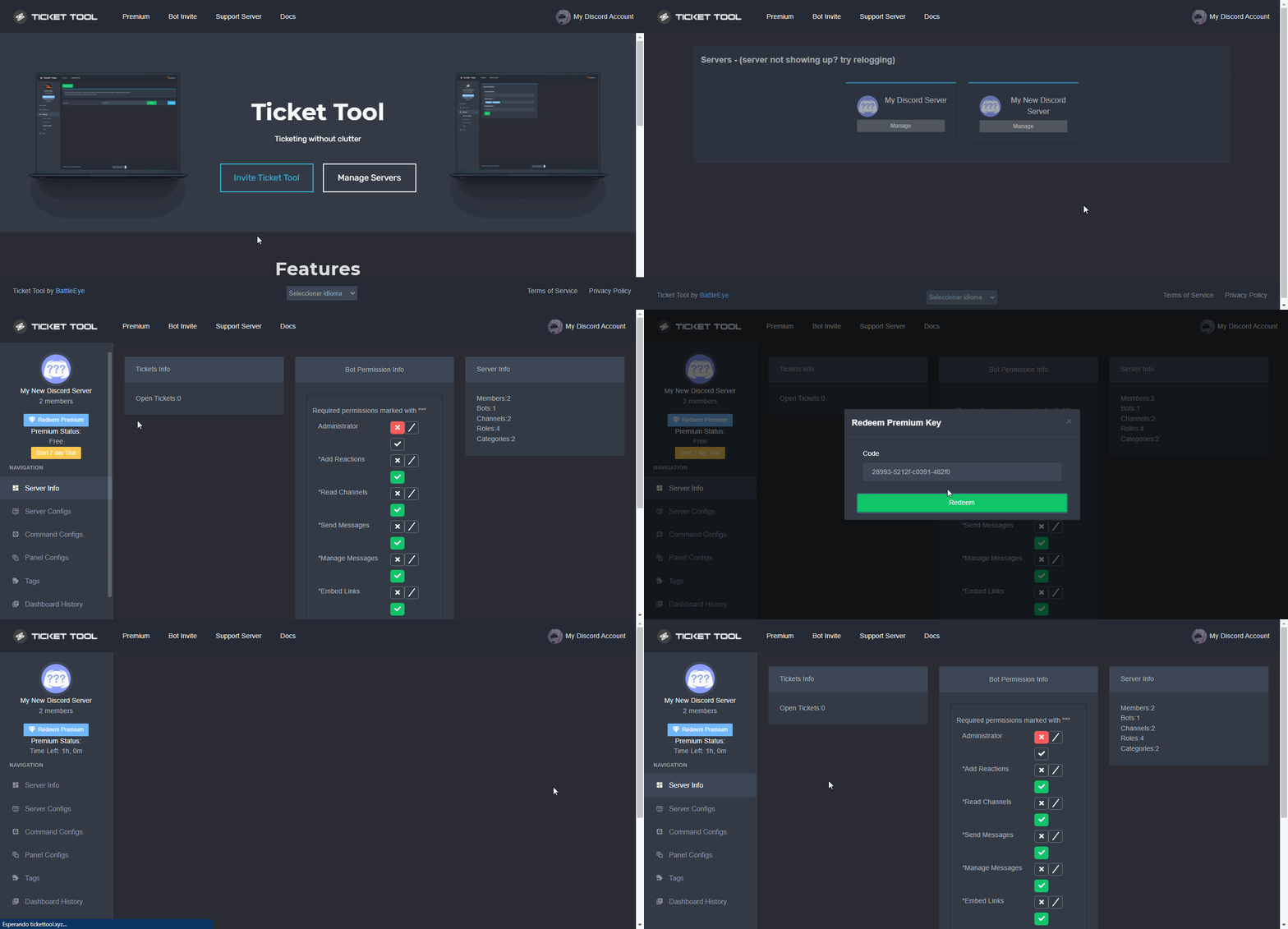
How to redeem premium (Key)
To redeem your premium key, go to the dashboard, select your server, then click " Redeem Premium" under the server's icon and name.
 fallow ingot
^
 desert ginkgo
How to create like this??
 humble sequoiaBOT
You can check our documentation here;
You can also check #📂│information for the basic setup;
You can also watch this video tutorial.
Our documentation contains all the info you need about the bot to be able to setup and configure the bot however you like.
 rustic gale
$help send
humble sequoiaBOT
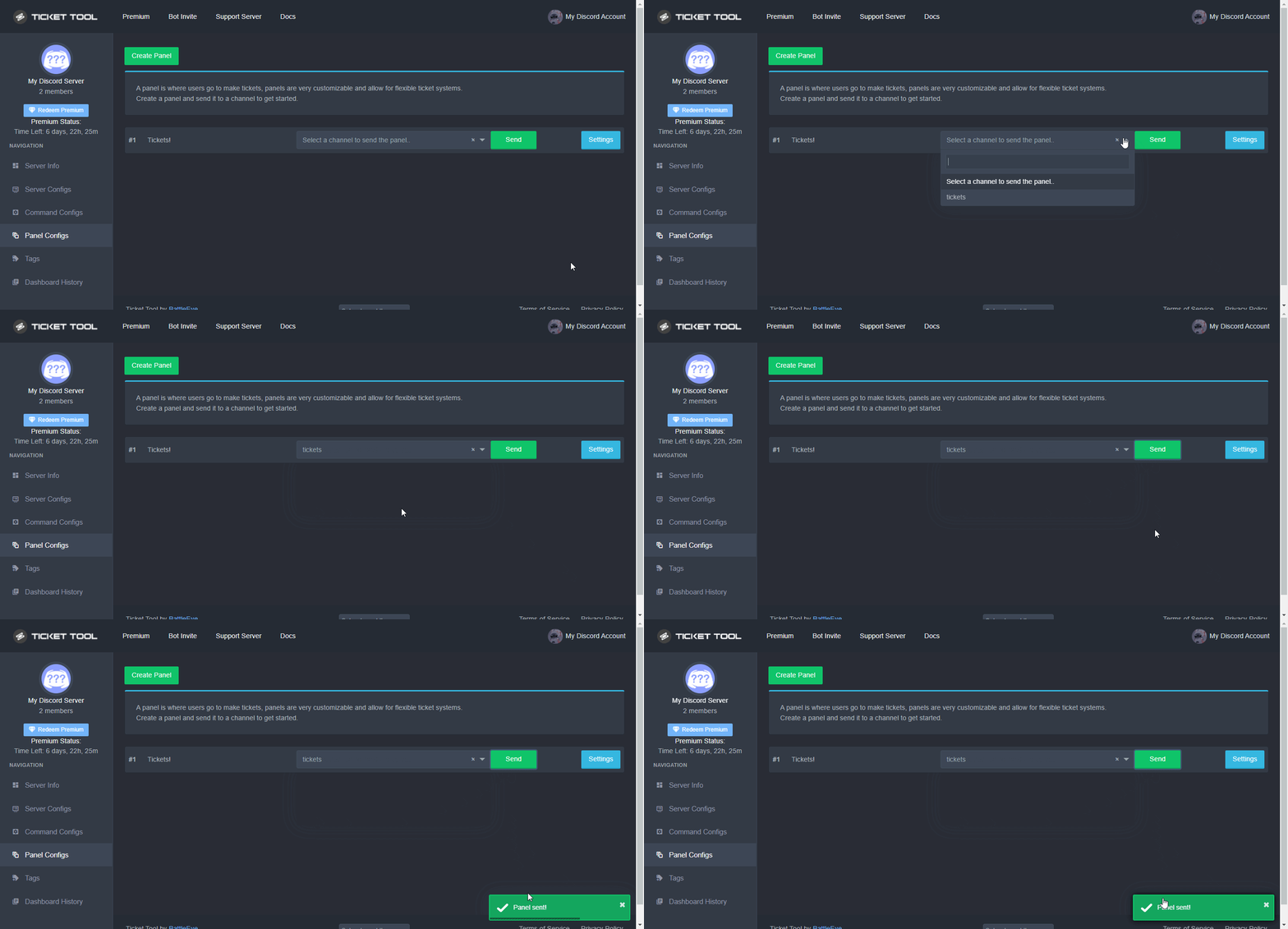
Sending a panel
Once you've created a panel on the dashboard you will need to send it to a channel using send on the dashboard
Select the channel you want your panel to be created in and click send.
For other questions checkout $help faq
An example of a sending a panel is shown below.
 jade topaz
Does the bot explicitly need admin? Without it (but with most other perms) it fails to remove the users perms on the channel once it’s closed
So they can still type in it and see the closed ticket still in my closed ticket category
scenic plinth
No, the permissions the bot needs is found using the $debug command if you do not want to use administrative permissions explicitly.
jade topaz
Okay thanks, I’ll check that. If I’m not missing anything, any idea on what I might be doing wrong?
Thanks @scenic plinth
iron nightBOT
Gave +1 Rep to @scenic plinth
jade topaz
That command seems to just show me what I have enabled, not what it needs?
scenic plinth
All permissions listed there is what the bot needs, meaning you likely enabled everything the bot needs, assuming you denied administrative privilege at this point.
jade topaz
Got ya
How i Can change autorisation of the ticket tool please
@jade topaz
@jade topaz I’m a user getting support here too
jade topaz
scenic plinth
All permissions listed there is what the bot needs, meaning you likely enabled e...
So the perms are set up, but the user can still see and type in the channel after it’s closed. However here are my closed ticket perms for users:

As soon as I enabled admin on the bot it fixes the problem and these roles get applied correctly.
Ok
But how change it
scenic plinth
Set read and send messages to the middle / button, save it, and then see what happens with a newly created test ticket.
jade topaz
scenic plinth
Set read and send messages to the middle / button, save it, and then see what ha...
Still lets them see and type
Even though the category perms is entirely red x’s
rustic gale
Is the user an admin?
jade topaz
User is not, they’re a regular user
rustic gale
If the user is an admin there's no way to keep them out of the channel
jade topaz
Yeah i know that part
rustic gale
Did you try on a new ticket?
rustic gale
Is the user part of the support team? i.e. they have a support team role
jade topaz
Just the closed permissions for users isn’t working
Nope
I even went and explicitly added their role to additional roles and disabled everything there too
rustic gale
In your server, edit the channel and check if the user has any custom permissions there
jade topaz
What do you mean by custom
The user specifically still has read/write on it somehow, after the channel has moved to this closed category
As if the ticket was still open
rustic gale
So. When you right-click a channel in your server and pick Edit Channel, then Permissions, at the bottom there's a list of roles with custom permissions
rustic gale
There's also user-level custom permissions there
jade topaz
The generated channel?
rustic gale
Yes, the ticket channel
scenic plinth
Would it happen to be because the bot does not have permissions to manage channels?
jade topaz
I gave it manage channels for the category
rustic gale
Wouldn't that cause the bot to be unable to open a ticket at all?
jade topaz
rustic gale
There's also user-level custom permissions there
The user level is what’s not being updated, the user has read and send
rustic gale
Try $debug in the ticket channel
jade topaz
It works fine in open category but when it moves to closed it doesn’t change them
scenic plinth
rustic gale
Wouldn't that cause the bot to be unable to open a ticket at all?
No, because if he/she enabled it via the category it wouldn't affect the bot opening tickets. Just the debug only displays channel and server permissions.
rustic gale
Well, that's not it. It has Manage Roles
scenic plinth
jade topaz
It works fine in open category but when it moves to closed it doesn’t change the...
Does it have permissions via the closed category?
jade topaz
It seems clearly the user perms is the problem not the roles they have
rustic gale
The users' permissions are not updating when the ticket is closed apparently?
 rustic gale
Try getting a regular user to open a new ticket
Then run $debug there
And another question. Do you have both bots there, or only the basic bot, or only the premium bot?
 humble sequoiaBOT
Don't see your server in the dashboard?
You will possibly need to relog. Look below to see steps on how to relog.
How to relog in the Dashboard.
First, you will need to go to the dashboard. Once your there, click on your avatar on the top right. after you clicked it, you will see button that says Logout. You must click that. Once you have logged out, you can log back in.
Note:
You need one of these 3 things to access the dashboard.
1. Server Owner (Level: 6)
2. Server Administrator (Level: 4)
3. Dashboard Role (Level: 2)
:warning: You can check your level using $level on your Discord Server
User permission level with Ticket Tool
@User is permission level: 0 (User)
```» *If it shows that your permission is **0**, you don't have any of the above **3 things** to manage the dashboard.*


**See the GIF below on how to relog:**@jade topaz Check
rustic gale
jade topaz
This is a new ticket. Just premium bot
Alright. Now close the ticket and check your server's audit log to see what happened
jade topaz
 rustic gale
No, i mean your server's audit log
Your server's menu -> Server Settings -> Audit Log

 plush musk
How to make multiple buttons?
 humble sequoiaBOT
Multipanels are panels with multiple buttons attached to them.
How to create a Multipanel
Premium users can combine multiple panels into one multipanel.
First, find the IDs of each panel you wish to combine. You can find them in your Panel Configs in the Dashboard
Next, send the multipanel to a channel using $panel [id1] [id2] {id3} ....
e.g. $panel 1 2 4 17 35 to combine panels 1, 2, 4, 17 and 35.
Up to 25 panels may be combined.
You can also watch this video tutorial.

For a more convenient use of multipanels, you can now combine panels on the dashboard. This will allow you to directly send the multipanel from the dashboard or via the $panel ID command.
Where can I find this?
You can find this setting on the Dashboard -> Panel Configs -> Settings -> General Options
Note: if you're attaching all the panels to a panel called English, don't include English in the attached panels box (If you do this, it will create duplicate)
This will put all buttons from all of your panels on one message. The message is the panel message from the panel you're combining these panels in.
You can also watch this video tutorial.
 rustic gale
@plush musk take a look at
plush musk
Thanks
rustic gale
jade topaz
Does it ever edit the channel permissions? In the audit log
jade topaz
rustic gale
Does it ever edit the channel permissions? In the audit log
Nope
And by the way it works properly when I make it admin. When it doesn’t have admin, it’s like it doesn’t have perms to edit the users perms to the channel unless it’s admin
rustic gale
Try giving it the Manage Roles permission and do the experiment again.
jade topaz
I am using claiming (with its own category btw). But this issue happens even when I skip the claiming step altogether
rustic gale
Try giving it the server-wide Manage Roles permission
jade topaz
The bot has them, it has this entire time
It does every step perfectly except for when it wants to change the user perms to the closed ticket channel as it moves to the closed category
jade topaz
They have cosmetic roles (none have any perms) and two functional roles. The functional roles are set to disable everything entirely in the closed ticket category by default, and all perks are denied in the bots closed channel permissions
jade topaz
Nope we moved that up to try to solve this
rustic gale
Oh dear
 glossy herald
i accidently removed the welcome @turbid moon message when someone opens a ticket how do i get it back
jade topaz
Yeah it’s VERY weird
glossy herald
<@turbid moon> seem to not work
rustic gale
glossy herald
<<@565657729772027915>> seem to not work
It's {user}
humble sequoiaBOT
Within all the messages the bot's sends (both embeds and text) you can mention either channels, roles, or even users, these mentions will only send a notification to the user if they are used within a text field, e.g: a role mentioned in an embed won't ping at all the users who have that role.
For mentioning a role you can use one out of three options:
{@Role Name} ➞ Which is Case Sensitive.
{RoleID} ➞ Replace RoleId with the Id of the role you are trying to ping.
<@&RoleID> ➞ Discord's native syntax to ping roles.
<#ChannelID> ➞ Mention a channel by its ID.
<@UserID> ➞ Mention a user by its ID.
rustic gale
jade topaz
Yeah it’s VERY weird
You might want to make a ticket and move this up with senior support
jade topaz
rustic gale
You might want to make a ticket and move this up with senior support
Thanks I’ll do that
iron nightBOT
Gave +1 Rep to @rustic gale
jade topaz
I’m pulling my hair out lol
rustic gale
jade topaz
I’m pulling my hair out lol
One last thing. How many different kinds of panels does your server have?
 analog schooner
I can't TICKET on my server it always appears "failed execute $debug" why?
glossy herald
rustic gale
It's {user}
my bad thank u
iron nightBOT
Gave +1 Rep to @rustic gale
rustic gale
jade topaz
I’m pulling my hair out lol
Figured it out
First i reproduced the bug on my testing server, then i made a human role with the exact same permissions and tried seeing if it could accomplish what the bot couldn't
Turns out the bot can't edit any permissions it doesn't itself have
More generally: any permissions you don't have server-wide from your roles you also can't grant on a channel level
jade topaz
rustic gale
More generally: any permissions you don't have server-wide from your roles you a...
So you’re saying the bot needs explicit permissions set to what?
For the server
For example I like denying it almost all perms at server level… I only gave it manage roles there. Everywhere else the perms I gave it in categories seem to work fine… it supersedes the server-wide perms
Except for it’s ability to edit this user’s access to the channel after they’ve already been added… that seems to fail
rustic gale
jade topaz
Except for it’s ability to edit this user’s access to the channel after they’ve ...
Any permissions you want it to be able to edit on a channel basis it needs to have on a server-wide basis
Let's make a quick test
In your dashboard, enter your ticket's settings -> Permission Options
You're going to make every permission in User Closed Permissions exactly the same as the ones in User Opened Permissions
except you're going to deny  the Read Messages permission under Closed Permissions
Nah. I tested that. It's not going to work
rustic gale
Only way out is to actually give it server-wide the same permissions you want the user to have in the ticket
jade topaz
Let me try
rustic gale
jade topaz
Let me try
I came up with a different idea, but i haven't tested it
jade topaz
Everything online confirms that channel perms override server role permissions
And I have everything working with that model except for the one thing… the editing of the users access to the channel
So which perm would the bot need for that
rustic gale
Let me take a picture

It needs to have a role that has the permission in order to be able to edit the permission
jade topaz
I just gave it that role and it still doesn’t work
I gave it that at server role level
rustic gale
If it wants to be able to deny, say, Send Messages to the user, it needs to have the Send Messages permission
Same with the rest of the permissions it's trying to edit
jade topaz
I was trying to avoid it having that or showing up in other channels
Normally I only grant at that channel or category level and everything works fine
rustic gale
(By the way, that's not a limitation of the bot but a limitation of Discord. The bot's failure is that it doesn't throw an error message or explain why it failed to edit the permissions)
jade topaz
I don’t understand how the thing you’re seeing reconciles with my experience of it successfully managing channels in every other way
It’s able to edit and delete and create channels just via category permissions
rustic gale
But it can't edit the permissions
jade topaz
Yeah
rustic gale
Did you see the screenshot i shared? That's what it shows a user when they don't have the permission to edit permissions
jade topaz
So if I give it that one perm globally it would work?
rustic gale
That's it pretty much
Well if your User Opened Permissions are (say) Read Messages, Send Messages and Attach Files, the bot needs Read Messages, Send Messages and Attach Files server-wide
Actually my suspicion is that the opened permissions don't matter, what matters is the closed permissions
jade topaz
But I already have roles where they’re denied perms by default server wide but they work fine when granted in specific channels
rustic gale
If user X wants to be able to grant permission Y, it needs to have a role that has permission Y
Important note: when the bot creates the channel it actually bypasses this limitation somehow
If user X wants to be able to grant/remove/default permission Y, it needs to have a role that has permission Y
If the bot's missing one of the permissions it's trying to edit, the entire thing fails
jade topaz
Ah okay let me try something
So this is a difference of giving the bot a permission vs giving it the ability to grant someone else the permission?
If those are different scenarios that explains my misunderstanding
rustic gale
You can't give it the ability to grant someone else the permissions without giving it the permission itself
Exception: channel creation bypasses the limit somehow
I'm gonna make one more experiment
rustic gale
Wanna share what your user opened and user closed permissions look like right now?
jade topaz
For every user open/closed type of perm


I have all those enabled perms at server level too
Still doesn’t successfully take the perms from the user
rustic gale
jade topaz
Still doesn’t successfully take the perms from the user
Seems to be missing Manage Messages and Embed Links right now
jade topaz
Omfg
It worked
This whole time I thought you meant I have to give it perms that I change, but I guess it sets them all together somehow so if it changes any it needs all the perms
Thank you so much man it’s working finally without admin
Thanks @rustic gale
iron nightBOT
Gave +1 Rep to @rustic gale
rustic gale
jade topaz
This whole time I thought you meant I have to give it perms that I change, but I...
The way i think it works is, it looks at the entire slate of perms it's trying to assign and it either goes
- uuuuh, you're trying to deny Use External Emojis, i don't have that, so it's hands off (throws out the entire slate)
- uuuuh, you're trying to make Embed Links neutral, but the user has Embed Links allowed, and i don't have that perm, so i can't make that change (throws out the entire slate)
- looks good, nothing's hands off (applies the entire slate)
jade topaz
rustic gale
😝
Lmao yeah I feel bad but who’s the head honcho? I already wanted to pass along a good word because of all the hard work you put in
Yup I see that now
rustic gale
There's always #📈│reviews
jade topaz
I got you then! Thanks again for all the help
rustic gale
HAPPY END
jade topaz
Here I was thinking it was a bug
But deep down I knew it couldn’t be because so many people use it just fine
And my ticket flow is very boilerplate
the bot is broken on my server it’s not offline but it won’t respond to commands
humble sequoiaBOT
How to disable the premium bot
To disable the premium bot you will have to go to the Dashboard ➞ Server Configs ➞ Premium bot ➞ And on the right-hand side select the primary free bot in the drop down menu.
Premium features will still work on the normal bot.
rustic gale
Try this
jade topaz
it’s not premium
rustic gale
What's your server's ID
quasi cliff
Make sure that bot has permissions to Read and Send Message in that channel
jade topaz
quasi cliff
Make sure that bot has permissions to Read and Send Message in that channel
i think it works now
alright i’m out
quasi cliff

jade topaz
@rustic gale did I get pronoun right in reviews?
 austere crater
why i don't get a language role in #📂│information
rustic gale
jade topaz
<@832864595726172162> did I get pronoun right in reviews?
Yup, it's alright
 tight stratus
Here can any of you guys help me
 ember scarab
How do I make the ticket tool work in my server and when they make ticket I’ll be the mm
can someone help
Can someone tell me how I can test if it works
jade topaz
I want to help
fallow ingot
jade topaz
I want to help
Refer to your ticket, thanks.
fallow ingot
ember scarab
How do I make the ticket tool work in my server and when they make ticket I’ll b...
What do you mean?
Do you mean add as support? I don’t know what mm is.
ember scarab
I invited the bot how do I test of it works
fallow ingot
Have you created a panel?
ember scarab
What’s that
 nimble mauve
fallow ingot
What do you mean?
nimble mauve
fallow ingot
What do you mean?
Oh you claim the ticket x
fallow ingot
$help panel
humble sequoiaBOT
Creating a panel
To create a panel we are going to need to head over to the panel configs on the dashboard
Once at the dashboard we will need to click Create Panel
Enter a panel name (Fill in any optional settings you want)
Click Create Panel and your ready to get started with configuring your panel
An example of a creating a panel is shown below.
 fallow ingot
nimble mauve
Oh you claim the ticket x
fallow ingot
nimble mauve
Oh you claim the ticket x
Tell us your issue first then lol
ember scarab
I’m on phone
fallow ingot
ember scarab
I’m on phone
Our dashboard is pretty neat with mobile and supports it.
nimble mauve
fallow ingot
Tell us your issue first then lol
I was telling the person the answer sos x
ember scarab
It’s giving me a sprap
nimble mauve
Sprap what’s that x
ember scarab
I don’t have permission to claim it
nimble mauve
Are you owner of the server?
nimble mauve
Ok is the bot a administrator?
ember scarab
Idk I pressed claim and it didn’t let me claim it
fallow ingot
Claiming is premium
humble sequoiaBOT
Claiming allows you to change the ticket name, category and permissions. To use it you have to enable it first on your Dashboard > Panel Configs > Claiming Options.
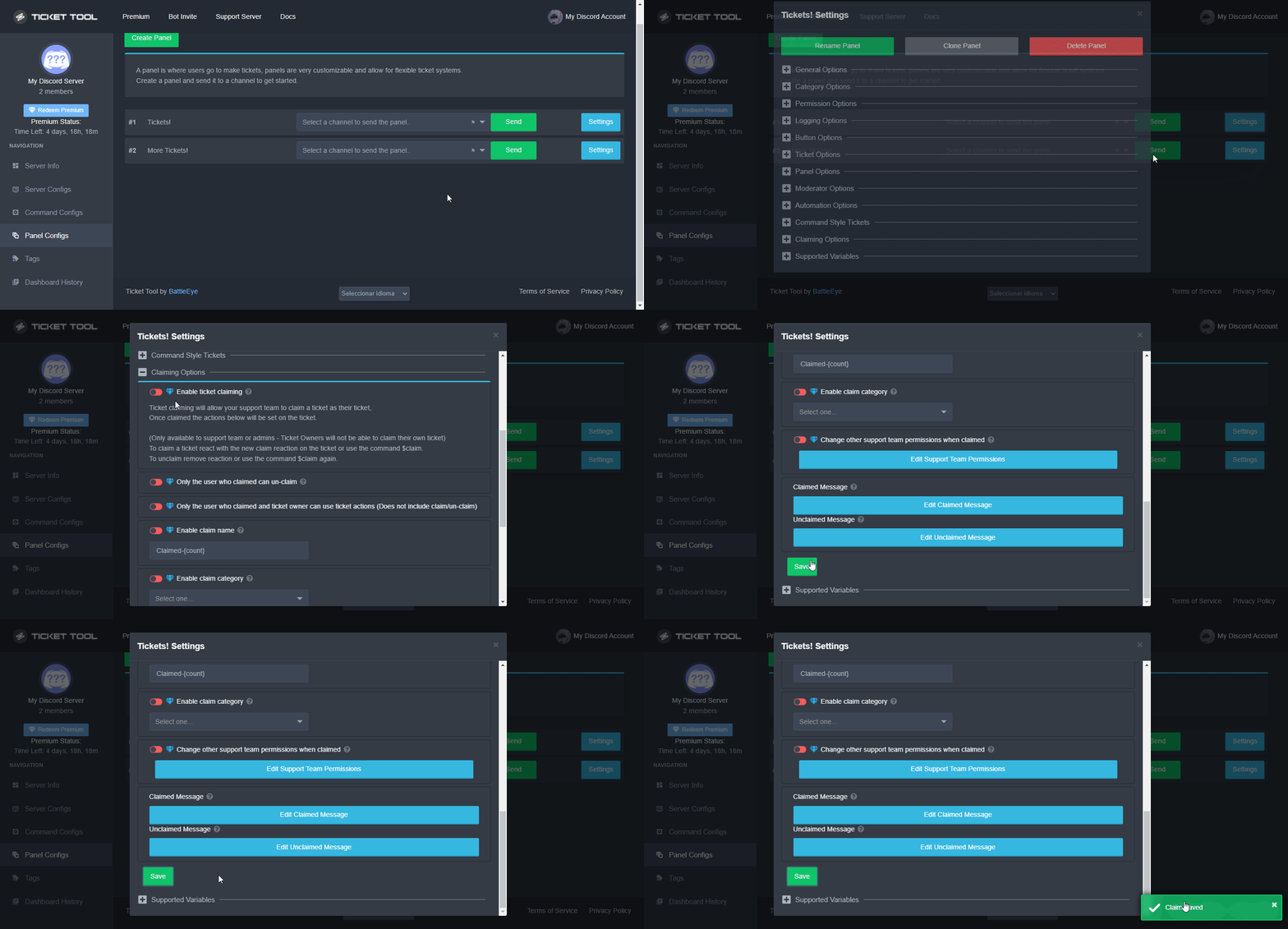
 Note: This is a premium feature
nimble mauve
Note: This is a premium feature
nimble mauve
Ohh
nimble mauve
Ok.
fallow ingot
ember scarab
I need to buy something
If you want claiming on tickets you need to pay for premium, yes.
ember scarab
Ugh
rustic gale
And they left
 craggy lodge
Hi how can I make the ticket with members name
 short scroll
The ticket not marked me on open.
 wanton blade
Hello, has anyone noticed in your server only some can see the ticket option and others cant?
 spare fog
Hi guys, so I set up a panel right now and my support role doesn't have permission to close or delete tickets via button. Is there any way to disable the "$close" and "$delete" commands for them too?
 eternal nymph
كيف اسوي زي كذاHow do I do like this?


 sharp mantle
eternal nymph
كيف اسوي زي كذاHow do I do like this?
sharp mantle
eternal nymph
كيف اسوي زي كذاHow do I do like this?
لما تعرف علمني
scenic plinth
Lets... im just deleing, sorry for the ghost ping whoever got pinged.
 fair dawn
hello i cant see my server in dashboard i invited the bot the system is operational and i already tried relogging but it still doesnt show my server in dashboard ;-;
humble sequoiaBOT
Don't see your server in the dashboard?
You will possibly need to relog. Look below to see steps on how to relog.
How to relog in the Dashboard.
First, you will need to go to the dashboard. Once your there, click on your avatar on the top right. after you clicked it, you will see button that says Logout. You must click that. Once you have logged out, you can log back in.
Note:
You need one of these 3 things to access the dashboard.
1. Server Owner (Level: 6)
2. Server Administrator (Level: 4)
3. Dashboard Role (Level: 2)
:warning: You can check your level using $level on your Discord Server
User permission level with Ticket Tool
@User is permission level: 0 (User)
```» *If it shows that your permission is **0**, you don't have any of the above **3 things** to manage the dashboard.*


**See the GIF below on how to relog:**ok nvm it works now
 upper zenith
Hello, I am confused on how the role works? does it show when someone creates a ticket?
I tried to test it
but im not sure if the role is suppose to show?
jade topaz
Hey i was wondering how do i edit the ticket so that
$delete can be only used by server owner
and not support role
 inland viper
How do you retrieve the chats from a deleted ticket?
rustic gale
inland viper
How do you retrieve the chats from a deleted ticket?
If you transcripted it into a transcript channel, look up the transcript in the transcript channel
Otherwise, you can't
inland viper
rustic gale
If you transcripted it into a transcript channel, look up the transcript in the ...
How can you prevent the bot from deleting closed tickets then?
rustic gale
By enabling Two Step Ticket in your ticket's General Options
 round mountain
when I close a support room, I cannot activate the ability to send an archive of the support room to a channel
humble sequoiaBOT
━━ moved to ticket ━━
 true fox
jade topaz
true fox
jade topaz
I reset both discord and ticket tool dashboard and gave ticket tool admin and stuff. My server still doesn't show up on discord.
humble sequoiaBOT
Don't see your server in the dashboard?
You will possibly need to relog. Look below to see steps on how to relog.
How to relog in the Dashboard.
First, you will need to go to the dashboard. Once your there, click on your avatar on the top right. after you clicked it, you will see button that says Logout. You must click that. Once you have logged out, you can log back in.
Note:
You need one of these 3 things to access the dashboard.
1. Server Owner (Level: 6)
2. Server Administrator (Level: 4)
3. Dashboard Role (Level: 2)
:warning: You can check your level using $level on your Discord Server
User permission level with Ticket Tool
@User is permission level: 0 (User)
```» *If it shows that your permission is **0**, you don't have any of the above **3 things** to manage the dashboard.*


**See the GIF below on how to relog:**Thanks
 robust wolf
help
jade topaz
robust wolf
help
What do you need?
gilded verge
robust wolf
help
You've opened a ticket, please wait for Staff 😳
robust wolf
jade topaz
What do you need?
no thanks
i sloved this problem
btw thanks for asking! (:
 cobalt sonnet
Hello! Can I translate the bot into Russian in my discord server?
 safe prairie
Please don't ping us
Wait for help after asking your question or open a #🎫│make-a-ticket
humble sequoiaBOT
We would love to help you, but if you don't tell us what you need help with we can't help you :(
humble sequoiaBOT
You can check our documentation here;
You can also check #📂│information for the basic setup;
You can also watch this video tutorial.
Our documentation contains all the info you need about the bot to be able to setup and configure the bot however you like.
 cedar grove
No
gilded verge
Hey, It's best to watch the video because then you can see what else needs to be done to send the panel to the channel or what has not been done
@cedar grove, I noticed you opened a ticket and didn't write anything. If it applies to the same case and you already have a solution here, please close the ticket
 quick olive
How do I check transcripts?
 leaden cradle
Hi,does someone know how I show the reason why the ticket are open,here ?

 granite fog
help I would like help please I can't get it even though I watched a tutorial to do this photo trick can someone help me please (French people if possible) thank you very much and have a nice day 😘
 quasi cliff
leaden cradle
Hi,does someone know how I show the reason why the ticket are open,here ?
quasi cliff
leaden cradle
Hi,does someone know how I show the reason why the ticket are open,here ?
You can add {reason} in the Ticket Message. [It will work only if users create using $new]
quasi cliff
granite fog
help I would like help please I can't get it even though I watched a tutorial to...
That's not related to TT bot, looks like wrong place
rustic gale
leaden cradle
Hi,does someone know how I show the reason why the ticket are open,here ?
In your dashboard, in your ticket's Settings -> Ticket Options -> Edit Ticket Message. There you can edit the message
leaden cradle
Oh thanks !
jade topaz
New issue I’m having… when I use the “Change other support team permissions when claimed
Edit Support Team Permissions” feature to deny other support the chance to see the other support team members claimed tickets, it also denies the claimers (also on support team) ability to see the ticket anymore (when it moves to closed state)
 spiral bay
is it possible to auto give a role to a user if they have an opened ticket?
jade topaz
rustic gale
Might take me a while to get to this
No worries I understand
granite fog
oh shit sorry
spiral bay
granite fog
oh shit sorry
it looks like https://serverstatsbot.com/

ServerStats Bot
ServerStats bot show off your member, channel, role, emoji, boost, and, goal count in your server throw the use of channels (also fully customizable).
rustic gale
spiral bay
is it possible to auto give a role to a user if they have an opened ticket?
Not with Ticket Tool, no. Maybe a custom bot
 patent prawn
how do you add tickets in my server? The dashboard isnt working or helping
humble sequoiaBOT
Don't see your server in the dashboard?
You will possibly need to relog. Look below to see steps on how to relog.
How to relog in the Dashboard.
First, you will need to go to the dashboard. Once your there, click on your avatar on the top right. after you clicked it, you will see button that says Logout. You must click that. Once you have logged out, you can log back in.
Note:
You need one of these 3 things to access the dashboard.
1. Server Owner (Level: 6)
2. Server Administrator (Level: 4)
3. Dashboard Role (Level: 2)
:warning: You can check your level using $level on your Discord Server
User permission level with Ticket Tool
@User is permission level: 0 (User)
```» *If it shows that your permission is **0**, you don't have any of the above **3 things** to manage the dashboard.*


**See the GIF below on how to relog:**
Sending a panel
Once you've created a panel on the dashboard you will need to send it to a channel using send on the dashboard
Select the channel you want your panel to be created in and click send.
For other questions checkout $help faq
An example of a sending a panel is shown below.
rustic gale
Also look at
humble sequoiaBOT
====== FAQ ======
If a question interests you run the command to see the answer.
Q: What is the prefix and how do I change it?
A: $help prefix
Q: How do I let my support team see into a ticket?
A: $help support
Q: How do I make a ticket ping my support when it's created?
A: $help ping
Q: How do I set a transcript channel?
A: $help transcript
Q: How do I limit the number of tickets a user can create?
A: $help limit
Q: How do I set what category tickets are created in?
A: $help category
Q: How do I set what category tickets are moved to when closed?
A: $help closed
Q: How do I set a custom reaction?
A: $help reaction
Q: How do I set the permissions for the tickets?
A: $help perms
Q: How do I create a panel?
A: $help panel
Q: How do I get the panel in my discord?
A: $help send
Q: How do I add or remove users from a ticket?
A: $help add
Q: Ticket Tool isn't responding to my commands, How do I fix it?
A: $help offline
Q: How does the claim command work?
A: $help claim
slender minnow
@hallow wind bot commands should be used in #🤖│bot-spam
 hallow wind
yeah yreah
 lavish ibex
is the dashboard down rn?
fallow ingot
lavish ibex
is the dashboard down rn?
Nope shouldn’t be.
Are you experiencing any issues?
fallow ingot
Are you getting any error?
fallow ingot
Can I see a screenshot?
lavish ibex
its stuck rn
3 mins ago I got server error (that cloudflare thingy where it can't contact tickettool)

oh there

do I ping you?
oh hi
fallow ingot
Hmm there seems to be something going on
lavish ibex
yeep
fallow ingot
I honestly don’t have a clue about all that stuff lmao.
It seems at the minute only you are experiencing this. We haven’t had any other ticket tool users come forward and report this.
lavish ibex
pain
fallow ingot
Can you try using another browser?
lavish ibex
sure.
it fixed itself on Safari when I opened it on google chrome. Now its working on both browsers... what even XD
lavish ibex
btw a lil help
fallow ingot
?
lavish ibex
how do I use the command $new
Can I have it open a ticket in a particular panel as well?
jade topaz
hello i need some help
humble sequoiaBOT
We would love to help you, but if you don't tell us what you need help with we can't help you :(
jade topaz
So im teaching someone how to handle tickets and they can transcript but they cannot delete the tickert.
fallow ingot
lavish ibex
how do I use the command `$new`
Can I have it open a ticket in a particular pan...
You need to select a channel for ticket tool to monitor
Have you done that?
fallow ingot
jade topaz
So im teaching someone how to handle tickets and they can transcript but they ca...
What’s the delete button settings like?
$buttons
humble sequoiaBOT

The new Discord Buttons allow for a much smoother and convenient experience. They reduce lag and work much better than emojis. With ticket tool you can edit all the buttons however you like! Buttons can show emojis, text and can have 4 different colors.
Where can I edit them?
Dashboard ➞ Panel Configs ➞ Settings ➞ Button Options ➞ Setting
 lavish ibex
fallow ingot
You need to select a channel for ticket tool to monitor
lavish ibex
fallow ingot
You need to select a channel for ticket tool to monitor
I'm not sure how to do that.
what I plan to do is
have a bot that will send this in a private channel
$new @user
and ticket tool will create the ticket in the category. Now I'm sure how to do this.
jade topaz
 fallow ingot
lavish ibex
I'm not sure how to do that.
what I plan to do is
have a bot that will send thi...
fallow ingot
lavish ibex
I'm not sure how to do that.
what I plan to do is
have a bot that will send thi...
You would have to do that in the channel set to monitor
lavish ibex
and how do I set that?
fallow ingot
Dashboard > Panel Configs > Settings > Command Style Tickets
lavish ibex
oooooooo, lemmi explore. Thanks!
fallow ingot
jade topaz
Are they set as support team or additional roles?
fallow ingot
lavish ibex
oooooooo, lemmi explore. Thanks!
Sure, let me know how it goes :)
jade topaz
fallow ingot
Are they set as support team or additional roles?
support team
actually both
but i added them as additional roles after they couldnt delete
fallow ingot
Remove the additional roles and try again.
Also, your global ticket limit is set to 5.
If this issue still persists please open a ticket, as I’ve got to go :/
jade topaz
this?

I also have another question, How do i make the ticket appear under a category and not go to the top?
 eager cargo
$help category
humble sequoiaBOT
How to set the open category
To set a open category go to the Dashboard -> Panel Configs -> Settings -> Category Options -> Category Open

 orchid tulip
How do I setup the bot
humble sequoiaBOT
You can check our documentation here;
You can also check #📂│information for the basic setup;
You can also watch this video tutorial.
Our documentation contains all the info you need about the bot to be able to setup and configure the bot however you like.
jade topaz
orchid tulip
I know but I want to setup the bot ticket
GO to the dashboard, go to panel configs and create a panel
gilded verge
jade topaz
<@615207454443044904>
Yup, rule 4 on #📂│information
Check this:
humble sequoiaBOT
The first thing you will need to do is invite the premium bot, an invite can be found here
Once the bot is in your server we will head to the dashboard and manage your server. When you are managing your server, you want to head into "Server Configs" then click the drop down menu under "Select the bot you would like to use on this server" then click "Ticket Tool#6207" and then save.
jade topaz
gilded verge
Yup, **rule 4** on <#509239005481664524>
Check this:
alright sorry mate myb innit
thanks
tf
thanks @gilded verge
iron nightBOT
Gave +1 Rep to @gilded verge
gilded verge
You're welcome 😊
 humble lotus
H
jade topaz
so how do you make it where everyone cant see the ticket?
rustic gale
By denying everyone the Read Messages permission
iron nightBOT
Gave +1 Rep to @rustic gale
rustic gale
$help perms
humble sequoiaBOT
How to set the permissions for tickets
To set a change permissions go to the Dashboard -> Panel Configs -> Settings -> Permission Options
 rustic gale
@jade topaz Check this out, it's under Edit Everyone Opened Permissions
You'll need to also edit the Everyone Closed Permissions though
 pulsar knoll
HELP PLEASE: How can I automatically add specific people in every ticket that will be created? thanks
rustic gale
Do you mean adding a specific person to a ticket? That's the $add command
Oh wait. You mean having a person that is automatically added to every new ticket
Create a role for them and then add that role to Additional Roles
 ruby geyser
hallo, is the green in the embed or color embed change able :)
 rustic gale
Yes, if you're a premium subscriber
ruby geyser
how can i change it? 
pulsar knoll
rustic gale
Oh wait. You mean having a person that is automatically added to every new ticke...
Hello yes that's what I meant, how to do it automatically
ruby geyser
that's what i'm having trouble with 
pulsar knoll
So That I won't have to manually add the admin people belong in each ticket
rustic gale
In your dashboard, in your ticket's settings -> Panel Options -> Edit Panel Message, look for a field that says Color
Note that after the color is changed you will have to resend the panel
$help send
humble sequoiaBOT
Sending a panel
Once you've created a panel on the dashboard you will need to send it to a channel using send on the dashboard
Select the channel you want your panel to be created in and click send.
For other questions checkout $help faq
An example of a sending a panel is shown below.
ruby geyser
rustic gale
Note that after the color is changed you will have to resend the panel
thank you so much, this helps me so bad, i've been stuck here for ages, thank you so much 😊 ❤️
iron nightBOT
Gave +1 Rep to @rustic gale
rustic gale
pulsar knoll
So That I won't have to manually add the admin people belong in each ticket
Is it admins you want to add? Make them Support Team Roles instead
$help support
humble sequoiaBOT
How to let support team see into a ticket
About support roles
A support role lets your support team see into tickets with out having to add them manually to each and every ticket.
You can add as many support roles as you like per panel.
NOTE that the way discord works all admins can see into tickets regardless of this.
How to set a support role
To set a Support role go to the Dashboard -> Panel Configs -> Settings -> General Options -> Support Team Roles.

NOTE that the support role will not be able to see into tickets that are already created..
pulsar knoll
I can's see people in the list
rustic gale
Because you can't add individual people to it
Only roles
Make a role for the people you want to add, then add the role to the list
pulsar knoll
Gotit Thank you @rustic gale
iron nightBOT
Gave +1 Rep to @rustic gale
pulsar knoll
How will I know if the message has been seen by the member? is there such feature? like in messenge and telegram
rustic gale
Not a thing on Discord currently
pulsar knoll
hope someday
 stark willow
guys can anyone hlep me how i can do that on my ticket?
 rustic gale
Looks like emojis enabled and no button text
 rustic gale
Okay, so, broadly:
- Create a bunch of different panels
- For each panel, enter Button Options -> Create Ticket Settings
- Put an emoji in the Emoji field
- Make sure the Button Text field is empty
- Once you've done this for all panels, send them as a multipanel
 lucid meteor
Hello, please tell me how to solve the problem, the administrator and the server creator can open a ticket, other people do not, although the role has been added
rustic gale
That's a multipanel
stark willow
yea but how
humble sequoiaBOT
Multipanels are panels with multiple buttons attached to them.
How to create a Multipanel
Premium users can combine multiple panels into one multipanel.
First, find the IDs of each panel you wish to combine. You can find them in your Panel Configs in the Dashboard
Next, send the multipanel to a channel using $panel [id1] [id2] {id3} ....
e.g. $panel 1 2 4 17 35 to combine panels 1, 2, 4, 17 and 35.
Up to 25 panels may be combined.
You can also watch this video tutorial.
For a more convenient use of multipanels, you can now combine panels on the dashboard. This will allow you to directly send the multipanel from the dashboard or via the $panel ID command.
Where can I find this?
You can find this setting on the Dashboard -> Panel Configs -> Settings -> General Options
Note: if you're attaching all the panels to a panel called English, don't include English in the attached panels box (If you do this, it will create duplicate)
This will put all buttons from all of your panels on one message. The message is the panel message from the panel you're combining these panels in.
You can also watch this video tutorial.
rustic gale
Take a look at these guides
rustic gale
lucid meteor
Hello, please tell me how to solve the problem, the administrator and the server...
What do you mean “the role has been added”?
stark willow
okay thanks you @rustic gale ❤️
iron nightBOT
Gave +1 Rep to @rustic gale
stark willow
how i can put Thorn:1000610008284794880 on EMOji
rustic gale
Oh. Customizing the emoji is a premium feature
stark willow
yea ik i have 7 day trial
rustic gale
start typing Thorn and it should show up among the results, if it's from a server the bot is in
 short trail
how i ping the a person and role in the created ticket message
humble sequoiaBOT
━━ moved to ticket ━━
 rustic gale
Ticket Options -> Edit Ticket Message
stark willow
short trail
how i ping the a person and role in the created ticket message
{@Rank}
rustic gale
“moved to ticket” means their question was moved to a ticket btw
rustic gale
Anyway. In Edit Ticket Message, edit the field called Embed Description

 rustic gale
Oh, insert them with their IDs
stark willow
like that
rustic gale
$idcommand
humble sequoiaBOT
How do I get the ID of Roles/Channels/Emojis?
Ticket Tool has a useful command that helps you get the ID of various things like channels, roles, emojis and your server.
Just use the command $id <#channel/@role/:emoji:>. Now copy everything, including the brackets <...>, to your dashboard (or wherever you want it)
If you want the server ID, just use $id.
Examples:
Server ID: $id ➝
509192800865353738
Roles: $id @Role ➝@humble sequoia
Channel: $id #channel ➝#🤖│bot-spam
User: $id @user ➝@copper owl
Emoji: $id➝

 iron nightBOT
Gave +1 Rep to @rustic gale
 vernal wave
Hey, my tickets keep changing their name from the original ticket name (e.g. character1-application-0001) to my name when closed (e.g. stonemercy-application-0001-closed)
How can I make it so it keeps the original name but adds closed to the end of it when its closed?
gilded verge
vernal wave
Hey, my tickets keep changing their name from the original ticket name (e.g. cha...
Hey, can you show us your Ticket Options ? (Panel Configs->Panel Settings)
Exactly like this:
 vernal wave
This is the latest attempt but I've also tried {author.nickname}-application-{count}-closed


 vernal wave
pretty much yeah
gilded verge
In Ticket Opened channel name I use: {author.name}-application-{count}
and in Ticket Closed channel name I use: {author.name}-application-{count}-closed
 vernal wave
huh, thought that didnt work last time, I'll give it another shot
gilded verge
ou, uhm, you used a variable {author.nickname} but I use {author.name}, little difference 😳
vernal wave
still changes to my name upon closing 🤷♂️
 gilded verge
if you are using the {author.name} variable and you opened the ticket then your name will be there 😳
unless I made a mistake, wait 🤔
vernal wave
I didn't open it, I used an alt account with the username "Test User"

Could it be the viewing permissions when closed? I know users cant view it when it's closed
gilded verge
@vernal wave, I wanted to apologize to you for misleading. I just checked it out, so I'm sorry. Use a variable {ticket.user.name}

 vernal wave
gilded verge
<@164862382185644032>, I wanted to apologize to you for misleading. I just check...
vernal wave
gilded verge
<@164862382185644032>, I wanted to apologize to you for misleading. I just check...
worked flawless, dw about apologizing, we're only human 😉
ty @gilded verge
iron nightBOT
Gave +1 Rep to @gilded verge
humble sequoiaBOT
You can check our documentation here;
You can also check #📂│information for the basic setup;
You can also watch this video tutorial.
Our documentation contains all the info you need about the bot to be able to setup and configure the bot however you like.
gilded verge
Please describe exactly what you need help with
gilded verge
I'm sorry but I don't understand what you are asking. Please try again and stop sending DM's 😕
 boreal pine
anyone can help me please?
gilded verge
boreal pine
if i haven't closed it with Transcript ?
If you did not save the transcript with the button or command, then unfortunately it is not possible to see it 😳
iron nightBOT
Gave +1 Rep to @gilded verge
gilded verge
You're welcome 😊
boreal pine
are u real person or bot?
 keen locust
he is real trust me
gilded verge
boreal pine
are u real person or bot?
This does not apply to help, if you want to ask about it please go to the channel #💬│general-chat
boreal pine
ok
 glad blaze
do this cost money
gilded verge
glad blaze
do this cost money
You've opened a ticket, please use that channel 🥺
humble sequoiaBOT
━━ moved to ticket ━━
 prime thistle
how to make it like this, like the name on there rather than just "Create ticket" written there by default

couldnt find it so asked here ( I am a premium user )
like i want to make like this
 quasi cliff
 quasi cliff
prime thistle
how to make it like this, like the name on there rather than just "Create ticket...
quasi cliff
prime thistle
how to make it like this, like the name on there rather than just "Create ticket...
Check this out ^
You need to change the Button Text
jade topaz
how to set if i want bot reanme channel that the user name who claimed the tickets
@quasi cliff
quasi cliff
 quasi cliff
jade topaz
how to set if i want bot reanme channel that the user name who claimed the ticke...
quasi cliff
jade topaz
how to set if i want bot reanme channel that the user name who claimed the ticke...
jade topaz
no
quasi cliff
Claiming is a Premium Feature
quasi cliff
Do you have premium?
quasi cliff
quasi cliff
https://i.imgur.com/HcXfJyZ.gif
Set the name as Claimed-{author.name}
jade topaz
 muted saffron
Why Can't I creat a ticket?
muted saffron
Why Can't I creat a ticket?
Its down
 true tundra
so I want my friend to see the Tickets but I don't want to give him Admin yet how do I make it so he can see all the tickets?
humble sequoiaBOT
━━ moved to ticket ━━
 chrome geyser
Hello. Someone know how to add the claim buton ?
gilded verge
chrome geyser
Hello. Someone know how to add the claim buton ?
Hey, I'm not sure but I think you opened a ticket 🤔
chrome geyser
gilded verge
Hey, I'm not sure but I think you opened a ticket 🤔
yes
gilded verge
so please ask on ticket 😕
 humble sequoiaBOT
Multipanels are panels with multiple buttons attached to them.
How to create a Multipanel
Premium users can combine multiple panels into one multipanel.
First, find the IDs of each panel you wish to combine. You can find them in your Panel Configs in the Dashboard
Next, send the multipanel to a channel using $panel [id1] [id2] {id3} ....
e.g. $panel 1 2 4 17 35 to combine panels 1, 2, 4, 17 and 35.
Up to 25 panels may be combined.
You can also watch this video tutorial.
For a more convenient use of multipanels, you can now combine panels on the dashboard. This will allow you to directly send the multipanel from the dashboard or via the $panel ID command.
Where can I find this?
You can find this setting on the Dashboard -> Panel Configs -> Settings -> General Options
Note: if you're attaching all the panels to a panel called English, don't include English in the attached panels box (If you do this, it will create duplicate)
This will put all buttons from all of your panels on one message. The message is the panel message from the panel you're combining these panels in.
You can also watch this video tutorial.
 gentle jungle
quasi cliff
<:this:894279341108772914>
gentle jungle
quasi cliff
<:this:894279341108772914>
How do I change the name of the button and specify a Category
 gentle jungle
quasi cliff
Simply change the Button Text
gentle jungle
quasi cliff
Simply change the Button Text
I want to put each Putin a special name for it
how ?
quasi cliff
You need to change Text for all buttons of all panels
gentle jungle
quasi cliff
You need to change Text for all buttons of all panels
For example, each Putin has a special name for her, how do I do it for myself?

 late sequoia
i wanna buy cheat for apex legens. cab someone help me ?
rustic gale
You're in the wrong server for that
quasi cliff
gentle jungle
For example, each Putin has a special name for her, how do I do it for myself?
What exactly do you mean
"each Putin has a special name for her"
rustic gale
Probably meant button rather than Putin
rustic gale
each button has a special name on it
rustic gale
gentle jungle
For example, each Putin has a special name for her, how do I do it for myself?
What you need to do is enter the panel's Settings, look under Button Options -> Create Ticket Settings, then change the Button Text
You do that for every panel
Then when you're done, you resend the whole panel, like this
$help send
humble sequoiaBOT
Sending a panel
Once you've created a panel on the dashboard you will need to send it to a channel using send on the dashboard
Select the channel you want your panel to be created in and click send.
For other questions checkout $help faq
An example of a sending a panel is shown below.
gentle jungle
quasi cliff
What exactly do you mean
I want to make a unique name for each button and its own Category
gentle jungle
gentle jungle
I want to make a unique name for each button and its own Category
@rustic gale
how ??
humble sequoiaBOT
How to set the open category
To set a open category go to the Dashboard -> Panel Configs -> Settings -> Category Options -> Category Open
rustic gale
First you create the category on your server, then you add it to Category Open in the dashboard
 robust sandalBOT
لتعيين فئة مفتوحة، انتقل إلى لوحة المعلومات -> تكوينات -> الإعدادات -> خيارات الفئة -> الفئة مفتوحة
 English (en) → Arabic (ar)
 versed notch
$help
scenic plinth
#🤖│bot-spam
versed notch
$help setup
versed notch
scenic plinth
<#910978476536905738>
Ok sorry
scenic plinth
I'll leave it for now, use other commands in #🤖│bot-spam. Next is a warn.

 gentle jungle
rustic gale
Remove the attached panel
gentle jungle
rustic gale
Remove the attached panel
how ?
rustic gale
gentle jungle
how ?

 glass estuary
I may be losing it but I could not find it for the life of me, but just wondering if you create multiple panel buttons and a member creates a ticket with one of those buttons, is there a way to assign a default string to help staff easily identify that said ticket was created from a particular button?
i.e.: Panel buttons like in your #🎫│make-a-ticket channel are [English], [Francias], etc. so when say a user opens a ticket via [English], the ticket channel would auto create with the included prefix as such: #eng-ticket-xxx
I hope that wasn't too confusing but I could not find such a feature if it does exist?
rustic gale
it does, but it's premium
glass estuary
Thank you Outsider. Mind directing me to where that premium option is located?
rustic gale
In your dashboard, open your ticket's Settings -> Look under Ticket Options -> Ticket (Opened/Closed) Channel Name
glass estuary
Good grief, I really feel extra special today 🤪
thanks @rustic gale you sold me on premium just by your rapid response. Someone in charge make sure this team member is always taken care of ❤️
iron nightBOT
Gave +1 Rep to @rustic gale
glass estuary
/ stands on the street corner with a sign that says "need to keep my word if you can spare your change" xD
quasi cliff
/ Helps on the street: You can vote to get premium.
jade topaz
Hi there, today I've deleted a ticket in which I'd like to see the transcript because a user opened a PayPal dispute about it
quasi cliff
Do you guys have Auto-Transcript enabled
We as Ticket Tool do not save any Transcript at our end
glass estuary
quasi cliff
/ Helps on the street: You can vote to get premium.
Haha, it was a lame attempt at a joke, it's too hot to stand on the street corner. I'm signing up now and skipping the heat out there 🤣
Besides, I don't vote because politics suck just like all of the presidents 😛
quasi cliff
jade topaz
Not anything like last 24 hours it's saved?
All the transcripts are saved in your server channel itself (if enabled) ONLY
jade topaz
I can't even find where it should be enabled
It was enabled in 2019, I'm sure of it
but somehow it's turned off now
quasi cliff
Auto-Transcript is a Premium Feature
 balmy ridge
Hi, before I open a ticket may be someone has the info on this. I'm looking for 2 things: 1. Is it possible to re-order panels? and 2. I can't seem to find how to only allow A panel for A role. I use multi panel and I want some only usable by certain roles. Thank you
jade topaz
God damnit
quasi cliff
balmy ridge
Hi, before I open a ticket may be someone has the info on this. I'm looking for ...
Select the A role for Allowed Roles
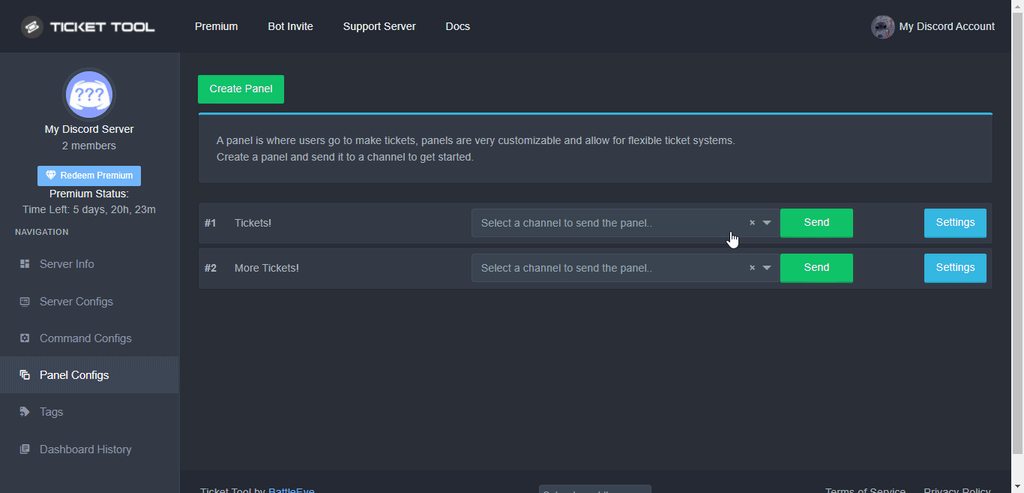
What exactly do you mean by re-order panels
Like re-arranging the Create Button?
balmy ridge
quasi cliff
Select the A role for Allowed Roles
> https://i.imgur.com/P90LV5F.gif
I did that and it still shows for the ones I disallowed. And rearrange like I have 4 panels and I created a new one but want the button to now be let's say second
quasi cliff
balmy ridge
I did that and it still shows for the ones I disallowed. And rearrange like I ha...
You can't hide the buttons but other's shouldn't be able to use them
balmy ridge
ah ok
quasi cliff
balmy ridge
I did that and it still shows for the ones I disallowed. And rearrange like I ha...
I'm not very sure about re-arranging but try adding the Panels to Multi-Panel column again in that sequence
Or actually you can use the command
So suppose you already have the panels listed as 1,2,3,4 and now you want to add Panel 5 between 1 and 2. Simply use $panel 1 5 2 3 4
balmy ridge
quasi cliff
I'm not very sure about re-arranging but try adding the Panels to Multi-Panel co...
You were correct. That worked. Thank you 🙂
iron nightBOT
Gave +1 Rep to @quasi cliff
quasi cliff
If you require any further information, let me know.
 next umbra
hey i need a little help, i made a new mod role and added it to this part of the settings (in the sc) but any new tickets still don't have the role added 😅

 quaint walrus
Hi, so I'm just wondering if this has been addressed already or not but does Ticket Tool have any plans to use slash commands in the future since custom prefixes will no longer work soon due to Discord disallowing bots from reading message content?
Edit: Answer is yes. ETA not given but will come in the next bot update.
next umbra
wait nvm i found what i missed lmao
rustic gale
Discord isn't going to disallow bots from reading message content, it's going to make reading message content a “privileged intent” for which you have to apply
But yes, slash commands will be a thing on the next update
 feral rover
hi, how do i open a closed ticket please, ty
 unreal pike
Best regards to the support, I contact them to ask how I can ping a role (staff)
@eager cargo
 prime bridgeBOT
 Mike•#8149 has been warned!

 They were notified via dms.
unreal pike
Ok…
unreal pike
unreal pike
Best regards to the support, I contact them to ask how I can ping a role (staff)
?
 raw skiff
can an admin check out my server?
ticket tool is completely bugging out, sometimes it doesnt send the panel, othertimens it makes like 10 panels with the same ID, and other times u cant delete a ticket
 tranquil badger
raw skiff
ticket tool is completely bugging out, sometimes it doesnt send the panel, other...
tranquil badger
raw skiff
ticket tool is completely bugging out, sometimes it doesnt send the panel, other...
Can you add a screenshot?
 raw skiff
-?
 mystic mica
raw skiff
-?
mystic mica
raw skiff
-?
Are you sure that's created by ticket tool?
raw skiff
postitive
raw skiff
tickets are very delayed
 ionic marten
oke
 prime yacht
 steep brook
why is ticket tool offline in my server??

 gloomy epoch
It's now online
steep brook
okay
 lucid orbit
gloomy epoch
It's now online
lucid orbit
gloomy epoch
It's now online
Thanks
iron nightBOT
Gave +1 Rep to @gloomy epoch
steep brook
wait not yet for me
gloomy epoch
steep brook
wait not yet for me
You are probably not on the same shard
Just wait a few minutes
 short geyser
Anyone help me I added ticket tool to my server but when I press manage server it says “it looks like ticket tool is in any of ur server” when it is
jade topaz
Why the bot is offline only on my server
My ticket tool is in my server online, but when i press create ticket it says interaction failed
 ripe spear
My ticket tool is in my server offline, but when i press create ticket it says interaction failed
jade topaz
ripe spear
My ticket tool is in my server offline, but when i press create ticket it says i...
Me too
Why?
Support team?
😂 😂 😂
 solar breach
Hi everyone! I have ticket tool premium but in my server it’s saying “this server isn’t active”? Is this due to the outage?
pulsar knoll
HELP: How can I enable to create more tickets per person?
scenic plinth
Ticket Tool Offline Resolved
rustic gale
pulsar knoll
HELP: How can I enable to create more tickets per person?
There's two limits to how many tickets a user can create. There's a global limit and a per-panel limit
The global limit is set in the dashboard -> left sidebar -> Server Configs -> look for an option called Global Ticket Limit
pulsar knoll
thank you
rustic gale
The ticket limit for each panel is set in General Options in that panel's Settings
There's an option called Ticket Limit there
jade topaz
How do i add a ticket to my server
humble sequoiaBOT
You can check our documentation here;
You can also check #📂│information for the basic setup;
You can also watch this video tutorial.
Our documentation contains all the info you need about the bot to be able to setup and configure the bot however you like.
 lofty sundial
How i add another person to ticket
gilded verge
lofty sundial
How i add another person to ticket
On ticket channel, use command $add @mention-user or $add userID | Example:
$add @gilded verge
$add 334671104704774154
 vocal ravine
How do I setup the bot
 fathom wolf
i have this selected but when someone creates a ticket, it doesnt ping the roles
 humble sequoiaBOT
You can check our documentation here;
You can also check #📂│information for the basic setup;
You can also watch this video tutorial.
Our documentation contains all the info you need about the bot to be able to setup and configure the bot however you like.
gilded verge
humble sequoia
@vocal ravine, check
 fallow forge
how to fix it? Crashes after launching three accounts

ru: как это починить? Вылазит после запуска трех аккаунтов
humble sequoiaBOT
Within all the messages the bot's sends (both embeds and text) you can mention either channels, roles, or even users, these mentions will only send a notification to the user if they are used within a text field, e.g: a role mentioned in an embed won't ping at all the users who have that role.
For mentioning a role you can use one out of three options:
{@Role Name} ➞ Which is Case Sensitive.
{RoleID} ➞ Replace RoleId with the Id of the role you are trying to ping.
<@&RoleID> ➞ Discord's native syntax to ping roles.
<#ChannelID> ➞ Mention a channel by its ID.
<@UserID> ➞ Mention a user by its ID.
The panel message is where people react to make a ticket. To customize it head over to your Dashboard --> Panel Configs -> Settings -> Panel Options -> Edit Panel Message
gilded verge
humble sequoia
Hey @fathom wolf, it doesn't work that way. When you add a role to the Support Team Roles, that means that the role gets access to tickets 😄
Check both, then add mention to Message Text.
humble sequoiaBOT

⚠️ You're in the wrong place
We provide support for @pseudo glen discord bot and cannot help you with whatever issue you have.
- We don't know which Support Team you should contact to get this issue resolved, and unfortunately we won't be able to accurately tell you.
If you don't have any further questions regarding our bot Ticket Tool, please close this ticket
gilded verge
humble sequoia
@fallow forge, wrong server
fathom wolf
humble sequoia
wow this is so common yall had do make a embed for it 💀
fathom wolf
gilded verge
Hey <@351759810817032203>, it doesn't work that way. When you add a role to the ...
i dont think u understood
when i create a ticket
a channel gets created
but it doesnt ping the roles
i already have my pannel set up
gilded verge
Please try to read my message again 🥺
fathom wolf
yeah i get that but how do i make it ping roles when someone opens a ticket
"For mentioning a role you can use one out of three options"
where????
gilded verge
humble sequoia
did you check it? 😳
gilded verge
and then you put the mentions here?

 shut shadow
Is it possible to integrate two ticket tools in one discord server?
humble sequoiaBOT
━━ moved to ticket ━━
spare fog
Hi guys, so I set up a panel right now and my support role doesn't have permission to close or delete tickets via button. Is there any way to disable the "$close" and "$delete" commands for them too?
rustic gale
Look in Command Configs in your dashboard
There you can set up perms individually for each command
 dapper dome
Is there going to be a future option for people to create tickets anonymously? I know there currently is not one so I'm curious if that is something in the works or could be in the works one day?
slender minnow
dapper dome
Is there going to be a future option for people to create tickets anonymously? ...
Hey Seraph, there is no confirmation and/or eta for any updates. However, you can suggest your ideas through #🤖│bot-spam
Also, any spoilers will be posted 😉
dapper dome
there seems to be a lot of crime going on in bot-spam >.>


 slender minnow
jade topaz
<@776084862728667156>
slender minnow
jade topaz
<@776084862728667156>
please do not ping me for support
if you need help you can wait here for someone to respond or open a ticket through #🎫│make-a-ticket
jade topaz
oh sorry
slender minnow
no worries
humble sequoiaBOT
━━ moved to ticket ━━
 dire basalt
I have this issue, anyone else have the same issue
 gilded verge
dire basalt
I have this issue, anyone else have the same issue
gilded verge
dire basalt
I have this issue, anyone else have the same issue
Hey, looks like the panel doesn't exist. As far as I know, the solution is to create a new panel and send it to the channel 🤔
However, if you see that this panel is in Panel Configs, try to duplicate it and then send the panel to the channel ^-^
dire basalt
Okay thank!
rustic gale
List open tickets?
 honest crown
On the dashboard 4 tickets are listed as open. But only 1 shown in discord
rustic gale
Oh
Make sure you've expanded all categories in your channel list and Hide Muted Channels is disabled
honest crown
All are expande and no hides
rustic gale
Weird things can happen to the count if you hard delete the channels (right-click + Delete Channel) instead of deleting the tickets (Delete button or $delete command)
Try creating a new ticket and see if that refreshes the count
jade topaz
Hi. Im looking for a team member. I need a little help
gilded verge
jade topaz
Hi. Im looking for a team member. I need a little help
deleted message 😳
Sorry, I didn't notice you already opened your ticket.
 frigid sedge
hi, i kicked my ticket tool premium so i can re -invite it but now it says interaction failed, i also dont see the ticket tool with the gold icon
humble sequoiaBOT
The first thing you will need to do is invite the premium bot, an invite can be found here
Once the bot is in your server we will head to the dashboard and manage your server. When you are managing your server, you want to head into "Server Configs" then click the drop down menu under "Select the bot you would like to use on this server" then click "Ticket Tool#6207" and then save.
gilded verge
humble sequoia
Hey @frigid sedge, please make sure the bot has permissions to a given channel. If so, send the panel to the channel again.
quaint walrus
rustic gale
But yes, slash commands will be a thing on the next update
Omy gosh, I'm sorry! I totally missed this reply and just now saw it as I went back to edit my question. 😓
Thank you for answering my question twice. 🥲
 edgy badge
Hi does anyone know if i can view any of my support tickets have been closed
 quasi portal
Hello, where can I find the option to auto-delete closed ticket?
rustic gale
quasi portal
Hello, where can I find the option to auto-delete closed ticket?
It's called Two-Step Ticket and it's in General Options in your ticket's Settings
If it's enabled, when you close a ticket a delete button appears that lets you delete it
If it's disabled, a ticket will automatically get deleted after a few seconds when it's closed.
rustic gale
 half quiver
<@832864595726172162> hey, when delete tickets they won't delete
half quiver
<@832864595726172162> hey, when delete tickets they won't delete
What error do you get?
half quiver
rustic gale
What error do you get?
idk but it doesn't give error it's just not deleting the tickets
it was doing it previously but i think its broken niw
rustic gale
Type $debug in there and let's see what happens
half quiver
oki
rustic gale
Huh.
half quiver
rustic gale
Huh.
If Ticket Tool support requested this debug give them this link:
https://discordapp.com/channels/509192800865353738/662692902245498910/1001704369147887616