#linux-and-android
1 messages · Page 3 of 1
 teal cape
 abstract wigeon
Oh just for the lols?
abstract wigeon
Tbf suprised it didn't die
teal cape
well, the last simple thing
i do not want to translate the entire last coding project that i worked on
implementing the ext2 file system in C lmao
no thanks
abstract wigeon
Thought it'd only accept ascii
teal cape
it initially complains about it

but after running it all the complaints go away and it just works
teal cape
vscode
abstract wigeon
Wonder if vscode was doing something more than python stock to make it work
 abstract wigeon
Wow
teal cape
anyways this is getting too off topic now i think LOL
but yeah i wonder how regex/grep works with chinese characters
does it just work but it's not very useful?
probably
i dunno
abstract wigeon
Not sure but why? Just to find out?
 wild sigil
teal cape
abstract wigeon
Not sure but why? Just to find out?
wild sigil
teal cape
abstract wigeon
Not sure but why? Just to find out?
just a random thought
 mortal totem

 strong plover
It’s so true
 snow ibex
Is there any specific reasons to use Linux over windows for programming?
I just started learning python using vs for an ide, and Im wondering if there is any reason to switch from windows to Linux or dual boot
Im going to learn c++ once I learn python bc my programming class will be based on that but that will be in a year when I start the class
 tight eagle
I use the microwave 
strong plover
I prefer Linux, because using scripts and programs and languages has been more intuitive, but I’m not a hardcore programmer, take what I say with a grain of salt.
mortal totem
I don't do too many coding projects but I usually prefer linux or macos, I've just found it easier to create and manage test environments. Also for some reason I like vscode in mac more idk why.
But at the end of the day it depends on what you are programming, if it's a windows application you probably want to use windows, if it's a web app you probably want to use mac or linux since it would likely get deployed in a linux environment
I will also note that windows has been adding features like wsl which can be very useful
 fallow belfry
Programs specifically for windows only I'll do in visual studio, but if I need it cross platform I'll code it on Linux
 feral mauve
I am so used to windows
But I really want to move to linux
Concern is compatibility and basic tasks I could do easy in windows being tedious
Learning everything new
Or I could just dual boot
 brave isle
Need some help with fan control
For some reason the package is unable to detect fan sensors on gigabyte motherboards and I've read some online solutions from:
https://gist.github.com/kosttykov/4c335b2aae83d7b247dc77e3bf654e0c
https://github.com/Fred78290/nct6687d
https://github.com/t-8ch/linux-gigabyte-wmi-driver
I haven't had any success with these instructions as there has been an error with executing the commands because there is "No such file or directory" after cloning a repository or "device or resource busy" with other solutions
brave isle
update: I timeshifted my system to revert back to the filesystem before those changes were made
brave isle
What is the most lightweight thing I can install that is good for older CPUs and/or laptops but still allows somewhat good performance with basic tasks or somewhat decent performance with lower-end games
or mid-tier games with like 15.000 mods (minecraft *ahem*)
fallow belfry
Lubuntu maybe. It's a lighter distro that still includes a lot of the basics.
If you just wanted the lightest possible I'd say puppy.
brave isle
what about bunsen?
brave isle
echo it87 > /etc/modules-load.d/gigabyte-sensors-it87.conf
bash: /etc/modules-load.d/gigabyte-sensors-it87.conf: Permission denied
anyone know how I can bypass this?
fallow belfry
Run as root with sudo
 fallow belfry
Looks like it87 is deprecated and replaced by https://github.com/ocerman/zenmonitor
GitHub
Zen monitor is monitoring software for AMD Zen-based CPUs. - GitHub - ocerman/zenmonitor: Zen monitor is monitoring software for AMD Zen-based CPUs.
IT87 hasn't been updated in over 4 years so it probably doesn't support newer packages

While Linux hardware support for desktop PCs has advanced a great deal over the years, one area that continues to struggle is support for fan/thermal/power sensors on many of today's motherboards
brave isle
fallow belfry
IT87 hasn't been updated in over 4 years so it probably doesn't support newer pa...
yeah he stopped supporting it in 2018
brave isle
fallow belfry
Looks like it87 is deprecated and replaced by https://github.com/ocerman/zenmoni...
This package is for monitoring AMD CPUs but I'm running on an intel. The issue I'm having is that lm-sensors is not detecting my fans due to the gigabyte chipset blocking it
fallow belfry
I can see people asking similar questions to you on reddit... but sadly reddit is almost entirely shut down as of this moment
Due to protests against their new policies
brave isle
Ah I don't have access to linux reddit anyways
Inserting modules for my chipset has been doing my head in
fallow belfry
Yeah it's private right now for everyone, like the other 85%+ subreddits
fallow belfry
Nope https://www.reddit.com/r/Save3rdPartyApps/comments/1476ioa/reddit_blackout_2023_save_3rd_party_apps/

reddit
2,149 votes and 351 comments so far on Reddit
I'll keep hunting on the ubuntu forum
brave isle
fallow belfry
I'll keep hunting on the ubuntu forum
thanks
I've looked almost everywhere
even the instructions on arch linux don't work
fallow belfry
Yeah they usually tailor the commands to work on Arch only
I'm guessing you're on something debian based instead
brave isle
fallow belfry
I'm guessing you're on something debian based instead
I'm on a fedora based distro

although I will say that I had this same issue with mint
I swear I just wana throw my motherboard away bc it's made my life so hard xD
fallow belfry
Did you set that kernel parameter before you installed like it says?
brave isle
fallow belfry
Did you set that kernel parameter before you installed like it says?
Yep
Hang on
I think lm_sensors comes preinstalled with my distro
fallow belfry
It probably does
How did you set the parameter? Using grubby? And did you set and install the grub configuration again after?
brave isle
fallow belfry
How did you set the parameter? Using grubby? And did you set and install the gru...
I didn't set it using grubby
I just threw it into my command line and rebooted
but also
I can't seem to sudo dnf remove lm-sensors
it says there's no packages marked for removal
fallow belfry
Too many things depend on it so you have to do a reinstall command
brave isle
ok
fallow belfry
brave isle
I just threw it into my command line and rebooted
So you just typed acpi_enforce_resources=lax into terminal and rebooted?
brave isle
fallow belfry
So you just typed `acpi_enforce_resources=lax` into terminal and rebooted?
yeah
fallow belfry
That doesn't set it properly usually, the best way is with grub config
That way the command gets passed before the kernel even loads
fallow belfry
grubby --update-kernel=ALL --args="acpi_enforce_resources=lax"
grub2-mkconfig -o /boot/grub2/grub.cfg
grub2 is the updated grub
fallow belfry
Grubby should be installed already
brave isle
oh
fallow belfry
If not here's the git https://github.com/rhboot/grubby

GitHub
Retired; BLS-only support lives at https://src.fedoraproject.org/rpms/grubby - GitHub - rhboot/grubby: Retired; BLS-only support lives at https://src.fedoraproject.org/rpms/grubby
brave isle
cheers
fallow belfry
It says it's retired but it should still work
brave isle
I ran the command with sudo and there's no output
sudo grubby --update-kernel=ALL --args="acpi_enforce_resources=lax"
this one that is
fallow belfry
No error means it worked
brave isle
perfect
rebooting
alright I'm gonna try the modprobes now
welp
looks like modprobe it87 force_id=0x8686 worked
no output
fallow belfry
Lack of errors is good still
brave isle
yep
I was having an error that the device was in use or something before
what sort of files is the arch wiki telling me to make?
I see one is a conf file
fallow belfry
That's if you want it to load the module at boot
brave isle
yeah
fallow belfry
You can always just make a shell script on the desktop and run it when you need it
brave isle
Oh
Well I needed it for running my fan control settings as the sensors don't detect fans before we run the module
fallow belfry
If you want it loaded automatically at boot you can load your favorite text editor as root and create the files it talks about
brave isle
fair enough
fallow belfry
Download and set as executable, run when needed
brave isle
Cheers
If I need turn on my fan control after running this script, can I add an extra line saying: sudo service fancontrol start
brave isle
Oh I was just wondering if it'll work
Since I've never made a shell script before
But
I would like to make some in the future
fallow belfry
Yep. Each line is treated as a different command, run after the previous ones.
fallow belfry
(unless you add conditional statements but that's a whole other deal)
fallow belfry
It's working ok then?
brave isle
Got a 240 Hz monitor today and I've only been able to get 70fps bc of my fan settings
brave isle
fallow belfry
It's working ok then?
Yep
fallow belfry
Sweet
 limpid rose
Yo
So I have an optiplex and I wiped the pc completely, I’m running Linux. I was wondering if there’s a way to get the windows OEM product key?
I know this is the Linux channel I didn’t know which was better to ask in
fallow belfry
Not unless the key is coded into the BIOS, which Dell does do sometimes. You might be able to pull the key if you reinstall windows using the OEM disk.
strong plover
Shouldn’t even require the oem disk, I’ve done it a lot on new ssds and stuff
brave isle
@fallow belfry Welp the script stopped working
modprobe: ERROR: could not insert 'it87': Operation not permitted
Loving gigabyte motherboards rn
Also my BIOS settings are taking over fan control when the fan sensors are detected
fallow belfry
Add sudo in front of the modprobe command
And yeah that's a known issue, the gigabyte boards like to override fan control
You basically have to disable the smart fan feature in bios
brave isle
fallow belfry
Add sudo in front of the modprobe command
Yeah it can't modprobe even with sudo
Said device was not found
fallow belfry
brave isle
Yeah it can't modprobe even with sudo
Did anything change, like a kernel update? Because you'll have to change the grub config after major updates like that to re-enable the driver.
brave isle
fallow belfry
Did anything change, like a kernel update? Because you'll have to change the gru...
Nah I tried to run that command when I came back from work after not touching the PC for 24hrs
brave isle
fallow belfry
Did anything change, like a kernel update? Because you'll have to change the gru...
just did some reading into GRUB and it turns out I have a newer kernel installed lol
brave isle
@fallow belfry welp now I can't use fancontrol bc apparently all my sensors don't exist when the fancontrol script is run
The terminal tells me to either install missing kernels or rerun pwmconfig and after running sensors-detect to find missing sensors an intel driver or something gets installed and I've read that it's just the core temp sensor for the CPU
so i don't think i can get full control of my ITE chip


LinuxReviews
Linux users with newer Gigabyte and ASUS motherboards for AMD processors have to compile a out-of-tree version of the it87 to get hardware sensors and fan control working, and sensor support for the very newest motherboards is a shot in the dark even if you do that. That may change for Gigabyte-users with Linux 5.13 as a new, Gigabyte-specific W...
fallow belfry
Guessing you need to wait for fan control to support the new drivers then. Shouldn't take too long, they're fairly active last I checked.
brave isle
fallow belfry
Guessing you need to wait for fan control to support the new drivers then. Shoul...
it says the new drivers don't allow users to write on sensors so it's pretty much useless with programs that require two-way support
so i think I'll just go buy myself a MSI MAG B660M Mortar Max
fallow belfry
Yikes. Sounds like I'm recommending my Linux friends stay away from gigabyte then.
fallow belfry
They were already on my list lol
fallow belfry
It's really just, what, MSI and ASRock that are left with relatively good 'nix support?
brave isle
from my research that seems like the case
everyone else who recommends gigabyte or asus aren't aware of the issues around ITE chipsets
fallow belfry
Sadly they won't care to improve at all. They have zero motivation to do so. Linux users are a small percentage, power users an even smaller subset.
For now at least you have the option of using an older kernel to get the driver working again
brave isle
Yeah that's their stance on Linux with the refusal to release datasheets to make developing open source software easier. I will mention that MSI had an issue with BIOS updates as you needed to run an installer that was only compatible with windows to move all the files onto the USB
fallow belfry
MSI has always offered bios updates in zip folders every time I've needed one. Must have been a specific problem.
And I've used MSI since AMD Bulldozer
brave isle
fallow belfry
For now at least you have the option of using an older kernel to get the driver ...
The options around newer gigabyte/asus boards are limited due to the lack of compatibility with newer ITE chips. The last known attempt to develop an out-of-tree driver (it87) to communicate with ITE chips was in 2018 so owners of boards made after that time have no choice but to roll the dice hoping that they have a chipset that can communicate with the old it87 kernel module
brave isle
fallow belfry
MSI has always offered bios updates in zip folders every time I've needed one. M...
Yeah it seemed like a specific problem to me as preparing a pendrive for bios flashes was as simple as dragging a specific file into a usb so I didn't really investigate further
brave isle
fallow belfry
It's really just, what, MSI and ASRock that are left with relatively good 'nix s...
welp


time to see if it works
 fallow belfry
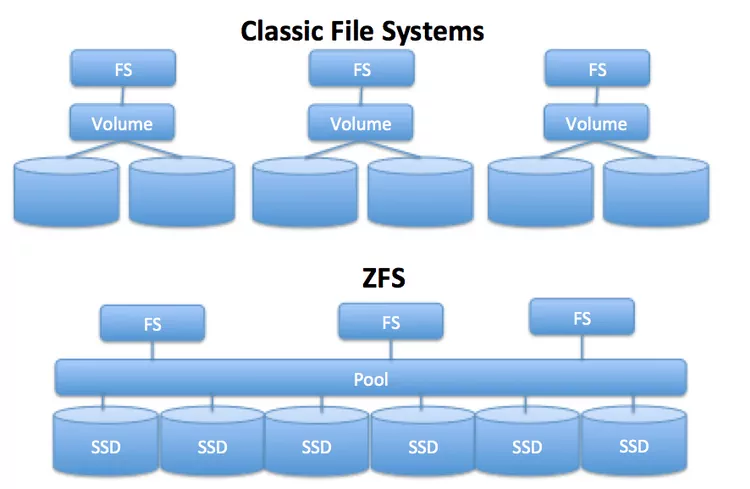
Yeah ZFS is pretty awesome
You can have just about any number of drives, with many different sizes, and it'll just figure out what works best for you.
brave isle
fallow belfry
You can have just about any number of drives, with many different sizes, and it'...
does it have the same issue as XFS where removing one drive or if one drive fails you have the potential to corrupt your entire file pool?
oh wait
that's the limitation of ZFS
fallow belfry
brave isle
does it have the same issue as XFS where removing one drive or if one drive fail...
ZFS is a lot more than XFS. It replaces the entire drive structure like a LVM would. It sort of combines the characteristics of RAID 5 and XFS, and offers automatic snapshots for additional redundancy.
This means it offers parity, CRC, and automatic backup/restore functions to avoid data loss. No single drive lost will destroy the volume, but you may need to rebuild it.
brave isle
fallow belfry
ZFS is a lot more than XFS. It replaces the entire drive structure like a LVM wo...
yeah that's what I gathered
it's a shame that it doesn't run too well with Fedora
brave isle
@fallow belfry Do you know what could be causing the camera in apex to flick to the ground after interacting with your inventory?
I have a feeling there's a setting that isn't built into linux to return your curser to the center of the screen after you close your inventory
causing the camera to flick to the ground
fallow belfry
Idk I don't play it
brave isle
@fallow belfry It's was a mouse capture issue which is common with KDE Wayland desktop environments
also I'm loving window managers as it's so efficient to navigate between virtual workspaces
 dawn widget
It's an issue with a lot or used to be an issue with a lot of games when using a wayland compositer
mortal totem
anyone know how I can do internet sharing via ethernet? so like router -> client wifi adapter -> client ethernet port. Just a simple setup as it's temporary. Ran out of eth ports on the switch
brave isle
mortal totem
anyone know how I can do internet sharing via ethernet? so like router -> client...
what DE are you using
or like, networking program
if its like gnome then you can just set the connection as shared and the other connection as getting wifi through it
mortal totem
Running ubuntu lts, netplan
brave isle
ubuntu should be network manager so
you should be able to just uhh
I'd show you but I don't run a DE
gimme a bit
damn ubuntus iso has gotten pretty large
brave isle
mortal totem
anyone know how I can do internet sharing via ethernet? so like router -> client...
wait maybe I'm a bit lost on what you're trying to do
client to client? 🤔
do you not want to go straight from router -> device 1's wifi adapter -> device 2's ethernet port?
mortal totem
i explain a bit more. so basically I already had a thin client device running on wifi just fine but I recently had to relocate a different pc that only has eth so my thought was use the existing thin client since it's small to share the wifi connection
brave isle
Right, so, you would plug an ethernet cable between the two machines, have the thin client connected to the network, then go to:

 mortal totem
oh yeah and this is terminal only
brave isle
oh 😭
I think with netplan you're still using nm under the hood so,
to do that with nmtui you do
nmtui
"Edit a connection"
"Wired connection" (the one between thin client and device)
and set
"IPv4 CONFIGURATION"
from
"<Automatic>"
to
"<Shared>"
mortal totem
I will check when i get the pc again
 sly surge
Any distro recommendations? Currently running Manjaro Linux. Thinking of swapping to Fedora.
fallow belfry
Everyone has their preferred flavors. What's best for you is based not only on your needs but your preferences.
Try a bunch and see what works for you
sly surge
Which is entirely why I was asking for recommendations.
fallow belfry
Well what are you using it for
sly surge
I host a plex server, do some coding, some gaming (through proton primarily).
fallow belfry
AMD or Nvidia
fallow belfry
Ok, well Pop!OS is gaming focused. It'll come with everything you need for Steam and such out of the box, and flatpack makes things easy.
Gaming on Fedora is a bit trickier
(plex and coding don't really care what platform you're on)
sly surge
Tricky is fine. Manjaro has been a bit of a buggy mess for me lately.
fallow belfry
By trickier I mean compiling source code that may or may not work well. If you're good with that then go for it.
sly surge
That's fine.
 humble kindle
If you want plug and play + easy to google solutions to problems, can't go wrong with ubuntu. Manjaro, debian, fedora, arch, etc are all popular for their own reasons - but I wouldn't daily one unless you truly enjoy learning the linux fundamentals.
strong plover
I would recommend a debian based distro, but that’s just me. Compatibility with a lot of stuff.
 sand pecan
^
Manjaro is kinda jank
Debian based distros have wider support than arch based distros like manjaro
snow ibex
 mortal totem
depends what you do tbh. I see so many people that go to those sites littered with ads and accidentally click on the wrong download or update button
mortal totem
question for the nerds out there. Is there a way I can make a task to schedule a reboot after automatic kernel updates. Or is there another way I should go about this
fallow belfry
mortal totem
question for the nerds out there. Is there a way I can make a task to schedule a...
You can run your update/upgrade command passed through grep in a shell script and if it gets a match reboot after
 languid bluff
Manjaro on top
strong plover
Nahh
brave isle
mortal totem
question for the nerds out there. Is there a way I can make a task to schedule a...
Cron daemon
mortal totem
Yeah I’m gonna take a look eventually, it’s on my list of things that bother me but im too lazy to fix atm lol
 barren fox
is there a way tto have linux and windows in the same pc and just switch between them
whenever i want to
fallow belfry
barren fox
is there a way tto have linux and windows in the same pc and just switch between...
Yes it's quite easy to multi boot
abstract wigeon
yep its called dual booting
fallow belfry
In fact the regular steps for installing Ubuntu (which applies to many different Debian based distros) covers how to dual boot
https://ubuntu.com/tutorials/install-ubuntu-desktop#1-overview

Ubuntu
Ubuntu is an open source software operating system that runs from the desktop, to the cloud, to all your internet connected things.
 dusk kernel
You could also run a virtual machine of one OS on top of the other. E.g., boot to Linux then run a Windows VM. But there are limitations to that approach depending upon what you want to do.
sand pecan
 fallow belfry
Trying to install Arch in a phone? You're in for a wild ride.
strong plover
Yikes
 pure crane
i've been trying to find a solution/compromise to this problem for a few days now....day 5? 4? 6?
i want to dualboot windows and ubuntu on the same Dell laptop but unfortunately I get thrown an RST error when installing
Unfortunately turning off RST will make Windows not boot anymore and it seems unfortunate that my admin perms were just recently removed. so don't know what to do there
wanted to originally run Ubuntu off an external drive but not on the same drive as windows
maybe i could do it with the installer if i add some persistent storage on the external drive? but then i'd have to find some way to mute the volume at startup (because every time you start it up, it plays a sound at 50% volume) and maybe speed up the boot time
fallow belfry
Persistent file would work, it's easy to set up. It'll also keep all your settings from the last boot so it'll stay muted.
You could also just install to an external drive. Unlike Windows, Linux is perfectly happy booting from USB.
pure crane
funnily enough that's exactly what I tried doing
can't even get to the part where it asks where you want to install without getting thrown an RST error
fallow belfry
You could temporarily turn of RST while you're installing
pure crane
unsure if that would break windows permanently even if I turned it back on
unless I don't press F12 too late
fallow belfry
Set the linux bootloader to the top and it's able to boot windows from grub
You'd also only need to disable it long enough to install
fallow belfry
If it does I know how to fix it
pure crane
using the windows installer?
fallow belfry
Usually yes
pure crane
okay, no RST error this time...proceeding
it's working, currently installing zorin os
pure crane
If I leave the installer running and close the laptop lid would it keep going?
fallow belfry
I don't know about that specific distro but it shouldn't hurt it one way or another
pure crane
should be based off Ubuntu so maybe it’s good?
fallow belfry
idk it depends how they configured it
You could always drop brightness and toss a blanket over it if it's light you're worried about. Just leave the air vent clear.
pure crane
I’m back, Linux is installed and I’m switching back to RST
Hope Windows isn’t broken
Yeah Windows works, no issues. And I’ve got Zorin installed, really excited to play around with it
Thanks
strong plover
I had success disabling rst and keeping windows and getting vanilla Ubuntu dual booted, that was awhile ago though
brave isle
any program I can use on Ubuntu to flash a Nvidia GPU vbios?
nvm, looks like Nvflash has a linux version that I didn't know existed
mortal totem
anyone here know how to use k8s?
im slowly going insane, all I can figure out is the apiserver is failing to run but I can't figure out why
 dusk kernel
Just because I like you folks... and because I already bought one just now... Adafruit has a few (19 as I'm typing) Raspberry Pi 4's available:
https://www.adafruit.com/product/4564

The Raspberry Pi 4 Model B is the newest Raspberry Pi computer made, and the Pi Foundation knows you can always make a good thing better! And what could make the Pi 4 better than the 3? How ...
dusk kernel
Yeah, they're somewhat difficult to find at any price.
Only 2 left now!!! GO-GO-GO!!!
dusk kernel
 strong plover
Wow that was fast
 wary girder
strong plover
Wow that was fast
wary girder
strong plover
Wow that was fast
That is true
dusk kernel
It's showing 22 in stock right now.
mortal totem
Rasp pi did say they were working on speeding up production
dusk kernel
oh sweet.... neighbors dog barking means.... yep, it just landed at my door.
dusk kernel
Aaaaaand, they're out of stock again.
strong plover
What are you gonna do with it?
dusk kernel
Well... the first thing I'm going to do is... wait to get some MICRO HDMI adapters. LOL I have a couple of MINI HDMI adapters and didn't realize that the MICRO exists. 🤦♂️ LOL

 forest latch
dusk kernel
Well... the first thing I'm going to do is... wait to get some MICRO HDMI adapte...
forest latch
dusk kernel
Well... the first thing I'm going to do is... wait to get some MICRO HDMI adapte...
I had the opposite problem
Well, not with a ras pi, I bought a bananapi m2 zero (same form factor as the rpi zero) and that has minihdmi
And I only had microhdmi
Speaking if raspberry pis, I had to buy one that was extremely overpriced during the pandemic since my course required me to have one
And when I say extremely overpriced, I mean extremely overpriced
$400cad for the kit after tax
Kit included aluminium case, display cables, power supply, power switch, microSD card (samsung)
Microsd reader
The pi4 8 gig
Nvm it was CA$ 335.49
Raspberry Pi 4 Model B with 1.5GHz 64-bit quad-core ARMv8 CPU
Samsung EVO+ 128GB High Speed MicroSD Card Pre-loaded with NOOBS
CanaKit 3.5A USB-C Power Supply with Noise Filter (UL Listed)
CanaKit Premium Self-Cooling Silver Case with Soft Touch Black Lid
Set of 2 Micro HDMI to HDMI Cables (6-foot cable)
The cheaper kits were all out of stock
strong plover
Yikes
forest latch
It was either pay $120+tax on a scalped rpi4 with no other parts
Or this overpriced official reseller kit
sand pecan
At this point it's easier and cheaper to get a mini PC and mod it
💀
Too bad x86 sucks power
fallow belfry
Forget a mini PC, strip a netbook and 3D print a shell
You can get an old Chromebook for about the same price as a rpi 4
sand pecan
One Chromebook saved from the landfill
forest latch
💀
the requirement for whatever reason what a raspi4
it was part of the mark for whatever reason
btw i did terrible on that assignment
anyways
now im having trouble with ubuntu for whatever reason not wanting to be networked


gonna try to install with a iso instead of the site that my professor provided
since it's really just a fresh install of ubuntu for vmware
completed
it is taking me way longer to try to figure out what the hell is going on, and going through a bunch of forums trying their fixes to no avail lmao
than to try to install the iso and install fresh
forest latch
sand pecan
At this point it's easier and cheaper to get a mini PC and mod it
hell, i even got a 6th gen or smth i5 and a monitor for $100 from my school
i forget what it was exactly
had some old quadro gpu in it
fallow belfry
forest latch
it is taking me way longer to try to figure out what the hell is going on, and g...
Welcome to Linux
forest latch
i've never had this kind of problem before 💀 i blame whoever that made that vm file
or it could have been damaged during my ssd corruption episode lmao
entirely possible ngl
fallow belfry
Or your software switch config in the VM software is incorrectly configured
forest latch
nah, i had windows vms also running with proper networking so it shouldn't hahve been my vm network configurations
i did also double check and it appeared fine
forest latch
i have reinstalled and it has immediately worked
mortal totem
forest latch
I've had it happen with a few ubuntu versions that resolv service fails and you have to fix the conf, restart service or something along the lines
I had a link saved somewhere relating to it if you need
forest latch
i've reinstalled it already so i don't need it anymore
mortal totem
alright
 tender ivy
forest latch
i've reinstalled it already so i don't need it anymore
tender ivy
forest latch
i've reinstalled it already so i don't need it anymore
Inb4 you need it in the future and denied getting the link to save for any possible future issues. 
forest latch
💀
dusk kernel
ARGH.... I'm being forced to use One Drive (and I think they converted to Azure?) on the work laptop... Ugh... changes... :-(
dusk kernel
Because I'd rather be using Linux. :-D
strong plover
Did you used to be able to use Linux for work?
dusk kernel
Nah... that's always just been a fantasy. 😁 Much of what I do is via a web browser so that might work on Linux, but all the Microsoft-centric stuff would probably be problematic.
strong plover
WinApps 🙏
 dire barn
I have an HP 💩box, and it doesn't have options to boot with MBR, only UEFI. I tried getting ubanto and numerous others to boot but not even the live USB will boot for any of them. i've never had linux fail at booting on UEFI or MBR systems, it seems to hang on GPU detection but if I remove my GPU and use integrated it hangs earlier in the boot process. does anyone know what's wrong?
strong plover
Are you trying to dual boot it or boot Linux alone?
dire barn
either
it starts to boot, but hangs in the boot process
yes, i've turned it off and on. yes, i've checked if it's plugged in, yes, i have experience using linux back to 1998. the PC just sucks
in the case of ubuntu, it actually hangs in the USB disk boot process since it uses graphics. slackware's live USB will actually boot into the install program, but fail to boot after install, even if not booting into graphics mode
it seems the problem is that there is a problem with my PC and any sort of graphics and linux.
but slackware won't even boot to text mode after installation
it just hangs during the boot process
so it seems even the high resolution console text is pinging my graphics
i've taken my GPU out and used integrated, it doesn't help
strong plover
What gpu are you using
Because yeah, it sounds like the pc is weird. But there may be a way around
fallow belfry
Could be secure boot. That'll prevent booting from an untrusted OS.
It's the bane of Linux in general.
fallow belfry
dire barn
I have an HP 💩box, and it doesn't have options to boot with MBR, only UEFI. I t...
What model HP? I'll check if it's a known issue
dire barn
i don't have a model number because i bought it refurb and it gives a model number that doesn't even register on HP's site
already did some deep googles here
just trying to figure out if there's something missing
fallow belfry
What does the bios say then? HP bios always has that info somewhere
fallow belfry
dire barn
yes, that's exactly it.
mine is up to 32GB RAM and has a proper GPU, but it's not the cause as i've tested with and without the GPU
fallow belfry
In grub, highlight the Linux distro you want to boot
Press “E” to edit
Replace “quiet splash” with “acpi=noirq”
Press “F10” to boot
dire barn
@fallow belfry update: it works brilliantly. thanks for doing a better google than i did.
fallow belfry
Happy to help.
Half the job of an engineer is "search engine prompt architect"
dire barn
yeah
tight eagle
Honestly talking to people with answers and who have the tools to understand how to get the answers probably saves a ton on search engine resources
dusk kernel
fallow belfry
Happy to help.
Half the job of an engineer is "search engine prompt architect"
 forest latch
dire barn
I have an HP 💩box, and it doesn't have options to boot with MBR, only UEFI. I t...
forest latch
dire barn
I have an HP 💩box, and it doesn't have options to boot with MBR, only UEFI. I t...
wait
mbr is a partition table type,
uefi is the new "bios"
these two have nothing to do with each other 
unless MBR doesn't stand for what i think you're saying
dire barn
¯_(ツ)_/¯
UEFI uses a different partition scheme than MBR, as i understand it
either way, it works now so i don't care further
forest latch
yeah uefi only works with GPT (unrelated to chatgpt)
in the UEFI menu, you enable legacy boot mode for MBR compatibility
dire barn
mine does not have that
so i had to comply with UEFI
it doesn't matter because it works
forest latch
why are you using MBR anyways?
dire barn
i'm not
forest latch
why were you using mbr then
forest latch
welp
tight eagle
Only reason I have mbr is because my old computers set up their drives as such
fallow belfry
Pretty sure he meant CSM, basically compatibility mode for non-uefi OS
forest latch
Ah
dusk kernel
If you're stuck with a potato....
https://www.youtube.com/watch?v=qUpdHF69BQY&t=12s

One of the common questions that new-to-Linux users ask is "What is the best distro for my old, crappy computer?" Well, the great thing about Linux is that we have a ton of great distros designed to run on older, underpowered hardware...
REFERENCED:
► Puppy Linux - https://forum.puppylinux.com/puppy-linux-collection
► AntiX - https://antixlinu...
 dire barn
@dusk kernel ubuntu budgie is great for potato
i installed that on a potato recently
you get a thin and light desktop but you have the option of using modern software
fallow belfry
Lubuntu? That's supposed to be the light one
dire barn
ubuntu budgie is the option i'd prefer to LXDE
it's just my own preferences
i like how the UI handles stuff
it also doesn't take much screen space which is great if you're dealing with an ancient 1280x1024 display or something
sand pecan
for older stuff I use Debian-minimal or Arch
they're very barebones
great for older systems
strong plover
I’ve used lubuntu before- I’ll have to give budgie a try if I need an old laptop running again
dusk kernel
Ventoy is even handier. I have 36 ISOs on a USB drive, all of which can be booted.
https://www.ventoy.net/en/index.html
Ventoy is an open source tool to create bootable USB drive for ISO files. With ventoy, you don't need to format the disk again and again, you just need to copy the iso file to the USB drive and boot it.
sand pecan
Wait
36 bootable images on the same drive?
Damn I need that
Would certainly make it easier to keep track of all of my usbs
I have a bunch of USBs lying around and I have no idea which one has the arch iso or which one has the debian iso
dusk kernel
That's correct. It's a 128GB USB "thumb drive" but you could also use any external drive in an enclosure that connects via USB
I still have 23GB free on the drive so maybe I'll add some random ISOs just for fun. 😁
strong plover
Man. I need a bigger drive. I’m always having to delete isos off my 32gb one to fit more
Ventoy is a lifesaver though
fallow belfry
Can also confirm ventoy is great for multi boot, but windows is kinda iffy off it
dusk kernel
There are a lot of options for USB drives, but I have a few of these:
https://www.samsung.com/us/computing/memory-storage/usb-flash-drives/usb-3-1-flash-drive-bar-plus-128gb-titan-gray-muf-128be4-am/
Or put a SSD or other old HDD in an enclosure, or... yeah there are lots of options. 😁

Samsung Electronics America
Discover the latest features and innovations available in the USB 3.1 Flash Drive BAR Plus 128GB Titan Gray. Find the perfect Memory & Storage for you!
sand pecan
I usually go with one that can fit on a keychain
dusk kernel
Yeah, I was just remembering that issue with those drives. LOL
sand pecan
lol
strong plover
fallow belfry
Can also confirm ventoy is great for multi boot, but windows is kinda iffy off i...
I’ve done windows 10 and 11 off mine multiple times with no issues
What iffiness have you experienced?
fallow belfry
It doesn't always play nice with secure boot
sand pecan
same
that kinda makes it annoying tho
since I'll have to have separate usbs for windows isos
hm
Actually if it's a windows installation iso
could i turn secure boot back on after?
fallow belfry
sand pecan
could i turn secure boot back on after?
Winblows 11 won't let you install without secure boot on. At least not without bypassing the requirements before you make the USB.
sand pecan
oof
fallow belfry
Any other windows is perfectly happy with it off at least
languid bluff
linx
 mortal glade
lix
sand pecan
Arc liux
strong plover
Arh lnx
forest latch
Al
brave isle
have anyone tried building linux distro from scratch
if yes how much effort did you put in and how much did that take
fallow belfry
brave isle
if yes how much effort did you put in and how much did that take
Difficulty level would depend on just how custom you want to make it. The Linux kernel is easy to modify; it's open source and well documented.
A logical next step would be to decide on a package manager you want to use, if any. You can theoretically run without one but you'll have a bad time compiling all your packages from source and keeping track of what is installed where manually.
Once you know that you can pick a desktop environment that integrates well to your chosen package manager.
All of these things can be fully customized at every step. The level of customization you want to do determines how long it will take you. A basic Debian package manager and .deb based DE would be fairly simple, maybe a few days' worth of work or a week for an amateur.
sand pecan
I'd recommend using arch instead of building a distro from scratch
Arch is very customisable
I'd describe it as a "build your own distro kit"
They also have very detailed documentation
brave isle
I tried Gentoo it was nightmare
sand pecan
Gentoo makes you compile everything
Arch doesn't
And also
Better wiki
But yeah even if you're going to build your own distro I'd still recommend using arch for a bit
It'll give you a lot of knowledge in that area
strong plover
I feel like arch is as close to building your own distro as most people need to get
brave isle
Gentoo not only makes you compile everything but also make you resolve slot conflicts yourself
sand pecan
yeah this is why arch is better
It's the middle ground
You get customisation with way less headaches
brave isle
Some Proprietary software support Linux but only supports Ubuntu
mortal totem
Alright someone needs to help my monkey brain.
Im trying to setup a ftp server using vsftpd to connect to my printer scanner. Right now im trying to lock the user in home directory with chroot_local_user in the config and I can connect to it but the directory is unwritable despite the permissions seeming fine and the explorer saying I have read write permissions
dusk kernel
 dusk kernel
I have to avoid #building-and-recc-chat 'cause I start thinking about building another system even though I don't need one. 😁 I only have 3 channels visible in this server so I don't spend all day reading random stuff.
 copper ivy
Is there a performance difference between playing games on linux vs windows? Can I get any game run on linux and is it worth it?
fallow belfry
copper ivy
Is there a performance difference between playing games on linux vs windows? Can...
Yes there's a performance difference, it's usually driver related. Generally Linux hates Nvidia GPUs in general too, they do not maintain their driver well.
It used to be you had to do a LOT of tweaking to get any game to run on Linux but ever since the Steam Deck, Proton has made it easy. There's a lot more games that are supported now than games that are not.
 dusk kernel
Some helpful advice for you new Linux users....
https://www.youtube.com/watch?v=cC1CqyCN9Q0

When you are new to a group, sometimes it's hard to fit in. New-to-Linux users often find that it is hard for them to fit in with longtime Linux users. So here are some tips on how you can start acting like a longtime Linux user...so you can fit in.
MUSIC :
► Adrift by ELPHNT (from YouTube Audio Library)
IMAGES:
► https://en.wikipedia.org/wi...
dire barn
programmer socks
dusk kernel

 vernal fog
So I'm thinking of switching from Windows 10 to Nobara and I was wondering if upgrade installations are possible?
dusk kernel
Nobara IS a variation of Linux... it's just a tweaked version of Fedora. What do you want to upgrade from?
vernal fog
Windows 10 my bad
dusk kernel
aaaahhh... gotcha. Looks like you would download an ISO and install Nobara just like any other Linux:
https://nobaraproject.org/download-nobara/
vernal fog
An ISO of Nobara? I want to do an installation where I keep my data
fallow belfry
vernal fog
An ISO of Nobara? I want to do an installation where I keep my data
Windows and Linux are fundamentally different. You can technically install Linux over your Windows installation but you'll lose some of the features of the superior ext4 file system and you might have other odd issues.
vernal fog
Don't reckon I have any programs that wouldn't be compatible 
fallow belfry
vernal fog
Don't reckon I have any programs that wouldn't be compatible <:ThinkingEgg:59822...
You'd need to reinstall all your programs anyway. Windows executables are not compatible with Linux, at least not without translation with Wine which isn't easy.
vernal fog
Aside from games I don't have any programs that warrant that
Unless even Libre Office requires that
fallow belfry
Windows packages typically don't include Linux compatible binaries, you have to download and install the Linux packages if you want it to work right. Libreoffice and Firefox are usually installed by default at least.
Games can be a struggle on Linux. Steam with Proton helps but there's still many compatibility issues. About 2/3 games work with some or no issues, and 1/3 barely works or doesn't work at all.
vernal fog
Right
strong plover
vernal fog
An ISO of Nobara? I want to do an installation where I keep my data
Dual boot?
vernal fog
strong plover
Dual boot?
I don't want to dual boot though. Sure I want everything to be "the same" as it was on Windows but really the only items of importance are a couple of documents
strong plover
If that’s the case, and you’re not worried about windows-only software, I’d back those documents up to a stick drive and the on ANOTHER stick drive, make a usb installer for your Linux version
vernal fog
That's the plan
dire barn
i prefer using linux but i also like to be able to buy games from within the steam client that require proton to be able to run them, which i've never gotten working outside steam OS (the most broken linux distro for my hardware)
mortal totem
there are other tools using wine to run games ofc but last I've tried they are still not perfect. I would be curious to see if that improves when Valve gets around to finally releasing the 3.0 arch based one for pc.
sand pecan
Linux either just works or doesn't
Most stuff works in my case luckily
Even with a nvidia card
But on some older pcs i own
Stuff just wouldn't run
strong plover
I’ve never had a problem with my nvidia card thankfully
vernal fog
I has AMD card
sand pecan
ok
dusk kernel

 icy gate
Hey
I've been trying to create VM in Virtual Machine Manager but I keep getting this error. what should I do in order to fix it?
I already tried sudo virt-manager but it doesn't seem to fix it....
 sand pecan
ahahaha
AHAHAHA
one of the mysteries of life
hmm
try to chmod or chown the folder
if not try reinstalling all the packages you need for running a virtual machine
vernal fog
Anyone ever experienced a disk write error when installing Steam games?
fallow belfry
vernal fog
Anyone ever experienced a disk write error when installing Steam games?
Does your disk have enough space left for both the game and the temporary files while decompressing?
If so then try this https://help.steampowered.com/en/faqs/view/6AD7-820D-8BE5-E51F
 vernal fog
Yes
I've been having a time getting Steam to properly recognize my hard drives
At this point I'm considering going with Linux Mint instead of using nobara
fallow belfry
How do you have your disks set up? Where are they mounted and with what permissions?
fallow belfry
You can always verify that by navigating there in a file browser
While you're there check the permissions
Both on the parent folder and the mounted folders
vernal fog
I can't seem to change the ownership for one of my drives
fallow belfry
What program mounted the drive
vernal fog
Terminal? Or KDE partition manager?
Atm it seems like I need to create new folders again. Although how do I format a hard drive?
fallow belfry
You can format with gparted, that's often easiest
You can mount the drives from there too
fallow belfry
It would need to be unmounted to format
vernal fog
Just found that out
And done
And now to attempt to try again
Now they're mounted
What next
fallow belfry
Try to add them as steam libraries and start the download again
vernal fog
The permissions are for root instead of the username
vernal fog
What else do I type with it? I'm sorry I am very new to setting up Linux for gaming on mulitple drives
fallow belfry
sudo chmod 777 /path/name
That'll give permission to all users for read, write, and execute
vernal fog
What do I type for path?
fallow belfry
The mount point root
vernal fog
I see it in GPARTED
fallow belfry
Yes gparted has a column that says the mount point
vernal fog
It was long but I found it using information
fallow belfry
Keep it copied so you can tell steam where to go too
Maybe put it in a text document on the desktop
vernal fog
It says no such file or directory
fallow belfry
How did you enter it? Typing it out or copy/paste?
vernal fog
copy/paste
fallow belfry
Put quotes around the full path, otherwise it'll treat any spaces as the end of the path
vernal fog
Huh.
fallow belfry
"/like/this example"
fallow belfry
yes
vernal fog
Like just the path or the path and the name?
fallow belfry
Technically speaking you only need to wrap any part of the path that has a space, but good practice is to do the whole path just in case of special characters
/this/"example is"/the
"/same/as this/example"
vernal fog
Will that work if said path has multiple forward slashes?
fallow belfry
Yes
The quotation marks basically tell the terminal to ignore special characters between them, including spaces, #, $, \ , &, etc
fallow belfry
Try this to see if the directory exists as entered
cd "/enter/directory/here"
It's possible if it was a long path that it didn't grab the end of the path when you copied if not
vernal fog
What am I supposed to type there?
fallow belfry
Just cd and then the path
What it will do is change the working directory in the terminal to the specified location
If there's no error, it's a valid path
If it errors, try copying the path again by triple clicking on it to select the full path
vernal fog
Ok
I typed in cd and entered the path name and after the local host part it shows the path name
fallow belfry
Ok so it is a valid path
vernal fog
So do I go back to chmod?
fallow belfry
What's the last folder's name in the path
Actually never mind
Do this
sudo chmod -R 777 ./
Since you've changed the active directory, that'll tell chmod to target the currently active folder, which is what ./ is short for
vernal fog
Do I need to type anything else in that command or just type it as is
fallow belfry
As is
Normally I would not recommend this command. It can be dangerous.
Make double sure that it shows the current folder before the # and you're good though
vernal fog
I did that
fallow belfry
If there's no error then it completed successfully
vernal fog
Sorry about that. Right now I'm installing a game via steam and atm it's reserving space
I'm going to try to wait until it's reserved to see if the error shows up. Though I don't have much time since I have work soon
fallow belfry
No worries, you can always come back to it later
vernal fog
Still says Disk Write Error
I can still message while I'm at work but yeah. I'll have to check more into it tomorrow
fallow belfry
Try creating a folder in the drive and telling steam to target that folder for your next step
You can always ping me later and I'll get to you when I can
vernal fog
Thanks. Would I have to do that for every game? Because Proton experimental installed there just fine
fallow belfry
No it's a bug with steam itself apparently
Once you can install one game the others should work in the same install location
vernal fog
fallow belfry
Try creating a folder in the drive and telling steam to target that folder for y...
I tried to do that but it says Disk Write error
fallow belfry
Try this
sudo chown username:usergroup /path/
Replacing the appropriate parts of the command with your user, group, and path
vernal fog
like say sudo chown username:anon /3/ for example?
fallow belfry
More like chown anon:anon /media
vernal fog
I see
fallow belfry
You'd be changing both the owner and the group owner of the folder
Linux usernames are all lowercase btw if you weren't aware
vernal fog
Mm
it keeps saying no such file or directory
Or was I supposed to use the mount point in there?
vernal fog
fallow belfry
Linux usernames are all lowercase btw if you weren't aware
I forget to mention everytime I target Steam to that hard drive it's registered as an extended drive
fallow belfry
Extended? Not primary?
vernal fog
Sorry External Drive
fallow belfry
Oh well that shouldn't really change anything
vernal fog
Ok
Still don't know why a folder can't be properly made there
Does it also matter what type of SSD/HDD you have? I have an nvme drive
fallow belfry
No the type of drive doesn't matter
fallow belfry
vernal fog
Or was I supposed to use the mount point in there?
Yes this
vernal fog
I wonder if the lost and found folder has anything to do with it
vernal fog
Yeah I don't know what I keep doing wrong
Idk if it's because I did something wrong, if I'm not installing games via lutris, etc.
dusk kernel
I finally came up with a project for the Raspberry Pi 4 I bought. :-D
I have a couple of these that I saved from recycling at work:
https://www.amazon.com/Dell-Inspiron-i3455-10041WHT-Touchscreen-SIlver/dp/B012Y18CJI
(it is NOT worth that price, LOL)
I wanted to use one of those as a monitor for the RasPi. But they only have HDMI out so they can't be used as a simple monitor. BUT... I can get the same functionality (and more) by connecting the AIO and the RasPi with ethernet cable, then using RDP to view the RasPi desktop on the AIO. So both will have Wi-Fi internet access and their ethernet ports are dedicated to the RDP signal.
It works... but now I need to figure out if I can find a use for it. [chuckle]

Compute with ease on the Dell Inspiron 3455 All-in-One Desktop PC. Microsoft Windows 10 Home lets you complete any task. The 1TB hard drive has plenty storage for all of your files. Interact with your PC in a whole new way on the 23.8-inch touchscreen monitor. Video chat with friends and family o...
 sand pecan

 gilded smelt
Hey Linux newbie here. I'm wondering if I can make a raid 1 array with my OS drive and a different drive
I see people using mdadm but on two different drives that isnt the os drive
Planning on using debian
fallow belfry
gilded smelt
Hey Linux newbie here. I'm wondering if I can make a raid 1 array with my OS dr...

I don't recommend using raid, you lose a fair bit of performance using different drives. Unraid or zfs would be better options imo.
gilded smelt
hm alright thanks
 outer moss
Hey guys, I have zero experience with desktops, and would like some tips regarding building a desktop that I will primarly use remotely
I'm gonna be in a college campus, so I'm planning to reuse an old laptop of mine to access it
I really want this thing to last in the long run
Also, I'm into game development in unreal engine, so I'm gonna need an AMD GPU that is similar to the NVIDIA RTX 2080
Any advice would be awesome
forest latch
outer moss
Hey guys, I have zero experience with desktops, and would like some tips regardi...
#building-and-recc-chat would generally be the best place to ask, but i can give you some tips
- you would definitely want a IP-KVM for this use case, so that you can restart your pc properly in an event of a system crash/freeze (it will allow you to remotely trigger the power and reset switches, as well as access the bios), the cheapest option would be around $300-400 USD https://pikvm.org/buy/ (note that the pi 5 version may come out soon, so you might want to wait for that?)
- honestly any build that would fit your needs would be good enough
- make sure that the network connection is good enough at home and at college
- amd gpus similar in performance to a 2080 would be like... i think a 6700x? check with the guys in #building-and-recc-chat

PiKVM an easy and inexpensive DIY IP-KVM on Raspberry Pi to control remote machines: Full HD, mouse, Mass Storage Drive, VNC, IPMI and much more out of the box. Most modern KVM over IP ever!
 maiden pine
I'm getting a Panasonic Toughbook CF-30 soon ™️ I don't know any of the specs because I don't have the charger yet. I know that it has a touch screen (looks to be Nintendo DS style, requires a plastic stylus) I want to put a lightweight linux distro on it; does anyone have recommendations? I don't know what I want to do with it yet because I don't know how capable it is.
fallow belfry
Choice of distro usually depends on personal preference and use case
If you want light you can do something like Puppy or Lubuntu
pure crane
thinking about leaving win11 and moving to linux but i'll need something light and capable
what distro's a good option? there's a bunch of them
fallow belfry
Compared to windows they're all light
Something Debian based like Ubuntu is a good first distro. Or if you want to ease your way into Linux, Mint has an interface similar to Windows.
pure crane
i guess i'll just flip a coin over those two
cant decide
heads
guess its ubuntu then
 smoky fable
Mint is a pretty easy move from windows
I had to use it briefly for some of troubleshooting and it was super easy to set up and start using
Felt really snappy; I'd probably use it on my laptop if it weren't for lack of compatibility with Solidworks
outer moss
Hey guys Ik this question has probably been asked many times, but from everyone's experience here, which GPU vendor is objectively better for linux?
Like for general tasks like 3D, video editing, etc...
outer moss
Or are they all the same, and I'm worrying about it too much
mortal totem
word around in the past has been that amd had better support for linux, but more recently I see many say they haven't had any issues with nvidia on linux
outer moss
Yeah I figured, from what I read people over inflated NVIDIA's lack of support
fallow belfry
Nvidia "open sourced" part of their drivers so it's helped a little
strong plover
I’ve heard of, and may be experiencing, nvidia being finicky on Wayland. It appears to me that Wayland is where many distros are going, so I would look into that.
Then again, I am rocking a gtx 1060. It’s pretty old
fallow belfry
Nvidia was weird for me too. Unless I set a certain flag in grub I didn't get any video on boot, but it worked perfectly on the live USB. And that was both a 2070 and 3090 that did that.
I just installed Pop with the nvidia driver pre installed and it worked great
strong plover
See I never had a problem with drivers- mine always worked with any distro with the noveau driver and then I’d install the proprietary nvidia one. But this recent Ubuntu update where it defaults to Wayland is being weird graphically, freezing and glitching relatively often. Haven’t done much troubleshooting yet so it could be another issue.
But when I switched back to x11 briefly it seemed to go away
 mossy lotus
Hi everyone
dusk kernel
 strong plover
‘Sup penguin dude
 strong plover
wHAT did I just see
 ornate finch
What are the benefits of linux over windows? As much as i love the idea of it, how unsupported it is in a lot of things and the learning curve of it are a bit threatening
tight eagle
you can pass through to windows
tight eagle
Virtual machines
I guess you can pass your GPU through to Windows and just have linus running vestigially
fallow belfry
ornate finch
What are the benefits of linux over windows? As much as i love the idea of it, h...
A lot of "incompatible" programs either have free alternatives that are fine on Linux or you can run the program in Wine or, as already mentioned, in a virtual machine.
Personally I dual boot. If I'm gaming I use Windows, otherwise I'm on my Linux flavor of the week.
The hugest benefit over Windows is the sheer customizability of the OS. You can change nearly everything about it. You can build the kernel with whatever options you want and change the very core of Linux.
forest latch
im too tired to troubleshoot but windows pc can ping rasp pi, but pi cant ping windows, and i had disabled firewall temp on private network which i was set to, and pi doesnt have any firewall rule chains either
i'm gonna go sleep and wonder if i will dream of a solution since im too tired
Also I'm able to ping the gateway from the pi, haven't tried pinging other devices though
fallow belfry
You can always run a Linux live USB to see if it's a settings issue or a Windows issue. Probably Windows.
forest latch
The problem is, I'm not even currently in the same city as my house
But yeah I'll try to use cli to disable the firewall instead, maybe that will work better or smth idk
ah
that can do it
i set a reserved ip on my dhcp server in the router but the ip hasnt refreshed yet on the windows client
forest latch
yeah, that i knew, the problem was that i didnt notice lmao
kinda ironic that i talked in windows and software while talking about nginx and linux (though technically software) then i move to linux thinking that i might be having more problems with my linux configuration and then finding out that it was actually windows 💀
forest latch
anyone know why ./start.sh isnt starting after a reboot even with the crontab

wait
oh i think i figured out why

how do i fix this lmao
ok i think i fixed it
time to test my fix
manually calling /usr/bin/screen -dmS velocityProxy /home/pi/MCVelocity/./start.sh but it doesnt seem like crontab is running this at start


 raw cipher
Anyone with Kali Linux White Hat pentesting experience here? I'd love some guidance! I'm a cyber security student, primarily with an interest in SOC analyst/Threat Intelligence analyst work but want to develop some pentesting skills in my spare time. Feel free to DM if you're able to help. And, apologies, staff, if this message is not allowed.
forest latch
raw cipher
Anyone with Kali Linux White Hat pentesting experience here? I'd love some guida...
white hat security testing is perfectly fine in this server; it's a matter of intent
mortal totem
there are a lot of services around now that have remote systems designed to learn that kind of stuff
wary girder
What the [fun]: shell@X5max:/ $ yes yes yes yes
that probably infinitely prints "yes yes yes" in the terminal.
dusk kernel
Sooooo, since it's so quiet here....
I've been pondering setting up a portable drive to use if/when I travel internationally. The main objective is to have a consistent setup without carrying a laptop so that I can work some while I'm traveling. That will allow me to stay gone longer.
I figure if I boot from the external drive, I can use anyone's hardware. I'm looking into setting up Fedora with full disk encryption and have found a guide or two for that.
I might also setup a Raspberry Pi as a backup. Then I'd only need to borrow a monitor or two.
We obviously use Windows at the job, but... so far I have only come up with 1 task that can't be done with the cloud-based apps that are available. I should be able to use LibreOffice and Thunderbird for that task, an "email merge".
Does anyone have suggestions for other methods of accomplishing this sort of thing?
fallow belfry
You're on the right track I'd say. Make sure the OS is pretty light so it can boot from USB quickly
dusk kernel
Good point. I'll probably stay with KDE on Fedora simply because I'm more familiar with it. I have an install on a USB drive that I keep updated and use occasionally and it seems to work well enough.
vernal fog
Does anyone here know anything regarding sound drivers?
 unborn haven
vernal fog
Does anyone here know anything regarding sound drivers?
unborn haven
vernal fog
Does anyone here know anything regarding sound drivers?
Maybe I can help
What's the Problem?
vernal fog
Whenever I play games I sometimes hear a buzzing/crackling sound
unborn haven
I don't think it's a sound driver problem...
Other sounds/game sounds are coming out Fine?
forest latch
Maybe try lowering the sample rate
vernal fog
forest latch
Maybe try lowering the sample rate
I could try that
vernal fog
unborn haven
Other sounds/game sounds are coming out Fine?
It's across all games
vernal fog
forest latch
Maybe try lowering the sample rate
How do I do that?
forest latch
im not actually too sure for linux specifically, but i know that i get audio issues when the sample rate is too high or the buffer size is too small, or whatnot
vernal fog
So what I did was disable the pipewire service and though the sound quality is lower, there is no crackling
unborn haven
Can we discuss about android platform termux?
Asking if it's allowed @fallow belfry
fallow belfry
Sure. Nothing inherently wrong with it. I use it myself for BusyBox tools.
unborn haven
I am having errors in termux that aircrack-ng tool package is not found even after installing root-repo package.
Someone help me please....
 fallow belfry
unborn haven
I am having errors in termux that aircrack-ng tool package is not found even aft...
fallow belfry
unborn haven
I am having errors in termux that aircrack-ng tool package is not found even aft...
You'll need root access as a prerequisite to change to monitor mode, assuming your wireless chipset is even capable of monitor mode, so I hope you've got that sorted before you even try to run that on android.
If the package isn't found then you need to either find a ppa or compile from source.
unborn haven
Thank you for so much info
unborn haven
fallow belfry
You'll need root access as a prerequisite to change to monitor mode, assuming yo...
I will need an extra wifi scanning usb dongle or the wifi chipset which is already installed in my phone will work?
fallow belfry
unborn haven
I will need an extra wifi scanning usb dongle or the wifi chipset which is alrea...
I don't know what your phone has in it, and USB Wi-Fi often doesn't work on phones
dusk kernel
I finally got the dnf_local plugin setup and working. \o/ It's good to know that I'm not wasting bandwidth when updating the various machines I have that are all running the same distro. 😁
https://fedoramagazine.org/use-the-dnf-local-plugin-to-speed-up-your-home-lab/

Significantly improve your productivity when running multiple instances of Fedora Linux by installing the DNF local plugin!
strong plover
Never thought of using something like that…. Something like that would be nice for my families ubuntu machines haha
dusk kernel
Surely there's a good option for Ubuntu. Maybe one of these would work for you?
https://medium.com/ascension-it/creating-an-ubuntu-package-cache-server-for-your-local-network-24d30c4c0806
https://help.ubuntu.com/community/Apt-Cacher NG
https://apt-proxy.sourceforge.net/
fallow belfry
If you've got the space for it you can always set up a local mirror of the linux repos
Should only take a couple hundred gigs if you include all sources for a distro
fallow belfry
I got curious on exactly how much space would be required if I wanted to mirror only the latest version of Ubuntu, Xenial. You can replicate my results and check other repos using rsync, for example this would be for every version of Ubuntu.
rsync -h --recursive -n --stats rsync://us.archive.ubuntu.com/ubuntu
ubuntu/dists/xenial = 1.7 GB
xenial-backports = 1.7 MB
xenial-security = 772.4 MB
xenial-updates = 3.59 GB
ubuntu/pool/main = 777 GB
multiverse = 93.8 GB
restricted = 528 GB
universe = 1.35 TB
So you'd only need about 2.8TB of storage, but the advantages are huge having your own private mirror that you don't need to share bandwidth on.
brave isle
I once tried to use Gentoo Linux read the handbook all together and finally only managed to get a no-DE setup working and because of so many dependencies cycles and conflicts I gave up
fallow belfry
Gentoo is Linux hard mode, I wouldn't consider it representative of a normal experience
If you want a distro without a DE that's easier to use you can do something Debian based like Ubuntu Server
strong plover
dusk kernel
Surely there's a good option for Ubuntu. Maybe one of these would work for you?...
That’s super easy, may try it out this summer
strong plover
fallow belfry
I got curious on exactly how much space would be required if I wanted to mirror ...
That’s less than I would have thought to be honest. Have you ever hosted or used a private mirror before?
dusk kernel
fallow belfry
I got curious on exactly how much space would be required if I wanted to mirror ...
Mirroring the entire repo seems like a lot of bandwidth and storage space for a lot of packages that you'd never use.
Then again... if you have a lot of machines accessing your personal mirror... maybe the bandwidth and storage space are worthwhile. 😁
fallow belfry
dusk kernel
Mirroring the entire repo seems like a lot of bandwidth and storage space for a ...
This is also including all of the nvidia driver versions and things like that, you can exclude those. That's easily hundreds of megabytes per version.
You can pick and choose which packages sync, it just takes longer to name them all and if any new dependencies happen with updates you'll need to get that elsewhere.
fallow belfry
strong plover
That’s less than I would have thought to be honest. Have you ever hosted or used...
I've used alternative mirrors before, but never had reason to host one.
dusk kernel
Aaahhh... OK, so mirroring isn't "all or nothing." Good to know.
strong plover
It might be worthwhile if enough friends who use the same distro could pool money for the server or storage cost to justify it
fallow belfry
Or for an organization that already has a server
forest latch
You could make a mirror for cheap with a pi and a 4tb ssd
No need for redundancy since you're going to be syncing daily
unborn haven
An error occurred while installing nokogiri (1.14.5), and Bundler cannot
continue.
Make sure that gem install nokogiri -v '1.14.5' --source 'https://rubygems.org/'
succeeds before bundling

I am having errors in installing nokogiri as you can see, anyone help me please? @fallow belfry
fallow belfry
That's a bit outside my wheelhouse, but what does mkmf.log say?
unborn haven
Libiconv not found
fallow belfry
unborn haven
Libiconv not found
Sounds like a missing dependency then
brave isle
Android uses Linux kernel however we can't talk about Android here sed
fallow belfry
No one said you can't
In fact the last few messages in here were about Termux on Android
If it's OS related it can go here, but if it's device related it would probably fit better in #electronics
brave isle
Ok thanks Fal'Cie
dusk kernel
I'm thinking about installing Linux on a Microsoft Surface 2 even though I can't think of anything useful to use it for if the installation works. Somebody stop me! 😁
fallow belfry
Why would I stop you from making your device objectively better and less crammed with spyware
dusk kernel
Well yeah, fair point... but... I don't think it'll even be able to effectively load youtube, even running Linux.
fallow belfry
Nothing about Linux stops you from watching anything. If there's a limit, it's the hardware itself.
Ok well DVDs are still tricky but I doubt most people are using those
 keen mango
Don’t people have problems running Linux on surface devices?
dusk kernel
fallow belfry
Nothing about Linux stops you from watching anything. If there's a limit, it's t...
Yes, that's what I meant. The hardware can't handle the demands of modern youtube.
dusk kernel
keen mango
Don’t people have problems running Linux on surface devices?
"it depends." 😁 Seriously though... it's not a quick and simple process but there are options for installing Linux or Win10 on the Surface RT & Surface 2.
Aside from using it as a youtube portal, the only other use I've come up with is playing videos that are stored on the drive attached to my router. I can probably do that without changing the OS, but the lure of "instal Linux on it" is strong. heh heh
sand pecan
The only reason I still have windows is to separate my work spaces
Windows for strictly work (and also games that don't want to work under proton)
And linux for anything else really
Tho I have to give MS credit
Windows 11 gave me a lot of the features that I've wanted for a while
(features that were previously only on linux)
Or required janky third party software
 feral dock
fallow belfry
Ok well DVDs are still tricky but I doubt most people are using those
feral dock
fallow belfry
Ok well DVDs are still tricky but I doubt most people are using those
DVDs are fine
VLC
Some distros need an extra package
Like fedora
fallow belfry
Copy protection is the tricky part
Because of that a lot of modern movies are encrypted and don't play nice with Linux
abstract wigeon
barren fox
whats the best linux for an idiot that knows nothing about computer
Why linux then
uh well technically chrome OS 🤓
fallow belfry
Mint is designed to be pretty similar to Windows. Minimal setup needed.
abstract wigeon
Also popOS
fallow belfry
There's other distros that try to copy the windows look more
barren fox
fallow belfry
Mint is designed to be pretty similar to Windows. Minimal setup needed.
thanks man
abstract wigeon
But if you just don't want to pay for windows you don't have to activate windows and it works like normal @barren fox
Fyi
And is legal ^
barren fox
abstract wigeon
And is legal ^
man i dont care if its legal or not
abstract wigeon
Some people do
fallow belfry
If it has a Nvidia GPU then PopOS might be a better option, since there's the option to have the Nvidia driver preinstalled.
My 2070 wouldn't have any video out unless I passed a command in grub to change the resolution at boot, but that wasn't an issue on pop
fallow belfry
I type longer sentences lol
abstract wigeon
fallow belfry
My 2070 wouldn't have any video out unless I passed a command in grub to change ...
Yikes
Sorry I'm insanely bored went to get a haircut and thought ah i won't need my earphones it'll be grand it's only 4 most people will still be working and i forgot about the school rush 😔

 abstract wigeon
Rookie mistake
dusk kernel
fallow belfry
I type longer sentences lol
And don't you ever change. The internet needs more coherent sentences, long or short.
mortal totem
short sentence r te future
abstract wigeon
dusk kernel
And don't you ever change. The internet needs more coherent sentences, long or s...
Wat m8

unborn haven
What should be the minimum read and write speed of a pendrive for Kali Linux Live USB?
sand pecan
does anyone know if there's a windows 11 style tiling window manager for linux?
I like how dynamic the windows 11 tiling is
unborn haven
sand pecan
does anyone know if there's a windows 11 style tiling window manager for linux?
@sand pecan Okay, Which Linux?
I mean Ubuntu, Fedora or Mint which one?
fallow belfry
That's a good question. The desktop manager used is important.
sand pecan
KDE Plasma on Arch Linux
fallow belfry
There's Exquisite

Exquisite is a KWin script that brings Windows 11 like window tiling to KDE Plasma.The default shortcut is Ctrl + Alt + D. It can be configured from System Settings > Shortcuts > KWin >...
unborn haven

GitHub
Easy window layout management for KDE Plasma. Contribute to qewer33/Exquisite development by creating an account on GitHub.
You may get it from github too
I was finding Exquisite on github so it took time 😅
fallow belfry
Cloning the git would get you the latest updates
Considering the last compiled package was 2 years ago
unborn haven
But still it make it feel like windows 11 style tiling
Not too much differences
Coz windows updates never minded on their UI style
fallow belfry
There's also Bismuth https://github.com/Bismuth-Forge/bismuth
GitHub
KDE Plasma add-on, that tiles your windows automatically and lets you manage them via keyboard, similarly to i3, Sway or dwm. - Bismuth-Forge/bismuth
sand pecan
oh
fallow belfry
That one looks even more abandoned though
sand pecan
lmao I tabbed out and found a kwin script that worked
fallow belfry
Cool
sand pecan
yeah you guys gave me the idea of looking for the solution from within the DE itself
gonna try the scripts you guys linked
see which one works best
thanks for the all the help guys
oh wow these scripts are pretty configurable as well
I'm using Kzones rn and all I need to do to get a custom layout is to mess around in the config
this is why I love linux
vernal fog
Does anyone here have any experience using unified joycon controls?
barren fox
if i go from windows to linux will all my files be wiped
fallow belfry
Not if you don't format the drive with the files you want to keep
Linux doesn't prefer to be installed to NTFS but it can be after clicking "ok" when the warning shows
strong plover
If you’re dual booting and shrink your windows partition, you’ll be able to see the windows files from Linux.
But if you’re clean installing, most would recommend to back up your files, install Linux on a traditional Linux file system (ext4 mostly) and then copy everything back.
forest latch
personally prefer a clean install no matter the os ngl, normally i just backup the important files, and just install fresh, then move back the files i need or whatever
note that some files may not be able to be opened in linux though
dusk kernel
Here's something for you to laugh at. 🤦♂️
I was prepping an old drive in an external enclosure for reuse and deleting files, partitions, etc. I somehow managed to delete the EFI and Boot partitions on the laptop I'm using instead of the partitions on the external drive. Wow. I haven't felt this stupid in a looooooong time. LOL
Is there an easier way to restore the EFI and boot partitions than the following?
Save list of all installed packages
Shutdown broken system & use SystemRescueCD (or a Live USB)
Back up data (home & root) to external drive
Reinstall OS
Update
Install list of packages
Shutdown broken system & use SystemRescueCD (or a Live USB)
Copy data back to fresh OS (home & root to get all configs etc.)
dusk kernel
Hmmm.... now that I have done a tiny bit of googling, it seems that it would be easier to recreate the partitions and copy/restore the boot files from another system running the same OS.
fallow belfry
dusk kernel
Here's something for you to laugh at. 🤦♂️
I was prepping an old drive in an...
You can boot up the install USB and tell it to go to repair mode. Then you can use the command line tools to recreate the partitions and EFI/BCD files.
dusk kernel
Yeah... I'm realizing that now. heh heh My original plan was the equivalient of rebuilding a house because I didn't know how to replace a door. LOL I'm gonna blame panic and low caffeine levels.
It looks like I've got the partitions restored. I reinstalled grub2 and am currently reinstalling the 3 kernels. Once that's done, I'll compare the boot and efi directories to see how they compare to my other fedora box.
I expect that I'll need to change some UUID's in fstab so I'll backup the existing fstab and change the UUID's.
dusk kernel
The Fedora 39 Live USB didn't have a "repair mode" option. So I'll try to do something via SuperGrubDisk or I may resort to trying SystemRescueCD and chroot. I think I just forgot to create grub.cfg before rebooted. 🤦♂️
dusk kernel
I finally got chroot setup and grub.cfg in place in the EFI folder... still no love. Maybe I'll just go back to "plan A." 🤦♂️
fallow belfry
If there's no option for it then you can always just open a shell with ctrl+alt+T or run a live distro if you want the GUI
dusk kernel
Yeah, I've been using the live usb for the same distro/version. What a headache, geez. I had several other projects i wanted to do this weekend. Oh well.
 thorny rune
...

I THOUGHT I FIXED THIS
Well there goes a perfectly good 64GB USB drive until I decide to have the willpower to deal with chmod
dusk kernel
What's the issue with it?
dusk kernel
"-R" or "--recursive" are your friends. 😀
fallow belfry
thorny rune
Well there goes a perfectly good 64GB USB drive until I decide to have the willp...
chown seems to be the one you want here, then you can just use that gui
dusk kernel
fallow belfry
chown seems to be the one you want here, then you can just use that gui
chown also does recursive. 😁
This problem could probably be resolved with 5-10 minutes of "man chown/chmod" & 15 seconds of typing. 👍 Granted, I'm assuming that the root account is accessible.
fallow belfry
Depending on how many files are on that drive that could take a long time just to run.
The overall cause of this is not setting the owner correctly when mounting the drive, so it defaults to root since that's the user mounting it.
Dolphin should be able to automatically mount the drive if you unmount it, then select it from the list on the left of the window
sand pecan
nooooo
Update broke discord screensharing
I think it's something to do with nvenc
I tried streaming to youtube with obs
But it popped up with a nvenc error until i switched to x264
Sucks to be an nvidia user
Oh well gonna stream through youtube now
With free 1080p 60 quality
 zinc harness
anybody here good with the linux console? im trying to do some work for college and im typing these commands word for word and its not giving me the expected output
what its asking of me

whats coming out

basically apparently if i type in "ifup network_card" or "ip link set network_card up" its supposed to bring up a prompt but instead its just telling me "i[0] is invalid"
does it have anything to do with network_card being italicized?
wait no the "ip link set network_card up" outputs a different error which is "TypeError: r is null"
got it
fallow belfry
zinc harness
anybody here good with the linux console? im trying to do some work for college ...
You need to modify the commands to suit your system. *network_card* should be replaced with your nic name.
zinc harness
yeeeeeeah i didnt think about that lmao
i realized after
i was wondering why it was italicized
fallow belfry
The instructions aren't that clear in your defense, they seem to assume some level of experience
zinc harness
well there is reading along with it but i didnt read it because all my assignments for this class are due tonight :D
ive done 14 weeks worth of assignments in the past 2 days
so yeah
i thought my class ended next week which is part of why its not done so im now in a very big hurry to get stuff done and i was actually supposed to work today but had someone take my shift so i can get this done and not fail the class
dusk kernel
"enp2s1" eh? [sigh] I miss the good ol' days when the network interfaces were so much easier to type. I miss you, "eth0."
fallow belfry
dusk kernel
"enp2s1" eh? *[sigh]* I miss the good ol' days when the network interfaces were...
What if I told you... you can change it to whatever you want, because it's Linux and everything can be changed right down to the kernel
dusk kernel
fallow belfry
What if I told you... you can change it to whatever you want, because it's Linux...
I would not be surprised at that or at the fact that I'd never considered that might be possible. LOL I try to leave things the default when I can because it sort of forces me to pay attention to changes in "how things are currently done."
unborn haven
Is there any way to make a bootable live Android pendrive, Like a Linux Does?
And Boot it in any Phone or PC
fallow belfry

Lifewire
Create a bootable live Android USB drive using either Windows or Linux as the base operating system.
Android is Linux, the procedure is effectively the same
dusk kernel
oh good grief.... as if I don't have enough random "projects" that I want to try out. LOL
 civic bloom
Why is desktop Linux considered to have a smaller attack surface than Windows or Macs,
when the majority of public servers, mobile/ IoT devices, super computers etc run on Linux ?
smoky fable
civic bloom
Why is desktop Linux considered to have a smaller attack surface than Windows or...
My guess would be that its code is 1) simpler and 2) open source, which makes it easier for people to find vulnerabilities/harder for people to exploit them
civic bloom
dusk kernel
oh good grief.... as if I don't have enough random "projects" that I want to try...
can I add to that list, heck maybe u've already done them
Here goes:
if u guys could do it again,
how would u go about planning/managing a virtualization environment?
- Like full VMs vs containers, type1 vs type2 hypervisors,
- single vs dual GPU passthrough,
- which second GPU so that u could run any OS including MacOS (esp without x86 support in the near future),
- what if u wanna try a highly secure/private OS like Qubes alongside Windows,
- how to share file system / password management without compromising security
etc
^^^ sorry too much to ask I know 💀
civic bloom
smoky fable
My guess would be that its code is 1) simpler and 2) open source, which makes it...
ya having a look at it again and feedback from a few users,
seems:
- Windows malwares simply dominate, for the last 2 decades
largely thanks to their consumer desktop market share - apparently what vulnerabilities present in the Linux servers space may not necessarily transfer to consumer space ?
- like u said OSS, at least for something as crucial as the Linux kernel, would most likely get more scrutiny => faster patching
still plenty of and growing Linux/MacOS malwares tho,
so we should buckle up regardless
dusk kernel
civic bloom
can I add to that list, heck maybe u've already done them <:kekw:741678350791081...
I have a couple of VM's but don't actively use them. So, I have never needed to do any of the things you listed. I considered GPU pass-through once but since I would only need that for a game or two and I have a dual-boot system, it was easier for me to just re-boot rather than setup GPU pass-through.
For trying out Qubes, I'd suggest installing it on a USB drive of some sort. Also check out "tails" and "Kodachi."
civic bloom
dusk kernel
I have a couple of VM's but don't actively use them. So, I have never needed to...
thanks I haven't looked into Kodachi
but what if u decide to daily drive it,
would dual boot or virtualize be more ideal
 zenith mica
genuine question, whats the benefit of using linux over windows outside of the cost, assuming you aren't building a custom OS or something similar, or using it in a work environment (IT helpdesk and stuff). Like what's the pro over using ubuntu or mint over windows if you had free access to both? or is it just a preference thing? I'm not super well versed in linux yet. Not trying to sound like a windows elitist, just genuinly curious as I've never really used linux outside of building a retropi lol
fallow belfry
The reason for using Linux will differ by each person. I like Linux because I have complete control over every aspect of the system right down to the base kernel, plus it's much more secure and far fewer viruses.
zenith mica
I would have thought it would be less secure. How is it more secure, if you don't mind my asking?
fallow belfry
Mostly because it's much harder for a virus or attacker to get system level (root) access
And there's tons of open source code implemented that's constantly audited by dedicated communities of people for security and functionality
zenith mica
But if it's open source, wouldn't that leave it more open to attacks? Or is there some way to do the code that blocks that? I'm not well versed in how OS are built either 😅
fallow belfry
Any edits to the source code have to be approved as a "pull request" by the maintainer of the package
At least the public versions work that way. You can edit whatever source you like on the local machine.
zenith mica
Ok. I have another question. There's a lot of different linux kernals right? Are all linux apps compatible across all linux kernals? Like if i download discord, will it just natively work on any linux kernal that has some type of desktop interface with internet access?
fallow belfry
There's one core kernel that makes Linux, Linux. Each distro can have it's own version of that kernel edited in whatever way they like.
zenith mica
sorry I meant distro. I'm just about to start learning linux for my class lol.
fallow belfry
What determines app compatibility is the source distro. Most are Debian based and run on the apt package manager.
There's other ones like Arch that handle packages completely differently, so you either need a package built for it or to compile the source yourself.
Ubuntu and Mint are Debian based, while Manjaro is Arch based, as examples
zenith mica
What is Raspbian? Is raspbian a source distro itself?
zenith mica
ok cool. I'll be back when I learn more 😅
fallow belfry
They did rename raspbian to raspberry pi os btw
forest latch
zenith mica
genuine question, whats the benefit of using linux over windows outside of the c...
linux is basically the #1 os to use for the server world, due to it using less resources, which means more resources for the actual applications you want to run
also linux doesnt have the jank that windows is known to have; OSs like debian and red hat are pretty bulletproof compared to windows server
fallow belfry
Which is why 96% of servers run Linux while windows server is 2%
Tied with FreeBSD 🙃
zenith mica
what's the best linux distro to run as a VM for learning purposes? Should I just go with ubuntu? Also anyone recomend any specific VM software?
fallow belfry
zenith mica
what's the best linux distro to run as a VM for learning purposes? Should I just...
It depends on what you want really. Ubuntu is a good, user friendly OS for people that want to learn Linux. Mint would be good for people that want a more familiar interface, since it looks a bit like Windows 10.
VMware is decent in my experience.
zenith mica
I ended up doing Ubuntu and Virtual Box. I'm using it to follow along with my class videos which I believe is going to use ubuntu but I'm not sure yet.
forest latch
Bleh I don't like VirtualBox