#electronics
1 messages · Page 15 of 1
 green stream
Question, do you know anything about windows sound xD
 weary pasture
its astounding how much of a difference windows sonic makes
green stream
Hover for battery
 bronze wolf
windows sonic sounds terrible to me too on my SHP9500
 sturdy jolt
I don't 
weary pasture
i cant not use it
green stream
Exactly the difference it makes is very big in a bad way
bronze wolf
atmos still sounds fine
weary pasture
maybe i just got used to it... but WOW without it it sounds terrible now
sturdy jolt
I'm not an audiophile by any means, but I messed with those options once
green stream
Sonic made my ears bleed, atmos was fine, but for general use I like stereo best
im an audiophile listen to what I say
Haha jk
I only use hd6xx with schiit stack
green stream
Ahaha
green stream
Do you really
weary pasture
we good now
sturdy jolt
I'm not becoming an audiophile and researching into musics and stuff until I get a better keyboard
weary pasture
regardless, its compressed the same amount over windows sonic or not, and it sounds like garbage without windows sonic
bronze wolf
ok, the reviews on those aren't as terrible as I expected of a gaming headset
sturdy jolt
One expense at a time
green stream
Nah just buy everything at once
sturdy jolt
I cannot
Idek when I can buy a gmmk
But the day will come
And it will be glorious
 civic island
Is it good to have the side tone on the corsair void pro at max?
What what does it do when its at max?
bronze wolf
I'm still debating my next headphone purchase. Right now I have Audiotechnica ATH-M50X, Phillips SHP9500, KZ ZST, and Sony MDR-1A cans
I know my next ones will be over ear open, but I haven't narrowed down the list just yet.
weary pasture
whats the purpose of open ear?
bronze wolf
Open ear doesn't trap the sound, so it doesn't have to deal with reflected sound inside the earcups as much, which gives you less distortion, a much wider soundstage, and more accurate reproduction. They also tend to be more comfortable for long periods. Usually there's less emphasis on bass, and clearer mids and trebles. Good ones sound like a much more expensive set of speakers relative to their price. The downside is they are open, which means they let background sounds in and let whatever you are listening to out, however, if you are listening in a controlled environment, they are hard to beat.
weary pasture
eeeeeehhhh yeah i dont think i could do that
bronze wolf
Closed ear headphones either have reflection, or they have to dampen that reflection somehow, usually at the expense of clarity.
That's not to say open ear can't have bass, they certainly can, it's just not usually quite as pronounced as closed ear.
weary pasture
makes sense
bronze wolf
I will say this, if you aren't used to open ear, you need to give it a day or so of listening to them before you really start to appreciate them.
Most of the "reference" or "critical listening" headphones out there are going to be open ear.
typically, monitor headphones like Audiotechnica ATH-M50X are for recording/live mixing/dj, while reference headphones like sennheiser HD600 are used for mastering
and when you first listen with a good pair of open ear cans for a while, you'll start to realize you've actually been missing a lot 🙂
 strange perch
to some extent @weary pasture, you could say that open ear is being in a field with a band playing, and they are using a good sound setup.
The closed ear headphones, think ... a smaller concert venue where there are not that much room. the sound is still good, but the feel of the music is a lot "closer"
but there is a limit to how much the sound can "breathe"
green stream
I really like the sound stage of open back
strange perch
but, ultimately, it comes back to what your personal preference is
and that is normally, tied quite closely to exactly what you are listening to at a given moment
 lyric nexus
Is the rode pod mic a good xlr? I’m looking to step away from usb mics and go xlr but I don’t really know what other equipment I need
green stream
the podmic seems good, I've never used it tho. besides the mic for xlr you would need a audio interface which needs to include 48v phantom power if you end up getting a condenser mic if you get dynamic then you will not need phantom power or just switch it off as it will damage the mic. for quieter mics people often get a cloudlifter which is expensive.
podmic i believe is dynamic, so you have to be relatively close to it and does not need 48v phantom
bronze wolf
Most modern dynamic mics aren't damaged by 48V
A handful of ribbon mics are, but only if something happens elsewhere in the system to momentaily shunt that power around (this can happen in some patch bays)
Otherwise, phantom power damaging microphones is largely a myth, with the exception of one or two old mics that did weird things with their internal wiring.
Mind you, a dynamic mic probably isn't going to benefit from phantom power at all either (but again, weird exceptions with integrated preamps may exist)
green stream
True, but they still don’t need it, just trying to keep people from using something they don’t need
bronze wolf
There's a lot of anecdotal evidence from various production studios that there's no risk under normal operating conditions, since many permanent installations for TV, music production, and radio have 48V hardwired in.
but yeah, if you don't need it, switch it off.
 thorn maple
hi does anyone know a good usb wifi adapter for long range? i bought the asus usb-ac53 nano but it's spotty and the connection isn't very good
 wide vault
You could buy a cheap WiFi repeater to grab the signal and strengthen it further away from your router
bronze wolf
Some of the repeaters and mesh access points out there can work as ethernet bridges, generally with better performance than wifi adaptors.
That's currently how I'm connecting, since I'm in a rented house and can't easily get ethernet to all the places I need it.
Generally, a repeater, access point, or bridge is going to have a far better radio with both higher power and larger antennas than any wifi adaptor will.
bronze wolf
and you might want to be looking at mesh networking anyway if you're having signal trouble, you might just be too far away.
thorn maple
I probably am my router is pretty far from my room
bronze wolf
if the repeater has a bridged ethernet jack (some do, some don't), you can turn the wireless into back into a hardwired ethernet connection with it.
also, don't neglect possible changes in your router placement that might improve things.
generally wireless routers, access points, bridges, and repeaters work best when put up high, with as few obstructions as possible.
if your router's hiding away behind a bookcase or something, it's going to underperform.
thorn maple
Would i need to get an ethernet cable for it?
bronze wolf
you would need an ethernet cable to go that route
thorn maple
Oh ok gotcha thanks for the help
sturdy jolt
Well, another upgrade path could be router upgrade
thorn maple
how would i upgrade my router?
sturdy jolt
If you already have a decent router, it shouldn't be an issue, but if you have an old crappy one, it's probably worth it to buy a new one.
No need to buy a fancy wifi 6 one, you likely won't even use the 5ghz band if your room isn't close to the router.
bronze wolf
I'd look into upgrading into mesh systems rather than merely getting a new router if you already know the router has to be very far away from where you are using it.
Find a system which includes at least 2 or 3 nodes, sized appropriately for the space you are using it in.
it will cost more, but if your situation isn't well suited to be covered by a single router, it will save you a lot of frustration in the long run.
sturdy jolt
Well I'm assuming it's a medium sized home, I don't like mesh implementations as most I've seen limit the bandwidth compared to directly from router. Yes mesh systems are great for larger spaces, but I don't feel the usual home has a use for mesh.
bronze wolf
Mesh systems are good for larger spaces, as well as homes where you just can't get the router into a central enough location.
sturdy jolt
Usually in 2 story 2 bedroom houses the router has enough range for the whole house.
bronze wolf
In my current duplex, the only working cable jack is in the living room at the far end of the house, so a router placed there can't get a strong signal through out the house. At my grandparent's house, it was a long, narrow 4500 sq foot house, with 8 bedrooms, and there was just no possible way to cover it properly from a single router.
so, in both of those cases, I've used mesh networks with a lot of success.
sturdy jolt
Yea, but that's not the usual house I'm considering
thorn maple
I think i might use a repeater with an ethernet jack and use a cable would that help with the connection?
sturdy jolt
We're not all living in Mansions
Best case scenario is always Ethernet directly to the PC
bronze wolf
If you can get a router into a central location, and place it high up, it will cover a medium sized house well, depending somewhat on the construction.
sturdy jolt
@thorn maple exactly how far away is your router to your PC?
I just don't like how overkill a 300$ mesh setup is when they could just use a decent 50$ router.
thorn maple
@sturdy jolt I don’t know the specific feet but it’s just downstairs
my house isn’t very large
sturdy jolt
Describe if possible
thorn maple
You just walk down the stairs and past the kitchen and the router is on the tv stand
bronze wolf
where I'm living now, is only 1400 sq feet, but the router and PC are as far apart as they as possibly can be and with 3 walls in the way.
thorn maple
I think probably my usb adapter is to blame for the bad connection
sturdy jolt
How good of a connection do you get on your phone
thorn maple
pretty good I don’t usually have issues with it
sturdy jolt
(run a speed test on it if possible, and compare to the speeds you pay for.)
bronze wolf
There's apps that will give you the actual signal strength or you may be able to turn on a diagnostic screen for it in your phone.
Those will give you a better idea than the bars on the status bar.
sturdy jolt
I'm just trying to figure out if it's a router speed thing or an USB adapter issue
Because if the phone gets pretty good speeds, router is fine, and upgrading the wireless adapter will do the job.
thorn maple
I’m thinking if I use an ethernet connection instead it would be better then a wireless adapter
bronze wolf
I guess it also doesn't help when every single 2.4g wifi channel has at least 6 other neighbor's access points competing for that channel
sturdy jolt
Ethernet connection is always best IF you can install it
bronze wolf
Here's a fairly comprehensive list of options (excluding some of the crazier ones like running fiber throughout your house):
- A USB extension cable so you can place the adaptor you have now in a better position to improve the signal - hit or miss, but cost under $20 (or possibly free if you already have one)
- Moving your existing router into a better location - cost $0 to $30 depending on whether or not you have to buy cables to be able to move it to a more ideal location.
- Another USB wireless adaptor, preferably one with a long enough cord or a external antenna for good placement - cost $50-$150 for most of the decent ones.
- A wireless repeater with a ethernet jack that you can use as a wireless bridge - cost $50-$150 for most of the decent ones, sometimes more if you are looking for the very upper end of 802.11ac or Wifi6 speeds.
- A better router - cost $80-$300 for most of the decent 802.11ac ones, potentially much higher for upper end Wifi6 gear or prosumer/commercial gear like ubiquiti - A better router might be the best option in the long run if the existing one isn't up to at least 802.11ac standards, but if the adaptor you are using really sucks, you might still have problems
- A mesh network - cost $100 to $600 or more, depending on number of APs, speeds, etc. Only really a great option if you know for sure you can't cover all the places you need to cover with one router and it's not practical to run wires.
- Using ethernet instead - cost $20-$50 if you are able to run it alongside the walls or are able to drill holes to run it through walls/floors
- Powerline ethernet - cost $60-$150 for something that can run at decent speeds, works in most but not all houses, may be susceptible to interference from appliances especially if you are in an older house with substandard wiring
- MoCA adaptors - cost $100-$200, uses existing cable TV wiring to extend ethernet , may have to install special filters if you have cable TV/internet or use satellite TV
bronze wolf
As far as router and wireless adaptor placement:
- Remember wireless signals are pretty much line of sight, they follow a straight line between the router and endpoints.
- Higher is generally better for range. Upstairs is preferable to downstairs, a ceiling mount or a high shelf is preferable to a low shelf or on the floor.
- Obstructions are bad for range. You will lose some signal for every wall or floor or other obstacle that you have between the wifi adaptor and the router. Metal obstructions and obstructions with a high moisture content (including humans and pets) have the largest impact.
- As close to a central location as possible between all the places you need to use wifi is best for the router.
- Antenna polarization can matter, particularly for wireless adaptors, try changing the orientation as well as the placement to see what gives the best signal strength.
also, these used to be a more common thing, and are still relatively easy to make
(if you did do something like that, a pringles can is actually too small for 2.4ghz)
 nova osprey
Wow that is a lot of text
nova osprey
Lol
bronze wolf
My current job is basically a mix of sysadmin and customer support roles, a few of my past jobs have been sysadmin or network engineer roles, I've got some experience in making sure networks don't suck, as well as having to do that on a basically nonexistent budget with substandard hardware
and knowing your options is good when you are in that boat
 echo parrot
@bronze wolf hey Stephanie, I was wondering if you could help me understand VLSM a bit better... I am new to networking and am in a Cisco networking class. I am doing a packet tracer where I have to make a whole network and I have done everything but I cannot get the pcs to ping each other but I can get the routers to ping each other. it is super weird to me...
bronze wolf
make sure you are converting notations correctly, what are your subnets?
and outside of tests, everyone uses a subnet calculator
echo parrot
whats a good subnet calculator?
bronze wolf
there's lots of them, the linux ipcalc utility is good, websites like https://www.ipaddressguide.com/cidr are good

IPLocationTools
Free IP address tool to translate IPv4 address range into CIDR (Classless Inter-Domain Routing) format and vice-versa.
echo parrot
bronze wolf
windows doesn't understand the CIDR notation, so it's really easy to mix things up when you are converting
echo parrot
I am a bit confused what you mean
bronze wolf
Each time you increase the prefix length, you are halfing the number of IPs.
so a /25 is
1111111 11111111 11111111 10000000 or 255.255.255.128, 25 bits of network prefix, 7 bits of host address
converting the prefix to binary and then converting the octets back to decimal gives you that in the dotted quad "netmask" format that most desktop operating systems expect
use that process or a calculator to check that you are telling the hosts on each subnet their correct netmask, and not accidently giving them a larger or smaller netmask
echo parrot
ah ok ill try that
bronze wolf
ie, if you are on a /25, and configured your workstations with a netmask of 255.255.255.0 like you would for a /24, you wouldn't be able to reach half the hosts on that subnet, because the workstations think all 255 addresses are on the same subnet don't know they have to relay through the router for the other half
echo parrot
ah yep I have them all configured with the correct subnet
but they still cant comunicate with each other. so when i try to ping pc 3 with pc1 the router 1 replies back that it is unreachable
bronze wolf
if all the subnets are configured, then you're probably missing routes somewhere, on one or more of the routers
echo parrot
yet pc1 can ping router 1 and pc 3 can ping router 3
echo parrot
huh thats weird. I thought router 1 could ping router 3 let me check and see what I did wrong
bronze wolf
go step by step, see where the connectivity breaks, and then double check your routes.
it's easiest in many cases to troubleshoot these things one hop at a time.
simplify everything down to its individual parts and apply process of elimination,
write it out if you have to
pc3 -> router3 -> router 2 -> router 1 -> pc1
can pc 3 ping router 3? good, we know that's not the break
can router 3 ping router 2?
.... and so on
and you'd also want to go in the other direction and do the same tests if you still don't know what's wrong
echo parrot
bronze wolf
and possibly even eventually, to test between different points that you know are in the path
echo parrot
i keep on thinking that I get the right ips but then it hits me with that error
 craggy flintBOT
 stephanie#0001 has been warned
Reason: Duplicated text
stephanie#0001 has been warned
Reason: Duplicated text
stephanie#0001 has been kicked
Reason: Too many infractions
weary pasture
oof
echo parrot
nooooooo!!!!!!!!!!!!!!!!
echo parrot
this is a certified bruh moment
 topaz adder
lol
echo parrot
networking has to be like one of the most difficult things. and im glad im just going for cybersecurity and not full time doing networks
 wraith steppe
I liked the old #networking text channel , but at the time , there wasn't enough interest to keep it going
echo parrot
I am mainly just having a hard time with it because im very visual and the way they are teaching it is verbally and it can be pretty difficult
like they showed us but didnt explain well
err for me atleast
 noble oyster
my mobo and ram light up for a split second. nothing else lights up besides my cam smart device. 😕 im so frustrated
echo parrot
@noble oyster did u just build it?
echo parrot
have you tried reseating the ram?
noble oyster
its the cooler. everything is plugged in on it except for the mini usb and it’s saying to plug it into a internal usb 2.0 but when we do, the tach on the cooler doesn’t turn on
echo parrot
wait is it an air cooler or water?
make sure you have the right plugs plugged into the headers
noble oyster
water. its the mini usb cable that needs plugged into the internal usb 2.0 on the mobo. its a 3 prong. nothing happens
echo parrot
could end up being a bad port...
noble oyster
i swear if it is.
echo parrot
or cable
try using a different mini usb port if you have a spare one and plug it somewhere else
could be that the cooler itself is faulty
noble oyster
ight. its late rn. imma try it tomorrow
nova osprey
What causes packet loss and what can I do to prevent it?
strange perch
being nice to the packet dwarves in the ethernet cable
and putting out milk for the wifi sprites is a start @nova osprey
nova osprey
Im always nice to the dwarves but i never knew there were wifi sprites
This is what my performance tab for ethernet looks like btw
strange perch
basically, packet loss happens with signal loss
nova osprey
ok
strange perch
signal loss can happen in both cabled and wifi situations
if you internet has been working fine so far, check that nothing has changed (antenna placement for wifi fx)
 thorn gulch
WiFi wise the standard issues I see are from other WiFi causing interference or from objects ore range
nova osprey
well this is an ethernet connection in this case. And my wifi has never really been that great. I've always had packet loss spastically while gaming but i feel as if its been worse lately
and yes nothing has changed recently
strange perch
a start would be having a chat with your ISP
nova osprey
sounds like fun...
nova osprey
what's the difference between router and modem?
thorn gulch
Also could go back to router and do LAN tests to other PCs. Unless you got network testing equipment, which I doubt
nova osprey
i do not lol
thorn gulch
router is basically the WiFi thing + Managed Switch
supplies WiFi and acts as a switch creating a LAN network
nova osprey
ok
thorn gulch
Modem is what takes the WAN network from outside the house and turns it to something the router/pc can understand
nova osprey
Well I know where my router is then but i do not know where my modem is
thorn gulch
sometimes it can be a modem+router, AIO I guess
nova osprey
i believe that is what i have. because looking at my router there is no other boxes in sight. And i believe that the router gets its connection from a antenna like cable that goes into my attic
thorn gulch
So the input is antenna like and not RJ45 (network IO)? If that's the case then 99.9% sure it's AIO
thorn gulch
well, I guess that trouble shooting step has gone away. Tho, still could try some LAN tests with other PCs on your network. Idk of any tho
nova osprey
alright thanks for the input
 fluid arrow
Greetings, this part of the server seems like the best place to ask this, so I'll do just that
Recently, I've been trying to get my Dualshock 4 to work with my computer. When I first tried it, worked perfectly fine. However the next day and today for that matter what happens is that my controllers light flashes orange once very briefly then doesn't flash again unless i reconnect it. Another weird thing is that my PC is picking it up as an audio device
I've tried reinstalling the drivers, I've tried DS4 windows, DS4 windows isn't picking up my controller at all in fact. I've even tried the reset button, but to no avail. Has anyone had this kind of problem?
sturdy jolt
@woven stream you mean someone must use kb&m
 woven stream
No, i meant what I said
 waxen bloom
@woven stream no im a pc master race, i told this guy to join because i wasn't able to solve his problem so others could help him, and what do you do? try and degrade him for liking a different gaming platform?
woven stream
@waxen bloom of course you'd go to degradation. No i wasn't doing that. I was obviously stating I wouldn't have had that issue due to obviously not using a dualshock 4 controller on pc, seeing as how, well, I don't have one
woven stream
And you could have been a lot less hostile about your assumptive call out, yet here we are
fluid arrow
It's not a huge deal, since i'm patient i never expect answers right away, though that "someone must use PlayStation" line was pretty unnecessary. saying something also bumps up the question so it doesn't really help in that regard. I'm not trying to start anything, but this is just how i'm seeing it.
woven stream
Sorry if I offended you slinger.
fluid arrow
with that said, i think thats enough derailing, i'll continue to wait
woven stream
But that also wasn't directed at you, the "use PlayStation" bit
Again, apologies if you took that as hostility or an attempt to make you feel worse
fluid arrow
stop apologizing, its fine
wide vault
@fluid arrow you could try using SCPToolkit
It works for my DS3
keep in mind, I only use it connected via USB, I didn't bother with Bluetooth
fluid arrow
I have it open, is there anything specific I should do with it? weirdly with it open now the orange light on it is now constantly blinking, so it did something
and yea, i also am not bothering with the bluetooth, i'm using USB as well
wide vault
I don't remember how I set it up lol
I remember having issues getting the controller to work on startup, and I watched a video that I think cleared it up
And now I'm able to easily hotplug so
¯\_(ツ)_/¯
(hold L1, R1, Home Button for a moment)
fluid arrow
Nah, unfortunately that didn't solve the issue, still at an orange blinking light and the audio device detection, it's weird that it's picking it up as both a speaker and a microphone though
wide vault
Well, it does provide headset and microphone combo jack
fluid arrow
I mean yea, that makes sense but i'm not using those jacks
wide vault
echo parrot
does anyone know why Im not able to ping pc 1 from pc0 but I can ping router 1 and 2 together and they can communicate but I cannot get router 1 and router 3 to communicate. so basically everything can communicate except router 1 and 2
like I cant get the pcs to communicate over 1 and 2 but they can communicate with each other
 warm fable
@echo parrot I'm going to college for that but as of now I have no idea what any of that means.
I mean it's a network but.
warm fable
That looks super cool though.
 calm mural
hey guys im wondering if i plug a 2 female to male 3.5mm cable into female to 2 male 3.5mm cable
is it gonna work?
topaz adder
what is the point in doing that
strange perch
@calm mural IF the adaptors are made to spec, it will work okay
 wooden trail
@echo parrot i can help you thats my job
@echo parrot i would look into your ip address its usually something there, it also could be a command you forgot
echo parrot
im already screwed lol I submitted it yesterday
wooden trail
dont forget your OSPF from router 1 to router 2
wooden trail
damn if i was on sooner i could have helped
i just finished military school for this like a month ago
echo parrot
ah nice
wooden trail
i was one of the best in my class with commands and topology
echo parrot
I know no one that does networking lol
wooden trail
its a fun job in my opinion
echo parrot
Im majoring in cyber security but the networking is justa required course
all my configs for the routers and pcs were fine but just not my ip addresses.. im having difficulty with VLSM
wooden trail
cyber security looks fun im gonna get my security + cert ands my CCNA and some others
echo parrot
o yea im going for my security+ at some point
wooden trail
honestly you can just get certs and no college and get a really good job
wooden trail
my dads co worker was hired for 250,000 a year and he dropped out of college but knows python really well
TBH subnetting can be a problem all it takes is one number to mess up
echo parrot
I can send you one of my packet tracers I did and I was wondering if you could figure out what I did wrong in it
echo parrot
you have pt installed?
wooden trail
of course
wooden trail
i could do a call but just to warn you my roomates are loud
echo parrot
ah ok thats fine. I could turn on my rtx audio if its really loud
wooden trail
that works
echo parrot
(it cancels out background noise)
wide vault
I've got an LG smart tv and I'm curious what the refresh rate of the panel is
it's the LG 49UJ6200
and looking at cnet I'm getting conflicting information as per usual

CNET
LG 49UJ6200 UJ6200 Series - 49" Class (48.5" viewable) LED TV - 4K overview and full product specs on CNET.
https://www.lg.com/us/tvs/lg-49UJ6200-4k-uhd-tv I think there's something wrong with this page, no scroll bar, no specs below the basic info
echo parrot
its probably 60 hz @wide vault
oh it says 120 hz
Motion Enhancement Technology60 Hz Refresh Rate, TruMotion 120Hz
what is the frick is trumotion
wide vault
yeah mega confuse
echo parrot
have you plugged it into your computer?
wide vault
it smells like it would be like...2160i or something
echo parrot
and try to set it on 120hz in windows?
wide vault
nah
echo parrot
you should
wide vault
yeah
echo parrot
but if it doesnt already have a pc hooked up to it. it isnt very useful because streaming can only take advantage of 60 hz
looks like a nice tv tho
wide vault
it is p cool, though I can't really stream to its fullest potential with my crappy internet and broadcast TV
I don't use it much, my dad sorta sits on it most of the time lmao
 glacial ingot
Hey guys
My 144hz monitor just came in and I’m having trouble switching to 144hz refresh rate
echo parrot
@glacial ingot do you have a geforce gpu?
glacial ingot
Yea
echo parrot
ok go into geforce control panel
glacial ingot
Ok
glacial ingot
It’s not an option
echo parrot
what gpu do you have
glacial ingot
Rtx 2060
echo parrot
ah
then it should be able to support 120hz through hdmi but if your monitor only has hdmi and is newer then it should support 144hz through hdmi
when was your monitor released?
glacial ingot
Lemme check
echo parrot
or just send the model here
glacial ingot
My DVI connection doesn’t seem to be working
Idk why
It’s plugged in but monitor doesn’t recognize input
echo parrot
just curious... did you pay full price for this?
glacial ingot
For which
glacial ingot
I think so
echo parrot
its old
glacial ingot
Maybe not
glacial ingot
Under 200 is my monitor price range
echo parrot
ah
glacial ingot
I ended up saving on other stuff so I can spend more on it
echo parrot
in #old-monitors-and-tv they have pinned some good monitors but I dont really know the monitors too well under the $200 range
displayport is the way to go
but if you end up getting that monitor to work with 144hz then I suppose as long as you didnt pay too much for it is good
glacial ingot
Ok
 mild cedar
Anyone have any recomendations for a microphone for youtube video's?
green stream
depends on what you can afford and what environment you are in
I really like the samson q2u as a nice budget mic
 paper adder
anyone have some webcam recommendations for under $60?
calm mural
@potent quiver does it have good airflow
wide vault
I hope not
 potent quiver
airflow so good it keeps everything room temp
craggy flintBOT
 Antagonistricks#0914 has been warned
Reason: Bad word usage
topaz adder
😮
wide vault
😮
green stream

nova osprey
Good thing the wegg police was here to stop him
 soft geode
 haughty vector
haapppy birthdaaaaay
 old moss
Birthday song plays in the distance
 graceful canopy
can anyone dm me and help me figure out what type of ram this is, ive been trying to figure it out for a while but cant seem to get the exact one, i have pictures too
sturdy jolt
@graceful canopy can you put it in your computer..?
green stream
If you haven't already look on sticker
graceful canopy
@sturdy jolt i cannot is it not compatbile with my motherboard and ive tried the sticekrs too but there very vague
green stream
model num or brand, speeds, timings, etc.
graceful canopy
it is ddr3
sturdy jolt
Where'd you find it..?
green stream
why do you need to know
graceful canopy
in my old PC
craggy flintBOT
 pixdelt#5756 has been warned
Reason: Bad word usage
graceful canopy
selling a bunch of stuff
sturdy jolt
Do you still have that?
graceful canopy
and no
green stream
oh selling
graceful canopy
i have a picture of it if you would like me to send it to any of you
graceful canopy
thank you
green stream
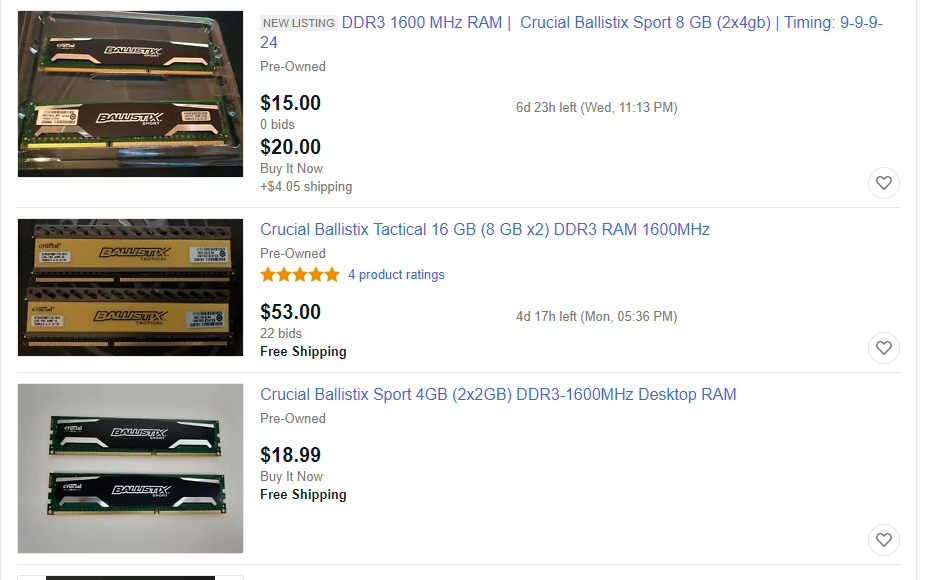
looks like this https://bigbruin.com/content/ballistix1600ddr3_1
having trouble finding a site with a price tho
graceful canopy
looks exactly like it yeah, i think i might just use that and sell it for around like 15 dollars lmfao
not any use keeping it around
green stream
yeah im not sure, all the ones close to it are all sold out
graceful canopy
i also have this amd phenom ii 2x that i might as well just throw away
green stream
on ebay looks to go around 15-50
 merry goblet

eBay
Find great deals for Ballistix Elite PC3-12800 DDR3-1600 BLE4G3D1608DE1TX0.16EFD2 Memory (1 x 4GB). Shop with confidence on eBay!
green stream
still can't find exact model on ebay either tho
merry goblet
best i could do tho lol
green stream
oh there ya go lol
green stream
20$ per 4gb stick
graceful canopy
ill go like 25 for both
 echo parrot
ngl a pretty decent price for good ram
green stream
Well it’s old and outdated
echo parrot
well I mean if you find an older motherboard + an older i7 paired with some cheap ddr3 it can be a very nice budget build
green stream
Buying used, sure could be good for some people’s budget
echo parrot
ye
 eager bison
wide vault
eager bison
wide vault
i7-3770 or i7-4790 can be had with a Dell Optiplex or something like that for an okay price
wide vault
nice
wraith steppe
About that linus video - most of those boards have a 25-35 watt limit on the pcie slot.
Remember the 58 watt max on the sata power as well.
Probably fine unless you want to use an rx480.
sturdy jolt
what linus video @wraith steppe
wraith steppe
Recent video Linus made about Optiplex budget builds.
sturdy jolt
ah
 steel spruce
nova osprey
steel spruce
nova osprey
Well I just upgraded from a s8 to a s20
Ik its not the same but the s10 is still a newer phone amd a lot better so if you have the money then sure
 stray path
Hey I got a question, I need a Router Modem combo that supports Gigabit. any ideas?
topaz adder
your Internet Provider :p
wide vault
Screw the ISP, we need answers
 vital hazel
anyone know a link i can find 16 gb of ram for around 60-70 bucks?
wide vault
Gskill Aegis looks like good RAM for lower prices
The DDR3 1600MHz CL11 kit is what I would go for because Haswell platform
nova osprey
Ask google
 scarlet frost
What is the best monitor under or around 300
Flat 24” gaming
 glossy totem
Hey so on discord PC application i use push to talk and everything like that recently people have been saying my mic is soundsing like optimus prime. I tried switching my mics and neither of them worked i dont know if its a conputer issue or a mic issue.
@ me or pm me if you have a solution
 pine mural
Hello. I'm a newbie trying to figure out my first Gaming PC Build. Can anyone help me out with a good component build list. I'm trying to buy everything from the same place like newegg.com. Any help or advice is greatly appreciated (budget is around 1200, fan cooling, RGB)
topaz adder
hey @pine mural try asking in #building-and-recc-chat (it's more active there)
pine mural
Cool, thanks @topaz adder . Much appreciated
calm mural
nro @glossy totem that was my profile pic
 pine zenith
does anyone here know about Intel Quick Sync
 inland isle
Brand new mic I just got and it has low sound can't hear very well and when I'm in calls with my friends in discord I can't talk why not?
green stream
what mic
inland isle
its a neewer
green stream
xlr?
inland isle
maybe idk let me check
green stream
link maybe?
inland isle
its not letting me do link? idk
 tidal violet
New to this feed so please let me know if I'm breaking any rules... but I recently bought a Kensington SD4600P USB-C docking station -- it will connect to my dell XPS 13 but not to a MacBook Pro 2018 model... keeps disconnecting and reconnecting
strange perch
@tidal violet on all the ports?
tidal violet
@strange perch yes on all of them, also doesn't work on a dell latitude 4590
strange perch
you got the power plugged and turned on for the dock right?
@tidal violet see above :)
strange perch
got a different cable to test with by chance @tidal violet ?
 dusty solar
Does anyone know where I can post a tech issue/question
strange perch
@dusty solar if it doesnt fit any of the specific channels, just ask in #building-and-recc-chat
 fading stump
@tidal violet you might also check the USB Config in the device manager section most USB ports are set to save power by having the system turn them off automatically there should be a check box to uncheck
 frigid spade
Hello everyone! I'm in the market for a new laptop, and figured you all might be able to help me make a decision. This laptop is required for school, so it has some minimum requirements, listed below. I have some personal preferences below that, and they are in order of importance to me (512gb SSD > kinda big 4k screen 120Hz > really light).
It will be mostly used for school, so it doesn't have to be super beefy. I play plenty of games but nothing much more intense than 3d modelling (Stellaris, Minecraft, Kerbal Space Program, and Factorio are the ones I play most. I really don't need super beef). My budget for this is around $1500 to $2000.
Requirements:
Win10 64 bit
Intel i7 or equivalent (3.3GHz is listed as a requirement for SolidWorks, a program I know I'll be using, but I'm skeptical of this number. I imagine anything that runs well with other things can handle it, especially since 3D processes often utilize cores/threading well).
16GB RAM
256 GB HDD
1920x1080 resolution, 12 inch or larger display
Wireless networking capability, USB flash drive connection
Must comfortably handle 3D modelling (for college; electrical engineering major. CAD is used a lot)
Ideally:
I'd like more storage (maybe 512 gb), and an SSD is definitely preferred to HDD
Battery life is important. As long as I'm not using it to its fullest extent, I need it to get me through several hours at a time, at least 8-10 probably. I'm flexible with the numbers but I can't go for something that's really nice for 5 hours until it dies.
Probably 13-15 inch screen. I like having 60fps for games/videos and 4k resolution would be nice as I do aerial photography, but there are not absolutely required.
I need to bring this with me a lot, so heavy is a downside, but an acceptable one if it's a really nice computer
A touchscreen would be cool but more of a minor convenience
 inner elm
I wouldn't go 4k. Honestly, like I had a 4k touchscreen laptop. 1080p vs 4k on a 15" or even 17" isn't that noticable except the size of GUIs and the framerates are bad
frigid spade
Thanks for the point. Also I figure having that many more pixels to process eats up more power typically
inner elm
I would look into some ROG laptops. Avoid Lenovo. There customer service is the worst I have ever experienced... Unless you just won't use warranty
sturdy jolt
Side note, are there even laptop 120hz 4k screens yet? Desktop 4k 120hz monitors are pretty damn expensive..
frigid spade
Yes. Second paragraph is absolute minimum requirements. First paragraph I just mentioned personal preferences (more detail in third paragraph; the thing in first paragraph is just the point out that my "Ideally" section is ordered by importance)
inner elm
Maybe a Razer if you have a high budget
sturdy jolt
Budget 2000-2500 I believe
Elutroniks had some pretty good price to performance iirc
frigid spade
1.5-2k
sturdy jolt
Oops read wrong
sturdy jolt
I'll take a look around when I finish breakfast
frigid spade
Hm, if the warranty isn't super extra expensive it's a justifiable cost, yes
inner elm
If you want light, Razer makes some of the lightest gaming laptops. Could look at a used one
sturdy jolt
Razer specs don't always look too good though
Some of their higher end laptops even have like mx550s
inner elm
Yh. They are a little overpriced for what you get
fading stump
I'd look more to a Workstation laptop than a gaming platform if its needed for electrical engineering major. CAD is used a lot it can still perform double duty solid edge etc
frigid spade
I'm not totally against used but I need to be really confident it's in good condition and will last, might even buy a new battery for it. As I've hinted, this is my "I'm moving out and it will be my main tech and is required for school" so it's definitely gotta be reliable
That's a good point Gundy
sturdy jolt
Well, gaming platforms also provide the horsepower for cad
A hefty GPU and a powerful CPU
frigid spade
I think any decent workstation type laptop can handle the gaming I do; I don't mind turning down settings if anything gets too bad
This is also true
Within the price range, anything, gaming/workstation, will definitely suffice for what I require
In which case stuff like battery life, lightweight, fast screen, etc. can be more considered
strange perch
@frigid spade talk with your school of choice, their IT department might have a connection for refurbs
frigid spade
Ooh good idea
strange perch
and also generally talk with some of the teachers if possible
they know what kind of "grunt" you might need in your laptop
sturdy jolt
Ah right, different CAD programs hit different components
strange perch
aye
sturdy jolt
Some more CPU heavy, some more GPU, and some just eat your ram. Or all of the above.
frigid spade
As far as I can tell, SolidWorks hits more into the CPU but will use GPU power if it's available
sturdy jolt
Huh, maybe the zephyous (however you spell it) g14 could be good
The one with the 4900h and 2070
But do talk to your IT about refurbs and such
frigid spade
(Again, anything this expensive will be perfectly fine. Here's a quote from the school website on the laptop: 2. If you will be purchasing a new laptop, models starting around $500 are acceptable; purchasing a $1,500 laptop will generally not help you be more successful in engineering.)
I'm paying more not to have a laptop that can do the cad and stuff, but that can also have 10+ hours battery and handle more stuff
sturdy jolt
Yea, I'm looking for all-around options
frigid spade
G14 looks quite nice
sturdy jolt
I'll have to check battery life, but it's not a hefty boi
strange perch
@frigid spade when is your deadline for buying?
frigid spade
It's sexy too
Naed, I have until early september to own it, even longer if classes start delayed from covid
strange perch
okay
frigid spade
Sooner the better though because I want to be comfortable with it first
If you know of something that's about to come out though, please don't hesitate to disclose lol
strange perch
then "back to school" might be a decent period to buy in
which used to start in mid-june
sturdy jolt
Yea, the sales would be good, and a new generation of components and laptops might've dropped by then
Or just things going back into stock
strange perch
new parts are coming
we know this
its "just" a question of it trickling out
@frigid spade i would NOT recommend this one for you

BUT, it gives an idea about what is coming
sturdy jolt
Just that laptop AMD chips are usually released early every year
Like 4000 series earlier this year
strange perch
because the above linked machine is silly good value for the money
fading stump
your going to need at least 32Gb of ram
strange perch
not really, he can get along just fine with 16 @fading stump
frigid spade
Oh woah that's pretty cool
strange perch
hence why i said i did NOT recommend that specific one
frigid spade
Yeah no on my desktop I do similar intensity stuff and rarely go past 8
32 would be fun for saying yes I have 32 gb but I doubt I'll ever have a use for it
I'm not doing like artistic 3d renderings while also running my DAW while playing the latest game
strange perch
aye, you are looking for a ACTUAL work machine
not a swiss army knife (which is what most gaming machines are used as)
frigid spade
Woah I just noticed the G14's external display that's absolutely awesome
Kinda useful, super nifty
fading stump
most of the workstation laptops are going to be in the 15.6" range with a SSD and a HDD onboard and the Graphics will be geared more towards the work side neweggs has them in both flavors new and refurb
thorn gulch
@strange perch found a Reddit post with a list of Zen2 laptops. Idk if it's missing some but here
https://www.reddit.com/r/AMDLaptops/comments/fw02jz/ryzen_4000_series_laptop_guide_megathread/?utm_medium=android_app&utm_source=share

reddit
206 votes and 241 comments so far on Reddit
calm mural
yo
frigid spade
Very nice, thanks for sharing
Ngl I'm really into the Zephyrus G14
Still looking for other things to compare with it but it's pretty sweet
I'm a little upset cause it looks like to get the LEDs on the outside you have to have the 2.7k screen @ 60Hz, and if you choose 1080p screen @ 120Hz you can't have that
But I'd rather have a screen I like than a minor aesthetic feature on the outside
frigid spade
Thoughts on XPG? Specifically the Xenia (https://www.xpg.com/us/feature/652/)
I've never heard of the brand
I see this laptop has a lesser GPU but it has 144hz, mech keyboard, and is 15.6" which is what I prefer for sizing
sturdy jolt
What's the pricing on it?
frigid spade
1700
thorn gulch
XPG Apex 15 is well priced. But availability and battery life is bad
thorn gulch
no
sturdy jolt
IDK XPG's lineup so
sturdy jolt
huh
don't remember it
I feel 1660ti is slightly lacking for 1700$...
what do you think
thorn gulch
Xenia is bad in pricing
sturdy jolt
fair enough
I'd say a G14 with maybe a swap for 32gb ram if you need it @frigid spade
better price to perf I'd say
thorn gulch
Even on Intel side $1700 USD laptop is pretty close to 2070 pretty sure
thorn gulch
gonna be nice tho once mobile 4000 series has more stock
They're already out but stock sucks
sturdy jolt
yea g14 looks to be backordered
sturdy jolt
o pretty neat
thorn gulch
Wish they had 4600H (6c/12t)+2060. But all 4600H are 5500M/1660Ti or iGPU
thorn gulch
maybe, didnt check
alright, if deciding to not want super long battery life then Clevo is best for US based people. XPG Apex 15 doesnt have much in terms of getting to US/CA rn
https://xoticpc.com/collections/sager-clevo-laptops/products/sager-np7958f1-clevo-nh58af1

XOTIC PC
Unrivaled power, limitless range. NP7958 is among the world's first 15.6" laptops equipped with an AMD Ryzen 9 3900 desktop processor, which outperforms competing chips in every metric. With a whopping 12 cores and 24 threads, get a competition-grade desktop performance that e...
desktop Zen2 so no iGPU for great battery life
sturdy jolt
@thorn gulch Idgo wanted a gaming/cad laptop so not for them. But maybe for others
thorn gulch
I mean, I dont think many people do cad/gaming without a battery
for very long at least
sturdy jolt
Ohh wait
thorn gulch
as at that point battery life is pretty close to any other laptop with an iGPU
sturdy jolt
I read your message wrong lmaoo
I read it as so on iGPU for great battery life
Which would mean no dGPU
Huh
2000$ for a config with 3900x, 2070, 1tb SSD and 32gb 3200mhz ram
Unless I pressed a wrong button somewhere
thorn gulch
I mean XPG had better pricing but no US/CA shipping
calm mural
any suggestions for slimmest micro usb powerbank? trying to fit one in a cigarette case
that "clutch" one seems about right, but since its lightning bolt, needing to use an adapter makes it too large to fit
calm mural
Hey guys, I bought a PA Speaker and hooked a XLR Mic to it, and there's a sudden loud buzzing sound. What does that mean?
It worked fine a few minutes ago, suddenly went funky.
 solemn yacht
would i post questions about modem and routers here?
green stream
sure
solemn yacht
so should i get a modem router all in one from my isp or from a 3rd party place?
green stream
I don't like all in one's because it limits upgradability and usually what isps give isn't that good. I'd buy my own stuff if i can
my router rn is built into cable box and it overheat a lot
solemn yacht
Is it easy to set up at home?
Bc i want my parents to save money and not waste it with some guy to come here and do it
green stream
setting up usually isn't too difficult. but depends i guess some isp's charge monthly to rent their modem and router which is another reason i don't like it
green stream
places like bestbuy, newegg, amazon, b&h, etc. should have some
 desert temple
Guys im from saudi arabia i want to buy pc gaming fron new egg from United States store but is Is this computer acceptable for electrifying 220 because i am in saudi arabia
????
 paper bison
as long as the psu goes to 220v yes its fine, but you also need a 220v cable
@desert temple
desert temple
So that mean he work on 220
 sweet gate
any advice on a good wireless 60-70% keyboards?
sweet gate
Yes 60%tkl was looking at red dragon
 umbral fern
Hi everyone
old moss
hi
 frail gazelle
Hey guys I have a question
My RX 5700XT has temps of 80 degrees and junction temps of 110
Does anybody else have this issue?
Sapphire RX 5700XT
weary pasture
5700xt's get hot
make sure it has good airflow, make sure its not overclocked, and maybe try repasting if possible
also what program are you using to monitor temps
 shy crater
The stock fan curves are trash, use Adrenaline to set your own fan curves
 short haven
you can try undervolting it too
 signal hamlet
Definitely try to fix your fan curves and stuff before you do any undervolting
If you do try to undervolt, know your stuff and do PLENTY of research so you don’t blow your system up
thorn gulch
UV is pretty safe tbh
nova osprey
The new 10th gen boards from gigabyte have it, regardless of whether the 10th gen chips do.
I'd about other brands tho
 misty parrot
ok. so Gigabyte has em. thx!
nova osprey

misty parrot
do you know which board series exaclty? Like MSI has the X570 and those are their 4.0 boards. whats Gigs?
nova osprey
I heard it was their aorus boards but as they haven't been released yet we don't know yet
nova osprey
Welcome
 half tree
I have a 7 1/2 yr old Gateway Desktop Model SX2370 with an AMD A6-3620 Quad-Core Processor. I would like to upgrade this computer to be wireless. Can you tell me what device/board I need to buy and install to make this happen?
 torpid crater
@half tree #building-and-recc-chat but 7 and a half years is a toll on a pc
signal hamlet
you're going to have to build a new PC
7 and a half years is old
if you want all your data on the new computer, put the old hardrives in the new build
signal hamlet
if you want it wireless, like WiFi, buy a WiFi supported motherboard
sturdy jolt
USB is usually more convenient, but slightly less stable
signal hamlet
true
sturdy jolt
@half tree you can take a look around here
https://www.newegg.com/Wireless-Adapters/SubCategory/ID-31
Not sponsored by newegg, but their search and subcatagories are just so damn good
 magic temple
okay, told to move my current rant over here. The other thing about having to potentially return the DSL modem, is Mom thinks that means we'll lose our wifi. No, Mom. The fiber optic modem/router will be providing the Wifi instead, so we don't need the DSL one anymore. (And I swear the Wifi in the DSL modem is slowly failing.)
signal hamlet
mom really don't be tech savvy doe
magic temple
Yeah, tech savvy she is not.
 velvet hedge
Idk if this is the right chat but. My laptop has this issue, My HP Envy 13 laptop has this rare occurrences where my CPU will get stock at like 3.4 GHZ and it won't come down even if I'm not doing anything like just on desktop doing nothing and that causes the CPU to get really hot and then the fans ramp up and the only thing that seems to fix it is restarting it
Is this a usual thing in mid range laptops or?
For reference I have an i5-8250U
The model is the, HP 13-ah0051wm
green stream
check what the power plan in control panel is set at. a plan like high or ultimate performance could clock speed to not adjust to load
velvet hedge
Thanks, I am using the HP recommended except I reduced the maximum processor rather when on battery to 92% from 100%
 formal hornet
nova osprey
formal hornet
nova osprey
People are more likely to help if you state your problem rather than just asking for help
 fluid cargo
Hey everyone! This is probably a dumb question, but I need help with installing my new GPU. The problem is with the power connectors, the shapes of the 2x8 pins don’t match what I have attached (some are square and some are rounded). I can plug it in and it fits, but I don’t want to mess up and fry it. Do the shapes need to match exactly?
sturdy jolt
Yes
fluid cargo
Alright, what can I do then?
sturdy jolt
I'm confused on the issue
if they match, they fit and plug in
if they don't plug in, they don't match
fluid cargo
I can plug it in even though the shapes don’t match.
The cable looks like:
R S R R
S R R R
And the connector on the gpu looks like:
S S R R
R R R S
S is square, r is rounded
sturdy jolt
Hmm
Image quality isn't great
Lemme try again
@fluid cargo does yours look like this
fluid cargo
Yes exactly
The one that doesn’t match is the top right one. The hole it should go into is square
fluid cargo
Almost, except the 2nd from the top left is also a square.
Nvm I’m silly it’s upside down. Yes mine matches that.
sturdy jolt
Should be just fine then, as that's how I've been using mine for the past year :D
fluid cargo
Awesome! Yeah I figured it would work just wanted to double check. Thank you so much kind sir
sturdy jolt
You're welcome.
I never really paid much attention to the details, usually if it plugs in fine, it works. Had to unplug mine to check lol.
green stream
Idk much about networking and my friend is having ping issues in all games. It is the same with low or high internet traffick ping is usually 70ms or above can be as high as 4000+. The ping is never consistent.
It is also the same with wifi and Ethernet
misty parrot
when is nvidias next conference for the 3000 series
 vagrant turret
Hey guys, I want to ask you if you know of any decent gaming laptops under 500$
wide vault
Pinebook Pro
topaz adder
no
decent/gaming/laptop/500 or less

is that where Stadia comes in
or that Nvidia thing
topaz adder
I was just using it as an example.
vagrant turret
I found a laptop, its an acer
wide vault
uh oh
vagrant turret
The one I mighr get is the aspire 5
sturdy jolt
It's chinese
wide vault
no it's English
calm mural
Can you translate @sturdy jolt ?
Cause even the instruction/warrenty manual was 100% Chinese.
sturdy jolt
calm mural
....
Can you translate the fn functions part?
All I know is fn and a number changes the rgb lights
And that was thru trial and error
sturdy jolt
bit hard to read and I haven't practiced Chinese for a while
Fn 4 is 7 color lighting I think
calm mural
Fn and any number changes the rgb
sturdy jolt
and I think Fn 0 turns off lighting
calm mural
Nope
sturdy jolt
dunno then
green stream
Something about the light mode I think
Can you send a pic a bit closer and sharper on that part
 pure zenith
test
hi, can anyone help me figure out what 8gb ram chip to order with this computer?
i cant seem to post a link to the chat but..
oh i can ask in hardware channel
thanks
echo parrot
@sturdy jolt I didnt know you were China numba 1
nova osprey

echo parrot
u speek da china
sturdy jolt
Oh
 hidden pumice
 fair charm
Any Headphone enthusiasts here?
fair charm
Just curious what PC people who are also headphone lovers game with.
old moss
Apple earbud gang
fair charm
@sturdy jolt ewww...
sturdy jolt
..?
fair charm
I tried to like them... not my bag
sturdy jolt
What do you mean?
fair charm
I don't play very many co-op games, so I don't usually use a mic
sturdy jolt
ohhhh
fair charm
they just didn't sound good, muddy bass, kinda weird spatial stuff going on...
sturdy jolt
You said game with so I was assuming headsets
You can usually get better audio quality with just headphones
@green stream what are you rocking right now?
fair charm
yeah, I run optical out to an external DAC and Amp to my HP
 zealous token
would love to chip in on this audio convo buuut
doing something in crew 2 atm so I need like 30 mins?
i'll be back
@fair charm if you're available in 30 mins or so I can talk
fair charm
I'll be around
green stream
o sory im late
i use hd6xx with schiit stack for my pc
just finished settings up a new tv with new surround receiver
Now i have to replace a blue ray player, appears that it isn't working
with the pc37x, i've never personally heard them but with my hd6xx the bass is just a bit in front. I do like it for casual listening i can stand long listening sessions without fatigue. but it is clear
zealous token
did they remove the peripherals chat?
oh nvm
i had the category minimized lmao
anyway
@fair charm whatcha need
I heard something about headphones but other than that i'm unsure lmao
green stream
lol
zealous token
ok after doing some reading
it appears you're looking for headset recommendations
tbh it depends on what you want
open or closed back?
if you're going open, look at the 58X jubilee and 6XX, both from massdrop. I recommend them so much because they're essentially cheaper versions of their stock sennheiser counterparts
if you're going closed, I heard good things about the 1more* triple driver over ears, and the DT 770 blah blah whatever they're called because I forgot the name
fair charm
@zealous token I'm not really looking for recs, I run custom Audio-Technica ATH-W5000s off of my DAC and Amp, but was just curious what other "headphone peeps" ran for gaming (not necessarily with a mic though).
zealous token
ah alright
currently for gaming I have my cloud 2s, then my 1more* quad driver earbuds for my phone
I also use a sound blasterX G6 as my DAC/AMP combo
fair charm
@zealous token I've often thought about simplifying my layout with a sound card like the sound blasterX, but I haven't found one I thought sounded quite as good as my current setup (even though it takes up a ton of space
I've heard good things about the cloud 2, but I usually find headsets that feature "surround sound" don't quite sound... right
zealous token
that's why I use the G6s surround engine
it's actually surprisingly good
not quite as good as the GSX 1000 but definitely the second best on the marker
at least for a gaming standpoint
green stream
I mostly prefer stereo, in the past i've found dolby atmos virtual surround decent for positioning in games like overwatch but for general sound quality not really
zealous token
yeah all that software stuff really isn't good at all
but I actually prefer the surround on my G6 over plain stereo
it's a nice little package for $150 honestly lmao
I can even change the roll off
built-in EQ, windows can recognize it as an actual 7.1 device too
you can even select speaker types if you connect speakers, or set it to a custom frequency
so like the "desktop" profile has bass that's more punchy, more noticeable. whereas the "tower" preset has that low, rumbling bass that blends in much better
built in voice changing software too, great if you have a headset lmao
 marsh blaze
anyone got a laptop recommendation for media consumption and e-sports game csgo overwatch etc low requirements on all of them
inner elm
I'd say anything but Lenovo
 torpid brook
anyone got a laptop recommendation for media consumption and e-sports game csgo overwatch etc low requirements on all of them
@marsh blaze Lenovo Legion Y545
marsh blaze
i go check it out
torpid brook
yup
nova osprey
Lol
inner elm
I would highly recommend anything but that. Thier service is literally the worst I have ever experienced. RMAs take literally months, they f up every repair, and they will say they will call you back about an issue and then just not
Literally sitting on a quote on quote repaired y740 for a few weeks after they sent it back broken because of their incompetent service
@marsh blaze
Unless you don't plan on getting any help from service or buying any warranty... please stay away from this real s#*&#y brand
Products are ok until you have to contact them
Then you will sincerely wish you bought from a decent brand with some semblance of customer service
inner elm
Dell is decent, I've had positive experiences with HP
I mean the y545 is ok. Provided you don't buy warranty and plan to fix any issues with no help from support
 earnest vector
@marsh blaze Lenovo Legion Y545
@torpid brook what is your budget?
marsh blaze
700-1k but i ended up buying something already
earnest vector
ok because I just got one for my friend at $999
MSI GF65 Thin 9SD-252 15. 6" 120Hz Gaming Laptop Intel Core i7-9750H GTX1660Ti 8GB 512GB SSD
marsh blaze
ye i was looking at that one too
inner elm
As someone who has owned two Lenovo Legion laptops and has family who all own Lenovo laptops, if you care at all about service, don't waste your money on Lenovo
Like seriously
I'm about to go call them for the sixth time about the same warrenty request because once again they never called me back after they said they would.
wide vault
lol
my computer is Lenovo
there's pretty much no information that exists about the motherboard
inner elm
To highlight my point, I've been on hold with em for an hour 😤
wide vault
F
inner elm
They have decent hold music tho
wide vault
damn
 quiet bridge
Yo guys I have a HP pavilion touch smart all in one pc
I want to know if I can make it a desktop
Add the motherbox with all the electronics in it
But idk if it would work
In other words if I can use the all in one pavilion as a monitor?
 spare hazel
who like steelseries
wide vault
I like aluminum series myself
 craggy drum
bro stone series is the best
nova osprey
Watchu mean?
Cardboard series ftw
 narrow iris
 livid wolf
 mild patrol
I have question about my computer

 mild patrol
I built a computer with all new components from Newegg. It worked perfect until a week ago when I I turn it on it flashes lights and nothing happens. What should I do
Anyone there
The power supply seems to do its job by cutting off due to too much current I believe
I have taken video card out and memory to see if I will cut on but that did not work
 pine comet
Does it beep at all? Any number showing up on the mobo?
thorn gulch
Standard PSU protections that shut down a PC:
OCP: Over Current Protection
OVP: Over Voltage Protection (usually see voltage go higher then they should be with bad calibration on voltage regulation)
UVP: Under Voltage Protection (Can be same reason as above, sometimes from AC power loss, or if OCP/OPP/OTP fails/isnt there and you push overload to 30%+)
OPP: Over Power Protection (total watts drawn... "Over Wattage Protection")
OTP: Over Temperature Protection
SCP: Short Circuit Protection
If it worked before and doesnt now and it can be traced back to the PSU, it'd probs be SCP. Which can range from bad mobo, cable, SSD, etc. Basically any component
 pulsar kraken
So should I get the 2060 ko
zealous token
@pulsar kraken if you can spare a little extra or don’t care about RTX that much, go for a 2060 super or stock 2060, or a 5700XT
pulsar kraken
Ok
sturdy jolt
Well, what are you using it for?
Because at that point it's mostly TVs
Don't know any monitors that go that big
You could hang like a 27in monitor with vesa mount on your wall, that could be a solution
Yea the BFG or whatever, it's a monitor sure, but it's basically just a high refresh rate tv
 full drift
should i get acer aspire 5 slim or asus vivobook 15
im using it for graphic design/ps
full drift
Made up my mind the aspire 5 and 8gb hyperx sodimm ram it is
 hasty mesa
are we allowed to talk about tech that can keep you hidden if we want to protest? i figure it's a touchy topic, but doesn't hurt to ask. RFID Blocking etc.
pine comet
RFID blocking? I don't really think that will be necessary
hasty mesa
no, i know that much. but if we want to go under the radar etc. like walkie talkies
pine comet
How will a walkie talkie help exactly?
General rule of thumb is that is someone wants to find and track you, there will be a way to do it. The question is is it worth their time. As long as you're not doing anything illegal ir taking on a nation-state level power, you really shouldn't worry beyond basic smart practices.... don't give your name, phone, or any other PII and you'll be fine
Just practicing common sense will prevent most if not all issues
hasty mesa
for sure
100% agree.
vpn + common general knowledge of situations in front of you i suppose
pine comet
Honestly, most people won't even need the vpn. There are so many bigger fish out there that's it just not worth the time to track that one person in particular
hasty mesa
mhm -- they worry about people who are involved in multi million dollar schemes, not some kid downloading torrents.
Can having a vpn boost web speed? Also I have a verizon fios router but it has very little range, so I was considering buying a Netgear Orbi
or the Google Fi or whatever it's called
pine comet
If anything, a VPN will make your internet slower
green stream
yeah no speed boost, most of the time it will decrease your speed
it is not a way to bypass the limits of your isp speed
 peak linden
Anyone know much about WiFi adapters
old moss
Well I meant I don’t know like a lot but I know about them
peak linden
Lol do you know what ax3000 etc. means
old moss
Yeah that means it’s 802.11ax 3000mbps
peak linden
So ax3100 would be better
peak linden
I think it’s backwards compatible
old moss
I mean yeah but if you have an 802.11ac router than the WiFi adapters speed will be limited to AC speeds
peak linden
Ohhhhh that makes sense now
I found that same adapter on Walmart
And it’s not back ordered so I think I’ll get it
old moss
Alrighty
peak linden
Ac1300 would be slower right
old moss
Yeah but if you have an AC router it should be good
hasty mesa
I have the G1100 quantum gateway but we have a pretty big house (we live in a duplex with only one router) so I was considering Mesh Wifi but i've not heard much about it.
Verizon/Frontier -- FIOS
 pearl bane
A duplex or higher multiple family dwelling will have a solid fire block between the living spaces. It's usually something like a cinder block wall , going all the way from the footing to the top of the attic. Something like a wired switch and repeater to get you on the other side of that fire block usually helps a lot. Just check to make sure this feature is in the building before making any permanent decisions.
 rigid rose
Bro i just got this blue yeti mic and it only buzzes when I play a game and its so annoying I've been trying to figure it out for the past like 2 weeks can someone help me please
inner elm
Damn, I love the s20 ultra. This thing is ten times better than the pixel 3
 outer kestrel
@wet shore
 wet shore
Okay. Ask it here?
Hey guys I have a Toshiba Satellite S55-C5274 and I think my wireless card is not working properly. I need help finding the correct part to order.
full drift
Should i get an acer aspire 5 with an 8th gen i3 or try to upgrade my samsung S3 NP305V5A-A04US
thorn gulch
@frozen flax worth about $650 USD new or so
 sturdy minnow
hmm
 frozen flax
Ok
 tired plover
@pine comet that not 1005 true if your useing a bonded vpn it will improve upload speed bye spliting the data over two networks
look up mush room network as a vpn that dose this
pine comet
How are you able to agregate the two networks into one interface though? Do you need two separate connections to the ISP?
pine comet
Okay, that makes sense. It would mean though that you would have to pay for both connections though, wouldn't it?
tired plover
it like a load balancer but with suport to shot gun thim together