#windows-ios
1 messages · Page 8 of 1

 vestal ibex
fogot the dism that time
 vestal ibex
You can press the up button and it'll auto fill your last used command so you can edit it
vestal ibex
No corruption
Well
PC Reset from settings is next
You can search it in settings, just follow the prompts
vestal ibex
Yes it sets windows back to a factory state
It can either save your files or do a full reset
 vestal ibex
yes that
 elder cliff
does it matter if i keep files
vestal ibex
Not particularly

 vestal ibex
Local since cloud probably won't work
vestal ibex
Great! Keep an eye out for any other weirdness and if you do get some I (or someone else) can walk you through reinstalling from a USB.
elder cliff
yeah
 somber berry
is there any way to revert to a local admin account in ur pc? i logged into my friends acc, logged into my microsoft one and it synced with my pc, and whenever i turn it on it dosent ask me for my PC password but it asks me for the microsoft verification code which is really annoying, and it dosent let me select local account, can anyone help me? (pic showing that local admin dosent show up)
 somber berry
or is there any way to make another local account that i can switch to?
or change the method to password
i dont want to put my microsoft code every time i turn on my pc
vestal ibex
somber berry
or is there any way to make another local account that i can switch to?
This would be the best option. You can still make a user with a couple net commands. I think it was
net user [username] [password] /add
net localgroup administrators [username] /add
somber berry
vestal ibex
This would be the best option. You can still make a user with a couple net comma...
does it un install everything? i saw a video on yt and the guy did a new account but the entire pc was like formatted on that new account
vestal ibex
It would be able to use globally installed programs, like ones that are installed into the program files folder, and since it's an admin account you can give yourself access to any needed user files
The program shortcuts might not be there but the programs will work
somber berry
vestal ibex
The program shortcuts might not be there but the programs will work
okay thank u fal
 wooden flint
Is it actually possible to install two instances of Windows on the same PC (different hard drives)?
vestal ibex
wooden flint
Is it actually possible to install two instances of Windows on the same PC (diff...
100% possible. You can even install 2 different instances on the same hard drive.
Windows does have a few quirks when it comes to multiboot, though. After one OS updates it might forget that the other exists and then you have to rebuild the boot sector.
wooden flint
i'm actually about to install Win10 on my external hard drive...so everything would work fine if a bootloader is installed when the PC already has a Win10 install?
vestal ibex
wooden flint
i'm actually about to install Win10 on my external hard drive...so everything wo...
Windows will not install on external drives
Linux is perfectly happy doing that but not Windows, not without doing extra setup for a To-Go drive
wooden flint
huh, didn't know that
i've always installed the bootloader for Linux on the PC itself, then had the external drive act as a sort of "key" to boot into linux
wooden flint
I screwed up royally…after plugging in the To-Go drive and setting everything up, it turns out that it overrode the bootloader for Windows installed on my internal SSD
vestal ibex
wooden flint
I screwed up royally…after plugging in the To-Go drive and setting everything up...
That's an easy enough fix. You just have to boot the install disk and rebuild the EFI partition.
wooden flint
Tricky to solve but all I did was create a new boot option by finding the EFI file on the file system
veeeeery long time to find
elder cliff
i was playing roblox and this just randomly happened

my pc crashed and turned back on and i saw this
pls help
elder cliff
nvm its fixed
 shadow jay
uninstall roblox
 wraith timber
bobox
 idle dragon
On my surface pro 6 (win10) I can chose between 59.959 and 60.019hz refresh rate, apart from these two being odd, is there any difference between one another? Could there be any difference in power consumption
idle dragon
Reminder: never update something that is too cpu or chipset related using bit driver updater
 viral eagle
I doubt there's a noticeable difference
idle dragon
Definitely
Just wondering if that might give the same problems most amd GPUs have where some particular refresh rates make the idle power consumption spike
But I checked with hwinfo and I don't see a big difference, I'd also need some more testing but from what I've seen so far it's the same
 ember robin
does anyone know how I can get to the bios screen?
viral eagle
ember robin
does anyone know how I can get to the bios screen?
Restart PC/laptop, mash F2 and F9-12 while it's starting up
The key varies, you can look it up or just hit a bunch of them and one will work
Sometimes esc or del will work as well.
idle dragon
When i set up windows on my microsoft Surface i set the keyb layout to italian, but apparently that's wrong since it's an English kb. i can still change it on the bottom right but by default when i start my pc it is always set to IT, how do i set uk as the main one?
idle dragon
nvm, found the setting
 steep dove
hello does anyone know why does the amd doesnt show fps in game
for example i run gta 5 and it says n/a at fps
the gpu temp usage etc it shows fine
but the fps nothing
 rain terrace
I see these deals for Windows 11 pro for like $20. Is this a good idea for older games ?
Or just gaming in general
vestal ibex
Technically those keys are frowned upon as gray market keys, and we can't discuss specifics about them here.
Also you don't need pro for gaming. There's no features it adds that you will ever need or use.
Depending on how old the game is, a virtual machine might be better than windows compatibility mode. And for VERY old games, like 95 era or older, I recommend PCem. You will need a strong processor.
rain terrace
vestal ibex
Technically those keys are frowned upon as gray market keys, and we can't discus...
https://www.pcworld.com/article/2152213/black-friday-upgrade-to-windows-11-pro-for-just-23.html
This is what you are talking about? I saw it being advertised in a reputable source not some grey site I don’t believe

PCWorld
Upgrade to Windows 11 Pro for a Black Friday price! Through December 3rd only, you can get Microsoft Windows 11 Pro for just $22.97 ($199).
Also by old I just meant a PC game from 2000-2005 not super retro
vestal ibex
Yeah so a windows XP virtual machine would probably be the best thing for that era of game
98 to XP aimed games are very hard for modern compatibility mode to work with, especially since windows 11 is 64 bit only so 16 bit programs can't work, at all.
 spice beacon
rain terrace
https://www.pcworld.com/article/2152213/black-friday-upgrade-to-windows-11-pro-f...
spice beacon
rain terrace
https://www.pcworld.com/article/2152213/black-friday-upgrade-to-windows-11-pro-f...
Yeah pc world is legit
 dull gale
I just got a laptop (w11) and it's using integrated graphics instead of the graphics card. How do I switch?
vestal ibex
It should switch automatically when you load up the graphics with a game or something
It's a power saving feature but it can bug out sometimes and fail to switch
dull gale
It wasn't working with userbenchmark, I'm guessing that's an exception
vestal ibex
If you're only using it plugged in you can disable the integrated graphics in bios
Yeah the ubm app kinda sucks
dull gale
Ok so it still isnt working and the only option for switchable graphics in the bios is muxless
Am I doomed?
vestal ibex
Nah. Update the bios and drivers. That usually solves the bug.
Both sets of drivers, for each GPU
dull gale
Damn. Is there a software I can download that can take care of that for me? I don't feel like doing all that
vestal ibex
I really, really don't recommend using driver downloaders. They're often out of date and some are straight up viruses.
What model is the laptop? Sometimes the manufacturer has a program built in now that I think about it. It would still be out of date but at least newer versions than it shipped with.
dull gale
Msi gf65 thin. It came with MSI center
vestal ibex
Yep MSI does have an updater, it can handle bios updates too
dull gale
Nice. Is it in msi center or is it a separate software
vestal ibex
Should be in msi center
It's been a while since I used it and they're always changing how it looks so I can't help with specifics too much
dull gale
Seems like I'm all updated according to msi center
vestal ibex
I find that hard to believe
What version does it say the bios is
And is yours the model with Intel CPU and Nvidia graphics?
dull gale
It doesn't say anything about the bios but all the drivers are matching current with online ver
Yea its an i5 11500h with 3050
I have both Intel and Nvidia graphics drivers
vestal ibex
Intel graphics is version 31.0.101.4972 and Nvidia is 546.17?
dull gale
536.67 and 30.0.100.9864 I guess I'll have to do it manually since the software is wrong about the online ver
vestal ibex
Yeah MSI is out of date like I thought

Download the English (US) GeForce Game Ready Driver for Windows 10 64-bit, Windows 11 systems. Released 2023.11.14
Intel
This download installs Intel® Graphics Driver 31.0.101.4972 for Intel® Arc™ A-Series Graphics and Intel® Iris® Xe Graphics.
vestal ibex
Does your full model number end in 10UE-213
dull gale
It says MS-16R6
vestal ibex
That comes up as the GF63 thin and not the GF65
vestal ibex
dull gale
But yea that's the one
Oddly there's 2 different bios versions for the same model laptop. If you can figure out what version you have then we can make sure you have the latest.
dull gale
I'm on E16R6IMS.113
vestal ibex
Ok that is the latest version
vestal ibex
You can set it to force use the dedicated graphics from the nvidia control panel
dull gale
Any idea how?
vestal ibex
Set that to the 3050 and the power management mode to high performance
 dull gale
I think it worked 😯
My integrated GPU still goes up when playing games but the dedicated one is being hit too
Thanks for the help g
idle dragon
anyone knows if is there an app for windows that allows to control the backlight of an LED screen? I'd like to solve a problem with my Microsoft Surface pro 6 which has these bright spots on the screen that are really visible mainly when displaying darker images. Is there anything that could be set to dim those specific zones with this defect?
 balmy grove
nope
 last gorge
I’ve never heard of a universal program for that but some monitors have their own applications to control monitor settings in some capacity.
Id imagine that is much more difficult for an integrated device like a laptop
vestal ibex
idle dragon
anyone knows if is there an app for windows that allows to control the backlight...
You don't have individual dimming zones, just a standard edge-lit design. Maybe try turning off the adaptive brightness and contrast?
idle dragon
Oh I thought I could control different backlit zones on the screen as if it was some sort of oled screen but I guess it's not. I already turned off adaptive brightness and contrast but they don't help in any way, I can see the spots with darker images or higher brightness levels but I guess I'll just get used to it
I guess the spots are caused from the screen being pushed/squished too much and this resulting in the leds being closer to the backlight in those particular parts of the screen, right? Kind of like backlight bleeding..?
vestal ibex
That's one of the fatal flaws of edge lighting sadly, there WILL be darker spots
vestal ibex
idle dragon
I guess the spots are caused from the screen being pushed/squished too much and ...
Sort of but it can be a manufacturing defect even where parts of the screen have more adhesive or something
idle dragon
It also really surprised me that no one came out with an app to solve these problems on the right screens that can actually dim specific zones on the backlight, since this is not quite an uncommon issue
vestal ibex
Yeah even with proper backlighting you can have LEDs that are slightly brighter than their neighbors. You've been spoiled by OLED lol.
idle dragon
I got this Surface used and it wasn't in very good conditions (mainly on the casing) so I guess it just hasn't been treated the right way through its life
Maybe if I ever want to I could take some time to ope this up and try to somehow remove those spots, maybe get a new screen or simply a newer Surface if I later need one
But that's likely just gonna be time consuming
vestal ibex
I doubt it can be properly fixed without specialized calibration equipment and risk of permanent damage
idle dragon
Screen replacement is probably the best solution in this case but it should be considered that the new screen could already have some slight defects or maybe get damaged when installing it
So
I should just ignore the spots and end it there
vestal ibex
That's what I'd do
 scarlet creek
why wont this install, keep saying error

 midnight turret
any way to tell windows 10 to not go to 11. I turned on my PC and it was like "HEY WE ARE DOWNLOADING WINDOWS 11 FOR YOU"
 vestal ibex
midnight turret
any way to tell windows 10 to not go to 11. I turned on my PC and it was like "H...
vestal ibex
midnight turret
any way to tell windows 10 to not go to 11. I turned on my PC and it was like "H...
Disable your TPM so you don't meet the requirements for 11?
vestal ibex
scarlet creek
why wont this install, keep saying error
Try rebooting first, then the windows update troubleshooter. You can find it in settings under System>Troubleshoot>Other Troubleshooters.
scarlet creek
vestal ibex
Try rebooting first, then the windows update troubleshooter. You can find it in ...
doesnt work :/
it says problem found and detected and told me to try again but nothing changed
scarlet creek
ok deleting the download folder in the C drive worked
 modern talon
~How to Fix OperaGX eric andre scream~
Navigate to AppData\Local\Programs\Opera GX
Right click on "installation_status.json" -> Rename to anything.
viral eagle
~ Alternate method ~
Open Control Panel > all Control Panel items > Programs and Features
Find OperaGX, select it, then hit the uninstall button above.
Install Firefox, or Brave, or librewolf, or ungoogled chromium.
modern talon
viral eagle
~ Alternate method ~
Open Control Panel > all Control Panel items > Programs an...
None of those have the ability to limit cpu, ram, network ect lol
viral eagle
modern talon
None of those have the ability to limit cpu, ram, network ect lol
Brave has a low power mode and can cashe/freeze tabs to use less ram. I would assume Firefox has similar features, not sure about librewolf and chromium.

Opera Gx VS Brave ( Ram, Cpu, Load Speed Tested! )
in this video we're going to test everything that you need to decide which browser is faster for you! please check until the end for best results and answers
web application speed test website: https://browserbench.org/Speedometer2.0/
Music used in this Video By Audio Library - Artist: KV
-...
balmy grove
why would you need a resource limiter on a browser tho
it doesn't matter for desktop applications
i only see it being helpful for very low end hardware, or phones with limited ram
wraith timber
those are standard brower behaviors
last gorge
Marketing
idle dragon
Please, anyone knows a good tutorial (or is able to guide me through) a win 11/tiny 11 install on a lumia 950, allowing for dual boot, which means keeping the base windows 10m? Suggestions whether I should be using tiny 11 or normal a64 win11? Some people say tiny11 has some more bugs but it'd also save a lot of space. Dual booting with normal win11 would leave something like 5GB available in total to share between the two os. I could also add a SD card to expand the storage
 icy stream
Am I going to have to wipe my windows install like my desktop or something?
Trying to open bluetooth and it insta closes
I was reading online some people we saying to do repairs and I did that but it still does it and most people I saw was go back to a previous save point or save data and reinstall
icy stream
balmy grove
why would you need a resource limiter on a browser tho
You do got those people that keep open like 30 tabs for some reason
 green terrace
icy stream
Am I going to have to wipe my windows install like my desktop or something?
green terrace
icy stream
Am I going to have to wipe my windows install like my desktop or something?
hmm yea try choco
icy stream
balmy grove
jokes aside, you should try to install bt driver for your pc
Well the problem is I believed it worked in the past
And honestly been having a lot of problems with this laptop
vestal ibex
Bluetooth is, was, and always will be very finicky
Much like onboard audio, it can take 3-5 tries installing the same driver before it actually works
icy stream
balmy grove
jokes aside, you should try to install bt driver for your pc
Didn't work sadly
icy stream
vestal ibex
Bluetooth is, was, and always will be very finicky
I guess I've never had a problem with bluetooth what's up with me having so many problems with my computers my crap luck
icy stream
green terrace
hmm yea try choco
Is choco like tweaking
green terrace
icy stream
Is choco like tweaking
Chocolatey aka choco is a script that keeps everything up to date it could or won't fix your issue but it's my only good thought imo
icy stream
So like tweaking it seems like
green terrace
If I could post links I could link you to the vid that best describes it
 tall wraith
So, I’ve been told to DDU my new 6700xt elite whenever I get it up and running.
Should I if I’m just going to be doing gaming? And is it worth it?
viral eagle
tall wraith
Should I if I’m just going to be doing gaming? And is it worth it?
Does your system currently have an Nvidia card?
vestal ibex
Yes it's definitely worth doing DDU when you get a new GPU, especially if the old one is a different brand. There's lots of things that can go wrong or conflict if you don't.
 fickle shadow
Guys is this original or fake?
https://www.amazon.in/Microsoft-Windows-64-Bit-Single-License/dp/B09X11M88J
Please reply to this message while answering.
viral eagle
fickle shadow
Guys is this original or fake?
https://www.amazon.in/Microsoft-Windows-64-Bit-Si...
One of the reviews says its an OEM key
(So, not fake, just might be locked to the motherboard)
 eager otter
any chance my ssd with windows on it will just work when i plug it into a new motherboard?
viral eagle
eager otter
any chance my ssd with windows on it will just work when i plug it into a new mo...
If it was working fine in a different pc/laptop it most likely will work in a new machine
Sometimes you have to re-activate windows on the new machine but that isn't hard
vestal ibex
eager otter
any chance my ssd with windows on it will just work when i plug it into a new mo...
This is possible and usually works best when you stay on the same brand CPU. If you go from Intel to AMD you can lose up to 20% of your CPU performance from chipset bugs. The only way to fix that bug is to reinstall windows.
eager otter
vestal ibex
This is possible and usually works best when you stay on the same brand CPU. If ...
Staying on Intel. Wondering if I should clean install windows on a different drive then transfer windows back to my nvme?
vestal ibex
Nah you should just be able to drop the drive into the new PC and be good to go. Except potentially needing to run the activation troubleshooter.
eager otter
Forsure
fickle shadow
viral eagle
One of the reviews says its an OEM key
thanks
 bitter salmon
Hmm

What do I do
I already installed windows to a pendrive
Tried bootrec /rebuildbcd it just says it doesn't find the path
 tardy bloom
someone has been trying to brute force my wife's password for her old facebook account since yesterday, using a vpn to switch once too many attempts have been made. is there anything she can do about this? they're still trying at this moment
last gorge
tardy bloom
someone has been trying to brute force my wife's password for her old facebook a...
to stop them? not really, only thing I can think of is it you changed all the credentials. But if you have some form of 2FA enabled and you have a secure email account it should be fine.
Pretty common to have usernames or emails leaked from online retailers, grocery stores, medical centers, etc
tardy bloom
last gorge
to stop them? not really, only thing I can think of is it you changed all the cr...
yeah she set it to 2 factor auth. it's just extremely unnerving that someone has been desperately trying to get into her facebook she had when she was like 10 years old every few hours for over 24 hours
vestal ibex
I've had the same issue for a while now. Facebook has an option to disable password reset but it doesn't work for me. Luckily they can't get in without my authenticator code
I should probably just delete my Facebook at this point tbh, I never use it
eager otter
anyone know why I got the Activate Windows water mark? I have a retail version of Windows. Installed my ssd onto a new motherboard and didnt clean install windows.
Shows as not active in settings
used showkey+ and its a Win 10 rtm Core Retail
vestal ibex
You can run the activation troubleshooter in settings and see what it says
balmy grove
Well, there's ways
Try to repair windows with an install media you made from an empty usb drive
Or reinstall windows completely if it fails
I won't dig into what you were doing, but know that this server doesn't condone doing any illegal stuff
 tacit dagger
Ok I made it to the cmd but I still have a broken cursor
Dism won't work cause it's a windows re environment
vestal ibex
tacit dagger
Dism won't work cause it's a windows re environment
systemreset –factoryreset
It'll prompt to keep or wipe your files
tacit dagger
I hope I can keep stuff
It's not my laptop it's my mother in laws
She has pictures and stuff
Doesn't want to lose things
Hopefully this fixes it...
I don't want to make things worse
:/
It's stuck at 1%
Welp
I think I'm screwed
Yep it went to 10% now says undoing changes
tacit dagger
But we lose data
vestal ibex
Not if you don't tell it to format
Just install over the existing partition, windows moves the old install to windows.old and keeps everything else in place
tacit dagger
I certainly hope so
Imma try that hopefully it works...
If not then I'll be murdered
@vestal ibex so I will just select the drive and press next
vestal ibex
Yes
 vestal ibex
Correct, no formatting
 vestal ibex
Still faster than HDD
tacit dagger
Also pentium and 4gb ram
vestal ibex
Fun stuff
tacit dagger
Turned it off
It was using USB 2.0
So not waiting for that
Ok now it's going
Now it's copied
Getting files ready now
Ok to the spinning dots getting ready now
vestal ibex
When you get to the desktop don't panic if you don't see the files right away. They'd be tucked into the windows.old folder.
tacit dagger
Well... It's still at getting ready.
For 15 mins now
@vestal ibex is it normal to take this long
tacit dagger
Also probably doesn't help it was 25gb free
vestal ibex
Yep
tacit dagger
@vestal ibex worked out great thanks man
just gotta let windows uipdate run then clean the old install up
reason desktop was empty is that she doesnt use the desktop
LOL
viral eagle
Hey anyone know why .bat files won't run on my PC (win11)? it pops up the prompt to choose which program to open the file with, but I think it's supposed to just run similarly to how an .exe would
viral eagle
just like run <filepath> or soemthing like that?
It would just be nice if I could run em without cmd. Didn't use to have this issue
iirc I already made sure the registry was set up to run .bat correctly
vestal ibex
viral eagle
just like run <filepath> or soemthing like that?
You can shift+right click in the folder containing the batch file, then run it with ./run.bat
The ./ Is important
 viral eagle
yeah I just did
>cd filepath
>batfilename.bat
viral eagle
viral eagle
yeah I just did
>cd filepath
>batfilename.bat
this works good enough though, I don't run batch files that often anyways
vestal ibex
viral eagle
shift+rclick just shows this for me
It would be "open powershell window here", powershell being the new cmd
viral eagle
Oh got it
idle dragon
I've already posted this a bunch of times, may I get an answer please? :]
Anyone knows a good tutorial (or is able to guide me through) a win 11/tiny 11 install on a lumia 950, allowing for dual boot, which means keeping the base windows 10m? Suggestions whether I should be using tiny 11 or normal a64 win11? Some people say tiny11 has some more bugs but it'd also save a lot of space. Dual booting with normal win11 would leave something like 5GB available in total to share between the two os. I could also add a SD card to expand the storage
vestal ibex
I don't think there's anyone that knows about installing windows on mobile here
Especially dual boot, which is a pain even on desktop
last gorge
yeah and those devices were not very popular
 hallow aurora
Can i run windows 11 like 10 in the sense that i can run it non activated?
last gorge
uhh I think they handle licensing about the same
vestal ibex
hallow aurora
Can i run windows 11 like 10 in the sense that i can run it non activated?
Yes
Same restrictions and everything
hallow aurora
Ty!
idle dragon
vestal ibex
Especially dual boot, which is a pain even on desktop
Ok, thanks for the reply
 verbal matrix
hello guys, need some help. my motherboard is MSI X570 tomahawk wifi and cpu is ryzen 9 5900X. How do I know if the current bios on MSI website would be compatible? I look at the compatibility page, the bios might be suitable would be the one release in 2021 and not current 2023. I want to update my windows 10 to 11 so I need to change the boot to secure boot and enable TPM. Anyone can help?
spice beacon
verbal matrix
hello guys, need some help. my motherboard is MSI X570 tomahawk wifi and cpu is ...
If it's compatible it'll turn on so that's a pretty easy way of telling
idle dragon
I'm probably going to install tiny 11 on the Lumia on of these days since after looking at some tutorials it seems to not be that difficult after all. just to make sure I can revert things if i get something wrong, how can I save the current windows 10 somewhere so that I can "reinstall" it if possible? Other than that I could use windows device recovery tool (wdrt) if I accidentally not brick completely the phone.
I was thinking I could clone the entire storage to a drive using Macrium...?
 final bane
I’ve attempted downloading windows on my new computer and immidiatly got stuck in a bsod loop
What do I rob
Do*
last gorge
What’s the stop code on the bsod
last gorge
final bane
Plz help
The only thing I see mentioned on that error is to boot an install disk and perform a repair on the drive. if this is a brand new pc it could be a bad install. possibly try reformatting the install disk with a windows iso using a tool such as rufus, if you wanted to be safe then do that on a different usb drive
final bane
last gorge
The only thing I see mentioned on that error is to boot an install disk and perf...
Okay thanks
 gritty thicket
Hi guys should i get windows 10 or 11 for my new pc
viral eagle
11
Might be able to find a 10 key for cheaper and then upgrade for free, not 100% sure
 near furnace
how would u go about finding out exactly which process triggered what looks like a cmd/powershell window popping up for just a fraction of a second, at random times ?
(in the most recent instance, I also see desktop icons reloaded/rerendered)
I tried:
- task scheduler: doesn't display all existing tasks in 1 go,
most tasks are nested inside hundreds of folders - event viewer: timestamps are older than the event that occurred
- Malwarebytes scan on C drive found nothing
vestal ibex
near furnace
how would u go about finding out exactly which process triggered what looks like...
CCleaner has a much cleaner way of showing tasks etc in their tools
near furnace
vestal ibex
CCleaner has a much cleaner way of showing tasks etc in their tools
oo thanks I'll check it out
iirc I heard bad things about CCleaner, but forgot what exactly
vestal ibex
It's mostly issues with what the main cleaning part of the app can clean. Sometimes it's things you might actually want to keep.
Plus the registry cleaner has potential problems but I've never had any personally
near furnace
gotcha
I just ran a quick script found online and ig for now it looks like it might be something Chrome/Google related

time stamp seems to match
vestal ibex
Wouldn't surprise me
near furnace
I might have to also set up some process monitoring in the future
vestal ibex
You can adjust the task in CCleaner still
Maybe set it so it runs once at logon instead of on a timer
near furnace
thing is just coz a window flashes, doesn't mean it's a maintenance task that would show up in task scheduler right?
could've been just coincidental (hopefully not the case hah)
vestal ibex
Correct, there's other ways to schedule tasks, including ways that are totally invisible to windows settings
near furnace
vestal ibex
Maybe set it so it runs once at logon instead of on a timer
nice I'll check it out later then
I really should move to Linux 😂
vestal ibex
If it is one of those "stealthy" tasks you can disable the google update service exe in your startup settings
near furnace
as long as it's not malware hah
viral eagle
Throwback to when a chrome extension installed on my school chrome profile would run even while chrome was closed
The day I found that was the day I uninstalled chrome and wiped all related files
Haven't looked back
viral eagle
viral eagle
Throwback to when a chrome extension installed on my school chrome profile would...
*on a personal PC, not school provided
vestal ibex
@gritty thicket No selling
idle dragon
Nice, Lumia 950 works with the external monitor too
 idle dragon
Another thing I'd want to change is the possibility to eject the SD card, I've got a 64gb one inside the Lumia but in tiny11 it allows me to eject it, but I'd like if the popup message (in the bottom right) wasn't there, since I won't remove it anyways
idle dragon
I'd appreciate if someone also helped me setting these things up in tiny11:
- dark mode in
- pin shortcuts to taskbar
- download a nice arm64 browser
- remove the texts on the bottom right "test mode, W11 pro, build n22621.ni_release..."
 cinder mauve
idle dragon
I'd appreciate if someone also helped me setting these things up in **tiny11**:
...
cinder mauve
idle dragon
I'd appreciate if someone also helped me setting these things up in **tiny11**:
...
I unfortunately can't help much with 2 and 3
But for 1
You can change dark mode in customization/appearances
For 4 follow the steps in the picture below
 idle dragon
Dark mode Is not available on tiny11 by default but I was hoping I could get it by installing additional "packages"
But I'll try to remove the text on the corner with the method you suggested
idle dragon
here's the problem with the boot issues of the Lumia ↓

 tall shoal
What are some good free editing software for yt videos?
I've been using divinchi resolve but some of the features are locked or not available
last gorge
davinci is usually the go to. other than that I knew some people that used the free version of hitfilm but that will also have some locked features. not sure if there are any others that came out more recently
idle dragon
How could it be that a backup image made with Win32 disk imager of the default windows 10m on a lumia 950 weights 30GB? the os itself with the apps and photos is just 5GB...
Or is it like a 1:1 copy of the drive, even considering all the empty space?
idle dragon
Gotta transfer it to the Nas then because I already have few space on the Surface
viral eagle
tall shoal
I've been using divinchi resolve but some of the features are locked or not avai...
Resolve is probably the best free (non-cracked) option. Features are locked but if you get good enough to truely need them it's only a one time purchase unlike Adobe products which require a subscription
Also Resolve is commonly used in the industry so the things you learn can potentially go on a resume/help you get jobs if you're going into that field
cinder mauve
Make sure to follow those steps to mitigate the BlackLotus bootkit vulnerability
It even affects Bitlocker enabled systems on Windows 11 with the latest patch
 fringe sandal
Question if i do a clean install of windows do i still need to get rid of old drivers?
fringe sandal
vestal ibex
A clean install removes the Windows folder where the drivers install to
This includes gpu drivers and stuff
vestal ibex
Correct
cinder mauve
cinder mauve
https://support.microsoft.com/en-au/topic/kb5025885-how-to-manage-the-windows-bo...
^^
vestal ibex
cinder mauve
https://support.microsoft.com/en-au/topic/kb5025885-how-to-manage-the-windows-bo...
There now you don't need to bump it lol
cinder mauve
thank you
near furnace
When pressing[Alt + Tab], then release Tab but keep Alt pressed,
all windows blur, except the selected window
What do u call this feature ?
(Windows 10)
wraith timber
Glasses
near furnace
wasn’t that from window 7 Aero era hah
most places suggest “Aero Peek”
but the only place so far I found in windows enabling it has to do with that little button all the way to the right of ur taskbar
u hover over it and it would turn all open windows into see through boxes
but nothing to do with Alt tab behavior i described
wraith timber
Huh
near furnace
can u elaborate which part wasn’t clear?
wraith timber
I needa see how it behaves on my machine
near furnace
i see that’d be nice thanks
i remember discovering it one day, thought it was neat
especially if u have multiple displays that are physically far apart
so i could sit 3-4m away and tell what’s being switched to on the other TV
because all other windows are hidden
 ruby elbow
Ok, so my friend got a new laptop and when he turns on his laptop it brings him to that. I told him to go through Startup repair and system restore but it says something went wrong without an error code. I don’t know what to do and haven’t found anything online
near furnace
ruby elbow
Ok, so my friend got a new laptop and when he turns on his laptop it brings him ...
he doesn't want to just return/exchange ?
ruby elbow
That’s what he ended up doing
idle dragon
Is it possible to use windows remote desktop if I've got two computers connected to each other via ethernet (cross cable)?
vestal ibex
idle dragon
Is it possible to use windows remote desktop if I've got two computers connected...
Yes. Crossover cables are optional, modern ports are auto sensing. It's not like the old days trying to connect two Xbox consoles together for a small LAN party. For best results set your IP manually instead of the auto, link-local address it gives.
idle dragon
Do you know how to do all of this? Is it basically just the IP and then it's more straightforward..?
idle dragon
vestal ibex
Yes. Crossover cables are optional, modern ports are auto sensing. It's not like...
That probably explains why a friend of mine was able to transfer files between PCs with a normal ethernet cable, I was so confused because I always thought it wasnt possible and I always did it with crossover ones
vestal ibex
The feature is called "auto MDI-X" and it's been around for a long time. At least since base-100 LAN was still common.
You can just leave it at the default 169.x.x.x address but that won't be a static address (it might change on reboot/reconnect). You can set the address to whatever you like, 192.168.0.X subnet 255.255.255.0 (/24) is always a good bet. Easy to remember.
Looks like it was integrated into the 1000BASE-T standard, so most if not all gigabit+ ports should support it
Gigabit and faster Ethernet links over twisted pair cable use all four cable pairs for simultaneous transmission in both directions. For this reason, there are no dedicated transmit and receive pairs, and consequently, crossover cables are never required for 1000BASE-T communication.[8] The physical medium attachment sublayer (PMA) provides identification of each pair and usually continues to work over crossover cables as well, even if the pairs are unusually swapped, crossed, or if the polarity of a pair is unexpectedly inverted.
scarlet creek
i tried googling, but do you guys have any good software for ALT+TAB that only shows apps on the monitor you're using?
in this instance for a two monitor setup, i have spotify lyrics + discord opened 24/7 on my side vertical monitor, and don't ever plan on closing them. When I ALT+TAB on my main screen where Edge is, it still shows spotify + discord, how to not show them and only show edge?


 mental timber
Is Windows 11 worth it yet?
vestal ibex
Worth the price of free?
It's at least not worse than 10, and 10 will be losing support in 2025 so you'll have to upgrade one way or another
somber berry
how can i get my windows to detect my new ssd m.2? i installed it in my 2nd port of my motherboard and it dosent show up, when i go to the manage disk app it asks me for a partition type to choose for it but idk which one to choose
 vestal ibex
somber berry
how can i get my windows to detect my new ssd m.2? i installed it in my 2nd port...
vestal ibex
somber berry
how can i get my windows to detect my new ssd m.2? i installed it in my 2nd port...
Just accept the default, gpt. Once you do that you can right click the unallocated space on the new drive and select "new simple volume." The defaults are fine if you're using the whole drive for one storage space. You can change the drive label if you like.
scarlet creek

i have 1 gig internet
using ethernet rn, do i turn on "metered connection"? does that affect anything
viral eagle
scarlet creek
using ethernet rn, do i turn on "metered connection"? does that affect anything
That's if you have a monthly data cap. Pretty uncommon for home internet these days
scarlet creek
viral eagle
That's if you have a monthly data cap. Pretty uncommon for home internet these d...
i see, and any benefit of having wifi ON still? since i have ethernet connecftion now, wifi OFF or keep it on?
 dire relic
Anyone know where I could get a copy for windows 10/11 that’s legit but not $100+? Its been a while since having to do a fresh install
 wintry trout
Hi, how do i fix my problem of "this pc doesn't meet the minimum system requirements" for installing windows 11 home. my parts are ryzen 7 7800x3d, b650 aorus elite ax and 2x16gb ram
vestal ibex
wintry trout
Hi, how do i fix my problem of "this pc doesn't meet the minimum system requirem...
Make sure your bios is up to date.
If you're upgrading from 10, try the installation assistant from here. https://www.microsoft.com/software-download/windows11
If you're installing new, get the ISO file from that same page and create an install USB using Rufus. It'll ask if you want to bypass the system hardware checks when you start it.
viral eagle
Get outta here scammer
hallow aurora
Someone able to help? Windows 10 corrupted, sfc scan stops at 78% Dism.exe /online /cleanup-image /scanhealth showed no corruption Dism.exe /online /cleanup-image /restorehealth stoped at 50 ish %. <-- what my friend provided. He can access desktop, no browser, settings ect. Can oddly access steam and play them, not discord.
 delicate onyx
hallow aurora
Someone able to help? Windows 10 corrupted, sfc scan stops at 78% Dism.exe /onli...
delicate onyx
hallow aurora
Someone able to help? Windows 10 corrupted, sfc scan stops at 78% Dism.exe /onli...
are you still having this issue?
delicate onyx
Oh
next time let me teach you a trick to make it so you can replace all the windows files without losing any programs or data
do an in place upgrade, you'll keep all your data except for windows settings, including programs
it'll "upgrade" to the same version and replace the windows files.
delicate onyx
wintry trout
Hi, how do i fix my problem of "this pc doesn't meet the minimum system requirem...
Check to make sure your drive isn't in MBR, check to make sure TPM or FTPM is enabled as it's required for windows 11 as well
wintry trout
i just went in the files of the windows and added in somethings that disabled it
delicate onyx
Oh did you disable the check?
wintry trout
yea
delicate onyx
If you disable the check you may get a notice next time there's a major update, if you do just check the things I mentioned
those are the most common for false flags
wintry trout
we did what you listed and it didnt work
only thing that did was going in files and changing it
delicate onyx
As long as TPM is enabled and drive is in GPT, nothing should harm you from ignoring the check
I am curious what's causing it
wintry trout
idk just something it did not like
 tranquil cairn
need help cant use any microsoft apps like minecraft bewdrcok and when i try to open it it gievs me error 800700e9 and when i try to turn on windows updates ( i turned them off when i did an optimization pack) it says acces denied
help
cinder mauve
Can anyone please explain what the System Volume Information folder is? Because everytime I format the USB drive on Windows 11 with NTFS that folder appears
last gorge
Why format a usb as ntfs though? Exfat is pretty standard for removable media so you can use with other non windows computers, printers, etc
delicate onyx
tranquil cairn
need help cant use any microsoft apps like minecraft bewdrcok and when i try to ...
Did you disable windows delivery service or windows deliver optimization?
Those are required for updates and some games from the Windows store
cinder mauve
last gorge
Why format a usb as ntfs though? Exfat is pretty standard for removable media so...
Even if I format it as exFAT this System Volume Information folder always exists
vestal ibex
cinder mauve
~~Even if I format it as exFAT this System Volume Information folder always exis...
That's part of how the NTFS file system works. It's a journaling file system, and the journal that keeps track of all the data is kept in that folder.
You normally can only see that folder if you tell file explorer to show protected system files
 dusky isle
Hi, I just got a new msi gaming monitor (MSIG32C4W), and I used it on it's own for about 2 days, and I just plugged in my second monitor (C27F390). My msi monitor says that it can run up to 4k, but I just ran it at 1440p. It was fine till I plugged in my second monitor (made by Samsung) which has a max resolution of 1080p. After I plugged it in and my gaming monitor defaulted to 1080p and it doesn't give me the option to raise it anymore, while my second monitor says it can go up to 4K, but it physically can't. I think it might be that windows is confused or a driver issue I haven't come across yet. All of my drivers are updated. When you get the chance could someone troubleshoot this with me?


My msi monitor was running from an High Speed HDMI cable, but my graphics card only has one HDMI slot so I ordered a 4K Display Port cord and used that. And my second monitor is now plugged into the HDMI port because it only has a HDMI and a DVI port. I have tried witching where my Display Port cord is plugged into on my GPU but that didn't fix the issue either.
I assumed this is a software issue so I decided to post this here instead of #graphics-cards.
vestal ibex
dusky isle
I assumed this is a software issue so I decided to post this here instead of <#5...
Getting the monitor profiles mixed up would be a driver issue. Try DDU.
?ddu
 velvet mauveBOT
DDU (Display Driver Uninstaller) Guide by Pato
https://github.com/NeweggTechie/Graphics-cards/wiki/How-to-use-DDU

GitHub
Contribute to NeweggTechie/Graphics-cards development by creating an account on GitHub.
dusky isle
vestal ibex
Getting the monitor profiles mixed up would be a driver issue. Try DDU.
Ok. Thanks. I'll try that.
dusky isle
That seems to of fixed my issue. According to AMD Software Adrenalin Edition my msi monitor is actually 1080p.

And now Windows doesn't bug out and say that my 2nd display can go up to 4k anymore
😂
Thanks a lot dude!
I owe ya
 vocal hornet
i need help and not sure which channel to ask in but sometimes when i start up my computer and log in everything is fine for about 1 minute and then after that nothing will open, i can onlly move my mouse and close apps. i cant even open home to restart my pc. i did find a workaround where if i restart task for windows explorer in task manager it fixes the issue until i turn on and off my pc, but im wondering if anyone knows a better permanant solution?
vestal ibex
vocal hornet
i need help and not sure which channel to ask in but sometimes when i start up m...
Try running the fixes from the pins. SFC and DISM.
vocal hornet
vestal ibex
Try running the fixes from the pins. SFC and DISM.
i did this and nothing was found corrupt or anything
vestal ibex
vocal hornet
i did this and nothing was found corrupt or anything
Make sure all your drivers are up to date next. GPU, chipset, even WiFi. Any one of them can cause the kernel to lock up.
vocal hornet
vestal ibex
Make sure all your drivers are up to date next. GPU, chipset, even WiFi. Any one...
how do i check my chipset drivers?
everything else is up to date
vestal ibex
vocal hornet
how do i check my chipset drivers?
Intel will have the drivers on your motherboard support page, AMD is here (it's the same driver package for all modern boards) https://www.amd.com/en/support/chipsets/amd-socket-am5/b650
 viral linden
reposting in this channel: Curious if anyone else in here is into AI inference generation. Since a new PC is en route I'm wondering if I should set up a Linux OS (I'd like some of the familiarities of MacOS). Wondering if anyone has used this OS with stable-diffusion? Is it Linux fairly straightforward to setup? Does SD run well on it?
last gorge
linux is nice for tinkerers. most distros aren't as straight forward to setup if you are not already familiar with the OS. With that said a lot of people like to use experimental command line applications in linux. Idk how SD works with linux but immediately I'm seeing some people say it eats up a lot of space
 still marten
My entire pc is read only, can't delete any files, and folders on any drive and external drives are all read only, unchecking them - does not help, and ive tried disabling anti virus, doesnt help, any advice? I was deleting some raw photos on my desktop and suddenly my delete key wouldnt work after the first batch, checked file permissions
vocal hornet
vestal ibex
Intel will have the drivers on your motherboard support page, AMD is here (it's ...
still having the same issue
also does anyone know a way to increse steam download speed? i know its not my wifi i just upgraded from a laptop to a pc and i was getting around 100mbps on my laptop but now on my pc im only getting 20mbps at most
or could it be my hardware?
last gorge
Could be the antenna location, wifi drivers. Something like steam will also depend on the drive speed as it has to write data
Wifi is usually prioritized in laptops as they are main source of internet for most laptop use cases
idle dragon
Id like to find a solution to a problem I've had since I had the 6950xt, in chrome browser I sometimes get complete freezes when I'm taking a screenshot (with windows capture thing, win+shift+s), now it started doing the thing with it videos when I set full screen. I know AMD doesn't have very stable drivers but I've tried a bunch of stuff that never helped, including driver updates and uninstalls (ddu), some settings in chrome but nothing.
It doesn't seem to happen anywhere else other than chrome so do you guys have any possible solutions to this problem?
 arctic verge
idle dragon
Id like to find a solution to a problem I've had since I had the 6950xt, in chro...
arctic verge
idle dragon
Id like to find a solution to a problem I've had since I had the 6950xt, in chro...
Disable hw acceleration on chrome to see if it fixes it
If it does, then it's a GPU issue
If not, then something else is causing it prob
idle dragon
I disabled that some time ago but it did not help
A few months ago it froze for almost one minute, now it's usually just a few seconds.
But the freezing is not just the screen, it's the entire computer, I cannot move the cursor, audio stops playing...
Completely unresponsive
arctic verge
idle dragon
A few months ago it froze for almost one minute, now it's usually just a few sec...
If you have he acceleration disabled, and only chrome has this issue, i would reckon that it isn't the GPU's fault
Have you tried reinstalling chrome?
idle dragon
Nope, but I guess that doesn't hurt
I'll reinstall it later
arctic verge
It's been a few months but have you done it? Maybe use an uninstaller program like Revo so it gets rid of the registry entries as well
idle dragon
It's definitely not he GPU fault, anything else is perfect, except Vulkan crashing sometimes but I guess that's game related
I also had an issue with the monitor not turning on some times but I'm not even sure if that's is GPU related or just something else
Oh wait there's also free Sync, I haven't tried disabling it, I probably should
arctic verge
Hmm
idle dragon
I haven't had the monitor issue in a while so it could have been drivers
arctic verge
i mean, games would also have issues if it were a driver issue probably
 ivory wave
Not sure if Im in the right chat, but I just built a computer with my son. Am installing Windows 11, I can get the computer to connect to my wifi as part of the install. Shouldn't the computer automatically know how to serch for networks or may we have done something wrong during the build? Thanks
arctic verge
ivory wave
Not sure if Im in the right chat, but I just built a computer with my son. Am i...
you'll need to install drivers for wifi
and you may or may not have wifi built in to the mobo
ah i see you asked in build chat as well
build chat would have been the better channel to ask for help regarding this type of issue, especially considering that not many people check these 3 channels in the os and software category
 sonic rose
@round anchor try 2nd link
 round anchor
sonic rose
<@674536010687971329> try 2nd link
round anchor
sonic rose
<@674536010687971329> try 2nd link
leme c
cinder mauve
msedgeredirect added Europe Mode which fakes Windows 11 device to be in the EEA region but I seem not to get it to work in Canada
It only changed device region to Switzerland successfully but user region is still in Canada
Edge is still not uninstallable
What a wonderful anti trust /s
cinder mauve
Update: finally got it to work after clean install of windows and few reboots
idle dragon
Should i disable fast startup in windows 10?
cinder mauve
idle dragon
Should i disable fast startup in windows 10?
Yes
cinder mauve
so i just updated my bios successfully and now bluetooth is gone
i don’t know what’s wrong obviously
vestal ibex
cinder mauve
so i just updated my bios successfully and now bluetooth is gone
Have you tried updating your Bluetooth driver
cinder mauve
#general-chat general
idle dragon
I want to automate some things on my phone using "automate" app, I'm new to it so I don't know much. Can someone help me create a script that runs only as I open a specific application? What "block" do I have to use for that?
 unique basin
Does anyone know how to get windows 11 to stop installing and replacing AMD Gpu drivers that I installed with adrenalin? It happens a lot and I have to use ddu to reinstall the gpu drivers everytime this happens. I tried enabling the option on DDU to not install windows gpu drivers, but it still did it anyways.
vestal ibex
unique basin
Does anyone know how to get windows 11 to stop installing and replacing AMD Gpu ...
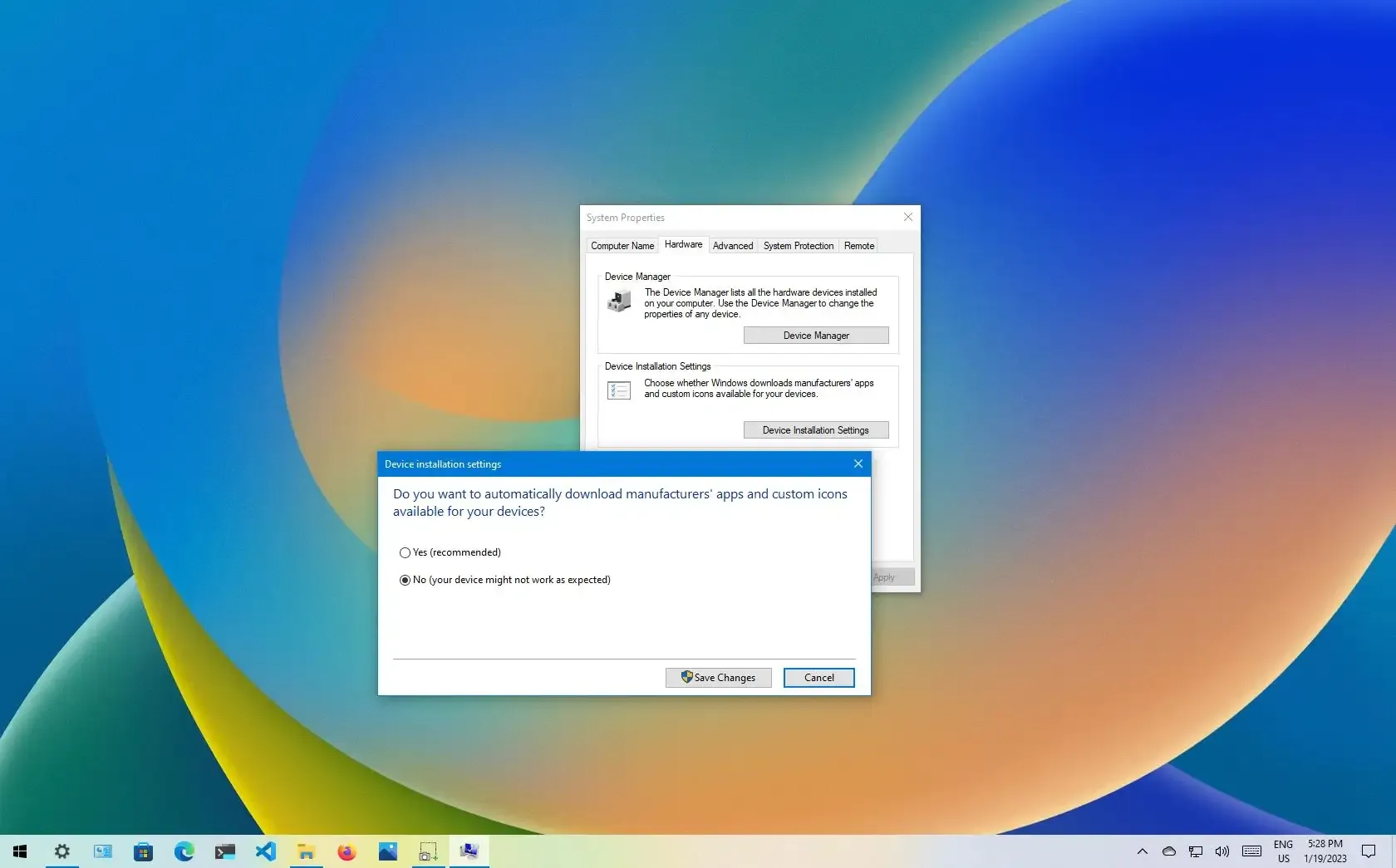
On Windows 10, to disable automatic driver updates, open System protection page, and turn off the option in “Device Installation Settings.”
Should be the same between 10 and 11
tall shoal
What could be wrong with my wifi? I’m getting 300mbp download but .08 upload
arctic verge
tall shoal
What could be wrong with my wifi? I’m getting 300mbp download but .08 upload
even wired?
tall shoal
arctic verge
even wired?
No, buts all of my devices have this issue and I was right next to the wifi box
arctic verge
oh
tall shoal
I’ll prob just call the provider if it hasn’t fixed itself in a week
arctic verge
do you have any devices that you could use wired
tall shoal
No
arctic verge
oh well
the best way to diagnose would have been to have a device that could check if the issue was the wifi network, or if it is the connection from the isp, or if it's the modem or whatever
vestal ibex
arctic verge
the best way to diagnose would have been to have a device that could check if th...
How far from the router are you? It could be that the signal from the router (download) is strong enough to overcome any interference to the antenna, but the WiFi card and antenna aren't strong enough (upload) to overcome that same interference
I'd also recommend using a live Linux distro off a USB to see if it's an OS/driver issue
tall shoal
vestal ibex
How far from the router are you? It could be that the signal from the router (do...
3feet

 sterile drift
Asking this question on the go so sorry if slow response, but I was wondering if I'd be able to use the same Windows 10 installation on my new build? I still have the packaging with the activation key, and I plan to use the same boot drive with windows already on it. I still have the old disc, but my new build won't have a disc drive.I was just looking at W11 pricing and saw it costs $130 so I'd love to avoid spending that if possible.
This is only my 2nd ever build so I've never dealt with this situation before
vestal ibex
sterile drift
Asking this question on the go so sorry if slow response, but I was wondering if...
Usually that works but if you're changing platforms, especially if you're moving to AM5, there's some bugs that can appear using an old windows install. The best way is to make sure you're signed into your Microsoft account, reinstall Windows, down into the same Microsoft account, and run the activation troubleshooter to transfer the digital license.
sterile drift
Ok rad, so I should just do a clean install? Cuz I am moving from an older Intel mobo to an AM5. My old windows thing is on a disc tho but hopefully I can just move it to a USB? Or does it have to be installed from the original disc for some reason?
vestal ibex
sterile drift
Ok rad, so I should just do a clean install? Cuz I am moving from an older Intel...
Clean install is best. AM5 has a bug where if you use an old windows install you can lose around 15% of your performance.
I recommend the windows media creation tool to make a USB.
sterile drift
Alright I'll do that then, I definitely don't wanna risk anything. Thank you!
 neat sigil
so i recently got a new gpu and psu and now my mouse and keyboard lag. so when i type occasionally what i type doesnt go through and i have to wait a second and my mouse. when im moving my mouse on my mouse lags going from one location to another. its just enough to making a inconvenience. also when i load a game neither have a problem operating. any recommendations on how to fix this
velvet mauveBOT
DDU (Display Driver Uninstaller) Guide by Pato
https://github.com/NeweggTechie/Graphics-cards/wiki/How-to-use-DDU
GitHub
Contribute to NeweggTechie/Graphics-cards development by creating an account on GitHub.
neat sigil
vestal ibex
Did you run DDU before installing the new GPU?
well when i was looking for my old drivers to delete to make sure they were gone i didnt see anything so i didnt run a ddu
should i run the ddu and delete everything and start over?
vestal ibex
That's the route I would go yes. Have it delete all the drivers for AMD, Nvidia, and Intel (if you have an intel CPU or Arc GPU)
Then when you reboot you'll install the new drivers again
neat sigil

neat sigil
vestal ibex
Good luck, let me know if there's any issues
so i deleted both drivers and redownloaded the correct drivers. it still seems to be doing it
its like its a input delay but both mouse and keyborad are wired. also its now happeing to my headset
i wonder if my usb ports are going out
vestal ibex
Ok, next I'd recommend updating your bios and chipset drivers
Chipset is here https://www.amd.com/en/support/chipsets/amd-socket-am5/b650
It's the same driver for all the AM5 platforms
BIOS will be on your motherboard support page
neat sigil
do i need to delete those too?
vestal ibex
No a simple update will do for those
neat sigil
heck ya
vestal ibex
You can tick the clean install box if you want
neat sigil
ill watch a video i have no idea how to do the bios and chipset properly and i dont want to mess it up
neat sigil
oh ok
vestal ibex
BIOS you'll need a USB drive to extract the file to, and then you select update inside bios
neat sigil
vestal ibex
What motherboard do you have? I can grab a link to the right one
neat sigil
 neat sigil
 vestal ibex
Based on bios version F2 I'd say you have either 1.0 or 1.1
AMD had known USB issues like yours on older bios versions, and F2 is one of the oldest on that board. Hopefully this will fix it.
vestal ibex
Nah 1.0 and 1.1 have the same bios versions so it doesn't matter
neat sigil
oh ok thank you
neat sigil
vestal ibex
https://download.gigabyte.com/FileList/BIOS/mb_bios_b550-ud-ac-1.0_f5c.zip
ok so how do i do this?
vestal ibex
Do you have a USB drive handy?
neat sigil
no
vestal ibex
You'll need one to update with
vestal ibex
You might be able to use the gigabyte software to update it without a USB. It's generally not recommended but if you don't have a USB it might be the only option.

GIGABYTE
GIGABYTE Control Center (GCC) is a unified software platform across a variety of GIGABYTE products. Every available utility preferred is optimized and integ...
neat sigil
vestal ibex
You might be able to use the gigabyte software to update it without a USB. It's ...
So I see a chipset driver update on it. Should I download it or just skip over it?
vestal ibex
The gigabyte software doesn't know about the latest version so it's often out of date. What you have is newer so skip it.
vestal ibex
It probably won't since it just runs the same installer in the background as you downloaded before.
And this is why it's not recommended to use the gigabyte software lol
neat sigil
Oh ok
neat sigil
vestal ibex
And this is why it's not recommended to use the gigabyte software lol
downloaded and restarted. still doing the same thing
i feel like this is my life now
vestal ibex
What bios version does cpu-z say you have now
 vestal ibex
Same version so it didn't update
 vestal ibex
Ok so it might be that your board doesn't support updates from the app
So you need that flash drive anyway
Any old cheapo drive will work, small capacity USB 2.0 drives tend to work best for this even
But 8GB drives are good for having a windows installer ready
neat sigil
yea its saying that. ill pick one up tomorrow and try again
thank you for your help fal
neat sigil
vestal ibex
But 8GB drives are good for having a windows installer ready
so i updated bios with a flash drive and it stopped it for about 10 minutes but its right back to lagging

actually seems to be worse tbh
vestal ibex
neat sigil
actually seems to be worse tbh
I recommend reinstalling windows as the next thing then
neat sigil
vestal ibex
I recommend reinstalling windows as the next thing then
updated windows. lost all my files. went to update my mouse drivers and fought with my pc for 50 minutes just getting the use of my mouse back. finally got it back and now the lag is worse. i hate it here
neat sigil
I've tried enabling my xmp and disabled my disabled my global c state control. Still nothing. I'm reading that a new hdmi cable might work so I'll try that next but with the current freeze I'm not going anywhere. Any other recommendations are definitely welcome
vestal ibex
Ouch, we could have helped with the windows install so you didn't lose files.
Since the issue only started with the new GPU installed that would be a good place to start hardware troubleshooting. If you have another PCIe slot, move the GPU to that and see if you still have problems.
scarlet creek
has anyone's monitors just dont turn on (black screen) after you wake up a pc from sleep?
it happens time to time (randomly) when i put my pc to sleep, or pc goes to sleep after the set time
pc goes to sleep -> i move the mouse and pc turns on, pc is on but monitor dont detect anything. Turns PC off and on, monitor detects pc and turns on.
vestal ibex
Sounds like your monitor or GPU doesn't like that sleep state. You can mess with the sleep power settings to find the one it doesn't like or just don't use sleep mode.
scarlet creek
vestal ibex
Sounds like your monitor or GPU doesn't like that sleep state. You can mess with...
when i put pc to hibernate, it does that sometimes too
scarlet creek
vestal ibex
Sounds like your monitor or GPU doesn't like that sleep state. You can mess with...
the thing is, it sometimes does that, and sometimes doesnt
if i put pc to sleep now and wake it up, everything is normal
but if i put pc to sleep now and wake up the pc like 2 hours later
it either
- normal stuff
- monitor is black screen and pc is on
vestal ibex
Could be S0 (modern standby) state, that's known to cause a few problems
scarlet creek
vestal ibex
Could be S0 (modern standby) state, that's known to cause a few problems
how to fix?
vestal ibex
Bios settings. The names of the different states vary by board model.
You can see what states are enabled by running an admin terminal and entering powercfg /a
scarlet creek
vestal ibex
You can see what states are enabled by running an admin terminal and entering `p...
 vestal ibex
You only have S3 available right now, and it seems hibernation is disabled too.
vestal ibex
You can try enabling other states in bios like S2, S1, or S4. The first 2 are alternate sleep modes and S4 is hibernation.
Exactly how will vary by motherboard
vestal ibex
scarlet creek
and for s1,2,0 not available... is that normal?
They're not usually enabled by default. S0 sometimes is default enabled on newer boards.
vestal ibex
That's one way to go about it. I prefer a more methodical approach to figure out which state works best.
scarlet creek
oh that's weird wtf.
 vestal ibex
Huh, that is weird indeed
scarlet creek
i have this same configuration, seems like other ppl also experience this
 vestal ibex
You have that same ASRock X670E PG Lightning?
scarlet creek
i have asrock x670e Steel Legend
vestal ibex
I'm not too familiar with the bios on ASRock
But I can try to find screenshots to find out what they call things
scarlet creek
ok the thing is
this reddit thread ppl are saying they dont have the sleep option in windows
i do
vestal ibex
Yeah it doesn't sound like an identical issue
scarlet creek
but the sleep funtion is just 50% of the working and the other times black screen of death until i hard restart pc
vestal ibex
It looks like there's some C state options under Advanced>CPU Configuration
 scarlet creek
vestal ibex
It looks like there's some C state options under Advanced>CPU Configuration
scarlet creek
vestal ibex
It looks like there's some C state options under Advanced>CPU Configuration
 vestal ibex
Welp looks like they changed the bios so I have no idea where they moved the options
scarlet creek
 scarlet creek
 vestal ibex
S4 and S5
 vestal ibex
Probably because it automatically disables them all
So with deep sleep enabled it'll replace hibernation mode with a "deeper" low power state
scarlet creek
well it’ll take some days for me to figure out if the black screen persists
for now i’ll use my pc like normal
neat sigil
vestal ibex
Ouch, we could have helped with the windows install so you didn't lose files.
S...
switched the slots and im still getting lag input
vestal ibex
Ok, do you still have the old GPU?
neat sigil
vestal ibex
Ok, do you still have the old GPU?
sadly no
idle dragon
https://gcam-port.com/download-gcam-port-stable-v8-1-v8-2-v8-4-android-10-for-android-phone/
Do i trust this website to download Google camera on a realme 5?

Download Gcam Port Stable v8.1/v8.2/v8.4 (Android 10+) For Android Phone: Here you will get the direct download link of the ... Read more
 vestal ibex
"Trustworthy" as much as any other site that allows people to upload but at least there's a rating system
wraith timber

idle dragon
Is there a way to transfer an app's data from a phone to another if no backups / google play games is supported?
spice beacon
idle dragon
Is there a way to transfer an app's data from a phone to another if no backups /...
If android yes should just be able to plug into a pc and find the actual files
idle dragon
Dont applications store stuff in many different folders spread around the phone's mem?
Id like to transfer some data from apps like 4=10 (game) but im not sure what id need to copy over to the new phone
 distant cedar
anyone have any experience with ngrok?
spice beacon

GitHub
A simple powershell script to remove bloatware apps from windows, disable telemetry, bing in windows search aswell as perform various other changes to declutter and improve your windows experience....
spice beacon
spice beacon
https://github.com/Raphire/Win11Debloat
idle dragon
thanks Pato for sharing
Anyone knows how i can restore Windows 7 Embedded defaults if i'm locked out with no psw? some suggest to try stuff from safe mode but i cannot access it even by shutting down multiple times as windows starts
spice beacon
idle dragon
thanks Pato for sharing
It's quite a nice tool so thought it'd be handy
idle dragon
If i set a password for my windows 10 pc, anything happens if i then get it wrong too many times?
vestal ibex
idle dragon
If i set a password for my windows 10 pc, anything happens if i then get it wron...
It might lock you out of your Microsoft account but normally you can just wait out the retry timer.
idle dragon
With lock you out, you mean you have to log in again after accessing the pc?
Retry timer is always the same or does it increase?
vestal ibex
I don't know, I usually just reset my Microsoft account password from my phone before it gets that far
idle dragon
What if someone else tries to access it many times? And im not aware that theyre actually trying to access my pc
arctic verge
idle dragon
If i set a password for my windows 10 pc, anything happens if i then get it wron...
local system accounts dont have a lockout
unless you set a group policy
there may be a short temporary lockout to slow down brute force attacks but im not even sure if those even exist
i dont think even win11 has lockout
idle dragon
I've seen a video online and apparently it just tells you to restart or asks for a sort of captcha before trying again
Ill keep googoling because i dont want someone to completely lock my pc because they try wrong codes too many times
arctic verge
idle dragon
Ill keep googoling because i dont want someone to completely lock my pc because ...
At least for 11


spammed the wrong password a bunch of times, asked for captcha, then did it again, then it tells you to restart
unless you have bitlocker enabled, i dont think windows has a feature that permanantly locks you out of your computer
unless you set it to
and unless you have drive encryption/bitlocker, then you'll be able to recover your files anyways without logging into windows lmao
just plug the drive into another computer
and even if you do, as long as you saved the key somewhere safe, you would still be able to decrypt the drive and get your data back
not really any reason for windows to permanantly lock you out
idle dragon
Thanks pal, i dont use bitlocker so i guess I'll be safe if I set a pin or psw for my pc.
idle dragon
Is it actually important to often reset CPU uptime in windows?
Idk if ill get any benefits, and the only way i know of doing that is by disabling fast startup, however that requires 6-7s more for boot time.
Does it really help in any way? Fast startup or slow startup?
*slow normal
vestal ibex
On modern systems it doesn't do much
idle dragon
Thanks, i will leave fast startup enabled
sterile drift
So I finished my new build today, but I'm reusing an SSD from it, and was asked this upon trying to set up Windows 11. I had preemptively moved a bunch of stuff to the drive I was keeping for safe storage, and I'm I'm not really sure what to lick here or what overarching effects it'll have on anything.

The SSD from my old build is not the one I'm using as a boot drive, in using a fresh one for Windows.
viral eagle
sterile drift
The SSD from my old build is not the one I'm using as a boot drive, in using a f...
Id boot and setup windows with only the fresh drive, then later plug in the older drive
sterile drift
I clicked the bottom option and got everything running now with no issues but ty though
arctic verge
idle dragon
Thanks, i will leave fast startup enabled
Personally I leave it disabled
If ssd systems
I have no source for this but I feel like it's probably more stable to not use fast startup; maybe it makes no difference but eh
10 seconds more of less than a minute of boot time is still a short amount of time
Esp compared to when I was using a HDD system 
 brittle heart
Ive gotten 4 blue screens in the past 3 days, It used to be only once or twice a month so i didnt bother fixing it but its getting anoying now
ones ive gotten are
UNEXPECTED_STORE_EXCEPTION
Memory_Mangement
IRQL_NOT_LESS_OR_EQUAL
andd i dont remember the other one
anyone know what i can do to fix this
 mint wigeon
run a system file check
open command prompt as admin and type SFC /SCANNOW
@brittle heart
brittle heart
like so?
 brittle heart
 vestal ibex
brittle heart
vestal ibex
brittle heart
Zip the contents of C:\Windows\Minidump and message it to me, I'll analyze the crashes and try to find a cause. Memory management makes me think the memory is either bad or you overclocked it and it degraded.
There's no personal info in the crash dumps if you're worried about that.
brittle heart
vestal ibex
Zip the contents of C:\Windows\Minidump and message it to me, I'll analyze the c...
i get this when trying to zip it
 vestal ibex
Copy them to the desktop first
brittle heart
vestal ibex
Copy them to the desktop first
Sent
viral eagle
Ok, I have a little puzzle for anyone interested. My house has 400mbps internet.
I had gotten the full 400 in the past, but then it was stuck to only 100. I thought perhaps the cable (cat6) had been damaged, but later I was getting 400 again.
Right now, I'm only getting 100mbps, but strangely I can run multiple downloads at that speed without them slowing down. Nevermind, the PowerShell just wasn't reporting the speed right.
still only getting 1/4 the speed I should be though.
arctic verge
viral eagle
still only getting 1/4 the speed I should be though.
Could be the ISP, could be something in your network; best way to test is to do a speedtest connected directly to the modem/ONT transceiver
viral eagle
I should add that other devices on the network are getting full speeds
arctic verge
Hmm
Is your cable routed through the wall, or is it somewhere that it may get crushed or pinched
viral eagle
not in a wall, it does have some turns in its routing but they are consistent/static
arctic verge
Hmm
Try plugging another device into the same port your device is using, to see if you get 400
If you do, then it's either the cable or the nic
And you can isolate the cable by using one of your other devices to test that cable to see if you get 400
 noble pecan
Hi everyone
arctic verge
arctic verge
And you can isolate the cable by using one of your other devices to test that ca...
Or if that's too much effort, you could try reinstalling the driver for the nic; just make sure to download the driver package before uninstalling to make sure that you're able to reinstall (though the windows driver should work for a wired connection tbh)
viral eagle
yeah my laptop doesn't have an ethernet port but might be able to borrow someone else's
noble pecan
Anyone had a problem with G.SKILL Flare X5 Series AMD EXPO 32GB (2 x 16GB) 288-Pin PC RAM DDR5 6000 compatibility with tuf gamig x670 e wifi plus, first run it as expo 1 but took too long to start , some time it block and don’t turn on, but when i run it as expo 2 it run normal??
arctic verge
noble pecan
Anyone had a problem with G.SKILL Flare X5 Series AMD EXPO 32GB (2 x 16GB) 288-P...
Just unstable prob
noble pecan
What do you mean plz
arctic verge
You are basically overclocking your ram with preset profiles
Some systems might not like the timings and be unstable
noble pecan
So do you think it’s normal keep it or switch for another, fyi i have the R 7800 3xd and xr 7800 xt radeon
Sorry for disturbing you
arctic verge
noble pecan
So do you think it’s normal keep it or switch for another, fyi i have the R 7800...
Might be the cpu honestly
If it's stable on jedec, and is also stable on profile 2, then you're fine
Also you aren't disturbing me, you didn't even ping me at all lol
I was looking at the menu to order some food earlier
Feel free to @ me if you want me to reply within a few hours since I only check this channel every few days lol
vestal ibex
noble pecan
Anyone had a problem with G.SKILL Flare X5 Series AMD EXPO 32GB (2 x 16GB) 288-P...
That kit is known to sometimes need a little extra voltage to run at xmp speeds.
Also, it's normal for it to take 5-10 minutes to train, especially on older bios. Make sure that's updated.
noble pecan
The bios is up to date, just found that if i run it under EXPO 1 its start slow , but under EXPO 2 it’s normal
sterile drift
I'm having a really mildly annoying issue with Steam on my new PC. I had some games still installed one of my old SSDs that I'm reusing from my previous build, but for some odd reason the desktop icons have no...icon?

It's really just these 2 MH games. My friend mentioned this is normal for this situation, but she doesn't know how to fix it. I'd love to avoid reinstalling them if possible because I don't have the fastest internet really, and they're decently large games.
I also have them pretty heavily modded and don't want to go through setting up mod managers again if possible, especially not over something as silly as desktop icons 😭
One article I read mentioned verifying file integrity through Steam, but that didn't work at all.
arctic verge
sterile drift
I'm having a really mildly annoying issue with Steam on my new PC. I had some ga...
the desktop shortcuts are just shortcuts; the will still work even without the icons. To restore the icons, for each shortcut, you right click, properties, and then click change icon, and then go to C:\Program Files (x86)\Steam\steam\games , and select the appropriate icon for your game. or as a meme, you could set them as something else as well
hope that helps
 junior elm
Hi everyone
sterile drift
I saw this late but I've got it fixed now, thanks! And yeah, I know the desktop icon not being there doesn't affect anything, it just looks super ugly and it was bothering me 😭
 atomic galleon
My computer is doing a weird thing where everything is auto scrolling down. But only in things like windows settings.
Unplugging my keyboard doesn't fix the issue, I've restarted it too. I can't use search because it automatically closes.
balmy grove
It's probably your mouse spazzing out
 sullen karma
It's me
 opal venture
Do prebuilt computers and laptops still come with a bunch of family-friendly games installed along with the OS?
opal venture
For CashMoney™️ ?
vestal ibex
They're mostly free but heavy on in app purchases
Solitaire is ridiculous now, you can only play 3 shuffles a day on classic mode, you have to buy the other ones like spider solitaire and freecell
3D Pinball is long since gone on Windows but you can get this port made by the guy that made the original on XP https://github.com/k4zmu2a/SpaceCadetPinball
GitHub
Decompilation of 3D Pinball for Windows – Space Cadet - GitHub - k4zmu2a/SpaceCadetPinball: Decompilation of 3D Pinball for Windows – Space Cadet
opal venture
What's next, 3D Pipes and other screensavers released as DLC?
balmy grove
i hate the bundled anti virus softwares laptops and oem machines come with
i always reinstall windows when i get a new laptop
sullen karma
i opened my old laptop i hadnt gotten into in like 3 years and mcafee was running up like 2 gigs of memory, which i don't understand why lol
vestal ibex
Kill it with fire

When your program is so bad it's practically malware and your uninstaller leaves junk behind, leave it to the community to design a tool to kill it
 charred bane
Hey I need some help
with my friends computer
during boot, it won't ever reach windows itll just restart
he can get into bios tho
we just installed a new graphics card and its being weird
 hasty smelt
Havnt got my setup but r there any window keys that y’all trust for windows 11 that aren’t like 110
vestal ibex
Officially I can only say to get a retail key, gray markets aren't allowed here
Windows 10 keys do 100% work for activating 11 though
hasty smelt
Officially lol, thx tho
arctic verge
sterile drift
I saw this late but I've got it fixed now, thanks! And yeah, I know the desktop ...
lol personally i just hide all my icons to keep a clean desktop, since i never use those shortcuts anyways
wraith timber
I use the start menu for all my shortcuts
Taskbar is a clean slate, desktop is a clean slate
arctic verge
fr
ok i do leave 2 things pinned on my taskbar
chrome and windows explorer
because those i actually need to frequently open
though i guess i could just press win + e
or dare i say, ctr + win + alt + shift + l
wraith timber
Lol
Firefox go in start menu
And win explorer just rmb start menu button
It's in the context menu
idle dragon
for what stupid reason does my chrome account sometimes change the default search engine to Yahoo wth...????
arctic verge
Oh hey
Windows 11 is going to have sudo
Or a command like sudo
So that you don't have to have an elevated window to do adminstrative commands
vestal ibex
I mean
That kind of already existed
I guess now it's just more than hackers that can do it
opal venture
I've changed hardware 3 times on one windows license, am I boned now?
vestal ibex
opal venture
I've changed hardware 3 times on one windows license, am I boned now?
Nope you're fine. The digital license is theoretically infinitely transferrable now.
It's just it can only be activated on one device at a time
opal venture
I changed hardware on this device recently in the troubleshooter didn't work a while back. It told me I already reactivated on this machine or license already
 supple quartz
I imagine this is a software problem so I will put this here Bluetooth is completely gone from my computer, for context I just updated my Bios(Gigabyte B550M DS3H AC) after realizing I was behind a few updates, but when I updated, Bluetooth is completely gone, gone from hidden devices in device manager, and the option under devices in settings is gone. Here are the things I have tried to fix it. Fix 1: Go to intel website and download Bluetooth driver. Fix 2: Gone to the gigabyte motherboard page and gotten the intel wifi drivers. Fix 3: Restart all bluetooth services. That is all.
vestal ibex
supple quartz
I imagine this is a software problem so I will put this here Bluetooth is comple...
Try rolling back to a previous bios version, sometimes the latest has bugs
opal venture
I've removed all of the devices on my windows account. Do I need to reinstall windows to register my computer again?
 sharp snow
hey guys so for the past few days I had a promt on when I clicked to shut down that said that there is something unsaved etc even though all my programs were closed so I clicked shut down anyways and like that for a couple of days I am not sure if this s the cause but my windows tools like the windows button/toolbar search/access to windows settings menu does not react as well as task manager not displaying processes it only shows the total usage of each component
So my question is how do I fix this?
balmy grove
there's no issues with your windows install
it's all expected behavior
as for the first "problem"
you can close any and all programs before shutting down
second is you have minimized task manager, or haven't changed tabs assuming it's the new task manager that comes with win 11
arctic verge
I just discovered that windows 11 doesn't support nic teaming or bonding
sullen karma
Id rather just use 10 over 11
vestal ibex
arctic verge
I just discovered that windows 11 doesn't support nic teaming or bonding
Support for that stopped in Windows 10 v1607, the late 2016 version. Even if you downgraded now to 10 it still wouldn't work without forcing an old version, which many drivers don't support any more.
vestal ibex
That's their argument yeah. It would still be nice as an optional feature for the pro or enterprise edition of windows.
But basically they're telling you to just get a faster nic card
last gorge
😦
arctic verge
does anyone know of any software for behind a NAT that checks your public ip if it has changed then can send a http request to dnsomatic to update the ip entry in cloudflare
well, the first part is the most important part
dont have any proxy servers, just behind a NAT
and the isp router for some reason only support DynDNS and noip
like brah

and to get a static ip, it would be $40/m more or smth like that
might be more, might be less
depends on how many ips you buy ig
vestal ibex
I just do a static IP on my VPN
arctic verge
that gives more latency though, and if i want to host game servers, that might not be as ideal i would think
arctic verge
arctic verge
does anyone know of any software for behind a NAT that checks your public ip if ...
oh i just found out that it seems like they already have a list
vestal ibex
The latency will depend on your VPN and where the server is. I chose one that's close to me so it only adds about 15ms of latency one way.
scarlet creek
how do i get windows to REMEMBER the settings i put for my L and R channel? every time i put my pc to sleep and wake up it resets back to 1:1. I want it to stay as the ratio i put it (example, 48 for left and 36 for right, etc)
 arctic verge
for some of them at least
arctic verge
arctic verge
for some of them at least
none of them actually work anymore
it seems like i have to write my own script now
arctic verge
scarlet creek
how do i get windows to REMEMBER the settings i put for my L and R channel? ever...
honestly a mystery to me as well, windows sometimes saves the settings, sometimes doesnt for me... not sure if it's the device's or window's fault
scarlet creek
arctic verge
honestly a mystery to me as well, windows sometimes saves the settings, sometime...
😭
arctic verge
i have completed my script
it is working
or appears to be working
actually, i want to edit it
oh wait
nvm
cloudflare obfuscates my ip
i was going to change my script to check the ip of the domain using resolve-dnsname but that returns a diff ip
i just stepped on my phone because i forgot i dropped it and was too lazy to pick it back up lmao
anyways, the script is very simple
basically check my public ip using https://ipinfo.io/ip and storing it in a variable, sleeping for 2 minutes, check public ip again with that, store it in a variable, compare ip 1 and 2, and if it's not the same, then i send an http get request to the DNS updater which sends and API request to cloudflare to change my IP to the new ip
idk how often i'm allowed to query my ip with that site, so i'm doing 2 minutes so any occasional downtime wouldnt be too long
arctic verge
ok nvm it doesnt work properly, i felt like it was too easy and it was
my http get requests arent valid 
how do i do https get requests properly with powershell
actually
a solution exists already for linux, i just didnt want to bother with installing more things to get it working on my pc at home, since wsl is disabled due to it not being compatible with vmware when i need to nest vms
vestal ibex
Ask chatgpt to do it 
arctic verge
oh cloudflare is able to update it without a 3rd party service through the api
still a linux command but alot simplier
sobbing
arctic verge
ok it's been set up
next is setting up a reverse proxy, probably using nginx
i'll do that some other day
arctic verge
End Of General Availability of the Free vSphere Hypervisor (ESXi 7.x and 8.x) (2107518)
As part of the transition of perpetual licensing to new subscription offerings, the VMware vSphere Hypervisor (Free Edition) has been marked as EOGA (End of General Availability). At this time, there is not an equivalent replacement product available.
For further details regarding the affected products and this change, we encourage you to review the following blog post: https://blogs.vmware.com/cloud-foundation/2024/01/22/vmware-end-of-availability-of-perpetual-licensing-and-saas-services/
last gorge
that's nice
arctic verge
vmware vSphere specifically
vSphere is the baremetal hypervisor,
fairly commonly used in homelabs, since people use it as like, practice/experience before they actually do sysadmin stuff
which has been what i've been doing kinda
i've been slowly expanding the functionality of my home network with incremental upgrades
starting from the networking; making every device that supports a wired connection be wired
and turning old dumb printers into network printers using a raspi and CUPS
plan on adding a NAS or even a SAN so that i can move my spinning disks out of my desktop, because my desktop has such a tight fit in my desk that the vibrations of the HDDS, even with the silicone spacers still makes a vibration noise that reverberates through my desk and is quite audible without headphones on at least
or at least very noticable when im at my desk lmao
not sure if i'll use unraid or truenas
unraid can work with different size disks in the same pool afaik and truenas is better for SAN, so i'm not sure which one i should use
though unraid also has an iSCSI plugin from what i found in the forums
well, this will have to wait a while longer, since i need to get more money and time to do this
i wonder if the systems i have laying around are able to boot off usb
they both use ddr3 and intel cpus but i forget what ones they were
last gorge
I thought about using ESXi at one point. Now I just use a baremetal TrueNAS install with one VM
vestal ibex
Reject SAN, embrace JBOD
last gorge
lol
tranquil cairn
How do i turn \windows updates back on
everytime i go to services msc and try to turn it back on it says access denied
vestal ibex
You can run the Windows update troubleshooter. Those aren't entirely useless like they were previously.
tranquil cairn
how i do that
vestal ibex
tranquil cairn
how i do that
Settings
 opal venture
Is it a bad idea to copy and paste my old windows users/(username) folder to a fresh installation on a new machine?
vestal ibex
Kinda? There's some system files in there but as long as you don't overwrite anything it should be ok
arctic verge
might mess with the registry a bit, idk
might be diff than my situation
i renamed the folder on my install and my system gets confused sometimes
vestal ibex
Make sure to backup any changes you make
opal venture
I see some sites listing OEM windows for cheap. Are those legitimate? Do we talk about them here?
tall wraith
opal venture
I see some sites listing OEM windows for cheap. Are those legitimate? Do we talk...
Stay away from them if they’re greykey types.
vestal ibex
opal venture
I see some sites listing OEM windows for cheap. Are those legitimate? Do we talk...
We can talk generally about them but no specifics and definitely no links. If someone wants to DM, that's outside our jurisdiction.
viral eagle
iirc OEM keys are typically not greymarket, they're extra stock
viral eagle
opal venture
I see some sites listing OEM windows for cheap. Are those legitimate? Do we talk...
I can't speak for the legitimacy of any specific site but the keys are more likely than not legit, i.e Microsoft isn't gonna revoke it
vestal ibex
viral eagle
iirc OEM keys are typically not greymarket, they're extra stock
Technically you could call them that. What the sellers will do is set up a "fake" system integrator company so they can get bulk licenses for cheap from Microsoft, then they resell those licenses.
viral eagle
Oh, didn't know that lol
opal venture
and they pass the savings on to YOU
viral eagle
Part of the savings, yes
MS makes most of their license money from big corps so I personally don't feel bad about grabbing cheaper keys
Some greymarket stuff is more sus cause it's often bought with stolen CC info :(
vestal ibex
You see that most often with the $5 keys off ebay etc
Those get taken down fast too, for good reason
vestal ibex
That's the problem, it's hard to tell. Usually a seller profile gives it away at least. On ebay the bad ones are usually hacked or new accounts. You can tell a hacked account when it's had no activity for a year and then suddenly they list thousands of obscenely cheap things.
 past obsidian
One message removed from a suspended account.
vestal ibex
Sounds like one of the ram settings you changed caused it to become unstable
Your best bet is to clear cmos, and when you go back into bios only enable xmp and do nothing else
?cmos
velvet mauveBOT
How to clear CMOS (works for AMD and Intel)
https://www.intel.com/content/www/us/en/support/articles/000025368/processors.html
Intel
Defines CMOS technology and how to clear CMOS using the jumper or battery methods.
 limber meadow
I bought a Bluetooth adapter for my pc but my controller keeps moving on it’s on when playing now all of a sudden
Any help ?
vestal ibex
What software are you using to translate the controller functions to PC inputs
It might be picking up motion from the gyroscope
idle dragon
Will notification history use any significant percentage of battery if enabled on a samsung s device?
idle dragon
Thank you for the info
Just wondering because I really have to squeeze every last drop out of my s21 battery as it is quite small and badly optimized
spice beacon
idle dragon
Just wondering because I really have to squeeze every last drop out of my s21 ba...
Uh replace the battery?
idle dragon
it's new, the battery is just small. it's not like i can upgrade it
it still lasts through the day but i sometimes end up just a few minutes before bed with no battery
i also charge it to 85% max so that contributes to a lower duration
wraith timber
charge it when it needs a bit of juice
idle dragon
shoud use airplane mode sometimes, since poor network signal affects the performance
wraith timber
I go down to 50 up to 85 ideally but if I'm extra lazy I just let it drop lol
idle dragon
wraith timber
charge it when it needs a bit of juice
definitley, I was really used to my previous phone that lasted 3 days on a full charge
idle dragon
idle dragon
shoud use airplane mode sometimes, since poor network signal affects the perform...
in some places it happens that the phone gets quite hot in my pocket, and when i check there's like a 30% drain in a few hours of standby
wraith timber
buh
I'm on 5g constantly because the wifi in this house sucks so I don't use it
battery doesn't drain that hard
idle dragon
you likely have good signal if your 5g is faster than the wifi
wraith timber
unless I have like youtube open in vanced and in firefox lol
it's alright signal but they're about the same in speed I think
idle dragon
i'm talking about places where i get Edge or 3G+
and sometimes just "No service available"
idle dragon
no 5G with my current plan, still not widely spread so there'd be no point to have it enabled anyways
other places, like at home, i can use lte and have my phone battery last much longer, til night or early morning
solution: probably airplane mode. i'll test it out these days
wraith timber
could also try the thingy where you update network list or whatever it is
idk maybe phones do that automatically now
idle dragon
what do you mean by that?
wraith timber
preferred roaming list and whatever else
idle dragon
Used airplane mode today for about 5h mainly when I had bad signal. Saved up a nice 30-35% battery.
Currently I'm at 40% but usually at this time I'm running low on battery, just above 10p
vestal ibex
@visual crescent No piracy pls
Corporate server and all that. Can't have even the slightest appearance of Newegg supporting it.
 visual crescent
Sorry and Apologises for the Mistake
 jaunty reef
hey guys, my pc used to be able to connect via ethernet whenever I used to do Lan parties at mates houses. Long story short I'm wanting to get a more stable connection as I'm at the other end of the house, but when I connect my ethernet cable it doesn't connect nor does it even show the drivers or the "Ethernet" tab in settings
visual crescent
Make sure that ethernet port is fine,because at many times in plugging and unplugging the ethernet port becomes loose and at the end stops receiving responses.
Can you send the pic of device manager where it displays all drivers along with Ethernet?
opal venture
I got a notification in here, but There's no new post mentioning me. Someone must have broken the rules
arctic verge
jaunty reef
hey guys, my pc used to be able to connect via ethernet whenever I used to do La...
have you gotten this resolved yet? check device manager to make sure that your adapter shows up on your device manager
also long runs of cable can get damaged by screws/nails if some installation was done, and can cause the connection to not work
arctic verge
Not sure if you can talk about that here; likely breaks YouTube TOS, especially since google got them to discontinue development
vestal ibex
I don't think it counts as piracy, YouTube just wants you to think it is.
arctic verge
It might or might not be piracy, but it's still a breach of terms of service
I wonder if discord bans people for breaking other services' tos
wraith timber
I will eat the mmmmm yummy term of service mmm
viral eagle
arctic verge
I wonder if discord bans people for breaking other services' tos
doubt it unless they have a server where it's being organized. Probably not feasible to track individual users
arctic verge
viral eagle
doubt it unless they have a server where it's being organized. Probably not feas...
I mean if it gets reported
Discord doesn't really have a reliable method of tracking their own user's TOS breaches; they only know if someone snitches
But I wonder if they care about the TOS of other unrelated companies
sullen karma
Ill delete my message just to be safe 😭
I know it its not considered piracy because individual channels and the such still get revenue from youtube regardless and is under fair use and privacy, but tos is a bit more on the end i dont like
From my knowledge it and revanced are both fine since modding for personal use is legal
viral eagle
arctic verge
Discord doesn't really have a reliable method of tracking their own user's TOS b...
Highly doubt it, unless the breach in question is obviously illegal in itself
idle dragon
is there any way to reduce the amount of scans / background usage of windows 10 antimalware service? it's always running and using a significant amount of cpu resources when the pc is not being used activley
visual crescent
idle dragon
is there any way to reduce the amount of scans / background usage of windows 10 ...
There's a way I know to stop it but not to reduce the amount of Scans...
As Windows always Scans time to time for malware detection
spice beacon
idle dragon
is there any way to reduce the amount of scans / background usage of windows 10 ...
That's not normal, shouldn't be using that much, that might be cause for a reinstall of windows, but try the usual sfc and dism first